Just as expected, Apple has also formally announced the dates for the next WWDC 2024 conference. Google previously disclosed the information about I/O 2024. As per the announcement, the Worldwide Developers Conference is scheduled to take place from June 10- June 14. The company released a teaser featuring its advertising slogan “Absolutely Incredible.” The abbreviation for the tagline “AI” indicates that artificial intelligence will be the primary focus of this year’s tech conference. So this year’s WWDC will be interesting to watch how Apple intends to fight in the AI space against OpenAI, Google, and other industry titans.The WWDC 2024 keynote and sessions will once again be streamed live online by Apple, making it free for developers to access. Traditionally, Apple hosts a developer-only keynote on the opening day of the conference, introducing its most recent software and occasionally new hardware. On June 10 Apple is going to host an offline event at its Apple Park location in Cupertino, California, for a limited number of developers and students. You can go to the Apple Events page or Apple’s YouTube page to watch the Apple WWDC 2024 keynote live.Also Read:Poco C61 budget smartphone with 5,000mAh battery launched in IndiaAs stated previously, WWDC24 is free for all developers and will feature the newest developments in iOS, iPadOS, macOS, watchOS, tvOS, and visionOS. Developers will also get exclusive access to Apple specialists at the event, along with knowledge about new features, frameworks, and tools.On June 10, developers will be able to attend the keynote at Apple Park, meet with Apple team members, and participate in exclusive activities as part of the in-person WWDC24 experience. There will be a limited number of spaces available so participants should visit the Apple Developer website and app for information on how to apply.
What is Expected?
Going by the company’s tradition, the firm’s CEO Tim Cook will present the WWDC 2024 keynote. It is also expected that Apple will discuss AI in public as it has been quiet about its views on generative AI, even while rivals like Microsoft and Google have unveiled new AI features and services. It is rumoured that Apple is developing custom GenAI features that will be integrated into the next iPhone 16 Series. Apple has developed a chatbot that is said to be called Apple GPT internally. The tech giant has also designed its own large language model, or LLM, framework called Ajax.Also Read:Zoom introduces its new AI-powered collaboration platform Zoom WorkplaceThe new iOS 18, iPadOS 18, watchOS update, and macOS version for the corresponding devices will undoubtedly be included at the Apple WWDC 2024 keynote.The next iOS update is expected to include additional customisation options for the home screen and a new avatar for Siri. In addition to this with the visionOS 2.0 edition, the company is also likely to bring new features to its AR headset- Apple Vision Pro.
He is named Microsoft’s Windows and Surface chief, showcasing the ascent of Indian talent in global tech leadership.
Davuluri joins notable Indian-origin leaders at the helm of major tech companies worldwide.
Davuluri to lead both Windows and Surface divisions, emphasizing innovation and integrated tech advancements.
In a significant leadership shuffle at Microsoft, Pavan Davuluri, an Indian-American and illustrious alumnus of IIT Madras, has been appointed as the new chief of Windows and Surface, a role that positions him at the forefront of Microsoft’s innovative drive in the technology sector. This appointment underscores the increasing prominence of Indian-origin leaders in the global tech landscape, joining the ranks of notable figures like Sundar Pichai of Alphabet and Google, and Satya Nadella of Microsoft itself.
Davuluri’s journey from the esteemed corridors of IIT Madras to a pivotal leadership role at Microsoft is not just a personal achievement but a beacon of inspiration for many. It reflects the global tech industry’s recognition of talent that transcends geographical boundaries. Prof. Mahesh Panchagnula, dean of alumni and corporate relations at IIT Madras, expressed pride in seeing alumni ascend to leadership positions in pivotal companies like Microsoft, shaping technologies that influence our daily lives.
Read also:Tim Cook completes 7 years as Apple CEO: Seven innovations and product
The decision to place Davuluri at the helm of both Windows and Surface comes after Microsoft’s reorganization following Panos Panay’s departure. With a rich history of over 23 years at Microsoft, Davuluri’s contributions have been instrumental in the company’s collaborations with tech giants like Qualcomm and AMD, particularly in developing custom processors for Surface devices. His comprehensive oversight over both Windows and Surface divisions marks a strategic move aimed at fostering synergy between Microsoft’s software and hardware endeavors.
This leadership update coincides with a notable period of innovation at Microsoft, especially with the recent onboarding of Google DeepMind co-founder Mustafa Suleyman to lead a new AI team. Davuluri’s role is set to be crucial in steering Windows and Surface products towards integrating cutting-edge technologies and enhancing user experiences in an increasingly competitive market.
Read Also:Madras High Court demands a ban on the popular video app TikTok:
Pavan Davuluri’s appointment as the chief of Microsoft’s Windows and Surface divisions not only highlights the global tech industry’s inclusive approach to leadership but also signifies a crucial phase of technological advancement and integration at Microsoft. With his extensive experience and visionary leadership, Davuluri is poised to drive Microsoft towards new horizons of innovation and success.
Garena Free Fire is a battle royale game with regular awards and tournaments to keep players interested. If you play Garena Free Fire, you should be aware of the redeem codes that are released on a daily basis. However, because the battle royale game is banned in India, players from other countries can use the Free Fire Redeem codes daily. If you’re unfamiliar with the Garena Free Fire redeem codes or don’t know how to get them, we’ve put together a step-by-step guide to help you redeem them. Check out Garena Free Fire Redeem Codes for 27 March 2024.The Free Fire redeem codes are a great way to get free stuff. These are 12-digit codes that contain alphabets and numbers, as well as an expiration date and time. Because the Garena FF redeem codes cannot be used more than once, you should hurry to the redemption page to claim your free reward before someone else does. To get a free reward, all you have to do is go to reward.ff.garena.com/en, which is the official redemption page. Also, keep an eye on this space for daily updates on Garena Free Fire redemption codes and rewards.Also Read: Sennheiser Accentum Plus wireless headphones with Hybrid Adaptive Noise Cancellation launched
Most Android users prefer Google Play Store for app downloads, and for good reason. Being Android’s native app marketplace, Play Store ensures that only the safest apps are published on the platform. However, in certain situations, you may need to look for app marketplaces other than the Play Store. This is predominantly the case if you want to download an older version of a certain app. So, here’s our list of the top 7 websites for safe APK downloads.Read Also:Vivo V30 Pro Review: A no-brainer purchase for photography enthusiasts
APKMirror
One of the biggest online hubs for APK downloads, APKMirror is one of the safest websites for the job. It is perhaps the most popular Android app store outside of Google Play Store. APKMirror is very well moderated and any malicious apps are quickly taken down from the platform. It uses cryptographic signatures to gauge the legitimacy of apps. If you’re looking for an older version of a particular app, chances are you will find it on APKMirror. The diverse library of apps on this platform remains unmatched by its peers.
APKPure
As far as safe websites for APK downloads go, APKPure is up there with APKMirror. This website has a respectable collection of apps. You can also find older versions of Android apps on this website. The platform uses cryptographic signatures and SHA1 certificates to weed out any malicious and counterfeit apps from the website. APKPure also has a helpful app that you can download on your smartphone.
F-Droid
F-Droid is one of the biggest open-source app marketplaces on the Internet. While downloading an app from F-Droid, you know exactly what you’re getting. The platform is very transparent about letting the user know about any invasive ads pushed by the apps. As a result, F-Droid’s app library isn’t as strong as the likes of APKMirror and APKPure. The APKs on F-Droid are verified against their public logs of observed SHA-256 checksums.
Uptodown
Uptodown has a vast catalogue of apps, not just for Android, but also for Windows and Mac users. Uptodown has a very clean layout which is easy to browse on PC as well as mobile. The lack of invasive ads is the reason why over 130 million users prefer Uptodown over its peers. The apps on this website are scanned by 70 different anti-viruses through VirusTotal. If you want to turn on automatic updates for apps using Uptodown, you will need to install its Android app on your phone. One of the best features of this platform is that you don’t need to register in order to download an app.
Softpedia
Softpedia is also an Android-focused app store which also caters to Mac, Windows, and Linux users. The website hosts over 1.5 million apps across different ecosystems. You will find all the major Android apps on this platform. Softpedia also has a ‘Reviews’ section if you want to read up on an app’s user experience before downloading it on your device.
APKMonk
APKMonk is another reliable website for safe APK downloads. The apps on this website are neatly divided into distinct categories, making it easy for the user to find what they are looking for. The APKs on this website are regularly monitored and any app pushing malware or other kinds of malicious content is quickly taken down. Like its counterparts, APKMonk also allows you to download previous versions of apps.
APK4Fun
Closing this list is the APK4Fun app store. The APKs hosted on this platform are the same as their Google Play Store counterparts, without any “cheat, unlimited gold patch, or any other modifications”, according to the website. This means if you are seeking modded apps for your rooted smartphone, you will have to look elsewhere. The apps on APK4Fun are divided into categories like Arcade, Casual, Health & Fitness, Productivity, Educational, and more.Read Also:Poco C61 budget smartphone with 5,000mAh battery launched in India
Conclusion
These are our top 7 picks for websites that offer safe APK downloads. While downloading an APK from a third-party marketplace, make sure you check out its reviews to know it is legitimate. Once you download the APK, you will need to allow the installation of apps from third-party sources.
The handset comes with an AI-backed 8-megapixel dual camera setup.
The phone will be available via Flipkart in the country.
The Chinese smartphone maker Poco today arrived with a new smartphone in the Indian market. The company released the Poco C61 in the country. The handset is powered by a MediaTek Helio G36 chipset. There is a 5,000mAH battery onboard and a side-mounted fingerprint sensor which is rarely seen on a phone priced under 7k. Also, it comes with an 8-megapixel primary rear dual rear camera set-up and a 5-megapixel selfie camera. Check out the pricing and specs below.
Poco C61 price in India, sale details
Poco has launched Poco C61 in two different configurations. The price of the base 4GB RAM with 64GB storage is set at Rs 6,999. There is another 6GB RAM with 128GB storage options that will retail at Rs 7,999. The budget smartphone will be offered in Diamond Dust Black, Ethereal Blue, and Mystical Green colour options. The device is scheduled to go on sale on March 28 at noon. It can be purchased through Flipkart in the country.The device seems to be a repackaged Redmi A3 based on its specifications. Its price starts at Rs 7,299 for the 3GB RAM with 64GB Storage. The price of the 4GB RAM with 128GB Storage and 6GB RAM with 128GB storage is set at Rs 8,299 and Rs 9,299 respectively.Also Read: iPhone 14, iPhone 14 Plus price drops on Flipkart, best time to buy the devices
Poco C61 specification
Poco C61 is driven by a MediaTek Helio G36 SoC coupled with MediaTek Helio G36 SoC storage. The phone operates on Android 14 out of the box. It features a 6.71-inch HD+ LCD display with 1,650 x 720 pixels of resolution. The handset’s screen supports a refresh rate of 90 Hz and 180Hz touch sampling rate. Additionally, the display is protected with Corning Gorilla Glass 3.For photos and videos, the Poco C61 features a dual rear camera setup powered by AI. The unit includes an 8-megapixel primary sensor and an unnamed secondary lens with an LED flash. For taking selfies and video Poco has provided a 5-megapixel front-facing sensor on the phone.Also Read:Zoom introduces its new AI-powered collaboration platform Zoom WorkplacePoco C61 is stuffed with a 5,000mAh battery but unfortunately, the device only supports 10W wired charging. In terms of connectivity, there is 4G, Wi-Fi, Bluetooth 5.4, GPS, and a 3.5mm audio port, USB Type-C for charging. The phone also has a side-mounted fingerprint sensor for unlocking.
Vivo’s midrange V series enjoys a lot of success in the Indian market mostly due to its camera-centric approach and exciting form factor. Last year’s V29 Pro got a glowing review from us, as it was one of the few phones in its category to offer a telephoto camera instead of a futile macro sensor. So how has Vivo elevated its game this year? Well, in all the right ways. The telephoto and ultrawide lenses have received a significant upgrade – now rocking 50MP sensors. The front camera can now record 4K videos at 30fps. On top of that, the camera setup is now tuned by Zeiss and receives T* lens coating, much like the flagship X100 Pro (our review here). We used the smartphone for a week to decide if it is the clear winner among its midrange rivals. Here is our review of the Vivo V30 Pro.Read Also:HP Enhances Retail Experience with Poly Audio Solutions Across India
Vivo V30 Pro review: Design and Display
Here’s what you get inside the Vivo V30 Pro’s retail box:
Smartphone
80W power adapter
USB Type-A to Type-C cable
Clear plastic case
SIM ejector tool
Warranty Card
Quick Start Guide
The new Vivo V30 Pro features a fresh design for the rear camera module. The rectangular camera panel houses two square-ish cutouts. The first one contains the three camera sensors along with the Zeiss branding while the other is bordered by the ‘Aura’ light with the LED flash inside. The smartphone gets two colour options for the back panel – the glossy Andaman Blue and the matte-finished Classic Black. We used the latter unit of the Vivo V30 Pro for this review.The matte finish on the Classic Black variant ensures that the back panel does not register any fingerprints. However, it is a little slippery to hold. The back of the smartphone curves towards the frame, offering a good grip. The right edge of the frame houses the volume rocker and the side key. At the bottom, you will find the SIM tray, primary microphone, USB Type-C slot and speaker grille. The secondary microphone has been placed on the top edge of the frame. The smartphone still lacks a stereo speaker.The 6.78-inch curved AMOLED display has a 1,260 x 2,800p resolution and sports a maximum refresh rate of 120Hz. This panel can reach a peak brightness of 2,800 nits. It is perfectly legible under direct sunlight and does not require using your palm as a shield no matter the intensity of the surrounding light. The touch response on offer is remarkable. The display registers subtle touches with ease and provides a very smooth browsing experience.The HDR10+ support is vital while watching video content on the device. Streaming content across OTT apps like Netflix, Prime Video, and Disney+ Hotstar, we were pleased with the picture composition and the vibrant, punchy colours produced on the screen. Even though the smartphone does not have a stereo speaker, the output from the main speaker grille feels more refined than its predecessor.The Vivo V30 Pro is rated IP54 for dust and water resistance. This means the smartphone can withstand minor splashes of water. You can take the odd call on the phone while it is raining and expect it to function as intended. However, an IP67 rating would have been ideal in this price range.
Vivo V30 Pro review: Performance and Cameras
Vivo has stuck with the Mediatek Dimensity 8200 SoC on the V30 Pro, making it the third V Series smartphone in a row to rock this chipset. There are two RAM and storage variants on offer – 8GB + 256GB and 12GB + 512GB. The former costs Rs 42,000 while the higher storage and RAM variant fetches Rs 47,000.The performance of the Vivo V30 Pro is on par with the previous two V Series smartphones. On the Geekbench 6 app, the smartphone scored 1,155 points in the single-core test and 3,384 points in the multicore test. Last year’s V29 Pro scored 1,179 points and 3,394 points respectively. Meanwhile, the V27 Pro attained 1,151 and 3,099 points.We did not encounter a single glitch or hiccup while performing daily tasks on the V30 Pro. The smartphone kept firing on all cylinders even while running half a dozen apps at once. The back panel did heat up when the smartphone was recording 4K videos in bright daylight conditions, but it did not lead to any unexpected crashes or camera warnings.For a camera-centric smartphone, the Vivo V30 Pro offers a very pleasant gaming experience. The Dimensity 8200 SoC is able to handle demanding titles like Asphalt 9 and Call of Duty Mobile. We played these titles in the highest settings and were happy with how the smartphone handled the graphics. There were no frame drops or stutters to be seen. The ‘Ultra Large Vapor Chamber’ keeps the smartphone’s internal temperature from reaching alarming levels.OS duties on the Vivo V30 Pro are handled by the Android 14-based Funtouch OS 14. There is bloatware on the device, although not as much as other midrange smartphones. But the real letdown is the pesky notifications that manage to routinely flood the notification panel. This is something that Vivo needs to streamline so as to not inhibit the software experience. The volume of notifications from Vivo’s Appstore and Browser apps alone contributes to the majority of the spam. We didn’t find much use for the native browser app either and immediately switched to Chrome upon coming across ads in its interface.Apart from that, we were happy with the customisation options offered by Funtouch 14. You get a good list of options for the watch face, fingerprint scanner, charging animation, and more. The app switcher screen can be aligned in two different layouts (standard carousel and dual rows). There is a helpful widget drawer next to the app drawer which lets you access the important functions with ease. The app encryption and hidden folder functions are quite useful as well.The V30 Pro features a bigger battery unit compared to its predecessor. This is particularly impressive because the smartphone has retained its slim form factor as well. The battery performance offered by the 5,000 mAh is undeniably better. During the review period, we used the Vivo V30 Pro for tasks like emailing, video calling, social media browsing, gaming, and recording videos in 4K. We were able to get more than 5 hours of Screen On Time from the device. With more conservative usage, we were able to push the battery to a day and a half. The 80W charger provided in the box was able to fully charge the device in 45 minutes.Let’s talk about the star of the show – the camera performance. All four cameras on the device now rock 50MP sensors. This includes the primary shooter, ultrawide lens, telephoto lens (with 2x optical zoom) at the back and the selfie camera up front.In a nutshell, the camera performance here is exemplary. In bright daylight conditions, the primary shooter captures delightful images that pack great detail and vibrant colours. Like the Vivo X100 Pro, the Zeiss tuning comes in clutch on the V30 Pro and distinguishes it from other smartphones in this category. You can choose from three colour profiles – Vivid, Textured, and Zeiss Natural.We were also impressed with how sharp the images taken with the main sensor turned out. The contrast and dynamic range levels were fine too. At night, the smartphone proves why it is worth its price tag. The images taken with the main sensor in limited lighting were well-lit and cleanly processed. However, once we turned on the Night Mode, things kicked up a notch. We were very impressed to see the richness of colours showcased in the images even in challenging lighting conditions. This is something we’ve only seen on flagship-grade smartphones, so the V30 Pro earns extra points from us.Primary lens: Without Night Mode vs With Night ModeUltrawide lens: Without Night Mode vs With Night ModeThe ultrawide sensor also replicates the punchy colours of the primary shooter. The images, while not as sharp as the ones taken using the main sensor, are colour-rich and pack a good amount of detail. At nighttime, the Night Mode works its magic on the ultrawide lens as well and produces excellent results.Ultrawide ShotUltrawide ShotAnother thing we really like about the V30 Pro is that it is one of the few midrange smartphones to offer a telephoto lens instead of a macro sensor. This 50MP telephoto camera offers 2x optical zoom. This lens zooms up to 4x without losing any detail. We tried zooming into distant objects using 20x zoom and were pleased to find that the V30 Pro accurately processed the text and the colours.1x vs 4xThe telephoto sensor can also be used to take 2x and 4x portraits, justifying its presence over a macro sensor. These portrait shots are detailed and focused, and everything you expect from the telephoto sensor. Portraits taken with the primary shooter are clean and well-focused as well. The smartphone does a good job of separating the background from the subject.Portrait Shot: 1x vs 2xPortrait Shot: 4xThe Aura Light on the back panel acts as a small ring light. Its colour temperature can be controlled from the camera app. If you think this is a gimmick, you would be terribly mistaken because we found a lot of use for this light while taking nighttime portrait shots.The 50MP front-facing camera on the V30 Pro can now record 4K videos at 30fps, much like the primary shooter at the back. This is one feature which has flown under the radar and deserves more attention. The selfies taken with the front camera are clear, vibrant, and retain the true skin colour tones.Read Also:7 Things to Consider When Buying a Keyboard
Verdict
There aren’t a lot of phones that stand out in the midrange segment quite like the Vivo V30 Pro. Its overall camera performance is a step above its peers. It is a low-light photography champ, delivering stunning pictures with extraordinary colour richness. Vivo has upped its game by bringing Zeiss tuning to its midrange offering as well. The telephoto lens is another great addition to the rear camera setup. Apart from the cameras, the smartphone’s sleek form factor and smart design are praiseworthy as well. While it may be using the older MediaTek Dimensity 8200 chipset, it still delivers a good performance.
Vivo V30 Pro: Pros
Excellent cameras
Zeiss optics
Aura light
Sleek form factor
Vivo V30 Pro: Cons
IP67 would have been ideal
Funtouch OS pushes a lot of unnecessary notifications
Poly products, including earbuds, headsets, and speakerphones, are now available in over 130 HP World Stores across India, with plans to expand to 750+ stores.
This marks the first time Poly products are available to retail consumers in India, offering premium audio solutions for enhanced communication and productivity.
Customers can enjoy significant discounts on a range of Poly products at HP World Stores, making premium audio devices more accessible.
In a move that marks a significant milestone in the Indian retail sector, HP has announced the introduction of Poly products in its HP World Stores across India. This initiative not only broadens the horizons for audio device enthusiasts but also brings premium audio solutions closer to the Indian consumer.
Unveiling Premium Audio Solutions
HP, a global leader in technology and innovation, acquired Poly, a renowned provider of workplace collaboration solutions, for $3.3 billion in 2022. The introduction of Poly products into HP World Stores is a testament to HP’s commitment to enhancing communication and productivity for its customers. With this strategic move, HP aims to make top-tier audio devices more accessible to the Indian market.
Read Also:Philips Audio Unveils The TAT3225 TWS Earbuds
Expansive Availability
Starting with over 130 HP World Stores, consumers now have the opportunity to explore a wide range of Poly’s earbuds, wired headsets, wireless speakerphones, and more. This expansion will soon reach over 750+ HP World Stores, making it the first time Poly’s innovative products are available to retail consumers in India. This initiative is set to redefine the retail experience, offering unparalleled access to state-of-the-art audio solutions.
Read Also: HP 45-inch curved display, vertical mouse and other accessories
Exclusive Discounts
To celebrate the launch and make these premium products more accessible, HP World Stores are offering Poly products at discounted prices. Highlights include:
Poly Voyager 5200 Mono Wireless Headset: Originally priced at Rs. 15,485, now available for Rs. 8,699.
Poly Voyager Free 60 Carbon Black Earbuds: Marked down from Rs. 29,676 to Rs. 19,099.
Poly Blackwire C5220 UC USB-A Wired Headset: Reduced from Rs. 15,609 to Rs. 9,999.
This partnership between HP and Poly introduces a new era of audio experiences to the Indian market. With a total of 13 SKUs being listed across HP World Stores, consumers can now access a variety of Poly products designed to enhance their daily communication and productivity.
Key HighlightsZoom has released a new AI-powered platform for collaboration, Zoom Workplace.The new service will be available via the AWS Marketplace.Zoom incorporates over 40 different AWS services, including compute, storage, and encryption capabilities.A well-known video conferencing app Zoom introduced Zoom Workplace. The AI-powered platform for collaboration is now accessible through the AWS Marketplace. The digital catalogue with thousands of software listings from independent vendors makes it easy to find, test, buy, and deploy software that runs on Amazon Web Services (AWS).Zoom Workplace is now accessible through AWS Marketplace, an online marketplace that features thousands of listings for independent software vendors and makes it simple to find, test, buy, and deploy software that runs on Amazon Web Services (AWS). Customers can easily buy Zoom Workplace products in the AWS Marketplace, including Meetings, Team Chat, Phone, Whiteboard, Spaces — as well as Zoom Contact Center and Revenue Accelerator in AWS Marketplace. Graeme Geddes, chief growth officer at Zoom said, “By making Zoom available through a private offer in AWS Marketplace, we are able to reach more customers and are better equipped to enable IT teams to consolidate their technology. At Zoom, we are excited to build upon our already strong relationship with AWS and work together further to help meet the business and technology needs of our customers.” As per the company Zoom Workplace’s simplified purchasing option can assist AWS customers in finding partners who can speed up implementation, streamlining their technology purchases and billing of Zoom solutions and maximise their usage of AWS committed resources. “Zoom incorporates over 40 different AWS services, including compute, storage, and encryption capabilities. Zoom’s Customer Managed Key offering allows customers to bring their own encryption keys using AWS Key Management Service to help protect certain data. Additionally, AWS AppFabric integrates with the Zoom Developer Platform to help businesses break down data silos, improve cross-application workflows, enhance security observability, and support employee productivity. In 2023, AWS named Zoom as a NAMER finalist for its 2023 Geo and Global AWS Partner Award within the Education Partners of the Year category.”Agendas and pre-meeting materials can be attached and chat with attendees from the meeting card before meetings. Users will also be able to get assistance with meeting preparation via Ask AI Companion.During meetings, users can also access, share, and collaborate on pre-attached materials or access documents from third-party apps, even if they are not attached to the meeting invite. Additionally, you will also be able to work together on various documents, whiteboards, and notes simultaneously while sharing multiple screens. Additionally, Zoom has released new co-editing and permission management tools for Google Drive and Microsoft OneDrive assets to assist in streamlining document collaboration across Zoom, Microsoft, and Google and save you time when granting access to documents to everyone. Zoom Workplace has improved the Meetings user experience with a streamlined toolbar, and a multi-speaker view that highlights active speakers. Moreover, you will have four distinct colour themes to pick from for how things appear.
Enjoy uninterrupted music or calls all day with the TAT3225’s extensive 24 hours of battery life.
Splash and sweat-resistant, these earbuds are perfect for workouts and outdoor activities.
Features like “Low Latency Ultra Responsive Mode” ensure quick and reliable connectivity, enhancing the user experience.
In a world where the quest for the perfect audio experience becomes more intense with each passing day, Philips Audio takes a significant leap forward. The launch of the Philips TAT3225 TWS earbuds marks a new chapter in the realm of True Wireless Stereo (TWS) technology. With the Indian TWS market experiencing a robust growth of 34%—a surge driven by consumers’ growing preference for wireless convenience and technological advancements—Philips’ latest offering is perfectly timed to meet and exceed expectations.
A Premium Addition to Your Audio Arsenal
The Philips TAT3225 TWS earbuds are not just another pair of earbuds; they are a statement of quality and innovation. Crafted by TPV Technology, these earbuds are designed to revolutionize your listening experience, offering a blend of top-notch features that promise unparalleled sound quality and comfort. Available at leading online and offline stores, the TAT3225 comes at a special sale price of INR 1990/-, making premium sound more accessible to audiophiles across India.
Read Also: Philips HSP3500 Indoor Security Camera Review: The perfect device to keep an eye inside.
Key Features That Set the Philips TAT3225 TWS Earbuds Apart
24 Hours of Playtime: Say goodbye to the annoyance of frequent charging. With up to 24 hours of playtime, these earbuds ensure that your music, podcasts, or calls don’t stop until you do.
IPX4 Splash and Sweat Resistance: Designed for an active lifestyle, the TAT3225 can withstand water and sweat, making them your perfect companion for workouts, runs, or any outdoor adventure.
Integrated Controls and Echo Cancellation: Experience crystal-clear sound quality even in noisy environments. The integrated controls allow easy access to your phone’s voice assistant, enhancing your user experience.
Mono Mode: The TAT3225 offers the flexibility of mono mode, allowing you to use just one earbud while staying aware of your surroundings—perfect for multitasking or when you prefer to keep one ear free.
Smart Pairing and Ergonomic Design: With the innovative smart pairing feature and “Low Latency Ultra Responsive Mode,” these earbuds offer swift connections and an ergonomically snug fit for all-day comfort.
Commenting on the launch, Mr. Atul Jasra, Country Head of TPV Technology India Pvt. Ltd., expressed his enthusiasm for the new addition to the Philips audio lineup. He highlighted the company’s passion for excellence and dedication to delivering the highest quality audio experiences. The Philips TAT3225 TWS earbuds are tailored for audiophiles, offering an exceptional audio experience that not only meets but exceeds customer expectations.
Festive Season is the best time to buy an iPhone. Otherwise, Flipkart is the ideal place to find the best offers on iPhones. On Flipkart, the cost of the iPhone 14 and iPhone 14 Plus has been drastically lowered. Right now, the smartphone is being sold at a price that’s insane. Therefore, hurry quickly as this is a limited-time offer and the iPhone deal will expire soon. Learn how to get the greatest deal on the iPhone 14.Flipkart is offering the best deals on iPhones. With regard to iPhones, Flipkart has the best offers. The initial price of Rs 79,900 for the iPhone 14 Plus has been lowered to as low as Rs 66,999, which is an amazing value. A price of Rs 76,999 is given for the 256GB device, and Rs 96,999 is indicated for the 512GB storage version. Additionally, there is an additional exchange discount that the buyers can take advantage of. With savings of up to Rs 59,000, customers can purchase an iPhone or their old smartphone. If you own an ICICI debit card or a Citibank credit card, you will also receive up to Rs 2,000 in discounts.Originally, the iPhone 14 Plus came in three different configurations. The 128GB of storage costs Rs 79,900 in India. The 256GB and 512GB storage capacities are available for Rs 89,900 and Rs 1,09,900. It comes in five different colour options of Red, Midnight, Starlight, Blue and Purple.On the other hand, the original price of the iPhone 14 is Rs 69,999, but Flipkart is selling the smartphone for a huge discount. It is currently available for sale for a more affordable price of Rs 56,999. The quoted prices for the 256GB and 512GB versions are Rs. 69,999 and Rs. 86,999, respectively.Customers can apply for exchanges to receive discounts of up to Rs 55,500, further lowering the cost. Nevertheless, the model and state of your previous device determine the additional exchange discount. Owners of Flipkart Axis Bank cards are also eligible for an additional 5% cashback from Flipkart.Also Read:Snapchat introduced Sponsored AR filters, new augmented reality filters for advertisers
Apple iPhone 14 Plus specifications
Apple iPhone 14 Plus highlights a 6.7-inch Super Retina XDR OLED screen which offers a wide colour gamut, HDR, and 1200 nits of brightness. The device’s display has a pixel density of 460 ppi and supports a 60Hz refresh rate. The screen is protected by a tough Ceramic Shield front cover that is water and dust-resistant.For optics, the dual rear camera setup includes the iPhone 14 Plus: a primary 12MP wide-angle sensor with a bigger f/1.5 aperture, sensor-shift OIS, and a secondary 12MP ultra-wide-angle sensor. The Ultra Wide camera provides a distinctive viewpoint for broader views and enhances low-light images using a Photonic Engine. For selfies and video calls, the front camera has a 12MP sensor with autofocus.The iPhone 14 Plus has Face ID and is built to IP68 water and dust protection standards. Under the hood, there is an Apple A15 Bionic SoC and up to 512GB of internal storage. The device runs on iOS 16.
Buying a new accessory for your PC can get confusing due to the sheer number of products that are out there. Whether you’re under a strict budget or looking to splurge a little extra for a premium product, it is necessary that you know exactly what you’re looking to get out of the device. If you’re in the market for a new keyboard, there are several things you need to consider before making the purchase. A lot of these factors are subjective and depend on your usage pattern. If you haven’t made up your mind yet, we’re here to help you out. So, here are the top 7 things you should consider when buying a new keyboard.Read Also:3 Simple Ways to Translate or Dub Videos to Another Language Using AI (2024)
Ergonomics
One of the most important things that you should consider before buying a new keyboard is its ergonomic features. This includes the overall design of the keyboard along with elements like a wrist rest and adaptive feet. Your typing experience on the keyboard relies a lot upon its ergonomic feel and how well it suits your wrists. Ideally, you want a keyboard that accommodates the natural position of your wrists and does not cause them any fatigue over an extended period of time.
Mechanical or membrane keyboard?
Another important factor you should keep in mind while buying the keyboard is its keystroke type. While mechanical keyboards are all the rage these days, they do cost more than their ‘membrane’ counterparts. If you’re looking for a keyboard for office use, the mechanical switches may be a bit too loud for a quiet environment. However, if you’re looking to add a keyboard to your home setup, the tactile feedback of the keystrokes in a mechanical keyboard is something you will appreciate a lot.If you’re looking for a gaming keyboard, mechanical switches are the way to go. There are other things you should also consider while looking for the perfect gaming keyboard, like durability and key programming, but we’ll get to those aspects later. Need a flashy RGB keyboard to go with your gaming rig? Read this article for some of the best options under Rs 3,000.
Size and portability
If you’re a digital nomad and are frequently travelling with your keyboard, you need to take its portability into account. Traditional keyboards are meant to be a permanent fixture on your desk, which is why their portability often takes a back seat. If a compact keyboard size is your biggest priority, you may want to look at tenkeyless (TKL) keyboards. As the name suggests, these keyboards offer ten fewer keys than their traditional counterparts. The ten-key number pad on the right side of the device is ditched to keep it compact. Portable keyboards also lack media keys and have less spacing between the regular keys.
Dedicated media keys
If portability is not a big concern, you may want to go all out and get a keyboard with dedicated keys for media controls. These keys come in very handy while controlling aspects like the volume and playback without relying on the mouse and onscreen controls. Most keyboards also offer customisable macro keys which can be programmed to carry out tasks like opening an app, taking a screenshot, and a whole range of other tasks. If you’re looking to buy a wireless keyboard, the dedicated media keys will certainly make a nice addition, allowing you to control the media playback on your PC from a distance.
Durability
The build and make of the keyboard is something you should not look past while buying one. This includes the casing and the key switches. Most affordable keyboards use an alloy shell for the casing. If you’re looking for a device that will last you years, splurging some extra money on the one with an aluminium plate is worth it. If you’re a gamer, mechanical switches can survive heavy use and offer excellent tactile feedback along the way. Even if a switch develops a fault, it can be easily replaced.
Wired or wireless?
This is a pretty straightforward category that should not require a lot of thought. If you’re not fond of keyboards and like the option to move around with your keyboard, you should go for Bluetooth connectivity. However, wireless keyboards are notorious for having latency issues, which means your commands may take a fraction of a second to register. While this isn’t a big issue for regular users, it is a significant factor that must be considered when buying a gaming keyboard. If you’re willing to spend some extra money, go for a gaming wireless keyboard which comes with a Bluetooth transmitter of its own. This will solve any latency issues.
Price
The price of the keyboard is entirely dependent on what you want out of it. Wireless keyboards tend to be pricier than their wired counterparts. If you can’t compromise on mechanical switches, it may come at a cost as well. The build quality of the device also demands a small premium. While buying a keyboard it is a good idea to make a mental note of your non-negotiable features and the attributes that you can compromise if it means getting a good device that is under your stipulated budget.Read Also:How to find your ‘Daylist’ on Spotify?
Conclusion
These are the 7 essential things you must consider while buying a new keyboard. While you’re here, check out this article for our list of the best mechanical keyboards you can buy right now. Got a broken keyboard you can’t fix? Read this article for some important tips.
Snap Inc launched Sponsored AR filters for Snapchat.
The new augmented reality filters will allow brands to expand their reach.
This will lead to less time consumption and the brands will not have to invest a lot of money to create a sponsored filter outside production costs needed.
The instant messaging Snapchat has introduced a new advertising option called Sponsored AR filters. Snap Inc will allow advertisers to create branded augmented reality filters on Snapchat such as countdown timers, AR face filters, location-based overlays, quiz generators and more.Snapchat now lets advertisers create filters using templates as it has recently launched “Sponsored AR filters”, a new advertising option on its platform. The Brands now can sponsor augmented reality (AR) filters which the app users may add to their posts.Also Read:Lava O2 budget phone with a 50-megapixel AI camera launched in IndiaSnap Inc. via a blog post said, “Today, we’re launching Sponsored AR Filters on Snapchat, a new augmented reality (AR) ad offering that expands brands’ reach beyond the pre-capture Lens Carousel. This ad placement occurs after Snapchatters capture their content with the Snapchat Camera, accessible by swiping to the post-capture Filter Carousel. With over 5 billion Snaps created every day, brands can now join in on even more shareable moments and truly own the Snapchat Camera experience from end to end.”Users can add brand overlays for photos created by firms, after they capture a picture but before they press submit and they can even lead to advertising campaigns. Advertisers will be able to upload existing assets and build Filters from a variety of tried-and-true templates including AR face Filters, location-based overlays, countdown timers, quiz generators, and more.Also Read:iQOO Neo 9 Pro Review: Absolutely RockingThanks to the Snapchat Sponsored AR filters brands can ensure maximum visibility and effect throughout the Snapchat Camera experience when used together with pre-capture Sponsored Lenses. This will lead to less time consumption and the brands will not have to invest a lot of money to create a sponsored filter outside production costs needed, advertisers can effortlessly create Sponsored AR Filters in under 10 minutes using Lens Web Builder, a free DIY tool for Filter and Lens creation. This allows budget-conscious brands to participate without the expense of traditional production and storyboarding.In addition to this Calls to action (CTAs) allow brands to seize important mid-funnel signals, directing Snapchatters to particular conversion actions and driving measurable results for campaigns.
Garena Free Fire is a battle royale game with regular awards and tournaments to keep players interested. If you play Garena Free Fire, you should be aware of the redeem codes that are released on a daily basis. However, because the battle royale game is banned in India, players from other countries can use the Free Fire Redeem codes daily. If you’re unfamiliar with the Garena Free Fire redeem codes or don’t know how to get them, we’ve put together a step-by-step guide to help you redeem them. Check out Garena Free Fire Redeem Codes for 26 March 2024.The Free Fire redeem codes are a great way to get free stuff. These are 12-digit codes that contain alphabets and numbers, as well as an expiration date and time. Because the Garena FF redeem codes cannot be used more than once, you should hurry to the redemption page to claim your free reward before someone else does. To get a free reward, all you have to do is go to reward.ff.garena.com/en, which is the official redemption page. Also, keep an eye on this space for daily updates on Garena Free Fire redemption codes and rewards.Also Read: Sennheiser Accentum Plus wireless headphones with Hybrid Adaptive Noise Cancellation launched
Since they went mainstream, cryptocurrencies have been the subject of ridicule from within and outside the tech sector. Apart from notions that the whole idea of a digital currency is nothing short of unattainable, others also pointed out the impossibility of regulating the entire sector as it grows.In short, cryptocurrencies were expected to implode. Notwithstanding the collapse of FTX (one of the leading crypto exchanges until 2022), the sector is also feeling the financial aftershocks of the post-pandemic years. Surprisingly, Bitcoin and other assets are starting to recover in the first few months of 2024. For investors and traders who thought it was a good idea to abandon ship, it seems opportunities remain plentiful. It’s only a matter of knowing what to do now that the market is recovering.
The Crypto Resurgence in Context
Before we go into the strategies that matter this year, let’s first talk about what caused cryptocurrencies to regain momentum. In this article from Euronews, experts say that Bitcoin prices will peak at around $90,000 this year with more optimistic forecasts seeing a maximum threshold of $200,000. One explanation for this is the Fed’s plans to cut interest rates amid a slightly weakening inflation environment. Adding to that is the long-anticipated approval of spot Bitcoin exchange-traded funds by the Securities and Exchange Commission. This will motivate traders to stay in the game and encourage newcomers to buy Bitcoin without going through extra steps. Ethereum, on the other hand, will also see considerable gains following a much-awaited Dencun upgrade and the stellar performance of the Bitcoin market. These developments will only bring in more players to the arena, but experts offer a word of caution. The market remains as volatile as ever and it’s important to develop a clear-cut strategy for reducing your risk exposure.
How to Maximize Your Crypto Portfolio This Year
In the first few years, cryptocurrencies became widespread, and everyone was on a buying spree as they saw digital assets to be the next big thing. This optimism gave way to massive losses following the collapse of major exchanges. Now that the sector has regained ground, avoiding the same mistake is wise.This year, the best strategy to opt for is to spread the risk across multiple types of cryptocurrencies. A diversified portfolio has a better chance to perform well in times of high volatility, but it shouldn’t be your only approach.You might also want to sell a certain portion of your Bitcoin in exchange for Ether. The difference in the exchange rate will translate to a profit, especially if one cryptocurrency is valued higher than the other. Initial coin offerings are also great sources of opportunity so long as they ensure the credibility and legitimacy of an ICO. Expect massive returns from a promising ICO project. However, if you connect with one that doesn’t have a clear project roadmap, you could end up losing more than you could invest. To be on the safe side, ask for advice from seasoned traders and industry insiders who can point you towards high-value ICOs.
End Note
In this environment where cryptocurrencies are coming back to life, the least you can do is follow the bandwagon. Use the right strategies and you could rise above the uncertainty and build a digital fortune.
AI-based tech is steadily evolving and integrating into our most-used tools. You can now delegate labour-intensive chores like sound and video editing to an AI tool and get them done in no time. The newest crop of Android smartphones is already integrated with some AI tech, be it Galaxy AI in Samsung or Pixel’s magic eraser. Language and audio translation is one field in particular where AI has made tremendous strides. Today, we bring you the top 3 simple ways to translate or dub your videos into another language using AI tools online.Read Also:How to pin multiple messages in a WhatsApp chat?
What you can achieve by dubbing your videos
If you’re a visual content creator, dubbing your videos into multiple languages can rapidly increase your audience. Some of the fastest-growing YouTubers have successfully used this strategy to advance their reach beyond a monolingual audience and expand their viewer base across several continents. Using the state-of-the-art AI tools, you can dub your videos in your voice and even get the lip sync right.If you’re not a content creator, you can use AI translation tools to access content which was previously undecipherable due to a language barrier. If you frequently watch tutorials on YouTube, you must have come across a video covering a niche topic in a language that is not familiar to you. Now, you can simply download the video and translate it into your preferred language.
Use Speechify
Step 1: Create an account on Speechify and go to your Studio.Step 2: Hit New and select AI Dubbing.Step 3: Upload the video file from your PC or paste the link to the YouTube video in the box.Step 4: Enter the number of speakers in the video and the language being spoken. Hit Submit.Step 5: Click on the video once it is uploaded to the studio.Step 6: In the Translate section, click the dropdown menu next to ‘To’ and select the language you want the video to be translated into.Step 7: Choose the voices for the translated video and hit Generate.Step 8: Click on Export to download the translated video.
Use Synthesia
Step 1:Create a Synthesia account.Step 2:Upload your video to the dashboard.Step 3: Click the ellipses on the video thumbnail and select Translate.Step 4: Enter the language you want to translate the video to. Hit Translate.Step 5: Your translated video will appear in the dashboard and can be downloaded from there.
Use VEED.IO
Step 1: Go to the official VEED.IO website and select the video translation tool.Step 2:Log in using your email.Step 3:Upload the video to VEED.IO from your PC’s storage.Step 4: Click on Translate Voice.Step 5: In the ‘Translate to’ section, select the final language.Step 6: Select the voice for the dub and the quality of the video.Once the video is translated, it can be easily downloaded from the website.
Dub your YouTube videos
Step 1: Go to YouTube Studio on your PC or laptop. Sign in to your account.
Step 2: Select Settings from the side panel.
Step 3: Click on Channel.
Step 4: Switch to the Advanced settings tab.
Step 5: Scroll down and hit Enable next to Automatic dubbing.
Step 6: Tick the checkbox next to Allow automatic dubbing.
Step 7: Choose whether you want to manually review dubs before publishing them.
Step 8: Hit Save.
Step 9: Go back to YouTube Studio‘s home page.
Step 10: Select Content from the sidebar.
Step 11: Click on Languages.
Step 12: In the Language column, click on your preferred language.
Step 13: Select the language in the Preview menu.
Step 14: Hit Play to preview the dubs.
Step 15: Go back to the Languages section and click the downward arrow in the Audio column.
Step 16: Hit Publish.
Frequently Asked Questions (FAQs)
Which are the best AI tools to translate or dub a video online?
VEED.IO, Rask, Synthesia, and Speechify are some of the best tools to translate or dub your videos.
How do I turn on live captions on my phone?
Using live captions, you can generate subtitles for any video on your phone. To turn it on, go to Settings>General>Hearing enhancements>Live Caption and turn on its toggle switch.
How do I live translate phone calls on a Samsung phone?
These are the top 4 ways you can translate or dub videos to any language using an online AI tool. You should know that you need a subscription to these AI tools in order to use their services. While you may be able to dub a video using some of the AI tools, downloading them will certainly require a subscription to the service.
Garena Free Fire is a battle royale game with regular awards and tournaments to keep players interested. If you play Garena Free Fire, you should be aware of the redeem codes that are released on a daily basis. However, because the battle royale game is banned in India, players from other countries can use the Free Fire Redeem codes daily. If you’re unfamiliar with the Garena Free Fire redeem codes or don’t know how to get them, we’ve put together a step-by-step guide to help you redeem them. Check out Garena Free Fire Redeem Codes for 24 March 2024.The Free Fire redeem codes are a great way to get free stuff. These are 12-digit codes that contain alphabets and numbers, as well as an expiration date and time. Because the Garena FF redeem codes cannot be used more than once, you should hurry to the redemption page to claim your free reward before someone else does. To get a free reward, all you have to do is go to reward.ff.garena.com/en, which is the official redemption page. Also, keep an eye on this space for daily updates on Garena Free Fire redemption codes and rewards.Also Read: Sennheiser Accentum Plus wireless headphones with Hybrid Adaptive Noise Cancellation launched
Be it Wrapped, Blends, or Daily Mixes, Spotify knows how to keep things fresh and interesting for the listeners on the platform. Another great novelty feature of the app is the ‘daylist’. It was introduced last year for users in the US, Canada, Australia, New Zealand, Ireland and the UK. Now this feature is being rolled out to users in over 65 other countries. Let’s take a look at how you can find your daylist on Spotify.Read Also:Lava O2 budget phone with a 50-megapixel AI camera launched in India
What is a daylist?
A ‘daylist’ is a playlist that is specially curated for you, keeping your mood and listening patterns in mind. Your daylist changes throughout the day and gets updated with new songs based on your previous listening pattern. For example, if you mostly listen to acoustic and mellow music in the evenings, then those moods will be reflected on your evening daylist as well.Your daylists are transitory. If you don’t add the songs to a new playlist, there is no way to get them back. The title of the daylist also changes according to the phase of the day. While sharing your daylist with your friends, you get to choose from three layouts – a standard screenshot, a social media sticker, and a sharecard with the background graphic reflecting the time of the day.
Here’s how you can find your daylist on Spotify
Step 1:Launch the Spotify app on your phone.Step 2: Switch to the Search tab in the bottom toolbar.Step 3: Tap on Made For You.Step 4: Tap on daylist.Step 5: Tap on the plus icon to save your daylist to your Spotify library.Once saved, you can access your daylist from the ‘Your Library’ tab.
Search for your Daylist
Instead of navigating to the ‘Made for You’ section, you can search for your daylist directly from the search box. Simply go to the Search tab, hit the text box, and type ‘Daylist’. Your personalised playlist will appear as the first result. Hitting the plus icon in the Daylist saves it to the Your Library tab. You can pin it so as to not drown in the sea of new saved items.
How to save a particular daylist
If you’re enjoying the selection of songs on your current Daylist, you can save it before it gets updated to suit the next mood of the day. Here’s how.Step 1: Launch the Spotify app and go to your daylist.Step 2: Hit the ellipses.Step 3: Select Add to other playlist.Step 4: Tap on New playlist.Step 5: Give the playlist a name and hit Create.
Find your Daylist on the Spotify desktop app
Step 1:Launch the Spotify app on your PC.
Step 2: Hit the Browseicon next to the search bar.
Step 3: Go to Made For You.
Step 4: Click on Daylist.
Frequently Asked Questions (FAQs)
Where is my daylist on Spotify?
You can find your daylist in the ‘Made For You’ section on Spotify. Hit the plus icon to add it to your library.
Why can I not find my daylist?
Spotify daylist is only available in certain countries right now. If you can’t find it in your Spotify app, it may be because it hasn’t been rolled out in your country yet. If that is not the case, make sure the app is updated and try again.
What is a Spotify daylist?
A Spotify daylist is a special playlist curated according to the kind of music you listen to at certain parts of the day. The daylist is ever-changing and gets updated with new songs at different parts of the day.
Can I save my Daylist?
Spotify does not let you save your Daylists. However, you can transfer it to a playlist by hitting the ellipses and selecting Add to other playlist>New playlist.
This is how you can find your daylist on Spotify. As of now, Daylist has been rolled out to more than 65 countries, including India, Bangladesh, Sri Lanka, and more. If you can’t find your daylist, make sure the Spotify app is updated to its latest version.
In December 2023, WhatsApp introduced the option to pin a text at the top of any conversation. Now, the instant messaging platform has updated the feature to allow three messages in the pinned banner at any given time. Users can now pin texts, images, voice notes, links, and polls to the top of any conversation. The duration of pinned messages can be set to 24 hours, 7 days, or 30 days. Here is how you can pin multiple messages in a WhatsApp chat.Read Also:Can’t hear the sound on Live Photos on your iPhone? Use these 6 fixes (2024)
Why you should use pinned messages
At the time of introduction, message pinning was one of the most requested features on WhatsApp. It gives users the option to easily access the most important messages in the chat. This is particularly useful for WhatsApp groups which see a lot of activity. The important messages often get buried in the sea of chats following it. Pinning a message makes sure no member misses any important update. It comes in handy if you want maximum participation in a poll. Pinning to the top of the chat will boost its visibility and allow easier access to it.One of the best things about pinning a message is that tapping on it takes you to where it is in the chat. You can then follow the conversation that happened after the message was posted. This is an excellent way to catch up on the discussion while also getting to know what is being talked about.Apart from group discussions, you can use pinned messages in individual chats to save important addresses, notes, images, and links. You can also use it as a reminder for upcoming birthdays, anniversaries, and other important dates. Instead of saving a date to the calendar, you can simply pin the user’s message containing the date to the top of the chat to be reminded of it every time you open the conversation.
Pin multiple messages in a WhatsApp chat
Step 1: LaunchWhatsApp on your smartphone.Step 2: Open a conversation.Step 3: Long press the message you want to pin.Step 4: Hit the ellipses at the top right corner of the screen.Step 5: Select Pin.Step 6: Choose the Pin duration in the popup box and tap on Pin.Step 7: Repeat this process for another message. You can pin up to 3 messages in one conversation.
Frequently Asked Questions (FAQs)
How many messages can I pin in a WhatsApp conversation?
WhatsApp allows you to pin a maximum of 3 messages in a chat. This can include texts, images, links, voice notes, and polls.
How do I pin a message in WhatsApp?
Long press the message, hit the ellipses, and select Pin.
This is how you can pin multiple messages in a WhatsApp chat. This method applies to individual chats as well as WhatsApp groups. If you have any questions regarding pinning messages on the platform, let us know in the comments! While you’re here, check out this article if you want to learn how to make your avatar on WhatsApp.
When you take a Live Photo on your iPhone, it captures the moments before and after the shot. This gives the photo a moving effect. If it is not your thing, you can turn this feature off from the camera app and even turn the existing Live Photos into still images. Live Photos are recorded with sound. In this sense, a Live Photo is like a short video snippet. Sometimes, users report that they can’t hear the sound on Live Photos on their iPhones. If you’re facing a similar issue, these 9 fixes will help.Read Also:iQOO Neo 9 Pro Review: Absolutely Rocking
How to hear the sound on Live Photos?
By default, the Live Photos captured by your iPhone do not play the recorded sound. While browsing through Live Photos in the Photos app, you can view the video snippet recorded by the camera, but not the sound. This is done on purpose, as hearing different sounds while flicking through pictures can get annoying very quickly.So, how do you hear the sounds on your Live Photos? The answer is pretty simple. All you need to do is press and hold the photo to listen to the audio snippet. You can choose to mute a Live Photo by using the iPhone’s native image editor. You can also extract any frame of your choice from the Live Photo and turn it into an individual picture.
Put your iPhone off mute
If you’re unable to hear the sound on a Live Photo, it may be because your iPhone is on mute. Use the ringer switch to enable the ‘loud’ sound profile. Open the Live Photo again, then tap and hold it to hear the sound.
Unmute the Live Photo
Your iPhone’s photo editor allows you to mute a Live Photo. If you can’t hear the sound on a Live Photo on your iPhone, it is possible that you may have muted it and forgotten about it. Here’s how you can unmute a Live Photo.Step 1: Go to the Photos app and open the Live Photo in question.Step 2: Hit the Edit button at the top right corner of the screen.Step 3: Tap the Live Photoicon at the bottom of the screen.Step 4: Tap the speaker icon at the top left corner of the screen.Step 5: Hit Done.
Remove any effect applied to the Live Photo
Your iPhone lets you add certain ‘effects’ to your Live Photos. These include Loop, Bounce, and Long Exposure. When you apply an effect to a Live Photo, its sound gets muted. Here’s how you can remove the effect.Step 1: Go to the Photos app and open the Live Photo.Step 2: Tap on the effect name at the top left corner of the screen.Step 3: Select Live.
Remove the effect using the image editor
You can also remove the effect by reverting the image to the original in the photo editor. Here’s how.Step 1: Go to the Photos app and open the Live Photo.Step 2: Hit the Edit option at the top right corner of the screen.Step 3: Tap on Revert at the bottom right corner of the screen.Step 4: Select Revert to Original in the popup box.
Restart your iPhone
If a background glitch is keeping you from hearing the sound on Live Photos, a quick restart can easily fix the issue. Press and hold the side key along with a volume key to access the power menu. Swipe the power slider across the screen to turn off your iPhone. After a few seconds, press and hold the side key to turn the iPhone back on.
Disable Low Power Mode
Step 1: Go to Settings and select Battery.
Step 2: Turn off the toggle switch next to Low Power Mode.
Disable ‘Reduce Motion’
Step 1: Go to Settings and select Accessibility.
Step 2: Tap on Motion.
Step 3: Turn off the toggle switch next to Reduce Motion.
Enable Live Photos from settings
In case you’re unable to take live photos from the Camera app, make sure that the feature is enabled in Camera settings.
Step 1: Go to Settings.
Step 2: Select Camera.
Step 3: Tap on Preserve Settings.
Step 4: Turn on the toggle switch next to Live Photo.
Update your iPhone
If the issue is software-related, updating the iOS version on your iPhone will help. Here’s how you can do it.Step 1: Make sure your iPhone is connected to a WiFi network and plug in its charger.Step 2: Go to Settings and select General.Step 3: Select Software Update.Step 4: Tap on Download and Install.
Frequently Asked Questions (FAQs)
What are Live Photos?
Live Photos are images taken using your iPhone that contain some motion. When you take a Live Photo, your iPhone records what happened 1.5 seconds before and after hitting the shutter button. The result is a moving picture.
Can you hear sounds on Live Photos?
Yes, you can hear sounds on Live Photos. However, you can choose to mute them.
How do I listen to the sound on a Live Photo?
Open the Live Photo, then tap and hold it to hear the recorded sound.
How do I mute a Live Photo?
Open the Live Photo, tap on ‘Edit’, hit the Live Photo icon at the bottom, then tap the mute icon at the top left corner of the screen and hit ‘Done’.
These are the top 9 ways to hear the sound on the Live Photos on your iPhone. If you want to share the Live Photo as a still image, you can do so without using the editor. Simply deselect the ‘Live’ option on the image after hitting the Share button. It will be shared as a still image. If you know any other way to fix this problem, let us know in the comments!
iQOO smartphones are steadily becoming the hot favourites for the gaming community. The iQOO Neo 9 Pro, the newest flagship killer smartphone with the Snapdragon 8 Gen 2 CPU, was sent to us for review. It retails for Rs 37,999. We were astounded by this phone’s performance considering its price. An LTPO AMOLED screen with a refresh rate of up to 144 Hz is included on the smartphone. The phone has two rear cameras, one of which is a 50-megapixel main lens attached to a Sony sensor. We will discuss everything in detail, both the positive and the negative, so let’s check out this device’s experience. This is our in-depth iQOO Neo 9 Pro review.
iQOO Neo 9 Pro Review: Design and Display
After more than two weeks of use, we can tell with certainty that the design immediately draws your attention. It has a dual-tone vegan leather finish, and lovely stitching along the length of the device from top to bottom. The mobile is made even more beautiful by the vibrant red colour used on the frame’s sides.Despite it being incredibly thin and lighter, its build quality and finish are superb. Also, the distribution of weight is extremely balanced. The device is fairly comfortable to carry around and its faux leather surface provides a nice overall grip. Because of this we are glad there won’t be any fingerprints or smudges on the phone makes us happy. Two colours are available: the Fiery Red colour variant and the Conqueror Black version with AG glass protection. Over that, the gadget is splash and dust-resistant with an IP54 rating.The phone’s two vertically arranged camera sensors are mounted separately, together with an LED flashlight. On the left side of the frame are power sensors and volume rockers. A SIM tray, USB-C port, speaker, and microphone are located at the bottom. One nano SIM card and one Micro SD card or two nano SIM cards can fit in the SIM tray.The 6.78-inch 1.5K LTPO AMOLED display of the iQOO Neo 9 Pro has a resolution of 1,260×2,800 pixels. The refresh rate of the panel rises to 144Hz during gaming, from 120Hz during regular use. The screen also features iQOO’s Wet Touch technology, which lets users perform certain tasks with moist fingertips.A 16-megapixel selfie camera is situated just above the screen. Additionally, the side bezels are minimal, which enhances the whole experience.Keep in mind that while the 120Hz refresh rate is excellent for everyday use, the 144Hz refresh rate is available for gaming. Additionally, the phone supports HDR10+. The colour reproduction is sharp, colourful, and vivid. The UI also has the desperately needed smoothness thanks to the 120Hz refresh rate. It is effortless and much more enjoyable while browsing through your preferred social media platform, such as Instagram.When we tested the IQOO phone outdoors, it appeared incredibly clear, bright, and crisp, living up to its 3,000 nits of peak brightness claim. Then, we also have an excellent in-display fingerprint scanner that does a great job.It’s a lot of pleasure to watch shows and movies since the content is visually stunning. The content appears much better because HDR support is there. You may stream full-resolution videos from apps like Netflix and Amazon Prime by having Widevine L1 certification. Additionally, we played YouTube HDR videos, and they streamed well at 4K quality without any lag. Additionally, MMC support allows for incredibly smooth video playback, which is also quite amazing.Also Read:OnePlus 12 Review: A True Flagship SmartphoneUnfortunately, though, Dolby Vision support is not available; we would have appreciated this feature. But other than that, the display quality of the device is pretty good.There are two stereo speakers on the phone. The earpiece functions as a secondary speaker in addition to the single bottom-firing speaker. We therefore initially believed that, because we have one down-firing speaker and one front-firing speaker, the audio would not be very well balanced. However, iQOO has produced a level of sound quality that is truly remarkable. The speakers are clear, loud and provide an immersive experience, particularly while viewing an action movie.
iQOO Neo 9 Pro Review: Performance and Cameras
Performance-wise, the Qualcomm Snapdragon 8 Gen 2 mobile processor powers the iQOO Neo 9 Pro. With its powerful processing prowess, the chipset can quickly manage all of your daily chores, including using apps like Instagram, WhatsApp, and other common ones. Our device has 12GB of LPDDR5X RAM and 256GB of UFS 4.0 storage, allowing for an expansion of up to 8GB of virtual RAM, for a total of 20GB RAM. The application launches almost instantly and greatly improves the speed of multitasking. The best thing is that most recently used apps continue to run faster because they are still stored in memory.After that, we even played BGMI, proving how much we enjoy using iQOO devices’ Ultra Game Mode for gaming. Overall, the gaming experience was quite fluid, and the unit hardly heated up even after an hour of gameplay. There were no lags or dropped frames that we noticed. A 144Hz refresh rate makes for an excellent gaming experience. For those who enjoy gaming, this is undoubtedly one of the better sub-Rs 40,000 machines.Regarding the user interface (UI), it comes pre-installed with FuntouchOS 14 and the most recent version of Android 14. The programme is incredibly well-optimized; we had no app crashes or lags. Sure, some apps come pre-installed, but the good news is that you can uninstall them via the settings. The majority of the undesirable third-party programmes are also removable. Three years of software upgrades and four years of security patches are what the company guarantees.The iQOO Neo 9 Pro has two rear cameras: an 8-megapixel OmniVision OV08D10 ultrawide-angle camera with an f/2.2 aperture and a 50-megapixel 1/1.49-inch Sony IMX920 sensor with optical image stabilisation (OIS) and an f/1.88 aperture. A 16-megapixel Samsung S5K3P9SP04-FGX9 sensor with an f/2.5 aperture is available for taking selfies.The camera system is excellent, especially for taking pictures in the daytime. The colour and picture quality for a phone under 30K is remarkable. The sensor is amazing at capturing details, offering good dynamic range, sharpness, and detail. You can share any of these photos straight to your social media accounts because they haven’t been edited.The colours are more vibrant since we selected the vivid mode, but you may also use the natural mode to make it look more realistic. A normal photograph gains the much-needed punch from the Vivid mode. However, as you can see, iQOO excels in portrait photography, producing stunning bokeh with flawless edge detection. This equipment captures incredibly detailed and sharp close-ups.The nighttime photos show a lot of details which are still visible despite the extreme darkness, without noise and blurriness. We were taken aback by the ultra wide-angle camera’s quality, which was almost identical to that of the main camera. We were rather pleased with the results of the selfie camera, which also performed fairly well. We can’t complain because the skin tone is so excellent and clear.At this price range, 4K at 60 frames per second video recording is also acceptable with OIS support. Because of OIS, handheld videos have an excellent level of clarity and stability. Overall, then, we would conclude that the iQOO Neo 9 Pro’s cameras are good.When it comes to the battery, it boasts the 5,160mAh industry standard battery that will easily get you through a full day, even with heavy usage. For light use, you can extend it up to two days. For a phone at this price, the 120W SuperVOOC charging brick that comes in the box is quite impressive.Also Read:Sony SRS-XV500 Review: Compact Design, Surprisingly Powerful Sound
Verdict
The build quality and design are unquestionably very high-end, and pleasant to hold in the hand. We find the iQOO Neo 9 Pro’s design to be rather satisfactory. The device’s performance is excellent, particularly for those seeking the best value within the Rs 37,999 price range.Also Read:Oppo F25 Pro 5G Review: Impressive across the boardIn terms of game performance, it excelled. You won’t be disappointed with the iQOO Neo 9 Pro’s gaming capabilities. Get the iQOO Neo 9 Pro if you enjoy taking portraits; you won’t be sorry. This iQOO device has an amazing camera system that takes great pictures at any moment and excels at taking portraits. Right now, the iQOO Neo 9 Pro is arguably the easiest phone to suggest thanks to its excellent performance, remarkable battery life, and price under Rs 37,999.
Garena Free Fire is a battle royale game with regular awards and tournaments to keep players interested. If you play Garena Free Fire, you should be aware of the redeem codes that are released on a daily basis. However, because the battle royale game is banned in India, players from other countries can use the Free Fire Redeem codes daily. If you’re unfamiliar with the Garena Free Fire redeem codes or don’t know how to get them, we’ve put together a step-by-step guide to help you redeem them. Check out Garena Free Fire Redeem Codes for 23 March 2024.The Free Fire redeem codes are a great way to get free stuff. These are 12-digit codes that contain alphabets and numbers, as well as an expiration date and time. Because the Garena FF redeem codes cannot be used more than once, you should hurry to the redemption page to claim your free reward before someone else does. To get a free reward, all you have to do is go to reward.ff.garena.com/en, which is the official redemption page. Also, keep an eye on this space for daily updates on Garena Free Fire redemption codes and rewards.Also Read: Sennheiser Accentum Plus wireless headphones with Hybrid Adaptive Noise Cancellation launched
Lava O2 has been launched in India in a single variant.
The budget flaunts a 90Hz display.
It has a Glass back design.
Lava O2, the company’s newest low-cost offering, was introduced in India today. The Unisoc T616 SoC, which powers the new phone. The device features an HD+ punch-hole display with a refresh rate of 90Hz. It sports a dual rear camera setup led by a 50-megapixel sensor. In addition to this, there is a 5,000mAh battery with 18W charging support.
Lava O2 price in India, availability details
Lava O2 has launched in India with a price tag of Rs 8,499 for the 8GB RAM with 128GB storage variant. However, the company will be offering the phone at a launch price of Rs 7,999. The budget phone comes in three colour options- Majestic Purple, Imperial Green and Royal Gold.The sale for the newest O2 will start on March 27. Customers will be able to purchase it on Amazon and Lava E-store. Customers can avail of Industry First Free service at home under warranty.Also Read:Microsoft announced its new AI laptops- Surface Pro 10 and Surface Laptop 6
Lava O2 specifications
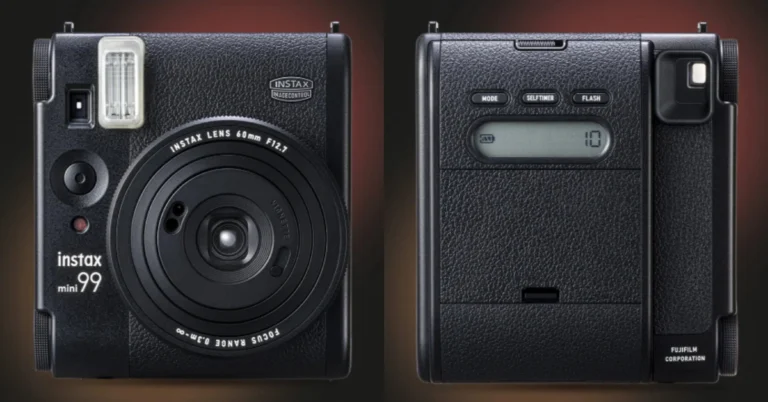
Lava O2 boasts a punch-hole display, rounded edges, and an elegant appearance featuring a Premium AG glass back design with a side fingerprint sensor. It has a 6.5-inch HD+ display with 720×1,600 pixels of resolution. The display supports a refresh rate of 90Hz and 269ppi pixel density. An octa-core Unisoc T616 SoC powers the device. It comes with an 8GB LPDDR4X RAM and 128GB of UFS 2.2 storage. The RAM can be virtually expanded up to 16GB. Also, the memory can be included up to 512GB using a micoSD card. The phone operates on Android 13. It also offers 2 years of security updates for its users.For photos and videos, Lava O2 features a 50-megapixel dual rear AI camera unit with LED flash. The system offers features like AI mode, HDR mode, portrait mode, beauty mode and night mode. For selfies and video calling the budget phone comes with an 8-megapixel front-facing camera.Also Read:Fujifilm Introduced The Instax Mini 99 Instant With LED LightsThe Lava O2 is fuelled by a 5,000mAh battery that comes with 18W charging support.Speaking on the launch, Sumit Singh, Product Head, Lava International Limited said, “Consumer demands are constantly changing, especially among the younger generation who demand both style and functionality from their smartphones without compromise. Lava O2 addresses these evolving expectations by introducing cutting-edge features such as the latest Glass Back Design and delivering a smooth user experience with stock Android 13, with a guaranteed upgrade to Android 14, along with 2-year security updates. Moreover, the inclusion of a 50 MP Dual AI Camera transforms the O2 into an adaptable all-in-one solution, perfectly catering to the dynamic needs of modern consumers.”
As big smartphones with giant displays have become the norm, some users prefer to access the desktop versions of their most frequented websites. While desktop websites may not be perfectly optimised for the mobile platform, a good internet connection will be able to load them on your phone with ease. Today, we bring you the top 7 ways to access Facebook’s desktop version on your phone.Read Also:Fujifilm Introduced The Instax Mini 99 Instant With LED Lights
When should you use Facebook’s desktop version?
While Facebook’s mobile version works fine for the most part, on certain occasions, you’re better off using the desktop site. If you use a folding phone, the desktop site is more suited for the larger screen real estate. Using the fullscreen mode on your browser, you can maximise the space dedicated to the website and use it without any hiccups.Another instance when you may want to use Facebook’s desktop version is when you want access to the exclusive features that are missing from the mobile version of the wesbite. For example, Facebook’s mobile website does not have Messenger. You need to download a separate app to use it. If that’s not something you are interested in, using the desktop version will help.
Access Facebook Desktop Website on Google Chrome
Step 1: Launch Google Chrome on your smartphone.Step 2: Go to Facebook’s official website.Step 3: Hit the ellipses at the top right corner of the screen.Step 4: Select the check box for Desktop site.
Access Facebook Desktop Version on Safari
Step 1: Launch the Safari browser on your iPhone.Step 2: Go to Facebook’s official website.Step 3: Tap the aA icon next to the address bar.Step 4: Hit Request Desktop Website.
Access Facebook Desktop Version on Firefox
Step 1: Launch the Mozilla Firefox web browser on your phone.Step 2: Go to the official Facebook website.Step 3: Hit the ellipses at the top right corner of the screen.Step 4: Turn on the toggle switch for Desktop site.Step 5: Facebook’s desktop version will load on Firefox.
Access Facebook Desktop Version on Opera
Step 1: Launch the Opera web browser on your smartphone.Step 2: Go to the official Facebook website.Step 3: Hit the ellipses at the top right corner of the screen.Step 4: Turn on the toggle switch for Desktop layout.Step 5: Opera will load the desktop version of Facebook.
Access Facebook Desktop Version on One UI Browser (Samsung)
Step 1: Launch the native web browser on your Samsung phone.Step 2: Go to Facebook’s official website.Step 3: Hit the hamburger menu icon at the bottom right corner of the screen.Step 4: Select Desktop site.
Access Facebook Desktop Version on ColorOS/OxygenOS browser (Oppo and OnePlus)
Step 1: Launch the native web browser on your OnePlus/Oppo phone.Step 2: Go to Facebook’s official website.Step 3: Tap the ellipses at the top right corner of the screen.Step 4: Turn on the toggle switch for Desktop website.Step 5: Facebook’s desktop website will load on the browser.
Access Facebook Desktop Website on Funtouch OS (Vivo and iQOO)
Accessing desktop versions of websites on the native Funtouch OS browser requires jumping through some hoops. Here’s how you can go about it.Step 1: Launch the native web browser on your Vivo/iQOO phone.Step 2: Go to Facebook’s official website.Step 3: Hit the hamburger menu at the bottom of the screen.Step 4: Tap the settings icon.Step 5: Scroll down and select Advanced settings.Step 6: Tap on User Agent ID and select Desktop. Hit OK.Step 7: Go back to the Facebook tab and refresh the web page.
Frequently Asked Questions (FAQs)
Does Facebook’s desktop website consume more data on mobile?
The desktop version of any website consumes more data than its mobile counterpart. This is due to a heavier layout, different plug-ins, and higher-resolution images on the desktop version.
How do I access the desktop version of a website on a Vivo/iQOO browser?
Load the website on the browser, hit the hamburger menu icon at the bottom, go to Settings>Advanced settings>User Agent ID, and select Desktop.
These are the top 7 ways to access Facebook’s desktop version on your phone. Desktop versions of websites consume more data than mobile layouts, so make sure you are connected to a WiFi network while browsing them. If you have any questions, let us know in the comments!
Fujifilm India has expanded its popular Instax lineup of instant cameras in India
The company introduced the new Instax Mini 99 instant camera in India.
The camera body houses four LED lights.
It has a Hammertone coating and coloured text.
Fujifilm is one of the leading companies in imaging technology. They have recently unveiled its latest edition to its instant cameras category called the Instax Mini 99. It comes with new analogue functions. It includes a Color Effect Dial with six unique effects. Mini 99 offers a Brightness Control Dial with five brightness. Also, there is a Vignette Switch on the lens with various shooting modes.
Instax Mini 99 price in India, Sale details
The Fujifilm Instax Mini 99 instant camera is the newest member of the Fujifilm Instax line of analogue instant cameras. The latest camera will retail at Rs 20,000 in India. The company has also launched a new print film called Photo Slide. These designer films will improve the photo’s visual impact, enhancing the customer’s experience, which is priced at Rs 899.The product will be available starting on April 4 on www.Instax.in and other online retailers such as Amazon and Flipkart. The device can also be shopped at retail outlets across the country.Also Read:Microsoft announced its new AI laptops- Surface Pro 10 and Surface Laptop 6
Instax Mini 99 specifications
Instax Mini 99 is a successor to Instax Mini 90. The camera body features a traditional design with a matte texture similar to leather that is comfortable to handle.The camera has additional features including “Color Effect Control,” which applies lights of various colours directly to film to create six different colour expressions and “Vignette Mode,” which is said to reduce exposure around the edges to bring the focus to the centre of each picture.The Mini 99 has a dial on the side of the camera body to control functions like Color Effect Control and Vignette Mode and further increase the number of print expressions possible. To take a high-key or low-key photo, turn the Brightness Control dial on the side. To freely modify colour tones and brightness, brightness can be modified in five levels, ranging from D- to L+. It can also be coupled with Vignette Mode or Colour Effect Control.Also Read:Motorola Edge 50 Pro India launch date announced: Here is everything we know about itThe new camera also has features carried over from the mini 90, such as improved image quality in the Landscape, Macro, and Indoor modes, Sports mode for capturing action images of moving subjects, and Self Timer for group selfies. Shooting modes for manipulating light, including Bulb and Double Exposure modes, are also available. The Self-Timer is a convenient tool for shooting events or group photos. The device runs on a detachable, rechargeable battery that can hold up to 100 frames between charges. The charge port is USB Type-C (a charging cable is included).
Galaxy Book4 combines sleek design with powerful performance, featuring a Full HD display and Intel Core processors.
With AI editing tools for photos and videos, it boosts creative possibilities on the move.
Offers improved video calls by using a smartphone as a webcam and ensures immersive audio with Dolby Atmos speakers.
Samsung has once again set a benchmark in the realm of consumer electronics with the launch of the Galaxy Book4 in India. This groundbreaking device is a testament to Samsung’s commitment to innovation, offering unparalleled connectivity, mobility, and productivity. Starting at Rs 74,990, the Galaxy Book4 is not just an electronic device; it’s a gateway to a new era of technological empowerment for consumers.
Designed for Elegance and Performance
The Galaxy Book4 boasts a large 39.62 cm Full HD display, encapsulated in a sleek metal body that weighs a mere 1.55 kg. Available in two sophisticated colors, Gray and Silver, it merges elegance with cutting-edge technology. This design philosophy ensures that the Galaxy Book4 stands out not only for its performance but as a statement piece of technology.
Read Also:5 Android apps to boost productivity if you are part of a startup
Innovation at Your Fingertips
Equipped with an AI-Powered Photo Remaster tool, the Galaxy Book4 breathes new life into old and low-quality images. This feature allows users to effortlessly edit photos, removing unwanted light and shadows, thereby enhancing the quality of their memories. Additionally, the inclusion of the Galaxy Video Editor empowers users to express their creativity without limits.
Unmatched Viewing Experience
Powered by One UI Book ver.6, the Galaxy Book4 delivers a crisp, vibrant display that brings content to life. It features a RJ45 LAN Port for uninterrupted connectivity and Stereo Speakers with Dolby Atmos for an immersive audio experience. The device’s hardware, powered by the latest Intel Core 5/7 processor and integrated Intel graphics, ensures smooth performance for streaming, gaming, and seamless multitasking. With up to 1TB expandable SSD storage, users have ample space for all their needs.
Connectivity Redefined
The Galaxy Book4 introduces an innovative way to upgrade video calls. By using a Samsung Galaxy smartphone as a connected camera, users can achieve stunning clarity, far surpassing the capabilities of standard laptop webcams.
Price And Offers
Samsung is making the Galaxy Book4 even more accessible with enticing offers. Consumers can enjoy a bank cashback of Rs 5,000 or an upgrade bonus of up to Rs 4,000. Additionally, no-cost EMI options of up to 24 months are available, along with an extra 10% discount for students. The Galaxy Book4 can be purchased from Samsung.com, leading online stores, and select retail outlets.
Read Also:Asus Zenbook 17 Fold review: Innovation at its best
Expanding the Galaxy Book4 Series
The launch of the Galaxy Book4 in India is part of a larger rollout that includes the Galaxy Book4 Pro 360, Galaxy Book4 Pro, and Galaxy Book4 360, with prices starting at Rs 163,990, Rs 131,990, and Rs 114,990, respectively. This lineup underscores Samsung’s vision of AI-powered innovation, aimed at enhancing productivity and enriching the quality of life for users.





 One of the biggest online hubs for APK downloads, APKMirror is one of the safest websites for the job. It is perhaps the most popular Android app store outside of Google Play Store. APKMirror is very well moderated and any malicious apps are quickly taken down from the platform. It uses cryptographic signatures to gauge the legitimacy of apps. If you’re looking for an older version of a particular app, chances are you will find it on APKMirror. The diverse library of apps on this platform remains unmatched by its peers.
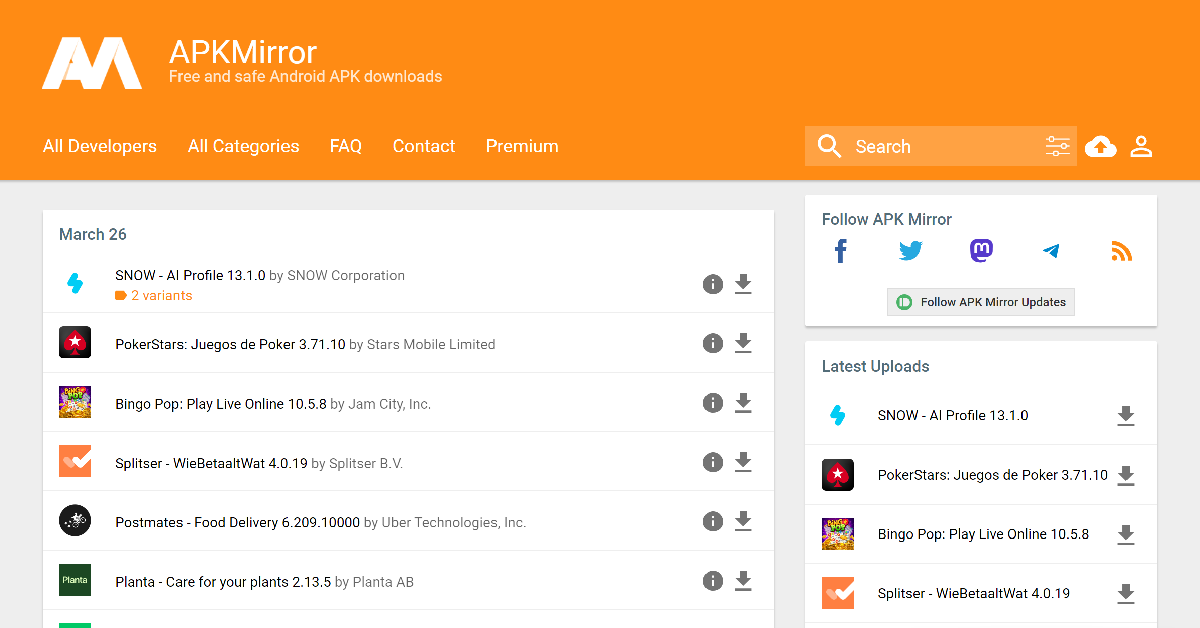 One of the biggest online hubs for APK downloads, APKMirror is one of the safest websites for the job. It is perhaps the most popular Android app store outside of Google Play Store. APKMirror is very well moderated and any malicious apps are quickly taken down from the platform. It uses cryptographic signatures to gauge the legitimacy of apps. If you’re looking for an older version of a particular app, chances are you will find it on APKMirror. The diverse library of apps on this platform remains unmatched by its peers.
 As far as safe websites for APK downloads go, APKPure is up there with APKMirror. This website has a respectable collection of apps. You can also find older versions of Android apps on this website. The platform uses cryptographic signatures and SHA1 certificates to weed out any malicious and counterfeit apps from the website. APKPure also has a helpful app that you can download on your smartphone.
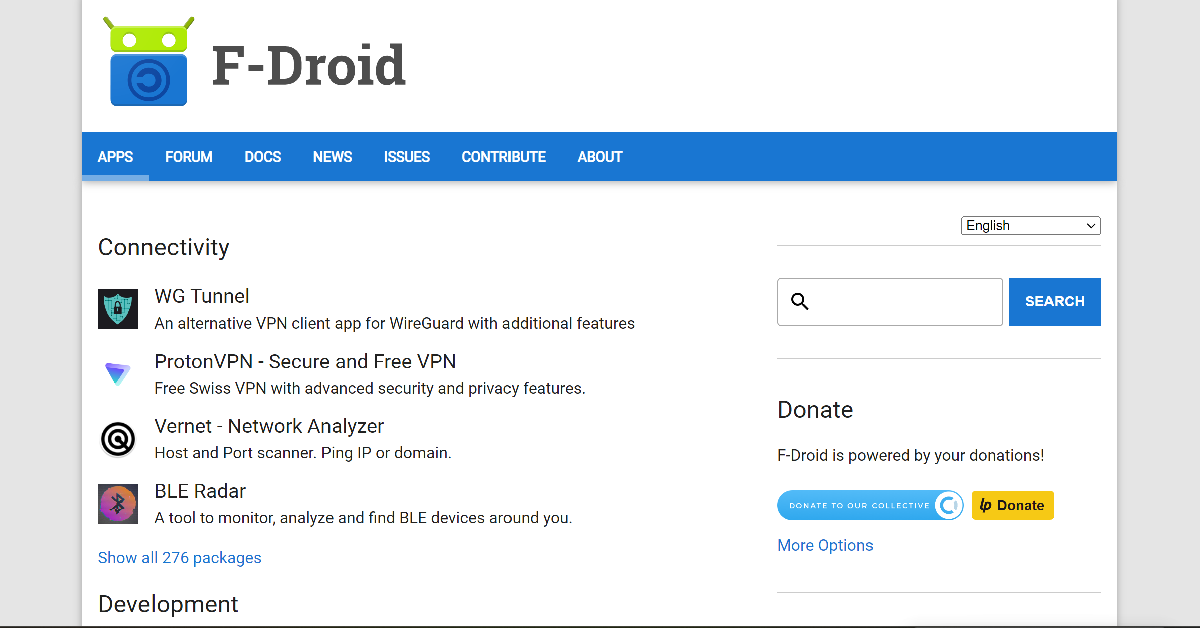 F-Droid is one of the biggest open-source app marketplaces on the Internet. While downloading an app from F-Droid, you know exactly what you’re getting. The platform is very transparent about letting the user know about any invasive ads pushed by the apps. As a result, F-Droid’s app library isn’t as strong as the likes of APKMirror and APKPure. The APKs on F-Droid are verified against their public logs of observed SHA-256 checksums.
 Uptodown has a vast catalogue of apps, not just for Android, but also for Windows and Mac users. Uptodown has a very clean layout which is easy to browse on PC as well as mobile. The lack of invasive ads is the reason why over 130 million users prefer Uptodown over its peers. The apps on this website are scanned by 70 different anti-viruses through VirusTotal. If you want to turn on automatic updates for apps using Uptodown, you will need to install its Android app on your phone. One of the best features of this platform is that you don’t need to register in order to download an app.
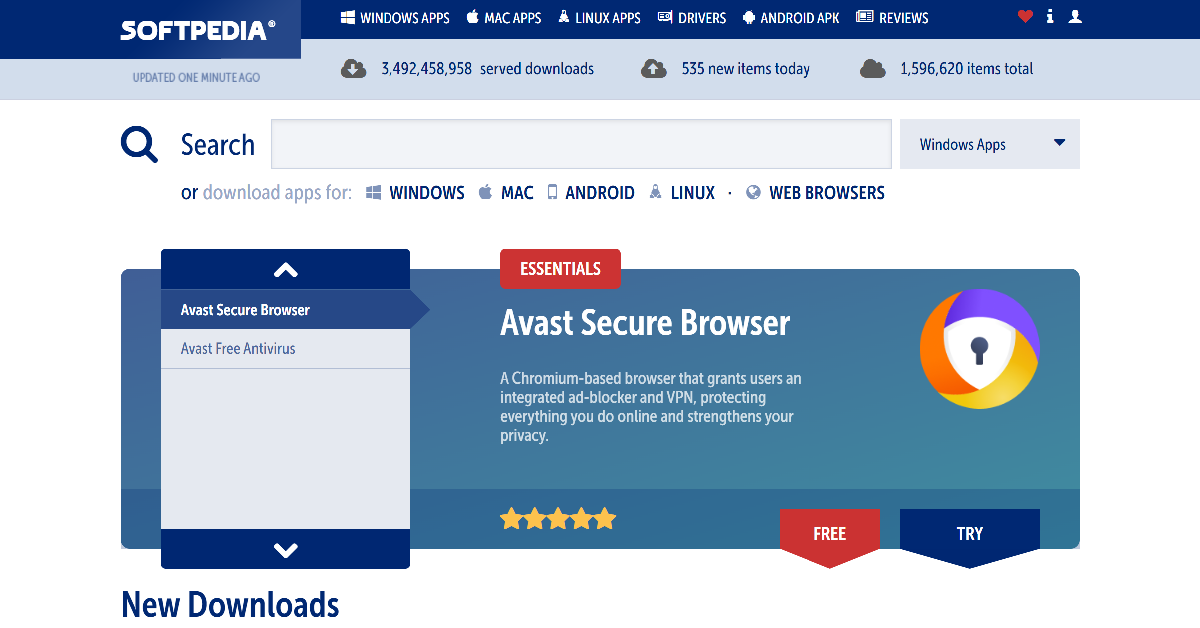 Softpedia is also an Android-focused app store which also caters to Mac, Windows, and Linux users. The website hosts over 1.5 million apps across different ecosystems. You will find all the major Android apps on this platform. Softpedia also has a ‘Reviews’ section if you want to read up on an app’s user experience before downloading it on your device.
 APKMonk is another reliable website for safe APK downloads. The apps on this website are neatly divided into distinct categories, making it easy for the user to find what they are looking for. The APKs on this website are regularly monitored and any app pushing malware or other kinds of malicious content is quickly taken down. Like its counterparts, APKMonk also allows you to download previous versions of apps.
 Closing this list is the APK4Fun app store. The APKs hosted on this platform are the same as their Google Play Store counterparts, without any “cheat, unlimited gold patch, or any other modifications”, according to the website. This means if you are seeking modded apps for your rooted smartphone, you will have to look elsewhere. The apps on APK4Fun are divided into categories like Arcade, Casual, Health & Fitness, Productivity, Educational, and more.
Read Also: Poco C61 budget smartphone with 5,000mAh battery launched in India
Closing this list is the APK4Fun app store. The APKs hosted on this platform are the same as their Google Play Store counterparts, without any “cheat, unlimited gold patch, or any other modifications”, according to the website. This means if you are seeking modded apps for your rooted smartphone, you will have to look elsewhere. The apps on APK4Fun are divided into categories like Arcade, Casual, Health & Fitness, Productivity, Educational, and more.
Read Also: Poco C61 budget smartphone with 5,000mAh battery launched in India
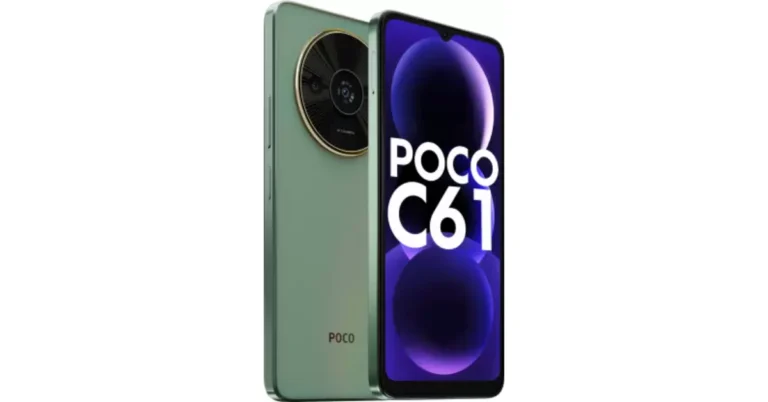
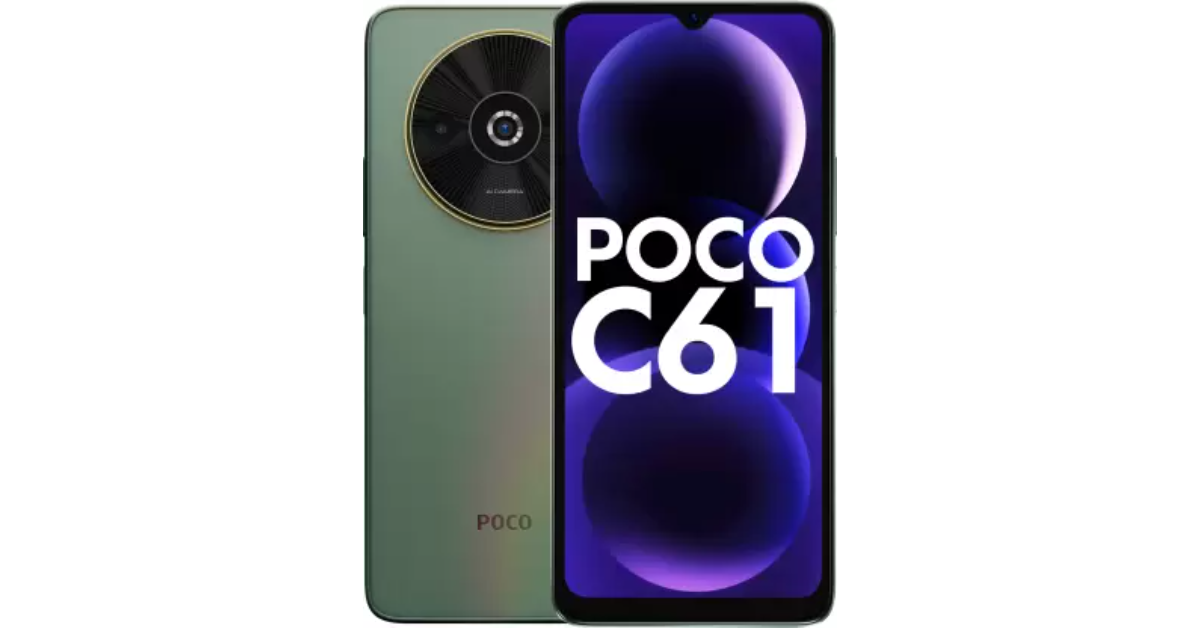 The device seems to be a repackaged Redmi A3 based on its specifications. Its price starts at Rs 7,299 for the 3GB RAM with 64GB Storage. The price of the 4GB RAM with 128GB Storage and 6GB RAM with 128GB storage is set at Rs 8,299 and Rs 9,299 respectively.
Also Read: iPhone 14, iPhone 14 Plus price drops on Flipkart, best time to buy the devices
The device seems to be a repackaged Redmi A3 based on its specifications. Its price starts at Rs 7,299 for the 3GB RAM with 64GB Storage. The price of the 4GB RAM with 128GB Storage and 6GB RAM with 128GB storage is set at Rs 8,299 and Rs 9,299 respectively.
Also Read: iPhone 14, iPhone 14 Plus price drops on Flipkart, best time to buy the devices
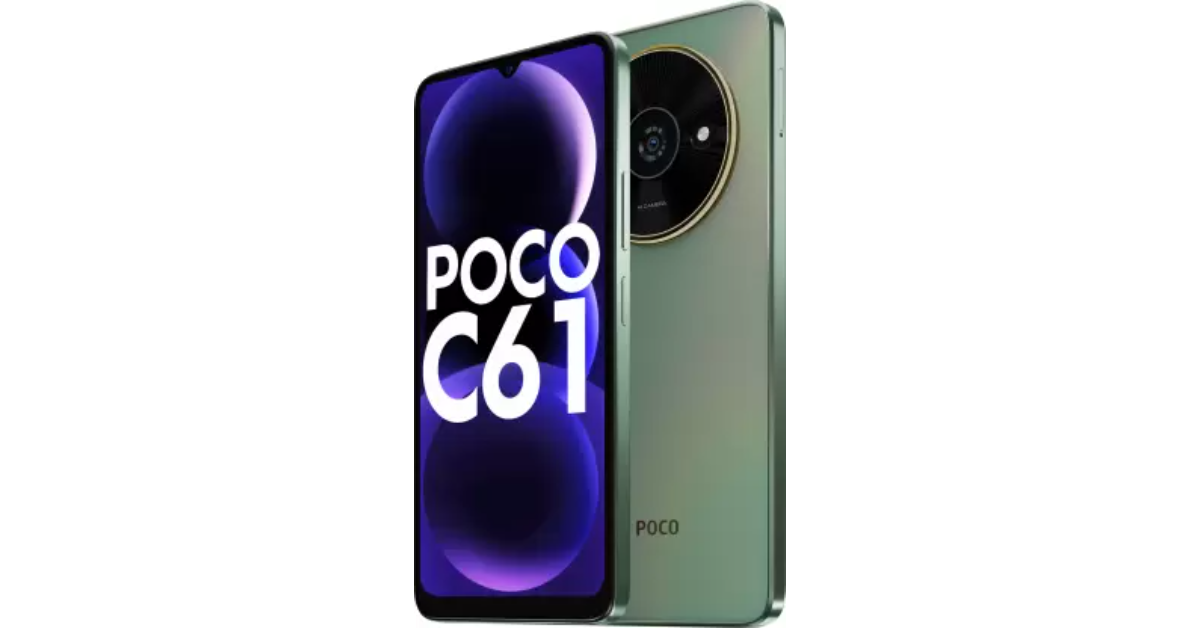 For photos and videos, the Poco C61 features a dual rear camera setup powered by AI. The unit includes an 8-megapixel primary sensor and an unnamed secondary lens with an LED flash. For taking selfies and video Poco has provided a 5-megapixel front-facing sensor on the phone.
Also Read: Zoom introduces its new AI-powered collaboration platform Zoom Workplace
Poco C61 is stuffed with a 5,000mAh battery but unfortunately, the device only supports 10W wired charging. In terms of connectivity, there is 4G, Wi-Fi, Bluetooth 5.4, GPS, and a 3.5mm audio port, USB Type-C for charging. The phone also has a side-mounted fingerprint sensor for unlocking.
For photos and videos, the Poco C61 features a dual rear camera setup powered by AI. The unit includes an 8-megapixel primary sensor and an unnamed secondary lens with an LED flash. For taking selfies and video Poco has provided a 5-megapixel front-facing sensor on the phone.
Also Read: Zoom introduces its new AI-powered collaboration platform Zoom Workplace
Poco C61 is stuffed with a 5,000mAh battery but unfortunately, the device only supports 10W wired charging. In terms of connectivity, there is 4G, Wi-Fi, Bluetooth 5.4, GPS, and a 3.5mm audio port, USB Type-C for charging. The phone also has a side-mounted fingerprint sensor for unlocking. 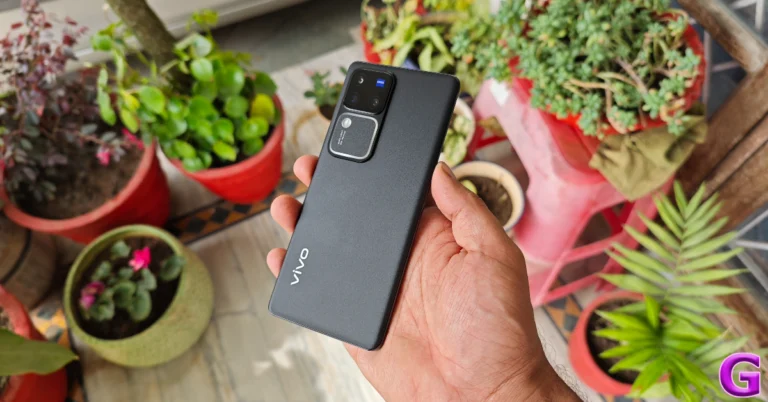
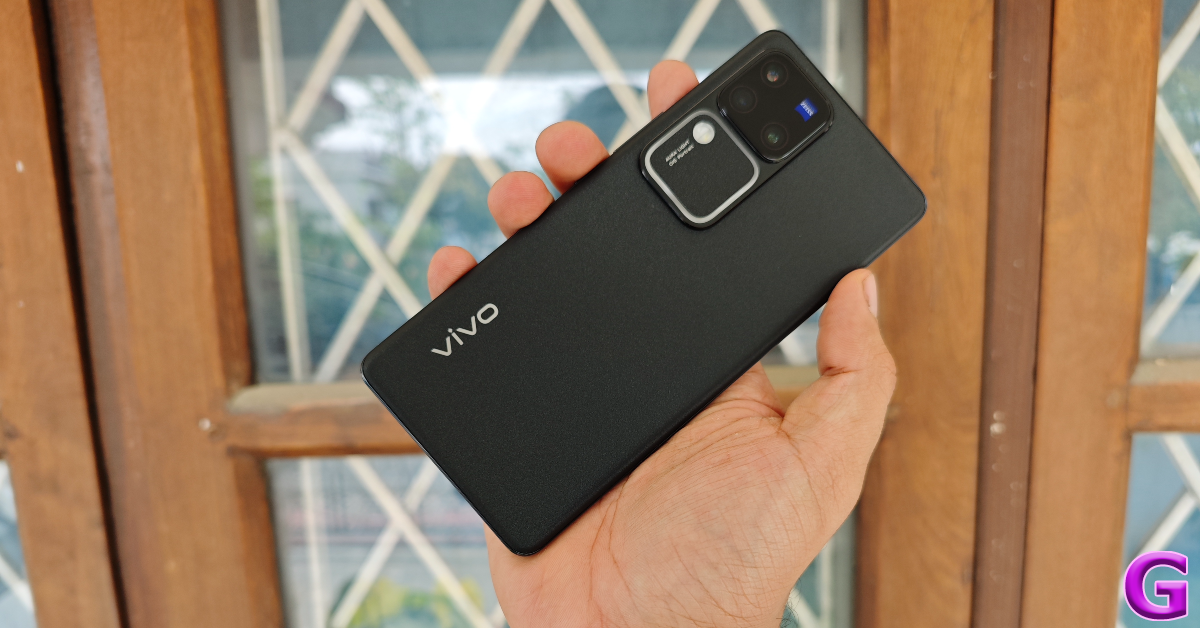 The matte finish on the Classic Black variant ensures that the back panel does not register any fingerprints. However, it is a little slippery to hold. The back of the smartphone curves towards the frame, offering a good grip. The right edge of the frame houses the volume rocker and the side key. At the bottom, you will find the SIM tray, primary microphone, USB Type-C slot and speaker grille. The secondary microphone has been placed on the top edge of the frame. The smartphone still lacks a stereo speaker.
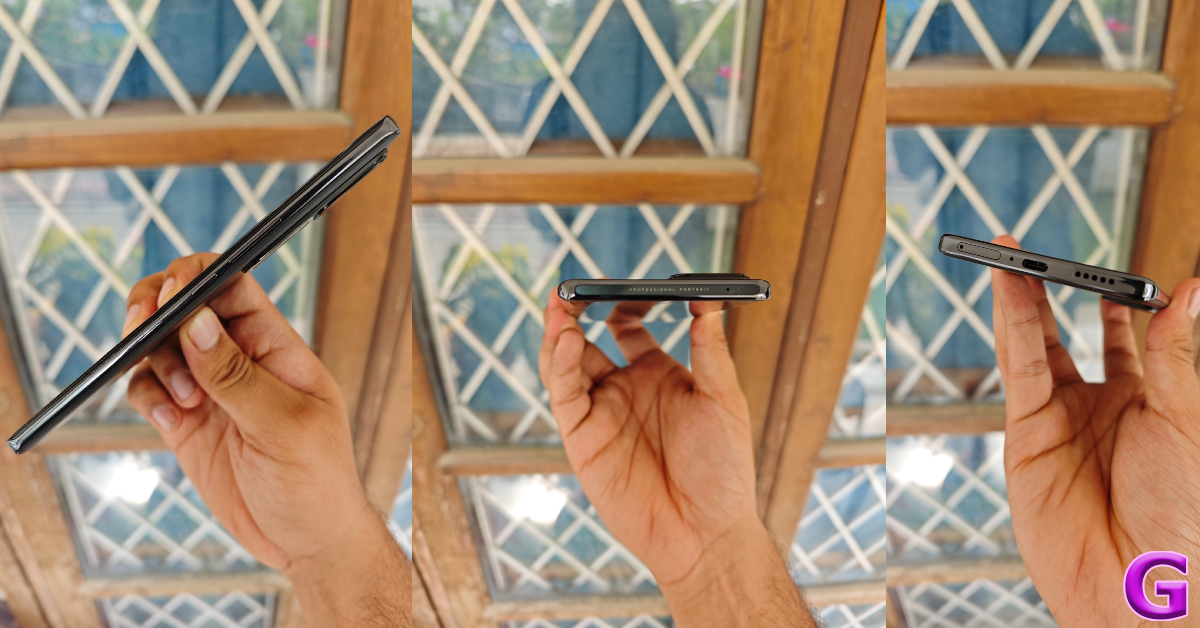 The 6.78-inch curved AMOLED display has a 1,260 x 2,800p resolution and sports a maximum refresh rate of 120Hz. This panel can reach a peak brightness of 2,800 nits. It is perfectly legible under direct sunlight and does not require using your palm as a shield no matter the intensity of the surrounding light. The touch response on offer is remarkable. The display registers subtle touches with ease and provides a very smooth browsing experience.
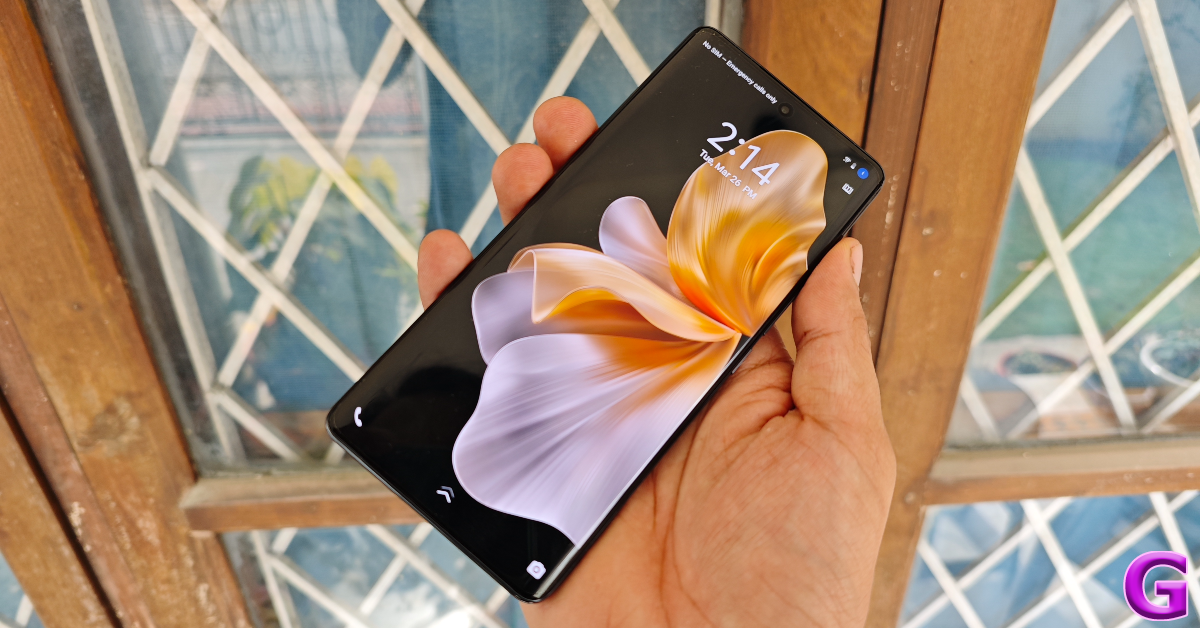 The HDR10+ support is vital while watching video content on the device. Streaming content across OTT apps like Netflix, Prime Video, and Disney+ Hotstar, we were pleased with the picture composition and the vibrant, punchy colours produced on the screen. Even though the smartphone does not have a stereo speaker, the output from the main speaker grille feels more refined than its predecessor.
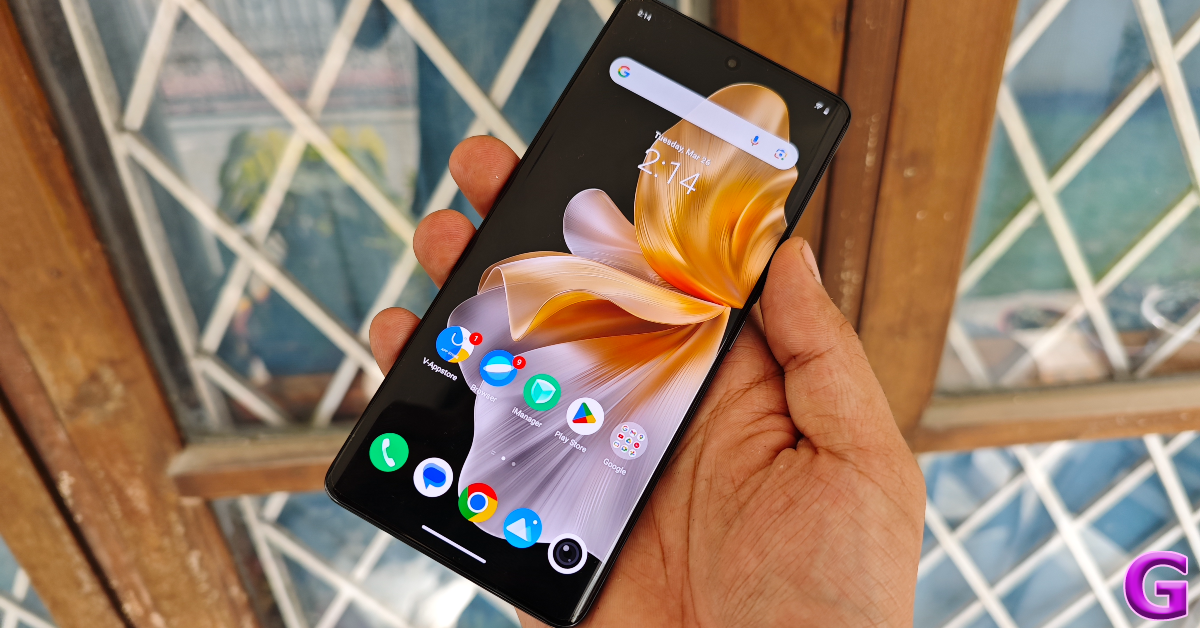 The Vivo V30 Pro is rated IP54 for dust and water resistance. This means the smartphone can withstand minor splashes of water. You can take the odd call on the phone while it is raining and expect it to function as intended. However, an IP67 rating would have been ideal in this price range.
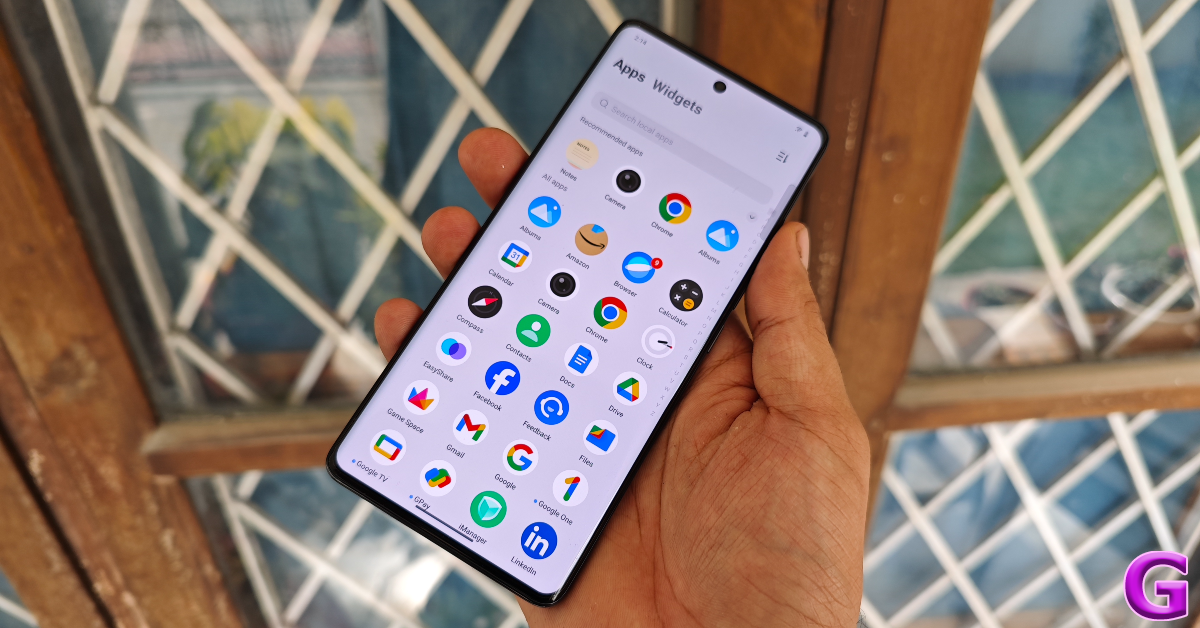 The performance of the Vivo V30 Pro is on par with the previous two V Series smartphones. On the Geekbench 6 app, the smartphone scored 1,155 points in the single-core test and 3,384 points in the multicore test. Last year’s V29 Pro scored 1,179 points and 3,394 points respectively. Meanwhile, the V27 Pro attained 1,151 and 3,099 points.
 We did not encounter a single glitch or hiccup while performing daily tasks on the V30 Pro. The smartphone kept firing on all cylinders even while running half a dozen apps at once. The back panel did heat up when the smartphone was recording 4K videos in bright daylight conditions, but it did not lead to any unexpected crashes or camera warnings.
For a camera-centric smartphone, the Vivo V30 Pro offers a very pleasant gaming experience. The Dimensity 8200 SoC is able to handle demanding titles like Asphalt 9 and Call of Duty Mobile. We played these titles in the highest settings and were happy with how the smartphone handled the graphics. There were no frame drops or stutters to be seen. The ‘Ultra Large Vapor Chamber’ keeps the smartphone’s internal temperature from reaching alarming levels.
We did not encounter a single glitch or hiccup while performing daily tasks on the V30 Pro. The smartphone kept firing on all cylinders even while running half a dozen apps at once. The back panel did heat up when the smartphone was recording 4K videos in bright daylight conditions, but it did not lead to any unexpected crashes or camera warnings.
For a camera-centric smartphone, the Vivo V30 Pro offers a very pleasant gaming experience. The Dimensity 8200 SoC is able to handle demanding titles like Asphalt 9 and Call of Duty Mobile. We played these titles in the highest settings and were happy with how the smartphone handled the graphics. There were no frame drops or stutters to be seen. The ‘Ultra Large Vapor Chamber’ keeps the smartphone’s internal temperature from reaching alarming levels.
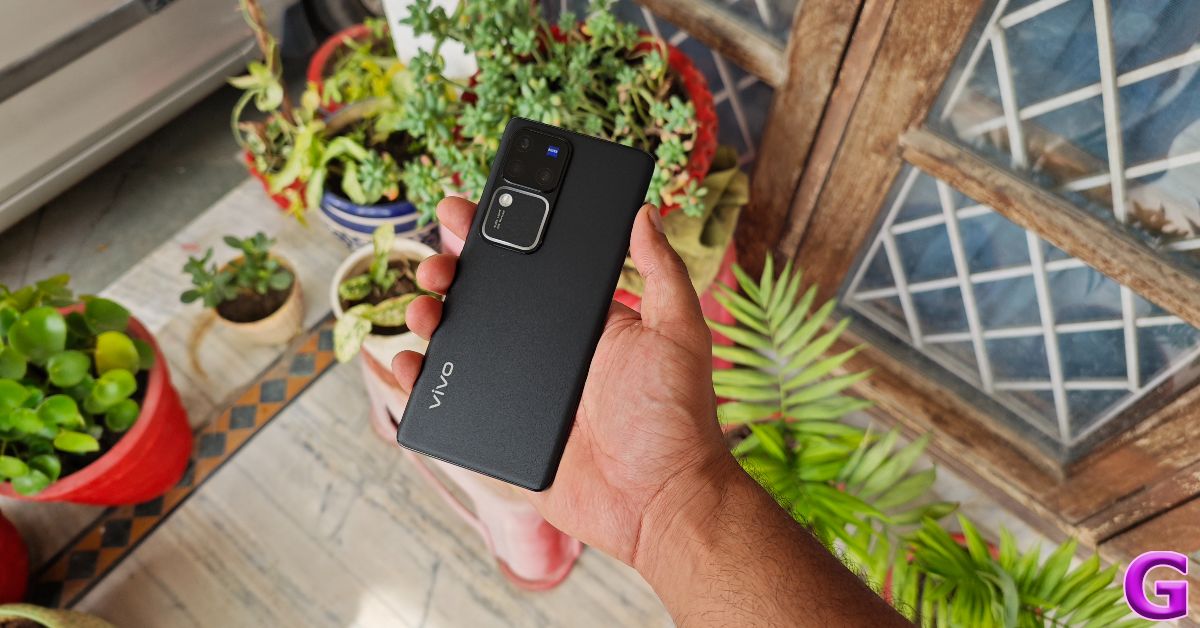 OS duties on the Vivo V30 Pro are handled by the Android 14-based Funtouch OS 14. There is bloatware on the device, although not as much as other midrange smartphones. But the real letdown is the pesky notifications that manage to routinely flood the notification panel. This is something that Vivo needs to streamline so as to not inhibit the software experience. The volume of notifications from Vivo’s Appstore and Browser apps alone contributes to the majority of the spam. We didn’t find much use for the native browser app either and immediately switched to Chrome upon coming across ads in its interface.
Apart from that, we were happy with the customisation options offered by Funtouch 14. You get a good list of options for the watch face, fingerprint scanner, charging animation, and more. The app switcher screen can be aligned in two different layouts (standard carousel and dual rows). There is a helpful widget drawer next to the app drawer which lets you access the important functions with ease. The app encryption and hidden folder functions are quite useful as well.
The V30 Pro features a bigger battery unit compared to its predecessor. This is particularly impressive because the smartphone has retained its slim form factor as well. The battery performance offered by the 5,000 mAh is undeniably better. During the review period, we used the Vivo V30 Pro for tasks like emailing, video calling, social media browsing, gaming, and recording videos in 4K. We were able to get more than 5 hours of Screen On Time from the device. With more conservative usage, we were able to push the battery to a day and a half. The 80W charger provided in the box was able to fully charge the device in 45 minutes.
Let’s talk about the star of the show – the camera performance. All four cameras on the device now rock 50MP sensors. This includes the primary shooter, ultrawide lens, telephoto lens (with 2x optical zoom) at the back and the selfie camera up front.
OS duties on the Vivo V30 Pro are handled by the Android 14-based Funtouch OS 14. There is bloatware on the device, although not as much as other midrange smartphones. But the real letdown is the pesky notifications that manage to routinely flood the notification panel. This is something that Vivo needs to streamline so as to not inhibit the software experience. The volume of notifications from Vivo’s Appstore and Browser apps alone contributes to the majority of the spam. We didn’t find much use for the native browser app either and immediately switched to Chrome upon coming across ads in its interface.
Apart from that, we were happy with the customisation options offered by Funtouch 14. You get a good list of options for the watch face, fingerprint scanner, charging animation, and more. The app switcher screen can be aligned in two different layouts (standard carousel and dual rows). There is a helpful widget drawer next to the app drawer which lets you access the important functions with ease. The app encryption and hidden folder functions are quite useful as well.
The V30 Pro features a bigger battery unit compared to its predecessor. This is particularly impressive because the smartphone has retained its slim form factor as well. The battery performance offered by the 5,000 mAh is undeniably better. During the review period, we used the Vivo V30 Pro for tasks like emailing, video calling, social media browsing, gaming, and recording videos in 4K. We were able to get more than 5 hours of Screen On Time from the device. With more conservative usage, we were able to push the battery to a day and a half. The 80W charger provided in the box was able to fully charge the device in 45 minutes.
Let’s talk about the star of the show – the camera performance. All four cameras on the device now rock 50MP sensors. This includes the primary shooter, ultrawide lens, telephoto lens (with 2x optical zoom) at the back and the selfie camera up front.
 In a nutshell, the camera performance here is exemplary. In bright daylight conditions, the primary shooter captures delightful images that pack great detail and vibrant colours. Like the Vivo X100 Pro, the Zeiss tuning comes in clutch on the V30 Pro and distinguishes it from other smartphones in this category. You can choose from three colour profiles – Vivid, Textured, and Zeiss Natural.

 We were also impressed with how sharp the images taken with the main sensor turned out. The contrast and dynamic range levels were fine too. At night, the smartphone proves why it is worth its price tag. The images taken with the main sensor in limited lighting were well-lit and cleanly processed. However, once we turned on the Night Mode, things kicked up a notch. We were very impressed to see the richness of colours showcased in the images even in challenging lighting conditions. This is something we’ve only seen on flagship-grade smartphones, so the V30 Pro earns extra points from us.





 The telephoto sensor can also be used to take 2x and 4x portraits, justifying its presence over a macro sensor. These portrait shots are detailed and focused, and everything you expect from the telephoto sensor. Portraits taken with the primary shooter are clean and well-focused as well. The smartphone does a good job of separating the background from the subject.


 The 50MP front-facing camera on the V30 Pro can now record 4K videos at 30fps, much like the primary shooter at the back. This is one feature which has flown under the radar and deserves more attention. The selfies taken with the front camera are clear, vibrant, and retain the true skin colour tones.
Read Also: 7 Things to Consider When Buying a Keyboard
The 50MP front-facing camera on the V30 Pro can now record 4K videos at 30fps, much like the primary shooter at the back. This is one feature which has flown under the radar and deserves more attention. The selfies taken with the front camera are clear, vibrant, and retain the true skin colour tones.
Read Also: 7 Things to Consider When Buying a Keyboard
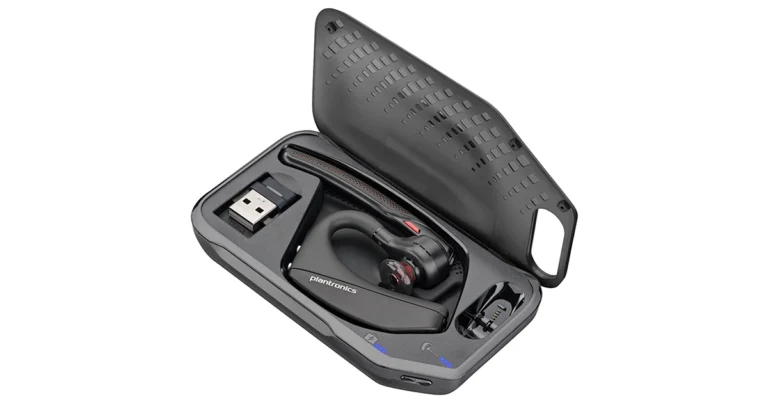
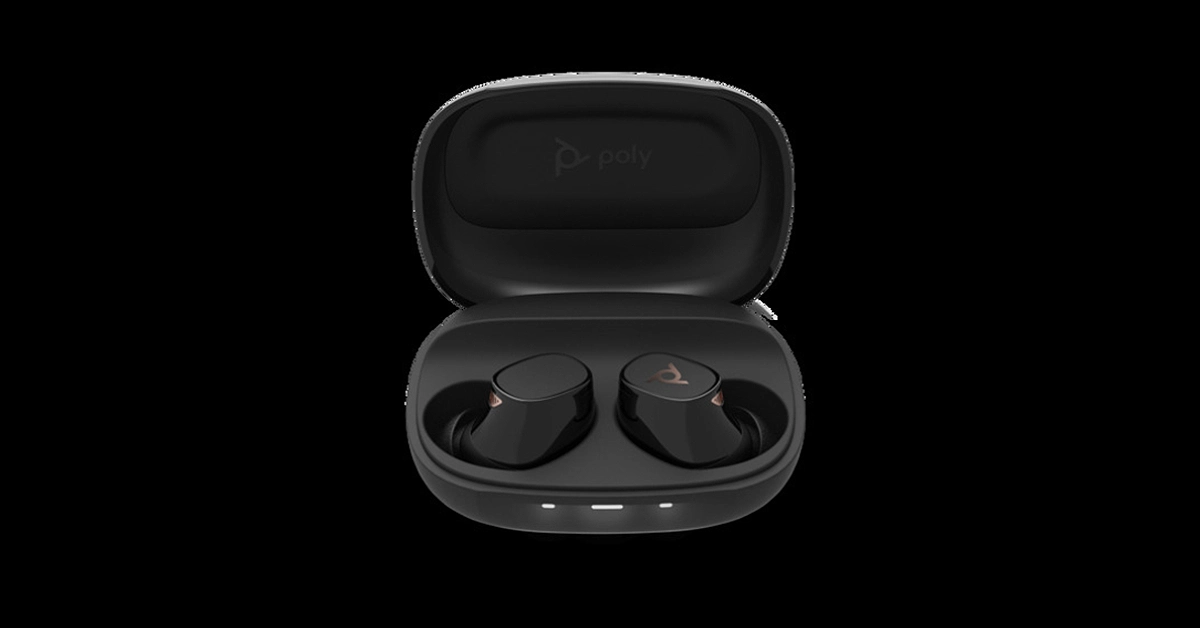
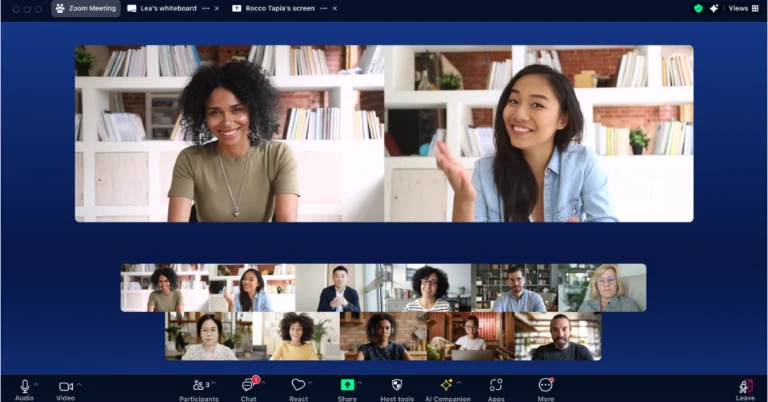
 As per the company Zoom Workplace’s simplified purchasing option can assist AWS customers in finding partners who can speed up implementation, streamlining their technology purchases and billing of Zoom solutions and maximise their usage of AWS committed resources.
“Zoom incorporates over 40 different AWS services, including compute, storage, and encryption capabilities. Zoom’s Customer Managed Key offering allows customers to bring their own encryption keys using AWS Key Management Service to help protect certain data. Additionally, AWS AppFabric integrates with the Zoom Developer Platform to help businesses break down data silos, improve cross-application workflows, enhance security observability, and support employee productivity. In 2023, AWS named Zoom as a NAMER finalist for its 2023 Geo and Global AWS Partner Award within the Education Partners of the Year category.”
Agendas and pre-meeting materials can be attached and chat with attendees from the meeting card before meetings. Users will also be able to get assistance with meeting preparation via Ask AI Companion.
During meetings, users can also access, share, and collaborate on pre-attached materials or access documents from third-party apps, even if they are not attached to the meeting invite. Additionally, you will also be able to work together on various documents, whiteboards, and notes simultaneously while sharing multiple screens. Additionally, Zoom has released new co-editing and permission management tools for Google Drive and Microsoft OneDrive assets to assist in streamlining document collaboration across Zoom, Microsoft, and Google and save you time when granting access to documents to everyone.
Zoom Workplace has improved the Meetings user experience with a streamlined toolbar, and a multi-speaker view that highlights active speakers. Moreover, you will have four distinct colour themes to pick from for how things appear.
As per the company Zoom Workplace’s simplified purchasing option can assist AWS customers in finding partners who can speed up implementation, streamlining their technology purchases and billing of Zoom solutions and maximise their usage of AWS committed resources.
“Zoom incorporates over 40 different AWS services, including compute, storage, and encryption capabilities. Zoom’s Customer Managed Key offering allows customers to bring their own encryption keys using AWS Key Management Service to help protect certain data. Additionally, AWS AppFabric integrates with the Zoom Developer Platform to help businesses break down data silos, improve cross-application workflows, enhance security observability, and support employee productivity. In 2023, AWS named Zoom as a NAMER finalist for its 2023 Geo and Global AWS Partner Award within the Education Partners of the Year category.”
Agendas and pre-meeting materials can be attached and chat with attendees from the meeting card before meetings. Users will also be able to get assistance with meeting preparation via Ask AI Companion.
During meetings, users can also access, share, and collaborate on pre-attached materials or access documents from third-party apps, even if they are not attached to the meeting invite. Additionally, you will also be able to work together on various documents, whiteboards, and notes simultaneously while sharing multiple screens. Additionally, Zoom has released new co-editing and permission management tools for Google Drive and Microsoft OneDrive assets to assist in streamlining document collaboration across Zoom, Microsoft, and Google and save you time when granting access to documents to everyone.
Zoom Workplace has improved the Meetings user experience with a streamlined toolbar, and a multi-speaker view that highlights active speakers. Moreover, you will have four distinct colour themes to pick from for how things appear. 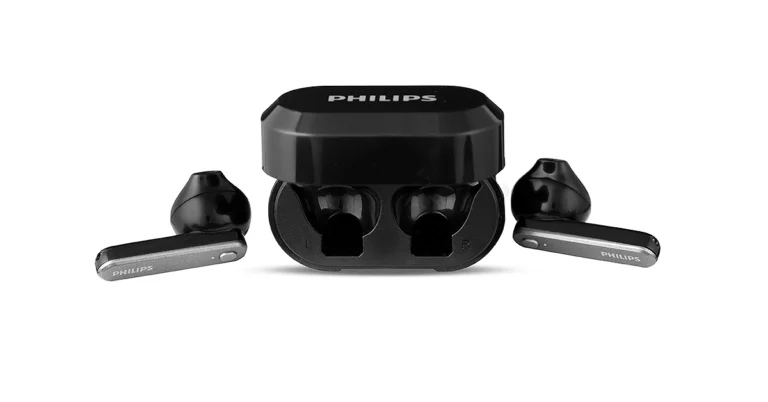
 Read Also: Philips HSP3500 Indoor Security Camera Review: The perfect device to keep an eye inside.
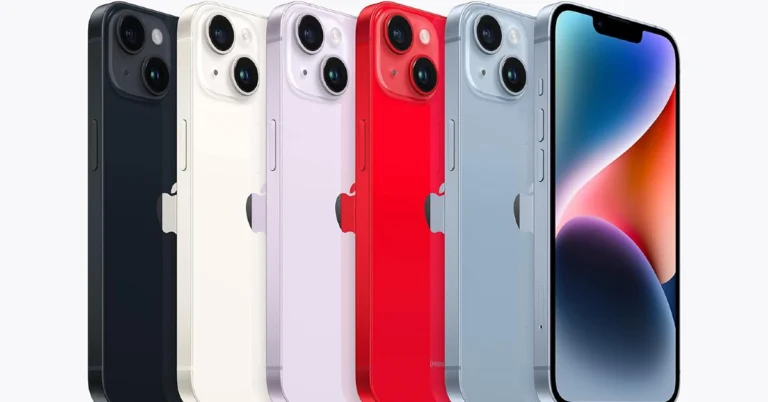
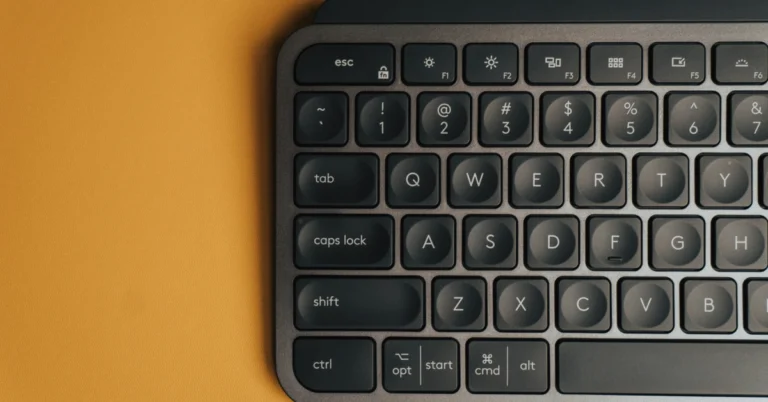
 One of the most important things that you should consider before buying a new keyboard is its ergonomic features. This includes the overall design of the keyboard along with elements like a wrist rest and adaptive feet. Your typing experience on the keyboard relies a lot upon its ergonomic feel and how well it suits your wrists. Ideally, you want a keyboard that accommodates the natural position of your wrists and does not cause them any fatigue over an extended period of time.
 Another important factor you should keep in mind while buying the keyboard is its keystroke type. While mechanical keyboards are all the rage these days, they do cost more than their ‘membrane’ counterparts. If you’re looking for a keyboard for office use, the mechanical switches may be a bit too loud for a quiet environment. However, if you’re looking to add a keyboard to your home setup, the tactile feedback of the keystrokes in a mechanical keyboard is something you will appreciate a lot.
If you’re looking for a gaming keyboard, mechanical switches are the way to go. There are other things you should also consider while looking for the perfect gaming keyboard, like durability and key programming, but we’ll get to those aspects later. Need a flashy RGB keyboard to go with your gaming rig? Read this article for some of the best options under Rs 3,000.
Another important factor you should keep in mind while buying the keyboard is its keystroke type. While mechanical keyboards are all the rage these days, they do cost more than their ‘membrane’ counterparts. If you’re looking for a keyboard for office use, the mechanical switches may be a bit too loud for a quiet environment. However, if you’re looking to add a keyboard to your home setup, the tactile feedback of the keystrokes in a mechanical keyboard is something you will appreciate a lot.
If you’re looking for a gaming keyboard, mechanical switches are the way to go. There are other things you should also consider while looking for the perfect gaming keyboard, like durability and key programming, but we’ll get to those aspects later. Need a flashy RGB keyboard to go with your gaming rig? Read this article for some of the best options under Rs 3,000.
 If you’re a digital nomad and are frequently travelling with your keyboard, you need to take its portability into account. Traditional keyboards are meant to be a permanent fixture on your desk, which is why their portability often takes a back seat. If a compact keyboard size is your biggest priority, you may want to look at tenkeyless (TKL) keyboards. As the name suggests, these keyboards offer ten fewer keys than their traditional counterparts. The ten-key number pad on the right side of the device is ditched to keep it compact. Portable keyboards also lack media keys and have less spacing between the regular keys.
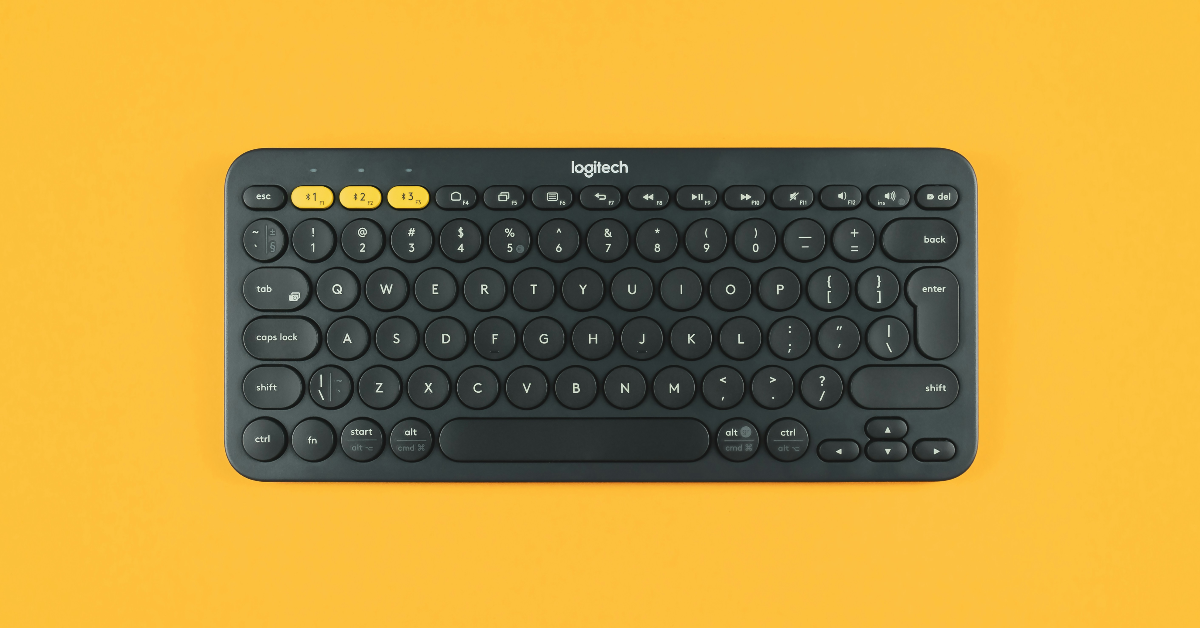 If portability is not a big concern, you may want to go all out and get a keyboard with dedicated keys for media controls. These keys come in very handy while controlling aspects like the volume and playback without relying on the mouse and onscreen controls. Most keyboards also offer customisable macro keys which can be programmed to carry out tasks like opening an app, taking a screenshot, and a whole range of other tasks. If you’re looking to buy a wireless keyboard, the dedicated media keys will certainly make a nice addition, allowing you to control the media playback on your PC from a distance.
 The build and make of the keyboard is something you should not look past while buying one. This includes the casing and the key switches. Most affordable keyboards use an alloy shell for the casing. If you’re looking for a device that will last you years, splurging some extra money on the one with an aluminium plate is worth it. If you’re a gamer, mechanical switches can survive heavy use and offer excellent tactile feedback along the way. Even if a switch develops a fault, it can be easily replaced.
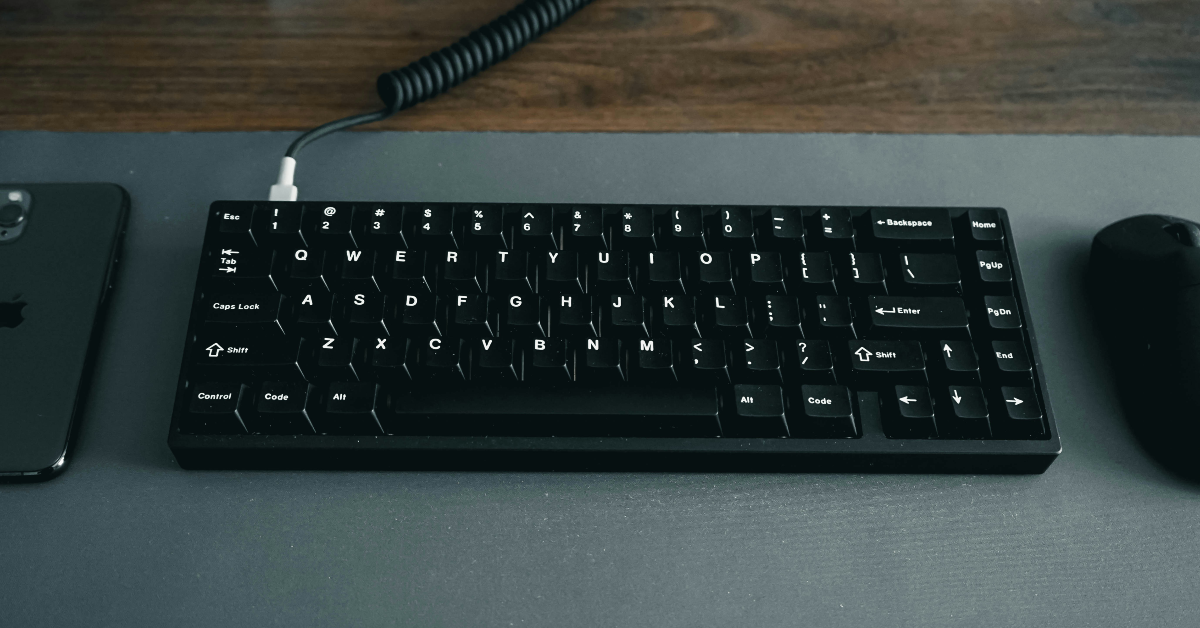 This is a pretty straightforward category that should not require a lot of thought. If you’re not fond of keyboards and like the option to move around with your keyboard, you should go for Bluetooth connectivity. However, wireless keyboards are notorious for having latency issues, which means your commands may take a fraction of a second to register. While this isn’t a big issue for regular users, it is a significant factor that must be considered when buying a gaming keyboard. If you’re willing to spend some extra money, go for a gaming wireless keyboard which comes with a Bluetooth transmitter of its own. This will solve any latency issues.




 Step 4: Enter the number of speakers in the video and the language being spoken. Hit Submit.
 Step 5: Click on the video once it is uploaded to the studio.
 Step 6: In the Translate section, click the dropdown menu next to ‘To’ and select the language you want the video to be translated into.
 Step 7: Choose the voices for the translated video and hit Generate.
 Step 4: Click on Translate Voice.
 Step 5: In the ‘Translate to’ section, select the final language.
 Step 6: Select the voice for the dub and the quality of the video.
Once the video is translated, it can be easily downloaded from the website.
Step 6: Select the voice for the dub and the quality of the video.
Once the video is translated, it can be easily downloaded from the website.
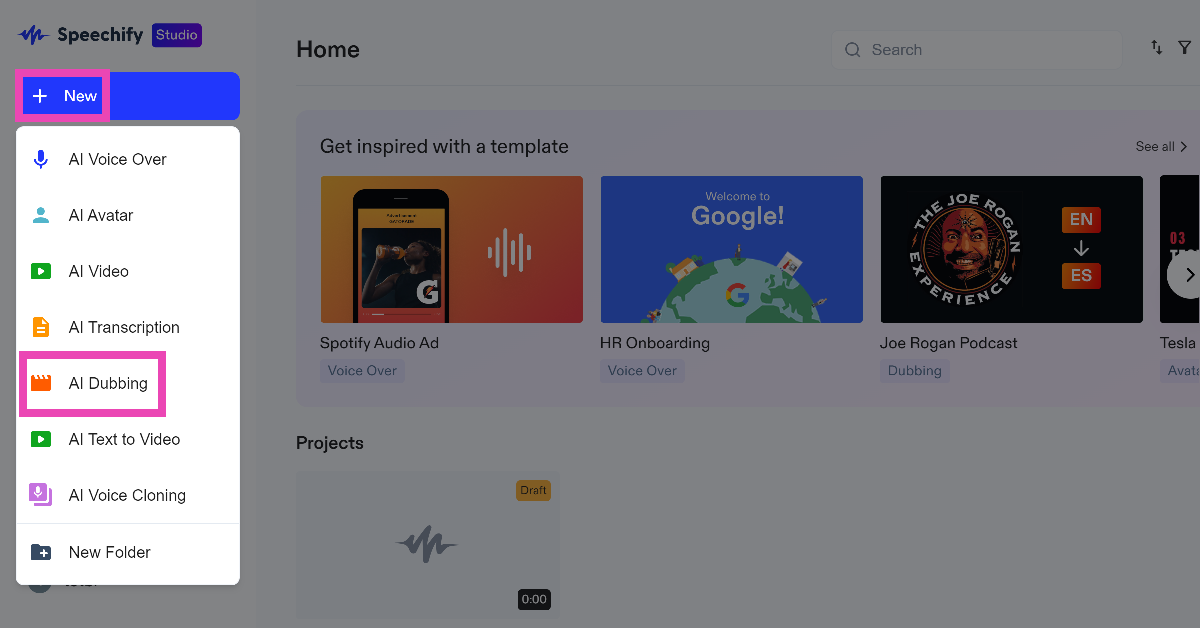 Step 3: Upload the video file from your PC or paste the link to the YouTube video in the box.
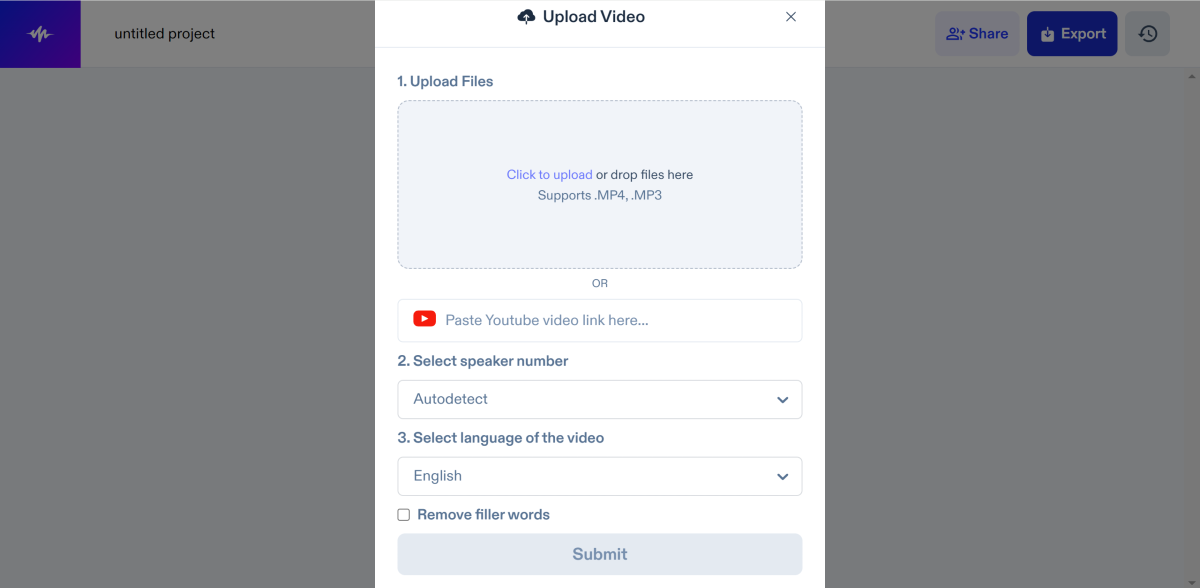 Step 4: Enter the number of speakers in the video and the language being spoken. Hit Submit.
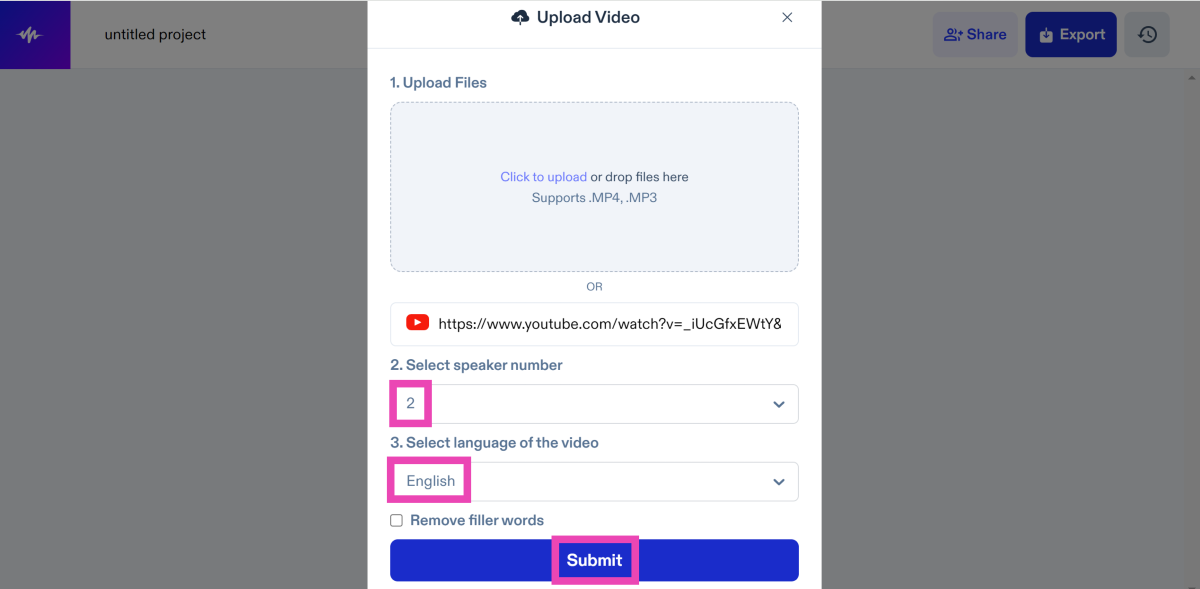 Step 5: Click on the video once it is uploaded to the studio.
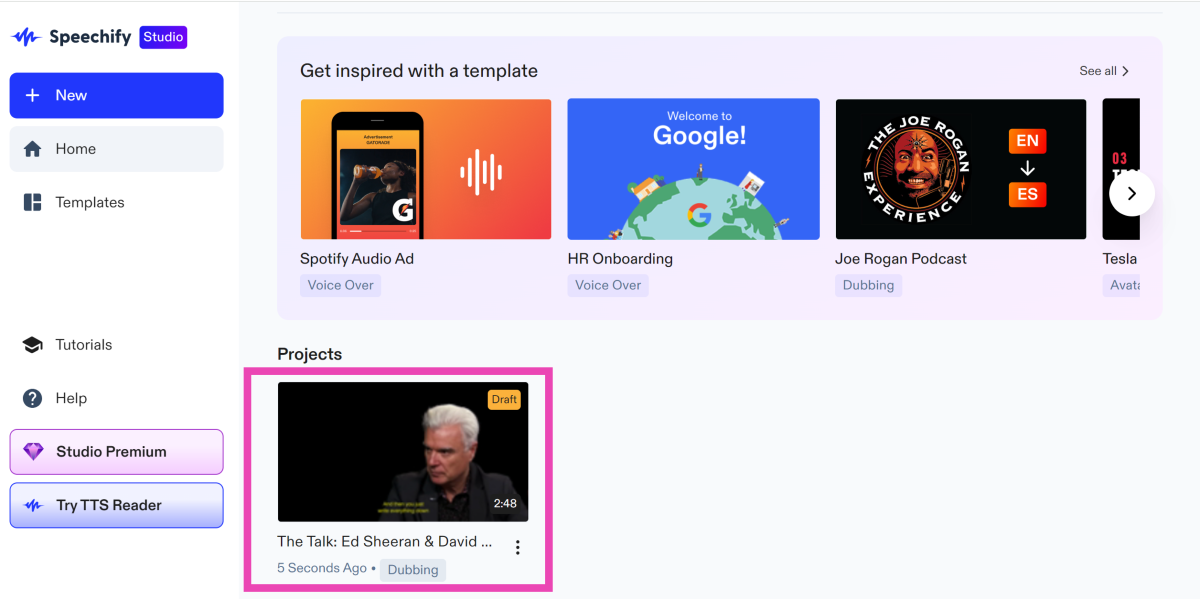 Step 6: In the Translate section, click the dropdown menu next to ‘To’ and select the language you want the video to be translated into.
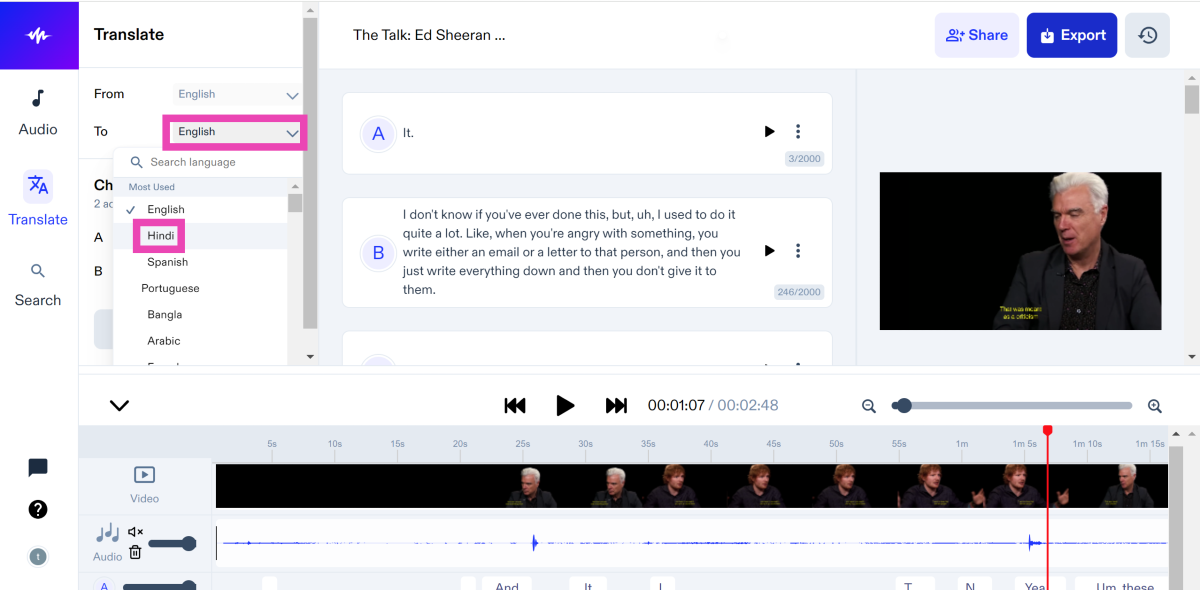 Step 7: Choose the voices for the translated video and hit Generate.
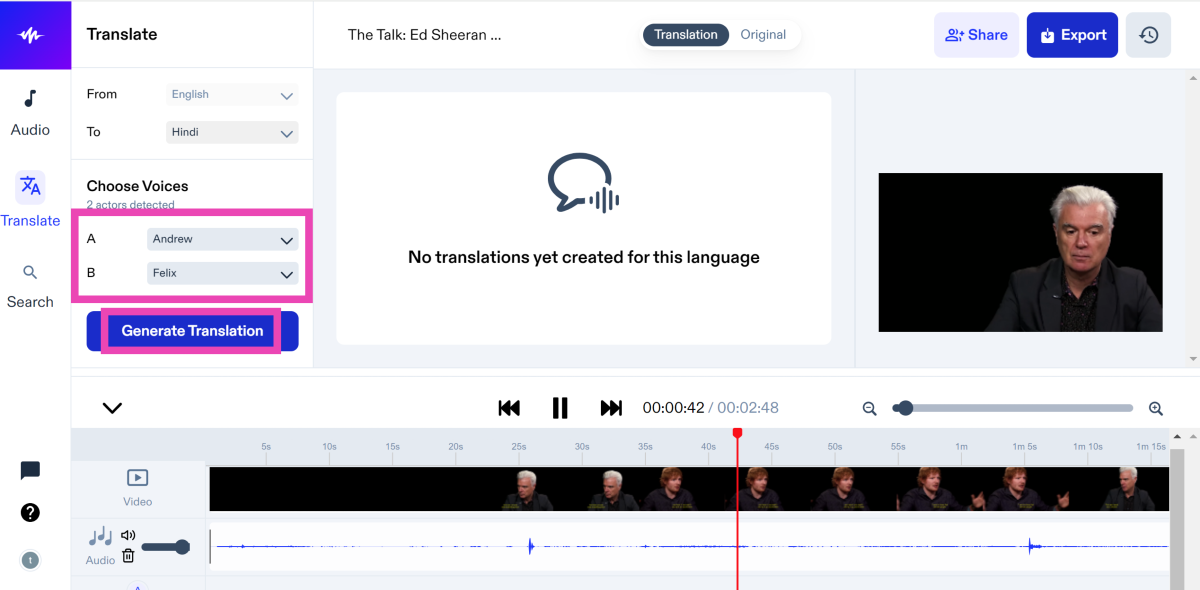 Step 8: Click on Export to download the translated video.
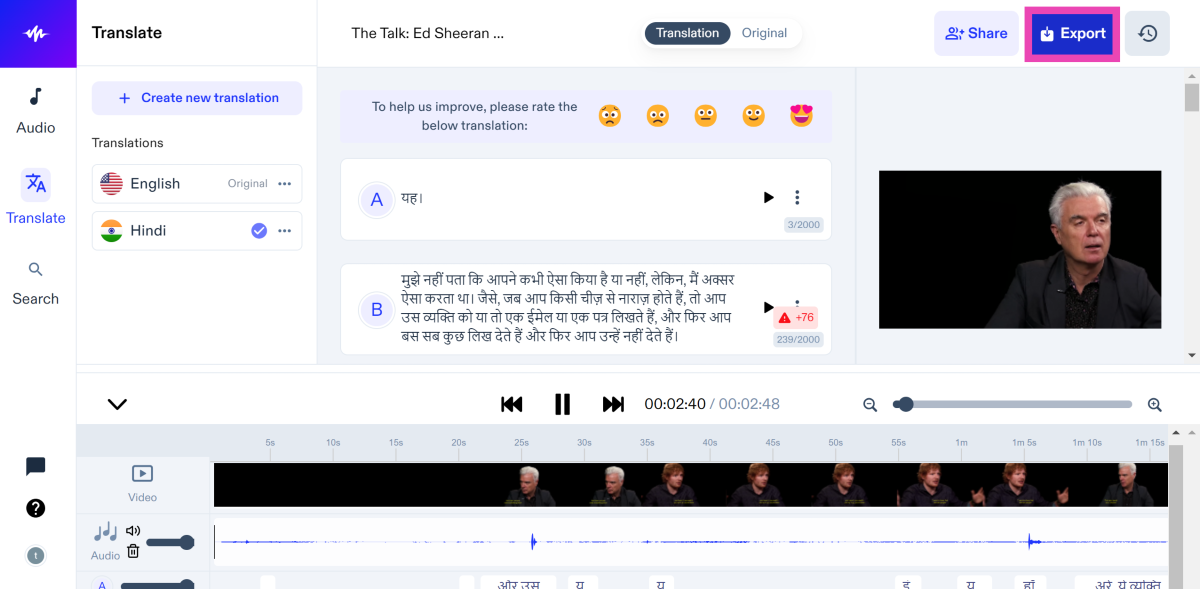
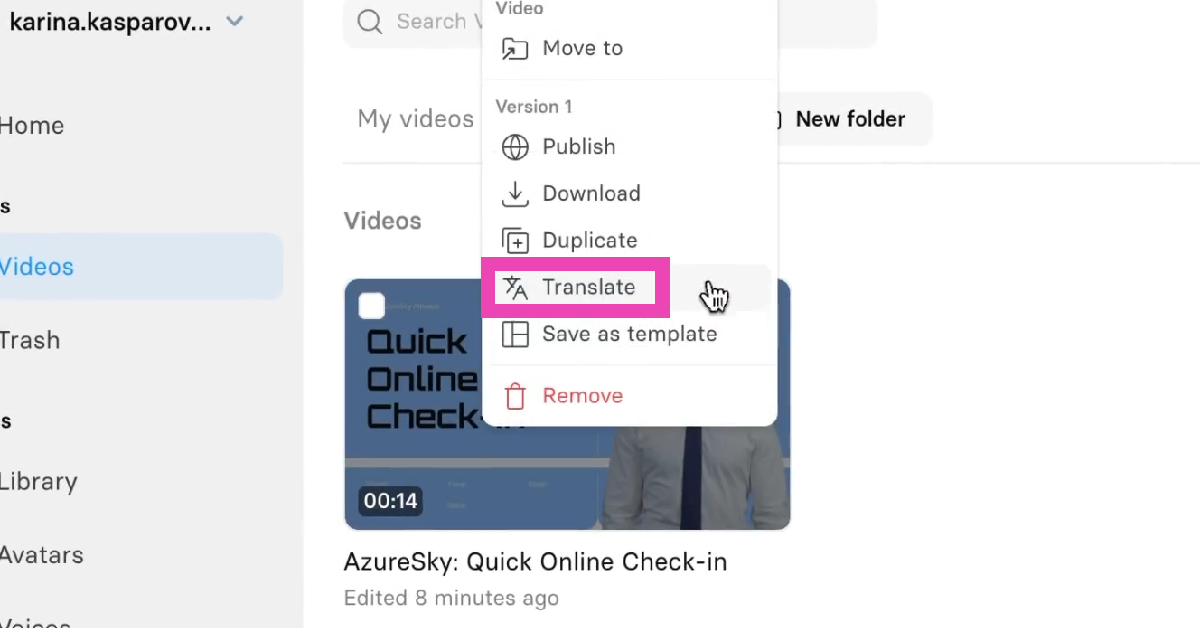 Step 4: Enter the language you want to translate the video to. Hit Translate.
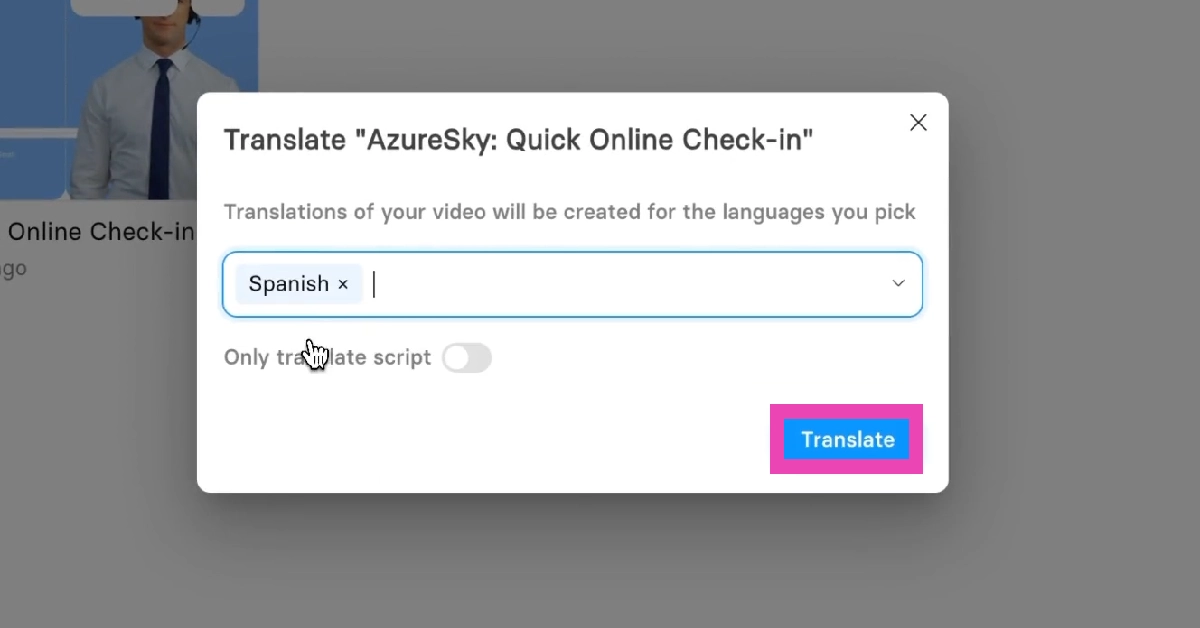 Step 5: Your translated video will appear in the dashboard and can be downloaded from there.
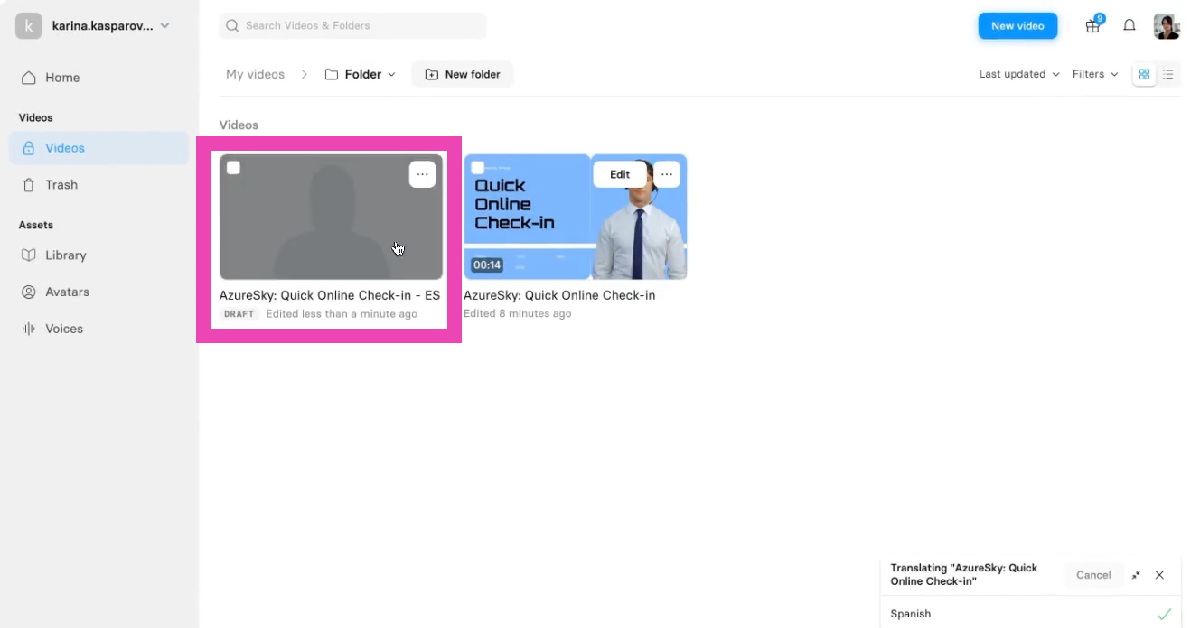
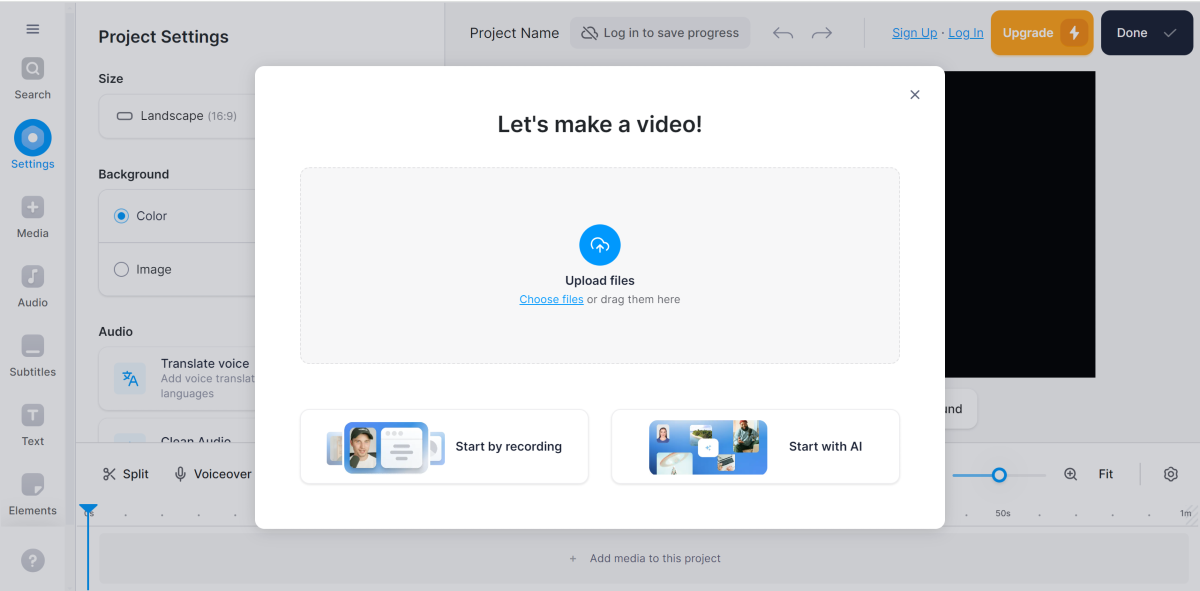 Step 4: Click on Translate Voice.
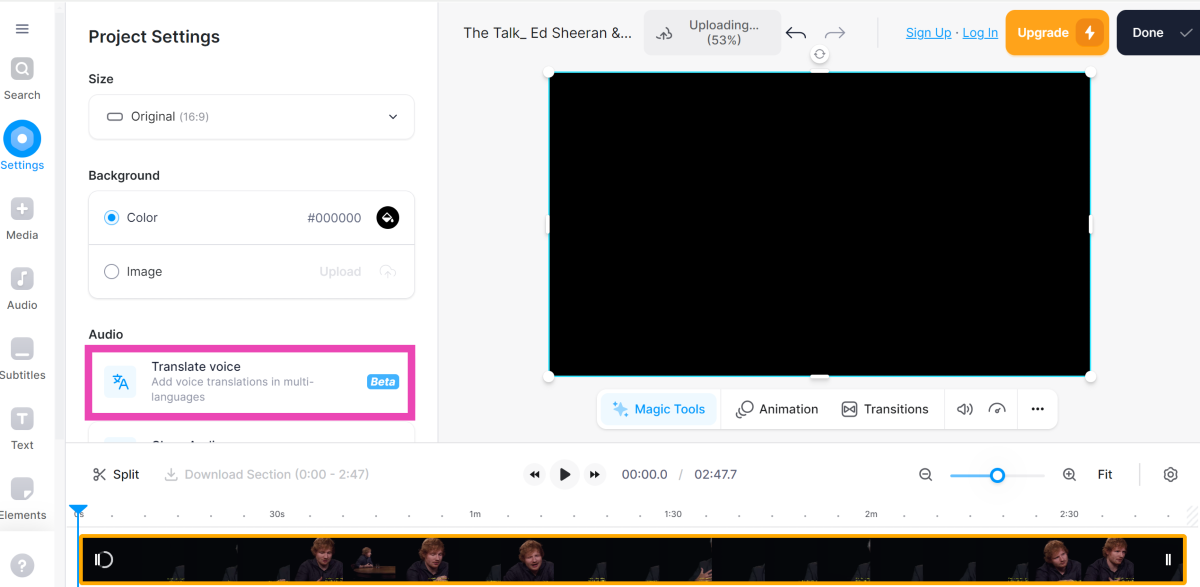 Step 5: In the ‘Translate to’ section, select the final language.
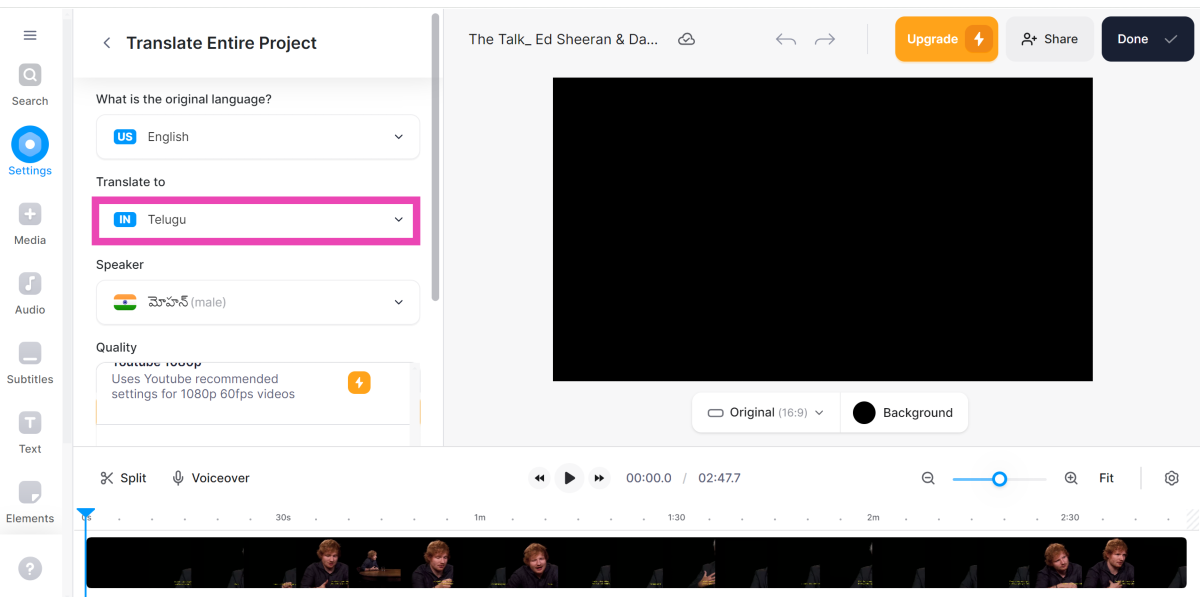 Step 6: Select the voice for the dub and the quality of the video.
Once the video is translated, it can be easily downloaded from the website.
Step 6: Select the voice for the dub and the quality of the video.
Once the video is translated, it can be easily downloaded from the website.
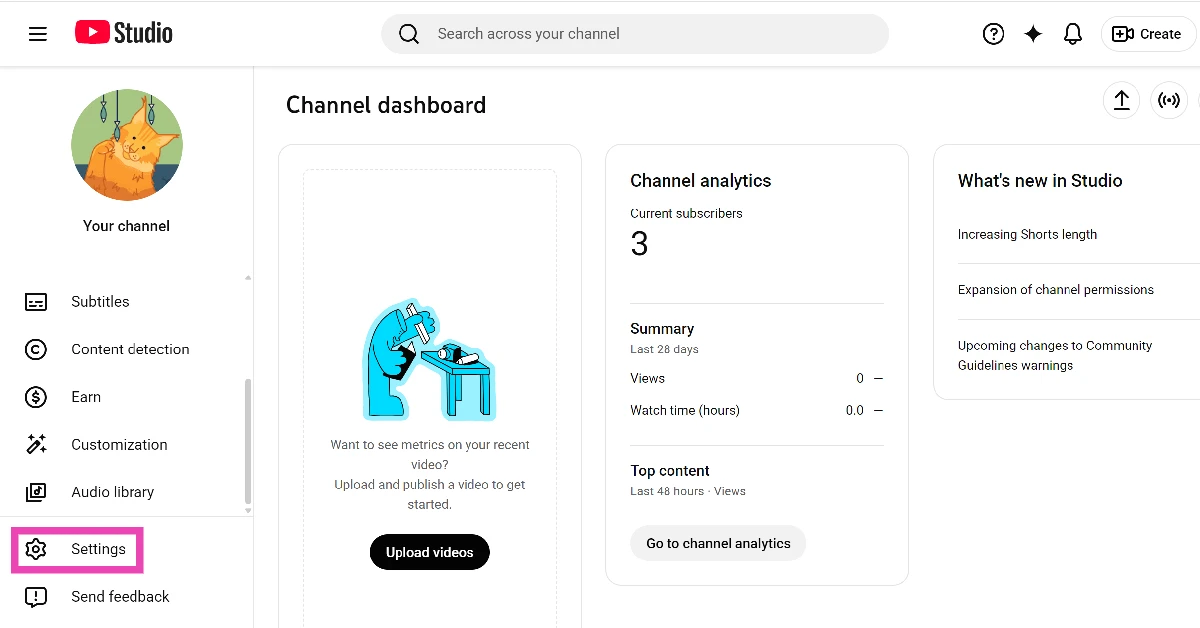 Step 3: Click on Channel.
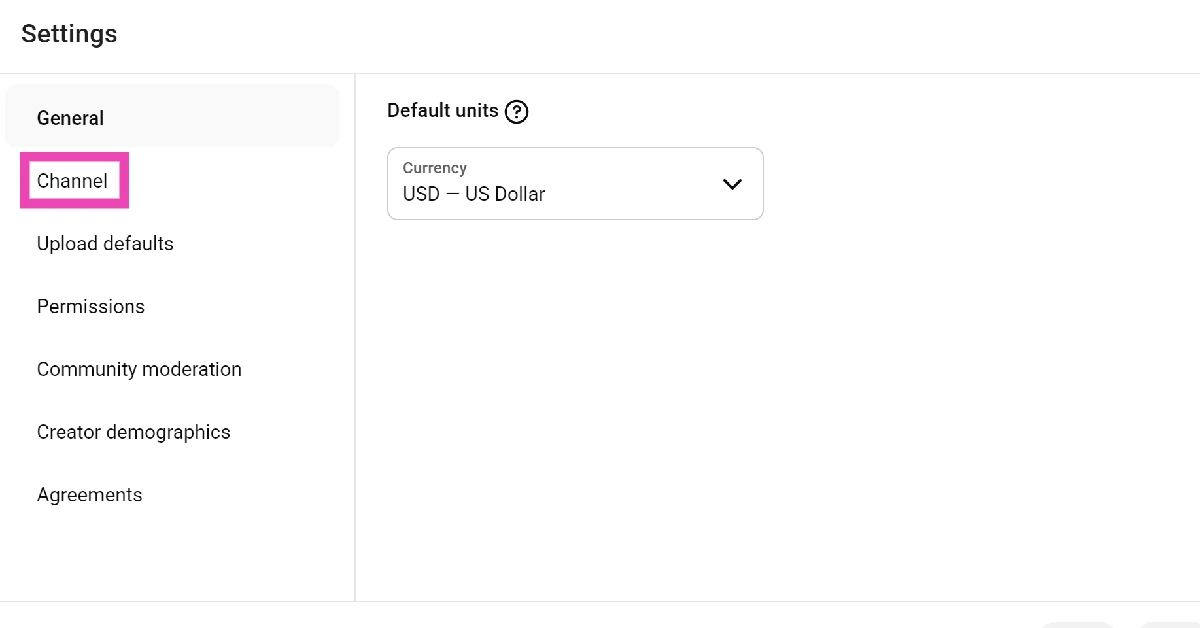 Step 4: Switch to the Advanced settings tab.
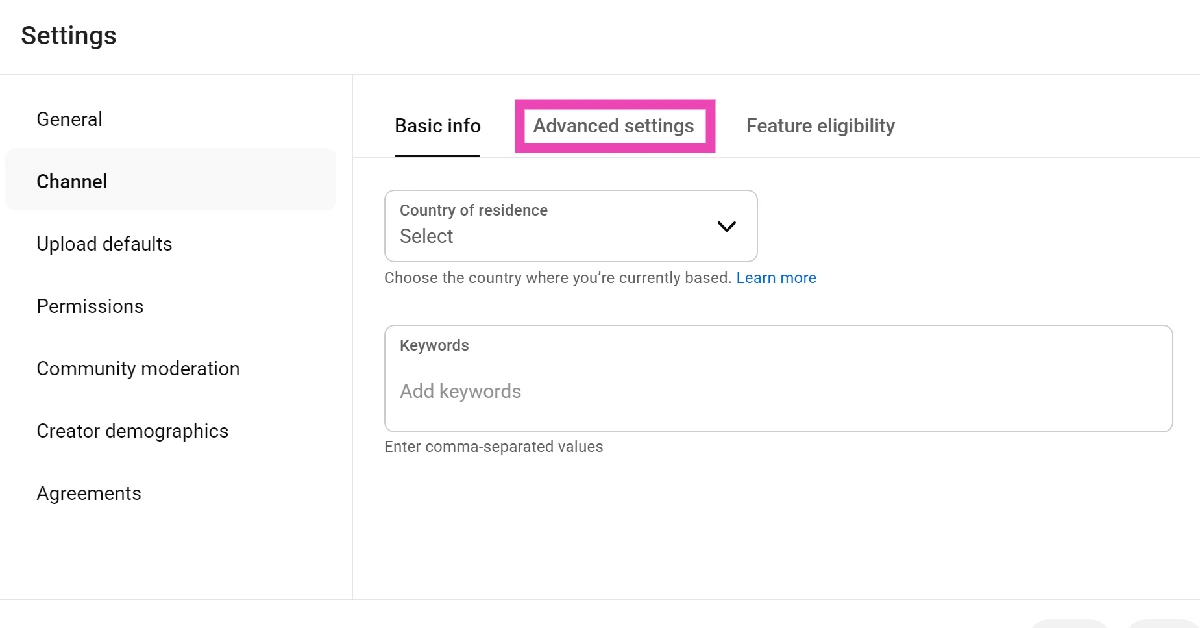 Step 5: Scroll down and hit Enable next to Automatic dubbing.
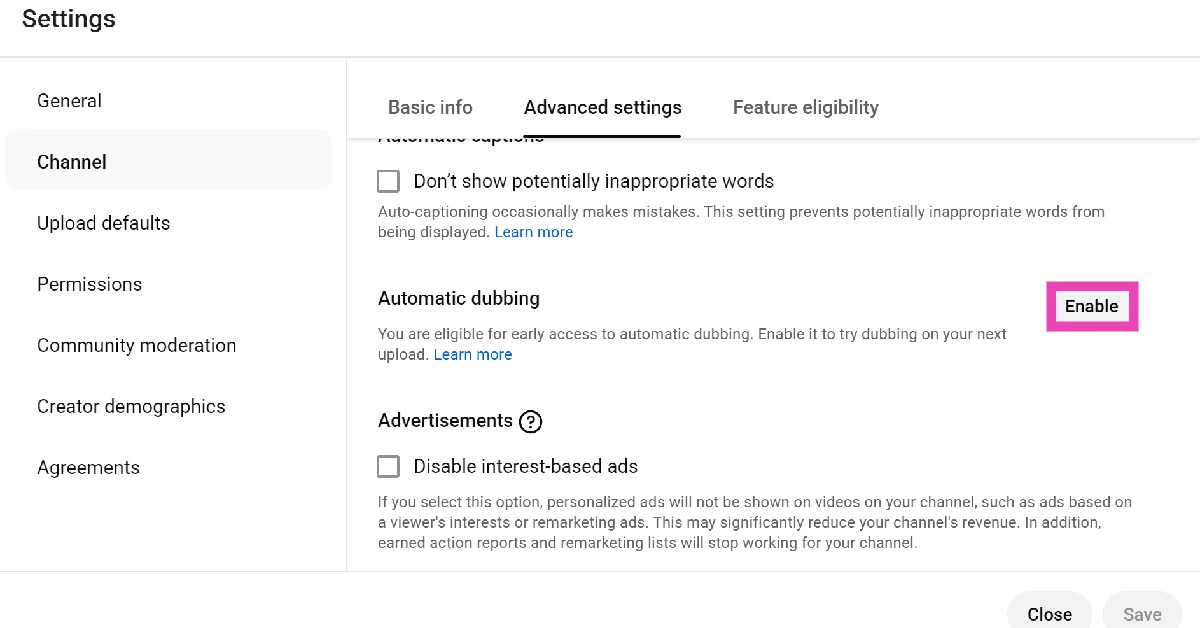 Step 6: Tick the checkbox next to Allow automatic dubbing.
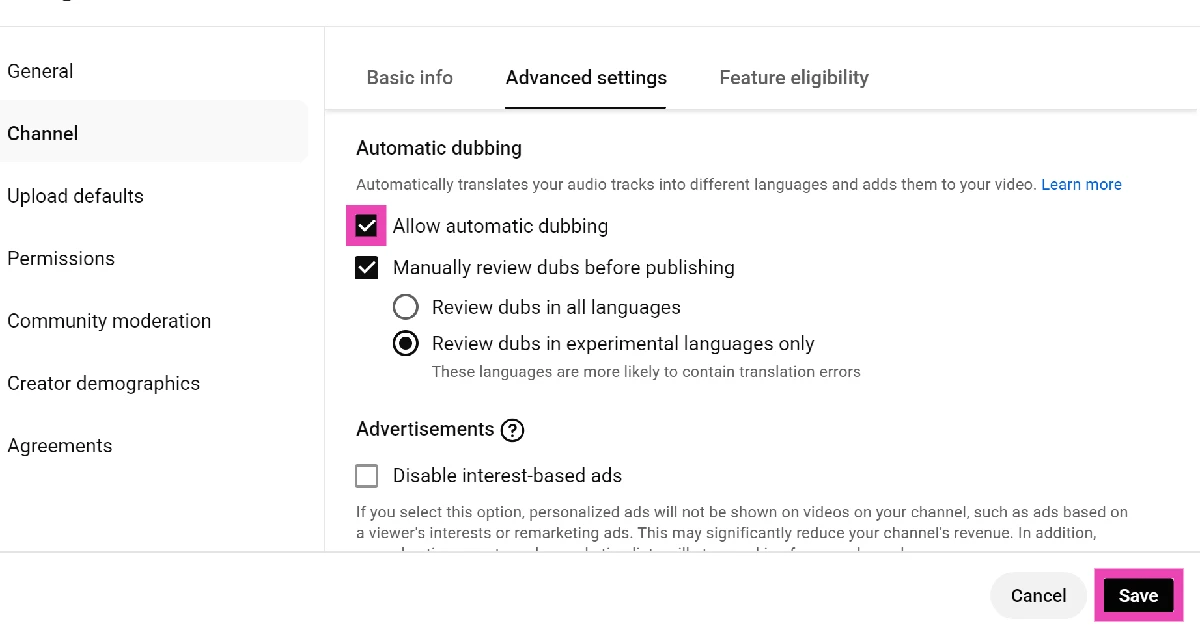 Step 7: Choose whether you want to manually review dubs before publishing them.
Step 8: Hit Save.
Step 9: Go back to YouTube Studio‘s home page.
Step 10: Select Content from the sidebar.
Step 11: Click on Languages.
Step 12: In the Language column, click on your preferred language.
Step 13: Select the language in the Preview menu.
Step 14: Hit Play to preview the dubs.
Step 15: Go back to the Languages section and click the downward arrow in the Audio column.
Step 16: Hit Publish.
Step 7: Choose whether you want to manually review dubs before publishing them.
Step 8: Hit Save.
Step 9: Go back to YouTube Studio‘s home page.
Step 10: Select Content from the sidebar.
Step 11: Click on Languages.
Step 12: In the Language column, click on your preferred language.
Step 13: Select the language in the Preview menu.
Step 14: Hit Play to preview the dubs.
Step 15: Go back to the Languages section and click the downward arrow in the Audio column.
Step 16: Hit Publish.

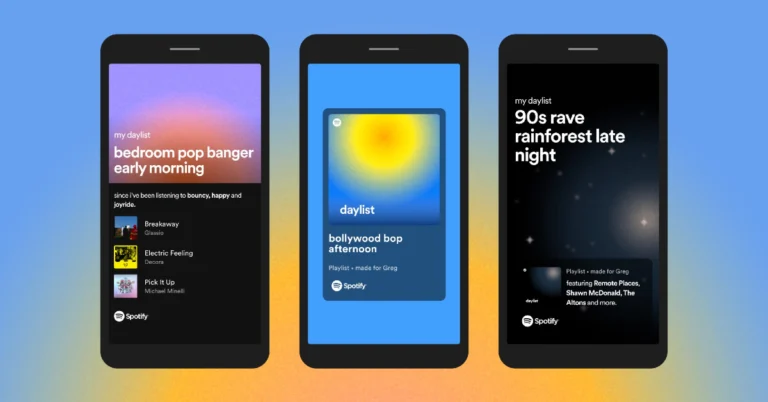
 Step 3: Tap on Made For You.
 Step 4: Tap on daylist.
 Step 5: Tap on the plus icon to save your daylist to your Spotify library.
 Once saved, you can access your daylist from the ‘Your Library’ tab.

 A ‘daylist’ is a playlist that is specially curated for you, keeping your mood and listening patterns in mind. Your daylist changes throughout the day and gets updated with new songs based on your previous listening pattern. For example, if you mostly listen to acoustic and mellow music in the evenings, then those moods will be reflected on your evening daylist as well.
Your daylists are transitory. If you don’t add the songs to a new playlist, there is no way to get them back. The title of the daylist also changes according to the phase of the day. While sharing your daylist with your friends, you get to choose from three layouts – a standard screenshot, a social media sticker, and a sharecard with the background graphic reflecting the time of the day.
A ‘daylist’ is a playlist that is specially curated for you, keeping your mood and listening patterns in mind. Your daylist changes throughout the day and gets updated with new songs based on your previous listening pattern. For example, if you mostly listen to acoustic and mellow music in the evenings, then those moods will be reflected on your evening daylist as well.
Your daylists are transitory. If you don’t add the songs to a new playlist, there is no way to get them back. The title of the daylist also changes according to the phase of the day. While sharing your daylist with your friends, you get to choose from three layouts – a standard screenshot, a social media sticker, and a sharecard with the background graphic reflecting the time of the day.
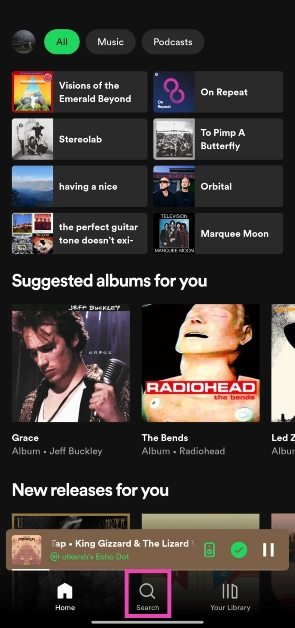 Step 3: Tap on Made For You.
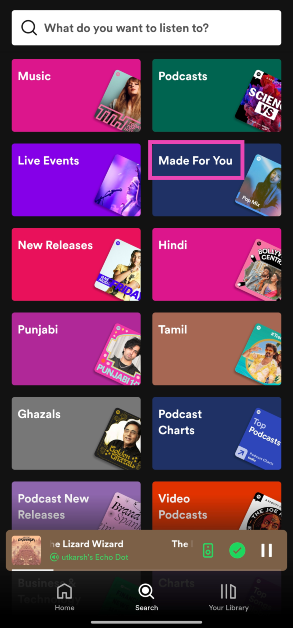 Step 4: Tap on daylist.
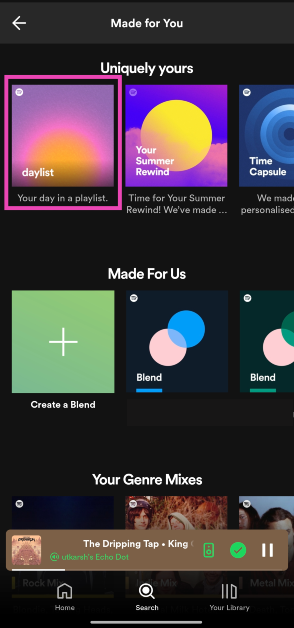 Step 5: Tap on the plus icon to save your daylist to your Spotify library.
 Once saved, you can access your daylist from the ‘Your Library’ tab.
 Instead of navigating to the ‘Made for You’ section, you can search for your daylist directly from the search box. Simply go to the Search tab, hit the text box, and type ‘Daylist’. Your personalised playlist will appear as the first result. Hitting the plus icon in the Daylist saves it to the Your Library tab. You can pin it so as to not drown in the sea of new saved items.
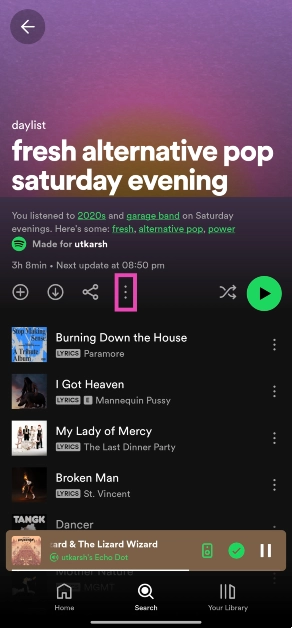 Step 3: Select Add to other playlist.
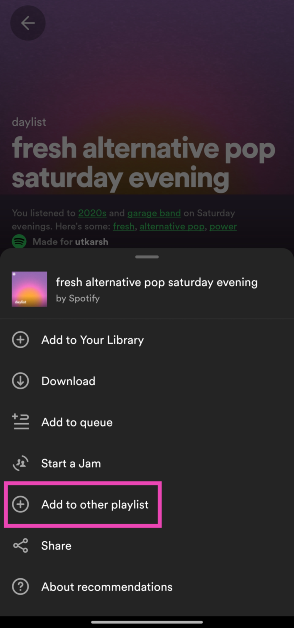 Step 4: Tap on New playlist.
 Step 5: Give the playlist a name and hit Create.
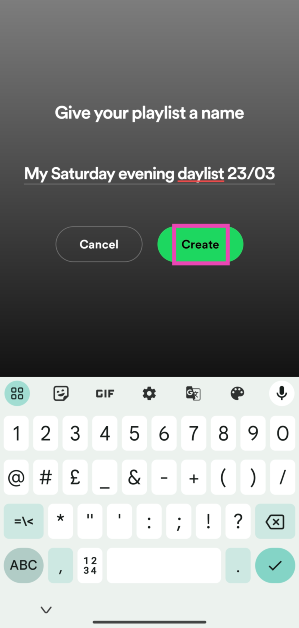
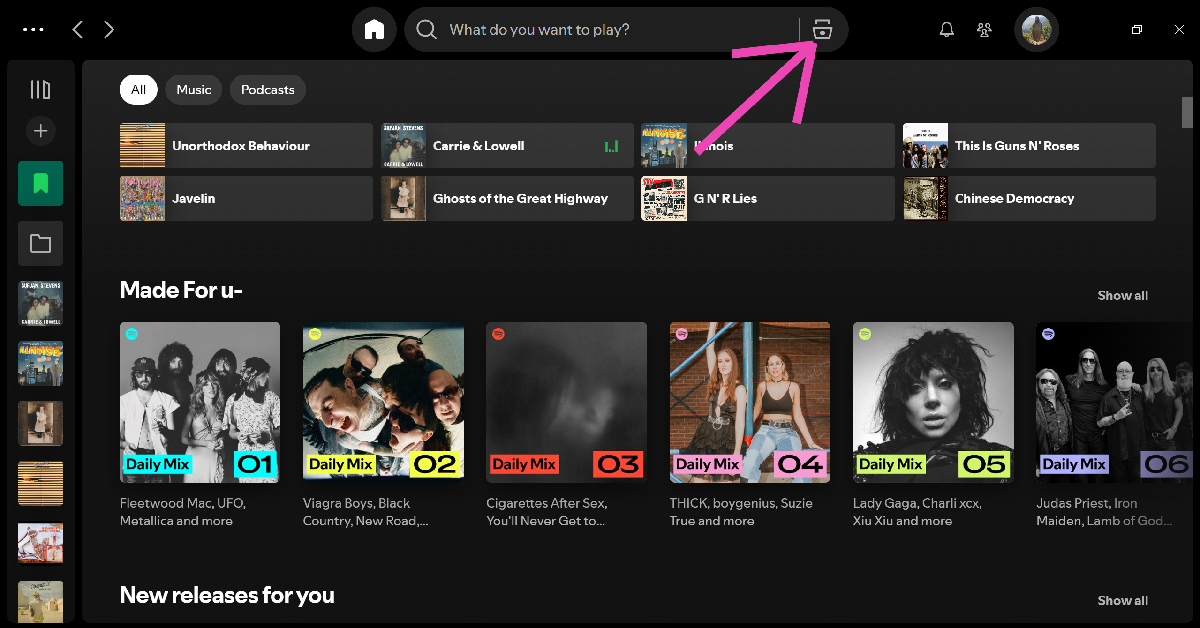 Step 3: Go to Made For You.
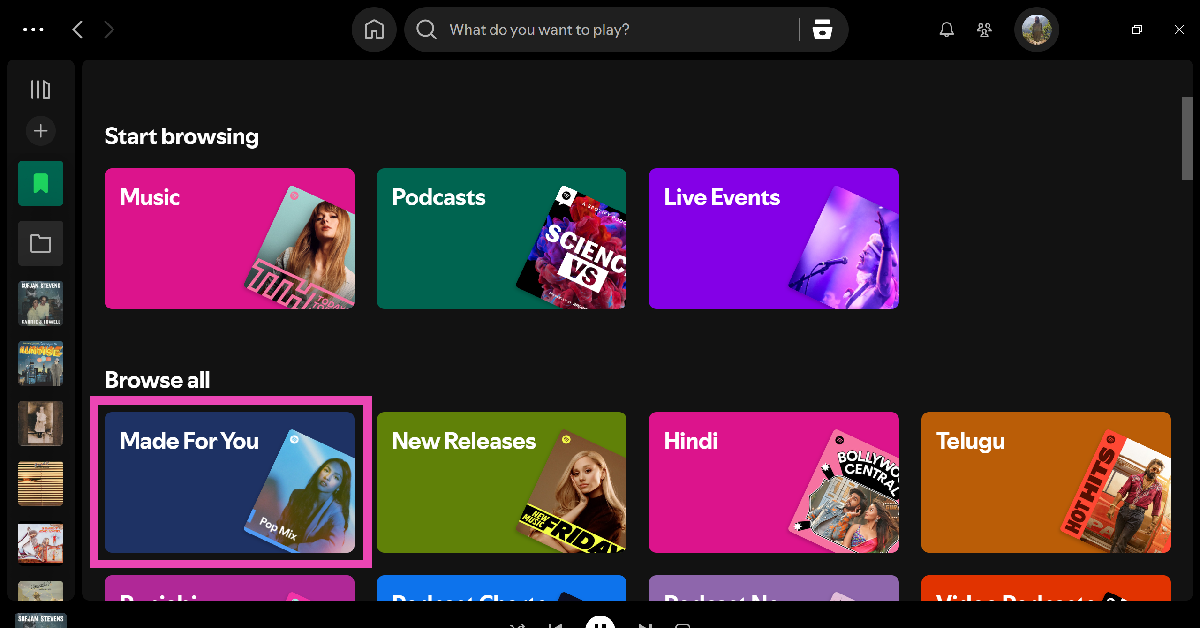 Step 4: Click on Daylist.
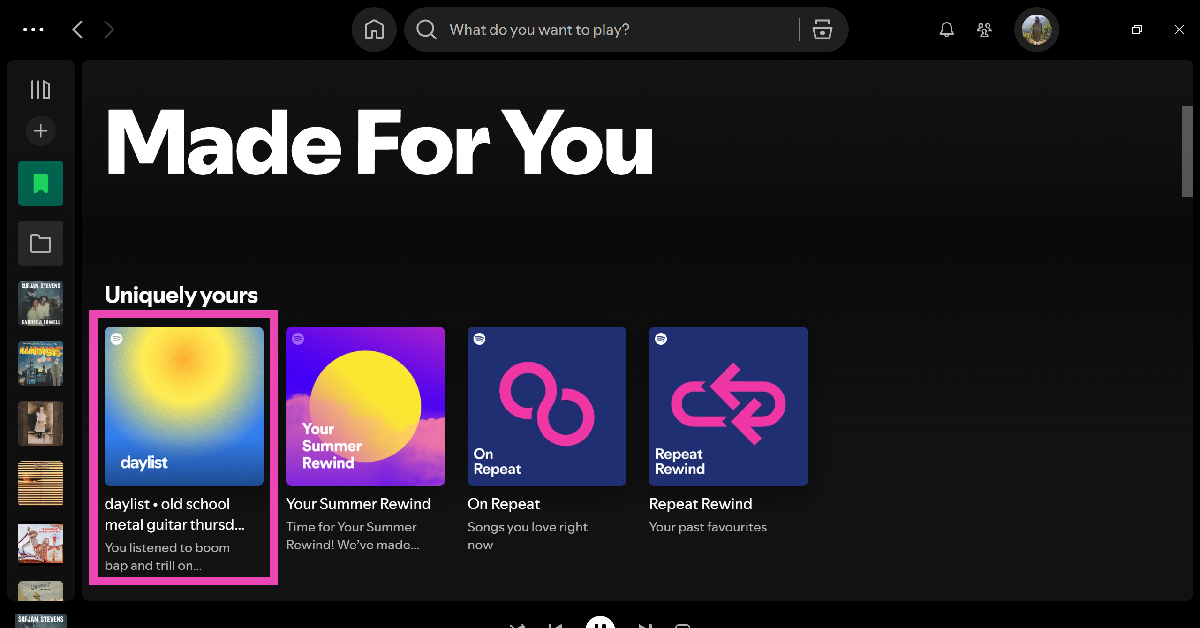

 Step 5:
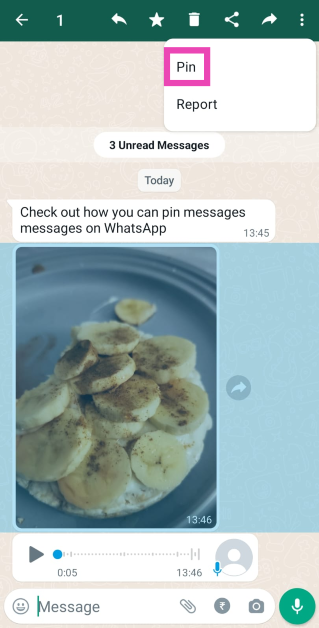 Step 6:
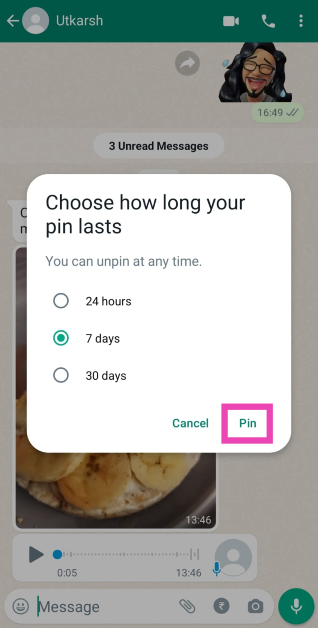 Step 7:
 Step 3: Tap the Live Photo icon at the bottom of the screen.
 Step 4: Tap the speaker icon at the top left corner of the screen.

 Step 3: Select Live.

 Step 2: Turn off the toggle switch next to Low Power Mode.
 Step 2: Tap on Motion.
 Step 3: Turn off the toggle switch next to Reduce Motion.

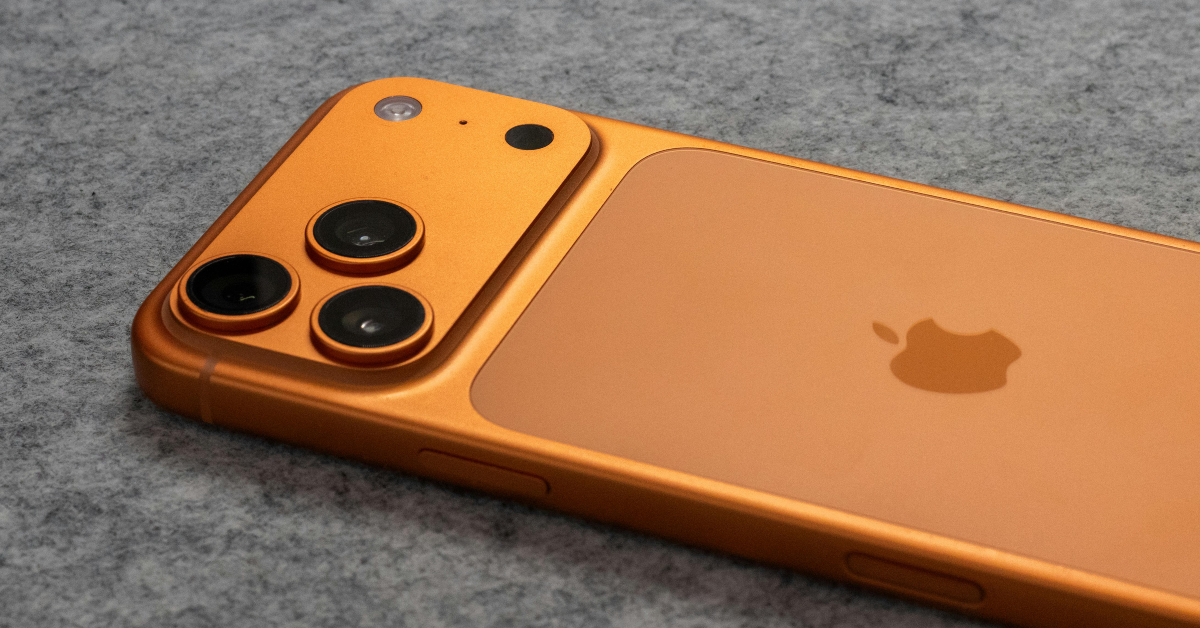 If you’re unable to hear the sound on a Live Photo, it may be because your iPhone is on mute. Use the ringer switch to enable the ‘loud’ sound profile. Open the Live Photo again, then tap and hold it to hear the sound.
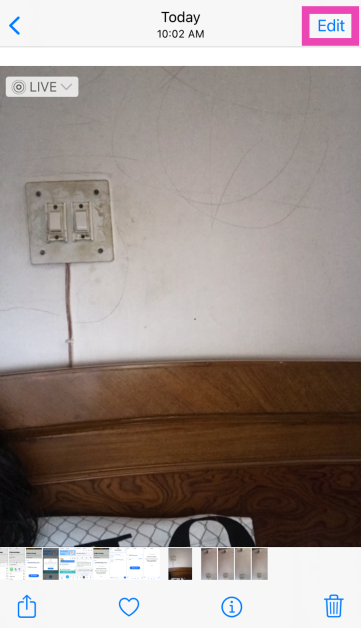 Step 3: Tap the Live Photo icon at the bottom of the screen.
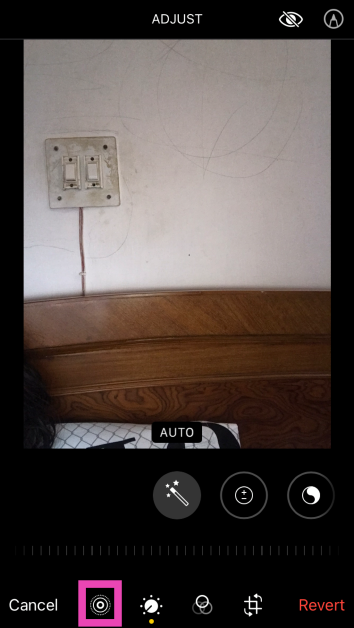 Step 4: Tap the speaker icon at the top left corner of the screen.
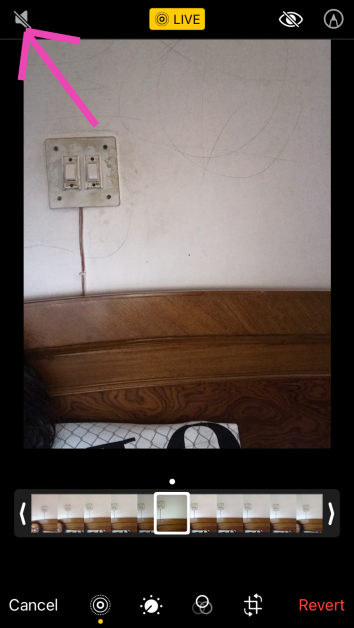 Step 5: Hit Done.
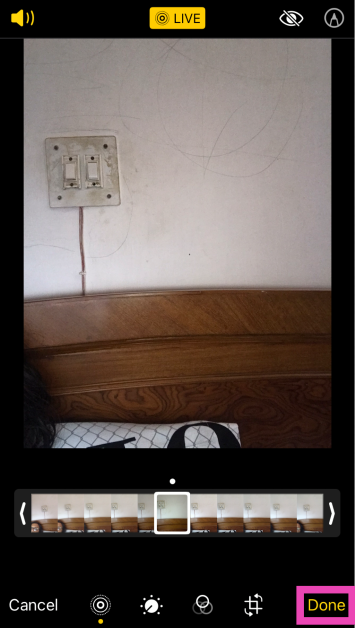
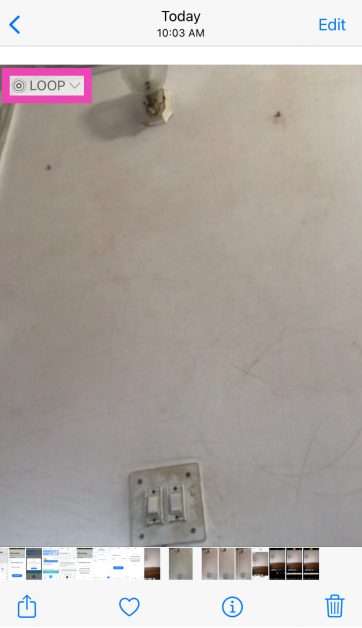 Step 3: Select Live.
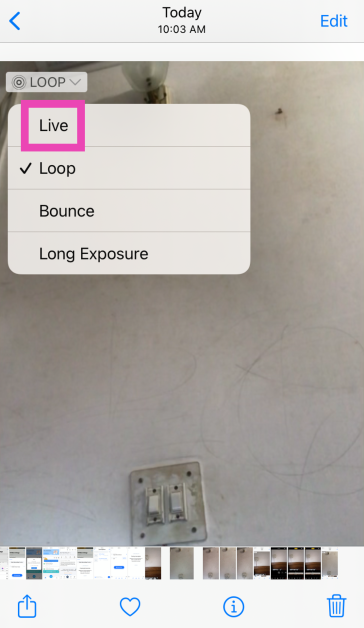
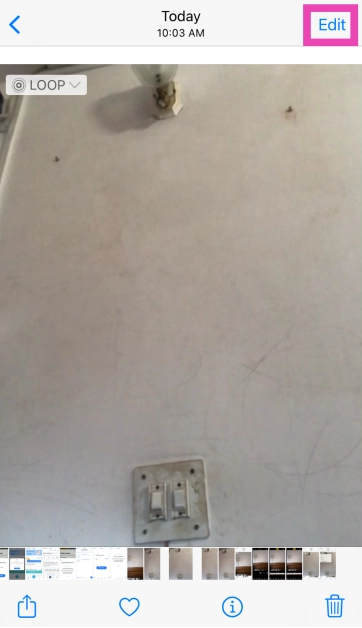 Step 3: Tap on Revert at the bottom right corner of the screen.
 Step 4: Select Revert to Original in the popup box.
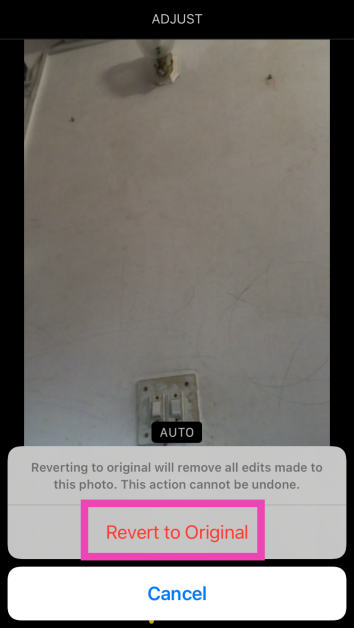
 If a background glitch is keeping you from hearing the sound on Live Photos, a quick restart can easily fix the issue. Press and hold the side key along with a volume key to access the power menu. Swipe the power slider across the screen to turn off your iPhone. After a few seconds, press and hold the side key to turn the iPhone back on.
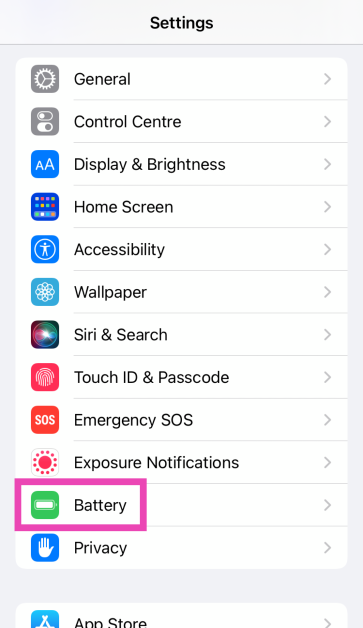 Step 2: Turn off the toggle switch next to Low Power Mode.
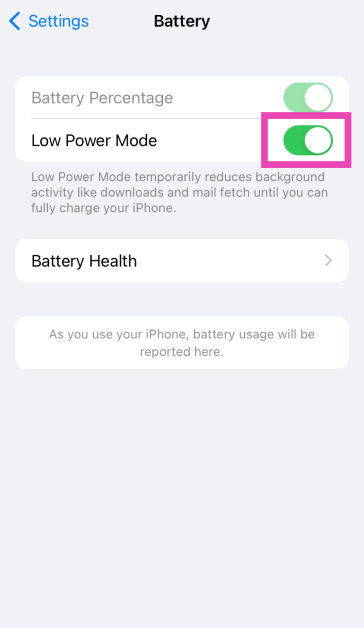
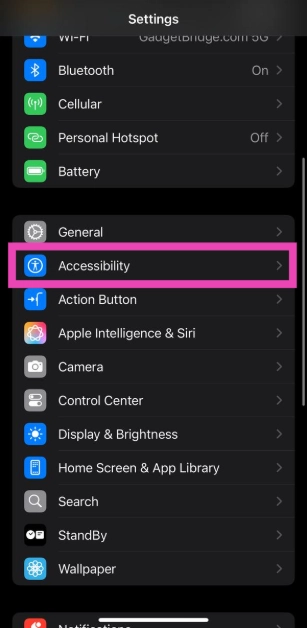 Step 2: Tap on Motion.
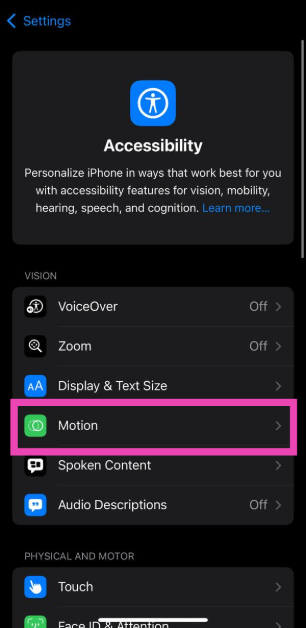 Step 3: Turn off the toggle switch next to Reduce Motion.
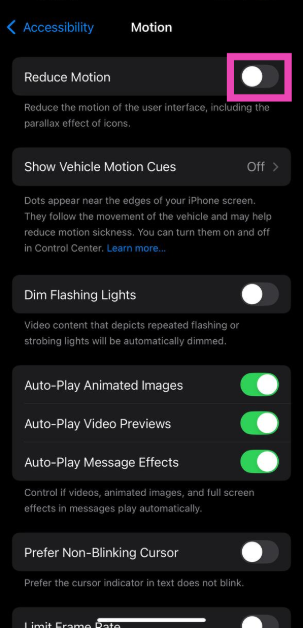
 In case you’re unable to take live photos from the Camera app, make sure that the feature is enabled in Camera settings.
Step 1: Go to Settings.
Step 2: Select Camera.
Step 3: Tap on Preserve Settings.
Step 4: Turn on the toggle switch next to Live Photo.
In case you’re unable to take live photos from the Camera app, make sure that the feature is enabled in Camera settings.
Step 1: Go to Settings.
Step 2: Select Camera.
Step 3: Tap on Preserve Settings.
Step 4: Turn on the toggle switch next to Live Photo.
 Step 3: Select Software Update.
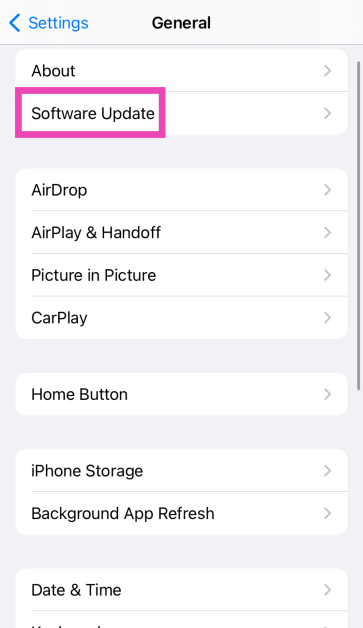 Step 4: Tap on Download and Install.
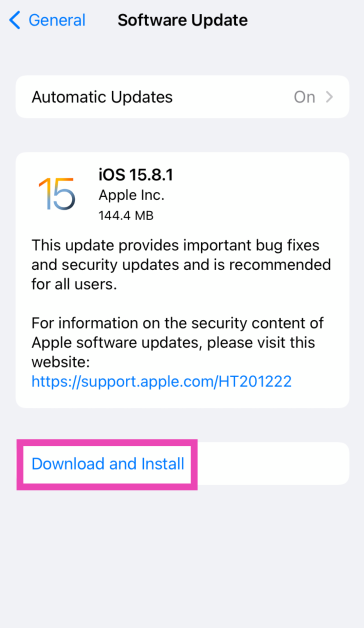
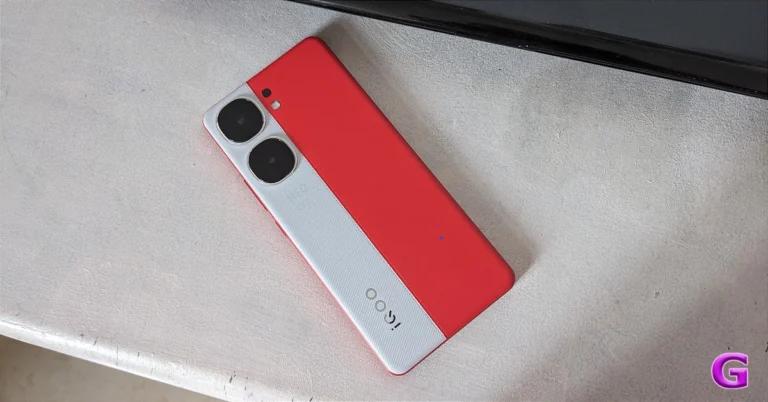
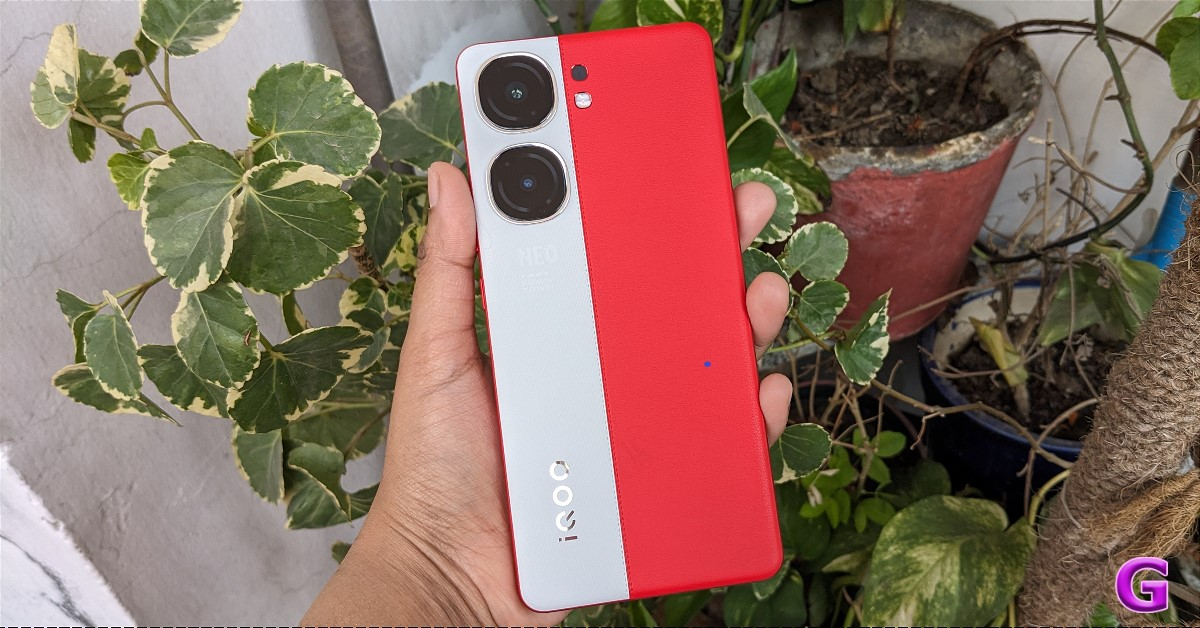 Despite it being incredibly thin and lighter, its build quality and finish are superb. Also, the distribution of weight is extremely balanced. The device is fairly comfortable to carry around and its faux leather surface provides a nice overall grip. Because of this we are glad there won’t be any fingerprints or smudges on the phone makes us happy. Two colours are available: the Fiery Red colour variant and the Conqueror Black version with AG glass protection. Over that, the gadget is splash and dust-resistant with an IP54 rating.
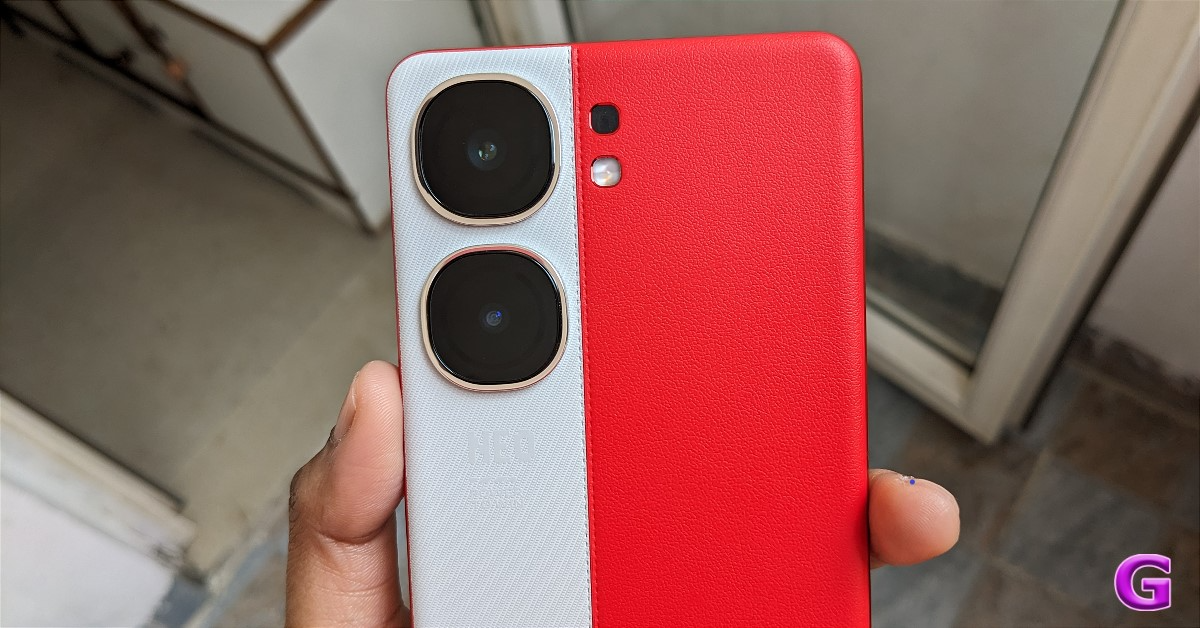 The phone’s two vertically arranged camera sensors are mounted separately, together with an LED flashlight. On the left side of the frame are power sensors and volume rockers. A SIM tray, USB-C port, speaker, and microphone are located at the bottom. One nano SIM card and one Micro SD card or two nano SIM cards can fit in the SIM tray.
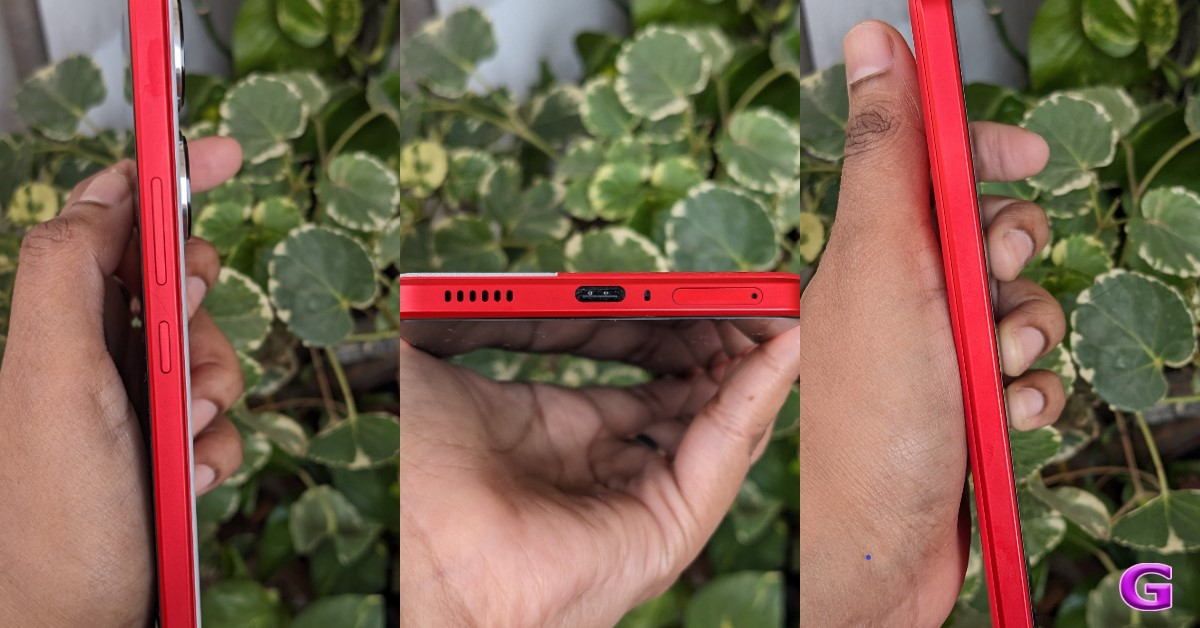 The 6.78-inch 1.5K LTPO AMOLED display of the iQOO Neo 9 Pro has a resolution of 1,260×2,800 pixels. The refresh rate of the panel rises to 144Hz during gaming, from 120Hz during regular use. The screen also features iQOO’s Wet Touch technology, which lets users perform certain tasks with moist fingertips.
A 16-megapixel selfie camera is situated just above the screen. Additionally, the side bezels are minimal, which enhances the whole experience.
The 6.78-inch 1.5K LTPO AMOLED display of the iQOO Neo 9 Pro has a resolution of 1,260×2,800 pixels. The refresh rate of the panel rises to 144Hz during gaming, from 120Hz during regular use. The screen also features iQOO’s Wet Touch technology, which lets users perform certain tasks with moist fingertips.
A 16-megapixel selfie camera is situated just above the screen. Additionally, the side bezels are minimal, which enhances the whole experience.
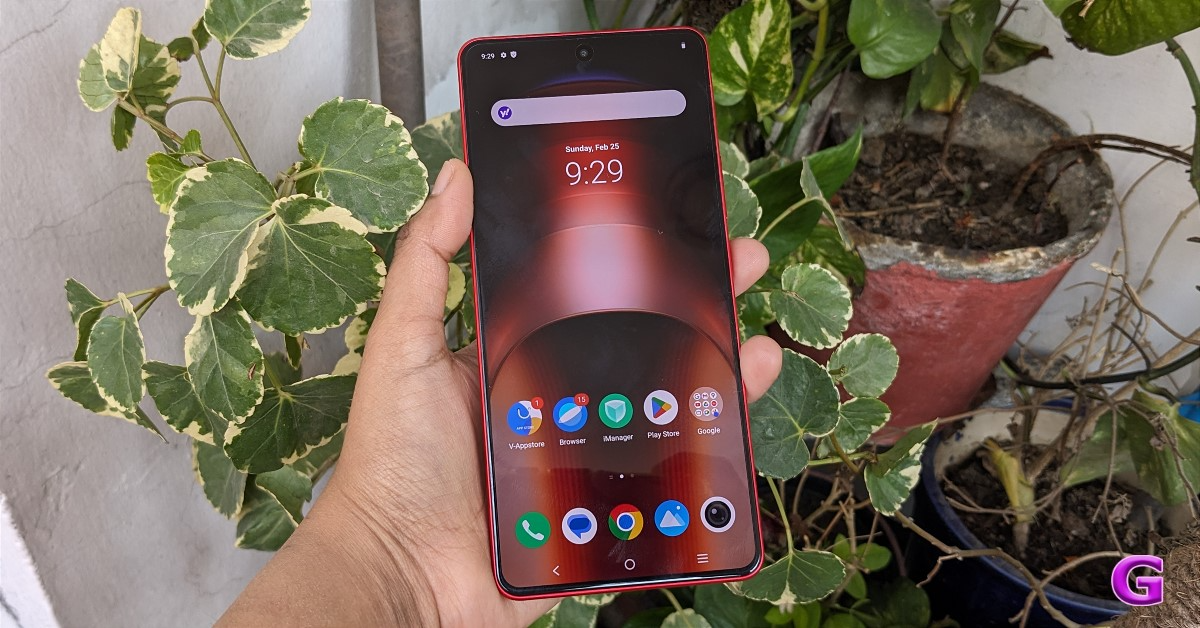 Keep in mind that while the 120Hz refresh rate is excellent for everyday use, the 144Hz refresh rate is available for gaming. Additionally, the phone supports HDR10+. The colour reproduction is sharp, colourful, and vivid. The UI also has the desperately needed smoothness thanks to the 120Hz refresh rate. It is effortless and much more enjoyable while browsing through your preferred social media platform, such as Instagram.
When we tested the IQOO phone outdoors, it appeared incredibly clear, bright, and crisp, living up to its 3,000 nits of peak brightness claim. Then, we also have an excellent in-display fingerprint scanner that does a great job.
It’s a lot of pleasure to watch shows and movies since the content is visually stunning. The content appears much better because HDR support is there. You may stream full-resolution videos from apps like Netflix and Amazon Prime by having Widevine L1 certification. Additionally, we played YouTube HDR videos, and they streamed well at 4K quality without any lag. Additionally, MMC support allows for incredibly smooth video playback, which is also quite amazing.
Also Read: OnePlus 12 Review: A True Flagship Smartphone
Unfortunately, though, Dolby Vision support is not available; we would have appreciated this feature. But other than that, the display quality of the device is pretty good.
There are two stereo speakers on the phone. The earpiece functions as a secondary speaker in addition to the single bottom-firing speaker. We therefore initially believed that, because we have one down-firing speaker and one front-firing speaker, the audio would not be very well balanced. However, iQOO has produced a level of sound quality that is truly remarkable. The speakers are clear, loud and provide an immersive experience, particularly while viewing an action movie.
Keep in mind that while the 120Hz refresh rate is excellent for everyday use, the 144Hz refresh rate is available for gaming. Additionally, the phone supports HDR10+. The colour reproduction is sharp, colourful, and vivid. The UI also has the desperately needed smoothness thanks to the 120Hz refresh rate. It is effortless and much more enjoyable while browsing through your preferred social media platform, such as Instagram.
When we tested the IQOO phone outdoors, it appeared incredibly clear, bright, and crisp, living up to its 3,000 nits of peak brightness claim. Then, we also have an excellent in-display fingerprint scanner that does a great job.
It’s a lot of pleasure to watch shows and movies since the content is visually stunning. The content appears much better because HDR support is there. You may stream full-resolution videos from apps like Netflix and Amazon Prime by having Widevine L1 certification. Additionally, we played YouTube HDR videos, and they streamed well at 4K quality without any lag. Additionally, MMC support allows for incredibly smooth video playback, which is also quite amazing.
Also Read: OnePlus 12 Review: A True Flagship Smartphone
Unfortunately, though, Dolby Vision support is not available; we would have appreciated this feature. But other than that, the display quality of the device is pretty good.
There are two stereo speakers on the phone. The earpiece functions as a secondary speaker in addition to the single bottom-firing speaker. We therefore initially believed that, because we have one down-firing speaker and one front-firing speaker, the audio would not be very well balanced. However, iQOO has produced a level of sound quality that is truly remarkable. The speakers are clear, loud and provide an immersive experience, particularly while viewing an action movie.
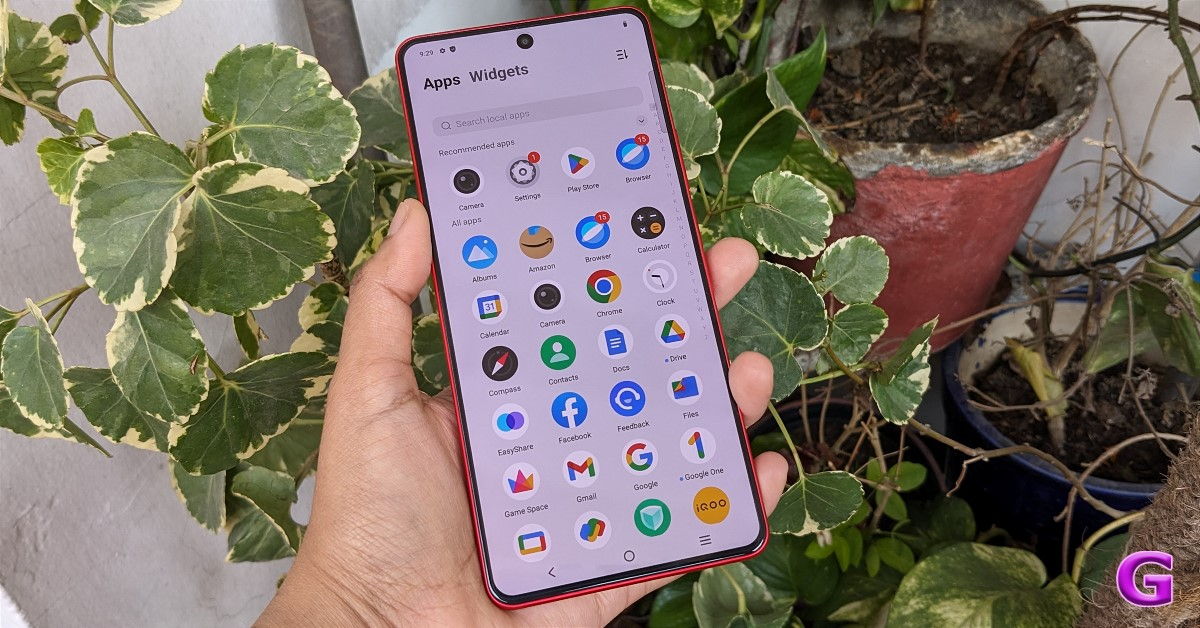 Regarding the user interface (UI), it comes pre-installed with FuntouchOS 14 and the most recent version of Android 14. The programme is incredibly well-optimized; we had no app crashes or lags. Sure, some apps come pre-installed, but the good news is that you can uninstall them via the settings. The majority of the undesirable third-party programmes are also removable. Three years of software upgrades and four years of security patches are what the company guarantees.
The iQOO Neo 9 Pro has two rear cameras: an 8-megapixel OmniVision OV08D10 ultrawide-angle camera with an f/2.2 aperture and a 50-megapixel 1/1.49-inch Sony IMX920 sensor with optical image stabilisation (OIS) and an f/1.88 aperture. A 16-megapixel Samsung S5K3P9SP04-FGX9 sensor with an f/2.5 aperture is available for taking selfies.
Regarding the user interface (UI), it comes pre-installed with FuntouchOS 14 and the most recent version of Android 14. The programme is incredibly well-optimized; we had no app crashes or lags. Sure, some apps come pre-installed, but the good news is that you can uninstall them via the settings. The majority of the undesirable third-party programmes are also removable. Three years of software upgrades and four years of security patches are what the company guarantees.
The iQOO Neo 9 Pro has two rear cameras: an 8-megapixel OmniVision OV08D10 ultrawide-angle camera with an f/2.2 aperture and a 50-megapixel 1/1.49-inch Sony IMX920 sensor with optical image stabilisation (OIS) and an f/1.88 aperture. A 16-megapixel Samsung S5K3P9SP04-FGX9 sensor with an f/2.5 aperture is available for taking selfies.
 The camera system is excellent, especially for taking pictures in the daytime. The colour and picture quality for a phone under 30K is remarkable. The sensor is amazing at capturing details, offering good dynamic range, sharpness, and detail. You can share any of these photos straight to your social media accounts because they haven’t been edited.
 The colours are more vibrant since we selected the vivid mode, but you may also use the natural mode to make it look more realistic. A normal photograph gains the much-needed punch from the Vivid mode. However, as you can see, iQOO excels in portrait photography, producing stunning bokeh with flawless edge detection. This equipment captures incredibly detailed and sharp close-ups.
 The nighttime photos show a lot of details which are still visible despite the extreme darkness, without noise and blurriness. We were taken aback by the ultra wide-angle camera’s quality, which was almost identical to that of the main camera. We were rather pleased with the results of the selfie camera, which also performed fairly well. We can’t complain because the skin tone is so excellent and clear.
 At this price range, 4K at 60 frames per second video recording is also acceptable with OIS support. Because of OIS, handheld videos have an excellent level of clarity and stability. Overall, then, we would conclude that the iQOO Neo 9 Pro’s cameras are good.

 When it comes to the battery, it boasts the 5,160mAh industry standard battery that will easily get you through a full day, even with heavy usage. For light use, you can extend it up to two days. For a phone at this price, the 120W SuperVOOC charging brick that comes in the box is quite impressive.
Also Read: Sony SRS-XV500 Review: Compact Design, Surprisingly Powerful Sound
When it comes to the battery, it boasts the 5,160mAh industry standard battery that will easily get you through a full day, even with heavy usage. For light use, you can extend it up to two days. For a phone at this price, the 120W SuperVOOC charging brick that comes in the box is quite impressive.
Also Read: Sony SRS-XV500 Review: Compact Design, Surprisingly Powerful Sound

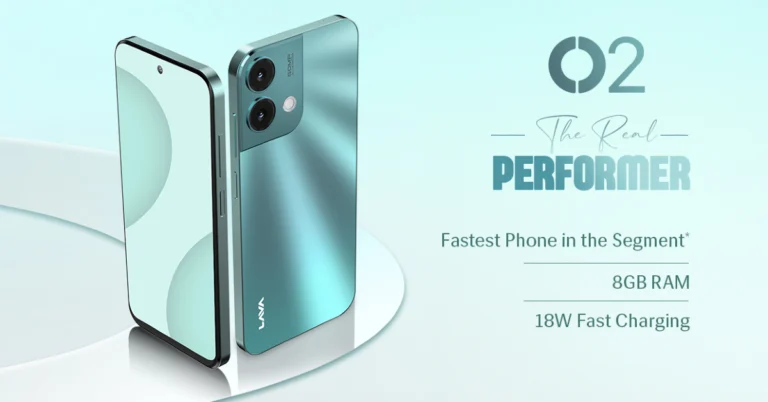
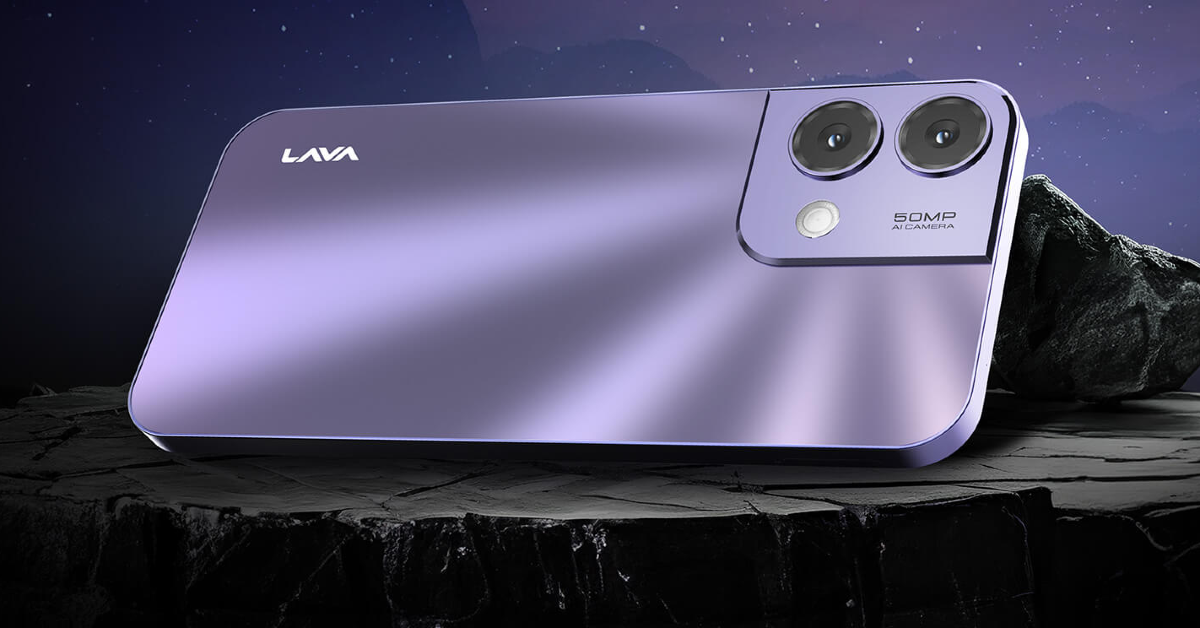 The sale for the newest O2 will start on March 27. Customers will be able to purchase it on Amazon and Lava E-store. Customers can avail of Industry First Free service at home under warranty.
Also Read: Microsoft announced its new AI laptops- Surface Pro 10 and Surface Laptop 6
The sale for the newest O2 will start on March 27. Customers will be able to purchase it on Amazon and Lava E-store. Customers can avail of Industry First Free service at home under warranty.
Also Read: Microsoft announced its new AI laptops- Surface Pro 10 and Surface Laptop 6
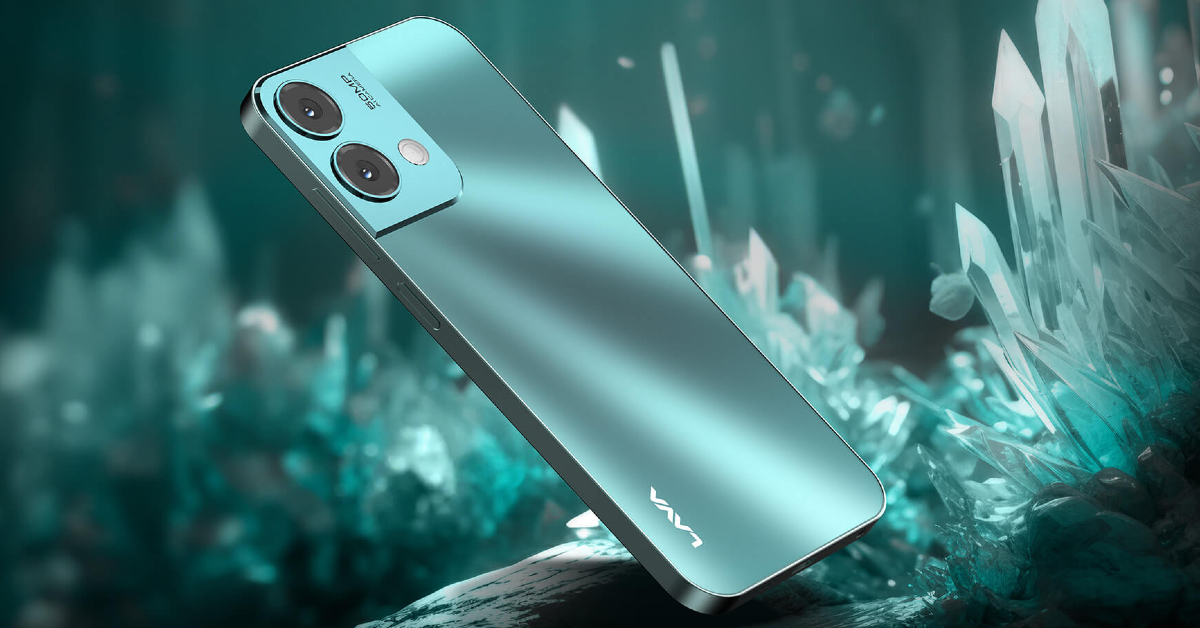 For photos and videos, Lava O2 features a 50-megapixel dual rear AI camera unit with LED flash. The system offers features like AI mode, HDR mode, portrait mode, beauty mode and night mode. For selfies and video calling the budget phone comes with an 8-megapixel front-facing camera.
Also Read: Fujifilm Introduced The Instax Mini 99 Instant With LED Lights
The Lava O2 is fuelled by a 5,000mAh battery that comes with 18W charging support.
Speaking on the launch, Sumit Singh, Product Head, Lava International Limited said, “Consumer demands are constantly changing, especially among the younger generation who demand both style and functionality from their smartphones without compromise. Lava O2 addresses these evolving expectations by introducing cutting-edge features such as the latest Glass Back Design and delivering a smooth user experience with stock Android 13, with a guaranteed upgrade to Android 14, along with 2-year security updates. Moreover, the inclusion of a 50 MP Dual AI Camera transforms the O2 into an adaptable all-in-one solution, perfectly catering to the dynamic needs of modern consumers.”
For photos and videos, Lava O2 features a 50-megapixel dual rear AI camera unit with LED flash. The system offers features like AI mode, HDR mode, portrait mode, beauty mode and night mode. For selfies and video calling the budget phone comes with an 8-megapixel front-facing camera.
Also Read: Fujifilm Introduced The Instax Mini 99 Instant With LED Lights
The Lava O2 is fuelled by a 5,000mAh battery that comes with 18W charging support.
Speaking on the launch, Sumit Singh, Product Head, Lava International Limited said, “Consumer demands are constantly changing, especially among the younger generation who demand both style and functionality from their smartphones without compromise. Lava O2 addresses these evolving expectations by introducing cutting-edge features such as the latest Glass Back Design and delivering a smooth user experience with stock Android 13, with a guaranteed upgrade to Android 14, along with 2-year security updates. Moreover, the inclusion of a 50 MP Dual AI Camera transforms the O2 into an adaptable all-in-one solution, perfectly catering to the dynamic needs of modern consumers.” 
 Step 4: Select the check box for Desktop site.
 Step 4: Hit Request Desktop Website.

 Step 4: Select Desktop site.


 Step 4: Tap the settings icon.
 Step 5: Scroll down and select Advanced settings.
 Step 7: Go back to the Facebook tab and refresh the web page.
 Step 4: Select the check box for Desktop site.
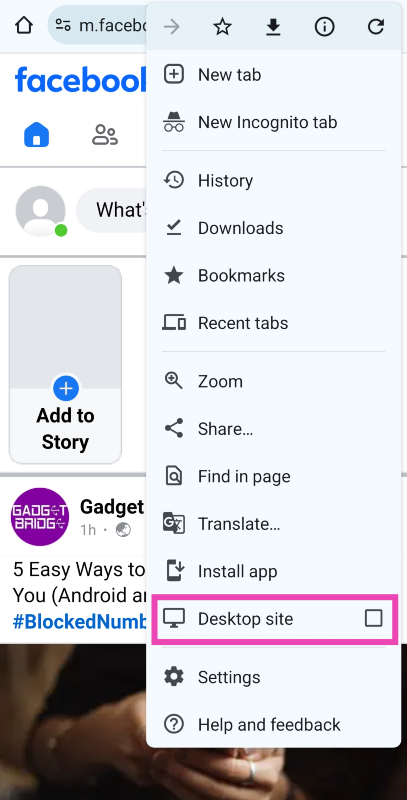
 Step 4: Hit Request Desktop Website.
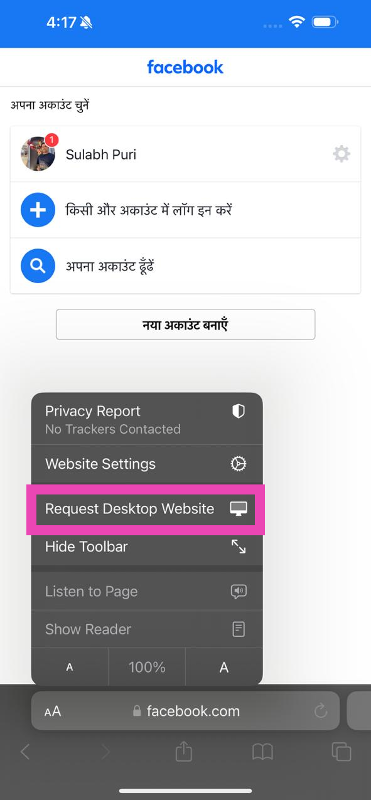
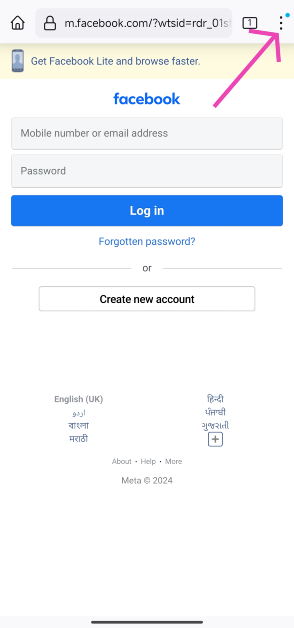 Step 4: Turn on the toggle switch for Desktop site.
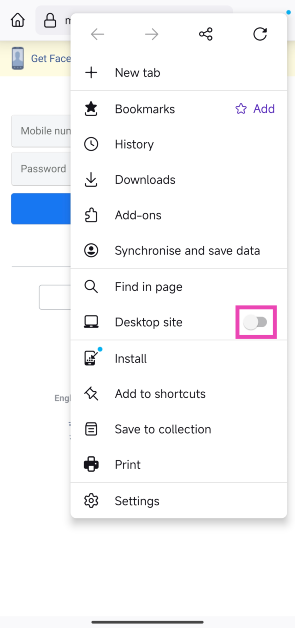 Step 5: Facebook’s desktop version will load on Firefox.

 Step 4: Turn on the toggle switch for Desktop layout.
 Step 5: Opera will load the desktop version of Facebook.

 Step 4: Select Desktop site.
 Step 4: Turn on the toggle switch for Desktop website.
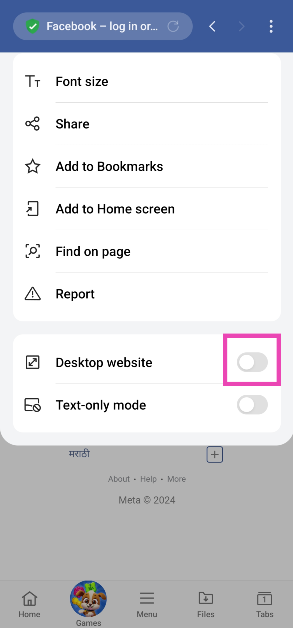 Step 5: Facebook’s desktop website will load on the browser.

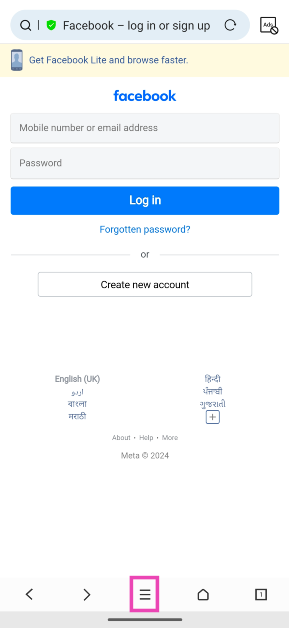 Step 4: Tap the settings icon.
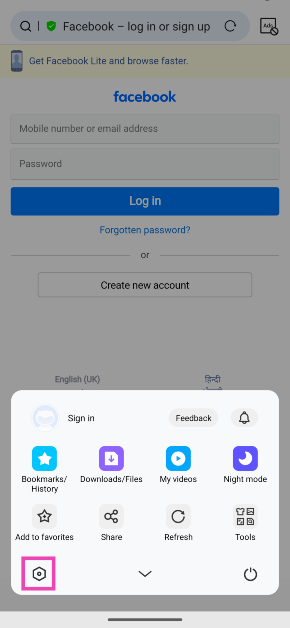 Step 5: Scroll down and select Advanced settings.
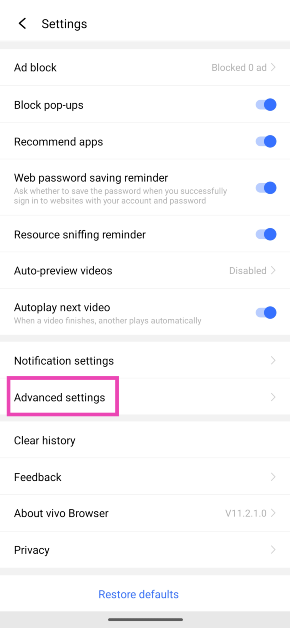 Step 6: Tap on User Agent ID and select Desktop. Hit OK.
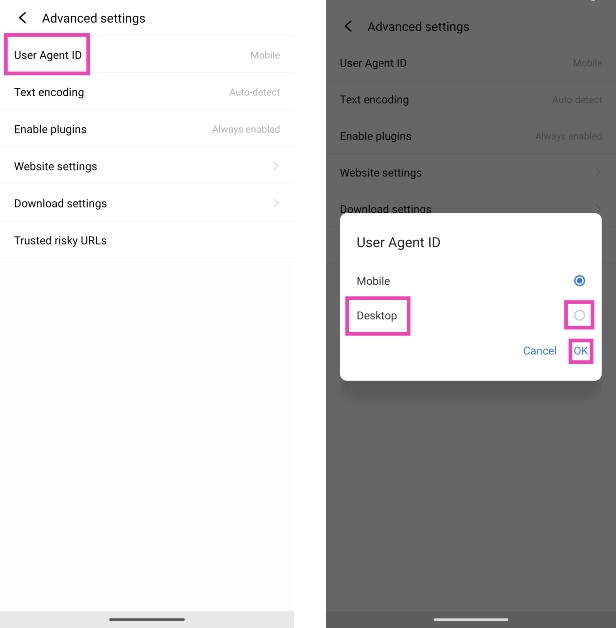 Step 7: Go back to the Facebook tab and refresh the web page.