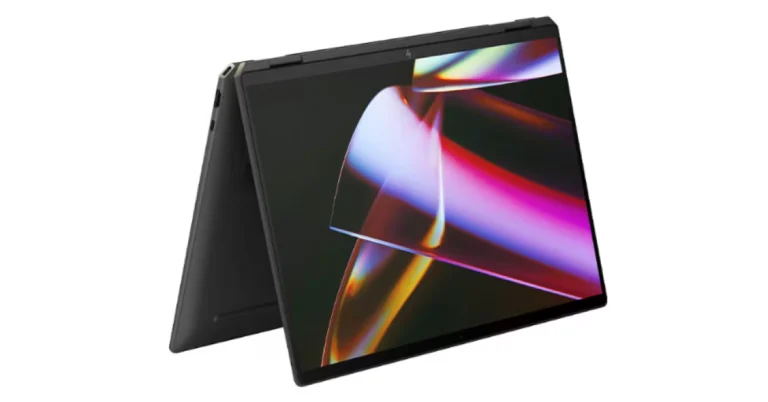
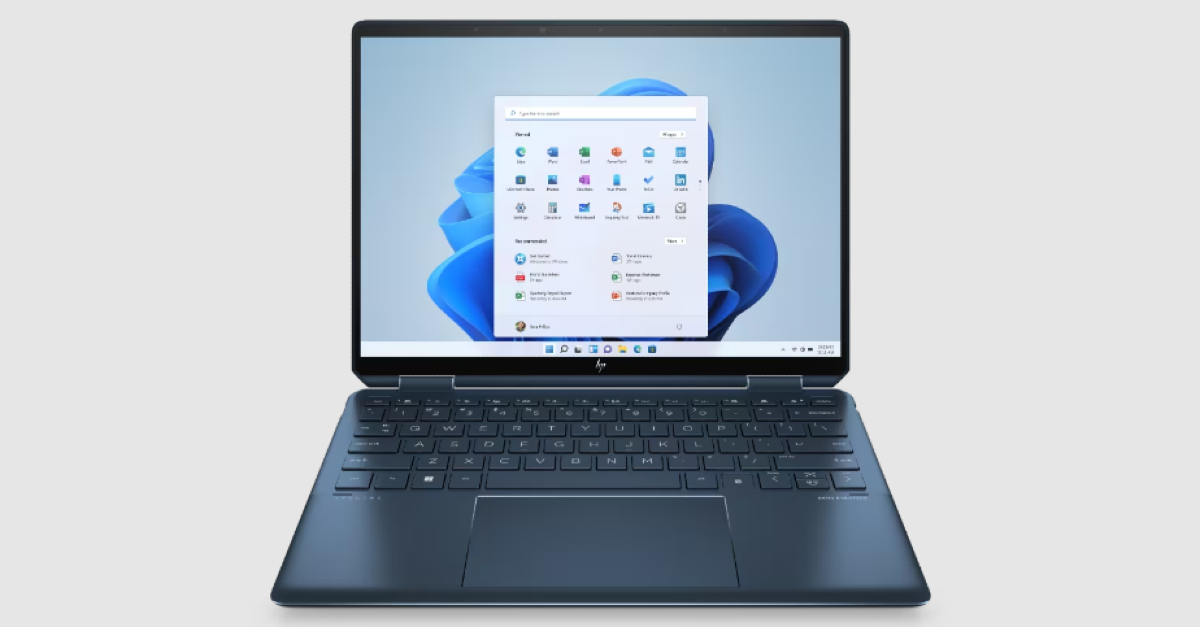
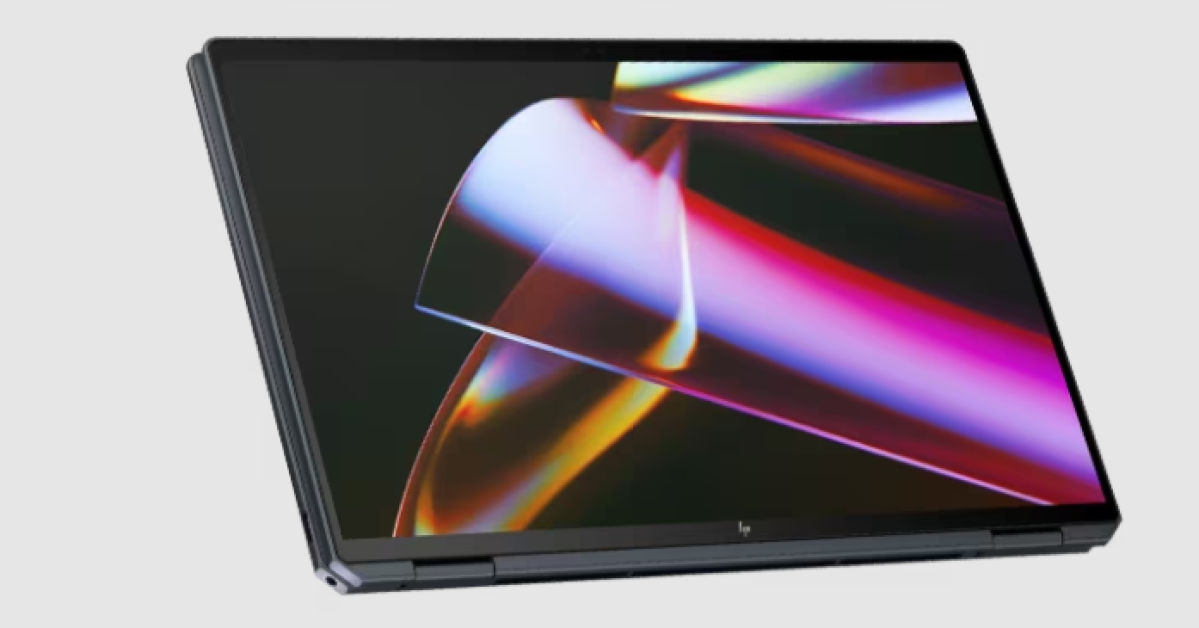
HP Spectre x360 16, HP Spectre x360 14 with a dedicated AI chip launched in India

Key Highlights
  • The HP Spectre x360 laptop features 2.8K OLED screens.
  • The display supports up to 120Hz refresh rate.
  • The laptops come with smart AI-enhanced features.
HP Spectre x360 16, HP Spectre x360 14 laptops launched in India today. The 14-inch and 16-inch laptops are powered by Intel Core Ultra 7 processors with RTX 4050 GPUs integrated. The new Spectre laptops feature smart AI enhancements. Notably, they represent HP’s inaugural consumer portfolio integrating a Neural Processing Unit (NPU) for efficient AI workload management.

HP Spectre x360 16, HP Spectre x360 14 price in India, sale details

HP Spectre x360 16 price in India starts at Rs 1,79,999. It is available in Nightfall Black colour. On the other hand, the Spectre x360 14 pricing begins at Rs 1,64,999. It is available in Nightfall Black and Slate Blue colours. The new laptops can be purchased via HP World stores, HP Online store, and at all leading retail counters. HP Spectre x360 16, HP Spectre x360 14 price in India, sale details

HP Spectre x360 16, HP Spectre x360 14 specifications

The HP Spectre x360 14-inch and 16-inch laptops feature 2.8K OLED screens with a 16:10 aspect ratio and the refresh rate can adjust from 48 Hz to 120 Hz based on the type of content being viewed. The display comes with IMAX Enhanced Certification for watching movies. The HP Spectre x360 16-inch has the world’s largest haptic touchpad for a Windows-based 16-inch PC. Also Read: NoiseFit Grace smartwatch for women launched in India Under the chassis, there are Intel Core Ultra 7 processors. The smart AI-enhanced features of the new x360 are said to improve security, performance, and collaboration. Furthermore, HP’s Spectre laptops are the company’s first consumer lineup to have a Neural Processing Unit (NPU) for AI workloads. The machine includes three engine machines (CPU, GPU, and NPU) and NVIDIA Studio with RTX 4050 GFX to facilitate expedited video editing and enhanced productivity and content creation. The device also offers built-in security features including wake-on-approach, walk-away lock, and privacy alerts that warn users of prying eyes. HP Spectre x360 16, HP Spectre x360 14 specifications The convertible laptops come equipped with a 9 MP camera that can be adjusted for low light using hardware. Additionally, it offers adaptive screen adjustments like a screen dimmer when the user looks away to save power and variable refresh rate for immersive performance and power efficiency. Also Read: OnePlus 12 Review: A True Flagship Smartphone The automatic performance optimization also adjusts fan noise and temperatures based on applications being used, placement of the laptop, and battery status. Moreover, users can improve video and calls with Windows Studio effects which offload AI features like automatic framing, background blur, and the ability to maintain eye contact onto the NPU for engaging connections.

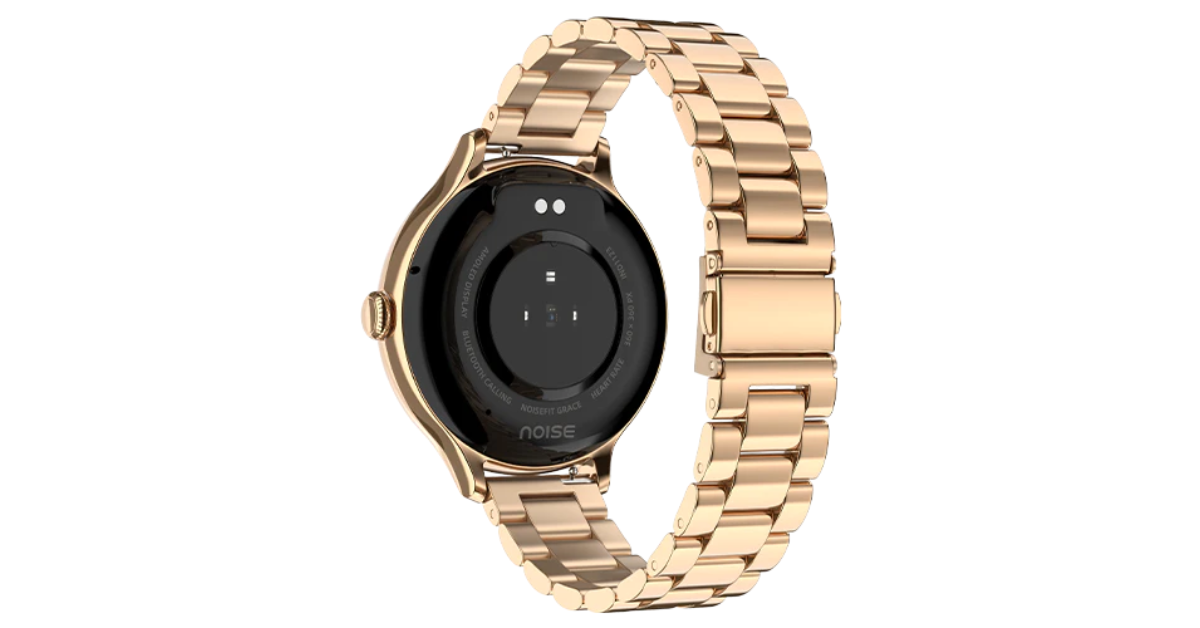
NoiseFit Grace smartwatch for women launched in India

Key Highlights
  • NoiseFit Grace smartwatch supports Bluetooth Calling with Noise Tru Sync technology
  • The wearable comes with multiple sports modes.
  • It is IP67 water and dust resistance rated.
  • The smartwatch also supports 100+ watch faces.
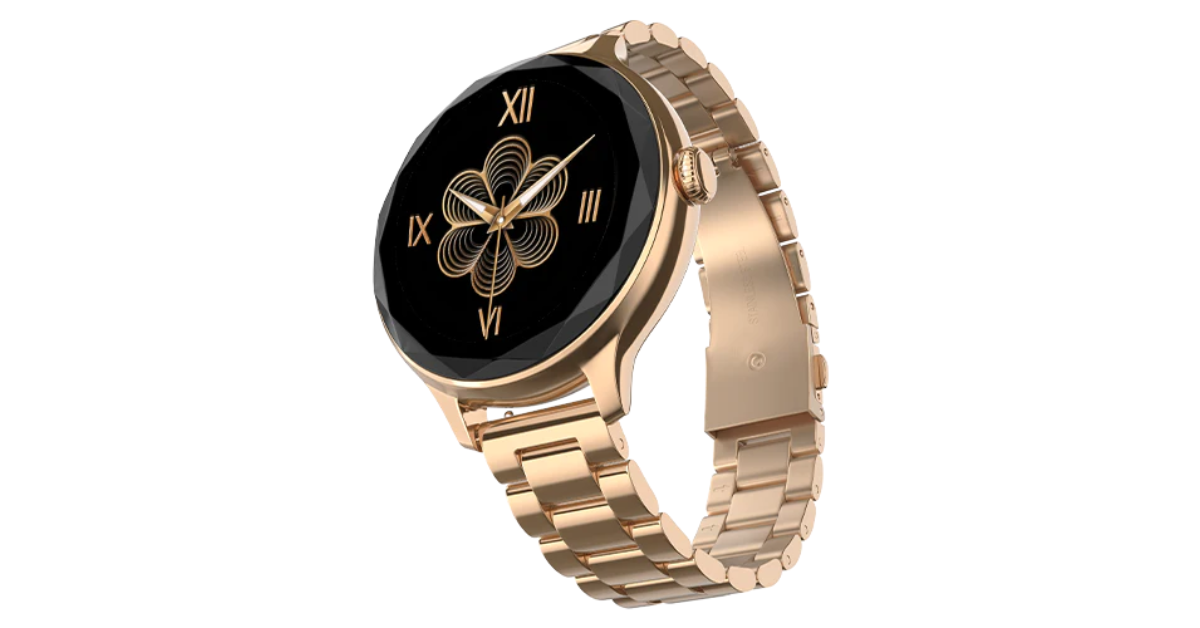
Indian tech brand Noise has expanded its smartwatch portfolio with the launch of the NoiseFit Grace smartwatch. The newly launched tracker sports a cut dial design and sleeker size with a metallic build and link strap specially designed for women. In addition to this, it comes with essential health metrics such as heart rate, SpO2, and more. The device is said to provide 4 days of battery life on a single charge.

Noisefit Grace price in India and availability

Noisefit Grace has been launched in India with a price tag of Rs 2,999. The device will be available in three colour options of Rose Gold, Metal Silver, and Jet Black. It can be purchased via Flipkart, and the brand’s website, gonoise.com Noisefit Grace price in India and availability

Noisefit Grace specifications

Noisefit Grace sports a 1.1-inch AMOLED with 360 x 360 pixels of resolution. The screen supports Always on and comes with 600 nits of peak brightness. Additionally, it has a cut dial design and a sleeker size with a metallic build and link strap. Along with Bluetooth calling the fitness tracker includes an AI voice assistant and an in-built calendar. Customers can also benefit from more than 100 watch faces and sports modes, as well as a seamless pairing experience with the NoiseFit App. Also Read: Telegram update brings Saved Messages 2.0, new features and improvements Noisefit Grace specifications Noisefit Grace is IP67-rated for water and dust resistance. The smartwatch enables quick access to the dial pad and recent call logs with storage for up to 10 contacts for quick calling. It also includes a wide range of functions for tracking health and productivity. Women may efficiently track vital health indicators including heart rate, SpO2, sleep patterns, and stress levels, among others, with the help of Noise Health Suite. On the other hand, the integrated Productivity Suite keeps daily reminders and weather forecasts easily accessible. Along with weather updates and a notification display, it offers an Alarm, camera control, music control, and calculator. Also Read: OnePlus 12 Review: A True Flagship Smartphone The NoiseFit Grace provides four smartwatch menu styles. It boasts a four-day battery backup

OnePlus 12 Review: A True Flagship Smartphone

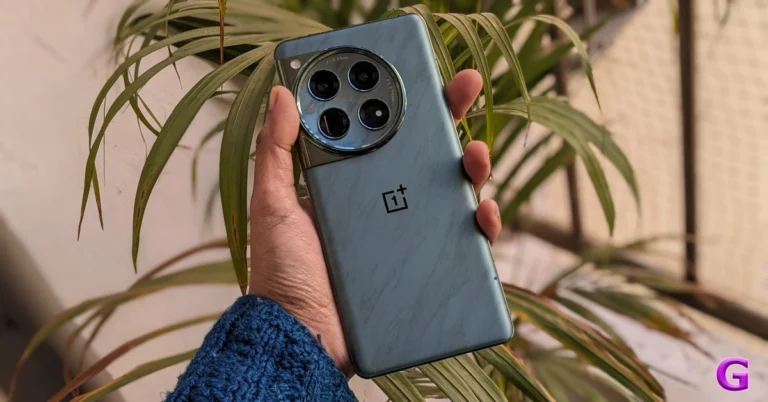
We have been testing the OnePlus 12 since its introduction last week in India. So this is our in-depth review of OnePlus 12. Given that the design is quite similar to the OnePlus 11 from the previous year, we will discuss the advantages and disadvantages as well as what has changed. It costs about Rs 64,999 in India and includes the top Snapdragon 8 Gen 3 SoC processor for 2024. The device is the successor to last year’s OnePlus 11, but still lacks the IP68 certification; however, it does come with a wireless charging capability this time. Let’s discuss it further in the review of the OnePlus 12 below.

OnePlus 12 Review: Design and Display

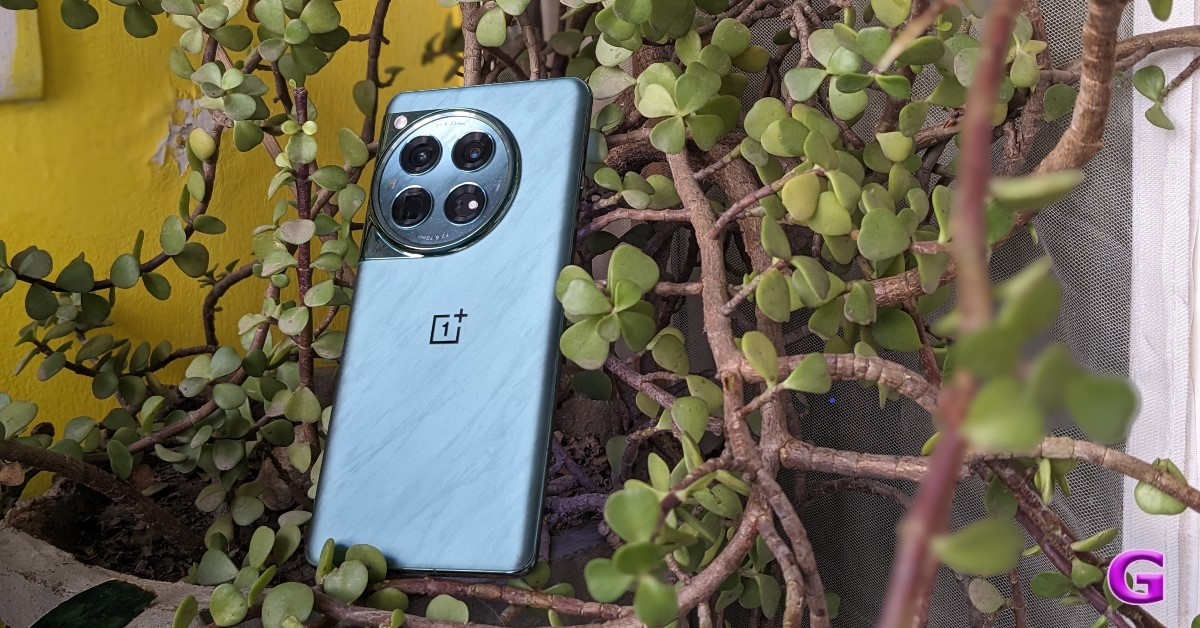
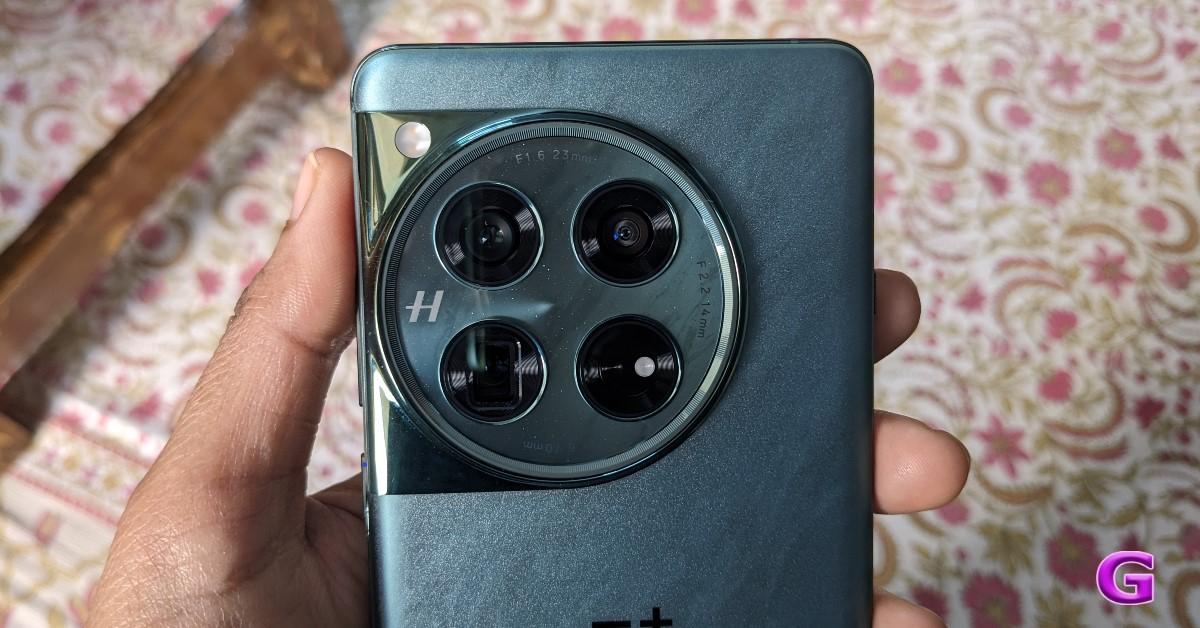
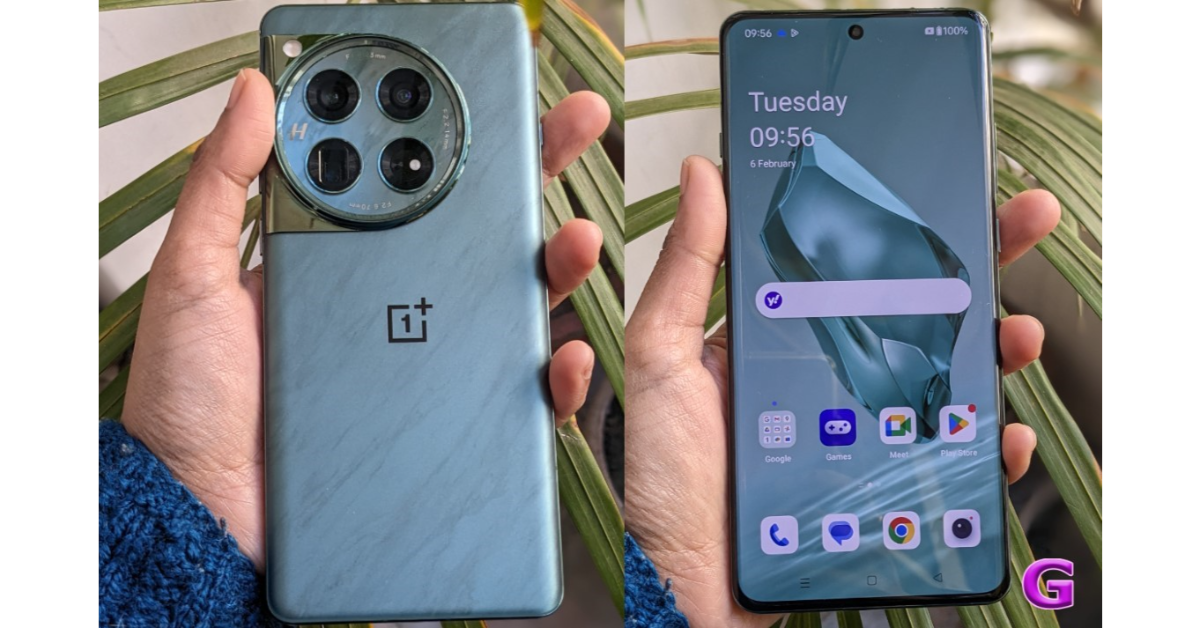
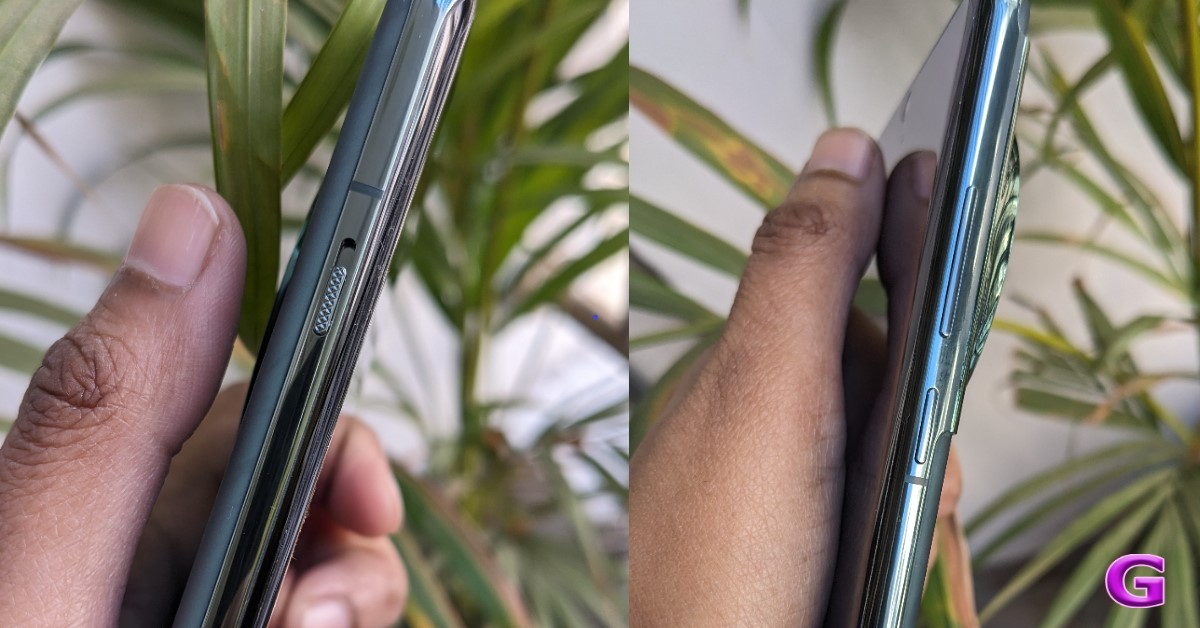
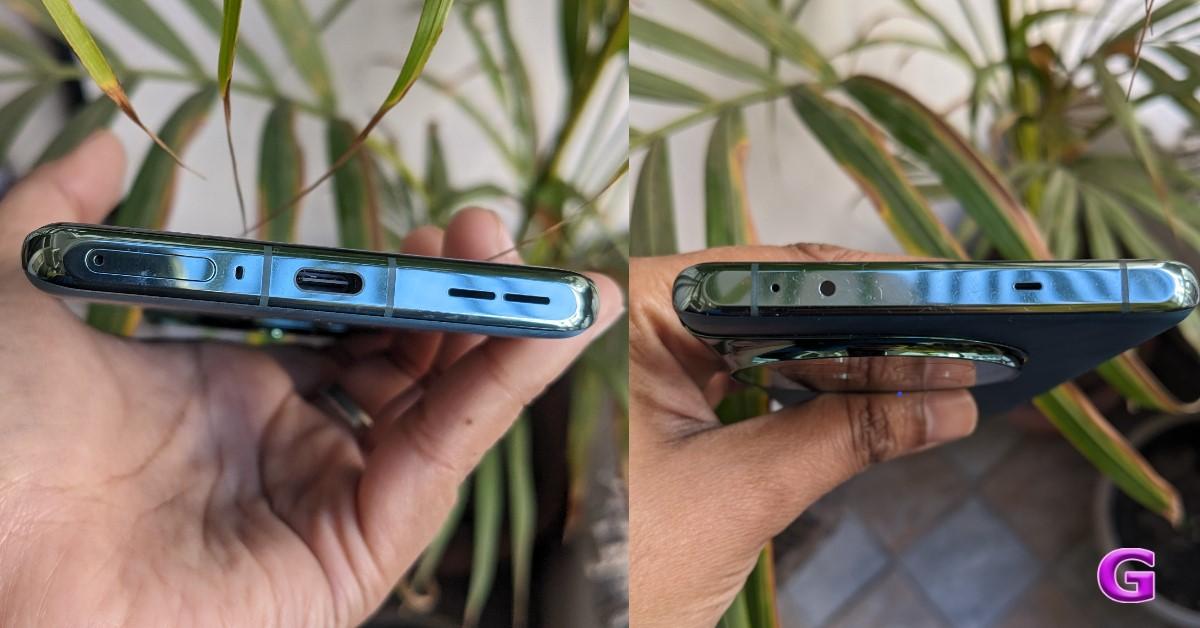
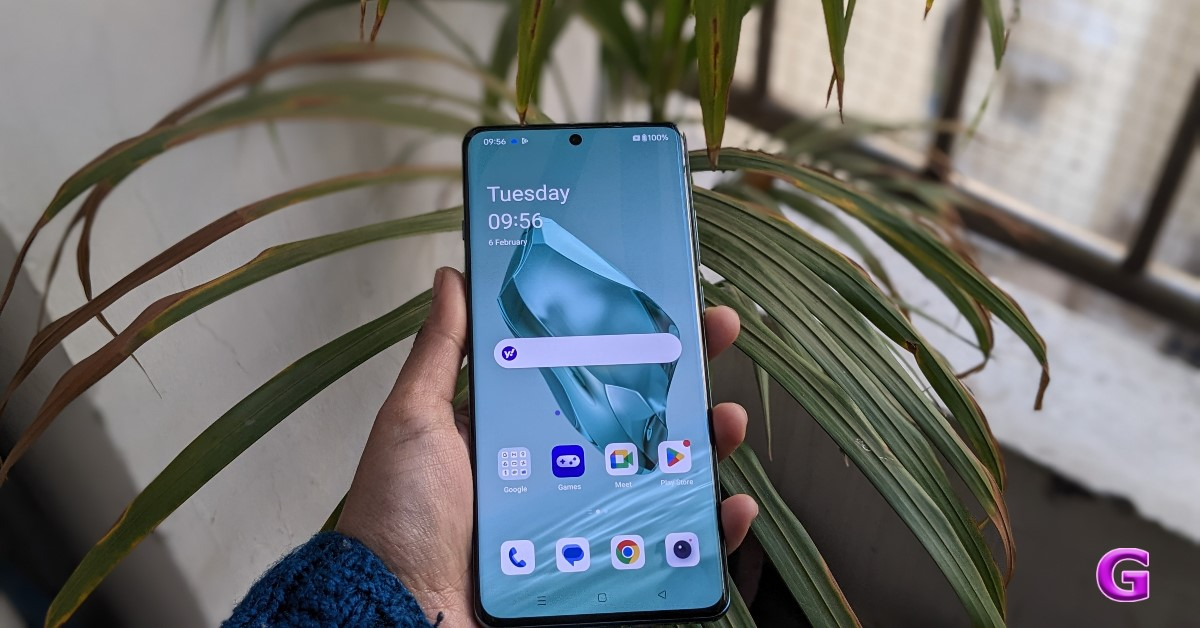
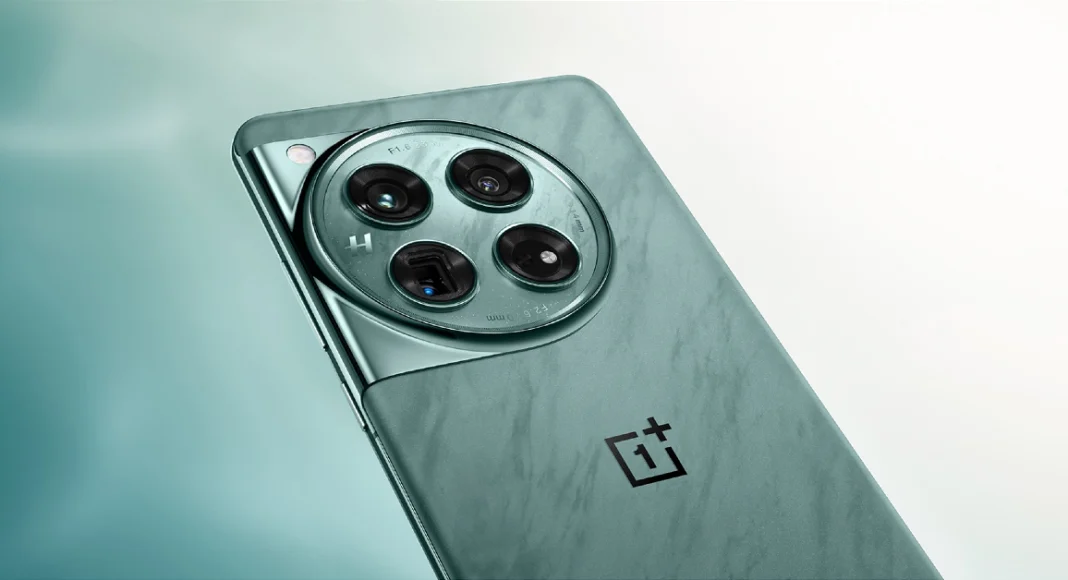
Many of the features from the previous generation are still present in OnePlus. Actually, the design has remained the same and has a striking resemblance to the OnePlus 11 (as said). Despite having a similar appearance, the design has been improved. A few design modifications have been made, particularly to the weight and thickness. The smartphone now has a larger battery capacity, which undoubtedly makes it heavier and thicker. OnePlus 12 Review: Design and Display Looking at the design language, OnePlus has continued to use the previous generation’s style. Again, the camera device is circular. Within the module, the Hasselblad logo sits on a glossy marble finish module housing four camera lenses. We also observed some gorgeous glitter in it that gives the appearance of the brightness of the night stars. There are two colour options for the OnePlus 12: Silky Black and Flowy Emerald. Also Read: Vivo X100 Pro review: Goes above and beyond with its cameras For the review, we got the Flowy Emerald colour variant, which has a matte finish and a marble-like design that actually looks pretty fantastic. According to the company it is inspired by the magnificent sight of New Zealand’s braided Dart River, where emerald ribbons pulse with vivid energy. Flowy Emerald captures the essence of natural wonders and uses cutting-edge AG technology along with a precise etching process to give the phone’s glass back cover a premium texture with exquisite dynamism. OnePlus 12 Review: Design and Display Take note that Corning Gorilla 5 protects the back panel. Despite having a matte appearance, the back feels a little slick to the touch. Therefore, we advise you to put a silicon case on it to prevent accidental drops or slips from your hand. Using a back cover will safeguard the glass-made rear panel and provide you with a firm grip. And yes, the back cover is present inside the box, so need to purchase a new one, unless you want a different appearance. The phone is undoubtedly heavier due to its larger battery and the usage of glass and metal materials. But despite this, you don’t feel like it’s a very heavy handset. review of OnePlus 12 In addition, the edges have rounded corners and a curved finish. Gorilla Glass Victus 2 protection has been added to the display. The bezels are kept to a minimum, which looks pretty good. In addition, it has a high-quality appearance and feel thanks to the metal frame and the soft curves on both sides. Our small hands could comfortably use the phone with one hand because it is not overly broad. The gadget is not waterproof, but it does have an IP65 classification for dust and splash resistance. review of OnePlus 12 The alert slider is on the left side of the frame, and the power and volume buttons are on the right. It includes an IR blaster on top, a dual SIM card slot and a USB Type C port speaker unit at the bottom. review of OnePlus 12 Let’s proceed to the display next. The main feature of the OnePlus 12 is its 6.82-inch quad-HD+ LTPO OLED screen, which boasts a resolution of 1,440 x 3,168 pixels. The variable refresh rate of the front panel spans from 1Hz to 120Hz. Furthermore supported is a screen brightness of 4,500 nits. Keep in mind that this OnePlus smartphone’s screen is the brightest we’ve ever seen. Also Read: iQOO 12 5G Review: Oozes personality and power It provides incredibly smooth and lifelike images for an excellent viewing experience. Additionally, TÜV Rheinland certifies it for Intelligent Eye Care because of its capacity to efficiently decrease blue light output and intelligently modify the colour temperature in response to varying ambient conditions. review of OnePlus 12 Because it is an LTPO panel, the display can automatically transition between a refresh rate of 1Hz to 120Hz while maintaining a relatively low power consumption, depending on user preferences and particular usage conditions. On the other hand, Dolby Vision is also supported, enhancing the visual experience overall with incredibly bright colours, sharp contrast, and showcasing well even the minutest details. The touch response of the display functions perfectly. Sweaty hands and mishaps during both intense gameplay and regular use are greatly reduced thanks to the Aqua Touch’s ability to detect moist fingers and water droplets on the screen and adjust accordingly. Dolby Atoms is supported by the dual speaker setup and dedicated spatial audio, which provides high-quality audio with less acoustic resonance even without headphones. We quite loved it.

OnePlus 12 Review: Performance and cameras

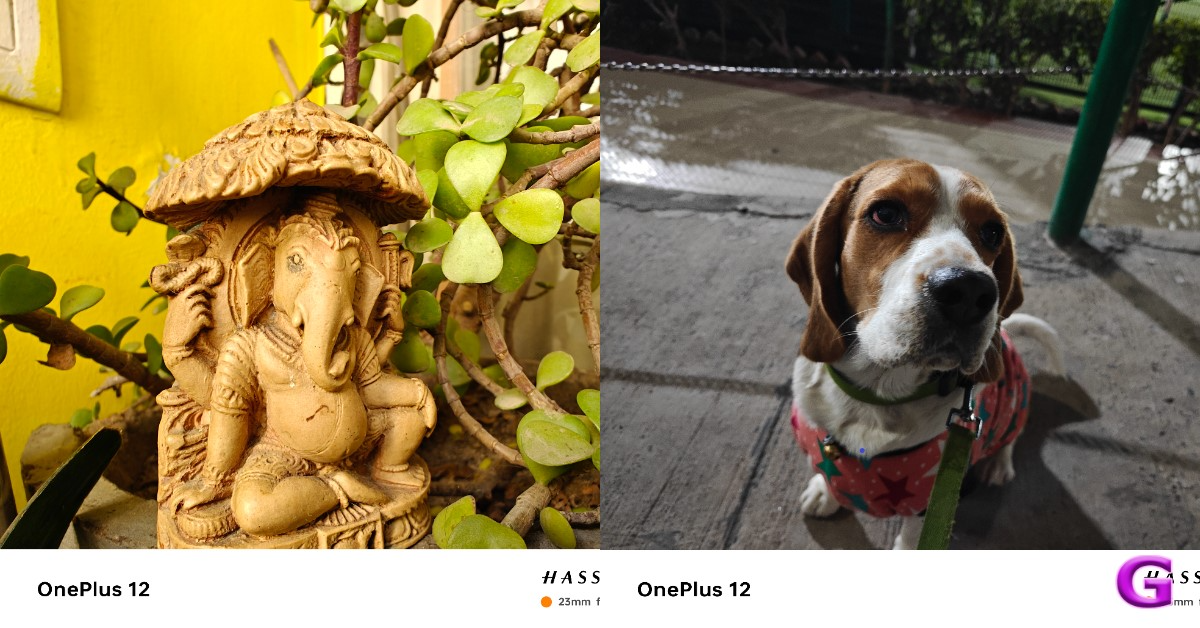
Qualcomm’s 4nm Snapdragon 8 Gen 3 SoC, one of the most potent chipsets for Android premium phones, powers the device underneath. The device supports up to 512GB of UFS 4 internal storage in addition to up to 12GB of LPDDR5X RAM. The OnePlus 12 offers good performance in all areas, including gaming and daily use. With almost no lag or glitches, the OxygenOS optimisation made for an excellent experience. The whole experience is powerful and quite positive even in terms of gaming. In terms of regular use, there is very little temperature rise and you also receive Vapor Chamber cooling. Thus, we would conclude that it is highly optimised for gaming. Also Read: OnePlus Open Review: It can really open up to you Because this phone has the most powerful chipset available, it can play high-end games very well. Playing games and multitasking on this device is quite effortless. Call of Duty Mobile, Asphalt 9, PUBG New State, BGMI, and other games all functioned flawlessly without any lags or frame dips. Based on Android 14, OxygenOS 14 powers the OnePlus 12. The shelf has improved because you can configure the toggles and several currently available widgets; the previous shelf was not that large. You can change the backgrounds, style, support for AOD themes, colour, fingerprint animation, and edge lighting for notifications have been added. Numerous additional developments are included, such as enhanced memory management, software, and performance optimisations. The device walks in with five years of security patches and four years of Android upgrades, but with the most recent Galaxy S24 Series, Samsung is delivering seven years of software updates. Maybe OnePlus will also do that with the next version? Maybe. What makes the OnePlus 12 a heavy lifter is its latest Trinity Engine that is a software-based feature, which is claimed to handle multitasking, offer smoother performance and also power efficiency. It does this by utilising six different technologies: CPU-Vitalization, ROM-Vitalization, RAM-Vitalization, HyperBoost, HyperRendering and HyperTouch. Thus, the optimal performance is determined by the CPU Vitalization. It improves the device’s efficiency and smoothness. Then there is ROM vitalization, which is associated with storage usage and refers to providing you with optimal storage experiences through efficient storage utilisation. RAM vitalization works to speed up RAM access if an application requires more RAM than the engine can supply.  Also Read: Oppo Reno 11 Review: Elegance across the board And also the Hyper Boost, a crucial feature for gamers that gives you extra power to play with improved performance. For more realistic, immersive gaming, hyperrendering reduces latency and battery consumption while enhancing frame interpolation. Last but not least, the HyperTouch offers end-to-end touch control that guarantees accuracy or mis-touch protection for responsiveness and stability that win games. Aside from this, there are no call dropouts and the call quality is generally decent. The fingerprint sensor is also working fine for us since the day we set up the device. Now let’s talk about the cameras, the camera setup is quite similar to the OnePlus Open so let’s see how good the camera experience is on the flagship device. OnePlus 12’s standout feature is its triple rear camera setup powered by Hasselblad. It includes a Sony LYT-808 sensor with a 50-megapixel primary camera (OIS, and f/1.6 aperture), a 64-megapixel telephoto secondary lens (OIS, 3X optical zoom and f/2.6 aperture) and a 48-megapixel ultra-wide-angle lens (114-degree field-of-view). The 32-megapixel front-facing camera (f/2.4 aperture) is provided for video calling and selfies. So that’s the camera aspect so let’s go straight into the camera samples to see how it performs. OnePlus 12 camera review Speaking of the daylight pictures, you can get excellent details and rich, beautiful colours there as well. The photographs have excellent overall quality and a very natural appearance. In actuality, the colours are rich in tones without being overly saturated, and the dynamic range is pleasant and broad. You can see that the details are good by zooming in. OnePlus 12 camera review The 48-megapixel ultra-wide-angle lens produced remarkably similar images, and the colour reproduction was accurate once more. We would describe it as being roughly comparable to the main camera. The dynamic range appears mostly acceptable, and the sharpness levels are fairly good. It’s really useful to have an ultra-wide-angle camera. With the ability to zoom 3x optically, the telephoto lenses can now capture a wealth of information. Additionally consistent are the colour and dynamic range. It performs well in this case as well in terms of sharpness levels. OnePlus 12 camera review Let’s move on to the close-up photographs, where you can see even more vibrant colours and excellent overall image quality. Also, the backdrop blur looks fantastic. Keep in mind that the telephoto lens, which handles the macro department, provides an abundance of details and has performed an excellent job with macros. OnePlus 12 camera review You will be able to take pictures in 1x, 2x, and 3x for portraits. The telephoto lens handles 3x, while the primary camera handles 1x and 2x. The skin tones appear rather realistic, the results are good, and there are no saturation problems. The telephoto lens has some edge detection issues, but overall quality is good and edge detection is acceptable at 1x and 2x zoom. In actuality, it is not that crisp, and in certain instances, the edges were not very good. OnePlus 12 camera review There are plenty of details under artificial indoor light, and the night mode provides decent details outdoors as well. It does not overexpose or over-brighten, but the details and dynamic range are excellent. In a dim light, we also observed a few lens flare incidents. Regarding selfies, the 32-megapixel front-facing camera performs nicely; we particularly enjoyed the colour tones. The dynamic range is lovely, and the skin tones seem natural. The selfies don’t feature any beauty effects on the face, but the edge detection in the portrait selfies gives the images an unnatural appearance. While testing, our review unit also received its first OTA update. After updating the OnePlus 12’s camera app got support for the ProXDR feature in the Google Photos app which wasn’t available before the software update landed. It is essentially a kind of display technology that uses atomization to brighten the dark areas in images. OnePlus 12 performance There is also one major upgrade, which is now the OnePlus 12 has received – the Master Mode. It is basically a camera feature by Hasselblad for colour tuning. And trust us, this is the main USP of the device. If you prefer more candid shots, you will definitely adore this option. We simply can’t get enough of using this ability to snap photos. The outcomes were, in fact, remarkably close to what our eyes saw even in low light conditions. The Master Mode is visible just next to Video mode that was home to Pro mode earlier. Don’t fret the Pro mode is still there. Just tap on the Mater mode and you will see two options on the extreme left Auto and Pro.
Master Mode
OnePlus 12 performance
Night Portait
Master Mode
The OnePlus 12 has good video quality when recording in 8K at 24 frames per second, although there are some noticeable issues with contrast and white balance. Additionally, the gadget can record in 4K at 60 frames per second, where the colour appears rather natural. The OIS + EIS combination stabilisation system performs wonderfully, and the overall video quality is excellent. The other video quality is also quite high; even when walking, the stabilisation is strong, and the colours and dynamic range also seem fantastic. While the white balance appears slightly amiss in videos taken with telephoto lenses, overall we would say the telephoto lens performed well with OIS in terms of stabilisation. Films in 4K at 60 frames per second can also be captured by the ultrawide lens. You can take 4K 30 frames per second selfie videos with the front-facing camera. The battery capacity is arguably among the best that we have seen in the flagship category or pricing range. The battery has a very long lifespan. You can easily obtain up to two days of battery life with casual to regular usage.  However, if you use the device heavily, the battery life may still last up to one and a half days, or perhaps just one day if you play a lot of games. These results are based on our testing, which involved utilising the camera, social media apps, browsing, and other apps while making a few calls. The smartphone can be charged at 100W rapid speed in roughly 23 minutes. Additionally, it comes with built-in compatibility for 50W wireless charging which needs to be bought separately. And yes, unlike some smartphones, this one carried the charger within the box. 

Verdict

In terms of build quality, the OnePlus 12 is a good gadget. Overall, the design is rather appealing and has a high-end feel about it. The display, an OLED LTPO panel with excellent colour reproduction, is incredibly vibrant and vivid. Dolby Vision and HDR10+ compatibility mean that this panel is jam-packed with the greatest features available. Furthermore, the HDR option allows for a brightness increase of up to 4,500 nits. Everything has been handled by the Trinity Engine, including app opening times, response times, and memory management. From a software and performance standpoint, it’s a good device. Also Read: OnePlus Pad Go Review: Works like a charm Despite having an IP certification, the product is not waterproof. In this price range, IP68 certification is required, therefore OnePlus should have offered it, however, it’s missing. The OnePlus 12 cameras perform incredibly well in daylight conditions, particularly in colour and dynamic range. Overall, the image processing is excellent. The telephoto and ultra wide-angle lenses perform nicely. The phone doesn’t overheat, however playing games for extended periods warms the phone, particularly the area surrounding the camera module. In conclusion, the OnePlus 12 is a very good package, particularly considering its camera sensors. It might not have the finest photography performance available in this price range, but it won’t let you down in any way. We think OnePlus’s pricing is also really good. We wholeheartedly endorse the OnePlus 12 as a great all-around flagship device based on user experience. OnePlus 12 pricing with configuration is listed below: 12GB RAM with 256GB storage: Rs 64,999 16GB RAM with 512GB storage: Rs 69,999 Pros
  • Great design and Build quality
  • Excellent displays
  • Great software experience
  • Decent gaming and camera experience
  • Great battery life and solid charging speed
Cons
  • IP68 rating should have been included
  • Slightly thicker 

Top 14 Ways to Fix ‘Message Blocking is Active’ on iPhone

0
Even though instant messaging is the norm these days, sometimes you may want to send a good old-fashioned SMS to someone who doesn’t use iMessage or any other IM app. SMS charges are deducted from your phone’s talk time. Most network carriers offer unlimited text messages along with their data packs, so you don’t have to worry about any additional charges while sending a quick SMS. Sometimes, a text message may fail to go through and throw up a weird error message. Today, we bring you the top 14 ways to fix the ‘Message Blocking is Active’ error on your iPhone. Read Also: Telegram update brings Saved Messages 2.0, new features and improvements

Why am I getting the ‘Message Blocking is Active’ error message on my iPhone?

The answer lies in the message. If a number is blocked in any capacity, either by your phone or network carrier, the ‘Message Blocking is Active’ error will pop up on your phone’s screen. Nine times out of ten, this happens due to the number being discontinued by the network provider. This is typically the case when the user has not recharged their number in a long time. Dormant numbers either get discontinued or assigned to someone else. You may also receive this message upon entering the incorrect number in the ‘message recipient’ field. If the incorrect number belongs to someone else, the message will easily go through. However, if it is an unavailable number, you will get the ‘Message Blocking is Active’ message on the screen. The numbers that you have blocked on your phone can trigger the same message. Here are some possible fixes.

Make sure the recipient’s number is correct

Top 5 Ways to detect if someone has remote access to your iPhone If you’re trying to send a message to a number that is no longer registered, you will get the ‘Message Blocking is Active’ error message on your iPhone. Make sure you have entered the correct number in the recipient field. Network providers are known to pull services from unused numbers, so make sure the contact’s phone number is updated on your iPhone.

Check your cellular balance

If your cellular balance is lower than the amount needed to send an SMS, the ‘Message Blocking is Active’ error message may pop up on your iPhone. Make sure there is an active SMS plan on your phone numbers. Network providers typically offer free SMS and talk time with their internet data packages.

Turn on ‘Send as SMS’

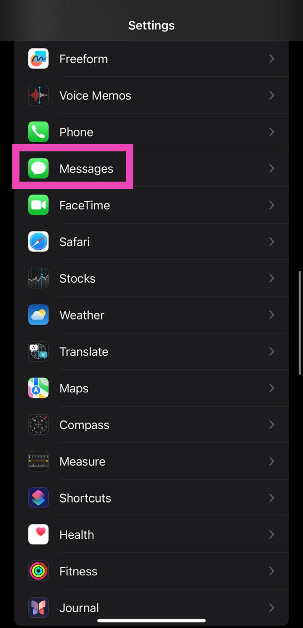
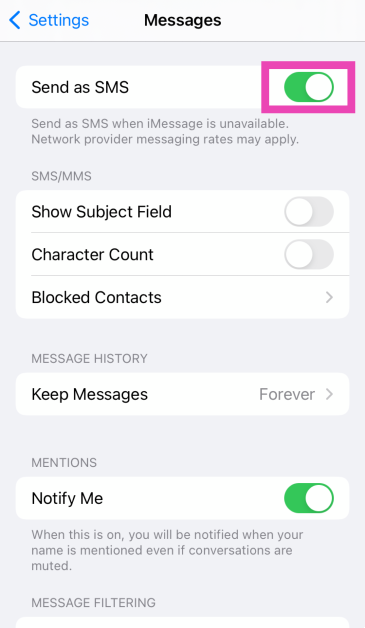
Step 1: Go to Settings and tap on Messages. Step 1: Go to Settings and select Messages. Step 2: Turn on the toggle switch next to Send as SMS. Step 2: Turn on the toggle switch next to Send as SMS.

Check if the contact is blocked on your iPhone

4 Easy Ways to Delete Voicemails on iPhone (2024) Blocking someone is a two-way street. While the blocked user will not be able to contact you, you won’t be able to call or text them either. Sending a text to a blocked user prompts the ‘Message Blocking is Active’ error on your iPhone. To unblock someone, go to Settings>Phone>Blocked Contacts>Edit and hit the red minus sign next to the contact.

Text someone else

It is possible that the issue lies with the recipient’s network service. To confirm whether this is the case, text someone else in your contact list. If the message goes through, there is no issue on your end. If you’re still encountering the ‘message blocking is active’ error, move on to the other fixes in this list.

Re-insert the SIM card

Lack of proper network coverage can keep you from sending text messages. If limited coverage is unusual in your area, you may want to check your SIM card. Physical SIM cards are known to collect dust and moisture over time. Use a SIM ejector tool to pop out the SIM tray and give everything a thorough wipe. Reinsert the SIM card and make sure your phone is receiving a full signal. If your network coverage is still limited, you may want to buy a duplicate SIM card. If you use an e-SIM on your iPhone, you can skip this method and move on to the next fix.

Restart iPhone

Restart your iPhone If the error is caused by a background software glitch, a simple restart can handle it. Press and hold the side button and any volume key to access the power menu on your iPhone. Swipe the power slider to turn off your device. Wait for a few seconds and long-press the side button again to restart your device.

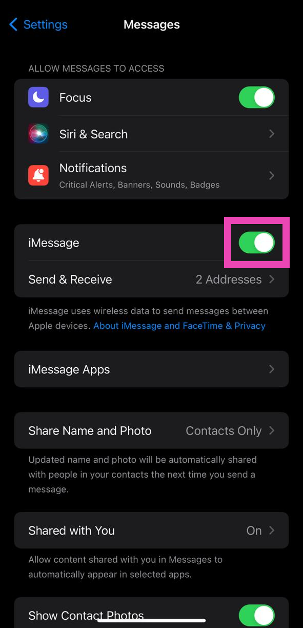
Disable iMessage

To make sure the iMessage app doesn’t meddle with regular SMS services, disable it and try sending the text again. Here’s how. Step 1: Go to Settings and select Messages. Step 1: Go to Settings and select Messages. Step 2: Turn off the toggle switch for iMessage. Step 2: Turn off the toggle switch for iMessage. Read Also: How to enable DApp browser on Trust Wallet for Android and iOS?

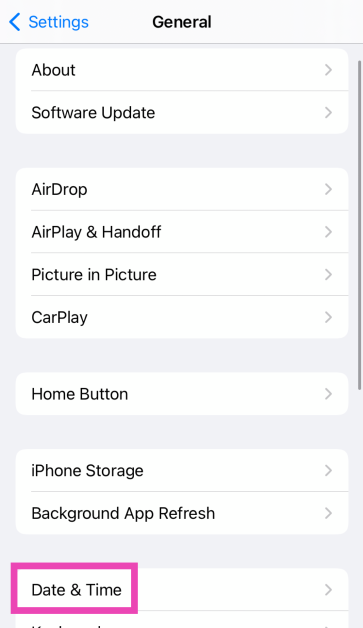
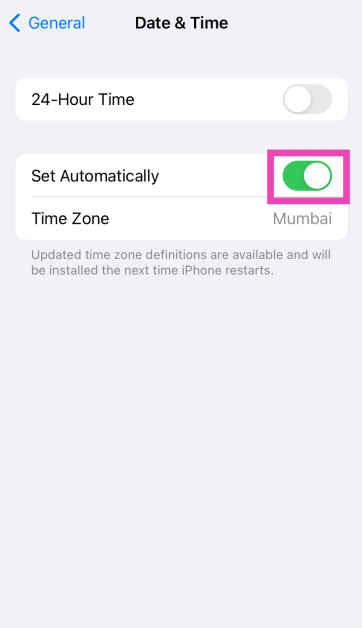
Check the Date and Time on your iPhone

Incorrect date and time on your iPhone can cause messaging services to halt unexpectedly. Here’s how you can correct this problem. Step 1: Go to Settings and select General. Step 1: Go to Settings and select General. Step 2: Tap on Date and Time. Step 2: Tap on Date and Time. Step 3: Turn on the toggle switch for Set Automatically. Step 3: Turn on the toggle switch for Set Automatically.

Update Carrier Settings

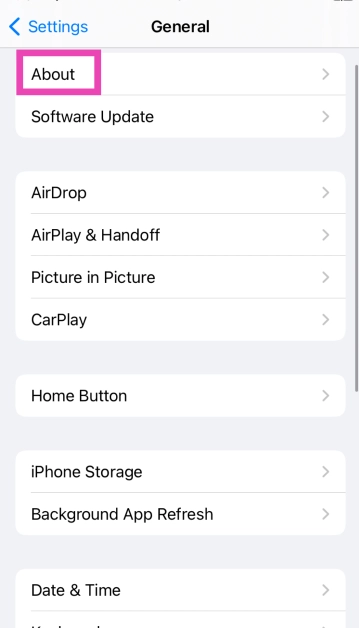
Typically, carrier settings are updated automatically on your iPhone. But here’s how you can make sure there are no pending updates. Step 1: Go to Settings and select General. Step 1: Go to Settings and select General. Step 2: Tap on About. Step 2: Tap on About. Step 3: A popup box will appear, asking you to update the carrier settings. Hit Update.

Reset Network Settings

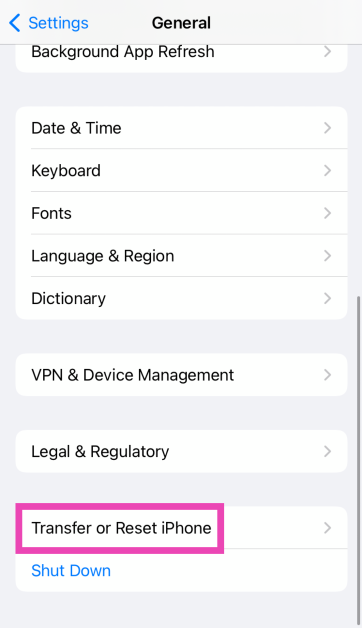
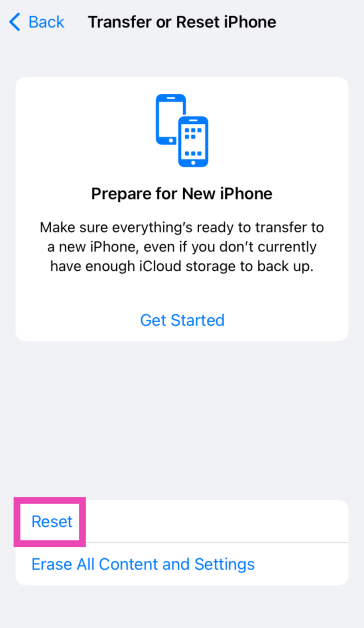
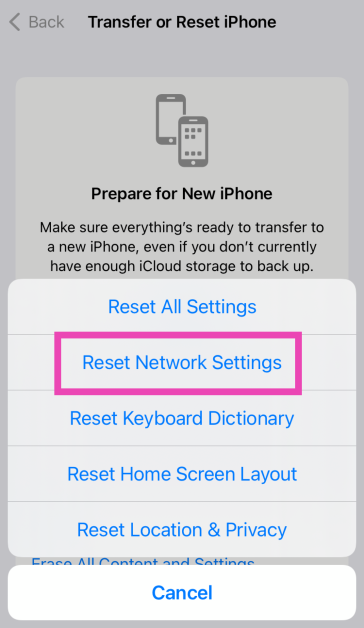
Step 1: Go to Settings and select General. Step 1: Go to Settings and select General. Step 2: Tap on Transfer or Reset Device. Step 3: A popup box will appear, asking you to update the carrier settings. Hit Update. Top 11 Ways to Fix 'Message Blocking is Active' on iPhone Step 3: Hit Reset. Step 3: Hit Reset. Top 11 Ways to Fix 'Message Blocking is Active' on iPhone Step 4: Select Reset Network Settings. Step 4: Select Reset Network Settings. Top 11 Ways to Fix 'Message Blocking is Active' on iPhone

Update iOS

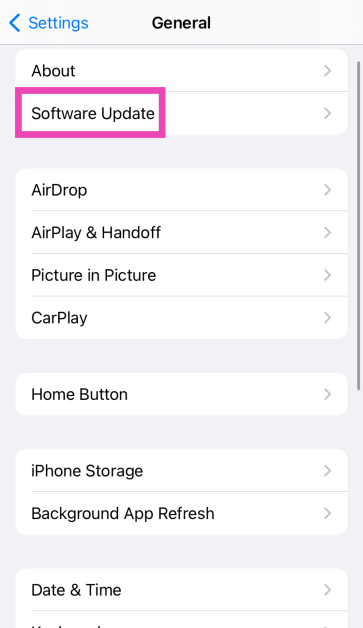
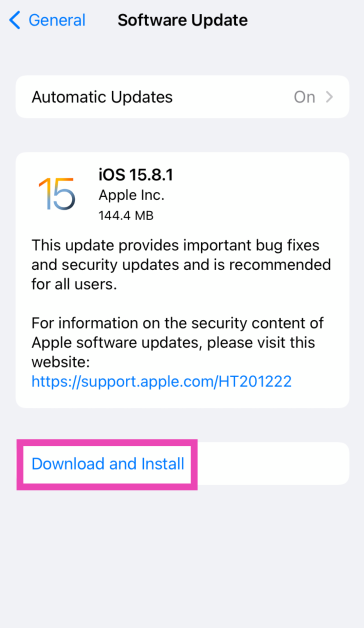
Step 1: Make sure your iPhone is connected to a WiFi network and plug in its charger. Step 2: Go to Settings and select General. Step 1: Go to Settings and select General. Top 11 Ways to Fix 'Message Blocking is Active' on iPhone Step 3: Select Software Update. Step 3: Select Software Update. Top 11 Ways to Fix 'Message Blocking is Active' on iPhone Step 4: Tap on Download and Install. Step 4: Tap on Download and Install. Top 11 Ways to Fix 'Message Blocking is Active' on iPhone

Contact the network provider

If you are still getting the ‘Message Blocking is Active’ error on your iPhone after trying the fixes mentioned above, you may want to contact your network provider. Try dialling the helpline number or pay a visit to the local customer support office. Once you are connected to the customer support staff, the issue should not take a long time to resolve.

Factory reset your iPhone

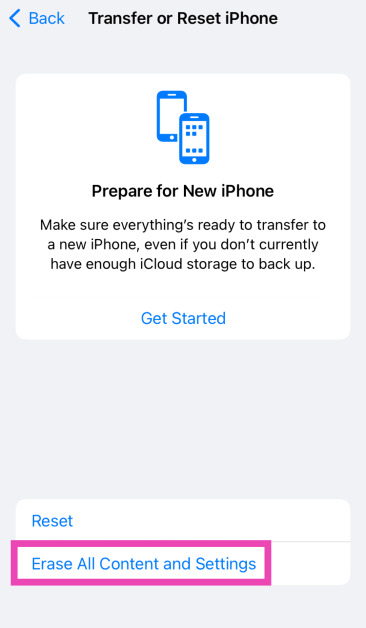
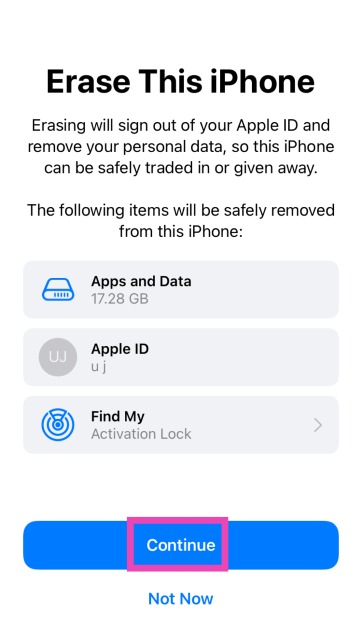
If the methods mentioned above didn’t work, try performing a factory reset on your iPhone. Make sure to backup your data as this procedure will erase all the contents of your device. Step 1: Go to Settings and select General. Step 1: Go to Settings and select General. Top 11 Ways to Fix 'Message Blocking is Active' on iPhone 8 Ways to Fix ‘No Service’ Issue on an iPhone (2024) Step 2: Tap on Transfer or Reset iPhone. Step 3: A popup box will appear, asking you to update the carrier settings. Hit Update. Top 11 Ways to Fix 'Message Blocking is Active' on iPhone Step 3: Hit Erase All Content And Settings. Step 3: Hit Erase All Content And Settings. 14 ways to fix the ‘apps not updating’ issue on iPhone Step 4: Tap on Continue and enter the passcode to reset your iPhone to its factory settings. Step 4: Tap on Continue and enter the passcode to reset your iPhone to its factory settings. 14 ways to fix the ‘apps not updating’ issue on iPhone

Frequently Asked Questions (FAQs)

Why am I getting the ‘Message Blocking is Active’ error on my iPhone?

This error message usually pops up when you are trying to reach a number that is no longer active. This means either the user has discontinued their number or you have entered the wrong number in the message drafting page.

How do I fix the ‘Message Blocking is Active’ error on my iPhone?

Make sure you are sending the message to the correct number. Make sure the contact isn’t on your blocklist. Your phone number must have the appropriate balance to send the message. Give your phone a quick restart if the problem persists.

How do I update carrier settings on my iPhone?

Carrier settings are updated automatically on your iPhone as soon as they are pushed by the network provider. To manually update them, go to Settings>General>About and hit Update.

How do I set my iPhone to ‘Send as SMS’?

Go to Settings>Apps>Messages and turn on the toggle switch next to ‘Send as SMS’.

How do I unblock someone on my iPhone?

Go to Settings>Phone>Blocked Contacts>Edit and hit the minus sign next to the contact you wish to unblock. Read Also: How to Quickly Fix a Hacked Android Phone? Top 5 Methods

Conclusion

These are the top 14 ways to fix the ‘Message Blocking is Active’ error on your iPhone. Before you reset the network settings on your iPhone, make sure you save the passwords of connected WiFi networks in the Notes app. After resetting the network settings, the connected WiFi networks and Bluetooth devices are unpaired and forgotten from your device. If you know any other way to fix this issue, let us know in the comments!

Top 10 smartphones under $750 in USA (October 2024)

There is no need to splurge like crazy on a flagship smartphone if all you want from your device is efficient performance and a good primary camera. Premium smartphones may have powerful telephoto cameras and other flashy features, but a price tag of over $1,500 is rarely ever worth it. The sub-$750 category is where you’ll find the best pound-for-pound smartphones in the market. These smartphones perfectly bridge the divide between flagship specs and affordable pricing. So, let’s jump into our list of the top 10 smartphones priced under $750 in the USA. Read Also: OnePlus Nord Buds 3 India launch soon, bags BIS certification

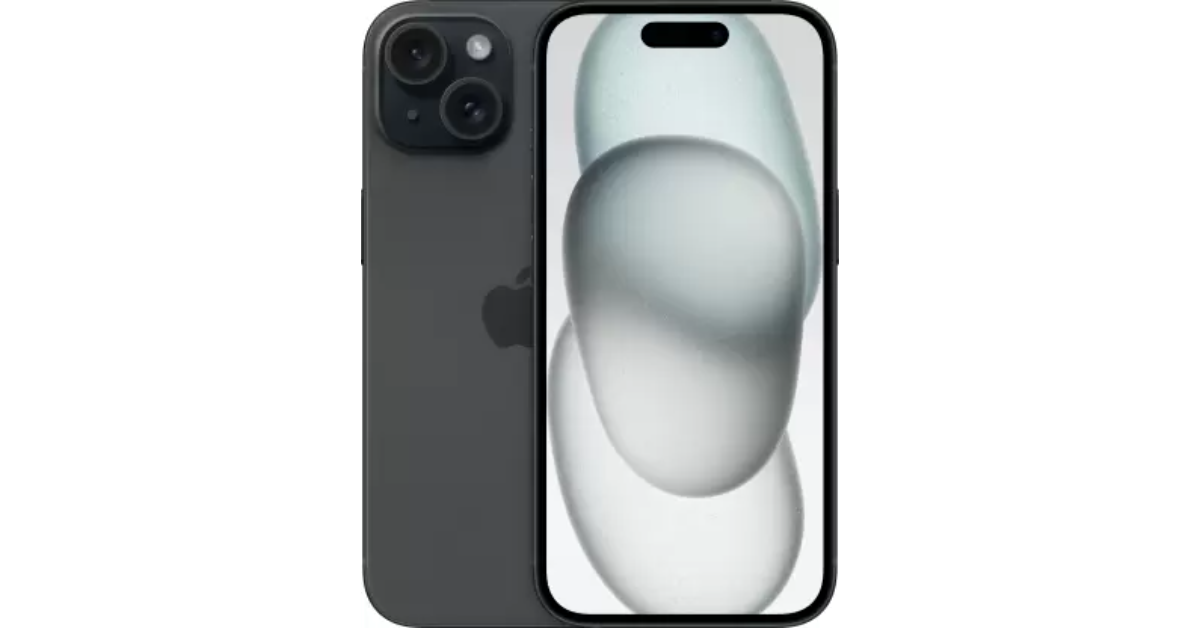
iPhone 15

Price: $699 on Apple.com iPhone 15 discount - iPhone 17   Key Specs
Display 6.1-inch Super Retina XDR OLED
Chipset Apple A16 Bionic
RAM 6GB
Storage 128GB, 256GB, 512GB
Battery 3,349 mAh
Now that the iPhone 16 Series is finally here, Apple has slashed the prices for last year’s iPhone 15. The vanilla variant of the iPhone 15 is priced at $699 while the Plus variant fetches $799. The smartphone flaunts a 6.1-inch Super Retina XDR OLED display that can reach a peak brightness of 2,000 nits. Under the hood, the iPhone 15 is powered by the Apple A16 Bionic chipset. Its camera sensors comprise a 48MP primary shooter and a 12MP ultrawide lens. Up front, it gets a 12MP selfie sensor housed inside the pill-shaped Dynamic Island. If you’re an iPhone loyalist, this is one of the best smartphones you can buy in the USA, now that Apple has discontinued its Pro variants.

Samsung Galaxy S23

Price: $699 on Samsung.com Confirmed: Samsung to soon fix camera blur issue on the Galaxy S23 and S23+ Top 10 smartphones under $750 in USA (2024) Key Specs
Display 6.1-inch Dynamic AMOLED 2X
Chipset Google Tensor G3
RAM 8GB
Storage 128GB, 256GB
Battery 4,575 mAh
The Samsung Galaxy S24 series was launched last month, which means 2023’s Galaxy S23 series can now be purchased at a reduced price. The base variant of the Galaxy S23 is priced at $699, making it an excellent deal. The smartphone gets a 6.1-inch Dynamic AMOLED 2X display with a refresh rate of 120Hz. It is powered by the Snapdragon 8 Gen 2 SoC. The triple camera module at the back of the smartphone consists of a 50MP primary shooter, a 12MP ultrawide lens, and a 10MP telephoto sensor. Samsung Galaxy S23 is rated IP68 for dust and water resistance.

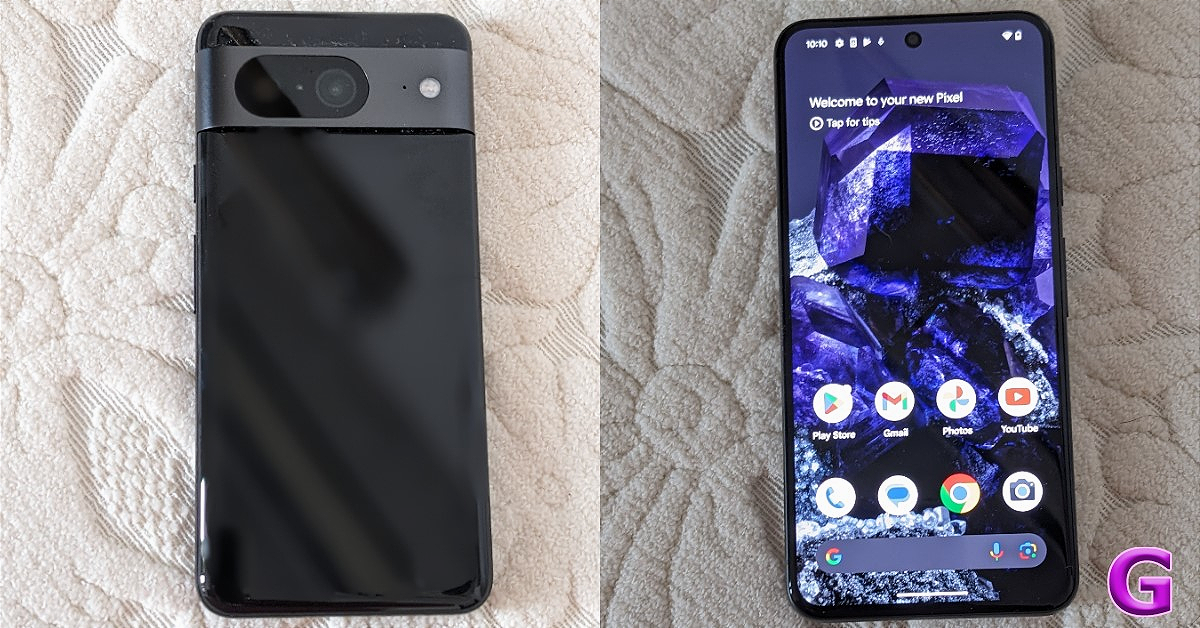
Google Pixel 8

Price: $549 on the Google Store review of Google Pixel 8 Key Specs
Display 6.2-inch OLED
Chipset Google Tensor G3
RAM 8GB
Storage 128GB, 256GB
Battery 4,575 mAh
Pixels are all about impressive cameras and clever software. The newest Pixel 8 series upholds that reputation. The non-Pro Pixel 8 is priced modestly (as far as flagships go) at $549. Powered by Google’s in-house Tensor G3 chipset, the Pixel 8 replicates a similar performance as its Pro sibling. The signature Pixel camera band at the back of the smartphone houses a 50MP primary shooter and a 12MP ultrawide lens. Up front, the 10.5MP selfie camera is contained in a punch-hole cutout. Google Pixel 8 is equipped with interesting features like Best Take, Magic Editor, and more. Read our review of the smartphone to learn more.

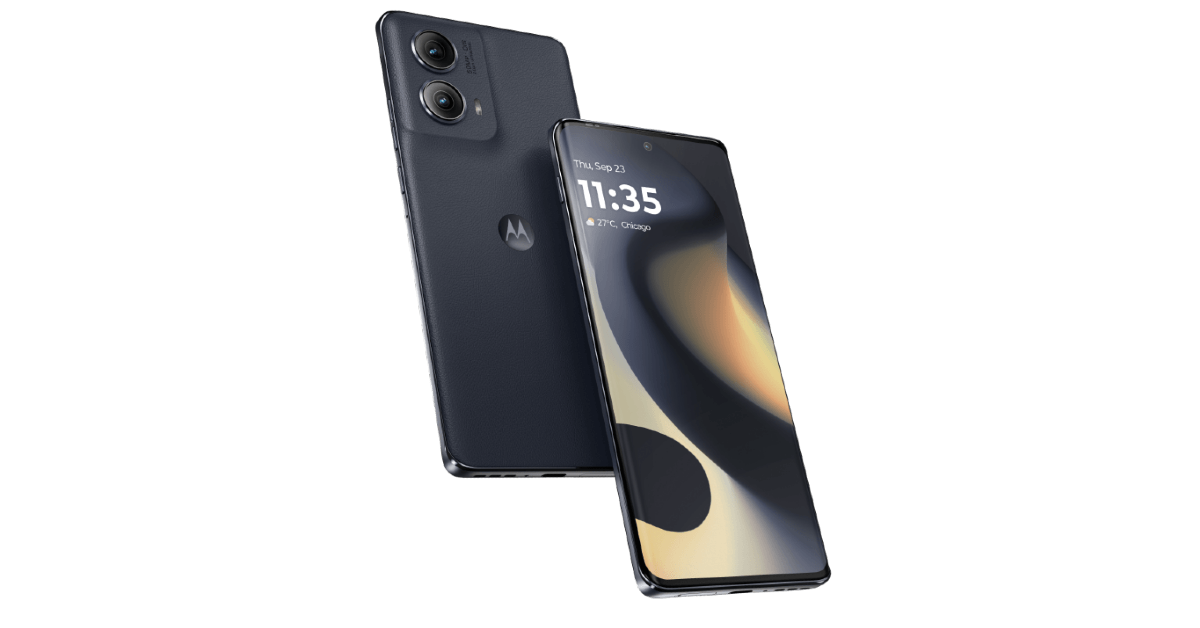
Motorola Edge 2024

Price: $549.99 on Motorola.com Motorola Edge 2024 Key Specs
Display 6.6-inch P-OLED
Chipset Snapdragon 7s Gen 2
RAM 8GB
Storage 256GB
Battery 5,000 mAh
The newly launched Motorola Edge 2024 retains its signature eco-leather back and packs a number of important upgrades. Under the hood, the smartphone is powered by the Snapdragon 7s Gen 2 SoC. It is rated IP68 for dust and water resistance. The 6.6-inch P-OLED display on the smartphone has a refresh rate of 144Hz and peak brightness of 1,300 nits. The dual camera panel at the back comprises a 50MP primary shooter and a 13MP ultrawide lens. The 5,000mAh battery on the Edge 2024 can easily last a day. There’s support for 68W wired and 15W wireless charging.

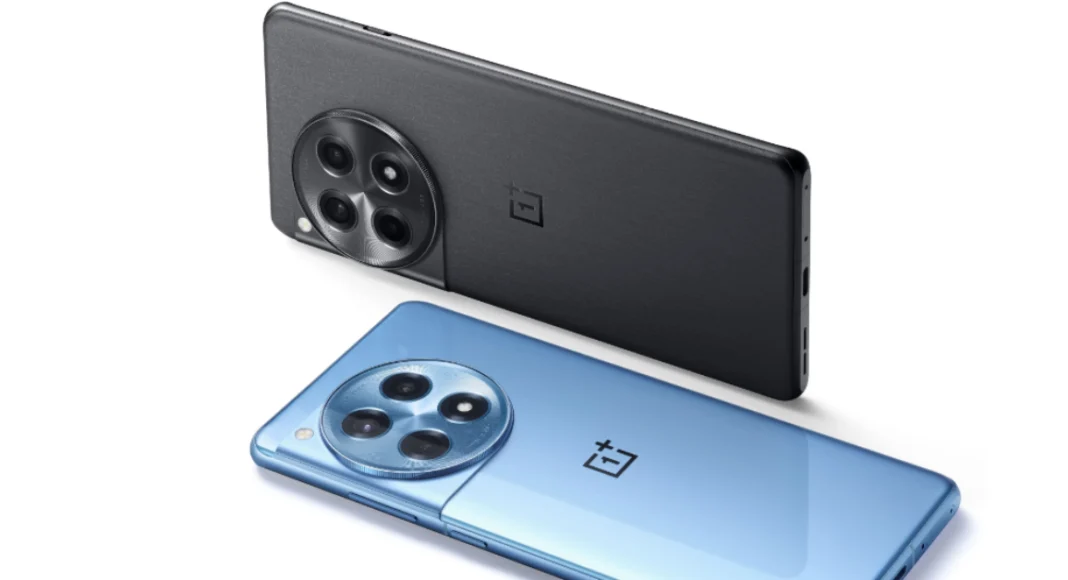
OnePlus 12R

Price: $499 on OnePlus.com   OnePlus 12R with Qualcomm Snapdragon 8 Gen 2 SoC launched in India Key Specs
Display 6.82-inch LTPO4 AMOLED
Chipset Snapdragon 8 Gen 2
RAM 8GB, 16GB
Storage 128GB, 256GB
Battery 5,500 mAh
Released alongside the flagship OnePlus 12, the 12R could very well be one of the best midrange smartphones of 2024. It is powered by last year’s flagship Snapdragon 8 Gen 2 chipset and flaunts a 6.82-inch LTPO4 AMOLED display. OnePlus 12R matches the design of the flagship unit but manages to stay in the affordable price bracket by ditching features like wireless charging. Its rear camera module replaces the telephoto lens from the flagship with a 2MP macro sensor. Other than that, you get a 50MP primary camera and an 8MP ultrawide lens.

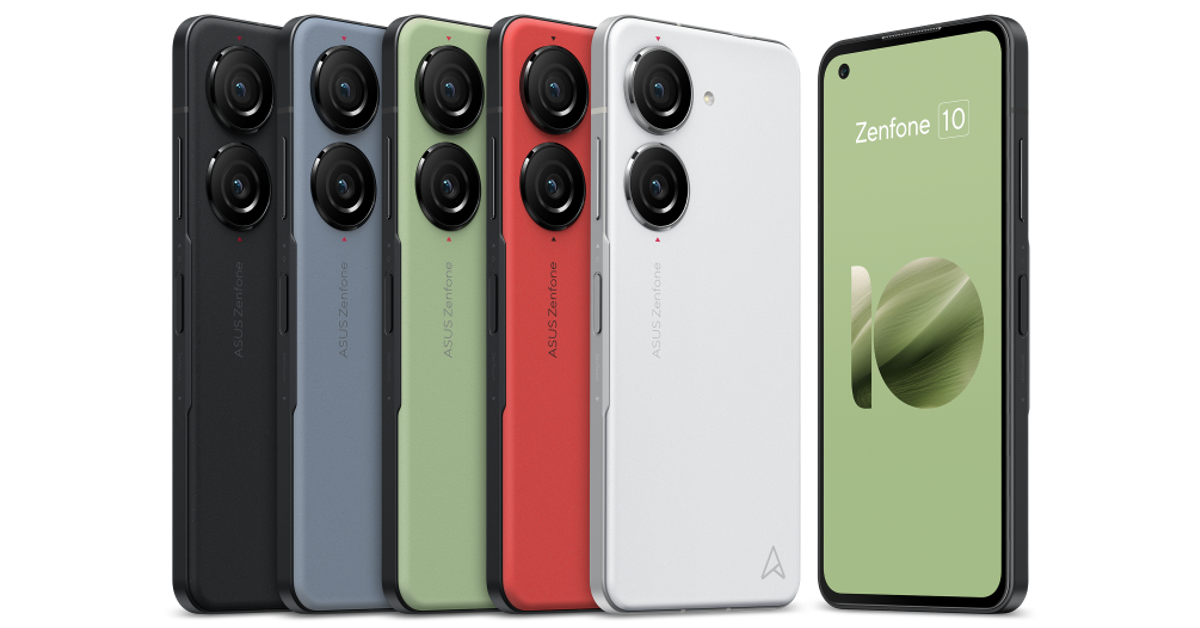
Asus Zenfone 10

Price: $599 on Asus.com Asus Zenfone 10 Key Specs
Display 5.92-inch Super AMOLED
Chipset Snapdragon 8 Gen 2
RAM 8GB, 16GB
Storage 128GB, 256GB, 512GB
Battery 4,300 mAh
One of the best compact smartphones around, the Asus Zenfone is also one of the best smartphones you can buy for under $750 in the USA. It features a 5.92-inch Super AMOLED display and is powered by the Snapdragon 8 Gen 2 SoC. The two rear cameras are housed in individual cutouts. The 50MP primary camera can record 8K videos at 24fps. The 13MP ultrawide camera is a nice addition to the camera module as well. Up front, the 32MP selfie camera is placed inside a punch-hole cutout on the display. Due to its small size, the Zenfone 10 only has a 4,300 mAh battery but it can easily last you an entire day.

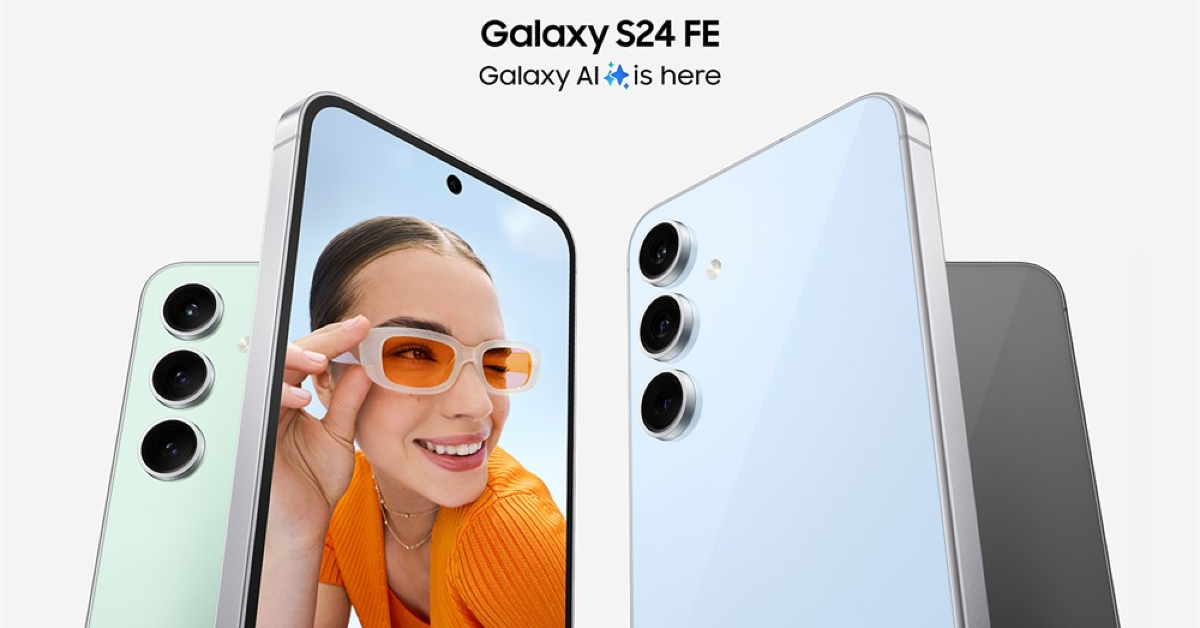
Samsung Galaxy S24 FE

Price: $649 on Samsung.com Samsung Galaxy S24 FE launched in India: Here is everything Key Specs
Display 6.1-inch Super Retina XDR OLED
Chipset Apple A15 Bionic
RAM 6GB
Storage 128GB, 256GB, 512GB
Battery 3,279 mAh
Samsung’s S24 series has finally received a ‘Fan Edition’. The crowd favourite is certainly one of the best smartphones you can buy under $750 in the USA. The Samsung Galaxy S24 FE flaunts a 6.7-inch Dynamic AMOLED 2X display with a 120Hz refresh rate and 1,900 nits of peak brightness. The device is powered by the Exynos 2400e processor. It is rated IP68 for dust and water resistance. Its rear triple camera setup comprises a 50MP primary shooter, an 8MP telephoto sensor, and a 12MP ultrawide lens. The smartphone can record 8K videos at 30fps. Its 4,700mAh battery pack lasts an entire day on a full charge.

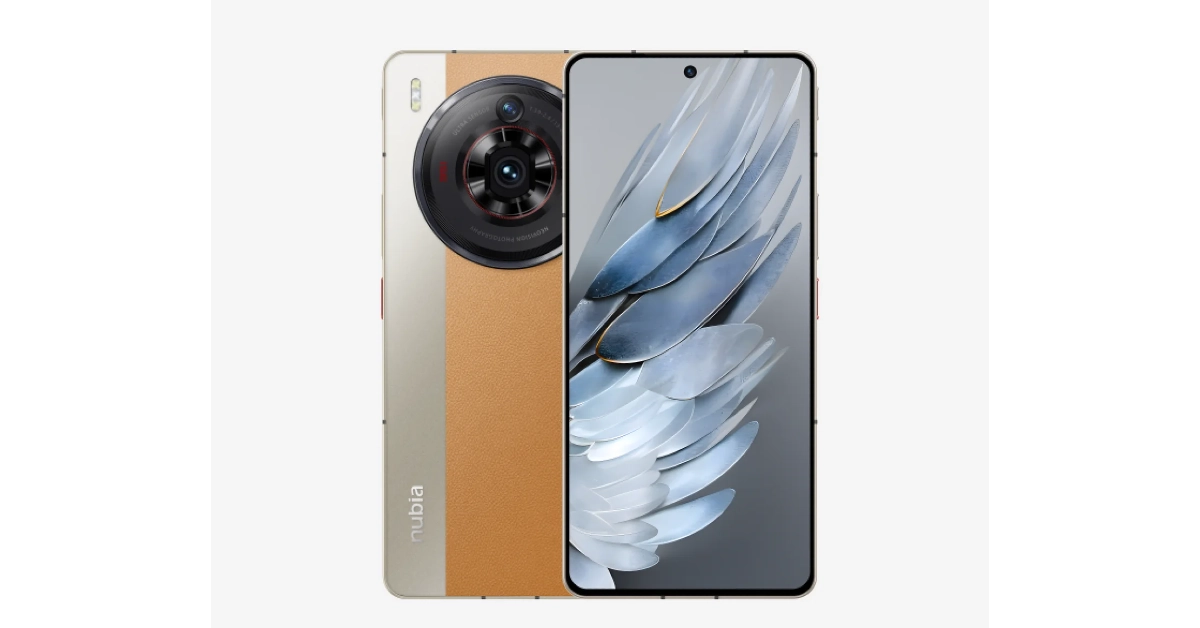
Nubia Z50S Pro

Price: $649 on Nubia.com Nubia Z50S Pro Top 10 smartphones under $750 in USA (2024) Key Specs
Display 6.8-inch AMOLED
Chipset Snapdragon 8+ Gen 2
RAM 12GB, 16GB
Storage 256GB, 1TB
Battery 5,100 mAh
Powered by the updated Snapdragon 8+ Gen 2, the Nubia Z50S Pro is an all-round performer. Its rear camera dial houses a 50MP primary shooter, another 50MP ultrawide lens, and an 8MP telephoto lens. Up front, the 16MP selfie camera is housed in a punch-hole cutout. The primary shooter can record 8K videos at 30fps. However, the selfie camera’s recording resolution is capped at 1080p (30fps). The smartphone gets a silicone polymer (eco-leather) back with dual-tone colour schemes. There’s support for 80W wired charging. The Z50S ships with a power adapter inside the box. Easily one of the best smartphones you can buy for under $750 in the USA.

Motorola Razr+

Price: $699 on Motorola.com Amazon India accidentally revealed the price of Motorola Razr 40: Details Inside Top 10 smartphones under $1,000 in USA (2024) Key Specs
Display Inner: 6.9-inch LTPO AMOLED | Cover: 3.6-inch AMOLED
Chipset Snapdragon 8+ Gen 1
RAM 8GB, 12GB
Storage 256GB, 512GB
Battery 3,800 mAh
One of our favourite foldable smartphones, the Motorola Razr+, is next on the list. This folding phone packs the Snapdragon 8+ Gen 1 chipset and runs stock Android 13 OS out of the box (upgradeable to Android 14). The 3.6-inch AMOLED cover display ensures you don’t have to flip the phone open to check notifications, respond to messages, or carry out other quick tasks. The inner 6.9-inch LTPO AMOLED display is superfluid, owing to its 165Hz refresh rate. The 3,800 mAh battery pack on the smartphone can provide a day’s worth of charge on normal usage. The Razr+ supports 30W wired charging and 5W wireless charging.

Samsung Galaxy XCover6 Pro

Price: $600 on Samsung.com Samsung Galaxy XCover6 Pro Key Specs
Display 6.6-inch PLS LCD
Chipset Snapdragon 778G
RAM 6GB
Storage 128GB
Battery 4,050 mAh
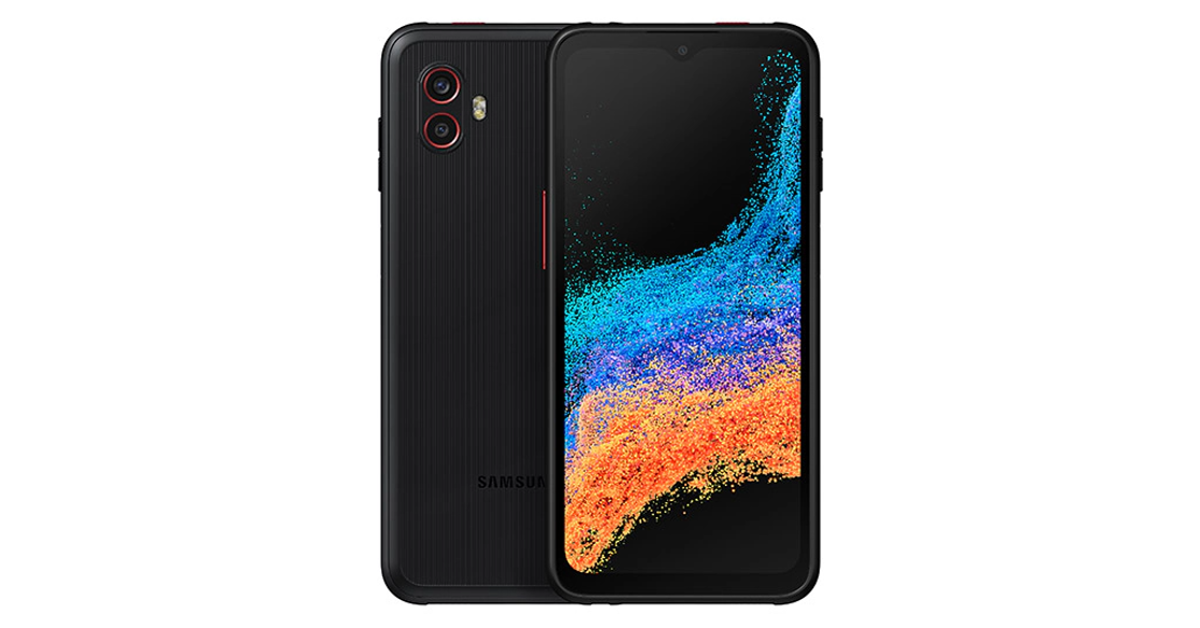
If you’re looking for a rugged phone, the Samsung Galaxy XCover6 Pro is one of the best ones around. This sturdy smartphone is rated IP68 for dust and water resistance and is MIL-STD-810H compliant. It can easily take a fall from 1.5 metres. Talking about the specs, the XCover6 Pro is powered by the Snapdragon 778G SoC and is upgradeable to Android 14. While it is only available with 128GB of internal storage, it has a memory card slot for expandable storage. The rear camera unit of the smartphone houses a 50MP primary shooter which can record 4K videos and an 8MP ultrawide lens. The 13MP selfie camera is housed inside a waterdrop notch and can record 1080p videos.

Honorable Mentions

Redmagic 9 Pro

Price: $649 on Redmagic Store Redmagic 9 Pro Key Specs
Display 6.8-inch AMOLED
Chipset Snapdragon 8 Gen 3
RAM 8GB, 12GB, 16GB
Storage 256GB, 512GB
Battery 6,500 mAh
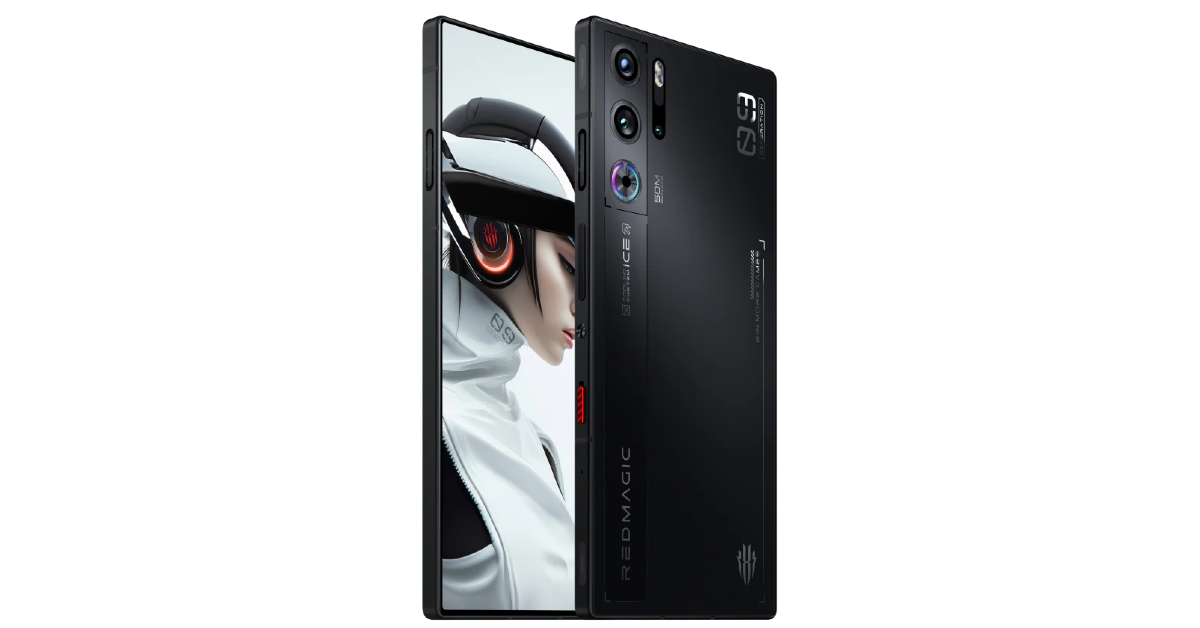
Gaming specialist Redmagic 9 Pro has a perfectly flat form factor, with no camera bumps jutting out of the rear panel. To maximise the gaming experience the smartphone offers a ‘true fullscreen’ display, meaning the selfie camera is tucked under the AMOLED panel. This diminishes the quality of the selfies, but if your main priority is getting a distraction-free display for gaming, you will relish this smartphone. The ICE 13.0 cooling system with a built-in cooling fan keeps the internal temperature of the device in check. Qualcomm’s flagship Snapdragon 8 Gen 3 chipset is an excellent choice for this smartphone. For gaming enthusiasts, the Redmagic 9 Pro is one of the best smartphones in the USA priced under $750.

Samsung Galaxy S23 FE

Price: $599 on Samsung.com Samsung Galaxy S23 FE: Performance and Cameras Top 10 smartphones under $750 in USA (2024) Key Specs
Display 6.4-inch Dynamic AMOLED 2X
Chipset Snapdragon 8 Gen 1
RAM 8GB
Storage 128GB, 256GB
Battery 4,500 mAh
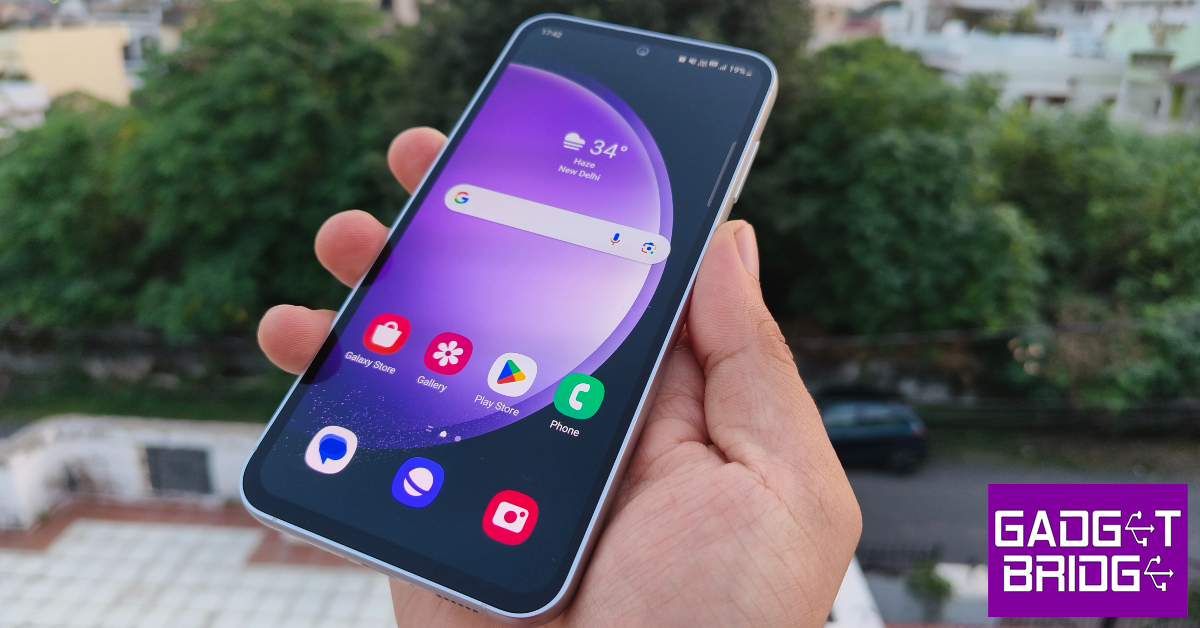
The Fan Edition variant of the Samsung Galaxy S23 series has all the makings of a great smartphone. It is one of the best smartphones you can buy for under $750 in the USA. The US version of the S23 FE holds a massive advantage in the form of the Snapdragon 8 Gen 1 chipset powering the device. International models of the smartphone are powered by Samsung’s in-house Exynos 2200 SoC which pales in comparison to Qualcomm’s 2022 chipset. The 6.4-inch Dynamic AMOLED 2X display works like a charm and is practically flagship grade. The vertical camera array comprising a 50MP primary shooter, an 8MP telephoto lens, and a 12MP ultrawide sensor produces great results as well. Read our full review of the smartphone to learn more.

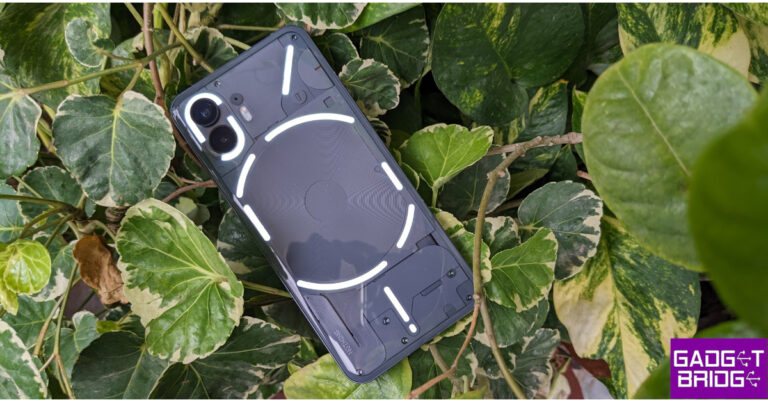
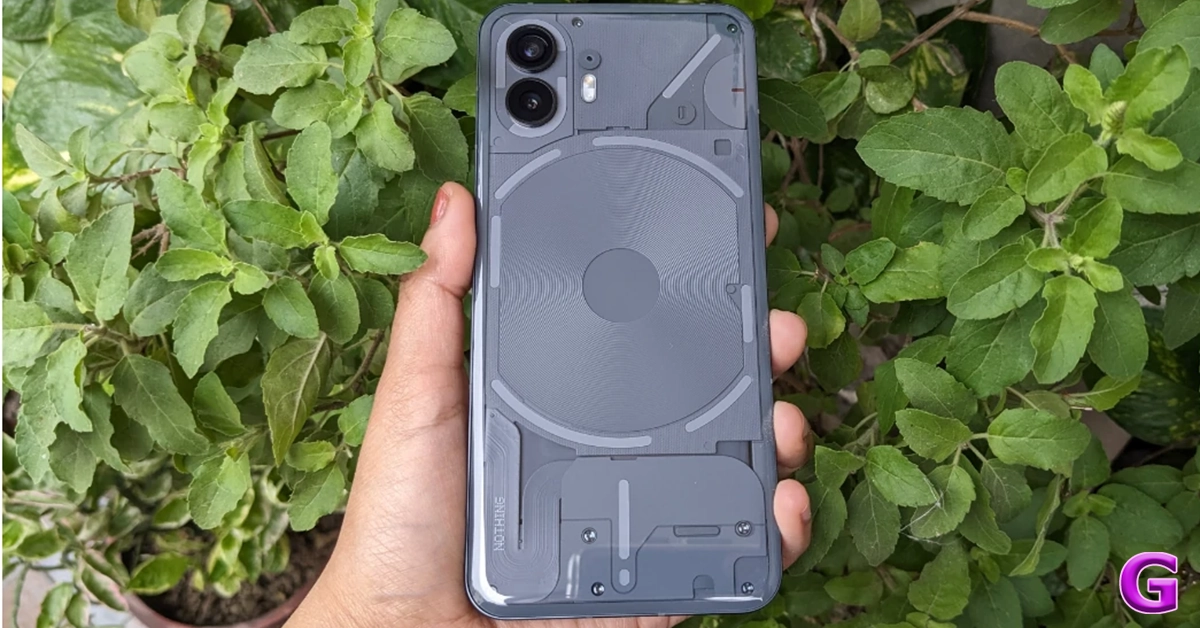
Nothing Phone 2

Price: $599 on Nothing.tech Nothing Phone 2 Review: Design and Display Top 10 smartphones under $750 in USA (2024) Key Specs
Display 6.7-inch LTPO OLED
Chipset Snapdragon 8+ Gen 1
RAM 8GB, 12GB
Storage 128GB, 256GB, 512GB
Battery 4,700 mAh
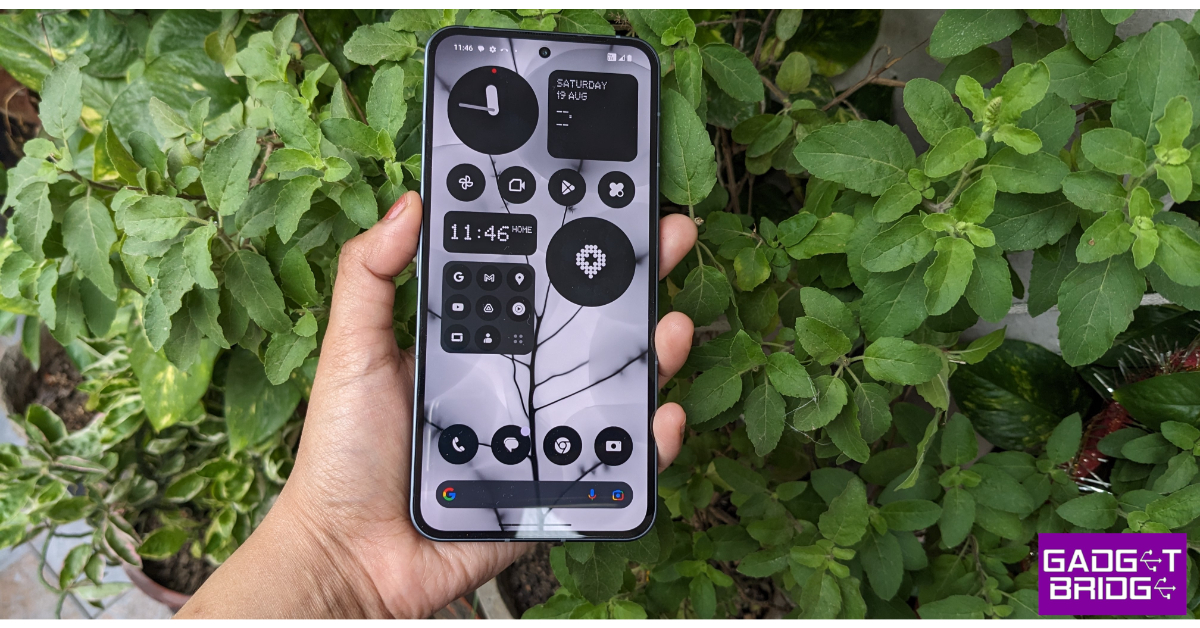
After bursting onto the scene with its debut smartphone in 2022, British tech outfit Nothing followed it up with the rock-solid Phone 2. Refining the Glyph design of the smartphone, Nothing added more functionality to it, letting users track their cab and other orders on the LED strip. Powering the smartphone is the Snapdragon 8+ Gen 1 SoC. The 6.7-inch LTPO OLED display is a great choice for the midrange device. Nothing also upped its software game on the Phone (2) with the release of the Nothing OS 2.5. Check out our full review of the smartphone here. Read Also: Top 5 Easy Ways to Stop Call Forwarding on Android and iPhone (2024)

Conclusion

These are the top 10 smartphones you can buy for under $750 in the USA. If you are willing to expand your budget to $799, you can get the newest iPhone 14 and Samsung Galaxy S24. Think we missed out on a smartphone that deserves to be on this list? Let us know in the comments!

Telegram update brings Saved Messages 2.0, new features and improvements

Key Highlights
  • Telegram users will be able to save bookmarks, media, and links efficiently in Saved Messages.
  • Users can also see a list of private chats, groups, and channels from which you’ve forwarded messages in the new View as Chats mode.
  • View-Once setting is now available for voice and video messages.
Instant messaging platform Telegram has rolled out a new update. The latest Telegram update has added 10 new features such as Saved Messages 2.0, One-Time Voice Messages and 8 more functionalities. The update is available for both iOS and Android users. The Telegram app got an upgrade that brought additional functionality to the platform. Saved Messages 2.0 is one of the more important features that the messaging service has received. All Telegram users have a chat called Saved Messages where they have notes, reminders, and messages that have been forwarded from other chats. But with the update, the users will be able to save bookmarks, media, and links in an efficient manner in Saved Messages. Additionally, users will be able to use the new ‘Saved’ option in Shared Media to access messages saved from any specific chat, see saved messages by chat or as a short list, and tag them. Users can also see a list of private chats, groups, and channels from which you’ve forwarded messages in the new View as Chats mode. Users can pin any of these chats to the top. To switch views, simply tap the title in your Saved Messages. You can also tap ⋮ / ⋯ and select ‘View as Messages’ or ‘View as Chats’ – in this case, Saved Messages will be shown in the selected mode the next time you open them. The Telegram Update has also added Tags to Saved Messages that will allow you to add several tags. By doing this one can swiftly filter them in Search, for even more organisation. You can add several tags to your Saved Messages, which will allow you to swiftly filter them in Search, for even more organisation. According to the company, adding a tag is as simple as adding a reaction because tags are based on emoji, tags can also have names. Already, all Telegram Premium users have access to tags. To search in your Saved Messages, tap the 🔍 icon in the top corner. Your tags will appear under the search bar – simply tap to filter your search by that tag. You can quickly access images, links, music, and more in chats, groups, and channels in the shared media section. But as per the new Telegram update any messages from that chat that you’ve forwarded to your Saved Messages are also included in the new “Saved” tab. The upgrade has also improved searching in all chats, and now it’s easier to navigate your search results and view them as a compact list. Moreover, the View-Once setting is now available for voice and video messages. To record a view-once message, hold down and then swipe up to lock recording, then tap the view-once icon before sending. Also Read: OnePlus 12R to go on sale for the first time in India today: Sale offers details Telegram has also enabled the ability to pause and then resume recording later – instead of sending multiple messages while recording any voice or video message. To pause, swipe up to lock recording and tap the pause ⏸️ button. To resume recording, simply tap the microphone or camera icon again. Telegram has also enabled Read Time in private chats allowing users to see the exact time when your message was opened. Users have the option to hide the read status in the Privacy Settings. To protect privacy, read times in private chats are only visible for 7 days before being deleted – just like in groups. Besides this when your last seen or read time is hidden from someone also hides theirs from you. However, you may still view the last seen and read times of people who share them with you if you have Telegram Premium. Also Read: OnePlus Nord Buds 3 India launch soon, bags BIS certification With the latest Telegram update, Premium users can choose between having ‘Everyone’ or ‘My Contacts and Premium Users’ send them messages. When enabled, users without Premium or who are not in your contacts cannot initiate chats with you, but they can respond if you message them first.

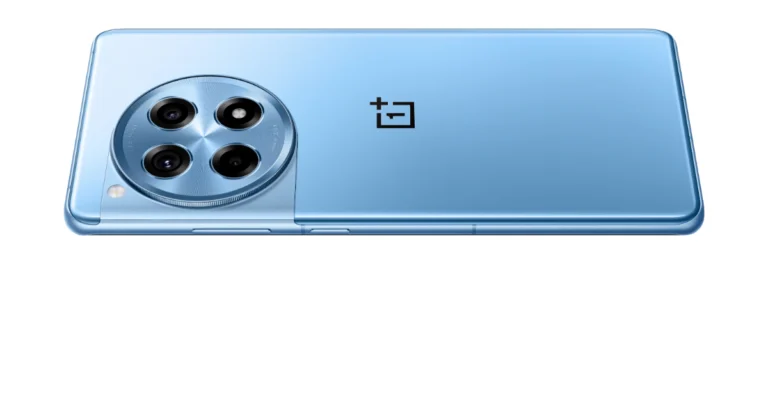
OnePlus 12R to go on sale for the first time in India today: Sale offers details

Key Highlights
  • OnePlus 12R will go on sale via the OnePlus India website and Amazon India.
  • The company has announced exciting launch offers on the purchase of the phone.
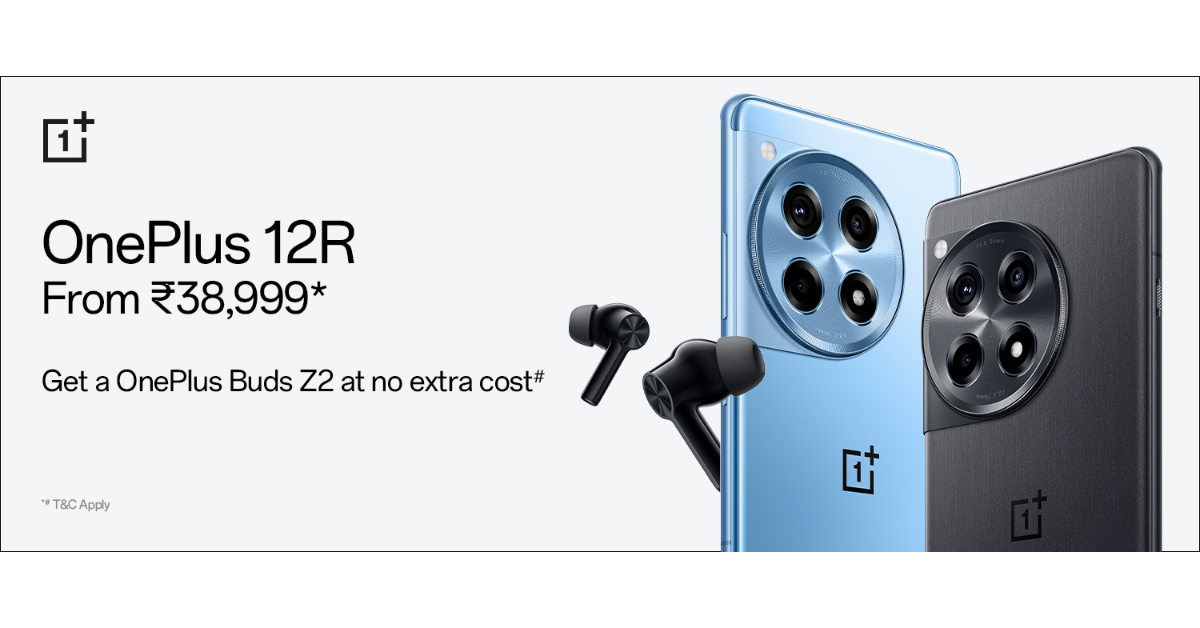
  • The customers will also get OnePlus Buds Z2 worth Rs 4,999.
The OnePlus 12R is the new smartphone that the company has introduced in India recently alongside OnePlus 12 and OnePlus Buds 3 in India. The device is a gaming smartphone that is scheduled to go on sale in the country for the first time today. The Qualcomm Snapdragon 8 Gen 2 SoC powered the phone. It features a 1.5K AMOLED screen that supports up to 120Hz adaptive refresh rate. Additionally, the device houses a 5,500mAh battery with 100W SuperVOOC fast charging support.

OnePlus 12R price in India, sale details

The latest gaming-centric phone- the OnePlus 12R will be available for purchase from today onwards. The device’s sale will open at noon. OnePlus India website and Amazon India will sell this phone. The OnePlus 12R has been launched at a starting price of Rs 39,999 for the 8GB RAM with 128GB storage and Rs 45,999 for the 16GB RAM with 256GB storage. The handset will be available in two colourways Iron Gray and Cool Blue. Customers who buy this smartphone during the sale will also receive a significant discount. The buyers are eligible to receive a Rs 1,000 discount when purchasing OnePlus 12R via ICICI Credit Card or OneCard. OnePlus 12R price in India, sale details Apart from this those who place their orders for the device within the first 12 hours of its sale will receive the OnePlus Buds Z2 valued at Rs 4,999. Customers purchasing the 12R can avail of benefits worth INR 2,250 on Jio Plus. Buyers will get a free trial of Google One for 6 months & YouTube Premium for 3 months. Consumers can also buy the OnePlus 12R with OnePlus Easy Upgrades and get 35% assured value at the end of the 24 months. Shoppers can also avail of a 6-month no-cost EMI through ICICI credit/debit card EMI and OneCard EMI. The device can also be bought with OnePlus Easy Upgrades and get 35% assured value at the end of the 24 months. Also Read: Vivo T2 5G, Vivo Y27 4G price in India dropped

OnePlus 12R Specifications

The OnePlus 12R features a 6.78-inch Oriental AMOLED LTPO display with 1,264×2,780 pixels of resolution. The OLED screen supports up to 120Hz adaptive refresh rate, 360Hz touch sampling rate and 2160Hz instant touch sampling rate. The display also has 4,500 nits peak brightness and comes with Corning Gorilla Glass Victus 2 protection. Under the hood, there is an octa-core 4nm Snapdragon 8 Gen 2 SoC, along with an Adreno 740 GPU. The device comes with up to 8GB of LPDDR5x RAM options and 256TB UFS 4.0 storage. The triple rear camera setup on the phone includes a 50-megapixel Sony IMX890 primary sensor with an f/1.8 aperture and OIS, an 8-megapixel ultra wide-angle sensor with f/2.2 aperture and a 2-megapixel macro camera with f/2.4 aperture. The device sports a 16-megapixel front-facing camera with f/2.4 aperture for taking selfies. In terms of connectivity, there is 5G, 4G LTE, Wi-Fi 7, Bluetooth 5.3, Beidou, GLONASS, Galileo, GPS, and NFC. Additionally, there is an accelerometer, e-compass, gyroscope, gravity sensor, geomagnetic sensor, IR control, light sensor, colour temperature sensor, proximity sensor, and X-axis linear motor. Also Read: OnePlus Nord Buds 3 India launch soon, bags BIS certification The stereo speaker setup on the phone supports Dolby Atmos. OnePlus 12R is backed by a 5,500mAh battery with 100W SuperVOOC fast charging support. The OnePlus 12R has the iconic OnePlus Alert Slider in its new home on the phone’s left.

Garena Free Fire Redeem Codes Today 6 February 2024: Here is how to claim them

Garena Free Fire is a battle royale game with regular awards and tournaments to keep players interested. If you play Garena Free Fire, you should be aware of the redeem codes that are released on a daily basis. However, because the battle royale game is banned in India, players from other countries can use the Free Fire Redeem codes daily. If you’re unfamiliar with the Garena Free Fire redeem codes or don’t know how to get them, we’ve put together a step-by-step guide to help you redeem them. Check out Garena Free Fire Redeem Codes for 6 February 2024. The Free Fire redeem codes are a great way to get free stuff. These are 12-digit codes that contain alphabets and numbers, as well as an expiration date and time. Because the Garena FF redeem codes cannot be used more than once, you should hurry to the redemption page to claim your free reward before someone else does. To get a free reward, all you have to do is go to reward.ff.garena.com/en, which is the official redemption page. Also, keep an eye on this space for daily updates on Garena Free Fire redemption codes and rewards. Also Read: Sennheiser Accentum Plus wireless headphones with Hybrid Adaptive Noise Cancellation launched

Garena Free Fire Redeem Codes Today 6 February 2024

FYTGFVAQ2U34Y6TR FHNSJUA65RQ2FDCV F4J5TGY6TGSBN34J F5DCV3B4N5JIG8U7 F6HGGFBCNJ3NRTGR F3BERNFJUCYTSRAF F5M6NMYKHGIO867U F7YTGE45NTJKIGUJ FJI4U5HYTNFJKC8U

How to Get Free Fire Redeem Codes for Garena on 6 February 2024?

  • Visit the Garena Free Fire game’s official website at reward.ff.garena.com.
  • Use your Facebook, Google, VK, Apple ID, Huawei ID, or Twitter account to log in.
  • You’ll be taken to a valid redemption code (s)
  • Copy and paste the 12-digit redemption code into the text box.
  • On the screen, a dialogue box will appear.
  • ‘Ok’ should be selected.
For the latest gadget and tech news, and gadget reviews, follow us on TwitterFacebook and Instagram. For newest tech & gadget videos subscribe to our YouTube Channel. You can also stay up to date using the Gadget Bridge Android App. You can find the latest car and bike news here.

Top 5 Easy Ways to Stop Call Forwarding on Android and iPhone (2024)

0
Call forwarding works pretty much the same on Android and iOS devices. You can turn it on from dialer settings or by sending a code to the network provider. If you’re embarking on a trip where you expect your phone to be out of service, you may want to forward your calls to another phone number. But what happens when you come back and want your phone number to receive calls again? Here are the top 5 ways to stop call forwarding on Android and iPhone. Read Also: Poco X6 Review: Does it have the X factor?

Conditional Forwarding vs Unconditional Forwarding: What’s the difference?

Before you disable it, you need to know the kind of call forwarding that is activated on your number. Call forwarding can belong to one of two categories – Conditional and Unconditional. As the name suggests, conditional forwarding works selectively, only when the underlying conditions are met. Phone calls to your number will be forwarded to another number only when your line is busy, unavailable, or unanswered. If you’re about to catch a flight, you may want to enable conditional forwarding for your number. Conversely, unconditional forwarding relays incoming calls to another number without taking your line’s status into consideration. Even if your phone is switched on and receiving optimum network coverage, unconditional forwarding will connect the calls to another number. You should use this when you are away from your phone and want the calls to be relayed to someone else’s number.

Stop Unconditional Call Forwarding on iPhone

How to use Visual Lookup on your iPhone to find out what’s wrong with your car and other things? Step 1: Go to Settings and select Phone. Step 2: Tap on Call Forwarding. Step 3: Turn off the toggle switch.

Stop Unconditional Call Forwarding on Android

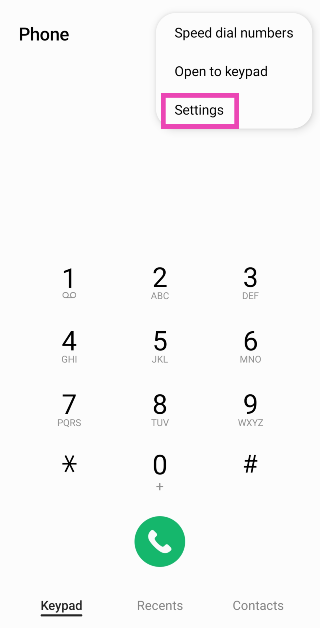
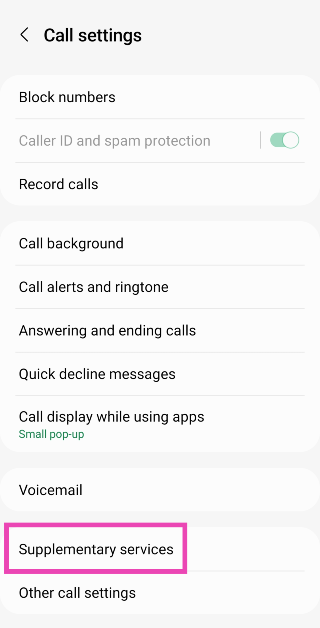
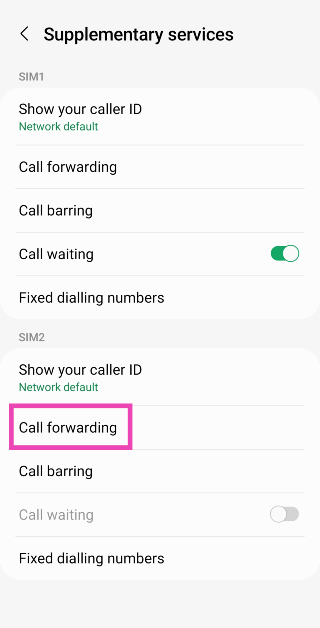
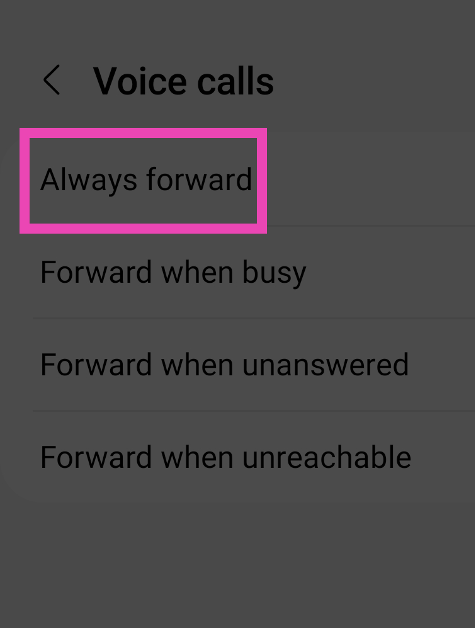
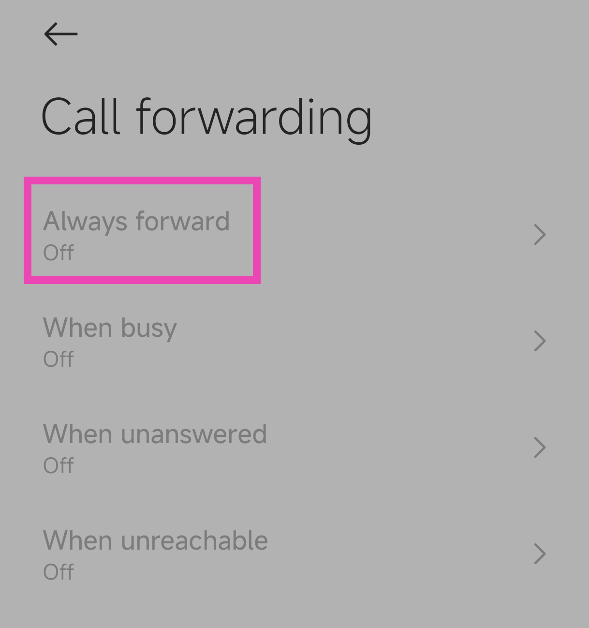
Step 1: Launch the dialer app on your smartphone. Step 2: Hit the ellipses at the top right corner of the screen. Step 3: Tap on Settings. Step 3: Tap on Settings. Step 4: Scroll down and select Supplementary services. Step 4: Scroll down and select Supplementary services. Step 5: Tap on Call forwarding. Step 5: Tap on Call forwarding. Step 6: Tap on Always forward and select Never. Step 6: Tap on Always forward and select Never.

Stop Call Forwarding using the Google Dialer on Android

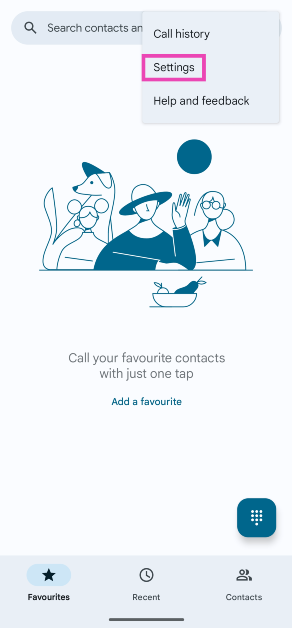
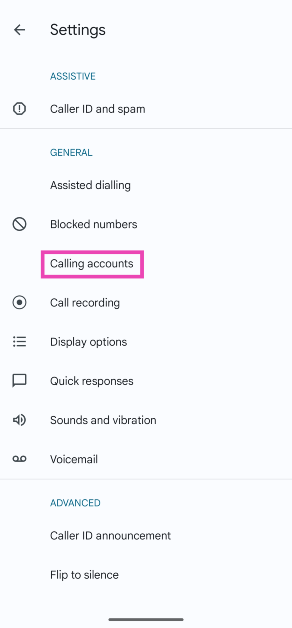
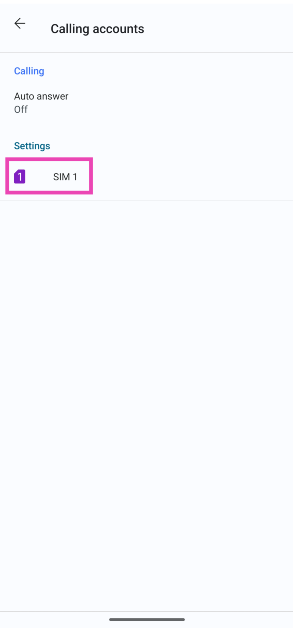
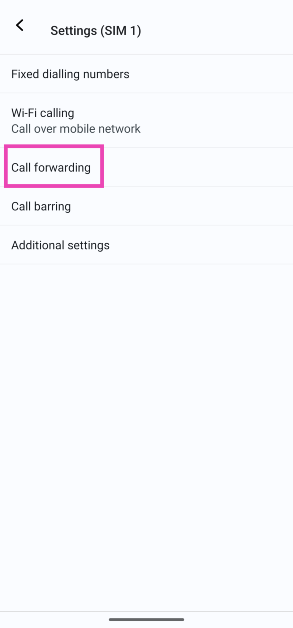
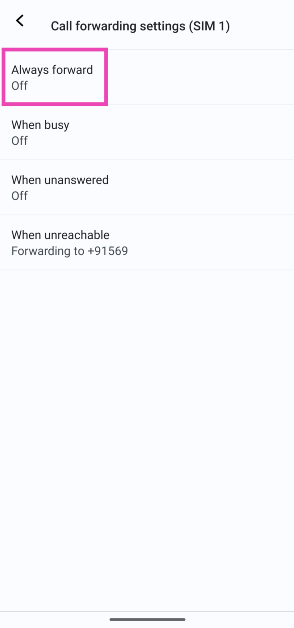
If you use the Google Dialer on your smartphone, follow these steps to disable call forwarding. Step 1: Launch the Google Dialer on your phone and hit the ellipses at the top right corner of the screen. Step 2: Tap on Settings. Step 2: Tap on Settings. Step 3: Select Calling accounts. Step 3: Select Calling accounts. Step 4: Select the SIM for which you want to disable call forwarding. Step 4: Select the SIM for which you want to disable call forwarding. Step 5: Tap on Call forwarding. Step 5: Tap on Call forwarding. Step 6: Tap on Always forward and select Off. To turn off conditional forwarding, disable the other options as well. Step 6: Tap on Always forward and select Off. To turn off conditional forwarding, disable the other options as well.

Stop Conditional Call Forwarding using dialer code (iPhone and Android)

Step 1: Launch the dialer app on your smartphone. Step 2: Dial ##004#. This code may vary among different network providers. Step 3: Hit the Call button. Conditional call forwarding will be disabled for your number.

Bonus Tip: Stop Call Forwarding on a Xiaomi smartphone

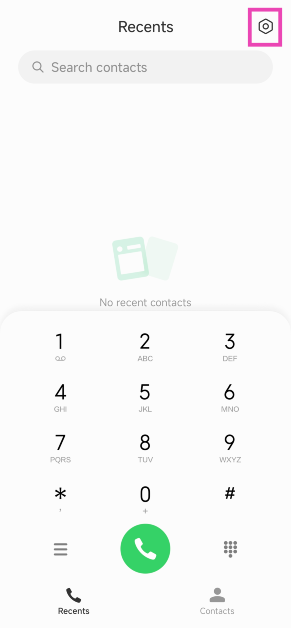
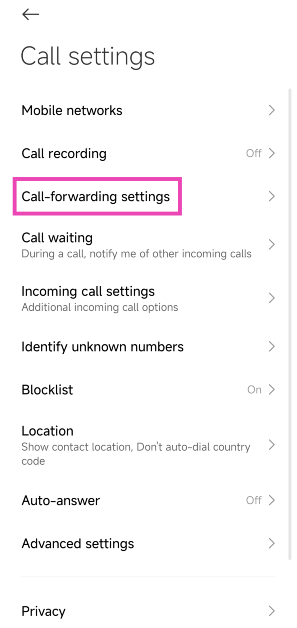
Step 1: Launch the native dialer app and hit the Settings icon at the top right corner of the screen. Step 1: Launch the native dialer app and hit the Settings icon at the top right corner of the screen. Step 2: Tap on Call-forwarding settings. Step 2: Tap on Call-forwarding settings. Step 3: Tap on Always forward and select Off. Step 3: Tap on Always forward and select Off.

Frequently Asked Questions (FAQs)

How do I turn on Call Forwarding for my Airtel number?

Dial **21* followed by the phone number to which you want to forward your calls. You will receive a confirmation message after a few seconds.

How do I turn off call forwarding on Android?

Go to Phone>Settings>Supplementary services>Call forwarding and select ‘Never’ to turn it off.

How do I turn off call forwarding on my iPhone?

Go to Settings>Phone>Call forwarding and turn off its toggle switch to disable it. Read Also: OnePlus Nord Buds 3 India launch soon, bags BIS certification

Conclusion

These are the top 5 ways to stop call forwarding on Android and iPhone. Make sure you are using the default dialer on your phone while carrying out this process. If you know any other way to accomplish this task, let us know in the comments! Check out this article to learn how to change your voicemail greeting on Android. This article lists 2 ways to do the same on an iPhone.

OnePlus Nord Buds 3 India launch soon, bags BIS certification

Key Highlights
  • OnePlus Nord Buds 3 will succeed the OnePlus Nord Buds 2 that were launched last year.
  • The device will come with a revamped design.
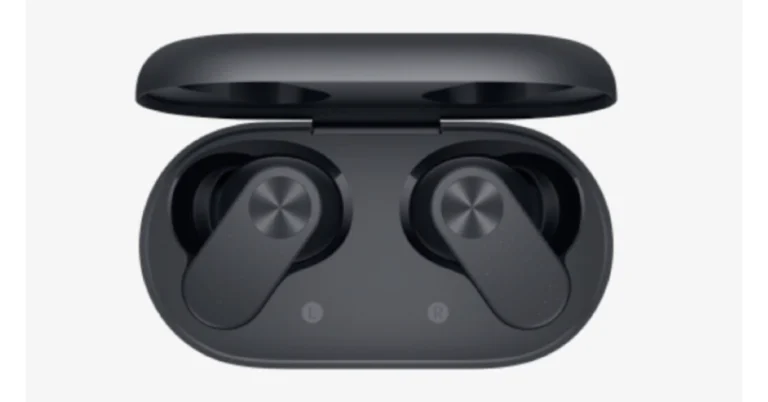
OnePlus Nord Buds 3 will debut in India soon. According to a new leak the device has bagged BIS certification. Previously CAD renders of the TWS earphones were also leaked. According to rumours, the audio device will come with a new design. The earphones’ half-in-ear form and the charging case’s oval shape are suggested by the renders. According to a report, the OnePlus Nord Buds 3 has been listed on the Bureau of Indian Standards (BIS) website. The listing suggests that the device will be coming to India soon. It bears model number E512A. The company has not yet disclosed the OnePlus Nord Buds 3 earphones launch date, but before the announcement the audio device’s CAD renders also appeared on the web. The purported render displays the charging case and black earphones. The design reveals an oval-shaped earphone case with the OnePlus logo on the front. The cover seems to have a matte finish on the remaining side and a glossy lid on top. The earphone features a half-in-ear design rumoured to have touch controls for controlling music, volume, answering and rejecting calls, and more. OnePlus Nord Buds 3 will succeed the OnePlus Nord Buds 2 which was launched last year in April. OnePlus Nord Buds 2 has a capsule-shaped charging case and the design and in-ear design earbuds are touch sensitive and offer customisable controls and shortcuts that can be controlled via the HeyMelody app. The earphones are IP55-rated for dust and water resistance. Also Read: Vivo T2 5G, Vivo Y27 4G price in India dropped OnePlus Nord Buds 2 are equipped with 12mm drivers with a master equalizer with choices for balanced, serenade, bold, and bass modes to deliver user-specific audio output. The OnePlus Nord Buds 2 comes with Bluetooth 5.3 which supports both SBC and AAC codecs. The OnePlus Nord Buds 2 also offers Active Noise Cancellation with 25dB depth and a dual-core processor that cancels out unwanted environmental noises. The dual mic system and the Enhanced Clear Call function on these TWS work together to amplify speech sounds during an audio or video call. Also Read: Nothing Phone 2a India availability confirmed, renders leaked OnePlus Nord Buds 2 comes with a price tag of Rs 2,999. It comes in two colour options of Lightning White and Thunder Gray. The device is available for purchase via both the OnePlus store and Amazon in the country.

Vivo T2 5G, Vivo Y27 4G price in India dropped

Key Highlights
  • Vivo T2 5G, and Vivo Y27 4G are now available in India at reduced pricing.
  • Both the phones have received a price cut.
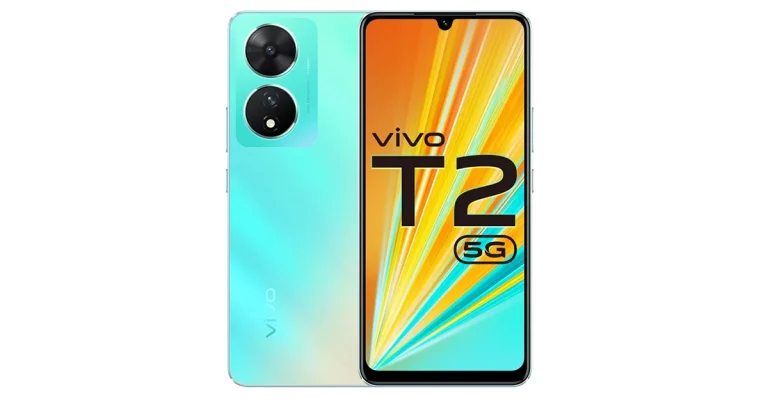
Vivo T2 5G, and Vivo Y27 4G have become affordable. Now both smartphones are seeing a price cut. The former was launched in April while the latter one in July last year. Vivo T2 5G comes with a 6.38-inch AMOLED display with 90Hz refresh rate. It is powered by a Snapdragon 695 SoC. On the other hand, Vivo Y27 includes an FHD+ sunlight display along with a 2.5D glass body design. Vivo T2 5G is currently selling at a reduced price of Rs 15,999 and Rs 17,999 for the 6GB RAM with 128GB storage and 8GB RAM with 128GB storage variants respectively. On the other hand Vivo Y27 4G is currently available at Rs 11,999 for the 6GB RAM with 128GB storage variant after a price cut. The company is also offering a cashback of up to Rs 1,000 if the transaction is made via SBI, Yes Bank, IDFC First Bank, Bank of Baroda, DBS Bank, Federal Bank, and IndusInd Bank cards.

Vivo T2 5G specifications

Vivo T2 5G runs on Android 13-based Funtouch OS 13. It features a 6.38-inch AMOLED display with a refresh rate of 90Hz and a 360Hz touch sampling rate. It is powered by a Snapdragon 695 SoC. The device includes a dual rear camera setup that includes a 64-megapixel primary sensor and a 16-megapixel sensor. The phone packs a 4500mAh battery, with 44W fast charging support. Vivo Y27 with MediaTek Helio G85 SoC launched in India

Vivo Y27 specifications

The Vivo Y27 has a 6.64-inch FHD+ LCD Sunlight display with a resolution of 2388 1080 pixels. The screen’s maximum brightness is 600 nits. It runs on FunTouch OS 13 based on the Android 13 operating system. A MediaTek Helio G85 chipset and its Extended RAM 3.0 functionality, which adds 6 GB of RAM powers the phone. Also Read: Nothing Phone 2a India availability confirmed, renders leaked The smartphone features dual rear cameras: a 50 MP primary camera and a 2 MP bokeh camera. It has a variety of camera functions, including Bokeh Flare Portrait, Super Night Mode, and Super Night Selfie Mode. It has an 8 MP front camera with the Aura Screen Light function for selfies, ensuring sharp, high-resolution selfies in any setting. Also Read: Vivo Y200 5G now comes in a new 256GB storage variant: Price in India A side fingerprint scanner is included with the Vivo Y27 for improved security and quick unlocking. It includes a 5000mAh battery and a quick 44W FlashCharge. With fast charging capabilities, thorough 24-dimension Security Protection, and anti-scald protection, the vivo Y27’s AI-powered safe charging avoids overcharging, increases battery life, and ensures worry-free nighttime charging.

Nothing Phone 2a India availability confirmed, renders leaked

Key Highlights
  • The Nothing Phone 2 is expected to launch in India later this month.
  • The device will feature a dual rear camera setup.
  • The phone is expected to be powered by MediaTek Dimensity 7200 SoC.
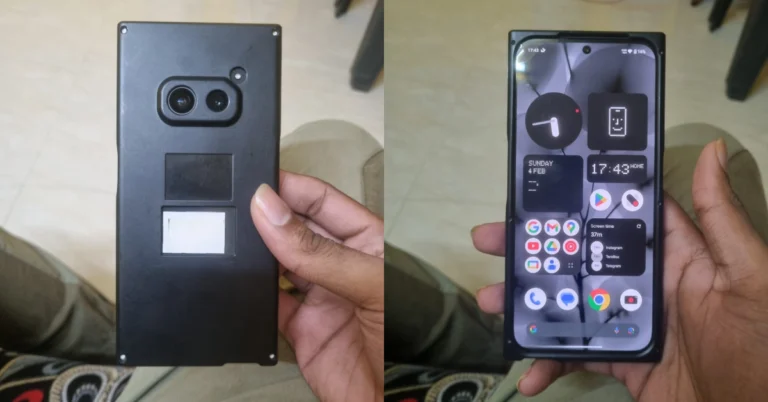
Recently Nothing confirmed about its next product launch which is Phone 2a. The device is also confirmed to launch in India. To tease the India launch the event page went live on its India website. Now the company has revealed the availability details of Nothing Phone 2a. Also, the phone’s renders have been leaked ahead of the official launch. Nothing has officially teased the availability of Nothing Phone 2a by listing it on Flipkart. The dedicated microsite has confirmed India’s availability which says coming soon. In addition to this, the listing is carrying a Nothing community update video featuring co-founder and marketing lead Akis Evangelidis. The exact launch date, time and other key details are not mentioned on the home page. The company will be hosting a Nothing to See event that will take place on February 27 during the MWC 2024 where it is expected to launch the Nothing Phone 2a. Besides this tipster, Abhishek Yadav has shared Nothing Phone 2A hands-on images via Reddit user. The pictures, which display the phone’s front and back with a privacy cover suggest a distinct design aesthetic from that of existing Nothing Phones. The black colour variant has been leaked with a dual rear camera setup. The rear cameras are positioned horizontally at the centre. The front panel with a hole punch camera in the middle of the display. Earlier Nothing Phone 2a was spotted listed on the TUV certification website with model number A142. The listing suggests, the Nothing Phone 2a will come with a 45W charging speed. It will also get USB Power Delivery (PD) standard support, which means that the Nothing Phone 2a should be able to be charged using any USB PD-compliant charger. Earlier the upcoming handset also appeared listed on the Bureau of Indian Standards(BIS) site. As per a leak, the Phone 2a is likely to come in Black and White colour options and in two different configurations: 8GB of RAM with 128GB storage and 12GB RAM with 256GB of storage. The phone’s price is speculated below EUR 400 (approx Rs 36,800). Also Read: Vivo Y200 5G now comes in a new 256GB storage variant: Price in India Reportedly the handset is speculated to feature a 6.7-inch AMOLED display manufactured by BOE and Visionox under the product number rm692h5. The screen is expected to have 1,084 x 2,412 pixels of resolution. The display may also support a refresh rate of 120Hz. The phone is slated to be powered by a MediaTek Dimensity 7200 chipset. Also Read: Google rolled out new generative AI features for Google Maps Additionally, the mobile is rumoured to come with a dual rear camera setup that may include a 50-megapixel Samsung S5KNG9 1/1.5-inch main sensor and the 50-megapixel Samsung S5KJN1 1/2.76-inch ultrawide lens. The phone is anticipated to feature a 32-megapixel Sony IMX615 sensor on the front.

Poco X6 Review: Does it have the X factor?

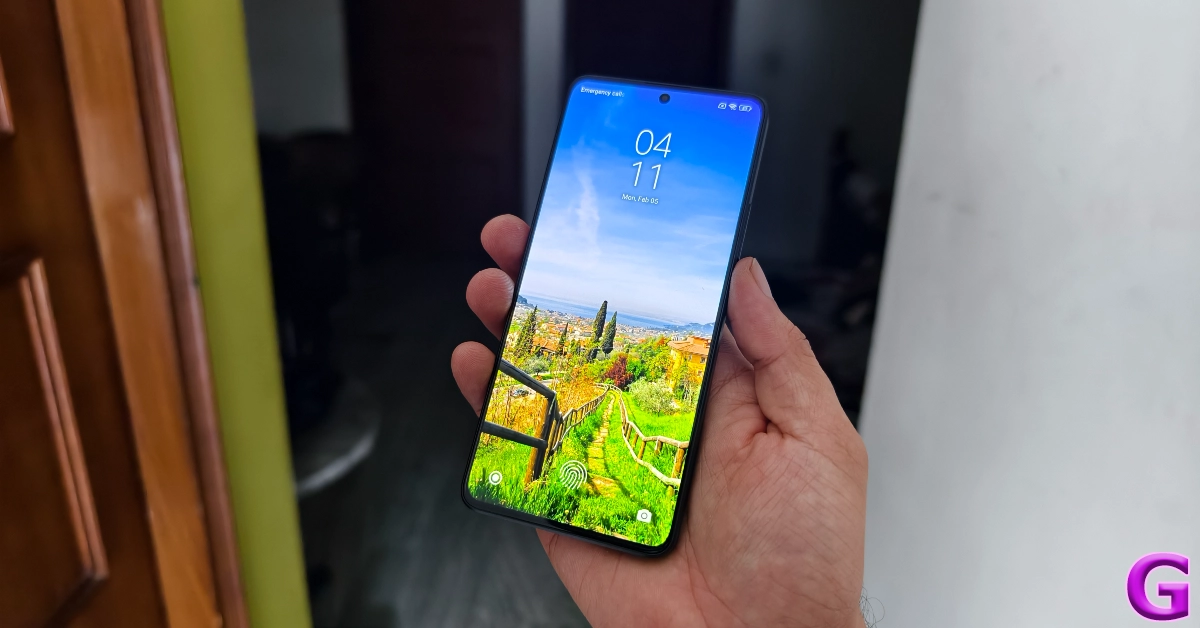
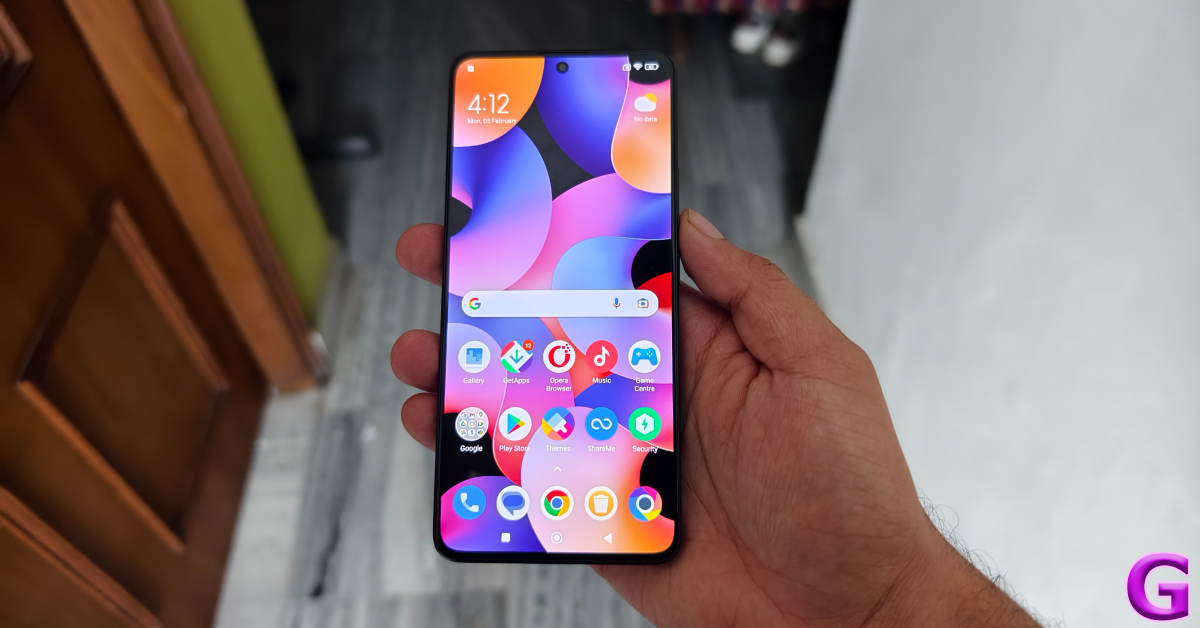
Last month, we reviewed the Poco X6 Pro and were highly impressed by its power-packed performance, clean design, and immaculate display. Now, we turn our attention to its non-Pro sibling, which is currently priced at Rs 22,000. There is a Rs 5,000 difference between the two variants. This brings up the most obvious question – is it worth paying the extra Rs 5,000 and going for the Pro variant? On paper, the biggest difference between the two smartphones is the chipset. The Poco X6 is powered by the Snapdragon 7 Gen 2 SoC while the Pro model houses MediaTek Dimensity 8300 Ultra. The latter proved to be a solid chipset that delivered a fast, snappy performance (read the full review here). Hoping to get a similar performance out of the Snapdragon chipset, we used the Poco X6 as our daily driver for a week – here is our review of the smartphone. Read Also: Top 5 Ways to Set Different Notification Sounds for Apps on Android

Poco X6 review: Design and Display

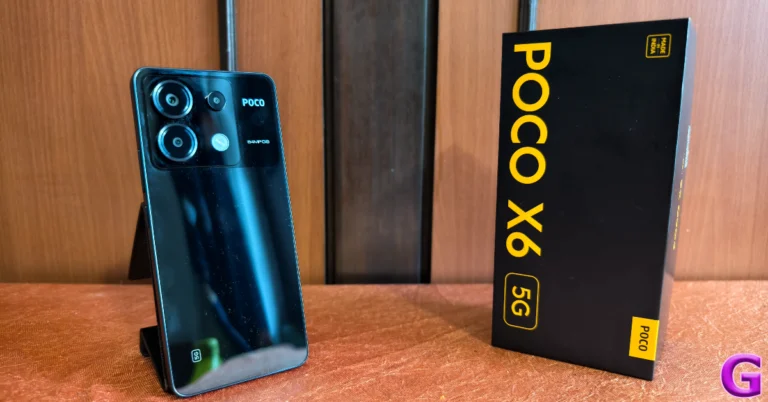
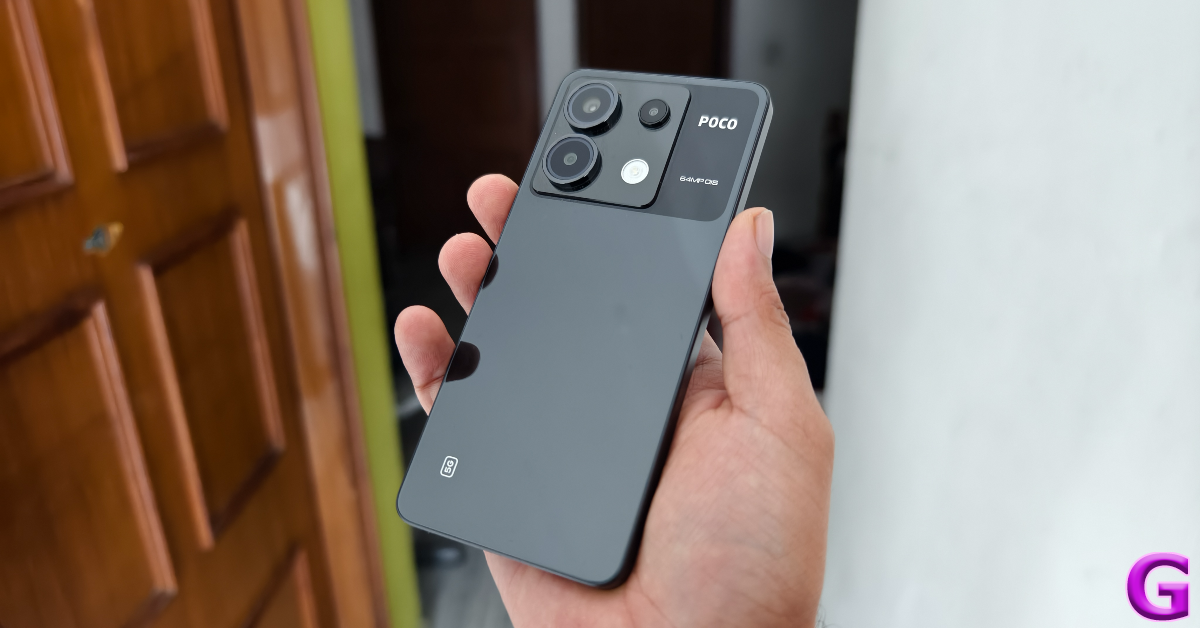
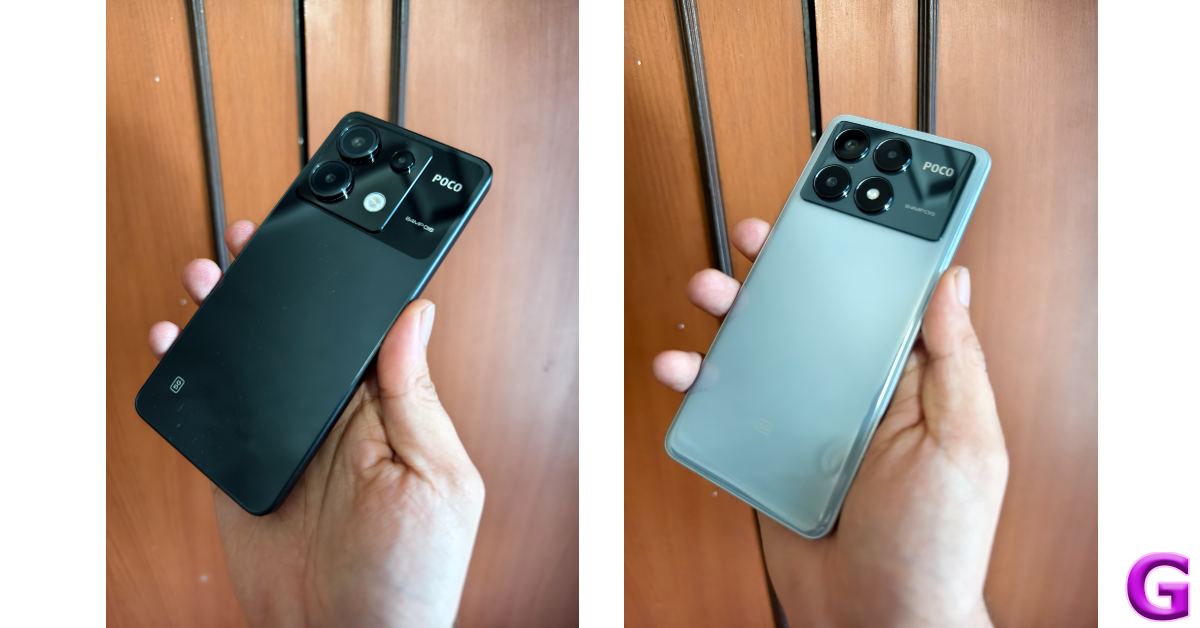
Inside the Poco X6 retail package, you get the smartphone, a 67W power adapter, a USB Type-C cable, an opaque plastic cover, a SIM ejector tool, and a quick start guide. The smartphone is available in two colour variants – Mirror Black and Snowstorm White. Poco X6 review: Design and Display There are some key differences in the design of the two X6 variants. On the Pro model, the top portion of the back panel has a rectangular plastic panel for the camera module. The standard Poco X6 has a square panel. The Poco branding can be found to the right of this panel, surrounded by a black shade. The primary lens and ultrawide sensor are enclosed in big circular cutouts. The macro lens has a small plastic ring around it while the LED flash is integrated into the panel without a cutout.
design
Poco X6 vs Poco X6 Pro
We used the black colour variant of the Poco X6 for this review. The camera section of the rear panel is a darker shade of black. This dual-tone scheme on the Snowstorm White colour variant also looks very appealing. We liked the feel of the curved ‘glasstic’ back panel on the Pro variant, but the standard panel has a flat back which feels like ordinary plastic. It is extremely glossy and a fingerprint magnet like its elder sibling. The in-hand feel of the device is significantly diminished by the choice of materials and the flat design. design On the right edge of the plastic frame, you will find the volume rocker keys and the power button. The SIM tray, primary microphone, USB Type-C port, and primary speaker grille are located on the bottom edge. Up top lie the 3.5mm headphone jack (missing on the Pro variant), a secondary speaker grille, a secondary microphone, and an IR blaster. Moving on, the 6.67-inch AMOLED display on the Poco X6 is surrounded by slim bezels on all four sides. These bezels get every so slightly thicker at the top and the bottom. The selfie camera is housed in a punch-hole cutout at the centre of the display. In direct sunlight, this panel can reach a peak brightness of 1,800 nits, as claimed by Poco. We did not face any issues while using the phone outdoors. The display was legible and offered optimum brightness under different conditions. Poco X6 review: Design and Display The content viewing experience on the Poco X6 is also a delight. A screen resolution of 1,220 x 2,712p and Widevide L1 certification ensure that you can stream HD videos on the device across all the major OTT platforms. The colours produced by the display are vibrant and punchy. The images are bright and super detailed, leaving no stone unturned in bringing the ideal viewing experience. While the display has a maximum refresh rate of 120Hz, the media playback rate is capped at 60Hz. display An IP54 rating for dust and water resistance means the Poco X6 can handle minor splashes of water but may face damage upon submersion. We did use the smartphone under light rainfall, and it was completely unfazed. Read Also: Google rolls out new generative AI features for Google Maps

Poco X6 review: Performance and Cameras

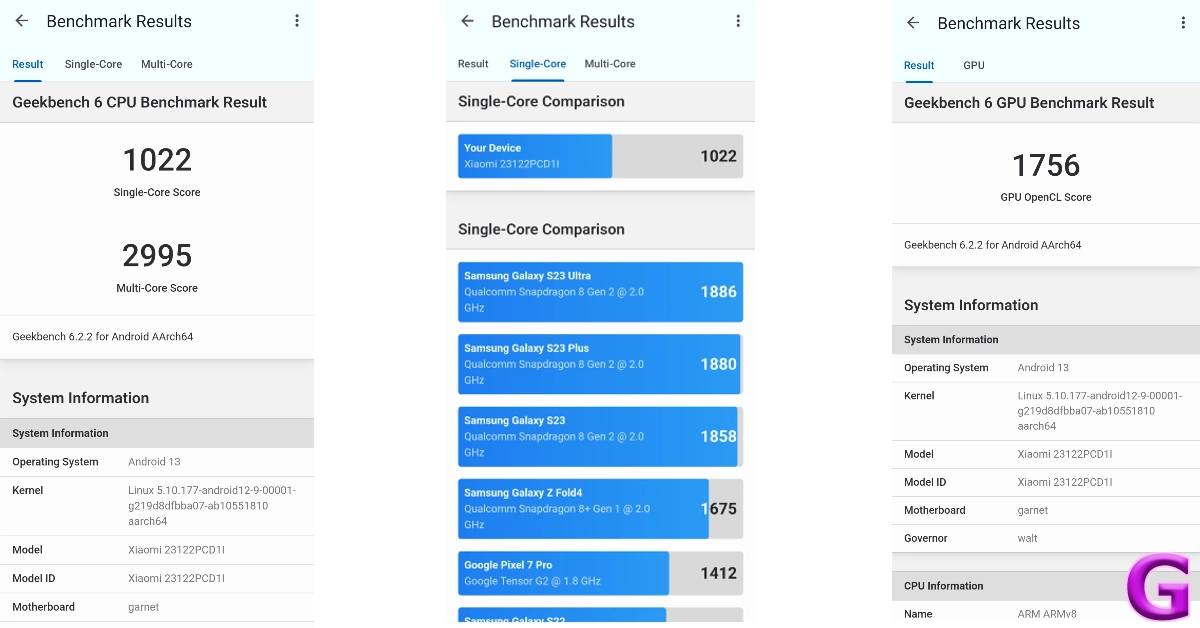
Under the hood, the Poco X6 packs the Snapdragon 7 Gen 2 SoC. It is available in two RAM and storage variants – 8GB + 256GB and 12GB + 512GB. The latter variant is priced at Rs 25,000. In the Geekbench 6 app, the smartphone scored 1,022 points in the single-core test and 2,995 points in the multi-core test. In comparison, the Poco X6 Pro scored 1,445 and 4,506 points respectively. Poco X6 review: Performance and Cameras For daily usage, the Poco X6 is a decent smartphone. We did not face any issues with multitasking or other power-intensive tasks. However, the Pro variant is marginally faster than the regular model. Even though the difference is minimal, it is noticeable. We tried loading the same apps on the two smartphones and the Pro variant (which is powered by the MediaTek Dimensity 8300 Ultra) beat the Poco X6 every time. This is something we expected from the faster chipset.   performance Taking the Pro model out of the picture, the Poco X6 is a fine smartphone in its segment. Its amazing display offers a very fluid touch reception, making it very easy to browse through the apps and stay on top of your tasks. This smooth experience is something we enjoyed a lot on the smartphone. Even with half a dozen apps open in the background, the X6 does not miss a step in performance. We even tried a bit of gaming on the device and were pleasantly surprised by how well it handled titles like Call of Duty Mobile, BGMI, and EA Sports FC. After adjusting the graphics to a level below the highest settings, the gameplay was smooth and lag-free. There weren’t any unwanted jitters of any kind and the internal temperature of the smartphone did not rise to a concerning level even after 40 minutes of continuous gameplay. Poco X6 review: Performance and Cameras OS duties on Poco X6 are handled by MIUI 14. Its Pro sibling ships with HyperOS out of the box, which the standard model will also get in a future update. At the time of writing this review, HyperOS has not arrived for the X6 yet, but you can check out how it performed in our review of the Pro model. MIUI 14 is not our favourite Android skin, but there are certain aspects of the software experience where it rises among its peers. We like Xiaomi’s clever way of separating the notification shade and the quick settings menu. A swipe-down gesture from the left side of the screen pulls down the notification shades while a similar gesture from the right side reveals the quick setting menu. You can also swipe on either panel to access the other one. MIUI 14 also has a decent set of customisation options, although they are much more refined on HyperOS. The lock screen layouts and customisation options are very limited on MIUI 14. But what we do like is the integration of the hidden apps folder in the app drawer. Swiping twice on the app drawer lets you access all the hidden apps. One of the bigger letdowns of the OS is the tremendous volume of bloatware that comes with it. You’ll need to set aside some time to delete all the apps you don’t need on your device. The battery capacity of the X6 is slightly larger than the Pro model. The 5,100 mAh battery pack can be charged in under 50 minutes using the 67W power adapter provided in the box. During the review period, our daily usage consisted of tasks like instant messaging, voice and video calling, web browsing, navigation, media playback, and gaming, which left us with a 15-20% at the end of the day on the Poco X6. Poco X6 review: Performance and Cameras The rear camera panel on the Poco X6 houses a 64MP primary shooter, an 8MP ultrawide lens, and a 2MP macro lens. Images taken with the primary camera in outdoor daylight were vivid and detailed. We were happy with the depth and tone of the colours produced in the images. The dynamic range is close to ideal, and the phone does a good job of processing the contrast in the images. The quick shutter speed and efficient autofocus make the photography experience quite fun. camera In low-light conditions, the pictures can be a hit or miss depending upon the intensity of surrounding light. The night mode does a decent job of limiting the grain and noise in the images, but it is far from ideal. What we can say about this smartphone is that you won’t hesitate to take it out to take pictures at night. The quality of pictures exceeds the baseline expectation one might have from a phone in this price range.
utrawide
Ultrawide shot
The ultrawide camera also produces good results in daylight conditions. While there is a little softness to the pictures, we like that the colours were tuned very well. Typically, ultrawide sensors in this price range produce washed images. That is not the case here. However, in limited lighting, we would suggest sticking with the primary sensor.
Poco X6 review: Performance and Cameras
Ultrawide shot
The camera app also has a Portrait Mode which produces good results. The camera does a good job of separating the subject from the background and applying the appropriate blur. The edge detection can be a hit or miss and you may have to take multiple shots before landing on the result you want.
Portrait mode
Portrait Mode
The 16MP selfie camera takes good images in optimum lighting. We would have preferred if the images were a little more detailed and sharper. The good thing is that the phone doesn’t overcorrect the skin tone of the subject. This front-facing camera can record 1080p videos at 30/60fps. Meanwhile, the primary camera at the back can record 4K videos at 30fps. Read Also: Vivo Y200 5G now comes in a new 256GB storage variant: Price in India

Verdict

During our time with the device, Poco X6 proved to be a gritty performer that delivers on every front. Its stunning AMOLED display with ultra-slim bezels is great for watching video content across the board – be it movies or live sports. The Snapdragon 7 Gen 2 SoC handles everyday tasks without any hiccups. The primary camera is fun to play with, producing detailed images in a wide range of lighting conditions. At Rs 22,000 the X6 is a great deal. However, we can’t help but compare it to its Pro sibling. Splurging an extra Rs 5,000 fetches you a superior back panel and a snappier chipset, which is well worth the money.

Poco X6: Pros

  • Great display
  • Good primary camera
  • Crushes everyday tasks

Poco X6: Cons

  • Macro lens doesn’t find a lot of use
  • Contains a lot of bloatware

Top 6 Ways to Set Different Notification Sounds for Apps on Android

0
One of the more underrated features of modern Android smartphones is notification management. Commercial apps are notorious for pushing promotional content disguised as notifications on your phone. Not only does this contribute to spam, but it can also be very distracting. What you can do is allow only certain categories of important notifications to filter through. If you want to focus on a particular task without being distracted, you can set up custom notification sounds for the most important apps on your phone. This makes it easier to ignore the notifications that don’t deserve your immediate attention. Today, we bring you the top 6 ways to set different notification sounds for apps on Android. Read Also: How to use Google Bard’s new AI image generator?

Can I make my own notification tone?

The great thing about using an Android device is the level of control you get over every aspect of your device. Every Android phone has an alert tone library that you can use to customise the notification sounds of any app. On top of that, you can install a third-party app like Zedge to explore more tones. Most of the tones on Zedge are free to download. If you’ve got a melody or hook stuck in your head, you can record it and set it as a notification alert tone as well! You can use the voice recorder app to capture a sample sound. If you want a cleaner cut, use a synthesiser or guitar simulator app to create the tone. Once the sample sound has been created, save it to your device’s library. To set it as a notification sound, you will need to edit it to the ideal length. You don’t want the alert tones on your phone to be longer than 2 seconds. Download the Ringtone Maker: Music Cutter app to trim the tone. Once it has been saved on your device, you can use it as a notification sound for any app on your device.

Set a different notification sound for apps using Settings

Step 1: Go to Settings and select Apps. Step 1: Go to Settings and select Apps. Step 2: Select the app for which you want to change the notification sound. Step 2: Select the app for which you want to change the notification sound. Step 3: Tap on Notifications. Step 3: Tap on Notifications. Step 4: Make sure the toggle switch for Show notifications is turned on and tap on Notification categories. Step 4: Make sure the toggle switch for Show notifications is turned on and tap on Notification categories. Step 5: Notification categories will contain the kinds of notifications that the app pushes on your device. For a messaging app, this may be incoming texts, group texts, incoming calls, and more. Tap on the category for which you want to change the notification sound. Step 5: Notification categories will contain the kinds of notifications that the app pushes on your device. For a messaging app, this may be incoming texts, group texts, incoming calls, and more. Tap on the category for which you want to change the notification sound. Step 6: Tap on Sound. Step 6: Tap on Sound. Step 7: Pick a tone from the list. Step 5: Select a tone from the list. Similarly, you can change the notification sound for calls and group notifications.

Set a different notification sound for WhatsApp using in-app settings

Step 1: Launch WhatsApp and tap the ellipses at the top right corner of the screen. Step 2: Hit the ellipses at the top right corner of the screen. How to share your WhatsApp Status on Instagram? Step 2: Tap on Settings. Step 3: Go to Settings. How to share your WhatsApp Status on Instagram? Step 3: Select Notifications. Step 3: Select Notifications. Step 4: Tap on Notification Tone under Messages. Step 4: Tap on Notification Tone under Messages. Step 5: Select a tone from the list. Similarly, you can change the notification sound for calls and group notifications. Step 5: Select a tone from the list. Similarly, you can change the notification sound for calls and group notifications.

Set a different notification sound for Telegram using in-app settings

Step 1: Launch Telegram and tap the hamburger menu at the top left corner of the screen. Step 2: Tap on Settings. Step 2: Tap on Settings. Step 3: Select Notifications and Sounds. Step 3: Select Notifications and Sounds. Step 4: Tap on the category for which you want to change the notification sound. Step 4: Tap on the category for which you want to change the notification sound. Step 5: Tap on Sound and select a tone. Step 5: Tap on Sound and select a tone.

Change the default notification sound

Step 1: Go to Settings and select Sounds and vibration. Step 1: Go to Settings and select Sounds and vibration. Step 2: Tap on Notification ringtone. Step 2: Tap on Notification ringtone. Step 3: Select a tone from the list. Step 3: Select a tone from the list.

Set a different notification sound for Instagram using in-app settings

Step 1: Launch the Instagram app on your phone and go to your profile. Step 1: Launch the Instagram app on your smartphone and tap your profile picture in the bottom right corner of the screen. Step 2: Hit the hamburger menu in the top right corner of the screen. Step 3: Hit the hamburger menu at the top left corner of the screen. Step 3: Tap on Notifications. Step 3: Tap on Notifications. Step 4: Select a category. Step 4: Select a category. Step 5: Scroll down and select Additional options in system settings. Step 5: Scroll down and select Additional options in system settings. Step 6: Select the category again. Step 6: Select the category again. Step 7: Tap on Ring. Step 7: Tap on Ring. Step 8: Choose a ringtone. Step 8: Choose a ringtone.

Bonus Tip: Set different app notification sounds on Xiaomi

Step 1: Go to Settings and select Apps. Step 1: Go to Settings and select Apps. Step 2: Tap on Manage apps. Step 2: Tap on Manage apps. Step 3: Select the app for which you want to change the notification sound. Step 3: Select the app for which you want to change the notification sound. Step 4: Tap on Notifications. Step 4: Tap on Notifications. Step 5: Select the category for which you want to change the notification sound. Step 5: Select the category for which you want to change the notification sound. Step 6: Tap on Sound and select a tone. Step 6: Tap on Sound and select a tone.

Frequently Asked Questions (FAQs)

How do I set up custom notifications for an app on Android?

Go to Settings>Apps and select the app for which you want to change the notification sound. Now, go to Notifications>Notification category and pick a type. Finally, hit ‘Sound’ and select a tone.

How do I assign a custom ringtone to a particular contact on my phone?

Go to contacts and tap on the name of the person for whom you want to set up a custom ringtone. Hit ‘Edit’ and tap on ‘View more’. Select the ringtone category and pick a tone.

How do I mute call notifications on WhatsApp?

Go to Settings>Apps>WhatsApp>Notifications>Notification categories and turn off the toggle switch for ‘Calls’. Read Also: Infinix Smart 8 8GB RAM with 128GB storage option to launch soon in India

Conclusion

These are the top 6 ways to set different notification sounds for apps on Android. Every Android OEM has a specific set of unique tones that can be used across all third-party apps. If you want to expand your options, apps like Zedge contain vast libraries of ringtones, alert tones, and other notification tones to customise your phone. If you know any other way to change the notification sounds for an app on Android, let us know in the comments!

Vivo Y200 5G now comes in a new 256GB storage variant: Price in India

Key Highlights
  • Vivo Y200 5G is powered by the Snapdragon 4 Gen 1 SoC.
  • The phone includes a 4,800mAh battery.
  • The smartphone supports 44W fast charging.
Vivo has released a new 256GB storage option for Vivo Y200 5G in India. The device was launched in October last year with a single RAM and storage option. The smartphone is powered by Snapdragon 4 Gen 1 SoC and runs on Funtouch OS 13 on Android 13. It features a 120Hz AMOLED display and a dual rear camera setup that includes a 64-megapixel sensor. Vivo has recently introduced a new 8GB RAM with 256GB storage option for Vivo Y200 in India. The new configuration is priced at Rs 23,999. On the purchase of the 5G phone buyers can receive an instant cashback of Rs 2,000 if the transaction is made through SBI, IDFC First, Bank of Baroda, DBS Bank, Federal Bank, and IndusInd Bank cards. The device was launched last year in October with a single 8GB RAM with 128GB storage priced at Rs 21,999. The device is available in two colour options Gold and Green. The device can be purchased via Amazon, and Vivo India e-store, and all partner retail stores.
Vivo has recently introduced a new 8GB RAM with 256GB storage option for Vivo Y200 in India. The new configuration is priced at Rs 23,999.

Vivo Y200 5G specifications

Vivo Y200 comes equipped with a 6nm Qualcomm Snapdragon 4 Gen processor paired with 8GB of LPDDR4X RAM and 256GB of UFS2.2 storage. The phone offers 8GB of additional RAM via the Extended RAM 3.0 feature that makes switching between apps faster and smoother. The device features a 6.67-inch full-HD+ AMOLED display with 1,080×2,400 pixels of resolution that supports 120Hz Ultra Vision refresh rate and 900 nits of brightness. The front panel also comes with 394 ppi of pixel density. The device has a 7.69 mm ultra-slim body and weighs 190g. Also Read: iQoo Neo 9 Pro pre-order details revealed, pre-reservations to start on February 8 Vivo Y200 5G has a dual rear camera setup that includes a 64-megapixel primary sensor with OIS and f/1.79 aperture. The camera set-up includes a secondary 2-megapixel sensor with f/2.4 aperture. The mobile phone has a 16-megapixel front-facing camera with f/2.0 aperture for selfies. Also Read: Google rolled out new generative AI features for Google Maps Vivo Y200 comes with an IP54 rating for dust and water resistance. The handset sports a 4,800mAh battery that comes with 44W fast charging support. In addition to this, there is 5G, Wi-Fi, Bluetooth 5.2, GPS, GLONASS, Galileo, QZSS, and a USB 2.0 port for connectivity. Along with an in-display fingerprint sensor the phone also includes an accelerometer, ambient light sensor, motor, proximity sensor, e-compass, and gyroscope.

Garena Free Fire Redeem Codes Today 5 February 2024: Here is how to claim them

Garena Free Fire is a battle royale game with regular awards and tournaments to keep players interested. If you play Garena Free Fire, you should be aware of the redeem codes that are released on a daily basis. However, because the battle royale game is banned in India, players from other countries can use the Free Fire Redeem codes daily. If you’re unfamiliar with the Garena Free Fire redeem codes or don’t know how to get them, we’ve put together a step-by-step guide to help you redeem them. Check out Garena Free Fire Redeem Codes for 5 February 2024. The Free Fire redeem codes are a great way to get free stuff. These are 12-digit codes that contain alphabets and numbers, as well as an expiration date and time. Because the Garena FF redeem codes cannot be used more than once, you should hurry to the redemption page to claim your free reward before someone else does. To get a free reward, all you have to do is go to reward.ff.garena.com/en, which is the official redemption page. Also, keep an eye on this space for daily updates on Garena Free Fire redemption codes and rewards. Also Read: Sennheiser Accentum Plus wireless headphones with Hybrid Adaptive Noise Cancellation launched

Garena Free Fire Redeem Codes Today 5 February 2024

WLSGJXS5KFYR FF11NJN5YS3 EZRJAPH294KV5 Y6ACLK7KUD1N W0JJAFV3TU5E SARG886AV5GR FF1164XNJZ2V MCPTFNXZF4TA FF11HHGCGK3B ZYPPXWRWIAHD YXY3EGTLHGJX FF10GCGXRNHY PCNF5CQBAJLK FF11WFNPP956 X99TK56XDJ4X FF11DAKX4WHV B6IYCTNH4PV3 8F3QZKNTLWBZ FF10617KGUF9 FF119MB3PFA5

How to Get Free Fire Redeem Codes for Garena on 5 February 2024?

  • Visit the Garena Free Fire game’s official website at reward.ff.garena.com.
  • Use your Facebook, Google, VK, Apple ID, Huawei ID, or Twitter account to log in.
  • You’ll be taken to a valid redemption code (s)
  • Copy and paste the 12-digit redemption code into the text box.
  • On the screen, a dialogue box will appear.
  • ‘Ok’ should be selected.
For the latest gadget and tech news, and gadget reviews, follow us on TwitterFacebook and Instagram. For newest tech & gadget videos subscribe to our YouTube Channel. You can also stay up to date using the Gadget Bridge Android App. You can find the latest car and bike news here.

Garena Free Fire Redeem Codes Today 4 February 2024: Here is how to claim them

Garena Free Fire is a battle royale game with regular awards and tournaments to keep players interested. If you play Garena Free Fire, you should be aware of the redeem codes that are released on a daily basis. However, because the battle royale game is banned in India, players from other countries can use the Free Fire Redeem codes daily. If you’re unfamiliar with the Garena Free Fire redeem codes or don’t know how to get them, we’ve put together a step-by-step guide to help you redeem them. Check out Garena Free Fire Redeem Codes for 4 February 2024. The Free Fire redeem codes are a great way to get free stuff. These are 12-digit codes that contain alphabets and numbers, as well as an expiration date and time. Because the Garena FF redeem codes cannot be used more than once, you should hurry to the redemption page to claim your free reward before someone else does. To get a free reward, all you have to do is go to reward.ff.garena.com/en, which is the official redemption page. Also, keep an eye on this space for daily updates on Garena Free Fire redemption codes and rewards. Also Read: Sennheiser Accentum Plus wireless headphones with Hybrid Adaptive Noise Cancellation launched

Garena Free Fire Redeem Codes Today 4 February 2024

XUW3FNK7AV8N FFBBCVQZ4MWA FFAC2YXE6RF2 FFICJGW9NKYT FFCMCPSBN9CU F4TG5BTNGKOIUYG FFEVDBHUA7Q6TGH FERTY9IHKBOV98U

How to Get Free Fire Redeem Codes for Garena on 4 February 2024?

  • Visit the Garena Free Fire game’s official website at reward.ff.garena.com.
  • Use your Facebook, Google, VK, Apple ID, Huawei ID, or Twitter account to log in.
  • You’ll be taken to a valid redemption code (s)
  • Copy and paste the 12-digit redemption code into the text box.
  • On the screen, a dialogue box will appear.
  • ‘Ok’ should be selected.
For the latest gadget and tech news, and gadget reviews, follow us on TwitterFacebook and Instagram. For newest tech & gadget videos subscribe to our YouTube Channel. You can also stay up to date using the Gadget Bridge Android App. You can find the latest car and bike news here.

Google rolled out new generative AI features for Google Maps

Key Highlights
  • The users will be able to locate places on Google Maps with generative AI.
  • The feature is rolled out to select users in the US.
  • The LLMs analyse Maps’ detailed information about 250 million locations on Google Maps to generate results.
Google has officially released exciting new AI upgrades to Google Maps. The new generative AI feature will be helpful to users in assisting them in finding new locations. The upgrade will provide customised recommendations based on each user’s need using large language models. The LLMs analyse Maps’ detailed information about 250 million locations on Google Maps and contributions from over 300 million users to generate travel recommendations. Google announced via a blog post which says, “Today, we’re introducing a new way to discover places with generative AI to help you do just that — no matter how specific, niche or broad your needs might be. Simply say what you’re looking for and our large-language models (LLMs) will analyze Maps’ detailed information about more than 250 million places and trusted insights from our community of over 300 million contributors to quickly make suggestions for where to go.” According to the company, Google Maps’ generative AI feature will be accessible to select Local Guides in the US, who are some of the most active and passionate members of the Maps community. Also Read: Apple Races to Build Its Own Generative AI Framework

How to locate places on Google Maps with generative AI?

If you are new to a place and want to shop for souvenirs for your loved one just ask Maps what you’re looking for the AI model will analyze Maps’ rich information about nearby businesses and places along with photos, ratings and reviews from the Maps community to give you trustworthy suggestions. The results are organised into useful categories such as clothing stores, vinyl shops and flea markets — along with photo carousels and review summaries that highlight why a place might be interesting for you to visit. Also Read: Google Bard Vs Google AI Search: Everything you need to know Now when you get tired after shopping, you will also feel hungry. In that case, just continue the conversation with a follow-up question like “How about lunch?” Maps will suggest places that match the vibe you are looking for, from there, you may add the locations to a list, share them with others, and can also revisit them in the future. As per Google, these AI-powered results are particularly helpful if you need to make last-minute changes to your plans or are feeling spontaneous. “For example, if you’re out and about and it starts to rain, just ask Maps for “activities for a rainy day” to get suggestions for indoor activities. You’ll get helpful suggestions like comedy shows or movie theatres. If you’re looking for options the whole family can enjoy, ask a follow-up question like, “What about options for kids?”. You’ll see places like bowling alleys, children’s museums or indoor playgrounds depending on where you are, along with highlights based on reviews from people who have been there.”

iQoo Neo 9 Pro pre-order details revealed, pre-reservations to start on February 8

Key Highlights
  • iQoo Neo 9 Pro will include a 50-megapixel dual back camera setup.
  • The phone will be powered by Snapdragon 8 Gen 2 SoC.
  • iQoo will begin taking pre-orders for the Neo 9 Pro via its official website in India and also on Amazon.
There are still a lot of days left for the launch of the iQoo Neo 9 Pro in India. To keep the upcoming smartphone in the news, iQoo has been teasing the key features of the upcoming phone from time to time. Now that Vivo’s sub-brand has shared the pre-order details of the device, let’s take a look at what is on offer. The iQoo Neo 9 Pro is scheduled to launch in India on February 22. Ahead of the official release, the firm has revealed the pre-order details for the device. Interested buyers will be able to pre-book iQoo Neo 9 Pro in India from February 8 at noon. Beginning next week buyers can pre-reserve the phone through the iQoo website and Amazon. Those booking the device in advance will receive a discount of Rs 1,000. Consumers who wish to reserve the phone in advance must pay a 1,000 Rupee refundable deposit. As per the company, the device will come with 2 years of warranty (including 12 months extended warranty). The launch offer will be revealed on the day of the release. Steps to avail of the benefits:
  • Pre-booking starts from noon, 8th February 2024 on Amazon.in and iQOO.com
  • The pre-booking stock is limited and will be available only on a first-come-first-serve basis
  • You can pay a refundable amount of Rs 1,000 which will be adjusted in your final payment of the device.
Also Read: Apple crossed the 10-million mark in shipments during the quarter: Report The company has already confirmed that the Snapdragon 8 Gen 2 SoC has been used for the iQoo Neo 9 Pro in India instead of the MediaTek Dimensity chipset used for the Chinese variant. Yes, under the hood of the iQoo Neo 9 Pro in China is a MediaTek Dimensity 9300 SoC. Also Read: Infinix Smart 8 8GB RAM with 128GB storage option to launch soon in India The iQoo Neo 9 Pro teaser suggests a dual-tone rear panel. The rear also sports a leather finish in shades of grey and vibrant red. In addition, there is a dual camera on the back panel. Post-launch, the device will be available for purchase via Amazon in the country. The company has also created a dedicated microsite to tease its availability.

How to use Google Bard’s new AI image generator?

0
Google Bard’s February update allows users to generate AI images using the chatbot. While Google was quick to launch Bard after ChatGPT broke into the mainstream, the tech giant took some time to add the image generation feature to it. The good news is that it is free to use. Google also has an experimental ‘ImageFX’ tool in the works. ImageFX is based on the Imagen 2 model. As of now, it is only available for users in the US, Kenya, New Zealand, and Australia. For those located elsewhere, here’s how you can use Google Bard’s new AI image generator. Read Also: More than 600 new apps announced for Apple Vision Pro, which goes on sale today

Before you begin

Google Bard works just like any other AI image generator. Entering the right prompt is pivotal in generating the right image. You can select every aspect of the image, from its style to the contents it portrays. If you are unsatisfied with the result, you can enter a follow-up prompt with the changes you want to see in the pictures. Bard will take your feedback into consideration and generate more images with the appropriate changes. While that sounds awesome, our favourite feature has to be generating images alongside text. Bard can write a short story, blog post or any other kind of content and add relevant images to go along with it. The images are integrated into the post. You can also ask the bot to create more images around certain pieces of text and add them to the post. It works surprisingly well!

Generate AI images using Google Bard

Step 1: Go to https://bard.google.com/ and sign in using your Google Account. Step 1: Go to https://bard.google.com/ and sign in using your Google Account. Step 2: Enter your prompt for the image in the chat box. Make sure your prompt starts with “Draw a..”, “Generate a picture..”, “Create an image..”, or something along those lines. Your prompt should make it clear that you want Bard to generate an image. Step 3: You can also tell Bard the style of image you want. You can choose from any style you like, be it a digital animation or oil painting. The more detailed your prompt is, the better the result will be. Step 2: Enter your prompt for the image in the chat box. Make sure your prompt starts with “Draw a..”, “Generate a picture..”, “Create an image..”, or something along those lines. Your prompt should make it clear that you want Bard to generate an image. Step 4: Hit Enter. Step 5: Bard will generate two images based on your prompt. Click on an image to expand it. As of right now, Google Bard can generate images only in 512px x 512px resolution. Step 5: Bard will generate two images based on your prompt. Click on an image to expand it. As of right now, Google Bard can generate images only in 512px x 512px resolution. Step 6: Hit the download button at the top right corner of the screen to save the image on your device. Step 6: Hit the download button at the top right corner of the screen to save the image on your device. Step 7: Go back and click on Generate more to get more images based on your prompt. Step 7: Go back and click on Generate more to get more images based on your prompt.

Frequently Asked Questions (FAQs)

Why can’t I use Google Bard’s AI image generator?

Google Bard’s AI image generator is not available for users in the European Economic Area (EEA), Switzerland, and the UK.

Is Google Bard free to use?

Yes, as of now Google Bard and its image creation tool are free to use.

What is the resolution of images created by Google Bard?

Google Bard generates AI images in 512px x 512px resolution. Read Also: Top 10 smartphones under $1,000 in USA (2024)

Conclusion

This is how you can use Google Bard to generate AI images. The quality of the image depends on the strength of your prompt. You can use Google Bard on PC, Android, and iPhone. If you have any questions related to the chatbot, let us know in the comments!

Garena Free Fire Redeem Codes Today 3 February 2024: Here is how to claim them

Garena Free Fire is a battle royale game with regular awards and tournaments to keep players interested. If you play Garena Free Fire, you should be aware of the redeem codes that are released on a daily basis. However, because the battle royale game is banned in India, players from other countries can use the Free Fire Redeem codes daily. If you’re unfamiliar with the Garena Free Fire redeem codes or don’t know how to get them, we’ve put together a step-by-step guide to help you redeem them. Check out Garena Free Fire Redeem Codes for 3 February 2024. The Free Fire redeem codes are a great way to get free stuff. These are 12-digit codes that contain alphabets and numbers, as well as an expiration date and time. Because the Garena FF redeem codes cannot be used more than once, you should hurry to the redemption page to claim your free reward before someone else does. To get a free reward, all you have to do is go to reward.ff.garena.com/en, which is the official redemption page. Also, keep an eye on this space for daily updates on Garena Free Fire redemption codes and rewards. Also Read: Sennheiser Accentum Plus wireless headphones with Hybrid Adaptive Noise Cancellation launched

Garena Free Fire Redeem Codes Today 3 February 2024

V427K98RUCHZ BR43FMAPYEZZ FFCMCPSEN5MX FF11NJN5YS3E FF10617KGUF9 NPYFATT3HGSQ FFCMCPSUYUY7E FFCMCPSJ99S3 EYH2W3XK8UPG MCPW2D1U3XA3 FFCMCPSGC9XZ VNY3MQWNKEGU FFIC33NTEUKA ZZATXB24QES8 UVX9PYZV54AC MCPW3D28VZD6 XZJZE25WEFJJ 6KWMFJVMQQYG MCPW2D2WKWF2 HNC95435FAGJ U8S47JGJH5MG ZZZ76NT3PDSH

How to Get Free Fire Redeem Codes for Garena on 3 February 2024?

  • Visit the Garena Free Fire game’s official website at reward.ff.garena.com.
  • Use your Facebook, Google, VK, Apple ID, Huawei ID, or Twitter account to log in.
  • You’ll be taken to a valid redemption code (s)
  • Copy and paste the 12-digit redemption code into the text box.
  • On the screen, a dialogue box will appear.
  • ‘Ok’ should be selected.
For the latest gadget and tech news, and gadget reviews, follow us on TwitterFacebook and Instagram. For newest tech & gadget videos subscribe to our YouTube Channel. You can also stay up to date using the Gadget Bridge Android App. You can find the latest car and bike news here.

Infinix Smart 8 8GB RAM with 128GB storage option to launch soon in India

Key Highlights
  • Infinix Smart 8 is powered by MediaTek Helio G36 SoC.
  • The phone is shipped with Android 13 Go Edition-based XOS 13.
  • The handset comes equipped with a 5,000 mAh battery.
Infinix Smart 8 was launched in India last month after its global debut. Initially, a single 4GB RAM variant was introduced but today the phone will soon be available in a new RAM and storage option. The device comes with a 6.6-inch HD+ display with a 90-Hz refresh rate. The Infinix Smart 8 features a 50MP dual-AI camera. Additionally, it housed a 5,000 mAh battery. A MediaTek Helio G36 SoC powers the device and runs on Android 13 Go Edition-based XOS 13.

Infinix Smart 8 new variant price in India

Infinix Smart 8 will be available in a new 8GB RAM with 128GB storage option soon. The new model will be priced at Rs 8,000 in the country. The company has not revealed the availability date but the phone will be sold via Flipkart in the country. The device already comes with 4GB of RAM with 64GB of storage variant priced at Rs 7,499. The handset is offered in Galaxy White, Rainbow Blue, Shiny Gold, and Timber Black colour options. Infinix Smart 8 new variant price in India

Infinix Smart 8 specifications

The Infinix Smart 8 features a 6.6-inch HD+ display with 1,612 x 720 pixels of resolution. The screen comes with a 90Hz refresh rate and a touch sampling rate of 180Hz. The panel supports 500 nits of peak brightness. An octa-core Unisoc T606 SoC powers it with 4GB of LPDDR4X RAM and 64GB of eMMC 5.1 storage. The smartphone also includes an expandable RAM feature, while the internal storage can be further expanded up to 2TB using a microSD card. The device operates on XOS 13 skinned over Android 13. Also Read: Apple crossed the 10-million mark in shipments during the quarter: Report The mobile phone sports a 50-megapixel main sensor, an AI camera, and a quad-LED Ring flash for photos and videos. In terms of selfies, there is an 8-megapixel front-facing camera with an LED flash. Also Read: More than 600 new apps announced for Apple Vision Pro, which goes on sale today The Infinix Smart 8 includes a Magic Ring feature akin to Apple’s dynamic island. The expandable notch feature enables functions such as face unlock, background call management, charging animations, and charge completion reminders, adding a layer of convenience and personalisation for users. In terms of connectivity, there is dual 4G, nano SIM, Wi-Fi, Bluetooth 5.0, GPS, GLONASS, and a USB Type-C port. Additionally, the handset packs a 5,000mAh battery.

Apple crossed the 10-million mark in shipments during the quarter: Report

Key Highlights
  • Apple has declared its report for the first quarter of its fiscal 2024.
  • It showed $2.18 in quarterly earnings per diluted share.
  • As per the company it had $119.6 billion in revenue, up 2% year over year.
Apple released its financial results today for the first quarter of its fiscal 2024, which ended on December 30, 2023. Reportedly, the tech firm has reported $2.18 in quarterly earnings per diluted share, up 16 per cent from the previous year, and $119.6 billion in revenue, up 2% year over year. According to a Counterpoint report, Apple’s shipments exceeded 10 million enabling it to overtake all other companies in terms of revenue for the first time in a calendar year. “Today Apple is reporting revenue growth for the December quarter fueled by iPhone sales, and an all-time revenue record in Services,” said Tim Cook, Apple’s CEO. “We are pleased to announce that our installed base of active devices has now surpassed 2.2 billion, reaching an all-time high across all products and geographic segments. And as customers begin to experience the incredible Apple Vision Pro tomorrow, we are as committed as ever to the pursuit of groundbreaking innovation — in line with our values and on behalf of our customers.” “Our December quarter top-line performance combined with margin expansion drove an all-time record EPS of $2.18, up 16 percent from last year,” said Luca Maestri, Apple’s CFO. “During the quarter, we generated nearly $40 billion of operating cash flow and returned almost $27 billion to our shareholders. We are confident in our future, and continue to make significant investments across our business to support our long-term growth plans.” According to the company Apple’s board of directors have announced a $0.24 cash dividend for each share of ordinary stock. To stockholders of record as of the close of business on February 12, 2024, the dividend is payable on February 15, 2024. Based on the Company’s fiscal calendar, the first quarter of fiscal 2024 will consist of 13 weeks, whilst the first quarter of fiscal 2023 will consist of 14 weeks. According to the most recent data from Counterpoint’s Monthly India Smartphone Tracker, there was no change in India’s smartphone shipments in 2023 at 152 million units. However, Apple’s shipments exceeded the 10-million barrier, helping them take the top spot in revenue for the first time ever in a calendar year. Still, the company’s shipments exceeded the 10-million barrier, helping them take the top spot in terms of revenue. This has happened for the very first time in a calendar year. As per the CEO, India recorded robust double-digit growth in revenue during the December quarter, therefore setting a new record for the quarter. Also Read: Google’s Circle to Search feature lands on Pixel 8 and Pixel 8 Pro Commenting on the competitive landscape and brand-level analyses, Research Analyst Shubham Singh said, “Samsung led the market in 2023 with an 18% share driven by a strong performance of the A series, aggressive marketing in offline, and focussed approach in the premium segment. vivo ranked second with a 17% share and led the affordable premium segment in 2023 driven by CMF (Colour, Material, Finish)-focused V29 series in offline and T series in online. Xiaomi slipped to the third spot in 2023 but captured the top spot in Q4 2023 driven by its strategy to launch 5G phones in the affordable segment, offline expansion and a leaner portfolio. Also Read: More than 600 new apps announced for Apple Vision Pro, which goes on sale today The premium segment (>INR 30,000, ~ $360) witnessed a 64% YoY growth in 2023 driven by easy financing schemes, which resulted in consumers jumping price bands to purchase higher-priced smartphones. One out of every three smartphones was purchased through financing in 2023. Apple’s focus on India is also aiding the trend, with the brand surpassing the 10-million-unit mark in shipments and capturing the top position in revenue in a calendar year for the first time, propelled by robust demand for both its latest and older iPhones. The opening of its own retail stores and increasing focus on LFR (large-format retail) through regular promotions contributed to increased offline shipments. Besides, higher trade-in values presented an appealing proposition for consumers to transition to iOS.”

Top 10 smartphones under $1,000 in USA (August 2024)

$1,000 in today’s smartphone market can buy you a premium flagship that will last you for years. As a one-time investment, you need to take software support for the next few years into consideration, and this is where the flagship smartphones step in. Apple promises 6-7 years of software updates on the iPhone. This year, Samsung stepped up its game as well, promising 7 years of major OS upgrades for the Galaxy S24 lineup. So, let’s take a look at the top 10 smartphones under $1,000 that you can buy in the USA right now. Read Also: Google’s Circle to Search feature lands on Pixel 8 and Pixel 8 Pro

Samsung Galaxy S24+

Price: $999 on Samsung.com Galaxy S24+ Key Specs
Display 6.7-inch Dynamic LTPO AMOLED 2X
Chipset Snapdragon 8 Gen 3
RAM 12GB
Storage 256GB, 512GB
Battery 4,900 mAh
The new Samsung Galaxy S24 series packs a lot of exciting features. The Galaxy S24+ sits in the middle of the lineup, priced just under $1,000. The smartphone flaunts a 6.7-inch Dynamic LTPO AMOLED display and is powered by the latest Snapdragon 8 Gen 3 chipset. Samsung’s 2024 Galaxy S series is all about AI – the S24+ is equipped with features like Circle to Search, Chat Assist, Generative Edit, Gemini AI, and more. Talking about the cameras, the S24+ misses out on the Ultra variant’s periscope lens but gets a 50MP primary shooter, a 12MP ultrawide sensor, and a 10MP telephoto lens.

iPhone 15 Pro

Price: $999 on Apple.com iphone 15 pro max rear Key Specs
Display 6.1-inch LTPO Super Retina XDR OLED
Chipset Apple A17 Pro
RAM 8GB
Storage 128GB, 256GB, 512GB, 1TB
Battery 3,274 mAh
The Pro variant of the iPhone 15 Series is powered by the new Apple A17 Pro chipset. It also gets the new Action Button which replaces the alert slider. The iPhone 15 Series marks the debut of the USB Type-C port on the smartphone. One of the advantages of buying the Pro variant is that it has a USB Type-C 3.2 which allows fast transfers. The non-Pro variants are stuck with USB Type-C 2.0 for now. Another big change on the iPhone 15 Pro is the titanium frame which not only imparts next-level toughness to the smartphone but also makes it a smidge lighter. Read our review here.

Samsung Galaxy S24

Price: $799 on Samsung.com Samsung Galaxy S24 Series goes on sale in India: Check price, launch offers and specs Key Specs
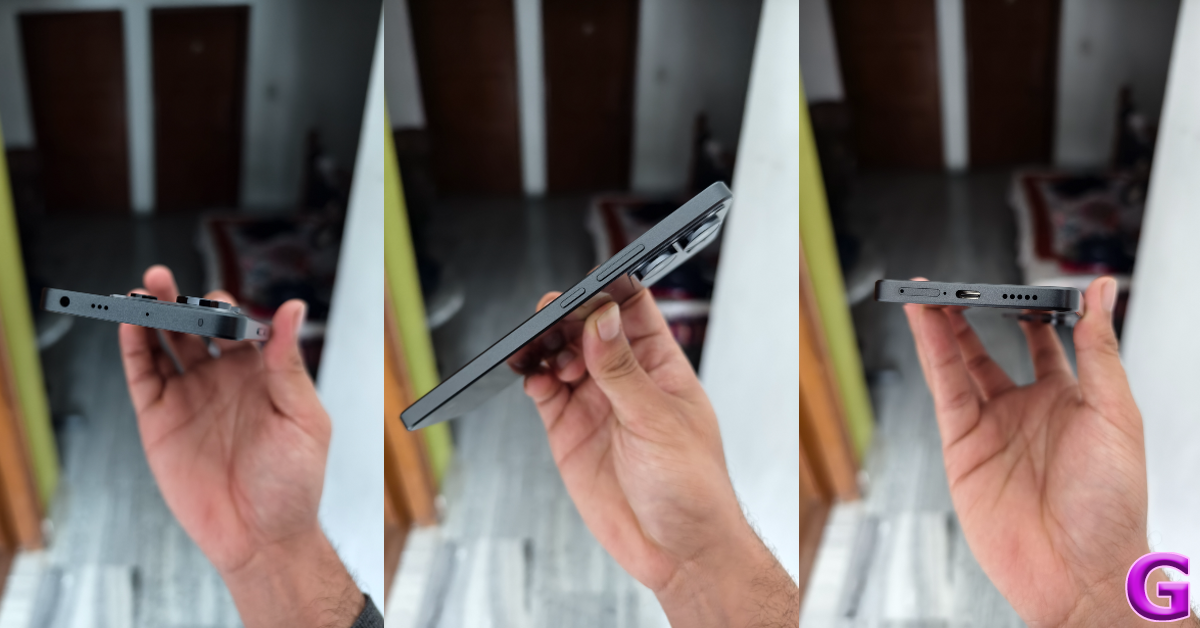
Display 6.2-inch Dynamic LTPO AMOLED 2X
Chipset Snapdragon 8 Gen 3
RAM 8GB, 12GB
Storage 128GB, 256GB
Battery 4,000 mAh
The base variant in the Samsung Galaxy S24 Series is one of the best compact smartphones you can buy for under $1,000 in the USA right now. The smartphone sports a 6.2-inch Dynamic LTPO AMOLED 2X display which has a refresh rate of 120Hz. Like the newest iPhone series, this year’s Galaxy S24 series also gets a titanium frame. But the real highlight is the much-talked-about Galaxy AI. The vertical design of the triple camera layout has been retained from last year. The S24 features a 50MP primary shooter, a 10MP telephoto lens, and a 12MP ultrawide lens.

OnePlus 12

Price: $799 on OnePlus.com OnePlus 12 debuts in India and globally: Price in India, specs details inside Key Specs
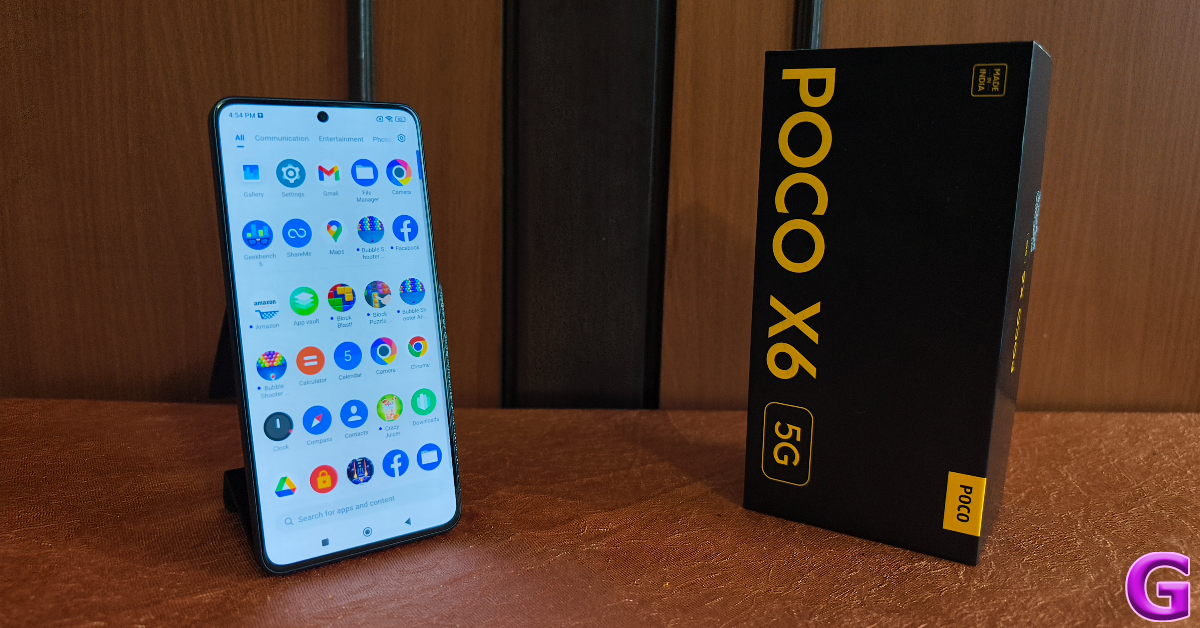
Display 6.82-inch LTPO AMOLED
Chipset Snapdragon 8 Gen 3
RAM 12GB, 16GB
Storage 256GB, 512GB
Battery 5,400 mAh
Launched in January 2023, the OnePlus 12 is one of the more affordable flagships you can buy right now. It packs the latest Snapdragon 8 Gen 3 chipset and flaunts a 6.82-inch LTPO AMOLED display with a 120Hz refresh rate. OnePlus has also reintroduced wireless charging on its newest premium smartphone. With 50W AirVOOC (wireless) charging support, the smartphone can be fully charged in 55 minutes. Using a Type-C USB cable, this feat can accomplished in 30 minutes (80W charging). OnePlus 12 also has the biggest battery (5,400 mAh) we’ve seen on a flagship smartphone. The only downside its IP65 rating is a far cry from the baseline IP67 you expect in this price range.

Google Pixel 9 Pro

Price: $999 on Google Store   Google Pixel 9 Pro and XL Top 10 smartphones under $1,000 in USA (2024) Key Specs
Display 6.3-inch LTPO OLED
Chipset Google Tensor G4
RAM 16GB
Storage 128GB, 256GB, 512GB, 1TB
Battery 4,700 mAh
This year, the Google Pixel 9 Series has two ‘Pro’ variants — Pro and Pro XL. The smaller of the two Pro variants is priced at $999 and has a 6.3-inch LTPO OLED display. Being a smaller smartphone, its battery size is limited to 4,700. Google has redesigned the camera visor at the back, giving it a more refined and cleaner look. This visor houses a 50MP primary shooter, a 48MP ultrawide lens, and a 48MP periscope telephoto lens. Powering the new series of Pixels is the Google Tensor G4 chipset. If you’re looking for something more affordable, the entry-level Pixel is priced at $799.

Samsung Galaxy Z Flip 5

Price: $999 on Samsung.com Review of Galaxy Z Flip 5 Top 10 smartphones under $1,000 in USA (2024) Key Specs
Display Inner: 6.7-inch Dynamic AMOLED 2X | Cover: 3.4-inch Super AMOLED 
Chipset Snapdragon 8 Gen 2
RAM 8GB
Storage 256GB, 512GB
Battery 3,700 mAh
The Samsung Galaxy Z Flip 5 is one of the best folding smartphones you can buy in the USA for under $1,000 in 2024. In its unfolded form, the Dynamic AMOLED 2X display spans 6.7 inches. The Galaxy Z 5 Series also debuts larger cover displays for the folding smartphones. The Flip 5 has a 3.4-inch Super AMOLED display which can be used to toggle through widgets, reply to messages, take pictures, and more. Since it’s a 2023 smartphone, the Galaxy Flip 5 is powered by the Snapdragon 8 Gen 2 SoC. The rear camera setup of the smartphone consists of 12MP wide and ultrawide sensors. Read our review of the smartphone here.

Google Pixel 9

Price: $799 on Google Store   How to ‘Reimagine’ pictures and edit them using AI on Google Pixel 9 Top 10 smartphones under $1,000 in USA (2024) Key Specs

Display 6.3-inch OLED
Chipset Google Tensor G4
RAM 12GB
Storage 128GB, 256GB
Battery 4,700 mAh
The entry-level variant of the Google Pixel 9 Series offers excellent value for money. It is one of the best smartphones you can buy in the USA right now. The vanilla Pixel 9 is powered by the same chipset as the Pro variants — Google Tensor G4. It lacks the telephoto sensor but retains the 50MP primary shooter and 48MP ultrawide lens from the Pro models. The 10.5MP selfie camera up front can shoot 4K videos at 30/60fps. Camera specs aside, the Pixel 9 runs stock Android 14 OS and flaunts a 6.3-inch OLED display. This display has a 120Hz refresh rate and can reach a peak brightness of 2,700 nits.

Nothing Phone 2

Price: $599 on Nothing.tech Nothing announced massive up to Rs 10,000 discount on Phone 2: Additional discounts Top 10 smartphones under $1,000 in USA (2024) Key Specs

Display 6.7-inch LTPO OLED
Chipset Snapdragon 8+ Gen 1
RAM 8GB, 12GB
Storage 128GB, 256GB, 512GB
Battery 4,700 mAh
Even though it is a mid-ranger, the Nothing Phone 2 deserves a shout-out on this list. The second iteration of Nothing’s highly talked about smartphone made it to the US in July 2023. Known for its iconic Glyph Interface and see-through back design, the Nothing Phone 2 also packs serious power with the Snapdragon 8+ Gen 1 chipset. The tech outfit has also refined its OS on the Phone 2, giving it a distinct look with its dot matrix font and greyscale icon packs. The smartphone features two 50MP sensors, one for the wide lens and the other for the ultrawide camera. Read our review of the smartphone here.

OnePlus 12R

Price: $499 on OnePlus.com OnePlus 12R with Qualcomm Snapdragon 8 Gen 2 SoC launched in India Top 10 smartphones under $1,000 in USA (2024) Key Specs
Display 6.82-inch LTPO4 AMOLED
Chipset Snapdragon 8 Gen 2
RAM 8GB, 16GB
Storage 128GB, 256GB
Battery 5,500 mAh
Launched alongside the OnePlus 12, the 12R could be the real flagship killer of 2024. It packs the flagship Snapdragon 8 Gen 2 chipset from last year and flaunts a stunning 6.82-inch LTPO4 AMOLED display. The massive 5,500 mAh battery pack supports up to 100W of fast wired charging. OnePlus 12R matches the design of the flagship smartphone. Its rear camera module consists of a 50MP primary shooter, an 8MP ultrawide lens, and a 2MP macro sensor. The smartphone runs on Android 14-based OxygenOS 14 out of the box. With prices starting at $499, the OnePlus 12R is undoubtedly one of the best smartphones you can buy for under $1,000 in the USA.

Motorola Razr+ (2024)

Price: $899 on Motorola.com   Motorola Razr+ (2024) Top 10 smartphones under $1,000 in USA (2024) Key Specs

Display Inner: 6.9-inch LTPO AMOLED | Cover: 4-inch AMOLED
Chipset Snapdragon 8s Gen 3
RAM 12GB
Storage 256GB
Battery 4,000 mAh
2024’s Moto Razr+ packs a bigger battery and a larger outer display than its 2023 counterpart. The processor on the smartphone has been updated to Snapdragon 8s Gen 3 SOC. The inner LTPO AMOLED display still spans 6.9 inches. The smartphone is rated IPX8 for dust and water resistance. It can survive submersion in water up to 1.5m for 30 minutes. The rear camera panel of the smartphone sports a 50MP primary shooter and a 50MP telephoto lens. Read Also: Top 6 Ways to Copy Instagram Comments and Captions on Android or iPhone (2024) 

Conclusion

These are the top 10 smartphones under $1,000 that you can buy in the USA right now. As the year rolls on we expect a few more devices to be added to this list. Keep watching this space for regular updates. If you think we missed out on a smartphone, let us know in the comments!

Top 7 Ways to Copy Instagram Comments and Captions on Android or iPhone

0
Have you ever come across a quirky or funny caption on Instagram and wanted to save it to use in your post later? Or perhaps you want to save a comment if you’re keeping receipts for an online feud. If you’ve ever tried copying text on Instagram, you must be aware that it is impossible to do so on the official app. Interestingly, Instagram’s website does not have this roadblock. Looking for a fix to this problem? Today, we bring you the top 7 ways to copy Instagram comments and captions on iPhone or Android. Read Also: How to Voice Type in Tamil on an Android smartphone?

What’s the deal with copying Instagram comments and captions?

Copying text on your smartphone is never an issue on most apps. However, OTT apps like Netflix and Disney+ prevent this action on their platforms due to their stringent copyright policies. Strangely enough, Instagram also restricts this action even though most of the content on the platform is user-generated. While there is no official explanation for this, users widely believe it is done to combat spam on the platform. Luckily, there are a handful of ways you can work around this issue. If you often find yourself wanting to copy text from Instagram, you would be better off installing a third-party app that lets you perform that action on your phone. Although if it is a one-time thing, there are other methods you can use that don’t require installing an app. We discuss both options below.

Copy Instagram comments and captions on your iPhone

You can copy the text on any iPhone using the Live Text feature. This feature is available on iPhones running iOS 15 or above. Step 1: Launch the Instagram app and take a screenshot of the caption/comment you want to copy. Step 2: Go to the Photos app and open the screenshot. Step 2: Go to the Photos app and open the screenshot. Step 3: Long press the text you want to copy. Step 4: Select Copy from the pop-up options. Step 4: Select Copy from the pop-up options.

Copy Instagram comments and captions on Android using Google Photos

Step 1: Take a screenshot of the Instagram caption/comment you want to copy. Step 2: Open the screenshot in Google Photos. Step 3: Tap on Copy Text at the bottom of the screen. Step 3: Tap on Copy Text at the bottom of the screen. Step 4: Select the comment/caption you want to copy. Step 4: Select the comment/caption you want to copy. Step 5: Tap on Copy. The text will be copied to the clipboard.

Use Circle to Search (Android)

Step 1: Go to the Instagram post caption you wish to copy. Step 2: Long-press the navigation bar to trigger Circle to Search. Step 2: Long-press the navigation bar to trigger Circle to Search. Top 7 Ways to Copy Instagram Comments and Captions on Android or iPhone (2024) Step 3: Select the text on the screen and hit Copy. Step 3: Select the text on the screen and hit Copy. Top 7 Ways to Copy Instagram Comments and Captions on Android or iPhone (2024)

Copy Instagram captions using the web browser (Android and iOS)

Step 1: Go to the Instagram post you wish to copy. Hit the Share button and tap on Copy link. Step 1: Go to the Instagram post you wish to copy. Hit the Share button and tap on Copy link. Step 2: Open your preferred web browser and paste the link into the address box. Hit Enter. Step 2: Open your preferred web browser and paste the link into the address box. Hit Enter. Step 3: The Instagram post will open in the web browser. Long press the caption to highlight it and select Copy. Step 3: The Instagram post will open in the web browser. Long press the caption to highlight it and select Copy. Strangely, this method only works for Instagram captions. If you want to copy a comment, follow the method mentioned below.

Copy Instagram comments using the Desktop Mode on Chrome (Android and iOS)

Step 1: Go to the Instagram post you want to copy. Hit the Share button and select Copy link. Step 1: Go to the Instagram post you wish to copy. Hit the Share button and tap on Copy link. Step 2: Open Google Chrome on your smartphone and paste the link into the address bar. Hit Enter. Step 2: Open your preferred web browser and paste the link into the address box. Hit Enter. Step 3: Hit the ellipses at the top right corner of the screen and select Desktop site. Step 3: Hit the ellipses at the top right corner of the screen and select Desktop site. Step 4: Long-press the comment to highlight its text and select Copy. Step 4: Long press the comment to highlight its text and select Copy.

Use Universal Copy (Android)

Step 1: Install the Universal Copy app from the Google Play Store. Step 2: Open the app and enable Use Universal Copy. Give the app the necessary permissions whenever prompted. Step 2: Open the app and enable Use Universal Copy. Give the app the necessary permissions whenever prompted. Step 3: Open Instagram and go to the post you want to copy. Step 4: On the notification panel, select Activate Universal Copy Mode. Step 4: On the notification panel, select Activate Universal Copy Mode. Step 5: Universal Copy app will let you select any text you want on the app. Highlight the caption and copy it to the clipboard. Step 5: Universal Copy app will let you select any text you want on the app. Highlight the caption and copy it to the clipboard.

Copy Instagram captions and comments on a Google Pixel smartphone

  Google Pixel smartphones make it easy to copy text from any app without needing to download a third-party app. Just follow these simple steps. Step 1: Launch Instagram and open the post you wish to copy. Step 2: Use the navigation buttons or swipe gestures to go to the app switcher/recent apps panel. Step 3: On Instagram’s card, long-press the text you wish to copy. Step 3: On Instagram’s card, long-press the text you wish to copy. Top 7 Ways to Copy Instagram Comments and Captions on Android or iPhone (2024) Step 4: Select Copy from the pop-up options. Step 4: Select Copy from the pop-up options. Top 7 Ways to Copy Instagram Comments and Captions on Android or iPhone (2024)

Frequently Asked Questions (FAQs)

How do I copy Instagram comments and captions on my Android phone?

Install the Universal Copy app on your device, give it the necessary permissions and enable ‘Use Universal Copy’. Go to the Instagram post and select ‘Activate Universal Copy Mode’ from the notification panel. Highlight the comment or caption and copy the text to the clipboard.

How do I copy Instagram comments and captions on my iPhone?

Take a screenshot of the Instagram post and open it in the Photos app. Long-press to highlight the text and hit ‘Copy’.

How do I copy Instagram comments and captions without using an app?

Copy the link to the Instagram post and open it in Google Chrome. Request ‘Desktop Site’ and long-press the text to highlight it. Select ‘Copy Text’ from the pop-up menu. Read Also: How to geotag your property in Delhi as per MCD guidelines?

Conclusion

These are the top 7 ways to copy Instagram captions or comments on iPhone and Android. Check out these 5 easy methods to access and manage your iPhone’s clipboard. Android users can check out this article to learn how to manage the clipboard on their devices. If you know any other way to copy unselectable text, let us know in the comments!