Amazon Quiz Answers Today 27 August 2024: Participate to win Rs 500 Amazon Pay Balance

27 August 2024: New Amazon Quiz is now available. Customers from different parts of the country are participating in the daily quiz. The quiz starts at midnight today and will be live until 11:59 PM tonight. By successfully answering every question, participants in the quiz have the chance to win wonderful rewards. A Rs 500 Amazon Pay Balance is up for grabs to participants today.

One wrong answer could eliminate you from the quiz. You have a chance to win Rs 500 Amazon Pay Balance if you successfully answer every question. Users of the app only have the opportunity to take the quiz. Check Out 27 August 2024 Amazon Quiz Answers.

Amazon Quiz Today Prize: Rs 500 Amazon Pay Balance

Quiz Date: 27 August 2024

Daily Timing: 12 AM to 11:59 PM

Previous Amazon Quiz Winners Announcement: Today 12 PM Noon

Amazon Quiz Answers Today 27 August 2024: Win ₹ 500 Amazon Pay Balance

Question 1: Who scored a half-century in just 15 balls in a losing effort against Sunrisers Hyderabad in IPL 2024 for Delhi Capitals?

Answer: Jake Fraser- Mcgurk

Question 2: The Amazon Prime series- ‘A Gentleman in Moscow’ stars which famous actor in the lead role of Alexander Rostov?

Answer: Ewan Mcgregor

Question 3: The Achyutraya temple, the Virupaksha temple and the Vithala temple are located in which UNESCO World Heritage Site?

Answer: Hampi

Question 4: This is the logo of a famous automobile company headquartered in which country?

Answer:  France

Question 5: This visual shows which dwarf planet as seen from the New Horizons spacecraft in 2015?

Answer: Pluto

Also Read: Noise Buds Verve, budget TWS with up to 45 hours of playback launched in India

How To Play Amazon Quiz Today

Only app users are eligible to play the Amazon quiz every morning from 12 AM to 11:59 PM. The quiz is not available on the desktop. For those who are unaware of how to play the Amazon quiz, below are the steps, you can follow to take the quiz.

  • First, download the Amazon app from the Google Play Store or App Store or go here to download the Amazon App
  • Now fill in the required information through the Sign-Up option.
  • You need to log in to the Amazon app and scroll down on the home screen to find the Amazon Quiz banner.
  • Tap on the Amazon Quiz banner and tap on the Start button to start the Quiz.
  • Now you will get 5 questions and you need to answer them correctly. One wrong answer will eliminate you from the Quiz.
  • After answering all the questions correctly you are now eligible for a Lucky Draw.
  • The previous winner’s name will be announced today at 12 PM.

Amazon Daily Quiz Answers from the previous few days.

Here are all the answers from the previous 5 days of the Amazon Daily Quiz and Contest.

Amazon Quiz Answers Today 26 August 2024: Win ₹ 500 Amazon Pay Balance

Question 1: Who scored a half-century in just 15 balls in a losing effort against Sunrisers Hyderabad in IPL 2024 for Delhi Capitals?

Answer: Jake Fraser- Mcgurk

Question 2: The Amazon Prime series- ‘A Gentleman in Moscow’ stars which famous actor in the lead role of Alexander Rostov?

Answer: Ewan Mcgregor

Question 3: The Achyutraya temple, the Virupaksha temple and the Vithala temple are located in which UNESCO World Heritage Site?

Answer: Hampi

Question 4: This is the logo of a famous automobile company headquartered in which country?

Answer:  France

Question 5: This visual shows which dwarf planet as seen from the New Horizons spacecraft in 2015?

Answer: Pluto

Amazon Quiz Answers Today 24 August 2024: Win ₹ 500 Amazon Pay Balance

Question 1: Which Indian won the silver medal in the FIDE women’s candidates 2024?

Answer: Koneru Humpy

Question 2: Which of these actresses is the executive producer of the Amazon Prime series ‘Poacher’?

Answer: Alia Bhatt

Question 3: Which of these is a traditional, flat-bottomed Venetian rowing boat?

Answer:  Gondola

Question 4: The man in the picture is cosplaying a character from which famous children’s book?

Answer: Alice in Wonderland

Question 5: This is the Adalaj Ni Vav, a stepwel located in which state?

Answer: Gujarat

Amazon Quiz Answers Today 23 August 2024: Win ₹ 500 Amazon Pay Balance

Question 1: Which team recently set the record for the highest chase in Indian Premier League history by successfully chasing a target of 262?

Answer: Punjab Kings

Question 2: The comedy movie ‘Ricky Stanicky’ stars which of these actors, also a big star in sports entertainment?

Answer: John Cena

Question 3: The famous monument, the Humayun’s Tomb was built in which century?

Answer: 16th century

Question 4: This is the famous Rathaus, located in which famous European capital?

Answer:  Vienna

Question 5: Which of these famous guitarists was part of this iconic band?

Answer: Slash

Amazon Quiz Answers Today 22 August 2024: Win ₹ 500 Amazon Pay Balance

Question 1: Which of these recently played ATP events has a court named after the legendary tennis player Rafael Nadal?

Answer: Barcelona Open

Question 2: The movie Road House sees Jake Gyllenhaal play the role of an ex UFC fighter. Which of these famous sportspeople also acts in the movie?

Answer: Conor Mcgregor

Question 3: What is the other name given to the swamp deer, the state animal of Madhya Pradesh?

Answer: Barasingha

Question 4: In which of these cities in the USA is this famous museum located?

Answer: New York

Question 5: Which of these controversial media organizations was founded by this Australian editor and publisher?

Answer: Wikileaks

Amazon Quiz Answers Today 21 August 2024: Win ₹ 500 Amazon Pay Balance

Question 1: Which of these players won the Monte Carlo Masters tennis tournament in 2024, his 3rd triumph in that event in 4 years?

Answer: Stefanos Tsitsipas

Question 2: Which of these Amazon Prime shows shares its name with a 2005 Brad Pitt- Angelina Jolie movie?

Answer: Mr and Mrs Smith

Question 3: Which animal features on the election symbol of the Republican party in the USA?

Answer:  Elephant

Question 4: These waterfalls span the border between the province of Ontario in Canada and which state in the USA?

Answer:  New York

Question 5: Which of these famous architects designed this iconic monument in India?

Answer: Edwin Lutyens

Amazon Quiz Answers Today 20 August 2024: Win ₹ 500 Amazon Pay Balance

Question 1: Against which team did Sunrisers Hyderabad set a new record scoring 287 in an IPL match?

Answer: Royal Challengers Bengaluru

Question 2: Who plays the role of soldier Arun Katyal in the recently released movie ‘Yodha’?

Answer: Sidharth malhotra

Question 3: Which of these famous rulers was born in the Shivneri Fort in Maharashtra in the 17th century?

Answer: Shivaji

Question 4: Name this famous church located in Europe

Answer: St. Peter’s Basilica

Question 5: This is the flag of which Caribbean country?

Answer: Barbados

Amazon Quiz Answers Today 19 August 2024: Win ₹ 500 Amazon Pay Balance

Question 1: Which African country launched its first operational Earth observation satellite named ‘Taifa-1’ in 2023?

Answer: Kenya

Question 2: Aman Sehrawat has won India’s first gold medal at the Asian ________ Championships 2023 in Astana, Kazakhstan.

Answer: Wrestling

Question 3: FIFA removed which country from hosting the men’s U-17 World Cup?

Answer:  Peru

Question 4: This cat’s name ‘Tabby’ came from which cloth?

Answer:  Silk

Question 5: Who invented the first digital camera?

Answer: Steven Sasson

Amazon Quiz Answers Frequently Asked Questions (FAQs)

Where can I check the previous winners? Did I win how to check?

You can head over to this link on your mobile or desktop to check the winners of the Amazon Daily Quiz Contest.

How to Play Amazon Daily Quiz or Contest?

We have written an explainer above, you can refer to that.

When are the winners of the Amazon Quiz and contest announced or declared?

The announcement of today’s Amazon quiz winner will take place Tomorrow. As for the Special Quiz and “Spin & Win” Contest, the winners will be declared once the Quiz Contest comes to an end. To find out who the lucky winner is, you can refer to the Amazon Quiz Winners List or visit the Amazon Winners tab in the Amazon App.

How to participate in the Daily Amazon Quiz?

That is very easy, just got to the Amazon app and scroll to the bottom of the page and you will find the Quiz section. Click on it (usually it is called the fun zone) and you can enter the Amazon Today Quiz Contest. 

Are there any other quizzes or contests running on Amazon daily?

Yes, there are many running on a daily basis. These range from spinning the wheel to answering the questions correctly. All are located in the Fun Zone. 

What are the criteria for selecting a winner in the Daily Amazon Quiz?

When a qualified player submits correct answers to all the questions, they will automatically be entered into a lucky draw. This draw will include all participants who answered all the questions correctly. Amazon randomly selects the final winners from the pool of eligible participants who gave the right answers.

Which Types of Questions are asked within Amazon Daily Quiz?

These are very simple and straightforward questions. These are mainly related to general knowledge. 

Where should I look for Amazon Daily Quiz answers?

You can bookmark this page as we will help you every day with the Amazon Daily Quiz. We bring you fresh answers every day for the Amazon Daily Quiz and Contest. 

What time does Amazon Announce previous winners?

The previous winner’s name will be announced today at 12 PM (noon).

For the latest gadget and tech news, and gadget reviews, follow us on TwitterFacebook and Instagram. For newest tech & gadget videos subscribe to our YouTube Channel. You can also stay up to date using the Gadget Bridge Android App. You can find the latest car and bike news here.
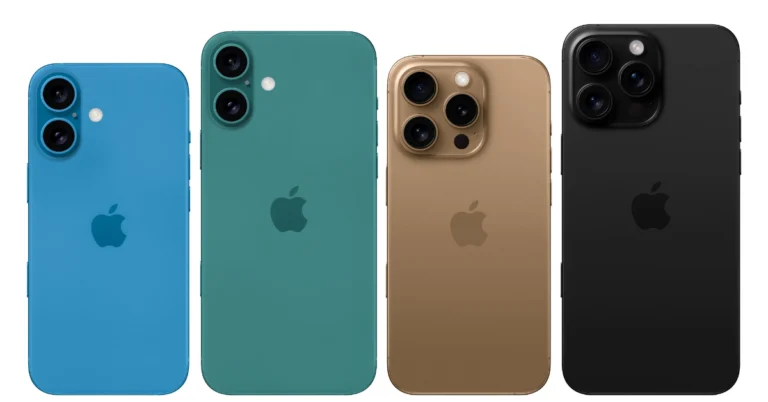
iPhone 16 Series Price, Specifications Leaked Ahead Of September Launch

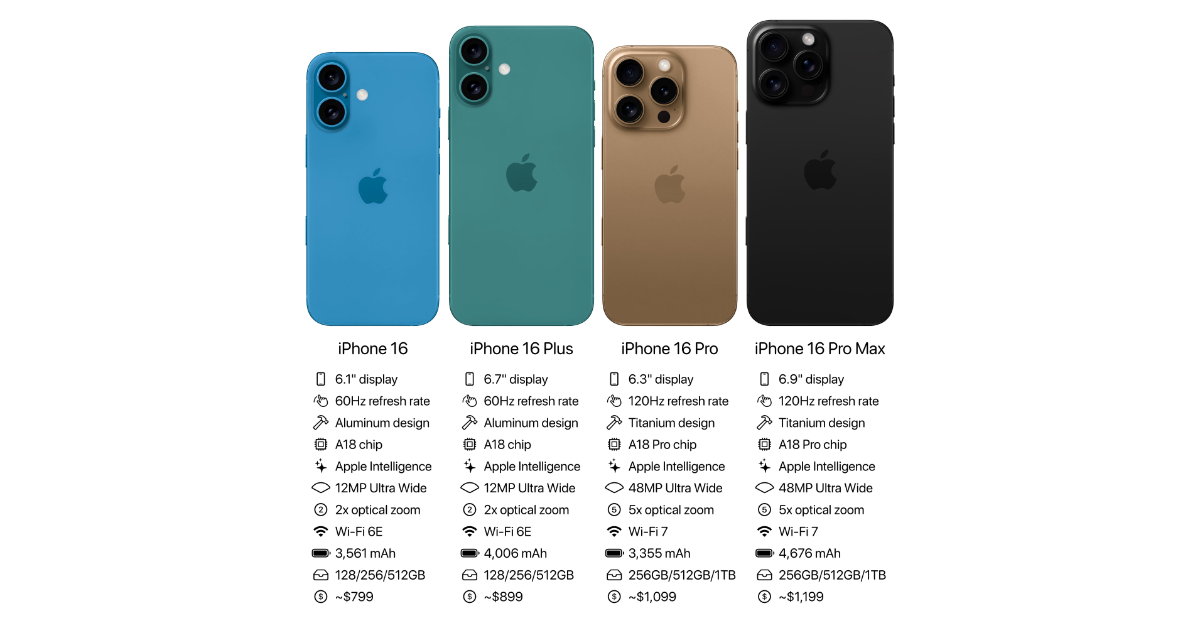
Apple plans to release the iPhone 16 series in September, with four models: the iPhone 16, the iPhone 16 Plus, the iPhone 16 Pro, and the iPhone 16 Pro Max. Apple Intelligence features are anticipated to be supported by all models, and both iPhone 16 Pro models may have a 5x optical zoom. According to leaked information, the ‘Plus’ model of the forthcoming series would feature a smaller battery than the previous model. The anticipated pricing and specifications for the iPhone 16 series are listed below.

The normal iPhone 16 will cost $799, or around Rs 67,100, for the base model with 128GB of storage, according to information provided by Apple Hub in a post on X.com. It is reported that the price of the iPhone 16 Plus would begin at $899, or around Rs 75,500. The iPhone 16 Pro with 256GB of storage will run you about Rs 92,300 at $1,099, while the iPhone 16 Pro Max with similar storage will run you about $1,199 or Rs 1,00,700.

iPhone 16 Series Price, Specifications Leaked Ahead Of September Launch
Image Courtesy: X.com/Apple Hub

The iPhone 16 is expected to feature a 6.1-inch display with a refresh rate of 60Hz, while the Plus variant will have a 6.7-inch screen. According to the leak, the phones would have Apple’s rumoured A18 processor and 8GB of RAM, as well as compatibility with Apple Intelligence capabilities. Apple is likely to equip the iPhone 16 with a larger 3,561mAh battery, while the iPhone 16 Plus could feature a lower 4,006mAh battery than its predecessor’s 4,383mAh battery.

Also Read: Samsung is offering limited-period discounts on Galaxy A55 and A35 smartphones in India

With a 0.2-inch increase in screen size, the iPhone 16 Pro and iPhone 16 Pro Max are expected to have displays of 6.3 inches and 6.9 inches, respectively. Industry-leading smallest display bezels are anticipated for the Pro Max variant. Apple’s A18 Pro chipset is going to power both models. The post on X claims that the 48-megapixel ultra-wide angle camera on Apple’s iPhone 16 Pro and iPhone 16 Pro Max will allow 5x optical zoom and use a ‘tetraprism’ periscope lens.

Also Read: Here is when the iPhone 16 Series is expected to launch: Report

This year, Apple plans to increase the capacity of the batteries in the iPhone 16 Pro and iPhone 16 Pro Max. The smaller model will likely have a 3,355mAh battery, while the larger model may have a 4,676mAh battery. These numbers represent a major improvement over last year’s versions.

Samsung is offering limited-period discounts on Galaxy A55 and A35 smartphones in India

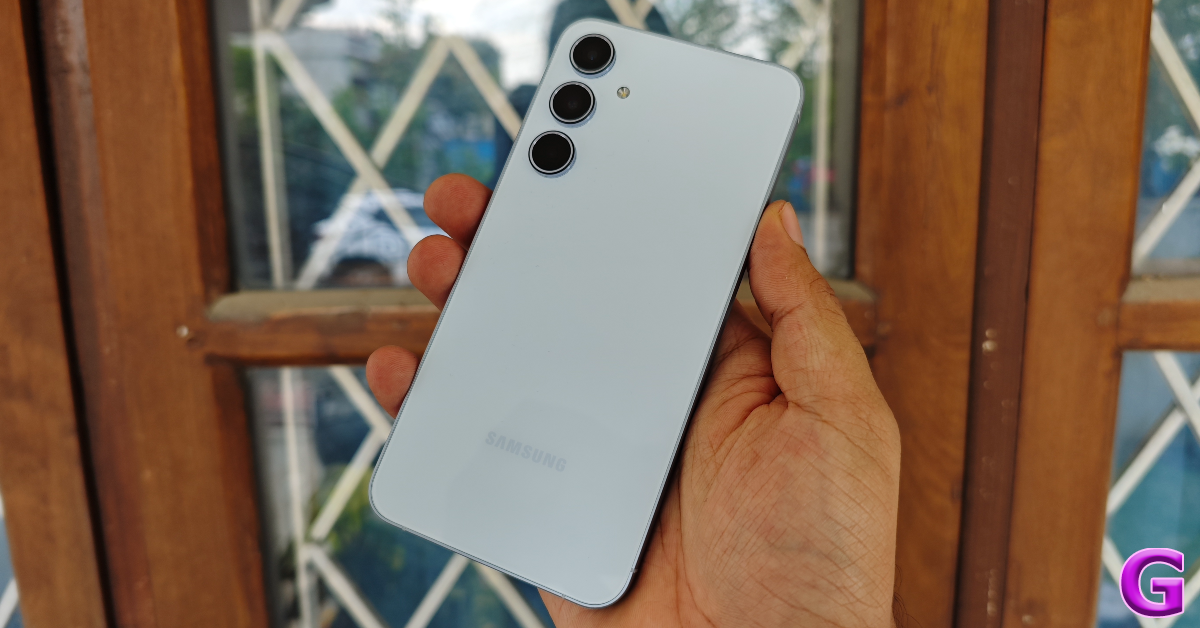
Samsung has announced a limited-time discount on Galaxy A55 and Galaxy A35 in India. If you’re upgrading from an older smartphone, you can utilise the discount as an upgrade bonus or as bank cashback. Base variants for the A35 and A55 will cost 25,999 and 35,999, respectively. The bank would give Rs 5,000 bank cashback for the A35 and Rs 6,000 bank cashback for the A55.

A short sale on the Galaxy A55 5G and Galaxy A35 5G smartphones has been announced by Samsung. Galaxy A55 5G will be available during the limited-time deal for a net effective beginning price of Rs 33999, while Galaxy A35 5G will be priced at Rs 25999.
Buyers purchasing the Galaxy A55 5G and Galaxy A35 5G with credit cards from top banks can get major bank cashback of Rs 6000 and Rs 5000, respectively. Also, they are eligible for up to six months of EMIs.

Galaxy A55

Also, customers who purchase a Galaxy A55 5G or Galaxy A35 5G can receive an upgrade incentive worth up to Rs 6000 or Rs 5000, respectively. Customers can, however, choose to get an upgrade bonus or bank cashback.

Also Read: Here is when the iPhone 16 Series is expected to launch: Report

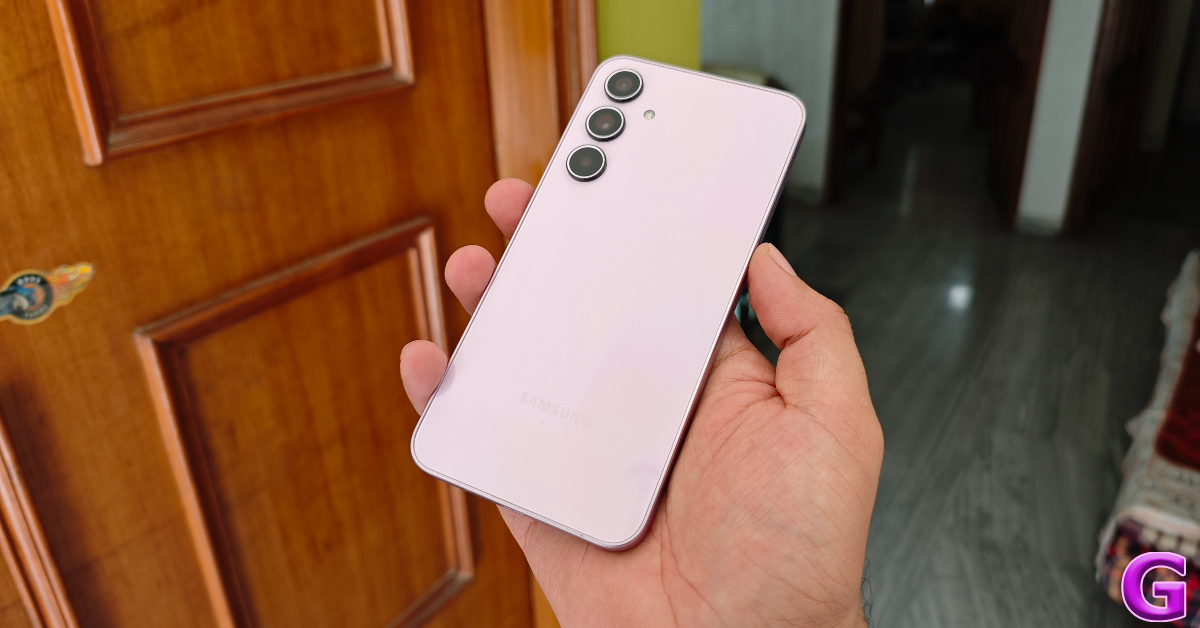
Galaxy A55 5G and Galaxy A35 5G devices are available for purchase via Samsung.com, across Samsung stores, and other online platforms. Galaxy A35 5G is available in three colours – Awesome Lilac, Awesome Ice Blue & Awesome Navy while Galaxy A55 5G is available in two colours – Awesome Ice Blue & Awesome Navy.

Model A55 5G A35 5G
Original price (8/128) INR 39999 INR 30999
Offer INR 6000 INR 5000
NEP INR 33999 INR 25999


Samsung Galaxy A55 5G, Galaxy A35 5G specifications

Both Samsung Galaxy A55 5G and Galaxy A35 5G feature a 6.6-inch full-HD+ Super AMOLED display with 1,080×2,408 pixels of resolution. The display supports up to 120Hz refresh rate and has a Gorilla Glass Victus+ protection. In addition to this, they come with 1,000 nits of peak brightness and a Vision Booster feature. Under the hood, there is an Exynos 1480 SoC for the A55 and an Exynos 1380 SoC for the A35.

Galaxy A35

The Samsung Galaxy A55 5G features a triple rear camera setup that includes a 50-megapixel primary camera, a 12-megapixel ultra-wide-angle camera and a 2-megapixel sensor. There is a 32-megapixel front-facing camera for taking selfies.

Also Read: CMF Buds Pro 2 Review: Greatly astonished us

On the other hand, Samsung Galaxy A35 5G is highlighted with a triple camera setup consisting of a 50-megapixel primary camera, an 8-megapixel ultra-wide camera and a 5-megapixel macro lens. Also, there is a 13-megapixel selfie camera.

Samsung has equipped the A55 and A35 with 5,000mAh batteries that allow 25W rapid charging.

Samsung’s Next Big Thing: Dual-Fold and Rollable Smartphones in the Works

Samsung is taking its foldable smartphone game to the next level, with reports indicating that the tech giant is working on double-foldable and rollable displays. According to sources, Samsung is developing new form factors that could change how we think about mobile devices, potentially making them more portable and versatile.

The news comes from a recent expo in South Korea, where Chung Yi, Executive Vice President at Samsung Display, hinted at these exciting developments. Yi highlighted that the demand for larger displays is expected to grow with the advent of 6G technology, driving Samsung to explore new designs that are easier to carry yet offer expansive screen real estate.

Read Also: LG launches world’s first rollable TV for $87,000

While Samsung foldable smartphones have been a leader in the market with its Galaxy Z Fold and Z Flip series, this next step could see the company pushing boundaries further. However, don’t expect these devices on shelves anytime soon. Samsung appears to be in the early stages of development, and with competition from the likes of Huawei, the race to market could be a tight one.

Huawei, in particular, is set to unveil its dual-fold smartphone as early as next month, potentially making it the first company to bring such a design to consumers. Samsung, on the other hand, seems to be playing the long game, focusing on perfecting its new technologies before launch.

Interestingly, Samsung’s strategy might also involve diversifying its portfolio to appeal to different segments of consumers. With rollable displays potentially offering a more compact alternative to traditional foldables, Samsung could be positioning itself to meet a wider range of user needs, from those who prioritize portability to those who desire larger, tablet-like experiences.

Read Also: Samsung Galaxy Z Fold 6 Review: Unfolding The Future, One Upgrade At A Time

Samsung’s systematic approach to these innovative designs could pay off in the long run, but it does risk being outpaced by competitors. While Huawei might win the race to market, Samsung’s dedication to refining its products could ultimately lead to a more polished and user-friendly experience. After all, in the rapidly evolving world of smartphones, being first isn’t always the same as being the best.

Here is when the iPhone 16 Series is expected to launch: Report

Reportedly, Apple is set to launch the iPhone 16 series of smartphones on September 10, succeeding the iPhone 15 lineup. The company is also expected to unveil new Apple Watch and AirPods models with new features. Here is everything we know about the upcoming iPhone launch.

iPhone 16 Series launch date expected 

According to a Bloomberg report, Apple is planning to host its next Apple Event on September 10, which falls on a Tuesday, where it will be unveiling the latest iPhones 16 series, watches and AirPods. As has been Apple’s custom in recent years, the phones will be unveiled and then put on sale on September 20.

iPhone 16 Series specs and design expected

It’s anticipated that the design of the iPhone 16 series would resemble that of the iPhone 12. The standard model may come with vertically orientated lenses and a revamped camera island. A seven-colour option of the iPhone 16 Plus is rumoured to be available, including Blue, Pink, Yellow, Green, Black, White, and Purple. Two new additions are Purple and White. The iPhone 16 Plus will have less noticeable bezels and a multifunctional Action button that allows users to customise shortcuts.

Also Read: CMF Buds Pro 2 Review: Greatly astonished us

As per speculations, the iPhone 16 series includes a camera with a focus button and gesture control. Base models are believed to enable spatial video for 3D immersive recordings. In contrast, Pro models might consist of an upgraded ultra wide-angle camera and anti-reflective technology to reduce lens flare. The iPhone 16 Pro and Pro Max models may come with a multifunctional Action button, a Capture button for control over focus and gestures similar to a DSLR, and the capability for spatial video for creating immersive 3D videos. Apple Intelligence may be included in the iOS 18.1 update rather than the iOS 18 release on launch day.

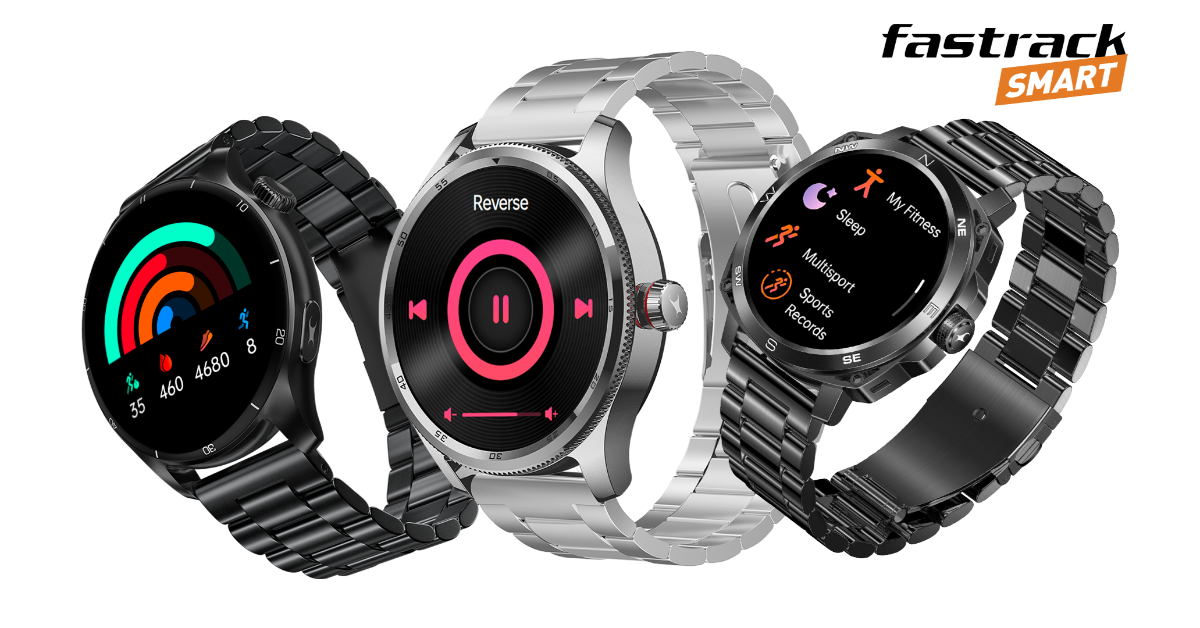
Also Read: Fastrack Smart Metal Series with SingleSync BT calling feature launched in India

Rumours suggest that the iPhone 16 Pro model will have a 6.27-inch display, up from 6.1 inches, and 20% brighter, with a peak brightness of 1,200 nits. The basic iPhone 16 is expected to have a 6.1-inch OLED display and be powered by an A18 Bionic chip from TSMC’s 3nm process, whereas the iPhone 16 Pro and Pro Max will have an A18 Pro chip.

UPDATE

Correct Timeline: Putting aside all the rumours and leaks, the company has scheduled its next Apple Event for September 9. More information here.

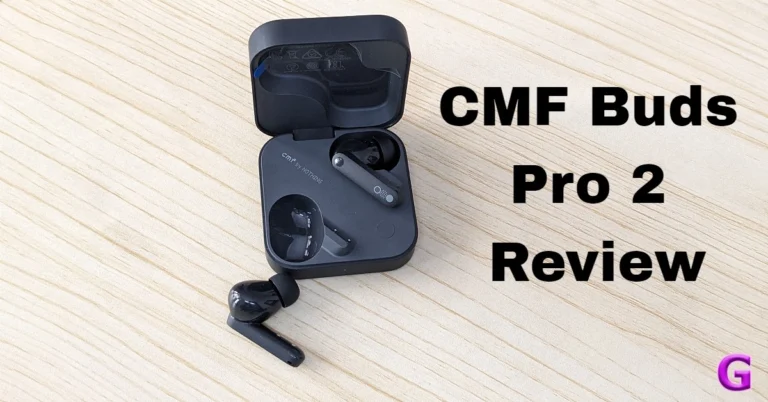
CMF Buds Pro 2 Review: Greatly astonished us

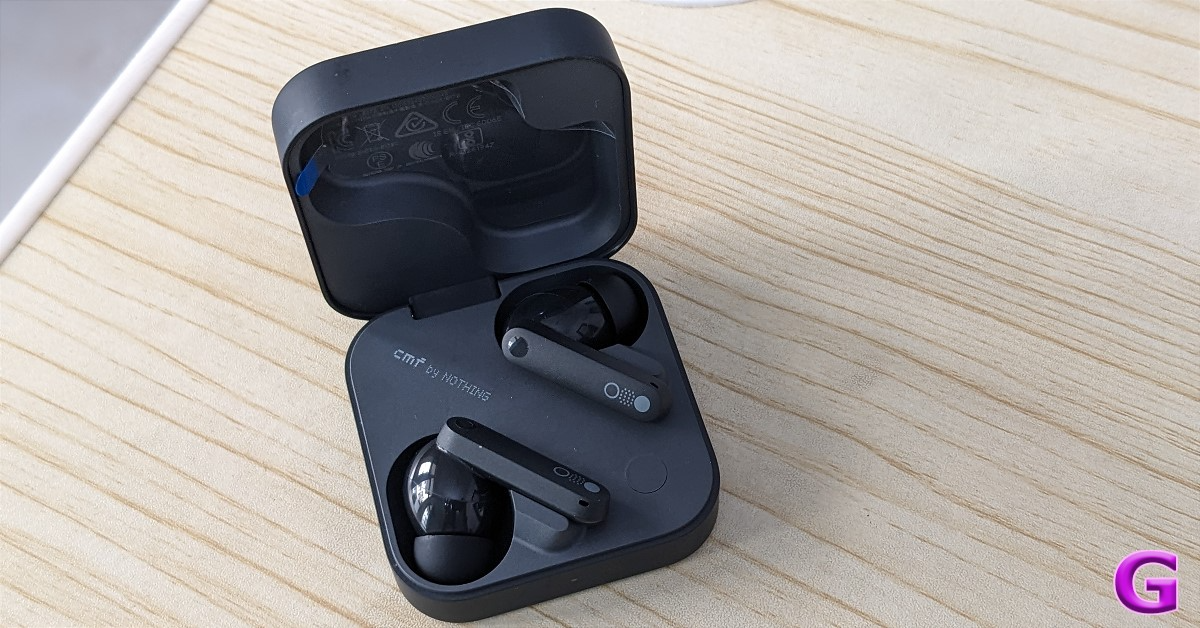
Nothing has introduced the new TWS CMF Buds Pro 2 in India. These buds are less expensive, costing under Rs 2,500. The charging case’s smart dial is the standout feature in terms of design. It works; it’s simply not for the show. It offers 50 dB Hybrid ANC, dual drivers, LDAC technology, and a 43-hour battery life, at this price. The company claims to provide an excellent quality experience along with an immersive acoustic impression. So let’s explore the CMF Buds Pro 2 and see if it lives up to the hype.

CMF Buds Pro 2 Review: Design

Your eyes will be drawn to the earphone case as soon as you open the box. The accessories include a USB Type C cable, warranty cards, manuals, and various-sized ear tips.

CMF Buds Pro 2 Review: Design

There are four colour options available for the CMF Buds Pro 2: orange, light grey, blue, and dark grey. We got the Dark Grey unit for review, which is a fantastic choice if you don’t like bright colours like orange and blue. The CMF Buds Pro 2’s design first resembles that of its sibling; however, the new TWS form factor is more sophisticated while still having a distinctive appearance from the other brands.

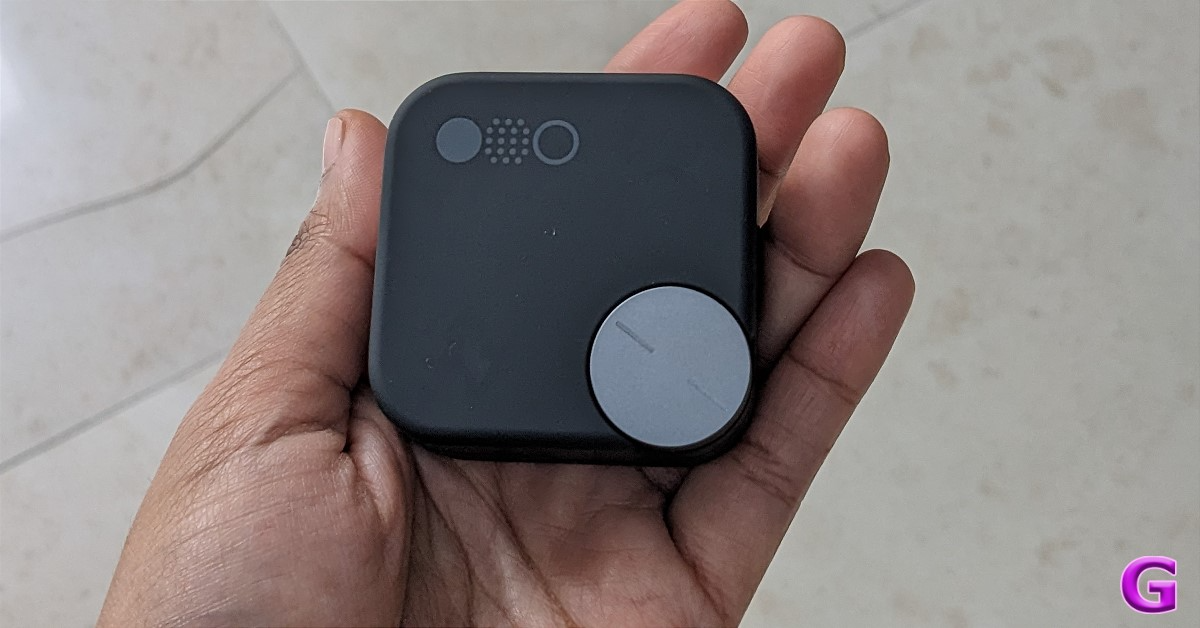
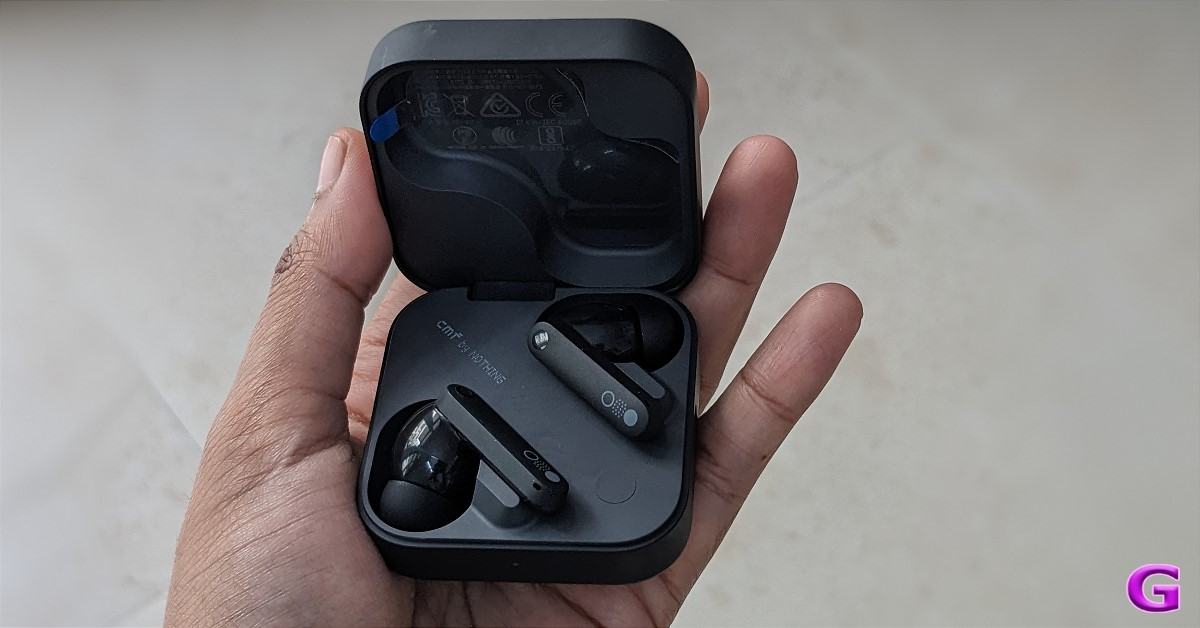
The charging case has rounded sides and a square form factor. Despite being composed of plastic, the earbuds and case feel high-end because of their matte texture.

The case’s dial is quite useful. The case’s quality is also something we adore; it has a substantial yet soft, metal-like feel to it. Located in the upper left corner, the revolving dial is coated in silver. The new CMF Buds rotating dial does not include the hook for a lanyard that was present in the previous version. It rotates and gives tactical feedback at the same time. It functions similarly to a button that you can press. This is unusual because, unlike most wireless earphones in the market, their charging case is not functional like this.

Also Read: OnePlus Nord Bud 3 Pro Review: Good Sound Signature

Although there was no additional functional use for the old dial, the new CMF Buds Pro 2 rotating dial is functional for improved engagement and fun to play around with. You can twist to effortlessly control playback and change the volume with this innovative capability. You may use a single touch to mute your microphone, enter low-lag mode, activate your voice assistant, and change the noise cancellation settings during meetings. For a more personalised experience, adjust the elements of the Smart Dial using the Nothing X app.

We noted in our review of the CMF Buds that there was a creaky sound coming from the charging case hinge whenever you flipped it open. We are happy that the firm has resolved this matter; the hinge of the CMF Buds Pro 2 charging case is now stronger and hasn’t shown any oddities thus far. Additionally, the previously mentioned “creaky sound” has completely disappeared.

CMF Buds Pro 2 Review: Design

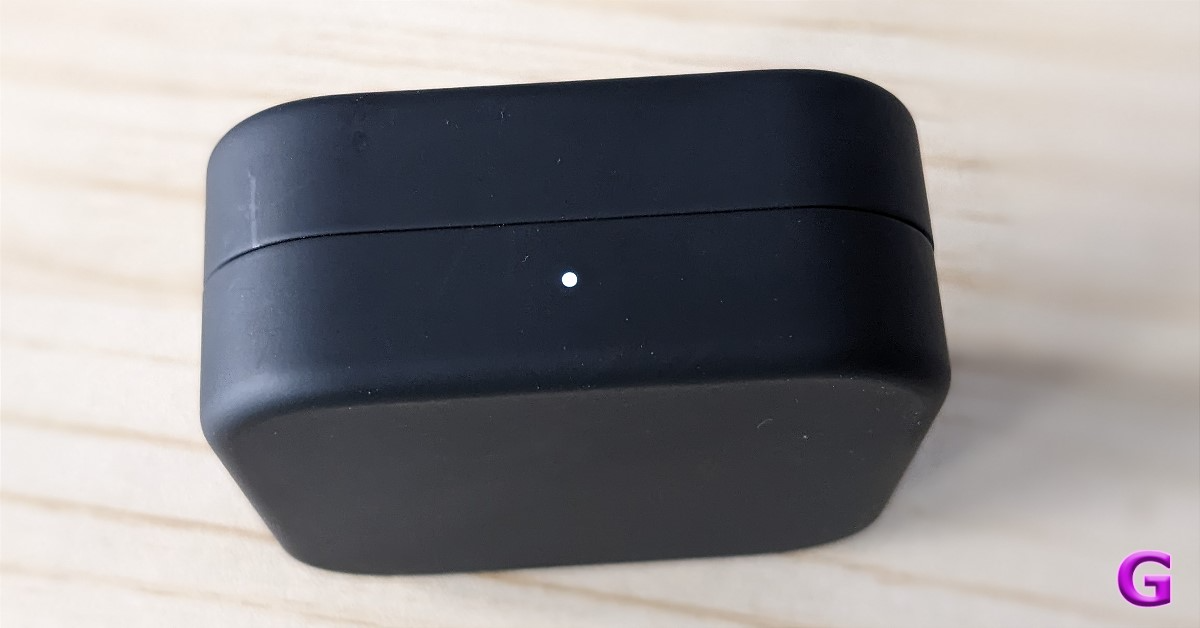
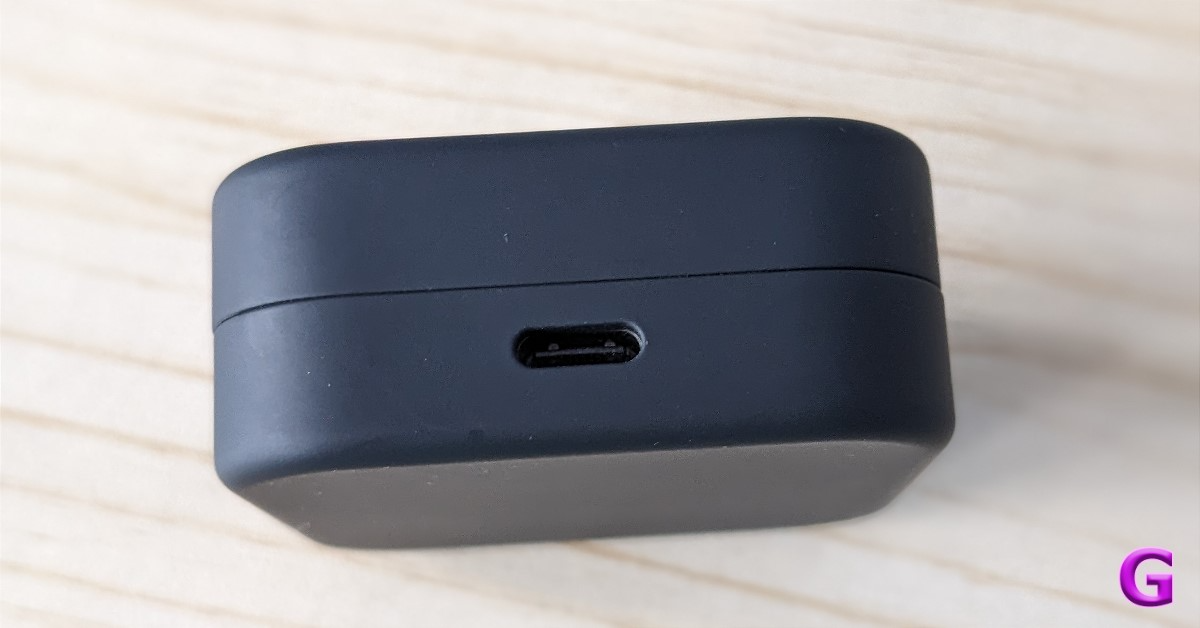
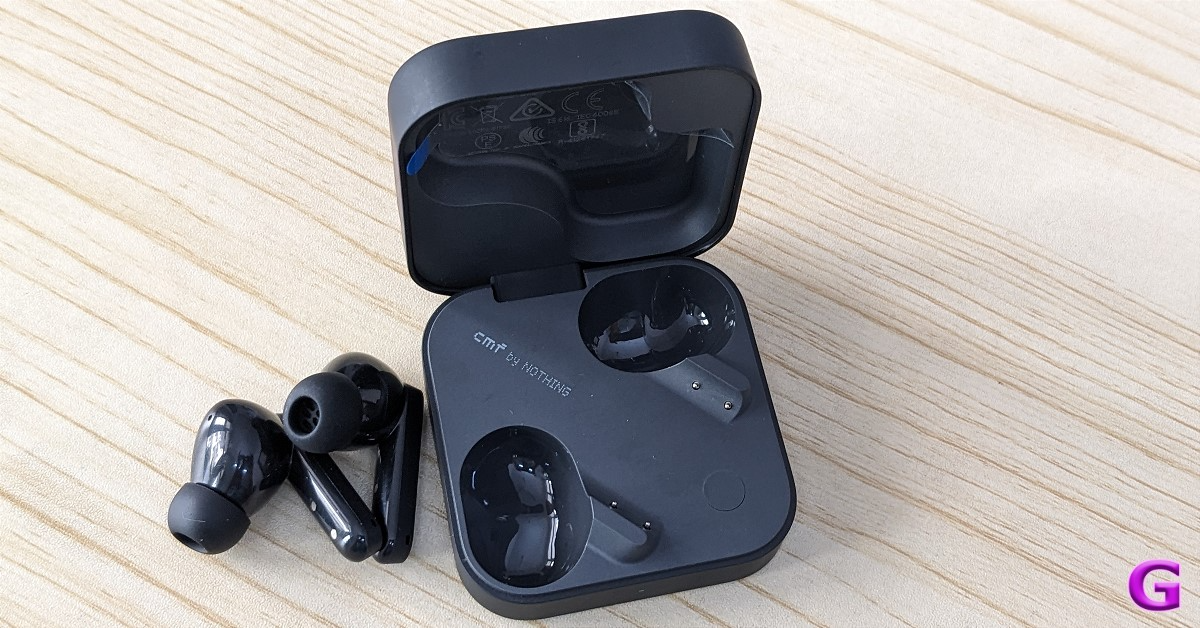
The lid bears an engraving of the CMF logo. On the front edge, there is a little notification light that illuminates when the lid is lifted or the earbuds are taken out. The pairing button has been repositioned; when you open the case, you can locate it in between the two earphones. This is a crucial button to press if you wish to reset it. Also, the USB Type-C port sits on the right side.

review of CMF Buds Pro 2

We did appreciate that, unlike other brands, the casing draws fewer smudges. It’s nice that the earbuds stay in place when the case is opened as well. They didn’t slide off, even though we gave the unit a good shake to get them to come out. The case’s lid closes with a satisfying click and is firmly fastened. In addition to the case, the earbuds’ design is fantastic. The earphone’s high-end appearance and texture make it truly stand out.

Also Read: Mivi SuperPods Dueto Review: A deal you cannot miss 

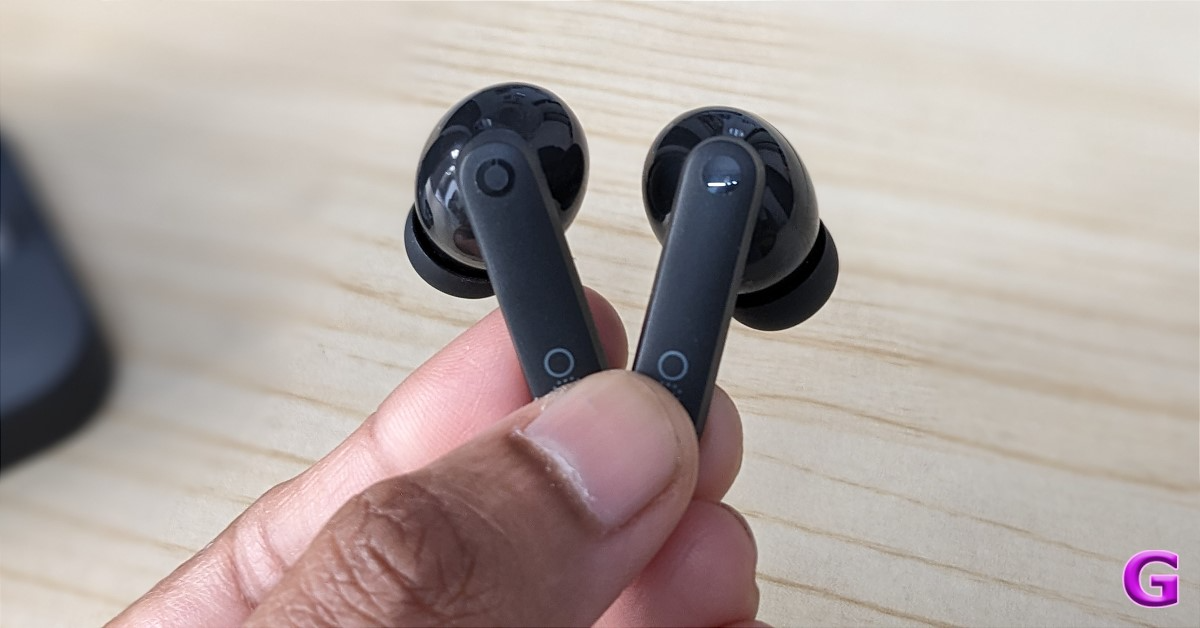
Magnets hold the earbuds to the casing. With an in-ear design, these compact earphones are lightweight. Although the stems are matte, the earbuds are shiny. Both of the earphones have the CMF branding on them. The touch-sensitive panel on the earphones replaces the conventional buttons. The stems’ touch-sensitive section is emphasised with a shiny circle.

CMF Buds Pro 2 Review: Design

The shiny inner surfaces of the earphones did not compromise the secure fit.
Even after using the earphones for several hours, you won’t get ear discomfort because of their lightweight construction. The fit is comfy yet secure. For people with different ear sizes, the kit contains two additional pairs of ear tips.

The touch controls are well-tuned, and there is very little possibility of unintentionally activating them.

Additionally, the CMF Buds Pro 2 are rated IP55 for protection against dust and water penetration. This indicates that they are more resilient than a simple splash of water, and their rating is higher than that of their rivals. They become more robust as a result.

We were pleased with the CMF Buds Pro 2’s overall design and build quality.

CMF Buds Pro 2 Review: Performance

In terms of functionality, pairing the CMF Buds Pro 2 is easy. To connect them to your smartphone, just take them out of the case, find them on your device, and click. However, to do so, you must download the Nothing X app.

The dual connection can be enabled using the Nothing X app. Users may select which devices to pair with the earbuds at any given moment, making it simple to take and answer phone and laptop calls.

review of CMF Buds Pro 2

The CMF Buds Pro 2 have not-so-great call quality and has trouble making calls in noisy outdoor environments.

Let’s first discuss the specifications before delving deeper into the audio quality. Two drivers are included with the CMF Buds Pro 2: an 11mm bass driver and a 6mm micro-planar tweeter. High-fidelity sound is produced between 20 Hz and 40 kHz by these drivers, which are supported by a robust N52 magnet and a copper voice coil.

We tested these CMF Buds Pro 2 in an indoor and outdoor setting to see how well they produce sound. It generates a high-quality sound with distinct mids, lows, and highs. Although the mid and high frequencies are also well represented in the mix, the output is bass-heavy. These earbuds aren’t for you if you’re searching for neutral acoustics. Additionally, boosting the volume to its highest setting didn’t cause the output to change. That being said, we advise you to maintain the volume at 70% or higher, as this will help you save a lot of battery life.

Its soundstage is heavy on bass, as we’ve already noted, but if you want even more thud, you can turn on the ‘Ultra Bass’ option in the Nothing X app, which gives you a choice of 5 levels of bass settings.

Also Read: Truke Buds Liberty OWS Review: The end of ear fatigue

However, the sound quality is sufficient, particularly when used for gaming, but there is some lag present. When you put them on, a vacuum is formed, essentially shutting out as much ambient noise as possible. As a result, they provide effective passive noise cancellation. Choose the appropriate ear tip size for you to ensure a snug fit and improved sound quality.

review of CMF Buds Pro 2

You’ll hear 3D spatial sound, which makes it seem as though sound is coming from all directions rather than just your left and right earphones. Your listening experience is made more immersive and profound by its 360-degree cinematic sound.

Rich, high-fidelity sound is produced with a wide frequency range of up to 5,000 Hz and up to 50 dB of hybrid active noise cancellation. The Nothing X app and the touch controls let you switch between the noise cancellation and transparency modes, but there isn’t a way to adjust the level of each. This tool is handy for travelling through public transport, in-flight, or using metros.

It has LDAC technology and is authorised for Hi-Res Audio Wireless and Dirac Opteo. It allows you to enjoy the highest quality sound at up to 990 kbps/24 bits/96 kHz using LDAC technology—that is, three times faster than with conventional wireless methods. 

Even greater sound quality is possible thanks to Dirac Opteo technology, which gets around acoustical limitations. A deeper bass, crisper details, precise sound setting, and crystal-clear voice clarity are all assured. Using Dirac allows you to hear music exactly as the composer intended. The Equaliser in the Nothing X app allows you to adjust it. Dirac adds so much spice to the audio that we didn’t think we needed to use any other adjustments.

Each bud contains a large 60 mAh battery that provides up to 11 hours of continuous playback on a single charge. With the charging case, you can enjoy up to 43 hours of audio playback.

review of CMF Buds Pro 2

Verdict

Overall, the functionality and sound quality of these TWS earbuds have greatly astonished us. They are incredibly comfortable, and the touch functionality is faultless. The in-ear design also made it easy for us to wear them for extended periods. On top of that, the earphones create a fantastic seal in the ears that amplifies the bass in addition to partially cancelling out ambient noise. However, as these earphones are meant for daily use rather than gaming, as was previously said, you will notice some lag when gaming.

Additionally, these are ideal for those wishing to purchase a good quality TWS for less money. The CMF Buds Pro 2 will satisfy even audiophiles with more sophisticated tastes in music.

CMF Buds Pro 2 price in India: Rs 3,999

Buy Here

Pros

  • Functional charging case
  • Fantastic passive and active noise cancellation
  • Great compatible app functionality
  • Excellent sound quality

Cons

  • Short Bluetooth range
  • Not-so-great call quality

Garena Free Fire Max Redeem Codes Today 26 August 2024: Here is how to claim them

Garena Free Fire Max is a battle royale game with regular awards and tournaments to keep players interested. If you play Garena Free Fire, you should be aware of the redeem codes that are released on a daily basis. However, because the battle royale game is banned in India, players from other countries can use the Free Fire Redeem codes daily. If you’re unfamiliar with the Garena Free Fire redeem codes or don’t know how to get them, we’ve put together a step-by-step guide to help you redeem them. Check out Garena Free Fire Max Redeem Codes for 26 August  2024.

The Free Fire Max redeem codes are a great way to get free stuff. These are 12-digit codes that contain alphabets and numbers, as well as an expiration date and time. Because the Garena FF redeem codes cannot be used more than once, you should hurry to the redemption page to claim your free reward before someone else does. To get a free reward, all you have to do is go to reward.ff.garena.com/en, which is the official redemption page. Also, keep an eye on this space for daily updates on Garena Free Fire Max redemption codes and rewards.

Also Read: Sennheiser Accentum Plus wireless headphones with Hybrid Adaptive Noise Cancellation launched

Garena Free Fire Max Redeem Codes Today 26 August 2024

FF12-QRST-6789
FF34-UVWX-0123
FF56-YZAB-4567
FF78-CDEF-8910
FF90-GHIJ-2345
FF34-ABCD-5678
FF09-ABCD-2345
FF31-EFGH-6789
FF52-IJKL-0123
FF74-MNOP-4567
FF56-EFGH-1234
FF78-IJKL-9101
FF90-MNOP-2345
FF21-KLMN-6789
FF43-OPQR-0123
FF65-STUV-4567
FF87-WXYZ-8910

How to Get Free Fire Max Redeem Codes for Garena on 26 August 2024?

  • Visit the Garena Free Fire Max game’s official website at reward.ff.garena.com.
  • Use your Facebook, Google, VK, Apple ID, Huawei ID, or Twitter account to log in.
  • You’ll be taken to a valid redemption code (s)
  • Copy and paste the 12-digit redemption code into the text box.
  • On the screen, a dialogue box will appear.
  • ‘Ok’ should be selected.

For the latest gadget and tech news, and gadget reviews, follow us on TwitterFacebook and Instagram. For newest tech & gadget videos subscribe to our YouTube Channel. You can also stay up to date using the Gadget Bridge Android App. You can find the latest car and bike news here.
Amazon Quiz Answers Today 26 August 2024: Participate to win Rs 500 Amazon Pay Balance

26 August 2024: New Amazon Quiz is now available. Customers from different parts of the country are participating in the daily quiz. The quiz starts at midnight today and will be live until 11:59 PM tonight. By successfully answering every question, participants in the quiz have the chance to win wonderful rewards. A Rs 500 Amazon Pay Balance is up for grabs to participants today.

One wrong answer could eliminate you from the quiz. You have a chance to win Rs 500 Amazon Pay Balance if you successfully answer every question. Users of the app only have the opportunity to take the quiz. Check Out 26 August 2024 Amazon Quiz Answers.

Amazon Quiz Today Prize: Rs 500 Amazon Pay Balance

Quiz Date: 26 August 2024

Daily Timing: 12 AM to 11:59 PM

Previous Amazon Quiz Winners Announcement: Today 12 PM Noon

Amazon Quiz Answers Today 26 August 2024: Win ₹ 500 Amazon Pay Balance

Question 1: Who scored a half-century in just 15 balls in a losing effort against Sunrisers Hyderabad in IPL 2024 for Delhi Capitals?

Answer: Jake Fraser- Mcgurk

Question 2: The Amazon Prime series- ‘A Gentleman in Moscow’ stars which famous actor in the lead role of Alexander Rostov?

Answer: Ewan Mcgregor

Question 3: The Achyutraya temple, the Virupaksha temple and the Vithala temple are located in which UNESCO World Heritage Site?

Answer: Hampi

Question 4: This is the logo of a famous automobile company headquartered in which country?

Answer:  France

Question 5: This visual shows which dwarf planet as seen from the New Horizons spacecraft in 2015?

Answer: Pluto

Also Read: Noise Buds Verve, budget TWS with up to 45 hours of playback launched in India

How To Play Amazon Quiz Today

Only app users are eligible to play the Amazon quiz every morning from 12 AM to 11:59 PM. The quiz is not available on the desktop. For those who are unaware of how to play the Amazon quiz, below are the steps, you can follow to take the quiz.

  • First, download the Amazon app from the Google Play Store or App Store or go here to download the Amazon App
  • Now fill in the required information through the Sign-Up option.
  • You need to log in to the Amazon app and scroll down on the home screen to find the Amazon Quiz banner.
  • Tap on the Amazon Quiz banner and tap on the Start button to start the Quiz.
  • Now you will get 5 questions and you need to answer them correctly. One wrong answer will eliminate you from the Quiz.
  • After answering all the questions correctly you are now eligible for a Lucky Draw.
  • The previous winner’s name will be announced today at 12 PM.

Amazon Daily Quiz Answers from the previous few days.

Here are all the answers from the previous 5 days of the Amazon Daily Quiz and Contest.

Amazon Quiz Answers Today 24 August 2024: Win ₹ 500 Amazon Pay Balance

Question 1: Which Indian won the silver medal in the FIDE women’s candidates 2024?

Answer: Koneru Humpy

Question 2: Which of these actresses is the executive producer of the Amazon Prime series ‘Poacher’?

Answer: Alia Bhatt

Question 3: Which of these is a traditional, flat-bottomed Venetian rowing boat?

Answer:  Gondola

Question 4: The man in the picture is cosplaying a character from which famous children’s book?

Answer: Alice in Wonderland

Question 5: This is the Adalaj Ni Vav, a stepwel located in which state?

Answer: Gujarat

Amazon Quiz Answers Today 23 August 2024: Win ₹ 500 Amazon Pay Balance

Question 1: Which team recently set the record for the highest chase in Indian Premier League history by successfully chasing a target of 262?

Answer: Punjab Kings

Question 2: The comedy movie ‘Ricky Stanicky’ stars which of these actors, also a big star in sports entertainment?

Answer: John Cena

Question 3: The famous monument, the Humayun’s Tomb was built in which century?

Answer: 16th century

Question 4: This is the famous Rathaus, located in which famous European capital?

Answer:  Vienna

Question 5: Which of these famous guitarists was part of this iconic band?

Answer: Slash

Amazon Quiz Answers Today 22 August 2024: Win ₹ 500 Amazon Pay Balance

Question 1: Which of these recently played ATP events has a court named after the legendary tennis player Rafael Nadal?

Answer: Barcelona Open

Question 2: The movie Road House sees Jake Gyllenhaal play the role of an ex UFC fighter. Which of these famous sportspeople also acts in the movie?

Answer: Conor Mcgregor

Question 3: What is the other name given to the swamp deer, the state animal of Madhya Pradesh?

Answer: Barasingha

Question 4: In which of these cities in the USA is this famous museum located?

Answer: New York

Question 5: Which of these controversial media organizations was founded by this Australian editor and publisher?

Answer: Wikileaks

Amazon Quiz Answers Today 21 August 2024: Win ₹ 500 Amazon Pay Balance

Question 1: Which of these players won the Monte Carlo Masters tennis tournament in 2024, his 3rd triumph in that event in 4 years?

Answer: Stefanos Tsitsipas

Question 2: Which of these Amazon Prime shows shares its name with a 2005 Brad Pitt- Angelina Jolie movie?

Answer: Mr and Mrs Smith

Question 3: Which animal features on the election symbol of the Republican party in the USA?

Answer:  Elephant

Question 4: These waterfalls span the border between the province of Ontario in Canada and which state in the USA?

Answer:  New York

Question 5: Which of these famous architects designed this iconic monument in India?

Answer: Edwin Lutyens

Amazon Quiz Answers Today 20 August 2024: Win ₹ 500 Amazon Pay Balance

Question 1: Against which team did Sunrisers Hyderabad set a new record scoring 287 in an IPL match?

Answer: Royal Challengers Bengaluru

Question 2: Who plays the role of soldier Arun Katyal in the recently released movie ‘Yodha’?

Answer: Sidharth malhotra

Question 3: Which of these famous rulers was born in the Shivneri Fort in Maharashtra in the 17th century?

Answer: Shivaji

Question 4: Name this famous church located in Europe

Answer: St. Peter’s Basilica

Question 5: This is the flag of which Caribbean country?

Answer: Barbados

Amazon Quiz Answers Today 19 August 2024: Win ₹ 500 Amazon Pay Balance

Question 1: Which African country launched its first operational Earth observation satellite named ‘Taifa-1’ in 2023?

Answer: Kenya

Question 2: Aman Sehrawat has won India’s first gold medal at the Asian ________ Championships 2023 in Astana, Kazakhstan.

Answer: Wrestling

Question 3: FIFA removed which country from hosting the men’s U-17 World Cup?

Answer:  Peru

Question 4: This cat’s name ‘Tabby’ came from which cloth?

Answer:  Silk

Question 5: Who invented the first digital camera?

Answer: Steven Sasson

Amazon Quiz Answers Frequently Asked Questions (FAQs)

Where can I check the previous winners? Did I win how to check?

You can head over to this link on your mobile or desktop to check the winners of the Amazon Daily Quiz Contest.

How to Play Amazon Daily Quiz or Contest?

We have written an explainer above, you can refer to that.

When are the winners of the Amazon Quiz and contest announced or declared?

The announcement of today’s Amazon quiz winner will take place Tomorrow. As for the Special Quiz and “Spin & Win” Contest, the winners will be declared once the Quiz Contest comes to an end. To find out who the lucky winner is, you can refer to the Amazon Quiz Winners List or visit the Amazon Winners tab in the Amazon App.

How to participate in the Daily Amazon Quiz?

That is very easy, just got to the Amazon app and scroll to the bottom of the page and you will find the Quiz section. Click on it (usually it is called the fun zone) and you can enter the Amazon Today Quiz Contest. 

Are there any other quizzes or contests running on Amazon daily?

Yes, there are many running on a daily basis. These range from spinning the wheel to answering the questions correctly. All are located in the Fun Zone. 

What are the criteria for selecting a winner in the Daily Amazon Quiz?

When a qualified player submits correct answers to all the questions, they will automatically be entered into a lucky draw. This draw will include all participants who answered all the questions correctly. Amazon randomly selects the final winners from the pool of eligible participants who gave the right answers.

Which Types of Questions are asked within Amazon Daily Quiz?

These are very simple and straightforward questions. These are mainly related to general knowledge. 

Where should I look for Amazon Daily Quiz answers?

You can bookmark this page as we will help you every day with the Amazon Daily Quiz. We bring you fresh answers every day for the Amazon Daily Quiz and Contest. 

What time does Amazon Announce previous winners?

The previous winner’s name will be announced today at 12 PM (noon).

For the latest gadget and tech news, and gadget reviews, follow us on TwitterFacebook and Instagram. For newest tech & gadget videos subscribe to our YouTube Channel. You can also stay up to date using the Gadget Bridge Android App. You can find the latest car and bike news here.

2 Ways to Use a Router as a WiFi Extender or Repeater (2024)

0

If you have an old router lying around in your house, you can put it to good use by using it as a signal extender or repeater for your WiFi network. Instead of splurging money on a mesh WiFi network, an old router will do the trick nicely. Of course, your devices will take a few extra seconds to make the switch when you move to a different area within your house, but it’s worth saving a few extra bucks. Let’s take a look at the top 2 ways to use a router as a WiFi extender or repeater.

Read Also: How to Activate Full-Screen Mode in Google Chrome (2024)

What’s the difference between a WiFi repeater and an extender?

The terms ‘repeater’ and ‘extender’ are often used interchangeably, but they have a key difference. A WiFi repeater merely repeats the signal that it receives from the primary router. For example, if you place the repeater at a considerable distance from the primary router, it will receive a weaker signal. This weak signal will then be repeated to an extended area. Ideally, you should place the repeater in a place where it receives a strong signal which it can then disperse to a wider area.

A WiFi extender, on the other hand, increases the range of the signal from the primary router to a wider area. The signal strength does not take a massive hit. You can connect an extender to the primary router using an Ethernet cable. If you want a wireless connection, you will need to make sure that the extender is in close range of the primary router so that it doesn’t receive a weaker signal.

Use an old router as a WiFi repeater

D-Link-AX1500-smart-router-R15 review 2 Ways to Use a Router as a WiFi Extender or Repeater (2024)

Step 1: Grab your old router and reset it using the pinhole.

Step 2: Once the router has been reset, plug it into a power outlet and connect it to your PC. You can either connect to its WiFi network or use an ethernet cable for the task.

Step 3: Access the router’s management page on your PC’s web browser. Entering 192.168.0.1 in the address bar will take you to the management page of most routers.

Step 4: Log into the router management page by entering the username and password. You can find these credentials on the router’s body or retail packaging. The default username and password for most routers is ‘admin’.

Step 5: Once you’re on the management page, select Repeating Mode from settings.

Step 6: On the following page, select your primary router’s WiFi network.

Step 7: Enter the login credentials of the WiFi network you have selected.

Step 8: Hit Save.

Use an old router as a WiFi extender

D-Link-AX1500-smart-router-R15-rear 2 Ways to Use a Router as a WiFi Extender or Repeater (2024)

Step 1: Reset the old router and update its firmware.

Step 2: Grab an Ethernet cable and plug it into the Ethernet/LAN port on the main router. Connect the other end of the cable to the WAN port on the old router.

Step 3: Turn on the secondary router and log into its management page.

Step 4: Find AP Mode and enable it.

Step 5: Hit Save.

Frequently Asked Questions (FAQs)

How do I log into my router’s management page?

Connect to the WiFi network transmitted by the router and enter 192.168.0.1 in the address bar of your web browser. If this doesn’t work, use 192.168.1.1. Once you’re on the management page, enter ‘admin’ in the username and password fields to log in. You can also use the All Router Admin app to find out which credentials work for your router.

Can I use an old router as a WiFi repeater and extender?

If you have an old router lying around, you can use it to extend the coverage of your current WiFi network by linking it to your current router.

Do I need an Ethernet cable to extend my WiFi network?

If you’re planning on extending your WiFi network coverage using an old router, you don’t necessarily need an Ethernet cable to pair it with your current router. You can simply connect it to the existing network.

Read Also: 7 Ways to Fix iPhone Personal Hotspot That’s Not Working (2024)

Conclusion

These are the top 2 ways to use an old router as the WiFi repeater or extender. The biggest drawback of using an old router as a signal repeater is that the switch between the two networks is not as seamless as expected. If you want to eliminate this problem, you should look into buying a mesh network.

How to Activate Full-Screen Mode in Google Chrome (2024)

0

Google Chrome offers a way to maximise productivity and get rid of distractions. If multiple tabs and background applications are getting in the way of work, you can maximise a single tab to occupy the entire screen. The process is intuitive and seamless. We highly recommend this for tasks like writing essays, editing documents, reading articles and ebooks, and more. So, without further ado, here are the top 3 ways to activate or enable full-screen mode in Google Chrome.

Read Also: 7 Ways to Fix iPhone Personal Hotspot That’s Not Working (2024)

Before you begin

Going full-screen in Chrome gets rid of the tabs and the address bar at the top and the taskbar at the bottom of the screen. The current web page occupies the entire screen. This is ideal for reading long articles without battling the urge to switch to another tab. If you’re watching a video, the size of the video player will remain intact but the web page will enlarge to fit the entire screen. If you simply want to maximise the video player, use the Shift + F keyboard shortcut.

You should also know that going full-screen does not enlarge the text on the webpage. If you’re having difficulty reading the words on the screen, you would be better off using the zoom function in Chrome. To access it, click the ellipses at the top right corner of the screen and hit the plus icon in the ‘Zoom’ category.

Use Chrome settings to go full-screen

Step 1: Launch Google Chrome on your PC.

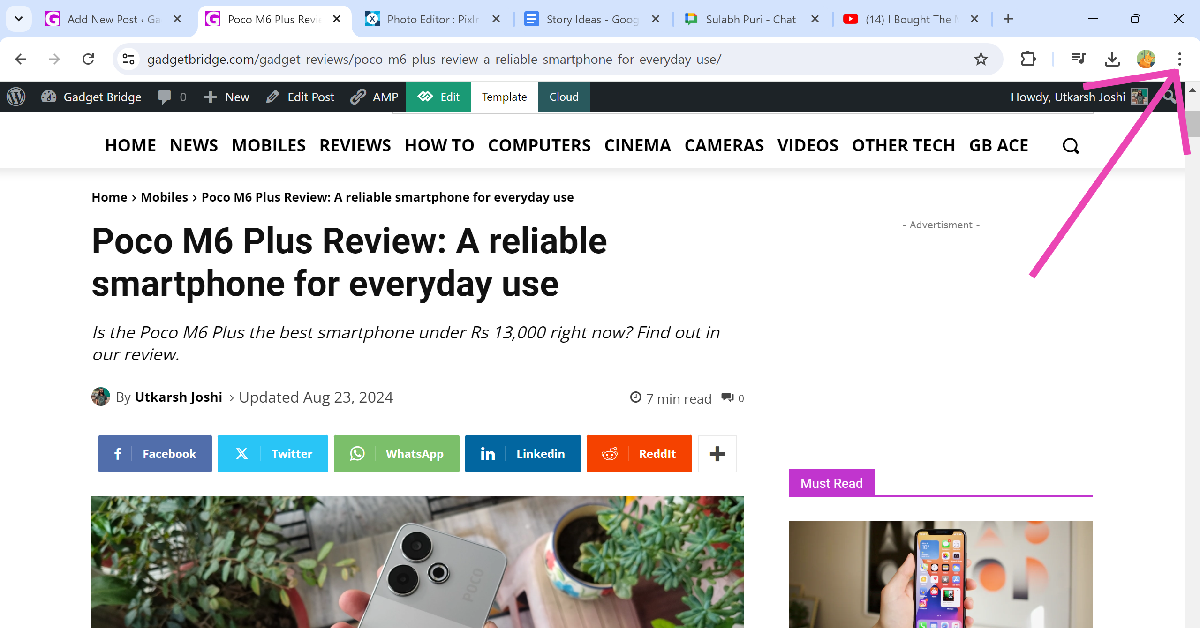
Step 2: Click the ellipses at the top right corner of the screen.

Step 2: Click the ellipses at the top right corner of the screen.

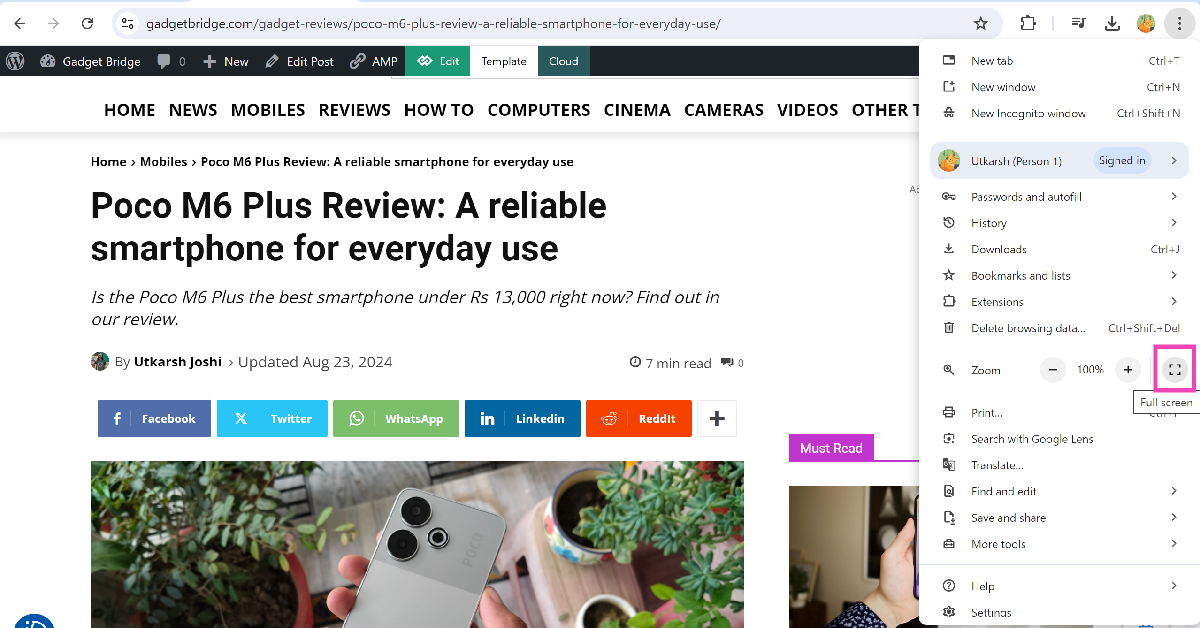
Step 3: Hit the full-screen icon next to the zoom option.

Step 3: Hit the full-screen icon next to the zoom option. Here are the top 3 ways to activate or enable full-screen mode in Google Chrome.

Use the keyboard shortcut to go full screen

PC Keyboard not working? Try these 7 fixes (2024) Here are the top 3 ways to activate or enable full-screen mode in Google Chrome.

If you don’t want to use your mouse or trackpad to go full-screen on Google Chrome, there is a handy keyboard shortcut that you can use. Simply press Fn + F11 on your keyboard and the Chrome browser will occupy the entire screen. If you wanna go back to the normal view, press the shortcut again.

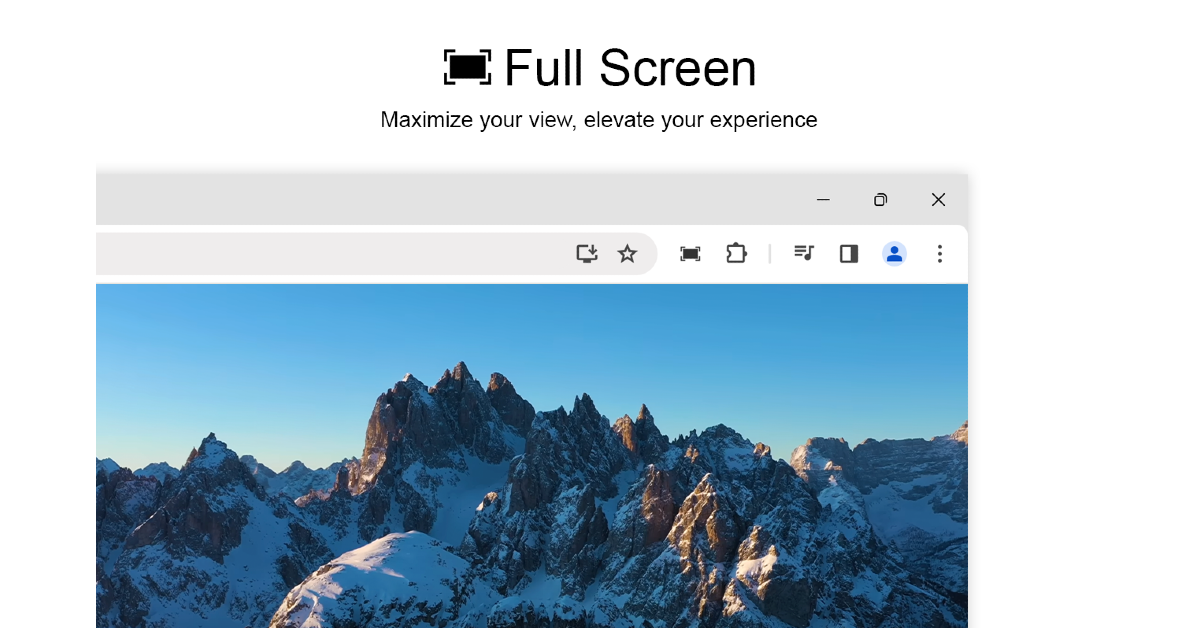
Use the ‘Full Screen for Chrome’ extension

Use the ‘Full Screen for Chrome’ extension Here are the top 3 ways to activate or enable full-screen mode in Google Chrome.

If you can’t find the native full-screen option on Chrome, use the ‘Full Screen for Chrome’ extension instead. Use this link to install the extension from the Chrome Web Store. Once installed, click on the puzzle icon next to the address bar and select the extension. With just one click, you will go full-screen on Google Chrome. You can also right-click anywhere on the screen and select ‘Page go to full screen’. To go back to normal view, move the cursor to the top of the screen and click the cross icon. You can also right-click anywhere on the screen and select ‘Exit full screen’.

Frequently Asked Questions (FAQs)

How do I activate full-screen mode on Google Chrome?

Click the ellipses at the top right corner of the screen and hit the enlarge icon next to the zoom option to go full-screen on Chrome.

Is there a keyboard shortcut to go full-screen on Chrome?

Press Fn + F11 to enable full-screen mode on Google Chrome. Move the cursor to the top of the screen and click the cross icon to go back to normal view.

Is there an extension to use Google Chrome in full-screen?

The ‘Full Screen for Chrome’ extension is a handy tool you can use when the native full-screen option isn’t working on the browser.

Read Also: Poco M6 Plus Review: A reliable smartphone for everyday use

Conclusion

These are the top 3 ways to activate or enable full-screen mode in Google Chrome. If you’re on a Mac, use the Ctrl + Command + F keyboard shortcut to make the web browser fit the size of the screen. You may also want to check out how to go full-screen in Windows 11. If you have any questions related to Chrome, let us know in the comments!

10 Ways to Fix an iPhone Personal Hotspot That’s Not Working

0

One of the best aspects of using a smartphone is that you get internet connectivity on the go. Not only can you access the internet on your phone using mobile data, but you can also use your device to share the connection with your laptop and other devices. Turning your iPhone into a WiFi hotspot is a seamless process. However, it is known to struggle with connectivity issues from time to time. Here are the top 10 ways to fix the personal hotspot on your iPhone if it isn’t working.

Read Also: Top 3 ways to fix disappearing cursor in Windows 10 (2024)

Reasons why the personal hotspot may be down

If you can’t get the personal hotspot to work, it could be due to a problem with your device or the network provider. Here are some possible explanations.

  • Your iPhone is unable to create the hotspot due to software issues
  • Older devices are not able to connect to the hotspot due to compatibility issues
  • You are not subscribed to your network carrier’s hotspot plan
  • You have run out of mobile data
  • Your network carrier settings are outdated

Toggle the Personal Hotspot

Turning off the personal hotspot and then turning it back on can fix the minor issues that may be keeping it from working. Here’s how you can do it.

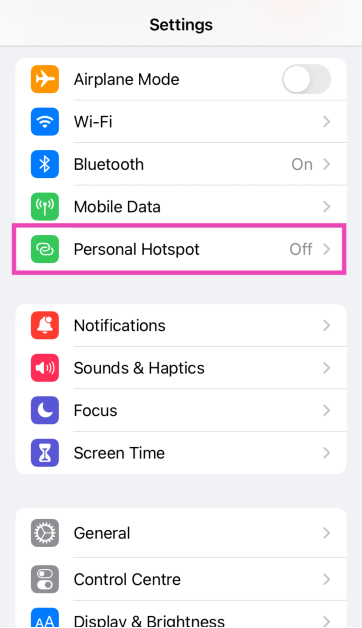
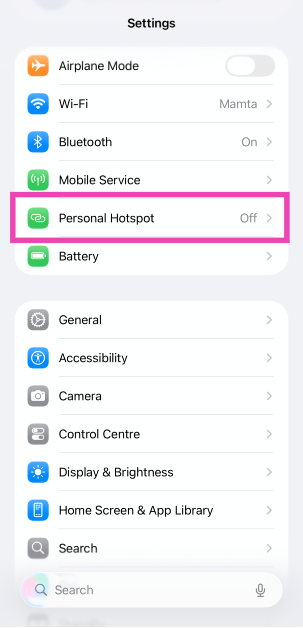
Step 1: Go to Settings.

Step 2: Tap on Personal Hotspot.

Step 2: Tap on Personal Hotspot.

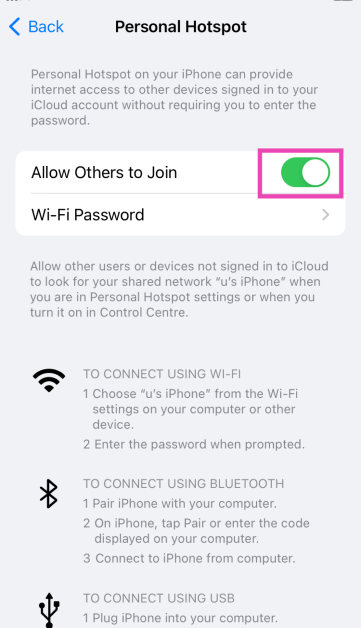
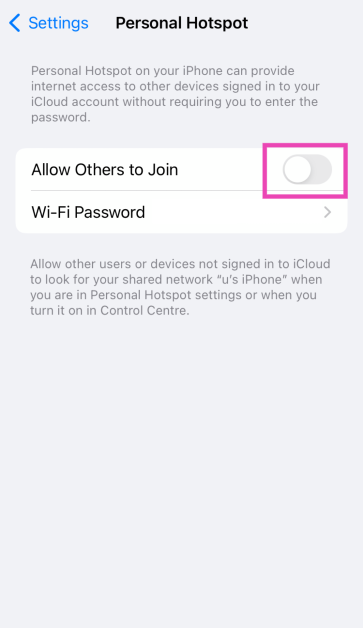
Step 3: Turn off the toggle switch next to Allow Others to Join.

Step 3: Turn off the toggle switch next to Allow Others to Join.

Step 4: Turn the toggle switch back on.

Step 4: Turn the toggle switch back on. 7 Ways to Fix iPhone Personal Hotspot That's Not Working (2024)

Maximise the hotspot’s compatibility

Newer iPhones have an option to maximise the compatibility of the WiFi hotspot. If you’re trying to connect an old device to your iPhone’s hotspot, turn on this setting. Doing this will switch the hotspot to a 2.4GHz wavelength. While the internet speed may become a bit slower, it will allow relatively older devices to connect to the hotspot easily. Here’s how you can do it.

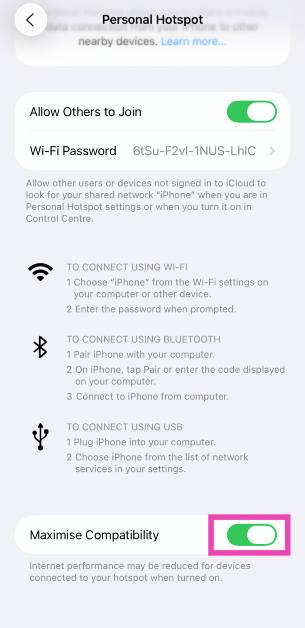
Step 1: Go to Settings and select Personal Hotspot.

Step 1: Go to Settings and select Personal Hotspot.

Step 2: Turn on the toggle switch next to Maximise Compatibility.

Step 2: Turn on the toggle switch next to Maximise Compatibility.

Toggle Mobile Data

The Personal Hotspot on your iPhone will not work if there’s no mobile data to tether. You can restore internet connectivity by quickly toggling mobile data. Here’s how.

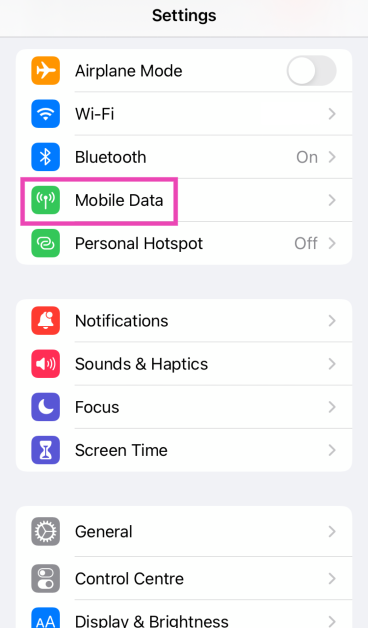
Step 1: Go to Settings and select Mobile Data.

Step 1: Go to Settings and select Mobile Data. 7 Ways to Fix iPhone Personal Hotspot That's Not Working (2024)

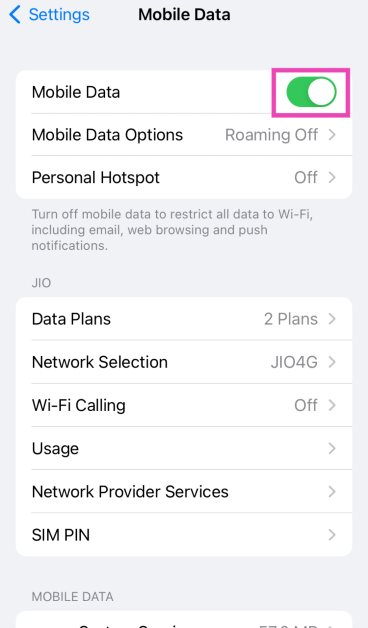
Step 2: Turn off the toggle switch next to Mobile Data.

Step 2: Turn off the toggle switch next to Mobile Data. 7 Ways to Fix iPhone Personal Hotspot That's Not Working (2024)

Step 3: Wait for a few seconds and turn the toggle switch back on.

Make sure your mobile data plan supports tethering

You can now change the snooze duration of your iPhone alarms: Here’s how

Network carriers in the US charge customers extra for using mobile hotspots on their smartphones. If you’re trying to create a WiFi hotspot using the regular mobile data pack on your phone, it won’t work until you pay the additional fee. If you’re outside of the US, make sure your mobile data plan is active and has enough data to create a hotspot.

Toggle the Airplane Mode

Turn off Airplane Mode

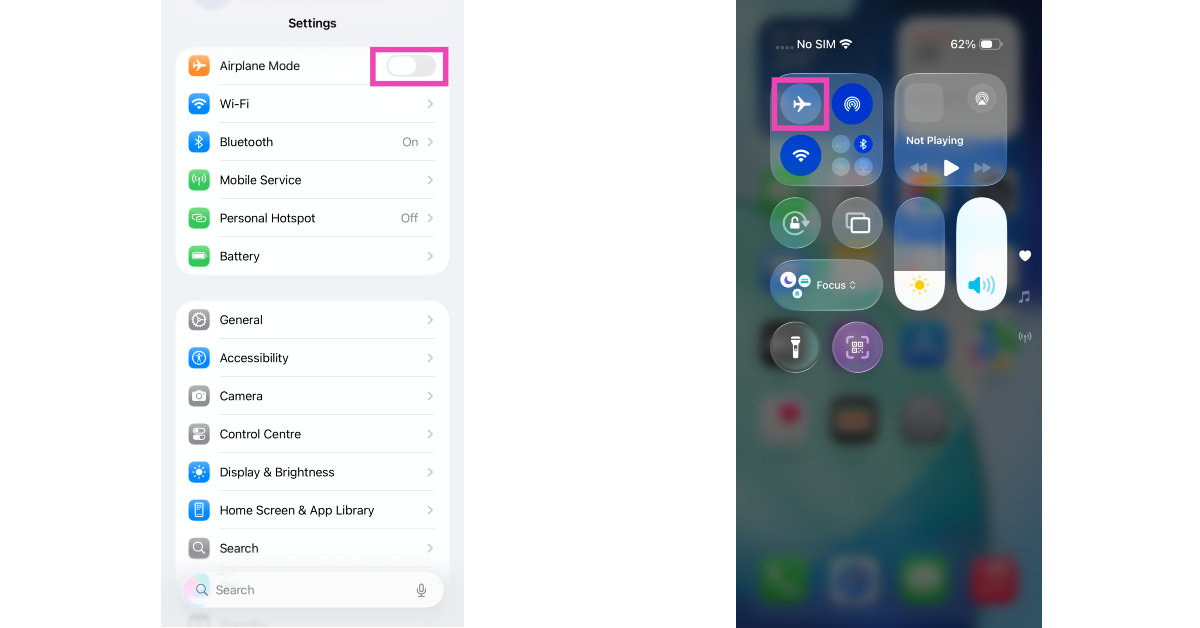
Refreshing your iPhone’s network connection can fix the mobile data being tethered by the personal hotspot. To do this, turn the Airplane Mode on and off. Swipe down from the right side of the status bar and tap the airplane icon in the Control Centre. Alternatively, go to Settings and toggle the switch next to Airplane Mode.

Restart your iPhone

Restart your iPhone

If the personal hotspot issue is caused by a background issue, restarting your iPhone can resolve it. Press the side button along with any volume key to access the power menu. Drag the slider across the screen to turn off your iPhone. Wait for a few seconds and long-press the side key to turn on your iPhone.

Update carrier settings

Update carrier settings

In order to make sure that the cellular connectivity on your phone is always top-notch, network providers routinely roll out carrier updates. These updates are automatically downloaded by your smartphone in the background. If for some reason, your iPhone failed to download these updates, you can go to Settings>General>About to manually update the network carrier settings.

Remove and reinsert the SIM card

Re-insert the SIM card

Sometimes, a poorly installed SIM card can cause network issues on your iPhone. It is also possible that the settlement of dust and grime in the SIM tray is keeping the SIM card from doing its job. The fix to this issue is simple. Use a SIM ejector tool to pop up the SIM tray and give it a good wipe. Take out the SIM card and clean it as well. Once that’s done, reinsert the card in the tray and pop it back into your iPhone.

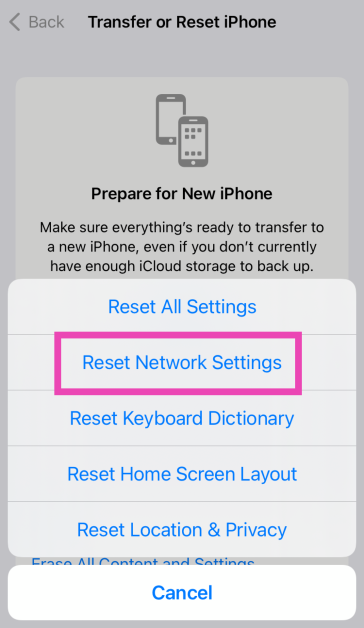
Reset Network Settings

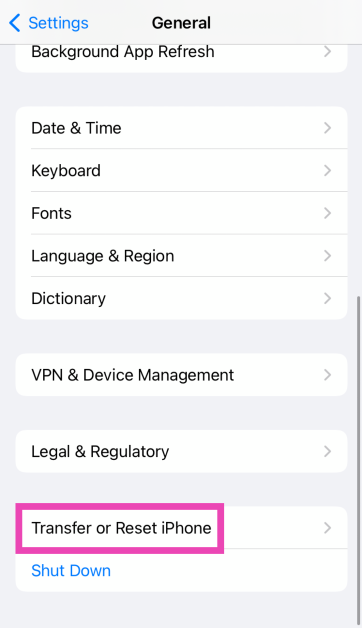
Step 1: Go to Settings and select General.

Step 1: Go to Settings and select General.

Step 2: Tap on Transfer or Reset Device.

Step 3: A popup box will appear, asking you to update the carrier settings. Hit Update. Top 11 Ways to Fix 'Message Blocking is Active' on iPhone

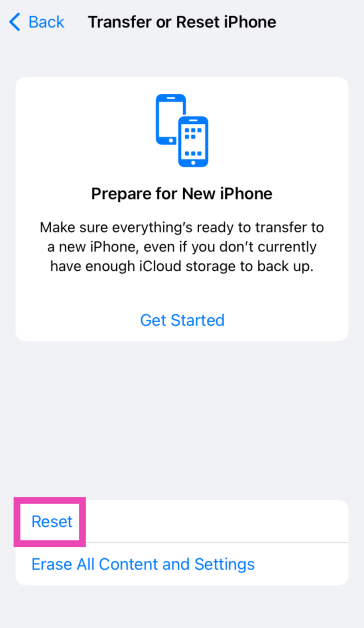
Step 3: Hit Reset.

Step 3: Hit Reset. Top 11 Ways to Fix 'Message Blocking is Active' on iPhone Top 8 Fixes for ‘iMessage Not Downloading Pictures on iPhone’ (2024)

Step 4: Select Reset Network Settings.

Step 4: Select Reset Network Settings. Top 11 Ways to Fix 'Message Blocking is Active' on iPhone Top 8 Fixes for ‘iMessage Not Downloading Pictures on iPhone’ (2024)

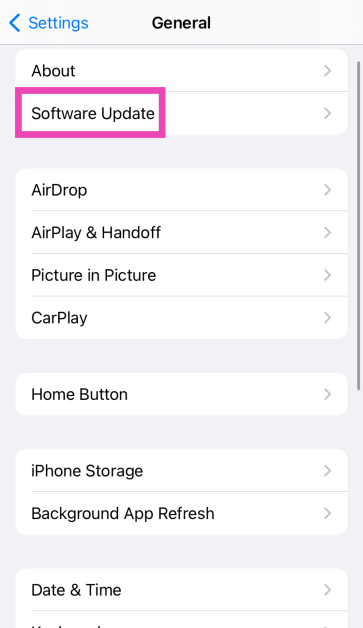
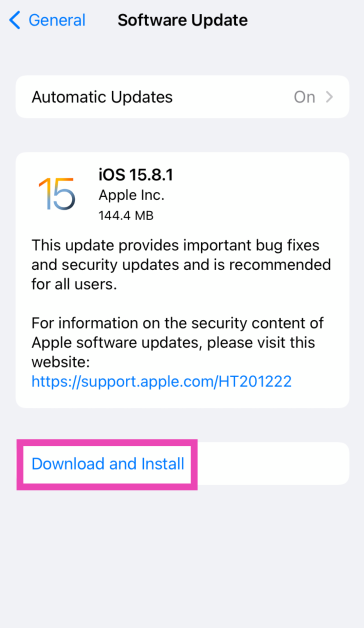
Update iOS

Step 1: Make sure your iPhone is connected to a WiFi network and plug in its charger.

Step 2: Go to Settings and select General.

Step 1: Go to Settings and select General. Top 11 Ways to Fix 'Message Blocking is Active' on iPhone Top 8 Fixes for ‘iMessage Not Downloading Pictures on iPhone’ (2024)

Step 3: Select Software Update.

Step 3: Select Software Update. 7 Ways to Fix iPhone Personal Hotspot That's Not Working (2024)

Step 4: Tap on Download and Install.

Step 4: Tap on Download and Install. 7 Ways to Fix iPhone Personal Hotspot That's Not Working (2024)

Frequently Asked Questions (FAQs)

How do I maximise the compatibility of my iPhone’s hotspot?

Go to Settings>Mobile Data>Personal Hotspot and turn on the toggle switch next to ‘Maximise Compatibility’. This will switch the hotspot to a 2.4 GHz wavelength.

How do I fix the Personal Hotspot on my iPhone?

Toggle the personal hotspot and mobile data on and off. Make sure your mobile internet plan is active and has enough data. If you think a background issue is causing this problem, restart your iPhone.

What are the alternatives to using a personal hotspot on my iPhone?

Apart from tethering your iPhone’s mobile data over a WiFi hotspot, you can choose to share it over a Bluetooth or USB connection.

Is there a connection limit on iPhone hotspots?

There is no connection limit on an iPhone personal hotspot. You can connect as many devices as you want.

How do I change my iPhone’s personal hotspot password?

Go to Settings>Personal Hotspot, tap on WiFi Password, enter the new password, and hit the tick icon.

Read Also: Poco M6 Plus Review: A reliable smartphone for everyday use

Conclusion

These are the top 10 ways to fix the personal hotspot on your iPhone if it isn’t working. If you can’t get it to work even after using these fixes, try using a USB cable or a Bluetooth connection for internet tethering. If you have any questions, let us know in the comments!

Top 3 ways to fix disappearing cursor in Windows 10 (2024)

0

Losing your mouse pointer is the most annoying thing that can happen to you on your Windows PC or laptop. Losing the ability to click on stuff and relying solely on your keyboard for controlling the PC can hamper your productivity and output. This issue can arise unprompted whether you use an external mouse or the touchpad on your laptop. So, let’s take a look at the top 3 ways to fix the disappearing cursor issue in your Windows 10 PC or laptop.

Read Also: Poco M6 Plus Review: A reliable smartphone for everyday use

What causes the cursor to disappear on Windows 10

You may think it is the mouse’s fault that you can’t find the cursor on the screen, but it is possible that your PC may be responsible for it instead. Here are some of the common reasons behind this issue.

  • Faulty external mouse
  • Wireless mouse is out of charge
  • The pointer is hidden while typing
  • The touchpad was accidentally disabled
  • Mouse drivers are outdated
  • The Windows update was installed improperly

Re-connect the mouse

If you’re using a wired mouse with your laptop or PC, it can stop working due to a faulty connection. Unplug the mouse from the USB port, clean the port, and plug it in again. You can also try plugging in the mouse in another port. To make sure that the mouse isn’t at fault, connect it to another PC or laptop. If it is working on the other device it means that the fault lies with your PC.

Unhide the mouse pointer

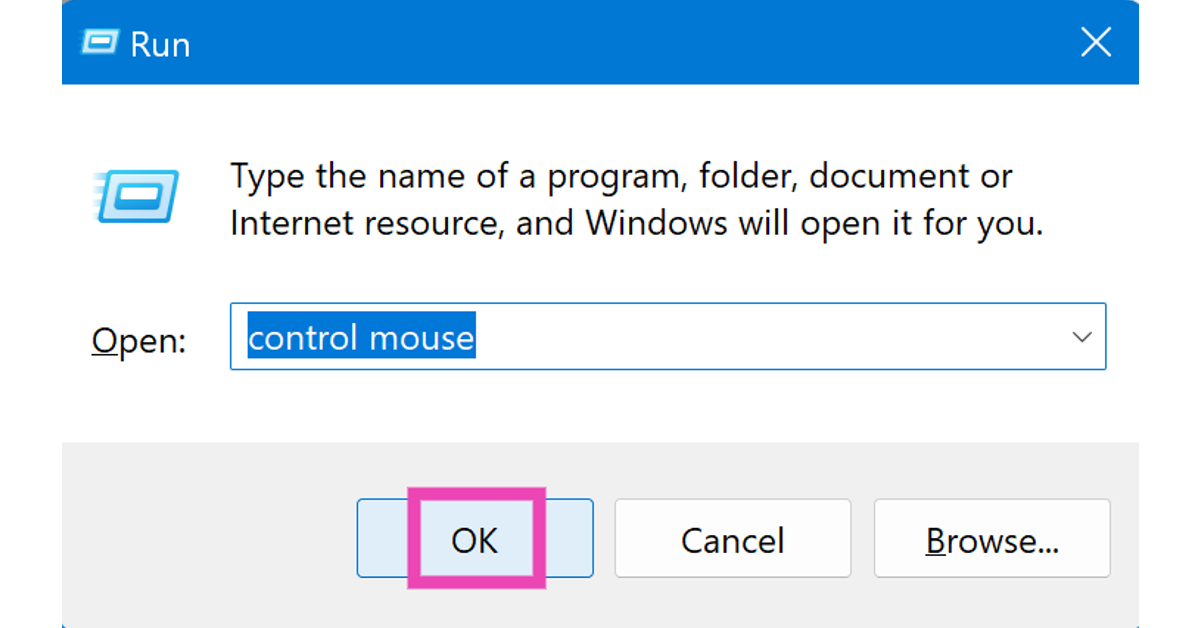
Step 1: Press Windows + R to open the command box.

Step 2: Type control mouse and hit Enter.

Step 1: Press Windows + R to open the command box.

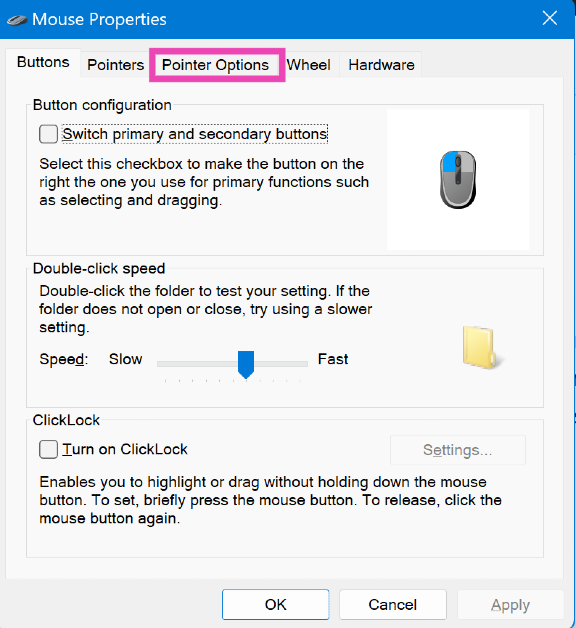
Step 3: Use your keyboard to switch to the Pointer Options tab.

Step 3: Use your keyboard to switch to the Pointer Options tab.

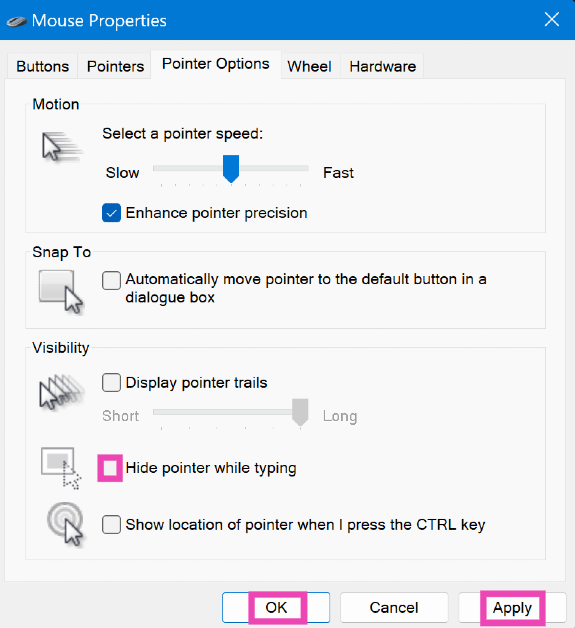
Step 4: Deselect the checkbox next to Hide mouse pointer while typing.

Step 4: Deselect the checkbox next to Hide mouse pointer while typing.

Step 5: Click on Apply and hit OK.

Turn on the touchpad

It is possible that you may have disabled the touchpad by accidentally pressing the wrong key combination. Go through the shortcut keys in the top row and find the one with the touchpad sign on it. Press it along with the Fn key to enable the touchpad. If you can’t find the key, use these steps.

Step 1: Go to Settings.

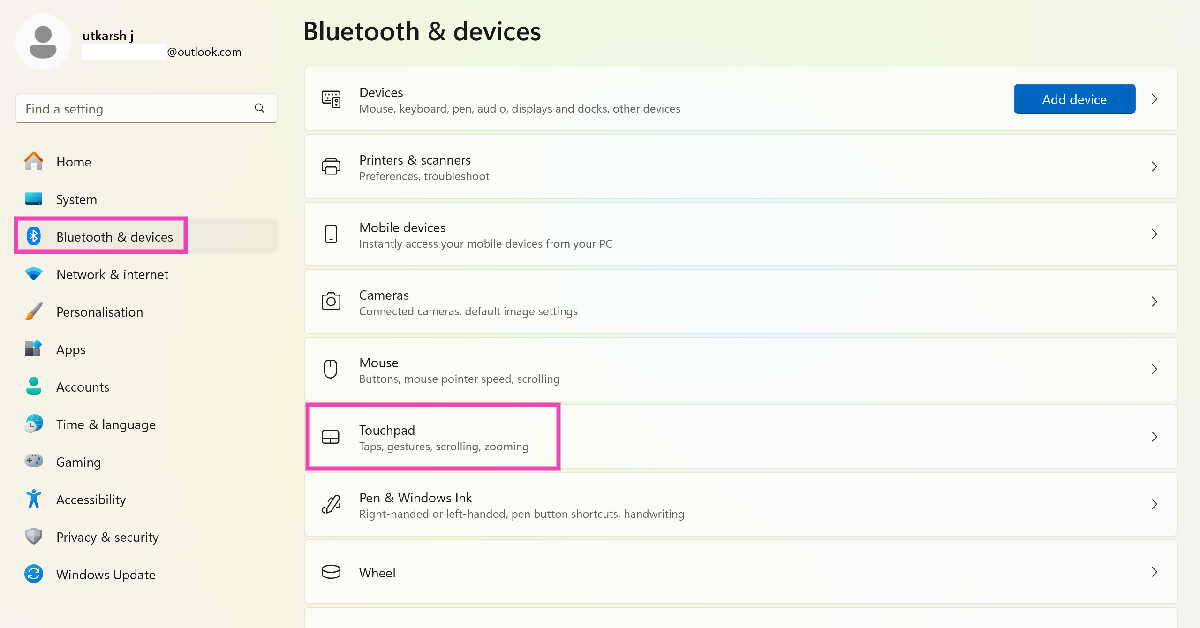
Step 2: Select Bluetooth and devices.

Step 2: Select Bluetooth and devices. Top 3 ways to fix disappearing cursor in Windows 10

Step 3: Click on Touchpad.

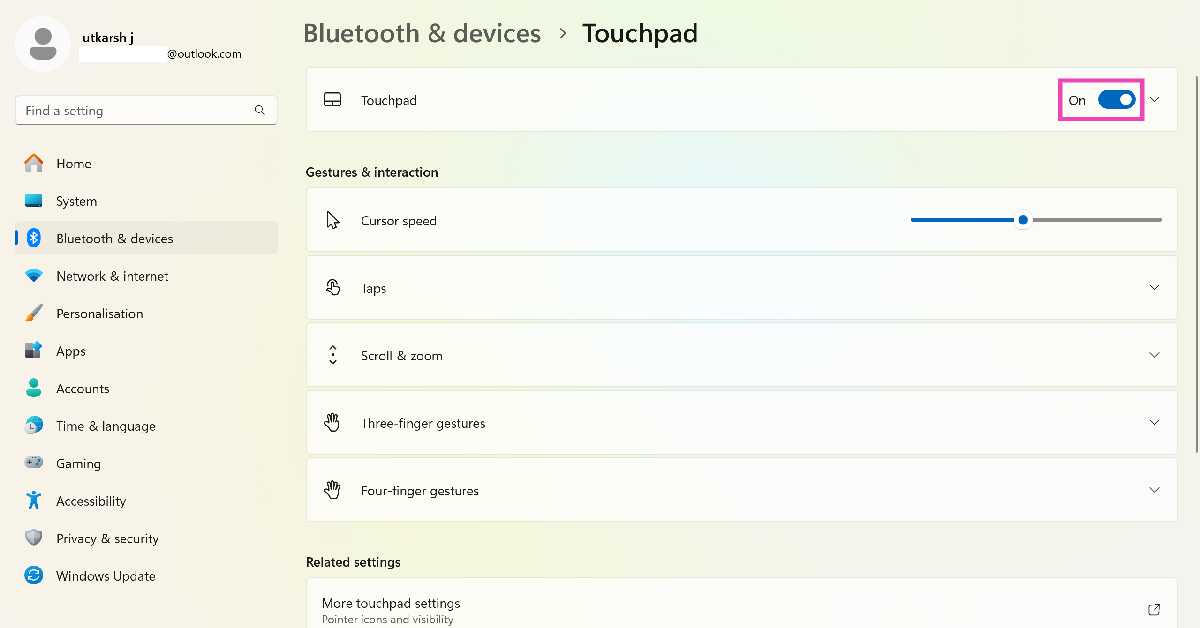
Step 4: Turn on the toggle switch next to Touchpad.

Step 3: Click on Touchpad. Top 3 ways to fix disappearing cursor in Windows 10

Frequently Asked Questions (FAQs)

Why does my mouse pointer keep disappearing on my Windows 10 PC?

Software glitches and faulty hardware can keep the mouse from functioning properly on your Windows PC. Sometimes it could stop working due to a corrupted third-party app or an improperly installed update.

How do I unhide the mouse pointer while typing?

Press Windows + R, type control mouse and hit Enter, switch to the ‘Pointer Options’ tab, and deselect the checkbox next to ‘Hide mouse pointer while typing’.

How do I turn off or turn on the touchpad on my laptop?

Go to Settings>Bluetooth and devices and toggle the switch next to Touchpad to turn it on and off.

Read Also: Comparison: iQOO Z9s Pro vs OnePlus Nord CE4

Conclusion

These are the top 3 ways to fix the disappearing cursor on your Windows 10 PC and laptop. You can also try updating the mouse drivers as a last-ditch measure to bring the pointer back on the screen. While you’re here, check out how you can change the mouse pointer speed on your Windows PC. If you found these fixes helpful, let us know in the comments!

Garena Free Fire Max Redeem Codes Today 24 August 2024: Here is how to claim them

Garena Free Fire Max is a battle royale game with regular awards and tournaments to keep players interested. If you play Garena Free Fire, you should be aware of the redeem codes that are released on a daily basis. However, because the battle royale game is banned in India, players from other countries can use the Free Fire Redeem codes daily. If you’re unfamiliar with the Garena Free Fire redeem codes or don’t know how to get them, we’ve put together a step-by-step guide to help you redeem them. Check out Garena Free Fire Max Redeem Codes for 24 August  2024.

The Free Fire Max redeem codes are a great way to get free stuff. These are 12-digit codes that contain alphabets and numbers, as well as an expiration date and time. Because the Garena FF redeem codes cannot be used more than once, you should hurry to the redemption page to claim your free reward before someone else does. To get a free reward, all you have to do is go to reward.ff.garena.com/en, which is the official redemption page. Also, keep an eye on this space for daily updates on Garena Free Fire Max redemption codes and rewards.

Also Read: Sennheiser Accentum Plus wireless headphones with Hybrid Adaptive Noise Cancellation launched

Garena Free Fire Max Redeem Codes Today 24 August 2024

FF01-23CD-45EF
FF23-45KL-67MN
FF89-01OP-23QR
FF45-67ST-89UV
FF23-45EF-67GH
FF89-01IJ-23KL
FF67-89GH-01IJ
FF67-89UV-01WX
FF12-3GHJ-45KL
FF67-89MN-01OP
FF23-45QR-67ST
FF89-01UV-23WX
FF45-67MN-89OP
FF01-23QR-45ST
FF45-67YZ-89AB
FF01-23WX-45YZ
FF67-89AB-01CD

How to Get Free Fire Max Redeem Codes for Garena on 24 August 2024?

  • Visit the Garena Free Fire Max game’s official website at reward.ff.garena.com.
  • Use your Facebook, Google, VK, Apple ID, Huawei ID, or Twitter account to log in.
  • You’ll be taken to a valid redemption code (s)
  • Copy and paste the 12-digit redemption code into the text box.
  • On the screen, a dialogue box will appear.
  • ‘Ok’ should be selected.

For the latest gadget and tech news, and gadget reviews, follow us on TwitterFacebook and Instagram. For newest tech & gadget videos subscribe to our YouTube Channel. You can also stay up to date using the Gadget Bridge Android App. You can find the latest car and bike news here.
Amazon Quiz Answers Today 24 August 2024: Participate to win Rs 500 Amazon Pay Balance

24 August 2024: New Amazon Quiz is now available. Customers from different parts of the country are participating in the daily quiz. The quiz starts at midnight today and will be live until 11:59 PM tonight. By successfully answering every question, participants in the quiz have the chance to win wonderful rewards. A Rs 500 Amazon Pay Balance is up for grabs to participants today.

One wrong answer could eliminate you from the quiz. You have a chance to win Rs 500 Amazon Pay Balance if you successfully answer every question. Users of the app only have the opportunity to take the quiz. Check Out 24 August 2024 Amazon Quiz Answers.

Amazon Quiz Today Prize: Rs 500 Amazon Pay Balance

Quiz Date: 24 August 2024

Daily Timing: 12 AM to 11:59 PM

Previous Amazon Quiz Winners Announcement: Today 12 PM Noon

Amazon Quiz Answers Today 24 August 2024: Win ₹ 500 Amazon Pay Balance

Question 1: Which Indian won the silver medal in the FIDE women’s candidates 2024?

Answer: Koneru Humpy

Question 2: Which of these actresses is the executive producer of the Amazon Prime series ‘Poacher’?

Answer: Alia Bhatt

Question 3: Which of these is a traditional, flat-bottomed Venetian rowing boat?

Answer:  Gondola

Question 4: The man in the picture is cosplaying a character from which famous children’s book?

Answer: Alice in Wonderland

Question 5: This is the Adalaj Ni Vav, a stepwel located in which state?

Answer: Gujarat

Also Read: Noise Buds Verve, budget TWS with up to 45 hours of playback launched in India

How To Play Amazon Quiz Today

Only app users are eligible to play the Amazon quiz every morning from 12 AM to 11:59 PM. The quiz is not available on the desktop. For those who are unaware of how to play the Amazon quiz, below are the steps, you can follow to take the quiz.

  • First, download the Amazon app from the Google Play Store or App Store or go here to download the Amazon App
  • Now fill in the required information through the Sign-Up option.
  • You need to log in to the Amazon app and scroll down on the home screen to find the Amazon Quiz banner.
  • Tap on the Amazon Quiz banner and tap on the Start button to start the Quiz.
  • Now you will get 5 questions and you need to answer them correctly. One wrong answer will eliminate you from the Quiz.
  • After answering all the questions correctly you are now eligible for a Lucky Draw.
  • The previous winner’s name will be announced today at 12 PM.

Amazon Daily Quiz Answers from the previous few days.

Here are all the answers from the previous 5 days of the Amazon Daily Quiz and Contest.

Amazon Quiz Answers Today 23 August 2024: Win ₹ 500 Amazon Pay Balance

Question 1: Which team recently set the record for the highest chase in Indian Premier League history by successfully chasing a target of 262?

Answer: Punjab Kings

Question 2: The comedy movie ‘Ricky Stanicky’ stars which of these actors, also a big star in sports entertainment?

Answer: John Cena

Question 3: The famous monument, the Humayun’s Tomb was built in which century?

Answer: 16th century

Question 4: This is the famous Rathaus, located in which famous European capital?

Answer:  Vienna

Question 5: Which of these famous guitarists was part of this iconic band?

Answer: Slash

Amazon Quiz Answers Today 22 August 2024: Win ₹ 500 Amazon Pay Balance

Question 1: Which of these recently played ATP events has a court named after the legendary tennis player Rafael Nadal?

Answer: Barcelona Open

Question 2: The movie Road House sees Jake Gyllenhaal play the role of an ex UFC fighter. Which of these famous sportspeople also acts in the movie?

Answer: Conor Mcgregor

Question 3: What is the other name given to the swamp deer, the state animal of Madhya Pradesh?

Answer: Barasingha

Question 4: In which of these cities in the USA is this famous museum located?

Answer: New York

Question 5: Which of these controversial media organizations was founded by this Australian editor and publisher?

Answer: Wikileaks

Amazon Quiz Answers Today 21 August 2024: Win ₹ 500 Amazon Pay Balance

Question 1: Which of these players won the Monte Carlo Masters tennis tournament in 2024, his 3rd triumph in that event in 4 years?

Answer: Stefanos Tsitsipas

Question 2: Which of these Amazon Prime shows shares its name with a 2005 Brad Pitt- Angelina Jolie movie?

Answer: Mr and Mrs Smith

Question 3: Which animal features on the election symbol of the Republican party in the USA?

Answer:  Elephant

Question 4: These waterfalls span the border between the province of Ontario in Canada and which state in the USA?

Answer:  New York

Question 5: Which of these famous architects designed this iconic monument in India?

Answer: Edwin Lutyens

Amazon Quiz Answers Today 20 August 2024: Win ₹ 500 Amazon Pay Balance

Question 1: Against which team did Sunrisers Hyderabad set a new record scoring 287 in an IPL match?

Answer: Royal Challengers Bengaluru

Question 2: Who plays the role of soldier Arun Katyal in the recently released movie ‘Yodha’?

Answer: Sidharth malhotra

Question 3: Which of these famous rulers was born in the Shivneri Fort in Maharashtra in the 17th century?

Answer: Shivaji

Question 4: Name this famous church located in Europe

Answer: St. Peter’s Basilica

Question 5: This is the flag of which Caribbean country?

Answer: Barbados

Amazon Quiz Answers Today 19 August 2024: Win ₹ 500 Amazon Pay Balance

Question 1: Which African country launched its first operational Earth observation satellite named ‘Taifa-1’ in 2023?

Answer: Kenya

Question 2: Aman Sehrawat has won India’s first gold medal at the Asian ________ Championships 2023 in Astana, Kazakhstan.

Answer: Wrestling

Question 3: FIFA removed which country from hosting the men’s U-17 World Cup?

Answer:  Peru

Question 4: This cat’s name ‘Tabby’ came from which cloth?

Answer:  Silk

Question 5: Who invented the first digital camera?

Answer: Steven Sasson

Amazon Quiz Answers Frequently Asked Questions (FAQs)

Where can I check the previous winners? Did I win how to check?

You can head over to this link on your mobile or desktop to check the winners of the Amazon Daily Quiz Contest.

How to Play Amazon Daily Quiz or Contest?

We have written an explainer above, you can refer to that.

When are the winners of the Amazon Quiz and contest announced or declared?

The announcement of today’s Amazon quiz winner will take place Tomorrow. As for the Special Quiz and “Spin & Win” Contest, the winners will be declared once the Quiz Contest comes to an end. To find out who the lucky winner is, you can refer to the Amazon Quiz Winners List or visit the Amazon Winners tab in the Amazon App.

How to participate in the Daily Amazon Quiz?

That is very easy, just got to the Amazon app and scroll to the bottom of the page and you will find the Quiz section. Click on it (usually it is called the fun zone) and you can enter the Amazon Today Quiz Contest. 

Are there any other quizzes or contests running on Amazon daily?

Yes, there are many running on a daily basis. These range from spinning the wheel to answering the questions correctly. All are located in the Fun Zone. 

What are the criteria for selecting a winner in the Daily Amazon Quiz?

When a qualified player submits correct answers to all the questions, they will automatically be entered into a lucky draw. This draw will include all participants who answered all the questions correctly. Amazon randomly selects the final winners from the pool of eligible participants who gave the right answers.

Which Types of Questions are asked within Amazon Daily Quiz?

These are very simple and straightforward questions. These are mainly related to general knowledge. 

Where should I look for Amazon Daily Quiz answers?

You can bookmark this page as we will help you every day with the Amazon Daily Quiz. We bring you fresh answers every day for the Amazon Daily Quiz and Contest. 

What time does Amazon Announce previous winners?

The previous winner’s name will be announced today at 12 PM (noon).

For the latest gadget and tech news, and gadget reviews, follow us on TwitterFacebook and Instagram. For newest tech & gadget videos subscribe to our YouTube Channel. You can also stay up to date using the Gadget Bridge Android App. You can find the latest car and bike news here.
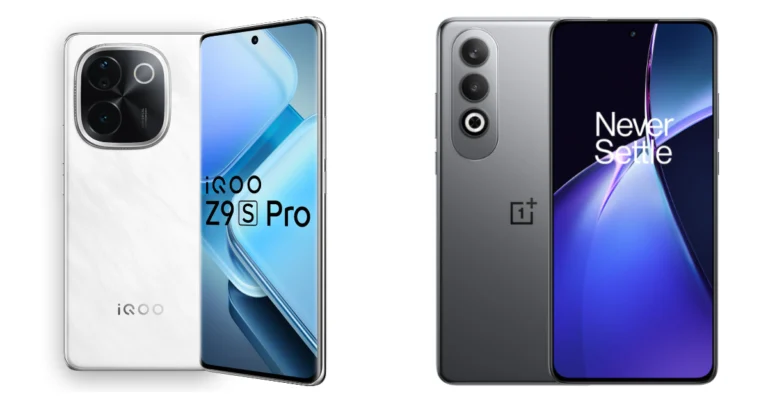
Comparison: iQOO Z9s Pro vs OnePlus Nord CE4

iQOO Z9s Pro recently launched in India. In terms of specs, pricing and features the device is very similar to the OnePlus Nord CE4, which was released in April this year. Here is a detailed comparison of the iQOO Z9s Pro vs OnePlus Nord CE4 to help you understand the differences and decide which to buy.

Also Read: Fastrack Smart Metal Series with SingleSync BT calling feature launched in India

Display

iQOO Z9s Pro: 6.77-inch Full-HD+ AMOLED screen

OnePlus Nord CE4: 6.7-inch FHD+ AMOLED display

Processor

iQOO Z9s Pro: Qualcomm Snapdragon 7 Gen 3 SoC

OnePlus Nord CE4: Qualcomm Snapdragon 7 Gen 3

Rear camera(s)

iQOO Z9s Pro: A dual rear camera setup that includes a 50-megapixel Sony IMX882 sensor with an f/1.7 aperture, and an 8-megapixel ultra-wide angle camera with f/2.2 aperture

OnePlus Nord CE4: Dual rear camera setup includes a 50-megapixel Sony LYT600 primary sensor with Optical Image Stabilisation and an 8-megapixel Sony IMX355 ultra-wide camera

Selfie camera

iQOO Z9s Pro: 16-megapixel selfie camera

OnePlus Nord CE4: 16-megapixel

RAM and storage

iQOO Z9s Pro: 8GB of RAM and 128GB storage, 12GB RAM with 256GB storage and 12GB RAM with 256GB storage

OnePlus Nord CE4: 8GB RAM with 128GB storage and 8GB RAM with 256GB storage

Battery

iQOO Z9s Pro: 5,500mAh battery

OnePlus Nord CE4: 5,500mAh battery

Operating system

iQOO Z9s Pro: Funtouch OS 14 with Android 14

OnePlus Nord CE4: Android 14-based OxygenOS 14

Price

iQOO Z9s Pro: Rs 24,999

OnePlus Nord CE4: Rs 24,999

Our Take

The OnePlus Nord CE4 has a plastic body with a glass-like finish, while the iQOO Z9s Pro has a curved plastic body and metal frame. With regard to robustness, the iQOO smartphone is better than the Nord phone because it has an IP64 rating with Scott α Glass protection, while the Nord phone only has an IP54 rating without display protection. On the one hand, the iQOO Z9s Pro’s curved screen gives it a more premium appearance than the Nord phone’s flat panel.

The Qualcomm Snapdragon 7 Gen 3 SoC powers both smartphones. But the Nord CE4 only has 8GB of RAM, whilst the iQOO Z9s Pro has up to 12GB. Three years of security patches and two years of Android OS updates will be provided for both phones.

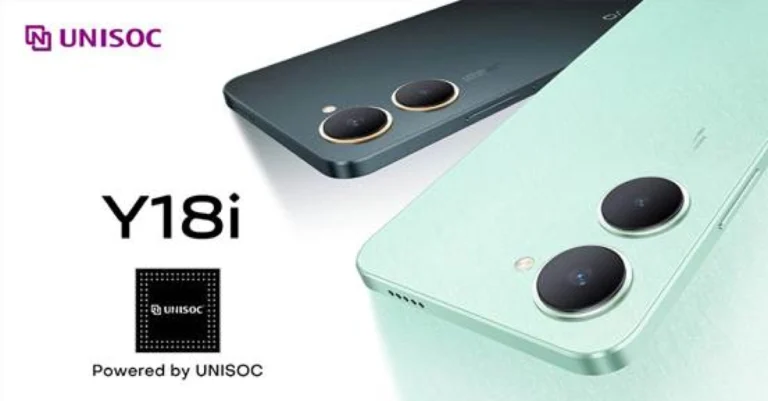
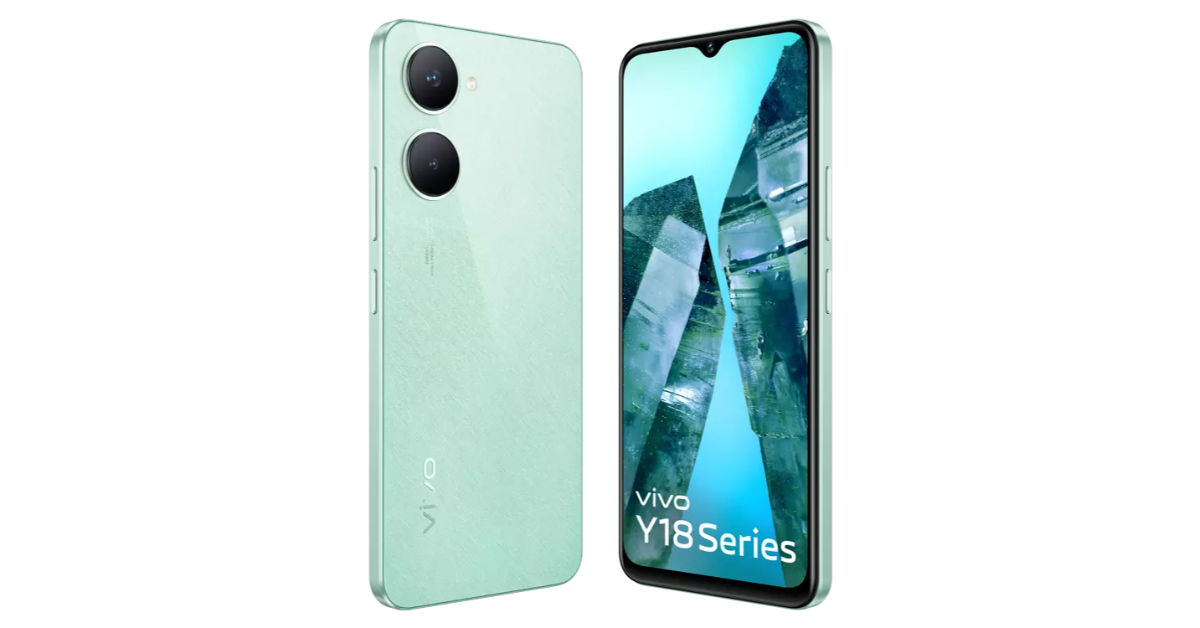
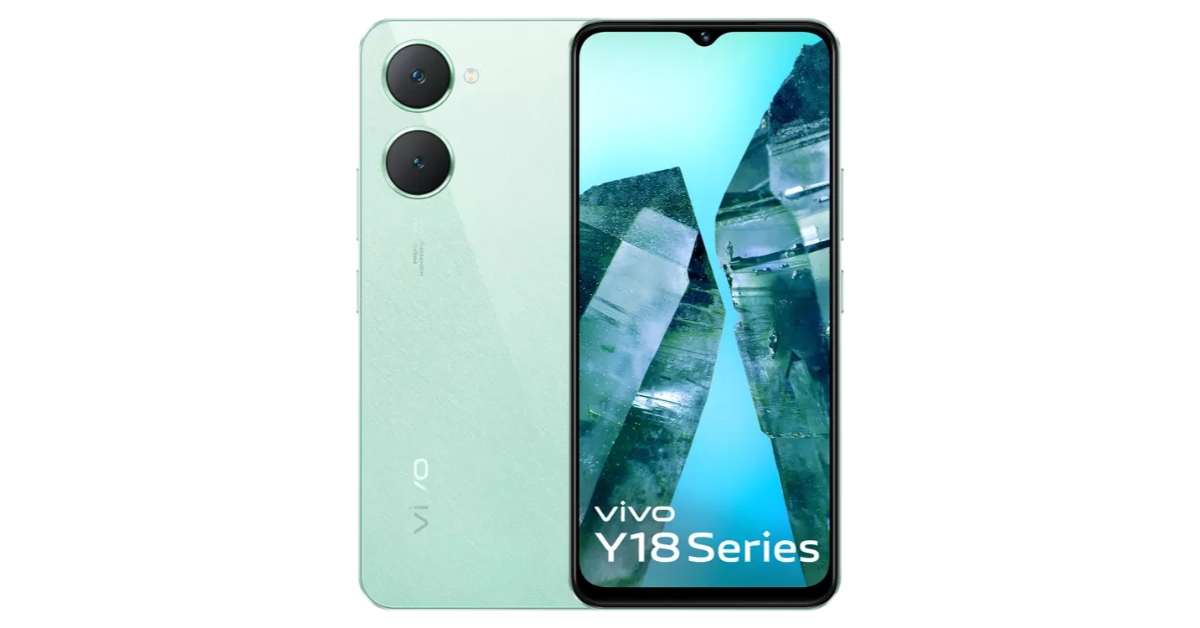
Also Read: Vivo Y18i budget smartphone with 5,000mAh battery launched in India

Regarding cameras, both phones have an identical configuration for the front and back cameras. The 5,500mAh battery on both phones is standard, but the Nord has a faster 100W charging support, while the iQoo only supports 80W charging.

The iQOO Z9s Pro and the OnePlus Nord CE4 will perform similarly in practically every area as both devices come with almost the same features.

Nonetheless, there are a few major differences between the two. While the Nord CE4 offers fast charging, on the other hand, the iQOO Z9s Pro is more durable.

Poco M6 Plus Review: A reliable smartphone for everyday use

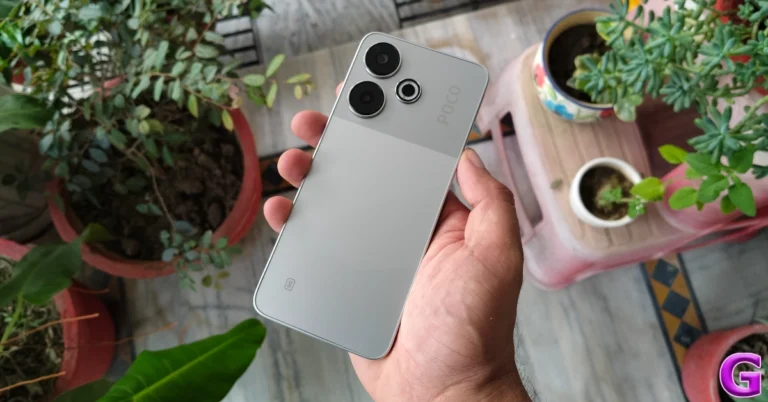
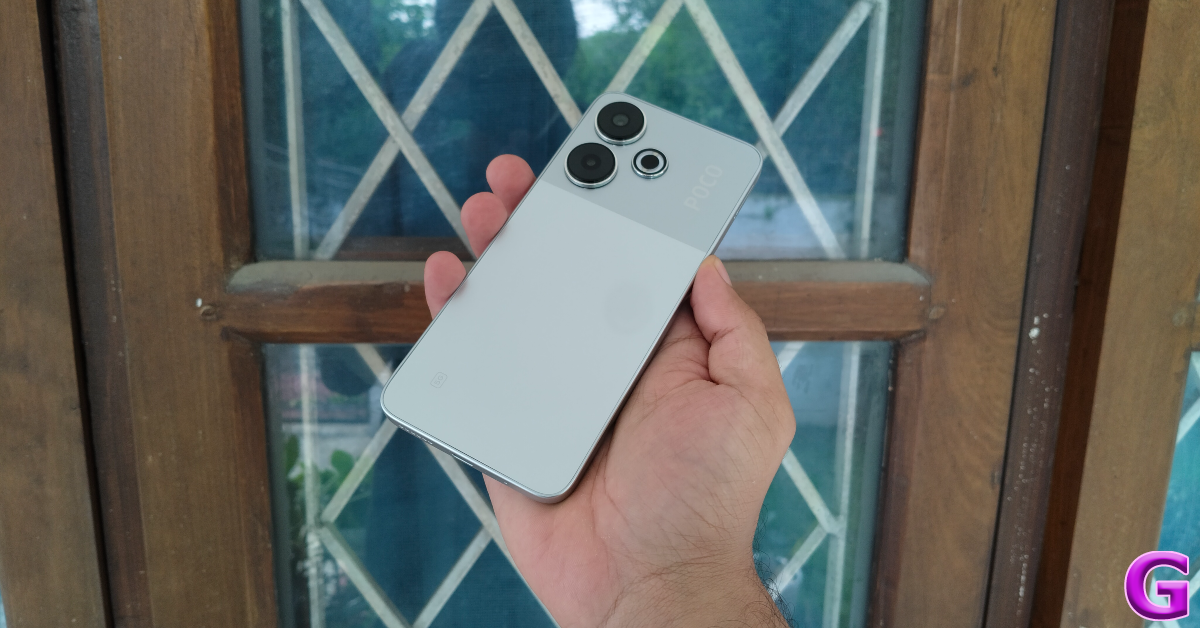
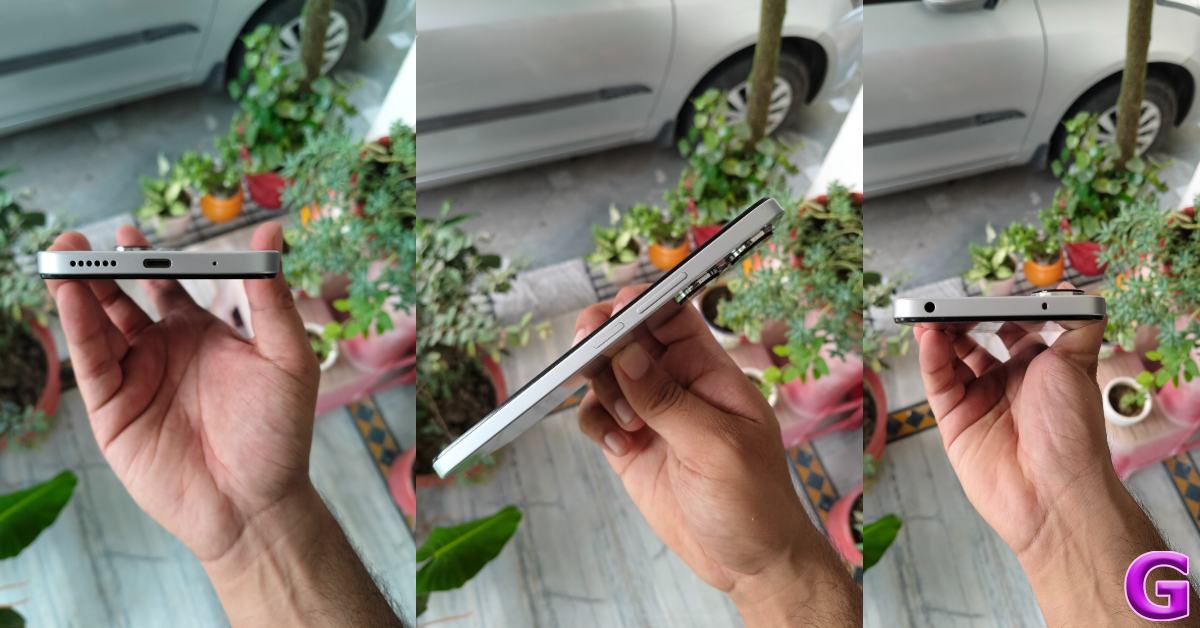
The Poco M6 Plus is the third instalment in Poco’s M6 series of smartphones, following the M6 Pro and entry-level M6. We reviewed the M6 and M6 Pro last year and found them to be quite reliable for everyday use. The new ‘Plus’ variant was launched earlier this month and costs a small premium over its two siblings. The smartphone is currently retailing for Rs 13,000 on Flipkart. In terms of upgrades, the M6 Plus gets a new 108MP sensor for the primary camera, an ‘Accelerated Edition’ of the Snapdragon 4 Gen 2 chipset under its hood, and a slightly bigger battery that charges faster than the other two variants. On paper, the smartphone flaunts the same specs as its Xiaomi cousin, Redmi 13. We used it for a week and went through its ins and outs. Here is our review of the Poco M6 Plus.

Read Also: Poco Pad 5 with Dolby Vision and Dolby Atmos support launched in India

Poco M6 Plus Review: Design and Display

Here’s what you get inside the Poco M6 Plus retail box:

  • Smartphone
  • 33W power adapter
  • USB Type-C to Type-C cable
  • Clear plastic case
  • SIM ejector
  • Quick start guide

The Poco M6 Plus flaunts a glass back, which is unusual for this segment. This glass back also gives the smartphone a fair bit of weight. At 205g, it is one of the heavier smartphones in this price category. The weight is distributed evenly across the body of the device and it does not feel top-heavy at all. Similar to the two M6 variants, the M6 Plus gets a dual-tone finish on its back panel. The top third of the panel which caters to the vertical camera array is darker than the rest of the body. Three colour variants are on offer – Graphite Black, Ice Silver, and Misty Lavender.

Poco M6 Plus Review: Design and Display

The plastic frame of the smartphone houses the volume rocker keys and the side button on its right edge. The side button also doubles as a fingerprint sensor. The bottom edge contains the primary microphone, USB slot, and speaker grille. The hybrid SIM slot lies on the left edge of the frame. The headphone jack and IR blaster are positioned on the top edge. There is no secondary speaker or microphone on the device.

design

The 6.79-inch IPS LCD panel on the M6 Plus has a 120Hz refresh rate and can reach a peak brightness of 550 nits. This brightness level is optimum for indoor use but presents some legibility issues under direct sunlight. An LCD panel also means that you don’t get Always on Display on this device. There is also no under-display fingerprint reader on this phone. However, the fingerprint sensor on the side key is pretty snappy. The touch response of the display is decent and there are no lags while browsing web pages and apps. The punch-hole cutout for the selfie camera sets the M6 Plus apart from the other two variants which sport the waterdrop notch. All three variants have similarly sized bezels around the display.

display

The viewing experience offered by the LCD panel is satisfactory. The images produced on the screen have rich colours but they lack the deep blacks that AMOLED displays are known for. The single, bottom-firing speaker outlet produces a slightly tinny audio output but it can reach a loud volume level. We streamed multiple titles on the device across platforms like Netflix, Prime Video, and Disney+ Hotstar, and were happy with the overall viewing experience. Sure, we would have preferred an AMOLED display and a secondary speaker but given the price of the smartphone, these tradeoffs make sense.

Poco M6 Plus Review: Performance and Cameras

The Poco M6 Plus is powered by the Snapdragon 4 Gen 2 ‘Accelerated Edition’ chipset. The smartphone is available in two RAM variants – 6GB and 8GB. Both variants are available with 128GB (UFS 2.2) on-device storage which can be expanded further using a micro SD card. The 8GB variant fetches Rs 14,500.

On the Geekbench 6 app, the Poco M6 Plus scored 963 points in the single-core test and 2,217 points in the multi-core test. This is higher than the entry-level and Pro variants, which scored 700 & 1,915 and 863 & 1,893 points respectively. The Redmi 13, powered by the same chipset as the M6 Plus, scored 953 & 2,207 points when we reviewed the smartphone.

Poco M6 Plus Review: Performance and Cameras

The Poco M6 Plus is a reliable smartphone for everyday use. We used the smartphone for calling, emailing, media streaming, social media browsing, and other routine tasks. While the apps do take slightly longer to load compared to midrange devices, it is all smooth sailing once you get over the initial hump. The inclusion of an IR blaster significantly increased the functionality of the device. We used it as a TV and AC remote throughout the review period. With 5G connectivity onboard, we never had to slog through sluggish speeds while using mobile internet on the M6 Plus.

The M6 Plus’ performance takes a noticeable hit upon running demanding games on the device. We played Call of Duty Mobile and Asphalt Legends Unit on the smartphone and encountered frequent jitters. This can be solved by switching to low graphics but that takes the bite out of the overall gameplay. However, titles like Candy Crush Saga and Subway Surfers run without any hiccups and the touch response rate while playing these games is quite pleasant. If a good gaming performance is your biggest priority, there are other better options for you.

performance

On the OS front, Xiaomi’s HyperOS puts up a good display. There is a good range of customisation options for the home and lock screens. The software is well-optimised for the platform and provides a very intuitive browsing experience. We also like the native Mi Remote app for the IR blaster. It registered all the devices that we tried it on without needing multiple attempts. The only thing that lets down the software experience is the sheer volume of bloatware on this phone. Thankfully, these apps can be removed and we recommend taking the time to make the interface ‘cleaner’.

Poco M6 Plus Review: Performance and Cameras

The 5,030mAh battery pack on this device lasts an entire day with ease. You can even push it to 1.5-2 days if you cut down on media streaming and other power-intensive tasks. Our daily usage on the Poco M6 Plus during the review period consisted of 1-2 hours of media streaming, 1 hour of gaming, frequent video calls, and social media browsing. At the end of each day were left with a 15-20% charge. The 33W power adapter provided inside the box can fully charge the smartphone in just over an hour.

camera

The Poco M6 Plus has the same camera setup as the Redmi 13. The 108MP primary shooter is the centrepiece of the rear camera setup. There’s also a 2MP macro sensor for closeups. Up front, the 13MP selfie camera lies inside a punch-hole cutout.

Poco M6 Plus Review: Performance and Cameras

Poco M6 Plus Review: Performance and Cameras

The 108MP camera puts in a great performance in outdoor daylight conditions. The images taken in well-lit conditions are detailed, balanced, and showcase rich colours. We were happy with the contrast level and dynamic range displayed by the images. These results are almost identical to the ones we saw on the Redmi 13.

camera

camera

In limited lighting conditions, the primary shooter struggles to properly brighten the subject. The images are soft and grainy. The results are much better when there’s some artificial lighting available. This performance is at par with the rest of the segment.

night mode
Without Night Mode vs With Night Mode

We were particularly impressed by the portrait shots taken by the Poco M6 Plus. The smartphone does a good job of detecting the subject’s edges and separating it from the background. The level of background blur applied to the portrait shots is satisfactory. This isn’t something that is usual for budget smartphones.

Poco M6 Plus Review: Performance and Cameras
Portrait Shots

The 13MP front-facing camera delivers good results in indoor and outdoor lighting conditions. The smartphone does a good job of keeping the skin brightening and smoothening effects to a minimum. The selfies are clear, balanced, and pack a lot of detail. The portrait mode works well with the front camera too.

Read Also: New Feature On Instagram: How To Add Music To Your Instagram Profile?

Conclusion

The Poco M6 Plus ticks all the right boxes for a budget smartphone. It has an amazing primary shooter, a premium glass back panel, and a clean design. The OS, while bloatware-ridden, is very intuitive and offers a lot of personalisation options. The Snapdragon 4 Gen 2 AE chipset at the heart of this device isn’t designed to handle intense gaming sessions but it does a good job of handling routine tasks. If you prioritise form factor, photography, and consistent everyday performance, this is the smartphone for you.

Poco M6 Plus: Pros

  • Good photography performance
  • Versatile battery life
  • Glass back panel
  • IR blaster
  • Affordable

Poco M6 Plus: Cons

  • Lacks a dual-speaker setup
  • Contains bloatware

Fastrack Smart Metal Series with SingleSync BT calling feature launched in India

Fastrack Smart has introduced the Metallic Series, a collection of beautiful and strong smartwatches targeted at young Indians. Inspired by Fastrack’s stainless-steel watches, the series is made of high-quality metal and features a stainless-steel strap.

The Fastrack Smart Metal Series is a luxury watch with a strong stainless-steel strap that combines style and durability. It has an advanced chipset that ensures effective energy management and seamless performance.

The SingleSync BT calling function enables users to manage calls and messages without the need for a phone, and the products include stunning AMOLED screens and an immersive UI experience, as well as a next-generation sensor designed specifically for Fastrack Smart smartwatches.

Fastrack Smart Metal Series with SingleSync BT calling feature launched in India

Also Read: Vivo Y18i budget smartphone with 5,000mAh battery launched in India

Speaking on the launch of The Metal Series, Adithya Raj, Head Sales & Marketing – Wearables, Titan Company Ltd. said, “Fastrack Smart has redefined youth fashion with its unique blend of style and technology. The Metal Series is a testament to our commitment to delivering trendsetting products that resonate with the aspirations of Gen Z. We believe this collection will not only elevate the smartwatch category but also become a coveted accessory for the modern youth. At Fastrack Smart, we’re committed to staying at the forefront of wearable technology, delivering the trendiest designs with the smartest features, all at an accessible price point. We can’t wait to see how the youth rocks the Metal Series!”

Also Read: Poco Pad 5 with Dolby Vision and Dolby Atmos support launched in India

Fastrack Smart Metal Series availability

The Fastrack Smart Metal series will be sold at Titan World, Fastrack Stores, Shopper Stop, Lifestyle, Pai International, and other authorised multi-brand retail stores and mobile doors. It will be available for purchase online at fastrack.in, Amazon, and Flipkart.

Vivo Y18i budget smartphone with 5,000mAh battery launched in India

The Vivo Y18i, a low-cost smartphone, was released in India today. The gadget has a 6.56-inch HD+ display. It is powered by Unisoc’s T612 chipset. It has a 13MP primary camera and a 5,000mAh battery. The gadget is IP54-rated and runs Funtouch OS 14, which is based on Android 14.

Vivo Y18i price in India, availability

Vivo Y18i has launched in India with a price tag of Rs 7,999 for the 4GB RAM with 64GB storage model. The device is listed on the company’s website but will be available through offline retailers in the country. The handset will be offered in two colour options Gem Green and Space Black.

Vivo Y18i price in India, availability

Also Read: Poco Pad 5 with Dolby Vision and Dolby Atmos support launched in India

Vivo Y18i specifications

The Vivo Y18i features a 6.56-inch HD+ LCD with 1,612 × 720 pixels of resolution. The screen has 90Hz refresh rate support. The budget phone runs on Funtouch OS 14-based Android 14 out of the box. It is powered by a Unisoc T612 chipset paired with 4GB of RAM and 64GB of storage. The RAM can be virtually expanded up to 8GB that will be taken out from unused storage. Over that, the internal storage can be expanded using a microSD card.

For photos and videos, Vivo Y18i comes with a dual rear camera that includes a 13-megapixel primary sensor and a 0.08-megapixel secondary sensor. Also, there is a front-facing 5-megapixel camera for taking selfies and for video calling.

The device boasts a 5,000mAh battery. In addition to this, its IP54 rating ensures dust and water resistance.

Vivo Y18i price in India, availability

The Vivo Y18i has built-in sensors such as an accelerometer, ambient light sensor, e-compass, and proximity sensor. Connectivity options include Wi-Fi, Bluetooth 5.1, GPS, BeiDou, GLONASS, Galileo, QZSS, OTG, FM radio, and a USB 2.0 port for charging.

Also Read: Apple’s Beat Studio Pro Kim Special Edition now available in India

A UNISOC executive commented, “We are thrilled to partner with vivo for the launch of the vivo Y18i in India, featuring the UNISOC T612 LTE chipset. This device promises exceptional performance, vibrant visuals, and reliable connectivity. The vivo Y18i marks a significant milestone in our innovation efforts and is poised to set new standards in the entry-level smartphone segment, providing a superior experience for its users.”

Poco Pad 5 with Dolby Vision and Dolby Atmos support launched in India

Xiaomi’s sub-brand Poco has launched its first tablet- Poco Pad 5G in the Indian market today. The Poco Tab features a 12.1-inch screen with an adaptive refresh rate of 120Hz. The device is powered by the Snapdragon 7s Gen 2 SoC. It packs a 10,000mAh battery and quad speakers that support Dolby Atmos. Additionally, the tablet supports the Poco Smart Pen and Poco Keyboard. The gadget runs on Android 14-based HyperOS.

Poco Pad 5G Price in India, Sale Details

The Poco Pad 5G has launched in India with a starting price of Rs 23,999 for the base 8GB RAM with 128GB storage option. The price of 8GB RAM with 256GB storage is set at Rs 25,999. The tab will come in two colour options Cobalt Blue and Pistachio Green.

Poco Pad 5G Price in India, Sale Details

On August 27, starting at noon, Flipkart will begin selling the Poco Pad 5G. It was disclosed by the corporation that customers using bank cards from SBI, HDFC, and ICICI will be entitled to a discount of Rs 3,000. Poco will offer a further Rs. 1,000 student discount. The first day of the sale is the only time these deals are valid.

Also Read: Apple’s Beat Studio Pro Kim Special Edition now available in India

Poco Pad 5G Specifications

The Poco Pad tablet has a 12.1-inch 2.5K LCD screen with 2,560 x 1,600 pixels of resolution. The display comes with an aspect ratio of 16:10 and supports a 120Hz adaptive refresh rate. Additionally, the panel has 600 nits of peak brightness, TÜV Rheinland triple certification and Dolby Vision support. It has Corning Gorilla Glass protection as well.

Poco Pad 5G Price in India, Sale Details

Under the hood, there is a 4nm octa-core Snapdragon 7s Gen 2 SoC, Qualcomm Adreno GPU, 8GB LPDDR4x RAM, and 256GB UFS 2.2 internal storage. The storage is expandable up to 1.5TB using a microSD card. The device operates on HyperOS with Android 14 out of the box.

Also Read: boAt Wanderer Smart Kids’ Smartwatch launched in India

For photos and video calling the tablet has an 8-megapixel sensor on the back and front.
Moreover, the quad-speaker system on the Pad 5G supports Dolby Atmos, The 10,000mAh battery on the device comes with 33W fast charging support. The tablet weighs 571 grams and dimensions 280 x 181.85 x 7.52 mm. It supports 33W wired fast charging using a USB Type-C connection, Wi-Fi 6, and Bluetooth 5.2 connectivity.

New Feature On Instagram: How To Add Music To Your Instagram Profile?

0

Instagram has rolled out a new feature that allows users to add music to their profiles. This new feature can be accessed in the profile editor. Users can add a 30-second snippet of any song (as long as it is in Instagram’s library). Profile visitors can play the song by hitting the play button. The song won’t be visible to the public if your profile is private. So, let’s look at how you can add a song to your Instagram profile.

Read Also: Apple’s Beat Studio Pro Kim Special Edition now available in India

What’s new on Instagram?

The concept of adding music to social media profiles has existed since the days of MySpace. However, in recent years, social media platforms like TikTok and Instagram have come to directly contribute to the virality of a song and influence its position in the charts. Allowing users to add songs to their profiles will not only give them a new personalisation option but also help musicians in marketing their music.

Apart from adding music to your Instagram profile, you can use up to 20 songs to create Reels. Of course, these songs can only be picked from Instagram’s music library. Both of these features are being rolled out in a phased manner. If they haven’t reached your device yet, make sure your Instagram app is updated to its latest version.

Add music to your Instagram profile

Step 1: Launch the Instagram app on your phone and tap the profile picture icon at the bottom right corner of the screen.

Step 1: Launch the Instagram app on your phone and tap on your profile picture at the bottom right corner of the screen.

Step 2: Tap on Edit Profile.

Step 2: Tap on Edit Profile.

Step 3: Tap on Add music to your profile.

Step 3: Tap on Add music to your profile.

Step 4: Hit the plus icon.

Step 4: Hit the plus icon.

Step 5: Pick a trending song from the For You section or switch to the Browse tab to go through different themes and genres.

Step 5: Pick a trending song from the For You section or switch to the Browse tab to go through different themes and genres.

Step 6: If you can’t find your preferred song from the list, simply type it in the search bar at the top of the screen.

Step 7: Hit the play icon next to the song to preview it.

Step 8: Tap the song title to select it.

Step 8: Tap the song title to select it. add song to instagram bio

Step 9: Use the seek bar at the bottom to select the part of the song that you want to add to your profile. You can select a 30-second segment.

Step 10: Tap the red dots in the play bar to select the most preferred segments.

Step 11: Hit the tick icon once you’re happy with the segment you’ve selected.

Step 11: Hit the tick icon once you’re happy with the segment you’ve selected. add song to instagram bio

Step 12: Tap the blue tick icon at the top right corner of the screen to add the song to your profile.

Step 12: Tap the blue tick icon at the top right corner of the screen to add the song to your profile. add song to instagram bio

Frequently Asked Questions (FAQs)

How do I add a song to my Instagram profile?

Go to your Instagram profile and select Edit profile>Add music to your profile>Pick a song for your profile. Search a song or pick one from the For you/Browse tab. Use the seek bar to select a 30-second segment from the song. Hit the tick icon in the popup box followed by the tick icon at the top right corner of the page.

How many songs can I add to my Instagram profile?

At the moment you can add only one song to your Instagram profile.

How do I remove a song from my Instagram profile?

Go to your profile and select Edit profile>Music>Remove and tap the blue tick icon at the top right corner of the screen.

Read Also: 2 Ways to Turn Off a Kindle Paperwhite Properly

Conclusion

This is how you can add music to your Instagram profile. Once you add a song, only the visitors to your profile can view it. The social media platform also allows you to use up to 20 songs on your Reels. Which song are you going to pick for your profile? Let us know in the comments!

Apple’s Beat Studio Pro Kim Special Edition now available in India

Apple and Kim Kardashian have teamed up to introduce a limited-edition version of the Beats Studio Pro wireless headphones in India. Being the most sophisticated headphones produced by Beats to date, the Beats Studio Pro Kim Special Edition comes in three colours. Presently available in seven colour variations, the headphones were first introduced in July 2023 in four colours.

The Beats Studio Pro Kim Special Edition is priced at Rs 37,900 in India and is available in three colours: Moon, Dune, and Earth. It should soon be available via the Apple Store online and authorised retail outlets.

Also Read: boAt Wanderer Smart Kids’ Smartwatch launched in India

Apple's Beat Studio Pro Kim Special Edition now available in India

The over-ear design of the headphones is identical to that of the standard model. A carrying bag matching Kim’s colours and specially woven wires incorporating her three colours are also included with the limited edition headphones. Active Noise Cancelling (ANC) and Transparency mode are included in the Over-ear Headphones, which also include unique 40mm drivers with almost no distortion—an 80% improvement over the Beats Studio 3Active. Voice-targeting microphones and three sound profiles are included for clear call performance. Additionally, there is a volume rocker and a “b” button for calling and music controls. EQ modes, power, pairing, and listening modes are all controlled via multifunction buttons.

Apple's Beat Studio Pro Kim Special Edition now available in India

Also Read: Acer Nitro V 16 AI PC with AMD Ryzen 7 8845HS processor, NVIDIA RTX 4060 GPU launched in India

You can use the Beats Studio Pro for up to 40 hours on a single charge and 24 hours in Transparency or ANC mode. A 10-minute charge also grants you four hours of fun. With the Beats Studio Pro, you can enjoy surround sound with Dolby Atmos and cinema-quality sound with Spatial Audio. Additionally, you may customise Spatial Audio with your iPhone and it features dynamic head-tracking. The headphones support Apple One-Touch Pairing and Google Fast Pair for Android out of the box.

Connectivity options include USB-C audio, Class 1 Wireless Bluetooth, and a 3.5mm audio connector. Four hours of playback can be obtained from a 10-minute quick charge on the gadget.

2 Ways to Turn Off a Kindle Paperwhite Properly

0

If you’re embarking on a long journey and don’t have enough charge on your Kindle, it is valid to feel concerned about its remaining battery life. If you don’t have enough time to charge the device, the next sensible step would be to turn it off entirely and only power it on when you need to use it. This will give a boost to the battery life and make sure that it lasts the trip. Here are the top 2 ways to turn off a Kindle Paperwhite properly.

Read Also: Top 2 ways to make your Facebook profile private (Phone and PC)

Can you completely turn off a Kindle Paperwhite?

Kindles aren’t designed to be turned off. This is largely because their e-ink displays aren’t power-hungry like smartphones. When a Kindle’s screen is locked, it displays a screensaver. This doesn’t use too much power. In fact, your Kindle can easily last a few weeks in standby mode. After 4-5 hours of daily use, it can still last you a week.

If you’re running out of charge, the best thing you can do is turn off the screen. However, if you’re dealing with a background software issue, there is a way to restart your Kindle. Simply press and hold the power button for 5-7 seconds and hit ‘Restart’ in the popup box.

Turn off the screen

Kindle 2022 review: Design and Display

While it is not possible to completely turn off a Kindle Paperwhite, you can conserve its battery but turning off its screen. Here’s how.

Step 1: Long-press the power button for 5-7 seconds.

Step 2: Select Screen Off from the popup box.

Typically the Kindle puts on a screensaver when you lock its display. In standby mode, the Kindle can last for weeks, but a minor battery drain still takes place. Turning off the screen completely extends the battery life by a significant factor.

Turn on Airplane Mode

Amazon Kindle 2022 Review: The perfect no-nonsense e-reader!

Since you cannot completely turn off your Kindle Paperwhite, you can put it in Airplane Mode to extend its battery life. Here’s how.

Step 1: Unlock your Kindle Paperwhite and swipe down from the status bar.

Step 2: Tap the airplane icon.

Step 3: The Airplane Mode will turn on when the airplane tile is highlighted.

Frequently Asked Questions (FAQs)

Is it possible to completely turn off a Kindle Paperwhite?

You cannot completely turn off or shut down a Kindle Paperwhite. At best, you can enable the Airplane Mode and turn off its screen to conserve the battery life.

How do I turn off my Kindle Paperwhite’s screen?

Press and hold the power-button for 5-7 seconds and hit the Screen Off option in the popup box.

How do I factory reset my Kindle?

Go to Settings>Device Options>Reset to factory reset your Kindle.

Read Also: Find Out the Best Video Editor for Mac [Updated New 2024]

Conclusion

This is how you can turn off your Kindle Paperwhite. You can also enable Power Saver from Kindle settings to extend its battery life. Can’t get your Kindle to turn on after months of inactivity? Check out these fixes. If you have any questions, let us know in the comments!

Garena Free Fire Max Redeem Codes Today 23 August 2024: Here is how to claim them

Garena Free Fire Max is a battle royale game with regular awards and tournaments to keep players interested. If you play Garena Free Fire, you should be aware of the redeem codes that are released on a daily basis. However, because the battle royale game is banned in India, players from other countries can use the Free Fire Redeem codes daily. If you’re unfamiliar with the Garena Free Fire redeem codes or don’t know how to get them, we’ve put together a step-by-step guide to help you redeem them. Check out Garena Free Fire Max Redeem Codes for 23 August  2024.

The Free Fire Max redeem codes are a great way to get free stuff. These are 12-digit codes that contain alphabets and numbers, as well as an expiration date and time. Because the Garena FF redeem codes cannot be used more than once, you should hurry to the redemption page to claim your free reward before someone else does. To get a free reward, all you have to do is go to reward.ff.garena.com/en, which is the official redemption page. Also, keep an eye on this space for daily updates on Garena Free Fire Max redemption codes and rewards.

Also Read: Sennheiser Accentum Plus wireless headphones with Hybrid Adaptive Noise Cancellation launched

Garena Free Fire Max Redeem Codes Today 23 August 2024

MNJH-YU7I-VFGT
CXDS-ZAQS-X8DL
YHBV-CXZA-SWQW
OIKJ-U7YH-GT5R
PLKM-NJI9-U7YH
ZAQ1-XSW2-CDE3
WER5-T6YH-7UJ8
IKMN-JU76-YHGT
FGHJ-KI89-OLP4
ZXC5-VBN8-MLK9
G4T5-YUJN-HBGV
FRT6-YU7I-VGT6
HJYU-89OK-MNJI
U76T-R54E-SDXC
QWER-TYUI-OPLK
VFR4-BGT5-NHY6
MKLO-9IJN-8UHB

How to Get Free Fire Max Redeem Codes for Garena on 23 August 2024?

  • Visit the Garena Free Fire Max game’s official website at reward.ff.garena.com.
  • Use your Facebook, Google, VK, Apple ID, Huawei ID, or Twitter account to log in.
  • You’ll be taken to a valid redemption code (s)
  • Copy and paste the 12-digit redemption code into the text box.
  • On the screen, a dialogue box will appear.
  • ‘Ok’ should be selected.

For the latest gadget and tech news, and gadget reviews, follow us on TwitterFacebook and Instagram. For newest tech & gadget videos subscribe to our YouTube Channel. You can also stay up to date using the Gadget Bridge Android App. You can find the latest car and bike news here.
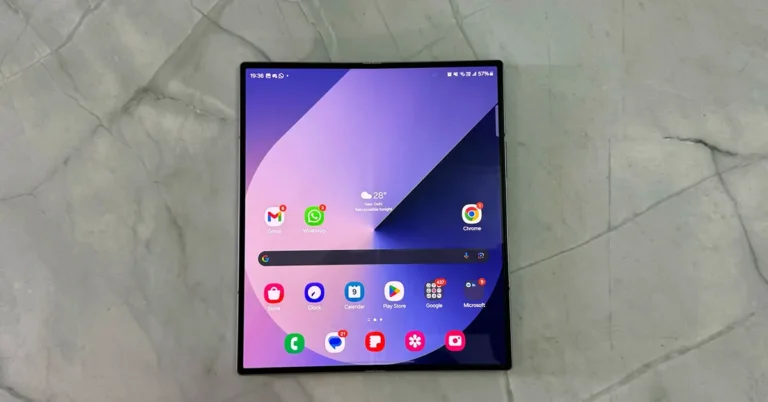
Amazon Quiz Answers Today 23 August 2024: Participate to win Rs 500 Amazon Pay Balance

23 August 2024: New Amazon Quiz is now available. Customers from different parts of the country are participating in the daily quiz. The quiz starts at midnight today and will be live until 11:59 PM tonight. By successfully answering every question, participants in the quiz have the chance to win wonderful rewards. A Rs 500 Amazon Pay Balance is up for grabs to participants today.

One wrong answer could eliminate you from the quiz. You have a chance to win Rs 500 Amazon Pay Balance if you successfully answer every question. Users of the app only have the opportunity to take the quiz. Check Out 23 August 2024 Amazon Quiz Answers.

Amazon Quiz Today Prize: Rs 500 Amazon Pay Balance

Quiz Date: 23 August 2024

Daily Timing: 12 AM to 11:59 PM

Previous Amazon Quiz Winners Announcement: Today 12 PM Noon

Amazon Quiz Answers Today 23 August 2024: Win ₹ 500 Amazon Pay Balance

Question 1: Which team recently set the record for the highest chase in Indian Premier League history by successfully chasing a target of 262?

Answer: Punjab Kings

Question 2: The comedy movie ‘Ricky Stanicky’ stars which of these actors, also a big star in sports entertainment?

Answer: John Cena

Question 3: The famous monument, the Humayun’s Tomb was built in which century?

Answer: 16th century

Question 4: This is the famous Rathaus, located in which famous European capital?

Answer:  Vienna

Question 5: Which of these famous guitarists was part of this iconic band?

Answer: Slash

Also Read: Noise Buds Verve, budget TWS with up to 45 hours of playback launched in India

How To Play Amazon Quiz Today

Only app users are eligible to play the Amazon quiz every morning from 12 AM to 11:59 PM. The quiz is not available on the desktop. For those who are unaware of how to play the Amazon quiz, below are the steps, you can follow to take the quiz.

  • First, download the Amazon app from the Google Play Store or App Store or go here to download the Amazon App
  • Now fill in the required information through the Sign-Up option.
  • You need to log in to the Amazon app and scroll down on the home screen to find the Amazon Quiz banner.
  • Tap on the Amazon Quiz banner and tap on the Start button to start the Quiz.
  • Now you will get 5 questions and you need to answer them correctly. One wrong answer will eliminate you from the Quiz.
  • After answering all the questions correctly you are now eligible for a Lucky Draw.
  • The previous winner’s name will be announced today at 12 PM.

Amazon Daily Quiz Answers from the previous few days.

Here are all the answers from the previous 5 days of the Amazon Daily Quiz and Contest.

Amazon Quiz Answers Today 22 August 2024: Win ₹ 500 Amazon Pay Balance

Question 1: Which of these recently played ATP events has a court named after the legendary tennis player Rafael Nadal?

Answer: Barcelona Open

Question 2: The movie Road House sees Jake Gyllenhaal play the role of an ex UFC fighter. Which of these famous sportspeople also acts in the movie?

Answer: Conor Mcgregor

Question 3: What is the other name given to the swamp deer, the state animal of Madhya Pradesh?

Answer: Barasingha

Question 4: In which of these cities in the USA is this famous museum located?

Answer: New York

Question 5: Which of these controversial media organizations was founded by this Australian editor and publisher?

Answer: Wikileaks

Amazon Quiz Answers Today 21 August 2024: Win ₹ 500 Amazon Pay Balance

Question 1: Which of these players won the Monte Carlo Masters tennis tournament in 2024, his 3rd triumph in that event in 4 years?

Answer: Stefanos Tsitsipas

Question 2: Which of these Amazon Prime shows shares its name with a 2005 Brad Pitt- Angelina Jolie movie?

Answer: Mr and Mrs Smith

Question 3: Which animal features on the election symbol of the Republican party in the USA?

Answer:  Elephant

Question 4: These waterfalls span the border between the province of Ontario in Canada and which state in the USA?

Answer:  New York

Question 5: Which of these famous architects designed this iconic monument in India?

Answer: Edwin Lutyens

Amazon Quiz Answers Today 20 August 2024: Win ₹ 500 Amazon Pay Balance

Question 1: Against which team did Sunrisers Hyderabad set a new record scoring 287 in an IPL match?

Answer: Royal Challengers Bengaluru

Question 2: Who plays the role of soldier Arun Katyal in the recently released movie ‘Yodha’?

Answer: Sidharth malhotra

Question 3: Which of these famous rulers was born in the Shivneri Fort in Maharashtra in the 17th century?

Answer: Shivaji

Question 4: Name this famous church located in Europe

Answer: St. Peter’s Basilica

Question 5: This is the flag of which Caribbean country?

Answer: Barbados

Amazon Quiz Answers Today 19 August 2024: Win ₹ 500 Amazon Pay Balance

Question 1: Which African country launched its first operational Earth observation satellite named ‘Taifa-1’ in 2023?

Answer: Kenya

Question 2: Aman Sehrawat has won India’s first gold medal at the Asian ________ Championships 2023 in Astana, Kazakhstan.

Answer: Wrestling

Question 3: FIFA removed which country from hosting the men’s U-17 World Cup?

Answer:  Peru

Question 4: This cat’s name ‘Tabby’ came from which cloth?

Answer:  Silk

Question 5: Who invented the first digital camera?

Answer: Steven Sasson

Amazon Quiz Answers Today 18 August 2024: Win ₹ 500 Amazon Pay Balance

Question 1: Which African country launched its first operational Earth observation satellite named ‘Taifa-1’ in 2023?

Answer: Kenya

Question 2: Aman Sehrawat has won India’s first gold medal at the Asian ________ Championships 2023 in Astana, Kazakhstan.

Answer: Wrestling

Question 3: FIFA removed which country from hosting the men’s U-17 World Cup?

Answer:  Peru

Question 4: This cat’s name ‘Tabby’ came from which cloth?

Answer:  Silk

Question 5: Who invented the first digital camera?

Answer: Steven Sasson

Amazon Quiz Answers Frequently Asked Questions (FAQs)

Where can I check the previous winners? Did I win how to check?

You can head over to this link on your mobile or desktop to check the winners of the Amazon Daily Quiz Contest.

How to Play Amazon Daily Quiz or Contest?

We have written an explainer above, you can refer to that.

When are the winners of the Amazon Quiz and contest announced or declared?

The announcement of today’s Amazon quiz winner will take place Tomorrow. As for the Special Quiz and “Spin & Win” Contest, the winners will be declared once the Quiz Contest comes to an end. To find out who the lucky winner is, you can refer to the Amazon Quiz Winners List or visit the Amazon Winners tab in the Amazon App.

How to participate in the Daily Amazon Quiz?

That is very easy, just got to the Amazon app and scroll to the bottom of the page and you will find the Quiz section. Click on it (usually it is called the fun zone) and you can enter the Amazon Today Quiz Contest. 

Are there any other quizzes or contests running on Amazon daily?

Yes, there are many running on a daily basis. These range from spinning the wheel to answering the questions correctly. All are located in the Fun Zone. 

What are the criteria for selecting a winner in the Daily Amazon Quiz?

When a qualified player submits correct answers to all the questions, they will automatically be entered into a lucky draw. This draw will include all participants who answered all the questions correctly. Amazon randomly selects the final winners from the pool of eligible participants who gave the right answers.

Which Types of Questions are asked within Amazon Daily Quiz?

These are very simple and straightforward questions. These are mainly related to general knowledge. 

Where should I look for Amazon Daily Quiz answers?

You can bookmark this page as we will help you every day with the Amazon Daily Quiz. We bring you fresh answers every day for the Amazon Daily Quiz and Contest. 

What time does Amazon Announce previous winners?

The previous winner’s name will be announced today at 12 PM (noon).

For the latest gadget and tech news, and gadget reviews, follow us on TwitterFacebook and Instagram. For newest tech & gadget videos subscribe to our YouTube Channel. You can also stay up to date using the Gadget Bridge Android App. You can find the latest car and bike news here.
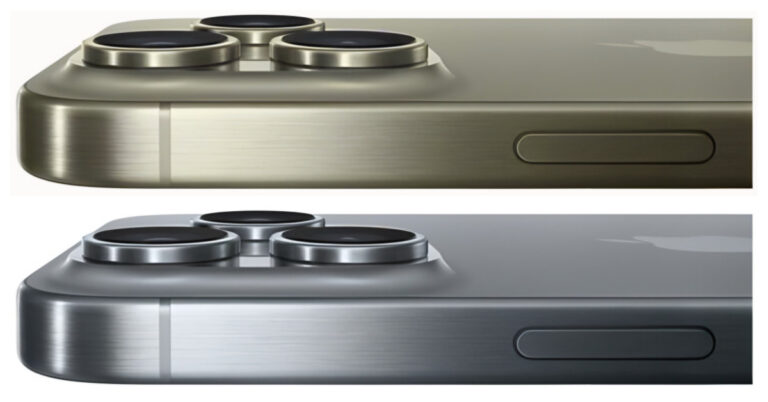
Find Out the Best Video Editor for Mac [Updated New 2024]

Whether making a quick video for Instagram or a professional project, selecting the right software is key. This guide will show you the best free video editors for Mac, perfect for newbies and pros alike.

We’ll walk you through the options that balance powerful features with ease of use. We will ensure you don’t waste money by investing in the wrong tool.

So, are you ready to turn your video ideas into reality without emptying your pocket? Let’s find the perfect Mac video editor for your needs and get started!

Part 1. What Makes the Best Video Editing Software for Macbook?

Discovering the best editing software for your Mac can be tough, mainly if you’re unsure where to begin. Keep in mind a few key factors to narrow down your options. This approach helps you focus on the features that matter most.

●     Skill Level

Beginners should opt for editing software with an easy interface. Learning the essentials this way is easier before advancing to harder tools.

Advanced software might be a better fit for experienced professionals. It should enhance your workflow and support your creativity, allowing you to edit efficiently.

●     Editing Tools

Different software offers various editing tools. Consider what you need, such as color correction, templates, or filters.

For short videos, like those for social media, you might only need a few tools. For example, background music, a clipping tool, and transitions. Longer projects, like documentaries or podcasts, may require more features.

●     Price

Budget is also an important factor. There are great free video editing options for Mac users, ideal for those with a tight budget or beginners.

Paid options vary in price. Some require a subscription. While others can be purchased outright. Decide how much you’re willing to invest. A temporary subscription might be more cost-effective if you only have a few short projects.

Next, let’s look at the best video editing software for Mac.

Part 2. What are the Best Video Editors for Mac to Create Videos in Minutes?

Let’s explore the top 5 video editors for Mac that can help you create videos in minutes. These editors offer a range of features suited to different skill levels and project types.

1.    Wondershare Filmora

Wondershare Filmora stands out as the best video editor for Mac users. Its simple drag-and-drop interface is great for beginners.

Cool effects, smooth transitions, and background music can add more fun to your videos. The software supports 4K edits, ensuring high-quality visuals.

wondershare filmora website interface.

Features like motion tracking and keyframing allow for detailed animations. Filmora also offers a rich selection of pre-made templates, making complex video projects easier.

This Macbook movie editor is ideal for creating standout content for social media or professional use.

Pros

  • Continuously updated with new features and improvements, including AI techniques.
  • Ideal for beginners with its intuitive drag-and-drop functionality.
  • Enhances video quality with support for 4K resolution editing.
  • Offers a vast array of effects, transitions, and filters to enhance video projects.
  • Allows for advanced editing with motion tracking capabilities.
  • Provides detailed animation options through keyframing.
  • Packed with a variety of pre-designed templates to streamline video creation.
  • Offers a reasonable pricing structure compared to other professional video editing software.

Cons

  • The free version adds a watermark on videos, which requires a paid upgrade to remove.
  • It can be demanding on system resources, potentially slowing down older or less powerful computers.

Pricing

  • Freemium

Let’s move to the next Mac video clip editor on our list.

2.    OpenShot

OpenShot is a free movie editing software for Mac. It is super easy to use for beginners and powerful enough for professionals. It supports many audio, video, and image formats.

Thus, the software allows users to mix media types easily. It also provides drag-and-drop editing, making video creation quick and intuitive.

openshot video editor for mac.

Key features include unlimited tracks/layers, clip resizing, scaling, trimming, snapping, and rotation. OpenShot offers real-time previews, which help users make adjustments on the fly.

It also has various video effects to spice up your project. Plus, OpenShot supports 3D animated titles and effects, giving videos a professional touch.

The tool is cross-platform, working on Windows, Mac, and Linux.

Pros

  • Free and open-source, reducing costs for users.
  • Intuitive drag-and-drop interface simplifies video editing.
  • Supports a wide range of video, audio, and image formats.
  • Features like unlimited tracks and 3D animation enhance creative possibilities.
  • Cross-platform compatibility with Windows, Mac, and Linux.

Cons

  • May experience stability issues with larger projects.
  • Limited professional features compared to industry-standard software.
  • Occasional bugs and glitches can disrupt editing.
  • Limited customer support options due to its open-source nature.

Pricing

OpenShot video editor for Mac is free and open-source software.

Let’s keep up our pace and explore another video editor for Mac below.

3.    Apple iMovie

It is a free video editing tool exclusive to Apple devices. Its intuitive interface makes it the best choice for beginners yet sufficiently robust for pros.

The software supports high-definition and 4K video editing. Hence, it ensures high-quality project outcomes. iMovie offers various pre-set themes and templates that simplify creating polished videos.

apple imovie

Its drag-and-drop interface allows for straightforward editing. Features include picture-in-picture and split-screen effects, which are great for more complex projects. Plus, iMovie integrates seamlessly with iTunes and GarageBand.

That’s why it provides extensive soundtracks and audio editing options. This software also makes it easy to share videos directly to social media or export them to other Apple devices.

Pros

  • User-friendly, clean interface.
  • Effective green-screen tool.
  • Specialized support for iPhone video enhancements.
  • High-quality movie templates.
  • Exceptionally straightforward to operate.

Cons

  • No support for media tagging.
  • Missing Multicam and motion tracking features.
  • Restricted to using only two video tracks.

Pricing

iMovie is free.

Want to know about another easy-to-use video editor for Mac? Keep reading to find out!

4.    KineMaster

KineMaster stands out as a mobile video editing app. It is perfect for both novice and seasoned editors. It enables multi-layer editing. Thus, allowing users to blend videos, images, and text seamlessly.

kinemaster.

The app offers real-time previews. So edits can be viewed immediately. KineMaster has various transition effects, animations, and visual enhancements to elevate video projects. Additionally, it provides detailed audio controls and filters to optimize sound directly within the app.

Users can export their final products in high-quality formats, including 4K. It is compatible with both Android and iOS. Hence, it facilitates editing on the move, making it a versatile choice for video creators.

Pros

  • Supports multi-layer editing for combining videos, images, and text.
  • Real-time previews allow instant viewing of edits.
  • Wide range of transition effects and animations.
  • Precise audio controls and filters for sound optimization.
  • High-quality export options, including 4K resolution.
  • Compatible with Android and iOS, suitable for editing on the go.

Cons

  • Can be complex for complete beginners.
  • Subscription is required for full feature access and to remove watermarks.
  • Some users report performance issues on lower-end devices.
  • Limited desktop support, primarily designed for mobile use.
  • Consumes significant battery life during intensive editing tasks.

Pricing

There are both free and paid versions of KineMaster. The free version has limitations. Meanwhile, the paid version costs $8.99 monthly or $44.99 annually.

If you don’t want to invest in KineMaster, worry not! We have another best video creator for Mac that you can try below.

5.    Lightworks

Lightworks is a powerful video editing tool. It supports 4K, HD, and SD formats. You can trim and edit clips easily. The interface is user-friendly. It has multi-cam editing. You can add effects in real time. It offers color correction tools.

lightworks website interface 

The timeline is flexible and allows drag-and-drop. Lightworks supports direct uploads to YouTube and Vimeo. It also has advanced audio tools. The software includes royalty-free music and stock videos.

You can export in different formats. It has customizable shortcuts for faster editing. Lightworks is available on Windows, Mac, and Linux. It also offers a free version with essential features.

Pros

  • Supports 4K video resolution.
  • User-friendly interface.
  • Real-time effects and color correction.
  • Multi-cam editing feature.
  • Direct export to YouTube and Vimeo.

Cons

  • Steep learning curve for beginners.
  • Limited features in the free version.
  • Some advanced tools are complex.
  • Requires a good system for smooth performance.

Pricing

  • Free version.
  • Paid version: $13.99 per month
  • Paid version: $139.99 per year.

So, there you have it! A complete rundown of the 5 best video editors for Mac. Confused about which one you should use? Let us help you in this regard.

Part 3. What Video Editing Software Features Should I Look Out For?

The next thing to consider is what features you need in a video editor for Mac. Here are some key ones:

●     Filters and Overlays

Filters and overlays can make your videos look more polished. Options range from basic color fixes to advanced effects.

●     Cutting and Splicing

Cutting and splicing clips are essential for trimming unwanted parts or combining different videos into one.

●     Scene Transitions

Smooth scene transitions are important when working with videos shot in various locations. You can use simple fades or more elaborate effects.

●     Text and Titles

Adding text and titles can improve your videos. Thus making them more engaging and professional. Simple text options and more complex animations are available.

●     Exporting and Sharing

After editing, save your video in a popular format like MP4 or AVI for easy sharing.

●     Stock Videos and Sounds

Some editors include a library of stock videos and sounds to save time and add a professional touch to your projects.

●     Aspect Ratio

Aspect ratio refers to how wide and tall your video is. The 16:9 ratio is standard for most videos, but some editors let you adjust this to fit different screens.

Hopefully, the above features will help you choose the best Mac video clip editor. Let’s conclude our discussion.

Final Words!

Choosing the right video editor for Mac can be a game-changer, whether you’re just starting or are a seasoned pro. Free options like iMovie and OpenShot offer great tools for beginners.

While more advanced software like Wondershare Filmora provides powerful features for professionals, each editor has strengths and suits different needs.

Focus on what you require—be it basic edits or detailed animations. You can turn your creative imagination into reality without breaking the bank with the right choice.

So, explore these top video editors and find the one that best suits your style and projects. Happy editing with your new video editor for Mac!