WhatsApp alternative profile feature is currently under testing mode.
It will be rolled out with future update.
The WhatsApp privacy feature will let users mask their identity.
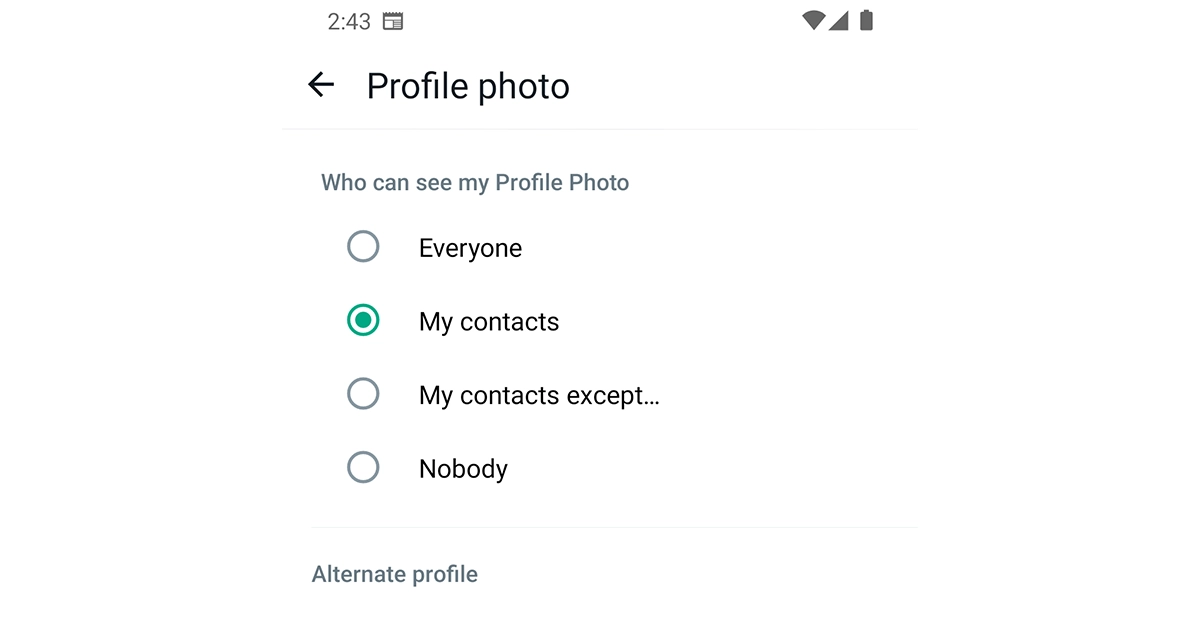
Meta recently released a multi-account feature for WhatsApp users. Now the company will soon bring another new functionality allowing users to set up an alternative profile on the platform. It will show your default profile to certain users and a different one to others. This feature is currently under the pipeline and is now being made available to Beta Testers. Users can keep their information private by setting up a different profile and selecting an alternative profile feature. According to a report by WABetaInfo WhatsApp’s Alternate Profile is under work. It will allow its users to hide their original profile by masking their identity using an alternative profile.The Alternative Profile feature on WhatsApp is now being rolled out to WhatsApp beta for Android 2.23.24.4 update. As said the tool will mask your information and is currently made available within the privacy screen regarding our profile photo. According to the report will let users configure a different photo and name that will be visible to those contacts who cannot see their primary profile information.Image Courtesy: WABetaInfoAs of now, you have the option to either show your WhatsApp profile information to all (those not in your contact list) which includes your profile photo and About You or keep it hidden from the unknown and only show it to your contacts. But when you create an alternative profile, people outside of your contacts cannot see your real profile picture but your alternate profile photo.Also Read:List of new smartphones launching this month, November 2023Reportedly those reaching out to you via a username will still be able to see your profile, but that can be set up to differ from your primary one. The WhatsApp alternative profile privacy feature is likely to be released to all the users in the future update but not now as it is under testing.This feature will give users more control over their personal information therefore an additional layer of protection and privacy added to their experience. Many users especially women are expected to find this WhatsApp privacy feature helpful, to those who want to restrict who can see their profile photo to only their contacts or outsiders.
A lot of premium smartphones are likely to debut in November with a Snapdragon 8 Gen 3 processor.
iQoo 12 is scheduled to launch in India next month.
Qualcomm last month announced its Snapdragon 8 Gen 3 processor for flagship phones. A lot of premium smartphones are likely to debut in November with the recently announced processor. Many of the smartphone brands have already announced their upcoming releases and some of them are planning but yet to reveal the exact launch date. In this article, we bring you the list of upcoming smartphones in November 2023.
Here is a list of all the smartphones to be released in November 2023 this month.
iQoo 12 Series
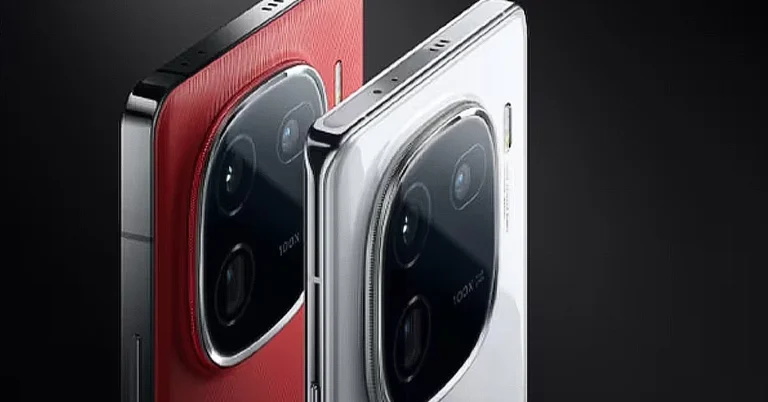
Vivo’s sub-brand iQoo 12 Series is set to launch next week on November 7. The company has also announced iQoo 12 to debut in India on December 12. In China, the company will launch two models under the series, iQoo 12 and iQoo 12 Pro. Both the premium smartphones will use a Snapdragon 8 Gen 3 processor. They might operate on Android 14 out of the box. iQoo 12 Pro is tipped to feature a 6.78-inch Samsung E7 AMOLED screen with 2K resolution and 144Hz refresh rate support.Also Read:Apple to bring eight new games with updates to Arcade soonThe display is said to have support for 1,440Hz PWM dimming and a peak brightness of 2,700 nits. Whereas, iQoo 12 might have a 6.78-inch BOE OLED display with 1.5K resolution. The display on it may support a refresh rate of 144Hz and 2,160Hz PWM dimming. Additionally, the device is expected with 3,000 units of peak brightness. The devices are expected to come with a triple rear camera setup. They might sport a battery capacity of up to 5,100mAh along with support for 120W fast charging.
Vivo X100 Series
Vivo X100 Series is another premium smartphone range to launch this month. The company has confirmed that its flagship series will launch on November 13 in China. India launch is likely to take place next year. The lineup may include three devices X100 Pro+, X100 Pro and X100. The top-of-the-line smartphone in the range could be powered by Qualcomm’s latest Snapdragon 8 Gen 3 SoC. Whereas its base variant may include MediaTek Dimensity 9300 SoC. They are rumoured to include LPDDR5T RAM.
OnePlus 12 5G
The company has not made clear exactly when will OnePlus 12 5G will make its official debut however it has been teasing the phone’s features and its design on Weibo. But we expect the launch soon. The phone is confirmed to be powered by Snapdragon 8 Gen 3 SoC. Recently it was spotted listed on the AnTuTu benchmarking website with model number PJD110. The device is going to replace the predecessor-OnePlus 11 which debuted earlier this year.
Key HighlightsApple added 60 new games to its Arcade service this yearApple will also roll out new updates for popular arcade games.The company will be launching a new game every week in November.Apple has revealed that it will bring eight new exciting games to its gaming platform Arcade very soon. Disney Dreamlight Valley Arcade Edition, Football Manager 2024 Touch, Sonic Dream Team, and Puzzle & Dragons Story will be on the list of upcoming games. In addition to this Apple will also release 50 updates to existing titles on the service.This year Apple added 60 new games including Hello Kitty Island Adventure, NBA 2K24 Arcade Edition, TMNT Splintered Fate, Cypher 007, and many others were added to Apple Arcade. Now the firm has officially announced the launch of fresh games such as Football Manager 2024 Touch, Disney Dreamlight Valley Arcade Edition, Sonic Dream Team, and Puzzle & Dragons Story to its gaming serviceAlso Read:Google quietly launches car crash detection feature in India and others in Pixel phonesAccording to the company, it will be launching a new game every week in November, “subscribers can continue on their journey of creating a soccer club dynasty in Football Manager 2024 Touch; master Knotwords+, a unique brainteaser and logic puzzle game from celebrated indie developer Zach Gage; dive further into the mysterious depths of Downwell+; and experience a heartwarming culinary journey in Delicious Miracle of Life+.”
Apart from this Apple has also promised to release new updates for popular Arcade games.The Give & Gather Celebration with My Sweet Piano will be introduced to Hello Kitty Island Adventure. Apple will also bring the first update for NBA 2K24 Arcade Edition which will include City Edition uniforms and eight new players like Allen Iverson. Sneaky Sasquatch, Cut the Rope 3, Samba de Amigo: Party-To-Go, Japanese Rural Life Adventure, and The Oregon Trail are some more titles to receive updates in November and December.
Auto Blocker is an opt-in feature with additional security measures.
The feature is compatible with One UI 6.
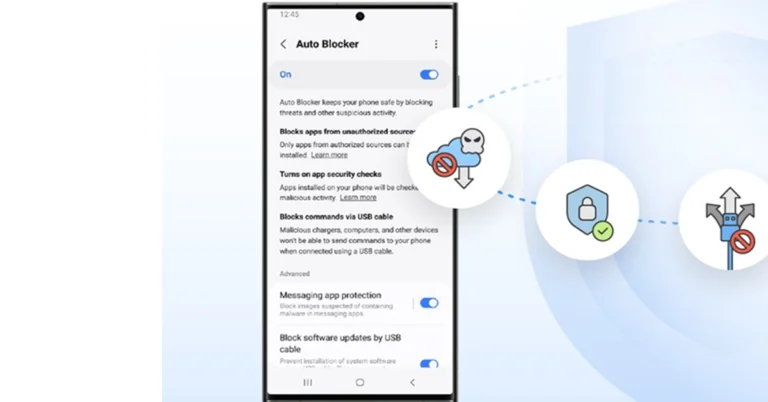
Samsung has made its next security feature Auto Blocker public. It is currently being rolled out to Indian users offering more safety mechanisms. It will guard against sideloading therefore preventing apps from downloading from unapproved sources, stopping commands that may be risky and safeguarding against malicious USB installs. The company recently also released the One UI 6 software update, which brings many new features and improvements to devices in India and across the globe.The recently released Auto Blocker is a part of One UI 6. It is an opt-in package of additional security measures allowing more options to explore the customizations enabled by Samsung Galaxy’s open ecosystem.Dr. Seungwon Shin, EVP & Head of Security Team, Mobile eXperience Business at Samsung Electronics, At Samsung we constantly strive to keep our users safe from security attacks, and with the introduction of Auto Blocker users can continue to enjoy the benefits of our open ecosystem, knowing that their mobile experience is secured. We always seek to empower our users to choose for themselves what best suits their needs — rather than us deciding on their behalf, and Auto Blocker is no exception to that.”Auto Blocker blocks installations of apps from unauthorised sources, known as sideloading. Attempted sideloading includes increased customization and command over a device’s functions. According to the company those who enjoy safely sideloading won’t experience any changes because the feature is turned off by default.However, when Auto Blocker is enabled they will be prevented from sideloading or extensive customization by stalling the rise of social engineering attacks like voice phishing, where attackers could talk users into installing malicious software.Also Read:How to enable Samsung Auto Blocker on smartphones with One UI 6?In addition to this, there are more features that Auto Blocker brings to the Samsung smartphones. It will also enable the ability to activate app security checks. This will help in identifying possible malware and stop harmful commands and software installations via USB cables, for instance where someone has physical access to the device, like from public charging booths.Among the many other features of Auto Blocker is an update to Message Guard, which mitigates Zero Click attacks, or direct image messages hiding malicious code. It was initially released for messaging apps from Google and Samsung, but it can now help in safeguarding users of popular third-party apps.Auto Blocker is currently made available on Samsung Galaxy devices compatible with One UI 6.
Garena Free Fire is a battle royale game with regular awards and tournaments to keep players interested. If you play Garena Free Fire, you should be aware of the redeem codes that are released on a daily basis. However, because the battle royale game is banned in India, players from other countries can use the Free Fire Redeem codes daily. If you’re unfamiliar with the Garena Free Fire redeem codes or don’t know how to get them, we’ve put together a step-by-step guide to help you redeem them. Check out Garena Free Fire Redeem Codes for 2 November 2023.The Free Fire redeem codes are a great way to get free stuff. These are 12-digit codes that contain alphabets and numbers, as well as an expiration date and time. Because the Garena FF redeem codes cannot be used more than once, you should hurry to the redemption page to claim your free reward before someone else does. To get a free reward, all you have to do is go to reward.ff.garena.com/en, which is the official redemption page. Also, keep an eye on this space for daily updates on Garena Free Fire redemption codes and rewards.
Garena Free Fire Redeem Codes Today 2 November2023
If you struggle with remembering passwords to different apps, accounts, and online services, it’s about time you switched to passkeys. Passkeys use on-device authentication like face unlock, fingerprint scan, and the device password to sign you into your desired account. Apple now offers passkey support across its services. This means you can sign into your Apple account on any device using a passkey. In this article, we bring you the top 2 ways to sign into your Apple account using Passkeys in iOS 17.Read Also:iQOO 12 5G India launch date announced, unveiling scheduled for next month
Sign into a website, app, or Apple account using Passkeys on your iOS 17-supported device
Step 1: Go to the website or launch the app that supports passkeys. If you want to sign into your Apple account, go to any Apple service.Step 2: Enter your username or registered email.Step 3: Tap on Sign in with Passkey.Step 4: Use your Face ID or Touch ID credentials to log in. If you haven’t set up a Passkey yet, use your iPhone’s passcode to log in.
Sign into a website, app, or your Apple account on another device using Passkeys
Step 1: Open the website or launch the app you want to access on another device. If you want to sign into your Apple account, go to any Apple service.Step 2: Enter your username or registered email.Step 3: Select Other options or Passkey from nearby device.Step 4: Launch the camera app on your iPhone and scan the QR code displayed on the other device.You will be signed into your account.
Frequently Asked Questions (FAQs)
How do I create a passkey for my Apple Account on my iPhone?
Go to the app or service and access your account settings or management page. Select the option to save a passkey. You can choose your iPhone’s passcode, Face ID, or Touch ID as a passkey. Alternatively, go to Settings>Passwords>Password options, turn on the toggle switch for Autofill passwords, and select iCloud passwords and keychain.
How do I find my Passkey on iOS 17?
Go to Settings>Passwords and select a website or app to view your passkey.
These are the top 2 ways to sign into your Apple account using Passkeys in iOS 17. As of now, passkeys are only available on iOS 17. Check out this article to find out how you can create a passkey for WhatsApp. Got any other questions about passkeys? Let us know in the comments and we will get back to you!
Car Crash Detection is now available in India and other countries.
It calls emergency services when a crash is detected.
Car Crash Detection does not support the Hindi language.
Google has finally rolled out Car Crash Detection for India and other regions. The feature was limited to a few regions but is now being released to more countries including India. Note that the Car Detection feature still doesn’t support the Hindi language. Hindi might be supported in some months. Exactly is not known when.Previously, Car Crash Detection was available for users in the US. But now Google has expanded to 5 more regions. It is being rolled out to users in India, Austria, Belgium, Portugal, and Switzerland.As per the Google support page, the Car Crash Detection feature was available on Pixel 3 and later. But now the company is adding support for Pixel 4a and later including Google Pixel Fold.Pixel 4a and later phones, including Google Pixel Fold, detect a car accident by using the phone’s location, motion sensors, and nearby sounds. In order to make this feature work one must allow permission for location, physical activity, and microphone. When a Car crash is detected it calls emergency services immediately, automatically by using Android’s Emergency Location Service and may transmit info about where you are and what happened.
According to the company, it may not detect all car crashes. Also sometimes high-impact activities could also trigger Car crash detection.
Note that if your Pixel phones cannot call emergency services, it can be because of a weak mobile network or if you are in an ongoing call.
Car crash detection is available in these countries:
AustraliaAustriaBelgiumCanadaDenmarkFranceIndiaIrelandItalyJapanNorwaythe NetherlandsPortugalSingaporeSpainSwedenSwitzerlandTaiwanthe UKUSHowever, the Car crash detection feature has come to India it is yet to have support for the Hindi language. Besides this, it supports the following languages:DanishDutchEnglishFrenchFrench (Canada)ItalianJapaneseMandarin ChineseNorwegianSpanishSwedish
How to turn on Car Crash Detection on Pixel phones
Open your phone’s Personal Safety app.
Tap Features.
Scroll to “Car crash detection.”
Tap Set up.
When asked to share your location, tapAllow while the app is in use.
When asked to share your microphone and physical activity, tapAllow.
The Sony Alpha 7C II and Alpha 7CR are equipped with a 7.0-step optical 5-axis in-body image stabilisation to support stability.
Both the Sony cameras come with a touch-operable vari-angle LCD monitor.
It also features Creative Look, which allows you to easily change the look and feel of video and still images.
Sony India has officially announced the launch of two new full-frame interchangeable lens cameras- the Alpha 7C II and Alpha 7CR. The latest additions are powered by BIONZ XR processors. Moreover, the devices have the same AI-processing unit as the Alpha 7R V and Alpha 6700. Both of them can record 4:2:2 10-bit video up to 4K60p. They also include Active Mode in-body image stabilisation, AI-based Auto Framing, digital-audio interface support, and more.
Sony Alpha 7C II and Alpha 7CR price in India and sale details
Both models will go on sale from November 3 across all Sony Center, Alpha Flagship stores, Sony authorized dealers, e-commerce websites (Amazon and Flipkart) and major electronic stores across India. The former one will be offered in two colourways- black and silver while the latter one is Silver.The price and availability details of Alpha 7C II (ILCE-7CR) is yet to be announced.Also Read: iQOO 12 5G India launch date announced, unveiling scheduled for next month
Sony Alpha 7C II and Alpha 7CR specifications
The Alpha 7C II comes with a full-frame image sensor with approximately 33.0 effective megapixels. It is ideal for travel and street photography. On the other hand, the Alpha 7CR full-frame interchangeable lens camera has a full-size image sensor with approximately 61.0 effective megapixels. It can do portrait, wildlife, and landscape photography.Both Sony’s new full-frame interchangeable lens cameras have similar AI-processing unit and BIONZ XR processors found in Alpha 7R V and Alpha 6700. They have high accuracy, and 5-axis in-body image stabilisation and support high-quality 4:2:2 10-bit video recording up to 4K60p. The cameras support S-Cinetone colour science for rich cinematic video and have Active Mode in-body image stabilisation, AI-based Auto Framing, digital-audio interface support, and other features.The AI-processing unit is capable of identifying subjects with high accuracy with Real-time Recognition.Alpha 7C II offers standard ISO sensitivities ranging from 100 to 51200 for both still images and movies (expanded ISO 50 to 204800 for still images. Whereas Alpha 7CR standard ISO sensitivity ranges from 100 to 32000 for both still images and movies (expanded ISO 50 to 102400 for still images).The Alpha 7C II is approximately 124 mm wide x 71.1mm high x 63.4mm deep) and weigh approximately 514 g and approximately 515 g for the Alpha 7CR. They have a touch-operable vari-angle LCD monitor.
iPhones are considered to be the gold standard when it comes to online security and guarding data. However, this does not mean they are completely impervious to cyber attacks. If you take a look at the most famous spyware apps, all of them have iOS variants that can be easily planted on a target iPhone. In the past, some journalists, politicians, and activists have also been the target of state-sponsored spyware that somehow made its way to their iPhones. If you suspect your device has been compromised, here are the top 5 ways to detect if someone has remote access to your iPhone.Read Also:Apple 2023 model of MacBook Pro powered by M3 chipsets launched
Your iPhone heats up frequently
Smartphones are known to heat up easily when they are old and beaten up. However, if you own a relatively newer iPhone, random surges in its internal temperature when you are not performing a power-intensive task is a sign that it may be allocating its resources to some other background tasks. Since spyware and stalkerware run discreetly in the background, they could be causing your device to heat up.
Battery drainage
If your iPhone witnesses a sudden drop in its battery backup, it could be because of stalkerware running in the background. Batteries are not built to last, but it typically takes them several years to degrade. If your iPhone’s battery health is close to 100% there is no reason why it shouldn’t provide a baseline power backup, especially if your screen time is low. The only rational reason is that it is catering to background spyware or stalkerware even when your phone is locked.
Excessive data usage
Since most pieces of spyware need to relay the data to the entity that installed them on your iPhone, they rely heavily on your phone’s mobile data or the connected WiFi network. Check your iPhone’s data usage and see if it corroborates with your usage pattern. If there’s any unaccounted data, it is likely being used by spyware to communicate with the entity that hacked into your phone.
Check Face ID
Your iPhone allows you to set up more than one appearance for Face ID. If someone gets physical access to your unlocked iPhone, they can easily set up an alternate Face ID using their appearance to gain authorised access to your device in future. Since most users do not check Face ID settings regularly, this is a very clever way of going under the radar while spying on an iPhone. If you suspect this is the case with your device as well, go to Settings>Face ID and passcode>Set up Face ID to check for any alternate appearances.
Run a spyware scan
Most anti-virus apps for iPhones also allow users to run a spyware scan. Oftentimes, this feature may only be available with a premium subscription to the app. A thorough spyware scan can also take up a fair amount of time. Apps like McAfee, Norton 360, and Avast can scan and remove spyware from your iPhone.
Frequently Asked Questions (FAQs)
How do I know if someone is remotely accessing my iPhone?
If you notice an unprecedented spike in internal temperature, excessive data usage, a drop in battery life, and a general lag in performance, it could mean that your iPhone is catering to spyware running in the background.
How do I remove spyware from my iPhone?
Most antivirus apps like McAfee, Norton 360, and Avast can scan and remove spyware from your iPhone. However, if you want to be thorough, you should perform a complete factory reset of your device.
These are the top 5 ways to detect if someone has remote access to your iPhone. It is always a good idea to track your iPhone’s key performance metrics and look out for any weird or unexplained drops. However, if you want to know for sure that your device has been compromised, you need to run a spyware scan on it.
One of the most absurd things you can experience on your phone is ghost touches. A ghost touch is when your phone’s touchscreen registers a touch gesture even when you aren’t directly touching it. This is more common on phones with broken or cracked screens but it can be particularly confusing to fix when there’s no damage to the device. In this article, we bring you the top 10 ways to fix your smartphone if it is clicking things on its own, causing ghost touches.Read Also:Apple iPhone 15 Pro Max Review: Max Performance
What causes ghost touches to occur on Android?
Ghost touches on your smartphone can be confusing to fix. Before you embark on fixing the device, it is crucial you know what’s causing it to act this way. Here are some of the common reasons behind ghost touches.
Broken phone screen
Poorly applied screen protector
Dust and grime collection on the screen
Faulty charger
Rogue apps
Improper installation of software update
Give your phone’s touchscreen a thorough wipe
Nine times out of ten, the reason behind ghost touches is a dirty screen. Grime and dirt particles that collect on your phone can trigger the touch panel on your phone’s screen, leading to random clicks. Grab a microfibre cloth and give your phone a thorough wipe to fix this problem. You can also dampen the cloth a little to get rid of the grime that has collected on the screen over a period of time.
Remove the screen protector
A faulty screen protector can also trigger ghost touches on your smartphone. This can be due to the poor quality of the screen protector or shoddy installation. If it is the latter, dust and dirt particles can easily find their way between the screen and the protector. Peel off the screen protector and give your phone a thorough wipe before installing a new one. Make sure you follow all the instructions mentioned on the retail package correctly. You can even search YouTube for exhaustive guides on how to install a screen guard correctly.
Turn on Accidental Touch Protection
If your phone keeps randomly opening certain applications while it’s in your pocket, it is more likely due to accidental touches rather than ghost touches. Here’s how you can turn on Accidental Touch Protection on your device.Step 1: Go to Settings and select Display.Step 2: Turn on the toggle switch for Accidental Touch Protection.
Replace the faulty charger
If you notice ghost touches on your smartphone only while it’s being charged, it is because phone chargers can sometimes have an effect on the touch sensor. This is a more common issue on knock-off or cheap chargers. Make sure you are using the authentic power brick shipped by the smartphone manufacturer or a power adapter from a trusted brand.
Clear background apps
Moving on to software issues that may be causing this problem, the first catch-all fix that you should try is clearing all the background apps running on your device. You can do this by triggering the app switcher using its icon in the navigation bar or by swiping up from the bottom of the screen and holding the touch gesture for a moment. Once you are in the app switcher, tap on ‘Close all’ to terminate the background activity for all apps.
Restart your smartphone
A quick restart can fix the software glitches in the background that may be causing random clicks on your smartphone. Press and hold the side key and hit ‘Restart’ from the power menu. If the side key triggers the voice assistant on your device, press and hold it with the volume up or down key to access the power menu.
Update the touchscreen’s firmware (Samsung)
If you own a Samsung smartphone, you can easily update its touchscreen firmware to fix ghost touches. Here’s what you need to do.Step 1: Launch the Dialer app on your Samsung smartphone.Step 2: Dial *#2663#.Step 3: Tap on TSP FW Update (General).
Update your phone’s OS
Bug-related software issues are generally fixed by developers with a swift update. Here’s how you can update your phone’s OS.Step 1: Connect your phone to a WiFi network and plug in its charger.Step 2: Go to Settings and select Software update.Step 3: Tap on Download and Install. Your smartphone will check for any new updates.Step 4: If an update is available, tap on Install Now. You can also schedule the update for a later time.
Disable Hardware Overlays
Step 1: Enable Developer Mode on your smartphone. Check out this article if you don’t know how to go about it.
Step 2: Once the Developer Mode has been enabled, go to Settings and tap on Developer Options.
Step 3: Scroll down and turn on the toggle switch next to Disable HW Overlays.
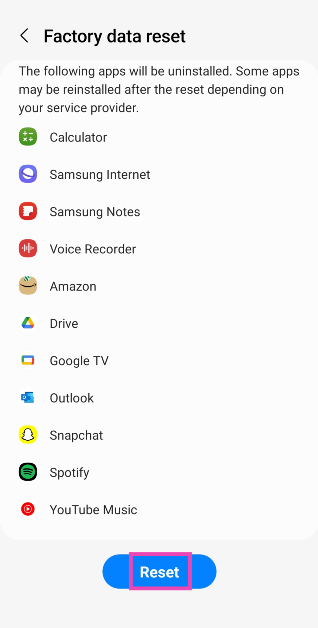
Perform a Factory Reset
If everything else fails, restore your phone to its factory settings to fix the ghost touch issue. A factory reset wipes all your personal data from the device and restores its settings to factory defaults. Here’s how you can go about it.
Step 1: Go to Settings, scroll down and select General management.
Step 2: Tap on Reset.
Step 3: Select Factory data reset.
Step 4: Scroll down and tap on Reset.
Frequently Asked Questions (FAQs)
Why does my Android smartphone randomly keep clicking on things?
Random clicks or ghost touches can be caused by a faulty or broken touchscreen, shoddy installation of a screen protector, a malfunctioning charger, or other software-related issues.
How do I fix ghost touches on my Android smartphone?
If you’re certain that your phone’s hardware isn’t compromised, you can fix ghost touches by updating the screen’s firmware, enabling accidental touch prevention, clearing background apps, and giving your phone’s screen a thorough wipe.
Is ghost touch a virus on Android?
Ghost touches are commonly caused by broken screen, faulty chargers, and poorly applied screen protectors. They are not caused by a virus.
These are the top 10 ways to fix your smartphone if it keeps randomly clicking on things. To make sure the problem isn’t caused by the third-party apps on your phone, restart the device in safe mode. If you have any questions, let us know in the comments!




 Step 1: Go to the website or launch the app that supports passkeys. If you want to sign into your Apple account, go to any Apple service.
Step 2: Enter your username or registered email.
Step 3: Tap on Sign in with Passkey.
Step 4: Use your Face ID or Touch ID credentials to log in. If you haven’t set up a Passkey yet, use your iPhone’s passcode to log in.
Step 1: Go to the website or launch the app that supports passkeys. If you want to sign into your Apple account, go to any Apple service.
Step 2: Enter your username or registered email.
Step 3: Tap on Sign in with Passkey.
Step 4: Use your Face ID or Touch ID credentials to log in. If you haven’t set up a Passkey yet, use your iPhone’s passcode to log in.
 Step 1: Open the website or launch the app you want to access on another device. If you want to sign into your Apple account, go to any Apple service.
Step 2: Enter your username or registered email.
Step 3: Select Other options or Passkey from nearby device.
Step 4: Launch the camera app on your iPhone and scan the QR code displayed on the other device.
You will be signed into your account.
Step 1: Open the website or launch the app you want to access on another device. If you want to sign into your Apple account, go to any Apple service.
Step 2: Enter your username or registered email.
Step 3: Select Other options or Passkey from nearby device.
Step 4: Launch the camera app on your iPhone and scan the QR code displayed on the other device.
You will be signed into your account.
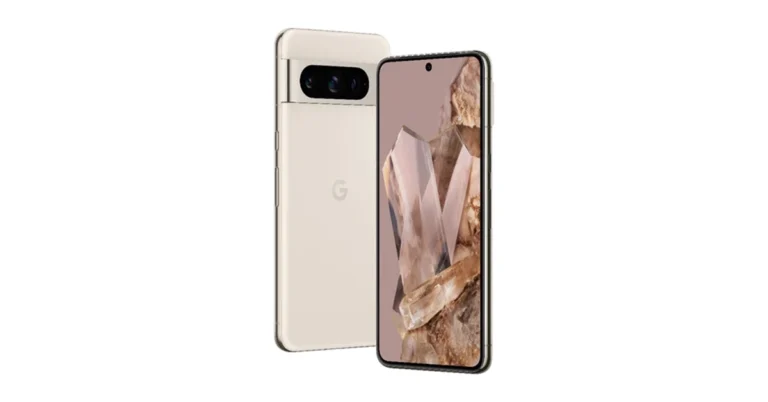
 Pixel 4a and later phones, including Google Pixel Fold, detect a car accident by using the phone’s location, motion sensors, and nearby sounds. In order to make this feature work one must allow permission for location, physical activity, and microphone. When a Car crash is detected it calls emergency services immediately, automatically by using Android’s Emergency Location Service and may transmit info about where you are and what happened.


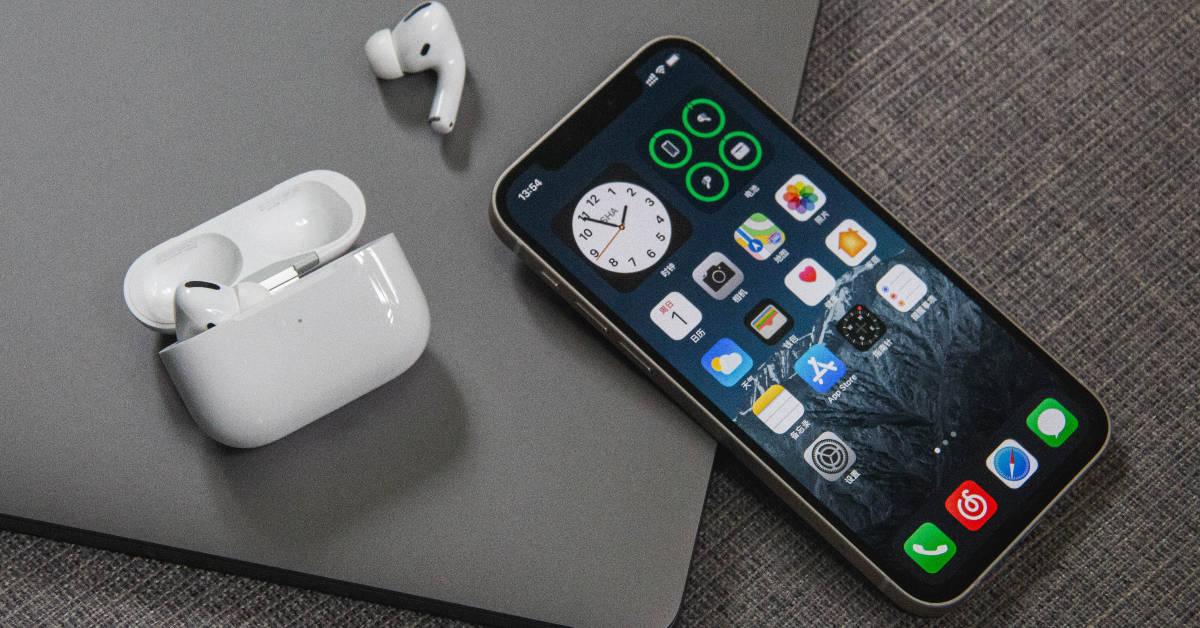 Smartphones are known to heat up easily when they are old and beaten up. However, if you own a relatively newer iPhone, random surges in its internal temperature when you are not performing a power-intensive task is a sign that it may be allocating its resources to some other background tasks. Since spyware and stalkerware run discreetly in the background, they could be causing your device to heat up.
 If your iPhone witnesses a sudden drop in its battery backup, it could be because of stalkerware running in the background. Batteries are not built to last, but it typically takes them several years to degrade. If your iPhone’s battery health is close to 100% there is no reason why it shouldn’t provide a baseline power backup, especially if your screen time is low. The only rational reason is that it is catering to background spyware or stalkerware even when your phone is locked.
 Since most pieces of spyware need to relay the data to the entity that installed them on your iPhone, they rely heavily on your phone’s mobile data or the connected WiFi network. Check your iPhone’s data usage and see if it corroborates with your usage pattern. If there’s any unaccounted data, it is likely being used by spyware to communicate with the entity that hacked into your phone.
 Your iPhone allows you to set up more than one appearance for Face ID. If someone gets physical access to your unlocked iPhone, they can easily set up an alternate Face ID using their appearance to gain authorised access to your device in future. Since most users do not check Face ID settings regularly, this is a very clever way of going under the radar while spying on an iPhone. If you suspect this is the case with your device as well, go to Settings>Face ID and passcode>Set up Face ID to check for any alternate appearances.
 Most anti-virus apps for iPhones also allow users to run a spyware scan. Oftentimes, this feature may only be available with a premium subscription to the app. A thorough spyware scan can also take up a fair amount of time. Apps like McAfee, Norton 360, and Avast can scan and remove spyware from your iPhone.
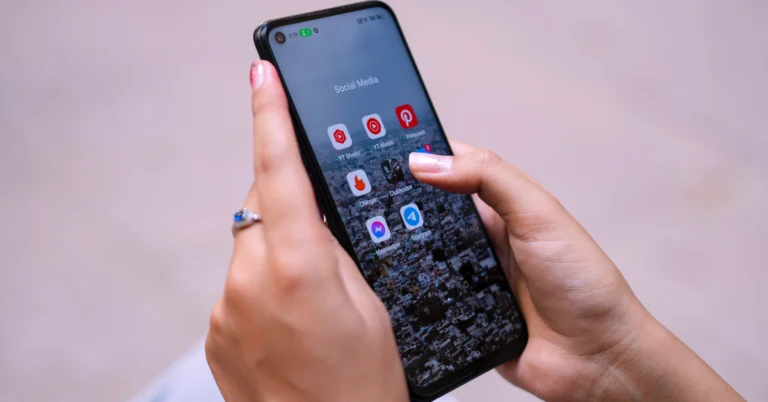
 Nine times out of ten, the reason behind ghost touches is a dirty screen. Grime and dirt particles that collect on your phone can trigger the touch panel on your phone’s screen, leading to random clicks. Grab a microfibre cloth and give your phone a thorough wipe to fix this problem. You can also dampen the cloth a little to get rid of the grime that has collected on the screen over a period of time.
 A faulty screen protector can also trigger ghost touches on your smartphone. This can be due to the poor quality of the screen protector or shoddy installation. If it is the latter, dust and dirt particles can easily find their way between the screen and the protector. Peel off the screen protector and give your phone a thorough wipe before installing a new one. Make sure you follow all the instructions mentioned on the retail package correctly. You can even search YouTube for exhaustive guides on how to install a screen guard correctly.
 Step 2: Turn on the toggle switch for Accidental Touch Protection.

 If you notice ghost touches on your smartphone only while it’s being charged, it is because phone chargers can sometimes have an effect on the touch sensor. This is a more common issue on knock-off or cheap chargers. Make sure you are using the authentic power brick shipped by the smartphone manufacturer or a power adapter from a trusted brand.
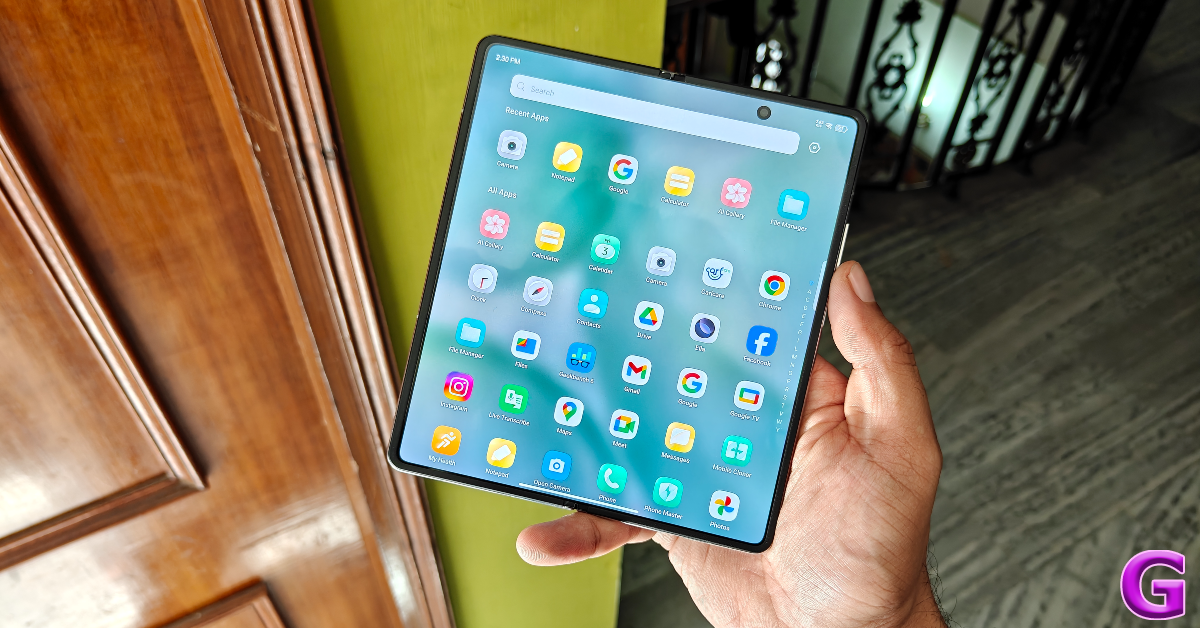 Moving on to software issues that may be causing this problem, the first catch-all fix that you should try is clearing all the background apps running on your device. You can do this by triggering the app switcher using its icon in the navigation bar or by swiping up from the bottom of the screen and holding the touch gesture for a moment. Once you are in the app switcher, tap on ‘Close all’ to terminate the background activity for all apps.
 A quick restart can fix the software glitches in the background that may be causing random clicks on your smartphone. Press and hold the side key and hit ‘Restart’ from the power menu. If the side key triggers the voice assistant on your device, press and hold it with the volume up or down key to access the power menu.
 Step 2: Dial *#2663#.
 Step 3: Tap on TSP FW Update (General).
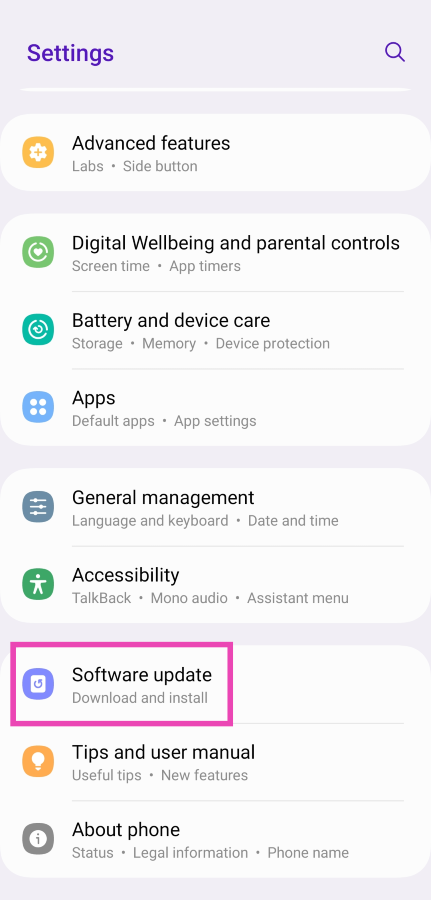 Step 3: Tap on Download and Install. Your smartphone will check for any new updates.
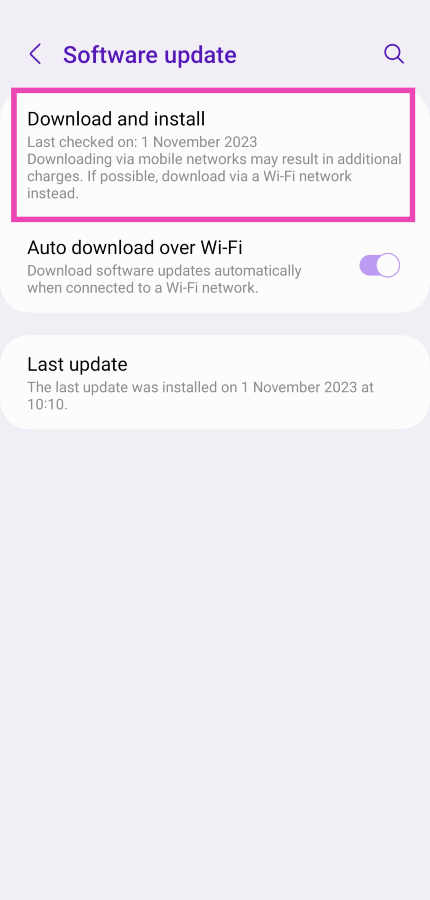 Step 4: If an update is available, tap on Install Now. You can also schedule the update for a later time.
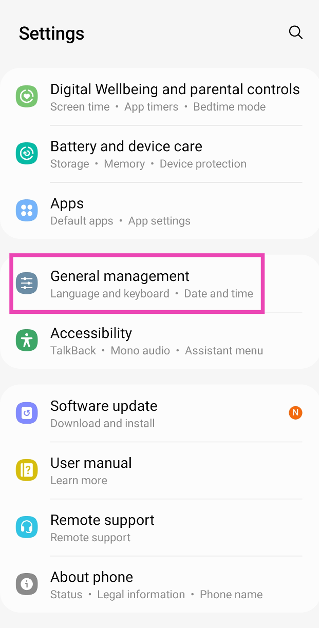 Step 2: Tap on Reset.
 Step 3: Select Factory data reset.
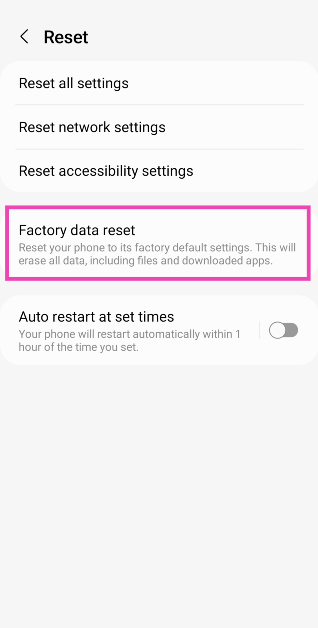 Step 4: Scroll down and tap on Reset.