How to install the Panda Helper app on Android and iPhone?

0
If you’ve ever wanted to do more with your Android or iOS smartphone, you may have come across the suggestion to root the device. Rooting has its fair benefits – it gives you more control over your device and unlocks features that just wouldn’t be possible on an unrooted phone. For example, on a rooted phone, you can download a ‘modded’ version of YouTube that lets you play music while the screen off. You can also download a modded version of Spotify that offers all the premium features absolutely free of cost. The only downside to rooting is that it nullifies the warranty of your device. Luckily, Panda Helper lets you access all the modded apps without rooting your phone. In this article, we show you how to install the Panda Helper app on Android and iPhone. Read Also: Great for creators: YouTube’s new AI-powered tool can dub videos in different languages

Install Panda Helper on an Android phone

Step 1: Go to the official Panda Helper website and tap on ‘Android download’. Step 1: Go to the official Panda Helper website and tap on ‘Android download’. Step 2: Select ‘Download Now’ and confirm your selection in the popup box. Step 2: Select ‘Download Now’ and confirm your selection in the popup box. How to install the Panda Helper app on Android and iPhone? Step 3: Open the APK from the notification bar once it has been downloaded. Step 3: Open the APK from the notification bar once it has been downloaded. How to install the Panda Helper app on Android and iPhone? Step 4: Allow your phone to install APKs downloaded using the web browser. Step 3: Open the APK from the notification bar once it has been downloaded. How to install the Panda Helper app on Android and iPhone? Step 5: Select ‘Install’. Step 5: Select ‘Install’. Panda Helper will be installed on your Android device.

Install Panda Helper on an iPhone

How to hide and unhide apps on an iPhone? Step 1: Go to the official Panda Helper website and tap on ‘iOS download’. Step 2: Install the APK on your iPhone. Step 3: Go to Settings and select General. Step 4: Select ‘Profiles’. Step 5: Select the Panda Helper Profile. Step 6: Select ‘Trust’. You will now be able to use the Panda Helper app on your iPhone.

Frequently Asked Questions

What does the Panda Helper app do?

Panda Helper is a third-party app marketplace that lets you download modded games and apps for your Android or iOS device.

Is Panda Helper safe to use?

Even though it is a third-party marketplace, Panda Helper is safe to use. The app constantly monitors the content on its platform and uses SSL encryption to maintain the security of downloads.

Is Panda Helper free to use?

Panda Helper has a free version which you can use to download modded apps on your device. There is also a ‘VIP version’ of the app that unlocks some extra features. Read Also: Redmi A2+ Review: Is this the ideal smartphone for those on a budget?

Conclusion 

This is how you can install the Panda Helper app on Android and iPhone. Even though it is a third-party marketplace, Panda Helper is run very efficiently. It offers safe and secure downloads at a rapid pace. The marketplace is well-regulated and harmful content is quickly taken down from the platform. For the latest gadget and tech news, and gadget reviews, follow us on Twitter, Facebook and Instagram. For newest tech & gadget videos subscribe to our YouTube Channel. You can also stay up to date using the Gadget Bridge Android App. You can find the latest car and bike news here.

BGMI redeem codes for 25 June 2023, claim and receive rewards and benefits

After being banned for nearly ten months, Battleground Mobile India, aka BGMI, is officially available again in India. BGMI fans are looking for ways to improve their game experience and one such method is the usage of redemption codes, which offers a variety of rewards and advantages using BGMI redeem codes players can gain access to new skins, outfits, loot crates, weapons and free UC and diamonds. As mentioned earlier, these codes give users the chance to earn unique rewards and gain extra benefits while playing the game. This includes GUN SKINS (M4, AKM, M416, AWM, M24, UZI, KAR98K), free character voucher, Andy, Carlo, Sara, Victor character for free, free Anna Character on completing the mission and UC or Royal Pass Discount. So here we have gathered a list of the most recent BGMI redeem codes as of 25 June 2023. Also, redeem these codes asap as these are only valid for a limited duration.

BGMI Redeem Codes for 25 June 2023

  • Updating…

How to get free Redeem Codes for BGMI on 25 June 2023?

  • Launch BGMI on your device.
  • Then select the Redeem Code option from the main menu.
  • Next, click on the Redeem code tab.
  • A new window will open, requesting the redemption code.
  • Now enter your BGMI code.
  • Confirm and click on the “Redeem” tab.
  • If your redeem code is valid then you will get a message confirming that your rewards were successfully redeemed.
(Note that these codes are case-sensitive, so be sure to type them correctly to prevent any errors.) For the latest gadget and tech news, and gadget reviews, follow us on TwitterFacebook and Instagram. For newest tech & gadget videos subscribe to our YouTube Channel. You can also stay up to date using the Gadget Bridge Android App. You can find the latest car and bike news here.

Garena Free Fire Redeem Codes Today 25 June 2023: Here is how to claim them

Garena Free Fire is a battle royale game with regular awards and tournaments to keep players interested. If you play Garena Free Fire, you should be aware of the redeem codes that are released on a daily basis. However, because the battle royale game is banned in India, players from other countries can use the Free Fire Redeem codes daily. If you’re unfamiliar with the Garena Free Fire redeem codes or don’t know how to get them, we’ve put together a step-by-step guide to help you redeem them. Check out Garena Free Fire Redeem Codes for 25 June 2023. The Free Fire redeem codes are a great way to get free stuff. These are 12-digit codes that contain alphabets and numbers, as well as an expiration date and time. Because the Garena FF redeem codes cannot be used more than once, you should hurry to the redemption page to claim your free reward before someone else does. To get a free reward, all you have to do is go to reward.ff.garena.com/en, which is the official redemption page. Also, keep an eye on this space for daily updates on Garena Free Fire redemption codes and rewards.

Garena Free Fire Redeem Codes Today 25 June 2023

4ST1ZTBE2RP9 MCPW3D28VZD6 ZZZ76NT3PDSH 3IBBMSL7AK8G J3ZKQ57Z2P2P GCNVA2PDRGRZ XZJZE25WEFJJ B3G7A22TWDR7X 6KWMFJVMQQYG FFCMCPSUYUY7E EYH2W3XK8UPG UVX9PYZV54AC V427K98RUCHZ

How to Get Free Fire Redeem Codes for Garena on 25 June 2023?

  • Visit the Garena Free Fire game’s official website at reward.ff.garena.com.
  • Use your Facebook, Google, VK, Apple ID, Huawei ID, or Twitter account to log in.
  • You’ll be taken to a valid redemption code (s)
  • Copy and paste the 12-digit redemption code into the text box.
  • On the screen, a dialogue box will appear.
  • ‘Ok’ should be selected.
For the latest gadget and tech news, and gadget reviews, follow us on TwitterFacebook and Instagram. For newest tech & gadget videos subscribe to our YouTube Channel. You can also stay up to date using the Gadget Bridge Android App. You can find the latest car and bike news here.

Amazon Quiz Answers Today 25 June 2023: Participate to win Rs 2500

25 June 2023 Amazon Quiz has gone live. Customers from different parts of the country are participating in the daily quiz. The quiz begins from 12 AM to 11:59 PM. Those participating in the quiz can win exciting prizes by answering all the questions correctly. Today participants have a chance to win a Rs 2500 Amazon Pay Balance. Amazon quiz brings an opportunity for its customers to win Amazon Pay Balance ranging from Rs 1,000 to Rs 50,000. The Quiz can be played from 12 AM to 11:59 PM. The e-commerce platform brings a fresh quiz on a daily basis which consists of five questions related to general knowledge and current affairs. The participants need to answer all the questions correctly and their names will be selected for a lucky draw. The winner will be announced at the end of the month. One wrong answer could eliminate you from the quiz. If you manage to answer all the questions correctly you can stand a chance to win a Rs 2500 Amazon Pay Balance today. Only app users are eligible to participate in the Quiz. Check Out 25 June 2023 Amazon Quiz Answers. Amazon Quiz Today Prize – Rs 2500 Amazon Pay Balance Quiz Date – 25 June 2023 Daily Timing – 12 AM to 11:59 PM Winner Announcement – Today 12 PM

Amazon Quiz Answers Today 25 June 2023

Question 1: Ash Ketchum became the World Champion Pokemon trainer by defeating whom? Answer: Leon Question 2: Which European country elected Natasa Pirc Musar as its first female president? Answer: Slovenia Question 3: The 2022 movie Thirteen Lives is about a rescue operation to save people trapped in a cave in which country? Answer: Thailand Question 4: This artwork was recently completed in which city? Answer: Paris Question 5: Where was this woman shot? Answer: Kentucky

How To Play Amazon Quiz

Only app users are eligible to play the Amazon quiz every morning from 12 AM to 11:59 PM. The quiz is not available on the desktop. For those who are unaware of how to play the Amazon quiz below are the steps, you can follow to take the quiz.
  • Firstly download the Amazon app from Google Play Store or App Store
  • Now fill in the required information through the Sign Up option.
  • You need to log in to the Amazon app and scroll down on the home screen to find the Amazon Quiz banner.
  • Tap on the Amazon Quiz banner and tap on the Start button to start the Quiz.
  • Now you will get 5 questions and you need to answer them correctly. One wrong answer will eliminate you from the Quiz.
  • After answering all the questions correctly you are now eligible for a Lucky Draw.
  • The winner’s name will be announced today at 12 PM.
For the latest gadget and tech news, and gadget reviews, follow us on Twitter, Facebook and Instagram. For newest tech & gadget videos subscribe to our YouTube Channel. You can also stay up to date using the Gadget Bridge Android App. You can find the latest car and bike news here.

Top 3 ways to quickly pair Bluetooth headphones with a Windows 11 PC

Pairing your Bluetooth headphones with a Windows 11 PC is a simple process, but it can be a long one. Unlike Windows 10, Windows 11 has removed the option to pair a TWS using the Windows + K shortcut. While this may not be an issue for most people, users that often connect new Bluetooth devices to their PC may want a quicker way to go about it. In this article, we bring you the top 3 ways to quickly pair your Bluetooth headphones with a Windows 11 PC. Read Also: Great for creators: YouTube’s new AI-powered tool can dub videos in different languages

Use the Windows + K shortcut

Use the Windows + K shortcut Windows 10 users will remember the ultra-easy method of pairing their Bluetooth headphones with their PC. Simply by pressing the Windows + K keys you could trigger the panel for all wireless devices connected to your PC. This included external displays, wireless headphones, keyboards, and your mouse. Strangely, Windows 11 only gives you the option to view and connect to wireless displays upon pressing that key combination. To connect to other Bluetooth devices, you will need to press the back button or hit Enter. Even though there’s still an extra step involved, this is still a very easy way to quickly pair your Bluetooth headphones with a Windows 11 PC.

Pin the Bluetooth shortcut

Pin the Bluetooth shortcut. 3 ways to quickly pair Bluetooth headphones with a Windows 11 PC Pairing a Bluetooth headset with your Windows 11 PC requires accessing device settings and manually connecting the wireless device. You can avoid the extra click by simply pinning the Bluetooth shortcut on the taskbar. Click the arrow icon on the right side of the taskbar and drag the Bluetooth icon back to the arrow to pin it as a shortcut. Now, all you need to do is double-click this icon to quickly pair your Bluetooth headphones with your Windows 11 PC.

Create a desktop shortcut

Another quick way of pairing your Bluetooth headphones with a Windows 11 PC is by creating a desktop shortcut for Bluetooth connections. Here’s how you can go about it. Step 1: Right-click anywhere on the desktop and select New>Shortcut. Step 1: Right-click anywhere on the desktop and select New>Shortcut. 3 ways to quickly pair Bluetooth headphones with a Windows 11 PC Step 2: Enter this text in the location field: %windir%\explorer.exe ms-settings:bluetooth. Step 2: Enter this text in the location field: %windir%\explorer.exe ms-settings:bluetooth. 3 ways to quickly pair Bluetooth headphones with a Windows 11 PC Step 3: Click on ‘Next’ and enter a name for the shortcut. Step 4: Hit ‘Finish’. Step 3: Click on ‘Next’ and enter a name for the shortcut. 3 ways to quickly pair Bluetooth headphones with a Windows 11 PC You can change the icon for this shortcut from Properties>Change icon and even pin it to the taskbar.

Frequently Asked Questions

Why aren’t my Bluetooth headphones connecting to my PC?

Check the battery on your Bluetooth headphones and make sure they are turned on. Your wireless headphones need to be in the Bluetooth range of your PC. If they are still taking time to connect, restart both devices and try again.

How do I connect my Bluetooth headphones to two devices at once?

To pair your wireless headphones to two devices at once, they must support a multi-point connection. If your TWS offers multi-pairing, put it in discovery mode and use your devices to connect to it.

Why is the audio from Bluetooth headphones delayed?

Bluetooth headphones and TWS have a higher latency than standard wired headphones. This can be an issue particularly when you’re gaming. For better results, enable low latency mode on your TWS. Read Also: Vivo Y36 with 44W fast charging support launched in India

Conclusion

This is how you can quickly pair your Bluetooth headphones with your Windows 11 PC. Once the headphones are connected to your PC, you will not need to manually pair them again unless you remove the connection from Windows settings. If you found this article helpful, let us know in the comments! For the latest gadget and tech news, and gadget reviews, follow us on Twitter, Facebook and Instagram. For newest tech & gadget videos subscribe to our YouTube Channel. You can also stay up to date using the Gadget Bridge Android App. You can find the latest car and bike news here.

Top 7 AI Tools To Remove Background Noise From Any Audio

0
If you’re just getting started with podcasting and content creation, the quality of your audio recording is something that you should get right from the very beginning. Noisy audio is very distracting and can turn off the audience from your content. It can be a daunting task to clean up all your recordings manually, but luckily, with the power of AI, you don’t have to do it by yourself anymore. Here are the top 7 AI tools you can use to remove background noise from your audio recordings. Read Also: Redmi A2+ Review: Is this the ideal smartphone for those on a budget?

Cleanvoice

Cleanvoice Cleanvoice is one of the best AI-powered audio tools on the Internet. Apart from nullifying pesky background noise, Cleanvoice also removes filler works, stutters, humming and unwanted mouth sounds from your audio recording. The result is a clean, professional recording that is fit to be published anywhere. You can register on Cleanvoice and get 30 minutes of service for free. Once the trial period ends, you will need to subscribe to a premium plan.

Podcastle

Podcastle Designed for amateur podcasters, Podcastle cleans up your audio recording with just one click. This tool is great at recognising static, chatter, and unwanted background noise in your audio recording. To remove any background noise from the audio, simply upload it to Podcastle, right-click on the audio track, and select ‘Add Magic Dust’. The AI-powered tool will clean your audio file instantly.

Veed

Veed Veed’s AI background noise remover is remarkably good at recognising unwanted sounds like wind, rain, traffic noise, mouse clicks, ceiling fans, and more. You can upload an audio recording from your computer or a cloud service like Dropbox. You can also record an audio on the website itself. Once that is done, all you need to do is click on ‘Clean Audio’ and Veed’s AI tool will take care of the rest.

LALAL.AI

LALAL.AI. Top 7 AI Tools To Remove Background Noise From Any Audio LALAL.AI is designed for musicians, sound producers, music engineers, video bloggers, streamers, transcribers, translators, journalists, and other professionals that want an easy solution to fix a noisy audio recording. Streamers and content creators can use this tool to remove copyrighted music from their videos. Journalists working in the field will also find this tool pretty helpful as it can increase the sound quality of interviews by removing unwanted background noise.

Noise Reducer

Noise Reducer. Top 7 AI Tools To Remove Background Noise From Any Audio Noise Reducer user AI to minimise background noises like wind, rain, baby crying, phone rings, door slams, ambient chatter, and more. The tool does a great job of extracting the necessary sound from the ambient noises. You can use the tool for several audio recordings but only the first download is available for free. You can listen to several samples on the website or try the tool yourself before making up your mind. The file limit for Noise Reducer is 2GB.

Kapwing

Noise Reducer. Top 7 AI Tools To Remove Background Noise From Any Audio Kapwing may be primarily known as a video editor, but it also has a great audio tool that removes annoying background noise from your recordings. This tool works for audio recordings as well as video files. Cluttered audio with external disturbance can be very distracting. Luckily, Kapwing easily recognises the unwanted elements on the audio track and automatically removes them. Apart from removing background noise, Kapwing can also remove long pauses from the audio track.

Audio Studio

Audio Studio. Top 7 AI Tools To Remove Background Noise From Any Audio Audio Studio offers speech enhancement via AI-powered advanced noise removal. This tool can clear any background noise from barking dogs to chuffing helicopters. You can go through several audio templates on the website before deciding whether the tool is for you. You can use Audio Studio for 20 minutes per month without any charge. If you want to clean larger recordings, you will need to subscribe to a premium plan. Read Also: New State Mobile releases June Update, now includes new map Dead Rock

Conclusion

These are the top 7 tools you can use to remove background noise from any audio recording. If you don’t wanna go the AI route, you can use tools like Audacity to manually remove noise and external disturbance from your audio files. If you found this article, let us know in the comments! For the latest gadget and tech news, and gadget reviews, follow us on Twitter, Facebook and Instagram. For newest tech & gadget videos subscribe to our YouTube Channel. You can also stay up to date using the Gadget Bridge Android App. You can find the latest car and bike news here.

How to use ChatGPT without registering with OpenAI? Top 5 ways

0
ChatGPT is an absolute delight to use, be it strictly for conversational purposes or specific tasks like coding and translation. If you haven’t tried out the chatbot, you are missing out on an incredible experience. While ChatGPT is free to use, it does require you to make an OpenAI account using your email address and phone number. If that is something you are not comfortable with, here are the top 5 ways to use ChatGPT without registering with OpenAI. Read Also: Redmi A2+ Review: Is this the ideal smartphone for those on a budget?

Use Microsoft Bing AI

Use Microsoft Bing AI A major investor in OpenAI, Microsoft has been quick to incorporate ChatGPT in its existing services. Using Bing AI comes with a few advantages. Firstly, you don’t need to register your email or phone number with OpenAI in order to use the ChatGPT-based chatbot. If you’re an existing Bing user, simply click on the ‘Chat’ section on the Bing homepage and you’re set. If you are just starting out with Bing, you will need to log in using your Microsoft account. Windows users may already have one. Another advantage of using Bing AI is that, unlike ChatGPT, it can give answers with the knowledge of recent events. ChatGPT users will know that the chatbot lacks real-world knowledge after September 2021. This is not the case with Bing AI. The only downside to using Microsoft’s chatbot is that it is only functional on the Edge browser.

Use the Bing app

Use the Bing app A major complaint among ChatGPT users is that there still isn’t a functional Android app for it. While OpenAI may have rolled out a ChatGPT app for iOS, Android users will have to wait a little longer. For those that don’t want to wait, the Bing app is an excellent alternative. Based on ChatGPT-4, the Bing app doesn’t require you to register your email with OpenAI in order to use its chatbot. You also get the full ChatGPT experience on your smartphone.

Use Microsoft SwiftKey

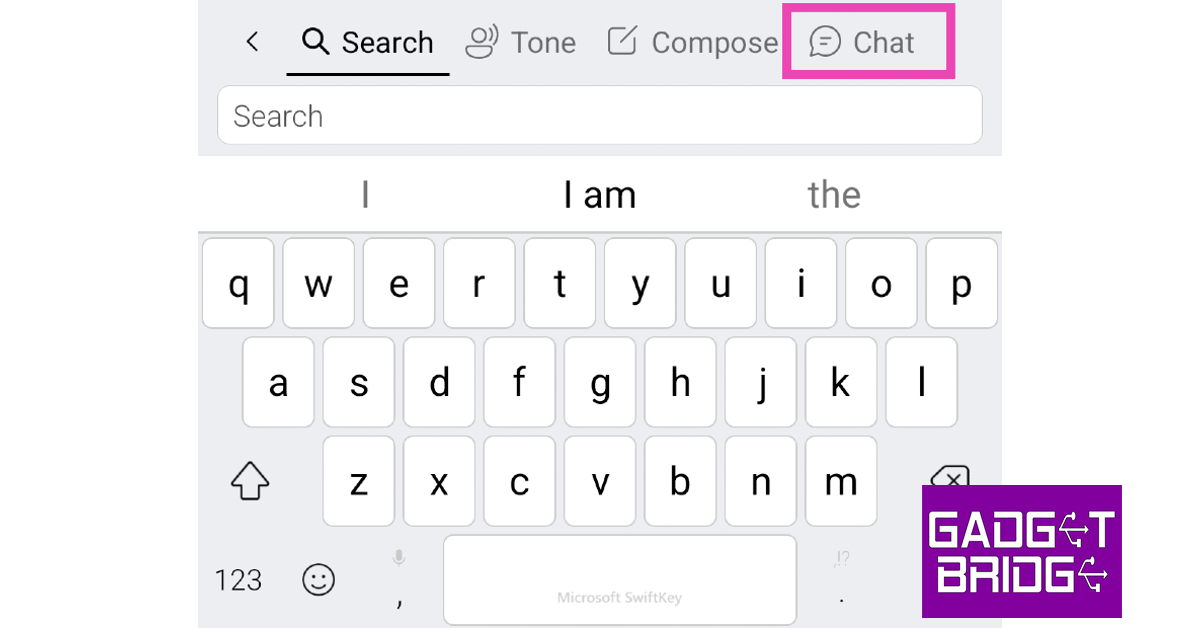
Use Microsoft SwiftKey Another Microsoft product that makes great use of ChatGPT-based Bing AI is the SwiftKey keyboard. Using Bing AI, SwiftKey offers to change the tone of your text and compose an email or blog post. You can also talk to the Bing AI chatbot from the keyboard itself. Once you’ve signed into SwiftKey using your Microsoft account, tap the Bing icon at the top right corner of the keyboard and select ‘Chat’. Here is an article explaining how you can use Bing AI on the Microsoft SwiftKey keyboard for Android.

Use Skype

Use Skype. How to use ChatGPT without registering with OpenAI? Top 5 ways Another great way to access ChatGPT without registering with OpenAI is by using Skype. With Microsoft’s Bing AI integrated into the messaging and calling app, you can easily access it with just one tap. You will find the Bing chatbot at the top of your conversation list. Once you are done with a conversation, simply enter ‘newtopic’ to begin a new one.

Use Merlin

Use Merlin. How to use ChatGPT without registering with OpenAI? Top 5 ways Merlin is a very handy ChatGPT-based Chrome extension that can get a lot of stuff done with just a few clicks. Apart from replying to your prompts, Merlin can make web browsing more productive and fun. You can talk to the chatbot on any webpage and ask it to summarise the information on the page for you. This also works for YouTube videos. Merlin also helps you with concise searches and creating better emails. All this without needing an OpenAI account!

Frequently Asked Questions

How do I get an OpenAI account?

To create an OpenAI account, log on to its website and select ‘Sign up’. Register with your email account and set up a password for your OpenAI account.

Can I use OpenAI for free?

You can use OpenAI’s services for free. It also has some paid products, like ChatGPT Plus which costs $20 per month.

Who can access OpenAI?

Anyone with an OpenAI account can access it for free. Read Also: Soon, use AI-generated custom templates in Google Sheets

Conclusion

This is how you can use ChatGPT without an OpenAI account. If you want access to ChatGPT Plus, you will need to register with OpenAI and pay a monthly subscription of $20 per month. If you don’t want to make an OpenAI account, you can try ChatGPT alternatives like Google Bard, YouChat, and Snapchat My AI. For the latest gadget and tech news, and gadget reviews, follow us on Twitter, Facebook and Instagram. For newest tech & gadget videos subscribe to our YouTube Channel. You can also stay up to date using the Gadget Bridge Android App. You can find the latest car and bike news here.

BGMI redeem codes for 24 June 2023, claim and receive rewards and benefits

After being banned for nearly ten months, Battleground Mobile India, aka BGMI, is officially available again in India. BGMI fans are looking for ways to improve their game experience and one such method is the usage of redemption codes, which offers a variety of rewards and advantages using BGMI redeem codes players can gain access to new skins, outfits, loot crates, weapons and free UC and diamonds. As mentioned earlier, these codes give users the chance to earn unique rewards and gain extra benefits while playing the game. This includes GUN SKINS (M4, AKM, M416, AWM, M24, UZI, KAR98K), free character voucher, Andy, Carlo, Sara, Victor character for free, free Anna Character on completing the mission and UC or Royal Pass Discount. So here we have gathered a list of the most recent BGMI redeem codes as of 24 June 2023. Also, redeem these codes asap as these are only valid for a limited duration.

BGMI Redeem Codes for 24 June 2023

JJCZCDZJ9U – Golden Pan UKUZBZGWF – Free Fireworks TIFZBHZK4A – Free Outfit TQIZBZ76F – Vehicle Skin 5FG10D33 – Falcon and Free Emotes GPHZDBTFZM24U – UMP9 Skin KARZBZYTR – Free Outfit RNUZBZ9QQ – AKM Glacier Skin PGHZDBTFZ95U – M416 Skin R89FPLM9S – Companion TQIZBz76F – 3 Free Motorcycle BMTFZBZQNC – Free Drifter Set SD14G84FCC – Free Skin for KAR98 Sniper Gun RNUZBZ9QQ – AKM Glacier Skin BMTCZBZMFS – Pretty in Pink set and Pretty in Pink Headpiece 5FG10D33 – Outfit for Free

How to get free Redeem Codes for BGMI on 24 June 2023?

  • Launch BGMI on your device.
  • Then select the Redeem Code option from the main menu.
  • Next, click on the Redeem code tab.
  • A new window will open, requesting the redemption code.
  • Now enter your BGMI code.
  • Confirm and click on the “Redeem” tab.
  • If your redeem code is valid then you will get a message confirming that your rewards were successfully redeemed.
(Note that these codes are case-sensitive, so be sure to type them correctly to prevent any errors.) For the latest gadget and tech news, and gadget reviews, follow us on TwitterFacebook and Instagram. For newest tech & gadget videos subscribe to our YouTube Channel. You can also stay up to date using the Gadget Bridge Android App. You can find the latest car and bike news here.

Garena Free Fire Redeem Codes Today 24 June 2023: Here is how to claim them

Garena Free Fire is a battle royale game with regular awards and tournaments to keep players interested. If you play Garena Free Fire, you should be aware of the redeem codes that are released on a daily basis. However, because the battle royale game is banned in India, players from other countries can use the Free Fire Redeem codes daily. If you’re unfamiliar with the Garena Free Fire redeem codes or don’t know how to get them, we’ve put together a step-by-step guide to help you redeem them. Check out Garena Free Fire Redeem Codes for 24 June 2023. The Free Fire redeem codes are a great way to get free stuff. These are 12-digit codes that contain alphabets and numbers, as well as an expiration date and time. Because the Garena FF redeem codes cannot be used more than once, you should hurry to the redemption page to claim your free reward before someone else does. To get a free reward, all you have to do is go to reward.ff.garena.com/en, which is the official redemption page. Also, keep an eye on this space for daily updates on Garena Free Fire redemption codes and rewards.

Garena Free Fire Redeem Codes Today 24 June 2023

  • U8S47JGJH5MG
  • B3G7A22TWDR7X
  • J3ZKQ57Z2P2P
  • FF7MUY4ME6SC
  • FFIC33NTEUKA
  • 8F3QZKNTLWBZ
  • GCNVA2PDRGRZ
  • VNY3MQWNKEGU
  • FFCO8BS5JW2D
  • FFAC2YXE6RF2
  • SARG886AV5GR
  • FF9MJ31CXKRG
  • 3IBBMSL7AK8G
  • ZZATXB24QES8
  • FFICJGW9NKYT
  • 4ST1ZTBE2RP9
  • WEYVGQC3CT8Q
  • X99TK56XDJ4X

How to Get Free Fire Redeem Codes for Garena on 24 June 2023?

  • Visit the Garena Free Fire game’s official website at reward.ff.garena.com.
  • Use your Facebook, Google, VK, Apple ID, Huawei ID, or Twitter account to log in.
  • You’ll be taken to a valid redemption code (s)
  • Copy and paste the 12-digit redemption code into the text box.
  • On the screen, a dialogue box will appear.
  • ‘Ok’ should be selected.
For the latest gadget and tech news, and gadget reviews, follow us on TwitterFacebook and Instagram. For newest tech & gadget videos subscribe to our YouTube Channel. You can also stay up to date using the Gadget Bridge Android App. You can find the latest car and bike news here.

Amazon Quiz Answers Today 24 June 2023: Participate to win Rs 5,000

24 June 2023 Amazon Quiz has gone live. Customers from different parts of the country are participating in the daily quiz. The quiz begins from 12 AM to 11:59 PM. Those participating in the quiz can win exciting prizes by answering all the questions correctly. Today participants have a chance to win a Rs 5,000 Amazon Pay Balance. Amazon quiz brings an opportunity for its customers to win Amazon Pay Balance ranging from Rs 1,000 to Rs 50,000. The Quiz can be played from 12 AM to 11:59 PM. The e-commerce platform brings a fresh quiz on a daily basis which consists of five questions related to general knowledge and current affairs. The participants need to answer all the questions correctly and their names will be selected for a lucky draw. The winner will be announced at the end of the month. One wrong answer could eliminate you from the quiz. If you manage to answer all the questions correctly you can stand a chance to win a Rs 5,000 Amazon Pay Balance today. Only app users are eligible to participate in the Quiz. Check Out 24 June 2023 Amazon Quiz Answers. Amazon Quiz Today Prize – Rs 5,000 Amazon Pay Balance Quiz Date – 24 June 2023 Daily Timing – 12 AM to 11:59 PM Winner Announcement – Today 12 PM

Amazon Quiz Answers Today 24 June 2023

Question 1: Which country has decided to rebuild the world’s largest-ever airplane, which was destroyed recently? Answer: Ukraine Question 2: A massive explosion occured near Beyoglu Square, a major nightlife and shopping district in which city? Answer: Istanbul Question 3: Which singer became the first ever to fill all top 10 spots on the Billboard Hot 100 in the same week? Answer: Taylor Swift Question 4: Which was the first recording studio in the world? Answer: New York Phonograph Company Question 5: This bird spreads which flu? Answer: Avian Flu

How To Play Amazon Quiz

Only app users are eligible to play the Amazon quiz every morning from 12 AM to 11:59 PM. The quiz is not available on the desktop. For those who are unaware of how to play the Amazon quiz below are the steps, you can follow to take the quiz.
  • Firstly download the Amazon app from Google Play Store or App Store
  • Now fill in the required information through the Sign Up option.
  • You need to log in to the Amazon app and scroll down on the home screen to find the Amazon Quiz banner.
  • Tap on the Amazon Quiz banner and tap on the Start button to start the Quiz.
  • Now you will get 5 questions and you need to answer them correctly. One wrong answer will eliminate you from the Quiz.
  • After answering all the questions correctly you are now eligible for a Lucky Draw.
  • The winner’s name will be announced today at 12 PM.
For the latest gadget and tech news, and gadget reviews, follow us on TwitterFacebook and Instagram. For newest tech & gadget videos subscribe to our YouTube Channel. You can also stay up to date using the Gadget Bridge Android App. You can find the latest car and bike news here.