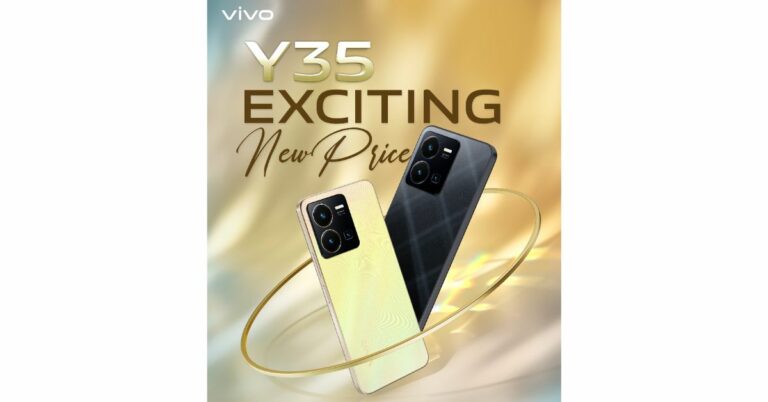
Vivo has slashed the price of Vivo Y35 in India by Rs 500. The smartphone was launched in India last year. The smartphone is powered by Snapdragon 680 processor along with an extended RAM feature. It includes a 5000mAh battery and 44W flash charge support. In addition to this, there is a 50MP primary camera with Electronic Image Stabilization (EIS).
Vivo Y35 New price and offers
Vivo Y35 was launched in India last year with a price tag of Rs 18,499 for a single 8GB RAM with 128GB of internal storage. The smartphone comes in two colour options of Agate Black and Dawn Gold. The phone was earlier available at Rs 17,499 but now it is being made available at Rs 16,999. The phone is seeing a price drop of Rs 500. The new effective price will be applicable starting today on the vivo India e-store and across all partner retail stores.Consumers can also receive an additional cashback of up to Rs 1,000 using ICICI, SBI, Yes Bank, Federal Bank, AU Small Finance, and IDFC First Bank. Buyers are also eligible to receive other benefits such as V-Shield Protection Plans.
Vivo Y35 specifications
Vivo Y35 features a 6.58-inch full-HD+ LCD screen with 1,080×2,408 pixels of resolution. The screen has a 90Hz refresh rate. The phone operates on Funtouch OS 12-based Android 12. Under the hood, there is a Qualcomm Snapdragon 680 SoC with 8GB of RAM and 128GB of internal storage. The device also has an Extended RAM function that allows up to 8GB of RAM to be borrowed from storage for a total of 16GB of RAM. While the internal storage can be expanded up to 1TB using a microSD card.The Vivo Y35 comes with a triple-back camera configuration that includes a 50-megapixel primary sensor with f/1.8 aperture. Both the 2-megapixel macro and 2-megapixel bokeh sensors have f/2.4 aperture. The handset includes a 16-megapixel front-facing camera with an f/2.0 aperture for taking selfies and video calling. The smartphone also includes a variety of functions to improve the camera, including Super Night Camera mode, Multi Style Portrait mode, Rear Camera Bokeh Flare Portrait, and others for a smooth photographic experience.The Y35 has Wi-Fi, Bluetooth v5, GPS, Glonass, OTG, FM radio, and a USB Type-C connector as connectivity options. An accelerometer, ambient light sensor, e-compass, gyroscope, and proximity sensor are among the sensors on board. For phone unlock the device has a fingerprint sensor and Face Wake functionality. The device boasts a 5000mAh battery combined with 44W flash charging. Additionally, the Y35 includes Multi Turbo and Ultra Game Mode, which guarantee a luxurious sensory experience for immersive gaming.
For the latest gadget and tech news, and gadget reviews, follow us on Twitter, Facebook and Instagram. For newest tech & gadget videos subscribe to our YouTube Channel. You can also stay up to date using the Gadget Bridge Android App. You can find the latest car and bike news here.
Android and Apple ecosystems very rarely work together seamlessly. Even transferring WhatsApp messages between the two platforms used to be a chore until very recently. If you’re a long-time Android user that just made the switch to an iPhone, you’re probably looking for the best way to transfer your data to your new Apple device. Luckily, the native method using the Move to iOS app makes this process pretty easy. In this article, we show you how to transfer data from an Android phone to an iPhone using Apple Move.Read Also:High Tech Surveillance Gadgets That Protect the Gaming Operators
Things to remember before you begin
Make sure the WiFi on both devices is turned on.
Both smartphones must be plugged into a charger.
Your iPhone must have enough storage to copy all the data.
To move your Chrome bookmarks, make sure you are using the latest version of the web browser on your Android device.
Here’s how you can transfer your data using Move to iOS
Step 1: Turn on your iPhone and go through the setup process until your reach the ‘Apps & Data’ page.Step 2: Select ‘Move Data from Android’.Step 3: Launch the ‘Move to iOS’ app on your Android smartphone.Step 4: Tap ‘Continue’ on your iPhone. After a few seconds, your iPhone will display a code.Step 5: Enter the code on your Android smartphone.Step 6: Your iPhone will now create a temporary WiFi network using its hotspot. Join this network on your Android device.Step 7: Choose the content you want to transfer. This includes your contacts, messages, photos and videos, files, settings, WhatsApp messages, calendar entries, bookmarks, and more. Do not disturb the transfer process until it finishes on your iPhone.Step 8: After the content has been transferred, tap ‘Finish’ on your Android smartphone and ‘Continue’ on your iPhone.Step 9: Follow the on-screen instructions to finish the process on your iPhone.
Frequently Asked Questions
Can I use the Move to iOS app after setup?
The Move to iOS app only works while you’re setting up your iPhone for the first time. If you skipped the process at the time of setting up your iPhone, you will have to transfer the content manually. You can also factory reset your phone to set it up again using Move to iOS, but that will erase all your existing data.
Does Move to iOS transfer all my apps?
Move to iOS transfers all the free apps from your Android phone that are also available for free on the App Store.
Does Move to iOS transfer all my data?
Move to iOS transfers the majority of your personal data from your Android phone to an iPhone. However, certain data like books, music, and PDF files will need to be transferred manually.Read Also:How to download and install Chrome OS Flex?
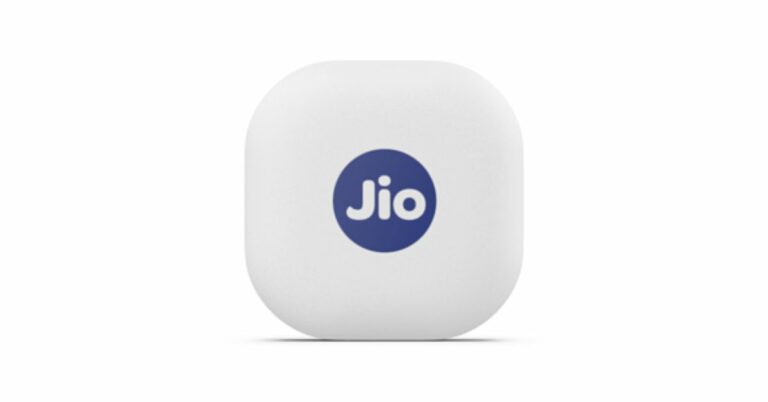
Jio has announced the launch of a new Bluetooth tracker in India. Similar to Apple’s Airtag the JioTag also lets you locate and find your lost items. However, the device is a lot cheaper than Apple’s Bluetooth tracker and offers similar features as that of Apple AirTag. In addition to this, it comes with a Community Find feature. It can be used to find a phone and locate lost items.
JioTag price in India, sale details
JioTag costs Rs 2199, however, the current launch deal price is Rs 749. The device comes in a single white colour variant. As per the listing, the Bluetooth tracker by Jio will be available via the company’s official website in the country. It is available with both cash on delivery and prepaid payments. In addition to this, the company offers an additional battery and a lanyard cable with the JioTag which is sold separately with the Apple AirTag.
JioTag specifications
You can use JioTag to locate your smartphone. Double tapping your connected JioTag will ring your phone, even if it is on silent. In addition to your phone, it may be attached to your wallet, baggage, keys, and other items so that your phone will warn you when you leave something behind or are lost. The Bluetooth tracker also provides the precise position of your item’s most recent disconnect. Even at the site of the last disconnect, if you are still unable to locate your JioTagged possession the Jio Community locate network will hunt for and report back the location of your missing JioTagged item after users mark their JioTag as lost on the JioThings app.The device is powered by a replaceable CR2032 and features Bluetooth 5.1. The Jio tag measures 3.82×3.82×0.72 cm and weighs 9.5 grams. If offers up to 1 year of battery life and has a range of up to 20 meters indoors and up to 50 meters outdoors (Direct line of sight) For the latest gadget and tech news, and gadget reviews, follow us on Twitter, Facebook and Instagram. For newest tech & gadget videos subscribe to our YouTube Channel. You can also stay up to date using the Gadget Bridge Android App. You can find the latest car and bike news here.
Audiomack is one of the more popular music streaming platforms on the Internet. Its influence is comparable to Soundcloud, which makes it a very attractive platform for new and amateur musicians. Audiomack is one of the best platforms to attract more ears to your music and create a dedicated audience. Apart from music, creators use Audiomack to post their podcast episodes as well. If you’re new to the whole music streaming scene, figuring out how to upload your content can be a confusing task. Don’t worry because we’ve got you covered. In this article, we bring you the 3 easy ways to upload music on Audiomack.Read Also:Best Redmi 5G smartphones under Rs 25,000
How to upload music on Audiomack using the Android Creator app
Step 1: Install the Audiomack Creator app on your smartphone.Step 2: Tap the upload icon at the bottom of the dashboard.Step 3: Select the upload type. If you want to upload a single track, tap on ‘Song’. If you want to upload songs, select ‘Album/EP’. If you want to upload a podcast, select ‘Non-Musical’.Step 4: Tap the plus icon to upload an audio file. Audiomack supports uploads in the following formats: MP3, WAV, AIFF, OGG, FLAC, and M4A. The size limit for one audio file is 250MB.Step 5: Fill out all the track details once the song is uploaded. You can also select an artwork for the song/album/EP.Step 6: You can choose to release the song immediately or schedule it for later. If you want to go for the latter option, select Schedule/Premiere Access and set the release date and time.Step 7: Hit ‘Finish’.
How to upload a song on Audiomack from your desktop
Step 1: Launch the official Audiomack website on your desktop’s web browser and click the upload icon at the top-right corner of the screen.Step 2: Select the upload type and hit ‘Next’.Step 3: Select the song file from your desktop. You can also drag and drop the file on the upload screen.Step 4: Enter the metadata for the song. This includes the song title, artist name, feature list, genre, producers, and more.Step 5: Choose the release date or publish the song immediately. Hit ‘Finish’ once you’re done.
How to upload a song on Audiomack using a mobile browser
Audiomack’s mobile website is well-optimised to carry out basic tasks. The process to upload a song on mobile is almost the same as the one on a desktop. Here’s how can go about it.Step 1: Launch the official Audiomack website on your smartphone’s web browser.Step 2: Tap on the ‘My Library’ icon at the bottom right corner of the screen.Step 3: Tap on the gear icon.Step 4: Select ‘Upload’.Step 5: Select an upload type and hit ‘Next’.Step 6: Select the song you want to upload from your device’s internal storage.Step 7: Enter the metadata for the song.Step 8: Set a release date or select ‘publish immediately’.Step 9: Hit ‘Finish’.
Frequently Asked Questions
How do I upload music on Audiomack?
To upload your music on Audiomack, launch the Audiomack creator app or website and select ‘Upload’. Choose the file you want to upload from your device’s storage, fill in the metadata, and publish the song.
These are the 3 easiest ways to upload music on Audiomack. Instead of uploading individual files, you can upload an entire album at once. Make sure that the individual file size does not exceed 250MB. To maximise your reach and increase the odds of the audience listening to your music, fill in all the track details and post artwork for the song/album.For the latest gadget and tech news, and gadget reviews, follow us on Twitter, Facebook and Instagram. For newest tech & gadget videos subscribe to our YouTube Channel. You can also stay up to date using the Gadget Bridge Android App. You can find the latest car and bike news here.
While expandable storage may be missing from some premium devices, most budget and midrange smartphones still come with a slot for an external micro SD card. If you don’t want to splurge extra cash for a higher storage variant, you can easily use a memory card with your device. However, memory cards are known to malfunction from time to time. Then what do you do? Fret not, we are here to help. Today, we bring you the top 8 ways to fix a corrupted Android SD card or memory card.Read Also:How to use a Passkey for your Google Account?
Make sure the SD card is in the right slot
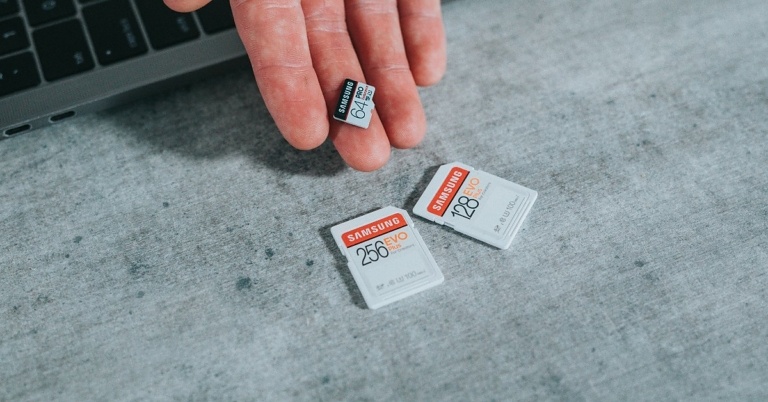
Earlier, smartphones used to have a dedicated slot for micro SD cards. Hybrid SIM card slots were introduced more recently, allowing users to place their SIM cards and micro SD card on a single tray. This may be a neat idea, but it may leave some people confused. If your Android smartphone cannot recognise the SD card, pull out the hybrid SIM tray and inspect the positioning of the SIM and SD card. Look for the appropriate sign on the tray before inserting the SD card.
Clean the micro SD card
If the memory card has been lying around on a shelf or in a drawer, make sure you give it a quick wipe before inserting it into your phone. Dust and dirt particles can keep the SD card from functioning properly. Your smartphone may not be able to detect the card. On the flip side, make sure the SD card tray is clean as well. Pull the tray out and blow some air on it to release the dust particles. Give it a quick wipe and you’re good to go.
Inspect the SD card for physical damage
SD cards are prone to wear out after prolonged usage. This issue is more common when you use the same card on multiple devices. If your SD card is damaged, your device will not be able to read or detect it. Pull out the card and closely inspect it for damage. Use it on another device to check if it works.
Use a card reader
Maybe the problem lies with your phone’s SD card slot and not the card itself. The only way of knowing for sure is by using an external card reader. Plug the card reader into the USB Type-C port of your device. Push the card into the external reader and see if you can access its contents on your phone. When you use the card reader, your micro SD card will show up as drive storage on your phone.
Unlock the card
Some SD cards come with a physical lock switch. Once a card is locked, you cannot write or delete any data from it. If you’re having an issue with copying or erasing files from your Android phone’s extended storage, pull out the card and unlock it using the physical switch located on the side of the SD card.
Format the memory card
The most common reason why memory cards stop functioning is data corruption. If your memory card is corrupted, you may experience several kinds of issues with it – ranging from detection issues to slow performance. Data corruption is caused when a file isn’t completely transferred to the card. This may happen because you pulled out the card before the transfer was completed. The only way to fix a corrupted memory card is by formatting it. To format the SD card go to Settings>Battery and device care>Storage and tap on the ellipses at the top right corner of the screen to access Advanced Settings. Tap on the SD card and select ‘Format’.
Use the chkdsk command
You will need to connect your SD card to your laptop or PC for this method. Pull out the card from your phone and use a card reader or your PC’s dedicated memory card slot to insert the SD card. Once that’s done, follow these steps.
Step 1: Right-click the Windows icon on the taskbar and select Terminal (Admin).
Step 2: Enter the following command:
chkdsk [disk name assigned to SD card]: /x /r
Step 3: Once the process has finished, safely remove the SD card from your PC and insert it into your phone.
Update your smartphone’s OS
If your phone’s OS cannot detect the micro SD due to some bug or other issue, it will be resolved with a quick update. Go to Settings>Software Update to look for pending updates. If there is an available update, download and install it on your device.
Frequently Asked Questions
How do I fix a corrupted SD card?
To fix a corrupted SD card, you need to format it. Go to Settings>Battery and device care>Storage>Advanced Settings and select Format.
Why is my SD card not working on my Android phone?
If your Android phone is not detecting the SD card, give the card and the hybrid slot a quick wipe and make sure there aren’t any dust particles on them. Inspect the SD card closely for any physical damage.
How do I fix an undetected SD card on Android?
If your Android phone cannot detect the SD card, use an external card reader. Plug the card reader into the USB Type-C port on your device. If your SD card works fine with the card reader, it means that your phone’s card slot is faulty.Read Also:5 Best Ways to Sign Out of Google Play Store on an Android Device
Conclusion
These are the top 8 ways to fix a corrupted Android SD card or memory card. If these fixes don’t work for you, you will need to figure out whether the fault lies with the SD card or its slot in your phone. If the phone’s slot is at fault, you will need to take it to the authorised service centre for repair. If you have any questions, let us know in the comments!
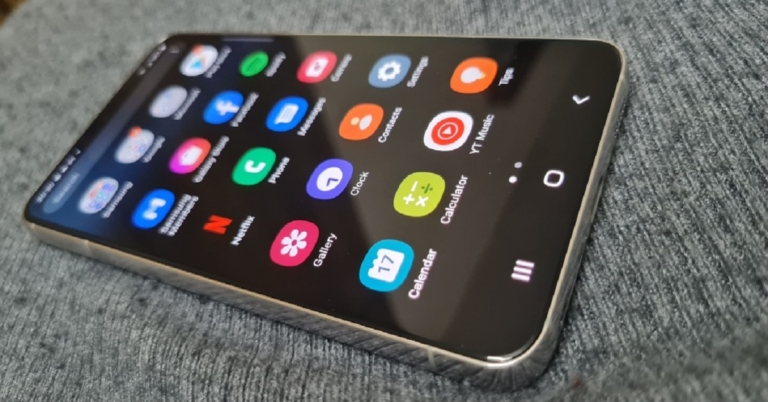
Samsung Galaxy S22 was launched in India last year. The price of the smartphone has now been lowered by up to Rs 8,000. The device was introduced in India at a starting price of Rs 72,999 which has now come down to Rs 64,999 for the base variant. The smartphone features a 120Hz Dynamic AMOLED 2X display. Under the hood, there is an octa-core Snapdragon 8 Gen 1 SoC that runs on Android 12 with One UI 4.1 on top out of the box.
Samsung Galaxy S22 new price and details
The Samsung Galaxy S22 was made available in two configurations with 8GB RAM and 128GB/512GB storage for Rs 72,999 and Rs 76,999, respectively. But now the phone’s price has fallen by Rs 8,000 in India. The 128GB RAM variant will be accessible at Rs 64,999 whereas the 512GB option is now available at Rs 72,999.Samsung mobile users on their exchange can receive a bonus of Rs 7,000. As a result, the model now costs Rs 57,999. The company will also be offering a bank cashback offer of Rs 3,000 which brings the cost of the base variant down to Rs 54,999.
Samsung Galaxy S22 specifications
The Samsung Galaxy S22 (Review)comes with a 6.1-inch full-HD+ Dynamic AMOLED 2X display with a 120Hz refresh rate that can be lowered to 10Hz. The screen has been protected with Gorilla Glass Victus+ and an Armor Aluminium chassis. The smartphone comes pre-installed with Android 12 and One UI 4.1, and it’s powered by an octa-core Snapdragon 8 Gen 1 SoC and 8GB of RAM, with up to 256GB of internal storage.The Galaxy S22 features a triple rear camera system for optics. The camera module is equipped with a 50MP main Dual Pixel wide-angle sensor, an f/1.8 aperture, and autofocus. There is also a 12MP ultra-wide-angle camera with an f/2.2 aperture and a 120-degree field of view, as well as a 10MP telephoto lens with an f/2.4 aperture (3x optical zoom and OIS). There is also a 10MP selfie camera with an f/2.2 aperture (80 degrees of FoV).The battery capacity of the Galaxy S22 is 3,700mAh, and it supports 25W fast charging, 15W wireless charging, and Wireless PowerShare for reverse wireless charging. For the latest gadget and tech news, and gadget reviews, follow us on Twitter, Facebook and Instagram. For newest tech & gadget videos subscribe to our YouTube Channel. You can also stay up to date using the Gadget Bridge Android App. You can find the latest car and bike news here.
The nature of the casino environment, where countless people mingle and large sums of money change hands, demands the best quality security. Brick-and-mortar casinos are home to some of the world’s most advanced surveillance systems. Let’s take you behind the scenes to reveal the high-tech world of security that keeps these businesses and their patrons safe.
Eye in the Sky
In extravagant establishments where fortunes are acquired and lost in the blink of an eye, it takes more than an army of highly trained personnel to secure a casino. This is where video surveillance tech – the Eye in the Sky – comes in handy, giving casinos a recap of events anywhere and anytime. Camera resolution improvement and hardware changes over the years make this tech a casino’s most crucial security tool.
The smoke-coloured orbs that make up the Eye in the Sky do more than keep a watchful eye on every inch of the casino floor. They support extensive functionalities like:
Automated video analytics: real-time tracking and automatic detection of events, behaviours, and objects provide valuable security insights.
Enhanced meta-tagging: improves structured references that sort and identify attributes of the collected information the metadata describes.
Predictive awareness methods: predictive models identify valuable data patterns to predict the outcome of events.
Data compression: collected data is encoded, restructured, and otherwise modified to reduce its size for better storage techniques.
RFID
Radio Frequency Identification is the most commonly used security measure against theft and fraud. This technology is embedded in cards and chips, allowing the casino to track them at all times. This ensures that no chips or cards leave the casino floor or are counterfeited without detection.
Angel Eyes
Angle Eyes is an extension of the RFID anti-fraud system that detects attempts to cheat or steal. Thanks to Angel Eyes, games that were previously easy to deceive are now cheat-proof. For instance, in blackjack, this technology allows the dealer to monitor a deck for cards that do not belong. It tracks RFID strips on the cards, and any added by a player is flagged and removed. Also, the tech identifies shaved chips in roulette and notifies the dealer.
Biometric Recognition Software
Casino video cameras have specialized integrated software for facial recognition, one of the most powerful tools in any establishment’s security arsenal. This surveillance tech scans the face of anyone that enters the casino and compares them to a database of criminals and potential threats. This allows security personnel to remove such troublemakers before they can cause any disturbances.
Fingerprint recognition also strengthens the effectiveness of casino biometric security measures. Many establishments use sophisticated vaults and safes to store mountains of cash on-site. They are equipped with biometric scanners that grant access to authorized parties only.
Keeping money safe is only half the battle. Casinos are also responsible for the security of patrons once they retire to their accommodations. For this reason, rooms are usually fitted with smart locks and access control systems that often use fingerprint, keycard, and player club card sensors to unlock.
NORA
Non-Obvious Relationship Awareness software is a valuable surveillance tool that identifies unusual cheating tactics where a game operator and player work together to defraud a casino. This advanced tech identifies any association between parties, such as a shared address, phone number, or employment. That way, personnel can keep a closer eye on them.
Encryption Protocols
Data encryption may seem like a security feature limited to online casinos. In most cases, state-of-the-art SSL and TCL encryption protocols are all it takes to keep an online casino safe. However, according to online-casinos-nj.com, online casinos in NJ use additional safety measures in the form of username/password combinations, account verification systems, and geolocation tracking technology
For land-based establishments, this is but one essential piece of a robust security ecosystem.
With any advanced virtual technology comes the potential for misuse or abuse. Land-based casinos ensure that the data collected isn’t used for nefarious purposes or open to vulnerable hacking attempts with encryption and firewalls to prevent cyber attacks.
AI
Casinos use advanced artificial intelligence algorithms that analyze video footage and other security data in real-time. AI effectively detects anomalies and potential threats that slip through security personnel’s cracks, alerting the casino to act immediately.
With the advancement of AI, some casinos have also adapted tech surveillance solutions to improve their business models. Brainchip – a California-based company – has successfully modelled Game Outcome Technology with spiking neuron adaptive processors that learn independently like a human brain. Using snap vision technology, Game Outcome automatically identifies dealer errors, game rules, played hands, winning hands, and payout amounts. This data is then used to help the casino with operational efficiency, labour costs, and targeted incentives to get patrons to play more.
In Brief
There is a limit to how much surveillance and security humans can provide in casinos because the traffic and activities are too much to handle. However, by harnessing the power of modern technology, from video surveillance to AI, the security of these establishments continues to improve dramatically. This allows casino operators to go beyond their core purpose of securing business operations and provide intriguing gambling experiences in a safe environment.
For the latest gadget and tech news, and gadget reviews, follow us on Twitter, Facebook and Instagram. For the newest tech & gadget videos subscribe to our YouTube Channel. You can also stay up to date using the Gadget Bridge Android App. You can find the latest car and bike news here.
Garena Free Fire is a battle royale game with regular awards and tournaments to keep players interested. If you play Garena Free Fire, you should be aware of the redeem codes that are released on a daily basis. However, because the battle royale game is banned in India, players from other countries can use the Free Fire Redeem codes daily. If you’re unfamiliar with the Garena Free Fire redeem codes or don’t know how to get them, we’ve put together a step-by-step guide to help you redeem them. Check out Garena Free Fire Redeem Codes for 12 June 2023.The Free Fire redeem codes are a great way to get free stuff. These are 12-digit codes that contain alphabets and numbers, as well as an expiration date and time. Because the Garena FF redeem codes cannot be used more than once, you should hurry to the redemption page to claim your free reward before someone else does. To get a free reward, all you have to do is go to reward.ff.garena.com/en, which is the official redemption page. Also, keep an eye on this space for daily updates on Garena Free Fire redemption codes and rewards.
Have you participated in the Amazon Quiz today? If not then participate in the 12 June 2023 Amazon Quiz as it has already gone live on the app. The daily quiz can be played from 12 AM to 11:59 every day on the mobile app platform. Today e-commerce is giving the chance to win Rs 5,000 Amazon Pay Balance.Every day Amazon brings a fresh quiz for its customers. By participating in the quiz the participants can win an Amazon Pay Balance of up to Rs 50,000. The quiz can only be played on the mobile app as it is not available for the desktop platform. The quiz contains five easy questions and you have to answer all the questions correctly. The participants will then be shortlisted for a lucky draw to select a winner. Whereas the results are declared at the end of the month. Check out today’s Amazon quiz answers to win Rs 5,000.Amazon Quiz Today Prize – Rs 5,000 Amazon Pay BalanceQuiz Date – 12 June 2023Daily Timing – 12 AM to 11:59 PMWinner Announcement – Today 12 PM
Amazon Quiz Answers Today 12 June 2023
Question 1: Which Indian actor has been appointed as the global ambassador of luxury fashion brand Gucci?Answer: Alia BhattQuestion 2: Which country topped the 2023 World Press Freedom Index?Answer: NorwayQuestion 3: Inflection, a company co-founded by Reid Hoffman, just launched their “personal AI” chatbot named what?Answer: PiQuestion 4: These animals are mostly found in which country?Answer: PeruQuestion 5: Who is the artist of this exhibit?Answer: Jeff Koons
How To Play Amazon Quiz
Only app users are eligible to play the Amazon quiz every morning from 12 AM to 11:59 PM. The quiz is not available on the desktop. For those who are unaware of how to play the Amazon quiz below are the steps, you can follow to take the quiz.
Firstly download the Amazon app from Google Play Store or App Store
Now fill in the required information through the Sign Up option.
You need to log in to the Amazon app and scroll down on the home screen to find the Amazon Quiz banner.
Tap on the Amazon Quiz banner and tap on the Start button to start the Quiz.
Now you will get 5 questions and you need to answer them correctly. One wrong answer will eliminate you from the Quiz.
After answering all the questions correctly you are now eligible for a Lucky Draw.
The winner’s name will be announced today at 12 PM.
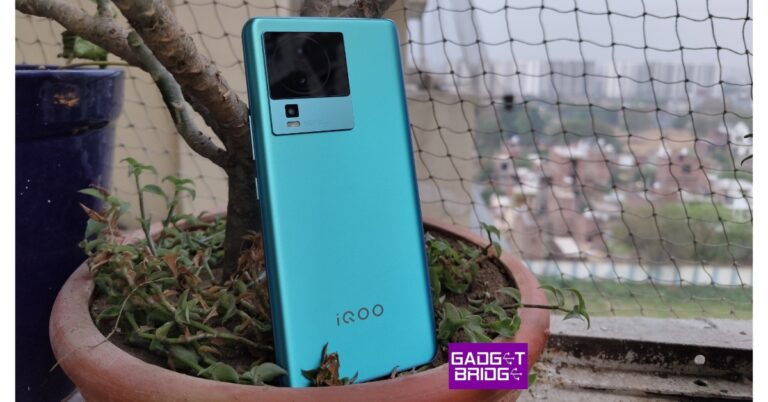
iQOO India CEO, Nipun Maurya has confirmed that iQOO Neo 7 Pro 5G will launch in India on July 4. iQOO India confirmed that the smartphone will be sold exclusively through Amazon. The ‘Pro’ variant will be a successor to iQOO Neo 7 5G (review), which launched in February at Rs 29,999. iQOO hasn’t revealed any specs of the upcoming smartphone. However, since the Neo 7 Pro is reported to be the rebadged version of the China-specific Neo 7 Racing, some specs are expected to make it on the global variant.Read Also:Samsung Galaxy F54 Review: A rock-solid smartphone with impressive cameras
iQOO Neo 7 Pro 5G: Expected specs, price, and more
The biggest upgrade on the Pro variant of iQOO Neo 7 will be the Snapdragon 8+ Gen 1 SoC. The current version employs MediaTek Dimensity 8200 SoC under the hood. Snapdragon 8+ Gen 1 came out towards the end of 2022 and put up impressive benchmark numbers along with improved thermal management.iQOO Neo 7 5GThe iQOO Neo 7 Pro 5G will get a 6.78-inch AMOLED display with a 120Hz refresh rate and 1500 nits of peak brightness. This display will support HDR10+ as well. The camera panel at the back gets an upgrade as well. The Pro variant will feature an 8MP ultrawide lens instead of the 2MP depth sensor on the regular variant. It will also get a 50MP primary camera with OIS. The 2MP macro lens will be retained from the regular version. Up front, the Neo 7 Pro will feature a 16MP selfie camera housed in a punch-hole cutout.As expected, the OS duties on iQOO Neo 7 Pro will be handled by Android 13 with Funtouch 13 skinned on top of it. The smartphone will get a 5,000mAh battery with 120W fast charging support. When powered by a fast charger, the smartphone can reach 50% charge in under 10 minutes and fully juice up within 25 minutes.iQOO Neo 7 5GThere won’t be any significant changes in terms of design. The smartphone will retain the signature Neo series look. The rear cameras will be housed in a square camera island and the shimmering back panel will change colours on exposure to sunlight. A glass back panel seems unlikely on iQOO Neo 7 Pro.Read Also:How to download and install Chrome OS Flex?More details are to be awaited as we get closer to the launch date. The smartphone is expected to cost around Rs 35,000 in India. iQOO may also offer some additional bank discounts to bring the introductory price down. In this price range, iQOO Neo 7 Pro will rival the likes of Samsung Galaxy A54, OnePlus 10R, Vivo V27, and more. The smartphone will be sold exclusively through Amazon.For the latest gadget and tech news, and gadget reviews, follow us on Twitter, Facebook and Instagram. For newest tech & gadget videos subscribe to our YouTube Channel. You can also stay up to date using the Gadget Bridge Android App. You can find the latest car and bike news here.


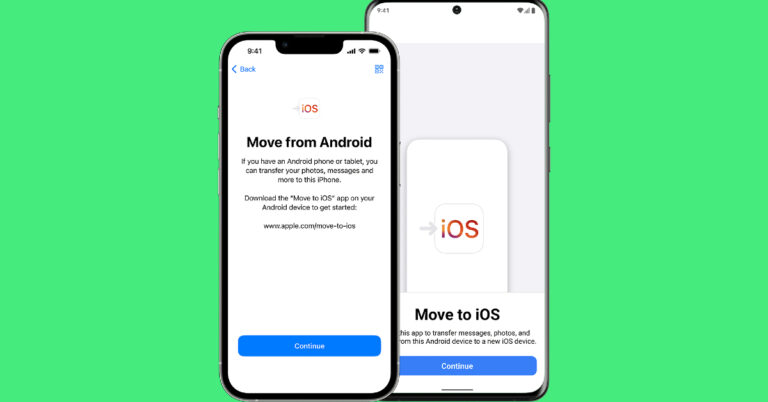
 Step 2: Select ‘Move Data from Android’.
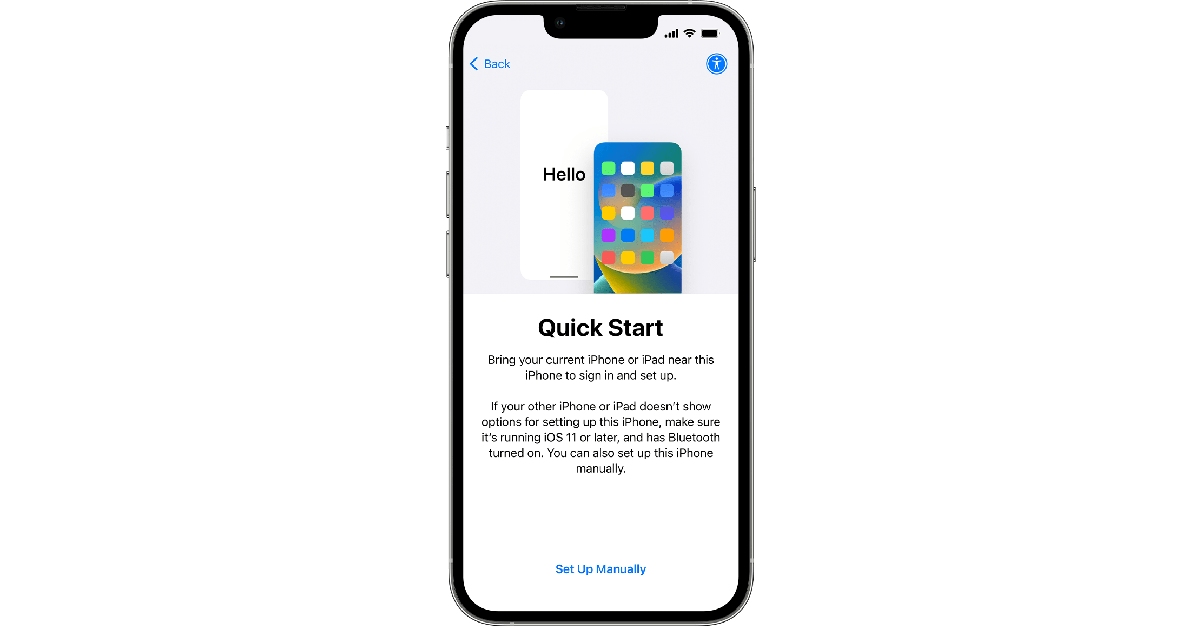 Step 2: Select ‘Move Data from Android’.
 Step 3: Launch the ‘Move to iOS’ app on your Android smartphone.
Step 4: Tap ‘Continue’ on your iPhone. After a few seconds, your iPhone will display a code.
Step 5: Enter the code on your Android smartphone.
Step 3: Launch the ‘Move to iOS’ app on your Android smartphone.
Step 4: Tap ‘Continue’ on your iPhone. After a few seconds, your iPhone will display a code.
Step 5: Enter the code on your Android smartphone.
 Step 6: Your iPhone will now create a temporary WiFi network using its hotspot. Join this network on your Android device.
Step 7: Choose the content you want to transfer. This includes your contacts, messages, photos and videos, files, settings, WhatsApp messages, calendar entries, bookmarks, and more. Do not disturb the transfer process until it finishes on your iPhone.
Step 8: After the content has been transferred, tap ‘Finish’ on your Android smartphone and ‘Continue’ on your iPhone.
Step 9: Follow the on-screen instructions to finish the process on your iPhone.
Step 6: Your iPhone will now create a temporary WiFi network using its hotspot. Join this network on your Android device.
Step 7: Choose the content you want to transfer. This includes your contacts, messages, photos and videos, files, settings, WhatsApp messages, calendar entries, bookmarks, and more. Do not disturb the transfer process until it finishes on your iPhone.
Step 8: After the content has been transferred, tap ‘Finish’ on your Android smartphone and ‘Continue’ on your iPhone.
Step 9: Follow the on-screen instructions to finish the process on your iPhone.


 The device is powered by a replaceable CR2032 and features Bluetooth 5.1. The Jio tag measures 3.82×3.82×0.72 cm and weighs 9.5 grams. If offers up to 1 year of battery life and has a range of up to 20 meters indoors and up to 50 meters outdoors (Direct line of sight)
For the latest gadget and tech news, and gadget reviews, follow us on Twitter, Facebook and Instagram. For newest tech & gadget videos subscribe to our YouTube Channel. You can also stay up to date using the Gadget Bridge Android App. You can find the latest car and bike news here.
The device is powered by a replaceable CR2032 and features Bluetooth 5.1. The Jio tag measures 3.82×3.82×0.72 cm and weighs 9.5 grams. If offers up to 1 year of battery life and has a range of up to 20 meters indoors and up to 50 meters outdoors (Direct line of sight)
For the latest gadget and tech news, and gadget reviews, follow us on Twitter, Facebook and Instagram. For newest tech & gadget videos subscribe to our YouTube Channel. You can also stay up to date using the Gadget Bridge Android App. You can find the latest car and bike news here. 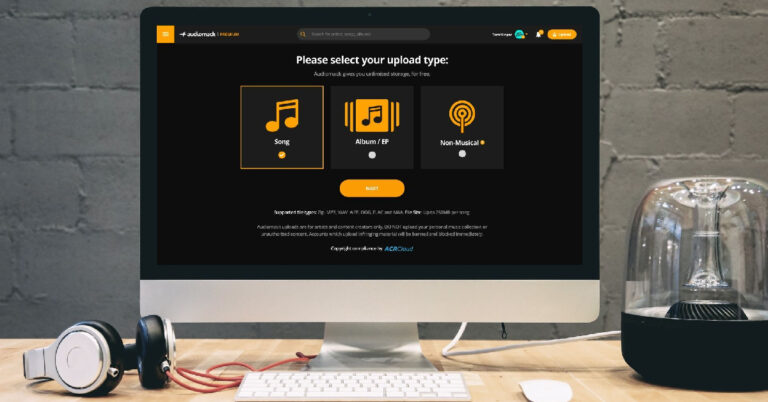
 Step 4: Tap the plus icon to upload an audio file. Audiomack supports uploads in the following formats: MP3, WAV, AIFF, OGG, FLAC, and M4A. The size limit for one audio file is 250MB.
 Step 5: Fill out all the track details once the song is uploaded. You can also select an artwork for the song/album/EP.
 Step 6: You can choose to release the song immediately or schedule it for later. If you want to go for the latter option, select Schedule/Premiere Access and set the release date and time.
 Step 7: Hit ‘Finish’.
 Step 2: Select the upload type and hit ‘Next’.
 Step 3: Select the song file from your desktop. You can also drag and drop the file on the upload screen.
 Step 4: Enter the metadata for the song. This includes the song title, artist name, feature list, genre, producers, and more.
 Step 5: Choose the release date or publish the song immediately. Hit ‘Finish’ once you’re done.

 Step 3: Tap on the gear icon.
 Step 4: Select ‘Upload’.
 Step 5: Select an upload type and hit ‘Next’.
 Step 6: Select the song you want to upload from your device’s internal storage.
 Step 7: Enter the metadata for the song.
 Step 8: Set a release date or select ‘publish immediately’.
Step 9: Hit ‘Finish’.
Step 8: Set a release date or select ‘publish immediately’.
Step 9: Hit ‘Finish’.
 Earlier, smartphones used to have a dedicated slot for micro SD cards. Hybrid SIM card slots were introduced more recently, allowing users to place their SIM cards and micro SD card on a single tray. This may be a neat idea, but it may leave some people confused. If your Android smartphone cannot recognise the SD card, pull out the hybrid SIM tray and inspect the positioning of the SIM and SD card. Look for the appropriate sign on the tray before inserting the SD card.
 If the memory card has been lying around on a shelf or in a drawer, make sure you give it a quick wipe before inserting it into your phone. Dust and dirt particles can keep the SD card from functioning properly. Your smartphone may not be able to detect the card. On the flip side, make sure the SD card tray is clean as well. Pull the tray out and blow some air on it to release the dust particles. Give it a quick wipe and you’re good to go.
 Maybe the problem lies with your phone’s SD card slot and not the card itself. The only way of knowing for sure is by using an external card reader. Plug the card reader into the USB Type-C port of your device. Push the card into the external reader and see if you can access its contents on your phone. When you use the card reader, your micro SD card will show up as drive storage on your phone.
 If your phone’s OS cannot detect the micro SD due to some bug or other issue, it will be resolved with a quick update. Go to Settings>Software Update to look for pending updates. If there is an available update, download and install it on your device.


 Casino video cameras have specialized integrated software for facial recognition, one of the most powerful tools in any establishment’s security arsenal. This surveillance tech scans the face of anyone that enters the casino and compares them to a database of criminals and potential threats. This allows security personnel to remove such troublemakers before they can cause any disturbances.
Fingerprint recognition also strengthens the effectiveness of casino biometric security measures. Many establishments use sophisticated vaults and safes to store mountains of cash on-site. They are equipped with biometric scanners that grant access to authorized parties only.
Keeping money safe is only half the battle. Casinos are also responsible for the security of patrons once they retire to their accommodations. For this reason, rooms are usually fitted with smart locks and access control systems that often use fingerprint, keycard, and player club card sensors to unlock.
Casino video cameras have specialized integrated software for facial recognition, one of the most powerful tools in any establishment’s security arsenal. This surveillance tech scans the face of anyone that enters the casino and compares them to a database of criminals and potential threats. This allows security personnel to remove such troublemakers before they can cause any disturbances.
Fingerprint recognition also strengthens the effectiveness of casino biometric security measures. Many establishments use sophisticated vaults and safes to store mountains of cash on-site. They are equipped with biometric scanners that grant access to authorized parties only.
Keeping money safe is only half the battle. Casinos are also responsible for the security of patrons once they retire to their accommodations. For this reason, rooms are usually fitted with smart locks and access control systems that often use fingerprint, keycard, and player club card sensors to unlock.