5 Best Ways to Sign Out of Google Play Store on an Android Device

0
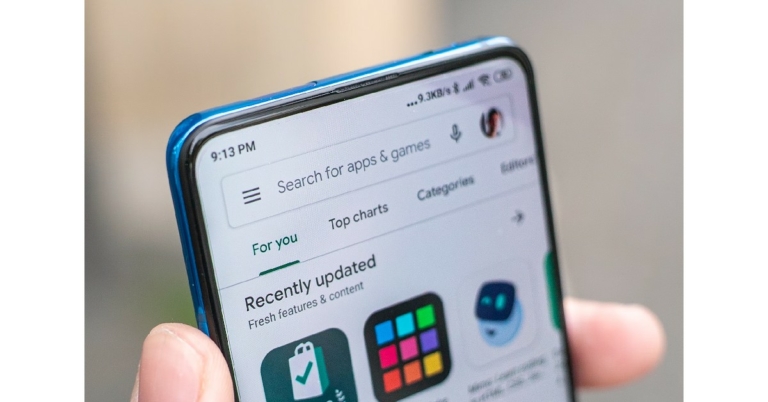
If you own an Android device, you will need to sign into Google Play Store using a Google account in order to use its services. Without singing in, your Android experience will be extremely limited. Google Play Store also lets you sign in using multiple accounts. You can easily switch between different accounts from the app itself. If you find yourself using a particular account less frequently, you can remove it from your device. In this article, we explore the different ways you can sign out of Google Play Store on an Android device. Read Also: Apple iOS 17: Here are the top new features you should be using first

Sign out of Google Play Store using the app

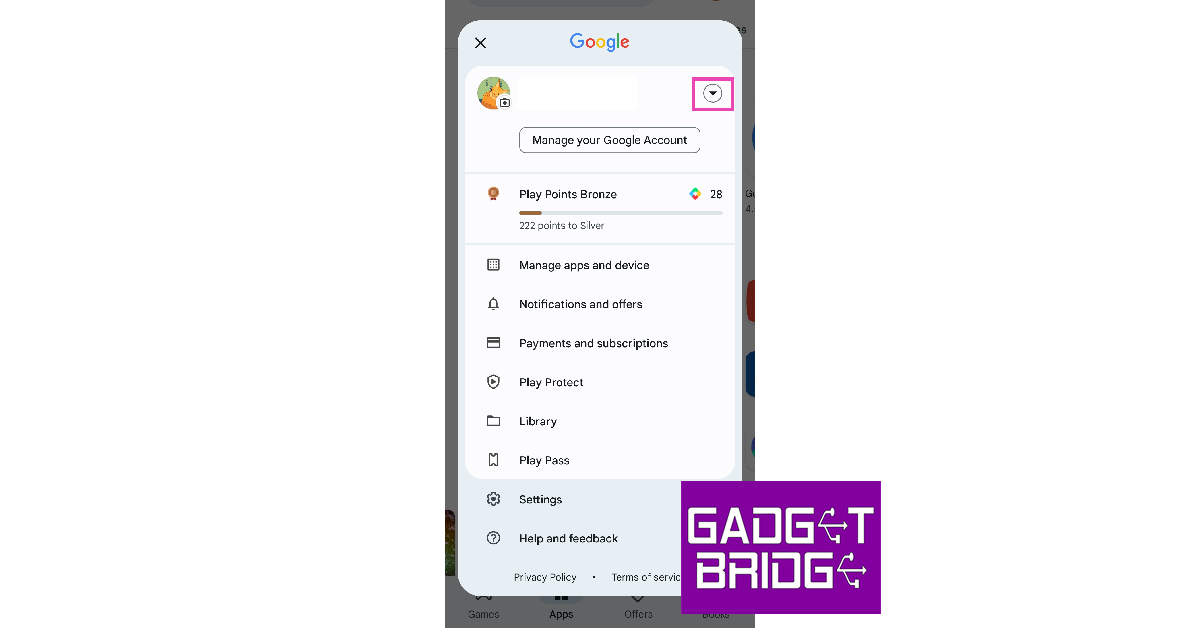
The easiest way to sign out of the Google Play Store is through the app itself. You should know that once you sign out of Google Play Store you will also be signed out of all the Google services on your smartphone.  Here’s how you can go about it. Step 1: Launch Google Play Store on your Android device. Step 2: Tap your profile icon at the top right corner of the screen. Step 2: Tap your profile icon at the top right corner of the screen. Step 3: Press the downward arrow key next to your name. Step 3: Press the downward arrow key next to your name. Step 4: Select ‘Manage accounts on this device’. Step 4: Select ‘Manage accounts on this device’. Step 5: Tap on the account you want to remove. Step 5: Tap on the account you want to remove. Step 6: Select ‘Remove account’. Step 6: Select ‘Remove account’. Step 7: Confirm your selection in the popup box. You will be signed out of Google Play Store and your account will be removed from your Android device.

Sign out of Google Play Store by clearing its data

Step 1: Go to Settings and select Apps. Step 1: Go to Settings and select Apps. Step 2: Tap on Google Play Store. Step 2: Tap on Google Play Store. Step 3: Select Storage. Step 3: Select Storage. 5 Best Ways to Sign Out of Google Play Store on an Android Device Step 4: Tap on ‘Clear Data’. Step 4: Tap on ‘Clear Data’. 5 Best Ways to Sign Out of Google Play Store on an Android Device Your account will be removed from Google Play Store.

Sign out of Google Play Store by removing your account from Settings

Step 1: Go to Settings and select ‘Accounts and Backup’. Step 1: Go to Settings and select ‘Accounts and Backup’. 5 Best Ways to Sign Out of Google Play Store on an Android Device Step 2: Tap on ‘Manage Accounts’. Step 2: Tap on ‘Manage Accounts’. 5 Best Ways to Sign Out of Google Play Store on an Android Device Step 3: Select the account you want to remove. Step 5: Tap on the account you want to remove. 5 Best Ways to Sign Out of Google Play Store on an Android Device Step 4: Select ‘Remove account’. Step 6: Select ‘Remove account’. 5 Best Ways to Sign Out of Google Play Store on an Android Device Step 5: Confirm your selection in the popup box.

Sign out of Google Play Store on your desktop

Step 1: Go to the Google Play Store website on your web browser. Step 2: Click on your profile icon at the top right corner of the screen. Step 1: Go to the Google Play Store website on your web browser. 5 Best Ways to Sign Out of Google Play Store on an Android Device Step 3: Select ‘Sign Out’. Step 3: Select ‘Sign Out’.

Remotely Sign out of Google Play Store using Find My Device

Remotely Sign out of Google Play Store using Find My Device If you lost your phone and don’t want anyone to access your account data, Google’s Find My Device service gives you the option to lock your device and sign out of your Google Account. You can also choose to erase all personal data from your device. To simply log out of Google Play Store, click on ‘Secure Device’ on the left panel.

Frequently Asked Questions

How do I sign out of Play Store on Android?

To sign out of Google Play Store on your Android device, simply launch the app, tap on your profile and select ‘Manage accounts on this device’. Select the account you want to remove and confirm your selection in the following popup box.

How do I remove my account from Google Play Store?

To remove your account from Google Play Store, simply open ‘Accounts and backup’ from Settings and select the account you want to remove. Hit ‘Remove’ at the bottom of the screen and confirm your selection in the popup box.

How do I remotely sign out of Play Store?

You can remotely sign out of Google Play Store by visiting the Play Store website or using Google’s Find My Device service to remove your accounts from the device. Read Also: Poco F5 Review: Almost flagship-level performance in a budget

Conclusion

These are the 5 best ways to sign out of Play Store on your Android device. You can also perform a factory reset to clear all accounts from your device, but it will come at the cost of erasing all your personal data. You can use multiple accounts on Play Store and easily toggle between them within the app. For the latest gadget and tech news, and gadget reviews, follow us on Twitter, Facebook and Instagram. For newest tech & gadget videos subscribe to our YouTube Channel. You can also stay up to date using the Gadget Bridge Android App. You can find the latest car and bike news here.

Best Redmi 5G smartphones under Rs 25,000 (August 2023)

The 5G rollout in India has reached every corner of the country, and if you’ve been on the fence about buying a 5G smartphone so far, now would be the perfect time to make the switch. If you don’t want to shell out a big amount, Redmi’s portfolio in India may have some interesting options for you. Be it the camera-centric Note 12 series or the affordable Redmi 11 Prime, Redmi caters to every kind of smartphone buyer. In this article, we bring you our picks for the best Redmi 5G smartphones under Rs 25,000. Read Also: Poco F5 Review: Almost flagship-level performance in a budget

Redmi Note 12 Pro 5G

Price: Rs 24,449 Redmi Note 12 Pro review: Design and Display Key Specs
Display 6.67-inch OLED
Chipset MediaTek Dimensity 1080 SoC
Storage 128GB, 256GB
RAM 6GB, 8GB, 12GB
Battery 5,000mAh
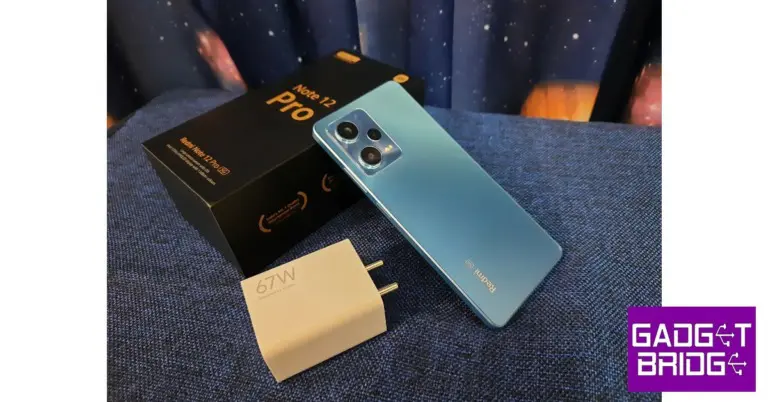
Redmi Note 12 Pro is one of the best Redmi smartphones you can buy under Rs 25,000. Launched earlier this year, the Pro variant is positioned in the middle of the Note lineup. The smartphone gets a 6.67-inch OLED display with 120Hz refresh rate and HDR10+ support. Powering the smartphone is the MediaTek Dimensity 1080 SoC. The Pro variant may not get the headline-grabbing 200MP primary camera of the Pro+ variant, but the 50MP sensor on this unit delivers a pretty good camera performance. To know more about the smartphone, read our full review here.

Redmi K50i 5G

Price: Rs 21,000 Key Specs
Display 6.6-inch FFS LCD
Chipset MediaTek Dimensity 8100 SoC
Storage 128GB, 256GB
RAM 6GB, 8GB
Battery 5,080mAh
Last year’s Redmi K50i is currently priced at Rs 21,000 and sports some solid specs. The smartphone gets a 6.6-inch FFS LCD display with a maximum refresh rate of 144Hz. It is powered by the MediaTek Dimensity 8100 SoC and comes with Android 12 out of the box. The triple camera setup at the back consists of a 64MP primary shooter, an 8MP ultrawide lens, and a 2MP macro sensor. Up front, a 16MP selfie camera is housed in a punch-hole cutout. Read our full review here.

Redmi Note 12 5G

Price: Rs 17,000 Key Specs
Display 6.7-inch AMOLED
Chipset Snapdragon 4 Gen 1
Storage 128GB, 256GB
RAM 4GB, 6GB, 8GB
Battery 5,000mAh
The base variant in this year’s Note series, Redmi Note 12 gets a 6.7-inch AMOLED display with a 120Hz refresh rate and 1200 nits of peak brightness. It is powered by the Snapdragon 4 Gen 1 SoC and comes with Android 12 skinned with MIUI 13 out of the box. The triple camera module at the back comprises a 48MP primary lens, an 8MP ultrawide lens, and a 2MP macro sensor. Read our review here.

Redmi Note 11 Pro+ 5G

Price: Rs 19,500 Redmi Note 11 Pro+ 5G review: Design and Display. Best Redmi 5G smartphones under Rs 25,000 Key Specs
Display 6.67-inch Super AMOLED
Chipset Snapdragon 695 SoC
Storage 64GB, 128GB, 256GB
RAM 6GB, 8GB
Battery 5,000mAh
Last year’s Redmi Note Pro+ 5G is currently priced at Rs 19,500. The smartphone is powered by Snapdragon 695 SoC and is available in three storage variants – 64GB, 128GB, and 256GB. The 6.67-inch Super AMOLED display is surrounded by slim bezels on all sides and offers a screen-to-body ratio of 86%. The rear camera setup consists of a 108MP main camera, 8MP ultrawide lens, and a 2MP macro sensor. Read our full review here.

Redmi 11 Prime 5G

Price: Rs 13,000 Redmi 11 Prime 5G Review: 5G Connectivity At An Affordable Price. Best Redmi 5G smartphones under Rs 25,000 Key Specs
Display 6.58-inch IPS LCD
Chipset MediaTek Dimensity 720 SoC
Storage 64GB, 128GB
RAM 4GB, 6GB
Battery 5,000 mAh
At Rs 13,000, Redmi 11 Prime is one of the most affordable 5G smartphones you can buy right now. We reviewed the smartphone when it came out last year and were impressed by its consistent performance across the board. Redmi 11 Prime 5G gets a 6.58-inch LPS LCD display with a 90Hz refresh rate. It is available in 2 RAM and storage variants – 4GB/6GB + 64GB/128GB. Powering the Redmi 11 Prime 5G is MediaTek Dimensity 720 SoC. At the back, the smartphone gets a 50MP primary camera and a 2MP depth sensor. Up front, the 5MP selfie camera is housed in a waterdrop notch on the display.

Redmi 12 5G

Price: Rs 10,999 Redmi 12 5G and Redmi 12 4G with 5,000mAh battery launched in India Key Specs
Display 6.79-inch FHD+ Display
Chipset Snapdragon 4 Gen 2
RAM 4GB, 6GB, 8GB
Storage 128GB, 256GB
Battery 5,000 mAh
The new Redmi 12 5G is the cheapest 5G phone available in India right now. Prices for Redmi 12 5G start at Rs 10,999 for the 4GB + 128GB variant and go up to Rs 14,999 for the 8GB + 256GB variant. The smartphone packs a Snapdragon 4 Gen 2 SoC and comes in three RAM options. It features a 6.79-inch full-HD+ display with 1,080 x 2,460 pixels of resolution and a 90Hz refresh rate. The dual rear camera setup sports a 50MP primary shooter and a 2MP macro lens. Read Also: Apple iOS 17: Here are the top new features you should be using first

Conclusion

These are our picks for the best Redmi 5G smartphones that you can buy for under Rs 25,000. Check out our list of the most expensive Xiaomi and Redmi smartphones in India as well. Which smartphone out of these is your pick of the lot? Let us know in the comments! For the latest gadget and tech news, and gadget reviews, follow us on Twitter, Facebook and Instagram. For newest tech & gadget videos subscribe to our YouTube Channel. You can also stay up to date using the Gadget Bridge Android App. You can find the latest car and bike news here.

Xiaomi India announces extended warranty for Redmi Note 10 Pro and Pro Max

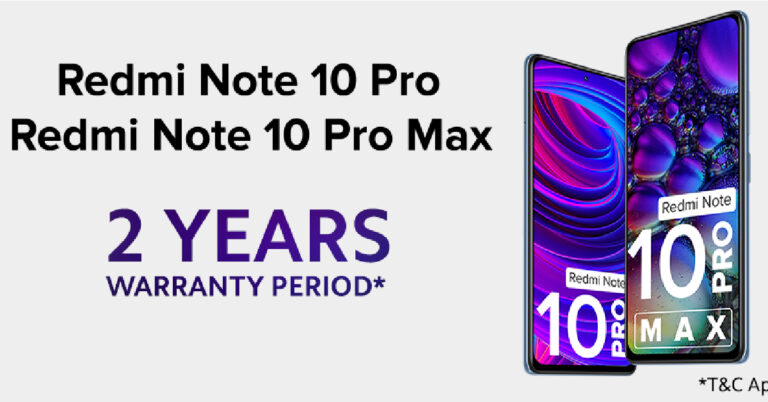
Xiaomi India has announced a two-year extended warranty for Redmi Note 10 Pro and Pro Max amid several user complaints about the malfunctioning System UI and front camera of the two devices. Mi 11 Ultra users facing a WiFi issue on their devices can either upgrade to Xiaomi 12 Pro for free or Xiaomi 13 Pro at an added cost of Rs 30,000. Xiaomi India President, Muralikrishnan B, made the video announcement on Twitter earlier today. Read Also: Poco F5 Review: Almost flagship-level performance in a budget

Xiaomi India commits to improving user experience with the announcement of extended warranty and free upgrades

In a post addressing Xiaomi users, the company stated, “For three years running, we have been India’s most trusted brand* as per TRA’s Brand Trust Report. We are not only devoted to providing advanced technology, which combines outstanding performance and efficiency, but also being customer oriented with delightful service experiences. We follow the best global quality practices across our entire portfolio. All our smartphones undergo various stringent quality tests under extreme situations to ensure that the quality is uncompromised at any level for users to enjoy a seamless experience.” Xiaomi India commits to improving user experience with the announcement of extended warranty and free upgrades The company also acknowledged the motherboard-related issues that some Xiaomi users were facing with their devices. In a bid to improve user experience, Xiaomi India announced an extended 2-year warranty for Redmi Note 10 Pro and Pro Max users from the date of purchase. This warranty extension covers any issues related to the motherboard of the two devices.  Read Also: Samsung Bespoke Jet AI cordless stick vacuum launched in India Xiaomi India also announced a free upgrade to Xiaomi 12 Pro for Mi 11 Ultra users who are facing WiFi connectivity issues on their devices. The smartphone manufacturer is also offering an upgrade to the new flagship Xiaomi 13 Pro at the price of Rs 30,000. Previously, some users had upgraded to the Xiaomi 12 Pro after paying an incremental amount. Xiaomi will refund the amount back to these users. This move is the first of its kind by any major smartphone manufacturer in the country. Xiaomi seeks to maintain its trust among consumers and bring positivity to the users encountering issues with their devices. Xiaomi users can visit the company’s service stations across the country to gain assistance and support for any issue covered by the extended warranty. Users can also write an email to grievance.officer@xiaomi.com for further queries. For the latest gadget and tech news, and gadget reviews, follow us on Twitter, Facebook and Instagram. For newest tech & gadget videos subscribe to our YouTube Channel. You can also stay up to date using the Gadget Bridge Android App. You can find the latest car and bike news here.

How to download and install Chrome OS Flex?

0
If you have an old PC or Mac lying around that isn’t equipped to handle new operating systems, there is a way you can still revive them. Old devices that you thought were junk can get a second like with Google’s ChromeOS Flex. ChromeOS Flex is the successor to CloudReady. It came about after Google acquired CloudReady’s parent company Neverware back in 2020. In this article, we show you how to download and install ChromeOS Flex on your old Mac or PC. Read Also: Poco F5 Review: Almost flagship-level performance in a budget

Minimum Requirements

  • Check if your PC or Mac model is certified. Check out the official list of approved devices.
  • USB Drive – 8GB or more.
  • Intel or AMD x86-64-bit compatible device.
  • Minimum 4GB RAM.
  • Minimum 16GB internal storage.
  • The device should be bootable from a USB drive.
  • Full administrator access to BIOS.

Create a bootable ChromeOS Flex USB Drive

Step 1: Launch the Chrome browser and go to the Chrome Web Store. Step 2: Search for Chromebook Recovery Utility and select ‘Add to Chrome’. Step 2: Search for Chromebook Recovery Utility and select ‘Add to Chrome’. Step 3: Once the extension has been added, click on it and turn on its toggle switch. Step 4: Launch the Chromebook Recovery Utility extension. Step 5: Click on Get Started and select your device’s model in the following window. Step 5: Click on Get Started and select your device’s model in the following window. How to download and install Chrome OS Flex iso? Step 6: Click on ‘Select a manufacturer’ and select Google ChromeOS Flex. Step 7: Click on ‘Select a product’ and select ChromeOS Flex. Step 7: Click on ‘Select a product’ and select ChromeOS Flex. How to download and install Chrome OS Flex iso? Step 8: Hit ‘Continue’ and insert the USB drive. Step 9: Select the USB drive from the dropdown menu. Step 10: Click on ‘Continue’ and select ‘Create Now’. Once the image has been created, safely remove your USB drive.

Install ChromeOS on your device

Install ChromeOS on your device Step 1: Turn off your device and insert the USB drive with ChromeOS Flex on it. Step 2: Launch your device and keep pressing the boot key repeatedly. Perform a quick Google search beforehand to find out the boot key of your device. Step 3: Select your USB as the boot device. Step 4: On the ‘Welcome to CloudReady 2.0’ screen, click on ‘Get Started’. Step 5: You can choose to try out ChromeOS Flex before installing it on your device. Click on ‘Try it first’ to see how the OS works on your device. Step 6: If you’re satisfied with the performance and want to install ChromOS Flex on your device, you will need to sign out first. You can do so from the Quick Settings Menu. Step 7: Now, click on ‘Install CloudReady’. Step 8: Installing CloudReady will wipe all your personal data from the device. Click on ‘Install CloudReady 2.0’ in the following screen to confirm your selection. Step 9: Wait for the installation to end. Once it is complete, your device will automatically turn off. Remove the USB device and press the power key to start your device.

Frequently Asked Questions

What is ChromeOS Flex for?

ChromeOS Flex is a Chromium-based operating system meant for old PCs and Macs that need a boost in performance.

Is ChromeOS Flex free or not?

ChromeOS Flex can be installed for free on your old PC or Mac.

Is ChromeOS Flex better than Windows 10?

ChromeOS Flex is not better than Windows 10 strictly in terms of performance, but it can breathe new life on old PCs that cannot run Windows 10 OS. Read Also: Samsung Bespoke Jet AI cordless stick vacuum launched in India

Conclusion

This is how you can download and install ChromeOS Flex on an old device. ChromeOS Flex is based on Chromium and can run basic web apps and Google services with ease. In fact, it can match whatever the regular version of ChromeOS can do. ChromeOS Flex is perfect for reviving old devices for using the web. For the latest gadget and tech news, and gadget reviews, follow us on Twitter, Facebook and Instagram. For newest tech & gadget videos subscribe to our YouTube Channel. You can also stay up to date using the Gadget Bridge Android App. You can find the latest car and bike news here.

Samsung Galaxy F54 Review: A rock-solid smartphone with impressive cameras

After releasing the premium Galaxy S23 series in February, Samsung turned its attention to other price brackets. In the last few months, the company made new additions to the Galaxy A and M series. Next in line is the F series, which specialises in camera-centric smartphones with big batteries and affordable pricing. Samsung Galaxy F54 was launched this week at a price of Rs 27,999 and is available on Flipkart, Samsung.com, and select retail stores. We’ve been using the smartphone as our daily driver for the last week. We ran the device through a series of tests and extensively used the 108MP primary camera in different conditions. Here is our in-depth Samsung Galaxy F54 review. Read Also: Samsung Bespoke Jet AI cordless stick vacuum launched in India

Samsung Galaxy F54 review: Design and Display

The Galaxy F54 ships in a standard rectangular box with the smartphone, USB Type-C cable, SIM ejector tool, and some reading material inside. There is no power adapter or clear plastic case inside either. The smartphone does not have any protective covering on the display. You get two colour options for the F54 – Meteor Blue and Stardust Silver.
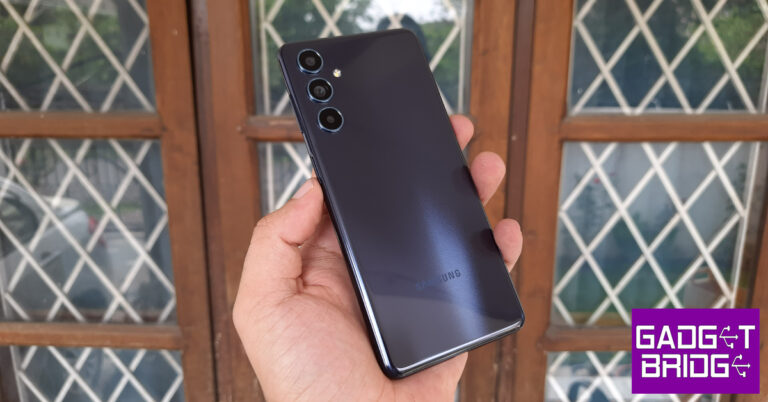
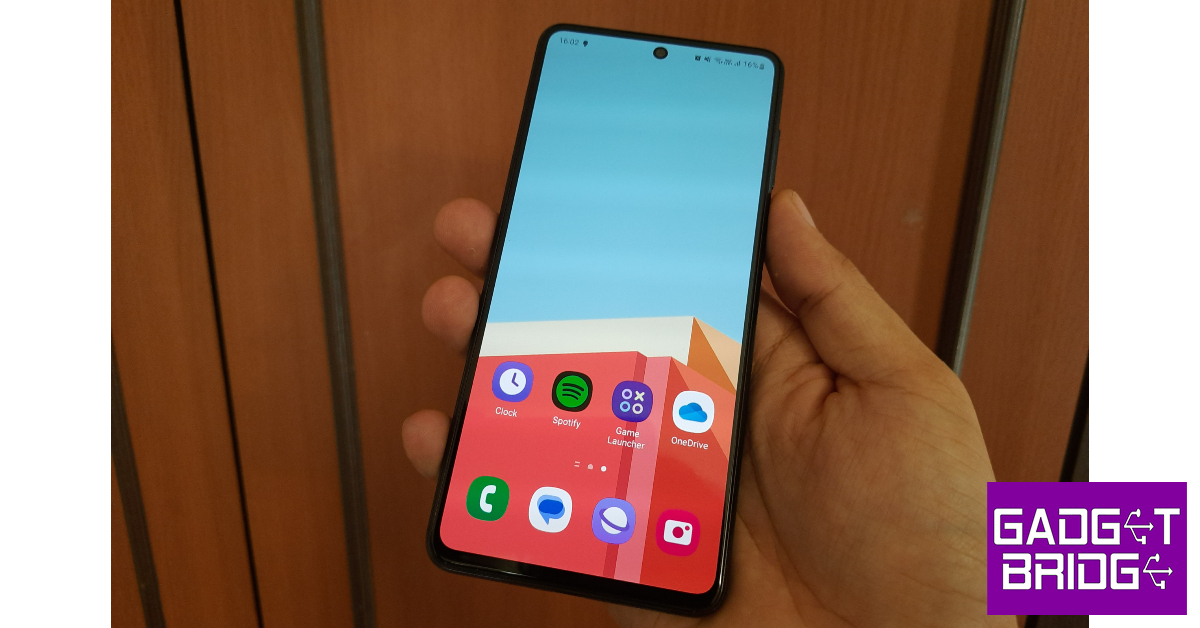
If you’ve been paying attention to Samsung releases this year, you’d have noticed a uniform design language across all of the products. Samsung Galaxy F54 is no different. The smartphone gets the all-too-familiar vertical array for the three cameras at the back. The Galaxy F54’s form factor makes the best use of this design. Sure, it is entirely made out of plastic, but the material used here feels a cut above the Galaxy A34 (which is priced similarly). The curved back along with the curved edges give the device a nice in-hand feel. Galaxy F54’s frame is sleeker than its A series counterparts. The plastic back panel is a bit of a fingerprint magnet but there’s nothing a quick wipe of a micro fibre cloth can’t fix. Samsung Galaxy F54 review: Design and Display The right edge of the frame houses the volume rocker and the power key. This power key also doubles as a fingerprint scanner. On the bottom edge, you will find the microphone, a USB Type-C port, and the speaker grille. The hybrid SIM slot has been placed on the left edge of the smartphone and a secondary microphone has been mounted up top. Samsung Galaxy F54 does not have stereo speakers. The 6.7-inch Super AMOLED display is surrounded by slim bezels on all sides. The punch hole cutout for the selfie camera is slightly larger than what we are typically used to, but it is an improvement over the waterdrop notch any day. The Super AMOLED display has a refresh rate of 120Hz. It is extremely fluid to use and the touch response is absolutely stellar. Samsung rarely ever misses when it comes to displays. Samsung Galaxy F54 review: Design and Display Watching content on the Samsung Galaxy F54 was an enjoyable experience. The 1080 x 2400p display provides HDR support for apps like Netflix and YouTube. The image quality is sharp and the punchy colours bring the videos to life. We were satisfied with the viewing angles on offer. The lack of a stereo speaker does hurt a bit, especially at this price point. The Galaxy F54 does not get an IP rating either.

Samsung Galaxy F54 review: Performance and Cameras

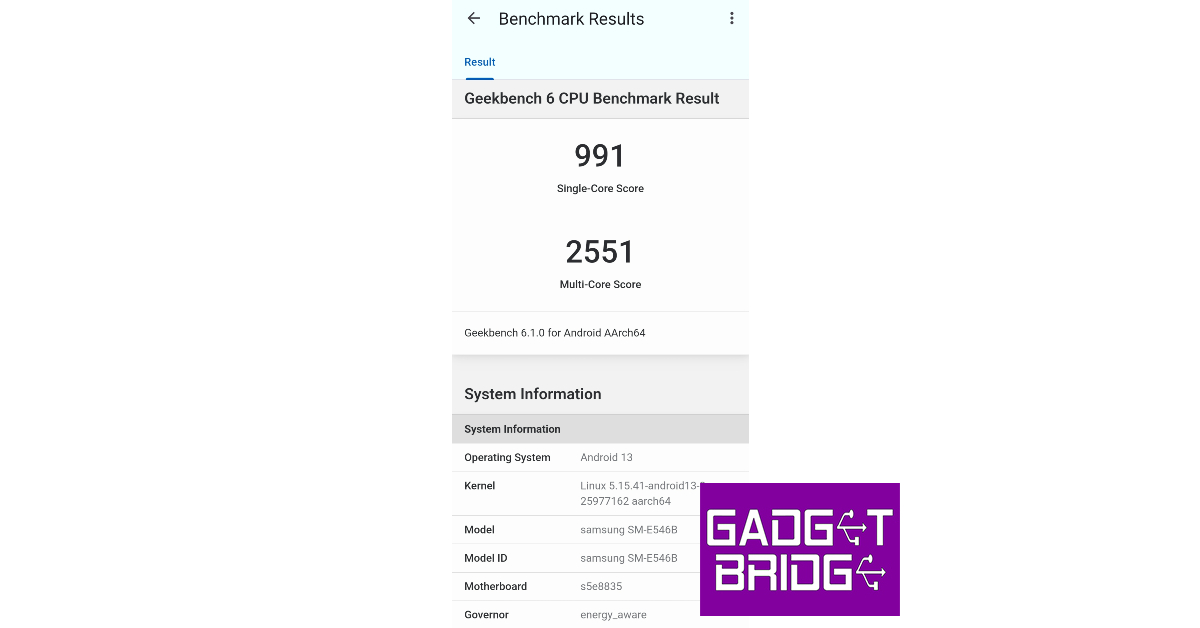
Powering the Galaxy F54 is Samsung’s in-house Exynos 1380 SoC. This is the same chip that powers the more expensive Galaxy A54 (review). The smartphone comes in a single 8GB RAM + 256GB storage variant. On the Geekbench test, it returned a single-core score of 991 and a multi-core score of 2,551. In comparison, the Galaxy A54 scored 1,010 and 2,761 points when we ran the Geekbench test on it. Samsung Galaxy A34 (review) which sports the Dimensity 1080 SoC and is currently priced in the same range as F54 scored 734 and 2472 points. Samsung Galaxy F54 review: Performance and Cameras Benchmarks don’t tell the full story. What really matters is how the smartphone handles routine tasks and how far you can push its performance. In our daily usage, the Galaxy F54 delivered a decent performance. Shooting the odd mail, browsing social media, streaming movies, and other ordinary tasks presented no issues. The smartphone tends to warm up a little when it’s used outdoors, but we didn’t face any extreme overheating. On the gaming front, the Samsung Galaxy F54 fails to leave a mark. We can cut it some slack since it is not a gaming phone nor marketed as such. While playing Call of Duty Mobile, we encountered frequent frame drops. Sometimes, the phone created a weird buzzing noise at the start of every round. We also faced some connection issues while gaming, although such instances were very rare. All these issues aside, the smartphone did not heat up a lot even during extended gaming sessions. If you’re only casually interested in gaming, the F54 is still a good choice. Samsung Galaxy F54 review: Performance and Cameras While our gaming experience may have been lukewarm, the Samsung Galaxy F54 thoroughly impresses with its OS. The smartphone runs on Android 13 skinned with One UI 5.1. You get the full One UI experience on the F54 and not the limited ‘Core’ version. You will find features like Private Share, Maintenance Mode, and Secure Folder here. Still no Samsung DeX, as it is reserved for the flagship S and Z series. There is very little bloatware on the device, and you can choose to not install most of the apps while setting up the device. Samsung Galaxy F54 review: Performance and Cameras The Samsung Galaxy F54 is equipped with a massive 6,000 mAh battery. While many are quick to brand this a 2-day phone, the Galaxy F54 still lasts a day for heavy users. With a Screen On Time of 5 hours, we were left with a 20% charge by the end of the day. Our daily tasks included an hour of gaming, two hours of social media usage, taking calls, and sending messages on WhatsApp. Upon more moderate usage (but similar Screen On Time), we went to bed with a 40% charge still left on the device. The Galaxy F54 supports 25W charging and takes almost two hours to fully charge. Samsung’s F series is all about impressive camera specs. The Samsung Galaxy F54 gets a 108MP primary shooter, an 8MP ultrawide lens, and a 2MP macro lens. Up front, you get a 32MP selfie camera. The 108MP can record 4K videos at 30fps but not at 60fps, due to the limitations posed by the Exynos 1380 SoC. The selfie camera can also shoot 4K videos at 30fps. The main 108MP camera on the Galaxy F54 produces stellar results in daylight conditions. We were very impressed by the richness of the colours and the level of detail captured by the main sensor. The camera bins down to 12MP by default, but you can manually set it to 108MP for more detailed pictures. However, even with pixel binning, the results are fantastic. The camera exposes the subject very well and the image processing brings the best out of the images. Samsung Galaxy F54 review: Performance and Cameras Samsung Galaxy F54 review: Performance and Cameras The 8MP ultrawide lens delivers a great performance as well. We were expecting softer images with this sensor, but it managed to surprise us. The images did not compromise the colour profile and retained a good amount of detail. We found ourselves using the ultrawide sensor a lot more than we do on other smartphones. In limited lighting, the Samsung Galaxy F54 powered through and put out good results. We were happy with the way that the smartphone lit up the subject and processed the important details. There was still a fair bit of grain to be found on the images, but we didn’t mind it too much. The camera app on the smartphone has a bunch of cool features to play around with. The ‘Fun Mode’ offers all the new Snapchat filters on the native camera app itself. Upon further exploration, you will find the Hyperlapse feature that lets you record the motion of the stars. Of course, it will require putting your phone on a tripod throughout the night. 
Samsung Galaxy F54 review: Performance and Cameras
Night Mode vs Without Night Mode
The 8MP selfie camera performs pretty well. The camera does a good job of processing the natural skin tone and not messing with it too much. The smoothening effect on the skin has also been kept to a minimum, so the texture of the skin is appropriately reflected in the images. The Portrait Mode does a good job of separating the subject from its background. Read Also: Zebronics ZEB-PixaPlay 22 smart LED projector launched in India at Rs 12,999

Verdict

At Rs 27,999, the Samsung Galaxy F54 is a great deal. We really like the design, form factor, and in-hand feel of the smartphone. The display is fluid and bordered by very slim bezels. What it lacks in gaming, it more than makes up for in camera performance. Samsung Galaxy F54 will appeal to casual users that demand a good camera setup but aren’t necessarily gonna push the processor to its absolute limit.

Samsung Galaxy F54: Pros

  • Great form factor
  • Stunning display
  • Impressive cameras

Samsung Galaxy F54: Cons

  • Mediocre gaming performance
  • Needs fast charging
For the latest gadget and tech news, and gadget reviews, follow us on Twitter, Facebook and Instagram. For newest tech & gadget videos subscribe to our YouTube Channel. You can also stay up to date using the Gadget Bridge Android App. You can find the latest car and bike news here.

Xiaomi Super Saver Sale is on, Up To 75 Percent Discount Across Xiaomi and Redmi Devices

Xiaomi, the leading smartphone and smart TV brand in India, has announced the highly anticipated “Xiaomi Super Saver” Sale. This six-day shopping extravaganza, starting from June 9th to June 14th, 2023, promises a range of attractive discounts, exchange and bank offers, and exceptional value for customers’ old devices. The sale encompasses Xiaomi and Redmi products across various categories, including smartphones, smart televisions, smart homes, and AIoT ecosystem, enabling consumers to experience cutting-edge technology at unprecedented prices.

Discounts and Offers on Xiaomi and Redmi Products

As part of its commitment to “Innovation for Everyone,” Xiaomi aims to reward its loyal customers during this sale. The Xiaomi 12 Pro, a highly sought-after flagship smartphone, will be available at a discounted price of INR 42,999/-. Furthermore, the beloved Redmi K50i will be offered at its lowest price ever, an attractive INR 19,499. Customers can also look forward to discounted prices on Xiaomi and Redmi tablets, with the Xiaomi Pad 5 starting at INR 23,999 and the Redmi Pad at INR 13,749/- respectively. Smart televisions from Xiaomi and Redmi will see discounts of up to INR 27,000, and enticing prices will be offered on laptops and other AIoT products.

Engaging Activities on Mi.com

To enhance the shopping experience, Xiaomi India has planned various exclusive activities on Mi.com. The “Play & Win” game gives users the chance to win exciting products such as the Xiaomi Trimmer 2C, Redmi Watch 2 Lite, and Redmi Writing Pad, among others. Additionally, hourly “Lightning Deals” at 5 p.m. offer products at discounts of up to 80 percent, while “Monsoon Madness” deals at 12 p.m. and 6 p.m. present attractive hourly discounts of up to 75 percent. Read Also: Samsung announces festive offers on Galaxy tablets for Indian consumers

Additional Offers and Discounts

Xiaomi India is providing a flat 25% discount on Device Care Plans, including Mi Extended Warranty, Mi Screen Protect, and Mi Complete Protect, by using a coupon during checkout. Students registered on UNiDAYS can benefit from the Student Plus Offers, which offer an extra INR 2000 off on Xiaomi and Redmi devices. Moreover, ICICI and HDFC card holders can avail themselves of instant discounts of up to INR 8,000 and INR 3,000 respectively.

Wide Availability

The Xiaomi Super Saver Sale extends beyond Mi.com, with discounts and offers available on other e-commerce platforms such as Mi Home, Flipkart, and Amazon. Customers can seize this opportunity to grab their favourite Xiaomi and Redmi products at irresistible prices. With the launch of the Xiaomi Super Saver Sale, Xiaomi India reaffirms its commitment to providing innovative and accessible technology to all. This shopping festival offers consumers the chance to explore a wide range of discounted Xiaomi and Redmi products, along with engaging activities and attractive offers. Whether it’s a smartphone, smart TV, or other smart devices, customers can look forward to a rewarding shopping experience during the Xiaomi Super Saver Sale.

Offers on Mi.com will also include the following:

S No.   Product Selling Price Discount Offer price
Xiaomi and Redmi Smartphones
1 Redmi K50i (Lowest Price Ever) (6GB+128GB) INR 31,999 INR 12,500 INR 19,499  
2 Xiaomi 12 Pro (Lowest Price Ever) (8GB+256GB) INR 79,999 INR 37,000   INR 42,999
3 Xiaomi 13 Pro (12GB+256GB) INR 79,999 INR 8,000 INR 71,999
4 Redmi Note 12 5G (4GB+128GB) INR 17,999 INR 2,000 INR 15,999
Xiaomi and Redmi Smart Televisions
1 Redmi Fire TV   INR 99,999   INR 28,000 INR 71,999
2 Redmi Smart TV X50 INR 44,999 INR 17,999 INR 27,999
3 Redmi Smart TV X43 INR 42,999 INR 19,500 INR 23,499
4 Xiaomi Smart TV X Pro 43 INR 49,999 INR 18,500 INR 31,499  
Xiaomi and Redmi Tablets
1 Redmi Pad (3GB+54GB) INR 14,999   INR 2,000   INR 12,999
2 Xiaomi Pad 5 (6GB+128GB) INR 37,999 INR 14,000 INR 23,999
Ecosystem
1 Xiaomi Smart Air Fryer INR 14,999 INR 8,500 INR 6,499
2 Xiaomi Smart Standing Fan 2 INR 12,999 INR 8,000 INR 4,999
3 Xiaomi Smart Air Purifier 4 Lite INR 14,999 INR 5,000 INR 9,999
4 Xiaomi Robot Vacuum-Mop 2i INR 24,999 INR 9,250 INR 15,749
Laptop
1 Mi NoteBook Pro i5/8G/512G INR 69,999 INR 30,000 INR 39,999
2 Mi NoteBook Ultra i5/8G/512G INR 71,999 INR 30,000 INR 41,999
  For the latest gadget and tech news, and gadget reviews, follow us on TwitterFacebook and Instagram. For the newest tech & gadget videos subscribe to our YouTube Channel. You can also stay up to date using the Gadget Bridge Android App. You can find the latest car and bike news here.

Apple iOS 17: Here are the top new features you should be using first

This year’s WWDC saw a bunch of interesting announcements from Apple. The highly anticipated Apple Vision Pro headset was finally unveiled to the public. Apple also announced the new iOS 17 for iPhone, which is set to launch this fall. Read this article to know how you can install and use the iOS 17 beta version on your iPhone. Not sure if you should install the beta or wait for the official launch? Take a look at the best new features of iOS 17 and decide for yourself. Read Also: Meta Verified Badge now available in India, previously verified accounts to retain their badge

iOS 17: Our favourite new features

Contact Posters

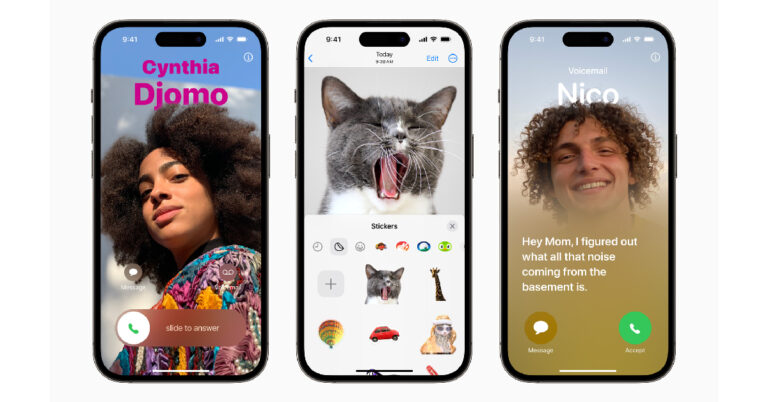
WWDC23 highlights: iOS 17 brings StandBy mode, Journal app and upgrades to FaceTime, and Messages One of the biggest updates on iOS 17, Contact Posters will pop up on your screen every time someone calls you. You can customise your own contact poster with a picture or memoji of yourself. You can even change the font and colour of the text as well as the background.

NameDrop

  NameDrop Want to share a contact with another iPhone user? Simply bring your phone closer to the receiver’s iPhone and quickly send the contact. This can also be used to trigger SharePlay activities. AirDrop gets a small upgrade as well. If you move your iPhone away while sharing a file through AirDrop, it will continue to send over the internet.

Journal

Journal iOS 17 also brings a brand new app for iPhone users. The ‘Journal’ will allow you to document your day while presenting previous memories in the form of photos, text, and videos. Apple uses machine learning to come up with past memories. The app also prompts you to write text entries for the memories as well.

Stand By

StandBy mode. Apple iOS 17: Here are the top new features you should be using first Stand By will certainly be one of the most talked about features of the new iOS 17, mostly due to its charming aesthetic. Whenever you put your iPhone on a wireless charger in landscape mode, the Stand By mode kicks in. In this mode, your iPhone’s idle screen becomes a useful display that showcases the clock, weather, calendar, and other widgets. You can even customise the look of the onscreen widgets.

Communication upgrades

There are a bunch of helpful new upgrades on the communication front as well. iOS 17 finally brings transcripts for voice notes, letting users know the contents of a note if they’re not able to play it. You can also read live transcripts on an incoming voicemail. Communication upgrades. Apple iOS 17: Here are the top new features you should be using first iMessage also gets a ‘Check In’ feature that lets you know when your friends have safely arrived at their destination. If the user doesn’t reach the destination on time, their iPhone will check in with them. Failure to respond to this check-in will relay the user’s location, battery, and cellular status to their selected friends. Communication upgrades. Apple iOS 17: Here are the top new features you should be using first Facetime gets some interesting new features as well. Firstly, you can now send video voicemails to your contacts. Want to video call on a bigger screen? Apple TV now has FaceTime integration. You can use your iPhone as the camera and Apple TV as the larger display for your video calls. You can also use hand gestures to trigger certain animations on the screen during a call.

Other Miscellaneous Features

All the major eye-catching stuff aside, there are several small but important upgrades throughout iOS 17. Predictive text and autocorrect will get much better on the new iOS iteration. Pet owners will be pleased to know that their animal buddies will also get separate identity tags in the Photos app. The ‘People’ album will now be the ‘People and Pets’ album. You can now create different profiles in Safari to separate work stuff from personal content. Every profile will have its separate history, extensions, Tab Groups, cookies, and favourites. Other Miscellaneous Features. Apple iOS 17: Here are the top new features you should be using first Apple Maps will now offer offline access by letting you download a route along with the directions. If you run out of internet, you can still comfortably get to your destination. Apple is also linking with major hotel chains to bring AirPlay support to hotel rooms. AirTags get a helpful upgrade too. One AirTag can now be shared by multiple people. Read Also: HP 45-inch curved display, vertical mouse and other accessories for professionals launched in India

Conclusion

These are all the major features of the new iOS 17. The OS will get an official launch this fall alongside the new iPhone 15 series. Beta users will be pleased to know that Apple no longer requires you to be a part of the Apple Developer Program to use the new iOS 17 Developer Beta. Which feature are you looking forward to using the most? Let us know in the comments! For the latest gadget and tech news, and gadget reviews, follow us on Twitter, Facebook and Instagram. For newest tech & gadget videos subscribe to our YouTube Channel. You can also stay up to date using the Gadget Bridge Android App. You can find the latest car and bike news here.

Marvel’s Spider-Man 2 Exclusively Swings onto PS5 on October 20th; Collector’s & Digital Deluxe Editions Unveiled

In an exciting announcement, Insomniac Games revealed that Marvel’s Spider-Man 2 will launch exclusively on the PlayStation 5 console on Friday, 20 October 2023. Following the immense success of its predecessors, Marvel’s Spider-Man in 2018 and Marvel’s Spider-Man: Miles Morales in 2020, the development team has dedicated years of hard work to deliver the highly anticipated third instalment in the franchise.

Next-Level Gaming Experience

Marvel's-Spider-Man-2-in-game Marvel’s Spider-Man 2 has been meticulously crafted to leverage the full potential of the PlayStation 5, offering players enhanced visuals, faster web-swinging, 3D Audio, and near-instant character switching. Insomniac, in collaboration with PlayStation and Marvel Games, is eager for fans to immerse themselves in this extraordinary single-player open-world adventure.

Dual Protagonists

In Marvel’s Spider-Man 2, players will have the unique opportunity to embody both Peter Parker and Miles Morales, exploring the vast Marvel’s New York as both iconic characters. As showcased in the recent PlayStation Showcase, the game’s main storyline allows players to assume control of each Spider-Man at different points in the campaign. Furthermore, the seamless character-switching feature enables players to effortlessly transition between the two heroes as they traverse Manhattan, Queens, and Brooklyn, with each character having their own exclusive stories and missions. Read Also: How Can You Play PS3 or PS4 Games on a PS5? Is it really possible?

New Threats and Abilities

The box art for Marvel’s Spider-Man 2 presents Peter Parker and Miles Morales as central protagonists, set against a striking red backdrop that hints at the looming darkness surrounding them. Fans can anticipate thrilling encounters with beloved villains like Venom, Lizard, and Kraven, who pose a significant threat to both the heroes and Marvel’s New York. Additionally, the cover art showcases the characters’ new abilities: Peter with the symbiote and Miles with his evolved bioelectric Venom powers, promising an exhilarating gameplay experience.

Editions and Pre-Orders

Alongside the release date announcement, Insomniac Games has unveiled several editions of Marvel’s Spider-Man 2. Pre-orders will be available on June 16th, 2023, across all participating retailers and the PlayStation Store. Fans can secure copies starting at 10:00 AM on June 16, 2023, and choose from various editions, including Collector’s and Digital Deluxe versions, to enhance their Spider-Man 2 experience. Read Also: Asus launches Asus Zenfone 2 Deluxe in India for Rs 22,999

Conclusion

With the imminent arrival of Marvel’s Spider-Man 2 exclusively on the PlayStation 5, franchise fans can anticipate an exceptional gaming experience, harnessing the console’s capabilities to deliver stunning visuals, seamless gameplay mechanics, and a captivating narrative featuring both Peter Parker and Miles Morales. Stay tuned for further updates as the release date draws closer, and get ready to swing into action on October 20, 2023. For the latest gadget and tech news, and gadget reviews, follow us on TwitterFacebook and Instagram. For the newest tech & gadget videos subscribe to our YouTube Channel. You can also stay up to date using the Gadget Bridge Android App. You can find the latest car and bike news here.

Poco F5 Review: Almost flagship-level performance in a budget

The most recent smartphone in the F-Series is the Poco F5. The Poco F4, its predecessor, had impressive performance and features. However there is a new king in town, the F5 has an AMOLED screen with a refresh rate of 120Hz and a 5,000mAh battery with 67W rapid charging capabilities is also included. Its starting price is Rs 29,999. So let’s see how well the Poco F5 performed in our review.

Poco F5 Review: Design and Display

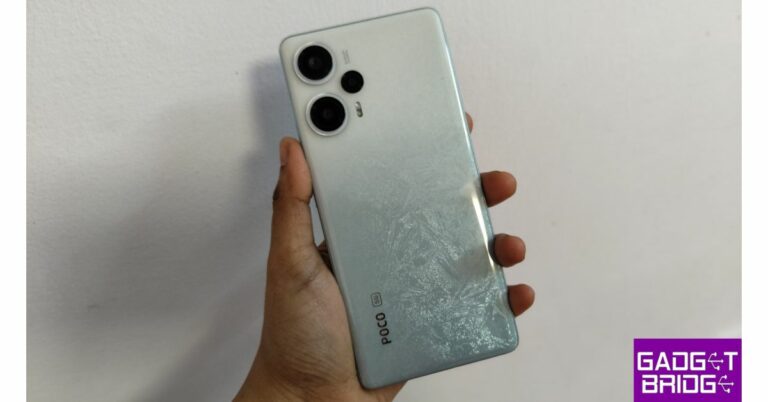
We’d like to talk about the form factor first. Its flat, boxy shape and gently rounded edges give it an extremely strong grip. The device is compact and lightweight. Its snowstorm colour is another aspect that we particularly liked.  Poco F5 Review: Design and Display On the back, it features an iridescent gemstone-like design that shifts and turns into an icy blue texture near the bottom. Despite having a glossy surface, the back panel doesn’t easily pick up fingerprints or smudges. Additionally, there is a side-mounted fingerprint scanner that functions flawlessly and a triple camera arrangement on the back of the device looks too cool. Poco F5 Review: Design and Display Poco F5 Review: Design and Display The SIM tray, a speaker, a USB Type C port, and a microphone are all located at the bottom. Dual nano-SIM cards can fit in the SIM tray, but there is no support for external storage. An IR blaster, a secondary speaker, and a headphone jack are located on the top. A very small punch-hole selfie camera is located in the top centre. In addition, it boasts incredibly small bezels and a very slim chin. Regarding the screen, the Poco F5 has a 6.67-inch Full HD+ Flow AMOLED display with a resolution of 2,400 x 1,080 pixels. This 12-bit panel features HDR10+ with Dolby Vision and a peak brightness of 1,000 nits. The F5 display also offers a 240Hz touch sampling rate and a 120Hz refresh rate. In addition, the screen is shielded by a Corning Gorilla Glass 5 layer. To make binge-watching more comfortable, it has 1,920Hz PWM Dimming. Poco F5 Review: Design and Display The colour reproduction of the screen is flawless, to put it simply. Above that, we had a buttery-smooth overall experience thanks to the 120Hz refresh rate. It has a default setting that essentially adjusts the refresh rate in accordance with the content you are viewing, greatly extending battery life. Over that, both Dolby Vision and Atmos are supported. The device’s thin bezel elevates the viewing experience to a new level. Generally speaking, phones in this category have a chin and a large bezel, but here, everything is evenly spaced out, providing you with a seamless experience.  The audio has a surround sound effect and is powerful, and crisp. making the experience of viewing a movie even more immersive. The finest feature is that a headphone jack is included so you can listen to music and audio without any lag.

Poco F5 Review: Performance and Camera

The Snapdragon 7+ Gen 2 and Adreno GPU in the Poco F5 5G power it. There are 8GB of LPDDR5X RAM available, and this can be extended up to 19GB (virtually). A 256GB UFS 3.1 storage option is also included with the device. It runs quickly, responsively, and without any lags, which is what everyone wants. While multitasking is a joy, opening and shutting of apps is quick. The nicest thing is that the majority of your frequently used apps are still stored in memory. review of Poco F5 On it, we played a tonne of games, and the Poco F5 is a gaming monster. No throttle or lagging problems occurred for us. Thanks to the DC cooling system, which has 14 graphite layers, it supplies the much-needed boost and offers better performance with great thermal control. The phone does get a bit warm, but it dissipates the heat well. review of Poco F5 In terms of software, the phone runs MIUI 14 for Poco, which is based on Android 13, and has a 1+1 year warranty in addition. Also included with the new F-series smartphone are 2+3 years of software updates. The UI is substantially lighter and clearer than it was previously. It is much smoother, especially if you frequently use social media apps that are quick to start and have excellent scrolling. There are bloatware apps and extremely unwelcomed games, but the good news is that you can remove anything that is not necessary. The Poco F5 5G has a triple rear camera configuration with a 64-megapixel primary sensor, an 8-megapixel ultra-wide lens, and a 2-megapixel macro lens for pictures and movies. For selfies and video calls, there is a front-facing 16-megapixel camera. review of Poco F5 While the images captured with the primary sensor during the day appear to be fine, we don’t particularly like them. Nothing truly stands out since it somehow lacks the punch, while they are precise and sharp. The Poco F5 needs to step up their camera game because the competition is coming up with new innovations. But we need to be clear, the camera isn’t poor in any way; in fact, it’s rather great, but competition is moving at a very fast pace. The phone has OIS, which means you can take pictures without any blur. Additionally, we recorded handheld films that were extremely steady and preserved all the details because of the OIS. review of Poco F5 As long as you snap the macro photographs in good lighting circumstances, they will turn out well. Additionally, the selfies have excellent skin tones and are fairly crisp. For portraits, edge detection is also excellent. We loved every bit of them. review of Poco F5 review of Poco F5 The Poco F5 has a battery capacity of 5,000mAh. During our tests, the phone’s battery life ranged from one day with heavy usage to a day and a half with moderate usage. Fortunately, a 67W fast charger is included in the box and can charge your device to 50% in 12 to 15 minutes. It takes roughly 45 minutes to charge completely.

Verdict

When it comes to performance, the Poco F5 with Snapdragon 8 Gen 1 CPU is a powerhouse. Another effective combination is the 12-bit AMOLED display with support for Dolby Vision and Dolby Atmos. Additionally, it is compact and lightweight, and it has a stunning design. There have only been camera-related concerns. However, it performs well in (practically) every area. The Poco F5 won’t let you down at all if you’re a gamer searching for something under Rs 30,000 with an excellent display and lag-free experience. Poco F5 Pros
  • Snappy
  • Long-lasting battery
  • Excellent display
  • Headphone jack provided
Poco F5 Cons
  • Below-average camera performance at times
  • Comes with bloatware
 For the latest gadget and tech news, and gadget reviews, follow us on TwitterFacebook and Instagram. For newest tech & gadget videos subscribe to our YouTube Channel. You can also stay up to date using the Gadget Bridge Android App. You can find the latest car and bike news here.