

All Xiaomi 5G phones will have a seamless 5G experience thanks to Xiaomi India’s partnership with Airtel
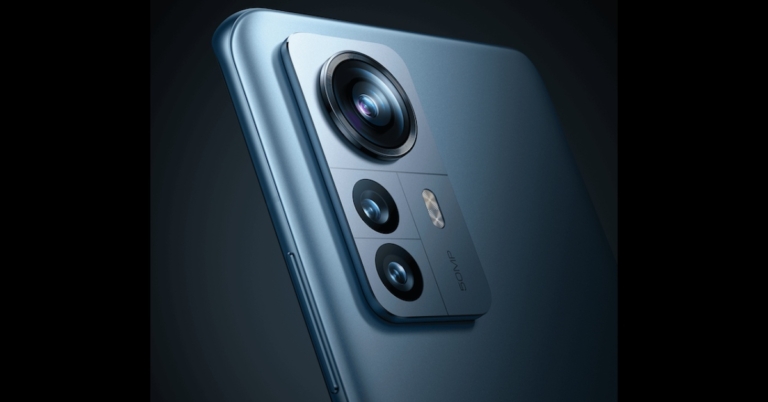
In order to give owners of Xiaomi and Redmi smartphones access to the best “5G Plus” network, Xiaomi India today announced its partnership with Bharti Airtel. According to the company, customers will be able to flawless video calling, lag-free cloud gaming, and lightning-fast data upload and download speeds on all Xiaomi and Redmi 5G models across all categories as a result of this strategic alliance. Customers only need to go to network settings and switch to Airtel 5G to enjoy speedy Airtel 5G Plus access.
According to the company devices and internet speeds must be quick and dependable at a time when the quality of digital experiences is crucial. To ensure a smooth transition for its customers right out of the box, Xiaomi India claims to have spent the last two years meticulously testing its smartphones in partnership with Airtel. In order to provide the greatest results, the companies have prioritised performance and stability under challenging conditions.
In order to provide its users with the greatest possible experience, Xiaomi India has conducted 5G field tests in numerous cities at various frequency bands. With the advancement of 5G, consumers will be able to enjoy ultrafast connectivity by simply switching to their favourite network with smartphones like the Xiaomi 12 Pro, Mi 11 Ultra, Xiaomi 11T Pro, Xiaomi 11 Lite NE 5G, Xiaomi 11i HyperCharge, Xiaomi 11i, Mi 11X Pro, Mi 11X, Mi 10T Pro, Mi 10T, and Mi 10.
Redmi K50i, Redmi 11 Prime 5G, Redmi Note 11 Pro+ 5G, Redmi Note 11T 5G, and Redmi Note 10T 5G will give customers fast access to high-definition multimedia streaming, uninterrupted gaming, and browsing, among other things, by bringing the 5G experience to the inexpensive segment.
Commenting on the announcement, Anuj Sharma – Chief Marketing Officer, Xiaomi India, said, “Xiaomi India has always played an instrumental role in democratising technology for the masses, thereby future-proofing the needs of our consumers. Our entire 5G smartphone portfolio enables our consumers to access 5G services across India. Xiaomi’s ability to offer best-in-class technology in partnership with Airtel, will allow our consumers to be at the forefront of the 5G revolution in India. With high speeds, superior reliability, and negligible latency, 5G services will expand the mobile ecosystem into new realms.”
Commenting on the collaboration Shashwat Sharma, Director – Consumer Business, Bharti Airtel, said, “At Airtel, we are continuously enhancing mobile experiences through powerful collaborations that drive 5G adoption to new levels. We are delighted to collaborate with Xiaomi to continue driving the 5G ecosystem. All our existing 4G SIMs are enabled with 5G, because of which, customers can start enjoying ultrafast 5G services by simply selecting 5G network on their Xiaomi & Redmi handsets at no extra cost, as we start rolling out more and more cities.”
For the latest gadget and tech news, and gadget reviews, follow us on Twitter, Facebook and Instagram. For newest tech & gadget videos subscribe to our YouTube Channel. You can also stay up to date using the Gadget Bridge Android App. You can find the latest car and bike news here
Garena Free Fire Redeem Codes Today 20 October 2022: Here is how to claim them

Garena Free Fire is a battle royale game with regular awards and tournaments to keep players interested. If you play Garena Free Fire, you should be aware of the redeem codes that are released on a daily basis. However, because the battle royale game is banned in India, players from other countries can use the Free Fire Redeem codes daily. If you’re unfamiliar with the Garena Free Fire redeem codes or don’t know how to get them, we’ve put together a step-by-step guide to help you redeem them. Check out Garena Free Fire Redeem Codes for October 20.
The Free Fire redeem codes are a great way to get free stuff. These are 12-digit codes that contain alphabets and numbers, as well as an expiration date and time. Because the Garena FF redeem codes cannot be used more than once, you should hurry to the redemption page to claim your free reward before someone else does. To get a free reward, all you have to do is go to reward.ff.garena.com/en, which is the official redemption page. Also, keep an eye on this space for daily updates on Garena Free Fire redemption codes and rewards.
Garena Free Fire Redeem Codes Today 20 October 2022
- 8F3QZKNTLWBZ
- B3G7A22TWDR7X
- FF7MUY4ME6SC
- 6KWMFJVMQQYG
- BR43FMAPYEZZ
- UVX9PYZV54AC
- GCNVA2PDRGRZ
- 4ST1ZTBE2RP9
- FFCMCPSUYUY7E
- NPYFATT3HGSQ
- MCPW2D2WKWF2
- J3ZKQ57Z2P2P
- WEYVGQC3CT8Q
- SARG886AV5GR
- 3IBBMSL7AK8G
- EYH2W3XK8UPG
- V427K98RUCHZ
- MCPW2D1U3XA3
- FFCMCPSJ99S3
- MCPW3D28VZD6
- FFCMCPSGC9XZ
- X99TK56XDJ4X
- FFCMCPSEN5MX
- ZZZ76NT3PDSH
- XZJZE25WEFJJ
- HNC95435FAGJ
How to Get Free Fire Redeem Codes for Garena on October 20?
- Visit the Garena Free Fire game’s official website at reward.ff.garena.com.
- Use your Facebook, Google, VK, Apple ID, Huawei ID, or Twitter account to log in.
- You’ll be taken to a valid redemption code (s)
- Copy and paste the 12-digit redemption code into the text box.
- On the screen, a dialogue box will appear.
- ‘Ok’ should be selected.
Amazon Quiz Answers Today 20 October 2022: Participate to win Rs 1,000

Amazon is back with another quiz on its mobile platform. The Amazon Quiz is conducted every day for its customers. Customers from different parts of the country are participating in the daily quiz. Today’s Amazon quiz is now live on the Amazon App. The customers who participate in the 20 October 2022 Amazon Quiz will get a chance to win Rs 1,000 Amazon pay Balance.
The Amazon Quiz can be played from 12 AM to 11:59 PM. For those who are unaware of the quiz, the e-commerce platform brings a fresh quiz on a daily basis which consists of five questions related to general knowledge and current affairs. The participants need to answer all the questions correctly and their names will be selected for a lucky draw. The winner will be announced at the end of the month. One wrong answer could eliminate you from the quiz. Only app users are eligible to participate in the Quiz. Check Out 20 October 2022 Amazon Quiz Answers.
Amazon Quiz Today Prize – Rs 1,000 Amazon Pay Balance
Quiz Date – 20 October 2022
Daily Timing – 12 AM to 11:59 PM
Winner Announcement – Today 12 PM
Amazon Quiz Answers Today 20 October 2022
Question 1: The recently concluded T20I series between Pakistan and England consisted of how many matches? Answer: 7 Question 2: The Akshay Kumar starrer ‘Ram Setu’ is directed by whom? Answer: Abhishek Sharma Question 3: At the Indian Mobile Congress, Ashwini Vaishnaw announced that the government will set up how many labs for 5G technology across India? Answer: 100 Question 4: This is a view of which famous church? Answer: St Peter’s Basilica Question 5: This is a statue of Isaac Newton in which famous university, where he himself was a professor? Answer: Cambridge UniversityHow To Play Amazon Quiz
Only app users are eligible to play the Amazon quiz every morning from 12 AM to 11:59 PM. The quiz is not available on the desktop. For those who are unaware of how to play the Amazon quiz below are the steps, you can follow to take the quiz.- Firstly download the Amazon app from Google Play Store or App Store
- Now fill in the required information through the Sign Up option.
- You need to log in to the Amazon app and scroll down on the home screen to find the Amazon Quiz banner.
- Tap on the Amazon Quiz banner and tap on the Start button to start the Quiz.
- Now you will get 5 questions and you need to answer them correctly. One wrong answer will eliminate you from the Quiz.
- After answering all the questions correctly you are now eligible for a Lucky Draw.
- The winner’s name will be announced today at 12 PM.
How to Remove FRP Lock on Android Devices
An FRP is an android safeguard that can be triggered accidentally.
There are many ways to unlock an FRP lock; however, some methods are more feasible.
The following passage will take you through everything you need to know about FRP Locks and how to bypass them.
Let’s get started!
 The device will ask for your google credentials to unlock the FRP.
Now there are instances where you can’t unlock the FRP because you don’t know the password.
Some of these scenarios are mentioned in the paragraph below.
3. Connect your Android device to your pc using a USB cable and press Start.
(If the app has trouble detecting your device, it will give you a prompt. Reconnect your USB cable and try again or try with another cable.)
4. Be patient on the next screen as the app prepares the configuration file for your device.
5. Once you reach the next screen, tap on Start to Bypass.
6. The next step is to put your phone in recovery mode, for which instructions will be displayed on the screen.
7. Once in recovery mode, look for the number right before the “/” on your Android device’s recovery page. Select the correct version of your device on your pc according to the number on the device.
8. Once the correct version is selected, tap on Download Now.
9. Once downloaded, the bypass process will start. Then, follow the instructions in the DroidKit interface to complete the bypass.
The device will ask for your google credentials to unlock the FRP.
Now there are instances where you can’t unlock the FRP because you don’t know the password.
Some of these scenarios are mentioned in the paragraph below.
3. Connect your Android device to your pc using a USB cable and press Start.
(If the app has trouble detecting your device, it will give you a prompt. Reconnect your USB cable and try again or try with another cable.)
4. Be patient on the next screen as the app prepares the configuration file for your device.
5. Once you reach the next screen, tap on Start to Bypass.
6. The next step is to put your phone in recovery mode, for which instructions will be displayed on the screen.
7. Once in recovery mode, look for the number right before the “/” on your Android device’s recovery page. Select the correct version of your device on your pc according to the number on the device.
8. Once the correct version is selected, tap on Download Now.
9. Once downloaded, the bypass process will start. Then, follow the instructions in the DroidKit interface to complete the bypass.
Part 1: What is an FRP lock, and what sets it off?
Before we talk about how to remove an FRP lock, let’s learn what an FRP is and how it gets triggered. Factory Reset Protection or FRP is a security precaution in all Android 5.1 (Lollipop) and higher. The FRP lock is automatically enabled when registering a Google account on your device. It will be triggered if you factory reset your phone in any other manner than the conventional “Settings >Systems>Reset options>Erase all data (factory reset)” method.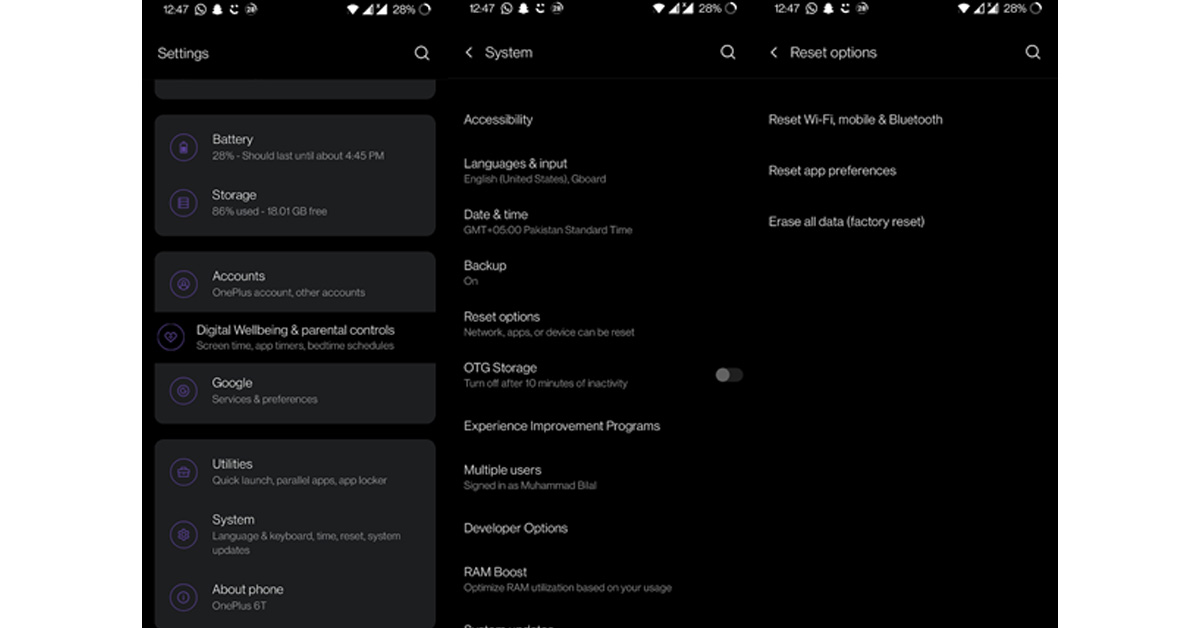 The device will ask for your google credentials to unlock the FRP.
Now there are instances where you can’t unlock the FRP because you don’t know the password.
Some of these scenarios are mentioned in the paragraph below.
The device will ask for your google credentials to unlock the FRP.
Now there are instances where you can’t unlock the FRP because you don’t know the password.
Some of these scenarios are mentioned in the paragraph below.
Part 2: Why you may need to unlock an FRP
Once an FRP has been enabled, your only solution is to bypass it. There are many scenarios where one can encounter problems caused by an FRP lock. If you’re like me, you also have a hard time keeping track of all your accounts. One person can only remember so many passwords. But forgetting your Google password will leave you stuck at an FRP. Maybe you found an old phone but can’t unlock the FRP lock because you don’t remember your password. Similarly, if you get a second-hand phone with an unknown Google account, you won’t be able to factory reset the device without its FRP activating. Now that we’ve gone over the basics of FRP locks let’s get back to the main topic of our concern: How to remove an FRP lock.Part 3: How to remove an FRP lock?
There are numerous ways to unlock an FRP lock, two of which stand out above the rest. These are the FRP Bypass APK and DroidKit methods. Both methods differ fundamentally, especially in feasibility. The passage below contains an in-depth guide, including steps for both methods. Let’s begin.Method 1: Via FRP Bypass APK
The first method we will look at is using an FRP bypass APK to remove an FRP lock. FRP bypass APKs are simple free android apps that can easily remove FRP locks. This has to be done before you factory reset the device; otherwise, you’ll be stuck once the FRP is triggered. Now the method is straightforward: just download an FRP bypass APK from the web and follow the steps below. The method is a bit different in Android 12 compared to previous versions.Android 12
- Download the FRP bypass APK on your device.
- Open your file manager and locate the APK file in your downloads.
- Tap and install the APK on your device.
- Open the FRP bypass app.
- Go to FRP Apps Section>Open Settings.
- You will be rerouted to your device’s settings app.
- Go to System Settings>Reset Options.
- First tap on Rest System Settings Only>confirm.
- Now select Erase All Data>Confirm.
- Your device will be rebooted, and the FRP will be automatically bypassed.
Android versions before Android 12
- Download the FRP bypass APK on your device.
- Open your file manager and locate the APK file in your downloads.
- Tap and install the APK on your device.
- Open the FRP bypass app.
- Tap and open the 3-dot menu in the top right corner.
- Select Browser Sign-in.
- Sign in with your Google credentials.
- Open your Settings app.
- Go to System Settings>Reset Options>Erase All Data>Confirm.
- Your device will be rebooted, and the FRP will be automatically bypassed.
Limitations
Using an FRP bypass APK is an excellent method, but it has its cons. First, the numerous tedious steps can be overwhelming for users with limited technical know-how. The steps can be confusing and hard to follow, even for seasoned Android users. Downloading any file outside a secure platform like the Google Playstore has risks. APKs from unknown websites can bring viruses and spyware to your device. Some users are okay with the risk, but you can lose valuable data on your device. The worst part is that there is no guarantee of success. This method is not foolproof. It works for many users, but many still face FRP issues when factory resetting their devices.Solution
The best way to overcome the weaknesses of FRP bypass APKs, is to replace them with better bypassing software like DroidKit. DroidKit is the best solution, as it’s guaranteed to get the job done with minimal to no complications. Now let’s look at what DroidKit is and how it works.Method 2: Using DroidKit
DroidKit is a comprehensive toolkit that can also be used to remove FRP locks. Why choose DroidKit?- Licensed
- Free
- Secure
- Easy-to-follow step
- More successful than FRP bypass APKs method
Steps on how to use DroidKit:
The following method is recommended for all Samsung devices with Android 6-12.- Download and install DroidKit on your pc.
 3. Connect your Android device to your pc using a USB cable and press Start.
 (If the app has trouble detecting your device, it will give you a prompt. Reconnect your USB cable and try again or try with another cable.)
4. Be patient on the next screen as the app prepares the configuration file for your device.
(If the app has trouble detecting your device, it will give you a prompt. Reconnect your USB cable and try again or try with another cable.)
4. Be patient on the next screen as the app prepares the configuration file for your device. 5. Once you reach the next screen, tap on Start to Bypass.
 6. The next step is to put your phone in recovery mode, for which instructions will be displayed on the screen.
 7. Once in recovery mode, look for the number right before the “/” on your Android device’s recovery page. Select the correct version of your device on your pc according to the number on the device.
 8. Once the correct version is selected, tap on Download Now.
 9. Once downloaded, the bypass process will start. Then, follow the instructions in the DroidKit interface to complete the bypass.
Final Words
Hopefully, you have everything you need to crack open that annoying FRP lock. We’ve covered everything from the basics, like what an FRP is, to the best methods to remove it. By now, you’ve definitely realized that DroidKit is the way to go if your device is compatible. The FRP Bypass APK option deserves almost equal praise and works a-ok for most users. For the latest gadget and tech news, and gadget reviews, follow us on Twitter, Facebook and Instagram. For newest tech & gadget videos subscribe to our YouTube Channel. You can also stay up to date using the Gadget Bridge Android App. You can find the latest car and bike news herePlaying Slingo on Mobile

The global success of the online casino industry is hard to miss. Traditional casino games like Poker, Roulette, Blackjack, Craps and Baccarat have become mainstays on many people’s smartphones for their easy to learn rules, forgiving learning curve and their ‘pick up and playability’.
Convenient, casual games are perfect time-fillers for people’s modern, on-the-go lifestyles. People who don’t have time to dedicate extended sessions to their chosen entertainment medium and as a result, casual games dominate app stores. The genre that has perhaps transferred most successfully from the casino floor to the smart device is slots.
There’s something about the simple slots reels game mechanic that is infinitely adaptable for developers and keeps players coming back for more. One such development within the slots arena is Slingo which, as the name suggests, combines the best elements of slot machines and Bingo into one exciting game.
Developed by a New Jersey real estate developer in 1994, the game was an instant hit and has since cultivated a flourishing corner of the industry all of its own. You can find libraries of dozens of slots titles as well as Slingo games at trusted operators like Rainbow Riches Casino .
We take a look at the rules of the game, how to play and what makes Slingo so fun so you can get started on your Slingo adventure today.
The Basics
Some Slingo titles become quite complex and involved but at their simplest, they bear much in common with a slot machine that you’ll likely be familiar with. Start by setting your stake with a value that you’re comfortable to play with. You will be allotted a grid of random numbers that will resemble a Bingo card (usually 5×5) and, like Bingo, the object is to check off each number in the grid. In Slingo, however, instead of a caller announcing the numbers, they are decided by the fate of the reels of the slot machine. When you’re ready hit the spin button and watch as the action unfolds. You will be allocated a certain number of spins in which to complete your card. Aim for a complete line first, either horizontally, diagonally or vertically. Successfully doing so will offer a prize – check the value of each prize on your chosen game since they vary. The great thing about Slingo compared to conventional slots games is that each round lasts for many spins of the reels whereas the fun of slots can often be over in a single turn. For this reason, Slingo is more suited to people that prefer extended gaming sessions.Advanced Features
A common feature of many Slingo titles is the inclusion of the Joker symbol. When a Joker lands on the reels, you can choose any number in that column to check off from your grid. Jokers are especially useful when you’re getting close to completing a line but that specific number just isn’t appearing – they can signal a real turn of fortunes. Devil symbols are the anti-jokers and depending on your chosen game will either block numbers for that turn or reduce the player’s score. A Super Joker is like a Super Wild and allows the player to select a number from anywhere on the grid – not just the column where it appears. Super Jokers are handy in the last few spins of the game when the grid is close to completion. Free Spin symbols do exactly that and award an additional spin to the player. A coin symbol or any three Jokers that appear in a single spin will result in an immediate cash prize. If at the end of the game you’ve not won or you’re close to completing another line or the grid, you will have the option to buy additional spins. Each additional spin will become more expensive to buy so you’ll need to weigh up the risk and rewards of continuing each time.The Slingo Catalogue
There are tens of Slingo games to choose from, each with their own theme, minigames and graphics, and each with their own twist on the concept. It’s crucial to read the rules of your chosen game thoroughly before wagering any real money so you know exactly what you’re playing. Most reputable operators offer free-play options to players so you can trial the games before parting with any cash and we recommend you take advantage of this. Even for seasoned Slingo aficionados, it’s a good idea to take some time in free-play to warm up before playing the real thing. Some of our favourite Slingo titles:- Deal or No Deal Slingo
- Slingo Advance
- Slingo Starburst
Top 10 simple methods to fix ‘Facebook Messenger Keeps Crashing’
Facebook Messenger is one of the most used Instant Messaging apps in the world, surpassed only by WhatsApp. For a lot of users, Messenger is the primary communication app. It can get quite annoying when the app starts crashing out of the blue. Luckily, there are some quick fixes you can carry out on your own to resolve the issue. In this article, we bring you the top 10 simple methods to fix the ‘Facebook Messenger keeps crashing’ issue on your smartphone.
Read Also: Diwali Gifting Guide: Best smartphones to gift your loved ones this festive season
Any minor bugs can be quickly fixed by force-stopping the app and then starting it back up. This is an easy process and should be the first step you take whenever any app starts acting up. To force stop the Facebook Messenger app, go to Settings>Apps>Messenger and hit ‘Force Stop’. You can also close the app by swiping up on its card from the app switcher. Once the app is closed, open it again from the app drawer.
The Messenger app on your phone needs some essential permissions in order to work properly. Failure to greenlight these permissions might cause it to crash. Go to Settings>Apps>Messenger and check the Permissions box to see if all the necessary permissions have been granted to the app. Restart the app to check if it crashes again.
Clearing the app cache gets rid of any corrupt temporary files that may be keeping the app from functioning properly. To clear Messenger’s cache simply go to Settings>Apps>Messenger and select ‘Storage and Cache’. From the following window, select ‘Clear Cache’. Once the cache is cleared, restart the app and check if the issue is resolved.
Google Play Service is what links the apps you install on your device to your account. If there is a fault with Google Play Services, you will experience frequent crashes on different apps. To clear the Google Play Services cache go to Settings>Apps>Google Play Services>Storage>Clear cache.
Messenger is one of the apps that serves a very limited purpose if it isn’t allowed to function in the background. You won’t receive any new messages if background usage for Messenger is disallowed. In some cases, the app may crash as soon as you open it. This is more likely when you receive tons of messages at once. Allowing background usage ensures that the app isn’t overwhelmed by the volume of new messages every time you launch it. Go to Settings>Apps>Messenger>Battery and select ‘Unrestricted’.
Force Stop the app and then restart it
 Any minor bugs can be quickly fixed by force-stopping the app and then starting it back up. This is an easy process and should be the first step you take whenever any app starts acting up. To force stop the Facebook Messenger app, go to Settings>Apps>Messenger and hit ‘Force Stop’. You can also close the app by swiping up on its card from the app switcher. Once the app is closed, open it again from the app drawer.
Give the Messenger app the necessary permissions
 The Messenger app on your phone needs some essential permissions in order to work properly. Failure to greenlight these permissions might cause it to crash. Go to Settings>Apps>Messenger and check the Permissions box to see if all the necessary permissions have been granted to the app. Restart the app to check if it crashes again.
Update the Messenger app
As new updates for an app roll out periodically, the older versions are slowly phased out. If you don’t usually keep your apps updated, chances are they will stop being functional after a period of time. The same thing applies to the Messenger app. Newer updates also get rid of any bugs within the app, so it is always a good idea to keep your apps updated. In order to update Facebook Messenger, simply go to Google Play Store, search for Facebook Messenger and hit ‘Update’ on the app page.Clear app cache
 Clearing the app cache gets rid of any corrupt temporary files that may be keeping the app from functioning properly. To clear Messenger’s cache simply go to Settings>Apps>Messenger and select ‘Storage and Cache’. From the following window, select ‘Clear Cache’. Once the cache is cleared, restart the app and check if the issue is resolved.
Clear Google Play Services cache
 Google Play Service is what links the apps you install on your device to your account. If there is a fault with Google Play Services, you will experience frequent crashes on different apps. To clear the Google Play Services cache go to Settings>Apps>Google Play Services>Storage>Clear cache.
Allow background usage
 Messenger is one of the apps that serves a very limited purpose if it isn’t allowed to function in the background. You won’t receive any new messages if background usage for Messenger is disallowed. In some cases, the app may crash as soon as you open it. This is more likely when you receive tons of messages at once. Allowing background usage ensures that the app isn’t overwhelmed by the volume of new messages every time you launch it. Go to Settings>Apps>Messenger>Battery and select ‘Unrestricted’.
Reinstall Facebook Messenger
If everything else fails, you can try reinstalling Facebook Messenger. Once you delete Messenger from your phone, you will lose all app data unless you back it up. In order to delete the app, simply long-press the Messenger app in the app drawer and select ‘Uninstall’. To reinstall, go to Google Play Store and search for Facebook Messenger. Go to the app page and select ‘Install’.Opt out of the Beta program
Beta testers get early access to new features on the app. While its fun to use the new features before everyone else, the beta version of an app is usually very unstable and contains bugs. Developers roll out beta programs for their apps just so a small group of people can report these flaws before the app is made available to the larger audience. If you are experiencing frequent crashes, opt out of the beta program. Simply search from Messenger on the Play Store and scroll all the way down on the app’s page to leave the beta program.Restart your phone
It is possible that the issue lies with your smartphone and not the Messenger app. In order to make sure that any minor or temporary glitches get smoothened out, simply restart your smartphone. This will take care of any minor problems that may be keeping the Messenger app from functioning. Once the phone restarts, open the Facebook Messenger app and check if it still keeps crashing.Use Messenger Lite
Facebook Messenger is quite a bulky app and may not be suited for your smartphone if it doesn’t have adequate RAM or storage space. In this case, install the Facebook Messenger Lite app from the Google Play Store. As the name suggests, the Messenger Lite app doesn’t occupy a lot of space on your smartphone and only carries out the essential functions of the app.Frequently Asked Questions
Why does my Messenger app keep crashing?
If Facebook Messenger keeps crashing on your smartphone, clear up some internal memory on your device and update the Messenger app.How do I clear my Messenger cache?
To clear the cache of the Messenger app, go to Settings>Apps>Messenger>Storage>Clear Cache.What happens if I clear Messenger data?
Clearing Messenger data gets rid of all the junk files that the app has stored in your device. You may need to log in again but you will not lose your contacts. Read Also: Apple introduced an all-new iPad with a 10.9-inch Liquid Retina displayConclusion
These are the top 10 simple methods to fix the ‘Facebook Messenger keeps crashing issue’ on your smartphone. We hope this article was of some help to you. Let us know which of the methods mentioned above worked out for you.
For the latest gadget and tech news, and gadget reviews, follow us on Twitter, Facebook and Instagram. For newest tech & gadget videos subscribe to our YouTube Channel. You can also stay up to date using the Gadget Bridge Android App. You can find the latest car and bike news here.
New Apple TV 4K (2022) featuring A15 Bionic chip and HDR10+ support launched in India
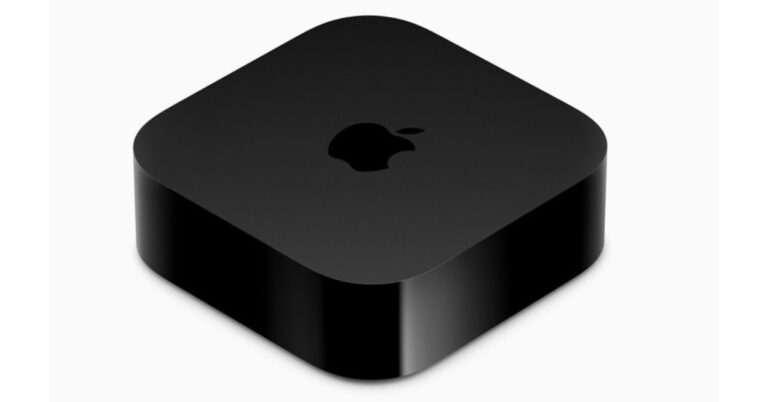
The new Apple TV 4K (2022) has been released worldwide. The new Apple TV 4K, which was just unveiled, is claimed to be impressively cinematic in quality and is more powerful, fun, and inexpensive than ever. The new Apple TV 4K is powered by the A15 Bionic chip, which offers faster performance and more fluid gameplay. On Apple TV 4K, HDR10+ support joins Dolby Vision so that users.
 Customers may buy the new Apple TV 4K starting today, and it will be on sale in more than 30 nations and regions, including the US, on Friday, November 4. With three years of technical assistance, enhanced hardware coverage, and unrestricted accidental damage protection, AppleCare+ will be available for Apple TV.
 In addition to Dolby Vision, Apple TV 4K now supports HDR10+. Users can also enjoy immersive audio with Dolby Atmos, Dolby Digital 7.1, or Dolby Digital 5.1 surround sound for a home theatre experience.
Users can quickly explore the user interface of Apple TV with the Siri Remote’s touch-enabled clickpad, which offers speed, fluidity, and accurate control. Customers may access over 100,000 movies and TV shows to buy or rent via the Apple TV app, as well as direct premium subscriptions to well-known streaming services, along with award-winning shows and movies on Apple TV+.
For the latest gadget and tech news, and gadget reviews, follow us on Twitter, Facebook and Instagram. For newest tech & gadget videos subscribe to our YouTube Channel. You can also stay up to date using the Gadget Bridge Android App. You can find the latest car and bike news here.
In addition to Dolby Vision, Apple TV 4K now supports HDR10+. Users can also enjoy immersive audio with Dolby Atmos, Dolby Digital 7.1, or Dolby Digital 5.1 surround sound for a home theatre experience.
Users can quickly explore the user interface of Apple TV with the Siri Remote’s touch-enabled clickpad, which offers speed, fluidity, and accurate control. Customers may access over 100,000 movies and TV shows to buy or rent via the Apple TV app, as well as direct premium subscriptions to well-known streaming services, along with award-winning shows and movies on Apple TV+.
For the latest gadget and tech news, and gadget reviews, follow us on Twitter, Facebook and Instagram. For newest tech & gadget videos subscribe to our YouTube Channel. You can also stay up to date using the Gadget Bridge Android App. You can find the latest car and bike news here.
New Apple TV 4K (2022) price in India and sale details
Starting at Rs 14900, the new Apple TV 4K with Siri Remote will be sold at Apple Store locations as well as online at apple.com/in/store. Additionally, several pay TV providers and Apple Authorised Resellers sell Apple TV 4K. Customers may buy the new Apple TV 4K starting today, and it will be on sale in more than 30 nations and regions, including the US, on Friday, November 4. With three years of technical assistance, enhanced hardware coverage, and unrestricted accidental damage protection, AppleCare+ will be available for Apple TV.
New Apple TV 4K (2022) Features
Two configurations of the new Apple TV 4K are available: Apple TV 4K (Wi-Fi), which has 64GB of storage, and Apple TV 4K (Wi-Fi + Ethernet), which supports Gigabit Ethernet for quick networking and streaming, the Thread mesh networking protocol to connect even more smart home accessories and twice as much storage for apps and games (128GB). The new Apple TV 4K’s A15 Bionic chip makes it even more powerful and resource-conserving. More responsiveness, quicker navigation, and snappier UI animations are now possible thanks to up to 50% faster CPU performance than the previous generation. For even smoother gameplay, GPU performance is now up to 30% faster than the previous generation. In addition to Dolby Vision, Apple TV 4K now supports HDR10+. Users can also enjoy immersive audio with Dolby Atmos, Dolby Digital 7.1, or Dolby Digital 5.1 surround sound for a home theatre experience.
Users can quickly explore the user interface of Apple TV with the Siri Remote’s touch-enabled clickpad, which offers speed, fluidity, and accurate control. Customers may access over 100,000 movies and TV shows to buy or rent via the Apple TV app, as well as direct premium subscriptions to well-known streaming services, along with award-winning shows and movies on Apple TV+.
For the latest gadget and tech news, and gadget reviews, follow us on Twitter, Facebook and Instagram. For newest tech & gadget videos subscribe to our YouTube Channel. You can also stay up to date using the Gadget Bridge Android App. You can find the latest car and bike news here.
In addition to Dolby Vision, Apple TV 4K now supports HDR10+. Users can also enjoy immersive audio with Dolby Atmos, Dolby Digital 7.1, or Dolby Digital 5.1 surround sound for a home theatre experience.
Users can quickly explore the user interface of Apple TV with the Siri Remote’s touch-enabled clickpad, which offers speed, fluidity, and accurate control. Customers may access over 100,000 movies and TV shows to buy or rent via the Apple TV app, as well as direct premium subscriptions to well-known streaming services, along with award-winning shows and movies on Apple TV+.
For the latest gadget and tech news, and gadget reviews, follow us on Twitter, Facebook and Instagram. For newest tech & gadget videos subscribe to our YouTube Channel. You can also stay up to date using the Gadget Bridge Android App. You can find the latest car and bike news here. Sony SRS XE200 review: Pleasant tones and durable
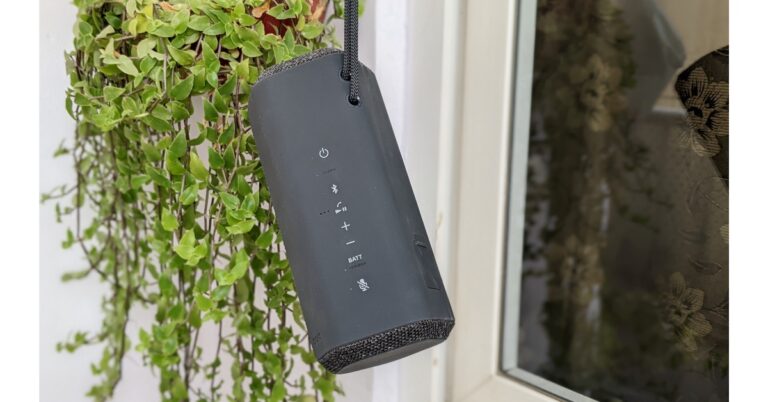
We are currently checking out the Sony SRS XE200, one of the brand’s newest Bluetooth speakers. We will discuss what this speaker offers and how it performed in this review as a mid-sized speaker.
 It also features two passive radiators, one on either side of the speaker. But even though the company put panels on each side of the speaker so it could stand upright easily, we believe this has an impact on the bass. It has a pentagon-shaped body with five distinct sides. The body is covered in soft-touch rubber (mostly), however, it is very slippery.
Sony provides a rope strap in the box because they are aware of how slick this material is. Also, the strap makes it much easier to carry around because you can sling it over a bag or hang it on a hook or similar object.
It also features two passive radiators, one on either side of the speaker. But even though the company put panels on each side of the speaker so it could stand upright easily, we believe this has an impact on the bass. It has a pentagon-shaped body with five distinct sides. The body is covered in soft-touch rubber (mostly), however, it is very slippery.
Sony provides a rope strap in the box because they are aware of how slick this material is. Also, the strap makes it much easier to carry around because you can sling it over a bag or hang it on a hook or similar object.
 There is a lovely fabric mesh that surrounds those passive radiators but it does attract a lot of dust. If you have pets, just be ready to frequently wipe off pet hair from this material.
Regarding the button, the one feature we particularly appreciate is that it has a mute button. This is because the device has a built-in microphone and would be useful if you needed to mute it during a phone call or for any other reason. Echo cancellation is another good feature that improves the call quality.
There is a lovely fabric mesh that surrounds those passive radiators but it does attract a lot of dust. If you have pets, just be ready to frequently wipe off pet hair from this material.
Regarding the button, the one feature we particularly appreciate is that it has a mute button. This is because the device has a built-in microphone and would be useful if you needed to mute it during a phone call or for any other reason. Echo cancellation is another good feature that improves the call quality.
 The setup and pairing process is quite simple. If you are using an Android handset, the speaker supports Google Fast Pair and Bluetooth 5.2. Additionally, it has multi-point connectivity, which is incredibly convenient and enables you to alternate between two devices easily.
The Sony XE200 has a battery life of about 16 hours of playback on a full charge. Over that, this audio gadget has quick charging support via a USB Type-C fast charging port, so a charge of just 10 minutes will provide roughly 70 minutes of listening time.
The setup and pairing process is quite simple. If you are using an Android handset, the speaker supports Google Fast Pair and Bluetooth 5.2. Additionally, it has multi-point connectivity, which is incredibly convenient and enables you to alternate between two devices easily.
The Sony XE200 has a battery life of about 16 hours of playback on a full charge. Over that, this audio gadget has quick charging support via a USB Type-C fast charging port, so a charge of just 10 minutes will provide roughly 70 minutes of listening time.
 The portable speaker is also given an IP67 rating for dust and water protection, so you can essentially carry this nifty device everywhere without worrying about damage.
The Sony XE200 speaker can be connected to additional Sony speakers that are compatible to create a party mode while using the Sony Music Center app. The ability to switch between mono and stereo modes when using it alone is unquestionably a really useful option.
Additionally, the speaker may only be charged up to 90 times in battery care mode, which will help the speaker last longer overall. The EQ can be adjusted using a 3-band equaliser, so if you don’t like the way these speakers sound, you can make the necessary adjustments.
The portable speaker is also given an IP67 rating for dust and water protection, so you can essentially carry this nifty device everywhere without worrying about damage.
The Sony XE200 speaker can be connected to additional Sony speakers that are compatible to create a party mode while using the Sony Music Center app. The ability to switch between mono and stereo modes when using it alone is unquestionably a really useful option.
Additionally, the speaker may only be charged up to 90 times in battery care mode, which will help the speaker last longer overall. The EQ can be adjusted using a 3-band equaliser, so if you don’t like the way these speakers sound, you can make the necessary adjustments.
 Let’s speak about the Sony SRS XE200’s audio output quality now. The mids coming out of the XE200 were decent. The device performs a bit better in the lows department, in fact, we preferred the lows. The low range doesn’t suffer from that distorted sound, and the bass sounds fantastic. Even the high range has pleasing tones. All in all, the XE200 is powerful enough to fill a room with simply the loud volume of any song.
We have the impression that the speaker’s substantial rubber portions are blocking some of the sounds from exiting. It prevents them from sounding a little bit better and more open, but we are not saying that they sound horrible; they clearly have some extremely good sound quality, which could have been better.
Let’s speak about the Sony SRS XE200’s audio output quality now. The mids coming out of the XE200 were decent. The device performs a bit better in the lows department, in fact, we preferred the lows. The low range doesn’t suffer from that distorted sound, and the bass sounds fantastic. Even the high range has pleasing tones. All in all, the XE200 is powerful enough to fill a room with simply the loud volume of any song.
We have the impression that the speaker’s substantial rubber portions are blocking some of the sounds from exiting. It prevents them from sounding a little bit better and more open, but we are not saying that they sound horrible; they clearly have some extremely good sound quality, which could have been better.
Sony SRS XE200 review: Design and Performance
There are three colours available for the Sony SRS XE200. These include blue, grey, and the one we are currently reviewing black. It has a diffuser with a line shape that somewhat extends the range of the sound. It also features two passive radiators, one on either side of the speaker. But even though the company put panels on each side of the speaker so it could stand upright easily, we believe this has an impact on the bass. It has a pentagon-shaped body with five distinct sides. The body is covered in soft-touch rubber (mostly), however, it is very slippery.
Sony provides a rope strap in the box because they are aware of how slick this material is. Also, the strap makes it much easier to carry around because you can sling it over a bag or hang it on a hook or similar object.
It also features two passive radiators, one on either side of the speaker. But even though the company put panels on each side of the speaker so it could stand upright easily, we believe this has an impact on the bass. It has a pentagon-shaped body with five distinct sides. The body is covered in soft-touch rubber (mostly), however, it is very slippery.
Sony provides a rope strap in the box because they are aware of how slick this material is. Also, the strap makes it much easier to carry around because you can sling it over a bag or hang it on a hook or similar object.
 There is a lovely fabric mesh that surrounds those passive radiators but it does attract a lot of dust. If you have pets, just be ready to frequently wipe off pet hair from this material.
Regarding the button, the one feature we particularly appreciate is that it has a mute button. This is because the device has a built-in microphone and would be useful if you needed to mute it during a phone call or for any other reason. Echo cancellation is another good feature that improves the call quality.
There is a lovely fabric mesh that surrounds those passive radiators but it does attract a lot of dust. If you have pets, just be ready to frequently wipe off pet hair from this material.
Regarding the button, the one feature we particularly appreciate is that it has a mute button. This is because the device has a built-in microphone and would be useful if you needed to mute it during a phone call or for any other reason. Echo cancellation is another good feature that improves the call quality.
 The setup and pairing process is quite simple. If you are using an Android handset, the speaker supports Google Fast Pair and Bluetooth 5.2. Additionally, it has multi-point connectivity, which is incredibly convenient and enables you to alternate between two devices easily.
The Sony XE200 has a battery life of about 16 hours of playback on a full charge. Over that, this audio gadget has quick charging support via a USB Type-C fast charging port, so a charge of just 10 minutes will provide roughly 70 minutes of listening time.
The setup and pairing process is quite simple. If you are using an Android handset, the speaker supports Google Fast Pair and Bluetooth 5.2. Additionally, it has multi-point connectivity, which is incredibly convenient and enables you to alternate between two devices easily.
The Sony XE200 has a battery life of about 16 hours of playback on a full charge. Over that, this audio gadget has quick charging support via a USB Type-C fast charging port, so a charge of just 10 minutes will provide roughly 70 minutes of listening time.
 The portable speaker is also given an IP67 rating for dust and water protection, so you can essentially carry this nifty device everywhere without worrying about damage.
The Sony XE200 speaker can be connected to additional Sony speakers that are compatible to create a party mode while using the Sony Music Center app. The ability to switch between mono and stereo modes when using it alone is unquestionably a really useful option.
Additionally, the speaker may only be charged up to 90 times in battery care mode, which will help the speaker last longer overall. The EQ can be adjusted using a 3-band equaliser, so if you don’t like the way these speakers sound, you can make the necessary adjustments.
The portable speaker is also given an IP67 rating for dust and water protection, so you can essentially carry this nifty device everywhere without worrying about damage.
The Sony XE200 speaker can be connected to additional Sony speakers that are compatible to create a party mode while using the Sony Music Center app. The ability to switch between mono and stereo modes when using it alone is unquestionably a really useful option.
Additionally, the speaker may only be charged up to 90 times in battery care mode, which will help the speaker last longer overall. The EQ can be adjusted using a 3-band equaliser, so if you don’t like the way these speakers sound, you can make the necessary adjustments.
 Let’s speak about the Sony SRS XE200’s audio output quality now. The mids coming out of the XE200 were decent. The device performs a bit better in the lows department, in fact, we preferred the lows. The low range doesn’t suffer from that distorted sound, and the bass sounds fantastic. Even the high range has pleasing tones. All in all, the XE200 is powerful enough to fill a room with simply the loud volume of any song.
We have the impression that the speaker’s substantial rubber portions are blocking some of the sounds from exiting. It prevents them from sounding a little bit better and more open, but we are not saying that they sound horrible; they clearly have some extremely good sound quality, which could have been better.
Let’s speak about the Sony SRS XE200’s audio output quality now. The mids coming out of the XE200 were decent. The device performs a bit better in the lows department, in fact, we preferred the lows. The low range doesn’t suffer from that distorted sound, and the bass sounds fantastic. Even the high range has pleasing tones. All in all, the XE200 is powerful enough to fill a room with simply the loud volume of any song.
We have the impression that the speaker’s substantial rubber portions are blocking some of the sounds from exiting. It prevents them from sounding a little bit better and more open, but we are not saying that they sound horrible; they clearly have some extremely good sound quality, which could have been better.
Verdict
The Sony SRS XE200 is a pretty reliable Bluetooth speaker, as we have mentioned. So in all honesty, the device sounds excellent and provides some strong bass that is pretty thick. It has a really mellow, pleasant sound that we believe is excellent. The bass is great and the lows and highs sound good, but the mids on the Sony SRS XE200 are a bit muffled. Pros Sturdy Sounds Good Long battery life Cons Phone calls are not clear Mids could have been better For the latest gadget and tech news, and gadget reviews, follow us on Twitter, Facebook and Instagram. For newest tech & gadget videos subscribe to our YouTube Channel. You can also stay up to date using the Gadget Bridge Android App. You can find the latest car and bike news here.Best Methods to Check if Your Phone Is Being Tapped and How to Stop it?
At a time when our mobile devices have become tools of surveillance, it is not bizarre to think that your phone may be getting tapped by unwanted entities. Modern smartphones store a huge amount of personal data, from your banking info to official documents like a driver’s license. Any breach of security can put your data at risk. This is why it is necessary to be briefed about any signs of unusual activity that could point towards a possible breach. In this article, we bring you the best methods to check if your phone is being tapped and how to stop it.
Read Also: Best ways to fix ‘Google Assistant Keeps Popping Up Randomly’
 If you notice your phone starts overheating even when you’re not using it, it could mean there is some heavy background activity taking place on your device. Malicious spyware is designed to collect data from your phone at all times. This includes call records, text messages, device location, and even the audio picked up from the microphone. Collecting this much data is quite a heavy task and can take a lot out of the battery, leading to overheating. If your phone develops this issue out of the blue, chances are there is some spyware installed on your device.
After collecting all the personal information from your phone, the spyware needs to relay it back to the entity that installed it on your phone. This will lead to an unusual spike in data usage. Regularly check your phone’s data usage to make sure no hidden program is using the mobile or WiFi data. You can check your phone’s data usage by going to Settings>Connections>Data Usage.
If you notice any strange noises during voice calls, it could mean a program is tapping into your phone and recording the conversation. Firstly, you need to make sure that the noise didn’t originate from either end of the phone call. Usually, when a phone is being tapped, you can hear a couple of beeps as soon as the call gets connected. This is a very strong sign that the call is being monitored by a third entity. If you notice any unusual sounds on a frequent basis, you should look into taking further action.
If you notice your phone’s battery drains faster than usual, it means some background functions are constantly using it. Any decline in battery life that seems out of the ordinary warrants further inspection. In order to check the battery usage of specific apps go to Settings>Battery>Battery Usage and check if any app is using excessive battery power. Also, look for any unknown apps. If no app shows any excessive usage, there may be some hidden spyware installed on your phone.
A lot of the time, intrusive spyware takes the form of a harmless app on your phone. It can be installed as the ‘Calendar’ or ‘Calculator’ app, something you don’t use that often and doesn’t attract a lot of attention. Sometimes, spyware can be installed as a totally different app altogether and you may not notice it, thinking it’s bloatware. Always be mindful of the apps on your phone and make sure you delete any apps that you don’t remember installing. If the icons of any of the regular apps look different, inspect further and find out whether it is because of a recent update or something else.
Using a forwarding code is one of the best ways to check whether your Android smartphone is being tapped. By dialling *#21#, *#67#, or *#62#, you can find out whether your phone data is being forwarded to another entity. This is one of the best ways to confirm whether your phone is being tapped by a third party. This method works only for Android smartphones, so if you’re an iOS user, you will have to rely on the other methods on this list.
If you used the MMI codes mentioned above to find out your phone’s data is being forwarded to a third party, immediately dial ##002# to stop the data from being relayed forward. Upon dialling the code, you will receive the message “Erase successful”.
Performing a factory reset will delete all data from your phone, including any hidden spyware. This is the quickest way to secure your phone, but you will lose your personal data. In order to perform a factory reset go to Settings>General Management>Reset>Factory Data Reset.
If you notice your phone starts overheating even when you’re not using it, it could mean there is some heavy background activity taking place on your device. Malicious spyware is designed to collect data from your phone at all times. This includes call records, text messages, device location, and even the audio picked up from the microphone. Collecting this much data is quite a heavy task and can take a lot out of the battery, leading to overheating. If your phone develops this issue out of the blue, chances are there is some spyware installed on your device.
After collecting all the personal information from your phone, the spyware needs to relay it back to the entity that installed it on your phone. This will lead to an unusual spike in data usage. Regularly check your phone’s data usage to make sure no hidden program is using the mobile or WiFi data. You can check your phone’s data usage by going to Settings>Connections>Data Usage.
If you notice any strange noises during voice calls, it could mean a program is tapping into your phone and recording the conversation. Firstly, you need to make sure that the noise didn’t originate from either end of the phone call. Usually, when a phone is being tapped, you can hear a couple of beeps as soon as the call gets connected. This is a very strong sign that the call is being monitored by a third entity. If you notice any unusual sounds on a frequent basis, you should look into taking further action.
If you notice your phone’s battery drains faster than usual, it means some background functions are constantly using it. Any decline in battery life that seems out of the ordinary warrants further inspection. In order to check the battery usage of specific apps go to Settings>Battery>Battery Usage and check if any app is using excessive battery power. Also, look for any unknown apps. If no app shows any excessive usage, there may be some hidden spyware installed on your phone.
A lot of the time, intrusive spyware takes the form of a harmless app on your phone. It can be installed as the ‘Calendar’ or ‘Calculator’ app, something you don’t use that often and doesn’t attract a lot of attention. Sometimes, spyware can be installed as a totally different app altogether and you may not notice it, thinking it’s bloatware. Always be mindful of the apps on your phone and make sure you delete any apps that you don’t remember installing. If the icons of any of the regular apps look different, inspect further and find out whether it is because of a recent update or something else.
Using a forwarding code is one of the best ways to check whether your Android smartphone is being tapped. By dialling *#21#, *#67#, or *#62#, you can find out whether your phone data is being forwarded to another entity. This is one of the best ways to confirm whether your phone is being tapped by a third party. This method works only for Android smartphones, so if you’re an iOS user, you will have to rely on the other methods on this list.
If you used the MMI codes mentioned above to find out your phone’s data is being forwarded to a third party, immediately dial ##002# to stop the data from being relayed forward. Upon dialling the code, you will receive the message “Erase successful”.
Performing a factory reset will delete all data from your phone, including any hidden spyware. This is the quickest way to secure your phone, but you will lose your personal data. In order to perform a factory reset go to Settings>General Management>Reset>Factory Data Reset.
 A good antivirus app can help you prevent a data breach on your phone. It can also instantly recognise any malicious apps that want access to your device. You can find several highly-rated antivirus apps on the Google Play Store. Once you’ve installed an antivirus app, schedule regular checks for your smartphone.
Read Also: Business names will now be the search ads’ primary graphic component
A good antivirus app can help you prevent a data breach on your phone. It can also instantly recognise any malicious apps that want access to your device. You can find several highly-rated antivirus apps on the Google Play Store. Once you’ve installed an antivirus app, schedule regular checks for your smartphone.
Read Also: Business names will now be the search ads’ primary graphic component
How to check if your phone is being tapped?
While there are no sure-shot ways to confirm whether your phone is being tapped, there are a bunch of signs that commonly pop up when a phone is being monitored. If you notice one or more of these signs on your phone, take the necessary measures which we mention later on in the article.Unusual overheating
 If you notice your phone starts overheating even when you’re not using it, it could mean there is some heavy background activity taking place on your device. Malicious spyware is designed to collect data from your phone at all times. This includes call records, text messages, device location, and even the audio picked up from the microphone. Collecting this much data is quite a heavy task and can take a lot out of the battery, leading to overheating. If your phone develops this issue out of the blue, chances are there is some spyware installed on your device.
Spike in data usage
 After collecting all the personal information from your phone, the spyware needs to relay it back to the entity that installed it on your phone. This will lead to an unusual spike in data usage. Regularly check your phone’s data usage to make sure no hidden program is using the mobile or WiFi data. You can check your phone’s data usage by going to Settings>Connections>Data Usage.
Strange noise during voice calls
 If you notice any strange noises during voice calls, it could mean a program is tapping into your phone and recording the conversation. Firstly, you need to make sure that the noise didn’t originate from either end of the phone call. Usually, when a phone is being tapped, you can hear a couple of beeps as soon as the call gets connected. This is a very strong sign that the call is being monitored by a third entity. If you notice any unusual sounds on a frequent basis, you should look into taking further action.
Excessive battery usage
 If you notice your phone’s battery drains faster than usual, it means some background functions are constantly using it. Any decline in battery life that seems out of the ordinary warrants further inspection. In order to check the battery usage of specific apps go to Settings>Battery>Battery Usage and check if any app is using excessive battery power. Also, look for any unknown apps. If no app shows any excessive usage, there may be some hidden spyware installed on your phone.
Unwanted apps pop up on your phone
 A lot of the time, intrusive spyware takes the form of a harmless app on your phone. It can be installed as the ‘Calendar’ or ‘Calculator’ app, something you don’t use that often and doesn’t attract a lot of attention. Sometimes, spyware can be installed as a totally different app altogether and you may not notice it, thinking it’s bloatware. Always be mindful of the apps on your phone and make sure you delete any apps that you don’t remember installing. If the icons of any of the regular apps look different, inspect further and find out whether it is because of a recent update or something else.
Webpages look different
If you have been using your smartphone for a while, you must be familiar with the size and style of font used by the web browser. A lot of the time, the spyware on your phone is used to gather your bank account info. This is usually done by phishing. Whenever you open a payment gateway, you will be presented with a fake banking webpage. The moment you enter your account info in that webpage and hit enter, the scammers get your bank account data. Usually, the fake web pages look slightly off, so always be on the lookout when making payments online.Phone performance drops down
If your phone starts lagging out of the blue or slows down considerably, it could mean that a background function is draining its resources. Usually, a drop in performance alone isn’t a strong sign of your phone being tapped, but along with other symptoms it can be used to confirm whether your phone is being spied on.Use a forwarding code to check if your phone is being tapped
 Using a forwarding code is one of the best ways to check whether your Android smartphone is being tapped. By dialling *#21#, *#67#, or *#62#, you can find out whether your phone data is being forwarded to another entity. This is one of the best ways to confirm whether your phone is being tapped by a third party. This method works only for Android smartphones, so if you’re an iOS user, you will have to rely on the other methods on this list.
How to stop your phone from being tapped?
There are a few ways to ensure your phone’s security and safeguard it against any spyware. Even when you’ve confirmed that your phone is being monitored, there are a few instant measures you can take to limit the damage. Here are some things you can do to stop your phone from being tapped.Dial ##002#
 If you used the MMI codes mentioned above to find out your phone’s data is being forwarded to a third party, immediately dial ##002# to stop the data from being relayed forward. Upon dialling the code, you will receive the message “Erase successful”.
Find the spyware app manually
If you’re certain that your phone is being monitored, go to the file explorer on your phone and look for any suspicious apps. If you don’t find any suspicious apps, manually open every installed app on your phone (including native apps) and look for any unusual activity. Uninstall any weird apps you come across.Perform a factory reset
 Performing a factory reset will delete all data from your phone, including any hidden spyware. This is the quickest way to secure your phone, but you will lose your personal data. In order to perform a factory reset go to Settings>General Management>Reset>Factory Data Reset.
Install an antivirus app
 A good antivirus app can help you prevent a data breach on your phone. It can also instantly recognise any malicious apps that want access to your device. You can find several highly-rated antivirus apps on the Google Play Store. Once you’ve installed an antivirus app, schedule regular checks for your smartphone.
Read Also: Business names will now be the search ads’ primary graphic component
A good antivirus app can help you prevent a data breach on your phone. It can also instantly recognise any malicious apps that want access to your device. You can find several highly-rated antivirus apps on the Google Play Store. Once you’ve installed an antivirus app, schedule regular checks for your smartphone.
Read Also: Business names will now be the search ads’ primary graphic component
Conclusion
These are some of the best methods to check if your phone is being tapped. Make sure you follow the steps we’ve mentioned to stop your phone from getting tapped. While the chances of your phone being tapped are extremely slim, it is always better to be on the side of caution. Always make sure that the apps you download on your phone are from trusted sources and come with the necessary safety certificates.
For the latest gadget and tech news, and gadget reviews, follow us on Twitter, Facebook and Instagram. For newest tech & gadget videos subscribe to our YouTube Channel. You can also stay up to date using the Gadget Bridge Android App. You can find the latest car and bike news here.
Oppo A17k budget smartphone with 5,000mAh battery launched in India
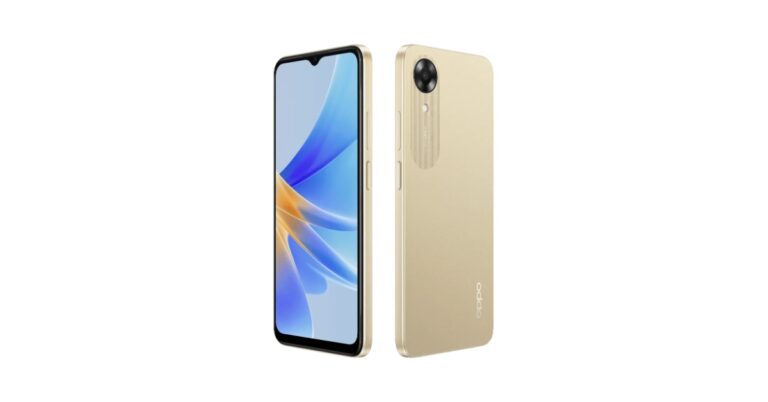
The newest low-cost smartphone from Oppo has been released in India. The company has introduced Oppo A17k which is driven by a MediaTek Helio G35 SoC. It has a 5,000mAh battery and comes with extended RAM capability. Moreover, the device is water resistant to IPX4 standards. The Oppo A17k utilises ColorOS 12.1.1. There is a 5-megapixel selfie camera on it.

Oppo A17k price in India, sale details
The Oppo A17k has been launched in India in a single 3GB RAM with 64GB storage model. The device is priced at Rs 10,499 and will be available in two colour options of Navy Blue and Gold. The company has now provided any specific availability date for the smartphone but it has been listed on the company’s official website in the country.