How to install Android 15 Beta on OnePlus 12 and OnePlus Open?

Google announced the second Android 15 Beta version at its I/O event, earlier this week. Google Pixel users can install it by enrolling in the Android Beta for Pixel program. OnePlus has also announced the Android 15 Beta 1 version for its flagship devices. Interested users can manually install the update on their OnePlus smartphones. So, let’s take a look at how you can install the Android 15 Beta 1 version on your OnePlus 12 and Open.

Read Also: Build your dream gaming PC with Lenovo, now offering end-to-end customisation options in India

Minimum requirements for installing the Android 15 Beta on your OnePlus smartphone

  • Your device’s battery level should be above 30% and it should have at least 4GB of available storage space.
  • OnePlus 12 should be running Android version 14.0.0.610 or below.
  • OnePlus Open should be running Android version 14.0.0.702 or below.
  • Carrier versions of the two devices are not eligible for the Beta version. 

Install Android 15 Beta 1 on OnePlus 12 (Europe and India)
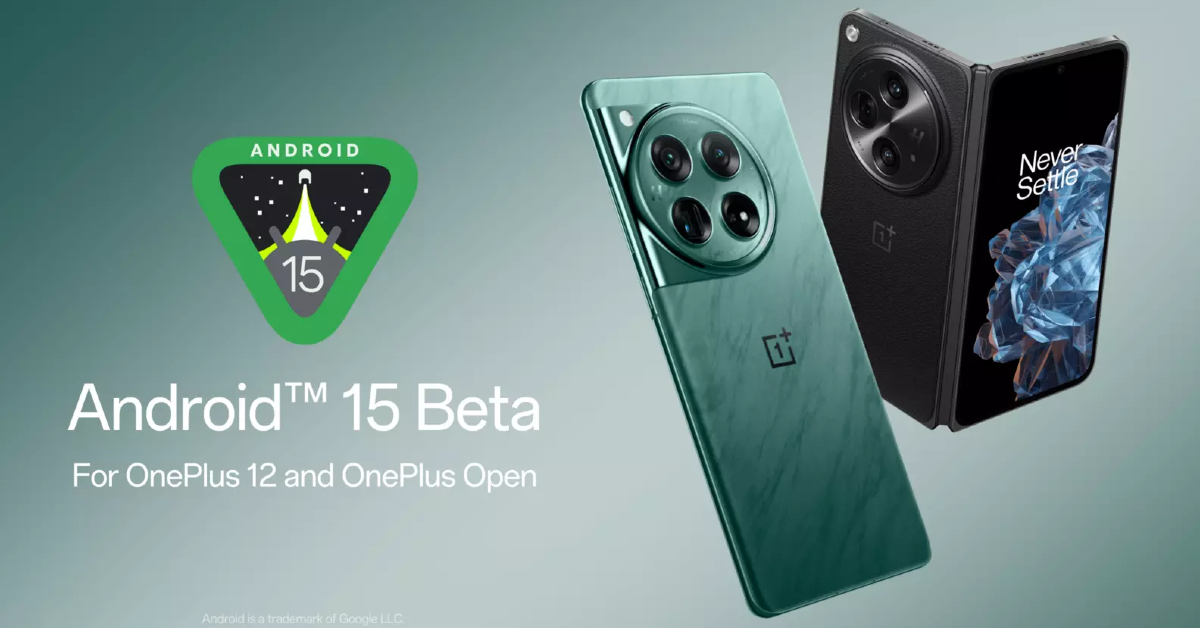
Install Android 15 Beta 1 on OnePlus 12 (Europe and India)

Before you begin, create a backup of your personal data on the phone as the upgrade will wipe all its contents.

Step 1: Download the ROM upgrade ZIP package from the OnePlus Community website.

Step 2: Copy the package to your phone’s storage.

Step 3: Turn on Developer Mode on your OnePlus smartphone by going to Settings>About Device>Version and tapping the Build Number 7 times.

Step 4: Now, go back to Settings>About device>Up to date and tap the ellipses at the top right corner of the screen.

Step 5: Tap on Local install and select the installation package you downloaded earlier.

Step 6: Hit Extract and then select Upgrade.

Step 7: Once the upgrade is complete, restart your device.

OnePlus users in North America can upgrade their smartphones to Android 15 Beta 1 by sideloading an APK provided on the OnePlus Community website. This APK will help you install the ROM package on your device. OnePlus also offers the rollback package on its Community website if you want to uninstall the Android Beta version on your phone and go back to using Android 14.

Frequently Asked Questions (FAQs)

Is Android 15 available for OnePlus smartphones yet?

Android 15 is yet to be launched officially, but you can download its Beta 1 version on your OnePlus 12 and Open.

Can I download the Android 15 Beta 1 version on my OnePlus 11?

Only the latest OnePlus flagships i.e. OnePlus 12 and Open are eligible for Android 15 Beta 1.

Where can I download the Android 15 Beta ROM package for my OnePlus smartphone?

You can download the Android 15 Beta ROM package and the companion APK (for North American devices) on OnePlus’ Community website.

Read Also: Top 2 Ways To Sign Out Of Netflix On All Devices At Once

Conclusion

This is how you can download Android 15 Beta 1 on OnePlus 12 and Open. Other OEMs like Xiaomi, Vivo, Nothing, Oppo, and more have also released Android Developer versions for their top devices. If you have any questions related to the installation of Android 15 Beta on your device, let us know in the comments!
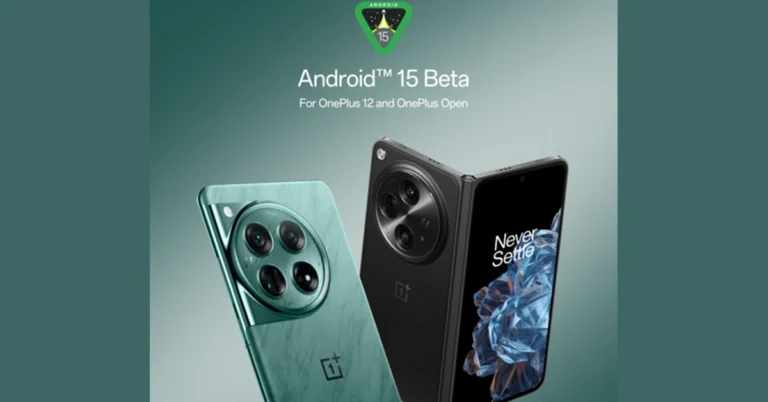
Here is the list of eligible smartphones to get Android 15 Beta 2 update

For Pixel phones and other compatible devices, Google is releasing Android 15 Beta 2, which promises better user privacy and security, longer battery life, and faster applications. It is anticipated that the third and fourth versions will be available in June and July/August.

Google has rolled out the second beta of Android 15 it is available is now available on handset, tablet, and foldable form factors from partners including Honor, iQOO, Lenovo, Nothing, OnePlus, OPPO, Realme, Sharp, Tecno, vivo, and Xiaomi and more devices. It is said to be more efficient and improves the quality, speed and battery life of Android devices.

Also Read: Build your dream gaming PC with Lenovo, now offering end-to-end customisation options in India

Dave Burke, VP of Engineering said, “Today we’re releasing the second beta of Android 15, which continues our work to build a platform that helps improve your productivity, minimise battery impact, maximise smooth app performance, give users a premium device experience, protect user privacy and security, and make your app accessible to as many people as possible — all in a vibrant and diverse ecosystem of devices, silicon partners, and carriers.”

List of eligible smartphones to get Android 15 Beta 2

  • Pixel 6 and 6 Pro
  • Pixel 6a
  • Pixel 7 and 7 Pro
  • Pixel 7a
  • Pixel Fold
  • Pixel Tablet
  • Pixel 8 and 8 Pro
  • Pixel 8a
  • Vivo X100
  • iQoo 12
  • OnePlus 12
  • OnePlus Open
  • Xiaomi 14
  • Xiaomi 13T Pro
  • Xiaomi Pad 6S Pro
  • Nothing Phone 2a
  • Realme 12 Pro+ 5G
  • Oppo Find X7
  • Lenovo Tab Extreme
  • Honor Magic 6 Pro
  • Honor Magic V2
  • Tecno Camon 30 Pro 5G
  • Sharp Aquos Sense 8

Note that the Android 15 Beta 2 can be downloaded from the company’s respective developer sites.

The recent OS update primarily focuses on security and privacy features. It brings features like Private Space, where users can hide specific apps in a safe place away from prying eyes, under an additional layer of authentication. Private space uses a separate user profile. When the user locks private, the profile is paused, which means the apps are not running or active. For private space, the user has the option of using a different lock factor or the device lock.

Also Read: Apple released new accessibility features including Eye Tracking, Music Haptics, and Vocal Shortcuts for iPhone and iPad

Private space apps show up in a separate container in the launcher and are hidden from the recent view, notifications, settings, and other apps when private space is locked.
With Android 15, Google is improving its anti-theft features to make it harder for thieves to use stolen devices without Google account information.

Additionally, biometrics are needed for the update to disable Find My Device, enable passkey access, and screen timeout.

Other features include “Offline Device Lock,” which locks devices when internet connectivity is disabled, and “Theft Detection Lock,” which locks your device when motions indicate theft. Lastly, Remote Lock allows for remote lock and wipe. 

OnePlus 12 And OnePlus Open Users Can Install Android 15 Beta 1 Update

Key Highlights

  • OnePlus 12 and OnePlus Open will be among the first devices to receive the Android 15 Beta 1 update.
  • Android 15 enhances camera performance with features like Low Light Boost and In-App Camera Controls.
  • Developers can access the developer version of OxygenOS built around Android 15 Beta 1 starting May 16.

OnePlus has announced that its flagship models, the OnePlus 12 and OnePlus Open, will be among the first devices to receive the Android 15 Beta 1 update. Starting today, developers and early adopters can explore the new features and APIs on their OnePlus devices by accessing the developer version of OxygenOS, built around Android 15 Beta 1.

“OnePlus and Google have been in a close partnership for a considerable time, persistently working together to offer the best possible user experience through our OxygenOS, based on successive versions of Google’s Android operating systems,” said Kinder Liu, President and COO of OnePlus. “With the advent of Android 15, we are confident that the full potential of our superior devices, like the OnePlus 12 and OnePlus Open, will be wholly realized by both developers and users.”

Read Also: OnePlus Nord CE 4 Lite could launch in India soon, Here’s everything we know

Key Features of Android 15

Android 15 focuses on enhancing the camera and media experience, improving connectivity, and introducing new APIs for developers to create better applications. Key features include:

Low Light Boost: Enhances camera performance in low-light conditions.
In-App Camera Controls: Provides users with more control over their photography.

Improved Connectivity: Includes advancements for a smoother NFC experience and other communication improvements.

These updates aim to provide users with the tools and hardware needed to fully utilize their devices’ capabilities.

Flagship Models Leading the Way

The OnePlus 12 and OnePlus Open, known for their Fast and Smooth performance, exceptional display quality, and impressive imaging capabilities, will be at the forefront of this update. These devices aim to deliver all-round flagship-level performance to users worldwide.

Read Also: OnePlus Watch 2 new Nordic Blue Edition launched

Developer Access

Developers can find more details and try out the developer version of OxygenOS built around Android 15 Beta 1 by visiting the OnePlus community page here.

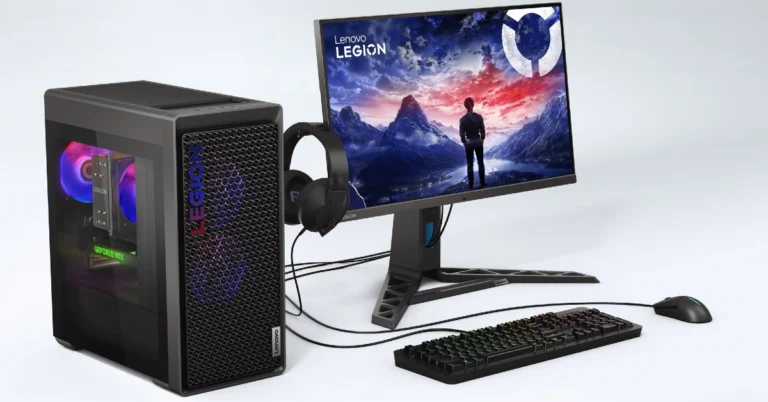
Build your dream gaming PC with Lenovo, now offering end-to-end customisation options in India

With Lenovo, you can create your own custom gaming desktop from scratch, selecting from an extensive selection of premium components that are within your price range, such as motherboards, CPUs, graphics cards, and monitors. Lenovo’s latest announcement brings you the facility of end-to-end customisation options for their gaming customers.

Lenovo is enabling customers to customise their gaming PCs to the fullest extent possible, allowing them to meet their demands and preferences in terms of computing. It has launched ‘CONFIGURED BY YOU, FOR YOU’, customisable options for gamers. Not just gamers can create a desktop system that suits their requirements, whether for work, gaming, or creative projects. The firm is also offering a limited-time offer where customers can avail of a 30% discount on graphic card upgrades when customising their Lenovo desktop. 

Also Read: Apple released new accessibility features including Eye Tracking, Music Haptics, and Vocal Shortcuts for iPhone and iPad

Commenting on this, Ashish Sikka, Director and Category Head, of Lenovo India, said, “As the needs of present-day consumers diversify, we understand that every user has different needs and preferences when it comes to their computing experience. With our extensive customisation options, users can access a high-performance system that is tailored to their requirements and have control over the quality and type of components used in their desktops.”

Customers can now upgrade their gaming desktops end-to-end across Legion and LOQ gaming desktops. They will be able to avail of various types of customisation options, including: 

  • Processor upgrade up to the latest Intel i7 14th generation for enhanced performance
  • Memory upgrade up to 32GB for improved multitasking capabilities
  • Graphic card upgrade up to the powerful Nvidia RTX 4060Ti for a superior gaming and graphic design experience
  • Other upgradeable components include storage options (SSD and HDD), WiFi connectivity, and front and rear fan selection for better cooling and airflow within the system.

Also Read: Motorola Edge 50 Fusion with 144Hz pOLED screen launched in India 

Custom-built desktop computers from Lenovo can now be bought via their website and a few select shops. Four weeks from the date of order, customers can receive their personalised desktops.

Top 3 Ways To Sign Out Of Netflix On All Devices At Once

0

Sharing your Netflix account with a group of friends seems like a good idea until you’re trying to watch something on a Saturday night, but can’t access the streaming service on your TV because of hitting the device limit. Luckily, Netflix gives you the option to remove all the devices linked to your account. Once that’s done, you can change your password and give it to a selected group of friends. Today, we bring you the top 3 ways to sign out of Netflix on all devices at once.

Read Also: How to restore a deleted message on WhatsApp?

Before you begin

Removing all devices from your Netflix account is the quickest way to reset the device limit, but there is a catch attached to it. You cannot carry out this action on your Smart TV. Strangely, Netflix’s app for Smart TVs does not give you the option to manage your account on other devices. You will need to access your account on a web browser or the Netflix app for Android or iOS to log out of all devices at once.

If you don’t want to remove your account from all devices, you can remotely log out of selected devices. This comes in handy if you forgot to sign out of your account on someone else’s device. This is a great way of taking control of your account if you suspect someone else has unauthorised access to it.

Sign out of Netflix on all devices using your PC’s web browser

Step 1: Sign into Netflix on your PC’s web browser.

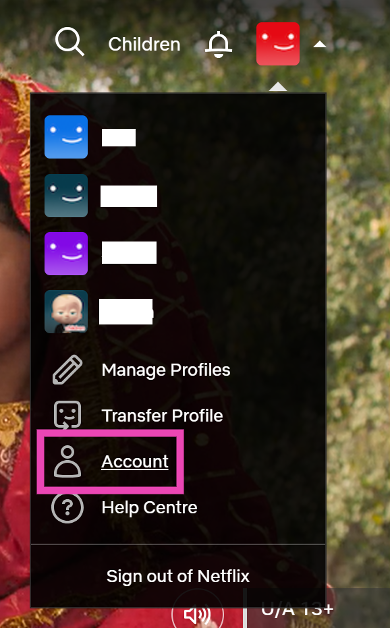
Step 2: Hover the cursor on your profile picture at the top right corner of the screen and select Account.

Step 2: Hover the cursor on your profile picture at the top right corner of the screen and select Account.

Step 2: Hover the cursor on your profile picture at the top right corner of the screen and select Account.

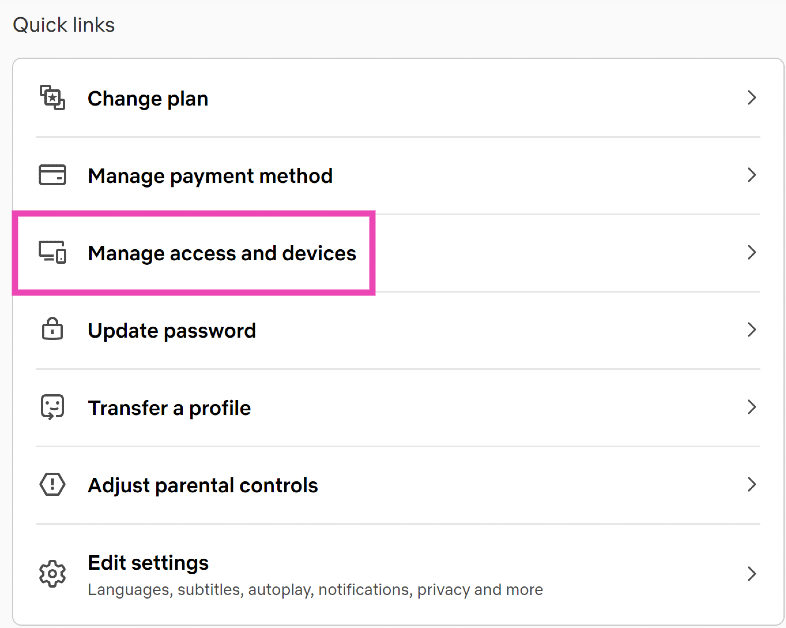
Step 3: Scroll down and select Manage access and devices.

Step 3: Scroll down and select Manage access and devices.

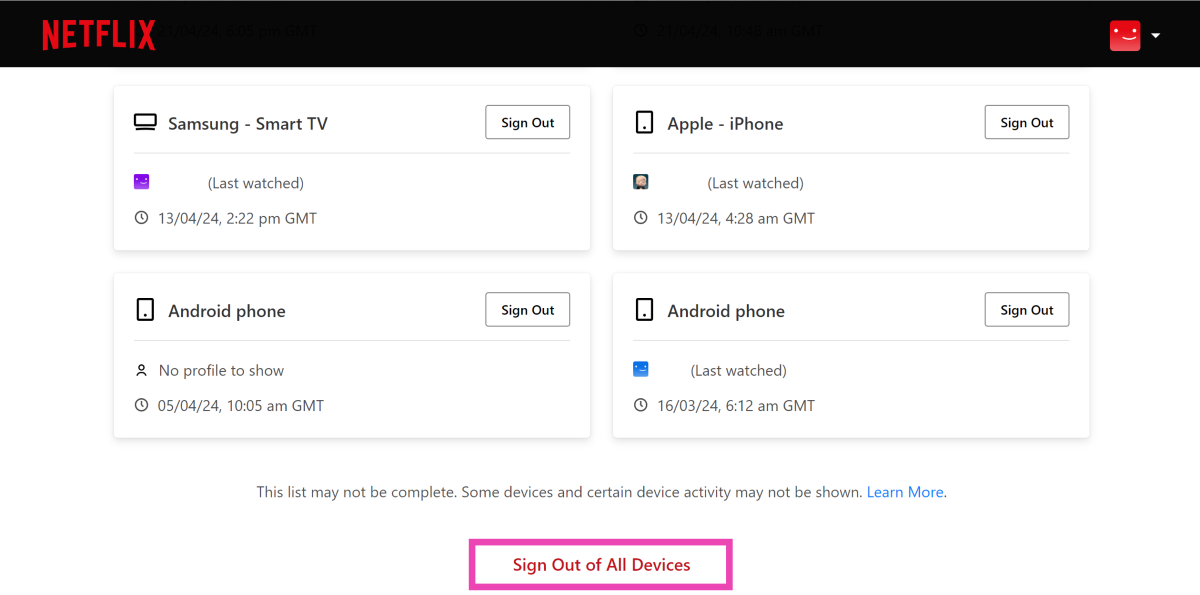
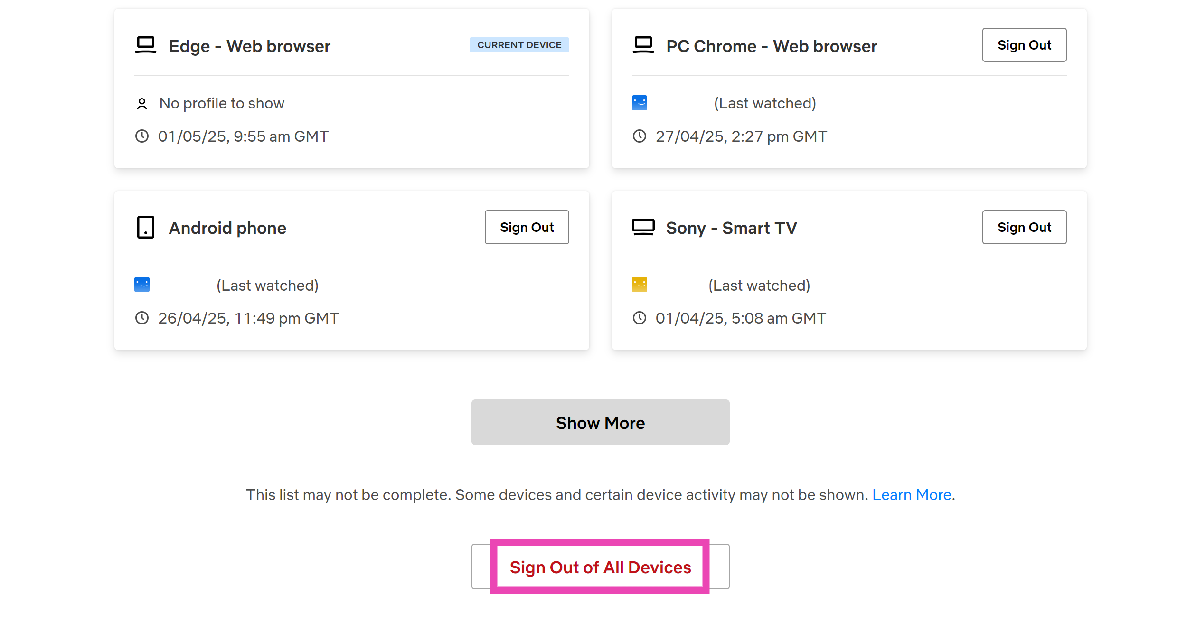
Step 4: Click on Sign Out of All Devices.

Step 4: Click on Sign Out of All Devices.

Sign out of Netflix on all devices using your smartphone

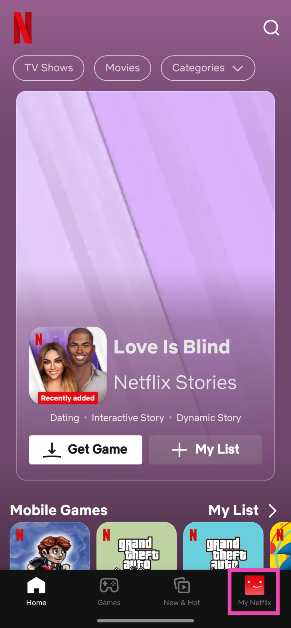
Step 1: Launch the Netflix app on your smartphone and switch to the My Netflix tab.

Step 1: Launch the Netflix app on your smartphone and switch to the My Netflix tab.

Step 2: Tap the hamburger menu at the top right corner of the screen and select Account.

Step 2: Tap the hamburger menu at the top right corner of the screen and select Account. Top 2 Ways To Sign Out Of Netflix On All Devices At Once

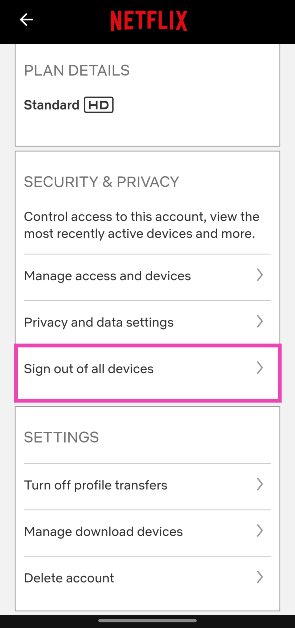
Step 3: Scroll down and tap on Sign out of all devices in the Security & Privacy category.

Step 3: Scroll down and tap on Sign out of all devices in the Security & Privacy category. Top 2 Ways To Sign Out Of Netflix On All Devices At Once

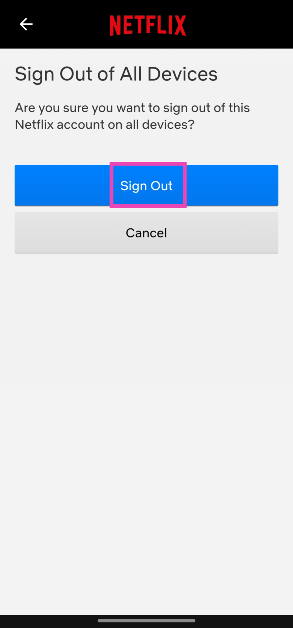
Step 4: Hit Sign Out.

Step 4: Hit Sign Out. Top 2 Ways To Sign Out Of Netflix On All Devices At Once

Sign out of Netflix on all devices using the PC app

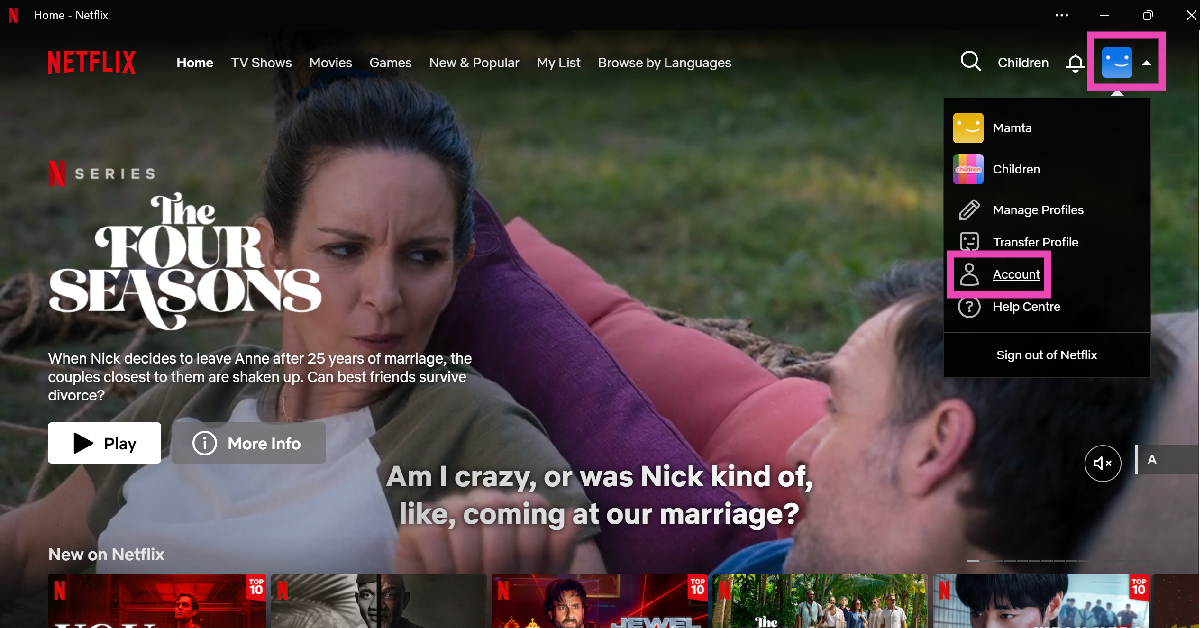
Step 1: Launch the Netflix app on your PC.

Step 2: Move the cursor to the profile icon in the top-right corner of the screen and click on Account.

Step 2: Move the cursor to the profile icon in the top-right corner of the screen and click on Account. Top 3 Ways To Sign Out Of Netflix On All Devices At Once

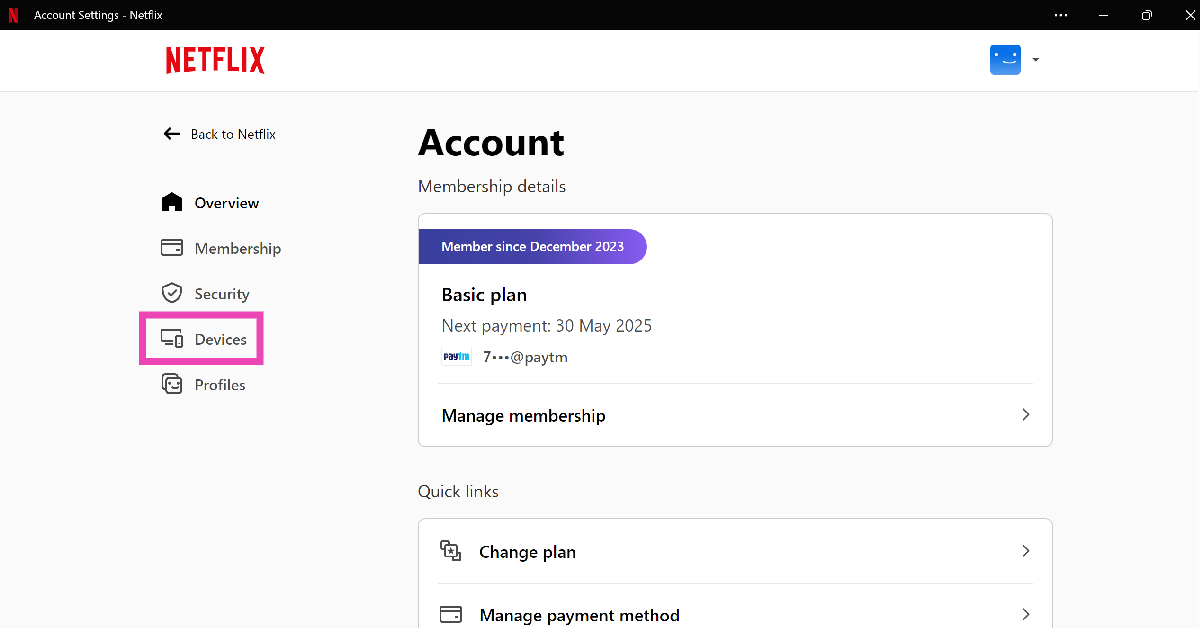
Step 3: Select Devices from the sidebar.

Step 3: Select Devices from the sidebar. Top 3 Ways To Sign Out Of Netflix On All Devices At Once

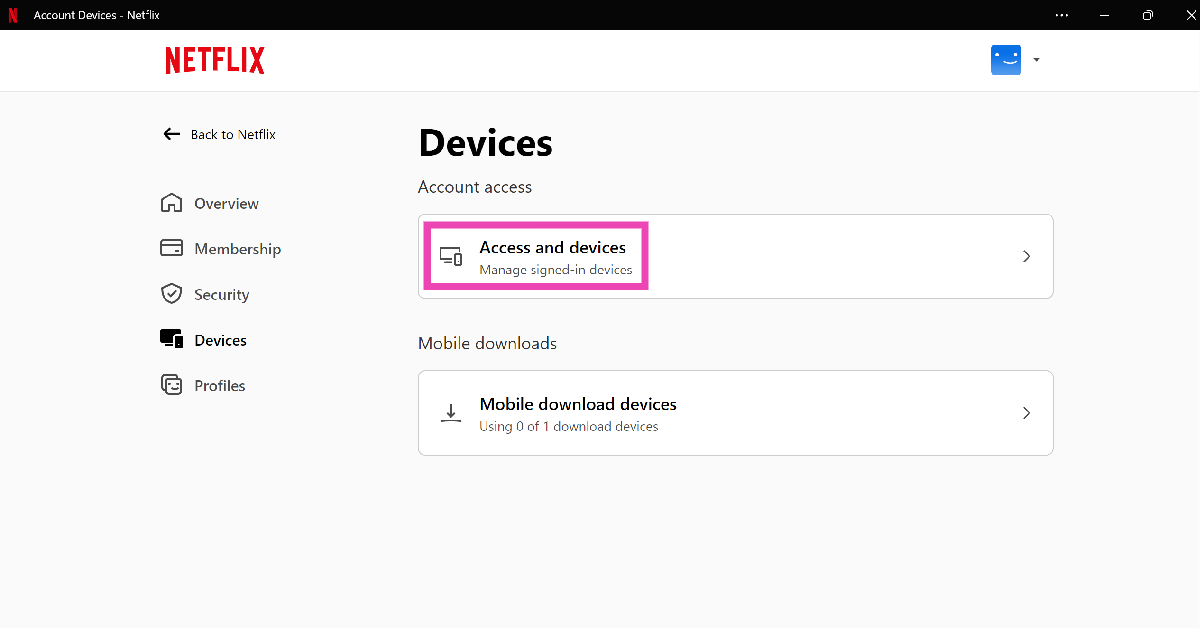
Step 4: Click on Access and devices.

Step 4: Click on Access and devices. Top 3 Ways To Sign Out Of Netflix On All Devices At Once

Step 5: Scroll down and select Sign out of all devices.

sign out Top 3 Ways To Sign Out Of Netflix On All Devices At Once

Bonus Tip: Sign out of Netflix on all devices using the TV app

HDR10+ streaming is now available on Netflix

While you can’t sign out of all devices using the Netflix app on your TV, you can log out of your account.

Step 1: Launch the Netflix app on your TV.

Step 2: Hit the Left navigation button on the TV remote.

Step 3: Scroll down and select Get Help.

Step 4: Click on Sign Out.

Step 5: Hit Yes.

Frequently Asked Questions (FAQs)

Where is the Sign Out option on Netflix’s Smart TV app?

You can find the Sign Out option in the ‘Get Help’ section on Netflix’s Smart TV app.

What is Netflix’s device limit?

Standard plan subscribers can use Netflix on up to 2 devices. For Premium subscribers, the limit is 4 devices.

How much does a Netflix subscription cost in India?

Netflix has 4 subscription tiers in India – Mobile, Basic, Standard, and Premium. They’re priced at Rs 149, Rs 199, Rs 499, and Rs 649 respectively.

Read Also: Apple releases new accessibility features including Eye Tracking, Music Haptics, and Vocal Shortcuts for iPhone and iPad

Conclusion

These are the top 3 ways to sign out of Netflix on all devices at the same time. Check out this article to learn how to sign out of Netflix on your Smart TV. Need new recommendations? Have a look at Netflix’s hidden categories.

How to restore a deleted message on WhatsApp?

0

WhatsApp users may not be a fan of the new layout, but there’s a new feature they may want to check out. For the longest time, there was no way to undo a deleted message on the messenger. If you accidentally deleted the wrong text, you would have to type it again and send it. The option to undelete messages is currently being rolled out for Android and iOS users in a phased manner. Here is how you can restore a deleted message on WhatsApp.

Read Also: Motorola Edge 50 Fusion with 144Hz pOLED screen launched in India

Message deletion on WhatsApp

There are two ways you can delete a message on WhatsApp

  • Delete for yourself: This clears the message from the conversation thread on your phone, but the recipient(s) can still see it.
  • Delete for everyone: Once deleted, no one in the conversation thread will be able to see the message anymore.

Since these options are placed right next to each other, it is not uncommon to delete a message for yourself when you want to delete it for everyone. This may seem harmless, but it often leads to embarrassing situations. This is largely because once you have deleted something for yourself, there is no way to delete it for everyone. WhatsApp’s new feature changes that.

WhatsApp now lets you undo message deletion for up to 5 seconds. This option appears as a pop-up at the bottom of the screen as soon as you hit delete. It is only available for messages you delete for yourself, so there is a way to bring them back and delete them for everyone if that was your intention from the start.

Restore a deleted message on WhatsApp

Step 1: Launch WhatsApp on your smartphone and open a chat.

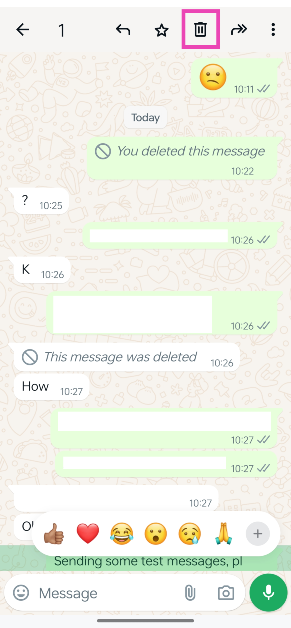
Step 2: Long-press the message you wish to delete and hit the bin icon at the top.

Step 2: Long-press the message you wish to delete and hit the bin icon at the top.

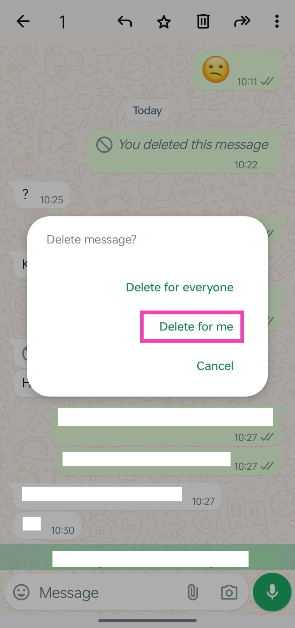
Step 3: Tap on Delete for me. If you select Delete for everyone, you won’t be able to undo the action.

Step 3: Tap on Delete for me. If you select Delete for everyone, you won’t be able to undo the action.

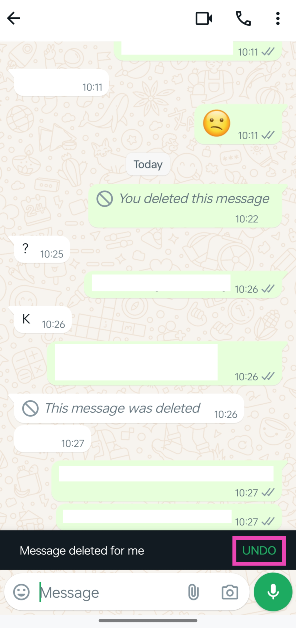
Step 4: Once the message has been deleted, the undo option will appear at the bottom of the screen. This popup stays on the screen for only 5 seconds. Hit Undo.

Step 4: Once the message has been deleted, the undo option will appear at the bottom of the screen. This popup stays on the screen for only 5 seconds. Hit Undo.

Frequently Asked Questions (FAQs)

How do I undo a deleted message on WhatsApp?

When you delete a message (for yourself) the option to undo the deletion pops up at the bottom of the screen. You can restore a message up to 5 seconds after deleting it.

Can I restore WhatsApp messages that I deleted for everyone?

WhatsApp only lets you restore messages that you deleted for yourself. Once you delete a message for everyone, it cannot be brought back.

How many messages can I pin on top of a WhatsApp chat?

You can pin a maximum of 3 messages in a chat. This includes texts, voice notes, images, links, and polls.

Read Also: Samsung unveils three new AI refrigerators in India

Conclusion

This is how you can restore a deleted message on WhatsApp. Once restored, the message can be deleted again. As mentioned earlier, there is no way to bring back a message which was deleted for all users in a conversation thread. If there’s anything you’d like to know, let us know in the comments!
Apple released new accessibility features including Eye Tracking, Music Haptics, and Vocal Shortcuts for iPhone and iPad

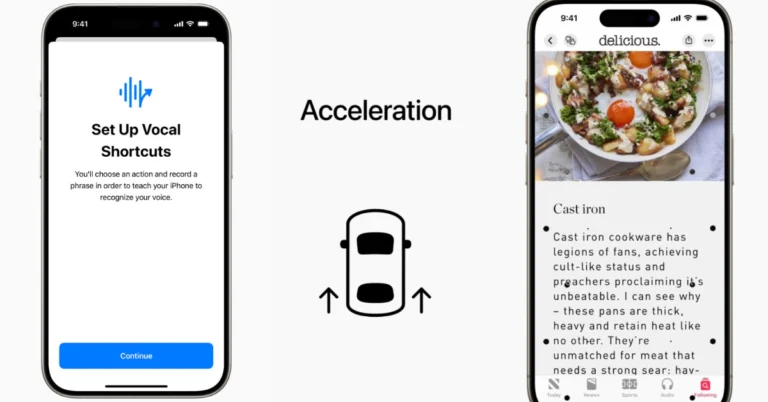
In an effort to make its products more accessible to people with physical limitations, Apple has added new accessibility features to its iPhone and iPad devices, including Eye Tracking, Music Haptics, Vocal Shortcuts, vehicle motion cues, and voice control for Apple CarPlay.

According to Apple’s newsroom post, it will be rolling out new accessibility for users with physical disabilities to control iPad or iPhone. Apple’s new accessibility features are expected to land on devices by later this year. These features benefit from Apple silicon, artificial intelligence, and machine learning. In addition, more accessibility features will be added to visionOS.

While introducing the upcoming update Tim Cook, Apple’s CEO said, “We believe deeply in the transformative power of innovation to enrich lives. That’s why for nearly 40 years, Apple has championed inclusive design by embedding accessibility at the core of our hardware and software. We’re continuously pushing the boundaries of technology, and these new features reflect our long-standing commitment to delivering the best possible experience to all of our users.”

Also Read: Motorola Edge 50 Fusion with 144Hz pOLED screen launched in India

Later this year iPhones and iPads will get Eye Tracking allowing people with users with physical disabilities to control their devices with their eyes. The feature is driven by artificial intelligence (AI) that offers users a built-in option for navigating iPad and iPhone with just their eyes. Eye Tracking is set up and calibrated using the front-facing camera in seconds, as per the company. This feature supports iPadOS and iOS apps and doesn’t require additional hardware or accessories. Eye Tracking allows users to go through an app’s contents and activate each of them using Dwell Control, allowing them to access additional features such as physical buttons, swipes, and other motions purely with their eyes.

Vocal Shortcuts will enable users to complete tasks by creating their own unique sound for users with acquired or progressive speech conditions such as cerebral palsy, amyotrophic lateral sclerosis (ALS), or stroke. Users can make custom utterances that Siri understands to launch shortcuts and execute difficult tasks. Listening to Atypical speech will help the user to improve speech recognition for a broader spectrum of speech using on-device machine learning to identify user speech patterns.

Vehicle Motion Cues will lessen motion sickness when using an iPhone or iPad while driving. Using animated dots on screen edges, the feature changes in vehicle motion, which helps alleviate sensory conflict while not interfering with the main content. The feature can be set to show automatically on the iPhone or be turned on and off in the Control Center.

Apple accessibility features update also includes Music Haptics will provide a new way for users who are deaf or hard of hearing to experience music through the iPhone’s Taptic Engine. With this accessibility option enabled, the iPhone’s Taptic Engine adds taps, textures, and refined vibrations to the music audio. This feature works with millions of songs in the Apple Music catalogue and will be provided as an API for developers to make music more accessible in their apps.

Also Read: Samsung unveils three new AI refrigerators in India

In addition to this CarPlay will also get Voice Control, Color Filters, and Sound Recognition as a part of Apple’s Accessibility features update. Using the voice control features, users can explore CarPlay and operate apps with only their voice. Deaf or hard-of-hearing drivers and passengers can use Sound Recognition to receive notifications for car horns and sirens. Whereas, Color Filters make the CarPlay interface easier to use, with additional visual accessibility features including Bold Text and Large Text.

Garena Free Fire Redeem Codes Today 17 May 2024: Here is how to claim them

Garena Free Fire is a battle royale game with regular awards and tournaments to keep players interested. If you play Garena Free Fire, you should be aware of the redeem codes that are released on a daily basis. However, because the battle royale game is banned in India, players from other countries can use the Free Fire Redeem codes daily. If you’re unfamiliar with the Garena Free Fire redeem codes or don’t know how to get them, we’ve put together a step-by-step guide to help you redeem them. Check out Garena Free Fire Redeem Codes for 17 May 2024.

The Free Fire redeem codes are a great way to get free stuff. These are 12-digit codes that contain alphabets and numbers, as well as an expiration date and time. Because the Garena FF redeem codes cannot be used more than once, you should hurry to the redemption page to claim your free reward before someone else does. To get a free reward, all you have to do is go to reward.ff.garena.com/en, which is the official redemption page. Also, keep an eye on this space for daily updates on Garena Free Fire redemption codes and rewards.

Also Read: Sennheiser Accentum Plus wireless headphones with Hybrid Adaptive Noise Cancellation launched

Garena Free Fire Redeem Codes Today 17 May 2024

F5YH456HYT6HGR53

FC4V9P5D8G3FD2B1

FZ5R3O9JY7Q1X4I6

FE2W1U7VY9F4D5G3

FY2P7H4M6NY9T8S3

FB1G4K7L6J2YC8A9

FD5V9Q1XY3R6O4M2

FHYE56RGTYE56448

FJ2U8G3E6YF1X7Z5

FQ1B5A4YP9W8V3M6

FL4TY3N6C7H8K1S2

FS2W8J3N6T7HD4I9

FF1L6A2U8Z5RD3Q7

FU7N3Q1I2E9KD5O6

FX3V6M5C7AD9Y2H8

FW7K3B6Z5DO9J2R1

FG4I2L9DN6T1F8E7

FH6T8F3W7E2Q59L4

FETGERT5G56GJ7N6

FA4I7Y55U6O2Q8E3

FGERT5TG6YE546V7

FRDTFTYHGF677781

FTRDFYHTGU766438

FO7Y4XQ1M6C9A2P3

How to Get Free Fire Redeem Codes for Garena on 17 May 2024?

  • Visit the Garena Free Fire game’s official website at reward.ff.garena.com.
  • Use your Facebook, Google, VK, Apple ID, Huawei ID, or Twitter account to log in.
  • You’ll be taken to a valid redemption code (s)
  • Copy and paste the 12-digit redemption code into the text box.
  • On the screen, a dialogue box will appear.
  • ‘Ok’ should be selected.


Type to Win: Maximizing Slot Game Potential With PC Keyboards

Slot games have been a staple in the world of gaming for decades, captivating players with their colourful graphics, exciting themes, and the thrill of hitting the jackpot. While traditionally played on physical machines, the digital age has brought slot games to the realm of online gaming, opening up new possibilities for players worldwide. One such possibility is the use of PC keyboards to enhance the gaming experience and potentially increase winning potential. In this guide, we’ll explore how players can maximize their slot game potential by leveraging the features of PC keyboards.

Slot Game Dynamics

Before delving into how PC keyboards can be utilized to enhance slot gaming, it’s essential to understand the dynamics of slot games. While slot games are primarily based on luck, there are strategies and techniques that players can employ to improve their chances of winning.

Random Number Generation (RNG)

Slot games operate using Random Number Generation (RNG) software, ensuring that each spin is entirely random and independent of previous spins. This means that there are no guaranteed winning strategies, and every spin has the same probability of resulting in a win or a loss.

Paylines, Symbols, and Payouts

Understanding the pay lines, symbols, and payout structures of a slot game is crucial for maximizing winnings. Different combinations of symbols across active pay lines result in varying payouts, with certain combinations triggering bonus features or jackpot wins.

Leveraging PC Keyboards for Slot Gaming

PC keyboards offer several advantages over traditional buttons and controls when playing slot games online. By utilizing the functionalities and shortcuts provided by PC keyboards, players can streamline their gameplay, enhance efficiency, and potentially increase their winning potential.

Quick Spin and Autoplay Shortcuts

Many online slot games feature a Quick Spin option, allowing players to speed up the spinning reels to increase the pace of gameplay. Additionally, Autoplay functionality enables players to set a predetermined number of spins to occur automatically, without the need for manual input.

PC keyboards often include dedicated keys or customizable shortcuts that can be assigned to trigger Quick Spin and Autoplay functions instantly. By utilizing these shortcuts, players can minimize downtime between spins and maximize the number of spins completed within a given timeframe, potentially increasing their chances of hitting winning combinations.

Customizable Hotkeys for Bet Adjustment

Adjusting the bet amount is a common strategy in slot gaming, allowing players to manage their risk and potential winnings based on their preferences and bankroll. PC keyboards offer the flexibility of customizable hotkeys, which can be assigned to increase or decrease the bet amount with a single keystroke.

By setting up hotkeys for bet adjustment, players can react quickly to changes in gameplay and adjust their bets accordingly. Whether aiming to increase the bet for a chance at a higher payout or reduce the bet to minimize losses, customizable hotkeys provide players with greater control and efficiency in managing their bets.

Multi-Tasking and Efficiency

PC keyboards enable players to multi-task and perform various actions simultaneously while playing slot games. Unlike physical buttons on slot machines, which often have limited functionality, PC keyboards allow for complex key combinations and shortcuts that can be used to execute actions quickly.

Players can leverage this multi-tasking capability to their advantage by simultaneously managing multiple aspects of gameplay, such as adjusting bets, activating bonus features, and monitoring game statistics. By efficiently navigating through different game options and features using keyboard shortcuts, players can optimize their gaming experience and potentially increase their winning potential.

Precision and Accuracy

The tactile feedback and precision offered by PC keyboards can enhance the overall gaming experience and potentially improve player performance in slot games. Unlike touchscreen controls or physical buttons, which may lack responsiveness or precision, PC keyboards provide a reliable input method that allows for precise control over gameplay actions.

Players can capitalize on this precision and accuracy to execute strategies effectively, such as timing spins to align with bonus features or maximizing bet amounts during opportune moments. Additionally, the ergonomic design of PC keyboards ensures comfortable gameplay over extended periods, reducing fatigue and allowing players to focus on the game.

Conclusion

While luck remains the primary determinant of success in slot gaming, players can leverage the features and functionalities of PC keyboards to enhance their gaming experience and potentially increase their winning potential. By utilizing shortcuts for Quick Spin and Autoplay, customizing hotkeys for bet adjustment, multi-tasking efficiently, and capitalizing on the precision and accuracy offered by PC keyboards, players can streamline their gameplay and optimize their strategies. However, it’s essential to remember that responsible gaming practices should always be prioritized, and there are no guaranteed strategies for winning in slot gacor games. By combining the excitement of slot gaming with the convenience and efficiency of PC keyboards, players can enjoy an immersive and rewarding gaming experience while maximizing their potential for success.

Motorola Edge 50 Fusion with 144Hz pOLED screen launched in India

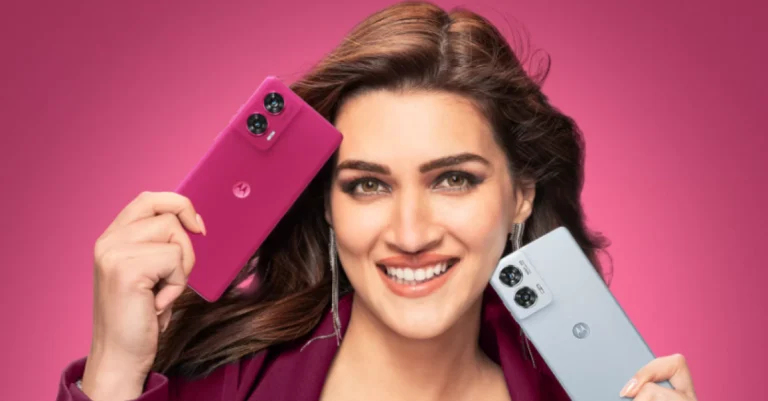
Today Motorola introduced its latest smartphone Edge 50 Fusion in India. The smartphone draws its power from Qualcomm Snapdragon 7s Gen 2 SoC. It operates on Android 14 out-of-the-box. The device features a 144Hz pOLED screen. It is backed by a 5,000mAh battery with 68W TurboPower charging support. With all the features, the mid-range smartphone Motorola Edge 50 Fusion is priced below 25K. Check out the pricing and availability details below.

Motorola Edge 50 Fusion price in India

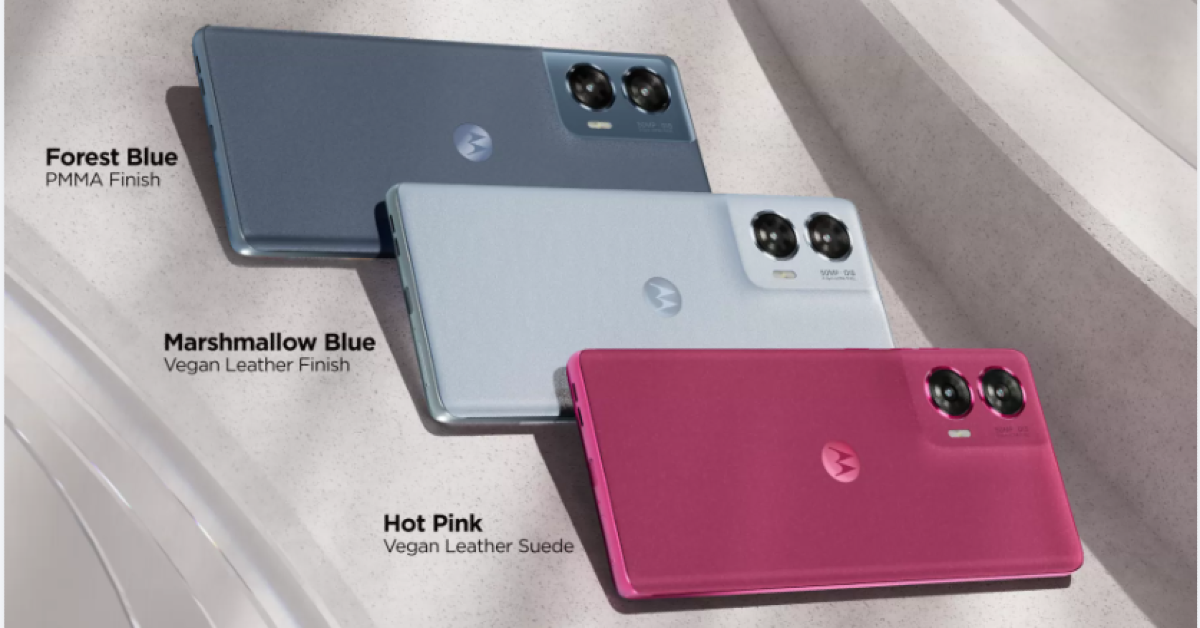
Motorola Edge 50 Fusion comes in two variants: 8GB of RAM and 128GB storage and 12GB RAM with 256GB storage. The models are priced at Rs 22,999 and Rs 24,999 respectively. The new mid-range phone will be available in three colour options: Hot Pink and Marshmallow Blue in a vegan leather finish and Forest Blue, featuring a polymethyl methacrylate (PMMA) finish.

The device will go on sale from May 22 via Flipkart and the company’s official website in the country.

Also Read: Crossbeats Blaze B600 with 200W sound output launched in India

Motorola Edge 50 Fusion price in India

Motorola Edge 50 Fusion specifications

Motorola Edge 50 Fusion features a 6.7-inch full-HD+ pOLED curved display with 1,0800×2,400 pixels of resolution. The panel supports a 144Hz refresh rate and 360Hz touch sampling rate. Additionally, it comes with up to 1,600 nits of peak brightness and has Corning Gorilla Glass 5 protection. Under the hood, there is a Qualcomm Snapdragon 7s Gen2 SoC and runs on Android 14 out of the box.

For the optics, there is a dual rear camera setup that includes a 50-megapixel Sony LYT-700C sensor and a 13–13-megapixel ultra-wide angle camera which also acts as a macro sensor when needed. There is a 32-megapixel front-facing camera sensor for taking selfies and video calling.

Also Read: Samsung unveils three new AI refrigerators in India

The Edge 50 Fusion is fuelled by a 5,000mAh battery that comes with 68W TurboPower charging support. In terms of connectivity, there is 5G, 4G LTE, Wi–Fi 6, Bluetooth 5.2, GPS, NFC support and a USB Type-C port for charging. The sensors onboard include an in-display fingerprint sensor, ambient light sensor, proximity sensor, accelerometer, gyroscope and e-compass. The device comes with an IP68 dust and water resistance rating.

Samsung unveils three new AI refrigerators in India

As temperature rises, so does the demand for refrigerators in India. If you’re seeking to upgrade your refrigerator and want one with all of the latest features, Samsung has released three new models with next-generation Artificial Intelligence-powered Inverter Compressors. 

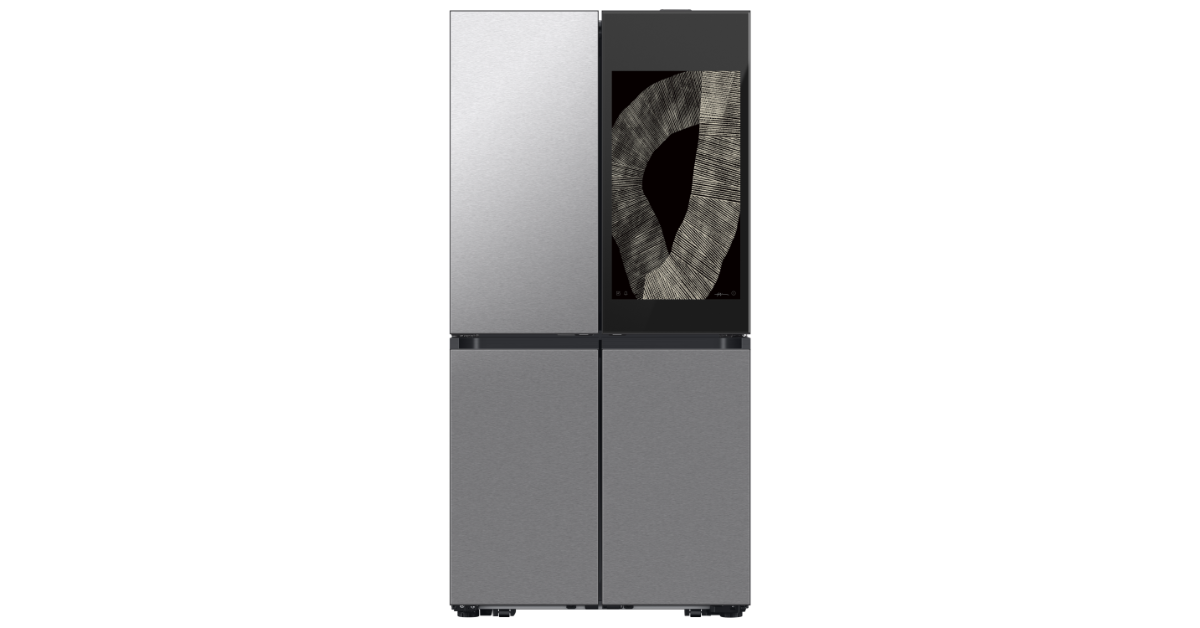
Samsung’s latest AI refrigerators come in three models – the 809L 4-Door Flex French Door Bespoke Family Hub Refrigerator in Clean Charcoal + Stainless Steel colour, and the 650L 4-Door Convertible French Door models in Clean White in glass finish and Black Caviar in steel finish.

Also Read: Crossbeats Blaze B600 with 200W sound output launched in India

The price of the 809L 4-Door Flex French Door Bespoke Family Hub Refrigerator in Clean Charcoal + Stainless Steel colour is set at Rs 3,55,000. Whereas the 650L 4-Door Convertible French Door refrigerators in Clean White colour in glass finish will be available at Rs 1,88,900. Lastly, the Black Caviar colour in steel finish will come at Rs 1,72,900. All three new Samsung AI refrigerators can be purchased via Samsung.com, retail stores, and other e-commerce platforms in the country.

Samsung unveils three new AI refrigerators in India

The AI Inverter Compressor, which powers Samsung’s latest refrigerators, optimises motor and energy efficiency while reducing electricity costs. In addition to this, the company is providing a 20-year warranty that ensures long-lasting performance and energy economy with the AI Inverter Compressor.

According to the company when operating normally, the AI Inverter Compressor produces noise levels of less than 35 dB/A. In contrast to traditional fixed-speed compressors, this advanced technology responds promptly to minor fluctuations in temperature. It uses the least amount of energy while producing the best cool air possible by adaptably changing the motor speed in response to various conditions, including temperature changes brought on by opening and closing doors, the operating mode, and ambient temperature.
The AI Inverter Compressor has thus attained an internal motor efficiency of more than 95%. The new AI Inverter Compressor’s energy efficiency has also been enhanced by more than 10% when compared to the old compressor in the low-speed operation range of 950-1,450 rpm.

Also Read: Best 1.5-ton split ACs in India to beat the heat

Furthermore, the new AI Inverter Compressor has more than quadrupled the leveraged inertia during the motor’s operation compared to the conventional model.

The Samsung 809L Family Hub AI Refrigerator flaunts an 80 cm Family Hub Screen with the cutting-edge “AI Vision Inside” feature, which enables users to manage food inventory with ease using inside cameras that can recognise 33 different food products. AI technology also assists in suggesting recipes. Users can remotely monitor and control the refrigerator’s settings with the inbuilt Wi-Fi connectivity found in the 650L Convertible French Door AI refrigerators.

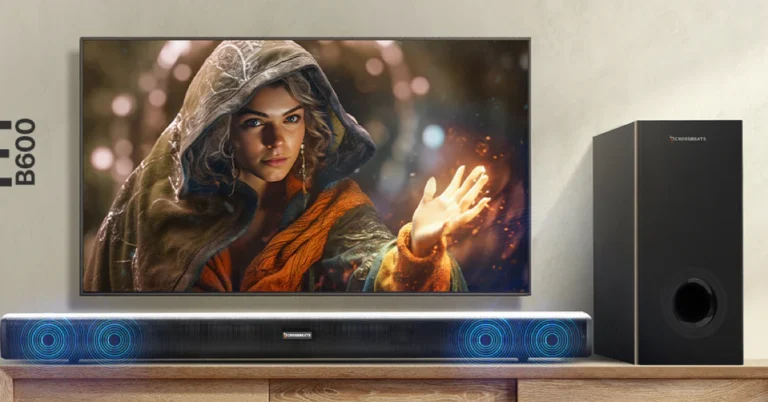
Crossbeats Blaze B600 with 200W sound output launched in India

Indian consumer technology brand Crossbeats has introduced the Blaze B600 home theatre system in the country. The newly launched speaker system provides an enhanced home entertainment experience for movie evenings and gaming sessions. The Blaze B600 has a stylish, wall-mountable design and a 2.1 channel-wired 6.5-inch subwoofer with a maximum output of 200W.

Crossbeats Blaze B600 price in India, availability

The Crossbeats Blaze B600 has been introduced in India at a special price of Rs 6,999. The home theatre system is originally priced at Rs 9,999. The device is available for pre-booking at just Rs 999 and is scheduled to go on sale from May 20. The company will be offering two months of Netflix memberships to the first 100 clients on their pre-booking.

Also Read: Best 1.5-ton split ACs in India to beat the heat

Crossbeats Blaze B600 specs, features

Crossbeats Blaze B600 features a 2.1 channel-wired 6.5-inch subwoofer which is said to offer a peak output of up to 200W with cinematic surround sound. With the newest Virtual 2.1 technology and three adjustable EQ modes, you can fine-tune your audio experience so that every beat and thump is felt with incredible clarity. The Crossbeats Blaze B600 also offers customizable features. It includes a quad-driver audio setup with an adjustable equaliser.

Because of its sleek and wall-mountable design, it will suit your home decor while conserving space. Furthermore, with multiport connections such as HDMI ARC Mode, Bluetooth, AUX, USB, and Optical Cable, the B600 integrates seamlessly with all of your devices. It’s also compatible with Android, Airplay 2, and Alexa, giving you even more control. With a remote, you can adjust bass and treble.

Also Read: Poco F6 5G will be the first smartphone to debut in India with Qualcomm Snapdragon 8S Gen 3

Speaking about the launch & the pre-booking of the product Archit Agarwal, Founder of Crossbeats said” In the era of digital transformation and shift to OTT platforms Blaze B600 is a complete home audio entertainment solution. With its immersive surround sound, customizable audio options, adjustable bass and treble, and versatile connectivity features, the Blaze B600 instantly transforms your home into a theatrical ground for all your movies, music, and gaming needs.”

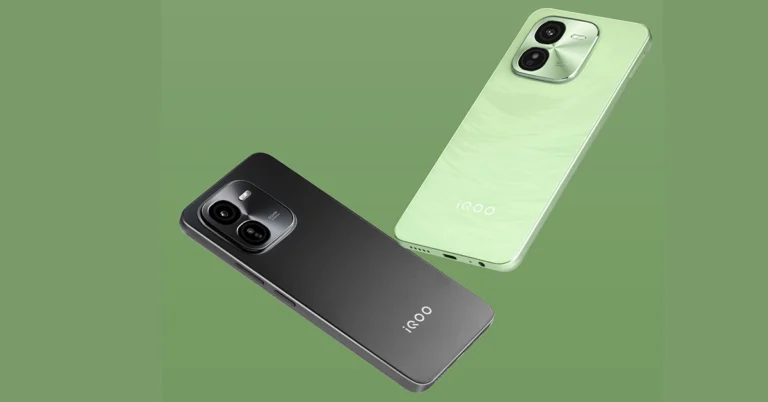
iQOO Launches iQOO Z9x: A New Contender in the Smartphone Market

Key Highlights

  • The iQOO Z9x features a slim 7.99mm design with a 6000mAh battery for up to two days of usage.
  • Powered by the Qualcomm Snapdragon 6 Gen 1, it boasts an AnTuTu benchmark score over 560K.
  • The smartphone includes a 50MP AI rear camera system and offers IP64 dust and water resistance.

iQOO has introduced its latest smartphone, the iQOO Z9x, in India. Featuring a range of advanced features and available at a competitive price, this new addition to the Z series aims to attract a wide range of users.

Starting May 21, 2024, at 12 PM, the iQOO Z9x will be available for purchase on Amazon.in and the iQOO e-store at an effective price of INR 11,999.

Read Also: Top smartphones with 50MP or higher cameras

Tech Specs

The iQOO Z9x features a slim design at 7.99mm thick and includes a 6000mAh battery, providing up to two days of usage on a single charge. Its 44W flash charge technology can charge the battery to 50% in just 37 minutes, making it suitable for users with active lifestyles.

Powered by the Qualcomm Snapdragon 6 Gen 1 Mobile Platform and built on the 4nm process technology, the iQOO Z9x delivers solid performance with an AnTuTu benchmark score exceeding 560K. The smartphone also includes a 6.72″ Ultra Bright 120Hz adaptive display and dual stereo speakers for a satisfactory audio-visual experience.

iqoo z9x

Camera and Design

The iQOO Z9x is equipped with a 50MP AI rear camera system and a 2MP Bokeh Camera, capable of 4K video recording at 30fps with the 8GB variant. The device is available in two colors: Tornado Green and Storm Grey. It features a sunburst texture on the back and has an IP64 dust and water resistance rating.

Nipun Marya, CEO of iQOO, commented, “The iQOO Z9x, with its sleek design and powerful battery, is designed for the dynamic needs of GenZ users. It represents our ongoing efforts to deliver innovative solutions that fit the lifestyle of today’s youth.”

Read Also: iQOO Z9 5G Review: The complete package?

iQOO Z9x Pricing

The iQOO Z9x comes in three variants:

4GB+128GB: INR 12,999 (Effective Price – Rs 11,999)
6GB+128GB: INR 14,499 (Effective Price – Rs 12,999)
8GB+128GB: INR 15,999 (Effective Price – Rs 14,499)
It supports up to 16GB of extended RAM and expandable storage up to 1TB. The device runs on Funtouch OS 14, based on Android 14, and includes 2+3 years of Android and security updates.

Best 1.5-ton split ACs in India to beat the heat

It might be difficult to choose the best air conditioner because there are so many options on the market. This article contains a comprehensive list of the best air conditioners from the top-selling brands. It looks at energy efficiency, cooling performance, and innovative features to help you make an informed decision. The list also contains 1.5-ton split ACs, which are perfect for medium-sized living spaces and provide efficient cooling while saving energy.

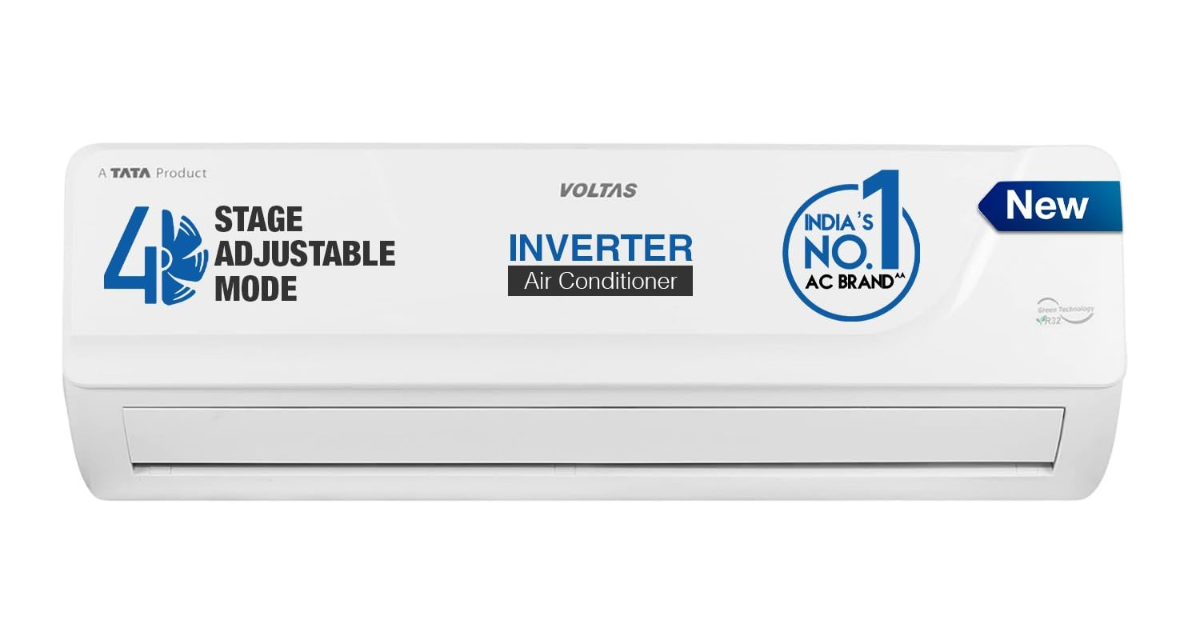
Voltas 1.4 ton 5 Star, Inverter Split AC (4503696)

Voltas 1.4 ton 5 Star, Inverter Split AC (4503696)

Price Rs 36,490

This Voltas Split AC is suitable for medium-sized rooms. The anti-dust filter includes an antimicrobial layer that is believed to efficiently trap dust particles while inhibiting microbial growth, resulting in cleaner indoor air. It employs a copper condenser, which is long-lasting, corrosion-resistant, and requires little maintenance. Furthermore, Voltas AC has an ambient cooling capability of up to 52°C and does not require an external stabiliser due to its inverter compressor, which ensures steady performance even during power outages. Furthermore, there are four low-noise operation modes: low, medium, high, and turbo.

Buy Here

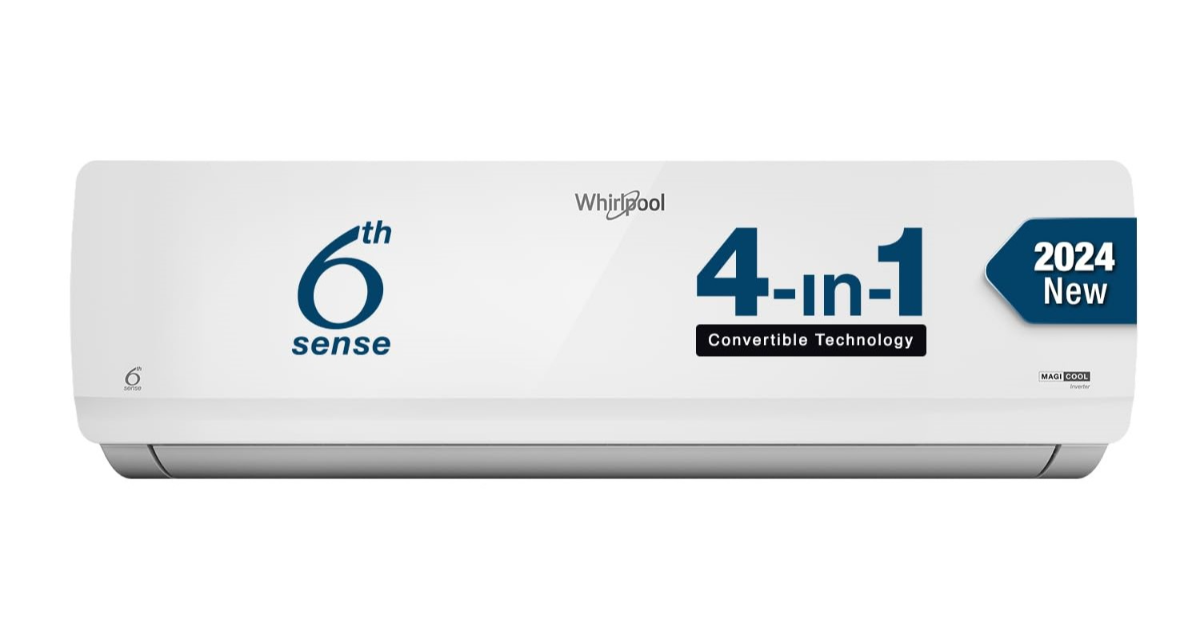
Whirlpool 1.5 Ton 3 Star, Magicool Inverter Split AC (MAGICOOL 15T 3S INV CNV S4K1PP0)

Whirlpool 1.5 Ton 3 Star, Magicool Inverter Split AC (MAGICOOL 15T 3S INV CNV S4K1PP0)

Price: Rs 32,490

Whirlpool produces a wide variety of appliances. Whirlpool’s Magicool Inverter Split AC has a four-star Amazon rating. Its 6th Sense Technology uses smart sensors and innovative algorithms to intuitively detect an optimal cooling environment even under extreme temperatures, with a maximum cooling capacity of 52°C. There is a hidden display for a beautiful look, as well as a copper condenser outdoor unit with all connecting tubes and pipes made of copper, which prevents corrosion and requires less maintenance. Keeping the environment in mind, Whirlpool air conditioners release less greenhouse gases and require less refrigerant volume to function.

Buy Here

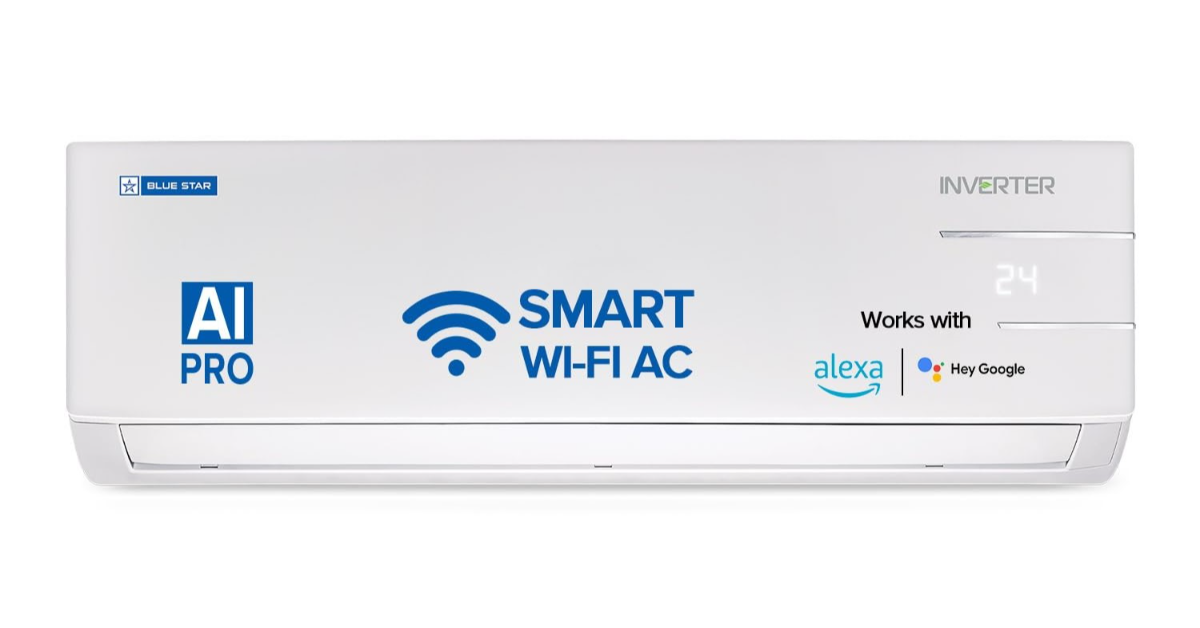
Blue Star 1.5 Ton 3 Star Wi-Fi Inverter Smart Split AC (‎IC318YNUS)

Blue Star 1.5 Ton 3 Star Wi-Fi Inverter Smart Split AC (‎IC318YNUS)

Rs 37,350

The homegrown air conditioners, air purifiers & water coolers manufacturing brand Blue Star offers a comprehensive selection of ACs. The one we suggest can automatically regulate and optimise cooling and fan speed based on the ambient temperature outside and room circumstances. It has a 5-in-1 cooling mode that allows the AC to run at five different capacities: 100%, 80%, 60%, 40%, and 110%. The WiFi AC may be turned on and off using Amazon Alexa and Google Assistant voice commands as well as setting a desired temperature. Smart App compatibility allows you to control the AC setting remotely.

Buy Here

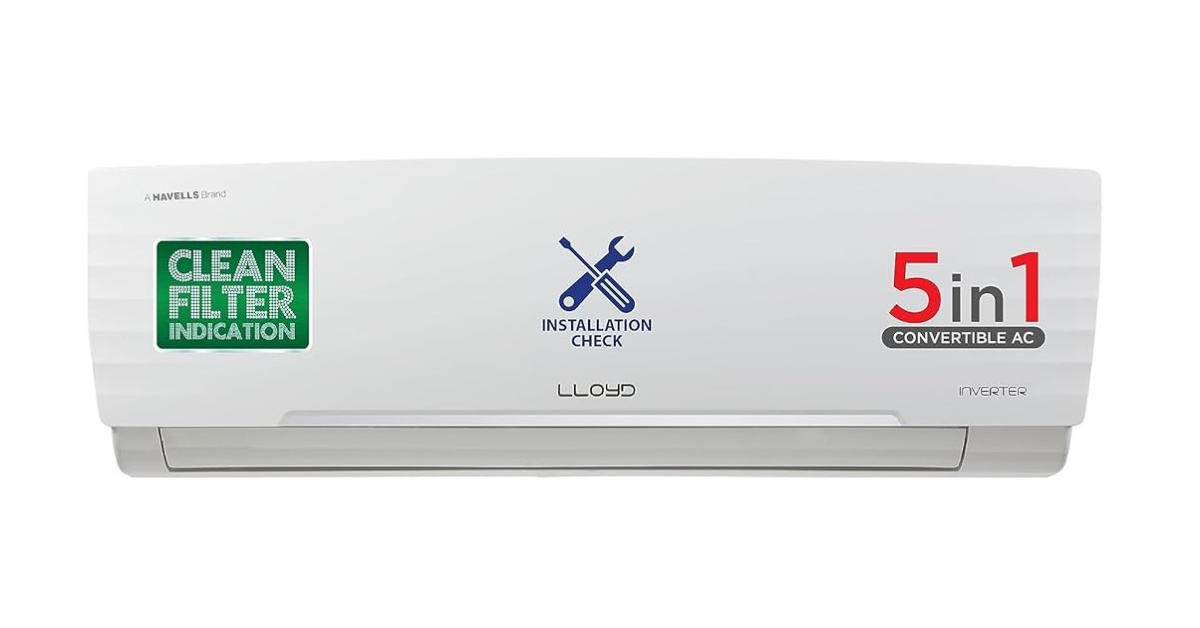
Lloyd 1.5 Ton 3 Star Inverter Split AC (‎GLS18I3FWAGC)


Lloyd 1.5 Ton 3 Star Inverter Split AC (‎GLS18I3FWAGC)

Price: Rs 32,990

The Lloyd Inverter Split AC cools even at an Ambient temperature of 52°C with 2 Way Air Swing and a 7m long air throw. This is an ideal AC for larger rooms. It has a multimode setting for cooling options: 100%, 80%, 60%, 40% and Auto mode. It comes with stabilizer-free operation and R-32 Refrigerant having zero Ozone Depletion Effect and low Global Warming Effect. Moreover, it includes an Anti Viral Dust Filter that captures dust, pollen, spores, bacteria, viruses, etc.

Buy Here

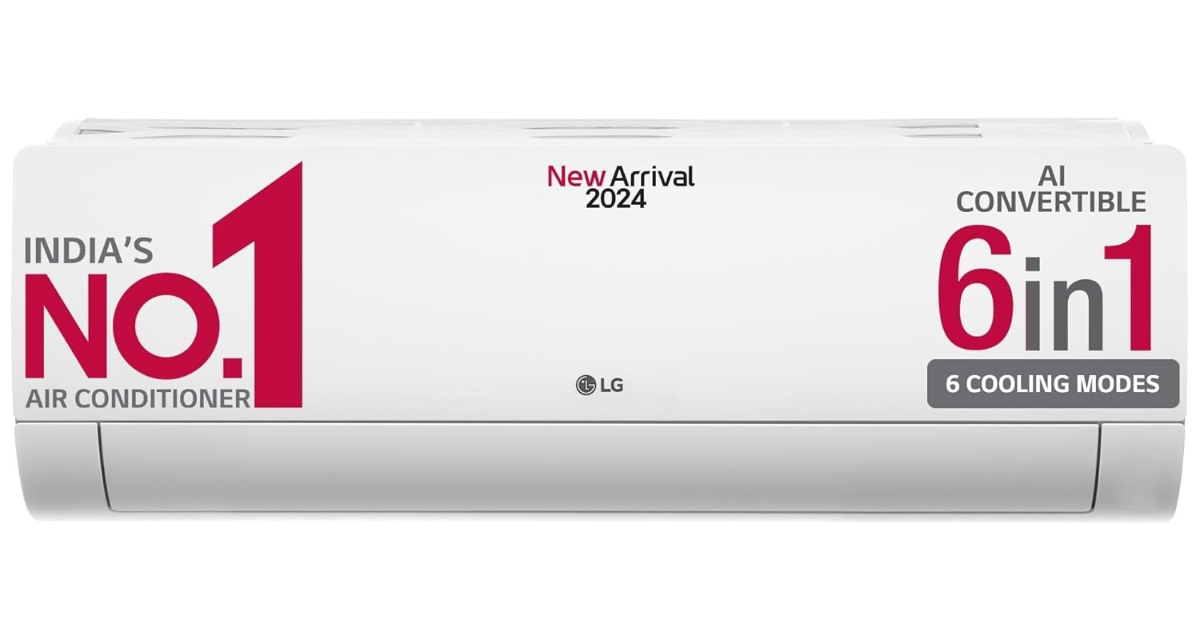
LG 1.5 Ton 5 Star DUAL Inverter Split AC (‎TS-Q19YNZE1)

LG 1.5 Ton 5 Star DUAL Inverter Split AC (‎TS-Q19YNZE1)

Price: Rs 46,990

With a four-star rating, the LG’s AI convertible 6-in-1 AC can predict appropriate cooling capacity plus sense room conditions, fan speed, vane position and temperature settings. It features 6-in-1 AI convertible modes that can run the AC at variable tonnage to increase or decrease cooling capacity as per the requirement.

Buy Here

Poco F6 5G will be the first smartphone to debut in India with Qualcomm Snapdragon 8S Gen 3

The Qualcomm Snapdragon 8s Gen 3 chipset was introduced in March globally. Although it is now available on several phones outside of India, the chipset manufacturer has officially confirmed that its latest processor is coming to India. The upcoming Poco smartphone, the Poco F6 5G, will be one of the first in India to launch with the latest Snapdragon 8s Gen 3 platform.

Along with Qualcomm, POCO also announced that they will be among the first smartphone brands in India to adopt the Snapdragon 8s Gen 3 Mobile Platform on their new POCO F6 launching later this month. The Poco F6 5G, is scheduled to arrive in India on May 23.

The Snapdragon 8s Gen 3 SoC is a 4nm octa-core chipset that can run over 30 on-device generative AI models, including Gemini Nano, Llama 2, and Baichuan-7B. The processor comes with an efficient core clocked at up to 3.0GHz. It includes 4 performance cores rated at 2.8GHz and three efficiency cores clocked at 2.0GHz. It can hold up to 24GB of LPDDR5x memory @ 4200MHz and UFS 4.0 storage.

Also Read: Compared: Snapdragon 8s Gen 3 vs Snapdragon 8 Gen 2

Speaking about the relationship with POCO, Savi Soin, Senior Vice President and President of Qualcomm India said, “Our focus on delivering premium experiences has been crucial in driving long-term partnerships in the industry. Our latest Snapdragon 8s Gen 3 Mobile Platform provides a host of flagship-level, specially selected capabilities, packed with the latest on-device AI experiences. What brings POCO and Qualcomm together is our shared commitment to bring best in-class smartphone experiences to people and we look forward to bringing these extraordinary experiences to the people of India with their latest device launch.”

Himanshu Tandon, Country Head, POCO said, “As pioneers of innovation in the Indian smartphone market, POCO is thrilled to unveil its latest collaboration with Qualcomm Technologies. The POCO F series, which has become synonymous with performance and innovation, has been pushing the boundaries of what’s possible in a mid-range phone. Taking forward this legacy, the POCO F6 is set to redefine the industry as the first device in India featuring the powerful Snapdragon 8s Gen 3 chipset. With a track record of delivering flagship-level Qualcomm chipsets in our F-series lineup, we’re propelling towards the forefront of the mobile industry, ushering in a new era of on-device intelligence and Gen AI experiences.”

Also Read: List of smartphones confirmed to come with Snapdragon 8s Gen 3 SoC

Outside of India, other smartphone manufacturers have already introduced devices featuring the Snapdragon 8s Gen 3 CPU in the international market. Motorola Edge 50 Ultra, Xiaomi Civi 4 Pro, Redmi Turbo 3, iQoo Z9 Turbo and Realme GT Neo 6 are the smartphones using the Snapdragon 8s Gen 3 chipset.

Also Read: Compared: Snapdragon 8s Gen 3 vs Snapdragon 8 Gen 3

The upcoming POCO smartphone is likely to be a rebranded version of the Redmi Turbo 3, which debuted in China last month. Both devices share a lot of similarities in terms of design. The  Redmi Turbo 3 and the Poco F6 5G possess an identical back camera module layout design. The Redmi Turbo 3 boasts a dual rear camera set consisting of a 50-megapixel Sony LYT-600 sensor with OIS and an 8-megapixel ultra-wide-angle camera. There is a 20-megapixel front camera for taking photos and video chats.

Garena Free Fire Redeem Codes Today 16 May 2024: Here is how to claim them

Garena Free Fire is a battle royale game with regular awards and tournaments to keep players interested. If you play Garena Free Fire, you should be aware of the redeem codes that are released on a daily basis. However, because the battle royale game is banned in India, players from other countries can use the Free Fire Redeem codes daily. If you’re unfamiliar with the Garena Free Fire redeem codes or don’t know how to get them, we’ve put together a step-by-step guide to help you redeem them. Check out Garena Free Fire Redeem Codes for 16 May 2024.

The Free Fire redeem codes are a great way to get free stuff. These are 12-digit codes that contain alphabets and numbers, as well as an expiration date and time. Because the Garena FF redeem codes cannot be used more than once, you should hurry to the redemption page to claim your free reward before someone else does. To get a free reward, all you have to do is go to reward.ff.garena.com/en, which is the official redemption page. Also, keep an eye on this space for daily updates on Garena Free Fire redemption codes and rewards.

Also Read: Sennheiser Accentum Plus wireless headphones with Hybrid Adaptive Noise Cancellation launched

Garena Free Fire Redeem Codes Today 16 May 2024

FX1V6S4J9Q5G8P3D

FG8W3D6J2Z5F1R9L

FS4N9V1X7K3T6C2P

FQ5M2Z8D1C4B7F3N

FY9R3V6P1J4L7K5Q

FU4D8F1Q7Z3V5P6M

FH2J5Y8R1W4G6X9N

FL7S3C9V6T2X4W8R

FV7G2X5P9J3C6L1W

FZ4N1Q8S6R9Y2D5K

FF3B7M4H8W1T9J6V

FP1X4Y7R2G5Q9N3F

FM9T6W3V8C2B4Y7S

FA5M1F8Z3N7P9B2T

FC5N8F2J7H4Q1X6L

FD2R5W7M3V6K9B8T

FE2W7F4X9B5M1S3G

FT6K9N3C8L2J4H7R

FB6Q9R2D5K8X3F4H

How to Get Free Fire Redeem Codes for Garena on 16 May 2024?

  • Visit the Garena Free Fire game’s official website at reward.ff.garena.com.
  • Use your Facebook, Google, VK, Apple ID, Huawei ID, or Twitter account to log in.
  • You’ll be taken to a valid redemption code (s)
  • Copy and paste the 12-digit redemption code into the text box.
  • On the screen, a dialogue box will appear.
  • ‘Ok’ should be selected.

For the latest gadget and tech news, and gadget reviews, follow us on TwitterFacebook and Instagram. For newest tech & gadget videos subscribe to our YouTube Channel. You can also stay up to date using the Gadget Bridge Android App. You can find the latest car and bike news here.

How to use Gemini AI on Gmail?

0

Google is rapidly increasing its AI presence in its Workspace suite of apps and services. At the annual I/O event held yesterday, the tech giant unveiled the updated Gemini 1.5 Pro, its lightweight version Gemini Flash, and two new ‘Gemma’ models. Google also offered a glimpse of what Workspace apps like Docs, Slides, Sheets, and more would look like with AI integration. Of all these apps, users were most curious to see what Gmail would look like with smart AI features. So, let’s take a look at what Gemini AI offers for Gmail and how it can be accessed on the app.

Read Also: PC Keyboard not working? Try these 7 fixes (2024)

Gemini AI features in Gmail

You simplify a lot of tasks using Gemini AI on the Gmail app for Android. Using Contextual Smart Reply, you can send an AI-generated response to any email. The responses generated by Gemini AI are nuanced, relevant to the context, and referential to the information provided in the email it is responding to. You can always edit an AI-generated response before sending it.

Apart from curating responses, Gemini AI can also summarise email threads for you. This is particularly useful for Android users as long threads can be tedious to scroll on a small screen. The ‘summarise’ button can be found at the top of the thread.

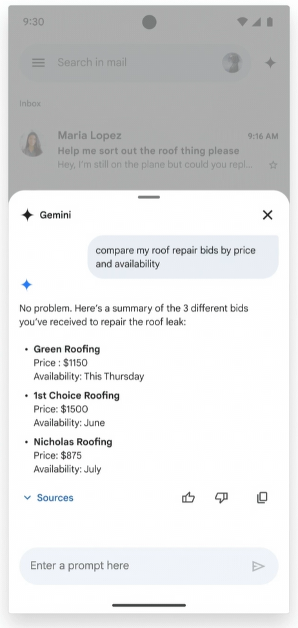
While summarization and response generation are nice features, the real game-changer is access to the Gemini AI bot itself. Accessible on the web and Android versions of Gmail, the Gemini AI chatbot can carry out a range of tasks for you. If you don’t want to dig through old emails, you can simply get Gemini to do it. If you want to see all the bills you have paid since the start of the month, you can get Gemini to pull the invoices from your emails and present them in a simple and accessible manner.

How to use Gemini AI in Gmail

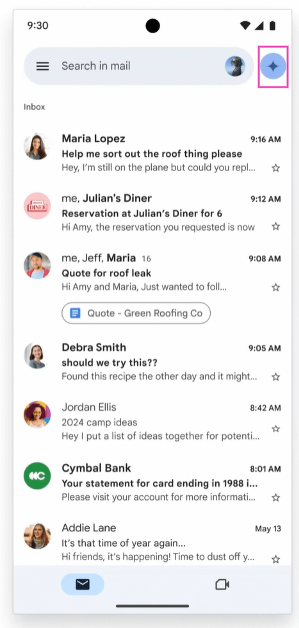
Step 1: Launch the Gmail app on your Android smartphone.

Step 2: Hit the Gemini AI icon next to the search bar.

Step 2: Hit the Gemini AI icon next to the search bar.

Step 3: Enter your query and hit Send.

Step 3: Enter your query and hit Send.

The Gemini AI icon on Gmail for Web is next to the search bar too.

Frequently Asked Questions (FAQs)

When will Gemini AI launch on Gmail?

Google is planning to launch Gemini AI for its Workspace suites of apps and services in the coming months.

Who can use Gemini AI on Gmail?

Gemini AI will be rolled out for Workspace and Google One subscribers.

Which Google Workspaces services will get Gemini integration?

Google Workspace services like Docs, Drive, Sheets, Slides, and Gmail will get a special Gemini AI side panel in the coming weeks.

Read Also: LG Unveils Next Generation AI TVs With OLED evo And QNED Technology

Conclusion

This is how you can use Gemini AI on Gmail. Check out this article to learn how to use the new AI-based ‘Ask Photos’ feature in Google Photos. What do you think of Google’s AI advancements and integration so far? Let us know in the comments!
PC Keyboard not working? Try these 10 fixes

0

PC keyboards are not inexpensive. If you splurged extra money on a premium mechanical keyboard, you want it to last for a good number of years. Hardware issues on a premium keyboard are uncommon, but there are other things that can go wrong, leading to functional issues. If you’re facing something similar, you have landed on the right page. Today, we bring you the top 10 ways to fix a keyboard if it is not working.

Read Also: Google brings new big updates to Search, rolls out AI Overviews

Why is my keyboard not working?

If your keyboard stopped working all of a sudden, it could be due to one of the following reasons:

  • Connection cables are damaged.
  • The battery is discharged.
  • Accumulation of dust and grime under the keys.
  • The drivers are out of date or improperly installed.
  • Your PC is frozen due to a software issue.
  • The app you’re typing in is malfunctioning.

Restart your PC

PC or Laptop

Before you move on to more advanced fixes, give your PC a quick reboot. This will resolve any background software glitches that may be causing the keyboard to malfunction. Restarting your PC should be the first step you take in fixing any issue. Move on to other methods if this doesn’t fix the keyboard.

Check if the keyboard is connected to the PC

Locate the power switch on your wireless keyboard and make sure it is turned on. If your keyboard supports multiple connections, make sure it is not connected to any other device. If you’re having trouble with a wired PC, check its cable for any damage. Use your keyboard with another PC to determine whether the fault lies with the keyboard or the PC.

Open a different text field or app

recover images

If you’re facing keyboard troubles in a particular program (for example, Google Docs or Microsoft Word), open another app (like Notepad) with a text field and check if the keyboard works on it. If it doesn’t, it means the fault lies with your keyboard and not the app.

Restart the app

Top 3 Ways to Check the Word Count in Microsoft Word

It is possible that the problem does not lie with your PC, but the app that you’re currently using. To confirm whether this is the case, use your keyboard to type in another app. To fix the faulty app, clear its cache and give it a quick restart. You may also want to restart your PC if you think that background software issues are causing your keyboard to malfunction.

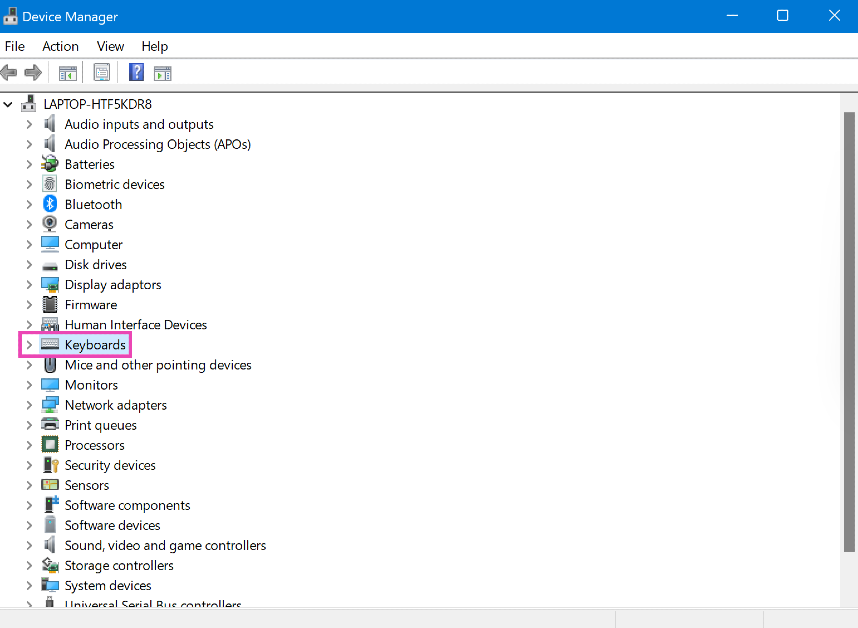
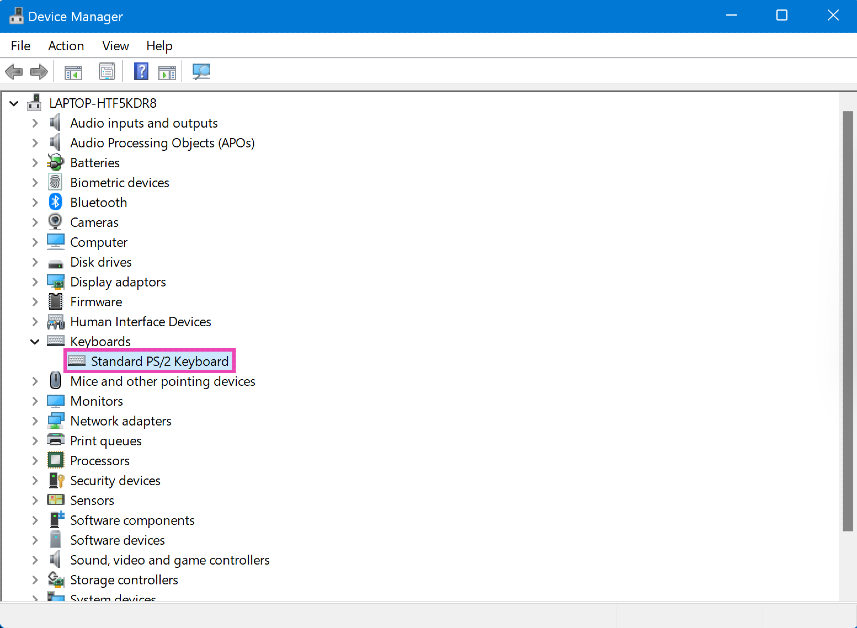
Enable the keyboard using Device Manager

Step 1: Type in Device Manager in the search bar at the bottom left corner of your screen and select it.

Step 2: Click on Keyboard to expand the section.

Step 1: Type in Device Manager in the search bar at the bottom left corner of your screen and select it.

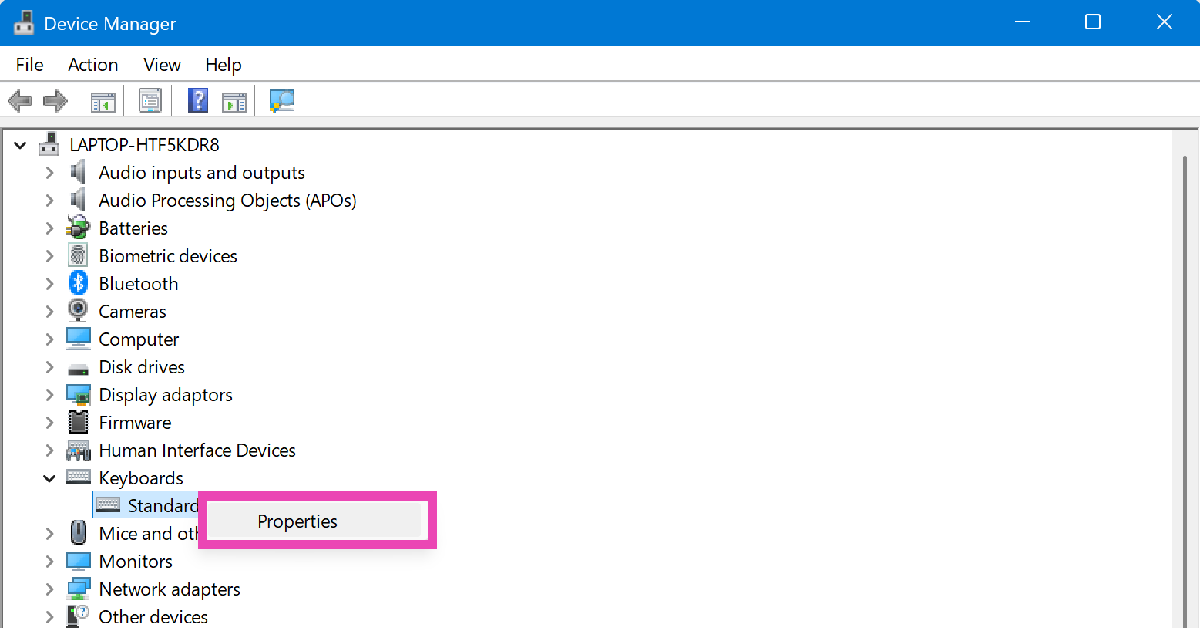
Step 3: Right-click on the listed keyboard and select Properties.

Step 3: Right-click on the listed keyboard and select Properties.

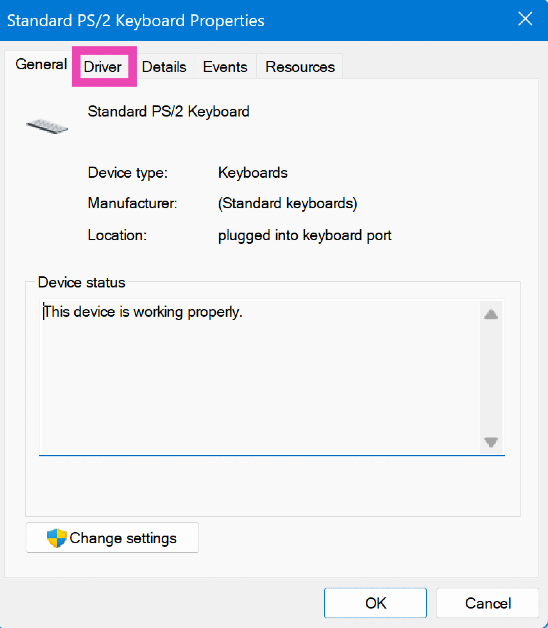
Step 4: Switch to the Driver tab and hit Enable.

Step 4: Switch to the Driver tab and hit Enable.

Clean the keyboard

Over a period of time, dust and grime can collect under the keys, leading to the switches or the membrane not functioning correctly. In this case, you need to clean your keyboard thoroughly. If the keys on your keyboard come out, use a tool to dislodge them and wipe the area under them with a clean cloth. You can even use a brush to unsettle the dirt and then gently tap the keyboard against a solid surface to get rid of it. Use isopropyl alcohol to clean the frame of the device.

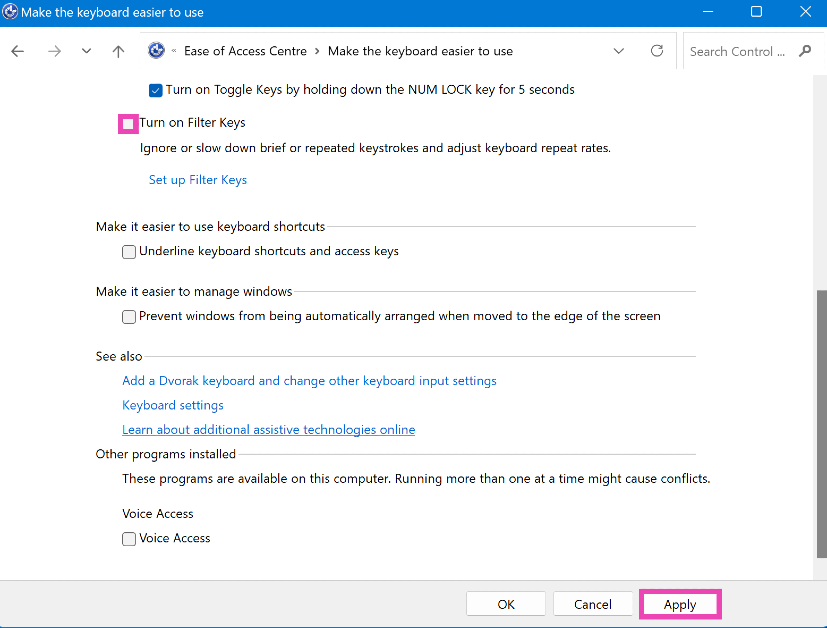
Turn off Filter Keys

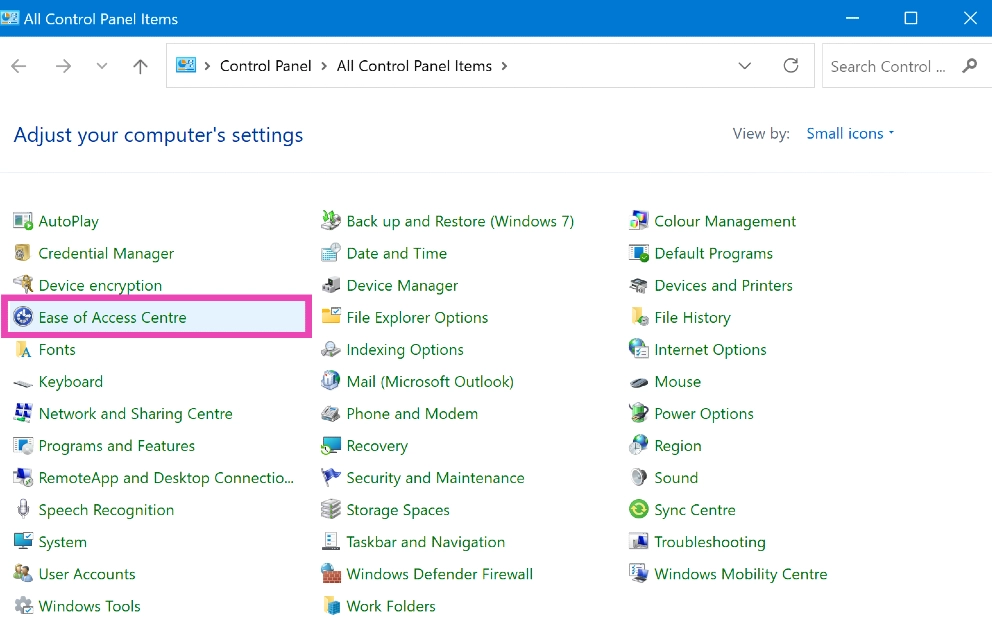
Step 1: Open Control Panel and select Ease of Access.

Step 1: Open Control Panel and select Ease of Access.

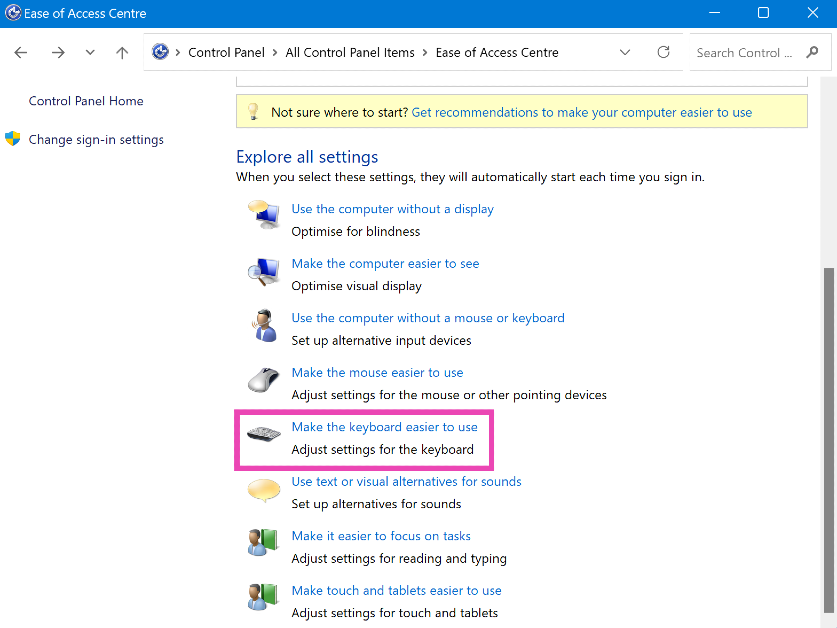
Step 2: Click on Make the keyboard easier to use.

Step 2: Click on Make the keyboard easier to use.

Step 3: De-select Turn on Filter keys.

Step 3: De-select Turn on Filter keys.

Step 4: Click on Apply and then save your changes by clicking on Ok.

Update or reinstall keyboard drivers

If your keyboard drivers are out of date, you will need to update them to fix the device. If your keyboard started malfunctioning after updating the drivers, they may have been installed incorrectly. Uninstall and reinstall them if that’s the case.

Step 1: Type in Device Manager in the search bar at the bottom left corner of your screen and select it.

Step 2: Click on Keyboard to expand the section.

Step 1: Type in Device Manager in the search bar at the bottom left corner of your screen and select it.

Step 3: Right-click on the keyboard listed on the list and select Update driver. Follow the onscreen instructions, and the driver will be updated.

Step 3: Right-click on the keyboard listed on the list and select Update driver. Follow the onscreen instructions and the driver will be updated. PC Keyboard not working? Try these 7 fixes (2024)

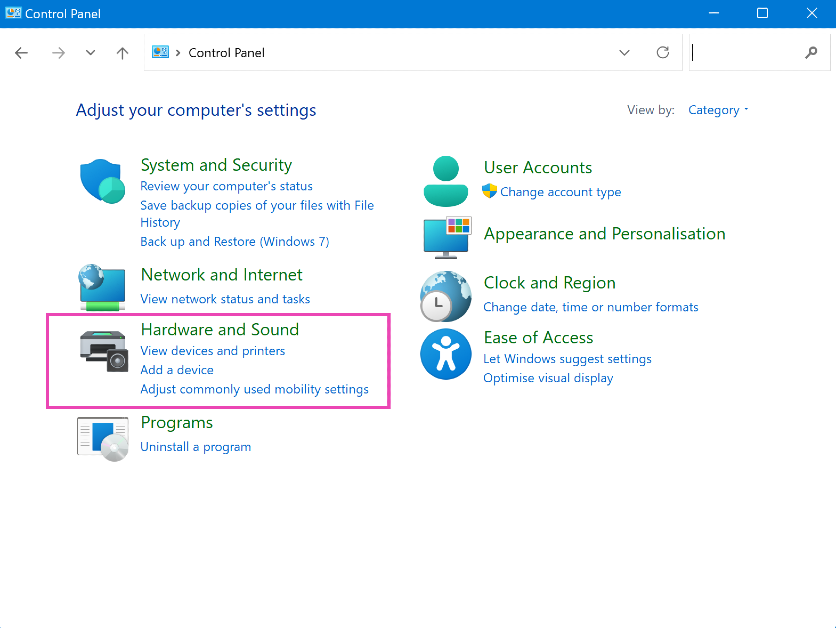
Disable fast startup

Step 1: Launch the Control Panel and select Hardware and Sound.

Step 1: Launch the Control Panel and select Hardware and Sound. PC Keyboard not working? Try these 7 fixes (2024)

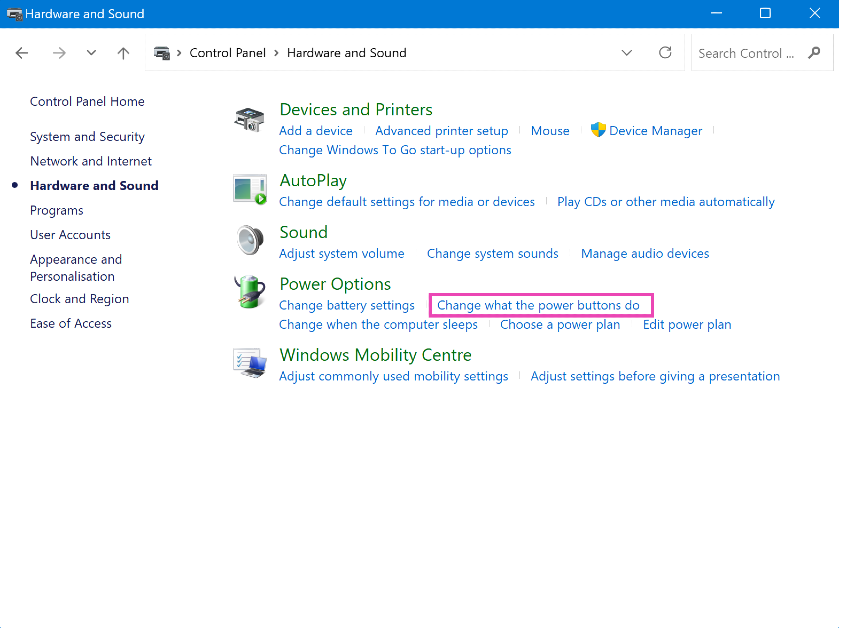
Step 2: Click on Power Options.

Step 2: Click on Power Options. PC Keyboard not working? Try these 7 fixes (2024)

Step 3: Select Choose what power buttons do from the side menu.

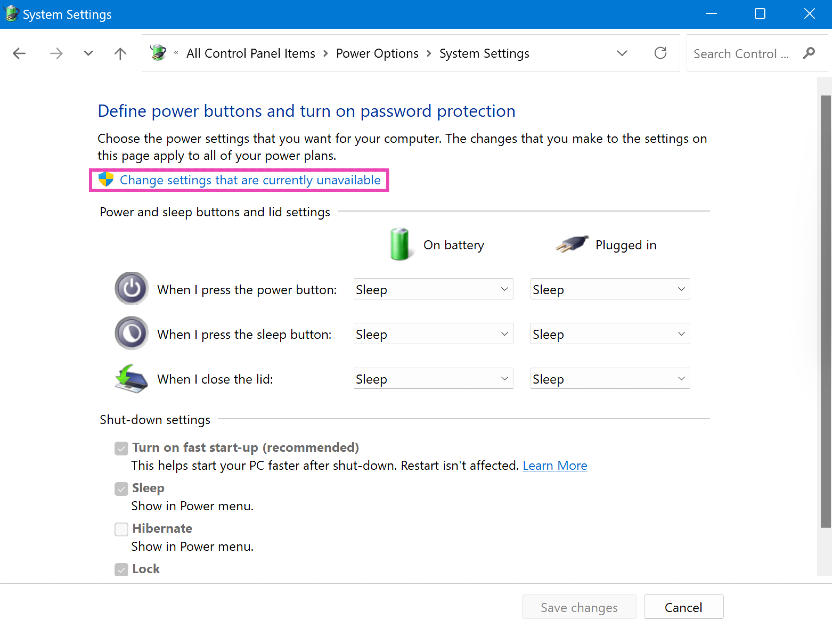
Step 4: Click on Change settings that are currently unavailable.

Step 4: Click on Change settings that are currently unavailable. PC Keyboard not working? Try these 7 fixes (2024)

Step 5: De-select Turn on fast startup and save changes.

Step 5: De-select 'Turn on fast startup' and save changes. keyboard stopped working suddenly

Use the On-screen keyboard

If you can’t get the keyboard to work, you can use the on-screen keyboard on your Windows PC as a temporary fix. Here’s how.

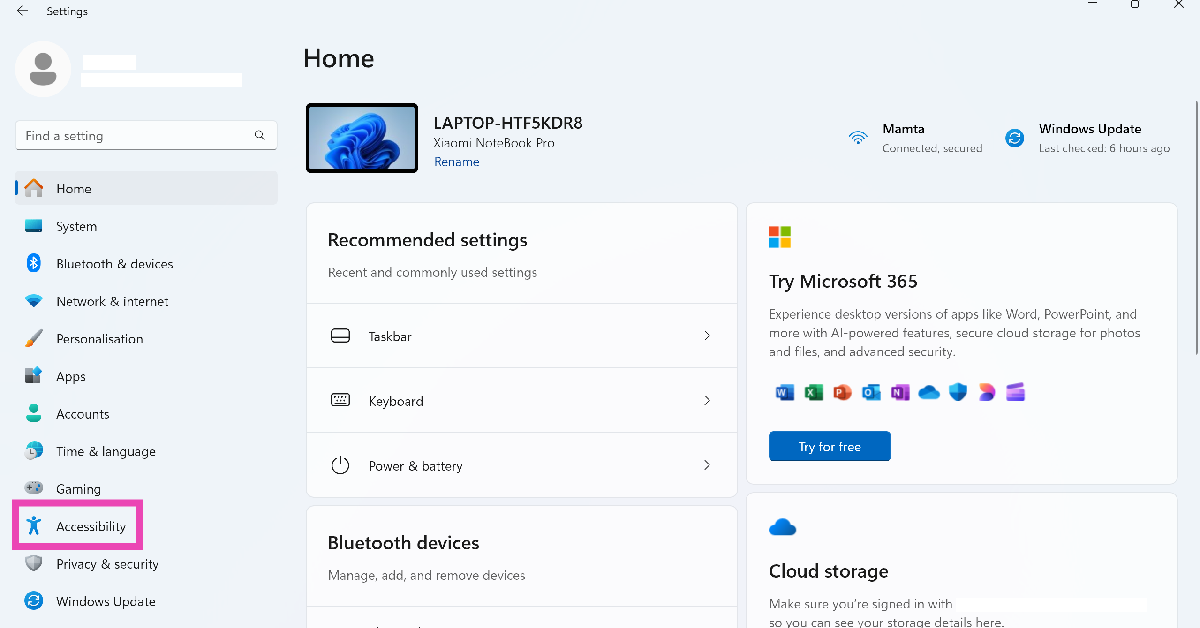
Step 1: Go to Settings and select Accessibility from the sidebar.

Step 1: Go to Settings and select Accessibility from the sidebar.

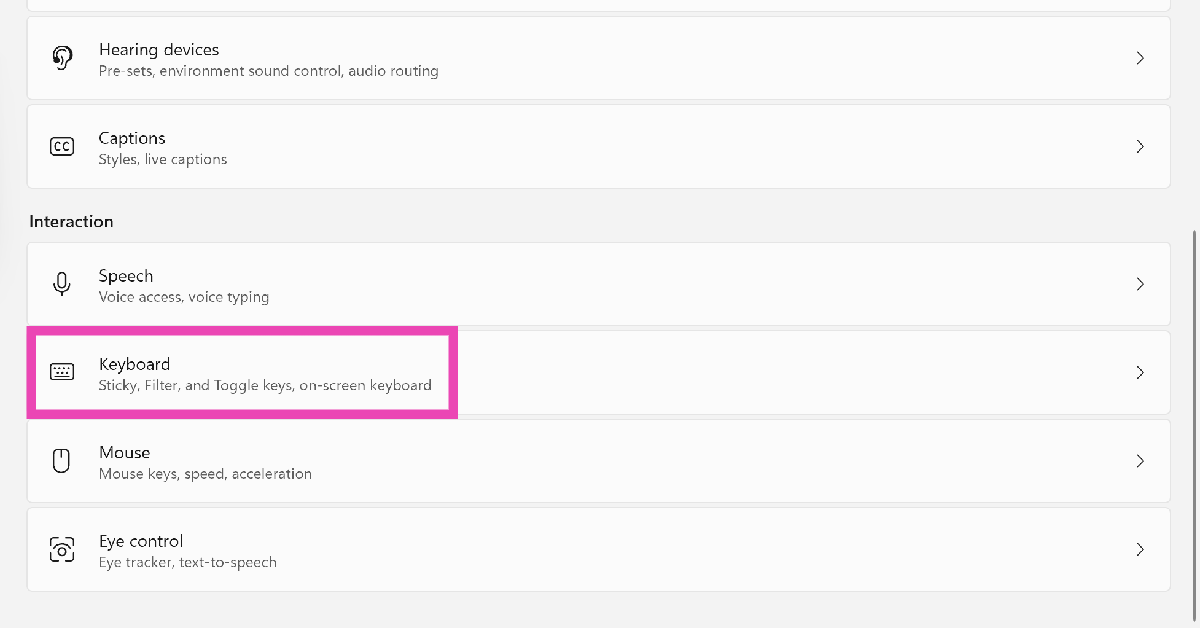
Step 2: Scroll down and select Keyboard.

Step 2: Scroll down and select Keyboard.

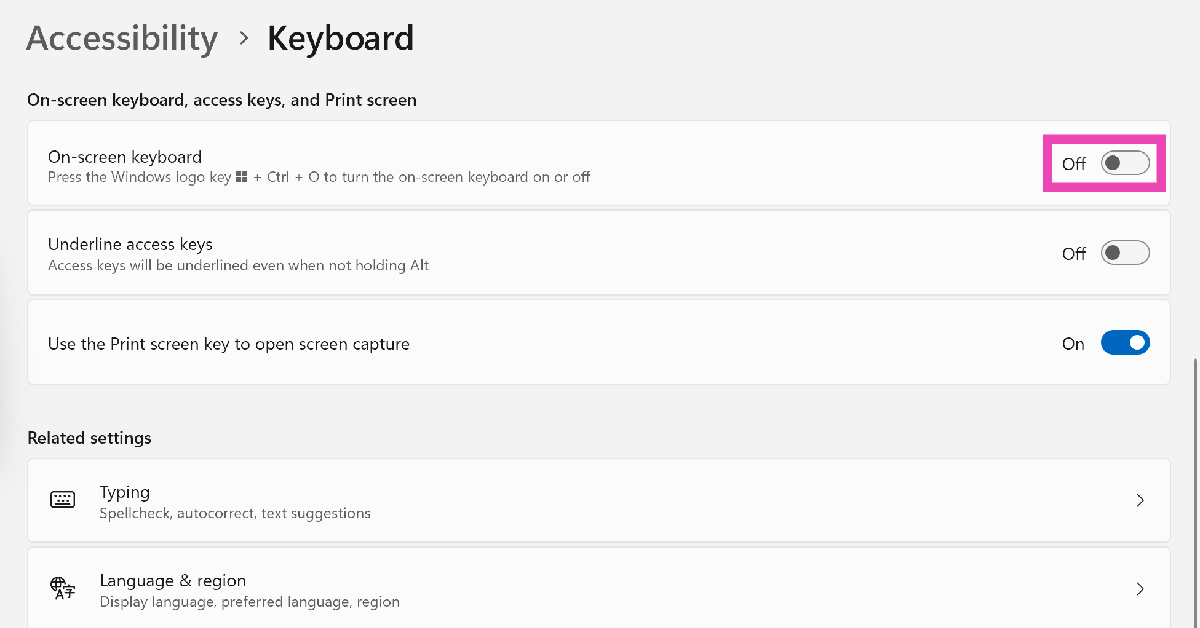
Step 3: Turn on the toggle switch next to On-screen keyboard.

Step 3: Turn on the toggle switch next to On-screen keyboard.

Frequently Asked Questions (FAQs)

How do I fix my keyboard if it isn’t working?

Clean your keyboard, make sure its drivers are updated, and check its connection with the PC if it stops typing.

How do I turn off the keyboard lock on my laptop?

Press the function key and hit the F key with the keyboard icon on it.

How do I disable Filter Keys on my PC?

Go to Control Panel>Ease of Access>Change how keyboard works, deselect ‘Turn on filter keys’ and apply the settings.

How do I enable my keyboard using the Device Manager?

Go to Device Manager>Keyboards, right-click your keyboard, select Properties, go to Driver, and select ‘Enable’.

How do I turn on the On-screen keyboard on my PC?

Go to Settings>Accessibility>Keyboard, and turn on the toggle switch next to ‘On-screen keyboard’.

Read Also: How to use the new ‘Ask Photos’ feature in Google Photos?

Conclusion

These are the top 10 ways to fix your keyboard if it is not working. If the issue is related to the hardware, you will need to take your keyboard to an authorised repair centre. Looking to buy a new gaming keyboard? Here are your best options under Rs 15,000.

LG Unveils Next Generation AI TVs With OLED evo And QNED Technology

Key Highlights:

  • The LG OLED 97G4 boasts a 246 cm (97-inch) screen, setting a new standard for home entertainment.
  • Enhanced AI upscaling, AI Sound Pro, and Brightness Booster Max technology deliver superior picture and audio quality.
  • Features like Dolby Vision Gaming 4K at 144Hz, NVIDIA G-SYNC certification, and AMD FreeSync compatibility ensure dynamic, seamless gameplay.

LG Electronics India has launched its latest innovation in home entertainment, presenting the next generation of AI TVs. This new lineup features the advanced LG OLED EVO AI and LG QNED AI TVs, with screen sizes ranging from 108 cm (43 inches) to an impressive 246 cm (97 inches). Leading the pack is the LG OLED 97G4, the world’s largest OLED TV, which showcases cutting-edge AI technology to enhance picture and audio quality and personalization.

Mr. Hong Ju Jeon, MD of LG Electronics India, expressed his excitement about the launch: “We are proud to introduce the next generation of AI TVs, showcasing the forefront of innovation in both OLED and premium LED technologies. Our 2024 lineup takes the viewing experience to a new level with advanced processors that deliver outstanding audio-visual experiences across various screen sizes, while also providing a personalized user experience tailored to each individual’s unique lifestyle and preferences.”

Advanced AI-Powered Features

LG’s latest OLED AI TVs come equipped with enhanced AI upscaling capabilities, which sharpen objects and backgrounds with precise pixel-level image analysis. This results in improved picture quality and vibrant viewing experiences, even when watching sub-4K content. The AI processor also refines colors to capture the original mood and tone envisioned by the director.

The AI Sound Pro feature enriches audio by utilizing virtual 11.1.2 surround sound from the TV’s built-in speakers, ensuring crystal-clear dialogue and an immersive sound experience. The OLED evo G4 series, featuring Brightness Booster Max technology, achieves peak brightness that is 150 percent higher than conventional OLED TVs.

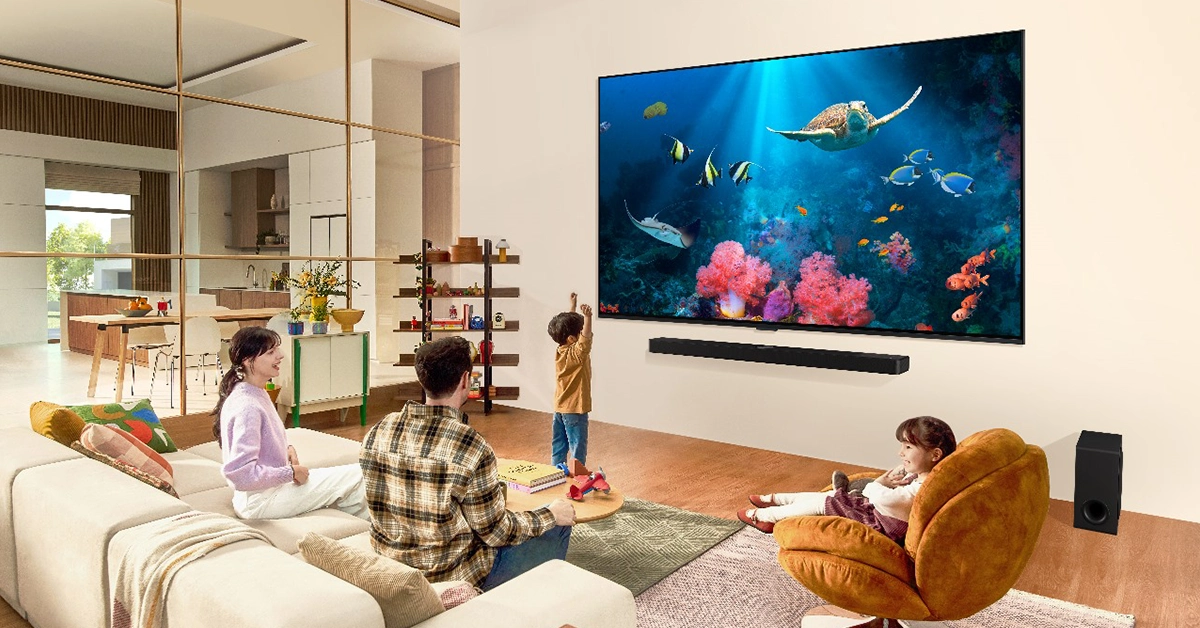
Lg TV

Gaming Excellence

LG OLED TVs maintain their reputation as the ultimate gaming TVs with new models featuring Dolby Vision Gaming 4K at a 144Hz refresh rate, NVIDIA G-SYNC certification, and compatibility with AMD FreeSync. These features eliminate tearing and stuttering, offering a dynamic, true-to-life gaming experience. The Game Optimizer allows gamers to switch easily between display presets designed for different gaming genres.

Read Also: LG Electronics Life’s Good Offer is now live in India, with exciting deals on home appliances and entertainment devices

Innovative QNED Technology

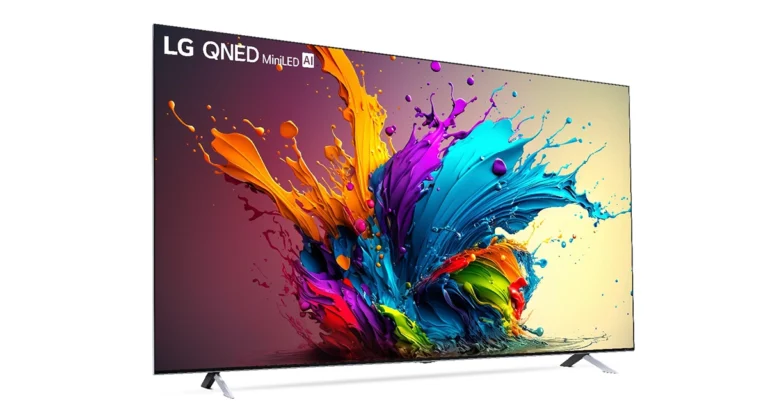
The 2024 LG QNED AI TVs represent the next generation of LCD technology, delivering bright and vibrant colors through the combination of Quantum Dot and NanoCell technologies. The QNED MiniLED TVs, featuring MiniLEDs that are 1/40th the size of regular LEDs, offer improved gradations, brighter colors, and deeper blacks thanks to Precision Dimming.

LG TV 1

Enhanced User Experience

Celebrating a decade-long journey with webOS, LG continues to enhance its smart TV platform’s versatility. Users can create up to 10 individual profiles to tailor their experience, customize the Home screen, and set personalized settings with minimal effort. Each profile can be password-protected for privacy.

The WebOS Re:New program promises operating system upgrades for the next five years, revamping the UI annually to give customers a fresh experience. LG OLED AI TVs and QNED AI TVs support Dolby Vision and Dolby Atmos for enhanced image and audio quality. The FILMMAKER MODE lets users experience films as the director intended, completing the home cinema experience with TV-matching soundbars.

Read Also: LG CineBeam Q laser projector with 4K UHD picture quality launched in India

Accessibility and Connectivity

LG TVs offer a wide range of accessibility features, including services designed to support individuals with disabilities, remote control tutorials, and chatbot services for voice-accessible support. The 2024 models also include built-in Apple AirPlay and Google Chromecast, allowing users to effortlessly cast content from their mobile devices to their ultra-large TV screens.

Price and Availability

  • LG OLED evo G4 AI Series: Available sizes: 246 cm (97), 196 cm (77), 165 cm (65), and 149 cm (55), starting at INR 239,990, with the top model OLED97G4 priced at INR 2,049,990.
  • LG OLED evo C4 AI Series: Available sizes: 211 cm (83), 196 cm (77), 165 cm (65), 149 cm (55), 122 cm (48), and 107 cm (42), starting at INR 119,990.
  • LG OLED B4 AI Series: Available sizes: 196 cm (77), 165 cm (65), 149 cm (55), starting from INR 169,990.
  • QNED90T (QNED MiniLED AI TV): Available size: 165 cm (65), priced at INR 189,990.
  • QNED88T (QNED AI TV): Available sizes: 191 cm (75), 165 cm (65), and 149 cm (55), starting at INR 103,990.
  • QNED82T (QNED AI TV): Available sizes: 191 cm (75), 165 cm (65), 149 cm (55), 127 cm (50), and 109 cm (43), starting at INR 62,990.

Google brings new big updates to Search, rolls out AI Overviews

Over a billion US consumers now have access to Google’s AI Overviews feature, formerly known as Search Generative Experience, which can be accessed through web, Android, and iOS apps. It enables users to directly pose follow-up queries in search results.

AI Overviews

This week, Google will officially make the AI Overviews available to all US users. Previously known as Search Generative Experience, the new feature can be accessed by iOS, Android, and web apps. It was only accessible to those who signed up for the Search Lab to receive the AI Overviews last year.

The capability was made available to a larger number of testers earlier this year. According to the company with AI Overviews, people use Search more and are more satisfied with their results.

Also Read: Gemini-powered Ask Photos feature makes Google Photos smarter

AI Overviews attract more complex queries from diverse websites, resulting in more clicks on links than if the page had appeared as a traditional web listing for that query.. As the experience expands, the focus will be on promoting publishers and creators, with ads in dedicated slots throughout the page, with clear labelling to distinguish between organic and sponsored results.

Moreover, soon you will also have the ability to adjust your AI Overview by adding options that either simplify the language or provide more detailed explanations if you’re new to a topic, or if you’re trying to simplify something to satisfy your kid’s curiosity. According to the firm, you may ask your most complex questions—with every detail and cautions you have in mind—all at once, instead of dividing your inquiry up into many searches. These multi-step reasoning capabilities are coming soon to AI Overviews in Search Labs, for English queries in the U.S.

Also Read: Google is integrating Gemini straight into the Android OS, and more features unveiled

Meal and trip planning with Google Search

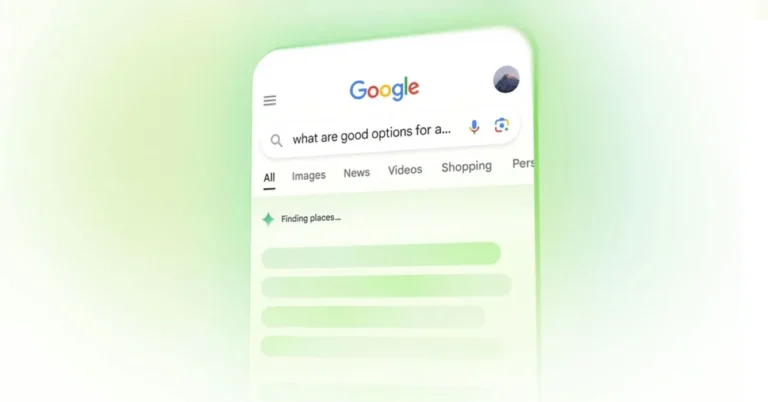
Apart from this Google Search now also includes planning capabilities. The new Meal and trip planning feature will allow you to create plans for whatever you need, starting with meals and vacations. Additionally, Search will also help you personalise your meal, simply ask for any changes you require, such as switching to a vegetarian meal for the evening. You’ll be able to quickly export your meal plan to Docs or Gmail.

Meal and trip planning are available now in Search Labs in English in the U.S. Later this year. The company will incorporate customisation features and additional categories, such as parties, date nights, and workouts later in the year.

Also Read: Google introduced a new AI model Gemini 1.5 Flash, upgrading Gemini 1.5 Pro

AI-organized results page

Search is introducing an AI-organized search results page to help you find inspiration and consider all your options. Using generative AI Google search will show results categorised under unique headlines featuring a wide range of perspectives and content types. The new feature will be available for English searches, starting with dining and recipes, followed by movies, music, books, hotels, shopping and more in the US.

How to use the new ‘Ask Photos’ feature in Google Photos?

0

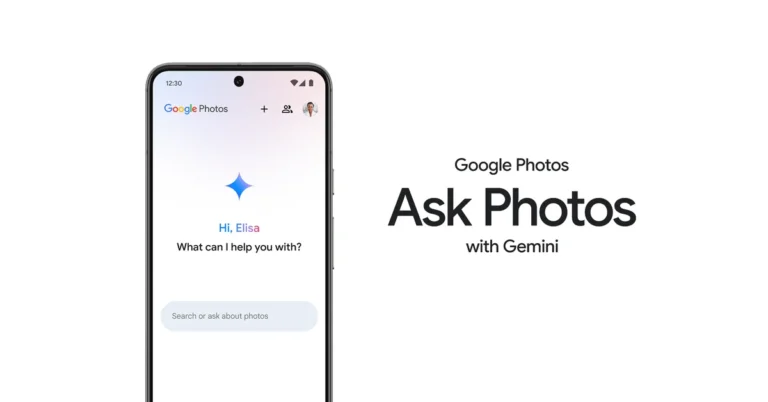
Google I/O 2024 was all about AI. In the coming months, Google will integrate Gemini AI into the Android OS, bringing innovative tech to smartphones across all price categories. This has opened the door to a wide range of exciting possibilities, some of which were showcased at Google’s annual summer event yesterday. The ‘Ask Photos’ feature which is coming to Google Photos soon will change the way users interact with their device’s picture gallery. Here’s a quick look at how Ask Photos works and how it can be used in Google Photos.

Read Also: Best laser printers under Rs 25,000 (2024)

How does ‘Ask Photos’ work?

Google Photos uses Gemini AI’s multimodal capabilities to analyse your prompt and conduct a search of your photo library for relevant results. Gemini AI looks for important keywords in your query and studies how the prompt has been structured in order to come up with the best results.

Once the AI has understood your prompt, it goes through your photo library and scans each item for contents that may fit your query. If you ask Google Photos to show you the coupons that are expiring within two months, it will view images with coupons, read the text in them, and return the results that match the ‘two-month expiration’ limit.

If you don’t like the results produced by Gemini AI, you can always provide follow-up prompts to make the search easier. The more details you provide, the more fine-tuned the results will be. Since Ask Photos is an experimental feature, there is always room for error. 

How to use Ask Photos in Google Photos

Step 1: Launch the Google Photos app on your Android smartphone.

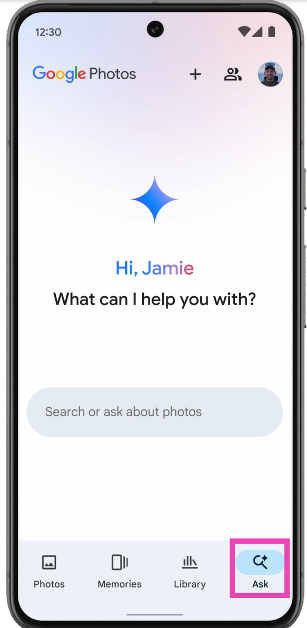
Step 2: Tap the Ask tab at the bottom right corner of the screen.

Step 2: Tap the Ask tab at the bottom right corner of the screen.

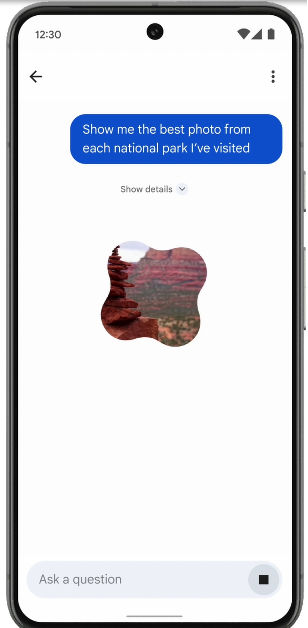
Step 3: Enter your prompt in the text field. For example, you can ask Gemini to compile pictures from a recent trip, pictures with your pets in them, pictures in which you’re wearing a red shirt and more things along those lines.

Step 3: Enter your prompt in the text field. For example, you can ask Gemini to compile pictures from a recent trip, pictures with your pets in them, pictures in which you’re wearing a red shirt and more things along those lines.

Step 4: Gemini AI will take a few seconds to go through your photo gallery and come up with relevant results.

Step 4: Gemini AI will take a few seconds to go through your photo gallery and come up with relevant results.

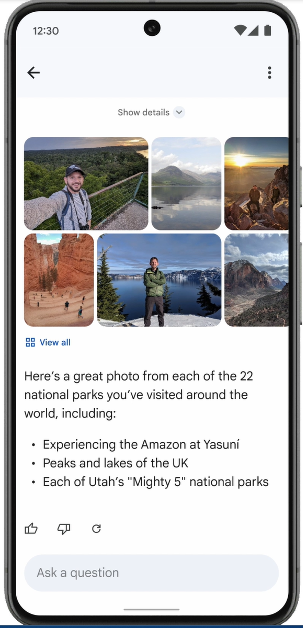
Step 5: Tap on View all to see all the pictures related to your query.

Frequently Asked Questions (FAQs)

What is Ask Photos?

Ask Photos is a new AI-based experimental feature in the Photos app which uses prompts given by the user to return relevant images from the photo gallery.

Is Ask Photos available in Google Photos yet?

Ask Photos was announced at I/O 2024 and will be rolled out to Android devices in the coming weeks.

Does Google use Ask Photos data to train its AI model?

Google has confirmed that it does not use personal data from Ask Photos to train any regenerative AI model (including other Gemini AI models) outside of Google Photos.

Read Also: Top 3 Ways To Contact Amazon Customer Care (2024)

Conclusion

This is how you can use the Ask Photos feature in the Google Photos app. Google says this feature will be coming to Android devices this summer, which means the tech outfit will begin rolling it out in the coming weeks. What do you think of Ask Photos? Let us know in the comments!
Best laser printers under Rs 25,000 (2024)

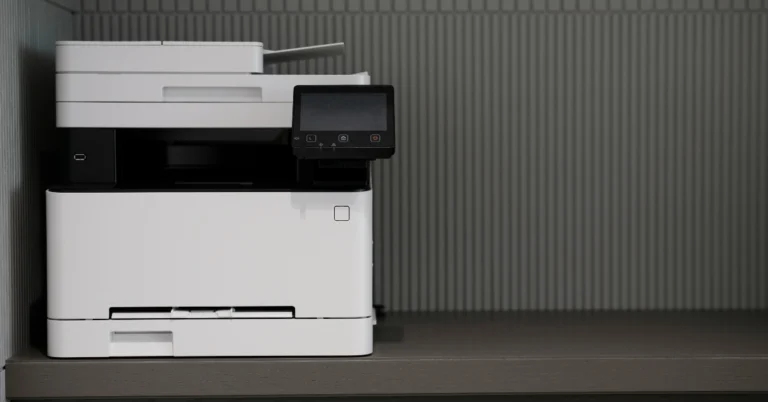
If you’re looking for a high-performing printer that can meet the copying, printing, and scanning demands of a small office, then you should certainly consider buying a laser printer. A laser printer can save you a considerable amount of money in the long run and its quiet functioning makes it ideal for office use. While going through the options, comparing the speed, resolution, and connectivity options for different printers can be very tedious. So, here are our picks for the best laser printers under Rs 25,000 in India right now.

Read Also: Canon Is Developing EOS R1, A Flagship Model For The EOS R SYSTEM

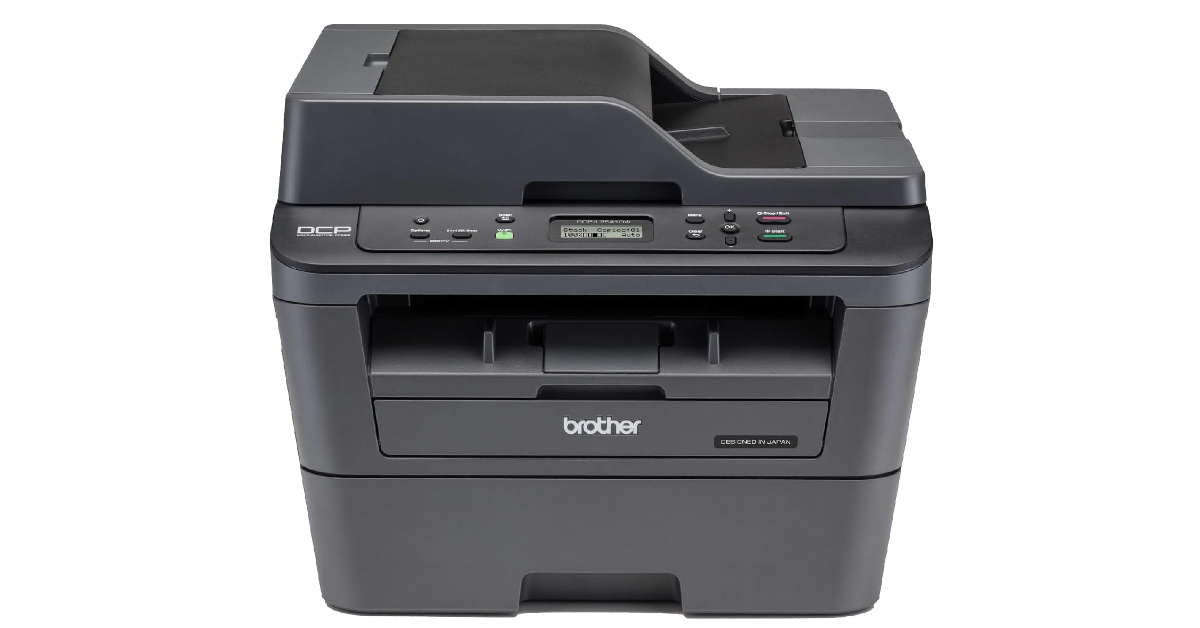
Brother DCP-L2541DW

Price: Rs 23,490 on Amazon

Brother DCP-L2541DW

The DCP-L2541DW wireless laser printer from Brother has a maximum print speed of 30 pages per minute and a print resolution of 600 x 600 dpi (monochrome). Being a network printer, it is ideal for home, office, and enterprise use. Connectivity options include Hi-Speed USB 2.0, Ethernet 10Base-T/100Base-TX, Wireless LAN IEEE 802.11b/g/n (Infrastructure/Ad-hoc Mode), and IEEE 802.11g/n (Wi-Fi Direct).

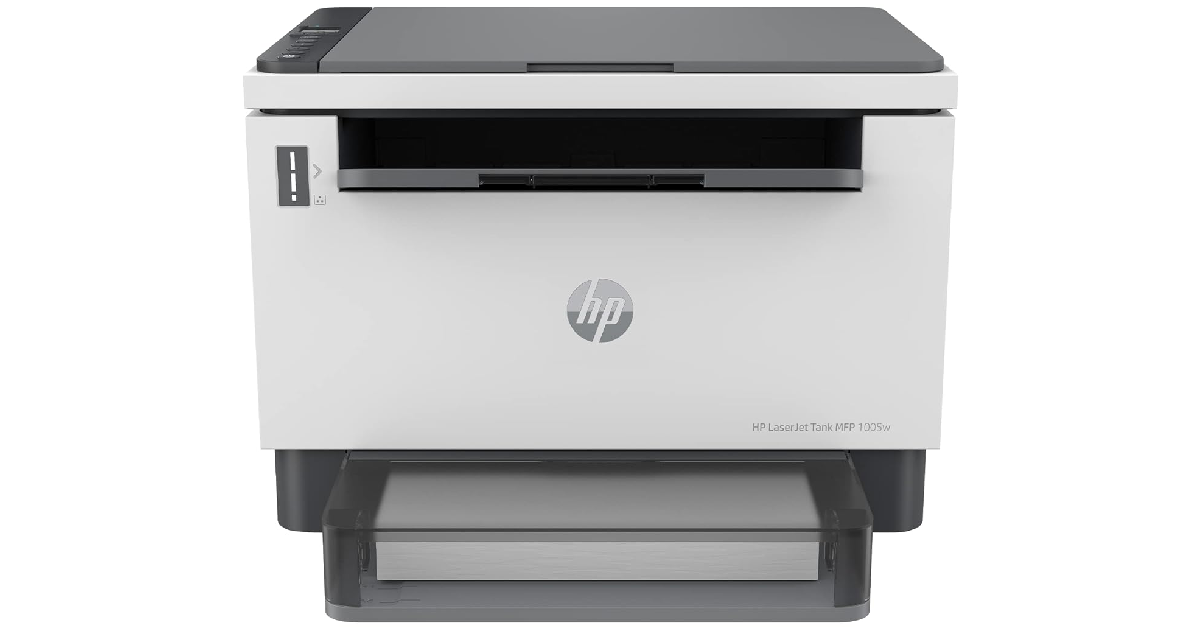
HP LaserJet Tank MFP 1005w

Price: Rs 20,401 on Amazon

HP LaserJet Tank 1005w

The LaserJet Tank 1005w is a low-maintenance printer from HP that is ideal for home as well as office usage. The printer can connect with your device(s) using High-Speed USB 2.0, WiFi, and Bluetooth LE. It has a quick printing speed of 22 pages per minute. Its flatbed scanner allows users to scan any document easily. The LaserJet Tank 1005w has a duty cycle of up to 25,000 pages and a maximum input capacity of 150 sheets. Here is our review of the MFP 1005w.

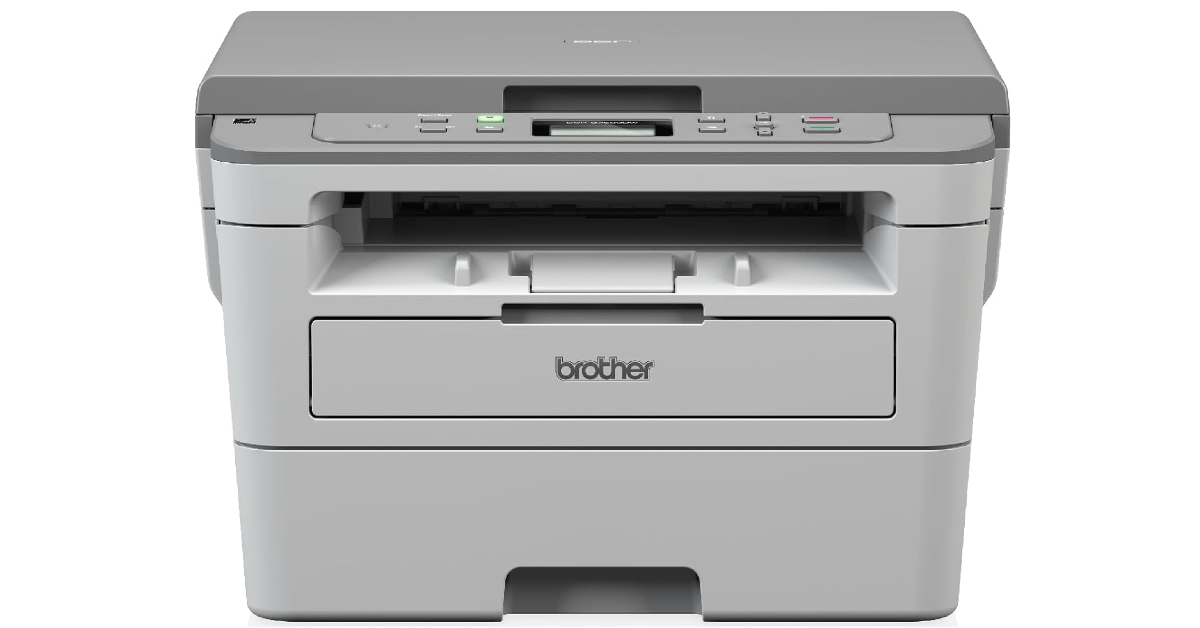
Brother DCP-B7500D

Price: Rs 16,899 on Amazon

Brother DCP-B7500D

The Brother DCP-B7500D has an impressive paper tray with a capacity of 250 pages. This laser printer can carry out basic functions like printing, copying, and scanning. It has a print speed of 36 pages per minute (letter size) and 34 pages per minute (A4 size). The printer can accommodate A4, Letter, A5, A5(Long Edge), A6, Executive, Legal, Folio, Mexico Legal, and India Folio sizes. The print resolution of 1,200 x 1,200 dpi is impressive as well.

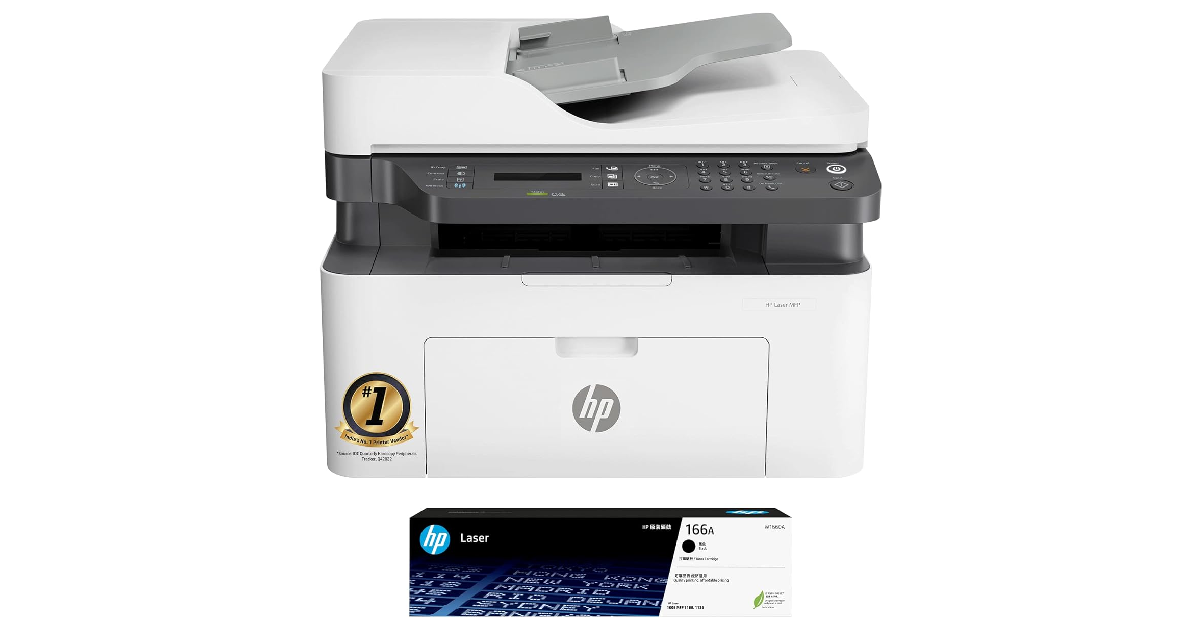
HP Laser MFP 1188fnw

Price: Rs 19,999 on Amazon

HP Laser MFP 1188fnw Best laser printers under Rs 25,000 (2024)

The HP Laser MFP 1188fnw wireless printer supports print, copy, scan, and fax functions. Connectivity options for this printer include Wi-Fi, Ethernet, and 2 Hi-Speed USB 2.0. It has a duty cycle of up to 10,000 pages. The MFP 1188fnw can print at a speed of 21 pages per minute and has a print resolution of 1,200 x 1,200 dpi. Scanning tasks on this printer are carried out with the Contact Image Sensor which has an enhanced scanning resolution of up to 4,800 x 4,800 dpi.

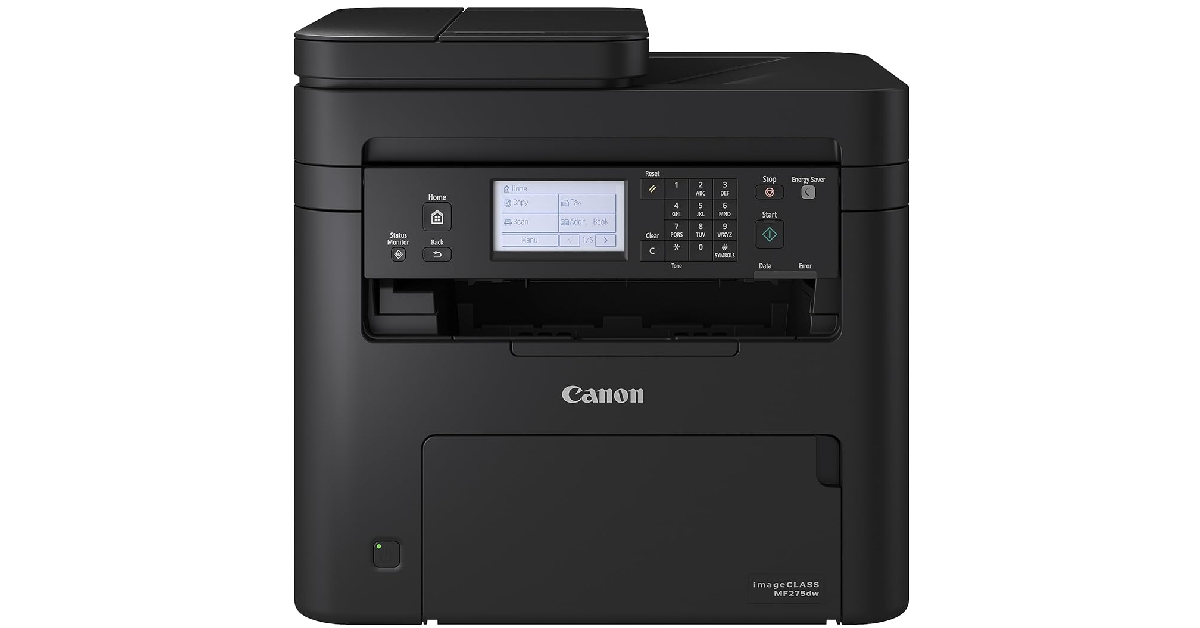
Canon imageCLASS MF275dw

Price: Rs 25,899 on Amazon

Canon imageCLASS MF275dw Best laser printers under Rs 25,000 (2024)

The Canon imageCLASS MF275dw is priced at just over Rs 25,000 but it is one of the best laser printers you can buy right now. This printer supports 4-in-1 functions: print, scan, copy, and fax. The 9.3cm (6-line) LCD touchscreen makes it easy to navigate the controls of the device. The MF275dw has a print speed of 29 pages per minute and a maximum print resolution of 600 x 600 dpi. It supports A4, B5, A5, A6, Letter, Legal, Statement, Executive, Government Letter, Government Legal, Foolscap, Indian Legal, Index Card, and Envelope page sizes. The recommended monthly print volume for this printer lies in the 150 – 2,000 pages range.

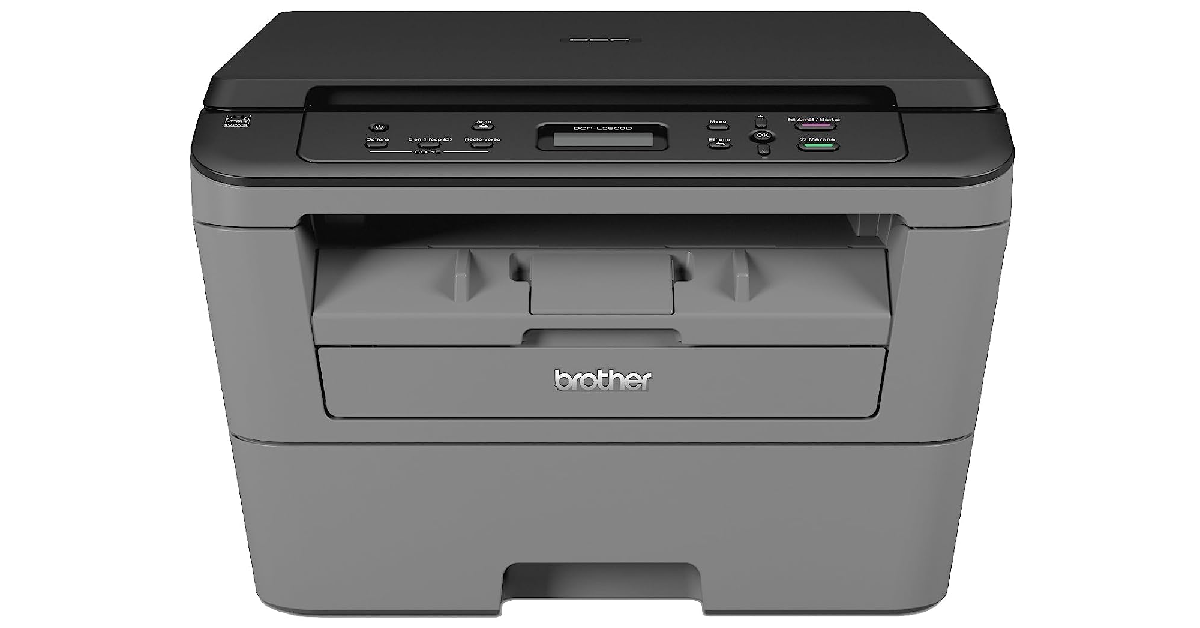
Brother DCP-L2520D

Price: Rs 17,399 on Amazon

Brother DCP-L2520D Best laser printers under Rs 25,000 (2024)

The Brother DCP-L2520D is one of the best multifunction laser printers you can buy under Rs 25,000 right now. This monochrome printer supports 3 important functionalities: print, scan, and copy. It has a print speed of up to 26 pages per minute and a print resolution of 2,400 x 600 dpi. Connectivity options for this printer are limited to Hi-Speed USB 2.0. The DCP-L2520D has dimensions of 409 mm × 398.5 mm × 267 mm, which makes it suitable for home as well as office use.

Read Also: Gemini-powered Ask Photos feature makes Google Photos smarter

Conclusion

These are the best laser printers you can buy in India right now. While buying a printer, you should take the device’s longevity and performance into account. If a printer yields better results in the long run, paying a small premium for it is justified.

Canon Is Developing EOS R1, A Flagship Model For The EOS R SYSTEM

0

Key Highlights

  • The EOS R1 is designed for professionals, offering enhanced still image and video capabilities.
  • The new image processing system with deep learning technology improves high-speed, high-accuracy subject recognition and tracking.
  • Advanced noise reduction technology enhances image quality, supporting creativity even in challenging conditions.

Canon Inc. has announced the development of the EOS R1, a full-frame mirrorless camera that will be the first flagship model for the EOS R SYSTEM. This camera, designed with RF mounts, is set to release in 2024 and aims to deliver top-tier performance and reliability for professional photographers and videographers.

Advanced Features for Professionals

The EOS R1 is engineered for professionals, incorporating Canon’s latest technology to enhance both still image and video performance. It is designed to meet the rigorous demands of fields such as sports, news reporting, and video production. The camera features the newly developed DIGIC Accelerator image processor, which works alongside the existing DIGIC X processor. This new image processing system, combined with a new CMOS sensor, allows for high-speed data processing and significant improvements in Auto Focus (AF) and other functions.

Read Only: Canon introduces full production version of EOS Webcam Utility

Innovative Image Processing System

Canon has integrated deep learning technology with the new image processing system to achieve high-speed and high-accuracy subject recognition. This results in improved subject tracking, even in complex scenarios like team sports where multiple subjects intersect. The AF “Action Priority” function enhances this capability by rapidly analyzing the subject’s status and adjusting the focus accordingly, ensuring critical moments are captured accurately.

Enhanced Image Quality

The EOS R1 also features advanced noise reduction technology that has been refined from Canon’s software for PCs and implemented as a camera function. This enhancement contributes to improved image quality and supports user creativity by reducing image noise, even in challenging lighting conditions.

Read Also: Canon EOS M6 Mark II rumoured specifications leaked online

Field Testing and Future Developments

Canon is currently conducting field tests of the EOS R1 and plans to support photographers at upcoming international sporting events. The company remains committed to expanding the EOS R SYSTEM lineup, including new cameras and RF lenses, to meet the diverse needs of users and further the development of photography and video culture.

Stay tuned for more updates on the EOS R1 and other exciting products from Canon as they continue to innovate and lead in the field of imaging technology.

Gemini-powered Ask Photos feature makes Google Photos smarter

Google is pushing things to the next level with the integration of Gemini into Google Photos. With the introduction of Ask Photos, it will make it easier for you to look for a specific memory or recall information included in your gallery.

“Ask Photos can help you search your memories more deeply. For example, you might be reminiscing about your daughter Lucia’s early milestones. Now, you can ask Photos: “When did Lucia learn to swim?”” Google’s head Sundar Pichai explained.

You can ask basic questions using Ask Photos, such as “Show me the best photo from each national park I’ve visited.” Google Photos can save you time and scrolling by displaying the information you need.

Also Read: Google is integrating Gemini straight into the Android OS, and more features unveiled

Taking advantage of Gemini’s multimodal capabilities, Ask Photos helps users remember crucial details and better capture memories by understanding the context and subject of photos. Therefore this will allow users to extract details like location, themes, and decorations. For example, you can ask questions about your life, like where you camped last year or when your vouchers expire.

“You can ask: “What themes have we had for Lena’s birthday parties?”. Ask Photos will understand details, like what decorations are in the background or on the birthday cake, to give you the answer,” Google explained.

Google Photos now simplifies tasks with Gemini models, such as creating trip highlights. Ask Photos suggests top pictures and personalised captions for easy sharing on social media, making it easier to manage and curate photos.’

According to Google after understanding your query, Ask Photos puts together a plan to find the answer. Along with identifying relevant keywords like places, people and dates it also conducts an advanced search on your behalf and delivers natural language concepts like “themed birthday party.”

Also Read: Google introduced a new AI model Gemini 1.5 Flash, upgrading Gemini 1.5 Pro

It then examines the search results and determines which appear to be what you’re looking for and which are the most relevant. Using the Gemini’s multimodal capabilities it can help understand exactly what’s happening in each photo and can even read text in the image if required. 

Google is integrating Gemini straight into the Android OS, and more features unveiled

On the first day of its yearly developer conference, Google I/O showcased new capabilities for Android phones. Although the firm did not reveal any features of Android 15 at the presentation, the next operating system is anticipated to be released later this year. Nonetheless, the company did reveal new features enabled by artificial intelligence (AI) and an impending significant operational update in the second half of 2024.

Google unveiled new AI-powered features for Android devices, such as an update to Circle to Search that lets students use LearnLM technology to ask for homework assistance directly from their phones and tablets. Circle to Search will be able to assist in the resolution of even more challenging problems including graphs, diagrams, and symbolic formulas later this year.

As of now this feature is limited to select Samsung phones and Pixel devices and Google is planning to bring the experience to more devices. “we’re on track to double that by the end of the year”

Also Read: Google introduced a new AI model Gemini 1.5 Flash, upgrading Gemini 1.5 Pro

Google is directly incorporating Gemini into Android. Later this year, with the introduction of Android 15 users will be able to use Gemini’s overlay on top of the app they are in to easily use Gemini in more ways. Users can ask questions relating to the image, video, or app that they are currently using.

For instance, you may click “Ask this video” to locate specific information in a YouTube video, or you can drag and drop created photos into Gmail, Google Messages, and other places.

Additionally, Gemini Nano will soon have full multimodal capabilities. Later this year, Google will launch its newest model, the Gemini Nano with Multimodality, in addition to the Pixel. This implies that in addition to processing text input, your phone will be able to understand more relevant information, such as spoken language, noises, and visuals. Gemini Nano’s multimodal capabilities will be added to TalkBack later this year. This will enable users who experience blindness or low vision to acquire fuller and more precise descriptions of what’s happening in an image. These descriptions come quickly and even function without a network connection because Gemini Nano is an on-device gadget.

To combat scam calls, Google is testing a new feature that leverages Gemini Nano to detect conversation patterns commonly associated with scams and deliver real-time alerts during a call. You will be alerted if a “bank representative” asks you to transfer money quickly, use a gift card to make a payment or provide personal information like passwords or card PINs —all of which are not normal demands from banks.