Poco X6 Review: Does it have the X factor?

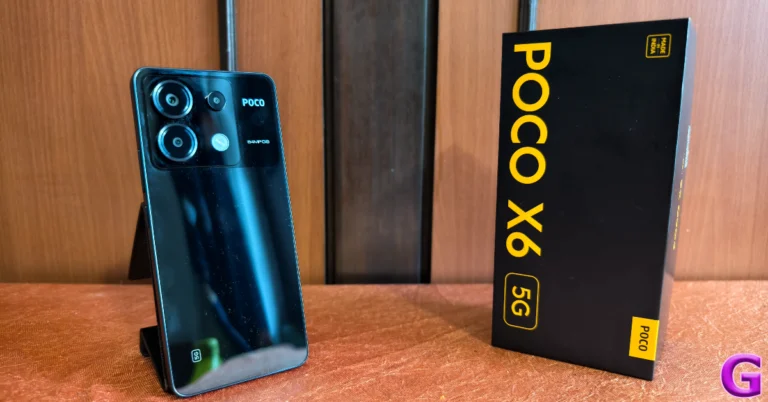
Last month, we reviewed the Poco X6 Pro and were highly impressed by its power-packed performance, clean design, and immaculate display. Now, we turn our attention to its non-Pro sibling, which is currently priced at Rs 22,000. There is a Rs 5,000 difference between the two variants. This brings up the most obvious question – is it worth paying the extra Rs 5,000 and going for the Pro variant? On paper, the biggest difference between the two smartphones is the chipset. The Poco X6 is powered by the Snapdragon 7 Gen 2 SoC while the Pro model houses MediaTek Dimensity 8300 Ultra. The latter proved to be a solid chipset that delivered a fast, snappy performance (read the full review here). Hoping to get a similar performance out of the Snapdragon chipset, we used the Poco X6 as our daily driver for a week – here is our review of the smartphone.

Read Also: Top 5 Ways to Set Different Notification Sounds for Apps on Android

Poco X6 review: Design and Display

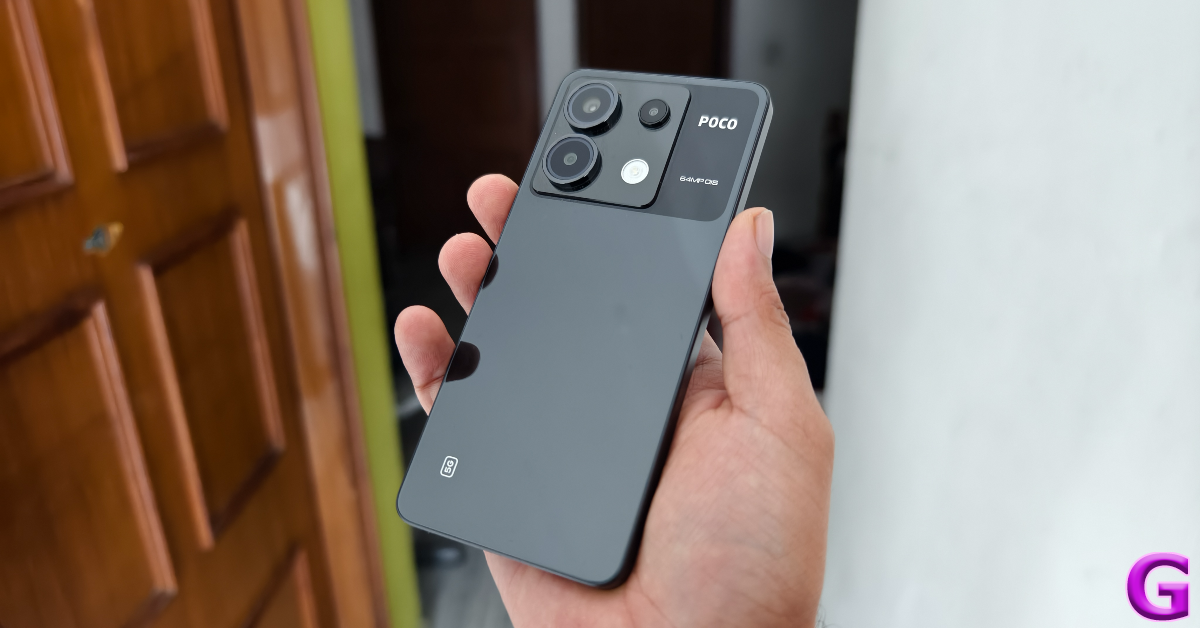
Inside the Poco X6 retail package, you get the smartphone, a 67W power adapter, a USB Type-C cable, an opaque plastic cover, a SIM ejector tool, and a quick start guide. The smartphone is available in two colour variants – Mirror Black and Snowstorm White.
Poco X6 review: Design and Display

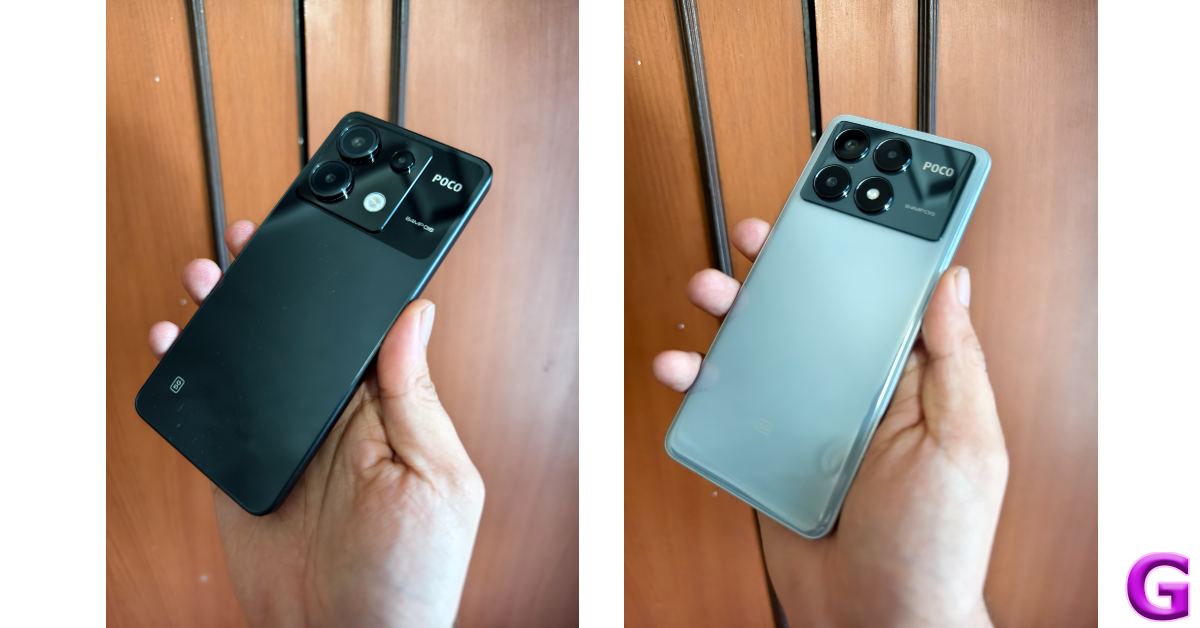
There are some key differences in the design of the two X6 variants. On the Pro model, the top portion of the back panel has a rectangular plastic panel for the camera module. The standard Poco X6 has a square panel. The Poco branding can be found to the right of this panel, surrounded by a black shade. The primary lens and ultrawide sensor are enclosed in big circular cutouts. The macro lens has a small plastic ring around it while the LED flash is integrated into the panel without a cutout.
design
Poco X6 vs Poco X6 Pro

We used the black colour variant of the Poco X6 for this review. The camera section of the rear panel is a darker shade of black. This dual-tone scheme on the Snowstorm White colour variant also looks very appealing. We liked the feel of the curved ‘glasstic’ back panel on the Pro variant, but the standard panel has a flat back which feels like ordinary plastic. It is extremely glossy and a fingerprint magnet like its elder sibling. The in-hand feel of the device is significantly diminished by the choice of materials and the flat design.
design

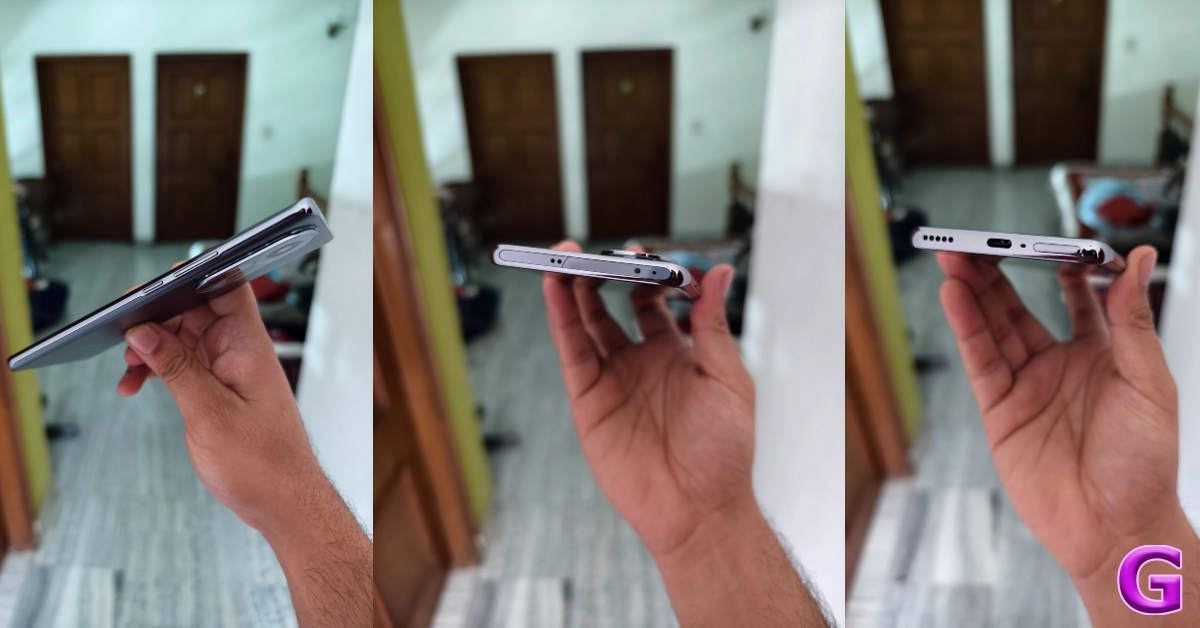
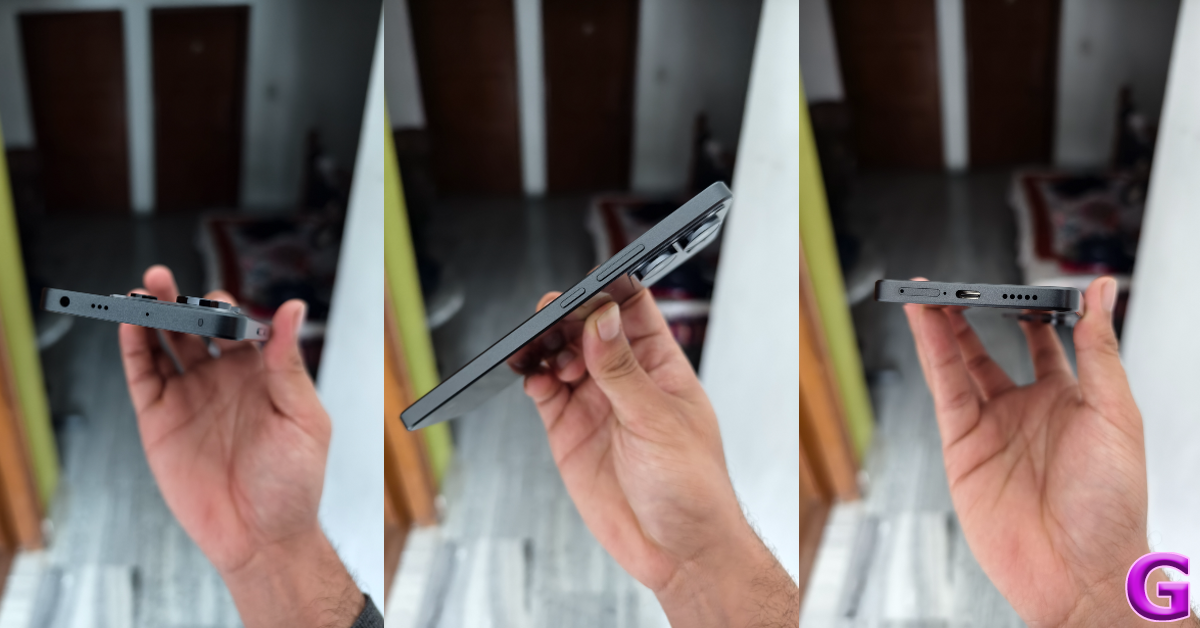
On the right edge of the plastic frame, you will find the volume rocker keys and the power button. The SIM tray, primary microphone, USB Type-C port, and primary speaker grille are located on the bottom edge. Up top lie the 3.5mm headphone jack (missing on the Pro variant), a secondary speaker grille, a secondary microphone, and an IR blaster.

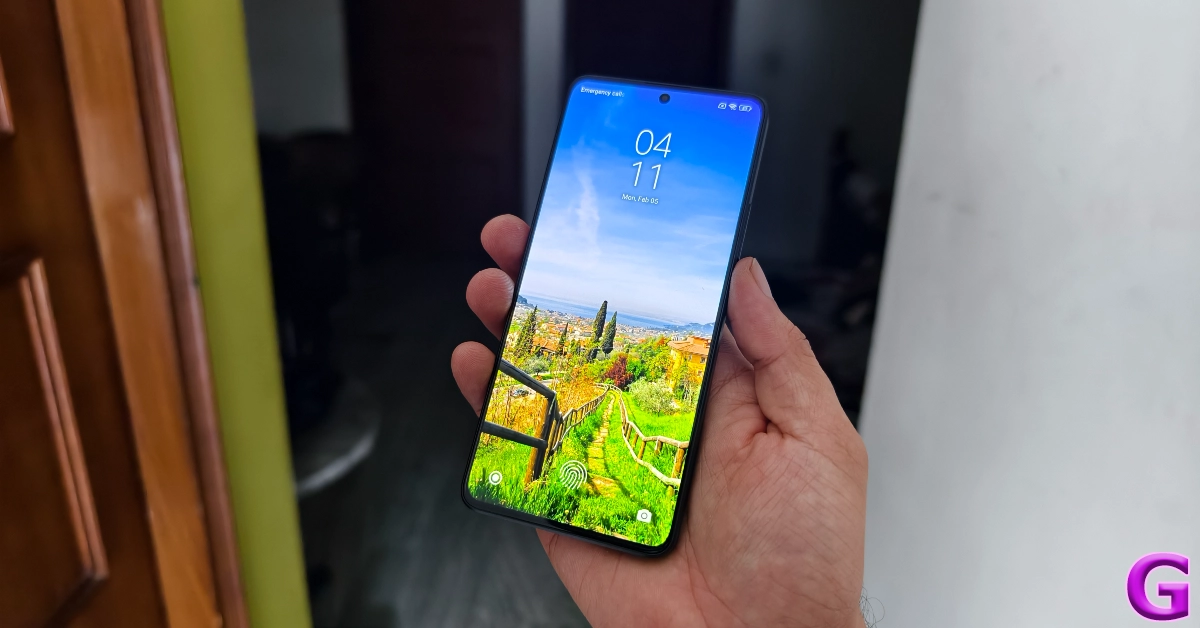
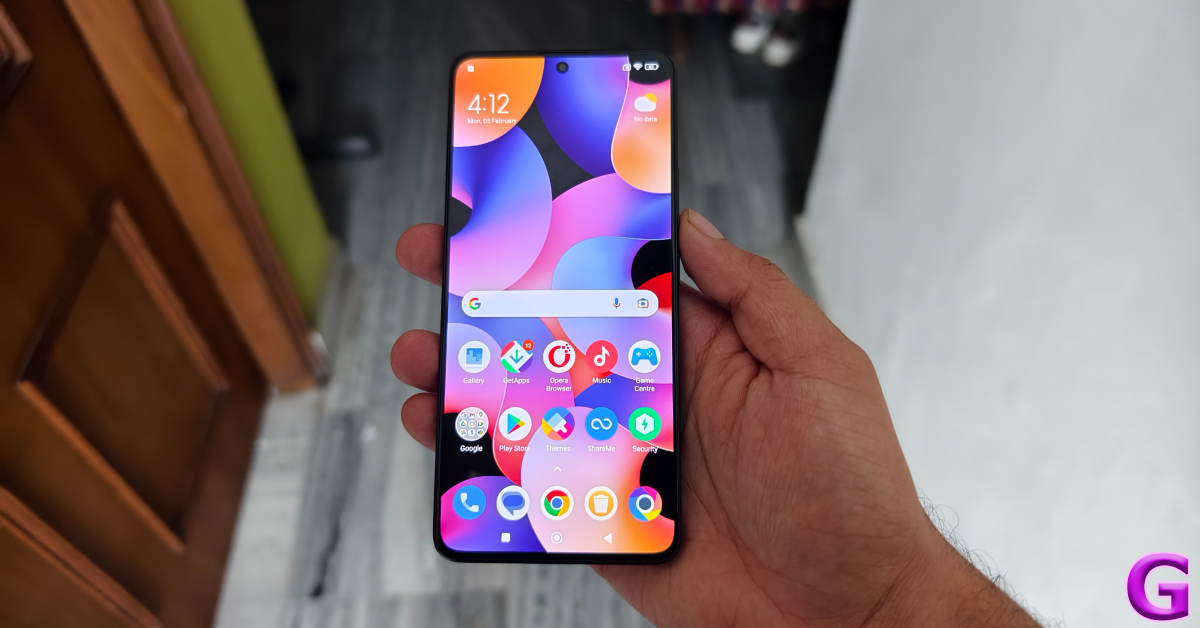
Moving on, the 6.67-inch AMOLED display on the Poco X6 is surrounded by slim bezels on all four sides. These bezels get every so slightly thicker at the top and the bottom. The selfie camera is housed in a punch-hole cutout at the centre of the display. In direct sunlight, this panel can reach a peak brightness of 1,800 nits, as claimed by Poco. We did not face any issues while using the phone outdoors. The display was legible and offered optimum brightness under different conditions.
Poco X6 review: Design and Display

The content viewing experience on the Poco X6 is also a delight. A screen resolution of 1,220 x 2,712p and Widevide L1 certification ensure that you can stream HD videos on the device across all the major OTT platforms. The colours produced by the display are vibrant and punchy. The images are bright and super detailed, leaving no stone unturned in bringing the ideal viewing experience. While the display has a maximum refresh rate of 120Hz, the media playback rate is capped at 60Hz.
display

An IP54 rating for dust and water resistance means the Poco X6 can handle minor splashes of water but may face damage upon submersion. We did use the smartphone under light rainfall, and it was completely unfazed.

Read Also: Google rolls out new generative AI features for Google Maps

Poco X6 review: Performance and Cameras

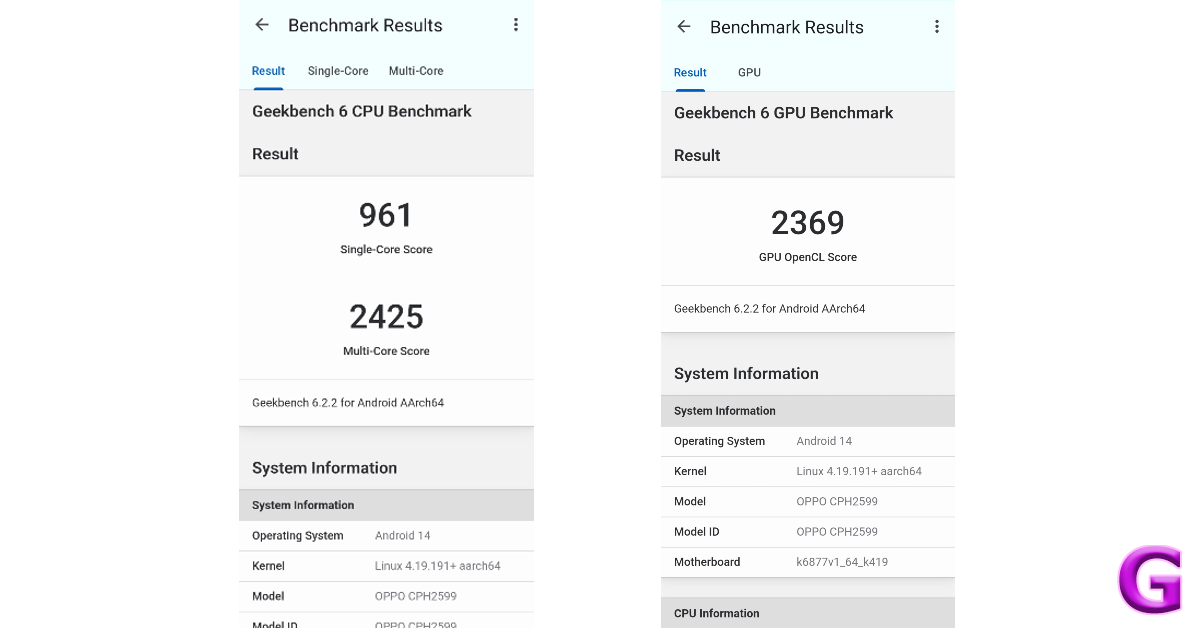
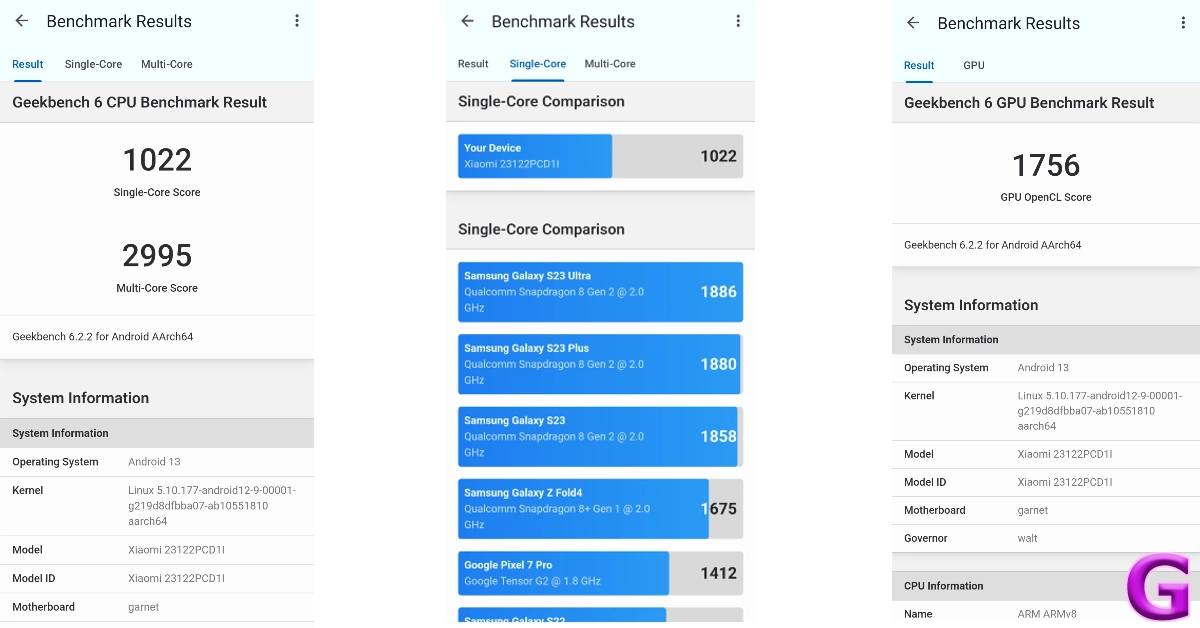
Under the hood, the Poco X6 packs the Snapdragon 7 Gen 2 SoC. It is available in two RAM and storage variants – 8GB + 256GB and 12GB + 512GB. The latter variant is priced at Rs 25,000. In the Geekbench 6 app, the smartphone scored 1,022 points in the single-core test and 2,995 points in the multi-core test. In comparison, the Poco X6 Pro scored 1,445 and 4,506 points respectively.
Poco X6 review: Performance and Cameras

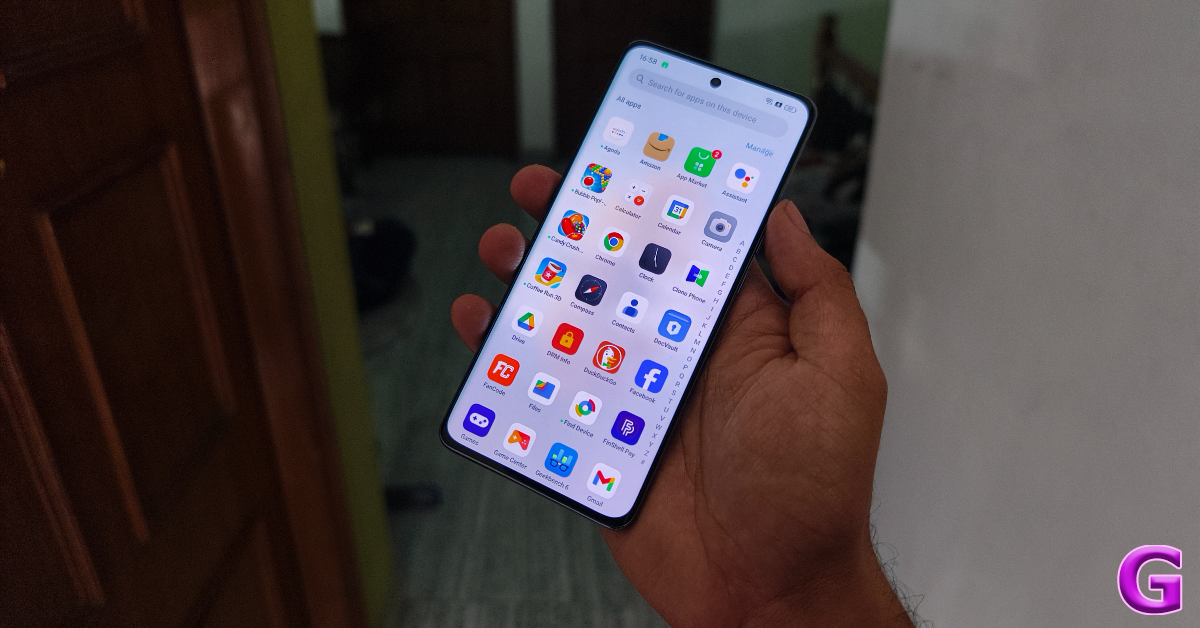
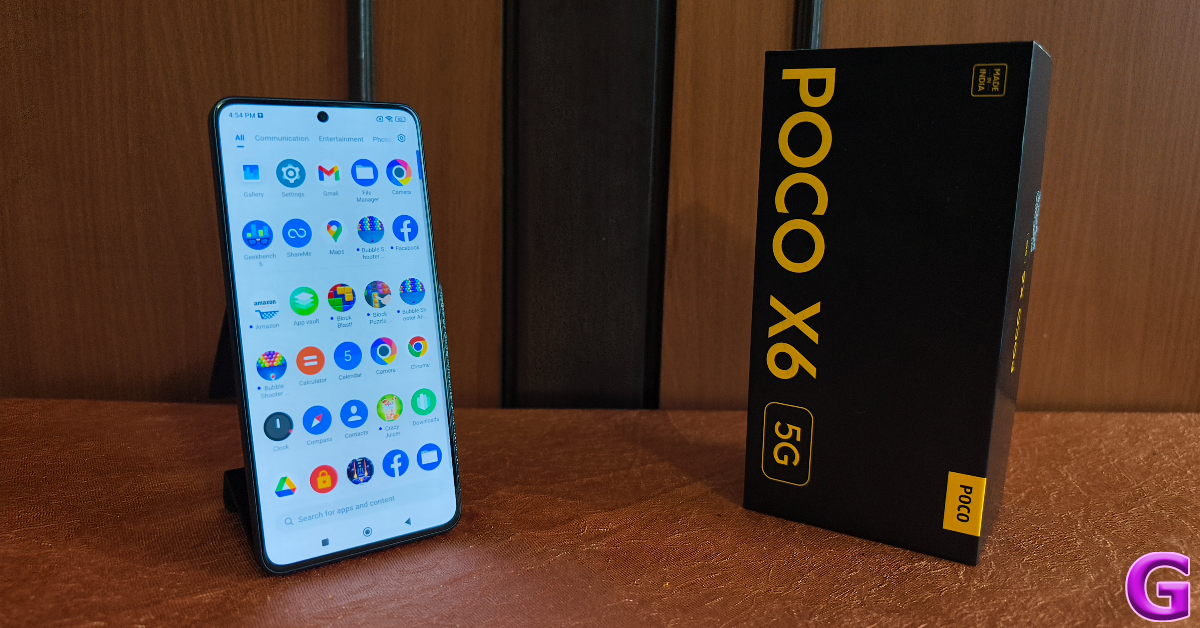
For daily usage, the Poco X6 is a decent smartphone. We did not face any issues with multitasking or other power-intensive tasks. However, the Pro variant is marginally faster than the regular model. Even though the difference is minimal, it is noticeable. We tried loading the same apps on the two smartphones and the Pro variant (which is powered by the MediaTek Dimensity 8300 Ultra) beat the Poco X6 every time. This is something we expected from the faster chipset.
 

performance

Taking the Pro model out of the picture, the Poco X6 is a fine smartphone in its segment. Its amazing display offers a very fluid touch reception, making it very easy to browse through the apps and stay on top of your tasks. This smooth experience is something we enjoyed a lot on the smartphone. Even with half a dozen apps open in the background, the X6 does not miss a step in performance.

We even tried a bit of gaming on the device and were pleasantly surprised by how well it handled titles like Call of Duty Mobile, BGMI, and EA Sports FC. After adjusting the graphics to a level below the highest settings, the gameplay was smooth and lag-free. There weren’t any unwanted jitters of any kind and the internal temperature of the smartphone did not rise to a concerning level even after 40 minutes of continuous gameplay.
Poco X6 review: Performance and Cameras

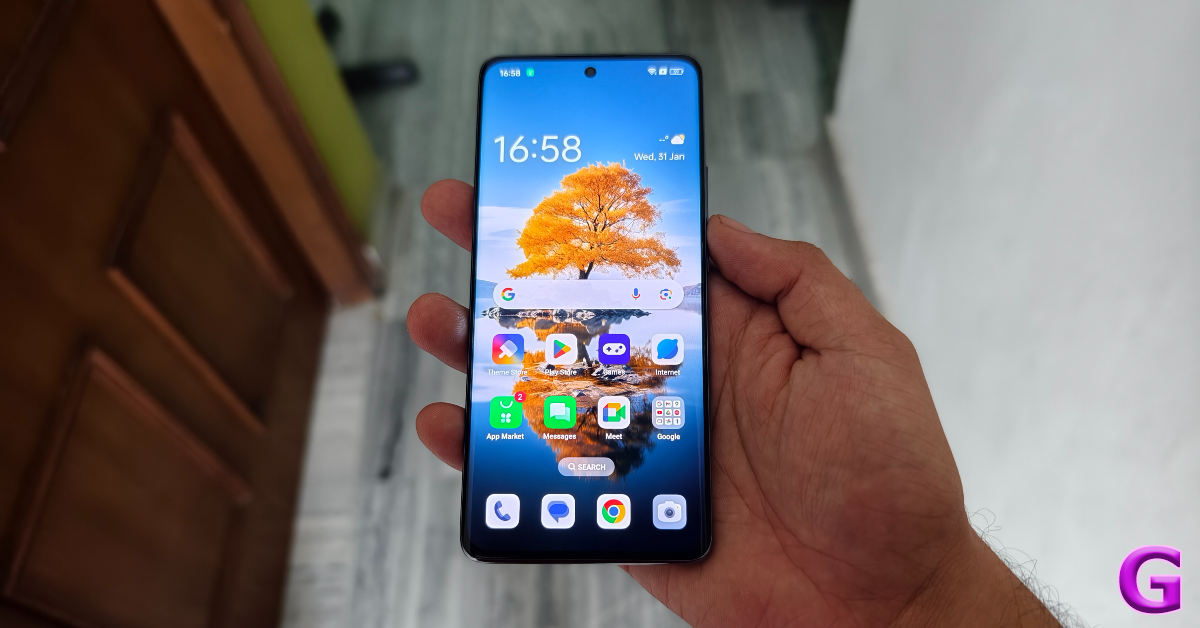
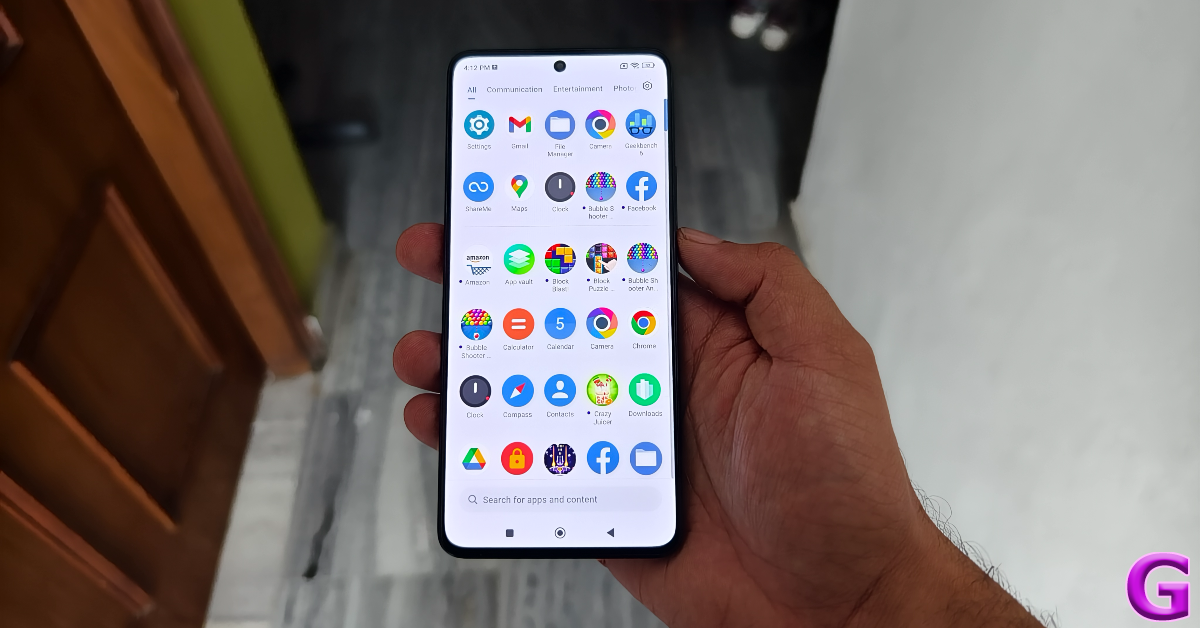
OS duties on Poco X6 are handled by MIUI 14. Its Pro sibling ships with HyperOS out of the box, which the standard model will also get in a future update. At the time of writing this review, HyperOS has not arrived for the X6 yet, but you can check out how it performed in our review of the Pro model. MIUI 14 is not our favourite Android skin, but there are certain aspects of the software experience where it rises among its peers. We like Xiaomi’s clever way of separating the notification shade and the quick settings menu. A swipe-down gesture from the left side of the screen pulls down the notification shades while a similar gesture from the right side reveals the quick setting menu. You can also swipe on either panel to access the other one.

MIUI 14 also has a decent set of customisation options, although they are much more refined on HyperOS. The lock screen layouts and customisation options are very limited on MIUI 14. But what we do like is the integration of the hidden apps folder in the app drawer. Swiping twice on the app drawer lets you access all the hidden apps. One of the bigger letdowns of the OS is the tremendous volume of bloatware that comes with it. You’ll need to set aside some time to delete all the apps you don’t need on your device.

The battery capacity of the X6 is slightly larger than the Pro model. The 5,100 mAh battery pack can be charged in under 50 minutes using the 67W power adapter provided in the box. During the review period, our daily usage consisted of tasks like instant messaging, voice and video calling, web browsing, navigation, media playback, and gaming, which left us with a 15-20% at the end of the day on the Poco X6.
Poco X6 review: Performance and Cameras

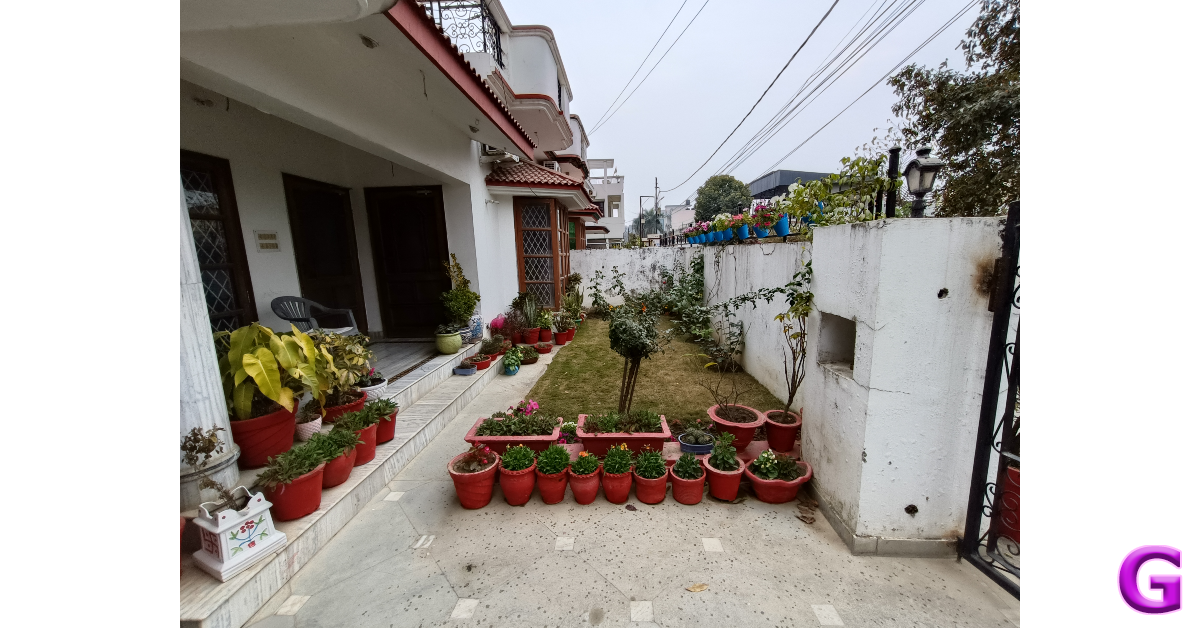
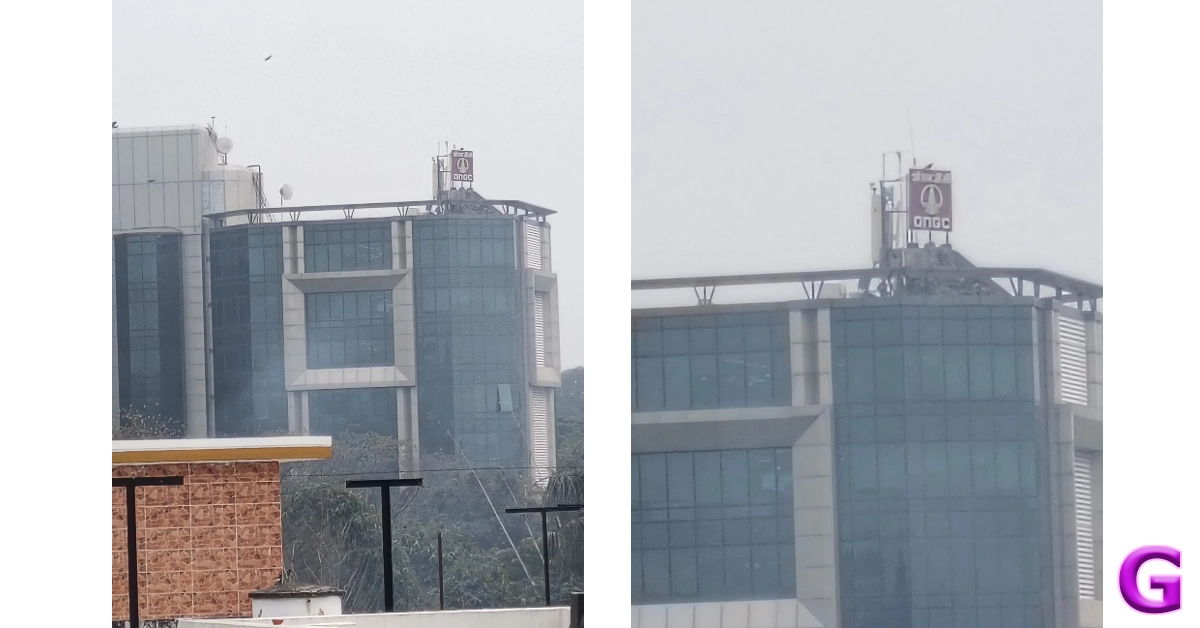
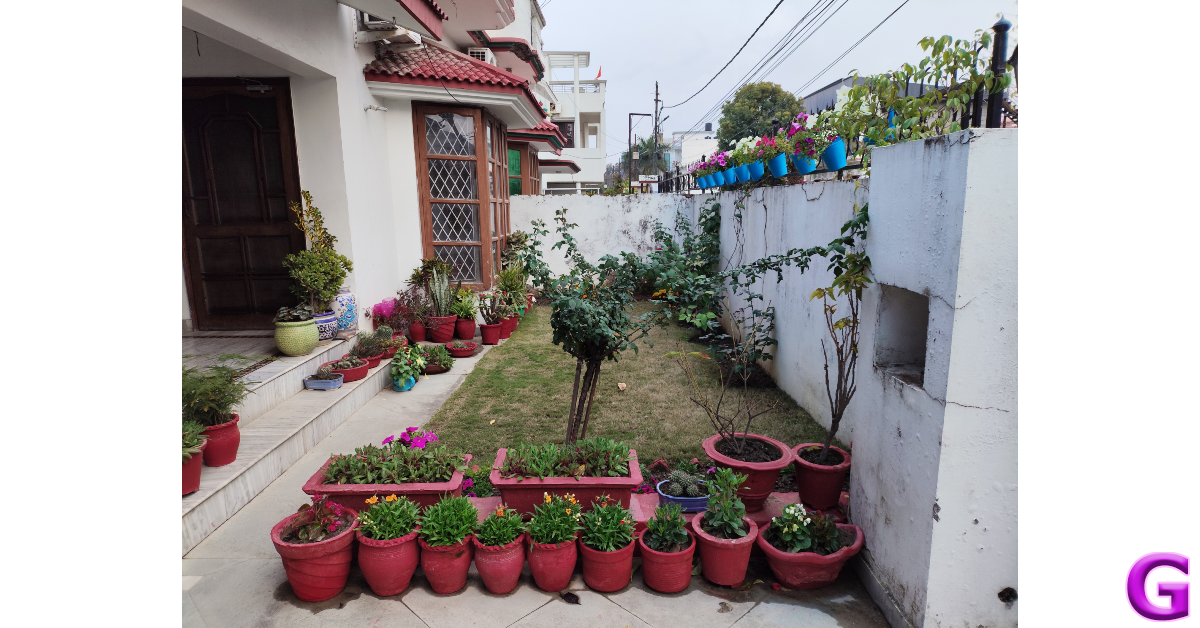
The rear camera panel on the Poco X6 houses a 64MP primary shooter, an 8MP ultrawide lens, and a 2MP macro lens. Images taken with the primary camera in outdoor daylight were vivid and detailed. We were happy with the depth and tone of the colours produced in the images. The dynamic range is close to ideal, and the phone does a good job of processing the contrast in the images. The quick shutter speed and efficient autofocus make the photography experience quite fun.

camera

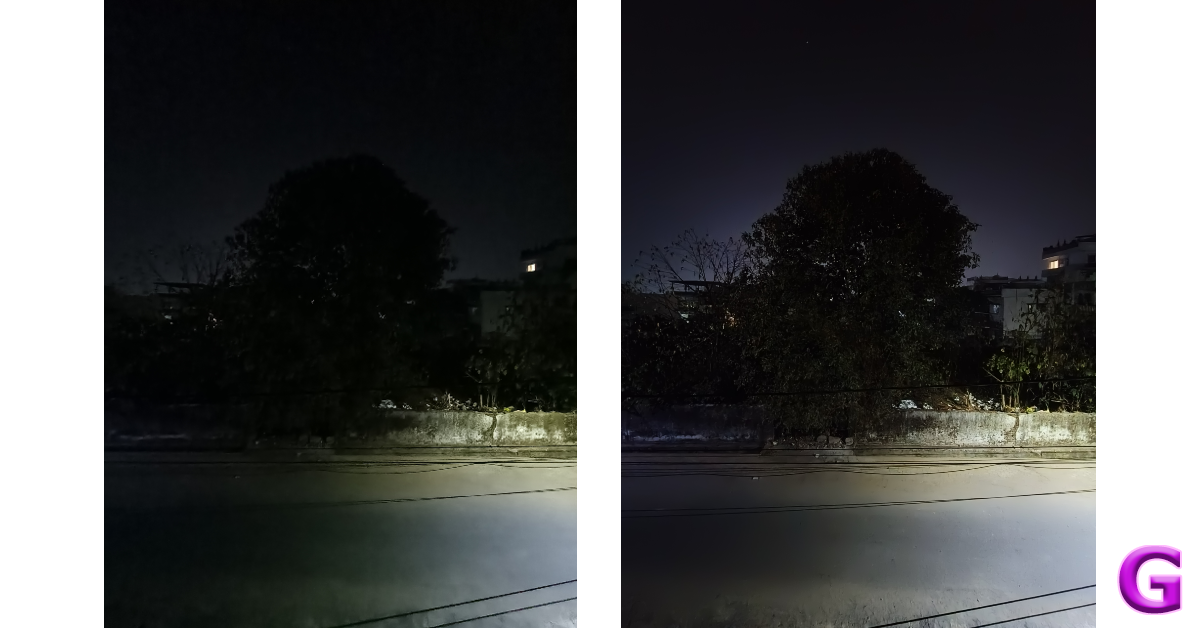
In low-light conditions, the pictures can be a hit or miss depending upon the intensity of surrounding light. The night mode does a decent job of limiting the grain and noise in the images, but it is far from ideal. What we can say about this smartphone is that you won’t hesitate to take it out to take pictures at night. The quality of pictures exceeds the baseline expectation one might have from a phone in this price range.

utrawide
Ultrawide shot

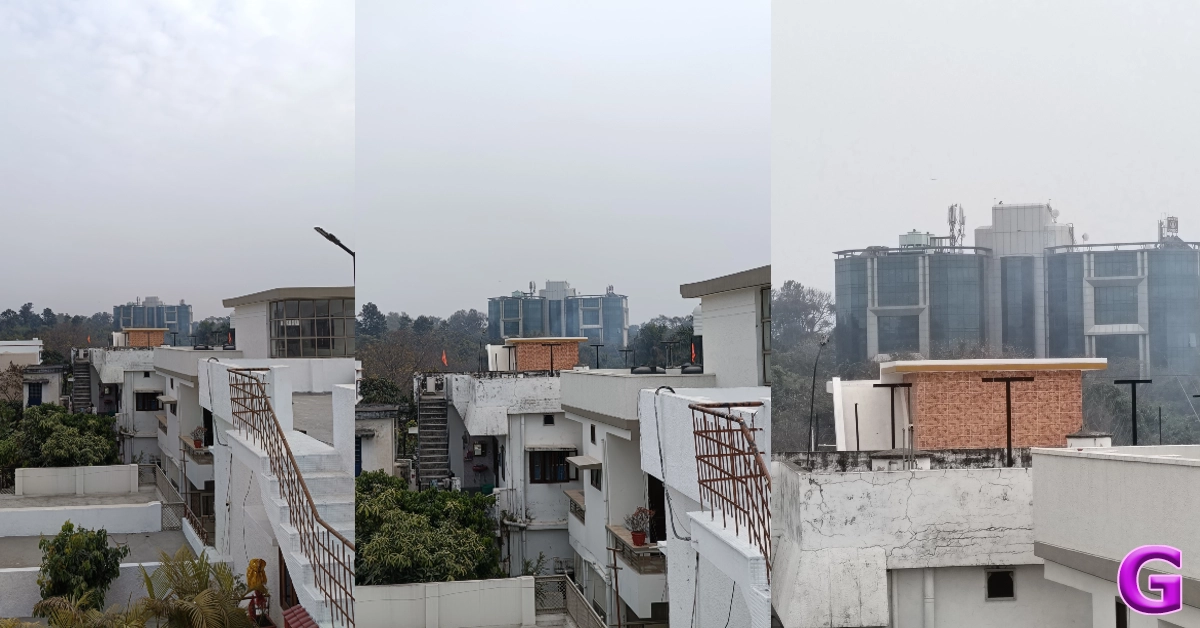
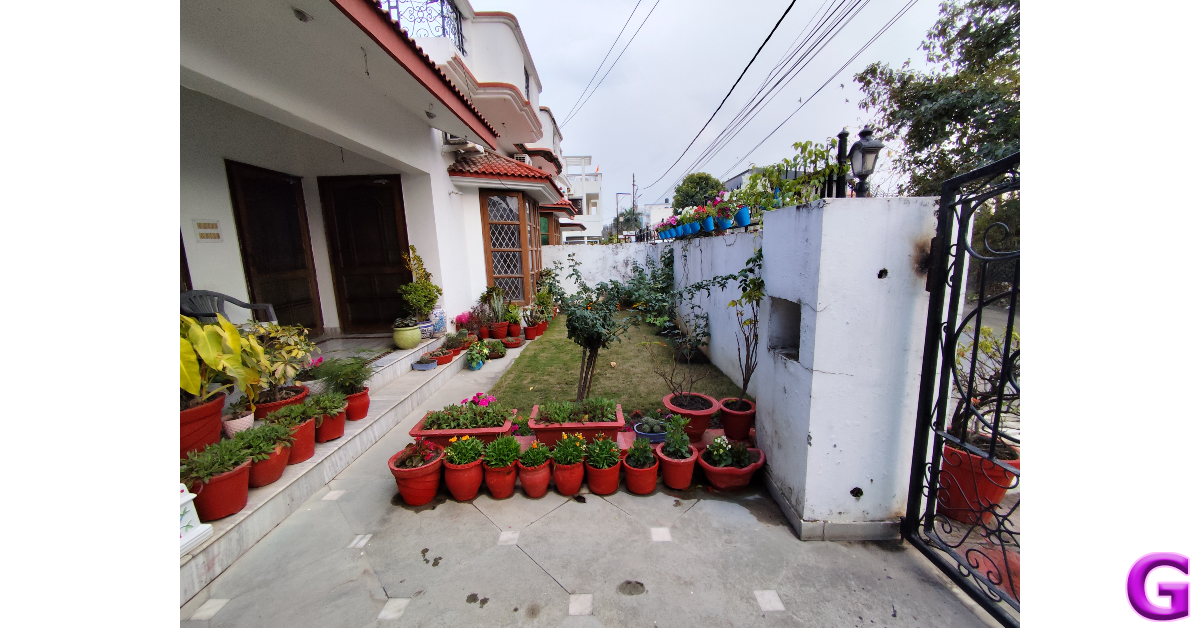
The ultrawide camera also produces good results in daylight conditions. While there is a little softness to the pictures, we like that the colours were tuned very well. Typically, ultrawide sensors in this price range produce washed images. That is not the case here. However, in limited lighting, we would suggest sticking with the primary sensor.
Poco X6 review: Performance and Cameras
Ultrawide shot

The camera app also has a Portrait Mode which produces good results. The camera does a good job of separating the subject from the background and applying the appropriate blur. The edge detection can be a hit or miss and you may have to take multiple shots before landing on the result you want.

Portrait mode
Portrait Mode

The 16MP selfie camera takes good images in optimum lighting. We would have preferred if the images were a little more detailed and sharper. The good thing is that the phone doesn’t overcorrect the skin tone of the subject. This front-facing camera can record 1080p videos at 30/60fps. Meanwhile, the primary camera at the back can record 4K videos at 30fps.

Read Also: Vivo Y200 5G now comes in a new 256GB storage variant: Price in India

Verdict

During our time with the device, Poco X6 proved to be a gritty performer that delivers on every front. Its stunning AMOLED display with ultra-slim bezels is great for watching video content across the board – be it movies or live sports. The Snapdragon 7 Gen 2 SoC handles everyday tasks without any hiccups. The primary camera is fun to play with, producing detailed images in a wide range of lighting conditions. At Rs 22,000 the X6 is a great deal. However, we can’t help but compare it to its Pro sibling. Splurging an extra Rs 5,000 fetches you a superior back panel and a snappier chipset, which is well worth the money.

Poco X6: Pros

  • Great display
  • Good primary camera
  • Crushes everyday tasks

Poco X6: Cons

  • Macro lens doesn’t find a lot of use
  • Contains a lot of bloatware
Top 6 Ways to Set Different Notification Sounds for Apps on Android

0

One of the more underrated features of modern Android smartphones is notification management. Commercial apps are notorious for pushing promotional content disguised as notifications on your phone. Not only does this contribute to spam, but it can also be very distracting. What you can do is allow only certain categories of important notifications to filter through. If you want to focus on a particular task without being distracted, you can set up custom notification sounds for the most important apps on your phone. This makes it easier to ignore the notifications that don’t deserve your immediate attention. Today, we bring you the top 6 ways to set different notification sounds for apps on Android.

Read Also: How to use Google Bard’s new AI image generator?

Can I make my own notification tone?

The great thing about using an Android device is the level of control you get over every aspect of your device. Every Android phone has an alert tone library that you can use to customise the notification sounds of any app. On top of that, you can install a third-party app like Zedge to explore more tones. Most of the tones on Zedge are free to download. If you’ve got a melody or hook stuck in your head, you can record it and set it as a notification alert tone as well!

You can use the voice recorder app to capture a sample sound. If you want a cleaner cut, use a synthesiser or guitar simulator app to create the tone. Once the sample sound has been created, save it to your device’s library. To set it as a notification sound, you will need to edit it to the ideal length. You don’t want the alert tones on your phone to be longer than 2 seconds. Download the Ringtone Maker: Music Cutter app to trim the tone. Once it has been saved on your device, you can use it as a notification sound for any app on your device.

Set a different notification sound for apps using Settings

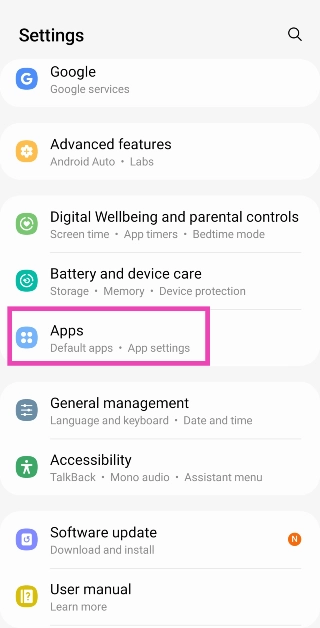
Step 1: Go to Settings and select Apps.

Step 1: Go to Settings and select Apps.

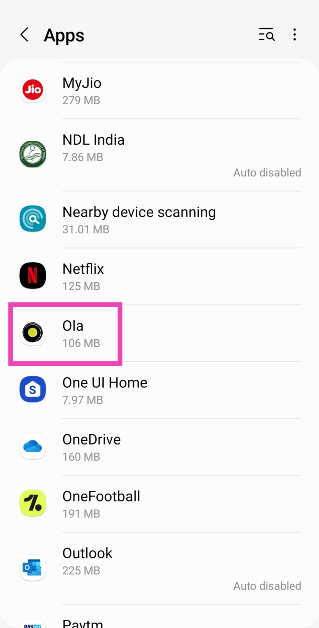
Step 2: Select the app for which you want to change the notification sound.

Step 2: Select the app for which you want to change the notification sound.

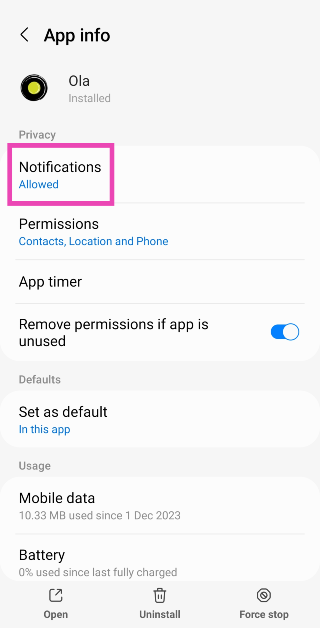
Step 3: Tap on Notifications.

Step 3: Tap on Notifications.

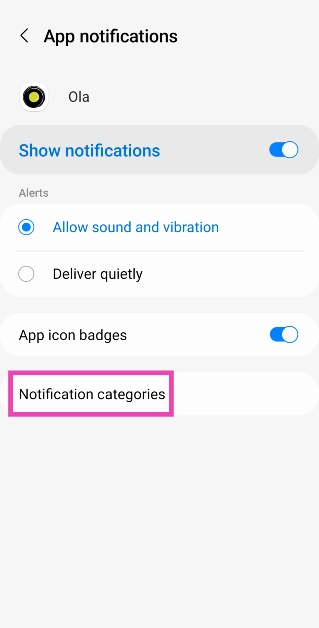
Step 4: Make sure the toggle switch for Show notifications is turned on and tap on Notification categories.

Step 4: Make sure the toggle switch for Show notifications is turned on and tap on Notification categories.

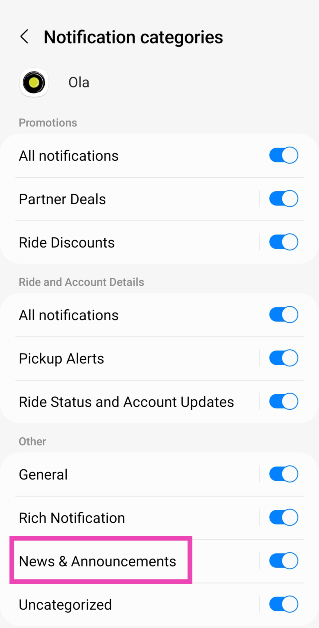
Step 5: Notification categories will contain the kinds of notifications that the app pushes on your device. For a messaging app, this may be incoming texts, group texts, incoming calls, and more. Tap on the category for which you want to change the notification sound.

Step 5: Notification categories will contain the kinds of notifications that the app pushes on your device. For a messaging app, this may be incoming texts, group texts, incoming calls, and more. Tap on the category for which you want to change the notification sound.

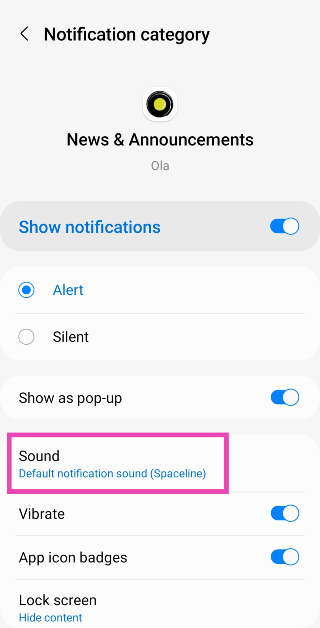
Step 6: Tap on Sound.

Step 6: Tap on Sound.

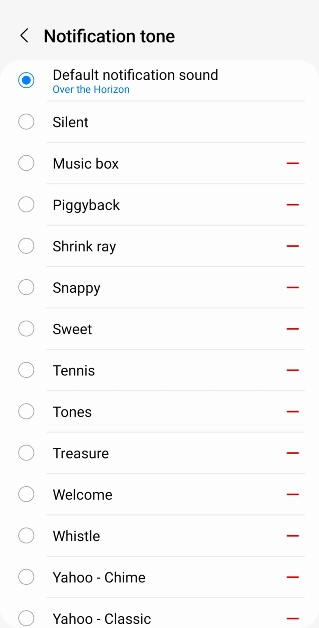
Step 7: Pick a tone from the list.

Step 5: Select a tone from the list. Similarly, you can change the notification sound for calls and group notifications.

Set a different notification sound for WhatsApp using in-app settings

Step 1: Launch WhatsApp and tap the ellipses at the top right corner of the screen.

Step 2: Hit the ellipses at the top right corner of the screen. How to share your WhatsApp Status on Instagram?

Step 2: Tap on Settings.

Step 3: Go to Settings. How to share your WhatsApp Status on Instagram?

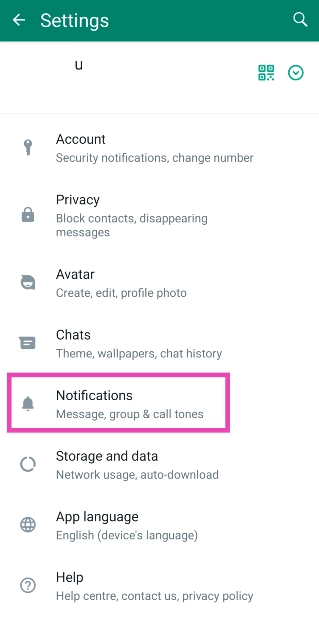
Step 3: Select Notifications.

Step 3: Select Notifications.

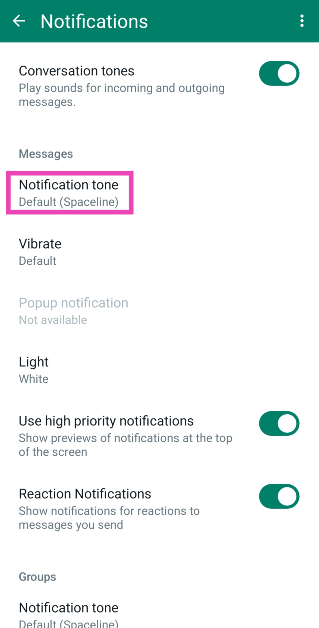
Step 4: Tap on Notification Tone under Messages.

Step 4: Tap on Notification Tone under Messages.

Step 5: Select a tone from the list. Similarly, you can change the notification sound for calls and group notifications.

Step 5: Select a tone from the list. Similarly, you can change the notification sound for calls and group notifications.

Set a different notification sound for Telegram using in-app settings

Step 1: Launch Telegram and tap the hamburger menu at the top left corner of the screen.

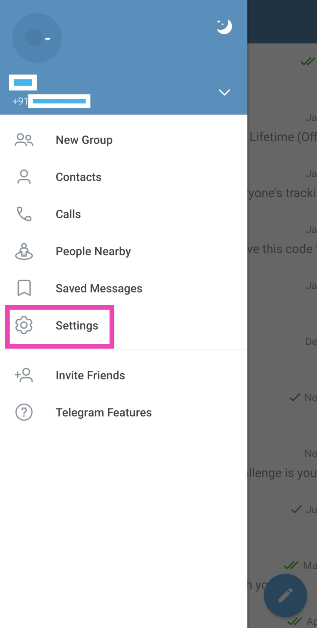
Step 2: Tap on Settings.

Step 2: Tap on Settings.

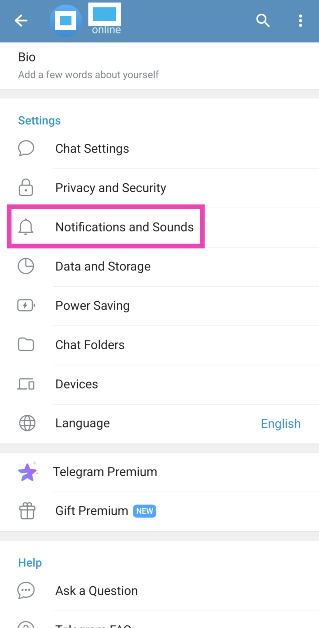
Step 3: Select Notifications and Sounds.

Step 3: Select Notifications and Sounds.

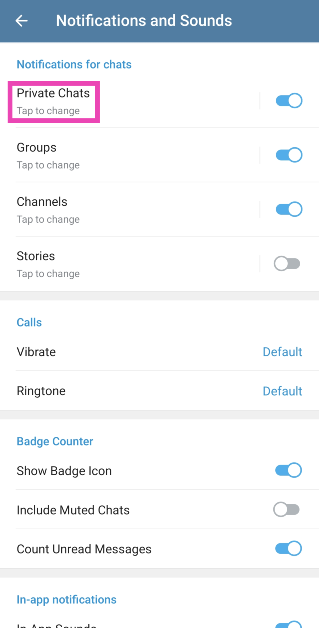
Step 4: Tap on the category for which you want to change the notification sound.

Step 4: Tap on the category for which you want to change the notification sound.

Step 5: Tap on Sound and select a tone.

Step 5: Tap on Sound and select a tone.

Change the default notification sound

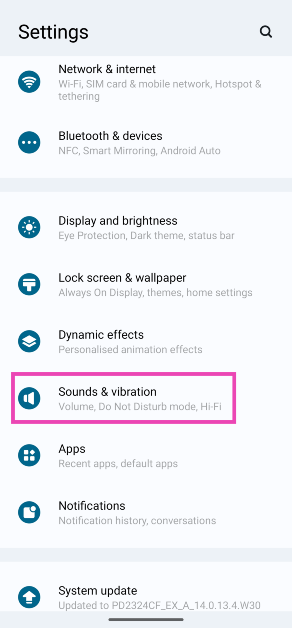
Step 1: Go to Settings and select Sounds and vibration.

Step 1: Go to Settings and select Sounds and vibration.

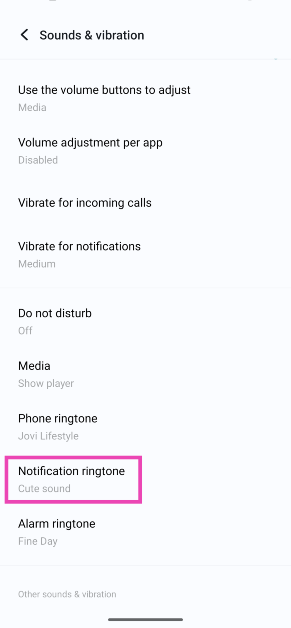
Step 2: Tap on Notification ringtone.

Step 2: Tap on Notification ringtone.

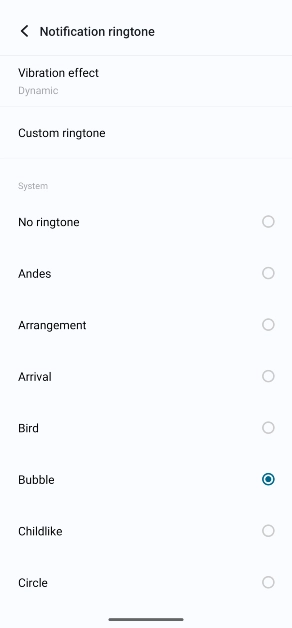
Step 3: Select a tone from the list.

Step 3: Select a tone from the list.

Set a different notification sound for Instagram using in-app settings

Step 1: Launch the Instagram app on your phone and go to your profile.

Step 1: Launch the Instagram app on your smartphone and tap your profile picture in the bottom right corner of the screen.

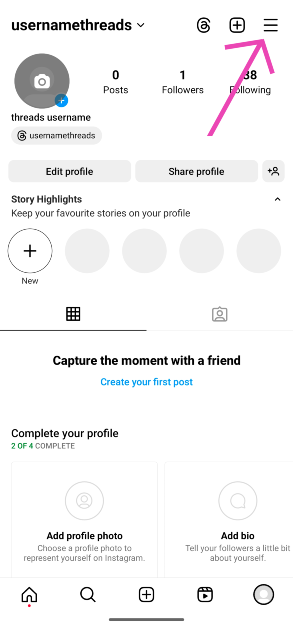
Step 2: Hit the hamburger menu in the top right corner of the screen.

Step 3: Hit the hamburger menu at the top left corner of the screen.

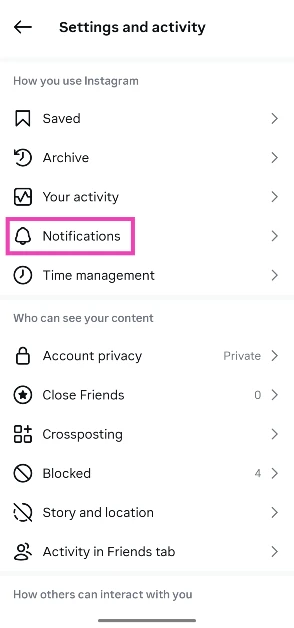
Step 3: Tap on Notifications.

Step 3: Tap on Notifications.

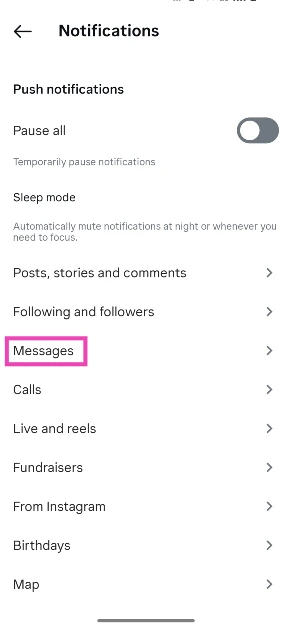
Step 4: Select a category.

Step 4: Select a category.

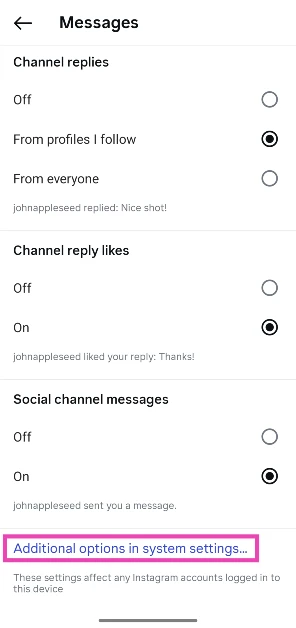
Step 5: Scroll down and select Additional options in system settings.

Step 5: Scroll down and select Additional options in system settings.

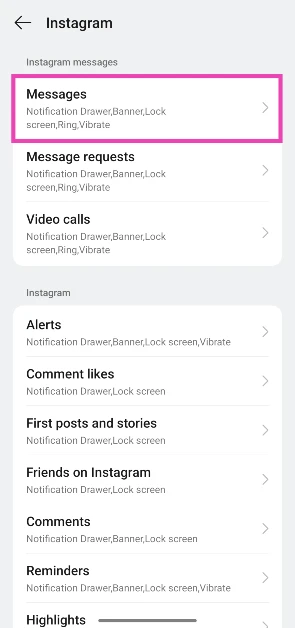
Step 6: Select the category again.

Step 6: Select the category again.

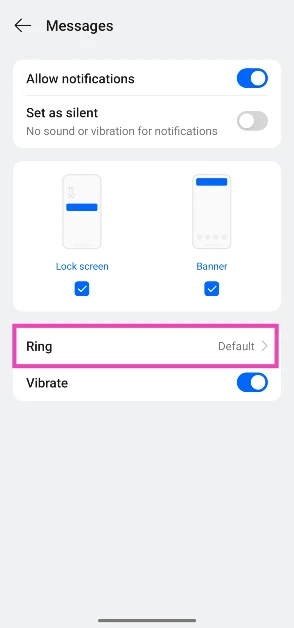
Step 7: Tap on Ring.

Step 7: Tap on Ring.

Step 8: Choose a ringtone.

Step 8: Choose a ringtone.

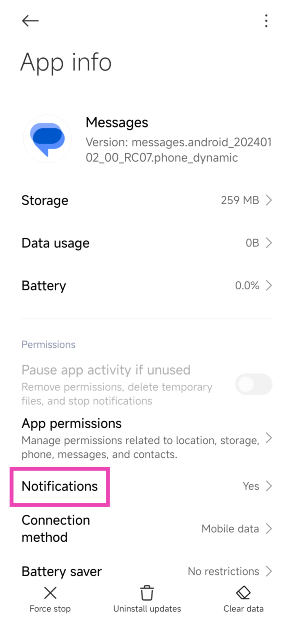
Bonus Tip: Set different app notification sounds on Xiaomi

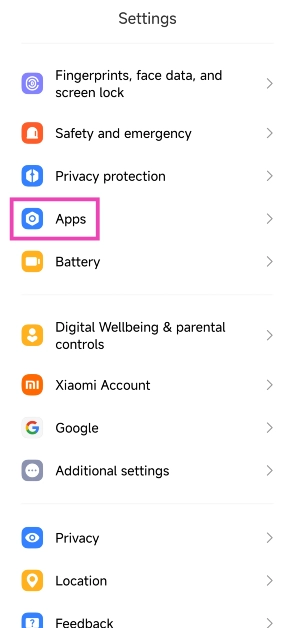
Step 1: Go to Settings and select Apps.

Step 1: Go to Settings and select Apps.

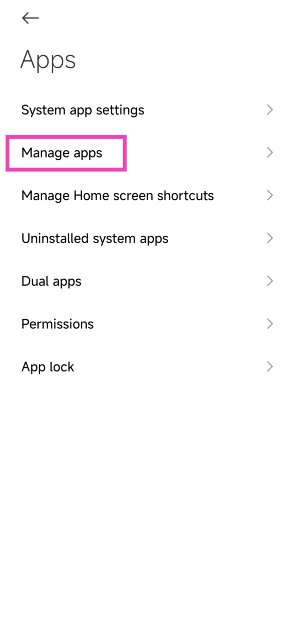
Step 2: Tap on Manage apps.

Step 2: Tap on Manage apps.

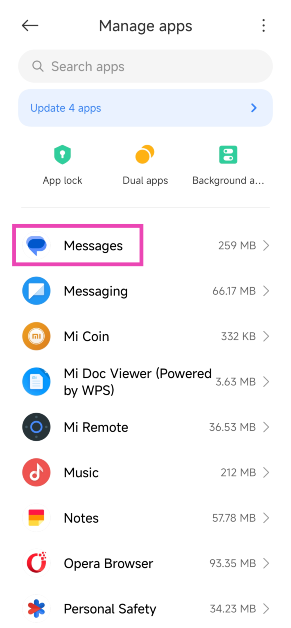
Step 3: Select the app for which you want to change the notification sound.

Step 3: Select the app for which you want to change the notification sound.

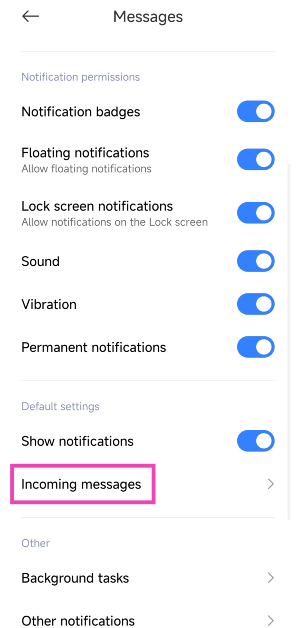
Step 4: Tap on Notifications.

Step 4: Tap on Notifications.

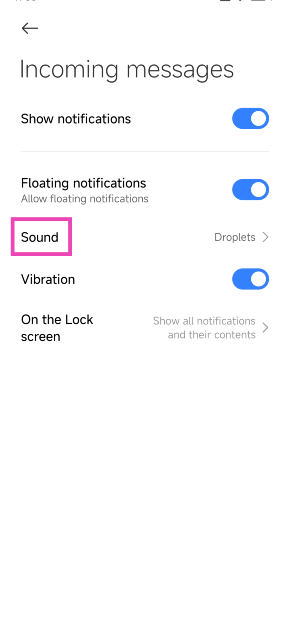
Step 5: Select the category for which you want to change the notification sound.

Step 5: Select the category for which you want to change the notification sound.

Step 6: Tap on Sound and select a tone.

Step 6: Tap on Sound and select a tone.

Frequently Asked Questions (FAQs)

How do I set up custom notifications for an app on Android?

Go to Settings>Apps and select the app for which you want to change the notification sound. Now, go to Notifications>Notification category and pick a type. Finally, hit ‘Sound’ and select a tone.

How do I assign a custom ringtone to a particular contact on my phone?

Go to contacts and tap on the name of the person for whom you want to set up a custom ringtone. Hit ‘Edit’ and tap on ‘View more’. Select the ringtone category and pick a tone.

How do I mute call notifications on WhatsApp?

Go to Settings>Apps>WhatsApp>Notifications>Notification categories and turn off the toggle switch for ‘Calls’.

Read Also: Infinix Smart 8 8GB RAM with 128GB storage option to launch soon in India

Conclusion

These are the top 6 ways to set different notification sounds for apps on Android. Every Android OEM has a specific set of unique tones that can be used across all third-party apps. If you want to expand your options, apps like Zedge contain vast libraries of ringtones, alert tones, and other notification tones to customise your phone. If you know any other way to change the notification sounds for an app on Android, let us know in the comments!

Vivo Y200 5G now comes in a new 256GB storage variant: Price in India

Key Highlights

  • Vivo Y200 5G is powered by the Snapdragon 4 Gen 1 SoC.
  • The phone includes a 4,800mAh battery.
  • The smartphone supports 44W fast charging.

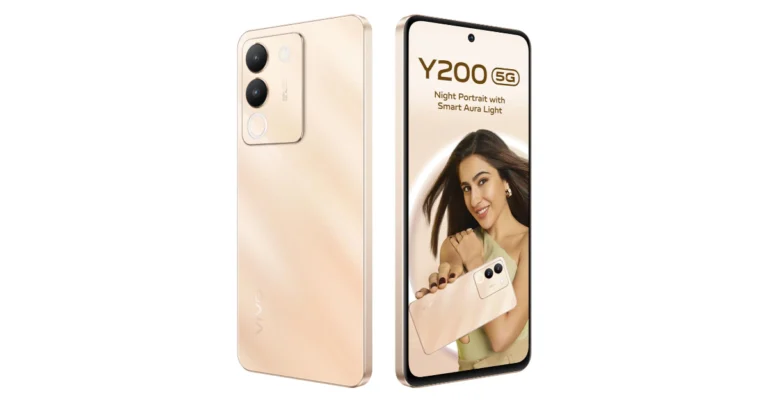
Vivo has released a new 256GB storage option for Vivo Y200 5G in India. The device was launched in October last year with a single RAM and storage option. The smartphone is powered by Snapdragon 4 Gen 1 SoC and runs on Funtouch OS 13 on Android 13. It features a 120Hz AMOLED display and a dual rear camera setup that includes a 64-megapixel sensor.

Vivo has recently introduced a new 8GB RAM with 256GB storage option for Vivo Y200 in India. The new configuration is priced at Rs 23,999. On the purchase of the 5G phone buyers can receive an instant cashback of Rs 2,000 if the transaction is made through SBI, IDFC First, Bank of Baroda, DBS Bank, Federal Bank, and IndusInd Bank cards.
The device was launched last year in October with a single 8GB RAM with 128GB storage priced at Rs 21,999. The device is available in two colour options Gold and Green. The device can be purchased via Amazon, and Vivo India e-store, and all partner retail stores.

Vivo has recently introduced a new 8GB RAM with 256GB storage option for Vivo Y200 in India. The new configuration is priced at Rs 23,999.

Vivo Y200 5G specifications

Vivo Y200 comes equipped with a 6nm Qualcomm Snapdragon 4 Gen processor paired with 8GB of LPDDR4X RAM and 256GB of UFS2.2 storage. The phone offers 8GB of additional RAM via the Extended RAM 3.0 feature that makes switching between apps faster and smoother.

The device features a 6.67-inch full-HD+ AMOLED display with 1,080×2,400 pixels of resolution that supports 120Hz Ultra Vision refresh rate and 900 nits of brightness. The front panel also comes with 394 ppi of pixel density. The device has a 7.69 mm ultra-slim body and weighs 190g.

Also Read: iQoo Neo 9 Pro pre-order details revealed, pre-reservations to start on February 8

Vivo Y200 5G has a dual rear camera setup that includes a 64-megapixel primary sensor with OIS and f/1.79 aperture. The camera set-up includes a secondary 2-megapixel sensor with f/2.4 aperture. The mobile phone has a 16-megapixel front-facing camera with f/2.0 aperture for selfies.

Also Read: Google rolled out new generative AI features for Google Maps

Vivo Y200 comes with an IP54 rating for dust and water resistance. The handset sports a 4,800mAh battery that comes with 44W fast charging support. In addition to this, there is 5G, Wi-Fi, Bluetooth 5.2, GPS, GLONASS, Galileo, QZSS, and a USB 2.0 port for connectivity. Along with an in-display fingerprint sensor the phone also includes an accelerometer, ambient light sensor, motor, proximity sensor, e-compass, and gyroscope.

Garena Free Fire Redeem Codes Today 5 February 2024: Here is how to claim them

Garena Free Fire is a battle royale game with regular awards and tournaments to keep players interested. If you play Garena Free Fire, you should be aware of the redeem codes that are released on a daily basis. However, because the battle royale game is banned in India, players from other countries can use the Free Fire Redeem codes daily. If you’re unfamiliar with the Garena Free Fire redeem codes or don’t know how to get them, we’ve put together a step-by-step guide to help you redeem them. Check out Garena Free Fire Redeem Codes for 5 February 2024.

The Free Fire redeem codes are a great way to get free stuff. These are 12-digit codes that contain alphabets and numbers, as well as an expiration date and time. Because the Garena FF redeem codes cannot be used more than once, you should hurry to the redemption page to claim your free reward before someone else does. To get a free reward, all you have to do is go to reward.ff.garena.com/en, which is the official redemption page. Also, keep an eye on this space for daily updates on Garena Free Fire redemption codes and rewards.

Also Read: Sennheiser Accentum Plus wireless headphones with Hybrid Adaptive Noise Cancellation launched

Garena Free Fire Redeem Codes Today 5 February 2024

WLSGJXS5KFYR

FF11NJN5YS3

EZRJAPH294KV5

Y6ACLK7KUD1N

W0JJAFV3TU5E

SARG886AV5GR

FF1164XNJZ2V

MCPTFNXZF4TA

FF11HHGCGK3B

ZYPPXWRWIAHD

YXY3EGTLHGJX

FF10GCGXRNHY

PCNF5CQBAJLK

FF11WFNPP956

X99TK56XDJ4X

FF11DAKX4WHV

B6IYCTNH4PV3

8F3QZKNTLWBZ

FF10617KGUF9

FF119MB3PFA5

How to Get Free Fire Redeem Codes for Garena on 5 February 2024?

  • Visit the Garena Free Fire game’s official website at reward.ff.garena.com.
  • Use your Facebook, Google, VK, Apple ID, Huawei ID, or Twitter account to log in.
  • You’ll be taken to a valid redemption code (s)
  • Copy and paste the 12-digit redemption code into the text box.
  • On the screen, a dialogue box will appear.
  • ‘Ok’ should be selected.

For the latest gadget and tech news, and gadget reviews, follow us on TwitterFacebook and Instagram. For newest tech & gadget videos subscribe to our YouTube Channel. You can also stay up to date using the Gadget Bridge Android App. You can find the latest car and bike news here.

Garena Free Fire Redeem Codes Today 4 February 2024: Here is how to claim them

Garena Free Fire is a battle royale game with regular awards and tournaments to keep players interested. If you play Garena Free Fire, you should be aware of the redeem codes that are released on a daily basis. However, because the battle royale game is banned in India, players from other countries can use the Free Fire Redeem codes daily. If you’re unfamiliar with the Garena Free Fire redeem codes or don’t know how to get them, we’ve put together a step-by-step guide to help you redeem them. Check out Garena Free Fire Redeem Codes for 4 February 2024.

The Free Fire redeem codes are a great way to get free stuff. These are 12-digit codes that contain alphabets and numbers, as well as an expiration date and time. Because the Garena FF redeem codes cannot be used more than once, you should hurry to the redemption page to claim your free reward before someone else does. To get a free reward, all you have to do is go to reward.ff.garena.com/en, which is the official redemption page. Also, keep an eye on this space for daily updates on Garena Free Fire redemption codes and rewards.

Also Read: Sennheiser Accentum Plus wireless headphones with Hybrid Adaptive Noise Cancellation launched

Garena Free Fire Redeem Codes Today 4 February 2024

XUW3FNK7AV8N

FFBBCVQZ4MWA

FFAC2YXE6RF2

FFICJGW9NKYT

FFCMCPSBN9CU

F4TG5BTNGKOIUYG

FFEVDBHUA7Q6TGH

FERTY9IHKBOV98U

How to Get Free Fire Redeem Codes for Garena on 4 February 2024?

  • Visit the Garena Free Fire game’s official website at reward.ff.garena.com.
  • Use your Facebook, Google, VK, Apple ID, Huawei ID, or Twitter account to log in.
  • You’ll be taken to a valid redemption code (s)
  • Copy and paste the 12-digit redemption code into the text box.
  • On the screen, a dialogue box will appear.
  • ‘Ok’ should be selected.

For the latest gadget and tech news, and gadget reviews, follow us on TwitterFacebook and Instagram. For newest tech & gadget videos subscribe to our YouTube Channel. You can also stay up to date using the Gadget Bridge Android App. You can find the latest car and bike news here.

Google rolled out new generative AI features for Google Maps

Key Highlights

  • The users will be able to locate places on Google Maps with generative AI.
  • The feature is rolled out to select users in the US.
  • The LLMs analyse Maps’ detailed information about 250 million locations on Google Maps to generate results.

Google has officially released exciting new AI upgrades to Google Maps. The new generative AI feature will be helpful to users in assisting them in finding new locations. The upgrade will provide customised recommendations based on each user’s need using large language models. The LLMs analyse Maps’ detailed information about 250 million locations on Google Maps and contributions from over 300 million users to generate travel recommendations.

Google announced via a blog post which says, “Today, we’re introducing a new way to discover places with generative AI to help you do just that — no matter how specific, niche or broad your needs might be. Simply say what you’re looking for and our large-language models (LLMs) will analyze Maps’ detailed information about more than 250 million places and trusted insights from our community of over 300 million contributors to quickly make suggestions for where to go.”

According to the company, Google Maps’ generative AI feature will be accessible to select Local Guides in the US, who are some of the most active and passionate members of the Maps community.

Also Read: Apple Races to Build Its Own Generative AI Framework

How to locate places on Google Maps with generative AI?

If you are new to a place and want to shop for souvenirs for your loved one just ask Maps what you’re looking for the AI model will analyze Maps’ rich information about nearby businesses and places along with photos, ratings and reviews from the Maps community to give you trustworthy suggestions. The results are organised into useful categories such as clothing stores, vinyl shops and flea markets — along with photo carousels and review summaries that highlight why a place might be interesting for you to visit.

Also Read: Google Bard Vs Google AI Search: Everything you need to know

Now when you get tired after shopping, you will also feel hungry. In that case, just continue the conversation with a follow-up question like “How about lunch?” Maps will suggest places that match the vibe you are looking for, from there, you may add the locations to a list, share them with others, and can also revisit them in the future.
As per Google, these AI-powered results are particularly helpful if you need to make last-minute changes to your plans or are feeling spontaneous.

“For example, if you’re out and about and it starts to rain, just ask Maps for “activities for a rainy day” to get suggestions for indoor activities. You’ll get helpful suggestions like comedy shows or movie theatres. If you’re looking for options the whole family can enjoy, ask a follow-up question like, “What about options for kids?”. You’ll see places like bowling alleys, children’s museums or indoor playgrounds depending on where you are, along with highlights based on reviews from people who have been there.”

iQoo Neo 9 Pro pre-order details revealed, pre-reservations to start on February 8

Key Highlights

  • iQoo Neo 9 Pro will include a 50-megapixel dual back camera setup.
  • The phone will be powered by Snapdragon 8 Gen 2 SoC.
  • iQoo will begin taking pre-orders for the Neo 9 Pro via its official website in India and also on Amazon.

There are still a lot of days left for the launch of the iQoo Neo 9 Pro in India. To keep the upcoming smartphone in the news, iQoo has been teasing the key features of the upcoming phone from time to time. Now that Vivo’s sub-brand has shared the pre-order details of the device, let’s take a look at what is on offer.

The iQoo Neo 9 Pro is scheduled to launch in India on February 22. Ahead of the official release, the firm has revealed the pre-order details for the device. Interested buyers will be able to pre-book iQoo Neo 9 Pro in India from February 8 at noon. Beginning next week buyers can pre-reserve the phone through the iQoo website and Amazon. Those booking the device in advance will receive a discount of Rs 1,000.

Consumers who wish to reserve the phone in advance must pay a 1,000 Rupee refundable deposit. As per the company, the device will come with 2 years of warranty (including 12 months extended warranty). The launch offer will be revealed on the day of the release.

Steps to avail of the benefits:

  • Pre-booking starts from noon, 8th February 2024 on Amazon.in and iQOO.com
  • The pre-booking stock is limited and will be available only on a first-come-first-serve basis
  • You can pay a refundable amount of Rs 1,000 which will be adjusted in your final payment of the device.

Also Read: Apple crossed the 10-million mark in shipments during the quarter: Report

The company has already confirmed that the Snapdragon 8 Gen 2 SoC has been used for the iQoo Neo 9 Pro in India instead of the MediaTek Dimensity chipset used for the Chinese variant. Yes, under the hood of the iQoo Neo 9 Pro in China is a MediaTek Dimensity 9300 SoC.

Also Read: Infinix Smart 8 8GB RAM with 128GB storage option to launch soon in India

The iQoo Neo 9 Pro teaser suggests a dual-tone rear panel. The rear also sports a leather finish in shades of grey and vibrant red. In addition, there is a dual camera on the back panel. Post-launch, the device will be available for purchase via Amazon in the country. The company has also created a dedicated microsite to tease its availability.

How to use Google Bard’s new AI image generator?

0

Google Bard’s February update allows users to generate AI images using the chatbot. While Google was quick to launch Bard after ChatGPT broke into the mainstream, the tech giant took some time to add the image generation feature to it. The good news is that it is free to use. Google also has an experimental ‘ImageFX’ tool in the works. ImageFX is based on the Imagen 2 model. As of now, it is only available for users in the US, Kenya, New Zealand, and Australia. For those located elsewhere, here’s how you can use Google Bard’s new AI image generator.

Read Also: More than 600 new apps announced for Apple Vision Pro, which goes on sale today

Before you begin

Google Bard works just like any other AI image generator. Entering the right prompt is pivotal in generating the right image. You can select every aspect of the image, from its style to the contents it portrays. If you are unsatisfied with the result, you can enter a follow-up prompt with the changes you want to see in the pictures. Bard will take your feedback into consideration and generate more images with the appropriate changes.

While that sounds awesome, our favourite feature has to be generating images alongside text. Bard can write a short story, blog post or any other kind of content and add relevant images to go along with it. The images are integrated into the post. You can also ask the bot to create more images around certain pieces of text and add them to the post. It works surprisingly well!

Generate AI images using Google Bard

Step 1: Go to https://bard.google.com/ and sign in using your Google Account.

Step 1: Go to https://bard.google.com/ and sign in using your Google Account.

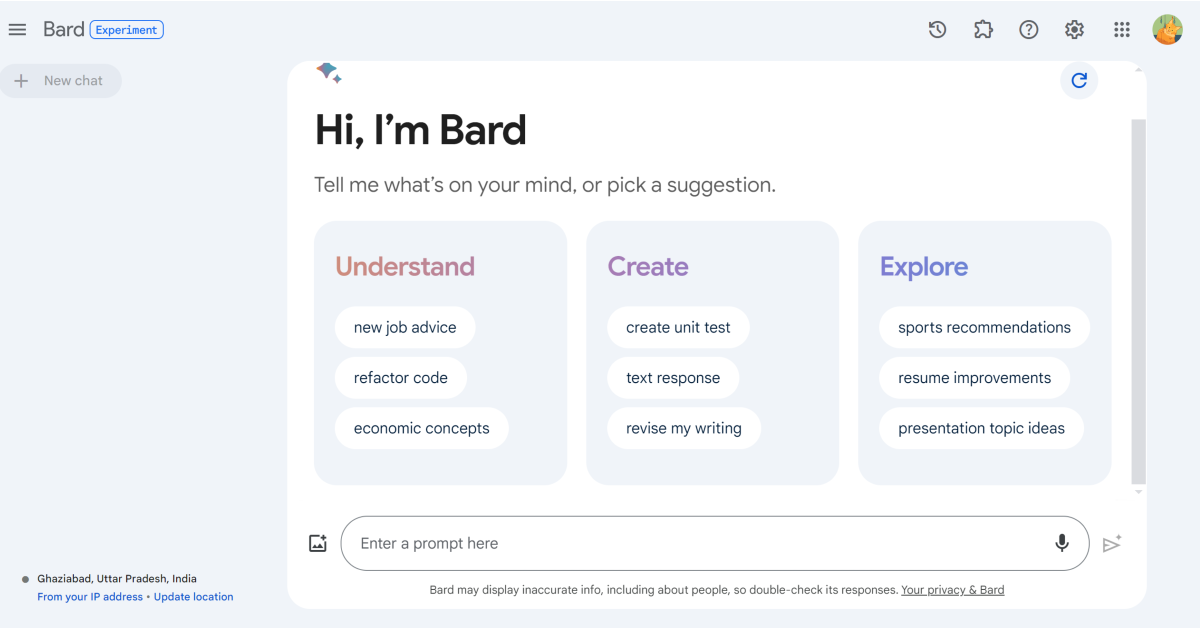
Step 2: Enter your prompt for the image in the chat box. Make sure your prompt starts with “Draw a..”, “Generate a picture..”, “Create an image..”, or something along those lines. Your prompt should make it clear that you want Bard to generate an image.

Step 3: You can also tell Bard the style of image you want. You can choose from any style you like, be it a digital animation or oil painting. The more detailed your prompt is, the better the result will be.

Step 2: Enter your prompt for the image in the chat box. Make sure your prompt starts with “Draw a..”, “Generate a picture..”, “Create an image..”, or something along those lines. Your prompt should make it clear that you want Bard to generate an image.

Step 4: Hit Enter.

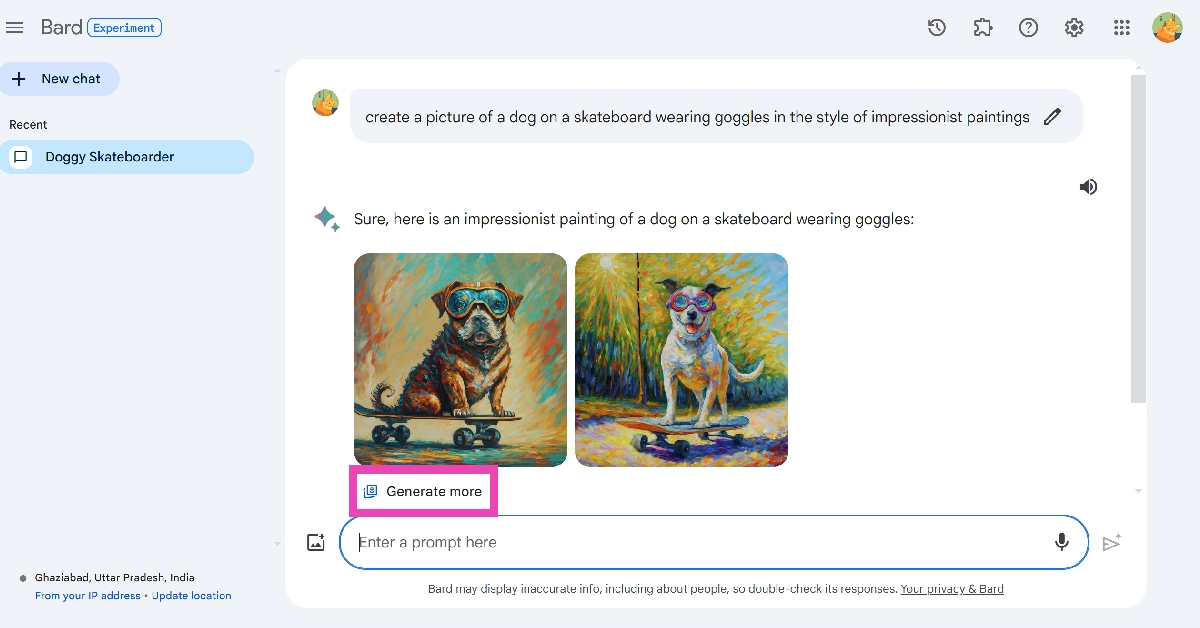
Step 5: Bard will generate two images based on your prompt. Click on an image to expand it. As of right now, Google Bard can generate images only in 512px x 512px resolution.

Step 5: Bard will generate two images based on your prompt. Click on an image to expand it. As of right now, Google Bard can generate images only in 512px x 512px resolution.

Step 6: Hit the download button at the top right corner of the screen to save the image on your device.

Step 6: Hit the download button at the top right corner of the screen to save the image on your device.

Step 7: Go back and click on Generate more to get more images based on your prompt.

Step 7: Go back and click on Generate more to get more images based on your prompt.

Frequently Asked Questions (FAQs)

Why can’t I use Google Bard’s AI image generator?

Google Bard’s AI image generator is not available for users in the European Economic Area (EEA), Switzerland, and the UK.

Is Google Bard free to use?

Yes, as of now Google Bard and its image creation tool are free to use.

What is the resolution of images created by Google Bard?

Google Bard generates AI images in 512px x 512px resolution.

Read Also: Top 10 smartphones under $1,000 in USA (2024)

Conclusion

This is how you can use Google Bard to generate AI images. The quality of the image depends on the strength of your prompt. You can use Google Bard on PC, Android, and iPhone. If you have any questions related to the chatbot, let us know in the comments!

Garena Free Fire Redeem Codes Today 3 February 2024: Here is how to claim them

Garena Free Fire is a battle royale game with regular awards and tournaments to keep players interested. If you play Garena Free Fire, you should be aware of the redeem codes that are released on a daily basis. However, because the battle royale game is banned in India, players from other countries can use the Free Fire Redeem codes daily. If you’re unfamiliar with the Garena Free Fire redeem codes or don’t know how to get them, we’ve put together a step-by-step guide to help you redeem them. Check out Garena Free Fire Redeem Codes for 3 February 2024.

The Free Fire redeem codes are a great way to get free stuff. These are 12-digit codes that contain alphabets and numbers, as well as an expiration date and time. Because the Garena FF redeem codes cannot be used more than once, you should hurry to the redemption page to claim your free reward before someone else does. To get a free reward, all you have to do is go to reward.ff.garena.com/en, which is the official redemption page. Also, keep an eye on this space for daily updates on Garena Free Fire redemption codes and rewards.

Also Read: Sennheiser Accentum Plus wireless headphones with Hybrid Adaptive Noise Cancellation launched

Garena Free Fire Redeem Codes Today 3 February 2024

V427K98RUCHZ

BR43FMAPYEZZ

FFCMCPSEN5MX

FF11NJN5YS3E

FF10617KGUF9

NPYFATT3HGSQ

FFCMCPSUYUY7E

FFCMCPSJ99S3

EYH2W3XK8UPG

MCPW2D1U3XA3

FFCMCPSGC9XZ

VNY3MQWNKEGU

FFIC33NTEUKA

ZZATXB24QES8

UVX9PYZV54AC

MCPW3D28VZD6

XZJZE25WEFJJ

6KWMFJVMQQYG

MCPW2D2WKWF2

HNC95435FAGJ

U8S47JGJH5MG

ZZZ76NT3PDSH

How to Get Free Fire Redeem Codes for Garena on 3 February 2024?

  • Visit the Garena Free Fire game’s official website at reward.ff.garena.com.
  • Use your Facebook, Google, VK, Apple ID, Huawei ID, or Twitter account to log in.
  • You’ll be taken to a valid redemption code (s)
  • Copy and paste the 12-digit redemption code into the text box.
  • On the screen, a dialogue box will appear.
  • ‘Ok’ should be selected.

For the latest gadget and tech news, and gadget reviews, follow us on TwitterFacebook and Instagram. For newest tech & gadget videos subscribe to our YouTube Channel. You can also stay up to date using the Gadget Bridge Android App. You can find the latest car and bike news here.

Infinix Smart 8 8GB RAM with 128GB storage option to launch soon in India

Key Highlights

  • Infinix Smart 8 is powered by MediaTek Helio G36 SoC.
  • The phone is shipped with Android 13 Go Edition-based XOS 13.
  • The handset comes equipped with a 5,000 mAh battery.

Infinix Smart 8 was launched in India last month after its global debut. Initially, a single 4GB RAM variant was introduced but today the phone will soon be available in a new RAM and storage option. The device comes with a 6.6-inch HD+ display with a 90-Hz refresh rate. The Infinix Smart 8 features a 50MP dual-AI camera. Additionally, it housed a 5,000 mAh battery. A MediaTek Helio G36 SoC powers the device and runs on Android 13 Go Edition-based XOS 13.

Infinix Smart 8 new variant price in India

Infinix Smart 8 will be available in a new 8GB RAM with 128GB storage option soon. The new model will be priced at Rs 8,000 in the country. The company has not revealed the availability date but the phone will be sold via Flipkart in the country.

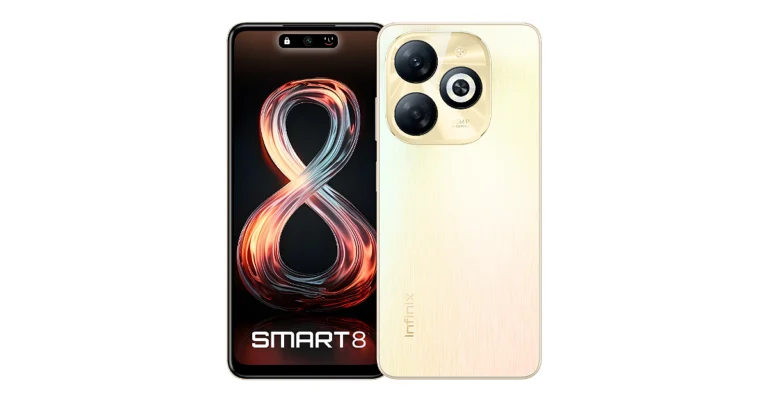
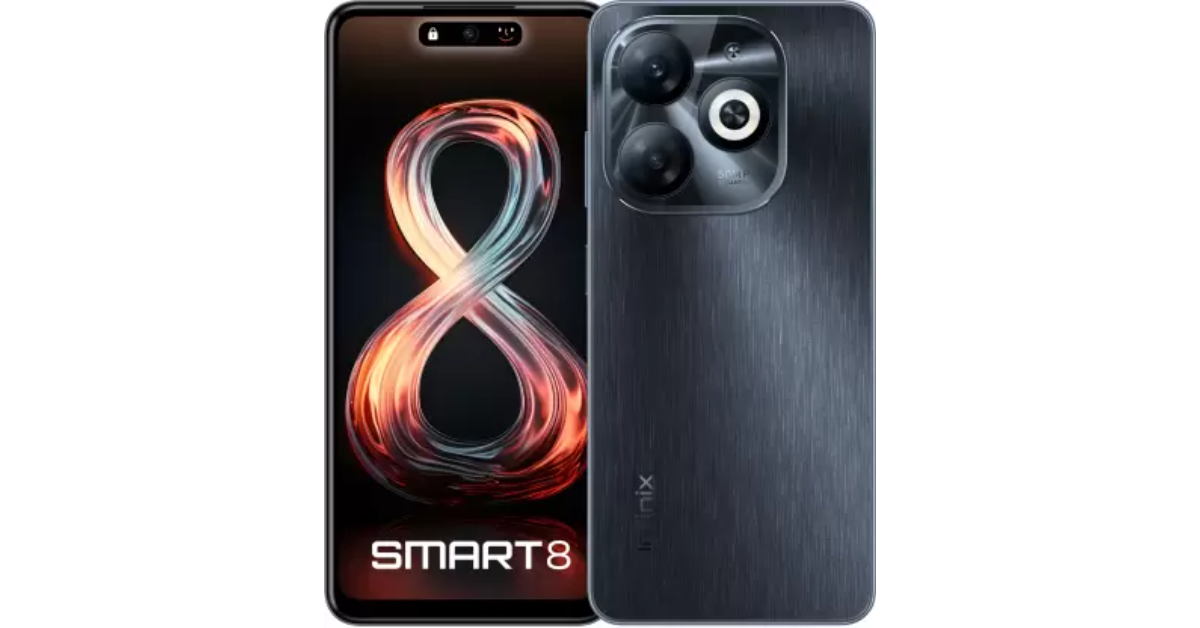
The device already comes with 4GB of RAM with 64GB of storage variant priced at Rs 7,499. The handset is offered in Galaxy White, Rainbow Blue, Shiny Gold, and Timber Black colour options.

Infinix Smart 8 new variant price in India

Infinix Smart 8 specifications

The Infinix Smart 8 features a 6.6-inch HD+ display with 1,612 x 720 pixels of resolution. The screen comes with a 90Hz refresh rate and a touch sampling rate of 180Hz. The panel supports 500 nits of peak brightness. An octa-core Unisoc T606 SoC powers it with 4GB of LPDDR4X RAM and 64GB of eMMC 5.1 storage. The smartphone also includes an expandable RAM feature, while the internal storage can be further expanded up to 2TB using a microSD card. The device operates on XOS 13 skinned over Android 13.

Also Read: Apple crossed the 10-million mark in shipments during the quarter: Report

The mobile phone sports a 50-megapixel main sensor, an AI camera, and a quad-LED Ring flash for photos and videos. In terms of selfies, there is an 8-megapixel front-facing camera with an LED flash.

Also Read: More than 600 new apps announced for Apple Vision Pro, which goes on sale today

The Infinix Smart 8 includes a Magic Ring feature akin to Apple’s dynamic island. The expandable notch feature enables functions such as face unlock, background call management, charging animations, and charge completion reminders, adding a layer of convenience and personalisation for users.

In terms of connectivity, there is dual 4G, nano SIM, Wi-Fi, Bluetooth 5.0, GPS, GLONASS, and a USB Type-C port. Additionally, the handset packs a 5,000mAh battery.

Apple crossed the 10-million mark in shipments during the quarter: Report

Key Highlights

  • Apple has declared its report for the first quarter of its fiscal 2024.
  • It showed $2.18 in quarterly earnings per diluted share.
  • As per the company it had $119.6 billion in revenue, up 2% year over year.

Apple released its financial results today for the first quarter of its fiscal 2024, which ended on December 30, 2023. Reportedly, the tech firm has reported $2.18 in quarterly earnings per diluted share, up 16 per cent from the previous year, and $119.6 billion in revenue, up 2% year over year. According to a Counterpoint report, Apple’s shipments exceeded 10 million enabling it to overtake all other companies in terms of revenue for the first time in a calendar year.

“Today Apple is reporting revenue growth for the December quarter fueled by iPhone sales, and an all-time revenue record in Services,” said Tim Cook, Apple’s CEO. “We are pleased to announce that our installed base of active devices has now surpassed 2.2 billion, reaching an all-time high across all products and geographic segments. And as customers begin to experience the incredible Apple Vision Pro tomorrow, we are as committed as ever to the pursuit of groundbreaking innovation — in line with our values and on behalf of our customers.”

“Our December quarter top-line performance combined with margin expansion drove an all-time record EPS of $2.18, up 16 percent from last year,” said Luca Maestri, Apple’s CFO. “During the quarter, we generated nearly $40 billion of operating cash flow and returned almost $27 billion to our shareholders. We are confident in our future, and continue to make significant investments across our business to support our long-term growth plans.”

According to the company Apple’s board of directors have announced a $0.24 cash dividend for each share of ordinary stock. To stockholders of record as of the close of business on February 12, 2024, the dividend is payable on February 15, 2024.

Based on the Company’s fiscal calendar, the first quarter of fiscal 2024 will consist of 13 weeks, whilst the first quarter of fiscal 2023 will consist of 14 weeks.

According to the most recent data from Counterpoint’s Monthly India Smartphone Tracker, there was no change in India’s smartphone shipments in 2023 at 152 million units.

However, Apple’s shipments exceeded the 10-million barrier, helping them take the top spot in revenue for the first time ever in a calendar year. Still, the company’s shipments exceeded the 10-million barrier, helping them take the top spot in terms of revenue. This has happened for the very first time in a calendar year.

As per the CEO, India recorded robust double-digit growth in revenue during the December quarter, therefore setting a new record for the quarter.

Also Read: Google’s Circle to Search feature lands on Pixel 8 and Pixel 8 Pro

Commenting on the competitive landscape and brand-level analyses, Research Analyst Shubham Singh said, “Samsung led the market in 2023 with an 18% share driven by a strong performance of the A series, aggressive marketing in offline, and focussed approach in the premium segment. vivo ranked second with a 17% share and led the affordable premium segment in 2023 driven by CMF (Colour, Material, Finish)-focused V29 series in offline and T series in online. Xiaomi slipped to the third spot in 2023 but captured the top spot in Q4 2023 driven by its strategy to launch 5G phones in the affordable segment, offline expansion and a leaner portfolio.

Also Read: More than 600 new apps announced for Apple Vision Pro, which goes on sale today

The premium segment (>INR 30,000, ~ $360) witnessed a 64% YoY growth in 2023 driven by easy financing schemes, which resulted in consumers jumping price bands to purchase higher-priced smartphones. One out of every three smartphones was purchased through financing in 2023. Apple’s focus on India is also aiding the trend, with the brand surpassing the 10-million-unit mark in shipments and capturing the top position in revenue in a calendar year for the first time, propelled by robust demand for both its latest and older iPhones. The opening of its own retail stores and increasing focus on LFR (large-format retail) through regular promotions contributed to increased offline shipments. Besides, higher trade-in values presented an appealing proposition for consumers to transition to iOS.”

Top 10 smartphones under $1,000 in USA (August 2024)

$1,000 in today’s smartphone market can buy you a premium flagship that will last you for years. As a one-time investment, you need to take software support for the next few years into consideration, and this is where the flagship smartphones step in. Apple promises 6-7 years of software updates on the iPhone. This year, Samsung stepped up its game as well, promising 7 years of major OS upgrades for the Galaxy S24 lineup. So, let’s take a look at the top 10 smartphones under $1,000 that you can buy in the USA right now.

Read Also: Google’s Circle to Search feature lands on Pixel 8 and Pixel 8 Pro

Samsung Galaxy S24+

Price: $999 on Samsung.com

Galaxy S24+

Key Specs

Display 6.7-inch Dynamic LTPO AMOLED 2X
Chipset Snapdragon 8 Gen 3
RAM 12GB
Storage 256GB, 512GB
Battery 4,900 mAh

The new Samsung Galaxy S24 series packs a lot of exciting features. The Galaxy S24+ sits in the middle of the lineup, priced just under $1,000. The smartphone flaunts a 6.7-inch Dynamic LTPO AMOLED display and is powered by the latest Snapdragon 8 Gen 3 chipset. Samsung’s 2024 Galaxy S series is all about AI – the S24+ is equipped with features like Circle to Search, Chat Assist, Generative Edit, Gemini AI, and more. Talking about the cameras, the S24+ misses out on the Ultra variant’s periscope lens but gets a 50MP primary shooter, a 12MP ultrawide sensor, and a 10MP telephoto lens.

iPhone 15 Pro

Price: $999 on Apple.com

iphone 15 pro max rear

Key Specs

Display 6.1-inch LTPO Super Retina XDR OLED
Chipset Apple A17 Pro
RAM 8GB
Storage 128GB, 256GB, 512GB, 1TB
Battery 3,274 mAh

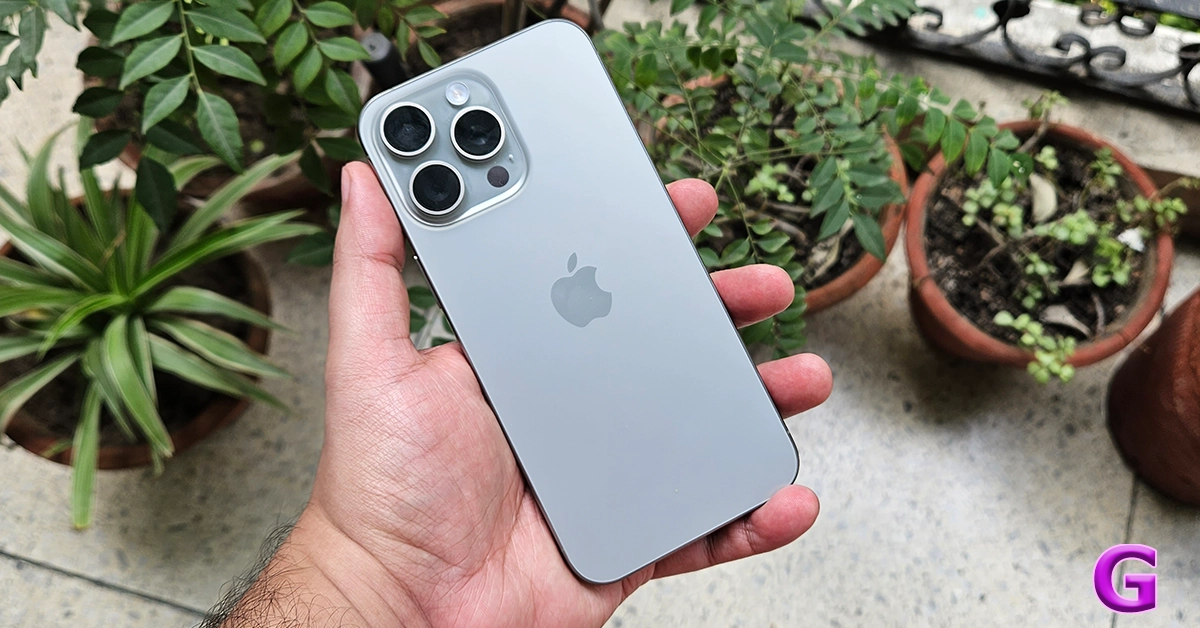
The Pro variant of the iPhone 15 Series is powered by the new Apple A17 Pro chipset. It also gets the new Action Button which replaces the alert slider. The iPhone 15 Series marks the debut of the USB Type-C port on the smartphone. One of the advantages of buying the Pro variant is that it has a USB Type-C 3.2 which allows fast transfers. The non-Pro variants are stuck with USB Type-C 2.0 for now. Another big change on the iPhone 15 Pro is the titanium frame which not only imparts next-level toughness to the smartphone but also makes it a smidge lighter. Read our review here.

Samsung Galaxy S24

Price: $799 on Samsung.com

Samsung Galaxy S24 Series goes on sale in India: Check price, launch offers and specs

Key Specs

Display 6.2-inch Dynamic LTPO AMOLED 2X
Chipset Snapdragon 8 Gen 3
RAM 8GB, 12GB
Storage 128GB, 256GB
Battery 4,000 mAh

The base variant in the Samsung Galaxy S24 Series is one of the best compact smartphones you can buy for under $1,000 in the USA right now. The smartphone sports a 6.2-inch Dynamic LTPO AMOLED 2X display which has a refresh rate of 120Hz. Like the newest iPhone series, this year’s Galaxy S24 series also gets a titanium frame. But the real highlight is the much-talked-about Galaxy AI. The vertical design of the triple camera layout has been retained from last year. The S24 features a 50MP primary shooter, a 10MP telephoto lens, and a 12MP ultrawide lens.

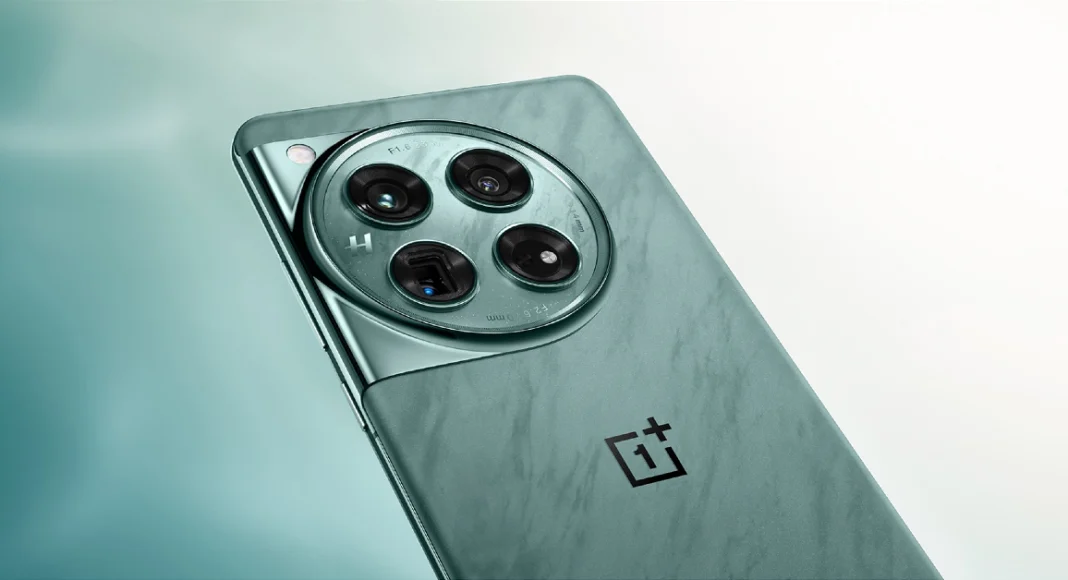
OnePlus 12

Price: $799 on OnePlus.com

OnePlus 12 debuts in India and globally: Price in India, specs details inside

Key Specs

Display 6.82-inch LTPO AMOLED
Chipset Snapdragon 8 Gen 3
RAM 12GB, 16GB
Storage 256GB, 512GB
Battery 5,400 mAh

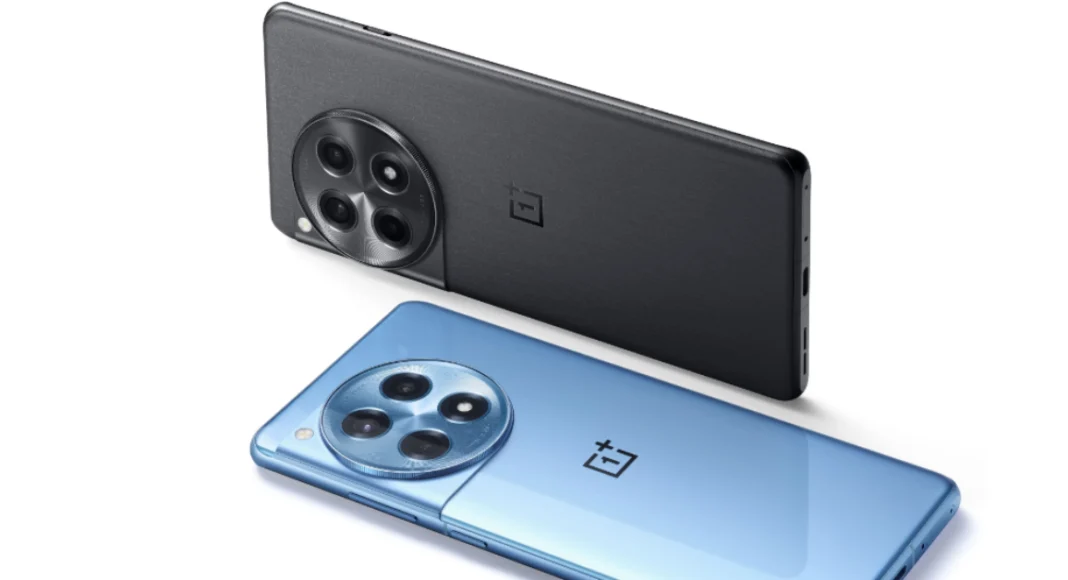
Launched in January 2023, the OnePlus 12 is one of the more affordable flagships you can buy right now. It packs the latest Snapdragon 8 Gen 3 chipset and flaunts a 6.82-inch LTPO AMOLED display with a 120Hz refresh rate. OnePlus has also reintroduced wireless charging on its newest premium smartphone. With 50W AirVOOC (wireless) charging support, the smartphone can be fully charged in 55 minutes. Using a Type-C USB cable, this feat can accomplished in 30 minutes (80W charging). OnePlus 12 also has the biggest battery (5,400 mAh) we’ve seen on a flagship smartphone. The only downside its IP65 rating is a far cry from the baseline IP67 you expect in this price range.

Google Pixel 9 Pro

Price: $999 on Google Store


Google Pixel 9 Pro and XL Top 10 smartphones under $1,000 in USA (2024)

Key Specs

Display 6.3-inch LTPO OLED
Chipset Google Tensor G4
RAM 16GB
Storage 128GB, 256GB, 512GB, 1TB
Battery 4,700 mAh

This year, the Google Pixel 9 Series has two ‘Pro’ variants — Pro and Pro XL. The smaller of the two Pro variants is priced at $999 and has a 6.3-inch LTPO OLED display. Being a smaller smartphone, its battery size is limited to 4,700. Google has redesigned the camera visor at the back, giving it a more refined and cleaner look. This visor houses a 50MP primary shooter, a 48MP ultrawide lens, and a 48MP periscope telephoto lens. Powering the new series of Pixels is the Google Tensor G4 chipset. If you’re looking for something more affordable, the entry-level Pixel is priced at $799.

Samsung Galaxy Z Flip 5

Price: $999 on Samsung.com

Review of Galaxy Z Flip 5 Top 10 smartphones under $1,000 in USA (2024)

Key Specs

Display Inner: 6.7-inch Dynamic AMOLED 2X | Cover: 3.4-inch Super AMOLED 
Chipset Snapdragon 8 Gen 2
RAM 8GB
Storage 256GB, 512GB
Battery 3,700 mAh

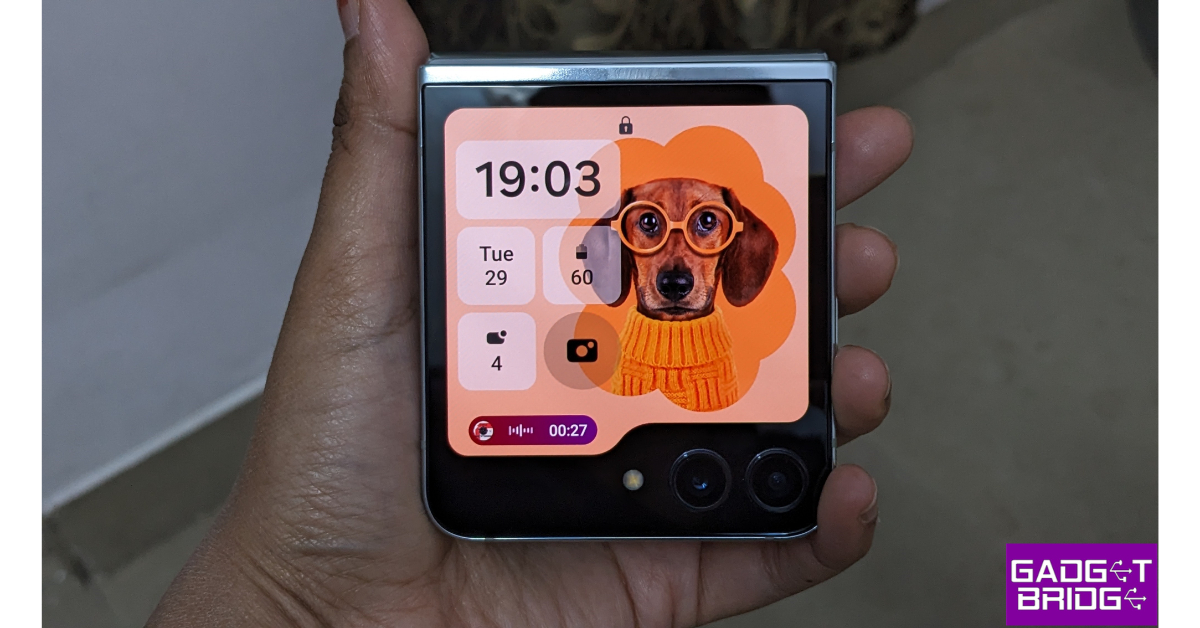
The Samsung Galaxy Z Flip 5 is one of the best folding smartphones you can buy in the USA for under $1,000 in 2024. In its unfolded form, the Dynamic AMOLED 2X display spans 6.7 inches. The Galaxy Z 5 Series also debuts larger cover displays for the folding smartphones. The Flip 5 has a 3.4-inch Super AMOLED display which can be used to toggle through widgets, reply to messages, take pictures, and more. Since it’s a 2023 smartphone, the Galaxy Flip 5 is powered by the Snapdragon 8 Gen 2 SoC. The rear camera setup of the smartphone consists of 12MP wide and ultrawide sensors. Read our review of the smartphone here.

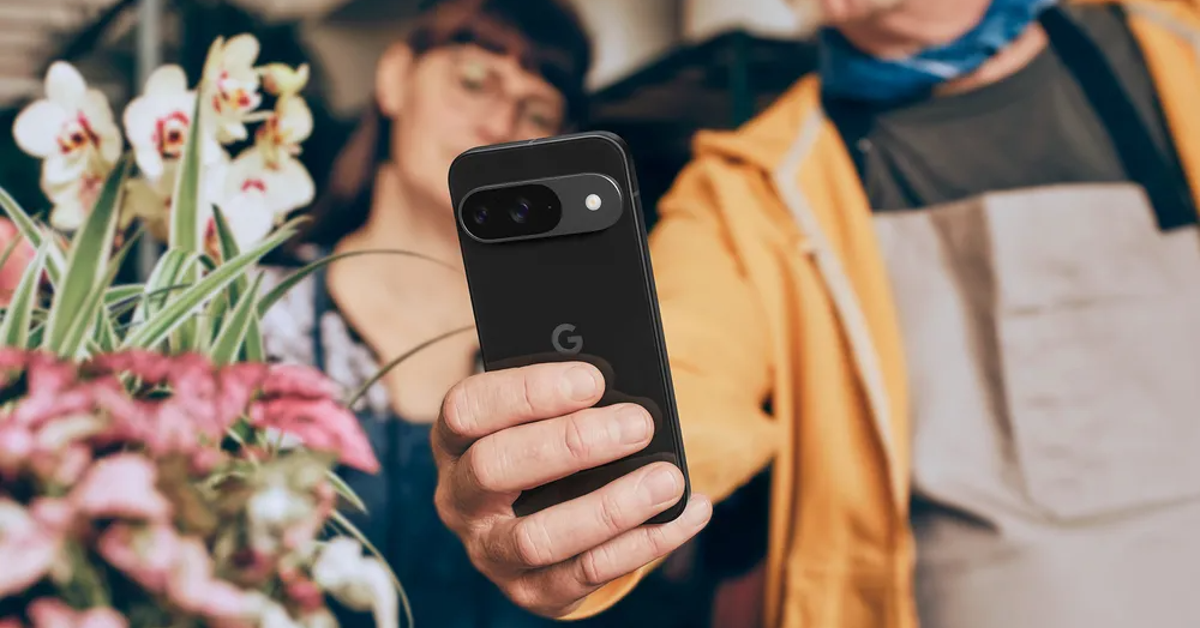
Google Pixel 9

Price: $799 on Google Store


How to ‘Reimagine’ pictures and edit them using AI on Google Pixel 9 Top 10 smartphones under $1,000 in USA (2024)

Key Specs

Display 6.3-inch OLED
Chipset Google Tensor G4
RAM 12GB
Storage 128GB, 256GB
Battery 4,700 mAh

The entry-level variant of the Google Pixel 9 Series offers excellent value for money. It is one of the best smartphones you can buy in the USA right now. The vanilla Pixel 9 is powered by the same chipset as the Pro variants — Google Tensor G4. It lacks the telephoto sensor but retains the 50MP primary shooter and 48MP ultrawide lens from the Pro models. The 10.5MP selfie camera up front can shoot 4K videos at 30/60fps. Camera specs aside, the Pixel 9 runs stock Android 14 OS and flaunts a 6.3-inch OLED display. This display has a 120Hz refresh rate and can reach a peak brightness of 2,700 nits.

Nothing Phone 2

Price: $599 on Nothing.tech

Nothing announced massive up to Rs 10,000 discount on Phone 2: Additional discounts Top 10 smartphones under $1,000 in USA (2024)

Key Specs

Display 6.7-inch LTPO OLED
Chipset Snapdragon 8+ Gen 1
RAM 8GB, 12GB
Storage 128GB, 256GB, 512GB
Battery 4,700 mAh

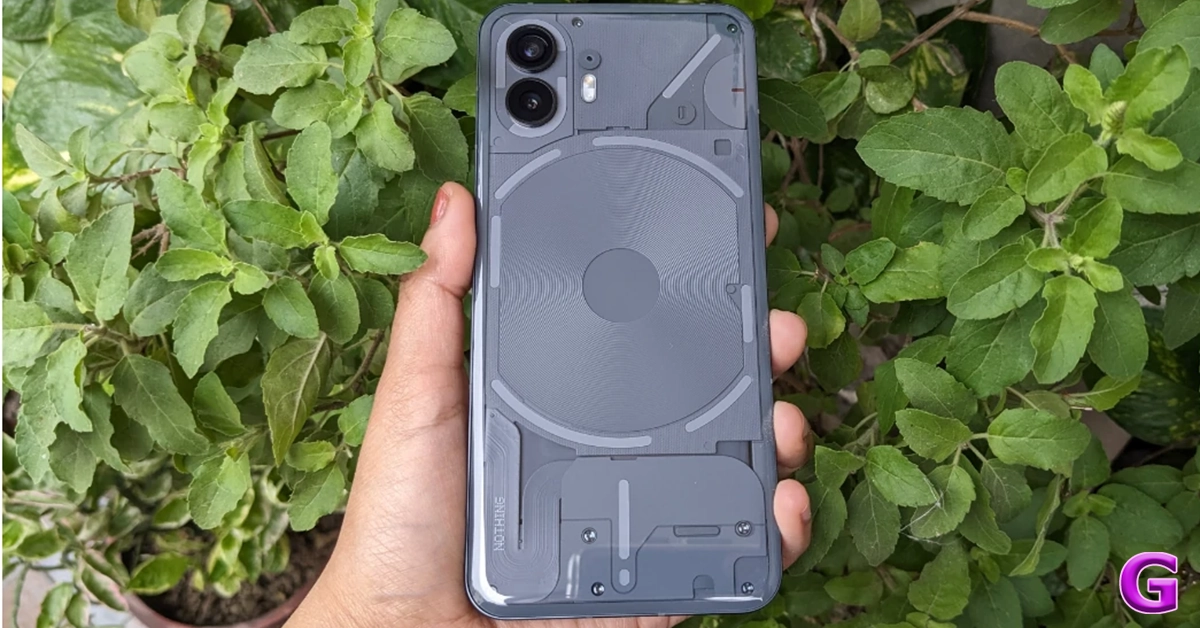
Even though it is a mid-ranger, the Nothing Phone 2 deserves a shout-out on this list. The second iteration of Nothing’s highly talked about smartphone made it to the US in July 2023. Known for its iconic Glyph Interface and see-through back design, the Nothing Phone 2 also packs serious power with the Snapdragon 8+ Gen 1 chipset. The tech outfit has also refined its OS on the Phone 2, giving it a distinct look with its dot matrix font and greyscale icon packs. The smartphone features two 50MP sensors, one for the wide lens and the other for the ultrawide camera. Read our review of the smartphone here.

OnePlus 12R

Price: $499 on OnePlus.com

OnePlus 12R with Qualcomm Snapdragon 8 Gen 2 SoC launched in India Top 10 smartphones under $1,000 in USA (2024)

Key Specs

Display 6.82-inch LTPO4 AMOLED
Chipset Snapdragon 8 Gen 2
RAM 8GB, 16GB
Storage 128GB, 256GB
Battery 5,500 mAh

Launched alongside the OnePlus 12, the 12R could be the real flagship killer of 2024. It packs the flagship Snapdragon 8 Gen 2 chipset from last year and flaunts a stunning 6.82-inch LTPO4 AMOLED display. The massive 5,500 mAh battery pack supports up to 100W of fast wired charging. OnePlus 12R matches the design of the flagship smartphone. Its rear camera module consists of a 50MP primary shooter, an 8MP ultrawide lens, and a 2MP macro sensor. The smartphone runs on Android 14-based OxygenOS 14 out of the box. With prices starting at $499, the OnePlus 12R is undoubtedly one of the best smartphones you can buy for under $1,000 in the USA.

Motorola Razr+ (2024)

Price: $899 on Motorola.com


Motorola Razr+ (2024) Top 10 smartphones under $1,000 in USA (2024)

Key Specs

Display Inner: 6.9-inch LTPO AMOLED | Cover: 4-inch AMOLED
Chipset Snapdragon 8s Gen 3
RAM 12GB
Storage 256GB
Battery 4,000 mAh

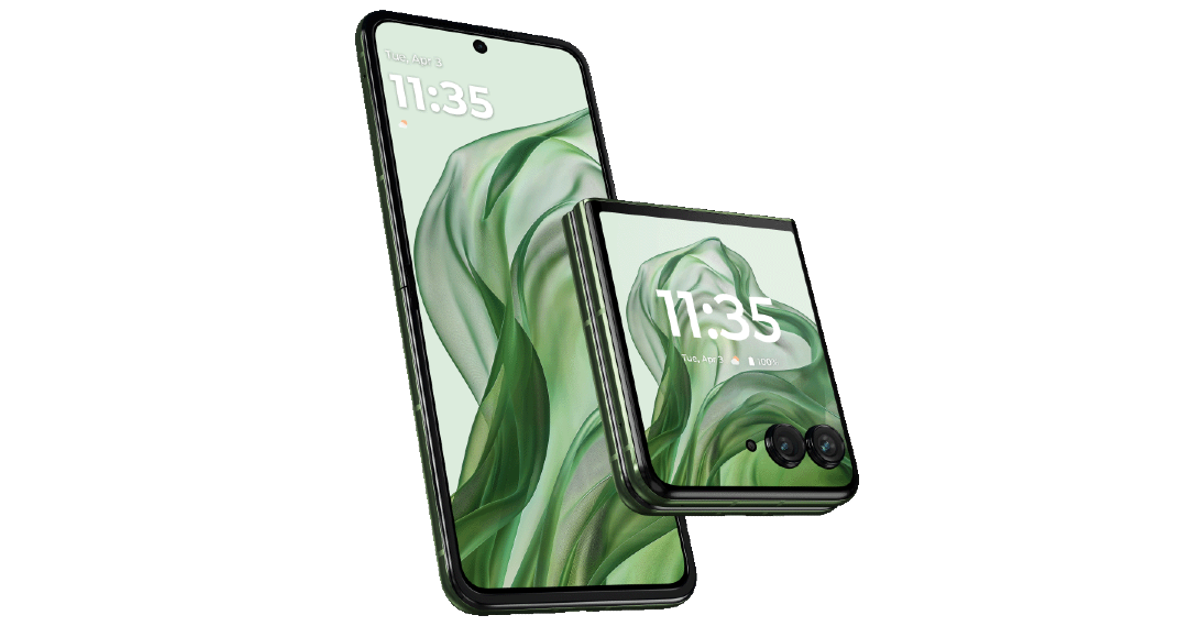
2024’s Moto Razr+ packs a bigger battery and a larger outer display than its 2023 counterpart. The processor on the smartphone has been updated to Snapdragon 8s Gen 3 SOC. The inner LTPO AMOLED display still spans 6.9 inches. The smartphone is rated IPX8 for dust and water resistance. It can survive submersion in water up to 1.5m for 30 minutes. The rear camera panel of the smartphone sports a 50MP primary shooter and a 50MP telephoto lens.

Read Also: Top 6 Ways to Copy Instagram Comments and Captions on Android or iPhone (2024) 

Conclusion

These are the top 10 smartphones under $1,000 that you can buy in the USA right now. As the year rolls on we expect a few more devices to be added to this list. Keep watching this space for regular updates. If you think we missed out on a smartphone, let us know in the comments!

Top 7 Ways to Copy Instagram Comments and Captions on Android or iPhone

0

Have you ever come across a quirky or funny caption on Instagram and wanted to save it to use in your post later? Or perhaps you want to save a comment if you’re keeping receipts for an online feud. If you’ve ever tried copying text on Instagram, you must be aware that it is impossible to do so on the official app. Interestingly, Instagram’s website does not have this roadblock. Looking for a fix to this problem? Today, we bring you the top 7 ways to copy Instagram comments and captions on iPhone or Android.

Read Also: How to Voice Type in Tamil on an Android smartphone?

What’s the deal with copying Instagram comments and captions?

Copying text on your smartphone is never an issue on most apps. However, OTT apps like Netflix and Disney+ prevent this action on their platforms due to their stringent copyright policies. Strangely enough, Instagram also restricts this action even though most of the content on the platform is user-generated. While there is no official explanation for this, users widely believe it is done to combat spam on the platform.
Luckily, there are a handful of ways you can work around this issue. If you often find yourself wanting to copy text from Instagram, you would be better off installing a third-party app that lets you perform that action on your phone. Although if it is a one-time thing, there are other methods you can use that don’t require installing an app. We discuss both options below.

Copy Instagram comments and captions on your iPhone

You can copy the text on any iPhone using the Live Text feature. This feature is available on iPhones running iOS 15 or above.

Step 1: Launch the Instagram app and take a screenshot of the caption/comment you want to copy.

Step 2: Go to the Photos app and open the screenshot.

Step 2: Go to the Photos app and open the screenshot.

Step 3: Long press the text you want to copy.

Step 4: Select Copy from the pop-up options.

Step 4: Select Copy from the pop-up options.

Copy Instagram comments and captions on Android using Google Photos

Step 1: Take a screenshot of the Instagram caption/comment you want to copy.

Step 2: Open the screenshot in Google Photos.

Step 3: Tap on Copy Text at the bottom of the screen.

Step 3: Tap on Copy Text at the bottom of the screen.

Step 4: Select the comment/caption you want to copy.

Step 4: Select the comment/caption you want to copy.

Step 5: Tap on Copy. The text will be copied to the clipboard.

Use Circle to Search (Android)

Step 1: Go to the Instagram post caption you wish to copy.

Step 2: Long-press the navigation bar to trigger Circle to Search.

Step 2: Long-press the navigation bar to trigger Circle to Search. Top 7 Ways to Copy Instagram Comments and Captions on Android or iPhone (2024)

Step 3: Select the text on the screen and hit Copy.

Step 3: Select the text on the screen and hit Copy. Top 7 Ways to Copy Instagram Comments and Captions on Android or iPhone (2024)

Copy Instagram captions using the web browser (Android and iOS)

Step 1: Go to the Instagram post you wish to copy. Hit the Share button and tap on Copy link.

Step 1: Go to the Instagram post you wish to copy. Hit the Share button and tap on Copy link.

Step 2: Open your preferred web browser and paste the link into the address box. Hit Enter.

Step 2: Open your preferred web browser and paste the link into the address box. Hit Enter.

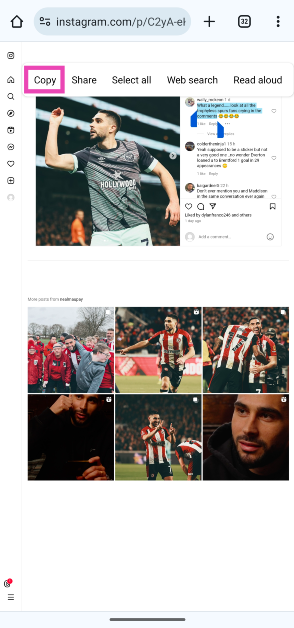
Step 3: The Instagram post will open in the web browser. Long press the caption to highlight it and select Copy.

Step 3: The Instagram post will open in the web browser. Long press the caption to highlight it and select Copy.

Strangely, this method only works for Instagram captions. If you want to copy a comment, follow the method mentioned below.

Copy Instagram comments using the Desktop Mode on Chrome (Android and iOS)

Step 1: Go to the Instagram post you want to copy. Hit the Share button and select Copy link.

Step 1: Go to the Instagram post you wish to copy. Hit the Share button and tap on Copy link.

Step 2: Open Google Chrome on your smartphone and paste the link into the address bar. Hit Enter.

Step 2: Open your preferred web browser and paste the link into the address box. Hit Enter.

Step 3: Hit the ellipses at the top right corner of the screen and select Desktop site.

Step 3: Hit the ellipses at the top right corner of the screen and select Desktop site.

Step 4: Long-press the comment to highlight its text and select Copy.

Step 4: Long press the comment to highlight its text and select Copy.

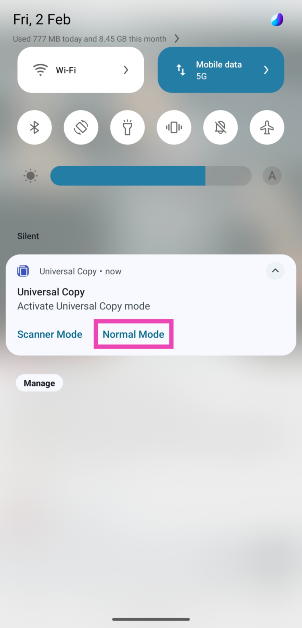
Use Universal Copy (Android)

Step 1: Install the Universal Copy app from the Google Play Store.

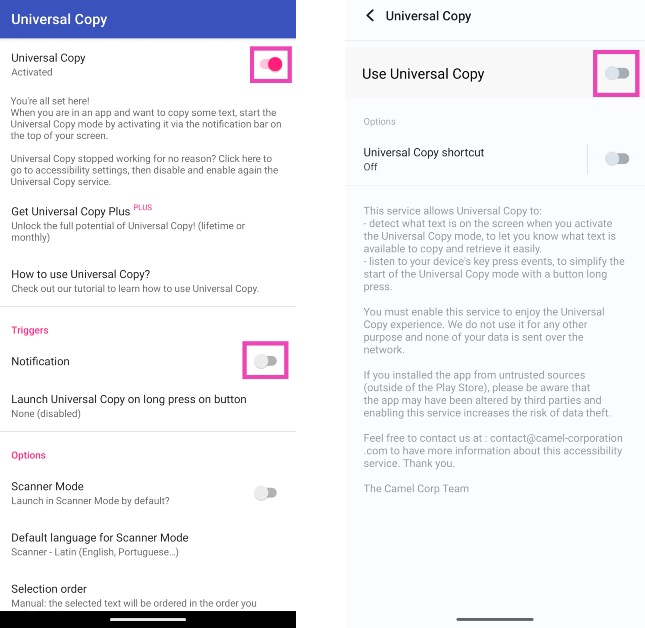
Step 2: Open the app and enable Use Universal Copy. Give the app the necessary permissions whenever prompted.

Step 2: Open the app and enable Use Universal Copy. Give the app the necessary permissions whenever prompted.

Step 3: Open Instagram and go to the post you want to copy.

Step 4: On the notification panel, select Activate Universal Copy Mode.

Step 4: On the notification panel, select Activate Universal Copy Mode.

Step 5: Universal Copy app will let you select any text you want on the app. Highlight the caption and copy it to the clipboard.

Step 5: Universal Copy app will let you select any text you want on the app. Highlight the caption and copy it to the clipboard.

Copy Instagram captions and comments on a Google Pixel smartphone


Google Pixel smartphones make it easy to copy text from any app without needing to download a third-party app. Just follow these simple steps.

Step 1: Launch Instagram and open the post you wish to copy.

Step 2: Use the navigation buttons or swipe gestures to go to the app switcher/recent apps panel.

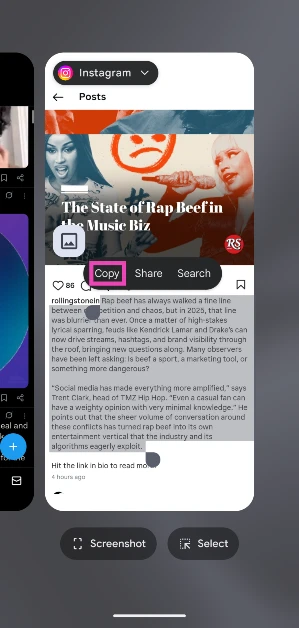
Step 3: On Instagram’s card, long-press the text you wish to copy.

Step 3: On Instagram’s card, long-press the text you wish to copy. Top 7 Ways to Copy Instagram Comments and Captions on Android or iPhone (2024)

Step 4: Select Copy from the pop-up options.

Step 4: Select Copy from the pop-up options. Top 7 Ways to Copy Instagram Comments and Captions on Android or iPhone (2024)

Frequently Asked Questions (FAQs)

How do I copy Instagram comments and captions on my Android phone?

Install the Universal Copy app on your device, give it the necessary permissions and enable ‘Use Universal Copy’. Go to the Instagram post and select ‘Activate Universal Copy Mode’ from the notification panel. Highlight the comment or caption and copy the text to the clipboard.

How do I copy Instagram comments and captions on my iPhone?

Take a screenshot of the Instagram post and open it in the Photos app. Long-press to highlight the text and hit ‘Copy’.

How do I copy Instagram comments and captions without using an app?

Copy the link to the Instagram post and open it in Google Chrome. Request ‘Desktop Site’ and long-press the text to highlight it. Select ‘Copy Text’ from the pop-up menu.

Read Also: How to geotag your property in Delhi as per MCD guidelines?

Conclusion

These are the top 7 ways to copy Instagram captions or comments on iPhone and Android. Check out these 5 easy methods to access and manage your iPhone’s clipboard. Android users can check out this article to learn how to manage the clipboard on their devices. If you know any other way to copy unselectable text, let us know in the comments!

Google’s Circle to Search feature lands on Pixel 8 and Pixel 8 Pro

Key Highlights

  • Circle to Search is Google’s AI-powered feature.
  • It allows you to search for anything with a simple gesture.
  • The user will be able to see helpful, high-quality search results by long pressing the home button and circling, highlighting, scribbling, or tapping.

Google Pixel 8 and Pixel 8 Pro have recently been updated with a brand new feature called Circle to Search that was introduced on the Samsung Galaxy S24 Series for the first time. The users can search for anything with a simple gesture — like circling, highlighting, scribbling or tapping without switching apps.

The Google-powered Circle to Search function will not only boost search results for Galaxy S24 phones but for Google Pixel 8 Series as well. The users will be able to do Google Lens-like searches on their devices using the Circle to Search feature, without having to switch to a different application.

Google’s AI-powered feature will allow Google Pixel 8 and Pixel 8 Pro users to shop for goods they see and learn more about them. If you happen upon an interestingly patterned top or anything that you liked, just long-press the home button or navigation bar, and circle or scribble the items you’re interested in. You will then be able to browse the same or comparable products from retailers across the web.

Also Read:  What is Circle to Search? Everything about it

Moreover, one can also search definitions of words or phrases using Circle to Search while watching a video. Now, just long-press the home button or the navigation bar to activate Circle to Search and highlight the word that you would like to find out more about. When you’re done, just swipe away and resume the video.

The new feature will also enable users to look for a building or a particular cafe that they have seen on their social media feed by just scribbling over the building to swiftly identify it (and even add it to their travel itinerary) with Circle to Search.

Also Read: More than 600 new apps announced for Apple Vision Pro, which goes on sale today

Google Pixel 8 and Pixel 8 Pro users can also do a quick comparison. Suppose you want to know which cafe or a restaurant has a better location or menu then long press the home button or navigation bar and highlight one of the restaurant’s names. Without leaving your messaging app, you’ll see the restaurant’s menu, photos of popular dishes, customer reviews and its location.

How to geotag your property in Delhi as per MCD guidelines?

0

The Municipal Corporation of Delhi (MCD) had initially set January 31 as the deadline for geotagging properties. This deadline has now been pushed to February 29 as iPhone users reported facing technical issues with the MCD app. Delhi residents now have an additional month to geotag their property in the capital. Completing this process will make the owners eligible for a 10% tax rebate. Let’s take a quick look at how you can geotag your property in Delhi as per MCD guidelines.

Read Also: Sennheiser Accentum Plus wireless headphones with Hybrid Adaptive Noise Cancellation launched

What is geotagging and why you should geotag your property

Before we move on to the geotagging process, let’s take a closer look at what geotagging is and why you should carry it out for your property. To put it simply, geotagging is the process of assigning a latitude-longitude marker to a location on a Geographic Information System (GIS) map. Every property has a Unique Property Identification Code (UPIC). This UPIC can be linked to a set of coordinates on a map. Once that’s done, your property can easily be identified on the map using the exact coordinates.

MCD is offering the added incentive of a 10% rebate on lumpsum advance tax payments if you geotag your property in Delhi before February 29. You can generate a UPIC for your property by registering it on MCD’s tax portal. A collective database of geotagged properties is much easier to manage for the civic body compared to a record of ever-changing addresses. This is why it is pushing the citizens to carry out this process.

How to geotag your property in Delhi

How to geotag your property in Delhi as per MCD guidelines?

Step 1: Download the UMA app (Version 1.8) using this link – https://mcdonline.nic.in/download.html.

Step 2: Enable location services on your smartphone. You may need to allow the app access to these services.

Step 3: Go to Module and log in using your registered mobile number.

Step 4: Select Property Tax Module.

Step 5: Select the Unique Property Identification Code (UPIC) of the property that is meant to be geotagged.

Step 6: Once you’re at the property, tap on Capture Geo Coordinate.

Step 7: Take a picture of the property and upload it to the app.

Step 8: You can also choose to provide additional details like building name & address, house number, and floor number.

Step 9: Hit Submit to save the details.

Frequently Asked Questions (FAQs)

What is geotagging?

Geotagging is the process of assigning coordinates and other geographic information to a location, typically on a GIS map.

When is the MCD deadline to geotag properties in Delhi?

MCD has pushed the deadline to geotag your property in Delhi from January 31 to February 29.

Where can I download the MCD UMA app?

To geotag your property in Delhi, you need to download the MCD UMA app. It can be downloaded from the MCD portal. Click on this link to install it on your phone.

Read Also: How to change the IMEI number of your Android phone?

Conclusion

This is how you can geotag your property in Delhi before the February 29 deadline using the UMA app. If you’re facing technical glitches while trying to geotag your property, clear the cache of the MCD app and restart your phone. If you have any other questions, let us know in the comments!

More than 600 new apps announced for Apple Vision Pro, which goes on sale today

Key Highlights

  • Apple Vision Pro is a 3D camera that will go on sale today at Apple Stores.
  • As of now, it will be available across the stores in the US.
  • The device will have access to over a million applications, 600 of which are designed exclusively for the Mixed Reality Headset.

Apple’s first Mixed Reality Headset- Apple Vision Pro will go on sale in India today across Apple Stores in the US. The device was previously available for pre-orders and the company. The Apple Vision Pro is a 3D camera which runs on visionOS. The Vision Pro will not only hit the stores on Friday but the headset has received 1 million applications. Users can also access content from Apple TV+, other streaming services, and 3D movies as well as play Apple Arcade games.

More than 600 new apps announced for Apple Vision Pro, which goes on sale today

The tech giant Apple is all prepped up to introduce the Apple Vision Pro mixed reality headset today. While confirming the availability Apple’s CEO Tim Cook revealed that users of the Apple Vision Pro headsets will have access to over a million applications, 600 of which are designed exclusively for the headgear. He said, “When Apple Vision Pro launches tomorrow, users will be able to explore more than 1 million apps, including 600 apps made specifically for Vision Pro! The creativity of developers is amazing, and this is just the beginning. Endless possibilities await!”

Apple’s first spatial computer Vision Pro will go on sale on February 2 across Apple Stores in the US. As we said before ahead of the release the company has announced that more than 600 new apps are built for Apple Vision Pro.

Apple Vision Pro pre-order begins: Here is what you need to know before you pre-order the mixed-reality headset

Susan Prescott, Apple’s vice president of Worldwide Developer Relations said, “Apple Vision Pro is unlocking the imaginations of our worldwide developer community, and we’re inspired by the range of spatial experiences they’ve created for this exciting new platform. With more than 600 new spatial experiences to explore in the all-new App Store, alongside more than 1 million compatible apps across iOS and iPadOS, users can discover a wide array of apps that expand the boundaries of what’s possible. These incredible apps will change how we experience entertainment, music, and games; spark our imaginations with new ways to learn and explore; unlock productivity like never before; and so much more. Developers are already capturing the promise of spatial computing, and we can’t wait to see what they create next.”

Also Read: Nothing Phone 2a confirmed to launch in India soon, codenamed Aerodactyl

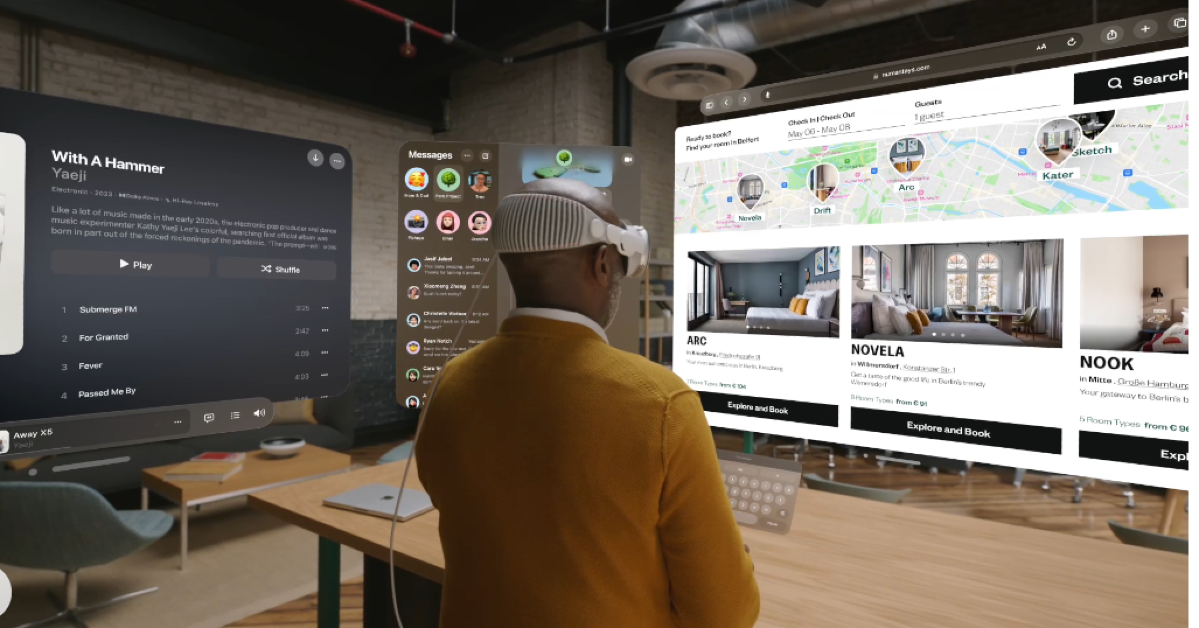
Vision Pro features a powerful and user-friendly 3D user interface that can be used by hands, eyes, and voice. The spatial experiences on Vision Pro will allow users to turn any space into a personal theatre for sports, TV shows, and films; and unlock new ways to collaborate, create, and view digital content.

Apple Vision Pro allows users to watch content on a 100-foot screen thanks to ultra-high-resolution screens that give more pixels for each eye than a 4K TV. People can enjoy apps like PGA TOUR Vision, which uses real-time shot tracking layered on top of 3D models of real golf courses alongside key stats — including leaderboards, scorecards, schedules, course information, and other tournament details — to bring the tour to life in the user’s environment.

“PGA TOUR Vision, the first golf app developed for Apple Vision Pro, takes fans inside the ropes and directly onto the greens of the world’s most iconic courses, from Pebble Beach to TPC Sawgrass, no matter where they are.”

Apple Vision Pro pre-order begins: Here is what you need to know before you pre-order the mixed-reality headset

The NBA app on Apple Vision Pro will allow basketball fans to stream up to five broadcasts live or on-demand with Multiview, keep an eye on real-time player and team stats, and effortlessly glance at other games and scores.

Also Read: Samsung SSD 990 EVO with Samsung Magician software launched in India

Soccer fans can access MLS Season Pass on the Apple TV app, home of Major League Soccer. With compatible apps from top cable services — including Charter Spectrum, Comcast Xfinity, Cox Contour, Sling TV, and Verizon Fios — and sports broadcasters — including ESPN, CBS, Paramount+, NBC, NBC Sports, Peacock, FOX Sports, and the UFC

Garena Free Fire Redeem Codes Today 2 February 2024: Here is how to claim them

Garena Free Fire is a battle royale game with regular awards and tournaments to keep players interested. If you play Garena Free Fire, you should be aware of the redeem codes that are released on a daily basis. However, because the battle royale game is banned in India, players from other countries can use the Free Fire Redeem codes daily. If you’re unfamiliar with the Garena Free Fire redeem codes or don’t know how to get them, we’ve put together a step-by-step guide to help you redeem them. Check out Garena Free Fire Redeem Codes for 2 February 2024.

The Free Fire redeem codes are a great way to get free stuff. These are 12-digit codes that contain alphabets and numbers, as well as an expiration date and time. Because the Garena FF redeem codes cannot be used more than once, you should hurry to the redemption page to claim your free reward before someone else does. To get a free reward, all you have to do is go to reward.ff.garena.com/en, which is the official redemption page. Also, keep an eye on this space for daily updates on Garena Free Fire redemption codes and rewards.

Also Read: Sennheiser Accentum Plus wireless headphones with Hybrid Adaptive Noise Cancellation launched

Garena Free Fire Redeem Codes Today 2 February 2024

8F3QZKNTLWBZ

B3G7A22TWDR7X

FF7MUY4ME6SC

4ST1ZTBE2RP9

FFICJGW9NKYT

FFAC2YXE6RF2

WEYVGQC3CT8Q

GCNVA2PDRGRZ

X99TK56XDJ4X

FF9MJ31CXKRG

FFCO8BS5JW2D

3IBBMSL7AK8G

J3ZKQ57Z2P2P

Also Read: Garena Free Fire Redeem Codes Today 8 January 2024: Here is how to claim them

How to Get Free Fire Redeem Codes for Garena on 2 February 2024?

  • Visit the Garena Free Fire game’s official website at reward.ff.garena.com.
  • Use your Facebook, Google, VK, Apple ID, Huawei ID, or Twitter account to log in.
  • You’ll be taken to a valid redemption code (s)
  • Copy and paste the 12-digit redemption code into the text box.
  • On the screen, a dialogue box will appear.
  • ‘Ok’ should be selected.

For the latest gadget and tech news, and gadget reviews, follow us on TwitterFacebook and Instagram. For newest tech & gadget videos subscribe to our YouTube Channel. You can also stay up to date using the Gadget Bridge Android App. You can find the latest car and bike news here.

Nothing Phone 2a confirmed to launch in India soon, codenamed Aerodactyl

Key Highlights

  • Nothing Phone 2a event page has gone live on the India website.
  • The device is likely to launch during the MWC 2024.
  • The Phone 2a was spotted listed on the TUV certification website recently.

London-based technology company Nothing has today confirmed the name of its new smartphone, Phone 2a. The most recent quarterly Community Update from Nothing included the announcement. The company has also created a dedicated microsite to tease the India launch. The notify me button has also gone live, interested fans can get the latest updates about the launch.

Putting all rumours and leaks aside, Nothing has formally confirmed the existence of its upcoming smartphone, the Nothing Phone 2a. Not only did the company confirm its upcoming device, but an event page on its India website is hinting at the upcoming India launch. However, the precise date or launch timeline has not been disclosed but it is expected to arrive later this month. As of now, Nothing has placed a ‘coming soon’ mark on a landing page.

The company will be hosting a Nothing to See event that will take place on February 27 during the MWC 2024 where it is expected to launch the Nothing Phone 2a.

On the other hand the company’s sub-brand CMF by Nothing revealed the upcoming release of CMF Buds and CMF Neckband Pro outside of the Community Update.

Also Read: Nothing Phone 2a more tech specs revealed, get TUV certified

While making the announcement the firm said, “Phone (2a) has been engineered with a focus on providing the optimal daily smartphone experience, doubling down on core user needs, with all of Nothing’s expertise and craftsmanship. Phone (2a), codenamed Aerodactyl, leverages some of the most loved Phone (2) features while ensuring a clear upgrade compared to Phone (1) on every front.”

Along with the announcement about its upcoming product, the company also revealed the availability of the Glyph Developer Kit, which allows third-party Android apps to operate the Glyph Interface, which is exclusive to Nothing devices.

Also Read: Samsung SSD 990 EVO with Samsung Magician software launched in India

Moreover, Nothing appointed Jillian Gerngross as the new VP of Marketing. She has 12 years of expertise at Amazon Music and will lead the worldwide marketing strategy, which is said to include the launches of Nothing phones and new audio items.

Recently Nothing Phone 2a was spotted listed on the TUV certification website as having model number A142. As per the listing, the Nothing Phone 2a will come with a 45W charging speed. It will also get USB Power Delivery (PD) standard support, which means that the Nothing Phone 2a should be able to be charged using any USB PD-compliant charger. Earlier the upcoming handset also appeared listed on the Bureau of Indian Standards(BIS) site.

According to leaks, the Phone 2a is expected to be available in Black and White colour options and in two different configurations: 8GB of RAM with 128GB storage and 12GB RAM with 256GB of storage. The phone’s price is speculated below EUR 400 (approx Rs 36,800).
Reportedly the handset is speculated to feature a 6.7-inch AMOLED display manufactured by BOE and Visionox under the product number rm692h5. The screen is expected to have 1,084 x 2,412 pixels of resolution. The display may also support a refresh rate of 120Hz. The phone is slated to be powered by a MediaTek Dimensity 7200 chipset.

Additionally, the mobile is rumoured to come with a dual rear camera setup that may include a 50-megapixel Samsung S5KNG9 1/1.5-inch main sensor and the 50-megapixel Samsung S5KJN1 1/2.76-inch ultrawide lens. The phone is anticipated to feature a 32-megapixel Sony IMX615 sensor on the front.

Samsung SSD 990 EVO with Samsung Magician software launched in India

Key Highlights

  • Samsung SSD 990 EVO is designed for computing experiences like gaming, work and video/photo editing.
  • The storage device has a read/write speed of Up to 5,000 MB/s and Up to 4,200 MB/.
  • Samsung Magician protects valuable data, monitors the drive’s health and notifies timely firmware updates.

Samsung has introduced the SSD 990 EVO, an internal storage device in India. The SSD is apt for everyday gaming, business and creative workflows. It has read speeds of up to 5,000 megabytes-per-second (MB/s) and write speeds of up to 4,200 MB/s. The device is said to offer an improved performance by up to 43% and power efficiency by up to 70% as an upgrade to the previous model.

Samsung SSD 990 EVO price in India and sale details

Samsung SSD 990 EVO has been launched in India with a price tag of Rs 9,999 for the 1TB variant and Rs 16,999 for the 2TB model. The company will be offering a 5 year limited warranty on the storage device. It is currently available for purchase via leading electronics retail stores and across online platforms.

Samsung SSD 990 EVO price in India and sale details

Samsung SSD 990 EVO features

Samsung SSD 990 EVO comes with an enhanced performance of up to 43% compared to the previous model, 970 EVO Plus. The newly launched storage device read speeds come up to 5,000 megabytes-per-second (MB/s) and write speeds up to 4,200 MB/s.

Also Read: Sennheiser Accentum Plus wireless headphones with Hybrid Adaptive Noise Cancellation launched

As per the company, Random read and write speeds also get a boost with up to 700K input/output operations per second (IOPS) and 800K IOPS, respectively. The SSD can achieve optimised performance even in a DRAM-less design by utilising Host Memory Buffer (HMB) technology to link directly to the DRAM of the host processor.

The Samsung 990 EVO comes with a power efficiency of up to 70% in comparison to the 970 EVO Plus, enabling consumers to use PCs for longer duration without always worrying about running out of battery life.

Also Read: India Budget 2024 Highlights: What the Indian tech industry is saying

Additionally, it is compatible with Modern Standby which enables an instant on/off function with uninterrupted internet connectivity and seamless notification reception, even in low-power states. The heat spreader label on the 990 EVO efficiently controls the NAND chip’s temperature.

The device supports both PCIe 4.0 x4 and PCIe 5.0 x2 interfaces and offers compatibility along with thermal control and power savings for PCIe 5.0 interfaces in upcoming applications.

India Budget 2024 Highlights: What the Indian tech industry is saying

As India gears up for its highly anticipated Elections, Finance Minister Mrs. Nirmala Sitharaman delivered her 2024 Interim Budget while the BJP continues its 10-year reign. This highly anticipated budget session brought about a plethora of positive results for the upcoming fiscal year. With widespread praise from financial experts and a stellar 8/9 rating, both the Modi government and Mrs Sitharaman were rightfully applauded. However, the tech industry’s top-notch minds have been abuzz with conversations and fascinating insights on the most notable aspects of the budget.

This is what they have to say about Indian budget 2024:

Ravi Kunwar, Vice President – India & APAC at HMD Global

“The Interim Budget is forward-looking and represents the remarkable evolution of India’s mobile and telecom landscape in the last decade, standing true to our expectations. The allocation towards the development of electronics manufacturing clusters unlocks the accessibility of high-quality technology for varied consumers, including those at the bottom of the pyramid. Additionally, the proposal to further provide relief in customs duty on the import of battery covers, main lenses, back covers, and mechanical items will boost the Make in India initiation and solidify the mobile manufacturing ecosystem in the country.

This reduction, coupled with the establishment of a one-lakh-crore corpus supported by a fifty-year interest-free loan, will empower the private sector to significantly advance research and innovation in sunrise domains. Despite the industry’s growth, there is substantial room for expansion in India, and we are optimistic that supportive government policies, infrastructure investments, and a vibrant innovation ecosystem will unleash the next wave of digital transformation.”

Amit Khatri, Co-Founder, Noise.

“The Interim Union Budget 2024 presented by FM Nirmala Sitharaman reflects the Government’s undeterred focus on inclusive growth. The focus on boosting employability through training and skill development, along with the significant support to foster the entrepreneurial spirit of Indian youth through 43 crore loans amounting to Rs. 22.5 lakh Crore, is indeed a commendable step towards pushing India’s growth at the global stage. These reforms encourage us to work towards India’s vision to become a developed nation by 2047 through enhanced capability and empowerment.

Being a homegrown brand, we believe that the initiatives like PM Mudra Yojana & Start Up India will play a crucial role in catalysing the growth of the startup ecosystem in India and eventually further strengthen the ‘Make in India’ efforts. We appreciate the economic policies adopted to foster growth, improve productivity, increase opportunity, and fulfil aspirations through strategic technological advancements. Driven by the vision of Vikasit and Aatmanirbhar Bharat, we look forward to actively participating in the nation’s journey towards global prominence and innovation leadership.”

Arijeet Talapatra, CEO of TECNO Mobile India.

“The decision of Ministry of Finance to reduce import duties on smartphone components and spare parts is a remarkable move. This strategic move aligns with the industry’s collective request to rationalize duty structures, transitioning from 15% to 10%, thereby fostering enhanced competitiveness for the Indian smartphone sector on both domestic and international fronts. This favourable development will serve as a significant catalyst for smartphone manufacturing entities, TECNO included, deeply committed to the principles of ‘Make-in-India.’ TECNO is steadfast in its commitment to fostering industry growth through the augmentation of manufacturing and supply chain operations within India.”

Read Also: Samsung Galaxy S24 Series goes on sale in India: Check price, launch offers and specs

Nikhil Rajpal, CEO, Hero Electronix

“In the unveiling of the Interim Union Budget 2024, Finance Minister Nirmala Sitharaman has strategically charted out a path not just for driving economic growth, but for a transformative era of inclusive prosperity.

The strategic emphasis on empowering entrepreneurship with robust financial support is a game-changer. It paves the way for innovation-led development, mirroring our own ambition to be at the forefront of ‘Viksit Bharat’, and resonates deeply with our vision of building successful technology businesses out of India.

This budget is not just a financial statement; it’s a blueprint for a resilient and self-reliant India, capturing the spirit of ‘Sabka Prayas’ and our collective resilience through challenging times.

As we at Hero Electronix (Qubo) stay buoyed by the government’s sustained support, we are more committed than ever to be instrumental in India’s journey. It’s a journey not just towards economic success, but towards establishing India as a beacon of innovation and visionary leadership on the world stage.”

Trideep Bhattacharya, President & Chief Investment Officer- Equities, Edelweiss MF

“In an election year, the budget adeptly strikes a balance, prioritizing sensibility over populism. It showcases India’s unwavering commitment to infrastructure development, coupled with a steadfast adherence to fiscal prudence. This paves the way for sustained growth, steering the nation along the trajectory towards achieving a developed economy by 2047.”

Pallavi Singh, Senior Vice President, Super Plastronics Pvt Ltd, a brand licensee of White-Westinghouse

“The facilitation of a 34 crore loan for women entrepreneurs, along with the 43% female enrollment in STEM courses and the allocation of 1/3 seats in government,  reflect a commitment to equal representation. Women setting up their own businesses will lead to job creation for the same gender, and recent studies have shown that empowering women economically leads to increased GDP and poverty reduction, benefiting families and communities. Overcoming various challenges and barriers as a woman entrepreneur in India is not an easy feat, and with encouragement from the government, this will provide a boost, especially to those from economically weaker backgrounds. Increased women’s entrepreneurship is also a step towards global collaboration and will provide India with an additional platform to expand networks and access global markets.”

Manoj Nair, Head of India GDC, Fujitsu India

“We welcome India’s Union Budget 2024-25 unveiled today and applaud the Indian Government for putting digitalization, inclusive and sustainable development, and enhanced capabilities and contribution to the generation of resources to power investments at the core. As the demand for tech talent surges, the Government’s Skill India Mission has played a pivotal role in stemming the talent gap in the IT industry. With 1.4 crore youth upskilled and reskilled the announcement of higher learning institutions including IITs and IIMs will help India address the AI skill crunch and bridge the gap effectively. Additionally, the Government’s corpus of Rs 1 lakh crore with a 50-year interest-free loan will encourage the private sector to scale up research and innovation significantly in sunrise domains. This will be a big boost for tech-savvy youth and help the Nation strengthen capabilities in the deep tech sector. The government’s continued focus on EV ecosystem is indeed a pragmatic step forward and will continue to help India succeed in achieving its long-term decarbonization objectives. This is an exciting time for the country’s green industrial and economic transition. At Fujitsu, we are committed to providing sustainable transformation and supporting green growth and we shall continue as strong partners in helping the nation in its journey towards net-zero!”

Read Also: Top 5 Ways to Reverse Image Search on Desktop (2024)

Rajesh Doshi Director & Cofounder at Zebronics

“The Union Budget 2024 demonstrates a continued focus on the tech landscape, emphasizing inclusive growth across various sectors such as agriculture, finance, health, and diverse communities that empowers the economy across all sectors. The Skill India mission has resulted in robust training, re-skilling and upskilling of the youth which underscores the goals to enhance ‘Atma Nirbhar India’ thereby the proclivity towards more local manufacturing, Research & Development will eventually make India a true leader in manufacturing at a global scale. The comprehensive approach towards channelising efforts into the Start-up community, women entrepreneurs, provision of fundamental needs to the nook & corner of the country is the face of an upward trajectory. We wish to see more scalable changes in the coming years into the tax regimes where the maximum benefits would be reaped by our country’s young gen.”

Shauryam Gupta, CEO, Rupeezy

Being an interim budget, some degree of populism was expected. On the contrary, it was a budget of fiscal prudence clearly outlining the fiscal deficit targets for the next two years. The 2024 interim budget showcases commendable fiscal responsibility with substantial infrastructure investments. The budget prominently emphasized affordable housing, clean energy, and technological advancement as key priorities for the government.

Overall, the budget highlights the government’s forward-thinking vision for ensuring the country’s sustainable development, as stated in the budget speech aimed at propelling India towards becoming a developed nation by the year 2047.

Avneet Singh Marwah,  CEO, Super Plastronics Pvt Ltd, a Kodak brand Licensee

“This budget has truly laid the foundation for the next 5 years with several important aspects taken into consideration. GoI’s plan to build 2 Cr houses under PM Awas Yojna Gramin will surely give a boost to the consumer durables industry in the country and enable the people to live in their own house. This will be assisted by rooftop solarisation for electricity. Additionally, larger availability of credit for the private sector will surely help the companies to upscale their operations in the country. We were surely expecting a change in the income tax slabs to support the middle-class population which happens to be the highest taxpayer class in the country but that has surely not happened. Additionally, a reduction in GST on LED TVs above the sizes of 32 inches from 28% to 18% was expected which didn’t happen.”

Amit Tripathi – Managing Director icogz

“The budget allocated Rs 8,000 crore for the National Mission on Quantum Technologies and Applications, which aims to boost research and innovation in quantum computing, communication, cryptography, and artificial intelligence. This is as per expected lines and what I had predicted in my pre budget expectations.

The budget also proposed to set up a Data Centre Economic Zone to attract investments and create employment opportunities in the data centre industry, which is expected to grow at a CAGR of 23% by 2025. Again on expected lines.

The budget increased the tax deduction at source (TDS) on e-commerce transactions from 1% to 2%, which may affect the profitability and cash flow of e-commerce platforms and sellers.”

Anand Dubey, CEO, Indkal Technologies.

“We applaud the Finance Minister for the astute measures taken in the budget to enhance the financial sector’s size, capacity, skills, and regulatory framework. These initiatives are pivotal in fortifying the foundation of our economy. Additionally, the commitment to ensuring energy security for businesses across sectors is commendable, providing a robust foundation for sustained economic growth. We look forward to leveraging these enhancements to further contribute to the nation’s progress and prosperity.”

Sennheiser Accentum Plus wireless headphones with Hybrid Adaptive Noise Cancellation launched

Key Highlights

  • Sennheiser Accentum Plus wireless headphones offer 50 hours of playtime on a single charge.
  • The device supports all codecs including aptX Adaptive.
  • It also offers an extra 5 hours of listening time in about 10 minutes.

Popular audio brand Sennheiser has launched new over-the-ear earphones. The company introduced Accentum Plus wireless headphones featuring Hybrid Adaptive Noise Cancellation. The audio device has touch-gesture controls and supports all popular codecs including aptX Adaptive for optimum sound. The headset is claimed to offer 50 hours of listening on a single charge.

Sennheiser Accentum Plus price and availability

Updated [Sennheiser Accentum Plus price in India has been set at Rs 15,990. Here in the country, the over-the-ear headphones will be available in two colourways- Black and White. The device is available for pre-orders till February 13. Those who pre-reserve the product will get a discount of Rs 1,000. It is scheduled to go on sale via Amazon in the country on January 14.]

Sennheiser Accentum Plus has launched in Hong Kong with a price tag of $1,999 HKD. The headphones come in two colour options black and white. The device will be available for purchase from today onwards at select retailers and Sennheiser-hearing.com.

Sennheiser Accentum Plus price and availability

Sennheiser Accentum Plus features

Sennheiser Accentum Plus’s earcup and headband padding adapt to the wearer’s contours. These wireless headphones also come with an audio cable with a 3.5mm stereo plug that can be used to tap into in-flight entertainment systems or other headphone outputs. The device can be folded and stored in a protective zip-storage case when travelling.

Thanks to an intuitive touch panel and companion app that respond to gesture controls, Accentum Plus can be used in two primary ways: transparent mode allows you to keep your hands on the device or put it away completely, and familiar taps and swipes handle listening settings and wireless media controls. A touch-enabled earcup provides instant feature control without requiring you to look for buttons or navigate menus.

Also Read: Garena Free Fire Redeem Codes Today 1 February 2024: Here is how to claim them

Sennheiser Accentum Plus wireless headphone comes equipped with a proprietary 37mm dynamic transducer featuring the company’s own Sound Personalization mode. Additionally, the headset is integrated with Hybrid Adaptive Noise Cancellation that constantly adapts to changes in the ambient noise environment around the wearer.

Sennheiser Accentum Plus features

Through its Bluetooth connections, users can control 5-band EQ and adjust other audio-centric features, the Smart Control App enhances the headphone experience. Smart Control also allows users to store personalised presets

Also Read: Instagram testing Flipside feature allowing users to set a private Insta page

Along with Bluetooth 5.2 for connectivity, the audio device supports all popular codecs including aptX Adaptive for optimum sound. Multipoint connectivity seamlessly switches the active wireless connection from one Bluetooth device to another without the need for re-pairing.

Also Read: Samsung Galaxy S24 Series goes on sale in India: Check price, launch offers and specs

There is an automatic wind-reduction and adjustable side-tone, that is said to provide a natural and distraction-free call quality. The headset can run for 50 hours on a single charge but can also deliver an extra 5 hours of listening time in about 10 minutes.

Garena Free Fire Redeem Codes Today 1 February 2024: Here is how to claim them

Garena Free Fire is a battle royale game with regular awards and tournaments to keep players interested. If you play Garena Free Fire, you should be aware of the redeem codes that are released on a daily basis. However, because the battle royale game is banned in India, players from other countries can use the Free Fire Redeem codes daily. If you’re unfamiliar with the Garena Free Fire redeem codes or don’t know how to get them, we’ve put together a step-by-step guide to help you redeem them. Check out Garena Free Fire Redeem Codes for 1 February 2024.

The Free Fire redeem codes are a great way to get free stuff. These are 12-digit codes that contain alphabets and numbers, as well as an expiration date and time. Because the Garena FF redeem codes cannot be used more than once, you should hurry to the redemption page to claim your free reward before someone else does. To get a free reward, all you have to do is go to reward.ff.garena.com/en, which is the official redemption page. Also, keep an eye on this space for daily updates on Garena Free Fire redemption codes and rewards.

Also Read: Sennheiser Accentum Plus wireless headphones with Hybrid Adaptive Noise Cancellation launched

Garena Free Fire Redeem Codes Today 1 February 2024

FAYQ765TRF4VBRN

F7U4GGJVI8CY6TG

FJ8FG7BSJUWYT3R

FGBW3REGFBI7345

FVE4RH5TJUGVYCT

FZ7YTA5Q4RED2C3

FVBERFJUVYTSRFW

FGSWBH3J4KR5IT6

FYUGHVNCD5JSUEY

F4TG5BTNGKOIUYG

FFEVDBHUA7Q6TGH

FERTY9IHKBOV98U

How to Get Free Fire Redeem Codes for Garena on 1 February 2024?

  • Visit the Garena Free Fire game’s official website at reward.ff.garena.com.
  • Use your Facebook, Google, VK, Apple ID, Huawei ID, or Twitter account to log in.
  • You’ll be taken to a valid redemption code (s)
  • Copy and paste the 12-digit redemption code into the text box.
  • On the screen, a dialogue box will appear.
  • ‘Ok’ should be selected.

For the latest gadget and tech news, and gadget reviews, follow us on TwitterFacebook and Instagram. For newest tech & gadget videos subscribe to our YouTube Channel. You can also stay up to date using the Gadget Bridge Android App. You can find the latest car and bike news here.

Top 5 Free Apps to Make Your Photos Sing on Android

If you’re an active user on Instagram and TikTok, you must have come across videos of singing portraits on your feed. These portraits are surprisingly accurate and well-synced with the song. If you have a funny idea sitting in your mind, you too can bring it to reality in just a few minutes. Creating singing portraits is a very easy process and does not require anything other than your phone. Use these 5 free apps to make your photos sing on Android.

Read Also: Top 4 Ways to Download YouTube Videos on an iPhone (2024)

WOMBO Me: AI Avatar Generator

Download from Google Play Store

WOMBO Me: AI Avatar Generator

Wombo is one of the best AI avatar generator apps around. You can scan your headshot to create an interactive AI avatar or spruce up your selfies with breathtaking AI edits. You can use Wombo to add animated effects to any picture which makes it seem like the person is singing. The app has a vast library of songs that you can choose from. Once you upload a picture, it will take Wombo a couple of minutes to sync it to your chosen song. The app also offers tons of filters, AI image generation, face swapping, and more.

Face Dance: AI Photo Animator

Download from Google Play Store

Face Dance: AI Photo Animator

The Face Dance app makes it very easy to make your photos sing on Android. All you need to do is upload a picture, select a song, and let the app handle the rest. The lip-syncing carried out by this app is on point. Apart from making pictures sing you can also animate a picture and make it dance to a tune. If that doesn’t amuse you, Face Dance can also make a picture act like a movie character. The videos you create on Face Dance can be shared across all social media platforms with a single tap.

Mimic – AI Photo Face Animator

Download from Google Play Store

Mimic – AI Photo Face Animator

Upload a picture, select a song, and make it dance – it’s that simple. The Mimic app cleverly uses AI to generate deep fake videos based on your selfies. The way it makes the lips sync with the words of the song is surreal. Apart from adding singing animation to pictures, you can also make them talk or act a certain way. With the right imagination, there are tons of fun things you can do with this app. From making dogs speak to bringing memes to life, Mimic can do it all.

Avatarify: AI Face Animator

Download from Google Play Store

Avatarify: AI Face Animator Top 5 Free Apps to Make Your Photos Sing on Android

Avatarify is one of the best apps for creating funny musical portraits. You can choose to make a singing portrait out of your own picture or use a friend’s selfie for hilarious results. If you think adding speech to a meme will make it funnier, Avatarify will do that for you as well. The app’s song library consists of hundreds of tunes which you can use to make any photo in your phone’s gallery sing. The app is completely free to use on Android devices.

AI Art Animator: DreamFace

Download from Google Play Store

AI Art Animator: DreamFace

The DreamFace app specialises in creating singing portraits out of your pictures and selfies. If you just want to play around with the app, there are tons of templates and pictures you can choose from DreamFace’s built-in library. To create singing portraits of people you know, you will need to upload their pictures. Its text-to-speech functionality lets you create talking avatars with ease. If you don’t want the robotic voice, you can upload your own voice recordings as well. Other than that, you can use DreamFace for photo-editing purposes as well.

Read Also: Launched: Acer Swift Go 14 refreshed with Intel Core Ultra 5 & 7 CPUs in India

Conclusion

These are the top 5 apps you can use to make your photos sing on Android. If you don’t want to install an app on your phone, you can use Media.io’s Face Animator tool for the same task. This online tool takes less than a few minutes to create singing portraits and breathe life into your pictures. If you know any other apps for this task, let us know in the comments!

Instagram testing Flipside feature allowing users to set a private Insta page

Key Highlights

  • Instagram is working on a new feature called Flipside.
  • The feature will allow users to set up an alternate account where they can share their private pictures with their close ones.

To stay ahead of its rivals, Instagram keeps experimenting with something new so that its users get a better experience on its platform than others. Recently it has been revealed that it is testing a new feature called Flipside, whose job is to allow users to add an alternate account to their existing profile.

Instagram owned by Meta is now introducing a new feature called “Flipside” to give the app a more private vibe. According to Adam Mosseri, head of Instagram, the feature is presently being tested. As mentioned earlier the feature will let you add an alternate account to your existing profile; one can easily create a copy of the photo grid that only their chosen friends can view.

When a backup or secondary photo grid is created an alternate account to your current one will appear to a selected group of friends and followers thereby allowing you to share what you want with specific people.

Also Read: Samsung Galaxy S24 Series goes on sale in India: Check price, launch offers and specs

While sharing the development Instagram Head Adam Mosseri revealed, “We’re not even sure we’ll launch it on Instagram. On one hand, it feels good to create a clear space that feels more private. On the other, it’s yet another way to reach a smaller audience on top of secondary accounts and Close Friends. We’ll see how people respond in the test, and iterate forward.”

The feature is likely to be released only for limited users for testing.

As of now, there is no such feature on Instagram where we can share our private posts only with a select number of followers or with close friends.

Also Read: Tecno Spark 20 with Dynamic Port and triple cameras launched in India

A video showcasing the Flipside function was also shared which showcased how the feature will work. The upcoming functionality will allow you to establish a copy or an alternate account similar to your existing profile where you may share more private posts like photos or videos with a select group of people. While sharing the demo video he says that the company’s objective is to essentially productise “finstas”

Not just that the users can set up different profile pictures as well as bios when setting up an alternate account.

Oppo Reno 11 Review: Elegance across the board

Oppo’s Reno 11 series was launched in India earlier this month. In true Oppo fashion, the latest Reno series flaunts a clean design and excellent camera chops. Oppo calls it ‘The Portrait Expert’. Prices for the standard variant of the Reno 11 start at Rs 29,999, while the Pro variant demands a premium of Rs 10,000 over this price. The standard model of smartphone landed on our desk soon after launch and we’ve been using it as our daily driver for the last week. Let’s take a deep dive into our experience with the smartphone and see if its performance held up to its spec sheet. Here is our comprehensive Oppo Reno 11 review.

Read Also: How to Disable Your iPhone’s Touchscreen? (2024)

Oppo Reno 11 Review: Design and Display

Inside the Oppo Reno 11 retail package, you will find the following contents.

  • Oppo Reno 11 smartphone
  • 67W SuperVOOC power adapter
  • USB Type-A to Type-C charging cable
  • SIM ejector tool
  • Opaque Silicon Phone Case
  • Quick Guide
  • Safety Guide
  • Phone Seal Stickers (to prevent UV glue from leaking into the phone while applying a screen protector)

The Oppo Reno 11 is available in Wave Green and Rock Grey colour variants – we used the latter for this review. And it may just be the finest colour application on a smartphone we’ve seen in this category yet. It brings out the elegance of the design and radiates a muted glow when light falls on it. The matte texture on the glass and polycarbonate back panel lends it a great in-hand feel. It doesn’t attract any fingerprints or smudges.

Oppo Reno 11 Review: Design and Display

The oval-shaped cutout at the top right corner of the back panel houses the three cameras. This cutout gets a silver finish which goes nicely along with the grey back. The primary shooter occupies the top half of the cutout while the ultrawide and macro sensors are clustered in the bottom half. Weight distribution leaves no room for complaints as the smartphone doesn’t feel top-heavy like most of its midrange counterparts. Its sleekness is another great attribute of its form factor.

camera cutout

The back panel curves into the glossy polycarbonate frame which has a metallic feel to it. This frame houses the volume rocker and the power key on its left edge. At the bottom of the frame lie the speaker grille, USB Type-C port, primary microphone, and SIM tray. The secondary speaker, secondary microphone, and IR blaster are placed up top.

cross section

The 6.7-inch curved AMOLED display has a peak refresh rate of 120Hz and supports HDR10+. Under direct sunlight, it can achieve a peak brightness of 950 nits, which should have been a little higher, ideally. Nevertheless, we did not struggle to read the display in outdoor conditions. The colours produced by this AMOLED display are punchy and vivid. We watched video content across major streaming platforms and were pleased with how the AMOLED panel produced the fine details. The viewing angles are fine for the most part, but you can notice a thin green streak along the curved edges if you pay close attention.

Oppo Reno 11 Review: Design and Display

The Oppo Reno 11 does not have an official IP rating but the company claims that the device can withstand minor splashes. The display is protected by Dragontail glass and comes with a screen protector installed on top of it out of the box.

Oppo Reno 11: Performance and Cameras

Powering the Oppo Reno 11 is the MediaTek Dimensity 7050 SoC. This is the same chipset from last year’s Reno 10 (read our review here). The smartphone is available in two storage variants – 128 GB and 256 GB. Both variants pack an 8GB RAM. The Pro model gets the MediaTek Dimensity 8200 SoC under the hood.

Oppo Reno 11: Performance and Cameras

The Reno 11 is a great device for everyday use. While the Dimensity 7050 is not the most powerful chipset in this segment, it handles routine tasks perfectly. The overall experience is quite snappy and fun. Apps take very little time to load and are optimised to draw minimal power from the battery while they are operating in the background. We opened a dozen apps on the smartphone and threw some challenging tasks at it. It kept the pace for the most part, but a slight sluggishness did appear over time. Needless to say, if you’re looking for a high-end performance, the Reno 11 Pro would be more up your alley.

app drawer

We weren’t blown away by the gaming performance either, as the Oppo Reno 11 maintained a baseline performance level across the board. There were no annoying lags or frame drops, but the touch receptivity wasn’t up to the level that we are used to. If rock-solid gaming performance is a non-negotiable factor for you, there are a few dedicated gaming smartphones in this price range that you may want to consider looking into.

On the Geekbench 6 app, the Oppo Reno 11 scored 961 points in the single-core test and 2,425 points in the multi-score test. The smartphone attained a GPU OpenCL Score of 2,369 points.

geekbench results

OS duties on the Oppo Reno 11 are handled by the Android 14-based ColorOS 14. One of our favourite things about the ColorOS is the app icon design. We’ve seen these designs cross over to OnePlus smartphones as well. ColorOS also lets you choose a custom design for the app icons. The new ColorOS 14 also has a ‘Smart suggestions’ feature which sends real-time updates from ride-hailing and food delivery apps directly to the lock screen, notification drawer, and the status bar. The only downside to the software experience is the volume of bloatware pushed by the OEM.
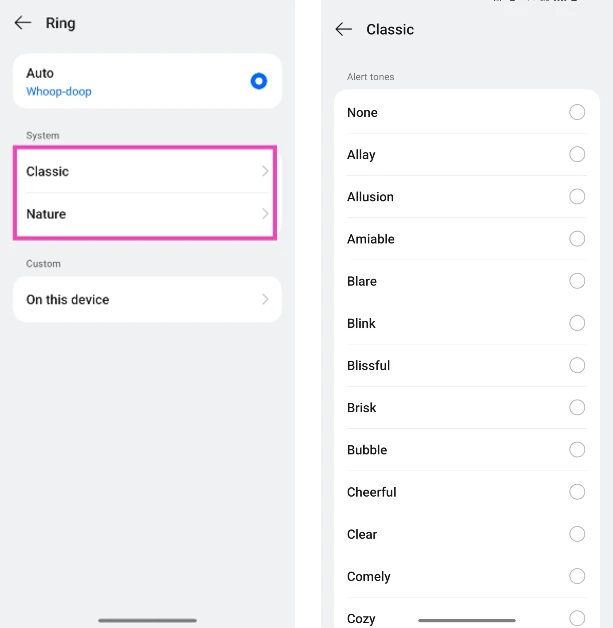
Oppo Reno 11: Performance and Cameras

Oppo Reno 11 consistently lasted an entire day throughout the review period. We clocked a daily Screen On Time of around 6 hours. Our daily usage included watching video content, making video calls, browsing the web, and even a little bit of gaming. The 67W charger provided in the box can fully charge the 5,000 mAh battery in just over 45 minutes.

Let’s talk about the camera performance of the Oppo Reno 11. Its near rear camera module packs a 50MP primary shooter, a 32MP telephoto lens, and an 8MP ultrawide camera. Most OEMs in this segment push the macro sensor along with their devices, for the sole purpose of filling the gap. So, the telephoto lens on the Reno 11 is very much welcome.

Oppo Reno 11: Performance and Cameras

camera

Pictures taken with the 50MP primary shooter packed a good dynamic range and produced deep colours. Even in overcast conditions, the camera did an excellent job of capturing all the important details and exposing the sky correctly. The colours are processed nicely and the images have a natural look about them.

cameras

indoor shot

In limited lighting, the main sensor does a good job of capturing enough light through its aperture. The images are a little grainy but the brightness levels are very good. The grain is smoothened out in Night Mode and the object is illuminated a bit more through clever photoprocessing.

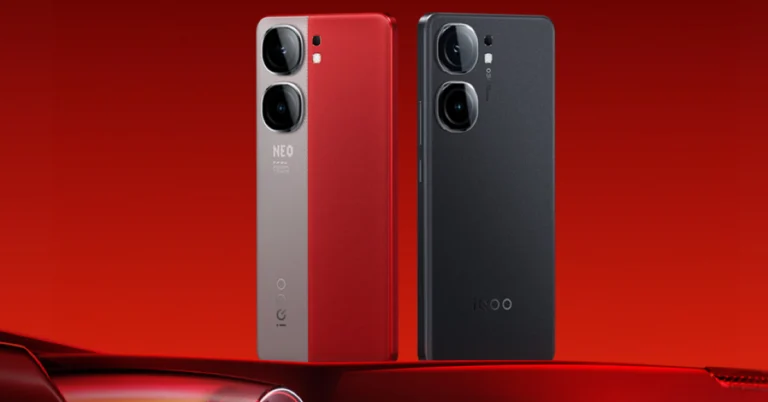

Oppo Reno 11: Performance and Cameras
Primary Camera: Without Night Mode vs Night Mode
camera
Ultrawide lens: Without Night Mode vs Night Mode

The camera offers very intuitive controls in portrait mode. The autofocus is on point and the camera recognises the object boundary instantly. The result is focussed images that centre the object nicely and contain a good level of background blur. The native camera app also has some fun filters you can use for the portrait mode.

Oppo Reno 11: Performance and Cameras
Portrait Mode
cameras
Portrait Mode

The 8MP ultrawide camera puts up a good performance as well. The pictures taken with this camera maintain their colour richness and produce a good dynamic range. There is a little softness to the images, but that’s something we expect from every ultrawide sensor in this price range. In limited lighting, however, the ultrawide sensor relies heavily on the night mode.

Oppo Reno 11: Performance and Cameras
Ultrawide lens
Oppo Reno 11: Performance and Cameras
Ultrawide lens
camera
Ultrawide lens

The telephoto lens is the unanimously preferred option over the macro lens and it delivers decent results here. Images taken with 2X optical zoom are well composed and retain their colour richness. You start getting diminishing results once you cross the 3X mark.

cameras
1x vs 2x vs 5x
10x vs 50x
10x vs 50x

The 32MP selfie camera takes good images in a range of lighting conditions. We were pleased with how it performed indoors under artificial lighting. It does not mess with the skin tone and texture too much, which is nice to see. On top of that, it can record 4K videos at 30fps, which not a lot of smartphones in this price range can boast about.

Read Also: Top 10 Smartphones Under $500 in USA (2024)

Verdict

The Oppo Reno 11 catches the eye with its elegant design and reels you in with its fine software. The aesthetic appeal of this smartphone is unmatched in this price range. The matte finish on the polycarbonate back goes nicely with its grey shade. The balanced weight distribution adds to the supreme in-hand feel of the device. In terms of performance, the Reno 11 ticks the baseline demands we have from it, even though it runs on the same chipset as its predecessor. On the flip side, the telephoto lens in this phone’s camera module is something you’ll rarely get to see in other devices in this price range. Overall, the Reno 11’s camera performance holds up to Oppo’s reputation.

Oppo Reno 11: Pros

  • Elegant design
  • Incredible in-hand feel
  • Good set of cameras

Oppo Reno 11: Cons

  • Can get slightly sluggish