Garena Free Fire Max Redeem Codes Today 13 May 2025: Here is how to claim them

Garena Free Fire Max is a battle royale game with regular awards and tournaments to keep players interested. If you play Garena Free Fire, you should be aware of the redeem codes that are released on a daily basis. However, because the battle royale game is banned in India, players from other countries can use the Free Fire Redeem codes daily. If you’re unfamiliar with the Garena Free Fire redeem codes or don’t know how to get them, we’ve put together a step-by-step guide to help you redeem them. Check out Garena Free Fire Max Redeem Codes for 13 May 2025.

The Free Fire Max redeem codes are a great way to get free stuff. These are 12-digit codes that contain alphabets and numbers, as well as an expiration date and time. Because the Garena FF redeem codes cannot be used more than once, you should hurry to the redemption page to claim your free reward before someone else does. To get a free reward, all you have to do is go to reward.ff.garena.com/en, which is the official redemption page. Also, keep an eye on this space for daily updates on Garena Free Fire Max redemption codes and rewards.

Also Read: Sennheiser Accentum Plus wireless headphones with Hybrid Adaptive Noise Cancellation launched

Garena Free Fire Max Redeem Codes Today 13 May 2025

FX3V6M5C7AD9Y2H8

FW7K3B6Z5DO9J2R1

FG4I2L9DN6T1F8E7

FH6T8F3W7E2Q59L4

FGERT5TG6YE546V7

FL4TY3N6C7H8K1S2

FZ5R3O9JY7Q1X4I6

FF1L6A2U8Z5RD3Q7

FC4V9P5D8G3FD2B1

FU7N3Q1I2E9KD5O6

FETGERT5G56GJ7N6

F5YH456HYT6HGR53

FA4I7Y55U6O2Q8E3

How to Get Free Fire Max Redeem Codes for Garena on 13 May 2025?

  • Visit the Garena Free Fire Max game’s official website at reward.ff.garena.com.
  • Use your Facebook, Google, VK, Apple ID, Huawei ID, or Twitter account to log in.
  • You’ll be taken to a valid redemption code (s)
  • Copy and paste the 12-digit redemption code into the text box.
  • On the screen, a dialogue box will appear.
  • ‘Ok’ should be selected.

For the latest gadget and tech news, and gadget reviews, follow us on Twitter, Facebook and Instagram. For newest tech & gadget videos subscribe to our YouTube Channel. You can also stay up to date using the Gadget Bridge Android App. You can find the latest car and bike news here.

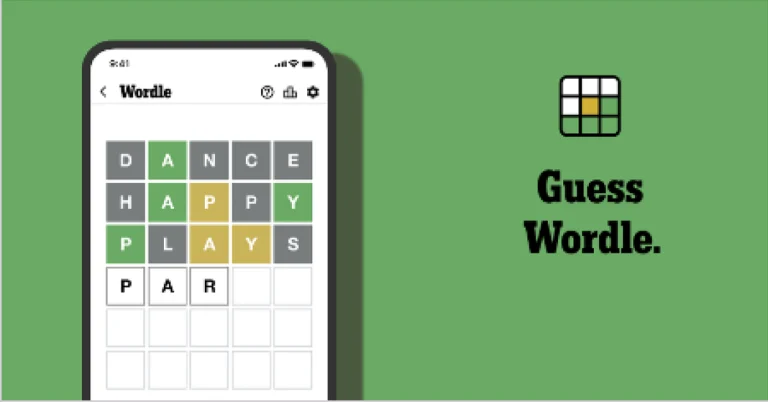
NYT Wordle Answer and Hints Today (May 13)

Are you looking for today’s Wordle for May 13, 2025? The problem is difficult to solve, so if you need assistance, we’ve included hints and the answer to the May 13 Wordle.

Hints and Answers for Today’s Wordle May 13

Before answering directly, please check the May 13 Wordle Hints first.

Hint 1: Today’s Wordle answer includes two vowels.
Hint 2: The answer for today has a repeating letter.
Hint 3: Knowing about or realizing something; conscious of somebody/something

What word does today’s Wordle begin with?

Do you need help with today’s Wordle answer’s initial letter?

The first letter in today’s Wordle is “B”

Today’s Wordle Answer May 13 #1424

The answer to Wordle #1424 on May 13, 2025, is — AWARE

Also Read: Spigen cover listing revealed the iPhone SE 4 design: Report

What is Wordle?

Wordle: A Five-Letter Word Guessing Game
• The game allows six guesses of a five-letter word.
• Provide feedback on guessed letters’ placement in the puzzle.
• The New York Times purchased the game in 2022.
• Created by Josh Wardle for his partner, narrowing down 12,000 English words to 2,500.
• Named after the word “word.”

How To Play Wordle?

Wordle is a New York Times word puzzle game that allows users to guess a five-letter word in six attempts. The letters are highlighted in Yellow and Green, indicating whether the word is present in the answer or not, and Green letters indicate the correct guess.

Wordle Tips and Tricks

  • Select a powerful starting word: Avoid using unusual words, as they frequently do not match common letters. A good opening word has plenty of benefits.
  • Repeating letters: Don’t be afraid of repeating letters; they appear frequently in words. The answer may contain one or two repeated letters.
  • Use the Wordlebot: The NYT’s Wordlebot analyses and compares replies to itself. This challenge can assist you enhance guessing skills and highlight areas for development.

Amazon Quiz Answers Today 13 May 2025: Participate to win Up To Rs 500 Amazon Pay Balance

13 May 2025: New Amazon Quiz is now available. Customers from different parts of the country are participating in the daily quiz. The quiz starts at midnight today and will be live until 11:59 PM tonight. By successfully answering every question, participants in the quiz have the chance to win wonderful rewards. Up to Rs 500 Amazon Pay Balance is up for grabs to participants today.

One wrong answer could eliminate you from the quiz. You have a chance to win up to Rs 500 Amazon Pay Balance if you successfully answer every question. Users of the app only have the opportunity to take the quiz. Check Out 13 May 2025 Amazon Quiz Answers.

Are you not able to find Amazon FunZone? Click below and participate.

Click here to enter the Amazon FunZone Quiz and play today.

Amazon Quiz Today Prize: Rs 500 Amazon Pay Balance

Quiz Date: 13 May 2025

Daily Timing: 12 AM to 11:59 PM

Previous Amazon Quiz Winners Announcement: Today 12 PM Noon

Amazon Quiz Answers Today 12 May 2025: Win Up To ₹ 500 Amazon Pay Balance

Question 1: Which of these players won the Monte Carlo Masters tennis tournament in 2024, his 3rd triumph in that event in 4 years?

Answer: Stefanos Tsitsipas

Question 2: Which of these Amazon Prime shows shares its name with a 2005 Brad Pitt- Angelina Jolie movie?

Answer: Mr and Mrs Smith

Question 3: Which animal features on the election symbol of the Republican party in the USA?

Answer: Elephant

Question 4: These waterfalls span the border between the province of Ontario in Canada and which state in the USA?

Answer: New York

Question 5: Which of these famous architects designed this iconic monument in India?

Answer: Edwin Lutyens

How To Play Amazon Quiz Today

Only app users are eligible to play the Amazon quiz every morning from 12 AM to 11:59 PM. The quiz is not available on the desktop. For those who are unaware of how to play the Amazon quiz, below are the steps, you can follow to take the quiz.

  • First, download the Amazon app from the Google Play Store or App Store or go here to download the Amazon App
  • Now fill in the required information through the Sign-Up option.
  • To find the Amazon Quiz banner, log in to the Amazon app and scroll down to the home screen.
  • Tap on the Amazon Quiz banner and tap on the Start button to start the Quiz.
  • Now you will get 5 questions and you need to answer them correctly. One wrong answer will eliminate you from the Quiz.
  • After answering all the questions correctly you are now eligible for a Lucky Draw.
  • The previous winner’s name will be announced today at 12 PM.

Amazon Daily Quiz Answers from the previous few days.

Here are all the answers from the previous 5 days of the Amazon Daily Quiz and Contest.

Amazon Quiz Answers Today 12 May 2025: Win Up To ₹ 500 Amazon Pay Balance

Question 1: Against which team did Sunrisers Hyderabad set a new record scoring 287 in an IPL match?

Answer: Royal Challengers Bengaluru

Question 2: Who plays the role of soldier Arun Katyal in the recently released movie ‘Yodha’?

Answer: Sidharth Malhotra

Question 3: Which of these famous rulers was born in the Shivneri Fort in Maharashtra in the 17th century?

Answer: Shivaji

Question 4: Name this famous church located in Europe

Answer: St. Peter’s Basilica

Question 5: This is the flag of which Caribbean country?

Answer: Barbados

Amazon Quiz Answers Today 9 May 2025: Win Up To ₹ 500 Amazon Pay Balance

Question 1: The first match of the 2025 ICC Champions Trophy would be played between Pakistan and which team?

Answer: New Zealand

Question 2: Name the movie based on the ‘Fantastic Four’ that will release as part of the Marvel Cinematic Universe in 2025

Answer: The Fantastic Four’s first step

Question 3: In 1877, the Central India Spinning, Weaving and Manufacturing Company founded by Jamsetji Tata in which city was renamed Empress Mills?

Answer: Nagpur

Question 4: Who among these is the founder of this company?

Answer: Fred DeLuca

Question 5: Which of these famous artists is depicted here on the wall?

Answer: Salvador Dali

Amazon Quiz Answers Today 8 May 2025: Win Up To ₹ 500 Amazon Pay Balance

Question 1: Which iconic 1989 military drama series starring Shah Rukh Khan is being remade with Gauahar Khan and Vicky Jain in the lead?

Answer: Fauji

Question 2: The Rod Laver Arena hosts matches during which Grand Slam tennis tournament?

Answer: Australian Open

Question 3: Dopehri’ is a novel by which famous film and theatre personality?

Answer: Pankaj Kapur

Question 4: The construction of this famous monument was completed in which year?

Answer: 1924

Question 5: Name this famous structure which has been specially lit up for a festival.

Answer: Sydney Opera House

Amazon Quiz Answers Today 7 May 2025: Win Up To ₹ 500 Amazon Pay Balance

Question 1: Justin, who recently scored a hat-trick for Bournemouth against Newcastle, is the son of which famous footballer?

Answer: Patrick kluivert

Question 2: What is the name of Neha Dhupia’s character in the movie ‘Bad Newz’?

Answer: Ma corona

Question 3: NASA’s Kennedy Space Center is located in which US state?

Answer: Florida

Question 4: This photograph is taken in which capital city in Europe, home to tourist attractions like the Rijksmuseum.

Answer: Amaterdam

Question 5: This character debuted in the anthology comic book Amazing Fantasy #15 in which year?

Answer: 1962

Amazon Quiz Answers Today 6 May 2025: Win Up To ₹ 500 Amazon Pay Balance

Question 1: Justin, who recently scored a hat-trick for Bournemouth against Newcastle, is the son of which famous footballer?

Answer: Patrick kluivert

Question 2: What is the name of Neha Dhupia’s character in the movie ‘Bad Newz’?

Answer: Ma corona

Question 3: NASA’s Kennedy Space Center is located in which US state?

Answer: Florida

Question 4: This photograph is taken in which capital city in Europe, home to tourist attractions like the Rijksmuseum.

Answer: Amaterdam

Question 5: This character debuted in the anthology comic book Amazing Fantasy #15 in which year?

Answer: 1962

Amazon Quiz Answers Frequently Asked Questions (FAQs)

Where can I check the previous winners? Did I win how to check?

You can head over to this link on your mobile or desktop to check the winners of the Amazon Daily Quiz Contest.

How to Play Amazon Daily Quiz or Contest?

We have written an explainer above, you can refer to that.

When are the winners of the Amazon Quiz and contest announced or declared?

The announcement of today’s Amazon quiz winner will take place Tomorrow. As for the Special Quiz and “Spin & Win” Contest, the winners will be declared once the Quiz Contest comes to an end. To find out who the lucky winner is, you can refer to the Amazon Quiz Winners List or visit the Amazon Winners tab in the Amazon App.

How to participate in the Daily Amazon Quiz?

That is very easy, just got to the Amazon app and scroll to the bottom of the page and you will find the Quiz section. Click on it (usually it is called the fun zone) and you can enter the Amazon Today Quiz Contest. 

Are there any other quizzes or contests running on Amazon daily?

Yes, there are many running on a daily basis. These range from spinning the wheel to answering the questions correctly. All are located in the Fun Zone. 

What are the criteria for selecting a winner in the Daily Amazon Quiz?

When a qualified player submits correct answers to all the questions, they will automatically be entered into a lucky draw. This draw will include all participants who answered all the questions correctly. Amazon randomly selects the final winners from the pool of eligible participants who gave the right answers.

Which Types of Questions are asked within Amazon Daily Quiz?

These are very simple and straightforward questions. These are mainly related to general knowledge. 

Where should I look for Amazon Daily Quiz answers?

You can bookmark our website www.gadgetbridge.com as we will help you every day with the Amazon Daily Quiz. We bring you fresh answers every day for the Amazon Daily Quiz and Contest. 

What time does Amazon Announce previous winners?

The previous winner’s name will be announced today at 12 PM (noon).

Samsung Galaxy S25 Edge officially debuts in the market

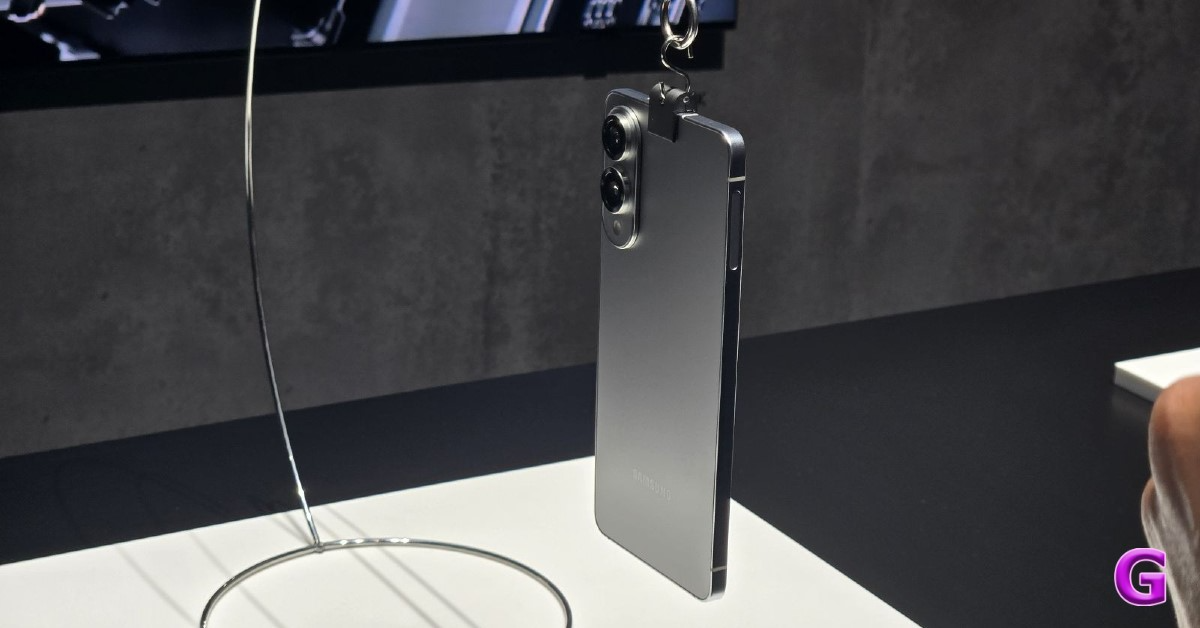
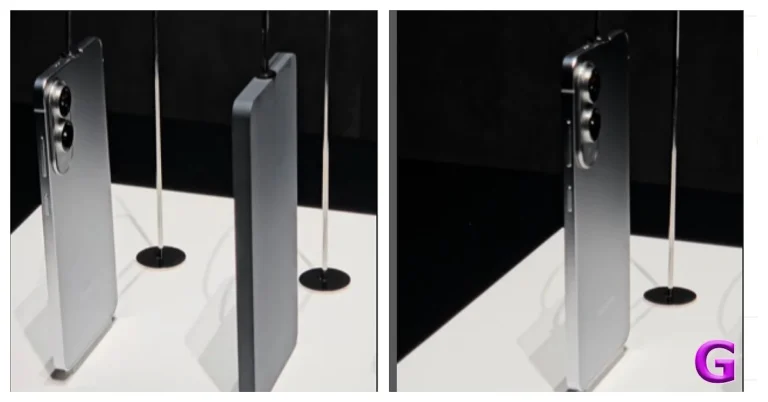
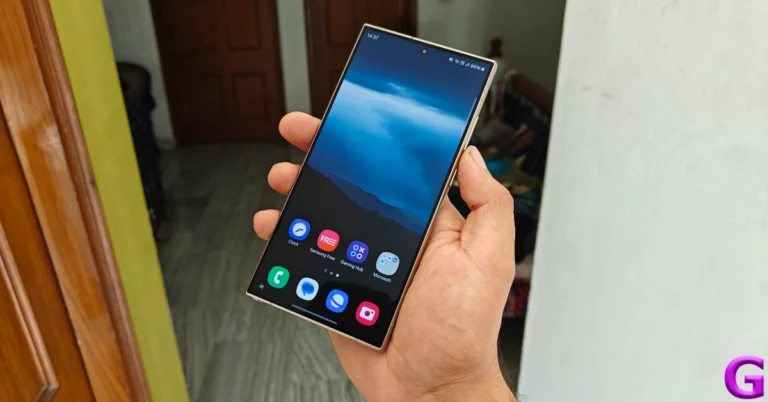
Samsung has unveiled the Galaxy S25 Edge, a 5.8 millimetre thin smartphone weighing 163 grams, making it one of the thinnest on the market. The launch follows Samsung’s annual flagship phone launch for the S25 series, amid rumours of Apple launching a thinner iPhone. The latest handset includes a 6.7-inch 120Hz AMOLED screen and a 3,900mAh battery.

Samsung Galaxy S25 Edge price and availability details

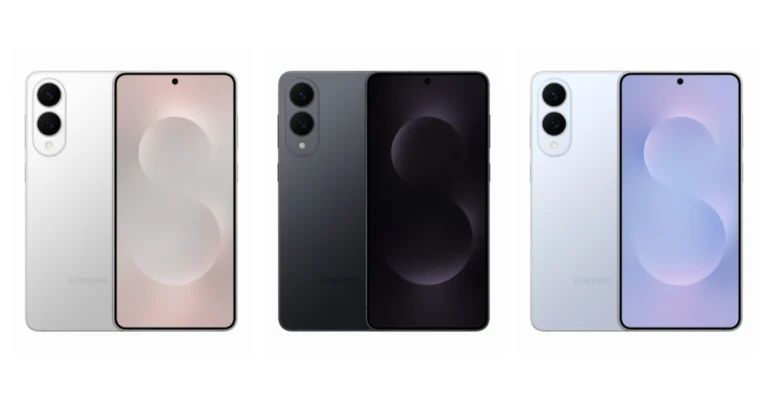
The handset is seen in three colourways: Titanium Silver, Titanium Jetblack and Titanium Icyblue. The price of Samsung Galaxy S25 Edge starts at $1,099 and goes on sale on May 30.

Samsung Galaxy S25 Edge price and availability details

Samsung Galaxy S25 Edge Design, Specifications

The Samsung Galaxy S25 Edge features a 6.7-inch QHD+ Dynamic AMOLED 2X Display with a resolution of 1,440 x 3,120 pixels. The display has consistent bezels and a central hole-punch slot at the top. The screen features a variable refresh rate of 120Hz (1~120Hz), Vision enhancer, and adaptable colour tone. The panel is covered by Corning Gorilla Glass Ceramic 2 and Victus 2 on the front and back, with a titanium frame similar to the Ultra to make it lightweight.

Also Read: Upcoming Apple iPhone 17, 17 Pro and 17 Pro Max camera to see these changes

The mobile phone measures 5.85mm thick and weighs 163g. The Edge is 1.5 mm slimmer and 27 grams lighter than the Galaxy S25+, which has the same dimensions. This is the company’s ultra-thin smartphone, and it’s surprisingly slim and light.

The phone is also water and dust resistant up to IP68 standards. It has been tested for submersion in up to 1.5 meters of freshwater for up to 30 minutes.

Samsung Galaxy S25 Edge price and availability details

It is driven by Qualcomm’s 3-nanometer Snapdragon 8 Elite for Galaxy processor, with 12GB of LPDDR5X RAM and up to 256GB of UFS 4.0 of on-board storage. The S25 Edge comes pre-loaded with Android 15 based One UI 7.

Also Read: UBON SP-38 Rockstar Series with dual 4-inch speakers launched in India

The camera department is handled by a dual camera setup featuring a 200-megapixel primary camera with OIS F1.7, 2x optical quality zoom and a 12-megapixel ultra-wide-angle lens with autofocus and F2.2 aperture. In terms of selfies, there is a 12-megapixel front camera with F2.2. Similar to the S25 lineup the new phone also packs Galaxy AI-powered editing features, including fan-favorites like Audio Eraser and Drawing Assist.

Connectivity options include 5G, LTE, Wi-Fi 7, Wi-Fi Direct Bluetooth v 5.4 and more. The smartphone is backed by a 3,900mAh battery with 25W charging support.

Top 11 ways to fix the ‘Something Went Wrong, Try Again’ error in Google Play Store

0

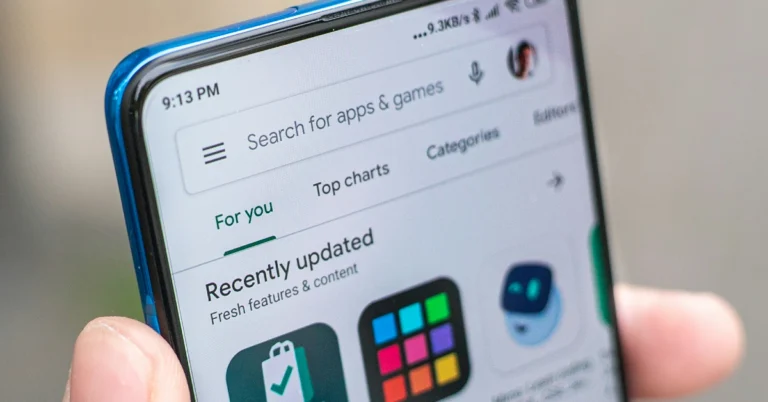
The Google Play Store is the native app platform for Android smartphones. While OEMs like Samsung, Vivo, and others have their own app stores, they do not enjoy as much popularity as the Play Store. Google’s app market also offers state-of-the-art security and is very accessible to casual users. However, sometimes it can throw weird errors. Today, we bring you the top 11 ways to fix the ‘Something Went Wrong, Try Again’ error in the Google Play Store.

Read Also: Samsung Galaxy S25 Edge launch event tomorrow: How to watch, expected pricing, specs and more

What’s causing the ‘Something Went Wrong, Try Again’ error in the Google Play Store?

Here are some possible reasons why the Play Store may be throwing this error your way.

  • Phone’s date and time don’t match your time zone
  • Shoddy internet connection
  • Corrupt Play Store cache
  • Corrupt Play Services cache
  • Google Play Store servers are experiencing an outage
  • Background issues on the phone
  • The Play Store app is out of date
  • The Android OS on your phone is out of date

Force-stop and restart the Google Play Store app

If the ‘Something Went Wrong’ error is caused by background issues on the Play Store app, force-stop and restart it to resolve the issue.

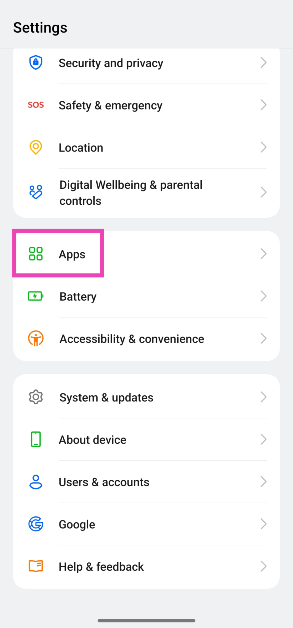
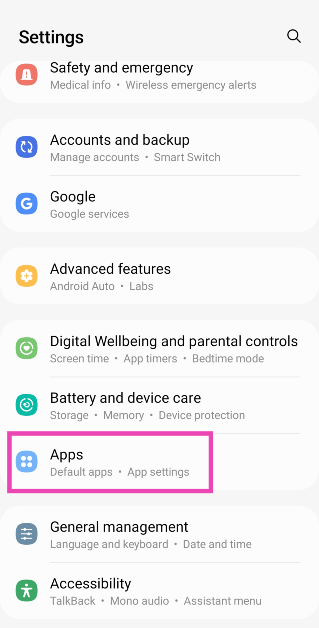
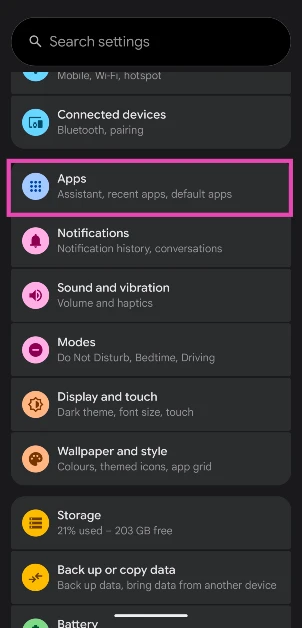
Step 1: Go to Settings and select Apps.

Step 1: Go to Settings and select Apps. 5 ways to stop an Android app from running in the background

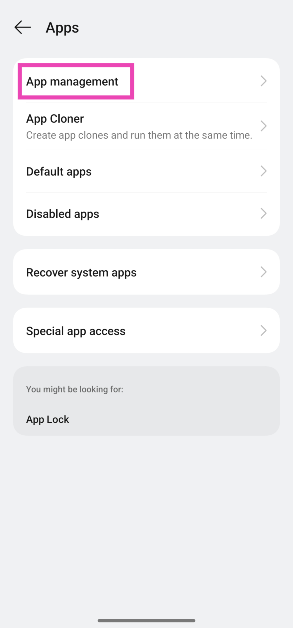
Step 2: Tap on App management.

Step 2: Tap on App management. 5 ways to stop an Android app from running in the background

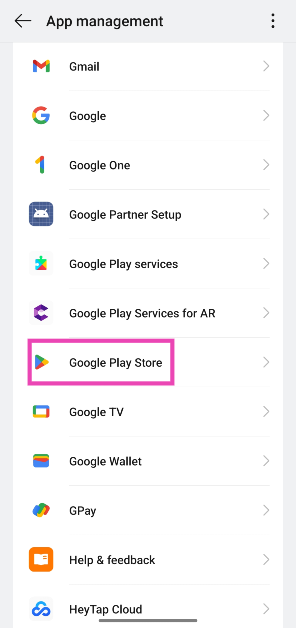
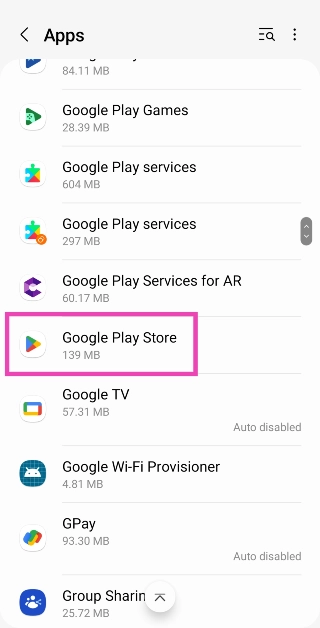
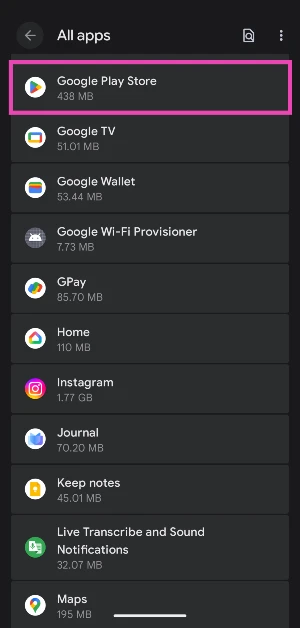
Step 3: Select Google Play Store.

Step 3: Select Google Play Store.

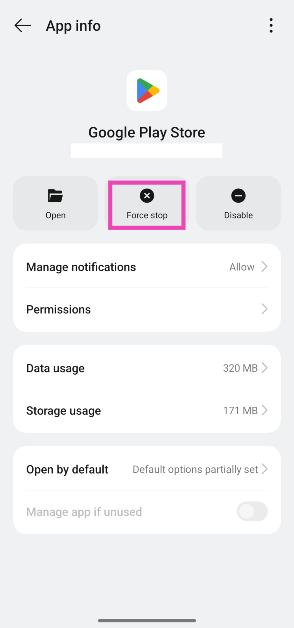
Step 4: Hit Force stop.

Step 4: Hit Force stop.

Step 5: Select the Play Store app from the app drawer or home page to restart it.

Check the internet connection

Check Internet Connection

If the Play Store can’t connect to the internet, you won’t be able to browse or download apps from it. Make sure there are no issues with your mobile data or WiFi connection. Run an internet speed test to check the strength of the network. Toggle the Airplane Mode to perform a network refresh.

Restart your phone

Restart Your Phone

If the background issues on your phone are causing the Play Store to malfunction, a quick restart will help resolve the issue. Press the side button and volume up button to access the power menu. Tap on ‘Restart’.

Set the correct date and time

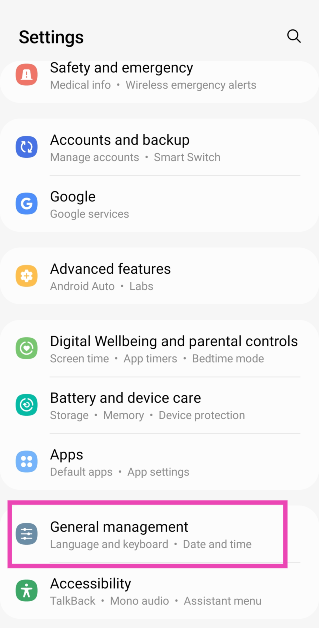
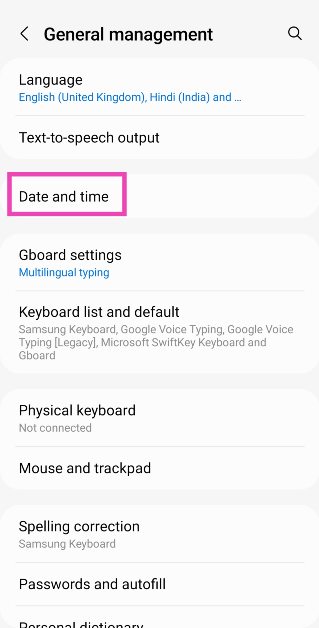
If the time zone selected on your phone does not match the region registered in the Google Play Store, you will not be able to download apps from the platform. Make sure that automatic date and time are enabled on your device.

Step 1: Go to Settings and select General management.

Step 1: Go to Settings and select General management. App updates stuck on pending? Try these 7 fixes

Step 2: Tap on Date and time.

Step 2: Tap on Date and time. App updates stuck on pending? Try these 7 fixes

Step 3: Turn on the toggle switch for Automatic date and time.

Step 3: Turn on the toggle switch for Automatic date and time. App updates stuck on pending? Try these 7 fixes

Clear Google Play Store’s cache

Step 1: Go to Settings and select Apps.

Step 1: Go to Settings and select Apps.

Step 2: Select Google Play Store.

Step 2: Tap on Google Play Store.

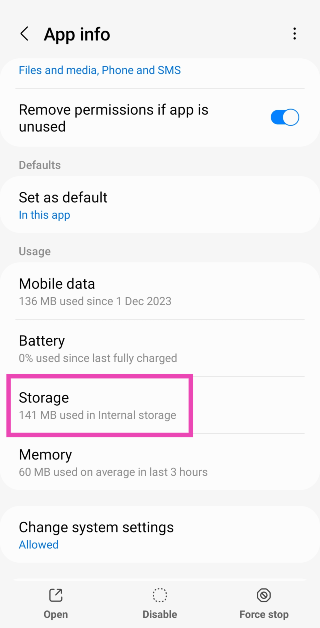
Step 3: Tap on Storage.

Step 3: Select Storage.

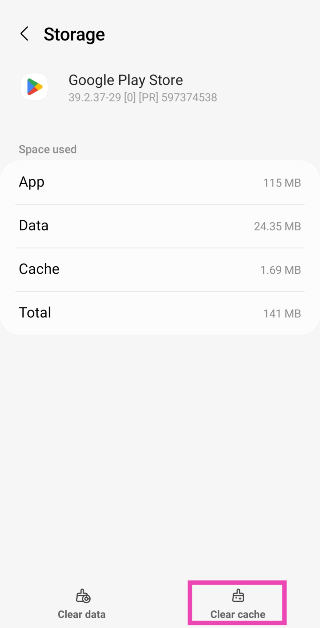
Step 4: Select Clear Cache.

Step 4: Hit Clear Cache.

Clear Google Play Services’ cache

Step 1: Go to Settings and select Apps.

Step 1: Go to Settings and select Apps. 5 ways to stop an Android app from running in the background

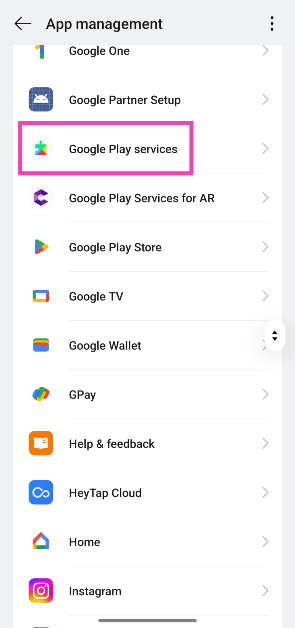
Step 2: Select Google Play Services.

Step 2: Select Google Play Services.

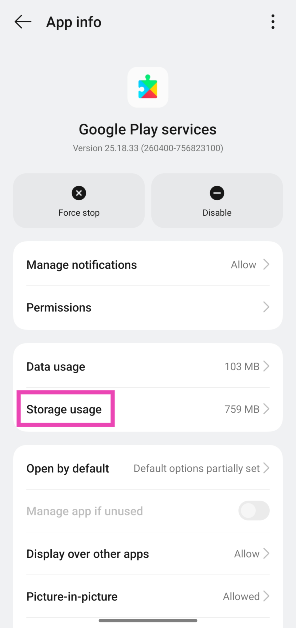
Step 3: Tap on Storage usage.

Step 3: Tap on Storage.

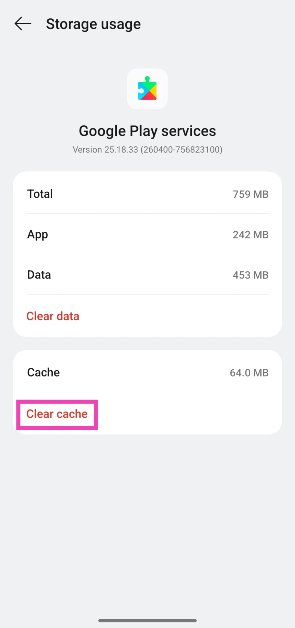
Step 4: Select Clear Cache.

Step 4: Select Clear Cache.

Update Google Play Store

Step 1: Launch the Google Play Store on your phone.

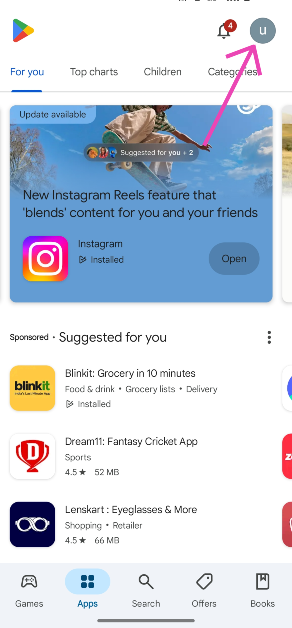
Step 2: Tap your profile icon in the top-right corner of the screen.

Step 2: Tap your profile icon in the top-right corner of the screen.

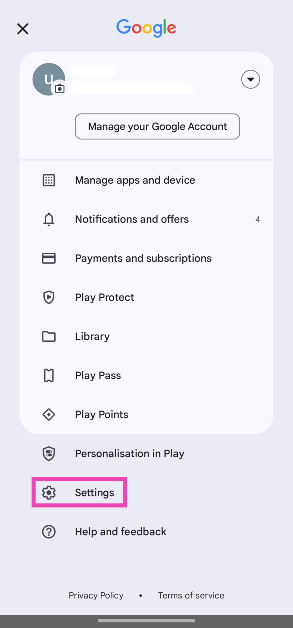
Step 3: Tap on Settings.

Step 3: Tap on Settings.

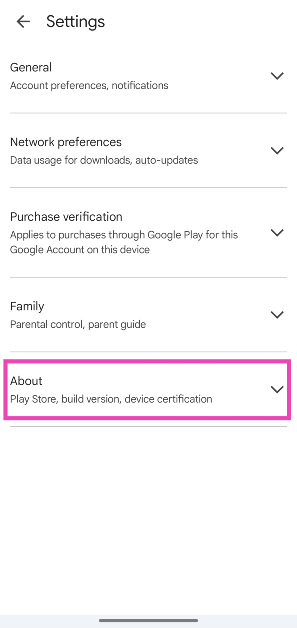
Step 4: Expand the About section.

Step 4: Expand the About section.

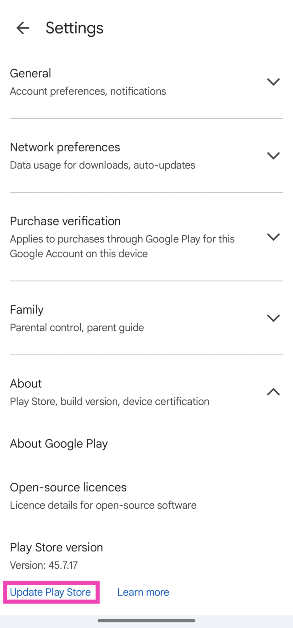
Step 5: Tap on Update Play Store.

Step 5: Tap on Update Play Store.

Uninstall updates

If the Play Store started malfunctioning after a recent update, it is either riddled with bugs or it wasn’t installed correctly. You can always roll back the update to fix the ‘Something went wrong’ error.

Step 1: Go to Settings and select Apps.

Step 1: Go to Settings and select Apps.

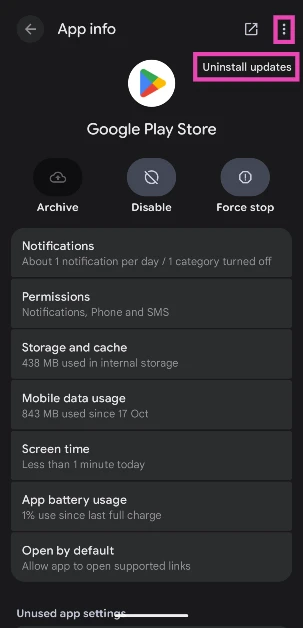
Step 2: Select Google Play Store.

play store

Step 3: Hit the ellipses in the top right corner of the screen.

uninstall updates

Step 4: Select Uninstall updates.

Log out and log in to your Google Account

If the issue is account-related, logging out and logging in to the Play Store will help. Here’s how you can go about it.

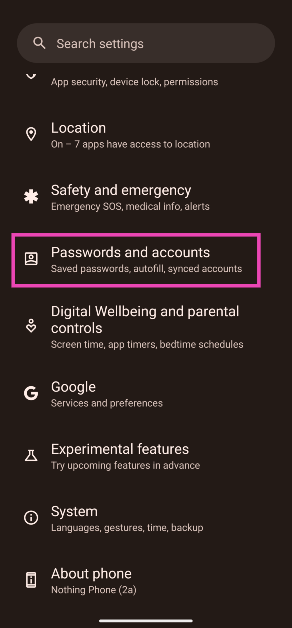
Step 1: Go to Settings and select Passwords and accounts.

Step 1: Go to Settings and select Passwords and accounts. Top 8 ways to fix ‘Google Play Store not auto-updating apps’ on Android (2024)

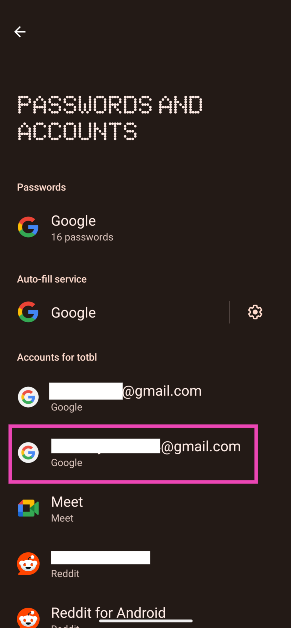
Step 2: Select your Google Account.

Step 2: Tap on the Gmail account you want to remove from the device. Top 8 ways to fix ‘Google Play Store not auto-updating apps’ on Android (2024)

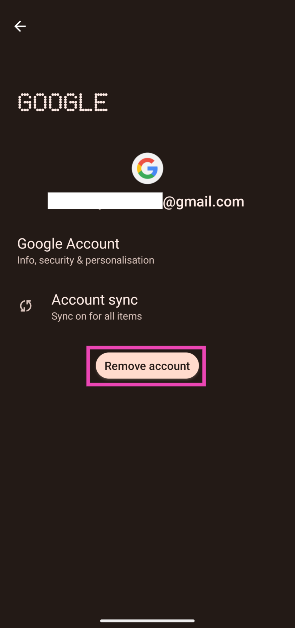
Step 3: Tap on Remove account.

Step 3: Tap on Remove account. Top 8 ways to fix ‘Google Play Store not auto-updating apps’ on Android (2024)

Step 4: Now, select Add account and enter your login credentials.

Check Google Play Store’s servers

Check Google Play Store’s servers

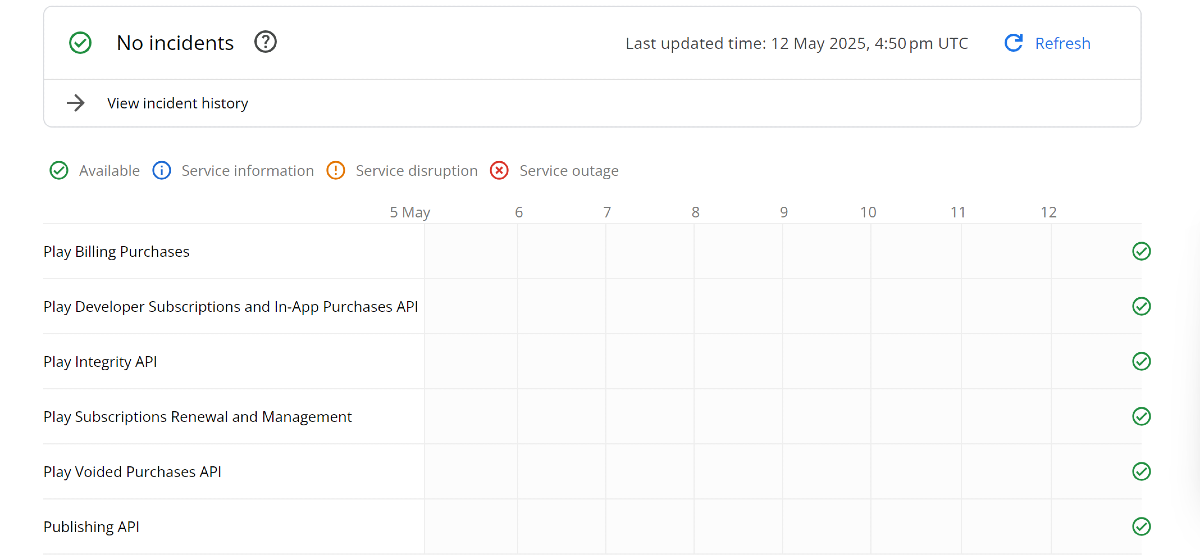
It is possible that the issue does not lie with your device, but with the Play Store’s servers. Server outages are not an uncommon phenomenon. To confirm whether the Play Store is currently experiencing a server issue, go to https://status.play.google.com/ and look for any red crosses along the different parameters. Alternatively, you can use third-party services like ‘DownDetector’ and ‘Is It Down by Freshping’ for this job.

Update your phone’s OS

Step 1: Go to Settings and select Software update.

Go to Settings and select Software update. 10 top ways to fix unable to answer calls on Android phone Top 8 ways to fix the ‘Emergency Calls Only’ error message on Android (2024) Top 8 ways to fix ‘Google Play Store not auto-updating apps’ on Android (2024)

Step 2: Tap on Download and install.

tap on download and install 10 top ways to fix unable to answer calls on Android phone Top 8 ways to fix the ‘Emergency Calls Only’ error message on Android (2024) Top 8 ways to fix ‘Google Play Store not auto-updating apps’ on Android (2024)

Step 3: Select Install now.

Select Install now. 10 top ways to fix unable to answer calls on Android phone Top 8 ways to fix the ‘Emergency Calls Only’ error message on Android (2024) Top 8 ways to fix ‘Google Play Store not auto-updating apps’ on Android (2024)

Frequently Asked Questions (FAQs)

Why is the Play Store showing the ‘Something Went Wrong, Try Again’ error?

The Play Store may throw the ‘Something Went Wrong’ error when it can’t connect to the internet or it has a corrupted cache. Phone-related issues like incorrect date/time and an outdated OS can also cause this problem.

How do I fix the ‘Something Went Wrong’ error in the Play Store?

Update the Play Store to its latest version, clear its cache, fix your internet connection, and make sure the date and time on your phone are correct to fix this issue.

How do I update the Google Play Store on my device?

Launch the Play Store, tap your profile picture, go to Settings>About, and tap on ‘Update Play Store’.

Why can’t I see the Play Store on my phone?

While the Play Store app cannot be deleted, it can be disabled. This removes it from your phone’s home page and app drawer. Go to Settings>Apps>Google Play Store and hit ‘Enable’ to get it back.

How do I enable automatic updates for an app on my phone?

Go to the app’s page on the Google Play Store, hit the ellipses at the top right corner of the screen, and select ‘Enable auto-update’.

Read Also: How to Enable the On-screen Keyboard on Windows 11: Top 3 Ways

Final Thoughts

This is how you can fix the ‘Something Went Wrong, Try Again’ error in the Google Play Store. Can’t get the Play Store to auto-update the apps on your phone? Try these 10 fixes. If you have any questions, let us know in the comments!

Samsung Galaxy S25 Edge launch event tomorrow: How to watch, expected pricing, specs and more

On May 13, Samsung’s slimmest phone, the Galaxy S25 Edge, will make its debut. The announcement would be made early in the morning in India. Key elements of the Galaxy S25 Edge, such as its 200-megapixel primary back camera and Corning’s Gorilla Glass Ceramic 2 display protection, have previously been made public by the firm. Additionally, the firm has indicated that Galaxy AI capabilities would be included.

Four months following the first appearance, the Samsung Galaxy S25 Edge is now all set for launch on May 13. With a name that dates back to prior curved screens, this phone will be very thin. For viewers in India, the global event will be livestreamed from 5:30 AM IST. You may watch a live broadcast of Samsung’s virtual event for the new phone unveiling on Tuesday on the company’s official YouTube channel and Samsung Newsroom.

What to expect?

Earlier this year, Samsung held its major 2025 Galaxy Unpacked event to introduce the Galaxy S25 lineup. As promised, three variants were offered: the S25, S25 Plus, and S25 Ultra. During the same occasion, the firm showcased its fourth and slimmest handset, the Samsung Galaxy S25 Edge. Not much, only the name and design were disclosed at the time.

Also Read: Samsung Galaxy S24 Ultra now available for as low as Rs 49,040: Know the deal

Samsung claims that Corning Gorilla Glass Ceramic 2 will be a feature of the upcoming Samsung Galaxy S25 Edge. Corning Gorilla Glass Ceramic 2 is the result of a partnership between Corning and Samsung. A display cover called Gorilla Glass Ceramic 2 has crystals placed in its glass matrix to improve durability and deflect cracks.

Reports state that the Samsung Galaxy S25 Edge is likely to have a 6.7-inch AMOLED screen with 1,440 x 3,120 pixel resolution, a variable 120Hz refresh rate, a 163g weight, and a 5.85mm thickness, making it the thinnest Galaxy S model yet. It is claimed to include a titanium frame with Corning Gorilla Glass Ceramic 2 and Victus 2 on the front and back, an ultrasonic fingerprint scanner, and IP68 dust and water resistance.

The Samsung Galaxy S25 Edge is expected to be powered by the Snapdragon 8 Elite for Galaxy processor, with 12GB of RAM and up to 512GB of on-board storage. It is likely to run Android 15 with One UI 7 and have a dual back camera system with a 200-megapixel primary camera and a 12-megapixel ultra-wide-angle lens. The phone might sport a 12-megapixel front camera for photos and video chats. It may support Wi-Fi 7 and Bluetooth 5.4 connection, as well as a 3,900mAh battery.

There’s no denying that Samsung’s Galaxy S25 Edge is the most exciting phone in years, so don’t be shocked if it costs a fortune.

Also Read: Upcoming Apple iPhone 17, 17 Pro and 17 Pro Max camera to see these changes

The Samsung Galaxy S25 Edge is expected to cost EUR 1,249 in Germany for the 256GB version and EUR 1,369 for the 512GB version, putting it between the Galaxy S25+ and Galaxy S25 Ultra in Samsung’s flagship range. It might be offered in Titanium Jetblack, Titanium Icyblue, or Titanium Silver.

It might go on sale in China and South Korea on May 23, followed by the United States and other regions on May 30th. Preorders are anticipated between May 14 and May 20.

UBON SP-38 Rockstar Series with dual 4-inch speakers launched in India

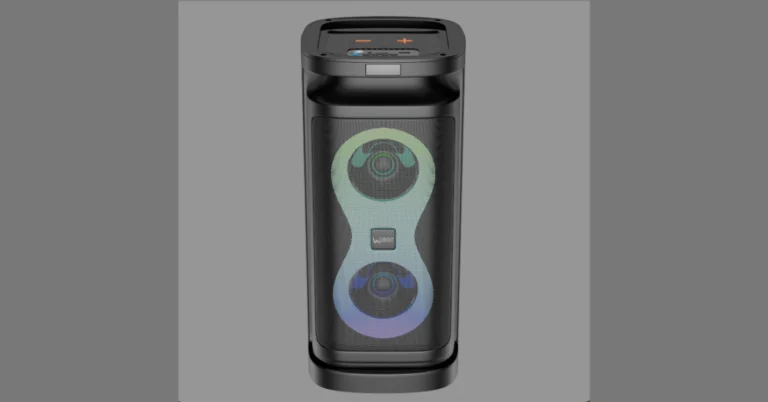
UBON, a homegrown electronics company, today presented the SP-38 Rockstar Series Wireless Speaker, a powerful, attractive, and versatile gadget. This Indian-made speaker has two 4-inch speakers with a 30W output, Infinity RGB lighting, and a long-lasting 4000mAh battery that provides up to 10 hours of playback.

The UBON SP-38 Rockstar Series Wireless Speaker is priced at ₹3,999. The SP-38 Rockstar Series is now available on Ubon’s official website, www.ubonindia.com, as well as prominent retail outlets around India.

This unique speaker has tremendous audio output, a wireless microphone, bright Infinity RGB lighting, and multi-functional capabilities, making it an excellent choice for music fans, performers, and partygoers.

Also Read: Upcoming Apple iPhone 17, 17 Pro and 17 Pro Max camera to see these changes

The SP-38 is a strong audio device with two 4-inch speakers and a 4000mAh battery that can last up to 10 hours, making it great for home parties, outdoor activities, karaoke nights, and casual music listening.

The dual 4-inch speakers on the UBON SP-38 Rockstar Series provide 30W output. It has infinity RGB lights with 5 mood modes, dual microphone support, versatile connectivity via Bluetooth 5.3, USB, Aux, FM, and TF Card, a wireless mic and remote control, and a built-in mobile stand for hands-free use.

Also Read: Samsung Galaxy S24 Ultra now available for as low as Rs 49,040: Know the deal

Mr. Lalit Arora, Co-Founder of UBON, during the launch of the product said “The SP-38 Rockstar Series is a game-changer in portable audio. We’ve combined powerful sound, long-lasting battery life, and stunning visuals to create a speaker that truly stands out. Proudly Made in India, this product reflects UBON’s commitment to local manufacturing, innovation, and quality. Whether you’re hosting a party, enjoying music at home, or need a reliable speaker for outdoor gatherings, the SP-38 delivers it all with style and performance.”

Upcoming Apple iPhone 17, 17 Pro and 17 Pro Max camera to see these changes

Months ahead of the official release, the camera details of iPhone 17, 17 Pro and 17 Pro Max have been tipped, suggesting major changes across the lineup. The upcoming series is likely to feature a tetra prism lens along with 8K video recording support. Moreover, the camera unit is expected to receive a makeover. keep on reading to know more.

There is still plenty of time until the Apple iPhone 17 is released, but leaks from Chinese dummy models have boosted expectations, suggesting a major improvement over the iPhone 16 series. The next iPhone series is believed to include the iPhone 17, iPhone 17 Air, iPhone 17 Pro, and iPhone 17 Pro Max. Apple is likely to reveal its next generation of iphone in September.

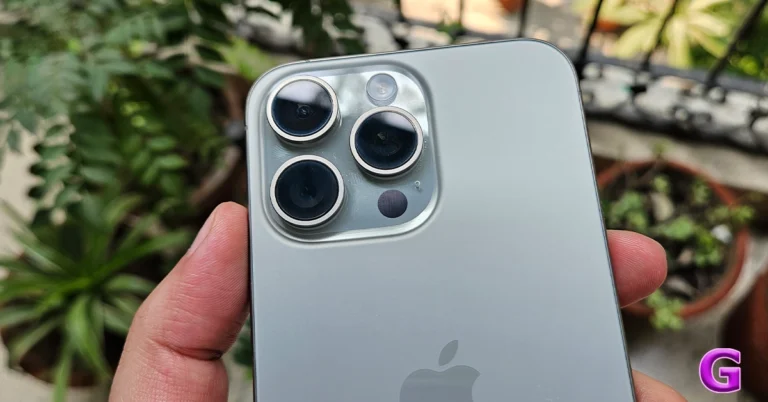
Significant camera improvements, including 8K video capture, which is already available on a number of Android flagships in 2025, are rumoured. Apple intends to change the iPhone’s square bump design to a rectangle. On the left side of the camera bar will be the camera sensors, and on the other end of the rectangle will be the flash microphone and Lidar.

Also Read: Samsung Galaxy S24 Ultra now available for as low as Rs 49,040: Know the deal

According to leaks, the Pro models could come with a 48-megapixel camera that includes a new 48-megapixel Tetaprism Telephoto lens, a 48-megapixel Ultra Wide Lens, and a 48-megapixel Fusion lens. The improved Telephhotolens is a notable camera feature, and the Ultra Wide Lens is comparable to the original iPhone lens. It is anticipated that the Air’s camera would look better than the iPhone Pro and Max.

The iPhone 17 Pro and iPhone 17 Pro Max are said to include dual video recording features that let users record with both the front and back cameras, as well as 8K video recording capabilities. The phones may also include a mechanical aperture, which would appeal to photographers since it would let users to manually alter depth of field and light strength for ideal images. Additionally, the front and back cameras will have this feature.

On the other hand, the iPhone 17 Air, the alleged newest model in the next iPhone range, is anticipated to be lighter and thinner due to its smaller chassis, which measures just 5.5 mm in thickness. A 48 Megapixel Fusion Camera and a telephoto lens could be included with the gadget.

The front camera of the vanilla iPhone 17 is reportedly 24 megapixels, while the back camera could resemble that of the iPhone 16. The entry-level 17 is probably going to have a 12 Megapixel Ultra Wide Lens and a 48 Megapixel Lens.

Also Read: Lava Agni 3 getting flat Rs 5,000 discount only on Amazon: Check out deals

Apple may double the resolution of the existing 12MP TrueDepth sensor by adding a 24MP selfie camera to the front-facing camera of the iPhone 17, including the Pro models.

The iPhone 16 and 16 Plus’s 60Hz screens may be improved by Apple adding a 120Hz refresh rate for the iPhone 17’s display.

How to Enable the On-screen Keyboard on Windows 11: Top 4 Ways

0

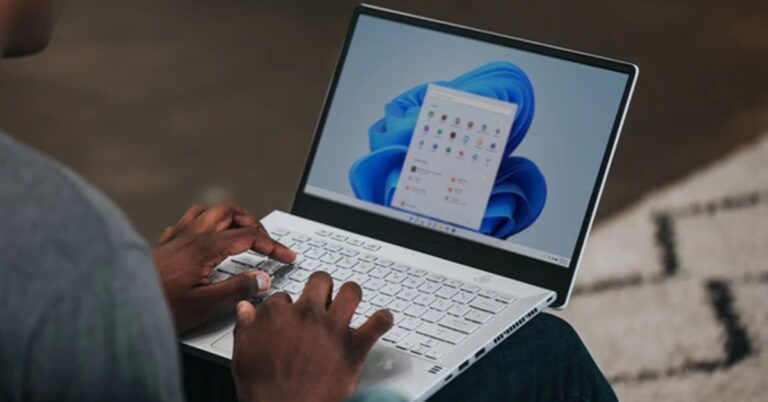
Windows 11 has a handy on-screen keyboard which comes in clutch when some of the keys of the physical keyboard are not working. You can click the letter and symbol icons on this virtual keyboard to type whatever you want. Stringing key combinations using the on-screen keyboard is surprisingly easy, too. Here are the top 4 ways you can enable the on-screen keyboard on your Windows 11 PC or laptop.

Read Also: Top 10 smartphones you can buy right now (May 2025)

On-screen vs Touch Keyboard: What’s the difference?

While the on-screen and touch keyboards are overlaid on your laptop’s display and serve as virtual keyboards, they are designed for different machines. An on-screen keyboard is an essential part of every Windows 11 device, be it a PC or a laptop. It is an alternative to the regular keyboard and helps you out when you can’t get certain keys to work.

In contrast, the Touch keyboard is especially designed for touchscreen laptops. It occupies a larger part of the screen since it is supposed to take touch input. The Touch keyboard springs into action whenever you use your touchscreen laptop as a tablet. You can change the size of this keyboard to accommodate single-handed use. It also offers a bunch of layout options like split, gamepad, traditional, and more.

Enable the On-screen keyboard from settings

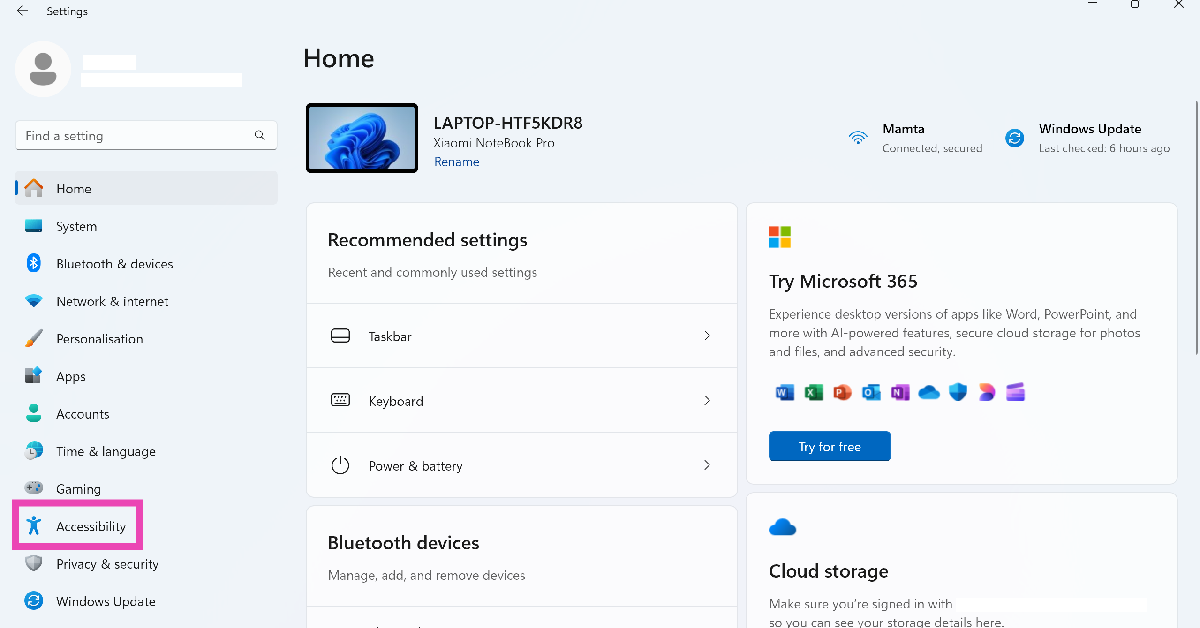
Step 1: Go to Settings and select Accessibility from the sidebar.

Step 1: Go to Settings and select Accessibility from the sidebar.

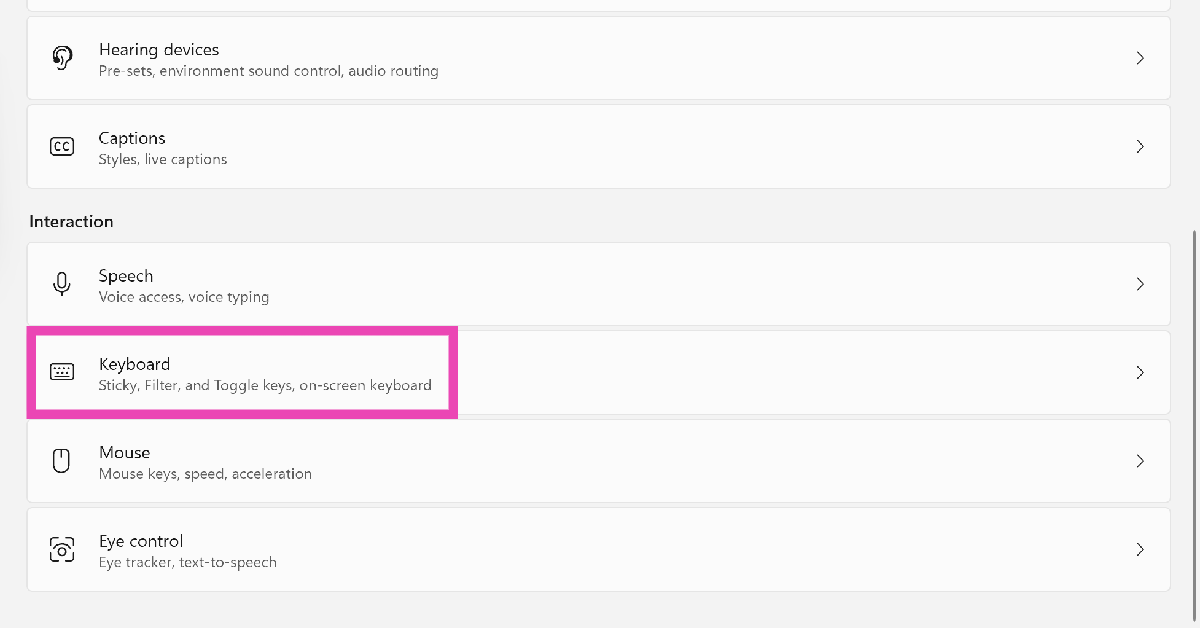
Step 2: Scroll down and select Keyboard.

Step 2: Scroll down and select Keyboard.

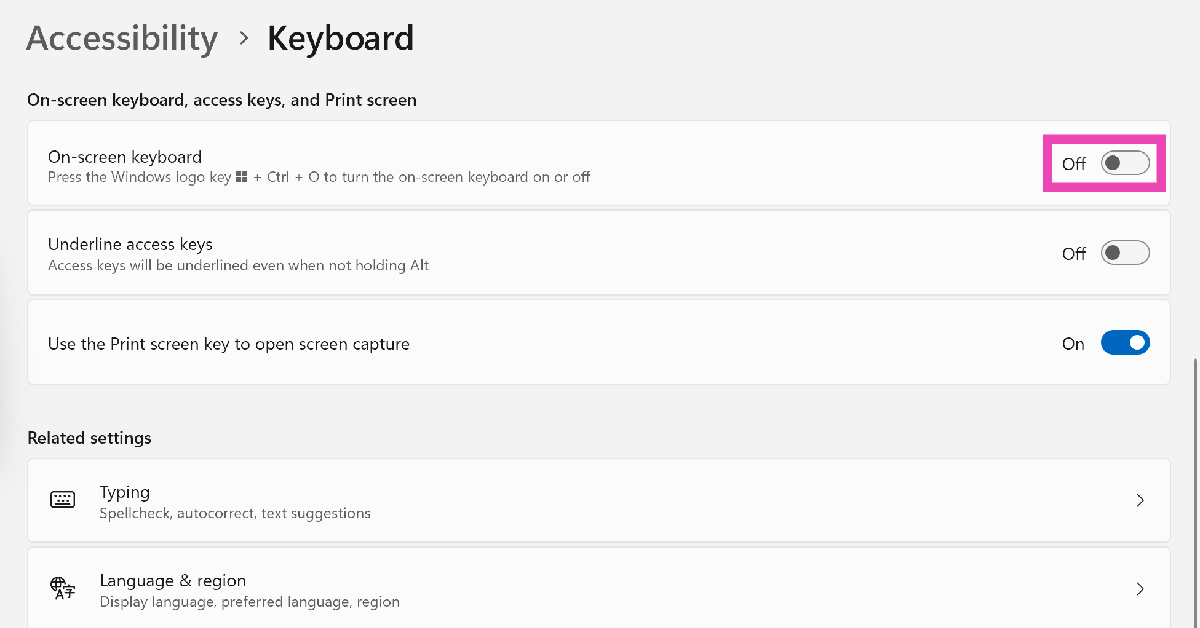
Step 3: Turn on the toggle switch next to On-screen keyboard.

Step 3: Turn on the toggle switch next to On-screen keyboard.

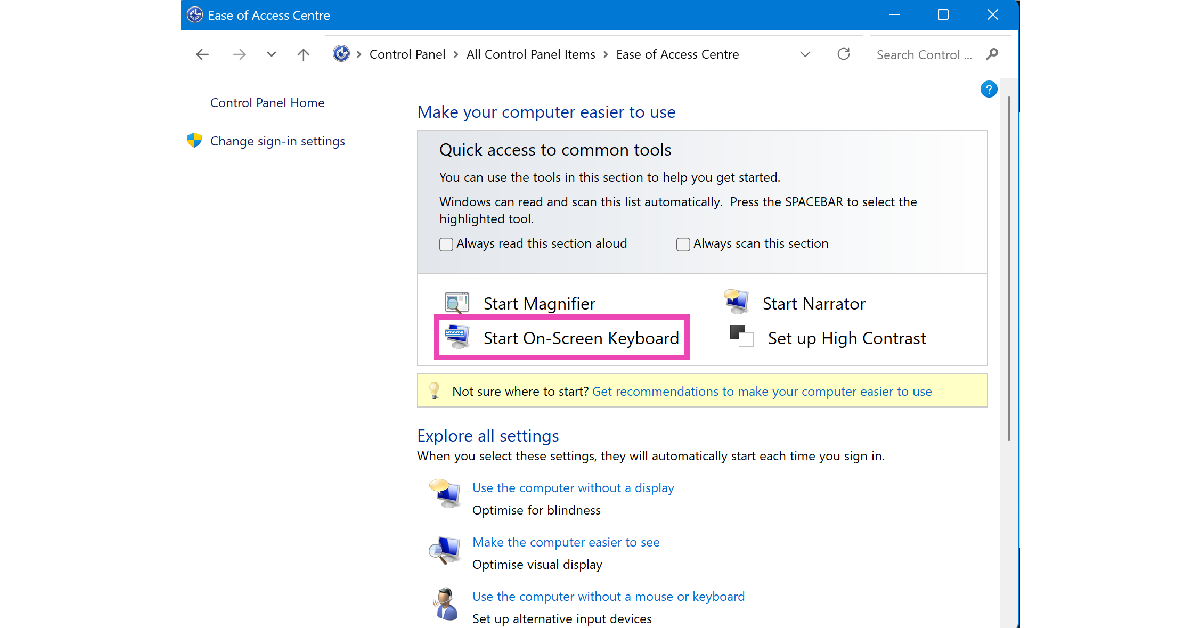
Enable the On-screen keyboard from the Control Panel

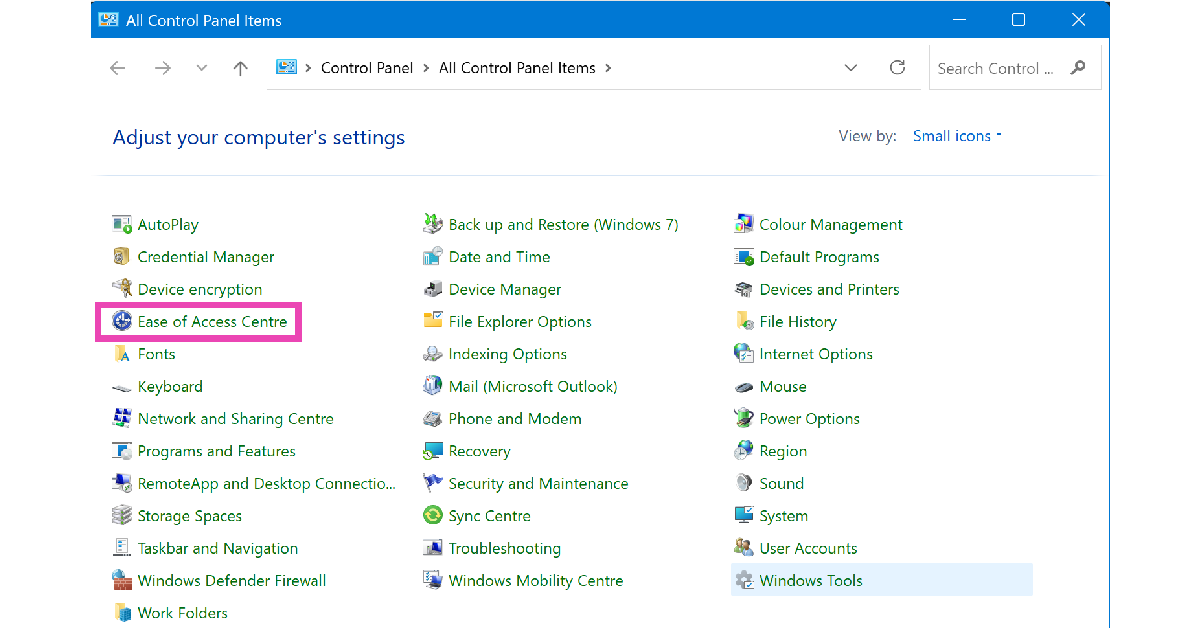
Step 1: Go to the Control Panel.

Step 2: Select Ease of Access Centre.

Step 2: Select Ease of Access Centre.

Step 3: Click on Start On-Screen Keyboard.

Step 3: Click on Start On-Screen Keyboard.

Use keyboard and taskbar shortcuts to launch the On-screen keyboard

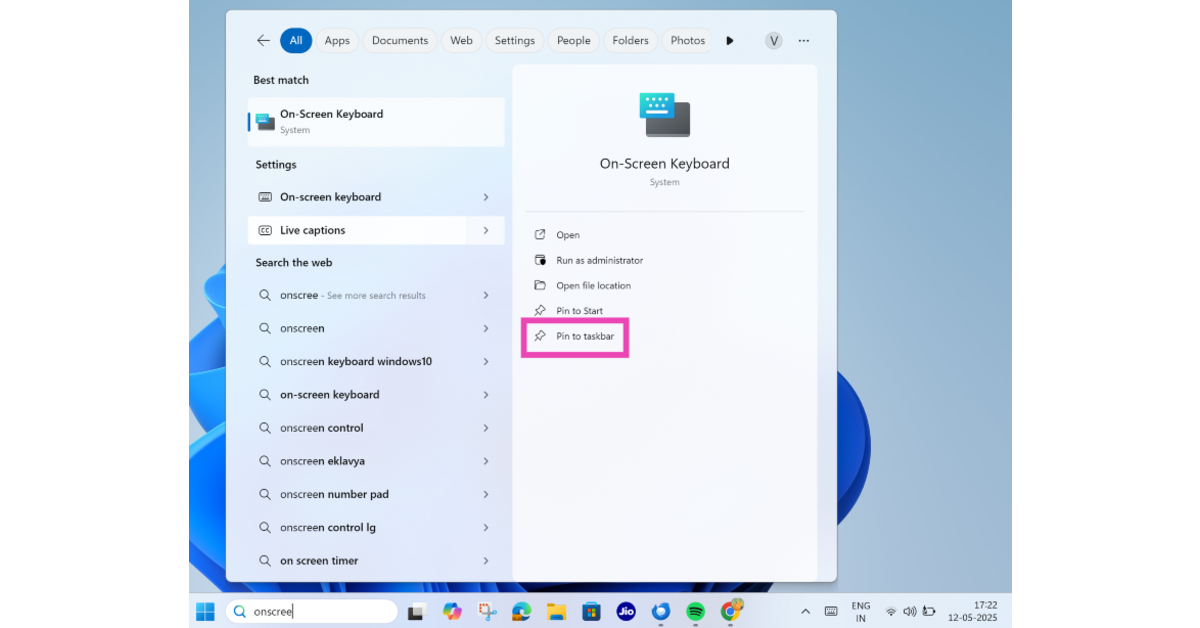
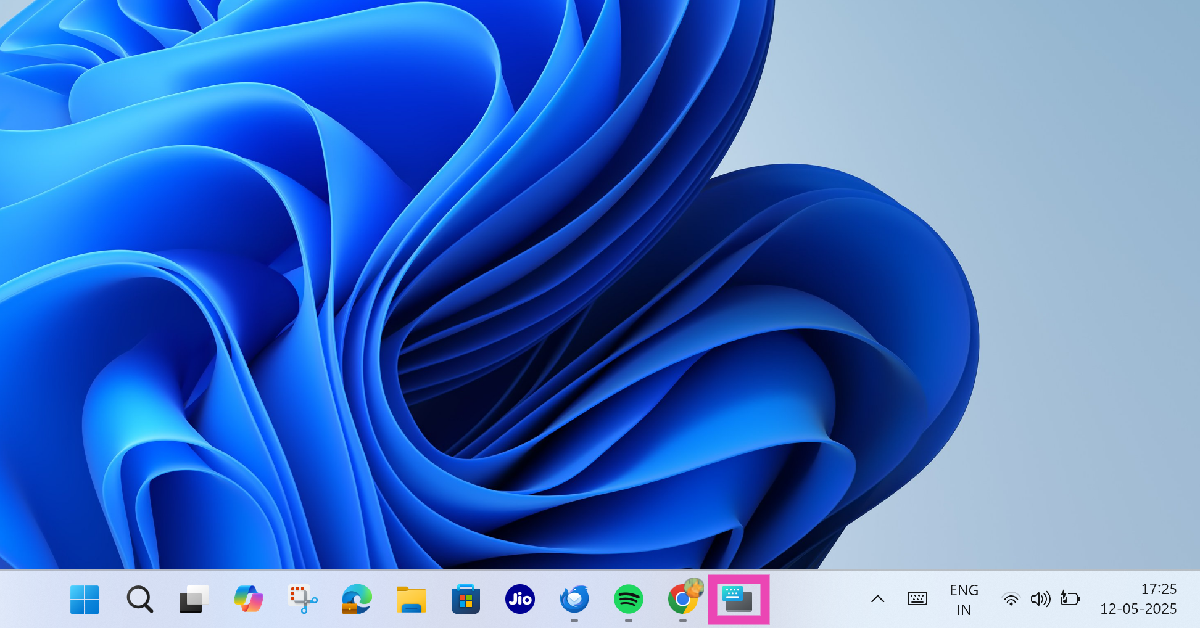
You don’t need to go to Settings every time you want to access the on-screen keyboard. You can press Windows + Ctrl + O on the physical keyboard to launch it. Alternatively, you can pin it to the taskbar for instant access. Here’s how.

Step 1: Click the search box in the taskbar and type on-screen keyboard.

Step 2: Select Pin to taskbar.

Step 2: Select Pin to taskbar.

Step 3: Click the on-screen keyboard’s icon on the taskbar to launch it.

Step 3: Click the on-screen keyboard’s icon on the taskbar to launch it. How to Enable the On-screen Keyboard on Windows 11: Top 3 Ways

Use a third-party app

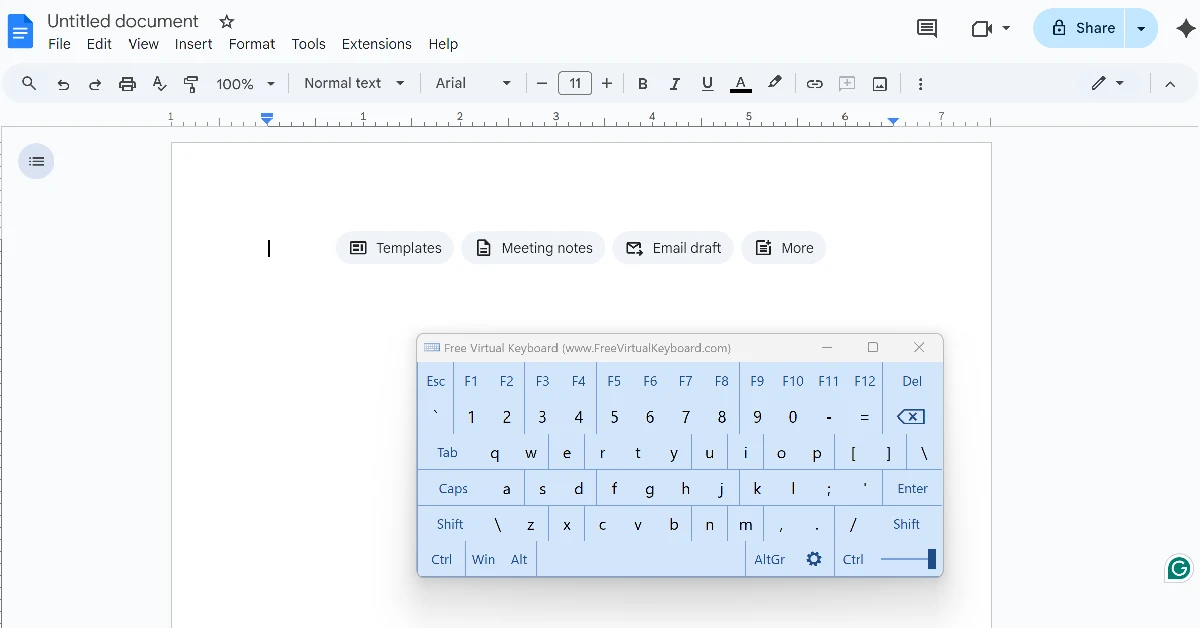
Step 1: Download and install Free Virtual Keyboard from the Microsoft Store.

Step 2: Once the app has been installed, type its name in the search box on the taskbar and launch it.

Step 2: Once the app has been installed, type its name in the search box on the taskbar and launch it.

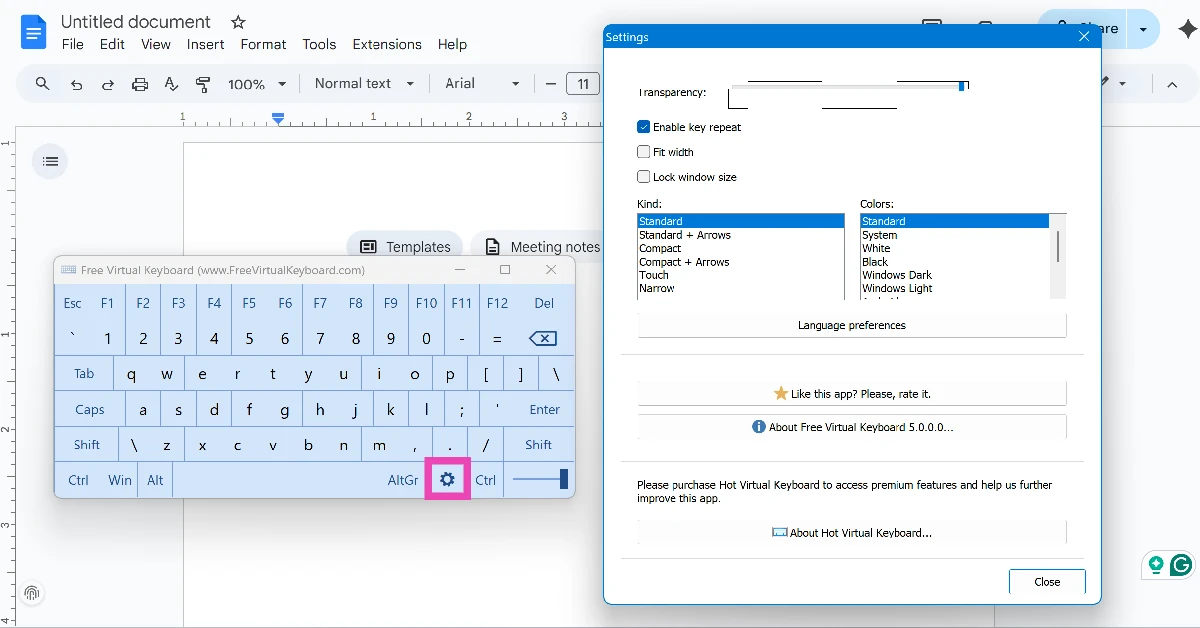
Step 3: The virtual/onscreen keyboard will appear on the screen. You can customise its size, colour, and transparency by hitting the gear icon.

Step 3: The virtual/onscreen keyboard will appear on the screen. You can customise its size, colour, and transparency by hitting the gear icon.

Bonus Tip: Enable Touch keyboard on Windows 11

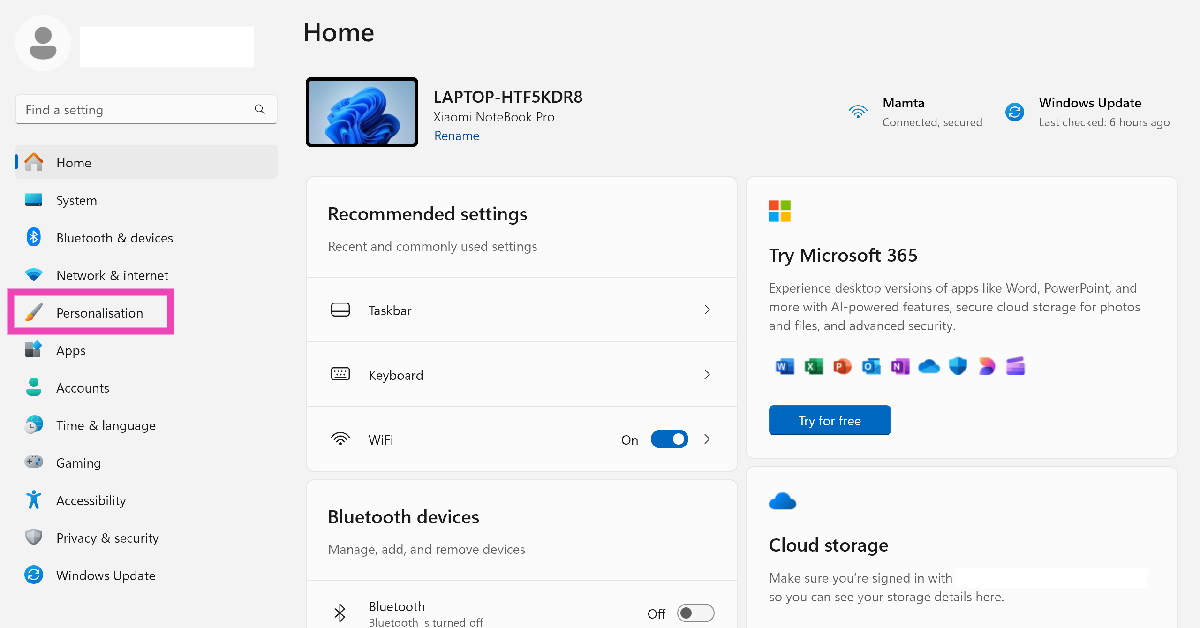
Step 1: Go to Settings and select Personalisation from the sidebar.

Step 1: Go to Settings and select Personalisation from the sidebar. How to Enable the On-screen Keyboard on Windows 11: Top 3 Ways

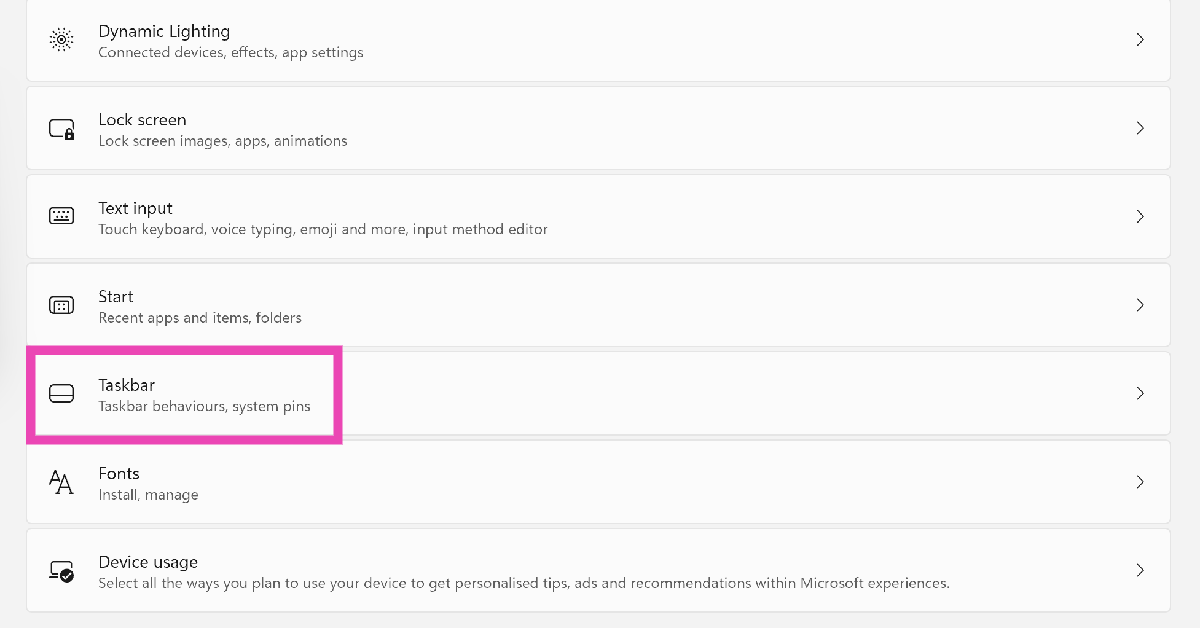
Step 2: Scroll down and select Taskbar.

Step 2: Scroll down and select Taskbar. How to Enable the On-screen Keyboard on Windows 11: Top 3 Ways

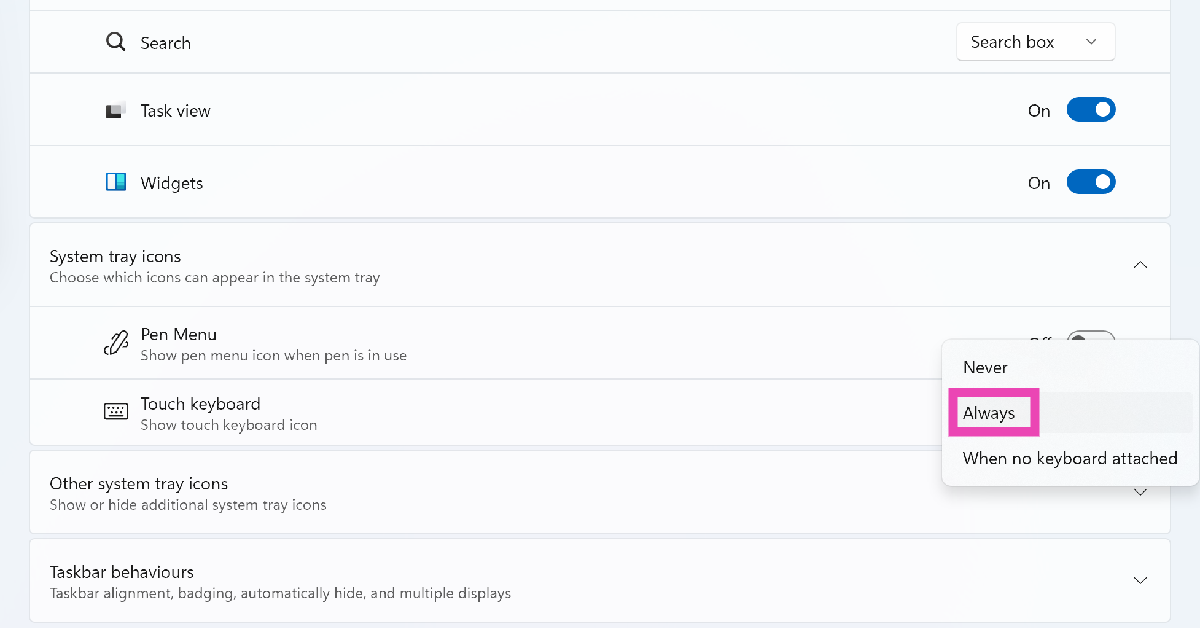
Step 3: Hit the dropdown menu next to Touch keyboard and select Always.

Step 3: Hit the dropdown menu next to Touch keyboard and select Always. How to Enable the On-screen Keyboard on Windows 11: Top 3 Ways

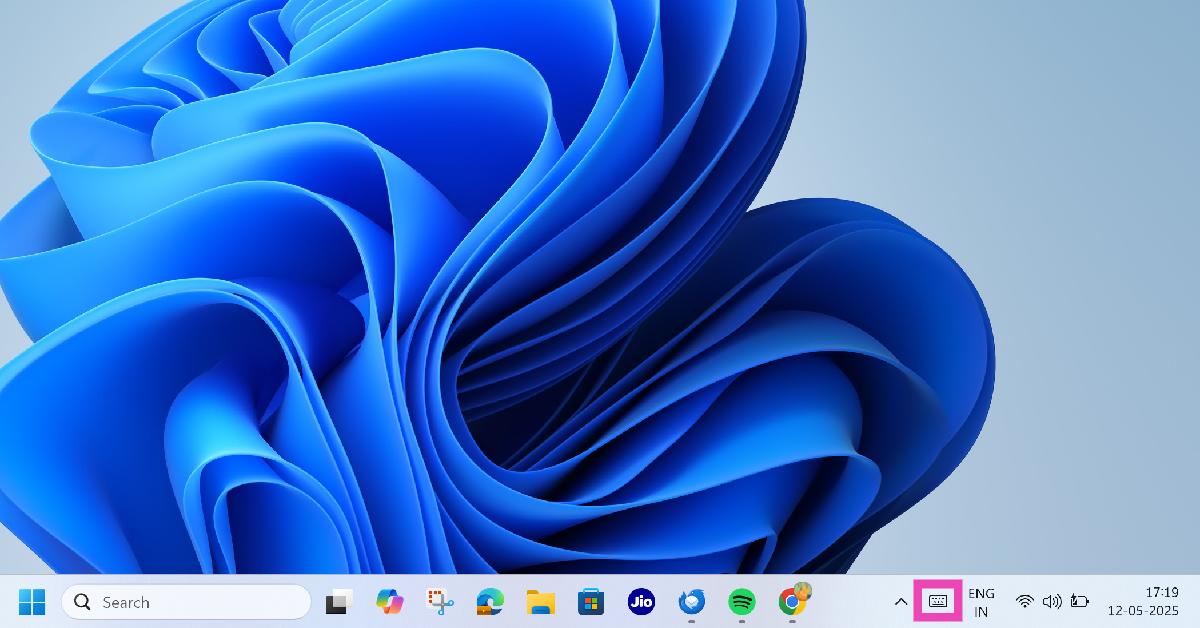
Step 4: Click the keyboard icon in the right corner of the taskbar.

Step 4: Click the keyboard icon in the right corner of the taskbar. How to Enable the On-screen Keyboard on Windows 11: Top 3 Ways

Frequently Asked Questions (FAQs)

What is the shortcut key for the on-screen keyboard on Windows 11?

Press Windows + Ctrl + O on the physical keyboard to launch the On-screen keyboard on your Windows 11 PC or laptop.

How do I bring up the On-screen keyboard on Windows 11?

Go to Settings>Accessibility>Keyboard and turn on the toggle switch next to ‘On-screen keyboard’.

How do I open the Touch keyboard on Windows 11?

Go to Settings>Personalisation>Taskbar, hit the dropdown menu next to ‘Touch keyboard’, and select ‘Always’.

How do I stop the Touch keyboard from opening every time I undock my laptop’s display from the keyboard?

Go to Settings>Personalisation>Taskbar, hit the dropdown menu next to ‘Touch keyboard’, and select ‘Never’.

How do I change the Touch keyboard’s layout?

Open the Touch keyboard on your laptop, click the settings icon, go to ‘Keyboard layout’, and choose an option.

Read Also: How to unsend texts on Google Messages

Final Thoughts

This is how you can enable the on-screen keyboard on your Windows 11 PC. Can’t get your physical keyboard to work? Check out these 7 fixes. If you have any questions, let us know in the comments!

Top 10 smartphones you can buy right now (May 2025)

If you want to buy a smartphone that will last you at least half a decade, you should set your sights on a flagship. These smartphones are the best that their manufacturers have to offer. Representing the pinnacle of modern smartphones, these devices flaunt premium hardware, mighty processors, and cutting-edge software. So, without further ado, here are the top 10 flagship smartphones that you can buy in India in May 2025.

Read Also: Samsung Galaxy S24 Ultra now available for as low as Rs 49,040: Know the deal

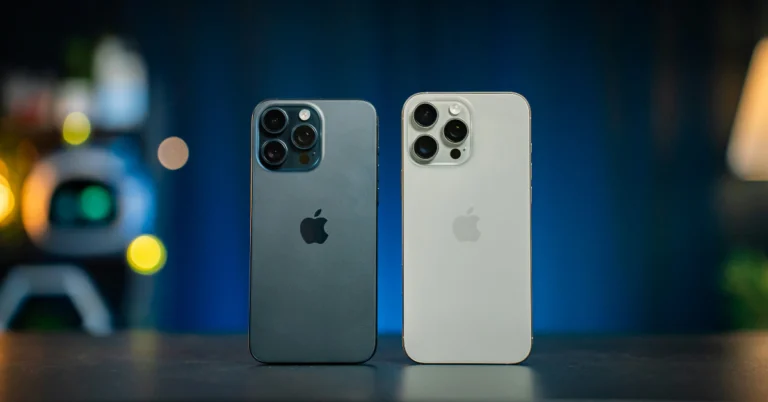
iPhone 16 Pro Max

How to force restart your iPhone 16 and enter recovery mode?

Key Specs

Display 6.9-inch LTPO Super Retina XDR OLED
Chipset Apple A18 Pro
RAM 8GB
Storage 256GB, 512GB, 1TB
Battery 4,685 mAh

The top-spec model in the iPhone 16 series is one of the best smartphones you can buy in May 2025. It marks the debut of the dedicated Camera Control button, which can be used as a shutter and a control for the essential camera functions. Powering this smartphone is Apple’s new 3nm A18 Pro chipset. Its triple rear camera arrangement features a 48MP primary shooter, a 12MP periscope telephoto lens with 5x optical zoom, and a 48MP ultrawide lens. The 6.9-inch LTPO Super Retina XDR OLED display has a 120Hz refresh rate and can reach 2,000 nits in High Brightness Mode.

Pros

  • Powerful processor
  • Great camera setup
  • Apple Intelligence

Cons

  • Lacks fast charging

Buy on Amazon for Rs 1,35,900

Samsung Galaxy S25 Ultra

enable bypass charging on samsung

Key Specs

Display 6.9-inch Dynamic LTPO AMOLED 2X
Chipset Snapdragon 8 Elite
RAM 12GB
Storage 256GB, 512GB, 1TB
Battery 5,000 mAh

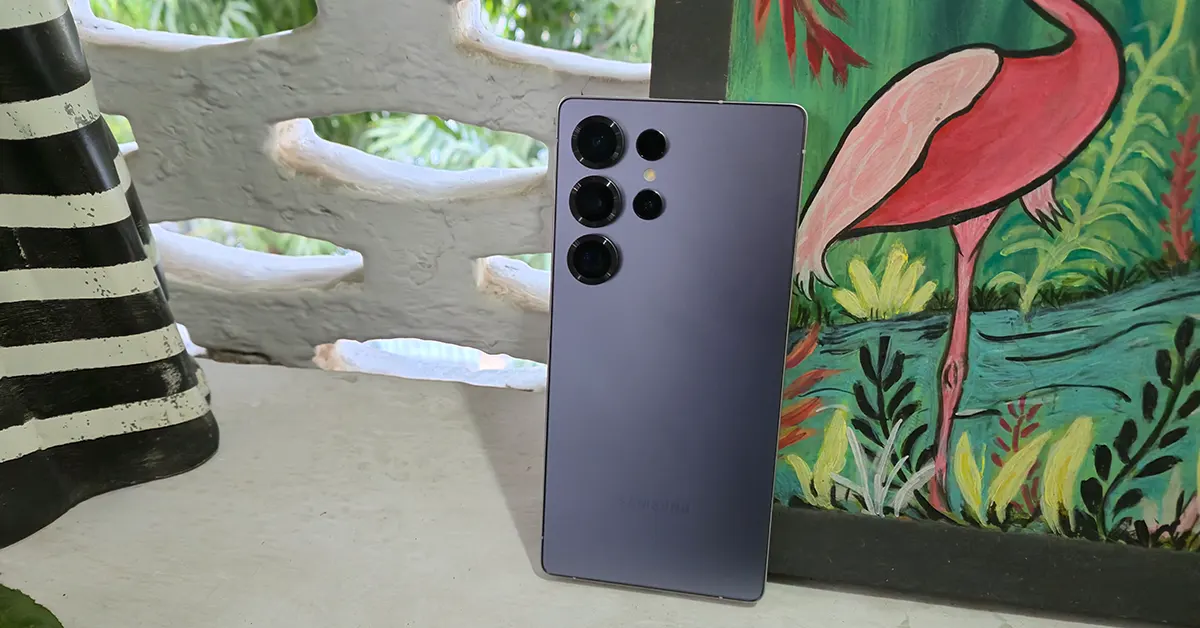
The Samsung Galaxy S25 Ultra has a reputation for being the ‘everything’ smartphone. It packs Qualcomm’s flagship Snapdragon 8 Elite chipset under its hood and runs the Android 15-based One UI 7 OS out of the box. The fluid 6.9-inch Dynamic LTPO AMOLED 2X display has a 120Hz refresh rate and can hit a peak brightness of 2,600 nits. The smartphone leads the AI segment with its exhaustive Galaxy AI package. The quad camera setup on the back of the device comprises a 200MP primary shooter, a 50MP ultrawide lens, a 10MP telephoto lens with 3x optical zoom, and a 50MP periscope telephoto lens with 5x optical zoom. For more details, read our Samsung Galaxy S25 Ultra review.

Pros

  • Attractive design
  • Powerful chipset
  • Galaxy AI

Cons

  • Lacks an IP69 rating

Buy on Amazon for Rs 1,29,999

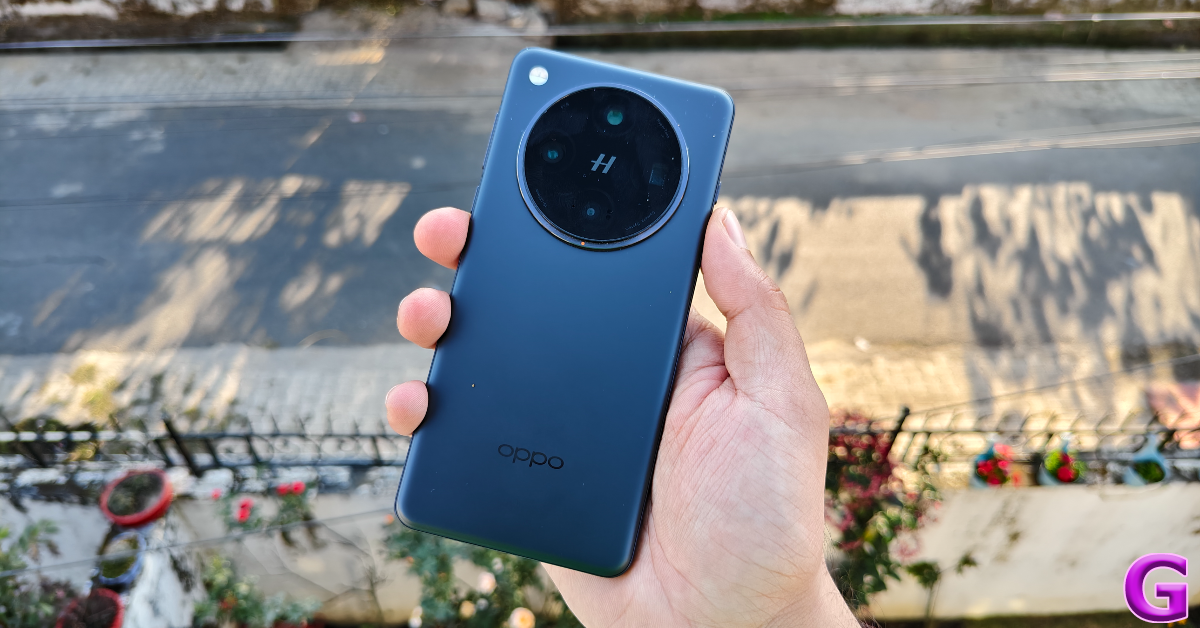
Oppo Find X8 Pro

Oppo Find X8 Pro Review: The new photography champ!

Key Specs

Display 6.78-inch LTPO AMOLED
Chipset MediaTek Dimensity 9400
RAM 16GB
Storage 512GB
Battery 5,910 mAh

The portrait specialist Oppo Find X8 Pro is one of the best smartphones you can buy right now. Its 50MP quad rear camera setup features a primary shooter, a periscope telephoto lens with 3x optical zoom, another periscope telephoto lens with 6x optical zoom, and an ultrawide sensor. The 6.78-inch LTPO AMOLED display has a 120Hz refresh and can reach 4,500 nits of peak brightness. Powering the smartphone is the MediaTek 9400 SoC. This chipset is based on a 3nm process. The 5,910mAh battery pack supports 80W wired and 50W wireless charging. To learn more about the smartphone’s camera performance, read our Oppo Find X8 Pro review.

Pros

  • Excellent cameras
  • Premium hardware
  • Fast charging

Cons

  • Optical fingerprint scanner instead of ultrasonic

Buy on Flipkart for Rs 99,999

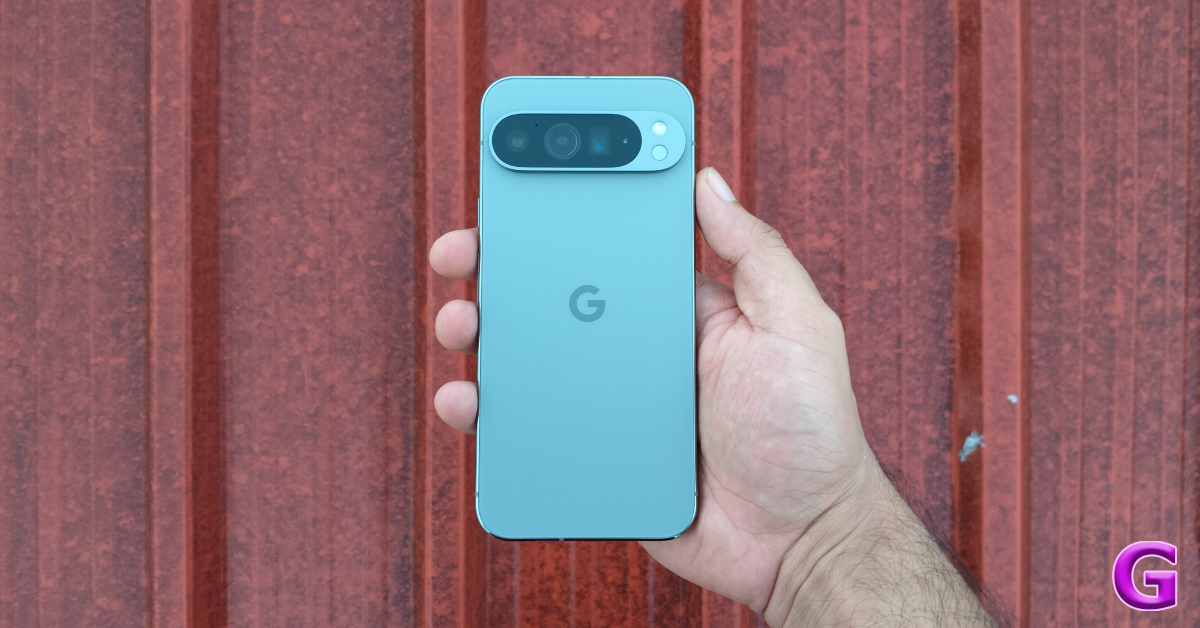
Google Pixel 9 Pro XL

Google Pixel 9 Pro XL Review

Key Specs

Display 6.8-inch LTPO OLED
Chipset Google Tensor G4
RAM 16GB
Storage 256GB, 512GB
Battery 5,060 mAh

The new crop of Pixels up the ante in terms of design and hardware. The crown jewel of the lineup, the Google Pixel 9 Pro XL is one of our favourite smartphones in May 2025. It flaunts a 6.8-inch LTPO OLED display with a 120Hz refresh rate and 3,000 nits of peak brightness. Google’s in-house Tensor G4 chipset powers the smartphone. The new camera band at the back houses a 50MP primary shooter, a 48MP periscope telephoto lens with 5x optical zoom, and a 48MP ultrawide lens. The 5,060mAh battery pack supports 37W wired and 23W wireless charging. For more details about its everyday performance, read our Google Pixel 9 Pro XL review.

Pro

  • Great looks
  • Excellent camera system
  • Stock Android OS

Cons

  • Not the most powerful processor around

Buy on Flipkart for Rs 1,29,999

OnePlus 13

OnePlus 13 Review: Design and Display

Key Specs

Display 6.82-inch LTPO 4.1 AMOLED
Chipset Snapdragon 8 Elite
RAM 12GB, 16GB, 24GB
Storage 256GB, 512GB, 1TB
Battery 6,000 mAh

The OnePlus 13 is one of the more reasonable flagships around right now. The smartphone manages to pack all the essential premium specs without costing an exorbitant amount of money. Its 6.82-inch LTPO 4.1 AMOLED display has a 120Hz refresh rate and a peak brightness of 4,500 nits. At the heart of the smartphone lies the Snapdragon 8 Elite chipset. The rear camera layout has 3 50MP sensors, one each for the primary, 3x periscope telephoto, and ultrawide lenses. The 6,000mAh battery pack under the hood of the smartphone supports 100W wired and 50W wireless charging. Read our OnePlus 13 review to learn more about the device.

Pros

  • Premium hardware
  • Good cameras
  • Affordable

Cons

  • Bland design

Buy on Amazon for Rs 69,999

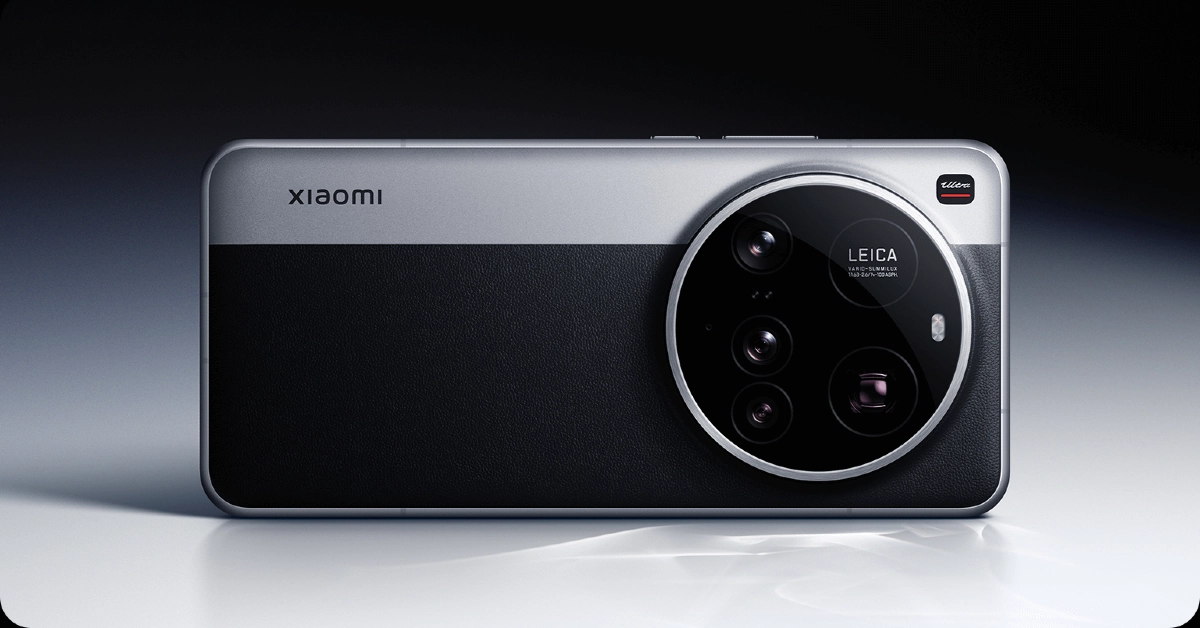
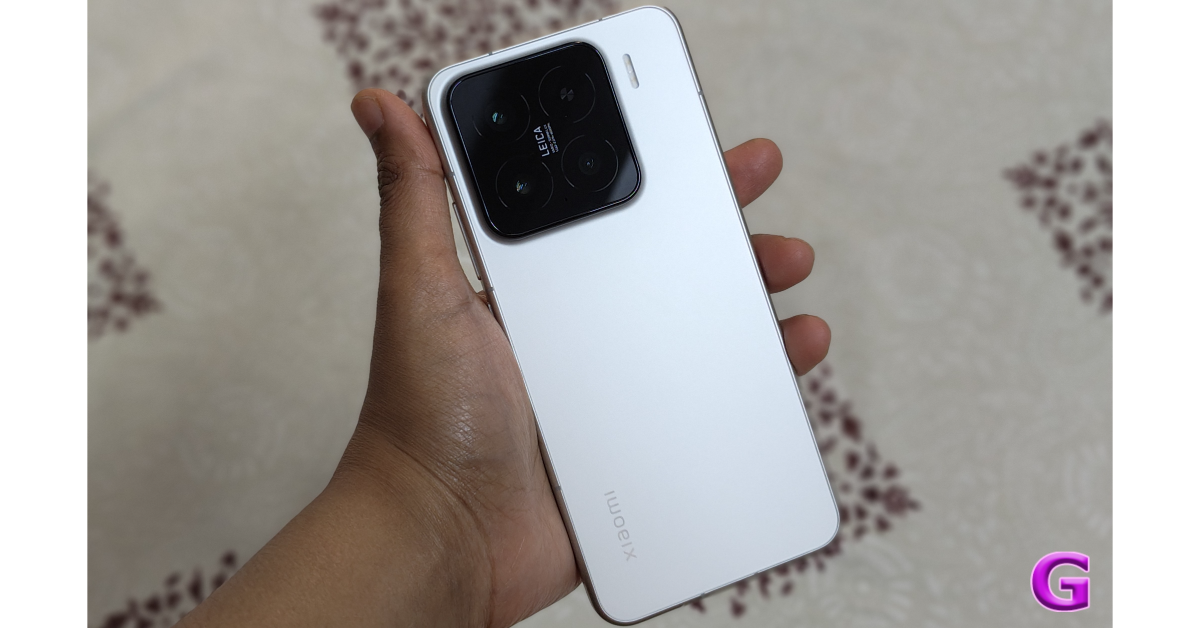
Xiaomi 15 Ultra

Xiaomi 15 Ultra Top 10 smartphones you can buy right now (May 2025)

Key Specs

Display 6.73-inch LTPO AMOLED
Chipset Snapdragon 8 Elite
RAM 12GB, 16GB
Storage 256GB, 512GB, 1TB
Battery 5,410 mAh

The Ultra variant in Xiaomi’s flagship smartphone series packs a rock-solid punch. If a good camera system is your biggest priority while buying a phone, you should have your eyes on the Xiaomi 15 Ultra. Its rear camera panel packs a stupendous 1-inch 50MP primary sensor. Accompanying this camera is a 50MP 3x telephoto lens, a 200MP 4.2x periscope telephoto lens, and a 50MP ultrawide lens. The smartphone is powered by the Snapdragon 8 Elite processor. The 6.73-inch LTPO AMOLED display has a 120Hz refresh rate and a peak brightness of 3,200 nits. The 5,410mAh battery pack supports 90W wired and 80W wireless charging.

Pros

  • 1-inch primary sensor
  • Cool design
  • Smooth display 

Cons

  • Only 4 major OS upgrades

Buy on Amazon for Rs 1,09,999

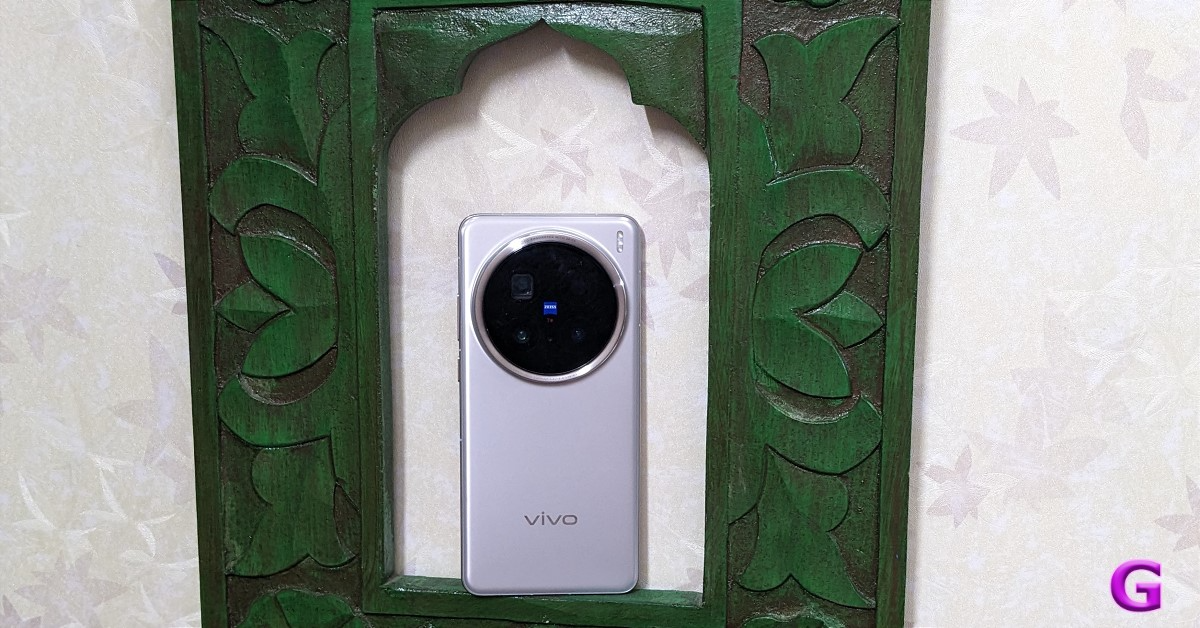
Vivo X200 Pro

Review of Vivo X200 Pro Top 10 smartphones you can buy right now (May 2025)

Key Specs

Display 6.78-inch LTPO AMOLED
Chipset MediaTek Dimensity 9400
RAM 16GB
Storage 512GB
Battery 6,000 mAh

Vivo’s camera specialist, X200 Pro, came out last year but remains one of the finest smartphones in 2025. Its triple rear camera setup comprises a 50MP primary shooter, a 200MP periscope telephoto lens with 3.7x optical zoom, and a 50MP ultrawide lens. The device draws power from the MediaTek Dimensity 9400 chipset. Its 6.78-inch LTPO AMOLED display has a 120Hz refresh rate and 4,500 nits of peak brightness. The 6,000mAh Si/C battery pack supports 90W wired and 30W wireless charging. Read our Vivo X200 Pro review to learn more about the smartphone’s everyday performance.

Pros

  • Premium hardware
  • Excellent cameras
  • Big battery

Cons

  • Only 4 major OS upgrades

Buy on Amazon for Rs 94,999

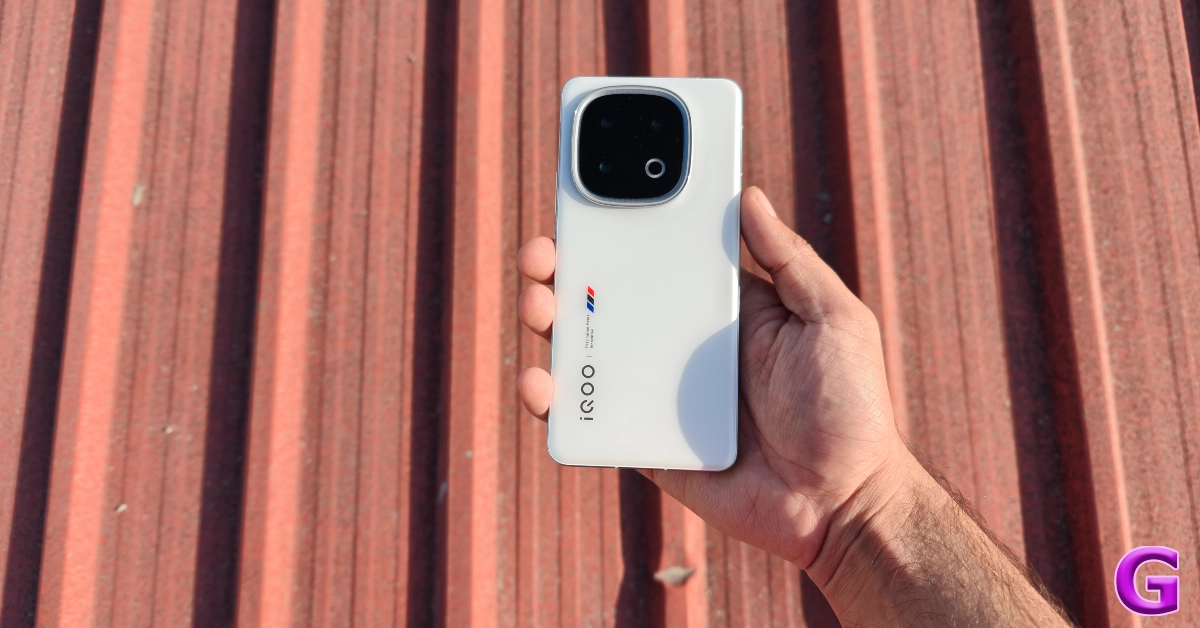
iQOO 13

iQOO 13 Review: Design and Display Top 10 smartphones you can buy right now (May 2025)

Key Specs

Display 6.82-inch LTPO AMOLED
Chipset Snapdragon 8 Elite
RAM 12GB, 16GB
Storage 256GB, 512GB
Battery 6,000 mAh

When it comes to gaming smartphones, the iQOO 13 towers over its peers and remains one of the best smartphones in 2025. The 3nm Snapdragon 8 Elite processor under the hood of the device works in tandem with iQOO’s in-house Supercomputing Chip Q2. When it is firing on all cylinders, not many smartphones can beat the performance of the iQOO 13. To add to the gaming aesthetic, the redesigned rear camera panel is now surrounded by RGB lighting. iQOO calls it the ‘Dynamic Light’. The camera panel houses 3 50MP sensors, one each for the primary, a 2x telephoto, and the ultrawide lenses. The 6,000mAh battery pack supports 120W wired charging. Read our iQOO 13 review to learn more about its gaming performance.

Pros

  • Great processor
  • Dynamic Light
  • Fast charging

Cons

  • No wireless charging

Buy on Amazon for Rs 54,999

Realme GT 7 Pro

Realme GT 7 Pro Review: Design and Display Top 10 smartphones you can buy right now (May 2025)

Key Specs

Display 6.78-inch LTPO AMOLED
Chipset Snapdragon 8 Elite
RAM 12GB, 16GB
Storage 256GB, 512GB
Battery 5,800 mAh

If you don’t want to splurge a lot of money on a flagship, you should consider getting the Realme GT 7 Pro. It is one of the best value-for-money smartphones in 2025. The device is powered by the Snapdragon 8 Elite chipset and runs the Android 15-based Realme UI 6 out of the box. Its 6.78-inch LTPO AMOLED display has a 120Hz refresh rate and a peak brightness of 6,500 nits. The rear camera panel comprises a 50MP primary shooter, a 50MP telephoto lens with 3x optical zoom, and an 8MP ultrawide lens. The 5,800mAh battery pack supports 120W wired charging. To find out how it performs in everyday use, read our review of the Realme GT 7 Pro.

Pros

  • Clean design
  • Powerful processor
  • Relatively affordable

Cons

  • Unimpressive ultrawide lens

Buy on Amazon for Rs 52,998

Xiaomi 15

Xiaomi 15 Review: Design and Display Top 10 smartphones you can buy right now (May 2025)

Key Specs

Display 6.36-inch LTPO AMOLED
Chipset Snapdragon 8 Elite
RAM 12GB
Storage 512GB
Battery 5,240 mAh

Large smartphones aren’t for everyone. Luckily, Xiaomi has an excellent compact offering in its flagship lineup. The entry-level Xiaomi 15 has a 6.36-inch LTPO AMOLED display with a 120Hz refresh rate and 3,200 nits of peak brightness. It packs the flagship Snapdragon 8 Elite processor under its hood. The rear camera panel comprises 3 50MP sensors: a primary shooter, a 2.6x telephoto lens, and an ultrawide lens. Its 5,240mAh battery pack supports 90W wired and 50W wireless charging. We reviewed the Xiaomi 15 soon after it came out and found it to be one of the best devices in its category.

Pros

  • Compact form factor
  • Big battery
  • Good cameras

Cons

  • Average cooling system

Buy on Amazon for Rs 64,999

Read Also: How to change the default view in Windows 11 File Explorer

Final Thoughts

These are the top 10 flagship smartphones you can buy in India in May 2025. If you don’t want to break the bank on a premium smartphone, check out these flagship killers under Rs 50,000. If you think we missed a smartphone that deserves to be on this list, give it a shout-out in the comments!

Samsung Galaxy S24 Ultra now available for as low as Rs 49,040: Know the deal

The Samsung Galaxy S24 Ultra, which was originally priced at Rs 1,29,999, is now significantly reduced to Rs 86,640 on Amazon India. The S24 Ultra is a cost-effective choice for anyone looking to upgrade to a premium Android phone, thanks to this temporary offer.

Amazon India is now offering the Samsung Galaxy S24 Ultra smartphone at a substantial discount. The 12GB RAM and 256GB storage model, which was once offered for Rs 1,29,999, is now only Rs 86,640, a straight reduction of Rs 43,359 from its original price. Exchange benefits, such as an additional Rs 37600 off for trading in a Galaxy S23, allow buyers to save even more money, bringing the final price down to Rs 49,040.

The Galaxy S24 Ultra was released in India last year, with the base model including 12GB of RAM and 256GB of storage priced at Rs 1,29,999. It was decided to price Rs 1,39,999 for the 12GB storage variant and Rs 1,59,999 for the 1TB storage option.

Also Read: Lava Agni 3 getting flat Rs 5,000 discount only on Amazon: Check out deals

Samsung Galaxy S24 Ultra specifications

The Samsung Galaxy S24 Ultra (Review) comes with a 6.8-inch QHD+ Dynamic AMOLED 2X Display with a Super Smooth 120Hz refresh rate (1~120Hz), 2,600nit peak brightness, and a Vision booster. The screen is protected with Corning Gorilla Armor. The S24 Ultra is powered by the Snapdragon 8 Gen 3 Mobile Platform for Galaxy. The device runs on Android 14 with UI 6.1. The company will provide seven generations of OS upgrades and seven years of security updates.

Also Read: Samsung says Galaxy S25 Edge to have Corning’s Gorilla Glass Ceramic 2

Besides this, the phone comes preloaded with Live Translate, Note Assist, and Circle to Search, powered by built-in AI features. The Galaxy S24 Ultra comes with a S Pen stylus. In addition to this, all the variables include Samsung Knox, Knox Vault, and Passkeys.

The S24 Ultra has a quad rear camera setup that includes a 12MP Ultra-Wide Camera (F2.2 aperture, FOV-120˚), 200MP Wide Camera (OIS, F1.7 Aperture, and FOV-85˚), 50MP Telephoto Camera (5x Optical Zoom, OIS, F3.4 aperture, and FOV of 22˚) and a 10MP Telephoto Camera (3x Optical Zoom, OIS, F2.4 aperture, and FOV 36˚).

Garena Free Fire Max Redeem Codes Today 12 May 2025: Here is how to claim them

Garena Free Fire Max is a battle royale game with regular awards and tournaments to keep players interested. If you play Garena Free Fire, you should be aware of the redeem codes that are released on a daily basis. However, because the battle royale game is banned in India, players from other countries can use the Free Fire Redeem codes daily. If you’re unfamiliar with the Garena Free Fire redeem codes or don’t know how to get them, we’ve put together a step-by-step guide to help you redeem them. Check out Garena Free Fire Max Redeem Codes for 12 May 2025.

The Free Fire Max redeem codes are a great way to get free stuff. These are 12-digit codes that contain alphabets and numbers, as well as an expiration date and time. Because the Garena FF redeem codes cannot be used more than once, you should hurry to the redemption page to claim your free reward before someone else does. To get a free reward, all you have to do is go to reward.ff.garena.com/en, which is the official redemption page. Also, keep an eye on this space for daily updates on Garena Free Fire Max redemption codes and rewards.

Also Read: Sennheiser Accentum Plus wireless headphones with Hybrid Adaptive Noise Cancellation launched

Garena Free Fire Max Redeem Codes Today 12 May 2025

PXTXFCNSV2YK
M2N5B7V9C1X3Z6A
V6C8X1Z3A5S7D9F
P4O7I1U3Y5T8R9E
R4T6Y8U1I3O5P7A
T2Y5U7I9O1P4A6S
U3I6O9P1A4S7D8F
X7C9V2B4N6M1Q3W
D8F1G3H5J7K9L2Z
A3S6D9F2G5H1J4K
B5N8M2K4L7J9H1G
H8J1K3L5X7Z9Q2W
F4G7H9J2K5L8M1N

How to Get Free Fire Max Redeem Codes for Garena on 12 May 2025?

  • Visit the Garena Free Fire Max game’s official website at reward.ff.garena.com.
  • Use your Facebook, Google, VK, Apple ID, Huawei ID, or Twitter account to log in.
  • You’ll be taken to a valid redemption code (s)
  • Copy and paste the 12-digit redemption code into the text box.
  • On the screen, a dialogue box will appear.
  • ‘Ok’ should be selected.

For the latest gadget and tech news, and gadget reviews, follow us on Twitter, Facebook and Instagram. For newest tech & gadget videos subscribe to our YouTube Channel. You can also stay up to date using the Gadget Bridge Android App. You can find the latest car and bike news here.

NYT Wordle Answer and Hints Today (May 12)

Are you looking for today’s Wordle for May 12, 2025? The problem is difficult to solve, so if you need assistance, we’ve included hints and the answer to the May 12 Wordle.

Hints and Answers for Today’s Wordle May 12

Before answering directly, please check the May 12 Wordle Hints first.

Hint 1: Today’s Wordle answer includes two vowels.
Hint 2: The answer for today has no repeating letter.
Hint 3: something that somebody says or writes that you think is nonsense or not of good quality

What word does today’s Wordle begin with?

Do you need help with today’s Wordle answer’s initial letter?

The first letter in today’s Wordle is “B”

Today’s Wordle Answer May 12 #1423

The answer to Wordle #1423 on May 12, 2025, is — BICEP

Also Read: Spigen cover listing revealed the iPhone SE 4 design: Report

What is Wordle?

Wordle: A Five-Letter Word Guessing Game
• The game allows six guesses of a five-letter word.
• Provide feedback on guessed letters’ placement in the puzzle.
• The New York Times purchased the game in 2022.
• Created by Josh Wardle for his partner, narrowing down 12,000 English words to 2,500.
• Named after the word “word.”

How To Play Wordle?

Wordle is a New York Times word puzzle game that allows users to guess a five-letter word in six attempts. The letters are highlighted in Yellow and Green, indicating whether the word is present in the answer or not, and Green letters indicate the correct guess.

Wordle Tips and Tricks

  • Select a powerful starting word: Avoid using unusual words, as they frequently do not match common letters. A good opening word has plenty of benefits.
  • Repeating letters: Don’t be afraid of repeating letters; they appear frequently in words. The answer may contain one or two repeated letters.
  • Use the Wordlebot: The NYT’s Wordlebot analyses and compares replies to itself. This challenge can assist you enhance guessing skills and highlight areas for development.

Amazon Quiz Answers Today 12 May 2025: Participate to win Up To Rs 500 Amazon Pay Balance

12 May 2025: New Amazon Quiz is now available. Customers from different parts of the country are participating in the daily quiz. The quiz starts at midnight today and will be live until 11:59 PM tonight. By successfully answering every question, participants in the quiz have the chance to win wonderful rewards. Up to Rs 500 Amazon Pay Balance is up for grabs to participants today.

One wrong answer could eliminate you from the quiz. You have a chance to win up to Rs 500 Amazon Pay Balance if you successfully answer every question. Users of the app only have the opportunity to take the quiz. Check Out 12 May 2025 Amazon Quiz Answers.

Are you not able to find Amazon FunZone? Click below and participate.

Click here to enter the Amazon FunZone Quiz and play today.

Amazon Quiz Today Prize: Rs 500 Amazon Pay Balance

Quiz Date: 12 May 2025

Daily Timing: 12 AM to 11:59 PM

Previous Amazon Quiz Winners Announcement: Today 12 PM Noon

Amazon Quiz Answers Today 12 May 2025: Win Up To ₹ 500 Amazon Pay Balance

Question 1: Against which team did Sunrisers Hyderabad set a new record scoring 287 in an IPL match?

Answer: Royal Challengers Bengaluru

Question 2: Who plays the role of soldier Arun Katyal in the recently released movie ‘Yodha’?

Answer: Sidharth Malhotra

Question 3: Which of these famous rulers was born in the Shivneri Fort in Maharashtra in the 17th century?

Answer: Shivaji

Question 4: Name this famous church located in Europe

Answer: St. Peter’s Basilica

Question 5: This is the flag of which Caribbean country?

Answer: Barbados

How To Play Amazon Quiz Today

Only app users are eligible to play the Amazon quiz every morning from 12 AM to 11:59 PM. The quiz is not available on the desktop. For those who are unaware of how to play the Amazon quiz, below are the steps, you can follow to take the quiz.

  • First, download the Amazon app from the Google Play Store or App Store or go here to download the Amazon App
  • Now fill in the required information through the Sign-Up option.
  • To find the Amazon Quiz banner, log in to the Amazon app and scroll down to the home screen.
  • Tap on the Amazon Quiz banner and tap on the Start button to start the Quiz.
  • Now you will get 5 questions and you need to answer them correctly. One wrong answer will eliminate you from the Quiz.
  • After answering all the questions correctly you are now eligible for a Lucky Draw.
  • The previous winner’s name will be announced today at 12 PM.

Amazon Daily Quiz Answers from the previous few days.

Here are all the answers from the previous 5 days of the Amazon Daily Quiz and Contest.

Amazon Quiz Answers Today 9 May 2025: Win Up To ₹ 500 Amazon Pay Balance

Question 1: The first match of the 2025 ICC Champions Trophy would be played between Pakistan and which team?

Answer: New Zealand

Question 2: Name the movie based on the ‘Fantastic Four’ that will release as part of the Marvel Cinematic Universe in 2025

Answer: The Fantastic Four’s first step

Question 3: In 1877, the Central India Spinning, Weaving and Manufacturing Company founded by Jamsetji Tata in which city was renamed Empress Mills?

Answer: Nagpur

Question 4: Who among these is the founder of this company?

Answer: Fred DeLuca

Question 5: Which of these famous artists is depicted here on the wall?

Answer: Salvador Dali

Amazon Quiz Answers Today 8 May 2025: Win Up To ₹ 500 Amazon Pay Balance

Question 1: Which iconic 1989 military drama series starring Shah Rukh Khan is being remade with Gauahar Khan and Vicky Jain in the lead?

Answer: Fauji

Question 2: The Rod Laver Arena hosts matches during which Grand Slam tennis tournament?

Answer: Australian Open

Question 3: Dopehri’ is a novel by which famous film and theatre personality?

Answer: Pankaj Kapur

Question 4: The construction of this famous monument was completed in which year?

Answer: 1924

Question 5: Name this famous structure which has been specially lit up for a festival.

Answer: Sydney Opera House

Amazon Quiz Answers Today 7 May 2025: Win Up To ₹ 500 Amazon Pay Balance

Question 1: Justin, who recently scored a hat-trick for Bournemouth against Newcastle, is the son of which famous footballer?

Answer: Patrick kluivert

Question 2: What is the name of Neha Dhupia’s character in the movie ‘Bad Newz’?

Answer: Ma corona

Question 3: NASA’s Kennedy Space Center is located in which US state?

Answer: Florida

Question 4: This photograph is taken in which capital city in Europe, home to tourist attractions like the Rijksmuseum.

Answer: Amaterdam

Question 5: This character debuted in the anthology comic book Amazing Fantasy #15 in which year?

Answer: 1962

Amazon Quiz Answers Today 6 May 2025: Win Up To ₹ 500 Amazon Pay Balance

Question 1: Justin, who recently scored a hat-trick for Bournemouth against Newcastle, is the son of which famous footballer?

Answer: Patrick kluivert

Question 2: What is the name of Neha Dhupia’s character in the movie ‘Bad Newz’?

Answer: Ma corona

Question 3: NASA’s Kennedy Space Center is located in which US state?

Answer: Florida

Question 4: This photograph is taken in which capital city in Europe, home to tourist attractions like the Rijksmuseum.

Answer: Amaterdam

Question 5: This character debuted in the anthology comic book Amazing Fantasy #15 in which year?

Answer: 1962

Amazon Quiz Answers Today 4 May 2025: Win Up To ₹ 500 Amazon Pay Balance

Question 1: Who was the Player of the Match in the first Test played between Pakistan and West Indies in 2025?

Answer: Sajid Khan

Question 2: What is the name of the newest movie in the ‘Avatar’ franchise scheduled for release in 2025?

Answer: Avatar: Fire and Ash

Question 3: Which of these is the name of a warship, that was commissioned by the Indian Navy in 2025?

Answer: INS Nilgiri

Question 4: Which branch of zoology studies this?

Answer: Ichthyology

Question 5: This is the national fruit of which country?

Answer: Bangladesh

Amazon Quiz Answers Today 3 May 2025: Win Up To ₹ 500 Amazon Pay Balance

Question 1: By what Indian name is the Indian roller bird commonly known?

Answer: Neelkanth

Question 2: In a traditional kava-drinking ceremony held in October 2024, King Charles III became the High Chief of which island nation?

Answer: Samoa

Question 3: Mohammed Shami made his debut for which team in the 2010-11 season of the Ranji Trophy?

Answer: Bengal

Question 4: Which place is the raisin capital of the world?

Answer: Selma

Question 5: This waterfall is situated on which river?

Answer: Mandovi river

Amazon Quiz Answers Today 2 May 2025: Win Up To ₹ 500 Amazon Pay Balance

Question 1: The latest venue in Test cricket is the Civil Service Cricket Ground in which city?

Answer: Belfast

Question 2: Nitanshi Goel stars as the lead character of Phool Kumari in which movie produced by Aamir Khan?

Answer: Laapataa Ladies

Question 3: Vinod Khosla and Bill Joy were two of the founders of which famous technology company headquartered currently in Santa Clara?

Answer: Sun Microsystems

Question 4: This is the ancient roman theatre of Kom El Deka in Alexandria in which country?

Answer: Egypt

Question 5: Which famous singer is shown here?

Answer: Bruce Springsteen

Amazon Quiz Answers Today 1 May 2025: Win Up To ₹ 500 Amazon Pay Balance

Question 1: Which famous badminton player is one of India’s flagbearers for the 2024 Paris Olympics?

Answer: PV Sindhu

Question 2: What is the latest edition of the ‘Bad Boys’ movie franchise?

Answer: Bad Boys: Ride or Die

Question 3: Nobel Prize winner Ernest Rutherford was born in which country?

Answer: New Zealand

Question 4: This is the Taj-ul-Masajid in which city?

Answer: Bhopal

Question 5: This is a bust of which famous ruler from history?

Answer: Alexander the Great

Amazon Quiz Answers Frequently Asked Questions (FAQs)

Where can I check the previous winners? Did I win how to check?

You can head over to this link on your mobile or desktop to check the winners of the Amazon Daily Quiz Contest.

How to Play Amazon Daily Quiz or Contest?

We have written an explainer above, you can refer to that.

When are the winners of the Amazon Quiz and contest announced or declared?

The announcement of today’s Amazon quiz winner will take place Tomorrow. As for the Special Quiz and “Spin & Win” Contest, the winners will be declared once the Quiz Contest comes to an end. To find out who the lucky winner is, you can refer to the Amazon Quiz Winners List or visit the Amazon Winners tab in the Amazon App.

How to participate in the Daily Amazon Quiz?

That is very easy, just got to the Amazon app and scroll to the bottom of the page and you will find the Quiz section. Click on it (usually it is called the fun zone) and you can enter the Amazon Today Quiz Contest. 

Are there any other quizzes or contests running on Amazon daily?

Yes, there are many running on a daily basis. These range from spinning the wheel to answering the questions correctly. All are located in the Fun Zone. 

What are the criteria for selecting a winner in the Daily Amazon Quiz?

When a qualified player submits correct answers to all the questions, they will automatically be entered into a lucky draw. This draw will include all participants who answered all the questions correctly. Amazon randomly selects the final winners from the pool of eligible participants who gave the right answers.

Which Types of Questions are asked within Amazon Daily Quiz?

These are very simple and straightforward questions. These are mainly related to general knowledge. 

Where should I look for Amazon Daily Quiz answers?

You can bookmark our website www.gadgetbridge.com as we will help you every day with the Amazon Daily Quiz. We bring you fresh answers every day for the Amazon Daily Quiz and Contest. 

What time does Amazon Announce previous winners?

The previous winner’s name will be announced today at 12 PM (noon).

How to change the default view in Windows 11 File Explorer

0

The layout of files and folders on your Windows 11 PC matters more than you think. If you have a folder full of images, extra-large icons can give you a quick sneak peek at each picture. If you’re more interested in knowing about the size and modification details of each folder, the ‘Content’ view is best for you. Here’s how you can change the default folder view in the File Explorer on your Windows 11 PC or laptop.

Read Also: How to unsend texts on Google Messages

About folder layouts

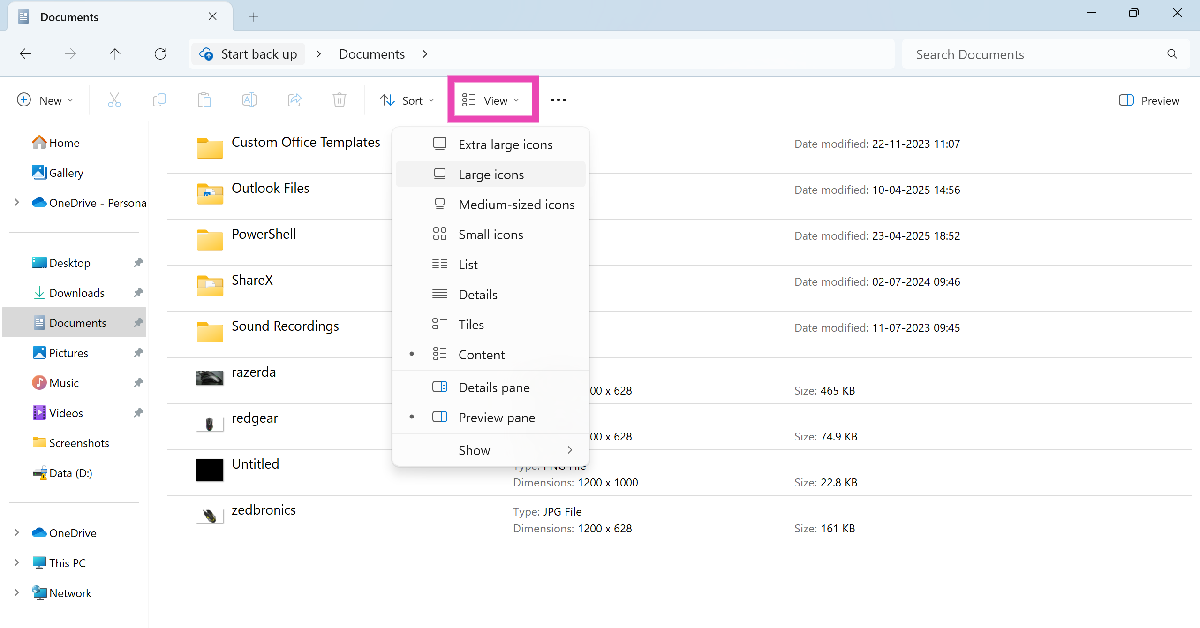
Your Windows 11 PC allows you to set the current folder layout as the default view type for all similar folders. There are a total of 8 layouts to choose from:

  • Extra large icons
  • Large icons
  • Medium-sized icons
  • Small icons
  • List
  • Details
  • Tiles
  • Content

Change the default view in Windows 11 File Explorer

Step 1: Launch the File Explorer from the taskbar. Alternatively, press Windows + E.

Step 2: Open a folder.

Step 3: Click on View and select a view type.

Step 3: Click on View and select a view type.

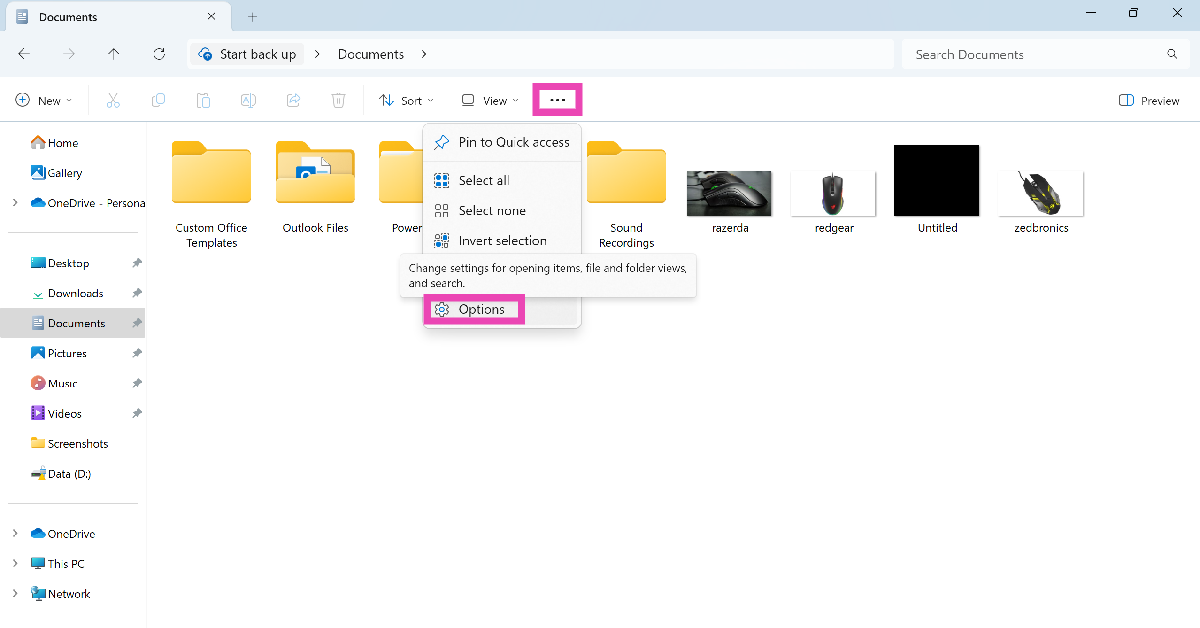
Step 4: Hit the ellipses and select Options.

Step 4: Hit the ellipses and select Options.

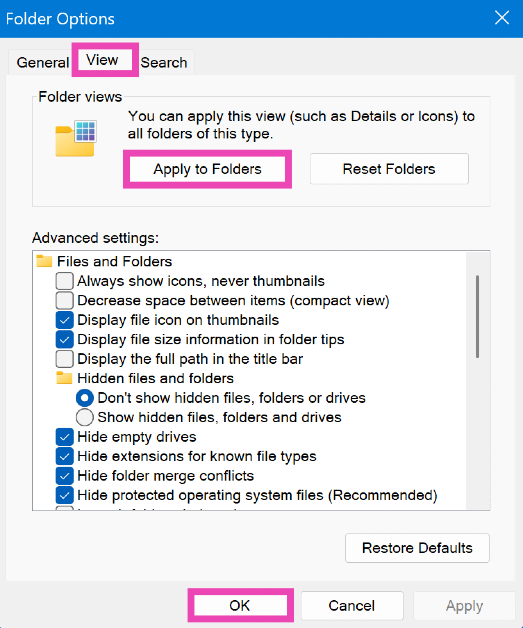
Step 5: Go to the View tab and click on Apply to Folders.

Step 5: Go to the View tab and click on Apply to Folders. How to change the default view in Windows 11 File Explorer

Step 6: Hit OK. The view type will be applied to all similar folders.

Reset the folder view to the system default

Step 1: Launch the File Explorer from the taskbar. Alternatively, press Windows + E.

Step 2: Open a folder.

Step 3: Hit the ellipses and click on Options.

Step 4: Hit the ellipses and select Options. How to change the default view in Windows 11 File Explorer

Step 4: Go to the View tab and click on Reset Folders.

Step 4: Go to the View tab and click on Reset Folders. How to change the default view in Windows 11 File Explorer

Step 5: Hit OK. The view type will be reset to the default setting.

Frequently Asked Questions (FAQs)

How do I change the default view of the File Explorer in Windows 11?

Go to File Explorer, open a folder, and set a view type. Then, hit the ellipses, go to Options>View, and click on ‘Apply to Folders’.

How do I reset the folder view to its default settings in Windows 11?

Go to File Explorer, open a folder, hit the ellipses, go to Options>View, and click on ‘Reset Folders’.

How do I enable file previews in Windows 11?

To enable file previews, go to File Explorer, click on ‘View’, and select ‘Preview Pane’. Click a file and hit the Preview button under the search bar to preview it.

How do I change the folder view in Windows 11?

Open a folder, click on View, and select an option from the list. Alternatively, right-click on any empty spot, move the cursor to ‘View’, and select an option.

How do I enable detailed file previews on my Windows 11 PC?

Install the Microsoft PowerToys app from the Microsoft Store, select a file, and press Ctrl + Space to view the in-depth preview.

Read Also: National Technology Day 2025: Top 6 Gadgets That Are Made In India

Final Thoughts

This is how you can change the default folder view in the File Explorer on your Windows 11 PC or laptop. While you’re here, check out how you can create a shutdown shortcut on Windows 11. If you have any questions, let us know in the comments!

How to unsend texts on Google Messages

0

Google Messages has started rolling out the option to unsend text messages. Previously, users could delete messages from the chat, but they remained visible to the recipient. Now, they will be given the option to delete messages for both parties. Since this is a phased rollout, it will take some time for this feature to reach all users. If you have access to this feature, here’s how you can unsend texts on Google Messages. 

Read Also: National Technology Day 2025: Top 6 Gadgets That Are Made In India

Unable to access the unsend option on Google Messages?

As we mentioned earlier, the unsend feature is being rolled out in a phased manner. Users with access to the feature report that it is currently available in group chats of more than 12 members. It is unavailable in personal conversations. This may change in the coming days. For the feature to work, both parties must be using the updated version of Google Messages. If one party is still on an older version, they may be able to view the unsent messages in the chat.

If you’re unable to access this feature on your phone, make sure the Google Messages app is updated to its latest version.  Additionally, you can try logging into the app with a different Google Account.

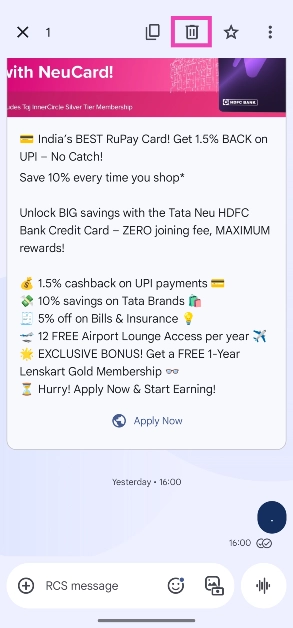
Unsend texts on Google Messages

Step 1: Launch the Google Messages app on your phone and open a conversation.

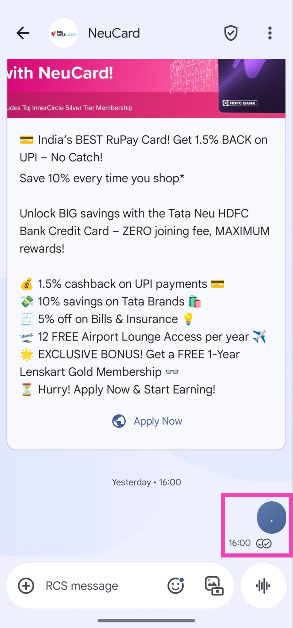
Step 2: Long-press the text message you want to unsend.

Step 2: Long-press the text message you want to unsend.

Step 3: Hit the bin icon in the top menu.

Step 3: Hit the bin icon in the top menu.

Step 4: Select Delete for everyone in the pop-up box.

Frequently Asked Questions (FAQs)

Can you delete messages for both sides on Google Messages?

Google Messages has added the option to unsend your text messages in a conversation. This feature is being rolled out in a phased manner.

How do I delete a message for everyone in Google Messages?

If you want to retract a text in Google Messages, long-press it, tap the bin icon in the top menu, and hit ‘Delete for everyone’.

How do I unsubscribe from promotional texts on Google Messages?

Open the conversation, hit the ellipses, tap on ‘Unsubscribe’, and confirm your selection in the pop-up box.

Does Google Messages offer spam protection?

You can enable spam protection in Google Messages by going to Messages settings>Protection and safety, and turning on the toggle switch next to ‘Enable spam protection’.

Is there a way to block spam calls on my phone?

You can use the Google Phone app to block spam calls on your phone. Tap the ellipses, select ‘Caller ID and Spam’, and turn on the toggle switch next to ‘Filter spam calls’.

Read Also: Top 10 Tech Gifts for Mother’s Day 2025

Final Thoughts

This is how you can unsend texts in Google Messages. While you’re here, check out how you can use Photomojis in Google Messages. If you have any questions, let us know in the comments!

National Technology Day 2025: Top 6 Gadgets That Are Made In India

India celebrates National Technology Day on May 11 every year to honour its first successful nuclear test that was conducted in Pokhran on this day in 1998. With a different theme every year, this day is used to celebrate India’s technological advancements and milestones. Over the last decade, we’ve seen a major push for Indian-made products, especially in the tech sector. So, we thought we’d bring you the top 6 ‘Made-in-India’ gadgets for National Technology Day 2025. 

Read Also: How To Protect Your Facebook Account Against Cyber Attacks

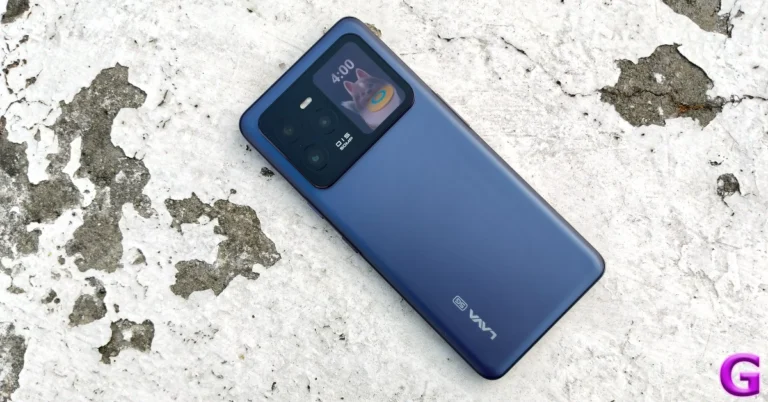
Lava Agni 3


Lava Agni 3 Review: Design and Displays

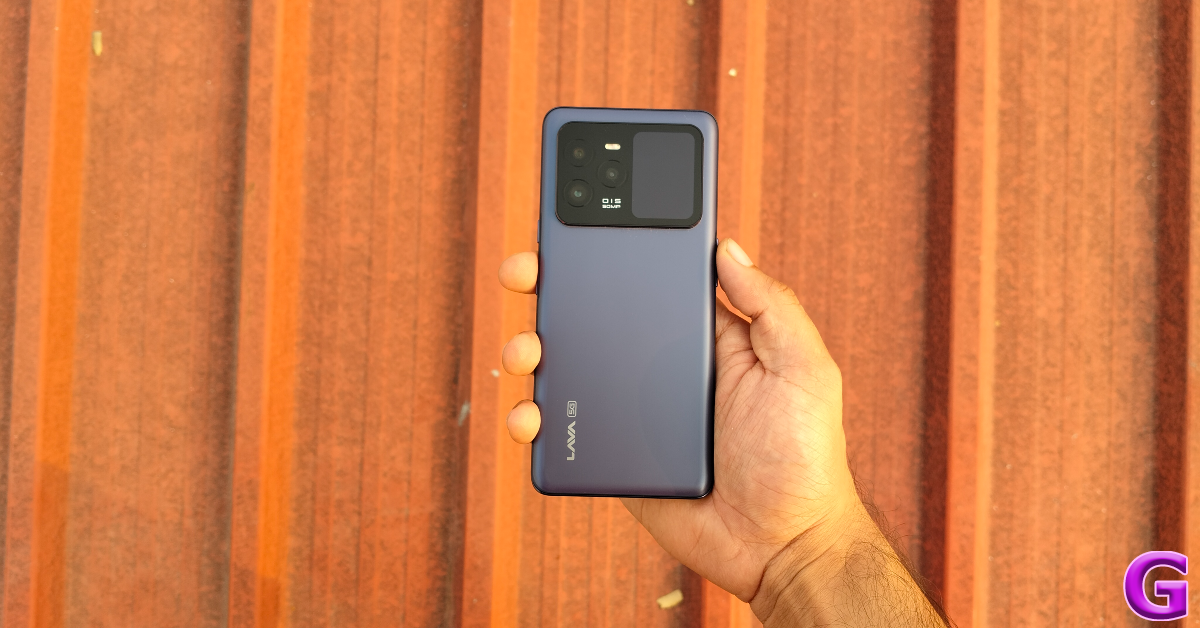
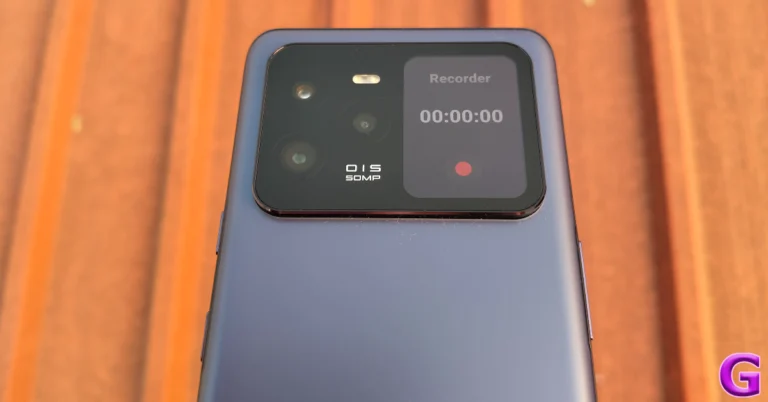
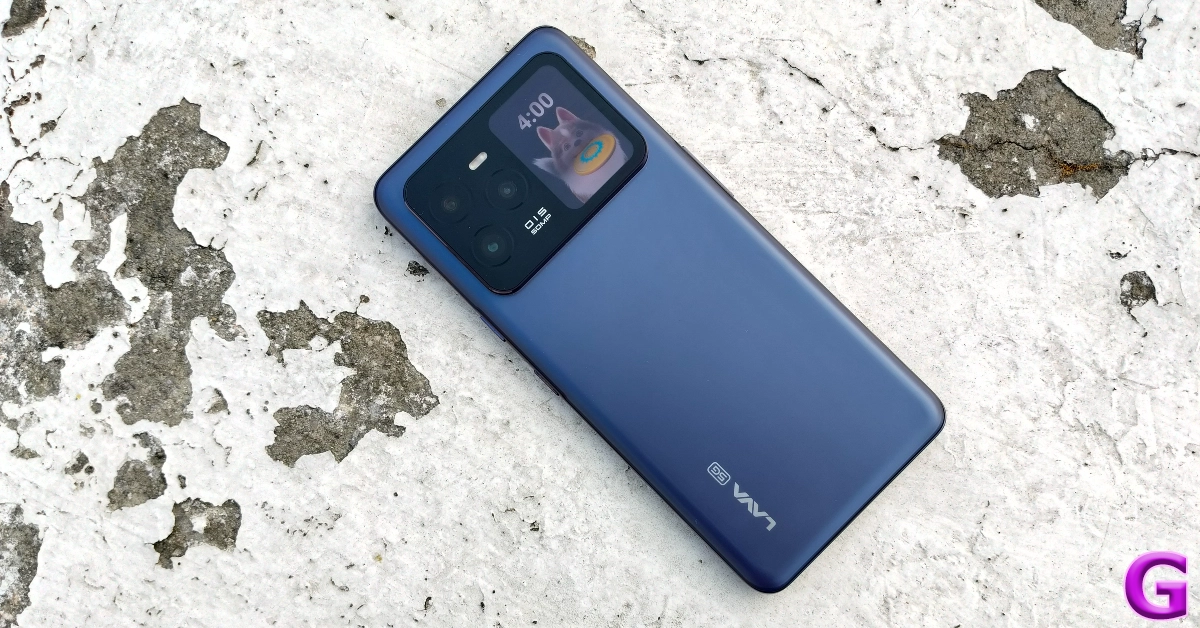
Lava is one of India’s biggest smartphone manufacturers. Its flagship smartphone, Agni 3, is one of the finest made-in-India gadgets. It rocks a 6.78-inch AMOLED display with a 120Hz refresh rate and 1,200 nits of peak brightness. Additionally, there’s a 1.74-inch secondary AMOLED display on the glass back panel, right next to the camera array. This display has control widgets for the camera, music, step counter, voice recorder, stopwatch, alarm, and timer. The Agni 3 is powered by the MediaTek Dimensity 7300X processor. It runs Android 14 out of the box and has been promised 3 major OS upgrades. The triple rear camera setup comprises a 50MP primary shooter, an 8MP telephoto lens with 3x optical zoom, and an 8MP ultrawide lens. For more details, read our Lava Agni 3 review.

Buy on Amazon for Rs 20,998

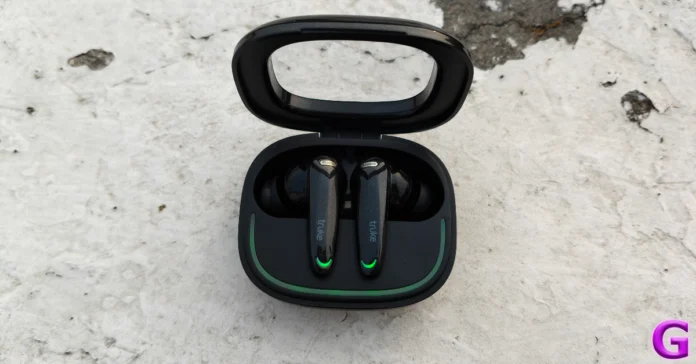
Truke BTG Crystal TWS

Truke BTG Crystal Review: Hits all the right notes

Truke has been creating waves in the audio tech market for the last couple of years. The tech outfit primarily operates in the budget TWS segment, but its offerings punch above their weight. The Truke BTG Crystal TWS is priced at Rs 899 and offers a bang for the buck. Designed for gamers, the BTG Crystal can drop its latency down to 40ms in intense gaming sessions. It is equipped with 13mm drivers that produce a balanced output. There’s support for 360-degree Spatial Audio as well. With a full charging case, these wireless earbuds can last up to 68 hours. If you’re interested in making the purchase, make sure you read our Truke BTG Crystal review first.

Buy on Amazon for Rs 899

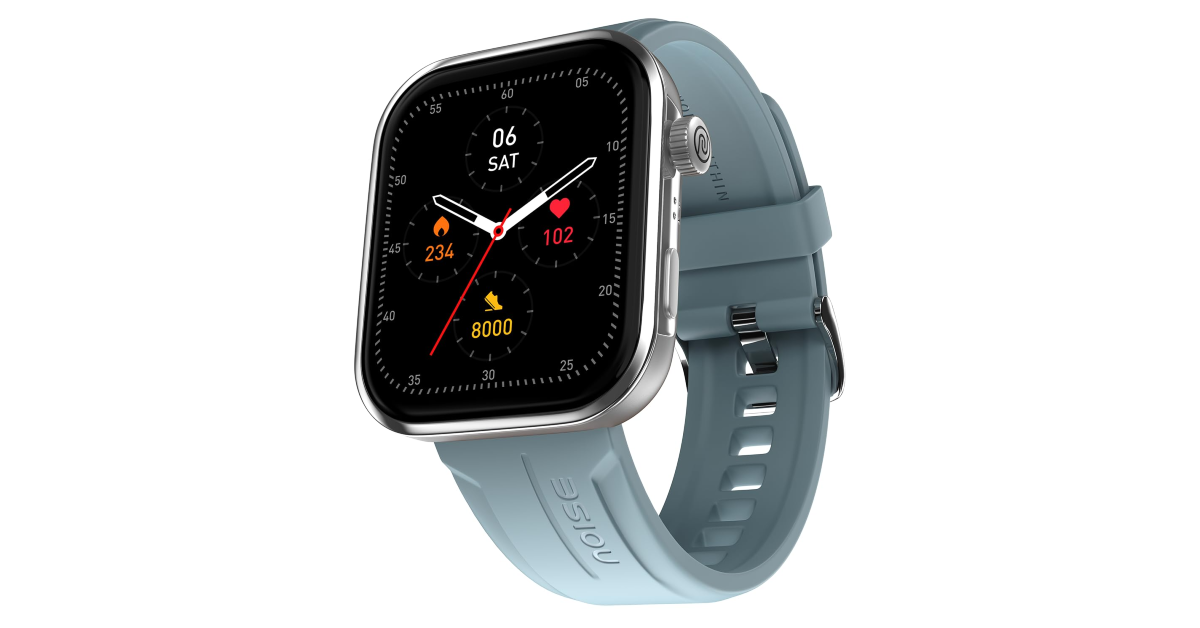
Noise ColorFit Pro 5 Max

Noise ColorFit Pro 5 Max

If you’re thinking of buying an Indian-made smartwatch, we highly recommend taking a look at Noise’s portfolio. The tech outfit primarily operates in the audio and smartwatch segments, and manufactures the bulk of its products in India. The ColorFit Pro 5 Max is an excellent smartwatch that offers a lot of value for its price tag. There are 4 strap options on offer: Metal, Silicone, Nylon, and Leather. It flaunts are 1.96-inch AMOLED display with a 410 x 502p resolution. It is rated IP68 for dust and water resistance. There’s support for over 100 sports, exercises, and workout routines. In Power Saving Mode, this smartwatch can last up to 7 days on a full charge.

Buy on Amazon for Rs 3,999

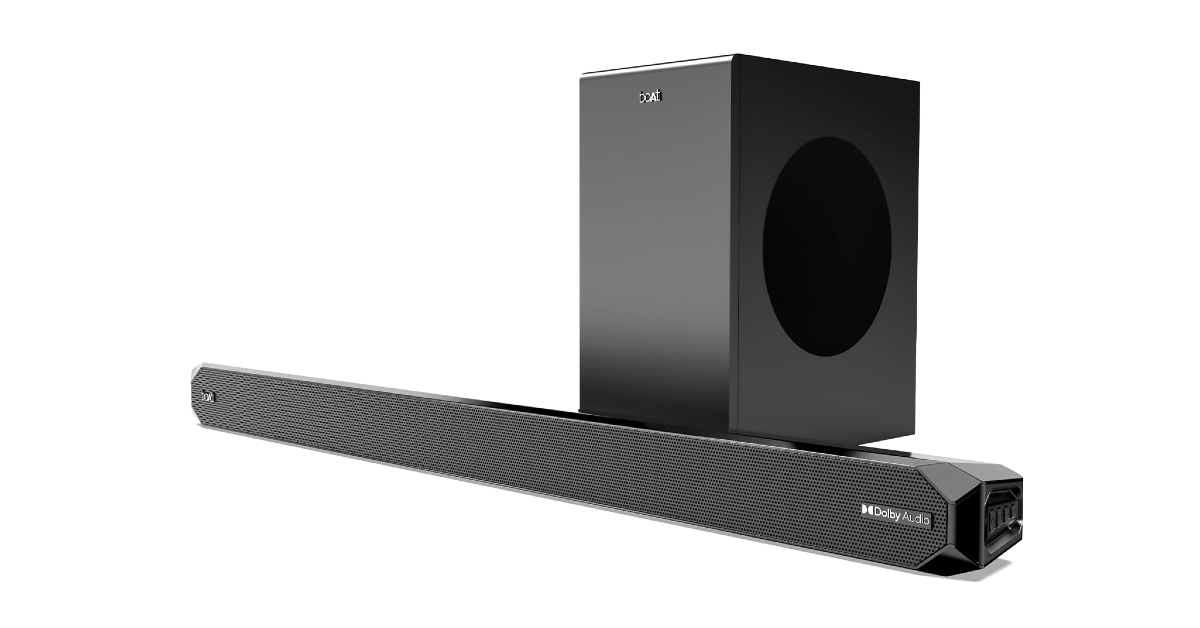
boAt Aavante Bar A2060

boAt Aavante Bar A2060 National Technology Day 2025: Top 6 Gadgets That Are Made In India

boAt manufactures 70% of its products in India. The audio tech outfit has one of the biggest portfolios in India and enjoys massive popularity in the country. The Aavante Bar A2060 is one of the best wireless speaker systems you can buy under Rs 10,000 right now. The 2.1 channel sound system comprises a 160W soundbar and a wired subwoofer. The audio output is produced by 4 2.25-inch drivers. The speaker system offers 4 connectivity options: Bluetooth, AUX, HDMI (ARC), and USB.

Buy on Amazon for Rs 9,999

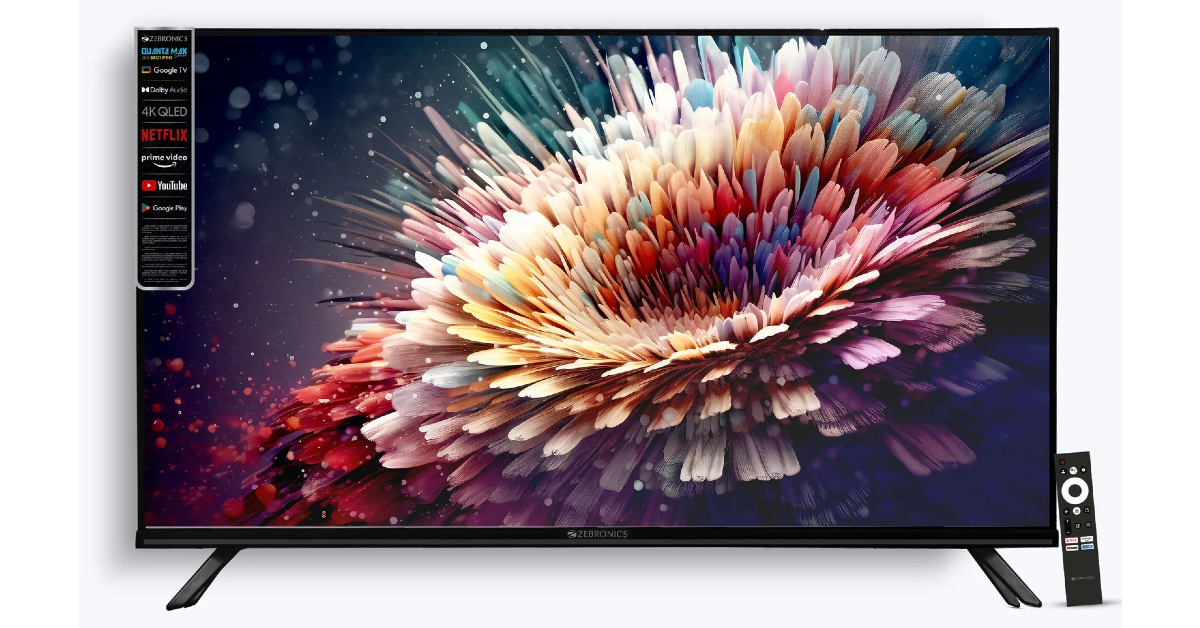
Zebronics Zeb 55G1 Pro

Zebronics Zeb 55G1 Pro National Technology Day 2025: Top 6 Gadgets That Are Made In India

The Zeb 55G1 Pro LED TV from Zebronics is made in India. Its 55-inch QLED display has a 4K resolution, HDR10 support, and a 60Hz refresh rate. It can reach a maximum brightness of 330 nits. Two 12W speakers produce the audio output on this TV. The frameless design lends the TV a beautiful aesthetic and brings a lot of personality to your living room. Powering the device is the ARM Quad Core A53 processor. The Smart TV runs Google OS.

Buy on Zebronics.com for Rs 99,999

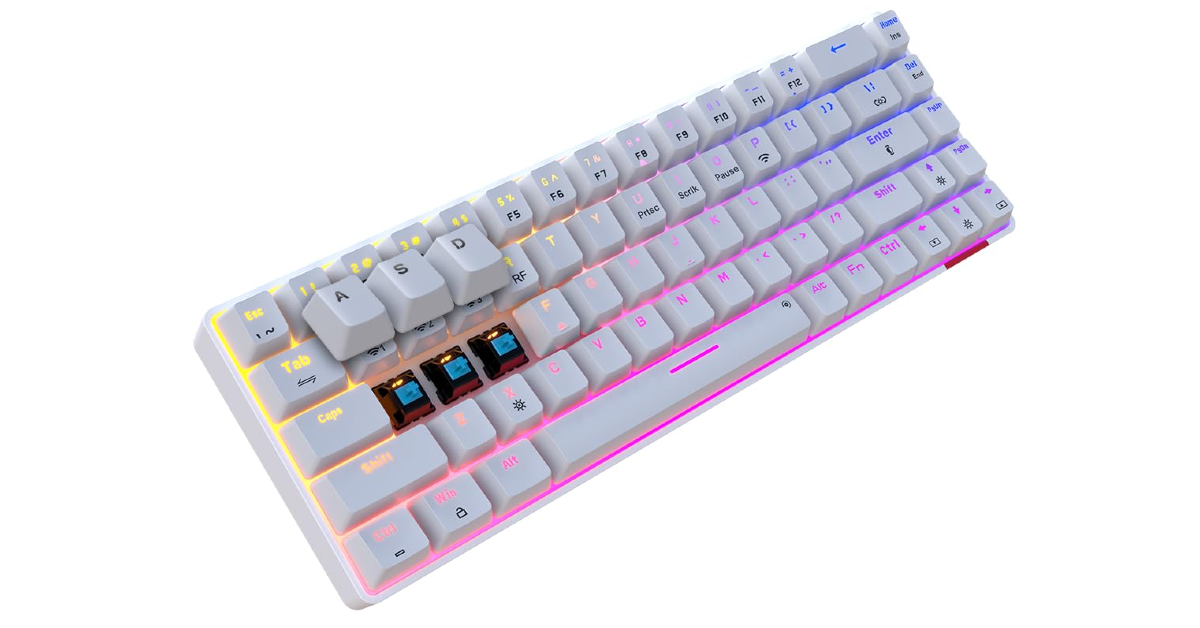
Portronics Hydra 10

Portronics Hydra 10 National Technology Day 2025: Top 6 Gadgets That Are Made In India

When it comes to computer peripherals, few Indian brands do it like Portronics. The Portronics Hydra 10 mechanical keyboard is one of our favourite ‘Made-in-India’ gadgets. This mechanical keyboard can be connected to your PC via a wireless Bluetooth connection or a 2.4GHz WiFi USB dongle. It supports USB Type-C and can be used as a wired keyboard while charging. It can be connected to a maximum of 4 devices at a time. Switching between devices is easy with simple key commands. The mechanical switches on this keyboard offer a very satisfying tactile feedback. The tasteful RGB lighting further adds to its aesthetic.

Buy on Amazon for Rs 2,499

Read Also: Top 10 Tech Gifts for Mother’s Day 2025

Final Thoughts

These are our picks for the top 6 gadgets that are made in India. For National Technology Day, we’d love to know which of India’s technological achievements you hold in high regard. Let us know in the comments!

How To Protect Your Facebook Account Against Cyber Attacks

With the rising conflict between India and Pakistan, people have been advised to look out for cyber attacks. If you’re an active Facebook user, now would be a good time to reassess your account’s security. Malicious entities often use vulnerable spots to hack your account or push malware. Here are the best ways to protect your Facebook account against cyber attacks.

Read Also: How To Stay Safe From Cyber Attacks On WhatsApp: Top 7 Ways

Some tips to keep in mind

Before we take a look at the methods of securing your Facebook account, here are some tips for ensuring that you don’t fall prey to cyber attacks.

  • Do not click on suspicious links
  • Do not download media sent to you on Messenger
  • Do not follow unverified media sources
  • Avoid answering messages from people you don’t know
  • Do not contribute to fundraisers unless their validity has been established
  • Log out of your account after using it on a public computer
  • Try using a VPN

Enable Two-Factor Authentication

Two-factor authentication adds an extra layer of security to your Facebook account. Here’s how you can enable it.

Step 1: Launch the Facebook app on your phone and tap your profile icon in the top right corner of the screen.

Step 1: Launch the Facebook app on your phone and tap your profile icon in the top right corner of the screen.

Step 2: Expand Settings and privacy and tap on Privacy Centre.

Step 2: Expand Settings and privacy and tap on Privacy Centre.

Step 3: Scroll down and tap on Manage your accounts.

Step 3: Scroll down and tap on Manage your accounts.

Step 4: Select Passwords and security.

Step 4: Select Passwords and security.

Step 5: Tap on Two-factor authentication.

Step 5: Tap on Two-factor authentication.

Step 6: Select your Facebook profile.

Step 6: Select your Facebook profile.

Step 7: Enter your password and hit Continue.

Step 7: Enter your password and hit Continue.

Step 8: Select an authentication method. In this case, we’re using the Google Authenticator app.

Step 8: Select an authentication method. In this case, we’re using the Google Authenticator app.

Step 9: Turn on the toggle switch next to Authentication app.

Step 9: Turn on the toggle switch next to Authentication app. How To Protect Your Facebook Account Against Cyber Attacks

Step 10: Get the login code from your preferred authentication app and enter it on Facebook.

Enable Login Alerts

Step 1: Launch the Facebook app on your phone and tap your profile icon in the top right corner of the screen.

Step 1: Launch the Facebook app on your phone and tap your profile icon in the top right corner of the screen. How To Protect Your Facebook Account Against Cyber Attacks

Step 2: Expand Settings and privacy and tap on Privacy Centre.

Step 2: Expand Settings and privacy and tap on Privacy Centre. How To Protect Your Facebook Account Against Cyber Attacks

Step 3: Scroll down and tap on Manage your accounts.

Step 3: Scroll down and tap on Manage your accounts. How To Protect Your Facebook Account Against Cyber Attacks

Step 4: Select Passwords and security.

Step 4: Select Passwords and security. How To Protect Your Facebook Account Against Cyber Attacks

Step 5: Tap on Login alerts.

Step 5: Tap on Login alerts. How To Protect Your Facebook Account Against Cyber Attacks

Step 6: Select your Facebook profile.

Step 5: Tap on Login alerts. How To Protect Your Facebook Account Against Cyber Attacks

Step 7: Hit the checkbox next to In-app notifications.

Step 7: Hit the checkbox next to In-app notifications. How To Protect Your Facebook Account Against Cyber Attacks

Use a Strong Password

unique password

A strong password plays an essential role in safeguarding your Facebook account against cyber attacks. Hackers often use brute force attacks to crack your password. Setting a complex string as your password can deter these attacks. Check out our guide to creating a strong password. Additionally, make sure your password is unique to Facebook. Oftentimes, hackers use passwords from data leaks to target people’s social media accounts. If you use the same password for every account, it makes the task easy for hackers.

Don’t Accept Friend Requests From Unknown People


How to Block or Unblock Someone on Facebook?

As a general rule of thumb, don’t accept Facebook friend requests from people you don’t know. Malicious entities can disguise themselves on the internet to get you to accept their request. Once they’re added to your friend list, they get access to your personal information and posting history. Using privacy filters and keeping the range of your personal posts to your closest friends is also a good idea.

Do Not Click on Suspicious Links

Here’s what happens when you unfollow someone on Facebook

Pushing malware on your device is one of the easiest ways of infiltrating it. Cyber attackers often use misleading links and images to install malware on your device. Once the malware is installed, hackers can get access to your financial information and the power to intercept incoming OTPs. Make sure you don’t click on suspicious links and images to prevent this from happening.

Update Facebook

Update the app

Facebook routinely pushes security updates to safeguard its users against malicious online attacks. Make sure the Facebook app on your phone is updated to the latest version. Go to the Google Play Store, search for Facebook, go to the app’s page, and tap on ‘Update’.

Update Your Web Browser

If you use Facebook on your web browser, make sure it is updated to the latest version. As an example, let’s take a look at how you can update Google Chrome on your PC.

Step 1: Launch Google Chrome on your PC.

Step 2: Hit the ellipses in the top right corner of the screen and go to Settings.

Step 2: Hit the ellipses in the top right corner of the screen and go to Settings. How To Protect Your Facebook Account Against Cyber Attacks

Step 3: Click on About Chrome in the sidebar.

Step 3: Click on About Chrome in the sidebar. How To Protect Your Facebook Account Against Cyber Attacks

Step 4: Google Chrome will start updating automatically. Click on Relaunch to finish the update.

Frequently Asked Questions (FAQs)

How can I safeguard my Facebook account against cyber attacks?

To protect your Facebook account from hackers and cyber attacks, enable two-factor authentication and login alerts. Additionally, use a strong password for your account and avoid clicking on suspicious links.

How do I enable two-step authentication for Facebook?

Go to Facebook>Settings and privacy>Privacy Centre>Manage your accounts>Passwords and security>Two-factor authentication, select an authentication method and follow the onscreen instructions to enable it.

How do I enable login alerts on Facebook?

Go to Facebook>Settings and privacy>Privacy Centre>Manage your accounts>Passwords and security>Login alerts, and tap the checkbox next to ‘In-app alerts’.

How do I update Google Chrome on my PC?

Launch Google Chrome, and go to Settings>About Chrome. Google Chrome will start updating automatically. Hit ‘Relaunch’ to finish.

How do I update the Facebook app on my phone?

Go to Google Chrome, search for Facebook, go to the app’s page, and hit ‘Update’.

  Lava Agni 3 getting flat Rs 5,000 discount only on Amazon: Check out deals

Final Thoughts

This is how you can protect your Facebook account against cyber attacks. While you’re here, check out how you can do the same for WhatsApp. If you have any questions, let us know in the comments!

Lava Agni 3 getting flat Rs 5,000 discount only on Amazon: Check out deals

Lava has launched a limited-period offer on its 5G smartphone, the Agni 3, exclusively on Amazon during Lava Days. Customers may get a flat INR 5,000 discount with popular bank deals. The Agni 3 was released in October 2024 and has two AMOLED panels, a MediaTek Dimensity 7300X chipset, and a triple back camera configuration. It also has a 5000mAh battery with 66w fast charging support.

The Lava Agni 3 is now available with a flat Rs 5,000 discount only on Amazon India, lowering the effective starting price to Rs 15,999. This limited-time offer is valid across all Agni 3 models from May 10 to May 18.

Lava Agni 3 getting flat Rs 5,000 discount only on Amazon: Check out deals

Lava Agni 3 was launched in India in October last year. It was released at a starting price of Rs 20,999 for the 8GB RAM with 128GB storage. The price of the 128GB and 256GB variants was set at Rs 22,999 and Rs 24,999, respectively.

The phone comes in colour options — Heather Glass and Pristine Glass.

Also Read: Samsung says Galaxy S25 Edge to have Corning’s Gorilla Glass Ceramic 2 protection: Details

Lava Agni 3 Specifications

The Lava Agni 3 sports a 6.78-inch 1.5K AMOLED display with 1,200 x 2,652 pixels of resolution and 120Hz refresh rate support. The handset has a secondary screen featuring a 1.74-inch AMOLED touchscreen at the back. Under the hood, there is a MediaTek Dimensity 7300X SoC with 8GB of RAM and up to 256GB of onboard storage. It operates on ‎Android 14 out of the box.

The Lava Agni 3 features a triple rear camera unit with a 50-megapixel sensor, an 8-megapixel ultrawide and telephoto camera, and a 16-megapixel selfie shooter. It also has a secondary, smaller display for selfies, allowing users to use the rear cameras for better results. 

Also Read: Samsung Galaxy F56 5G with 50MP OIS triple camera launched in India

The Lava Agni 3 is a smartphone with a 5,000mAh battery, 66w wired fast charging, dual stereo speakers, and a fingerprint sensor. It supports 5G, 4G LTE, Wi-Fi-6E, Bluetooth 5.4, GPS, NavIC, and USB Type-C connectivity.

How To Stay Safe From Cyber Attacks On WhatsApp: Top 7 Ways

As tensions between India and Pakistan boil along the border, people are advised to stay vigilant against cyber attacks. These attacks may vary from hacking attempts to the installation of spyware and viruses on unsuspecting devices. WhatsApp, being the most popular instant messenger in India, could possibly be used as a vehicle for such malicious activities. Here are 7 ways you can secure your WhatsApp account from cyber attacks.

Read Also: Samsung says Galaxy S25 Edge to have Corning’s Gorilla Glass Ceramic 2 protection: Details

How vulnerable is WhatsApp to online attacks?

Before you begin the process of safeguarding your WhatsApp account against online attacks, it is a good idea to know where the common vulnerabilities lie. As we’ve seen from the recent rabid scams, WhatsApp users can be targeted via virus-infected files and malware. Ensuring that you only click on links, files, and attachments sent from known contacts is a good practice to adopt.

Hacking attempts are more pernicious, as you may not be directly confronted by someone on WhatsApp. Hackers often scan past data breaches to gain access to passwords or use brute-force methods and bots to crack them. You can protect yourself against such hacking attempts by adding an extra level of security to your WhatsApp account.

Enable Two-Step Verification

Most of the attempts at hacking your WhatsApp account can be evaded by implementing two-step verification. Here’s how you can go about it.

Step 1: Launch the WhatsApp app on your phone.

Step 2: Hit the ellipses in the top-right corner of the screen and tap on Settings.

Step 3: Go to Settings.

Step 3: Go to Account.

Step 3: Go to Account.

Step 4: Tap on Two-step verification.

Step 4: Tap on Two-step verification.

Step 5: Tap on Turn on.

Step 5: Tap on Turn on.

Step 6: Create a 6-digit PIN for two-step verification.

Step 7: Confirm and save your PIN.

Disable Auto-Downloads

More recently, malicious entities have started using a process called ‘steganography’ to embed malware in images. Once a loaded image is downloaded on your device, it can automatically push harmful malware. To prevent this from happening, disable auto-downloads on WhatsApp.

Step 1: Launch WhatsApp on your phone and hit the ellipses in the top right corner of the screen.

Step 2: Hit the ellipses at the top right corner of the screen.

Step 2: Go to Settings.

Step 3: Go to Settings.

Step 3: Tap on Storage and data.

Step 4: Go to the Media auto-download section and uncheck all the boxes in all three categories: When using mobile data, When connected to Wi-Fi, and When roaming.

Step 3: Go to the Media auto-download section and select No media for all three categories (When using mobile data, When connected on WiFi, When roaming).Top 8 ways to fix ‘WhatsApp images not showing in gallery’ WhatsApp Image Scam: Top 5 Ways to Protect Yourself

Do Not Open Unknown Links and Attachments

While disabling auto-downloads is key in preventing malware-ridden images from getting downloaded on your device automatically, you should also exercise caution while manually clicking on links and saving attachments. As a general rule of thumb, do not open links, images, and attachments sent from unknown numbers.

Silence Unknown Callers

Certain kinds of malware can be delivered to the target device via a phone call. To safeguard yourself against this, silence unknown callers on WhatsApp.

Step 1: Launch the WhatsApp app on your phone and hit the ellipses in the top-right corner of the screen.

How To Stay Safe From Cyber Attacks on WhatsApp: Top 7 Ways

Step 2: Tap on Settings.

Step 3: Go to Settings. How To Stay Safe From Cyber Attacks on WhatsApp: Top 7 Ways

Step 3: Select Privacy.

Step 3: Select Privacy. Top 4 Ways to Block Spam on WhatsApp? (2024) How To Stay Safe From Cyber Attacks on WhatsApp: Top 7 Ways

Step 4: Go to Calls.

Step 4: Tap on Calls. Top 4 Ways to Block Spam on WhatsApp? (2024) How To Stay Safe From Cyber Attacks on WhatsApp: Top 7 Ways

Step 5: Turn on the toggle switch next to Silence unknown callers.

Step 5: Turn on the toggle switch next to Silence unknown callers. How To Stay Safe From Cyber Attacks on WhatsApp: Top 7 Ways

Disable Link Previews

When you share a link to a website on WhatsApp, it is able to infer your IP address from the link preview that gets generated in the chat. Your IP address is then stored in the website’s database. Since these databases are often the targets of online attacks, it is a good idea to disable link previews on WhatsApp.

Step 1: Launch the WhatsApp app on your phone.

Step 2: Hit the ellipses in the top-right corner of the screen and go to Settings.

Step 3: Go to Settings. How to share your WhatsApp Status on Instagram? Top 4 Ways to Block Spam on WhatsApp? (2024)

Step 3: Tap on Privacy.

Step 3: Tap on Privacy. How To Stay Safe From Cyber Attacks on WhatsApp: Top 7 Ways

Step 4: Scroll down and tap on Advanced.

Step 4: Scroll down and tap on Advanced. How To Stay Safe From Cyber Attacks on WhatsApp: Top 7 Ways

Step 5: Turn on the toggle switch next to Disable link previews.

Step 5: Turn on the toggle switch next to Disable link previews. How To Stay Safe From Cyber Attacks on WhatsApp: Top 7 Ways

Update WhatsApp

How to tag someone in your WhatsApp status

WhatsApp routinely pushes security upgrades to safeguard its users against harmful cyber attacks. Make sure the WhatsApp app on your phone is updated to its latest version. Go to the Google Play Store, search for WhatsApp, and hit the ‘Update’ button on the app’s page.

Update your Phone’s OS

Apart from updating WhatsApp, you should also update your phone’s OS as an added security measure. Here’s how.

Step 1: Go to Settings and select Software update.

Go to Settings and select Software update. 10 top ways to fix unable to answer calls on Android phone Top 7 ways to fix ‘Microphone not working’ on an Android phone (2024) Top 6 ways to fix overnight battery drain on your Android phone (2024) Top 10 ways to fix ‘In-display fingerprint scanner not working’ on Android

Step 2: Tap on Download and install.

tap on download and install 10 top ways to fix unable to answer calls on Android phone Top 7 ways to fix ‘Microphone not working’ on an Android phone (2024) Top 6 ways to fix overnight battery drain on your Android phone (2024)

Step 3: Select Install now.

Select Install now. 10 top ways to fix unable to answer calls on Android phone Top 7 ways to fix ‘Microphone not working’ on an Android phone (2024) Top 6 ways to fix overnight battery drain on your Android phone (2024)

Frequently Asked Questions (FAQs)

Are my messages secure on WhatsApp?

WhatsApp uses end-to-end encryption for calls and messages. The texts and calls cannot be accessed by any party other than the sender and receiver.

Is WhatsApp safe to use?

WhatsApp is one of the safest instant messaging platforms out there right now. Features like passkeys, chat lock, two-step verification, and end-to-end encryption make it safe to use.

How do I enable end-to-end encryption on WhatsApp?

End-to-end encryption works implicitly on WhatsApp. It cannot be disabled. Your calls, texts, and media are protected by it.

How do I silence calls from unknown callers on WhatsApp?

Go to Settings>Privacy>Calls and turn on the toggle switch next to ‘Silence Unknown Callers’.

How do I enable two-step verification on WhatsApp?

Go to Settings>Account>Two-step verification and select ‘Turn on’.

Read Also: Top 10 Tech Gifts for Mother’s Day 2025

Final Thoughts

This is how you can secure your WhatsApp account from cyber attacks. It is also a good idea to create a recent backup of your WhatsApp and media. If you have any questions, let us know in the comments!

Samsung says Galaxy S25 Edge to have Corning’s Gorilla Glass Ceramic 2 protection: Details

On May 13, Samsung is going to release the Galaxy S25 Edge worldwide. The smartphone is anticipated to be the thinnest Galaxy S series model to date and will have Corning’s Gorilla Glass Ceramic 2 display protection. The primary features are anticipated to include a 6.7-inch 120Hz AMOLED screen and a 3,900mAh battery. Like the high-end Galaxy S25 Ultra, it will have a 200-megapixel primary back camera and Galaxy AI capabilities. Additional information has been circulated online, including the anticipated cost and other important features.

Samsung claims that Corning Gorilla Glass Ceramic 2 will be a feature of the upcoming Samsung Galaxy S25 Edge. Corning Gorilla Glass Ceramic 2 is the result of a partnership between Corning and Samsung.

On May 13, Samsung is going to release the Galaxy S25 Edge worldwide. The smartphone is anticipated to be the thinnest Galaxy S series model to date and will have Corning's Gorilla Glass Ceramic 2 display protection. The primary features are anticipated to include a 6.7-inch 120Hz AMOLED screen and a 3,900mAh battery. Like the high-end Galaxy S25 Ultra, it will have a 200-megapixel primary back camera and Galaxy AI capabilities. Additional information has been circulated online, including the anticipated cost and other important features.

Advanced protection is provided by Corning’s Gorilla Glass Ceramic 2, an innovative glass ceramic with an incredibly tiny device form factor. The known durability for which Corning Gorilla Glass is renowned is reportedly extended by it.

Also Read: Samsung Galaxy F56 5G with 50MP OIS triple camera launched in India

Samsung’s Galaxy S25 Edge has a stylish Gorilla Glass Ceramic 2 cover that combines Samsung’s in-house processing and reinforcing technologies with Corning’s cutting-edge glass technology.

“Driven by a shared vision to push the boundaries of mobile engineering, Samsung and Corning joined forces to ensure the premium S series experience balances elegance with resilience.”

A display cover called Gorilla Glass Ceramic 2 has crystals placed in its glass matrix to improve durability and deflect cracks. Its cooperation with crystal and glass elements enhances robustness while preserving great optical transparency. The glass ceramic substance is further strengthened by Corning’s ion exchange process.

Samsung Galaxy S25 Edge expected pricing

The Samsung Galaxy S25 Edge is expected to cost EUR 1,249 in Germany for the 256GB version and EUR 1,369 for the 512GB version, putting it between the Galaxy S25+ and Galaxy S25 Ultra in Samsung’s flagship range. It might be offered in Titanium Jetblack, Titanium Icyblue, or Titanium Silver.

It might go on sale in China and South Korea on May 23, followed by the United States and other regions on May 30th. Preorders are anticipated between May 14 and May 20.

Samsung Galaxy S25 Edge expected specifications

Reports state that, the Samsung Galaxy S25 Edge, is likely to have a 6.7-inch AMOLED screen with 1,440 x 3,120 pixel resolution, a variable 120Hz refresh rate, a 163g weight, and a 5.85mm thickness, making it the thinnest Galaxy S model yet. It is claimed to include a titanium frame with Corning Gorilla Glass Ceramic 2 and Victus 2 on the front and back, an ultrasonic fingerprint scanner, and IP68 dust and water resistance.

Also Read: Apple rolls out iOS 18.5 release candidate to beta testers

The Samsung Galaxy S25 Edge is expected to be powered by the Snapdragon 8 Elite for Galaxy processor, with 12GB of RAM and up to 512GB of on-board storage. It is likely to run Android 15 with One UI 7 and have a dual back camera system with a 200-megapixel primary camera and a 12-megapixel ultra-wide-angle lens. The phone might sport a 12-megapixel front camera for photos and video chats. It may support Wi-Fi 7 and Bluetooth 5.4 connection, as well as a 3,900mAh battery.

Top 10 Tech Gifts for Mother’s Day 2025

Mother’s Day is celebrated on the second Sunday of May in most parts of the world. This year, Mother’s Day will be celebrated on May 11, 2025. There are several ways you can convey your gratitude and love to your mother, but nothing seals it better than a gift. If your search for the perfect tech gift has brought you here, you’re in the right place. Here is our perfectly curated list of the top 10 tech gifts for Mother’s Day 2025.

Read Also: Samsung Galaxy F56 5G with 50MP OIS triple camera launched in India

iPhone 16

Enter recovery mode on your iPhone 16

You can never go wrong with an iPhone as a gift, no matter the occasion. The new entry-level model in the iPhone 16 series separates itself from the previous models with its vertically aligned rear camera panel, cool new colour schemes, and a dedicated Camera Control button. It is powered by the Apple A18 SoC. Its 6.1-inch Super Retina XDR OLED display supports HDR10 and can hit 2,000 nits in High Brightness Mode. The dual rear camera setup houses a 48MP primary shooter and a 12MP ultrawide lens. Under the hood, the 3,551mAh battery pack holds enough juice to last a day. It supports 25W MagSafe and 15W Qi2 wireless charging.

Buy on Amazon for Rs 72,490

Titan Valerie

Titan Valerie Review: Design

The Titan Valerie smartwatch has an elegant design and a tasteful, bejewelled look. Its mesh stainless steel strap goes well with formal and casual outfits. The 3.04cm AMOLED display is surrounded by crystals. This display is bright and super responsive. The smartwatch has an exhaustive library of watch faces for this display. Its health and fitness tracking features are just as impressive. The Valerie smartwatch has support for over 100 sports and provides detailed metrics on calories burned, duration, and other metrics related to the sport. With Always On Display disabled, this smartwatch can last up to a week on a full charge. It takes two hours to fully charge the device. For more details, read our Titan Valerie review.

Buy on Amazon for Rs 7,500

Vivo V40 Pro

Vivo V40 Pro Review: Design and Display

The Vivo V40 Pro is an excellent Mother’s Day gift for moms who love taking pictures. This camera-centric smartphone has 4 50MP sensors, one each for the primary shooter, ultrawide lens, telephoto lens with 2x optical zoom, ultrawide lens, and selfie shooter. The rear camera panel is tuned by Zeiss Optics and features an Aura Light. The smartphone is powered by the MediaTek Dimensity 9200+ chipset. Its 6.78-inch AMOLED display has a 120Hz refresh rate and can reach 4,500 nits of peak brightness. The 5,500mAh battery pack supports 80W wired charging. Read our Vivo V40 Pro review to learn more about the phone.

Buy on Amazon for Rs 41,487

Kindle Paperwhite

Top 7 Easy Methods to Fix the ‘Kindle Won't Turn On’ Issue

After a year-long hiatus, the Kindle Paperwhite is available in India again. An incredible Mother’s Day tech gift for voracious readers, the Paperwhite flaunts a 7-inch glare-free display with multiple lighting settings. The e-reader allows you to easily change the screen’s brightness and warmth. With an IPX8 rating onboard, the Paperwhite is completely waterproof. Its 16GB internal storage can hold thousands of ebooks. A single charge lasts up to 12 weeks.

Buy on Amazon for Rs 16,999

Amazon Echo Pop

Amazon Echo Pop review: Performance Top 10 Tech Gifts for Mother’s Day 2025

The entry-level smart speaker in the Echo lineup, the Echo Pop, is a great bedside companion. Its minimal design and plush buttons exude a premium look. The 1.95-inch front-firing speaker produces a well-rounded output that’s loud enough to fill the room. While the smart speaker does not have motion and temperature sensors like the Echo Dot, it can seamlessly connect to the smart devices in your house. Its charming software experience puts it above other devices in its category. Read our Amazon Echo Pop review to know how it performs in everyday use.

Buy on Amazon for Rs 4,499

InstaCuppa Mug Warmer

InstaCuppa Mug Warmer Top 10 Tech Gifts for Mother’s Day 2025

The InstaCuppa mug warmer has 5 adjustable temperature settings to keep your coffee mug warm. These 5 temperature levels are set between 45°C to 100°C. The simple touch operation makes it easy to adjust the temperature of the pad. The device is programmed to automatically shut off after 8 hours of continuous use. This ensures that it doesn’t burn the desk it’s sitting on. Its compact form factor and light weight make the InstaCuppa mug warmer a useful travel accessory. The device is compatible with ceramic, glass, and steel mugs.

Buy on Amazon for Rs 3,199

Samsung Galaxy Ring

How to enable gesture controls on Samsung Galaxy Smart Ring Top 10 Tech Gifts for Mother’s Day 2025

If your mom is a fitness and tech enthusiast, the Samsung Galaxy Ring would make an incredible Mother’s Day gift. This smart ring is available in 11 sizes. Its titanium frame has a matte finish, which gives off a very premium feel. It has an IP68 rating and is water resistant up to 10ATM. The Galaxy Ring can automatically recognise a bunch of different exercises and start tracking them in the background. At night, it accurately tracks the user’s sleep cycle. The Samsung Health app provides a detailed breakdown of the user’s health and fitness metrics. The versatile 7-day battery life is an added bonus.

Buy on Amazon for Rs 38,999

Philips Hair Straightener Brush

Philips Hair Straightener Brush Top 10 Tech Gifts for Mother’s Day 2025

The Philips hair straightener brush provides frizz-free, bouncy hair in just 5 minutes. Its keratin bristles with ceramic coating glide effortlessly through the hair. The triple bristle design plays a big role in detangling the hair while straightening it. It also protects the scalp from heat. The brush takes only 50 seconds to heat up, ensuring a fast operation. There are two temperature settings to choose from – 170°C and 200°C.

Buy on Amazon for Rs 3,149

Samsung Galaxy S25

samsung galaxy s25 Top 10 Tech Gifts for Mother’s Day 2025

If your mom is used to Android smartphones, the iOS interface of the iPhone may take some time to get used to. The good news is that you can get her a premium Android smartphone that matches the performance of the iPhone on every front. The Galaxy S25 has a set of amazing cameras. Its triple rear camera setup comprises a 50MP primary shooter, a 10MP telephoto lens with 3x optical zoom, and a 12MP ultrawide lens. The 6.2-inch Dynamic LTPO AMOLED 2X display has a 120Hz refresh rate and can hit a peak brightness of 2,600 nits. The compact smartphone is powered by the amazing Snapdragon 8 Elite processor. Its 4,000mAh battery pack can hold enough juice to last a day. Read our Samsung Galaxy S25 review to learn more about the smartphone.

Buy on Amazon for Rs 80,999 

Xiaomi Pad 7

Xiaomi Pad 7 Review: A relentless workhorse Top 10 Tech Gifts for Mother’s Day 2025

The Xiaomi Pad 7 is a no-nonsense midrange Android tablet for users who love to stream movies and TV shows. Its 11.2-inch IPS LCD panel has a 144Hz refresh rate and 600 nits of brightness. Powering the tablet is the Snapdragon 7+ Gen 3 SoC. The 13MP rear camera can take good pictures in indoor and outdoor conditions. The 8MP front-facing camera is reliable for video calling. The 8,850 mAh battery pack supports 45W wired charging. One of the benefits of getting this tablet is that its accessories are more affordable compared to its competitors. For more details about the tablet’s performance, read our Xiaomi Pad 7 review.

Buy on Amazon for Rs 30,000

Honourable Mention: Tecno Pova 6 Neo 5G

Honourable Mention: Tecno Pova 6 Neo 5G

If you’re looking for an affordable smartphone to gift your mom on Mother’s Day, the Tecno Pova 6 Neo 5G is a great pick. Its 6.67-inch IPS LCD panel is amazing for watching content across OTT platforms like Netflix, Prime Video, and JioHotstar. The MediaTek Dimensity 6300 chipset ensures that the smartphone doesn’t experience any lag while performing routine tasks. The 5,000mAh battery pack lasts an entire day with ease. The smartphone also keeps up with modern trends — offering a handy AI suite with features like Magic Eraser, Artboard, Cutout, and more. However, the icing on the cake is the brilliant 108MP primary shooter that takes vivid and detailed pictures in diverse lighting conditions.

Buy on Amazon for Rs 13,999

Read Also: Samsung Galaxy S25 Edge launch date confirmed for May 13, featuring a 200-megapixel primary camera

Final Thoughts

These are our top 10 picks that’ll make excellent tech gifts for Mother’s Day 2025. Looking for more niche devices? Let us know the category in the comments, and we’ll recommend something that stands out!

Samsung Galaxy F56 5G with 50MP OIS triple camera launched in India

South Korean brand Samsung has expanded its F-Series portfolio in India with the introduction of the Galaxy F56 5G. The smartphone is only 7.2mm slim, with AI editing tools and much more. It comes with a 50MP OIS triple camera, 120Hz refresh rate, AMOLED+ display with One UI 7 out of the box. The Galaxy F56 5G packs a 5000mAh battery and is powered by the Exynos 1480 chipset.

Samsung Galaxy F56 5G pricing and availability

The price of the Samsung Galaxy F56 5G starts at Rs 25,999 for the 8GB RAM with 128GB storage. There is another 8GB RAM with 256GB storage variant priced at Rs 28,999. The smartphone comes in Green and Violet colour options. Note that these are special launch prices and will be available for a limited duration, and it also include a Rs 2,000 instant bank discount. Customers can own the Galaxy F56 5G with easy EMI options starting at Rs 1,556 per month through Samsung Finance+ and all leading NBFC partners.

Samsung Galaxy F56 5G pricing and availability

Also Read: Apple rolls out iOS 18.5 release candidate to beta testers

Samsung Galaxy F56 5G Specifications

Samsung Galaxy F56 5G is driven by an Exynos 1480 processor paired with 8GB of LPDDR5X RAM and up to 256GB of internal storage. The device runs on One UI 7 based on Android 15 out of the box. The company has confirmed that the phone will receive six generations of software upgrades and six years of security fixes.

The handset features a 6.7-inch full HD+ Super AMOLED+ display with a 120Hz refresh rate. The screen comes with 1,200 nits of High Brightness Mode, Vision Booster and Corning Gorilla Glass Victus+ protection. The Galaxy F56 5G is highlighted with a pill-shaped triple rear camera set-up that includes a 50-megapixel main sensor with support for OIS. The smartphone also features a stunning 12-megapixel HDR front camera. It also features Portrait 2.0 with 2X zoom on the rear camera, which enables a crisp and natural bokeh effect. Users will also be able to record 4K 30 FPS videos in 10-bit HDR. It will also feature advanced AI-powered editing tools like Object Eraser, Edit Suggestions.

Also Read: Samsung Galaxy S25 Edge launch date confirmed for May 13, featuring a 200-megapixel primary camera

A 5,000mAh battery that supports 45W fast charging powers the gadget. Samsung Knox Vault is one of the security features included with the smartphone. Comprehensive protection against software and hardware threats is provided by the hardware-based security system. With Samsung Wallet with Galaxy F56 5G, Samsung has also unveiled its cutting-edge Tap & Pay functionality, which enables users to easily and securely make payments.

Garena Free Fire Max Redeem Codes Today 9 May 2025: Here is how to claim them

Garena Free Fire Max is a battle royale game with regular awards and tournaments to keep players interested. If you play Garena Free Fire, you should be aware of the redeem codes that are released on a daily basis. However, because the battle royale game is banned in India, players from other countries can use the Free Fire Redeem codes daily. If you’re unfamiliar with the Garena Free Fire redeem codes or don’t know how to get them, we’ve put together a step-by-step guide to help you redeem them. Check out Garena Free Fire Max Redeem Codes for 9 May 2025.

The Free Fire Max redeem codes are a great way to get free stuff. These are 12-digit codes that contain alphabets and numbers, as well as an expiration date and time. Because the Garena FF redeem codes cannot be used more than once, you should hurry to the redemption page to claim your free reward before someone else does. To get a free reward, all you have to do is go to reward.ff.garena.com/en, which is the official redemption page. Also, keep an eye on this space for daily updates on Garena Free Fire Max redemption codes and rewards.

Also Read: Sennheiser Accentum Plus wireless headphones with Hybrid Adaptive Noise Cancellation launched

Garena Free Fire Max Redeem Codes Today 9 May 2025

FA1S2D3F4G5H6J7K
FZXC1VBN7M8L9K0J
FQWE9RTY3U2IO6P5
F7AS8DF4GH1JK9LZ
FMNB6VCX2ZAQ9WS3
FLKJH5GF4DSA2QW
FUYTR8EWD2SAQ6Z
FCXSW84FVT2GB9
FVBFKJ5HG6FD3S
FQAZX9SWDEV7FR2
FPLOK4MINUH2BY6
FHJYU7GTFEDS9WA3
F9G3H5J1K7L2M4N6
F2XCVB9N7M1LKJH8
FQWERT6Y3U9I2OP0
F8SD4FG6HJ2KL9ZX
FPOLK9G3FDSA7Q2
FZAWQ2SDCR8FV1
FBGT6HYJNK9LO4
FRFVB3GHYT1RE6

How to Get Free Fire Max Redeem Codes for Garena on 9 May 2025?

  • Visit the Garena Free Fire Max game’s official website at reward.ff.garena.com.
  • Use your Facebook, Google, VK, Apple ID, Huawei ID, or Twitter account to log in.
  • You’ll be taken to a valid redemption code (s)
  • Copy and paste the 12-digit redemption code into the text box.
  • On the screen, a dialogue box will appear.
  • ‘Ok’ should be selected.

For the latest gadget and tech news, and gadget reviews, follow us on Twitter, Facebook and Instagram. For newest tech & gadget videos subscribe to our YouTube Channel. You can also stay up to date using the Gadget Bridge Android App. You can find the latest car and bike news here.

Apple rolls out iOS 18.5 release candidate to beta testers

Apple put out the iOS 18.5 release candidate to beta testers. The function notifies parents when a Screen Time passcode is entered on their child’s smartphone. The update will be accessible to eligible users in the coming days, and it will include modifications to the Apple TV app for third-party devices as well as the Screen Time function on iOS. Additionally, iPhone 13 users will get carrier-backed satellite connectivity, and the Screen Time function will be improved with iOS 18.5.

A new feature in Screen Time in Apple’s iOS 18.5 release candidate, which was made available to testers, notifies parents when a child enters their passcode to bypass parental controls. This lets parents know if their child is successful in guessing the passcode.

Unlike the iPhone 14 and later models, which have connection powered by Globalstar, Apple’s earlier iPhone 13 series devices now use carrier-based satellite connectivity. Starlink Direct (SpaceX) provides satellite connection to T-Mobile customers in the United States.

Also Read: Samsung Galaxy S25 Edge launch date confirmed for May 13, featuring a 200-megapixel primary camera

Apple is improving third-party device purchases on the Apple TV app by introducing the Buy with iPhone option. The business also released a new Apple Vision Pro app for consumers who acquired the Vision Pro spatial computer. The future iOS 18.5 update will address an issue that caused a blank screen when using the app.

In celebration of the resilience and beauty of LGBTQ+ communities, Apple is releasing the Pride Edition Sport Band, watch face, and iPhone and iPad wallpaper. The band may be bought, and a future software update will provide the matching watch face and wallpaper.

Also Read: Netflix unveiled a revamped homepage, GenAI Search on iOS and more

Pride Edition Sport Bands come in a variety of sizes and shapes and are hand-assembled from colourful rainbow stripes. Since no two bands are the same, they all represent the originality of all LGBTQ+ members.