

In This Article
Xiaomi Pad 5 Pro 12.4 with 120Hz display launched
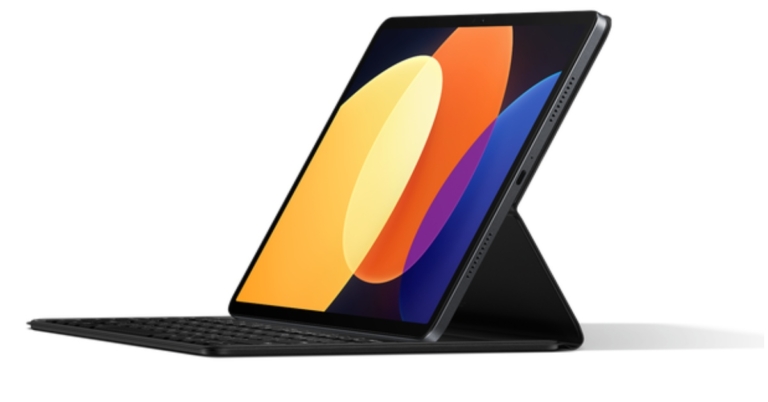
Xiaomi Pad 5 Pro 12.4 has been launched in China alongside the Mix Fold 2 foldable phone. Snapdragon 870 SoC powers the tablet and has a 120Hz refresh rate display. The device has a 50-megapixel rear camera and packs a 10,000mAh battery with 67W charging support.
Amazon Smartphone Upgrade Days goes live: Avail up to 40% off on smartphones and accessories
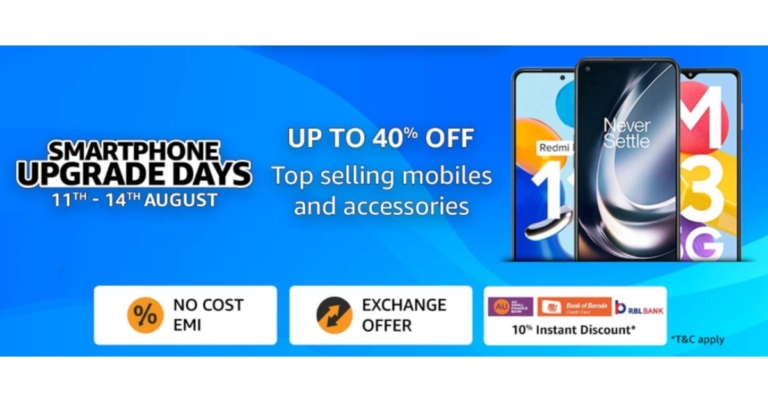
For those looking to get a new smartphone but were waiting for the appropriate time to do so, Amazon has announced Smartphone Upgrade Days. During the sale period, the e-commerce will be offering a variety of the newest smartphones and their accessories. Customers can receive discounts of up to 40% on their preferred smartphones from manufacturers such as OnePlus, Xiaomi, Samsung, iQOO, Tecno, realme, and Oppo, among others.
Amazon Smartphone Upgrade Days is live now and will run through August 14th. There will be amazing bank and exchange offer for the most recent OnePlus 10T 5G, iQOO 9T 5G, Tecno Spark 9T, Redmi K50i 5G, and Samsung M13 series, among other devices.
Customers who use their RBL, Bank of Baroda, or AU Bank credit or debit cards will immediately receive a 10% discount. Additionally, they can get their preferred smartphones through easy No-Cost EMI for up to 12 months and tempting exchange incentives.
Amazon Smartphone Upgrade Days offers and discounts from retailers
In This Article
iQOO smartphones
Customers can receive discounts on iQOO smartphones of up to Rs 10,000. The most recent iQOO 9T will be available for Rs 49,999 with an extra Rs 4,000 in bank discounts, and the iQOO Neo 6 5G will be available for Rs 29,999 with an additional Rs 3,000 in bank discounts. With the extra benefits of coupons and instant bank discounts, the beginning prices for the iQOO Z6 Pro and Z6 5G, respectively, are Rs 23,999 and Rs 14,999. Get additional amazing discounts on the flagship models, such as the iQOO 9 SE, iQOO 9 5G, and iQOO 9 Pro 5G. Customers will be able to take advantage of further savings with bank offerings to lower the cost of buying a smartphone.OnePlus smartphones
During the Amazon Smartphone Upgrade Days the price of the OnePlus 9 Series 5G will be Rs 37,999, plus bank rebates and additional exchange offers that can save you up to Rs 5,000 on specific models. The OnePlus 10R will be offered at a discount of Rs 4,000 with no interest for up to 6 months, with an additional Rs 3,000 reduction on exchange and bank offers. A flat Rs 5,000 discount will be offered on the OnePlus 10 Pro 5G. Get the OnePlus 10T, the newest model from OnePlus, with a fantastic bank offer of Rs 5,000 off and Rs 5,000 more on selected device exchanges. Take advantage of no-cost EMI on the OnePlus Nord line, which includes the Nord CE 2 Lite 5G for the lowest price ever of Rs 18,999 and the Nord CE 2 5G starting at Rs 23,999.Samsung smartphones
Additionally, customers may take advantage of promotions on the whole Samsung M series line, including up to 30% off on the best-selling smartphones. Get the Samsung Galaxy M53 5G for up to 5,000 Rs less. 5,000 Rs off the Samsung Galaxy M52 in full. Customers will be able to take advantage of further savings through bank offers to make buying a smartphone this sale more affordable.Vivo and OPPO smartphones
During the Smartphone Upgrade Days, customers may receive discounts of up to Rs 6,000 on Oppo A series phones and Rs 5000 on Oppo F series phones. During the Sale, customers may also get up to 5,000 Rs off Vivo devices. To make the offer even better, take advantage of additional Instant Bank Discounts.Xiaomi smartphones
During these Smartphone Upgrade Days, Xiaomi devices will be discounted by up to 40%. The best-selling Redmi 9 Series will be offered at a starting price of Rs 6,999, while the Redmi Note 10 Series, which includes the Redmi Note 10T 5G, Redmi Note 10 Pro, Redmi Note 10 Pro Max, and Redmi Note 10S, will be offered at a starting price of Rs 10,999 with immediate additional bank discounts. With additional exchange, immediate bank savings, and no-cost EMI offers of Rs 5000, the most recent Redmi K50i 5G will be offered to start at Rs 25,999. With extra incentives worth Rs 6000, such as exchange offers and quick bank discounts, the Xiaomi 11 light and Xiaomi 11T Pro will be offered for Rs 24,999 and Rs 37,999, respectively.Tecno smartphones
Get discounts on Tecno cellphones of up to 30%. Customers may purchase Tecno smartphones for as little as Rs 6,799 at this time. The most affordable dual-camera smartphone will be the Tecno Pop 5 LTE, which will start at Rs 6,799. Customers will be able to take advantage of further savings with bank offerings to lower the cost of buying a smartphone. For the latest gadget and tech news, and gadget reviews, follow us on Twitter, Facebook and Instagram. For newest tech & gadget videos subscribe to our YouTube Channel. You can also stay up to date using the Gadget Bridge Android App. You can find the latest car and bike news here.Redmi Buds 3 Lite review: Great performance for the price, are they a worthy buy?
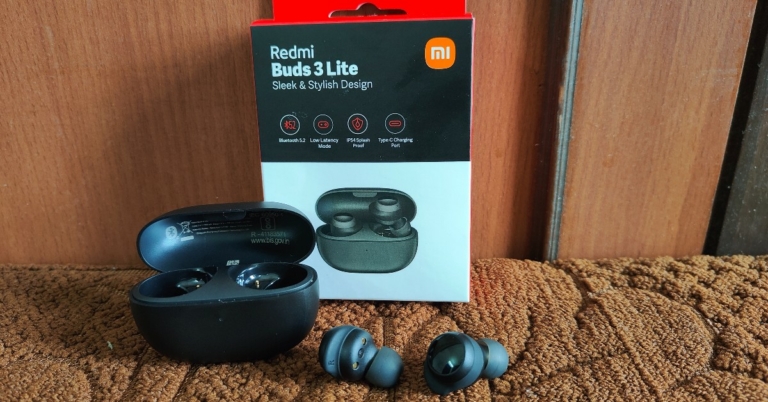
Over the years, the affordable TWS category has seen a range of offerings from boAt, Noise, Boult Audio, and even OnePlus. But surprisingly, Xiaomi has not been an active player. The affordable category is usually home territory for Xiaomi when it comes to smartphones, with Redmi smartphones being hugely popular in the Indian market. With the launch of Redmi Buds 3 Lite, Xiaomi seeks to carve out a space for itself in a category that is already seeing a lot of activity. At Rs 1,999, are Redmi Buds 3 Lite worth the buy? Here is our comprehensive Redmi Buds 3 Lite review. Read on to know more.
Read Also: Samsung Galaxy Buds 2 Pro earbuds with ANC unveiled
 The Redmi Buds 3 Lite come packed in a compact rectangular box that includes the earbuds, a charging case with the earbuds inside, and extra ear tips and ear hook to suit your ear size. A user manual and info card can also be found inside the packaging. The pebble-shaped charging case is quite compact and fits perfectly within your palm.
We had our concerns over the charging case being prone to scratches due to the matte finish but after a week of rigorous use and being inside pockets with keys, it came out unscratched and unharmed. The plastic material does not inspire a lot of confidence in its strength, but that comes along with buying an affordable pair of earbuds and is common.
A small notification LED light can be found right below the lid of the case and the Redmi branding is marked at the back, right below the hinge. The Type-C USB port is housed at the bottom of the case. The lid can be easily opened with a thumb and makes a click sound when it’s pressed shut. You’ll find yourself fidgeting with the case a lot.
The earbuds have a glossy plastic finish on the outside, that also serve as touch controls. The white notification lights on the earbuds turn on when they’re charging and blink when they’re ready to be paired. The rubber ear hooks grip nicely with the ear, providing a nice snug fit for the earbuds. Weighing only 4.04g each, you’ll barely feel them in your ear. We used them for hours on end and never once found them to be straining or uncomfortable. You can try using the extra ear tips and ear hooks provided with the package if the earbuds aren’t the perfect fit for you.
The touch sensors are pretty straightforward. Double tapping on either earbud plays the next song and pressing and holding makes it pause. Three gentle taps activate the voice assistant. Pressing and holding both earbuds activates the low latency mode, which is ideal for gaming. While this may seem like a simple enough task, the earbud is sensitive to unintentional touches, and we experienced unwanted skips or voice assistant activation during our use. There is no control for playing the previous song and no option to customise the controls either.
The Redmi Buds 3 Lite are rated IPX4, which means they are resistant to water splashes from any direction. You can wear them in light rainfall but definitely can’t put them on while swimming as they’re not entirely waterproof.
Getting down to the brass tacks, the Redmi Buds 3 Lite offer a decent performance for an affordable TWS. If you’re looking to make the switch from wired headphones to TWS, the Redmi Buds 3 Lite make a great entry-level product. At Rs 1,999, you get the most out of what you paid for.
We put the Buds 3 Lite to test and they held up well under all conditions. The audio output was well-rounded across all genres of music. The nice warm bass envelops the sound quite well without being too overpowering. The mid-range frequencies were handled expertly, leading to a smooth and pleasant listening experience. Higher volumes of above 90% did reveal a slight distortion in audio output, but as long as you’re within the 40-70% volume range you’ll get the ideal performance out of the earbuds. We also tried the Buds 3 Lite with Netflix, and the mix came out pretty well, with no additional adjustments required.
When it comes to calling, the noise reduction algorithm identifies human voices and curbs any background noise, leading to better call quality. The microphones do a great job of picking up the sound, even in an outdoor environment. The touch gestures make picking and hanging up calls really accessible and you won’t find yourself looking for your phone when the earbuds are connected.
As said, the Redmi Buds 3 Lite also features a low latency mode that is ideal for gaming. Pressing and holding both touch sensors at once activates the gaming mode. We tested this mode by playing Apex Legends Mobile and it was a wonderful experience. The audio output synced perfectly to the gameplay and it made the gaming experience even more immersive. The sound held up well even with high volumes and we didn’t experience any screeches or distortions. If you’re looking to buy wireless earbuds exclusively for gaming, the Buds 3 Lite should definitely be on the top of your list in the affordable segment.
On a full charge, the earbuds lasted for over 5 hours at a 60-80% volume level. The charging case has a battery backup of up to 18 hours, so you can fully charge the earbuds three times before needing to charge the case again. Connectivity was also not an issue, as the earbuds take no time to link with your smartphone after the initial pairing. You don’t need to download an app to pair the earbuds with your phone. Bluetooth 5.2 is optimum for stable connection and seamless audio transmission.
Read Also: Moto G62 with 5,000mAh battery launched in India
The Redmi Buds 3 Lite come packed in a compact rectangular box that includes the earbuds, a charging case with the earbuds inside, and extra ear tips and ear hook to suit your ear size. A user manual and info card can also be found inside the packaging. The pebble-shaped charging case is quite compact and fits perfectly within your palm.
We had our concerns over the charging case being prone to scratches due to the matte finish but after a week of rigorous use and being inside pockets with keys, it came out unscratched and unharmed. The plastic material does not inspire a lot of confidence in its strength, but that comes along with buying an affordable pair of earbuds and is common.
A small notification LED light can be found right below the lid of the case and the Redmi branding is marked at the back, right below the hinge. The Type-C USB port is housed at the bottom of the case. The lid can be easily opened with a thumb and makes a click sound when it’s pressed shut. You’ll find yourself fidgeting with the case a lot.
The earbuds have a glossy plastic finish on the outside, that also serve as touch controls. The white notification lights on the earbuds turn on when they’re charging and blink when they’re ready to be paired. The rubber ear hooks grip nicely with the ear, providing a nice snug fit for the earbuds. Weighing only 4.04g each, you’ll barely feel them in your ear. We used them for hours on end and never once found them to be straining or uncomfortable. You can try using the extra ear tips and ear hooks provided with the package if the earbuds aren’t the perfect fit for you.
The touch sensors are pretty straightforward. Double tapping on either earbud plays the next song and pressing and holding makes it pause. Three gentle taps activate the voice assistant. Pressing and holding both earbuds activates the low latency mode, which is ideal for gaming. While this may seem like a simple enough task, the earbud is sensitive to unintentional touches, and we experienced unwanted skips or voice assistant activation during our use. There is no control for playing the previous song and no option to customise the controls either.
The Redmi Buds 3 Lite are rated IPX4, which means they are resistant to water splashes from any direction. You can wear them in light rainfall but definitely can’t put them on while swimming as they’re not entirely waterproof.
Getting down to the brass tacks, the Redmi Buds 3 Lite offer a decent performance for an affordable TWS. If you’re looking to make the switch from wired headphones to TWS, the Redmi Buds 3 Lite make a great entry-level product. At Rs 1,999, you get the most out of what you paid for.
We put the Buds 3 Lite to test and they held up well under all conditions. The audio output was well-rounded across all genres of music. The nice warm bass envelops the sound quite well without being too overpowering. The mid-range frequencies were handled expertly, leading to a smooth and pleasant listening experience. Higher volumes of above 90% did reveal a slight distortion in audio output, but as long as you’re within the 40-70% volume range you’ll get the ideal performance out of the earbuds. We also tried the Buds 3 Lite with Netflix, and the mix came out pretty well, with no additional adjustments required.
When it comes to calling, the noise reduction algorithm identifies human voices and curbs any background noise, leading to better call quality. The microphones do a great job of picking up the sound, even in an outdoor environment. The touch gestures make picking and hanging up calls really accessible and you won’t find yourself looking for your phone when the earbuds are connected.
As said, the Redmi Buds 3 Lite also features a low latency mode that is ideal for gaming. Pressing and holding both touch sensors at once activates the gaming mode. We tested this mode by playing Apex Legends Mobile and it was a wonderful experience. The audio output synced perfectly to the gameplay and it made the gaming experience even more immersive. The sound held up well even with high volumes and we didn’t experience any screeches or distortions. If you’re looking to buy wireless earbuds exclusively for gaming, the Buds 3 Lite should definitely be on the top of your list in the affordable segment.
On a full charge, the earbuds lasted for over 5 hours at a 60-80% volume level. The charging case has a battery backup of up to 18 hours, so you can fully charge the earbuds three times before needing to charge the case again. Connectivity was also not an issue, as the earbuds take no time to link with your smartphone after the initial pairing. You don’t need to download an app to pair the earbuds with your phone. Bluetooth 5.2 is optimum for stable connection and seamless audio transmission.
Read Also: Moto G62 with 5,000mAh battery launched in India
In This Article
Redmi Buds 3 Lite: Design
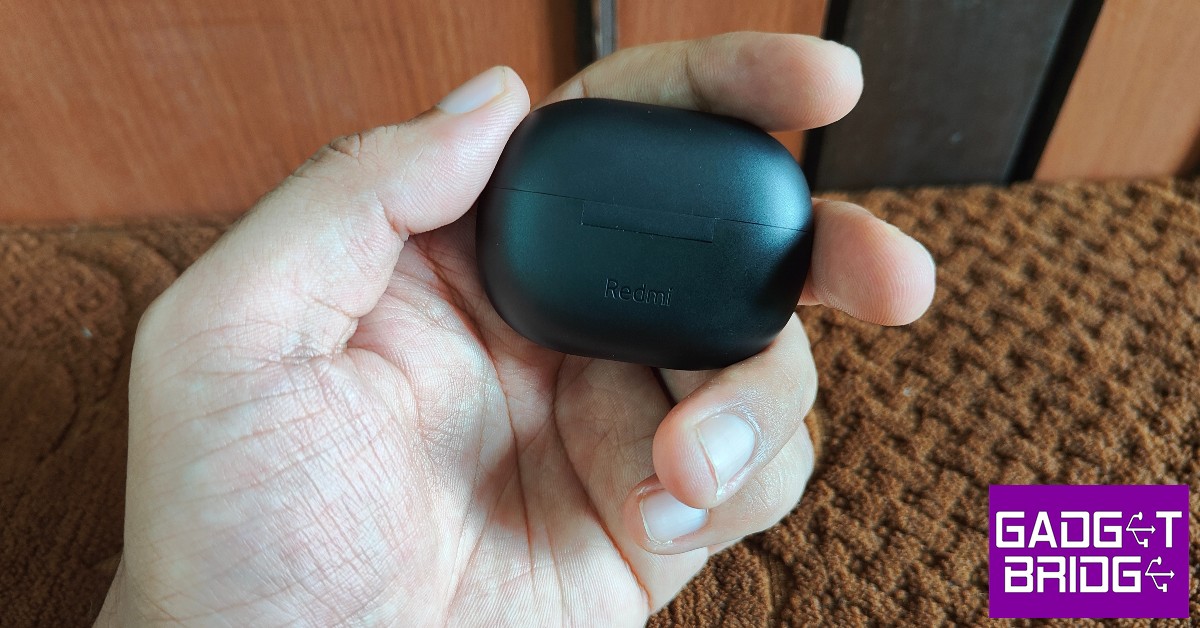
 The Redmi Buds 3 Lite come packed in a compact rectangular box that includes the earbuds, a charging case with the earbuds inside, and extra ear tips and ear hook to suit your ear size. A user manual and info card can also be found inside the packaging. The pebble-shaped charging case is quite compact and fits perfectly within your palm.
We had our concerns over the charging case being prone to scratches due to the matte finish but after a week of rigorous use and being inside pockets with keys, it came out unscratched and unharmed. The plastic material does not inspire a lot of confidence in its strength, but that comes along with buying an affordable pair of earbuds and is common.
The Redmi Buds 3 Lite come packed in a compact rectangular box that includes the earbuds, a charging case with the earbuds inside, and extra ear tips and ear hook to suit your ear size. A user manual and info card can also be found inside the packaging. The pebble-shaped charging case is quite compact and fits perfectly within your palm.
We had our concerns over the charging case being prone to scratches due to the matte finish but after a week of rigorous use and being inside pockets with keys, it came out unscratched and unharmed. The plastic material does not inspire a lot of confidence in its strength, but that comes along with buying an affordable pair of earbuds and is common.
 A small notification LED light can be found right below the lid of the case and the Redmi branding is marked at the back, right below the hinge. The Type-C USB port is housed at the bottom of the case. The lid can be easily opened with a thumb and makes a click sound when it’s pressed shut. You’ll find yourself fidgeting with the case a lot.
 The earbuds have a glossy plastic finish on the outside, that also serve as touch controls. The white notification lights on the earbuds turn on when they’re charging and blink when they’re ready to be paired. The rubber ear hooks grip nicely with the ear, providing a nice snug fit for the earbuds. Weighing only 4.04g each, you’ll barely feel them in your ear. We used them for hours on end and never once found them to be straining or uncomfortable. You can try using the extra ear tips and ear hooks provided with the package if the earbuds aren’t the perfect fit for you.
 The touch sensors are pretty straightforward. Double tapping on either earbud plays the next song and pressing and holding makes it pause. Three gentle taps activate the voice assistant. Pressing and holding both earbuds activates the low latency mode, which is ideal for gaming. While this may seem like a simple enough task, the earbud is sensitive to unintentional touches, and we experienced unwanted skips or voice assistant activation during our use. There is no control for playing the previous song and no option to customise the controls either.
The Redmi Buds 3 Lite are rated IPX4, which means they are resistant to water splashes from any direction. You can wear them in light rainfall but definitely can’t put them on while swimming as they’re not entirely waterproof.
The touch sensors are pretty straightforward. Double tapping on either earbud plays the next song and pressing and holding makes it pause. Three gentle taps activate the voice assistant. Pressing and holding both earbuds activates the low latency mode, which is ideal for gaming. While this may seem like a simple enough task, the earbud is sensitive to unintentional touches, and we experienced unwanted skips or voice assistant activation during our use. There is no control for playing the previous song and no option to customise the controls either.
The Redmi Buds 3 Lite are rated IPX4, which means they are resistant to water splashes from any direction. You can wear them in light rainfall but definitely can’t put them on while swimming as they’re not entirely waterproof.
Redmi Buds 3 Lite: Performance
 Getting down to the brass tacks, the Redmi Buds 3 Lite offer a decent performance for an affordable TWS. If you’re looking to make the switch from wired headphones to TWS, the Redmi Buds 3 Lite make a great entry-level product. At Rs 1,999, you get the most out of what you paid for.
We put the Buds 3 Lite to test and they held up well under all conditions. The audio output was well-rounded across all genres of music. The nice warm bass envelops the sound quite well without being too overpowering. The mid-range frequencies were handled expertly, leading to a smooth and pleasant listening experience. Higher volumes of above 90% did reveal a slight distortion in audio output, but as long as you’re within the 40-70% volume range you’ll get the ideal performance out of the earbuds. We also tried the Buds 3 Lite with Netflix, and the mix came out pretty well, with no additional adjustments required.
When it comes to calling, the noise reduction algorithm identifies human voices and curbs any background noise, leading to better call quality. The microphones do a great job of picking up the sound, even in an outdoor environment. The touch gestures make picking and hanging up calls really accessible and you won’t find yourself looking for your phone when the earbuds are connected.
As said, the Redmi Buds 3 Lite also features a low latency mode that is ideal for gaming. Pressing and holding both touch sensors at once activates the gaming mode. We tested this mode by playing Apex Legends Mobile and it was a wonderful experience. The audio output synced perfectly to the gameplay and it made the gaming experience even more immersive. The sound held up well even with high volumes and we didn’t experience any screeches or distortions. If you’re looking to buy wireless earbuds exclusively for gaming, the Buds 3 Lite should definitely be on the top of your list in the affordable segment.
Getting down to the brass tacks, the Redmi Buds 3 Lite offer a decent performance for an affordable TWS. If you’re looking to make the switch from wired headphones to TWS, the Redmi Buds 3 Lite make a great entry-level product. At Rs 1,999, you get the most out of what you paid for.
We put the Buds 3 Lite to test and they held up well under all conditions. The audio output was well-rounded across all genres of music. The nice warm bass envelops the sound quite well without being too overpowering. The mid-range frequencies were handled expertly, leading to a smooth and pleasant listening experience. Higher volumes of above 90% did reveal a slight distortion in audio output, but as long as you’re within the 40-70% volume range you’ll get the ideal performance out of the earbuds. We also tried the Buds 3 Lite with Netflix, and the mix came out pretty well, with no additional adjustments required.
When it comes to calling, the noise reduction algorithm identifies human voices and curbs any background noise, leading to better call quality. The microphones do a great job of picking up the sound, even in an outdoor environment. The touch gestures make picking and hanging up calls really accessible and you won’t find yourself looking for your phone when the earbuds are connected.
As said, the Redmi Buds 3 Lite also features a low latency mode that is ideal for gaming. Pressing and holding both touch sensors at once activates the gaming mode. We tested this mode by playing Apex Legends Mobile and it was a wonderful experience. The audio output synced perfectly to the gameplay and it made the gaming experience even more immersive. The sound held up well even with high volumes and we didn’t experience any screeches or distortions. If you’re looking to buy wireless earbuds exclusively for gaming, the Buds 3 Lite should definitely be on the top of your list in the affordable segment.
 On a full charge, the earbuds lasted for over 5 hours at a 60-80% volume level. The charging case has a battery backup of up to 18 hours, so you can fully charge the earbuds three times before needing to charge the case again. Connectivity was also not an issue, as the earbuds take no time to link with your smartphone after the initial pairing. You don’t need to download an app to pair the earbuds with your phone. Bluetooth 5.2 is optimum for stable connection and seamless audio transmission.
Read Also: Moto G62 with 5,000mAh battery launched in India
On a full charge, the earbuds lasted for over 5 hours at a 60-80% volume level. The charging case has a battery backup of up to 18 hours, so you can fully charge the earbuds three times before needing to charge the case again. Connectivity was also not an issue, as the earbuds take no time to link with your smartphone after the initial pairing. You don’t need to download an app to pair the earbuds with your phone. Bluetooth 5.2 is optimum for stable connection and seamless audio transmission.
Read Also: Moto G62 with 5,000mAh battery launched in India
Verdict
For the price of Rs 1,999, you won’t find many TWS that can match the performance of Redmi Buds 3 Lite. What it lacks in design and build, it more than makes up in audio performance. The Buds 3 Lite will also appeal to gamers, offering a unique low latency mode that integrates seamlessly with the gaming experience. The touch controls are easy and accessible but our complaint is that there is no way to customise them.Pros
- Audio quality
- Low Latency Mode for gaming
- Price
Cons
- No option to customise touch controls
For the latest gadget and tech news, and gadget reviews, follow us on Twitter, Facebook and Instagram. For newest tech & gadget videos subscribe to our YouTube Channel. You can also stay up to date using the Gadget Bridge Android App. You can find the latest car and bike news here.
Garena Free Fire Redeem Codes Today 12 August 2022: Here is how to claim them

Garena Free Fire is a battle royale game with regular awards and tournaments to keep players interested. If you play Garena Free Fire, you should be aware of the redeem codes that are released on a daily basis. However, because the battle royale game is banned in India, players from other countries can use the Free Fire Redeem codes daily. If you’re unfamiliar with the Garena Free Fire redeem codes or don’t know how to get them, we’ve put together a step-by-step guide to help you redeem them. Check out Garena Free Fire Redeem Codes for August 12.
The Free Fire redeem codes are a great way to get free stuff. These are 12-digit codes that contain alphabets and numbers, as well as an expiration date and time. Because the Garena FF redeem codes cannot be used more than once, you should hurry to the redemption page to claim your free reward before someone else does. To get a free reward, all you have to do is go to reward.ff.garena.com/en, which is the official redemption page. Also, keep an eye on this space for daily updates on Garena Free Fire redemption codes and rewards.
In This Article
Garena Free Fire Redeem Codes Today 12 August 2022
- 8F3QZKNTLWBZ
- WLSGJXS5KFYR
- FF11WFNPP956
- YXY3EGTLHHJX
- X99TK56XDJ4X
- FF11HHGCGK3B
- WOJJAFV3TU5E
- B61YCTNH4PV3
- U8S47JGJH5MG
- VNY3MQWNKEGU
- ZZATXB24QES8
- MCPTFNXZF4TA
- FF119MB3PFA5
- FF10617KGUF9
- ZRJAPH294KV5
- Y6ACLK7KUD1N
- FF10GCGXRNHY
- FF11NJN5YS3E
- SARG886AV5GR
- FFCO8BS5JW2D
- FFAC2YXE6RF2
- FFICJGW9NKYT
- FF11DAKX4WHV
- FF9MJ31CXKRG
- FFIC33NTEUKA
How to Get Free Fire Redeem Codes for Garena on August 12?
- Visit the Garena Free Fire game’s official website at reward.ff.garena.com.
- Use your Facebook, Google, VK, Apple ID, Huawei ID, or Twitter account to log in.
- You’ll be taken to a valid redemption code (s)
- Copy and paste the 12-digit redemption code into the text box.
- On the screen, a dialogue box will appear.
- ‘Ok’ should be selected.
International left-handers day: Top Products specifically made for left-handers

August 13th is internationally recognised as Left-handers Day. Almost 10% of the world’s population is left-handed, with 1% being ambidextrous. Since most people use their right hand for routine tasks, most tools and devices are designed for right-hand use. This can prove to be mildly annoying for left-handers, who have to devise their own ways of overcoming the design shortcomings. So, for International Left-Handers Day, we bring you the top products made specifically for left-handed use.
Read Also: Here is the full Android Versions List and Names: Over the years
Working with a regular mouse can be quite tedious as a left-hander. While you eventually get used to it, it still doesn’t feel right to be controlling the cursor with your right hand. The Perixx Perimice is an ergonomic mouse designed for left-handers. This mouse encourages a “handshake” position for your hand and fits comfortably within your palm. You can place it on the left side of your keyboard and use it in a way that comes naturally to you. The ergonomic design also reduces muscle strain while working long hours.
Buy on Amazon.
If you’re left-handed and working a desk job that requires typing a lot of numbers, working with a regular keyboard can be quite tedious. Keyboards, like every other device, are designed for right-handed use and come with the number pad placed on the right side. If you’re a lefty, you must constantly find yourself reaching your hand in the opposite direction to type in numbers. The Flo Digital keyboard comes with the number pad on the left side of the keyboard, vastly simplifying the process of entering numbers with your left hand. On top of that, its alphabet keys have an ‘A’ slant which makes typing much easier too.
Buy on Amazon.
As a lefty, if you’ve written with a hooked arm your entire life, it’s time to make the switch to a Maped Visio ballpoint pen. The curved design fits perfectly with your writing posture and offers better visibility while writing.
Buy on Amazon.
Only left-handed people would know the pain of smudging their palm on ink while writing in a notebook. Specially designed for left-handers, the Roaring Spring notebook has the binding spiral on the right side so you’ll never have to face that problem again. Your writing hand will also not rest upon the spiral like it does with regular notebooks.
Buy on Amazon.
Guitars are traditionally designed for right-handed use, meaning you pluck the strings with your right hand and press the chords on the fret with your left hand. This proves to be a barrier for left-handed people while learning the guitar. Luckily, there are guitars designed specially for left-handed people which allow them to pluck the strings with their left hand while using the fret with the right. The Henrix acoustic guitar is an excellent entry-level guitar for beginners designed for left-handers. Most famous left-hand guitarists through the decades like Jimi Hendrix, Albert King, Paul McCartney, and Kurt Cobain have used left-handed guitars.
Buy on Amazon.
Read Also: Top 6 Super Popular Prank Call Websites and How You Can Use Them
These were our picks for the best products designed for left-handed people. If you’re a lefty let us know which products you use for ease of accessibility or which ones you wish were redesigned for left-handed use.
In This Article
Perixx Perimice-719L Left-Handed mouse
 Working with a regular mouse can be quite tedious as a left-hander. While you eventually get used to it, it still doesn’t feel right to be controlling the cursor with your right hand. The Perixx Perimice is an ergonomic mouse designed for left-handers. This mouse encourages a “handshake” position for your hand and fits comfortably within your palm. You can place it on the left side of your keyboard and use it in a way that comes naturally to you. The ergonomic design also reduces muscle strain while working long hours.
Buy on Amazon.
Working with a regular mouse can be quite tedious as a left-hander. While you eventually get used to it, it still doesn’t feel right to be controlling the cursor with your right hand. The Perixx Perimice is an ergonomic mouse designed for left-handers. This mouse encourages a “handshake” position for your hand and fits comfortably within your palm. You can place it on the left side of your keyboard and use it in a way that comes naturally to you. The ergonomic design also reduces muscle strain while working long hours.
Buy on Amazon.
Flo Digital Left-Handed Keyboard
 If you’re left-handed and working a desk job that requires typing a lot of numbers, working with a regular keyboard can be quite tedious. Keyboards, like every other device, are designed for right-handed use and come with the number pad placed on the right side. If you’re a lefty, you must constantly find yourself reaching your hand in the opposite direction to type in numbers. The Flo Digital keyboard comes with the number pad on the left side of the keyboard, vastly simplifying the process of entering numbers with your left hand. On top of that, its alphabet keys have an ‘A’ slant which makes typing much easier too.
Buy on Amazon.
If you’re left-handed and working a desk job that requires typing a lot of numbers, working with a regular keyboard can be quite tedious. Keyboards, like every other device, are designed for right-handed use and come with the number pad placed on the right side. If you’re a lefty, you must constantly find yourself reaching your hand in the opposite direction to type in numbers. The Flo Digital keyboard comes with the number pad on the left side of the keyboard, vastly simplifying the process of entering numbers with your left hand. On top of that, its alphabet keys have an ‘A’ slant which makes typing much easier too.
Buy on Amazon.
Maped Visio Left-Handed Ballpoint Pen
 As a lefty, if you’ve written with a hooked arm your entire life, it’s time to make the switch to a Maped Visio ballpoint pen. The curved design fits perfectly with your writing posture and offers better visibility while writing.
Buy on Amazon.
As a lefty, if you’ve written with a hooked arm your entire life, it’s time to make the switch to a Maped Visio ballpoint pen. The curved design fits perfectly with your writing posture and offers better visibility while writing.
Buy on Amazon.
Roaring Spring Left-Handed Notebook
 Only left-handed people would know the pain of smudging their palm on ink while writing in a notebook. Specially designed for left-handers, the Roaring Spring notebook has the binding spiral on the right side so you’ll never have to face that problem again. Your writing hand will also not rest upon the spiral like it does with regular notebooks.
Buy on Amazon.
Only left-handed people would know the pain of smudging their palm on ink while writing in a notebook. Specially designed for left-handers, the Roaring Spring notebook has the binding spiral on the right side so you’ll never have to face that problem again. Your writing hand will also not rest upon the spiral like it does with regular notebooks.
Buy on Amazon.
Henrix Pro Left-Handed Guitar
 Guitars are traditionally designed for right-handed use, meaning you pluck the strings with your right hand and press the chords on the fret with your left hand. This proves to be a barrier for left-handed people while learning the guitar. Luckily, there are guitars designed specially for left-handed people which allow them to pluck the strings with their left hand while using the fret with the right. The Henrix acoustic guitar is an excellent entry-level guitar for beginners designed for left-handers. Most famous left-hand guitarists through the decades like Jimi Hendrix, Albert King, Paul McCartney, and Kurt Cobain have used left-handed guitars.
Buy on Amazon.
Read Also: Top 6 Super Popular Prank Call Websites and How You Can Use Them
These were our picks for the best products designed for left-handed people. If you’re a lefty let us know which products you use for ease of accessibility or which ones you wish were redesigned for left-handed use.
Guitars are traditionally designed for right-handed use, meaning you pluck the strings with your right hand and press the chords on the fret with your left hand. This proves to be a barrier for left-handed people while learning the guitar. Luckily, there are guitars designed specially for left-handed people which allow them to pluck the strings with their left hand while using the fret with the right. The Henrix acoustic guitar is an excellent entry-level guitar for beginners designed for left-handers. Most famous left-hand guitarists through the decades like Jimi Hendrix, Albert King, Paul McCartney, and Kurt Cobain have used left-handed guitars.
Buy on Amazon.
Read Also: Top 6 Super Popular Prank Call Websites and How You Can Use Them
These were our picks for the best products designed for left-handed people. If you’re a lefty let us know which products you use for ease of accessibility or which ones you wish were redesigned for left-handed use.
For the latest gadget and tech news, and gadget reviews, follow us on Twitter, Facebook and Instagram. For newest tech & gadget videos subscribe to our YouTube Channel. You can also stay up to date using the Gadget Bridge Android App. You can find the latest car and bike news here.
Xiaomi Mix Fold 2 powered by Snapdragon 8+ Gen 1 SoC launched
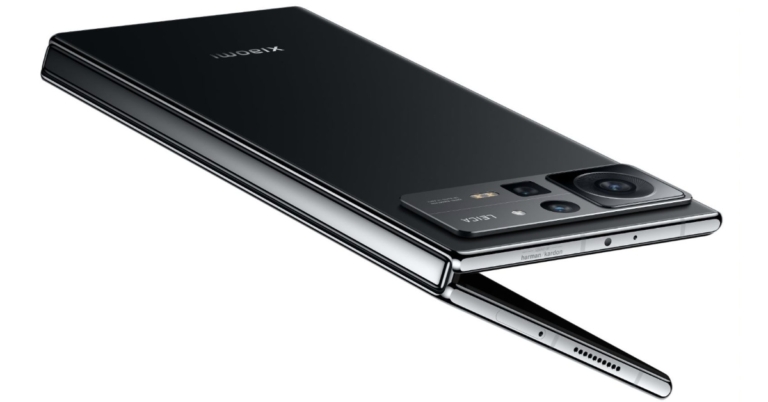
The Chinese smartphone brand Xiaomi has announced the launch of its new foldable phone Xiaomi Mix Fold 2. The new device will go against the likes of the newly launched Samsung Galaxy Z Fold 4. The phone is also powered by Snapdragon 8+ Gen 1 SoC. Both of its displays outer and inner support a 120Hz refresh rate.
 In China, pre-orders for the brand-new foldable smartphone in the Moon Shadow Black and Star Gold colour variants are presently being accepted through Xiaomi’s online store.
 The octa-core Qualcomm Snapdragon 8+ Gen 1 SoC and 12GB of LPDDR5 RAM power the Mix Fold 2. Three UFS 3.1 storage options are available on the smartphone. Xiaomi MIX Fold 2 runs on the latest MIUI Fold 13 operating system.
The new Xiaomi foldable phone’s triple rear cameras are Leica-branded. The camera system includes a 50-megapixel Sony IMX766 primary sensor with an f/1.8 aperture and OIS. Additionally, there is a 13-megapixel ultra-wide angle lens with an f/2.4 aperture and an 8-megapixel telephoto lens with an f/2.6 aperture. The device has a 20-megapixel selfie camera up front.
It has a 4,500mAh battery and supports 67W charging. Moreover, it includes dual-band Wi-Fi, NFC, Bluetooth v5.2, and a USB Type-C port for connectivity. Updates to smart screen interaction are among the Xiaomi MIX Fold 2’s further improvements. Users can now split screens using a three-finger swipe. The sidebar, which is also used to leave split screen mode, makes it simple to access floating windows.
For the latest gadget and tech news, and gadget reviews, follow us on Twitter, Facebook and Instagram. For newest tech & gadget videos subscribe to our YouTube Channel. You can also stay up to date using the Gadget Bridge Android App. You can find the latest car and bike news here.
The octa-core Qualcomm Snapdragon 8+ Gen 1 SoC and 12GB of LPDDR5 RAM power the Mix Fold 2. Three UFS 3.1 storage options are available on the smartphone. Xiaomi MIX Fold 2 runs on the latest MIUI Fold 13 operating system.
The new Xiaomi foldable phone’s triple rear cameras are Leica-branded. The camera system includes a 50-megapixel Sony IMX766 primary sensor with an f/1.8 aperture and OIS. Additionally, there is a 13-megapixel ultra-wide angle lens with an f/2.4 aperture and an 8-megapixel telephoto lens with an f/2.6 aperture. The device has a 20-megapixel selfie camera up front.
It has a 4,500mAh battery and supports 67W charging. Moreover, it includes dual-band Wi-Fi, NFC, Bluetooth v5.2, and a USB Type-C port for connectivity. Updates to smart screen interaction are among the Xiaomi MIX Fold 2’s further improvements. Users can now split screens using a three-finger swipe. The sidebar, which is also used to leave split screen mode, makes it simple to access floating windows.
For the latest gadget and tech news, and gadget reviews, follow us on Twitter, Facebook and Instagram. For newest tech & gadget videos subscribe to our YouTube Channel. You can also stay up to date using the Gadget Bridge Android App. You can find the latest car and bike news here.
In This Article
Xiaomi Mix Fold 2 price, sale details
The starting pricing for the 12GB RAM with 256GB storage version of the Xiaomi Mix Fold 2 is CNY 8,999, which is Rs 1,06,200. Priced at CNY 9,999, or around Rs 1,18,00, the mid-tier edition has 12GB RAM with 512GB of storage available. The premium model, which comes with 12GB of RAM with 1TB of storage, costs CNY 11,999, which equals Rs 1,41,600. In China, pre-orders for the brand-new foldable smartphone in the Moon Shadow Black and Star Gold colour variants are presently being accepted through Xiaomi’s online store.
Xiaomi Mix Fold 2 specifications
Xiaomi Mix Fold 2 comes with a 6.56-inch E5 AMOLED display on the outside. The outer screen has a 120Hz refresh rate and a 21:9 aspect ratio. The screen also supports Dolby vision. Whereas the device has an 8.02-inch LTPO 2.0 foldable display with a refresh rate of 120Hz. It has a colour gamut of DCI-P3 and a resolution of 2K+. The internal display is designed to have a maximum brightness of 1,300 nits. Additionally, the inside display is protected by Corning Gorilla Glass Victus. The “Micro Waterdrop Hinge” used by the Xiaomi Mix Fold 2 was created by Xiaomi. The octa-core Qualcomm Snapdragon 8+ Gen 1 SoC and 12GB of LPDDR5 RAM power the Mix Fold 2. Three UFS 3.1 storage options are available on the smartphone. Xiaomi MIX Fold 2 runs on the latest MIUI Fold 13 operating system.
The new Xiaomi foldable phone’s triple rear cameras are Leica-branded. The camera system includes a 50-megapixel Sony IMX766 primary sensor with an f/1.8 aperture and OIS. Additionally, there is a 13-megapixel ultra-wide angle lens with an f/2.4 aperture and an 8-megapixel telephoto lens with an f/2.6 aperture. The device has a 20-megapixel selfie camera up front.
It has a 4,500mAh battery and supports 67W charging. Moreover, it includes dual-band Wi-Fi, NFC, Bluetooth v5.2, and a USB Type-C port for connectivity. Updates to smart screen interaction are among the Xiaomi MIX Fold 2’s further improvements. Users can now split screens using a three-finger swipe. The sidebar, which is also used to leave split screen mode, makes it simple to access floating windows.
For the latest gadget and tech news, and gadget reviews, follow us on Twitter, Facebook and Instagram. For newest tech & gadget videos subscribe to our YouTube Channel. You can also stay up to date using the Gadget Bridge Android App. You can find the latest car and bike news here.
The octa-core Qualcomm Snapdragon 8+ Gen 1 SoC and 12GB of LPDDR5 RAM power the Mix Fold 2. Three UFS 3.1 storage options are available on the smartphone. Xiaomi MIX Fold 2 runs on the latest MIUI Fold 13 operating system.
The new Xiaomi foldable phone’s triple rear cameras are Leica-branded. The camera system includes a 50-megapixel Sony IMX766 primary sensor with an f/1.8 aperture and OIS. Additionally, there is a 13-megapixel ultra-wide angle lens with an f/2.4 aperture and an 8-megapixel telephoto lens with an f/2.6 aperture. The device has a 20-megapixel selfie camera up front.
It has a 4,500mAh battery and supports 67W charging. Moreover, it includes dual-band Wi-Fi, NFC, Bluetooth v5.2, and a USB Type-C port for connectivity. Updates to smart screen interaction are among the Xiaomi MIX Fold 2’s further improvements. Users can now split screens using a three-finger swipe. The sidebar, which is also used to leave split screen mode, makes it simple to access floating windows.
For the latest gadget and tech news, and gadget reviews, follow us on Twitter, Facebook and Instagram. For newest tech & gadget videos subscribe to our YouTube Channel. You can also stay up to date using the Gadget Bridge Android App. You can find the latest car and bike news here. Now you can pre-book Samsung Galaxy Z Fold 4 and Galaxy Z Flip 4 from August 16 in India
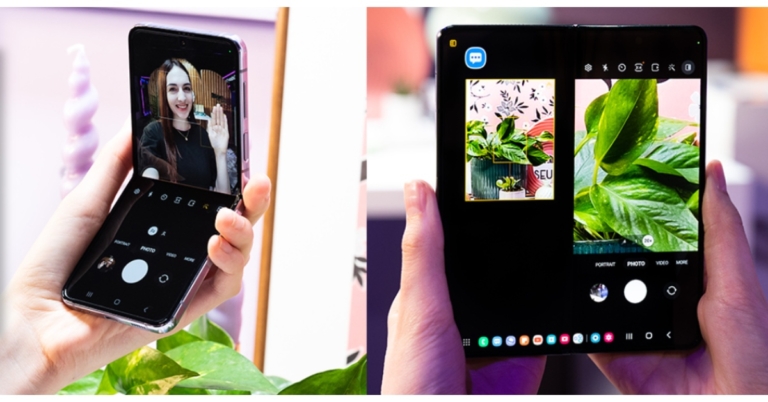
Samsung at its Galaxy Unpacked 2022 event announced the launch of the most anticipated foldable phones- Galaxy Z Fold 4 and Z Flip 4. On August 16, Samsung Live will begin taking pre-orders for both devices. Both the handsets are powered by Snapdragon 8+ Gen 1 SoC. In addition to this, they have FlexCam mode that automatically changes to fit the folded screen for taking hands-free photos and videos.
The prebook for its recently released Galaxy foldable was announced by Samsung in India via Samsung Live. The Galaxy Z Fold 4 and Galaxy Z Flip 4 will be pre-bookable on Samsung.com beginning at noon on August 16, 2022, during its live commerce event. On Samsung.com, the event will be streamed live.
 Customers who pre-book Galaxy Z Fold4 and Galaxy Z Flip4 through a live commerce event, according to the business, can receive incentives greater than INR 40000. Additionally, those who pre-book will receive an exclusive gift worth INR 5,199. The unique Bespoke Edition for the Galaxy Z Flip4 and the Galaxy Z Fold4 with 1TB storage will also be made available only through Samsung Live as part of Live Commerce. Customers who pre-order the Galaxy Z Flip4 Bespoke Edition will also receive a thin transparent cover worth INR 2000 in addition to the previously announced discounts. The limited-time promotions on Live Commerce are valid from August 16 at noon till August 17 at midnight.
 Customers who pre-book Galaxy Z Fold4 and Galaxy Z Flip4 through a live commerce event, according to the business, can receive incentives greater than INR 40000. Additionally, those who pre-book will receive an exclusive gift worth INR 5,199. The unique Bespoke Edition for the Galaxy Z Flip4 and the Galaxy Z Fold4 with 1TB storage will also be made available only through Samsung Live as part of Live Commerce. Customers who pre-order the Galaxy Z Flip4 Bespoke Edition will also receive a thin transparent cover worth INR 2000 in addition to the previously announced discounts. The limited-time promotions on Live Commerce are valid from August 16 at noon till August 17 at midnight.
In This Article
Samsung Galaxy Z Flip 4 specifications
The primary 6.7-inch Full HD+ Dynamic AMOLED 2X Infinity Flex Display of the Samsung Galaxy Z Flip 4 has a resolution of 1,0802,640 pixels. The internal screen features a 22:9 aspect ratio and a refresh rate of 120Hz. There is a 1.9-inch Super AMOLED cover screen with a 260 x 512 pixel resolution. The Samsung Armor Aluminum used in the Galaxy Z Flip 4 gives it an IPX8 designation for water resistance. The device runs Android 12 on top of OneUI 4.1.1. The Galaxy Z Flip 4 is powered by an octa-core Qualcomm Snapdragon 8+ Gen 1 4nm SoC and 8GB of RAM. Each of the three internal storage options for the Z Flip 4 has a maximum capacity of 512GB. The storage capacity cannot be increased using MicroSD cards. With a 12-megapixel ultra-wide primary sensor, an f/2.2 aperture, and a 123-degree field of view, the new phone’s dual rear camera system is equipped. There is also a 12-megapixel wide-angle camera with an f/1.8 aperture, an angle of vision of 83 degrees, and support for optical image stabilisation (OIS). A 10-megapixel selfie camera with an f/2.4 aperture and an 80-degree field of view is mounted on top of the foldable display of the Galaxy Z Flip 4. Samsung’s 3,700mAh battery for the Z Flip 4 supports 25W quick charging. The phone also supports Wireless PowerShare and Fast Wireless Charging 2.0.Samsung Galaxy Z Fold 4 specifications
The main screen of the Samsung Galaxy Z Fold 4 is a 7.6-inch QXGA+ Dynamic AMOLED 2X Infinity Flex Display with a resolution of 2,176 x 1,812 pixels. It has a 21.6:18 aspect ratio and a refresh rate that can range from 1Hz to 120Hz. The smartphone’s 6.2-inch HD+ Dynamic AMOLED 2X cover Display has a resolution of 9042,316 pixels. The screen has a 23.1:9 aspect ratio and a 120Hz adaptive refresh rate. The first smartphone to run One UI 4.1.1, which is based on Android 12L, a customised version of Android created by Google for large and foldable screens, is the Samsung Galaxy Z Fold 4. A Qualcomm Snapdragon 8+ Gen 1 SoC with 12GB of RAM as standard powers the gadget. Up to 1TB of internal storage is available. There are five cameras in total on the device; the triple rear camera’s strengths include a 50-megapixel primary sensor with an f/1.8 aperture, dual-pixel autofocus, optical image stabilisation (OIS), and an 85-degree field of view. The 12-megapixel ultra-wide lens sensor has a field of view of 123 degrees and an aperture of f/2.2. The third 10-megapixel sensor has an f/2.4-aperture telephoto lens mounted to it. Features like OIS, PDAF, and 30X space zoom are all available. The Samsung Galaxy Z Fold 4’s front camera has a 4-megapixel sensor with an f/1.8 aperture, and it is situated below the primary screen. The front camera on the cover display has a 10-megapixel sensor and an f/2.2 aperture. The smartphone has two 4,400mAh batteries. PowerShare wireless charging is additionally supported. For the latest gadget and tech news, and gadget reviews, follow us on Twitter, Facebook and Instagram. For newest tech & gadget videos subscribe to our YouTube Channel. You can also stay up to date using the Gadget Bridge Android App. You can find the latest car and bike news here.Vivo V25 Pro India launch to take place on August 17
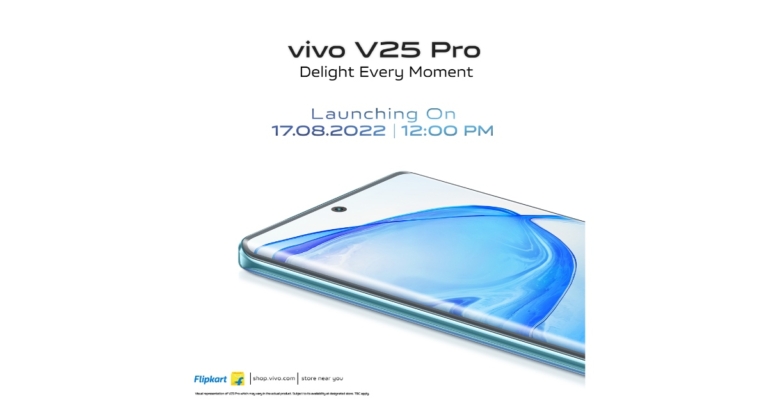
The Chinese smartphone company Vivo has announced that the Vivo V25 Pro would be released in India on August 17. The Vivo V25 series apparently includes the smartphones Vivo V25 and Vivo V25. Numerous of the Vivo V25 Pro key specifications and the launch of the line in India have been alluded to. It definitely comes with a rear panel that can change colour. A 3D curved screen with a 120Hz refresh rate will also be included in the device, which will also be powered by a MediaTek Dimensity 1300 SoC.
According to a statement from Vivo, the Vivo V25 Pro will make its debut in India on August 12. The launch will take place at 12 noon; details on the launch event are yet to be disclosed. The smartphone will include a colour-changing back panel and is a member of the Vivo V25 series, which is rumoured to also contain the Vivo V25 and Vivo V25e models.
Prior to the announcement, the business teased both the technical specifications of the Vivo V25 Pro. The business has already stated that the phone will include a 3D curved screen and a colour-changing back panel. Besides this, the upcoming handset will feature a full-HD+ display with a waterdrop notch with a 120Hz refresh rate display. It will be powered by a MediaTek Dimensity 1300 SoC. What’s more, it will pack a 4,830mAh battery and 66W Flash charge support.
A special homepage on Flipkart has also gone live, saying that it would be available there when it releases in India. The Vivo V25 series is said to include the Vivo V25 and Vivo V25 Pro smartphones. The smartphone may also include Android 12 with the Funtouch OS 12.
The Vivo V25 Pro will also have three back cameras, the primary one of which is a 64-megapixel sensor and optical image stabilisation. A hybrid image stabilisation technology will also be built into the camera setup for vlogging and nighttime photography.
For the latest gadget and tech news, and gadget reviews, follow us on Twitter, Facebook and Instagram. For newest tech & gadget videos subscribe to our YouTube Channel. You can also stay up to date using the Gadget Bridge Android App. You can find the latest car and bike news here.
Amazon Quiz Answers Today 12 August 2022: Participate to win Rs 1,000

12 August 2022 Amazon Quiz has gone live on its mobile app platform. The quiz can be played from 12 AM to 11:59. All you need to do is just answer five easy questions that the e-commerce website puts before you. Today you can stand a chance to win Rs 1,000 Amazon Pay Balance.
Every day Amazon posts a new questionnaire that consists of five simple questions about general knowledge and current events. To enter a lucky draw, participants must correctly answer the questions. One incorrect answer will result in your elimination from the quiz. Each month, only one person will be declared the winner and the results will be announced at the end of the month. Amazon customers who submit correct answers can win an Amazon Pay Balance worth up to Rs 50,000. To ensure that you answer all five questions correctly, Gadget Bridge updates all of the correct answers on a daily basis. Take a look at today’s answers:
Amazon Quiz Today Prize – Rs 1,000 Amazon Pay Balance
Quiz Date – 12 August 2022
Daily Timing – 12 AM to 11:59 PM
Winner Announcement – Today 12 PM
In This Article
Amazon Quiz Answers Today 19 July 2022
Question 1: Identified as Manvinder Singh, the man who sent death threats to which star couple has been put under police custody recently?
Answer: Vicky Kaushal- Katrina KaifQuestion 2: USA topped the medal tally at the recent World Athletics Championships. Which country was second?
Answer: EthiopiaQuestion 3: In July 2022 India had its first ever ____ spectrum auction. Fill in the blanks
Answer: 5GQuestion 4: Identify these birds
Answer: BudgerigarsQuestion 5: Which of these is a subsidary company of this corporation?
Answer: Swarm IndustriesHow To Play Amazon Quiz
Only app users are eligible to play the Amazon quiz every morning from 12 AM to 11:59 PM. The quiz is not available on the desktop. For those who are unaware of how to play the Amazon quiz below are the steps, you can follow to take the quiz.- Firstly download the Amazon app from Google Play Store or App Store
- Now fill in the required information through the Sign Up option.
- You need to log in to the Amazon app and scroll down on the home screen to find the Amazon Quiz banner.
- Tap on the Amazon Quiz banner and tap on the Start button to start the Quiz.
- Now you will get 5 questions and you need to answer them correctly. One wrong answer will eliminate you from the Quiz.
- After answering all the questions correctly you are now eligible for a Lucky Draw.
- The winner’s name will be announced today at 12 PM.
How to Recover Deleted Files from Android without Root

You might store a lot of data on your devices whether that’s a computer or a mobile phone. Sometimes you are unable to find this stored data, it may get corrupted, deleted accidentally, becomes inaccessible or the file didn’t open up for various reasons. When the data stored on your Android phone is lost and you have no backup of it, it is nearly impossible for you to get that data back. This is when you need to process ‘Data Recover’ on your phone.
Data Recovery is the process of restoring the deleted data on your device, regardless it is lost, corrupted, deleted, or inaccessible. A lot of software online that can help you recover your lost data but how to choose which one is the best that recovers the data without any loss or there is no compromise in the data quality as well. If you also don’t know how to Recover Deleted Files from Android without root and want to extract them at the earliest, then read this article till the end. Here, we will discuss the best data recovery tool that you can use to recover deleted files from your Android Phone.
To process the data recovery on your Android Phone, you must use third-party software, DroidKit. DroidKit is one of the most robust and powerful software that can help you to recover data from your Android Phone. It can recover 13 types of data, like, contacts, call logs, APK files, calendars, documents, books, etc. It supports data recovery from various Android mobile phones or tablets. Undoubtedly one of the most significant is the ability to recover deleted Android files without rooting the device. Even if you are unfamiliar with the specifics of mobile technology, it is relatively easy to implement with DroidKit.
DroidKit process the recovery of deleted data in two ways, which are termed two different recovery modes.
Step 2: Connect your phone to the computer using a USB cable. From the different data types choose the type of data that you want to recover and click on ‘Start’ button.
Step 3: As soon as your device is detected, the interface will show you the related information of your device. If you find it correct, tap on ‘Start’ button.
Step 4: Wait until the DroidKit is scanning the data that is deleted or lost from your device.
Step 5: Once the scanning process is completed, the data which is deleted or lost will appear on your screen.
Step 6: Choose the data files which you want to restore and click on ‘To Device’ or ‘To PC’ button, wherever you want to store the data. By choosing the option to restore your data on PC you can make changes before exporting it.
The data restoring process will then be started and the data will be stored in your preferred format. Wait until the recovery process completes. Step 7: Once the whole restoring process is completed, you can go to restore other files by clicking on ‘Continue to Recover’ button or take a view of restored files by tapping on ‘View Files’ button.
Step 2: Use a USB cable to connect your Android mobile phone to the device. On your screen, there will be 13 types of data that you can restore, click the one which you want o restore and tap the ‘Start’ button.
Step 3: On the next step, it will display the information of your Android device on screen. Check the device and hit the ‘Start’ button given below.
Step 4: Your device status will be recognized and classified by DroidKit (root/unroot).
The outcome will be displayed after the analysis is finished. The user interface below will appear if your smartphone is not rooted. Rooting the device is required before starting Deep Recovery. Now, click the ‘Root Now’ button.
Your device will immediately be rooted using DroidKit. Ensure a stable connection to your device during the procedure.
Step 5: DroidKit will thoroughly check the removed data from your Android device once the rooting process is complete.
Step 6: You can inspect the scanned data after the scanning procedure is finished.
Step 7: As soon as the recovering process ends, you can restore the data by clicking on ‘To Device’ or ‘To PC’. By choosing the ‘To PC’ option, you can make the required changes in the settings.
The recovered data will be restored in any format in which you need it. Wait until the recovery process is ongoing.
After the completion of recovery process, you can click ‘View Files’ to have a look at the restored data.
DroidKit is capable of processing these two types of recoveries and supports WhatsApp Data Quick Recovery and Recovers Data from SD Card. In both cases, you can recover data without undergoing the rooting process. The SD Data Card Recovery process is available only for Windows users, and Mac version support is coming soon.
We have discussed the DroidKit version of Data Recovery, but it is not only limited to data recovery. DroidKit is a one-stop solution for all your issues related to Android devices and it has various features that can help you operate your phone more easily. The various features of DroidKit are Recover Lost Data, Extract Needed Data, Unlock Screen, Fix System Issues, Bypass FRP Lock, Screen Unlocker, Reinstall/ Upgrade OS, and Clean System Junk. Check these various features on DroidKit Recover Feature Page. You can try any of these tools to make your Android device work more effectively and efficiently.
For the latest gadget and tech news, and gadget reviews, follow us on Twitter, Facebook and Instagram. For newest tech & gadget videos subscribe to our YouTube Channel. You can also stay up to date using the Gadget Bridge Android App. You can find the latest car and bike news here.
Step 7: Once the whole restoring process is completed, you can go to restore other files by clicking on ‘Continue to Recover’ button or take a view of restored files by tapping on ‘View Files’ button.
Step 2: Use a USB cable to connect your Android mobile phone to the device. On your screen, there will be 13 types of data that you can restore, click the one which you want o restore and tap the ‘Start’ button.
Step 3: On the next step, it will display the information of your Android device on screen. Check the device and hit the ‘Start’ button given below.
Step 4: Your device status will be recognized and classified by DroidKit (root/unroot).
The outcome will be displayed after the analysis is finished. The user interface below will appear if your smartphone is not rooted. Rooting the device is required before starting Deep Recovery. Now, click the ‘Root Now’ button.
Your device will immediately be rooted using DroidKit. Ensure a stable connection to your device during the procedure.
Step 5: DroidKit will thoroughly check the removed data from your Android device once the rooting process is complete.
Step 6: You can inspect the scanned data after the scanning procedure is finished.
Step 7: As soon as the recovering process ends, you can restore the data by clicking on ‘To Device’ or ‘To PC’. By choosing the ‘To PC’ option, you can make the required changes in the settings.
The recovered data will be restored in any format in which you need it. Wait until the recovery process is ongoing.
After the completion of recovery process, you can click ‘View Files’ to have a look at the restored data.
DroidKit is capable of processing these two types of recoveries and supports WhatsApp Data Quick Recovery and Recovers Data from SD Card. In both cases, you can recover data without undergoing the rooting process. The SD Data Card Recovery process is available only for Windows users, and Mac version support is coming soon.
We have discussed the DroidKit version of Data Recovery, but it is not only limited to data recovery. DroidKit is a one-stop solution for all your issues related to Android devices and it has various features that can help you operate your phone more easily. The various features of DroidKit are Recover Lost Data, Extract Needed Data, Unlock Screen, Fix System Issues, Bypass FRP Lock, Screen Unlocker, Reinstall/ Upgrade OS, and Clean System Junk. Check these various features on DroidKit Recover Feature Page. You can try any of these tools to make your Android device work more effectively and efficiently.
For the latest gadget and tech news, and gadget reviews, follow us on Twitter, Facebook and Instagram. For newest tech & gadget videos subscribe to our YouTube Channel. You can also stay up to date using the Gadget Bridge Android App. You can find the latest car and bike news here.
-
In This Article
Quick Recovery from Device
 Step 2: Connect your phone to the computer using a USB cable. From the different data types choose the type of data that you want to recover and click on ‘Start’ button.
 Step 3: As soon as your device is detected, the interface will show you the related information of your device. If you find it correct, tap on ‘Start’ button.
 Step 4: Wait until the DroidKit is scanning the data that is deleted or lost from your device.
 Step 5: Once the scanning process is completed, the data which is deleted or lost will appear on your screen.
 Step 6: Choose the data files which you want to restore and click on ‘To Device’ or ‘To PC’ button, wherever you want to store the data. By choosing the option to restore your data on PC you can make changes before exporting it.
 The data restoring process will then be started and the data will be stored in your preferred format. Wait until the recovery process completes.
 Step 7: Once the whole restoring process is completed, you can go to restore other files by clicking on ‘Continue to Recover’ button or take a view of restored files by tapping on ‘View Files’ button.

-
Deep Recovery from Device
 Step 2: Use a USB cable to connect your Android mobile phone to the device. On your screen, there will be 13 types of data that you can restore, click the one which you want o restore and tap the ‘Start’ button.
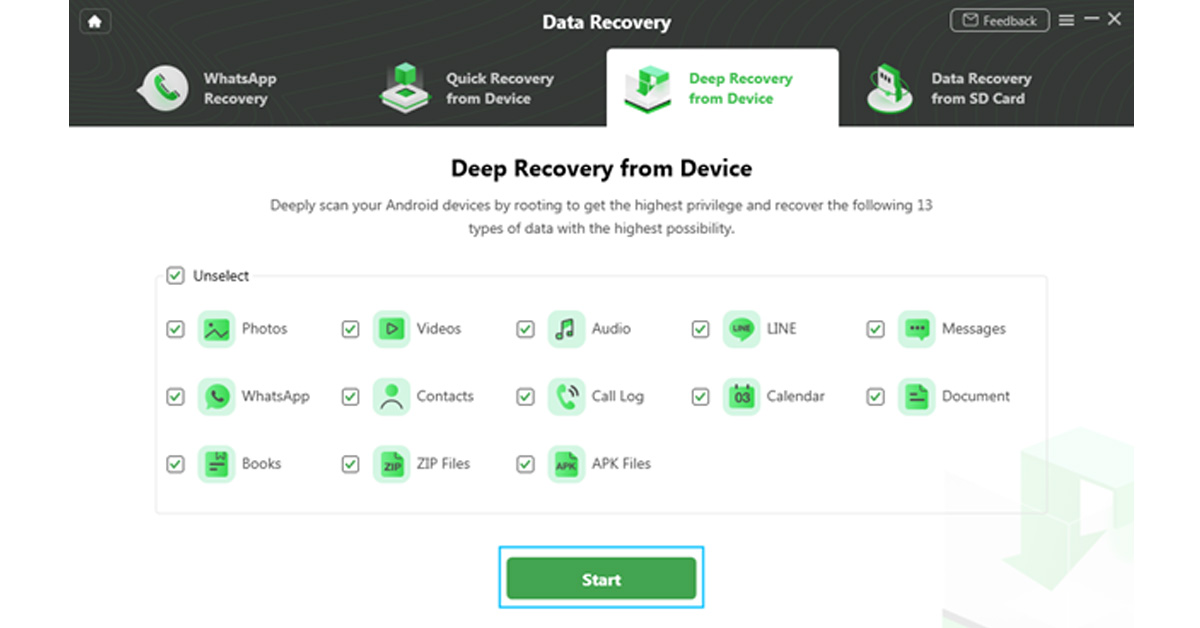 Step 3: On the next step, it will display the information of your Android device on screen. Check the device and hit the ‘Start’ button given below.
 Step 4: Your device status will be recognized and classified by DroidKit (root/unroot).
 The outcome will be displayed after the analysis is finished. The user interface below will appear if your smartphone is not rooted. Rooting the device is required before starting Deep Recovery. Now, click the ‘Root Now’ button.
 Your device will immediately be rooted using DroidKit. Ensure a stable connection to your device during the procedure.
 Step 5: DroidKit will thoroughly check the removed data from your Android device once the rooting process is complete.
 Step 6: You can inspect the scanned data after the scanning procedure is finished.
 Step 7: As soon as the recovering process ends, you can restore the data by clicking on ‘To Device’ or ‘To PC’. By choosing the ‘To PC’ option, you can make the required changes in the settings.
 The recovered data will be restored in any format in which you need it. Wait until the recovery process is ongoing.
 After the completion of recovery process, you can click ‘View Files’ to have a look at the restored data.
 DroidKit is capable of processing these two types of recoveries and supports WhatsApp Data Quick Recovery and Recovers Data from SD Card. In both cases, you can recover data without undergoing the rooting process. The SD Data Card Recovery process is available only for Windows users, and Mac version support is coming soon.
We have discussed the DroidKit version of Data Recovery, but it is not only limited to data recovery. DroidKit is a one-stop solution for all your issues related to Android devices and it has various features that can help you operate your phone more easily. The various features of DroidKit are Recover Lost Data, Extract Needed Data, Unlock Screen, Fix System Issues, Bypass FRP Lock, Screen Unlocker, Reinstall/ Upgrade OS, and Clean System Junk. Check these various features on DroidKit Recover Feature Page. You can try any of these tools to make your Android device work more effectively and efficiently.
For the latest gadget and tech news, and gadget reviews, follow us on Twitter, Facebook and Instagram. For newest tech & gadget videos subscribe to our YouTube Channel. You can also stay up to date using the Gadget Bridge Android App. You can find the latest car and bike news here.
DroidKit is capable of processing these two types of recoveries and supports WhatsApp Data Quick Recovery and Recovers Data from SD Card. In both cases, you can recover data without undergoing the rooting process. The SD Data Card Recovery process is available only for Windows users, and Mac version support is coming soon.
We have discussed the DroidKit version of Data Recovery, but it is not only limited to data recovery. DroidKit is a one-stop solution for all your issues related to Android devices and it has various features that can help you operate your phone more easily. The various features of DroidKit are Recover Lost Data, Extract Needed Data, Unlock Screen, Fix System Issues, Bypass FRP Lock, Screen Unlocker, Reinstall/ Upgrade OS, and Clean System Junk. Check these various features on DroidKit Recover Feature Page. You can try any of these tools to make your Android device work more effectively and efficiently.
For the latest gadget and tech news, and gadget reviews, follow us on Twitter, Facebook and Instagram. For newest tech & gadget videos subscribe to our YouTube Channel. You can also stay up to date using the Gadget Bridge Android App. You can find the latest car and bike news here.