Flipkart e-commerce platform has just revealed a beauty addition to its Virtual Try-On augmented reality feature. It allows users to virtually try on cosmetics from top manufacturers like Lakmé, Maybelline, Blue Heaven, Faces Canada and more. With this new version, customers will be provided with distinctive, immersive experiences that will aid in their decision-making.As per the firm particularly in the beauty area, the availability of product visualisation is crucial for improving a customer’s online purchasing experience. A study and in-depth interview with Flipkart’s beauty shoppers revealed a need for such a feature. That is why it has brought the virtual try-on feature on its platform for beauty products. Customers may virtually try on cosmetic products from top brands before making purchases thanks to more recent AR-driven developments.The “Try On” option is located in the bottom right corner of the image gallery on the product page. Users can choose a “Live” Try-On or submit a selfie to see how a product might look on them virtually, as well as save the image to share across other applications, after granting access to the camera and gallery.It enables customers to digitally try on cosmetics from top manufacturers like Lakmé, Maybelline, Blue Heaven, Faces Canada, and L’Oréal Paris, including lipstick, foundation, eyeshadow, kajal, eyeliner, compact, concealer, highlighter, blush, and mascara.Flipkart noticed a higher conversion rate with customers who virtually tried on the makeup on the product page compared to those who did not when testing the Virtual Try-On experience for Beauty products across a few brands as a pilot.Commenting on the launch, Kanchan Mishra, Senior Director, Consumables (FMCG), General Merchandise and Home, Flipkart, said, “The e-commerce landscape in India is changing rapidly with millions of new customers from all geographies looking for richer and customized experiences online. At Flipkart, we aim at being at the forefront in bringing technology-led solutions to our burgeoning registered customer base of 400 million across the country. We are proud to expand our augmented reality(AR)-enabled feature to a category such as beauty, where there are nuanced product differences that customers are acquainted with purchasing offline. This feature will herald a new era for online makeup shoppers enabling easy access to leading brands while driving growth for lakhs of our sellers.”To better understand their needs and problems for an improved online buying experience, Flipkart spoke with hundreds of beauty consumers of all ages from a variety of cities, including metros and tier 2 towns. As a result of the lack of shopping support tools and a segment of customers who also expressed the need to try on a product before purchasing, the insights showed that there was a large decline in purchases. Taking these survey findings into consideration, Flipkart enhanced the Virtual Try-On option to include beautification.
For the latest gadget and tech news, and gadget reviews, follow us on Twitter, Facebook and Instagram. For newest tech & gadget videos subscribe to our YouTube Channel. You can also stay up to date using the Gadget Bridge Android App. You can find the latest car and bike news here.
If you use YouTube frequently and actively subscribe to new channels all the time, you must have wondered when you subscribed to your favourite channels. While the YouTube app or webpage does not show you the date when you subscribed to a particular channel, there are a few tricks for finding your entire YouTube subscription history. In this article, we show you how to find and view your entire YouTube subscription history.Read Also:How to stop YouTube from saving your search history?
In This Article
Use Google ‘My Activity’ to view your Youtube subscription history
Step 1: Open myactivity.google.com on your web browser.Step 2: Select ‘Other Activity’ from the side menu panel.Step 3: Scroll down and click on ‘View Subscriptions’ under YouTube channel subscriptions.You will be able to see the exact date and time when you subscribed to a particular channel. Channels will be listed in reverse chronological order, with the most recently subscribed channel appearing first.
Use a third-party tool
One of the most popular third-party tools to view your YouTube subscription history is xxluke. Here’s how you can view your YouTube subscription history using xxluke.Step 1: Click your profile icon on the YouTube webpage and select Settings.Step 2: From the side menu panel, select Privacy.Step 3: Make your subscriptions public by turning the toggle bar off for ‘Keep my subscriptions private’.Step 4: Click on the profile icon on the YouTube webpage again and select ‘Your Channel’.Step 5: Copy the link from the address bar and paste it to the query box in xxluke.de and hit ‘Continue’.xxluke will list your subscriptions in reverse chronological order, with the date when you subscribed to them.Bonus Tip: How to download a YouTube video to my device?If you want to download a YouTube video to your device, simply log on to ytb.rip and enter the YouTube video link in the download box. The website will download the video in mp4 format to your device.Read Also:How to access your Google Search history and delete all activityThis is how you can find and view your entire YouTube subscription history. If you want to manage your subscriptions simply go to Subscriptions>Manage. You can unsubscribe from channels or restrict their notification alerts. If you want to watch YouTube videos while working on other Chrome tabs, read our guide here.
For the latest gadget and tech news, and gadget reviews, follow us on Twitter, Facebook and Instagram. For newest tech & gadget videos subscribe to our YouTube Channel. You can also stay up to date using the Gadget Bridge Android App. You can find the latest car and bike news here.
Garena Free Fire is a battle royale game with regular awards and tournaments to keep players interested. If you play Garena Free Fire, you should be aware of the redeem codes that are released on a daily basis. However, because the battle royale game is banned in India, players from other countries can use the Free Fire Redeem codes daily. If you’re unfamiliar with the Garena Free Fire redeem codes or don’t know how to get them, we’ve put together a step-by-step guide to help you redeem them. Check out Garena Free Fire Redeem Codes for July 27.The Free Fire redeem codes are a great way to get free stuff. These are 12-digit codes that contain alphabets and numbers, as well as an expiration date and time. Because the Garena FF redeem codes cannot be used more than once, you should hurry to the redemption page to claim your free reward before someone else does. To get a free reward, all you have to do is go to reward.ff.garena.com/en, which is the official redemption page. Also, keep an eye on this space for daily updates on Garena Free Fire redemption codes and rewards.
Amazon is back with another quiz on its mobile platform. The 27 July 2022 Amazon Quiz is now live on its platform and today’s Amazon Quiz will give you a chance to win Rs 10,000 Amazon pay Balance.Every day Amazon brings a fresh questionnaire that comprises 5 questions. These questions are based on current affairs and general knowledge. The quiz can be played from 8 AM to 11:59 PM and the contestants need to answer correctly to enter into a lucky draw. In today’s Amazon Quiz the participants will get a chance to win Rs 10,000 Amazon Pay Balance.Today’s Amazon Quiz Prize – Rs 10,000 Amazon Pay BalanceQuiz Date – 27 July 2022Daily Timing – 12 AM to 11:59 PMWinner Announcement – Today at 12 PM
In This Article
Amazon Quiz Answers Today 27 July 2022
Question 1: Who was the Man of the Match in the 5th Test between India and England at Edgbaston?Answer: Jony BairstowQuestion 2: The recently released movie ‘Major’, stars which actor in the role of Major Sandeep Unnikrishnan?
Answer: Adivi SeshQuestion 3: Which of these famous businessmen did Gautam Adani recently overtake to become the 4th richest person in the world?Answer: Bill GatesQuestion 4: The oldest restaurant belonging to this chain, still in existence was opened in which state in the USA?Answer: CaliforniaQuestion 5: The largest moon of this planet is called what?
Answer: Titan
How To Play Amazon Quiz
Only app users are eligible to play the Amazon quiz every morning from 12 AM to 11:59 PM. The quiz is not available on the desktop. For those who are unaware of how to play the Amazon quiz below are the steps, you can follow to take the quiz.
Firstly download the Amazon app from Google Play Store or App Store
Now fill in the required information through the Sign Up option.
You need to log in to the Amazon app and scroll down on the home screen to find the Amazon Quiz banner.
Tap on the Amazon Quiz banner and tap on the Start button to start the Quiz.
Now you will get 5 questions and you need to answer them correctly. One wrong answer will eliminate you from the Quiz.
After answering all the questions correctly you are now eligible for a Lucky Draw.
The winner’s name will be announced today at 12 PM.
The first Neo smartphone to be released in India by Vivo’s subsidiary is the iQoo Neo 6. It includes a 4,700mAh battery, a Snapdragon 870 processor, and a 120Hz AMOLED screen. It is a gaming cell phone for casual to pro players. In this iQoo Neo 6 review, we have examined and showcased our experiences with the device and determine whether you should buy it?
In This Article
iQoo Neo 6 review: Design and Display
We have the Cyber Rage colour variant with us of the device. It has a gradient finish with blue, pink, and purple colourations. It has a matte finish back with a textured appearance. Due to the matte texture on the plastic back panel, fingerprints are hardly noticeable. In our opinion, the camera module is definitely eye-catching, and we appreciated the NEO logo that is located at the base of the camera island.The phone actually has a good in-hand feel, and as said the rear panel is composed of plastic rather than glass to keep it light. The Type-C port and a stereo speaker grille can be found at the bottom. A power button and volume rocker keys made of plastic are located on the right side of the frame, which is made of plastic as well. On the top, there is an IR emmiter as well. Before we wrap up the design, we should mention that the iQoo Neo 6 has an IP52 rating, which is actually quite nice to have on a phone like this.Now let’s talk about the display. The 6.62-inch E4 AMOLED full-HD+ display on the iQoo Neo 6 boasts a resolution of 1,080 by 2,400 pixels, a refresh rate of 120 Hz, and a touch sampling rate of 360 Hz. It has a max brightness of 800 nits and supports HDR playback for watching Netflix and YouTube videos. In the software display settings, you may also find a professional option that, when used, seems very natural. We encountered no problems with the iQoo Neo 6, and for the price it is offered at, it is actually excellent. With a smart switch that alternates between 60Hz and 120Hz, you naturally get a 120Hz refresh rate, but you also get a touch sampling rate of 360Hz.The phone also has an optical in-display fingerprint sensor, which is located very low but quickly unlocks the device. Additionally, you receive an x-axis vibration haptic feedback motor that improves both the typing and gaming experiences.
iQoo Neo 6 review: Performance and Camera
Now let’s talk about performance. With up to 12GB of RAM and up to 256GB of internal UFS 3.1 storage, the iQoo Neo 6 boasts a Snapdragon 870 SoC.The BGMI graphics settings are set to HDR and aggressive for our gaming tests. While Call of Duty can be played at maximum and very high settings. It is noteworthy that the gadget does not heat up or throttle as much, when compared to its competition. It includes a liquid cooling vapour chamber for improved heat management while gaming.Funtouch OS 12 on Android 12 powers the smartphone. The fact that it leaves background apps running without hogging too much memory is its best feature. Two years of software updates and three years of security patches are promised by iQoo, too. Although some pre-installed bloatware apps can be a problem, they are simple to remove to save space.The iQoo Neo 6’s triple rear cameras are set up for taking pictures and recording videos with ease. The primary camera is a 64-megapixel Samsung ISOCELL GW1P sensor with an f/1.89 aperture and optical image stabilisation. An 8-megapixel wide-angle camera has an f/2,2 aperture, and there is a 2-megapixel macro camera with an f/2.4 aperture. The front of the iQoo Neo 6 boasts a 16-megapixel camera with an f/2.0 aperture for selfies and video calls.The primary sensor has a broader field of vision and is good at retaining information. Bright colours like red were washed out in terms of colour, which made photos lack punch. We found that the iQoo Neo 6 struggles to regulate highlights when shooting HDR photographs, and the results appear a bit blown out. The images lack depth since there is insufficient contrast and the subject does not stand out. Edge detection, background blur, and colour details are all accurately rendered in portrait mode.Portrait in a well-lit situationPortrait in low lightA more realistic exposure of the picture with good detail retention is provided in the low-light shots. You will, however, notice some yellow-tinted noise, which is strange, but hope the next software update will take care of it. The macros, on the other hand, are clear and authentic. The smartphone also provides clear ultra-wide photos outdoors. Similar to this, ultra-wide photographs taken in low light appear clear, detailed, and noise-free.Macro ShotNeo 6 captures reasonable amounts of detail and gives true facial colours in selfies. At the same time, the backdrop blur effect and edge detection in selfie portraits are flawless. Selfies in low light are also interesting.Night time imageThe 4,700mAh battery in the iQoo Neo 6 supports 80W FlashCharge (the charger comes inside the box). The compatible charger needs about 30 minutes to fully charge the phone. The iQoo Noe 6’s battery life is one of its best features; with regular use, it lasts for more than 1.5 days.
Verdict
The iQoo Neo 6 is a mid-range smartphone that is easily accessible to those with limited budgets for flagship devices. Despite the fact that it is made of plastic, we really liked the design because it is lighter and slimmer, and it feels great in the hand. Overall, the iQoo Neo 6 performs flawlessly for the majority of graphically demanding games at the highest setting, with superior thermals and battery life too. So at Rs 32,999 is it a good choice? Yes, if you want a gaming smartphone that does not heat up easily and can play demanding games, go for it. Buy HereiQoo Neo 6 Pros
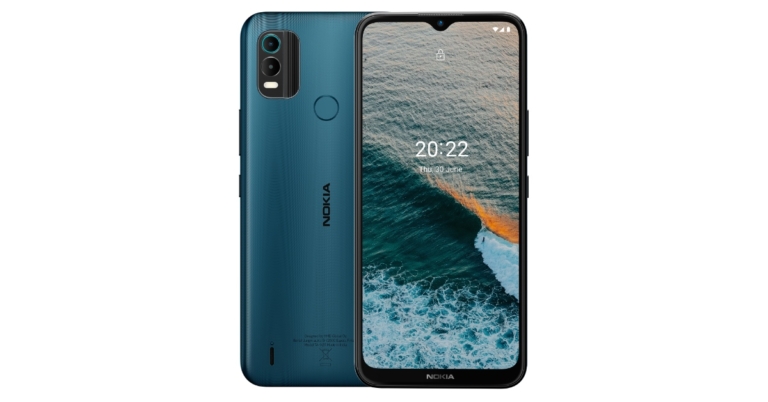
Nokia C21 Plus was announced in India a few days back. However, the company did not reveal the availability of the budget smartphone. But now that phone is accessible through retail and online shopping. The device has a 13-megapixel dual rear camera configuration and can last up to 3 days on a single charge.
In This Article
Nokia C21 Plus price in India and availability details
Nokia C21 Plus is now accessible in both brick-and-mortar stores and online. As a part of the launch offer, free Nokia Wired Buds are available for a short time only when you buy the phone from Nokia.com. The device is priced at Rs 10,299 for the 3GB RAM with 32GB storage model and Rs 11,299 for the 4GB RAM with 64GB storage model. Warm Grey and Dark Cyan are the available colours.
Nokia C21 Plus specifications
The Nokia C21 Plus features a 6.5-inch HD+ display. The screen has an aspect ratio of 20:9. The business has pledged two years of continuous security upgrades for the Android 11 Go Edition-powered smartphone. The budget smartphone is powered by an octa-core Unisoc SC9863A SoC. Up to 64GB of internal storage and 4GB of RAM are included which will be expandable up to 256GB via the microSD slot.Its optics consist of a 13-megapixel main camera and a 2-megapixel depth sensor. A 5-megapixel selfie camera is also included. LED flash is a characteristic of both the front and back camera systems. It also includes multiple modes including Portrait, Panorama, and BeautificationA 5,050mAh battery inside of this smartphone is said to provide up to three days of usage. 10W charging is also supported. In addition to supporting Bluetooth v4.2 wireless communication, the Nokia C21 Plus offers a Micro-USB connector and a 3.5mm headphone jack. A fingerprint sensor and AI facial unlock technologies are also included.Speaking on the launch, Sanmeet Singh Kochhar, Vice President- India & Mena HMD Global said, “At HMD Global, we recognize what millennials want from a smartphone, and we constantly seek to deliver that with utmost quality, trust and durability. The Nokia C21 Plus is specially designed to cater to the evolving needs of the youngsters who are confident and is seeking a brand for its trust with meaningful innovations. In line with this thought, is our bharosa khud par’ campaign for Nokia C21 Plus . We are inspired by the youth in every nook and corner of this country who aspire to do more, be more. Nokia smart devices have consistently delivered by meeting the needs of our base in these markets, and we will continue to do so with exciting and trustworthy devices”
For the latest gadget and tech news, and gadget reviews, follow us on Twitter, Facebook and Instagram. For newest tech & gadget videos subscribe to our YouTube Channel. You can also stay up to date using the Gadget Bridge Android App. You can find the latest car and bike news here.
Scheduling your phone’s power-off time can be helpful in more ways than one. You can schedule it for when you have to attend a meeting or a lecture. You can even set the timing according to your bedtime, so you do not get disturbed while you sleep. Turning off your phone for a few hours every day can also help preserve the battery life. If you don’t want to turn off your device, you can use Digital Wellbeing’s ‘Bedtime Mode’ to turn your phone’s screen to greyscale and mute all alerts automatically at a pre-set time. In this article, we show 3 simple ways to schedule auto power on/off on your Android smartphone.Read Also: 4 Easy Methods to Open RAR Files on Android
In This Article
Use the Built-In Feature
Most Android smartphones come with a built-in feature to schedule power on/off. Simply go to Settings>Addtional Settings and select Automatic On/Off. Select the time for automatic power off and power on. Your smartphone will turn the power off and back on at the scheduled time. Remember, this setting can also be in the battery or power management settings of your device.
Auto Power On/Off in Android Nougat smartphones
If you’re using an Android Nougat smartphone, the built-in schedule power on/off feature is pretty easy to use. Simply go to Settings>Advanced and choose Scheduled Power On/Off. Turn the toggle on for power off and power on, and set the timing according to your liking. Remember, this setting can also be in the battery or power management settings of your device.
Use a third-party app
Some smartphones do not come with a native power on/off scheduler. For example, you will not find the schedule auto power on/off feature in certain Samsung phones. Luckily, there are a few third-party apps available that can carry out the same task. Apps like AutoOff will automatically shut down your device at a set time. You can also set the time for an automatic reboot. The dynamic notification keeps you informed of the time left for the scheduled power off. You can also extend the scheduled power off by a simple tap.
Frequently Asked Questions
Will my alarm still work if my phone is switched off?
No, your alarm will not ring if your phone is switched off. To make sure the alarm goes off at the scheduled time, make sure you set the time for your phone to switch on before the time set for the alarm.
Will my phone still charge if it is switched off?
Yes, your phone will charge if it is plugged into a power source while switched off.
My smartphone does not have a native power on/off scheduler. What should I do?
These were the 3 simple to schedule auto power on/off on your Android smartphone. If you do not want to turn off your phone entirely while you sleep, use your smartphone’s ‘Bedtime Mode’. Go to Settings>Digital Wellbeing>Bedtime Mode to turn it on. In this mode, your phone’s screen will turn black and white in order to reduce distractions and exert less pressure on your eyes. Additionally, all alerts and notifications (including calls, apps, and texts) will be put on mute.
For the latest gadget and tech news, and gadget reviews, follow us on Twitter, Facebook and Instagram. For newest tech & gadget videos subscribe to our YouTube Channel. You can also stay up to date using the Gadget Bridge Android App. You can find the latest car and bike news here.
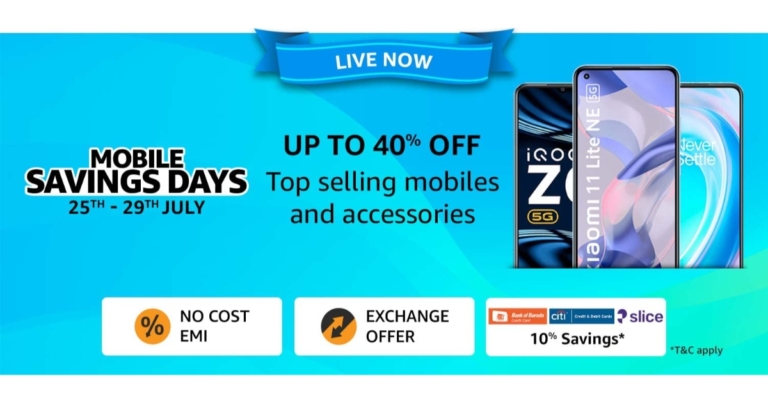
In India, the Amazon Mobile Savings Days sale has begun and is providing discounts of up to 40% on smartphones and mobile accessories. The e-commerce portal is currently hosting the deal, which will run through July 29. During the sale, premium smartphone brands including OnePlus, Xiaomi, Samsung, iQOO, Tecno, OPPO, Realme, and Vivo, among others will be offering their devices at the lowest prices. Redmi K50i 5G, Samsung M13 series, Tecno Spark 9, Tecno Camon 19 Neo, and iQOO Neo 6 are also discounted and offered bargains during the Amazon Mobile Savings Days event.Amazon is providing discounts of up to 40% on smartphones from well-known smartphone manufacturers. For a minimum transaction of Rs 5,000 using Citibank cards and for a minimum transaction of Rs 7,000 using Bank of Baroda cards, customers can receive a 10% instant discount of up to Rs 750 using credit and debit cards and up to Rs 1,000 using EMI transactions. Additionally, consumers can use Slice to get a 10% cashback up to Rs 2,500 for a minimum transaction of Rs 7,500 through July 27, 2022. This offer is only good for one person. Additionally, they can get their preferred smartphones through easy No-Cost EMI for up to 12 months and tempting exchange incentives.With Advantage Just for Prime, which offers features like a 6-month free screen replacement and an additional 3-month no-cost EMI on HDFC Bank Debit and Credit Cards, Prime Members can save up to Rs 20,000. On certain smartphones, customers may also take advantage of additional reductions by using coupons.Buyers can get iPhones discounted by up to Rs 10,000. Deals on the iPhones 13, 13 Pro, and 13 Pro Max.Moreover, iQOO devices will be discounted by up to Rs 9,000. The most recent iQOO Neo 6 5G will be offered for Rs 29,999 with an additional Rs 3,000 in Instant Bank Discount. With further Instant Bank Discounts, the iQOO Z6 Pro will start at Rs 23,999, and the iQOO Z6 5G at Rs 14,999. Get further amazing discounts on the flagship lineup, which includes the iQOO 9 SE, iQOO 9 5G, and iQOO 9 Pro 5G. During this Mobile Savings Days event, customers will be able to take advantage of additional discounts together with bank offers to make the purchase of a smartphone more affordable.Get the OnePlus 9 Series 5G beginning at Rs 37,999 with up to Rs 15,000 off, an extra Instant Bank Discount (on the 9 Pro), and up to Rs 5,000 more off on exchange. Receive up to Rs 7,000 more off on exchange and up to 9 months of no-cost EMI on the OnePlus 10R 5G and OnePlus 10 Pro 5G. Customers will be able to get the most recent OnePlus flagship, the OnePlus 10R, for a previously unheard-of price of Rs 34,999 in addition to other bank discounts and up to Rs 4,000 more off on exchange as a limited-time deal. Get the OnePlus Nord CE 2 Lite 5G at the lowest price ever with a limited-time Rs 500 additional discount.Receive further discounts on bank cash back and exchanges with the OnePlus Nord 2T 5G. Get no-cost EMI and quick bank rebates on the OnePlus Nord CE 2 5G.Customers can also take advantage of never-before-seen bargains on the whole Samsung M series range, including up to 30% off on top-rated smartphones, in addition to up to 53% off on the Samsung Galaxy S20 FE 5G. Get discounts of up to Rs 9,000 on the Samsung Galaxy M53 5G, Rs 2,000 on the recently introduced Samsung M13, and Rs 9,000 off the Samsung Galaxy M33 5G. In order to make the purchase of a smartphone during this Mobile Savings Days event more affordable, customers will be able to take advantage of additional reductions with bank offers.Customers can receive discounts of up to 40% on Xiaomi smartphones. Starting at Rs 6,999, the best-selling Redmi 9 Series will be made accessible. Starting at Rs 10,999 with immediate additional bank discounts, the best-selling Redmi Note 10 Series, which comprises the Redmi Note 10T 5G, Redmi Note 10 Pro, Redmi Note 10 Pro Max, and Redmi Note 10S, will be available. Buy the Xiaomi 11 light for Rs 23,999, the Xiaomi 11T Pro for Rs 35,999, and the Xiaomi 12 Pro for Rs 56,999, all with extra perks worth Rs 6,000, such as bank discounts right away and coupons.According to Amazon, there are also discounted pricing for mobile accessories starting at Rs. 69.
For the latest gadget and tech news, and gadget reviews, follow us on Twitter, Facebook and Instagram. For newest tech & gadget videos subscribe to our YouTube Channel. You can also stay up to date using the Gadget Bridge Android App. You can find the latest car and bike news here.
The auto-rotate feature comes in quite handy when you’re playing a video on your phone and do not want to manually turn on the landscape mode. All you need to do is tilt your phone sideways and the screen will adjust accordingly. However, sometimes even auto-rotate may not work properly. In this article, we bring you the 11 simple ways to fix the ‘Android screen auto rotate not working’ issue on your smartphone. (2023)Read Also:How to rotate your computer screen or desktop
In This Article
Restart Your Phone
Restarting your phone is a quick and easy way to fix any bugs or minor issues, including auto rotate malfunction. Your phone deletes all temporary files once you restart it, so any temporary files that may be hindering your phone from auto-rotating the screen will get deleted. You can restart your phone by long pressing the power button and selecting ‘Restart’. If this method doesn’t work, try the other ones listed below.
Turn on Auto Rotate From Settings
If the auto-rotate isn’t working on your phone, you can try enabling the function from the smartphone settings instead of the drop-down panel. Simply go to Settings>Display and turn on the auto-rotate function.
Re-Calibrate Your Phone’s Sensors
Auto-rotate may stop functioning on your phone if the Gyroscope and Accelerometer aren’t calibrated. These motion sensors are integral to the proper functioning of features like auto-rotate. If your phone doesn’t have a built-in calibration tool, you can download the GPS Status and Toolbox app from the Play Store and use it to calibrate the motion sensors in your phone.
Check Rotate Settings in the App
If auto-rotate doesn’t work in a particular app, check the settings within the app to see if auto-rotate is being overridden. Some apps do this to avoid unnecessary screen tilts. Once you’ve changed the settings, restart the app and see if auto-rotate works.
Use the in-app auto-rotate feature
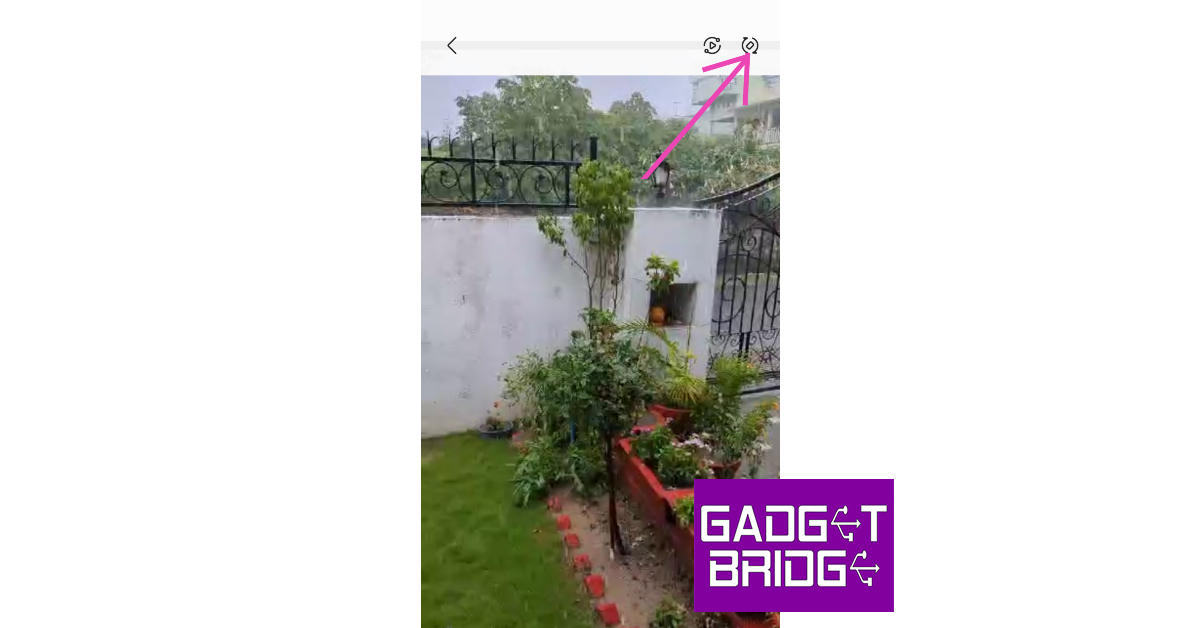
Most media players and streaming apps have an auto-rotate option of their own. If your phone’s auto-rotate function isn’t working, you can give these a try. Look for the auto-rotate icon in the media toolbar or explore the media player’s settings.
Update System Software
Sometimes, certain glitches or bugs develop over a period of time within the system software. These bugs and glitches are weeded out in software updates. If you haven’t updated your phone’s OS in a while, it may be unable to fix those issues. To update your phone go to Settings>Software Update>Download and Install.
Don’t Touch Your Phone’s Screen
Touching your phone’s screen may prevent it from auto-rotating. Make sure your fingers aren’t touching any part of the screen or if you’re resting your phone against a surface, the screen edges aren’t touching any part of the surrounding surface.
Uninstall Recently Installed Apps
If the auto-rotate in your phone started malfunctioning after you installed a certain app, delete the app. Some apps conflict with the working of your phone and arise issues in native functions like auto-rotate. Delete the app and check if auto-rotate is working again.
Use a third-party app
If you’re unable to use the native screen rotation feature on your Android smartphone, there are a bunch of third-party apps that can perform the task for you. ‘Control Screen Rotation’ is the best of the lot. Once you launch this app, it gives you several screen rotation options in the notification bar. Choose the orientation you want and the app will adjust your phone’s screen accordingly. Click on this link to download the app.
Enable Home Screen Rotation
If the home screen, in particular, isn’t auto-rotating, go to Settings>Home Screen and turn on Rotate to Landscape Mode. You can also do this for the Lock Screen, Voice Call screen, and others.
Perform a factory reset
If you’ve tried all the methods mentioned in this list and still can’t get your phone’s auto-rotation to function, you can try performing a factory reset as a last-ditch option. Here’s how.
Step 1: Go to Settings, scroll down and select General Management.
Step 2: Tap on ‘Reset.’
Step 3: Select ‘Factory data reset.’
Step 4: Scroll down and tap on ‘Reset.’
Frequently Asked Questions
Why is auto-rotate not working?
Auto-rotate may not work when your phone’s gyroscope and accelerometer aren’t calibrated or when something’s touching the screen. If you want the home screen to rotate as well, you will need to turn on that option from the settings.
How do I fix auto-rotate on Android?
To fix auto-rotate on Android, restart your device, recalibrate the sensors, delete any recently downloaded apps, and make sure your phone’s OS is updated.
These are the 11 simple ways to fix the Android screen auto rotate not working issue on your smartphone. If you do not want to keep the auto-rotate turned on all the time, you do not have to. Newer Android phones offer the option to instantly rotate your phone at any time using the rotate icon at the bottom of your screen. This icon usually appears when you’re playing a video or a game and your phone recognises that you may want to play it in fullscreen.
For the latest gadget and tech news, and gadget reviews, follow us on Twitter, Facebook and Instagram. For newest tech & gadget videos subscribe to our YouTube Channel. You can also stay up to date using the Gadget Bridge Android App. You can find the latest car and bike news here.
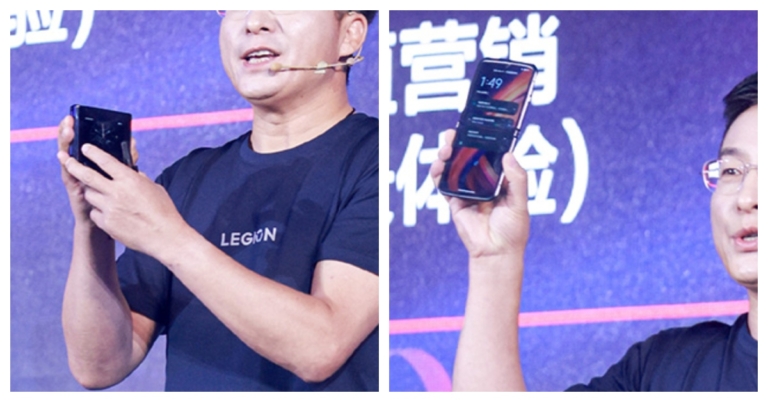
Recently Motorola teased its upcoming foldable phone Razr 2022 by releasing its official renders on the Chinese microsite Weibo. The device is set to make its debut on August 2 in China. In the latest development, the device is confirmed to be powered by Snapdragon 8+ Gen 1 SoC.The Razr 2022 design, which the firm has teased, indicates that the phone would come with a twin rear camera arrangement. The Motorola Razr 2022’s other details are still being kept from the public but ahead of the official release the company via a recent Weibo post revealed that Motorola Razr 2022 will be the first foldable smartphone to include the Snapdragon 8+ Gen 1 SoC.Apart from this, the foldable phone launch will also bring the Moto X30 Pro alongside. It has also been revealed that the myui 4.0 OS and the Moto X30 Pro smartphone will debut at this event.For those who are unaware Razr 2022 launch event will take place on August 2 at 7.30 pm local time and 5 pm IST.On the Chinese microblogging website, Chen Jin, General Manager of Lenovo Mobile Business Group, posted pictures of the Motorola Razr 2022 that showed the device from all angles and in both folded and unfolded positions. The renders show the handset to have rounded sides and a relatively small chin when compared to the Motorola Razr original and Motorola Razr 5G.Apart from Snapdragon 8+ Gen 1 SoC the device is rumoured to come with a full HD+ AMOLED display that is said to support 120Hz refresh rate and 20:9 aspect ratio. A 50-megapixel primary sensor and a 13-megapixel macro sensor may be included in the Motorola Razr 2022’s twin back camera arrangement. On the front, there should be a 32-megapixel Omnivision sensor.In addition to this, it is said that the front camera can capture ultra-HD films at 60 frames per second, while the rear camera arrangement may be able to record full-HD footage at 120 frames per second.At launch, the Motorola Razr 2022 is anticipated to cost EUR 1,149, or around Rs 94,000. It has been reported that the smartphone will be available in the colours Tranquil Blue and Quartz Black.
For the latest gadget and tech news, and gadget reviews, follow us on Twitter, Facebook and Instagram. For newest tech & gadget videos subscribe to our YouTube Channel. You can also stay up to date using the Gadget Bridge Android App. You can find the latest car and bike news here.


 It enables customers to digitally try on cosmetics from top manufacturers like Lakmé, Maybelline, Blue Heaven, Faces Canada, and L’Oréal Paris, including lipstick, foundation, eyeshadow, kajal, eyeliner, compact, concealer, highlighter, blush, and mascara.
Flipkart noticed a higher conversion rate with customers who virtually tried on the makeup on the product page compared to those who did not when testing the Virtual Try-On experience for Beauty products across a few brands as a pilot.
Commenting on the launch, Kanchan Mishra, Senior Director, Consumables (FMCG), General Merchandise and Home, Flipkart, said, “The e-commerce landscape in India is changing rapidly with millions of new customers from all geographies looking for richer and customized experiences online. At Flipkart, we aim at being at the forefront in bringing technology-led solutions to our burgeoning registered customer base of 400 million across the country. We are proud to expand our augmented reality(AR)-enabled feature to a category such as beauty, where there are nuanced product differences that customers are acquainted with purchasing offline. This feature will herald a new era for online makeup shoppers enabling easy access to leading brands while driving growth for lakhs of our sellers.”
To better understand their needs and problems for an improved online buying experience, Flipkart spoke with hundreds of beauty consumers of all ages from a variety of cities, including metros and tier 2 towns. As a result of the lack of shopping support tools and a segment of customers who also expressed the need to try on a product before purchasing, the insights showed that there was a large decline in purchases. Taking these survey findings into consideration, Flipkart enhanced the Virtual Try-On option to include beautification.
For the latest gadget and tech news, and gadget reviews, follow us on Twitter, Facebook and Instagram. For newest tech & gadget videos subscribe to our YouTube Channel. You can also stay up to date using the Gadget Bridge Android App. You can find the latest car and bike news here.
It enables customers to digitally try on cosmetics from top manufacturers like Lakmé, Maybelline, Blue Heaven, Faces Canada, and L’Oréal Paris, including lipstick, foundation, eyeshadow, kajal, eyeliner, compact, concealer, highlighter, blush, and mascara.
Flipkart noticed a higher conversion rate with customers who virtually tried on the makeup on the product page compared to those who did not when testing the Virtual Try-On experience for Beauty products across a few brands as a pilot.
Commenting on the launch, Kanchan Mishra, Senior Director, Consumables (FMCG), General Merchandise and Home, Flipkart, said, “The e-commerce landscape in India is changing rapidly with millions of new customers from all geographies looking for richer and customized experiences online. At Flipkart, we aim at being at the forefront in bringing technology-led solutions to our burgeoning registered customer base of 400 million across the country. We are proud to expand our augmented reality(AR)-enabled feature to a category such as beauty, where there are nuanced product differences that customers are acquainted with purchasing offline. This feature will herald a new era for online makeup shoppers enabling easy access to leading brands while driving growth for lakhs of our sellers.”
To better understand their needs and problems for an improved online buying experience, Flipkart spoke with hundreds of beauty consumers of all ages from a variety of cities, including metros and tier 2 towns. As a result of the lack of shopping support tools and a segment of customers who also expressed the need to try on a product before purchasing, the insights showed that there was a large decline in purchases. Taking these survey findings into consideration, Flipkart enhanced the Virtual Try-On option to include beautification.
For the latest gadget and tech news, and gadget reviews, follow us on Twitter, Facebook and Instagram. For newest tech & gadget videos subscribe to our YouTube Channel. You can also stay up to date using the Gadget Bridge Android App. You can find the latest car and bike news here. 
 It enables customers to digitally try on cosmetics from top manufacturers like Lakmé, Maybelline, Blue Heaven, Faces Canada, and L’Oréal Paris, including lipstick, foundation, eyeshadow, kajal, eyeliner, compact, concealer, highlighter, blush, and mascara.
Flipkart noticed a higher conversion rate with customers who virtually tried on the makeup on the product page compared to those who did not when testing the Virtual Try-On experience for Beauty products across a few brands as a pilot.
Commenting on the launch, Kanchan Mishra, Senior Director, Consumables (FMCG), General Merchandise and Home, Flipkart, said, “The e-commerce landscape in India is changing rapidly with millions of new customers from all geographies looking for richer and customized experiences online. At Flipkart, we aim at being at the forefront in bringing technology-led solutions to our burgeoning registered customer base of 400 million across the country. We are proud to expand our augmented reality(AR)-enabled feature to a category such as beauty, where there are nuanced product differences that customers are acquainted with purchasing offline. This feature will herald a new era for online makeup shoppers enabling easy access to leading brands while driving growth for lakhs of our sellers.”
To better understand their needs and problems for an improved online buying experience, Flipkart spoke with hundreds of beauty consumers of all ages from a variety of cities, including metros and tier 2 towns. As a result of the lack of shopping support tools and a segment of customers who also expressed the need to try on a product before purchasing, the insights showed that there was a large decline in purchases. Taking these survey findings into consideration, Flipkart enhanced the Virtual Try-On option to include beautification.
For the latest gadget and tech news, and gadget reviews, follow us on Twitter, Facebook and Instagram. For newest tech & gadget videos subscribe to our YouTube Channel. You can also stay up to date using the Gadget Bridge Android App. You can find the latest car and bike news here.
It enables customers to digitally try on cosmetics from top manufacturers like Lakmé, Maybelline, Blue Heaven, Faces Canada, and L’Oréal Paris, including lipstick, foundation, eyeshadow, kajal, eyeliner, compact, concealer, highlighter, blush, and mascara.
Flipkart noticed a higher conversion rate with customers who virtually tried on the makeup on the product page compared to those who did not when testing the Virtual Try-On experience for Beauty products across a few brands as a pilot.
Commenting on the launch, Kanchan Mishra, Senior Director, Consumables (FMCG), General Merchandise and Home, Flipkart, said, “The e-commerce landscape in India is changing rapidly with millions of new customers from all geographies looking for richer and customized experiences online. At Flipkart, we aim at being at the forefront in bringing technology-led solutions to our burgeoning registered customer base of 400 million across the country. We are proud to expand our augmented reality(AR)-enabled feature to a category such as beauty, where there are nuanced product differences that customers are acquainted with purchasing offline. This feature will herald a new era for online makeup shoppers enabling easy access to leading brands while driving growth for lakhs of our sellers.”
To better understand their needs and problems for an improved online buying experience, Flipkart spoke with hundreds of beauty consumers of all ages from a variety of cities, including metros and tier 2 towns. As a result of the lack of shopping support tools and a segment of customers who also expressed the need to try on a product before purchasing, the insights showed that there was a large decline in purchases. Taking these survey findings into consideration, Flipkart enhanced the Virtual Try-On option to include beautification.
For the latest gadget and tech news, and gadget reviews, follow us on Twitter, Facebook and Instagram. For newest tech & gadget videos subscribe to our YouTube Channel. You can also stay up to date using the Gadget Bridge Android App. You can find the latest car and bike news here. 
 Step 3: Scroll down and click on ‘View Subscriptions’ under YouTube channel subscriptions.
 Step 3: Scroll down and click on ‘View Subscriptions’ under YouTube channel subscriptions.
 You will be able to see the exact date and time when you subscribed to a particular channel. Channels will be listed in reverse chronological order, with the most recently subscribed channel appearing first.
 Step 2: From the side menu panel, select Privacy.
Step 3: Make your subscriptions public by turning the toggle bar off for ‘Keep my subscriptions private’.
Step 2: From the side menu panel, select Privacy.
Step 3: Make your subscriptions public by turning the toggle bar off for ‘Keep my subscriptions private’.
 Step 4: Click on the profile icon on the YouTube webpage again and select ‘Your Channel’.
 Step 5: Copy the link from the address bar and paste it to the query box in xxluke.de and hit ‘Continue’.
 xxluke will list your subscriptions in reverse chronological order, with the date when you subscribed to them.
Bonus Tip: How to download a YouTube video to my device?
If you want to download a YouTube video to your device, simply log on to ytb.rip and enter the YouTube video link in the download box. The website will download the video in mp4 format to your device.
Read Also: How to access your Google Search history and delete all activity
This is how you can find and view your entire YouTube subscription history. If you want to manage your subscriptions simply go to Subscriptions>Manage. You can unsubscribe from channels or restrict their notification alerts. If you want to watch YouTube videos while working on other Chrome tabs, read our guide here.
For the latest gadget and tech news, and gadget reviews, follow us on Twitter, Facebook and Instagram. For newest tech & gadget videos subscribe to our YouTube Channel. You can also stay up to date using the Gadget Bridge Android App. You can find the latest car and bike news here.
xxluke will list your subscriptions in reverse chronological order, with the date when you subscribed to them.
Bonus Tip: How to download a YouTube video to my device?
If you want to download a YouTube video to your device, simply log on to ytb.rip and enter the YouTube video link in the download box. The website will download the video in mp4 format to your device.
Read Also: How to access your Google Search history and delete all activity
This is how you can find and view your entire YouTube subscription history. If you want to manage your subscriptions simply go to Subscriptions>Manage. You can unsubscribe from channels or restrict their notification alerts. If you want to watch YouTube videos while working on other Chrome tabs, read our guide here.
For the latest gadget and tech news, and gadget reviews, follow us on Twitter, Facebook and Instagram. For newest tech & gadget videos subscribe to our YouTube Channel. You can also stay up to date using the Gadget Bridge Android App. You can find the latest car and bike news here. 

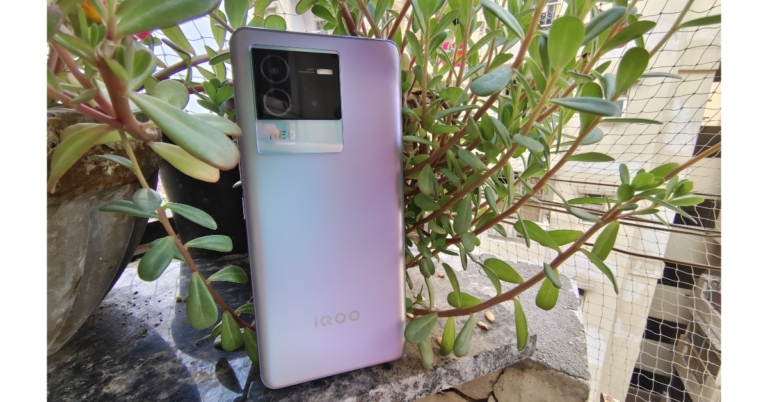
 The phone actually has a good in-hand feel, and as said the rear panel is composed of plastic rather than glass to keep it light. The Type-C port and a stereo speaker grille can be found at the bottom. A power button and volume rocker keys made of plastic are located on the right side of the frame, which is made of plastic as well. On the top, there is an IR emmiter as well. Before we wrap up the design, we should mention that the iQoo Neo 6 has an IP52 rating, which is actually quite nice to have on a phone like this.
 Now let’s talk about the display. The 6.62-inch E4 AMOLED full-HD+ display on the iQoo Neo 6 boasts a resolution of 1,080 by 2,400 pixels, a refresh rate of 120 Hz, and a touch sampling rate of 360 Hz. It has a max brightness of 800 nits and supports HDR playback for watching Netflix and YouTube videos.
In the software display settings, you may also find a professional option that, when used, seems very natural. We encountered no problems with the iQoo Neo 6, and for the price it is offered at, it is actually excellent. With a smart switch that alternates between 60Hz and 120Hz, you naturally get a 120Hz refresh rate, but you also get a touch sampling rate of 360Hz.
Now let’s talk about the display. The 6.62-inch E4 AMOLED full-HD+ display on the iQoo Neo 6 boasts a resolution of 1,080 by 2,400 pixels, a refresh rate of 120 Hz, and a touch sampling rate of 360 Hz. It has a max brightness of 800 nits and supports HDR playback for watching Netflix and YouTube videos.
In the software display settings, you may also find a professional option that, when used, seems very natural. We encountered no problems with the iQoo Neo 6, and for the price it is offered at, it is actually excellent. With a smart switch that alternates between 60Hz and 120Hz, you naturally get a 120Hz refresh rate, but you also get a touch sampling rate of 360Hz.
 The phone also has an optical in-display fingerprint sensor, which is located very low but quickly unlocks the device. Additionally, you receive an x-axis vibration haptic feedback motor that improves both the typing and gaming experiences.
 Funtouch OS 12 on Android 12 powers the smartphone. The fact that it leaves background apps running without hogging too much memory is its best feature. Two years of software updates and three years of security patches are promised by iQoo, too. Although some pre-installed bloatware apps can be a problem, they are simple to remove to save space.
The iQoo Neo 6’s triple rear cameras are set up for taking pictures and recording videos with ease. The primary camera is a 64-megapixel Samsung ISOCELL GW1P sensor with an f/1.89 aperture and optical image stabilisation. An 8-megapixel wide-angle camera has an f/2,2 aperture, and there is a 2-megapixel macro camera with an f/2.4 aperture. The front of the iQoo Neo 6 boasts a 16-megapixel camera with an f/2.0 aperture for selfies and video calls.
Funtouch OS 12 on Android 12 powers the smartphone. The fact that it leaves background apps running without hogging too much memory is its best feature. Two years of software updates and three years of security patches are promised by iQoo, too. Although some pre-installed bloatware apps can be a problem, they are simple to remove to save space.
The iQoo Neo 6’s triple rear cameras are set up for taking pictures and recording videos with ease. The primary camera is a 64-megapixel Samsung ISOCELL GW1P sensor with an f/1.89 aperture and optical image stabilisation. An 8-megapixel wide-angle camera has an f/2,2 aperture, and there is a 2-megapixel macro camera with an f/2.4 aperture. The front of the iQoo Neo 6 boasts a 16-megapixel camera with an f/2.0 aperture for selfies and video calls.
 The primary sensor has a broader field of vision and is good at retaining information. Bright colours like red were washed out in terms of colour, which made photos lack punch. We found that the iQoo Neo 6 struggles to regulate highlights when shooting HDR photographs, and the results appear a bit blown out. The images lack depth since there is insufficient contrast and the subject does not stand out. Edge detection, background blur, and colour details are all accurately rendered in portrait mode.


 The phone actually has a good in-hand feel, and as said the rear panel is composed of plastic rather than glass to keep it light. The Type-C port and a stereo speaker grille can be found at the bottom. A power button and volume rocker keys made of plastic are located on the right side of the frame, which is made of plastic as well. On the top, there is an IR emmiter as well. Before we wrap up the design, we should mention that the iQoo Neo 6 has an IP52 rating, which is actually quite nice to have on a phone like this.
 Now let’s talk about the display. The 6.62-inch E4 AMOLED full-HD+ display on the iQoo Neo 6 boasts a resolution of 1,080 by 2,400 pixels, a refresh rate of 120 Hz, and a touch sampling rate of 360 Hz. It has a max brightness of 800 nits and supports HDR playback for watching Netflix and YouTube videos.
In the software display settings, you may also find a professional option that, when used, seems very natural. We encountered no problems with the iQoo Neo 6, and for the price it is offered at, it is actually excellent. With a smart switch that alternates between 60Hz and 120Hz, you naturally get a 120Hz refresh rate, but you also get a touch sampling rate of 360Hz.
Now let’s talk about the display. The 6.62-inch E4 AMOLED full-HD+ display on the iQoo Neo 6 boasts a resolution of 1,080 by 2,400 pixels, a refresh rate of 120 Hz, and a touch sampling rate of 360 Hz. It has a max brightness of 800 nits and supports HDR playback for watching Netflix and YouTube videos.
In the software display settings, you may also find a professional option that, when used, seems very natural. We encountered no problems with the iQoo Neo 6, and for the price it is offered at, it is actually excellent. With a smart switch that alternates between 60Hz and 120Hz, you naturally get a 120Hz refresh rate, but you also get a touch sampling rate of 360Hz.
 The phone also has an optical in-display fingerprint sensor, which is located very low but quickly unlocks the device. Additionally, you receive an x-axis vibration haptic feedback motor that improves both the typing and gaming experiences.
 Funtouch OS 12 on Android 12 powers the smartphone. The fact that it leaves background apps running without hogging too much memory is its best feature. Two years of software updates and three years of security patches are promised by iQoo, too. Although some pre-installed bloatware apps can be a problem, they are simple to remove to save space.
The iQoo Neo 6’s triple rear cameras are set up for taking pictures and recording videos with ease. The primary camera is a 64-megapixel Samsung ISOCELL GW1P sensor with an f/1.89 aperture and optical image stabilisation. An 8-megapixel wide-angle camera has an f/2,2 aperture, and there is a 2-megapixel macro camera with an f/2.4 aperture. The front of the iQoo Neo 6 boasts a 16-megapixel camera with an f/2.0 aperture for selfies and video calls.
Funtouch OS 12 on Android 12 powers the smartphone. The fact that it leaves background apps running without hogging too much memory is its best feature. Two years of software updates and three years of security patches are promised by iQoo, too. Although some pre-installed bloatware apps can be a problem, they are simple to remove to save space.
The iQoo Neo 6’s triple rear cameras are set up for taking pictures and recording videos with ease. The primary camera is a 64-megapixel Samsung ISOCELL GW1P sensor with an f/1.89 aperture and optical image stabilisation. An 8-megapixel wide-angle camera has an f/2,2 aperture, and there is a 2-megapixel macro camera with an f/2.4 aperture. The front of the iQoo Neo 6 boasts a 16-megapixel camera with an f/2.0 aperture for selfies and video calls.
 The primary sensor has a broader field of vision and is good at retaining information. Bright colours like red were washed out in terms of colour, which made photos lack punch. We found that the iQoo Neo 6 struggles to regulate highlights when shooting HDR photographs, and the results appear a bit blown out. The images lack depth since there is insufficient contrast and the subject does not stand out. Edge detection, background blur, and colour details are all accurately rendered in portrait mode.




 Most Android smartphones come with a built-in feature to schedule power on/off. Simply go to Settings>Addtional Settings and select Automatic On/Off. Select the time for automatic power off and power on. Your smartphone will turn the power off and back on at the scheduled time. Remember, this setting can also be in the battery or power management settings of your device.
 Some smartphones do not come with a native power on/off scheduler. For example, you will not find the schedule auto power on/off feature in certain Samsung phones. Luckily, there are a few third-party apps available that can carry out the same task. Apps like AutoOff will automatically shut down your device at a set time. You can also set the time for an automatic reboot. The dynamic notification keeps you informed of the time left for the scheduled power off. You can also extend the scheduled power off by a simple tap.
 Restarting your phone is a quick and easy way to fix any bugs or minor issues, including auto rotate malfunction. Your phone deletes all temporary files once you restart it, so any temporary files that may be hindering your phone from auto-rotating the screen will get deleted. You can restart your phone by long pressing the power button and selecting ‘Restart’. If this method doesn’t work, try the other ones listed below.
 If the auto-rotate isn’t working on your phone, you can try enabling the function from the smartphone settings instead of the drop-down panel. Simply go to Settings>Display and turn on the auto-rotate function.
 Most media players and streaming apps have an auto-rotate option of their own. If your phone’s auto-rotate function isn’t working, you can give these a try. Look for the auto-rotate icon in the media toolbar or explore the media player’s settings.
 Sometimes, certain glitches or bugs develop over a period of time within the system software. These bugs and glitches are weeded out in software updates. If you haven’t updated your phone’s OS in a while, it may be unable to fix those issues. To update your phone go to Settings>Software Update>Download and Install.
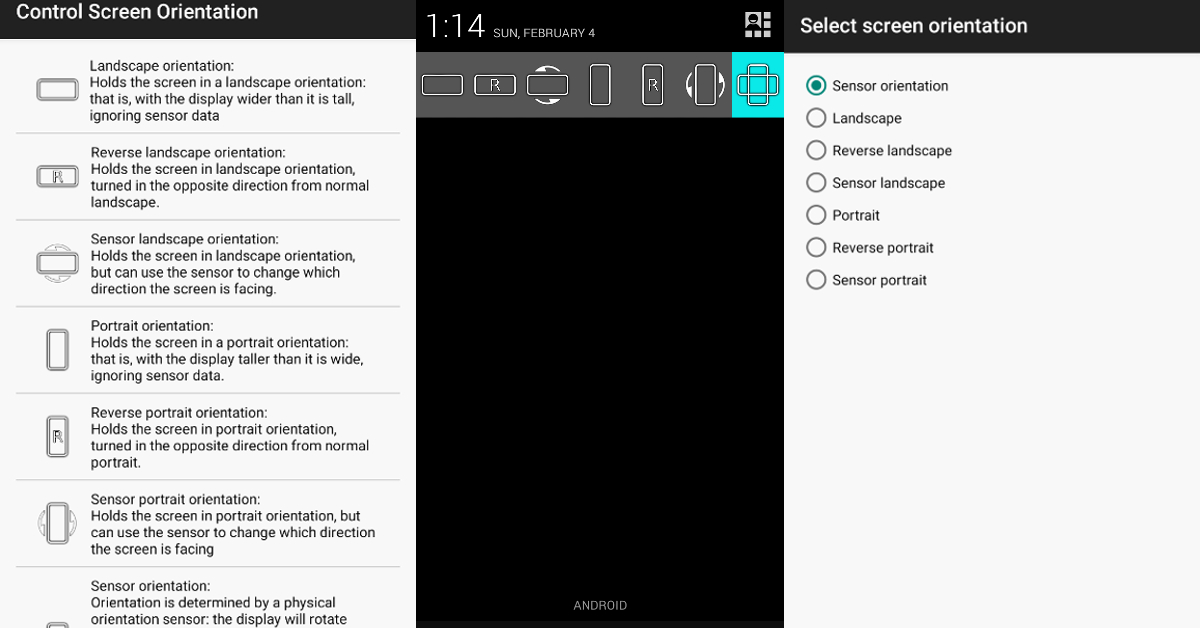 If you’re unable to use the native screen rotation feature on your Android smartphone, there are a bunch of third-party apps that can perform the task for you. ‘Control Screen Rotation’ is the best of the lot. Once you launch this app, it gives you several screen rotation options in the notification bar. Choose the orientation you want and the app will adjust your phone’s screen accordingly. Click on this link to download the app.
 If the home screen, in particular, isn’t auto-rotating, go to Settings>Home Screen and turn on Rotate to Landscape Mode. You can also do this for the Lock Screen, Voice Call screen, and others.
 Step 2: Tap on ‘Reset.’
 Step 3: Select ‘Factory data reset.’
 Step 4: Scroll down and tap on ‘Reset.’