Garena Free Fire Redeem Codes Today 26 July 2022: Here is how to claim them

Garena Free Fire is a battle royale game with regular awards and tournaments to keep players interested. If you play Garena Free Fire, you should be aware of the redeem codes that are released on a daily basis. However, because the battle royale game is banned in India, players from other countries can use the Free Fire Redeem codes daily. If you’re unfamiliar with the Garena Free Fire redeem codes or don’t know how to get them, we’ve put together a step-by-step guide to help you redeem them. Check out Garena Free Fire Redeem Codes for July 26. The Free Fire redeem codes are a great way to get free stuff. These are 12-digit codes that contain alphabets and numbers, as well as an expiration date and time. Because the Garena FF redeem codes cannot be used more than once, you should hurry to the redemption page to claim your free reward before someone else does. To get a free reward, all you have to do is go to reward.ff.garena.com/en, which is the official redemption page. Also, keep an eye on this space for daily updates on Garena Free Fire redemption codes and rewards.

Garena Free Fire Redeem Codes Today 26 July 2022

  • Z2FB-HASU-3VXS
  • 4UBY-XPTW-ERES
  • FXDS-TSWY-QTJ9
  • BKSK-ECCM-JZEB
  • L8LN-F5WK-2YPN
  • TPNA-MS84-ZE8E
  • 26JT-3G6R-QVAV
  • A46N-U6UF-Q2JP
  • 6LU6-9JJZ-J7S8
  • FAG4-LHKD-92GZ
  • RHUV-SWWV-N9G4
  • FBJ9-MTXB-9XAP
  • 5R8S-AGS5-MCK5
  • 2K5A-WHD3-FKWB
  • XKVJ-M65A-NPUQ
  • AMCT-7DU2-K2U2
  • LQ6Q-2A95-G29F
  • HDQK-XDFJ-7D4H
  • QA97-CXS2-J0F0
  • W73D-61AW-NGL2
  • UK2P-Z3NF-GV5U
  • NLCB-6S92-K2DE

How to Get Free Fire Redeem Codes for Garena on July 26?

  • Visit the Garena Free Fire game’s official website at reward.ff.garena.com.
  • Use your Facebook, Google, VK, Apple ID, Huawei ID, or Twitter account to log in.
  • You’ll be taken to a valid redemption code (s)
  • Copy and paste the 12-digit redemption code into the text box.
  • On the screen, a dialogue box will appear.
  • ‘Ok’ should be selected.
For the latest gadget and tech news, and gadget reviews, follow us on TwitterFacebook and Instagram. For newest tech & gadget videos subscribe to our YouTube Channel. You can also stay up to date using the Gadget Bridge Android App. You can find the latest car and bike news here.

4 Easy Methods to Open RAR Files on Android

0
A RAR file is a compressed collection of one or more files. In order to create a compressed collection of files, you need to ‘zip’ them together using a zipping tool. Conversely, in order to open a RAR file and access its contents, you need to ‘unzip’ the compressed file using a relevant unzipping tool. Your Android smartphone may not come equipped with a native unzipping tool or app. Fortunately, there are some apps available on the Google Play Store that you can use for this task. In this article, we bring you 4 easy methods to open RAR files on Android. Read Also: Top Tips and Tricks to Discover the Best Movies and Shows on Netflix

Open RAR files on Android using the RAR app

Step 1: Download and install the RAR app on your smartphone from the Google Play Store. Step 2: Open the RAR app and select the RAR file you wish to open. Step 3: Enter the password if prompted. Step 4: In order to extract the file to another location, select the file and tap on the Extract option on the top menu. select the file and tap on the Extract option on the top menu Step 5: Provide a location for file extraction. Provide a location for file extraction. The zipped file will be extracted to your desired location where you can access it.

Open RAR files on Android using the 7Zipper App

Step 1: Download and install the 7Zipper app on your smartphone from the Google Play Store. Step 2: Select the zipped file you wish to open. Step 3: Select the location where you want to extract the zipped file and press OK. Select the location where you want to extract the zipped file and press OK. The zipped file will be extracted to your desired location where you can access it.

Open RAR files on Android using the AndroZip manager

Step 1: Download and install the AndroZip manager app on your smartphone from the Google Play Store. Step 2: Select the zipped file you wish to open. Select the zipped file you wish to open. Step 3: Select the location where you want to extract the zipped file and press OK. Select the location where you want to extract the zipped file and press OK. The zipped file will be extracted to your desired location where you can access it.

Open RAR files on Android using ZArchiver

Step 1: Download and install the ZArchiver app on your smartphone from the Google Play Store. Step 2: Select the zipped file you wish to open. Select the zipped file you wish to open. Step 3: Select the location where you want to extract the zipped file and press ‘Extract here’. Select the location where you want to extract the zipped file and press ‘Extract here’. The zipped file will be extracted to your desired location where you can access it. Read Also: Best Ways to Fix ‘Facebook Messenger Not Sending Messages’ These were the 4 best methods to open RAR files on Android. Some RAR files may be password protected and will require you to enter the password before beginning the extraction process. The apps listed above can also be used to create a compressed archive of files on your smartphone. Compressing files is a great way to reduce their storage space before you transfer them to another device. For the latest gadget and tech news, and gadget reviews, follow us on TwitterFacebook and Instagram. For newest tech & gadget videos subscribe to our YouTube Channel. You can also stay up to date using the Gadget Bridge Android App. You can find the latest car and bike news here.

Indian authorities alert Apple Watch models running watchOS versions older than 8.7 have vulnerabilities

The Indian government has warned that Apple Watch users have a number of security flaws. According to the Indian Computer Emergency Response Team (CERT-in) Apple Watch models running watchOS versions older than 8.7 have vulnerabilities that might let attackers run arbitrary code and get around security measures.  The vulnerability is also highlighted on Apple’s support page. Therefore Apple Watch users are recommended to update to watchOS 8.7, the most recent version, in order to deploy the essential patches. “Multiple vulnerabilities have been reported in Apple Watch which could allow an attacker to execute arbitrary code and bypass security restriction on the targeted system,” the CERT-in in its note said. According to a vulnerability bulletin from the Indian Computer Emergency Response Team, various vulnerabilities affect Apple Watch models using watchOS versions older than 8.7. It has a high severity assessment from the cybersecurity nodal agency. According to CERT-in, these vulnerabilities exist in Apple watch due to buffer overflow in AppleAVD component; an authorization issue in AppleMobileFileIntegrity component; out-of-bounds write in Audio, ICU and WebKit component; type confusion in the Multi-Touch component; Multiple out-of-bounds write and memory corruption in GPU Drivers component; out-of-bounds read in Kernel component; and memory initialization in libxml2 component. Moreover, the Indian authority stated that a remote attacker could exploit these vulnerabilities by sending a specially- crafted request. Successful exploitation of these vulnerabilities could allow the attacker to execute arbitrary code and bypass security restrictions on the targeted system. CERT-in also said that the flaws might let an attacker run arbitrary code on the targeted smartwatch and get through Apple’s security measures. In addition to this, on its support page, Apple confirmed the flaw and noted under AppleAVD impact that it might allow a remote user to execute kernel code. As a result, the government has requested that users of the Apple Watch install the relevant updates that are part of the watchOS 8.7 update. For the latest gadget and tech news, and gadget reviews, follow us on TwitterFacebook and Instagram. For newest tech & gadget videos subscribe to our YouTube Channel. You can also stay up to date using the Gadget Bridge Android App. You can find the latest car and bike news here.

How to Watch YouTube Videos While Browsing Other Tabs in Chrome browser?

0
You may have seen different tips and tricks to listen to music on YouTube in the background while you work on other tabs in Chrome or in your smartphone. Not many people know that you can do the same for videos as well. In this article, we show how you can watch YouTube videos while browsing other tabs in the Chrome browser. Read Also: How to download Youtube videos to your iPhone camera roll in 2022?

Here’s how you can watch YouTube videos while browsing other tabs in a Chrome browser

There are several ways to watch YouTube videos while you work on other tabs on Google Chrome. The method you use also depends on what device you’re using. We’ve compiled the best methods for Desktop, Android, and iOS.

Desktop

Step 1: Go to the YouTube website and pick a video to watch. Step 2: Right-click anywhere on the video. Do not select any of the options. Right-click anywhere on the video. Step 3: Right-click anywhere on the video again. This time you’ll see a different set of options. Step 4: Select ‘Picture in picture’ mode. Right-click anywhere on the video again. Step 5: Select the tab you want to work on. The YouTube mini player will hover on the screen. Select the tab you want to work on. You can change the size of the mini player, pause the video, and even go back to the YouTube page by clicking on the controls on the hovering mini player.

Android

Play YouTube video while browsing other tabs in Chrome using split screen mode

Step 1: Select the split-screen mode on your smartphone. You can do so by long-pressing the YouTube app on the recent app screen on your phone and selecting split screen mode. Select the split-screen mode on your smartphone. Step 2: On the other split screen, open Chrome and select the tab you want to work on. On the other split screen, open Chrome. watch youtube videos while browsing other chrome tabs

Play YouTube videos while browsing other tabs by using Desktop mode in Chrome

You will not be able to see the video in this method, but if you want to listen to music while working on other tabs, this method works fine. Step 1: Open the video you want to play and select ‘Desktop mode’ in the Chrome menu. Open the video you want to play and select ‘Desktop mode’. watch youtube videos while browsing other chrome tabs Step 2: Select another tab and the video will keep playing in the background. Step 3: If the video pauses when you switch tabs, you can play it by dragging down the notification bar and using the controls on the Chrome player. If the video pauses when you switch tabs, you can play it by dragging down the notification bar and using the controls on the Chrome player.

iOS

You can also use Desktop mode on the Chrome app in iOS by selecting ‘Request Desktop Site’ and then opening another tab to work on while the video plays in the background. Read Also: Top 10 lesser-known tips and tricks of Google Chrome browser YouTube also has a built-in mini player that you can use while browsing YouTube itself but not other tabs. Simply select the mini player icon on the YouTube control bar. Your video will play in a mini player, giving you the option to browse other videos on YouTube. If you want to play music on YouTube with your phone screen locked, read our article here. For the latest gadget and tech news, and gadget reviews, follow us on TwitterFacebook and Instagram. For newest tech & gadget videos subscribe to our YouTube Channel. You can also stay up to date using the Gadget Bridge Android App. You can find the latest car and bike news here.
Amazon Quiz Answers Today 26 July 2022: Participate to win Rs 15,000

26 July 2022 Amazon Quiz has gone live. Customers from different parts of the country are participating in the daily quiz. The quiz begins from 12 AM to 11:59 PM. Those participating in the quiz can win exciting prizes by answering all the questions correctly. Today participants have a chance to win a Rs 15,000 Amazon Pay Balance. Amazon quiz brings an opportunity for its customers to win Amazon Pay Balance ranging from Rs 1,000 to Rs 50,000. The Quiz can be played from 12 AM to 11:59 PM. The e-commerce platform brings a fresh quiz on a daily basis which consists of five questions related to general knowledge and current affairs. The participants need to answer all the questions correctly and their names will be selected for a lucky draw. The winner will be announced at the end of the month. One wrong answer could eliminate you from the quiz. If you manage to answer all the questions correctly you can stand a chance to win a Rs 15,000 Amazon Pay Balance today. Only app users are eligible to participate in the Quiz. Check Out 26 July 2022 Amazon Quiz Answers. Amazon Quiz Today Prize – Rs 15,000 Amazon Pay Balance Quiz Date – 26 July 2022 Daily Timing – 12 AM to 11:59 PM Winner Announcement – Today 12 PM

Amazon Quiz Answers Today 26 July 2022

Question 1: Which of these companies has been named an official sponsor of the FIFA World Cup 2022? Answer: BYJU’S Question 2: The Amazon Prime series ‘The Wheel of Time’ stars which of these famous actresses in the role of Moiraine Damodred? Answer: Rosamund Pike Question 3: Which of these countries recently abolished the ‘golden passports’ scheme, offering citizenship in return for substantial investment? Answer: Bulgaria Question 4: This view is from which European capital? Answer: London Question 5: This dog breed is often nicknamed the _______ dog. Fill in the blanks with the name of a food product Answer: Sausage

How To Play Amazon Quiz

Only app users are eligible to play the Amazon quiz every morning from 12 AM to 11:59 PM. The quiz is not available on the desktop. For those who are unaware of how to play the Amazon quiz below are the steps, you can follow to take the quiz.
  • Firstly download the Amazon app from Google Play Store or App Store
  • Now fill in the required information through the Sign Up option.
  • You need to log in to the Amazon app and scroll down on the home screen to find the Amazon Quiz banner.
  • Tap on the Amazon Quiz banner and tap on the Start button to start the Quiz.
  • Now you will get 5 questions and you need to answer them correctly. One wrong answer will eliminate you from the Quiz.
  • After answering all the questions correctly you are now eligible for a Lucky Draw.
  • The winner’s name will be announced today at 12 PM.
For the latest gadget and tech news, and gadget reviews, follow us on TwitterFacebook and Instagram. For newest tech & gadget videos subscribe to our YouTube Channel. You can also stay up to date using the Gadget Bridge Android App. You can find the latest car and bike news here.

Easy methods: Reset Google Chrome and clear its cache on Android Smartphones

1
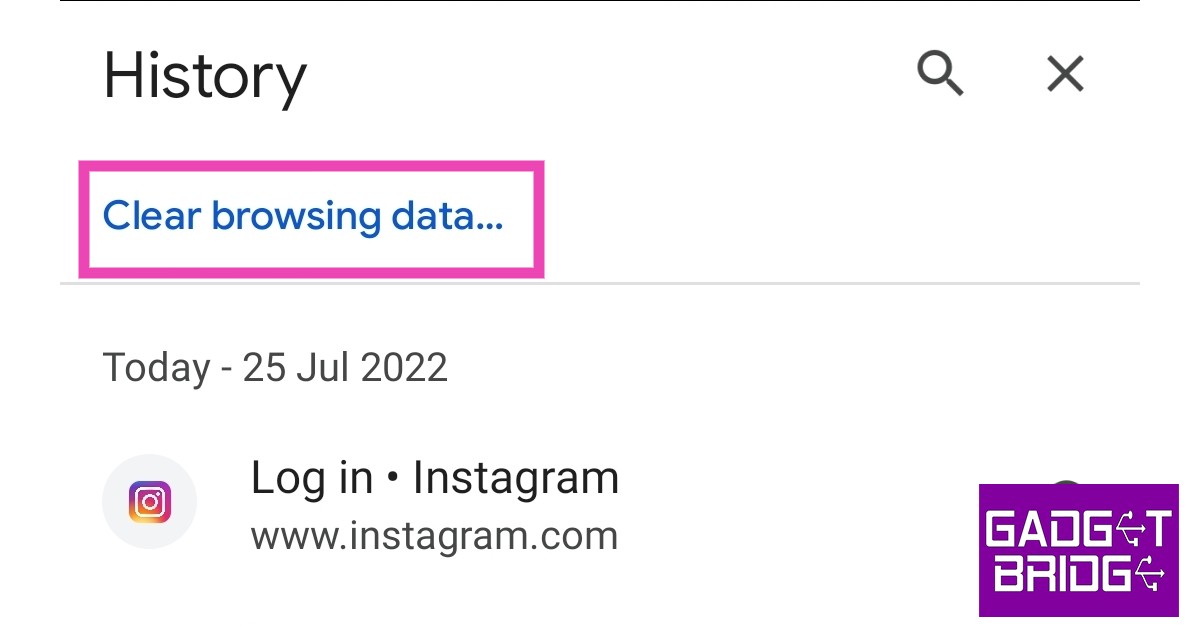
Cached data helps webpages and apps to load faster by saving things like thumbnails, images, and other snippets on your device. If you visit a webpage or app frequently, it’ll take less time to load since some of the data is already stored on your device. It is recommended to clear the cache data regularly to make sure it isn’t storing any unnecessary data. In this article, we show you how to delete Google Chrome cookies and clear its cache on an Android smartphone. Read Also: How To Clear Cookies On iPhone (iOS 16)? How to Delete Google Chrome Cookies and Clear Cache on Android Step 1: Open the Google Chrome browser. Step 2: Tap the three dots at the top right corner and select History. Step 2: Tap the three dots at the top right corner and select History. Step 3: Select ‘Clear Browsing Data’. Step 3: Select ‘Clear Browsing Data’.   Step 4: Choose the time range for data deletion. If you want to delete everything, select ‘All Time’. Step 3: Select ‘Clear Browsing Data’. Step 5: Check the boxes next to ‘Cookies and Site data’ and ‘Cached images and files’. Step 6: Tap ‘Clear data’. 

How to Delete Google Chrome Cookies and Clear Cache on Android using Settings

Step 1: Go to Settings on your smartphone and select Apps. Step 2: Select Google Chrome and tap on Storage. clear google chrome cache Step 3: Select ‘Clear Cache’ at the bottom of your screen. Step 3: Select ‘Clear Cache’ at the bottom of your screen. clear google chrome cache Read Also: How To Install Google Chrome on Android TV (2022)? This is how you can delete Google Chrome cookies and clear its cache on an Android smartphone. You do not need to clear the cache frequently. If you notice your smartphone has slowed down a bit, clearing the cache may help. You can clear the cache of other smartphone apps as well, as explained in our guide here. For the latest gadget and tech news, and gadget reviews, follow us on TwitterFacebook and Instagram. For newest tech & gadget videos subscribe to our YouTube Channel. You can also stay up to date using the Gadget Bridge Android App. You can find the latest car and bike news here.

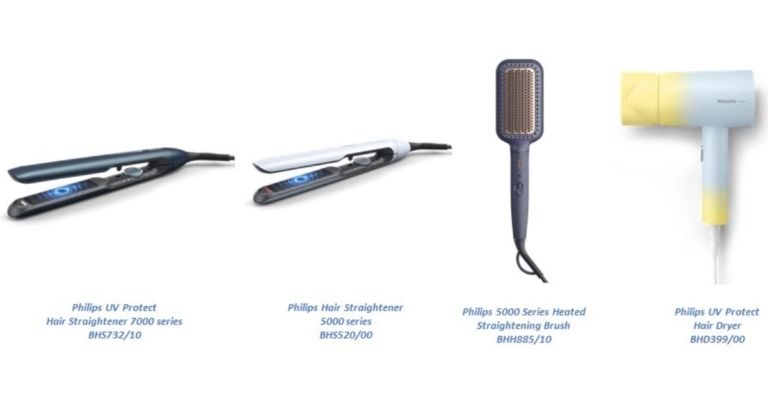
New lineup of hairstyling tools by Philips launched in India, includes new straightener, dryer and brush

Philips today broadened its female grooming portfolio with the launch of new hair styling devices in the Indian market. Philips’ high-end line of hair styling equipment lineup includes Philips Hair Straightener 5000 series, UV Protect Hair Straightener 7000 series, UV Protect Hair Dryer and Philips 5000 Series Heated Straightening Brush. Today, Philips announced the debut of its high-end line of hair styling equipment in India. A new line includes Philips Hair Straightener 5000 Series Heated Straightening Brush with Ionic feature (BHH885/10), Philips UV Protect Hair Straightener 7000 Series (BHS732/10), and Philips UV Protect Hair Dryer (BHD399/00), both of which have mineral ionic care features to reduce UV damage. The products would be sold for a starting price of Rs. 4,495/-. While Nykaa and Myntra will introduce the UV Protect Range, which includes the BHS732/10 hair straightener and BHD399/00 hair dryer, Amazon will launch the BHS520/00 hair straightener. The BHH885/10 hairbrush will be sold in both physical stores and online marketplaces. This Philips product line meets the increasing demands of its customers with technology that reduces UV and heat damage, allowing hair to be cared for while it is styled. The mineral ionic care technology found in the Philips UV Protect Hair Straightener 7000 Series BHS732/10 and Philips UV Protect Hair Dryer BHD399/00 lowers UV damage to hair styled using these appliances. The BHS732/10 and BHS520/00 straightener ranges also include cutting-edge Thermoshield Technology, which provides uniform style in a single glide. The two hair straighteners have ceramic plates loaded with Argan oil that glide easily through hair to give it a lustrous and smooth appearance. The Philips UV Protect Hair Dryer BHD399/00 emits mineral ions that aid in minimising UV damage and maintaining smooth, lustrous hair. Additionally, it has a dual ionic system for added care, a 1800W motor for powerful drying, and other features. The double-layer nozzle and easy slider control of the small and light hair drier provide for a comfortable hair drying experience. The New Philips 5000 Series Heated Straightening Brush BHH885/10 comes with an ionic care feature that helps manage frizzy hair and helps get naturally straight hair in just 5 minutes. For a smooth and shining appearance, it also has bristles enriched with Argan oil. This straightening brush is created to accommodate a variety of consumers with various hair types. For the latest gadget and tech news, and gadget reviews, follow us on TwitterFacebook and Instagram. For newest tech & gadget videos subscribe to our YouTube Channel. You can also stay up to date using the Gadget Bridge Android App. You can find the latest car and bike news here.

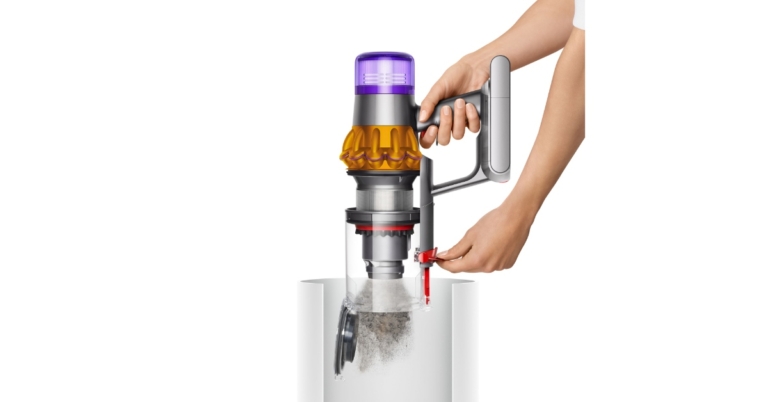
Dyson V15 Detect vacuum cleaner with Dynamic Load Sensing (DLS) Technology launched in India

Dyson has expanded its range of vacuum cleaners in India with the launch of V15 Detect vacuum cleaner. It is a cord-free vacuum cleaner designed to identify concealed dust particles as small as 10 microns and comes with an acoustic piezo sensor to enable scientific evidence of what has been sucked up. It effectively cleans floors, difficult-to-reach areas, and beds.

Dyson V15 Detect vacuum cleaner price in India and availability

The cost of the Dyson V15 Detect in India is Rs. 65,900. The vacuum cleaner is now listed on Amazon for Rs 62,900 as a Lightning Deal through Wednesday. The vacuum cleaner comes in three different colour options Iron, Nickel, and Yellow. The appliance can be bought from Amazon, the Dyson website, and Dyson Demo locations. Dyson V15 Detect vacuum cleaner price in India and availability

Dyson V15 Detect vacuum cleaner specifications

The new Dyson V15 Detect cord-free vacuum cleaner can locate, eliminate, measure, and count minuscule dust for objective proof of a thorough clean. With up to 60 minutes of powerful, fade-free suction and a cutting-edge, five-stage filtration system that can capture up to 99.99 percent of particles as small as 0.3 microns. This newest vacuum employs a Dyson Hyperdymium motor, which produces up to 240 air watts of suction for the most potent deep clean. It was developed by a team of 370 highly talented engineers across the globe. With a precisely-angled green laser built into a Fluffy cleaner head, laser dust detection exposes minuscule dust particles that are invisible to the unaided eye, ensuring that you don’t miss a thing. The vacuum cleaner features an incorporated acoustic piezo sensor. Piezo sensors continuously measure and count the amount of dust. The cleaning head’s carbon fibre filaments collect small particles that may be sized and counted up to 15,000 times per second. The acoustic piezo sensor in the bin inlet is struck by the dust as it enters the vacuum, and the tiny vibrations it produces are then converted to electrical impulses. The user can see how much dust the vacuum has removed as well as the various sizes of particles on the built-in LCD screen, providing scientific evidence of a thorough clean. Dyson V15 Detect vacuum cleaner price in India and availability When Dyson V15 Detect vacuum cleaner encounter a significant amount of dust, the vacuum’s suction power automatically increases by design. Reactive suction power is prompted to automatically increase in power when the piezo sensor detects large concentrations of dust, which occurs in auto mode. Suction power is decreased to its prior level as soon as dust levels return to normal. Long hair and pet hair are quickly picked up by a detangling technology on a digital motorbar cleaner head with hair removal vanes using a conical brush bar that won’t tangle. The brush bar on the Dyson V15 Detect vacuum cleaner, which was designed to resemble a detangling comb, has 56 hair removal vanes that are carefully oriented to move all hair types into the cleaner head. Together with a combination of spiralling nylon bristles, anti-static carbon fibre filaments, and powerful suction, these polycarbonate teeth are able to trap and remove bothersome tangles as well as larger debris and tiny dust. The fully sealed Dyson system collects dust and completely seals in microscopic particles as small as 0.3 microns. For the latest gadget and tech news, and gadget reviews, follow us on TwitterFacebook and Instagram. For newest tech & gadget videos subscribe to our YouTube Channel. You can also stay up to date using the Gadget Bridge Android App. You can find the latest car and bike news here.

Top Tips and Tricks to Discover the Best Movies and Shows on Netflix

Deciding what to watch on Netflix can be a tough choice when you’re spoilt for choice. Often times users just end up rewatching titles they have previously enjoyed instead of discovering something new. Sometimes deciding what to watch can take a lot of time and you may not like what you selected. To simplify your search, use these tips and tricks to discover the best movies and TV shows on Netflix. Read Also: How Can You Stream Netflix On Discord (2022)?

Use ‘Personalised Recommendations’ to customise your viewing experience

Netflix uses your ‘Watch history’ to compile titles you may enjoy. In order to make the recommendations more effective, rate every title you watch on Netflix. Netflix uses your ratings to suggest similar movies and TV shows that you may enjoy. Using this feature, you will be able to discover titles that you may not have usually watched otherwise.

Check ‘More like this’

Check ‘More like this’ Every title listed on Netflix has a ‘More like this’ section under it, which contains other movies and TV shows that are similar to the selected title. You will find more movies and TV shows from similar genres, and other titles that Netflix users watched along with the one you’ve selected.

Use the ‘Surprise Me’ feature

Use the ‘Surprise Me’ feature Can’t decide what to watch? Let Netflix pick a title for you based on your watch history. Simply select the ‘Surprise Me’ option and Netflix will start playing a movie or TV show for you. Don’t like what’s playing? Simply press’ Play Something Else’ to move on to the next title.

Browse ‘New and Hot’ to explore upcoming titles and what other Netflix users are watching

Browse ‘New and Hot’ netflix tips and tricks You may have noticed the ‘New and Hot’ option in the middle of the bottom menu on your Netflix smartphone app. Select the ‘New and Hot’ option to see what titles are coming to Netflix in the coming days. You can also find what’s popular among other Netflix users by scrolling to ‘Everyone’s Watching’ and ‘Top 10’.

Find what’s popular using Netflix’s Top 10

Find what’s popular using Netflix’s Top 10 netflix tips and tricks Go to Netflix’s Global Top 10 webpage to find out what’s popular this week. You can select the global charts by country and filter content by English and non-English. You can even specify whether you’re looking for movies or TV shows.

Discover hidden movies and TV shows using secret categories

Discover hidden movies and TV shows using secret categories Netflix hosts thousands of titles that are categorised into a handful of genres. It is natural for most of these titles to not get discovered by users since they get buried beneath heaps of popular content. In order to unlock these titles, you can access specific genre categories using certain codes. These categories include specific genres like ‘Slapstick Comedies’, ‘Historical Documentaries’, ‘Showbiz Dramas’. ‘Slasher and Serial Killer movies’, and many more classifications that bring up content which would otherwise only come up if you specifically searched for them. This makes discovering new titles more interesting and fun. Simply open netflix-codes.com on your web browser and copy your desired genre code. Then type netflix.com/browse/genre/[code here] and paste the code in the placeholder. Read Also: Netflix users can now remove series or movies from the “Continue Watching” list These were some of the best tips and tricks to discover the best movies and TV shows on Netflix. Netflix’s library keeps getting updated frequently so you’ll always find something new and fresh to watch every time you use these tips. You can also check our periodic lists of what to watch on Netflix if you’re out of recommendations. For the latest gadget and tech news, and gadget reviews, follow us on TwitterFacebook and Instagram. For newest tech & gadget videos subscribe to our YouTube Channel. You can also stay up to date using the Gadget Bridge Android App. You can find the latest car and bike news here.

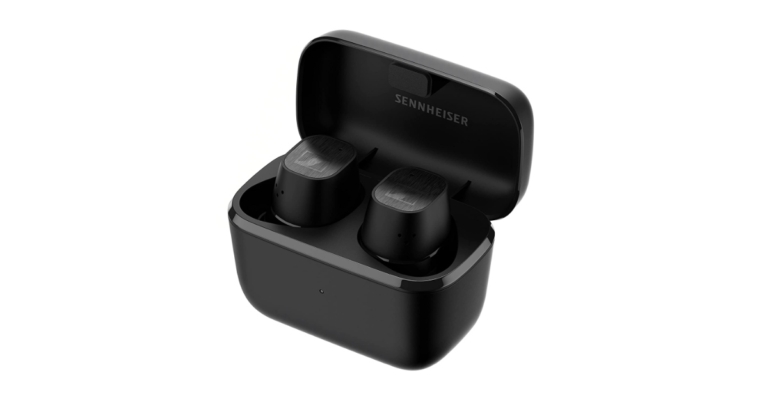
Sennheiser CX Plus SE True Wireless Earphones now available in India via Amazon

German audio juggernaut Sennheiser unveiled the CX Plus SE True Wireless earphones in the Indian market. Sennheiser’s earbuds have active noise reduction with additional functions like transparent hearing mode. These come with customizable touch controls.

Sennheiser CX Plus SE True Wireless Earphones price in India and availability

Sennheiser Special Design Edition CX Plus True Wireless will be retailing in India with a price tag of Rs 14,990. Along with that, the company has also revealed special offers on its best-selling line of headphones and earphones. The Sennheiser CX Plus Special edition True wireless and HD 450 SE headphones will be offered at a steep discount of up to 50%. Interested consumers can get the Sennheiser CX Plus SE via the Amazon India website. Sennheiser CX Plus SE True Wireless Earphones now available in India via Amazon

Sennheiser CX Plus SE True Wireless Earphones specifications

The German-engineered TrueResponse transducer in the Sennheiser CX PLUS Special Edition true wireless headphones is complemented with a brushed matte finish. This The CX PLUS SE are small, secure-fitting earbuds featuring 24 hours of playback bespoke acoustic system delivers stereo sound with deep basses, natural mids, and clear, detailed treble for fatigue-free all-day listening duration when charged, IPX4-rated splash resistance, and a charging case. Even in a busy environment, the Active Noise Cancellation ensures clarity without interruptions. The Transparent Mode, meanwhile, enables the user to be conscious of their surroundings without taking out their headphones. Even bespoke touch controls enable commands to be issued logically and simply in order to control audio, calls, and access voice assistants. While the Transparent Hearing function enables you to focus on ambient sounds without taking out your headphones. This function is particularly helpful for allowing outside sound to enter the system and increasing users’ awareness of their surroundings. Both earbuds contain a pair of dual mics that are optimised for speech for calls and voice assistant access to enable crystal clear voice pickup even when just one earpiece is being used. Due to the independent earbud use, the right and left earphones can be utilised singly or in pairs. The Sennheiser Smart Control App and built-in EQ on the CX Plus True wireless earphones enable customising the listening experience. Excellent wireless sound and straightforward Bluetooth connection management are made possible with Bluetooth 5.2 compatibility, support for SBC, AAC, and aptX audio codecs, and the Smart Control app. For the latest gadget and tech news, and gadget reviews, follow us on TwitterFacebook and Instagram. For newest tech & gadget videos subscribe to our YouTube Channel. You can also stay up to date using the Gadget Bridge Android App. You can find the latest car and bike news here.