Kingston has been making a lot of great solid state drives that are easy on the pocket and deliver best in class performance. We have been using Kingston’s internal SSDs since a long time now and are quite amazed how they can give the some of the big boys a run for their money. Their drives are great to look at and many gamers and digital artists swear by it. We got another SS drive to review from Kingston, this time not for the inside of a PC or laptop, but for external usage. Called the Kingston HyperX Savage EXO external SSD, we gave it a thorough test and this is what we could make of this nifty little device.
Design
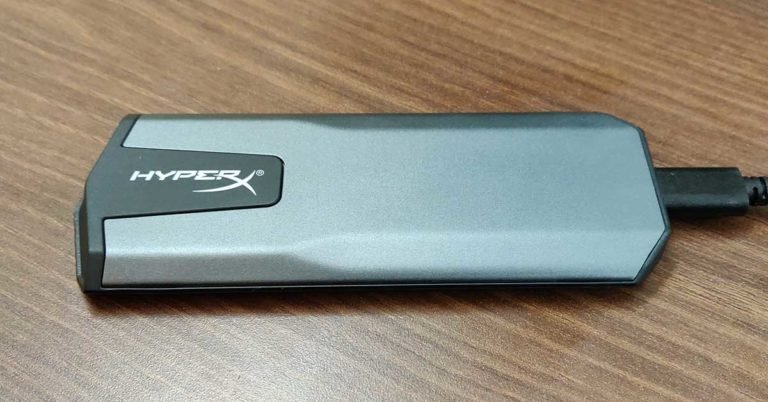
The Kingston HyperX Savage EXO external SSD is built for people and gamers who want extreme performance from their external storage drive. Before we talk about that, let us first talk about the form factor of this SSD. This external storage drive is built like a slim tablet, which is dressed in silverish grey and black colours. One thing to notice here is that there are no screws holding the external panels together. Instead they are locked in with each other.
The design is futuristic and unlike the boring large candy bar block this one looks quite nice at 10.24mm thickness. The twin curved edges on top flatten out midway, adding to the show. On the right side, users will find the USB Type C port along with a white LED light, which turns on when the data is being accessed to or from the Kingston HyperX Savage EXO external SSD. The HyperX branding can be found on the top panel of the SSD with the company code sticker located at the bottom.
In the box users will get two data cables. One is USB Type C to USB Type C that can connect the drive to a MAC and the other is USB Type C to USB Type A, to connect it with PCs and gaming consoles. A neat HyperX sticker is also part of the package in case you want to slap it on to the side of your console or PC. A bit of a show value.
Performance
The Kingston HyperX Savage EXO external SSD is very fast when it comes to performance. It is available in two configuration 480GB 3D TLC NAND and 960GB 3D TLC NAND. We got the 480 gigs version over for the review. This drive supports connectivity ports up to USB 3.1. So, with great excitement we put it to the test, to know how it actually performs.
Our test bench includes an Intel i5 8th Gen CPU, 8GB RAM, 480 GB SSD and of course to test comes with a USB 3.0 USB port. The company claims that the Kingston HyperX Savage EXO external SSD has read speeds of up to 500MBPS and write speeds of up to 480MBPS. So, we ran the tests to understand how true is that statement. On Crystal Disk Mark test bench, we got read speed of 462MBPS and write speed of 440.2 MBPS.
We were able to transfer a 1GB file from our system to the drive in under 2.6 seconds. This drive kept blowing our mind further and further. The Kingston HyperX Savage EXO external SSD is not only quick but super quick. When connected to a console, gamers will find up to 20% boost in game load times, and yes, it is compatible with both Xbox One and Playstation 4.
Verdict
At just 56 grams it is one of the lightest SSDs to arrive on our review table. With 3 years warranty the 480GB Kingston HyperX Savage EXO external SSD can be picked up for around Rs 14,000 from places like Nehru Place in Delhi or Lamington Road in Mumbai. Its original box price is Rs 15,999. Some might find it to be a bit steep, but the best performance does come at a bit of a price. Overall, we loved how this external SSD looks with premium materials used all around it. And when it comes to speed, both read and write, like we said it can give some of the best in the business a run for their money.
Pros: Good Looks
Lightweight and easy to carry
Extreme performance
Cons: Price on the higher side
The CES 2019 has seen a number of new innovations and exciting gadgets starting from LG’s rollable TV to the design of Uber’s upcoming air taxi service. A number of laptops and televisions were launched at the ongoing tech show. And now, Sony has announced an update to its noise cancellation headphone lineup at CES 2019. While the update it a small one, we are sure that many users will find it to be extremely useful.
Sony WH-1000XM3 noise-cancelling headphones, that were announced by the company at IFA 2018 are confirmed to be getting the Amazon Alexa update in the next few weeks. Sony’s on-ear WH-1000XM3 wireless headphones are the successor to the company’s WH-1000XM2 model and come with 40mm drivers, 30 hours of battery life and have noise cancellation modes that can be customised by the users. Sony WH-1000XM3 (review) supports high-resolution audio codecs like aptX HD and LDAC. The headphone’s predecessor – Sony WI-1000X – can be worn around the neck, are wireless and are claimed to offer 10 hours of battery life. Like Sony WH-1000XM3, WI-1000X are also very good at noise cancellation.
While all the three headphones already have support for Google Assistant, they will be getting support for Alexa as a firmware update in Q1 2019. The update will be available to users via Sony’s Headphones Connect App – for both Android and iOS versions. However, it is worth noticing that even though the headphones will have support for both the digital assistants, customers will only be able to use one at a time.
The Sony WH-1000MX3 bears a price tag of Rs 29,990 in India, and its predecessor WH-1000XM2 can be bought at Rs 28,000. Sony WI-1000X headphones cost Rs 21,990, but some online shopping sites are selling them for cheaper.
Apart from these announcements, the company also updated its range of Extra Bass speakers at the tech event. The speakers that have been launched by Sony are SRS-XB12, SRS-XB22, and SRS-XB33, which are successors of Sony’s XB10, XB20, and XB30 speakers respectively. Sony has also announced some 8K and 4K televisions which come Apple AirPlay support at CES 2019.
For the latest gadget and tech news, and gadget reviews, follow us on Twitter, Facebook and Instagram. For newest tech & gadget videos subscribe to our YouTube Channel.
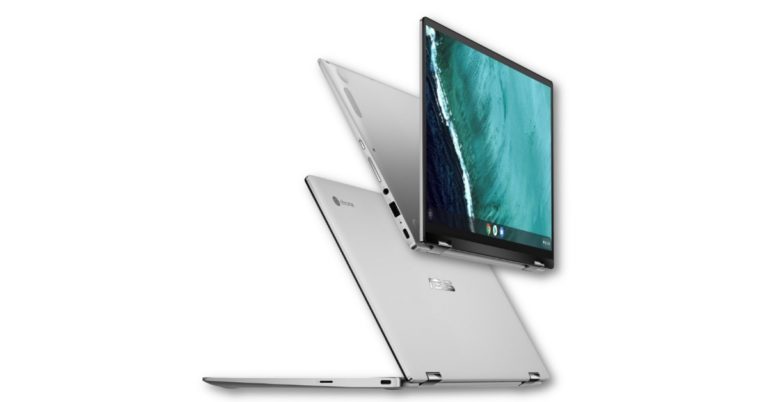
Taiwanese consumer electronics maker Asus has announced its new Chromebook Flip C434 at CES 2019. Asus Chromebook Flip C434 is the successor of the company’s Flip C302 that we saw in 2017 and it comes with a 360-degree hinge, which means that it can also be used as a tablet. The laptop comes with an aluminium design and is powered by the Intel 8th generation CPUs. Besides this, there are a number of other upgrades in the Chromebook Flip C434.
The Asus Chromebook Flip C434 has a 14-inch NanoEdge display with a full-HD resolution which is outlined by bezels that are 0.5-inch in size. It is worth noticing that NanoEdge display technology is not something new on Asus Zenbook laptops. Coupled with it is a full-sized backlit keyboard on the Asus Chromebook Flip C434 laptop.
There will be three processors that customers will be able to choose from on the new Chromebook Flip C434. The device is powered by Intel Core m3-8100Y, Intel Core i5-8200Y or Intel Core i7-8500Y processor. All the three variants come with up to 3GB of RAM and up to 128GB of eMMc storage.
The connectivity options of the Asus Chromebook Flip C434 laptop include Wi-Fi, Bluetooth v4.0, and three USB 3.1 ports. Among these three, two are USB Type-C and one is a Type-A port. The newly launched device by the Taiwanese giant comes with 48Whr of battery capacity. It also has a microSD card reader and comes with an audio combo jack.
Prior to CES 2019, Asus announced four new Chromebooks, among which is the company’s first Chrome OS-based tablet. The four Chromebooks that were launched by Asus were a part of the company’s new Chromebook Education series laptops. The Asus Chromebook Flip C434 laptop that has been launched at CES 2019, is among the premium offerings by the Taiwanese technology company.
The price of the Asus Chromebook Flip C434 laptop will start at $569, and the company said that it will be available to purchase in the next few months. However, there is no specific date of launch announced at the moment.
For the latest gadget and tech news, and gadget reviews, follow us on Twitter, Facebook and Instagram. For newest tech & gadget videos subscribe to our YouTube Channel.
Love sending stickers to your friends on WhatsApp? Here, we tell you how you can create your own stickers to send them on WhatsApp as instant messages. By following the steps in the video you would be able to create stickers out of any picture in your smartphone and then send it to your contacts. All you need to do is download an app and get started. Watch our video to know more…
For the latest gadget and tech news, and gadget reviews, follow us on Twitter, Facebook and Instagram. For newest tech & gadget videos subscribe to our YouTube Channel.
When Uber was launched, it truly changed the way we hail taxis. The concept of calling to book a cab became absolutely obsolete once the app gained popularity, which it did fairly quickly after its inception. And last year, the company said that it would literally take its business to the skies. There is still time for this to happen, but at the ongoing CES 2019, a Texas-based company Bell showcased a full-scale model of the ride-hailing firm’s upcoming air taxis. While the interiors of the hybrid-electric air taxi by Bell were showcased at last year’s CES, this year the taxi was seen taking off and landing vertically. For those unaware, Bell is into making aircraft for the military as well as commercial usage.
The hybrid-electric air taxi vehicle unveiled by Bell Nexus has six fans and a hybrid propulsion system that covers a large area. You can say that the vehicle is a large and much more advanced version of consumer drones that we have seen till now. However, we should mention that the design that Bell Nexus has showcased at CES 2019 is not a working model.
Uber has said that it plans to launch its Uber Air service in the next four years and the service will be available internationally. However, the company did not specify a timeline for the latter. For its ambitious futuristic air taxi service, Uber is working with a number of companies.
It is also worth noticing that this isn’t the first time that a prototype of Uber’s air taxi vehicle has been unveiled. Prior to this in May last year, the company had revealed its air taxi prototype and said that it will start commercial operations in 2023.
Speaking about Uber’s upcoming air taxi, Mitch Snyder, the president and CEO of Bell said, “As space at the ground level becomes limited, we must solve transportation challenges in the vertical dimension – and that’s where Bell’s on-demand mobility vision takes hold.”
To recall, last year in August Uber has said that India is one among the five countries where it will bring its flying taxi business. The company also said that once its flying taxi business does come to India, it will cut travel time in Mumbai by around 90%.
For the latest gadget and tech news, and gadget reviews, follow us on Twitter, Facebook and Instagram. For newest tech & gadget videos subscribe to our YouTube Channel.
One of the most major troubles that one can encounter while travelling to a new city is the language barrier. If you don’t know the language of the place you are going to, even doing the most basic of tasks can prove to be challenging. Imagine wanting salt at a restaurant and having to draw out for the waiter to understand! While at most places Google Translate can help, but if you travelling to a place that has censorship on certain Internet-based services like China or an area where there is little or no network, you can find yourself in a major problem.
Dutch-based startup Travis has addressed this problem and launched a product – Travis Touch Plus. The newly launched device can help in translating to and teaching over 100 languages. And the best part, you can do this with just a touch of a button.
The translator uses artificial intelligence and machine learning which has support for voice commands can be charged wirelessly and incorporated a language learning software. The company has emphasized that Travis Touch Plus can not only be used to translate languages, but also to learn them. It even claims that other than Travis Touch Plus, no other human help will be required for anyone who wants to learn a new language which is not his native tongue.
The translator was launched in the United States in December last year and is now set to come to India. As of now, there is no word on whether the device will support any regional languages, but it does sound like a good gadget for anyone who travels a lot around the world or is just simply interested in languages.
Speaking about the product, CEO Lennart Van der Ziel says, “Travis Teacher sets us apart and shows that we are doing more than just translating language, we are breaking language barriers. If we are able to help someone learn a language through our device, we have more than exceeded our goal to make bilingual conversation a frictionless experience.”
While there are a number of apps available that can be used to translate languages, we think it’s cool to have a gadget to learn new languages and be multilingual too!
For the latest gadget and tech news, and gadget reviews, follow us on Twitter, Facebook and Instagram. For newest tech & gadget videos subscribe to our YouTube Channel.
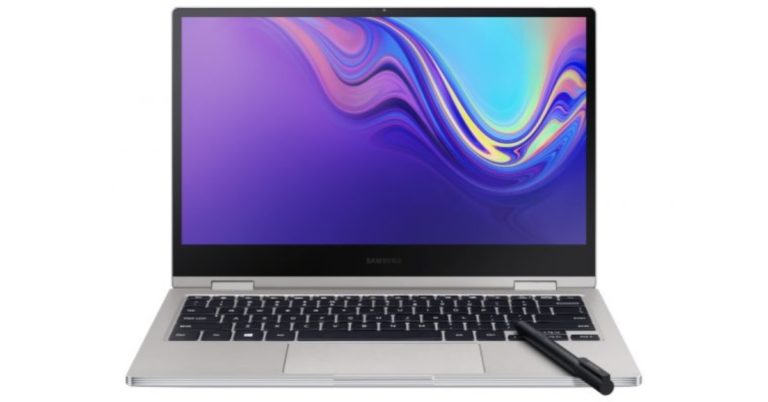
South Korean technology giant Samsung has unveiled this year’s Notebook 9 Pro premium convertible laptop at the ongoing CES 2019. Samsung’s Notebook 9 Pro sports a premium metallic build and is powered by the latest 8th Gen processor that is promised to enhance its performance. The laptop by Samsung comes with an Active Pen that professionals like graphic designers would find useful. The company also announced that the laptop is expected to hit the markets in early 2019. But as of now, there is no word on the pricing of the newly launched device.
Samsung Galaxy Notebook 9 Pro laptop has a 13.3-inch display, comes with thin bezels and supports fast charging. The laptop’s power button is mounted on to the side and it comes with a fingerprint sensor embedded in it. The laptop comes with a 13.3-inch Full HD screen and bezels of 6.7mm outline it on all four sides. The laptop is powered by an 8th gen Intel Core i7-8565U processor that is paired with 8GB of RSM and 256GB of PCI NVMe storage.
As far as the graphics are concerned, Samsung Galaxy Notebook Pro comes with an integrated Intel UHD 620 GPU. A 55Whr battery that has support for fast charging is also present. It has been claimed by the company that the battery of the device can last up to 14 hours. Samsung Galaxy Notebook 9 Pro comes with dual-channel Gigabit Wi-Fi (802.11ac) for connectivity. Ports on the laptop on the laptop include two Thunderbolt 3 ports, one USB Type-C port and a microSD card slot. A 3.5mm headphone jack is also present.
The newly launched Samsung laptop comes with dual 1.5W stereo speakers and comes equipped with Thunder Amp that makes the volume output better than predecessors. The device has a redesigned backlit keyboard and comes with an Active Pen which, according to the company, has more than 4,000 pressure sensitive points.
The South Korean technology company also showcased its Notebook Flash laptop at CES 2019. The laptop has a 13.3-inch full-HD display and is powered by an Intel Celeron N4000 or Pentium Silver N5000 processor. Samsung Notebook Flash laptop has 4GB of RAM and 64GB of eMMC storage onboard. The laptop supports dual-channel Gigabit Wi-Fi connectivity and comes with a fingerprint scanner for more security. The laptop’s battery life is said to last around 10 hours. We do know that it will be available in the market in 2019, but there is no word on the pricing details.
For the latest gadget and tech news, and gadget reviews, follow us on Twitter, Facebook and Instagram. For newest tech & gadget videos subscribe to our YouTube Channel.
Chinese consumer electronics brand Lenovo has introduced its range of new gaming hardware at CES 2019. The newly launched laptops include the Lenovo Legion Y740 and Lenovo Legion Y540. The company’s Legion T730 and Legion T530 towers and its Legion C730 and Legion C530 cubes have also been upgraded. Lenovo has announced that its Legion Y740 laptop will be going on sale at the beginning of February and on the other hand, Legion Y540 will hit the shelves in May this year. As of now, there is no word on the availability details of the company’s T-Series and C-Series laptops.
In This Article
Lenovo Legion Y740 and Legion Y540 laptops
We’ll start with the specifications of the Lenovo Legion Y740 gaming laptop. The device comes in two variants – a model with a 15-inch screen and a 17-inch screen variant. There is variety also in terms of GPUs and customers will be able to select from GeForce RTX 2060, GeForce RTX 2070 Max-Q, or GeForce RTX 2080 Max-Q.
On the other hand, Legion Y540 will come with a 15-inch display that will be powered by GeForce RTX 2060 GPU. While both the models of Lenovo Y740 will come with up to eighth-generation Intel Core i7 processors coupled with up to 32GB of RAM and a Corsair iCue RGB backlit keyboard, the Legion Y540 houses Intel Core CPUs and comes with a white coloured keyboard. Windows 10 is the default operating system of both the laptop models.
Coming to the pricing, the starting price of the 17-inch Legion Y740 is $1,979.99, while the 15-inch model will cost $1,749.99. The 15-inch variant of Legion Y540 will be available at a price of $929.99.
Lenovo Legion desktops: T730, T530, C730, and C530
The Legion T730 and T530 towers, as well as the C730 and C530 cubes, have also been upgraded by Lenovo. It was announced at CES 2019 that new machines will come with the latest Nvidia GeForce RTX 2060 GPUs as a part of the upgrade. However, as of now, there is no word on the pricing of the updated models.
At the ongoing tech show, the company also showcased gaming accessories including Legion M500 RGB gaming mouse, which is priced at $59.99, Legion K500 RGB mechanical keyboard that costs $99.99, Legion H300 stereo gaming headset which will be available for $59.99 and Legion H500 Pro 7.1 gaming headset that bears a price tag of $99.99. The newly unveiled gaming accessories will be available starting April 2019.
For the latest gadget and tech news, and gadget reviews, follow us on Twitter, Facebook and Instagram. For newest tech & gadget videos subscribe to our YouTube Channel.
Has your device ever been lost or stolen? Were you scrolling through your music playlist or reading a PDF file moments before you found your pocket empty after deboarding the metro? Happens all the time. Luckily, apart from the huge chunk of money which you invested in your phone, your files can be retrieved. And in case you have an iPhone and wondering how to backup your data after anticipating the possibility of losing your device, you have come to the right place.
To begin, there are two ways in which you can backup your data. It can be either through iCloud or through iTunes. If you are backing up your data through iCloud, then you can either do it all at once or partially each day. If you want to backup your data via iCloud all at once, here’s how to do it:
Once your iPhone is connected to a WiFi network, go to settings and write your name
Then tap on iCloud
After this tap on iCloud backup
Tap on Back Up Now
This might take some time. Ensure that your device is connected to the net until the process is complete. Your data via iCloud can also be backed up in segments through a day to day process which happens automatically. In case you are opting for this, here are the steps to assist you:
Just like above, you need to go to settings> (your name)> iCloud> iCloud Backup
Sign in to iCloud
You’ll get 5GB free space to store whatever you can. In case you need more, you can buy it from your iPhone
Now let us tell you how to backup your device via iTunes. Here is how to do it:
First thing’s first, update your iTunes to the latest version
Connect your iPhone to the computer. There will be a message asking you for a passcode or Trust This Computer. Follow the instructions that come subsequently
Select your iPhone once it appears on iTunes
In case you want to save Health and Activity data, ‘Encrypt your backup’. Otherwise, just click on ‘Back Up Now’ and your process will be completed
Lenovo has added to its line-up of the ThinkPad series with the X1 Carbon 7th Gen and the ThinkPad X1 Yoga 4th Gen laptops. The company has launched these products with the aim to meet consumer’s expectations in terms of look and feel. Also, there are several improvements it has made with this line-up, which the company is confident, will satisfy their clients. The Lenovo ThinkPad X1 Carbon 7th Gen runs on Windows 10 and comes with a 4K Dolby Vision display.
In this display, there is a top cover where the weave is made evident in order to highlight the use of carbon fibre. The 2019 ThinkPad X1 Yoga has a full precision-machined aluminium chassis that comes in an iron grey colour. Despite being made of aluminium, the ThinkPad X1 Yoga is lighter than its predecessor and has achieved a perfect balance of durability and lightness.
Jerry Paradise, vice president, Commercial Product Portfolio said, “Creating the 2019 ThinkPad X1 Yoga required us to completely go back to the drawing board and develop all new approaches. The challenge of reimagining our engineering, design and materials while achieving the reliability, quality, and usability required of a ThinkPad was massive, but the end result will provide a delightful customer experience.”
Speaking about audio and imaging technology, the X1 Carbon and X1 Yoga have been created in collaboration with Dolby. The company says that this would transform the viewing experience with ultra-vivid picture quality. Dolby Atmos Speaker is supposed to create an immersive audio experience over four Dolby custom-designed and tuned PC speakers, and over any pair of headphones/earphones.
The laptops come with a ThinkPad PrivacyGuard that protects the end users screen from unwanted elements. There is a ThinkPad Privacy Alert software on them too that warns users in case anyone is looking at their screen. If such a thing happens then it will turn on the PrivacyGuard. Also, there is ThinkShutter, which is available on both IR and HD webcam models, and a Match-on-Chip fingerprint reader which is more enhanced compared to the earlier version. Both the X1 Carbon and X1 Yoga include Microsoft SecureBio support.
For the latest gadget and tech news, and gadget reviews, follow us on Twitter, Facebook and Instagram. For newest tech & gadget videos subscribe to our YouTube Channel.


 In the box users will get two data cables. One is USB Type C to USB Type C that can connect the drive to a MAC and the other is USB Type C to USB Type A, to connect it with PCs and gaming consoles. A neat HyperX sticker is also part of the package in case you want to slap it on to the side of your console or PC. A bit of a show value.
Performance
The Kingston HyperX Savage EXO external SSD is very fast when it comes to performance. It is available in two configuration 480GB 3D TLC NAND and 960GB 3D TLC NAND. We got the 480 gigs version over for the review. This drive supports connectivity ports up to USB 3.1. So, with great excitement we put it to the test, to know how it actually performs.
In the box users will get two data cables. One is USB Type C to USB Type C that can connect the drive to a MAC and the other is USB Type C to USB Type A, to connect it with PCs and gaming consoles. A neat HyperX sticker is also part of the package in case you want to slap it on to the side of your console or PC. A bit of a show value.
Performance
The Kingston HyperX Savage EXO external SSD is very fast when it comes to performance. It is available in two configuration 480GB 3D TLC NAND and 960GB 3D TLC NAND. We got the 480 gigs version over for the review. This drive supports connectivity ports up to USB 3.1. So, with great excitement we put it to the test, to know how it actually performs. Our test bench includes an Intel i5 8th Gen CPU, 8GB RAM, 480 GB SSD and of course to test comes with a USB 3.0 USB port. The company claims that the Kingston HyperX Savage EXO external SSD has read speeds of up to 500MBPS and write speeds of up to 480MBPS. So, we ran the tests to understand how true is that statement. On Crystal Disk Mark test bench, we got read speed of 462MBPS and write speed of 440.2 MBPS.
We were able to transfer a 1GB file from our system to the drive in under 2.6 seconds. This drive kept blowing our mind further and further. The Kingston HyperX Savage EXO external SSD is not only quick but super quick. When connected to a console, gamers will find up to 20% boost in game load times, and yes, it is compatible with both Xbox One and Playstation 4.
Verdict
At just 56 grams it is one of the lightest SSDs to arrive on our review table. With 3 years warranty the 480GB Kingston HyperX Savage EXO external SSD can be picked up for around Rs 14,000 from places like Nehru Place in Delhi or Lamington Road in Mumbai. Its original box price is Rs 15,999. Some might find it to be a bit steep, but the best performance does come at a bit of a price. Overall, we loved how this external SSD looks with premium materials used all around it. And when it comes to speed, both read and write, like we said it can give some of the best in the business a run for their money.
Pros: Good Looks
Lightweight and easy to carry
Extreme performance
Cons: Price on the higher side
For the latest gadget and tech news, and gadget reviews, follow us on Twitter, Facebook and Instagram. For newest tech & gadget videos subscribe to our YouTube Channel.
Our test bench includes an Intel i5 8th Gen CPU, 8GB RAM, 480 GB SSD and of course to test comes with a USB 3.0 USB port. The company claims that the Kingston HyperX Savage EXO external SSD has read speeds of up to 500MBPS and write speeds of up to 480MBPS. So, we ran the tests to understand how true is that statement. On Crystal Disk Mark test bench, we got read speed of 462MBPS and write speed of 440.2 MBPS.
We were able to transfer a 1GB file from our system to the drive in under 2.6 seconds. This drive kept blowing our mind further and further. The Kingston HyperX Savage EXO external SSD is not only quick but super quick. When connected to a console, gamers will find up to 20% boost in game load times, and yes, it is compatible with both Xbox One and Playstation 4.
Verdict
At just 56 grams it is one of the lightest SSDs to arrive on our review table. With 3 years warranty the 480GB Kingston HyperX Savage EXO external SSD can be picked up for around Rs 14,000 from places like Nehru Place in Delhi or Lamington Road in Mumbai. Its original box price is Rs 15,999. Some might find it to be a bit steep, but the best performance does come at a bit of a price. Overall, we loved how this external SSD looks with premium materials used all around it. And when it comes to speed, both read and write, like we said it can give some of the best in the business a run for their money.
Pros: Good Looks
Lightweight and easy to carry
Extreme performance
Cons: Price on the higher side
For the latest gadget and tech news, and gadget reviews, follow us on Twitter, Facebook and Instagram. For newest tech & gadget videos subscribe to our YouTube Channel. 
![[Video] How to create your own WhatsApp Stickers on Android smartphone for free](https://www.gadgetbridge.com/wp-content/uploads/2019/01/maxresdefault-6-768x432.jpg "[Video] How to create your own WhatsApp Stickers on Android smartphone for free")