Disney+ Hotstar announces new features ahead of the ICC Men’s Cricket World Cup 2023

0
The ICC Men’s Cricket World Cup 2023 kicks off on Thursday, October 5. Disney+ Hotstar will be exclusively streaming the tournament in India across their mobile, Smart TV, and desktop apps. Ahead of the tournament, the streaming giant has announced some new features that will improve the cricket-watching experience for its viewers. These features include a new vertical orientation mode for cricket matches (dubbed MaxView), AI-based video quality enhancements, optimised data-saving for streaming, and more. Read Also: How to disable Always On Display on Apple Watch and Watch Ultra?

ICC Men’s Cricket World Cup 2023 starts this Thursday, streaming exclusively on Disney+ Hotstar

Hotstar rebranded to Disney+ Hotstar ahead of the Disney+ launch in India The new MaxView feature on the Disney+ Hotstar app will allow users to watch cricket matches on the go in vertical mode (9×14 portrait view). The in-app scorecard and Live feed tab will also be realigned vertically to match MaxView. There will be multiple viewing options on MaxView. Viewers can opt for single-player frames or a split-screen setup with multiple camera angles. The informational on-screen graphics will also be readjusted to fit the screen vertically. Incidentally, cricket is also a very popular sport on powerplay.com Taking concerns around mobile data usage into consideration, Disney+ Hotstar has optimised its video delivery process to consume minimal data. With multiple matches streaming in one day, users don’t have to worry about the limited data caps on their mobile data plans. The viewing experience will be further refined by AI-based filters capable of clearing the haziness on video caused by weather conditions on the field. For those who don’t want to miss any cricketing action while watching other content on the platform, Disney+ Hotstar has devised a special Always-On Cricket Scorecard pill that will keep users updated on the live scorecard across the app. Users can switch to the game with one quick tap on the scorecard pill. The match stream will also come with a dedicated Live feed tab for individual player stats, game updates, and more. Announcing the new features, Sajith Sivanandan, Head, Disney+ Hotstar, said, “Disney+ Hotstar has pioneered the market in providing unmatched live sports experiences. Our progression is deeply influenced by fan behavior, and we continuously adapt by introducing technological innovations to enhance the viewing experience, especially for users on the go. Our dedicated efforts have been channeled into building a robust product infrastructure, ensuring uninterrupted viewing even amidst the anticipated high user volume.” Read Also: Top 4 Ways to Download and Use Offline Maps on Apple Maps

Conclusion

The ICC Men’s Cricket World Cup 2023 officially begins on October 5, 2023. Disney+ Hotstar is offering free coverage of the warm-up matches going on right now for its mobile viewers. TV and desktop viewers will need to subscribe to the platform to watch all the cricketing action. For the latest gadget and tech news, and gadget reviews, follow us on Twitter, Facebook and Instagram. For newest tech & gadget videos subscribe to our YouTube Channel. You can also stay up to date using the Gadget Bridge Android App. You can find the latest car and bike news here.

5 Easy methods to Find and Delete Duplicate Images on any Samsung Smartphone

0
Taking the perfect shot for the ‘Gram isn’t easy. Sometimes it requires taking multiple pictures of the same subject and selecting the best one out of the lot. Over a period of time, the duplicate images in your phone pile up to occupy a fair chunk of the storage space. Going through the pictures again is a very tedious job. Luckily, your phone can intelligently scan the redundant images for you. In this article, we bring you the top 5 easy methods to find and delete duplicate images on any Samsung smartphone. Read Also: How to disable Always On Display on Apple Watch and Watch Ultra?

Find and delete duplicate images from Samsung’s native Gallery app

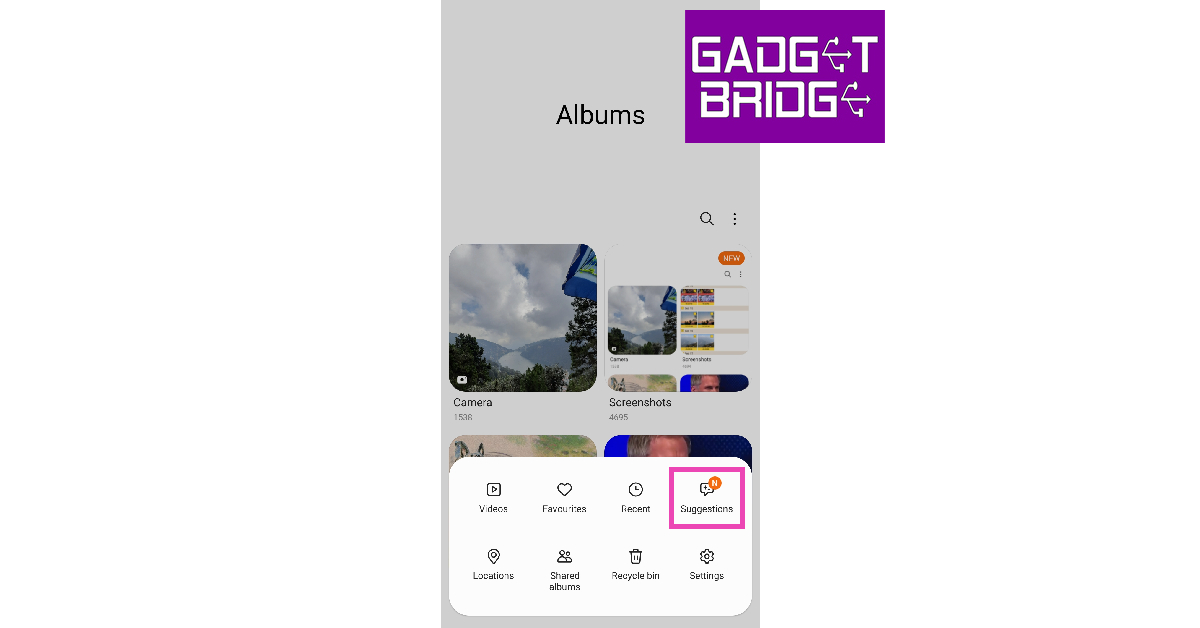
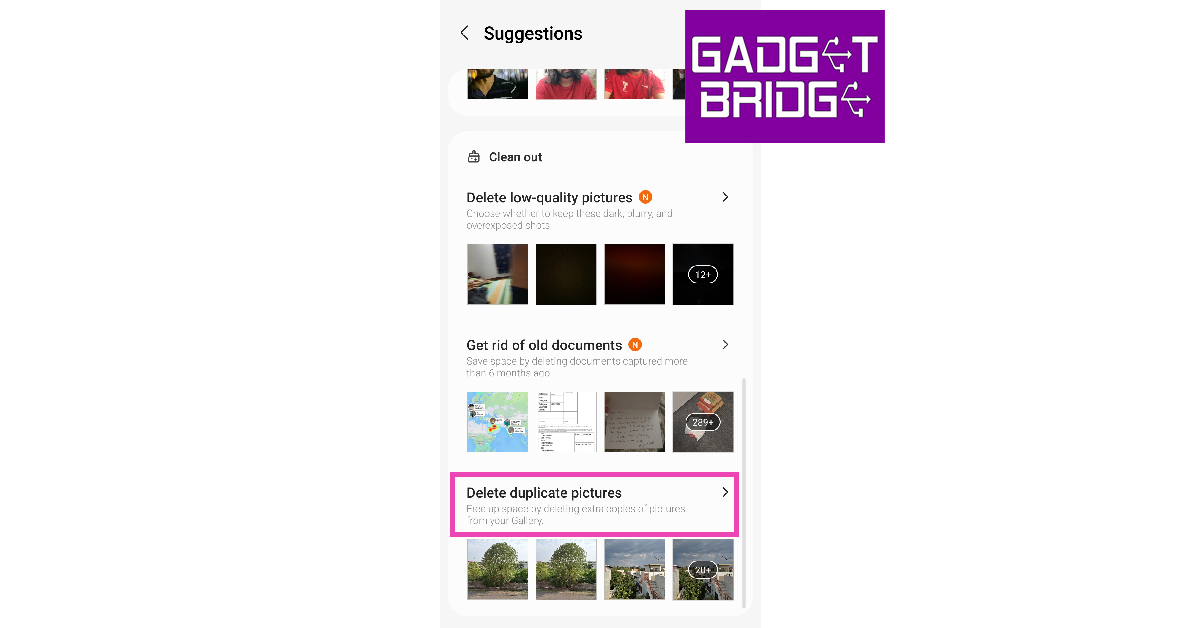
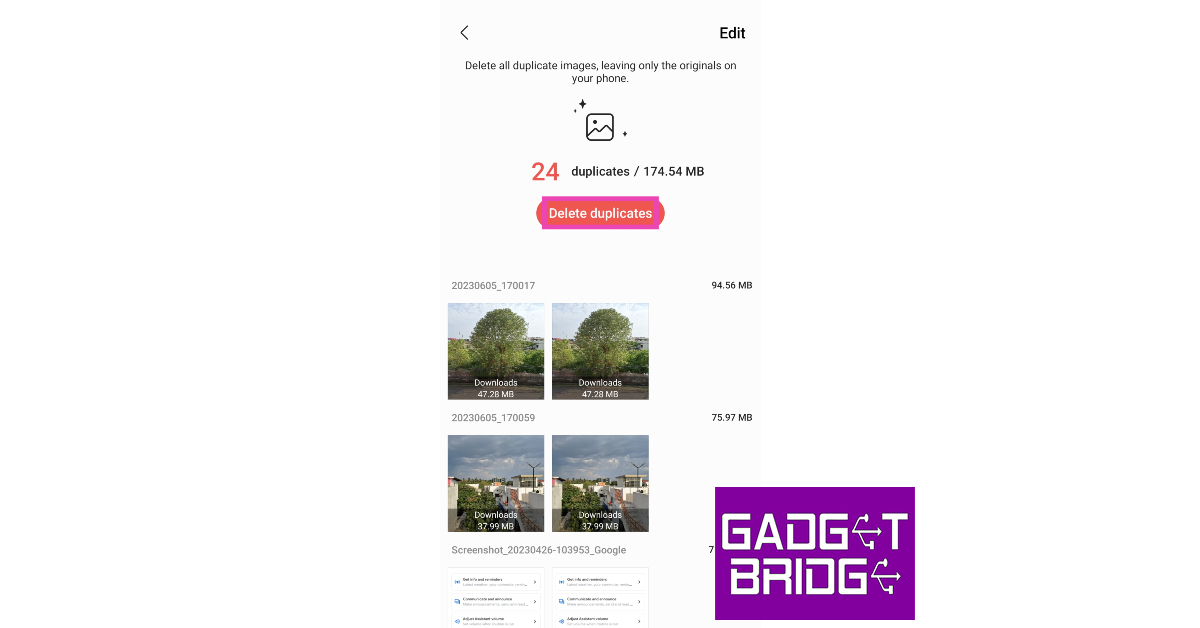
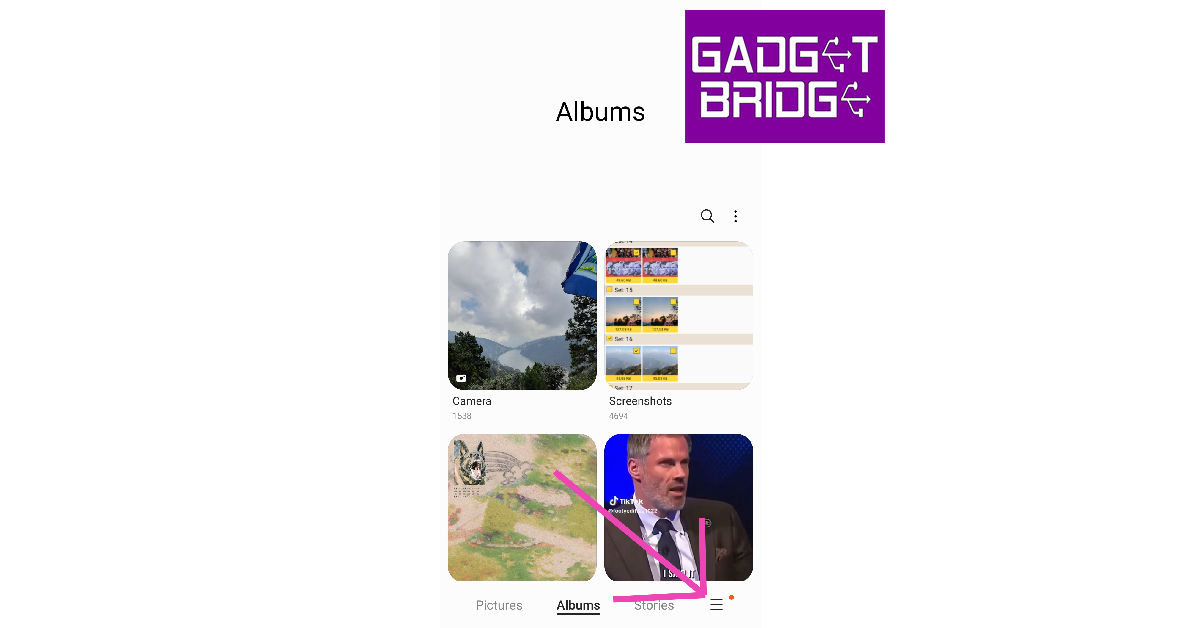
Step 1: Launch the native Gallery app on your Samsung smartphone. Step 2: Tap the hamburger menu at the bottom right corner of the screen. Step 2: Tap the hamburger menu at the bottom right corner of the screen. Step 3: Select Suggestions. Step 3: Select Suggestions. Step 4: Scroll down and select Delete duplicate pictures. Step 4: Scroll down and select Delete duplicate pictures. Step 5: Hit Delete duplicates to delete all redundant images at once. You can also delete the duplicate images individually by selecting the Edit option at the top right corner of the screen. Hit Delete duplicates to delete all redundant images at once.

Find and delete duplicate images on your Samsung smartphone using My Files

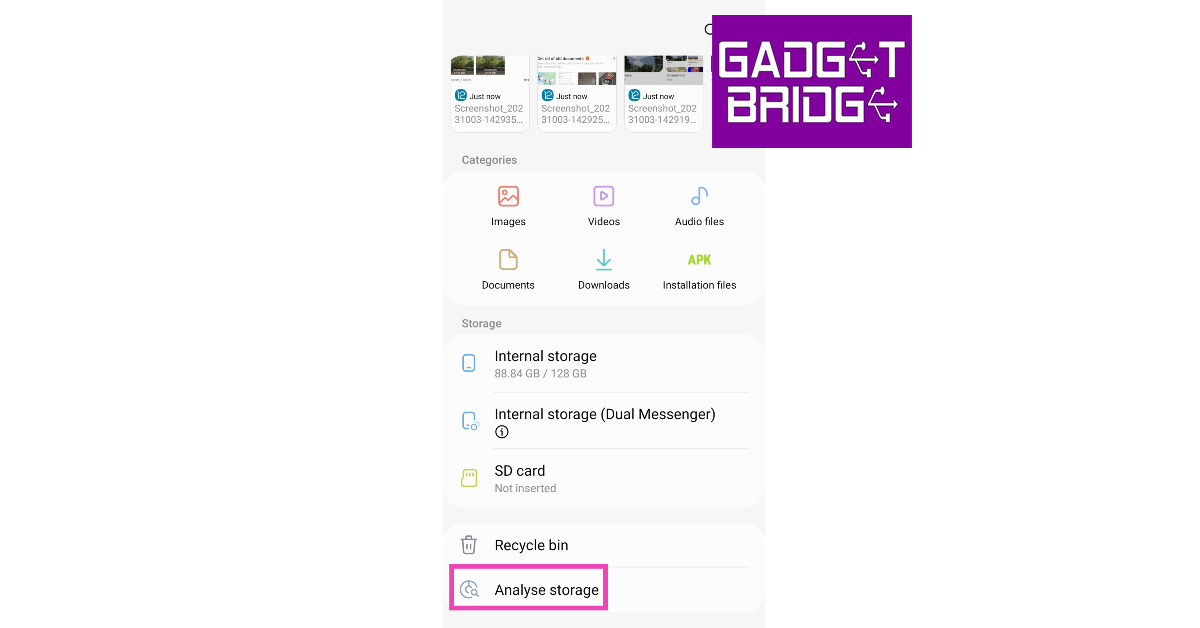
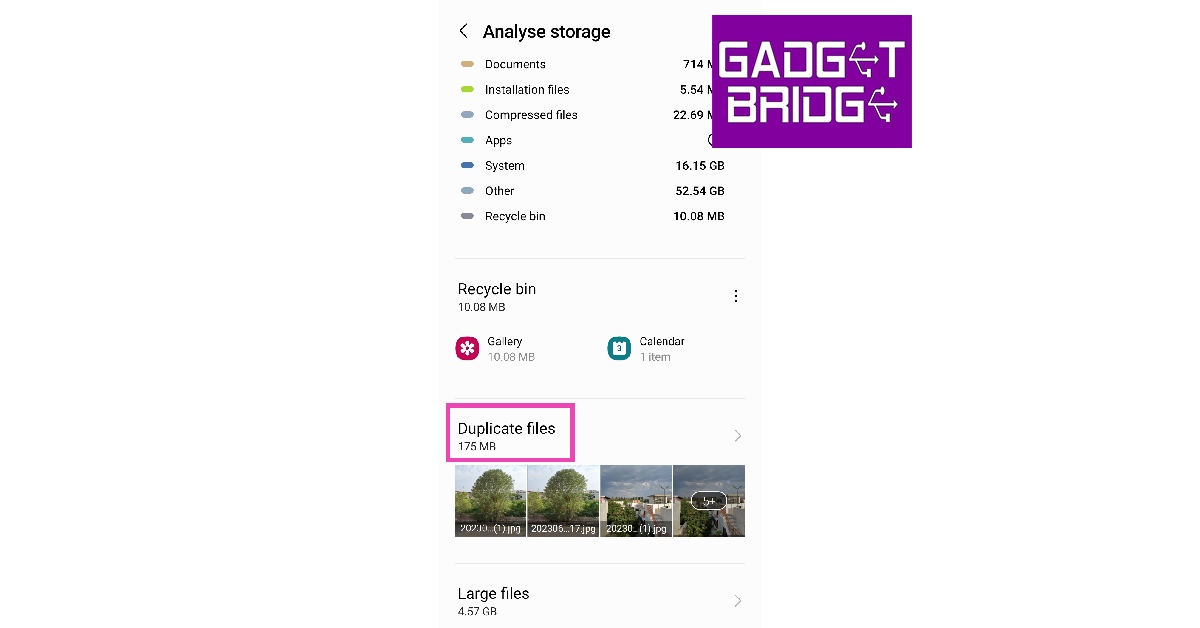
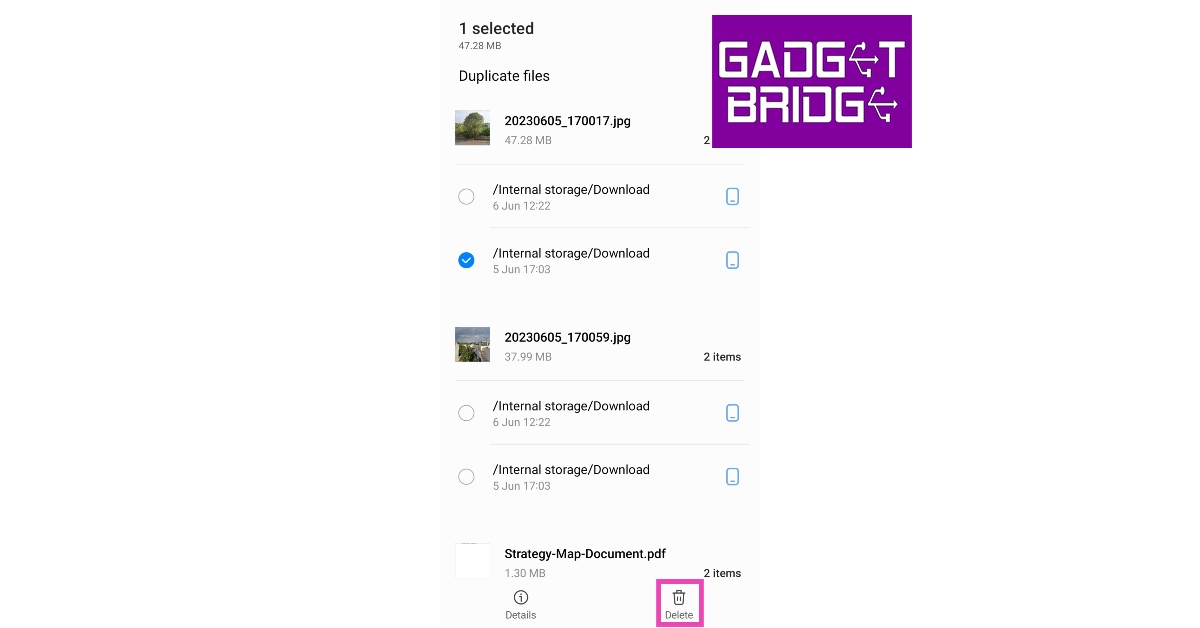
Step 1: Launch Samsung’s native file manager (My Files) from the Samsung folder in the app library. Step 2: Scroll all the way down and tap on Analyze Storage. Step 2: Scroll all the way down and tap on Analyze Storage. Step 3: Tap on Duplicate Files. Step 3: Tap on Duplicate Files. Step 4: This is where you will find the duplicate files and images on your phone. Select the images you want to delete. Step 4: This is where you will find the duplicate files and images on your phone. Select the images you want to delete. Step 5: Hit Delete.

Find and Delete Duplicate Images using device settings

Step 1: Go to Settings and select Battery and device care. Step 1: Go to Settings and select ‘Battery and device care’. Step 2: Select Storage. Step 2: Select Storage. Step 3: Select Duplicate Files. Scroll down and tap on ‘Duplicate Files’. Step 4: Select the duplicate images and hit Delete.

Find and delete duplicate images using Google Files

Step 1: Install the Files by Google app on your Samsung smartphone. Step 2: Launch the app and select the Clean option from the bottom tab. Step 3: Tap on the ‘Clean’ tab at the bottom of the screen. how to remove duplicate images on android Step 3: This is where you will find the duplicate images on your phone. Select the files individually and delete them. Step 4: If your phone has any duplicate images, this is where you will be prompted to delete them.  how to remove duplicate images on android

Use a third-party app

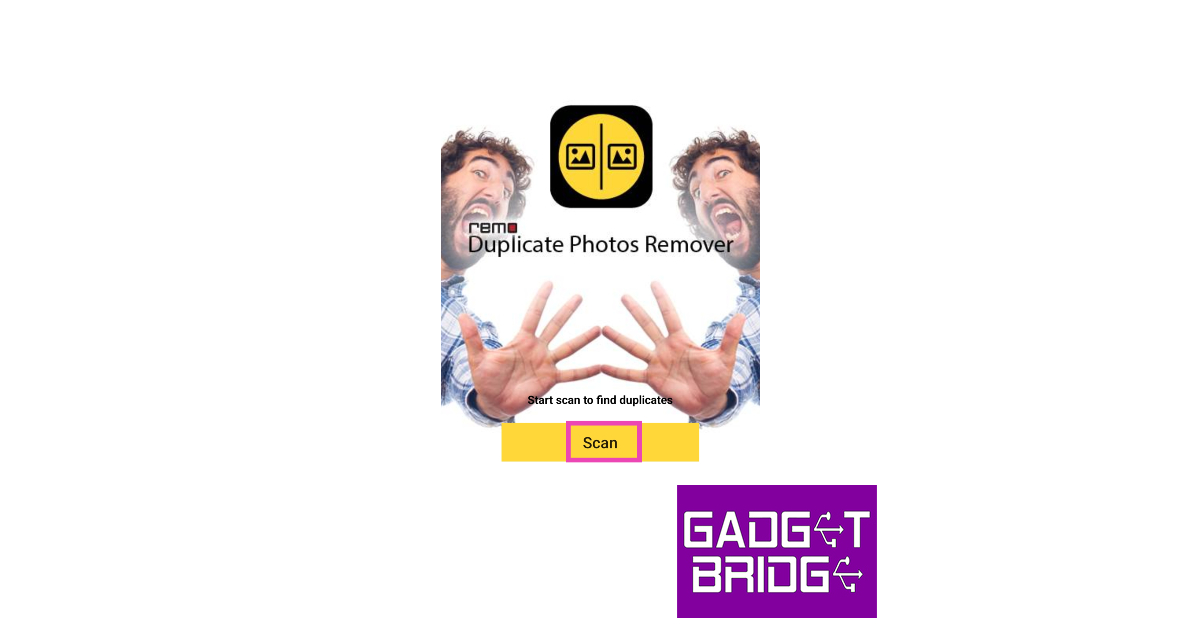
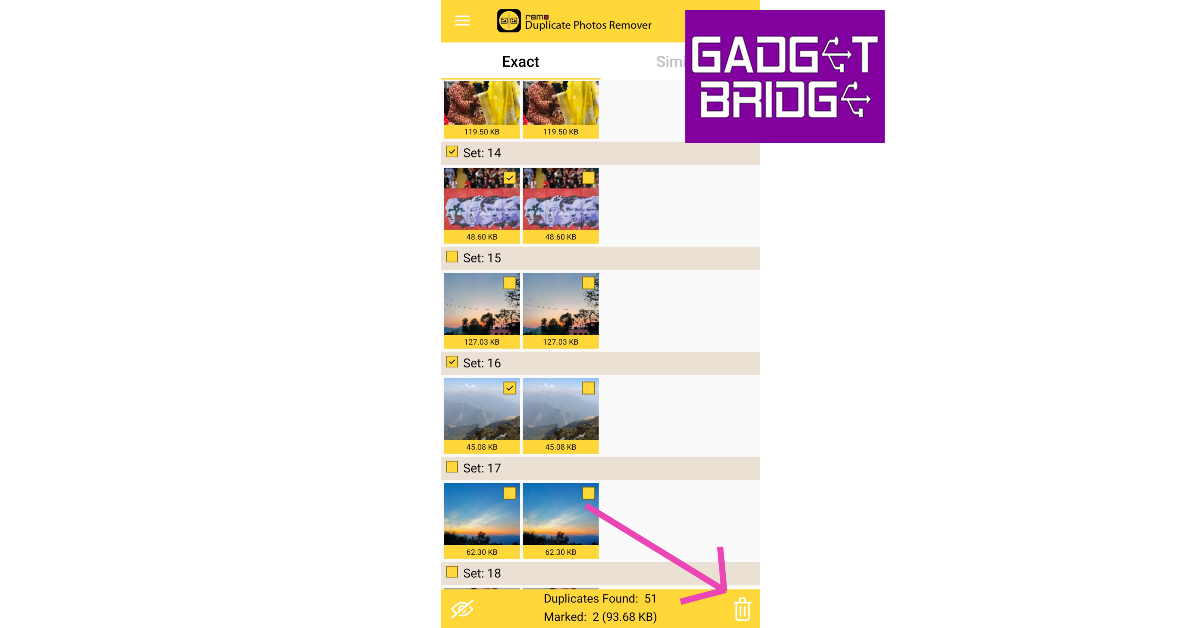
There are several third-party apps you can use to delete duplicate pictures from your Samsung smartphone. Here’s how you can accomplish the task using Remo Duplicate Photos Remover. Step 1: Install the Remo Duplicate Photos Remover app from the Google Play Store. Step 2: Launch the app and hit Scan to find duplicate images on your smartphone. This process will take a few minutes. Step 2: Launch the app and hit Scan to find duplicate images on your smartphone. This process will take a few minutes. Step 3: Scroll through the results and select the images you want to delete. Step 3: Scroll through the results and select the images you want to delete. Step 4: Hit the Delete icon at the bottom right corner of the screen. Step 4: Hit the Delete icon at the bottom right corner of the screen.

Frequently Asked Questions (FAQs)

Why are all my photos duplicating?

Duplication of images may occur in case your phone fails to sync your data to your preferred cloud storage. You may also notice duplicate images on your phone when you download the same photo multiple times. When you take multiple shots of the same subject at once, all the similar-looking images stock up in your phone’s gallery.

How do I delete duplicate images in my Samsung phone’s gallery?

Go to Gallery>Menu>Suggestions>Delete duplicate pictures and select Delete duplicates. If you want to go through every image individually before deleting them, hit the Edit option.

Which are some good third-party apps to delete duplicate images on my Android phone?

Remo Duplicate Photos Remover, Duplicates Cleaner, Duplicate Files Fixer, and Duplicate Files Remover are some of the best Android apps to find and remove duplicate images from your phone. Read Also: Top 4 Ways to Download and Use Offline Maps on Apple Maps

Conclusion

These are the top 5 ways to find and remove duplicate images from your Samsung smartphone. The biggest limitation of using native methods to delete duplicate images is that they may not scan your device’s storage as thoroughly as a third-party app. Apps like Remo Duplicate Photos Remover not only scan for duplicate images but also similar-looking photos that may be using up a lot of disk space on your device. For the latest gadget and tech news, and gadget reviews, follow us on Twitter, Facebook and Instagram. For newest tech & gadget videos subscribe to our YouTube Channel. You can also stay up to date using the Gadget Bridge Android App. You can find the latest car and bike news here.

OnePlus foldable phone ‘Open’ is jointly developed by OPPO team and OnePlus team, the company confirms

0
OnePlus today officially confirmed that its first foldable phone Open and Oppo Find N3 will be the same. According to the company the Oppo Find N3 will be rebranded to OnePlus Open. So the specs of the OnePlus foldable will be similar to those of Oppo’s. The device will feature a triple rear camera setup OnePlus has revealed that Pete Lau Founder of OnePlus and Senior Vice President and Chief Product Officer of OPPO directed his teams at OnePlus and OPPO to work together to bring the best of both brands to the new phone. OnePlus further revealed the evolution of the new device’s hinge and revealed that the new product will feature the OnePlus trademark Alert Slider. Also Read: iPhone 14, iPhone 14 Plus on Flipkart could be bought under 60k during Big Billion Days Sale The OnePlus foldable phone Open will be launched in select overseas markets soon. “Because we want to create a synergy and bring the best of the two teams together. Both teams have accumulated strong experience, and this folding phone will have a different go-to-market strategy in different regions so that more users will be able to have their hands on this device,” the company said. There will probably be a circular camera module on the OnePlus Open. The camera system is likely to be tuned by Hasselblad. Bollywood actress Anushka Sharma was recently spotted holding the devices, suggesting that the foldable phone may soon be available here. OnePlus Open was unveiled by YouTuber Lewis Hilsenteger while he interviewed Pete Lau. The folding phone will have a new hinge system made out of very less components in comparison to the Oppo Find N2. Most probably, the OnePlus Open will make its debut this month. As per a previous report official premiere might occur on October 19. “Our foldable phone goes beyond offering a large-screen experience. It embodies a lightweight and slim design, a powerful camera, and delivers a fast and seamless user experience. Only when all these aspects are perfectly balanced can we truly call it a flagship foldable phone,” the company has also confirmed. For the latest gadget and tech news, and gadget reviews, follow us on TwitterFacebook and Instagram. For newest tech & gadget videos subscribe to our YouTube Channel. You can also stay up to date using the Gadget Bridge Android App. You can find the latest car and bike news here.

Top 6 Free Apps to Compress Videos on iPhone

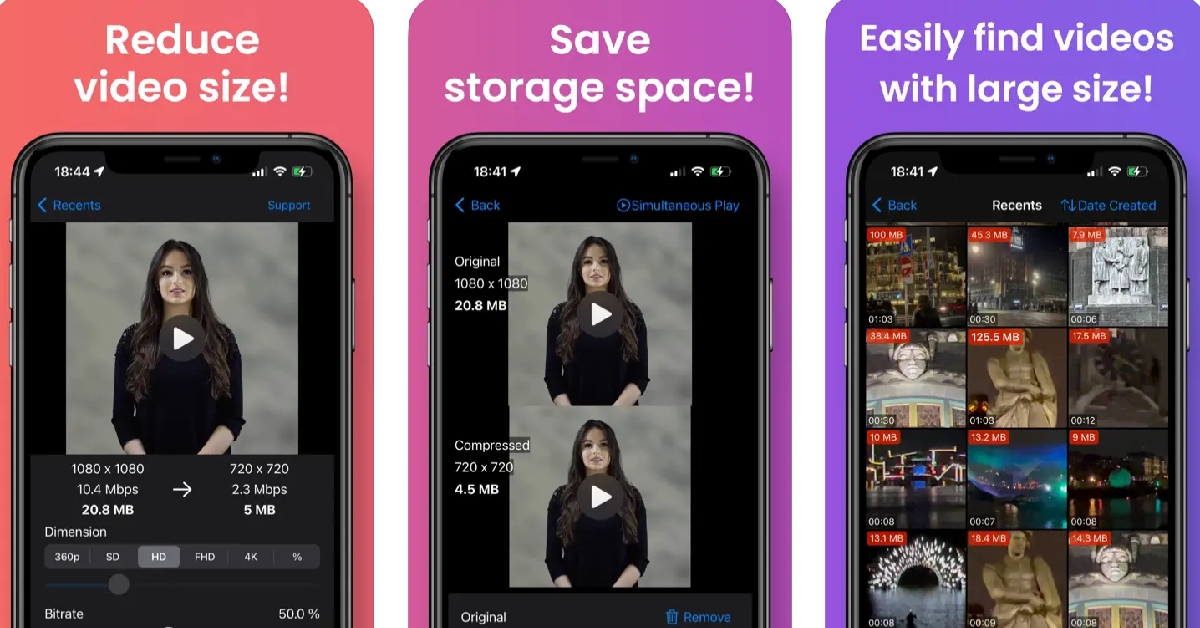
One of the biggest peeves of iPhone users is low internal storage space. If you’re fond of taking pictures and videos from your iPhone, you must be aware of the volume of disk space they occupy on your device. While images are still easier to manage, 4K videos shot using the iPhone can take up a huge portion of the internal storage. One of the more popular ways of freeing up disk space on your iPhone is video compression. In this article, we bring you the top 6 free apps to compress videos on your iPhone. Read Also: Top 4 Ways to Download and Use Offline Maps on Apple Maps

Video Compressor & Reduce Size

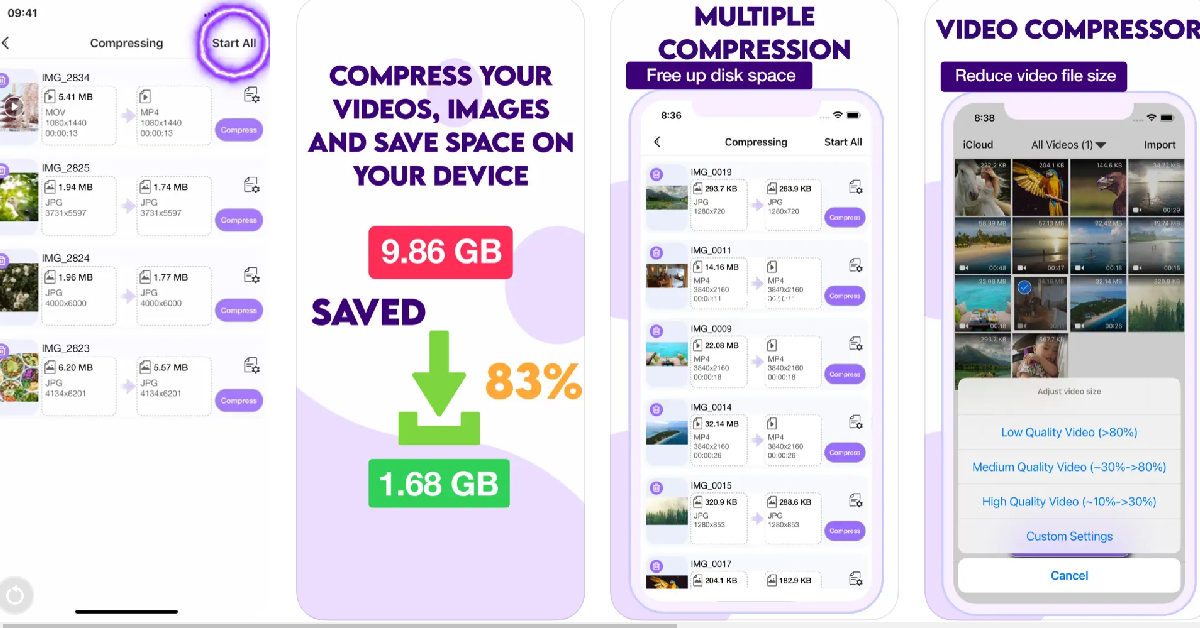
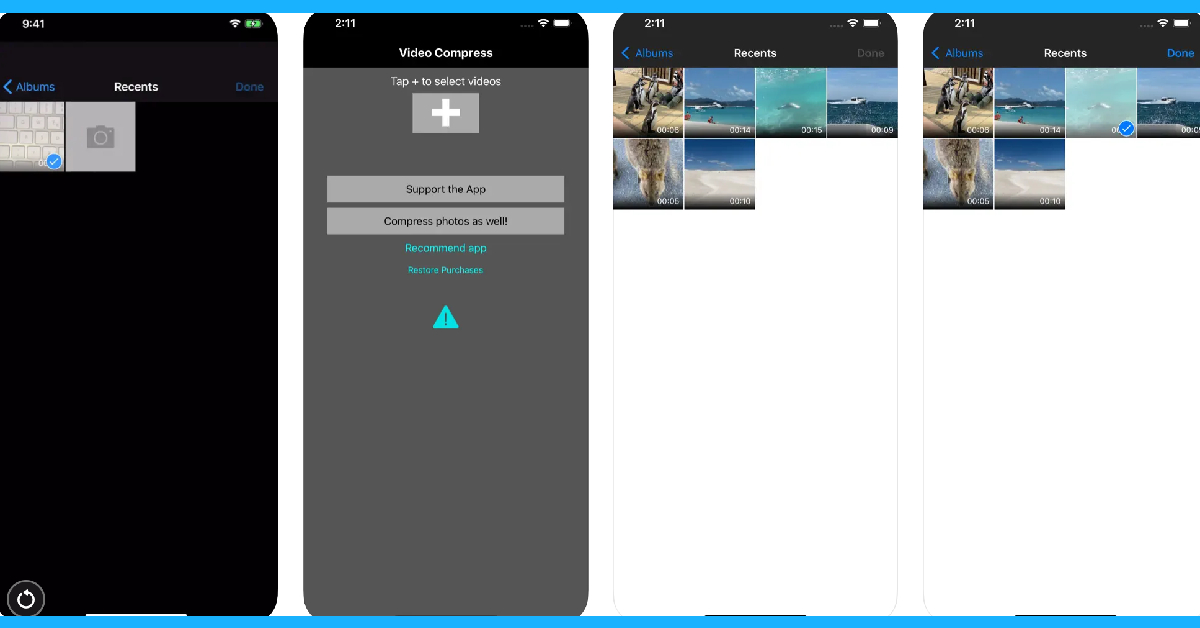
Download from the App Store Video Compressor & Reduce Size The Video Compressor & Reduce Size app lets you reduce the size of your videos in just a few quick taps. The app makes sure it doesn’t reduce the quality of the video after compression. It doesn’t add any unwanted watermarks to the compressed video. There is no duration limit for the compression either. The app is completely free to use, which means you will find a fair bit of ads across the interface, but you can pay a small fee to remove them all. To compress or resize a video, launch the app and select the video file from your iPhone’s gallery. You can even cue multiple videos for compression within this app. To begin the compression process, hit ‘Start All’. Apart from video compression, this app also offers basic video editing features like trimming, brightness correction, cropping, rescaling, and more.

Video Compressor & Converter

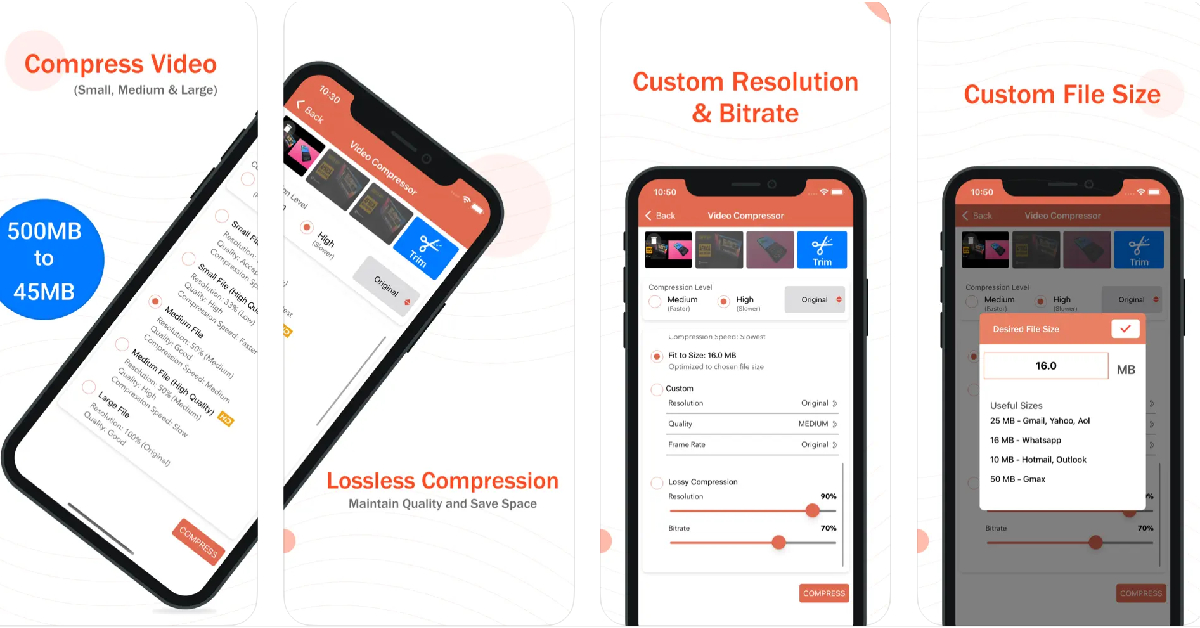
Download from the App Store Video Compressor & Converter The Video Compressor & Converter app works for the following video formats – MOV, MP4, 3GP, M4V, MKV, AVI, FLV, MTS, MPEG, MPG, WMV, VOB, and more. What we really like about this app is that it lets you set the resolution and bitrate for the compressed video. If you don’t like any of the default options, you can customise the essential specs of the video. Using the X264 codec, this app is capable of shrinking the size of a video without compromising its quality. To compress a video, all you need to do is launch the app, open the video, select the desired compression level and resolution, and then hit ‘Compress’. Apart from video compression, you can also use this app to change the format of the video file.

Compress Videos & Resize Video

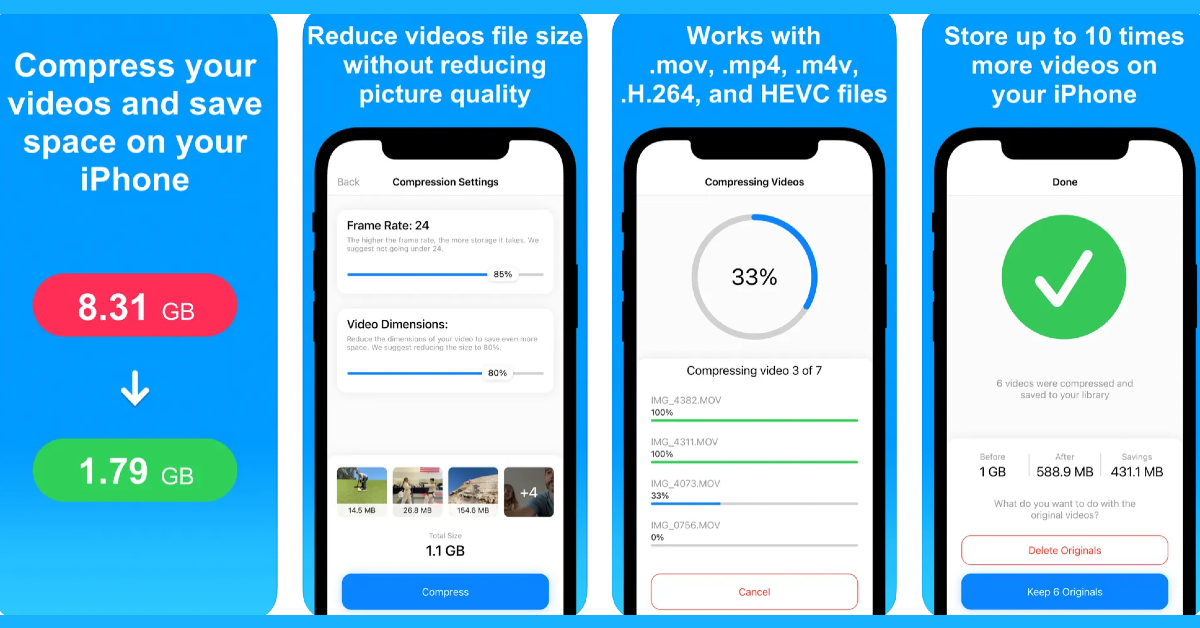
Download from the App Store Compress Videos & Resize Video With a 4.3 rating from 10.3K reviews on the App Store, the Compress Videos & Resize Video app is one of the best video compressor apps for your iPhone. This app pays special attention to your privacy by carrying out the compression process on your device and not on a different server. You can choose the frame rate and dimensions of the final video from the compression settings within the app. Compress Videos & Resize Video is free to use, but a premium membership gets rid of all the ads and allows you to compress multiple videos at once.

Easy Video Compressor

Download from the App Store Easy Video Compressor As the name suggests, Easy Video Compressor makes the process of shrinking the video size very accessible to the average user. Our favourite feature of the app is that it lets you preview the compressed video alongside the original video before you delete the latter from your phone. You can also choose the bitrate and resolution of the compressed video. Once you’ve opened a video on the Easy Video compressor, you need to select the bitrate, video resolution, video format, video codec, and video metadata. Once that’s done, hit ‘Compression’. This app also lets you sort the videos on your phone’s gallery by size, making it easy for you to determine which ones you need to compress.

Video Compress – Shrink Vids

Download from the App Store Video Compress - Shrink Vids The Video Compress – Shrink Vids app lets you compress multiple videos on your iPhone. It lets you choose the bitrate and resolution of the final video. You can preview the compressed video before saving it on your phone. The app also shows you the file size of the resulting video. This app is perfectly optimised for videos shot using your iPhone. It can shrink 4K iPhone videos to a more suitable resolution with absolute ease. Hit the plus icon on the app to select a video. Tap on ‘Choose Presets’ to select the resolution of the compressed video and use the slider to adjust the bitrate. Hit ‘Continue’ to carry out the compression process.

Video Compressor – Clideo

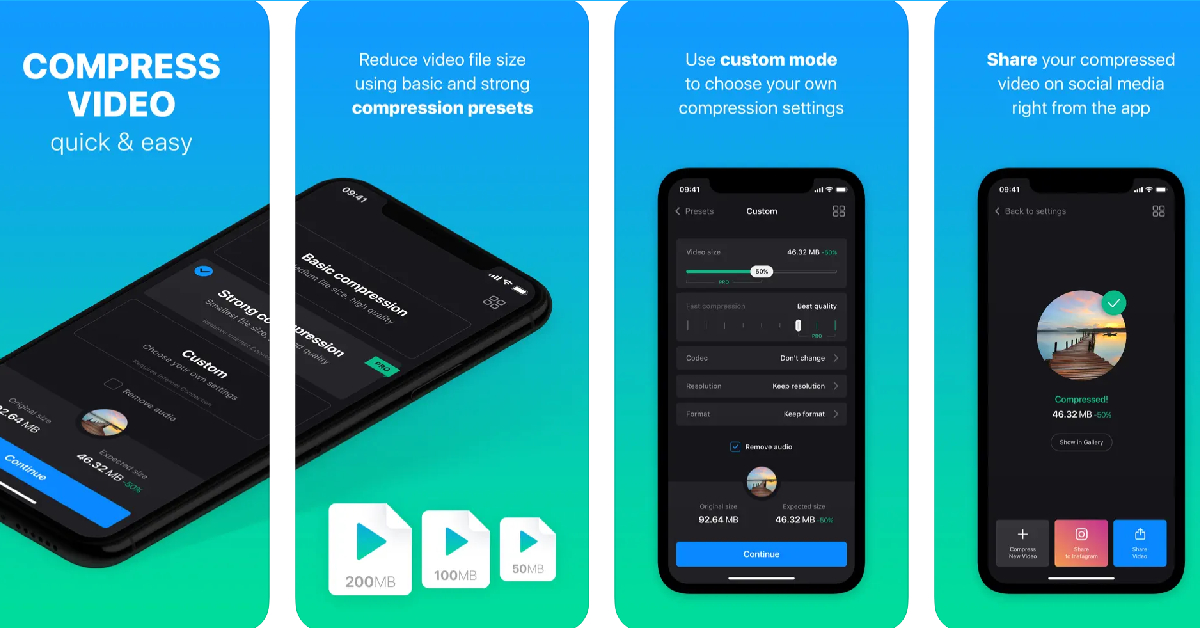
Download from the App Store Video Compressor - Clideo The Clideo Video Compressor lets you retain the original resolution of the video even after it has been compressed. The resized videos are identical to the original, with little to no loss in quality. If you don’t like the compression presets, you can create a custom profile and take control of the bitrate and resolution of the compressed video. The editing page lets you choose the compression speed, video resolution, video codec, and video format all in one page. You can also choose to remove the audio from the video. The only downside is that Clideo places a watermark on the final video. If you want to get rid of this watermark, you will need to buy the Pro version of the app. Read Also: Amazon Great Indian Festival (GIF) to begin on October 8: Festive Sale details inside

Conclusion

These are the top 6 free apps to compress videos on your iPhone. While all the apps on this list are free to use, their interface may be laced with ads. Some apps offer a premium membership that allows users to get rid of all the ads and gives them access to special features like multiple compression and more. For the latest gadget and tech news, and gadget reviews, follow us on Twitter, Facebook and Instagram. For newest tech & gadget videos subscribe to our YouTube Channel. You can also stay up to date using the Gadget Bridge Android App. You can find the latest car and bike news here.

iPhone 14, iPhone 14 Plus on Flipkart could be bought under 60k during Big Billion Days Sale

Before the start of festivals in India, festive sale has started. It is that time of the year when smartphones, electronics, laptops and much more are up for sale with huge discounts. So Apple fans now is the best time to buy iPhone 14 and iPhone 14 Plus in India as they will be availed at an unbelievable price during the sale period on Flipkart.

iPhone 14 on Flipkart

Flipkart’s Big Billion Days Sale is scheduled to begin on October 8 to 15. The e-commerce platform will be offering iPhone 14 and iPhone 14 Plus at a reduced price. There will be a discount of Rs 20,000 or more on both devices. The iPhones will be available under Rs 60,000 if you use an eligible card for making the purchase. Flipkart has not yet revealed the price of the iPhone 14, iPhone 14 Plus but the devices are being teased on the platform under blockbuster deals. But those who guess the price of the iPhones. The buyers were also offered the chance to lock the price that was flashed on the specified date since the bargains were revealed on October 1 by paying Rs 1999 to secure the deal. The price of the iPhone 14 model has dropped by Rs 10,000 since it its launch. It was introduced at Rs 79,900. On the other hand iPhone 14 Plus was previously priced at Rs 89,900. It now sells for Rs 79,900 after a price reduction of Rs 10,000. Also Read: iPhones Compared: iPhone 15 vs iPhone 14

Apple iPhone 14 specifications

Apple iPhone 14 comes with a 6.1-inch Super Retina XDR OLED screen having a wide colour gamut, HDR, and 1200 nits of brightness. The screen offers a pixel density of 460 ppi and supports a 60Hz refresh rate. The display is protected by a tough Ceramic Shield front cover that is water and dust-resistant. The iPhone 14 has Face ID and is built to IP68 standards for water and dust protection. Under the hood, there is Apple A15 Bionic SoC and up to 512GB of internal storage. The device runs on iOS 16. For the photos, the dual rear camera setup includes iPhone 14: a primary 12MP wide-angle sensor with a bigger f/1.5 aperture, sensor-shift OIS, and a secondary 12MP ultra-wide-angle sensor. The Ultra Wide camera provides a distinctive viewpoint for broader views and enhances low-light images using a Photonic Engine. For selfies and video calls, the front camera has a 12MP sensor with autofocus. For the latest gadget and tech news, and gadget reviews, follow us on TwitterFacebook and Instagram. For newest tech & gadget videos subscribe to our YouTube Channel. You can also stay up to date using the Gadget Bridge Android App. You can find the latest car and bike news here.

BGMI redeem codes for 3 October 2023, claim and receive rewards and benefits

After being banned for nearly ten months, Battleground Mobile India, aka BGMI, is officially available again in India. BGMI fans are looking for ways to improve their game experience and one such method is the usage of redemption codes, which offers a variety of rewards and advantages using BGMI redeem codes players can gain access to new skins, outfits, loot crates, weapons and free UC and diamonds. As mentioned earlier, these codes give users the chance to earn unique rewards and gain extra benefits while playing the game. This includes GUN SKINS (M4, AKM, M416, AWM, M24, UZI, KAR98K), free character voucher, Andy, Carlo, Sara, Victor character for free, free Anna Character on completing the mission and UC or Royal Pass Discount. So here we have gathered a list of the most recent BGMI redeem codes as of 3 October 2023. Also, redeem these codes asap as these are only valid for a limited duration.

BGMI Redeem Codes for 3 October 2023

UKUZBZGWF – Free Fireworks TIFZBHZK4A – Free Outfit RNUZBZ9QQ – AKM Glacier Skin PGHZDBTFZ95U – M416 Skin R89FPLM9S – Companion BTOQZHZ8CQ – New! TQIZBZ76F – Vehicle Skin TQIZBz76F – 3 Free Motorcycle BMTFZBZQNC – Free Drifter Set SD14G84FCC – Free Skin for KAR98 Sniper Gun RNUZBZ9QQ – AKM Glacier Skin 5FG10D33 – Falcon and Free Emotes GPHZDBTFZM24U – UMP9 Skin KARZBZYTR – Free Outfit JJCZCDZJ9U – Golden Pan BMTCZBZMFS – Pretty in Pink set and Pretty in Pink Headpiece 5FG10D33 – Outfit for Free

How to get free Redeem Codes for BGMI on 3 October 2023?

  • Launch BGMI on your device.
  • Then select the Redeem Code option from the main menu.
  • Next, click on the Redeem code tab.
  • A new window will open, requesting the redemption code.
  • Now enter your BGMI code.
  • Confirm and click on the “Redeem” tab.
  • If your redeem code is valid then you will get a message confirming that your rewards were successfully redeemed.
(Note that these codes are case-sensitive, so be sure to type them correctly to prevent any errors.) For the latest gadget and tech news, and gadget reviews, follow us on TwitterFacebook and Instagram. For newest tech & gadget videos subscribe to our YouTube Channel. You can also stay up to date using the Gadget Bridge Android App. You can find the latest car and bike news here.

Garena Free Fire Redeem Codes Today 3 October 2023: Here is how to claim them

Garena Free Fire is a battle royale game with regular awards and tournaments to keep players interested. If you play Garena Free Fire, you should be aware of the redeem codes that are released on a daily basis. However, because the battle royale game is banned in India, players from other countries can use the Free Fire Redeem codes daily. If you’re unfamiliar with the Garena Free Fire redeem codes or don’t know how to get them, we’ve put together a step-by-step guide to help you redeem them. Check out Garena Free Fire Redeem Codes for 3 October 2023. The Free Fire redeem codes are a great way to get free stuff. These are 12-digit codes that contain alphabets and numbers, as well as an expiration date and time. Because the Garena FF redeem codes cannot be used more than once, you should hurry to the redemption page to claim your free reward before someone else does. To get a free reward, all you have to do is go to reward.ff.garena.com/en, which is the official redemption page. Also, keep an eye on this space for daily updates on Garena Free Fire redemption codes and rewards.

Garena Free Fire Redeem Codes Today 3 October 2023

FKRIFUGV7YTGBD FNSJEKRI56UYJH FNGMKVO9IF8RUJ FM5K6LYO7UJIKV FLXOZ9I8U7Y6A5 FYJHYU7J6SWE8U F4YH5TBNGMJHKB FLOV9IC8UYGSFV FK4R5OIT6Y8HUG FNFDMKEOR59I86 FUTGHJMVKLOI8U FYRTYHT7U76JRH FBGHNJU7Z6T5RF FADVQWB2FGTU3E FTQRDF2CVWB3NE FH4JMRKTIGUY6T FCRFXSVGBNHEJM

How to Get Free Fire Redeem Codes for Garena on 3 October 2023?

  • Visit the Garena Free Fire game’s official website at reward.ff.garena.com.
  • Use your Facebook, Google, VK, Apple ID, Huawei ID, or Twitter account to log in.
  • You’ll be taken to a valid redemption code (s)
  • Copy and paste the 12-digit redemption code into the text box.
  • On the screen, a dialogue box will appear.
  • ‘Ok’ should be selected.
For the latest gadget and tech news, and gadget reviews, follow us on TwitterFacebook and Instagram. For newest tech & gadget videos subscribe to our YouTube Channel. You can also stay up to date using the Gadget Bridge Android App. You can find the latest car and bike news here.

How to disable Always On Display on Apple Watch and Watch Ultra?

The Always On Display is one of the most important features of your Apple Watch. First introduced on the Watch Series 5, the Always On Display allows you to glance at the time on your watch without needing to unlock it. You can also see if there are any pending unread notifications that you need to attend to. As handy as this feature is, it drains your smartwatch’s battery considerably quicker. This is because it is reliant on an active display, no matter how low its refresh rate may be. Active displays are notorious for draining the battery the most. If you want to extend your Apple Watch’s battery life, here is how you can turn off or disable Always On Display. Read Also: Samsung to open 15 Pop-Up stores across India

Disable Always On Display directly from your Apple Watch

Apple Watch Series 9, Watch Ultra 2, and Watch SE unveiled at Apple’s ‘Wonderlust’ Event Step 1: Unlock your Apple Watch and launch the Settings app. Step 2: Tap on Display & Brightness. Step 3: Select Always On. Step 4: Turn off the toggle switch to disable Always On Display.

Turn off Always On Display using the Apple Watch app on your iPhone

Best ways to Fix 'Sleep Tracking Not Working' on Apple Watch Step 1: Launch the Apple Watch app on your iPhone. Step 2: Tap on Display & Brightness. Step 3: Select Always On. Step 4: Turn off the toggle switch to disable Always On Display.

Frequently Asked Questions (FAQs)

What is Always on Display?

Always On Display on your Apple Watch and iPhone allows you to view key information on the display without activating it with a tap. You can customise the Always On Display screen to show an analogue or digital clock along with key notifications.

How long does an Apple Watch last with Always On Display turned enabled?

With the Always On Display turned on, an Apple Watch can last up to 18 hours. The battery life also depends on the volume of your usage.

Can I shower with my Apple Watch with the Always on Display enabled?

Performing any water-related activities while wearing the Apple Watch requires turning on the Water Lock. When the Water Lock is turned on, your watch’s display shuts off, including the Always On Display. When the Water Lock is turned off, it ejects any trace of water from the speaker.

How do I disable AOD on my Apple Watch?

On your Apple Watch, go to Settings>Display & Brightness>Always On and turn off the toggle switch for Always On Display.

What is the advantage of using AOD on an Apple Watch?

With the Always On Display turned on, you can always view the time on your Apple Watch’s screen, even when the screen is locked. You can also customise the AOD screen to let you view unread notifications. Always On Display allows your Apple Watch to function more like a regular watch, with the ability to show the time even when the display is turned off. Read Also: Apple Watch won’t charge past 80%? Try these 5 fixes

Conclusion

This is how you can turn off or disable Always On Display on your Apple Watch or Watch Ultra. Check out this article to learn how to make your Apple Watch vibrate for notifications. If you found this article helpful, do let us know in the comments! For the latest gadget and tech news, and gadget reviews, follow us on Twitter, Facebook and Instagram. For newest tech & gadget videos subscribe to our YouTube Channel. You can also stay up to date using the Gadget Bridge Android App. You can find the latest car and bike news here.

Top 4 Ways to Download and Use Offline Maps on Apple Maps
0
On the latest iOS 17, Apple introduced a very important feature that went completely under the radar. Unlike Google Maps, Apple Maps did not allow users to download the maps for specific locations. That has now changed on iOS 17. Users can now download any portion of the map for offline use. This is particularly useful when you’re planning a trip or vacation to a place that doesn’t get good network reception. With an offline map, you will always have access to the correct directions on your phone. In this article, we show you how to download, edit, and delete offline maps on the Apple Maps app on your iPhone. Read Also: How to add multiple links to your Instagram bio?

Download offline maps on the Apple Maps app on your iPhone

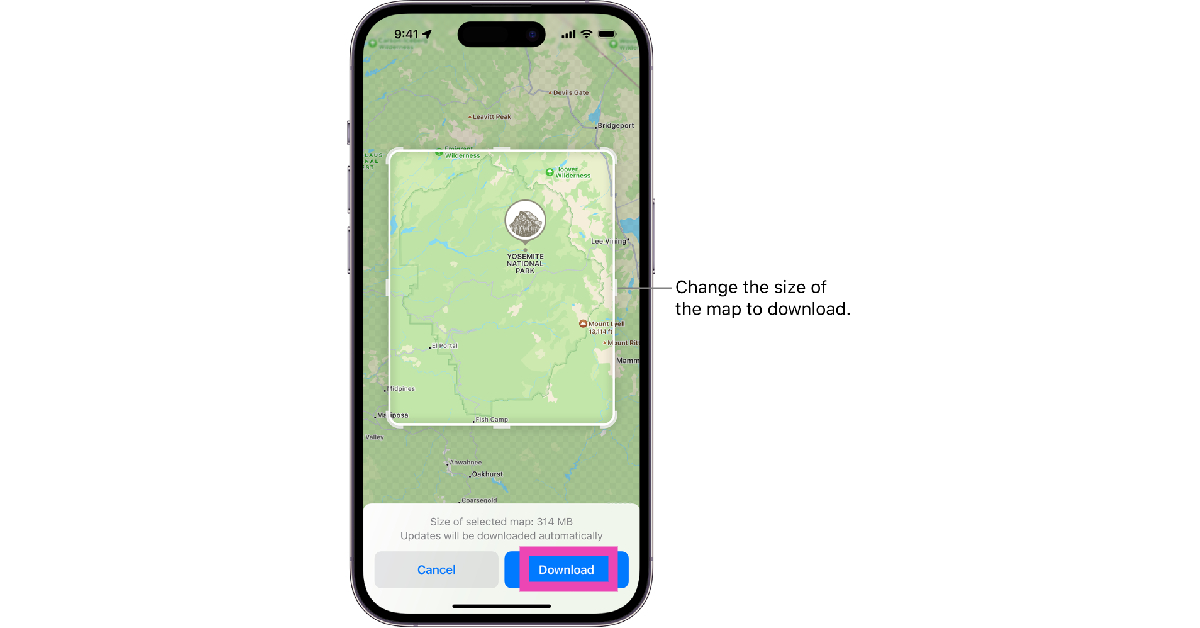
Step 1: Launch the Apple Maps app on your iPhone. Step 2: Tap your initials or picture at the bottom right corner of the screen. Step 3: Tap on Offline Maps. Step 4: Select Download New Map. Step 5: Type the location for which you want to download the map. Step 6: On the following page, adjust the size of the map you want to download. You can also use this page to select a completely different area on the map, in case it didn’t pop up in the search results on the previous page. Remember, a larger area will increase the size of the map. Step 7: Hit the Download button. Step 7: Hit the Download button.

Download an Apple Map by searching for it

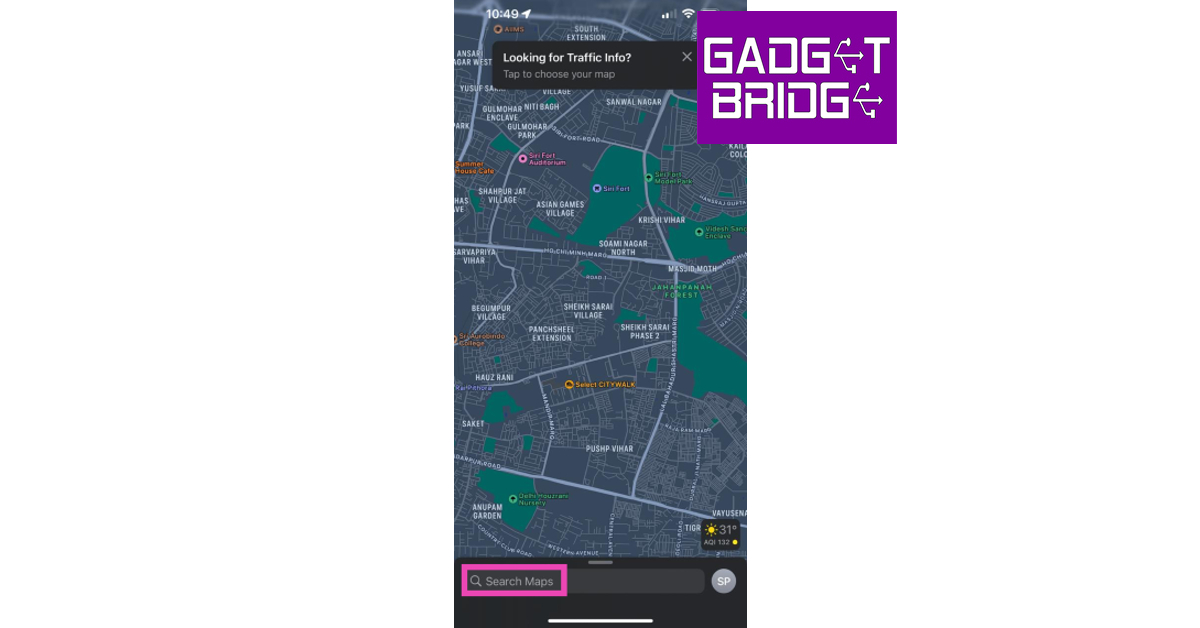
Step 1: Launch the Apple Maps app on your iPhone. Step 2: Tap the search bar at the bottom of the screen and search for your desired location. Step 2: Tap the search bar at the bottom of the screen and search for your desired location. Step 3: Tap the Download button at the bottom of the screen. If the map is not available offline, you won’t see this download button. Step 7: Hit the Download button. Top 4 Ways to Download and Use Offline Maps on Apple Maps Step 4: Adjust the size of the map by dragging the borders of the box. Step 5: Hit Download to save the map offline.
Download an Apple Map by dropping a pin

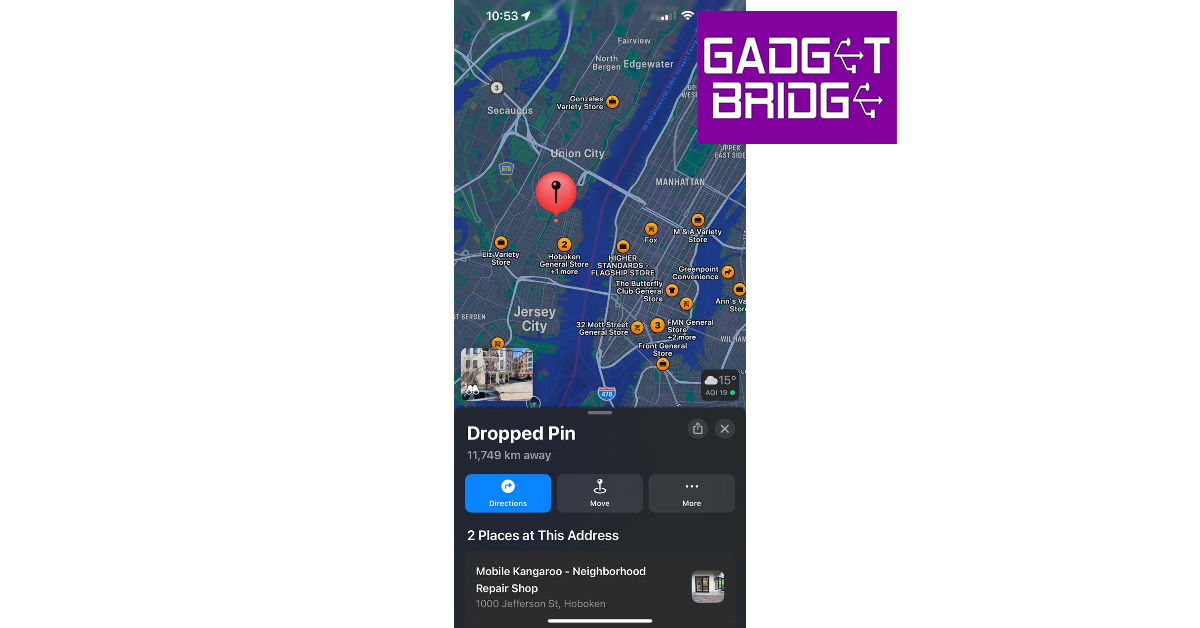
Step 1: Launch the Apple Maps app on your iPhone. Step 2: Scroll through the map to navigate to your desired location. Step 3: Tap on a location to drop the pin. Step 3: Tap on a location to drop the pin. Top 4 Ways to Download and Use Offline Maps on Apple Maps Step 4: Tap the Download button at the bottom of the screen. Step 7: Hit the Download button. Top 4 Ways to Download and Use Offline Maps on Apple Maps Step 5: Adjust the area of the map by dragging the borders of the box marking the selected area. Step 6: Hit the Download button again.

How to open or edit an offline map that you have downloaded on Apple Maps

How to open or edit an offline map that you have downloaded on Apple Maps Step 1: Launch the Apple Maps app on your iPhone. Step 2: Tap your initials or picture at the bottom right corner of the screen. Step 3: Select Offline Maps. Step 4: Tap on one of the downloaded maps. Step 5: Hit the resize icon to change the area covered by the map. Step 6: Tap on Delete Map to remove it from your device’s storage.

Frequently Asked Questions (FAQs)

Can I download offline maps in Apple Maps?

Apple allows users to download offline maps in the Apple Maps app on iOS 17. An offline map can occupy a significant amount of storage space on your iPhone.

How do I download a map in Apple Maps?

Launch the Apple Maps app, tap on your picture or initials, then go to Offline Maps>Download New Map. Select the location for which you want to download the map, adjust its size, and hit Download.

How do I delete an offline map that I downloaded on Apple Maps?

To delete an offline map go to the Apple Maps app, tap on your picture or initials, and go to Offline Maps>Map>Delete Map. Read Also: Boult Crown R Pro Review: A perfect blend of style and sportiness

Conclusion

This is how you can download, edit, and delete an offline map on the Apple Maps app on your iPhone. Offline maps tend to get outdated after a period of time as new businesses, locations, roads, and passages are always popping up in different localities. You can update all your downloaded maps at once from the Offline Maps section in the Apple Maps app. For the latest gadget and tech news, and gadget reviews, follow us on Twitter, Facebook and Instagram. For newest tech & gadget videos subscribe to our YouTube Channel. You can also stay up to date using the Gadget Bridge Android App. You can find the latest car and bike news here.

Amazon Great Indian Festival (GIF) to begin on October 8: Festive Sale details inside

Amazon has officially announced that its festive sale ‘Great Indian Festival’ will begin on October 8 offering sellers and partners a chance to connect with millions of customers throughout India. The Prime Members will get exclusive early access to the sale 24 hours before the sale begins on October 7.  During the Amazon Great Indian Festival sale, customers will have access to fantastic bargains and discounts across a wide range of categories which involves smartphones, fashion apparel, home stuff, electronics, grocery and beauty products from various brands as well as new launches. Also Read: Spotify unveiled Jam for real-time listening with friends Customers will be able to make their purchases in 8 languages of their choice (English, Hindi, Tamil, Telugu, Malayalam, Kannada, Bangla, and Marathi) Buyers across the nation will be able to browse for products from brands like Samsung, OnePlus, iQOO, LG, Sony, boAt, Intel, Tissot, Fastrack, Tommy Hilfiger, Wipro, Eureka Forbes, Asian Paints, Gillette, Huggies and more.  Amazon will also offer up to 55% off on Echo smart speakers, Fire TV devices, Kindle e-readers, and Alexa smart home combos. During the sale, the E-commerce giant will be offering a wide range of finance options from SBI bank debit or credit cards and get a 10% instant discount. Buyers can get an instant credit of up to INR 1 lakh using Amazon Pay Later to shop now and pay next month.  Additionally, ICICI Bank credit card owners can receive 5% unlimited cashback, those applying for the card also get welcome rewards worth Rs 2,500. Amazon will also offer other options such as exchange and no-cost EMI. Also, there will be 10% back on purchasing Amazon Pay Gift Cards With Amazon Pay ‘Everybody can fly’. Customers can plan their festive and winter holiday travel and get up to 40% off hotels, flights to domestic and international locations, train tickets and more. Apart from that, the e-retail platform has also launched Amazon Live offering 1,000+ streams through a curated list of over 300 influencers across tech, gaming, fashion, lifestyle, home, sports, and beauty to help customers make an informed purchase decision. Also Read: Blaupunkt 43-inch QLED and 55-inch 4K Google TV launched in India Customisation options will be available offering visual design tools to patrons to personalize products. Shoppers will be able to customise a wide range of products as per their creative requirements.  Buyers will also be able to gain access to Amazon Home Services for a variety of products across 19,000 pin codes. These services include installation, troubleshooting and repair In 45 cities, customers can also avail installation at the time of delivery, however, this is available for a selected range of products. So, who is ready to buy some products? As we have seen these sales do really well, especially around the Diwali festive season. For the latest gadget and tech news, and gadget reviews, follow us on TwitterFacebook and Instagram. For newest tech & gadget videos subscribe to our YouTube Channel. You can also stay up to date using the Gadget Bridge Android App. You can find the latest car and bike news here.