Haier S9QT QLED TV range with Google TV launched in India

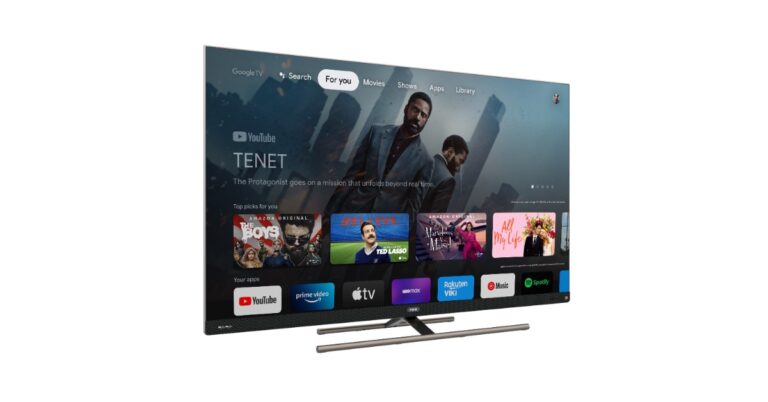
Haier Appliances has expanded its Smart Television portfolio with the launch of a new range of QLED series with Google TV. The new Haier S9QT QLED TV comes in two sizes 65 and 55 inches. Both of them features a bezel-less display with Dolby Vision IQ, and 120Hz refresh rate support. It runs on Google TV and comes with built-in Chromecast and Google Assistant, and Hands-free Voice Control.

Haier S9QT QLED TV price in India and availability

The Haier S9QT QLED TV price in India starts at Rs 69,999. Both the 65 and 55-inches screen size models will be available for purchase at Haier e-commerce store and other retail outlets in the country.

Haier S9QT QLED TV specifications and features

Haier S9QT QLED TV comes with a metallic body and a slim design. It includes a Premium Center Stand and features a bezel-less QLED display. The Haier TV supports a 120Hz refresh rate, High Contrast Ratio, Local Dimming and MEMC. The screen also includes Dolby Vision IQ (an advanced imaging technology which optimizes visual content based on ambient light conditions), High Dynamic Range (HDR) and Wide Color Gamut. Haier S9QT QLED TV specifications and features The Haier QLED TV is powered by ARM CA73 Quad-core with TEE 1.3Ghz, with G52 MC1 @550MHz GPU with a memory of 3GB + 32GB Flash. In terms of connectivity, it includes Wi-Fi 5( 2.4G+5G) Chromecast, Bluetooth 5.1, HDMI 2.1, and USB 2.0. It also has Google TV which provides premium features like Auto Low Latency Mode (ALLM) which enables a game console to send a signal to the display which will cause it to automatically switch to a low-latency, low-lag mode for gaming and HDMI 2.1. Like other streaming device platforms, Google TV features Netflix, Zee5, Prime Video and more OTT platforms. Also Read: Vivo X90, X90 Pro with Zeiss-powered triple rear cameras launched in India The TV has a built-in Chromecast, Google Play Store, Hands-free voice control, Google Assistance, and Google UI. For speedy responsiveness, there is a dedicated game mode, ALLM, which is triggered when it recognises a gaming console attached to the TV. Additionally, it has a 120 Hz screen with VRR and MEMC120Hz, which greatly improves the clarity of each frame. Speaking on the launch, Mr. Satish NS, President, Haier Appliances India said, “We are extremely excited with the launch of new QLED TV series which will give consumers a new and immersive experience of watching television. This launch is yet another example of our commitment to Haier’s brand philosophy of ‘Inspired Living’. The new Haier QLED TV is designed to elevate user experience through its latest features and a stylish bezel-less design. Indian consumers are smart and look for new smart products to add in their lives. Keeping the same in mind we have launched the new range of QLED TV S9QT series for consumers to experience entertainment in an immersive way.” For the latest gadget and tech news, and gadget reviews, follow us on TwitterFacebook and Instagram. For newest tech & gadget videos subscribe to our YouTube Channel. You can also stay up to date using the Gadget Bridge Android App. You can find the latest car and bike news here.

Truke Buds Vibe Review: Trendy looks served with an impressive sound profile

Truke is one of the newer players in the TWS market and already features a very impressive range of audio products. So far, there hasn’t been a Truke product that we didn’t like. If you’re looking for the biggest bang for your buck, Truke’s TWS series should be high on your list. The company’s TWS catalogue caters to music enthusiasts as well as gamers. Truke has been on a release spree this year. We reviewed the Truke A1 last month, you can read more about it here. This month, the company has put out a new pair of TWS – Truke Buds Vibe. Interestingly, these earbuds are manufactured in China, as opposed to other Truke TWS that are produced locally. Truke Buds Vibe is currently priced at Rs 1,599. We took them out for a spin and used them for over a week. Here is our Truke Buds Vibe review. Read Also: Telegram-like WhatsApp Channels feature now rolled out to WhatsApp beta for iOS: Deets inside

Truke Buds Vibe review: Design

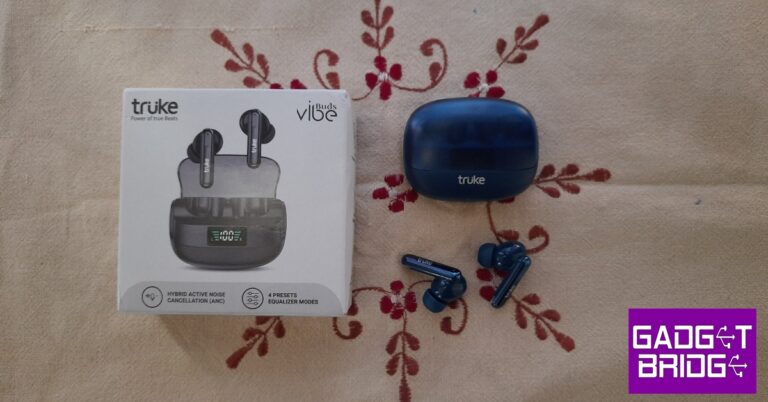
Truke Buds Vibe ship inside a rectangular box, with the contents housed in a flimsy plastic tray. Truke makes some compromises on the quality of packaging in order to limit the cost of the product. We don’t really mind it as long as no compromises are made on the audio front. Inside the box, you will find wireless earbuds, a charging case, 2 pairs of extra ear tips, a USB charging cable, a user manual, and a warranty card. Truke Buds Vibe review: Design Buds Vibe is easily one of the best-looking TWS in Truke’s catalogue. The earbuds are available in a single-tone blue colour and a dual-tone black & yellow colour combination. The charging case and earbuds are made entirely out of plastic, which is something to be expected in this price range. The charging case weighs just 76.4 grams (with the earbuds inside). The see-through plastic lid covers 70% of the front panel. There is a small display inside that notifies you of the charge held in the case at any given time. When the earbuds are in their respective pods, you can also see their battery level bar on this display. Truke branding can be found just below the plastic lid. The USB type C charging port has been housed at the bottom of the case. The build quality of Buds Vibe is satisfactory. Comparing it with other Truke products, we feel that the Buds Vibe could have been a bit more sturdy. The lid is fun to snap open and shut but rests slightly loose on the case. It is a very minor complaint but we haven’t faced this issue on any other Truke product. On the bright side, the case does not attract any fingerprints or smudges. After a week of rough use, where the case shared pockets with keys and loose change, we are happy to report that it came out unscathed with no scratches. Truke Buds Vibe review: Design The earbuds sport an in-ear design. There are an additional two pairs of ear tips in the box to help you find the perfect fit. This is going to be necessary if you plan on using the Buds Vibe to cancel out surrounding noise. Made out of glossy plastic, the earbuds have the tendency to fall out during sweaty workouts. We did not experience any water damage due to sweat during our use. The outer panels of the earbuds are touch sensitive and can be used to control the audio playback. If you want to switch between different audio/ANC modes, you will have to rely on touch gestures since there is no app support for Buds Vibe. The earbuds are highly prone to accidental touches, which can get annoying very quickly. It is also not uncommon for some touch gestures to not register at all. A dedicated app would sort this issue out altogether.

Truke Buds Vibe review: Performance

There are several things to like about Truke Buds Vibe’s performance. The earbuds feature 13mm titanium drivers that produce a solid audio output. With Bluetooth 5.3 on board, the earbuds are instantly connected to your device as soon as you flip open the lid. The strength of the connection is also optimum. Truke Buds Vibe review: Performance Truke Buds Vibe gets four preset EQ modes – balanced mode (default), dynamic audio mode, movie mode, and bass boost mode. You can switch between these modes by touching and holding the outer panel of the left earbud. The notification sound remains very rough and not pleasing to listen to at all. To switch to an EQ mode, you will need to go through all the other modes. An app would’ve been extremely handy here. The touch panels sometimes fail to register the hold gesture and play music instead of switching to a different EQ mode. In terms of sound quality, Truke Buds Vibe does not disappoint. We played a variety of genres on these earbuds and had an enjoyable listening experience. The sound is punchy and rich, with no significant distortion if you keep the volume under 80%. The lower frequencies get a special focus and the warm, enveloping bass can be further enhanced with the ‘Bass Boost’ mode.  While the Buds Vibe provide a good bass output, the mid and higher frequencies could have used a bit more work. The higher frequencies (guitar and vocals) sound slightly rough on certain occasions. A greater level of detail in the output would have been ideal. Having said that, the Truke Buds Vibe is still a worthy contender in its segment. There is a 40ms low latency Gaming Mode onboard the Buds Vibe too. We did experience a mismatch in audio and gameplay while playing Call of Duty in regular mode. Turning on the Gaming Mode was a big improvement and instantly ironed out all issues. If you’re looking for a TWS on a budget that can cater to different needs, Buds Vibe is worth looking into. You also get Active Noise Cancellation on Truke Buds Vibe. This is where Buds Vibe pulls ahead of its competition. At this price range, having ANC on your earbuds is a total steal deal. The ANC performance is surprisingly good. The TWS can cancel up to 35dB of surrounding noise. We previously used Truke Buds A1 which also offers ANC in a similar price range, but the ANC on Buds Vibe is much better. The TWS was able to suppress background noises like the sound of the ceiling fan and distant humdrum.   The calling experience provided by Truke Buds Vibe gave us little to complain about. The earbuds are able to effectively isolate the voice from the background noise and relay it perfectly to the receiver. The Quad Mic Environmental Noise Cancellation plays its part here. With 300mAh of battery inside the case, Truke Buds Vibe offers a total playback time of 48 hours. We used the earbuds every day throughout the week and only felt the need to charge the case twice. This included using ANC at all times with up to two hours of music consumption each day. Each earbud is equipped with a 40mAh battery, which is good enough to last 5-7 hours with ANC turned on. The case takes two hours to fully charge.  Read Also: PUBG New State Mobile Battle Adda tournament announced: Details inside

Verdict 

Currently priced at Rs 1,599, Truke Buds Vibe is a good buy. If you don’t want to splurge a lot on wireless earbuds but don’t want to compromise on audio quality, Truke Buds Vibe fits the bill. We’ve been saying this for quite some time, but Truke will massively benefit from app support for its TWS products. Navigating through the different audio modes using the touch panels is certainly not ideal. The low-quality notification alerts are also something that needs to be fixed.

Truke Buds Vibe review: Pros

  • Great looks
  • Good sound profile 
  • ANC
  • Incredible value for money

Truke Buds Vibe review: Cons

  • Touch panels aren’t consistent
  • No app support
For the latest gadget and tech news, and gadget reviews, follow us on Twitter, Facebook and Instagram. For newest tech & gadget videos subscribe to our YouTube Channel. You can also stay up to date using the Gadget Bridge Android App. You can find the latest car and bike news here.

Vivo X90, X90 Pro with Zeiss-powered triple rear cameras launched in India

The Vivo X90, X90 Pro, and X90 Pro+ were the three smartphones that were introduced in China first last year. The latest flagship Vivo X90 series from the Chinese tech giant has finally launched in India today. However here in India, the company has only released the former two models out of the three. The MediaTek Dimensity 9200 SoC is found inside both smartphones. The triple rear camera unit is powered by Zeiss lenses and uses the V2 image processing technology.

Vivo X90 series price and availability

The price of the Vivo X90 has been set at Rs 59,999 for the 8GB RAM with 256GB storage option whereas the 12GB RAM with 256GB storage comes with a price tag of Rs 63,999. The phone will come in a lone Legendary Black colour option. The Vivo X90 Pro on the other hand will be available at Rs 84,999 for the single 12GB RAM with 256GB storage option. The device will be available in two colour options of Asteroid Black and Breeze Blue. Pre-orders for all the X90 phones are now being taken. All the devices are scheduled to go on sale in India on May 5. The phone can be purchased via Vivo e-store, Flipkart and retail outlets in the country. Consumers can pre-book the smartphones starting today and avail up to 10% cashback on SBI, ICICI, HDFC, and IDFC banks.

Vivo X90 specifications

The X90 comes with a 6.78-inch AMOLED display and has a resolution of 1,260 x 2,800 pixels. The device has a screen-to-body ratio of 93.53 percent, a 20:09 aspect ratio, and a refresh rate of up to 120 Hz. The screen has been certified to support the DCI-P3 colour gamut. The handset operates on OriginOS 3 and runs Android 13. Under the hood, there is an octa-core 4nm MediaTek Dimensity 9200 SoC and a G715 GPU. It offers up to 12GB of LPDDR5 RAM, to power the smartphone. The Vivo X90 comes with internal storage of up to 512GB UFS4.0. The Vivo X90 comes with a triple rear camera unit that includes Zeiss lenses. It has a 12-megapixel ultra-wide-angle camera with an f/2.0 aperture, a 12-megapixel portrait camera with a 50mm lens, and a 50-megapixel main sensor with an f/1.75 aperture. The smartphone sports a 32-megapixel selfie camera with an f/2.45 aperture for taking selfies.
Vivo X90 specifications
Vivo X90
The handset includes a 4,810mAh battery and supports 120W rapid charging. According to the company, the battery may provide up to 22.2 days of standby life on a single charge. The phone is IP64 rated for dust and water resistance. For connectivity, there is 5G, Wi-Fi 6, Bluetooth 5.3, NFC, GPS, and a headphone jack. There is an accelerometer, ambient light sensor, ambient colour temperature sensor, e-compass, gyroscope, IR blaster, and ultrasonic distance sensor.

Vivo X90 Pro specifications

The Vivo X90 Pro is a top-of-the-line device which comes with a similar display as its sibling. This phone is also powered by a MediaTek Dimensity 920 0 chipset paired with up to 12GB of LPDDR5 RAM and up to 256GB of UFS 3.1 inbuilt storage that can be expanded further via microSD card.
Vivo X90 Pro specifications
Vivo X90 Pro
The X90 Pro also has a Zeiss-powered triple rear camera setup that consists of a 50-megapixel Zeiss 1-inch primary sensor with an f/1.75 aperture. A 12-megapixel extreme wide-angle sensor and a 50-megapixel secondary 50mm sensor with an f/1.6 aperture each are also included. In addition to this, there is a 32-megapixel selfie camera on the front with an f/2.45 aperture. It includes a 4,870mAh battery with compatibility for 50W wireless charging and 120W rapid charging. The device is IP68 rated for dust and water resistance. In terms of connectivity, there is a 5G, Wi-Fi 6, Bluetooth v5.3, NFC, GPS, and a USB Type-C port. Additionally, the phone includes a fingerprint sensor, IR control, accelerometer, ambient light sensor, ambient colour temperature sensor, e-compass and gyroscope. For the latest gadget and tech news, and gadget reviews, follow us on TwitterFacebook and Instagram. For newest tech & gadget videos subscribe to our YouTube Channel. You can also stay up to date using the Gadget Bridge Android App. You can find the latest car and bike news here.
WhatsApp account on multiple phones: You can now use a single WhatsApp account across different devices

WhatsApp has officially rolled out the functionality to use a WhatsApp account on multiple phones. According to the Meta-owned instant chatting app the same WhatsApp account can now be accessed on up to four phones. This feature is similar to how you use the same account on a desktop, tablet or any secondary device. WhatsApp now let you log in to the same account on multiple smartphones. Previously this feature was available through the Web platform but now it is possible to link it to multiple phones. The company CEO Mark Zuckerberg officially announced the ability to link one single account to multiple phones. He said, “Starting today, you can log into the same WhatsApp account on up to four phones.” The company also took to Twitter to announce the availability to link a WhatsApp account on multiple phones. The blog post said, “Last year, we introduced the ability for users globally to message seamlessly across all their devices while maintaining the same level of privacy and security. Today, we’re improving our multi-device offering further by introducing the ability to use the same WhatsApp account on multiple phones.” Also Read: WhatsApp Kept Messages feature to save disappearing messages announced According to the company, multidevice support for phones is a highly requested feature. One can now link one single account to 4 additional devices/phones. It works the same as when you link with WhatsApp on web browsers, tablets and desktops. Notably, each linked phone connects to WhatsApp independently, ensuring that your personal messages, media, and calls are end-to-end encrypted. If the primary device is inactive for a long period, WhatsApp automatically logs you out of all companion devices. As per WhatsApp linking phones as companion devices will make messaging easier. This means the ability to switch between phones without signing out allows you to continue conversations where you left them. Alternatively, if you run a small business, other staff members can now reply to clients directly from their phones using the same WhatsApp Business account.

Availability

WhatsApp noted via blog post that they have begun rolling out the update to users all over the world and it is dropping on your devices in the coming weeks. “Also rolling out over the coming weeks, we’re introducing an alternative and more accessible way to link to companion devices. Now you can enter your phone number on WhatsApp Web to receive a one-time code, which you can use on your phone to enable device linking, rather than having to scan a QR code. We look forward to introducing this feature to more companion devices in the future.”

How to link your WhatsApp account to multiple phones:

  • Firstly launch WhatsApp on your secondary device.
  • Now open your WhatsApp account on the primary device and locate the Linked Devices option in Settings.
  • Tap on the Link a Device.
  • If an ID check is set up, follow the steps on the screen to confirm your identity.
  • Now use the camera on your primary device to scan the QR code on the secondary phone.
For the latest gadget and tech news, and gadget reviews, follow us on TwitterFacebook and Instagram. For newest tech & gadget videos subscribe to our YouTube Channel. You can also stay up to date using the Gadget Bridge Android App. You can find the latest car and bike news here.

How to set up daily routines with Google Assistant on Android in 2023?

0
One of the best ways you can utilise Google Assistant on your smartphone is by using the ‘Routines’ feature. A routine is a set of automated tasks and actions that are carried out during a specific time or whenever you say the trigger phrase. Routines are incredibly versatile and offer a lot of customisation options. For example, you can set a routine that carries out a set of tasks every time you come home from work. This routine can be customised to turn off mobile data and turn on WiFi on your phone, turn on the house lights of the living room, play a particular playlist on Spotify, and more. In this article, we show you how to set up daily routines with Google Assistant on Android in 2023. Read Also: OnePlus Pad price in India and availability details announced: Details

Here’s how you can create or edit a routine on Google Assistant

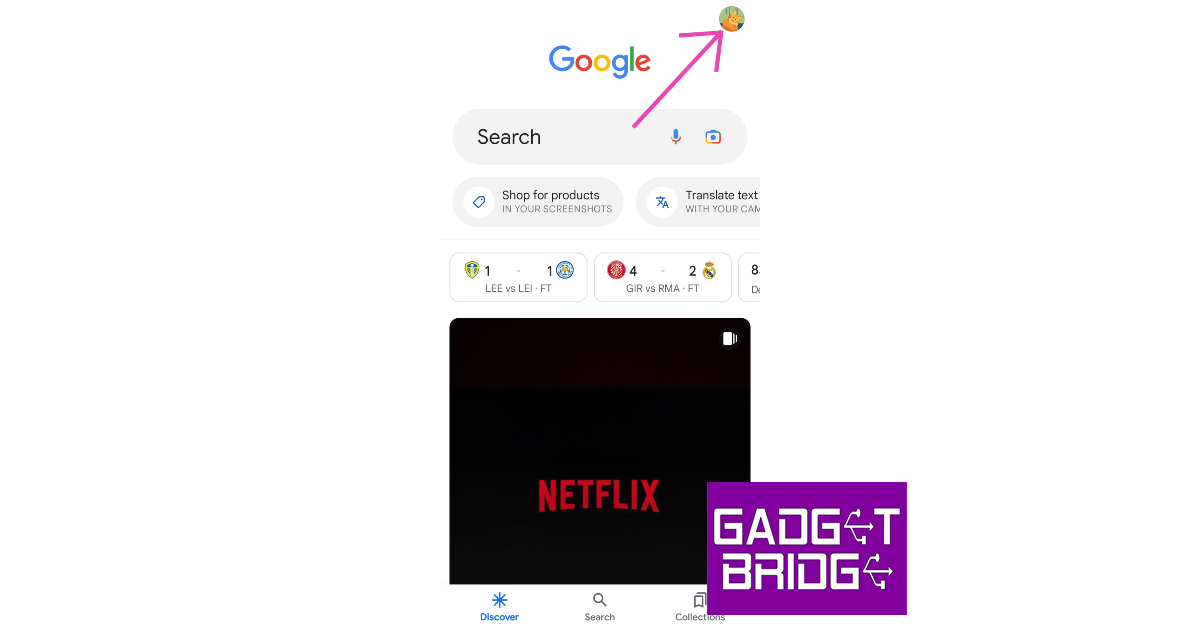
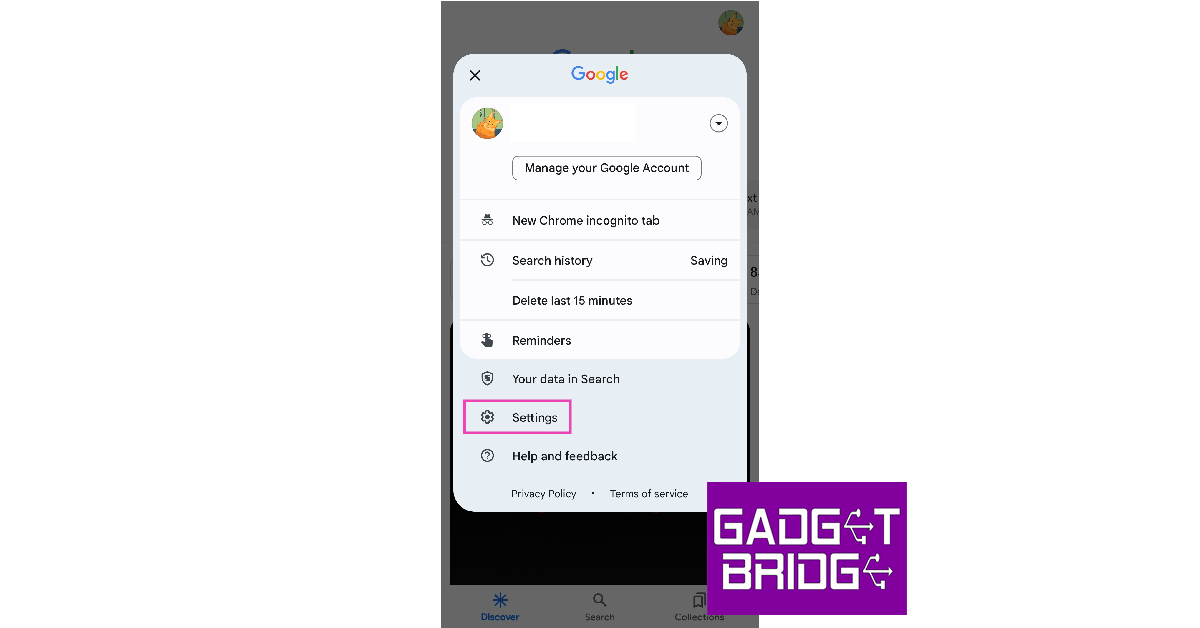
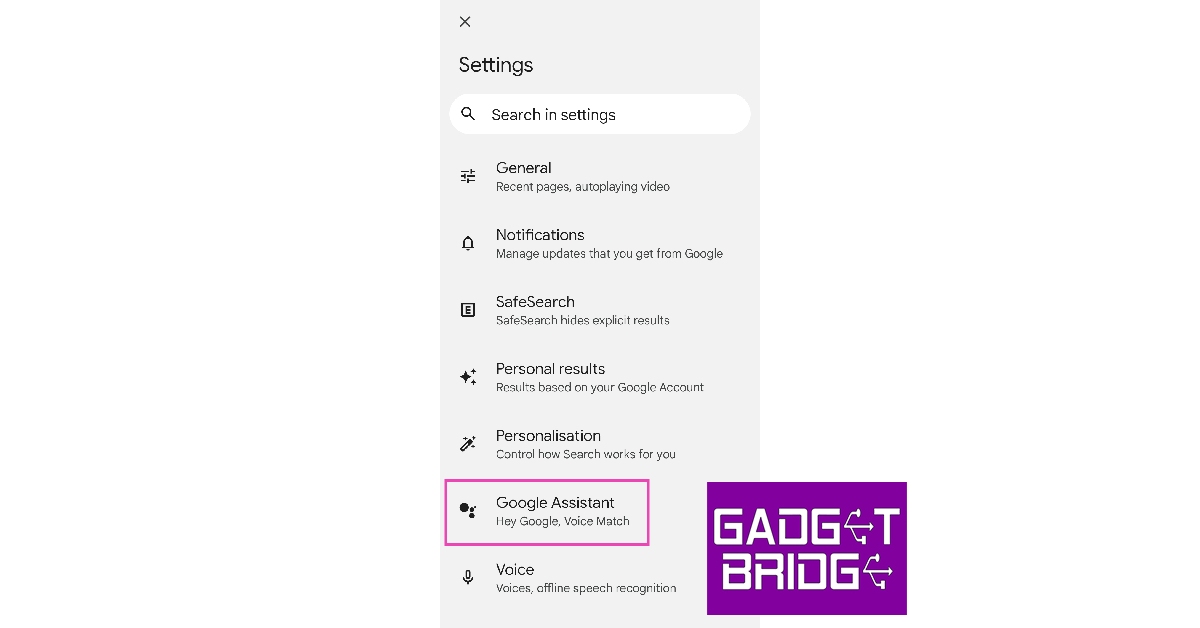
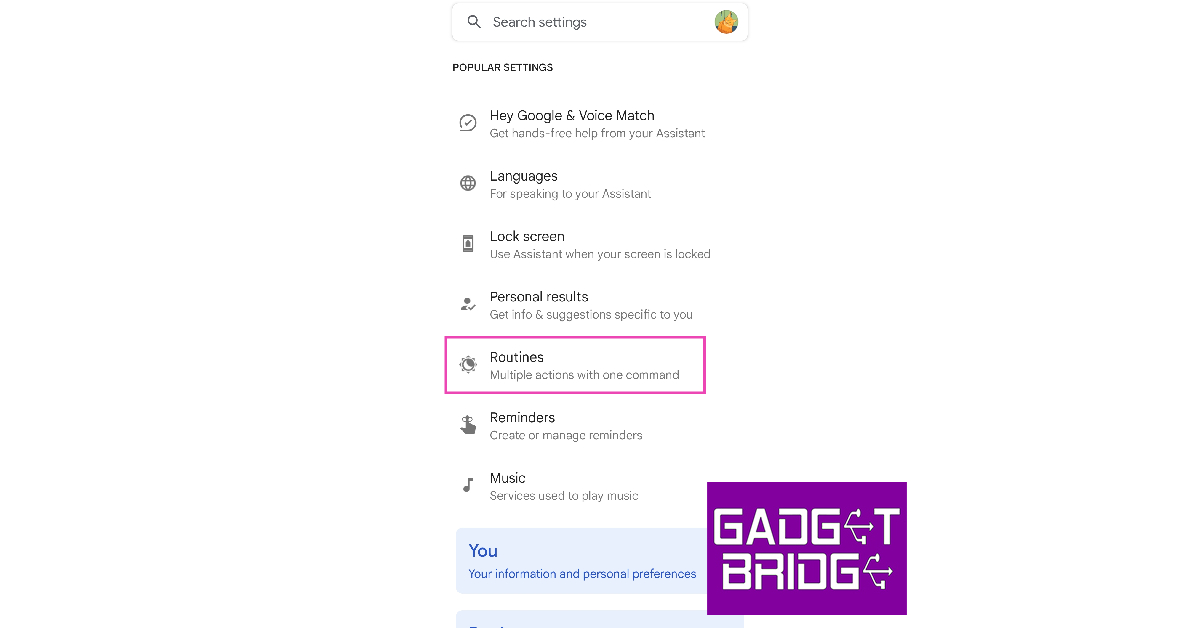
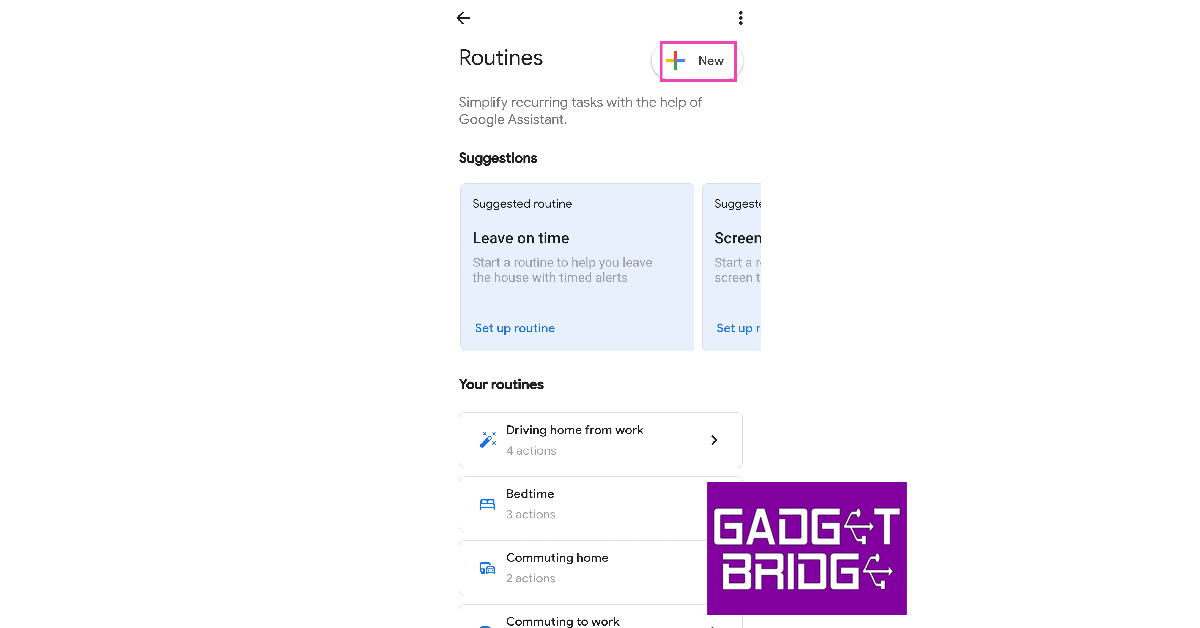
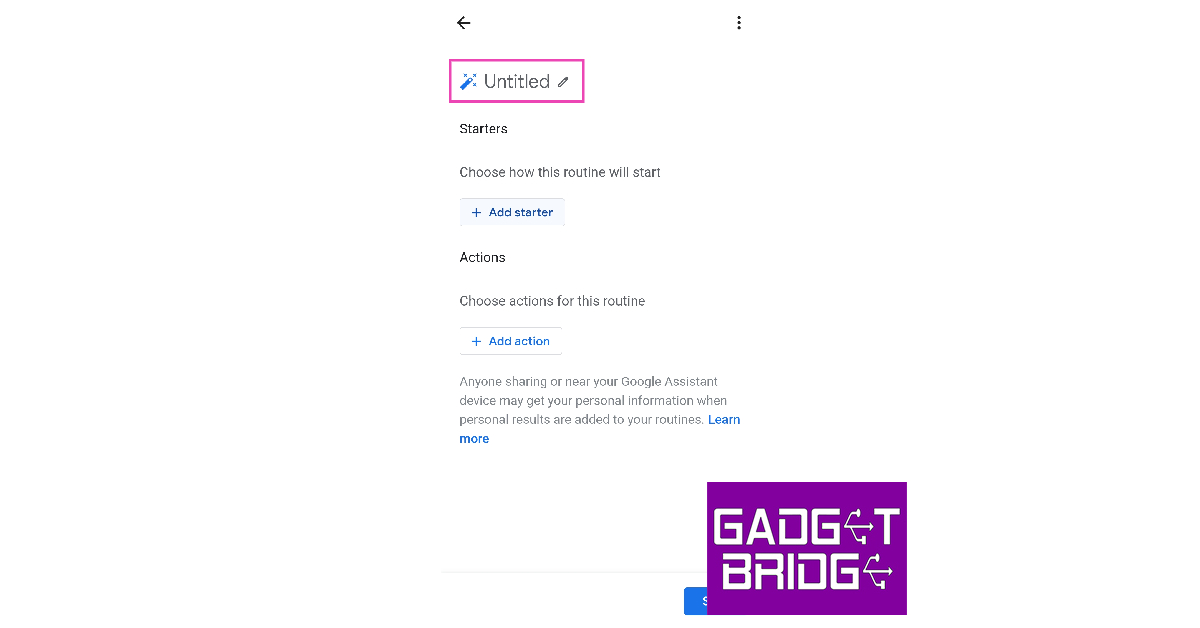
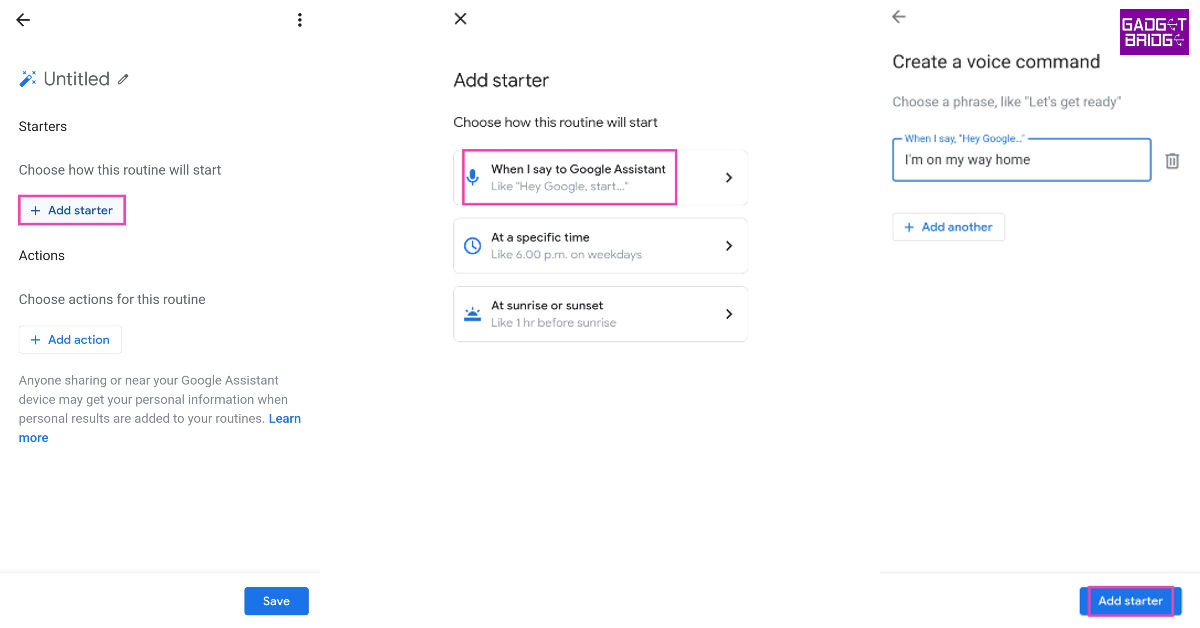
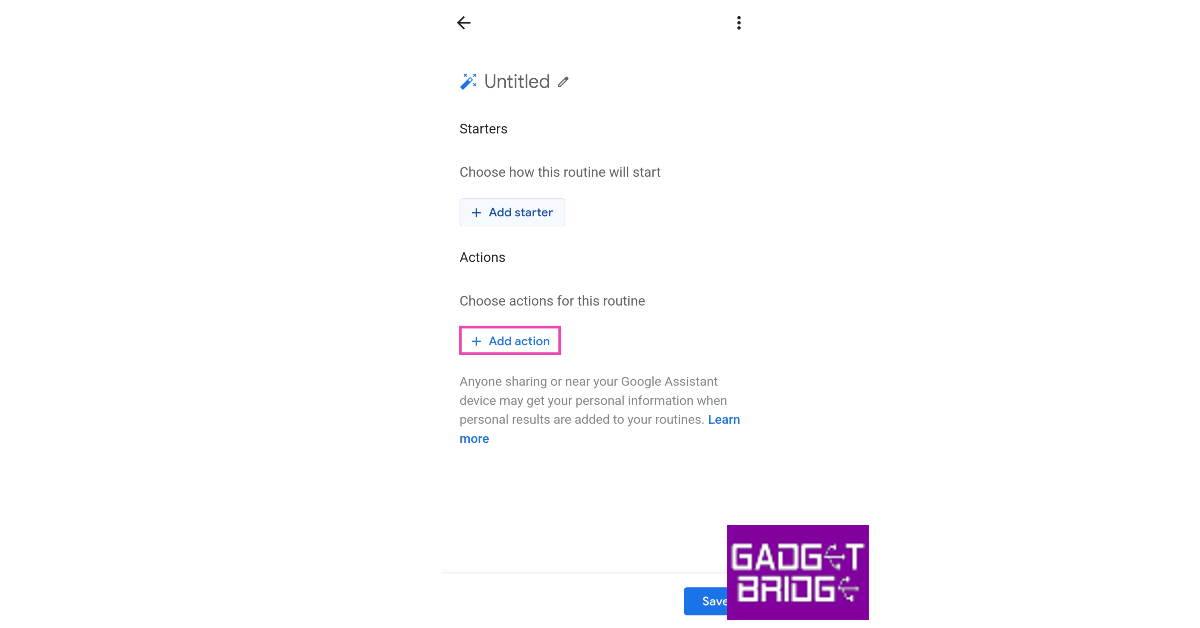
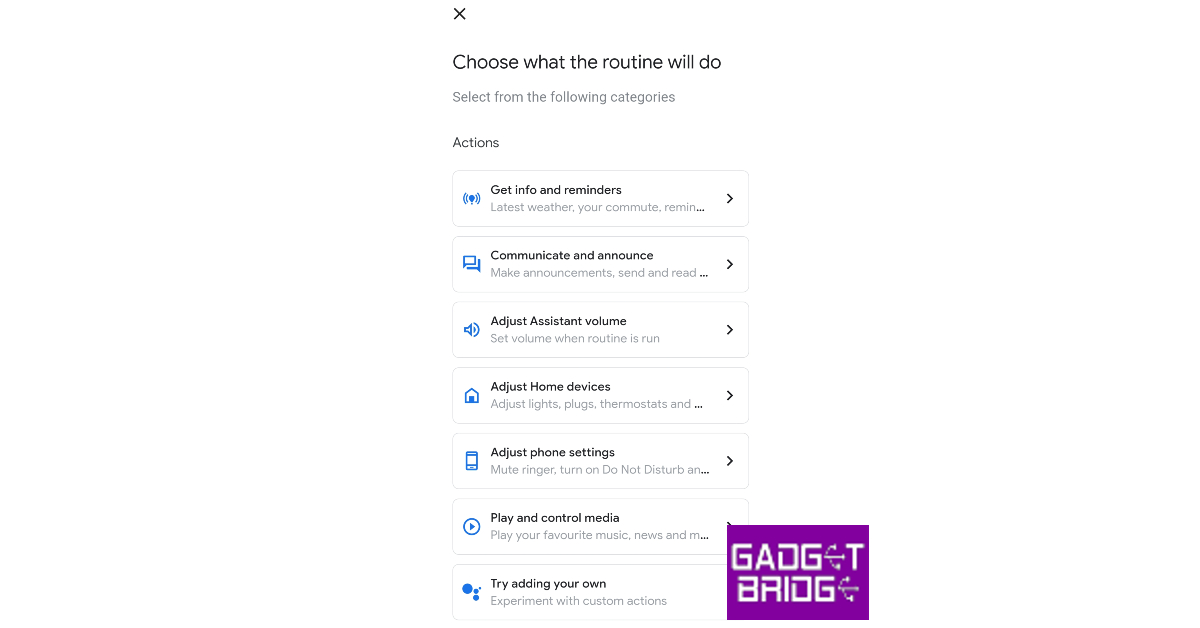
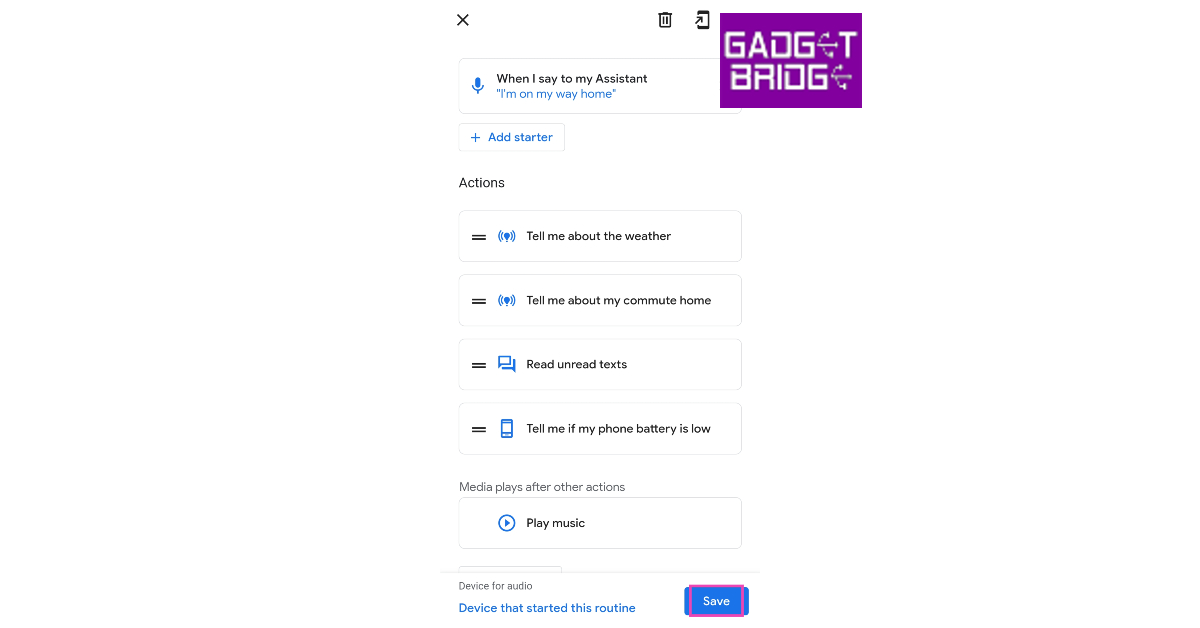
If you’re looking to automate certain tasks on your smartphone, Google Assistant is already a step ahead of you. You can find a bunch of preset routines in the Google Assistant app. These routines cover the major aspects of everyday life and you can edit them according to your needs. Here’s how you can create a completely new personal routine. Step 1: Go to the Google app and tap on your profile icon. Step 1: Go to the Google app and tap on your profile icon. Step 2: Tap on Settings. Step 2: Tap on Settings. Step 3: Select ‘Google Assistant’. Step 3: Select ‘Google Assistant’. Step 4: Tap on Routines. Step 4: Tap on Routines. Step 5: Tap on the Plus icon that says ‘New’. Step 5: Tap on the Plus icon that says ‘New’. Step 6: Choose whether you want to create a personal or a household routine. A household routine can be edited by home members while a personal routine can only be accessed by you. Step 7: Once you’ve selected a routine, you can create a set of automated tasks. Tap on ‘Untitled’ to name the routine. Step 7: Once you’ve selected a routine, you can create a set of automated tasks. Tap on ‘Untitled’ to name the routine. Step 8: Tap on ‘Add Starter’. This will be the trigger for your routine. You can set the routine to start at a specific time of the day or when you say a certain phrase to Google Assistant. Tap on ‘Add Starter’. How to set up daily routines with Google Assistant on Android in 2023? Step 9: Now, choose the actions you want to be played out in this routine. Tap on ‘Add action’ to set a task or action for Google Assistant to perform. choose the actions you want to be played out in this routine. How to set up daily routines with Google Assistant on Android in 2023? Step 10: The actions have been classified into different categories, depending on the task they cater to. Select the relevant category to set up an action. You can also add an action of your own. The actions have been classified into different categories. How to set up daily routines with Google Assistant on Android in 2023? Step 11: Once you’re done, go to the routine page and tap on ‘Save’. Step 11: Once you’re done, go to the routine page and tap on ‘Save’. How to set up daily routines with Google Assistant on Android in 2023?

Frequently Asked Questions

What is Google Assistant routine?

A Google Assistant routine carries out a set of automated tasks and actions every time it is triggered. A routine can control the smart devices connected to the Google Home app.

How do I trigger a Google Assistant routine?

You can set a routine to trigger at a specific time during the day or whenever you say a certain phrase to Google Assistant.

How do you set up a routine?

To set up a routine, go to Google App>Profile>Settings>Google Assistant>Routines and pick a preset routine or make one of your own. Read Also: Telegram-like WhatsApp Channels feature now rolled out to WhatsApp beta for iOS: Deets inside

Conclusion

This is how you can set up daily routines with Google Assistant on Android in 2023. You can get creative and automate certain sections of your day with ease. When used correctly, Google Assistant routines can be very easy to adopt in your daily life. What do your routines on Google Assistant look like? Let us know in the comments! For the latest gadget and tech news, and gadget reviews, follow us on Twitter, Facebook and Instagram. For newest tech & gadget videos subscribe to our YouTube Channel. You can also stay up to date using the Gadget Bridge Android App. You can find the latest car and bike news here.
Vivo X90, Vivo X90 Pro launching in India today: How to watch the event live

Vivo X90 Series is all set to debut in India today. The smartphone, which will replace the current X80 Series, is the most anticipated flagship to debut. Two models, the X90 and X90 Pro, are anticipated to be released as part of the series. The gadget made its debut last year in November in China and in February globally. The Vivo X90, Vivo X90 Pro, and Vivo X90 Pro+ are the three models in the lineup; however, as was already mentioned, the business is most likely to just debut the first two versions.

How to watch the livestream of the Vivo X90 Series

Vivo X90 Series is set to launch in India today. The launch event will start at 12 noon IST. The event is going to stream live via the company’s official website in the country, in addition to all its social media channels and YouTube channel. You can also watch it live here on our website we have embedded the link below.

Vivo X90 Series price expected

The Vivo X90 and Vivo X90 Pro are most likely to debut, while the company has not yet made a formal announcement. Additionally, there is no cost information. At the time of the introduction, the smartphones’ prices will be made public. The cost of both versions was made known in a report by The Tech Outlook just before the formal announcement. The base 8GB RAM with 128GB storage edition of the X90 is reportedly expected to cost Rs 59,999, while the 12GB RAM with 256GB storage option will be offered at Rs 63,999. The X90 Pro, on the other hand, is anticipated to cost Rs 84,999 for the 12GB RAM with 256GB storage option.

Vivo X90, Vivo X90 Pro specifications

The specs of both handsets will remain the same as the original ones. Vivo X90 will have a 6.78-inch AMOLED display with a 1,260 x 2,800-pixel resolution. The display comes with a 20:09 aspect ratio, a refresh rate of up to 120Hz, and a screen-to-body ratio of 93.53 percent. The DCI-P3 colour gamut is also supported. The handset runs on Android 13 with OriginOS 3 on top. The smartphone will be driven by an octa-core 4nm MediaTek Dimensity 9200 SoC, up to 12GB of LPDDR5, and a G715 GPU. Internal storage on the Vivo X90 is expandable to 512GB UFS4.0. Vivo X90 will come with a triple rear camera setup that includes a 12-megapixel ultra-wide-angle camera with an f/2.0 aperture, a 12-megapixel portrait camera with a 50mm lens, and a 50-megapixel primary sensor with an f/1.75 aperture are all featured. It will also sport a selfie camera with a 32-megapixel resolution and an f/2.45 aperture. In addition to this, there is a 4,810mAh battery and 120W fast charging. On the contrary, X90 Pro will be powered by a MediaTek Dimensity 9200 CPU, up to 12GB of LPDDR5 RAM, and up to 512GB of UFS 3.1 internal storage that can be expanded further with a microSD card. The device also includes a 4,870mAh battery with support for both wireless charging at 50W and quick charging at 120W. The rest of the remaining features will be similar to X90. The X90 Pro will include a triple rear camera setup, with the primary camera being a 50-megapixel Zeiss 1-inch sensor with an f/1.75 aperture. In addition to this, it includes two 50-megapixel secondary 50mm sensors with an f/1.6 aperture each and a 12-megapixel ultra-wide-angle sensor. On the front, it boasts a 32-megapixel selfie camera with an f/2.45 aperture. For the latest gadget and tech news, and gadget reviews, follow us on TwitterFacebook and Instagram. For newest tech & gadget videos subscribe to our YouTube Channel. You can also stay up to date using the Gadget Bridge Android App. You can find the latest car and bike news here.

Garena Free Fire Redeem Codes Today 26 April 2023: Here is how to claim them

Garena Free Fire is a battle royale game with regular awards and tournaments to keep players interested. If you play Garena Free Fire, you should be aware of the redeem codes that are released on a daily basis. However, because the battle royale game is banned in India, players from other countries can use the Free Fire Redeem codes daily. If you’re unfamiliar with the Garena Free Fire redeem codes or don’t know how to get them, we’ve put together a step-by-step guide to help you redeem them. Check out Garena Free Fire Redeem Codes for 26 April 2023. The Free Fire redeem codes are a great way to get free stuff. These are 12-digit codes that contain alphabets and numbers, as well as an expiration date and time. Because the Garena FF redeem codes cannot be used more than once, you should hurry to the redemption page to claim your free reward before someone else does. To get a free reward, all you have to do is go to reward.ff.garena.com/en, which is the official redemption page. Also, keep an eye on this space for daily updates on Garena Free Fire redemption codes and rewards.

Garena Free Fire Redeem Codes Today 26 April 2023

  • HFNSJ6W74Z48
  • V44ZZ5YY7CBS
  • 3IBBMSL7AK8G
  • X99TK56XDJ4X
  • XFW4Z6Q882WY
  • WD2ATK3ZEA55
  • E2F86ZREMK49
  • TDK4JWN6RD6
  • FFDBGQWPNHJX
  • 4TPQRDQJHVP4
  • GCNVA2PDRGRZ
  • 8F3QZKNTLWBZ

How to Get Free Fire Redeem Codes for Garena on 26 April 2023?

  • Visit the Garena Free Fire game’s official website at reward.ff.garena.com.
  • Use your Facebook, Google, VK, Apple ID, Huawei ID, or Twitter account to log in.
  • You’ll be taken to a valid redemption code (s)
  • Copy and paste the 12-digit redemption code into the text box.
  • On the screen, a dialogue box will appear.
  • ‘Ok’ should be selected.
For the latest gadget and tech news, and gadget reviews, follow us on TwitterFacebook and Instagram. For newest tech & gadget videos subscribe to our YouTube Channel. You can also stay up to date using the Gadget Bridge Android App. You can find the latest car and bike news here.

Amazon Quiz Answers Today 26 April 2023: Participate to win Rs 2,500

26 April 2023 Amazon Quiz has gone live. Customers from different parts of the country are participating in the daily quiz. The quiz begins from 12 AM to 11:59 PM. Those participating in the quiz can win exciting prizes by answering all the questions correctly. Today participants have a chance to win a Rs 2,500 Amazon Pay Balance. Amazon quiz brings an opportunity for its customers to win Amazon Pay Balance ranging from Rs 1,000 to Rs 50,000. The Quiz can be played from 12 AM to 11:59 PM. The e-commerce platform brings a fresh quiz on a daily basis which consists of five questions related to general knowledge and current affairs. The participants need to answer all the questions correctly and their names will be selected for a lucky draw. The winner will be announced at the end of the month. One wrong answer could eliminate you from the quiz. If you manage to answer all the questions correctly you can stand a chance to win a Rs 2,500 Amazon Pay Balance today. Only app users are eligible to participate in the Quiz. Check Out 26 April 2023 Amazon Quiz Answers. Amazon Quiz Today Prize – Rs 2,500 Amazon Pay Balance Quiz Date – 26 April 2023 Daily Timing – 12 AM to 11:59 PM Winner Announcement – Today 12 PM

Amazon Quiz Answers Today 26 April 2023

Question 1: Which racing driver won the Saudi Arabian Grand Prix 2023 title? Answer: Sergio Perez Question 2: In 2023, Eric Garcetti was appointed the US Ambassador to which country? Answer: India Question 3: The safeguarding of the Indo-Myanmar border is the responsibility of which paramilitary force? Answer: Assam Rifles Question 4: Where is this site located? Answer: Turkey Question 5: Which is considered as the highest-ranked belt in this sport? Answer: Black

How To Play Amazon Quiz

Only app users are eligible to play the Amazon quiz every morning from 12 AM to 11:59 PM. The quiz is not available on the desktop. For those who are unaware of how to play the Amazon quiz below are the steps, you can follow to take the quiz.
  • Firstly download the Amazon app from Google Play Store or App Store
  • Now fill in the required information through the Sign Up option.
  • You need to log in to the Amazon app and scroll down on the home screen to find the Amazon Quiz banner.
  • Tap on the Amazon Quiz banner and tap on the Start button to start the Quiz.
  • Now you will get 5 questions and you need to answer them correctly. One wrong answer will eliminate you from the Quiz.
  • After answering all the questions correctly you are now eligible for a Lucky Draw.
  • The winner’s name will be announced today at 12 PM.
For the latest gadget and tech news, and gadget reviews, follow us on TwitterFacebook and Instagram. For newest tech & gadget videos subscribe to our YouTube Channel. You can also stay up to date using the Gadget Bridge Android App. You can find the latest car and bike news here.

PC or Laptop, which is Best for Gaming?

Gaming in 2023 is a high-tech affair. The industry has developed at breakneck speed over the past few decades, with new technologies and innovations driving its growth and ensuring widespread popularity among global consumers. For PC gamers in particular, there’s now more choice than ever before, especially when it comes to the devices on which they can access and play bleeding-edge gaming experiences. Choosing between a gaming laptop and a gaming PC is a common dilemma here in the digital age. In previous decades, laptops simply didn’t have the processing power needed to get through the most basic of computer games, but all that has changed with the rise of the gaming laptop. Nowadays, many gamers are torn between investing in an all-new gaming laptop or a more traditional gaming PC, but which delivers the ultimate experience overall? Whether you’re a budding eSports pro or a newbie, this article will help you decide which machine is right for you.

PCs vs Laptops – How Do They Compare?

Generally speaking, the right machine for you should provide you with all the power and performance that you need to play your favourite games. For instance, a desktop machine should provide blistering power, while gaming laptops need a good balance between portability and visual fidelity. To help you make your decision, we’ll break down the key things to consider when investing in a new way to play PC games.

Budget

First and foremost, before you make any decision on what to buy, it’s important to have a budget in mind. There’s no point looking at high-end gaming rigs if you only have the funds for a lightweight machine; meanwhile, going straight for a cutting-edge gaming laptop when you only intend to play at home a few times a month won’t give you the most value either. Surprisingly, gaming PCs that you build from scratch can be significantly cheaper than either pre-built models or laptops. It’s all down to where you source the parts from: manufacturers like Origin will obviously be a lot more expensive than lesser-known brands. You’ll also need to either have previous experience of putting a PC together or the confidence to do so using online resources. Pre-built general-use PCs typically fall into the mid-range price category, but some can reach in excess of $5000 if they’re loaded with the latest top-of-the-range GPUs and CPU. A modest pre-build with adequate cooling, processor and graphics card that will ensure long-term use can be picked up for anywhere between $500 and $1000, depending on the manufacturer. Surprisingly and despite their smaller stature, gaming laptops capable of delivering 60fps with 4K resolution can be more expensive than desktops. Portability often comes at a premium, so the more lightweight a machine is and the greater battery life it can deliver, the higher the price tag will likely be. Of course, prices will vary from manufacturer to manufacturer, and even high-end brands like Alienware have more wallet-friendly options in their lines, while customizations across product ranges can also help keep costs down.

Performance

Performance is where gamers will typically experience the difference between playing on a desktop and playing on a laptop. At first glance, it could seem like they both offer the same performance, especially when models have similar processors, RAM, and storage. There are, however, noticeable differences between the two, even if they’re both built with the same Intel CPUs or NVIDIA graphics cards. This difference becomes more evident when playing the multitude of digital games like online roulette or top FPS titles available today, where you need to rely on performance to get the biggest rewards. Even the most cutting-edge GPU in a laptop will typically perform at a rate that’s 20-30% less than that same card in a desktop PC. This also plays out across CPUs too, leaving players with a noticeable difference between gaming on a portable device and a PC. Furthermore, games run a lot smoother on desktop machines, even when compared to the performance of a premium-priced laptop. Performance is all relative to the titles that you want to play, but if you’re into innovations like Ray Tracing and want to spend hours exploring the virtual worlds of games like Hogwarts Legacy, a gaming desktop will be most suitable. Older games like Final Fantasy XIV will run just as well on gaming laptops, however.

The Verdict

When it comes to choosing between a laptop or a desktop, there’s no single wrong or right answer. Both have their inherent advantages and disadvantages, meaning the choice is entirely depending on your needs as a player. Many gamers are more than happy with the performance that inexpensive Dell or Lenovo laptops provide, while others prefer the meaty power of a budget gaming rig. As well as buying within your budget and having a clear idea of the performance and power you need, other things to take into consideration include design, portability and longevity. On the design front, laptops can push ahead due to offering everything that players need for gaming on the go in a portable package. They clearly take the lead when it comes to portability, too, since PCs are intended to stay in one place, while the gaming rig takes the edge when it comes to longevity (PC components are generally easier and more cost-effective to replace). For the latest gadget and tech news, and gadget reviews, follow us on TwitterFacebook and Instagram. For newest tech & gadget videos subscribe to our YouTube Channel. You can also stay up to date using the Gadget Bridge Android App. You can find the latest car and bike news here.

Vivo X90, Vivo X90 Pro price in India leaked ahead of India launch

Vivo X90, and Vivo X90 Pro, the most premium smartphones by the Chinese tech firm are set to launch in India on April 26. Just right before its official release the Indian pricing leaked on the web. The Vivo X90 series which debuted in China in February is all set to hit Indian shores on April 26. The lineup launched in China includes Vivo X90, Vivo X90 Pro, and Vivo X90 Pro+ but here in India, the company will only introduce the former two models. The price of the smartphones will be revealed at the time of the launch. Just ahead of the official announcement a report by The Tech Outlook revealed the pricing of both the models. As per the report Vivo X90’s base 8GB RAM with 128GB storage model is likely to cost Rs 59,999 whereas the 12GB RAM with 256GB storage option will be available at Rs 63,999. On the other hand, the price of the Vivo X90 Pro is likely to be priced at Rs 84,999 for the 12GB RAM with 256GB storage model.

Vivo X90, Vivo X90 Pro specifications

Vivo X90 comes with a 6.78-inch AMOLED display with a 1,260 x 2,800-pixel resolution. The display has a 20:09 aspect ratio, a refresh rate of up to 120Hz, and a screen-to-body ratio of 93.53 percent. The DCI-P3 colour gamut is also supported. The device runs on Android 13 with OriginOS 3 on top. The smartphone is powered by an octa-core 4nm MediaTek Dimensity 9200 SoC, up to 12GB of LPDDR5, and a G715 GPU. Internal storage on the Vivo X90 is expandable to 512GB UFS4.0. Vivo X90 features a triple rear camera setup that consists of a 12-megapixel ultra-wide-angle camera with an f/2.0 aperture, a 12-megapixel portrait camera with a 50mm lens, and a 50-megapixel primary sensor with an f/1.75 aperture all featured. It includes a selfie camera with a 32-megapixel resolution and an f/2.45 aperture. In addition to this, there is a 4,810mAh battery and 120W fast charging. On the other hand, X90 Pro is driven by a MediaTek Dimensity 9200 CPU, up to 12GB of LPDDR5 RAM, and up to 512GB of UFS 3.1 internal storage that can be expanded further with a microSD card. The phone houses a 4,870mAh battery with support for both wireless charging at 50W and quick charging at 120W. The rest of the remaining features are similar to X90. The X90 Pro also has a triple rear camera setup, with the primary camera being a 50-megapixel Zeiss 1-inch sensor with an f/1.75 aperture. In addition to this, it includes two 50-megapixel secondary 50mm sensors with an f/1.6 aperture each and a 12-megapixel ultra-wide-angle sensor. On the front, it sports a 32-megapixel selfie camera with an f/2.45 aperture. For the latest gadget and tech news, and gadget reviews, follow us on TwitterFacebook and Instagram. For newest tech & gadget videos subscribe to our YouTube Channel. You can also stay up to date using the Gadget Bridge Android App. You can find the latest car and bike news here.