Garena Free Fire Redeem Codes Today 14 March 2023: Here is how to claim them

Garena Free Fire is a battle royale game with regular awards and tournaments to keep players interested. If you play Garena Free Fire, you should be aware of the redeem codes that are released on a daily basis. However, because the battle royale game is banned in India, players from other countries can use the Free Fire Redeem codes daily. If you’re unfamiliar with the Garena Free Fire redeem codes or don’t know how to get them, we’ve put together a step-by-step guide to help you redeem them. Check out Garena Free Fire Redeem Codes for 14 March 2023. The Free Fire redeem codes are a great way to get free stuff. These are 12-digit codes that contain alphabets and numbers, as well as an expiration date and time. Because the Garena FF redeem codes cannot be used more than once, you should hurry to the redemption page to claim your free reward before someone else does. To get a free reward, all you have to do is go to reward.ff.garena.com/en, which is the official redemption page. Also, keep an eye on this space for daily updates on Garena Free Fire redemption codes and rewards.

Garena Free Fire Redeem Codes Today 14 March 2023

  • Updating Soon

How to Get Free Fire Redeem Codes for Garena on 14 March 2023?

  • Visit the Garena Free Fire game’s official website at reward.ff.garena.com.
  • Use your Facebook, Google, VK, Apple ID, Huawei ID, or Twitter account to log in.
  • You’ll be taken to a valid redemption code (s)
  • Copy and paste the 12-digit redemption code into the text box.
  • On the screen, a dialogue box will appear.
  • ‘Ok’ should be selected.
For the latest gadget and tech news, and gadget reviews, follow us on TwitterFacebook and Instagram. For newest tech & gadget videos subscribe to our YouTube Channel. You can also stay up to date using the Gadget Bridge Android App. You can find the latest car and bike news here.

Amazon Quiz Answers Today 14 March 2023: Participate to win Rs 500

14 March 2023 Amazon Quiz has gone live. Customers from different parts of the country are participating in the daily quiz. The quiz begins from 12 AM to 11:59 PM. Those participating in the quiz can win exciting prizes by answering all the questions correctly. Today participants have a chance to win a Rs 500 Amazon Pay Balance. Amazon quiz brings an opportunity for its customers to win Amazon Pay Balance ranging from Rs 1,000 to Rs 50,000. The Quiz can be played from 12 AM to 11:59 PM. The e-commerce platform brings a fresh quiz on a daily basis which consists of five questions related to general knowledge and current affairs. The participants need to answer all the questions correctly and their names will be selected for a lucky draw. The winner will be announced at the end of the month. One wrong answer could eliminate you from the quiz. If you manage to answer all the questions correctly you can stand a chance to win a Rs 500 Amazon Pay Balance today. Only app users are eligible to participate in the Quiz. Check Out 14 March 2023 Amazon Quiz Answers. Amazon Quiz Today Prize – Rs 500 Amazon Pay Balance Quiz Date – 14 March 2023 Daily Timing – 12 AM to 11:59 PM Winner Announcement – Today 12 PM

Amazon Quiz Answers Today 14 March 2023

Question 1: Which of these actresses performed in the opening ceremony of the Women’s Premier League? Answer: Kiara Advani Question 2: The movie Gulmohar stars which of these actresses playing the role of Kusum Batra? Answer: Sharmila Tagore Question 3: Dr. John H. Watson usually appears in books and movies alongside which detective? Answer: Sherlock Holmes Question 4: Name this famous monument Answer: Rumi Darwaza Question 5: This is a picture taken in which continent? Answer: Antarctica

How To Play Amazon Quiz

Only app users are eligible to play the Amazon quiz every morning from 12 AM to 11:59 PM. The quiz is not available on the desktop. For those who are unaware of how to play the Amazon quiz below are the steps, you can follow to take the quiz.
  • Firstly download the Amazon app from Google Play Store or App Store
  • Now fill in the required information through the Sign Up option.
  • You need to log in to the Amazon app and scroll down on the home screen to find the Amazon Quiz banner.
  • Tap on the Amazon Quiz banner and tap on the Start button to start the Quiz.
  • Now you will get 5 questions and you need to answer them correctly. One wrong answer will eliminate you from the Quiz.
  • After answering all the questions correctly you are now eligible for a Lucky Draw.
  • The winner’s name will be announced today at 12 PM.
For the latest gadget and tech news, and gadget reviews, follow us on TwitterFacebook and Instagram. For newest tech & gadget videos subscribe to our YouTube Channel. You can also stay up to date using the Gadget Bridge Android App. You can find the latest car and bike news here.

Best Ways To Install Fonts On an Android Smartphone

0
One of the biggest issues that users have with smartphones is the commonness in software design and how there’s very little that separates Android smartphones these days. If you want a unique look for your phone, you can apply different themes on the OS. Another thing you can do is install attractive fonts that make the browsing experience on your smartphone more fun. In this article, we bring you the best ways to install fonts on your Android smartphone.  Read Also: How to Connect Windows 10 and Android smartphone Using Microsoft’s Phone Link app

Download and Install fonts from Settings

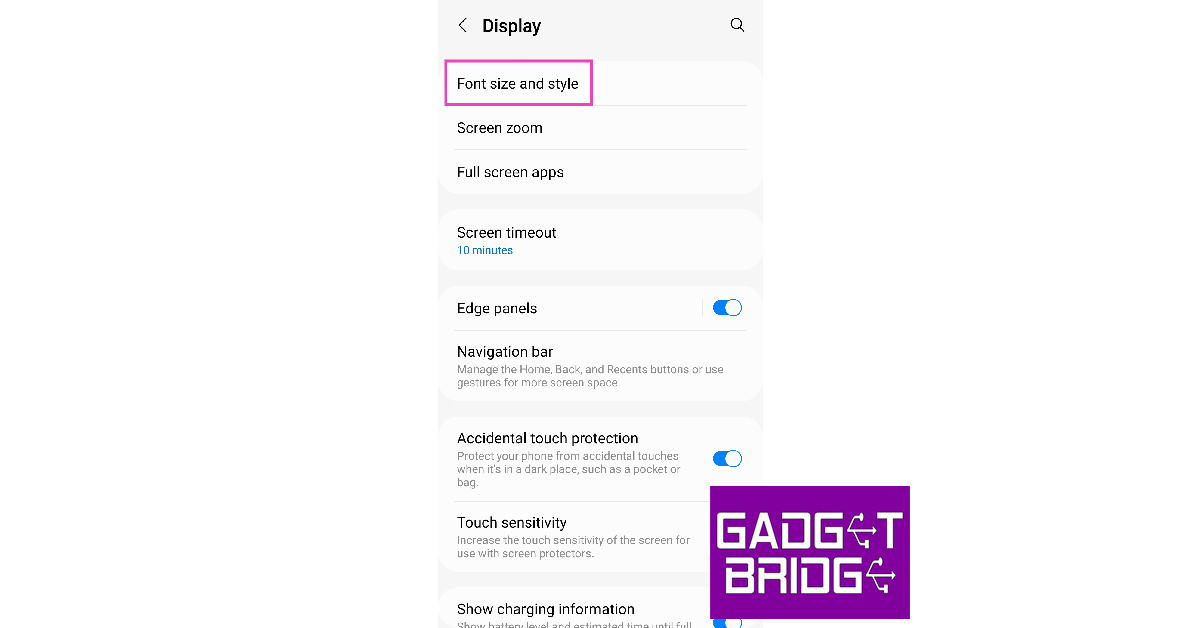
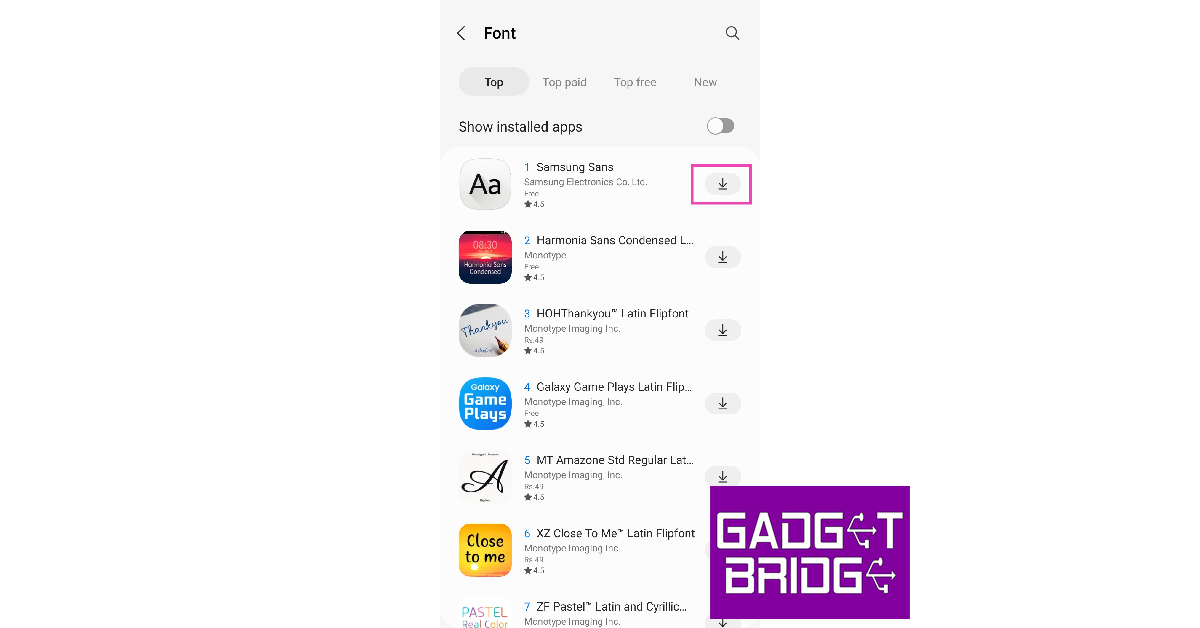
Step 1: Go to Settings and select Display. Step 1: Go to Settings and select Display. Step 2: Tap on ‘Font size and style’. Step 2: Tap on ‘Font size and style’. Step 3: Select ‘Font style’. Step 3: Select ‘Font style’. how to install fonts on an android smartphone Step 4: Choose one of the native fonts or tap on ‘Download fonts’ to view more. Step 4: Choose one of the native fonts or tap on ‘Download fonts’ to view more. how to install fonts on an android smartphone Step 5: Download the font apps you want by clicking on the arrow icon next to them. Step 5: Download the font apps you want by clicking on the arrow icon next to them. how to install fonts on an android smartphone Step 6: Go back to the ‘Font style’ page and select one of the newly downloaded fonts. Step 6: Go back to the ‘Font style’ page and select one of the newly downloaded fonts. The font style will be applied across the OS and supporting apps.

Install third-party font apps from Google Play Store

There are several third-party apps with an impressive library of fonts that can be applied to your Android smartphone. One of the best apps you can download is iFont. Here’s how you can install different fonts using iFont. Step 1: Download and install the iFont app from Google Play Store. Step 2: Launch the iFont app and give it the necessary permissions. Step 3: Tap on the font you want to install. Step 3: Tap on the font you want to install. Step 4: Tap on ‘Download’. Step 4: Tap on ‘Download’. Step 5: Once the font has been downloaded, select ‘Set’.

Change the font using a launcher

If you use a launcher app for your Android smartphone, chances are that it has its own set of unique fonts. Apps like Nova Launcher and GO Launcher have an extensive library of fonts that you can use to customise your Android smartphone. Simply launch the app’s Settings and go through all the fonts in the Preferences section. Read Also: Samsung Galaxy A54 5G and Galaxy A34 5G India launch set for March 16

Conclusion

These are the best ways to install fonts on an Android smartphone. You can also download certain font apps after rooting your smartphone, but it isn’t entirely necessary given that there are several third-party apps that can carry out the same job for you. Are there any particular fonts that you like to your use on your smartphone? Let us know in the comments! For the latest gadget and tech news, and gadget reviews, follow us on Twitter, Facebook and Instagram. For newest tech & gadget videos subscribe to our YouTube Channel. You can also stay up to date using the Gadget Bridge Android App. You can find the latest car and bike news here.

Nokia C12 launched in India at Rs 5,999

HMD Global today announced the launch of the Nokia C12 in the Indian market. The budget phone is the latest addition to the company’s popular C-Series. The newly launched smartphone is powered by an octa-core Unisoc 9863A1 SoC and has the option of RAM expansion. It comes with a 3,000mAh battery which supports a 5W charger. Moreover, there is a 6.3-inch HD+ display and an 8-megapixel rear camera.

Nokia C12 price in India, sale details

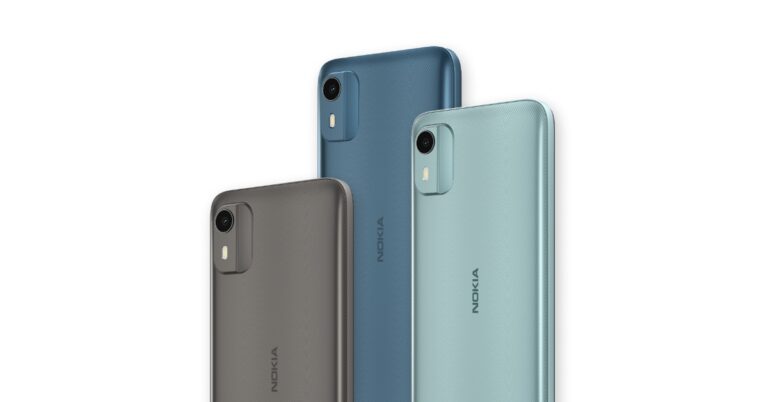
Nokia C12 has been launched in India with a price tag of Rs 5,999 for the single 2GB RAM with 64GB storage option. Note that it is introductory pricing and the device will be available at its original pricing after a specific period of time. The pocket-friendly phone comes in three colour options of Charcoal, Dark Cyan, and Light Mint. The device is scheduled to go on sale from March 17 via Amazon in the country. Nokia C12 price in India, sale details

Nokia C12 specifications, features

Nokia C12 runs on Android 12 (Go edition). The company is promising to provide two years of quarterly security updates. Under the hood, there is an octa-core Unisoc 9863A1 SoC with 2 gigabytes of RAM and 64 gigabytes of internal storage. The built-in RAM can be expanded utilising unused internal storage by up to 4GB. Moreover, there is a dedicated MicroSD slot that allows memory to be expanded up to 256GB. The budget smartphone also features a 6.3-inch HD+ display with an aspect ratio of 20:9. The phone is also splash and dust resistant, with an IP52 rating. Also read: GrammarlyGO an on-demand generative AI communication support introduced by Grammarly The Nokia C12 comes with an 8-megapixel camera sensor with autofocus and an LED flash on the back. A 5-megapixel sensor is placed at the front of the device for selfies and video calls. The camera unit is capable of using time-lapse photography, portrait mode, auto HDR, and night mode. The Night and Portrait modes are enabled for both the front and the rear camera. The Nokia C12 comes with a detachable 3,000mAh battery that enables 5W rapid charging. According to claims, the battery may last all day on a single charge. The smartphone offers Wi-Fi 802.11 b/g/nc, Bluetooth 5.2, FM radio, a micro-USB connector, and a 3.5mm headphone jack as choices for connectivity. Additionally, there is an accelerometer, ambient light sensor, and proximity sensor. For the latest gadget and tech news, and gadget reviews, follow us on TwitterFacebook and Instagram. For newest tech & gadget videos subscribe to our YouTube Channel. You can also stay up to date using the Gadget Bridge Android App. You can find the latest car and bike news here.

GrammarlyGO an on-demand generative AI communication support introduced by Grammarly

Grammarly plans to enhance its AI capabilities with the integration of a brand-new feature called GrammarlyGO. The writing assistance tool’s new feature is inspired by ChatGPT which is said to improve their content using AI. Users will now be able to complete tasks faster, and be more creative, therefore saving time. The grammar-checking platform Grammarly via its blog post said, “Today, we announced to the world GrammarlyGO—Grammarly on-demand, contextually aware assistant powered by generative AI. With GrammarlyGO, we’ll be changing the way people and businesses communicate and get work done by accelerating productivity where writing happens.” GrammarlyGO an on-demand generative AI communication support introduced by Grammarly With GrammarlyGO which uses generative AI the company aims to support people and businesses with on-demand communication support, whether they are writing from scratch or editing an existing piece of writing. The feature is said to deliver individually geared contextually aware suggestions that take into consideration brand voice and preferences while providing customer control over their experience. Also Read: Samsung Galaxy A54 5G and Galaxy A34 5G India launch set for March 16 According to the company GrammarlyGO features on-demand generative AI communication support directly in the writing apps. It will assist users throughout the writing process, whether it’s in an email thread or a lengthy document. Individuals and businesses can use generative AI to rewrite for tone, clarity and length. They can type a prompt and GrammarlyGO will compose high-quality writing, saving time finding the perfect words. It also understands an email’s context and instantly drafts a thoughtful reply. As per the company, GrammarlyGo will begin rolling out in beta in April to all Grammarly Premium, Grammarly Business, and Grammarly for Education (higher education) customers. It will also be available for users of Grammarly’s free plan in the US, Canada, UK, Australia, New Zealand, Germany, Poland, and Ukraine. Moreover, developers that are interested in using GrammarlyGO within the Grammarly Text Editor SDK can apply now for beta access starting in April. For the latest gadget and tech news, and gadget reviews, follow us on TwitterFacebook and Instagram. For newest tech & gadget videos subscribe to our YouTube Channel. You can also stay up to date using the Gadget Bridge Android App. You can find the latest car and bike news here.

Truke Buds A1 Review: Another home run for Truke

Truke has been on a bit of a release spree this year, putting out wireless earbuds across different categories and price points. We previously reviewed their ‘Born To Game’ series and were impressed by the sound profile and range of features on offer at very affordable pricing. The German-origin brand manufactures its products out of its Noida factory. Truke’s entry-level TWS products have gained a reputation for punching above their weight, and rightfully so. The recently launched Buds A1 by Truke are some of the most affordable TWS in the market to offer ANC. We used the Truke Buds A1 for over a week, here is our review. Read Also: How to Download Apps on Android Without Google Play Store?

Truke Buds A1 review: Design 

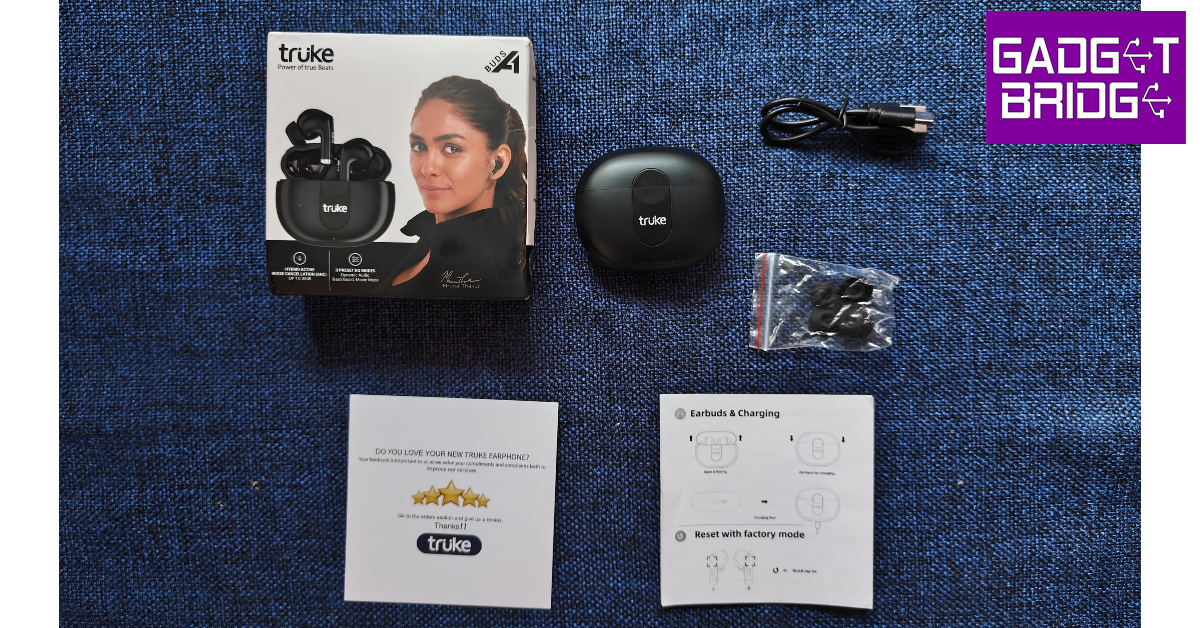
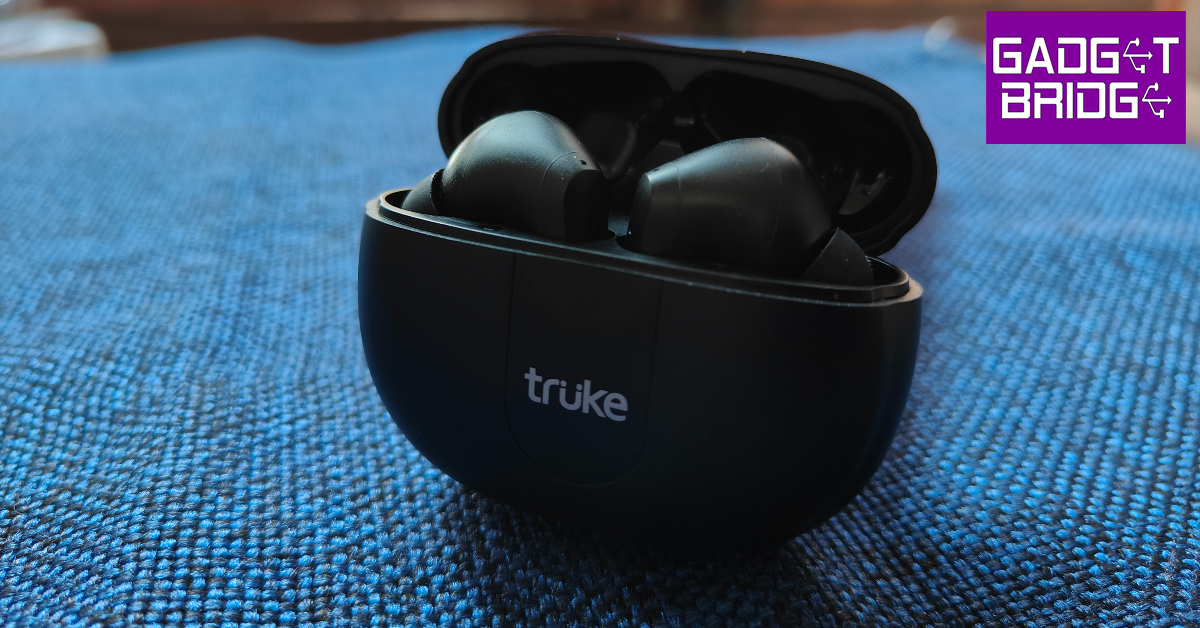
The Truke Buds A1 come packed in a squarish white box inside which you’ll find the charging case, earbuds, a Type-C USB cable, extra ear tips, a user manual, and a warranty card. The charging case and earbuds are housed in a flimsy plastic tray within the box. Truke’s packaging continues to be shoddy, but it’s something we have no problem with since the brand does not compromise on the really important aspects of the product. Truke Buds A1 review: Design  The pebble-shaped charging case is made out of plastic but the quality of the material used is surprisingly good. The in-hand feel of the case is quite good, certainly better than other entry-level TWS we’ve used so far. The case has a matte-like finish to it. The Truke branding can be found inside a cutout at the front of the case. This cutout has a small recess right where the lid meets the case. This makes it very easy to flip open the case with just your thumb. Below the cutout lies a solitary notification light. Truke Buds A1 review: Design  At the bottom of the case, you will find the USB charging port and a pairing button. We don’t usually get to see a pairing button on entry-level wireless headphones that often, but Truke continues to surprise us. Overall, the case feels quite sturdy. The simple design doesn’t seem boring and at the first glance, you wouldn’t peg Buds A1 as an entry-level product at all. The wireless earbuds get the in-ear design, which is the correct choice since Buds A1 also offers ANC. The earbuds offered us a comfortable, snug fit and we didn’t have to use the extra ear tips provided in the box. Out of the box, the earbuds are fixed with medium-sized ear tips. Two extra pairs of small and large ear tips can be found in a small pouch inside the box. The earbuds also house the touch control panels and 2 mics for ANC. Truke Buds A1 review: Design  Truke Buds A1 is rated IPX4 for water and dust resistance, which means the earbuds can handle water splashes without hampering their performance. We wore the earbuds while working out and while their performance was undeterred by sweat, the fit got loose on multiple occasions. 

Truke Buds A1 review: Performance

The Truke Buds A1 deliver their audio output with 10mm dynamic driver units on either earbud. Bluetooth 5.3 support ensures smooth pairing without any hiccups. Most earbuds in this price range are still offering Bluetooth 5.2 or 5.1 support. The buds support both SBC and AAC codecs. There are 3 preset EQ modes on offer – Dynamic Audio, Bass Boost, and Movie Mode.  A low latency mode for gaming mode makes Buds A1 a complete all-rounder. The earbuds play a notification alert every time you pair them to a device or switch between the different modes. These notification alerts sound very boxy and hard and they can amount to be annoying. Another thing we noticed was that the earbuds don’t disconnect when you place them back in the charging case. Even the music playback doesn’t pause once the buds are in the case. You will need to disconnect the buds using your smartphone in order to fix this. Moving on, the Truke Buds A1 offer a great sound profile that is definitely unmatched in this price segment. The overall sound is very bass-focused but other frequencies are not lost in the mix. The quality of sound does not feel entry-level at all, these earbuds could’ve easily been placed at a higher segment. The mix of frequencies is very pleasant. The level of detail produced by the dynamic drivers is quite impressive, although there is some room for improvement. The audio had a warm tone to it, which we found quite pleasant. If the audio is too bass-driven for you, you can switch to Dynamic Audio mode. We found the higher frequencies in Dynamic Audio mode to be somewhat shrill. The Normal mode and Bass Boost mode remained our staples during our time of use. The Gaming Mode on Buds A1 offers a low latency of 50ms which we found to be just acceptable while playing Call of Duty mobile. There were some occasional stutters but the overall experience was decent. If you’re looking for dedicated gaming earbuds, we would suggest Truke’s BTG X1. The hybrid ANC is certainly the biggest highlight of Truke Buds A1. At this price range, wireless earbuds with ANC are unheard of (no pun intended). The ANC performance was decent, with the Buds A1 being able to suppress up to 30dB of ambient noise. This is good enough to cancel out the background noise in a room, but don’t expect the same results when you’re outdoors. The earbuds were successful in suppressing the sound of chirping birds, distant footsteps, and faint voices. However, the sound of the traffic from outside was still able to filter through. Regardless, this is still a good performance in a segment where you don’t get this feature at all. Truke also offers ENC with the Buds A1, which is efficient in isolating the surrounding noise while voice calling. Truke Buds A1 review: Performance The only disappointing aspect of the Truke Buds A1 is the lack of app support. Currently, Truke has no app for its TWS products. This isn’t a big deal when buying entry-level products, but navigating multiple EQ presets along with ANC and transparency modes gets very confusing when you don’t have an app to help you with it. We have been using these earbuds for over a week and still can’t remember all the specific touch commands to activate different functions. Hopefully, Truke comes out with a dedicated app for its TWS products soon. With a 40mAh battery on either earbud, the Buds A1 can last up to 8 hours on a single charge. With Active ANC, this number drops down to 5-7 hours. There is an additional 300mAh battery pack in the charging case, which offers a playtime of up to 48 hours without ANC. It takes two hours to fully charge the case, while the earbuds take 90 minutes to fully charge. A quick 10-minute charge can provide 10 hours’ worth of battery to the case. Read Also: Moto G73 5G powered by MediaTek Dimensity 930 SoC launched in India

Verdict

At a price of Rs 1,499, the Truke Buds A1 seem like a no-brainer purchase. The sound profile is ideal for the segment and the presence of ANC definitely sweetens the deal. The charging case and earbuds have a good build quality that will easily last you a long time. IPX4 rating ensures resistance to water splashes. The lack of app support is the only issue we have with these earbuds, but the pros easily outweigh the cons here.

Truke Buds A1 Pros

Sturdy build Simple design Good audio performance ANC

Truke Buds A1 Cons

No app support For the latest gadget and tech news, and gadget reviews, follow us on Twitter, Facebook and Instagram. For newest tech & gadget videos subscribe to our YouTube Channel. You can also stay up to date using the Gadget Bridge Android App. You can find the latest car and bike news here.

Oscars 2023 India winners: Where to watch RRR and The Elephant Whisperers online?

0
India has had a great year at the Academy Awards, with RRR winning the Oscar for Best Original Song and The Elephant Whisperers bagging the award for Best Short Documentary. RRR has been making waves across the world ever since its release last year and had previously won the Golden Globe award for Best Original Song (Naatu Naatu) as well. If you haven’t watched the two movies already, there are plenty of ways you can watch them online. Here’s how you can watch the Oscar 2023 India winners, RRR and The Elephant Whisperers, online. Read Also: 8 Best Ways to Block a Phone Number On Android or iPhone (iOS)

Where to watch RRR online?

Where to watch RRR online? RRR is currently streaming on three OTT platforms – Netflix, Hotstar, and ZEE5. The Netflix version of the movie is dubbed in Hindi and subtitled in English. If you want to watch the original Telugu version of the epic action drama, Hotstar and ZEE5 are your best options. Hotstar and ZEE5 offer the Kannada, Tamil, and Malayalam dubs of the movie as well. You can watch the Oscar-winning song from RRR, Naatu Naatu, on YouTube and listen to it across all major music streaming platforms. Watch RRR on Netflix here. Watch RRR on Hostar here. Watch RRR on Zee5 here.

Where to watch The Elephant Whisperers online?

Where to watch The Elephant Whisperers online? Being a ‘Netflix original’ documentary, The Elephant Whisperers is exclusively available on Netflix. You can watch the official trailer on YouTube. The documentary follows the journey of a South Indian tribal couple, Bomman and Bellie, as they decide to foster an orphaned baby elephant, Raghu. The Elephant Whisperers documents the life of the couple as they nurse and forge a bond with Raghu. Watch The Elephant Whisperers on Netflix here. Read Also: Best Easy Ways to Change Your Ringtone on Android and iPhone

Conclusion 

These are the OTT platforms where you can watch Oscar 2023 India winners RRR and The Elephant Whisperers online. The Best Picture winner, Everything Everywhere All At Once, can currently be streamed on Amazon Prime Video. For the latest gadget and tech news, and gadget reviews, follow us on Twitter, Facebook and Instagram. For newest tech & gadget videos subscribe to our YouTube Channel. You can also stay up to date using the Gadget Bridge Android App. You can find the latest car and bike news here.

How to Connect Windows 10 and Android smartphone Using Microsoft’s Phone Link app

0
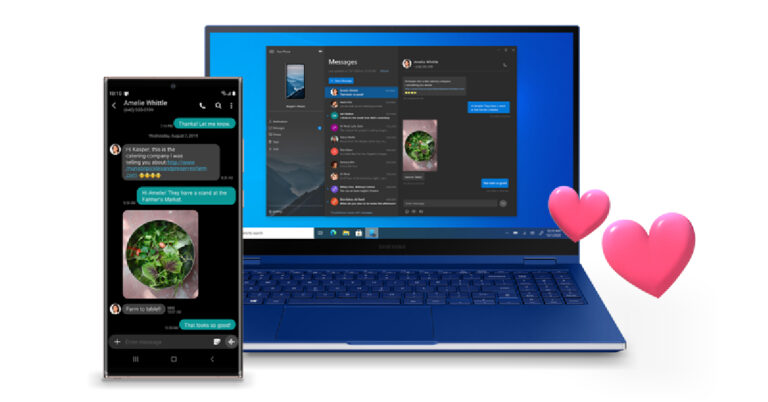
Linking your smartphone and PC is one of the better ways to increase your productivity while carrying out certain tasks. Not only does it make it easy to access files between two devices, but it also reduces the distraction that smartphones offer every time you pick them up. While there are a bunch of third-party linking apps for your smartphone and PC, the native Phone Link app on your Windows device is all you need to carry out the pairing. In this article, we show you how to connect your Windows 10 PC or laptop to your Android smartphone using Microsoft’s Phone Link app. Read Also: Stolen or lost Android phone? Here’s how to find it and get it back

Here’s how you can link your Android smartphone and Windows 10 PC

Step 1: Launch the Your Phone app on your Windows PC. Step 2: Download and install the Link to Windows app on your Android smartphone from the Google Play Store. Step 3: Choose whether you want to pair your smartphone manually or by using a QR code. Connecting via a QR code will be quicker. Step 3: Choose whether you want to pair your smartphone manually or by using a QR code. Connecting via a QR code will be quicker. Step 4: On your smartphone, launch the Link to Windows app and select ‘Link phone and PC’. Step 4: On your smartphone, launch the Link to Windows app and select ‘Link phone and PC’. Step 5: Select ‘Continue’ and scan the QR code on your PC from your smartphone. Step 5: Select ‘Continue’ and scan the QR code on your PC from your smartphone.  Step 6: To pair manually, tap on ‘Link manually’ on your PC and tap on ‘Try another way’ on your smartphone. Step 6: To pair manually, tap on ‘Link manually’ on your PC and tap on ‘Try another way’ on your smartphone. Step 7: Sign in to your Microsoft account on your smartphone. Step 8: On your PC, click on Create PIN code. Step 8: On your PC, click on Create PIN code. Step 9: Enter the PIN code in the Link to Windows app on your smartphone. Step 9: Enter the PIN code in the Link to Windows app on your smartphone. Step 10: Give the necessary permission to the Link to Windows app on your smartphone and hit ‘Done’ once you’re finished. Step 10: Give the necessary permission to the Link to Windows app on your smartphone and hit ‘Done’ once you’re finished. Step 11: Click on ‘Continue’ on the Phone Link app on your PC. Step 12: Use the sidebar on the Phone Link app to connect your smartphone and PC via Bluetooth. Once connected, you will be able to make and receive calls from your PC. Step 12: Use the sidebar on the Phone Link app to connect your smartphone and PC via Bluetooth. Once connected, you will be able to make and receive calls from your PC. Read Also: Best Easy Ways to Change Your Ringtone on Android and iPhone

Conclusion

This is how you can connect your Windows 10 PC and Android smartphone using Microsoft’s Phone Link app. You will not have to rely on third-party apps like Pushbullet for PC-smartphone pairing once you start using Phone Link. With Phone Link, you can easily make calls, send texts, and browse pictures stored on your phone using your PC, but features like phone mirroring are still not available. However, your Windows PC and laptop come with a native feature to mirror your phone’s display. You can read about it here. For the latest gadget and tech news, and gadget reviews, follow us on Twitter, Facebook and Instagram. For newest tech & gadget videos subscribe to our YouTube Channel. You can also stay up to date using the Gadget Bridge Android App. You can find the latest car and bike news here.

Samsung Galaxy A54 5G and Galaxy A34 5G India launch set for March 16

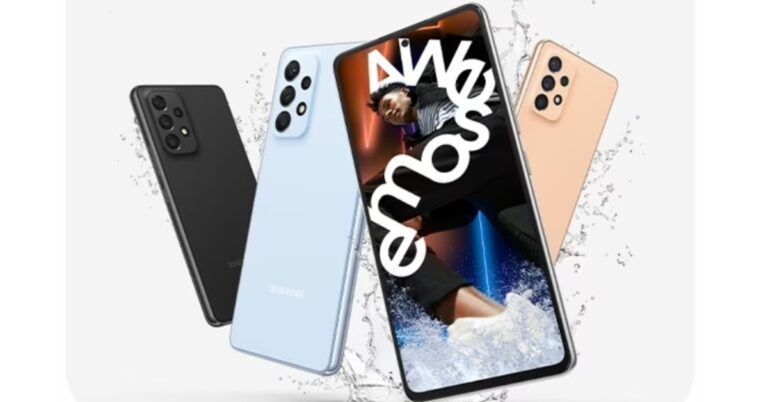
Samsung is all set to upgrade its A-Series in India with the launch of new smartphones in India. The company has confirmed to release of Samsung Galaxy A54 5G and Galaxy A34 5G on March 16. The device has been listed on the company’s website. Prior to the announcement the device has already been seen listed on several certification websites. In addition to this, the specs and design features have also been leaked previously. The upcoming phones will have an IP67 rating. On March 16, Samsung will officially launch the Galaxy A34 and Galaxy A54 5G smartphones in the Indian market. As per the official teaser, the launch would happen on the specified day at 12 noon IST. Furthermore, the devices are confirmed to come with an IP67 rating. Also Read: Samsung Galaxy S23 Ultra Review: A true flagship As mentioned earlier the smartphones’ expected pricing, features and design have already been revealed through leaks. Previous leaks suggest that Samsung Galaxy A34 will be powered by chipset type MT6877V/TTZA, indicating that it would be an octa-core MediaTek Dimensity 1080 SoC. On the other hand, the Galaxy A54 5G is likely to feature a 6.4-inch full-HD+ Super AMOLED display. The screen is expected to support a 120Hz refresh rate. Galaxy A54 5G and Galaxy A34 5G price in India and colour options As previously reported the handsets may have spherical, stacked vertically camera modules. These claims have also been supported by the Galaxy A54 5G and Galaxy A34 5G’s official marketing photos.

Galaxy A54 5G and Galaxy A34 5G price in India and colour options

Colour possibilities for the Samsung Galaxy A54 5G and Galaxy A34 5G are Awesome Silver White, Awesome Graphite, Awesome Lime, and Awesome Violet. In terms of pricing the company has not yet revealed it yet but rumours suggest that the 128GB Galaxy A34 5G will cost EUR 419 which is about Rs 36,000. Whereas the price of the Galaxy A54 5G for a similar 128GB storage capacity is likely to be set at EUR 519 or approximately Rs 45,400. It is anticipated that these leaked rates will apply to customers in Europe. However, in India, the devices are likely to be offered at a reduced price. Also Read: OnePlus 11 review: This is what a OnePlus flagship should look like Earlier this year the company also introduced Galaxy A14 in India. The price of the phone starts at Rs 16,499 for the base 4GB RAM with 64GB storage option whereas the price of 6GB RAM with 128GB storage option is set at Rs 18,999. There is another 8GB RAM with a 128GB storage variant that costs Rs 20,999. This smartphone is available in Dark Red, Light Green and Black colour options. For the latest gadget and tech news, and gadget reviews, follow us on TwitterFacebook and Instagram. For newest tech & gadget videos subscribe to our YouTube Channel. You can also stay up to date using the Gadget Bridge Android App. You can find the latest car and bike news here.

Garena Free Fire Redeem Codes Today 13 March 2023: Here is how to claim them

Garena Free Fire is a battle royale game with regular awards and tournaments to keep players interested. If you play Garena Free Fire, you should be aware of the redeem codes that are released on a daily basis. However, because the battle royale game is banned in India, players from other countries can use the Free Fire Redeem codes daily. If you’re unfamiliar with the Garena Free Fire redeem codes or don’t know how to get them, we’ve put together a step-by-step guide to help you redeem them. Check out Garena Free Fire Redeem Codes for 13 March 2023. The Free Fire redeem codes are a great way to get free stuff. These are 12-digit codes that contain alphabets and numbers, as well as an expiration date and time. Because the Garena FF redeem codes cannot be used more than once, you should hurry to the redemption page to claim your free reward before someone else does. To get a free reward, all you have to do is go to reward.ff.garena.com/en, which is the official redemption page. Also, keep an eye on this space for daily updates on Garena Free Fire redemption codes and rewards.

Garena Free Fire Redeem Codes Today 13 March 2023

  • FFDBGQWPNHJX
  • E2F86ZREMK49
  • FFAC2YXE6RF2
  • HHNAT6VKQ9R7
  • WD2ATK3ZEA55
  • HFNSJ6W74Z48
  • V44ZZ5YY7CBS
  • 2FG94YCW9VMV
  • 4TPQRDQJHVP4
  • FFCMCPSBN9CU
  • FFBBCVQZ4MWA
  • TDK4JWN6RD6

How to Get Free Fire Redeem Codes for Garena on 13 March 2023?

  • Visit the Garena Free Fire game’s official website at reward.ff.garena.com.
  • Use your Facebook, Google, VK, Apple ID, Huawei ID, or Twitter account to log in.
  • You’ll be taken to a valid redemption code (s)
  • Copy and paste the 12-digit redemption code into the text box.
  • On the screen, a dialogue box will appear.
  • ‘Ok’ should be selected.
For the latest gadget and tech news, and gadget reviews, follow us on TwitterFacebook and Instagram. For newest tech & gadget videos subscribe to our YouTube Channel. You can also stay up to date using the Gadget Bridge Android App. You can find the latest car and bike news here.