Top 6 Easy Methods to Open Multiple Websites With Just One Click in Google Chrome

0
Do you find yourself opening the same websites every day? For many people, a typical workday begins with opening the same few websites on their desktops. If you find yourself in the same situation, you may have wondered whether there is a way to automate this task. Luckily, there is. In this article, we bring you the top 6 ways to open multiple websites with just one click in Google Chrome. You can also apply these processes to other tasks like opening all the social media websites you visit at once, launching your favourite e-commerce websites with one click, and more. Read Also: Uttarakhand now has access to Jio True 5G Services

Which method is best for you?

Out of the 6 methods mentioned in this article, you should pick one that suits your workflow the most. If you start your day by opening a group of websites, creating a desktop shortcut that launches those sites is your best option. You can also program Chrome to open those websites as soon as you launch the web browser. However, the problem with this method is that these websites will trigger into action every time you open a new Chrome window. If you simply want to open a bunch of websites on a list, the ‘Open Multiple URLs’ and ‘Open Multiple Links’ Chrome extensions will come in handy. The latter lets you highlight text and open all the links in it with a couple of clicks. The Open Multiple URLs extension requires pasting the links in a text box. We prefer the Open Multiple Links extension as it is more intuitive and seamless.

Use the ‘Open Multiple URLs’ Chrome Extension 

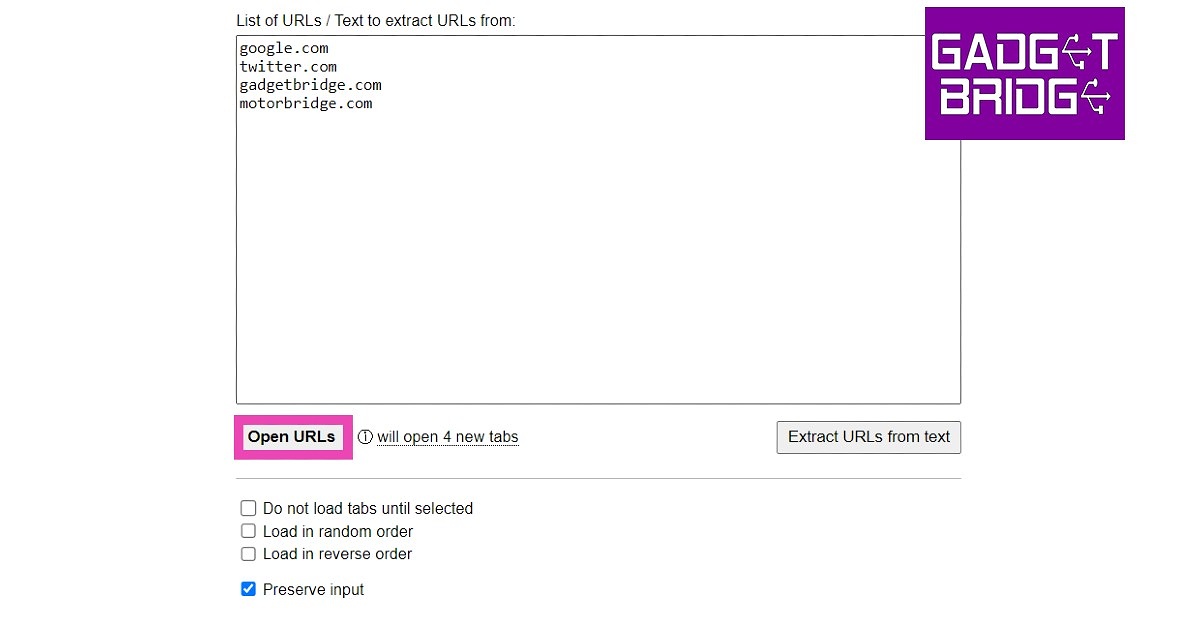
Step 1: Search for ‘Open Multiple URLs’ extension in the Chrome Web Store and add it to the web browser. Step 2: Paste the list of websites you want to open with a single click. Make sure the websites are separated by line breaks. Step 3: Click on the checkbox for ‘Preserve Input’ if it is unticked. This will avoid the trouble of typing the same sites every time you use the extension. Step 3: Click on the checkbox for ‘Preserve Input’ if it is unticked. This will avoid the trouble of typing the same sites every time you use the extension. how to Open Multiple Websites With Just One Click in Google Chrome Step 4: Click on ‘Open URLs’.
Use Notepad to open multiple websites with a single click

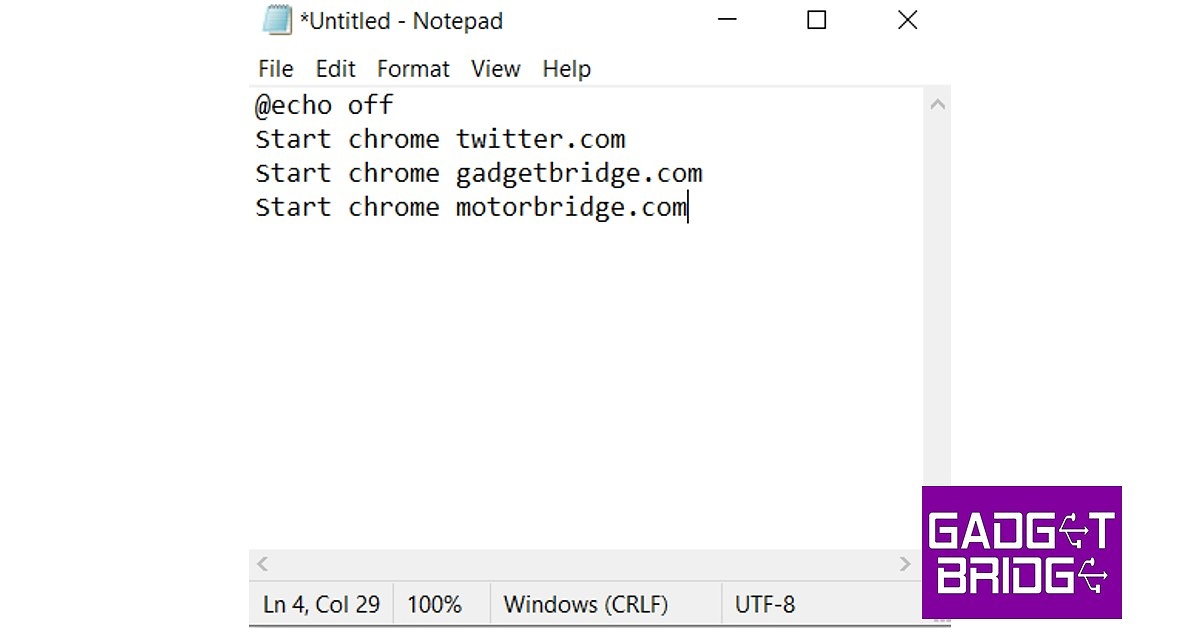
Using too many extensions can often slow down Chrome. If you’re not interested in any additional extensions other than the essential ones, there’s a neat little Notepad trick that will help you open multiple Chrome tabs with just one click. Here’s how. Step 1: Launch Notepad. Step 2: Type the following command in the text window.

@echo off  

Start chrome website 1

Start chrome website 2

Start chrome website 3

Enter the website URLs wherever the placeholders are. You can add as many websites as you want. Step 2: Type the following command in the text window. how to Open Multiple Websites With Just One Click in Google Chrome Step 3: Save the document as a BAT file on the desktop. You can do this by adding ‘.bat’ to the file name while saving it. Step 3: Save the document as a BAT file on the desktop. You can do this by adding ‘.bat’ to the file name while saving it. Step 4: Now to the easiest part. Click on the saved file on the desktop, and it will open all the listed websites on Chrome.
Use the ‘Open Multiple Links’ Chrome Extension

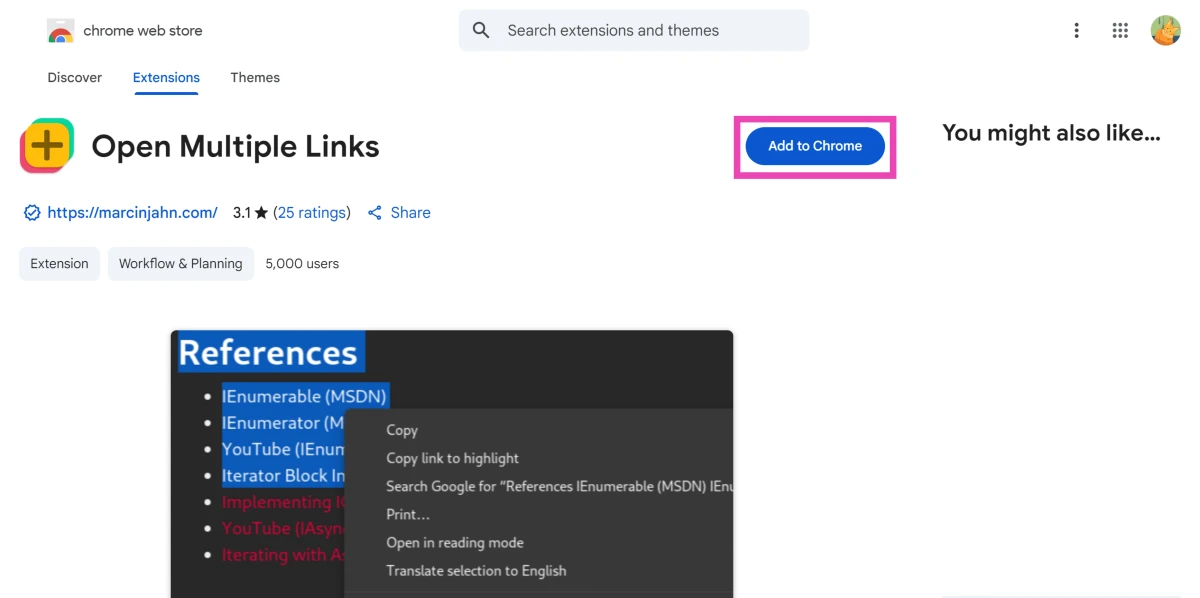
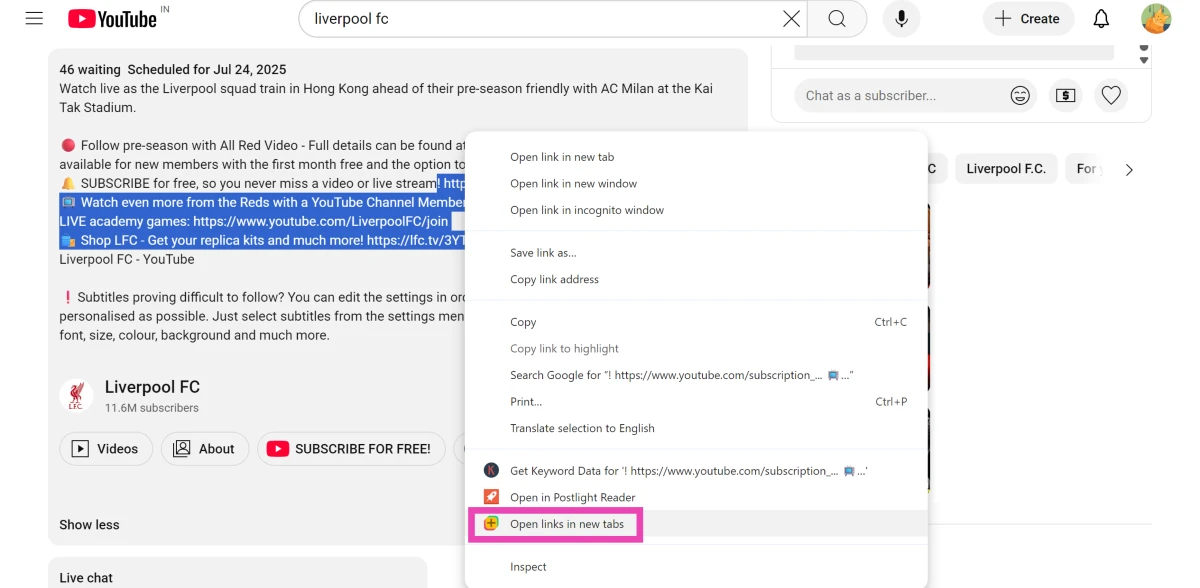
Step 1: Install the Open Multiple Links extension from the Chrome Web Store. Step 1: Install the Open Multiple Links extension from the Chrome Web Store. Step 2: Select text containing multiple links and right-click it. Step 2: Select text containing multiple links and right-click it. Step 3: Click Open links in new tabs. Each link will open in a separate tab.
Open Multiple Sites on Startup

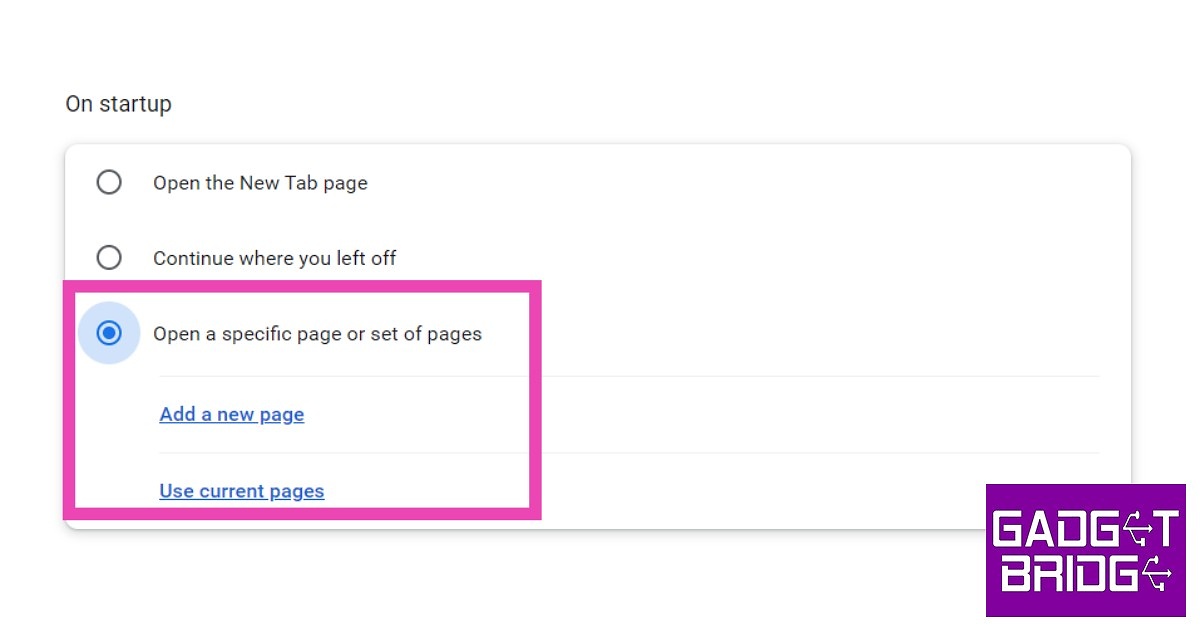
Step 1: First, open all the websites you want to open at once on startup. Step 2: Click on the ellipses (three dots) at the top right corner of the screen and select Settings.  Step 3: Select On Startup from the left menu. Step 3: Select ‘On Startup’ from the left menu. how to Open Multiple Websites With Just One Click in Google Chrome Step 4: Select Open a specific page or set of pages, and then select Use current pages. You can also manually add pages that you want to be opened at once on startup. Step 4: Select ‘Open a specific page or set of pages’ and then select ‘Use current pages’. You can also manually add pages that you want to be opened at once on startup.
Use a Macro Key

If your PC or laptop has a macro key, it can be customised to open Google Chrome with just one press of a button. To launch multiple websites at once, use the Startup method mentioned above. To assign the Chrome app to the macro key, simply drag and drop it on the Macro Key app. You can also press the macro key on your device and drag the Chrome icon from the desktop to the app window. Once the macro has been set, simply press the key once to launch Chrome and your chosen websites.

Use Bookmarks

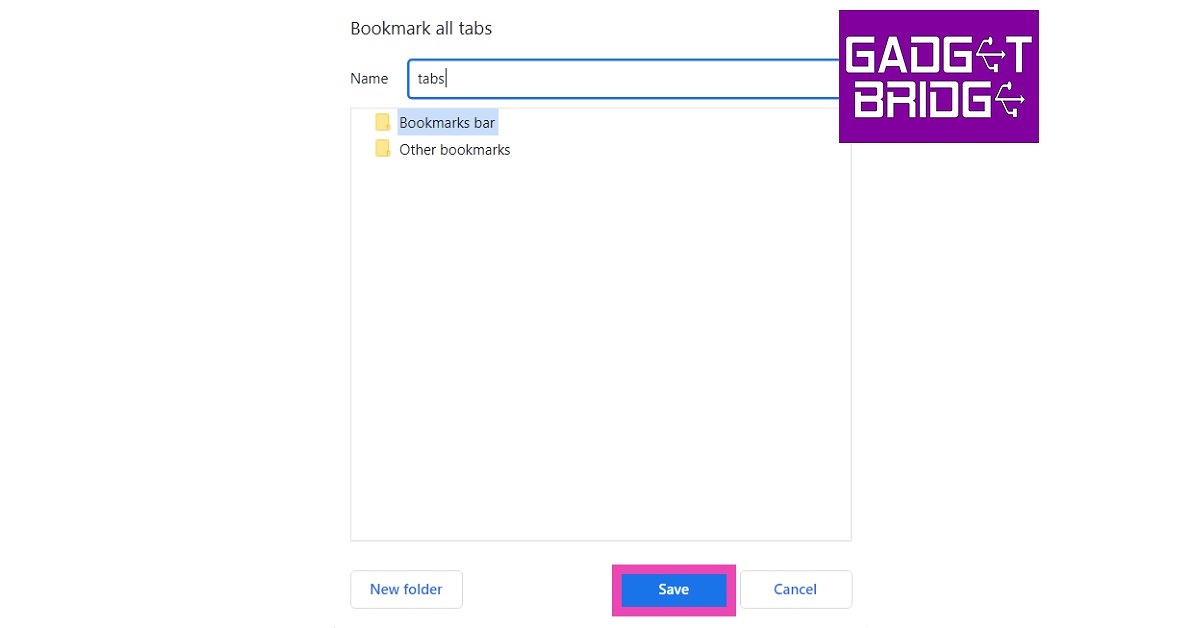
Step 1: Open all the websites in different tabs. Step 2: Press Ctrl+Shift+D. Name the folder and select ‘Bookmarks Bar’. Step 2: Press Ctrl+Shift+D. Name the folder and select ‘Bookmarks Bar’. how to Open Multiple Websites With Just One Click in Google Chrome Step 3: The folder will appear on the bookmarks bar. Right-click on it and select Open all to launch all the websites in it at once. You can also drag other websites from the bookmarks bar to this folder to add them to the list. The folder will appear on the bookmarks bar. how to Open Multiple Websites With Just One Click in Google Chrome Read Also: Pre-orders for the Samsung Galaxy S23 Series have begun in India: Details inside
Frequently Asked Questions (FAQs)

Is it possible to launch multiple websites on Google Chrome with just one click?

Go to Chrome Settings>On Startup and click on ‘Open a specific page or set of pages’. Enter the websites that you want to open as soon as you launch Chrome.

How do I open multiple websites with one click on any browser?

Open the Notepad app on your PC or laptop and type ‘@echo off’ followed by ‘start [website name]’. Keep using the ‘start’ command before every website on the list. Save the file in BAT format on your desktop. Double-click the file to launch all the mentioned websites on your default web browser.

How do I open multiple bookmarks at once on Chrome?

Press Ctrl + Shift + D to create a bookmarks folder. Add your desired websites to this folder. If you want to open all the websites in this folder at once, right-click on it and select Open all.

What is the macro key on my laptop?

Some laptops ship with an extra key on the keyboard. This ‘macro’ key can be programmed to open apps or carry out a series of tasks with a single press.

Can I open all links in the text I’ve selected at once?

The ‘Open Multiple Links’ Chrome extension lets you open all the links in highlighted text at once. Read Also: PayPal to Integrate UPI for Cross-Border Payments

Final Thoughts

These are the top 6 easy ways to open multiple websites with just one click in Google Chrome. You can also use the Notepad trick for other web browsers. Instead of ‘Start Chrome’, just use ‘Start’ in the command line. The websites will open in your default web browser. If you found this article helpful, let us know in the comments!

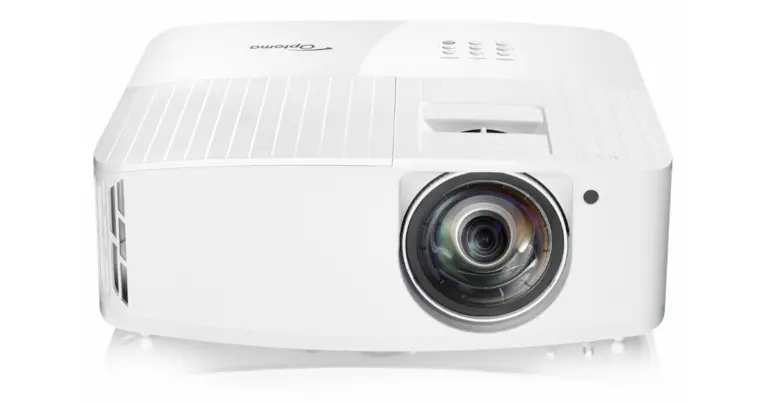
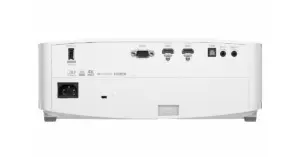
Optoma GT2160HDR true 4K UHD short throw cinema gaming projector announced in India

Optoma announced the arrival of its true 4K UHD short throw cinema gaming projector, the Optoma GT2160HDR, to the Indian market. The projector’s brightness is 4,000 high lumens. Additionally, it supports the minimal 4ms input lag and 240Hz refresh rate. It also has HDMI 2.0 Support for Connection to 4K Entertainment. The Optoma GT2160HDR is equipped with a cutting-edge Texas Instruments 4K UHD DLP chipset that uses a high-performance DMD with fast switching and XPR video processing technology to display 8.3 million pixels, or four times as many pixels is 1080P, in accordance with the requirements of the Consumer Technology Association’s 4K UHD specification. Also Read: Philips TAH8506BK headphones with hybrid active noise cancellation launched in India The short-throw lens used by the GT2160HDR has a throw ratio of 0.496. This practically means that a user can project a picture with a diagonal of 120 inches from a distance of just four feet away. A user’s living room screen can be magnified up to 300 inches thanks to the short-throw projector‘s capabilities. Optoma GT2160HDR true 4K UHD short throw cinema gaming projector announced in India GT2160HDR offers 4,000 high lumens of brightness and powerful and stunning colour performance. Optoma’s advanced colour calibration and adjustment technologies go above and beyond HDTV Rec. 709 requirements to deliver the most accurate and true-to-life tints for realistic and in-depth visuals. The GAMER mode from Optoma is tuned to enhance the details in an image’s dark areas. As a result, players stand a better chance of avoiding getting fragged by an adversary who is hiding in the shadows. The GT2160HDR will automatically transition to HDR display mode if it discovers a game with HDR encoding. In the event that it does not, GT2160HDR offers the HDR SIM mode, which is intended to add an HDR effect to the game graphics and provide a wide colour gamut setting and crisp contrast without sacrificing any detail. With capabilities like HDR hue and tone mapping technology, HDR / HLG movies or games can be displayed with their best possible performance in terms of accurate colour and dynamic contrast. For connectivity, it includes Wi-Fi, Bluetooth, a USB port, and two HDMI 2.0 ports that support any external 4K devices like the Apple TV 4K, PS4 Pro, and XBOX One X. These features make it easier for users to share content. For the latest gadget and tech news, and gadget reviews, follow us on TwitterFacebook and Instagram. For newest tech & gadget videos subscribe to our YouTube Channel. You can also stay up to date using the Gadget Bridge Android App. You can find the latest car and bike news here.

Garena Free Fire Redeem Codes Today 13 January 2023: Here is how to claim them

Garena Free Fire is a battle royale game with regular awards and tournaments to keep players interested. If you play Garena Free Fire, you should be aware of the redeem codes that are released on a daily basis. However, because the battle royale game is banned in India, players from other countries can use the Free Fire Redeem codes daily. If you’re unfamiliar with the Garena Free Fire redeem codes or don’t know how to get them, we’ve put together a step-by-step guide to help you redeem them. Check out Garena Free Fire Redeem Codes for 13 January 2023. The Free Fire redeem codes are a great way to get free stuff. These are 12-digit codes that contain alphabets and numbers, as well as an expiration date and time. Because the Garena FF redeem codes cannot be used more than once, you should hurry to the redemption page to claim your free reward before someone else does. To get a free reward, all you have to do is go to reward.ff.garena.com/en, which is the official redemption page. Also, keep an eye on this space for daily updates on Garena Free Fire redemption codes and rewards.

Garena Free Fire Redeem Codes Today 13 January 2023

  • FFIC33NTEUKA
  • ZZATXB24QES8
  • U8S47JGJH5MG
  • HHNAT6VKQ9R7
  • 2FG94YCW9VMV
  • VNY3MQWNKEGU
  • FFDBGQWPNHJX
  • V44ZZ5YY7CBS
  • 4TPQRDQJHVP4
  • XFW4Z6Q882WY
  • TDK4JWN6RD6
  • HFNSJ6W74Z48

How to Get Free Fire Redeem Codes for Garena on 13 January 2023?

  • Visit the Garena Free Fire game’s official website at reward.ff.garena.com.
  • Use your Facebook, Google, VK, Apple ID, Huawei ID, or Twitter account to log in.
  • You’ll be taken to a valid redemption code (s)
  • Copy and paste the 12-digit redemption code into the text box.
  • On the screen, a dialogue box will appear.
  • ‘Ok’ should be selected.
For the latest gadget and tech news, and gadget reviews, follow us on TwitterFacebook and Instagram. For newest tech & gadget videos subscribe to our YouTube Channel. You can also stay up to date using the Gadget Bridge Android App. You can find the latest car and bike news here.

Try this simple method to recover your lost data, files, images etc from any storage source

No matter who you are, a professional, photographer, vlogger or content creator, all of us have faced corrupt hard drives or SD card problems. We spend hours creating a document or a video or music file, just to find out that our beloved files have been corrupted due to unknown circumstances and our heart breaks. But fret not there is a very simple way to recover any lost data from your corrupted PC or laptop hard drive. Even if you accidentally deleted a file, you can use Wondershare Recoverit 11, which is the latest in data recovery to recuperate them. But before that let’s understand:

Why does data loss happen?

A data loss incident occurs when data is destroyed, deleted, corrupted, or rendered unreadable by users or software applications. A data loss incident might be either intentional or unintentional. Data loss renders part or all of the data pieces inaccessible to the owner or its associated software application. Data can be lost during storage, transfer, processing, or networking. Data loss includes the theft or loss of a device storing data. Common causes of data losses include human error, software error, corrupt files, spillage of liquid, viruses, power failure and more.

Why Recoverit Data Recovery?

With 35 patents, Recoverit is the ultimate and professional data recovery programme that can totally recover deleted and lost information, videos, and images from any calamity. It allows data recovery from accidental deletion, formatting, device corruption, virus attack, and other issues; it can simply restore lost data from all devices or storage media, including crashed PCs. The advanced edition even includes professional video/picture recovery solutions, such as the Enhanced Recovery feature, which allows for one-click recovery of video/picture files, and the professional video repair function, which allows for the restoration of corrupted videos that cannot be accessed. Recoverit can easily recover your critical file data in only three simple steps, regardless of how the data was lost. Scan-Preview-Recover.

Why do we like this software over others?

1. Full-scene Data Recover: supports recovery from data loss scenarios such as accidental deletion, formatting, device corruption, virus attack, unknown error code, etc. 2. Easy-to-use: 3 simple steps, scan-preview-recover. 3. One-stop Recover Solution: supports one-click recovery of video/picture files and repair of unplayable videos Some great features can be found in Recoverit and here is everything new in the software:
  • Enhanced Recovery: improved the original enhanced recovery function, enhanced fusion scanning, and allows one-click picture/video recovery, resulting in superior recovery outcomes, particularly for huge videos and footage produced with professional cameras.
  • NAS Data Recovery: It allows you to remotely recover deleted or lost data from failed or logically corrupted NAS storage devices such as QNAP or Thecus. There is no need to remove the disc from the NAS.
  • Linux Data Recovery: With Ext4 file system sound support, this capability smoothly scans storage media for Linux data files (lost or deleted) and ensures they are exactly recovered. Before recuperation, a preview is available.
  • New Chip: Depth scanning support for T2 and M1 chips (Mac)
  • New Scenario: Disk mirror/image recovery support
  • New Experience: increase user experience by optimising the interaction of existing products.
  • Enhancement of different scenarios: optimise the scanning scheme and improve scanning quality.

So, how to recover lost data and files using Wondershare Recoverit:

Step 1: Download and install Wondershare Recoverit from this page. Step 2: Select the location, start a scan and choose the files you want to recover. Step 3: Start the recovery process by previewing the files and then pressing recover. It is as simple as that.

Conclusion

In no time, your lost file will be recovered. This software is available for all Windows machines/PC/Laptops, you can easily recover any lost or damaged file/data. No matter where it got corrupted. You can recover lost data from external hard drives and SD cards too. Over that, the app is compatible with all Windows operating systems. For the latest gadget and tech news, and gadget reviews, follow us on TwitterFacebook and Instagram. For newest tech & gadget videos subscribe to our YouTube Channel. You can also stay up to date using the Gadget Bridge Android App. You can find the latest car and bike news here.

Amazon Quiz Answers Today 13 January 2023: Participate to win Rs 500

13 January 2023 Amazon Quiz has gone live on its platform. The quiz timings are 12 AM to 11:59 PM. Interested users can participate in the Amazon daily quiz to win exciting prizes. The company puts up 5 questions based on general awareness. You can submit the correct answers from the four options. Today the participants have the chance to win a Rs 500 Amazon Pay Balance. Daily the e-commerce platform Amazon brings a new set of questionnaires that includes five easy questions. The Amazon Quiz can be played from 12 AM to 11:59. The users have to answer all the questions correctly to enter into a lucky draw. The result of today’s quiz will be announced at the end of the month and only one person is declared a winner. We at Gadget Bridge update all the answers to the Amazon Quiz on our website for the convenience of our readers. Here are the answers of the 13 January 2023 Amazon Quiz that will make you win Rs 500 Amazon Pay Balance. Amazon Quiz Today Prize – Rs 500 Amazon Pay Balance Quiz Date – 13 January 2023 Daily Timing – 12 AM to 11:59 PM Winner Announcement – Today 12 PM

Amazon Quiz Answers Today 13 January 2023

Question 1: Which web series topped the IMDb most popular web series 2022 list? Answer: Panchayat Question 2: Who recently became the second batter after Joe Root to score a double century in his 100th test? Answer: David Warner Question 3: Which of these was a nickname given to famous mathematician Shakuntala Devi? Answer: Human Computer Question 4: This animal is the state animal of which Indian state? Answer: Sikkim Question 5: This is the ‘Adalaj Ni Vav’ in which of these cities? Answer: Ahmedabad

How To Play Amazon Quiz

Only app users are eligible to play the Amazon quiz every morning from 12 AM to 11:59 PM. The quiz is not available on the desktop. For those who are unaware of how to play the Amazon quiz below are the steps, you can follow to take the quiz.
  • Firstly download the Amazon app from Google Play Store or App Store
  • Now fill in the required information through the Sign Up option.
  • You need to log in to the Amazon app and scroll down on the home screen to find the Amazon Quiz banner.
  • Tap on the Amazon Quiz banner and tap on the Start button to start the Quiz.
  • Now you will get 5 questions and you need to answer them correctly. One wrong answer will eliminate you from the Quiz.
  • After answering all the questions correctly you are now eligible for a Lucky Draw.
  • The winner’s name will be announced today at 12 PM.
For the latest gadget and tech news, and gadget reviews, follow us on TwitterFacebook and Instagram. For newest tech & gadget videos subscribe to our YouTube Channel. You can also stay up to date using the Gadget Bridge Android App. You can find the latest car and bike news here.

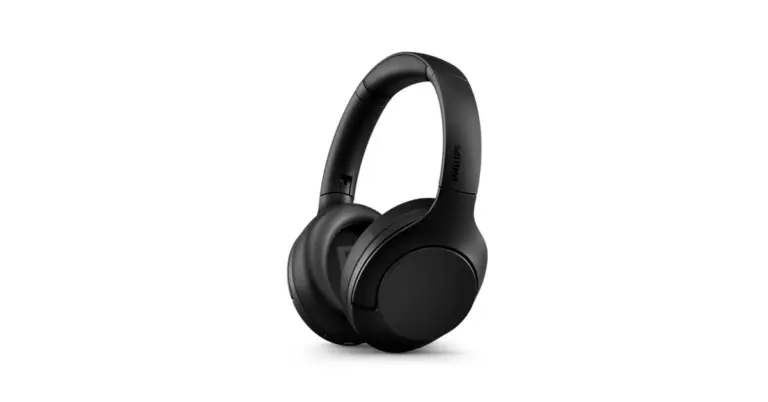
Philips TAH8506BK headphones with hybrid active noise cancellation launched in India

In India, Philips Audio has introduced a brand-new five sets of headphones- Philips TAH8560BK, TAH6506BK, TAA4216BK, TAH4205XTBK, and TAUH201BK. The TAH4205XTBK and TAUH201BK are on-ear headphones while the remaining comes with an over-ear design. According to the company the launch of a new premium headphone, the TAH8506BK, with outstanding features like ANC Pro and Swipe Touch controls offering convenience and comfort along with a whopping 60 hours of playtime & fast charging, was announced in light of today’s increased adoption of cloud-based audio workstations and growing digitization of instruments.

Philips TAH8506BK

The Philips TAH8506BK has 40 mm drivers and is certified as being Hi-res audio capable. These headphones have the most recent technology in adaptive active noise cancellation and customizable ambient mode, allowing users to regulate how much background noise they hear.
Philips TAH8506BK headphones with hybrid active noise cancellation launched in India
Philips TAH8506BK
The Philips TAH8506BK has a multi-point connect feature that enables users to seamlessly switch between devices. The Philips TAH8506BK also has the newest adaptive active noise cancellation technology, 4 preset EQ presets, and an adjustable ambient mode that enables users to listen to the background noise in accordance with their preferences. These headphones have a battery backup that provides an incredible 60 hours of playback duration (45 with ANC) on a single charge, and they can run for an additional 8 hours with a quick 15-minute charge.

Philips TAH6506BK

These Philips TAH6506BK noise-canceling headphones filter out unwanted sounds using internal microphones in the ear cups. Two Bluetooth devices can simultaneously be connected to these wireless headphones. so that you can use your phone to make calls while listening to music on your laptop. These headphones are lightweight and slim, and they have a convenient flat-folding design that makes them easy to carry.

Philips TAA4216BK

Detachable ear cups are a distinguishing feature of the Philips TAA4216BK. Sleeves for the durable, light-weight ear-cups have been made detachable for simple cleaning. These ear cups are seamless since they are filled with cooling gel for those prolonged workout sessions. These wireless on-ear headphones are with you while you exercise and beyond with a 35-hour playtime. Energetic bass is delivered by finely tuned premium 40 mm neodymium drivers. Whether you’re on the treadmill or the beach, you can keep your music to yourself thanks to the closed-back design.

Philips TAH4205XTBK

The bass boost button on the Philips TAH4205XTBK will swiftly and clearly make you feel the stronger bass and beats. Additionally, they contain a multi-function button for simple call and audio control. These headphones have a brand-new technology called “Quick Charge” that helps you 4 hours of gameplay in just 15 minutes of charging. Overall, these headphones have a playback time of 29 hours and a talk time of 21 hours on a single charge. Soft ear cups with a lightweight, an adjustable cushioned headband that may be tilted for maximum comfort.

Philips TAUH201BK

The Philips TAUH201BK provides a clear and crisp audio experience thanks to premium Neodymium acoustic drivers. Additionally, these headphones have an in-line control for simple toggling between music and calls. With the integrated microphone and environmental noise cancellation in these headphones, you can have clear calls and uninterrupted conversations with all of your loved ones. These headphones are portable thanks to their soft ear cups and flat, foldable design. These compatible headphones will conveniently fit in your workplace drawer, briefcase, or coat pocket.

Pricing and availability

The discounted pricing for the Philips TAH8506BK is Rs 10,999. Additionally, all of the top offline and online retailers in the nation have the Philips TAH6506BK, TAA4216BK, TAH4205XTBK, and TAUH201BK headphones on sale for prices of Rs 11,999, Rs 8,999, Rs 4,999, and Rs 1,990, respectively. For the latest gadget and tech news, and gadget reviews, follow us on TwitterFacebook and Instagram. For newest tech & gadget videos subscribe to our YouTube Channel. You can also stay up to date using the Gadget Bridge Android App. You can find the latest car and bike news here.

Asus Zenbook 17 Fold review: Innovation at its best

Asus has been at the forefront of innovation when it comes to laptops. In 2022 they came out with quite a few good-looking and powerful machines that not only blazed past the competition but put them so far behind that they looked like a dot in its rearview mirror. The latest innovation to come to our side of the town is the Asus Zenbook 17 Fold. We spent over 2 weeks with the device to understand its ins and outs. This is the Asus Zenbook 17 Fold review you all have been waiting for.

Asus Zenbook 17 Fold review: Design and Display

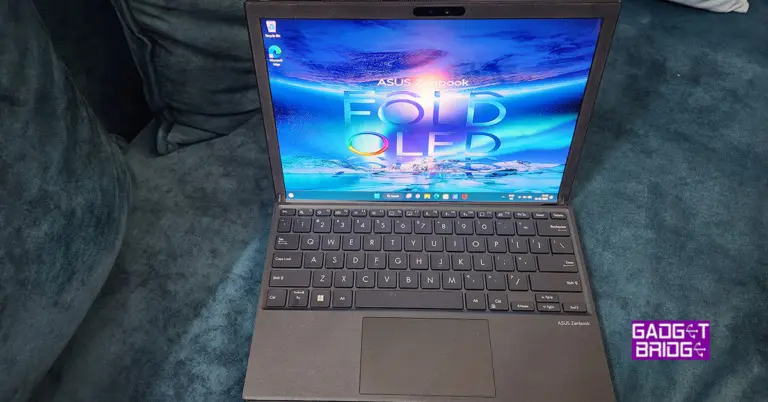
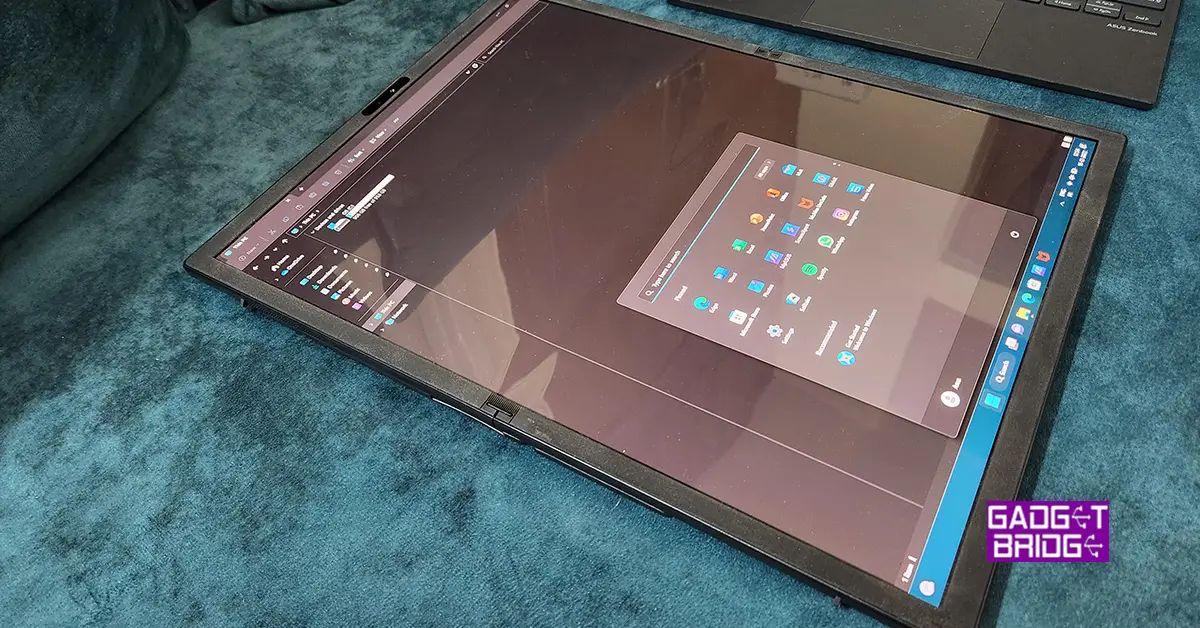
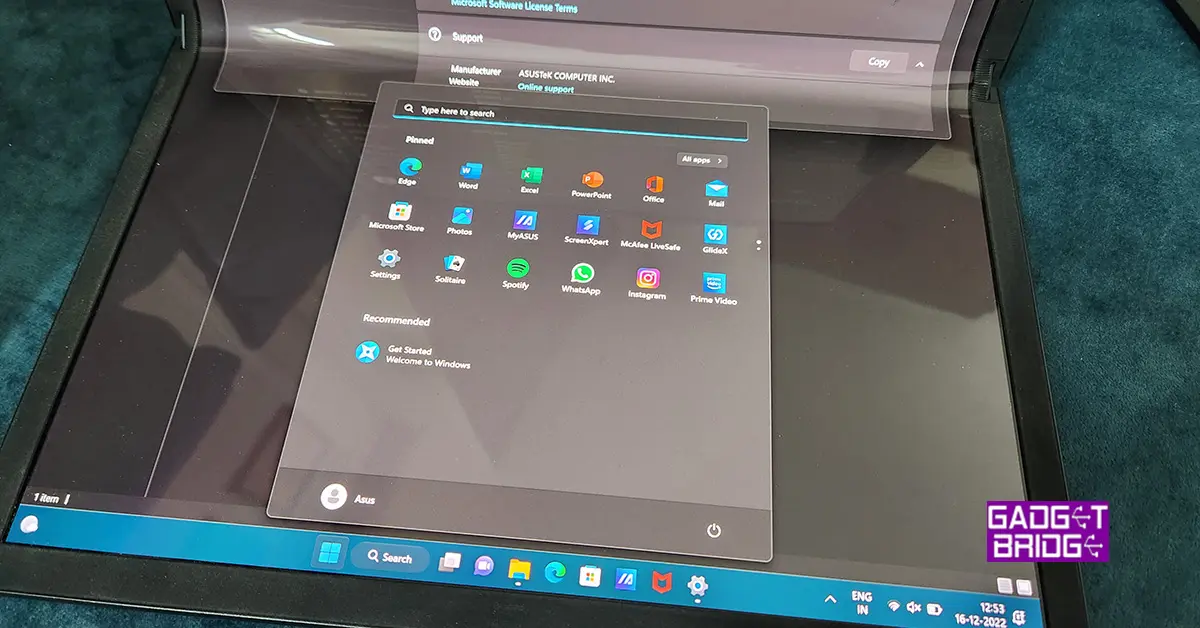
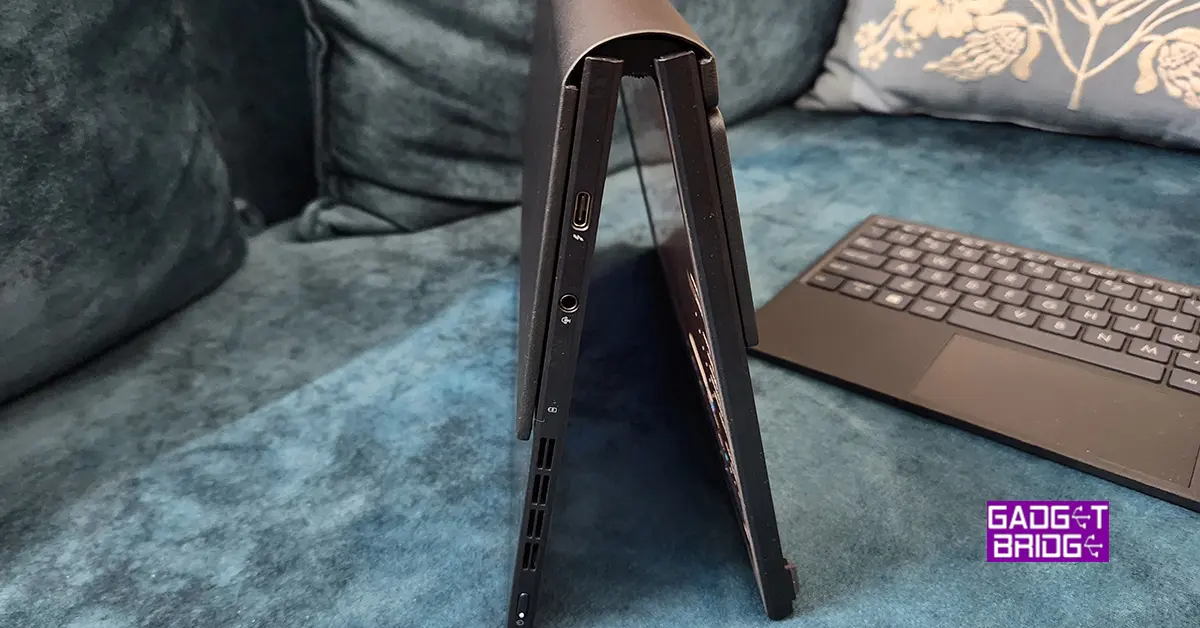
The ASUS ZenBook 17 fold has a distinct design that distinguishes it from other laptops on the market. The 17-inch touchscreen display is the most remarkable feature, which can be opened to 180 degrees to switch between laptop and tablet mode easily. It comes with a keyboard attachment that turns it into a 13-inch laptop. So, only the top part of the screen is in play. This makes it ideal for professionals working on complex projects, as well as individuals looking for a versatile gadget that can be used for both work and play. Talking a little more about its design, the ZenBook 17 fold has a clean and attractive design in addition to its folding display. The laptop is made of high-quality components, including a lightweight aluminium chassis. The laptop’s hinge is likewise precision-engineered, resulting in smooth and steady functioning when switching modes. When in tablet mode, the hinge also enables for a comfortable and ergonomic viewing position, making it ideal for watching movies, browsing the web, or taking notes. Overall, the ASUS ZenBook 17 fold is a well-constructed laptop that is ideal for anyone looking for a powerful and adaptable gadget. When it comes to connectivity users get two thunderbolt ports, one on each side and one 3.5mm audio/mic port. To connect USB 3.0 devices you will need a USB type-C connections hub. Same as you used to get for the MacBook Airs. One of the laptop’s most noticeable features is its 17-inch touchscreen display. With a resolution of 3840×2160 pixels, the display offers vibrant, crisp images that are ideal for watching high-definition movies and video content. Additionally, the display fully supports the sRGB colour gamut, making it the perfect choice for experts in graphic design, photography, and video editing. The display is moreover Pantone verified, guaranteeing that colours are correct and constant, which is crucial for professionals who need to do colour-critical tasks. Read Also: Asus ZenBook 14 Flip OLED convertible laptop with up to AMD We played a lot of content on the Asus Zenbook 17 Fold, which includes FHD YouTube Videos, Netflix shows and Prime movies. The overall experience with the display was fabulous and the response of the touch screen was far superior to any we have seen in the segment. Sound drivers also do justice to the machine and one can use them for prolonged watching. At 8MM the laptop weighs just 1.5Kg, and 1.8Kg when you attach the keyboard to it.

Asus Zenbook 17 Fold review: Performance

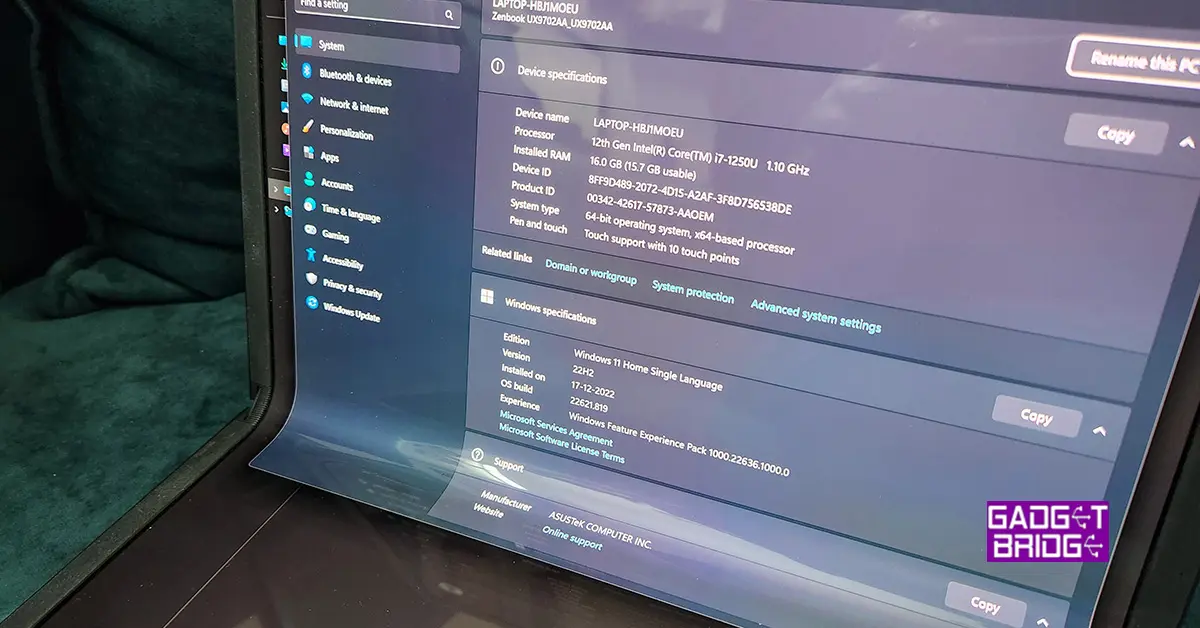
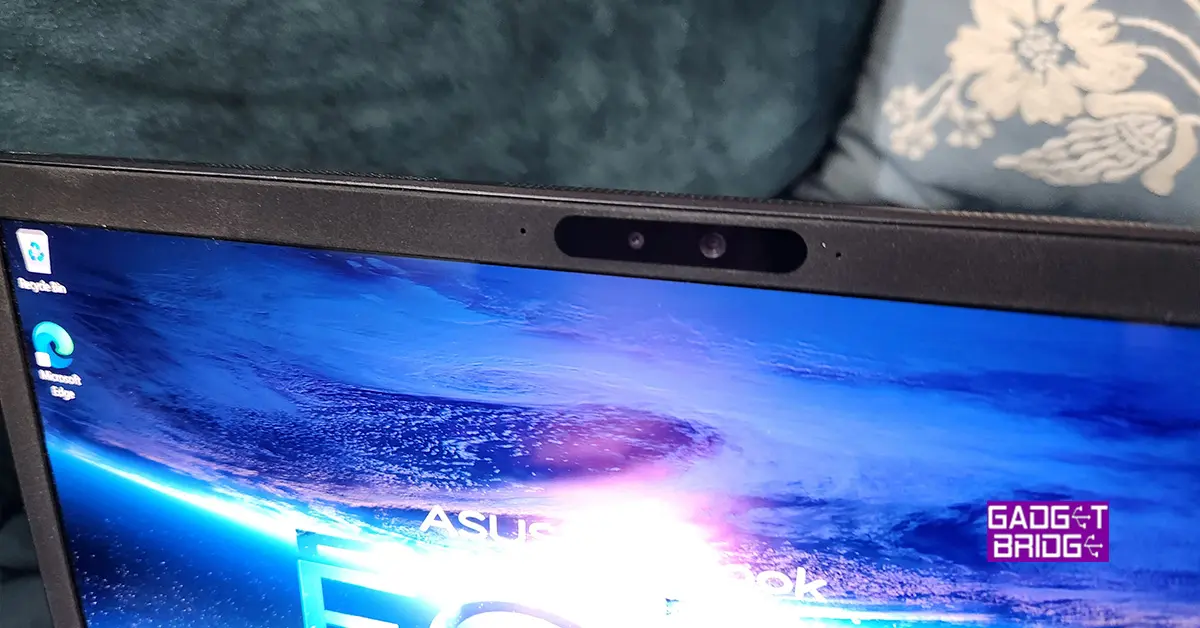
The ASUS ZenBook 17 fold is a powerful laptop that is packed with high-end technology. It is powered by a 12th Gen Intel Core i7 (1250U) processor, which offers fast and efficient performance for all types of tasks. The laptop also comes with IRIS X graphics, which provides smooth and responsive graphics for day-to-day tasks as well as other graphics-intensive tasks. But, do not expect it to play high-end games. It might be able to run them, but at very low FPS at the base settings. The laptop also comes with 16GB of RAM and 1TB of M.2 NVMe SSD storage, providing plenty of power and storage space for all your needs. We were hoping that there will be 32GB RAM model as well, but that is not available at the moment. In terms of connectivity, the ASUS ZenBook 17 fold comes with WiFi 6E and Bluetooth 5.0, providing fast and stable wireless connectivity. The laptop also features a webcam with 5MP sensor. In the small form factor, Asus has also put in a 75WHrs 4-cell Li-Ion battery in the machine. On our tests, the laptop stayed alive for 5.5 hours. This included a mix of work as well as full-screen (tablet mode) movie watching. Windows 11 Home OS comes out of the box and setting it up is a bit tricky if you do not have an active internet connection. Though it is not Asus’s issue, Microsoft really needs to allow users to set up a device without creating a Microsoft account or registering for it first in a forced manner. Take a clue from Android, they tried that at one point, but then they also reverted to allowing users to set up a device without signing in. If the user wants to use PlayStore apps then they need to sign in, else no need. Same should be done with all Microsoft OS’s and laptops.Asus-Zenbook-17-Fold-2 Moving on, we had a fabulous time with this laptop as when we needed to work, we connected the keyboard attachment, which turns it into a 13-inch laptop. And when we wanted to watch something, we flipped it 90 degrees to take full advantage of the 17-inch tablet mode. Overall, we did not find any flaws in the performance of the Asus Zenbook 17 Fold. We even tried to edit a 4K videos on the machine and it handled the process well. Read Also: ASUS introduced new lineup of ROG Flow and Zephyrus laptops at CES 2023

Verdict

The ASUS ZenBook Fold 17 is a cutting-edge laptop with a sleek and attractive design, robust performance, and a one-of-a-kind foldable display. This laptop’s 17-inch touchscreen display is ideal for professionals who want a large screen for working on complex projects, as well as individuals looking for a versatile computer that can be used for both work and enjoyment. The ZenBook Fold 17 can perform even the most demanding jobs with ease because of its powerful Intel Core processor and speedy storage. And as said, it also has a unique folding mechanism that allows the display to be rotated around, making switching between laptop and tablet mode simple. Overall, the ASUS ZenBook 17 is a powerful and versatile laptop that is perfect for both work and play. But the only thing that pinches is the price. Asus is asking you to break the bank and fetch them Rs 3,29,690, which is equivalent to buying a small car. You have to ask this question to yourself, do you really want a folding touchscreen laptop? If the answer is yes and you can afford it, we see no reason to not buy it. Asus Zenbook 17 Fold Pros Folding touchscreen Superb Display Good performance Asus Zenbook 17 Fold Cons High price Windows 11 Home setup For the latest gadget and tech news, and gadget reviews, follow us on TwitterFacebook and Instagram. For newest tech & gadget videos subscribe to our YouTube Channel. You can also stay up to date using the Gadget Bridge Android App. You can find the latest car and bike news here.

Pre-orders for the Samsung Galaxy S23 Series have begun in India: Details inside
Next month, the Samsung Galaxy S23 series is scheduled to go on sale as the company gets ready to unveil its 2023 flagship handsets. In addition to beginning to tease the device’s debut, Samsung has also started to take pre-orders for the next Galaxy S23 smartphone series in India in advance of the Galaxy Unpacked event in February. The Samsung Galaxy S23, Galaxy S23+, and Galaxy S23 Ultra will be released publicly by the South Korean company. Samsung said on Wednesday that the Galaxy Unpacked 2023 event will take place on February 1. Before the smartphones are released, Samsung has started taking pre-orders for the upcoming Galaxy S23 smartphone series. Customers who have reserved a unit will be entitled to early access and exclusive discounts when buying a Samsung Galaxy S series smartphone. The Samsung Galaxy S23 smartphone line is rumoured to be priced similarly to the Galaxy S22 line. Customers in India can pre-reserve the top-tier Galaxy S series by making a small payment of INR 1999 on Samsung.com, Samsung Exclusive Stores, Amazon.in, and other well-known retail locations. Future Galaxy S series smartphone buyers who pre-order will receive a pre-reserve incentive worth INR 5000. Customers must buy and activate the gadget by March 31, 2023, in order to receive the bonus. On February 1, 2023, at 11:30 PM, Galaxy Unpacked will be broadcast live on Samsung Newsroom India. Also Read: Samsung Galaxy Unpacked 2023 confirmed to happen on February 1, might introduce its flagship Galaxy S23 Series A Qualcomm Snapdragon 8 Gen 2 SoC is believed to be included in the next Galaxy S23 series. Additionally, the Galaxy S23 Ultra might have a quad rear camera setup with a 200-megapixel primary sensor. The two remaining smartphones, the S23 and S23+, are probably going to have three cameras on the back. The normal Galaxy S23 and Galaxy S23+ will reportedly contain 8GB of RAM and 256GB of internal storage, according to rumours. As opposed to the Galaxy S23 Ultra, which is expected to include 12GB of RAM and storage options of 256GB, 512GB, and 1TB. For the latest gadget and tech news, and gadget reviews, follow us on TwitterFacebook and Instagram. For newest tech & gadget videos subscribe to our YouTube Channel. You can also stay up to date using the Gadget Bridge Android App. You can find the latest car and bike news here.

Uttarakhand now has access to Jio True 5G Services

Reliance Jio announced that its True 5G services would begin to operate in Uttarakhand from Dehradun. The sole 5G service available in Dehradun is Jio True 5G, which is expanding quickly and offers Jio consumers the technology’s game-changing advantages. On Tuesday Honourable Chief Minister of Assam, Dr. Himanta Biswa Sarma, officially launched Jio True 5G services in Assam at an event held in Guwahati. The sole 5G service available in Dehradun is Jio True 5G. Jio would spend more than Rs 650 crore on the construction of a standalone 5G network in Uttarakhand in addition to the existing investment of Rs 4,950 crore. In order to achieve the visions of the state of Uttarakhand to become a “Digital Devbhoomi” and the Hon. Prime Minister of “Digital India,” Shri Pushkar Singh Dhami congratulated and appreciated Jio for bringing about transformational changes in the state’s digital landscape. Also Read: Jio True 5G services now rolling out in Assam Commenting on the launch, Honorable Chief Minister of Uttarakhand, Shri Pushkar Singh Dhami, said, “I congratulate Jio, the people of Uttarakhand and the people of Dehradun in particular, at the launch of Jio True 5G services. This launch is an important milestone for Uttarakhand and its people, who will benefit immensely from 5G services. Jio has always been at the forefront, especially when it comes to providing mobile and data connectivity in the state. With 5G, every individual, including students and businessmen, IT and healthcare services and sectors like agriculture, education, medicine, information technology & manufacturing will benefit with new opportunities and additional employment. 5G will also enable citizens and government to remain connected on real time basis and will also improve implementation and efficiency of government schemes for the last mile user.” Beginning on January 11, 2023, Jio subscribers in Dehradun will be eligible for the Jio Welcome Offer, which offers unlimited data at speeds of up to 1 Gbps+ at no extra cost. Reliance In addition to its True 5G services, which were already offered in Guwahati, Jio debuted its True 5G-Powered Wi-Fi services in the Maa Kamakhya Temple complex. In addition, 7 cities across 4 states now have access to the Jio True 5G service. The Jio Welcome Offer, which provides Unlimited Data at speeds of up to 1 Gbps+ at no additional cost, will be made available to Jio users in Guwahati and 7 additional cities in the states of Maharashtra (Solapur), Telangana (Warangal, Karimnagar), Kerala (Chertala), Hubli-Dharwad, Mangalore, and Belgaum. Jio is investing approximately 2,500 crores to deploy the True 5G network in Assam in addition to their current investment of 9,500 crores, demonstrating their unwavering commitment to the growth of our state. Jio True 5G services would be accessible in every Assamese town and taluka by December 2023. For the latest gadget and tech news, and gadget reviews, follow us on TwitterFacebook and Instagram. For newest tech & gadget videos subscribe to our YouTube Channel. You can also stay up to date using the Gadget Bridge Android App. You can find the latest car and bike news here.

Compared: iQoo 11 Vs OnePlus 11

iQoo 11, the first flagship smartphone with a Qualcomm Snapdragon 8 Gen 2 SoC, has been released in India. The phone supports 120W rapid charging. The phone also has a 2K E6 AMOLED display. With these specifications, the phone directly competes with the OnePlus 11, which will go on sale in India in February. So let’s compare the two smartphones to see how they differ and which one would be a better choice for you if you were looking to upgrade or get a new Android phone.

Display

iQoo 11: 6.78-inch Samsung E6 AMOLED display OnePlus 11: 6.7 inches Samsung LTPO 3.0 AMOLED display Also Read: iQoo 11 5G with Snapdragon 8 Gen 2 SoC launched in India

Processor

iQoo 11: Qualcomm Snapdragon 8 Gen 2 CPU OnePlus 11: Snapdragon 8 Gen 2 SoC

Rear camera(s)

iQoo 11: Triple rear camera set up includes 50MP Samsung GN5 primary sensor, a 13MP portrait sensor, and an 8MP ultra-wide sensor OnePlus 11: Triple rear camera setup includes a 50-megapixel Sony IMX890 main sensor, a 32-megapixel portrait sensor and a 48-megapixel Sony IMX58 extreme wide-angle sensor

Selfie camera

iQoo 11: 16MP camera sensor OnePlus 11: a 16-megapixel sensor for selfies

RAM and Storage

iQoo 11: 8GB RAM with 256GB storage and 16GB RAM with 256GB memory OnePlus 11: 12GB RAM with 256GB, 16GB with 256GB option and 16GB with 512GB variant

Battery

iQoo 11: 5,000mAh battery OnePlus 11: 5,000mAh dual-cell battery

Operating system

iQoo 11: Funtouch OS 13 powered by Android 13 OnePlus 11: ColorOS 13.0 with Android 13

Price

iQoo 11: Rs 59,999 OnePlus 11: CNY 3,999, which is around Rs 48,000

Our Take

Each phone has a similar metal frame around its glass panel. However, the iQoo 11 is available in the Alfa and Legend variants. The Legend has a leather back panel and branding from BMW M Motorsport. Wireless charging and IP certification are two features that are absent from both phones. Both devices use AMOLED displays with QHD+ resolution for their display. While OnePlus settles for a panel with a 120Hz refresh rate, the iQoo phone supports a 144Hz refresh rate. Whereas the iQoo 11 features a flat display, the OnePlus 11 has a curved finish. Both the iQOO 11 and the OnePlus 11 are equipped with the same Snapdragon 8 Gen 2 CPU and come pre-installed with Android 13. Both phones have a triple back camera setup when it comes to photography, however, the OnePlus 11’s camera system has a better sensor than the iQoo’s. The selfie cameras on phones are, however, the same. Also Read: OnePlus 11 5G and the OnePlus Buds Pro 2 launched: Pricing details Although both smartphones have 5,000mAh batteries, the iQoo 11 and the OnePlus 11 offer 120W and 100W fast charging, respectively. But when it comes to gaming, iQoo 11 is the star. It sports a dual-axis linear motor and liquid cooling system for improved gaming and cooling performance. OnePlus, on the other hand, has a single X-axis linear motor with a VC chamber for cooling. So the actual decision is whether to get the iQoo 11 or hold off until the OnePlus 11 is released in India. So choose the iQoo 11 if you want a premium smartphone with excellent gaming performance, a faster refresh rate display, and support for fast charging. Otherwise, you may wait until the OnePlus 11 comes to India. For the latest gadget and tech news, and gadget reviews, follow us on TwitterFacebook and Instagram. For newest tech & gadget videos subscribe to our YouTube Channel. You can also stay up to date using the Gadget Bridge Android App. You can find the latest car and bike news here.