CES 2023 is set to kick off today and tech brands have already started announcing their showcases and product releases for the four-day electronics show. We’ve been keeping track of all the media announcements prior to the event, bringing you all the unmissable releases from this year’s CES. Now that the media day has concluded, here’s what you can expect from CES 2023. Read Also: 4 Great Grocery Shopping Apps You Need To Try On Android
Sony and Honda come together to announce their new EV brand Afeela
Sony and Honda announced their joint EV brand Afeela and showcased the first concept prototype that is set to hit production by 2025. This isn’t Sony’s first concept car, although it will be the first one to see the light of production. The prototype is equipped with 45 cameras and sensors inside and outside the vehicle with 800 TOPS of maximum computing power for ECU.
TCL RayNeo X2
TCL will be showcasing a bunch of different products at CES 2023, but the RayNeo X2 takes the cake. TCL RayNeo X2 are the first to realise binocular full-colour Micro-LED optical waveguide display in AR glasses. The biggest challenge for AR glasses over the years has been finding the right balance between design and tech features. The RayNeo X2 bridge the two worlds together with its lightweight design and features that push the boundaries of smart wearables. The RayNeo X2 open the door to all kinds of possibilities, be it content creation with its integrated camera or using AI language translation while having in-person conversations.
Asus Chromebook Vibe CX34 Flip
Asus will be putting out a diverse range of laptops at CES 2023, from creativity-oriented notebooks like ProArt Studiobook Pro 16 3D OLED to professional laptops like ExpertBook B9 OLED. The one to watch out for is the Asus Chromebook Vibe CX34 Flip. This gaming Chromebook delivers a powerful performance with immersive visuals. Powered by a 12th Gen Intel Core i7 processor and 16 GB of memory, the CX34 Flip is ideal for cloud gaming as well as work on the go. It also features a 16:10, 144 Hz WUXGA display with an 83% screen-to-body ratio and full 360° ErgoLift hinge, an anti-ghosting keyboard with four-zone RGB lighting12, and ultrafast WiFi 6E technology. Asus’ glasses-free 3D OLED technology, Spatial Vision, also deserves a special shoutout.
LG Signature OLED M3
There are TVs and then there’s LG’s 97-inch Signature OLED M3. The M3 brings wireless connectivity to the world of consumer TVs with its Zero Connect technology. The Zero Connect box transmits wireless audio and video signals to the M3 and is capable of real-time AV transmissions at up to 4K 120Hz. The wireless environment brings a distraction-free viewing experience and a cleaner look overall. The Zero Connect box is equipped with multiple ports for speaker systems, gaming consoles, and a set top box.
LG Gram lineup
LG continues to impress with its lineup of sleek ‘Gram’ laptops. The LG Gram Ultraslim and Gram Style will be showcased at CES 2023. The Ultraslim is the company’s thinnest laptop yet, with a depth of just 10.99 millimetres when closed. This thickness is comparable to that of a smartphone or a notepad. The laptop features a 15.6-inch OLED display with Anti-Glare Low Reflection and Intel’s 13th Gen Raptor Lake chip with Performance Cores.The LG Gram Style laptops are offered in 16 and 14-inch versions and come with an elegant glass design. The Gram Style laptops also feature a hidden haptic touch that lights up upon being touched.
Withings U-Scan
CES wouldn’t be complete without some ‘out there’ products. The Withings U-Scan is a spherical device (90mm in diameter) that you can attach to the toilet bowl to provide a health analysis by analysing the biomarkers found in urine. Post ‘urinanlysis’ the U-Scan provides a quick snapshot of your health data and even suggests actions you can take to find the ideal health balance.Read Also: Poco C50 budget smartphone with a 5,000mAh battery launched in India
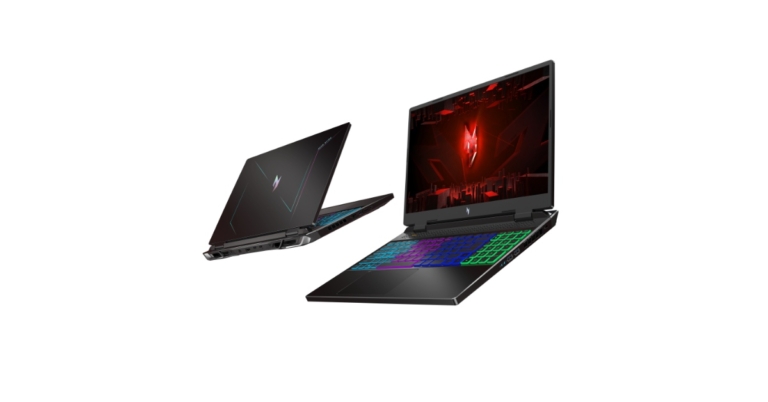
The Nitro 16 and Nitro 17 laptops from Acer were announced at CES 2023. The newest 13th Gen Intel Core processors and NVIDIA GeForce RTX 40 Series GPUs are featured in Acer’s lineup of potent new Nitro gaming laptops. Four-zone RGB illuminated keyboards are included with the new 16-inch and 17-inch Acer Nitro laptops.
Acer Nitro 16 and Acer Nitro 17
The upgraded 16-inch WUXGA or WQXGA display on the new Nitro 16 (AN16-51) gaming laptop has a refresh rate of 165 Hz and supports NVIDIA Advanced Optimus, which enables users to dynamically switch between the integrated graphics and discrete graphics without having to reboot. This laptop has a 5% larger screen than its predecessor. It has a 4-zone RGB backlit keyboard, 100% sRGB colour gamut compatibility, and an increased screen-to-body ratio of 84% for a more pleasing viewing experience.Also Read:CES 2023: Dell G16, G15, Alienware M18, M16, X16, and X14 R2 Gaming Laptops launchedThe Nitro 17 laptop has a variety of display options, including an FHD display with 144 Hz or 165 Hz refresh rates and a quad high-definition display (QHD) with a 165 Hz refresh rate. It is powered by up to 13th Gen Intel Core HX processors. In order to spice up the gaming experience, it also includes a big touchpad (125.0 mm x 81.6 mm), an 81% screen-to-body ratio, and an RGB 4-zone backlit keyboard.Players can save more games, movies, and streaming content on the new Windows 11-based Acer Nitro laptops thanks to its enormous 2 TB M.2 PCIe Gen 4 storage and up to 32 GB of DDR5 4800 MHz memory. A month of Xbox Game Pass or PC Game Pass is also included with both laptops, granting users access to hundreds of well-known PC games.Each model includes Killer DoubleShot Pro and is equipped with Killer Wi-Fi 6 1650i to increase bandwidth. These laptops include an HD camera, two microphones, and two speakers with DTS:X Ultra audio to enhance the gaming and streaming experience and let gamers fully immerse themselves in rich aural settings. With an HDMI 2.1 port, a microSD card reader, two Thunderbolt 4 ports that support Power Delivery, three USB 3.2 Gen 2 ports, including one that supports offline charging, and two Thunderbolt 4 ports.Also Read:CES 2023: Acer Predator Helios 16, Predator Helios 18 and new Predator monitors announcedThese Nitro devices contain two fans, four fan ports on the sides and back, a higher air intake, and additional liquid metal thermal grease support to help with cooling over prolonged hours of intense gaming. They each have NitroSense software pre-installed and a unique NitroSense key, enabling users to check the temperatures of their systems and modify fan speed and power performance settings to keep the hardware as cool as possible.
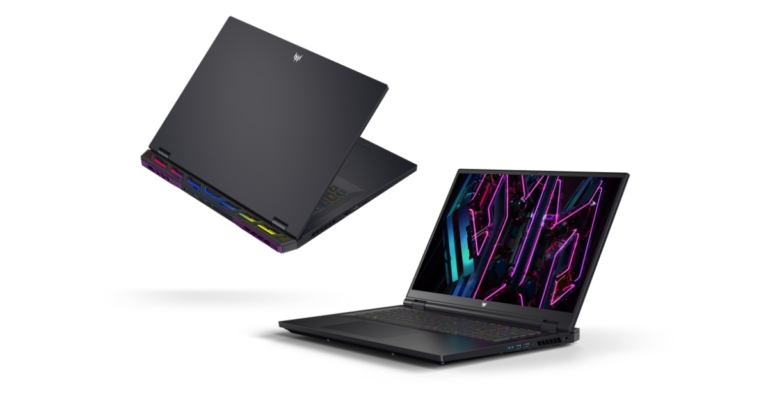
Acer unveiled a pair of Predator gaming monitors as well as two potent Predator Helios gaming laptops. New Predator Helios gaming laptops with 16-inch and 18-inch displays have been released by Acer. Both displays have OLED technology with quick 240 Hz refresh rates in addition to the Predator X27U. They include Nvidia GeForce RTX 4000 series dedicated graphics cards and the most recent 13th Gen Intel Core mobile processors.
Predator Helios 16, Predator Helios 18 Laptops
Acer’s most potent gaming laptop series now includes the brand-new Predator Helios 16 (PH16-71) and Predator Helios 18 (PH18-71). They both offer variants with 13th Gen Intel Core i9 or i7 HX CPUs coupled with up to NVIDIA GeForce RTX 4080 Laptop GPU (MGP up to 165W) and a slew of essential top-of-the-line gaming capabilities. They both sport completely new designs and enhanced thermals.The NVIDIA Ada Lovelace architecture, which offers a quantum leap in speed and AI-powered visuals, is used in the new NVIDIA GeForce RTX 40 Series GPUs. Users can take advantage of Reflex’s reduced system latency, lifelike virtual worlds, enhanced performance through ray tracing, and high-quality frames from DLSS 3. Lastly, they are astounding mobile powerhouses that are perfect for playing the most difficult AAA games thanks to their up to 32 GB DDR5-4800 MHz RAM and up to 2 TB PCIe Gen4 NVMe SSD in RAID 0 configuration.Predator-Helios-16Powered by AUO AmLED technology, the Predator Helios 16 features a 16-inch (16:10) WQXGA (2560 x 1600) display at 165 Hz or 240 Hz or a Mini LED[] panel at 250 Hz. This display offers over 1000 nits of peak brightness, a 1,000,000:1 high contrast ratio, and 100% coverage of the DCI-P3 colour gamut for rich, vibrant colours.The Predator Helios 18 features a stunning 18-inch (16:10) display with the following options: WUXGA (1920×1200) at 165 Hz, WQXGA (2560×1600) at 165 Hz or 240 Hz, or AUO’s superfast 250 Hz Mini LED display that boasts a three times higher ambient contrast ratio than traditional displays and supports 1000 local dimming zones to give users complete freedom of use even in low lighting conditions. Images smoothly transition across the screens with less ghosting or tearing because of the increased quality and quick refresh rates.The new Predator laptops have improved thermal solutions with two custom-engineered 5th Gen AeroBlade 3D metal fans and vector heat pipes in the shape of rectangles for improved heat transfer to keep the powerful new components cool. Its superior thermal performance is capped off by the cooling effects of liquid metal thermal grease.A mini-LED backlit keyboard with 1.8 mm key travel and anti-ghosting N-key rollover completes the new design. The per-key RGB backlit keyboard has been updated to display bright uniform colour (with less halo) and smooth dynamic lighting effects, utilising a newly built backlight module to efficiently dissipate heat.The Intel Killer E2600 Ethernet Controller and Intel Killer Wi-Fi 6E AX1675 frequency band compatibility for Predator laptops ensure that players are always connected for quick, fluid gameplay. The USB 3.2 Gen2 ports on the gaming laptops offer a wide variety of peripherals, including an HDMI 2.1 port, two USB Type-C Thunderbolt 4 connections that support power delivery, and a Micro SD card reader. Additionally, one month of Xbox Game Pass or PC Game Pass, which grants access to hundreds of top-notch PC games, is included with the Predator Helios 16 and Predator Helios 18 laptops.
Predator X45 and X27U Gaming Monitors
The Predator X45 and Predator X27U, two of Acer’s newest Predator-branded gaming monitors, with OLED screens and blazingly fast performance that will appeal to even the most ardent gamers. The Predator X45 is a 45-inch UWQHD (3440×1440) curved 800R monitor with an ultra-wide, narrow frame that widens the field of vision and increases gaming immersion. For amazingly realistic photos, it also supports 98.5 percent of the DCI-P3 colour gamut. It supports both PCs and consoles, has two HDMI 2.0 ports and two DisplayPort 1.4 connections, and is TÜV Rheinland EyeSafe certified. Excellent contrast for more detailed visuals is produced by the OLED screen of the Predator X45 with HDR10 and a peak brightness of 1000 nits, and the device’s UGR-22 rating enables glare-free gaming in bright environments.PREDATOR_X45The flat 27-inch WQHD (2560×1440) screen on the Predator X27U has 98.5% DCI-P3 coverage, making it the perfect display for professionals who play video games on a regular basis and need a computer they can depend on. The TÜV Rheinland EyeSafe-certified display also makes use of HDR10 capabilities and a peak brightness of 1000 nits to produce stunning and lifelike graphics.PREDATOR_X27The Predator X45 and Predator X27U’s have 240 Hz refresh rates, 0.01 ms pixel response times, and AMD FreeSync Premium technology. Additionally, they offer a KVM switch that makes switching between desktops and laptops simple and doesn’t require changing the keyboard and mouse. A USB hub with USB Type-C is a practical place to keep gadgets and other peripherals as well.
Pricing and Availability
Predator Helios 16 (PH16-71) will be sold starting at USD 1,649.99 in North America in March, EUR 2,399 in EMEA in February, and RMB 17,999 in China in February.Predator Helios 18 (PH18-71) will be sold starting at USD 1,699 in North America in April, EUR 2,499 in EMEA in March, and RMB 20,999 in China in February.In Q2 of North America, the Predator X45 will start at USD 1,699; in Q2 of EMEA, it will cost EUR 1,799; and in Q1 of China, it will cost RMB 12,999.In Q2, the Predator X27U will be offered in North America, EMEA, and China, with prices beginning at USD 1,099, RMB 7,999, and EUR 1,099, respectively.
For the latest gadget and tech news, and gadget reviews, follow us on Twitter, Facebook and Instagram. For newest tech & gadget videos subscribe to our YouTube Channel. You can also stay up to date using the Gadget Bridge Android App. You can find the latest car and bike news here.
AI art was one of the most viral trends on the Internet last year. The stellar images you saw on your news feeds were also a hotbed of debate regarding plagiarism and the ethics of art. What started off with using text prompts to create rudimentary images through Dall-E eventually gave way to even more stunning pieces of art. NightCafe AI Image Generator is one of the several AI image processing websites that you can use to create your own AI art. That may raise more questions than it answers, so here is a brief explainer of what NightCafe AI Image Generator is, how it works, and how you can best utilise it.Read Also: 4 Great Grocery Shopping Apps You Need To Try On Android
What is NightCafe AI Image Generator?
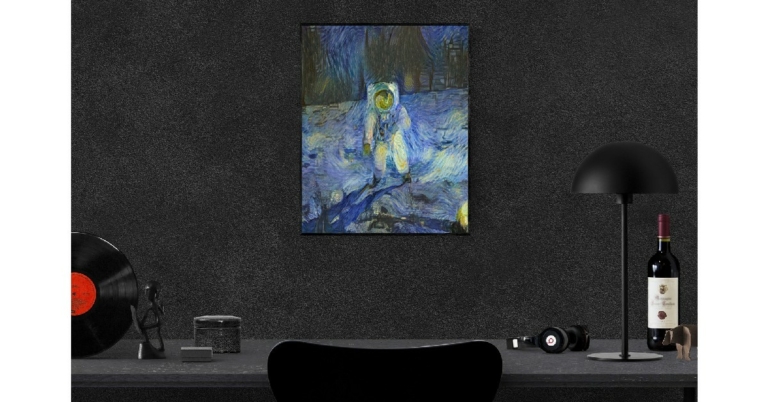
Named after Van Gogh’s famous painting, NightCafe AI Image Generator uses machine learning algorithms to create an image out of a text prompt entered by the user and then uses the same framework to optimise the image until it passes the necessary parameters required for it to be an appropriate visual representation of the prompt. You can also upload your own images to NightCafe AI and use the ‘neural-stye transfer’ technique to convert them into AI-generated art. You have creative control over the style of the resulting image. The text-to-image generation process employs two machine learning algorithms – VQGAN and CLIP. While VQGAN uses a neural network to create an image out of a prompt, CLIP makes sure that the resulting image is within the boundaries of the prompt. With the help of high-powered GPUs, NightCafe is able to significantly reduce the image rendering process.How to use NightCafe AI Image GeneratorStep 1: Go to https://creator.nightcafe.studio/ and click on Create.Step 2: Choose a creation method. To upload your own image, click on ‘Style transfer’.Step 3: After you’ve chosen a creation method, enter a text prompt. You can go into the details regarding the contents and style of the image. There are also a bunch of preset styles you can choose from.Step 4: Scroll down and click on Create.Step 5: Your image will be ready in a few minutes.Read Also: How To Install New Emojis On An Android Smartphone? Top Simple Methods
Garena Free Fire is a battle royale game with regular awards and tournaments to keep players interested. If you play Garena Free Fire, you should be aware of the redeem codes that are released on a daily basis. However, because the battle royale game is banned in India, players from other countries can use the Free Fire Redeem codes daily. If you’re unfamiliar with the Garena Free Fire redeem codes or don’t know how to get them, we’ve put together a step-by-step guide to help you redeem them. Check out Garena Free Fire Redeem Codes for 5 January 2023.The Free Fire redeem codes are a great way to get free stuff. These are 12-digit codes that contain alphabets and numbers, as well as an expiration date and time. Because the Garena FF redeem codes cannot be used more than once, you should hurry to the redemption page to claim your free reward before someone else does. To get a free reward, all you have to do is go to reward.ff.garena.com/en, which is the official redemption page. Also, keep an eye on this space for daily updates on Garena Free Fire redemption codes and rewards.
Garena Free Fire Redeem Codes Today 5 January 2023
Updating Soon
How to Get Free Fire Redeem Codes for Garena on 5 January 2023?
Have you participated in the Amazon Quiz today? If not then participate in the 5 January 2023 Amazon Quiz as it has already gone live on the app. The daily quiz can be played from 12 AM to 11:59 every day on the mobile app platform. Today e-commerce is giving the chance to win Rs 500 Amazon Pay Balance.Every day Amazon brings a fresh quiz for its customers. By participating in the quiz the participants can win an Amazon Pay Balance of up to Rs 50,000. The quiz can only be played on the mobile app as it is not available for the desktop platform. The quiz contains five easy questions and you have to answer all the questions correctly. The participants will then be shortlisted for a lucky draw to select a winner. Whereas the results are declared at the end of the month. Check out today’s Amazon quiz answers to win Rs 500.Amazon Quiz Today Prize – Rs 500 Amazon Pay BalanceQuiz Date – 5 January 2023Daily Timing – 12 AM to 11:59 PMWinner Announcement – Today 12 PM
Amazon Quiz Answers Today 5 January 2023
Question 1: Which actor got banned from attending Oscars for the next 10 years after slapping presenter Chris Rock onstage?Answer: Will SmithQuestion 2: Yeast is a type of ____.
Answer: Fungus
Question 3: “For every action, there is an equal and opposite reaction.” It is which of Newton’s law of motion?
Answer: Third LawQuestion 4: This is the only one of the ‘New Seven Wonders of the World’ to be located in which continent?
Answer: EuropeQuestion 5: In which year did the team shown in this picture win its 3rd FIFA World Cup title?Answer: 2022
How To Play Amazon Quiz
Only app users are eligible to play the Amazon quiz every morning from 12 AM to 11:59 PM. The quiz is not available on the desktop. For those who are unaware of how to play the Amazon quiz below are the steps, you can follow to take the quiz.
Firstly download the Amazon app from Google Play Store or App Store
Now fill in the required information through the Sign Up option.
You need to log in to the Amazon app and scroll down on the home screen to find the Amazon Quiz banner.
Tap on the Amazon Quiz banner and tap on the Start button to start the Quiz.
Now you will get 5 questions and you need to answer them correctly. One wrong answer will eliminate you from the Quiz.
After answering all the questions correctly you are now eligible for a Lucky Draw.
The winner’s name will be announced today at 12 PM.
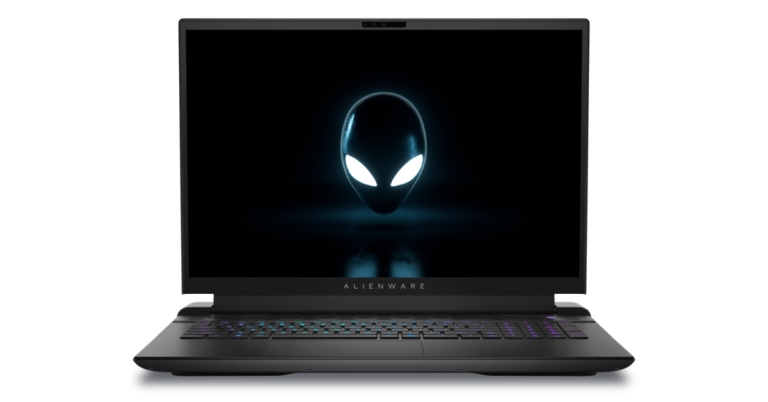
Six new gaming laptops from Alienware and Dell were unveiled at CES 2023. The new lineup includes Dell G16 and G15, the Alienware x16 and x14, and the Alienware m18 and m16.
Dell G16 and G15 gaming laptops
Retro pops of orange and blue paired against high-end metallics provide eye-catching colour combinations for the G15 and G16. Both include its G-mode key, unique macro keys for gaming functions, and toggle audio keys to improve the user experience. While G16 offers one-zone RGB and Cherry MX keyboard alternatives to suit your preferences, G15 offers one-zone and four-zone RGB keyboard options with Numpad.Under the hood, G15 and G16 are powered by the most recent Intel, AMD, and NVIDIA technologies to support graphically demanding games with ease and consistency, even during extended play sessions. Additionally, the G Series now features Vapor Chamber Cooling and an Element 31 thermal interface, both of which were inspired by Alienware.Dell G16The newly improved Alienware Command Center is installed on both devices, allowing for the most comprehensive in-player customisation. All of these new Alienware and G Series gaming laptops come with the revamped Alienware Command Center (AWCC), which puts the utmost customization and convenience at your fingertips.Also Read:Dell showcased a new lineup of 6K monitors and Concept Nyx Game Controller at CES 2023
Alienware M-series laptops
Both Alienware m18 and m16 come with 18 inches and 16 inches screens having 165 Hz refresh rate and 480 Hz refresh rate respectively. The screens on both models enable G-SYNC, FreeSync, and dynamic display switching. All panels have ComfortView Plus, our hardware-based blue light emission reduction technology that doesn’t degrade performance or picture quality.In terms of hardware the devices have AMD Ryzen processors with Radeon graphics or 13th Gen Intel Core i9-13980HX CPUs, with NVIDIA GeForce RTX graphics offering up to four M.2 SSD for storage expansion and user-replaceable dual-channel DDR5 memory with up to 9TB. Both the CPU and the GPU now have the thermal interface material Element 31 to help guarantee that heat dissipation is optimised.
Alienware X-Series
The 16-inch and 14-inch screens of the Alienware x16 and x14 laptops, respectively. It promises increased performance, a taller 16:10 display, and an upgraded six-speaker design.The 6-speaker x16 system produces a spatial audio experience thanks to its top-firing tweeters for clarity and dual woofer arrangement for powerful bass. With Dolby Atmos, your entertainment will come to life with rich, layered sound that reveals depth, clarity, and details.The Alienware x16 is the first Alienware laptop to include the new AlienFX Scanner, Loop, and Rainbow lighting upgrades, and it now has 100 micro-LEDs on the back panel. In addition, our RGB lit touchpad is 15% bigger now (than the one found on the x17 R2). It includes the most recent technological advancements, including next-generation AMD mobile technology, NVIDIA GeForce Next-Gen laptop GPUs, and 13th Gen Intel Core HX CPUs.
Pricing
High-end configurations for the Alienware m18 will be available at launch with prices beginning at $2,899 (US) and $3,899 (CA); subsequent configurations will be available with prices beginning at $2,099 (US) and $2,849 (CA) (CA)High-end configurations for the Alienware m16 will be available at launch, with prices starting at $2,599 (US) and $3,599 (CA); subsequent configurations will be available, with the entry model costing $1,899 (US) and $2,599 (CA) (CA)High-end configurations for the Alienware x16 will be available at launch, with prices starting at $3,099 (US) and $4,199 (CA); subsequent configurations will be available, with the entry model costing $2,149 (US) and $2,899 (CA) (CA)The starting price for Alienware x14 is $1,799 (US), $2,449 (CA).Dell G15’s starting price is $849 (US) or $1,149. (CA)The price of the Dell G16 starts at $1,499 (US) or $1,999. (CA)
For the latest gadget and tech news, and gadget reviews, follow us on Twitter, Facebook and Instagram. For newest tech & gadget videos subscribe to our YouTube Channel. You can also stay up to date using the Gadget Bridge Android App. You can find the latest car and bike news here.
While Google Maps may have a satellite view, Google Earth has a more extensive set of functions and several layers for you to view the map in. You can also make a custom layer and decide what things you want to see on the map. Google Earth also lets you calculate the area of any plot of land. On top of that, you can also see previously recorded satellite views for any given location. In this article, we bring you three simple ways to get a satellite view of your house using Google Earth.Read Also: The Hidden Truth Behind Online Gaming Revealed
How to use Google Earth on a Desktop
Step 1: Download Google Earth Pro for desktop from the official website.Step 2: Launch Google Earth Pro on your desktop and enter your address in the search bar.Step 3: Click on the plus icon on the right side of the screen to zoom in.Step 4: Drag the Pegman icon to the desired location to have a look at the Street View.Step 5: Click on Tools and use the ruler to measure the length or area of any plot of land.Step 6: Go to View>Historical Imagery to see what the location looked like when Google Earth first recorded its Satellite View.
How to use Google Earth on a web browser
Step 1: Go to https://earth.google.com/web/ and search your address.Step 2: Drag the Pegman icon to have a look at the Street View.Step 3: Select the Measure icon from the side menu to calculate the area of any plot of land.
How do I get the satellite view of my house on my PC?
Download Google Earth or go to its official website and navigate to your address to get a satellite view of your house.
How do I get the satellite view of my house on my phone?
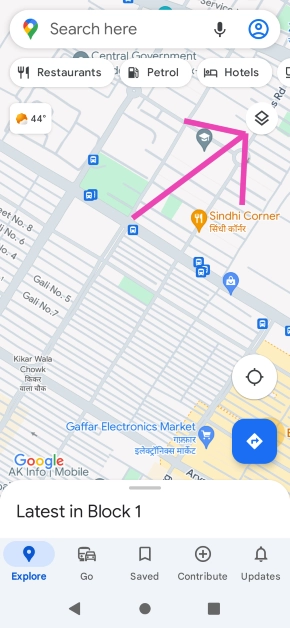
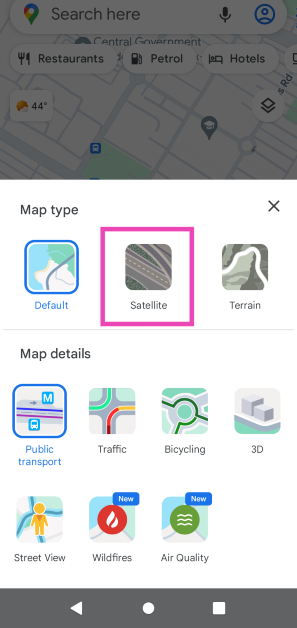
Download the Google Earth app for Android or simply switch to the Satellite layer in the Google Maps app.
Does Google Earth show satellite visuals in real-time?
No, the visuals on Google Earth are not in real-time. However, they are updated periodically.
Conclusion
These are the three simple ways you can get a satellite view of your house using Google Earth. Google Earth also lets you explore interesting locations as a part of virtual tours using the ‘Voyager’ function. You can even create a guided tour for any location on Google Earth. If you found this article helpful, let us know in the comments!
Grocery delivery services in India are expanding at a rapid pace, offering services in areas outside of the metropolitan cities and expanding their inventories to cover more than just basic amenities. Currently, there are dozens of grocery shopping apps operating in India, each with its own USP and exclusive features. Can’t figure out which app to use? Here are 8 great grocery shopping apps you need to try on Android.Read Also: The Hidden Truth Behind Online Gaming Revealed
Nature’s Basket
Nature’s Basket is one of the leading retail outlets in India that also has a grocery shopping app catering to major Indian cities. Initially a part of Godrej, Nature’s Basket was acquired by Spencer’s Retail in 2019. Using the Nature’s Basket app, customers can order fruits, vegetables, meats, baked goods, and other groceries directly to their doorstep. Nature’s Basket does a great job of maintaining quality control and making sure the groceries delivered to you are fresh and neatly packaged.
Blinkit
Formerly known as Grofers, Blinkit delivers over 5,000 daily groceries at an impressive speed. While most grocery apps stick to offering produce and other household items, Blinkit also lets you order electric products like bulbs, batteries, mobile chargers and kitchen tools like blenders, knives, and grinders. On top of that, you can find a range of local & international brands on the platform. The Blinkit app also offers multiple payment options and lets you track your groceries as soon as you place the order. Blinkit currently operates in over 20 Indian cities and plans on expanding its services to Tier 2 and Tier 3 cities as well.
Dunzo
Need some essential groceries at the late hours of the night? Dunzo offers a 24×7 delivery service and lets users buy products ranging from fresh produce to medical supplies. You can also get a package delivered anywhere within the city using Dunzo. This comes in handy when you need to pick up or drop off laundry or carry out other tasks like fetching forgotten keys.
Big Basket
With over 10 million downloads, Tata’s Big Basket is one of the most popular grocery shopping apps in India. Customers can choose from over 20,000 products ranging from household essentials, meats, and produce to hygiene and beauty products. Big Basket also lets you search for groceries in 7 languages and offers several payment methods.
Zepto
Zepto specialises in 10-minute deliveries of common household and grocery items like fruits & vegetables, bread & dairy, meat products, munchies, hygiene & grooming products, cleaning items, electronics & accessories, and more. Zepto is currently available in Mumbai, Pune, Delhi, Noida, Gurugram, Ghaziabad, Kolkata, Hyderabad, Chennai & Bengaluru. You get up to Rs 200 off on your first order and all orders above Rs 149 do not charge you a delivery fee.
Tata Neu
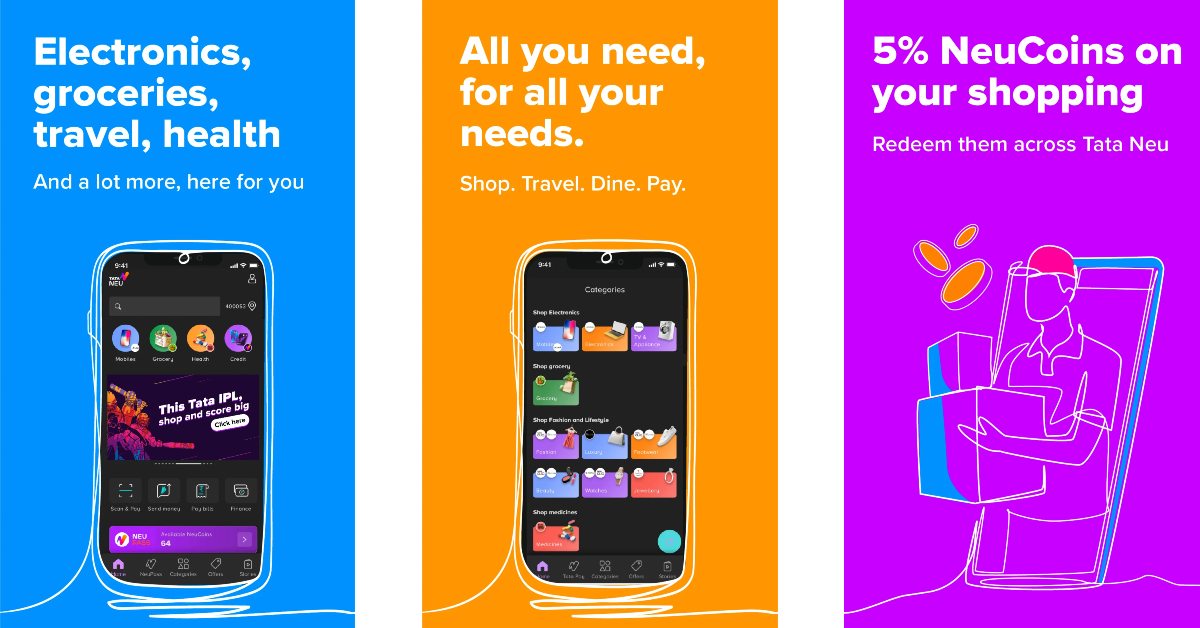
Big Basket is not the only Tata grocery app around. Launched in 2022, Tata Neu offers products spanning different categories like groceries, electronics, travel, and health. With every purchase, you earn a certain number of NeuCoins which can be redeemed in your next order. Tata Neu delegates grocery shopping to Big Basket, while adding a range of other services on the app. If you’re looking to increase your savings while grocery shopping, this is the app for you.
DMart
You may not know this but DMart has its own app where you can order your daily groceries and avail special discounts. DMart’s product catalogue includes groceries, home & kitchen essentials, personal & baby care, and more. You can choose to get your groceries delivered to your doorstep or collect them from a designated pick-up point. DMart is currently available in Mumbai, Pune, Ahmedabad, Anand, Belagavi, Bengaluru, Bhilai, Bhopal, Chandigarh, Chennai, Ghaziabad, Hyderabad, Kushaigauda, Indore, Jaipur, Kolhapur, Nagpur, Panvel, Raipur, Sanand, Surat, Thane, Vadodara, Vijayawada and Visakhapatnam in India
Read Also: Poco C50 budget smartphone with a 5,000mAh battery launched in India
Conclusion
These are 8 great grocery apps you need to try on Android right now. Other grocery apps like Spencer’s have a vast inventory but they aren’t functional outside of the major Indian cities. If none of these apps are functional in your town, you can also get groceries delivered to your doorstep using Amazon Pantry and Flipkart Supermarket. Deliveries from Amazon and Flipkart can take a few days but they offer nationwide coverage.For the latest gadget and tech news, and gadget reviews, follow us on Twitter, Facebook and Instagram. For newest tech & gadget videos subscribe to our YouTube Channel. You can also stay up to date using the Gadget Bridge Android App. You can find the latest car and bike news here.
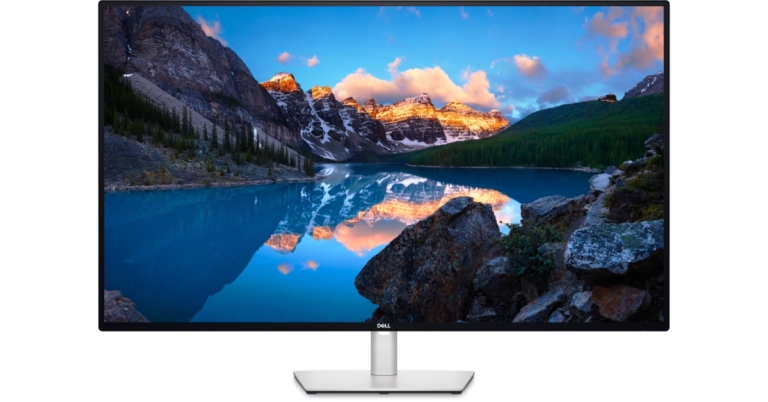
In advance of the Consumer Electronics Show (CES) 2023, Dell introduced three new monitors. All the devices are built on LG Display’s IPS Black technology that includes Dell UltraSharp 32 6K monitor, Dell UltraSharp 34 Curved USB-C Hub monitor, and Dell UltraSharp 43 4K USB-C Hub monitor. In addition to the monitors, the company has also introduced brand-new gaming controller concept — Concept Nyx, Dell Premier Collaboration Keyboard (KB900) and Dell Premier Rechargeable Mouse (MS900)
Availability
While the Dell UltraSharp 34 Curved USB-C Hub Monitor (U3423WE) and Dell UltraSharp 43 4K USB-C Hub Monitor (U4323QE) will be on sale on January 31, 2023, and the Dell UltraSharp 32 6K Monitor (U3224KB) will be available in the first half of 2023. On January 31, 2023, or on March 23, 2023, if purchased together, the Dell Premier Collaboration Keyboard (KB900) and Dell Premier Rechargeable Mouse (MS900) will be accessible.The starting price for the Dell UltraSharp 34 Curved USB-C Hub monitor is $1,329, or about Rs 1,10,100, and the starting price for the Dell UltraSharp 43 4K USB-C Hub monitor is $1,259, or almost Rs 1,04,300.Also Read:Samsung introduces Odyssey Neo G9, Odyssey OLED G9, ViewFinity S9 and Smart Monitor M8 at CES 2023
Dell UltraSharp 32 6K Monitor (U3224KB)
The Dell UltraSharp 32 6K Monitor (U3224KB) features stunning 6K resolution and VESA DisplayHDR 600 for detail-oriented professionals like graphic designers, engineers, and data scientists where every pixel counts. It is fully compatible with both Windows and Mac operating systems. With the addition of IPS Black technology, black objects will appear more detailed, even in dim surroundings, and true colours will be visible from almost any angle.For a smarter and more secure collaboration experience, it has a built-in dual gain HDR 4K webcam that offers auto framing, light changes with better clarity, automatic SafeShutter, echo cancellation mic, and twin 14W speakers.The integrated front-facing pop-out function offers intuitive, simple access to ports so you can connect your accessories and devices simply while reducing stress on wires to keep your workspace tidy.With DisplayPort 2.1, which helps to ensure continuous image transmission without compression, you may transfer photos with ease. Last but not least, Thunderbolt 4 connections and Extended Power Range give up to 140W of power, enabling charging and connection to more potent workstations.
The Dell UltraSharp 34 Curved USB-C Hub Monitor (U3423WE), the company’s first curved WQHD monitor with IPS Black technology, enables you to connect and display content from two PCs using Picture-by-Picture (PBP) and Picture-in-Picture (PIP) features while listening to crystal-clear audio through the dual 5W speakers that are built into the monitor.
Dell UltraSharp 43 4K USB-C Hub Monitor (U4323QE)
The Dell UltraSharp 43 4K USB-C Hub Monitor (U4323QE)enables you to connect one PC to the monitor and divide it into multiple (up to four) screen partitions. You can also connect up to four different PCs to the monitor, view all four inputs, and switch between them using KVM.
Dell Concept Nyx
It is an innovative gaming concept that makes it simple for players to access game libraries across a variety of displays and devices, allowing them to easily move their gaming session from room to room in the house. By pointing the controller at any of your devices or displays and pressing the trigger, you may stream to any of them. It also comes with a sophisticated fingerprint reader that can instantly log you into Guild Wars 2. Even your voice could be used to communicate.The company is reportedly experimenting with haptics and self-adjusting variable resistance thumb sticks (we know it’s a mouthful) when it comes to immersive gameplay that can be customised to your preferences or the particular game you’re in. Thus, the thumb sticks and our X-triggers might provide you with rich sensory feedback whether you’re operating a tank, using a bow to hunt, or eliminating robots. We’ve also incorporated PC gaming essentials into this concept, such as shift buttons to enable more front button options, cutting-edge scroll wheels for simple weapon cycling and navigation, and an intelligent touchpad for instant access to customizable controls. All of these features would make it simpler to stay in the game and avoid the settings menu.In order to display the button mapping, Dell has also combined the controller with fully customizable intelligent on-screen controls. You wouldn’t have to wonder if you assigned the X-button to your shields or your grenades thanks to this functionality.You and other members of your home may multitask and browse chat apps, emails, videos, or games on simple split screens with a built-in Wi-Fi connection directly to Concept Nyx. Even better, you could play two games at once by connecting one (or more) Bluetooth headsets, which would allow you to game on half of your screen while your loved ones watch a movie on the other.You might activate an Artificial Intelligence (AI) assistant in addition to the split screen features to listen in for your name or pick up when someone asks you a question so that you don’t miss anything vital.
For the latest gadget and tech news, and gadget reviews, follow us on Twitter, Facebook and Instagram. For newest tech & gadget videos subscribe to our YouTube Channel. You can also stay up to date using the Gadget Bridge Android App. You can find the latest car and bike news here.



 Sony and Honda announced their joint EV brand Afeela and showcased the first concept prototype that is set to hit production by 2025. This isn’t Sony’s first concept car, although it will be the first one to see the light of production. The prototype is equipped with 45 cameras and sensors inside and outside the vehicle with 800 TOPS of maximum computing power for ECU.
 TCL will be showcasing a bunch of different products at CES 2023, but the RayNeo X2 takes the cake. TCL RayNeo X2 are the first to realise binocular full-colour Micro-LED optical waveguide display in AR glasses. The biggest challenge for AR glasses over the years has been finding the right balance between design and tech features. The RayNeo X2 bridge the two worlds together with its lightweight design and features that push the boundaries of smart wearables. The RayNeo X2 open the door to all kinds of possibilities, be it content creation with its integrated camera or using AI language translation while having in-person conversations.
 Asus will be putting out a diverse range of laptops at CES 2023, from creativity-oriented notebooks like ProArt Studiobook Pro 16 3D OLED to professional laptops like ExpertBook B9 OLED. The one to watch out for is the Asus Chromebook Vibe CX34 Flip. This gaming Chromebook delivers a powerful performance with immersive visuals. Powered by a 12th Gen Intel Core i7 processor and 16 GB of memory, the CX34 Flip is ideal for cloud gaming as well as work on the go. It also features a 16:10, 144 Hz WUXGA display with an 83% screen-to-body ratio and full 360° ErgoLift hinge, an anti-ghosting keyboard with four-zone RGB lighting12, and ultrafast WiFi 6E technology. Asus’ glasses-free 3D OLED technology, Spatial Vision, also deserves a special shoutout.
 There are TVs and then there’s LG’s 97-inch Signature OLED M3. The M3 brings wireless connectivity to the world of consumer TVs with its Zero Connect technology. The Zero Connect box transmits wireless audio and video signals to the M3 and is capable of real-time AV transmissions at up to 4K 120Hz. The wireless environment brings a distraction-free viewing experience and a cleaner look overall. The Zero Connect box is equipped with multiple ports for speaker systems, gaming consoles, and a set top box.
 LG continues to impress with its lineup of sleek ‘Gram’ laptops. The LG Gram Ultraslim and Gram Style will be showcased at CES 2023. The Ultraslim is the company’s thinnest laptop yet, with a depth of just 10.99 millimetres when closed. This thickness is comparable to that of a smartphone or a notepad. The laptop features a 15.6-inch OLED display with Anti-Glare Low Reflection and Intel’s 13th Gen Raptor Lake chip with Performance Cores.
The LG Gram Style laptops are offered in 16 and 14-inch versions and come with an elegant glass design. The Gram Style laptops also feature a hidden haptic touch that lights up upon being touched.
LG continues to impress with its lineup of sleek ‘Gram’ laptops. The LG Gram Ultraslim and Gram Style will be showcased at CES 2023. The Ultraslim is the company’s thinnest laptop yet, with a depth of just 10.99 millimetres when closed. This thickness is comparable to that of a smartphone or a notepad. The laptop features a 15.6-inch OLED display with Anti-Glare Low Reflection and Intel’s 13th Gen Raptor Lake chip with Performance Cores.
The LG Gram Style laptops are offered in 16 and 14-inch versions and come with an elegant glass design. The Gram Style laptops also feature a hidden haptic touch that lights up upon being touched.
 CES wouldn’t be complete without some ‘out there’ products. The Withings U-Scan is a spherical device (90mm in diameter) that you can attach to the toilet bowl to provide a health analysis by analysing the biomarkers found in urine. Post ‘urinanlysis’ the U-Scan provides a quick snapshot of your health data and even suggests actions you can take to find the ideal health balance.
Read Also: Poco C50 budget smartphone with a 5,000mAh battery launched in India
CES wouldn’t be complete without some ‘out there’ products. The Withings U-Scan is a spherical device (90mm in diameter) that you can attach to the toilet bowl to provide a health analysis by analysing the biomarkers found in urine. Post ‘urinanlysis’ the U-Scan provides a quick snapshot of your health data and even suggests actions you can take to find the ideal health balance.
Read Also: Poco C50 budget smartphone with a 5,000mAh battery launched in India


 Step 2:
 Step 4:
 Step 5:
 Read Also:



 Step 3:
 Step 4:
 Step 3: Select Satellite.
 Read Also:



 Big Basket is not the only Tata grocery app around. Launched in 2022,
  You may not know this but