Top 4 Simple Methods to Reverse Image Search on iPhone or iPad (2023)

Reverse image search is a handy function that comes in use quite often. Can’t find the artist of an artwork you came across online? Reverse image search for the art and you will be able to track down the person who created it. A simple reverse image search is also helpful in finding products and identifying unknown objects. All you need to do is click a picture and search for it. In this article, we bring you the top 4 simple methods to reverse image search on iPhone and iPad. Read Also: Ways To Save Your Battery While Playing Mobile Games

Reverse Image Search using Google Chrome

Step 1: Go to https://images.google.com on the Chrome web browser. Step 2: Tap the ellipses (three dots) at the top right corner of the screen. Select ‘desktop site.’ Step 2: Tap the ellipses (three dots) at the top right corner of the screen. Select ‘desktop site.’ Step 3: Tap the camera icon. Step 4: Tap on ‘Upload an image’ and select the image you want to search from your phone’s gallery. Step 4: Tap on ‘Upload an image’ and select the image you want to search from your phone’s gallery. Step 5: Google will present the relevant results for the source of the image.

Reverse Image Search on iPhone or iPad using Bing

Step 1: Open the Safari browser on your iPhone and go to Bing Visual Search. Step 1: Open the Safari browser on your iPhone and go to Bing Visual Search. Step 2: Select ‘Take Photo’ and click on the gallery icon to upload the image you want to search for. If you want to search for an object or a product, you can take a live picture and upload it. click on the gallery icon Bing will present the relevant results for the source of the image.

Use Google Lens

Use Google Lens Download the Google app on your iPhone or iPad and tap the camera icon to search by image using Google Lens. You can take an image of any object in your surroundings or upload an image from your device’s gallery. Google will come up with relevant results about the source of the image or details about the object in the image. You can download the Google app for your iPhone or iPad here.

Use the Reverse Image Search app

Use the Reverse Image Search app Don’t want to use Google Lens? The Reverse Image Search is a great alternative. All you need to do is upload an image from your phone’s gallery and the Reverse Image Search app will look for relevant results across Google, Bing, Tineye and Yandex. The in-app editor also allows you to crop the image before you upload it. You can also directly search images from your Gallery, Camera, Clipboard, and Files using this app’s handy extension. You can download the Reverse Image Search app here. Read Also: Communities in Microsoft Teams launched in India

Conclusion 

These are the top 4 simple methods to reverse image search on an iPhone or iPad. Non-Apple users can read our guide to using Google’s reverse image search function here. Apart from the methods mentioned above, you can also find several third-party apps on the App Store to perform a reverse image search. You can also use websites like Berify and Tineye to reverse search for videos. For the latest gadget and tech news, and gadget reviews, follow us on Twitter, Facebook and Instagram. For newest tech & gadget videos subscribe to our YouTube Channel. You can also stay up to date using the Gadget Bridge Android App. You can find the latest car and bike news here.

Lenovo introduces the ‘Custom To Order’ feature for desktops in India

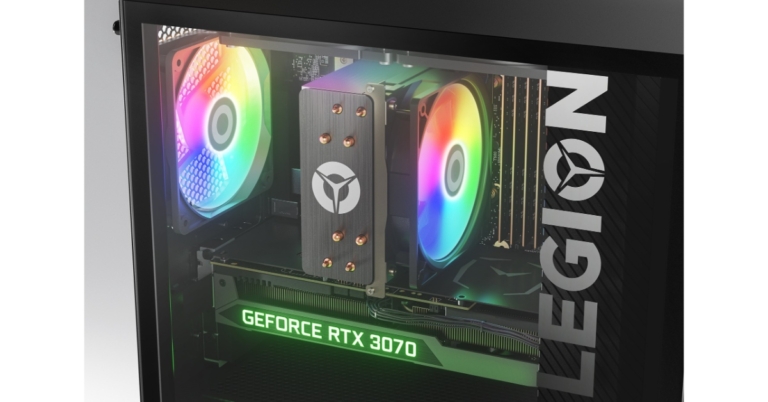
Lenovo has announced the expansion of its unique ‘custom to order’ (CTO) functionality to PCs in India. The Legion 5i Tower desktop now has a customization option previously reserved for IdeaPad, Legion, and Yoga laptops. Hiral Somaiya, Head – Category Management, Consumer Business, Lenovo India, said “At Lenovo, we are extremely focused on our customers’ requirements, and we recognize that each person uses the PC for a different purpose. With our ‘custom to order’ purchase option, gamers and creators will have the liberty to build their desktops according to their gameplay, preferences and budget. Legion 5i Tower is the first desktop that can be customized for consumers. The Legion 5i Tower is the country’s first desktop that allows buyers to upgrade their base model setup to a high-performance battle station with a more immersive experience. As per the company, customers can get end-to-end customisation with the CTO option, which includes upgrading the CPU, graphics card, RAM, hard disc drive, screen type, keyboard, and operating system (OS) type at the time of purchase. Customers will receive their personalised device within 4-6 weeks of purchase. All Legion laptops, including the Legion 5, Legion 5 Pro, Legion 7, and Legion Slim 7, can be similarly configured during the purchase process. It has a 12th Generation Intel Core i5-12400F processor and Nvidia GeForce GTX 1650 Super 4 GB GDDR6 graphics card. There is 8 GB of UDIMM DDR5 4800 MHz RAM and a 256 GB SSD M.2 2280 PCIe Gen4 TLC. Lenovo has provided amazing promotions to entice users to try its CTO desktops. Customers can save Rs 15000 by upgrading to the Nvidia RTX 3070 8GB from the Nvidia RTX 3060 Ti. They can also get a three-year extended warranty for Rs 99 until December 15. The Legion 5i tower desktop’s base model costs Rs 81,225. The desktop is equipped with an Intel Core i5-124005 processor. Moreover, the PC also includes RTX 1650 Super GPU, 8GB DDR5 RAM, a 256GB SSD and B660 motherboard. The desktop PC might cost as much as Rs 1,85,155. For an extra Rs 9000, Lenovo would update consumers’ operating systems from Windows 11 Home Single Language 64 to Windows 11 Pro 64. For the latest gadget and tech news, and gadget reviews, follow us on TwitterFacebook and Instagram. For newest tech & gadget videos subscribe to our YouTube Channel. You can also stay up to date using the Gadget Bridge Android App. You can find the latest car and bike news here.

Top 5 Gaming mice under Rs 15,000 for the gamer in you (2022)

If you’re currently in the process of building a gaming rig, a good mouse is something you should not overlook. A light, fast-tracking, precise mouse can make all the difference in those intense gaming battles. To make your search simpler, we’ve picked some of the best gaming mice out there. Here is our list of the top 5 gaming mice under Rs 15,000. Read Also: Ways To Save Your Battery While Playing Mobile Games

Logitech G502 X Plus/G502 X Lightspeed

Price: Rs 15,495/Rs 12,995 Logitech G502 X Plus: Performance Logitech G502 has held the mantle of the ‘best gaming mouse’ for quite some time now. Currently, the G502 series offers three variants – the G502 X Plus, G502 X Lightspeed, and the G502 X Wired gaming mouse. The G502 X Plus is the high-end variant, which is currently priced slightly above Rs 15,000. What sets the G502 X Plus apart from its predecessors is the RGB light strip running across the palm rest. This light strip can be customised using the G Hub app to display different colours. In terms of performance, the G502 X Plus has a 68% faster response rate than its predecessors and has a lighter design along with low-friction PTFE feet. Logitech has retained the Hero 25K sensor on the G502 X Plus. If Rs 15,495 is a bit steep for you, the Logitech G502 X Lightspeed is a great alternative that retains all the performance aspects of the X Plus variant but comes without the RGB Lightstrip. Read our full review here.

ASUS ROG Gladius III

Price: Rs 4,999 ASUS ROG Gladius III ASUS ROG Gladius III sports all the great specs you want to see in a gaming mouse. With a 400 ips optical sensor, 1000Hz polling rate, and 19,000 dpi, the Gladius III is a rock-solid wired gaming mouse. Asus claims a near-zero latency on the Gladius III, making it one of the most precise gaming mice out there. The ergonomic design along with 100% TPFE mouse feet offer a great glide. The Gladius III is also 30% lighter than the Gladius II and can track up to 400 inches per second at 50g acceleration.

Logitech G102

Price: Rs 1,495 Logitech G102 The Logitech G102 comes with a powerful 8,000 dpi sensor and 6 customisable buttons. One of the better features of this mouse is its form factor. The sleek and light design along with the 6-button layout gives off a very classic vibe. The look of the mouse is further accentuated by the light strip running along the bottom of the panel. This light strip can be programmed to display different colours using the G Hub app. Logitech G102 fits the bill of a no-nonsense, good-looking mouse that gets the job done.

Razer DeathAdder Essential

Price: Rs 1,499 Razer DeathAdder Essential. top 5 gaming mice under Rs 15,000 As the name suggests, the Razer DeathAdder has been an ‘essential’ part of gaming rigs for years. This ergonomic mouse is not only known for its superior performance, but also for its pocket-friendly price. The DeathAdder Essential provides an ergonomic form that is specially designed for hours of rigorous gaming sessions. On top of that, you get 5 Hyperresponse buttons that can be easily customised, a 6,400 dpi optical sensor for advanced precision and tracking, and a lifespan of up to 10 million clicks. This little device offers everything you want in a gaming mouse at a very reasonable price.

Zebronics Zeb-Transformer-M

Price: Rs 349 Zebronics Zeb-Transformer-M. top 5 gaming mice under Rs 15,000 If you are just starting out in your gaming journey, you don’t need to splurge excessively on a gaming mouse. We would recommend saving as much money as you can for the processor, and getting an entry-level gaming mouse that you can easily upgrade in future. The Zebronics Zeb-Transformer-M is one of the best starter gaming mice you can buy right now, and at a price of Rs 349, it is an absolute steal. This mouse comes with a 3200 dpi sensor and a dedicated dpi switch that can toggle between 1000/1600/2400/3200 dpi levels. On top of that, the build quality of this mouse feels premium for the price, and it even comes with attractive LED lights! Read Also: Communities in Microsoft Teams launched in India

Conclusion 

These are the top 5 gaming mice under Rs 15,000 you can buy right now. We’ve covered various price points in this list and picked the undisputed best from every category. Do you have a personal favourite that you’d like to shout out? Let us know in the comments! For the latest gadget and tech news, and gadget reviews, follow us on Twitter, Facebook and Instagram. For newest tech & gadget videos subscribe to our YouTube Channel. You can also stay up to date using the Gadget Bridge Android App. You can find the latest car and bike news here.

Google Pixel 7 review: Is this an all-rounder phone?

Google Pixel 7 and Pixel 7 Pro have now been released in India. The company took almost four years to make its premium smartphones available to Indian customers at the same time as they were launched globally. The Pixel 7 has been launched in India, with prices starting at roughly Rs 59,999. It does seem on the pricey side at first, but we will take you through it in this review. One feature that stands out when it comes to Google Pixel devices is the camera capability. As a result, the Pixel has constantly been rated as one of the best gadgets for photography performance. So, after using this product for a month, here is our review. Google Pixel 7 review: Design and Display

Google Pixel 7 review: Design and Display

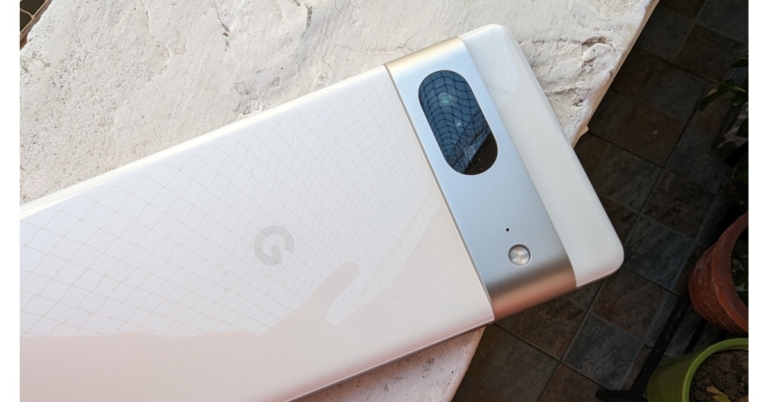
The Pixel 7’s design hasn’t seen any significant modifications from Google, but we don’t mind that at all. On the front and back of the device, Gorilla Glass Victus is provided for durability, and the camera module has an aluminium construction. Moreover, it has matte metal frames on the sides. Additionally, the gadget is IP68-rated, which is excellent in this price range as most of the phones in this segment still don’t provide any IP rating. The colour we have for review is Snow but the device is available in two more options — Obsidian and Lemongrass. Since we have the lighter colour option, it does not attract fingerprints. Google Pixel 7 review: Design and Display The Pixel’s camera module, which makes it distinctive and easy to spot, is the one aspect of its design that we really appreciate. In contrast to other places, this camera module is raised, however, it does not wobble when set down on a flat surface. Contrary to most phones, those with elevated camera bumps are very shaky. The camera module’s drawback is that it tends to collect a lot of dust, necessitating periodic cleaning. Pixel 7 review The Google Pixel 7 is also somewhat bulky but was comfortable to hold in the hand because of its compact size. It has oddly placed buttons on the side; when unlocking the phone, we accidentally hit the volume button because it is positioned a little higher than where our thumb normally rests. Pixel 7 review Pixel 7 review Regarding the display, the bezels on the sides give it a more mid-range phone appearance because they are rather pronounced. With a resolution of 2,400 x 1,080 pixels, the phone has a 6.32-inch full-HD+ OLED display. The device supports HDR 10+, which performs admirably across all streaming services. It is also notable how accurate the colours are.  Review of Pixel 7 The display’s overall quality is decent. It’s very bright because the max brightness is at 1,400 nits. Sadly, the screen only refreshes at 90Hz, and the display was not as fluid as we had expected. We had anticipated a 120Hz refresh rate, just like the pro edition, for that extra smoothness. Because of the excellent haptic feedback, we also enjoyed typing on the Pixel 7.

Google Pixel 7 review: Performance and camera

Moving on to performance, this year’s new Tensor G2 chip, which was created in collaboration with Samsung, is more than capable of handling daily chores. The Tensor G2 can play games with higher graphics settings and good stability, but it still has a long way to go before it can match Qualcomm chipset performance. Pixel 7 runs on Android 13 out of the box and Google also guarantees the Pixel 7 with three years of OS updates and five years of security patches. Here you get a clean stock android experience and a couple of Google-exclusive features.  Review of Pixel 7 Many of the most notable Google-only AI-related features include reducing background noise while you are still on a call. It also allows you to fix blurry photos and extract texts and messages from photos. Without a doubt, the Pixel 7’s cameras are the best available in their price range. The majority of the photographs will provide you with the best photography experience possible with wonderfully natural colour science. The dynamic range is great, and the white balance is consistently accurate. Google Pixel 7 cameras The Pixel 7 maintains the high level of colour fidelity that Google Pixel is recognised for. The colours in the images are neutral and kept in their natural state; they can be further improved in editing to the viewer’s preference. The dynamic range is perfect and yields excellent pictures, and the highlights and shadows are equally accurate. However, one thing we would want to emphasise is that because the focus tracking isn’t very excellent, you’ll wind up with blurry pictures of your dogs and flowers. Google Pixel 7 cameras From the primary sensor, the portrait photos are simply outstanding. In this department, Google excels once more with its stunning portraits. In terms of edge recognition and skin tones, the photographs you receive are superb. This is unquestionably one of the best in this area, with the facial details appearing quite natural. In this setting, Google has also supplied 2x, which in our opinion is not optimised and results in soft photos.
Google Pixel 7 cameras
Portrait
Moving on to the close-up photographs, we noticed outstanding details and images with excellent colours that are true to life.   The quality of the selfies falls a bit short of what the main camera is capable of. However, the front camera provides crispness and superb details all around. The skin tone is nearly natural, which we found to be appealing. Although the edge detection appears adequate, we wouldn’t describe it as exceptional. The same holds true for photographs taken at ultra wide angles. The field of view seemed a little restricted to us. Google Pixel 7 cameras Because the ultra wide’s sensor is smaller than the primary lens, it occasionally struggles and requires a little bit of extra processing time, especially in low light. Long-exposure photography can also produce pleasing effects and original pictures. Additionally, there is the Action Pan creative mode, which allows you to capture fantastic panning photography. Google Pixel 7 cameras Given the cost, we also believe that the Google Pixel 7’s videos are acceptable. They have nice steadiness and good colours, which is great for filming Instagram reels, in our opinion. When it comes to resolution, the front camera delivers both full HD and 4k quality. While 4K and HD films can both reach 60 frames per second, only HD resolution offers the Auto option. The Cinematic Mode allows you to capture videos in HD definition, rather than the adequate 1080p, but not in 4K. In this setting, the focus is extremely accurate and quick. However, we weren’t overly impressed by edge detection. For the cost, the speaker quality is standard. We appreciate the overall sound system despite the fact that it is not particularly loud. Clear vocals, good treble, and a slightly noticeable bass are produced. Regarding battery life, it is fairly average as it comes with a 4,270mAh battery. We always had to charge the phone before going to bed when we used mobile data in our regular usage throughout the day. The smartphone only supports 20-watt power charging, which charges the phone from zero to fifty percent in around 30 minutes and from fifty to one hundred percent in another 45 minutes.

Verdict

The Pixel 7 is a fairly well-built phone in terms of design. The battery life of the Pixel 7 is not particularly impressive. Even with its few drawbacks for us, the Pixel 7 is still a fantastic semi-flagship device. Any person seeking a great camera performance at this price point won’t be let down by the camera because it is so amazing. The Pixel 7 is likely to be a great upgrade for anyone looking to move up from a mid-range device. Also, keep checking back to our website since we’ll shortly be publishing another in-depth analysis of the Pixel 7 Pro.

Google Pixel 7 Pros

  • Great display
  • Robust
  • Android 13
  • Pixel exclusive features

Google Pixel 7 Cons

  • Lacks fast charging
  • Pricey
For the latest gadget and tech news, and gadget reviews, follow us on TwitterFacebook and Instagram. For newest tech & gadget videos subscribe to our YouTube Channel. You can also stay up to date using the Gadget Bridge Android App. You can find the latest car and bike news here.

Xiaomi 13 and Xiaomi 13 Pro launch set for December 11

Xiaomi 13 series is scheduled to launch on December 11. According to the company, the phone will first debut in the Chinese market. The lineup will include two devices Xiaomi 13 and Xiaomi 13 Pro. The company is also going to reveal MIUI 14 alongside. Besides this, the tech giant will also introduce the newest generation of its OS which is MIUI 14. The business will also release the Xiaomi Watch S2 and Xiaomi Buds 4. The new Xiaomi 13 series will be unveiled in China on December 11. The launch event would be conducted at 7 pm IST as per the media invite received by the company. The price details and specs of the upcoming phones have not been disclosed yet. But both devices are currently up for pre-reservations in China through major online retailers. According to the teaser image, the Xiaomi 13 and Xiaomi 13 Pro will be featuring a square-shaped camera module along with Leica branding on its rear. The camera system will consist of a triple-camera setup. To accommodate the selfie camera, they have a center-aligned hole-punch cutout on the display. It is confirmed that these devices feature a Snapdragon 8 Gen 2 SoC. It has been announced that the Xiaomi 13 series would offer premium OLED panels with a 1.61mm narrow bottom bezel. According to rumours, the Xiaomi 13 series includes a curved AMOLED display with 2K resolution. The upcoming gadgets will be powered by the recently unveiled Snapdragon 8 Gen 2 SoC, according to tipper Digital Chat Station. It supports INT4 and Wi-Fi 7 networking and includes real-time ray tracing for gaming. As to rumours, the Xiaomi 13 Pro would sport a 6.65-inch curved display and come in 256GB and 512GB storage choices. Moreover, this launch event will also feature the release of MIUI 14 which is most likely to power the forthcoming smartphone lineup. Along with the upcoming smartphone series the company is also likely to introduce the Xiaomi Watch S2 and Xiaomi Buds 4 in-ear noise-cancelling true wireless stereo (TWS) earphones. For the latest gadget and tech news, and gadget reviews, follow us on TwitterFacebook and Instagram. For newest tech & gadget videos subscribe to our YouTube Channel. You can also stay up to date using the Gadget Bridge Android App. You can find the latest car and bike news here.

Garena Free Fire Redeem Codes Today 9 December 2022: Here is how to claim them

Garena Free Fire is a battle royale game with regular awards and tournaments to keep players interested. If you play Garena Free Fire, you should be aware of the redeem codes that are released on a daily basis. However, because the battle royale game is banned in India, players from other countries can use the Free Fire Redeem codes daily. If you’re unfamiliar with the Garena Free Fire redeem codes or don’t know how to get them, we’ve put together a step-by-step guide to help you redeem them. Check out Garena Free Fire Redeem Codes for December 9. The Free Fire redeem codes are a great way to get free stuff. These are 12-digit codes that contain alphabets and numbers, as well as an expiration date and time. Because the Garena FF redeem codes cannot be used more than once, you should hurry to the redemption page to claim your free reward before someone else does. To get a free reward, all you have to do is go to reward.ff.garena.com/en, which is the official redemption page. Also, keep an eye on this space for daily updates on Garena Free Fire redemption codes and rewards.

Garena Free Fire Redeem Codes Today 9 December 2022

  • 31BBMSL7AK8G
  • WEYVGQC3CT8Q
  • 4ST1ZTBE2RP9
  • UVX9PYZV54AC
  • MCPW2D1U3XA3
  • EYH2W3XK8UPG
  • FFCMCPSJ99S3
  • ZZZ76NT3PDSH
  • 6KWMFJVMQQYG
  • HNC95435FAGJ
  • BR43FMAPYEZZ
  • FFCMCPSGC9XZ
  • V427K98RUCHZ
  • XZJZE25WEFJJ
  • FFCMCPSEN5MX
  • X99TK56XDJ4X
  • B3G7A22TWDR7X
  • J3ZKQ57Z2P2P
  • GCNVA2PDRGRZ
  • FF7MUY4ME6SC
  • 8F3QZKNTLWBZ

How to Get Free Fire Redeem Codes for Garena on December 9?

  • Visit the Garena Free Fire game’s official website at reward.ff.garena.com.
  • Use your Facebook, Google, VK, Apple ID, Huawei ID, or Twitter account to log in.
  • You’ll be taken to a valid redemption code (s)
  • Copy and paste the 12-digit redemption code into the text box.
  • On the screen, a dialogue box will appear.
  • ‘Ok’ should be selected.
For the latest gadget and tech news, and gadget reviews, follow us on TwitterFacebook and Instagram. For newest tech & gadget videos subscribe to our YouTube Channel. You can also stay up to date using the Gadget Bridge Android App. You can find the latest car and bike news here.

Amazon Quiz Answers Today 9 December 2022: Participate to win Rs 500

Have you participated in the Amazon Quiz today? If not then participate in the 9 December 2022 Amazon Quiz as it has already gone live on the app. The daily quiz can be played from 12 AM to 11:59 every day on the mobile app platform. Today e-commerce is giving the chance to win Rs 500 Amazon Pay Balance. Every day Amazon brings a fresh quiz for its customers. By participating in the quiz the participants can win an Amazon Pay Balance of up to Rs 50,000. The quiz can only be played on the mobile app as it is not available for the desktop platform. The quiz contains five easy questions and you have to answer all the questions correctly. The participants will then be shortlisted for a lucky draw to select a winner. Whereas the results are declared at the end of the month. Check out today’s Amazon quiz answers to win Rs 500. Amazon Quiz Today Prize – Rs 500 Amazon Pay Balance Quiz Date – 9 December 2022 Daily Timing – 12 AM to 11:59 PM Winner Announcement – Today 12 PM

Amazon Quiz Answers Today 9 December 2022

Question 1: What name meaning ‘super skilled player’ has been given to the 2022 FIFA Men’s World Cup mascot? Answer: La’eeb Question 2: Joe Biden and Xi Jinping had their first in-person meeting of Biden’s presidency in which country? Answer:  Indonesia Question 3: New York City has agreed to pay $26 million to Muhammad Aziz for wrongful convictions for whose murder? Answer: Malcolm X Question 4: This animal symbolises which god of Hinduism? Answer: Vishnu Question 5: What is the parent company of this biscuit brand? Answer: Mondelez International

How To Play Amazon Quiz

Only app users are eligible to play the Amazon quiz every morning from 12 AM to 11:59 PM. The quiz is not available on the desktop. For those who are unaware of how to play the Amazon quiz below are the steps, you can follow to take the quiz.
  • Firstly download the Amazon app from Google Play Store or App Store
  • Now fill in the required information through the Sign Up option.
  • You need to log in to the Amazon app and scroll down on the home screen to find the Amazon Quiz banner.
  • Tap on the Amazon Quiz banner and tap on the Start button to start the Quiz.
  • Now you will get 5 questions and you need to answer them correctly. One wrong answer will eliminate you from the Quiz.
  • After answering all the questions correctly you are now eligible for a Lucky Draw.
  • The winner’s name will be announced today at 12 PM.
For the latest gadget and tech news, and gadget reviews, follow us on TwitterFacebook and Instagram. For newest tech & gadget videos subscribe to our YouTube Channel. You can also stay up to date using the Gadget Bridge Android App. You can find the latest car and bike news here.

Ways To Save Your Battery While Playing Mobile Games

Poor battery life is a gamer’s worst nightmare. However, you can do a few things when you need to get the most out of your charge. There are some advanced features that you don’t use, which consume the battery rapidly. Whether you want to play free casino games or indulge in a quick gaming session when coming back from work, we have some tips to prolong the battery charge.

Adjust brightness

While you might prefer playing online pokies NZ in maximum brightness, you better think twice. When your screen is set to high brightness, it will consume more battery. To ensure optimal use, turn off the auto brightness. This feature has a sensor that enters the light and increases the screen brightness accordingly. Keep the brightness low when you don’t play. When you wish to enjoy a good game, increase it a little. If you have an android phone, you can add a widget to your home screen that makes controlling brightness too much more manageable.

Decrease screen time out

The time out refers to the time your screen will remain lit after your last activity on the phone. The standard timing is 30 seconds. However, you might have increased it to a couple of minutes because you needed to read something. You can find this feature in settings for both iPhone and Android. You can also lower the time out to 15 seconds. However, you might find it annoying. Work with whatever suits your needs, and you will notice the changes in battery life.

Turn on battery saver mode

The battery-saver mode will turn off some features and preserve your battery. What this mod does depends on your specific phone. For example, this mode will turn off the iPhone’s background data and some visual effects. On the other hand, the battery-saving mode in Android could look better. It restricts a few functions, and the note stating the mode is turned on is overwhelming. However, Sony, Samsung, and a few other brands created the crown battery-saving mode. You can keep the mode on and turn it off when you start playing since it can restrict specific background processes.

Airplane mode

Even though an airplane mode wordle leaves your phone useless regarding functions, it can certainly save your battery. This option is ideal if you’re traveling, as the phone will drain the battery quickly when scanning for networks. You can switch off the mobile data if it is too much and you need to be available.

Turn off vibrations

The vibrations on your phone come from a motor, which consumes a battery. Therefore, turning off the vibrations for incoming calls, notifications, and the keyboard would be better.

Uninstall unused apps

Apps can perform background processes that consume batteries. Therefore it would be best to remove the ones you don’t use anymore. Delete the games you don’t like anymore, as closing them doesn’t prevent them from performing background actions.

Get an external battery

Sometimes, all the steps mentioned above will make a slight difference. You might want to use maximum brightness or have no unused apps to ditch. Get an external one if you still wish to enjoy prolonged battery life. Carry it in your pocket or bag, and you will never be afraid of a low battery again. There are so many different types available in the market. Make sure to get an excellent product to ensure years of use. Avoid cheap external batteries since they might only work for a short time. For the latest gadget and tech news, and gadget reviews, follow us on TwitterFacebook and Instagram. For newest tech & gadget videos subscribe to our YouTube Channel. You can also stay up to date using the Gadget Bridge Android App. You can find the latest car and bike news here.

Communities in Microsoft Teams launched in India
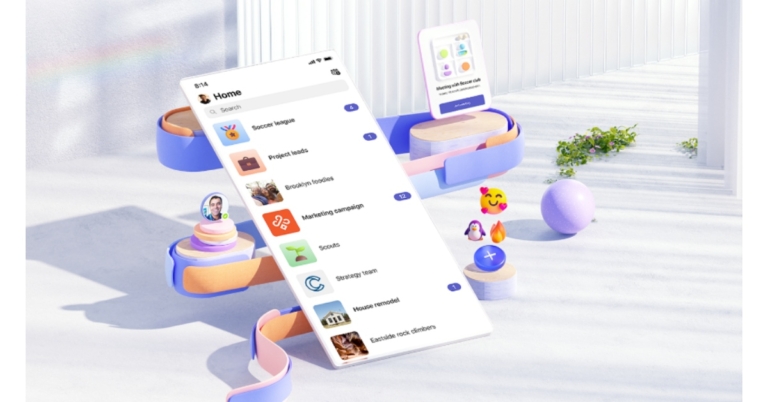
Communities in Microsoft Teams was just launched from Microsoft India. This will offer a new experience that enables individuals to connect, share, and collaborate so groups can now use a comprehensive digital area to stay in touch before, during, and after events. Examples include recreational sports teams, event planning committees, parent-teacher groups, and even small enterprises according to the company. You can now create a space for community groups to come together, organise, and exchange ideas in addition to everything else you can already do in Microsoft Teams. All iOS and Android users of Microsoft Teams’ free edition have access to Communities in Teams. Using this new community experience you will be able to Post messages to the entire group with ease. Moreover, Microsoft teams communities will allow you to create events and add them to the community calendar so that everyone may see them. Users will also be able to share and save documents intended for group work. You can rapidly access images, videos, events, and links by filtering the material. Create a community by selecting one of the suggested community kinds on the home screen, as advised by Microsoft, to get started. Adding branding elements such as a community group photo is another option. Following that, invite group members by phone, email, providing a link, or QR code so they may join the group instantly. According to the company, managing the online community will be simple for you. To ensure that community members feel comfortable, community owners can manage settings, establish community guidelines, and monitor content by adding or removing participants and posts as necessary. Communities in Teams has a new event management feature that can be used to plan virtual, hybrid, or offline events. You could, for instance, add new meetings or events to your community calendar, invite guests, monitor attendance, and follow up with participants through direct private conversations. Online events allow you to easily add dial-in information and a URL so that attendees can participate without any trouble. Additionally, you can enter a venue for physical events and provide participants with specific directions via a graphic map. Virtual and hybrid guests can participate in events via audio or video from any device. No matter where everyone is situated, tools like adding an event cover image, together mode, and screen sharing can help you develop a sense of cohesion and involvement during meetings. For the latest gadget and tech news, and gadget reviews, follow us on TwitterFacebook and Instagram. For newest tech & gadget videos subscribe to our YouTube Channel. You can also stay up to date using the Gadget Bridge Android App. You can find the latest car and bike news here.