

Google Pixel 7 Vs iPhone 14: Battle between Android Vs iOS
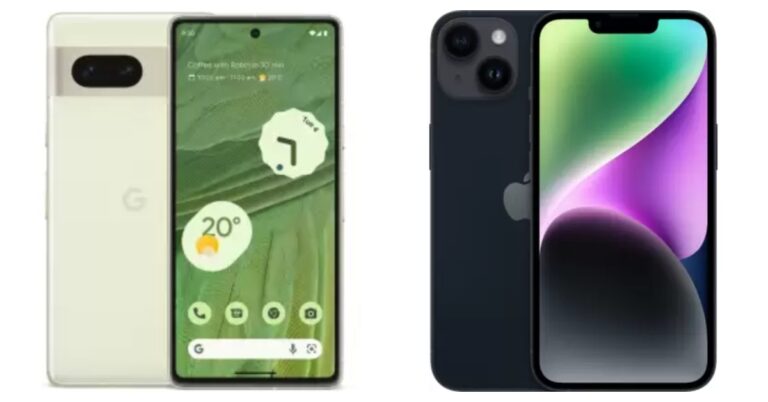
Google Pixel 7 is now available for purchase in India. The device has gone on sale for the first time via Flipkart today. The handset is an upgrade over last year’s Pixel 6 Series and is powered by second-generation Tensor G2 SoC. Here is a comparison of the Google Pixel 7 vs iPhone 14 in case you’re wondering which of the two flagship devices will be a better pick.
10 Best Ways to Upload Photos & Videos Without Compression or Losing Quality on Instagram
With over a billion monthly active users, Instagram is one of the most used apps in the world. With such big numbers, it becomes absolutely necessary to make sure the servers are running at all times. To reduce the load on its servers, Instagram automatically scales down the media that users upload on the app. This means that any photo or video you upload to Instagram gets compressed and loses some quality before getting published. Apart from reducing the load on servers, this also increases the speed of the app and creates uniformity in browsing. While there is no way to bypass this downscaling, there are some ways to limit its effects. In this article, we bring you the 10 best ways to upload photos and videos on Instagram without compression or losing image quality.
Read Also: Flipkart Big Diwali Sale 2022: Get exciting deals on Poco smartphones
 Instagram has very particular upload guidelines in place to maintain uniformity across the app and offer an optimised and smooth browsing experience for all users. If you follow these guidelines, Instagram will not downscale your photos and no compression will take place during the upload. Here are the basic guidelines for every type of upload.
For images, make sure the image resolution is at least 1080p and the aspect ratio is between 1.91:1 (Landscape) and 4:5 (Portrait). For videos, follow the guidelines mentioned below.
Instagram has very particular upload guidelines in place to maintain uniformity across the app and offer an optimised and smooth browsing experience for all users. If you follow these guidelines, Instagram will not downscale your photos and no compression will take place during the upload. Here are the basic guidelines for every type of upload.
For images, make sure the image resolution is at least 1080p and the aspect ratio is between 1.91:1 (Landscape) and 4:5 (Portrait). For videos, follow the guidelines mentioned below.
 Step 2: Hit the hamburger menu at the top right corner of the screen.
Step 3: Select Settings and privacy.
Step 2: Hit the hamburger menu at the top right corner of the screen.
Step 3: Select Settings and privacy.
 Step 4: Tap on Data usage and media quality.
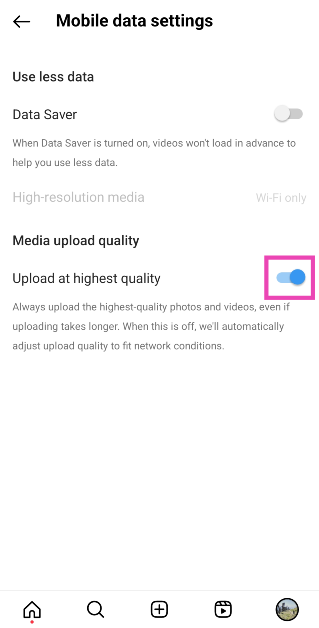
Step 5: Turn on the toggle switch for Upload at highest quality.
Step 4: Tap on Data usage and media quality.
Step 5: Turn on the toggle switch for Upload at highest quality.
 If you took an image from your DSLR or mirrorless camera and want to upload it to Instagram using your smartphone, make sure there is no loss in quality while transferring the image from your camera to your phone. Conversely, you need to ensure the quality of the image remains intact when you’re uploading an image to Instagram from your computer. AirDrop, Google Drive, and Dropbox will not reduce the quality of your image while transferring it to another device. However, WhatsApp and other messengers are notorious for downscaling the images you send through them.
Your smartphone’s default camera app is the best way to take highly detailed pictures. The native camera app is familiar with the hardware of the phone and is designed to make the most out of it. The in-built camera in the Instagram app doesn’t take the best quality pictures and often downscales the image while processing it. Use the native camera app to take the pictures and resize them later according to Instagram’s guidelines.
If you took an image from your DSLR or mirrorless camera and want to upload it to Instagram using your smartphone, make sure there is no loss in quality while transferring the image from your camera to your phone. Conversely, you need to ensure the quality of the image remains intact when you’re uploading an image to Instagram from your computer. AirDrop, Google Drive, and Dropbox will not reduce the quality of your image while transferring it to another device. However, WhatsApp and other messengers are notorious for downscaling the images you send through them.
Your smartphone’s default camera app is the best way to take highly detailed pictures. The native camera app is familiar with the hardware of the phone and is designed to make the most out of it. The in-built camera in the Instagram app doesn’t take the best quality pictures and often downscales the image while processing it. Use the native camera app to take the pictures and resize them later according to Instagram’s guidelines.
 Step 2: Scroll down and turn the toggle switch off for High efficiency pictures.
Step 2: Scroll down and turn the toggle switch off for Reduce file size under Videos.
Step 2: Scroll down and turn the toggle switch off for High efficiency pictures.
Step 2: Scroll down and turn the toggle switch off for Reduce file size under Videos.
 If your videos are of ultra-high quality, chances are Instagram will compress them before uploading. It is better to compress them yourself and have more control over how the output looks. Instagram usually compresses the videos more than required and it causes a severe drop in quality. There are a large number of software and online tools you can use to compress your video.
Follow the upload guidelines
 Instagram has very particular upload guidelines in place to maintain uniformity across the app and offer an optimised and smooth browsing experience for all users. If you follow these guidelines, Instagram will not downscale your photos and no compression will take place during the upload. Here are the basic guidelines for every type of upload.
For images, make sure the image resolution is at least 1080p and the aspect ratio is between 1.91:1 (Landscape) and 4:5 (Portrait). For videos, follow the guidelines mentioned below.
Instagram has very particular upload guidelines in place to maintain uniformity across the app and offer an optimised and smooth browsing experience for all users. If you follow these guidelines, Instagram will not downscale your photos and no compression will take place during the upload. Here are the basic guidelines for every type of upload.
For images, make sure the image resolution is at least 1080p and the aspect ratio is between 1.91:1 (Landscape) and 4:5 (Portrait). For videos, follow the guidelines mentioned below.
Instagram Story
Aspect Ratio: Portrait (9:16) Frame: 30fps Minimum Resolution: 720x1280p Recommended Resolution: 1080x1920pIn-feed videos
Maximum file size: 4GB Maximum length: 60 seconds Frame: 30fps Aspect Ratio: Square (1:1), Landscape (1.91:1), Portrait (4:5) Minimum Resolution: 600x600p (Square), 600x315p (Landscape), 600x750p (Portrait)IGTV
File Size: 3.6 GB Length: 60 minutes Aspect Ratio: Portrait (9:16) Minimum Resolution: 600x1067p Recommended Resolution: 1080x1920pChange the media upload quality setting
Instagram automatically downscales the quality of your images and videos depending on the strength of your network connection. To avoid this from happening, make sure your media is uploaded at the highest quality by turning on this setting. Step 1: Launch the Instagram app and go to your profile.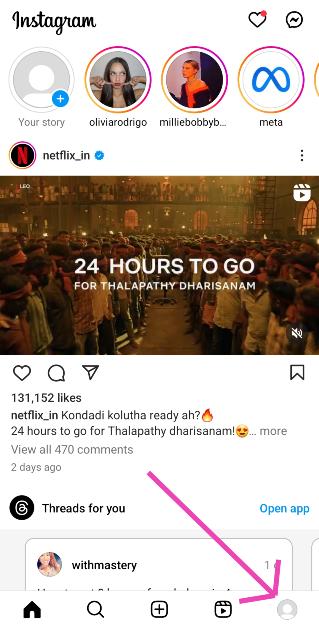 Step 2: Hit the hamburger menu at the top right corner of the screen.
Step 3: Select Settings and privacy.
Step 2: Hit the hamburger menu at the top right corner of the screen.
Step 3: Select Settings and privacy.
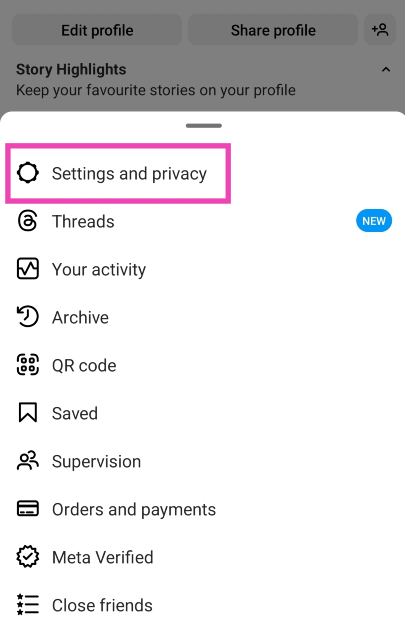 Step 4: Tap on Data usage and media quality.
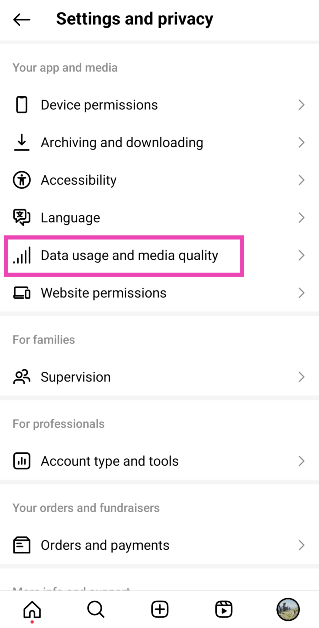 Step 5: Turn on the toggle switch for Upload at highest quality.
Make sure image quality isn’t lost in transfer between devices
 If you took an image from your DSLR or mirrorless camera and want to upload it to Instagram using your smartphone, make sure there is no loss in quality while transferring the image from your camera to your phone. Conversely, you need to ensure the quality of the image remains intact when you’re uploading an image to Instagram from your computer. AirDrop, Google Drive, and Dropbox will not reduce the quality of your image while transferring it to another device. However, WhatsApp and other messengers are notorious for downscaling the images you send through them.
Use your smartphone’s native camera app instead of Instagram’s app camera
 Your smartphone’s default camera app is the best way to take highly detailed pictures. The native camera app is familiar with the hardware of the phone and is designed to make the most out of it. The in-built camera in the Instagram app doesn’t take the best quality pictures and often downscales the image while processing it. Use the native camera app to take the pictures and resize them later according to Instagram’s guidelines.
Turn off ‘High Efficiency pictures’ in your smartphone camera’s settings
The High Efficiency Image Format (HEIF) saves space on your device by applying compression to the images captured by the camera before storing them. This reduces their file size. Here’s how you can turn it off. Step 1: Launch the Camera app on your phone and hit the gear icon at the top left corner of the screen.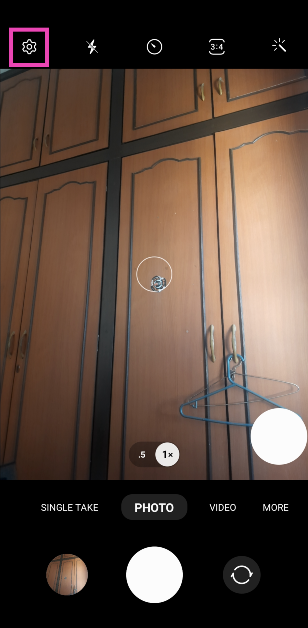 Step 2: Scroll down and turn the toggle switch off for High efficiency pictures.
Disable video compression on your smartphone
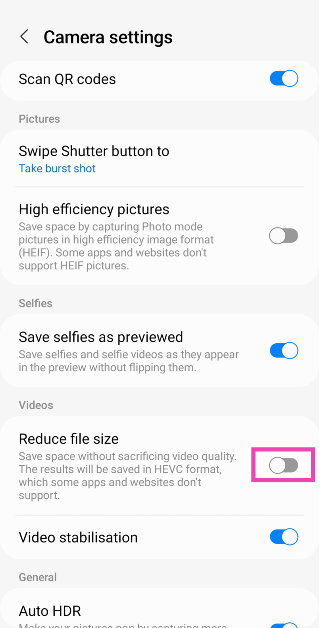
Step 1: Launch the Camera app on your phone and hit the gear icon at the top left corner of the screen.
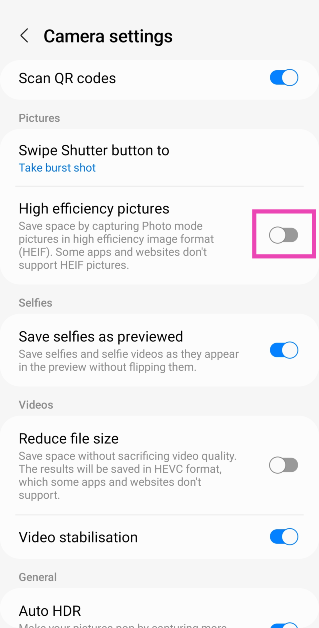
Step 2: Scroll down and turn the toggle switch off for Reduce file size under Videos.
Compress the videos before uploading them
 If your videos are of ultra-high quality, chances are Instagram will compress them before uploading. It is better to compress them yourself and have more control over how the output looks. Instagram usually compresses the videos more than required and it causes a severe drop in quality. There are a large number of software and online tools you can use to compress your video.
Resize your image before uploading it
Similar to videos, Instagram can compress your images a lot more than required before uploading them. There are a lot of photo editing apps on the Play Store that will help you in resizing the images for Instagram. Make sure the resolution is 1080p and the aspect ratio fits either the landscape, portrait, or square frame. Resizing the image prior to upload gives you more control over how it looks.Do not add music to pictures
Adding music to images for your Instagram Stories can reduce their quality. This is largely due to the fact that Instagram limits the size of every upload, and adding music bulks up the size of the media. As a result, the image quality takes a hit. To make sure this doesn’t happen, avoid adding music to your pictures.Adjust your camera settings
Use the manual mode in your phone’s camera app to capture highly detailed images in maximum resolution. Resize these images later according to Instagram’s guidelines. This gives you greater control over how your image will look.Frequently Asked Questions (FAQs)
Why do my images drop in quality when I upload them on Instagram?
This happens because Instagram automatically downscales your images by compressing them before they are uploaded. This is done to limit the size of the files uploaded on the platform. If your image is under the file size limit, it will not get downscaled by a large degree.How do I make sure Instagram uploads the highest quality images?
Go to Profile>Menu>Settings and privacy>Data usage and media quality and turn on the toggle switch for Upload media at highest quality.What is the maximum upload size for videos on Instagram?
Instagram allows you to upload videos up to 4GB in size. Read Also: Flipkart Big Diwali Sale 2022: Get exciting deals on Poco smartphonesConclusion
These are the 10 best ways to upload photos and videos without compression or losing quality on Instagram. While uploading an image without any loss of quality is almost impossible, you can retain a lot of essential details in your images and videos using the tips listed above. Try these methods and let us know how they work out for you.Top 10 apps to download first on your Google Pixel 7 and 7 Pro

It’s that time of the year again when Google is about to come out with its flagship Pixel smartphones. Many of you have probably pre-ordered it already and can’t wait to get your hands on the new avatar of the Pixel. The Google Pixel 7 and 7 Pro feature the powerful Google Tensor G2 processor and a very impressive camera unit. Once you unbox your Pixel 7, there is nothing better to do than put the specs to the test by using different apps. So without further ado, here are the top 10 apps to download first on your Google Pixel 7 and 7 Pro.
Read Also: Best Apps to download on your new iPhone 14 Pro and 14 Pro Max
With a camera unit that rivals that of the iPhone 14, you will want a photo editing app that takes the images taken by your Google Pixel 7 Pro to the next level. Google’s very own Snapseed app works wonders on the Google Pixel 7 and 7 Pro. With Snapseed, you get a complete photo editor. The app boasts 29 tools and filters including healing, brush, structure, HDR and perspective. While the Pixel has a decent built-in photo editor, Snapseed offers users more control over how the images look. What’s better is that Snapseed is free to download from the Google Play Store.
While we’re talking about the Google Pixel 7’s superior camera unit, we cannot miss out on one of the best camera apps around. The Manual Camera app costs Rs 330, but if you’re a serious photographer that wants to get the most out of your Pixel’s camera, we suggest you go for it. Manual Camera allows you to have total control over your phone’s camera, giving you the option to control the ISO, shutter speed, exposure, manual focus, and other features. There’s also a Manual Camera Lite app that you can download on the Google Play Store for free.
The punch hole cutout for the front camera on the Google Pixel 7 and 7 Pro opens up all sorts of possibilities for fun apps. The Energy Ring app displays a coloured ring around the front camera which also acts as the battery level indicator. When your phone is fully charged, the ring will fully wrap around the front camera. As the battery level goes down, the ring shrinks and changes colour. You can also change the thickness, animation, and colour of the ring as well.
Get more control over how your Pixel’s home screen looks and behaves with the Nova Launcher. If you’re not a fan of the standard stock Android experience, use the Nova Launcher to make changes to the icon themes and app drawer. Some users often complain about the Google Pixel lacking the ‘double tap to lock screen feature’, which is one of the most used gestures in most Android phones. With Nova Launcher you can assign various actions to gestures, including double tapping to lock the screen. The more you dive into this app, the greater the possibilities will be.
Your Google Pixel 7 comes with Google’s Keep Notes app, which works fine for the most part. But if your daily tasks involve taking a lot of notes, you’ll need an app that makes it easy to organise and access them. Material Notes is one of the best note apps around. One of the unique features of this app is that it allows you to assign colours to your notes, which makes it easy to sort through them. The overall aesthetics are enhanced further with the option to choose from multiple fonts. You can even add notes to your home screen as widgets and use a PIN to keep your notes safe.
With the Google Tensor G2 Octa Core processor and Mali G-710 MC10 GPU, your Google Pixel 7 Pro is well equipped to handle any graphically demanding games. Apex Legends Mobile, one of the heaviest smartphone games around, will run on your Google Pixel 7 without any hiccups. If you’re a fan of battle royale shooters, it doesn’t get any better than Apex Legends Mobile. The game features legendary character-based gameplay, best-in-class squad battles, and fast-paced combat.
Pocket has been around for a while and has featured on many lists like this. But the ease of reading and supplementary features that this app offers puts it heads and shoulders above its rivals. At a time when the influx of information is at an all-time high, it can get quite complicated to compile what you want to read from across the web. Pocket makes this task simpler by giving you the option to save articles, webpages, videos, and even Twitter threads in the app. Pocket’s inbuilt reader cuts all the clutter and provides a clean reading experience. An easy pick for the top 10 apps for Google Pixel 7 and 7 Pro.
If you’re conscious of your privacy while browsing the internet, there aren’t many browsers that can provide the safety that DuckDuckGo does. DuckDuckGo prioritises your privacy and data safety over everything else. Tired of being bombarded by personalised ads across the internet? DuckDuckGo restricts any unnecessary tracker cookies by default and makes sure that your online activity is as private as possible. You can also clear all browsing data with just one tap.
With over 100 million+ downloads on Google Play Store, Zedge is one of the most popular Android apps around. Zedge is the go-to app for finding the best wallpapers, ringtones, alarm tones, and stickers absolutely free of cost. Zedge’s vast library also consists of full HD and 4k wallpapers that will bring the best out of your phone’s home screen. Need a cool new unique ringtone? Zedge has got you covered.
Closing out this list is Podcast Addict, one of the highly-rated podcast apps for Android. The app gives a platform to over 5 million podcasts and 100 million+ episodes. The smooth UI makes it easy to browse podcasts by category, network, and popularity. You can also manage multiple channels like YouTube and Soundcloud from this app. Coming to playback, the podcast player offered by this app lets you control the audio speed and even skip the silences. Making playlists on Podcast Addict is a simple process and you can even set a sleep timer to automatically turn off a podcast after a certain period of time.
Read Also: Google Pixel Fold likely to launch in Q1 of 2023
Snapseed
 With a camera unit that rivals that of the iPhone 14, you will want a photo editing app that takes the images taken by your Google Pixel 7 Pro to the next level. Google’s very own Snapseed app works wonders on the Google Pixel 7 and 7 Pro. With Snapseed, you get a complete photo editor. The app boasts 29 tools and filters including healing, brush, structure, HDR and perspective. While the Pixel has a decent built-in photo editor, Snapseed offers users more control over how the images look. What’s better is that Snapseed is free to download from the Google Play Store.
Manual Camera: DSLR Camera Pro
 While we’re talking about the Google Pixel 7’s superior camera unit, we cannot miss out on one of the best camera apps around. The Manual Camera app costs Rs 330, but if you’re a serious photographer that wants to get the most out of your Pixel’s camera, we suggest you go for it. Manual Camera allows you to have total control over your phone’s camera, giving you the option to control the ISO, shutter speed, exposure, manual focus, and other features. There’s also a Manual Camera Lite app that you can download on the Google Play Store for free.
Energy Ring
 The punch hole cutout for the front camera on the Google Pixel 7 and 7 Pro opens up all sorts of possibilities for fun apps. The Energy Ring app displays a coloured ring around the front camera which also acts as the battery level indicator. When your phone is fully charged, the ring will fully wrap around the front camera. As the battery level goes down, the ring shrinks and changes colour. You can also change the thickness, animation, and colour of the ring as well.
Nova Launcher
 Get more control over how your Pixel’s home screen looks and behaves with the Nova Launcher. If you’re not a fan of the standard stock Android experience, use the Nova Launcher to make changes to the icon themes and app drawer. Some users often complain about the Google Pixel lacking the ‘double tap to lock screen feature’, which is one of the most used gestures in most Android phones. With Nova Launcher you can assign various actions to gestures, including double tapping to lock the screen. The more you dive into this app, the greater the possibilities will be.
Material Notes: Colourful Notes
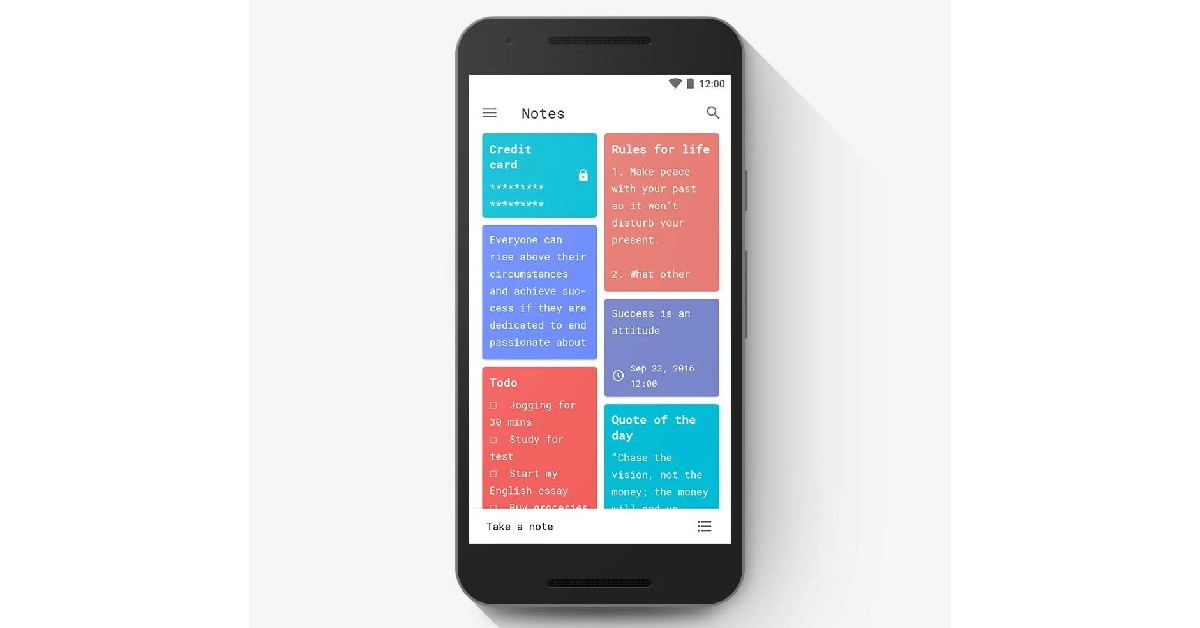 Your Google Pixel 7 comes with Google’s Keep Notes app, which works fine for the most part. But if your daily tasks involve taking a lot of notes, you’ll need an app that makes it easy to organise and access them. Material Notes is one of the best note apps around. One of the unique features of this app is that it allows you to assign colours to your notes, which makes it easy to sort through them. The overall aesthetics are enhanced further with the option to choose from multiple fonts. You can even add notes to your home screen as widgets and use a PIN to keep your notes safe.
Apex Legends Mobile
 With the Google Tensor G2 Octa Core processor and Mali G-710 MC10 GPU, your Google Pixel 7 Pro is well equipped to handle any graphically demanding games. Apex Legends Mobile, one of the heaviest smartphone games around, will run on your Google Pixel 7 without any hiccups. If you’re a fan of battle royale shooters, it doesn’t get any better than Apex Legends Mobile. The game features legendary character-based gameplay, best-in-class squad battles, and fast-paced combat.
Pocket: Save. Read. Grow.
 Pocket has been around for a while and has featured on many lists like this. But the ease of reading and supplementary features that this app offers puts it heads and shoulders above its rivals. At a time when the influx of information is at an all-time high, it can get quite complicated to compile what you want to read from across the web. Pocket makes this task simpler by giving you the option to save articles, webpages, videos, and even Twitter threads in the app. Pocket’s inbuilt reader cuts all the clutter and provides a clean reading experience. An easy pick for the top 10 apps for Google Pixel 7 and 7 Pro.
DuckDuckGo
 If you’re conscious of your privacy while browsing the internet, there aren’t many browsers that can provide the safety that DuckDuckGo does. DuckDuckGo prioritises your privacy and data safety over everything else. Tired of being bombarded by personalised ads across the internet? DuckDuckGo restricts any unnecessary tracker cookies by default and makes sure that your online activity is as private as possible. You can also clear all browsing data with just one tap.
Zedge
 With over 100 million+ downloads on Google Play Store, Zedge is one of the most popular Android apps around. Zedge is the go-to app for finding the best wallpapers, ringtones, alarm tones, and stickers absolutely free of cost. Zedge’s vast library also consists of full HD and 4k wallpapers that will bring the best out of your phone’s home screen. Need a cool new unique ringtone? Zedge has got you covered.
Podcast Addict
 Closing out this list is Podcast Addict, one of the highly-rated podcast apps for Android. The app gives a platform to over 5 million podcasts and 100 million+ episodes. The smooth UI makes it easy to browse podcasts by category, network, and popularity. You can also manage multiple channels like YouTube and Soundcloud from this app. Coming to playback, the podcast player offered by this app lets you control the audio speed and even skip the silences. Making playlists on Podcast Addict is a simple process and you can even set a sleep timer to automatically turn off a podcast after a certain period of time.
Read Also: Google Pixel Fold likely to launch in Q1 of 2023
Closing out this list is Podcast Addict, one of the highly-rated podcast apps for Android. The app gives a platform to over 5 million podcasts and 100 million+ episodes. The smooth UI makes it easy to browse podcasts by category, network, and popularity. You can also manage multiple channels like YouTube and Soundcloud from this app. Coming to playback, the podcast player offered by this app lets you control the audio speed and even skip the silences. Making playlists on Podcast Addict is a simple process and you can even set a sleep timer to automatically turn off a podcast after a certain period of time.
Read Also: Google Pixel Fold likely to launch in Q1 of 2023
Conclusion
These are the top 10 apps to download first on your Google Pixel 7 and 7 Pro. This list covers multiple categories, from communication to entertainment, ensuring you get to explore every aspect of your powerful Pixel device. If you think we missed out on any app that deserves a spot on this list, let us know in the comments!
For the latest gadget and tech news, and gadget reviews, follow us on Twitter, Facebook and Instagram. For newest tech & gadget videos subscribe to our YouTube Channel. You can also stay up to date using the Gadget Bridge Android App. You can find the latest car and bike news here.
Xiaomi announced live video support for TVs, vacuum cleaners and water purifiers in India
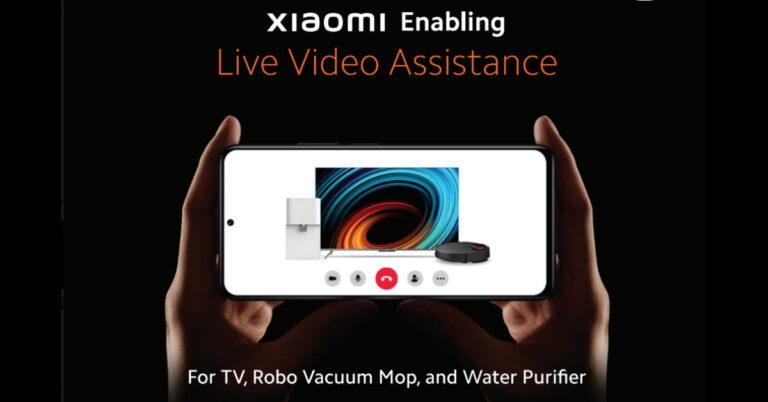
Xiaomi India has strengthened its commitment to providing cutting-edge customer support services from pre-to-post sales by introducing “live video support” for Smart TVs, Robot vacuum cleaners, and Smart Water purifiers. The solution aims to respond to customer questions and provide an early resolution of the issues from the convenience of their preferred location.
Users of Xiaomi and Redmi can submit a request on the Xiaomi India internet page to use the video service. Once the consumer has registered, a tech support specialist will call them on their phone, ascertain the problem, and offer a link to a video calling facility. Following the user’s consent, the Expert can use the phone’s camera to view the customer’s device and assist them during the video conversation, much like a video meeting but using the rear camera. A complimentary engineer will be sent if the issue cannot be rectified for a product covered by warranty.
Xiaomi India makes sure that clients continue to receive traditional service in addition to their digital-first and cutting-edge tech options. The company responds to roughly 2.5 lakh customer concerns across the nation each month, including pre-and post-sale ones.
Commenting on the same, Muralikrishnan B, President, Xiaomi India said, “We have always focused our energies and efforts towards building long-lasting consumer relationships and offering innovative, digital-first customer support services. With the launch of ‘Live video support,’ we want to provide our consumers with an instant solution that offers a seamless experience and does not disrupt their everyday life. For us at Xiaomi India, customer satisfaction and safety are of utmost importance, and we will continue to innovate and offer them the best-in-class service experience”.
Apart from this Xiaomi already provides other customer service offerings like multi-lingual support, pre-sale support, 24×7 AI Bot service support in Hindi and English, Xiaomi Service+ app as well.
For the latest gadget and tech news, and gadget reviews, follow us on Twitter, Facebook and Instagram. For newest tech & gadget videos subscribe to our YouTube Channel. You can also stay up to date using the Gadget Bridge Android App. You can find the latest car and bike news here.
The New Yahoo Mail app makes it easier to delete all messages from a sender at once and track shopping receipts and purchases more efficiently
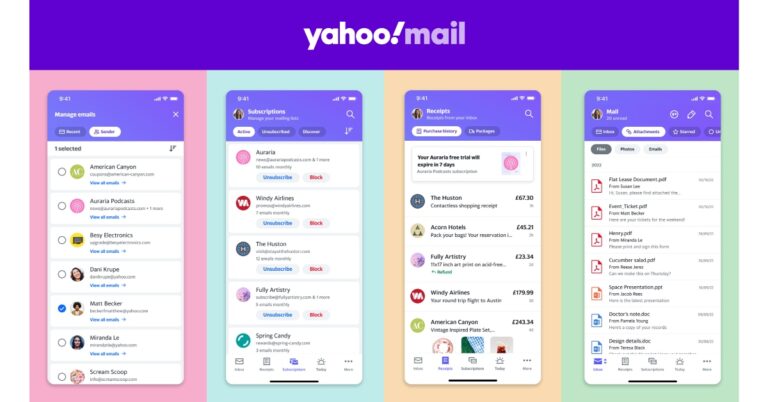
In order to save time and boost productivity, Yahoo announced the introduction of new features for Yahoo Mail that make managing the inbox easier. Additionally, Yahoo Mail has added tools in this new update that enable consumers all around the world to manage their online purchases and go shopping.
The latest enhancements strengthen Yahoo Mail’s core services, which link millions of users every day and include the well-liked 1 TB of free storage. Based on their interactions and interests, users’ lives are made easier by the New Yahoo Mail App, which also offers top-notch utilities for quick and simple access to the most important information.


New Yahoo Mail App features:
Updated Top-of-Inbox Navigation According to user research conducted by Yahoo Mail, consumers spend more time on the top of the email screen than the bottom. Users may switch between “Inbox,” “Attachments,” “Starred,” and more in the new Yahoo Mail app’s redesigned top-of-inbox navigation to help them find what they need more quickly. The contextual filter adjusts the user’s screen to provide them with the best viewability based on what they want to see once they click and start scrolling. It also has a “Travel” filter so users can conveniently keep track of all their upcoming travel bookings in one spot since more people are managing their travel schedules through email. The Updated Top-of-Inbox Navigation function aims to improve user awareness of and access to the information that matters most to them while lowering the ratio of “signal-to-noise.” Group by Sender Users will be able to swiftly delete all emails from a sender at once by grouping emails by domain using the new “group by sender” feature. Users identified this as a major pain point and demanded a quicker, more effective approach to clear the junk from their inbox. Delete the need to search through your inbox for specific emails from senders. Without having to type anything into a search window, grouping emails by sender provides a quicker and easier way to view emails from a single sender. One-tap unsubscribe With a simple tap, users can unsubscribe from one or more brand promotional emails and newsletters at once. Connect All Your Accounts: Take advantage of additional features by logging into your Yahoo, Gmail, AOL, Microsoft, or other accounts in one location. Attachments Displays all attachments in your inbox and lets you filter them by files (PDFs, Word documents, JPEGs), photographs, and more. a significant time saver that avoids opening multiple emails to look for attachments. Subscriptions Renewal Reminders When a free trial is set to expire or a paid subscription is about to renew, the new Yahoo Mail app’s top-of-inbox alerts let you know. Receipts View A page where you may view the receipts for each of your orders. Faster returns and useful insight into expenditure trends are both provided. For the latest gadget and tech news, and gadget reviews, follow us on Twitter, Facebook and Instagram. For newest tech & gadget videos subscribe to our YouTube Channel. You can also stay up to date using the Gadget Bridge Android App. You can find the latest car and bike news here.Acer Predator Helios 300 SpatialLabs Edition launched in India
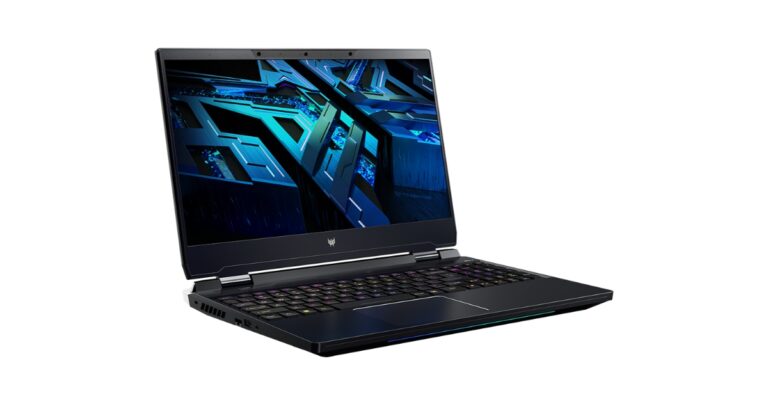
Acer announced the release of the gaming laptop Acer Predator Helios 300 SpatialLabs Edition in the Indian market today. The latest gaming laptop offers stereoscopic 3D without the need for glasses. It is equipped with an NVIDIA GeForce RTX 3080 GPU and a 12th-generation Intel Core i9 processor.
Gamers may enjoy stereoscopic 3D gaming without the need for glasses thanks to the Predator Helios 300 SpatialLabs Edition. Gamers will be able to play compatible games in 3D mode and savour the way the gadget vividly brings the details to life. As a result, spaces will appear larger, things will have greater depth, and in-game experiences will be even more interesting. And none of this would require special 3D glasses In addition to this Acer Predator Helios 300 SpatialLabs Edition has been created using a stereoscopic 3D display and real-time rendering techniques.
 The gaming laptop has an optically bonded liquid-crystal lenticular lens on top of its 15.6-inch UHD 2D panel. The combination of these systems creates a cutting-edge module that the player can use to quickly flip between 2D and stereoscopic 3D perspectives.
The 12th generation Intel Core i9 processors, NVIDIA GeForce RTX 3080 laptop GPUs, 32GB DDR5-4800 memory, and PCIe Gen 4 NVMe SSDs RAID 0 storage are further features of the Predator Helios 300 SpatialLabs Edition gaming laptop. The system runs cool thanks to a dual-fan setup that comprises one 5th Gen AeroBlade 3D fan. Acer’s CoolBoost technology and liquid metal thermal grease are more proof of this. The brand-new Acer gaming laptop has Wi-Fi 6E connectivity, Windows 11 OS, and a number of connectors.
The gaming laptop has an optically bonded liquid-crystal lenticular lens on top of its 15.6-inch UHD 2D panel. The combination of these systems creates a cutting-edge module that the player can use to quickly flip between 2D and stereoscopic 3D perspectives.
The 12th generation Intel Core i9 processors, NVIDIA GeForce RTX 3080 laptop GPUs, 32GB DDR5-4800 memory, and PCIe Gen 4 NVMe SSDs RAID 0 storage are further features of the Predator Helios 300 SpatialLabs Edition gaming laptop. The system runs cool thanks to a dual-fan setup that comprises one 5th Gen AeroBlade 3D fan. Acer’s CoolBoost technology and liquid metal thermal grease are more proof of this. The brand-new Acer gaming laptop has Wi-Fi 6E connectivity, Windows 11 OS, and a number of connectors.
 Mini LED backlights will shine on that per-key RGB backlit keyboard since they are brighter, use less power, and are more consistent in colour (with less halo) than their non-Mini LED counterparts. Utilize PredatorSense to overclock, maximise fan speed, or modify your RGB with Pulsar Lighting for a specific theme.
The laptop has a Killer DoubleShot Pro and supports Ethernet E2600 and Killer Wi-Fi 6E AX 1675i. Additionally, it features Thunderbolt 4 with USB Type-C and provides a power supply.
Predator Helios 300 SpatialLabs Edition laptop is currently on sale through store.acer.com, Acer exclusive stores, Amazon, Croma, and Vijay Sales in India for Rs 3,19,999.
For the latest gadget and tech news, and gadget reviews, follow us on Twitter, Facebook and Instagram. For newest tech & gadget videos subscribe to our YouTube Channel. You can also stay up to date using the Gadget Bridge Android App. You can find the latest car and bike news here.
Mini LED backlights will shine on that per-key RGB backlit keyboard since they are brighter, use less power, and are more consistent in colour (with less halo) than their non-Mini LED counterparts. Utilize PredatorSense to overclock, maximise fan speed, or modify your RGB with Pulsar Lighting for a specific theme.
The laptop has a Killer DoubleShot Pro and supports Ethernet E2600 and Killer Wi-Fi 6E AX 1675i. Additionally, it features Thunderbolt 4 with USB Type-C and provides a power supply.
Predator Helios 300 SpatialLabs Edition laptop is currently on sale through store.acer.com, Acer exclusive stores, Amazon, Croma, and Vijay Sales in India for Rs 3,19,999.
For the latest gadget and tech news, and gadget reviews, follow us on Twitter, Facebook and Instagram. For newest tech & gadget videos subscribe to our YouTube Channel. You can also stay up to date using the Gadget Bridge Android App. You can find the latest car and bike news here.
 The gaming laptop has an optically bonded liquid-crystal lenticular lens on top of its 15.6-inch UHD 2D panel. The combination of these systems creates a cutting-edge module that the player can use to quickly flip between 2D and stereoscopic 3D perspectives.
The 12th generation Intel Core i9 processors, NVIDIA GeForce RTX 3080 laptop GPUs, 32GB DDR5-4800 memory, and PCIe Gen 4 NVMe SSDs RAID 0 storage are further features of the Predator Helios 300 SpatialLabs Edition gaming laptop. The system runs cool thanks to a dual-fan setup that comprises one 5th Gen AeroBlade 3D fan. Acer’s CoolBoost technology and liquid metal thermal grease are more proof of this. The brand-new Acer gaming laptop has Wi-Fi 6E connectivity, Windows 11 OS, and a number of connectors.
The gaming laptop has an optically bonded liquid-crystal lenticular lens on top of its 15.6-inch UHD 2D panel. The combination of these systems creates a cutting-edge module that the player can use to quickly flip between 2D and stereoscopic 3D perspectives.
The 12th generation Intel Core i9 processors, NVIDIA GeForce RTX 3080 laptop GPUs, 32GB DDR5-4800 memory, and PCIe Gen 4 NVMe SSDs RAID 0 storage are further features of the Predator Helios 300 SpatialLabs Edition gaming laptop. The system runs cool thanks to a dual-fan setup that comprises one 5th Gen AeroBlade 3D fan. Acer’s CoolBoost technology and liquid metal thermal grease are more proof of this. The brand-new Acer gaming laptop has Wi-Fi 6E connectivity, Windows 11 OS, and a number of connectors.
 Mini LED backlights will shine on that per-key RGB backlit keyboard since they are brighter, use less power, and are more consistent in colour (with less halo) than their non-Mini LED counterparts. Utilize PredatorSense to overclock, maximise fan speed, or modify your RGB with Pulsar Lighting for a specific theme.
The laptop has a Killer DoubleShot Pro and supports Ethernet E2600 and Killer Wi-Fi 6E AX 1675i. Additionally, it features Thunderbolt 4 with USB Type-C and provides a power supply.
Predator Helios 300 SpatialLabs Edition laptop is currently on sale through store.acer.com, Acer exclusive stores, Amazon, Croma, and Vijay Sales in India for Rs 3,19,999.
For the latest gadget and tech news, and gadget reviews, follow us on Twitter, Facebook and Instagram. For newest tech & gadget videos subscribe to our YouTube Channel. You can also stay up to date using the Gadget Bridge Android App. You can find the latest car and bike news here.
Mini LED backlights will shine on that per-key RGB backlit keyboard since they are brighter, use less power, and are more consistent in colour (with less halo) than their non-Mini LED counterparts. Utilize PredatorSense to overclock, maximise fan speed, or modify your RGB with Pulsar Lighting for a specific theme.
The laptop has a Killer DoubleShot Pro and supports Ethernet E2600 and Killer Wi-Fi 6E AX 1675i. Additionally, it features Thunderbolt 4 with USB Type-C and provides a power supply.
Predator Helios 300 SpatialLabs Edition laptop is currently on sale through store.acer.com, Acer exclusive stores, Amazon, Croma, and Vijay Sales in India for Rs 3,19,999.
For the latest gadget and tech news, and gadget reviews, follow us on Twitter, Facebook and Instagram. For newest tech & gadget videos subscribe to our YouTube Channel. You can also stay up to date using the Gadget Bridge Android App. You can find the latest car and bike news here. Garena Free Fire Redeem Codes Today 13 October 2022: Here is how to claim them

Garena Free Fire is a battle royale game with regular awards and tournaments to keep players interested. If you play Garena Free Fire, you should be aware of the redeem codes that are released on a daily basis. However, because the battle royale game is banned in India, players from other countries can use the Free Fire Redeem codes daily. If you’re unfamiliar with the Garena Free Fire redeem codes or don’t know how to get them, we’ve put together a step-by-step guide to help you redeem them. Check out Garena Free Fire Redeem Codes for October 13.
The Free Fire redeem codes are a great way to get free stuff. These are 12-digit codes that contain alphabets and numbers, as well as an expiration date and time. Because the Garena FF redeem codes cannot be used more than once, you should hurry to the redemption page to claim your free reward before someone else does. To get a free reward, all you have to do is go to reward.ff.garena.com/en, which is the official redemption page. Also, keep an eye on this space for daily updates on Garena Free Fire redemption codes and rewards.
Garena Free Fire Redeem Codes Today 13 October 2022
- FF9MJ31CXKRG
- FFAC2YXE6RF2
- FFICJGW9NKYT
- FFCO8BS5JW2D
- FFICJGW9NKYT
- YXY3EGTLHGJX
- FU9CGS4Q9P4E
- U8S47JGJH5MG
- VNY3MQWNKEGU
- ZZATXB24QES8
- FFIC33NTEUKA
- B6IYCTNH4PV3
- FF10HXQBBH2J
- WLSGJXS5KFYR
- X99TK56XDJ4X
- WOJJAFV3TU5E
How to Get Free Fire Redeem Codes for Garena on October 13?
- Visit the Garena Free Fire game’s official website at reward.ff.garena.com.
- Use your Facebook, Google, VK, Apple ID, Huawei ID, or Twitter account to log in.
- You’ll be taken to a valid redemption code (s)
- Copy and paste the 12-digit redemption code into the text box.
- On the screen, a dialogue box will appear.
- ‘Ok’ should be selected.
Amazon Quiz Answers Today 13 October 2022: Participate to win Rs 5,000

Amazon hosts a Quiz session for its customers daily. Its app platform brings a quiz on a daily basis, which begins at 12 AM and ends at 11:59 PM daily. The participants stand a chance to win cash prizes on a daily basis. Today’s 13 October 2022 Amazon Quiz will let you win Rs 5,000 Amazon Pay Balance.
By participating in the Amazon Quiz the participants can win Amazon Pay Balance ranging from Rs 1,000 to Rs 50,000 every day while sitting at home. To win the participants must answer five questions correctly that are based on current events and general knowledge. One wrong answer can eliminate you from the quiz. The results will be announced at the end of the month. Today’s question will let you win Rs 5,000 Amazon Pay Balance. Check below for today’s Amazon quiz answers.
Amazon Quiz Today Prize – Rs 5,000 Amazon Pay Balance
Quiz Date – 13 October 2022
Daily Timing – 12 AM to 11:59 PM
Winner Announcement – Today 12 PM
Amazon Quiz Answers Today 13 October 2022
Question 1: Team World won the 2022 Laver Cup. Who was the non playing captain of the victorious team? Answer: John Mcenroe Question 2: Who is playing the lead role of Aditya Karikalan in the film ‘Ponniyin Selvan: Part One’? Answer: Vikram Question 3: President Draupadi Murmu recently launched a startup platform for women entrepreneurs in Ahmedabad named what? Answer: herSTART Question 4: This is a visual from which famous city? Answer: Los Angeles Question 5: This statue depicts which music legend? Answer: Freddie MercuryHow To Play Amazon Quiz
Only app users are eligible to play the Amazon quiz every morning from 12 AM to 11:59 PM. The quiz is not available on the desktop. For those who are unaware of how to play the Amazon quiz below are the steps, you can follow to take the quiz.- Firstly download the Amazon app from Google Play Store or App Store
- Now fill in the required information through the Sign Up option.
- You need to log in to the Amazon app and scroll down on the home screen to find the Amazon Quiz banner.
- Tap on the Amazon Quiz banner and tap on the Start button to start the Quiz.
- Now you will get 5 questions and you need to answer them correctly. One wrong answer will eliminate you from the Quiz.
- After answering all the questions correctly you are now eligible for a Lucky Draw.
- The winner’s name will be announced today at 12 PM.
Flipkart Big Diwali Sale 2022: Get exciting deals on Poco smartphones
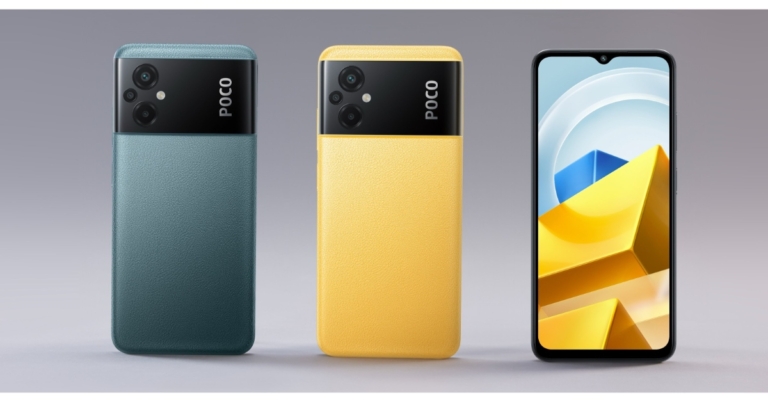
The Big Diwali Sale 2022 has begun for all members on Flipkart. Great savings and discounts are available on TVs, computers, mobile devices, and more during the holiday sale. Massive discounts on the POCO X, F, and M series have been revealed during the present sale.
The Poco M4 5G, Poco X4 Pro 5G, Poco F4 5G, Poco M4 Pro 5G, and Poco M5 are a few of the smartphones on the Flipkart Big Diwali Sale list of reduced models. Customers can immediately save 10% on Flipkart by using credit cards from ICICI Bank or Axis Bank.
The recently introduced Poco M5 will be offered for Rs 10,349 and Rs 13,249 with a special discount of Rs 2,150. Additionally, POCO F4 5G will get a special discount of up to Rs 6,000, while POCO X4 Pro 5G will get a special discount of up to Rs 4,000 for the Big Diwali Sale, making it available at a starting price of Rs 13,999. The costs are respectively Rs 13,999, Rs 15,499, and Rs 16,999 for the 6GB RAM with 64GB storage, 6GB RAM with 128GB storage, and 8GB RAM with 128GB storage variants.
On the Poco M4 5G and M4 Pro 5G, customers can receive savings of up to Rs 3,250 and Rs 5,250, respectively. With a discount of Rs 3,250, the 6GB RAM model with 128GB of internal storage of Poco M4 5G will cost 11,749 rupees.
Additionally, discounts of up to Rs 6,500 will be applied to the Poco F4 5G’s 6GB RAM with 128GB storage, 8GB RAM with 128GB storage, and 12GB RAM with 256GB storage variants. The phone’s starting price is now Rs 21,999.
For the latest gadget and tech news, and gadget reviews, follow us on Twitter, Facebook and Instagram. For newest tech & gadget videos subscribe to our YouTube Channel. You can also stay up to date using the Gadget Bridge Android App. You can find the latest car and bike news here.
| POCO Smartphones | Storage Variant | Launch Price | Big Diwali Sale Discount | Big Diwali Sale Price |
| POCO M4 Pro AMOLED | 6GB+64GB | ₹ 14,999 | ₹ 4,750 | ₹ 10,249 |
| 6GB+128GB | ₹ 16,499 | ₹ 5,250 | ₹ 11,249 | |
| 8GB+128GB | ₹ 17,999 | ₹ 4,750 | ₹ 13,249 | |
| POCO M5 | 4GB+64GB | ₹ 12,499 | ₹ 2,150 | ₹ 10,349 |
| 6GB+128GB | ₹ 14,499 | ₹ 1,250 | ₹ 13,249 | |
| POCO C31 | 3GB+32GB | ₹ 8,499 | ₹ 1,750 | ₹ 6,749 |
| 4GB+64GB | ₹ 9,499 | ₹ 1,750 | ₹ 7,749 | |
| POCO X4 Pro 5G | 6GB+64GB | ₹ 17,999 | ₹ 4,000 | ₹ 13,999 |
| 6GB+128GB | ₹ 18,999 | ₹ 3,500 | ₹ 15,499 | |
| 8GB+128GB | ₹ 20,999 | ₹ 4,000 | ₹ 16,999 | |
| POCO F4 5G | 6GB+128GB | ₹ 27,999 | ₹ 6,000 | ₹ 21,999 |
| 8GB+128GB | ₹ 29,999 | ₹ 6,000 | ₹ 23,999 | |
| 12GB+256GB | ₹ 33,999 | ₹ 6,500 | ₹ 27,499 | |
| POCO M4 5G | 4GB+64GB | ₹ 12,999 | ₹ 3,250 | ₹ 9,749 |
| 6GB+128GB | ₹ 14,999 | ₹ 3,250 | ₹ 11,749 | |
| POCO M4 Pro 5G | 4GB+64GB | ₹ 14,999 | ₹ 3,500 | ₹ 11,499 |
| 6GB+128GB | ₹ 16,999 | ₹ 3,500 | ₹ 13,499 | |
| 8GB+128GB | ₹ 18,999 | ₹ 4,500 | ₹ 14,499 |
Nokia G11 Plus with Android 12 launched in India
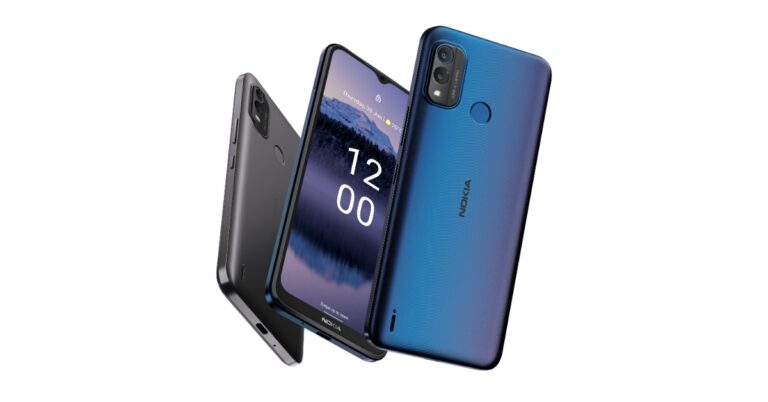
HMD Global has expanded its G-Series with the announcement of the Nokia G11 Plus in the Indian market. The smartphone features a 90Hz display and is powered by Android 12 out of the box. The company claims that the battery can last up to three days, three years of monthly security updates and two versions of Android updates to ensure your device is up to date.