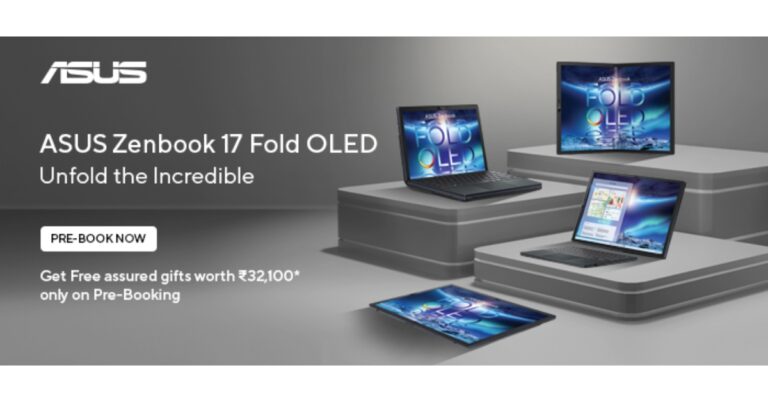
Asus Zenbook 17 Fold OLED is now available for pre-order in India, according to Asus. The device was announced in the US in late August. It is a 17.3-inch folding OLED Intel Evo-certified laptop with different modes for a distinctive user experience. The Zenbook 17 Fold comes with a big 75 Wh battery and a 12th Generation Intel Core i7 processor.
Asus Zenbook 17 Fold OLED pre-booking details
Pre-orders for the Zenbook 17 Fold OLED will be accepted beginning today, October 14, at noon, and running until November 9th. On November 10, the company plans to introduce the ground-breaking laptop to the Indian market. It will cost Rs 329,990.Customers who pre-order the Zenbook 17 Fold OLED will receive it at an attractive price of Rs 284,290. The company is offering a rebate of up to Rs 5,000 and an exchange value of up to Rs 40,700. The following products, each worth Rs 27,100, will also be given away to customers who pre-book.
Asus Zenbook 17 Fold OLED specifications
The laptop has a 17.3-inch foldable OLED touchscreen with 1,920 x 2,560 resolution, a 4:3 aspect ratio, and a response time of 0.2 milliseconds. The device comes with a maximum brightness of 500 nits. 1.07 billion colours, 100 percent DCI-P3 colour gamut coverage and an 87 percent screen-to-body ratio are also included. It has an Intel Core i7 processor from the 12th generation with an Intel Iris Xe GPU. 16GB of LPDDR5 RAM and a 1TB SSD are both included in the Asus Zenbook 17 Fold.It has a 5-megapixel AI camera for optics, along with 3D noise reduction and an IR function.Harman Kardon-certified Dolby Atmos audio is delivered by a quad-speaker system. Cortana and Alexa speech assistants are supported through an integrated microphone that is also present.A 3.5mm combo audio jack and two Thunderbolt 4 ports are included. Added to that is a touchpad. In addition to this, there is the latest Intel WiFi 6E and a 75 Wh battery on the laptop.
For the latest gadget and tech news, and gadget reviews, follow us on Twitter, Facebook and Instagram. For newest tech & gadget videos subscribe to our YouTube Channel. You can also stay up to date using the Gadget Bridge Android App. You can find the latest car and bike news here.
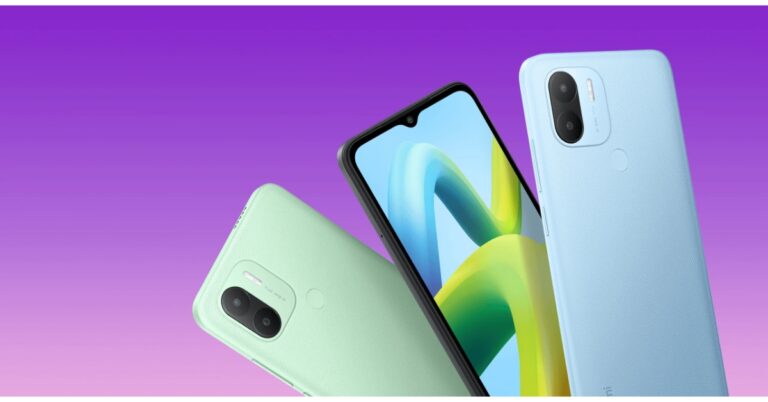
Redmi today announced the launch of its most recent budget-friendly model Redmi A1+ in India today. The device is powered by MediaTek Helio A22 SoC. It comes with a 5,000mAh battery and runs on Android 12 out of the box. The phone features a dual rear camera set-up and an HD+ display.
Redmi A1+ price in India, sale details
Two variants of Redmi A1+ have been launched in India. The price of the 2Gb RAM with 32GB storage variant is set at Rs 6,999. Whereas the 3GB RAM with 32GB storage option will be available with a price tag of Rs 7,999. The phone will come in three colour options of Black, Light Blue, and Light Green.Starting on October 17 at 12 noon, Flipkart, Mi.com, Mi Home shops, and Xiaomi’s retail partners will all offer the device for sale throughout the nation.
Redmi A1+ specifications
Redmi A1+ is highlighted with a 6.52-inch HD+ display having 1,600×700 pixels of resolution. The display has a 20:9 aspect ratio and 70 percent coverage of the NTSC colour gamut. Additionally, the screen supports a 120Hz touch sampling rate and 400 nits of peak brightness. The budget smartphone is shipped with Android 12 out of the box. Under the hood, there is an octa-core MediaTek Helio A22 SoC and IMG PowerVR GPU. It has up to 3GB of LPDDR4X RAM and 32GB of internal storage which can be expanded up to 512GB using a microSD card.Redmi A1+ has a dual rear camera system with AI support that captures images and videos with an 8-megapixel primary sensor. The phone has a front-facing 5-megapixel selfie camera sensor for selfies and video calls.The Redmi A1+ has a 3.5mm audio jack, 4G LTE, Wi-Fi 802.11 b/g/n, Bluetooth 5, GPS/A-GPS, Glonass, and Beidou for connectivity. The handset also supports over 20 Indian languages.A 5,000mAh battery that supports 10W charging powers the Redmi A1+. Redmi claims that the battery has a standby period of up to 30 days and a video playback time of up to 30 hours.
For the latest gadget and tech news, and gadget reviews, follow us on Twitter, Facebook and Instagram. For newest tech & gadget videos subscribe to our YouTube Channel. You can also stay up to date using the Gadget Bridge Android App. You can find the latest car and bike news here.
Instagram has stated that it will begin testing new ways for users to confirm their age in India today. It will ask users to upload their ID or take a video selfie to prove their age if they try to change their date of birth on Instagram from under the age of 18 to 18 or older.Instagram in its announcement said, “Starting today, we’re expanding this test to additional countries including India and Brazil. We plan to expand to the UK and EU before the end of the year. We’re also removing Social Vouching as an option to verify age from the test to make some improvements.”In order to ensure that teenagers and adults are having the appropriate experience for their age group, it is testing this. In the US, testing started in June of this year, and it is now spreading to Brazil and India.As stated by the business If someone tries to change their Instagram date of birth from under the age of 18 to over 18, Instagram will ask them to prove their age by one of three methods: uploading their ID, taking a video selfie, or asking people who know them to do so. This is being tested so that the company can ensure that both teens and adults are having the appropriate experience for their age group. In order to protect users’ privacy, Instagram is also collaborating with Yoti, a business that specialises in online age verification.The company via blog post said, “In 2019, we began asking people to provide their age when signing up for Instagram. Since then, we’ve made this a requirement. Knowing people’s age allows us to provide appropriate experiences to different age groups, specifically teens.”To register for Instagram, users must be at least 13 years old. Our minimum age is higher in certain countries than in others. When it determines that a user is a teen (13–17), it offers them experiences that are appropriate for their age, such as defaulting them into private accounts, blocking unwelcome interaction from adults they don’t know, and limiting the ways that advertisers may reach them with advertisements.
For the latest gadget and tech news, and gadget reviews, follow us on Twitter, Facebook and Instagram. For newest tech & gadget videos subscribe to our YouTube Channel. You can also stay up to date using the Gadget Bridge Android App. You can find the latest car and bike news here.
YouTube has started rolling out unique handles for its creators this month. A YouTube handle will serve as a unique identifier for your channel and will show up on Channel pages as well as Shorts. Users can tag the Channel in comments using the unique handle. However, not every user can get a YouTube handle, there are certain eligibility requirements that need to be met first. In this article, we show you how to get a YouTube handle and make a personalised URL for your YouTube channel.Read Also: In India, NortonLifeLock releases Norton AntiTrack for more privacy against online tracking
What are the basic eligibility criteria to get a YouTube handle or personalised URL?
If you want to get a personalised YouTube URL or handle, your channel must meet the following basic criteria.
Your channel must have 100 more subscribers.
Your channel/account must be at least 30 days old.
Your channel must have a profile picture.
There must be a banner image on your channel page.
How to get a personalised youtube URL
Step 1: Go to www.youtube.com and log in with your account.Step 2: Click on your profile icon at the top right corner of the screen and select ‘YouTube Studio’.Step 3: Scroll down the side menu on the left and select ‘Customisation’.Step 4: Click on the ‘Basic Info’ tab.Step 5: Click on the Channel URL box and type in the personalised URL you want.Step 6: Select Confirm. Your YouTube URL will be changed.You can change your YouTube URL any time you want. Simply follow the steps mentioned above and select ‘Delete’ under Channel URL. Type in a new unique URL and hit ‘Confirm’.
How to get a YouTube handle
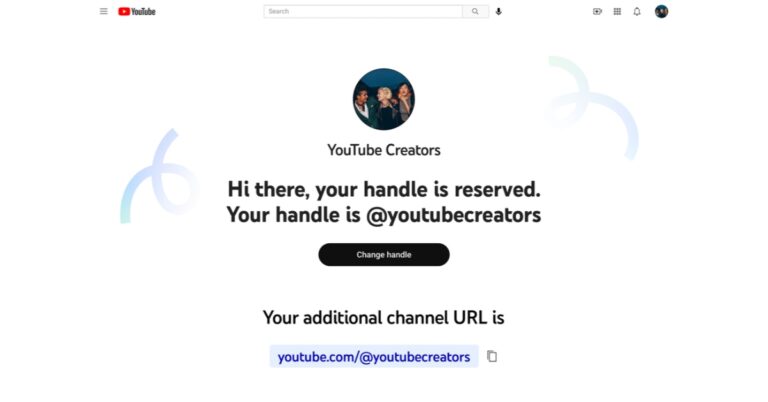
YouTube has started rolling out handles for the creators on the website. The process to reserve your YouTube handle is fairly simple if you’re eligible to get one. Here’s how you can get your own handle.Step 1: Go to www.youtube.com/handle.Step 2: In the window that pops up, type in your desired handle. If the handle is available, a green tick will appear next to it.Step 3: Select ‘Confirm Selection’.Your desired handle will be assigned to your channel. Read Also: Google Pixel 7 Vs iPhone 14: Battle between Android Vs iOS
Conclusion
This is how you can get a YouTube handle and a personalised YouTube URL for your account or channel. One of the many benefits of having a handle is that it is unique to your channel. YouTube allows multiple channels to have the same name, but a handle is reserved for one account. This makes it easy to identify a channel and tag it wherever you want.
A few years back, if you were worried about your smartphone spying on you, you’d be labelled a conspiracy nut. Now, with services like Google’s Voice Assistant and Amazon Echo, surveillance has taken the form of convenience and has made its way into our pockets. The Google Assistant on your smartphone is always monitoring surrounding sounds for the ‘Hey Google’ or ‘OK Google’ keywords. While voice commands are certainly very helpful, especially while driving, for a lot of people it is not worth giving up their privacy. In this article, we show you how to stop your Android phone from listening to you secretly. Read Also: In India, NortonLifeLock releases Norton AntiTrack for more privacy against online tracking
Turn off Google Assistant
Step 1: Go to Settings and select Google.Step 2: Scroll down and tap on ‘Settings for Google apps’ and select ‘Search, Assistant, and Voice’.Step 3: Tap on ‘Voice’ and from the following window select ‘Voice Match’.Step 4: Turn the toggle bar for ‘Hey Google’ off.The voice assistant commands on your phone will be turned off. Your smartphone will not use the microphone at all times to scan for those keywords.
Turn off Google Assistant for Android Auto
The Google Voice Assistant for Android Auto is turned on by default. You will have to turn it off separately, even after disabling the Google Assistant on your smartphone. Here’s how you can do that.Step 1: Go to Settings and select Advanced Features.Step 2: Select Android Auto.Step 3: Tap on ‘Hey Google’ detection and turn the toggle bar off for ‘While driving’.
Turn off Microphone access for Google
If you want to go the extra mile, you can entirely turn off the microphone access for the Google app on your smartphone. Here’s how.Step 1: Go to Settings and select Apps.Step 2: Scroll down and select ‘Google’.Step 3: Tap on ‘Permissions’.Step 4: Under the ‘Allowed’ section, tap on ‘Microphone’ and select ‘Don’t Allow’.Google will not be able to access your smartphone’s microphone.
Bonus Tip
Turn off Google Assistant entirely
If you don’t use Google Assistant that often, you can turn it off entirely. Here’s how.Step 1: Go to Settings and select Google.Step 2: Scroll down and tap on ‘Settings for Google apps’ and select ‘Search, Assistant, and Voice’.Step 3: Tap on ‘Google Assistant’, scroll down and select ‘General’.Step 4: Turn the toggle bar off for Google Assistant in order to disable it.If you do not wish to turn off Google Assistant, you can simply change the preferred input from voice to keyboard.Read Also:Google Pixel 7 Vs iPhone 14: Battle between Android Vs iOS
Conclusion
This is how you can stop your Android phone from listening to you secretly. You can also access your previous voice search history by going to the Google My Activity page. Google maintains a record of your search history, and this includes voice commands as well. In the My Activity page go to Assistant>Voice and Audio to hear all your past recordings.
Lenovo has just added the Lenovo Tab P11 Pro (2nd Gen) to its array of premium tablets. The brand-new Tab P11 Pro (2nd Gen) comes with minor improvements over the model before that is P11 Pro. It has a dual-tone design and glass-like finish.
Lenovo Tab P11 Pro price in India and availability
The cost of the 8GB RAM, 256GB storage, and hard Lenovo Precision Pen 3 combination for the Lenovo Tab P11 Pro (2nd Gen) is Rs 39,999. Starting on October 17, it can be purchased at Lenovo Exclusive Stores, Amazon.in, and Lenovo.com. Soon, it will also be accessible through additional offline shopping channels. The tablet is available in the Storm Grey colour option.
Lenovo Tab P11 Pro (2nd Gen) specifications
The 11.2-inch cinematic OLED display on the Tab P11 Pro (2nd Gen) has a 2560 x 1536-pixel resolution. It comes with a 15:9 aspect ratio and has a refresh rate of 120 Hz, a touch sampling rate of 360 Hz, and a maximum brightness of 600 nits. Dolby Vision HDR and HDR10+ are also supported.The Lenovo Tab P11 Pro (2nd generation) is powered by a new MediaTek Kompanio 1300T processor with an integrated Arm Mali-G77 MC9 GPU. 8GB of RAM and 256GB of internal storage are onboard and can be expanded to 1TB using a microSD card slot. It comes pre-installed with Android 12 OS. The tab can convert from a tablet to a laptop with the optional detachable keyboard with a built-in trackpad inspired by ThinkPad.The Lenovo Precision Pen 3 is an optional accessory that may magnetically attach to the smartphone for wireless charging and storage if writing is preferred. The Bluetooth-enabled pen automatically couples with the tablet and has a configurable button on its side that may be used to remotely control documents, music, photos, and recordings that are displayed on-screen. Lenovo Instant Memo allows users to instantly take notes by just holding the button while the screen is locked. The Tablet has quad speakers powered by JBL that support Dolby Atmos for audio. The tablet has an 8MP front-facing selfie camera and a 13MP back camera.The tablet is powered by an 8,200mAh battery cell, which can reportedly last up to 14 hours.Additionally, the Lenovo Tab P11 Pro (2nd Gen) supports Google Kids Space, which was previously available on the Tab M10 Plus (3rd Gen). The Google Kids Space is intended to be a special place where children can learn, create, and develop. When a child launches Kids Space, they are shown a selection of high-quality books, applications, and videos. Kids can develop their imagination and become experts in the areas they enjoy thanks to this special mode.With the help of Lenovo Freestyle, consumers can wirelessly connect their Android tablets to their Lenovo Windows PC and use them as either a portable second screen to expand their desktop or a wireless touch screen for their laptop.
For the latest gadget and tech news, and gadget reviews, follow us on Twitter, Facebook and Instagram. For newest tech & gadget videos subscribe to our YouTube Channel. You can also stay up to date using the Gadget Bridge Android App. You can find the latest car and bike news here.
Motorola has recently introduced a lot of smartphones. The company now has everything from low-cost, medium, to high-end smartphones. The Motorola cell phones that we have so far tested have been quite excellent. The Moto G32 has been in our testing for more than a week, and so far, it appears to be a respectable phone for the money. It has an integrated 680 SoC and uses the Android 12 OS. For water and dust resistance, the phone is IP52 rated. The phone also sports a triple-rear camera setup with a 50-megapixel main sensor. How did the smartphone fare in our tests? Let’s find out.
Moto G32 review: Design and Display
First and foremost, the Moto G32’s design is something we truly appreciated. Although it still has a plastic back, the appearance of the new Moto G smartphone is very different from the previous models’ rather dull aesthetics.The panel also makes fingerprints and smudges less obvious than they would be on a glossy surface in general. Therefore, even without a cover, the G32 does not look as unkempt as it would. The phone’s back also has a triple camera module and the recognisable Moto batwing logo.The phone’s size is quite ergonomic and somebody with little hands won’t have any issues with the way the weight is distributed. Our fingers landed flawlessly on the phone’s side-mounted fingerprint sensor, but the sensor itself is a little sluggish. Along with a volume rocker, the fingerprint scanner also serves as the power button.The tactile sensation on the buttons is also good. Unlike the left side, which contains a dual SIM slot (can house 2 SIM cards and a micro-USB card to expand memory up to 1TB). A microphone is located on the top frame, while a 3.5mm headphone jack, microphone, USB Type-C port, and speaker grille are located on the bottom border.Additionally, the Moto G32 has an IP52 rating for water and dust resistance, so external protection is also taken care of.On the head, edges, and chin of the phone’s front are thin bezels, while the bottom bezel is broader. On the top of the screen is a selfie camera.A 20:9 aspect ratio and full-HD+ resolution of 1,080 by 2,400 pixels are present on its 6.5-inch LCD display. The screen refreshes at a speed of 90Hz, and touch input occurs at a rate of 180Hz. During our testing, we did not observe any scratches on the screen because it is additionally protected by Panda Glass 3.The display offers an immersive viewing experience while watching videos and gaming. Also, the screen feels fluid and seamless thanks to the 90Hz refresh rate. The smartphone comes with support for Widevine L1 and we tested it with HD movie playback on both Amazon and Netflix. The colours seem to be a bit boosted, especially bright reds and magenta. The viewing angle is also ok but the screen’s peak brightness is capped at 600 nits so the display isn’t bright when used outdoors.The speaker system’s audio capabilities include Dolby Atmos compatibility. However, despite the speakers being loud, the audio output is not particularly good and lacks a bit of depth.
Moto G32 review: Performance and Cameras
Performance-wise, the Qualcomm Snapdragon 680 SoC and Adreno 610 GPU power the Moto G32. The phone has 64GB of internal storage with 4GB of RAM, which can be increased to 1TB using a microSD card.When it comes to daily usage, the phone is a nice budget smartphone that is pretty quick. However, navigating between apps like Instagram, Facebook, Youtube, and other social media apps presents a challenge, making multitasking between the apps challenging.On the gaming front, Call of Duty Mobile can be played, but not at its optimal settings. Additionally, the phone warms up after only 15 minutes of use, so if you’re a serious gamer, avoid buying this phone.In terms of software, the G32 runs Android 12 out of the box, just like all current G Series devices. In order to provide a clean UI experience devoid of ads and bloatware, the firm offers Android 12 with My UX skin on top, which improves the overall experience.Additionally, there are opportunities for customisations. On the G32 smartphone, an update to Android 13 as well as three years of security patches have been promised. Additionally, you get all the Moto-only features, like gesture functions to turn on the camera and flashlight. You also get the Thinkshield, a security layer, in addition to this.The Moto G32 boasts a triple back camera configuration with a 50-megapixel primary camera, an 8-megapixel ultra-wide angle sensor, and a 2-megapixel macro lens. A selfie camera with a 16-megapixel resolution and an f/2.4 aperture.The 8-megapixel super wide camera of this phone, which is unusual for a phone in this price range, is its best feature. Even a lot of top and mid-range phones lack an 8MP sensor for ultra-wide photography.Performance-wise, under favourable lighting situations, the photos taken with the primary camera offer a considerable deal of detail. Shadows were fine, and neither the highlights nor the subjects were overhyped.Ultra-wideThe inclusion of an 8MP super wide camera is commendable, but when zoomed in, we saw edge distortion, faded colours, and a lack of details. However, the 8MP is still superior to the 5MP ultra-wide lens.MacroThe 2-megapixel macro lens, on the other hand, is rarely useful because you have to work very hard to capture clear pictures even in decent lighting.PortraitsBoth interior and outdoor low-light photos appeared just about average. Selfies are good if taken in bright lighting, they will be distorted and fuzzy otherwise.A 33W fast charger is included with the Moto G32, which has a 5,000mAh battery. We had a good battery life with the device—more than a day and a half. Additionally, it took the phone longer than 1 hour and 5 minutes to charge completely.
Verdict
The Moto G32 is the ideal gadget for a casual user. For roughly Rs 12,000, you get a battery life of almost a day, a smooth 90Hz display, and respectable casual gaming performance. In addition, you have a typical triple-camera setup. The Motorola smartphone offers you an IP52 certification, 33W quick charging, and most importantly a pure stock Android experience.
For the latest gadget and tech news, and gadget reviews, follow us on Twitter, Facebook and Instagram. For newest tech & gadget videos subscribe to our YouTube Channel. You can also stay up to date using the Gadget Bridge Android App. You can find the latest car and bike news here.
Garena Free Fire is a battle royale game with regular awards and tournaments to keep players interested. If you play Garena Free Fire, you should be aware of the redeem codes that are released on a daily basis. However, because the battle royale game is banned in India, players from other countries can use the Free Fire Redeem codes daily. If you’re unfamiliar with the Garena Free Fire redeem codes or don’t know how to get them, we’ve put together a step-by-step guide to help you redeem them. Check out Garena Free Fire Redeem Codes for October 14.The Free Fire redeem codes are a great way to get free stuff. These are 12-digit codes that contain alphabets and numbers, as well as an expiration date and time. Because the Garena FF redeem codes cannot be used more than once, you should hurry to the redemption page to claim your free reward before someone else does. To get a free reward, all you have to do is go to reward.ff.garena.com/en, which is the official redemption page. Also, keep an eye on this space for daily updates on Garena Free Fire redemption codes and rewards.
Garena Free Fire Redeem Codes Today 14 October 2022
FRE3 46VG HSJM
WNEN RJTI OGBI
UYHF GDBN EM4K
RL5O T6Y9 HI8U
7YGG DBNE 2JMK
4RLO 5T6Y 9IH8
UYHG BNHJ AQF1
FGQH 2Y3E RF6T
5RCF XVZG BHJS
KE4O 56TI GUYH
BFDN MEKL 4O5I
T6UJ H34M VCLC
PXOL KXMZ AJQ2
34RT GUVC XYTG
FRDS CEVB R4N5
How to Get Free Fire Redeem Codes for Garena on October 14?
14 October 2022 Amazon Quiz has gone live on its platform. The quiz timings are 12 AM to 11:59 PM. The Amazon App users can participate in the quiz daily and all they have to do is submit correct answers to the questions asked on the e-commerce platform. Today’s participants can get a chance to win Rs 2500 Amazon Pay Balance.By participating in the Amazon Quiz the participants can win Amazon Pay Balance ranging from Rs 1,000 to Rs 50,000 every day while sitting at home. To win the participants must answer five questions correctly that are based on current events and general knowledge. One wrong answer can eliminate you from the quiz. The results will be announced at the end of the month. Today’s question will let you win Rs 2500 Amazon Pay Balance. Check below for today’s Amazon quiz answers.Amazon Quiz Today Prize – Rs 2,500 Amazon Pay BalanceQuiz Date – 14 October 2022Daily Timing – 12 AM to 11:59 PMWinner Announcement – Today 12 PM
Amazon Quiz Answers Today 14 October 2022
Question 1: World No.1 Iga Swiatek has recently withdrawn from a team competition named after which legend due to a scheduling clash with WTA finals?
Answer: Billie Jean King
Question 2: The movie ‘Goodbye’ starring Amitabh Bachchan and Rashmika Mandanna is directed by whom?
Answer: Vikas Bahl
Question 3: A day before Dussehra a new temple in Jebel Ali officially opened. Jebel Ali is located in which country?
Answer: UAE
Question 4: This is the famous Euromast located in which city?
Answer: Rotterdam
Question 5: What was the first name of the founder of this brand, after whom it is named?
Answer: Ferdinand
How To Play Amazon Quiz
Only app users are eligible to play the Amazon quiz every morning from 12 AM to 11:59 PM. The quiz is not available on the desktop. For those who are unaware of how to play the Amazon quiz below are the steps, you can follow to take the quiz.
Firstly download the Amazon app from Google Play Store or App Store
Now fill in the required information through the Sign Up option.
You need to log in to the Amazon app and scroll down on the home screen to find the Amazon Quiz banner.
Tap on the Amazon Quiz banner and tap on the Start button to start the Quiz.
Now you will get 5 questions and you need to answer them correctly. One wrong answer will eliminate you from the Quiz.
After answering all the questions correctly you are now eligible for a Lucky Draw.
The winner’s name will be announced today at 12 PM.
The launch of Norton AntiTrack, a brand-new online privacy service, in India was announced by NortonLifeLock. Consumers’ internet searches are tracked and their personal information is collected by third-party businesses and websites. People can have more control over whether they leave a digital imprint by using Norton AntiTrack, which combines superior anti-fingerprinting technology with real-time tracker reaction and detection, blocking, and detection.For Mac and Windows PCs, Norton AntiTrack is an application and browser plugin that assists users in maintaining their data privacy online. Anti-fingerprinting technology returns untraceable data to the sites visited, helping to obfuscate the user’s digital identity from monitoring and fingerprinting attempts without slowing down their Mac or PC or interfering with their web functionality. This anti-fingerprinting technology hides users’ distinctive identifiers, like their operating system, device, font size, screen resolution, and more, making it harder for businesses to follow and profile users by generating a digital “fingerprint” of them.Consumers are followed online every day, according to the corporation. Every time a customer visits a website, they leave a digital trace of personal information that is compiled through cookies, fingerprinting, and profiling technology. This information may be utilised in a variety of ways outside of their control, including marketing initiatives to enhance user experience, targeted advertising and content, swaying their online behaviour and perhaps even their personal opinions. To build a comprehensive profile of a person’s online interests, this data may even be combined with other data.Customers can stay in control and be aware of the tracking attempts that have been thwarted thanks to Norton AntiTrack’s ability to view and track third party attempts to collect their data. Customers can select whether they want to be tracked by third parties on a certain website using the user-friendly dashboard.According to the corporation, Norton AntiTrack goes beyond standard private browsers and aids in preventing consumer profiling in ways that other products don’t.The browsers supported by Norton AntiTrack include Safari, Google Chrome, Mozilla FireFox, and Microsoft Edge. Norton AntiTrack is available for Mac, Windows 10, and Windows 11 (with the exception of Windows 10 in S mode and Windows powered by an ARM CPU).
For the latest gadget and tech news, and gadget reviews, follow us on Twitter, Facebook and Instagram. For newest tech & gadget videos subscribe to our YouTube Channel. You can also stay up to date using the Gadget Bridge Android App. You can find the latest car and bike news here.


 Starting on October 17 at 12 noon, Flipkart, Mi.com, Mi Home shops, and Xiaomi’s retail partners will all offer the device for sale throughout the nation.
 Starting on October 17 at 12 noon, Flipkart, Mi.com, Mi Home shops, and Xiaomi’s retail partners will all offer the device for sale throughout the nation.
 Step 3: Scroll down the side menu on the left and select ‘Customisation’.
 Step 3: Scroll down the side menu on the left and select ‘Customisation’.
 Step 4: Click on the ‘Basic Info’ tab.
 Step 5: Click on the Channel URL box and type in the personalised URL you want.
 Step 6: Select Confirm. Your YouTube URL will be changed.
You can change your YouTube URL any time you want. Simply follow the steps mentioned above and select ‘Delete’ under Channel URL. Type in a new unique URL and hit ‘Confirm’.
Step 6: Select Confirm. Your YouTube URL will be changed.
You can change your YouTube URL any time you want. Simply follow the steps mentioned above and select ‘Delete’ under Channel URL. Type in a new unique URL and hit ‘Confirm’.
 Step 2: In the window that pops up, type in your desired handle. If the handle is available, a green tick will appear next to it.
 Step 3: Select ‘Confirm Selection’.
 Your desired handle will be assigned to your channel.
Read Also: Google Pixel 7 Vs iPhone 14: Battle between Android Vs iOS
Your desired handle will be assigned to your channel.
Read Also: Google Pixel 7 Vs iPhone 14: Battle between Android Vs iOS
 Step 2: Scroll down and tap on ‘Settings for Google apps’ and select ‘Search, Assistant, and Voice’.
 Step 3: Tap on ‘Voice’ and from the following window select ‘Voice Match’.
 Step 4: Turn the toggle bar for ‘Hey Google’ off.
 The voice assistant commands on your phone will be turned off. Your smartphone will not use the microphone at all times to scan for those keywords.
 Step 2: Select Android Auto.
 Step 3: Tap on ‘Hey Google’ detection and turn the toggle bar off for ‘While driving’.

 Step 2: Scroll down and select ‘Google’.
 Step 3: Tap on ‘Permissions’.
 Step 4: Under the ‘Allowed’ section, tap on ‘Microphone’ and select ‘Don’t Allow’.
 Google will not be able to access your smartphone’s microphone.
 Step 4: Turn the toggle bar off for Google Assistant in order to disable it.
 If you do not wish to turn off Google Assistant, you can simply change the preferred input from voice to keyboard.
Read Also: Google Pixel 7 Vs iPhone 14: Battle between Android Vs iOS
If you do not wish to turn off Google Assistant, you can simply change the preferred input from voice to keyboard.
Read Also: Google Pixel 7 Vs iPhone 14: Battle between Android Vs iOS


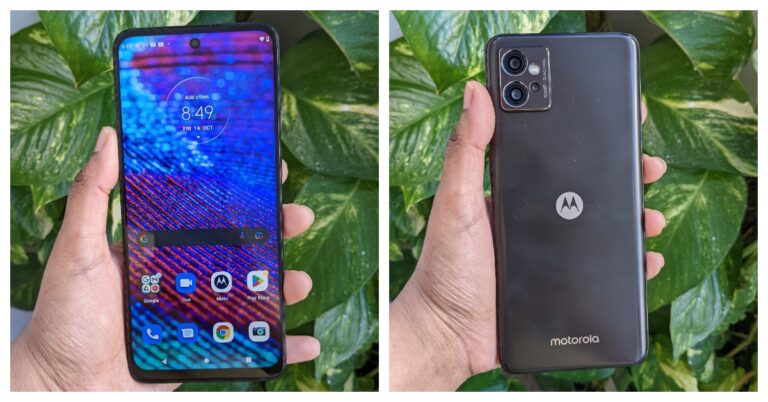
 The phone’s size is quite ergonomic and somebody with little hands won’t have any issues with the way the weight is distributed. Our fingers landed flawlessly on the phone’s side-mounted fingerprint sensor, but the sensor itself is a little sluggish. Along with a volume rocker, the fingerprint scanner also serves as the power button.
 The tactile sensation on the buttons is also good. Unlike the left side, which contains a dual SIM slot (can house 2 SIM cards and a micro-USB card to expand memory up to 1TB). A microphone is located on the top frame, while a 3.5mm headphone jack, microphone, USB Type-C port, and speaker grille are located on the bottom border.
 Additionally, the Moto G32 has an IP52 rating for water and dust resistance, so external protection is also taken care of.
On the head, edges, and chin of the phone’s front are thin bezels, while the bottom bezel is broader. On the top of the screen is a selfie camera.
A 20:9 aspect ratio and full-HD+ resolution of 1,080 by 2,400 pixels are present on its 6.5-inch LCD display. The screen refreshes at a speed of 90Hz, and touch input occurs at a rate of 180Hz. During our testing, we did not observe any scratches on the screen because it is additionally protected by Panda Glass 3.
Additionally, the Moto G32 has an IP52 rating for water and dust resistance, so external protection is also taken care of.
On the head, edges, and chin of the phone’s front are thin bezels, while the bottom bezel is broader. On the top of the screen is a selfie camera.
A 20:9 aspect ratio and full-HD+ resolution of 1,080 by 2,400 pixels are present on its 6.5-inch LCD display. The screen refreshes at a speed of 90Hz, and touch input occurs at a rate of 180Hz. During our testing, we did not observe any scratches on the screen because it is additionally protected by Panda Glass 3.
 The display offers an immersive viewing experience while watching videos and gaming. Also, the screen feels fluid and seamless thanks to the 90Hz refresh rate. The smartphone comes with support for Widevine L1 and we tested it with HD movie playback on both Amazon and Netflix. The colours seem to be a bit boosted, especially bright reds and magenta. The viewing angle is also ok but the screen’s peak brightness is capped at 600 nits so the display isn’t bright when used outdoors.
The speaker system’s audio capabilities include Dolby Atmos compatibility. However, despite the speakers being loud, the audio output is not particularly good and lacks a bit of depth.
The display offers an immersive viewing experience while watching videos and gaming. Also, the screen feels fluid and seamless thanks to the 90Hz refresh rate. The smartphone comes with support for Widevine L1 and we tested it with HD movie playback on both Amazon and Netflix. The colours seem to be a bit boosted, especially bright reds and magenta. The viewing angle is also ok but the screen’s peak brightness is capped at 600 nits so the display isn’t bright when used outdoors.
The speaker system’s audio capabilities include Dolby Atmos compatibility. However, despite the speakers being loud, the audio output is not particularly good and lacks a bit of depth.
 In terms of software, the G32 runs Android 12 out of the box, just like all current G Series devices. In order to provide a clean UI experience devoid of ads and bloatware, the firm offers Android 12 with My UX skin on top, which improves the overall experience.
Additionally, there are opportunities for customisations. On the G32 smartphone, an update to Android 13 as well as three years of security patches have been promised. Additionally, you get all the Moto-only features, like gesture functions to turn on the camera and flashlight. You also get the Thinkshield, a security layer, in addition to this.
The Moto G32 boasts a triple back camera configuration with a 50-megapixel primary camera, an 8-megapixel ultra-wide angle sensor, and a 2-megapixel macro lens. A selfie camera with a 16-megapixel resolution and an f/2.4 aperture.
The 8-megapixel super wide camera of this phone, which is unusual for a phone in this price range, is its best feature. Even a lot of top and mid-range phones lack an 8MP sensor for ultra-wide photography.
In terms of software, the G32 runs Android 12 out of the box, just like all current G Series devices. In order to provide a clean UI experience devoid of ads and bloatware, the firm offers Android 12 with My UX skin on top, which improves the overall experience.
Additionally, there are opportunities for customisations. On the G32 smartphone, an update to Android 13 as well as three years of security patches have been promised. Additionally, you get all the Moto-only features, like gesture functions to turn on the camera and flashlight. You also get the Thinkshield, a security layer, in addition to this.
The Moto G32 boasts a triple back camera configuration with a 50-megapixel primary camera, an 8-megapixel ultra-wide angle sensor, and a 2-megapixel macro lens. A selfie camera with a 16-megapixel resolution and an f/2.4 aperture.
The 8-megapixel super wide camera of this phone, which is unusual for a phone in this price range, is its best feature. Even a lot of top and mid-range phones lack an 8MP sensor for ultra-wide photography.
 Performance-wise, under favourable lighting situations, the photos taken with the primary camera offer a considerable deal of detail. Shadows were fine, and neither the highlights nor the subjects were overhyped.


 The phone’s size is quite ergonomic and somebody with little hands won’t have any issues with the way the weight is distributed. Our fingers landed flawlessly on the phone’s side-mounted fingerprint sensor, but the sensor itself is a little sluggish. Along with a volume rocker, the fingerprint scanner also serves as the power button.
 The tactile sensation on the buttons is also good. Unlike the left side, which contains a dual SIM slot (can house 2 SIM cards and a micro-USB card to expand memory up to 1TB). A microphone is located on the top frame, while a 3.5mm headphone jack, microphone, USB Type-C port, and speaker grille are located on the bottom border.
 Additionally, the Moto G32 has an IP52 rating for water and dust resistance, so external protection is also taken care of.
On the head, edges, and chin of the phone’s front are thin bezels, while the bottom bezel is broader. On the top of the screen is a selfie camera.
A 20:9 aspect ratio and full-HD+ resolution of 1,080 by 2,400 pixels are present on its 6.5-inch LCD display. The screen refreshes at a speed of 90Hz, and touch input occurs at a rate of 180Hz. During our testing, we did not observe any scratches on the screen because it is additionally protected by Panda Glass 3.
Additionally, the Moto G32 has an IP52 rating for water and dust resistance, so external protection is also taken care of.
On the head, edges, and chin of the phone’s front are thin bezels, while the bottom bezel is broader. On the top of the screen is a selfie camera.
A 20:9 aspect ratio and full-HD+ resolution of 1,080 by 2,400 pixels are present on its 6.5-inch LCD display. The screen refreshes at a speed of 90Hz, and touch input occurs at a rate of 180Hz. During our testing, we did not observe any scratches on the screen because it is additionally protected by Panda Glass 3.
 The display offers an immersive viewing experience while watching videos and gaming. Also, the screen feels fluid and seamless thanks to the 90Hz refresh rate. The smartphone comes with support for Widevine L1 and we tested it with HD movie playback on both Amazon and Netflix. The colours seem to be a bit boosted, especially bright reds and magenta. The viewing angle is also ok but the screen’s peak brightness is capped at 600 nits so the display isn’t bright when used outdoors.
The speaker system’s audio capabilities include Dolby Atmos compatibility. However, despite the speakers being loud, the audio output is not particularly good and lacks a bit of depth.
The display offers an immersive viewing experience while watching videos and gaming. Also, the screen feels fluid and seamless thanks to the 90Hz refresh rate. The smartphone comes with support for Widevine L1 and we tested it with HD movie playback on both Amazon and Netflix. The colours seem to be a bit boosted, especially bright reds and magenta. The viewing angle is also ok but the screen’s peak brightness is capped at 600 nits so the display isn’t bright when used outdoors.
The speaker system’s audio capabilities include Dolby Atmos compatibility. However, despite the speakers being loud, the audio output is not particularly good and lacks a bit of depth.
 In terms of software, the G32 runs Android 12 out of the box, just like all current G Series devices. In order to provide a clean UI experience devoid of ads and bloatware, the firm offers Android 12 with My UX skin on top, which improves the overall experience.
Additionally, there are opportunities for customisations. On the G32 smartphone, an update to Android 13 as well as three years of security patches have been promised. Additionally, you get all the Moto-only features, like gesture functions to turn on the camera and flashlight. You also get the Thinkshield, a security layer, in addition to this.
The Moto G32 boasts a triple back camera configuration with a 50-megapixel primary camera, an 8-megapixel ultra-wide angle sensor, and a 2-megapixel macro lens. A selfie camera with a 16-megapixel resolution and an f/2.4 aperture.
The 8-megapixel super wide camera of this phone, which is unusual for a phone in this price range, is its best feature. Even a lot of top and mid-range phones lack an 8MP sensor for ultra-wide photography.
In terms of software, the G32 runs Android 12 out of the box, just like all current G Series devices. In order to provide a clean UI experience devoid of ads and bloatware, the firm offers Android 12 with My UX skin on top, which improves the overall experience.
Additionally, there are opportunities for customisations. On the G32 smartphone, an update to Android 13 as well as three years of security patches have been promised. Additionally, you get all the Moto-only features, like gesture functions to turn on the camera and flashlight. You also get the Thinkshield, a security layer, in addition to this.
The Moto G32 boasts a triple back camera configuration with a 50-megapixel primary camera, an 8-megapixel ultra-wide angle sensor, and a 2-megapixel macro lens. A selfie camera with a 16-megapixel resolution and an f/2.4 aperture.
The 8-megapixel super wide camera of this phone, which is unusual for a phone in this price range, is its best feature. Even a lot of top and mid-range phones lack an 8MP sensor for ultra-wide photography.
 Performance-wise, under favourable lighting situations, the photos taken with the primary camera offer a considerable deal of detail. Shadows were fine, and neither the highlights nor the subjects were overhyped.