Google uses the same profile picture for one account across all of its services. This means if you changed your profile picture on Gmail, it will be displayed on other Google services like Maps, Meet, Duo, and Chat as well. A lot of people are not aware of this and may not want their contacts on other platforms to view their profile picture. In this article, we show you how to remove your profile picture from your Google or Gmail account.Read Also: Risk-free gambling or just clever marketing? The truth about online casino bonuses
Remove your Gmail or Google Account profile picture using an Android smartphone
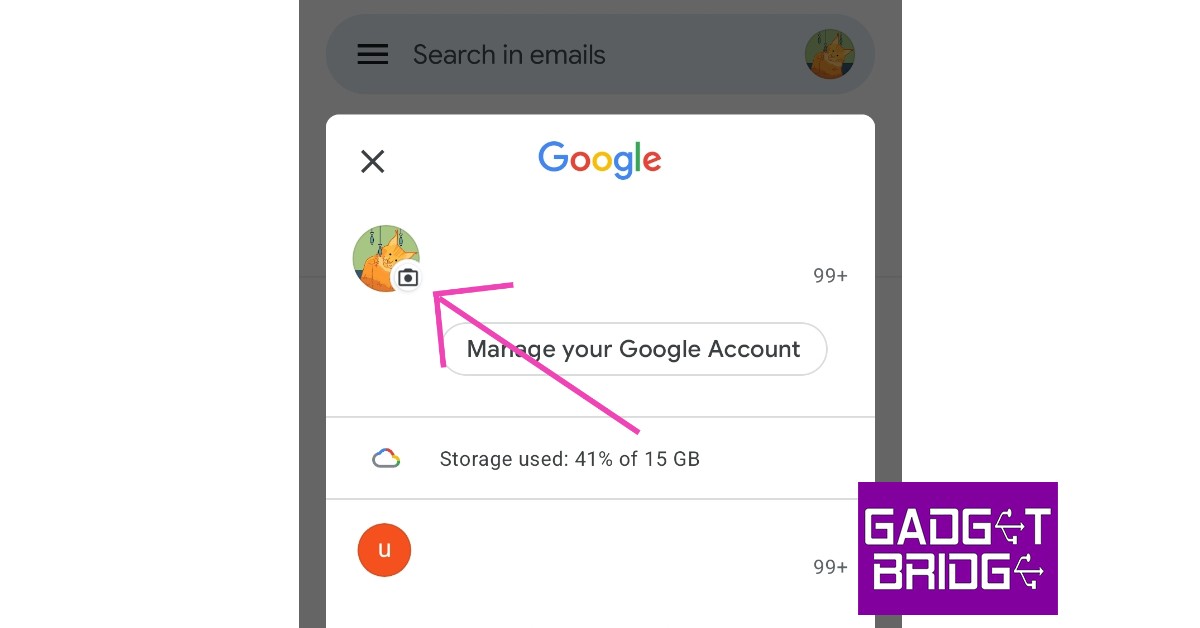
Step 1: Open the Gmailapp on your Android smartphone.Step 2: Tap on the profile icon at the top right corner of the screen.Step 3: Tap on your profile picture.Step 4: Select ‘Remove’.Your Google Account profile picture will be taken down.
How to remove your Google Account profile picture using a web browser
This is how you can remove your Google or Gmail account profile picture using a web browser or an Android smartphone. Once you take off your picture from Google, you can easily change it to something else by going to your ‘Personal Info’ on your Google Account. If you want to know the date you created your Gmail account, check out this article.
As online media grows, access to premium journalism often comes with subscription fees. Major publications like The Washington Post and NYT place content behind paywalls, making it costly for readers to subscribe to multiple outlets. However, there are effective methods to bypass paywalls for free and read articles for free. From using incognito mode to browser extensions, this guide outlines 15 free ways to access paywalled content on any site or read articles without a subscription, saving you from costly subscriptions. Dive into these practical solutions to access news articles for free and unlock premium content effortlessly.
Read Also:Top 3 ways to save an article or webpage as a PDF
Access news articles for free using Incognito Mode
This is the simplest way to bypass paywalls for free you come across online. The only drawback is that it works for websites that offer users to read a few free articles before asking them to subscribe to the outlet. Opening a link in incognito mode prevents the website from using cookies on your computer. Without cookies to track your PC, the website has no way of knowing whether you’ve exceeded the free articles limit.Steps to do this:
Simply right-click on a link.
Select Open link in an incognito window to bypass paywalls for free.
You can also press Ctrl+Shift+N to open an incognito window.
Paste the link in the address box to access the article.
Try resetting Browser Cookies to access news article
If you do not want to open the article in an incognito tab, you can also reset the browser cookies to prevent the website from tracking your article count. Simply click the three dots on the Chrome browser and select ‘Clear browsing data’ from the ‘More tools’ section. Open the advanced tab and clear all browsing cookies.
Use A VPN To Access News Articles For Free
Another great method to access news articles for free is this one. Some websites keep track of your article count through your IP address. You can easily change your IP address to a different location using a VPN. There are several paid and free VPN services you can find online. Check out our list of the top 10 VPN services for secure and anonymous browsing.
Use Postlight Reader to bypass the paywall
Formerly known as ‘Mercury Reader’, ‘Postlight Reader’ gets rid of all the clutter and lets you read an article without any distractions. It also bypasses paywalls for free and gives you full access to paid articles. Add the Postlight Reader extension to Chrome from https://reader.postlight.com/. Once you’ve added the extension:
Go to the article you wish to read and select Open in Postlight Reader.
Click on the Extensions icon at the top right corner of the web browser.
The article will open up without a paywall in Postlight Reader.
Use 12ft Ladder to unlock any article behind a paywall
You can also use this method to access news articles for free, without paying for a subscription. For websites that do not let you read any trial articles, disabling cookies and using incognito mode to bypass the paywall will not work. In this case, 12ft Ladder will come in handy. Steps to follow to access articles for free:
Go to https://12ft.io/,
Paste the link of the paywalled article in the address box on the website
Click Remove paywall. 12ft Ladder will remove the paywall from the article.
Go back and refresh the article tab. You will gain total access to the article.
Use 1ft.io To Access News Articles For Free
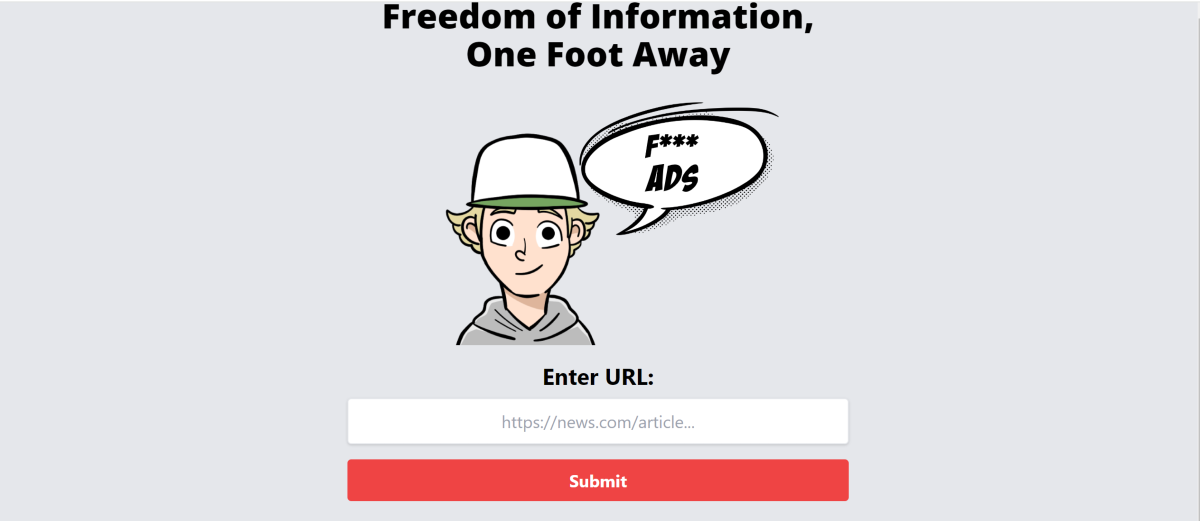
If you can’t get 12ft ladder to work, try https://1ft.io/ instead. This website works just like 12ft ladder.
All you need to do is copy the link of the paywalled article and paste it into the address box of 1ft.io.
Hit Submit, and the website will unlock the article for you.
You can also prefix the link to the article with https://1ft.io/ if you want to get around the paywall instantly.
Use ProReader.io
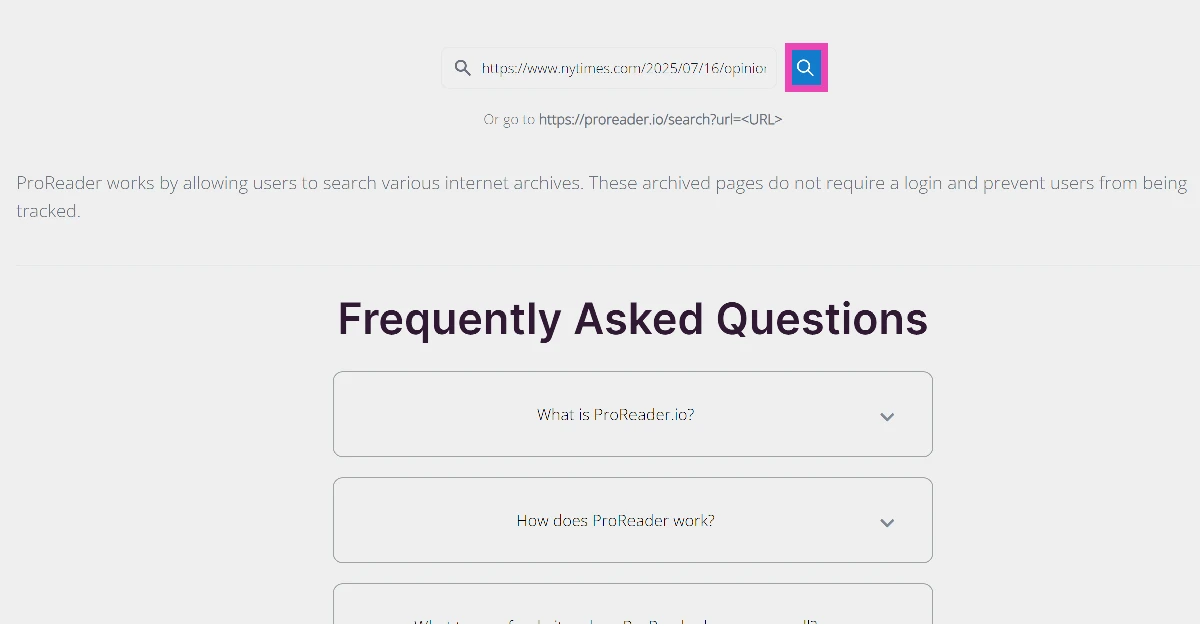
ProReader.io brings together different unlocking methods under one roof. Once you enter the link to an article, you get to choose an archived source. Once you’ve made your choice, the article will be unlocked for you. Here’s a step-by-step process.
Go to https://proreader.io/.
Enter the link to the article in the text box and hit the search icon.
3. Select an archive.
4. The article will be unlocked within seconds.
Use Sci-hub to read articles without any subscription
If you want to read any academic journals or research papers without subscribing to any digital library, Sci-hub is an easy solution to getting rid of any paywalls.
Simply copy the link or DOI code of the journal and paste it into the address box on Sci-hub’s website.
Click on Open, and Sci-hub will unlock the journal for you.
Some users found this to be the best method for accessing news articles for free.
Use your library account to read any paywalled articles
If you’re a member of your local library, you can get access to a lot of paid content. Most libraries are already subscribed to leading newspapers, journals, and magazines. All you need to do is sign in using your library account and access the article you want to read.
Use the Wayback Machine To Bypass Paywalls For Free
Internet Archive’s Wayback Machine maintains a record of billions of archived pages going back decades. The pages are updated every day, and you can visit the websites of most of the biggest newspapers in the world to read articles for free. The articles accessed through the Wayback Machine do not have a paywall attached to them.
Search for the headline on Google
One of the simplest and free methods of reading paid articles without a subscription is by pasting the article headline on Google and looking for a source with the unlocked article. Several websites mirror the content from major news websites and offer access without a subscription. If you’re not able to find the exact article, you can always look for the same story published by other free-to-read sources.
Use Reader Mode on Safari
If you’re an iPhone or Mac user, you can try using Reader Mode to read paywalled articles without a subscription. The Reader Mode gets rid of the clutter and hides any ads on the website, giving you a clean reading experience. For some websites, it even gets rid of the paywall and unlocks the article for free.
Click on the reader icon in the address bar to activate Reader Mode.
Use Reader Mode on Firefox
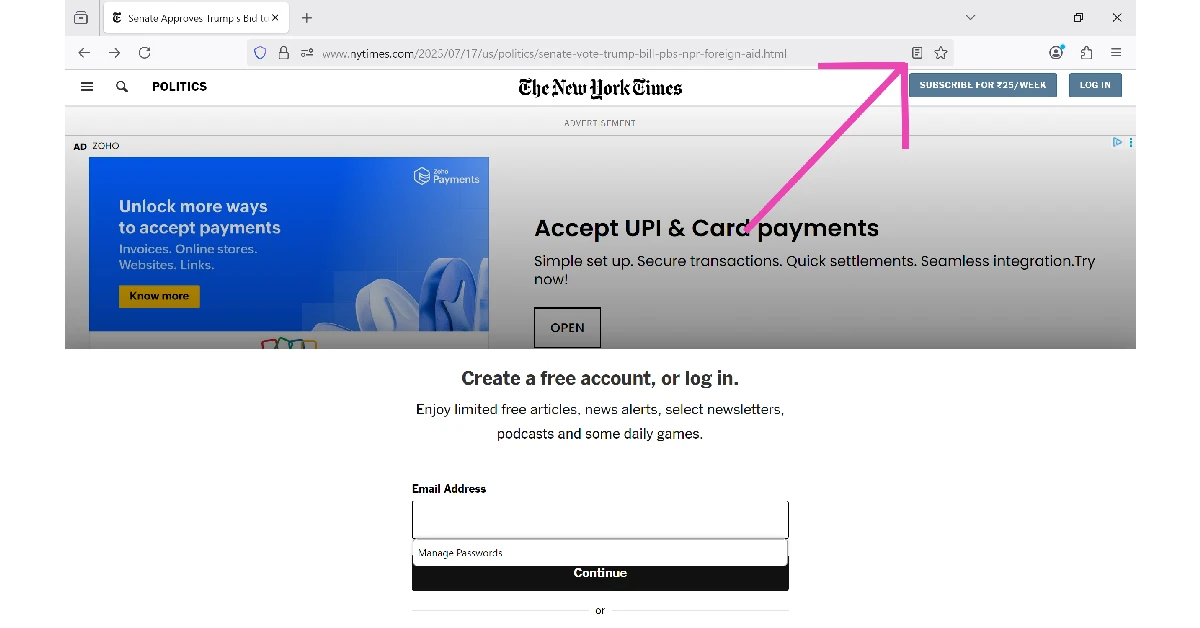
The Reader mode on Mozilla Firefox is another tool that lets you bypass paywalls and read articles without a subscription. Here’s how you can go about it.
Launch Mozilla Firefox on your PC and go to the news article.
Hit the Reader Mode icon in the address bar.
3. The paywall will be bypassed, and the news article will open up in Reader Mode.
Save the article as a PDF To Access News Articles For Free
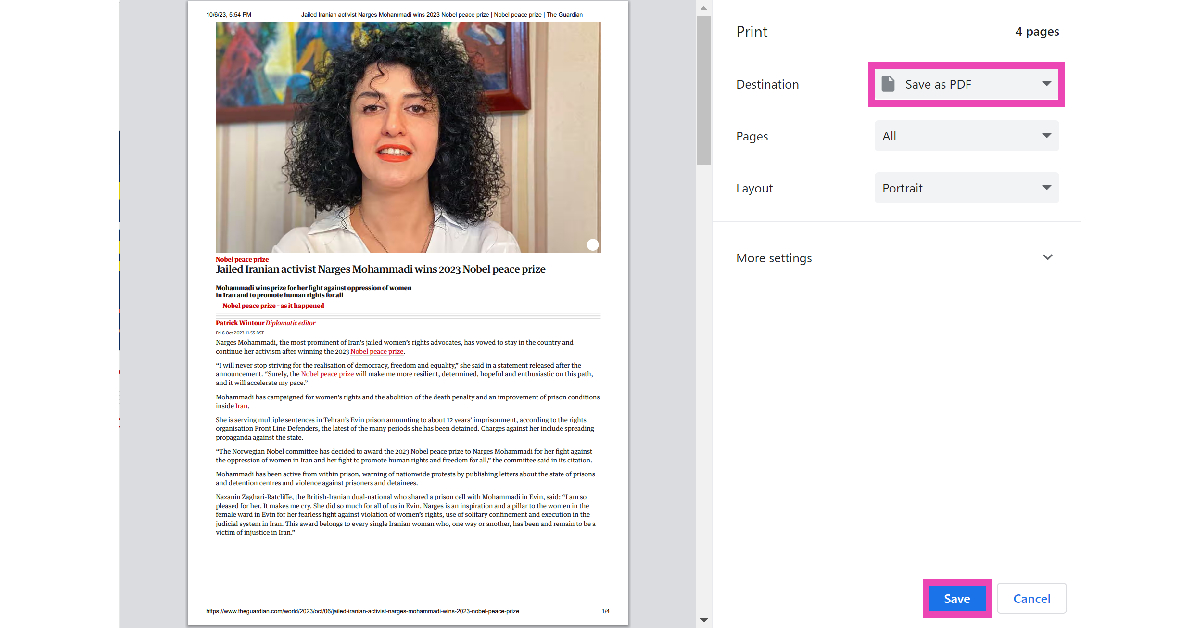
Certain websites do not restrict the paywalled articles on your device when you save them as a PDF. This trick may not work on every website, but it will help you get around certain outdated paywalls. To save an article as a PDF, open it on your PC’s web browser and press Ctrl+P. In the ‘Destination’ tab, select ‘Save as PDF’, then hit ‘Save’.
Don’t allow the website to use JavaScript
One of the easiest ways to disable the paywall popup for a website is by not allowing it use JavaScript on the web browser. Here’s how you can go about it.
1. Launch Google Chrome on your PC.
2. Hit the ellipses at the top right corner of the screen and select Settings.
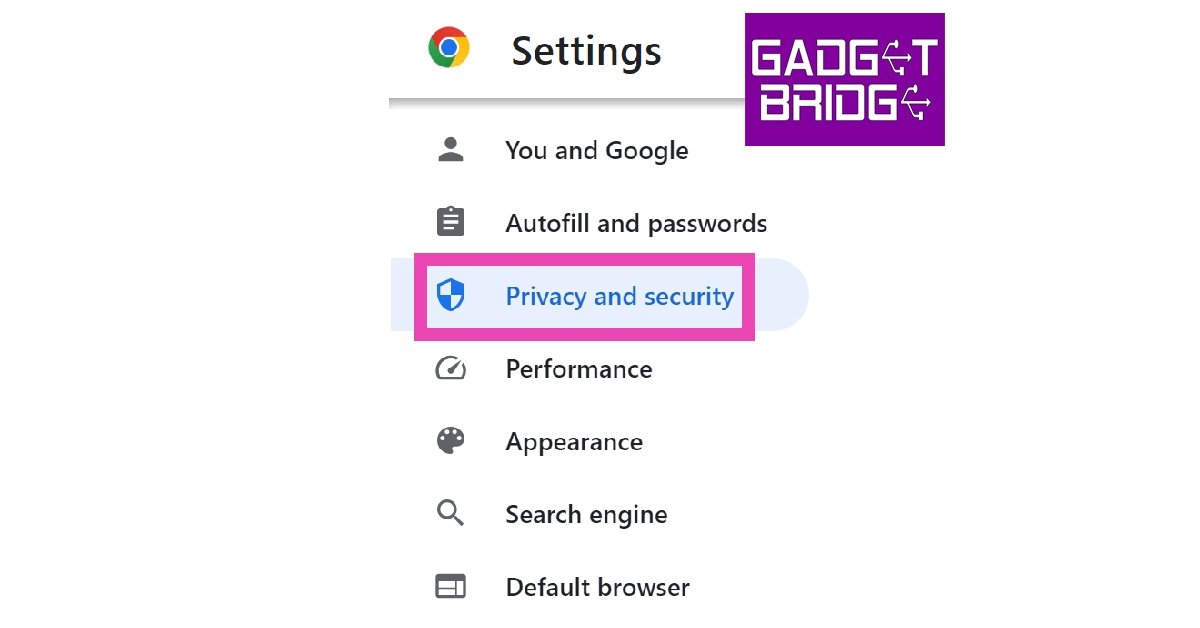
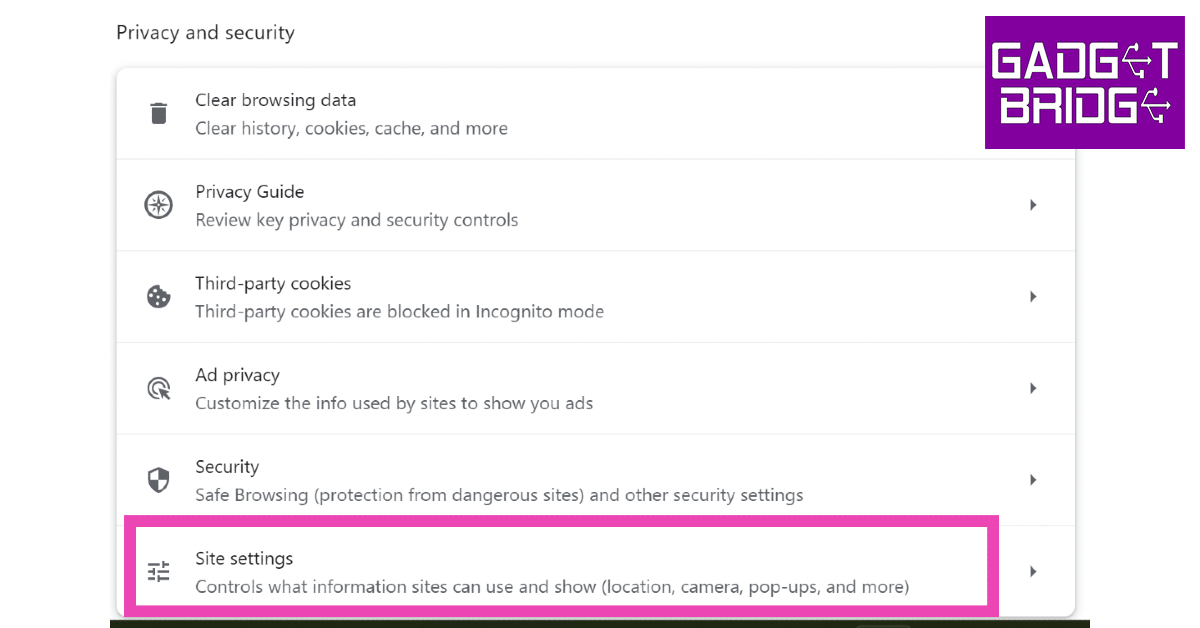
3. Switch to the Privacy and security tab.
4. Click on Site Settings.
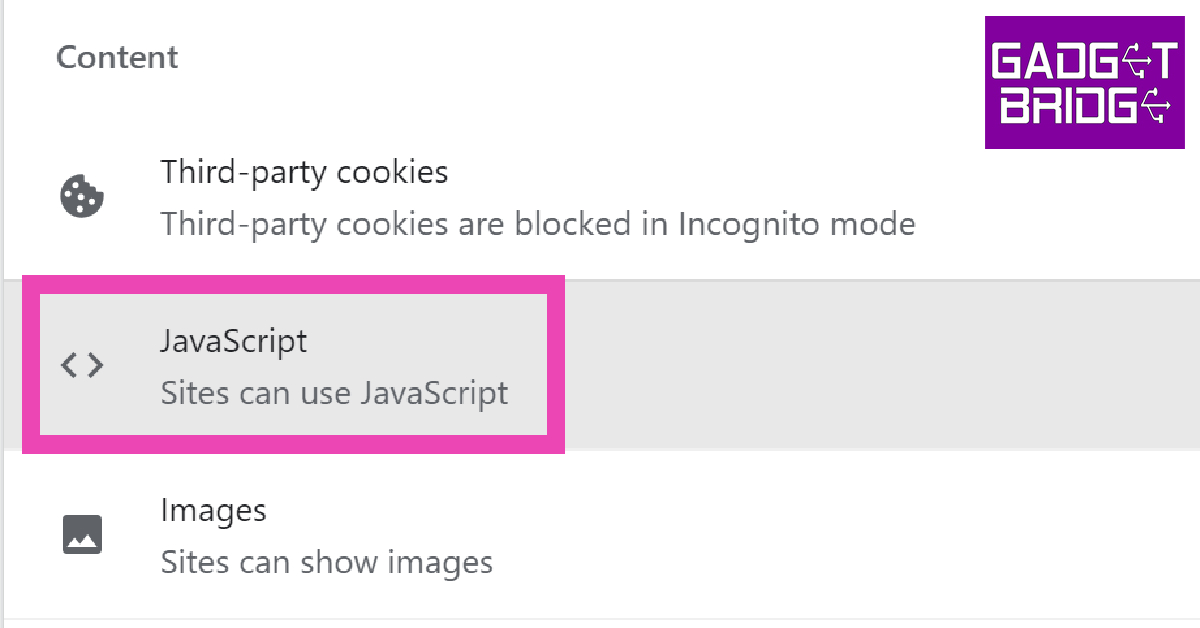
5. Scroll down and select JavaScript.
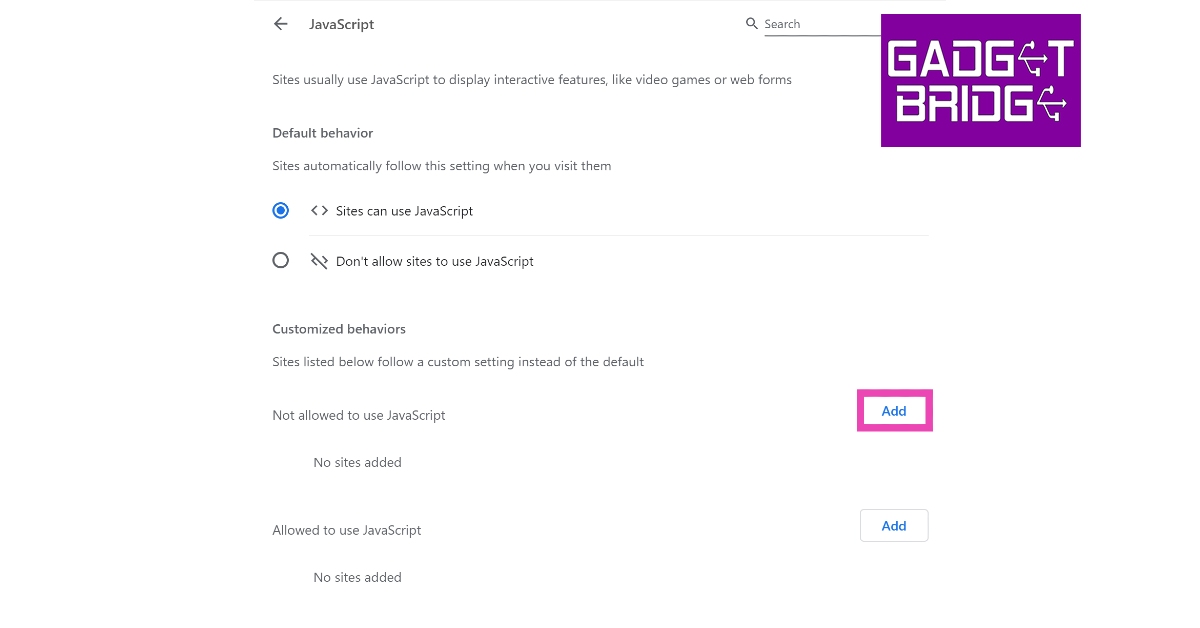
6. Hit Add next to the ‘Not allowed to use JavaScript’ section.
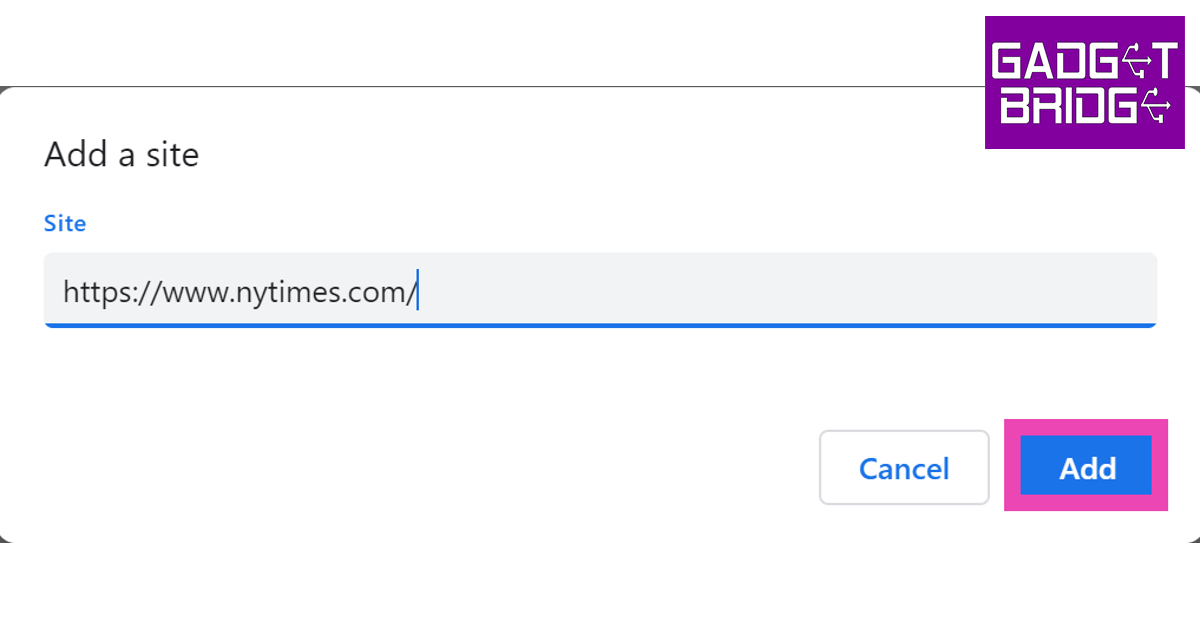
7. Enter the website URL and click on Add.
Once you return to the website, you will be able to read all the articles on it for free.
Read Also: 7 Simple Ways to Charge Your Phone Faster With or Without a Fast Charger
Final Thoughts
These are the top 15 ways to read articles behind paywalls for free, and you can bypass paywalls for free without needing a subscription. These methods will cover most of the paywalled websites and journal libraries. If you’re interested in reading academic research papers for free, use websites like Sci-hub. If you were able to unlock paid content using one of these methods, let us know in the comments!Disclaimer: This article is for informational purposes only.
Ever since launching its services in India, Spotify has gained a strong foothold in the streaming market. Users can choose from a range of subscription plans, from a family pack that supports up to 6 accounts all the way to a daily plan that costs just Rs 7. Spotify Premium gets rid of all the ads on the platform and gives users extra options like downloading up to 10,000 songs and more. Even with all these added features, some people prefer to use Spotify for free even if they have to endure multiple ads. In this article, we show you how to cancel your Spotify Premium subscription.Read Also:7 Simple Ways to Charge Your Phone Faster With or Without a Fast Charger
Cancel Spotify Premium subscription using a web browser
Step 1: Open the Spotify website on your web browser and log in to your Spotify account.Step 2: Click on your profile icon at the top right corner of the screen.Step 3: Select ‘Account’ from the drop-down menu.Step 4: Click on ‘Available plans’ from the side menu and scroll down and select ‘Cancel Premium’.Your Spotify Premium subscription will be cancelled.
Cancel Spotify Premium subscription from the Android app
Step 1: Open the Spotify app on your smartphone.Step 2: Click on the Settings icon at the top right corner of the screen.Step 3: Select ‘Premium Plan’ under the Account category.Step 4: Scroll down and select ‘See other plans’.Step 5: Select ‘Change plans on web’.Step 6: Scroll down and select ‘Cancel Premium’.Your Spotify Premium subscription will be cancelled.
Cancel Spotify Premium subscription on an iPhone
Step 1: Go to Settings and tap on your name.Step 2: Select ‘Subscriptions’ and scroll down and tap on Spotify.Step 3: Select ‘Cancel Subscription’ and confirm your choice.Your Spotify Premium subscription will be cancelled.
Bonus Tip
How to Delete your Spotify Account
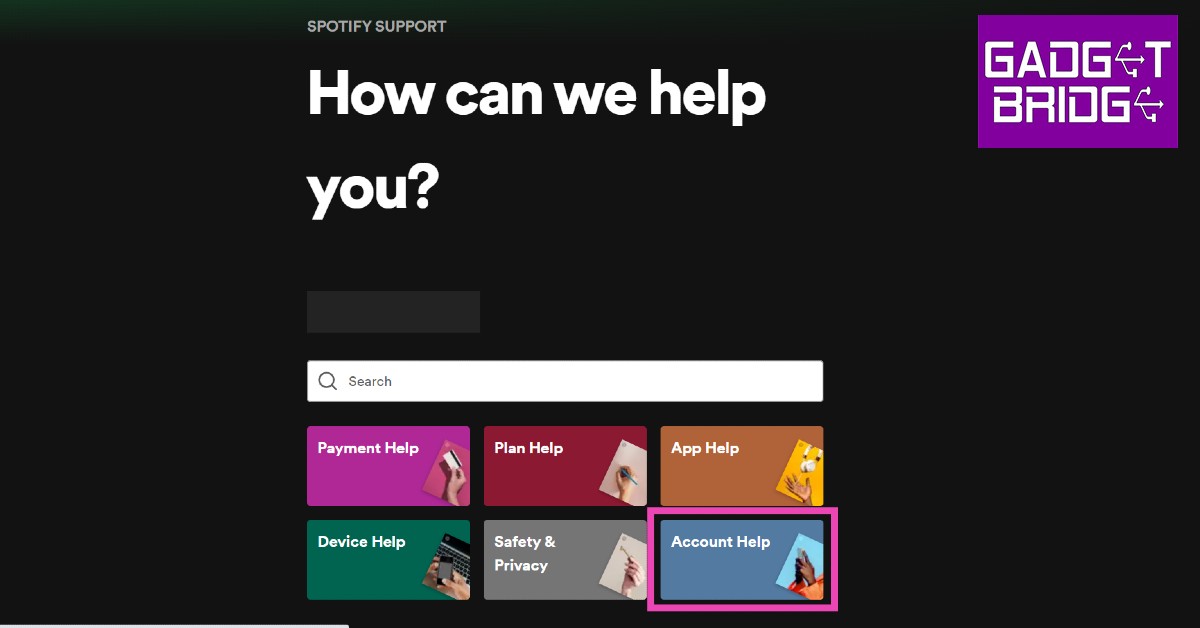
Step 1: Open Spotify on your web browser and log in to your account.Step 2: Click on your profile icon at the top right corner of the screen and select ‘Account’ from the drop-down menu.Step 3: Click on ‘Support’ from the banner menu.Step 4: Select ‘Account help’ and go to ‘Account Settings’.Step 5: Click on ‘Closing your Account’.Step 6: Select ‘Close your Account’ and confirm your choice. Your Spotify account will be permanently deleted after 7 days.Read Also: YouTube handles introduced: Key details inside
Conclusion
These are the 3 simple ways you can cancel your Spotify Premium subscription. Once you’ve cancelled your Spotify Premium membership, you will be reverted back to the free plan. You will still be able to listen to music, but with ads. If you want to see your listening stats on Spotify, read our instructional guide here.
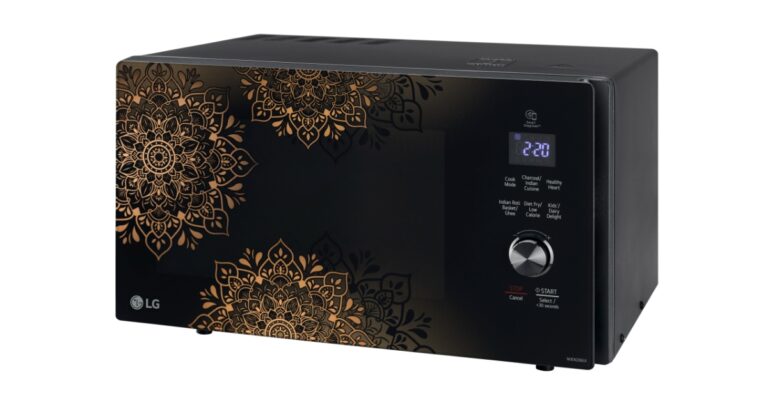
The new line of 2022 microwave ovens from LG Electronics has been launched in India. The all-new LG Charcoal Microwave line provides a healthier method of cooking while maintaining the genuine smoky flavour. The new Regal line features a contemporary, elegant, and refined look. According to the company the device was created with Indian clients’ interests in mind. It appeals to all Indian clients and is a great choice because of its distinctive design. There are several important features in the range.The brand-new LG microwave oven lineup has the newest technologies. It has a charcoal lighting feature that allows for healthier, more natural cooking with the ideal barbecue flavour of crispy outside and juicy within. In addition, it uses less energy and time than conventional microwaves.A Healthy Heart Autocook Menu that offers thirty heart-healthy recipes is preinstalled in the microwave as part of the Charcoal range. The Heart Care Foundation of India has approved these recipes.Customers may now cook a variety of dishes that microwaves have never been able to produce thanks to temperature control. The flavour and texture of the meal are preserved by the constant flow of cooking power.Customers may make clean, odourless ghee in just 12 minutes with the newest LG Microwave models. With the push of a button, the novel Pasteurize Milk feature provides fresh and pure milk. While lowering protein denaturation, it aids in maintaining nutrition.Due to the deep drying techniques used in Indian cooking, LG microwaves enable users to enjoy crispy treats with the Diet Fry feature, which uses up to 88% less oil, making it a great option for those who are health-conscious. The microwave has a special motorised rotisserie that rotates 360 degrees, ensuring even cooking and preserving the food’s nutritional value. Additionally, it has made it feasible to instantly prepare Indian breads.The Stainless-Steel Cavity in the most recent LG microwave models improves the appliance’s overall performance. It is entirely free of rust, simple to clean, quicker, and more hygienic. Cooking is now safer thanks to Quartz Heater-Concealed Heating because there is no longer a possibility of hand injuries.With its elegant, minimalist appearance, the microwave range elevates the kitchen. While performing better, they take up less space. Even the smallest kitchens can accommodate it because of its compact form, which gives a substantially bigger interior capacity with adequate room for tall or wide dishes.The price of the new LG microwave ovens starts at Rs 13,599. In terms of availability, the device will be available across all the stores in the country.
For the latest gadget and tech news, and gadget reviews, follow us on Twitter, Facebook and Instagram. For newest tech & gadget videos subscribe to our YouTube Channel. You can also stay up to date using the Gadget Bridge Android App. You can find the latest car and bike news here.
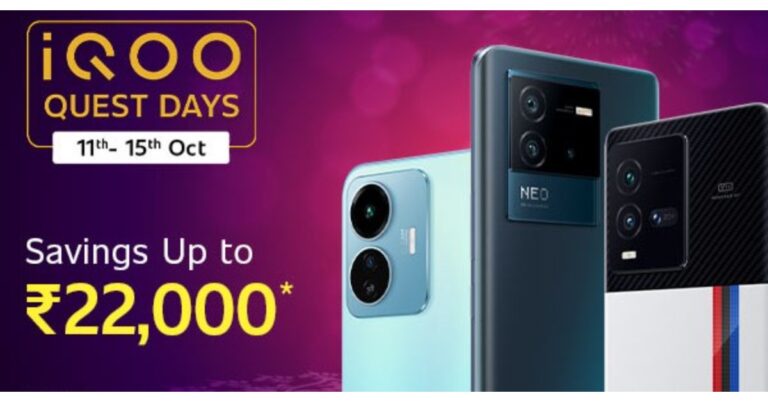
The iQOO Quest Days have been announced on Amazon. The sale will take place from October 11 to October 15. The price of iQOO smartphones will be reduced during the sale period. Additionally, Amazon will provide card offers and discounts for a range of iQOO devices. The Neo 6, Z6, and iQOO 9 series smartphones are presently eligible for the iQOO Quest Days sale. Let’s look at the offer that will be available during the iQOO Quest Days sale.iQOO is slashing the price of a number of its goods during the iQOO Quest Days sale. Amazon is providing additional discounts on the iQOO items thanks to partnerships with ICICI Bank, Citi Bank, and Axis Bank. Additional Off on Exchange for up to Rs 4000, Amazon Coupon Discounts worth up to Rs 750, as well as other exciting offers, during the iQOO Quest Days on smartphones from the iQOO 9 series, Neo 6 series, and Z6 series.iQOO 9 Pro 5G, which typically has a starting price of Rs 64,990, can be purchased during the sale for an effective price of Rs 52,990. This includes a price reduction of Rs 7,000 and bank card discounts. The iQOO 9T 5G is available for purchase at an effective price of Rs 44,999, down from its regular price of Rs 49,999 on Amazon.The iQOO 9 SE is initially priced at Rs 33,990, but iQOO is also providing a Rs 4,000 instant discount. Cardholders of ICICI, Citi, and Axis banks will receive a Rs 1,000 discount.During the iQOO Quest Days sale, the base model of the iQOO Neo 6, which is usually sold for Rs 29,999, is available for purchase for Rs 25,999. An additional Rs 2,000 in bank card discounts are included in this promotion.The iQOO Z6 5G is on sale for Rs 14,499, down from its typical starting price of Rs 15,499 on Amazon.Customers can take advantage of the following deals through October 15 as part of iQoo Quest Days:
For the latest gadget and tech news, and gadget reviews, follow us on Twitter, Facebook and Instagram. For newest tech & gadget videos subscribe to our YouTube Channel. You can also stay up to date using the Gadget Bridge Android App. You can find the latest car and bike news here.
Garena Free Fire is a battle royale game with regular awards and tournaments to keep players interested. If you play Garena Free Fire, you should be aware of the redeem codes that are released on a daily basis. However, because the battle royale game is banned in India, players from other countries can use the Free Fire Redeem codes daily. If you’re unfamiliar with the Garena Free Fire redeem codes or don’t know how to get them, we’ve put together a step-by-step guide to help you redeem them. Check out Garena Free Fire Redeem Codes for October 12.The Free Fire redeem codes are a great way to get free stuff. These are 12-digit codes that contain alphabets and numbers, as well as an expiration date and time. Because the Garena FF redeem codes cannot be used more than once, you should hurry to the redemption page to claim your free reward before someone else does. To get a free reward, all you have to do is go to reward.ff.garena.com/en, which is the official redemption page. Also, keep an eye on this space for daily updates on Garena Free Fire redemption codes and rewards.
Garena Free Fire Redeem Codes Today 12 October 2022
YT2D HNEJ KT6O
Y9KT 70P8 LKUO
CIX7 A6QR EDC2
3GHR UFDX YSTG
R5JT 6LOY 9I8B
UY1N MRKL 5T6Y
H98G VC7Y E21C
2VBH J4UI 5T8F
7Y6X FDGR NJKT
L1YI UHYH FKTI
6YXX ZQ12 345T
YBHJ KLIU 34ZX
G345 SJKI J1IT
UH7V NXMK AI9Y
How to Get Free Fire Redeem Codes for Garena on October 12?
Amazon Quiz for 12 October 2022 has gone live on the company’s mobile platform. The daily quiz contest brings an opportunity for Amazon users to win exciting prizes. In today’s Amazon Quiz the participants have the chance to win Rs 1,000 Amazon Pay Balance. All they have to do is answer all the questions correctly.A fresh question is posted on the Amazon app daily which consists of five simple questions based on general knowledge and current events. The quiz can be played on the Amazon App from 12 AM to 11:59 PM. You have to answer all the questions correctly. Then the participants will be shortlisted for a lucky draw. The result of the lucky draw will be announced at the end of the month. The participants can win Amazon Pay Balance to up to Rs 50,000. Check out the 12 October 2022 Amazon Quiz question and their answers to win Rs 1,000 Amazon Pay Balance.Amazon Quiz Today Prize – Rs 1,000 Amazon Pay BalanceQuiz Date – 12 October 2022Daily Timing – 12 AM to 11:59 PMWinner Announcement – Today 12 PM
Amazon Quiz Answers Today 12 October 2022
Question 1: Carlos Alcaraz’s first match as world no.1 was a straight sets loss to which player at the Astana Open
Answer- David Goffin
Question 2: The upcoming movie ‘Ticket to Paradise’ is set largely in which of these tourist destinations (though the scenes were filmed in Australia)?
Answer- Bali
Question 3: Which of these actors was recently honoured as a ‘National Icon’ by the Election Commission of India?
Answer- Pankaj Tripathi
Question 4: This artist’s ‘Campbell’s Soup Cans’ are considered a breakthrough in Pop Art. Name the artist
Answer- Andy Warhol
Question 5: This visual depicts which site of pilgrimage?
Answer- Badrinath
How To Play Amazon Quiz
Only app users are eligible to play the Amazon quiz every morning from 12 AM to 11:59 PM. The quiz is not available on the desktop. For those who are unaware of how to play the Amazon quiz below are the steps, you can follow to take the quiz.
Firstly download the Amazon app from Google Play Store or App Store
Now fill in the required information through the Sign Up option.
You need to log in to the Amazon app and scroll down on the home screen to find the Amazon Quiz banner.
Tap on the Amazon Quiz banner and tap on the Start button to start the Quiz.
Now you will get 5 questions and you need to answer them correctly. One wrong answer will eliminate you from the Quiz.
After answering all the questions correctly you are now eligible for a Lucky Draw.
The winner’s name will be announced today at 12 PM.
The temptation to take a gamble on a game of chance is human nature. But it is even more natural that we look for ways to bend fate in our favour and seek any way to improve the odds. That’s why online casino marketing is such a fascinating topic. Even the most cynical of us are forced to take a second look when we see offers like no deposit bonuses, where the casino seems to be literally giving away money.
Deep down, we know there has to be a catch, but the question of whether online casino bonuses genuinely offer risk-free gambling or are just clever marketing is not straightforward to answer.
A big money, high-growth industry
Before we look at the nitty-gritty of the casino bonuses themselves, it is important to understand a little bit of context. Online gambling is a huge industry. Last year, it generated about $58 billion in revenue and that number increases at a rate of more than 11 percent every year.
Few other industries can boast that sort of health in these difficult times, and it has led to a hugely competitive marketplace occupied by some established brands and a whole lot of new entrants. That’s particularly the case in high-growth markets like Australia, where the Gamble Online review site details a long list of casino platforms aimed specifically in the Australia market. See here gambleonlineaustralia for more details.
You will immediately notice that all these casinos are offering big incentives to new players. Now there is no such thing as a bad casino bonus, but some offer a real chance at winning money with zero risk, while others give you a chance to try games out for free but are unlikely to make you any real money. Here’s what to check.
Wagering rules
The biggest catch in the casino bonus world is the wagering requirement. A no-deposit bonus places money, let’s say $20, in your betting account without you having to deposit any of your own. But the wagering requirement can be as high as 60x, meaning you would have to place 60x $20, or $1,200 in wagers from the bonus money and any winnings it produced before you can withdraw anything. It’s not impossible, but it’s massively unlikely, so bonuses like this are fine for trying out games without wasting money but don’t expect them to win you anything.
Limits
Other bonuses state they have a maximum withdrawal limit of perhaps $50 or $100. Imagine hitting the jackpot, thinking you’ve won thousands and then suddenly realizing you can only withdraw $50 of it. Other limits might stipulate the time deadline for using your bonus or the games to which it can be applied.
Finding the real deal
There are genuinely amazing offers out there. Some casinos offer no deposit-free spins with no wagering requirements, so you can simply spin your spins and withdraw whatever you win. Others offer very low wagering requirements on matched bonuses but here, you have to deposit some money of your own, which the casino then matches. The best bonuses take some time to track down, but it is well worth the effort.
For the latest gadget and tech news, and gadget reviews, follow us on Twitter, Facebook and Instagram. For newest tech & gadget videos subscribe to our YouTube Channel. You can also stay up to date using the Gadget Bridge Android App. You can find the latest car and bike news here.
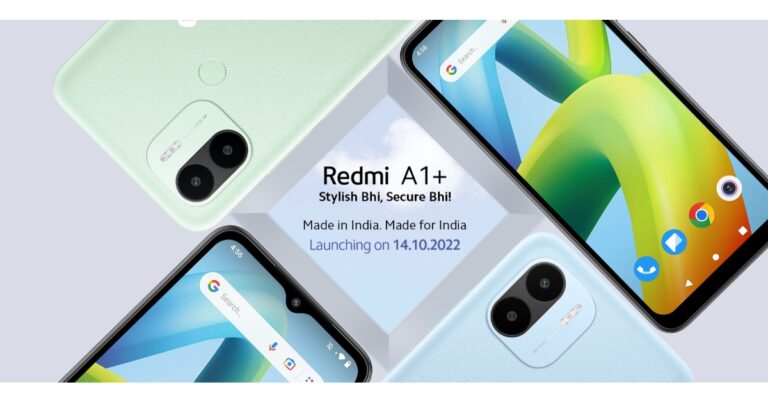
Xiaomi today announced that it will be launching another budget smartphone under its sub-brand Redmi. The company has officially confirmed the upcoming launch of Redmi A1+ in India which is scheduled to take place on October 14. Apart from revealing the launch date the company has also highlighted the key details of the upcoming phone. It will be featuring a 5,000mAh battery and will be powered by a MediaTek Helio A22 processor. Moreover, the device will come in three colour options to choose from.Redmi A1+ is confirmed to release in India on October 14. On a dedicated webpage, Xiaomi disclosed some of the Redmi A1+ technical details before to the device’s national release.The Redmi A1’s display will have a waterdrop notch. According to the company, the smartphone will run on Android 12 out of the box. The firm confirms that it will operate on “clean” Android 12.It will draw its power from a 5,000mAh battery and will come equipped with an octa-core MediaTek Helio A22 SoC.It will have a flash and a dual rear camera arrangement with an 8MP sensor. The Redmi A1+ will be offered in the colours blue, green, and black. The names of the colourways have not yet been disclosed.The back part of the smartphone will have a leather texture finish and a fingerprint sensor.The business released Redmi A1 at the beginning of the month. The affordable smartphone, which debuted alongside the Redmi 11 Prime series, is priced under ten thousand rupees. The MediaTek Helio A22 SoC powers the new phone. It has a 5,000mAh battery and comes pre-installed with Android 11. Additionally, the gadget has a twin back camera setup.Redmi A1 is now available in India for Rs 6,499 for a single 2GB RAM and 32GB internal storage. It comes in the colours Light Green, Light Blue, and Classic Black.
For the latest gadget and tech news, and gadget reviews, follow us on Twitter, Facebook and Instagram. For newest tech & gadget videos subscribe to our YouTube Channel. You can also stay up to date using the Gadget Bridge Android App. You can find the latest car and bike news here.
True wireless earphones have been making strides in the sub-Rs 3,000 category, with brands like Redmi, Oppo, Realme, and OnePlus consistently putting out decent products. With a range of TWS to choose from, buyers are keen on making the switch from wired headphones and wireless neckbands. We got our hands on OnePlus Nord Buds CE and used it for a couple of weeks. Does this TWS have what it takes to compete in this hotly contested category? Read our OnePlus Nord Buds CE review to find out.Read Also: Oppo Enco Buds 2 Review: Does not miss a beat!
OnePlus Nord Buds CE review: Design
Inside the box, you’ll find a USB Type-C charging cable, a user guide, a brand sticker, and a red cable club welcome card along with the wireless headsets. The charging case is made out of plastic and has a glossy texture to it. We were quite sceptical of the case being a fingerprint magnet, but after two weeks of rigorous use, we are happy to report that the case holds up well against prints and scratches.The overall build is satisfactory, but it does not inspire a lot of confidence in its strength, The pebble-shaped case sports a flip lid which could have been a bit more firm. However, the design is very compact and portable. No complaints there. The headset is available in two colours – Moonlight White and Misty Grey. We used the latter for this review. The design of the charging case is clean and minimal. The USB charging port is housed at the bottom while the notification light finds its way just below the lid. The OnePlus branding is embossed in a greyish colour at the centre of the case. The earbuds have a stem attached to them and do not come with silicone tips. The open design is something we’re fond of, as it is easy on the ears and you can put the buds in for an extended duration of time.The earbuds are rated IPX4 which means they are resistant to water splashes. You can comfortably work out using the OnePlus Nord Buds CE without having to worry about the buds taking damage due to sweat. However, there is always a risk of the earbuds slipping out when there’s excessive sweat.The touch sensors are located on the stem and work exceptionally well. We’re used to a lot of accidental touches while using TWS across different categories but the Nord Buds CE do a great job of genuine touch detection. The touch controls can be customised using the Hey Melody app.
OnePlus Nord Buds CE review: Performance
Equipped with 13.4mm dynamic drivers, the OnePlus Nord Buds CE offer a decent audio performance. The earbuds take no time to pair with your device and stay connected within a range of 10-15 metres. There is no option to pair multiple devices with the headset. But that is something you’ll rarely find in a TWS in this category. Moving to the sound profile, the OnePlus Nord Buds CE certainly does not disappoint. We listened to a range of genres, from hyperpop to classic rock, and the performance was consistent throughout. The mid and low frequencies do not get lost in the background, and the bass mixes in quite nicely with the overall sound. However, we felt that the audio clarity could’ve been worked on a bit more as some recordings sounded muffled and boxy. This was more pronounced at louder volumes. Listening to podcasts was a pleasant experience with the OnePlus Nord Buds CE. The harsher frequencies were levelled out and the audio output was well-rounded. With the comfortable design, you can listen to a podcast for hours without feeling the need to take out the earbuds. The same applies to voice calls as well. There were very few disturbances or lags in sound quality over a voice call. The buds are equipped with a microphone on each stem and use AI noise reduction to maintain the sound quality. We would still suggest using the microphone in quieter conditions as the AI noise reduction does not work as efficiently in an environment with a lot of background noise. OnePlus claims a battery backup of 4.5 hours for the earbuds with an additional 20 hours in the case. We got around 3.5 hours on a full charge. The battery backup is also dependent on the volume level, so if you don’t go beyond 50-60%, you’ll get the promised 4.5 hours. The charging case was good enough to charge the earbuds 4 times before it needed to be plugged in. Overall, we were quite satisfied with the battery performance.The HeyMelody app offers a bunch of preset equaliser options for the earbuds. These include Bass (default), Balanced, Serenade, and Gentle. You can even switch to a low latency mode of 94ms if you want to use the earbuds while gaming. We tried out the Game mode while playing Call of Duty Mobile, as the sound synced up perfectly with the video and elevated the gaming experience. The HeyMelody app also lets you customise the touch controls on the stem (as shown in the picture).Read Also:Sony WH-1000XM5 review: The sound speaks for itself
Verdict
If you’re looking for a pair of wireless earbuds for casual listening, the OnePlus Nord Buds CE make a great entry-level product. However, if you’re an audiophile who wants a detailed sound profile, we’d suggest looking outside of this category. The OnePlus Nord Buds CE deliver what is expected from a standard affordable TWS. The price tag of Rs 1,899 certainly works in its favour as there aren’t a lot of TWS in this price range that can deliver a better performance than the OnePlus Nord Buds CE.


 Step 3: Tap on your profile picture.
 Step 4: Select ‘Remove’.
 Your Google Account profile picture will be taken down.
 Step 3: Click on your profile picture.
 Step 4: Select ‘Remove’.
 Your profile picture will be withdrawn from your Google and Gmail accounts.
Read Also: OnePlus Nord Buds CE Review: Well-tuned at an attractive price
Your profile picture will be withdrawn from your Google and Gmail accounts.
Read Also: OnePlus Nord Buds CE Review: Well-tuned at an attractive price



 If you can’t get 12ft ladder to work, try https://1ft.io/ instead. This website works just like 12ft ladder.
 3. Select an archive.
 4. The article will be unlocked within seconds.




 3. The paywall will be bypassed, and the news article will open up in Reader Mode.

 Certain websites do not restrict the paywalled articles on your device when you save them as a PDF. This trick may not work on every website, but it will help you get around certain outdated paywalls. To save an article as a PDF, open it on your PC’s web browser and press Ctrl+P. In the ‘Destination’ tab, select ‘Save as PDF’, then hit ‘Save’.
 4. Click on Site Settings.
 5. Scroll down and select JavaScript.
 6. Hit Add next to the ‘Not allowed to use JavaScript’ section.
 7. Enter the website URL and click on Add.
 Once you return to the website, you will be able to read all the articles on it for free.
Read Also:
Once you return to the website, you will be able to read all the articles on it for free.
Read Also: 
 Step 4:
 Step 3:
 Step 4:
 Step 5:
 Step 6:
 Step 3:
  Step 5:
 Step 6:

 For the latest