Amazon is back with another quiz on its mobile platform. The daily quiz is now live on the Amazon App and today’s Amazon Quiz will give you a chance to win Rs 2,500 Amazon pay Balance. The participants can play the 20 September 2022 Amazon Quiz from 12 AM to 11:59 PM. For those who are unaware of the quiz, the e-commerce platform brings a fresh quiz on a daily basis which consists of five questions related to general knowledge and current affairs.The participants need to answer all the questions correctly and their names will be selected for a lucky draw. The winner will be announced at the end of the month. One wrong answer could eliminate you from the quiz. Only app users are eligible to participate in the Quiz. In today’s Amazon Quiz the participants will get a chance to win Rs 2,500 Amazon Pay Balance. Check Out 20 September 2022 Amazon Quiz Answers.Amazon Quiz Today Prize – Rs 2,500 Amazon Pay BalanceQuiz Date – 20 September 2022Daily Timing – 12 AM to 11:59 PMWinner Announcement – Today 12 PM
In This Article
Amazon Quiz Answers Today 20 September 2022
Question 1: The movie ‘Thirteen Lives’ is based on a real life rescue mission in Tham Luang Nang Non cave in which country?
Answer: ThailandQuestion 2: Which of these cricketers who was supposed to captain the Indian Maharajas against the World XI on September 16 pulled out of the match?
Answer: Sourav GangulyQuestion 3: In the recent Reliance AGM who did Mukesh Ambani announce as the leader of the new energy business?
Answer: Anant AmbaniQuestion 4: This character is the principal antagonist in which Batman movie?Answer: Dark KnightQuestion 5: This is the Guggenheim Museum in which city in Spain?
Answer: Bilbao
How To Play Amazon Quiz
Only app users are eligible to play the Amazon quiz every morning from 12 AM to 11:59 PM. The quiz is not available on the desktop. For those who are unaware of how to play the Amazon quiz below are the steps, you can follow to take the quiz.
Firstly download the Amazon app from Google Play Store or App Store
Now fill in the required information through the Sign Up option.
You need to log in to the Amazon app and scroll down on the home screen to find the Amazon Quiz banner.
Tap on the Amazon Quiz banner and tap on the Start button to start the Quiz.
Now you will get 5 questions and you need to answer them correctly. One wrong answer will eliminate you from the Quiz.
After answering all the questions correctly you are now eligible for a Lucky Draw.
The winner’s name will be announced today at 12 PM.
A considerable amount of various content: educational videos, technical reviews, green screen effects for video blogging, training sessions and relaxing meditations afterwards, literally everything can be found on Youtube.
That’s why Youtube remains one of the most popular sites on our vast internet. And if you are an active Youtube user, you’ve definitely experienced the need for a high-quality video downloader.
What if you are looking for the best video download software from Youtube in 2022 that you would like to explore? Let us take a look at a few popular downloaders that may be very handy and let you easily download videos from any website.
First in our selection is a professional video downloader for Mac users – Downie. Let us take a look at some of the features that might come in handy.
Downie gives us the ability to download a video from any website and edit it in any format.
Imagine while watching a video on Facebook or Instagram you liked a track and wanted to use it in your future project, you just drag and drop the link into the video downloader and it will do the rest.
Currently, Downie supports over 1,000 different sites including YouTube, Facebook, Vimeo, Instagram, Bili Bili.
However, what if you need audio for the common brushtail possum’s growl for your biology project? And biology scientists’ website is the only place where you can find it. Simply, write to technical support, which will consider your proposal within 24 hours and if the site meets the requirements they will add it to the list.
Also, we tried to install the extension in Safari and a download button appeared next to the address bar, so when you click on it while watching any streaming video, it will automatically start downloading.
Downie has browser extensions for Firefox, Safari, Chrome and Opera.
Downie supports HD video on Youtube and other sites, up to 4K or 1080p if it’s available, you can select quality or specifically limit it.
So if you don’t need 4K or 1080p video, you can lower the resolution in case you’re worried about how much space the video will take up on your computer. Another special feature of Downie is post-processing uploaded videos into various formats.
A video podcast of your fav blogger can be adapted into an MP3 and listened to on your iTunes while you drive to work.
If you are a Mac user and you are looking for one of the advanced internet video downloaders, Pulltube might be a good alternative.
The interface of the software is not very intuitive and can be a concern for beginners. So we took apart a few features and realized what makes it unique.
With support for downloads from over 1000 sites like YouTube, Vimeo, Facebook, Dailymotion, Soundcloud, Instagram, Youku, Bandcam you won’t be amazed. But what about the ability to trim up your video and audio right in the app?
Let’s say you watched 1:30 of Apple’s 2022 presentation and are curious about the new Apple Watch Series 8 and want to share it with your friends to discuss it.
Trimming mode lets you edit out the part you want without using third-party software.
Or trim the video with timecode.
Don’t forget that most high-resolution YouTube videos are now stored in WebM format. There is a format selection option in Pulltube.
The ability to upload videos with subtitles or download subtitles separately has become a real boon for those working in the media industry or polyglots.
Once you get a link to your video with Pulltube, click the CC button in the lower left corner and set the app to download subtitles.
You can customize Pulltube to fit your needs, choose keyboard shortcuts and gestures, set up extensions for your browser, save the visible frame as a thumbnail, etc. There are no limits to the number of useful Pulltube features.
The Concluding Thoughts
Whether you frequently download videos, work with video content, or just want to enjoy high-quality videos without annoying ads, there are many advanced programs to help you do so.
We strongly recommend you to try Downie and Pulltube, both of which can be found for FREE on the Setapp website, if you are still in doubt. This way you can get an idea of the app’s capabilities and see what it can do.
For the latest gadget and tech news, and gadget reviews, follow us on Twitter, Facebook and Instagram. For newest tech & gadget videos subscribe to our YouTube Channel. You can also stay up to date using the Gadget Bridge Android App. You can find the latest car and bike news here.
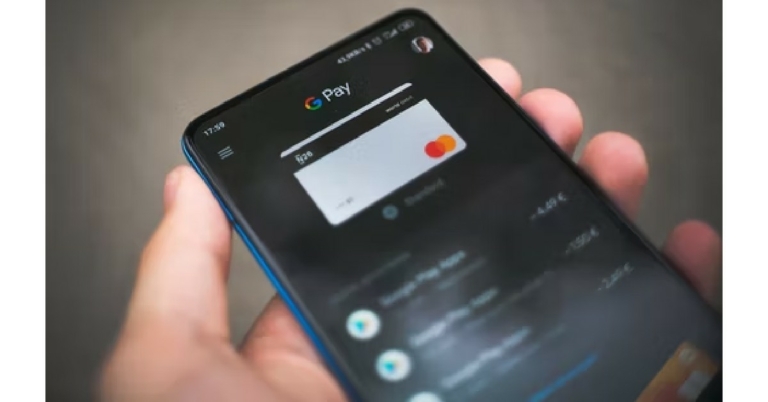
Mobile payments are becoming increasingly popular in India with every passing year. With more businesses and vendors accepting UPI payments through services like Google Pay and PayTM, you don’t always need to carry cash with you. You can easily send any amount of money to someone on Google Pay, without even needing to know their bank account details. All you need is the recipient’s mobile number. In this article, we show you how to send money to a mobile number on Google Pay.Read Also: How to share your saved WiFi network and password from any Android device?
In This Article
Here’s how you can send money to a mobile number on Google Pay
Step 1: Open the Google Pay app on your smartphone and select ‘Pay phone number’.Step 2: Enter the phone number of the person you want to send the money to. Step 3: Tap the profile of the recipient. If the profile name does not match the name of the recipient, make sure you’ve entered the correct number. If no profile shows up, it means the recipient has not enabled mobile banking on their account. Step 4: Once you’ve selected the recipient’s profile, tap on the ‘Pay’ option at the bottom left corner of the screen.Step 5: Type in the amount you want to pay. You can also add a note to go along with the payment.Step 6: Tap on ‘Pay’ and enter your 6-digit UPI pin. The payment will be made to the recipient.
Bonus tip
How to send money using a QR code on Google Pay
Step 1: Open the Google Pay app and select ‘Scan any QR code’.Step 2: Give the Google Pay app access to your phone’s camera and scan the QR code on the recipient’s mobile phone or business sticker. You can also upload a QR code from your phone’s gallery.Step 3: Type in the amount you want to send and tap on ‘Pay’.Step 4: Enter your 6-digit UPI pin and select ‘Pay [amount]’. The transaction will be completed in a few seconds.Read Also: How to Watch Free Live TV News on Android TV in India?
Conclusion
This is how you can send money to any number on Google Pay. It is generally advised to send money using a QR code, because a phone number may be linked to several different accounts. The QR code is unique for every account linked to a UPI service. If your transaction fails to go through, wait for 2-3 business for the amount to be refunded to your bank account. If you do not receive a refund after that duration, contact your bank’s local branch.
Google Meet offers a wide range of video effects apart from the option to change your video background. A lot of users may not know this, but you can use face filters on Google Meet. Applying a face filter is a fairly simple process, and you can take all time you need to decide which one you want to use as the option is made available in the preview window before you join a meeting. In this article, we show you how to use face filters on a Google Meet video call.Read Also: How to share your saved WiFi network and password from any Android device?
In This Article
Here’s how you can use face filters on a Google Meet video call
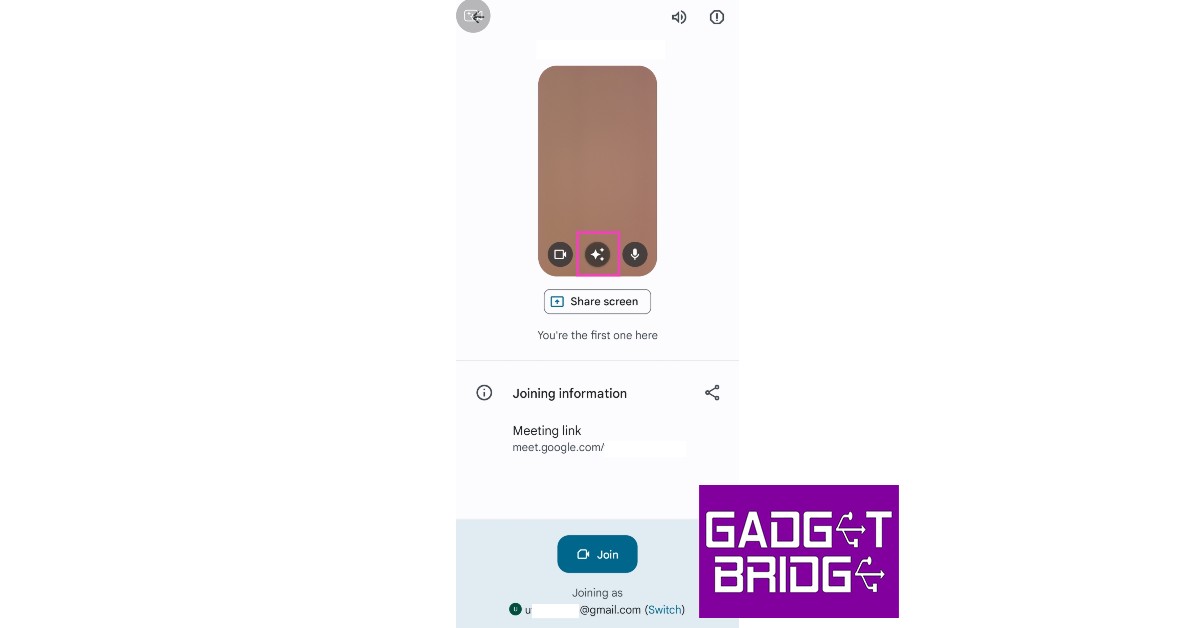
Step 1: Open the Google Meet app and join the meeting using the link or meeting code. Step 2: In the preview window, select the ‘Effects’ option.Step 3: Scroll right to the very end and select the ‘Filters’ option.Step 4: Select a filter from the list. You can try out different filters before joining the meeting. Step 5: Once you’ve selected a filter, tap on ‘Done’.Step 6: Tap on ‘Join’ to enter the meeting.
Bonus Tip
How to blur your background in Google Meet?
Step 1: Open the Google Meet app on your phone and enter the meeting code.Step 2: Click on the ‘Effects’ icon on the preview screen.Step 3: Select ‘slight blur’ or ‘total blur’ from the options that follow.Your background will be blurred.Read Also: Vivo T1 5G is now available in a new Silky white colour variant
Conclusion
This is how you can use face filters on a Google Meet video call. Apart from applying a face filter, you can also use the ‘Effects’ option to change or blur your background, or use a different colour theme for your video during the meeting. The effects can also be changed once you’re on a call. All you need to do is tap on the ‘Effects’ icon on your user window while you’re in a meeting and follow the steps mentioned above.
The Flipkart Big Billion Days Sale is set to start at midnight on September 22. E-commerce will provide fantastic offers and discounts on electronic goods, mobile phones, and accessories during the sale season. With the festive sale only a few days away, Vivo has announced the deals on its products that will be offered during the platform’s sale.Prior to the start of the Flipkart Big Billion Days Sale, Vivo has made some intriguing offers across its smartphone lineup. The sale will begin at midnight on September 22 and go through September 30.During the sale Vivo smartphones like Vivo T1x, Vivo T1 5G and Vivo T1 Pro will be getting massive discounts. As per the company, during the sale, buyers of the Vivo T1x can take advantage of a discount code worth Rs 1,000. Additionally, users can get 10% cash back on purchases made with their ICICI and Axis Bank debit and credit cards up to Rs 1,000.During the sale, buyers of the Vivo T1x can take advantage of a discount code worth Rs 1,000. Additionally, users can get 10% cash back on purchases made with their ICICI and Axis Bank debit and credit cards up to Rs 1,000.Customers can get a discount of Rs 4,000 during the BBD sale on prepaid orders or additional exchanges with T1 Pro. Additionally, an additional Rs 2,000 discount may be obtained while purchasing a Vivo T1 Pro 5G smartphone using debit and credit cards from ICICI and Axis Bank. T1 Pro is a desirable option in the market, effectively starting at just Rs 17,999 for the entry-level variant, thanks to all of the discounts taken together.With a discount of Rs 1,000 and an additional 10% cashback when using ICICI and Axis Bank debit and credit cards, the Vivo T1 44W will be offered for just Rs 12,499.“Celebrate the festive season the Turbo way with the launch of an all-new T1 5G special festive edition that sports an elegant new Silky White colour. These attractive festive offers are valid till 30th September’22, across the Big Billion Days sale on Flipkart.com,” the company said.
For the latest gadget and tech news, and gadget reviews, follow us on Twitter, Facebook and Instagram. For newest tech & gadget videos subscribe to our YouTube Channel. You can also stay up to date using the Gadget Bridge Android App. You can find the latest car and bike news here.
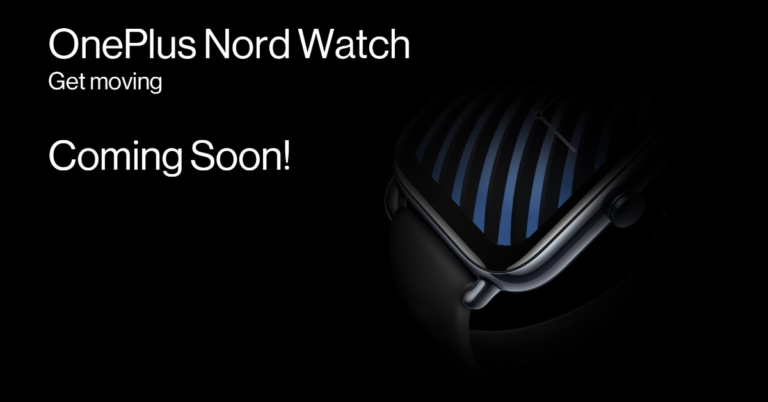
The OnePlus Nord lineup is quite popular in India for offering affordable smartphones. Apart from smartphones the range currently includes audio devices Nord Buds which was launched in April this year, Nord Buds CE and Nord wired earphones. Now the company is expanding its lineup with the introduction of OnePlus Nord Watch. After the first Watch from 2021, this is OnePlus’ second smartwatch and the first under its Nord lineup.The OnePlus Nord Watch has been officially confirmed by the company. In addition to sharing the first launch teaser, OnePlus used social media to make an announcement about its impending debut in India.As we said earlier the company has shared a teaser image which highlights that the wearable would have a square dial and what seems like a crown on the right edge. It will be offered in a black colour option. However, we can anticipate the firm releasing the OnePlus Nord Watch in a variety of colours. On the OnePlus website, there is a special microsite that states additional information will be revealed in the coming days.While announcing its upcoming product, the company said, “OnePlus, is all set to further expand the Nord ecosystem with the launch of the OnePlus Nord Watch, the first smartwatch under the Nord category, in India soon. The Nord Watch will bolster OnePlus Nord’s hold within the wearables segment and aims to make the signature OnePlus technology accessible to a wider set of audience.”The speculations suggest that the Nord Watch will include an AMOLED display with always-on capabilities. It will support a typical 50Hz refresh rate. It would have support for GPS and several watch faces. Apart from this, the device is likely to feature a calorie counter, female health tracking, and additional sports modes.Prior to the announcement, the smartphone was spotted on the BIS certification website as well as on the company’s official website. The OnePlus Nord Watch is also expected to offer two models and with a total of 5 variants. It reportedly comes with a blood-oxygen monitoring sensor and a heart-rate sensor.According to rumours, the OnePlus Nord Watch may cost less than Rs 5,000 in the nation.
For the latest gadget and tech news, and gadget reviews, follow us on Twitter, Facebook and Instagram. For newest tech & gadget videos subscribe to our YouTube Channel. You can also stay up to date using the Gadget Bridge Android App. You can find the latest car and bike news here.
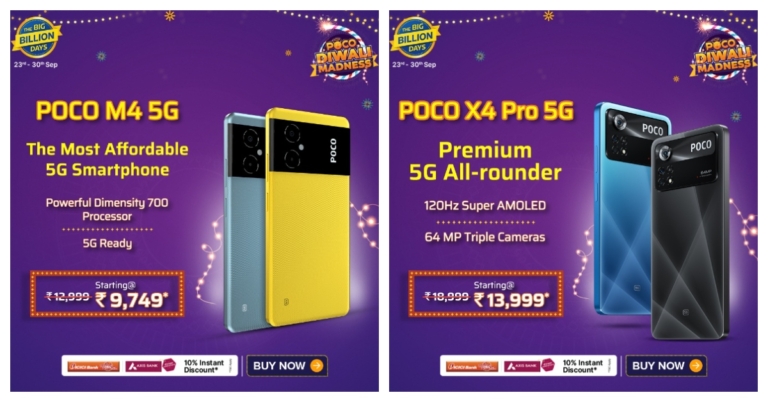
In advance of Flipkart’s Big Billion Days Sale, POCO today announced special offers and deals on its line of smartphones ahead of the Big Billion Days Sale. Additionally, the most popular POCO M4 5G and POCO F4 5G models will be made available for purchase starting today at noon at Big Billion Day prices.In advance of the September 23rd-starting Flipkart Big Billion Days sale in India, POCO has formally announced the offers and reductions on its smartphones. Massive discounts on POCO X, F, and M series have been announced.With an ICICI bank or Axis bank credit card, customers can receive an instant 10% discount on Flipkart.Flipkart’s Big Billion Days Sale is scheduled to begin on September 23. Poco smartphones such as POCO X4 Pro 5G, will receive a special BBD discount of Rs 4,000, while the most recent device POCO F4 5G, will receive a special discount of up to Rs 6,500.Additionally, customers can receive discounts of up to Rs 3,300 on the Poco M4 5G and up to Rs 3,500 on the M4 Pro 5G. Last but not least, the POCO M5 will receive a discount of up to Rs 1,500.All the variants of Poco X4 Pro 5G will be getting a BBD sale discount of Rs 4,000. The 6GB+64GB, 6GB+128GB and 8GB + 128GB variants will be available at Rs 13,999, Rs 14,999 and Rs 16,999 respectively.The Poco F4 5G’s 6GB+128GB, 8GB+128GB and 12GB+256GB will get Rs 6,000 discounts. This will bring down the original price of the phone to Rs 21,999, Rs 23,999 and Rs 27,999.Similarly, Poco M4 5G base variant 4GB+64GB will receive Rs 3,250 discount and will sell at Rs 9,749 during the Big Billion Days Sale. Whereas the 6GB+128GB after Rs 3,300 discount will sell at 11,699.Whereas the 4GB+64GB and 6GB+128GB will receive Rs 3,500 discount. Therefore the model will be available at Rs 11,699. The 8GB+128GB will get a Rs 4,500 BBD sale discount that can be bought for Rs 14,499.Lastly, the recently launched Poco M5 will be getting a Rs 1,500 sale discount and can be purchased for Rs 10,999 and Rs 12,999.
For the latest gadget and tech news, and gadget reviews, follow us on Twitter, Facebook and Instagram. For newest tech & gadget videos subscribe to our YouTube Channel. You can also stay up to date using the Gadget Bridge Android App. You can find the latest car and bike news here.
Travelling by train in India can be a chaotic experience if you’re not clear about how and when you’re going to board your train. The most important details you need to know before boarding a train are the exact time the train will arrive at your boarding station, the platform it will arrive on, and the duration for which the train will halt at the station. The National Train Enquiry System (NTES) online portal makes it very easy to find out all these details in one place. All you need is a smartphone and an internet connection. If you don’t use a smartphone, you can find the running status of your train through text updates. In this article, we bring you 4 easy methods to check live train status in India on any phone, be it a smartphone or a feature phone. Read Also:How to Watch Free Live TV News on Android TV in India?
In This Article
Check live train status using the NTES app on Android or iOS
Step 1: Download the NTES (National Train Enquiry System) app from the Google Play Store or the App Store. Step 2: Open the app and select ‘Spot Your Train’.Step 3: Enter the Train Name/Number, Station, and Date of Journey.Step 4: Tap on ‘Show Status’.Step 5: The app will display the time of arrival of the train at your boarding station. You can also check the platform it will arrive on. To view the detailed running status, tap on ‘Show Full Running’.
Check live train status using the NTES website
If you do not wish to download the National Train Enquiry System (NTES) app, you can easily check any train’s running status using the NTES website. Just follow these simple steps.Step 1: Open the web browser on your phone and go to enquiry.indianrail.gov.in.Step 2: The webpage will open in the ‘Spot Your Train’ section. If not, select ‘Spot your Train’ by tapping on the hamburger menu at the top right corner of the screen.Step 3: Enter the Train Number/Name and select your boarding station.Step 4: You will be able to see the expected arrival and departure time. For full running status tap on ‘Show Full Running’.
Check live train status in India using Google Maps
Google Maps is one of the native apps that come pre-installed on your Android smartphone. iOS users can download the app from App Store. Most users do not know but you can access any train’s running status through Google Maps. Just follow these simple steps. Step 1: Open the Google Maps app, type in the name of your destination, and select ‘Directions’.Step 2: Select the ‘Train’ icon from the list of transportation options. Step 3: From the list of available trains, select your desired train.Step 4: Tap on the train’s name again to check the full running status.
Check live train status on a feature phone using text updates
If you don’t use a smartphone you can still access the live running status of any train on your phone. Your network carrier may charge you a fee for this enquiry. Here’s how you can do it.Step 1: Go to your phone’s dialer and type *139#.Step 2: From the following pop-up window select ‘Spot Train’ by entering the number next to the option.Step 3: Enter the train name/number and your boarding station. You will be presented with the arrival and departure times. You can also check your PNR status, train timetable, seat availability, and train schedules using this service. Read Also: Snapchat for web now rolling out for everyone: All the details
Conclusion
These are the 4 best ways you can check the live train status in India on any phone, be it Android, iOS, or a feature phone. If the NTES app and website aren’t, there are a lot of other third-party apps like ‘RailYatri’ and ‘Where is my Train’ that you can use to check the live running status of any train in India.
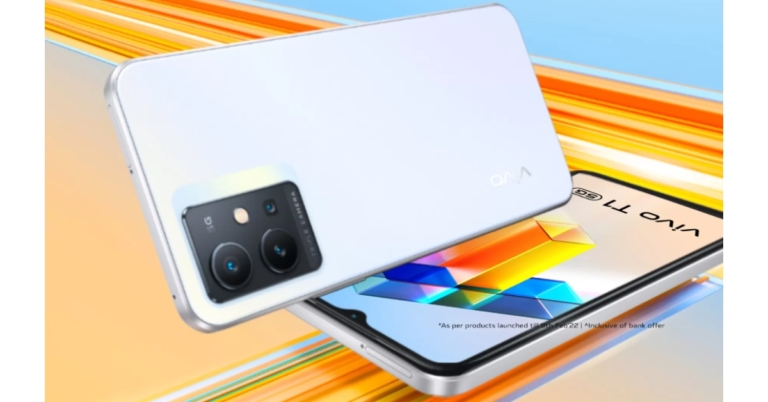
A new Silky White colour option for the Vivo T1 5G has been released in India. Flipkart offers a new colour option for buying. There is no change in the specification which includes a 6.58-inch full-HD+ LCD screen with a refresh rate of 120Hz. It has a triple camera configuration on the back and a Qualcomm Snapdragon 695 SoC.
In This Article
Vivo T1 5G Silky White colour variant price in India
The Vivo T1 5G’s Rainbow Fantasy and Starlight Black colour variants were first introduced in February of this year. Now a new Silky White colour variant has been released in India. The price of base 4GB RAM is priced at Rs 15,990. Whereas the 6GB RAM model will be available with a price tag of Rs 16,990. The new variant can be purchased through Flipkart in the country.
Vivo T1 5G specifications
The 6.58-inch full-HD+ IPS LCD screen of the Vivo T1 5G has a resolution of 1,080 by 2,408 pixels. The screen boasts a 120Hz refresh rate and a 240Hz touch sampling rate. FunTouch OS 12, which is based on Android 12, powers the gadget. Snapdragon 695 5G SoC with up to 8GB of RAM powers the gadget. Up to 128GB of internal storage can be added, and that amount can be expanded by up to 1TB via a microSD card.A 50-megapixel primary sensor with an aperture of f/1.8 and two 2-megapixel secondary sensors with an aperture of f/2.4 make up the triple rear camera setup on the Vivo T1 5G for photographs and movies. For selfies and video calls, it includes a 16-megapixel camera with an f/2.0 aperture. According to the business, the 6GB and 8GB RAM variants will come with Super Night Mode and Multi Style Portrait mode.The 5,000mAh battery on the Vivo smartphone supports 18W fast charging. In addition to GPS, Beidou, Glonass, Galileo, and QZSS, onboard sensors include a fingerprint sensor, accelerometer, ambient light sensor, proximity sensor, e-compass, virtual gyroscope sensor, dual-band Wi-Fi, Bluetooth v5.1, USB Type-C, and USB OTG connectivity options.
For the latest gadget and tech news, and gadget reviews, follow us on Twitter, Facebook and Instagram. For newest tech & gadget videos subscribe to our YouTube Channel. You can also stay up to date using the Gadget Bridge Android App. You can find the latest car and bike news here.
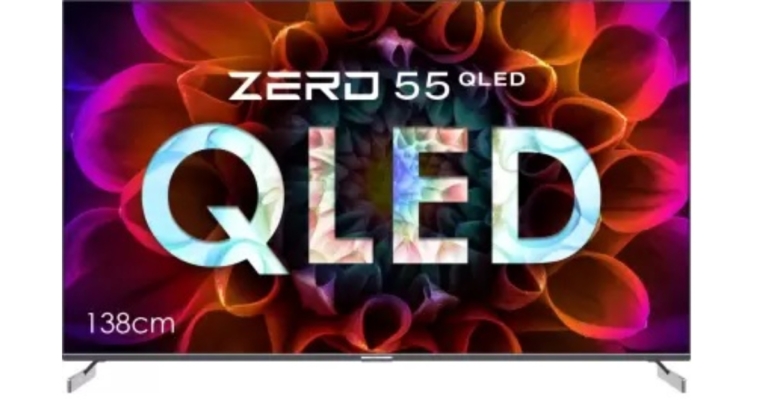
A new line-up of high-end Android TVs has been introduced in India by Infinix, a smartphone brand owned by the Transsion company. The company has introduced the Infinix ZERO 55-inch QLED 4K TV and Infinix 50-inch 50X3 4K TV under this line. It has cutting-edge Quantum DOT technology and incredibly fine 4K details. The Android 11 OS offers software support for both TVs.
Infinix ZERO 55-inch QLED 4K TV and Infinix 50-inch 50X3 4K TV
The screen of the ZERO 55-inch QLED 4K TV is bezel-free on three sides. It has Quantum DOT technology with incredibly accurate 4K details. Dolby Vision, HDR 10+ compatibility, and 60 FPS MEMC are added to it to increase the frame rate. Each dot emits a different colour depending on size thanks to the technology, which uses nano crystals with sizes between two and ten nanometers (one billionth of a metre). This allows viewers to enjoy a variety of colours.The 3 Side bezel-less Minimalistic display has a maximum brightness of 400 NITS, an NTSC colour gamut of 85%, and a sRGB colour gamut of 122%. Given its 1.6mm frameless design and 3-side bezel-less luxury style, the TV comes with an X-Blade aluminium stand to add sophistication and elegance to any interior setting. The 55-inch ZERO QLED 4K TV has two robust built-in 36 Watt Box speakers with Dolby Digital Audio and two tweeters to improve sound quality and cover the frequency range from 8K to 20K Hz.Infinix 50-inch 50X3 4K TVA MediaTek Quad-Core CA55 Processor along with 2GB RAM and 16GB ROM power the 55-inch QLED ANDROID TV.On the other hand, the Infinix 50-inch 50X3 4K TV promises more lifelike images with HDR10 compatibility, 1.07 billion colours, 85% NTSC, 122% sRGB colour gamut, and up to 300 NITS peak brightness. The Android TV has a frameless design, a screen-to-body ratio of 94%, and reduced Blue Rays, which enables users to enjoy a secure full-screen experience with a balanced, upscale appearance that can enrich any home decor.The 50-inch 50X3 4K TV features a potent combination of 24W box speakers and Dolby Audio, offering a rich, crystal-clear, powerful cinematic surround sound experience.A MediaTek Quad-Core Processor along with 1.5 GB RAM and 16 GB ROM power the Infinix 50-inch 50X3 TV. Both of Infinix’s most recent product introductions come with a variety of ports for improved connectivity. The 50-inch 50X3 TV has 3 x HDMI ports, 2 x USB ports, 5.0 Bluetooth, WiFi b/g/n, 1 AV input, 1 LAN, and Dual Band WiFi ports, as opposed to the ZERO 55-inch QLED ANDROID TV’s 2 x USB ports, 1 ARC Support, and 2 x ports.Both Android TVs have Chromecast built-in, allowing you to easily connect to your preferred video streaming services like Netflix, Amazon Prime, YouTube, and more than 5000 more via the app store. While watching any live action on the big screen, you may transform the TV into a dance floor, racetrack, and more. You can even use your smartphones as controllers. A customised and hands-free experience is provided by the Bluetooth-enabled thin remote with one-touch access to Google Assistant.In terms of pricing the 55-inch QLED 4K TV will be available at Rs 34,990 whereas the 50-inch 4K TV is priced at Rs 24,990. Both the Android TV are said to be available for purchase via Flipkart from September 24 in the country.
For the latest gadget and tech news, and gadget reviews, follow us on Twitter, Facebook and Instagram. For newest tech & gadget videos subscribe to our YouTube Channel. You can also stay up to date using the Gadget Bridge Android App. You can find the latest car and bike news here.




 Currently, Downie supports over 1,000 different sites including YouTube, Facebook, Vimeo, Instagram, Bili Bili.
However, what if you need audio for the common brushtail possum’s growl for your biology project? And biology scientists’ website is the only place where you can find it. Simply, write to technical support, which will consider your proposal within 24 hours and if the site meets the requirements they will add it to the list.
Currently, Downie supports over 1,000 different sites including YouTube, Facebook, Vimeo, Instagram, Bili Bili.
However, what if you need audio for the common brushtail possum’s growl for your biology project? And biology scientists’ website is the only place where you can find it. Simply, write to technical support, which will consider your proposal within 24 hours and if the site meets the requirements they will add it to the list. Also, we tried to install the extension in Safari and a download button appeared next to the address bar, so when you click on it while watching any streaming video, it will automatically start downloading.
Downie has browser extensions for Firefox, Safari, Chrome and Opera.
Also, we tried to install the extension in Safari and a download button appeared next to the address bar, so when you click on it while watching any streaming video, it will automatically start downloading.
Downie has browser extensions for Firefox, Safari, Chrome and Opera. Downie supports HD video on Youtube and other sites, up to 4K or 1080p if it’s available, you can select quality or specifically limit it.
So if you don’t need 4K or 1080p video, you can lower the resolution in case you’re worried about how much space the video will take up on your computer.
Downie supports HD video on Youtube and other sites, up to 4K or 1080p if it’s available, you can select quality or specifically limit it.
So if you don’t need 4K or 1080p video, you can lower the resolution in case you’re worried about how much space the video will take up on your computer.  Another special feature of Downie is post-processing uploaded videos into various formats.
A video podcast of your fav blogger can be adapted into an MP3 and listened to on your iTunes while you drive to work.
Another special feature of Downie is post-processing uploaded videos into various formats.
A video podcast of your fav blogger can be adapted into an MP3 and listened to on your iTunes while you drive to work.
 The interface of the software is not very intuitive and can be a concern for beginners. So we took apart a few features and realized what makes it unique.
With support for downloads from over 1000 sites like YouTube, Vimeo, Facebook, Dailymotion, Soundcloud, Instagram, Youku, Bandcam you won’t be amazed. But what about the ability to trim up your video and audio right in the app?
The interface of the software is not very intuitive and can be a concern for beginners. So we took apart a few features and realized what makes it unique.
With support for downloads from over 1000 sites like YouTube, Vimeo, Facebook, Dailymotion, Soundcloud, Instagram, Youku, Bandcam you won’t be amazed. But what about the ability to trim up your video and audio right in the app? Let’s say you watched 1:30 of Apple’s 2022 presentation and are curious about the new Apple Watch Series 8 and want to share it with your friends to discuss it.
Trimming mode lets you edit out the part you want without using third-party software.
Or trim the video with timecode.
Let’s say you watched 1:30 of Apple’s 2022 presentation and are curious about the new Apple Watch Series 8 and want to share it with your friends to discuss it.
Trimming mode lets you edit out the part you want without using third-party software.
Or trim the video with timecode. Don’t forget that most high-resolution YouTube videos are now stored in WebM format. There is a format selection option in Pulltube.
 The ability to upload videos with subtitles or download subtitles separately has become a real boon for those working in the media industry or polyglots.
Once you get a link to your video with Pulltube, click the CC button in the lower left corner and set the app to download subtitles.
The ability to upload videos with subtitles or download subtitles separately has become a real boon for those working in the media industry or polyglots.
Once you get a link to your video with Pulltube, click the CC button in the lower left corner and set the app to download subtitles. You can customize Pulltube to fit your needs, choose keyboard shortcuts and gestures, set up extensions for your browser, save the visible frame as a thumbnail, etc. There are no limits to the number of useful Pulltube features.
 Step 2:
  Step 5:
  Step 2: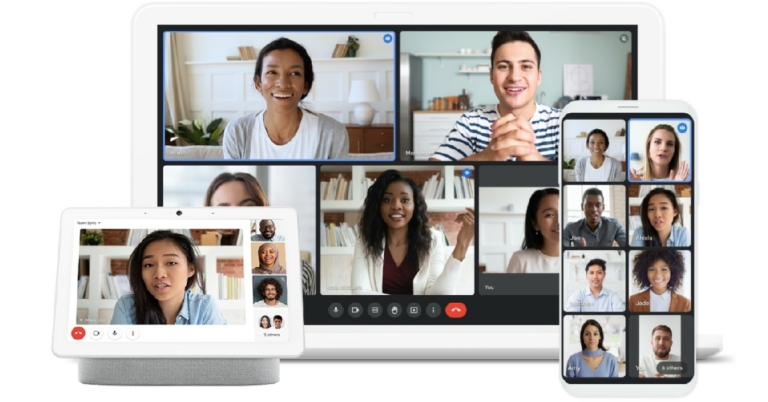
 Step 3:
  Step 4:
 Step 6:
 Step 3:


 Step 3:
  Step 5:
 Step 3:
 Step 4:
 Step 3:
 Step 4:
 Step 3: