

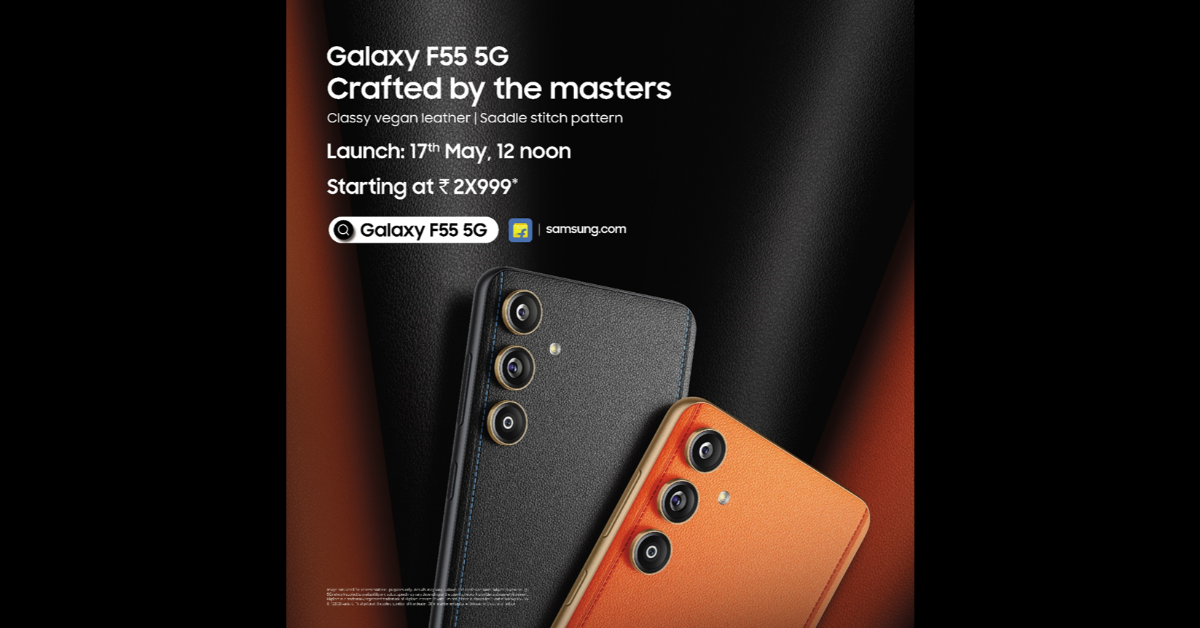
 The firm has also confirmed the Flipkart availability for F55 5G. In addition, the smartphone will be sold through Flipkart, Samsung.com, and a few other retail locations as soon as it launches in India. There will be two colour variants available: Apricot Crush and Raisin Black.
Also Read: Is CMF by Nothing’s debut phone a low-cost model?
The teaser indicates that the upcoming smartphone will have three vertically arranged cameras on the back panel. The phone will have a stitched design and an orange vegan leather finish.
It is anticipated that the Samsung Galaxy F55 5G, a redesigned Galaxy C55 5G, will debut in India. According to the company’s teaser, the Samsung Galaxy F55 5G and the Galaxy C55 5G have a similar design. The Orange phone model that was released in China is even similar in terms of colour options.
The Samsung Galaxy F55 5G is expected to come with a 6.7-inch full-HD+ sAMOLED Plus screen. The display is speculated to have a refresh rate of 120Hz and a maximum brightness level of 1,000 nits.
Also Read: Comparison: Google Pixel 8a Vs Pixel 8
An anticipated Snapdragon 7 Gen 1 SoC will power the smartphone with 8GB of RAM, and up to 256GB of storage. It may run on One UI 6.0, which is based on Android 14.
Moreover, the Galaxy F55 5G will support 25W wired fast charging and will pack a 5,000mAh battery. Moreover, the triple rear camera setup is said to include a 50-megapixel main camera sensor with optical image stabilisation (OIS) support. The system may also include an 8-megapixel ultra-wide angle lens and a 2-megapixel macro lens. A 50-megapixel sensor on the front for selfies and video calls is also expected.
The firm has also confirmed the Flipkart availability for F55 5G. In addition, the smartphone will be sold through Flipkart, Samsung.com, and a few other retail locations as soon as it launches in India. There will be two colour variants available: Apricot Crush and Raisin Black.
Also Read: Is CMF by Nothing’s debut phone a low-cost model?
The teaser indicates that the upcoming smartphone will have three vertically arranged cameras on the back panel. The phone will have a stitched design and an orange vegan leather finish.
It is anticipated that the Samsung Galaxy F55 5G, a redesigned Galaxy C55 5G, will debut in India. According to the company’s teaser, the Samsung Galaxy F55 5G and the Galaxy C55 5G have a similar design. The Orange phone model that was released in China is even similar in terms of colour options.
The Samsung Galaxy F55 5G is expected to come with a 6.7-inch full-HD+ sAMOLED Plus screen. The display is speculated to have a refresh rate of 120Hz and a maximum brightness level of 1,000 nits.
Also Read: Comparison: Google Pixel 8a Vs Pixel 8
An anticipated Snapdragon 7 Gen 1 SoC will power the smartphone with 8GB of RAM, and up to 256GB of storage. It may run on One UI 6.0, which is based on Android 14.
Moreover, the Galaxy F55 5G will support 25W wired fast charging and will pack a 5,000mAh battery. Moreover, the triple rear camera setup is said to include a 50-megapixel main camera sensor with optical image stabilisation (OIS) support. The system may also include an 8-megapixel ultra-wide angle lens and a 2-megapixel macro lens. A 50-megapixel sensor on the front for selfies and video calls is also expected. Samsung Galaxy F55 5G with triple rear cameras to launch in India on May 17
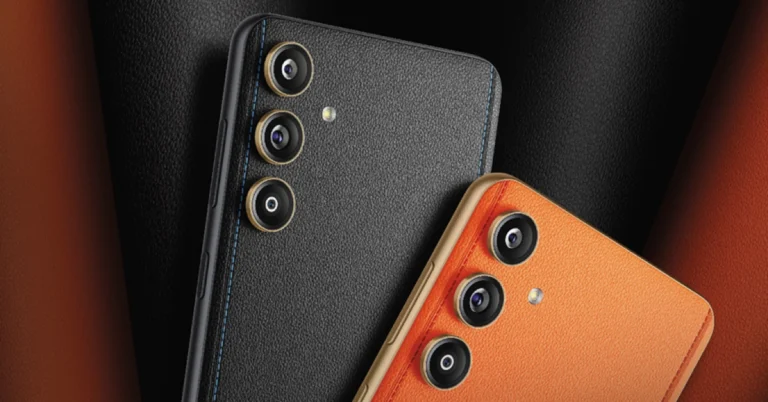
Samsung is expanding its F-series in India and today it officially announced the launch date of its upcoming smartphone Galaxy F55 5G. Not only this the South Korean firm has also revealed the price range and colour options of the device. Keep on reading to learn more about the smartphone.
Samsung Galaxy F55 5G India launch is set to take place on May 17. The upcoming phone is rumoured to be a rebranded variant of the Samsung Galaxy C55 5G which launched in China last month. In addition to revealing the launch, the firm has also hinted at the price of the smartphone. As per the poster image, the price of Galaxy F55 5G will start at Rs 30,000 in India. The company has not revealed the exact pricing instead the poster image included “starting at Rs 2X999”
 The firm has also confirmed the Flipkart availability for F55 5G. In addition, the smartphone will be sold through Flipkart, Samsung.com, and a few other retail locations as soon as it launches in India. There will be two colour variants available: Apricot Crush and Raisin Black.
Also Read: Is CMF by Nothing’s debut phone a low-cost model?
The teaser indicates that the upcoming smartphone will have three vertically arranged cameras on the back panel. The phone will have a stitched design and an orange vegan leather finish.
It is anticipated that the Samsung Galaxy F55 5G, a redesigned Galaxy C55 5G, will debut in India. According to the company’s teaser, the Samsung Galaxy F55 5G and the Galaxy C55 5G have a similar design. The Orange phone model that was released in China is even similar in terms of colour options.
The Samsung Galaxy F55 5G is expected to come with a 6.7-inch full-HD+ sAMOLED Plus screen. The display is speculated to have a refresh rate of 120Hz and a maximum brightness level of 1,000 nits.
Also Read: Comparison: Google Pixel 8a Vs Pixel 8
An anticipated Snapdragon 7 Gen 1 SoC will power the smartphone with 8GB of RAM, and up to 256GB of storage. It may run on One UI 6.0, which is based on Android 14.
Moreover, the Galaxy F55 5G will support 25W wired fast charging and will pack a 5,000mAh battery. Moreover, the triple rear camera setup is said to include a 50-megapixel main camera sensor with optical image stabilisation (OIS) support. The system may also include an 8-megapixel ultra-wide angle lens and a 2-megapixel macro lens. A 50-megapixel sensor on the front for selfies and video calls is also expected.
The firm has also confirmed the Flipkart availability for F55 5G. In addition, the smartphone will be sold through Flipkart, Samsung.com, and a few other retail locations as soon as it launches in India. There will be two colour variants available: Apricot Crush and Raisin Black.
Also Read: Is CMF by Nothing’s debut phone a low-cost model?
The teaser indicates that the upcoming smartphone will have three vertically arranged cameras on the back panel. The phone will have a stitched design and an orange vegan leather finish.
It is anticipated that the Samsung Galaxy F55 5G, a redesigned Galaxy C55 5G, will debut in India. According to the company’s teaser, the Samsung Galaxy F55 5G and the Galaxy C55 5G have a similar design. The Orange phone model that was released in China is even similar in terms of colour options.
The Samsung Galaxy F55 5G is expected to come with a 6.7-inch full-HD+ sAMOLED Plus screen. The display is speculated to have a refresh rate of 120Hz and a maximum brightness level of 1,000 nits.
Also Read: Comparison: Google Pixel 8a Vs Pixel 8
An anticipated Snapdragon 7 Gen 1 SoC will power the smartphone with 8GB of RAM, and up to 256GB of storage. It may run on One UI 6.0, which is based on Android 14.
Moreover, the Galaxy F55 5G will support 25W wired fast charging and will pack a 5,000mAh battery. Moreover, the triple rear camera setup is said to include a 50-megapixel main camera sensor with optical image stabilisation (OIS) support. The system may also include an 8-megapixel ultra-wide angle lens and a 2-megapixel macro lens. A 50-megapixel sensor on the front for selfies and video calls is also expected.
The firm has also confirmed the Flipkart availability for F55 5G. In addition, the smartphone will be sold through Flipkart, Samsung.com, and a few other retail locations as soon as it launches in India. There will be two colour variants available: Apricot Crush and Raisin Black.
Also Read: Is CMF by Nothing’s debut phone a low-cost model?
The teaser indicates that the upcoming smartphone will have three vertically arranged cameras on the back panel. The phone will have a stitched design and an orange vegan leather finish.
It is anticipated that the Samsung Galaxy F55 5G, a redesigned Galaxy C55 5G, will debut in India. According to the company’s teaser, the Samsung Galaxy F55 5G and the Galaxy C55 5G have a similar design. The Orange phone model that was released in China is even similar in terms of colour options.
The Samsung Galaxy F55 5G is expected to come with a 6.7-inch full-HD+ sAMOLED Plus screen. The display is speculated to have a refresh rate of 120Hz and a maximum brightness level of 1,000 nits.
Also Read: Comparison: Google Pixel 8a Vs Pixel 8
An anticipated Snapdragon 7 Gen 1 SoC will power the smartphone with 8GB of RAM, and up to 256GB of storage. It may run on One UI 6.0, which is based on Android 14.
Moreover, the Galaxy F55 5G will support 25W wired fast charging and will pack a 5,000mAh battery. Moreover, the triple rear camera setup is said to include a 50-megapixel main camera sensor with optical image stabilisation (OIS) support. The system may also include an 8-megapixel ultra-wide angle lens and a 2-megapixel macro lens. A 50-megapixel sensor on the front for selfies and video calls is also expected. Is CMF by Nothing’s debut phone a low-cost model?
Key Highlights
- CMF’s new smartphone is likely to be called CMF Phone 1.
- Anticipated to be an economical entry-level phone, the CMF Phone 1 may be less expensive than the Nothing Phone 2a.
Comparison: Google Pixel 8a Vs Pixel 8
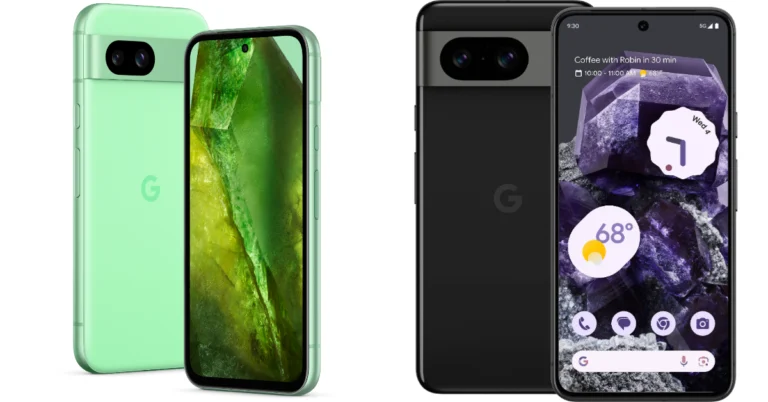
Recently Google introduced its new A-Series phone, Pixel 8a in India. The smartphone and Pixel 8 have a lot in common, which is why they seem so similar. If you are confused, we have done a detailed comparison below between the Pixel 8a and its more expensive sibling Pixel 8 to help you understand which one is the better buy.
Display
Pixel 8a: 6.1-inch Super Actua display (120Hz refresh rate) Pixel 8: 6.2-inch FHD+ Actua display (Adaptive refresh rate ranging between 60Hz and 120Hz)Processor
Pixel 8a: Google Tensor G3 chip Pixel 8: Google Tensor G3 SoCRear camera(s)
Pixel 8a: Dual rear camera system with a 64-megapixel main lens and a 13-megapixel ultrawide lens Pixel 8: 50MP Octa PD sensor with f/1.68 and 12 MP ultrawide camera with an auto-focusSelfie camera
Pixel 8a: 13-megapixel sensor Pixel 8: 10.5-megapixel Dual PD sensor Also Read: Meta brings AI-powered image and text generation tools for businesses to create ad creativesRAM and storage
Pixel 8a: 8GB RAM with 128GB storage/8GB RAM with 256GB storage Pixel 8: 8GB RAM with 128GB storage/8GB RAM with 128GB storageBattery
Pixel 8a: 4,492mAh battery Pixel 8: 4,485mAh batteryOperating system
Pixel 8a: Android 14 Pixel 8: Android 14Price
Pixel 8a: Rs 52,999 Pixel 8: Rs 75,999Our Take
Both the Pixel phones are shipped with Android 14 out of the box and are promised to offer 7 years of software and security support. Though there is a slight size difference, the Super Actua displays on both devices support a 120Hz refresh rate. However, the display on the flagship Pixel 8 has an adaptive refresh rate that switches between 60Hz and 120Hz based on the content being played. In addition, the display appears premium with thinner bezels than the 8a. The Pixel 8a boasts a display made of Corning Gorilla Glass 3. In contrast, the Corning Gorilla Glass Victus display of the Pixel 8 is stronger and less prone to scratches. Also Read: Apple discontinued iPad (9th gen); iPad (10th gen) gets a price cut Whereas the Pixel 8a is rated IP67, the Pixel 8 boasts IP68 dust and water resistance. The Google Tensor G3 chip and Titan M2 security co-processor are the same processors found in the Pixel 8 and Pixel 8a. Both Google phones contain Pixel-only AI functions, although the 8a lacks some of the flagship phone’s capabilities. Over that, Magic Eraser, Photo Unblur, Real Tone, Face Unblur, Panorama, Manual White Balancing, Locked Folder, Night Sight, Top Shot, Portrait Mode, Portrait Light, Motion Auto Focus, Frequent Faces, Dual exposure controls, Live HDR+, and Ultra HDR are among the camera AI tools shared by both devices. Macro Focus, Best Take, and Magic Editor are absent on 8a. In terms of cameras, the Pixel 8a’s front and back cameras have higher resolution sensors than the Pixel 8 PD sensor, but the latter’s larger sensor size allows it to capture more light, producing images that are clearer, crisper, and more detailed. There isn’t much difference in the batteries, although the Pixel 8 has a slightly larger battery and features the Battery Share feature. Apart from the cameras, build quality, and the absence of a few Pixel-only features, the Pixel 8a and Pixel 8 are nearly identical. However, the two have a significant price difference. If you’re on a limited budget, we advise you to choose the less costly Pixel 8a.Garena Free Fire Redeem Codes Today 9 May 2024: Here is how to claim them

Garena Free Fire is a battle royale game with regular awards and tournaments to keep players interested. If you play Garena Free Fire, you should be aware of the redeem codes that are released on a daily basis. However, because the battle royale game is banned in India, players from other countries can use the Free Fire Redeem codes daily. If you’re unfamiliar with the Garena Free Fire redeem codes or don’t know how to get them, we’ve put together a step-by-step guide to help you redeem them. Check out Garena Free Fire Redeem Codes for 9 May 2024.
The Free Fire redeem codes are a great way to get free stuff. These are 12-digit codes that contain alphabets and numbers, as well as an expiration date and time. Because the Garena FF redeem codes cannot be used more than once, you should hurry to the redemption page to claim your free reward before someone else does. To get a free reward, all you have to do is go to reward.ff.garena.com/en, which is the official redemption page. Also, keep an eye on this space for daily updates on Garena Free Fire redemption codes and rewards.
Also Read: Sennheiser Accentum Plus wireless headphones with Hybrid Adaptive Noise Cancellation launched
Garena Free Fire Redeem Codes Today 9 May 2024
S45TGHJU7YTFVBYTEVE NJKIUY6ZQ21QSX CDE3E4RFGVBNH YQ2WS3EDRCTYG BHUNHINKI98UY DRTT5RE2SQ234R FVGHY6T5RFVGBH HIOO0LKMNBVCX YT65YHBHJIKOLK M4LPOIUYHGFCXSHow to Get Free Fire Redeem Codes for Garena on 9 May 2024?
- Visit the Garena Free Fire game’s official website at reward.ff.garena.com.
- Use your Facebook, Google, VK, Apple ID, Huawei ID, or Twitter account to log in.
- You’ll be taken to a valid redemption code (s)
- Copy and paste the 12-digit redemption code into the text box.
- On the screen, a dialogue box will appear.
- ‘Ok’ should be selected.
Meta brings AI-powered image and text generation tools for businesses to create ad creatives
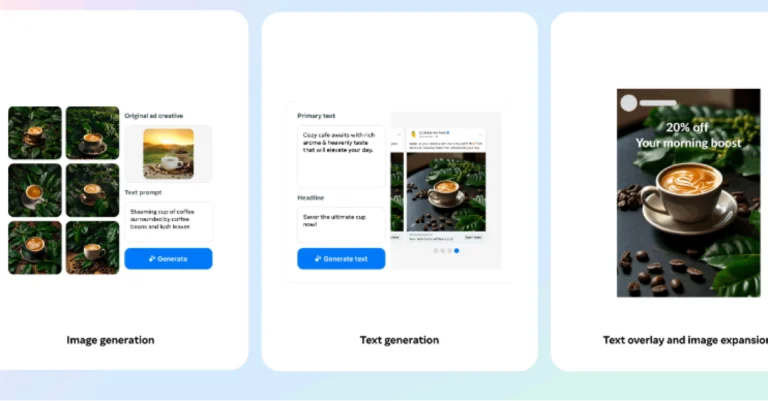
For advertisers looking to assist with comprehensive image and text development, Meta has launched enhanced generative AI tools. Additionally, the company has introduced new tools and services that help businesses improve the efficacy of their ads. These services include developing creative variations, automating certain parts of the ad creation process, or increasing credibility and engagement through Meta Verified.
Meta is launching a new suite of artificial intelligence (AI) tools to assist businesses and enhance the ad creation process. The second and third generations of Meta’s Llama (Large Language Model Meta AI) AI models fuel its new AI features. Meta’s AI will let users create images and text for advertisements.
Generative AI: Image Generation
For the first time, you can use text overlay to generate full image variations based on your original ad creative. This expands on the ability to create different backgrounds for product shots and magnify images to fit larger surfaces. This feature has already begun to roll out and in the coming months, users will also be able to provide text prompts to help us better tailor the creative variations we offer to you. Also Read: Apple discontinued iPad (9th gen); iPad (10th gen) gets a price cut Furthermore, users will also be able to add text overlay to photos, and advertisers can select from a dozen of the most well-liked font typeface alternatives. There will also be an image expansion feature that will allow you to easily modify creative assets to match various aspect ratios across various surfaces. This will be functional with text overlays on your advertisements and is accessible on Reels and Feed on Facebook and Instagram.Generative AI: Text Generation
The Text Generation tool allows you to make variations for both the ad headline and the core content. Meta is also testing the ability for the generated text to reflect your brand’s voice and tone, by highlighting key selling points based on your previous campaigns and text input. As per the company, these upgrades are driven by advertiser requests for a more broadened selection of text selection that better reflects their brand and key selling elements. Also Read: Google Pixel 8a launched in India at this price: Deets inside This feature will soon be built with Meta Llama 3, the next generation of our large language models, which will enable new capabilities and enhance ad performance. The company has released these updated generative AI features and global availability is expected by the end of the year.Top 6 Ways to Turn On Your Android Phone’s Flashlight Without Waking Up The Screen

Smartphones have completely eliminated the need for torchlights, at least in everyday use. If you’re embarking on a hike, you should think about purchasing a powerful flashlight, but if you need to navigate your way around a dark room, you don’t need a torch on you at all times, as long as you have a phone on you. Android smartphones even let you adjust the intensity of the light by long-pressing its tile. However, what’s more important than intensity is the accessibility of the torch function on your phone. Today, we bring you the top 6 ways to turn on your Android phone’s flashlight without waking up the screen.
Read Also: WatchOut WearPods Review: Best of both worlds?
 Step 2: Tap on Side button.
Step 3: Turn on the toggle switch for Double press and select Open app.
Step 2: Tap on Side button.
Step 3: Turn on the toggle switch for Double press and select Open app.
 Step 4: Hit the settings icon next to Open app and select Torch.
 Step 2: Tap on Gestures.
Step 3: Select Quick Tap to start actions.
Step 4: Turn on the toggle switch for Quick Tap.
Step 2: Tap on Gestures.
Step 3: Select Quick Tap to start actions.
Step 4: Turn on the toggle switch for Quick Tap.
 Step 5: Select Toggle torch.
 Step 6: Double-tap your phone’s back to check if it works.
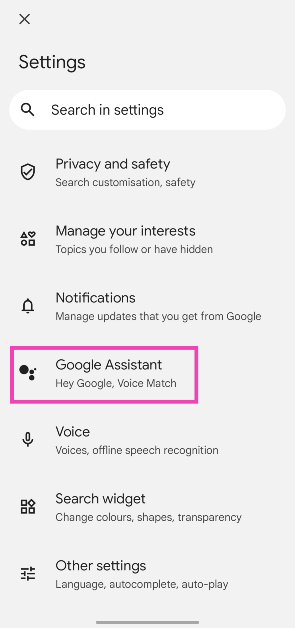
Step 2: Tap on Google Assistant.
Step 6: Double-tap your phone’s back to check if it works.
Step 2: Tap on Google Assistant.
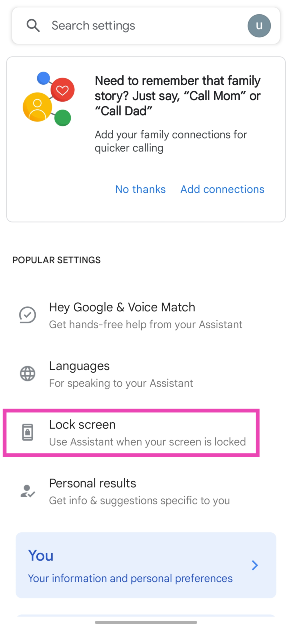
 Step 3: Select Lock screen.
Step 4: Turn on the toggle switch for Assistant responses on lock screen.
Step 5: When your phone is locked, say ‘Hey Google, turn on the flashlight’.
Step 3: Select Lock screen.
Step 4: Turn on the toggle switch for Assistant responses on lock screen.
Step 5: When your phone is locked, say ‘Hey Google, turn on the flashlight’.
Before you begin
There are multiple ways you can go about toggling the flashlight on your smartphone. All Android devices have a handy tile for the torch in the Quick Settings Menu. If you want easier access, you can add a flashlight widget to your home screen. In scenarios where you need to use the torch urgently and don’t have the time to unlock the phone, you can use the lock screen icon for the flash. However, this still requires you to wake the screen of your device. Turning on the flashlight without disturbing the screen is a very niche demand, but your Android smartphone is natively equipped to handle that. The side button on Samsung devices can be customised to turn on the torch. The Quick Tap option on Pixel smartphones lets you turn it on by double or triple-tapping the back of the phone. If you own some other smartphone, you can always use Google Assistant or a third-party app for this task.Customise the side button on Samsung
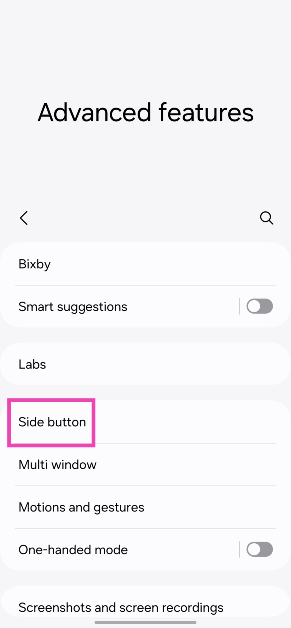
Step 1: Go to Settings and select Advanced features.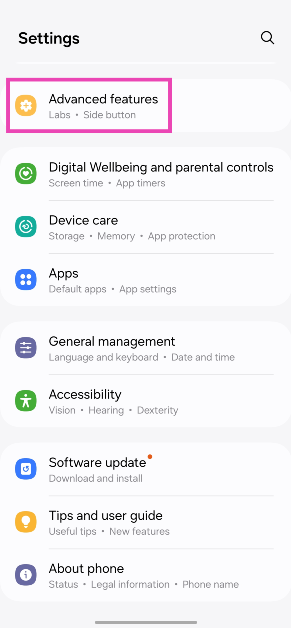 Step 2: Tap on Side button.
 Step 3: Turn on the toggle switch for Double press and select Open app.
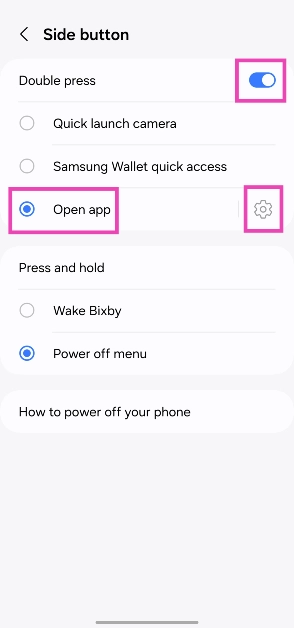 Step 4: Hit the settings icon next to Open app and select Torch.
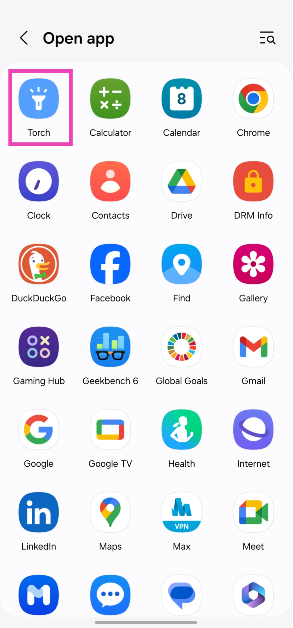
Use Quick Tap on Google Pixel smartphones
Step 1: Go to Settings and select System.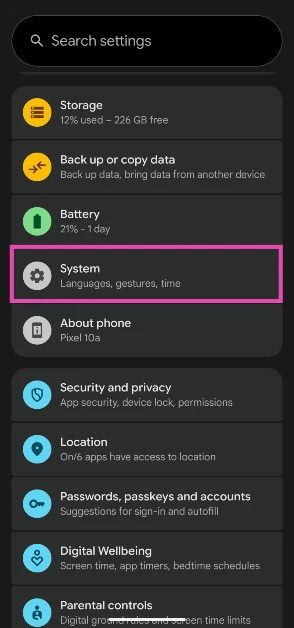 Step 2: Tap on Gestures.
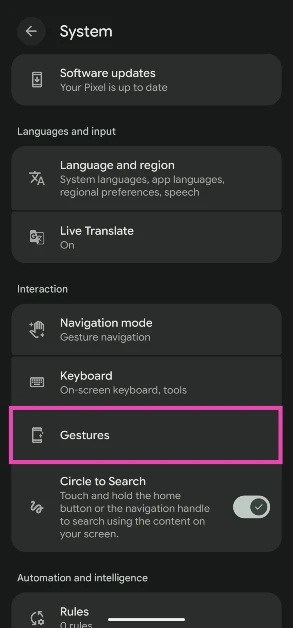 Step 3: Select Quick Tap to start actions.
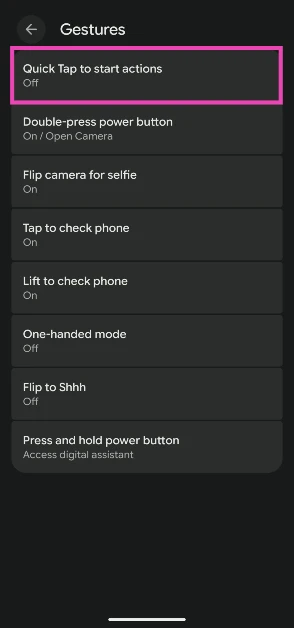 Step 4: Turn on the toggle switch for Quick Tap.
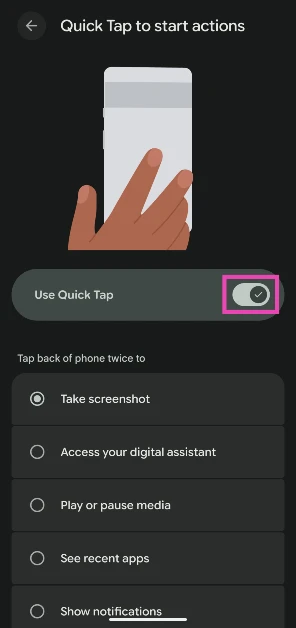 Step 5: Select Toggle torch.
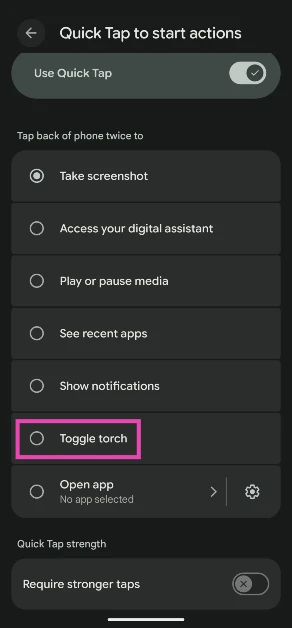 Step 6: Double-tap your phone’s back to check if it works.
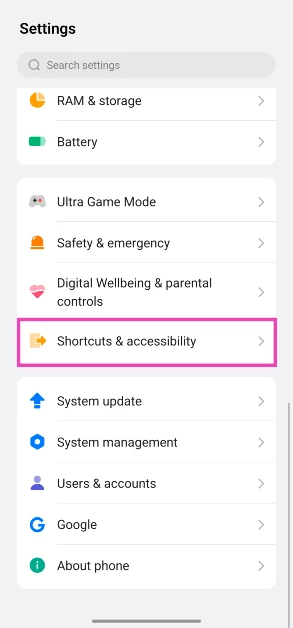
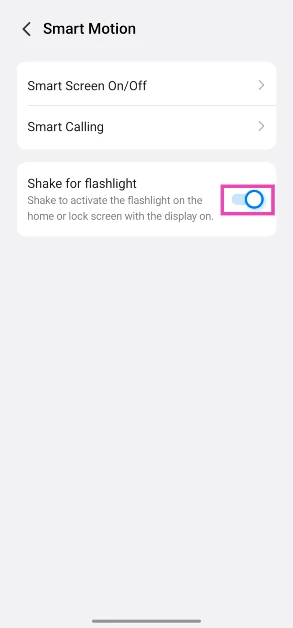
Enable the shake gesture
- Go to Settings.
- Scroll down and select Shortcuts & accessibility.
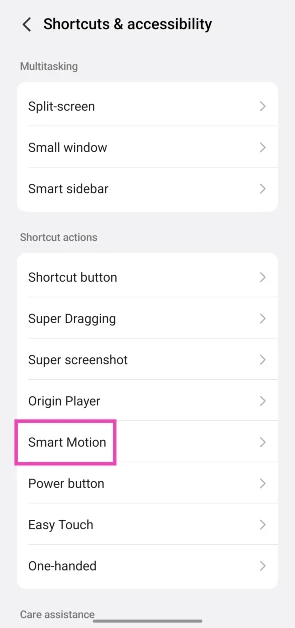
- Tap on Smart Motion.
- Turn on the toggle switch next to Shake for flashlight.
Use Google Assistant
Step 1: Open the Google app, tap your profile picture, and select Settings.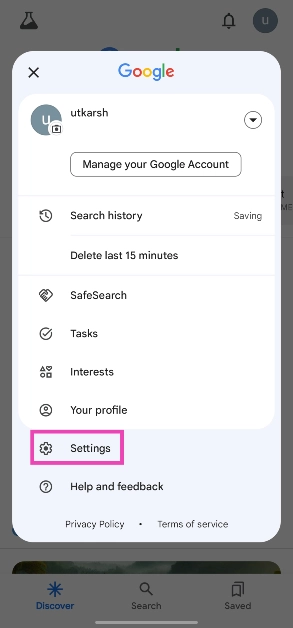 Step 2: Tap on Google Assistant.
 Step 3: Select Lock screen.
 Step 4: Turn on the toggle switch for Assistant responses on lock screen.
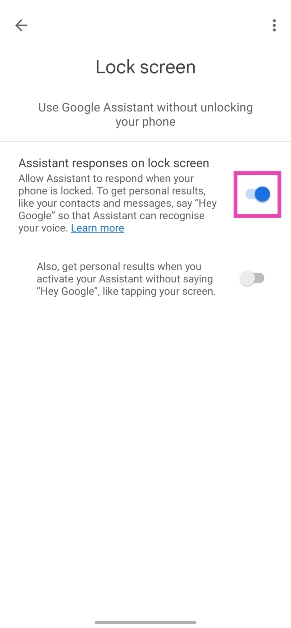 Step 5: When your phone is locked, say ‘Hey Google, turn on the flashlight’.
Customise the Shortcut button
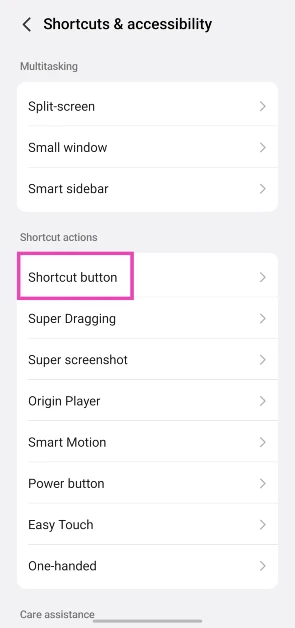
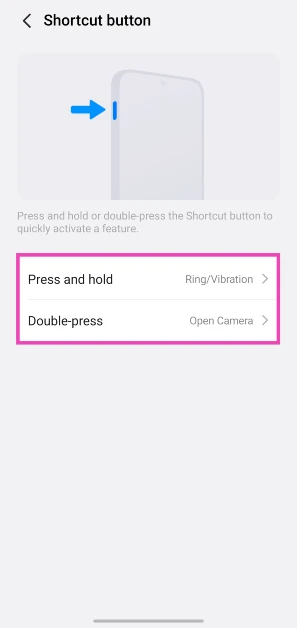
Some midrange and premium smartphones come with an additional key to toggle the sound profile, click a picture, and do a whole bunch of other tasks. You can customise to trigger the flashlight as well. Here’s how.- Go to Settings.
- Tap on Shortcuts & accessibility.
- Select Shortcut button.
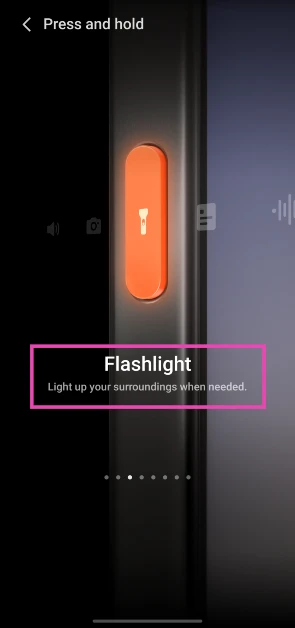
- Choose an action.

- Swipe through the functions on the screen until you land on Flashlight.
Use the Shake Flashlight app
- Download the Shake Flashlight app from the Google Play Store.
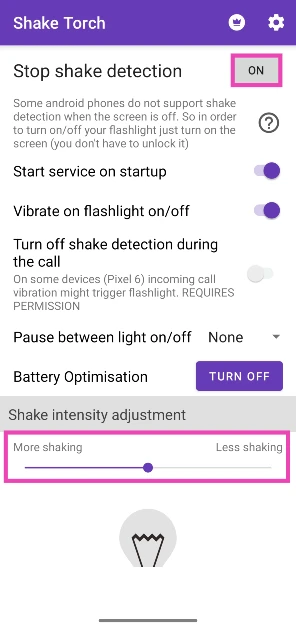
- Launch the app and make sure the box next to Stop shake detection says On.
- Use the slider at the bottom of the screen to set your preferred shake intensity.
- Shake your phone in a chopping motion to turn on the flashlight. Some phones may not register this motion when they’re locked. Press the side button and carry out the gesture again to bring the flashlight to life.
- Shake your phone again to turn off the flashlight.
Frequently Asked Questions (FAQs)
How do I use back tap on my Samsung phone?
Install the Good Lock app on your Samsung smartphone and download the RegiStar module. Now, tap on ‘Back tap’ and turn on its toggle switch. Use the customisation settings to assign your desired actions.How do I use back tap on a Google Pixel smartphone?
Go to Settings>System>Gestures>Quick Tap, turn on its toggle switch, and select your desired action.How do I turn on the flashlight on my Android smartphone without waking up its screen?
Samsung users can customise the side button to trigger the flashlight when pressed twice. Pixel users can do the same with the back panel of their phone using ‘Quick Tap’. For other OEMs, you can use a third-party app like Shake Flashlight. Read Also: Apple discontinued iPad (9th gen); iPad (10th gen) gets a price cutConclusion
These are the top 6 ways to turn on the flashlight on your Android smartphone without waking up its screen. The Google Assistant method will work on every Android device, regardless of the OEM. If you’re aware of any other methods that can carry out this task, let us know in the comments!WatchOut WearPods Review: Best of both worlds?
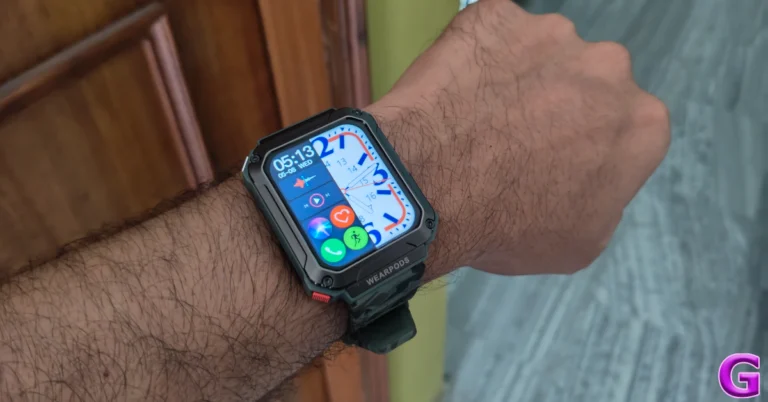
You may remember WatchOut as the smart wearable brand that made an appearance in Season 2 of Shark Tank India. The brand is known for wearables that cater to different age demographics. Its smartwatch for kids is focused on parental control and two-way communication. The ‘Guardian’ smartwatch for senior citizens offers GPS live tracking as well as round-the-clock health tracking. For Gen Z, WatchOut offers an exciting fusion device called ‘WearPods’ which converges wireless earbuds and a smartwatch into one device. If you remember Huawei’s Watch Buds from last year you will know exactly what we’re talking about. What works for WearPods is its pricing. You can get your hands on this piece of tech for just Rs 5,000. We’ve been using the WatchOut WearPods for the last week and here is our comprehensive review of the device.
Read Also: Apple discontinues iPad (9th gen); iPad (10th gen) gets a price cut
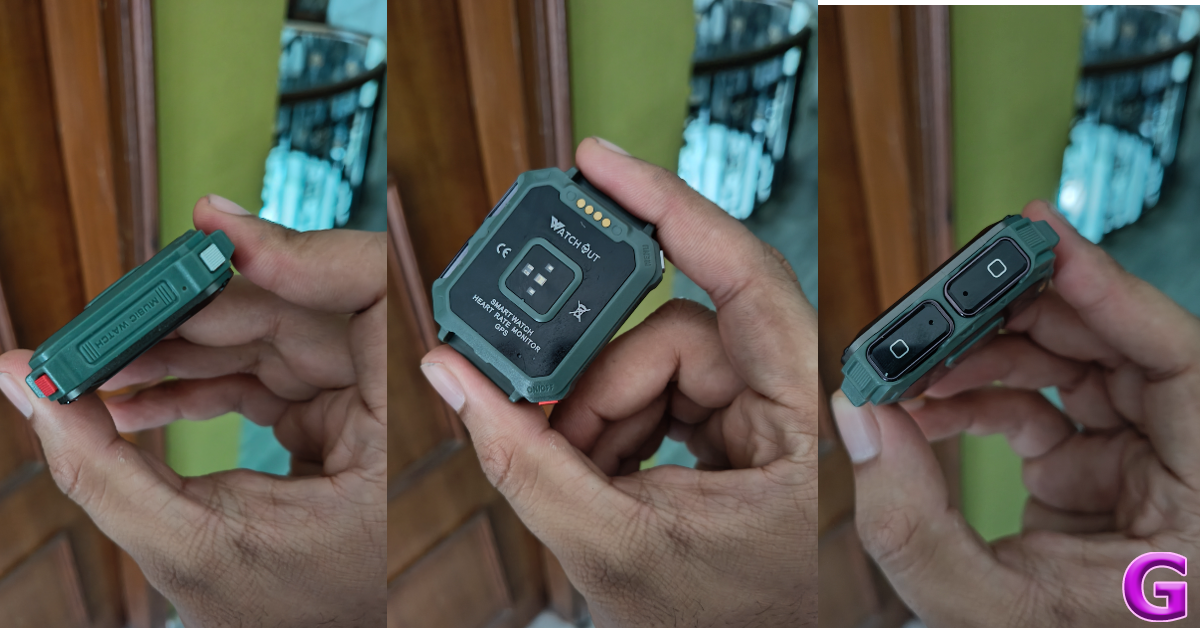
The earbuds are firmly locked in their cutouts with powerful magnets. Even after shaking and yanking the smartwatch with immense force, the earbuds remained in place. Surprisingly, they are easy to pull out, which speaks to the ingenious design of the device. The ‘bullet’ earbuds are compact and fit nicely in the ear. The earbuds have no ear-specific design, meaning you can insert either earbud on any side.
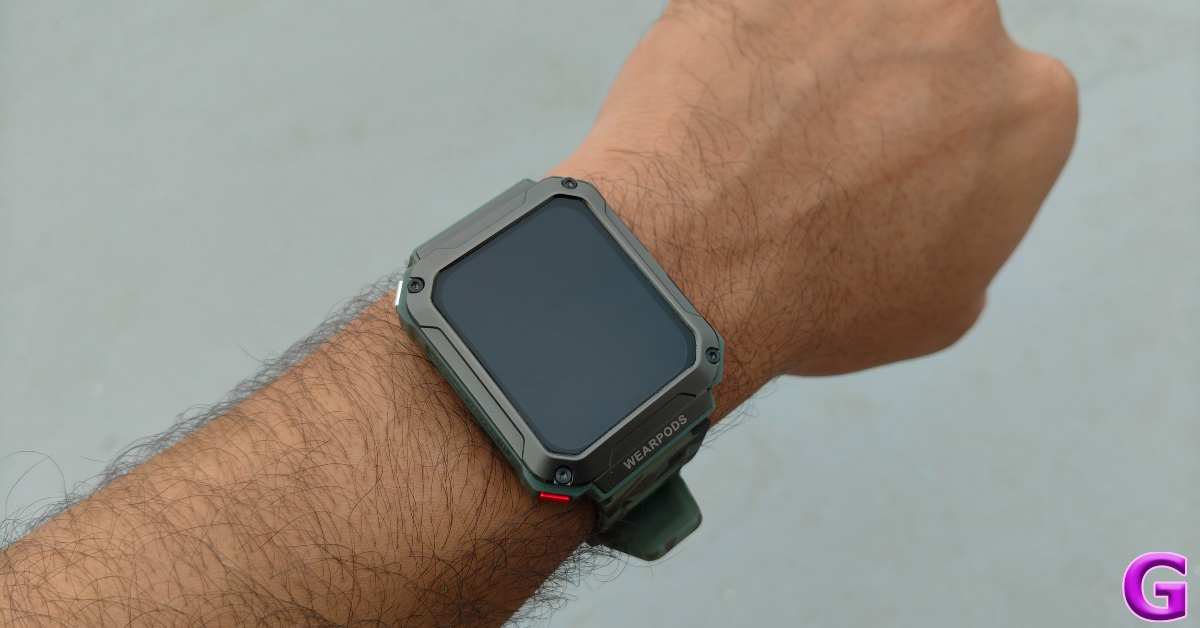
The 1.93-inch HD display has a resolution of 240 x 296p. This display is bright enough for outdoor use. However, when it comes to the touch response, it leaves a little more to be desired. While using the touch gestures, it felt like the watch always needed to catch up. Perhaps an AMOLED panel would have been the better choice. There is also a 0.75W speaker on this smartwatch, located on the bottom frame of the dial. It is optimum for audio calls, but not the best for listening to music.
The silicone straps of the smartwatch are comfortable and do not cause any annoying itches. Wearing the smartwatch while working out did not present any issues whatsoever. The strap remained secure and the smartwatch and earbuds were unfazed by excessive sweat.
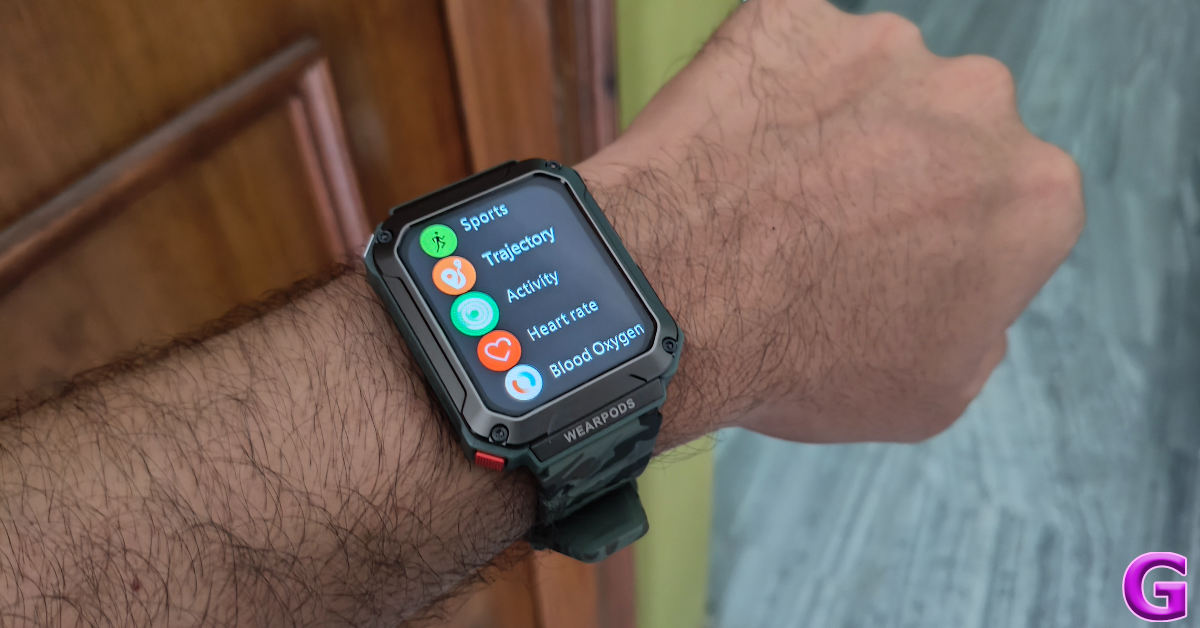
The smartwatch also supports over 100 exercises and workout routines. You can use it to track everything from hikes and runs to bench presses and push-ups. Before starting an exercise you can set a time or calorie target on the watch. As is the case with every smartwatch, the calorie-burning of this device should also be taken with a grain of salt.
Moving on, the wireless earbuds that come along with the device offer a decent listening experience and a passable audio output, but they lack the clarity offered by other TWS devices in this price range. We were expecting this as the WearPods are limited by their compact form factor and the nature of the device. The overall output seems a little tinny and lacks details. This is largely due to the small audio drivers inside the earbuds.
If we take the functionality aspect into account, we’d say the WearPods get the job done in style. If minimalism and tech convergence are your biggest priority, then this is the ideal device for you. The smartwatch has a built-in GPS and an internal memory of 4GB. If you’re going on a run and don’t want to take your smartphone along with you, this smartwatch will take care of all the essential things. Its inbuilt GPS will track your run and you will be able to enjoy your local library of music using the WearPods.
The WatchOut WearPods also support Bluetooth calling. You can make and accept calls using the smartwatch and channel the audio output through the earbuds or the built-in speakers. The call quality was fine in an indoor setting, but we switched to our smartphone in noisy surroundings.
 You can access the health and fitness data on your smartwatch using the V Band companion app for WearPods. This app has a good collection of dial faces and wallpapers for the watch. The downside is that you can’t store multiple watch faces on the watch itself. Another underrated feature of this app is the ‘Receipt code’, which binds your UPI QR Code to the watch so you don’t have to open the payment app to access it.
 While the app handles the basics very well, WatchOut needs to work on its UI. If we hadn’t used the QR code on the watch to download this app, we would be very sceptical of its legitimacy. Upper case and lower case letters are used seemingly at random throughout the app’s interface and the text does not align with the layout in some pages. We also spotted a few typos on the app. We hope the company patches these errors with a swift update.
Ending things on a good note, the battery life of the WatchOut WearPods is very versatile. The smartwatch is equipped with a 400mAh battery pack and the earbuds have additional 35mAh batteries inside them. We were able to get more than 5 hours of playtime out of the earbuds in one go. The smartwatch lasted us an entire week with frequent TWS use, Bluetooth calling, and regular fitness tracking.
Read Also: How to send files using Quick Share? (2024)
While the app handles the basics very well, WatchOut needs to work on its UI. If we hadn’t used the QR code on the watch to download this app, we would be very sceptical of its legitimacy. Upper case and lower case letters are used seemingly at random throughout the app’s interface and the text does not align with the layout in some pages. We also spotted a few typos on the app. We hope the company patches these errors with a swift update.
Ending things on a good note, the battery life of the WatchOut WearPods is very versatile. The smartwatch is equipped with a 400mAh battery pack and the earbuds have additional 35mAh batteries inside them. We were able to get more than 5 hours of playtime out of the earbuds in one go. The smartwatch lasted us an entire week with frequent TWS use, Bluetooth calling, and regular fitness tracking.
Read Also: How to send files using Quick Share? (2024)
WatchOut WearPods review: Design and Display
Here’s what you get inside the WatchOut WearPods retail box:- Smartwatch with earbuds
- Charging/data transfer cable
- Screen protector
- User manual and warranty card booklet
 The earbuds are firmly locked in their cutouts with powerful magnets. Even after shaking and yanking the smartwatch with immense force, the earbuds remained in place. Surprisingly, they are easy to pull out, which speaks to the ingenious design of the device. The ‘bullet’ earbuds are compact and fit nicely in the ear. The earbuds have no ear-specific design, meaning you can insert either earbud on any side.
 The 1.93-inch HD display has a resolution of 240 x 296p. This display is bright enough for outdoor use. However, when it comes to the touch response, it leaves a little more to be desired. While using the touch gestures, it felt like the watch always needed to catch up. Perhaps an AMOLED panel would have been the better choice. There is also a 0.75W speaker on this smartwatch, located on the bottom frame of the dial. It is optimum for audio calls, but not the best for listening to music.
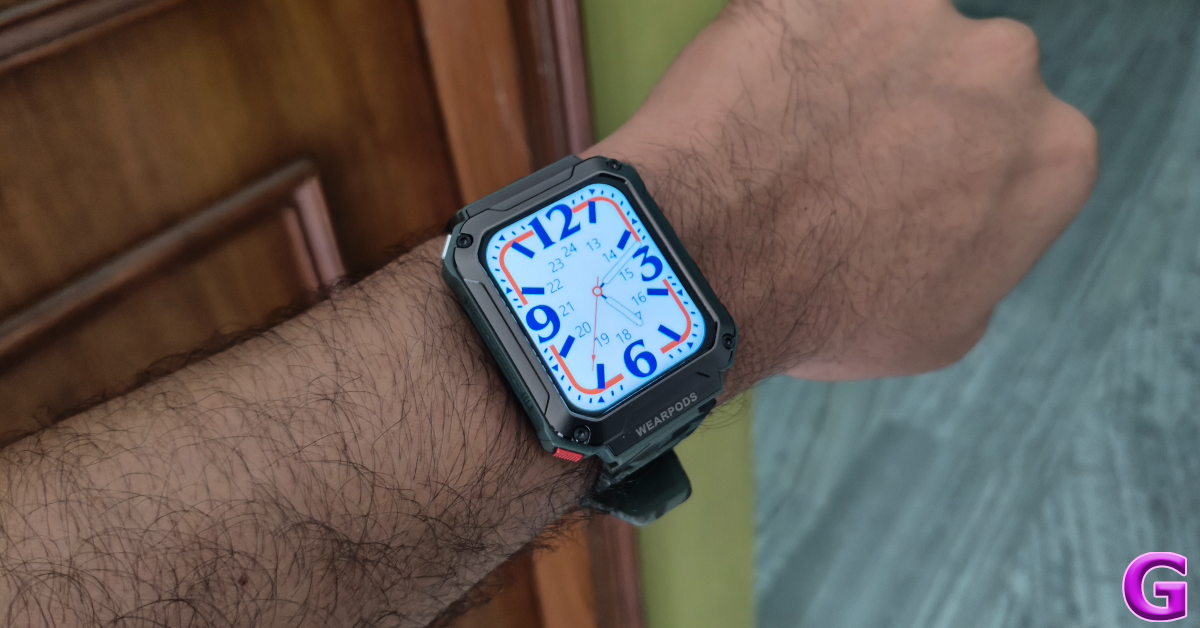 The silicone straps of the smartwatch are comfortable and do not cause any annoying itches. Wearing the smartwatch while working out did not present any issues whatsoever. The strap remained secure and the smartwatch and earbuds were unfazed by excessive sweat.
WatchOut WearPods review: Performance
The WatchOut WearPods are equipped with an array of features, some more reliable than others. The smartwatch can track your heart rate, blood oxygen, blood sugar, and blood pressure. While the heart rate and blood oxygen measurements were on point, we wouldn’t recommend relying on anything but medical-grade equipment for blood pressure and sugar readings.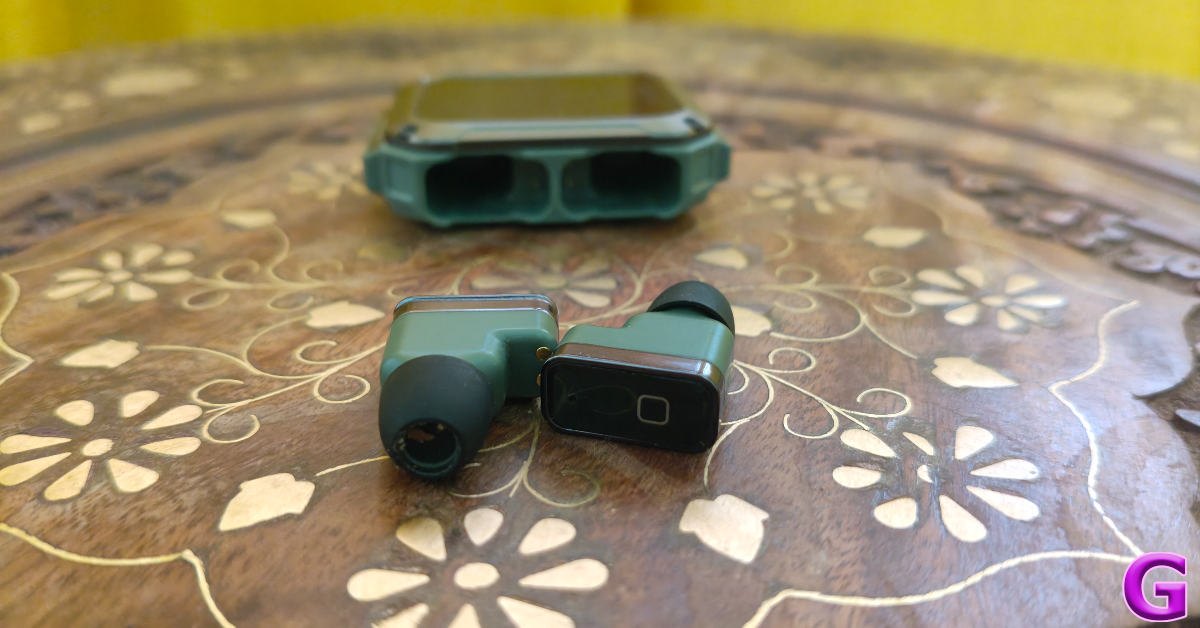 The smartwatch also supports over 100 exercises and workout routines. You can use it to track everything from hikes and runs to bench presses and push-ups. Before starting an exercise you can set a time or calorie target on the watch. As is the case with every smartwatch, the calorie-burning of this device should also be taken with a grain of salt.
 Moving on, the wireless earbuds that come along with the device offer a decent listening experience and a passable audio output, but they lack the clarity offered by other TWS devices in this price range. We were expecting this as the WearPods are limited by their compact form factor and the nature of the device. The overall output seems a little tinny and lacks details. This is largely due to the small audio drivers inside the earbuds.
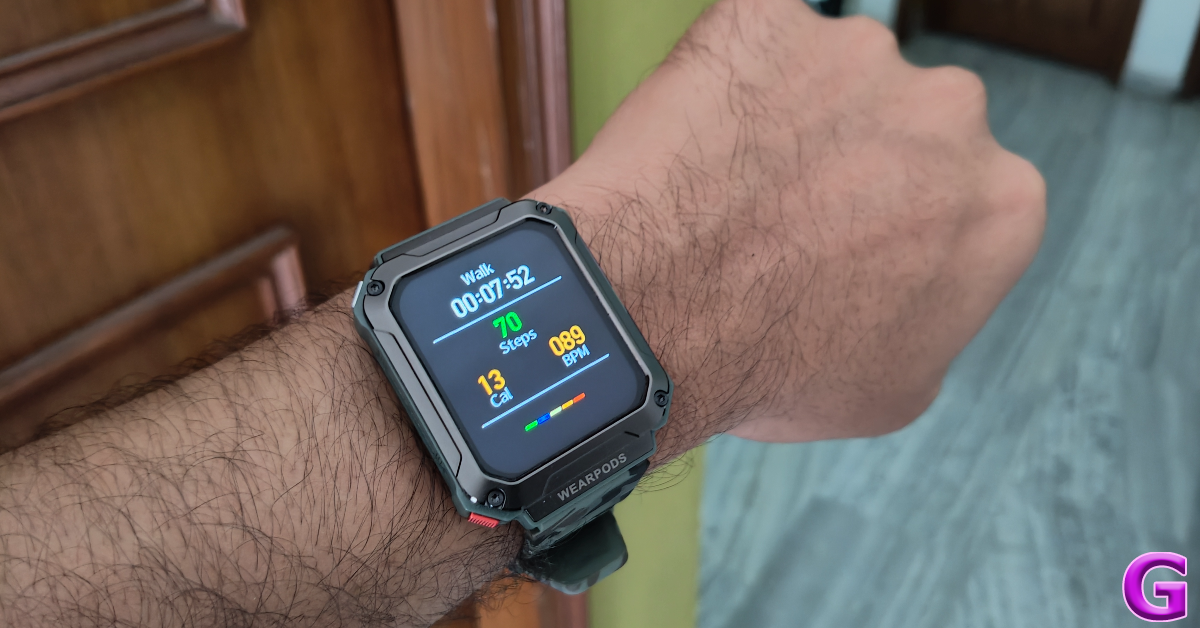 If we take the functionality aspect into account, we’d say the WearPods get the job done in style. If minimalism and tech convergence are your biggest priority, then this is the ideal device for you. The smartwatch has a built-in GPS and an internal memory of 4GB. If you’re going on a run and don’t want to take your smartphone along with you, this smartwatch will take care of all the essential things. Its inbuilt GPS will track your run and you will be able to enjoy your local library of music using the WearPods.
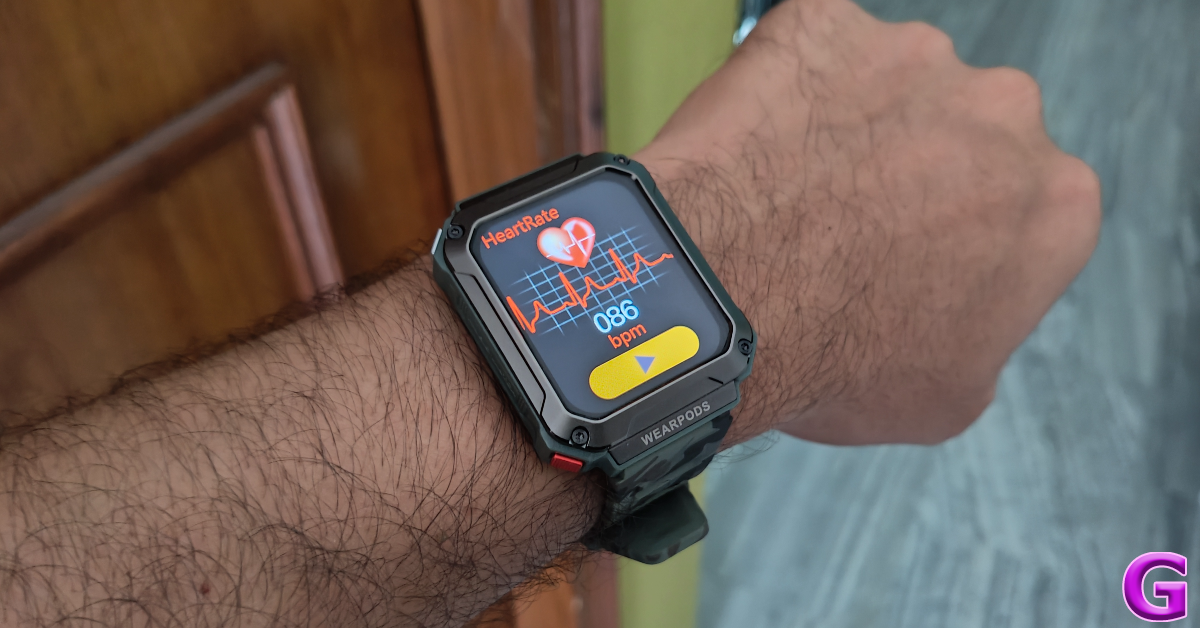 The WatchOut WearPods also support Bluetooth calling. You can make and accept calls using the smartwatch and channel the audio output through the earbuds or the built-in speakers. The call quality was fine in an indoor setting, but we switched to our smartphone in noisy surroundings.
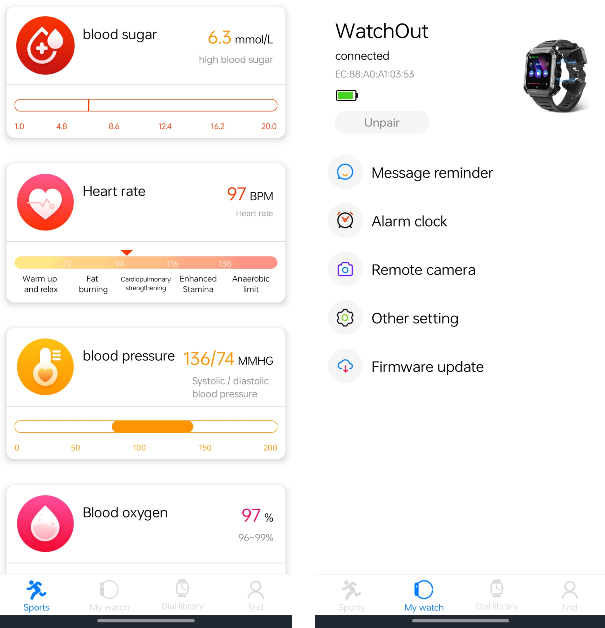 You can access the health and fitness data on your smartwatch using the V Band companion app for WearPods. This app has a good collection of dial faces and wallpapers for the watch. The downside is that you can’t store multiple watch faces on the watch itself. Another underrated feature of this app is the ‘Receipt code’, which binds your UPI QR Code to the watch so you don’t have to open the payment app to access it.
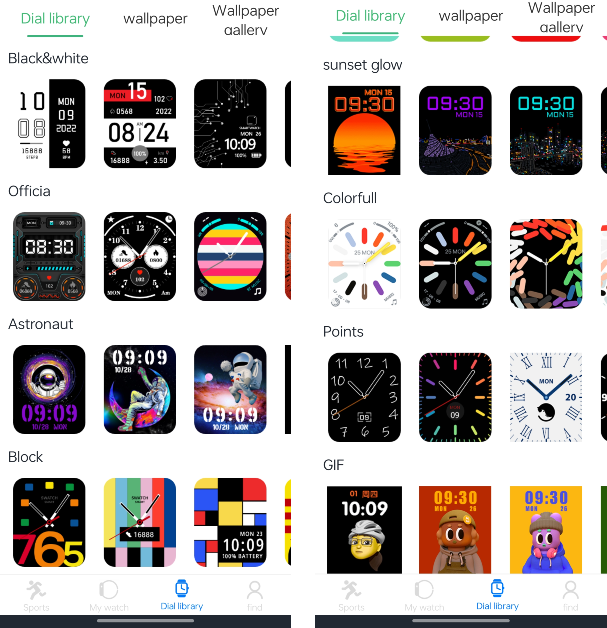 While the app handles the basics very well, WatchOut needs to work on its UI. If we hadn’t used the QR code on the watch to download this app, we would be very sceptical of its legitimacy. Upper case and lower case letters are used seemingly at random throughout the app’s interface and the text does not align with the layout in some pages. We also spotted a few typos on the app. We hope the company patches these errors with a swift update.
Ending things on a good note, the battery life of the WatchOut WearPods is very versatile. The smartwatch is equipped with a 400mAh battery pack and the earbuds have additional 35mAh batteries inside them. We were able to get more than 5 hours of playtime out of the earbuds in one go. The smartwatch lasted us an entire week with frequent TWS use, Bluetooth calling, and regular fitness tracking.
Read Also: How to send files using Quick Share? (2024)
While the app handles the basics very well, WatchOut needs to work on its UI. If we hadn’t used the QR code on the watch to download this app, we would be very sceptical of its legitimacy. Upper case and lower case letters are used seemingly at random throughout the app’s interface and the text does not align with the layout in some pages. We also spotted a few typos on the app. We hope the company patches these errors with a swift update.
Ending things on a good note, the battery life of the WatchOut WearPods is very versatile. The smartwatch is equipped with a 400mAh battery pack and the earbuds have additional 35mAh batteries inside them. We were able to get more than 5 hours of playtime out of the earbuds in one go. The smartwatch lasted us an entire week with frequent TWS use, Bluetooth calling, and regular fitness tracking.
Read Also: How to send files using Quick Share? (2024)
Verdict
As a sum of its parts, the WatchOut WearPods is a wonderful product. For Rs 5,000, it is a bargain. Sure, the audio quality of the WearPods may not match up to its standalone TWS rivals, but we highly rate its functionality and ease of access. The option to store music on the smartwatch and listen to it using the WearPods is a nice touch. Paired with the built-in GPS, it reduces your dependence on your smartphone while running or working out.WatchOut WearPods: Pros
- Good design
- Comfortable fit
- Built-in GPS
- 4GB internal memory for music
- Versatile battery
WatchOut WearPods: Cons
- Average audio output
- V Band app needs work
Apple discontinued iPad (9th gen); iPad (10th gen) gets a price cut
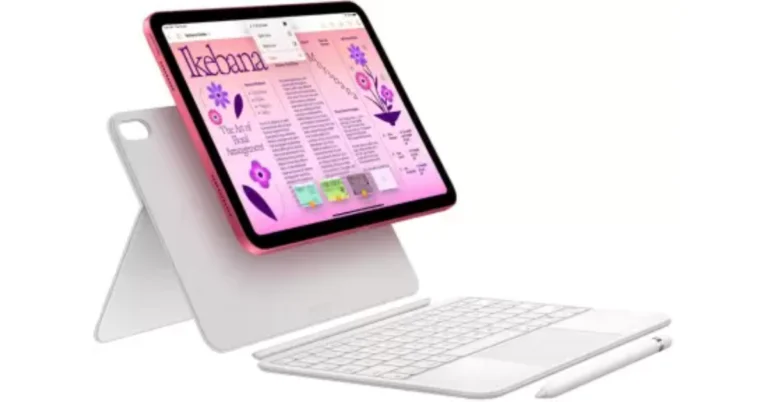
Apple on Tuesday introduced the new iPad Air and iPad Pro in India and other markets. Immediately after the launch, the company drastically reduced the price of the iPad (10th generation). At the same time, Apple has officially made the decision to stop selling the well-liked iPad (9th generation). So in case you’re considering purchasing a new tablet, now is the best time. Here are the pricing details:
After the price reduction, the iPad (10th generation) is available at a starting price of Rs 34,900, which is Rs 5,000 down from its original price of Rs 39,900 for the base 64GB model. On Flipkart, the same model will be available for Rs 32,999. The price of the 256GB is currently Rs 47,999.
The tablet features a 0.9-inch multi-touch IPS LED display. The screen has a resolution of 2360×1640, a peak brightness of 500 nits, and a pixel density of 264 ppi. The tablet is powered by a hexa-core A14 Bionic chipset. It runs on iPadOS 17.
The iPad (10th generation) comes with a 12-megapixel rear camera and a 12-megapixel ultra-wide-angle selfie camera. Additionally, it has a USB-C port and a 28.6-watt-hour lithium polymer battery.
Also Read: Toshiba C450ME QLED TV series with Dolby Vision and Dolby Atmos support launched in India
Apple has officially discontinued the iPad (9th generation), which arrived in 2021. With the Rs 10,000 discount, Apple has brought down the starting price of the 64GB variant to Rs 34,900. On Flipkart, the same model is presently selling for Rs 25,999, while the 256GB model is available for Rs 38,999 on Amazon and Flipkart.
Also Read: Google Pixel 8a launched in India at this price: Deets inside
The iPad (9th generation) has a 10.2-inch Retina display with a resolution of 2,160 x 1,620. The Apple tablet is driven by an A13 Bionic chip with 64GB or 256GB of storage options. Using iPadOS, you may edit and share photographs, run multiple apps at once, and use the Apple Pencil to write in any text field using Scribble.
iPad (10th generation) price in India
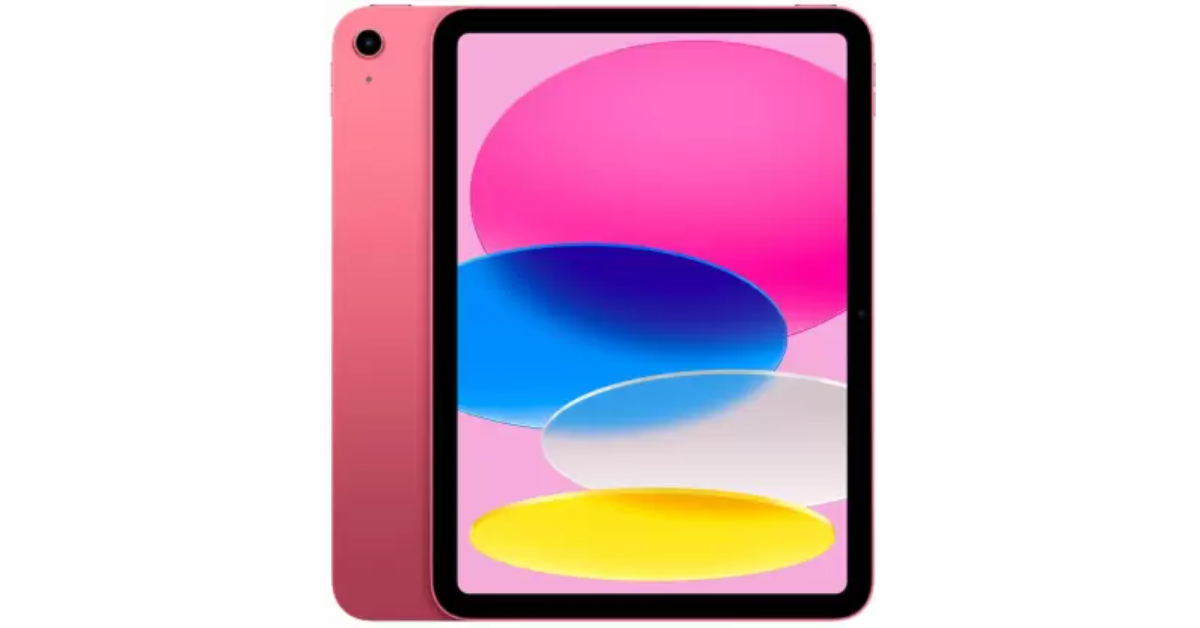 After the price reduction, the iPad (10th generation) is available at a starting price of Rs 34,900, which is Rs 5,000 down from its original price of Rs 39,900 for the base 64GB model. On Flipkart, the same model will be available for Rs 32,999. The price of the 256GB is currently Rs 47,999.
The tablet features a 0.9-inch multi-touch IPS LED display. The screen has a resolution of 2360×1640, a peak brightness of 500 nits, and a pixel density of 264 ppi. The tablet is powered by a hexa-core A14 Bionic chipset. It runs on iPadOS 17.
The iPad (10th generation) comes with a 12-megapixel rear camera and a 12-megapixel ultra-wide-angle selfie camera. Additionally, it has a USB-C port and a 28.6-watt-hour lithium polymer battery.
Also Read: Toshiba C450ME QLED TV series with Dolby Vision and Dolby Atmos support launched in India
After the price reduction, the iPad (10th generation) is available at a starting price of Rs 34,900, which is Rs 5,000 down from its original price of Rs 39,900 for the base 64GB model. On Flipkart, the same model will be available for Rs 32,999. The price of the 256GB is currently Rs 47,999.
The tablet features a 0.9-inch multi-touch IPS LED display. The screen has a resolution of 2360×1640, a peak brightness of 500 nits, and a pixel density of 264 ppi. The tablet is powered by a hexa-core A14 Bionic chipset. It runs on iPadOS 17.
The iPad (10th generation) comes with a 12-megapixel rear camera and a 12-megapixel ultra-wide-angle selfie camera. Additionally, it has a USB-C port and a 28.6-watt-hour lithium polymer battery.
Also Read: Toshiba C450ME QLED TV series with Dolby Vision and Dolby Atmos support launched in India
iPad (9th generation) price in India
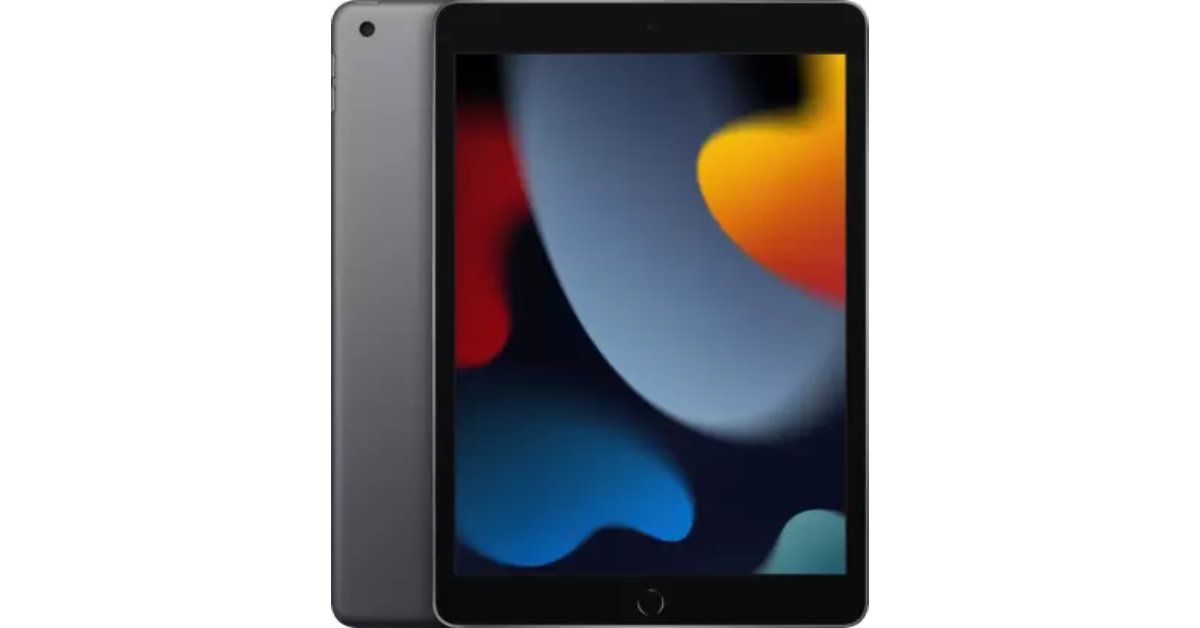 Apple has officially discontinued the iPad (9th generation), which arrived in 2021. With the Rs 10,000 discount, Apple has brought down the starting price of the 64GB variant to Rs 34,900. On Flipkart, the same model is presently selling for Rs 25,999, while the 256GB model is available for Rs 38,999 on Amazon and Flipkart.
Also Read: Google Pixel 8a launched in India at this price: Deets inside
The iPad (9th generation) has a 10.2-inch Retina display with a resolution of 2,160 x 1,620. The Apple tablet is driven by an A13 Bionic chip with 64GB or 256GB of storage options. Using iPadOS, you may edit and share photographs, run multiple apps at once, and use the Apple Pencil to write in any text field using Scribble.
Apple has officially discontinued the iPad (9th generation), which arrived in 2021. With the Rs 10,000 discount, Apple has brought down the starting price of the 64GB variant to Rs 34,900. On Flipkart, the same model is presently selling for Rs 25,999, while the 256GB model is available for Rs 38,999 on Amazon and Flipkart.
Also Read: Google Pixel 8a launched in India at this price: Deets inside
The iPad (9th generation) has a 10.2-inch Retina display with a resolution of 2,160 x 1,620. The Apple tablet is driven by an A13 Bionic chip with 64GB or 256GB of storage options. Using iPadOS, you may edit and share photographs, run multiple apps at once, and use the Apple Pencil to write in any text field using Scribble. Google Wallet Makes Its Debut in India, Elevating Daily Convenience for Users
Key Highlights
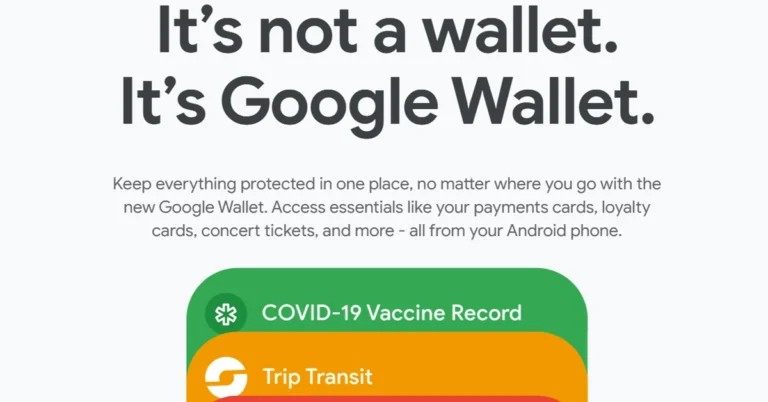
- Google Wallet launches in India, centralizing access to essentials like boarding passes and loyalty cards.
- Partners with major brands like PVR, INOX, and Air India to enhance functionality.
- Enables storage of event tickets, travel passes, and use of phones as corporate badges
Ram Papatla, GM & India Engineering Lead for Android at Google, emphasized the significance of this development: “Launching Google Wallet in India is a milestone that brings sophisticated, user-friendly experiences to Android users across the country. By partnering with top local brands, we offer a versatile solution for securely managing essential items from boarding passes to loyalty cards, right at your fingertips.”Read Also: Samsung Home Loyalty Program with Flipkart announced
Google Wallet integrates various features to streamline daily activities:
- Event and Movie Tickets: Users can add tickets from cinemas like PVR and INOX directly into their Wallets.
- Travel Made Easy: Airline passengers can store mobile boarding passes, with added functionalities for Pixel users to include passes by simply capturing a screenshot.
- Loyalty and Gift Cards: Partnerships with retailers like Flipkart and Dominos allow users to save and redeem loyalty points and gift cards effortlessly.
- Public Transit: Google Wallet supports ticket storage for services like Kochi Metro and Hyderabad Metro, simplifying public transit usage.
- Workplace Access: Android users can use their phones as corporate badges, thanks to collaborations with system integrators like Wavelynx.
- Digital Documentation: The app can digitize any document that contains a barcode or QR code, making it easier to manage various passes and receipts.
- Automatic Ticket Sync: Event confirmations from Gmail, such as movie or train tickets, will automatically populate in Google Wallet if smart personalization is enabled.
How to send files using Quick Share? (2024)
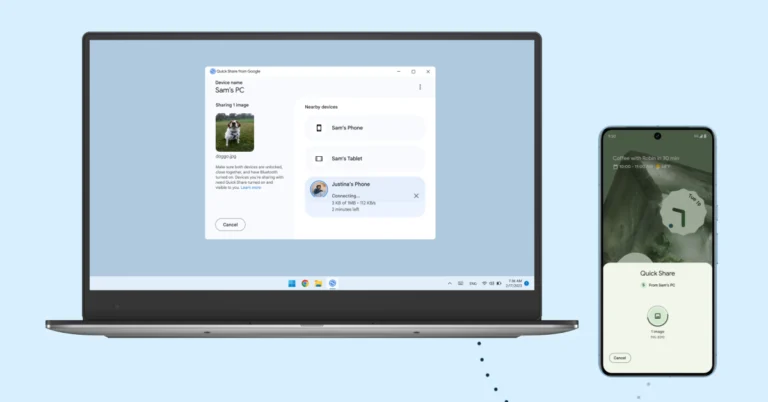
Google has renamed Android’s ‘Nearby Share’ feature to ‘Quick Share’ and started rolling it out to selected devices. You may remember Quick Share as Samsung’s file-sharing feature. You can use it to send files among Android, Windows, and ChromeOS devices. If you’re accustomed to Nearby Share, it won’t take you any time to adapt to the new feature. Today, we show you how to send files using Quick Share.
Read Also: Google Pixel 8a launched in India at this price: Deets inside
Step 2: Tap on Quick Share.
Step 3: Hit Continue.
Step 4: Make sure Bluetooth is turned on.
Step 5: Turn on Quick Share from the Quick Settings Menu on the target device.
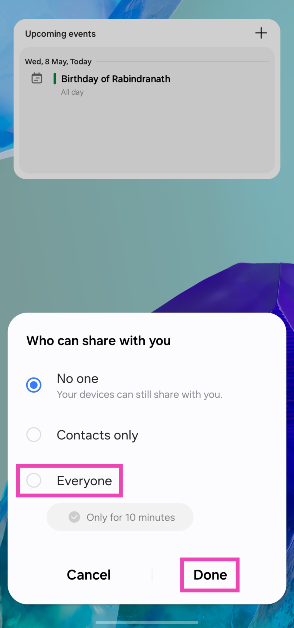
 Step 6: In the ‘Who can share with you’ popup, select Everyone.
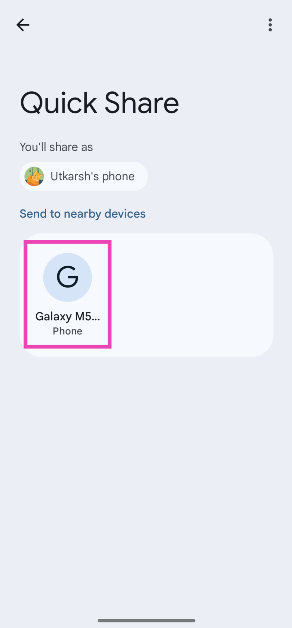
Step 7: On the device sharing the file, tap the name of the target device.
Step 8: Hit Accept on the target device.
The file will be transferred within seconds.
Step 6: In the ‘Who can share with you’ popup, select Everyone.
Step 7: On the device sharing the file, tap the name of the target device.
Step 8: Hit Accept on the target device.
The file will be transferred within seconds.
Before you begin
Here are the requirements your devices need to meet before using Quick Share:- The two devices must be within 5 metres (16 feet) of each other.
- Both devices must have Bluetooth and WiFi enabled.
- The devices should be running Android 6+, ChromeOS 91+, and 64-bit Windows 10+.
- ARM devices are not supported by Quick Share.
Here’s how you can send files using Quick Share
Step 1: Open the file you want to share and hit the Share icon at the bottom of the screen.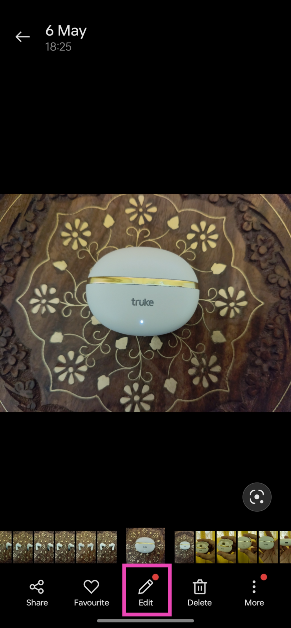 Step 2: Tap on Quick Share.
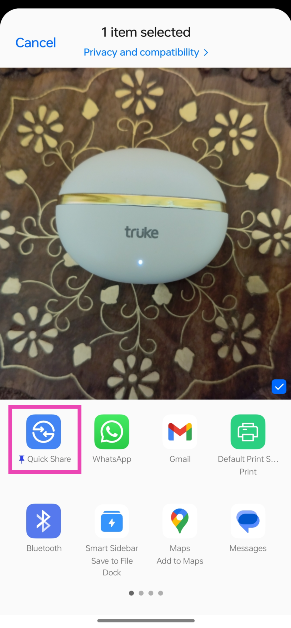 Step 3: Hit Continue.
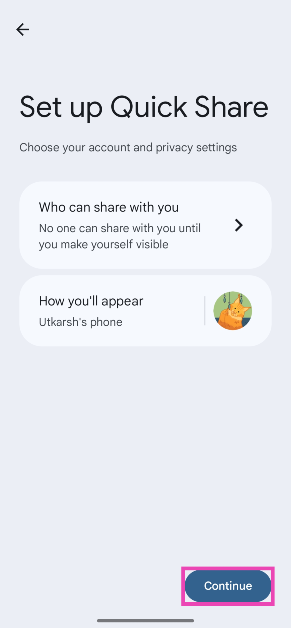 Step 4: Make sure Bluetooth is turned on.
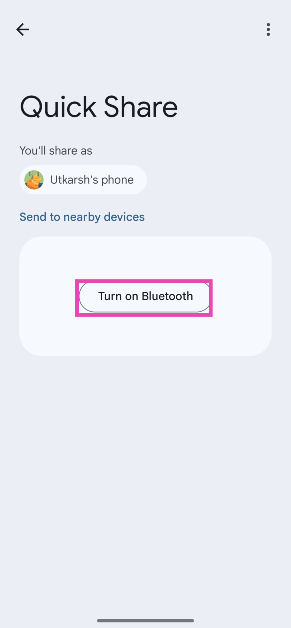 Step 5: Turn on Quick Share from the Quick Settings Menu on the target device.
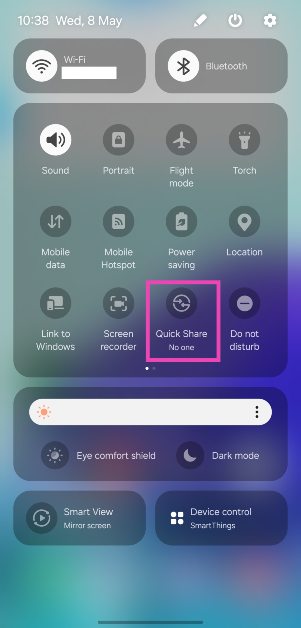 Step 6: In the ‘Who can share with you’ popup, select Everyone.
 Step 7: On the device sharing the file, tap the name of the target device.
 Step 8: Hit Accept on the target device.
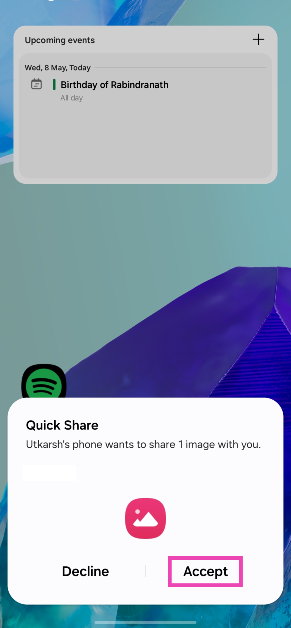 The file will be transferred within seconds.
Frequently Asked Questions (FAQs)
What happened to Nearby Share on Android?
Earlier this year, Android renamed its ‘Nearby Share’ file-sharing feature to ‘Quick Share’.How do I turn on Quick Share on my Android phone?
Swipe down from the status bar to reveal the Quick Settings Menu, tap on Quick Share, and select ‘Everyone’.How do I send a file via Quick Share?
Open the file, hit the ‘Share’ icon, tap on ‘Quick Share’, and select the target device. Read Also: Toshiba C450ME QLED TV series with Dolby Vision and Dolby Atmos support launched in IndiaConclusion
This is how you can send files from your Android smartphone using Quick Share. You can use Quick Share to send files to your Chromebook and Windows PC as well. As this feature is still being rolled out in phases, it may not be available on your device or in your country.Google Pixel 8a launched in India at this price: Deets inside
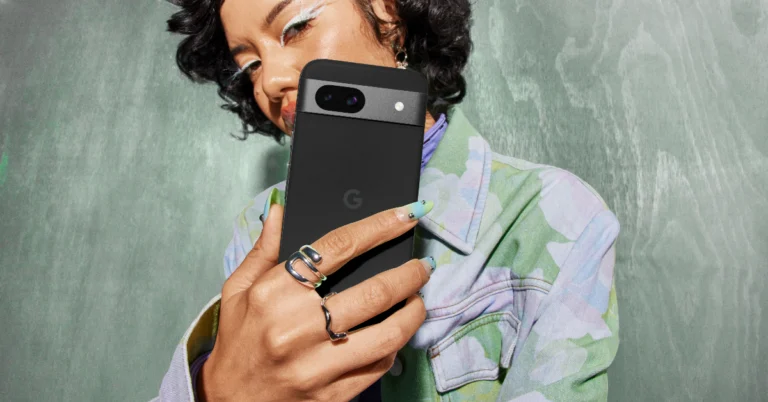
Key Highlights
The annual developers’ conference, Google I/O, is often when the Google Pixel ‘A’ series devices are introduced. Unexpectedly, this is the very first time Google has released a Pixel product without hosting a launch event. The dates for Google I/O 2024 are set for May 14–16.
Launch and pre-order offers for Google’s Pixel 8a in India include:
• Bank offer of Rs 4,000 and 12-month no-cost EMI, available with select bank cards • Exchange bonus of Rs 9,000 on select smartphone models
• Pre-order offer: Purchase Pixel Buds A-Series at Rs 999 with the purchase of Pixel 8a anytime during the pre-order period.
The phone runs on Android 14 out of the box and will receive seven years of software support, including security updates and Android OS upgrades.
The smartphone also features a dual rear camera system with a 64-megapixel main lens and a 13-megapixel ultrawide lens, as well as a 13-megapixel front-facing camera. Pixel 8a also includes Super Res Zoom up to 8x and features like Magic Eraser, Night Sight, and Photo Unblur.
Also Read: Toshiba C450ME QLED TV series with Dolby Vision and Dolby Atmos support launched in India
In terms of connectivity, there is Wi-Fi 6, Bluetooth 5.3, NFC, a USB Type-C port, and GPS. The handset packs a 4,492mAh battery, along with 18W wired charging and 7.5W Qi wireless charging support.
- Pixel 8a is now available for pre-orders in India.
- The device features a 120 Hz Super Actua display.
- The Pixel phone comes with a Tensor G3 SoC and AI features.
Google Pixel 8a price in India, sale details
The Google Pixel 8a price in India is set at:- 8GB RAM with 128GB storage: Rs 52,999
- 8GB RAM with 256GB storage: Rs 59,999
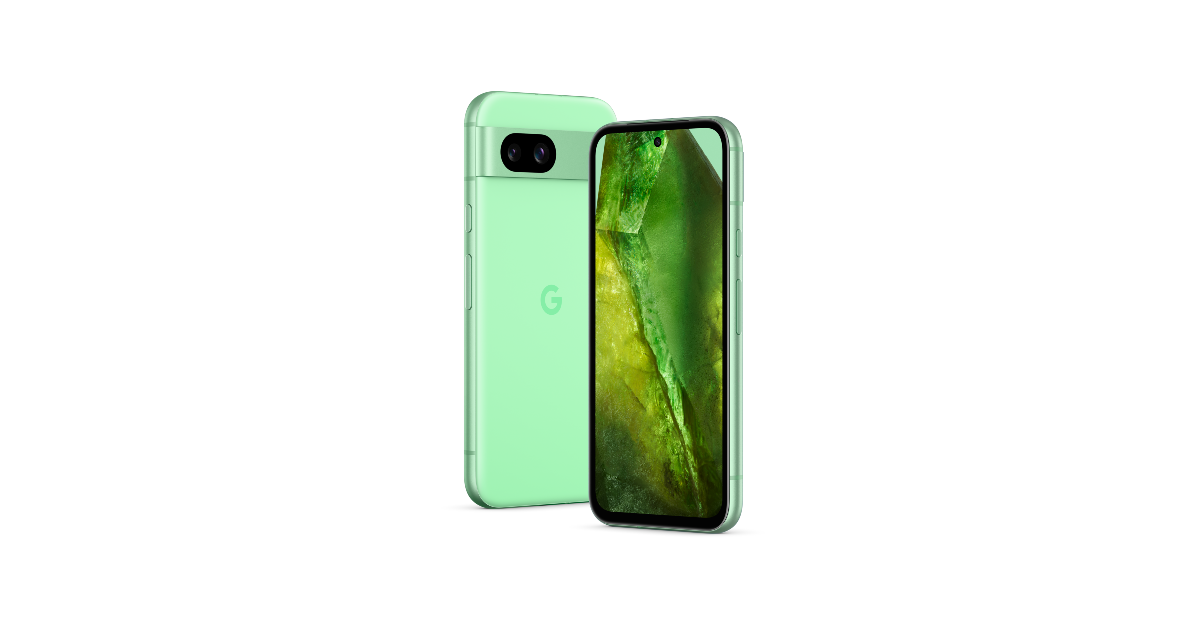 The annual developers’ conference, Google I/O, is often when the Google Pixel ‘A’ series devices are introduced. Unexpectedly, this is the very first time Google has released a Pixel product without hosting a launch event. The dates for Google I/O 2024 are set for May 14–16.
Launch and pre-order offers for Google’s Pixel 8a in India include:
• Bank offer of Rs 4,000 and 12-month no-cost EMI, available with select bank cards • Exchange bonus of Rs 9,000 on select smartphone models
• Pre-order offer: Purchase Pixel Buds A-Series at Rs 999 with the purchase of Pixel 8a anytime during the pre-order period.
The annual developers’ conference, Google I/O, is often when the Google Pixel ‘A’ series devices are introduced. Unexpectedly, this is the very first time Google has released a Pixel product without hosting a launch event. The dates for Google I/O 2024 are set for May 14–16.
Launch and pre-order offers for Google’s Pixel 8a in India include:
• Bank offer of Rs 4,000 and 12-month no-cost EMI, available with select bank cards • Exchange bonus of Rs 9,000 on select smartphone models
• Pre-order offer: Purchase Pixel Buds A-Series at Rs 999 with the purchase of Pixel 8a anytime during the pre-order period.
Google Pixel 8a specifications
The Google Pixel 8a comes with rounded corners, a matte back, a polished aluminium frame, and a glass-like polycarbonate rear panel. It is highlighted with a 6.1-inch Super Actua display, which is said to be 40 per cent brighter than the Pixel 7a’s. It now supports a faster 120Hz refresh rate and is protected with Corning Gorilla Glass 3 layering. Also Read: Apple launched 2024 models of iPad Air and iPad Pro, M4 chipset also introduced Under the hood, there is the Google Tensor G3 chip and the Titan M2 security chip. The chipset offers AI-powered tools like Best Take, Magic Editor, Audio Magic Eraser, and more. Gemini, Google’s built-in AI assistant, allows users to type, talk, and add images for various tasks. Parents and guardians can easily establish digital ground rules, manage privacy settings, set screen time limits, and share locations.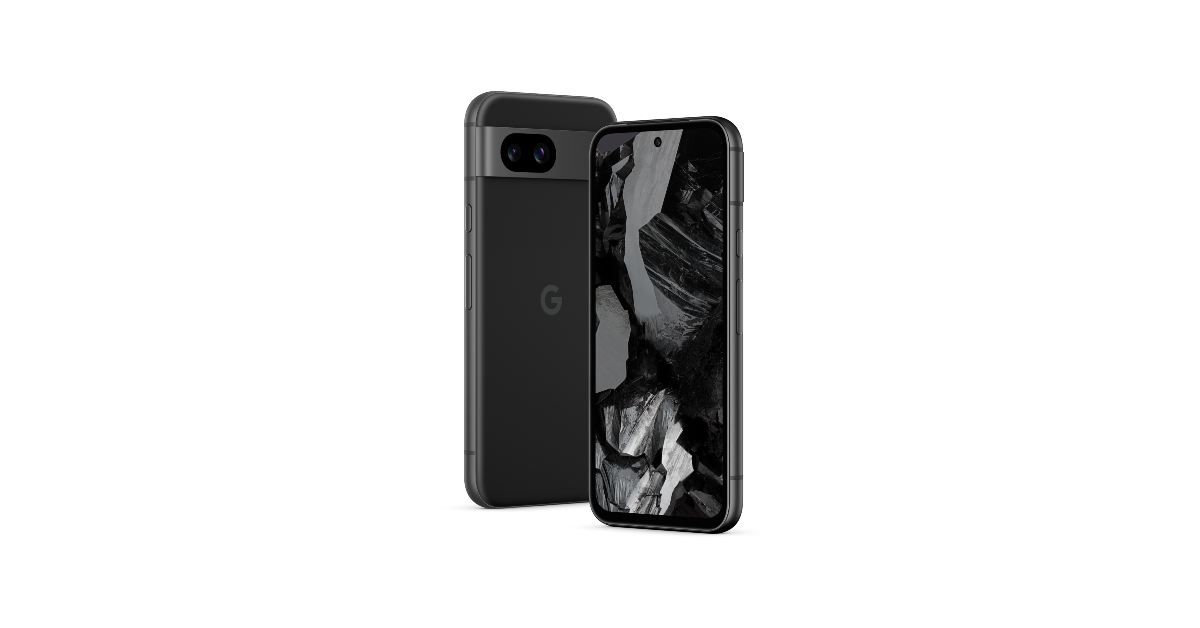 The phone runs on Android 14 out of the box and will receive seven years of software support, including security updates and Android OS upgrades.
The smartphone also features a dual rear camera system with a 64-megapixel main lens and a 13-megapixel ultrawide lens, as well as a 13-megapixel front-facing camera. Pixel 8a also includes Super Res Zoom up to 8x and features like Magic Eraser, Night Sight, and Photo Unblur.
Also Read: Toshiba C450ME QLED TV series with Dolby Vision and Dolby Atmos support launched in India
In terms of connectivity, there is Wi-Fi 6, Bluetooth 5.3, NFC, a USB Type-C port, and GPS. The handset packs a 4,492mAh battery, along with 18W wired charging and 7.5W Qi wireless charging support.
The phone runs on Android 14 out of the box and will receive seven years of software support, including security updates and Android OS upgrades.
The smartphone also features a dual rear camera system with a 64-megapixel main lens and a 13-megapixel ultrawide lens, as well as a 13-megapixel front-facing camera. Pixel 8a also includes Super Res Zoom up to 8x and features like Magic Eraser, Night Sight, and Photo Unblur.
Also Read: Toshiba C450ME QLED TV series with Dolby Vision and Dolby Atmos support launched in India
In terms of connectivity, there is Wi-Fi 6, Bluetooth 5.3, NFC, a USB Type-C port, and GPS. The handset packs a 4,492mAh battery, along with 18W wired charging and 7.5W Qi wireless charging support. Garena Free Fire Redeem Codes Today 8 May 2024: Here is how to claim them

Garena Free Fire is a battle royale game with regular awards and tournaments to keep players interested. If you play Garena Free Fire, you should be aware of the redeem codes that are released on a daily basis. However, because the battle royale game is banned in India, players from other countries can use the Free Fire Redeem codes daily. If you’re unfamiliar with the Garena Free Fire redeem codes or don’t know how to get them, we’ve put together a step-by-step guide to help you redeem them. Check out Garena Free Fire Redeem Codes for 8 May 2024.
The Free Fire redeem codes are a great way to get free stuff. These are 12-digit codes that contain alphabets and numbers, as well as an expiration date and time. Because the Garena FF redeem codes cannot be used more than once, you should hurry to the redemption page to claim your free reward before someone else does. To get a free reward, all you have to do is go to reward.ff.garena.com/en, which is the official redemption page. Also, keep an eye on this space for daily updates on Garena Free Fire redemption codes and rewards.
Also Read: Sennheiser Accentum Plus wireless headphones with Hybrid Adaptive Noise Cancellation launched
Garena Free Fire Redeem Codes Today 8 May 2024
FJ7L5EV4S8T3R62U FG9P3M2F6Y1A7B5E FW8U4IE2X3ZN5Q9D FH1R9C6G2O8J4E5T FS3Y6DEEQ1B4LK9M FC2WE9Q5V1XA3FRH FM6F8GR7T2B5ES9J FW3X6EY9Z4A7TB1C FD8E2F5G1HGT6I3J FFN7O4P1Q6R9S2T5 FL4Z1ED9N7H3PY8I FQ5O2X6K9J1C8W4G FB3C5D8E2S1F7G4H FI9J2KE6L3MTTN5O FP4Q7R1S5TTT9E2VHow to Get Free Fire Redeem Codes for Garena on 8 May 2024?
- Visit the Garena Free Fire game’s official website at reward.ff.garena.com.
- Use your Facebook, Google, VK, Apple ID, Huawei ID, or Twitter account to log in.
- You’ll be taken to a valid redemption code (s)
- Copy and paste the 12-digit redemption code into the text box.
- On the screen, a dialogue box will appear.
- ‘Ok’ should be selected.
Toshiba C450ME QLED TV series with Dolby Vision and Dolby Atmos support launched in India
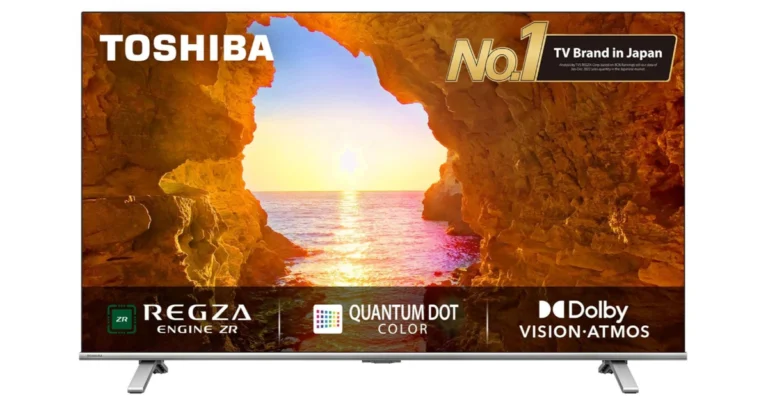
Japanese tech brand Toshiba announced the launch of an all-new C450ME QLED TV series in the Indian market. The latest Toshiba QLED TV lineup comes with Dolby Vision and Dolby Atmos support. It is equipped with REGZA Engine ZR for stunning picture quality and has advanced 4K upscaling technology.
Toshiba C450ME QLED TV price in India, sale details
Toshiba C450ME QLED TV will be available in India at a starting price of Rs 26,999 for the 43-inch 43C450ME. The 55-inch 55C450ME will be offered at Rs 37,999, the 50-inch 50C450ME will be priced at Rs 32,999. The 43-inch and 50-inch models will be available starting May 7, with the 55-inch model to follow soon after. The Television will be available for purchase via all leading e-commerce platforms in the country.Toshiba C450ME QLED TV specifications, features
Toshiba C450ME QLED TV features a sleek, ultra-thin bezel design and is available in three different sizes 55-inch, 50-inch and 43-inch. The television is equipped with Toshiba TV’s exclusive REGZA Engine ZR technology, which allows it to fully utilise 4K resolution. The device offers a vivid and lifelike colour spectrum thanks to Quantum Dot Color technology which also improves delicate undertones to vibrant colours, making for an immersive and engrossing watching experience. The AI-driven 4K upscaling engine on Toshiba TV makes sure that even non-4K content appears fantastic by carefully examining and refining each frame. Also Read: Apple presents the 2024 Pride Collection, the new Apple Watch Pride Edition Braided Solo Loop, and more The QLED TV supports Dolby Vision and HDR 10+ Decoding to provide stunning visuals. Along with REGZA Power Audio the C450ME QLED TV has Dolby Audio, Dolby Atmos, and DTSX technologies to produce crisp, clear, and perfectly balanced sound. The Game Mode on it offers optimised rendering capabilities and minimal input lag. Game Mode includes gaming features like VRR (Variable Refresh Rate), eARC, and ALLM (Auto Low Latency Mode). Also Read: Apple launched 2024 models of iPad Air and iPad Pro, M4 chipset also introduced As per the company with built-in voice assistants like Alexa and VIDAA Voice, customers can easily control their TV and stream content while having a seamless and user-friendly experience thanks to the VIDAA operating system. The OS offers a wide array of global and local entertainment options, including Netflix, Prime Video, Apple TV, YouTube, Disney+Hotstar, JIO Cinema, Zee5, and more. In terms of connectivity, Toshiba C450ME QLED TV includes HDMI, Bluetooth, Dual Band 2.4G+5G, and USB Media Player optionsHow to use a boarding pass on your smartwatch?

If you own a WearOS smartwatch, you should check out what Google has in store for you. If you’re used to scanning the boarding pass from your phone, you can now use your smartwatch for the task. The process is seamless and does not take much of your time. Not only does this work for boarding passes but any ticket with a QR code. So, let’s take a look at how you can access and use a boarding pass on your smartwatch.
Read Also: Apple launched 2024 models of iPad Air and iPad Pro, M4 chipset also introduced
Step 1: Open the boarding pass on your phone and take a screenshot.
Step 2: In the pop-up menu of the screenshot, tap on Add to wallet. This feature only appears if Google Wallet is installed and activated on your phone.
Step 3: If you want to edit any information, do it on the next page. Hit Save when you’re done.
The boarding pass will be saved to your Google Wallet.
 Step 1: Launch the Wallet app on your smartphone.
Step 2: Tap on the boarding pass. This will display its QR code.
Step 3: Let the QR code reader scan your watch.
Step 1: Launch the Wallet app on your smartphone.
Step 2: Tap on the boarding pass. This will display its QR code.
Step 3: Let the QR code reader scan your watch.
Before you begin
For this method to work, you need the Google Wallet app. Google Wallet can store your credit/debit cards, boarding passes, movie tickets, and more. If your phone has NFC, you can use the Google Wallet app to make payments with a single tap. Whenever you receive a ticket or a pass in your email, it is automatically added to the Wallet, given you are logged into Gmail and Wallet using the same account. If the boarding pass or ticket does not show up in your Wallet, you can always add it manually. Once it has been added to the Wallet app, you can access it on your WearOS smartwatch. The entire process is seamless and does not require a lot of effort. The only catch is that Google Wallet is available only in limited countries right now.Add a boarding pass to your Google Wallet
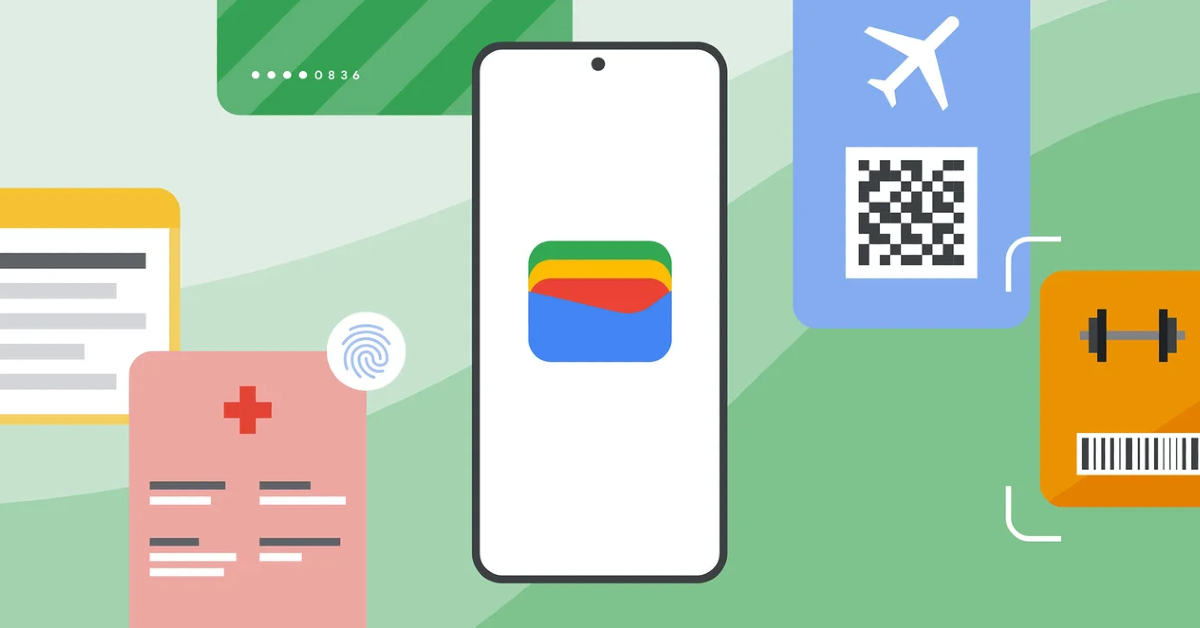 Step 1: Open the boarding pass on your phone and take a screenshot.
Step 2: In the pop-up menu of the screenshot, tap on Add to wallet. This feature only appears if Google Wallet is installed and activated on your phone.
Step 3: If you want to edit any information, do it on the next page. Hit Save when you’re done.
The boarding pass will be saved to your Google Wallet.
Step 1: Open the boarding pass on your phone and take a screenshot.
Step 2: In the pop-up menu of the screenshot, tap on Add to wallet. This feature only appears if Google Wallet is installed and activated on your phone.
Step 3: If you want to edit any information, do it on the next page. Hit Save when you’re done.
The boarding pass will be saved to your Google Wallet.
Use a boarding pass on your smartwatch
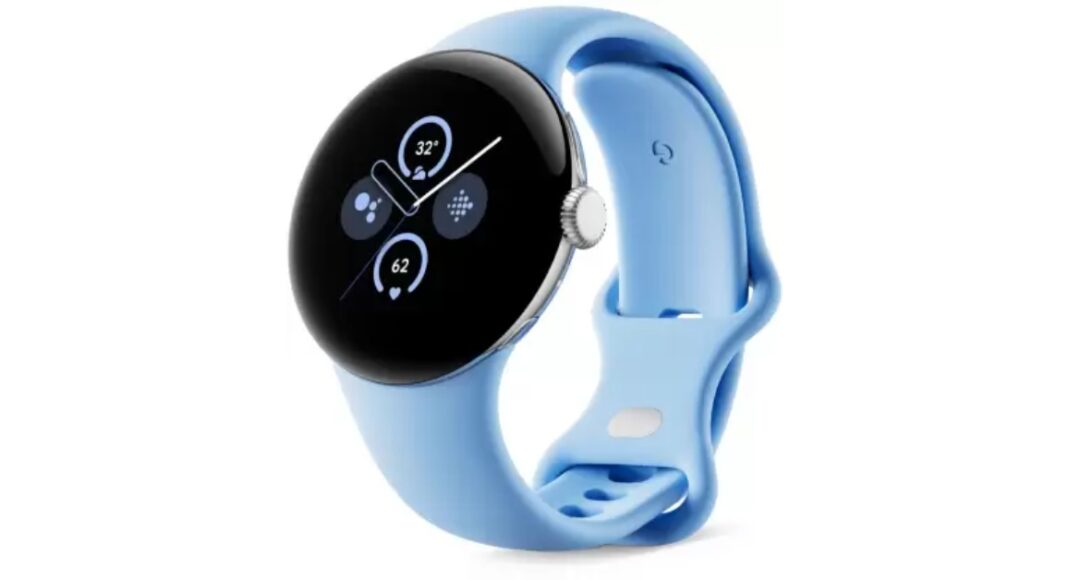 Step 1: Launch the Wallet app on your smartphone.
Step 2: Tap on the boarding pass. This will display its QR code.
Step 3: Let the QR code reader scan your watch.
Step 1: Launch the Wallet app on your smartphone.
Step 2: Tap on the boarding pass. This will display its QR code.
Step 3: Let the QR code reader scan your watch.
Frequently Asked Questions (FAQs)
Can I scan my boarding pass using my smartwatch?
If you have the Google Wallet app on your smartwatch, you can use it to access and scan your boarding pass while boarding a flight.How do I add a boarding pass to Google Wallet?
To add a boarding pass to Google Wallet, simply take a screenshot of it on your phone and tap the ‘Add the wallet’ option at the bottom right corner of the screen.Is the Google Wallet app available in India?
Google Wallet is not available in India yet. Some users have spotted the app in Google Play Store but the tech giant has not revealed any plans for its launch yet. Read Also: How to stack similar photos together in Google Photos?Conclusion
This is how you can access and use your boarding pass using your smartwatch. This method also works for other QR-code-based passes and tickets. If you can’t get this method to work, make sure your smartphone is NFC-enabled.Apple launched 2024 models of iPad Air and iPad Pro, M4 chipset also introduced
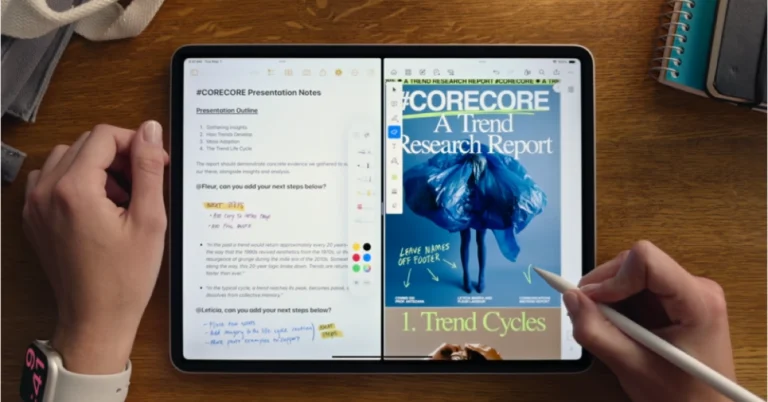
- iPad Air gets an M2 processor and iPad Pro comes with an M4 chipset.
- The Air comes with support for Magic Keyboard and Apple Pencil.
- The tablets will be available in 11-inch and 13-inch variants.
iPad Air specs, features
 The all-new iPad Air sports a 10.9-inch and a 13-inch Liquid Retina (LCD) display. An octa-core M2 processor with a Neural Engine for on-device AI workloads powers it. The tablet comes pre-installed with iPadOS 17.
It has a 12-megapixel ultra-wide angle forward-facing camera with a landscape orientation. A 12-megapixel wide-angle camera with image stabilisation and support for Smart HDR is also located on the back. Additionally, the camera can capture videos in 4K quality at up to 60 frames per second or in slow motion at up to 1080p at up to 240 frames per second. The device supports Apple’s Centre Stage technology, which automatically changes the camera angle as you walk, in addition to FaceTime.
The all-new iPad Air sports a 10.9-inch and a 13-inch Liquid Retina (LCD) display. An octa-core M2 processor with a Neural Engine for on-device AI workloads powers it. The tablet comes pre-installed with iPadOS 17.
It has a 12-megapixel ultra-wide angle forward-facing camera with a landscape orientation. A 12-megapixel wide-angle camera with image stabilisation and support for Smart HDR is also located on the back. Additionally, the camera can capture videos in 4K quality at up to 60 frames per second or in slow motion at up to 1080p at up to 240 frames per second. The device supports Apple’s Centre Stage technology, which automatically changes the camera angle as you walk, in addition to FaceTime.
iPad Pro specs, features
 iPad Pro comes with an Ultra Retina XDR display. The device, which is the thinnest Apple product that utilises two OLED panels called “Tandem OLED” to attain 1000 nits of brightness and a peak brightness of 1600 nits, will be available in two sizes: an 11-inch display (5.3 mm thin) and a 13-inch model (5.1 mm thin).
The M4 chipset, which supports up to 2TB of storage, powers the system faster. The chipset, according to the company, is built on a second-generation 3nm process and features a 10-core GPU with ray-tracing capabilities. In addition to this, it has a totally redesigned display engine that can give up to four times quicker performance than the M2 chip. According to the company, the newest M4 chipset, which has the capacity to separate the NPU unit in its architecture, will also offer AI features for the new iPad Pro. The device comes pre-installed with iPadOS 17.
The tablet has a dual rear camera arrangement with a LiDAR scanner and a 12-megapixel primary and 10-megapixel ultra-wide angle camera. A 12-megapixel ultra-wide-angle camera with Centre Stage support has been included on the front for taking selfies and making video calls.
For improved performance, the new iPad Pro is supported with Logic Pro and Final Cut Pro 2. According to Apple, rendering in Final Cut Pro is greatly sped up by the new M4 chip. It can reach speeds up to twice that of the M1 chip. Additionally, users can connect and preview up to four cameras at once with the new live multicam mode. For recording footage, the Final Cut Camera app can be used independently as a camera app.
Apple has also introduced the Magic Keyboard, which has haptic feedback. It also comes with an adjustable screen brightness. The latest model offers a trackpad with haptic feedback, an aluminium palm rest, and a function row. The redesigned Magic Keyboard keeps its essential functions while sporting a leaner design approach.
The new Apple Pencil Pro, on the other hand, has motion sensors, personalised interactions, and Find My. The iPad Air is compatible with the new Apple Pencil Pro as well.
iPad Pro comes with an Ultra Retina XDR display. The device, which is the thinnest Apple product that utilises two OLED panels called “Tandem OLED” to attain 1000 nits of brightness and a peak brightness of 1600 nits, will be available in two sizes: an 11-inch display (5.3 mm thin) and a 13-inch model (5.1 mm thin).
The M4 chipset, which supports up to 2TB of storage, powers the system faster. The chipset, according to the company, is built on a second-generation 3nm process and features a 10-core GPU with ray-tracing capabilities. In addition to this, it has a totally redesigned display engine that can give up to four times quicker performance than the M2 chip. According to the company, the newest M4 chipset, which has the capacity to separate the NPU unit in its architecture, will also offer AI features for the new iPad Pro. The device comes pre-installed with iPadOS 17.
The tablet has a dual rear camera arrangement with a LiDAR scanner and a 12-megapixel primary and 10-megapixel ultra-wide angle camera. A 12-megapixel ultra-wide-angle camera with Centre Stage support has been included on the front for taking selfies and making video calls.
For improved performance, the new iPad Pro is supported with Logic Pro and Final Cut Pro 2. According to Apple, rendering in Final Cut Pro is greatly sped up by the new M4 chip. It can reach speeds up to twice that of the M1 chip. Additionally, users can connect and preview up to four cameras at once with the new live multicam mode. For recording footage, the Final Cut Camera app can be used independently as a camera app.
Apple has also introduced the Magic Keyboard, which has haptic feedback. It also comes with an adjustable screen brightness. The latest model offers a trackpad with haptic feedback, an aluminium palm rest, and a function row. The redesigned Magic Keyboard keeps its essential functions while sporting a leaner design approach.
The new Apple Pencil Pro, on the other hand, has motion sensors, personalised interactions, and Find My. The iPad Air is compatible with the new Apple Pencil Pro as well. How to stack similar photos together in Google Photos?
If you take multiple shots of the same scene or subject, your photo gallery probably looks redundant. Swiping through similar images while looking at the pictures from a particular event takes the fun out of it. In a bid to resolve this problem and declutter your image library, the tech giant has introduced the ‘Photo Stacks’ feature in its native Photos app. This feature organises your photo gallery by clubbing similar pictures together. Here is how you can enable or turn on Photo Stacks in Google Photos.
Read Also: How to summarise incoming messages using Android Auto? (2024)
 Step 3: Tap on Photo settings.
 Step 4: Select Preferences.
 Step 5: Tap on Stack similar photos.
Step 6: Turn on the toggle switch for Stack similar photos.
Step 5: Tap on Stack similar photos.
Step 6: Turn on the toggle switch for Stack similar photos.

How does it work?
When you create a stack in the Photos app, it goes through your photo gallery and groups similar images together. A stack has a special icon that resembles two squares paired together. Tapping on the image with the stack icon reveals the rest of the images. You can change the image that appears as the cover for the stack. You can also remove the pictures in the stack if you want to free some storage space. If you don’t want the images in a particular stack to be grouped together, instead of turning off the feature you can open the stack, hit the ellipses and select ‘Unstack’.Enable Photo Stacks in Google Photos
Step 1: Launch the Google Photos app on your Android smartphone. Step 2: Hit your profile picture at the top right corner of the screen.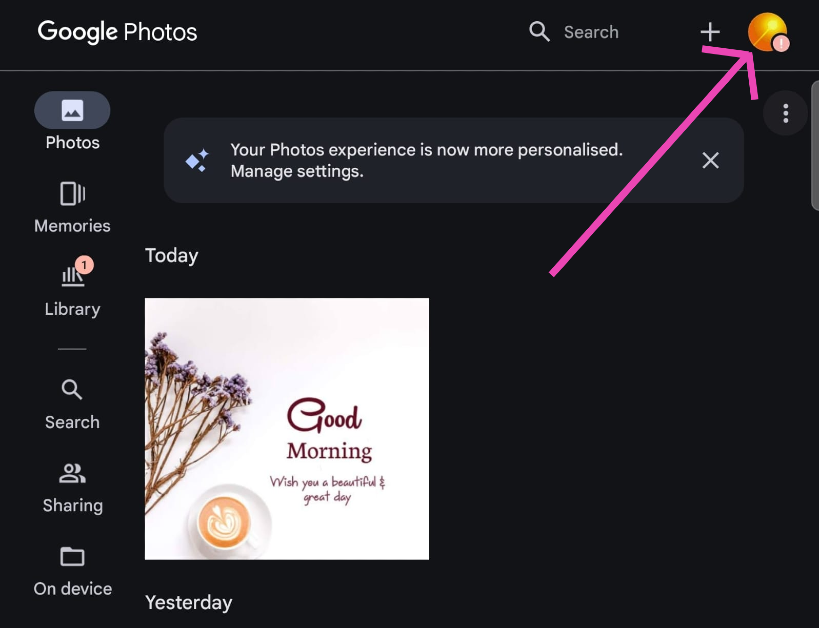 Step 3: Tap on Photo settings.
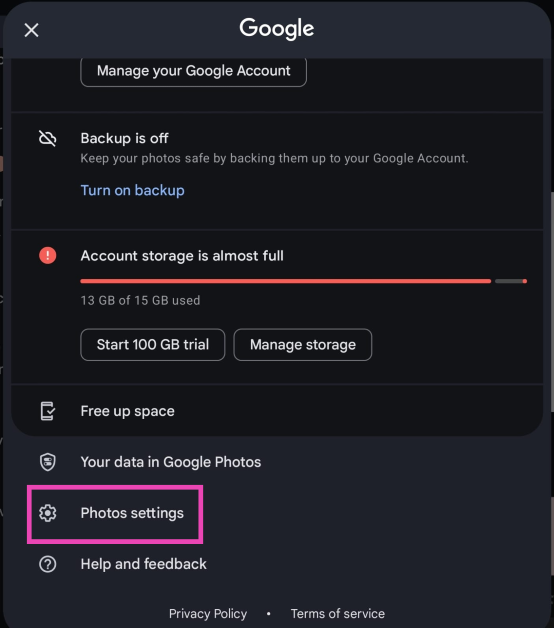 Step 4: Select Preferences.
 Step 5: Tap on Stack similar photos.
 Step 6: Turn on the toggle switch for Stack similar photos.

Frequently Asked Questions (FAQ)
How to turn on Photo Stacks in Google Photos?
Launch the Google Photos app, tap on your profile picture, go to Photo settings>Preferences>Stack similar photos and turn on its toggle switch.What does Photos Stacks do?
The ‘Photos Stacks’ feature in Google Photos organises your photo library by stacking similar images together.What is the photo limit for a single stack?
One stack of images in Google Photos can hold up to 100 pictures. Read Also: MediaTek Introduces Its New Dimensity 9300+ Chip: Elevating Smartphone AI Capabilities And Gaming PerformanceConclusion
This is how you can enable or turn on Photo Stacks in Google Photos. This feature will declutter your photo library and make it easier to browse. If you can’t find this feature on your phone, update the Google Photos app and try again. Since this feature is being rolled out in phases, it is possible it may reach your device at a later date.Apple presents the 2024 Pride Collection, the new Apple Watch Pride Edition Braided Solo Loop, and more
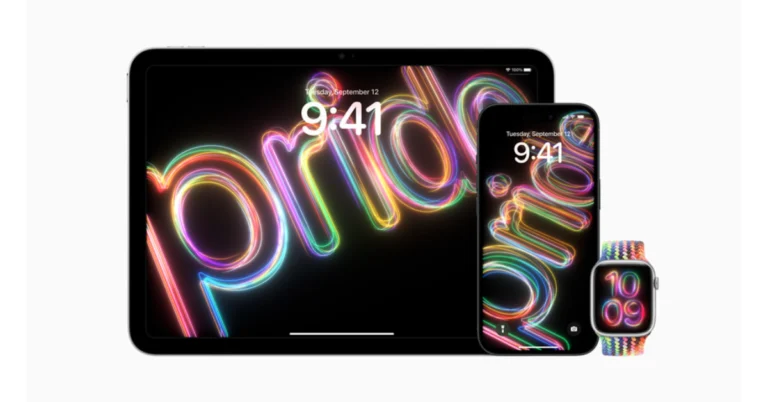
Apple has announced today the release of a new watch face, dynamic iOS and iPadOS wallpapers, and a new Apple Watch Pride Edition Braided Solo Loop. These announcements are part of Apple’s efforts to support global movements to safeguard and promote equality for LGBTQ+ communities.
Apple is introducing a new Apple Watch Pride Edition Braided Solo Loop, which will be available for order starting on May 22. In addition to this, a matching watch face and dynamic iOS and iPadOS wallpapers will be available in an upcoming software update. According to the company, for the first time, users may personalise the Pride watch face and backgrounds to feature a range of colours that symbolise the diversity and vitality of LGBTQ+ communities.
Also Read: LG CineBeam Q laser projector with 4K UHD picture quality launched in India
Apple says that it will continue to support LGBTQ+ advocacy groups through this Pride Collection, whose work is bringing about positive change. These groups include the Human Rights Campaign, a global advocacy group that works to ensure that all LGBTQ+ people are treated as full and equal citizens, and ILGA World, a global federation dedicated to advancing the rights of LGBTQ+ people worldwide. Encircle, Equality Texas, Equality North Carolina, GLSEN, Equality Federation, the National Centre for Transgender Equality, PFLAG, SMYAL, and The Trevor Project are among the other advocacy groups that Apple sponsors.
The new Pride Edition Braided Solo Loop, which comes with a laser-etched lug that reads “PRIDE 2024,” reflects the beauty and strength of LGBTQ+ communities with a bright, fluorescent design influenced by several pride flags. Whereas pink, light blue and white tones stand for transgender and nonbinary people, while black and brown represent black, Hispanic, and Latino groups as well as those affected by HIV/AIDS.
The iPad, iPhone, and Apple Watch now have vibrant, symbolic colours for the new Pride Radiance watch face and iOS and iPadOS wallpapers.
Also Read: Apple Event “Let Loose” today: Here is how to watch the event live
The Pride Edition Braided Solo Loop will be priced at Rs 9500 and available for purchase at Apple Store locations starting on May 22 in the United States and Canada and May 23 in other countries. Buyers can order it at apple.com/in.
Apple Watch SE and Apple Watch Series 4 or later are compatible with the 41mm and 45mm Pride Edition Braided Solo Loop.
Soon, watchOS 10.5, iOS 17.5, and iPadOS 17.5 users will be able to download the new Pride Radiance watch face and wallpapers. The matching Pride Radiance watch face can be downloaded through the Apple Watch app, on the Apple Store app, or at apple.com/in.
How to summarise incoming messages using Android Auto? (2024)
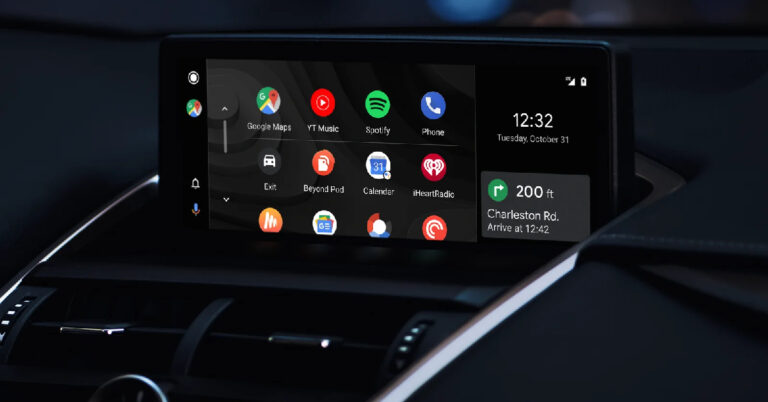
Initially, showcased at the launch event of the Samsung Galaxy S24 Series, the AI summarisation feature for incoming messages on Android Auto is finally being rolled out to Android users. As the name suggests, this feature shortens long incoming messages, making them easily digestible while driving. Google Assistant reads these messages aloud so you don’t have to divert your attention from the road. Check out how you can use Google Assistant to summarise incoming messages on Android Auto.
Read Also: LG CineBeam Q laser projector with 4K UHD picture quality launched in India
Google Assistant on Android Auto prompts you to opt-in for AI summaries the first time you receive a text message that is over 40 words. Tapping ‘Yes’ will enable AI summaries on the device and the Assistant will read out the condensed version of the text message while you’re driving. If you ignored this prompt or accidentally hit ‘No’ on it, you can enable the feature from Android Auto settings. Here’s how.
Step 1: Tap the Settings icon at the bottom left corner of the screen.
Step 2: Under Notifications, turn on the toggle switch for Message Summary.
Once you receive a message, tap ‘Play Aloud’. Google notes that “If there’s only one long message or multiple messages from the same sender or the group, the messages are summarized automatically when you tap Play aloud. Otherwise, the Assistant reads the message without summarization.”
How do AI summaries for incoming messages work on Android Auto?
AI summaries are not a new thing on the Android platform. Samsung’s Galaxy AI can summarise web pages, voice notes, and regular text notes. Google’s new summarisation feature also relies on AI to create a shortened version of the incoming texts. Addressing privacy concerns around the issue, the tech giant has confirmed that this feature doesn’t log messages or summaries and the data isn’t used to train the Large Language Model (LLM). As is the case with most AI-based tools, there is some room for error in the text summaries generated by Google Assistant. The good news is that they will get better with time. Google also plans on rolling out this feature on other devices that support the Assistant. As of now, it is only available on Android Auto for selected devices in certain countries.Enable AI summaries for incoming messages in Android Auto
 Google Assistant on Android Auto prompts you to opt-in for AI summaries the first time you receive a text message that is over 40 words. Tapping ‘Yes’ will enable AI summaries on the device and the Assistant will read out the condensed version of the text message while you’re driving. If you ignored this prompt or accidentally hit ‘No’ on it, you can enable the feature from Android Auto settings. Here’s how.
Step 1: Tap the Settings icon at the bottom left corner of the screen.
Step 2: Under Notifications, turn on the toggle switch for Message Summary.
Once you receive a message, tap ‘Play Aloud’. Google notes that “If there’s only one long message or multiple messages from the same sender or the group, the messages are summarized automatically when you tap Play aloud. Otherwise, the Assistant reads the message without summarization.”
Google Assistant on Android Auto prompts you to opt-in for AI summaries the first time you receive a text message that is over 40 words. Tapping ‘Yes’ will enable AI summaries on the device and the Assistant will read out the condensed version of the text message while you’re driving. If you ignored this prompt or accidentally hit ‘No’ on it, you can enable the feature from Android Auto settings. Here’s how.
Step 1: Tap the Settings icon at the bottom left corner of the screen.
Step 2: Under Notifications, turn on the toggle switch for Message Summary.
Once you receive a message, tap ‘Play Aloud’. Google notes that “If there’s only one long message or multiple messages from the same sender or the group, the messages are summarized automatically when you tap Play aloud. Otherwise, the Assistant reads the message without summarization.”
Frequently Asked Questions (FAQs)
How do I enable AI summaries for incoming messages in Android Auto?
Hit the settings icon, then turn on the toggle switch for ‘Message Summary’ under Notifications.Why can’t I see the AI summary feature on my device?
As of now, this feature is only available for certain devices in a handful of countries. It is being rolled out in phases so it may take some weeks or even months to be available on your device.Why is Google Assistant not summarising my incoming messages on Android Auto?
The AI summary feature only works on incoming text messages that are over 40 words. Read Also: Top 10 Tech Gifts for Mother’s Day 2024Conclusion
This is how you can summarise incoming text messages using Google Assistant on Android Auto. If you don’t like this feature, you can disable it from the Notifications section in Android Auto settings. If there’s anything else you’d like to know, ask us in the comments!LG CineBeam Q laser projector with 4K UHD picture quality launched in India
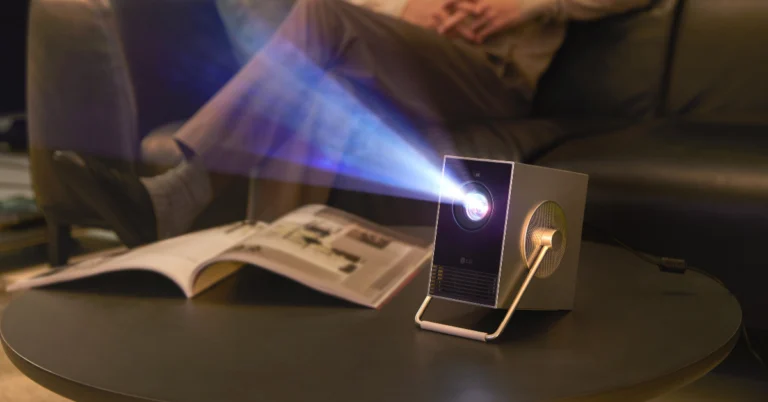
LG Electronics new CineBeam Q (HU710PB) projector has debuted in India. The LF projector was introduced at the 5th Smart Home Expo at Jio World Convention Center, Mumbai. The smart portable laser projector comes with a compact design. It operates on LG’s webOS platform and has a 3-channel RGB laser system.
The LG CineBeam Q comes with a plethora of handy features, such as auto-screen adjustment and webOS integration. In terms of connectivity, it includes support for screen sharing, mirroring, Bluetooth, AirPlay, HDMI, and USB Type-C. In addition, the projector’s 360-degree rotating handle makes it easy to carry anywhere and lets users easily move between indoor and outdoor environments.
Also Read: Apple Event “Let Loose” today: Here is how to watch the event live
Commenting on the launch, Mr. Yoojae Kim, Vice President and Director, Division Leader, Business Solutions, said, “As young Indians lead dynamic lifestyles, the need for portable entertainment solutions has never been more crucial. The LG CineBeam Q perfectly aligns with this demand, offering portability without compromising on performance. Whether it’s transforming a dorm room into a personal cinema, hosting movie nights with friends, or taking outdoor gatherings to the next level, it seamlessly adapts to our on-the-go lifestyle. Its portability ensures that the magic of cinema is no longer confined within four walls. We are confident that the LG CineBeam Q will become an indispensable part of every Indian household, offering boundless entertainment possibilities for the entire family.”
LG CineBeam Q (HU710PB) projector price in India
The LG CineBeam Q (HU710PB) projector was launched in India at Rs 165,000. The laser projector from LG will be available for purchase via retail and online platforms across the nation, including LG.com and the LG Pro AV store. The company is also offering a warranty of two years on the product.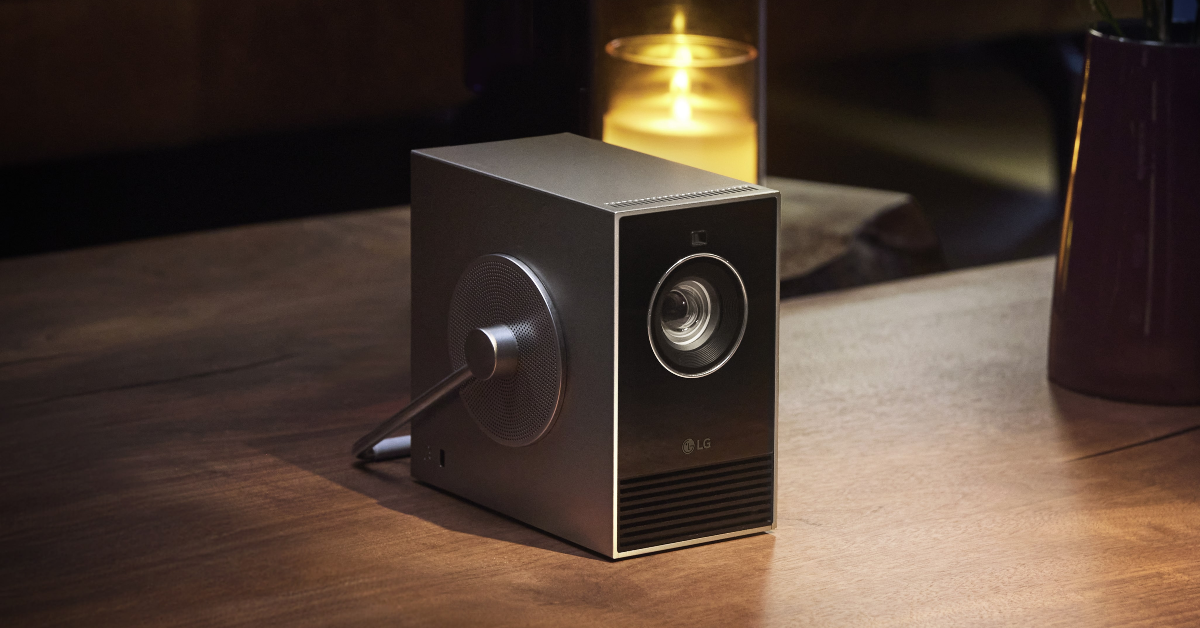
LG CineBeam Q (HU710PB) projector features
The LG CineBeam Q (HU710PB) projector is a clever, portable laser projector with a small, sleek form factor. Despite its small size, the projector is calibrated to produce 4K UHD (3840 x 2160) picture quality and can project video onto screens as large as 304.8 cm (120 inches). In addition to this, the smart portable projector from LG makes use of laser light source technology, which ensures a contrast ratio of 450,000:1. The projector also has a 3-channel RGB laser system, which improves the brightness and clarity of the images it projects. Users may easily access popular streaming services, including Netflix, Disney+, Prime Video, and YouTube, with LG’s webOS platform. The projector also supports AirPlay 2 and Miracast for sharing content from smartphones and tablets.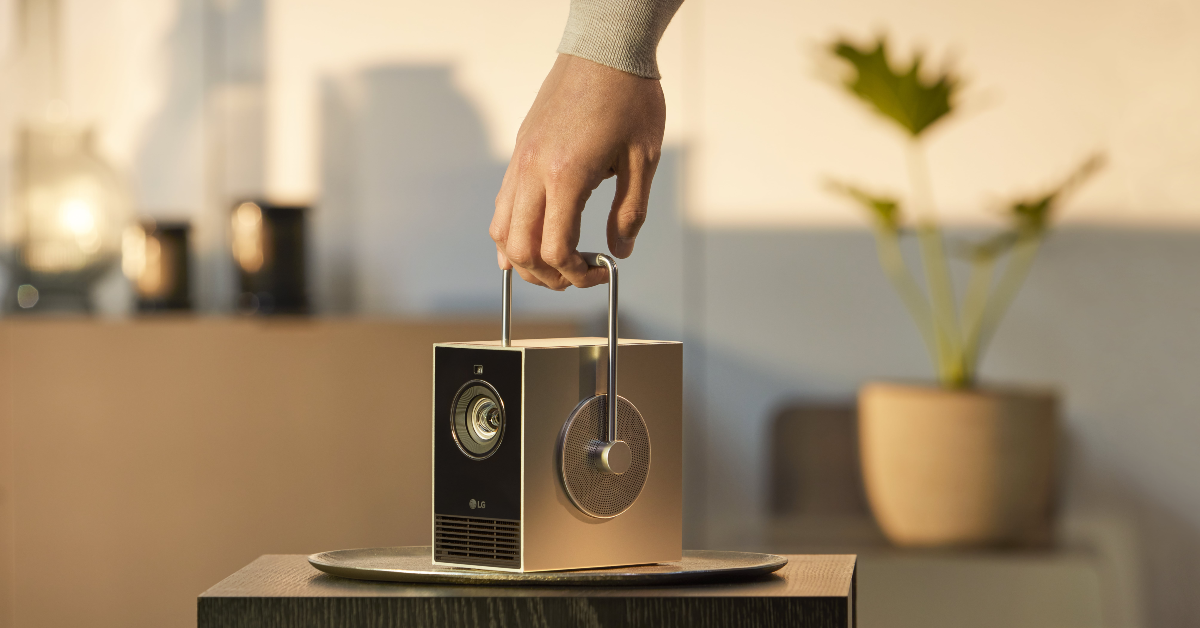 The LG CineBeam Q comes with a plethora of handy features, such as auto-screen adjustment and webOS integration. In terms of connectivity, it includes support for screen sharing, mirroring, Bluetooth, AirPlay, HDMI, and USB Type-C. In addition, the projector’s 360-degree rotating handle makes it easy to carry anywhere and lets users easily move between indoor and outdoor environments.
Also Read: Apple Event “Let Loose” today: Here is how to watch the event live
Commenting on the launch, Mr. Yoojae Kim, Vice President and Director, Division Leader, Business Solutions, said, “As young Indians lead dynamic lifestyles, the need for portable entertainment solutions has never been more crucial. The LG CineBeam Q perfectly aligns with this demand, offering portability without compromising on performance. Whether it’s transforming a dorm room into a personal cinema, hosting movie nights with friends, or taking outdoor gatherings to the next level, it seamlessly adapts to our on-the-go lifestyle. Its portability ensures that the magic of cinema is no longer confined within four walls. We are confident that the LG CineBeam Q will become an indispensable part of every Indian household, offering boundless entertainment possibilities for the entire family.”
The LG CineBeam Q comes with a plethora of handy features, such as auto-screen adjustment and webOS integration. In terms of connectivity, it includes support for screen sharing, mirroring, Bluetooth, AirPlay, HDMI, and USB Type-C. In addition, the projector’s 360-degree rotating handle makes it easy to carry anywhere and lets users easily move between indoor and outdoor environments.
Also Read: Apple Event “Let Loose” today: Here is how to watch the event live
Commenting on the launch, Mr. Yoojae Kim, Vice President and Director, Division Leader, Business Solutions, said, “As young Indians lead dynamic lifestyles, the need for portable entertainment solutions has never been more crucial. The LG CineBeam Q perfectly aligns with this demand, offering portability without compromising on performance. Whether it’s transforming a dorm room into a personal cinema, hosting movie nights with friends, or taking outdoor gatherings to the next level, it seamlessly adapts to our on-the-go lifestyle. Its portability ensures that the magic of cinema is no longer confined within four walls. We are confident that the LG CineBeam Q will become an indispensable part of every Indian household, offering boundless entertainment possibilities for the entire family.” Top 10 Tech Gifts for Mother’s Day 2024

Mother’s Day 2024 is on May 12 and if you haven’t decided on a gift for your mom yet, now would be the ideal time to get one if you’re shopping online. If you’re thinking of getting your mom a tech gift, you have landed on the right page. We keep an eye on the major tech releases throughout the year. So, here are our picks for the top 10 tech gifts for Mother’s Day 2024.
Read Also: ASUS Launches ExpertBook B3 Series to Enhance Business Productivity and Security
The new iPhone 15 gets the updates that made their debut in the iPhone 14 Pro variants. This means the notch on the display has been replaced by the Dynamic Island. Powering the iPhone 15 is the Apple A16 Bionic chipset. Its dual rear camera array consists of a 48MP primary shooter and a 12MP ultrawide lens. The 6.1-inch OLED display is easy to reach with one hand and the phone’s overall form factor is quite compact. One of the key upgrades on this smartphone is the USB Type-C charging port. The Pro models get titanium rails and an action button.
If your mom likes to read, a Kindle is the most no-brainer gift you can get for her. The entry-level variant of the Kindle costs Rs 10,000 and it matches most of the specs of its Paperwhite sibling. Its 6-inch display has a resolution of 300 ppi. The glare-free display is lit up by 4 LEDs. Even if you’re reading in a dark room, this display does a good job of not exerting stress on your eyes. The Kindle’s 16GB storage capacity is optimum for storing thousands of titles.
 The newly launched OnePlus Buds 3 offer a blast for Rs 5,500. Each earbud has a 10.4mm woofer and a 6mm tweeter. It supports Bluetooth 5.3 and Google Fast Pair as well. The metallic and blue colour shades on the earbuds look premium and the square charging case with rounded edges has a unique look to it. The audio output of the Buds 3 is balanced and rich. Using the equaliser in the companion app, you can create a custom sound profile for yourself. Read our full review here.
If you’re looking for a good Android midrange smartphone for your mother, the Vivo V30 Pro is an excellent option. It rocks an exciting set of cameras and its photoprocessing chops are exceptional. For a casual user who wants a great camera smartphone, the Vivo V30 Pro would make a great gift. The camera module at the back also features a unique ‘Aura Light’ that essentially serves as a ring/fill light. Its colour temperature can be controlled from the Camera app. Read our Vivo V30 Pro review here.
Titan is a reliable name in the watch world, but when it comes to smartwatches it is still establishing its footing. The Titan Traveller Smartwatch is a step in the right direction. It comes with a leather and silicone strap inside the box, satisfying the fashion and fitness demands. The 1.78-inch display is bright, snappy, and very responsive. One of our favourite things about this smartwatch is the ‘FitVerse’ which makes you work out alongside an AI avatar, thereby boosting your results. Check out our review of the Titan Traveller Smartwatch here.
The Renpho Foot Massager is a great accessory to have around the house. Using its rotation ball, rolling stick, and heating element it is able to offer a deep kneading Shiatsu foot massage. The user can choose from 3 kneading and 3 squeeze intensities. The touch controls on the massager can be easily controlled using your foot. This machine supports up to size 12 (men) feet.
The entry-level Samsung Galaxy S24 is one of the best Android smartphones around and would make an excellent gift for Mother’s Day. The smartphone sports a 6.2-inch Dynamic LTPO AMOLED 2X display with a refresh rate of 120Hz. Powering the S24 is the flagship Snapdragon 8 Gen 3 chipset from Qualcomm. One of the best things about this smartphone is the Galaxy AI package which can carry out a range of tasks from photo editing to live translation on calls. Read our full review of the Samsung Galaxy S24 here.
Gifting your mom an Apple AirTag ensures she never loses track of her belongings again. This coin-shaped tracker can be easily attached to car keys or slid inside luggage or a wallet. Once paired with your iPhone, the location of the AirTag can be accessed at any given time in the Find My app. The AirTag sends Bluetooth beacons which are captured by nearby devices in the Find My network. The location is then relayed to the owner of the AirTag.
The Frameo Digital Photo Frame will make a great tech gift for Mother’s Day 2024. This 10.1-inch digital photo frame has a resolution of 1,200 x 800p and supports HD images. You can display your collection of photos on the frame by uploading them to the Frameo app. The device also has built-in 32GB storage and WiFi connectivity. Adding captions to the images is one of the best features of the app. It also has a clock and weather forecast widget to boost its functionality.
If your mom is always running out of battery on her phone, this 30,000mAh power bank from Spigen will ensure that she’s always got enough charge to keep her devices running at all times. An average smartphone has a 5,000mAh battery, which means this power bank is good for 6 charge cycles. On top of that, it supports 30W fast charging from the 2 USB Type-C ports and 22.5W from the USB Type-A port.
Read Also: Lenovo Launches Tab K11 in India, Aiming to Boost Business Productivity
The newly launched OnePlus Buds 3 offer a blast for Rs 5,500. Each earbud has a 10.4mm woofer and a 6mm tweeter. It supports Bluetooth 5.3 and Google Fast Pair as well. The metallic and blue colour shades on the earbuds look premium and the square charging case with rounded edges has a unique look to it. The audio output of the Buds 3 is balanced and rich. Using the equaliser in the companion app, you can create a custom sound profile for yourself. Read our full review here.
If you’re looking for a good Android midrange smartphone for your mother, the Vivo V30 Pro is an excellent option. It rocks an exciting set of cameras and its photoprocessing chops are exceptional. For a casual user who wants a great camera smartphone, the Vivo V30 Pro would make a great gift. The camera module at the back also features a unique ‘Aura Light’ that essentially serves as a ring/fill light. Its colour temperature can be controlled from the Camera app. Read our Vivo V30 Pro review here.
Titan is a reliable name in the watch world, but when it comes to smartwatches it is still establishing its footing. The Titan Traveller Smartwatch is a step in the right direction. It comes with a leather and silicone strap inside the box, satisfying the fashion and fitness demands. The 1.78-inch display is bright, snappy, and very responsive. One of our favourite things about this smartwatch is the ‘FitVerse’ which makes you work out alongside an AI avatar, thereby boosting your results. Check out our review of the Titan Traveller Smartwatch here.
The Renpho Foot Massager is a great accessory to have around the house. Using its rotation ball, rolling stick, and heating element it is able to offer a deep kneading Shiatsu foot massage. The user can choose from 3 kneading and 3 squeeze intensities. The touch controls on the massager can be easily controlled using your foot. This machine supports up to size 12 (men) feet.
The entry-level Samsung Galaxy S24 is one of the best Android smartphones around and would make an excellent gift for Mother’s Day. The smartphone sports a 6.2-inch Dynamic LTPO AMOLED 2X display with a refresh rate of 120Hz. Powering the S24 is the flagship Snapdragon 8 Gen 3 chipset from Qualcomm. One of the best things about this smartphone is the Galaxy AI package which can carry out a range of tasks from photo editing to live translation on calls. Read our full review of the Samsung Galaxy S24 here.
Gifting your mom an Apple AirTag ensures she never loses track of her belongings again. This coin-shaped tracker can be easily attached to car keys or slid inside luggage or a wallet. Once paired with your iPhone, the location of the AirTag can be accessed at any given time in the Find My app. The AirTag sends Bluetooth beacons which are captured by nearby devices in the Find My network. The location is then relayed to the owner of the AirTag.
The Frameo Digital Photo Frame will make a great tech gift for Mother’s Day 2024. This 10.1-inch digital photo frame has a resolution of 1,200 x 800p and supports HD images. You can display your collection of photos on the frame by uploading them to the Frameo app. The device also has built-in 32GB storage and WiFi connectivity. Adding captions to the images is one of the best features of the app. It also has a clock and weather forecast widget to boost its functionality.
If your mom is always running out of battery on her phone, this 30,000mAh power bank from Spigen will ensure that she’s always got enough charge to keep her devices running at all times. An average smartphone has a 5,000mAh battery, which means this power bank is good for 6 charge cycles. On top of that, it supports 30W fast charging from the 2 USB Type-C ports and 22.5W from the USB Type-A port.
Read Also: Lenovo Launches Tab K11 in India, Aiming to Boost Business Productivity
iPhone 15
Price: Rs 79,900 on Apple.com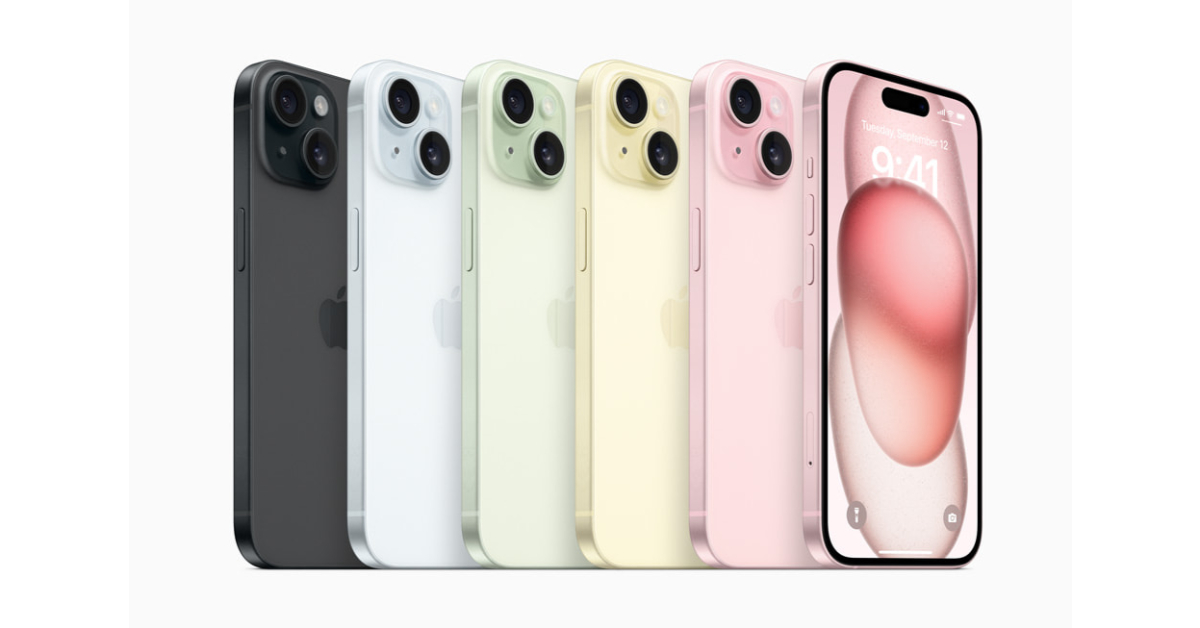 The new iPhone 15 gets the updates that made their debut in the iPhone 14 Pro variants. This means the notch on the display has been replaced by the Dynamic Island. Powering the iPhone 15 is the Apple A16 Bionic chipset. Its dual rear camera array consists of a 48MP primary shooter and a 12MP ultrawide lens. The 6.1-inch OLED display is easy to reach with one hand and the phone’s overall form factor is quite compact. One of the key upgrades on this smartphone is the USB Type-C charging port. The Pro models get titanium rails and an action button.
Kindle
Price: Rs 10,000 on Amazon If your mom likes to read, a Kindle is the most no-brainer gift you can get for her. The entry-level variant of the Kindle costs Rs 10,000 and it matches most of the specs of its Paperwhite sibling. Its 6-inch display has a resolution of 300 ppi. The glare-free display is lit up by 4 LEDs. Even if you’re reading in a dark room, this display does a good job of not exerting stress on your eyes. The Kindle’s 16GB storage capacity is optimum for storing thousands of titles.
OnePlus Buds 3
Price: Rs 5,500 on OnePlus.com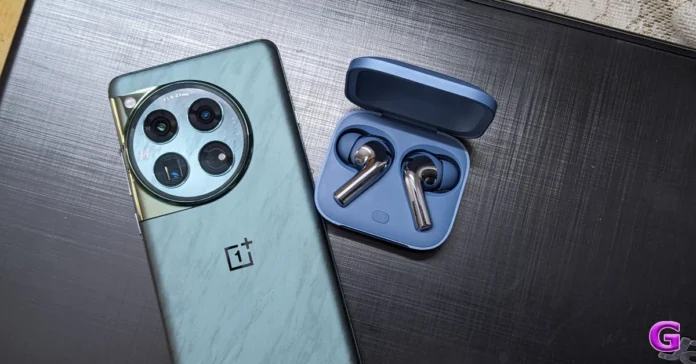 The newly launched OnePlus Buds 3 offer a blast for Rs 5,500. Each earbud has a 10.4mm woofer and a 6mm tweeter. It supports Bluetooth 5.3 and Google Fast Pair as well. The metallic and blue colour shades on the earbuds look premium and the square charging case with rounded edges has a unique look to it. The audio output of the Buds 3 is balanced and rich. Using the equaliser in the companion app, you can create a custom sound profile for yourself. Read our full review here.
Vivo V30 Pro
Price: Rs 42,000 on Vivo.com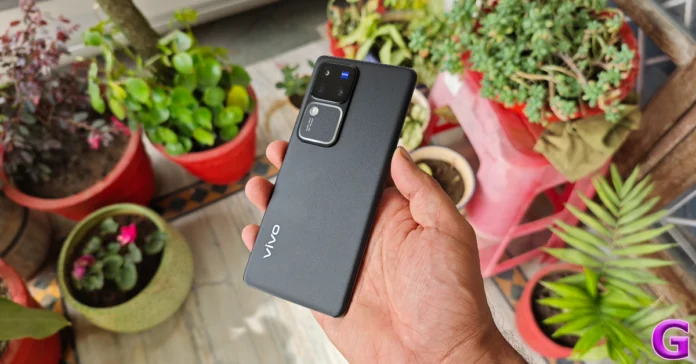 If you’re looking for a good Android midrange smartphone for your mother, the Vivo V30 Pro is an excellent option. It rocks an exciting set of cameras and its photoprocessing chops are exceptional. For a casual user who wants a great camera smartphone, the Vivo V30 Pro would make a great gift. The camera module at the back also features a unique ‘Aura Light’ that essentially serves as a ring/fill light. Its colour temperature can be controlled from the Camera app. Read our Vivo V30 Pro review here.
Titan Traveller Smartwatch
Price: Rs 12,995 on Titan.co.in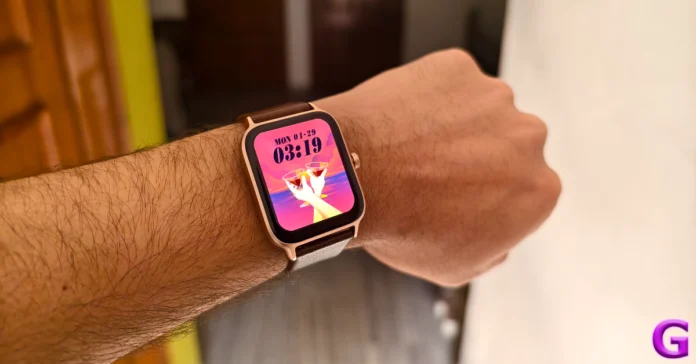 Titan is a reliable name in the watch world, but when it comes to smartwatches it is still establishing its footing. The Titan Traveller Smartwatch is a step in the right direction. It comes with a leather and silicone strap inside the box, satisfying the fashion and fitness demands. The 1.78-inch display is bright, snappy, and very responsive. One of our favourite things about this smartwatch is the ‘FitVerse’ which makes you work out alongside an AI avatar, thereby boosting your results. Check out our review of the Titan Traveller Smartwatch here.
Renpho Foot Massager
Price: 9,803 on Amazon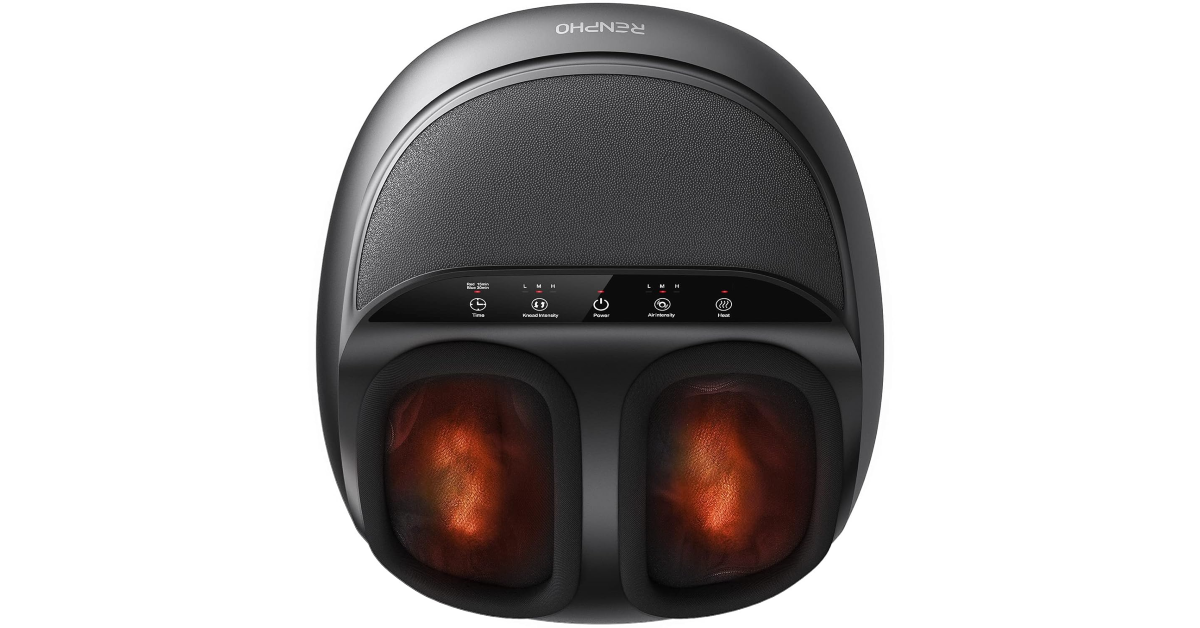 The Renpho Foot Massager is a great accessory to have around the house. Using its rotation ball, rolling stick, and heating element it is able to offer a deep kneading Shiatsu foot massage. The user can choose from 3 kneading and 3 squeeze intensities. The touch controls on the massager can be easily controlled using your foot. This machine supports up to size 12 (men) feet.
Samsung Galaxy S24
Price: Rs 75,000 on Samsung.com The entry-level Samsung Galaxy S24 is one of the best Android smartphones around and would make an excellent gift for Mother’s Day. The smartphone sports a 6.2-inch Dynamic LTPO AMOLED 2X display with a refresh rate of 120Hz. Powering the S24 is the flagship Snapdragon 8 Gen 3 chipset from Qualcomm. One of the best things about this smartphone is the Galaxy AI package which can carry out a range of tasks from photo editing to live translation on calls. Read our full review of the Samsung Galaxy S24 here.
Apple AirTag
Price: Rs 3,490 on Apple.in Gifting your mom an Apple AirTag ensures she never loses track of her belongings again. This coin-shaped tracker can be easily attached to car keys or slid inside luggage or a wallet. Once paired with your iPhone, the location of the AirTag can be accessed at any given time in the Find My app. The AirTag sends Bluetooth beacons which are captured by nearby devices in the Find My network. The location is then relayed to the owner of the AirTag.
Frameo Digital Photo Frame
Price: Rs 9,013 on Amazon The Frameo Digital Photo Frame will make a great tech gift for Mother’s Day 2024. This 10.1-inch digital photo frame has a resolution of 1,200 x 800p and supports HD images. You can display your collection of photos on the frame by uploading them to the Frameo app. The device also has built-in 32GB storage and WiFi connectivity. Adding captions to the images is one of the best features of the app. It also has a clock and weather forecast widget to boost its functionality.
Spigen 30,000mAh Power Bank
Price: Rs 2,949 on Amazon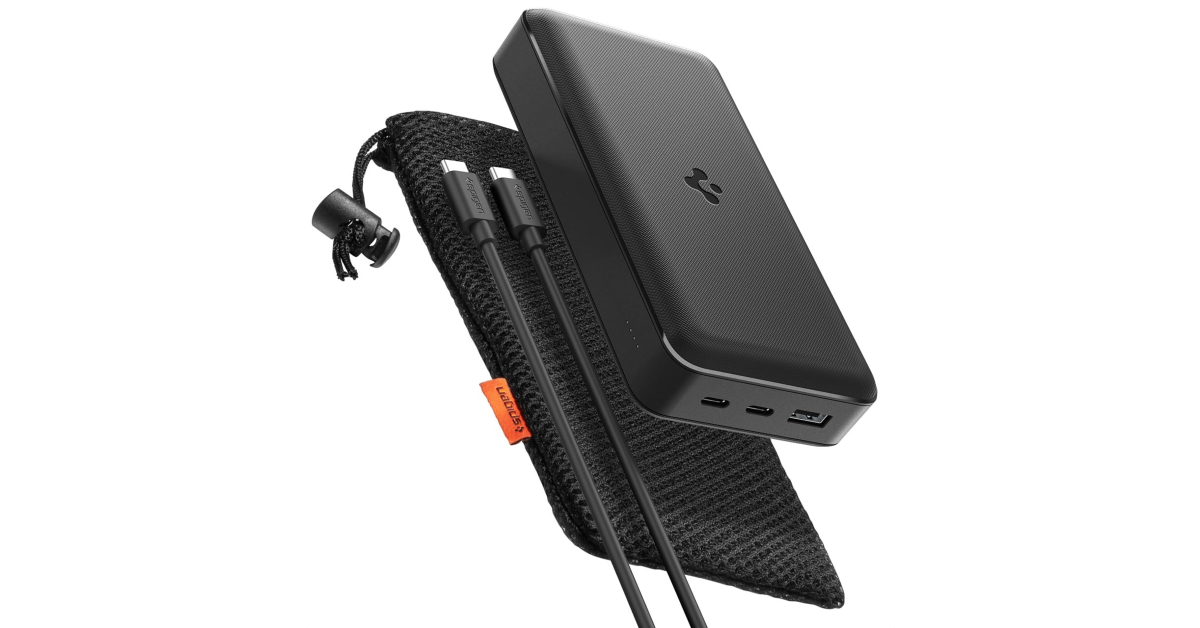 If your mom is always running out of battery on her phone, this 30,000mAh power bank from Spigen will ensure that she’s always got enough charge to keep her devices running at all times. An average smartphone has a 5,000mAh battery, which means this power bank is good for 6 charge cycles. On top of that, it supports 30W fast charging from the 2 USB Type-C ports and 22.5W from the USB Type-A port.
Read Also: Lenovo Launches Tab K11 in India, Aiming to Boost Business Productivity
If your mom is always running out of battery on her phone, this 30,000mAh power bank from Spigen will ensure that she’s always got enough charge to keep her devices running at all times. An average smartphone has a 5,000mAh battery, which means this power bank is good for 6 charge cycles. On top of that, it supports 30W fast charging from the 2 USB Type-C ports and 22.5W from the USB Type-A port.
Read Also: Lenovo Launches Tab K11 in India, Aiming to Boost Business Productivity
Conclusion
This wraps up our list of the top 10 tech gifts for Mother’s Day 2024. If you’re already done with gift shopping, let us know what you got in the comments! May 7 is also the last day of Amazon’s Great Summer Sale, so make sure you get the best deals on your purchases!ASUS Launches ExpertBook B3 Series to Enhance Business Productivity and Security
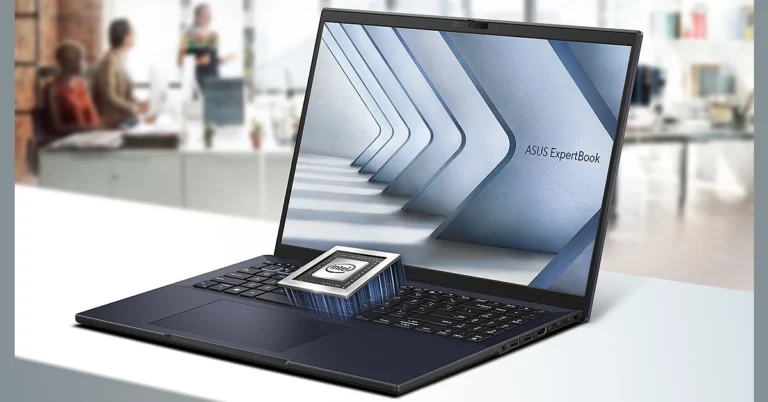
Key Highlights
- Asus ExpertBook B3 is equipped with 13th-generation Intel Core processors and optional NVIDIA RTX 2050 graphics.
- Offers flexible configurations and Military-grade durability for robust business use.
- Features Intel vPro Enterprise solutions, biometric security, and comprehensive connectivity options.
Powerful Performance and Enhanced Productivity
The ExpertBook B3 is equipped with the latest 13th generation Intel Core processors, including both U-series for efficiency and P-series for high performance. It supports up to 64GB of DDR5-5600 RAM through dual SO-DIMM slots and features PCIe Gen 4 NVMe SSDs for rapid boot times and efficient multi-tasking capabilities. For those needing enhanced graphics, the series offers optional NVIDIA RTX 2050 (4GB) discrete graphics. Read Also: Asus ExpertBook B Series with 12 Gen Intel Core processors launchedFlexible and User-Centric Design
Business users can customize the ExpertBook B3 to their specific needs with options like up to 16-inch Full-HD+ IPS anti-glare touchscreens, backlit keyboards, and various SSD configurations. The design focuses on durability, featuring a Military-grade tested chassis, spill-resistant keyboards, and hinges capable of withstanding 30,000 cycles.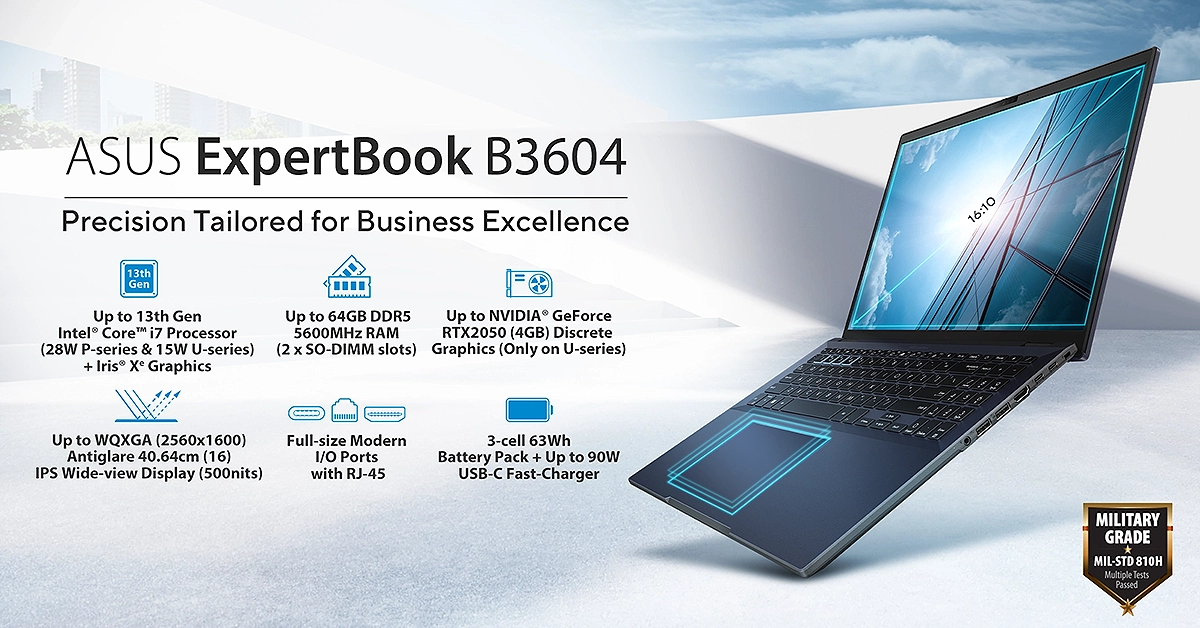
Enterprise-Grade Security
The series boasts comprehensive security features, including Intel vPro Enterprise solutions, biometric security via a fingerprint sensor, an optional smart-card reader, and TPM 2.0 chips for hardware-based security. Additionally, physical webcam covers and Kensington lock slots provide physical security measures to protect sensitive business data.Dinesh Sharma, Vice President at ASUS India, comments, “The ASUS ExpertBook B3 series is meticulously engineered to meet the diverse needs of enterprises across all sectors by effortlessly elevating productivity, strengthening security, and facilitating seamless communication for users.”
Optimized Connectivity and Enterprise Support
Connectivity is a breeze with Wi-Fi 6E, Bluetooth 5.3, Thunderbolt 4, and a full-sized RJ-45 port, ensuring seamless integration into any business environment. The ExpertBook B3 also supports ASUS’s enterprise-grade support services, offering solutions for secure remote management and business continuity. Read Also: Asus ExpertBook B5 Flip OLED convertible laptop launchedCommitment to Sustainability
ASUS emphasizes its commitment to sustainability and eco-conscious design, which is increasingly important for modern enterprises aiming to reduce their environmental footprint.Pricing And Availability
The ASUS ExpertBook B3 series is available from May 07, 2024, across India. The price starts at Rs 49,990 (before taxes).Lenovo Launches Tab K11 in India, Aiming to Boost Business Productivity
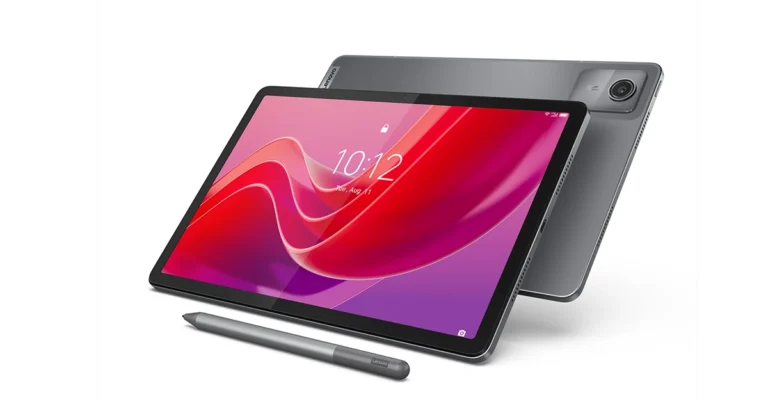
Key Highlights
“A combination of performance, durability, and seamless manageability is what enterprise users are seeking, and the K11 delivers precisely that,” stated Ashish Sikka, Director and Category Head at Lenovo India. “It’s engineered to enhance the user experience in a business setting.”
The device runs on Android 13 with an upgrade path to Android 15 and guarantees security updates until January 2028. It is compatible with the Lenovo Tab Pen Plus for content creators, and comes preloaded with productivity-boosting software such as Nebo, MyScript Calculator, and WPS Office. The Lenovo Freestyle app enhances connectivity, allowing users to link the Tab K11 with other Lenovo PCs or laptops seamlessly.
Powered by the MediaTek Helio G88 Octa-core processor, the Lenovo Tab K11 is equipped with a 7,040mAh battery that supports fast charging and delivers up to 10 hours of video playback. Despite its robust features, the tablet maintains a slim profile at 7.15mm and weighs just 465g. It also boasts IP52 certification for water and dust resistance, making it an excellent companion for business travel.
Priced at INR 17,990, the Lenovo Tab K11 is available in Luna Grey and can be purchased through Lenovo’s official website. The tablet comes with a 1-year Accidental Damage Protection and a standard warranty, which can be upgraded to three years. Additional post-purchase support includes expert tech assistance through Lenovo’s Premium Care service.
Read Also: Lenovo Tab M11 powered by a MediaTek Helio G88 SoC launched in India
This launch reinforces Lenovo’s commitment to providing cutting-edge technology solutions that meet the complex demands of modern businesses and IT environments, promising enhanced productivity and a simplified user experience.
- Lenovo Tab K11 launches in India with an 11-inch high-resolution display and eye comfort certification.
- Designed for business, it offers upgradable Android OS, security updates until 2028, and robust connectivity options.
- Features a MediaTek Helio G88 processor, lightweight design, and includes one year of Accidental Damage Protection.
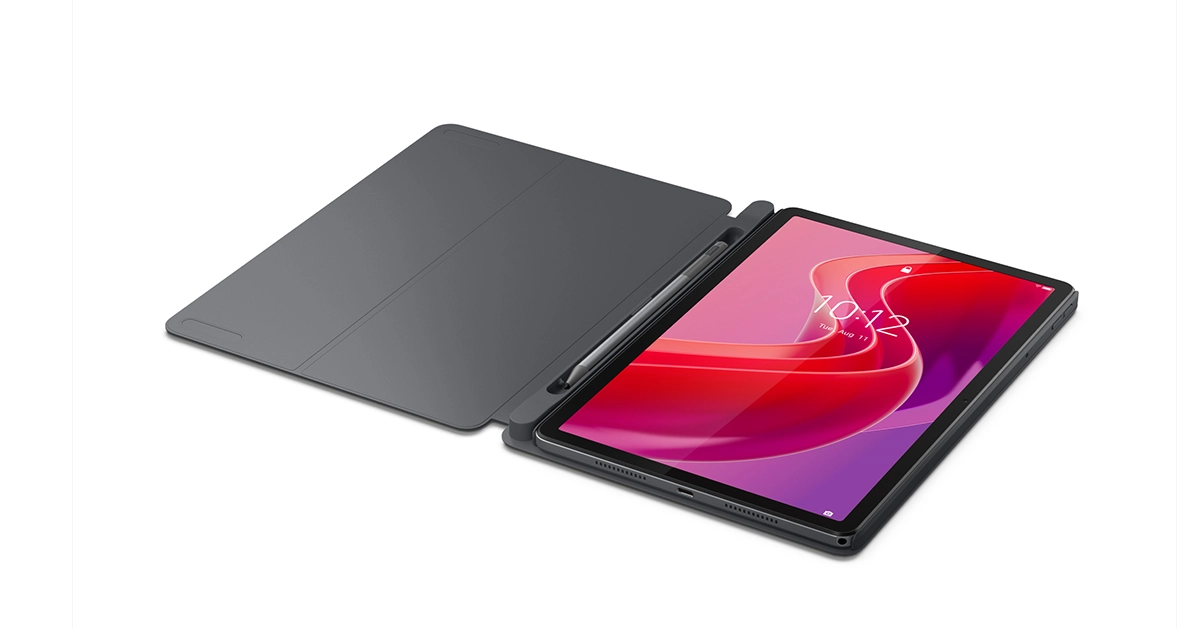 “A combination of performance, durability, and seamless manageability is what enterprise users are seeking, and the K11 delivers precisely that,” stated Ashish Sikka, Director and Category Head at Lenovo India. “It’s engineered to enhance the user experience in a business setting.”
The device runs on Android 13 with an upgrade path to Android 15 and guarantees security updates until January 2028. It is compatible with the Lenovo Tab Pen Plus for content creators, and comes preloaded with productivity-boosting software such as Nebo, MyScript Calculator, and WPS Office. The Lenovo Freestyle app enhances connectivity, allowing users to link the Tab K11 with other Lenovo PCs or laptops seamlessly.
Powered by the MediaTek Helio G88 Octa-core processor, the Lenovo Tab K11 is equipped with a 7,040mAh battery that supports fast charging and delivers up to 10 hours of video playback. Despite its robust features, the tablet maintains a slim profile at 7.15mm and weighs just 465g. It also boasts IP52 certification for water and dust resistance, making it an excellent companion for business travel.
“A combination of performance, durability, and seamless manageability is what enterprise users are seeking, and the K11 delivers precisely that,” stated Ashish Sikka, Director and Category Head at Lenovo India. “It’s engineered to enhance the user experience in a business setting.”
The device runs on Android 13 with an upgrade path to Android 15 and guarantees security updates until January 2028. It is compatible with the Lenovo Tab Pen Plus for content creators, and comes preloaded with productivity-boosting software such as Nebo, MyScript Calculator, and WPS Office. The Lenovo Freestyle app enhances connectivity, allowing users to link the Tab K11 with other Lenovo PCs or laptops seamlessly.
Powered by the MediaTek Helio G88 Octa-core processor, the Lenovo Tab K11 is equipped with a 7,040mAh battery that supports fast charging and delivers up to 10 hours of video playback. Despite its robust features, the tablet maintains a slim profile at 7.15mm and weighs just 465g. It also boasts IP52 certification for water and dust resistance, making it an excellent companion for business travel.
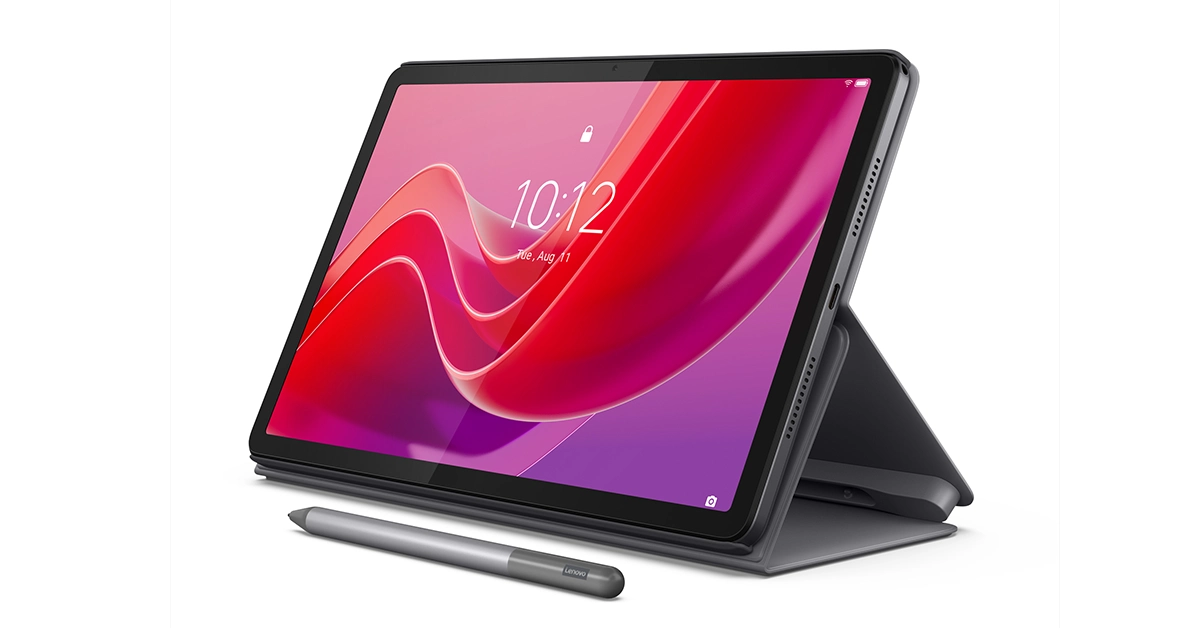 Priced at INR 17,990, the Lenovo Tab K11 is available in Luna Grey and can be purchased through Lenovo’s official website. The tablet comes with a 1-year Accidental Damage Protection and a standard warranty, which can be upgraded to three years. Additional post-purchase support includes expert tech assistance through Lenovo’s Premium Care service.
Read Also: Lenovo Tab M11 powered by a MediaTek Helio G88 SoC launched in India
This launch reinforces Lenovo’s commitment to providing cutting-edge technology solutions that meet the complex demands of modern businesses and IT environments, promising enhanced productivity and a simplified user experience.
Priced at INR 17,990, the Lenovo Tab K11 is available in Luna Grey and can be purchased through Lenovo’s official website. The tablet comes with a 1-year Accidental Damage Protection and a standard warranty, which can be upgraded to three years. Additional post-purchase support includes expert tech assistance through Lenovo’s Premium Care service.
Read Also: Lenovo Tab M11 powered by a MediaTek Helio G88 SoC launched in India
This launch reinforces Lenovo’s commitment to providing cutting-edge technology solutions that meet the complex demands of modern businesses and IT environments, promising enhanced productivity and a simplified user experience. MediaTek Introduces Its New Dimensity 9300+ Chip: Elevating Smartphone AI Capabilities And Gaming Performance
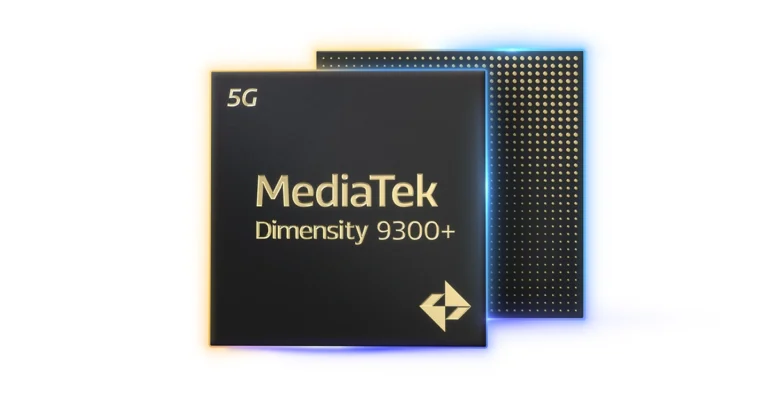
Key Highlights
Built using the 3rd generation TSMC 4nm process, the chip features a powerful configuration of one Arm Cortex-X4 core at 3.4 GHz, three additional Cortex-X4 cores, and four Cortex-A720 cores. This setup enables significantly faster processing speeds, particularly for AI-driven tasks.
MediaTek’s new NeuroPilot Speculative Decode Acceleration technology is a game-changer, allowing the Dimensity 9300+ to handle complex AI tasks more efficiently. The chip can process LLMs with seven billion parameters at 22 tokens per second, which is more than double the performance of comparable market offerings.
For gaming enthusiasts, the Dimensity 9300+ introduces an enhanced raytracing engine paired with an Arm Immortalis-G720 GPU, enabling rich, immersive gaming experiences at a smooth 60 FPS. MediaTek’s HyperEngine technology further optimizes power efficiency and network performance, enhancing both battery life and connectivity during gameplay.
Read Also: Apple Generative AI to be out soon, CEO Tim Cook confirms
Photography and videography also receive a substantial upgrade with the Dimensity 9300+. Equipped with the Imagiq 990 ISP, the chipset supports 18-bit RAW processing for superior photo quality even in challenging lighting conditions. Advanced AI videography features like scene segmentation and real-time video capture enhance visual quality, ensuring vibrant and clear content.
In addition to its impressive multimedia and AI capabilities, the Dimensity 9300+ is built with a 5G R16 modem that supports up to 7Gbps downlink speeds, providing users with fast and reliable internet connectivity across various scenarios.
The launch of the Dimensity 9300+ represents a pivotal moment in MediaTek’s strategy to lead the market in integrating cutting-edge technology into mobile devices. With its robust support for advanced AI applications and superior gaming performance, the Dimensity 9300+ is poised to become the cornerstone of next-generation smartphones.
- The Dimensity 9300+ significantly enhances on-device AI processing for quicker and more efficient performance.
- Delivers immersive gaming with high-fidelity graphics and optimized power efficiency.
- Offers advanced photo and video capabilities, particularly in low-light conditions, through the Imagiq 990 ISP.
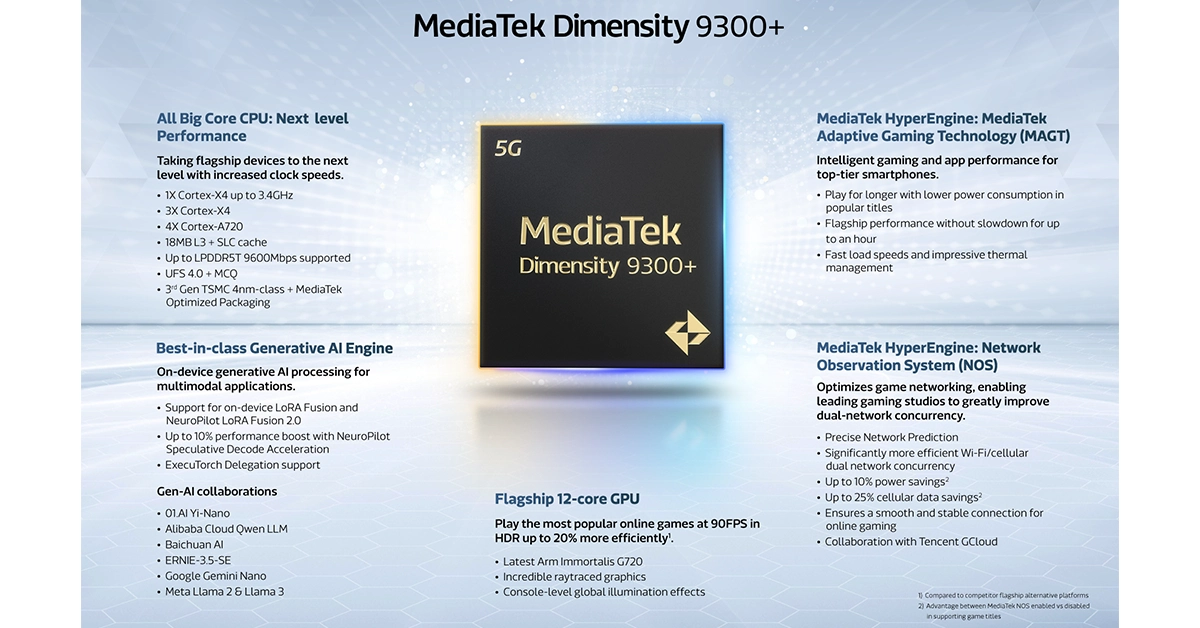 Built using the 3rd generation TSMC 4nm process, the chip features a powerful configuration of one Arm Cortex-X4 core at 3.4 GHz, three additional Cortex-X4 cores, and four Cortex-A720 cores. This setup enables significantly faster processing speeds, particularly for AI-driven tasks.
MediaTek’s new NeuroPilot Speculative Decode Acceleration technology is a game-changer, allowing the Dimensity 9300+ to handle complex AI tasks more efficiently. The chip can process LLMs with seven billion parameters at 22 tokens per second, which is more than double the performance of comparable market offerings.
For gaming enthusiasts, the Dimensity 9300+ introduces an enhanced raytracing engine paired with an Arm Immortalis-G720 GPU, enabling rich, immersive gaming experiences at a smooth 60 FPS. MediaTek’s HyperEngine technology further optimizes power efficiency and network performance, enhancing both battery life and connectivity during gameplay.
Read Also: Apple Generative AI to be out soon, CEO Tim Cook confirms
Photography and videography also receive a substantial upgrade with the Dimensity 9300+. Equipped with the Imagiq 990 ISP, the chipset supports 18-bit RAW processing for superior photo quality even in challenging lighting conditions. Advanced AI videography features like scene segmentation and real-time video capture enhance visual quality, ensuring vibrant and clear content.
In addition to its impressive multimedia and AI capabilities, the Dimensity 9300+ is built with a 5G R16 modem that supports up to 7Gbps downlink speeds, providing users with fast and reliable internet connectivity across various scenarios.
The launch of the Dimensity 9300+ represents a pivotal moment in MediaTek’s strategy to lead the market in integrating cutting-edge technology into mobile devices. With its robust support for advanced AI applications and superior gaming performance, the Dimensity 9300+ is poised to become the cornerstone of next-generation smartphones.
Built using the 3rd generation TSMC 4nm process, the chip features a powerful configuration of one Arm Cortex-X4 core at 3.4 GHz, three additional Cortex-X4 cores, and four Cortex-A720 cores. This setup enables significantly faster processing speeds, particularly for AI-driven tasks.
MediaTek’s new NeuroPilot Speculative Decode Acceleration technology is a game-changer, allowing the Dimensity 9300+ to handle complex AI tasks more efficiently. The chip can process LLMs with seven billion parameters at 22 tokens per second, which is more than double the performance of comparable market offerings.
For gaming enthusiasts, the Dimensity 9300+ introduces an enhanced raytracing engine paired with an Arm Immortalis-G720 GPU, enabling rich, immersive gaming experiences at a smooth 60 FPS. MediaTek’s HyperEngine technology further optimizes power efficiency and network performance, enhancing both battery life and connectivity during gameplay.
Read Also: Apple Generative AI to be out soon, CEO Tim Cook confirms
Photography and videography also receive a substantial upgrade with the Dimensity 9300+. Equipped with the Imagiq 990 ISP, the chipset supports 18-bit RAW processing for superior photo quality even in challenging lighting conditions. Advanced AI videography features like scene segmentation and real-time video capture enhance visual quality, ensuring vibrant and clear content.
In addition to its impressive multimedia and AI capabilities, the Dimensity 9300+ is built with a 5G R16 modem that supports up to 7Gbps downlink speeds, providing users with fast and reliable internet connectivity across various scenarios.
The launch of the Dimensity 9300+ represents a pivotal moment in MediaTek’s strategy to lead the market in integrating cutting-edge technology into mobile devices. With its robust support for advanced AI applications and superior gaming performance, the Dimensity 9300+ is poised to become the cornerstone of next-generation smartphones. Apple Event “Let Loose” today: Here is how to watch the event live
Today, Apple is hosting its first event of 2024. The Apple Let Loose event is expected to bring an end to Apple’s almost two-year break from new iPad releases. The firm hasn’t released a new iPad since late 2022. Apple has not fully revealed any details regarding today’s Apple Event, but rumours are rife that it is likely to announce the new generations of iPads at the web event. Maybe some brand-new Apple accessories as well.
CEO Tim Cook is anticipated to reveal new iPad Air and Pro models, as well as enhancements to the Apple Pencil and Magic Keyboard. The entire event will take place virtually, with CEO Tim Cook and other senior executives providing the information through a pre-recorded video. The event will begin at 7 a.m. Pacific Time (7.30 p.m. India Time). Apple fans in India don’t need to get up early to watch the event live. The Apple Event will be live-streamed via the company’s website, official YouTube channel, and Apple TV app.
Here is what to expect from today’s Apple event.
New iPad Pro
It is anticipated that a new 12.9-inch and 11-inch iPad Pro will be released together. With a display size of 12.9 inches, the iPad Pro would be the biggest iPad model that Apple has ever released. It is possible that the 12.9-inch iPad Pro will be roughly 20% thinner than the previous generation, while the 10.5-inch iPad Pro will likely be 15% thinner. There are rumours that an OLED display will be included with both iPad Pro models. The move to OLED will result in improved brightness and viewing clarity for iPads, which currently use small LED displays. There might be variants with relocated, horizontal front-facing cameras. Apple is most likely going to release the M4 processor for the first time ever with the iPad Pro series. It is highly likely that the M4 chipset in the Apple iPad will help fuel some intensive AI functions.The new iPad Air lineup
It is anticipated that the upcoming iPad Air series will come in two display sizes: 12.9-inch and 10.9-inch. It’s possible that both variants come with mini LED displays. The M3 chipset is expected to power the tablets and may provide MagSafe wireless charging. Furthermore, it is anticipated that the iPad Air models of this year will have a landscape-oriented camera. Unlike previous iterations, this camera would allow users to record video calls while the iPad is in a horizontal orientation. A third-generation Apple Pencil and Magic Keyboard are also scheduled to be unveiled by Apple. A redesigned Magic Keyboard is also anticipated. It might also have a larger trackpad and aluminium construction.Garena Free Fire Redeem Codes Today 7 May 2024: Here is how to claim them

Garena Free Fire is a battle royale game with regular awards and tournaments to keep players interested. If you play Garena Free Fire, you should be aware of the redeem codes that are released on a daily basis. However, because the battle royale game is banned in India, players from other countries can use the Free Fire Redeem codes daily. If you’re unfamiliar with the Garena Free Fire redeem codes or don’t know how to get them, we’ve put together a step-by-step guide to help you redeem them. Check out Garena Free Fire Redeem Codes for 7 May 2024.
The Free Fire redeem codes are a great way to get free stuff. These are 12-digit codes that contain alphabets and numbers, as well as an expiration date and time. Because the Garena FF redeem codes cannot be used more than once, you should hurry to the redemption page to claim your free reward before someone else does. To get a free reward, all you have to do is go to reward.ff.garena.com/en, which is the official redemption page. Also, keep an eye on this space for daily updates on Garena Free Fire redemption codes and rewards.
Also Read: Sennheiser Accentum Plus wireless headphones with Hybrid Adaptive Noise Cancellation launched
Garena Free Fire Redeem Codes Today 7 May 2024
FJ7L5EV4S8T3R62U FG9P3M2F6Y1A7B5E FW8U4IE2X3ZN5Q9D FH1R9C6G2O8J4E5T FS3Y6DEEQ1B4LK9M FC2WE9Q5V1XA3FRH FM6F8GR7T2B5ES9J FL4Z1ED9N7H3PY8I FW3X6EY9Z4A7TB1C FD8E2F5G1HGT6I3J FFN7O4P1Q6R9S2T5 FQ5O2X6K9J1C8W4G FB3C5D8E2S1F7G4H FI9J2KE6L3MTTN5O FP4Q7R1S5TTT9E2VHow to Get Free Fire Redeem Codes for Garena on 7 May 2024?
- Visit the Garena Free Fire game’s official website at reward.ff.garena.com.
- Use your Facebook, Google, VK, Apple ID, Huawei ID, or Twitter account to log in.
- You’ll be taken to a valid redemption code (s)
- Copy and paste the 12-digit redemption code into the text box.
- On the screen, a dialogue box will appear.
- ‘Ok’ should be selected.