

The Evolution of Technology in Kabaddi Training and Its Future Prospects

Kabaddi, a sport deeply rooted in Indian tradition, has seen a significant evolution, particularly in the way athletes are trained and prepared for competitive success. This transformation is largely driven by specialized Kabaddi academies across India, which are not only nurturing talent but also incorporating advanced technologies to refine the skills of aspiring champions.
Here is what to expect from Apple’s Let Loose event on May 7

At the Let Loose event, Apple may reveal updated versions of the iPad Pro and iPad Air nearly two years later. In addition to new Apple Tablets, the company may also present improved Apple Pencil and Magic Keyboard, at the upcoming Apple event.
Apple will be hosting its Let Loose event on May 7 at 7 a.m. PT (7.30 p.m. IST). Apple is expected to reveal significant updates to its iPad lineup. CEO Tim Cook is anticipated to reveal new iPad Air and Pro models, in addition to improvements to the Apple Pencil and Magic Keyboard.
Here is everything we know about the upcoming iPads
The upcoming iPad Air range is expected to be available in two display sizes: 12.9-inch and 10.9-inch. Mini LED displays might be included with both models. It is anticipated that the M3 chipset will power the tablets and could offer MagSafe wireless charging. Apple also plans to announce a new Magic Keyboard and Apple Pencil (3rd generation). The firm hasn’t released a new iPad since late 2022. Expectations also include a revised Magic Keyboard. It may also feature a bigger trackpad and an aluminium construction. Additionally, it’s expected that this year’s iPad Air models will feature a landscape-oriented camera, which, in contrast to earlier versions, will enable users to record video calls while the iPad is in a horizontal position. Also Read: Acer TravelLite laptop for businesses launched in India A new 11-inch iPad Pro and a 12.9-inch iPad Pro are expected to be unveiled simultaneously. The 12.9-inch iPad Pro would be the largest iPad model that Apple has ever offered in terms of display size. The iPad Pro 12.9-inch model may be about 20% thinner than the previous model, while the iPad Pro 11-inch model maybe 15% thinner. There might be variants with relocated, horizontal front-facing cameras. It’s rumoured that both iPad Pro versions will come with an OLED display. iPads, which presently employ tiny LED displays, will have better viewing quality and brightness thanks to the conversion to OLED. Also Read: iQOO Z9x 5G India launch to happen on May 16; availability details revealed With the iPad Pro lineup, Apple is most likely to release the M4 chipset for the first time ever. It is probable that the Apple tablet’s M4 chipset will assist in powering certain intensive artificial intelligence operations.Truke Buds Q1 Lite Review: Does not disappoint
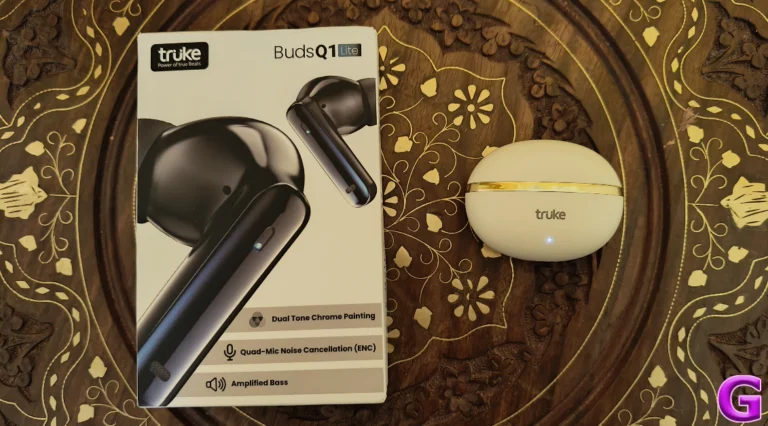
Truke mainly operates in the entry-level TWS segment, but its products regularly punch above their weight. We have reviewed several of its products in the past and have been impressed by the exquisite sound profiles offered by them at relatively affordable prices. If you’re looking for a pair of wireless earbuds under Rs 1,000 right now, Truke has multiple offerings that may interest you. The most recent one is the Q1 Lite, which is priced at Rs 1,000. We’ve been using this TWS for the last week. Here is our in-depth review of Truke Buds Q1 Lite.
Read Also: How to use the Jump Ahead feature on YouTube?
 The lid can be easily flipped open with one finger. The hinge of the case is covered with the glossy strip, but it feels strong. We like the snappy response it offers and after fidgeting with it throughout the week, it did not show any signs of loosening. The ‘truke’ lettering is printed on the front panel of the case and just below it lies the small LED notification light.
The earbuds follow the traditional ‘in-ear’ design language. Like the charging case, the outer panel of the stems on the earbuds have a gold-coloured chrome strip. The upper end of the stems are touch sensitive. The earbuds offer a comfortable fit and cause minimal fatigue after multiple hours of use.
The inner section of the earbuds is glossy, which leads to them slipping out in sweaty conditions. We used the earbuds while working out and had to adjust them quite often. On the bright side, the excessive sweat did not hamper the TWS’ performance at all.
Moving on, the soundstage offered by the Q1 Buds Lite is very satisfactory. The low end is slightly boosted, which is something that is expected of the earbuds in this price range. If you’re a basshead, you won’t mind this too much. The mids are also mixed well, but the higher frequencies do not carry that ‘punch’. The hi-hat and cymbal sounds lack the ideal ‘crispness’.
These earbuds can go very loud and limit the distortion that comes with listening to music at the highest volume. The overall listening experience is very enjoyable. During the review period, we played everything from post-punk to industrial on the Truke Buds Q1 Lite and the TWS showed good versatility.
Good soundstage aside, the Buds Q1 Lite has something for the gamers as well. The TWS can reach a latency of up to 40ms, making it ideal for gaming. We played titles like BGMI and Call of Duty Mobile while wearing these earbuds. We were happy with the audio output and the lack of annoying audio delays.
Taking calls on the Q1 Lite left us wanting more. The earbuds are equipped with 4 mics and ENC tech, but the audio relayed on the call is tinny and lacking details. This is not as big of a concern in an indoor setting as it is while taking calls outside the house.
There is no companion app for Truke products yet, which is disappointing given the fact that the tech outfit has been active in India for multiple years now. The lack of an app means there is no way to customise the touch controls on the earbuds. Thankfully, the default controls are easy to use and take care of all the essential functions.
The battery performance of the Truke Buds Q1 Lite is very impressive. The charging case is packed with a 300mAh battery while either earbud is equipped with a 35mAh unit. We were able to get an entire week’s worth of battery life out of the TWS upon using it for 3-4 hours every day. It took just over 2 hours to fully charge the device.
Read Also: iQOO Z9x 5G India launch to happen on May 16; availability details revealed
The lid can be easily flipped open with one finger. The hinge of the case is covered with the glossy strip, but it feels strong. We like the snappy response it offers and after fidgeting with it throughout the week, it did not show any signs of loosening. The ‘truke’ lettering is printed on the front panel of the case and just below it lies the small LED notification light.
The earbuds follow the traditional ‘in-ear’ design language. Like the charging case, the outer panel of the stems on the earbuds have a gold-coloured chrome strip. The upper end of the stems are touch sensitive. The earbuds offer a comfortable fit and cause minimal fatigue after multiple hours of use.
The inner section of the earbuds is glossy, which leads to them slipping out in sweaty conditions. We used the earbuds while working out and had to adjust them quite often. On the bright side, the excessive sweat did not hamper the TWS’ performance at all.
Moving on, the soundstage offered by the Q1 Buds Lite is very satisfactory. The low end is slightly boosted, which is something that is expected of the earbuds in this price range. If you’re a basshead, you won’t mind this too much. The mids are also mixed well, but the higher frequencies do not carry that ‘punch’. The hi-hat and cymbal sounds lack the ideal ‘crispness’.
These earbuds can go very loud and limit the distortion that comes with listening to music at the highest volume. The overall listening experience is very enjoyable. During the review period, we played everything from post-punk to industrial on the Truke Buds Q1 Lite and the TWS showed good versatility.
Good soundstage aside, the Buds Q1 Lite has something for the gamers as well. The TWS can reach a latency of up to 40ms, making it ideal for gaming. We played titles like BGMI and Call of Duty Mobile while wearing these earbuds. We were happy with the audio output and the lack of annoying audio delays.
Taking calls on the Q1 Lite left us wanting more. The earbuds are equipped with 4 mics and ENC tech, but the audio relayed on the call is tinny and lacking details. This is not as big of a concern in an indoor setting as it is while taking calls outside the house.
There is no companion app for Truke products yet, which is disappointing given the fact that the tech outfit has been active in India for multiple years now. The lack of an app means there is no way to customise the touch controls on the earbuds. Thankfully, the default controls are easy to use and take care of all the essential functions.
The battery performance of the Truke Buds Q1 Lite is very impressive. The charging case is packed with a 300mAh battery while either earbud is equipped with a 35mAh unit. We were able to get an entire week’s worth of battery life out of the TWS upon using it for 3-4 hours every day. It took just over 2 hours to fully charge the device.
Read Also: iQOO Z9x 5G India launch to happen on May 16; availability details revealed
Truke Buds Q1 Lite: Design
Here’s what you get inside the Truke Buds Q1 Lite retail box:- Charging case
- Earbuds
- USB Type-A to Type-C cable
- 4 extra eartips
- User manual
- Warranty Card
 The lid can be easily flipped open with one finger. The hinge of the case is covered with the glossy strip, but it feels strong. We like the snappy response it offers and after fidgeting with it throughout the week, it did not show any signs of loosening. The ‘truke’ lettering is printed on the front panel of the case and just below it lies the small LED notification light.
 The earbuds follow the traditional ‘in-ear’ design language. Like the charging case, the outer panel of the stems on the earbuds have a gold-coloured chrome strip. The upper end of the stems are touch sensitive. The earbuds offer a comfortable fit and cause minimal fatigue after multiple hours of use.
 The inner section of the earbuds is glossy, which leads to them slipping out in sweaty conditions. We used the earbuds while working out and had to adjust them quite often. On the bright side, the excessive sweat did not hamper the TWS’ performance at all.
Truke Buds Q1 Lite Review: Performance
Truke’s earbuds always deliver on the performance front. The Buds Q1 Lite is equipped with 12.4mm titanium drivers. Bluetooth 5.4 ensures that swift connectivity is not a concern, but the TWS lacks Google Fast Pair support. Moving on, the soundstage offered by the Q1 Buds Lite is very satisfactory. The low end is slightly boosted, which is something that is expected of the earbuds in this price range. If you’re a basshead, you won’t mind this too much. The mids are also mixed well, but the higher frequencies do not carry that ‘punch’. The hi-hat and cymbal sounds lack the ideal ‘crispness’.
These earbuds can go very loud and limit the distortion that comes with listening to music at the highest volume. The overall listening experience is very enjoyable. During the review period, we played everything from post-punk to industrial on the Truke Buds Q1 Lite and the TWS showed good versatility.
Good soundstage aside, the Buds Q1 Lite has something for the gamers as well. The TWS can reach a latency of up to 40ms, making it ideal for gaming. We played titles like BGMI and Call of Duty Mobile while wearing these earbuds. We were happy with the audio output and the lack of annoying audio delays.
Moving on, the soundstage offered by the Q1 Buds Lite is very satisfactory. The low end is slightly boosted, which is something that is expected of the earbuds in this price range. If you’re a basshead, you won’t mind this too much. The mids are also mixed well, but the higher frequencies do not carry that ‘punch’. The hi-hat and cymbal sounds lack the ideal ‘crispness’.
These earbuds can go very loud and limit the distortion that comes with listening to music at the highest volume. The overall listening experience is very enjoyable. During the review period, we played everything from post-punk to industrial on the Truke Buds Q1 Lite and the TWS showed good versatility.
Good soundstage aside, the Buds Q1 Lite has something for the gamers as well. The TWS can reach a latency of up to 40ms, making it ideal for gaming. We played titles like BGMI and Call of Duty Mobile while wearing these earbuds. We were happy with the audio output and the lack of annoying audio delays.
 Taking calls on the Q1 Lite left us wanting more. The earbuds are equipped with 4 mics and ENC tech, but the audio relayed on the call is tinny and lacking details. This is not as big of a concern in an indoor setting as it is while taking calls outside the house.
There is no companion app for Truke products yet, which is disappointing given the fact that the tech outfit has been active in India for multiple years now. The lack of an app means there is no way to customise the touch controls on the earbuds. Thankfully, the default controls are easy to use and take care of all the essential functions.
The battery performance of the Truke Buds Q1 Lite is very impressive. The charging case is packed with a 300mAh battery while either earbud is equipped with a 35mAh unit. We were able to get an entire week’s worth of battery life out of the TWS upon using it for 3-4 hours every day. It took just over 2 hours to fully charge the device.
Read Also: iQOO Z9x 5G India launch to happen on May 16; availability details revealed
Taking calls on the Q1 Lite left us wanting more. The earbuds are equipped with 4 mics and ENC tech, but the audio relayed on the call is tinny and lacking details. This is not as big of a concern in an indoor setting as it is while taking calls outside the house.
There is no companion app for Truke products yet, which is disappointing given the fact that the tech outfit has been active in India for multiple years now. The lack of an app means there is no way to customise the touch controls on the earbuds. Thankfully, the default controls are easy to use and take care of all the essential functions.
The battery performance of the Truke Buds Q1 Lite is very impressive. The charging case is packed with a 300mAh battery while either earbud is equipped with a 35mAh unit. We were able to get an entire week’s worth of battery life out of the TWS upon using it for 3-4 hours every day. It took just over 2 hours to fully charge the device.
Read Also: iQOO Z9x 5G India launch to happen on May 16; availability details revealed
Verdict
Truke Buds Q1 Lite’s versatile performance and affordable price tag make it a very exciting product. Its soundstage is bass-driven, which isn’t a surprise given its price tag, but it offers a pleasant listening experience. What’s surprising is its form factor and strong build. This is not something you see often in a TWS priced at Rs 1,000. Adding extra value to the price tag is the ‘low latency’ mode. The only downside is that it doesn’t have a companion app yet.Truke Buds Q1 Lite: Pros
- Portable form factor
- Strong build
- Good soundstage
- Affordable
Truke Buds Q1 Lite: Cons
- No companion app
- Voice quality struggle while taking calls in noisy environments
Acer TravelLite laptop for businesses launched in India

Today in India, Acer announced the launch of the TravelLite laptop, which is intended primarily for business use. These laptops are made in India using a variety of Intel Core CPUs, ensuring efficient multitasking, heightened productivity, and good performance for both work and play. The device sports a 14-inch FHD anti-glare TFT LCD screen. It comes integrated with Intel Iris Xe Graphics. Up to 1TB of internal storage and 64GB of RAM are included.
The Acer TravelLite will be available in India at a starting price of Rs 34,990.
With its metal-aluminium body and 180° hinge design, TravelLite is built to last. It is certified MIL-STD 810H, which guarantees resistance to environmental factors and gives customers a durable device that can handle a variety of situations. The laptop features a 14-inch FHD anti-glare TFT LCD screen.
 Acer’s TavelLite laptop portfolio features an array of Intel Core CPUs with integrated Intel Iris Xe graphics, making it suitable for multimedia editing, high-definition video playback, and graphics-intensive tasks. With SSD capacities up to 1TB Gen4 NVMe, the laptop provides users with a wide range of storage options to customise their setup. It features a USB Type-C full-functioning port and USB 3.2 Gen 2 connectors for I/O. There is dual-channel DDR4 memory with two SODIMM sockets, which offers DDR4 3200 MHz and up to an amazing 64GB of RAM.
Also Read: iQOO Z9x 5G India launch to happen on May 16; availability details revealed
The laptop has an inbuilt privacy camera shutter with FHD resolution. Improved security attributes—a Kensington lock slot, discrete TPM 2.0, BIOS user and supervisor passwords, a Kensington lock module, and an optional fingerprint reader—are all included. The TravelLite laptop complies with CE, CB, FCC, Energy Star 8.0, and ROHS regulations. Moreover, the machine has a spill-proof keyboard by default, but it also has an option for an illuminated backlit keyboard. User control and navigation are improved by the integrated click pads that come with Microsoft Precision multi-gesture and scrolling features.
Also Read: Now buy an iPhone 14 under 60K on Amazon: Check out the iPhone deal
The TravelLite includes a 36-Whr 3-cell Li-ion pack and an optional 49-Whr 4-cell Li-ion pack. It is claimed to provide a battery life of up to 10 hours. When needed, fast charging options like a 45W or 65W adaptor offer quick power restoration.
Acer’s TavelLite laptop portfolio features an array of Intel Core CPUs with integrated Intel Iris Xe graphics, making it suitable for multimedia editing, high-definition video playback, and graphics-intensive tasks. With SSD capacities up to 1TB Gen4 NVMe, the laptop provides users with a wide range of storage options to customise their setup. It features a USB Type-C full-functioning port and USB 3.2 Gen 2 connectors for I/O. There is dual-channel DDR4 memory with two SODIMM sockets, which offers DDR4 3200 MHz and up to an amazing 64GB of RAM.
Also Read: iQOO Z9x 5G India launch to happen on May 16; availability details revealed
The laptop has an inbuilt privacy camera shutter with FHD resolution. Improved security attributes—a Kensington lock slot, discrete TPM 2.0, BIOS user and supervisor passwords, a Kensington lock module, and an optional fingerprint reader—are all included. The TravelLite laptop complies with CE, CB, FCC, Energy Star 8.0, and ROHS regulations. Moreover, the machine has a spill-proof keyboard by default, but it also has an option for an illuminated backlit keyboard. User control and navigation are improved by the integrated click pads that come with Microsoft Precision multi-gesture and scrolling features.
Also Read: Now buy an iPhone 14 under 60K on Amazon: Check out the iPhone deal
The TravelLite includes a 36-Whr 3-cell Li-ion pack and an optional 49-Whr 4-cell Li-ion pack. It is claimed to provide a battery life of up to 10 hours. When needed, fast charging options like a 45W or 65W adaptor offer quick power restoration.
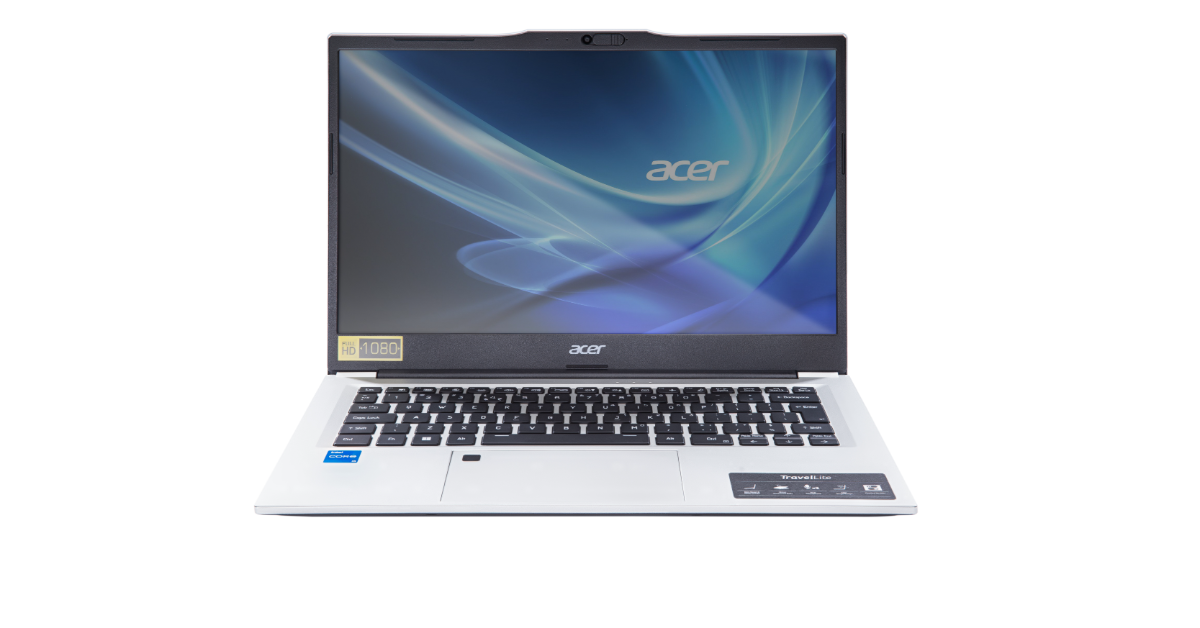 Acer’s TavelLite laptop portfolio features an array of Intel Core CPUs with integrated Intel Iris Xe graphics, making it suitable for multimedia editing, high-definition video playback, and graphics-intensive tasks. With SSD capacities up to 1TB Gen4 NVMe, the laptop provides users with a wide range of storage options to customise their setup. It features a USB Type-C full-functioning port and USB 3.2 Gen 2 connectors for I/O. There is dual-channel DDR4 memory with two SODIMM sockets, which offers DDR4 3200 MHz and up to an amazing 64GB of RAM.
Also Read: iQOO Z9x 5G India launch to happen on May 16; availability details revealed
The laptop has an inbuilt privacy camera shutter with FHD resolution. Improved security attributes—a Kensington lock slot, discrete TPM 2.0, BIOS user and supervisor passwords, a Kensington lock module, and an optional fingerprint reader—are all included. The TravelLite laptop complies with CE, CB, FCC, Energy Star 8.0, and ROHS regulations. Moreover, the machine has a spill-proof keyboard by default, but it also has an option for an illuminated backlit keyboard. User control and navigation are improved by the integrated click pads that come with Microsoft Precision multi-gesture and scrolling features.
Also Read: Now buy an iPhone 14 under 60K on Amazon: Check out the iPhone deal
The TravelLite includes a 36-Whr 3-cell Li-ion pack and an optional 49-Whr 4-cell Li-ion pack. It is claimed to provide a battery life of up to 10 hours. When needed, fast charging options like a 45W or 65W adaptor offer quick power restoration.
Acer’s TavelLite laptop portfolio features an array of Intel Core CPUs with integrated Intel Iris Xe graphics, making it suitable for multimedia editing, high-definition video playback, and graphics-intensive tasks. With SSD capacities up to 1TB Gen4 NVMe, the laptop provides users with a wide range of storage options to customise their setup. It features a USB Type-C full-functioning port and USB 3.2 Gen 2 connectors for I/O. There is dual-channel DDR4 memory with two SODIMM sockets, which offers DDR4 3200 MHz and up to an amazing 64GB of RAM.
Also Read: iQOO Z9x 5G India launch to happen on May 16; availability details revealed
The laptop has an inbuilt privacy camera shutter with FHD resolution. Improved security attributes—a Kensington lock slot, discrete TPM 2.0, BIOS user and supervisor passwords, a Kensington lock module, and an optional fingerprint reader—are all included. The TravelLite laptop complies with CE, CB, FCC, Energy Star 8.0, and ROHS regulations. Moreover, the machine has a spill-proof keyboard by default, but it also has an option for an illuminated backlit keyboard. User control and navigation are improved by the integrated click pads that come with Microsoft Precision multi-gesture and scrolling features.
Also Read: Now buy an iPhone 14 under 60K on Amazon: Check out the iPhone deal
The TravelLite includes a 36-Whr 3-cell Li-ion pack and an optional 49-Whr 4-cell Li-ion pack. It is claimed to provide a battery life of up to 10 hours. When needed, fast charging options like a 45W or 65W adaptor offer quick power restoration. How to use the Jump Ahead feature on YouTube?

YouTube is gradually incorporating AI-based features into its platform. The latest in line is ‘Jump Ahead’ which lets you quickly go to the part of the video that most people skipped to. This feature was introduced for a small number of Premium subscribers back in March. Google is now rolling it out for all Premium subscribers in the US. Currently, the ‘Jump Ahead’ feature only works on the Android and iOS YouTube apps.
Read Also: Samsung Unveils High-Capacity Power Banks for On-the-Go Charging
‘Jump Ahead’ is still an experimental feature. If you’re a Premium subscriber, you can opt-in to this feature on the youtube.com/new page. Once that’s done, open a video and double-tap on the right side of the screen to skip ahead. A pill-shaped icon named ‘Jump Ahead’ will appear in the bottom right corner of the screen. Tap this icon to jump to the part of the video that most viewers skipped to. This icon appears only for a brief moment, so make sure you tap on it quickly.
Currently, Jump Ahead is only available for English videos. It will likely work on all videos once it is officially released as a part of the Premium package. As mentioned earlier, this feature is only available for users in the US right now. YouTube is letting Premium subscribers opt-in to this feature till June 1.
So, how does Jump Ahead work? YouTube utilises the data gathered by user activity and uses AI to deduce the part of the video that most users skipped to. It is similar to the ‘most viewed’ graph on the seek bar which lets you know the most watched portions of the video. Jump Ahead will help you skip past intros, ad reads, and filler content.
Here’s how you can ‘Jump Ahead’ while watching YouTube videos
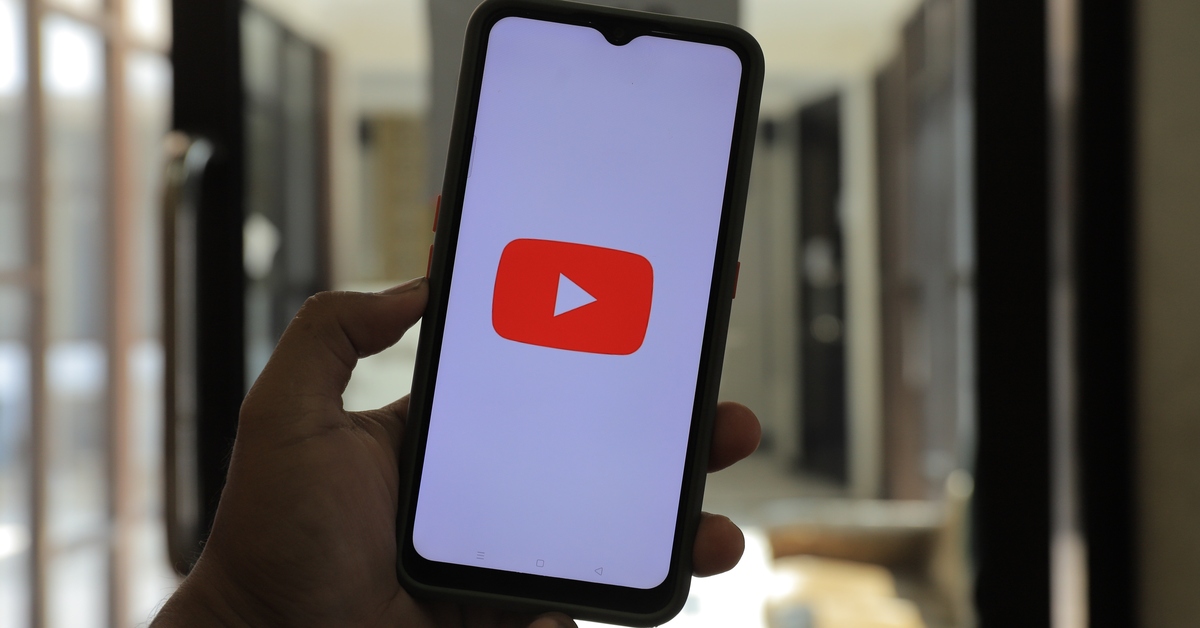 ‘Jump Ahead’ is still an experimental feature. If you’re a Premium subscriber, you can opt-in to this feature on the youtube.com/new page. Once that’s done, open a video and double-tap on the right side of the screen to skip ahead. A pill-shaped icon named ‘Jump Ahead’ will appear in the bottom right corner of the screen. Tap this icon to jump to the part of the video that most viewers skipped to. This icon appears only for a brief moment, so make sure you tap on it quickly.
Currently, Jump Ahead is only available for English videos. It will likely work on all videos once it is officially released as a part of the Premium package. As mentioned earlier, this feature is only available for users in the US right now. YouTube is letting Premium subscribers opt-in to this feature till June 1.
So, how does Jump Ahead work? YouTube utilises the data gathered by user activity and uses AI to deduce the part of the video that most users skipped to. It is similar to the ‘most viewed’ graph on the seek bar which lets you know the most watched portions of the video. Jump Ahead will help you skip past intros, ad reads, and filler content.
‘Jump Ahead’ is still an experimental feature. If you’re a Premium subscriber, you can opt-in to this feature on the youtube.com/new page. Once that’s done, open a video and double-tap on the right side of the screen to skip ahead. A pill-shaped icon named ‘Jump Ahead’ will appear in the bottom right corner of the screen. Tap this icon to jump to the part of the video that most viewers skipped to. This icon appears only for a brief moment, so make sure you tap on it quickly.
Currently, Jump Ahead is only available for English videos. It will likely work on all videos once it is officially released as a part of the Premium package. As mentioned earlier, this feature is only available for users in the US right now. YouTube is letting Premium subscribers opt-in to this feature till June 1.
So, how does Jump Ahead work? YouTube utilises the data gathered by user activity and uses AI to deduce the part of the video that most users skipped to. It is similar to the ‘most viewed’ graph on the seek bar which lets you know the most watched portions of the video. Jump Ahead will help you skip past intros, ad reads, and filler content.
Frequently Asked Questions (FAQs)
Why can’t I find the Jump Ahead feature on YouTube?
Jump Ahead is currently available for Premium subscribers in the US only. As of now, it can be used for English videos only.How do I use Jump Ahead on YouTube?
Once you have opted-in to Jump Ahead from YouTube’s experimental features page, simply double-tap on any video to skip forward and hit the pill-shaped ‘Jump Ahead’ icon at the bottom right corner of the screen.How much does YouTube Premium cost?
In India, YouTube Premium is priced at Rs 129 per month. In the US it costs $13.99. Read Also: Top 2 Ways to Remove Phone Number from Facebook (2024)Conclusion
Jump Ahead is not the only AI feature that YouTube has in its arsenal. Using the ‘Topics’ tab you can sort the comments by their theme. The ‘Ask’ option under certain YouTube videos launches a conversational AI tool which answers all your questions related to the video.iQOO Z9x 5G India launch to happen on May 16; availability details revealed

Key Highlights
Another post confirms the iQoo Z9x 5G availability details. As per the post, the upcoming phone will be available via Amazon in the country.
Also Read: Now buy an iPhone 14 under 60K on Amazon: Check out the iPhone deal
Note that the iQoo Z9x 5G already debuted in China later in April, along with the iQoo Z9 and Z9 Turbo. The design of the Indian variant is comparable to the Chinese model. The model launched in China features a 6.72-inch LCD display with 1,080×2,408 pixels of resolution and up to 120 Hz refresh rate.
Also Read: iPhone 15 is now available on Flipkart at its lowest price: Here is how much it costs now
It is powered by a Snapdragon 6 Gen 1 SoC coupled with up to 12GB of LPDDR4X RAM and up to 256GB of UFS2.2 storage. For photos and videos, it sports a dual rear camera setup that includes a 50-megapixel AI anti-shake primary lens and a 2-megapixel depth camera. It also consists of an 8-megapixel selfie camera. It packs a 6,000mAh battery with 44W fast charging support. Additionally, there is an in-display fingerprint scanner for authentication.
In China, the price of the iQOO Z9x 5G starts at CNY 1,299, which translates to Rs 15,000 for the 8GB RAM and 128GB storage option.
- After its launch in China, the iQOO Z9x 5G is all set to enter the Indian market.
- The company has confirmed the May 16 launch.
- The device will be available via Amazon in the country.
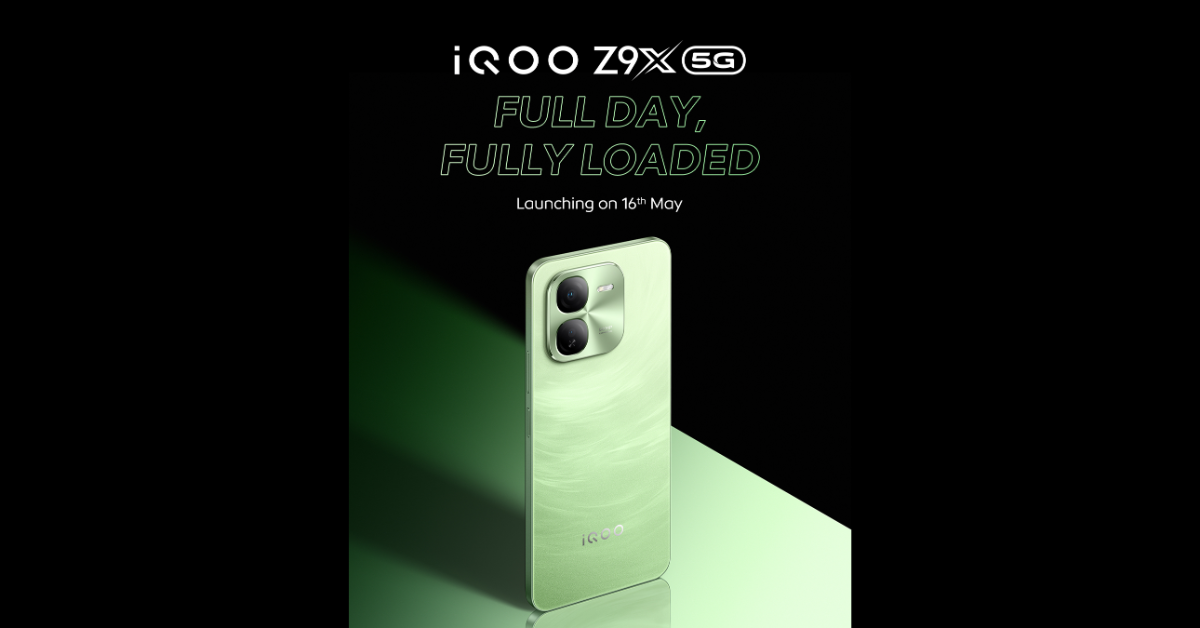 Another post confirms the iQoo Z9x 5G availability details. As per the post, the upcoming phone will be available via Amazon in the country.
Also Read: Now buy an iPhone 14 under 60K on Amazon: Check out the iPhone deal
Note that the iQoo Z9x 5G already debuted in China later in April, along with the iQoo Z9 and Z9 Turbo. The design of the Indian variant is comparable to the Chinese model. The model launched in China features a 6.72-inch LCD display with 1,080×2,408 pixels of resolution and up to 120 Hz refresh rate.
Also Read: iPhone 15 is now available on Flipkart at its lowest price: Here is how much it costs now
It is powered by a Snapdragon 6 Gen 1 SoC coupled with up to 12GB of LPDDR4X RAM and up to 256GB of UFS2.2 storage. For photos and videos, it sports a dual rear camera setup that includes a 50-megapixel AI anti-shake primary lens and a 2-megapixel depth camera. It also consists of an 8-megapixel selfie camera. It packs a 6,000mAh battery with 44W fast charging support. Additionally, there is an in-display fingerprint scanner for authentication.
In China, the price of the iQOO Z9x 5G starts at CNY 1,299, which translates to Rs 15,000 for the 8GB RAM and 128GB storage option.
Another post confirms the iQoo Z9x 5G availability details. As per the post, the upcoming phone will be available via Amazon in the country.
Also Read: Now buy an iPhone 14 under 60K on Amazon: Check out the iPhone deal
Note that the iQoo Z9x 5G already debuted in China later in April, along with the iQoo Z9 and Z9 Turbo. The design of the Indian variant is comparable to the Chinese model. The model launched in China features a 6.72-inch LCD display with 1,080×2,408 pixels of resolution and up to 120 Hz refresh rate.
Also Read: iPhone 15 is now available on Flipkart at its lowest price: Here is how much it costs now
It is powered by a Snapdragon 6 Gen 1 SoC coupled with up to 12GB of LPDDR4X RAM and up to 256GB of UFS2.2 storage. For photos and videos, it sports a dual rear camera setup that includes a 50-megapixel AI anti-shake primary lens and a 2-megapixel depth camera. It also consists of an 8-megapixel selfie camera. It packs a 6,000mAh battery with 44W fast charging support. Additionally, there is an in-display fingerprint scanner for authentication.
In China, the price of the iQOO Z9x 5G starts at CNY 1,299, which translates to Rs 15,000 for the 8GB RAM and 128GB storage option. Samsung Unveils High-Capacity Power Banks for On-the-Go Charging
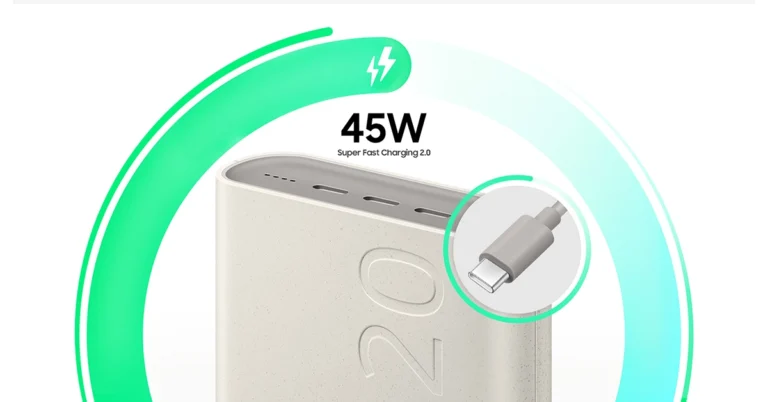
Key Highlights
- Samsung’s power banks offer rapid charging speeds up to 45W and 25W, keeping devices powered up in no time.
- With triple and dual-port charging, these power banks cater to smartphones, headphones, gaming consoles, and more.
- Crafted with recycled materials, Samsung’s power banks reduce carbon emissions and conserve resources, aligning with environmental goals.
Top 2 Ways to Remove Phone Number from Facebook (2024)

Adding your phone number to your Facebook profile is not mandatory. It is not essential to the functioning of the platform. While it may have its benefits, some users are reluctant to add their phone number on the platform given Facebook’s history with handling user data. If you have already registered your phone number with Facebook, you can remove it quite easily. Check out the top 2 methods below.
Read Also: Homelander From The Boyz Enters The Fray In Mortal Kombat 1 DLC Teaser
 Step 2: Select Settings.
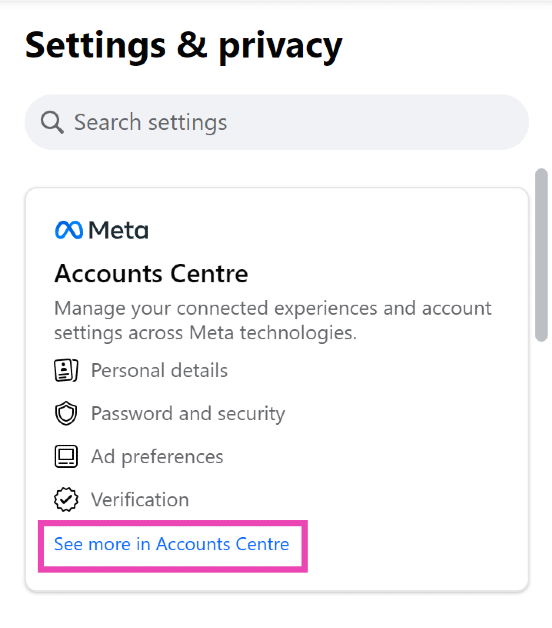
 Step 3: Click on See more in Accounts Centre.
 Step 4: Select Personal details.
 Step 5: Click on Contact info.
 Step 6: Select the number you want to remove.
Step 7: Hit Delete number.
Step 6: Select the number you want to remove.
Step 7: Hit Delete number.
 Step 2: Tap on Settings and privacy and select Settings.
 Step 3: Tap on See more in Accounts Centre.
Step 4: Select Personal details.
Step 3: Tap on See more in Accounts Centre.
Step 4: Select Personal details.
 Step 5: Tap on Contact info and select the phone number you want to remove.
 Step 6: Hit Delete number.

Benefits of adding your phone number to Facebook
Adding your phone number to your Facebook account has a lot of benefits. If you ever forget your password, you can use your phone number to confirm your identity and reset it. Of course, this can also be done using your email account. However, if you’re concerned about keeping your account secure, you will need to register your phone number to turn on two-factor authentication for your profile. Not to mention, once your phone number is registered, you will get constant alerts whenever someone tries to log into your account. Two-factor authentication is not something you need to worry about if you’re thinking of removing your phone number from Facebook. While Facebook’s native authentication method sends the code to your number, you can also choose to use a third-party authentication app. Google and Microsoft have efficient authentication tools that can be used in this case.Remove Phone Number From Facebook (Desktop)
Step 1: Click on your profile picture at the top right corner of the screen and select Settings and privacy.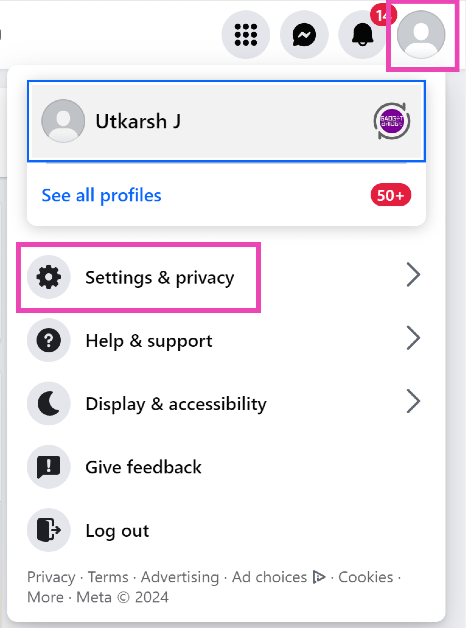 Step 2: Select Settings.
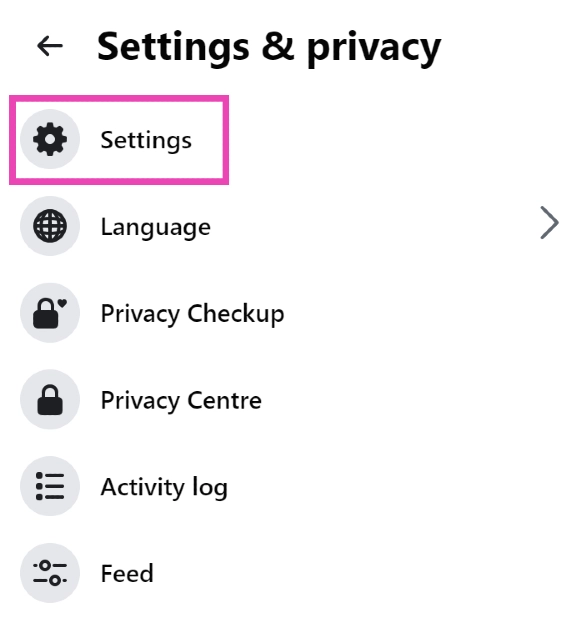 Step 3: Click on See more in Accounts Centre.
 Step 4: Select Personal details.
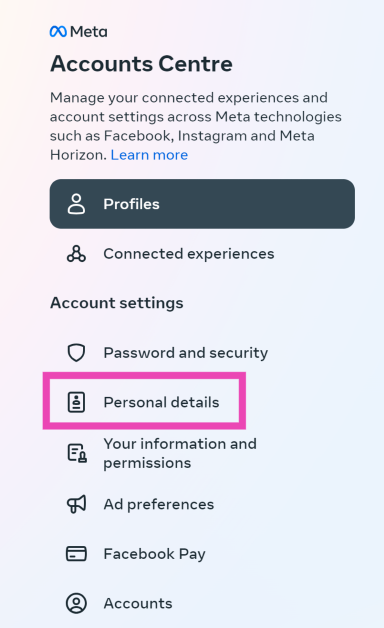 Step 5: Click on Contact info.
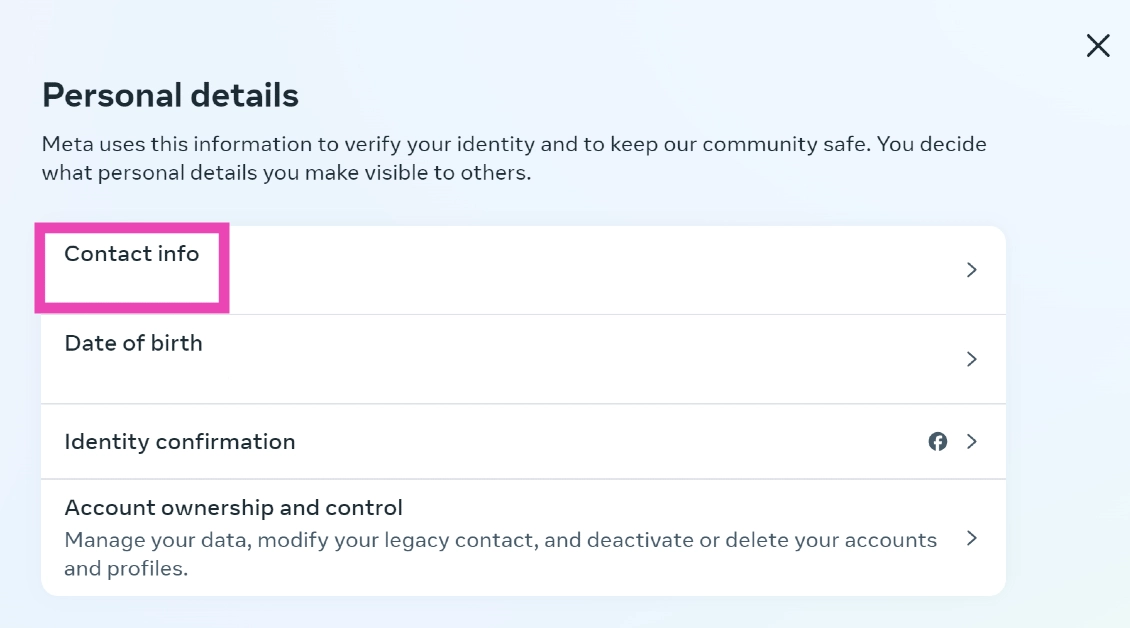 Step 6: Select the number you want to remove.
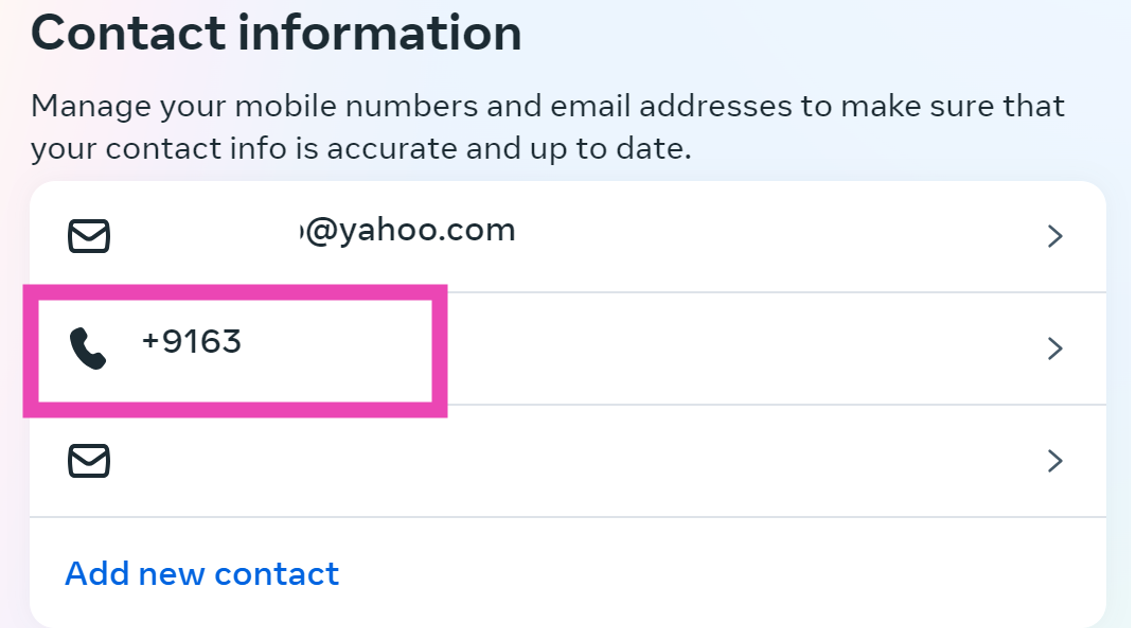 Step 7: Hit Delete number.
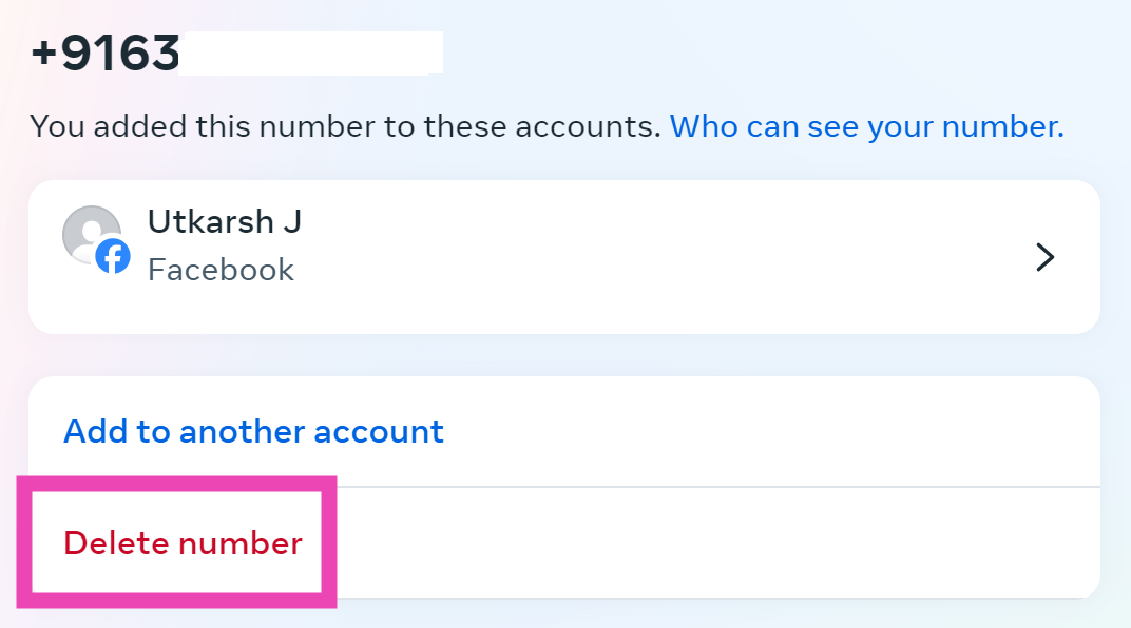
Remove Phone Number From Facebook (Mobile app)
Step 1: Launch the Facebook app on your smartphone and hit the profile picture with the hamburger menu icon at the top right corner of the screen.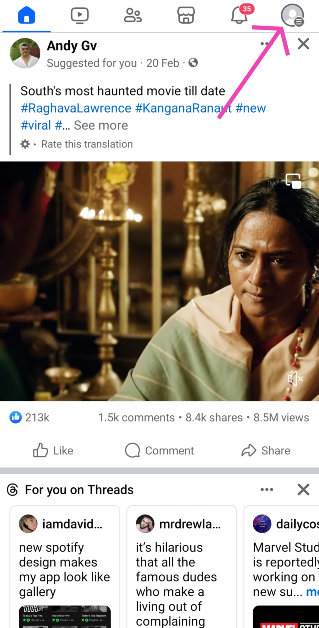 Step 2: Tap on Settings and privacy and select Settings.
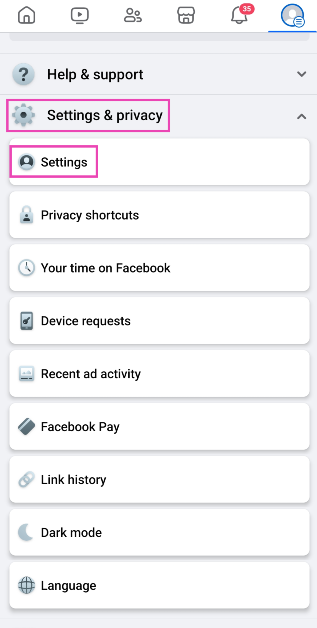 Step 3: Tap on See more in Accounts Centre.
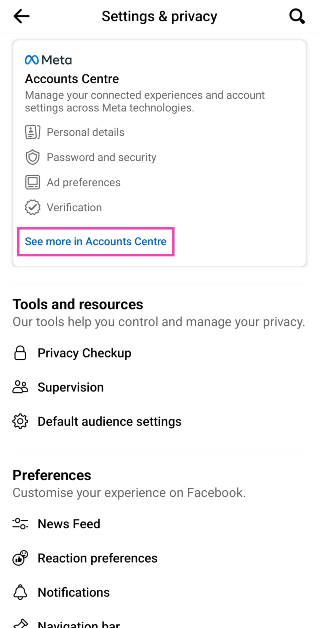 Step 4: Select Personal details.
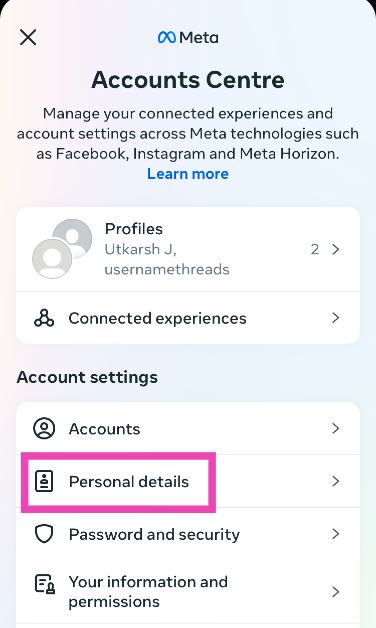 Step 5: Tap on Contact info and select the phone number you want to remove.
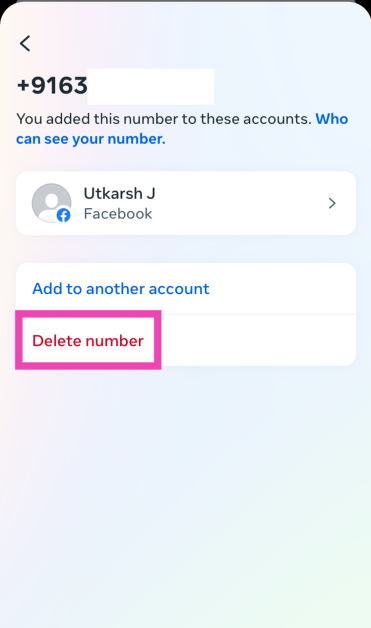
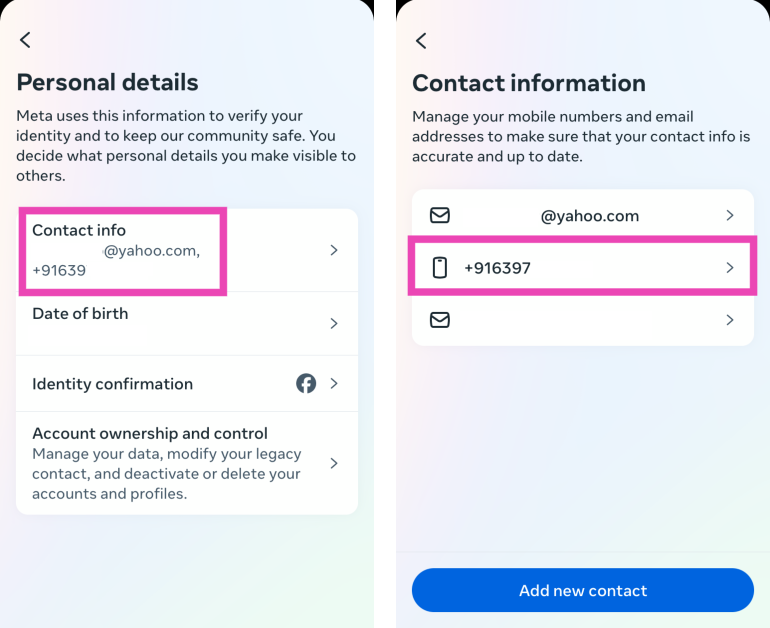 Step 6: Hit Delete number.
Frequently Asked Questions (FAQs)
How do I delete my phone number from Facebook?
Go to Settings and privacy>Settings>Accouts Centre>Personal details>Contact info, select the phone number, and hit ‘Delete number’.How do I remove my phone number from Instagram?
Go to Profile>Edit profile>Personal information settings>Contact info>Number>Delete number.How do I disable contact syncing on Facebook?
Launch the Facebook app, hit the hamburger menu, go to Settings & privacy>Settings>Permissions>Upload Contacts and turn off the toggle switch for ‘Continuous contacts upload’. Read Also: Now buy an iPhone 14 under 60K on Amazon: Check out the iPhone dealConclusion
These are the top 2 ways to remove or delete your phone number from Facebook. Read this article if you want to do the same for Instagram. If you know of any other ways to carry out this task, let us know in the comments!YouTube Premium Introduces AI-Powered ‘Jump Ahead’ Feature for Faster Viewing

Key Highlights
- YouTube Premium’s “Jump Ahead” feature uses AI to let users skip to the best parts of videos, saving time.
- With AI insights, users can swiftly access engaging sections by double-tapping, enhancing their viewing experience.
- “Jump Ahead” is exclusive to YouTube Premium members, offering quick access to popular video segments for an optimized viewing journey.
Homelander From The Boyz Enters The Fray In Mortal Kombat 1 DLC Teaser

Key Highlight
- The teaser trailer showcases Homelander’s iconic presence from “The Boys,” hinting at an exhilarating addition to Mortal Kombat 1.
- Alongside Homelander, the trailer teases Ferra’s involvement, adding intrigue to the upcoming DLC.
- Despite rumors, official confirmations regarding the voice cast, including Antony Starr and Tara Strong, are awaited, heightening anticipation for the characters’ debut.
Now buy an iPhone 14 under 60K on Amazon: Check out the iPhone deal
Key Highlights
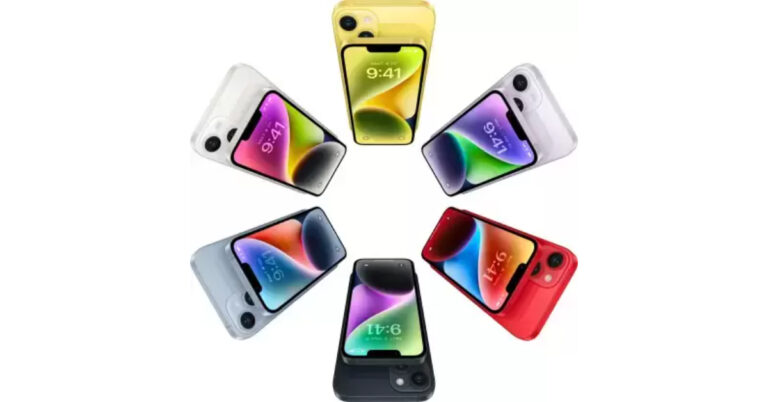
- Currently, the iPhone 14 is listed at a discounted price of Rs 58,999 on Amazon.
- Amazon is offering up to a Rs 42,000 exchange discount on the iPhone 14.
Apple iPhone 14 specifications
The Apple iPhone 14 features a 6.1-inch Super Retina XDR OLED screen, which offers a wide colour gamut, HDR, and 1200 nits of brightness. The display comes with a pixel density of 460 ppi and supports a 60 Hz refresh rate. The screen has a tough ceramic shield front cover that is water- and dust-resistant. The iPhone 14 also includes Face ID and is built to IP68 standards for water and dust protection. Under the hood, there is an Apple A15 Bionic SoC and up to 512GB of internal storage. The device runs on iOS 16. Also Read: Meta launched new stickers for Instagram Stories The iPhone 14 is highlighted with a dual rear camera setup with a primary 12MP wide-angle sensor with a bigger f/1.5 aperture, sensor-shift OIS, and a secondary 12MP ultra-wide-angle sensor. The ultra-wide camera provides a distinctive viewpoint for broader views and enhances low-light images using a photonic engine. For selfies and video calls, the front camera has a 12 MP sensor with autofocus.iPhone 15 is now available on Flipkart at its lowest price: Here is how much it costs now
Key Highlights
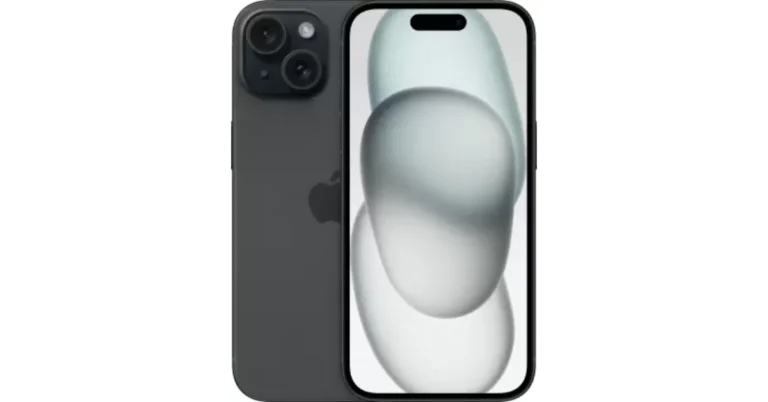
- Flipkart is running a Big Savings Days sale where it is offering a big discount on the iPhone 15.
- The iPhone 15 is getting a discount of over 15k.
- The device was launched in India at a starting price of Rs 79,990.
iPhone 15 specifications
The iPhone 15 is highlighted with a 6.1-inch Super Retina XDR OLED display. The display is protected with a ceramic shield for protection. The handset features an IP68 classification for dust and water protection. The A16 Bionic chip, which powered Apple’s iPhone 14 Pro models last year, is found in the new iPhone 15. Also Read: Nothing Ear (a) Review: Good Bang for Your Buck? The iPhone 15 has a 48-megapixel wide-angle camera as its main sensor, a 2-megapixel quad-pixel sensor, and an f/1.6 aperture. Additionally, the device has a 12-megapixel ultra-wide camera with sensor-shift stabilisation and an f/1.6 aperture. On the front, there is a 12-megapixel TrueDepth camera for selfies and video calls. The device features a USB Type-C port instead of the company’s exclusive Lightning connector.Garena Free Fire Redeem Codes Today 6 May 2024: Here is how to claim them

Garena Free Fire is a battle royale game with regular awards and tournaments to keep players interested. If you play Garena Free Fire, you should be aware of the redeem codes that are released on a daily basis. However, because the battle royale game is banned in India, players from other countries can use the Free Fire Redeem codes daily. If you’re unfamiliar with the Garena Free Fire redeem codes or don’t know how to get them, we’ve put together a step-by-step guide to help you redeem them. Check out Garena Free Fire Redeem Codes for 6 May 2024.
The Free Fire redeem codes are a great way to get free stuff. These are 12-digit codes that contain alphabets and numbers, as well as an expiration date and time. Because the Garena FF redeem codes cannot be used more than once, you should hurry to the redemption page to claim your free reward before someone else does. To get a free reward, all you have to do is go to reward.ff.garena.com/en, which is the official redemption page. Also, keep an eye on this space for daily updates on Garena Free Fire redemption codes and rewards.
Also Read: Sennheiser Accentum Plus wireless headphones with Hybrid Adaptive Noise Cancellation launched
Garena Free Fire Redeem Codes Today 6 May 2024
FQ4R9S2T7U33V8W5 FX1Y6Z4A39B3C7D5 FE2F73G1H6I4J9K3 FL5M31N8O3P7Q2R6 FV5W9X3Y7Z31A6B4 FC8D2E6F1G37H4I9 FN7O2P8Q3R39S4T6 FU1V6W43X9Y3Z7A5 FJ3K8L35M1N7O2P6 FS9T4U1V6W33X8Y2 FZ7A2B93C4D8E3F5 FG1H36I4J9K5L8M3How to Get Free Fire Redeem Codes for Garena on 6 May 2024?
- Visit the Garena Free Fire game’s official website at reward.ff.garena.com.
- Use your Facebook, Google, VK, Apple ID, Huawei ID, or Twitter account to log in.
- You’ll be taken to a valid redemption code (s)
- Copy and paste the 12-digit redemption code into the text box.
- On the screen, a dialogue box will appear.
- ‘Ok’ should be selected.
Garena Free Fire Redeem Codes Today 5 May 2024: Here is how to claim them

Garena Free Fire is a battle royale game with regular awards and tournaments to keep players interested. If you play Garena Free Fire, you should be aware of the redeem codes that are released on a daily basis. However, because the battle royale game is banned in India, players from other countries can use the Free Fire Redeem codes daily. If you’re unfamiliar with the Garena Free Fire redeem codes or don’t know how to get them, we’ve put together a step-by-step guide to help you redeem them. Check out Garena Free Fire Redeem Codes for 5 May 2024.
The Free Fire redeem codes are a great way to get free stuff. These are 12-digit codes that contain alphabets and numbers, as well as an expiration date and time. Because the Garena FF redeem codes cannot be used more than once, you should hurry to the redemption page to claim your free reward before someone else does. To get a free reward, all you have to do is go to reward.ff.garena.com/en, which is the official redemption page. Also, keep an eye on this space for daily updates on Garena Free Fire redemption codes and rewards.
Also Read: Sennheiser Accentum Plus wireless headphones with Hybrid Adaptive Noise Cancellation launched
Garena Free Fire Redeem Codes Today 5 May 2024
U3V7W1X6Y2Z8A4 B5C9E3G7H2J6K1 L4M8N2P6Q1R7S3 I1K5L9N4O8P3Q7 A2B6C9D3E7F1G5 E7G1H5J9K4L8M2 O8P3Q7R1S6T2U4 N8O4P1Q6S2T7V9 D4F8G2H6I1J5K9 C3D7F1G5I9J4K8 V9W3X7Y2Z8A4B6How to Get Free Fire Redeem Codes for Garena on 5 May 2024?
- Visit the Garena Free Fire game’s official website at reward.ff.garena.com.
- Use your Facebook, Google, VK, Apple ID, Huawei ID, or Twitter account to log in.
- You’ll be taken to a valid redemption code (s)
- Copy and paste the 12-digit redemption code into the text box.
- On the screen, a dialogue box will appear.
- ‘Ok’ should be selected.
Meta launched new stickers for Instagram Stories
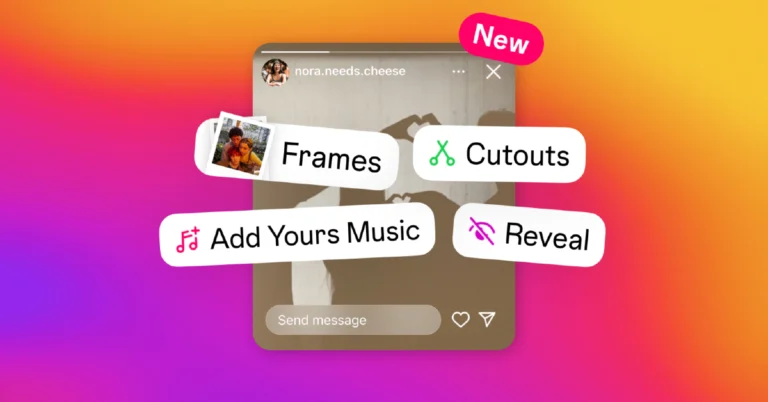
Meta has officially introduced new stickers to Instagram Stories. This will allow users to start off music trends, create their own custom stickers from their photos or videos, post a secret story, and more. The social media platform has gained Add Yours Music, Frames, Reveal, and Cutouts stickers.
While announcing the new stickers in Instagram Stories, Meta said, “Today, we are launching new stickers in Instagram Stories, giving you more ways to connect with friends over the things you care about most. Whether you want to share your favourite song of the day or create your own custom stickers from your photos or videos, we hope these new tools inspire you to get creative in Stories.”
Also Read: Nothing Ear 1 review: The first step in the right direction
Add Yours Music
You can share a song that makes you feel good with your followers by using the Add Yours Music sticker, and they can add music of their own using the Add Yours feature with the music sticker. To Add Yours Music tap the stickers icon, then tap on the icon that says “Add Yours Music.” Once selected, tap on “+ / Add Music” to select a song from Instagram’s music library. Your friends can use the “Add Yours” button to add their own song after you post your story.Frames Sticker
Any picture can be instantly printed with the Frames sticker. Your followers will need to shake their phones to develop the image in order to see the content inside. To add the Frames sticker to your Instagram story, first tap the stickers icon. Then this will open up your photo gallery, where you can select one image to be framed. You have the option to add a caption once you’ve chosen an image. The time and date the picture was taken will be automatically added. Your friends and followers can develop the image inside the frame by shaking their phones or by tapping the “shake to reveal” button once you’ve posted your story. Also Read: Nothing Ear (a) Review: Good Bang for Your Buck?Reveal Sticker
You can post a hidden Instagram story for your friends and followers to see by using the Reveal sticker. They have to DM you in order to view the content. To create a story, tap the stickers icon and then select the “Reveal” icon. You’ll be asked to write a hint for friends about what they might discover behind your hazy story when you click the Reveal sticker. You can tap the “Preview” icon in the bottom left-hand corner to see how your story will appear to friends. Your friends will only be able to view the content of your story if they DM you after you publish it, but you won’t have to accept every DM for your story to be visible.Cutouts
With the Cutouts sticker, you can turn part of any video or photo in your camera roll into a custom sticker that you can add to your story or reel. Once you create your cutouts, they are saved and easily accessible in your sticker tray, so you can come back to them time and time again. You can even let others save and reuse the cutout stickers you created in their reels and stories.Nothing Ear (a) Review: Good Bang for Your Buck?

The Nothing Ear (a) is the company’s latest audio offering. It is Nothing Earbuds’ younger sibling, aimed mostly at budget-conscious consumers. It features a ceramic diaphragm with an 11-mm dynamic driver and has powerful noise-cancelling capabilities with user-friendly features. The iconic transparent design continues to exist, but it has a playful twist thanks to bubble designs and new hues in vibrant yellow that make it eye-catching and fun. Read below to learn all about the new device in our Nothing Ear (a) Review.
Nothing claims that although the device has a bubble-like shape, the design of the Ear (a) casing was inspired by regular pill packets. However, we think the casing seems like a tiny suitcase because of its raised contours. It is very elegant and it stands out because of its design. People will undoubtedly ask you about the TWS, wherever you take it. We still remember when we took out the Nothing Phone 1 for the first time. Many people at a cafe asked us about the phone and how gorgeous and unique it looked.
Also Read: Nothing Ear (2) review: They have hit the ball (hard) out of the park!
The battery can be charged via the type-C port, which is located at the back of the case.
We have the yellow colour variant for the review, and this is the first time that Nothing has used this kind of bright yellow colour.
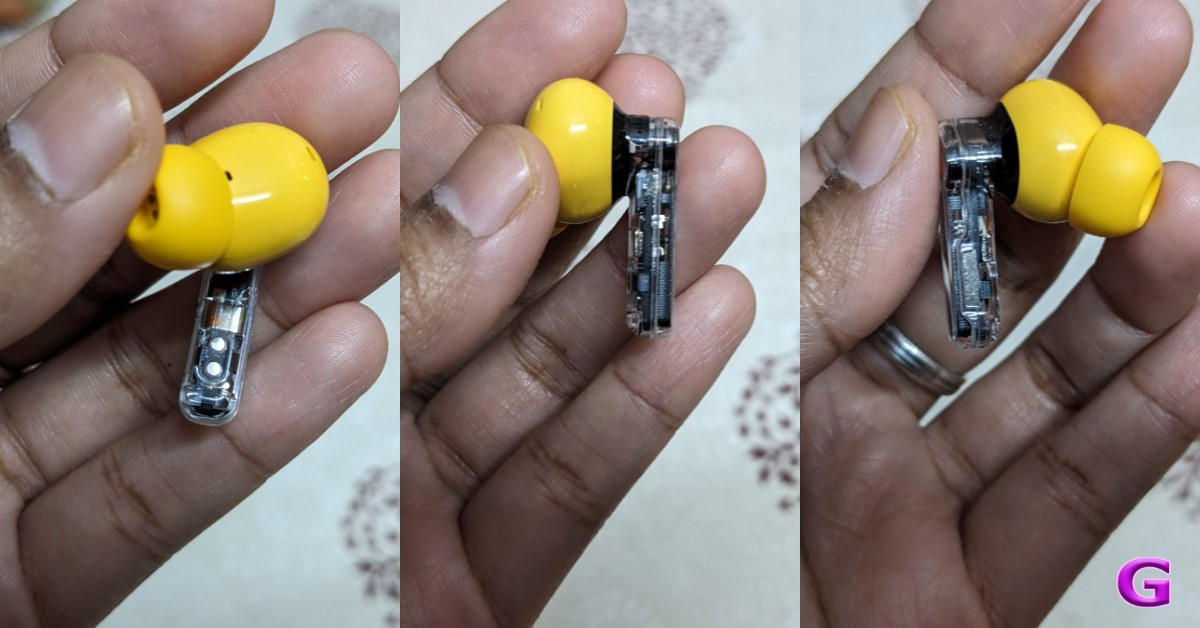
Everything on the earphones is yellow, except for the stem, which is transparent. These earbuds are also quite durable and of excellent quality. It feels almost the same as the previous Nothing earbuds.
The hardware within is somewhat visible when viewed from the side of the stem. In contrast to other brands, the company uses a red and white dot to indicate left and right instead of marking the earbuds’ stem or casing. Similar to this, the earphone case has a red and white dot that you must match every time you need to place your headphones inside.
This type of design pattern is highly engaging and user-friendly, and it has been utilised in the past. Knowing which portion the earbuds will go to is simple. On the left side of the case, there is an LED indicator that glows when the case is opened or charged.
The earphones have a great and very comfortable fit and finish. The earbuds both fit into the ears rather well. It is comfortable to wear for extended periods, and it won’t come off your ears easily. The fit is snug and secure.
The company gives you an additional pair of ear tips so you can use them according to your ear cavity size. The best thing is that they’re all colour-coordinated. It’s great that you can feel the haptic feedback from the earphones even when you pinch their stem.
Also Read: Nothing Ear (stick) Review: Great looks served with an impressive sound
With the Nothing X app, you can personalise your listening experience with custom settings. The game changer is its dual-device connection. It works perfectly and connects to two preset devices as soon as you open the case. However, at times you have to pause and wait for the earphones to change the audio source.
The Nothing application provides controls for bass enhancement, noise reduction, and equalisation, as well as information about the battery level. There are four presets available on the equaliser: Voice, More Bass, More Treble, and Balanced.
It may be configured to produce the sound you desire. You can modify the sound to suit your needs using the custom option. In contrast, the Controls option allows you to personalise the earbud controls. Keep in mind that they lack volume controls on the earbuds and only have pinch controls instead of touch capability. When sleeping on one side, it can be troublesome as unintentional touches might occur, which is why pinch controls are preferable over touch controls.
You can turn on or off the dual connection, high-quality audio, low lag mode, and in-ear detection in the settings. To enhance the game experience, the Low lag option is available that reduces latency. We’ve had a great time playing games while wearing these. No lags. Over that. three audio codecs are supported by the earphones: LHDC, LDAC, and AAC.
Three in-built microphones are also present in Ear (a), and the microphone in both earbuds is of excellent quality. During calls, the other person could clearly hear your voice, making it good for calling purposes.
With Active Noise Cancellation enabled, background noise on the phone can be cut by up to 45 decibels. The unwanted sounds/noise in your surroundings are reduced to a large extent. You can modify noise cancellation, turn on transparency mode, and turn off the ANC with the app. Through the ‘Adaptive’ setting in the Nothing X app, Ear (a) determines the optimal amount of noise cancellation based on your environment in real-time, saving you the trouble.
Also Read: Nothing Ear 1 review: The first step in the right direction
The firm claims Ear (a) automatically checks for noise leakage between the earbud and your ear canal, then applies more noise cancellation to make up for it.
The Ear (a) is outstanding in terms of sound quality and style. On the Nothing Ear (a), the company has integrated 11mm dynamic drivers. These possess both TPU and PMI. As said, the gadget has LDAC, SBC, and AAC capabilities. Especially in soundtracks with minimal bass, you can choose to boost the bass if you desire more bass. The device also provides a nice sound separation.
Furthermore, Ear (a) has ChatGPT integration, through which users may access pinch-to-speak action. To utilise this functionality, users must have ChatGPT and the most recent version of Nothing OS loaded on their Nothing phones. Then you can use it to access ChatGPT’s current services.
Each earbud contains a 46mAh battery, while the case has a 500mAh battery. However, there is no support for wireless charging included with these earphones. This comes with only a wired charging option. With the case, the battery lasts for 24 hours, and with the ANC turned on, you may listen to music with the buds for 5.5 hours, which increases to roughly 9 hours by turning it off. When combined with the case, the battery life is around 40 to 45 hours.
The case is IPX2, while the audio device is IP54-certified.
Nothing Ear (a) Review: Design
The brand-new Nothing design language from the company comes with the Nothing Ear (a). Note that the Nothing’s Ear (a) series falls in the budget segment, similar to the Nothing Phone 2a, while the Ear series is a premium series. It comes with a clear case, which is really attractive and allows you to see the earbuds inside. Nothing claims that although the device has a bubble-like shape, the design of the Ear (a) casing was inspired by regular pill packets. However, we think the casing seems like a tiny suitcase because of its raised contours. It is very elegant and it stands out because of its design. People will undoubtedly ask you about the TWS, wherever you take it. We still remember when we took out the Nothing Phone 1 for the first time. Many people at a cafe asked us about the phone and how gorgeous and unique it looked.
Also Read: Nothing Ear (2) review: They have hit the ball (hard) out of the park!
Nothing claims that although the device has a bubble-like shape, the design of the Ear (a) casing was inspired by regular pill packets. However, we think the casing seems like a tiny suitcase because of its raised contours. It is very elegant and it stands out because of its design. People will undoubtedly ask you about the TWS, wherever you take it. We still remember when we took out the Nothing Phone 1 for the first time. Many people at a cafe asked us about the phone and how gorgeous and unique it looked.
Also Read: Nothing Ear (2) review: They have hit the ball (hard) out of the park!
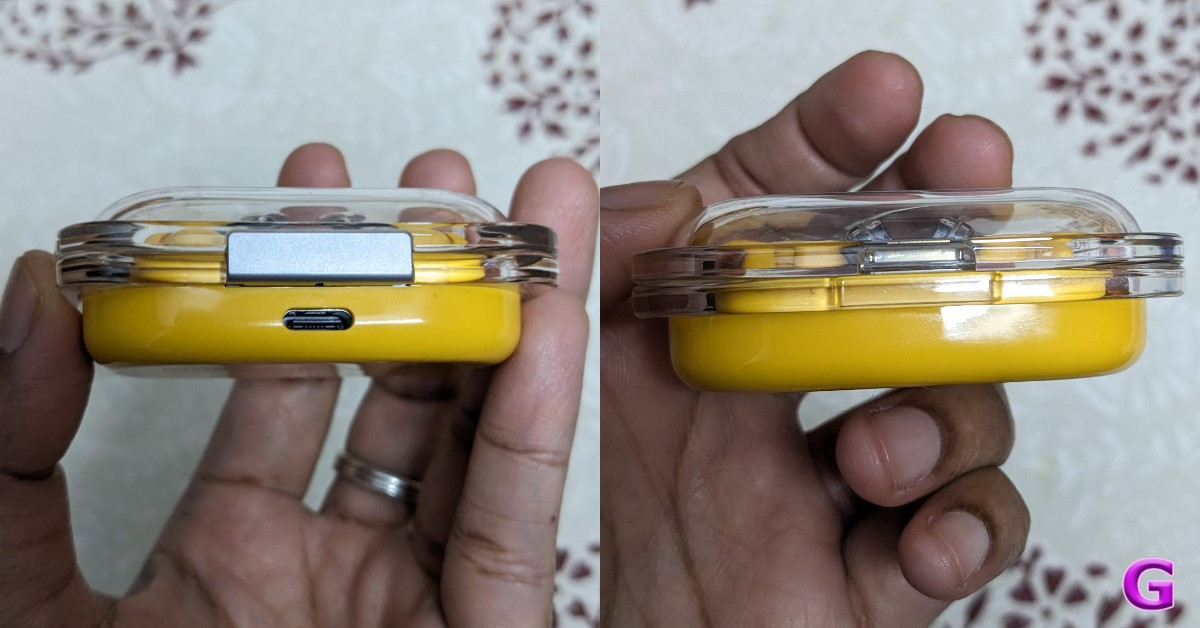 The battery can be charged via the type-C port, which is located at the back of the case.
We have the yellow colour variant for the review, and this is the first time that Nothing has used this kind of bright yellow colour.
Everything on the earphones is yellow, except for the stem, which is transparent. These earbuds are also quite durable and of excellent quality. It feels almost the same as the previous Nothing earbuds.
The battery can be charged via the type-C port, which is located at the back of the case.
We have the yellow colour variant for the review, and this is the first time that Nothing has used this kind of bright yellow colour.
Everything on the earphones is yellow, except for the stem, which is transparent. These earbuds are also quite durable and of excellent quality. It feels almost the same as the previous Nothing earbuds.
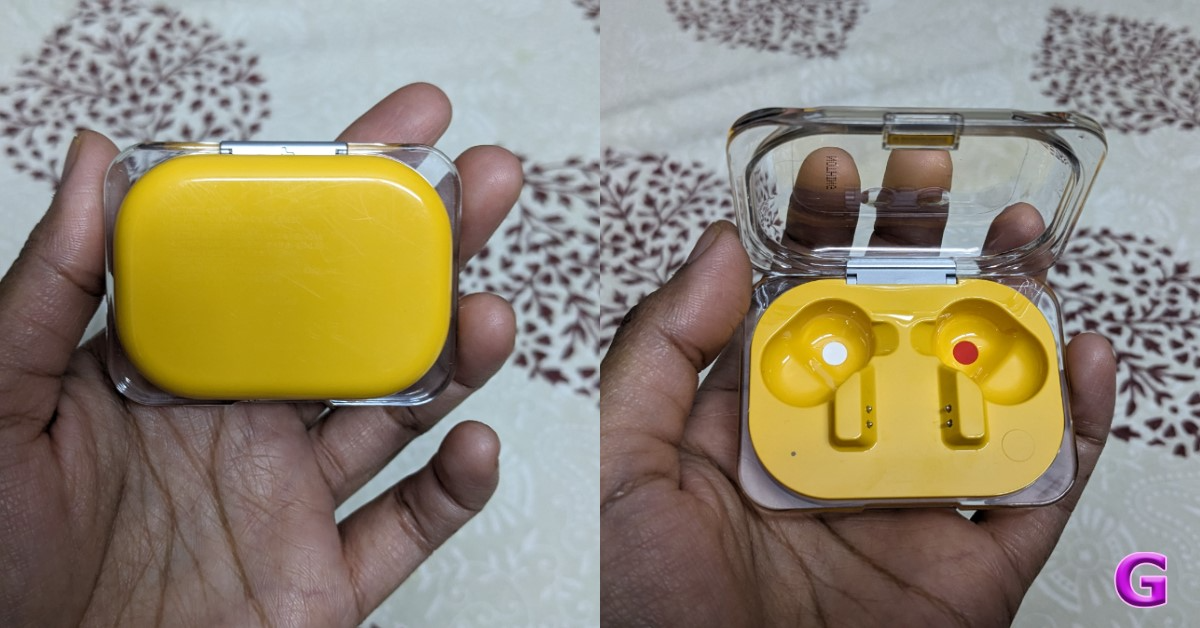 The hardware within is somewhat visible when viewed from the side of the stem. In contrast to other brands, the company uses a red and white dot to indicate left and right instead of marking the earbuds’ stem or casing. Similar to this, the earphone case has a red and white dot that you must match every time you need to place your headphones inside.
This type of design pattern is highly engaging and user-friendly, and it has been utilised in the past. Knowing which portion the earbuds will go to is simple. On the left side of the case, there is an LED indicator that glows when the case is opened or charged.
The hardware within is somewhat visible when viewed from the side of the stem. In contrast to other brands, the company uses a red and white dot to indicate left and right instead of marking the earbuds’ stem or casing. Similar to this, the earphone case has a red and white dot that you must match every time you need to place your headphones inside.
This type of design pattern is highly engaging and user-friendly, and it has been utilised in the past. Knowing which portion the earbuds will go to is simple. On the left side of the case, there is an LED indicator that glows when the case is opened or charged.
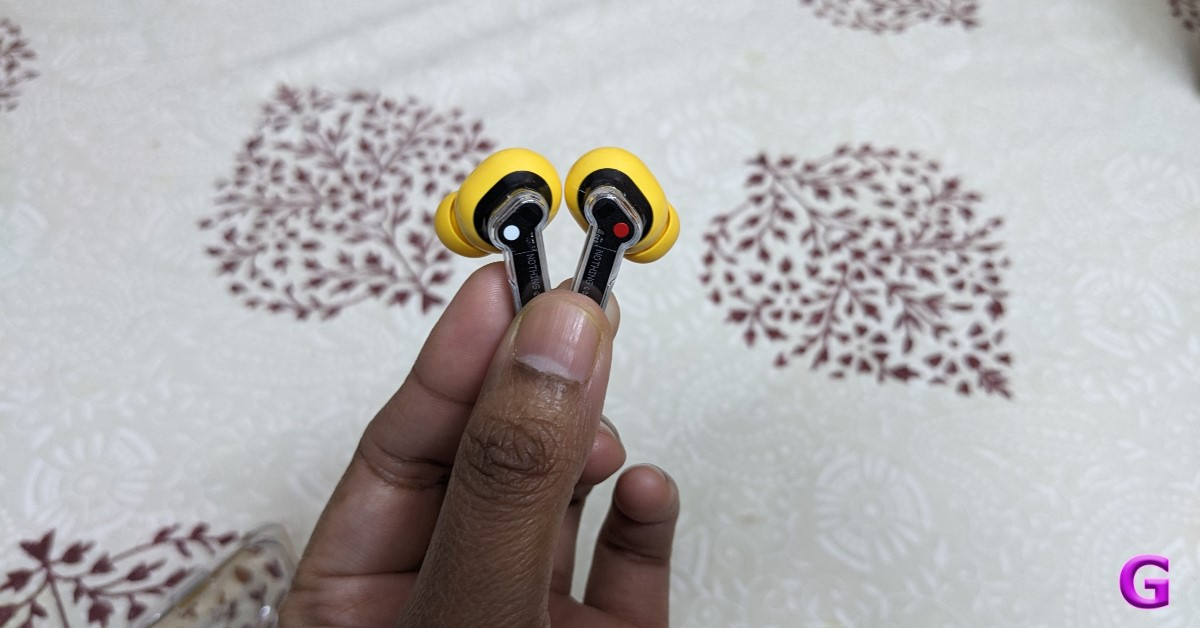 The earphones have a great and very comfortable fit and finish. The earbuds both fit into the ears rather well. It is comfortable to wear for extended periods, and it won’t come off your ears easily. The fit is snug and secure.
The company gives you an additional pair of ear tips so you can use them according to your ear cavity size. The best thing is that they’re all colour-coordinated. It’s great that you can feel the haptic feedback from the earphones even when you pinch their stem.
Also Read: Nothing Ear (stick) Review: Great looks served with an impressive sound
The earphones have a great and very comfortable fit and finish. The earbuds both fit into the ears rather well. It is comfortable to wear for extended periods, and it won’t come off your ears easily. The fit is snug and secure.
The company gives you an additional pair of ear tips so you can use them according to your ear cavity size. The best thing is that they’re all colour-coordinated. It’s great that you can feel the haptic feedback from the earphones even when you pinch their stem.
Also Read: Nothing Ear (stick) Review: Great looks served with an impressive sound
Nothing Ear (a) Review: Performance
Google FastPair compatibility is included with the Ear (a). A notification is sent to the nearby devices to connect as soon as you open the case. You must download the Nothing X app to your smartphone. Pairing is simple. You can use the same method to connect any iOS smartphone or Android phone.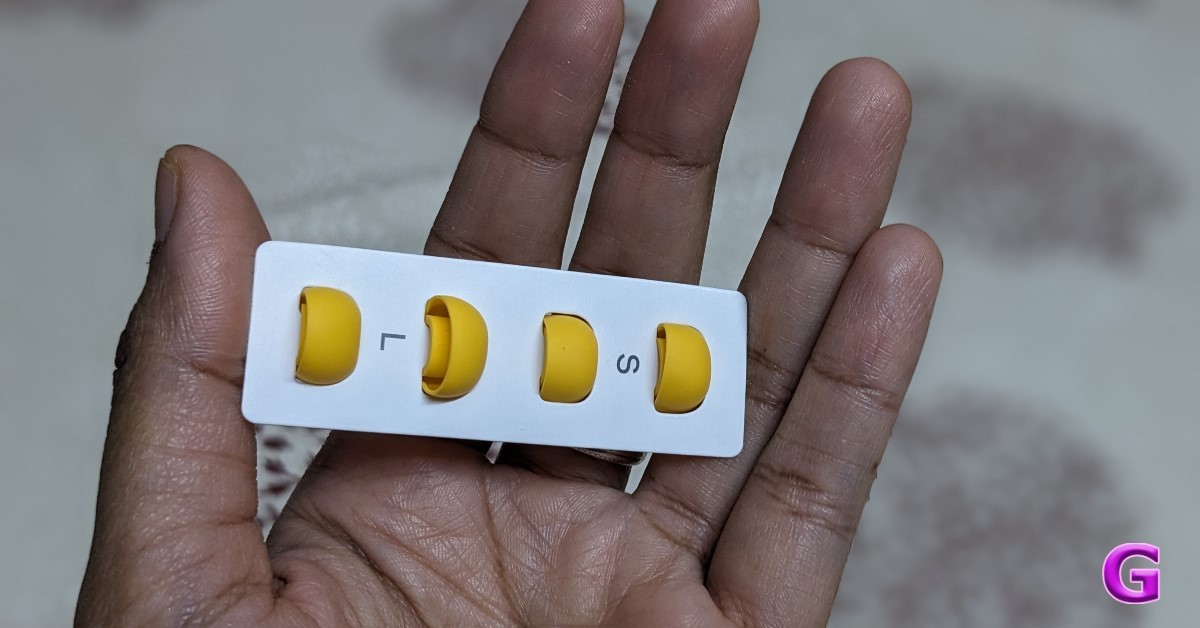 With the Nothing X app, you can personalise your listening experience with custom settings. The game changer is its dual-device connection. It works perfectly and connects to two preset devices as soon as you open the case. However, at times you have to pause and wait for the earphones to change the audio source.
The Nothing application provides controls for bass enhancement, noise reduction, and equalisation, as well as information about the battery level. There are four presets available on the equaliser: Voice, More Bass, More Treble, and Balanced.
It may be configured to produce the sound you desire. You can modify the sound to suit your needs using the custom option. In contrast, the Controls option allows you to personalise the earbud controls. Keep in mind that they lack volume controls on the earbuds and only have pinch controls instead of touch capability. When sleeping on one side, it can be troublesome as unintentional touches might occur, which is why pinch controls are preferable over touch controls.
You can turn on or off the dual connection, high-quality audio, low lag mode, and in-ear detection in the settings. To enhance the game experience, the Low lag option is available that reduces latency. We’ve had a great time playing games while wearing these. No lags. Over that. three audio codecs are supported by the earphones: LHDC, LDAC, and AAC.
Three in-built microphones are also present in Ear (a), and the microphone in both earbuds is of excellent quality. During calls, the other person could clearly hear your voice, making it good for calling purposes.
With Active Noise Cancellation enabled, background noise on the phone can be cut by up to 45 decibels. The unwanted sounds/noise in your surroundings are reduced to a large extent. You can modify noise cancellation, turn on transparency mode, and turn off the ANC with the app. Through the ‘Adaptive’ setting in the Nothing X app, Ear (a) determines the optimal amount of noise cancellation based on your environment in real-time, saving you the trouble.
Also Read: Nothing Ear 1 review: The first step in the right direction
The firm claims Ear (a) automatically checks for noise leakage between the earbud and your ear canal, then applies more noise cancellation to make up for it.
With the Nothing X app, you can personalise your listening experience with custom settings. The game changer is its dual-device connection. It works perfectly and connects to two preset devices as soon as you open the case. However, at times you have to pause and wait for the earphones to change the audio source.
The Nothing application provides controls for bass enhancement, noise reduction, and equalisation, as well as information about the battery level. There are four presets available on the equaliser: Voice, More Bass, More Treble, and Balanced.
It may be configured to produce the sound you desire. You can modify the sound to suit your needs using the custom option. In contrast, the Controls option allows you to personalise the earbud controls. Keep in mind that they lack volume controls on the earbuds and only have pinch controls instead of touch capability. When sleeping on one side, it can be troublesome as unintentional touches might occur, which is why pinch controls are preferable over touch controls.
You can turn on or off the dual connection, high-quality audio, low lag mode, and in-ear detection in the settings. To enhance the game experience, the Low lag option is available that reduces latency. We’ve had a great time playing games while wearing these. No lags. Over that. three audio codecs are supported by the earphones: LHDC, LDAC, and AAC.
Three in-built microphones are also present in Ear (a), and the microphone in both earbuds is of excellent quality. During calls, the other person could clearly hear your voice, making it good for calling purposes.
With Active Noise Cancellation enabled, background noise on the phone can be cut by up to 45 decibels. The unwanted sounds/noise in your surroundings are reduced to a large extent. You can modify noise cancellation, turn on transparency mode, and turn off the ANC with the app. Through the ‘Adaptive’ setting in the Nothing X app, Ear (a) determines the optimal amount of noise cancellation based on your environment in real-time, saving you the trouble.
Also Read: Nothing Ear 1 review: The first step in the right direction
The firm claims Ear (a) automatically checks for noise leakage between the earbud and your ear canal, then applies more noise cancellation to make up for it.
 The Ear (a) is outstanding in terms of sound quality and style. On the Nothing Ear (a), the company has integrated 11mm dynamic drivers. These possess both TPU and PMI. As said, the gadget has LDAC, SBC, and AAC capabilities. Especially in soundtracks with minimal bass, you can choose to boost the bass if you desire more bass. The device also provides a nice sound separation.
Furthermore, Ear (a) has ChatGPT integration, through which users may access pinch-to-speak action. To utilise this functionality, users must have ChatGPT and the most recent version of Nothing OS loaded on their Nothing phones. Then you can use it to access ChatGPT’s current services.
Each earbud contains a 46mAh battery, while the case has a 500mAh battery. However, there is no support for wireless charging included with these earphones. This comes with only a wired charging option. With the case, the battery lasts for 24 hours, and with the ANC turned on, you may listen to music with the buds for 5.5 hours, which increases to roughly 9 hours by turning it off. When combined with the case, the battery life is around 40 to 45 hours.
The case is IPX2, while the audio device is IP54-certified.
The Ear (a) is outstanding in terms of sound quality and style. On the Nothing Ear (a), the company has integrated 11mm dynamic drivers. These possess both TPU and PMI. As said, the gadget has LDAC, SBC, and AAC capabilities. Especially in soundtracks with minimal bass, you can choose to boost the bass if you desire more bass. The device also provides a nice sound separation.
Furthermore, Ear (a) has ChatGPT integration, through which users may access pinch-to-speak action. To utilise this functionality, users must have ChatGPT and the most recent version of Nothing OS loaded on their Nothing phones. Then you can use it to access ChatGPT’s current services.
Each earbud contains a 46mAh battery, while the case has a 500mAh battery. However, there is no support for wireless charging included with these earphones. This comes with only a wired charging option. With the case, the battery lasts for 24 hours, and with the ANC turned on, you may listen to music with the buds for 5.5 hours, which increases to roughly 9 hours by turning it off. When combined with the case, the battery life is around 40 to 45 hours.
The case is IPX2, while the audio device is IP54-certified.

Verdict
So this is our honest review of Nothing Ear (a). Ultimately, we would conclude that these are not the greatest TWS earbuds within the price range that is offered on the market. We have reviewed a lot of TWS in this price range, and if we are shelling out more than 7k for them, we anticipate a little bit more, like wireless charging. Saying that they do look stylish and can grab eyeballs. These also have pinch controls rather than touch controls and no volume controls. Although the case has a beautiful appearance, daily use may cause it to accumulate scratches over time, and the clear material may turn yellow and dull. Excellent ANC that can be immediately tweaked from the Nothing X app is available. The comfortable and snug fit makes it ideal for long workouts or daily trips. And yes, the devices pair with ease, and the battery life is exceptional, easily keeping them charged through the workweek. Nothing Ear (a) price in India: Rs 7,999 Buy Here Pros- Unique and User-Friendly Design
- App Support
- Pinch Control
- Long Battery Life
- Lack Wireless Charging
- No Volume Control
- Priced a little higher
- Accumulate scratches
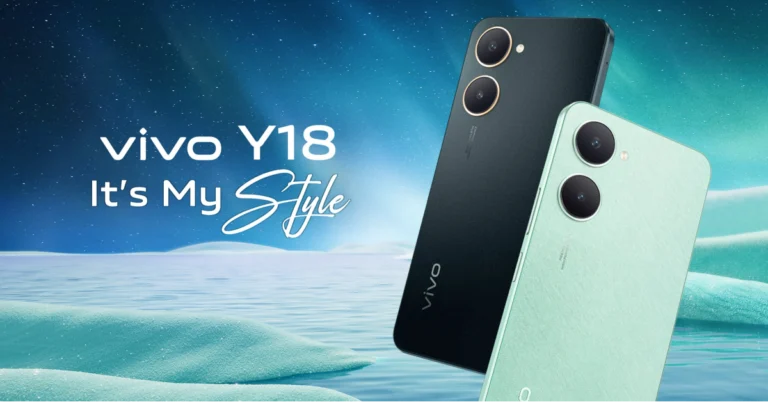
Vivo Y18 with 5000mAh battery launched in India
Key Highlights
- Vivo Y18 is a successor to Vivo Y17, which was launched in India in 2019.
- The handset operates on Android 14.
- The device is powered by a MediaTek Helio G85 SoC.
Vivo Y18 price in India, sale details
Vivo Y18 has launched in India in two different configurations. The 4GB RAM with 64GB storage option is priced at Rs 8,999, whereas the 4GB RAM with 128GB storage model comes with a price tag of Rs 9,999. The device comes in two colourways Gem Green and Space Black. The handset can be purchased via Vivo eStore, Amazon and offline stores in the country.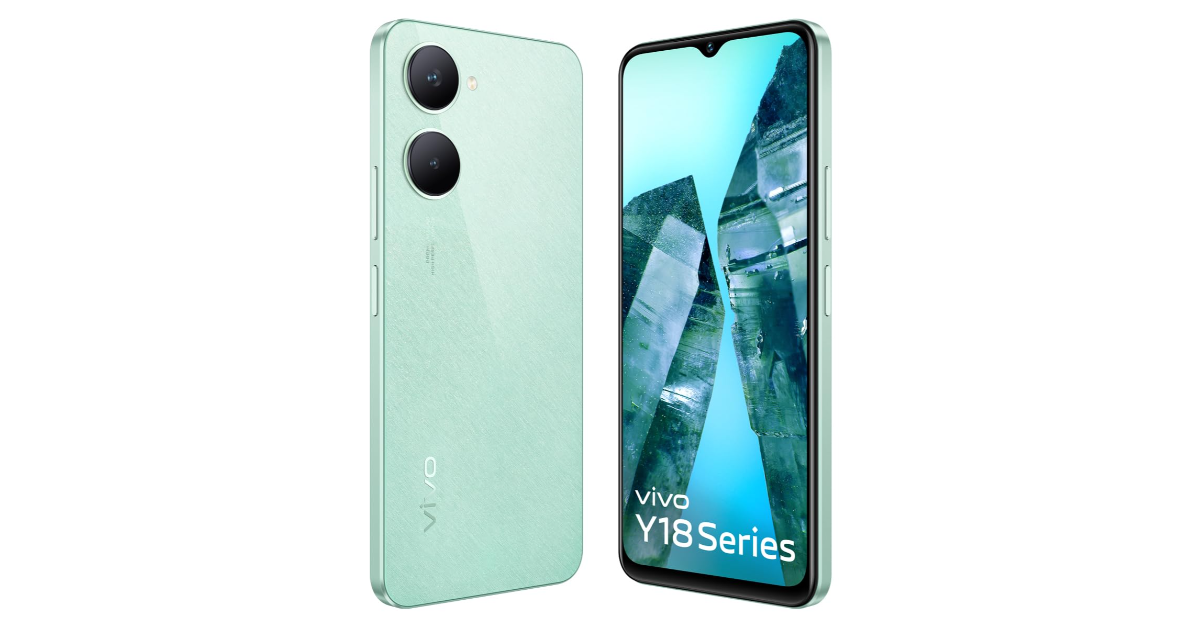
Vivo Y18 specifications
The Vivo Y18 features a 6.56-inch IPS LCD HD+ display with 1612 x 720 pixels of resolution. The screen supports a refresh rate of 90 Hz and 840 nits of peak brightness. The panel comes with TUV Rheinland certification, 69 PPI pixel density, and an 83 percent NTSC gamut. The phone runs on FuntouchOS 14 with Android 14 out of the box. Under the hood, there is a MediaTek Helio G85 SoC paired with a Mali G52 GPU. The phone has up to 128GB of eMMC 5.1 storage, which can be expanded further with a microSD card, and 4GB of LPDDR4x RAM. Also Read: Apple releases its Q2 results; Apple had double-digit growth in India For photos and videos, there is a dual rear camera setup that includes a 50-megapixel primary camera with an f/1.8 aperture and a VGA 0.8 MP sensor. Additionally, there is an 8-megapixel front-facing camera for selfies and video calling. The 5,000mAh battery of the Vivo Y18 supports 15W rapid charging. The phone has a side-mounted fingerprint scanner and an IP54 rating for water and dust resistance. In terms of connectivity, there is a dual SIM, 4G, Wi-Fi, Bluetooth 5.0, GPS, GLONASS, Galileo, and USB Type-C 2.0 port for charging.Apple releases its Q2 results; Apple had double-digit growth in India

Apple recently announced its financial results for its fiscal 2024 second quarter ended March 30, 2024. The company reported quarterly earnings per diluted share of $1.53 and revenue of $90.8 billion, which was 4% less than the same period last year. At the company’s quarterly earnings calls, Tim Cook, the CEO of Apple, made multiple references to India. He emphasised that Apple reached a revenue record in the second quarter that concluded in March and reported strong double-digit growth in the Indian market.
While sharing some India-specific call-outs during Apple’s Q2 earnings, Tim Cook, CEO of Apple, revealed that Apple broke revenue records in over a dozen nations and regions. Among these are March quarter records from Canada, India, Spain, Turkey, Latin America, and the Middle East.
Also Read: Snapchat’s new update brings the ability to edit chats and more
“We’re also investing in new solar and wind power in the U.S. and Europe, both to power our growing operations and our users’ devices. And we’re working with partners in India and the U.S. to replenish 100% of the water we use in places that need it most, with the goal of delivering billions of gallons of water benefits over the next two decades,” he said.
He claims that Apple had double-digit growth in India. He also added that in order to remain competitive, the company must begin manufacturing in the country for which it is expanding its developer environment in India. “In terms of the operational side or supply chain side, we are producing there. From a pragmatic point of view, you need to produce there to be competitive.”
He further added, “But we have both operational things going on and we have go-to-market, and initiatives going on. We just opened a couple of stores as last year, and we see enormous opportunity there. We’re continuing to expand our channels, and also working on the developer ecosystem as well. And we’ve been very pleased that there is a rapidly growing base of developers there. And so, we’re working all of the entire ecosystem from developer to the market to operations, the whole thing. And I just — I could not be more excited and enthusiastic about it.”
Also Read: Apple Beats Solo Buds and Beats Solo 4 with support USB Type-C charging launched
A cash dividend of $0.25 per share of the company’s common stock, marking a 4% increase, has been issued by Apple’s board of directors. The dividend is payable on May 16, 2024, to shareholders of record as of the close of business on May 13, 2024. The board of directors has also authorised an additional programme to repurchase up to $110 billion of the company’s common stock.
Snapchat’s new update brings the ability to edit chats and more

Snap Inc. has started to roll out new features for Snapchat driven by artificial intelligence (AI). The social media platform has gained features like editable chats, emoji reactions, My AI reminders, and map reactions. The SnapChatter will also be able to create custom Bitmoji looks and express themselves through even more AI-powered lenses. With this, the platform will become more engaging and allow users to express themselves. Note that some of the features will be accessible only to Snapchat+ paid subscribers.
Snap Inc., via a newsroom post, announced the upcoming Snapchat features. It said, “Every day, Snapchatters create more than 5 billion Snaps on average to communicate visually with their friends. Now, we’re adding new features to help Snapchatters connect even more quickly, express themselves in new ways, and use My AI to stay organised amid busy lives and schedules.”
Snapchat users will be able to fix typos as the social media platform gains the ability to edit messages. You will be able to edit your messages for up to 5 minutes after sending them before your friend replies. As we mentioned earlier, some of the upcoming Snapchat features are exclusive to Snapchat+ subscribers, and this is one of them.
Also Read: Samsung Galaxy S24 now available in 128GB variant in India
Snapchat now lets you react to chat with any emoji, thanks to the new capability. Earlier, users were able to react to a chat with their Bitmoji. Moreover, Snapchatters can now set reminders, which are powered by AI. To set an AI reminder, simply ask My AI to remind you of an upcoming deadline or to begin a countdown to the weekend in direct conversations or during a conversation with another friend! My AI will set you up with an in-app countdown with just a brief message, ensuring you never miss a moment.
Also Read: Apple Beats Solo Buds and Beats Solo 4 with support USB Type-C charging launched
The Snap Map has also gained Map reactions, and now users will be able to react on Maps if they have opted in to share their location with friends. You can send them a wave if you pass each other or a heart when you see a friend has arrived safely at their destination.
Snapchat users can also create Bitmoji looks using AI. Snapchatters can create custom digital clothing for their Bitmoji by providing a brief description and utilising artificial intelligence.
Best 7 Methods to Tell If An Image is AI-Generated

AI-based tech is slowly finding its way into consumer products. Image generators like Midjourney and Dall-E are already accessible to the masses. While AI is great at what it does, its ethical boundaries are yet to be determined. As of now, there aren’t any clear regulations on the usage of AI image generators. This has already led to a number of harassment and abuse cases. If you come across an image that seems like it was created to get a reaction out of people, there are a few methods you can employ to tell if it is AI-generated. Check them out below.
Read Also: Top 6 Ways to Fix ‘No Sound on iPhone’ (2024)
AI image generators may be good at producing pictures of people but they still struggle to get the minute details right. If you suspect that an image of a person is AI-generated, pay close attention to their fingers. If you see any additional, crooked, or fused fingers, chances are that the image is AI-generated.
Miscreants who devise AI images to spread misinformation are aware of AI’s shortcomings in rendering human fingers. This is why the hands of the subject are cropped out in AI-generated images. The good news is that you can tell whether an image is AI-generated by closely focussing on the subject’s face. The signs you need to look out for are smoothened skin, overly glossy eyeballs, different eye colours, and inconsistent wrinkles.
Another thing that AI image generators struggle with is rendering text in the images. Oftentimes, the text on an AI-generated image is total gibberish resembling English or any other language. Pay attention to the signs, banners, and other places with text. If you notice any inconsistencies, it is possible that the image is AI-generated.
If the person in the image is holding a phone, check if it is a real phone. Look for the company label or marking. If it resembles an iPhone, check the legitimacy of the Apple logo. If there’s a fridge in the background, look for the name of its manufacturer. Most AI generators are unable to create the exact model of a product.
If you’re looking at an artwork and want to make sure it is not AI-generated, simply perform a reverse image search to find the artist who created it. If you can’t find the art posted anywhere else, chances are that it was created by AI. If you’re lucky, the search will lead you to the place where the image was first posted. You can ask the original poster if the image is AI-generated.
Observe the fingers of the subject
 AI image generators may be good at producing pictures of people but they still struggle to get the minute details right. If you suspect that an image of a person is AI-generated, pay close attention to their fingers. If you see any additional, crooked, or fused fingers, chances are that the image is AI-generated.
Pay close attention to the facial features
 Miscreants who devise AI images to spread misinformation are aware of AI’s shortcomings in rendering human fingers. This is why the hands of the subject are cropped out in AI-generated images. The good news is that you can tell whether an image is AI-generated by closely focussing on the subject’s face. The signs you need to look out for are smoothened skin, overly glossy eyeballs, different eye colours, and inconsistent wrinkles.
Look at the signs, billboards, banners, or any text in the image
 Another thing that AI image generators struggle with is rendering text in the images. Oftentimes, the text on an AI-generated image is total gibberish resembling English or any other language. Pay attention to the signs, banners, and other places with text. If you notice any inconsistencies, it is possible that the image is AI-generated.
Check if the objects in the image are real
 If the person in the image is holding a phone, check if it is a real phone. Look for the company label or marking. If it resembles an iPhone, check the legitimacy of the Apple logo. If there’s a fridge in the background, look for the name of its manufacturer. Most AI generators are unable to create the exact model of a product.
Focus on the background
If you don’t see anything with the subject, it is time to observe the background. The devil is in the details and AI image generators often mess up the details. Look for any weird-looking objects in the background that make no contextual sense. Oftentimes, AI fills up the background with just one object. When told to create an image of a living room, the AI generator will make the common mistake of filling up the walls with a lot of paintings. Always place the background in the proper context while looking at an image.Perform a reverse image search
 If you’re looking at an artwork and want to make sure it is not AI-generated, simply perform a reverse image search to find the artist who created it. If you can’t find the art posted anywhere else, chances are that it was created by AI. If you’re lucky, the search will lead you to the place where the image was first posted. You can ask the original poster if the image is AI-generated.
Use the Hive AI Detector extension
If you still can’t judge whether an image is AI-generated or not, simply get the Hive AI Detector to do it for you. You can find this extension in the Chrome Web Store. Once the extension has been installed, right-click on an image and select ‘Hive AI Detector’. The extension will let you know the likelihood of the image being AI-generated. Read Also: Apple Beats Solo Buds and Beats Solo 4 with support USB Type-C charging launchedConclusion
These are the top 7 methods you can use to tell if an image is AI-generated. If you come across an image that seems incendiary or provocative, do not believe them right away. If you’re a Twitter user, always look out for Community Notes. Read this article to learn how you can spot a deepfake video.Garena Free Fire Redeem Codes Today 4 May 2024: Here is how to claim them

Garena Free Fire is a battle royale game with regular awards and tournaments to keep players interested. If you play Garena Free Fire, you should be aware of the redeem codes that are released on a daily basis. However, because the battle royale game is banned in India, players from other countries can use the Free Fire Redeem codes daily. If you’re unfamiliar with the Garena Free Fire redeem codes or don’t know how to get them, we’ve put together a step-by-step guide to help you redeem them. Check out Garena Free Fire Redeem Codes for 4 May 2024.
The Free Fire redeem codes are a great way to get free stuff. These are 12-digit codes that contain alphabets and numbers, as well as an expiration date and time. Because the Garena FF redeem codes cannot be used more than once, you should hurry to the redemption page to claim your free reward before someone else does. To get a free reward, all you have to do is go to reward.ff.garena.com/en, which is the official redemption page. Also, keep an eye on this space for daily updates on Garena Free Fire redemption codes and rewards.
Also Read: Sennheiser Accentum Plus wireless headphones with Hybrid Adaptive Noise Cancellation launched
Garena Free Fire Redeem Codes Today 4 May 2024
FDO6D1H3S2Q8E9Y4 FRI3B7G8R4C6U2N9 FFQ1K5V3E4J7M6W2 FX3E5G2L17J1F4U9 FFU4P5N9M3D7V2F6 FFS2A8C9O3I6G7R1 FY6M4B11N3P8O2C7 FEF7M4N2Z1T6U5I8 FFL8Y9T2S6A3H1X7 P1OS2I3U4Y5T6W7 FN4Y8Q6U5EDD61B3 FFB2M0A5U9O18R7F F13X4N6Q3R8WUU2H FFE6C8G3X18N4S9H FFC8H5E7Y0JDD4S1 FFM3FDDP1N9V2W7T6How to Get Free Fire Redeem Codes for Garena on 4 May 2024?
- Visit the Garena Free Fire game’s official website at reward.ff.garena.com.
- Use your Facebook, Google, VK, Apple ID, Huawei ID, or Twitter account to log in.
- You’ll be taken to a valid redemption code (s)
- Copy and paste the 12-digit redemption code into the text box.
- On the screen, a dialogue box will appear.
- ‘Ok’ should be selected.
Apple Beats Solo Buds and Beats Solo 4 with support USB Type-C charging launched
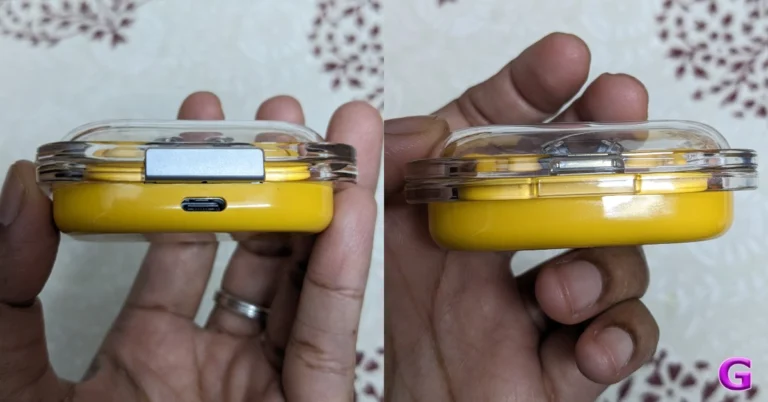
Key Highlights
The 40mm drivers on the Apple Beats Solo 4 allow for dynamic head tracking and customised spatial audio. In addition to angled earcups, the headphones have adjustable sliders. The ‘b’ button lets users manage calls, start voice assistants, and adjust the volume and playing of music. It can connect via Bluetooth 5.3. Additionally, the headphones offer one-touch pairing with both iOS and Android smartphones. A 3.5mm audio cable can be used to establish a wired connection.
Additionally, the wireless headphones have a built-in DAC for lossless music. Up to 50 hours of battery life are promised for the headphones, and five hours of listening are promised after just ten minutes of charging.
The ‘b’ button on the earphones also enables configurable on-ear features, enabling users to push it to switch between music and voice assistants, answer and end calls and adjust the volume. The Beats mobile app allows you to manage these customisations as well as other features. USB Type-C is supported by the Beats Solo Buds charging case.
A battery life of up to eighteen hours is promised. Over that, it is claimed that five minutes of charging will give the earbuds an hour of playback time.
- The Beats Solo 4 and Beats Solo 4 come with a USB Type-C port.
- The Beats Solo 4 has an upgraded design.
- The Beats Solo Buds offer one-touch pairing.
Apple Beats Solo 4 headphones, Beats Solo Buds price and availability
The Apple Beats Solo 4 is set to retail for $199.99 which translates to Rs 16,700. It comes in Transparent Red, Arctic Purple, Storm Grey, and Matte Black colour options. Whereas, the Apple Beats Solo Buds are available for $79.99, or roughly Rs 6,700. The company is offering it in Slate Blue, Cloud Pink, and Matte Black colour options. In terms of availability, Beats Solo 4 is available for purchase via the official Apple website in the US. On the other hand, the TWS will go on sale in the US in June of this year. Also Read: Pixel 8a fifth colour option and pricing tipped ahead of the launchApple Beats Solo 4 Specifications
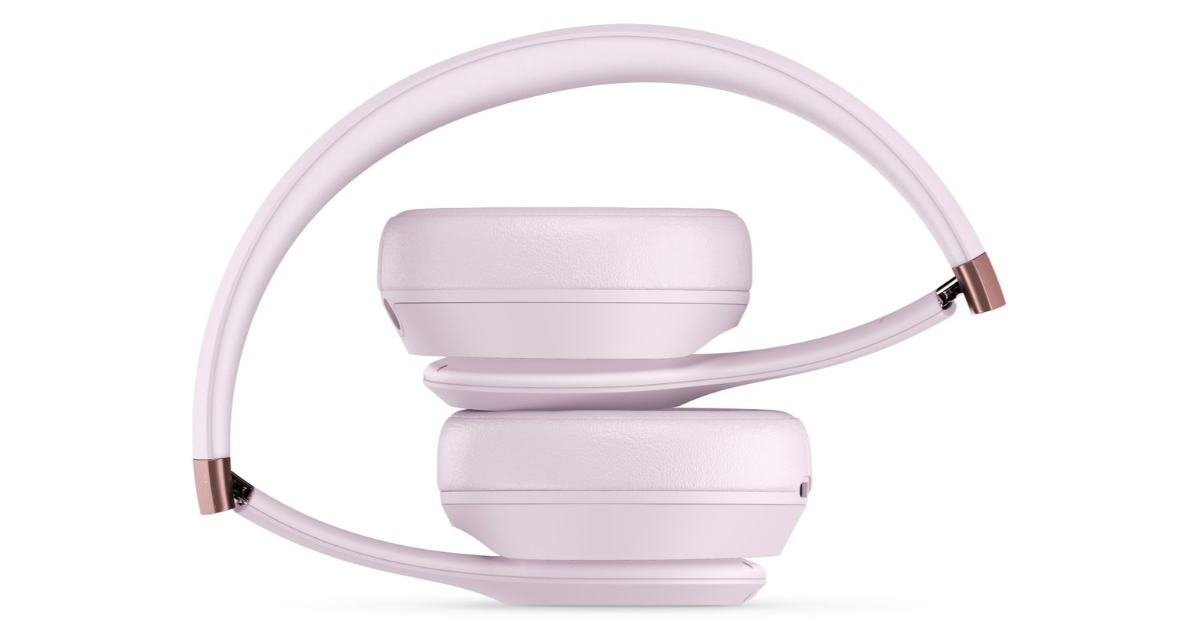 The 40mm drivers on the Apple Beats Solo 4 allow for dynamic head tracking and customised spatial audio. In addition to angled earcups, the headphones have adjustable sliders. The ‘b’ button lets users manage calls, start voice assistants, and adjust the volume and playing of music. It can connect via Bluetooth 5.3. Additionally, the headphones offer one-touch pairing with both iOS and Android smartphones. A 3.5mm audio cable can be used to establish a wired connection.
Additionally, the wireless headphones have a built-in DAC for lossless music. Up to 50 hours of battery life are promised for the headphones, and five hours of listening are promised after just ten minutes of charging.
The 40mm drivers on the Apple Beats Solo 4 allow for dynamic head tracking and customised spatial audio. In addition to angled earcups, the headphones have adjustable sliders. The ‘b’ button lets users manage calls, start voice assistants, and adjust the volume and playing of music. It can connect via Bluetooth 5.3. Additionally, the headphones offer one-touch pairing with both iOS and Android smartphones. A 3.5mm audio cable can be used to establish a wired connection.
Additionally, the wireless headphones have a built-in DAC for lossless music. Up to 50 hours of battery life are promised for the headphones, and five hours of listening are promised after just ten minutes of charging.
Beats Solo Buds specifications
The dual-layer drivers and laser-cut vents on Beats Solo Buds are supposed to enhance music quality. The unique dual-layer transducers are said to reduce micro-distortions. The new Apple Beats Solo Buds include an acoustic nozzle that is ergonomically oriented. The four ear tip sizes that they come in are XS, S, M, and L. Also Read: Samsung Galaxy S24 now available in 128GB variant in India The earphones are also compatible with Google’s Find My Device and Apple’s Find My, allowing for a one-touch connection with iOS and Android smartphones.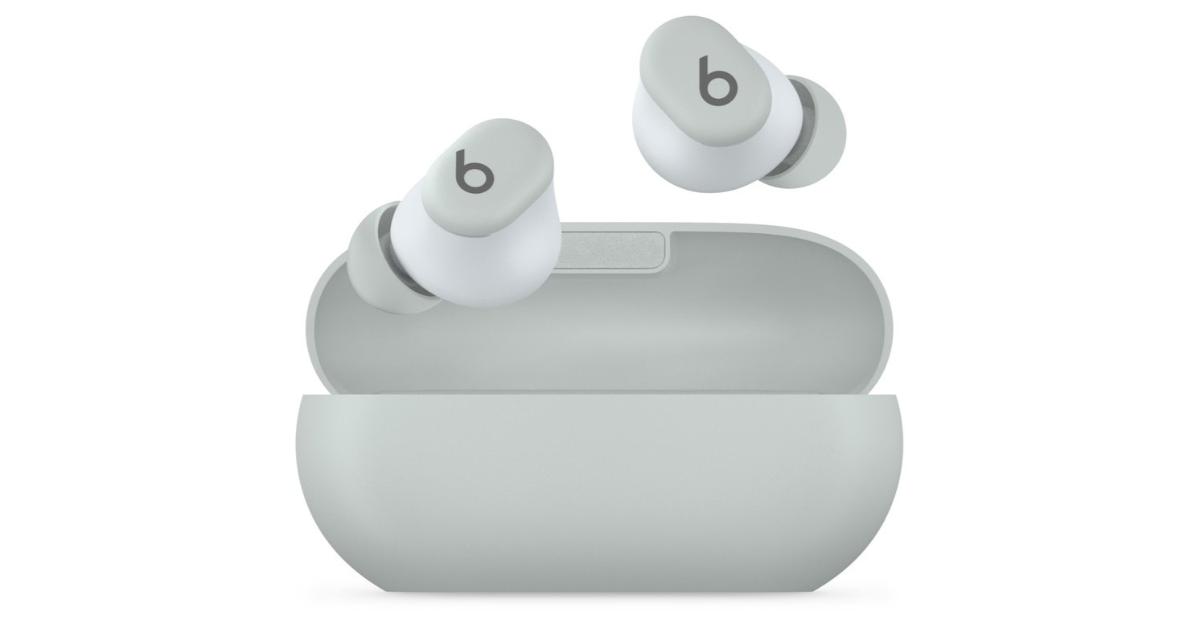 The ‘b’ button on the earphones also enables configurable on-ear features, enabling users to push it to switch between music and voice assistants, answer and end calls and adjust the volume. The Beats mobile app allows you to manage these customisations as well as other features. USB Type-C is supported by the Beats Solo Buds charging case.
A battery life of up to eighteen hours is promised. Over that, it is claimed that five minutes of charging will give the earbuds an hour of playback time.
The ‘b’ button on the earphones also enables configurable on-ear features, enabling users to push it to switch between music and voice assistants, answer and end calls and adjust the volume. The Beats mobile app allows you to manage these customisations as well as other features. USB Type-C is supported by the Beats Solo Buds charging case.
A battery life of up to eighteen hours is promised. Over that, it is claimed that five minutes of charging will give the earbuds an hour of playback time. Top 8 Ways to Fix ‘No Sound on iPhone’
If you can’t figure out why you can’t hear any sounds on your iPhone, you have landed on the right page. While this issue is uncommon on newer iPhones, older devices with failing hardware and outdated OS are prone to it. If your iPhone took a dip in the water or faced the full impact of a hard surface fall, it would explain its erroneous behaviour. If that is not the case, here are the top 8 ways you can fix the ‘no sound on iPhone’ issue.
Read Also: Top 10 Gaming Keyboards under Rs 15,000 in India (2024)
If your iPhone is on mute, it won’t produce any sound. This may seem like a pretty obvious thing to check, but you’d be surprised how many times people fret about the lack of sound after accidentally putting their iPhones on mute. Use the ringer switch on the left edge of the iPhone to put it on loud. If your iPhone has an Action Button that is customised to switch audio profiles, use it to select the loud profile.
Your iPhone’s speakers can deteriorate over a period of time. If you’re using an older iPhone, make sure to set its volume at the highest level so you don’t miss any alerts. Go to Settings>Sounds & Haptics and move the slider under ‘Ringer and Alerts’ all the way to the right.
If your iPhone is connected to your AirPods or any other audio output device, it will not produce sounds from its own speakers. Disconnecting an audio device from your iPhone after you’re done using it is easy to forget. Go to Settings>Bluetooth to unpair the device. You can also turn off Bluetooth from the Control Centre to quickly unpair your iPhone from the wireless audio device. This will fix the ‘no sound’ issue on your iPhone.
The speaker grille on your iPhone can accumulate dust and grime over a period of time. This causes the audio output to take a hit. Luckily, you can fix it by gently brushing the grille and removing the dirt. Tap the device gently on the desk to get the dirt off the speaker. Use isopropyl alcohol if necessary.
If you use a case for your iPhone, make sure it isn’t pressing the volume rocker. This problem doesn’t arise with official Apple cases, but third-party manufacturers often get the measurements wrong. The case may start pressing against the volume down button, thereby muting your iPhone.
A quick reboot of your iPhone resolves the background issues that may be keeping it from working properly. You should try this when your iPhone isn’t producing any sound. Simply press the side key along with a volume key and drag the power slider across the screen. Once the phone has shut down, wait for a few seconds and start it again by long-pressing the side key.
 Step 3: Select Software Update.
 Step 4: Tap on Download and Install.

Why is the sound not working on your iPhone?
If your iPhone isn’t able to play any sounds, it could be due to one of the following reasons:- You accidentally set your iPhone to mute.
- The Do Not Disturb mode is still turned on.
- Your iPhone is connected to a Bluetooth audio device.
- Background software issues are keeping the iPhone from producing sounds.
- Your iPhone’s speakers are damaged.
Check if your iPhone is on mute
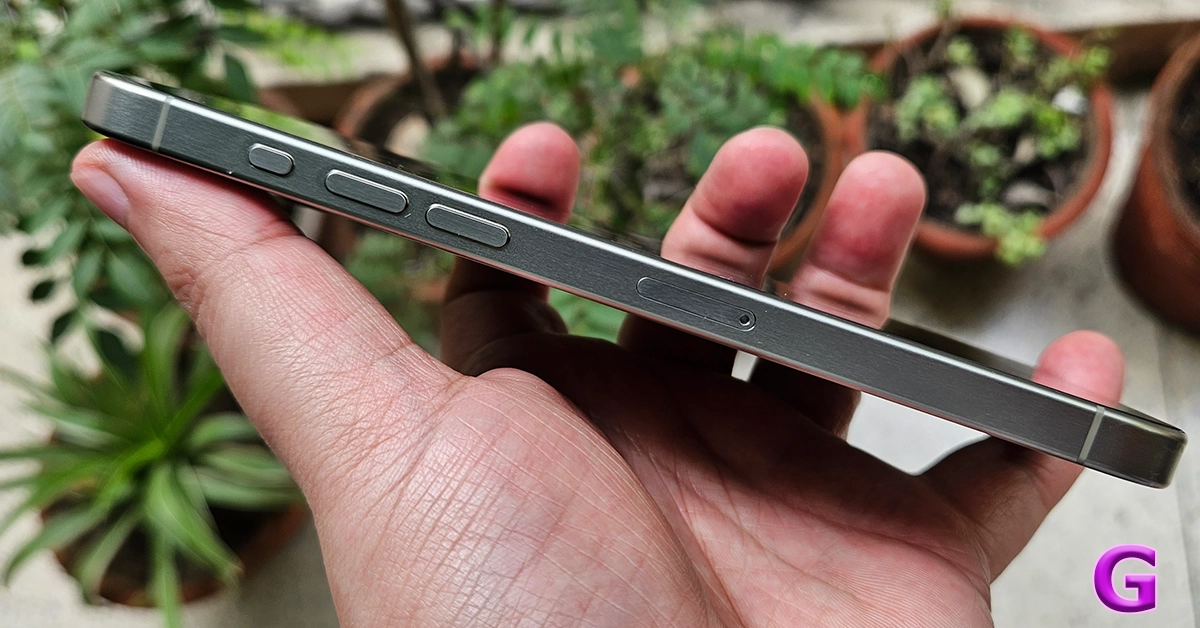 If your iPhone is on mute, it won’t produce any sound. This may seem like a pretty obvious thing to check, but you’d be surprised how many times people fret about the lack of sound after accidentally putting their iPhones on mute. Use the ringer switch on the left edge of the iPhone to put it on loud. If your iPhone has an Action Button that is customised to switch audio profiles, use it to select the loud profile.
Set the volume to the highest level
 Your iPhone’s speakers can deteriorate over a period of time. If you’re using an older iPhone, make sure to set its volume at the highest level so you don’t miss any alerts. Go to Settings>Sounds & Haptics and move the slider under ‘Ringer and Alerts’ all the way to the right.
Disconnect your AirPods/TWS
 If your iPhone is connected to your AirPods or any other audio output device, it will not produce sounds from its own speakers. Disconnecting an audio device from your iPhone after you’re done using it is easy to forget. Go to Settings>Bluetooth to unpair the device. You can also turn off Bluetooth from the Control Centre to quickly unpair your iPhone from the wireless audio device. This will fix the ‘no sound’ issue on your iPhone.
Turn off DND
If your iPhone is set to Do Not Disturb, it will completely mute any incoming notifications, calls, and alerts. Here’s how you can turn it off. Step 1: Go to Settings and select Focus. Step 2: Tap on Do Not Disturb. Step 3: Turn off its toggle switch.Clean your iPhone’s speaker
 The speaker grille on your iPhone can accumulate dust and grime over a period of time. This causes the audio output to take a hit. Luckily, you can fix it by gently brushing the grille and removing the dirt. Tap the device gently on the desk to get the dirt off the speaker. Use isopropyl alcohol if necessary.
Inspect the phone case
 If you use a case for your iPhone, make sure it isn’t pressing the volume rocker. This problem doesn’t arise with official Apple cases, but third-party manufacturers often get the measurements wrong. The case may start pressing against the volume down button, thereby muting your iPhone.
Restart your iPhone
 A quick reboot of your iPhone resolves the background issues that may be keeping it from working properly. You should try this when your iPhone isn’t producing any sound. Simply press the side key along with a volume key and drag the power slider across the screen. Once the phone has shut down, wait for a few seconds and start it again by long-pressing the side key.
Update iOS
Step 1: Make sure your iPhone is connected to a WiFi network and plug in its charger. Step 2: Go to Settings and select General. Step 3: Select Software Update.
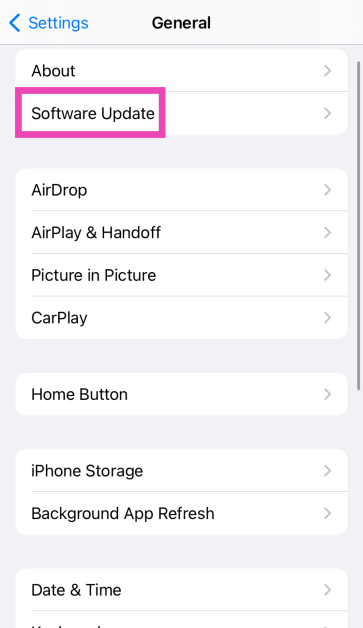 Step 4: Tap on Download and Install.
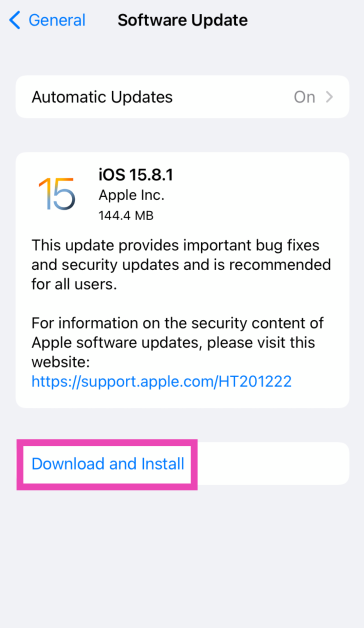
Frequently Asked Questions (FAQs)
How do I change the ringtone on my iPhone?
Go to Settings>Sounds & Haptics>Ringtone and select a new tone. You can also purchase a new tone from Apple’s Tone Store.How do I change the volume of an alarm on an iPhone?
The alarms you set on your iPhone follow the standard volume of the phone. You can change it by going to Settings>Sound and Haptics and dragging the slider under Ringtone and Alert Volume.How do I change WhatsApp’s notification sound on my iPhone?
Launch WhatsApp, go to Settings>Notifications>Sound and select a new tone. Read Also: Pixel 8a fifth colour option and pricing tipped ahead of the launchConclusion
These are the top 8 ways to fix the ‘no sound on iPhone’ issue. If these fixes don’t work for you, it is possible that your iPhone’s speakers are damaged. Book an appointment at the Genius Bar to go to your nearest Apple-authorised service centre to get the speakers fixed.Samsung Galaxy S24 now available in 128GB variant in India
Samsung has officially announced the launch of the Samsung Galaxy S24 128GB storage variant in India. The company introduced two RAM and storage options and the 256GB storage variant was the base model when the phone was launched in the country earlier this year. The device is powered by Snapdragon 8 Gen 3 Mobile Platform for Galaxy. It is shipped with Android 14-based One UI 6.1.
Indian customers can now get the Samsung Galaxy S24 128GB storage model. The new variant 128GB model is priced at Rs 74,999. The new options will be available for purchase via the Samsung e-store in the country.
Samsung Galaxy S24 was introduced in India in January this year in two different configurations: 8GB RAM with 256GB storage and 8GB RAM with 512GB storage models are priced at Rs 79,999 and Rs 89,999, respectively. S24 is available in Amber Yellow, Cobalt Violet, Onyx, and Black colour options.
Also Read: Pixel 8a fifth colour option and pricing tipped ahead of the launch
The Samsung Galaxy S24 is highlighted with a 6.2-inch FHD+ and 6.7-inch QHD+ Dynamic AMOLED 2X display with 120Hz refresh rate. The screen has a layer of Corning Gorilla Armor for protection. The Phone includes Samsung Knox, Knox Vault, and Passkeys. The device is powered by Exynos 2400 SoC. It runs on Android 14 with UI 6.1. The company will provide seven generations of OS upgrades and seven years of security updates.
The Galaxy S24 features a triple rear camera setup that includes a 12MP Ultra-Wide Camera (F2.2, FOV 120˚), 50MP Wide Camera (OIS F1.8, FOV 85˚) and a 10MP Telephoto Camera (3x Optical Zoom, F2.4, FOV 36˚). All the models come with a 12MP selfie camera (F2.2, FOV 80˚).
Also Read: Apple Arcade reveals three new game titles for May 2024
The smartphone includes Live Translate, Interpreter, Chat Assist, Note Assist, Transcript Assist, and Circle to Search, powered by built-in AI features.
The Samsung Galaxy S24 is backed by a 4,000mAh battery that supports Wireless PowerShare technology in addition to 25W wired and 15W wireless charging. In addition, it has IP68 dust and splash resistance and supports 5G, 4G LTE, Wi-Fi 6E, Bluetooth 5.3, Wi-Fi direct, and USB Type-C connectivity.
Pixel 8a fifth colour option and pricing tipped ahead of the launch
Key Highlights
- Google Pixel 8a leaked renders suggest five colour options.
- The price of the upcoming phone is also tipped ahead of the launch.