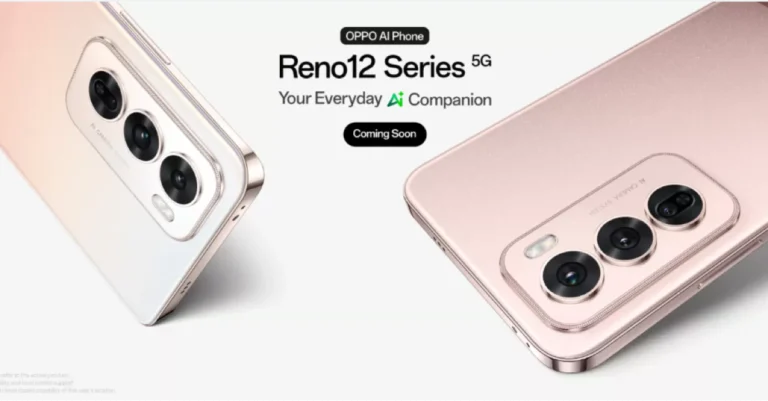
Oppo Reno 12 5G Series is all set to launch in India soon. The company has started to tease the upcoming smartphone series in the country. The company is yet to announce the launch date and other information related to the lineup. However, ahead of the official announcement, a new rumour has revealed the launch date, as well as the RAM and storage configurations for the Reno 12 5G and Reno 12 Pro 5G.
Oppo Reno 12 5G and Oppo Reno 12 Pro 5G were launched globally last month and will soon debut in the Indian market. The Oppo Reno 12 5G India launch date was revealed prior to the announcement. According to TheTechOutlook, the series will be launched in India on July 12. The report further revealed that the Reno 12 5G would be available with a single storage option of 8GB RAM with 256GB storage. The Reno 12 Pro 5G will be available in 12GB RAM with 256GB storage and 12GB RAM with 512GB storage variants. The exact launch date is yet to be announced by the company. The upcoming launch has also been teased through the company’s social media channels.
The Reno 12 5G series will be sold through Flipkart in India. Flipkart and Oppo India have made a special landing page to hint at the release date of the Reno 12 5G and Reno 12 Pro 5G.
Both the Reno 12 and Reno 12 Pro following their release in China, were made available in a few other countries. Global models use MediaTek Dimensity 7300-Energy SoCs, whereas Chinese versions use a MediaTek Dimensity 8250 Star Speed Edition SoC and a MediaTek Dimensity 9200+ Star Speed Edition chipset.
ColorOS 14.1, which is built on Android 14 comes preinstalled on both phones. There are also generative AI elements on the gadgets. The phone features a 6.7-inch full-HD+ curved OLED screen with 2,412 x 1,080 pixels resolution. The display has up to 120Hz refresh rate support and 1,200 nits of peak brightness. The vanilla model has Corning Gorilla Glass 7i protection whereas the Pro model has Corning Gorilla Glass Victus 2 layering.
Both phones feature a triple rear camera setup. The Reno 12 has a 50-megapixel primary sensor, an 8-megapixel ultra-wide lens, a 2-megapixel macro shooter, and a 32-megapixel front camera. The Reno 12 Pro has the same primary sensor and ultrawide lens, a 50-megapixel telephoto shooter, and a 50-megapixel front camera.
The 5,000mAh batteries of the Reno 12 and 12 Pro can be charged with an 80W wired SuperVOOC charger. Additionally, the phones have USB Type-C, GPS, GLONASS, Galileo, QZSS, Bluetooth 5.4, Beidou, 5G, and Wi-Fi 6.
Garena Free Fire Max is a battle royale game with regular awards and tournaments to keep players interested. If you play Garena Free Fire, you should be aware of the redeem codes that are released on a daily basis. However, because the battle royale game is banned in India, players from other countries can use the Free Fire Redeem codes daily. If you’re unfamiliar with the Garena Free Fire redeem codes or don’t know how to get them, we’ve put together a step-by-step guide to help you redeem them. Check out Garena Free Fire Max Redeem Codes for 2 July 2024.
The Free Fire Max redeem codes are a great way to get free stuff. These are 12-digit codes that contain alphabets and numbers, as well as an expiration date and time. Because the Garena FF redeem codes cannot be used more than once, you should hurry to the redemption page to claim your free reward before someone else does. To get a free reward, all you have to do is go to reward.ff.garena.com/en, which is the official redemption page. Also, keep an eye on this space for daily updates on Garena Free Fire Max redemption codes and rewards.
One of the most annoying things that PC users have to deal with is unprompted reboots. This problem gets compounded when the PC keeps restarting after every few minutes without any reason. If you’re encountering the same issue, you’ve landed on the right page. Here are 8 possible fixes for the ‘Windows 11 PC keeps restarting’ problem.
If your Windows 11 PC keeps restarting, it could be due to one of the following reasons:
Inconsistent voltage
Failing hardware
Malfunctioning RAM
Automatic Restart is enabled
PC has hit the internal temperature limit
Software bugs
Update installed incorrectly
Disable Automatic Restart
Step 1: Press Windows Key + R to open the Run box.
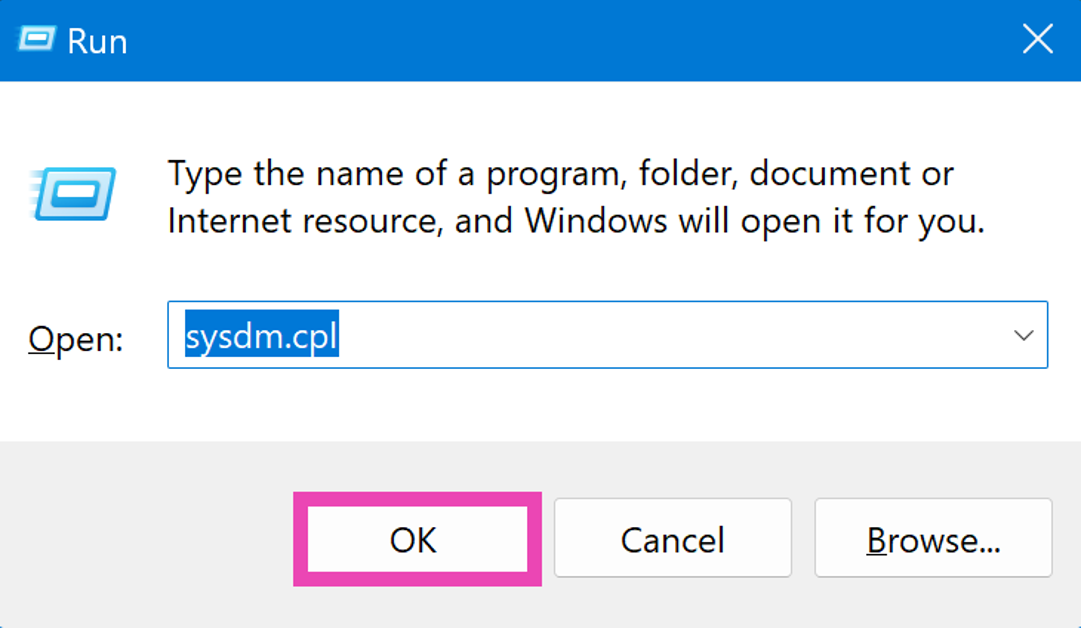
Step 2: Type sysdm.cpl in the Run box and hit Enter.
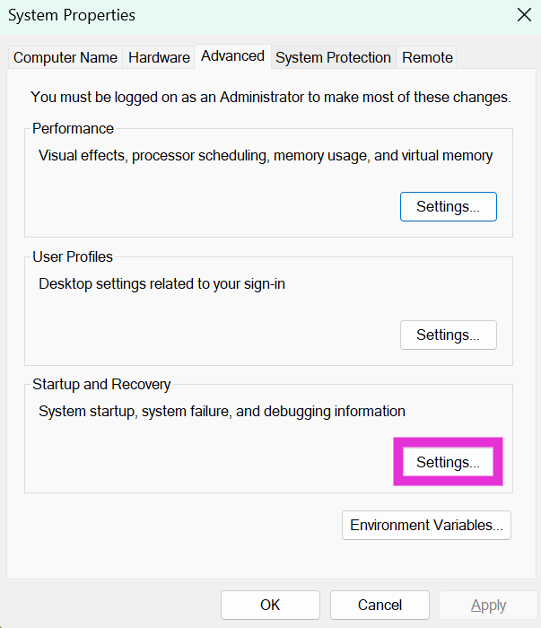
Step 3: Switch to the Advanced tab and click on Settings in the Startup and Recovery section.
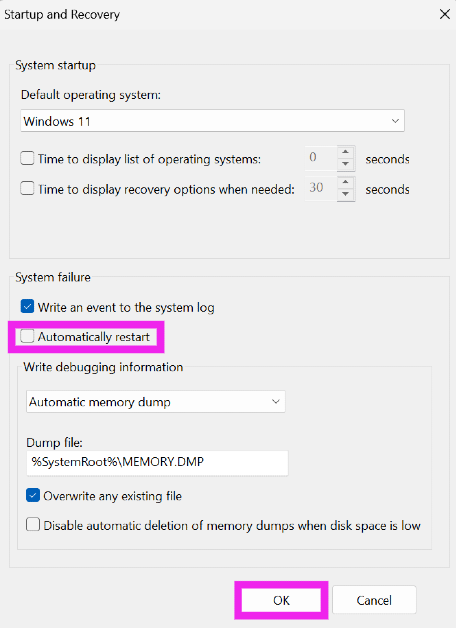
Step 4: Uncheck the box for Automatic Restart in the System Failure category.
Step 5: Hit OK.
Check the Power Supply Unit
Inconsistent voltage can cause your PC to restart without any warning. Luckily, there are easy methods to check for fluctuating voltage. If you have a stabiliser unit attached to the AC or refrigerator, check the voltage notation on it. The lights and fans in your room may also stop working when the incoming voltage drops below a certain level. The only thing you can do in this situation is wait until a consistent power supply has been restored.
Allow the PC to cool down
If your PC overheats rapidly and hits an internal temperature limit, it will suspend all current tasks and forcefully shut down to preserve the hardware. If you notice a sharp increase in the PC’s temperature, close the demanding task at hand and wait for it to cool down to avoid sudden shutdown. Make sure the internal fan and cooling system of the PC are working as intended.
Check your PC’s RAM
Issues with your PC’s RAM can cause it to restart suddenly. Here’s how you can check the system’s memory.
Step 1: Press Windows + R to launch the Run box.
Step 2: Type mdsched.exe and hit Enter.
Step 3: You will be asked to restart your PC. Go through with the request.
Step 4: Windows will perform a RAM test on your PC. You will be able to see the results when your PC starts up again.
Step 5: If Windows does not automatically load the results, right-click on the Start icon and select Event Viewer.
Step 6: Expand the Windows Logs section in the side menu and select System.
Step 7: Open the MemoryDiagnostic file.
Run additional diagnostic checks
Apart from the RAM, run additional checks for components like the battery, CPU, and hard drive. Oftentimes, failing hardware is the reason why your PC gets stuck in a boot loop. There are a bunch of checks you can run at home to check which component is causing the PC to restart. Read this article for more information.
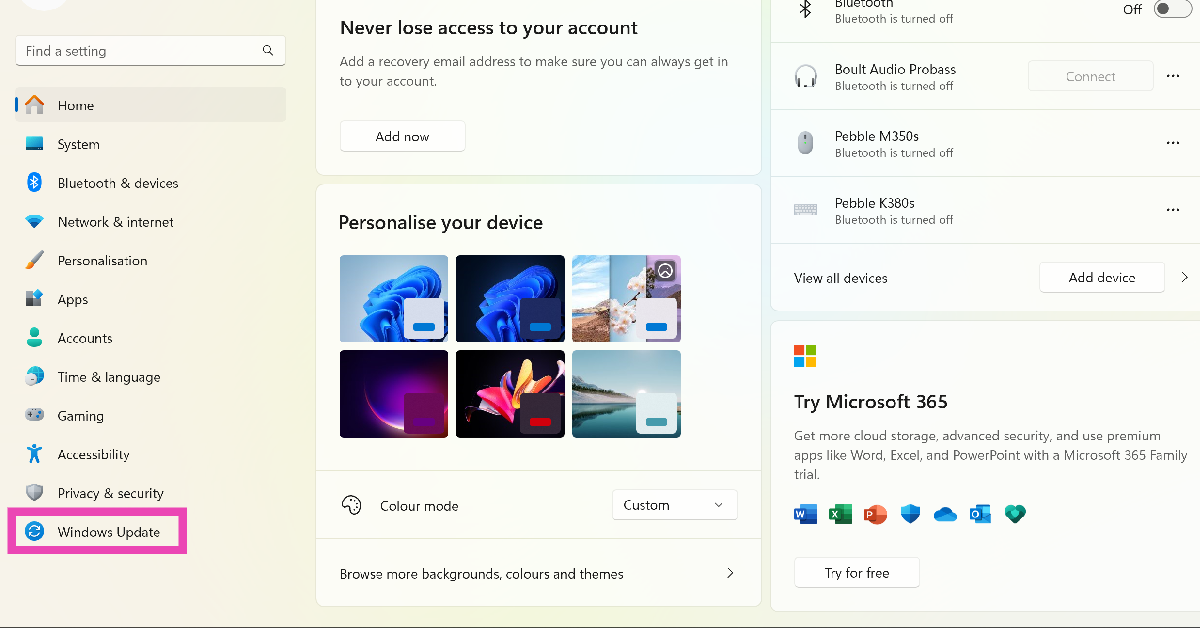
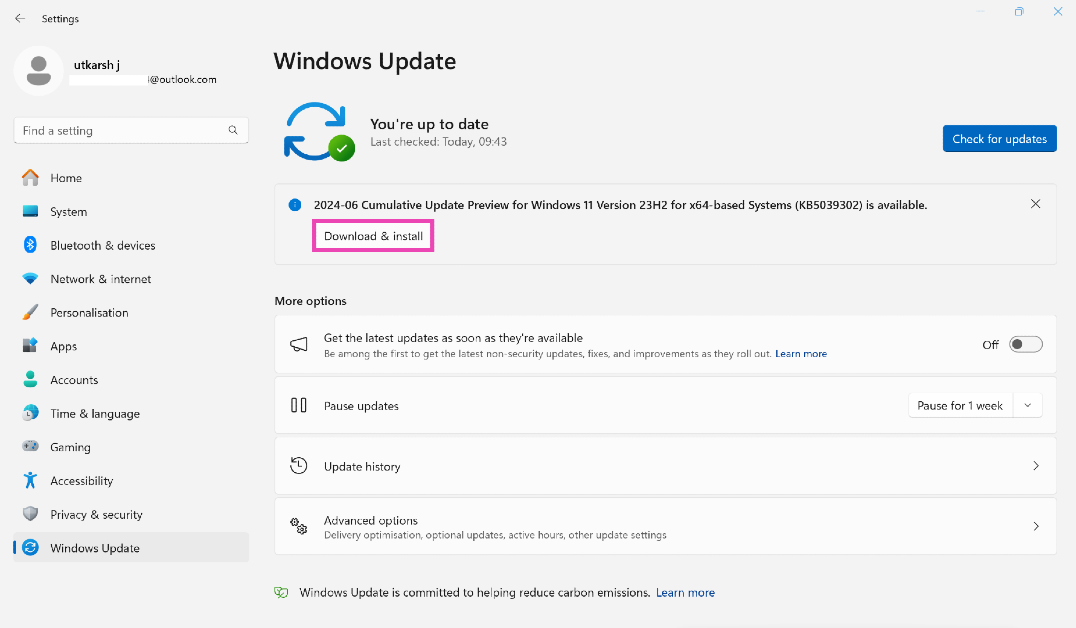
Update the OS to the latest version
Keeping your PC updated to the latest OS version keeps weird bugs and glitches at bay.
Step 1: Go to Settings and switch to the Windows Update tab.
Step 2: Click on Check for updates.
Step 3: Select Download and install.
Uninstall recent updates
If you start encountering constant reboots after installing an update, uninstall it and check if it resolves the issue. Sometimes an update can get installed incorrectly and cause this issue. If you installed the Beta version of an upcoming OS, we would recommend going back to the older, more stable version.
Perform a Factory Reset
Reinstalling Windows 11 on your PC can reset it to its factory settings. However, this will erase all your personal data on the device. If you don’t want that to happen, you can choose to keep your files but remove apps and settings (in-place upgrade).
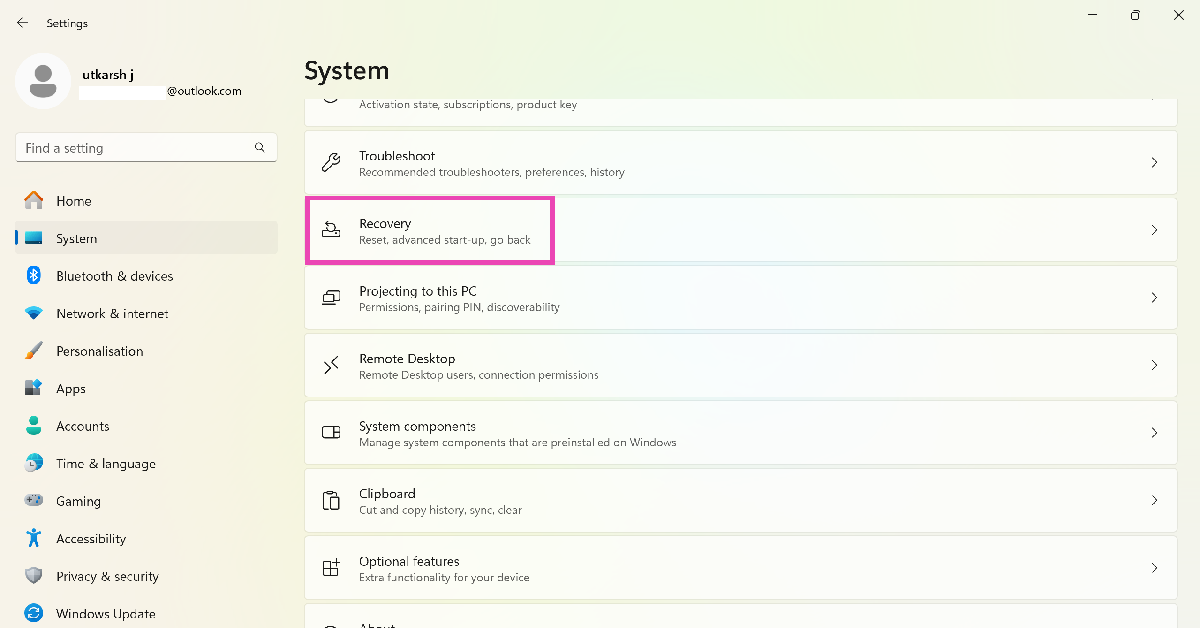
Step 1: Go to Settings and switch to the System tab.
Step 2: Scroll down and select Recovery.
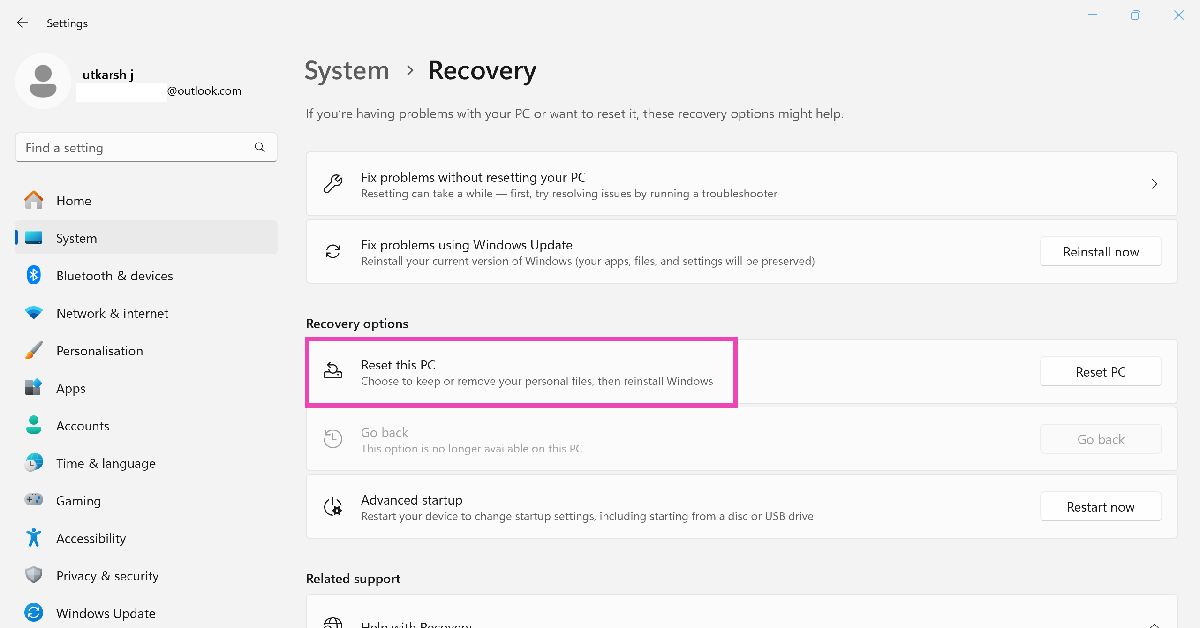
Step 3: In the following window, click on Reset PC.
Step 4: You will be presented with two options. You can choose to keep your personal files and remove apps & settings or remove all of your personal files, apps, and settings. Choose the option you want.
Step 5: Select how you would like to reinstall Windows. You can choose between Cloud download or Local download.
Step 6: After you’ve made your choice, click on next to confirm your selection and then click on reset to begin the factory reset process.
It will take some time for your PC to reset and for Windows 11 to get reinstalled. After the process is complete, your PC will restart.
Frequently Asked Questions (FAQs)
Why does my Windows 11 PC keep restarting and how do I fix it?
If your Windows 11 PC is stuck in a reboot loop, it could be due to insufficient power supply, overclocked CPU, failing hardware, or buggy software.
How do I reinstall Windows 11 on my PC without erasing my data?
Go to Settings>System>Recovery>Reset PC, and select ‘Keep my files’. Follow the onscreen instructions to reset the settings and clear all the apps on your device.
How do I check my PC’s RAM?
To check the condition of your PC’s RAM, press Windows + R, type mdsched.exe, and hit enter. Your PC will restart to run a RAM test and show you the results upon startup.
This is how you can fix the ‘Windows 11 PC keeps restarting’ issue. You may need to take your PC to an authorised service centre if the issue keeps persisting. If you know any other methods to fix this problem, let us know in the comments!
2 July 2024: New Amazon Quiz is now available. Customers from different parts of the country are participating in the daily quiz. The quiz starts at midnight today and will be live until 11:59 PM tonight. By successfully answering every question, participants in the quiz have the chance to win wonderful rewards. A Rs 500 Amazon Pay Balance is up for grabs to participants today.
One wrong answer could eliminate you from the quiz. You have a chance to win Rs 500 Amazon Pay Balance if you successfully answer every question. Users of the app only have the opportunity to take the quiz. Check Out 2 July 2024 Amazon Quiz Answers.
Only app users are eligible to play the Amazon quiz every morning from 12 AM to 11:59 PM. The quiz is not available on the desktop. For those who are unaware of how to play the Amazon quiz, below are the steps, you can follow to take the quiz.
We have written an explainer above, you can refer to that.
When are the winners of the Amazon Quiz and contest announced or declared?
The announcement of today’s Amazon quiz winner will take place Tomorrow. As for the Special Quiz and “Spin & Win” Contest, the winners will be declared once the Quiz Contest comes to an end. To find out who the lucky winner is, you can refer to the Amazon Quiz Winners List or visit the Amazon Winners tab in the Amazon App.
How to participate in the Daily Amazon Quiz?
That is very easy, just got to the Amazon app and scroll to the bottom of the page and you will find the Quiz section. Click on it (usually it is called the fun zone) and you can enter the Amazon Today Quiz Contest.
Are there any other quizzes or contests running on Amazon daily?
Yes, there are many running on a daily basis. These range from spinning the wheel to answering the questions correctly. All are located in the Fun Zone.
What are the criteria for selecting a winner in the Daily Amazon Quiz?
When a qualified player submits correct answers to all the questions, they will automatically be entered into a lucky draw. This draw will include all participants who answered all the questions correctly. Amazon randomly selects the final winners from the pool of eligible participants who gave the right answers.
Which Types of Questions are asked within Amazon Daily Quiz?
These are very simple and straightforward questions. These are mainly related to general knowledge.
Where should I look for Amazon Daily Quiz answers?
You can bookmark this page as we will help you every day with the Amazon Daily Quiz. We bring you fresh answers every day for the Amazon Daily Quiz and Contest.
What time does Amazon Announce previous winners?
The previous winner’s name will be announced today at 12 PM (noon).
There are a bunch of ways to take a screenshot on your computer. You can use the dedicated PrtScn key, Snipping Tool, or the Xbox Game Bar if you’re a gamer. However, there’s one thing that all these tools cannot do – capture a rolling screenshot. If you’re wondering how to take a scrolling screenshot on your Windows 10/11 PC, check out these top 3 non-native ways.
There are dozens of apps that will help you take a scrolling screenshot on your PC. But before you begin, you should assess the task at hand. If you want to capture a webpage, you don’t need to install an app on your computer. An extension would be much suited for the task.
If you don’t wish to install a third-party app or extension, you can simply choose to save a webpage as a PDF. Every major web browser offers this option in the ‘Print’ section. You can also choose to save a webpage as an HTML document. The only non-native way to capture an entire page is by taking multiple screenshots and stitching them together in a photo-editing app. However, that would be too cumbersome, which is why we recommend using a third-party app.
Use ShareX
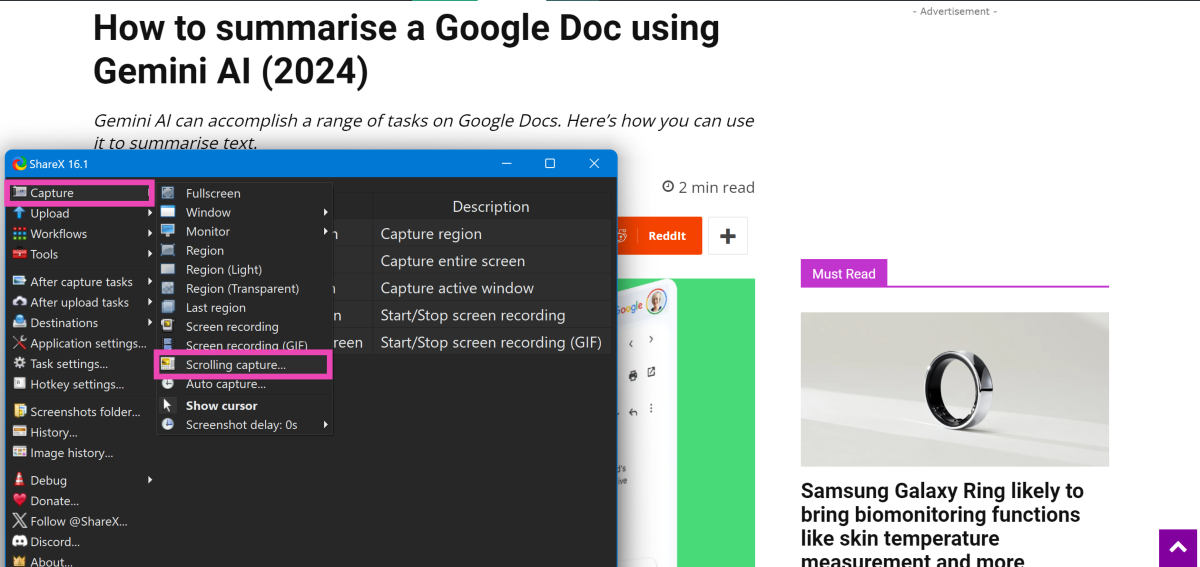
ShareX is a great app that you can download from the Microsoft Store to take scrolling screenshots on your PC.
Step 1:Install the ShareX app from the Microsoft Store.
Step 2: Go to the page you want to capture.
Step 3:Launch the ShareX app on your PC.
Step 4: Click on Capture and select Scrolling capture.
Step 5: Select the window you wish to capture and start scrolling.
Step 6:Finish taking the screenshot when you reach the end of the page.
Use a Chrome Extension
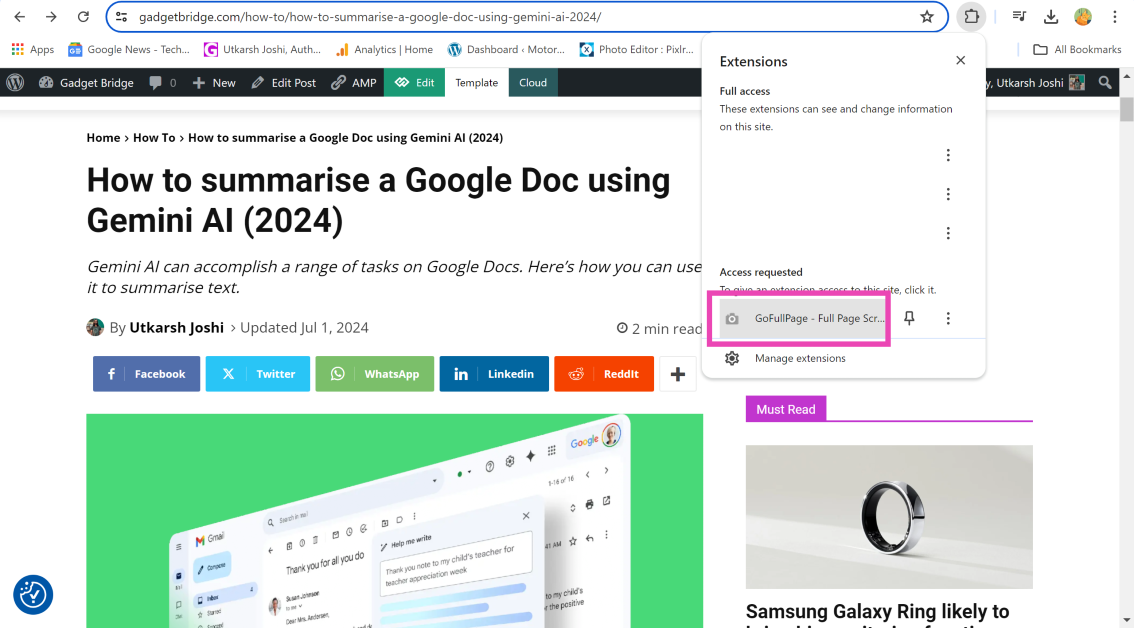
If you want to take a screenshot of a full webpage, use the GoFullPage extension.
Step 3: Click on the puzzle icon next to the address bar and select the GoFullPage extension.
Step 4: The extension will take a screenshot of the webpage and open it in a new tab.
Step 5: Hit the downward arrow icon to save the screenshot. You can also choose to save the screenshot as a PDF.
Capture a webpage on Google Chrome
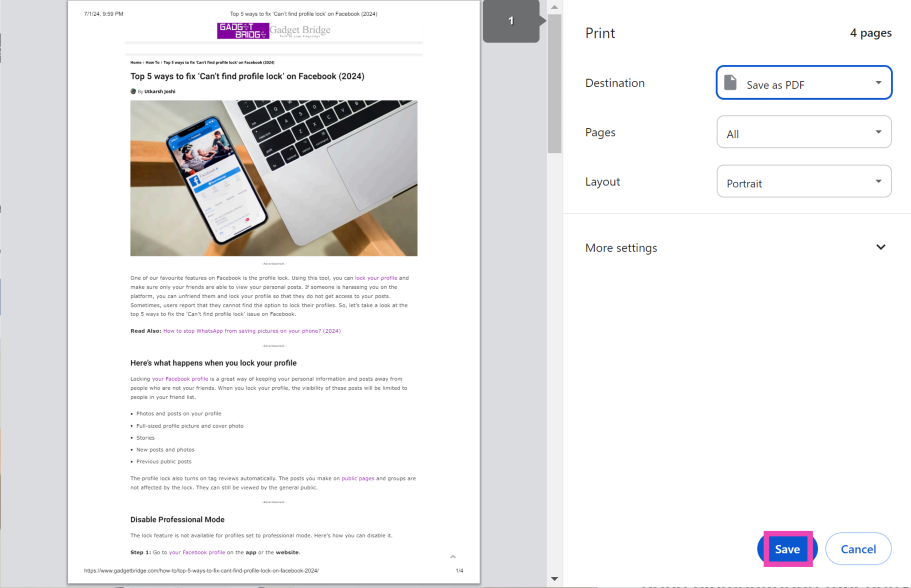
Instead of taking a screenshot, you can save a webpage as a PDF using Google Chrome. Here’s how.
Step 1:Open the webpage you wish to save.
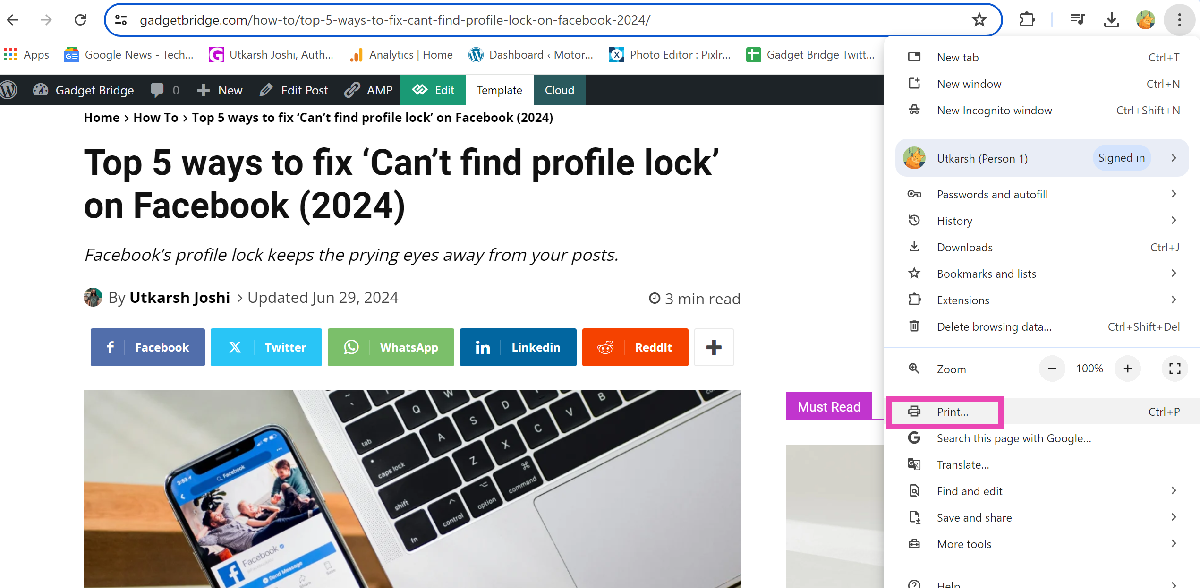
Step 2: Hit the ellipses and select Print.
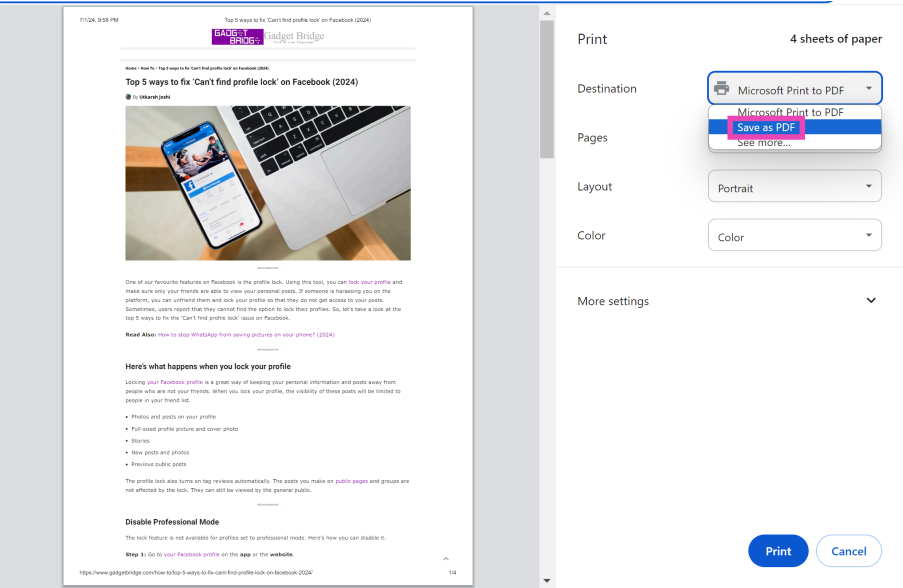
Step 3: From the Destinationdropdownmenu, select Save as PDF.
Step 4: Hit Save.
Frequently Asked Questions (FAQs)
Is there a native way to take a scrolling screenshot on a Windows 10/11 PC?
You cannot take a scrolling screenshot on a Windows 10/11 PC using its native tools. Use third-party apps like ShareX and Screenpresso to take a scrolling screenshot.
How do I take a screenshot of a full webpage?
Download the GoFullPage extension, open the webpage you wish to capture, click on the Extension menu, and select the extension to take a screenshot of the entire webpage.
How do I save a webpage as a PDF?
Open the webpage in Google Chrome, click on the ellipses, select ‘Print’, tap on the dropdown menu, select ‘Save as PDF’ and hit ‘Save’.
These are the top 3 ways to take a scrolling screenshot on your Windows 10/11 PC. Do you have a favourite app to take screenshots on your computer? Let us know in the comments! Check out this article to learn how to take screenshots on your Android phone.
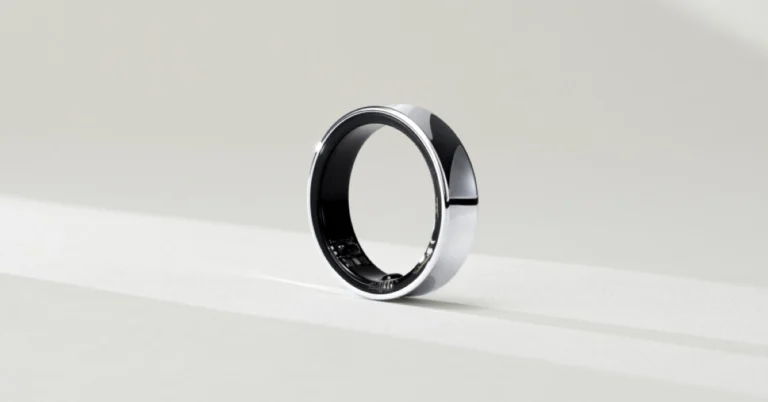
Samsung’s Galaxy Ring, a wearable technology, was showcased at MWC 2024. The smart ring is set to launch at Galaxy Unpacked on July 10. The business has shown a few glimpses of its smart ring so far, and it is expected to launch with a slew of biomonitoring features such as skin temperature measurement, snore detection, and more. With just 10 days to launch, an APK teardown of the Samsung Health app uncovered all of these capabilities.
A lot of rumours and leaks are circulating about the next Galaxy Unpacked event, which is scheduled for next week. Along with the latest foldable, the company will officially release its new wearable Galaxy Ring. However, we already knew how the future device would look, but we now have further information about its features. According to a report Samsung’s Health app is likely to enable the Galaxy Ring’s health-monitoring features. Although the firm has not enabled them for the public at the moment, they emerged following an APK teardown of the Samsung Health app.
As per the report, the upcoming Galaxy Ring may allow users to monitor their stress and heart rate. Moreover, the Health app also has a chart for tracking the parameters. In addition to this, the dedicated app will also bring other features like skin temperature measurement, period prediction and snore detection. Note that these features are already accessible on the Galaxy Watches and will be made available to the Galaxy Ring.
The Samsung Galaxy Ring was initially introduced to the public during the Mobile World Congress 2024. During the event, the firm showed the ring in silver. While demonstrating the smart ring, the firm disclosed that it will be available in three colours.
According to the company, it will provide people with more personalised and seamless health experiences across more devices, thanks to the revolutionary power of AI. Samsung’s latest smart ring, the Galaxy Ring, will simplify daily wellness and enable smarter, better living through a more connected digital wellness platform known as Samsung Health. The business withheld additional information about the Galaxy Ring, including its specifications.
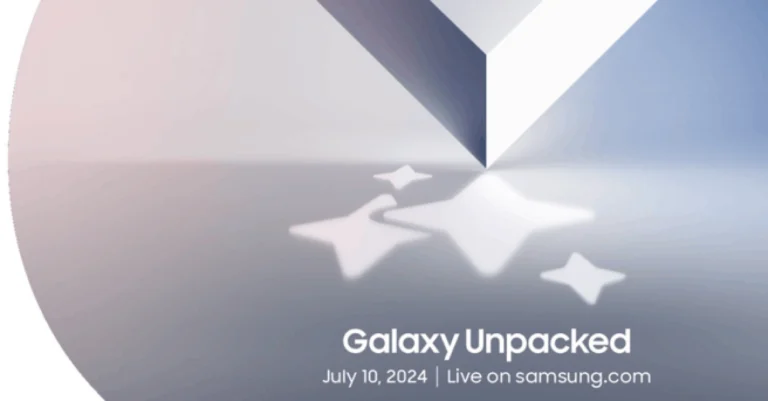
Samsung officially announced that its next Galaxy Unpacked event will take place on July 10. At the next Galaxy Unpacked event, the company is expected to unveil the Galaxy Ring in addition to the Galaxy Z Fold 6, Galaxy Z Flip 6, Galaxy Watch 7, Galaxy Watch Ultra, and Galaxy Buds 3. Though the event’s actual date and venue are still two weeks away, there have been rumours about it for months. Here is everything that we know about the upcoming devices.
In This Article
Galaxy Unpacked 2024 what to expect
Galaxy Z Fold 6 and Galaxy Z Flip 6
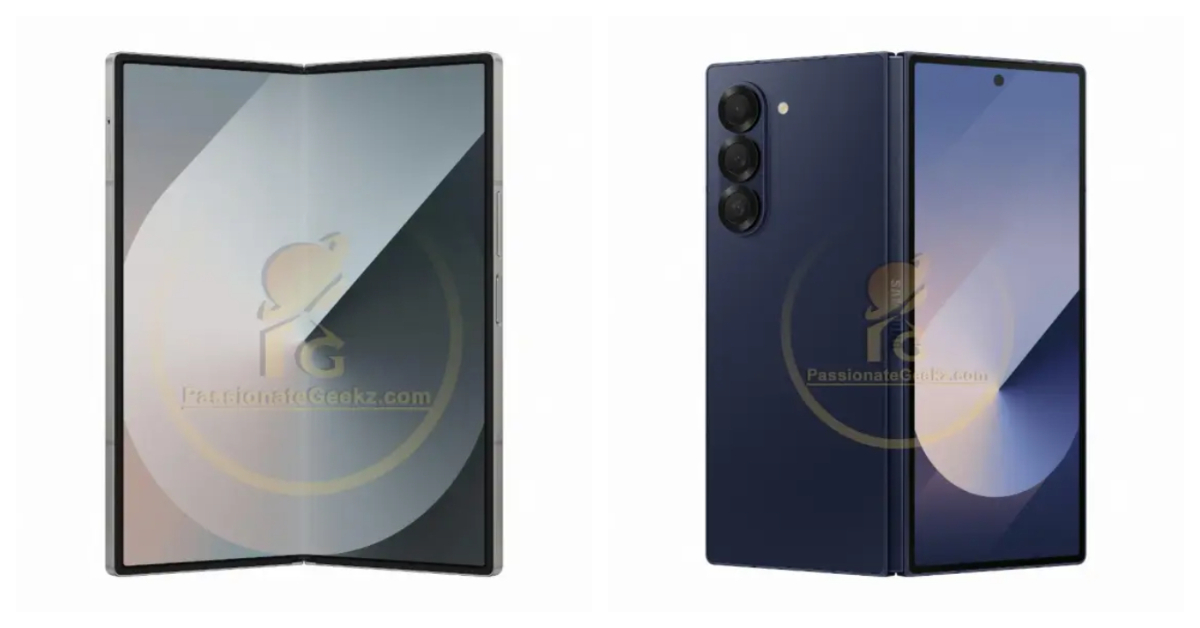
The Galaxy Z Fold 6 and Galaxy Z Flip 6 are anticipated to provide a minor improvement over the versions of last year. New purported renders of the Galaxy Z Fold 6 have been posted by tipster Passionategeekz. The phone has a squarish appearance with sharp edges; it is available in titanium, pink, and blue. Three camera rings are positioned on the back, while the internal display has a hole punch selfie camera.
Image Courtesy: Passionategeekz
According to rumours, the Galaxy Z Fold 6 will have a 6.3-inch Dynamic AMOLED 2X cover display and a 7.6-inch QXGA+ Dynamic AMOLED 2X inner screen. It will be powered by a 12GB LPDDR5X RAM-equipped Snapdragon 8 Gen 3 processor. It is anticipated to have 256GB, 512GB, and 1TB of storage available. Expected specifications for the smartphone include a 10-megapixel selfie camera, and a 50-megapixel wide-angle camera.
Both devices may have a 10MP selfie camera whereas the Galaxy Z Fold 6 may only sport an internal 4MP front-facing camera. It is anticipated that the Galaxy Z Flip 6 will pack a larger 4,000mAh battery than its predecessor. On the other hand, the Galaxy Z Fold 6 would make use of the same 4,400mAh battery as the Galaxy Z Fold 5.
Samsung is expected to introduce its first wristwatch under the Ultra brand with the Galaxy Watch Ultra during the Galaxy Unpacked event. The upcoming device is likely to compete with the Apple Watch Ultra/Ultra 2. The wearable could come in a single Titanium Gray shade. In terms of specifications, the Galaxy Watch 7 series from Samsung is rumoured to use a 3nm processor rather than the 5nm chipset found in the Galaxy Watch 6. It’s likely that they will provide 32GB of storage. The company may pit the Ultra variant against the Watch Ultra 2 from Apple, as said earlier.
It is rumoured that a titanium body and 47mm dial size will be offered for the Galaxy Watch 7 Ultra. It might come with a display that is predicted to produce 3,000 nits of peak brightness. According to reports, the wearable is IP58 rated, MIL-STD-810H durable, and certified to withstand 10ATM water pressure. A 590mAh battery, similar to the one found in the Galaxy Watch 5 Pro, may be included. There is only a single LTE and Bluetooth version reportedly available.
According to reports, the device is IP58 rated, MIL-STD-810H durable, and certified to withstand 10ATM water pressure. A 590mAh battery, similar to the one found in the Galaxy Watch 5 Pro, may be included. There is only a single LTE and Bluetooth version reportedly available. The rumour states that the 40mm and 44mm versions of the Galaxy Watch 7 would be available in cream and green colour options. An alleged 300mAh battery powers the 40mm model, and a possible 425mAh battery powers the 44mm model. The maximum brightness display it may have is 2,000 nits.
A new CPU, quicker charging times, and improved heart rate, sleep, fitness, ECG, and blood oxygen monitoring are all expected to be features of the Galaxy Watch 7 series. In addition, it will have 4G and Bluetooth connectivity, enabling users to send and receive messages and make calls without their phones being out of reach.
It is claimed that the smartwatch glass is composed of sapphire crystal, while the case is reportedly built of Samsung’s Armour Aluminium 2. Reportedly, it maintains the 5 ATM, IP68, and MIL-STD-810H approved.
On July 10, Samsung’s wearable Galaxy Ring—which has biomonitoring capabilities—will make its debut at the Galaxy Unpacked event. With biomonitoring capabilities, Samsung’s wearable Galaxy Ring is scheduled to debut at the Galaxy Unpacked event on July 10. APK teardown uncovered a number of capabilities, including snore detection and skin temperature measurement. These features, which are not currently accessible to the general public, are anticipated to be supported by the Health app. Users can use a chart to track stress and heart rate measurements, as well as enable skin temperature monitoring. The ring might detect snores, but it’s only available when the smartphone is used as a companion. While the Galaxy Watch range currently offers these biomonitoring features, the Galaxy Ring might provide a more understated option for people who would rather not wear a wristwatch.
Samsung Galaxy Buds 3
Leaks and rumours suggest that the Galaxy Buds 3 and 3 Pro earbuds will include enhanced audio drivers, active noise cancellation (ANC) technology, and up to 10 hours of listening on a single charge. In addition to this, they will have an ergonomic design, a variety of ear tip sizes, and an IPX4 grade for water and sweat protection. The next Buds 3 Pro will include high-fidelity audio, ANC, customisable ear tips, wireless charging support, and speedy charging capabilities. They are slated to come with an ambient mode with selectable intensities and a sweat and water resistance grade of IPX7. Both models have access to Samsung’s smart features including the Bixby assistant.
Google may not have been early to the AI game but the tech giant has been making incredible strides of late. Its AI search results were met with a lukewarm response, but Gemini AI on Google Workspace apps looks very promising. If you’re a Google Docs user, you may want to know which tasks you can delegate to AI. Let’s take a quick look at how you can use Gemini AI to summarise a Google Doc.
Google also imposes a monthly usage limit on its AI features for Workspace. As of now, you can use these features 500 times per month. You cannot share this allotment with other users and it doesn’t roll over to the succeeding month.
Summarise a Google Doc using Gemini AI
Step 1: Go to Google Docs on your PC and open the document you want to summarise.
Step 2: Highlight the section of text that you want to summarise. Press Ctrl + A if you want to summarise the entire document.
Step 3: Click on the Help me write option on the left side of the page.
Step 4: Select Summarise from the drop-down menu.
Step 5: Go through the AI-generated summary and make sure it is relevant to the original text. If you’re not happy with the result, hit Retry.
Step 6: Select Replace to accept the new text, Insert to add new text, and Close to keep the original text.
Apart from summarising the text, you can use Gemini AI to rephrase your document, add more text to it, format it into bullet points, and even enter a custom prompt to carry out a specific task.
Frequently Asked Questions (FAQs)
Who can use Gemini AI on Google Docs?
Gemini AI for Google Docs is available to users with work or school accounts. Personal users with a Google One AI Premium subscription can use Gemini AI on Docs (and other Workspace apps).
How do I summarise a Google Doc?
To summarise an entire Google Doc, press Ctrl + A to select all the text, click on ‘Help me write’, and select ‘Summarise’.
How reliable is Gemini AI?
Gemini AI is a great tool to summarise your Google Docs and flesh out a piece of text. While the results are generally accurate, some discrepancies can creep in while generating complex prompts. Always make sure to re-read your document after using AI and weed out the errors.
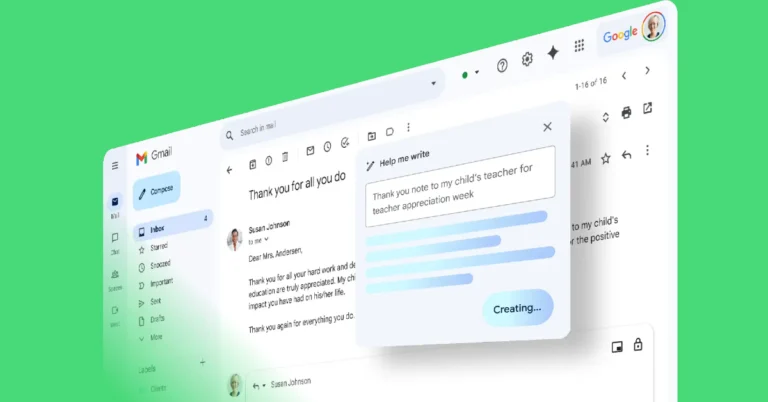
This is how you can use Gemini AI to summarise a Google Doc. Read this article to learn how you can use Gemini AI on Gmail. The new Pixel Series of smartphones will further advance what Gemini AI can do on a mobile platform. Check out this article to know what you can expect from Google’s upcoming flagship smartphones.
The annual ‘Made by Google’ event will take place on August 13 this year. This event will see the release of the new Google Pixel 9 Series, Pixel Watch 3, Pixel Buds Pro 2, and perhaps the Pixel Fold 2 as well. Typically, the Made by Google events take place after Apple’s fall event, but this year Google is putting its cards on the table early, ready to take on the iPhone 16 Series. The event is scheduled to start at 10 am Pacific Time (PT) and can be streamed on Google’s Store page and YouTube channel. Let’s take a look at what Google’s flagship smartphones will look like this year.
Google Pixel 9 Series: Expected variants, specs, AI, price, and more
Google is shaking things up this year by launching 3 Pixel smartphones. This will be the first time that the Pixel will get three variants for one series. The entry-level variant will remain the same, offering a 6.2-inch display. The middle variant will become the new ‘Pro’ model, offering all the ‘pro’ features in a smaller form factor. The larger 6.7-inch Pixel will not be called the Pixel Pro XL. The only thing that will separate the Pixel 9 Pro and Pixel 9 Pro XL is the display size. Rumours suggest that the Pixel 9 Pro will have dimensions of 152.8mm x 71.9mm x 8.5mm.
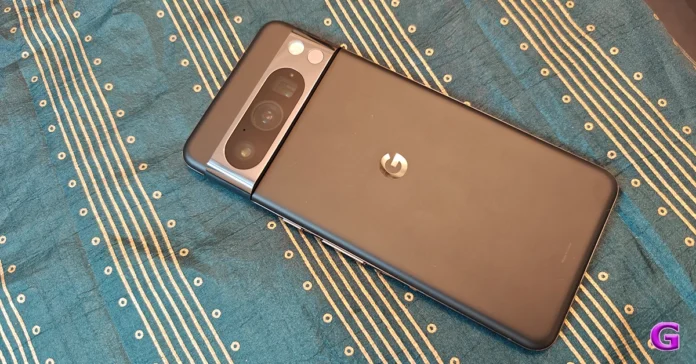
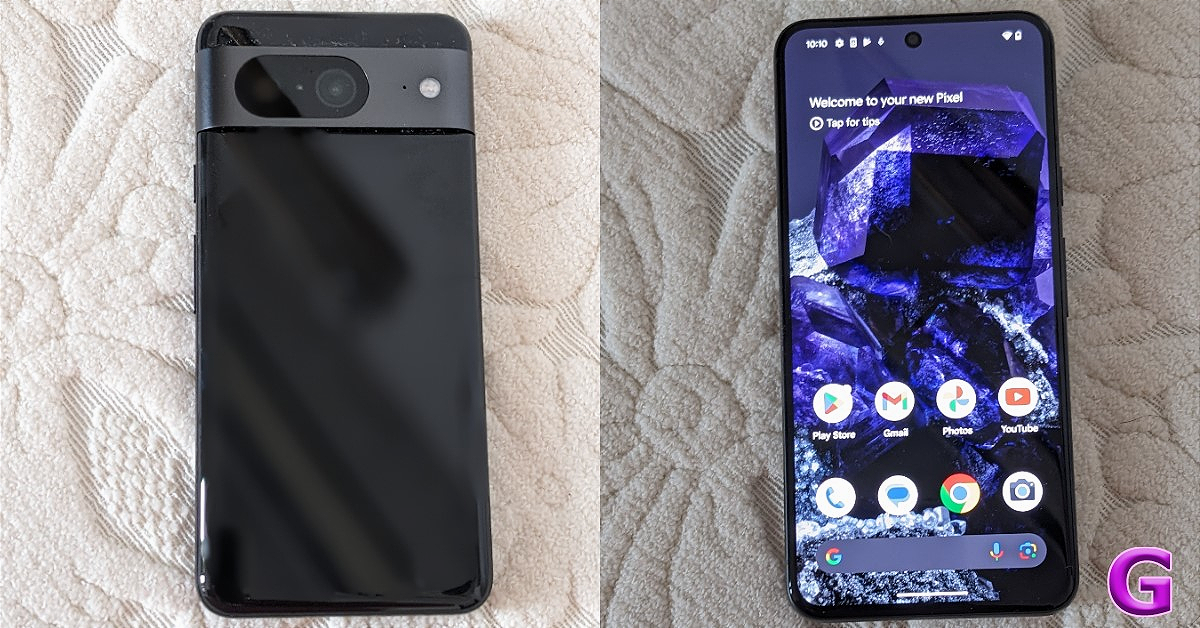
Google Pixel 8 Pro
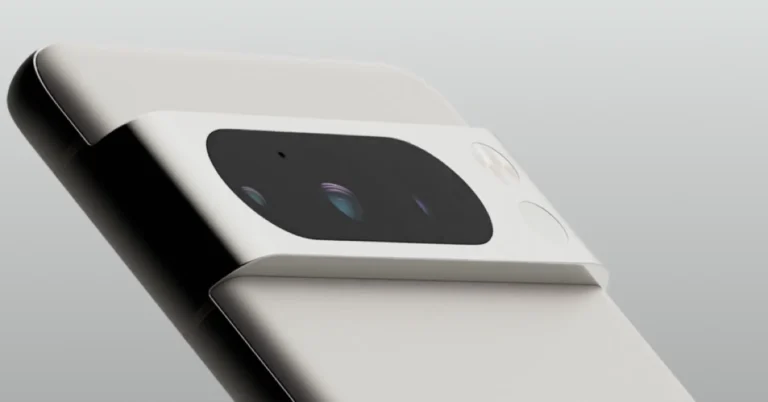
The Google Pixel 9 Series will get a few design tweaks. The rounded corners are here to stay, but the smartphones will rock flat edges and back panels. The iconic rear camera visor will not span the entire width of the back panel anymore. Instead, it will have a pill-shaped design, much like the camera module on the Pixel Fold. The slab-style form factor of the Pixel 9 Series will bring it closer to current-gen iPhone and Samsung Galaxy S Series smartphones.
Under the hood, the Google Pixel 9 Series will be powered by the new Tensor G4 SoC. Expect this chip to pack some serious heat as it will be tasked to carry out on-device AI tasks as well. Google will likely bump the RAM specs on the Pixel as well. The Tensor G4 will remain an Exynos-based chipset. Google’s plans of designing its SoC from scratch will not come to fruition this year.
Google Pixel 8 Pro
Pixels have the reputation of being the most intelligent smartphones around. Google’s Magic Editor was the first object-removal tool on Android smartphones. Its powerful voice recorder has a bunch of intelligent transcription features as well. In the last couple of months, Google has introduced more AI features for the Photos app. However, bringing Gemini AI Nano to the newest Pixel 9 Series will be the biggest leap in terms of AI integration. Google’s in-house AI tech will have its fingerprints on all the major functions.
Pixel smartphones are considered by many to be the best camera phones around. Last year’s Pixel 8 Series made a bunch of improvements to its camera setup. The Samsung Isocell GN2 sensor brought with it the potential to capture 8K videos at 30fps. Going by previous trends, Google with stick with the same camera module this year as well. This means the Pixel 9 Pro and its XL sibling will get a triple camera setup featuring a 50MP primary shooter, a 48MP ultrawide lens, and another 48MP telephoto lens.
Google Pixel 8
Last year, Google dramatically increased the prices for the Pixel 9 Series. The relatively affordable Pixel 8a that was launched this year was priced closer to the entry-level Pixel 8. We don’t expect Google to significantly bump the prices for the second year in a row. Expect the entry-level Google Pixel 9 to cost around Rs 65,000. The Pixel 8 Pro will cost upwards of Rs 1 lakh, while the Pixel 8 Pro XL could be priced around Rs 1.20 lakh.
The Google Pixel 9 Series will go on sale soon after being revealed at the Made By Google event on August 13. The new smartphones are expected to feature a new modem and satellite connectivity as well. The pricing and release date of the Pixel 9 Series suggests that Google will be pitching it against the upcoming iPhone 16 Series. Which smartphone would you prefer out of the two? Let us know in the comments!
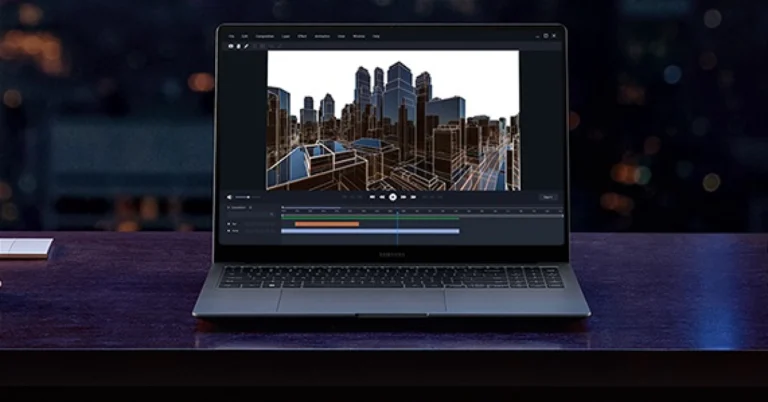
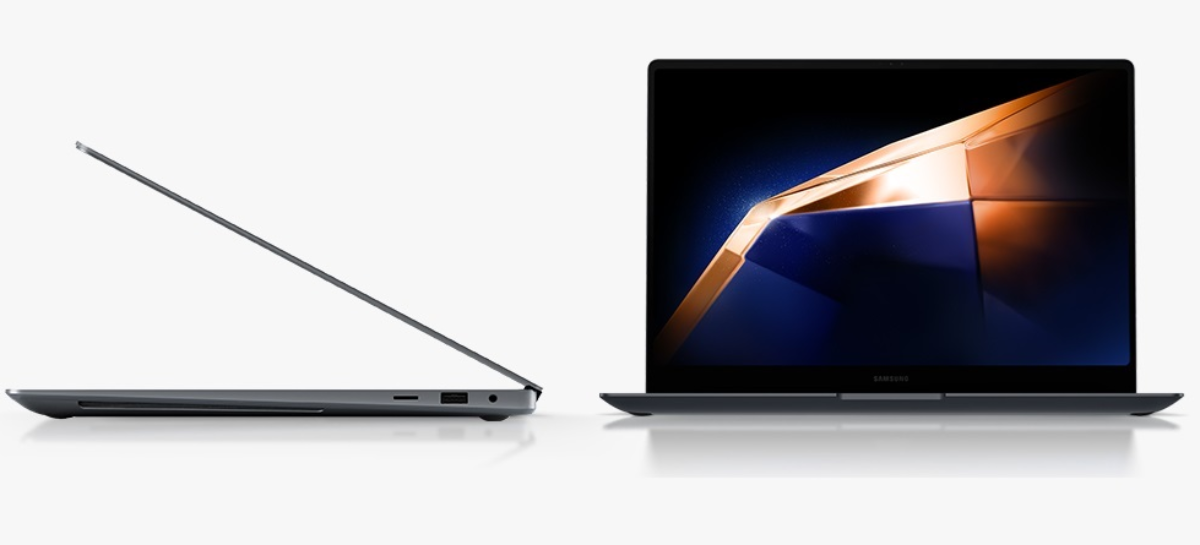
The Galaxy Book 4 series, which includes the Galaxy Book 4, Galaxy Book 4 360, Galaxy Book 4 Pro, and Galaxy Book 4 Pro 360, was introduced globally earlier this year. Samsung Galaxy Book 4 Ultra which was also launched worldwide in December 2023 has now made its way to the Indian market. The most premium laptop from the series has been officially introduced in the country. The device is powered by up to Intel Core Ultra 9 processors and up to Nvidia GeForce RTX 4070 GPU. The AI-ready notebook also features a touch AMOLED screen and is equipped with a full-HD webcam. It also houses a 76Wh battery.
As far as pricing is concerned, In India the Samsung Galaxy Book 4 Ultra with Intel Core Ultra 7 CPU (16GB of RAM and an Nvidia GeForce RTX 4050 GPU) will retail at Rs 2,33,990. Whereas the model with Intel Core Ultra 9 CPU (GeForce RTX 4070 GPU and 32GB RAM) will come with a price tag of Rs 2,81,990. The laptop is available in a shade called Grey.
The Samsung Galaxy Book 4 Ultra comes equipped with Intel Core Ultra 7 CPU/ Intel Core Ultra 9 CPUs which has a dedicated Neural Processing Unit for AI computation. The laptop has Nvidia GeForce RTX 4050 GPU/GeForce RTX 4070 GPU. It is available with up to 32GB of RAM and 1TB of internal storage options. It comes preinstalled with Windows 11 Home Edition.
The laptop features a 16-inch WQXGA+ AMOLED touchscreen display with 2,880 x 1,800 pixels of resolution. The screen has 400 nits of brightness. Also, there is a full-HD webcam for video calls and meetings. It comes with a backlit numeric keyboard and quad speakers with Dolby Atmos support, and dual microphones as well.
The Galaxy Book 4 Ultra is backed by a 76Wh battery with 140W fast charging support. In terms of connectivity, there is a USB Type-C port for charging, a microSD card slot, an audio jack, a dual Thunderbolt 4, a USB Type-A, and an HDMI 2.1 port.
In order to roll out new features, WhatsApp has a history of discontinuing support for specific Android and iOS versions. In this instance, a report claims that WhatsApp will stop supporting 35 devices in the months to come.
Some Android and iOS devices will no longer be compatible with WhatsApp. According to a report, WhatsApp will no longer support old smartphone systems, meaning that many Android and iOS phones will not be able to use the app. 35 devices from manufacturers including Apple, Huawei, Lenovo, LG, Motorola, and Samsung are reportedly going to lose compatibility with WhatsApp.
WhatsApp users will likely not be able to receive new updates or security fixes until they migrate to a newer operating system or device if support for older iOS and Android versions is discontinued.
You will need to export the chats and images you wish to keep to your new device if you have one of these Android or iOS devices and want to avoid losing any data after updating. Note that on certain devices, users won’t be able to verify their current accounts or establish new ones. Make sure you have a device running iOS 12 or Android 5 Lollipop at least to use WhatsApp. Although the report only includes well-known handsets, WhatsApp on less expensive Android phones running Android 4 or earlier versions is probably not going to function.
Garena Free Fire Max is a battle royale game with regular awards and tournaments to keep players interested. If you play Garena Free Fire, you should be aware of the redeem codes that are released on a daily basis. However, because the battle royale game is banned in India, players from other countries can use the Free Fire Redeem codes daily. If you’re unfamiliar with the Garena Free Fire redeem codes or don’t know how to get them, we’ve put together a step-by-step guide to help you redeem them. Check out Garena Free Fire Max Redeem Codes for 1 July 2024.
The Free Fire Max redeem codes are a great way to get free stuff. These are 12-digit codes that contain alphabets and numbers, as well as an expiration date and time. Because the Garena FF redeem codes cannot be used more than once, you should hurry to the redemption page to claim your free reward before someone else does. To get a free reward, all you have to do is go to reward.ff.garena.com/en, which is the official redemption page. Also, keep an eye on this space for daily updates on Garena Free Fire Max redemption codes and rewards.
1 July 2024: New Amazon Quiz is now available. Customers from different parts of the country are participating in the daily quiz. The quiz starts at midnight today and will be live until 11:59 PM tonight. By successfully answering every question, participants in the quiz have the chance to win wonderful rewards. A Rs 500 Amazon Pay Balance is up for grabs to participants today.
One wrong answer could eliminate you from the quiz. You have a chance to win Rs 500 Amazon Pay Balance if you successfully answer every question. Users of the app only have the opportunity to take the quiz. Check Out 1 July 2024 Amazon Quiz Answers.
Only app users are eligible to play the Amazon quiz every morning from 12 AM to 11:59 PM. The quiz is not available on the desktop. For those who are unaware of how to play the Amazon quiz, below are the steps, you can follow to take the quiz.
We have written an explainer above, you can refer to that.
When are the winners of the Amazon Quiz and contest announced or declared?
The announcement of today’s Amazon quiz winner will take place Tomorrow. As for the Special Quiz and “Spin & Win” Contest, the winners will be declared once the Quiz Contest comes to an end. To find out who the lucky winner is, you can refer to the Amazon Quiz Winners List or visit the Amazon Winners tab in the Amazon App.
How to participate in the Daily Amazon Quiz?
That is very easy, just got to the Amazon app and scroll to the bottom of the page and you will find the Quiz section. Click on it (usually it is called the fun zone) and you can enter the Amazon Today Quiz Contest.
Are there any other quizzes or contests running on Amazon daily?
Yes, there are many running on a daily basis. These range from spinning the wheel to answering the questions correctly. All are located in the Fun Zone.
What are the criteria for selecting a winner in the Daily Amazon Quiz?
When a qualified player submits correct answers to all the questions, they will automatically be entered into a lucky draw. This draw will include all participants who answered all the questions correctly. Amazon randomly selects the final winners from the pool of eligible participants who gave the right answers.
Which Types of Questions are asked within Amazon Daily Quiz?
These are very simple and straightforward questions. These are mainly related to general knowledge.
Where should I look for Amazon Daily Quiz answers?
You can bookmark this page as we will help you every day with the Amazon Daily Quiz. We bring you fresh answers every day for the Amazon Daily Quiz and Contest.
What time does Amazon Announce previous winners?
The previous winner’s name will be announced today at 12 PM (noon).
One of our favourite features on Facebook is the profile lock. Using this tool, you can lock your profile and make sure only your friends are able to view your personal posts. If someone is harassing you on the platform, you can unfriend them and lock your profile so that they do not get access to your posts. Sometimes, users report that they cannot find the option to lock their profiles. So, let’s take a look at the top 5 ways to fix the ‘Can’t find profile lock’ issue on Facebook.
Locking your Facebook profile is a great way of keeping your personal information and posts away from people who are not your friends. When you lock your profile, the visibility of these posts will be limited to people in your friend list.
Photos and posts on your profile
Full-sized profile picture and cover photo
Stories
New posts and photos
Previous public posts
The profile lock also turns on tag reviews automatically. The posts you make on public pages and groups are not affected by the lock. They can still be viewed by the general public.
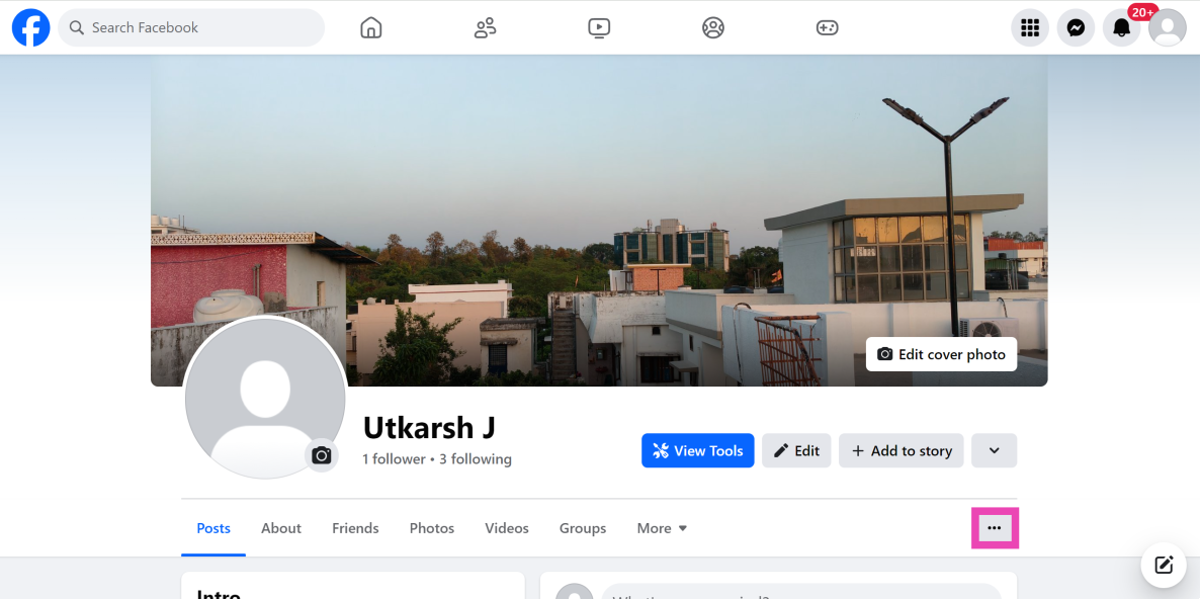
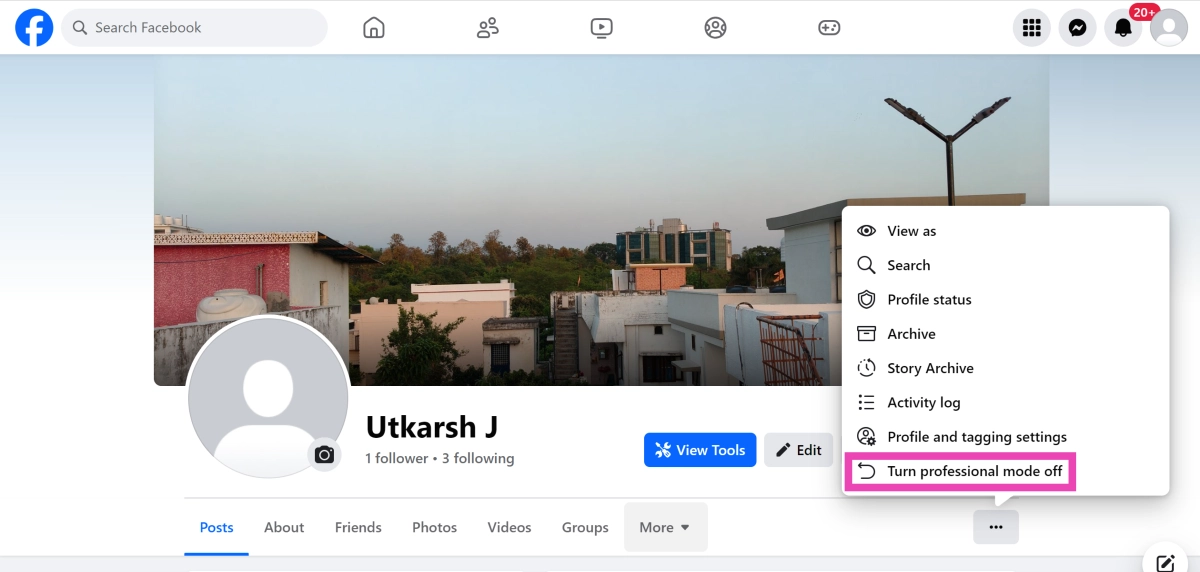
Disable Professional Mode
The lock feature is not available for profiles set to professional mode. Here’s how you can disable it.
Step 2: Hit the ellipses next to the tabs on your profile.
Step 3: Select Turn professional mode off.
Update the app
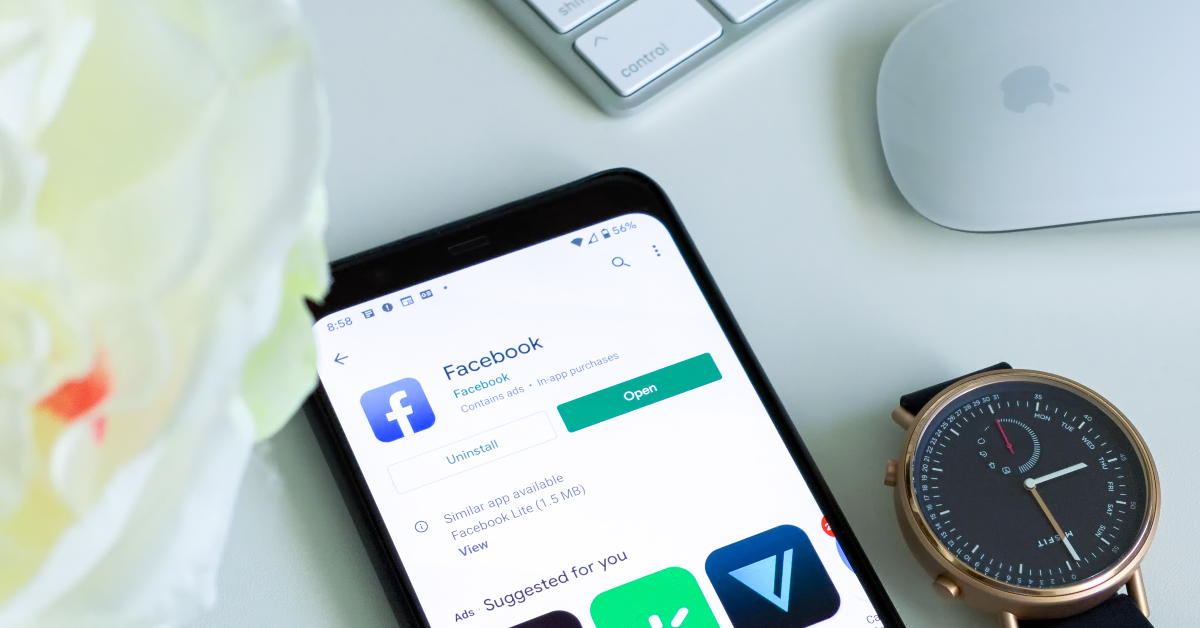
If you’re using an older version of the Facebook app on your smartphone, chances are that it does not have the profile lock feature on it. Go to the Google Play Store, search for Facebook, open its page, and hit ‘Update’.
Log out and log back in
If you’re unable to lock your profile due to an account-related issue, log out of Facebook and then log back in. This will refresh your account and you will likely find the missing profile lock option. If this doesn’t work, move on to the next method.
Make sure you’re on your main profile
Facebook only lets you lock your main profile on the platform. You will not find this option for additional profiles you have created. Your public pages cannot be locked either. Hit your profile icon at the top right corner of the screen and move to your main profile if you want to lock it.
Use a VPN
Facebook’s profile lock feature is not available for all countries just yet. While the platform is slowly rolling out this feature in different regions, you can still use it without having to wait. Install a VPN app or software on your device and change your location to a place where the profile lock feature is active. Once that’s done, you will be able to use the feature on your profile.
Frequently Asked Questions (FAQs)
How do I lock my Facebook profile?
Go to your Facebook profile, hit the ellipses, and select ‘Lock profile’.
Can I lock my secondary Facebook profile?
No, the profile lock only works for your primary Facebook profile. You cannot lock pages or additional profiles.
Which posts will be visible on my profile after I lock it?
Once you lock your profile, people who are not your friends will only be able to see your profile picture, cover picture, up to five details in your bio, and shared albums and posts made on pages, marketplaces and public groups.
These are the top 5 ways to fix the ‘Can’t find the profile lock’ issue on Facebook. Let us know if these fixes helped you out. If still can’t figure out how to lock your profile, let us know what issue you’re facing and we’ll help you out!
WhatsApp is a great way to connect with friends and family but it can also be a source of spam. If you’re a part of several active WhatsApp groups, the images and videos sent by the participants can not only consume a lot of data to download but also pile up in your phone’s gallery app. Since organising the media gallery every day is impractical, disabling the visibility of the media downloaded from WhatsApp is a much better option. Here’s how you can stop WhatsApp from saving pictures on your phone.
There are multiple ways you can go about this task. First, you need to decide whether you want the images to stop showing up on your phone’s gallery or prevent them from downloading altogether. By default, WhatsApp auto-downloads the media sent to you. While this is a very convenient feature, it can consume a lot of data.
If you just want to stop the pictures and videos from showing up on your phone’s gallery, WhatsApp has a system-wide option to disable media visibility on your phone. You can also choose to disable media visibility for specific chats. We recommend using this option for the most active chat groups on WhatsApp.
Stop WhatsApp from saving pictures on your phone’s gallery
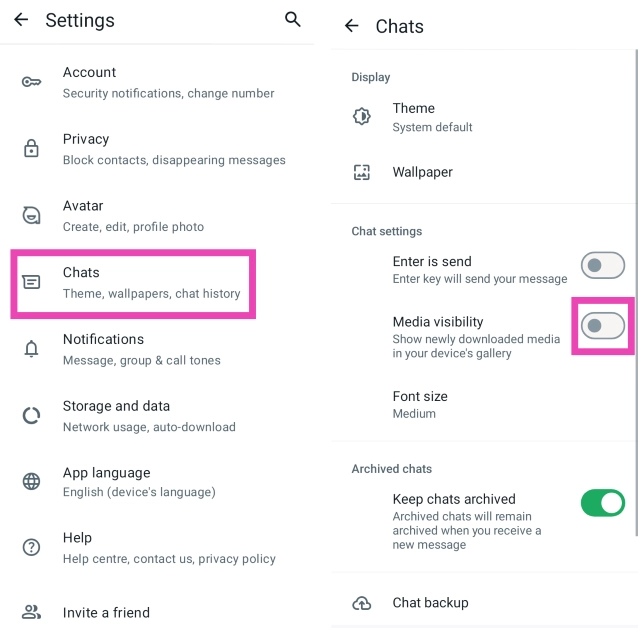
Step 1: LaunchWhatsApp on your phone and hit the ellipses at the top right corner of the screen.
Step 2: Tap on Settings and select Chats.
Step 3: Turn off the toggle switch for Media visibility.
Disable auto-downloads on WhatsApp
Step 1: LaunchWhatsApp on your phone and hit the ellipses at the top right corner of the screen.
Step 2: Tap on Settings and select Storage and data.
Step 3: Go to the Media auto-download section and select No media for all three categories (When using mobile data, When connected on WiFi, When roaming).
Frequently Asked Questions (FAQs)
How do I keep WhatsApp from showing downloaded images on my phone’s gallery?
Go to WhatsApp>Settings>Chats and turn off the toggle switch for ‘Media visibility’.
How do I WhatsApp from showing downloaded images from one particular chat on my phone?
Launch WhatsApp, select a chat thread, tap on the person’s name at the top, tap on ‘Media visibility’ and select ‘No’.
How do I stop WhatsApp from auto-downloading images and videos?
Launch WhatsApp, go to Settings>Storage and data, and select ‘No media’ for every category under ‘Media auto-download’.
This is how you can stop WhatsApp from saving and displaying the downloaded pictures and videos on your phone’s gallery app. Once you download an image on WhatsApp, it is saved to your phone’s internal storage even if you have disabled media visibility.
While going through new voicemail messages, it is quite common to accidentally delete the one you wanted to save. Luckily, most visual voicemail apps don’t permanently delete your voicemails right away. The messages are stored in a trash folder for 30 days before being deleted for good. If you accidentally deleted a message, you can retrieve it from the trash folder. Let’s take a quick look at the top 3 ways to recover or retrieve deleted voicemails on your Android phone.
Step 2: Hit the hamburger menu icon at the top left corner of the screen.
Step 3: Tap on Deleted Messages.
Step 4: Select the voicemail you want to restore and hit the checkmark icon to retrieve it.
Call the voicemail service
Some network providers offer the option to recover deleted voicemails after calling the service. Go to the dialer app on your phone and long-press the 1 key to call your voicemail. If that doesn’t connect you to your voicemail, enter your voicemail number and ring it. Follow the automated instructions to recover the deleted voicemail. These instructions will vary among different carriers and network providers.
Frequently Asked Questions (FAQs)
How do I delete a voicemail on Android?
Dial the number to the voicemail service, enter the password, hit the pound sign (#), open the message and hit 7 to delete it.
How do I change my voicemail password?
Go to Phone>Settings>Voicemail>Change PIN, enter your current PIN, then enter a new password and hit ‘Save’.
How do I change my voicemail greeting message on Android?
Press and hold 1 in the dialer app or call your voicemail service, tap 3 for the greeting menu, tap 1 for standard greeting and 2 for customised greeting, record your message after the dial tone and hit # to confirm. Press 1 to save the greeting.
This is how you can recover or retrieve deleted voicemails on your Android phone. The process of deletion may vary among different network providers and third-party voicemail apps. If you know of any other way to carry out this task, let us know in the comments. While you’re here, check out this article to learn how to fix any voicemail issues on your Android phone.
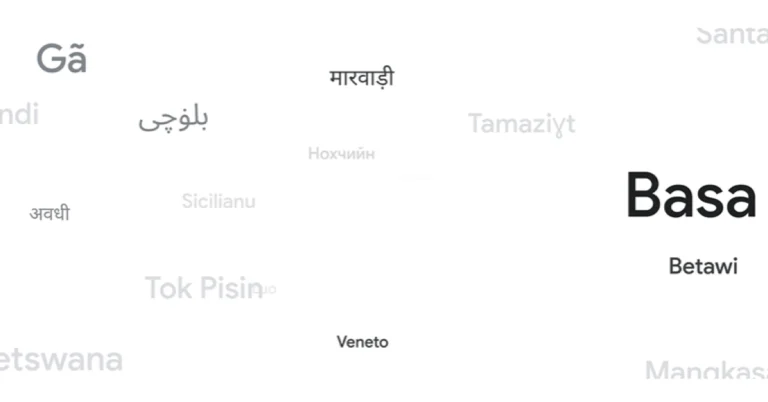
Google Translate has expanded its language support to 110 languages, thanks to artificial intelligence (AI) using its in-house PaLM 2 large language model (LLM). Google Translate formerly supported 133 languages; recent additions include Indian regional languages Awadhi and Marwadi. Approximately one-quarter of the new languages originate from Africa.
Google Translate’s language coverage has grown to 243 languages, the largest expansion ever. The move comes after Google launched its 1,000-language programme in November 2022, intending to develop AI models to serve the world’s 1,000 most widely spoken languages. This effort encompasses 110 new languages.
The company via blog post announced the addition of the new languages to Google Translate. It said, “Google Translate breaks down language barriers to help people connect and better understand the world around them. We’re always applying the latest technologies so more people can access this tool: In 2022, we added 24 new languages using Zero-Shot Machine Translation, where a machine learning model learns to translate into another language without ever seeing an example. And we announced the 1,000 Languages Initiative, a commitment to build AI models that will support the 1,000 most spoken languages around the world. Now, we’re using AI to expand the variety of languages we support. Thanks to our PaLM 2 large language model, we’re rolling out 110 new languages to Google Translate, our largest expansion ever.”
Google reports that new languages, such as Cantonese and Q’eqchi, have reached over 614 million speakers, enabling translations for 8% of the global population. Some are prominent global languages, while others are spoken by indigenous communities. Approximately a quarter of these languages are from Africa, constituting the largest expansion to date. The list now contains seven additional Indian languages: Awadhi, Bodo, Khasi, Kokborok, Marwadi, Santali, and Tulu.
Translate prioritises the most widely spoken versions of each language, such as Romani, which has multiple dialects throughout Europe. Translate can use the PaLM 2 tool to learn closely related languages such as Hindi-like Awadhi and Marwadi, as well as French creoles like Seychellois Creole and Mauritian Creole. As technology progresses and linguists work together, more language variations and spelling conventions will be supported.
Garena Free Fire Max is a battle royale game with regular awards and tournaments to keep players interested. If you play Garena Free Fire, you should be aware of the redeem codes that are released on a daily basis. However, because the battle royale game is banned in India, players from other countries can use the Free Fire Redeem codes daily. If you’re unfamiliar with the Garena Free Fire redeem codes or don’t know how to get them, we’ve put together a step-by-step guide to help you redeem them. Check out Garena Free Fire Max Redeem Codes for 29 June 2024.
The Free Fire Max redeem codes are a great way to get free stuff. These are 12-digit codes that contain alphabets and numbers, as well as an expiration date and time. Because the Garena FF redeem codes cannot be used more than once, you should hurry to the redemption page to claim your free reward before someone else does. To get a free reward, all you have to do is go to reward.ff.garena.com/en, which is the official redemption page. Also, keep an eye on this space for daily updates on Garena Free Fire Max redemption codes and rewards.
29 June 2024: New Amazon Quiz is now available. Customers from different parts of the country are participating in the daily quiz. The quiz starts at midnight today and will be live until 11:59 PM tonight. By successfully answering every question, participants in the quiz have the chance to win wonderful rewards. A Rs 500 Amazon Pay Balance is up for grabs to participants today.
One wrong answer could eliminate you from the quiz. You have a chance to win Rs 500 Amazon Pay Balance if you successfully answer every question. Users of the app only have the opportunity to take the quiz. Check Out 29 June 2024 Amazon Quiz Answers.
Only app users are eligible to play the Amazon quiz every morning from 12 AM to 11:59 PM. The quiz is not available on the desktop. For those who are unaware of how to play the Amazon quiz, below are the steps, you can follow to take the quiz.
We have written an explainer above, you can refer to that.
When are the winners of the Amazon Quiz and contest announced or declared?
The announcement of today’s Amazon quiz winner will take place Tomorrow. As for the Special Quiz and “Spin & Win” Contest, the winners will be declared once the Quiz Contest comes to an end. To find out who the lucky winner is, you can refer to the Amazon Quiz Winners List or visit the Amazon Winners tab in the Amazon App.
How to participate in the Daily Amazon Quiz?
That is very easy, just got to the Amazon app and scroll to the bottom of the page and you will find the Quiz section. Click on it (usually it is called the fun zone) and you can enter the Amazon Today Quiz Contest.
Are there any other quizzes or contests running on Amazon daily?
Yes, there are many running on a daily basis. These range from spinning the wheel to answering the questions correctly. All are located in the Fun Zone.
What are the criteria for selecting a winner in the Daily Amazon Quiz?
When a qualified player submits correct answers to all the questions, they will automatically be entered into a lucky draw. This draw will include all participants who answered all the questions correctly. Amazon randomly selects the final winners from the pool of eligible participants who gave the right answers.
Which Types of Questions are asked within Amazon Daily Quiz?
These are very simple and straightforward questions. These are mainly related to general knowledge.
Where should I look for Amazon Daily Quiz answers?
You can bookmark this page as we will help you every day with the Amazon Daily Quiz. We bring you fresh answers every day for the Amazon Daily Quiz and Contest.
What time does Amazon Announce previous winners?
The previous winner’s name will be announced today at 12 PM (noon).
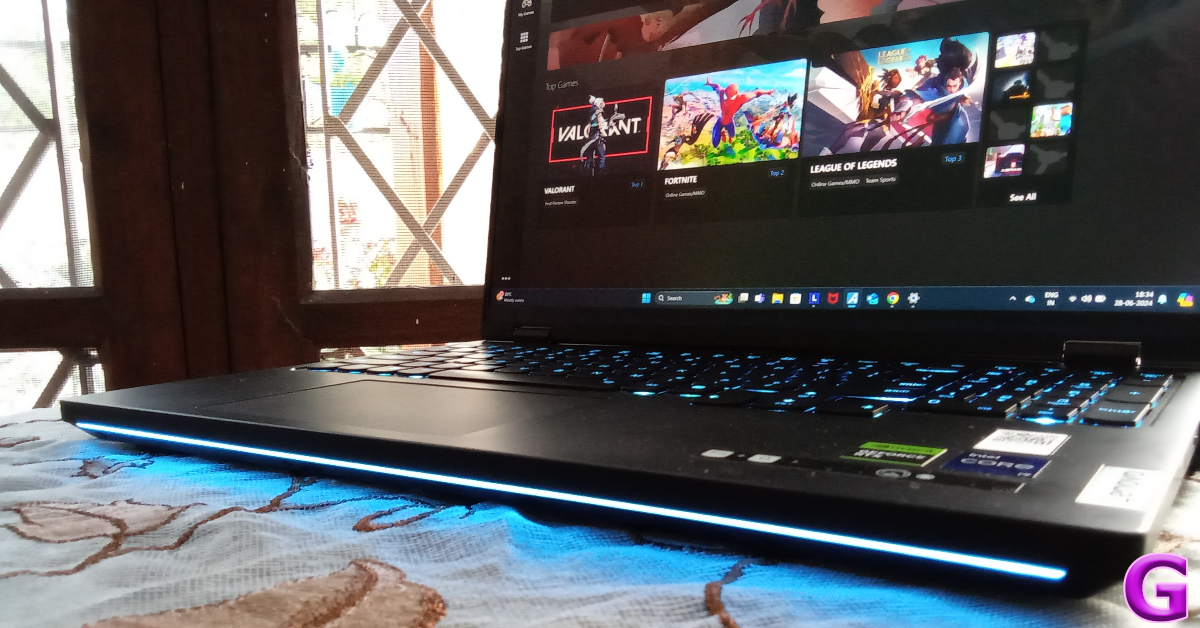
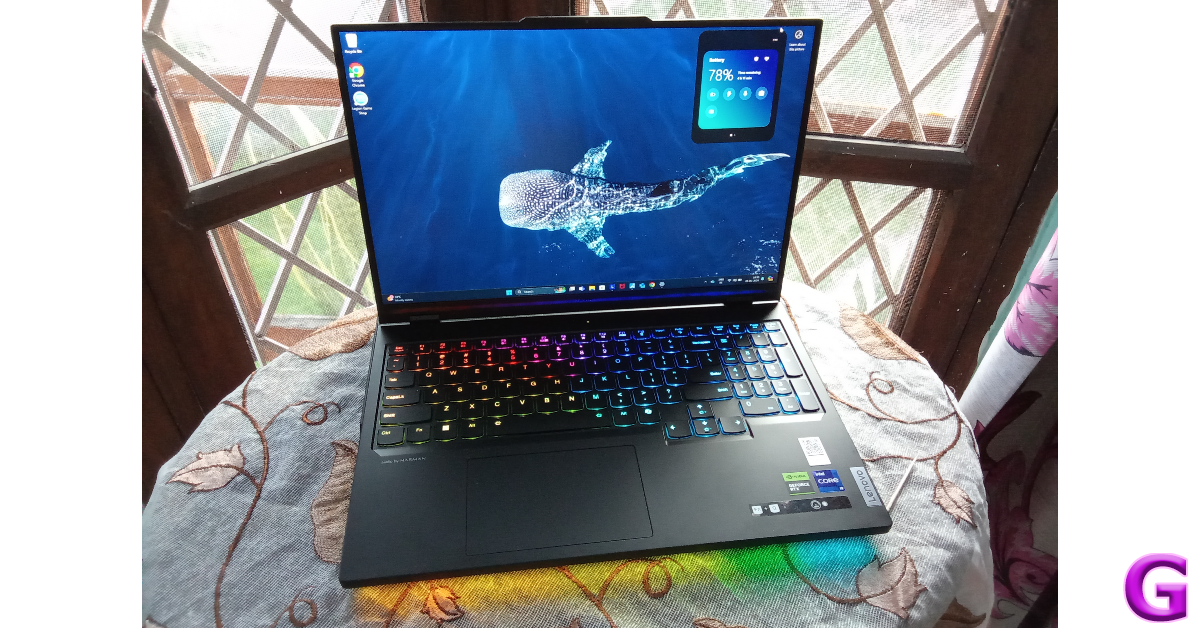
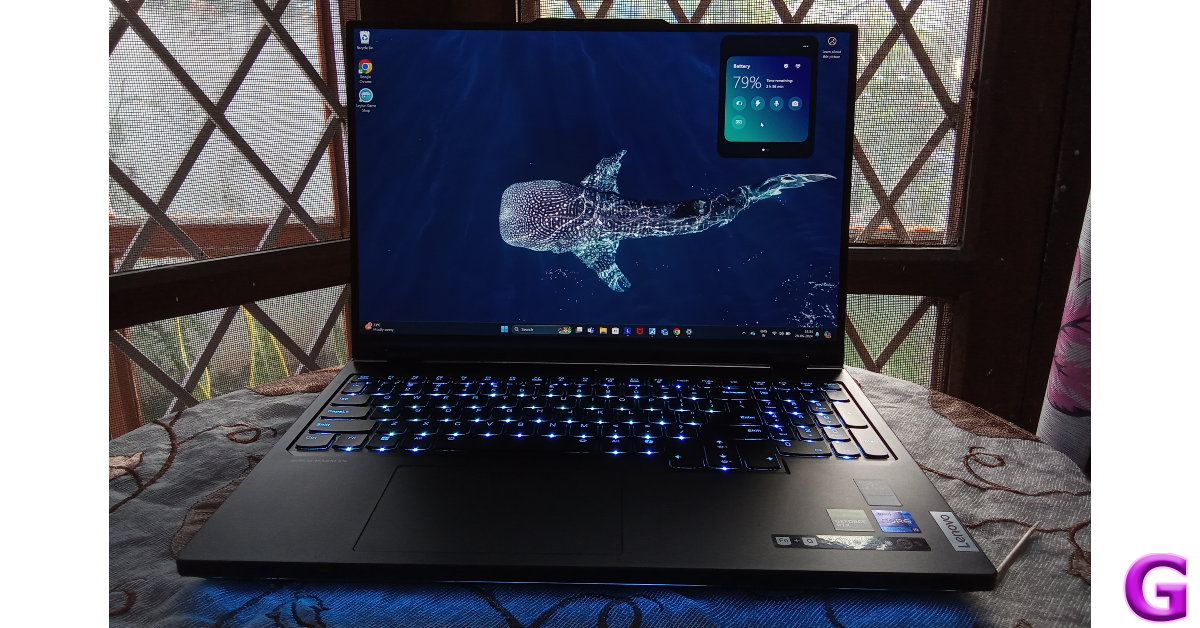
Lenovo’s ‘Legion’ series of laptops have a reputation for being well-rounded gaming beasts with not many chinks in their armour. Lenovo’s latest iteration in this series, the Pro 7, was launched in March 2024. The laptop is decked with top-end specs and hardware like the Intel Core i9 processor, NVIDIA GE Force RTX 4080/4090 GPU, 32GB DDR5 RAM, a 16-inch 240Hz IPS display, and more. These premium features come at the price of Rs 3,02,757. With that price tag, we expect this laptop to dominate over the best gaming machines in the market. We got our hands on the Lenovo Legion Pro 7 earlier this month, here is our review of the gaming laptop.
Lenovo Legion Pro 7 16IRX9H (2024) Review: Design and Display
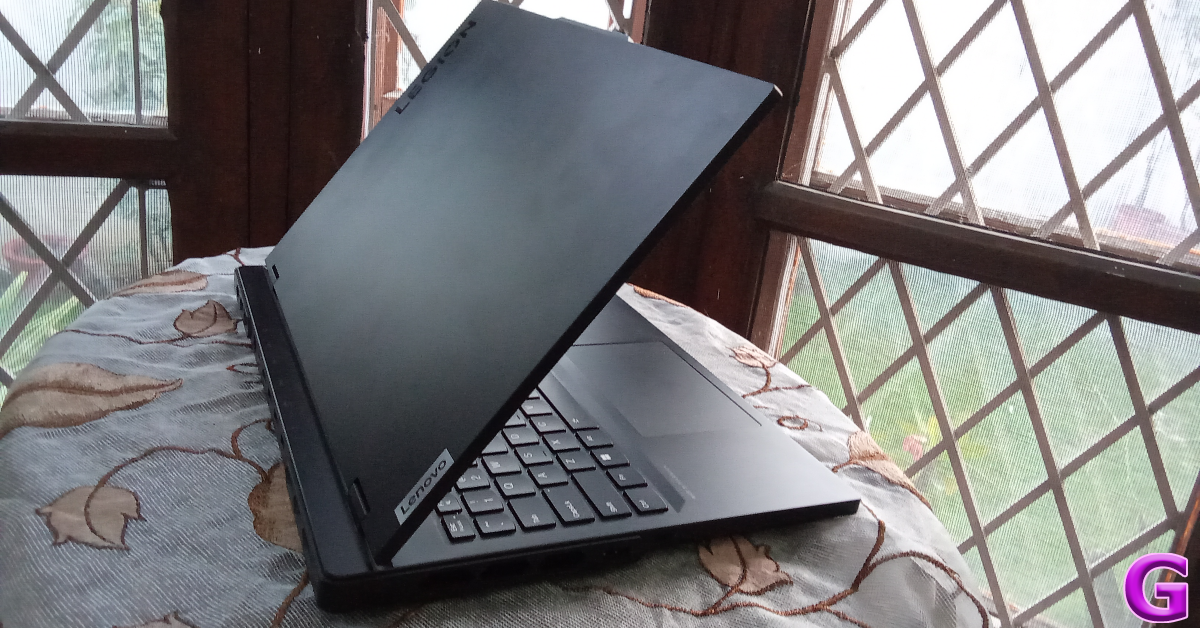
The Legion 7 Pro’s tasteful and elegant design immediately separates it from other gaming laptops. If you take this laptop out in public, it’ll take a keen eye to clock it as a gaming device. Lenovo’s decision not to include gaudy graphics and RGBs in this laptop’s design is something we appreciate a lot.
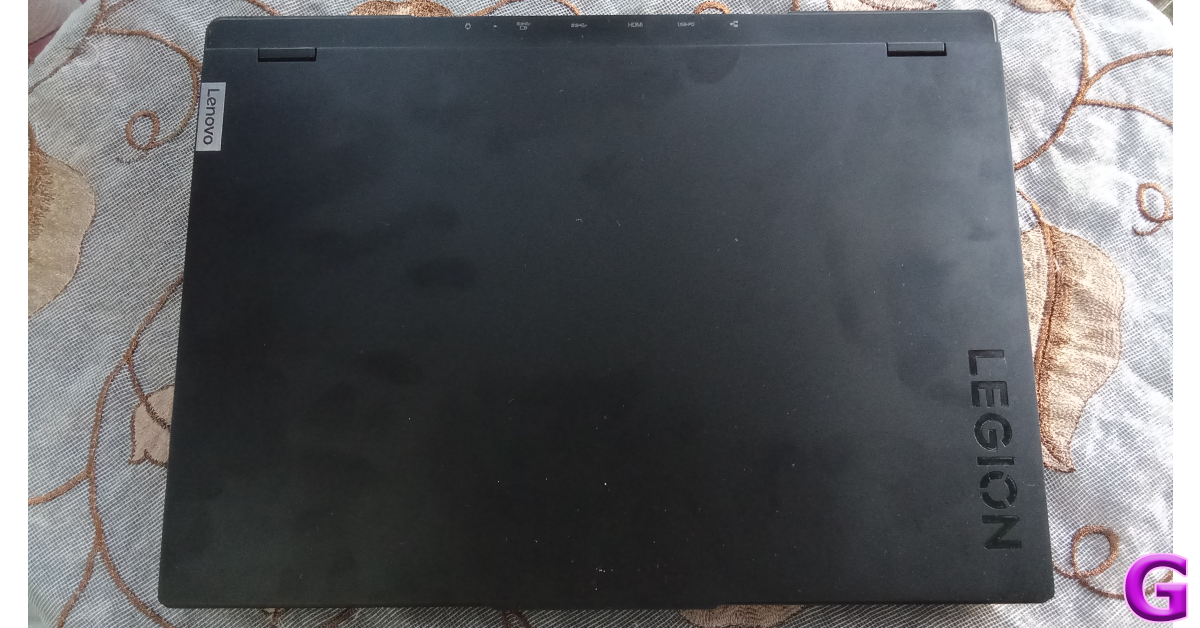
The all-black lid has a matte finish and minimal branding. A small Lenovo logo is positioned on the upper left while the glossy Legion branding is engraved on the bottom right corner. The two hinges supporting the lid are very sturdy and facilitate a seamless 180-degree movement.
The aluminium chassis of the laptop gives it a rugged and sturdy feel. Its thick, strong shell adds a lot of weight to the device, but that’s something you expect from a high-end gaming laptop. The Legion Pro 7 weighs 2.62kg, which isn’t light by any means. While the laptop is portable, it will surely make its presence felt when you’re carrying it around in your backpack.
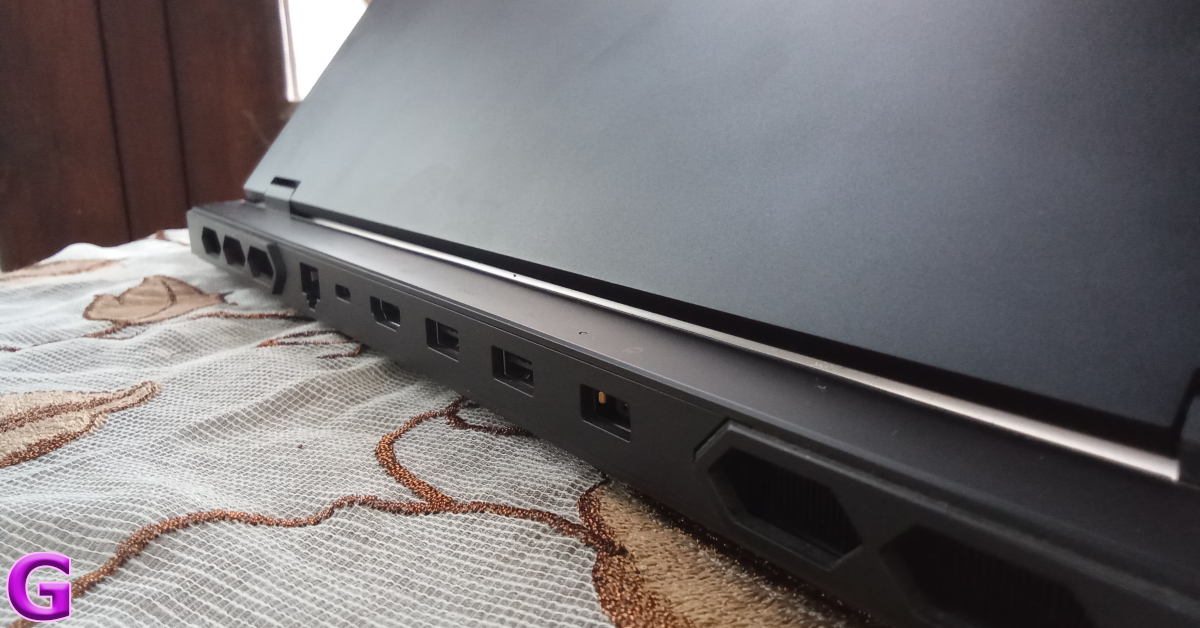
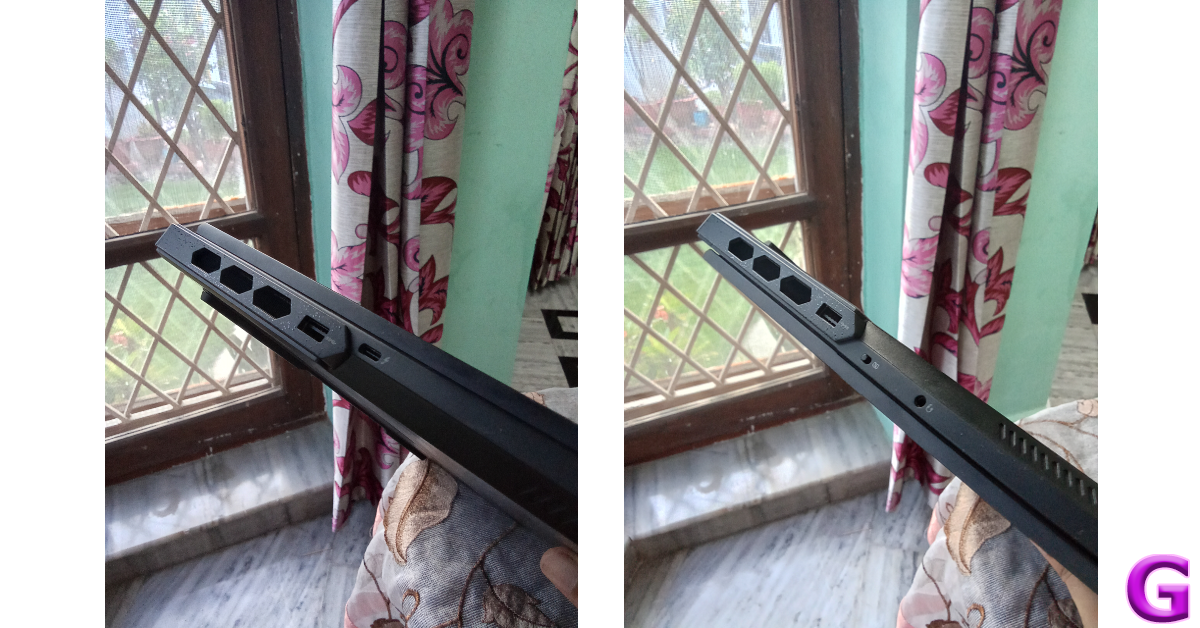
The diverse range of ports on the Legion Pro 7 is one of our favourite things about the laptop. The left edge of the device houses USB Type-A (USB 3.2 Gen 1) and Type-C (USB 3.2 Gen 2) ports along with three air vents. The right side contains a 3.5mm headphone jack, a camera e-shutter switch, and a USB Type-A (USB 3.2 Gen 1) port along with another 3 air vents. The back of the laptop holds six air vents with an ethernet (RJ-45) port, a USB Type-C (PD 140W & DP 1.4) port, an HDMI port, 2 USB Type-A ports (one always on), and a power connector port. The speaker grilles are housed on the bottom end of the side edges.
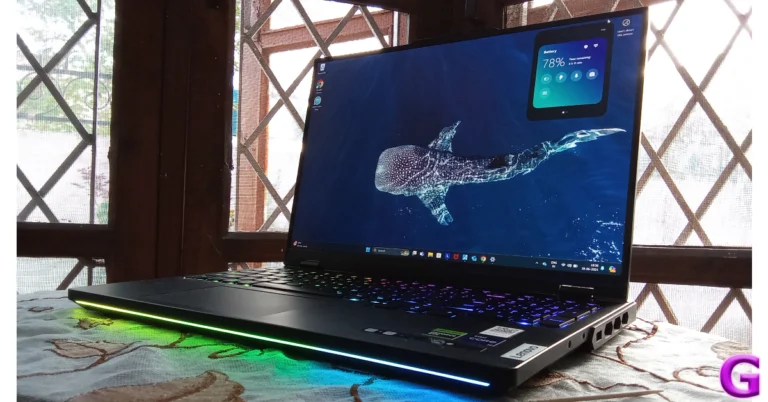
The 6-row keyboard has dedicated multimedia keys, a vertical numpad, and per-key RGB lighting. A sleek light bar runs along the bottom end of the keyboard. There are tons of customisation options for the RGB lighting, which we will get into later. We were pleased with the typing experience on this keyboard. The keys have a decent travel and the layout is ergonomic. While nothing beats a good mechanical keyboard for gaming, this is as good as it gets on a laptop. We would have liked the trackpad to be slightly larger, but it wasn’t a major issue as we relied on an external mouse for gaming.
Moving on, the 16-inch WQXGA (2,560 x 1,600p) IPS panel has a refresh rate of 240Hz and can reach a peak brightness of 500 nits. For gaming needs, the refresh rate of this display is certainly overkill, but when you look at the price tag of the laptop, it makes sense why Lenovo would go all-out. The viewing experience provided by the IPS panel is exceptional. We streamed content across major OTT services like Netflix, Prime Video, and Disney+ Hotstar, and were pleased with the rich colours and amazing details on display. Of course, the rich contrast and deep blacks that you find in an OLED display are missing here. The Harman speakers on the laptop deliver a well-rounded output but fail to reach the volume required to fill a room (especially when the ceiling fan and AC are functional).
Lenovo Legion Pro 7 16IRX9H (2024) Review: Performance
Powering the Lenovo Legion Pro 7 is the 14th-Gen Intel Core i9-14900HX processor. Buyers can choose between NVIDIA GeForce 4080 or 4090 graphics. There’s 36GB RAM and 1TB of storage space onboard the device. The maxed-out variant of the Legion Pro 7 fetches Rs 3,74,991. Needless to say, the raw power on offer is simply stunning.
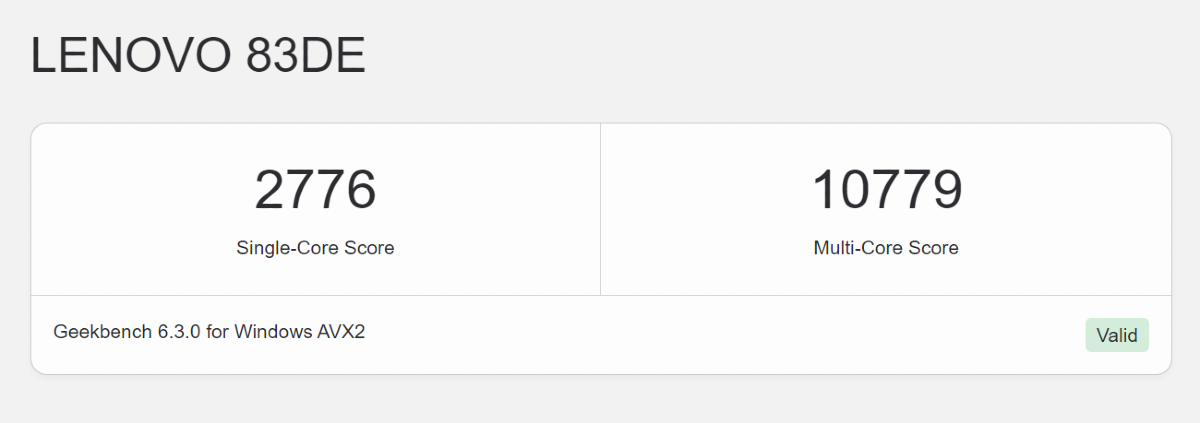
The Legion Pro 7 crushes any task you throw at it. We used it as our primary device for work as well as leisure and the sheer versatility of its performance is admirable. The laptop went through tasks like handling online meetings, web browsing, document editing, and more, like a hot knife through butter. More demanding tasks like video and photo editing were handled by the Legion Pro 7 expertly, without breaking a sweat. On Geekbench 6, the laptop scored 2,776 points in the single-core test and 10,779 points in the multi-core test.
The gaming prowess of the Lenovo Legion Pro 7 is something to behold. We went through multiple gaming titles and were pleased with the seamless, lag-free gaming experience even at the highest possible graphics. If you want to try a hand at Cyberpunk 2077 on a laptop, there’s no better device than the Legion Pro 7. We played the game at 2,160p resolution and 60fps (with Frame Gen) frame rate and had an enjoyable, stutter-free experience. Since the Legion 7 Pro supports ray tracing, the difference in the shadows and ambient lighting while playing high-end games is immediately noticeable. The air vents did a good job of keeping the temperature in check, but we wouldn’t recommend placing the device on your lap as the bottom panel can warm up quite rapidly.
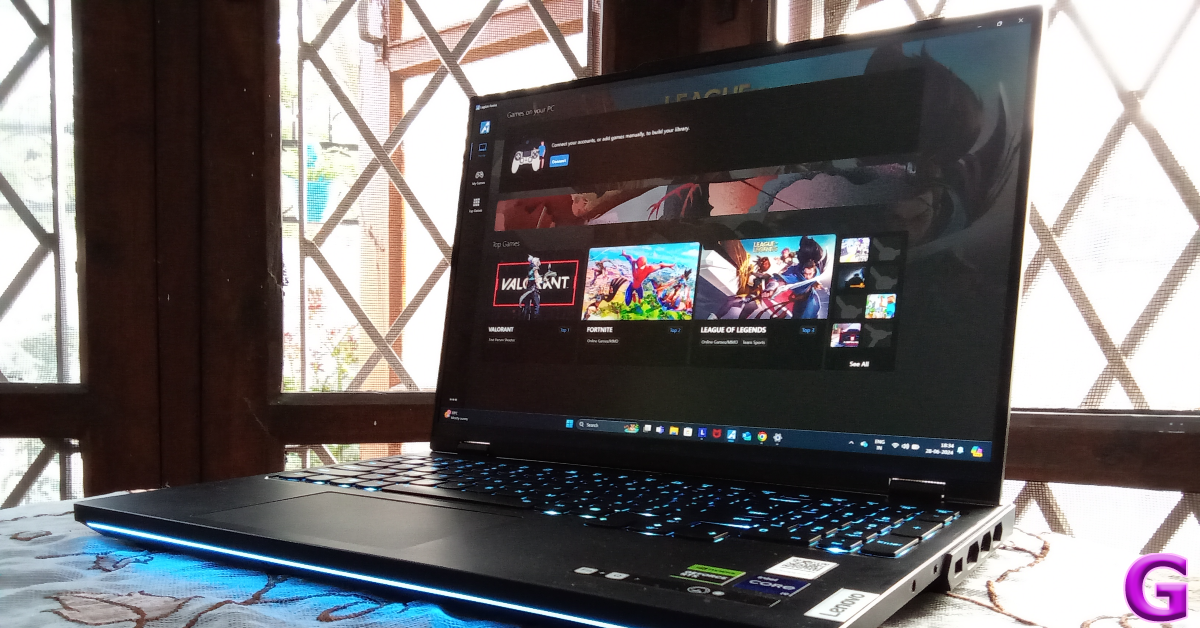
OS duties on the Lenovo Legion Pro 7 are handled by Windows 11 Home Single Language edition. Lenovo’s in-house Vantage and Legion Arena apps enhance the software experience even further. Lenovo Vantage gives a quick overview of vital components like the GPU, CPU, VRAM, and SSD while also offering a ton of customisation options. Using the software, you can program the macro key and customise the keyboard backlighting.
You can set up 7 profiles for the RBG lighting and toggle them using the Ctrl + Spacebar shortcut. Also onboard is Tobii, which uses the camera to track your head and eye movement and adjusts the in-game camera accordingly. Legion Arena is a library for all the installed games on your laptop. You can connect this app to platforms like Ubisoft, Xbox, Epic Games, and more.
The 4-cell Li-Polymer 99.9kWh battery on this laptop can last up to 5 hours with conservative usage. The limited battery life is perhaps the weakest aspect of the laptop. During the week-long review period, we used the Lenovo Legion Pro 7 for a variety of tasks. On a full charge, it took just over 1 hour of gaming for the laptop to drain its battery. On general usage, the battery life can be pushed to 4-5 hours. The 330W power brick can fully charge the battery pack within 90 minutes.
The Lenovo Legion Pro 7 sets the benchmark in performance for all gaming laptops. If you’re looking for the meanest, most powerful gaming machine that you can carry around in your backpack, this is your guy. Of course, it requires shelling out more than Rs 3 lakh, which is an obscene amount of money.
The laptop’s performance leaves no room for complaints. It can handle the most demanding gaming titles and deliver an exemplary gaming experience. The battery life of the laptop needs work and raises some concerns over its portability since it requires charging after an hour of intense gaming.
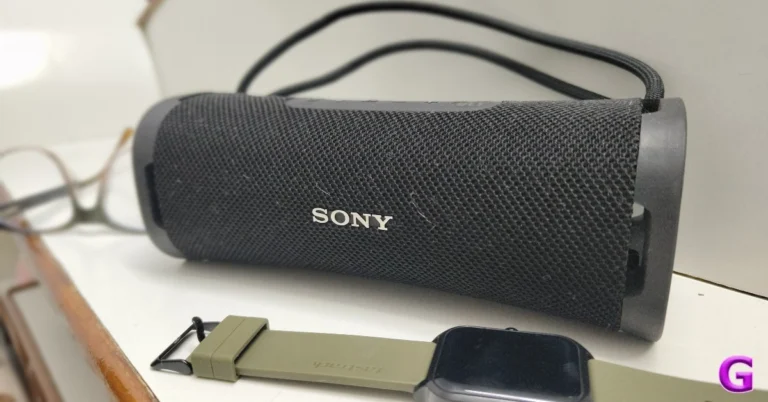
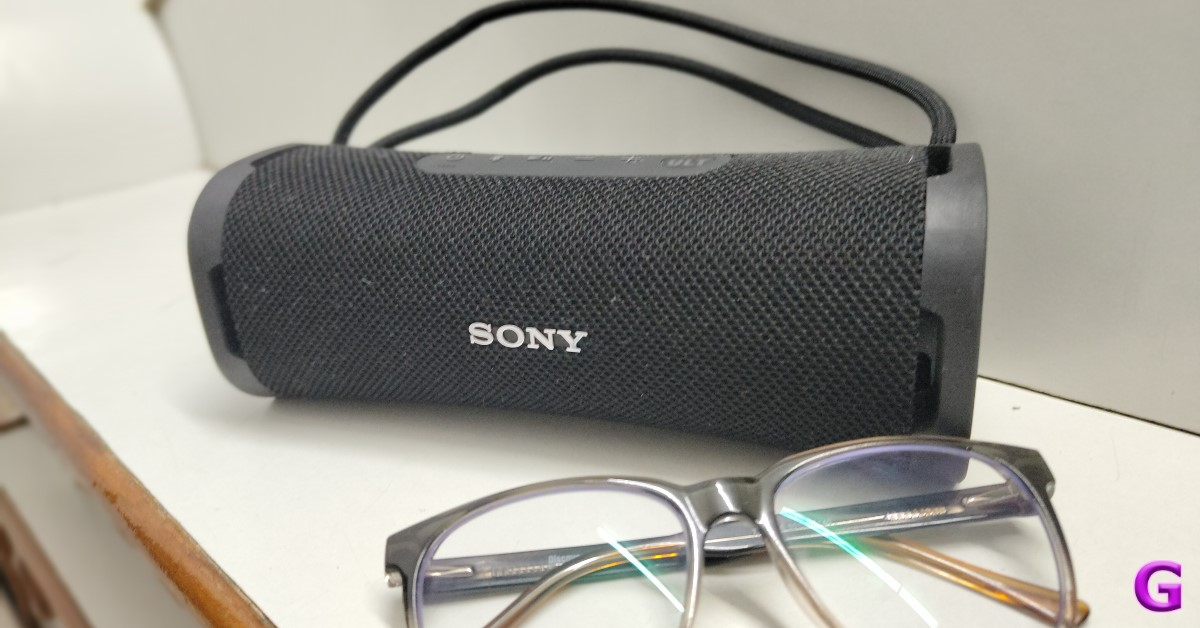
In India, Sony has launched its ULT Power Sound range, which includes the wireless speakers ULT TOWER 10, ULT FIELD 7, and ULT FIELD 1, as well as the noise-cancelling headphones ULT WEAR. Every model has the ULT button, which adds one or two different sound styles to the music output. The ULT FIELD 1 wireless speaker is a robust and weatherproof gadget featuring an IP67 rating, a multiway strap, a shockproof design, and resistance to saltwater. With its integrated microphone for hands-free calling, it may be used both indoors and outdoors. As usual, we tested out the new device that was sent to us for review. This is our review of the Sony ULT FIELD 1 speaker.
In This Article
Sony ULT FIELD 1 Review: Design
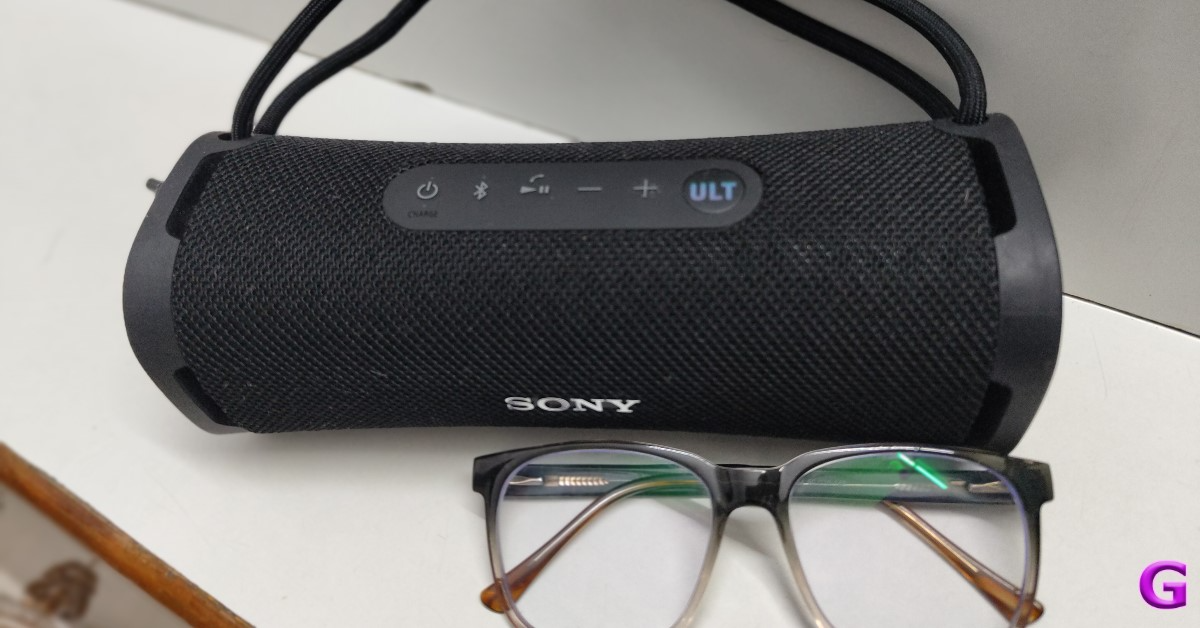
Let’s take a deeper look at the speaker now. First, we’ll discuss its build quality and design. It is a compact Bluetooth speaker that weighs about 650 grams and has a sturdy construction. The gleaming Sony logo quickly drew our attention. The body appears to be composed entirely of plastic. For ULT FIELD 1’s body, the firm employed recycled plastic to some extent. The gadget has a mesh fabric finish and a rubberized body. Available in four colours: Pick the colour that best matches your style from Black, Off White, Forest Grey, and Orange.
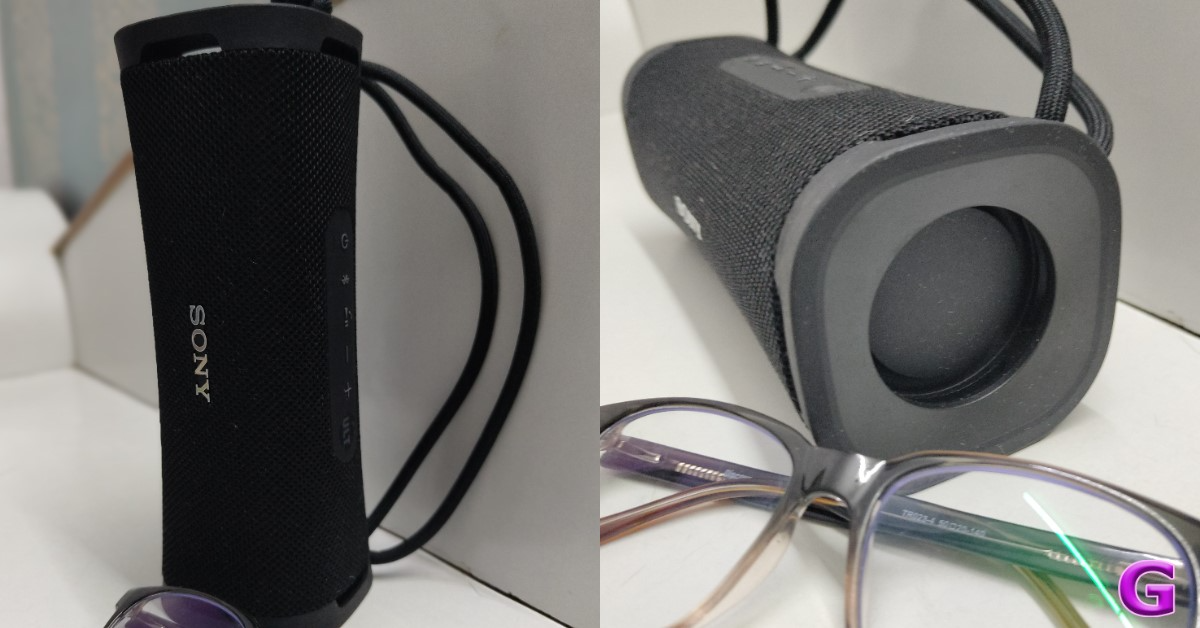
The gadget’s body is curved, so when you place it on a table, the speakers blast from all sides, creating room for the music to flow. It may be used horizontally, however, the bottom speaker isn’t completely covered when you place it vertically.
It is additionally coated in rubber for improved grip. Sony ULT FIELD 1 also has a sleek, attractive design. The speakers offer distinct sound profiles based on where you position the unit, and you can easily keep it vertically or horizontally.
The Field 1 speaker can withstand light impacts despite its rectangular design and squared-off sides, which also prevents it from tumbling down a table or a hard surface. When the speaker is resting on a table, none of its edges completely come in contact with the surface, allowing the music to play freely and with full coverage.
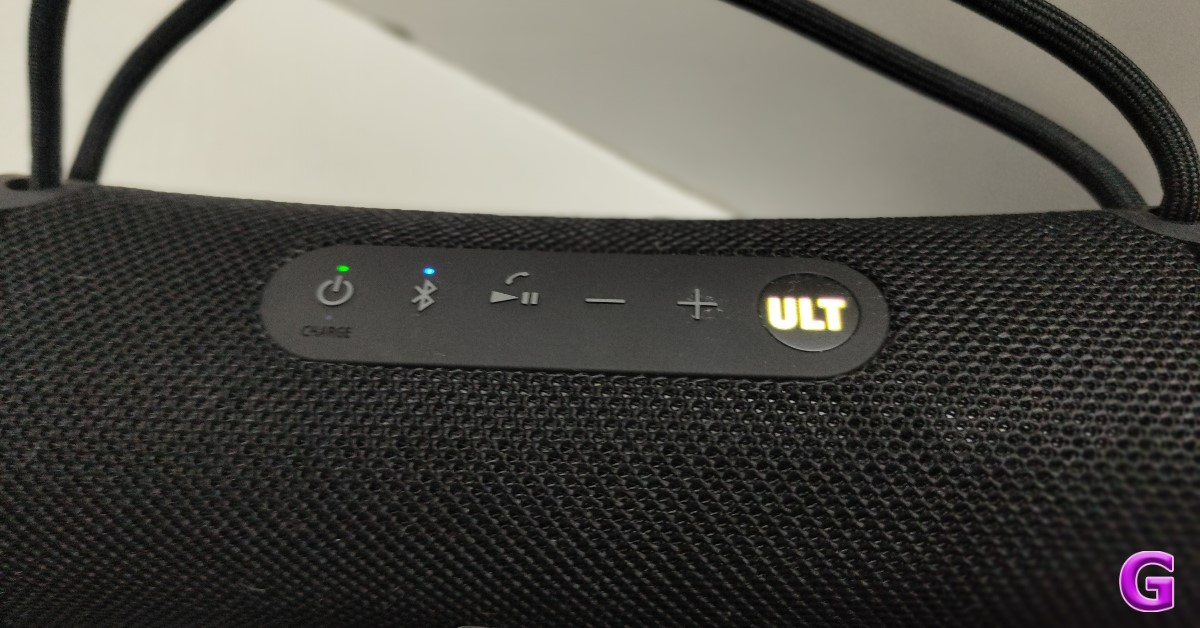
There’s an exclusive LED-lit ULT button on top that when needed, boosts the bass, which sounds a lot like Sony. The volume, play/pause, and Bluetooth buttons are located next to the power button. You can operate the buttons without even looking at them because they are elevated and simple to use.
Although there is a strap, it doesn’t appear to be sufficient for us to attach it to a hook and suspend it from a backpack when travelling. Nonetheless, the strap is adjustable, so you can make it tighter or looser and have the Sony ULT FIELD 1 stay in place. The quality of the construction of this speaker truly caught our attention. Although it is lightweight enough for us to carry with us everywhere we go, it is strong and resilient.
It also functions as a speaker phone. It does not need to be plugged in all the time to work because it is battery-operated.
Additionally, the IP67 certification for dust and water resistance means that you can practically take this handy item with you everywhere you go without having to worry about damage. Yes, it is both clumsy person-ready and beach-proof.
Sony ULT FIELD 1 Review: Performance
As a Bluetooth speaker, the Ult Field 1 may be connected using the technology as it has Bluetooth 5.3. SBC and the AAC codec are supported. It was quite simple to set up. All we had to do was open the package, press the power button, pair the Bluetooth, and we were ready to go.
Though the speaker body is a rectangle measuring 83×42 mm, the compact speakers feature 16 mm tweeters.
The ULT series speakers are unique due to their rectangular form, which increases the speaker’s surface area and makes the bass more noticeable due to its larger size.
The sound quality caught us off guard. This is our opinion based on a comparison with another Sony speaker that we previously reviewed (Sony SRS XE200 review can be read here). Depending on where it’s placed, the portable outdoor speaker has distinct sound qualities.
The control panel’s “ULT” button is very powerful; it essentially amplifies the thump and improves other sounds, but for some, the bass will overpower the vocals or other instruments that are playing. Simply turn off the ULT feature to get a less bass-heavy sound, and it will sound fantastic to your ears.
With the ULT button, you can switch between two distinct bass sound types. Deep bass or punchy bass. All it takes is one button click to select between these two profiles. But if you are a bass-head, then this is for you. The bass at level 1 isn’t overpowering, but you can obtain deeper bass by just pressing the ULT button once again to get punchier bass. It sounds amazing for pretty much anything else we tested, from R&B to the 90s and EDM to hip-hop. It even enhanced the depth of our classical playlist that we had on play while we worked. Everything sounded amazing.
If that’s not your thing, the Sony application has a 3-band equalisation function, too.
You can also connect the speaker to several other Sony wireless speakers using the compatible Sony Music Centre app because it has a “group with other speakers” feature. Numerous elements on the speaker itself can also be controlled via the app. In addition to updating the firmware, you can adjust the profiles to suit your needs.
In addition, you can monitor the remaining battery life and adjust various settings. We were shocked when we discovered that after a few days of using it sporadically, the battery life was still 60 or 65%. We never fully charged it when we first got it, so we are really astonished! With a 12-hour battery life rating, the speaker can be charged via USB Type C. Only when music is not being played at its highest volume can the stated endurance be considered good. It has a power consumption of about 7.5 watts.
Over that, it enables quick charging; thus, in addition to charging quickly, the battery life is really long. For us, a 12-hour battery is excellent. Regarding the cost, the ULT Field 1 appears to be somewhat costly at the moment. The price of the gadget is approximately Rs 11,000, which might seem high to many.
Verdict
What a crazy speaker! We think this speaker, the Sony ULT FIELD 1, is excellent. From appearance to sound, everything is superb. The design and construction are really high-end. This time, the microphone is even better, and most importantly, the sound quality is simply outstanding. It has a booming bass. Thanks to its large tweeters, the audio is both crisp and powerful, coupled with improved clarity. Excellent material utilisation is evident in the rubberized borders, which double as a stand to support the speaker when it’s upright. This speaker is much more adaptable since, as we previously mentioned, you can adjust the audio profile to suit your demands. We adore the amount of bass that the ULT button adds.
All things considered, the Sony ULT FIELD 1 is the finest portable speaker available right now if you’re searching for one with great sound quality.
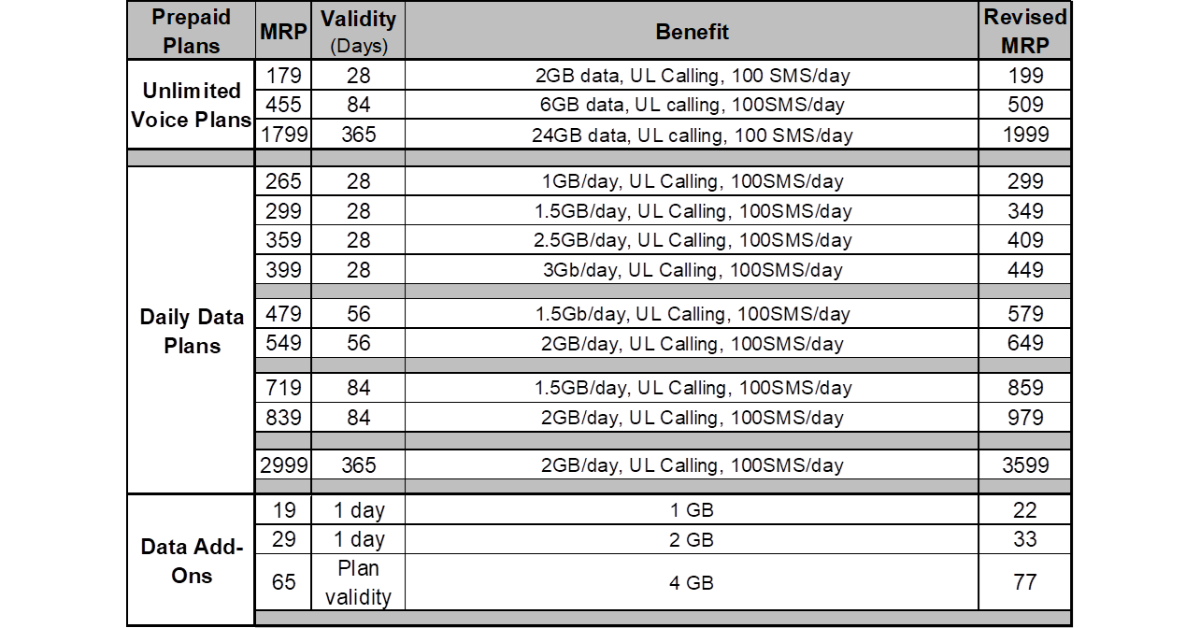
Jio’s rate hike prompted Bharti Airtel to raise the cost of both its postpaid and prepaid plans. The updated plans will go into effect on July 3. Daily data plans, data add-ons, and unlimited voice plans are all impacted by the changes.
Airtel mobile plans would cost more, with price increases of up to 20%. As part of its efforts to raise the average revenue per user (ARPU) for mobile devices, Airtel has implemented new tariffs. Next week, there will be a revision in the postpaid and prepaid data plan pricing. Jio raised the cost of its plans in the nation by announcing new tariffs, which is when the price increase occurred.
The entry-level package, which included unlimited calling and 2GB of data, was raised from Rs 179 to Rs 199. There has been a rise in the 84-day plan from Rs 455 to Rs 509 and in the annual plan from Rs 1799 to Rs 1999.
However, Airtel’s daily data plans have experienced pricing increases, with the 1GB per day plan for 28 days going from Rs 265 to Rs 299. Now priced at Rs 409 for the 2.5GB daily plan and Rs 349 for the 1.5GB daily plan. There has also been a rise in the top daily data package from Rs 399 to Rs 499, which is 3GB daily data for 28 days.
The cost of Airtel’s 56-day plan with 1.5GB per day has gone up from Rs 479 to Rs 579, and the 2GB per day plan has risen from Rs 549 to Rs 649. The annual plan, which offers 2GB/day, has increased dramatically, while the 84-day plan has also become more expensive, going from Rs 719 to Rs 859.
The price of data add-ons has surged only slightly: from Rs 19 to Rs 22, from Rs 29 to Rs 33 for the 2GB add-on, and from Rs 65 to Rs 77 for the 4GB add-on. Up from Rs 399 to Rs 449, the postpaid package with 40GB of data now costs Rs 449, while the higher category, which includes streaming subscriptions and 75GB of data, now costs Rs 549.
On July 8, Nothing’s next Community Update will introduce the CMF Phone 1, the company’s first smartphone. In the days preceding the unveiling, CMF is releasing one key spec of the smartphone every day, starting with the display specifications and then confirming the chipset details. The upcoming device has been listed on Flipkart where it has revealed that the CMF Phone 1 will have a Super AMOLED display.
Prior to the release, CMF has been steadily disclosing important information about Phone 1 through teases. After revealing the display specs the company has today confirmed CMF Phone 1’s chipset. The upcoming device will use MediaTek Dimensity 7300 5G SoC, with its 8-core architecture and cutting-edge 4nm process from TSMC. A 6.67-inch Super AMOLED display with 120Hz refresh rate and HDR support for brilliant colours is what the CMF Phone 1 is said to have. The CMF Phone 1 will also offer a peak brightness of up to 2,000 nits for outdoor visibility. Deeper blacks are available without light leakage thanks to the display’s ability to turn off individual pixels.
A tipster named Yogesh Brar has disclosed that the CMF Phone 1 will have a 6.7-inch sAMOLED LTPS screen with FHD+ resolution. An adjustable refresh rate ranging from 30-120Hz will be available, with a maximum brightness of 2000 nits. Inbuilt fingerprint scanning and a 16MP selfie camera are possible features of the phone. A Sony sensor, a depth sensor, and a 50MP primary camera will also be included. Expected features of the phone include AI Vivid mode, EIS, and 4K30 FPS video recording. Anticipated features of the phone include AI Vivid mode, EIS, and 4K30 FPS video recording. Rumour has claimed that the handset is powered by the MediaTek Dimensity 7300 SoC.
Furthermore, CMF is likely to introduce a smartphone with 6/8GB RAM, 128GB of storage, and a microSD card that allows for 2TB of additional storage. The gadget is said to run the basic Nothing OS on Android 14, which will receive two years of OS upgrades and three years of security patches. A 5,000mAh battery with 33W fast charging capabilities might be included with the phone. Additionally, it could also have mono speakers and IP52 dust and water resistance.
The Chinese tech company Oppo plans to launch its flagship devices, the Oppo Reno 12 and Oppo Reno 12 Pro, via Flipkart in India. AI-powered features including AI Best Face, AI Eraser 2.0, AI Studio, and AI Clear Face will be available in the Indian versions.
A special landing page has been made by Flipkart and Oppo India to hint at the release date of the Reno 12 5G and Reno 12 Pro 5G. The exact launch date is yet to be announced by the company. The upcoming launch has also been teased through the company’s social media channels.
Additionally, the phones will come equipped with Google Gemini LLM-powered productivity capabilities like AI Speak, AI Writer, AI Clear Voice, AI Record Summary, and AI Summary.
Both the Oppo Reno 12 and Reno 12 Pro following their release in China, were made available in a few other countries. Global models use MediaTek Dimensity 7300-Energy SoCs, whereas Chinese versions use a MediaTek Dimensity 8250 Star Speed Edition SoC and a MediaTek Dimensity 9200+ Star Speed Edition chipset.
What they use is ColorOS 14.1, which is built on Android 14. There are also generative AI elements on the gadgets. The phone features a 6.7-inch full-HD+ curved OLED screen with 2,412 x 1,080 pixels resolution. The display has up to 120Hz refresh rate support and 1,200 nits of peak brightness. The vanilla model has Corning Gorilla Glass 7i protection whereas the Pro model has Corning Gorilla Glass Victus 2 layering.
Both phones feature a triple rear camera setup. The Oppo Reno 12 has a 50-megapixel primary sensor, an 8-megapixel ultra-wide lens, a 2-megapixel macro shooter, and a 32-megapixel front camera. The Reno 12 Pro has the same primary sensor and ultrawide lens, a 50-megapixel telephoto shooter, and a 50-megapixel front camera.
The 5,000mAh batteries of the Reno 12 and 12 Pro can be charged with an 80W wired SuperVOOC charger. Additionally, the phones have USB Type-C, GPS, GLONASS, Galileo, QZSS, Bluetooth 5.4, Beidou, 5G, and Wi-Fi 6.
Even with all the processing power in the world, your Android phone can come to a screeching halt when its microphone stops working. It can be quite annoying when you can use your phone for everything else but the most essential task it was designed for – making and receiving calls. Before you take your phone to a repair centre, there are some things you can do to resolve the problem at hand. Today, we bring you the top 10 ways to fix the ‘microphone not working’ issue on your Android phone.
Microphone malfunctions are uncommon, but they can be caused due to a lot of reasons. Here are some of them.
Microphone access to your phone is disabled
Microphone access to a particular app is disabled
Something is obstructing the microphone (case, palm, etc)
Dirt and grime have settled inside the microphone
Your phone is connected to a Bluetooth device
Software issues
The microphone’s hardware is damaged
Check microphone access
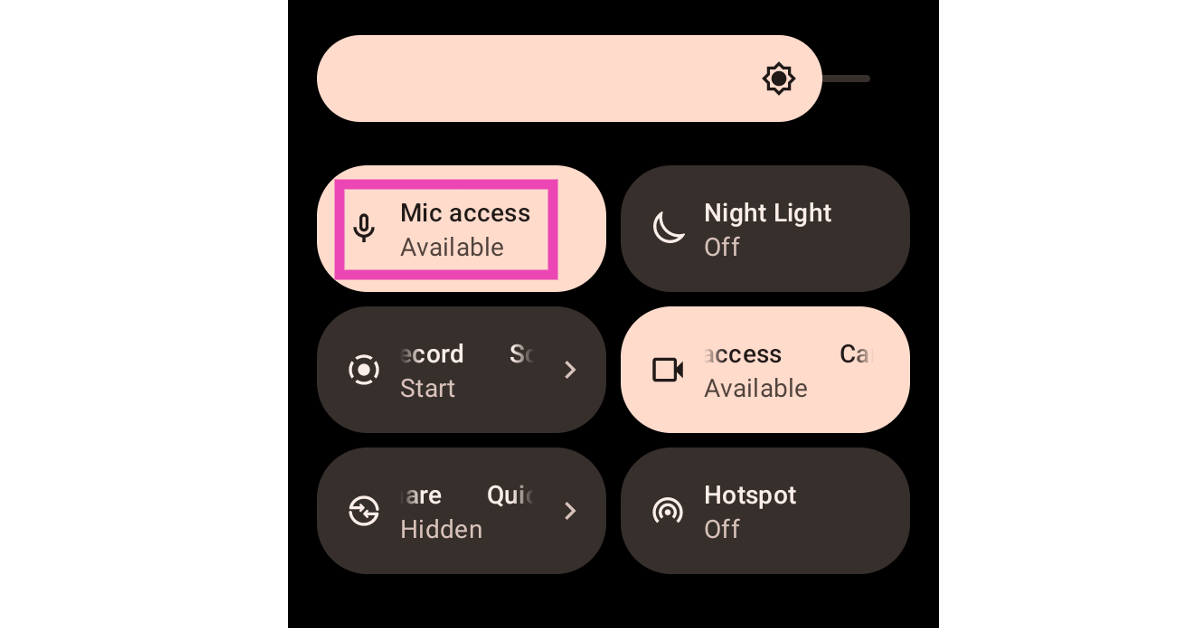
Your Android phone gives you the option to disable microphone access across all apps. This is a great privacy feature that ensures no malicious app gains unauthenticated access to the microphone. However, since this feature is easily accessible in the Quick Settings Menu, it is possible to accidentally tap on it. If your microphone stops working out of the blue, swipe down from the status bar and make sure that microphone access is enabled.
Allow microphone access to a specific app
If the microphone isn’t working for a specific app, it is likely that the app isn’t allowed to access it. Here’s how you can change that.
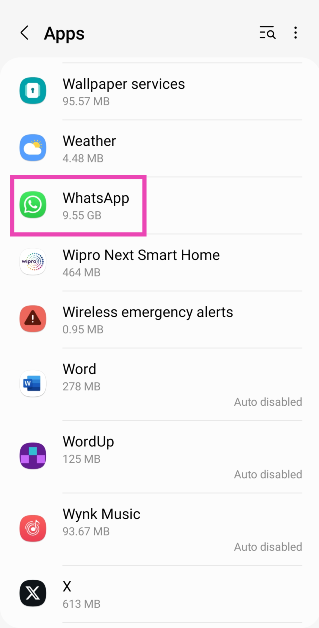
Step 1: Go to Settings and select Apps.
Step 2: Select the app in question.
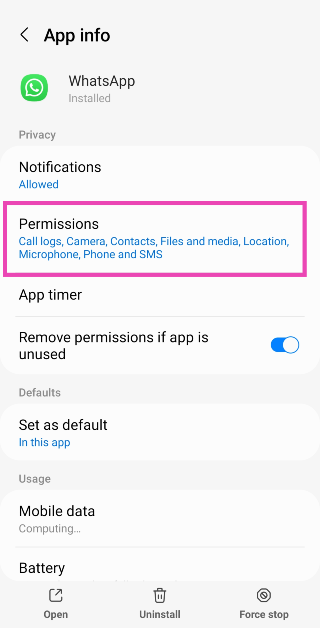
Step 3: Tap on Permissions.
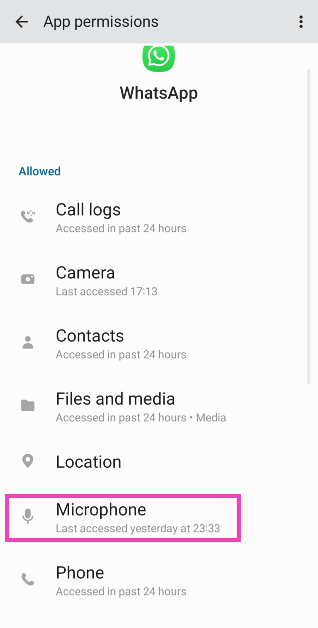
Step 4: Select Microphone and tap on Allow only while using the app.
Unmute your phone
If your microphone stopped working all of a sudden while you’re on a call, it is possible that you may have accidentally hit the mute button. Tap the screen to wake up the dialer, and hit the unmute icon so the listener on the other of the call can hear your voice.
Disconnect Bluetooth accessories
If your Android phone is connected to wireless earbuds or headphones, it will use it for all calling-related tasks. This means your phone’s microphone will be disabled in favour of the TWS’ mic. If you can’t figure your why your Android phone’s microphone isn’t working it is possible you connected to a wireless audio device and forgot about it. Go to Settings>Bluetooth and disconnect any Bluetooth devices connected to your phone.
Check if the mic is being obstructed
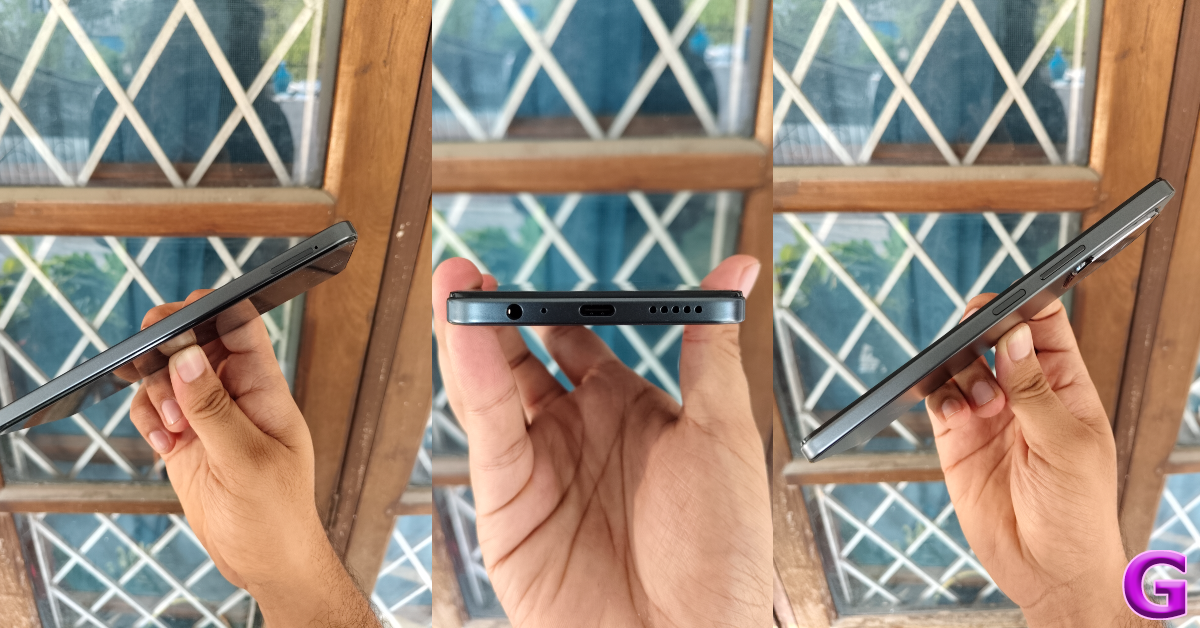
Physical obstructions around the mic can depreciate its quality or keep it from working completely. The biggest obstruction to the microphone is the phone case. While authentic cases have a small cutout to accommodate the mic, cheaper ones may have design flaws. Inspect your phone’s case to see if it is obstructing the mic. When you’re on a call, make sure you are not covering the mic with your palm or fingers.
Clean the microphone
It is common for dust and grime to settle inside the mic, causing it to stop working. If you often use your phone in dusty conditions, the chances of the mic getting stuffed with dirt are significantly higher. Use a needle to unsettle the dirt from the microphone and gently tap the phone against a solid surface to let out the particles. Be careful not to push the needle deeper as it may end up damaging the membrane.
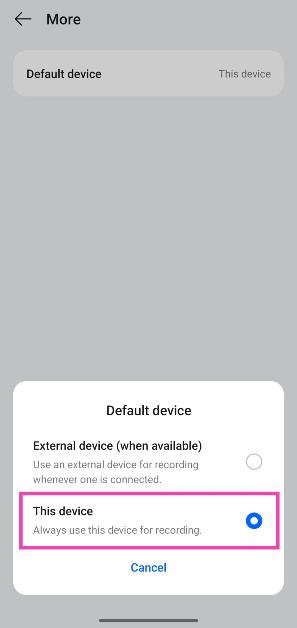
Set your phone as the default recording device
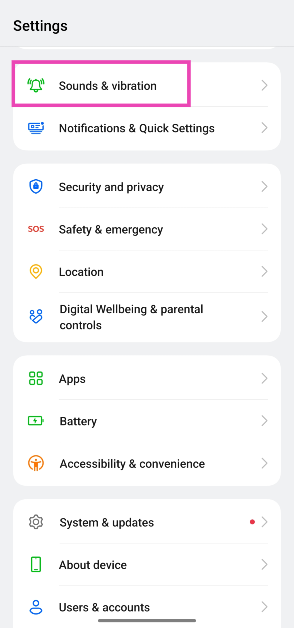
Step 1: Go to Settings and select Sounds & vibration.
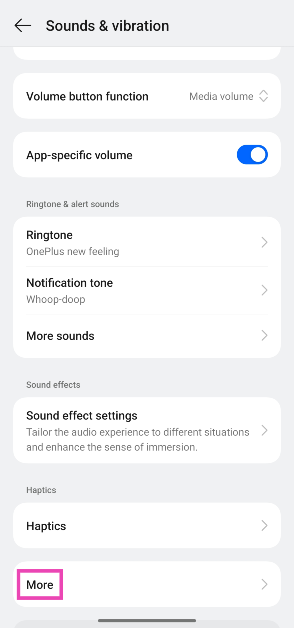
Step 2: Scroll down and tap on More.
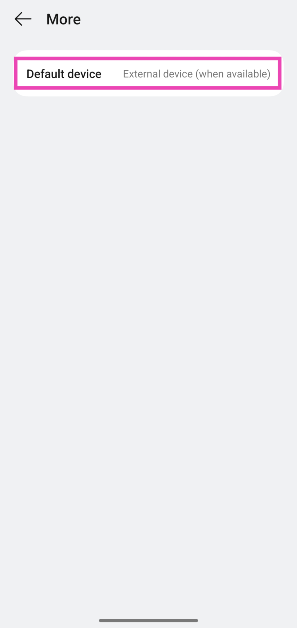
Step 3: Tap on Default device.
Step 4: Select This device.
Restart the phone
Restarting your phone can resolve the background glitches keeping it from working. Press the side key along with the volume-up key to access the power menu. Hit ‘Restart’. You can also reboot your phone by tapping the power icon in the Quick Settings Menu and selecting ‘Restart’.
Update your phone’s OS
Step 1: Go to Settings and select Software update.
Step 2: Tap on Download and install.
Step 3: Select Install now.
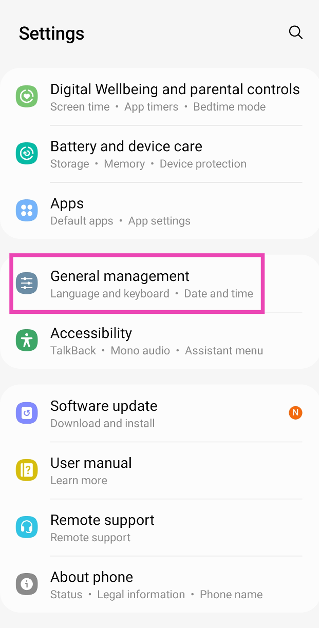
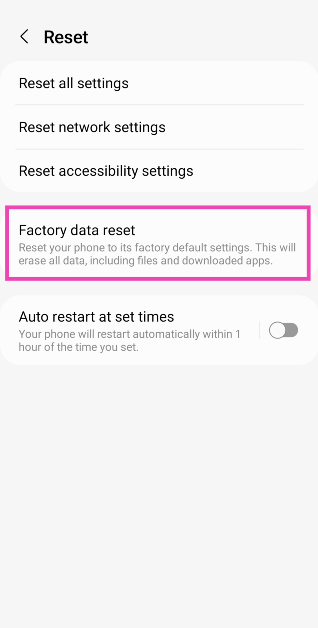
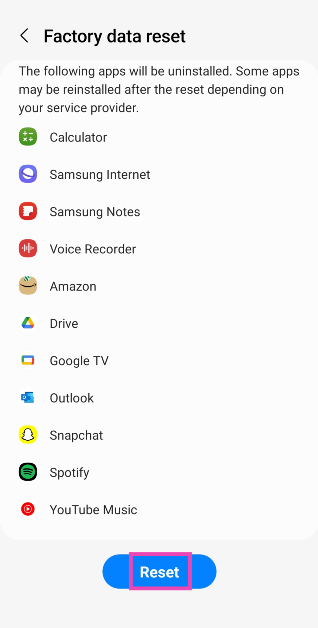
Factory reset your phone
If the fixes mentioned above didn’t work, you can factory reset your phone as a last-ditch solution. This will erase all your personal data, so make sure you create a backup before going ahead with it.
Step 1: Go to Settings and select General management.
Step 2: Tap on Reset.
Step 3: Scroll down and select Factory data reset.
Step 4: Scroll down and hit Reset.
Frequently Asked Questions (FAQs)
How do I revoke microphone access from an app?
Go to Settings>Apps, select the app, tap on ‘Permissions’, and revoke microphone access.
How do I disable microphone access for all apps at once?
Tap the ‘Microphone access’ tile in the Quick Settings Menu to disable it for all apps. You can do the same by going to Settings>Privacy and turning off the toggle switch for ‘Microphone access’.
How do I know for sure if my phone’s microphone is damaged?
To confirm that your phone’s microphone is damaged, perform a factory reset of the device. If that doesn’t restore the microphone, it means that its hardware is damaged.
Is there a way I can use my phone’s microphone while using wireless earbuds on a call?
Go to Settings>Sounds and vibration>More>Default device and tap on ‘This device’.
How do I find out if an app is using my microphone in the background?
If an app is using your phone’s microphone in the background, you will see a green dot or green microphone icon in the top right corner of the screen.
These are the top 10 ways to fix the ‘Microphone not working’ issue on your Android phone. If you’re dealing with a hardware issue, take your phone to an authorised service centre for further assistance. If you know other ways to resolve this problem, let us know in the comments!