OnePlus 10R 5G Review: Sophisticated Design And Good Quality Cameras, worth buying?

The latest smartphone model in town by the OnePlus brand is its 10R 5G. Launched recently, the mobile device comes with 8GB/12GB RAM options paired with 128GB/256GB internal storage. Not only that, but the smartphone also offers different battery size options, each supported by its own fast charger and charging capacity. Coming with a MediaTek Dimensity 8100 (5nm) Octa-core processor and a 120Hz FHD+ Fluid AMOLED display, the new smartphone has already made a name for itself in the Indian market. We finally got the opportunity to test the performance of the device inside-out and we are super excited to share our findings with all of you. Here is the all-new OnePlus 10R 5G review that you must go through, if you are planning to buy.  

OnePlus 10R 5G Review: Design And Display

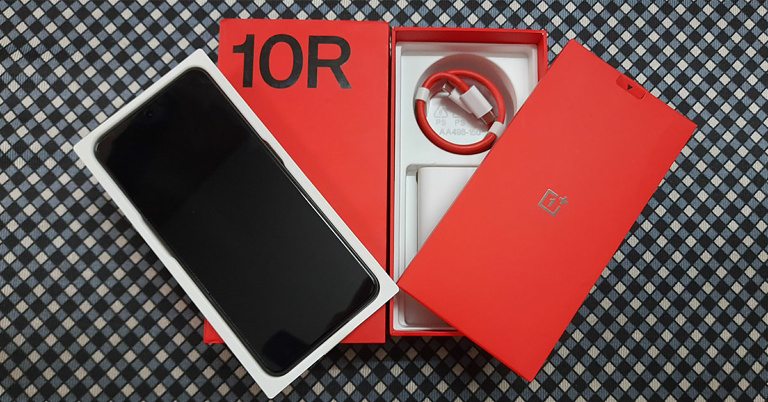
The OnePlus 10R 5G comes sitting in a bulky red rectangular box. The brand does send its standard range of goodies with this one as well. The smartphone is offered in two different battery varieties, one with 4,500mAh and the other with 5,000mAh capacity. It comes in two colours, Sierra Black and Forest Green. We got our hands on its Sierra Black model with 4500mAh battery capacity.  The model is accompanied by a SuperVOOC 150W fast charger, along with a USB Type-C cable, a quick start guide, a welcome letter, a safety information booklet, some cool OnePlus stickers, a body-coloured rubber case, a SIM ejector tool, and a Red Cable Club membership card.  OnePlus 10R 5G Back Lifting the lid of the box, you’ll come face to face with its shiny black display, which has a Corning Gorilla Glass 5 protection. The size of the display screen is 6.7-inches, with an 87.6% screen-to-body ratio. Flip over the phone and the design of its Sierra Black plastic matte back brings a smile to your face. The triple camera system along with the flashlight rest on a sleek black glass mount. If you look at it upside down, it resembles the face with mouth open emoji Extending from the length of the mount are thin glossy black stripes, which take up half the width of the smartphone. The rest half of the back flaunts its shimmer in the most subtle and elegant manner. The OnePlus brand engraving at the bottom completes the overall look in style.  OnePlus 10R 5G Frame The frame of the OnePlus 10R 5G also brings a little surprise for you. Instead of being curved as seen in most smartphones, it is wide and flat. It comes in body colour with the same matte finish and soft shimmer as on its back. The power button comes on the right side while the left side has been reserved for the separated upper and lower volume buttons. At the bottom lies the SIM card tray, a Type-C USB port and one of the two speakers from its stereo audio system.  As you bring the phone to life, its 120Hz FHD+ Fluid AMOLED display lights up, and so does your excitement level. The screen has a resolution of 1,080 x 2,412 pixels, a 20:9 aspect ratio, and a 394ppi pixel density. The colours of the smartphone interface are bright and together with contrast appeal to the eyes. However, when taken under direct sunlight, the brightness levels have to be set to at least 70% for the screen to be perfectly legible. But when set to 100%, the brightness beats even the harshest sun rays and makes the screen visible effortlessly. The video streaming experience on Youtube was extremely vivid and life-like. Streaming quality can be upgraded up to 2160p at a 60fps rate. The picture clarity is crystal clear and almost makes you forget the presence of the glass screen in between. The popping colours are quite eye-pleasing. The stereo audio output makes the experience even more cinematic. The loudness and crispness of the sound are also commendable. Sadly, for watching movies and TV series, the OnePlus 10R 5G does not support Netflix on it (again very strange). Even if the app is installed directly from the Netflix website instead of the Play Store, it still won’t work.  Gaming Experience on OnePlus 10R 5G The gaming experience on the smartphone was also a delight. The device was tested by playing Asphalt 9 Legends on it. Gaming graphics appear very vibrant and colourful. The touch experience is smooth and the response to touch is lag-free. The visuals together with the sound quality as well as the soft and swift touch commands give users the most enjoyable mobile gaming experience.  Overall, the design of the OnePlus 10R 5G is successful in winning you over to its side. Style and elegance sparkle from every angle of its body. The display of the smartphone is also quite appreciable.  Read also: OnePlus Nord CE 2 Review: Super Stylish Design With Excellent Performance

OnePlus 10R 5G Review: Performance And Cameras

Elaborating further upon the OnePlus 10R 5G specs, as said it is offered with 8GB/12GB RAM options coupled with 128GB/256GB internal memory. The phone comes with MediaTek Dimensity 8100-Max (5nm) chipset along with an Octa-core processor. It supports nano dual-SIM but without a slot for the SD card. It also supports Wi-Fi, Bluetooth 5.2 and 5G connectivity. It comes with an under-display optical fingerprint sensor, too.  The phone comes pre-installed with the Android 12 based OxygenOS 12.1 system. The 4,500mAh battery of the smartphone supports SuperVOOC 150W fast charging and can get fully charged in less than half an hour. The battery life is also fair and can last up to more than a day upon mild to moderate usage.  Home-Screen-and-App-drawer The home screen and app drawer on the system are standard, as seen in the recent OnePlus smartphone models. The interface is pretty simple to use. The icons, their size, arrangement, look and feel are easy to get accustomed to. Within the app drawer, the apps are sorted alphabetically. There were no crashes observed while using multiple applications on the smartphone. Switching between different application windows was also smooth. Moreover, the device does not seem to get heated easily upon continuous usage.  OnePlus 10R 5G Camera Coming to the OnePlus 10R 5G camera review, the device comes with a 50MP+8MP+2MP rear triple camera system along with a 16MP front camera. There are 3 zoom modes offered, a 0.6x, 1x, and a 2x zoom. The zoom mode options work only with the rear camera. The ultrawide 0.6x zoom mode works decently, although the captures slightly lack sharpness. The quality of the 1x zoom is maintained exactly as it is via the 2x zoom, with no compromise in capturing the details or colour quality. The image clarity is also crisp and deserves applause. 
OnePlus 10R 5G Photo-Mode-Vs-Night-Mode
OnePlus 10R 5G: Photo Mode Vs Night Mode
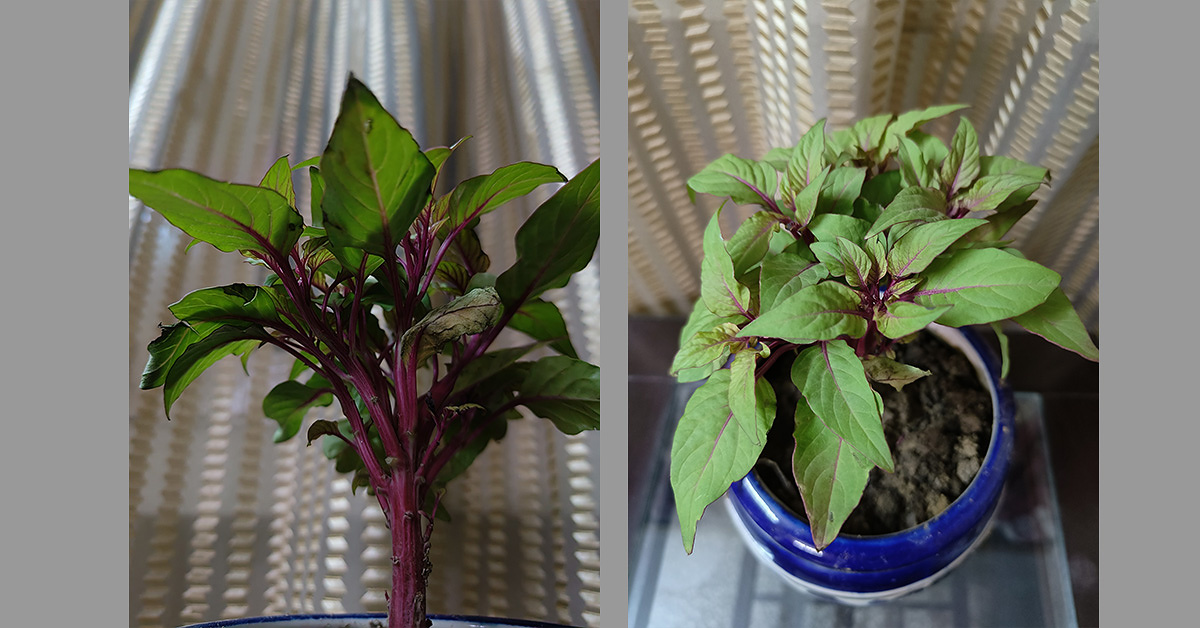
Recordings from the rear camera can be made in up to 4k resolution with a 30fps frame rate. With the front camera, recordings can be made in up to 1080p at a 30fps frame rate. The clarity of the videos shot from the rear camera is great and the colours are full of contrast. Recordings from the front camera are of even better quality. The details are captured very well while the skin tone is pretty close to reality. The Night mode from the rear camera brightens up the capture subtly when taken in dim light conditions. However, the results tend to reflect a slight greenish tint in them. 
Photo Mode Vs Portrait Mode
OnePlus 10R 5G: Photo Mode Vs Portrait Mode
The rear camera’s Photo mode seems to work even better than the Portrait mode. The colours in the shot have a pop element in them and the clarity is astounding. Images captured from the 50MP mode are even more vivid and have enhanced quality. 
OnePlus 10R 5G 50MP Mode
OnePlus 10R 5G: 50MP Mode
Overall, the camera package provided with the smartphone is nice.  Read also: OnePlus Nord CE 2 Lite 5G Review: Should You Buy It At This Price?

Verdict

OnePlus 10R 5G Geekbench-5-scores To sum up, the OnePlus 10R 5G is a praiseworthy smartphone providing quality features to its customers. The silhouette of the device is brilliantly designed, while its display is also commendable. The performance delivered is quite smooth and the overall camera quality is good. Geekbench 5 gives it a single-core score of 890 and a multi-core score of 3,528 (the highest amongst all comparable devices). Overall, the pros of the smartphone weigh more than its cons. If Netflix streaming is a priority for you, you might want to keep looking for other available alternatives. Otherwise, we would gladly give you a go-ahead for buying this device for its lovely cameras, display and performance.  The price of the OnePlus 10R 5G in India starts from Rs 38,999. 

OnePlus 10R 5G Tech Specs

RAM 8GB/12GB RAM
Storage 128GB/256GB
CPU MediaTek Dimensity 8100-Max
SIM Support Dual-SIM 5G
Rear Cameras 50MP+8MP+2MP
OS Android 12 based OxygenOS 12.1
Other Features Wi-Fi, Bluetooth 5.2

OnePlus 10R 5G Pros

  • Stylish Design
  • Decent Battery Life
  • Good Quality Camera

OnePlus 10R 5G Cons 

  • Does Not Support Netflix
For the latest gadget and tech news, and gadget reviews, follow us on Twitter, Facebook and Instagram. For newest tech & gadget videos subscribe to our YouTube Channel. You can also stay up to date using the Gadget Bridge Android App. You can find the latest car and bike news here.

Amazon Quiz Answers Today 8 June 2022: Participate to win Rs 30,000

Amazon is back with another quiz on its mobile platform. The Amazon Quiz is conducted every day for its customers. Customers from different parts of the country are participating in the daily quiz. Today’s Amazon quiz is now live on the Amazon App. The customers who participate in the 8 June 2022 Amazon Quiz will get a chance to win Rs 30,000 Amazon pay Balance. The Amazon Quiz can be played from 12 AM to 11:59 PM. For those who are unaware of the quiz, the e-commerce platform brings a fresh quiz on a daily basis which consists of five questions related to general knowledge and current affairs. The participants need to answer all the questions correctly and their names will be selected for a lucky draw. The winner will be announced at the end of the month. One wrong answer could eliminate you from the quiz. Only app users are eligible to participate in the Quiz. Check Out 8 June 2022 Amazon Quiz Answers. Amazon Quiz Today Prize – Rs 30,000 Amazon Pay Balance Quiz Date – 8 June 2022 Daily Timing – 12 AM to 11:59 PM Winner Announcement – Today 12 PM

Amazon Quiz Answers Today 8 June 2022

Question 1: The port of Mariupol, under attack is located in which country? Answer: Ukraine Question 2: Who was India’s only individual gold medalist at the recently concluded Asia Cup in Archery? Answer: Sakshi Chaudhary Question 3: In the Amazon Prime series ‘Reacher’ which of these actors plays the title role of Jack Reacher? Answer: Alan Ritchson Question 4: What is the name of this landmark? Answer: London Eye Question 5: This is the flag of which country that depicts a famous site? Answer: Cambodia

How To Play Amazon Quiz

Only app users are eligible to play the Amazon quiz every morning from 12 AM to 11:59 PM. The quiz is not available on the desktop. For those who are unaware of how to play the Amazon quiz below are the steps, you can follow to take the quiz.
  • Firstly download the Amazon app from Google Play Store or App Store
  • Now fill in the required information through the Sign Up option.
  • You need to log in to the Amazon app and scroll down on the home screen to find the Amazon Quiz banner.
  • Tap on the Amazon Quiz banner and tap on the Start button to start the Quiz.
  • Now you will get 5 questions and you need to answer them correctly. One wrong answer will eliminate you from the Quiz.
  • After answering all the questions correctly you are now eligible for a Lucky Draw.
  • The winner’s name will be announced today at 12 PM.
For the latest gadget and tech news, and gadget reviews, follow us on TwitterFacebook and Instagram. For newest tech & gadget videos subscribe to our YouTube Channel. You can also stay up to date using the Gadget Bridge Android App. You can find the latest car and bike news here.

Moto G82 5G with 120Hz AMOLED display launched in India

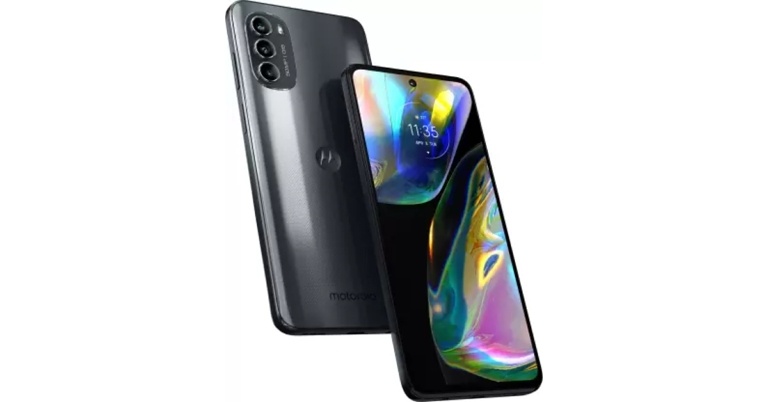
Motorola has expanded its mid-range segment with the announcement of the Moto G82 5G. The newly launched smartphone is powered by Qualcomm Snapdragon 695 SoC. Moreover, the phone features a triple rear camera set-up and an AMOLED display with a refresh rate of 120Hz. Moreover, the phone packs a 5,000mAh battery with 30W TurboPower fast charging. Also, there are dual stereo speakers with Dolby Atmos support.

Moto G82 5G price in India and sale details

Moto G82 5G has been launched in India at a starting price of Rs 21,499 for the 6GB RAM with a 128GB storage model. The phone is also available in 8GB RAM with a 128GB storage option which costs Rs 22,999. The device is scheduled to go on sale from June 14 via Flipkart, Reliance Digital, and select retail outlets. The phone will come in two colour options Meteorite Gray and White Lily. Customers who pay with SBI credit cards can get a Rs 1,500 immediate discount on the Moto G82 5G at launch. Reliance Jio is also throwing in Rs 5,049 in freebies with the phone. Moto G82 5G price in India and sale details

Moto G82 5G specifications

The Moto G82 5G has a 6.6-inch full-HD+ AMOLED display with 1,080×2,400 pixels of resolution. The screen has a 20:9 aspect ratio and a 120Hz refresh rate. The display also supports DC Dimming, DCI-P3 colour gamut and comes with SGS Blue Eye certification. The handset runs on Android 12 and a Snapdragon 695 SoC is found within the phone, along with up to 8GB of LPDDR4X RAM. The Moto G82 5G comes preloaded with 128GB of inbuilt UFS storage that can be expanded through a microSD card up to 1TB. The Moto G82 5G is equipped with a triple rear camera system that includes a 50-megapixel primary sensor and an f/1.8 lens with optical image stabilisation (OIS). An 8-megapixel ultra-wide shooter that also functions as a depth sensor and a 2-megapixel macro shooter are also included in the camera configuration. In addition to this, there is a 6-megapixel selfie camera sensor with an f/2.2 lens on the front for selfies and video chats. Moto G82 5G price in India and sale details The Moto G82 5G is equipped with dual stereo speakers that support Dolby Atmos. There are two microphones on board as well. The phone has 5G, 4G LTE, Wi-Fi 802.11ac, Bluetooth v5.1, GPS/ A-GPS, NFC, USB Type-C, and a 3.5mm headphone jack for connectivity. An accelerometer, ambient light, gyroscope, magnetometer, and proximity sensor are among the sensors on board. There’s also a fingerprint sensor on the side. In addition to this, the smartphone houses a 5,000mAh battery that comes with 30W TurboPower fast charging support. The moto g82 also delivers the best connectivity features in the segment with support for 13 5G Bands, 3 Carrier Aggregation, 4X4 MIMO, and more. It is also IP52 rated for dust and water resistance. For the latest gadget and tech news, and gadget reviews, follow us on TwitterFacebook and Instagram. For newest tech & gadget videos subscribe to our YouTube Channel. You can also stay up to date using the Gadget Bridge Android App. You can find the latest car and bike news here.  

HP LaserJet Tank MFP 1005w printer review: Excellent for home and professional use

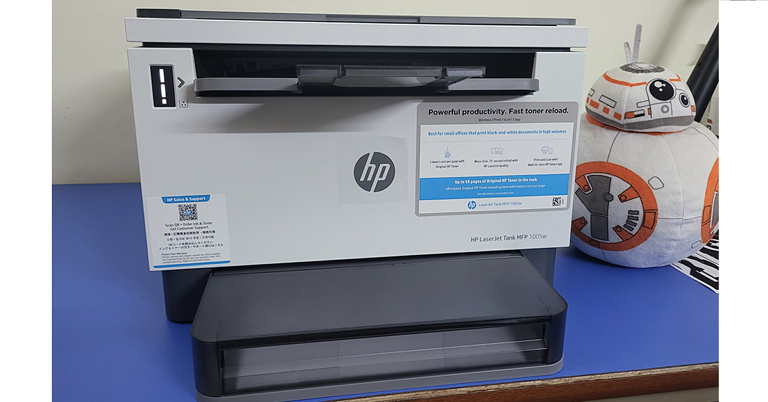
HP is a well-known brand that has been bringing out one of the best innovative printers for home as well as professional use. The latest from camp Hewlett Packard is HP LaserJet Tank MFP 1005w printer that is a new-age printer that ensures users face minimal downtime due to ink-toner refill issues. This is the first of its type that HP has brought to India and this is HP LaserJet Tank MFP 1005w printer review, which you all have been waiting for. HP LaserJet Tank MFP 1005w printer review: Design Out of the box, the HP LaserJet Tank MFP 1005w printer looks (dressed in white and grey) like the usual multi-function (MFD) laser printers you get from HP, just a little boxier. Well, that does not mean it is not good looking, it is a fairly attractive device, and it will look really good sitting tight in your home office. Since it is an MFD, you get an A4 size scan bay on top with a couple of buttons by its side. HP-LaserJet-Tank-MFP-1001w-printer-scan-bed The buttons include the power key, scan and print functions, cancel, info buttons and a special key to scan ID cards. With that, a Single colour LED display can be found above the buttons as well as the WiFi key. Under the scan bed, you get an output tray that holds up to 100 A4 size pages. HP-LaserJet-Tank-MFP-1001w-printer-keys If you lift this up you will also the compartment where you get the toner ink input point. More on it a bit later. On the left front, the printer also shows you ink levels, which is a great feature to have. This way you will always know when the printer needs a refill. HP-LaserJet-Tank-MFP-1001w-printer-ink-level At the bottom, you will find the paper input tray that can hold up to 150 A4 pages. This is protected by a dusk case that neatly attaches to the printer and keeps the pages dust free. The power and the USB ports can be found at the back (left side) and are fairly easy to reach. Overall, the printer is very nice to look at and is not heavy either. At under 8 KGs, we were able to move it around effortlessly. printer-ports HP LaserJet Tank MFP 1005w printer review: Performance Coming to the most important factor of any printer — its performance. But first, let’s talk about the setup process of the HP LaserJet Tank MFP 1005w printer. We spent hours configuring this MFD printer to later realise that it does not support Windows 11 (fully), there was a driver conflict/bug we faced. While the printer did work with our Windows 11 laptop via the supplied USB cable, it would just not connect or give a print command when connected to the WiFi networks and we tried it with two different modems. Moving past that, we brought a Windows 10 laptop and downloaded the full drivers set from the HP website and did not choose to install using the HP My Smart app, the whole process got over in under 10 minutes. Everything worked wonderfully well and printing or scanning over WiFi happened, yes we breathed a sigh of relief. Moving past the setup process hiccup, we loved every bit of this printer. Read Also: Cheapest Wireless Colour Laser Printers in India (2022) The company claims it can print up to 22 pages per minute (PPM) of black and white pages. So we put it to the test, we extracted 17 pages at 600DPI/Max settings and 19 PPM at 400DPI eco settings. This might be a little lower than what HP says, however, it is still great for a home laser jet. The print quality is very good too. Since it is a single colour (black) printer we printed some B&W images with it and the results were frame-worthy. We did not see any blurry edges or bleeding of ink in any manner. print-sample Over that, HP LaserJet Tank MFP 1005w MFD scans fast too. If you want to scan a full A4 size paper then it scans and sends the image to your laptop in under 25 seconds. Also, you can give scan or print commands using the HP Smart App from your smartphone. Just remember the smartphone and the printer need to be on the same WiFi network for the initial setup (with Bluetooth turned on). However, we are not a big fan of this app and there is some fine-tuning from HP’s end needed here. Now comes the best feature of the HP LaserJet Tank MFP 1005w printer, its refill. Usually refilling a toner cartridge is a tedious task and one would be spending a whole day going to the market to get a refill. Nevertheless, with this printer users get quite a big relief. You can order a refill pack from HP (which cost between Rs 750-900 and for first-time buyers you are getting 1 for free) and just open the toner bay and pop the toner cartridge into the circular intake and twist to refill. printer-ink-bay Though we have not tried this, HP claims the whole process takes 15-20 seconds. Up to 5,000 pages can be printed with each refill and when you buy the HP LaserJet Tank MFP 1005w printer you get the ink already filled up (within the printer). So (if you buy right now) you end up paying from the third print cycle onwards. How? One, the printer already has ink. Two, you get a free refill toner (under offer right now). So, when these two cycles get over then you pay for the third one and so on. Verdict So, is this wireless printer that supports printing and scanning from PC, laptops and Android or iOS mobile worth Rs 22,668? Short answer – definitely yes. It is a great device to own. It looks classy and does not take too much space. Can spurt out exquisite black and white prints, can just scan, can scan and print directly and also can take commands from your mobile phone. We see very less to not buy this printer. Hopefully, the Windows 11 drivers will solve any hiccups with Win 11 machines. If you can afford it, this will be a long-lasting printer in your home office or SMB setup you have. If you are in the market for a good multi-function scan and print solution your search ends here. HP LaserJet Tank MFP 1005w printer pros Excellent print quality Compact size Fast printing and scanning HP LaserJet Tank MFP 1005w printer cons Does not work fully with Windows 11 machines (yet) For the latest gadget and tech news, and gadget reviews, follow us on TwitterFacebook and Instagram. For newest tech & gadget videos subscribe to our YouTube Channel. You can also stay up to date using the Gadget Bridge Android App. You can find the latest car and bike news here.


Garena Free Fire Redeem Codes Today 7 June 2022: Here is how to claim them

Garena Free Fire is a battle royale game with regular awards and tournaments to keep players interested. If you play Garena Free Fire, you should be aware of the redeem codes that are released on a daily basis. However, because the battle royale game is banned in India, players from other countries can use the Free Fire Redeem codes daily. If you’re unfamiliar with the Garena Free Fire redeem codes or don’t know how to get them, we’ve put together a step-by-step guide to help you redeem them. Check out Garena Free Fire Redeem Codes for June 7. The Free Fire redeem codes are a great way to get free stuff. These are 12-digit codes that contain alphabets and numbers, as well as an expiration date and time. Because the Garena FF redeem codes cannot be used more than once, you should hurry to the redemption page to claim your free reward before someone else does. To get a free reward, all you have to do is go to reward.ff.garena.com/en, which is the official redemption page. Also, keep an eye on this space for daily updates on Garena Free Fire redemption codes and rewards.

Garena Free Fire Redeem Codes Today 7 June 2022

  • FFAC 2YXE 6RF2
  • FFBB CVQZ 4MWA
  • U08S4 7JGJ H5MG
  • ZZAT XB24 QES8
  • FFIC 33NT EUKA
  • VNY3 MQWN KEGU
  • FF9M J31C XKRG
  • FFIC JGW9 NKYT
  • FFCO 8BS5 JW2D

How to Get Free Fire Redeem Codes for Garena on June 7?

  • Visit the Garena Free Fire game’s official website at reward.ff.garena.com.
  • Use your Facebook, Google, VK, Apple ID, Huawei ID, or Twitter account to log in.
  • You’ll be taken to a valid redemption code (s)
  • Copy and paste the 12-digit redemption code into the text box.
  • On the screen, a dialogue box will appear.
  • ‘Ok’ should be selected.
For the latest gadget and tech news, and gadget reviews, follow us on TwitterFacebook and Instagram. For newest tech & gadget videos subscribe to our YouTube Channel. You can also stay up to date using the Gadget Bridge Android App. You can find the latest car and bike news here.

WWDC22 Highlights: iPadOS 16 brings Stage Manager, iCloud Shared Photo Library, and new multitasking features to Apple iPads

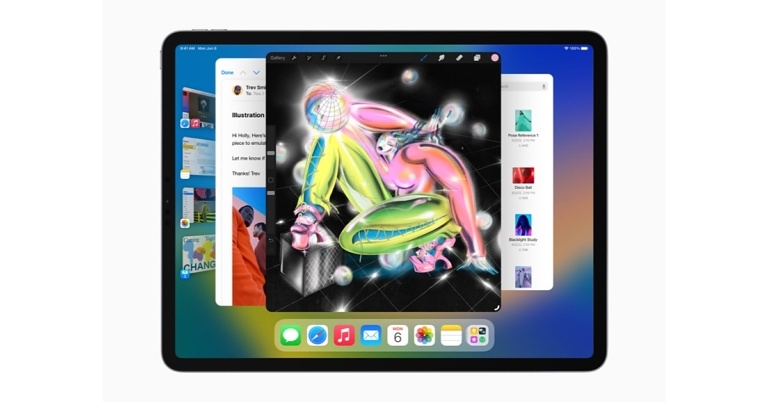
The keynote talk for WWDC 2022 also featured the introduction of iPadOS 16. The Stage Manager function, which is also included on macOS 13, improves multitasking on iPadOS. For iPadOS 16, Apple is also releasing a slew of new features like customizable toolbars, the option to change extensions in the Files folder, Navigation buttons in the Files app, and other features are on the way from Apple. There’s also the ability to search for and merge contacts, create lists in contacts, and undo/redo across the system. The Weather app, the option to modify file extensions, and virtual memory swapping are also new features. In Messages, the new iPadOS introduces new ways to share and connect. Messages now have new features that make it simple to start collaborating and managing shared content across Files, Keynote, Numbers, Pages, Notes, Reminders, and Safari, as well as third-party apps. Everyone on the thread is automatically included to the document, spreadsheet, or project when users send a collaboration invitation through Messages. Everyone can see updates to shared files right at the top of the Messages thread when someone makes a change. When a user is working on a collaborative project, they may easily get into the related Messages conversation or make a FaceTime session with their collaborators by simply tapping. Users can now edit or remember recently sent messages, retrieve communications that have been accidentally erased, and mark conversations as unread so that they can return to them later. In addition to this users may now start a SharePlay session via Messages, allowing them to choose a shared activity — such as a movie, TV show, workout, or game — and enjoy it together in real-time while conversing. Freeform is a new collaboration tool with a customizable canvas that allows users to see, share, and work in one location without having to worry about layouts or page sizes, and it also supports Apple Pencil. Users can see other people’s contributions as they upload information or make changes. Freeform, which will be available in iPadOS 16 later this year, allows collaborators to start a session from FaceTime and see updates from others in the Messages thread. Mail has been updated in iPadOS16 to include new features. Users are given the option to stop message delivery before it reaches the inbox of a recipient, schedule emails to be sent at the most convenient time, and move sent emails to the top of their inbox to swiftly send a follow-up. Remind Later allows users to resurface messages at any time and date, and users can be informed if they fail to add a crucial portion of the message, such as an attachment or recipient. Additionally, an all-new search experience corrects typos and uses synonyms for search phrases to provide more full and accurate results, and lets users to get a deeper perspective of contacts, shared material, and more. Similar to iOS 16, iPadOS 16 is also getting iCloud Shared Photo Library which is a way to share photos in Memories, Featured Photos, and the Photos widget with up to six family members, so everyone can collaborate and enjoy the collection. Users can choose to submit all of their previous images or use setup tools to contribute specific photos based on a start date or individuals in the photos. Manually adding photos to the collection is possible, as well as using Bluetooth proximity or sharing suggestions in For You. The library is updated for everyone when someone in the Shared Library adds, modifies, or deletes photographs. Passkeys, a simpler and safer sign-in solution that replaces passwords on the web and in apps, make browsing in Safari even more secure. Passkeys are stored on the iPad and are unique to the websites for which they were created. Hackers can’t leak or deceive users into sharing passkeys because they’re unique digital keys that stay on the device rather than being stored on a web server. By scanning the QR code with an iPad and authenticating with Face ID or Touch ID, users may login to websites or apps on Apple and non-Apple devices using their saved passkey. The Weather App is also coming to the iPad. Users may access the most significant weather information with only a swipe, or explore maps to check precipitation, air quality, and temperature with just a few taps. Users can also receive notifications when a severe weather alert is issued in their location, as well as monitor the air quality using a colour-coded scale. iPadOS 16 has Live Text and Visual Look Up, just as iOS 16. The new version also contains a brand-new look for the Home app, as well as Matter support. In addition, the iPadOS update includes the new Messages app, which allows users to edit or recall text messages via the latest iOS release.
Stage Manager
Stage Manager
The Apple iPad will now get a Stage Manager that organises apps and windows for you, making switching between jobs a breeze. Users may now construct overlapping windows of various sizes in a single view, drag and drop windows from the side, or start apps from the Dock to build groups of apps for faster, more flexible multitasking on the iPad for the first time. Other open apps and windows are sorted on the left-hand side in order of recency, with the window of the programme users are working on prominently displayed in the centre. Stage Manager enables complete external display capability with resolutions up to 6K on iPad Pro and iPad Air with the M1 processor and works with up to four apps on the iPad and four apps on the external display. For the latest gadget and tech news, and gadget reviews, follow us on TwitterFacebook and Instagram. For newest tech & gadget videos subscribe to our YouTube Channel. You can also stay up to date using the Gadget Bridge Android App. You can find the latest car and bike news here.

WWDC22 Highlights: New MacBook Air and Pro powered by the new M2 chip announced

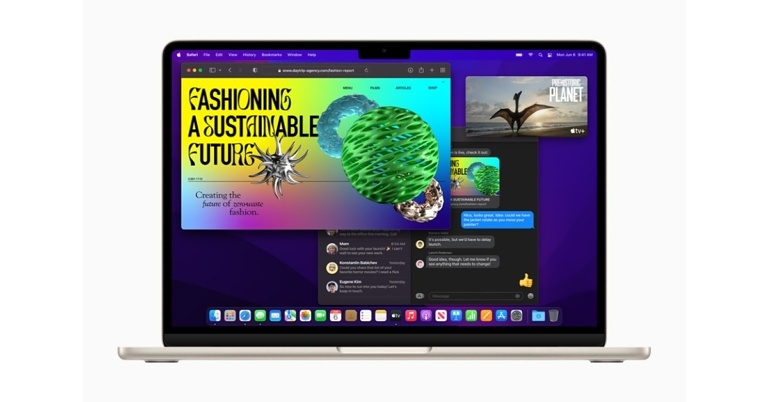
An updated 13-inch MacBook Pro was also unveiled at Apple’s WWDC keynote. The new machine comes with no notable design changes aside from the processor refresh. Apart from this, the company has introduced a new MacBook Air powered by M2 processor. It now includes MagSafe charging. Yes, there is a notch on the LCD featuring a 13.6-inch liquid retina display. The MacBook Air will also include a 1080p camera. It comes with a four-speaker audio system with Spatial audio.

Apple MacBook Air and MacBook Pro price and sale details

The pricing of an Apple MacBook Air starts at $1,199 which translates to Rs 93,300 whereas the Apple MacBook Pro will be available at a starting price of $1,299 which converts to Rs 1,01,100. will be available in Midnight, Silver, Space Grey, and Starlight Gold colour options through the Apple Online Store, as well as configuration options through the Apple website. The new MacBook models will be available in India starting next month. The 13-inch MacBook Pro with M2 starts at Rs 1,29,900, while the MacBook Air with M2 starts at Rs 1,19,900 and Rs 1,09,900 for education.

Apple MacBook Air and MacBook Pro features

Apple at WWDC22 unveiled a fully revamped MacBook Air and an updated 13-inch MacBook Pro, both of which are powered by the new M2 chip. MacBook Air has a bigger 13.6-inch Liquid Retina display, a 1080p FaceTime HD camera, a four-speaker sound system, up to 18 hours of battery life, and MagSafe charging, as well as an all-new, breathtakingly thin design and even greater speed.It now comes in four different colours: silver, space grey, midnight, and starlight.
WWDC22: New MacBook Air and Pro powered by the new M2 chip announced
MacBook Air
The M2 chipset is the successor to the M1 chip which now has up to 10 cores — two more than M1. It also includes a next-generation 8-core GPU. M2 supports up to 24GB of rapid unified memory and has a unified memory bandwidth of 100GB/s, allowing it to handle increasingly larger and more complicated workloads with ease. M2 includes a next-generation media engine and a strong ProRes video engine enabling hardware-accelerated encoding and decoding, allowing M2 devices to play back more streams of 4K and 8K video than before. MacBook Air has an entirely new design that is extremely slim now with a sturdy, all-aluminium unibody enclosure measuring just 11.3 mm thin and weighing only 2.7 pounds. All of the capabilities of the MacBook Air are integrated into a silent, fanless design thanks to M2’s power efficiency. MagSafe is back on the MacBook Air, providing consumers with a dedicated charging connector that is simple to attach while also protecting the MacBook Air when it is plugged in by releasing swiftly if the charging cable is mistakenly tugged. There are two Thunderbolt ports on the MacBook Air for connecting a range of accessories, as well as a 3.5 mm audio socket that supports high-impedance headphones. A full-height function row with Touch ID and a spacious, industry-leading Force Touch trackpad are also included in the Magic Keyboard. The new MacBook Air comes with a 13.6-inch Liquid Retina display that has been pushed closer to the sides and up around the camera to accommodate the menu bar. previously, with 500 nits of brightness. In addition, the upgraded display now supports 1 billion colours, resulting in exceptionally bright photos and movies. The new 1080p FaceTime HD camera on the MacBook Air has a bigger picture sensor and more efficient pixels. The laptop has a four-speaker sound system. The speakers and mics are totally integrated between the keyboard and display. With Dolby Atmos, the MacBook Air also delivers immersive Spatial Audio for music and movies. The MacBook Air comes with a variety of charging choices, including a brand-new 35W compact power adapter with two USB-C ports that allow users to simultaneously charge two devices. For the first time, the MacBook Air features quick charge, which allows it to charge up to 50% faster in just 30 minutes with a 67W USB-C power adapter. M2 chip is also available for the 13-inch MacBook Pro with up to 24GB of unified memory, ProRes acceleration, and up to 20 hours of battery life in a small package.
Apple MacBook Air and MacBook Pro price and sale details
MacBook Pro
Working with RAW photographs in programmes like Affinity Photo is over 40% faster with a faster 8-core CPU and 10-core GPU than the previous generation8, and up to 3.4x faster for people upgrading from a model sans Apple silicon. Graphics-intensive titles such as Baldur’s Gate 3 run roughly 40% quicker than on the previous 13-inch MacBook Pro10, and up to 3.3x faster for users switching from a device sans Apple hardware. The 13-inch MacBook Pro also supports up to 24GB of unified memory (with 50% greater memory bandwidth) thanks to M2, making multitasking and working a breeze. M2’s media engine supports ProRes encode and decoding, allowing users to play back up to 11 streams of 4K and two streams of 8K ProRes video. They can also convert video projects to ProRes roughly three times faster than previously. For the latest gadget and tech news, and gadget reviews, follow us on TwitterFacebook and Instagram. For newest tech & gadget videos subscribe to our YouTube Channel. You can also stay up to date using the Gadget Bridge Android App. You can find the latest car and bike news here.

Amazon Quiz Answers Today 7 June 2022: Participate to win Rs 1,000

Have you participated in the Amazon Quiz today? If not then participate in the 7 June 2022 Amazon Quiz as it has already gone live on the app. The daily quiz can be played from 12 AM to 11:59 every day on the mobile app platform. Today e-commerce is giving the chance to win Rs 1,000 Amazon Pay Balance. Every day Amazon brings a fresh quiz for its customers. By participating in the quiz the participants can win an Amazon Pay Balance of up to Rs 50,000. The quiz can only be played on the mobile app as it is not available for the desktop platform. The quiz contains five easy questions and you have to answer all the questions correctly. The participants will then be shortlisted for a lucky draw to select a winner. Whereas the results are declared at the end of the month. Check out today’s Amazon quiz answers to win Rs 1,000. Amazon Quiz Today Prize – Rs 1,000 Amazon Pay Balance Quiz Date – 7 June 2022 Daily Timing – 12 AM to 11:59 PM Winner Announcement – Today 12 PM

Amazon Quiz Answers Today 7 June 2022

Question 1: Who among these famous actresses features in the Amazon Prime Series ‘Bestseller’? Answer: Carens Question 2: In which city did Imam-ul-Haq score 2 centuries in Pakistan’s first home Test against Australia in 24 years? Answer: Rawalpindi Question 3: Who among these famous actresses features in the Amazon Prime Series ‘Bestseller’? Answer: Shruti Haasan Question 4: Where is the world’s first spaceport for orbital and human launches built by the USSR located? Answer: Baikonour Question 5: Name the fish captured by these men which is nearly extinct due to over fishing for caviar. Answer: Sturgeon

How To Play Amazon Quiz

Only app users are eligible to play the Amazon quiz every morning from 12 AM to 11:59 PM. The quiz is not available on the desktop. For those who are unaware of how to play the Amazon quiz below are the steps, you can follow to take the quiz.
  • Firstly download the Amazon app from Google Play Store or App Store
  • Now fill in the required information through the Sign Up option.
  • You need to log in to the Amazon app and scroll down on the home screen to find the Amazon Quiz banner.
  • Tap on the Amazon Quiz banner and tap on the Start button to start the Quiz.
  • Now you will get 5 questions and you need to answer them correctly. One wrong answer will eliminate you from the Quiz.
  • After answering all the questions correctly you are now eligible for a Lucky Draw.
  • The winner’s name will be announced today at 12 PM.
For the latest gadget and tech news, and gadget reviews, follow us on TwitterFacebook and Instagram. For newest tech & gadget videos subscribe to our YouTube Channel. You can also stay up to date using the Gadget Bridge Android App. You can find the latest car and bike news here.

WWDC22 Highlights: WatchOS 9 will bring all of these capabilities to Apple Watch

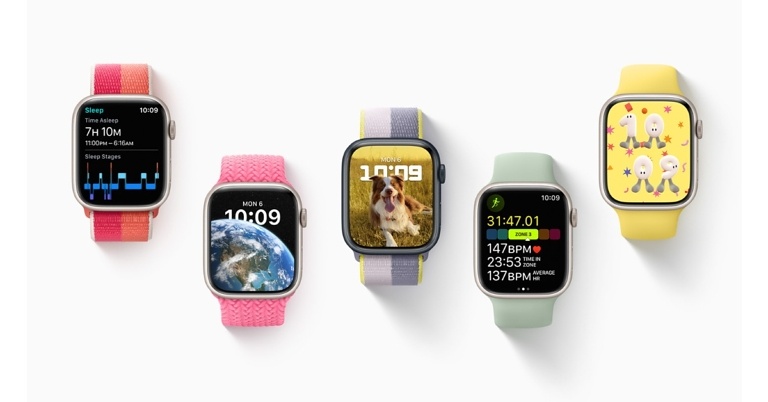
At Apple’s annual Worldwide Developers Conference 2022, the company unveiled a sneak peek at WatchOS 9. Due to COVID-19, the WWDC21 was hosted online. Apple announced a new health update with the announcement of watchOS 9. Features like new sleep monitoring tools, REM sleep stages and more are coming to the Sleep app. The atrial fibrillation detection tool will be upgraded as well and users will now be able to keep track of their prescriptions with notifications and alerts for probable drug interactions. Not just that it will get more customisable watch faces, and an enhanced Workout app. WatchOS is getting four new watch faces: Playtime, a dynamic piece of art created in collaboration with artist Joi Fulton; Metropolitan, a classic, type-driven watch face where the style changes when the Digital Crown is rotated; and Astronomy, an original face that has been completely remastered and features a new star map and current time.. The astronomy one is receiving a makeover. On some of the most iconic watch faces, such as Utility, Simple, and Activity Analog, watchOS 9 adds updated and modernised complexities, as well as background colour editing for Modular, Modular Compact, and X-Large for further personalization. More photographs, including kittens, dogs, and landscapes, are featured in the new Portraits face, and Chinese letters are now available for the California and Typograph watch faces. Users may now choose an Apple Watch face to appear automatically when they start a specific Focus on an iPhone, such as the Photos face during a Personal Focus, to help them stay present. The Workout app has been upgraded to include more performance metrics and additional training experiences. The classic in-session display now rotates between easy-to-read Workout Views, allowing users to monitor key stats for a variety of training approaches. Heart Rate Zones can be used to track the intensity of a workout. They can be manually constructed or automatically calculated using customised health data. The Workout app in watchOS 9 introduces Custom Workouts, which can be used to construct a planned workout with work and rest intervals. The Workout app now has a new Multisport workout type for triathletes that uses motion sensors to recognise movement patterns and automatically transitions between any sequence of swimming, bike, and running workouts. In addition to this watchOS 9 adds even more data and functionality to help users track their running efficiency. On Workout Views, new running form metrics such as Stride Length, Ground Contact Time, and Vertical Oscillation can all be added as metrics. Users can notice trends over time and learn from patterns by looking at these metrics in the Fitness app summary and the Health app. In addition, a new pacer experience allows users to select a distance and time goal for completing a run, and the speed required to meet the goal is calculated. They can use the pace alerts and stats offered during the workout to keep track of their progress. Kickboard detection has been added as a new stroke type for Pool Swim workouts, which uses sensor fusion on the Apple Watch to recognise when users are swimming with a kickboard and categorise the stroke type in the workout summary alongside the distance swam. Swimmers can now track their efficiency with a SWOLF score, which combines a stroke count with the time it takes to swim one length of the pool in seconds. In the workout summary, users may see their SWOLF average for each set. With the addition of sleep stages in watchOS 9, sleep monitoring in watchOS 9 delivers even more information. Apple Watch can determine when users are in REM, Core, or Deep sleep using signals from the accelerometer and heart rate sensor. Users can see sleep stage data on Apple Watch in the Sleep app, and in the Health app on iPhone, they can access more specific information, such as time asleep, alongside additional metrics, such as heart rate and respiration rate, in sleep comparison charts. The Apple Watch can now track how long you are in A-Fib. AFib is one of the most common disorders that can lead to stroke if left untreated. Users who have been diagnosed with AFib can utilise watchOS 9’s FDA-cleared AFib History feature to get critical information, such as an estimate of how frequently their cardiac rhythm shows indicators of AFib, giving them a better understanding of their situation. Users will also receive weekly notifications to help them understand the frequency and explore a complete history on the Health app, which will include lifestyle aspects such as sleep, alcohol intake, and exercise that may influence AFib. Users can obtain a PDF that includes a complete history of their AFib and lifestyle factors, which can be easily shared with doctors and care providers for more informed discussions. You can also track your medications on Apple Watch with watchOS 9. Users can build a prescription list, set up schedules and reminders, and read the information on their meds in the Health app with the new Medications experience on Apple Watch and iPhone. Users can track prescriptions discreetly and conveniently with the Medications app on Apple Watch. Each drug can have its own schedule built for it, whether it needs to be taken numerous times a day, once a week, or as needed, and users can set up reminders to help them stay on track. In the United States, users who have added drugs to the Health app may receive an alert if there are any potential critical interactions. All of a user’s health and fitness data in the Health app — except Medical ID — is encrypted when their iPhone is locked with a passcode, Touch ID, or Face ID. Any health information backed up to iCloud is encrypted in transit and on Apple’s servers. For the latest gadget and tech news, and gadget reviews, follow us on TwitterFacebook and Instagram. For newest tech & gadget videos subscribe to our YouTube Channel. You can also stay up to date using the Gadget Bridge Android App. You can find the latest car and bike news here.

WWDC22: Apple iOS 16 to bring Live Screen activity for lockscreen, ability to undo and edit sent messages and more

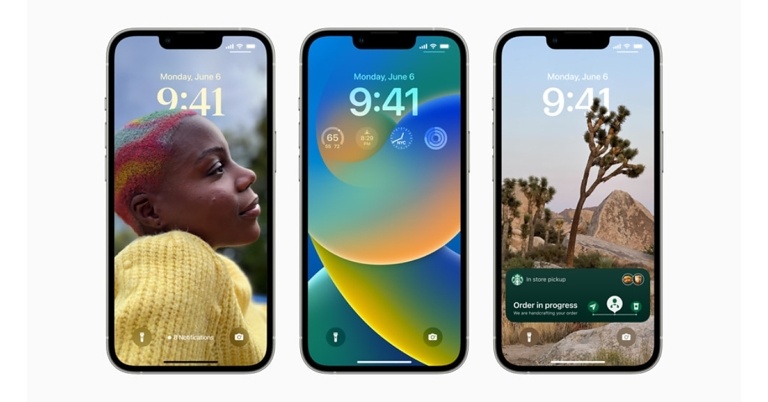
Tim Cook, Apple’s CEO, opened the keynote and wished all of the attendees a happy WWDC22. The Cupertino-based corporation provided information on new operating systems including as iOS 16, iPadOS 16, macOS 13, watchOS 9, and tvOS 16, and more during the presentation. So, if you missed the live event, don’t worry, Gadget Bridge will keep you up to date on all the latest iPhone, iPad, and Apple Watch features. the lock screen is getting a huge makeover The WWDC keynote will begin with iOS 16. As anticipated the lock screen is getting a huge makeover. With a long tap, users will be able to customise the Lock screen. The users will be allowed to put colour filters on the typography for the time and the picture. Whereas the Widgets will be able to be added to the lock screen as well which Google also offers in its Android 13. In iOS 16, the lock screen will also include some suggested photographs. Custom Lock Screens can be created and switched between by users. In addition to this, a new ‘Live screen’ activity feature will be added to the lock screen. As a result, if you receive frequent updates from an app. The lock screen will display them as well. On iOS 16 there’s also a new ‘Focus’ filter, which allows users to turn off notifications from apps they don’t use all the time. Not just that the iOS 16 will allow users to undo Messages that have already been delivered. Moreover, they can also edit messages that have already been sent so no more typos. The Message app will also get the feature to mark a thread as unread. The Dictation feature in iOS 16 has been revamped too. The on-device voice detection has been improved by keeping the keyboard active while dictating, allowing the user to move between speech and touch input. Users will be able to choose text with their fingers and replace it with their voices. Dictation will also add punctuation and allow users to choose an emoji on the fly. Emoji identification and a new API for developers to use Siri for their own dictation were both highlighted by Apple. In addition to this at WWDC22 Apple announced Apple Pay Later, a new buy-now, pay-later service that the firm claims will operate anywhere Apple Pay is accepted. Seems Apple’s Live Text feature is catching up to Google Lens in terms of functionality. Not just that Users will be able to interact with text shown in the video using Live Text now that it supports video. When using the Live Text function in the camera, Apple is introducing the ability to convert the currency automatically. When scanning with Live Text, users will also be able to translate automatically. On iOS, the Translate app will include live text scanning as well. The new OS by Apple is also getting a new ‘My Sports’ area to Apple News, which allows you to keep track of your favourite teams. Apple has also improved Family Sharing. The iOS 16 bring a complete overhaul to Apple Maps. The application will be available in more countries sadly India is not on the list. As per Apple, more features will be available in more cities around the United States. And Yes, Multistop routing is coming from Apple. Siri will also be able to add more stops to a route if the user requests it. Apple Maps is also getting the Map Display function expanding to new nations, 3D View expanding to more North American cities, ability to upload high-resolution photographs to places and apps.
iCloud Shared Photo Library
For parental controls, Apple is making it easier for parents to monitor and control their children’s accounts. So with new iOS users especially parents will be able to set up new devices for a child, such as an iPad. Apple is also creating a new way for family members to share images. There will be a specialised library called iCloud Shared Photo Library where five members of the same family can exchange photos. It will also include the ability to use Family Checklist to update parental control settings. The new ‘Safety Check’ feature in Apple’s iOS 16 is a welcome addition. This is intended to assist women who are in an abusive relationship and wish to terminate any shared access with their partner. According to the company, women or user will be able to disable location sharing, resets privacy settings, and secures their messages. Other iOS 16 privacy additions include the option to approve screen time requests directly in Messages. The business also announced upgrades to Home, including a redesigned, easier-to-use Home interface. The company is also introducing support for Matter, a new smart-home standard. The My Home app has also been revamped to make controlling one’s Smart home easier. Talking about the Car infotainment Apple at WWDC22 revealed upgrades to CarPlay, its automobile infotainment system interface. The CarPlay is said to include additional controls and widgets, although it won’t be available until late next year. The iPhone will interface with the car’s system, allowing users to view fuel information, among other things, directly from CarPlay. For the latest gadget and tech news, and gadget reviews, follow us on TwitterFacebook and Instagram. For newest tech & gadget videos subscribe to our YouTube Channel. You can also stay up to date using the Gadget Bridge Android App. You can find the latest car and bike news here.