Apple enables AFib History for Apple Watch users in India: Deets inside

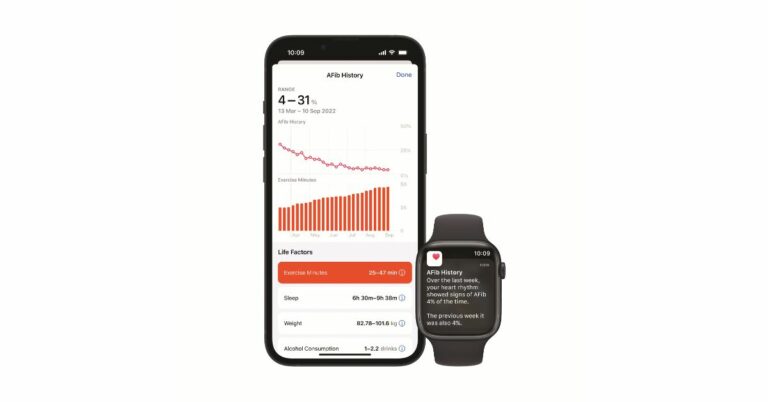
AFib History, a new function on Apple Watch Series is now accessible in India. The features will be available on Apple Watch Series 4 and later for users on watchOS 9. This Apple Watch feature will allow users to track how frequently their heart rhythm exhibits atrial fibrillation (AFib) symptoms. For those who are unaware, AFib is a long-term irregular heart rhythm disorder that results in the heart’s upper and lower chambers beating at different times. Apple Watch users with atrial fibrillation (AFib) can now monitor and manage their disease with the help of the AFib History. According to the company, the new function will only be available on Apple Watches running WatchOS 9 and newer. Indian users need to make sure their iPhones are running iOS 16. According to Apple’s support page, AFib History is only available to those who have been diagnosed with the illness and are over the age of 22. AFib History is a first-of-its-kind service for people who have already been diagnosed with AFib that can track how long your heart has been in AFib and also improve the management of crucial lifestyle factors. A type of abnormal heart rhythm known as atrial fibrillation (AFib) occurs when the upper and lower chambers of the heart do not beat in sync. Some with this disease show symptoms and some don’t. Others report signs including a racing heartbeat, palpitations, exhaustion, or shortness of breath. It is said to be the most common type of serious arrhythmia. Also Read: Apple’s first-generation iPhone sold for over $190,000 Although AFib is a chronic illness, the duration of AFib might vary. Regular exercise, enough sleep, a heart-healthy diet, maintaining a healthy weight, and getting treatment for various medical disorders that could exacerbate AFib all have the potential to lessen the amount of time your heart is in AFib. AFib can cause heart failure or blood clots that may result in a stroke if left untreated.

How does it work?

AFib History is a first-of-its-kind service for people who have already been diagnosed with AFib that can track how long your heart has been in AFib and also improve the management of crucial lifestyle factors. Potential symptoms of AFib can be recognised through the Apple Watch’s ECG app and irregular rhythm warning. AFib History, also known as AFib burden, provides you with a weekly estimate of the amount of time your heart exhibits AFib-related symptoms. You can keep track of this over time and discuss it with your doctor to have more in-depth conversations. Although AFib can happen at any time, there are some things that may affect how frequently your heart displays AFib symptoms. Also Read: Sony signs deal with Microsoft, Call of Duty to remain on PlayStation Always seek medical advice if users are in any discomfort. The business claims that customers’ Exercise Minutes, Sleep Minutes, and Mindful Minutes are automatically logged whether they exercise, sleep, or meditate while consistently wearing an Apple Watch. Users can also tap each life factor, then tap Log to manually log the details. They can also tap a suggested 3rd party app to download from the App Store to track each factor.

How to set up AFib History

  • Update your iPhone to the latest version of iOS and Apple Watch to the latest version of watchOS.
  • On iPhone, open the Health app.
  • Tap Browse, then tap Heart.
  • Tap AFib History.
  • Tap Set Up, then tap Get Started.
  • Enter Date of Birth.
  • Select Yes to indicate that you have been diagnosed with AFib by a doctor, then tap Continue.
  • Tap Continue to learn more about AFib History, the results, and life factors. Tap Done.

View AFib History estimate

After gathering enough readings, every Monday users receive weekly alerts on Apple Watch with the estimated percentage of time their heart showed signs of AFib from the previous week. The estimate for AFib History is displayed as a percentage. A lower percentage indicates a lesser frequency of AFib, whereas a higher percentage indicates a greater frequency. Never will the AFib History display 0%. It will instead display as “2% or less.” To compare a Life Factor with AFib History, users can also tap Show Life Factors.

Users can also view their history in greater detail in the Health app.

  • On iPhone, open the Health app.
  • Tap Browse, then tap Heart.
  • Tap AFib History. If users have AFib History saved to Favorites, they can also access it from the Summary tab.
For the latest gadget and tech news, and gadget reviews, follow us on TwitterFacebook and Instagram. For newest tech & gadget videos subscribe to our YouTube Channel. You can also stay up to date using the Gadget Bridge Android App. You can find the latest car and bike news here.

Non-Inverter AC vs Inverter AC: Differences and Which One to Buy

Buying an air conditioner (AC) is not as easy a task as it is assumed to be. While comfort and cost are significant aspects, it is also important to consider energy efficiency and environmental effect. Keeping in mind the cooling and heating requirements, home layout, and AC types, the choice between inverter and non-inverter air conditioners becomes imperative. Today we will provide you with the best insights to help you understand the differences between these air conditioner units and to help you make an informed choice. Read Also: Panasonic unveils new ACs in India, price starts at Rs 39,900

Key Differences between the Non-Inverter and Inverter Air Conditioners

A non-inverter air conditioner, often known as a fixed-speed air conditioner, uses a constant-speed compressor motor. The compressor motor turns off when the required temperature is reached and restarts when the temperature rises. This entails that non-inverter air conditioners have a fixed cooling capacity and adjust the compressor dependent on the surrounding temperature.  An inverter air conditioner on the other hand uses a variable-speed compressor motor to regulate the cooling output depending on the temperature required. In contrast to non-inverter ACs, the compressor in an inverter AC runs continuously but can be regulated by adjusting the frequency of the power supply. When the target temperature is attained, the compressor slows down instead of entirely shutting down, resulting in efficient cooling with lower power usage and lesser noise. Non-inverter air conditioners often use refrigerants that generate toxic emissions and harm the environment. Modern inverter air conditioners, on the other hand, use efficient refrigerants like R32, which not only give improved cooling capability but also produce fewer hazardous emissions. Inverter ACs surpass non-inverter models in terms of energy efficiency, saving up to 30% on electricity use. Inverter air conditioners have lower energy expenses and faster cooling capabilities. They are capable of dehumidifying the air and providing improved temperature control as compared to non-inverter types since they can vary the compressor speed to adapt to changing conditions. Read Also: Samsung Launched a new series of Convertible Inverter Air Conditioners

Factors to Keep in Mind While Choosing Between the Two

Energy Savings: Inverter air conditioners often have higher energy efficiency than non-inverter versions, resulting in long-term utility savings.  Temperature Control: Inverter AC units thrive at maintaining a constant temperature with little variations, however, non-inverter systems can cause temperature fluctuations due to their “all or nothing” approach. Consider the Space Size: When selecting an air conditioner, think about the size of the room or area to be cooled. In very large settings, a non-inverter air conditioner will be more suited. Environmental Impact: As stated earlier, inverter ACs are more environmentally friendly compared to their non-inverter counterparts as they consume less energy and have lower greenhouse emissions. Quieter operation: Inverter air conditioners typically generate less noise than non-inverter versions. Upfront Cost: While non-inverter air conditioners have a lower upfront cost, inverter air conditioners are a smarter investment in the long term due to their energy efficiency, resulting in potential cost savings over time. Lifespan: Inverter air conditioners often have a longer lifespan than non-inverter versions, ensuring durability and longevity. Maintenance Requirements: Inverter air conditioners require less maintenance and repairs than non-inverter units. Read Also: Panasonic unveils new ACs in India, price starts at Rs 39,900

Conclusion

Individual tastes and unique requirements ultimately determine whether one should buy an inverter or a non-inverter AC unit. Choosing an inverter AC is a sensible decision for individuals that prioritize long-term energy savings and are willing to invest upfront. If cooling large rooms on a budget is the primary concern, a non-inverter AC might be a good option. For the latest gadget and tech news, and gadget reviews, follow us on Twitter, Facebook, and Instagram. For the newest tech & gadget videos subscribe to our YouTube Channel. You can also stay up to date using the Gadget Bridge Android App. You can find the latest car and bike news here.

Apple’s first-generation iPhone sold for over $190,000

Many of us enjoy collecting items, but who would believe that an iPhone can also be purchased as a collectible? Yes, the first generation of Apple iPhone was up for auction and someone bought the 16-year-old device for more that Over $190,000. A 2007 Apple iPhone fetched $190,372.80 at auction. Someone paid 300 times the item’s original sale price to purchase it. After a $10,000 opening offer, the auction received a total of 28 bids. This is not the first time an iPhone has been offered for sale as a collectible. Another first-generation iPhone was auctioned by The LCG Auctions for $63,356 in February. In March, a different company, Wright Auctions, sold a first-generation iPhone for $40,320. According to the item description on LCG Auctions, the vintage Apple phone is the “Holy Grail” of phone collecting. Also Read: Sony signs deal with Microsoft, Call of Duty to remain on PlayStation For those who are unaware the first-ever iPhone debuted all the way back in January 2007. At the time, Apple released two versions of what would become its most successful product ever: a 4GB storage model that cost $499 and an 8GB model that cost $599. According to the auction description, the 4GB model, which cost $599 at the time of purchase, was still wrapped in its factory packaging and in great condition. The object was referred to as “exceedingly rare” and a “popular high-end collectible” by the auctioneer LCG Auctions. Due to slow overall sales and the introduction of an 8GB variant, the 4GB model was dropped soon after launch. And this is how the 4GB model is the one that has started to get some collector’s value. Apple discontinued the 4GB version because the majority of customers just paid the extra $100 to double the phone’s storage. This is why the unsold devices still remained sealed in their boxes. According to LCG Auctions, the 2007 Apple iPhone was being auctioned off in its original box, still factory sealed, and was reportedly in “exceptional condition.” For the latest gadget and tech news, and gadget reviews, follow us on TwitterFacebook and Instagram. For newest tech & gadget videos subscribe to our YouTube Channel. You can also stay up to date using the Gadget Bridge Android App. You can find the latest car and bike news here.
8 Best Emoji Keyboards for iPhone (2023)

Emojis are an integral aspect of the texting experience. If you’re serious about your emoji game then you must know that there are tons of unique emojis out there that can’t be found on the default iPhone keyboard. These emojis can be used on any messenger or social media platform. If you’re looking to make your conversations more fun, here are the 8 best emoji keyboards for your iPhone. Read Also: Top 3 Ways to View Saved WiFi Passwords on a Windows 10/11 PC

Emoji>

Download from App Store Emoji Emoji> is one of the best emoji apps for iPhones around. The app is constantly updated with new emojis, fonts, stickers, fonts, and more. The app is compatible with all the major instant messengers like iMessage, WhatsApp, Messenger, and more. Apart from sending new and fun emojis to your friends, you can also use the Emoji> app to play different emoji games. To add the Emoji> keyboard on your iPhone, launch the app and go to Add Keyboard>Add Now>Let’s Go>Keyboards>Emoji+>Allow full access.

Gboard

Download from App Store Gboard Google’s very own Gboard is one of the most popular keyboards on the Android platform. It is not surprising that it is just as good on iOS. While it may seem like a regular onscreen keyboard, the emoji-related features on this app are quite underrated. One of our favourite features is the emoji fusion tool, which two or more emojis together to create a new one. Gboard also lets you search for GIFs using emojis and has tons of emoticons for old-school users.

Symbol

Download from App Store Symbol Emojis are fun, but sometimes nothing gets the message across like a good old unicode symbol. If you’re looking for a niche symbol that can’t be found in the emoji section of your default keyboard, Symbol might be worth giving a shot. In this app, you’ll find dozens of different kinds of arrows, crosses, fonts, and characters. If you’re searching for a symbol that doesn’t belong in the English language, this app will not disappoint you.

AA Emoji Keyboard

Download from App Store AA Emoji Keyboard AA Emoji Keyboard has a unique set of emojis that will definitely breathe life into any dull conversation. You can choose between static and animated emojis and easily search for the relevant feeling you’re trying to get across by going through the different categories. The classification of the emojis in this app makes them easier to access and also ensures that you don’t keep reusing the same set of emojis in your conversations.

Kika

Download from App Store Kika. 8 Best Emoji Keyboards for iPhone (2023) A 4.6 rating from 184K ratings is a sign of a rock-solid app. If you’re serious about your emoji game, Kika is the way to go. This emoji app not only offers an extensive collection of emojis, but you also get to choose from different themes, fonts, textarts, stickers, and more. Kika is compatible with all major social media platforms along with instant messaging apps like Telegram, WhatsApp, Snapchat, iMessage, and more.

SMS Rage Faces

Download from App Store SMS Rage Faces. 8 Best Emoji Keyboards for iPhone (2023) Remember the Rage Faces from the early 2010s? You can still send them as emojis using this app. If you’re looking for a dose of nostalgia, this app is a perfect trip down memory lane. You will find almost every famous rage face in this app along with some of the lesser-known ones that you may not have come across earlier. You can search for rage faces by category and even import your own pictures from the camera roll!

Emoji Free

Download from App Store Emoji Free. 8 Best Emoji Keyboards for iPhone (2023) Emoji Free has a diverse set of emojis that can be used wherever there is a text field. Be it an instant messaging app or your website, this app will pull through. You can choose from static and animated emojis, and if you’re feeling a bit creative, you can use this app to send unique patterns composed of emojis. Apart from that, Emoji Free also offers a bunch of fonts to make your social media captions stand out.

Big Emoji

Download from App Store Big Emoji. One of the more unique features of the Big Emoji Keyboard is that it lets you create emoji stickers from your photos. You can upload an image from your iPhone’s gallery on this app and turn it into a sticker. You can download different emoji packs or play the slot machine to win unique emojis based on themes like pets, weddings, food, animals, festivals, and more. Big Emoji is compatible with all major messaging and social media apps. Read Also: Lenovo Tab M10 5G With 10.61-inch LCD display and 7,700mAh battery launched in India

Conclusion

These are the 8 best emoji keyboards you can download on your iPhone right now. While all the apps mentioned in this list are free to use, some may come with paid ‘Pro’ versions or have premium emoji packs locked behind a paywall. Already use an emoji keyboard on your phone? Let us know which one it is in the comments! For the latest gadget and tech news, and gadget reviews, follow us on Twitter, Facebook and Instagram. For newest tech & gadget videos subscribe to our YouTube Channel. You can also stay up to date using the Gadget Bridge Android App. You can find the latest car and bike news here.

Best 5 Drones Under $100 In The USA

Drones have grown in popularity in recent years, exciting both hobbyists and experts. However, the impression that owning a drone involves a large investment is rapidly fading. With technological breakthroughs and a growing market, you may now go on your flying adventures without breaking the bank. In this article, we’ll take you through a list of the Best 5 drones under $100 in the USA that offer great features and exceptional performance at a low price.  Read also: DJI Mini 2 drone weighs less than 249 grams

DJ Tello

The DJ Tello is an excellent drone for both beginner and experienced pilots, providing a pleasant flying experience thanks to its easy-to-use layout and amazing features. The Tello provides dependable suspended adventures with its robust flight performance and battery life of roughly 13 minutes. What distinguishes it is its capacity to independently capture 720p photographs and films, which is often found in more expensive photography drones. Although it is not the best choice when it comes to racing due to its lower top speed, it is a good option for those who enjoy aerial photography. Buy it from here.

Holy Stone HS110D FPV RC Drone with 1080p HD Camera

The Holy Stone budget drone has a plethora of features that make it a great mid-sized model for drone enthusiasts. It gives value for money, offering a 1080p FPV camera and a variety of simple in-app controls.  One notable feature is its pre-set button, which allows for flips in any direction, while a landing mechanism helps beginners prevent crashes. In addition, the Holy Stone provides altitude hold, ensuring stable and clear shots during flights. The accompanying mobile app improves the user experience by offering control options like voice control and gravity sensor control. The Holy Stone drone comes with two batteries, each having a flying time of up to 20 minutes. Buy it from here. 

Cheerwing Syma X5SW-V3

Cheerwing USA’s best-selling drone is an excellent pick, offering agility, affordability, and an abundance of features. Its six-axis gyro guarantees extremely stable flight while also allowing for spectacular in-flight manoeuvres. With adequate practice, you’ll be able to perform  360-degree rolls while simultaneously streaming a first-person view to your iOS or Android device. Buy it from here.  Read Also: You can now legally fly drones in India

UDI U818A FPV Drone

The Force1 U818A sticks out due to its integrated rotor blade protectors. These circular shields provide a considerable benefit to beginner pilots by protecting the blades from potential harm caused by things like sticks or fingers. However, the lightweight plastic case feels weak and may not resist moderate-speed impacts. It is outfitted with a camera that hangs below the centre of the drone and permits manual adjustment to shoot footage from a straight-ahead or tilted downwards up to 30 degrees.  The camera can capture video at 720p resolution and store the footage on a microSD card. The accompanying software, compatible with both iOS and Android, includes drone control features as well as a 480p video preview. Switching to 720p resolution may cause some issues if the drone is at a distance of more than 20 feet. This drone has a flight time of about 8 to 10 minutes. Buy it from here. 

Propel Star Wars TIE X1 Advanced

The Propel TIE X1 Advanced is a Star Wars-themed drone that was initially priced at $200 but is currently available for less than $50. This drone comes with a controller that lets you perform acrobatics such as flips, as well as sound and audio effects from the original Star Wars trilogy. The TIE X1 drone has excellent attention to detail, with a battered exterior that resembles a battle-worn starship. It boasts incredible flight speed, capable of completing the Kessel Run in less than 12 parsecs. These drones include infrared lights and sensors that allow them to participate in epic battles with other Propel Star Wars drones.  Buy it from here.  Read Also: IMC 2018: Airtel showcases connected homes to self-driving drones

Conclusion

So, there you go these were our Best 5 drones under $100 in the USA recommendations if you are looking to buy a drone within a budget. Tell us in the comments which all did we miss and you are using or rather flying. For the latest gadget and tech news, and gadget reviews, follow us on TwitterFacebook and Instagram. For newest tech & gadget videos subscribe to our YouTube Channel. You can also stay up to date using the Gadget Bridge Android App. You can find the latest car and bike news here.

Sony signs deal with Microsoft, Call of Duty to remain on PlayStation

Sony and Microsoft have reached an agreement to preserve the Call of Duty series on PlayStation for a 10-year period. This decision comes after Sony reportedly realised that Microsoft’s acquisition of Activision Blizzard was inevitable. Microsoft has confirmed that Call of Duty will continue to be available on PlayStation. In the future, users will have more options for where and how to play their favourite games. Sony and Microsoft have reportedly reached a “binding agreement” to maintain Call of Duty on PlayStation, according to Microsoft Gaming CEO Phil Spencer. He said, “We are pleased to announce that Microsoft and @PlayStation had signed a binding agreement to keep Call of Duty on PlayStation following the acquisition of Activision Blizzard. We look forward to a future where players globally have more choice to play their favorite games.” Also Read: Samsung Galaxy Unpacked Event confirmed for July 26, hints a foldable phone After Microsoft initially presented Sony with a 10-year contract in December 2022, Sony resisted agreeing to a Call of Duty agreement with the corporation. Rather, Sony has consistently stated in submissions to regulators that it is concerned Microsoft may make Call of Duty Xbox exclusive or even destroy the PlayStation versions of the game. Although the 10-year commitment for Call of Duty on PlayStation is not included in Microsoft’s first statement, Xbox’s head of worldwide communications, Kari Perez, confirmed it to The Verge. Perez further revealed that the deal is exclusive to COD. As a result, the pact is comparable to a 10-year contract between Microsoft and Nintendo but differs from the many agreements Microsoft has made with Nvidia and other cloud gaming platforms to bring Call of Duty and other Xbox / Activision games to competing services. Also Read: Nothing Drops debuts in India, customers may now experience and preorder the Nothing Phone 2 According to Verge, Microsoft’s initial agreement proposal to Sony in January 2022 included retaining “all existing Activision console titles on Sony, including future versions in the Call of Duty franchise or any other current Activision franchise on Sony through December 31st, 2027.” The conditions of the agreement have obviously altered since the initial offer, and the 10-year extension is only applicable to COD. For the latest gadget and tech news, and gadget reviews, follow us on TwitterFacebook and Instagram. For newest tech & gadget videos subscribe to our YouTube Channel. You can also stay up to date using the Gadget Bridge Android App. You can find the latest car and bike news here.
BGMI redeem codes for 18 July 2023, claim and receive rewards and benefits

After being banned for nearly ten months, Battleground Mobile India, aka BGMI, is officially available again in India. BGMI fans are looking for ways to improve their game experience and one such method is the usage of redemption codes, which offers a variety of rewards and advantages using BGMI redeem codes players can gain access to new skins, outfits, loot crates, weapons and free UC and diamonds. As mentioned earlier, these codes give users the chance to earn unique rewards and gain extra benefits while playing the game. This includes GUN SKINS (M4, AKM, M416, AWM, M24, UZI, KAR98K), free character voucher, Andy, Carlo, Sara, Victor character for free, free Anna Character on completing the mission and UC or Royal Pass Discount. So here we have gathered a list of the most recent BGMI redeem codes as of 18 July 2023. Also, redeem these codes asap as these are only valid for a limited duration.

BGMI Redeem Codes for 18 July 2023

BR43FMAPYEZZ 8F3QZKNTLWBZ J3ZKQ57Z2P2P FFCMCPSUYUY7E EYH2W3XK8UPG UVX9PYZV54AC GCNVA2PDRGRZ XZJZE25WEFJJ V427K98RUCHZ MCPW3D28VZD6 ZZZ76NT3PDSH

How to get free Redeem Codes for BGMI on 18 July 2023?

  • Launch BGMI on your device.
  • Then select the Redeem Code option from the main menu.
  • Next, click on the Redeem code tab.
  • A new window will open, requesting the redemption code.
  • Now enter your BGMI code.
  • Confirm and click on the “Redeem” tab.
  • If your redeem code is valid then you will get a message confirming that your rewards were successfully redeemed.
(Note that these codes are case-sensitive, so be sure to type them correctly to prevent any errors.) For the latest gadget and tech news, and gadget reviews, follow us on TwitterFacebook and Instagram. For newest tech & gadget videos subscribe to our YouTube Channel. You can also stay up to date using the Gadget Bridge Android App. You can find the latest car and bike news here.

Garena Free Fire Redeem Codes Today 18 July 2023: Here is how to claim them

Garena Free Fire is a battle royale game with regular awards and tournaments to keep players interested. If you play Garena Free Fire, you should be aware of the redeem codes that are released on a daily basis. However, because the battle royale game is banned in India, players from other countries can use the Free Fire Redeem codes daily. If you’re unfamiliar with the Garena Free Fire redeem codes or don’t know how to get them, we’ve put together a step-by-step guide to help you redeem them. Check out Garena Free Fire Redeem Codes for 18 July 2023. The Free Fire redeem codes are a great way to get free stuff. These are 12-digit codes that contain alphabets and numbers, as well as an expiration date and time. Because the Garena FF redeem codes cannot be used more than once, you should hurry to the redemption page to claim your free reward before someone else does. To get a free reward, all you have to do is go to reward.ff.garena.com/en, which is the official redemption page. Also, keep an eye on this space for daily updates on Garena Free Fire redemption codes and rewards.

Garena Free Fire Redeem Codes Today 18 July 2023

  • FF11NJN5YS3E
  • FF11WFNPP956
  • MQJWNBVHYAQM
  • 8F3QZKNTLWBZ
  • FF9MJ31CXKRG
  • FFICJGW9NKYT
  • FFCO8BS5JW2D
  • FFAC2YXE6RF2
  • FFICJGW9NKYT
  • J3ZKQ57Z2P2P
  • W4GPFVK2MR2C
  • WCMERVCMUSZ9
  • MSJX8VM25B95
  • RRQ3SSJTN9UK
  • FFPLUED93XRT
  • R9UVPEYJOXZX
  • TFF9VNU6UD9J
  • HAYATOAVU76V
  • RRQ3SSJTN9UK
  • FF7MUY4ME6S
  • SARG886AV5GR
  • FF1164XNJZ2V
  • FFICDCTSL5FT
  • PACJJTUA29UU
  • FFBCLQ6S7W25
  • TJ57OSSDN5AP

How to Get Free Fire Redeem Codes for Garena on 18 July 2023?

  • Visit the Garena Free Fire game’s official website at reward.ff.garena.com.
  • Use your Facebook, Google, VK, Apple ID, Huawei ID, or Twitter account to log in.
  • You’ll be taken to a valid redemption code (s)
  • Copy and paste the 12-digit redemption code into the text box.
  • On the screen, a dialogue box will appear.
  • ‘Ok’ should be selected.
For the latest gadget and tech news, and gadget reviews, follow us on TwitterFacebook and Instagram. For newest tech & gadget videos subscribe to our YouTube Channel. You can also stay up to date using the Gadget Bridge Android App. You can find the latest car and bike news here.

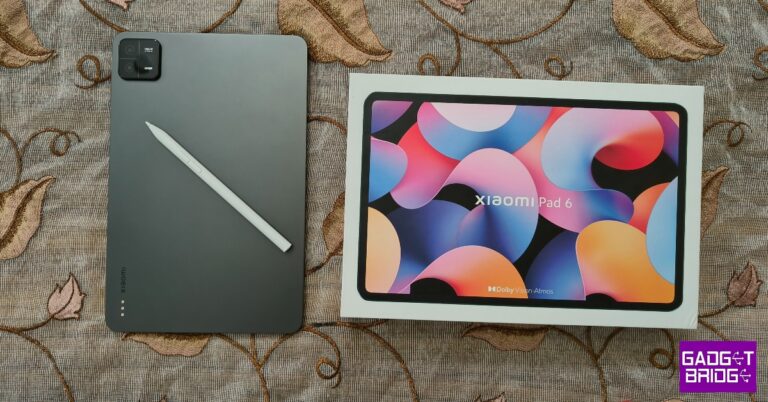
Xiaomi Pad 6 Review: Is this the best midrange Android tablet around?

Last year’s Xiaomi Pad 5 was one of the most talked about Android tablets in quite some time. Since then, Android tablets have seen a bit of a resurgence in the market. Even OnePlus came out with its debut tablet release this year (read our review here), going up against the juggernaut in Apple’s iPad. However, if we’re talking about value-for-money products on a strict budget, no one does it better than Xiaomi. We got our hands on the latest Xiaomi Pad 6 and used it for over a week, here is our review. Read Also: How to Record Facebook Video Calls on Android, iPhone, and PC?

Xiaomi Pad 6 review: Design and Display

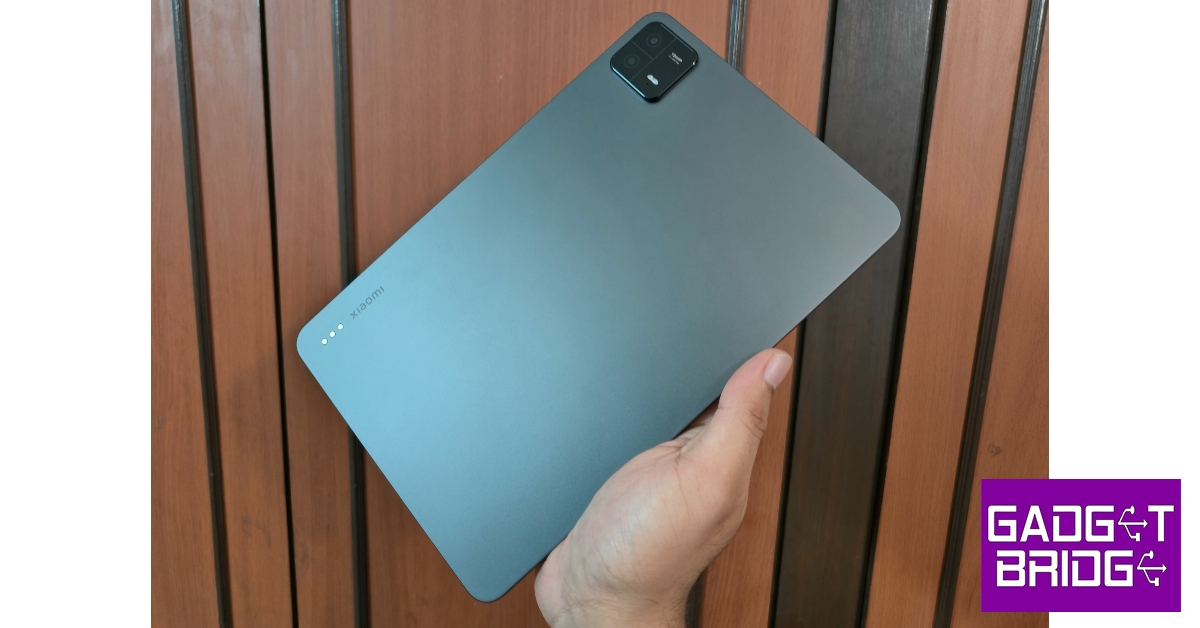
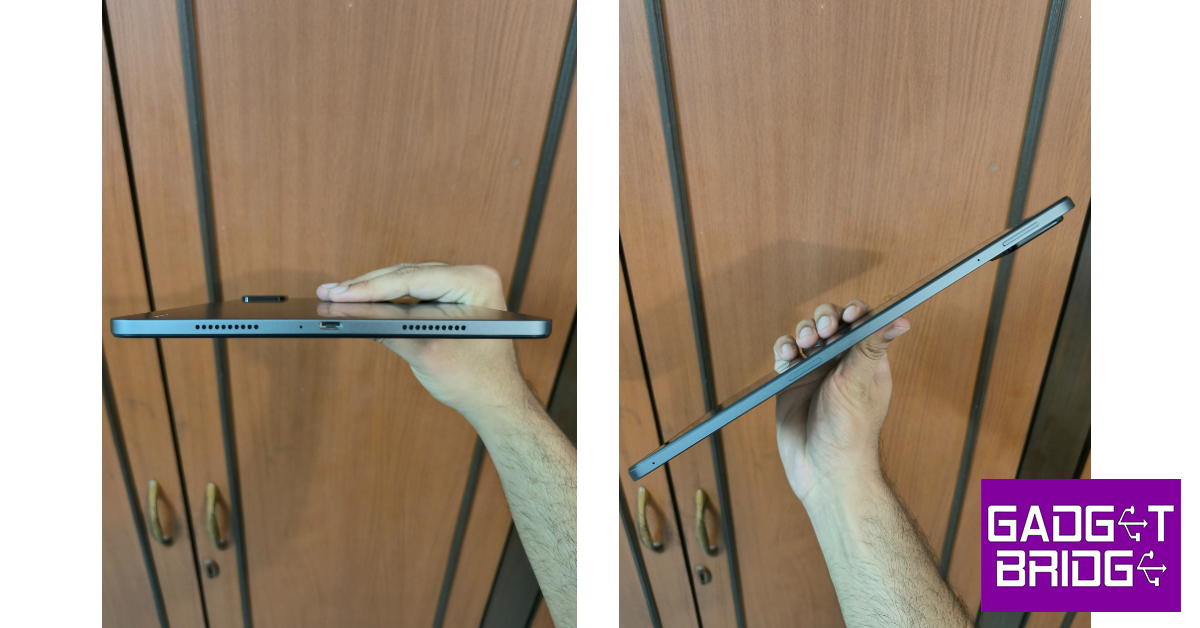
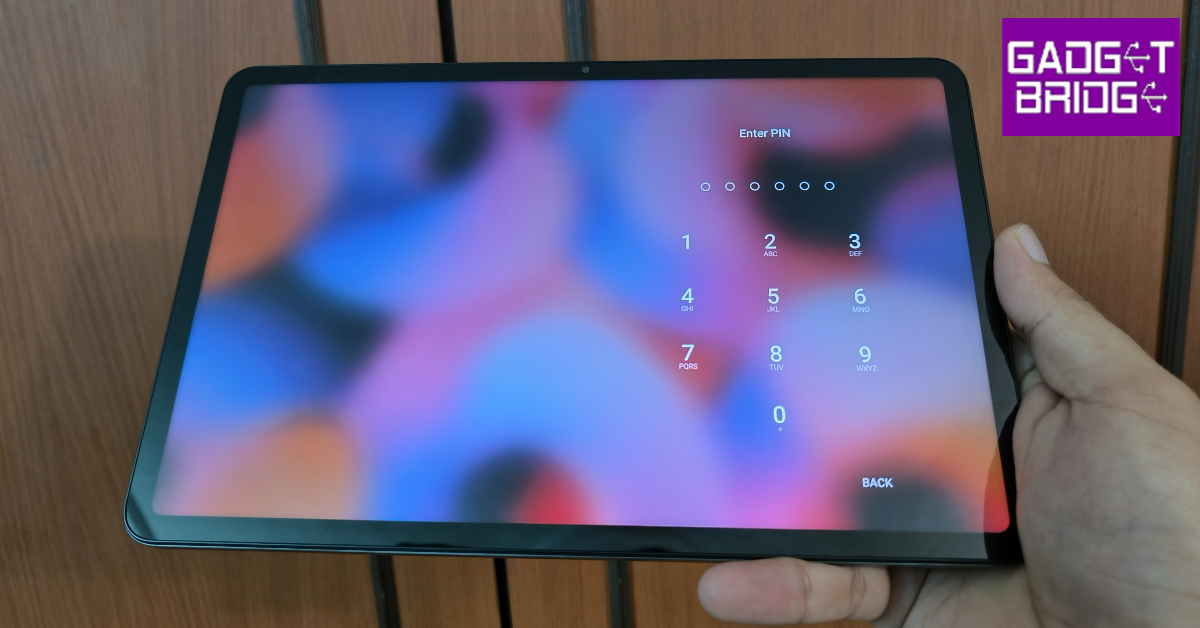
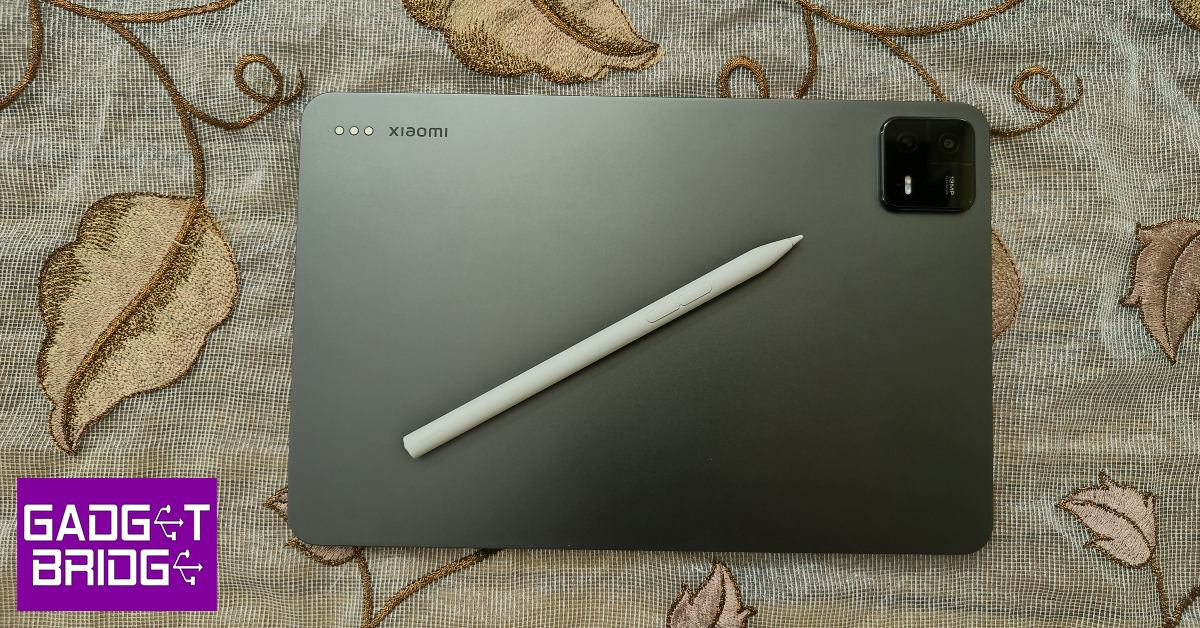
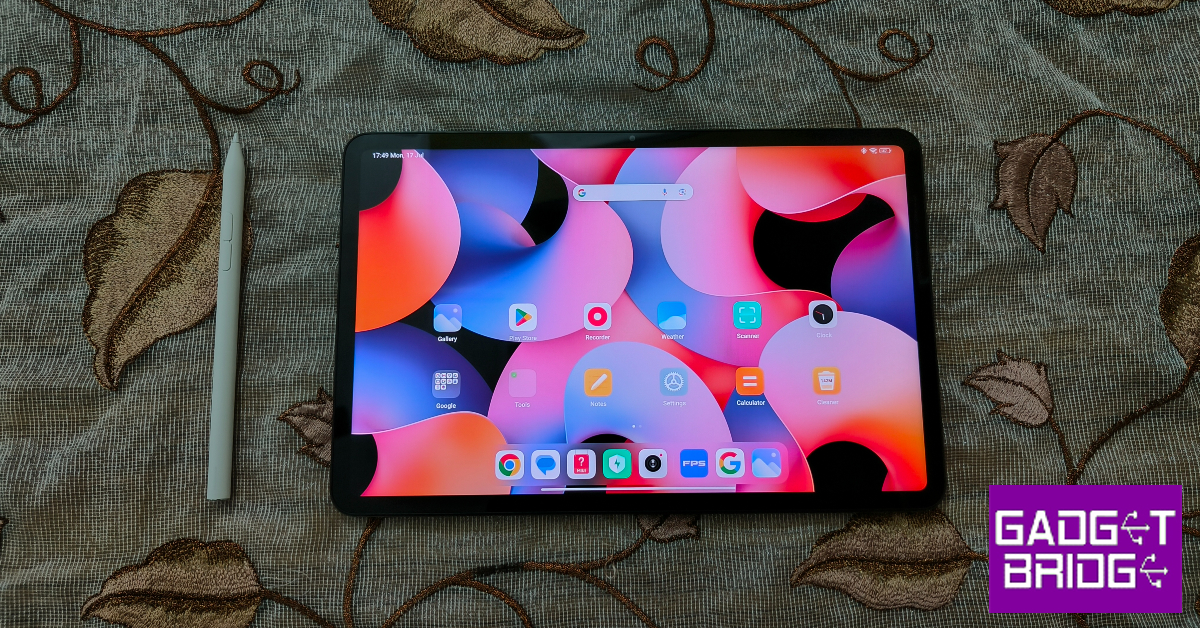
Right off the bat, the Xiaomi Pad 6 has a very premium feel to it. This is because Xiaomi has ditched the plastic back panel on the Pad 5 for a metal back on this device. The camera panel design on this tablet is the same as the one on Xiaomi 13 Pro (our review here). The flat frame is made out of aluminium. Since there are no rounded edges on this device, you may not be able to get the grip you’re looking for. But if you plan on using it with a folio case, you won’t mind it too much. Personally, we enjoyed the in-hand feel of the metal back and flat frame. Xiaomi Pad 6 review: Design and Display The Pad 6 has an aspect ratio of 16:10. The front camera is positioned on the longer edge, making it easier to put the tablet down while getting on a video call. There are 4 speakers on this device, two on either vertical edge of the frame. These speakers do the job well but aren’t powerful enough to fill up the entire room. Unsurprisingly, there is no 3.5mm headphone jack on this thing. Xiaomi Pad 6 review: Design and Display The power key is housed on the left edge of the frame, near the camera unit. The volume rocker makes its way to the adjacent frame, also near the camera. This frame also has a magnetic strip to place the stylus. If you’re wondering where the magnetic accessories go, there’s another magnetic strip on the back panel. Lastly, there’s a USB Type-C port positioned between the speakers on the right side of the frame. Like most Android tablets, you won’t find a side-mounted or an under-display fingerprint scanner on the Xiaomi Pad 6. But, it finds some intelligent software solutions to get around this hardware limitation. Typing the PIN or drawing the pattern on a locked tablet can be a chore due to the large size of the display. On the Pad 6, all you need to do is swipe up the lock screen from the left or the right side and the unlock screen will pop on that side, making it easier to reach for the digits or the pattern with one hand. You can also set up your smartwatch to unlock the tablet. Moving on to the display, Xiaomi Pad 6 gets one important upgrade over its predecessor. The refresh rate of the 11-inch IPS LCD display is now capped at 144Hz. While a high refresh rate is certainly welcome, it also depletes the battery faster. You can easily adjust it from settings. The display also supports HDR10 and has a resolution of 1800 x 2880p (a small bump from its predecessor).  We streamed HD content on this tablet across different OTT platforms. If entertainment and media playback is your biggest demand from a tablet, we’d easily suggest the Pad 6 over any flagship device. We thoroughly enjoyed the rich palette of colours on offer. The viewing angles leave no room for complaints either. While the image quality is pleasant, you won’t find the deep blacks and popping colours on this LCD panel. This isn’t a dealbreaker for us, but if you’ve gotten used to the OLED displays on your phone and laptop, this LCD panel may seem like a downgrade.

Xiaomi Pad 6 Review: Performance and Cameras

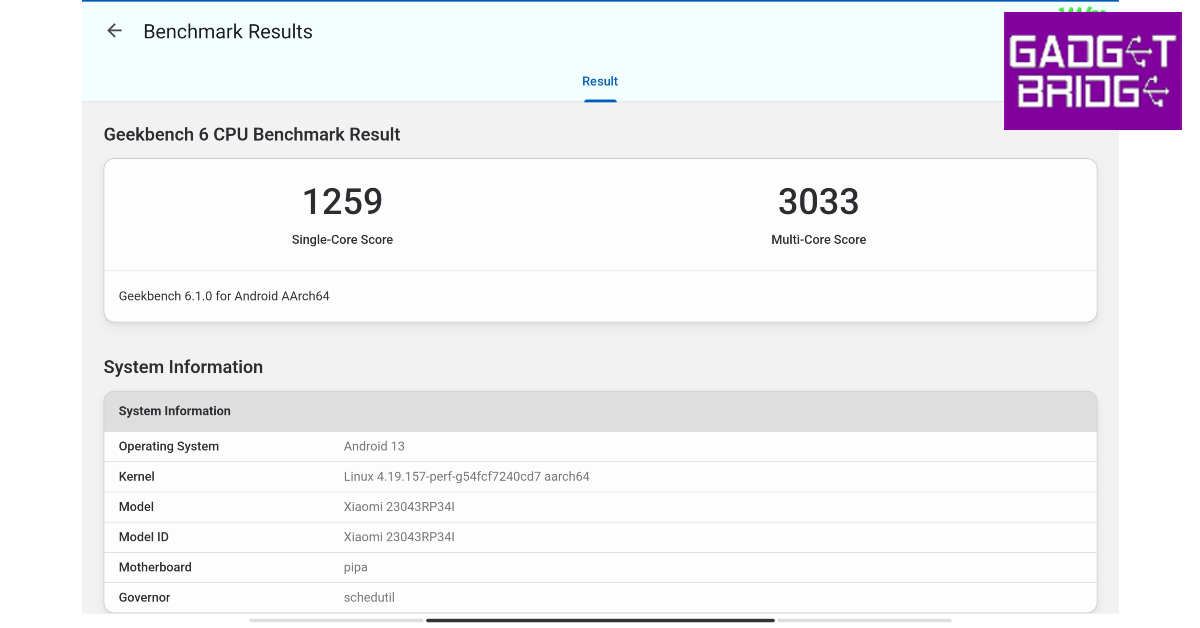
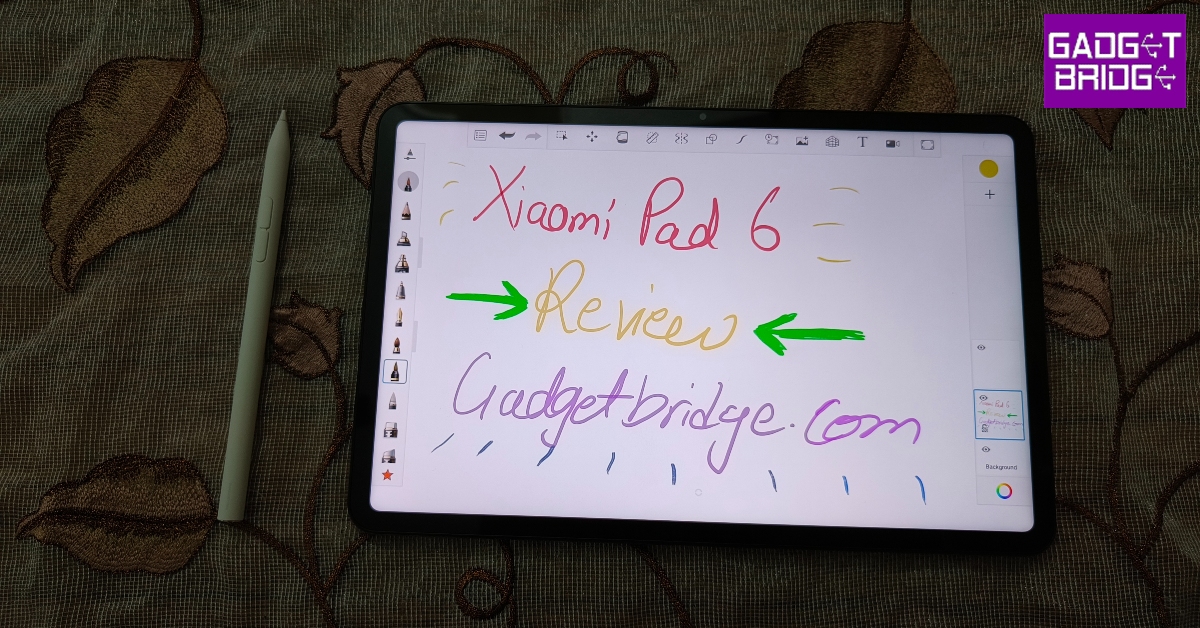
Xiaomi Pad 6 gets an upgrade under the hood as well. The tablet is now powered by the Snapdragon 870 SoC, which produced a single-core score of 1259 points and a multi-core score of 3033  points on the Geekbench 6 test. There are two RAM and storage options on offer: 6GB + 128GB and 8GB + 256GB. There are a couple of accessories you can buy to get the most out of the Pad 6. The official Keyboard Folio Case is priced at Rs 5,000 and the Smart Pen at Rs 6,000. If you buy these accessories along with the tablet, you can get them at a reduced effective price. If you don’t want a keyboard with the case, you can buy a regular flip case or a magnetic cover from Xiaomi’s official website. Xiaomi Pad 6 Review: Performance and Cameras The Snapdragon 870 SoC manages everyday tasks pretty well. Shooting the odd mail, browsing the web, taking video calls, and multitasking between different apps is a breeze on this tablet. We didn’t get the opportunity to use the magnetic keyboard case with this tablet, but pairing it with a wireless keyboard allowed us to easily get through a day of work without missing the laptop too much. Xiaomi Pad 6 Review: Performance and Cameras We did get to use the Smart Pen, and it is easily one of the best styluses we’ve used in this price range. The tablet does a good job of palm rejection. The low latency of the pen allows you to jot down quick notes seamlessly. We even tried doodling on the Sketchbook app. While only an artist could push the pen to its productive limit, we didn’t notice any flaws in the accessory. The biggest issue that Android tablets face is app optimisation for the larger screen. Those issues still persist on the Pad 6, through no fault of Xiaomi. Instagram still feels like a stretched-out version of the mobile app in Portrait orientation. In Landscape mode, the app aligns in the middle of the screen with empty spaces on either side. Android needs to work with app developers to resolve this issue. There are some things to like about MIUI 14 on this device. Firstly, there is minimal bloatware on this tablet. The overall experience is very clean and ad-free, something you don’t hear that often about Xiaomi devices. The taskbar at the bottom reveals itself after one quick swipe. You can place your frequently used apps on this taskbar for easier access. When you’re on a video call, you can slide out MIUI’s ‘Conference tools’ which consist of features like beautify, subtitle transcription, and more. Xiaomi smartphone users also get a few continuity features that can be used between the two devices. The 8,840mAh battery unit can easily last for two days under normal usage. We primarily used the tablet for watching content and taking video calls. If you’re looking to take this tablet on a weekend trip, you don’t have to worry about it running out of charge. The 33W wired charger that comes in the box can juice up this tablet in almost 2 hours. Xiaomi Pad 6 Review: Performance and Cameras Tablet cameras don’t usually gain much headlines, since smartphones are the go-to devices for clicking pictures. But the 13MP primary sensor on the Xiaomi Tab 6 pleasantly surprised us with the level of detail captured in its shots. The images were sharp and saturated to the perfected degree. The range of colours captured under natural light was impressive as well. The selfies taken from the front-facing 8MP camera are on the softer side, but it is decent for taking video calls. Read Also: Logitech M240 Silent Bluetooth Mouse Review: Replace your trackpad with this mouse

Verdict

At Rs 26,999, the Xiaomi Pad 6 is an easy shoo-in for the best Android tablet in its category. The device impresses on all fronts, be it the form factor or software optimisation. Even the rear camera pulls a great performance by tablet standards. If you’re looking for a midrange tablet primarily for the purpose of watching content on a bigger screen, the Xiaomi Pad 6 is a very easy device to recommend.

Xiaomi Pad 6: Pros

  • Great build
  • Clean OS
  • Great value for the price

Xiaomi Pad 6: Cons

  • No fingerprint sensor
  • Some Android apps need to be optimised for tablets
For the latest gadget and tech news, and gadget reviews, follow us on Twitter, Facebook and Instagram. For newest tech & gadget videos subscribe to our YouTube Channel. You can also stay up to date using the Gadget Bridge Android App. You can find the latest car and bike news here.

How to Deactivate/Delete your Threads Account?

The Meta-owned networking platform, Threads, witnessed record-breaking registrations passing 30 million within the first 24 hours of its launch. However, it is highly likely that a significant number of people signed up without going through the terms and conditions (honestly, neither did we). Once you sign up for the Threads using your Instagram account, there is little you can do to permanently leave the platform without harming your Instagram account. Today we are going to tell you how to deactivate or delete Threads account. Before you rush to the deletion or deactivation process, here are the key differences between the two: Deactivating your Threads account will prevent the permanent loss of data. Your username, posts, comments, and likes will be hidden, meaning no one will be able to look you up. This is a temporary process, signing back into your account will let you resume from where you left. Deleting your Threads account on the other hand is an irreversible process after you pass the 30 days window to reversal. Once the period passes, you lose all the data permanently. Also deleting your Threads account will require you to delete your linked Instagram account permanently, which is not going down well with the masses.

How to Deactivate your Threads account?

Here is a step-wise guide to deactivating your Threads account:

Step 1: To deactivate your Threads account, go to your profile page and tap on the double-lined menu. account delete threads  1 account delete threads             Step 2: Go to Account and select Deactivate Profile. account delete threads 2 Step 3: Tap on the Deactivate Threads Profile. account delete threads  1 Step 4: Choose Deactivate. Your Threads account is now deactivated until you decide to come back. Read Also: How to delete your Twitter account

How to Delete Your Threads Account?

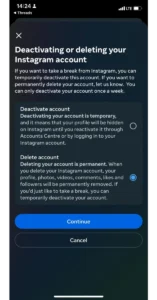
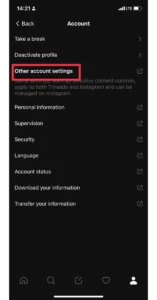
If deactivating the account does not meet your concerns, here is how you can delete it permanently: Step 1: In your Threads app, tap on the profile icon and then on the double-lined menu. account delete threads  1             Step 2: Go to the Accounts Section and select Other Account Settings. This action will take you to the Instagram Account.       Step 3: From here go to Account Settings. Step 4: Select the Personal Details Option. account delete threads  1 Step 5: Choose Account Ownership and Control and select Deactivation or Deletion. Step 6: Select the Threads account linked with the Instagram account and choose the Delete Account option. Step 7: Select your reason for deleting your Threads and Instagram account and hit Continue. Step 8: Select Continue and re-enter your account password. Step 9: Hit Continue and then choose Delete Account. The deletion process is now in motion. Read Also: How to change the username of your Threads account?

Conclusion

Again remember, once you do this action, your Threads as well Instagram account will be deleted. There is no way to bring them back. Hence, we suggest deactivating the Threads account till the time Meta/Facebook brings an option to delete the Threads account without deleting your Instagram account. For the latest gadget and tech news, and gadget reviews, follow us on Twitter, Facebook, and Instagram. For the newest tech & gadget videos subscribe to our YouTube Channel. You can also stay up to date using the Gadget Bridge Android App. You can find the latest car and bike news here.