

Meta brings a new update to Threads, to impose rate limits to combat spam
More than two weeks have passed since Meta introduced Threads, and already the brand-new social media platform has grown immensely popular, challenging Twitter for first place. A major upgrade to Threads is now available, adding significant new features like built-in translation and a new Follows tab.
According to a source, the initial buzz surrounding the Threads app seems to have subsided as the amount of daily active users has significantly decreased due to the platform’s continued lack of key functionality provided by competing platforms.
Since the social network’s introduction earlier this month, Meta has brought Threads its first major update. An update to the iOS app, according to the company’s Cameron Roth, adds a Follows tab to the activity stream, making it simpler to discover who has recently followed you. You’ll find it simpler to follow individuals back. To find out if you’re missing anyone, you can check your list of Instagram followers. Unfollowed users can be subscribed to if you want notifications without having them clog up your timeline.
Also Read: How to Deactivate/Delete your Threads Account?
Additionally, users will get access to a translate button, making it simpler for them to understand content written in languages other than their own. According to Roth, the iOS update contains a few software bug fixes and other enhancements. There are also a few fundamental interface changes, such as reposter labels you can tap. More so while loading or scrolling over your activity stream, the app should be lighter and more fluid.
According to Roth some of the features will not be accessible right away since some of them are server-side activated after the latest Threads update has been installed. However, they ought to be available by the end of the day.
Besides this, citing an upsurge in spam attacks Threads will impose rate limits similar to Twitter. This will automatically cap the number of times a user can connect with a platform within a particular time frame.
Adam Mosseri said, “Spam attacks have picked up so we’re going to have to get tighter on things like rate limits, which is going to mean more unintentionally limiting active people (false positives). If you get caught up in those protections let us know.”
For the latest gadget and tech news, and gadget reviews, follow us on Twitter, Facebook and Instagram. For newest tech & gadget videos subscribe to our YouTube Channel. You can also stay up to date using the Gadget Bridge Android App. You can find the latest car and bike news here.
Where to stream Guardians of the Galaxy Vol 3 in India?

After its theatrical release in May, Guardians of the Galaxy Vol 3 is finally arriving on steaming platforms next month. The Marvel production will be available for streaming from August 2 on Disney+ Hostar. It will be made available in five languages – English, Hindi, Tamil, Telugu, and Malayalam.
Read Also: How to enable the camera level tool in iOS 17?
 The third instalment of Guardians of the Galaxy will also be the last one with James Gunn as the director. Chris Pratt, Zoe Saldana, Karen Gillan, Vin Diesel, Dave Bautista, and Pom Klementieff revive their roles as the Guardians, setting out on a mission to protect Rocket (played by Bradley Cooper) from the High Evolutionary.
Guardians of the Galaxy Vol 3: Exclusively available on Disney+ Hotstar next month
Following the recent Marvel trend, Guardians of the Galaxy Vol 3 will be added to Disney+ Hotstar 90 days after its theatrical release. Previously, Black Panther: Wakanda Forever was added to the streaming platform 80 days after hitting the theatres. This is in contrast to the 2-month waiting period that Marvel used to have for its productions joining digital streaming. The third instalment of Guardians of the Galaxy will also be the last one with James Gunn as the director. Chris Pratt, Zoe Saldana, Karen Gillan, Vin Diesel, Dave Bautista, and Pom Klementieff revive their roles as the Guardians, setting out on a mission to protect Rocket (played by Bradley Cooper) from the High Evolutionary.
Guardians of the Galaxy Vol 3 has enjoyed commercial success at the box office. The movie has grossed over $840 million worldwide so far. As of now, Guardians Vol 3 is the second-highest grossing film of 2023. If you need to brush up on the storyline before watching the third volume of Guardians, the first two parts can also be streamed on Disney+ Hotstar. Read Also: Top 3 ways to use your Android smartphone as a modemGuardians of the Galaxy Vol. 3 is streaming on August 2 in Hindi. 🎶 pic.twitter.com/5PWMy6QPWj
— Disney+ Hotstar (@DisneyPlusHS) July 18, 2023
Conclusion
Disney+ Hotstar currently offers three subscription plans: Super, Premium, and Premium Monthly. While both Super and Premium unlock all content on the platform, only the latter offers an adless experience. The Super subscription package has a screen limit of 2 devices, while Premium pushes this to 4 devices. If you want the 4K viewing experience, you will have to splurge for the Premium subscription. Here is what each subscription plan will cost you. Super: Rs 899/year Premium: Rs 1,499/year Premium Monthly: Rs 299/month For the latest gadget and tech news, and gadget reviews, follow us on Twitter, Facebook and Instagram. For newest tech & gadget videos subscribe to our YouTube Channel. You can also stay up to date using the Gadget Bridge Android App. You can find the latest car and bike news here.Android users are being tricked into installing malicious bank account apps: Best 5 ways to stay safe

The increasing technological advancements also pose a potential risk of cybercrimes. People are becoming more dependent on technology for their daily needs leading to a stark rise in cybercrimes. As per reports, around 94% of Indians are Android users. Unfortunately, Android users are facing a new threat from cyber criminals. Android users are being tricked into installing malicious bank account apps. Fraudulent mobile applications mimicking legitimate banking apps that are designed to deceive users and steal their sensitive information are known as malicious bank account apps.
Read also: Meta released more tools for creators on Facebook, bringing more improvement to the platform
Although the Google Play store uses protective measures to ensure no user is being tricked into installing malicious apps it still isn’t 100% safe. Malicious apps often pose as legitimate ones and trick Android users into downloading them. Research shows that around 3,00,000 Android users have been tricked into installing malicious bank account apps. These apps have managed to bypass Google security checks.
According to reports by ThreatFabric, Anatsa is the most common form of malware currently which has been active since January. It steals user’s personal information such as usernames and passwords and shares them with hackers. This malware can hack your banking apps, steal financial data and intercept with two-factor authentication as well.
The common characteristics of these malicious bank account apps are as follows:
- Impersonation: These apps look like legitimate apps by using similar logos, colours and interfaces. Impersonation makes it difficult to distinguish between legitimate and malicious ones.
- Data Theft: Malicious banking apps steal users’ sensitive information and use them to cause harm.
- Keylogging and screen recording: Keylogging means capturing keystrokes made by users. Keylogging and screen recording enable attackers to gather the personal information of users.
- Phishing attacks: Malicious bank account apps trick users with pop-up ads or unwanted SMSs and emails. They request users to share their personal information such as PINs, Passwords etc.
Here are 5 best ways for Android users to stay safe and protected:

- Download your banking apps only from trusted sources. Do not download bank account apps from other sites or sources as these may host malicious apps. Always make sure that you are downloading from genuine sources only.
- Before downloading any bank account app check for its reviews and ratings. Always pay special attention towards negative reviews that mention suspicious activities.
- Check for the permissions being requested by the app during installation. If the app asks for any unrelated permission after installation do remove it immediately.
- Android users are advised to regularly update their device’s operating system and installed applications. These updates include security patches and help them protect against vulnerabilities. Always install reputable security software that protects you from viruses and detects harmful applications.
- Always remember that legitimate bank account apps do not request any sensitive information from any links or other related channels. Do not click on any links received via SMS, emails or other instant messaging apps. These links can be from hackers trying to steal your information.
Meta released more tools for creators on Facebook, bringing more improvement to the platform
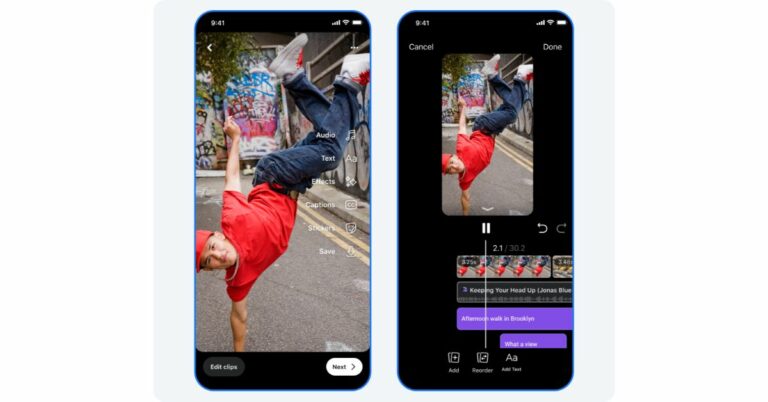
Meta has announced a number of improvements to Facebook’s video features. The new update has begun to roll out which brings improved Reels editing features, the option to upload HDR videos, and the Watch tab has been replaced with a Video tab. More features such as adding music, filters, effects, titles, and captions also come with the update. Facebook users will also be able to upload videos in HDR as well.
More Reels editing features are now available in Facebook Feed thanks to upgrades from Meta. The company has released new editing tools for Reels or long-form videos. On Reels, Meta integrated audio, music, and text in one location. And now it’s accessible for reels and videos on Feed on Meta Business Suite. Additionally, Meta is introducing additional editing features like the ability to change a clip’s speed, reverse it, or replace it. Users can also make their videos better by exploring and adding music and audio clips, recording voiceovers and reducing unwanted noise.
Also Read: Mivi DuoPods A650 Review: Should you buy them?
 Users of Facebook can now upload HDR videos from their phones to Reels, where they can play them again in full HDR. Also, the Facebook Watch has been replaced with the Video tab. According to the company, this will be a one-stop shop for everything video on Facebook, including Reels, long-form and Live content.
The video tab will now have new horizontal-scroll reel sections that emphasise recommended reels so you can easily jump into short-form videos. You can still scroll vertically via a personalised feed that promotes all forms of video content.
Soon, the shortcut bar—which is located at the top of the app on Android and the bottom of the app on iOS—will have a Video as a tab. The tabs in the shortcut bar change based on the parts of the app you use the most.
Also Read: Google Pixel 7a Review: Is it an all-rounder phone at Rs 44,000?
Video Explore has also been revamped on Facebook to let people discover popular videos on the platform. Explore can be found by tapping the search icon in the Video tab. You can view a selection of reels, long-form and live videos related to relevant topics and hashtags.
Moreover, You no longer have to switch between applications to view and comment on Instagram Reels that have been recommended to you on Facebook. You can add your Facebook and Instagram accounts to the Accounts Centre to get started.
For the latest gadget and tech news, and gadget reviews, follow us on Twitter, Facebook and Instagram. For newest tech & gadget videos subscribe to our YouTube Channel. You can also stay up to date using the Gadget Bridge Android App. You can find the latest car and bike news here.
Users of Facebook can now upload HDR videos from their phones to Reels, where they can play them again in full HDR. Also, the Facebook Watch has been replaced with the Video tab. According to the company, this will be a one-stop shop for everything video on Facebook, including Reels, long-form and Live content.
The video tab will now have new horizontal-scroll reel sections that emphasise recommended reels so you can easily jump into short-form videos. You can still scroll vertically via a personalised feed that promotes all forms of video content.
Soon, the shortcut bar—which is located at the top of the app on Android and the bottom of the app on iOS—will have a Video as a tab. The tabs in the shortcut bar change based on the parts of the app you use the most.
Also Read: Google Pixel 7a Review: Is it an all-rounder phone at Rs 44,000?
Video Explore has also been revamped on Facebook to let people discover popular videos on the platform. Explore can be found by tapping the search icon in the Video tab. You can view a selection of reels, long-form and live videos related to relevant topics and hashtags.
Moreover, You no longer have to switch between applications to view and comment on Instagram Reels that have been recommended to you on Facebook. You can add your Facebook and Instagram accounts to the Accounts Centre to get started.
For the latest gadget and tech news, and gadget reviews, follow us on Twitter, Facebook and Instagram. For newest tech & gadget videos subscribe to our YouTube Channel. You can also stay up to date using the Gadget Bridge Android App. You can find the latest car and bike news here.
 Users of Facebook can now upload HDR videos from their phones to Reels, where they can play them again in full HDR. Also, the Facebook Watch has been replaced with the Video tab. According to the company, this will be a one-stop shop for everything video on Facebook, including Reels, long-form and Live content.
The video tab will now have new horizontal-scroll reel sections that emphasise recommended reels so you can easily jump into short-form videos. You can still scroll vertically via a personalised feed that promotes all forms of video content.
Soon, the shortcut bar—which is located at the top of the app on Android and the bottom of the app on iOS—will have a Video as a tab. The tabs in the shortcut bar change based on the parts of the app you use the most.
Also Read: Google Pixel 7a Review: Is it an all-rounder phone at Rs 44,000?
Video Explore has also been revamped on Facebook to let people discover popular videos on the platform. Explore can be found by tapping the search icon in the Video tab. You can view a selection of reels, long-form and live videos related to relevant topics and hashtags.
Moreover, You no longer have to switch between applications to view and comment on Instagram Reels that have been recommended to you on Facebook. You can add your Facebook and Instagram accounts to the Accounts Centre to get started.
For the latest gadget and tech news, and gadget reviews, follow us on Twitter, Facebook and Instagram. For newest tech & gadget videos subscribe to our YouTube Channel. You can also stay up to date using the Gadget Bridge Android App. You can find the latest car and bike news here.
Users of Facebook can now upload HDR videos from their phones to Reels, where they can play them again in full HDR. Also, the Facebook Watch has been replaced with the Video tab. According to the company, this will be a one-stop shop for everything video on Facebook, including Reels, long-form and Live content.
The video tab will now have new horizontal-scroll reel sections that emphasise recommended reels so you can easily jump into short-form videos. You can still scroll vertically via a personalised feed that promotes all forms of video content.
Soon, the shortcut bar—which is located at the top of the app on Android and the bottom of the app on iOS—will have a Video as a tab. The tabs in the shortcut bar change based on the parts of the app you use the most.
Also Read: Google Pixel 7a Review: Is it an all-rounder phone at Rs 44,000?
Video Explore has also been revamped on Facebook to let people discover popular videos on the platform. Explore can be found by tapping the search icon in the Video tab. You can view a selection of reels, long-form and live videos related to relevant topics and hashtags.
Moreover, You no longer have to switch between applications to view and comment on Instagram Reels that have been recommended to you on Facebook. You can add your Facebook and Instagram accounts to the Accounts Centre to get started.
For the latest gadget and tech news, and gadget reviews, follow us on Twitter, Facebook and Instagram. For newest tech & gadget videos subscribe to our YouTube Channel. You can also stay up to date using the Gadget Bridge Android App. You can find the latest car and bike news here. Mivi DuoPods A650 Review: Should you buy them?

This year, Mivi has released a variety of wireless earbuds under various price ranges and categories. We have been using the brand-new Mivi DuoPods A650, one of its newest releases, for more than two weeks. The TWS earphones have features like ENC, custom-tuned EQ, 13mm electro-dynamic bass drivers, and more, and they cost about Rs 1,500. The device is advertised as having a 55ms low latency and 55 hours of playing. Is the cost of these TWS justified? Check out the Mivi DuoPods A650 review below to find out.
 They have four vertically positioned LEDs on the front that light up, along with the Mivi logo, and red and blue LEDs on the earphones that indicate pairing status and battery life, respectively. At the bottom is a USB-C port for powering the charging case. Mivi has provided a USB-C cable within the box.
Also Read: Logitech M240 Silent Bluetooth Mouse Review: Replace your trackpad with this mouse
The case is very luggable thanks to its lightweight. There are no buttons on the charging case for the Mivi DuoPods A650 earbuds. It starts looking for a device to pair with as soon as the case is opened.
They have four vertically positioned LEDs on the front that light up, along with the Mivi logo, and red and blue LEDs on the earphones that indicate pairing status and battery life, respectively. At the bottom is a USB-C port for powering the charging case. Mivi has provided a USB-C cable within the box.
Also Read: Logitech M240 Silent Bluetooth Mouse Review: Replace your trackpad with this mouse
The case is very luggable thanks to its lightweight. There are no buttons on the charging case for the Mivi DuoPods A650 earbuds. It starts looking for a device to pair with as soon as the case is opened.
 You can see that the earphones are securely fit into the correct slots when you lift the case’s lid. To keep the earbuds in place, the casing has built-in magnets. Out of the box, the earphones are incredibly lightweight and stem-like appearance.
In terms of comfort and fit, the earbuds are slightly hard to wear while you are sleeping, so if you use them for an extended period, you may get ear irritation and pain. If you enjoy listening to music while you sleep, this product is not for you.
You can select between songs, accept or turn down phone calls, and enable the voice assistant with the touch sensors in both earbuds. We discovered that there is a delay when pausing or resuming it and that the touch response is slow.
The voices irritating and pinching at high volumes, we identified certain difficulties. The sound was also significantly louder than other gadgets we’ve recently tried. Because the music sounds a little distorted when the volume is set all the way up, it is advised to maintain it at 80% or lower.
Additionally, Mivi provides ENC (Enviromental Noice Cancellation) with the Duopods A650, which is effective at blocking out background noise while making phone calls. The Duopods A650’s lack of app support is another frustrating feature, in addition to its distorted loud volume. Sadly, Mivi does not yet have an app for its TWS products.
The Duopods A650’s battery life, however, is exceptional. These Mivi earphones’ 500mAh battery offers 55+ hours of nonstop use (claimed by the company). The case provides around 9 hours of talk time and may recharge the earbuds five times. A quick 10-minute charge might give the battery backup a 10-hour runtime. More than an hour is needed to fully charge both the buds and the charging capsule.
You can see that the earphones are securely fit into the correct slots when you lift the case’s lid. To keep the earbuds in place, the casing has built-in magnets. Out of the box, the earphones are incredibly lightweight and stem-like appearance.
In terms of comfort and fit, the earbuds are slightly hard to wear while you are sleeping, so if you use them for an extended period, you may get ear irritation and pain. If you enjoy listening to music while you sleep, this product is not for you.
You can select between songs, accept or turn down phone calls, and enable the voice assistant with the touch sensors in both earbuds. We discovered that there is a delay when pausing or resuming it and that the touch response is slow.
The voices irritating and pinching at high volumes, we identified certain difficulties. The sound was also significantly louder than other gadgets we’ve recently tried. Because the music sounds a little distorted when the volume is set all the way up, it is advised to maintain it at 80% or lower.
Additionally, Mivi provides ENC (Enviromental Noice Cancellation) with the Duopods A650, which is effective at blocking out background noise while making phone calls. The Duopods A650’s lack of app support is another frustrating feature, in addition to its distorted loud volume. Sadly, Mivi does not yet have an app for its TWS products.
The Duopods A650’s battery life, however, is exceptional. These Mivi earphones’ 500mAh battery offers 55+ hours of nonstop use (claimed by the company). The case provides around 9 hours of talk time and may recharge the earbuds five times. A quick 10-minute charge might give the battery backup a 10-hour runtime. More than an hour is needed to fully charge both the buds and the charging capsule.
Mivi DuoPods A650 review: Design
Let’s begin by talking about how it looks. The Mivi Duopods A650’s body is shaped like a pebble. Although the device comes in a variety of colours, we have the blue version. Even though the earphones’ housing is made of plastic, it is sturdy enough to endure accidental falls. Furthermore, a lot of scratches are drawn to the shiny sheen. They have four vertically positioned LEDs on the front that light up, along with the Mivi logo, and red and blue LEDs on the earphones that indicate pairing status and battery life, respectively. At the bottom is a USB-C port for powering the charging case. Mivi has provided a USB-C cable within the box.
Also Read: Logitech M240 Silent Bluetooth Mouse Review: Replace your trackpad with this mouse
The case is very luggable thanks to its lightweight. There are no buttons on the charging case for the Mivi DuoPods A650 earbuds. It starts looking for a device to pair with as soon as the case is opened.
They have four vertically positioned LEDs on the front that light up, along with the Mivi logo, and red and blue LEDs on the earphones that indicate pairing status and battery life, respectively. At the bottom is a USB-C port for powering the charging case. Mivi has provided a USB-C cable within the box.
Also Read: Logitech M240 Silent Bluetooth Mouse Review: Replace your trackpad with this mouse
The case is very luggable thanks to its lightweight. There are no buttons on the charging case for the Mivi DuoPods A650 earbuds. It starts looking for a device to pair with as soon as the case is opened.
 You can see that the earphones are securely fit into the correct slots when you lift the case’s lid. To keep the earbuds in place, the casing has built-in magnets. Out of the box, the earphones are incredibly lightweight and stem-like appearance.
 In terms of comfort and fit, the earbuds are slightly hard to wear while you are sleeping, so if you use them for an extended period, you may get ear irritation and pain. If you enjoy listening to music while you sleep, this product is not for you.
 You can select between songs, accept or turn down phone calls, and enable the voice assistant with the touch sensors in both earbuds. We discovered that there is a delay when pausing or resuming it and that the touch response is slow.
Mivi DuoPods A650 review: Performance
The Mivi Duopods A650 have an IPX4 rating, so you can use them whenever you want, in the gym or while working out in the rain. After initial setup, you only need to remove the earbuds from the charging case, connect them to your device, and they will instantly pair. The Bluetooth 5.1 version is supported by the Mivi Duopods A650 earphones, which also have a wireless range of about 10 metres. Also Read: Google Pixel 7a Review: Is it an all-rounder phone at Rs 44,000? The 13mm electroplated bass drivers in the Duopods have a frequency response of 20Hz to 20KHz. The earbuds sound okay in terms of audio quality and are acceptable for casual use but do not provide professional-grade audio quality. An overly deep bass response is heard. The voices irritating and pinching at high volumes, we identified certain difficulties. The sound was also significantly louder than other gadgets we’ve recently tried. Because the music sounds a little distorted when the volume is set all the way up, it is advised to maintain it at 80% or lower.
Additionally, Mivi provides ENC (Enviromental Noice Cancellation) with the Duopods A650, which is effective at blocking out background noise while making phone calls. The Duopods A650’s lack of app support is another frustrating feature, in addition to its distorted loud volume. Sadly, Mivi does not yet have an app for its TWS products.
The Duopods A650’s battery life, however, is exceptional. These Mivi earphones’ 500mAh battery offers 55+ hours of nonstop use (claimed by the company). The case provides around 9 hours of talk time and may recharge the earbuds five times. A quick 10-minute charge might give the battery backup a 10-hour runtime. More than an hour is needed to fully charge both the buds and the charging capsule.
The voices irritating and pinching at high volumes, we identified certain difficulties. The sound was also significantly louder than other gadgets we’ve recently tried. Because the music sounds a little distorted when the volume is set all the way up, it is advised to maintain it at 80% or lower.
Additionally, Mivi provides ENC (Enviromental Noice Cancellation) with the Duopods A650, which is effective at blocking out background noise while making phone calls. The Duopods A650’s lack of app support is another frustrating feature, in addition to its distorted loud volume. Sadly, Mivi does not yet have an app for its TWS products.
The Duopods A650’s battery life, however, is exceptional. These Mivi earphones’ 500mAh battery offers 55+ hours of nonstop use (claimed by the company). The case provides around 9 hours of talk time and may recharge the earbuds five times. A quick 10-minute charge might give the battery backup a 10-hour runtime. More than an hour is needed to fully charge both the buds and the charging capsule.
Verdict
The Duopods A650’s battery life is excellent and allows for continuous use for up to 9–10 hours. Loud and clear audio can be heard through the microphone. However, because it is extremely loud and the bass is over-boosted, and the sound quality is not particularly impressive. The connectivity strength is excellent, and the entire design is good too. Yes, these are suitable for gaming because of its low latency. As a whole, this product is good except for how painful and uncomfortable the earphones are to wear for longer durations due to its design and thickness. Mivi DuoPods A650 Pros- Good for gaming
- The entire design is good too
- Excellent battery life
- Too loud
- Earbuds are uncomfortable when worn for longer durations
- No app support
BGMI redeem codes for 19 July 2023, claim and receive rewards and benefits

After being banned for nearly ten months, Battleground Mobile India, aka BGMI, is officially available again in India. BGMI fans are looking for ways to improve their game experience and one such method is the usage of redemption codes, which offers a variety of rewards and advantages using BGMI redeem codes players can gain access to new skins, outfits, loot crates, weapons and free UC and diamonds.
As mentioned earlier, these codes give users the chance to earn unique rewards and gain extra benefits while playing the game. This includes GUN SKINS (M4, AKM, M416, AWM, M24, UZI, KAR98K), free character voucher, Andy, Carlo, Sara, Victor character for free, free Anna Character on completing the mission and UC or Royal Pass Discount. So here we have gathered a list of the most recent BGMI redeem codes as of 19 July 2023. Also, redeem these codes asap as these are only valid for a limited duration.
BGMI Redeem Codes for 19 July 2023
VETREL2IMHX ZADROT5QLHP BOBR3IBMTO FENKYU5ATPD LEVKIN1QPCZ SIWEST4YLXR KARZBZYTR SD14G84FCC GPHZDBTFZM24U BDNKUPRMF4 GPHZDBTFZM24UHow to get free Redeem Codes for BGMI on 19 July 2023?
- Launch BGMI on your device.
- Then select the Redeem Code option from the main menu.
- Next, click on the Redeem code tab.
- A new window will open, requesting the redemption code.
- Now enter your BGMI code.
- Confirm and click on the “Redeem” tab.
- If your redeem code is valid then you will get a message confirming that your rewards were successfully redeemed.
Garena Free Fire Redeem Codes Today 19 July 2023: Here is how to claim them

Garena Free Fire is a battle royale game with regular awards and tournaments to keep players interested. If you play Garena Free Fire, you should be aware of the redeem codes that are released on a daily basis. However, because the battle royale game is banned in India, players from other countries can use the Free Fire Redeem codes daily. If you’re unfamiliar with the Garena Free Fire redeem codes or don’t know how to get them, we’ve put together a step-by-step guide to help you redeem them. Check out Garena Free Fire Redeem Codes for 19 July 2023.
The Free Fire redeem codes are a great way to get free stuff. These are 12-digit codes that contain alphabets and numbers, as well as an expiration date and time. Because the Garena FF redeem codes cannot be used more than once, you should hurry to the redemption page to claim your free reward before someone else does. To get a free reward, all you have to do is go to reward.ff.garena.com/en, which is the official redemption page. Also, keep an eye on this space for daily updates on Garena Free Fire redemption codes and rewards.
Garena Free Fire Redeem Codes Today 19 July 2023
MCPTFNXZF4TA FF11HHGCGK3B 8F3QZKNTLWBZ FF10GCGXRNHY FF11NJN5YS3E YXY3EGTLHGJX WLSGJXS5KFYR FF10617KGUF9 Y6ACLK7KUD1N W0JJAFV3TU5E FF1164XNJZ2V SARG886AV5GR FF11WFNPP956 ZYPPXWRWIAHDHow to Get Free Fire Redeem Codes for Garena on 19 July 2023?
- Visit the Garena Free Fire game’s official website at reward.ff.garena.com.
- Use your Facebook, Google, VK, Apple ID, Huawei ID, or Twitter account to log in.
- You’ll be taken to a valid redemption code (s)
- Copy and paste the 12-digit redemption code into the text box.
- On the screen, a dialogue box will appear.
- ‘Ok’ should be selected.
Google Album Archive shutting down tomorrow: Here’s how you can save your pictures before they are deleted

If you haven’t heard the news already, Google will be shutting down its Album Archive on July 19, 2023. For those that aren’t aware, Google Album Archive stores all the images linked to your Google Account across different Google services. These images can still be accessed from their respective services. But, if a particular service is now defunct (Google Plus, Google Allo etc.), the images linked to it can only be viewed on the Album Archive. With the Archive shutting down, all those images will be deleted as well. Unless you save them first. Here’s a quick explainer on how you can save your pictures from Google Album Archive before it gets shut down.
Read Also: Non-Inverter AC vs Inverter AC: Differences and Which One to Buy
Step 3: Scroll down and click on Next Step.
Step 4: Select the location where you want to save the images. You can choose to receive a download link if you want to save the images directly on your device. You can also choose to save the images in Dropbox, Google Drive, or One Drive.
Step 5: Select the frequency of exports.
Step 6: Select file type & size.
Step 7: Click on Create Export.
Your Album Archive images will be sent to you through your selected medium.
Save your images in Google Album Archive using Google Takeout
Step 1: Go to the Google Takeout webpage and sign in using your Google Account. Step 2: Select the checkbox for Album Archive only. Step 3: Scroll down and click on Next Step.
 Step 4: Select the location where you want to save the images. You can choose to receive a download link if you want to save the images directly on your device. You can also choose to save the images in Dropbox, Google Drive, or One Drive.
Step 5: Select the frequency of exports.
Step 4: Select the location where you want to save the images. You can choose to receive a download link if you want to save the images directly on your device. You can also choose to save the images in Dropbox, Google Drive, or One Drive.
Step 5: Select the frequency of exports.
 Step 6: Select file type & size.
Step 7: Click on Create Export.
Step 6: Select file type & size.
Step 7: Click on Create Export.
 Your Album Archive images will be sent to you through your selected medium.
Frequently Asked Questions
What is Google Album Archive?
Google Album Archive is a collection of images from different (older) Google services like Hangouts, Google Plus, Picasa and more.Is Google Album Archive shutting down?
Yes, Album Archive will be shutting down on July 19, 2023. All your saved images will be deleted following the cancellation.How can I save my Googe Album Archive images?
You can use Google Takeout to request all your saved data in Google Album Archive. You can choose to have the data backed up on Google Drive, One Drive, or Dropbox. You can also request a download link that will be sent to you via email. Read Also: Apple’s first-generation iPhone sold for over $190,000Conclusion
This is how you can save your pictures from the Album Archive to your device. Any download links emailed to you by Google are valid for 7 days. After the validity expires, you will not be able to download your archived pictures using that particular link. If local backups are not your biggest priority, we’d suggest using an online storage service to save your images. For the latest gadget and tech news, and gadget reviews, follow us on Twitter, Facebook and Instagram. For newest tech & gadget videos subscribe to our YouTube Channel. You can also stay up to date using the Gadget Bridge Android App. You can find the latest car and bike news here.How to enable the camera level tool in iOS 17?
iPhone has always had a native ‘level’ tool for the Measure app. You can use this feature to make sure that the objects around you are perfectly aligned and not tilting in either direction. This comes in handy when you want to hang a picture frame perfectly. In iOS 17, Apple has introduced this feature on the iPhone’s camera app as well. This will allow users to remove any tilt from their pictures. Integrated into the viewfinder, this tool serves as an excellent guide to taking aesthetically pleasing pictures. In this article, we show you how to enable the camera level tool in iOS 17.
Read Also: Apple’s first-generation iPhone sold for over $190,000
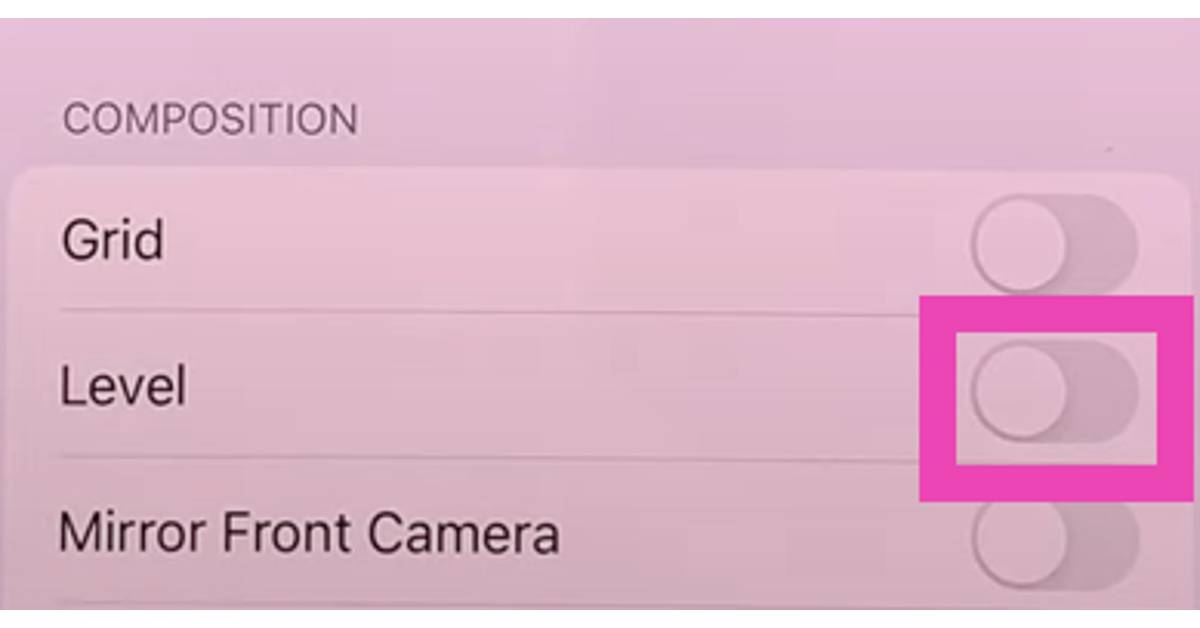
Step 2: Switch on the toggle bar for Level.
Step 3: Launch the Camera app.
Step 4: Hold your iPhone in landscape orientation.
Step 5: You will notice a horizontal white line on the screen with two horizontal dashes on either end. This is the level tool. Tilt your phone until this line rests at an angle of 0 degrees, connecting the two dashes to form a straight line. Once it does, it will turn yellow.
Step 6: Take a picture.
The picture you take will be untitled and align perfectly with the X-axis.
Here’s how you can use the camera level tool on your iPhone
Before you begin, make sure your iPhone is running the iOS 17 Public Beta version. Read this article to find out how you can install the new OS version on your iPhone. Step 1: Go to Settings and select Camera. Step 2: Switch on the toggle bar for Level.
 Step 3: Launch the Camera app.
Step 4: Hold your iPhone in landscape orientation.
Step 5: You will notice a horizontal white line on the screen with two horizontal dashes on either end. This is the level tool. Tilt your phone until this line rests at an angle of 0 degrees, connecting the two dashes to form a straight line. Once it does, it will turn yellow.
Step 6: Take a picture.
The picture you take will be untitled and align perfectly with the X-axis.
Step 3: Launch the Camera app.
Step 4: Hold your iPhone in landscape orientation.
Step 5: You will notice a horizontal white line on the screen with two horizontal dashes on either end. This is the level tool. Tilt your phone until this line rests at an angle of 0 degrees, connecting the two dashes to form a straight line. Once it does, it will turn yellow.
Step 6: Take a picture.
The picture you take will be untitled and align perfectly with the X-axis.
Frequently Asked Questions
Why does my camera take tilted images?
Pictures taken with your phone camera come out tilted because you do not hold your phone straight while shooting them. This can be resolved using the camera level tool on your iPhone.How do I enable the camera level tool on iOS 17?
To enable the camera level tool for your iPhone’s camera app go to Settings>Camera and switch on the toggle bar for Level.How do I straighten the crooked images on my iPhone?
You can straighten the titled images taken with your iPhone by using the native photo editor. After opening the image in the editor, tap the crop icon and use the Straighten tool to adjust the orientation of the image. Read Also: 8 Best Emoji Keyboards for iPhone (2023)Conclusion
This is how you can use the camera level tool in iOS 17. Once you get a hang of this tool, you will never take crooked pictures using your iPhone. As convenient as this feature is, it has a couple of drawbacks. Firstly, it doesn’t work in portrait mode. You will need to put your phone in landscape orientation if you want to use the camera level. Secondly, this tool only works for X-axis alignment. Meaning, you will be able to make sure that the images aren’t tilted along the X-axis but there is always a possibility of them being tilted vertically. To check out other interesting features on iOS 17, read this article. For the latest gadget and tech news, and gadget reviews, follow us on Twitter, Facebook and Instagram. For newest tech & gadget videos subscribe to our YouTube Channel. You can also stay up to date using the Gadget Bridge Android App. You can find the latest car and bike news here.How to Play Wordle: Tips & Tricks to Become a Pro At Wordle
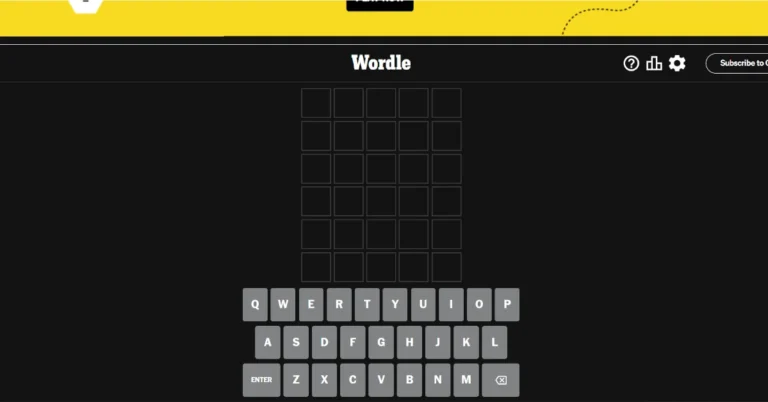
Five letters, six guesses, and one word. You guessed it right, we are talking about our dear Wordle. When John Wardle introduced this game, he might not have thought about the immense popularity this game will gain irrespective of age group and geography. But here we are, playing a scavenger hunt in our heads to get that one damn word. Today, we will give you five easy tips to play Wordle like a pro.
Read Also: How to Get the ‘Wordle’ Game on Your Android or iPhone home screen?
Before we dive into the tips, let’s loop in those who are playing it for the first time.
Visit the Wordle website, where the game reigns supreme! It isn’t on typical app stores, and guess what? There are no ads, in-app purchases, or membership fees.
This is how it works: You will be given a five-letter word to crack. You have six guesses to solve the mystery. Take note of the feedback! A correct letter in the correct location turns green, whereas a correct letter in the wrong spot turns yellow. What about the rest? They remain in the grey zone.
Read Also: Top 7 timepass games like Wordle that you can play every day
So, what does one have to do to be the Wordle Champ? Well, here are some tricks that might come in handy:
Some letters hold more power than others. Choose your sacrificial first lamb made of these powerful letters. Those who play word games regularly know that a “P” or an “S” is more likely to occur than an “X” or a “Z”.
Building on it, vowels(a,e, i,o,u) are the most common letters to appear in a word. Try making your first words using a combination of these with other common letters like T, N, P, etc. It is a good strategy to proceed with the hit-and-trial method.
Try using ADIEU, TEARS, and EARNS.
Keep an eye on your Wordle statistics to track your score and guess performance. Whether you use the same starting word each time or change it up, analysing your guess data is vital to determining the effectiveness of your strategy and making adjustments.
Accessing your up-to-date statistics is a breeze through your account, allowing you to stay informed and adjust your approach in real-time.
Read Also: How to install Google Play Games Beta on your PC?
If You Joined the Party Late, Here is How to Get Started
 Visit the Wordle website, where the game reigns supreme! It isn’t on typical app stores, and guess what? There are no ads, in-app purchases, or membership fees.
This is how it works: You will be given a five-letter word to crack. You have six guesses to solve the mystery. Take note of the feedback! A correct letter in the correct location turns green, whereas a correct letter in the wrong spot turns yellow. What about the rest? They remain in the grey zone.
Read Also: Top 7 timepass games like Wordle that you can play every day
So, what does one have to do to be the Wordle Champ? Well, here are some tricks that might come in handy:
Visit the Wordle website, where the game reigns supreme! It isn’t on typical app stores, and guess what? There are no ads, in-app purchases, or membership fees.
This is how it works: You will be given a five-letter word to crack. You have six guesses to solve the mystery. Take note of the feedback! A correct letter in the correct location turns green, whereas a correct letter in the wrong spot turns yellow. What about the rest? They remain in the grey zone.
Read Also: Top 7 timepass games like Wordle that you can play every day
So, what does one have to do to be the Wordle Champ? Well, here are some tricks that might come in handy:
Tips to Set the Wordleboard on Fire
Tip 1: Begin with the Popular Letters
 Some letters hold more power than others. Choose your sacrificial first lamb made of these powerful letters. Those who play word games regularly know that a “P” or an “S” is more likely to occur than an “X” or a “Z”.
Building on it, vowels(a,e, i,o,u) are the most common letters to appear in a word. Try making your first words using a combination of these with other common letters like T, N, P, etc. It is a good strategy to proceed with the hit-and-trial method.
Try using ADIEU, TEARS, and EARNS.
Some letters hold more power than others. Choose your sacrificial first lamb made of these powerful letters. Those who play word games regularly know that a “P” or an “S” is more likely to occur than an “X” or a “Z”.
Building on it, vowels(a,e, i,o,u) are the most common letters to appear in a word. Try making your first words using a combination of these with other common letters like T, N, P, etc. It is a good strategy to proceed with the hit-and-trial method.
Try using ADIEU, TEARS, and EARNS.
Tip 2: Boggle your mind with different word games
Wordle skills, like any other skill, get better with practice. Don’t limit yourself, hone your wit with other games like Scrabble, Boggle, and Bananagrams. Wordle skills are not unique to it, so might as well play other crossword games with your friends, family, or your computer. Play other puzzle video games like Portal 2 to sharpen your brain. Outboard your opponents in Chess. Any puzzle game that can exercise your brain will work as a catalyst in the guessing game of Wordle.Tip 3: Play Wordle daily
Discipline. Yes, you read it right. Play it every day. It’s a cure for boredom and is a good brain tonic. In today’s age of mindlessly scrolling through Instagram reels and Tik Toks, this might be considered a productive endeavour. It also helps us to communicate better, not going overboard here, but it widens our vocabulary. We have learnt so many good and weird words on Wordle that mindfully stumbling upon them would have had a probability close to zero. For instance, one time it was “Sissy.” Three S’s in one word, it was a task to get this one right.Tip 4: Wordle Only Uses US Spellings
This seemingly minor detail sometimes put the British spellers under a spell. An American reader might not put much thought to it but Wordle might play with this little oversight. For example, the word might be “COLOR” but one could lose their streak if they overlooked the American factor in it.Tip 5: Keep a Check on Your Statistics
 Keep an eye on your Wordle statistics to track your score and guess performance. Whether you use the same starting word each time or change it up, analysing your guess data is vital to determining the effectiveness of your strategy and making adjustments.
Accessing your up-to-date statistics is a breeze through your account, allowing you to stay informed and adjust your approach in real-time.
Read Also: How to install Google Play Games Beta on your PC?
Keep an eye on your Wordle statistics to track your score and guess performance. Whether you use the same starting word each time or change it up, analysing your guess data is vital to determining the effectiveness of your strategy and making adjustments.
Accessing your up-to-date statistics is a breeze through your account, allowing you to stay informed and adjust your approach in real-time.
Read Also: How to install Google Play Games Beta on your PC?