

Here is everything about the newly launched Qualcomm Snapdragon 4 Gen 2 mobile platform: Specifications, availability
American chipset maker Qualcomm has introduced its most recent processor for entry-level 5G handsets. Qualcomm Snapdragon 4 Gen 2 mobile platform will be succeeding the company’s existing Snapdragon 4 Gen 1 SoC. In addition to this, there is a Qualcomm X61 5G modem and dual-frequency GNSS and NavIC compatibility for navigation. The Processor is based on a 4nm process node and includes Six efficiency cores running at 2GHz and two performance cores running at 2.2GHz.
According to the chip manufacturer, Snapdragon 4 Gen 2 is made to easily multitask, support improved photography and videography, and provide dependable connections for consumers in the value tier.
Also Read: OnePlus reveals first look of OnePlus Nord 3 5G OnePlus Nord CE 3, Nord Buds 2R, India launch on July 5
Fast CPU speeds, clear photography and videography, as well as quick 5G and Wi-Fi for dependable connectivity, are all features of the Snapdragon 4 Gen 2 that make it easy to use all day. The Snapdragon 4 Gen 2 was the first 4nm platform in the 4-series and was created to increase platform efficiency and enhance battery life. It offers peak rates up to 2.2 GHz and up to 10% greater CPU performance than its predecessor Snapdragon 4 Gen 1 SoC that debuted last year.
Moreover, up to 50% of a battery can be recharged with Qualcomm Quick Charge 4+ Technology in just 15 minutes, eliminating the need to restrict device use during the day. Additionally, it supports 120fps FHD+ displays for enhanced clarity and fluid, uninterrupted scrolling.
The Qualcomm Snapdragon 4 Gen 2 mobile platform’s electronic image stabilisation and quick focusing reduce blur for sharper pictures even of moving subjects. Multi-Camera Temporal Filtering (MCTF), which offers noise reduction for high-quality films, is now incorporated into the hardware for the first time in the 4-series.
Also Read: Sennheiser Profile USB Microphone Streaming Set review: Pro sound on a budget
An AI-based low-light which allows clear, detailed photographs in low-light conditions is one of the exciting new AI advancements. User clarity on calls and video while working or in a congested environment is ensured by AI-enhanced background noise removal.
On the connectivity front, Snapdragon 4 Gen 2 offers lightning-fast speeds and support for more networks, frequencies, and bandwidths internationally thanks to the Snapdragon X61 5G Modem-RF System. Additionally, it is claimed to offer fast, strong Wi-Fi connectivity for gaming, streaming, and more.
Purchased a Costly Cell Phone? Think About Getting It Insured
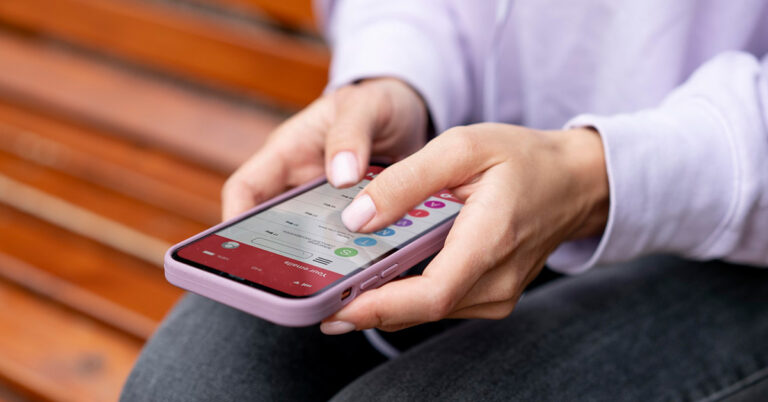
Purchasing a costly phone is an exciting and significant investment in today’s tech-savvy world. With numerous features, sleek designs, and advanced functionalities, smartphones have become an indispensable part of our lives. However, along with the joy of owning a high-value device, there is also a need to consider its protection. This is where the idea of getting your expensive phone insured comes into play.
When you purchase a phone, especially one that comes with a hefty price tag, it’s essential to think about the potential risks and uncertainties that may come with it. Accidental damage, theft, or loss are unfortunate possibilities that could leave you with a considerable financial burden. Insuring your phone offers peace of mind by providing coverage against these unforeseen events.
Mobile insurance policies typically cover various aspects such as accidental damage, liquid damage, theft, and even loss. Depending on the policy you choose, you may be eligible for repairs or replacements, ensuring that your investment remains protected. Moreover, insurance plans often come with additional benefits like worldwide coverage and extended warranties, further enhancing the value of your purchase.
Considering the expenses associated with phone repairs or replacements, the cost of insurance is often a small price to pay in comparison. It acts as a safety net, allowing you to enjoy your phone without constant worries about potential mishaps. So, before you encounter any unfortunate incidents, it is wise to think about getting your expensive phone insured and securing its future.
 Knowing about the problems with retail insurance of mobile phones is essential to make informed decisions when purchasing coverage. One common issue is the high cost of premiums, which can sometimes be disproportionate to the value of the phone. Additionally, some retail insurance policies may have strict claim procedures or limited coverage, resulting in difficulties when filing claims. Another problem is the presence of exclusions and fine print that may restrict coverage for specific incidents or damages. Finally, some retail insurance policies may not offer comprehensive protection against all risks, leaving customers vulnerable to certain types of damage or loss. Being aware of these problems allows consumers to evaluate their options carefully and choose insurance that provides adequate coverage at a reasonable cost.
Understanding Mobile Phone Insurance
Mobile phone insurance is a service that provides coverage and financial protection for your smartphone against various risks. It typically includes accidental damage, theft, loss, and sometimes even mechanical breakdown. Understanding mobile phone insurance is crucial to make an informed decision about whether to purchase a policy. It’s important to read the terms and conditions carefully, paying attention to coverage limits, deductibles, claim processes, and exclusions. Additionally, consider factors like the cost of insurance, the value of your phone, and your risk tolerance. By understanding the ins and outs of mobile insurance, you can determine if it’s a worthwhile investment to safeguard your valuable device.Extended Warranty
An extended warranty is an additional protection plan that extends the coverage of a manufacturer’s warranty for a specified period. It provides peace of mind by offering repairs or replacements for mechanical or electrical failures that may occur after the original warranty expires. The importance of an extended warranty lies in the potential cost savings and protection it offers. It safeguards against unexpected repair expenses, especially for high-value items like electronics. Additionally, it extends the lifespan of your product, ensuring its functionality for a longer duration. Considering the uncertainties of technology and the potential for costly repairs, an extended warranty can provide valuable coverage and financial security.Theft Covers
Theft cover is a type of insurance that protects against the loss of your belongings due to theft. It offers financial compensation or replacement for stolen items, providing peace of mind in case of such unfortunate incidents. The importance of theft cover lies in its ability to mitigate the financial burden and emotional distress caused by theft. It helps in recovering the value of the stolen items, allowing you to replace them without significant out-of-pocket expenses. Moreover, theft cover acts as a deterrent, making thieves think twice before targeting insured possessions. By having theft cover in place, you can protect your valuable belongings and ensure a sense of security in your everyday life.Problems with Retail Insurance of Mobile Phones
 Knowing about the problems with retail insurance of mobile phones is essential to make informed decisions when purchasing coverage. One common issue is the high cost of premiums, which can sometimes be disproportionate to the value of the phone. Additionally, some retail insurance policies may have strict claim procedures or limited coverage, resulting in difficulties when filing claims. Another problem is the presence of exclusions and fine print that may restrict coverage for specific incidents or damages. Finally, some retail insurance policies may not offer comprehensive protection against all risks, leaving customers vulnerable to certain types of damage or loss. Being aware of these problems allows consumers to evaluate their options carefully and choose insurance that provides adequate coverage at a reasonable cost.
Exclusions Under Mobile Insurance
Common exclusions under mobile insurance policies may include:- Wear and tear
- Intentional damage
- Loss or damage due to negligence
- Unapproved repairs or modifications
- Damage or loss caused by war, acts of terrorism, or civil unrest may be excluded from coverage.
- Software issues
- Pre-existing conditions
Mobile Insurance Claim Process
The Mobile Insurance claim process involves the necessary steps to follow when filing a claim for your insured mobile phone. While the exact process may vary depending on the insurance provider, there are general guidelines to keep in mind:- Contact your insurance provider
- Gather documentation
- Complete the claim form
- Submit supporting documents
- Await assessment and decision
- Repair or replacement
- Pay any deductibles or excess
- Follow-up and feedback
Conclusion
Mobile phone insurance provides valuable protection for your expensive device against various risks such as accidental damage, theft, and loss. Understanding the terms and conditions of the insurance policy, including exclusions, premium rates, and depreciation calculations, is crucial to make informed decisions. While retail insurance may have its drawbacks such as high premiums and limited coverage, being aware of these problems allows consumers to explore alternative insurance options. The claim process is a crucial aspect of mobile insurance, and following the necessary steps diligently ensures a smooth and efficient resolution of claims. By taking the time to understand mobile insurance and its various components, you can make confident choices to safeguard your investment. For the latest gadget and tech news, and gadget reviews, follow us on Twitter, Facebook and Instagram. For the newest tech & gadget videos subscribe to our YouTube Channel. You can also stay up to date using the Gadget Bridge Android App. You can find the latest car and bike news here.BGMI redeem codes for 28 June 2023, claim and receive rewards and benefits

After being banned for nearly ten months, Battleground Mobile India, aka BGMI, is officially available again in India. BGMI fans are looking for ways to improve their game experience and one such method is the usage of redemption codes, which offers a variety of rewards and advantages using BGMI redeem codes players can gain access to new skins, outfits, loot crates, weapons and free UC and diamonds.
As mentioned earlier, these codes give users the chance to earn unique rewards and gain extra benefits while playing the game. This includes GUN SKINS (M4, AKM, M416, AWM, M24, UZI, KAR98K), free character voucher, Andy, Carlo, Sara, Victor character for free, free Anna Character on completing the mission and UC or Royal Pass Discount. So here we have gathered a list of the most recent BGMI redeem codes as of 28 June 2023. Also, redeem these codes asap as these are only valid for a limited duration.
BGMI Redeem Codes for 28 June 2023
KARZBZYTR- Skin (KAR98 Sniper) SD14G84FCC- AKM Skin GPHZDBTFZM24U – UMP9 Skin TQIZBZ76F- Motor Vehicle Skin SD16Z66XHH- SCAR-L Gun Skin BOBR3IBMT- Desert Ranger Set GPHZDBTFZM24U- Gun Skin (UMP9) RNUZBZ9QQ – AKM Glacier Skin PGHZDBTFZ95U – M416 Skin S78FTU2XJ- New Skin (M16A4) GPHZDBTFZM24U – UMP9 Skin RNUZBZ9QQ – AKM Glacier Skin PGHZDBTFZ95U – M416 Skin BOBR3IBMT- Desert Ranger Set GPHZDBTFZM24U- Gun Skin (UMP9) KARZBZYTR- Skin (KAR98 Sniper)How to get free Redeem Codes for BGMI on 28 June 2023?
- Launch BGMI on your device.
- Then select the Redeem Code option from the main menu.
- Next, click on the Redeem code tab.
- A new window will open, requesting the redemption code.
- Now enter your BGMI code.
- Confirm and click on the “Redeem” tab.
- If your redeem code is valid then you will get a message confirming that your rewards were successfully redeemed.
Garena Free Fire Redeem Codes Today 28 June 2023: Here is how to claim them

Garena Free Fire is a battle royale game with regular awards and tournaments to keep players interested. If you play Garena Free Fire, you should be aware of the redeem codes that are released on a daily basis. However, because the battle royale game is banned in India, players from other countries can use the Free Fire Redeem codes daily. If you’re unfamiliar with the Garena Free Fire redeem codes or don’t know how to get them, we’ve put together a step-by-step guide to help you redeem them. Check out Garena Free Fire Redeem Codes for 28 June 2023.
The Free Fire redeem codes are a great way to get free stuff. These are 12-digit codes that contain alphabets and numbers, as well as an expiration date and time. Because the Garena FF redeem codes cannot be used more than once, you should hurry to the redemption page to claim your free reward before someone else does. To get a free reward, all you have to do is go to reward.ff.garena.com/en, which is the official redemption page. Also, keep an eye on this space for daily updates on Garena Free Fire redemption codes and rewards.
Garena Free Fire Redeem Codes Today 28 June 2023
F09IKIJHDTHNFTY F6JKIJHSAQ23TDV FGR6TUJK0POL9MN FFTYHO9ICXAQ23T FD5TGHNUKO9089O FLKJHFGTRGBXSQ2 F34TB6YJKIUTJKO FDRTHBXAQ234THY FYHT7JUHBVCXAQ2 FGU3YGGY32Y4YTJ FH5Y898UH70TJHY FJIKJGYH78IOLNB FTHYJ8KUNBVS23THow to Get Free Fire Redeem Codes for Garena on 28 June 2023?
- Visit the Garena Free Fire game’s official website at reward.ff.garena.com.
- Use your Facebook, Google, VK, Apple ID, Huawei ID, or Twitter account to log in.
- You’ll be taken to a valid redemption code (s)
- Copy and paste the 12-digit redemption code into the text box.
- On the screen, a dialogue box will appear.
- ‘Ok’ should be selected.
Costway Folding Treadmill: Why We Think It Is A Convenient And Versatile Exercise Solution
In today’s fast-paced world, maintaining a healthy lifestyle has become increasingly important. As more individuals prioritize their well-being, the demand for exercise equipment that combines functionality, convenience, and affordability is on the rise. Costway, a renowned e-commerce platform, has emerged as a trusted brand offering a wide range of products to meet customers’ diverse needs. In this review, we will focus on Costway Folding Treadmill with Remote Control, highlighting its key features and the brand’s commitment to quality and customer satisfaction.
Brand Profile
Costway is an e-commerce platform dedicated to fulfilling customers’ daily living needs. The brand prides itself on delivering products that undergo strict quality selection processes, ensuring that customers receive only the best. With a comprehensive range of offerings, including the popular Rattan, Bouncy Castle, Treadmill, and Kids Toy Car/Ride-On Toys categories, Costway caters to various interests and preferences. With over 6000 SKUs available and frequent updates, Costway ensures customers have access to the latest products in the market.Product Introduction
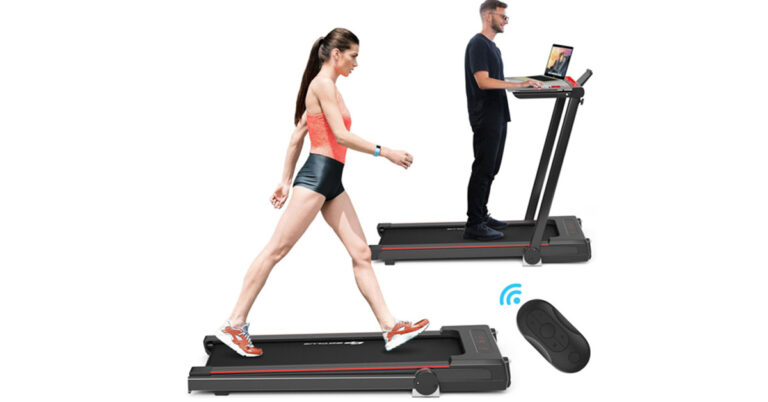
One of the standout products in Costway’s treadmill category is the 3-in-1 Folding Treadmill with Remote Control. This innovative treadmill seamlessly combines the benefits of traditional treadmills, walking machines, and working machines, providing users with a versatile exercise experience. The treadmill features a large and sturdy Acrylic tabletop, allowing users to place their computers or other materials, making it possible to work while exercising. Furthermore, users can choose between running or jogging, depending on their physical fitness levels. The treadmill is equipped with a quiet and powerful 2.25 HP motor and a 5-layer running belt, ensuring a smooth and noiseless exercise session. This makes it ideal for home and office use, where noise reduction is crucial. Users can easily adjust the speed from 0.5 Mile/H to 7.5 Mile/H using the control board or the included remote control, providing them with full control over their workout intensity. To enhance the user experience, Costway’s 3-in-1 Folding Treadmill offers an extra-large LCD display that provides real-time data on speed, time, step distance, distance, and calories burned. This comprehensive feedback enables users to monitor their progress effectively. Safety is a top priority, and the treadmill comes with a built-in safety lock that allows for emergency braking, ensuring users can exercise with peace of mind. Costway understands the importance of entertainment during workouts. The treadmill features built-in speakers, allowing users to connect their electronic devices and enjoy music while exercising. Additionally, a convenient phone holder on the display lets users keep their phones in sight, making it possible to watch their favourite TV series or movies during workouts.
Brand Service
Costway takes pride in offering a comprehensive shopping experience through its Costway+ Care program. Customers can enjoy fast delivery within 3-5 days, ensuring they receive their orders promptly. The brand’s commitment to customer satisfaction is exemplified by its 24-hour customer service, providing timely assistance and addressing any concerns or queries. To further enhance customer confidence, Costway offers a 30-day return guarantee, allowing customers to return products if they are not fully satisfied. Privacy protection is also a priority, ensuring customers’ personal information is handled securely. Additionally, Costway provides product warranties, assuring customers of the brand’s commitment to quality and long-term customer satisfaction. When it comes to making purchasing decisions, online Costway reviews play a significant role in helping customers evaluate the quality and reliability of a product. Costway, as an e-commerce platform, understands the importance of customer feedback and actively encourages customers to share their experiences through reviews. By providing a platform for customers to express their opinions, Costway allows potential buyers to make informed choices based on the collective feedback.Conclusion
Costway’s 3-in-1 Folding Treadmill with Remote Control is a versatile and convenient exercise solution that combines the benefits of treadmills, walking machines, and working machines. With its quiet motor, adjustable speed, spacious tabletop, safety features, and entertainment options, this treadmill offers an exceptional workout experience. As a trusted e-commerce platform, Costway delivers on its brand promise of complete product ranges, high-quality items, competitive prices, and excellent customer service. Whether you’re a fitness enthusiast or a busy professional seeking a convenient exercise solution, the Costway folding treadmill is worth considering for its value and versatility. For the latest gadget and tech news, and gadget reviews, follow us on Twitter, Facebook and Instagram. For newest tech & gadget videos subscribe to our YouTube Channel. You can also stay up to date using the Gadget Bridge Android App. You can find the latest car and bike news here.Amazon Quiz Answers Today 26 May 2024: Participate to win Rs 500 Amazon Pay Balance

26 May 2024: New Amazon Quiz is now available. Customers from different parts of the country are participating in the daily quiz. The quiz starts at midnight today and will be live until 11:59 PM tonight. By successfully answering every question, participants in the quiz have the chance to win wonderful rewards. A Rs 500 Amazon Pay Balance is up for grabs to participants today.
One wrong answer could eliminate you from the quiz. You have a chance to win Rs 500 Amazon Pay Balance if you successfully answer every question. Users of the app only have the opportunity to take the quiz. Check Out 26 May 2024 Amazon Quiz Answers.
Amazon Quiz Today Prize: Rs 500 Amazon Pay Balance
Quiz Date: 26 May 2024
Daily Timing: 12 AM to 11:59 PM
Previous Amazon Quiz Winners Announcement: Today 12 PM Noon
Amazon Quiz Answers Today 26 May 2024: Win ₹ 500 Amazon Pay Balance
Question 1: Which of these recently played ATP events has a court named after the legendary tennis player Rafael Nadal? Answer: Barcelona Open Question 2: The movie Road House sees Jake Gyllenhaal play the role of an ex UFC fighter. Which of these famous sportspeople also acts in the movie? Answer: Conor Mcgregor Question 3: What is the other name given to the swamp deer, the state animal of Madhya Pradesh? Answer: Barasingha Question 4: In which of these cities in the USA is this famous museum located? Answer: New York Question 5: Which of these controversial media organizations was founded by this Australian editor and publisher? Answer: Wikileaks Also Read: Noise Buds Verve, budget TWS with up to 45 hours of playback launched in IndiaHow To Play Amazon Quiz Today
Only app users are eligible to play the Amazon quiz every morning from 12 AM to 11:59 PM. The quiz is not available on the desktop. For those who are unaware of how to play the Amazon quiz, below are the steps, you can follow to take the quiz.- First, download the Amazon app from the Google Play Store or App Store or go here to download the Amazon App.
- Now fill in the required information through the Sign-Up option.
- You need to log in to the Amazon app and scroll down on the home screen to find the Amazon Quiz banner.
- Tap on the Amazon Quiz banner and tap on the Start button to start the Quiz.
- Now you will get 5 questions and you need to answer them correctly. One wrong answer will eliminate you from the Quiz.
- After answering all the questions correctly you are now eligible for a Lucky Draw.
- The previous winner’s name will be announced today at 12 PM.
Amazon Daily Quiz Answers from the previous few days.
Here are all the answers from the previous 5 days of the Amazon Daily Quiz and Contest.Amazon Quiz Answers Today 25 May 2024: Win ₹ 500 Amazon Pay Balance
Question 1: Which of these players won the Monte Carlo Masters tennis tournament in 2024, his 3rd triumph in that event in 4 years? Answer: Stefanos Tsitsipas Question 2: Which of these Amazon Prime shows shares its name with a 2005 Brad Pitt- Angelina Jolie movie? Answer: Mr and Mrs Smith Question 3: Which animal features on the election symbol of the Republican party in the USA? Answer: Elephant Question 4: These waterfalls span the border between the province of Ontario in Canada and which state in the USA? Answer: New York Question 5: Which of these famous architects designed this iconic monument in India? Answer: Edwin LutyensAmazon Quiz Answers Today 24 May 2024: Win ₹ 500 Amazon Pay Balance
Question 1: Against which team did Sunrisers Hyderabad set a new record scoring 287 in an IPL match? Answer: Royal Challengers Bengaluru Question 2: Who plays the role of soldier Arun Katyal in the recently released movie ‘Yodha’? Answer: Sidharth Malhotra Question 3: Which of these famous rulers was born in the Shivneri Fort in Maharashtra in the 17th century? Answer: Shivaji Question 4: Name this famous church located in Europe Answer: St. Peter’s Basilica Question 5: This is the flag of which Caribbean country? Answer: BarbadosAmazon Quiz Answers Today 23 May 2024: Win ₹ 500 Amazon Pay Balance
Question 1: Who recently became the youngest-ever winner of the FIDE Candidates? Answer: Gukesh D Question 2: Britney Spears’ song ‘Baby one more time’ was recently covered by Jack Black’s band Tenacious D for which movie? Answer: Kung Fu Panda 4 Question 3: One of the ‘New Seven Wonders of the World’ Petra is located in which country? Answer: Jordan Question 4: This is the _____ beetle, named because of its resemblance to another animal. Fill in the blanks Answer: Rhinoceros Question 5: Who among these is the founder of this company? Answer: Elon MuskAmazon Quiz Answers Today 22 May 2024: Win ₹ 500 Amazon Pay Balance
Question 1: Pace sensation Mayank Yadav who won two Player of the Match awards in a row, represents which team in the IPL? Answer: Lucknow Super Giants Question 2: The series ‘Young Sheldon’, currently in its 7th season, shows the childhood of a character of which series? Answer: The Big Bang Theory Question 3: The Lira is the currency of which of these countries? Answer: Turkey Question 4: This is a bust of which legendary German composer? Answer: Ludwig van Beethoven Question 5: This is a self-portrait of which famous artist? Answer: Vincent Van GoghAmazon Quiz Answers Today 21 May 2024: Win ₹ 500 Amazon Pay Balance
Question 1: The prestigious Thomas Cup and Uber Cup badminton events would be held in which country this year? Answer: China Question 2: Which of these famous actors won the Padma Vibhushan in 2024? Answer: Chiranjeevi Question 3: Completed in 1986, which of these famous structures in Delhi was designed by Fariborz Sahba? Answer: Lotus Temple Question 4: Identify this Pokemon Answer: Charizard Question 5: Name this animal Answer: Duck-billed PlatypusAmazon Quiz Answers Frequently Asked Questions (FAQs)
Where can I check the previous winners? Did I win how to check?
You can head over to this link on your mobile or desktop to check the winners of the Amazon Daily Quiz Contest.How to Play Amazon Daily Quiz or Contest?
We have written an explainer above, you can refer to that.When are the winners of the Amazon Quiz and contest announced or declared?
The announcement of today’s Amazon quiz winner will take place Tomorrow. As for the Special Quiz and “Spin & Win” Contest, the winners will be declared once the Quiz Contest comes to an end. To find out who the lucky winner is, you can refer to the Amazon Quiz Winners List or visit the Amazon Winners tab in the Amazon App.How to participate in the Daily Amazon Quiz?
That is very easy, just got to the Amazon app and scroll to the bottom of the page and you will find the Quiz section. Click on it (usually it is called the fun zone) and you can enter the Amazon Today Quiz Contest.Are there any other quizzes or contests running on Amazon daily?
Yes, there are many running on a daily basis. These range from spinning the wheel to answering the questions correctly. All are located in the Fun Zone.What are the criteria for selecting a winner in the Daily Amazon Quiz?
When a qualified player submits correct answers to all the questions, they will automatically be entered into a lucky draw. This draw will include all participants who answered all the questions correctly. Amazon randomly selects the final winners from the pool of eligible participants who gave the right answers.Which Types of Questions are asked within Amazon Daily Quiz?
These are very simple and straightforward questions. These are mainly related to general knowledge.Where should I look for Amazon Daily Quiz answers?
You can bookmark this page as we will help you every day with the Amazon Daily Quiz. We bring you fresh answers every day for the Amazon Daily Quiz and Contest.What time does Amazon Announce previous winners?
The previous winner’s name will be announced today at 12 PM (noon). For the latest gadget and tech news, and gadget reviews, follow us on Twitter, Facebook and Instagram. For newest tech & gadget videos subscribe to our YouTube Channel. You can also stay up to date using the Gadget Bridge Android App. You can find the latest car and bike news here.Embracing The Digital Revolution: The Impact of High-Quality Odds Calculators and Converters
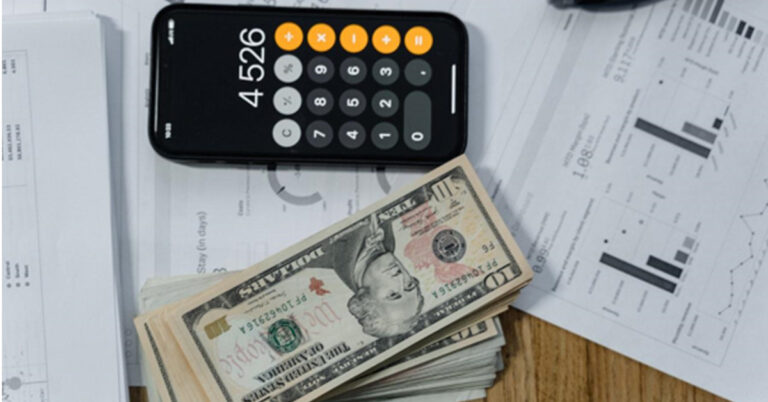
The internet is awash with websites and free-to-use tools that are designed to make our daily tasks faster and, therefore, our lives easier. One such popular tool is the online betting pay out calculator, which, after entering some basic information, instantly calculates a group of odds or converts the various types into a format that is familiar to you. Do you use such a calculator? Here is why you should if that answer was no.
Sportsbooks, including those found online, display the odds of their markets differently. British and Irish sites tend to lean towards fractional odds (i.e., 4/1), European sites show theirs as decimals (2.00), while American companies use American odds (+150). An experienced person would instantly look at a market for upcoming NFL games and know 6/1 is the same as 7.00 and +600, but would you? Do you know that odds of 1/1, 2.00, and +100 mean there is a 50% probability that you will win? If not, you need a calculator or converter in your life.
Each of the various odds is calculated in a different way, which makes working out any potential winnings difficult if you are only used to one type. For example, in the American way, the figures show what you stand to win if you wagered $100. An American market with +200 would see you profit $200, while a -140 market would see you win $40.
Fractional odds are more complicated, especially if the site offers an outcome at something like 6/4. To work out potential winnings here, you multiply your bet by the first number and divide the answer by the second. For example, a $10 bet at 6/4 would yield $15 plus your stake back (10×6 then divided by 4).
Decimal odds are as simple as the American format; they show what you can win per $1. You subtract 1 from the decimal figure and are left with your profit. Again, for example, winning on a 3.20 selection would yield a $2.20 profit, whereas a win on a 1.36 market would see you profit by $0.36.
Odds Converters Make Life Simpler
 Each of the various odds is calculated in a different way, which makes working out any potential winnings difficult if you are only used to one type. For example, in the American way, the figures show what you stand to win if you wagered $100. An American market with +200 would see you profit $200, while a -140 market would see you win $40.
Fractional odds are more complicated, especially if the site offers an outcome at something like 6/4. To work out potential winnings here, you multiply your bet by the first number and divide the answer by the second. For example, a $10 bet at 6/4 would yield $15 plus your stake back (10×6 then divided by 4).
Decimal odds are as simple as the American format; they show what you can win per $1. You subtract 1 from the decimal figure and are left with your profit. Again, for example, winning on a 3.20 selection would yield a $2.20 profit, whereas a win on a 1.36 market would see you profit by $0.36.
Each of the various odds is calculated in a different way, which makes working out any potential winnings difficult if you are only used to one type. For example, in the American way, the figures show what you stand to win if you wagered $100. An American market with +200 would see you profit $200, while a -140 market would see you win $40.
Fractional odds are more complicated, especially if the site offers an outcome at something like 6/4. To work out potential winnings here, you multiply your bet by the first number and divide the answer by the second. For example, a $10 bet at 6/4 would yield $15 plus your stake back (10×6 then divided by 4).
Decimal odds are as simple as the American format; they show what you can win per $1. You subtract 1 from the decimal figure and are left with your profit. Again, for example, winning on a 3.20 selection would yield a $2.20 profit, whereas a win on a 1.36 market would see you profit by $0.36.
Do You Need an Odds Calculator or Converter to Be Profitable?
Odds calculators and converters are not required for someone to be profitable, but they certainly help you seek out value. They allow you to see, at a glance, the implied probability of something happening, and that alone is worth its weight in gold. They also assist you in working out the various odds on the fly, freeing up time and saving you from having to make several calculations before trying your luck. Anything that makes your life easier is positive in our eyes. Most of the pay-out calculators you find online are 100% free to use. Many are simple tables, whereas others require you to type in one of the three odds types before they display all three types alongside each other. There are more complicated converters and calculators that you can use to find your potential profit when placing a parlay or accumulator online. Some of these are also free but other charge a small subscription fee. These wagers see you make several selections across the same event or many events, and all of your selections must win for you to profit. They are high-risk but high-reward. Calculating half a dozen outcomes is challenging even for people with top-tier math skills, so using a calculator for such a task is not only recommended but essential if you regularly use parlays or accumulators. For the latest gadget and tech news, and gadget reviews, follow us on Twitter, Facebook and Instagram. For newest tech & gadget videos subscribe to our YouTube Channel. You can also stay up to date using the Gadget Bridge Android App. You can find the latest car and bike news here.Soon, you will be able to play games on YouTube
We have some news that gamers would really like! According to a report in The Wall Street Journal, Google is currently testing a new product that will enable users to play games on their video-sharing platform, YouTube.
Called ‘Playables’, Google‘s reported new product would let users play games on the YouTube mobile app as well as on the desktop version of the service. The tech giant recently invited its employees to try the upcoming product and currently, in the testing phase, one of the games that can be played on the device is an arcade game called Stack Bounce.
Read Also: How to download YouTube videos for free?
In a statement given to IGN, a spokesperson for YouTube said, “Gaming has long been a focus at YouTube. We’re always experimenting with new features but have nothing to announce right now.”
It should be noted that this is not Google’s first attempt into the gaming space. Prior to this, the technology giant had launched its own gaming platform called Stadia in 2019. However, it wasn’t very successful and the company decided to close it down on January 18, 2023.
Interestingly, this is not the only new addition that’s coming to YouTube. Google keeps on rolling out new features to make its video-sharing platform better. Recently, it was reported that YouTube will be getting a new feature that would enable creators to dub videos in different languages.
YouTube has confirmed that the upcoming feature is called Aloud and that it is an AI-powered tool being developed at Google‘s Area 120 Incubator. The company further added that Aloud is designed to eliminate the time, effort and money that is spent on dubbing in the usual way.
What makes it even better is that the official website of the upcoming YouTube service states that Aloud will be available for creators for ‘no charge’.
Read Also: The best way to download YouTube videos in your iPhone camera roll
YouTube’s VP of product management, Amjad Hanif revealed to The Verge that the company has already started testing Aloud with a few hundred creators. He said that the tool is currently available in English and has the ability to dub into Spanish and Portuguese, but support for many more languages will be added to it soon.
While there is no update about when the upcoming service will start rolling out to others, Hanif has added that in the future, the video-sharing platform will also be working on “translated audio tracks sound like the creator’s voice, with more expression and lip sync.”
For the latest gadget and tech news, and gadget reviews, follow us on Twitter, Facebook and Instagram. For newest tech & gadget videos subscribe to our YouTube Channel. You can also stay up to date using the Gadget Bridge Android App. You can find the latest car and bike news here.
Top 3 Ways to Change iPhone Wallpaper Automatically
If you’re bored of looking at the same wallpaper on your iPhone every day, you can take a couple of steps to make things more lively. You can choose to set a different wallpaper for the home screen and lock screen or set a bunch of wallpapers on auto-rotation. The latter option was introduced in iOS 16 and is one of the most underrated features of your iPhone. In this article, we bring you the top 3 ways to change your iPhone wallpaper automatically.
Read Also: Ultimate Guide to Optimizing Android Privacy and Security Settings
Step 2: Select Photo Shuffle.
Step 3: Select the photos you want to keep on wallpaper rotation and tap on Add.
Step 4: Set the shuffle frequency. If you have selected a large group of pictures for rotation, you’d want to keep the frequency high.
Step 5: Add your desired widgets and filters. Tap on Add at the top right corner of the screen once you’re done.
Step 2: Select your desired Focus Mode from the list. You can also create a new Focus Mode by tapping the plus icon at the top-right corner of the screen.
Step 3: Scroll to the Customise Screens section and select the Choose option under the lock screen or home screen.
Step 4: Select a preinstalled wallpaper or choose one from the gallery.
Step 5: Add the necessary widgets and filters. Select Add when you’re done.
Step 6: Go to Set a schedule and choose when you want the Focus Mode to kick in.
Your iPhone’s wallpaper will change automatically at the scheduled time.
Step 2: Tap on Create Personal Automation. Then select New Automation. For example, ‘time of the day’ and then set time plus repeat. Press next.
Step 3: Choose Add action. Select Find Photos in the list of actions.
Step 4: Tap on Add Filter.
Step 5: Tap the space next to Album is. Select the album folder containing your desired wallpapers. You can create a new album with all the wallpapers you want on rotation and select it on this screen.
Step 6: Tap on Sort by and select Random. This ensures that there is no particular order to wallpaper rotation.
Step 7: Switch on the toggle bar for Limit and select 1.
Step 8: Search the Set Wallpaper Photo action and add it to the list.
Step 9: Choose whether you want to set the wallpaper on the home screen, lock screen, or both.
Step 10: Tap the side arrow next to the Set Wallpaper Photo action and switch off the toggle bar for Show preview.
Step 11: Hit Next at the top right corner of the screen.
Step 12: Set the time for the Shortcut to run. Switch off the toggle bar for Ask Before Running.
Your iPhone wallpaper will change automatically at the selected time.
Set Automatic Wallpapers on iPhone using Photo Shuffle
Step 1: Long-press the lock screen and tap the plus icon at the bottom right corner of the screen. Step 2: Select Photo Shuffle.
 Step 3: Select the photos you want to keep on wallpaper rotation and tap on Add.
Step 4: Set the shuffle frequency. If you have selected a large group of pictures for rotation, you’d want to keep the frequency high.
Step 3: Select the photos you want to keep on wallpaper rotation and tap on Add.
Step 4: Set the shuffle frequency. If you have selected a large group of pictures for rotation, you’d want to keep the frequency high.
 Step 5: Add your desired widgets and filters. Tap on Add at the top right corner of the screen once you’re done.
Use Focus Mode
Every Focus Mode has a wallpaper assigned to it. If you schedule a Focus Mode to kick in at a particular time, your iPhone’s wallpaper will change along with it. Here’s how you can go about this process. Step 1: Go to Settings and select Focus. Step 2: Select your desired Focus Mode from the list. You can also create a new Focus Mode by tapping the plus icon at the top-right corner of the screen.
 Step 3: Scroll to the Customise Screens section and select the Choose option under the lock screen or home screen.
 Step 4: Select a preinstalled wallpaper or choose one from the gallery.
 Step 5: Add the necessary widgets and filters. Select Add when you’re done.
Step 6: Go to Set a schedule and choose when you want the Focus Mode to kick in.
Step 5: Add the necessary widgets and filters. Select Add when you’re done.
Step 6: Go to Set a schedule and choose when you want the Focus Mode to kick in.
 Your iPhone’s wallpaper will change automatically at the scheduled time.
Use a Shortcut to change your iPhone wallpaper automatically
Step 1: Launch the Shortcuts app and select Automation. Step 2: Tap on Create Personal Automation. Then select New Automation. For example, ‘time of the day’ and then set time plus repeat. Press next.
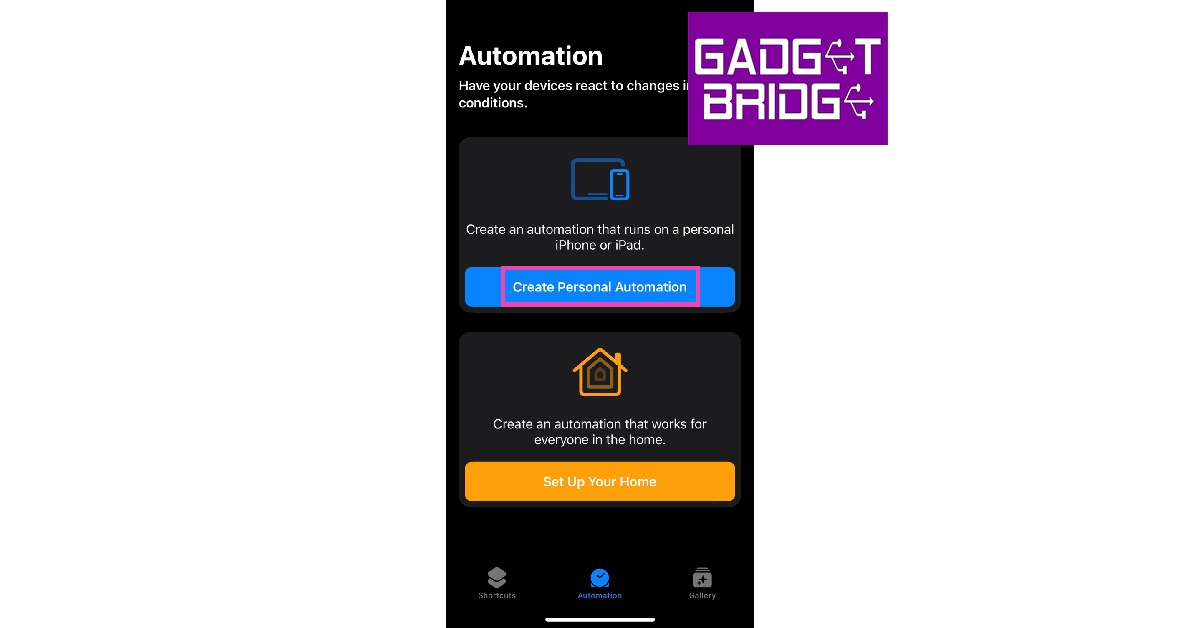 Step 3: Choose Add action. Select Find Photos in the list of actions.
 Step 4: Tap on Add Filter.
 Step 5: Tap the space next to Album is. Select the album folder containing your desired wallpapers. You can create a new album with all the wallpapers you want on rotation and select it on this screen.
 Step 6: Tap on Sort by and select Random. This ensures that there is no particular order to wallpaper rotation.
 Step 7: Switch on the toggle bar for Limit and select 1.
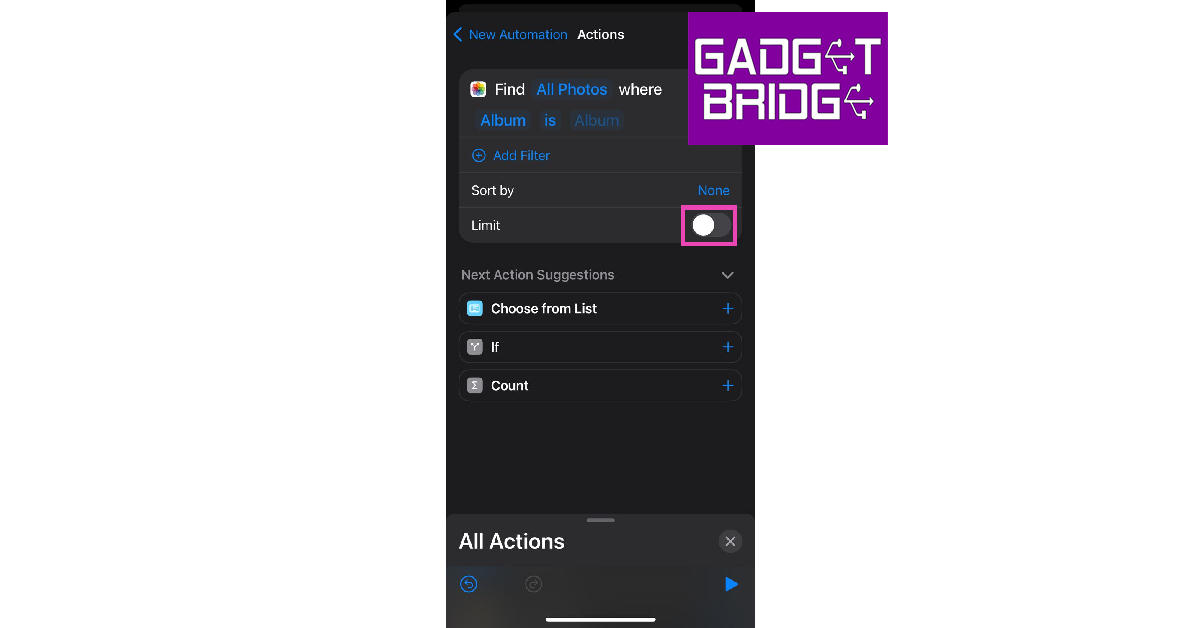 Step 8: Search the Set Wallpaper Photo action and add it to the list.
 Step 9: Choose whether you want to set the wallpaper on the home screen, lock screen, or both.
Step 10: Tap the side arrow next to the Set Wallpaper Photo action and switch off the toggle bar for Show preview.
Step 11: Hit Next at the top right corner of the screen.
Step 12: Set the time for the Shortcut to run. Switch off the toggle bar for Ask Before Running.
Step 9: Choose whether you want to set the wallpaper on the home screen, lock screen, or both.
Step 10: Tap the side arrow next to the Set Wallpaper Photo action and switch off the toggle bar for Show preview.
Step 11: Hit Next at the top right corner of the screen.
Step 12: Set the time for the Shortcut to run. Switch off the toggle bar for Ask Before Running.
 Your iPhone wallpaper will change automatically at the selected time.
Frequently Asked Questions (FAQs)
How do I make my iPhone change the wallpaper automatically?
You can use the ‘Photo Shuffle’ feature on your iPhone to change its wallpaper automatically or program a Shortcut to carry out the same task.Where can I find free iOS wallpapers?
You can find free iOS wallpapers on websites like Pexels, Pixbay, and Unsplash.What is a Lock screen on iPhone?
The lock screen is the screen you see when you wake up your iPhone. You can see the date, time, notifications and selected widgets on this screen. Read Also: Costway 14000 BTU Portable Air Conditioner: 5 Reasons why you should buy itConclusion
This is how you can change the wallpaper automatically on your iPhone. Since Photo Shuffle is a relatively new feature, users with older versions of iOS can use the Focus Mode and Shortcut tricks to automate wallpaper rotation on their devices. If you have any more questions, feel free to ask in the comments! For the latest gadget and tech news, and gadget reviews, follow us on Twitter, Facebook and Instagram. For newest tech & gadget videos subscribe to our YouTube Channel. You can also stay up to date using the Gadget Bridge Android App. You can find the latest car and bike news here.How to transfer contacts from Android to iPhone? Top 3 ways
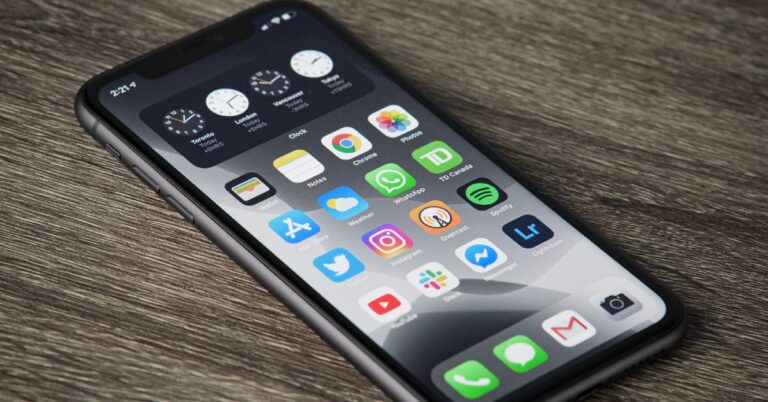
Transferring your data between two different platforms can be a challenging task. The most immediate data you look for in your new phone are your contacts. While you can manually install the apps you use on your new device, manually transferring contacts is a daunting task – one we would not recommend. In this article, we bring you the top 3 ways to transfer your contacts in bulk from Android to iPhone (iOS).
Read Also: A new range of premium Kodak Televisions launched in India
Step 2: Select Move Data from Android.
Step 3: Launch the Move to iOS app on your Android smartphone.
Step 4: Tap Continue on your iPhone. After a few seconds, your iPhone will display a code.
Step 5: Enter the code on your Android smartphone.
Step 6: Your iPhone will now create a temporary WiFi network using its hotspot. Join this network on your Android device.
Step 7: Choose the content you want to transfer. In this case, choose Contacts.
Step 8: After the content has been transferred, tap Finish on your Android smartphone and Continue on your iPhone.
Step 9: Follow the on-screen instructions to finish the process on your iPhone.
Step 2: Select Turn On.
Step 3: Select Google Account data.
Step 4: Make sure the toggle bar for Contacts is switched on.
Step 5: Go back to the previous window and select Back up now.
Step 6: On your iPhone, open Settings.
Step 7: Select Mail, then tap on Accounts.
Step 8: Select Add Account, then tap on Google.
Step 9: Follow the on-screen instructions to add your Google Account. Once the account has been added, your contacts will be synced to your new device.
Step 3: Select Gmail to email the VCF file to yourself.
Step 4: Now, open the email on your iPhone. Open the VCF file attachment.
Step 5: Tap the Share icon.
Step 6: Select the Contacts app.
Step 7: Select Add all contacts.
Use the Move to iOS app
If you are setting up your iPhone for the first time, you can use the Move to iOS app for Android to transfer your contacts along with other data. The downside is that this option is only available on the initial setup. Here’s how you can go about it. Step 1: Turn on your iPhone and go through the setup process until your reach the Apps & Data page.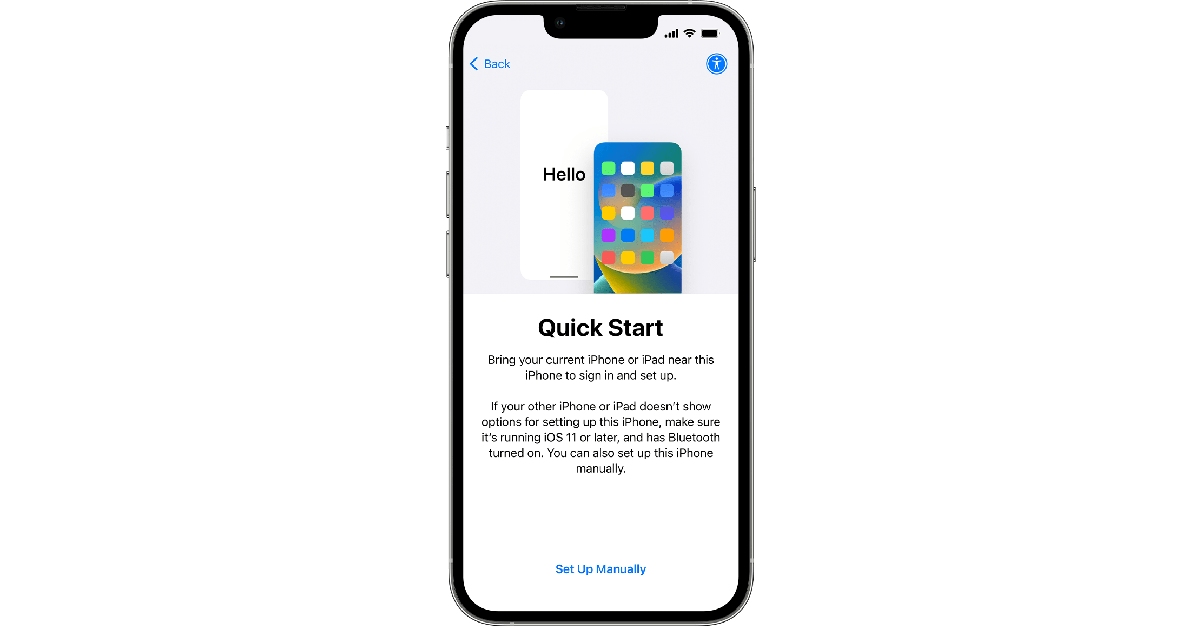 Step 2: Select Move Data from Android.
 Step 3: Launch the Move to iOS app on your Android smartphone.
Step 4: Tap Continue on your iPhone. After a few seconds, your iPhone will display a code.
Step 5: Enter the code on your Android smartphone.
Step 3: Launch the Move to iOS app on your Android smartphone.
Step 4: Tap Continue on your iPhone. After a few seconds, your iPhone will display a code.
Step 5: Enter the code on your Android smartphone.
 Step 6: Your iPhone will now create a temporary WiFi network using its hotspot. Join this network on your Android device.
Step 7: Choose the content you want to transfer. In this case, choose Contacts.
Step 8: After the content has been transferred, tap Finish on your Android smartphone and Continue on your iPhone.
Step 9: Follow the on-screen instructions to finish the process on your iPhone.
Step 6: Your iPhone will now create a temporary WiFi network using its hotspot. Join this network on your Android device.
Step 7: Choose the content you want to transfer. In this case, choose Contacts.
Step 8: After the content has been transferred, tap Finish on your Android smartphone and Continue on your iPhone.
Step 9: Follow the on-screen instructions to finish the process on your iPhone.
Sync contacts with Google Drive
Step 1: Go to Settings on your Android phone and select Accounts and backup. Step 2: Select Turn On.
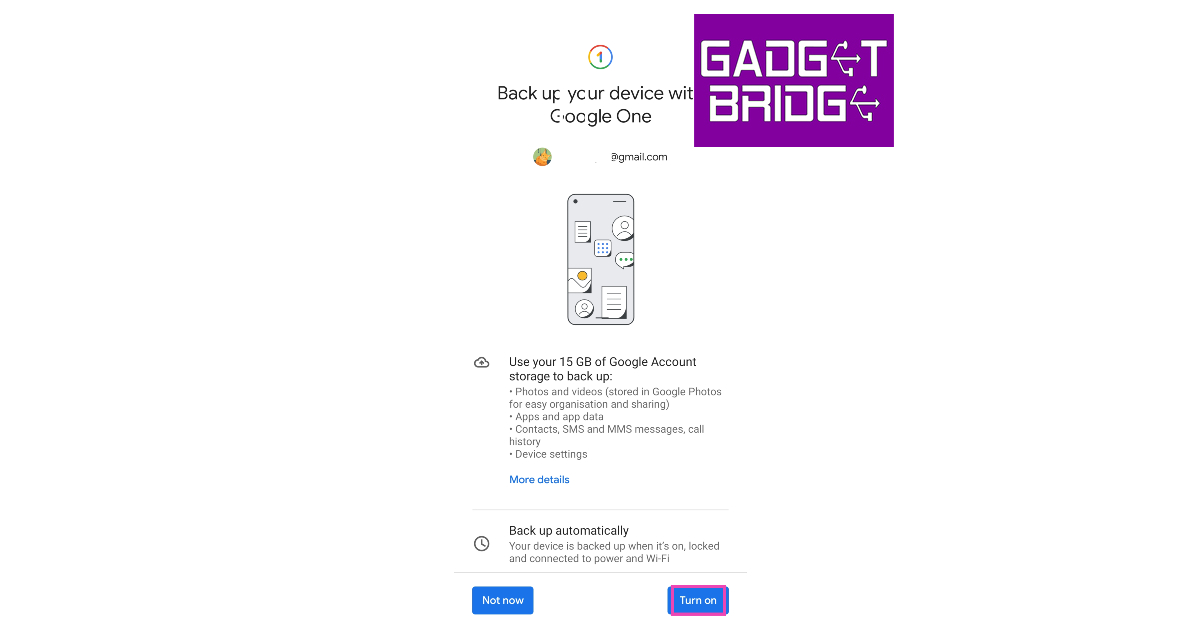 Step 3: Select Google Account data.
Step 4: Make sure the toggle bar for Contacts is switched on.
Step 3: Select Google Account data.
Step 4: Make sure the toggle bar for Contacts is switched on.
 Step 5: Go back to the previous window and select Back up now.
 Step 6: On your iPhone, open Settings.
 Step 7: Select Mail, then tap on Accounts.
 Step 8: Select Add Account, then tap on Google.
 Step 9: Follow the on-screen instructions to add your Google Account. Once the account has been added, your contacts will be synced to your new device.
Send Contacts as a VCF file
Step 1: Launch the Contacts app on your Android smartphone. Step 2: Select all the contacts and hit Share. Step 3: Select Gmail to email the VCF file to yourself.
 Step 4: Now, open the email on your iPhone. Open the VCF file attachment.
Step 5: Tap the Share icon.
Step 6: Select the Contacts app.
Step 7: Select Add all contacts.
Step 4: Now, open the email on your iPhone. Open the VCF file attachment.
Step 5: Tap the Share icon.
Step 6: Select the Contacts app.
Step 7: Select Add all contacts.