Apple’s Messages app is all set to get some big updates. Earlier this month at WWDC 2023, the Cupertino-based technology giant unveiled the iOS 17 software update that is set to roll out later in fall this year.
The update will be getting some major changes to the Messages app including features to turn pictures into stickers and transcribing voice memos. The following are the major updates that are coming with iOS 17:
1. Live Stickers
With the upcoming iOS 17 update, iPhone users will be able to turn their pictures into stickers for text conversations in Messages. Effects like ‘Shiny’, ‘Comic’ and ‘Puffy’ will also be available for stickers and once ready, users will be able to save them in a new dedicated drawer on their keyboard. It is important to note that although these customized stickers can be created in Messages, users will be able to use them on third-party apps too.
Read Also: 6 best ways to clear your browsing history on your iPhone or Android mobile
2. A more refined Search feature
The Messages app is getting another change with the iOS 17 update – An upgraded Search. With this, users will have the option of applying additional filters when looking for a specific conversation in Messages. The app is also getting a catch-up arrow that can be used in case you receive a lot of messages on a group chat and you wish to go back to the exact text where they left the conversation last.
3. Transcribing voice memos
With the iOS 17 update, iPhone users will also get the option of transcribing voice memos they receive on Messages. This can prove to be useful in situations when one is too busy to listen to a voice note, or when one is without their earphones.
Read Also: Apple introduced Pride Edition Sport Band to support LGBTQ+ communities
4. Location sharing
Another feature coming to Messages with iOS 17 is location sharing. Users will be able to keep a track of their friends’ locations via the app. They would also be able to update their friends and family of their own location while travelling with a Check-In feature. This can be used in case you are going back home late at night or in less-than-safe conditions. According to Apple, “If they are not making progress toward their destination, useful information will be temporarily shared with the selected contact, such as the device’s location, battery level, and cell service status.”
While developers can try out these new changes already, they will roll out to public beta in a month’s time. A more widespread rollout is scheduled for later in fall this year.
For the latest gadget and tech news, and gadget reviews, follow us on Twitter, Facebook and Instagram. For newest tech & gadget videos subscribe to our YouTube Channel. You can also stay up to date using the Gadget Bridge Android App. You can find the latest car and bike news here.
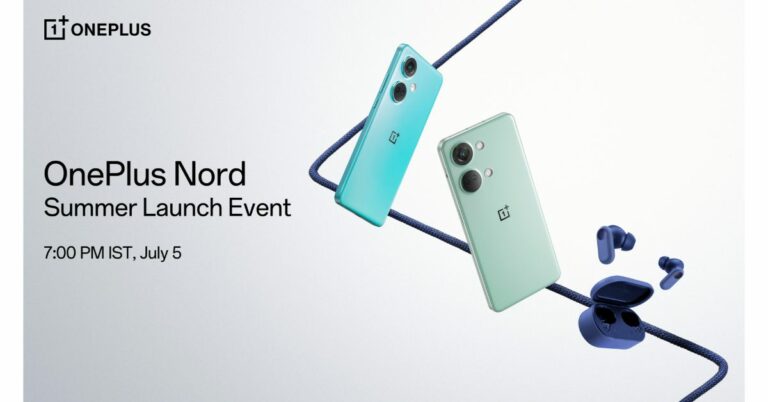
Finally, we now know when is OnePlus Nord 3 is coming to India. The India launch date is set for July 5. The OnePlus Nord CE 3 5G in addition to the Nord 3 5G will also be unveiled at the event. OnePlus has begun to tease the design and specifications of the devices in advance of the debut.The OnePlus Nord 3’s release date has been officially disclosed by OnePlus. The business revealed its OnePlus Nord Summer Launch Event will take place on July 5 at 7 pm IST. Alongside the company will also release the OnePlus Nord CE 3, Nord Buds 2R and OnePlus BWZ2 ANC.
In advance of the launch of several products, including the OnePlus Nord 3 5G, the OnePlus Nord CE 3 5G, the OnePlus Nord Buds 2r, and the OnePlus BWZ2 ANC on July 5, 2023, OnePlus, unveiled the first look of the upcoming OnePlus Nord 3 5G and revealed the design of the device’s back panel. The smartphone will now come in two colour options: Tempest Grey and Misty Green, according to the manufacturer.OnePlus revealed that OnePlus Nord 3 5G is designed to give two completely different feels to the latest mid-range phone from OnePlus. The new Misty Green colourway of the OnePlus Nord 3 5G offers a glossy and lovely hand-feel, whereas the Tempest Gray version has a textured matte finish that projects strength and durability.The company has also teased the look of the OnePlus Nord CE 3 5G in addition to showcasing the colour possibilities for the OnePlus Nord 3 5G. The phone is displayed in the Aqua Surge colour scheme. According to the teaser, the device features a triple rear camera setup. The Deep Gray and Triple Blue colour options for the OnePlus Nord Buds 2R have been confirmed. “OnePlus Nord 3 5G is designed to deliver outstanding power to those who live dynamic lifestyles and comes with a pure and understated design,” the company said. The company will be sharing more about smartphones over the next few weeks.
For the latest gadget and tech news, and gadget reviews, follow us on Twitter, Facebook and Instagram. For newest tech & gadget videos subscribe to our YouTube Channel. You can also stay up to date using the Gadget Bridge Android App. You can find the latest car and bike news here.
Oppo Reno 10 Series will launch in India and the global market soon. The exact date or timeline is yet to be revealed but ahead of the official debut, the company has revealed the key features and camera specifications of the Oppo Reno 10 Pro+. The upcoming series includes four models Reno 10, Reno 10 Pro and Reno 10 Pro+.
Oppo Reno 10 Pro+ camera features
The company claims that the Oppo Reno 10 Pro+ would have the industry’s slimmest and lightest periscope telephoto handset. This telephoto portrait camera, which boasts the highest megapixel count in the field at 64MP and a 1/2-inch image sensor, allows you to take portraits with up to 3x telephoto with OIS and 120x hybrid zoom. This camera’s closest focusing distance is 25 cm.Oppo Reno 10 Pro+ turns the sensor and the stacked lens sideways instead of stacking them one on top of the other to provide optical zoom and/or telephoto lens effects. In order to focus light onto the image sensor after it passes through a prism, the optically stabilised telephoto lens, according to the manufacturer, is offset by 90 degrees. This results in a telephoto lens module that does not protrude too far out from the phone. The periscope module on the Reno10 Pro+ is 0.96mm thinner than those on competing products.Also Read:A new range of premium Kodak Televisions launched in IndiaThe Telephoto lens is claimed to shoot portraits from a distance for more natural facial proportions, devoid of any mild fish-eye distortion that you would get from smartphone cameras that force you to shoot from closer. These portraits boast a natural optical bokeh that separates the subject from the background to add depth to photographs.Additionally, while taking pictures outside, the telephoto lens closes the distance between the portrait subject and far-off objects like monuments, skyscrapers, and mountains to produce dramatic but artistically pleasing photographs. The telephoto lens excels in low light conditions by improving light gathering for brighter, clearer portraits with less noise while maintaining the natural atmosphere of the environment.Three more sensors are included in the Reno 10 Pro and Pro+ along with the 64MP telephoto portrait camera. The 1/1.56-inch ultra-large sensor size of the 50MP Sony IMX890 sensor allows for great light intake. For increased stability and clarity, it also supports OIS and all-pixel omnidirectional focus.According to Oppo, the Reno 10 Pro+’s process speed for nighttime photography has increased by 54%, the capture success rate for quick snapshots has increased by 7%, and the dynamic range of the photo has increased by 11% when compared to the Reno 8 Pro. This results in more accurate colours and richer details overall.Also Read:Spark Go 2023 and Spark 10 now available in a leather-finish editionThe phone also includes the 8MP Sony IMX355, a 112° ultra-wide-angle camera with a 1/4-inch sensor. Its exceptional sensitivity to light produces clear images even in dark environments, while its rapid frame rate of up to 120FPS makes it ideal for shooting fast-moving objects. The IMX355 boasts a broad dynamic range that allows it to preserve details in bright and dark areas of a photograph.The Reno 10 Pro+ features a 32MP Sony IMX709 sensor with AF for selfies. The RGBW sensor on the front camera is specially customised where the colour W (white) is inserted into each RGGB pixel array; this increases the light intake by 60% when compared to the general RGGB lens. It is backed by a 1/2.47-inch sensor and a 90° FOV for wider selfies.To prevent green and red glare the camera lenses have an ALD (atomic layer deposition) coating. It also reduces light reflectivity by up to 70% to ensure that unwanted reflections are minimised for clearer and more vibrant images. For the latest gadget and tech news, and gadget reviews, follow us on Twitter, Facebook and Instagram. For newest tech & gadget videos subscribe to our YouTube Channel. You can also stay up to date using the Gadget Bridge Android App. You can find the latest car and bike news here.
If you just bought your first Amazon streaming device, you’re probably wondering what all the different buttons on the remote control mean. While some buttons like the navigation keys, volume rocker, and channel switcher are universally recognisable, the guide button and numbered keys may throw you off. So, here is a brief explainer for all the different buttons on the Amazon Fire TV Remote.Read Also:Nothing Phone (2): Expected Price, Tech Specs and More
Amazon Fire TV Remote buttons explained
The power key at the top left corner of the remote control is pretty self-explanatory. Press this key to turn on or turn off your TV.
On the top right side of the remote lies the headphone button. Press this key to quickly bring up the Bluetooth menu on your device. Use this menu to connect any wireless headphones or TWS to your TV. Between the headphone and power buttons, there is a small LED indicator.
Next up is the Alexa voice button, and this is possibly the coolest feature on your Amazon Fire TV remote. We went into a lot of detail about Alexa support in our review of the Amazon Fire TV Cube. Simply pressing this button gives you access to Alexa, Amazon’s native voice assistant. You can use Alexa to play any content on your TV, and even control connected devices.
Right below the Alexa button are the navigation keys. On Fire TV remotes, the navigation keys are aligned in a circle with the select button at the centre. Use these keys to browse stuff on your TV and make selections.
The row following the navigation keys contains the back, home, and menu buttons. Pressing the home key, no matter which app you’re in, takes you back to the home screen. The menu button triggers your Fire TV and in-app menus.
The next row contains playback buttons. This is where you’ll find the rewind, play/pause, and fast-forward keys.
Following the row of media playback keys, you will find some vertically aligned keys. These are the volume rocker and channel switcher with the settings and guide buttons in the middle. The guide button on your Amazon Fire TV remote gives you a look at what’s playing on the live TV channels. You can view the programme run time and even customise the list by adding streaming platforms to it.
Next up, you get the mute button along with two customisable buttons. You can assign any action to these buttons, ranging from opening an app or channel on your TV to an Alexa command like dimming your bedroom lights.
The last two rows on your Fire TV remote contain dedicated buttons for certain streaming apps. These streaming apps may vary depending on your location. In India, most remotes get dedicated keys for Prime Video, Netflix, and Amazon Music, along with a special button to view all the apps on your TV.
Frequently Asked Questions (FAQs)
Can you replace a Fire TV remote?
If you lost your Fire TV remote you can easily replace it with a new one from Amazon. There are a bunch of options to choose from, the best one being the Amazon Voice Remote Pro.
Can I control my Fire TV without a remote?
You can use the Amazon Fire TV app on your smartphone to control your TV without a remote. If you own a Fire TV Cube, you can simply give voice commands to the streaming box to carry out any action.
What should I do if I lose my Amazon Fire TV remote?
To find your lost remote, simply say ‘Find My Remote’ to any Amazon app with Alexa support. This will trigger the ringer on the remote, allowing you to find it. You can also use the ‘Remote Finder’ option on the Fire TV remote app. These fixes only work for the Amazon Voice Remote Pro.Read Also:Best gaming mice under Rs 5,000 (June 2023)
We recently caught up with Mrs Pallavi Singh, Vice President, SPPL India to know what new innovations the brand Westinghouse is bringing to India. She told us about the growing traction and the partnership between SPPL and Westinghouse along with some great insights into the market and how this brand is taking the lead. Read below to know more.
Could you provide an overview of the latest range of Smart TVs offered by Westinghouse in the Indian market? What are the unique features and technologies that set them apart from other brands?
Westinghouse has introduced an exciting range of Smart TVs in the Indian market, including a premium 55-inch model. These televisions offer a fully loaded experience with high-resolution displays and versatile content support. Not stopping there, Westinghouse is set to launch a new line of Android and Google TVs, combining popular operating systems with competitive pricing. What makes Westinghouse stand out is their commitment to delivering exceptional sound and picture quality at affordable prices. With a focus on innovation and customer satisfaction, Westinghouse aims to provide a diverse selection of Smart TVs that enhance the home entertainment experience for Indian consumers.
Westinghouse TVs are known for offering exceptional value for money and quality. Can you elaborate on the key differentiators that make Westinghouse TVs stand out in comparison to other brands available in the market?
As said, Westinghouse TVs stand out in the market by offering exceptional value for money. Unlike other brands, Westinghouse believes in providing affordable access to advanced technology without overcharging consumers. This commitment to fair pricing sets them apart and makes their TVs an attractive choice for those seeking quality and affordability.
What motivated SPPL to partner with Westinghouse Electric Corporation and bring the brand to India? What advantages does this partnership bring in terms of product development, technology, and market presence?
SPPL partnered with Westinghouse Electric Corporation to bring the brand to India due to its rich history and expertise in the consumer electronics industry. With over 100 years of experience, Westinghouse sought to establish a presence in the Indian market, while SPPL desired to add another prestigious American brand to its portfolio. This partnership brings advantages in product development, adherence to global standards, and leveraging Westinghouse’s brand reputation to enhance market presence and create awareness among Indian consumers.
The consumer durables industry has witnessed significant changes in shopping behaviours and preferences, especially with the rise of e-commerce. How has SPPL adapted to these changes, and what strategies are in place to cater to the evolving consumer demands?
SPPL has successfully adapted to the changing consumer landscape by focusing on online marketplaces as the primary sales channel. Recognizing the rise of e-commerce, SPPL is committed to meeting evolving consumer demands by expanding its online product offerings. By prioritizing digital platforms, SPPL aims to stay relevant and cater to the preferences of customers who prefer online shopping for consumer durables.
Read Also:Westinghouse 55-inch 4K TV (WH55PU80) review: A very pleasant
How does SPPL position Westinghouse TVs as a leading choice in the Indian smart TV segment? What marketing and branding strategies are implemented to differentiate the brand and create a strong market presence?
SPPL positions Westinghouse as a mass premium brand in the Indian smart TV segment, aiming to establish it as a household name. They implement targeted marketing strategies based on factors such as age and territory, effectively reaching their intended audience. By focusing on creating brand awareness and differentiation, SPPL aims to solidify Westinghouse’s market presence and attract customers seeking a combination of affordability and quality in their smart TV choices.
Can you share any recent investments made by SPPL in operations, manufacturing facilities, and research and development? How have these investments contributed to the growth and success of Westinghouse in India?
SPPL has made significant investments of over 200 crores in acquiring land and developing advanced manufacturing facilities. These state-of-the-art facilities will play a crucial role in the growth and success of Westinghouse in India. They reflect SPPL’s commitment to expanding production capabilities and meeting the increasing demand for Westinghouse TVs, ensuring a strong market presence and customer satisfaction.
What are SPPL’s future investment plans for expanding the product portfolio of Westinghouse in India? Are there any plans to enter new market segments or introduce innovative technologies?
SPPL is committed to expanding the product portfolio of Westinghouse in India by introducing a wide range of offerings in the premium market segment. In addition, they are actively exploring opportunities to enter new market segments and diversify the brand’s presence in other product categories. To achieve this, SPPL is leveraging discussions and collaboration with the global team to bring innovative technologies and cutting-edge features to Indian consumers. These strategic investments and expansion plans aim to strengthen Westinghouse’s market presence and cater to evolving consumer demands in India.
Read Also:Westinghouse Quantum Series and the Pi Series TVs to launch in India
In the consumer durables sector, data analytics and customer insights play a crucial role in product development and personalized experiences. How does SPPL leverage data analytics and customer insights to enhance its offerings and deliver tailored solutions to consumers?
While SPPL respects consumer privacy and does not collect private data, they actively leverage customer feedback to enhance its offerings. By gathering real-time updates and insights from consumers, SPPL can understand their preferences, requirements, and expectations. This valuable feedback helps refine product development processes, ensuring that Westinghouse delivers tailored solutions and improved experiences that align with customer needs and preferences.
For the latest gadget and tech news, and gadget reviews, follow us on Twitter, Facebook and Instagram. For newest tech & gadget videos subscribe to our YouTube Channel. You can also stay up to date using the Gadget Bridge Android App. You can find the latest car and bike news here.
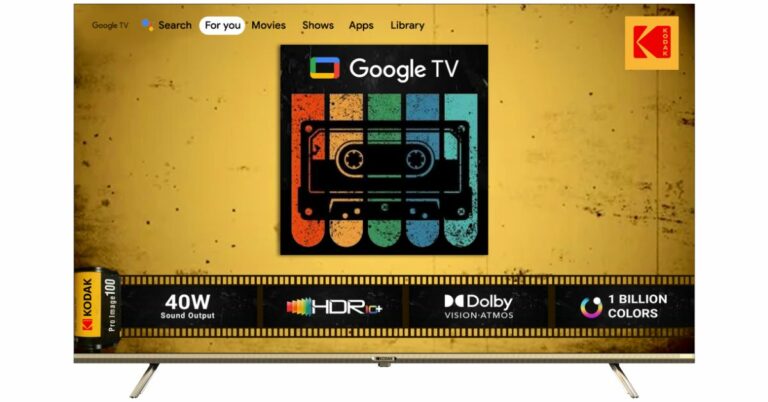
Super Plastronics Pvt Ltd a brand licensee of Kodak Televisions has announced the launch of a new range of TVs in India. The company has introduced four models under its Kodak 9XPRO Series, three variants of CA PRO Google TVs and a 75-inch 4K QLED Google TV.The Kodak 9XPRO Series includes a Realtek processor whereas the CA PRO Google TVs are coupled with Integrated Google Assistant and Google TV, Dolby Atmos and Google Vision. The 75-inch 4K QLED Google TV has a slim design and comes with HDR10+, Dolby Atmos, Dolby Vision, Dolby Digital Plus, DTS Trusurround and In-built Chromecast & Airplay that supports 1000+ Apps.
Pricing and availability
All the televisions will be available selectively on Flipkart and Amazon India. The all-new KODAK 9XPRO TV series comes at a starting price of Rs 10,499. Whereas the price of the 4K Google TV models under its CA PRO series will begin at Rs 27,999. In addition to this, 75-inch variant of the Kodak 4K QLED Matrix series will be available at a price tag of Rs 98,888.Also Read:Garena Free Fire Redeem Codes Today 27 June 2023: Here is how to claim them
Kodak 9XPRO TVs
The company has introduced 32, 40, 42 and 43-inch models under the Kodak 9XPRO TVs. These variants run on Android 11 and are powered by an ARM Cortex A55 REALTEK processor with 1GB RAM and 8GB ROM. The 32-inch variant of the series is HD Ready whereas all other models are Full HD.Kodak 9XPRO TVsIn addition to this, the new models of the Kodak 9XPRO TVs come with a speaker output of 30W and support Dolby Digital sound. There is support for Bluetooth 5.0 along with Google Assistant and Chromecast built-in. The Kodak Television also comes integrated with 6,000 Plus Apps and Games such as Netflix, Prime Video, Disney+Hotstar, Apple TV, Voot, Zee5, Sony LIV, and Google Play Store with 500,000 Plus TV Shows.Also Read:Vivo Y36 with 44W fast charging support launched in IndiaKodak CA PRO series
Kodak CA PRO series
There are three new variants 50, 55 and 65-inch Google TVs under the Kodak CA PRO series. The TVs are powered by an MT9062 processor and integrated Google Assistant. They feature a 4K UHD Display and bezel-less design with built-in Chromecast and apps like YouTube and Google Classroom which aid in learning and upgrading. In terms of connectivity, there is USB 2.0, HDMI 3 (ARC, CEC), and Bluetooth v. 5.0 with user-friendly remote control. The CA PRO Google TVs include over 10,000 Apps and Games Like Netflix, Prime Video, Hotstar, Zee5, Sony Liv, and Google Play Store with 500,000 Plus TV Shows. Moreover, there is a sound output of 40W by Dolby Audio Stereo Box Speaker.
Logging into your Google Account on multiple accounts has its own risks. If you’ve ever used your Google Account on a public PC, the browser may remember your account if you forgot to sign out. This may create a security risk as someone else may get access to your account. Luckily, Google makes it incredibly easy to manage the device connected to your profile. In this article, we bring you the top 5 ways to remove devices from your Google Account using an Android phone or a PC.Read Also:Nothing Phone (2): Expected Price, Tech Specs and More
Remove devices from your Google Account using an Android phone
Step 1: Go to Settings and select Google.Step 2: Select Manage your Google Account.Step 3: Switch to the Security tab.Step 4: Scroll down and tap on Manage all devices.Step 5: Tap on the device you want to remove.Step 6: Select Sign out and confirm your selection in the pop-up box.
Remove devices from your Google Account using a PC
Step 1: Go to your Google Account page.Step 2: Click on Security.Step 3: Scroll down and select Manage all devices.Step 4: Click on the device you want to remove.Step 5: Click on Sign out.
Remove Device from Google Account using Find My Device
Step 1: Go to google.com/android/find.
Step 2:Sign in using the account that is registered on your smartphone.
Step 3: Select your device from the list.
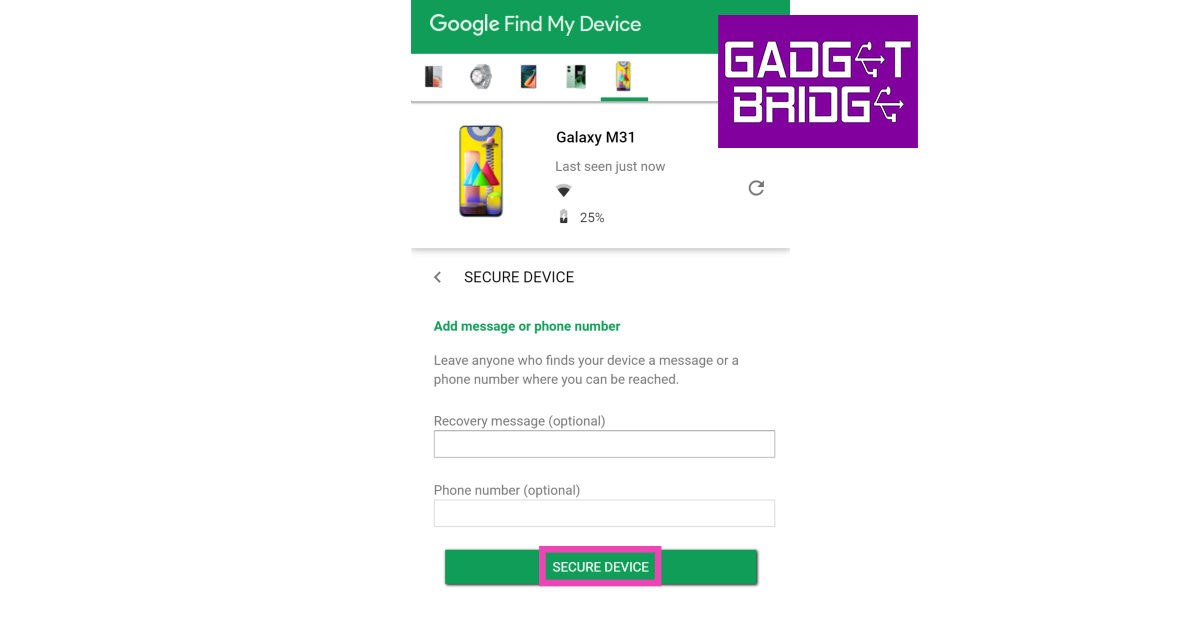
Step 4: Click on Secure Device.
Step 5: Add a recovery message and your phone number in case someone finds your phone and wants to reach out to you to return it.
Remove devices from the Google Play Store
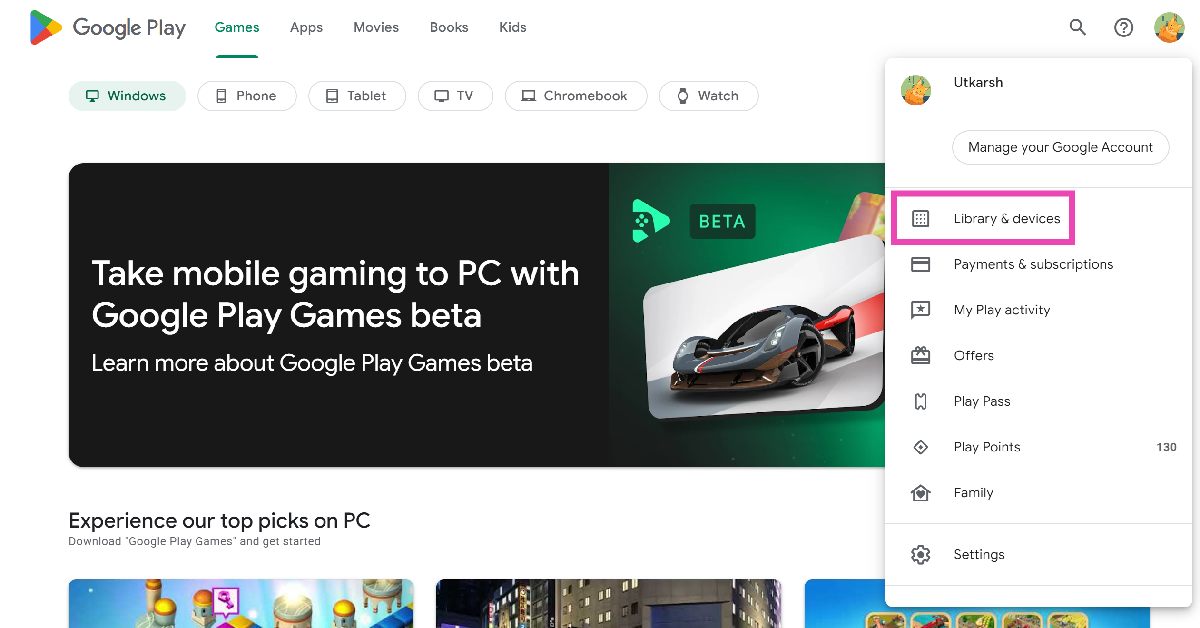
Step 1: Go to the Google Play Store on your PC.
Step 2: Click your profile picture at the top right corner of the screen and select Library & devices.
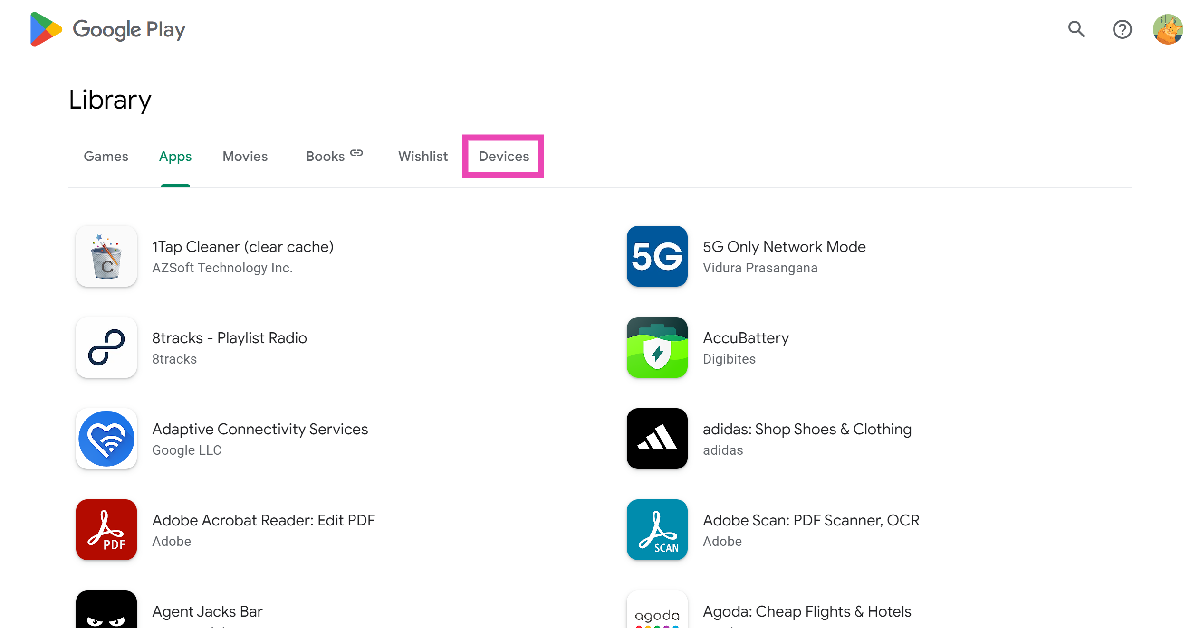
Step 3: Switch to the Devices tab.
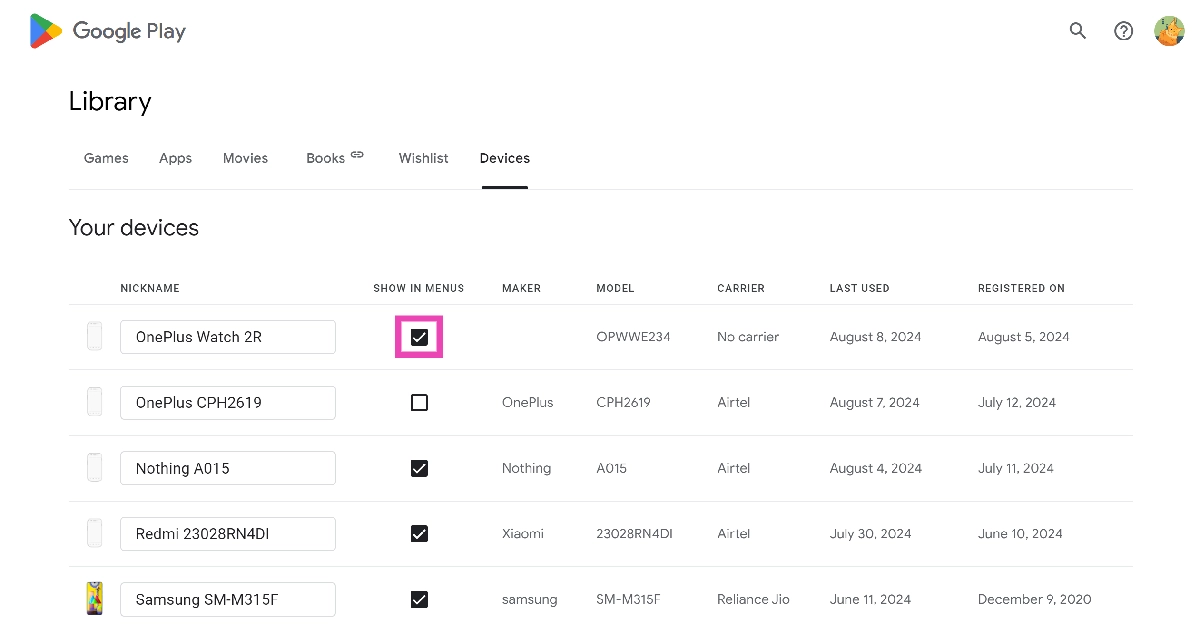
Step 4:Uncheck the devices you want to remove.
Perform a factory reset
Performing a factory reset on your device logs you out of all your accounts. Here’s how you can go about it.
Step 1: Go to Settings, scroll down and select General management.
Step 2: Tap on Reset.
Step 3: Select Factory data reset.
Step 4: Scroll down and tap on Reset.
Frequently Asked Questions
How do I disconnect unwanted devices from my Google Account without my phone?
To remove a device, go to your ‘My Account’ page and select ‘Security’. Click on ‘Manage all devices’ and select the device you want to remove. Click on ‘Sign out’ to remove the device from your Google Account.
How do I remove devices from my Google Account on my phone?
To take off your device from your account, go to Settings>Google>Manage your Google Account>Security>Manage all devices>Device Name and select ‘Sign out’.
What happens when I remove a device from my Google account?
This is how you can remove unwanted devices from your Google Account using your Android phone and PC. For an added layer of security, you can enable two-factor authentication for your device. This will ensure that no one gets access to your Google Account, even if they have your password.
The Android operating system is one of the most popular worldwide, with over 2.5 billion active users worldwide. Three-quarters of all smartphones in the world run Android. Given how popular it is and how massive its use case is, it’s still a surprise that many people need to be made aware of the privacy concerns that come with Android.
The Google Play Store has a wide range of useful and free apps; however, when you download these apps for your convenience, you do so at the cost of your privacy. Sometimes users unknowingly consent to their data to these apps. Apps use your data to target you with recommendations and personalized ads.
Cybercriminals are continuing to get more innovative and clever with the ways they can hack into people’s accounts and compromise their confidential data, so as users, we must be one step ahead to protect our privacy and ensure it doesn’t get into the wrong hands.
In this ultimate guide, we’ll talk about the importance of protecting your privacy when using an Android device and the steps you can take to ensure that no third party gets the opportunity to use your confidential data for fraudulent purposes.
Why Should You Be Concerned About Privacy on Android?
Many Android apps collect data on users. They can access your camera and microphone and know your browsing activities and location. Users unknowingly consent to their data getting used by third parties and advertisers to target them with personalized ads that appeal to their interests.
Android devices are susceptible to security vulnerabilities and can get exploited by malicious actors. These vulnerabilities can lead to cyber criminals or hackers gaining unauthorized access to your accounts, passwords, and even confidential financial information such as your bank account details.
Android devices have pre-installed apps and manufacturer modifications, which are commonly referred to as “bloatware.” Some apps can access confidential and sensitive data without getting uninstalled easily. They can compromise your data and privacy by collecting and sharing your information with third parties without your consent.
Android devices often encourage users to sync their data with Cloud services to manage their data more effectively. While convenient, it can still pose a risk as your personal information can get exposed to security breaches and unauthorized access. It might happen if the cloud services have weaker security systems in place.
Although it’s common for users to not pay attention to Privacy Policies and Terms of Service and proceed with giving consent, Google’s Privacy Policy states that your Android device will collect information about your browsing activities, the browsers and apps you use, your location, and your IP address.
Google collects all of this information to enhance your online experience and to be able to target you with ads that meet your likes and interests. Google makes a lot of profit by using Android devices that collect information about you. This information is used to show you targeted ads. These targeted ads and the call to action help Google earn profits and revenue.
You can protect your data and privacy by tweaking and adjusting your Android privacy settings. In the next section, we’ll go into more detail about the steps you need to take to safeguard your online privacy even when using an Android device. Let’s get into it.
How To Protect Your Privacy On Android
Here are all the steps you can take to protect and safeguard your privacy on your Android device:
Location Tracking Settings
Advertisers can collect information about you by looking at your location. They can easily track your location and would be concerned as users who value their privacy. Anyone can track your location and find out where you’re living.
Google can also track where you work and where you go out on the weekends. If it feels overwhelming, we’re here to help. Here are some steps to prevent third parties and advertisers from tracking your location. To prevent apps from tracking your location on your Android device, go to Settings > Privacy > Permissions > Location.
Once you’ve reached the location, you’ll find a list of all the applications installed on your phone. You can choose which apps should have limited access to your location details. The options presented to you will be location tracking all the time or while using the app or denial.
Manage App Permissions
Whenever you install an Android app to your device, it will ask for specific permissions, such as accessing your microphone or your location. Some apps require these permissions to work more effectively. Sometimes a user has to give in and accept those permissions; otherwise, the app’s features don’t work correctly.
Some apps ask permission to access your video camera or speakers, and they don’t necessarily require it. So unless it’s something the app needs, you can manage app permissions and revoke consent for permissions that aren’t necessarily needed.
You can do this by going to Settings > Applications > Application Manager. Once you’ve reached the Application Manager, it will list all the applications installed on your device. Click on the app you want, or go to all the apps individually and click on Permissions. You can now adjust which features the app will have access to.
Use a VPN
A VPN effectively safeguards against online threats and preserves anonymity and privacy. One of the significant ways third parties can track your online activities and location is by using your IP address. Use VPN app for Android to help you tackle this issue.
VPNs encrypt your internet traffic and mask your IP address, which means no one can track your online activities or be aware of your identity online. By using VPN servers, no one will be able to track you or know of your whereabouts. You can browse the internet on your Android device safely and securely.
Use Antivirus Software
Using Antivirus software on your Android device can help protect your privacy. Antivirus software scans can protect your device from malware as they will detect and prevent it from spreading to your device and gaining unauthorized access.
Antivirus apps also have additional features to analyze and see which installed apps have any suspicious activity, such as unauthorized access or too many permissions, that could compromise the user’s privacy. Some antivirus apps have privacy scanning features.
They analyze the app’s permissions or any privacy risks that could occur from these installed applications. It could protect you from phishing attempts or accessing websites that compromise your sensitive data.
Disable Personalized Ads
We’ve already mentioned how third parties and advertisers use your data to enhance your online experience and bring you more targeted ads. The apps can easily track you by using a unique advertising ID. To prevent these apps from sharing your data, you can take a couple of steps to avoid it.
On your device, go to Settings > Privacy > Ads, click Delete Advertising, and tap again on the next page to confirm. You can turn off personalized ads on your Google Account by going to My Ad Center.
Conclusion
Every user’s privacy matters. These easy and effective measures will help you safeguard your online privacy and security while using your Android device. While Android devices offer convenience, we should also be mindful of utilizing the most effective security measures to protect our data since we can unknowingly consent to our data being used by third parties.
For the latest gadget and tech news, and gadget reviews, follow us on Twitter, Facebook and Instagram. For newest tech & gadget videos subscribe to our YouTube Channel. You can also stay up to date using the Gadget Bridge Android App. You can find the latest car and bike news here.
As the weather changes, more people start to purchase indoor portable air conditioners, convenience and comfort are crucial, Costway, as an e-commerce platform that meets diverse life needs, ensures delivery of high-quality products to customers through a strict selection process for air conditioner products. This article takes an in-depth look at one of their flagship products, the Costway 14000 BTU Portable Air Conditioner, which promises to revolutionize the way we experience cool air.
Costway has a wide range of products. This website sells outdoor/indoor furniture, sports products (treadmills), home appliances, cooling products, baby and kids products, etc., to ensure that customers’ one-stop shopping needs are met. Advocate warm, dedicated, happy, diversified brand personality. With 6000 available SKUs and fast product/category listings currently, on the website, it is always committed to providing customers with the latest and most innovative solutions.
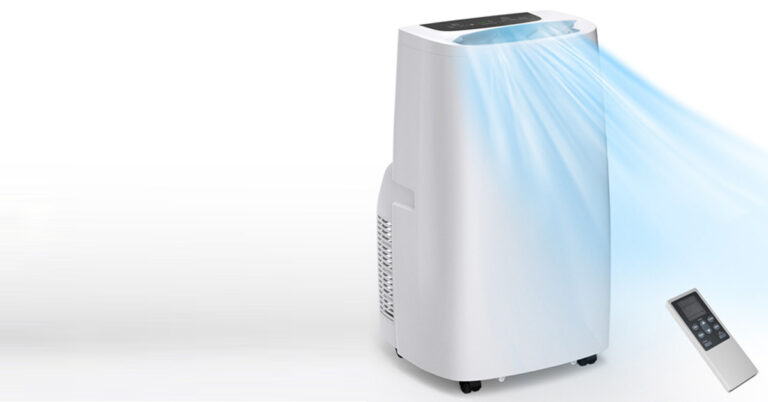
The portable air conditioner breaks the space limitation and is suitable for all places where it is inconvenient to install outdoor units. If you rent a house where it is inconvenient to drill holes and destroy the structure of the house to install ordinary air conditioners, you may wish to try using air conditioners. No need to drill holes, or even install, just plug and play when it arrives. It’s also very compact. The white HIPS material panel, with smooth lines, does not take up space in the room and is fashionable and versatile. Don’t throw away the packing carton, if you move someday, just use it to pack and take it away.
The Costway Portable Air Conditioner sets a new standard for home comfort. Designed with cutting-edge features, this new air conditioner is the perfect blend of functionality and convenience. Let’s explore some of the key features that make it a product that stands out in the market.
Key Features
3-in-1 Multipurpose Design
This portable air conditioner combines 3 operation modes of cooling, dehumidification and fan into one, which can meet all your needs and serve you all year round. 62-86°F (17-30°C) adjustable temperature, 3 fan speeds (high/medium/low) and 85-day dehumidification power for personalized comfort.
Fast and large-area cooling
Generally speaking, the cooling capacity of portable air conditioners is between 8000BTU and 14000BTU. The larger the number, the better the cooling effect. Equipped with a powerful 14000 BTU of cooling capacity and a 90° auto-swing feature, this product cools down areas quickly and evenly. It’s perfect for homes, dorms, apartments, offices, garages, and more.
Simple operation and low noise
The air conditioner is equipped with a touch screen, 24-hour timer and low-noise sleep mode, allowing you to sleep peacefully on hot summer nights without worrying about electricity bills and catching a cold.
Humanized and thoughtful details
Equipped with 4 swivel casters and a built-in portable handle, you can easily move the air conditioner from one room to another. For convenience, it comes with a power cord storage stand and remote control holder. And, the removable, washable filter and covered bottom drain hole ensure efficient filtration and drainage.
Easy and flexible installation
This portable air conditioner has passed ETL and CEC certification and is safe to use. It comes with an adjustable window kit, a 4.9ft exhaust hose, hose connectors, adapters, and easy-to-follow instructions for easy installation. It is perfect for any vertical or horizontal sliding window.
Brand Services
Costway’s commitment to customer satisfaction is evident through an integrated shopping experience called Costway+ Care. The service includes fast delivery within 3-5 days, 24-hour customer service, a 30-day return guarantee and privacy protection. Plus, the offered product warranties ensure peace of mind, making Costway a trusted name for all your home comfort needs.
In conclusion
Costway Portable Air Conditioners have received positive reviews from Costway users for their powerful cooling performance, energy efficiency, quiet operation, advanced features, ease of installation and maintenance, and durability and reliability. As users share their experiences, it becomes clear that this air conditioner provides optimum comfort while exceeding expectations. Whether you’re looking for relief from the summer heat or year-round climate control, the Costway Portable Air Conditioner is a great choice. Embrace the power of cooling and enhancing your indoor environment with reliable, efficient cooling solutions from Costway.
For the latest gadget and tech news, and gadget reviews, follow us on Twitter, Facebook and Instagram. For the newest tech & gadget videos subscribe to our YouTube Channel. You can also stay up to date using the Gadget Bridge Android App. You can find the latest car and bike news here.
After being banned for nearly ten months, Battleground Mobile India, aka BGMI, is officially available again in India. BGMI fans are looking for ways to improve their game experience and one such method is the usage of redemption codes, which offers a variety of rewards and advantages using BGMI redeem codes players can gain access to new skins, outfits, loot crates, weapons and free UC and diamonds.As mentioned earlier, these codes give users the chance to earn unique rewards and gain extra benefits while playing the game. This includes GUN SKINS (M4, AKM, M416, AWM, M24, UZI, KAR98K), free character voucher, Andy, Carlo, Sara, Victor character for free, free Anna Character on completing the mission and UC or Royal Pass Discount. So here we have gathered a list of the most recent BGMI redeem codes as of 27 June 2023. Also, redeem these codes asap as these are only valid for a limited duration.
BGMI Redeem Codes for 27 June 2023
updating….
How to get free Redeem Codes for BGMI on 27 June 2023?
Launch BGMI on your device.
Then select the Redeem Code option from the main menu.
Next, click on the Redeem code tab.
A new window will open, requesting the redemption code.
Now enter your BGMI code.
Confirm and click on the “Redeem” tab.
If your redeem code is valid then you will get a message confirming that your rewards were successfully redeemed.


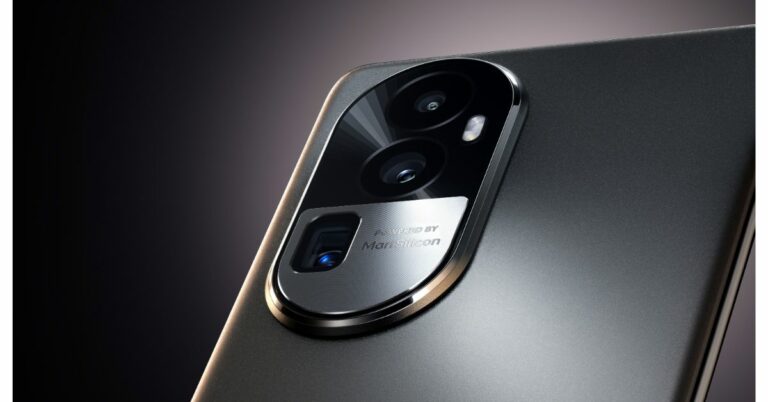
 Oppo Reno 10 Pro+ turns the sensor and the stacked lens sideways instead of stacking them one on top of the other to provide optical zoom and/or telephoto lens effects. In order to focus light onto the image sensor after it passes through a prism, the optically stabilised telephoto lens, according to the manufacturer, is offset by 90 degrees. This results in a telephoto lens module that does not protrude too far out from the phone. The periscope module on the Reno10 Pro+ is 0.96mm thinner than those on competing products.
Also Read: A new range of premium Kodak Televisions launched in India
The Telephoto lens is claimed to shoot portraits from a distance for more natural facial proportions, devoid of any mild fish-eye distortion that you would get from smartphone cameras that force you to shoot from closer. These portraits boast a natural optical bokeh that separates the subject from the background to add depth to photographs.
Additionally, while taking pictures outside, the telephoto lens closes the distance between the portrait subject and far-off objects like monuments, skyscrapers, and mountains to produce dramatic but artistically pleasing photographs. The telephoto lens excels in low light conditions by improving light gathering for brighter, clearer portraits with less noise while maintaining the natural atmosphere of the environment.
Oppo Reno 10 Pro+ turns the sensor and the stacked lens sideways instead of stacking them one on top of the other to provide optical zoom and/or telephoto lens effects. In order to focus light onto the image sensor after it passes through a prism, the optically stabilised telephoto lens, according to the manufacturer, is offset by 90 degrees. This results in a telephoto lens module that does not protrude too far out from the phone. The periscope module on the Reno10 Pro+ is 0.96mm thinner than those on competing products.
Also Read: A new range of premium Kodak Televisions launched in India
The Telephoto lens is claimed to shoot portraits from a distance for more natural facial proportions, devoid of any mild fish-eye distortion that you would get from smartphone cameras that force you to shoot from closer. These portraits boast a natural optical bokeh that separates the subject from the background to add depth to photographs.
Additionally, while taking pictures outside, the telephoto lens closes the distance between the portrait subject and far-off objects like monuments, skyscrapers, and mountains to produce dramatic but artistically pleasing photographs. The telephoto lens excels in low light conditions by improving light gathering for brighter, clearer portraits with less noise while maintaining the natural atmosphere of the environment.
 Three more sensors are included in the Reno 10 Pro and Pro+ along with the 64MP telephoto portrait camera. The 1/1.56-inch ultra-large sensor size of the 50MP Sony IMX890 sensor allows for great light intake. For increased stability and clarity, it also supports OIS and all-pixel omnidirectional focus.
According to Oppo, the Reno 10 Pro+’s process speed for nighttime photography has increased by 54%, the capture success rate for quick snapshots has increased by 7%, and the dynamic range of the photo has increased by 11% when compared to the Reno 8 Pro. This results in more accurate colours and richer details overall.
Also Read: Spark Go 2023 and Spark 10 now available in a leather-finish edition
The phone also includes the 8MP Sony IMX355, a 112° ultra-wide-angle camera with a 1/4-inch sensor. Its exceptional sensitivity to light produces clear images even in dark environments, while its rapid frame rate of up to 120FPS makes it ideal for shooting fast-moving objects. The IMX355 boasts a broad dynamic range that allows it to preserve details in bright and dark areas of a photograph.
The Reno 10 Pro+ features a 32MP Sony IMX709 sensor with AF for selfies. The RGBW sensor on the front camera is specially customised where the colour W (white) is inserted into each RGGB pixel array; this increases the light intake by 60% when compared to the general RGGB lens. It is backed by a 1/2.47-inch sensor and a 90° FOV for wider selfies.
To prevent green and red glare the camera lenses have an ALD (atomic layer deposition) coating. It also reduces light reflectivity by up to 70% to ensure that unwanted reflections are minimised for clearer and more vibrant images.
For the latest gadget and tech news, and gadget reviews, follow us on Twitter, Facebook and Instagram. For newest tech & gadget videos subscribe to our YouTube Channel. You can also stay up to date using the Gadget Bridge Android App. You can find the latest car and bike news here.
Three more sensors are included in the Reno 10 Pro and Pro+ along with the 64MP telephoto portrait camera. The 1/1.56-inch ultra-large sensor size of the 50MP Sony IMX890 sensor allows for great light intake. For increased stability and clarity, it also supports OIS and all-pixel omnidirectional focus.
According to Oppo, the Reno 10 Pro+’s process speed for nighttime photography has increased by 54%, the capture success rate for quick snapshots has increased by 7%, and the dynamic range of the photo has increased by 11% when compared to the Reno 8 Pro. This results in more accurate colours and richer details overall.
Also Read: Spark Go 2023 and Spark 10 now available in a leather-finish edition
The phone also includes the 8MP Sony IMX355, a 112° ultra-wide-angle camera with a 1/4-inch sensor. Its exceptional sensitivity to light produces clear images even in dark environments, while its rapid frame rate of up to 120FPS makes it ideal for shooting fast-moving objects. The IMX355 boasts a broad dynamic range that allows it to preserve details in bright and dark areas of a photograph.
The Reno 10 Pro+ features a 32MP Sony IMX709 sensor with AF for selfies. The RGBW sensor on the front camera is specially customised where the colour W (white) is inserted into each RGGB pixel array; this increases the light intake by 60% when compared to the general RGGB lens. It is backed by a 1/2.47-inch sensor and a 90° FOV for wider selfies.
To prevent green and red glare the camera lenses have an ALD (atomic layer deposition) coating. It also reduces light reflectivity by up to 70% to ensure that unwanted reflections are minimised for clearer and more vibrant images.
For the latest gadget and tech news, and gadget reviews, follow us on Twitter, Facebook and Instagram. For newest tech & gadget videos subscribe to our YouTube Channel. You can also stay up to date using the Gadget Bridge Android App. You can find the latest car and bike news here.  Oppo Reno 10 Pro+ turns the sensor and the stacked lens sideways instead of stacking them one on top of the other to provide optical zoom and/or telephoto lens effects. In order to focus light onto the image sensor after it passes through a prism, the optically stabilised telephoto lens, according to the manufacturer, is offset by 90 degrees. This results in a telephoto lens module that does not protrude too far out from the phone. The periscope module on the Reno10 Pro+ is 0.96mm thinner than those on competing products.
Also Read: A new range of premium Kodak Televisions launched in India
The Telephoto lens is claimed to shoot portraits from a distance for more natural facial proportions, devoid of any mild fish-eye distortion that you would get from smartphone cameras that force you to shoot from closer. These portraits boast a natural optical bokeh that separates the subject from the background to add depth to photographs.
Additionally, while taking pictures outside, the telephoto lens closes the distance between the portrait subject and far-off objects like monuments, skyscrapers, and mountains to produce dramatic but artistically pleasing photographs. The telephoto lens excels in low light conditions by improving light gathering for brighter, clearer portraits with less noise while maintaining the natural atmosphere of the environment.
Oppo Reno 10 Pro+ turns the sensor and the stacked lens sideways instead of stacking them one on top of the other to provide optical zoom and/or telephoto lens effects. In order to focus light onto the image sensor after it passes through a prism, the optically stabilised telephoto lens, according to the manufacturer, is offset by 90 degrees. This results in a telephoto lens module that does not protrude too far out from the phone. The periscope module on the Reno10 Pro+ is 0.96mm thinner than those on competing products.
Also Read: A new range of premium Kodak Televisions launched in India
The Telephoto lens is claimed to shoot portraits from a distance for more natural facial proportions, devoid of any mild fish-eye distortion that you would get from smartphone cameras that force you to shoot from closer. These portraits boast a natural optical bokeh that separates the subject from the background to add depth to photographs.
Additionally, while taking pictures outside, the telephoto lens closes the distance between the portrait subject and far-off objects like monuments, skyscrapers, and mountains to produce dramatic but artistically pleasing photographs. The telephoto lens excels in low light conditions by improving light gathering for brighter, clearer portraits with less noise while maintaining the natural atmosphere of the environment.
 Three more sensors are included in the Reno 10 Pro and Pro+ along with the 64MP telephoto portrait camera. The 1/1.56-inch ultra-large sensor size of the 50MP Sony IMX890 sensor allows for great light intake. For increased stability and clarity, it also supports OIS and all-pixel omnidirectional focus.
According to Oppo, the Reno 10 Pro+’s process speed for nighttime photography has increased by 54%, the capture success rate for quick snapshots has increased by 7%, and the dynamic range of the photo has increased by 11% when compared to the Reno 8 Pro. This results in more accurate colours and richer details overall.
Also Read: Spark Go 2023 and Spark 10 now available in a leather-finish edition
The phone also includes the 8MP Sony IMX355, a 112° ultra-wide-angle camera with a 1/4-inch sensor. Its exceptional sensitivity to light produces clear images even in dark environments, while its rapid frame rate of up to 120FPS makes it ideal for shooting fast-moving objects. The IMX355 boasts a broad dynamic range that allows it to preserve details in bright and dark areas of a photograph.
The Reno 10 Pro+ features a 32MP Sony IMX709 sensor with AF for selfies. The RGBW sensor on the front camera is specially customised where the colour W (white) is inserted into each RGGB pixel array; this increases the light intake by 60% when compared to the general RGGB lens. It is backed by a 1/2.47-inch sensor and a 90° FOV for wider selfies.
To prevent green and red glare the camera lenses have an ALD (atomic layer deposition) coating. It also reduces light reflectivity by up to 70% to ensure that unwanted reflections are minimised for clearer and more vibrant images.
For the latest gadget and tech news, and gadget reviews, follow us on Twitter, Facebook and Instagram. For newest tech & gadget videos subscribe to our YouTube Channel. You can also stay up to date using the Gadget Bridge Android App. You can find the latest car and bike news here.
Three more sensors are included in the Reno 10 Pro and Pro+ along with the 64MP telephoto portrait camera. The 1/1.56-inch ultra-large sensor size of the 50MP Sony IMX890 sensor allows for great light intake. For increased stability and clarity, it also supports OIS and all-pixel omnidirectional focus.
According to Oppo, the Reno 10 Pro+’s process speed for nighttime photography has increased by 54%, the capture success rate for quick snapshots has increased by 7%, and the dynamic range of the photo has increased by 11% when compared to the Reno 8 Pro. This results in more accurate colours and richer details overall.
Also Read: Spark Go 2023 and Spark 10 now available in a leather-finish edition
The phone also includes the 8MP Sony IMX355, a 112° ultra-wide-angle camera with a 1/4-inch sensor. Its exceptional sensitivity to light produces clear images even in dark environments, while its rapid frame rate of up to 120FPS makes it ideal for shooting fast-moving objects. The IMX355 boasts a broad dynamic range that allows it to preserve details in bright and dark areas of a photograph.
The Reno 10 Pro+ features a 32MP Sony IMX709 sensor with AF for selfies. The RGBW sensor on the front camera is specially customised where the colour W (white) is inserted into each RGGB pixel array; this increases the light intake by 60% when compared to the general RGGB lens. It is backed by a 1/2.47-inch sensor and a 90° FOV for wider selfies.
To prevent green and red glare the camera lenses have an ALD (atomic layer deposition) coating. It also reduces light reflectivity by up to 70% to ensure that unwanted reflections are minimised for clearer and more vibrant images.
For the latest gadget and tech news, and gadget reviews, follow us on Twitter, Facebook and Instagram. For newest tech & gadget videos subscribe to our YouTube Channel. You can also stay up to date using the Gadget Bridge Android App. You can find the latest car and bike news here. 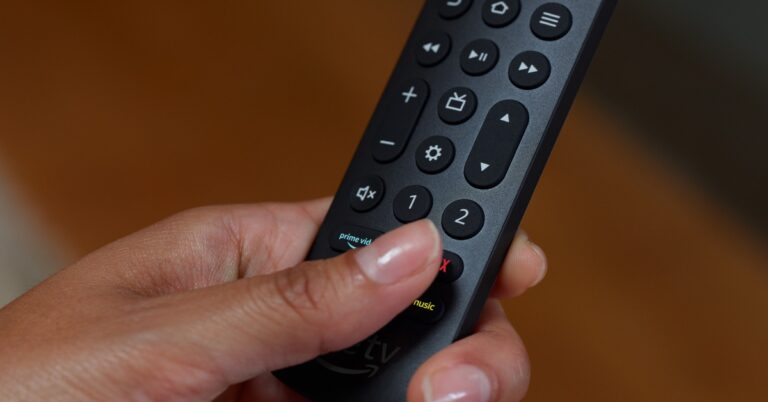






 Step 2: Select Manage your Google Account.
 Step 3: Switch to the Security tab.
 Step 4: Scroll down and tap on Manage all devices.
 Step 5: Tap on the device you want to remove.
 Step 6: Select Sign out and confirm your selection in the pop-up box.

 Step 3: Scroll down and select Manage all devices.
 Step 4: Click on the device you want to remove.
 Step 5: Click on Sign out.

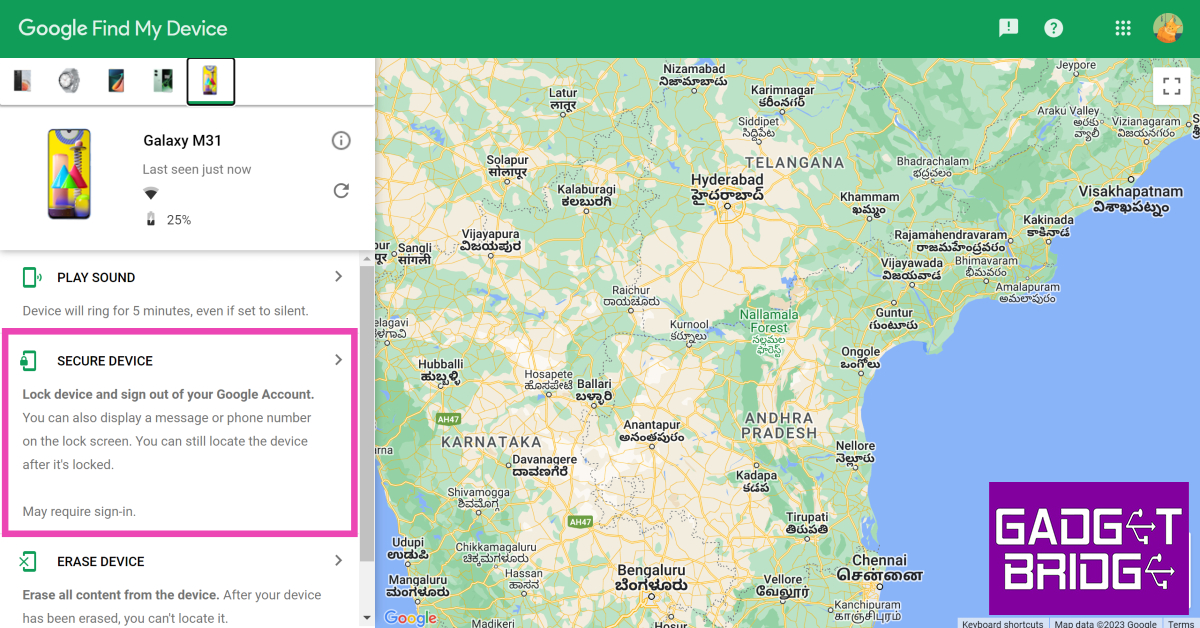 Step 5: Add a recovery message and your phone number in case someone finds your phone and wants to reach out to you to return it.
 Step 3: Switch to the Devices tab.
 Step 4: Uncheck the devices you want to remove.
 Step 2: Tap on Reset.
 Step 3: Select Factory data reset.
 Step 4: Scroll down and tap on Reset.