We’ve all seen the ads for wireless charging and wondered if it’s really worth it. Is wireless charging somehow better? How does it compare to traditional cable-based charging?
The answer is not as clear-cut as you may think. Not only do you need to consider the practical benefits of wireless charging, but you also have to evaluate how the technology works, what type of device you need to use it, and other factors.
In this article, we’ll explore the pros and cons of wireless charging to help you decide whether it’s right for your needs.
What is wireless charging?
We’ve all experienced seeing our battery charge drop to almost 0% making us panic and run searching for a wire to charge our phone, somehow being unable to plug it in until at least the 3rd try. This is especially nerve-wracking if you’re in the middle of paying a casino game on SlotsLV or answering urgent messages from your boss.
Well, wireless charging solves this anxiety-inducing situation almost completely. Wireless charging is a process of transferring energy from one device to another without the use of wires or cables. The most common type of wireless charging uses electromagnetic induction to transfer energy between two coils.
When an electrical current is passed through the primary coil, it creates a magnetic field. This magnetic field then induces a current in the secondary coil, which can be used to power the device.
How to use a wireless charger
Wireless charging is one of the most popular features on new smartphones, and for good reason: it’s incredibly convenient. But not all wireless chargers are created equal, some are simply better than others. They can have faster charging, or work with only certain types of devices, and some come with extra features that can be useful (or not).
Here’s what you need to know about how to choose the right charger for your needs. Most wireless chargers use either the Qi or PMA standard. Qi is more common and is used by companies like Apple, Samsung, LG, and Sony.
PMA is used by Duracell Powermat and other accessory manufacturers. If you’re not sure which standard your device uses, check the product manual or website.
Additionally, when choosing a wireless charger, there are several things you need to keep in mind such as the charging speed. Some wireless chargers are faster than others. If you want the fastest possible charge, look for a charger that supports fast-charging standards like Qualcomm Quick Charge or Samsung Adaptive Fast Charging.
And not all wireless chargers work with all devices. If you have an iPhone, for example, make sure to get a charger that supports the Qi standard. You should also be on the lookout for wireless chargers that come with extra features like LED display lights, temperature control, and overcharge protection. Consider which features are important to you before making a purchase.
Once you’ve chosen a wireless charger, be sure to read the instructions carefully before using it. Most wireless chargers require you to place your device on the charging pad in the correct orientation in order for it to charge properly.
The pros and cons of wireless charging
There are several benefits of wireless charging over traditional methods. One benefit is that it eliminates the need for messy cables and cords. Wireless charging also offers the convenience of being able to charge your devices without having to remove them from their cases or covers.
Additionally, wireless charging is typically faster than wired charging, meaning you can get back to using your devices sooner. And you can continue using your device without any pesky cords or plugs getting in the way. They are also becoming more common and easier to find, so you’re not limited to using only proprietary chargers from your device’s manufacturer.
However, there are also certain drawbacks to this technology. Wireless chargers tend to be more expensive than traditional chargers.
Moreover, you have to make sure your device is properly aligned with the wireless charger for it to work properly, which can be a bit tedious. They can also be bulkier than traditional chargers, so they may not be as convenient to travel with.
Conclusion
So, should you switch to wireless charging? Ultimately, the decision of whether to use a wireless charger or a traditional cable-based charger will boil down to your personal preference and lifestyle.
Wireless charging is becoming more popular due to its convenience and ease of setup, but traditional chargers still have their place in many people’s lives.
If you’re someone who hates dealing with tangled cords, or you’re always on the go and need the convenience of being able to charge your devices quickly and easily, then wireless charging may be the right choice for you.
On the other hand, if you need reliable fast charging capabilities and don’t mind dealing with cords, then a cable-based charger is probably the better option.
For the latest gadget and tech news, and gadget reviews, follow us on Twitter, Facebook and Instagram. For newest tech & gadget videos subscribe to our YouTube Channel. You can also stay up to date using the Gadget Bridge Android App. You can find the latest car and bike news here.
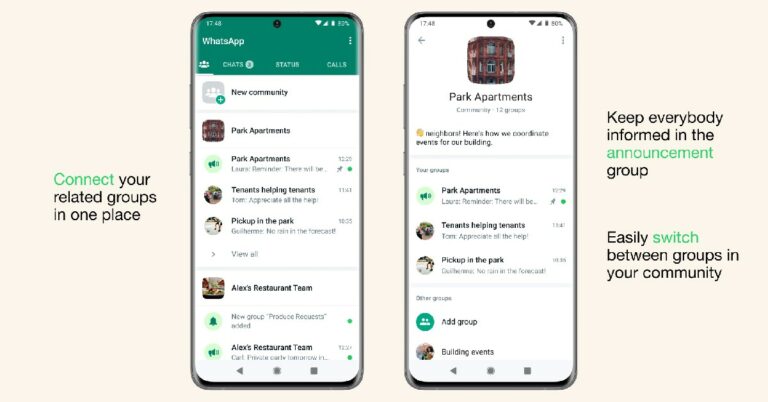
In its latest update, WhatsApp introduced the ‘Community’ feature, allowing admins to manage similar groups in one place. If you want to know how to create a WhatsApp Community, read our article here. If you are a Community admin and are wondering how to deactivate a WhatsApp Community, here’s how you can go about it.Read Also: Samsung Galaxy A04 and Galaxy A04e budget smartphones now available in India
What is a WhatsApp Community?
A WhatsApp Community is where you can manage several different groups at once. Different groups can be clubbed together under one umbrella and managed together. This feature comes in handy when you moderate related groups and want to manage them in one place. For example, WhatsApp groups of different classes in a school can be brought together to form a ‘community’ of the school that they are a part of. Any announcements related to the school can be posted to the community where participants of all the groups can look them up.Similarly, groups of teams at a workplace can be brought together as one community and managed in one place. One WhatsApp Community can accommodate up to 50 groups and 5000 members. Admins can post announcements in the ‘community announcement’ group for all the members to see.
Here’s how you can deactivate a WhatsApp community
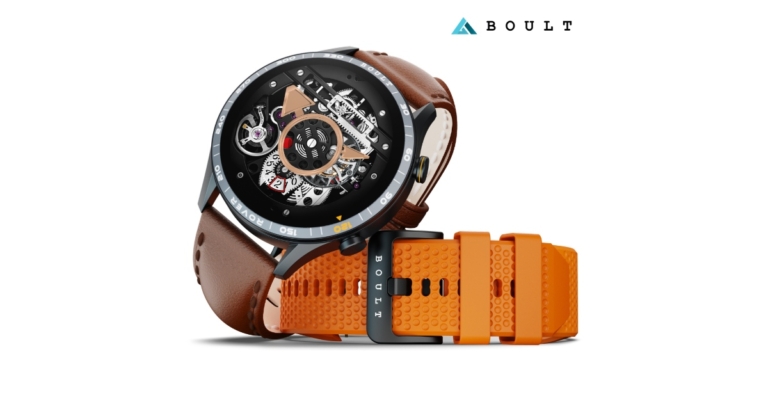
Boult Audio today announced the launch of Rover smartwatch in India. The device delivers 10 days of battery life. The watch comes with an AMOLED display which offers 600 nits brightness and Rover offers the choice of two bundles with secondary straps being offered for no additional cost. In addition to this, the device has over 100 sports modes to choose from.
Boult Rover smartwatch price in India and availability
Boult Rover smartwatch will be available for purchase via the company’s official website with a price tag of Rs 2,999. The swanky watch will also soon be offered on Flipkart.There will be two bundles for Rover. The leather brown strap will be the standard strap for the Classic switch edition, and an orange strap will be available without cost. The second package is called Flip, and it comes with free green and blue straps in addition to black as the main strap colour.
Boult Rover smartwatch features
Boult Rover is a Bluetooth-calling smartwatch with a 1.3-inch AMOLED display. In the box, Rover has a variety of coloured straps, including Orange and Leather and Black, Blue, and Green. With Rover’s 600 nits of high brightness, analysing your activities at any time of day is simple, even at noon when the sun is at its highest. The watch’s charm is heightened by its superior zinc alloy frame and leather straps. You can rest easy knowing that your watch will be able to withstand exposure to water and dust thanks to its IP68 classification.With more than 150 cloud watch faces, the watch offers a cutting-edge and immersive experience, allowing the user a variety of alternatives for choosing the watch faces that best suit their personalities or flaunting a new appearance every day.With more than 100 sports modes available, the smartwatch provides excellent value. Rover owners won’t have to worry about constant charging because of the device’s astounding ten-day battery life. The entire health monitor feature of the smartwatch also makes maintaining tabs on one’s health more convenient.“We have made a name for ourselves in how customers perceive sound or audio. Now, we are expanding our services to other niches so that our customers benefit from the same assurance of quality across our product categories. Although there is still a way to go to achieve this dream, we are putting our best foot forward to deliver the finest quality products to our customers. Rover is a product of technological advancement where durability and style are combined to give it an edge over other variants in the market. Since a watch plays a crucial role in dictating everyday essentials, we have designed the smartwatch in a way that it ups your style game, in addition to giving you a range of functionalities,” said Mr. Varun Gupta, co-founder of Boult Audio.
For the latest gadget and tech news, and gadget reviews, follow us on Twitter, Facebook and Instagram. For newest tech & gadget videos subscribe to our YouTube Channel. You can also stay up to date using the Gadget Bridge Android App. You can find the latest car and bike news here.
While it is beginning to look a lot like Christmas, some of you may be putting off your gift shopping until the last minute. If you don’t know where to begin, we’ve got you covered. 2022 saw a lot of exciting tech products getting released. We’ve picked the best out of the lot and assembled them into a handy gifting guide. So, without further ado, here is our list of last-minute tech gifting options for Christmas.Read Also: Infinix Zero 20 with 60-megapixel selfie camera launched in India
iPhone 14 Pro
Price: Rs 1,29,990The latest iPhone as a Christmas gift is always a no-brainer and probably the safest gifting choice. The iPhone 14 Pro comes with a new display and Apple’s biggest camera upgrade in years. The notch on the display has been replaced with a pill-shaped cutout which also houses the highly talked about ‘Dynamic Island’. The rear camera unit gets a 48MP primary sensor, a big upgrade over the 12MP lens on the previous version. Processor duties are handled by the new A16 Bionic chipset. iPhone 14 Pro also packs some new emergency features like crash detection and satellite connectivity. Read more about the latest iPhone in our review here.
Sony WH-1000XM5
Price: Rs 26,990
Sony’s latest flagship headphones, WH-1000XM5, make a perfect gift for an audiophile friend. Sony has been regularly putting out great wireless headphones every year in its 1000XM series, and the 1000XM5 continues that tradition by improving upon the sound profile of its predecessor and being comfortably ahead of its competition. The WH-1000XM5 employs giant 30mm audio drivers to deliver a sensational audio performance. If that’s not enough, these headphones also offer state-of-the-art ANC assisted by 8 microphones. You also get up to 30 hours of playback on a single charge and fast charging support. For more details, read our review here.
Nothing Phone (1)
Price: Rs 32,999Not many smartphones are able to make as big waves in their debut year as the Nothing Phone (1) did this year. While the smartphone may stand out because of its aesthetics (thanks to the see-through back panel design and the Glyph interface), do not be mistaken in thinking that it is a one-trick pony. The rear camera and image processing of the Phone (1) are surprisingly good for a smartphone in the midrange category. Read more about it in our detailed review here. If you’re looking for a powerful smartphone to gift to a tech enthusiast but don’t want to splurge on a flagship, the Nothing Phone (1) stands out as an obvious choice.
Samsung Galaxy Watch 5
Price: Rs 30,000Samsung Galaxy Watch 5 is arguably the best Android smartwatch on the market right now. Its BioActive sensors, health and fitness tracking, app integration and ease of accessibility make it an ideal gift for fitness freaks and regular tech enthusiasts alike. When we reviewed the Galaxy Watch 5 last month, we were blown away by the range of its fitness tracking and the accuracy of its health sensors. Even if you are not heavily into fitness, you’ll come to appreciate the density of the health data that the smartwatch is able to track across the day. On top of that, the dial faces and customisation options make it a pretty appealing bling to wrap around your wrist.
Amazon Echo Dot with Clock
Price: Rs 4,999The Amazon Echo Dot with Clock makes a great nightstand addition. It is also one of the bestselling Echo devices. It comes with a minimal digital clock LED display and the standard LED lighting at the bottom. With the Echo Dot, you can play ambient sounds and white noise while you go to sleep, set up an alarm using Alexa, or even update your to-do list for the day. You can snooze the alarm by gently tapping on the top of the device.
Acer H Series Smart TV
Price: Rs 34,999The recently launched Acer H Series ticks all the boxes for the perfect Christmas gift. This 50-inch Smart TV comes sports a 4k display and a 64-bit Cortex a 55 quad-core CPU with up to 1.3GHz clock speed. The Acer H Series is nearly frameless with just a thick silver border running at the bottom. Designed to be placed in a large living room, the H Series delivers a great viewing experience, one that isn’t easily matched in this price range. The Android TV 11 OS supports all of the OTT apps and the TV comes preloaded with the major ones like Netflix and Prime Video. Acer may be new to the Smart TV market in India but it is consistently delivering great products at really attractive prices. Read our review here.
Lenovo ThinkBook 15
Price: Rs 33,990Looking for a budget-friendly laptop for students? The Lenovo ThinkBook 15 is a great buy at a reasonable cost. The Lenovo ThinkBook 15 features the AMD Ryzen 3 5300U processor and comes preloaded with Windows 11. While the standard variant has 256GB SSD storage along with 8GB RAM, there is also a 512GB SSD storage variant on offer. Brightness for the 15.6-inch Antiglare display is capped at 220 nits, which is optimum for indoor and outdoor usage. The laptop also comes with integrated AMD Radeon graphics.
Qubo Dashcam 4K
Price: Rs 9,990.When it comes to Auto Tech, Hero Electronix has one of the best product portfolios in India. The recently launched Qubo Dashcam can record high-quality footage in 4k (with Sony IMX 415 lens and SIGMASTAR SSC8629G) and also comes with ADAS features like lane departure warning, forward vehicle motion detection, and vehicle ahead alert. On top of that, the dashcam also sports an inbuilt GPS and is capable of taking time-lapse videos. The ‘Loop recording’ feature overwrites old footage to save storage space and the ‘Emergency event recording lock’ automatically saves the video in case of an event.
OnePlus Nord Watch
Price: Rs 4,999Looking for a no-nonsense fitness tracking smartwatch without wanting to splurge too much? The OnePlus Nord Watch fits the bill. The 1.78-inch AMOLED display offers a 60Hz refresh rate and a peak brightness of 500 nits. We reviewed the Nord Watch recently and were pleased by the touch response of the display and the versatility of its fitness tracking. The 230 mAh battery provides a week’s worth of juice even on above-average usage. When the smartwatch is on stand-by it can last up to 30 days.
Steelbird Bike Riding Gloves with Touchscreen Sensitivity
Price: Rs 599While it isn’t exactly a ‘tech’ gift, the Steelbird riding gloves are a great accessory that allows riders to handle touchscreen interfaces without taking the gloves off. These gloves will come in handy for electric scooter owners that need to regularly handle the touch interface on their vehicle. Taking the gloves off every time you need to check your phone can be quite an annoyance, especially on pit stops during long rides. At a price of Rs 599, these gloves would make a thoughtful gift for someone that loves to ride. Read Also: Upcoming Xiaomi Smartphones in 2023 – The Complete list
Conclusion
These are our picks for the best last-minute tech gifting options for Christmas. Before buying any products, look out for the exclusive year-end offers and discounts being offered by e-commerce platforms and tech brands across the spectrum. What tech products did you pick up on your Christmas shopping spree? Let us know in the comments!For the latest gadget and tech news, and gadget reviews, follow us on Twitter, Facebook and Instagram. For newest tech & gadget videos subscribe to our YouTube Channel. You can also stay up to date using the Gadget Bridge Android App. You can find the latest car and bike news here.
Client-side encryption in Gmail for the web is now more accessible to customers thanks to Google. Up until January 20th, 2023, customers of Google Workspace Enterprise Plus, Education Plus, and Education Standard are able to apply for the beta. Emails and attachments on the Web benefit from an additional degree of protection thanks to the company’s encryption technology.More users of Google Workspace’s email messaging service, Gmail, will be able to access the beta version of the company’s end-to-end encryption function. More customers will now be able to apply to beta-test the Client-side encryption in Gmail.Sensitive information in the email body and attachments are rendered unreadable by Google servers thanks to client-side encryption in Gmail. Customers maintain ownership of both the identity service used to access encryption keys.All data that is at rest and in transit between our facilities is already encrypted by Google Workspace using the most recent cryptographic standards. Client-side encryption supports a variety of data sovereignty and compliance requirements while enhancing the secrecy of your data.For Google Drive, Google Docs, Sheets, and Slides, Google Meet, and Google Calendar, client-side encryption is already available (beta).Customers of Google Workspace Enterprise Plus, Education Plus, and Education Standard will have access to client-side encryption in Gmail. Customers of legacy G Suite Basic and Business, as well as those with personal Google Accounts, won’t be able to utilise it. Neither will users of Google Workspace Essentials, Business Starter, Business Standard, Business Plus, Enterprise Essentials, Education Fundamentals, Frontline, and Nonprofits.Customers that are eligible for Workspace can apply for the beta after completing a few account preparation requirements.At the domain, OU, and group levels (Admin console > Security > Access and data control > Client-side encryption), this Client-side encryption in Gmail can be turned on. It is disabled by default. To find out more about client-side encryption, go to the Help Center.Click the lock icon, choose extra encryption, then compose your message and add attachments, as usual, to add client-side encryption to any message.
For the latest gadget and tech news, and gadget reviews, follow us on Twitter, Facebook and Instagram. For newest tech & gadget videos subscribe to our YouTube Channel. You can also stay up to date using the Gadget Bridge Android App. You can find the latest car and bike news here.
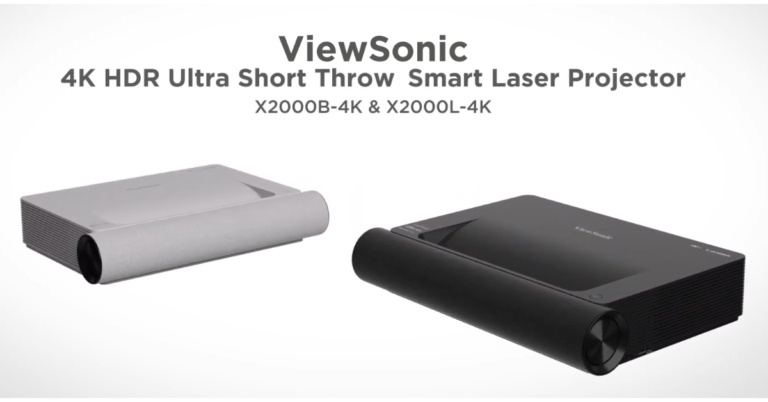
Viewsonic has announced the launch of the newest Ultra Short Throw Smart Laser Projectors X2000B-4K and X2000L-4K in the Indian market. The projectors have second-generation laser phosphor technology with 20,000 lamp-free hours of endurance. The Viewsonic Ultra Short Throw Smart Laser Projectors produce 4K HDR images and enhance audio using theatre-quality Harman Kardon speakers.The Viewsonic Ultra Short Throw Smart Laser X2000B-4K and X2000L-4K Projectors are ergonomically designed, blending in seamlessly with the decor and adding to the contemporary home setup.X2000B-4KBlack and white versions of the new X2000B-4K and X2000L-4K projectors are available to match the aesthetics of any home interior. It is also the best alternative for saving space because of its 0.22 ultra-short throw ratio, which delivers a 100″ screen only 23 cm from the wall while maintaining the openness of a home.According to the company, the projectors may be positioned anywhere and can be adjusted to project high-quality images from any angle with ease. The projected image is proportioned correctly even when the surface is curved or spherical thanks to the 60-point adjustment capability. When not in use, the projectors are aesthetically pleasing and unobtrusive, seamlessly, blending subtly and harmoniously into the space.The freshly released projectors provide room-filling audio and visual experience with their native 4K Ultra HD resolution and theatre-level Harman Kardon speakers with Dolby and DTS soundtracks.Similar to a regular TV, the X2000B-4K and X2000L-4K deliver a cinematic experience right out of the box. The projector activates with a single click, achieving full brightness and colour performance.X2000L-4KScreen mirroring, one of its many capabilities that makes it simple to transmit material directly from mobile phones to a large screen, is just one example. Additionally, customers are able to wirelessly stream information sharing from portable devices, such as phones or tablets, to a large screen thanks to the projector’s convenient connectivity choices, including Wi-Fi, Bluetooth, and USB-C connectors.The projectors can also be connected to a gaming console, offering a variety of entertainment options. For instance, it can be utilised as a Bluetooth soundbar to enjoy the enjoyment of the big-screen without bothering others. As an alternative, the user’s Bluetooth headset can receive the audio.The ViewSonic X2000L/B-4K HDR Ultra Short Throw Smart Laser Projector comes with a starting price of Rs 3,99,000.
For the latest gadget and tech news, and gadget reviews, follow us on Twitter, Facebook and Instagram. For newest tech & gadget videos subscribe to our YouTube Channel. You can also stay up to date using the Gadget Bridge Android App. You can find the latest car and bike news here.
If you are a new YouTube creator, standing out in a sea of content can be a really hard task no matter how good your videos are. While there’s no substitute for engaging and good-quality content, you need the help of a bunch of tools to attract an audience online. If you’re wondering where to start out, we’ve got you covered. Here is our list of the 7 best apps for YouTube creators in 2023.Read Also: Upcoming Xiaomi Smartphones in 2023 – The Complete list
YouTube Studio
YouTube Studio is one quintessential app that should be a part of every content creator’s arsenal. YouTube’s official channel management app lets you connect with your community and handle your channel while you’re on the go. The ‘Channel Dashboard’ gives you a brief insight into how your videos are performing and the rate at which your channel is growing. Using the YouTube Studio app, you can sort through the comments on your videos using various filters and effectively moderate the comment section.
TubeBuddy
While YouTube Studio is a great app for channel management, it does little to advance your channel’s growth. This is where TubeBuddy comes into play. Can’t think of a catchy title for your video? TubeBuddy will suggest popular and high-performing keywords to craft the perfect title and tags. You will also find various tools that help you drive traffic to your videos and rank them higher in web searches. If that’s not enough, TubeBuddy also helps you test your thumbnails in advance and gives you an idea of how they will perform once you publish your video.
Adobe Premiere Rush
Need to edit videos on the go? Look no further than Adobe. With Adobe Premiere Rush you can arrange videos, audio, graphics, and photos with a simple drag and drop. You can also add graphics and other animations on top of the videos. The built-in camera functionality also lets you record high-quality videos from the editing app itself. On top of that, Adobe Premiere Rush provides thousands of royalty-free soundtracks to go along with your video.
Canva
If you want people to stay on your video once they’ve clicked on it, you need to retain their attention with crafty edits and interactive animations. While a good editing tool like Adobe takes care of all the cuts and transitions, you also need interesting graphics to go along with it. Having your video interlaced with text, animations, and graphics keeps it from being dry and one-dimensional. The viewers are less likely to move on to another video when there’s more stuff on the screen to hold their attention. Canva makes it incredibly easy to design graphics, thumbnails, banners, and posters with its accessible tools and thousands of templates. You can apply these graphics to your video in the Canva app itself. There’s even an extensive library of stock images, videos, and gifs to help you along the way.
Screen Recorder by InShot
If you create tutorials or gaming videos for YouTube, you definitely need a solid screen recording app that can take clear and high-definition recordings of the screen. InShot’s Screen Recorder app is the perfect tool for this purpose. First off, this app does not attach a watermark to the recordings, making them suitable to be published online. You can record your screen in HD resolution (1080p) at 60fps. There is no time limit to the length of videos. InShot even lets you record your own voice on top of the screen recording, making it incredibly easy to create tutorial videos. Gaming content creators can also record themselves in a small overlay window using the app’s Facecam.
Intro Maker
A good quality intro is one of the elements that separate professional YouTubers from amateurs. Well-recorded intros bring uniformity to your videos. With the Intro Maker app, you can easily create professional intros, outros, and end screens for your YouTube videos. This app has a collection of over 4,000 intro templates along with a plethora of sound effects, stickers, and other graphics. If you’re looking for something more original, you can also design an intro from scratch.
Fiverr
While the apps mentioned on this list will help you manage all creative and editing tasks on your own, sometimes it is not a bad idea to outsource some of the work and let a professional handle it. Fiverr is a platform where you can hire freelancers for various services ranging from scriptwriting, logo design, video editing, animation, and more. If there’s some task that is beyond your expertise, let a professional handle it for you. The price of services on Fiverr begins at $5.Read Also: Infinix Zero 20 with 60-megapixel selfie camera launched in India
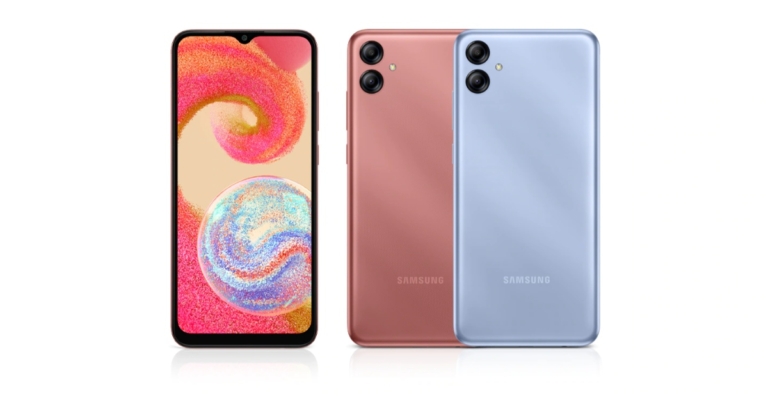
The most recent additions to the Galaxy A series, Samsung Galaxy A04 and Galaxy A04e are now available in India. Both devices are powered by MediaTek Helio P35 SoC. The Galaxy A04 comes with a 50MP dual rear camera whereas the Galaxy A04e features a 13MP dual camera setup. The smartphones comes with Android 12 out of the box and packs a 5000mAh battery.
Samsung Galaxy A04 and Galaxy A04e price and availability details
The Samsung Galaxy A04e has been launched in three variants. The price is Rs 9,299 for the model with 3GB of RAM and 32GB of internal storage, Rs 9,999 for the model with 3GB of RAM and 64GB of storage, and Rs 11,499 for the model with 4GB of RAM and 128GB of storage.The device will be offered in two colour options: Copper and Light Blue.The Samsung Galaxy A04 costs Rs. 11,999 for the base model with 4GB RAM and 64GB of internal storage, and Rs. 12,999 for the model with 4GB RAM and 128GB of storage. The phone is offered in shades of Black, Copper, and Green.In terms of availability, both smartphones are available for purchase through Samsung.com and a few retail locations.
Samsung Galaxy A04 specifications
A 6.5-inch full-HD+ Infinity-V display is available on the Galaxy A04. The screen comes with a resolution of 1560 × 720 pixels. The device is powered by Octa Core MediaTek Helio P35 12nm processor with IMG PowerVR GE8320 GPU. It comes with up to 4GB RAM and 128GB storage options. The internal storage is expandable up to 1TB via a micro SD card. The device comes pre-installed with Android 12 with One UI 4.1 out of the box.The Samsung Galaxy A04 has a dual rear camera arrangement with a 50-megapixel primary sensor on the optical front. There is a 5-megapixel camera on the front for selfies and video calls.There are several connectivity options, including Wi-Fi 802.11ac, Bluetooth v5, GPS/A-GPS, and 4G LTE. As an additional authentication feature, it incorporates a side-mounted fingerprint sensor. A Type-C fast charger is included in the box with a 5,000mAh battery.
Samsung Galaxy A04e key specifications
The 6.5-inch HD+ display on the Samsung Galaxy A04e has a water drop-style display notch that houses the front camera. The screen comes with 1560 × 720 pixels of resolution. It also has a similar chipset and runs on Android 12 with One UI 4.1 OS. The device offers 4GB of RAM and up to 128GB of internal storage which has a maximum capacity of 128GB, but it can be increased to 1TB. The Samsung Galaxy A04e comes with two rear cameras, each with a 13-megapixel primary sensor.It also supports 4G LTE, Wi-Fi 802.11 b/g/n, Bluetooth v5, and has a 5,000mAh battery.
For the latest gadget and tech news, and gadget reviews, follow us on Twitter, Facebook and Instagram. For newest tech & gadget videos subscribe to our YouTube Channel. You can also stay up to date using the Gadget Bridge Android App. You can find the latest car and bike news here.
Each one of us wants to enjoy great video content online or offline. At times, we do not have the internet, for example, on an aeroplane or in remote areas in the mountains. Then what do we do? Well, if you know you are going to be in such situations, then you might as well pre-download the videos on your laptop or mobile device and enjoy them later when you do not have internet. One great 4K downloader that we came across is by 4Kdownload. It lets you download YouTube videos available in high-quality 4K resolution. If that’s not up your alley, we’ve got plenty of other options for you in this article.
Read Also:Funky Friday Codes (July 2025)
But before we move further, let’s understand what 4K resolution is
You’ve probably heard the term “4K,” but you might not know what it means. The phrase relates to the resolution of an image. 4K resolution, often known as Ultra High Definition (UHD), is four times that of normal high definition (1080P).
Whereas a conventional high-definition image has 1,080 pixels on the vertical axis and 1,920 pixels on the horizontal axis for a total pixel count of 2,073,600, 4K resolution more than doubles these statistics. The resolution is named for the number of pixels along the width axis, which is over 4,000 in total at 3,840. A 4K image has a total pixel count of 8,294,400 (more than 8 megapixels). This increase in pixel count results in a crisper, clearer image.
Use an app for your PC (4K Video Downloader)
We can get an amazingly clean and lifelike video image with 4K resolution. 4K Video Downloader is the programme to use if you want to watch high-resolution videos on your TV, computer, or mobile device. To download 4K YouTube videos in great quality, follow the steps below.
Step 1: Start 4K Video Downloader. It is compatible with macOS, Windows, Linux, and Android.Step 2: Copy the YouTube URL of the 4K video you wish to download.Step 3: Select the Paste Link option.
Step 4: Choose your format and quality.
Step 5: Select the Download option.
The video will be saved on your device.
Pros
Works like a charm
4K quality
Cons
Requires downloading a third-party app
Use an online tool (SaveFrom)
Step 1:Go to SaveFrom.net.
Step 2:Paste the link to the YouTube video in the text box.
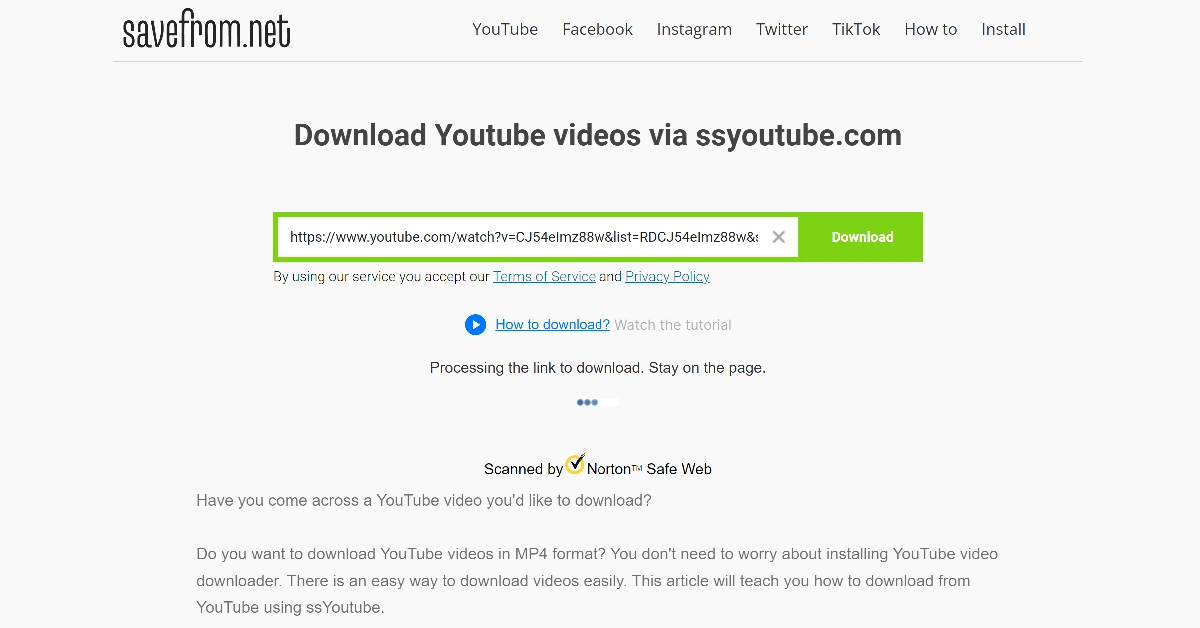
Step 3: Wait for the website to process the link.
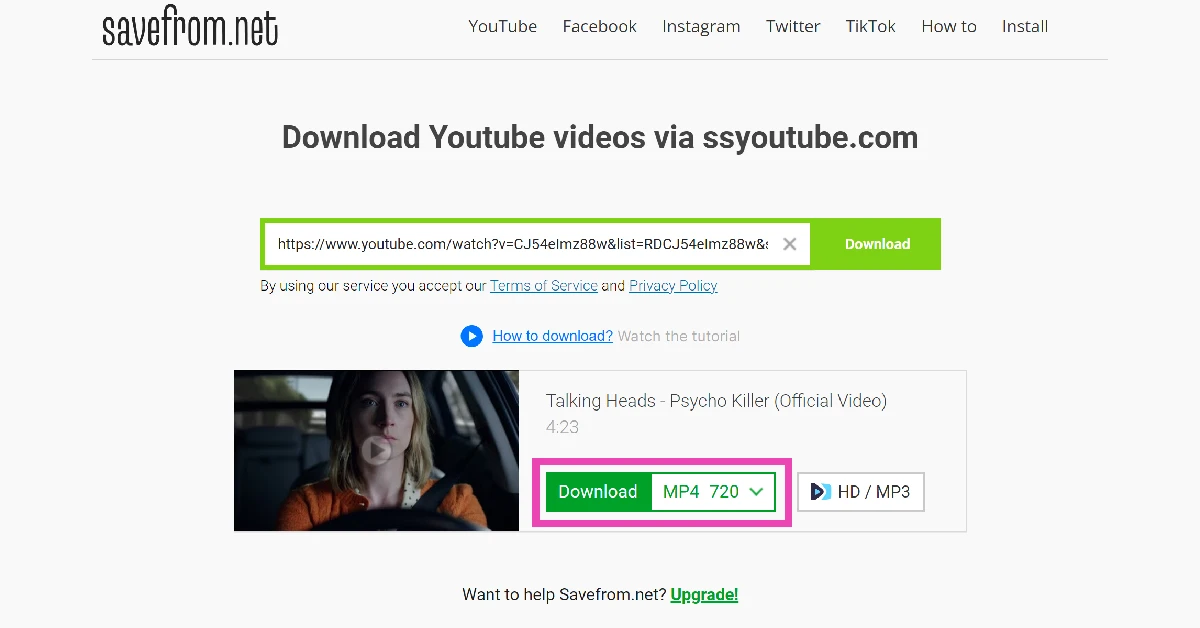
Step 4: Choose your preferred resolution and hit Download.
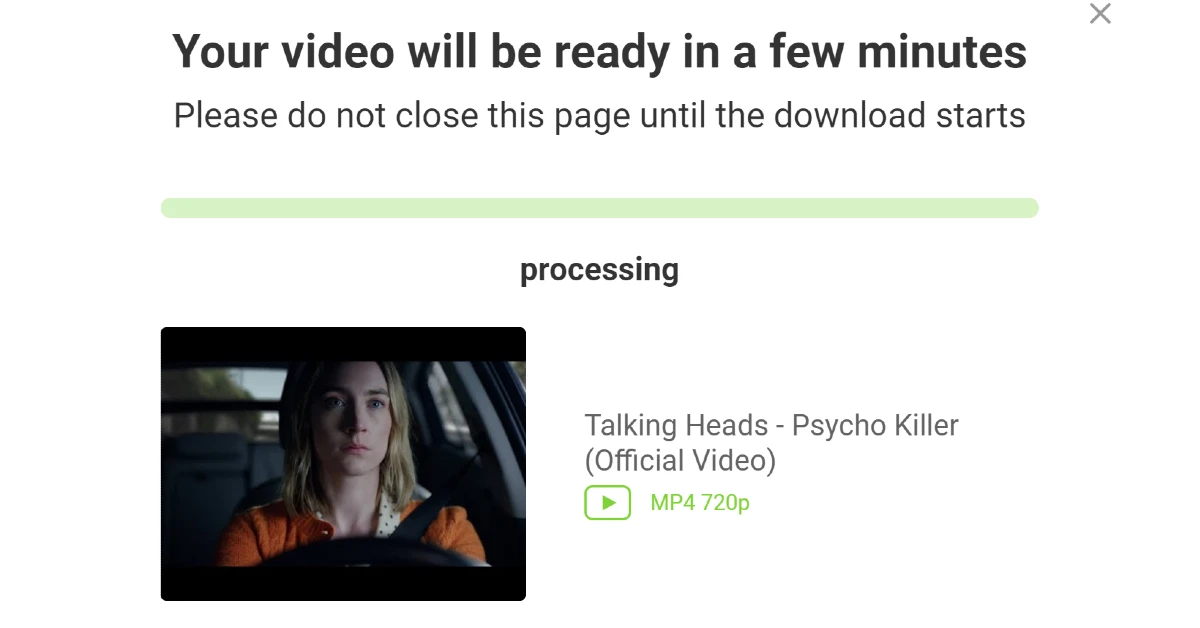
Step 5:Wait for a few minutes for the video to process.
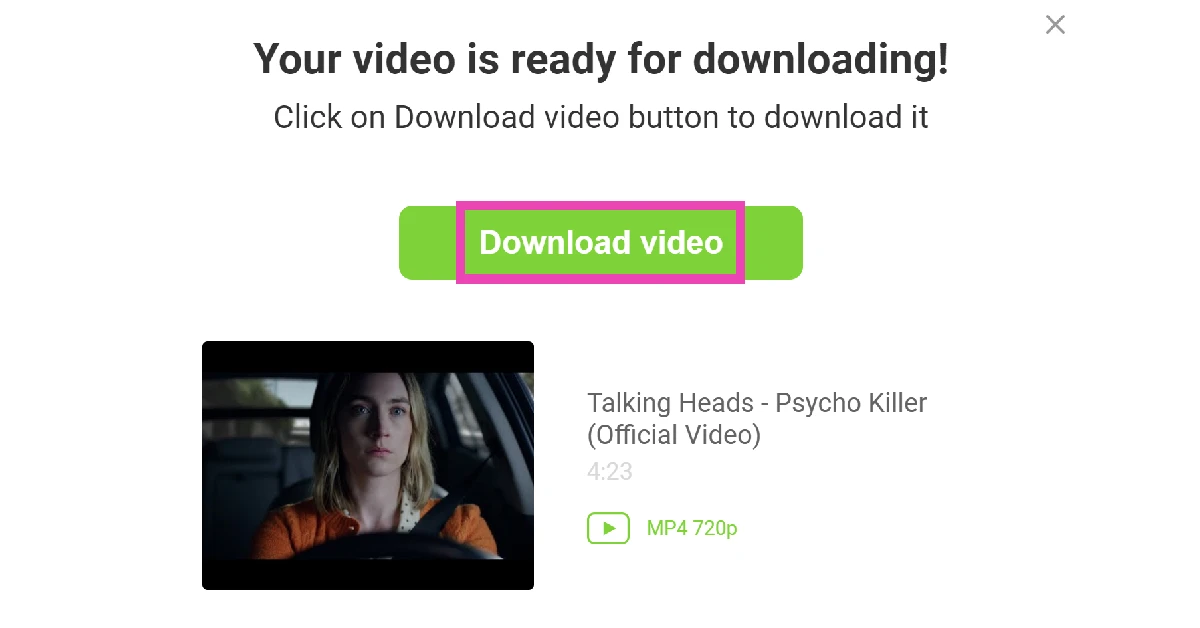
Step 6: Hit Download Video.
Pros
Easy to use
Doesn’t require downloading an app
Cons
Lots of ads
Use Newpipe for your smartphone
There are plenty of third-party YouTube clients that you can install on your smartphone to watch and download YouTube videos. Newpipe is one of the best around. Before you use this app, you should know that it must be sideloaded on your device since it doesn’t comply with Google Play Store’s content guidelines.
Step 1:Launch Newpipe and search for the video you want to download.
Step 2: Play the video and hit the download button.
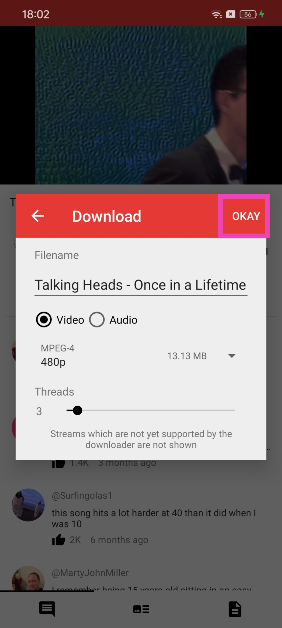
Step 3: Select the resolution and tap on OKAY.
Pros
Reliable
Quick downloads
Cons
Needs to be sideloaded
Frequently Asked Questions (FAQs)
What’s the best way to download YouTube videos in 4K on my PC?
Download the 4K Video Downloader from the Microsoft Store, go to YouTube and copy the link to the video, come back to 4kVD and hit the ‘Paste Link’ button. Select your preferred format and quality, and hit the Download button.
How do I download a YouTube video without using a third-party app?
Online tools like SSYouTube and SaveFrom help you download YouTube videos without using third-party apps. Copy the link to the video, paste it in the text box of the online tool, select a resolution, and hit the Download button.
How do I download YouTube videos on my phone?
You can use the mobile web version of online tools like SSYouTube and SaveFrom to download YouTube videos on your phone. You can also use third-party apps like Newpipe for this task.
How do I download YouTube Shorts to my phone’s storage?
Copy the link of the YouTube Shorts video you want to save on your device, go to the PasteDownload website, and paste the link in the download box. Hit the download button to save the video to your device.
Is there a legal way to download YouTube videos on my device?
The only ‘legal’ way to download YouTube videos on your device is through YouTube Premium. Third-party apps and online tools that specialise in downloading YouTube videos are in violation of Google’s copyright policy.
Read Also:AKAI Unveils Soul Series Soundbars: Big Sound, Small Footprint
Conclusion
This is how you can easily download any video from websites like YouTube in high-quality, including 4K resolution. There are plenty of download options available on 4K Video Downloader, and the app as well as the web interface are very easy to use. Over that, all popular video and audio sites such as Vimeo, TikTok, Soundcloud, etc, are supported and you can download high-quality 4K content from there too. For people looking for free options, this could be the very first step, as it allows 30 free videos to be downloaded per day. In case you want unlimited access, you can pay a nominal charge and download as many videos as you want with 4KDownload.
Garena Free Fire is a battle royale game with regular awards and tournaments to keep players interested. If you play Garena Free Fire, you should be aware of the redeem codes that are released on a daily basis. However, because the battle royale game is banned in India, players from other countries can use the Free Fire Redeem codes daily. If you’re unfamiliar with the Garena Free Fire redeem codes or don’t know how to get them, we’ve put together a step-by-step guide to help you redeem them. Check out Garena Free Fire Redeem Codes for December 22.
The Free Fire redeem codes are a great way to get free stuff. These are 12-digit codes that contain alphabets and numbers, as well as an expiration date and time. Because the Garena FF redeem codes cannot be used more than once, you should hurry to the redemption page to claim your free reward before someone else does. To get a free reward, all you have to do is go to reward.ff.garena.com/en, which is the official redemption page. Also, keep an eye on this space for daily updates on Garena Free Fire redemption codes and rewards.
Garena Free Fire Redeem Codes Today 22 December 2022
FBHYIDEUYGTRDA
FEC2FG31EYHBR
FJBNJ3KLOP098U
FGVCXS821EDXZ
FQ16345YUI9876
FTMKI98UHBCDF
FT56YHNM8LOP0
FIJHBGVCXSERT
FMTKGOIUHYDE
FJMR5KTLOAEQD
FCFR23RTFVGH4
FRIU8FYTVRFGD
FEHNJ4R5ITGU76
FTFDFNVBUY67S
How to Get Free Fire Redeem Codes for Garena on December 22?



 Step 4: Scroll down and select ‘Deactivate Community’.
 Step 4: Scroll down and select ‘Deactivate Community’.
 Step 5: Confirm your selection.
 Your selected WhatsApp Community will be deactivated.
Read Also: Infinix Zero 20 with 60-megapixel selfie camera launched in India
Your selected WhatsApp Community will be deactivated.
Read Also: Infinix Zero 20 with 60-megapixel selfie camera launched in India

 The latest iPhone as a Christmas gift is always a no-brainer and probably the safest gifting choice. The iPhone 14 Pro comes with a new display and Apple’s biggest camera upgrade in years. The notch on the display has been replaced with a pill-shaped cutout which also houses the highly talked about ‘Dynamic Island’. The rear camera unit gets a 48MP primary sensor, a big upgrade over the 12MP lens on the previous version. Processor duties are handled by the new A16 Bionic chipset. iPhone 14 Pro also packs some new emergency features like crash detection and satellite connectivity. Read more about the latest iPhone in our review here.
 Sony’s latest flagship headphones, WH-1000XM5, make a perfect gift for an audiophile friend. Sony has been regularly putting out great wireless headphones every year in its 1000XM series, and the 1000XM5 continues that tradition by improving upon the sound profile of its predecessor and being comfortably ahead of its competition. The WH-1000XM5 employs giant 30mm audio drivers to deliver a sensational audio performance. If that’s not enough, these headphones also offer state-of-the-art ANC assisted by 8 microphones. You also get up to 30 hours of playback on a single charge and fast charging support. For more details, read our review here.
 Not many smartphones are able to make as big waves in their debut year as the Nothing Phone (1) did this year. While the smartphone may stand out because of its aesthetics (thanks to the see-through back panel design and the Glyph interface), do not be mistaken in thinking that it is a one-trick pony. The rear camera and image processing of the Phone (1) are surprisingly good for a smartphone in the midrange category. Read more about it in our detailed review here. If you’re looking for a powerful smartphone to gift to a tech enthusiast but don’t want to splurge on a flagship, the Nothing Phone (1) stands out as an obvious choice.
 Samsung Galaxy Watch 5 is arguably the best Android smartwatch on the market right now. Its BioActive sensors, health and fitness tracking, app integration and ease of accessibility make it an ideal gift for fitness freaks and regular tech enthusiasts alike. When we reviewed the Galaxy Watch 5 last month, we were blown away by the range of its fitness tracking and the accuracy of its health sensors. Even if you are not heavily into fitness, you’ll come to appreciate the density of the health data that the smartwatch is able to track across the day. On top of that, the dial faces and customisation options make it a pretty appealing bling to wrap around your wrist.
 The Amazon Echo Dot with Clock makes a great nightstand addition. It is also one of the bestselling Echo devices. It comes with a minimal digital clock LED display and the standard LED lighting at the bottom. With the Echo Dot, you can play ambient sounds and white noise while you go to sleep, set up an alarm using Alexa, or even update your to-do list for the day. You can snooze the alarm by gently tapping on the top of the device.
 The recently launched Acer H Series ticks all the boxes for the perfect Christmas gift. This 50-inch Smart TV comes sports a 4k display and a 64-bit Cortex a 55 quad-core CPU with up to 1.3GHz clock speed. The Acer H Series is nearly frameless with just a thick silver border running at the bottom. Designed to be placed in a large living room, the H Series delivers a great viewing experience, one that isn’t easily matched in this price range. The Android TV 11 OS supports all of the OTT apps and the TV comes preloaded with the major ones like Netflix and Prime Video. Acer may be new to the Smart TV market in India but it is consistently delivering great products at really attractive prices. Read our review here.
 Looking for a budget-friendly laptop for students? The Lenovo ThinkBook 15 is a great buy at a reasonable cost. The Lenovo ThinkBook 15 features the AMD Ryzen 3 5300U processor and comes preloaded with Windows 11. While the standard variant has 256GB SSD storage along with 8GB RAM, there is also a 512GB SSD storage variant on offer. Brightness for the 15.6-inch Antiglare display is capped at 220 nits, which is optimum for indoor and outdoor usage. The laptop also comes with integrated AMD Radeon graphics.
 When it comes to Auto Tech, Hero Electronix has one of the best product portfolios in India. The recently launched Qubo Dashcam can record high-quality footage in 4k (with Sony IMX 415 lens and SIGMASTAR SSC8629G) and also comes with ADAS features like lane departure warning, forward vehicle motion detection, and vehicle ahead alert. On top of that, the dashcam also sports an inbuilt GPS and is capable of taking time-lapse videos. The ‘Loop recording’ feature overwrites old footage to save storage space and the ‘Emergency event recording lock’ automatically saves the video in case of an event.
 Looking for a no-nonsense fitness tracking smartwatch without wanting to splurge too much? The OnePlus Nord Watch fits the bill. The 1.78-inch AMOLED display offers a 60Hz refresh rate and a peak brightness of 500 nits. We reviewed the Nord Watch recently and were pleased by the touch response of the display and the versatility of its fitness tracking. The 230 mAh battery provides a week’s worth of juice even on above-average usage. When the smartwatch is on stand-by it can last up to 30 days.
 While it isn’t exactly a ‘tech’ gift, the Steelbird riding gloves are a great accessory that allows riders to handle touchscreen interfaces without taking the gloves off. These gloves will come in handy for electric scooter owners that need to regularly handle the touch interface on their vehicle. Taking the gloves off every time you need to check your phone can be quite an annoyance, especially on pit stops during long rides. At a price of Rs 599, these gloves would make a thoughtful gift for someone that loves to ride.
Read Also: Upcoming Xiaomi Smartphones in 2023 – The Complete list
While it isn’t exactly a ‘tech’ gift, the Steelbird riding gloves are a great accessory that allows riders to handle touchscreen interfaces without taking the gloves off. These gloves will come in handy for electric scooter owners that need to regularly handle the touch interface on their vehicle. Taking the gloves off every time you need to check your phone can be quite an annoyance, especially on pit stops during long rides. At a price of Rs 599, these gloves would make a thoughtful gift for someone that loves to ride.
Read Also: Upcoming Xiaomi Smartphones in 2023 – The Complete list




 YouTube Studio is one quintessential app that should be a part of every content creator’s arsenal. YouTube’s official channel management app lets you connect with your community and handle your channel while you’re on the go. The ‘Channel Dashboard’ gives you a brief insight into how your videos are performing and the rate at which your channel is growing. Using the YouTube Studio app, you can sort through the comments on your videos using various filters and effectively moderate the comment section.
 While YouTube Studio is a great app for channel management, it does little to advance your channel’s growth. This is where TubeBuddy comes into play. Can’t think of a catchy title for your video? TubeBuddy will suggest popular and high-performing keywords to craft the perfect title and tags. You will also find various tools that help you drive traffic to your videos and rank them higher in web searches. If that’s not enough, TubeBuddy also helps you test your thumbnails in advance and gives you an idea of how they will perform once you publish your video.
 Need to edit videos on the go? Look no further than Adobe. With Adobe Premiere Rush you can arrange videos, audio, graphics, and photos with a simple drag and drop. You can also add graphics and other animations on top of the videos. The built-in camera functionality also lets you record high-quality videos from the editing app itself. On top of that, Adobe Premiere Rush provides thousands of royalty-free soundtracks to go along with your video.
 If you want people to stay on your video once they’ve clicked on it, you need to retain their attention with crafty edits and interactive animations. While a good editing tool like Adobe takes care of all the cuts and transitions, you also need interesting graphics to go along with it. Having your video interlaced with text, animations, and graphics keeps it from being dry and one-dimensional. The viewers are less likely to move on to another video when there’s more stuff on the screen to hold their attention. Canva makes it incredibly easy to design graphics, thumbnails, banners, and posters with its accessible tools and thousands of templates. You can apply these graphics to your video in the Canva app itself. There’s even an extensive library of stock images, videos, and gifs to help you along the way.
 If you create tutorials or gaming videos for YouTube, you definitely need a solid screen recording app that can take clear and high-definition recordings of the screen. InShot’s Screen Recorder app is the perfect tool for this purpose. First off, this app does not attach a watermark to the recordings, making them suitable to be published online. You can record your screen in HD resolution (1080p) at 60fps. There is no time limit to the length of videos. InShot even lets you record your own voice on top of the screen recording, making it incredibly easy to create tutorial videos. Gaming content creators can also record themselves in a small overlay window using the app’s Facecam.
 A good quality intro is one of the elements that separate professional YouTubers from amateurs. Well-recorded intros bring uniformity to your videos. With the Intro Maker app, you can easily create professional intros, outros, and end screens for your YouTube videos. This app has a collection of over 4,000 intro templates along with a plethora of sound effects, stickers, and other graphics. If you’re looking for something more original, you can also design an intro from scratch.
 While the apps mentioned on this list will help you manage all creative and editing tasks on your own, sometimes it is not a bad idea to outsource some of the work and let a professional handle it. Fiverr is a platform where you can hire freelancers for various services ranging from scriptwriting, logo design, video editing, animation, and more. If there’s some task that is beyond your expertise, let a professional handle it for you. The price of services on Fiverr begins at $5.
Read Also: Infinix Zero 20 with 60-megapixel selfie camera launched in India
While the apps mentioned on this list will help you manage all creative and editing tasks on your own, sometimes it is not a bad idea to outsource some of the work and let a professional handle it. Fiverr is a platform where you can hire freelancers for various services ranging from scriptwriting, logo design, video editing, animation, and more. If there’s some task that is beyond your expertise, let a professional handle it for you. The price of services on Fiverr begins at $5.
Read Also: Infinix Zero 20 with 60-megapixel selfie camera launched in India
 The Samsung Galaxy A04 costs Rs. 11,999 for the base model with 4GB RAM and 64GB of internal storage, and Rs. 12,999 for the model with 4GB RAM and 128GB of storage. The phone is offered in shades of Black, Copper, and Green.
In terms of availability, both smartphones are available for purchase through Samsung.com and a few retail locations.
The Samsung Galaxy A04 costs Rs. 11,999 for the base model with 4GB RAM and 64GB of internal storage, and Rs. 12,999 for the model with 4GB RAM and 128GB of storage. The phone is offered in shades of Black, Copper, and Green.
In terms of availability, both smartphones are available for purchase through Samsung.com and a few retail locations.
 The Samsung Galaxy A04 costs Rs. 11,999 for the base model with 4GB RAM and 64GB of internal storage, and Rs. 12,999 for the model with 4GB RAM and 128GB of storage. The phone is offered in shades of Black, Copper, and Green.
In terms of availability, both smartphones are available for purchase through Samsung.com and a few retail locations.
The Samsung Galaxy A04 costs Rs. 11,999 for the base model with 4GB RAM and 64GB of internal storage, and Rs. 12,999 for the model with 4GB RAM and 128GB of storage. The phone is offered in shades of Black, Copper, and Green.
In terms of availability, both smartphones are available for purchase through Samsung.com and a few retail locations.
 Step 2: Play the video and hit the download button.
 Step 3: Select the resolution and tap on OKAY.
 Step 2: Copy the YouTube URL of the 4K video you wish to download.
 Step 3: Select the Paste Link option.
Step 4: Choose your format and quality.
Step 5: Select the Download option.
Step 3: Select the Paste Link option.
Step 4: Choose your format and quality.
Step 5: Select the Download option.
 The video will be saved on your device.
Pros
The video will be saved on your device.
Pros
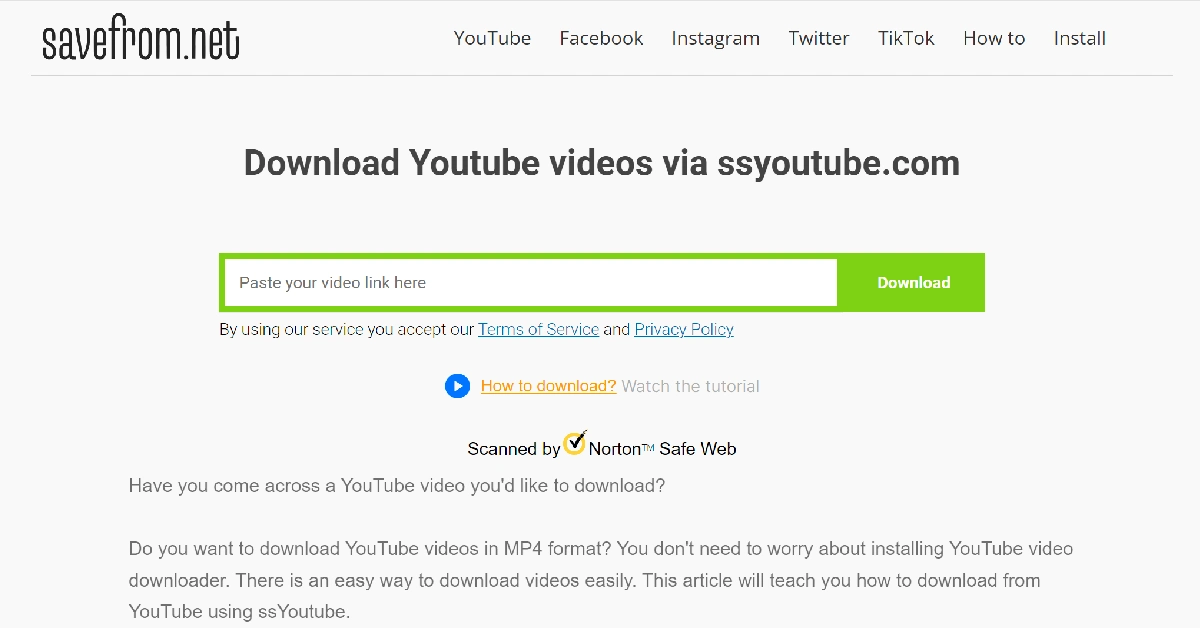 Step 3: Wait for the website to process the link.
 Step 4: Choose your preferred resolution and hit Download.
 Step 5: Wait for a few minutes for the video to process.
 Step 6: Hit Download Video.
 Pros
Pros
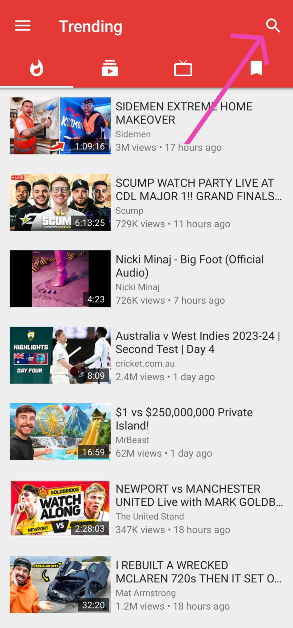 Step 2: Play the video and hit the download button.
 Step 3: Select the resolution and tap on OKAY.
 Pros
Pros
