Daily Amazon brings a fresh quiz for its customers with exciting rewards on its platform. The Amazon quiz can be played every day from 12 AM to 11:59. 22 December 2022 Amazon Quiz has gone live on its platform and the e-commerce platform Amazon is today giving you a chance to win Rs 1,000 Amazon Pay Balance.To participate all you need to do is log in to your Amazon app on your device and give answers. Daily a new set of questions are presented to the participants which gives them a chance to win exciting prizes. The questionnaire consists of five easy questions that are usually based on general knowledge and current affairs. You can submit the correct answers and can win an Amazon Pay Balance of up to Rs 50,000. It should be noted that the quiz is not accessible on the web platform instead you have to participate only through the dedicated app.Amazon Quiz Today Prize – Rs 1,000 Amazon Pay BalanceQuiz Date – 22 December 2022Daily Timing – 12 AM to 11:59 PMWinner Announcement – Today 12 PM
Amazon Quiz Answers Today 22 December 2022
Question 1: Which color is an emerald?Answer: GreenQuestion 2: Name the summer capital of Jammu and Kashmir.Answer: Srinagar
Question 3: A hexagon has _____ sidesAnswer: 6Question 4: Where is this Ashoka Pillar located?Answer: SarnathQuestion 5: The Ajanta Caves are approximately thirty rock-cut ______cave monuments dating from the second century.Answer: Buddhist
How To Play Amazon Quiz
Only app users are eligible to play the Amazon quiz every morning from 12 AM to 11:59 PM. The quiz is not available on the desktop. For those who are unaware of how to play the Amazon quiz below are the steps, you can follow to take the quiz.
Firstly download the Amazon app from Google Play Store or App Store
Now fill in the required information through the Sign Up option.
You need to log in to the Amazon app and scroll down on the home screen to find the Amazon Quiz banner.
Tap on the Amazon Quiz banner and tap on the Start button to start the Quiz.
Now you will get 5 questions and you need to answer them correctly. One wrong answer will eliminate you from the Quiz.
After answering all the questions correctly you are now eligible for a Lucky Draw.
The winner’s name will be announced today at 12 PM.
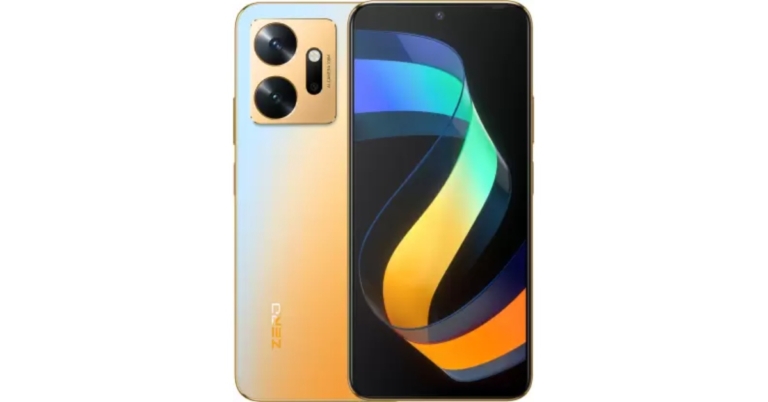
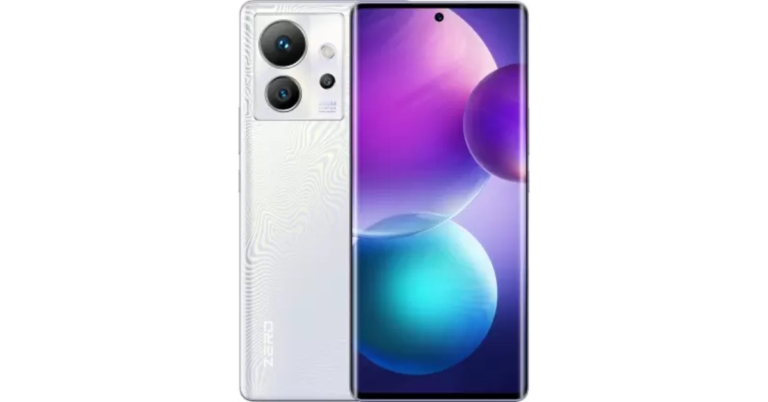
Infinix Zero 20 smartphone has been introduced in India. The device and the Infinix Zero Ultra 5G were also launched together. The newly launched phone is powered by an 8GB RAM chip from MediaTek called the Helio G99. The device also features a 90Hz 6.7-inch AMOLED screen. The phone has a 4500mAh battery and can charge at a speed of 44W.
Infinix Zero 20 price in India and availability details
The Infinix Zero 20’s price for the 8GB RAM with 128GB storage model is fixed at Rs 15,999. There will be three colour options for the smartphone: Space Gray, Glitter Gold, and Green Fantasy. From December 29 on, it will be available for purchase through Flipkart. Additionally, the e-commerce site is giving customers who pay with their Flipkart Axis Bank cards a 5% cashback.Alongside Infinix Zero 20 the company has also introduced Infinix Zero Ultra 5G in India. The Infinix Zero Ultra 5G costs Rs 29,999 for the single 8GB RAM with 256GB storage variant. The smartphone comes in two colour options: Genesis Noir and Coslight Silver.
Infinix Zero 20 specifications
Infinix Zero 20 features a 6.7-inch AMOLED screen with a resolution of 1,080 x 2,400 pixels. The screen comes with a refresh rate of 90 Hz. The device runs on Android 12-based XOS 12 and is driven by 8GB RAM and MediaTek Helio G99 SoC. The smartphone has an internal storage capacity of up to 256GB and a microSD card slot that enables storage expansion by an extra 256GB.The phone has a 44W rapid charging capability and a 4500mAh battery. Wi-Fi 802.11ac, GPS, NFC, Bluetooth v5, a 3.5mm headphone connector, and a USB Type-C port are among the available connectivity options. The smartphone also features a fingerprint reader on the side rail for biometric identification along with gravity, gyroscope, light, proximity, and geomagnetic sensors.The Infinix Zero 20’s triple rear camera system has a 108-megapixel primary sensor. The camera system also includes a 13-megapixel ultra-wide sensor and a 2-megapixel macro camera. The phone has a front-facing 60-megapixel camera with OIS for taking selfies.
For the latest gadget and tech news, and gadget reviews, follow us on Twitter, Facebook and Instagram. For newest tech & gadget videos subscribe to our YouTube Channel. You can also stay up to date using the Gadget Bridge Android App. You can find the latest car and bike news here.
The ASUS Gaming Day Sale has been launched by ASUS India, Republic of Gamers (ROG). The sale provides amazing discounts on the full line of gaming PCs at ASUS E-shop, Asus Exclusive Stores, and ROG Stores. Consumers can get up to 38% off the durable TUF series, an exciting 37% off the small but powerful Zephyrus Series, a 30% off the ultimate gaming machines, the Strix and Scar series, and a 33% off the adaptable and potent ROG Flow series during the Gaming Days Sale.Customers may take advantage of a number of discounts on the most popular and up-to-date ROG laptops starting on December 19 and running through December 23, 2022, including discounted warranty extensions on all gaming laptops and no-cost EMI. The first 100 customers to register on asuspromo.in will receive a ROG gaming mouse worth up to INR 4500 for free when they purchase the G513IE (2021) and G713IE (2021) models, which will provide even more delight to the end-of-year celebrations.Check out ASUS Gaming Day Sale ongoing offers:
Machine translation for languages has come a long way in recent years. With the use of neural networks and deep learning, machine translation provides an effective way to communicate in another language. With the help of language experts and community contributors, translation websites and apps are getting better every day. In this article, we bring you the top 5 language translator apps and websites for Hindi-to-English translation and vice versa. Read Also: Pixel 7 Pro Review: Why you should get the phone
Google Translate
Apart from offering translation between 108 languages, Google Translate is incredibly accessible and easy to use. You can either download the app from the Google Play Store or use the website. You can even search for a phrase in the Google search bar and translate it into either Hindi or English. The Google Translate app even lets you point your camera at any image and translates the text instantaneously. On top of that, you can draw text characters instead of typing them, and the app will translate them for you.
Microsoft Translator
Microsoft Translator offers all the basic features of a language translator app along with a few exclusive features of its own. The voice translation option recognises your speech and translates it into the language of your choice. In split-screen mode, Microsoft Translator can recognise two speakers in different languages and translate the conversation in real time. You can also look up alternate meanings of the translations to make sure you are communicating effectively.
Translate.com
Is machine translation not working out for you? Translate.com offers enhanced human translation on top of machine translation. Translate.com hires language experts that edit the machine-translated text and make sure it is error-free and contextually appropriate. The human-enhanced translation will cost you $0.07 per word. While translation apps are convenient and quick, human translations are necessary when you’re carrying out important tasks.
Typing Baba
One of India’s leading typing websites, Typing Baba also offers real-time language translations. The Hindi-to-English (and vice versa) translator on this website works efficiently, but the only drawback is that it can only translate up to 2,000 characters at a time. One of the better features of Typing Baba is that it lets you save the translated text as a document locally on your device. You can also print the text directly from the website.
Hi Translate
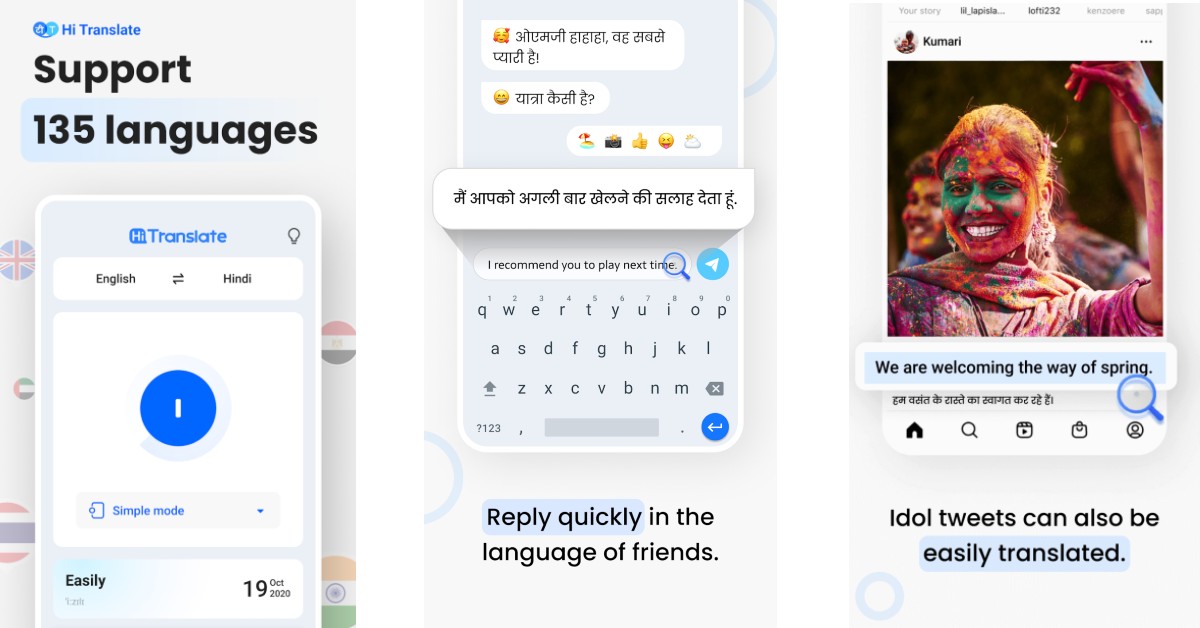
Hi Translate is one of the most popular translation apps for smartphones. Its popularity lies in its versatility, as you can draw this app over any screen on your phone and translate whatever text is on it. This feature comes in handy when you are texting someone and need your messages translated in real-time. Hi Translate can visually recognise up to 18 languages. All you need to do is open the app and point your camera at the text you need translated. On top of that, this app can also translate your conversations in real time.Read Also: How To Hard Reset or Factory Reset Vivo Smartphones?
As we head into the new year, Xiaomi is planning a few big releases in the coming weeks. While many of you may be aware of the recently announced Redmi Note 12 Series, Xiaomi will also be launching its flagship smartphone, Xiaomi 13, in early 2023. In this article, we bring you the list of upcoming Xiaomi smartphones in 2023. These smartphones have either been confirmed by Xiaomi or are rumoured to be in the works.Read Also: How To Hard Reset or Factory Reset Vivo Smartphones?
Xiaomi Redmi Note 12 series
Xiaomi has confirmed that the Redmi Note 12 Series will launch on January 5, 2023. This series includes the Redmi Note 12, Redmi Note 12 Pro, and Redmi Note 12 Pro Plus. The Redmi Note 12 series first debuted in China back in October. The Redmi Note 12 Pro has a 6.67-inch full-HD+ OLED screen with a 1,080 x 2,400 pixel resolution. The display is capable of supporting touch sampling rates of 240Hz, HDR10+, and refresh rates of up to 120Hz. It is powered by an octa-core Mali-G68 GPU, up to 12GB LPDDR4x RAM, and a MediaTek Dimensity 1080 SoC. The smartphone has a storage capacity of 256GB using UFS 2.2.
Xiaomi 13
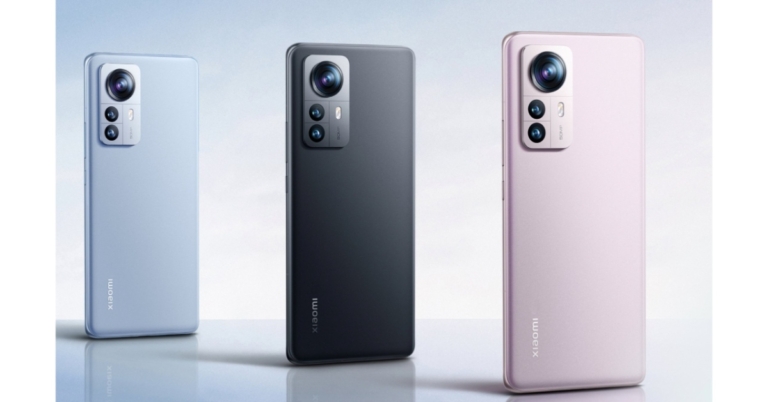
Xiaomi 13 is one of the most anticipated smartphones by Xiaomi and is set to release in the coming weeks. The smartphone was showcased in China earlier this month. A global release will follow soon after the China launch. Xiaomi 13 is set to come with the flagship Snapdragon 8 Gen 2 chipset. The tech giant will also be debuting the latest iteration of its MIUI 14 OS on this series. While other specs have been kept tightly under the lid, certain rumours and leaks suggest that the smartphone will get an HDR AMOLED display with a 1.61mm slim bottom bezel. A Leica camera module is also expected to feature in the Xiaomi 13. The Xiaomi 13 series will consist of the Xiaomi 13, Xiaomi 13 Pro, and Xiaomi 13 Ultra.
Xiaomi Redmi K60 Series
Redmi K50iObserving past trends, Xiaomi usually announces its K series in December. However, Xiaomi may push the announcement to January this time around since it’s working towards the launch of the Xiaomi 13 and Redmi Note 12 Series. The Chinese tech company will be launching as many as three phones under the ‘K’ banner. Rumours suggest that these could be the Redmi K60, Redmi K60 Pro, and Redmi K60E. Redmi could go for the Snapdragon 8 Gen 1 chipset in the standard variant while using the recently launched S8G2 chipset in the Pro variant. The K Series will also get the new MIUI 14 OS.
Xiaomi MIX Fold 3
Xiaomi Mix Fold 2While Xiaomi’s flagship foldable is available in only limited markets, it is tipped by many to be one of the better folding phones around. The Xiaomi MIX Fold 2 released in August this year boasted a slimmer form factor than its foldable peers. While not many changes are expected in design, Xiaomi will use the Snapdragon 8 Gen 2 chipset on the MIX Fold 2. It may also offer 512 GB/1 TB of UFS 4.0 storage. Expect the Xiaomi MIX Fold 3 to release by July/August next year.Read Also: Best Auto Call Recording Phones in India
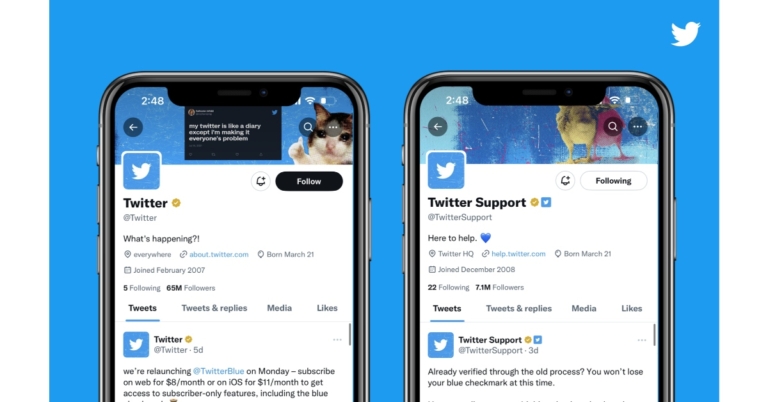
Twitter has officially announced the launch of Twitter Blue for Business. It is basically a new feature that will allow companies and their affiliates to verify and stand out on Twitter. A firm can link as many of its affiliated people, companies, and brands to its account as it likes as a Twitter Blue for Business member. This is a fantastic chance for companies to further ingrain their connected people, companies, and brands into the Twitter DNA.While announcing Twitter Blue for Business the company said, “Today we’re pleased to announce Twitter Blue for Business, a new way for businesses and their affiliates to verify and distinguish themselves on Twitter.”Twitter Blue for Business has been made public and is currently being made available to some businesses. The microblogging platform via its blogpost announced this feature. Users and businesses will be able to stand out from the competition thanks to the functionality.To further improve and set businesses apart on Twitter, the firm has started rolling out Twitter Blue. A company that has Twitter Blue for Business access can link as many of its related people, companies, and brands to its account as it likes. Affiliated accounts will then receive a little badge with the profile photo of their parent firm next to their blue or gold checkmark.The company via blog post said, “By creating this connection, Twitter is making it possible for businesses to create networks within their own organizations–on Twitter.”Organizations can associate their executives, brands, support handles, employees, or teams. Journalists, athletes, and movie characters. Based on a list provided by the parent company, each affiliate will be verified and officially linked to their parent handle. “We will share any new criteria, pricing, or process as we update them,” the blog post noted.To ensure that businesses and their affiliates get the most out of Twitter, Twitter plans to add more value to its offering in the future.Twitter is now testing Blue for Business with a restricted set of companies. More companies that choose to subscribe will be able to use Twitter Blue for Business starting in the next year.
For the latest gadget and tech news, and gadget reviews, follow us on Twitter, Facebook and Instagram. For newest tech & gadget videos subscribe to our YouTube Channel. You can also stay up to date using the Gadget Bridge Android App. You can find the latest car and bike news here.
While certain WhatsApp symbols (like ‘double ticks’) are so popular that they have become a part of the common lexicon, there are still some icons and symbols that most people aren’t familiar with. If you don’t want to click on an icon that you don’t fully understand the purpose of, we’ve prepared this primer on all the icons and symbols on WhatsApp. Read more to find out what each icon and symbol means on WhatsApp.Read Also: How To Hard Reset or Factory Reset Vivo Smartphones?
Home Screen Icons
These are all the icons and symbols you will find on WhatsApp’s home screen.
Camera, Search, and Ellipses (three dots)
As soon as you launch WhatsApp, you will notice the camera, search, and ellipses icons at the top right corner of the screen. Tapping a camera icon is a quick way to take a picture or record a video to send to a contact or upload as your status. You can even send saved media from your gallery. The search icon lets you do a quick search across WhatsApp. You can search contacts, messages, media, links, and docs using this function. Simply type what you’re looking for and WhatsApp will perform an intensive search for you.Finally, the ellipses (three dots) provide you with further options like creating a new group, new broadcast, linked devices, starred messages, payments, and settings. There is also a WhatsApp community icon on the left side of the screen. This is a new feature introduced by WhatsApp that allows you to manage several different groups in one place. You can more about it here.
Message Icon
The floating message icon at the bottom left corner of the screen gives you quick access to your contacts and groups in order to start a conversation. You can also create a new group or community and add a new contact to your phone from this window.
Status and Call tab icons
These are all the icons and symbols you will find when you swipe to the status and call tabs on WhatsApp.
Pencil and Camera icons
The pencil icon can be used to create a new text status. Once you click the pencil icon, a text editor will open up on your screen. You can further tap the emoji, font, and colour icons to customise your status update. The camera icon below the pencil icon can be used to upload a picture or video as your status. You can either take a picture or video from your camera or choose one from your gallery.
Link and Call icons
The link icon in the call tab lets you create a group call that people with the call link can join. You can share the link with contacts on WhatsApp or on any other platform. The call icon at the bottom right corner of the screen lets you call any of your contacts or groups. You can also create a new call link from this window.
Chat icons and symbols
These are all the chat-related icons and symbols you need to know about on WhatsApp.
Pin, Bin, Loudpseaker, and Folder icons
Once you long-press a conversation on the home screen, you will see a set of icons pop up at the top right corner of the screen. The pin icon ‘pins’ the selected conversation to the top of the chat tab. You can pin multiple conversations at the top of the chat tab. The bin icon deletes your selected conversation. You can even choose to delete all the media within that conversation. The loudspeaker icon can be used to mute a conversation while the folder icon can be used to archive the selected conversation.
Camera, Phone, and Ellipses icons
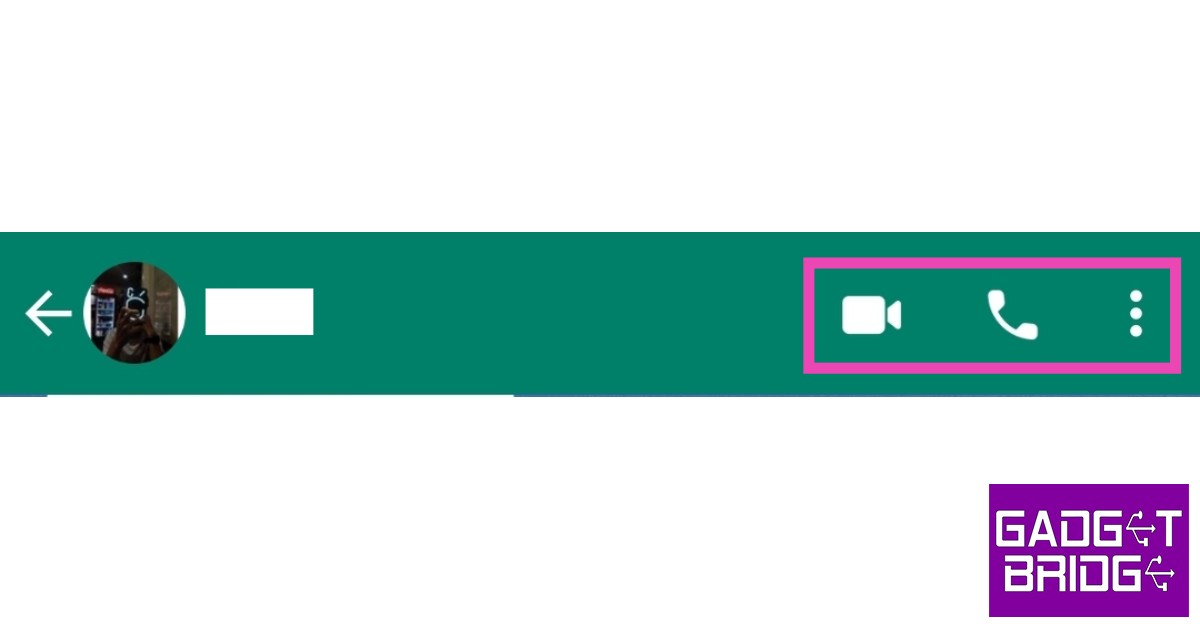
Once you open a chat thread, you’ll notice a bunch of symbols at the top right corner of the screen. The camera icon connects you and the recipient on a video call while the phone icon can be used to initiate an audio call. The ellipses (three dots) provide more options like disappearing messages, accessing media/links/docs, searching, wallpaper, and more.
Smiley, Paperclip, Camera, and Microphone icons
You will find these icons at the bottom of your screen, alongside the message box. The smiley icon can be used to access and send emojis in the chat. The paperclip icons can be used to attach and send docs, pictures, videos, locations, audio, and payments. It can even be used to conduct a poll in the chat. Use the microphone icon to record and send a voice note in the chat.
Single tick, Double tick, Blue ticks, and Clock symbols
A single tick symbol means that your message has been sent but not delivered to the recipient. This happens when the recipient’s phone is switched off or when they aren’t connected to the internet. Messages may also fail to deliver when the recipient has deleted the WhatsApp app from their phone. The double tick symbol means that the message was delivered to the recipient. It doesn’t necessarily mean that the recipient read your message.When the double tick turns to blue ticks, it means that the recipient has seen your message. However, if the recipient has turned off the read receipts, you won’t see the blue ticks even when they have read the message. When a message fails to send from your end, you will see a small clock symbol next to the message. This may happen because you are not connected to the internet.Read Also: Best Auto Call Recording Phones in India
China’s Transsion Holdings-owned brand Infinix has announced the launch of its latest 5G smartphone in the Indian market. The company has introduced Infinix Zero Ultra 5G featuring a triple rear camera arrangement, with a 200-megapixel primary sensor and a 60-megapixel selfie camera. In addition to this, the handset is powered by MediaTek Dimensity 920 SoC. The device comes with a 4,500mAh battery that also boasts 180W Thunder Charge capability.
Infinix Zero Ultra 5G price and availability details
The single 8GB RAM with 256GB storage option of the Infinix Zero Ultra 5G costs Rs 29,999. The smartphone is available in Coslight Silver and Genesis Noir colour variants.In terms of availability, the device will be sold across the nation starting on December 25 through Flipkart. Customers who use their Flipkart Axis Bank cards to purchase the Infinix Zero Ultra 5G during the sale will receive a 5% cashback. Options for cost-free EMIs begin at Rs 2,500. Customers can also take advantage of exchange promotions to reduce the cost of the smartphone. Before coming to the nation, the smartphone was first introduced in other places.
Infinix Zero Ultra specifications
Infinix Zero Ultra features a 6.8-inch full-HD+ curved 3D AMOLED display. The screen has a 120Hz refresh rate and is capable of delivering up to 1000 nits of peak brightness. The display has a touch sampling rate of 360Hz. It is powered by Android 12 and runs the XOS 12 operating system. Under the hood, there is an octa-core 6nm MediaTek Dimensity 920 SoC with 8GB RAM. The phone also utilises unused storage virtually increasing the available RAM to 13GB. The 256GB of internal storage on the handset supports memory extension of up to 2TB via a microSD card slot.The phone has a 4,500mAh battery and supports 180W fast charging with Thunder Charge. The smartphone has 5G, a USB Type-C port, Bluetooth v5, and Wi-Fi 6 connectivity options. It has a proximity sensor, light sensor, g-sensor, and e-compass. Additionally, a fingerprint sensor is integrated into the display for authentication.The Infinix Zero Ultra has a triple camera system that includes a 200-megapixel primary sensor with optical image stabilisation (OIS). The camera system further includes a 13-megapixel ultra-wide sensor, and a 2-megapixel tertiary lens. For selfies and video calls, there is a 32-megapixel camera on the front.
For the latest gadget and tech news, and gadget reviews, follow us on Twitter, Facebook and Instagram. For newest tech & gadget videos subscribe to our YouTube Channel. You can also stay up to date using the Gadget Bridge Android App. You can find the latest car and bike news here.
We recently evaluated the Google Pixel 7, which has excellent photography performance. The smartphone was released alongside the Pixel 7 Pro, which we have been testing in tandem with the Pixel 7. The device also includes the latest Android 13 operating system, a Tensor G2 chipset, and better camera performance. So here is our in-depth review.
Pixel 7 Pro Review: Design and Display
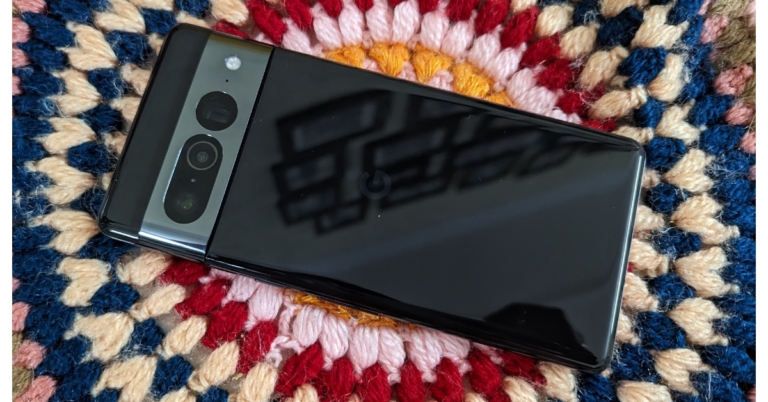
Similar to its sibling, the Pixel 7 Pro too has an aluminium camera bump that makes it stand out. The phone has a unique camera bar as well as the standard Google logo in the centre. We have the darker colour option, which is a fingerprint magnet, and we had to wipe it clean. So, do keep microfibre cloth handy. If you want to use either of these phones without a case, we recommend going for the lighter colour options. It also boasts polished aluminium sides as opposed to the Pixel 7’s matte aluminium sides. The Pro model has a very good quality and sophisticated appearance.The smartphone has glass rear panels constructed of Gorilla Glass Victus, as well as front-facing displays of the same. The volume controls and power button are on the right, while the SIM tray is on the left frame.At the bottom is a USB-Type C port, as well as the primary speaker and microphone. The Pro edition, like the standard device, is IP68 water and dustproof, which is a plus.Another thing that could have been better is the positioning of the power button on top and the volume rocker down on the right-hand side. This resulted in a lot of unintentional button presses when attempting to lock the phone. We understand that you will get used to it with time, but it took us a while to get used to it.The Pixel 7 Pro sports a 6.7-inch quad-HD+ LTPO OLED display with a refresh rate of up to 120hz. It’s adequately bright outside, and the colours are vibrant. The smartphone’s bezels are incredibly tiny. While the Pixel 7 is more comfortable to carry in our hands, the Pixel 7 Pro is much larger. As a result, we had difficulties reaching the apps located in the screen’s top far corners with one hand. The Pixel 7 Pro’s curved edge display makes it appear and feel more luxurious than the Pixel 7’s flat display.Regardless of whether we were in Natural or Adaptive mode, we found the display to be a little dull. Simply gazing at it on a daily basis is fine, but when compared to other flagships, this is where you will notice the difference. This could possibly be due to the usage of a first-generation LTPO panel. However, the refresh rate was excellent and fluid, and the display quality for viewing media was satisfactory.
Pixel 7 Pro Review: Performance and camera
Despite their different prices, the Google Pixel 7 and Pixel 7 Pro both include the new Google Tensor G2 processor. When using the camera or gaming, the gadget heats up somewhat, which is most noticeable near the camera module, but we cannot label it as a heating issue.As we stated in our Pixel 7 review, the new Tensor chipset lags much below the top Qualcomm flagship processor in terms of performance. The gaming performance is good, and COD: Mobile could be played at the maximum settings. As previously stated, the 7 Pro tends to heat up somewhat while playing games without hurting performance. Also, at the maximum settings, gaming on this phone has been fantastic.If you want to game on your phone, we mentioned that the performance was amazing, but due to the quality of construction and how slippery it was, we would not recommend this phone for long gaming sessions. Workaround is to put a good case on it. Google Pixel 7 Pro has several improvements, such as Super Intelligent Speech Detection, which we believe is the best. Over that, some software advancements, such as the Photo Unblur, which allows you to unblur hazy images in software optimization, are highly handy.We believe that the clean Android experience outperforms all Android devices, and this is not because Google created Android; rather, Samsung’s One UI is our preferred alternative. However, having Google Home on the menu and selecting basic colour themes based on wallpaper features appear to be simple features, but it’s for this reason we love it.And knowing that there are three years of software upgrades and additional two years of security updates is a major reason to consider the Pixel 7 Pro.The cameras on the Pixel 7 Pro are truly incredible. Unlike the Pixel 7, which has a dual rear camera setup, the Google Pixel 7 Pro has a triple camera setup that includes the Pixel 7’s 50-megapixel primary camera, a 12-megapixel ultra-wide-angle camera (with a 126-degree field of view), and a 48-megapixel telephoto (with 5X optical zoom and up to 30X SuperRes Zoom). The selfie camera has a 10.8-megapixel lens, much like the normal model.The Pixel 7 Pro’s primary camera produces high-quality, detailed images. The Pixel 7 Pro’s colours are natural in both primary and ultra-wide photos. The pixel-binned 50 MP main camera image looks fantastic. The ultra-wide lenses were fantastic for point-and-shoot photography, but when compared to the S22+, it’s a completely different story.The Pixel 7 lacks macro capability, but the Pro model includes it, which is appreciated. The macro photographs are detailed and sharp. The best thing is that the Pixel 7 Pro now allows you to snap macro images with Auto Night Sight, albeit you’ll need a tripod or steady hands to get the best results.MacroIn order to compete with the iPhone, Google has introduced a new Motion Photos feature that includes long exposure and Action pan, and both of these modes may be utilised at 2X or 5X zoom. Action blur, as the name implies, adds motion blur to the background.The Pixel smartphones’ add-on capabilities are highly handy, but in terms of quality, they fall short of Samsung’s incredible camera quality. The image quality isn’t bad, but we’ve also reviewed the Samsung Galaxy S22+, which has great camera performance in this price range.PortraitWhen it comes to selfies, the Pixel 7 Pro snaps sharper-looking, more detailed selfies. The selfies also have natural-looking colour tones, and the Portrait selfies have perfect edge detection. The low-light photographs reveal the same story: the Pixel 7 Pro excels at reducing noise in images taken in low-light conditions.Low light primary and portrait imagesLow light primary and portrait imagesThe Pixel 7 Pro performs admirably in terms of overall picture processing.Moving on to the video recording, it looked fantastic too, with superb dynamic range and image stabilisation for both the primary and ultra-wide lenses. As previously said, it also has a Cinematic mode, but the major problem we discovered with the Pixel 7 Pro is that it lacks this Cinematic mode on the front camera, which is accessible on both the Samsung S22 Ultra and the iPhone.Even the cinematic shots made on the S22+ are focused, but Pixel offers better video quality than the slightly over-sharpened video on the S22+. The Pixel also offers front-facing 4K video recording, which is currently only available on Samsung phones. The image stabilisation was also quite good. So, despite this, we believe that the Pixel 7 Pro has a terrific camera if you don’t compare it to other premium smartphones because, ultimately, this is a matter of personal opinion.The phone’s battery life, which gets us an average of 7 and a half hours of heavy usage thanks to the massive 5,000mah battery, is the ultimate reason why you should probably get it. When it comes to the Pixel’s battery life, this was quite expected.
Verdict
So, in a word, grab the Pixel 7 Pro for the software, battery, gaming, and cameras. However, the phone’s hardware needs a boost While we enjoyed the phone’s haptics and the design looks great and modern, the performance is quite similar to the Pixel 6.So, now that we’ve laid it all out for you, what do you think about getting the Pixel 7 Pro? Please share your thoughts in the comments box below. Also, see our Pixel 7 review.For the latest gadget and tech news, and gadget reviews, follow us on Twitter, Facebook and Instagram. For newest tech & gadget videos subscribe to our YouTube Channel. You can also stay up to date using the Gadget Bridge Android App. You can find the latest car and bike news here.
Garena Free Fire is a battle royale game with regular awards and tournaments to keep players interested. If you play Garena Free Fire, you should be aware of the redeem codes that are released on a daily basis. However, because the battle royale game is banned in India, players from other countries can use the Free Fire Redeem codes daily. If you’re unfamiliar with the Garena Free Fire redeem codes or don’t know how to get them, we’ve put together a step-by-step guide to help you redeem them. Check out Garena Free Fire Redeem Codes for December 21.The Free Fire redeem codes are a great way to get free stuff. These are 12-digit codes that contain alphabets and numbers, as well as an expiration date and time. Because the Garena FF redeem codes cannot be used more than once, you should hurry to the redemption page to claim your free reward before someone else does. To get a free reward, all you have to do is go to reward.ff.garena.com/en, which is the official redemption page. Also, keep an eye on this space for daily updates on Garena Free Fire redemption codes and rewards.
Garena Free Fire Redeem Codes Today 21 December 2022
FF10617KGUF9
FF11HHGCGK3B
Y6ACLK7KUD1N
ZRJAPH294KV5
FF119MB3PFA5
SARG886AV5GR
8F3QZKNTLWBZ
FF10GCGXRNHY
FF1164XNJZ2V
YXY3EGTLHGJX
X99TK56XDJ4X
W0JJAFV3TU5E
B6IYCTNH4PV3
FF11NJN5YS3E
MCPTFNXZF4TA
WLSGJXS5KFYR
How to Get Free Fire Redeem Codes for Garena on December 21?