Garena Free Fire Redeem Codes Today 30 November 2022: Here is how to claim them

Garena Free Fire is a battle royale game with regular awards and tournaments to keep players interested. If you play Garena Free Fire, you should be aware of the redeem codes that are released on a daily basis. However, because the battle royale game is banned in India, players from other countries can use the Free Fire Redeem codes daily. If you’re unfamiliar with the Garena Free Fire redeem codes or don’t know how to get them, we’ve put together a step-by-step guide to help you redeem them. Check out Garena Free Fire Redeem Codes for November 30. The Free Fire redeem codes are a great way to get free stuff. These are 12-digit codes that contain alphabets and numbers, as well as an expiration date and time. Because the Garena FF redeem codes cannot be used more than once, you should hurry to the redemption page to claim your free reward before someone else does. To get a free reward, all you have to do is go to reward.ff.garena.com/en, which is the official redemption page. Also, keep an eye on this space for daily updates on Garena Free Fire redemption codes and rewards.

Garena Free Fire Redeem Codes Today 30 November 2022

  • FFDBGQWPNHJX
  • WD2ATK3ZEA55
  • U8S47JGJH5MG
  • U8S47JGJH5MG
  • 2FG94YCW9VMV
  • 4TPQRDQJHVP4
  • HHNAT6VKQ9R7
  • XFW4Z6Q882WY
  • TDK4JWN6RD6
  • HFNSJ6W74Z48
  • ZZATXB24QES8
  • FFIC33NTEUKA
  • VNY3MQWNKEGU
  • ZZATXB24QES8
  • FFIC33NTEUKA
  • VNY3MQWNKEGU
  • E2F86ZREMK49
  • V44ZZ5YY7CBS

How to Get Free Fire Redeem Codes for Garena on November 30?

  • Visit the Garena Free Fire game’s official website at reward.ff.garena.com.
  • Use your Facebook, Google, VK, Apple ID, Huawei ID, or Twitter account to log in.
  • You’ll be taken to a valid redemption code (s)
  • Copy and paste the 12-digit redemption code into the text box.
  • On the screen, a dialogue box will appear.
  • ‘Ok’ should be selected.
For the latest gadget and tech news, and gadget reviews, follow us on TwitterFacebook and Instagram. For newest tech & gadget videos subscribe to our YouTube Channel. You can also stay up to date using the Gadget Bridge Android App. You can find the latest car and bike news here.

Amazon Quiz Answers Today 30 November 2022: Participate to win Rs 2500 Amazon Pay Balance

30 November 2022 Amazon Quiz has gone live on its mobile app platform. Customers from different parts of the country are participating in the daily quiz. The daily quiz is conducted by the company brings an opportunity for the customers to win exciting prizes. The quiz begins from 12 AM to 11:59 PM. In today’s quiz participants have a chance to win Rs 2500 Amazon Pay Balance by answering all the questions correctly. Every day Amazon brings a fresh set of questions for its customers that contains five easy questions. Amazon quiz brings an opportunity for its customers to win Amazon Pay Balance ranging from Rs 1,000 to Rs 50,000. which consists of five questions related to general knowledge and current affairs. The participants need to answer all the questions correctly and their names will be selected for a lucky draw. The winner will be announced at the end of the month. One wrong answer could eliminate you from the quiz. If you manage to answer all the questions correctly you can stand a chance to win Rs 2500 Amazon Pay Balance today. Only app users are eligible to participate in the Quiz. Check Out 30 November 2022 Amazon Quiz Answers. Amazon Quiz Today Prize – Rs 2500 Amazon Pay Balance Quiz Date – 30 November 2022 Daily Timing – 12 AM to 11:59 PM Winner Announcement – Today at 12 PM

Amazon Quiz Answers Today 30 November 2022

Question 1: The teaser of which movie was released on Shah Rukh Khan’s 57th birthday? Answer: Pathaan Question 2: 105 year old Shyam saran Negi cast his vote for the 34th time by voting in which state election? Answer: Himachal Pradesh Question 3: Titan introduced what new brand of women’s handbag in November 2022? Answer: Irth Question 4: The Chinese new year is also known as? Answer: Spring Festival Question 5: Who was the director of the famous Apollo 13 movie? Answer: Ron Howard

How To Play Amazon Quiz

Only app users are eligible to play the Amazon quiz every morning from 12 AM to 11:59 PM. The quiz is not available on the desktop. For those who are unaware of how to play the Amazon quiz below are the steps, you can follow to take the quiz.
  • Firstly download the Amazon app from Google Play Store or App Store
  • Now fill in the required information through the Sign Up option.
  • You need to log in to the Amazon app and scroll down on the home screen to find the Amazon Quiz banner.
  • Tap on the Amazon Quiz banner and tap on the Start button to start the Quiz.
  • Now you will get 5 questions and you need to answer them correctly. One wrong answer will eliminate you from the Quiz.
  • After answering all the questions correctly you are now eligible for a Lucky Draw.
  • The winner’s name will be announced today at 12 PM.
For the latest gadget and tech news, and gadget reviews, follow us on TwitterFacebook and Instagram. For newest tech & gadget videos subscribe to our YouTube Channel. You can also stay up to date using the Gadget Bridge Android App. You can find the latest car and bike news here.

Short Explanation of Artificial Intelligence and Fields of Its Using

Throughout history, people think about the possibility of creating artificial systems capable of reflection and acting like human beings. It was only a matter of time before the idea of Artificial Intelligence became relevant in this era in which computing and digitalization are growing exponentially. Artificial Intelligence is the simulation of the human mind by machines. In other words, it is the discipline that tries to create systems capable of learning and reasoning like a human being, learning from experience, figuring out how to solve problems under given conditions, contrasting information, and carrying out logical tasks. If a system could learn and think like a human, it would have significant advantages over it, thanks to its speed and computational capacity.

Historical context of AI

Artificial Intelligence is by no means a new concept; to give an example, in the 17th century, the philosopher Descartes already theorized about the possibility of intelligent robots. However, it was not until the middle of the 20th century that the subject began to gain prominence. One of the first challenges in this field was proposed by Alan Turing in 1950, which consisted of the following test: “A system is sufficiently intelligent if it can pass itself off as human when asked questions by a judge.” Interestingly, this test is still a significant challenge today. However, what seemed to be the rise of a branch of technological research ended up speculation and isolated projects for decades, among other reasons, because it turned out to be a field in which no one dared to invest serious money. With the entry of the new century and the remarkable technological evolution, AI has become one of the unstoppable trends. The variety in this field is beginning to be very numerous, from expert systems capable of beating a human in any intellectual activity to virtual assistants capable of organizing our daily lives.

Fields of Artificial Intelligence Using

Artificial Intelligence is now in every corner of the modern world. Let’s take a look at some examples, from the simplest to the most complex: Writing texts: Artificial intelligence has now reached such a level of development that it can easily write coherent sentences on a given topic. Of course, they are more primitive than those written by humans. And if, for example, you need to write an essay in a wheel, then using texts written by AI is not the best idea, it is better to order work from professional papers writers and be sure of their quality. Home devices: Home automation is one of the areas of Artificial Intelligence that users have been able to enjoy for many years. It can be smart vacuum cleaners that walk through every corner of our home, for example. SPAM filters: It is not one of the most impressive AI. Still, companies like Google or Microsoft apply many algorithms in constant evolution to detect fraudulent and SPAM-type emails. Personalized ads: AI systems mainly driven by search engines and social networks analyze all the information they have about the user to show them ads they are likely to interact with. Expert agents: These are usually systems that are highly trained in a specific intellectual activity, building on the knowledge of subject matter experts. A classic example is systems that play chess. Chatbots: Systems that make exciting use of NLP (Natural Language Processing) and improve with each experience; enable coherent two-way communication with humans, either orally or in writing. Autonomous vehicles: Many companies, and not only automobile companies, are developing systems that process huge amounts of data in real-time to determine the correct trajectory of the vehicle, accident prevention, etc. Virtual assistants: It recognizes our voice, adapts to the way we ask for things, and recommends entertainment according to our tastes. One of the strengths of these technologies is that they have a huge number of users who constantly feed them and help reinforce their learning algorithms. As we can see, Artificial Intelligence is an exciting field that aims to improve our daily lives. This article is a short review about AI, and if you are interested in this topic, you can read more additional materials. Thanks for reading this article! For the latest gadget and tech news, and gadget reviews, follow us on TwitterFacebook and Instagram. For newest tech & gadget videos subscribe to our YouTube Channel. You can also stay up to date using the Gadget Bridge Android App. You can find the latest car and bike news here.

How Gaming Adapted for the Mobile Phone Generation

Mobile technology never stands still. As the world has moved towards digitalization, the rise of e-commerce is changing the way that consumers behave. The influence of high-end smartphones and portable devices makes online gaming more accessible. This is especially true for online casinos during their exponential growth in recent years. Just as buying physical records or DVDs became secondary when streaming and downloads upgraded the tools of choice, there are signs that physical gambling houses are now taking second place in the revolutionary tide of igaming. In the 21st century, mobile phones are not merely communication tools. They are a plaything beyond the functional voicemail or text. One of the first revolutions in the handheld space was a game called Snake, which celebrated its 25th birthday this year. This basic pixelated piece of software was an absolute breakthrough despite what now seems like primitive beep sounds as the player steered the trail of the serpent to collect bits of cellular food. It was the dawn of a new age in gaming that would burst through barriers and change expectations of what a mobile phone could do. A quarter of a century later, mobile gaming can now boast about three billion players globally. The rise is certainly linked to an explosion in the number of casual and professional gamers, the rise of esports from a niche industry to a major disruptor, and a surge in the number of viewers watching live streams of different genres. Digital consumers now use their phones for literally anything from shopping to parking, from booking restaurant tables to online wagering. It is telling to note that out of all the mobile games out there, online casinos grab the most attention span with an average of 22 minutes of gameplay in a recent study. The beauty of the digital experience is that, unlike traditional land-based gambling houses where space is more impersonal, there is no pressure of being shifted or pressured by other gamers. This is further encouraged by the fact that many mobile users get the chance to try out every casino slot found on the website and may even have access to others that are not available on the desktop platform. Moreover, new research shows that at least 510 million consumers are likely to take up 5G in 2023. The next wave of 5G users has high expectations for performance, especially on network coverage. This is important for online players who need to avoid the issues of buffering. Network outages have always been somewhat of a drawback for mobile games in the past. Lagging is a no-no in a world that moves this fast. The rise of 5G connectivity will provide extremely reliable networks, as internet speeds range anywhere from 200 megabits per second to ten gigabits per second. The days of Snake will be well and truly like another Jurassic Age as 5G speeds can be up to 100 times faster than 4G in the right conditions. Players will notice a significant change when they use the latest technologies as those pictures will show pixels at a much higher contrast – like 4k and 8k. Smartphones are easier to tap into than a tablet, PC, or laptop and the gaming on-the-go lifestyle is key to access. There is a huge market in North America with an increasing trend toward custom online slots due to the rapid scope of personalization by consumers. Ontario is now the largest licensed online gaming market in the region, presenting a significant opportunity for both gaming operators and related service providers. Many games are now offering instant-play versions, which means there is no need to download and install apps on a smartphone to start playing. Players can use the mobile browser and choose a favorite online casino. Additionally, the ease of registering an account with smartphone devices only takes a few minutes. In a world of superfast broadband, immediate access and convenience is something that will be at the forefront of every single decision daily where entertainment is concerned. When it comes to usage, developers ensure an easy-to-follow structure for handheld offers. Players can find their favorite game with a one-click process. Another big draw to the smartphone gaming crowd is the different sets of bonuses. These bonuses range from welcome offers to low-wagering offers and no-deposit offers to VIP programs.  There are also free spins which is an attraction for those that can play for fun on the move. With such numerous perks, more people are turning to mobile gambling, especially those new players who are still getting to grips with the format. Security is also less of a problem as long as the players are responsible for following protocols. Players do not have to enter passwords to make transactions due to its uniquely designed software.  and similar currency. No longer do players need to carry the currency of dollars when payments are fast, safe and convenient. In fact, cryptocurrency options mean that a player can enjoy the game without any fretting over the possibility of fraud. Mobile casinos also use industry-standard 128-bit SSL encryption technology on their sites meaning that personal security is paramount. Reputable casinos are generally audited by a third party. This ensures that the site is playing by the rules as they are subject to independent testing. Mobile certainly has the tools to enjoy a high level of customer support. Generally, mobile platforms tend to be more responsive when help is needed, providing swift access to customer service via chat, telephone or other messenger services. Players merely using desktop services will not always have that fast go-to assistance at the touch of a button. The rise of mobile gaming is an exciting development that will only grow in layers, depth and usability as the advance of augmented reality, VR and machine learning become ever more transparent. Smartphones are now multimedia entertainment devices. For online casinos, the possibilities are endless as artificial intelligence becomes a human need in the real world. For the latest gadget and tech news, and gadget reviews, follow us on TwitterFacebook and Instagram. For newest tech & gadget videos subscribe to our YouTube Channel. You can also stay up to date using the Gadget Bridge Android App. You can find the latest car and bike news here.

ViewSonic introduced new X1 and X2 LED projectors in India

With the introduction of the Full HD Smart LED Home Projectors X1 and X2 in India, ViewSonic has increased the range of projectors available in its X series. These projectors are ViewSonic’s first high-brightness, smart, lamp-free home projectors. The new X-series LED projectors, the X1 and X2, are suited for all home entertainment areas. With a 30,000-hour lifespan and 3rd generation LED technology, these projectors offer brighter images and rich colours. Additionally, both projectors provide vivid and true-to-life images in Full HD quality that are unaffected by ambient light thanks to their 125% Rec. 709 wide colour gamut. The projectors have a built-in Harman Kardon speaker that adapts to the increased audio experience, providing ideal home viewings of movies, live sports, and for playing video games. Both projectors now provide enhanced features and technologies that replace the need for regular lamp replacement and dangerous mercury with 3,100 LED Lumens of brightness and high-resolution projection. The ViewSonic X1- Smart LED home projector model can be mounted on the ceiling in living rooms or recreational areas to better utilise the space. ViewSonic’s X2 Short Throw Smart LED Home Projector, which can be placed on a tabletop and projects a 100″ big screen from just 1.53 metres away, is ideal for tiny spaces. The area is actually transformed into an immersive entertainment environment at home thanks to these visual solutions and the high-quality audio provided by two Harman Kardon speakers. An incredible feature of the X1 is a lens shift control knob that allows for vertical image modification. Due to its 1.3x optical zoom lens, it also provides flexibility when mounting the projector on the ceiling. To achieve a large image without interfering with existing interior designs, including hanging lights or support beams, users can select a setup place within a range. Both the X1 and X2 projectors offer a quick and easy setup in the convenience of one’s own home in addition to transforming the area into a little movie theatre. Both projectors have an auto keystone, H/V keystone, four corner adjustments, and deliver properly formed images from the top and side views. Additionally, the screen mirroring capabilities make it simple to stream content from mobile devices to a large screen. The projector also has a USB-C port that can be used to connect a gaming console, providing a wide range of entertainment possibilities. Additionally, the projector has a tonne of capabilities like simple Bluetooth connectivity and Wi-Fi connection for private movie nights or music streaming directly from your smartphone. This makes video streaming easier than before. For the latest gadget and tech news, and gadget reviews, follow us on TwitterFacebook and Instagram. For newest tech & gadget videos subscribe to our YouTube Channel. You can also stay up to date using the Gadget Bridge Android App. You can find the latest car and bike news here.

Oceanic+ app for Apple Watch Ultra is now available for download via App Store

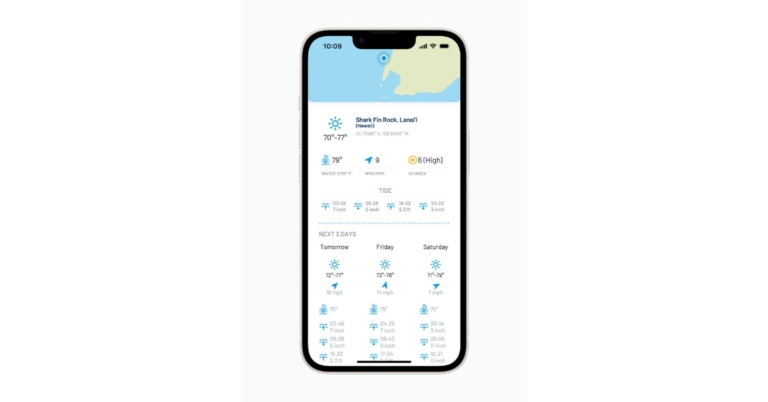
The Oceanic+ app is now available for the Apple Watch Ultra, transforming Apple’s toughest watch into an effective diving computer. With the all-new depth gauge and water temperature sensors on Apple Watch Ultra, Oceanic+, a product developed by Huish Outdoors in partnership with Apple, enables recreational scuba divers to take the watch they wear every day to previously unreachable depths — up to 40 metres, or 130 feet, to be exact. Anyone seeking to dip a toe into the adventures that await in the undersea world can use Oceanic+ to help them. The software works in tandem with Apple Watch Ultra to handle all of the intricate calculations needed to safely explore the ocean while providing clear, basic cues and instructions before, during, and after a dive. With an iPhone 8 or later, an Apple Watch Ultra running watchOS 9.1, and an iPhone SE (2nd generation) or later running iOS 16.1, you can use Oceanic+. Both the companion iPhone app and the Oceanic+ app for Apple Watch Ultra offer all of the essential functions of a cutting-edge dive computer, as well as robust dive planning and a thorough post-dive experience. Recreational divers now have a more practical, accessible device with all the features they already know and love from Apple Watch Ultra. Users can enter their surface time, depth, and gas in the dive planner, and Oceanic+ will compute their No Deco (no-decompression) time—a measurement used to establish a time restriction for a diver at a specific depth. Dive conditions, such as tides, water temperature, and even recent information from the community, including visibility and currents, are also incorporated into the planner. After a dive, customers will automatically see data, such as their GPS entry and exit positions, as well as a summary of their dive profile, appear on their Apple Watch Ultra. Additional details are available in the Oceanic+ iPhone app’s summary, which also includes graphs showing the depth, temperature climb rate, and no-decompression limit as well as a map of the entry and exit points. One of the most user-friendly aspects of Oceanic+ on Apple Watch Ultra, according to the company, is the haptic feedback. This is a hardware and software design achievement that enables the watch to tap users on the wrist through a series of vibrations, enabling divers to feel notifications underwater — even through a wetsuit that is 7mm thick. The Oceanic+ app also has other features, such as no-fly time, surface time, rapid access to the dive planner, dive settings, current elevation, maximum elevation permitted, and a quick access button back into the app, that provides users with crucial information and resources at a glance. Users may track and compare every aspect of their dives—from preparation to the initial jump into the water to the initial step back onto dry land—and share their experiences with other divers directly from the app.

Pricing and Availability

You can get the Oceanic+ app for Apple Watch Ultra on the App Store. The fundamental plan is cost-free and offers numerous capabilities that are common to all dives, such as depth and duration, as well as tracking the most recent dives. Oceanic+ costs INR 969 per month or INR 7,700 per year to get decompression tracking, tissue loading, the location planner, and an unlimited logbook capacity. Family Sharing, which provides access to up to five individuals, is additionally offered for INR 11,900 per year. For the latest gadget and tech news, and gadget reviews, follow us on TwitterFacebook and Instagram. For newest tech & gadget videos subscribe to our YouTube Channel. You can also stay up to date using the Gadget Bridge Android App. You can find the latest car and bike news here.

10 easy ways to download a complete webpage to read offline later

1
Reading an article online can be pretty distracting. Websites these days are full of pop-ups and annoying ads that severely hinder the reading experience. There’s also the temptation to quickly check your social media feed while you’re halfway through an article. Luckily, there are several ways to save a webpage on your device. This way you can read it offline later, without any distractions. This also comes in handy when you want to save an article to read when you’re commuting to work. In this article, we bring you the 10 easy ways to download a complete webpage to read offline later. Read Also: How to create a Whatsapp group call link?

Which method should you use?

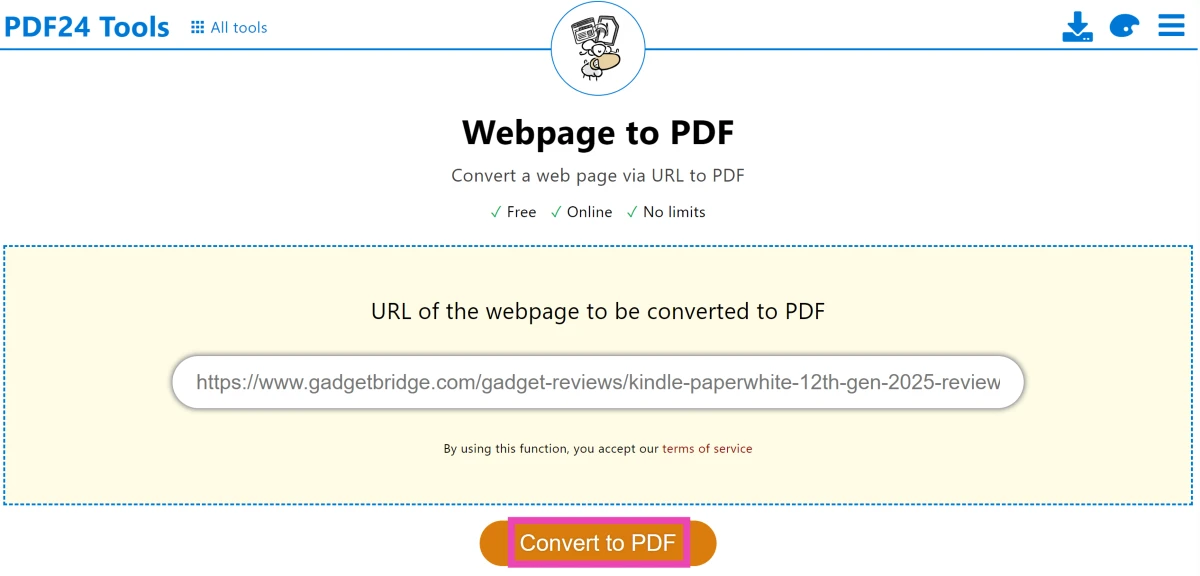
Your choice of method when it comes to downloading a webpage to read offline later should depend on the device you’re using. Popular web browsers like Google Chrome, Safari, Mozilla Firefox, and Microsoft Edge offer the option to save webpages across all platforms. Alternatively, you can use them to save a webpage as a PDF. If your web browser does not offer the option to save a webpage as a PDF or HTML file, you can choose to complete the task using a variety of third-party options. Apps like Raindrop and Instapaper work amazingly well when it comes to bookmarking and saving webpages to read later. Third-party tools like PDF24 Tools and CloudConvert can turn any webpage into a PDF file.

Save the webpage in Google Chrome

Save the webpage in Google Chrome Google Chrome allows users to save an entire webpage locally on their computer. In order to download a complete webpage using Chrome, simply click on the ellipses (three dots) at the top right corner of the browser and move your cursor to ‘More Tools.’ Click on ‘Save page as…’ to save the entire webpage on your computer. You can also press ‘Ctrl+S’ to quickly save a webpage.

Save the webpage in Mozilla Firefox

Save the webpage in Mozilla Firefox Like Chrome, Mozilla Firefox also lets you save a webpage. In order to save a webpage, click on the browser menu and select ‘Save page.’ In the following box, save the page on your desktop as an HTML or text document. 

Download a webpage as a PDF file

Download a webpage as a PDF file Downloading a webpage as a PDF has its own advantages. Firstly, the PDF format is easier to read on e-book readers like Kindle, compared to an HTML document. You can also easily share a PDF file with your friends. The simplest way to save a webpage as a PDF file is by clicking on the ellipses (three dots) at the top right corner of the Chrome window and selecting ‘Print.’ In the pop-up window, click on ‘Destination’ and select ‘Save as PDF.’ You can also press Ctrl+P to trigger the print window.

Use the Pocket app

Pocket: Save. Read. Grow. If you need to save a webpage on your smartphone, there is no better app than Pocket. Pocket lets you easily download webpages on your smartphone and saves them for you to read later. With Pocket, you can save any news, webpage, story, article, or video from any publication and read it later. On top of that, Pocket also gives you the option to read saved articles. In order to save a webpage on Pocket, simply copy the URL and paste it into the app.

Use Safari Reading List on iPhone

Use Safari Reading List on iPhone. download a complete webpage to read offline later The Safari browser on iPhone gives its users a quick option to save a webpage for later viewing. You can save a page by tapping on the ‘Share’ icon and selecting ‘Add to Reading list.’ However, Safari does not save web pages offline by default. This means you will need the internet to access the web pages on your reading list. In order to download webpages for offline viewing, go to Settings>Safari and select Automatically save offline.

Use Safari Reading List on Mac

Use Reader Mode on Safari. download a complete webpage to read offline later You can also save a webpage on a Mac using the Reading List. First, click on Preferences and go to the Advanced tab. Click the checkbox for ‘Save articles for offline reading immediately.’ To add a page to the Reading List, click on the plus icon next to the URL box. To access the Reading List, click the sidebar button and select the spectacles icon for Reading List.

Use the ‘Save Page WE’ extension for Chrome

Use the ‘Save Page WE’ extension for Chrome. download a complete webpage to read offline later If you want to be able to save an entire page with just a few clicks, download the ‘Save Page WE’ extension for Google Chrome. Once you’ve added the extension to your web browser, simply open the webpage you want to save and click on the ‘extensions’ icon next to the URL box. Select ‘Save Page WE’ and click on ‘Save Complete Page.’

Use PDF24 Tools

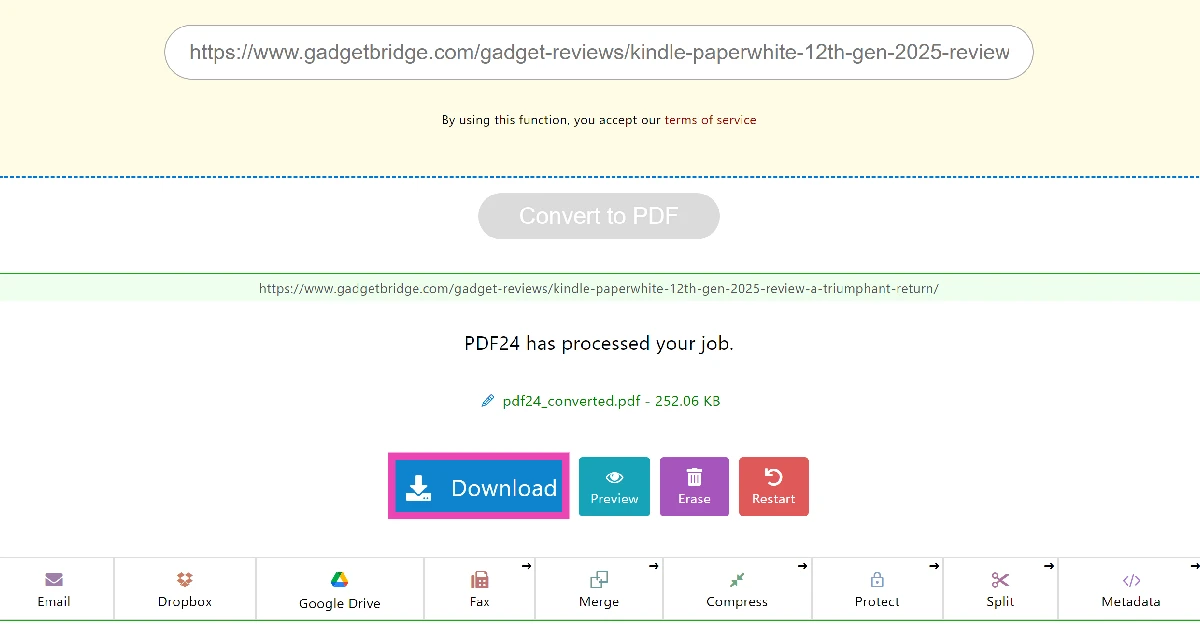
Step 1: Go to https://tools.pdf24.org/en/ and click on All tools. Step 1: Go to https://tools.pdf24.org/en/ and click on All tools. Step 2: Scroll down and select Webpage to PDF. Step 2: Scroll down and select Webpage to PDF. Step 3: Enter the link to the webpage in the text box. Step 3: Enter the link to the webpage in the text box. Step 4: Hit Convert to PDF. Step 5: Once the PDF is ready, hit Download. Step 5: Once the PDF is ready, hit Download.

Use CloudConvert

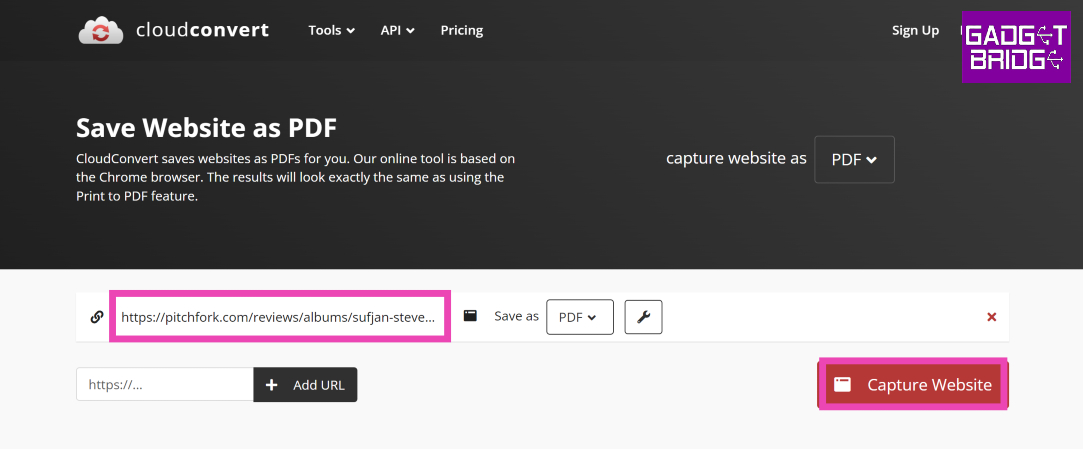
Use CloudConvert You may know CloudConvert as the website that converts files from one format to another. Typically, this website is used to convert video, audio, and image formats. A lesser-known fact about CloudConvert is that it can also be used to save a webpage as a PDF file. To carry out this task, click the ‘Tools’ option next to the website banner and select ‘Save Website as PDF’. The rest is easy. Paste the website URL in the download box, hit Enter, and select ‘Capture Website’. Hit the Download button in the following window.

Use AllinPDF

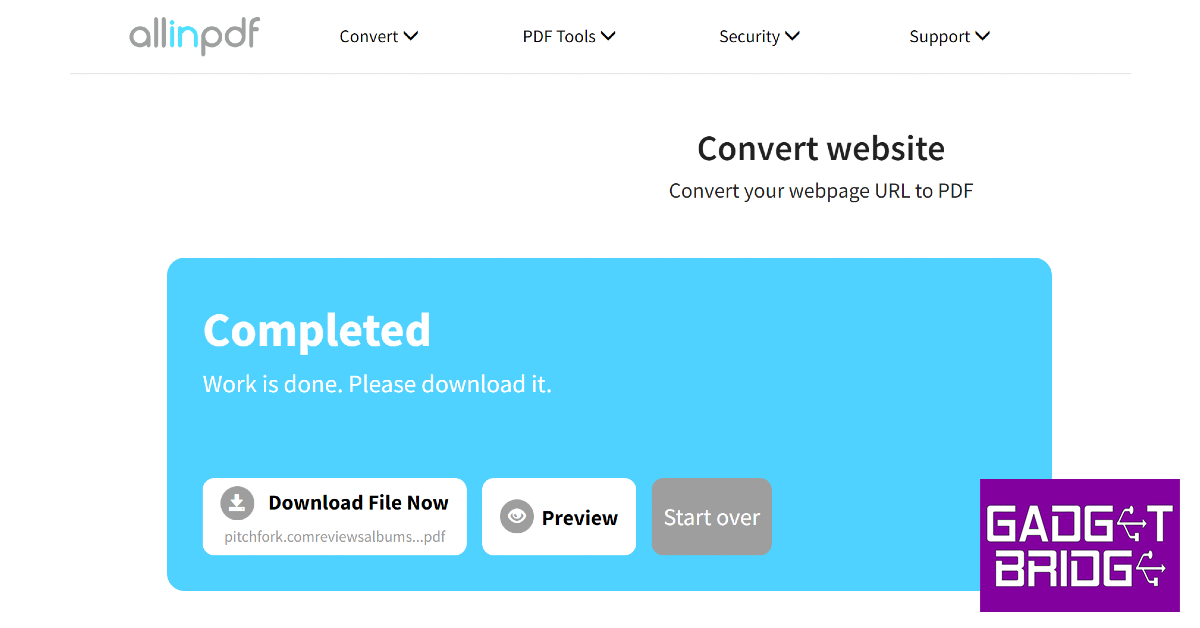
Use AllinPDF AllinPDF is another great tool to download a complete webpage as a PDF for reading offline later. Once you paste the website URL in the download box, select PDF as the target file format. Once the PDF has been created, you can choose to download it to your device or preview it in a web browser.

Frequently Asked Questions (FAQs)

How do I save a website offline on my device without using an app?

You can save any website on your device as a PDF by tapping the ellipses on the Chrome browser, selecting Print, and choosing Save as PDF in the Destination section.

Are there any good tools to convert a website to a PDF?

Websites like PDF24 Tools, CloudConvert and AllinPDF make it simple to save a web page as a PDF file.

Are there any good extensions to save a website for offline reading?

The Save Page WE extension for Chrome allows users to save a website offline with a single click.

How do I bypass a paywall on a website?

If you want to read an article without paying for a subscription, enter its link in the Wayback Machine and view one of the snapshots.

How do I add a webpage to my Reading List on iPhone?

Open the webpage on the Safari browser, hit the Share icon, and tap on ‘Add to Reading List’. Read Also: WhatsApp is rolling out the ability to share contact cards

Conclusion

These are the top 10 easy ways to download a complete webpage to read later offline. We’ve covered all the different ways to download a webpage on different web browsers like Chrome, Mozilla, and Safari across different platforms like Windows, iOS, Mac, and Android. If you like using some other extension or app to save web pages for offline viewing, let us know in the comments!

Apple announced 2022 App Store Award Winners

The 2022 App Store Awards were announced by Apple today. According to the company, 16 games and applications that encouraged people to participate in the world more intimately, use their ideas more freely, and maintain relationships with friends and family have been the highlight. The winners of this year’s competition reflect an international developer community that is diverse and whose apps and games have been chosen by Apple’s worldwide App Store editorial team for providing outstanding experiences and having a significant cultural effect. While announcing the winners of the 2022 App Store Awards Tim Cook, Apple’s CEO said, “This year’s App Store Award winners reimagined our experiences with apps that delivered fresh, thoughtful, and genuine perspectives. From self-taught solo creators to international teams spanning the globe, these entrepreneurs are making a meaningful impact, and represent the ways in which apps and games influence our communities and lives.” The countless options found in the App Store and Apple’s ecosystem of devices are reflected in this year’s winners. Fitness tracker Gentler Streak helps users balance exercise and rest to maintain a healthy lifestyle, and innovative social media tool BeReal offers users a real peek into the lives of their family and friends. With best-in-class Apple Pencil compatibility, GoodNotes 5 elevates digital note-taking to a new level. ViX’s creators push Spanish-language stories to the forefront of entertainment, while MacFamilyTree 10’s magnificent visual family trees and collaboration with loved ones throughout the world inspire a deeper understanding of genealogy. The business claims that Apex Legends Mobile offers the intense, popular battle royale game to iPhone. Moncage’s enduring riddles masterfully manipulate perspective, and Inscryption’s immersive card battler captivates players with its avant-garde storytelling. El Hijo, a story set in the Wild West, is a cleverly made stealth game that looks fantastic when played with Apple TV on a large screen. Players can manage the most significant esports leagues in the world in League of Legends Esports Manager, a unique life simulation game from Apple Arcade, and Wylde Flowers, a delightful world of colourful characters and magical spells.

2022 App Store Award Winners

Apps
  • iPhone App of the Year: BeReal, from BeReal.
  • iPad App of the Year: GoodNotes 5, from Time Base Technology Limited.
  • Mac App of the Year: MacFamilyTree 10, from Synium Software GmbH.
  • Apple TV App of the Year: ViX, from TelevisaUnivision Interactive, Inc.
  • Apple Watch App of the Year: Gentler Streak, from Gentler Stories LLC.
Games
  • iPhone Game of the Year: Apex Legends Mobile, from Electronic Arts.
  • iPad Game of the Year: Moncage, from X.D. Network Inc.
  • Mac Game of the Year: Inscryption, from Devolver.
  • Apple TV Game of the Year: El Hijo, from HandyGames.
  • Apple Arcade Game of the Year: Wylde Flowers, from Studio Drydock Pty Ltd.
  • China Game of the Year: League of Legends Esports Manager, from Shen-zhen Tencent Tianyou Technology Ltd.
Cultural Impact Winners Apple’s App Store editors chose five Cultural Impact winners in addition to honouring the top apps and games for Apple devices that have had a significant cultural impact. The winners of this year’s contest inspire users to express their feelings more fully, build genuine connections with people, honour their ancestry and the generations that came before them, and think about how to improve the world now.
  • How We Feel from the How We Feel Project, Inc.
  • Dot’s Home from the Rise-Home Stories Project
  • Locket Widget from Locket Labs, Inc.
  • Waterllama from Vitalii Mogylevets
  • Inua – A Story in Ice and Time from ARTE Experience
For the latest gadget and tech news, and gadget reviews, follow us on TwitterFacebook and Instagram. For newest tech & gadget videos subscribe to our YouTube Channel. You can also stay up to date using the Gadget Bridge Android App. You can find the latest car and bike news here.

Simple and legit ways to Remove the ‘Activate Windows’ Watermark on Windows 10?

0
The ‘Activate Windows’ watermark at the bottom right corner of your screen can be an annoying distraction while working on your computer, especially when you want to record your screen. While watching movies, having the watermark in your view can keep you from fully enjoying what you’re watching. The ‘Activate Windows’ watermark pops up when the product key is incompatible with the Windows you are using on your desktop. It can also appear when a product key has been used several times. Luckily, there are some easy ways to fix this issue. In this article, we bring you simple and legit ways to remove the ‘Activate Windows’ watermark on Windows 10. Read Also: WhatsApp is rolling out the ability to share contact cards

Use the Product Key

This is the simplest and the most legitimate way to remove the ‘Activate Windows’ watermark on your desktop. When you purchase a Windows OS, you get a product key for reinstallation purposes. This ensures that the Windows OS you are using is legitimate. Here’s how you can use the product key to remove the ‘Activate Windows’ watermark.  Step 1: Open Settings on your desktop and select ‘Update and Security.’ Step 1: Open Settings on your desktop and select ‘Update and Security.’ Step 2: Click on ‘Activation’ from the side menu and select ‘Change product key.’ Step 2: Click on ‘Activation’ from the side menu and select ‘Change product key.’ Step 3: Enter the product key and hit Next. Step 3: Enter the product key and hit Next. Reinstall Windows 10 on your desktop. Restart your computer once the OS has been installed. The ‘Activate Windows’ watermark will be removed.

Use Ease of Access

Step 1: Open Settings on your desktop and select ‘Ease of Access.’ Step 1: Open Settings on your desktop and select ‘Ease of Access.’ Step 2: Select ‘Make the computer easier to use.’ Step 3: Click the box for ‘Remove background images (where available).’ Step 4: Apply the changes.

Disable Windows 10 Tips

Step 1: Open Settings and go to ‘System.’ Step 1: Open Settings and go to ‘System.’ Step 2: Select ‘Notifications & actions’ from the side menu and turn the toggle bar off for ‘Get tips, tricks and suggestions as you use Windows’ and ‘Show me the Windows welcome experience…’ Select ‘Notifications & actions’

Use the Notepad trick

Step 1: Open Notepad and paste the text below.

@echo off

taskkill /F /IM explorer.exe

explorer.exe

exit

Step 1: Open Notepad and paste the text below. How to Remove ‘Activate Windows’ Watermark on Windows 10 Step 2: Click on ‘File’ and select ‘Save As’. Title the file as ‘Activation.bat’ and select ‘All files’ as the file type. Save the file on the desktop. Click on ‘File’ and select ‘Save As’. How to Remove ‘Activate Windows’ Watermark on Windows 10 Step 3: Right-click on the file and select ‘Run as administrator.’ Read Also: Zebronics 3-in 1 ZEB-Sound Bomb X1 launched in India

Conclusion 

These are the simplest and most legitimate ways to remove the ‘Activate Windows’ watermark on Windows 10. You can also use certain third-party tools that specialise in removing watermarks, but that won’t be necessary as long as you can fix the issue by tweaking some simple settings. If you found this article helpful, let us know in the comments! For the latest gadget and tech news, and gadget reviews, follow us on Twitter, Facebook and Instagram. For newest tech & gadget videos subscribe to our YouTube Channel. You can also stay up to date using the Gadget Bridge Android App. You can find the latest car and bike news here.

Data of 500 million WhatsApp users are available for purchase online: Report

An estimated 487 million WhatsApp users’ mobile number database has purportedly been listed for sale on a hacking platform. According to reports, the hacker utilised a method called scraping to gather the personal data of these WhatsApp users. Phone numbers that have been leaked could be used for fraud, phishing, impersonation, and marketing. According to a new database, these numbers are reported to belong to WhatsApp users in 84 different countries. According to reports, the leak contains user personal information such as Twitter handles, usernames, account names, locations, phone numbers, and email addresses. Cybernews reported, “Someone is allegedly selling up-to-date mobile phone numbers of nearly 500 million WhatsApp users. A data sample investigated by Cybernews likely confirms this to be true.” As per the report on November 16, an actor advertised on a well-known hacking site that they were offering a database with 487 million WhatsApp user mobile numbers as of the year 2022. Data on WhatsApp users from 84 different countries is purportedly included in the file. Over 32 million US user records, according to the threat actor, are included. It is reported that the residents of Egypt (45 million), Italy (35 million), Saudi Arabia (29 million), France (20 million), and Turkey make up a sizable portion of the world’s phone numbers (20 million). Over 11 million UK citizens’ phone numbers, as well as close to 10 million Russians’, are reportedly included in the information for sale. The threat actor claimed to be selling the US dataset for $7,000, the UK dataset for $2,500, and the German dataset for $2,000, according to Cybernews. The seller of WhatsApp’s database gives Cybernews researchers access to a sample of the data upon request. The shared sample included 817 US user numbers and 1097 UK user numbers. In its investigation, it found out that every single one (number in the sample) of them is actually a WhatsApp user. All the numbers in the instance are those of active WhatsApp users but it has not been disclosed yet how they came into possession of the database. But scraping could be used to get user information for WhatsApp, which is against the service agreement. For the latest gadget and tech news, and gadget reviews, follow us on TwitterFacebook and Instagram. For newest tech & gadget videos subscribe to our YouTube Channel. You can also stay up to date using the Gadget Bridge Android App. You can find the latest car and bike news here.