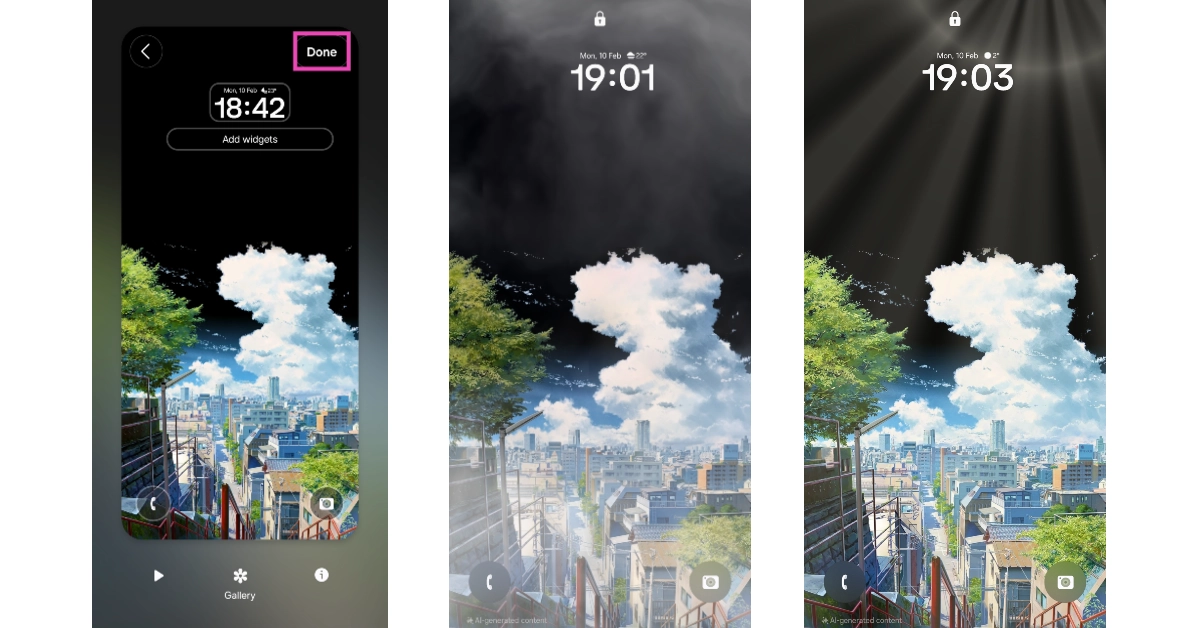
Today, Samsung expanded its Galaxy F-Series portfolio in India. The company has introduced Samsung Galaxy F06 5G priced under Rs 10,000. Like its predecessor, the Galaxy F06 5G will be a Flipkart-exclusive smartphone. The new models in the series have 12 5G bands support for connectivity. Under the hood, there is a MediaTek D6300 processor. It is confirmed to receive 4 years of software and security updates. The handset also features a 50MP Dual camera setup and a 6.7-inch HD+ display.
Samsung Galaxy F06 5G price in India, sale details
The Samsung Galaxy F06 5G has an 8 mm sleek design with ‘Ripple Glow’ finish that shimmers with every movement. It comes with a pill-shaped vertically placed dual rear camera setup. The handset features a water drop-style 6.8 inches HD+ LCD screen. The display comes with up to 800nits peak brightness. The phone is equipped with a MediaTek Dimensity 6300 processor paired with up to 6GB of RAM and up to 128GB of onboard storage. The device is pre-installed with Android 15 with One UI 7.0 and is promised to receive four years of Android upgrades and security updates.The dual rear camera setup of the Galaxy F06 5G includes a 50-megapixel primary camera and a 2-megapixel depth sensor. In addition to this there will an 8-megapixel front facing camera for taking selfies and video calling.Also Read:Apple announced to add two new games to Apple Arcade next monthThe newly launch handset packs a 5,000mAh battery with 25W wired charging support. Additionally there is a side-mounted fingerprint scanner for unlocking the phone. Lastly the Galaxy F06 includes Voice Focus, Quick share and Knox Vault features.
Smartphone displays aren’t as compact as they used to be. The 6-inch display size makes the viewing experience better and more immersive, but it makes it harder to reach the items at the top of the screen with one hand. If you have small palms, you can relate to the struggle. Bigger displays are also a hindrance when one of your hands is occupied with another task (like holding grocery bags). Luckily, your smartphone offers a way to get around this issue. Here’s how you can enable one-handed mode on Android and iOS.Read Also:OnePlus kicked off the “Red Rush Days” sale in India with great discounts on its latest flagship and more devices
What is one-handed mode?
If the large size of your phone’s display is keeping you from reaching the upper corners with one hand, you need to check out the one-handed mode. This mode can be found in device settings. On stock Android (Google Pixel, Motorola etc), this mode can be found in gesture settings. On Samsung phones, it is tucked away in ‘Advanced features’. OnePlus users can find it in ‘Accessibility & convenience’ options.So, what does the one-handed mode do? It seamlessly scales down the contents of your screen to an appropriate size. This enables you to reach the far corners of the screen with just one hand. Once this mode is enabled, you can activate it by swiping down on the navigation bar or double-tapping the home icon. Once you’ve selected an item, you can switch back to the full screen by tapping anywhere on the empty space. Some keyboard apps (like Gboard) also have this setting to shrink the size of the onscreen keyboard and make typing easier with one hand.
Enable one-handed mode on Android
Step 1: Go to Settings and select Advanced features.Step 2: Turn on the toggle switch next to One-handed mode.Step 3: Tap on One-handed mode.Step 4: Choose one of the following actions to enable one-handed mode:
Gesture: Scale down the display by swiping down on the home button or navigation bar.
Button: Double-tap the home button to turn on one-handed mode.
Step 5: Enter one-handed mode by swiping down on the navigation bar or double-tapping the home button. If you want to exit the one-handed mode, tap anywhere on the blank space outside the scaled-down page.
Enable one-handed mode on iOS
Step 1: Go to Settings and tap on Accessibility.Step 2: Tap on Touch.Step 3: Turn on the toggle switch next to Reachability.Step 4: If your iPhone has Face ID, swipe down on the bottom edge of the screen to go into one-handed mode. If your iPhone has Touch ID, lightly double-tap the home button twice.Step 5: Tap the upper half of the screen to return to full-screen mode.
Enable One-handed Mode using Good Lock (Samsung)
Step 1:Launch the Good Lock app on your Samsung phone.
Step 2: Switch to the Plugins tab and download the plugin for One Hand Operation +.
Step 3: Tap the plugin and turn on its toggle switch.
Step 4: Tap on Left handle and select your customised controls.
Step 5: Tap on Right handle and select your customised controls.
Step 6: Go to the previous page and use the sliders to adjust the size, width, and position of the handles.
Frequently Asked Questions (FAQs)
What is the meaning of one-handed mode?
The one-handed mode on your smartphone scales down the display to make it easier for you to reach the items along the upper borders with one hand.
How do I enable one-handed mode in Android?
Go to Settings>Advanced features and turn on the toggle switch next to ‘One-handed mode’.
How do I enable one-handed mode on my iPhone?
Go to Settings>Touch and turn on the toggle switch next to ‘Reachability’.
How do I switch the Gboard to one-handed mode?
Hit the tile icon in the top-right corner of Gboard and select ‘One-handed’ from the list of options.
This is how you can enable and use one-handed mode on Android and iOS. You can also use custom home-screen launchers like Niagara and Nova to help with one-handed use. If you have any questions, let us know in the comments!
When it comes to modern operating systems, Microsoft is never one to rest on its laurels. As Windows 11 updates 2025 roll out, prepare for a host of clever improvements designed to streamline your digital life—whether you’re juggling work projects or simply trying to find that elusive app hidden somewhere in your Start menu.
Streamlined File Sharing
Ever dreamed of sharing files with the elegance of a drag-and-drop magician? Soon, Windows 11 will let you share files just by dragging them to the top of your screen. A subtle hint appears along the top, inviting you to pull the file upward, revealing a sleek menu with app choices for sharing. This new file-sharing experience is set to banish the frustration of endless right-clicks and lost files, making collaboration smoother than ever.
The Start menu is getting a makeover that even Marie Kondo would applaud. Imagine a categorized grid view that automatically organizes your installed apps into neat, predetermined buckets—much like the app shelf on iOS and iPadOS. Prefer your old alphabetical chaos? No worries! Microsoft is also cooking up an alphabetical grid view and an option to revert to the classic list. Whether you’re a neat freak or a die-hard traditionalist, there’s something in store for you.
Taskbar and Icon Tweaks
For those who treat the Taskbar like a personal dock, Microsoft is introducing a feature to shrink app icons when space runs tight. While the overall Taskbar size remains the same, increased icon density means more apps visible at once—an absolute boon for small-screen users and power users alike.
A Battery Icon That Speaks Volumes
Tired of squinting at a static battery icon? Soon, the battery indicator will change colours: white for normal, green when charging, and red when you’re in energy-saving mode. Plus, a battery percentage indicator will finally join the icon in the Taskbar—ushering Windows 11 into the modern era alongside its mobile counterparts.
Emoji Panel Made Accessible
If emojis are your digital lingua franca, rejoice! Microsoft is adding a dedicated emoji panel button to the Taskbar. No more hidden keyboard shortcuts—this button makes discovering and using emojis as easy as a tap, whether it’s a quick reaction or a full-blown digital conversation.
Customizable Lock Screen Widgets
Lock screens are about to get personal. Windows 11 will soon allow users to customize lock screen widgets by adding, removing, or rearranging both first- and third-party widgets. This newfound freedom means your lock screen can finally reflect your personality—and your priorities.
Embracing AI with Recall, Click To Do, and More
Last but certainly not least, the upcoming updates include ambient AI tools like Recall and Click To Do, alongside an AI-enhanced Windows Search. These features promise a more intuitive way to manage tasks and find content using natural language. The seamless integration of AI productivity tools is poised to transform everyday computing into an even smarter, more responsive experience.
In our opinion, these Windows 11 updates strike an impressive balance between innovation and usability. They not only refine the user experience with practical enhancements but also signal Microsoft’s commitment to keeping the OS modern and efficient. Whether you’re a tech enthusiast or a casual user, these tweaks are sure to make navigating your PC a delight. What are your thoughts on these upcoming changes? Share your views and join the conversation!
OnePlus has launched a “Red Rush Days” sale for the Indian community, which will run from February 11 to February 16, 2025. Exclusive discounts, bank offers, and attractive EMI plans are available during the sale for OnePlus’ flagship smartphones, the Nord series, and IoT devices.As a thank you for the community’s support and confidence over the years, OnePlus is giving away ‘Red Rush Days’. The goal of the sale is to offer popular OnePlus products at reduced pricing temporarily. Online retailers OnePlus.in, OnePlus Store App, OnePlus Experience Stores, Amazon.in, and major partners Reliance Digital, Croma, Vijay Sales, and Bajaj Electronics are all offering numerous benefits to customers.During the Red Rush Days sale, buyers can get instant bank discounts of Rs 5,000 and Rs 3,000 on OnePlus 13 and OnePlus 13R on select bank cards, up to 24 months of no-cost EMI on Bajaj Finserv and other leading credit cards, and an exchange bonus of up to Rs 7,000 for the new OnePlus 13 Series.OnePlus Nord 4 customers can get a discount of up to Rs 1,000, an instant bank discount of up to Rs 4,000 on select bank card transactions, and up to 9 months of no-cost EMI on Bajaj Finserv and other credit cards.Also Read:Apple announced to add two new games to Apple Arcade next monthBuyers can get a discount of up to Rs 1,000, an instant bank discount of up to Rs 4,000 on select bank card transactions, and up to 9 months of no-cost EMI on Bajaj Finserv and other credit cards on the purchase of the OnePlus Nord 4.On the purchase of the OnePlus Nord CE4 customers can get an exclusive discount of Rs 1,000, up to 9 months of no-cost EMI on Bajaj Finserv and other leading credit cards, and up to 3 months of no-cost EMI on leading credit cards for the OnePlus Nord CE4 Lite. Additionally, there will be instant bank discounts of up to Rs 2,000 on select banks.Besides smartphones during the Red Rush Days sale, shoppers can get an exclusive Rs 2,000 discount on the OnePlus Watch 2 and an instant bank discount of Rs 1,000. The OnePlus Watch 2R is set to receive an exclusive Rs 3,000 discount during the Red Rush Sale and an instant bank discount of Rs 1,000, and can be purchased with a No-cost EMI option.OnePlus Pad 2 and Pad Go customers are also eligible to get exclusive discounts of Rs 2,000 and Rs 3,000 respectively, along with instant bank discounts of Rs 3,000 and Rs 2,000. There will be an additional exchange bonus of Rs 5,000 and a No-cost EMI option for up to 9 months on the purchase of Pad 2.Also Read:Apple introduced Powerbeats Pro 2 fitness earphones with a heart rate monitoring feature in IndiaLastly, OnePlus is offering exclusive discounts and instant bank discounts on its audio devices, including the OnePlus Bullets Wireless Z2, OnePlus Nord Buds 3 Pro, OnePlus Nord Buds 2r, OnePlus Bullets Wireless Z2 ANC, OnePlus Nord Buds 3, and OnePlus Buds 3. No-cost EMI options are available for up to 12 months on select bank cards.
Apple has announced that it would add two new titles to its Apple Arcade game streaming service in March, expanding its library to cover a wider selection of games. Arcade titles are updated on a regular basis with new and intriguing stuff, as well as new games each month. Bloons TD 6+ players can play the Rogue Legends game mode, a rogue-lite adventure featuring a replayable single-player campaign, as well as Valentine’s Day-themed stages and puzzles in WHAT THE GOLF? and Wheel of Fortune Daily.Apple plans to add Piano Tiles 2+ and Crazy Eights: Card Games+ to its Arcade game platform in March.On March 6, players may tap along to the beat in the beloved piano game, Piano Tiles 2+, as well as try their hand at the iconic card game, Crazy Eights: Card Games+, which requires fast-paced strategy and chance to win.Also Read:Apple introduced Powerbeats Pro 2 fitness earphones with a heart rate monitoring feature in IndiaPiano Tiles 2+ by Kooapps is a new rhythm game for Apple Arcade that has over a billion fans worldwide. To earn the greatest score, players must tap black tiles perfectly in time with the song. The game features smoother gameplay, no advertisements, and a large music collection including classical, dance, and ragtime genres, presenting players with limitless challenges.MobilityWare’s Crazy Eights: Card Games+ is a new version of the popular card game that includes new rules, a competitive scoreboard, and a variety of modes. To win, players match cards by colour or number, relying on both luck and strategy. The game has unusual twists such as stacking cards, strategic Wild 8, Skip Queen, and Reverse Ace cards.Also Read: Instagram expands Teen Accounts to India, will create a more secure and age-appropriate space for teens onlineA rogue-lite adventure, a Valentine’s Day-themed Wheel of Fortune Daily puzzle pack, a new Samurai colour quest pack, a new character Deeno the dinosaur, a Meteorite sawblade, and a Dinoland background, as well as the addition of the Mystic Marsh Kingdom with 40 new levels, Moss King challenge, and Mystic March Conquest mode, are among this week’s updates. Bloods TD 6+ also features the Rogue Legends game mode.
If you’re working on a paper for your college assignment, reviewing the changes made by a peer can be a hassle. Comparing two Word files is quite annoying when you’re constantly switching back and forth between their respective windows. Luckily, the text editor offers a couple of handy solutions that allow more accessibility while reviewing two documents. Here are the top 2 ways to compare two documents in Microsoft Word.Read Also:Top 5 Ways to Enable Dark Mode in Notepad on Windows 10/11?
Which method is best for you?
If you want to go the old-school route and simply place the two documents side by side for manual review, there is an option in Word’s ‘View’ tab that does exactly that. This option is easy to miss since its icon does not have any label. When the two documents are juxtaposed together, it is easy to work on them simultaneously.However, if you’re in a rush and want to review the changes in one document, use the comparison tool offered by Word. When you compare two documents, you can presented with the option to view the changes in:
The original document
The revised document
A new document
If you choose the last option, the original and revised documents will open up in the sidebar.
Compare two documents in Microsoft Word
Step 1:Launch Microsoft Word and open a blank document.Step 2: Switch to the Review tab and hit Compare.Step 3: Click on Compare.Step 4: Upload the two documents in the Original and Revised categories.Step 5: Hit More and select the comparison parameters. You can also choose whether the changes show up in the original document, revised document, or a new document.Step 6: Click OK to compare the two documents.
Merge two documents in Microsoft Word
Step 1:Right-click on a change and click on Accept Insertion to add it to your document. You can also choose to reject a change.Step 2: To accept all changes, click on Tracking and hit Accept.Step 3: Click on Accept All Changes. Similarly, you can choose to reject all changes.
Manually compare two Microsoft Word documents
If you manually want to go through the revisions on your document, use the Side by Side mode on Microsoft Word. Here’s how you can do that.Step 1: Launch Microsoft Word on your PC and open the two documents.Step 2: Go to one of the documents and click the View tab.Step 3: In the Window category, click the topmost icon in the middle row.Step 4: The two documents will be arranged side by side.
Frequently Asked Questions (FAQs)
How do compare two documents in Word for differences?
Go to Review>Compare and click on Compare. Upload the two documents in the Original and Revised categories. Hit OK. A new document with all the revisions will open in a new panel, with the two documents placed on the side.
How do I view two documents side by side in Word?
Open the two documents, then select one document and go to its View tab. In the Window category, click the topmost icon in the middle row.
Does Word have a comparison tool?
The Review tab in Microsoft Word lets you compare two documents and analyse the changes. You can approve each change individually or greenlight all of them at once.
Which online tools can be used to compare two Word documents?
You can use online tools like Draftable, Copyleaks, Text Compare, and Aspose to compare two Microsoft Word documents.
This is how you can compare two documents in Microsoft Word. While you’re here, check out how you can create a word cloud and view the word count of a document in Microsoft Word. If you have any questions, let us know in the comments!
If you’ve gotten used to Dark Mode on your phone, chances are you want it on your PC as well. The good news is that your Windows 11 PC has a system-wide dark mode as well as dedicated dark themes for certain native apps. Notepad is one of the native Windows apps that rock a dedicated dark theme that’s easy on the eyes. Here is how you can enable Dark Mode in Notepad on your Windows 10 or 11 PC.Read Also:Samsung Galaxy S25 Review: Samsung’s compact flagship has got its punch back
Which method should you use?
If you’re on a Windows 11 PC, applying the dark theme to Notepad is not a hassle at all. The note-taking app has an appearance section in settings which lets you control how the app looks. You get 3 app themes for Notepad: Light, Dark, and System. The last option follows the theme of your PC. This is the option that’s selected by default. Select the dark option from the list if you want to apply the changes only to the Notepad app.If you’re more inclined to change the entire UI of your PC, you should use system-wide dark mode. On a Windows 11 PC, this option can be found in the Personalisation section in settings. Windows 10 PCs do not have a dedicated dark theme, but the ‘High Contrast’ feature in Accessibility settings mimics the dark mode quite well.If you’re on a Windows 10 PC, you may have noticed that the Notepad app does not support dark mode. In this situation, you can either use the Notepad++ app (which has a dedicated dark theme) or the specialised Black Notepad app designed for dark mode users.
Enable Dark Mode from Notepad’s settings (Windows 11)
Step 1: Launch the Notepad app and hit the cog wheel icon in the top right corner of the screen.Step 2: Click the arrow next to App theme to expand the category.Step 3: Select Dark.
Enable Dark Mode in Notepad++ (Windows 11)
Step 1:Launch Notepad++ on your PC and go to Settings.Step 2: Select Preferences.Step 3: Go to Dark Mode and check the box next to Enable dark mode.Step 4: Make your preferred customisations and hit Save & Close.
Enable system-wide Dark Mode (Windows 11)
By default, Notepad follows the system-wide theme of your PC. If you enable Dark Mode from your PC’s settings, the changes will be applied to Notepad as well. Here’s how you can do that.Step 1: Hit the Windows icon in the taskbar and select Settings.Step 2: Switch to the Personalisation tab and select Colours.Step 3: Click the dropdown menu next to Choose your mode and select Dark.
Enable High Contrast (Windows 10)
Since the Notepad app for Windows 10 does not have a dark theme, you will need to enable the ‘High Contrast’ system feature. Here’s how.Step 1: Press Windows + I to go to Settings.Step 2: Click on Accessibility.Step 3: Switch to the High Contrast tab.Step 4: Flick the toggle switch under Turn on high contrast.
Use a third-party app (Windows 10)
The high contrast tool in Windows 10 applies a dark theme across the system. If you want Dark Mode specifically in the Notepad app, you will need to use third-party alternatives for the text editor. The Black Notepad app available in the Microsoft Store does the job quite well. It replicates the feel of the regular Notepad app but adds a dark theme to it.
Frequently Asked Questions (FAQs)
How do I turn on dark mode on Notepad?
Click the cog wheel icon in Notepad, expand the ‘App theme’ category, and select Dark.
How do I turn on dark screen mode?
Go to Settings>Personalisation>Colours>Choose your mode and select ‘Dark’.
How do I turn on dark mode in Notepad++?
Go to Settings>Preferences>Dark Mode and select the checkbox next to ‘Enable dark mode’.
What is Black Notepad?
Black Notepad is a third-party app that acts as an alternative to the regular Notepad. Since Notepad for Windows 10 does not have a dedicated dark mode, the Black Notepad app offers a viable alternative.
This is how you can enable dark mode in the Notepad app on Windows 10 and 11. While you’re here, check out how you can create a fake virus prank using Notepad. If you have any questions regarding dark mode, let us know in the comments!
Apple has unveiled Powerbeats Pro 2 fitness earphones in the Indian market. The gadget has voice isolation, dynamic head tracking, personalised spatial audio, and active noise cancellation. With a Qi wireless charging case and a USB Type-C connector, the earbuds have a 45-hour battery life. A heart rate monitor, an IPX4 rating, and the Apple H2 chipset are also included. For the first time, Apple has included a heart rate monitoring feature in earphones, utilising LED optical sensors to provide real-time performance statistics. Additionally, the earphones provide Bluetooth 5.3 connectivity.The Powerbeats Pro 2 is set to be priced at Rs 29,900 in India. Beats have confirmed that the device can be ordered from Apple India’s website starting February 13. The device will be available for purchase in Jet Black, Quick Sand, Hyper Purple, and Electric Orange.The new earhook design of the Powerbeats Pro 2 is comparable to that of other fitness headphones, but it has been redesigned using a super-light nickel-titanium alloy that is well-known in material design for its remarkable flexibility and shape memory.Compared to its predecessor, the device is said to be 20% lighter. In order to maximise the ease of use, the company is also providing a fifth ear tip size. Because Powerbeats Pro 2 has an IPX4 rating and is sweat and water-resistant, you can work out even in the rain, snow, or heat.Also Read:Instagram expands Teen Accounts to India, will create a more secure and age-appropriate space for teens onlineWorkouts may continue without interruption thanks to the earbuds’ on-ear buttons or voice control for music management. For extra convenience, each earbud has a tactile volume rocker. The business claims that after more than 1,500 hours of rigorous testing with almost 1,000 athletes, the Powerbeats Pro 2 was found to be the best-fitting headset ever.With the use of precise heart rate monitoring sensors, Powerbeats Pro 2 is intended to deliver real-time data on how well you workout. These LED optical sensors measure blood flow and send the data to fitness apps in real-time by pulsating light more than 100 times per second. At any time, the monitoring can be stopped.The training earphones have Transparency mode for greater clarity of the outside world and Active Noise Cancelling (ANC) for concentrated listening. For an immersive music experience, it has an updated acoustic architecture, improved venting, and customised spatial audio with dynamic head tracking.Also Read:Samsung unveils 2025 Bespoke AI WindFree air conditioners in IndiaThe Adaptive EQ earbuds continuously scan your unique ear shape using advanced inward-facing microphones to maximise your listening experience. With real-time hearing analysis, this technology adjusts acoustic frequencies to produce clear, personalised sound. With three advanced microphones and a voice accelerometer, each earbud offers superior voice targeting, noise reduction, and increased accuracy and signal-to-noise ratio.The Powerbeats Pro 2 has a 33% smaller charging case for mobility, 15 hours of playback on a 5-minute charge, and up to 45 hours of listening time and 10 hours of continuous bud playback on a single charge.
Garena Free Fire Max is a battle royale game with regular awards and tournaments to keep players interested. If you play Garena Free Fire, you should be aware of the redeem codes that are released on a daily basis. However, because the battle royale game is banned in India, players from other countries can use theFree Fire Redeem codes daily. If you’re unfamiliar with the Garena Free Fire redeem codes or don’t know how to get them, we’ve put together a step-by-step guide to help youredeem them. Check out Garena Free Fire Max Redeem Codes for 12 February 2025.The Free Fire Max redeemcodes are a great way to get free stuff. These are 12-digit codes that contain alphabets and numbers, as well as an expiration date and time. Because the Garena FF redeem codes cannot be used more than once, you should hurry to the redemption page to claim your free reward before someone else does. To get a free reward, all you have to do is go toreward.ff.garena.com/en, which is the official redemption page. Also, keep an eye on this space for daily updates on Garena Free Fire Max redemption codes and rewards.Also Read: Sennheiser Accentum Plus wireless headphones with Hybrid Adaptive Noise Cancellation launched
Garena Free Fire Max Redeem Codes Today 12 February 2025
If you belong to the niche of compact smartphone users, you aren’t exactly spoilt for choice in today’s market. Between Apple discontinuing the iPhone mini and Samsung favouring bigger displays across the board, we may be past the age of the compact smartphone. In 2025, Samsung’s 6.2-inch base variant in the Galaxy S25 series is the closest thing we have to a high-performing compact flagship. At first glance, it looks identical to its predecessor (our review here). But, the most important change comes under the hood as Qualcomm’s finest chipset makes a return on Samsung’s base flagship model. We’ve been using the Samsung Galaxy S25 as our daily driver for a week, here is our review of the smartphone.Read Also:How to change the charging sound of an Android phone?
Samsung Galaxy S25 Review: Design and Display
Here is what you get inside Samsung Galaxy S25’s retail box:
Smartphone
USB Type-C to Type-C cable
SIM ejector
Quick start guide
Samsung’s design language for the base model in the Galaxy S series has remained consistent for the last 3 years. The Galaxy S25 is lighter (162g) and sleeker (7.2mm) than its predecessor but retains the familiar flat aluminium rails and glass back panel. The Grade 5 Titanium frame is reserved for the Ultra variant. The vertically arranged triple rear cameras have new rings around their cutouts but they’ll almost certainly go unnoticed unless you’re paying close attention. Samsung’s decision to play it safe on the Galaxy S25 comes at the cost of the smartphone feeling quite blasé.The bottom edge of the device houses the SIM tray, USB Type-C port, primary microphone, and primary speaker output. The top rail houses the secondary microphones. The earpiece also acts as the secondary speaker. The volume rocker and side button are positioned on the right edge. The device is rated IP68 for dust and water resistance. It can survive being submerged up to 1.5m for 30 minutes. With the recent crop of flagships featuring IP69 ratings (making them impervious to high-pressure water jets), the Galaxy S series has some catching up to do. All the more reason for Samsung to start making some fresh moves.However, when it comes to displays, Samsung still reigns supreme. The 6.2-inch Dynamic LTPO AMOLED display on the Galaxy S25 is identical to its predecessor but has a marginally better screen-to-body ratio (~91.1%). This AMOLED panel works like a charm. It supports a 120Hz refresh rate and can hit a peak brightness of 2,600 nits. You can whip out this phone under direct sunlight and its display will remain unfazed by the bright surroundings. It is one of the smoothest panels we’ve ever used and the fluid experience is only compounded by the snappy ultrasonic fingerprint sensor that lies underneath it.During the review period, we streamed movie titles and live sports across OTT platforms like Netflix, Disney+ Hostar, and Prime Video on the Samsung Galaxy S25. The smartphone produced an excellent viewing experience aided by detailed images that showcased vibrant and punchy colours. The dynamic range and contrast levels were perfect. We were also happy with the audio output produced by the stereo speaker setup.
Samsung Galaxy S25 Review: Performance and Cameras
As we mentioned earlier, the biggest change in the Galaxy S25 is its processor. The Snapdragon 8 Elite chipset replaces Samsung’s in-house Exynos 2400 SoC on the compact flagship. This is a welcome change as the Snapdragon chipset is based on a 3nm process and easily outperforms the Exynos 2400.Performance benchmarks
The Samsung Galaxy S25 is available in 2 storage (UFS 4.0) variants. Both variants have a fixed 12GB RAM (LPDDR5X).
12GB + 256GB: Rs 80,999
12GB + 512GB: Rs 92,999
The Samsung Galaxy S25 crushed daily tasks with ease during the review period. There was nothing that this device couldn’t handle. We threw everything and the kitchen sink at it, yet it remained unfazed. There were no hiccups or lags to be seen even after loading a dozen apps and carrying out background tasks like navigation and music streaming. Routine tasks like video calling, emailing, social media browsing, and photo editing were handled expertly as well.The Galaxy S25 replicated a similar performance while gaming too. We played titles like Call of Duty Mobile and Apex Legends Unite on the smartphone and it produced detailed in-game visuals at 120fps. We did not encounter any frame drops or unnecessary lags while gaming. However, the smartphone could use a better cooling chamber as its back panel started warming up after 25 minutes of gameplay. We would also like to see a more comprehensive gaming toolbar in the next iteration of One UI.Samsung is one of the last OEMs to come out with its Android 15-based skin but it is worth the wait. One UI 7 is lighter, snappier, and better looking than its previous iteration. Samsung has taken some design inspiration from iOS on its new skin, as the Quick Settings Menu is not separated from the notification shade. The former can be accessed by swiping down from the top-right corner of the screen. Swiping down from anywhere else on the status bar or the home screen pulls down the notification shade. If you’re making the switch from iOS, this change will make the transition easier for you.However, for seasoned Android users, this feels like a step back. Since the notification shade now gets a panel of its own, the lone alerts sit at the top of the screen and are a bit harder to reach while operating the phone with one hand. If you already struggle with one-handed usage on big displays, this will add to your problems. Secondly, the Quick Settings Menu cannot be expanded by swiping down on the home screen. It would’ve been more intuitive if a swipe-down gesture on the right side of the home page and the status bar triggered the Quick Settings Menu.The good news is that you can reverse these changes and bring back the merged notification panel and Quick Settings. You can also change the order of the tiles in quick settings. If you find it hard to reach for the volume/brightness sliders or the WiFi/Bluetooth quick toggles, you can position them at the bottom of the panel.Quick Settings MenuSamsung’s native Good Lock app unlocks more customisation control over the OS’ design and functionality. We highly recommend installing this app if you choose to purchase this phone. Customisation has always been One UI’s forte and the Good Lock app is the key to adding a personal flair to your device.AI integration on smartphones is still in its infancy. There is still a long way to go before AI becomes an essential component of smart devices. Samsung leads the race with Galaxy AI, as it remains one of the most comprehensive and practical AI suites we’ve used yet. Our favourite addition to Galaxy AI this year is the option to choose on-device data processing. This prevents your data from being exported to cloud servers for AI computation. Of course, choosing these options limits what Galaxy AI can do, but the trade-off is worth it.Now BriefOne UI 7 also marks the debut of the ‘Now Brief’, which is another feature that is in its infancy. In theory, this tool is designed to give you a snapshot of your daily highlights and upcoming events in a way that is easy to digest. It uses AI to analyse things like your travel itinerary, upcoming events, work routes, and more to present helpful information that can help you streamline your day. However, as of now, it does nothing but show the weather and recommend the odd Spotify playlist. The ‘Now Bar’ is a much more practical tool that sits at the bottom of the lock screen and lets you control ongoing background tasks like navigation, music playback, timer, and more. Talking about the lock screen, the One UI 7 can use AI to overlay it with effects that are consistent with your local weather.Now BarGalaxy AI features like Drawing Assist, Writing Assist, Call Assist, and others work flawlessly for the most part. Some errors still creep in from time to time but that is something we expect from AI at this stage. The native Gallery app on the device is equipped with an Audio Eraser which helps you suppress the background noise in your videos. It matches the performance of Google’s Magic Audio Eraser.Samsung and Google have worked together to bring a better digital assistance experience to the Galaxy S25. Long-pressing the side button triggers the Gemini Assistant, but takes the help of Bixby to tap into Samsung Calendar and other utilities. The process is smooth and it does not look like one assistant is plastered on the other.Things remain the same on the battery front as the Galaxy S25 sticks with last year’s 4,000mAh battery pack. We would’ve preferred a Si/C unit on this smartphone, but its battery life leaves very little room for complaints. The power-efficient Snapdragon 8 Elite processor gets more mileage out of this battery pack than the Exynos chipset from last year. During the review period, our daily tasks on the Samsung Galaxy S25 consisted of video calling, IMing, social media browsing, media streaming, and gaming. After racking up 5-6 hours of screen time, we were consistently left with over 20% charge. This is a pretty good performance for a compact smartphone. However, Samsung needs to pull up its socks when it comes to charging speed, as this device takes over an hour to reach a 100% charge.There are no changes to the rear camera panel either. The vertical camera array consists of a 50MP Samsung ISOCELL S5KGN3 primary shooter, a 10MP Samsung ISOCELL S5K3K1 telephoto lens with 3x optical zoom, and a 12MP Sony IMX564 ultrawide sensor. The lack of changes doesn’t bother us too much as these cameras are still very impressive.The 50MP primary shooter takes incredible pictures in outdoor daylight conditions. The images pack a lot of detail and showcase radiant colours. The shadows cast by objects in the scene retain their sharpness in the final results. The dynamic range produced by the pictures is quite good. In limited lighting, the Night Mode does a good job of getting rid of the grain and restoring the warmth of the images.Without Night Mode v Night ModeThe ultrawide sensor replicates the performance of the primary shooter. There is no significant shift in colours or sharpness. We were also happy with the way this lens exposed the sky and assigned it accurate colours. Images taken in limited lighting are well-lit, albeit a tad softer than the ones taken with the primary shooter.Ultrawide LensUltrawide LensUltrawide Mode: Without Night Mode v Night ModeThe 3x telephoto lens is quite reliable when you need to zoom into faraway objects. The images retain excellent composition and sharpness. You can further zoom up to 30x, but the smartphone tends to overprocess the images in order to resolve the details. The 3x telephoto lens also comes in handy while taking portraits. These portrait shots showcase an amazing depth of field. The smartphone does a good job of separating the subject from the background and applying the appropriate level of blur. The 1x and 2x portraits are pretty good as well, but pale in comparison to the telephoto lens.1x v 2x3x v 10x20x v 30xThe 12MP front-facing camera captures great selfies with vibrant colours and natural skin tones. This camera can record 4K footage at 30/60fps. Meanwhile, the primary camera can shoot videos at an 8K resolution (24/30fps). The ultrawide and telephoto cameras can record 4K videos at 30/60fps. You can now shoot Log videos from this camera for more editorial control in post.Portrait Shots: 1x v 2xPortrait Shots: 3x v 5xRead Also:Samsung Galaxy S25 Edge’s display brightness and storage details tipped
Verdict
Although the changes to the Samsung Galaxy S25 are mostly incremental, it still remains one of the best compact Android phones on the market. Its light design and sleek form factor are a winning combination for anyone who does not want to work with a brick on a daily basis. The Snapdragon 8 Elite chipset has rejuvenated the device and it finally feels like Samsung’s base flagship has got its punch back. It is surprising that a sleek device like this can handle demanding tasks without breaking a sweat. The new processor has improved the smartphone’s battery life too. On the software front, One UI 7 delivers a familiar performance while adding new AI features to its arsenal. The cameras are also the same as last year but are very reliable in a multitude of lighting conditions.
Are you looking for today’s Wordle for February 12, 2025? The problem is difficult to solve, so if you need assistance, we’ve included hints and the answer to the February 12 Wordle.
Hints and Answers for Today’s Wordle February 12
Before answering directly, please check the February 12 Wordle Hints first.Hint 1: Today’s Wordle answer includes a vowel.Hint 2: The answer for today has no repeating letter.Hint 3: The number of points, goals, etc. that somebody/something gets in a game, competition, exam, etc.
What word does today’s Wordle begin with?
Do you need help with today’s Wordle answer’s initial letter?The first letter in today’s Wordle is “R”
Wordle: A Five-Letter Word Guessing Game• The game allows six guesses of a five-letter word.• Provide feedback on guessed letters’ placement in the puzzle.• The New York Times purchased the game in 2022.• Created by Josh Wardle for his partner, narrowing down 12,000 English words to 2,500.• Named after the word “word.”
How To Play Wordle?
Wordle is a New York Times word puzzle game that allows users to guess a five-letter word in six attempts. The letters are highlighted in Yellow and Green, indicating whether the word is present in the answer or not, and Green letters indicate the correct guess.
Wordle Tips and Tricks
Select a powerful starting word: Avoid using unusual words, as they frequently do not match common letters. A good opening word has plenty of benefits.
Repeating letters: Don’t be afraid of repeating letters; they appear frequently in words. The answer may contain one or two repeated letters.
Use the Wordlebot: The NYT’s Wordlebot analyses and compares replies to itself. This challenge can assist you enhance guessing skills and highlight areas for development.
12 February 2025: New Amazon Quiz is now available. Customers from different parts of the country are participating in the daily quiz. The quiz starts at midnight today and will be live until 11:59 PM tonight. By successfully answering every question, participants in the quiz have the chance to win wonderful rewards. Up to Rs 500 Amazon Pay Balance is up for grabs to participants today.One wrong answer could eliminate you from the quiz. You have a chance to win up to Rs 500 Amazon Pay Balance if you successfully answer every question. Users of the app only have the opportunity to take the quiz. Check Out 12 February 2025 Amazon Quiz Answers.
Are you not able to find Amazon FunZone? Click below and participate.
Click here to enter the Amazon FunZone Quiz and play today.Amazon Quiz Today Prize: Rs 500 Amazon Pay BalanceQuiz Date: 12 February 2025Daily Timing: 12 AM to 11:59 PMPrevious Amazon Quiz Winners Announcement: Today 12 PM Noon
Amazon Quiz Answers Today 12 February 2025: Win Up To ₹ 500 Amazon Pay Balance
Question 1: In August 2023, which Italian World Heritage Site celebrated its 850th birthday?
Answer: Leaning tower of Pisa
Question 2: As per Nature magazine, Perucetus colossus, the colossal whale from which country is now the Earth’s heaviest known animal?
Answer: Peru
Question 3: Paris is set to allow what in Seine River after almost 100 years of ban in 2024?
Answer: Swimming
Question 4: The name of this animal was first used in its present form in which language?
Answer: Old English
Question 5: Who is the global brand ambassador of this clothing company?
Answer: Deepika Padukone
Now fill in the required information through the Sign-Up option.
To find the Amazon Quiz banner, log in to the Amazon app and scroll down to the home screen.
Tap on the Amazon Quiz banner and tap on the Start button to start the Quiz.
Now you will get 5 questions and you need to answer them correctly. One wrong answer will eliminate you from the Quiz.
After answering all the questions correctly you are now eligible for a Lucky Draw.
The previous winner’s name will be announced today at 12 PM.
Amazon Daily Quiz Answers from the previous few days.
Here are all the answers from the previous 5 days of the Amazon Daily Quiz and Contest.
Amazon Quiz Answers Today 11 February 2025: Win Up To ₹ 500 Amazon Pay Balance
Question 1: As per an order by the Supreme Court who would be selected by the PM, the Oppn Leader, and the CJI?
Answer: Election Commissioner
Question 2: Which young batter made his India debut in a T20I match on Aug 3?
Answer: Tilak Varma
Question 3: Actor Rachel Shelly returned to Indian screens via the web series Kohrra. What film did she appear in 22 years ago?
Answer: Lagaan
Question 4: This animal was the symbol of which Greek god?
Answer: Hermes
Question 5: Who is the current CEO of this food processing company?
Answer: Tarun Bhatia
Amazon Quiz Answers Today 10 February 2025: Win Up To ₹ 500 Amazon Pay Balance
Question 1: In August 2023, which Italian World Heritage Site celebrated its 850th birthday?
Answer: Leaning Tower of Pisa
Question 2: As per Nature magazine, Perucetus colossus, the colossal whale from which country is now the Earth’s heaviest known animal?
Answer: Peru
Question 3: Paris is set to allow what in Seine River after almost 100 years of ban in 2024?
Answer: Swimming
Question 4: The name of this animal was first used in its present form in which language?
Answer: Old English
Question 5: Who is the global brand ambassador of this clothing company?
Answer: Deepika Padukone
Amazon Quiz Answers Today 8 February 2025: Win Up To ₹ 500 Amazon Pay Balance
Question 1: Italy’s football authorities banned the use of which number on jerseys due to its association with the Nazi slogan ‘Heil Hitler’?
Answer: 88
Question 2: For which film did Tom cruise rode a bike off a cliff, pulled the parachute open and landed on a moving train?
Answer: Mission: Impossible – Dead Reckoning Part One
Question 3: Which city annually sees the Nathan’s Fourth of July hot dog eating competition at Coney Island?
Answer: New York City
Question 4: Which country is the main breeding ground for this bird species?
Answer: Canada
Question 5: Where is the headquater of this airline company located?
Answer: Malaysia
Amazon Quiz Answers Today 7 February 2025: Win Up To ₹ 500 Amazon Pay Balance
Question 1: After 38 years as Prime Minister of which country did Hun Sen announce to step down in 2023?
Answer: Cambodia
Question 2: Selvamani Selvaraj’s new web series delves into the ‘unseen and unheard’ aspects of the 17-year manhunt to catch whom?
Answer: Veerappan
Question 3: Which Indian food item has been named the world’s second-best flatbread by TasteAtlas?
Answer: Butter garlic naan
Question 4: This bird was the symbol of which English Monarch?
Answer: Elizabeth I
Question 5: When did this site became a UNESCO World Heritage site?
Answer: 1989
Amazon Quiz Answers Today 6 February 2025: Win Up To ₹ 500 Amazon Pay Balance
Question 1: In MP’s Kuno Park, what prey is taking up more bite power from the Cheetahs?
Answer: Chital
Question 2: Ayam Goreng is ranked #1 and Chicken 65 is ranked #10 on a major Top 10 list about what food?
Answer: Fried Chicken
Question 3: What name, derived from the Sanskrit for ‘wisdom’, is given to the lunar rover of Chandrayaan-3?
Answer: Pragyan
Question 4: The name of this animal came from ghosts of which culture?
Answer: Romans
Question 5: Who has designed this logo?
Answer: Rob Janoff
Amazon Quiz Answers Today 5 February 2025: Win Up To ₹ 500 Amazon Pay Balance
Question 1: Sabyasachi made masks of what for King Charles and Queen Camilla’s Animal Ball in 2023?
Answer: Shola
Question 2: In August 2023, ‘Bandit King’ Malkhan Singh joined the Congress party in which state?
Answer: Madhya Pradesh
Question 3: Microsoft has changed the default font for its Office apps to what after 16 years?
Answer: Aptos
Question 4: Why is this animal not considered a big cat?
Answer: Lack of Roar
Question 5: This drink comes from which place?
Answer: Cuba
Amazon Quiz Answers Today 4 February 2025: Win Up To ₹ 500 Amazon Pay Balance
Question 1: Fatma Samoura became the first woman, first Black person, first non-European to be which organisation’s secretary general?
Answer: FIFA
Question 2: The central government has agreed to investigate the Havana syndrome. It originated in which country?
Answer: Cuba
Question 3: Across Parliament’s history, we’ve had 28 of what in India?
Answer: No-confidence motions
Question 4: What is the only place outside of Africa, where this primate is found?
Answer: Grenada
Question 5: This vegetable was worshipped by the ancient Egyptians as a symbol of what?
Answer: Eternal Life
Amazon Quiz Answers Today 3 February 2025: Win Up To ₹ 500 Amazon Pay Balance
Question 1: The latest venue in Test cricket is the Civil Service Cricket Ground in which city?
Answer: Belfast
Question 2: Nitanshi Goel stars as the lead character of Phool Kumari in which movie produced by Aamir Khan?
Answer: Laapataa Ladies
Question 3: Vinod Khosla and Bill Joy were two of the founders of which famous technology company headquartered currently in Santa Clara?
Answer: Sun Microsystems
Question 4: This is the ancient roman theatre of Kom El Deka in Alexandria in which country?
Answer: Egypt
Question 5: Which famous singer is shown here?
Answer: Bruce Springsteen
Amazon Quiz Answers Today 2 February 2025: Win Up To ₹ 500 Amazon Pay Balance
Question 1: Which famous badminton player is one of India’s flagbearers for the 2024 Paris Olympics?
Answer: PV Sindhu
Question 2: What is the latest edition of the ‘Bad Boys’ movie franchise?
Answer: Bad Boys: Ride or Die
Question 3:Nobel Prize winner Ernest Rutherford was born in which country?
Answer: New Zealand
Question 4: This is the Taj-ul-Masjid in which city?
Answer: Bhopal
Question 5: This is a bust of which famous ruler from history?
Answer: Alexander the Great
Amazon Quiz Answers Today 1 February 2025: Win Up To ₹ 500 Amazon Pay Balance
Question 1: Which of these batters scored a century during India’s recent 5 match T20I series against Zimbabwe?
Answer: Abhishek Sharma
Question 2: In May 2025. the ___ edition of the Mission Impossible movie franchise is going to be released. Fill in the blanks
Answer: 8th
Question 3: In which present day Indian state was the Battle of Buxar, which saw the East India Company emerge victorious fought?
Answer: Bihar
Question 4: This is a view of the City Palace in which Indian city?
Answer: Jaipur
Question 5: Valletta is the capital of which country, whose flag is shown here?
Answer: Malta
We have written an explainer above, you can refer to that.
When are the winners of the Amazon Quiz and contest announced or declared?
The announcement of today’s Amazon quiz winner will take place Tomorrow. As for the Special Quiz and “Spin & Win” Contest, the winners will be declared once the Quiz Contest comes to an end. To find out who the lucky winner is, you can refer to the Amazon Quiz Winners List or visit the Amazon Winners tab in the Amazon App.
How to participate in the Daily Amazon Quiz?
That is very easy, just got to the Amazon app and scroll to the bottom of the page and you will find the Quiz section. Click on it (usually it is called the fun zone) and you can enter the Amazon Today Quiz Contest.
Are there any other quizzes or contests running on Amazon daily?
Yes, there are many running on a daily basis. These range from spinning the wheel to answering the questions correctly. All are located in the Fun Zone.
What are the criteria for selecting a winner in the Daily Amazon Quiz?
When a qualified player submits correct answers to all the questions, they will automatically be entered into a lucky draw. This draw will include all participants who answered all the questions correctly. Amazon randomly selects the final winners from the pool of eligible participants who gave the right answers.
Which Types of Questions are asked within Amazon Daily Quiz?
These are very simple and straightforward questions. These are mainly related to general knowledge.
Where should I look for Amazon Daily Quiz answers?
You can bookmark our website www.gadgetbridge.com as we will help you every day with the Amazon Daily Quiz. We bring you fresh answers every day for the Amazon Daily Quiz and Contest.
What time does Amazon Announce previous winners?
The previous winner’s name will be announced today at 12 PM (noon).
One of the advantages of using an Android phone is the sheer range of customisation options at your disposal. You can choose to change the app grid, system colours, and even the charging tone of your device to add a more personal flair to it. Most Android OEMs have a diverse variety of system sounds to choose from. For the ultimate personalisation experience, you can set up a custom tone as the charging sound. So, without further ado, let’s take a look at how you can change the charging sound of your Android phone.Read also:How to block someone on Discord without them knowing?
Which method should you use?
There are 2 ways to go about changing the charging sound on your Android phone. The native method involves going into the sound settings on your device and changing the system’s sound theme. The selected tone applies to a series of functions like charging, keypad, phone unlock, and more. When you select a new sound theme, it is applied to all the functions.If you wish to solely change the charging tone, you need to seek the help of specialised third-party apps. The Battery Charge Voice app is our favourite out of the lot. Using this app, you can set different tones for when you plug in and plug out the charger. The app has a decent library of charging sounds and also lets you choose from the tones saved on your phone. You can also set up a voiceover as the charging alert tone.
Change the charging sound of your Android phone
Step 1: Go to Settings.Step 2: Tap on Sounds and vibration.Step 3: Select System sound.Step 4: Tap on System sound theme.Step 5: Tap a sound to preview and select it.Step 6: Go to the previous page and make sure the toggle switch next to Charging is turned on.Step 7: Use the slider at the top of the screen to adjust the volume of the charging tone.
Use a third-party app (Battery Charge Voice)
Step 1:Download and install the Battery Charge Voice app on your smartphone.Step 2:Launch the app and give it the necessary permissions.Step 3: Turn on the toggle switches next to Charging Connected and Charging Disconnected.Step 4: Hit the Edit button under Charging Connected.Step 5: Choose a charging tone from the list or select a tone from your phone’s gallery.Step 6: Hit Voiceover and enter a phrase. This phrase will be played whenever you connect the charger.Step 7: Repeat steps 4-6 for Charging Disconnected as well.
Frequently Asked Questions (FAQs)
How to change the charging sound on Android?
Go to Settings>Sounds and vibration>System sound>System sound theme and select your preferred charging tone.
How do I disable the charging sound on my Android phone?
Go to Settings>Sounds and vibration>System sound and turn off the toggle switch next to ‘Charging’.
How do I customise the charging sound on my Android phone?
Install the Battery Charge Voice app on your phone, give it the necessary permissions, and hit ‘Edit’ under ‘Charging connected’. Select a custom tone from the list or from your phone’s library. You can also create a voiceover for the charging sound.
How do I set a custom charging limit on a Samsung phone?
Go to Settings>Battery>Battery protection, turn on the toggle switch and tap on ‘Maximum’. Set the slider at your preferred limit.
How do I change the charging animation on my Android phone?
This is how you can change the charging sound on your Android phone. You can use apps like Zedge to download new notification and system tones on your Android phone. If you have any questions, let us know in the comments!
In order to provide a safe online platform for teenagers, Instagram has expanded Teen Accounts to India. These accounts are made to prevent sensitive content restrictions and age misrepresentation. Teens under 16 can have their changes approved by their parents, who can also keep an eye on recent contacts, establish screen time limits, and prohibit the usage of certain apps during certain hours.In India, Instagram introduced Teen Accounts, which are intended to give teenagers a safe, age-appropriate space while reducing unwanted interactions and improving privacy settings. They provide parents more control over their children, making social media safer. The extension gives teenagers more tools to safely navigate the digital world by addressing issues with exposure to potentially dangerous content, cyberbullying, and privacy hazards. Concerns about these issues have been raised by policymakers , parents, and educators. As per the company, parents, educators, and policymakers have voiced concerns over these issues.Parental concerns regarding online interactions, content exposure, and time management are addressed by the Teen Account protections, which are activated by default and that require parental consent to modify for users under the age of sixteen. Modifications to less restrictive settings are not allowed.Also Read:Samsung unveils 2025 Bespoke AI WindFree air conditioners in IndiaInstagram’s Teen accounts are set to private, requiring approval for new followers and prohibiting non-followers from viewing or interacting with their posts. This applies to all users under the age of 16 or 18. Teens have strict messaging settings, which limit their exposure to sensitive content. They can only be tagged or mentioned by people they follow, and the strictest version of the anti-bullying function, Hidden Words, is turned on by default. Teens will receive notifications to exit the app after 60 minutes of daily use. Sleep mode is active from 10 p.m. to 7 a.m., muting notifications and automatically responding to DMs overnight.Teens under the age of sixteen can now make less restrictive choices about their safety settings with parental approval. In the near future, older teens will be able to directly modify these settings for enhanced protection, and they can also have supervision at any time.Additional parental control options that Teen Accounts provide involve monitoring recent conversations, setting daily time limits, and restricting access to Instagram during particular hours. Once this is set, the kid will no longer be able to access Instagram, and parents can see a list of the people their teen has messaged in the last seven days. This makes it possible for parents to keep an eye on their teen’s internet activities.Also Read:Samsung Galaxy S25 Edge’s display brightness and storage details tippedInstagram is strengthening its age verification protocols to prevent minors from circumventing age limitations. To enhance safety, this involves adding extra verification steps to accounts with adult birthdates. In order to restrict exposure to age-appropriate content, Instagram is also strengthening its content restrictions. Additionally, Sensitive content controls will be set to the highest level by default, and the platform will take action against anything that violates Community Guidelines. This guarantees that teenagers aren’t exposed to too much potentially dangerous stuff, such sexually suggestive content or discussions about self-harm. Sometimes the content is automatically hidden, even if it was shared by someone they follow.
In order to meet the changing needs of Indian consumers, Samsung has unveiled its 2025 Bespoke AI WindFree AC range. With its cutting-edge AI technology, energy-efficient operation, and smooth integration with contemporary living areas, the series seeks to improve lifestyles and reinvent cooling for Indian summers.Today, Samsung introduced its line of 2025 Bespoke AI WindFree air conditioners to the Indian market. The series boasts advanced AI technology, energy-efficient operation, and a smooth transition into contemporary living areas. These air conditioners with AI Fast & Comfort Cooling offer immediate relief by quickly reducing the room temperature and switching to WindFree Cooling, which guarantees draft-free comfort and adjusts to both indoor and outdoor conditions. The technology is perfect for families navigating the unpredictable Indian climate since it continuously learns user preferences.Also Read:Elon Musk-led consortium Bids $97bn to acquire Sam Altman’s OpenAIAccording to the company with its micro air hole design, the WindFree cooling technology produces a “Still Air” atmosphere that effectively cools without drafts. Even during the hottest summer months, comfort is guaranteed because of its AI Energy Mode, which uses 30% less energy. From scheduling Welcome Cooling to customising cooling settings, SmartThings technology ensures simplicity and a seamless connected experience by enabling users to operate and monitor their air conditioners using smartphones or voice assistants like Bixby, Alexa, and Google Home.Also Read:Samsung Galaxy S25 Edge’s display brightness and storage details tippedFurthermore in order to provide a calm indoor environment the dual Tube Muffler and the advanced dual compressor design are intended to eliminate noise and vibrations. These sophisticated and comfortable air conditioners are made to blend in perfectly with contemporary lifestyles. Features like copper anti-bacterial filter, freeze wash, low energy usage, and smart AI-enabled controls that modify cooling according to room temperature improve the customer experience.
At last month’s Galaxy Unpacked 2025 event, Samsung teased the Galaxy S25 Edge along with the Galaxy S25, Galaxy S25+, and Galaxy S25 Ultra models. It is anticipated that the upcoming phone, which is anticipated to ship in April 2025, will feature a thinner profile. The upcoming phone’s features have not yet been revealed by the firm, but a tipster has leaked some important information ahead of its debut.The Samsung Galaxy S25 Edge will have a 12MP front camera, a 200MP primary camera, and a 12MP ultrawide lens, according to PandaFlash. The display will have 1.32mm bezels, Pro Scaler upscaling technology from the S25 Ultra, and a maximum brightness of 2,600 nits. Like the S25 Ultra, which needs QHD+ resolution, the Edge might also have this capability. It is anticipated that the device will provide a realistic visual experience.Also Read:Samsung Galaxy S25 Edge’s display brightness and storage details tippedA 6.7-inch diagonal display with an adaptive refresh rate of 1-120 Hz, Gorilla Glass Victus 2 on top, and an Armor Aluminium frame on the side are all anticipated features of the Galaxy S25 Edge. Under the screen, there might be an ultrasonic fingerprint reader. It has been reported that the phone would have a 3,900mAh battery and a 25W charging speed. It may be powerful despite its tiny form factor thanks to a Snapdragon 8 Elite SoC, 12GB RAM, and UFS 4.0 storage. It could additionally have 5G connectivity and be equipped with two speakers.The tipster previously disclosed that the Edge might contain a 200MP primary camera and a 12MP ultrawide snapper, akin to the Galaxy S25 Ultra, which, among other sensors, has a 200MP primary sensor, f/1.7 aperture, PDAF, OIS support, and a 50MP ultrawide capture.The Galaxy S25 Edge is anticipated to be released by Samsung in April 2025. However, there has been nothing to say from the company regarding this. There are rumours that it will compete with Apple’s iPhone 17 Air this year.Also Read:Spigen cover listing revealed the iPhone SE 4 design: ReportIn line with leaked pictures from OnLeaks and SmartPrix, the Samsung Galaxy S25 Slim is expected to come with a flat front, back, and sides, three rear cameras, and a thickness of 6.4 mm, the Galaxy S25 Slim is 1.2 mm thinner than the Galaxy S24. The device is anticipated to be over 2 mm slimmer than the flagship model from Samsung. The Galaxy S25 Edge is expected to feature a dual rear camera setup with a 50-megapixel telephoto lens with 3.5X optical zoom, a 200-megapixel primary camera, and a 50-megapixel ultrawide camera. The Samsung Galaxy S25 Edge is rumoured to have a 6.66-inch display, similar to the S25+ model.
Discord’s newest feature lets you block other users on the platform without them knowing. The new ‘Ignore’ button works practically like a block function as it limits your interaction with the profile you choose to use it on. The person on the receiving end does not have any way of knowing that you have restricted their profile. This tool comes in handy when you want to block someone but don’t want to face the awkward confrontation when they figure it out. Here’s how you can ignore someone on Discord.Read Also:Elon Musk-led consortium Bids $97bn to acquire Sam Altman’s OpenAI
Ignore vs Block: Discord functions explained
Before we get into how you can ignore someone on Discord, let’s take a look at what this function does. This function is similar to muting someone on X (formerly Twitter) or restricting an Instagram profile. When you ignore someone on Discord, their messages are hidden from your screen. This includes DMs and messages sent by the user on mutual servers. Discord does not notify you about their messages. You can choose to individually unhide these texts and interact with them.If you share a server with the ignored user, you won’t see their messages but some of their activity may still appear on the server’s feed. If you tap on their profile, Discord will display a warning message that the user is on your ignored list. If you’re about to join a group call, Discord will let you know beforehand whether the user you’ve ignored is a part of it. As opposed to blocking, ignoring someone does not change your friendship status with them. The user can view your messages and profile normally. There is no way for them to confirm that they have been blocked.
Discreetly block a user on Discord
Step 1:Launch the Discord app and go to the You tab.Step 2: Tap on Your friends.Step 3: Select the friend you wish to block discreetly. Alternatively, you can select the user’s profile from your DMs or a mutual server.Step 4: Hit the ellipses on the popup profile.Step 5: Tap on Ignore.Step 6:Confirm your selection.
Hard block a user on Discord
Step 1:Launch the Discord app and go to the You tab.Step 2: Tap on Your friends.Step 3: Select the friend you wish to block discreetly.Step 4: Hit the ellipses on the popup profile.Step 5: Select Block.Step 6:Confirm your selection.
Frequently Asked Questions (FAQs)
How do I ‘Ignore’ a user on Discord?
Go to Discord>You>Your friends, tap a profile, hit the ellipses, and select ‘Ignore’.
What does ignoring a user do on Discord?
When you ignore someone on Discord, the app hides their profile, activity, server messages, server notifications, DMs, and personal notifications from you.
How do I find out which users I have ignored on Discord?
When you ignore a user, a special ignore icon appears next to their Discord profile. You can also go to Discord>You>Settings>Content and social>Ignored accounts to view the entire list.
Does Discord notify the user when I ignore them?
No, the ignore function is completely discreet. Discord does not notify anyone when you ignore them.
This is how you can block someone on Discord without them knowing. The block and ignore options are auto-suggested by Discord when you report a user or profile. If you have any questions, let us know in the comments!
Garena Free Fire Max is a battle royale game with regular awards and tournaments to keep players interested. If you play Garena Free Fire, you should be aware of the redeem codes that are released on a daily basis. However, because the battle royale game is banned in India, players from other countries can use theFree Fire Redeem codes daily. If you’re unfamiliar with the Garena Free Fire redeem codes or don’t know how to get them, we’ve put together a step-by-step guide to help youredeem them. Check out Garena Free Fire Max Redeem Codes for 11 February 2025.The Free Fire Max redeemcodes are a great way to get free stuff. These are 12-digit codes that contain alphabets and numbers, as well as an expiration date and time. Because the Garena FF redeem codes cannot be used more than once, you should hurry to the redemption page to claim your free reward before someone else does. To get a free reward, all you have to do is go toreward.ff.garena.com/en, which is the official redemption page. Also, keep an eye on this space for daily updates on Garena Free Fire Max redemption codes and rewards.Also Read: Sennheiser Accentum Plus wireless headphones with Hybrid Adaptive Noise Cancellation launched
Garena Free Fire Max Redeem Codes Today 11 February 2025
Elon Musk’s firm has made a $97.4 billion offer to acquire OpenAI, a nonprofit that owns the artificial intelligence startup. This action exacerbates conflicts with Sam Altman, the CEO of OpenAI, who has indicated interest in purchasing Twitter for $9.74 billion. The deal makes it more difficult for OpenAI to become a for-profit company.After a group of investors offered $97.4 billion for all of OpenAI’s assets, Elon Musk’s conflict with the business and its CEO, Sam Altman, has gotten worse. Musk’s unsolicited offer might make OpenAI’s reorganisation plans more difficult. The CEO and co-founder of OpenAI, Sam Altman, replied that he would not accept and offered to purchase X in its place. Altman’s X post reads, “no thank you but we will buy twitter for $9.74 billion if you want.”Also Read:Spigen cover listing revealed the iPhone SE 4 design: ReportIn 2022, Elon Musk paid $44 billion to acquire Twitter and renamed it X. He responded by calling the post “Swindler.”The bid is supported by xAI and many investment firms, including Joe Lonsdale’s Palantir and Ari Emanuel’s Endeavor, with Joe Lonsdale co-founding Palantir and Ari Emanuel’s Endeavor’s CEO joining the team.Elon Musk and Sam Altman co-founded OpenAI as a nonprofit organisation in 2015, but Musk quit before the firm became successful. In 2023, he launched xAI, an AI startup. OpenAI is now trying to become a for-profit organisation in order to raise funds for the development of the greatest AI models.In August of last year, Elon Musk filed a lawsuit against Altman and other OpenAI founders, alleging that they had broken the terms of their contract by putting their own financial gain ahead of the general welfare when developing AI. Musk asked for a preliminary injunction in November to stop OpenAI from becoming a for-profit company. According to the lawsuit, Musk was first asked to establish a nonprofit organisation that focused on AI development, but the founders later put profit ahead of all else. Musk underlined that OpenAI must revert to its open-source, security-focused methodology.Also Read:Samsung TV Plus India announced collaboration with Warner Bros. Television to offer five exclusive FAST channelsMusk said, “At x.AI, we live by the values I was promised OpenAI would follow. We’ve made Grok open-source, and we respect the rights of content creators. It’s time for OpenAI to return to the open-source, safety-focused force for good it once was. We will make sure that happens.”
11 February 2025: New Amazon Quiz is now available. Customers from different parts of the country are participating in the daily quiz. The quiz starts at midnight today and will be live until 11:59 PM tonight. By successfully answering every question, participants in the quiz have the chance to win wonderful rewards. Up to Rs 500 Amazon Pay Balance is up for grabs to participants today.One wrong answer could eliminate you from the quiz. You have a chance to win up to Rs 500 Amazon Pay Balance if you successfully answer every question. Users of the app only have the opportunity to take the quiz. Check Out 11 February 2025 Amazon Quiz Answers.
Are you not able to find Amazon FunZone? Click below and participate.
Click here to enter the Amazon FunZone Quiz and play today.Amazon Quiz Today Prize: Rs 500 Amazon Pay BalanceQuiz Date: 11 February 2025Daily Timing: 12 AM to 11:59 PMPrevious Amazon Quiz Winners Announcement: Today 12 PM Noon
Amazon Quiz Answers Today 11 February 2025: Win Up To ₹ 500 Amazon Pay Balance
Question 1: As per an order by the Supreme Court who would be selected by the PM, the Oppn Leader, and the CJI?
Answer: Election Commissioner
Question 2: Which young batter made his India debut in a T20I match on Aug 3?
Answer: Tilak Varma
Question 3: Actor Rachel Shelly returned to Indian screens via the web series Kohrra. What film did she appear in 22 years ago?
Answer: Lagaan
Question 4: This animal was the symbol of which Greek god?
Answer: Hermes
Question 5: Who is the current CEO of this food processing company?
Answer: Tarun Bhatia
Now fill in the required information through the Sign-Up option.
To find the Amazon Quiz banner, log in to the Amazon app and scroll down to the home screen.
Tap on the Amazon Quiz banner and tap on the Start button to start the Quiz.
Now you will get 5 questions and you need to answer them correctly. One wrong answer will eliminate you from the Quiz.
After answering all the questions correctly you are now eligible for a Lucky Draw.
The previous winner’s name will be announced today at 12 PM.
Amazon Daily Quiz Answers from the previous few days.
Here are all the answers from the previous 5 days of the Amazon Daily Quiz and Contest.
Amazon Quiz Answers Today 10 February 2025: Win Up To ₹ 500 Amazon Pay Balance
Question 1: In August 2023, which Italian World Heritage Site celebrated its 850th birthday?
Answer: Leaning Tower of Pisa
Question 2: As per Nature magazine, Perucetus colossus, the colossal whale from which country is now the Earth’s heaviest known animal?
Answer: Peru
Question 3: Paris is set to allow what in Seine River after almost 100 years of ban in 2024?
Answer: Swimming
Question 4: The name of this animal was first used in its present form in which language?
Answer: Old English
Question 5: Who is the global brand ambassador of this clothing company?
Answer: Deepika Padukone
Amazon Quiz Answers Today 8 February 2025: Win Up To ₹ 500 Amazon Pay Balance
Question 1: Italy’s football authorities banned the use of which number on jerseys due to its association with the Nazi slogan ‘Heil Hitler’?
Answer: 88
Question 2: For which film did Tom cruise rode a bike off a cliff, pulled the parachute open and landed on a moving train?
Answer: Mission: Impossible – Dead Reckoning Part One
Question 3: Which city annually sees the Nathan’s Fourth of July hot dog eating competition at Coney Island?
Answer: New York City
Question 4: Which country is the main breeding ground for this bird species?
Answer: Canada
Question 5: Where is the headquater of this airline company located?
Answer: Malaysia
Amazon Quiz Answers Today 7 February 2025: Win Up To ₹ 500 Amazon Pay Balance
Question 1: After 38 years as Prime Minister of which country did Hun Sen announce to step down in 2023?
Answer: Cambodia
Question 2: Selvamani Selvaraj’s new web series delves into the ‘unseen and unheard’ aspects of the 17-year manhunt to catch whom?
Answer: Veerappan
Question 3: Which Indian food item has been named the world’s second-best flatbread by TasteAtlas?
Answer: Butter garlic naan
Question 4: This bird was the symbol of which English Monarch?
Answer: Elizabeth I
Question 5: When did this site became a UNESCO World Heritage site?
Answer: 1989
Amazon Quiz Answers Today 6 February 2025: Win Up To ₹ 500 Amazon Pay Balance
Question 1: In MP’s Kuno Park, what prey is taking up more bite power from the Cheetahs?
Answer: Chital
Question 2: Ayam Goreng is ranked #1 and Chicken 65 is ranked #10 on a major Top 10 list about what food?
Answer: Fried Chicken
Question 3: What name, derived from the Sanskrit for ‘wisdom’, is given to the lunar rover of Chandrayaan-3?
Answer: Pragyan
Question 4: The name of this animal came from ghosts of which culture?
Answer: Romans
Question 5: Who has designed this logo?
Answer: Rob Janoff
Amazon Quiz Answers Today 5 February 2025: Win Up To ₹ 500 Amazon Pay Balance
Question 1: Sabyasachi made masks of what for King Charles and Queen Camilla’s Animal Ball in 2023?
Answer: Shola
Question 2: In August 2023, ‘Bandit King’ Malkhan Singh joined the Congress party in which state?
Answer: Madhya Pradesh
Question 3: Microsoft has changed the default font for its Office apps to what after 16 years?
Answer: Aptos
Question 4: Why is this animal not considered a big cat?
Answer: Lack of Roar
Question 5: This drink comes from which place?
Answer: Cuba
Amazon Quiz Answers Today 4 February 2025: Win Up To ₹ 500 Amazon Pay Balance
Question 1: Fatma Samoura became the first woman, first Black person, first non-European to be which organisation’s secretary general?
Answer: FIFA
Question 2: The central government has agreed to investigate the Havana syndrome. It originated in which country?
Answer: Cuba
Question 3: Across Parliament’s history, we’ve had 28 of what in India?
Answer: No-confidence motions
Question 4: What is the only place outside of Africa, where this primate is found?
Answer: Grenada
Question 5: This vegetable was worshipped by the ancient Egyptians as a symbol of what?
Answer: Eternal Life
Amazon Quiz Answers Today 3 February 2025: Win Up To ₹ 500 Amazon Pay Balance
Question 1: The latest venue in Test cricket is the Civil Service Cricket Ground in which city?
Answer: Belfast
Question 2: Nitanshi Goel stars as the lead character of Phool Kumari in which movie produced by Aamir Khan?
Answer: Laapataa Ladies
Question 3: Vinod Khosla and Bill Joy were two of the founders of which famous technology company headquartered currently in Santa Clara?
Answer: Sun Microsystems
Question 4: This is the ancient roman theatre of Kom El Deka in Alexandria in which country?
Answer: Egypt
Question 5: Which famous singer is shown here?
Answer: Bruce Springsteen
Amazon Quiz Answers Today 2 February 2025: Win Up To ₹ 500 Amazon Pay Balance
Question 1: Which famous badminton player is one of India’s flagbearers for the 2024 Paris Olympics?
Answer: PV Sindhu
Question 2: What is the latest edition of the ‘Bad Boys’ movie franchise?
Answer: Bad Boys: Ride or Die
Question 3:Nobel Prize winner Ernest Rutherford was born in which country?
Answer: New Zealand
Question 4: This is the Taj-ul-Masjid in which city?
Answer: Bhopal
Question 5: This is a bust of which famous ruler from history?
Answer: Alexander the Great
Amazon Quiz Answers Today 1 February 2025: Win Up To ₹ 500 Amazon Pay Balance
Question 1: Which of these batters scored a century during India’s recent 5 match T20I series against Zimbabwe?
Answer: Abhishek Sharma
Question 2: In May 2025. the ___ edition of the Mission Impossible movie franchise is going to be released. Fill in the blanks
Answer: 8th
Question 3: In which present day Indian state was the Battle of Buxar, which saw the East India Company emerge victorious fought?
Answer: Bihar
Question 4: This is a view of the City Palace in which Indian city?
Answer: Jaipur
Question 5: Valletta is the capital of which country, whose flag is shown here?
Answer: Malta
We have written an explainer above, you can refer to that.
When are the winners of the Amazon Quiz and contest announced or declared?
The announcement of today’s Amazon quiz winner will take place Tomorrow. As for the Special Quiz and “Spin & Win” Contest, the winners will be declared once the Quiz Contest comes to an end. To find out who the lucky winner is, you can refer to the Amazon Quiz Winners List or visit the Amazon Winners tab in the Amazon App.
How to participate in the Daily Amazon Quiz?
That is very easy, just got to the Amazon app and scroll to the bottom of the page and you will find the Quiz section. Click on it (usually it is called the fun zone) and you can enter the Amazon Today Quiz Contest.
Are there any other quizzes or contests running on Amazon daily?
Yes, there are many running on a daily basis. These range from spinning the wheel to answering the questions correctly. All are located in the Fun Zone.
What are the criteria for selecting a winner in the Daily Amazon Quiz?
When a qualified player submits correct answers to all the questions, they will automatically be entered into a lucky draw. This draw will include all participants who answered all the questions correctly. Amazon randomly selects the final winners from the pool of eligible participants who gave the right answers.
Which Types of Questions are asked within Amazon Daily Quiz?
These are very simple and straightforward questions. These are mainly related to general knowledge.
Where should I look for Amazon Daily Quiz answers?
You can bookmark our website www.gadgetbridge.com as we will help you every day with the Amazon Daily Quiz. We bring you fresh answers every day for the Amazon Daily Quiz and Contest.
What time does Amazon Announce previous winners?
The previous winner’s name will be announced today at 12 PM (noon).
Are you looking for today’s Wordle for February 11, 2025? The problem is difficult to solve, so if you need assistance, we’ve included hints and the answer to the February 11 Wordle.
Hints and Answers for Today’s Wordle February 11
Before answering directly, please check the February 11 Wordle Hints first.Hint 1: Today’s Wordle answer includes two vowels.Hint 2: The answer for today has a repeating letter.Hint 3: The number of points, goals, etc. that somebody/something gets in a game, competition, exam, etc.
What word does today’s Wordle begin with?
Do you need help with today’s Wordle answer’s initial letter?The first letter in today’s Wordle is “S”
Wordle: A Five-Letter Word Guessing Game• The game allows six guesses of a five-letter word.• Provide feedback on guessed letters’ placement in the puzzle.• The New York Times purchased the game in 2022.• Created by Josh Wardle for his partner, narrowing down 12,000 English words to 2,500.• Named after the word “word.”
How To Play Wordle?
Wordle is a New York Times word puzzle game that allows users to guess a five-letter word in six attempts. The letters are highlighted in Yellow and Green, indicating whether the word is present in the answer or not, and Green letters indicate the correct guess.
Wordle Tips and Tricks
Select a powerful starting word: Avoid using unusual words, as they frequently do not match common letters. A good opening word has plenty of benefits.
Repeating letters: Don’t be afraid of repeating letters; they appear frequently in words. The answer may contain one or two repeated letters.
Use the Wordlebot: The NYT’s Wordlebot analyses and compares replies to itself. This challenge can assist you enhance guessing skills and highlight areas for development.
The iPhone SE 4 debut is right around the corner, with alleged features, price range, and design updates. The 2025 iPhone SE is expected to arrive this week, including a 6.1-inch OLED screen, Face ID instead of Touch ID, and a bigger battery. A recent leak reveals the full design of the upcoming device.Apple has not yet announced the iPhone SE 4 debut date, although it is expected to arrive this week, according to leaks and speculation. However, the upcoming gadget has been leaked several times, revealing information about its specifications, expected price range, and design overhaul. The latest leak reveals the whole design of the upcoming iPhone. A listing for the iPhone SE 4 was mistakenly published on Spigen’s website, displaying product images that give a good picture of the future handset. Spigen has already removed the listing, but users have shared the photographs on Reddit.Also Read:Samsung TV Plus India announced collaboration with Warner Bros. Television to offer five exclusive FAST channelsAccording to claims, the design and functionality of the iPhone SE 4 are similar to those of the iPhone 14. It has comparable power and volume buttons as well as a display notch. Instead of the dead mute switch, the left side of the case may feature an Action Button. Unlike its most recent models, the 2025 iPhone SE does not have a separate camera button, and its rear camera is comparable to that of the 2022 iPhone SE model.Also Read: Tinder’s Dating Safety Guide now available in four Indian languagesThe next generation iPhone SE 4 is expected to look like the iPhone 14 but will not have a home button or Touch ID. Rumour has it that the SE 4 will run on the latest A18 Bionic processor and will have Apple Intelligence features, like an updated Siri with AI capabilities. The SE 4 will also have a USB Type-C port and will have Apple Intelligence capabilities, since Apple no longer sells phones with Lightning ports.
Samsung’s smartphones are leading the AI-integration race and it seems unlikely that other OEMs will catch up anytime soon. Samsung’s AI suite, Galaxy AI, is tastefully woven into its One UI OS. One of the AI features that has flown under everyone’s radar is ‘Photo Ambient Wallpaper’. It makes your lock screen wallpaper more dynamic and interactive. Here’s how you can use Photo Ambient Wallpaper on your Samsung smartphone.Read Also:Samsung TV Plus India announced collaboration with Warner Bros. Television to offer five exclusive FAST channels
What is ‘Photo ambient wallpaper’?
When talking about AI features in smartphones, it is important to separate practicality from gimmicks. Samsung’s ‘Photo ambient wallpaper’ does not radically change how you use your smartphone, rather it is a delightful little detail that makes your phone’s lock screen more fun. It uses the information from the Weather app on your phone to add relevant effects to the lock screen image.For example, if your local weather is bright and sunny, Photo Ambient Wallpaper will add gleaming sun rays to the lock screen image. In case of rainfall, the lock screen will be overlaid with falling raindrops. Similarly, there are attention-grabbing effects for haze, nighttime, and other weather conditions and situations.While picking an image for Photo Ambient Wallpaper, make sure it is shot outdoors and has optimum lighting. Dark and gloomy pictures that are shot in indoor settings don’t work well with the overlaid effects. Having lots of negative space in the wallpaper helps too.
Use Photo Ambient Wallpaper on a Samsung Phone
Step 1: Go to Settings and select Wallpaper and style.Step 2: Tap on Change wallpapers.Step 3: Scroll down and select Photo ambient in the Create with AI category.Step 4: Tap on Try now.Step 5: Tap on Settings in the popup box and turn on the toggle switch next to Agree.Step 6: Go back and select an image from your phone’s internal storage. Pictures that are taken outdoors make the best photo ambient wallpapers.Step 7: Adjust the clock style and size. Add your preferred widgets.Step 8: Hit the play icon to view the weather effects on the wallpaper. Tap on Gallery to select a new image for the wallpaper.Step 9: Hit Done to set the wallpaper to your lock screen.
Frequently Asked Questions (FAQs)
What is ‘Photo ambient wallpaper’?
Photo ambient wallpaper is a feature that is exclusive to Samsung smartphones. It uses Galaxy AI to overlay weather effects on the lock screen wallpaper. These effects are consistent with your local weather.
Do photo ambient wallpapers consume more battery?
Like live and interactive wallpapers, photo ambient wallpapers consume more battery than regular ones.
How to get ‘Photo ambient wallpaper’ on Samsung?
Go to Settings>Wallpaper and style>Change wallpaper and select ‘Photo ambient’ under ‘Create with AI’. Choose a picture from your phone’s internal storage, make the necessary lock screen customisations, and hit ‘Done’.
How do I turn off photo ambient wallpaper?
You can turn off photo ambient wallpaper by going to Settings>Wallpaper and style>Change wallpaper and setting up an ordinary picture as your lock screen wallpaper.
Can I set a photo ambient wallpaper on my Samsung phone’s home screen?
This is how you can Photo Ambient Wallpapers on your Samsung phone. This Galaxy AI feature is available with on-device processing. This means your phone does not need to use cloud servers to carry out the AI computation for this feature. If you have any questions, let us know in the comments!
Five FAST channels from Warner Bros. Television have been added to Samsung TV Plus India, with an emphasis on Hindi programming. With a variety of channels, such as Wheel World, XXtreme Jobs, Wild Flix, Foodie Hub, and Crime, these television networks aim to appeal to both urban and regional viewers.Kunal Mehta, Head of Partnerships and Business Development, at Samsung TV Plus India, said “We are thrilled to welcome Warner Bros. Television to Samsung TV Plus. As a leader in FAST, we are committed to bringing top-tier content to our audiences. This partnership expands entertainment choices while delivering even more value and access to our viewers—and opportunities for advertisers.”Also Read:Tinder’s Dating Safety Guide now available in four Indian languagesFive additional FAST channels will be available only on Samsung TV Plus India thanks to a partnership with Warner Bros. Samsung TV Plus is a free streaming service that comes pre-installed on Samsung Smart TVs. These channels, which specialise in Hindi television, provide both urban and regional viewers with excellent entertainment and great storytelling. The partnership seeks to satisfy consumer demand for free, high-calibre entertainment.House of Crime, Foodie Hub, Wheel World, Wild Flix, and XXtreme Jobs will all be available on Samsung TV Plus India. The Hindi-language channel House of Crime focuses on crime and offers gripping dramas and investigative shows. Popular food shows, recipes, and gourmet adventures in Hindi can be found on Foodie Hub, a culinary adventurer’s heaven. Hindi-language stories about animal rescue and zoo life will be available on Wild Flix. With English-language restoration stories and car and bike exhibits, Wheel World is a fast-paced destination for auto aficionados.Also Read:Google Photos introduces SynthID technology to images edited using the Reimagine feature in Magic EditorRuchir Jain, Head of Distribution, Warner Bros. Discovery, South Asia, said: “At Warner Bros. Discovery, we are passionate about curating diverse and high-quality entertainment for our audiences. With connected TVs on the rise, we are excited to expand our presence on Samsung TV Plus through these new channels. Our partnership with Samsung TV Plus will enable us to bring our viewers the very best of WBTV.”
In partnership with the Centre for Social Research, Tinder has published its Dating Safety Guide in four Indian languages. The guide was developed in advance of Safer Internet Day and based on input from an Indian survey. The dating app’s guide, which was first made available in September 2023 and has received over a million views, aims to increase awareness of online dating safety in India.The Dating Safety Guide on Tinder, which was first released in English in September 2023 and has received over a million views and 50,000 downloads, will now be available in four additional Indian languages: Bengali, Hindi, Kannada, and Marathi.Also Read:Google Photos introduces SynthID technology to images edited using the Reimagine feature in Magic EditorThe guide, which will be accessible on the app on February 11, intends to help users detect when a romance scam and provide recommendations on how to handle them, as part of its continuous efforts to support safety initiatives across all of its parent companies’ brands.Under the title, “How to Identify a Romance Scam: Warning Signs,” Tinder users will get access to a comprehensive guide that includes all the information required to identify unhealthy behaviours and important prevention tips.Overall, the guide offers helpful information to help protect against romance scams. It recommends recognising red flags, protecting privacy, and confirming the identity of the person behind a profile; using security tools to block suspicious individuals; using Video Chat for video calls; and not sending money to strangers.Besides this Tinder also offers a variety of safety features like Report Chat, Block Contacts, Video Verification, Video Chat, “ Does this message make you uncomfortable?” and “Are you sure?”“At Tinder, protecting our users is a top priority. Unfortunately, scammers are present in all apps, not just dating apps. We work tirelessly to help prevent and warn users about potential scams or fraud by using AI tools and proactively intervening either with in-app features, notifications or education. This collaboration with ANCEME is yet another commitment to providing our users with the right tools to detect and protect themselves against scams, and we look forward to continuing to collaborate with industry experts,” says Vicente Balbastre, Senior Communication Manager for Southern Europe.Also Read:Samsung Galaxy S25 Series is now available for purchase, Sale opens in IndiaBlanca Frías, president of ANCEME, adds: “ Collaborating with Tinder represents a great step in the fight for security in the digital environment. This campaign brings us closer to all users, promoting a safer space with the necessary resources so that people can connect in a healthy way without getting caught up in this type of scam.”


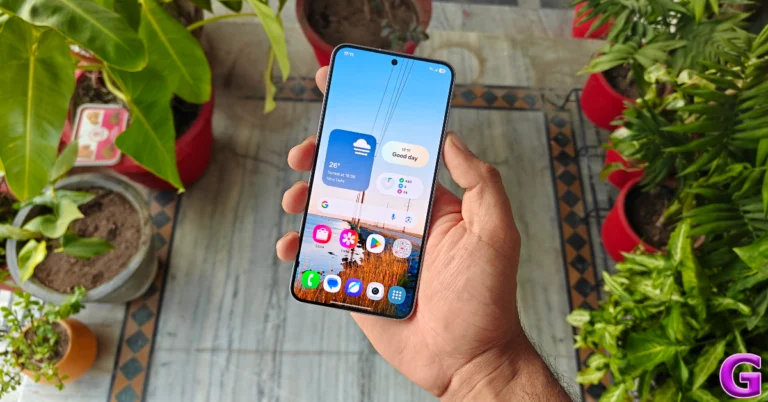
 Step 2: Turn on the toggle switch next to One-handed mode.
 Step 3: Tap on One-handed mode.
 Step 5: Enter one-handed mode by swiping down on the navigation bar or double-tapping the home button. If you want to exit the one-handed mode, tap anywhere on the blank space outside the scaled-down page.

 Step 2: Tap on Touch.
 Step 3: Turn on the toggle switch next to Reachability.
 Step 4: If your iPhone has Face ID, swipe down on the bottom edge of the screen to go into one-handed mode. If your iPhone has Touch ID, lightly double-tap the home button twice.
 Step 5: Tap the upper half of the screen to return to full-screen mode.
 Step 3: Tap the plugin and turn on its toggle switch.
 Step 4: Tap on Left handle and select your customised controls.
 Step 5: Tap on Right handle and select your customised controls.

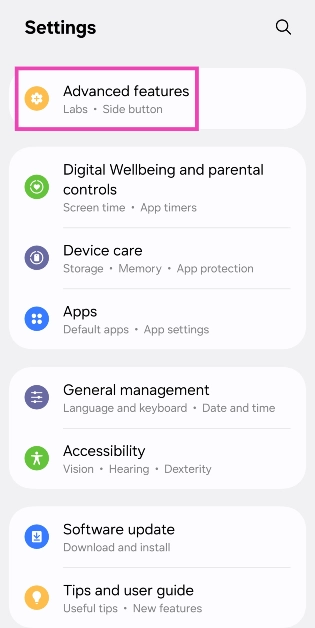 Step 2: Turn on the toggle switch next to One-handed mode.
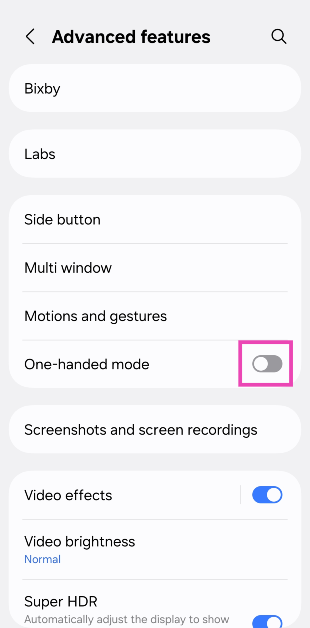 Step 3: Tap on One-handed mode.
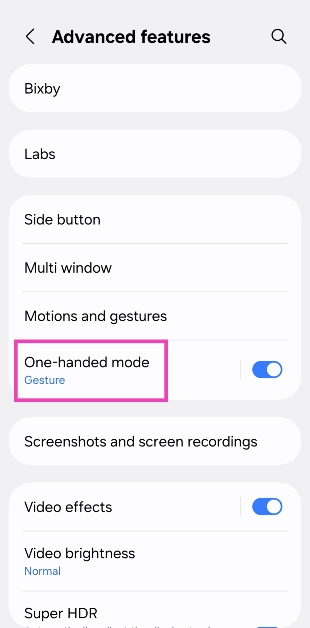 Step 4: Choose one of the following actions to enable one-handed mode:
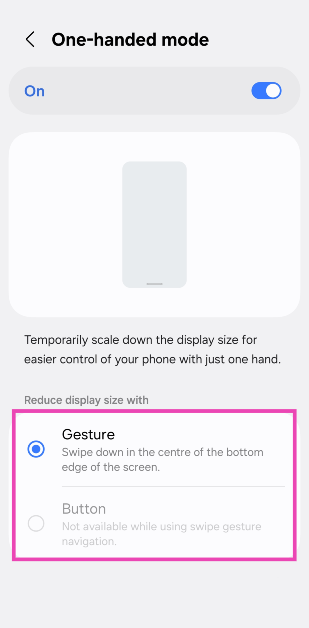 Step 5: Enter one-handed mode by swiping down on the navigation bar or double-tapping the home button. If you want to exit the one-handed mode, tap anywhere on the blank space outside the scaled-down page.
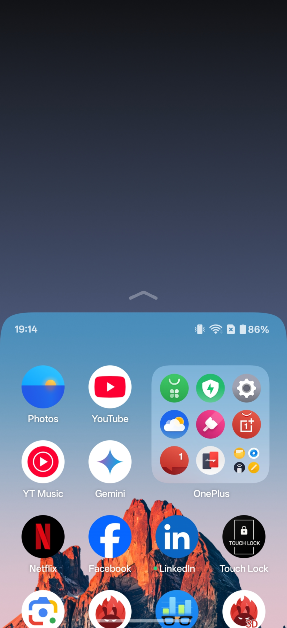
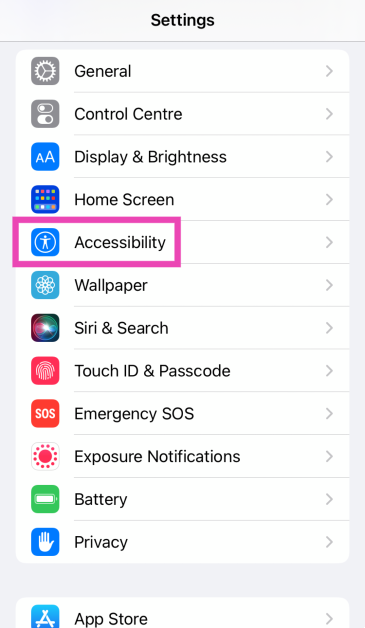 Step 2: Tap on Touch.
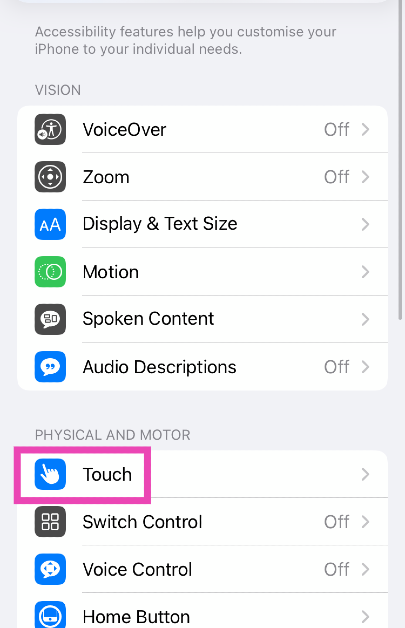 Step 3: Turn on the toggle switch next to Reachability.
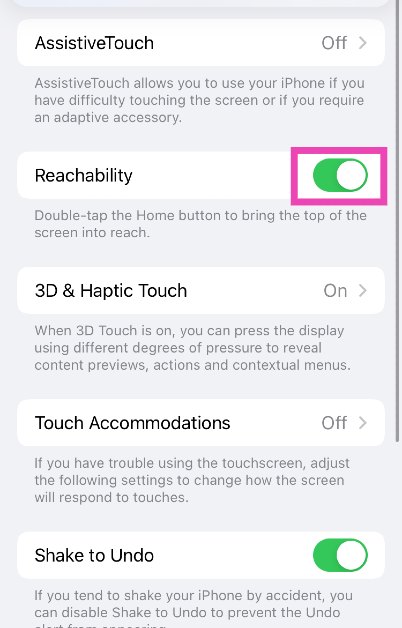 Step 4: If your iPhone has Face ID, swipe down on the bottom edge of the screen to go into one-handed mode. If your iPhone has Touch ID, lightly double-tap the home button twice.
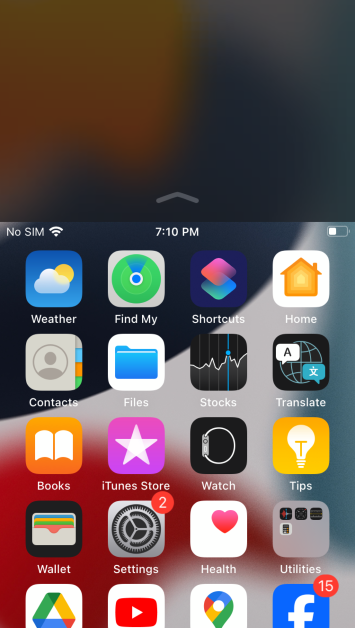 Step 5: Tap the upper half of the screen to return to full-screen mode.
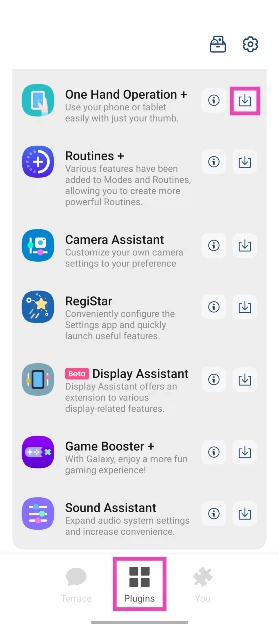 Step 3: Tap the plugin and turn on its toggle switch.
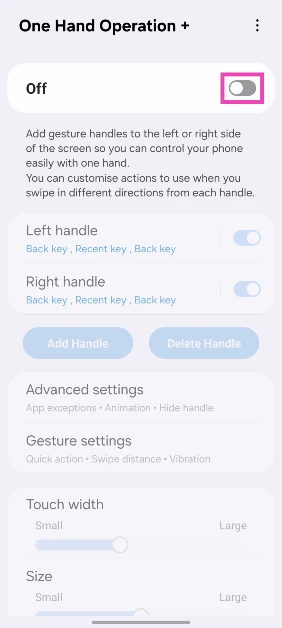 Step 4: Tap on Left handle and select your customised controls.
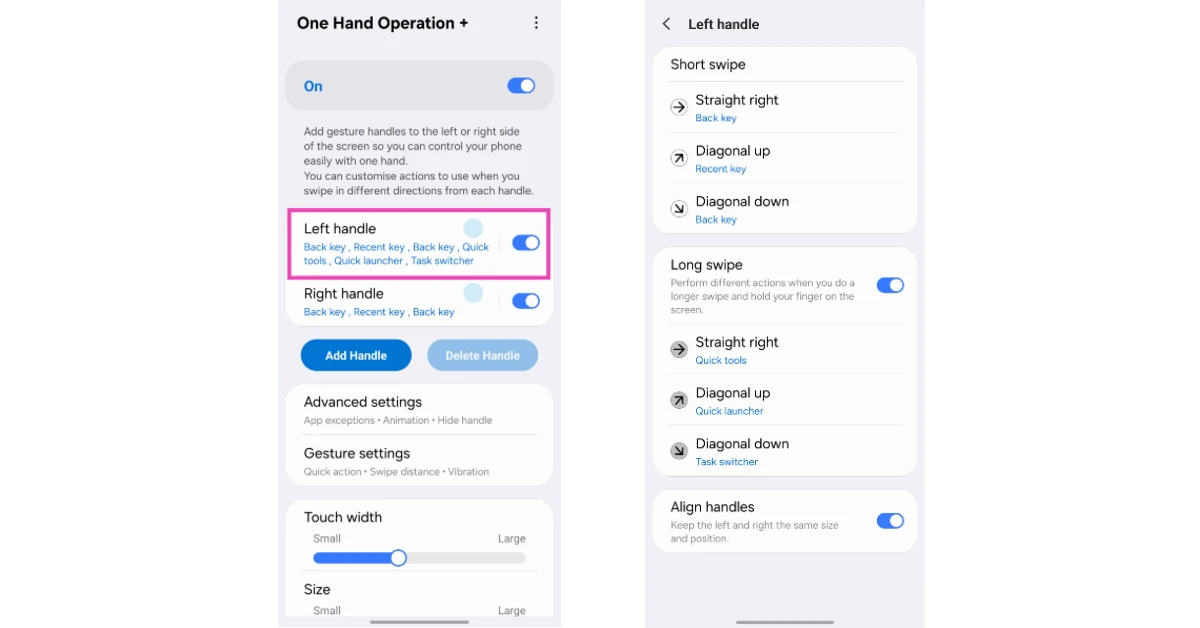 Step 5: Tap on Right handle and select your customised controls.
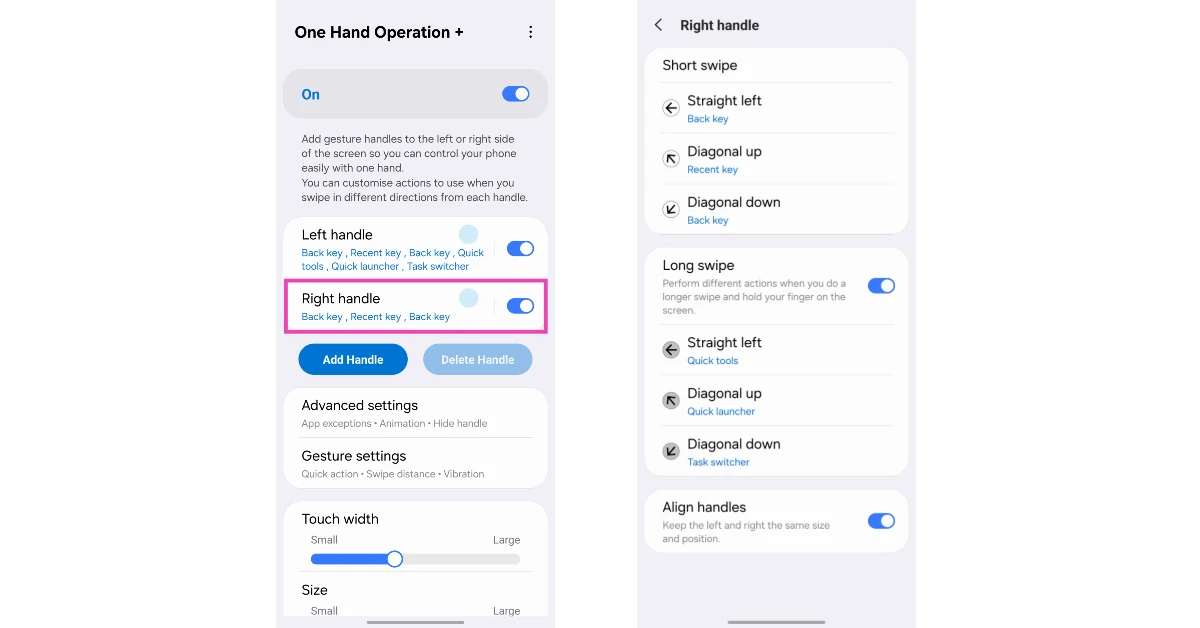 Step 6: Go to the previous page and use the sliders to adjust the size, width, and position of the handles.
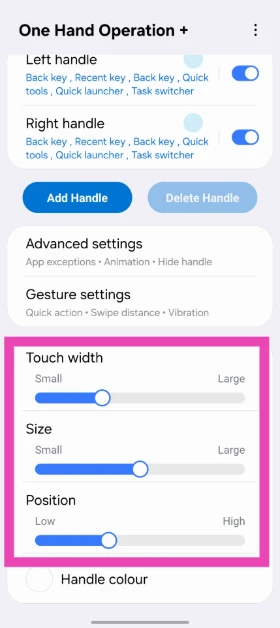




 Step 4: Upload the two documents in the Original and Revised categories.
 Step 5: Hit More and select the comparison parameters. You can also choose whether the changes show up in the original document, revised document, or a new document.
 Step 6: Click OK to compare the two documents.
 Step 4: The two documents will be arranged side by side.
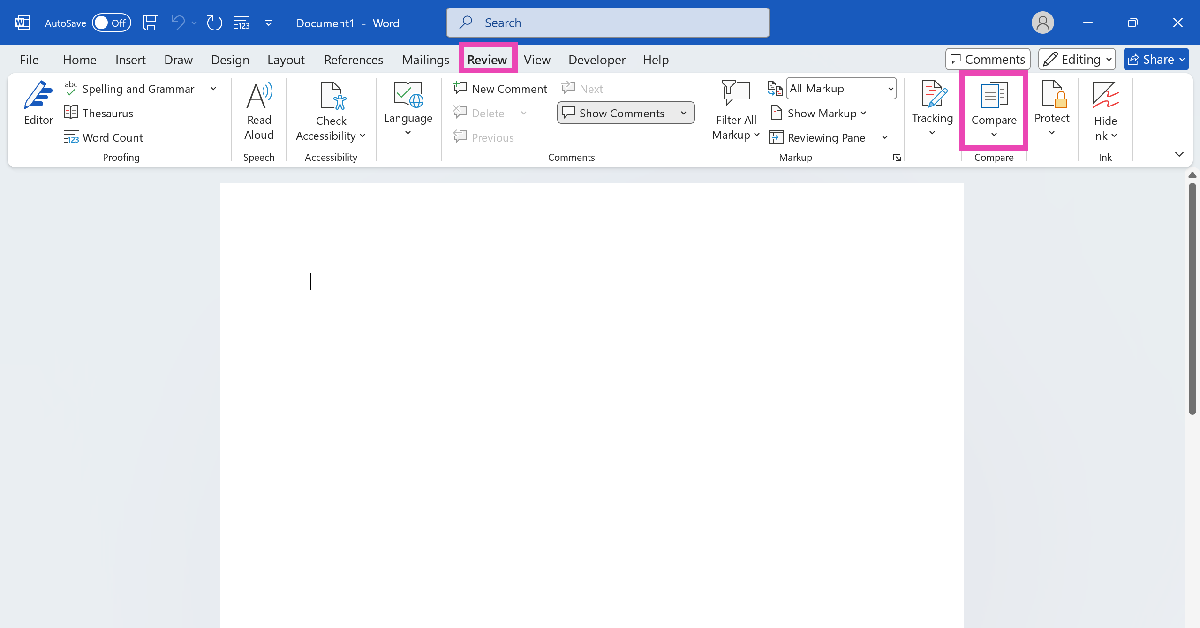 Step 3: Click on Compare.
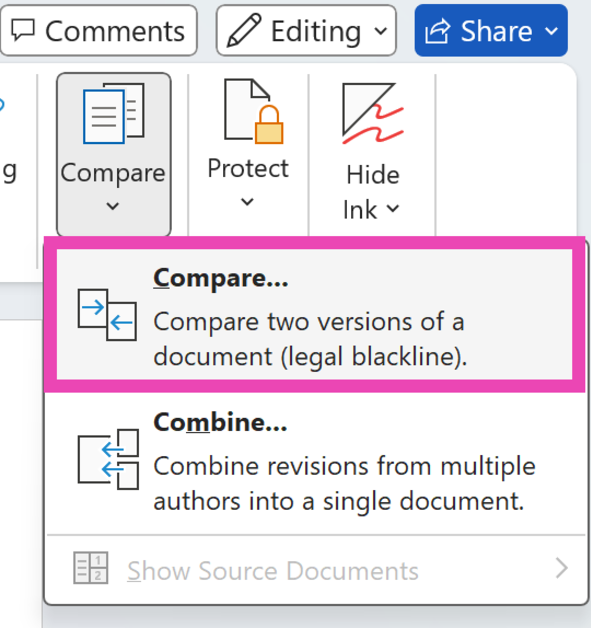 Step 4: Upload the two documents in the Original and Revised categories.
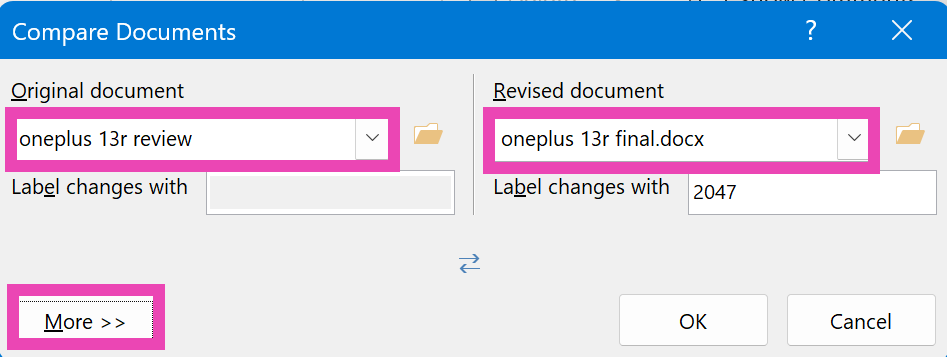 Step 5: Hit More and select the comparison parameters. You can also choose whether the changes show up in the original document, revised document, or a new document.
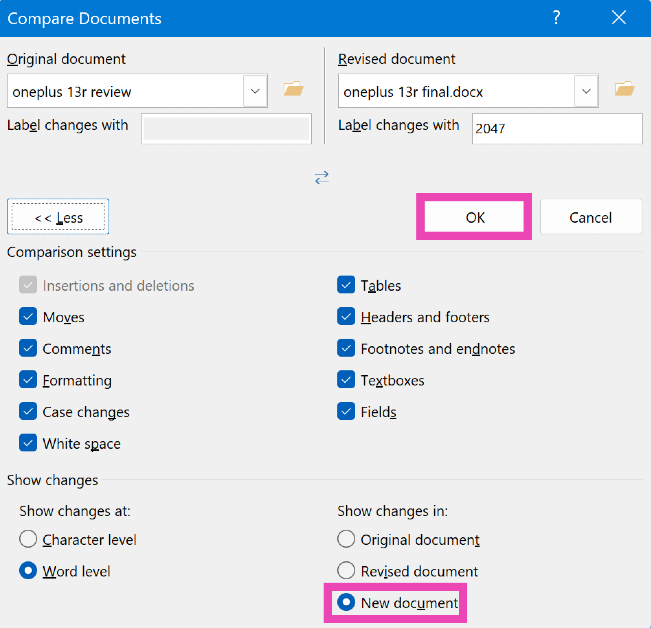 Step 6: Click OK to compare the two documents.
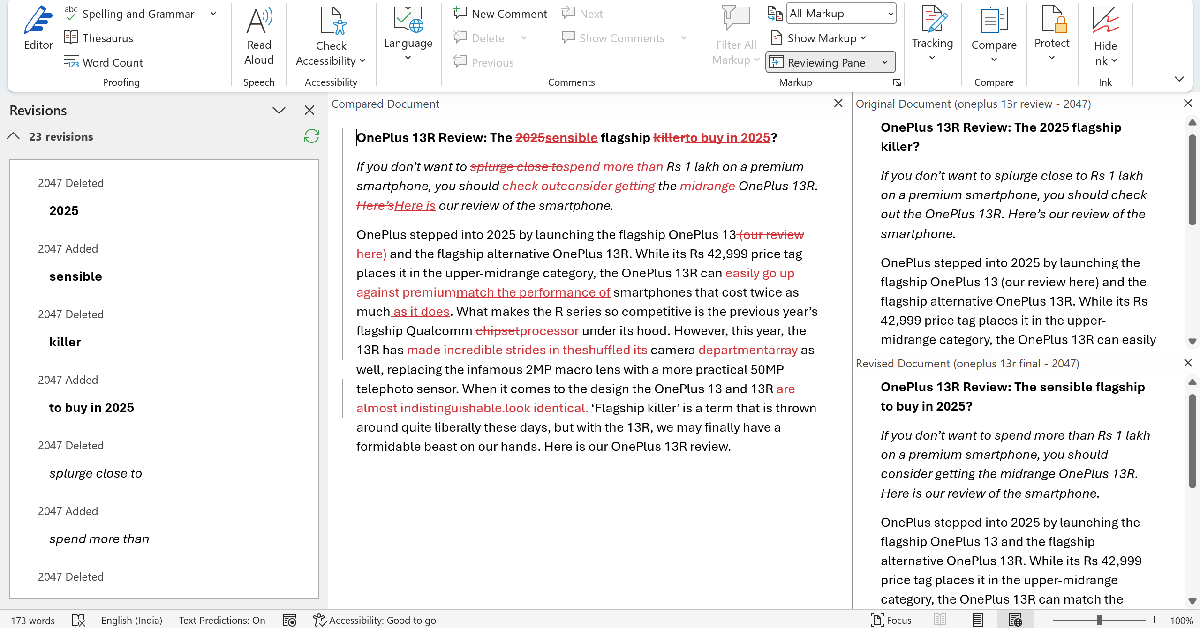
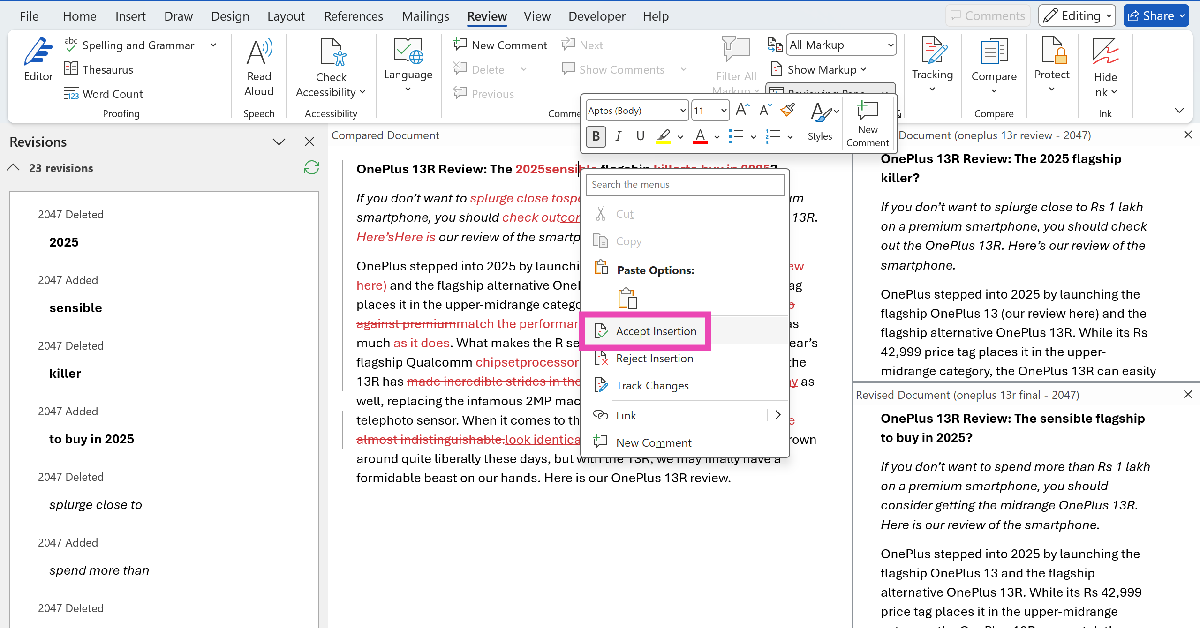 Step 2: To accept all changes, click on Tracking and hit Accept.
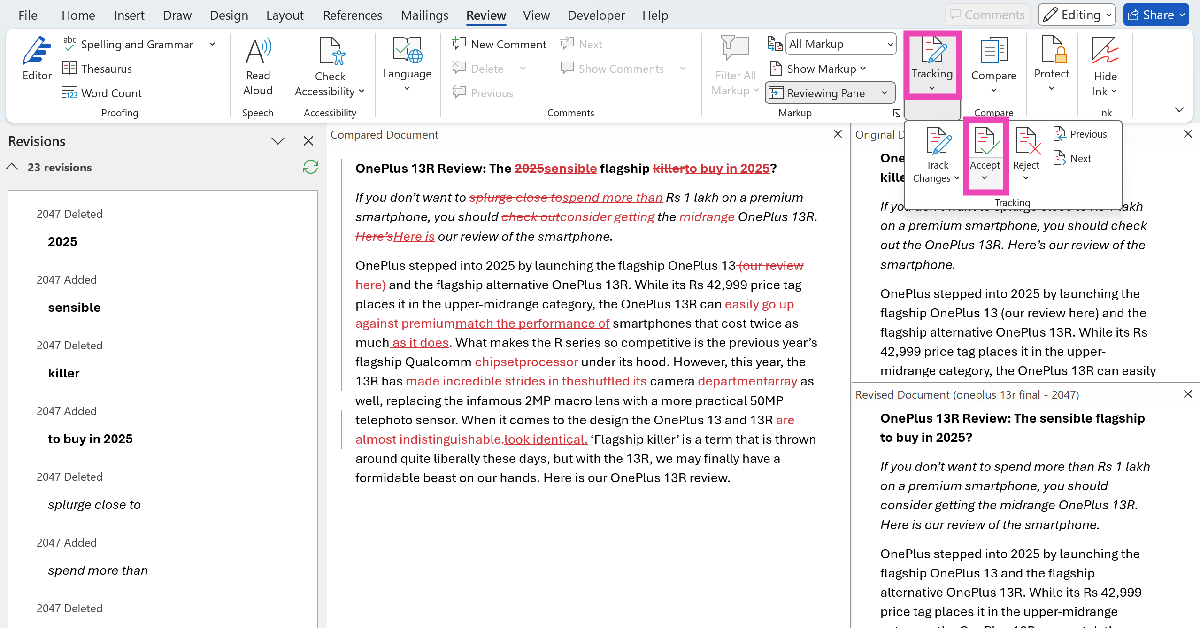 Step 3: Click on Accept All Changes. Similarly, you can choose to reject all changes.
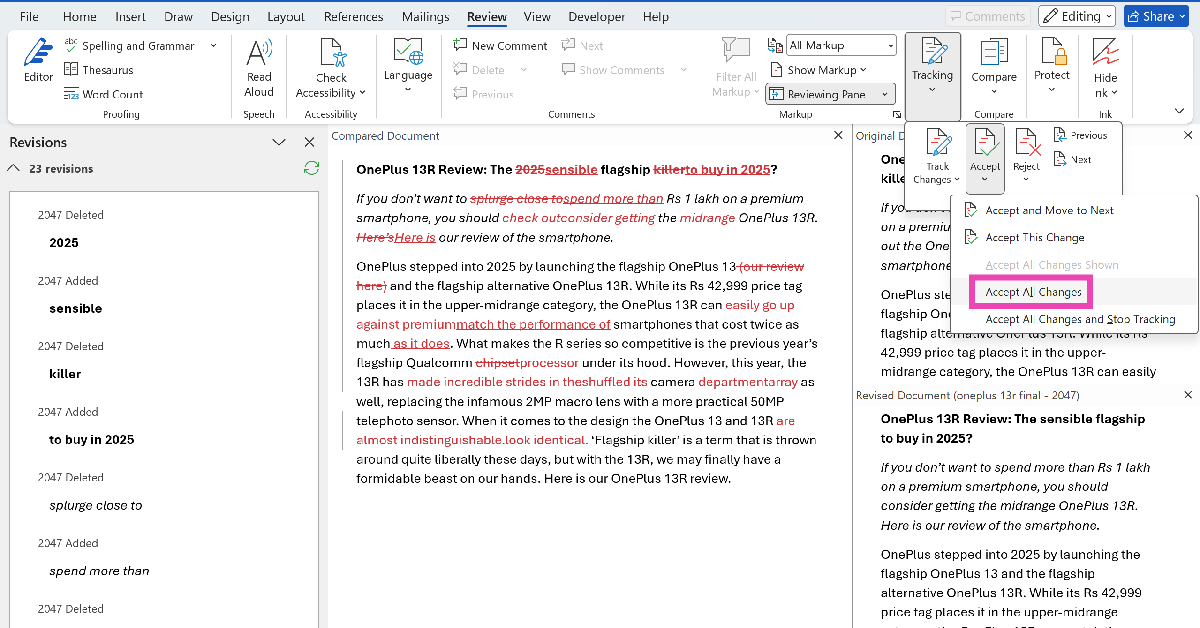
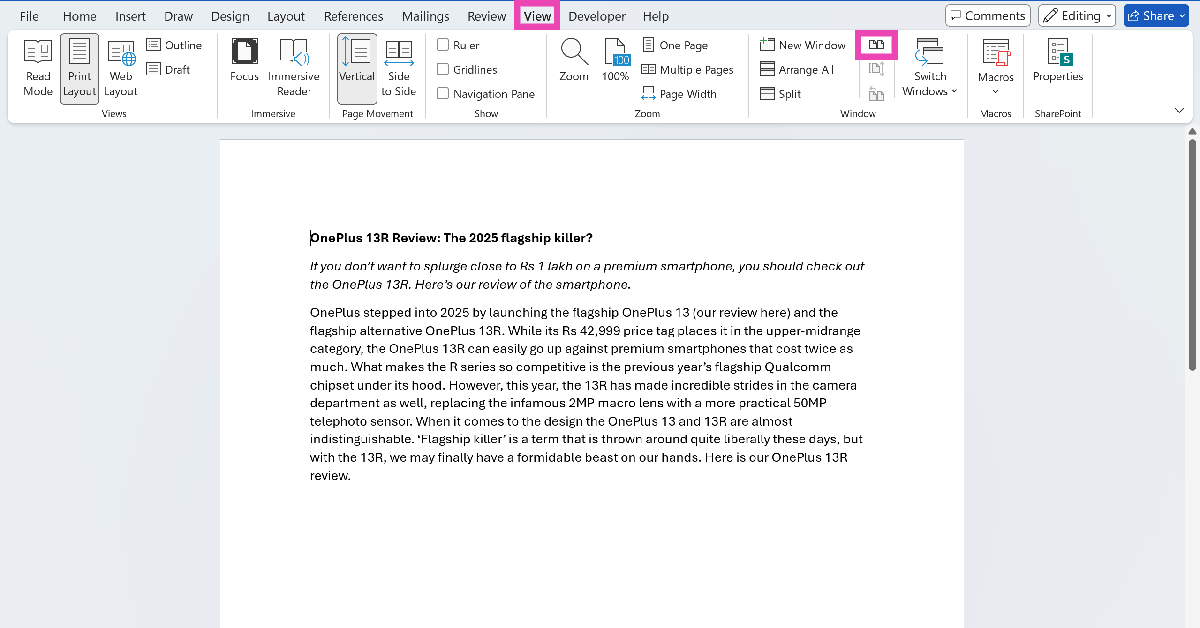 Step 3: In the Window category, click the topmost icon in the middle row.
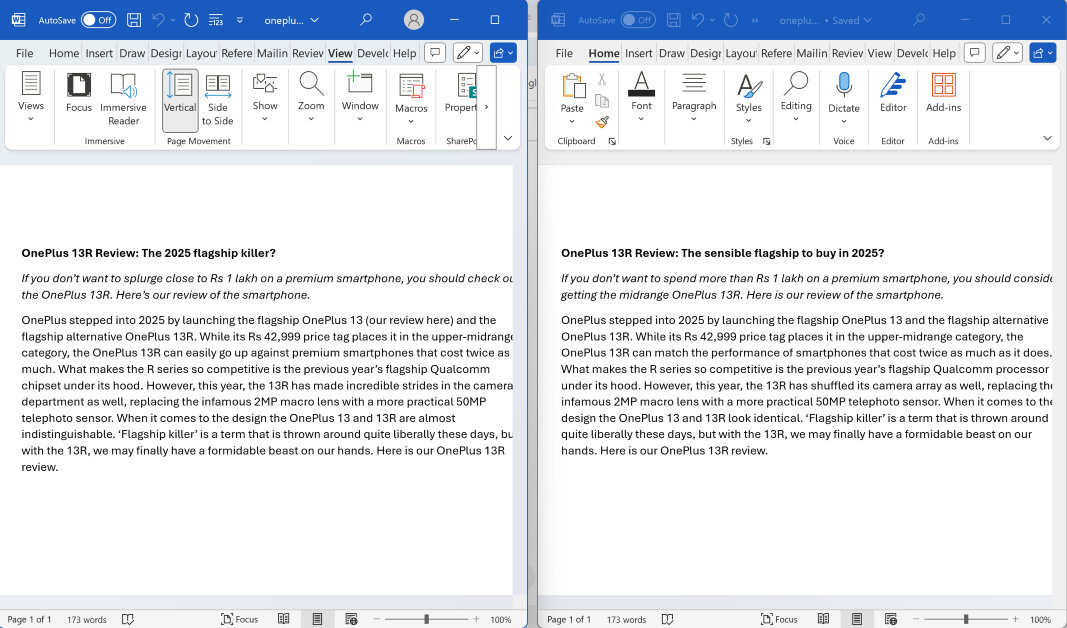 Step 4: The two documents will be arranged side by side.

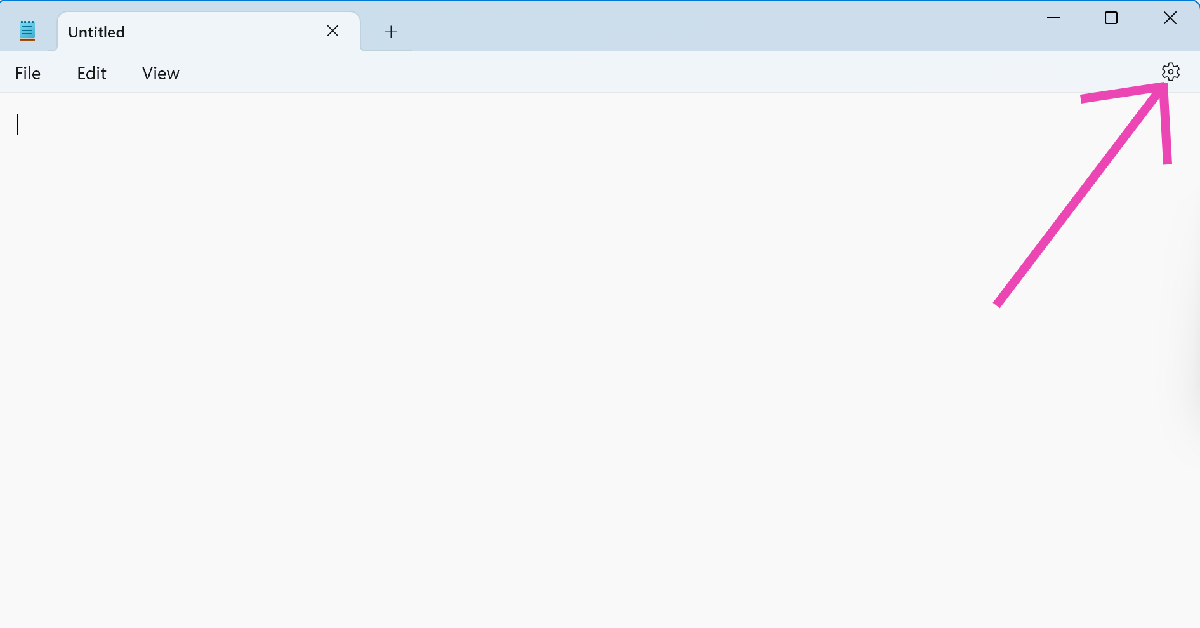 Step 2: Click the arrow next to App theme to expand the category.
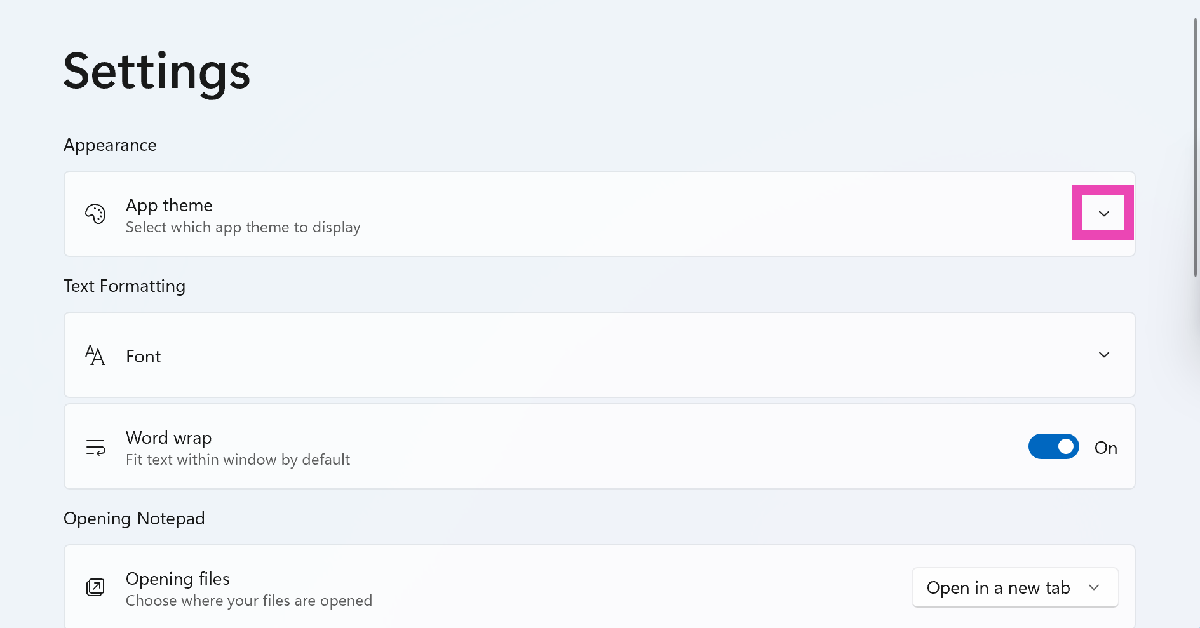 Step 3: Select Dark.
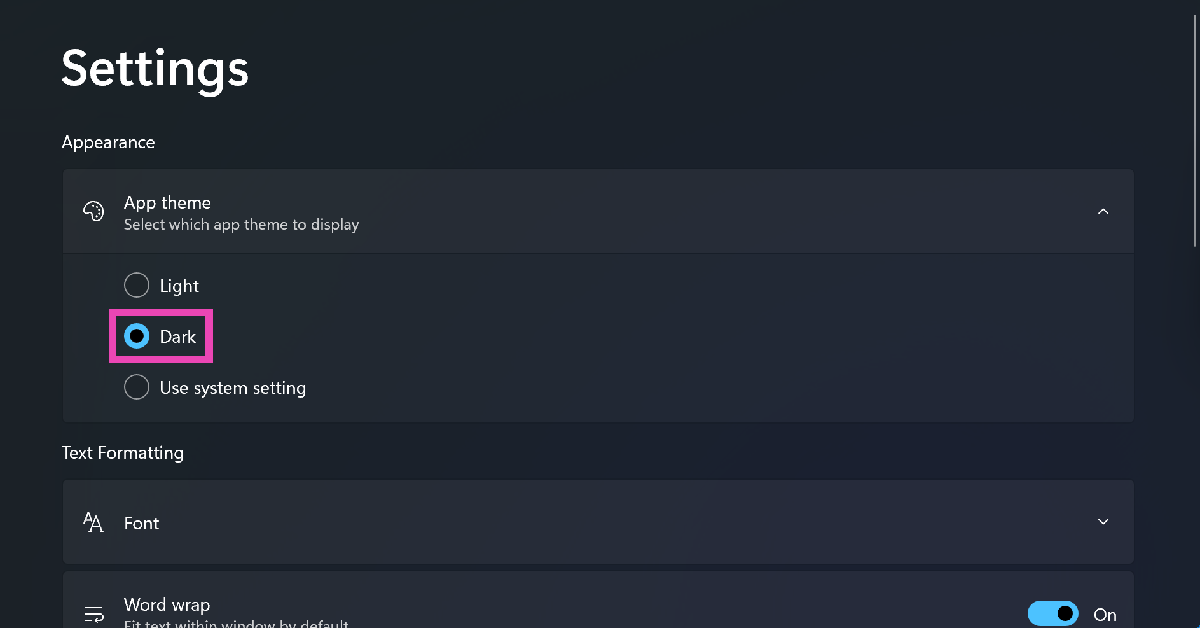
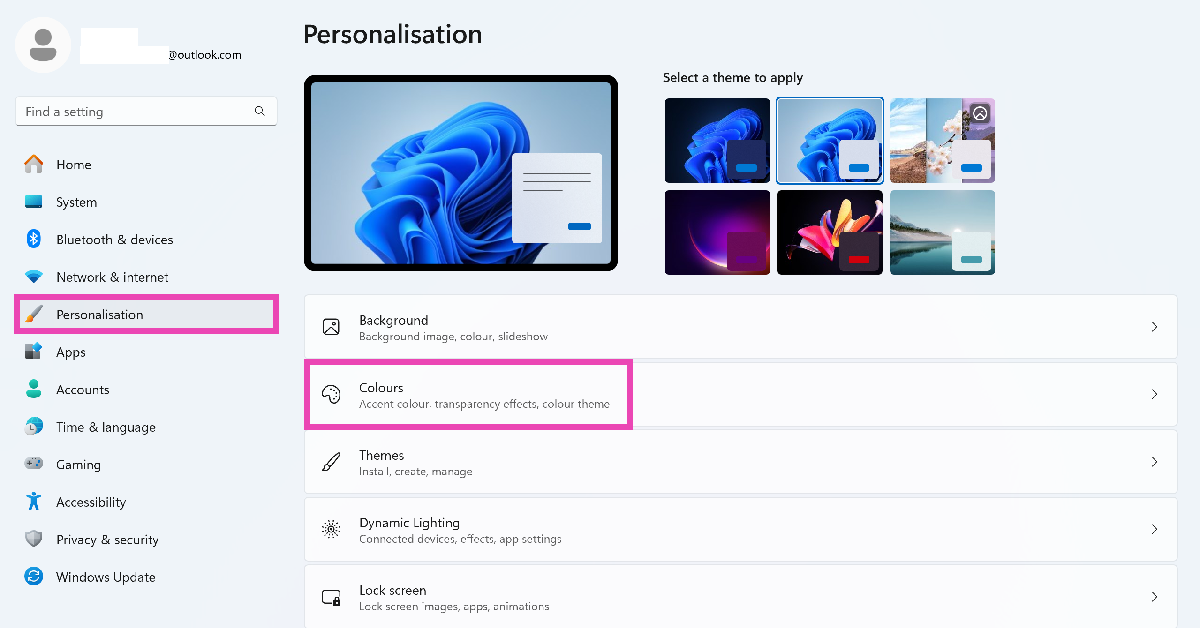 Step 3: Click the dropdown menu next to Choose your mode and select Dark.
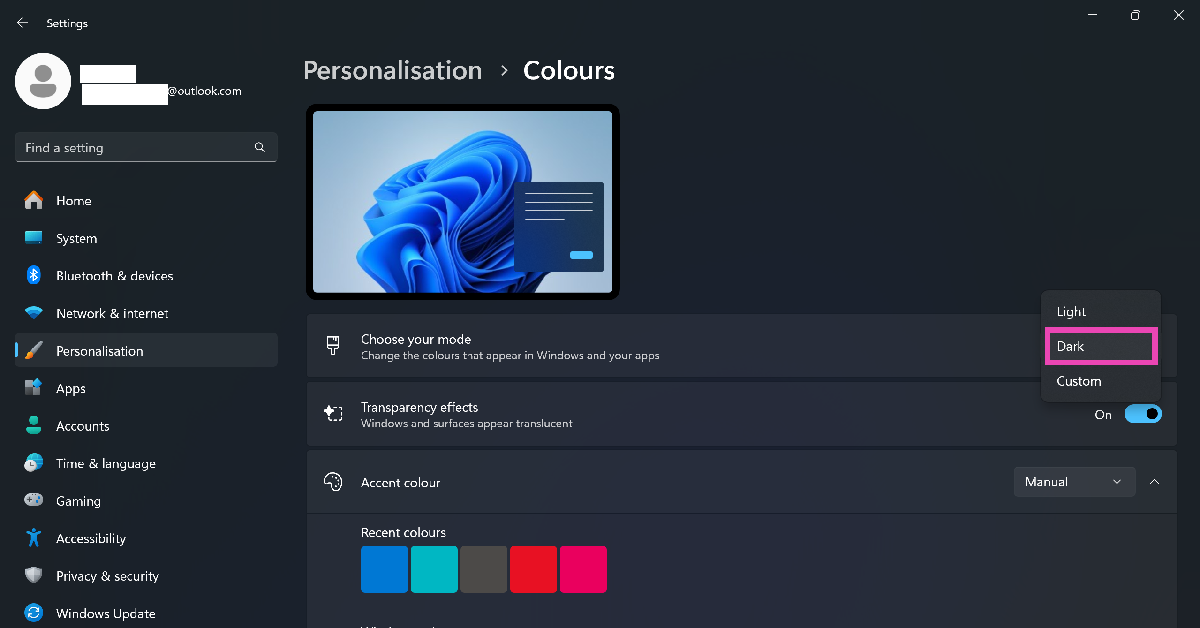
 Since the Notepad app for Windows 10 does not have a dark theme, you will need to enable the ‘High Contrast’ system feature. Here’s how.
Step 1: Press Windows + I to go to Settings.
Step 2: Click on Accessibility.
Step 3: Switch to the High Contrast tab.
Step 4: Flick the toggle switch under Turn on high contrast.
Since the Notepad app for Windows 10 does not have a dark theme, you will need to enable the ‘High Contrast’ system feature. Here’s how.
Step 1: Press Windows + I to go to Settings.
Step 2: Click on Accessibility.
Step 3: Switch to the High Contrast tab.
Step 4: Flick the toggle switch under Turn on high contrast.
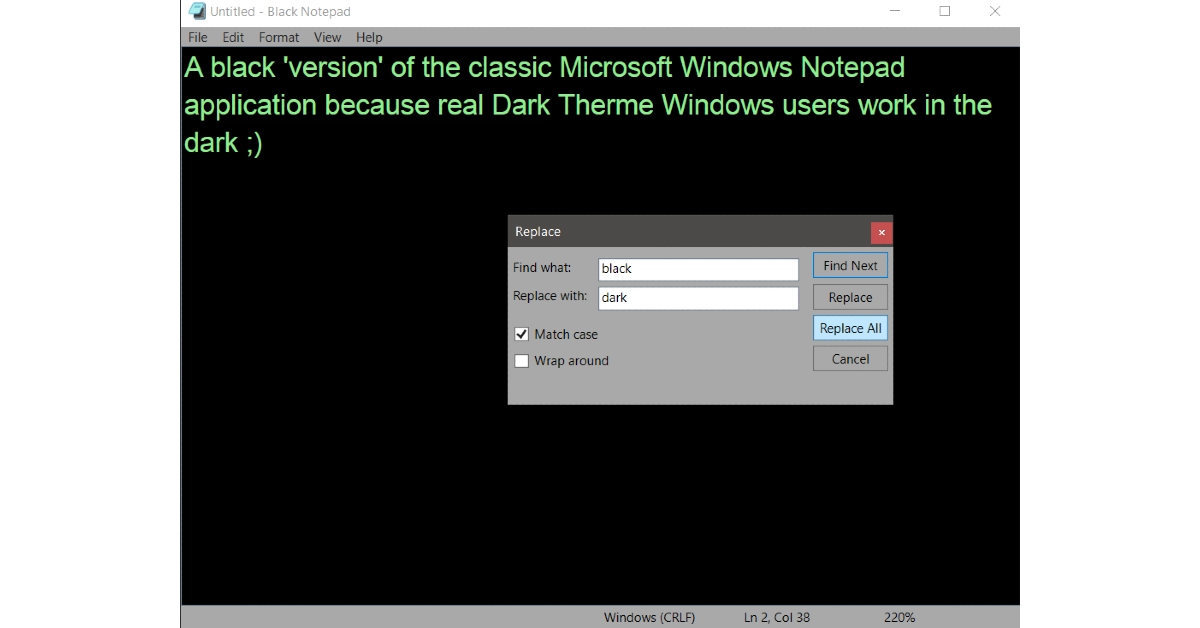 The high contrast tool in Windows 10 applies a dark theme across the system. If you want Dark Mode specifically in the Notepad app, you will need to use third-party alternatives for the text editor. The Black Notepad app available in the Microsoft Store does the job quite well. It replicates the feel of the regular Notepad app but adds a dark theme to it.
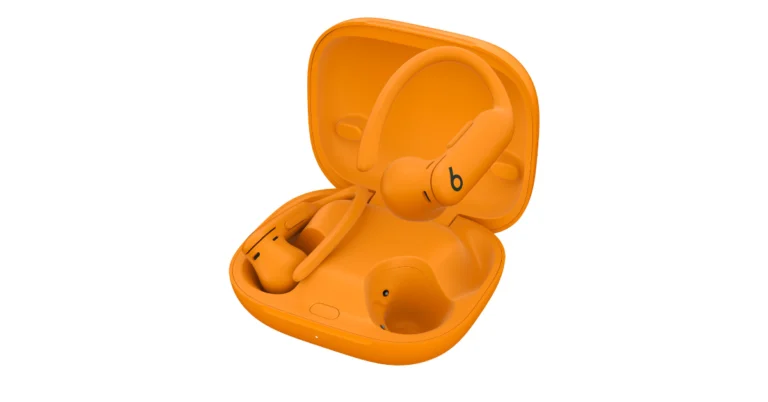
 Compared to its predecessor, the device is said to be 20% lighter. In order to maximise the ease of use, the company is also providing a fifth ear tip size. Because Powerbeats Pro 2 has an IPX4 rating and is sweat and water-resistant, you can work out even in the rain, snow, or heat.
Also Read: Instagram expands Teen Accounts to India, will create a more secure and age-appropriate space for teens online
Workouts may continue without interruption thanks to the earbuds’ on-ear buttons or voice control for music management. For extra convenience, each earbud has a tactile volume rocker. The business claims that after more than 1,500 hours of rigorous testing with almost 1,000 athletes, the Powerbeats Pro 2 was found to be the best-fitting headset ever.
With the use of precise heart rate monitoring sensors, Powerbeats Pro 2 is intended to deliver real-time data on how well you workout. These LED optical sensors measure blood flow and send the data to fitness apps in real-time by pulsating light more than 100 times per second. At any time, the monitoring can be stopped.
The training earphones have Transparency mode for greater clarity of the outside world and Active Noise Cancelling (ANC) for concentrated listening. For an immersive music experience, it has an updated acoustic architecture, improved venting, and customised spatial audio with dynamic head tracking.
Also Read: Samsung unveils 2025 Bespoke AI WindFree air conditioners in India
The Adaptive EQ earbuds continuously scan your unique ear shape using advanced inward-facing microphones to maximise your listening experience. With real-time hearing analysis, this technology adjusts acoustic frequencies to produce clear, personalised sound. With three advanced microphones and a voice accelerometer, each earbud offers superior voice targeting, noise reduction, and increased accuracy and signal-to-noise ratio.
The Powerbeats Pro 2 has a 33% smaller charging case for mobility, 15 hours of playback on a 5-minute charge, and up to 45 hours of listening time and 10 hours of continuous bud playback on a single charge.
Compared to its predecessor, the device is said to be 20% lighter. In order to maximise the ease of use, the company is also providing a fifth ear tip size. Because Powerbeats Pro 2 has an IPX4 rating and is sweat and water-resistant, you can work out even in the rain, snow, or heat.
Also Read: Instagram expands Teen Accounts to India, will create a more secure and age-appropriate space for teens online
Workouts may continue without interruption thanks to the earbuds’ on-ear buttons or voice control for music management. For extra convenience, each earbud has a tactile volume rocker. The business claims that after more than 1,500 hours of rigorous testing with almost 1,000 athletes, the Powerbeats Pro 2 was found to be the best-fitting headset ever.
With the use of precise heart rate monitoring sensors, Powerbeats Pro 2 is intended to deliver real-time data on how well you workout. These LED optical sensors measure blood flow and send the data to fitness apps in real-time by pulsating light more than 100 times per second. At any time, the monitoring can be stopped.
The training earphones have Transparency mode for greater clarity of the outside world and Active Noise Cancelling (ANC) for concentrated listening. For an immersive music experience, it has an updated acoustic architecture, improved venting, and customised spatial audio with dynamic head tracking.
Also Read: Samsung unveils 2025 Bespoke AI WindFree air conditioners in India
The Adaptive EQ earbuds continuously scan your unique ear shape using advanced inward-facing microphones to maximise your listening experience. With real-time hearing analysis, this technology adjusts acoustic frequencies to produce clear, personalised sound. With three advanced microphones and a voice accelerometer, each earbud offers superior voice targeting, noise reduction, and increased accuracy and signal-to-noise ratio.
The Powerbeats Pro 2 has a 33% smaller charging case for mobility, 15 hours of playback on a 5-minute charge, and up to 45 hours of listening time and 10 hours of continuous bud playback on a single charge. 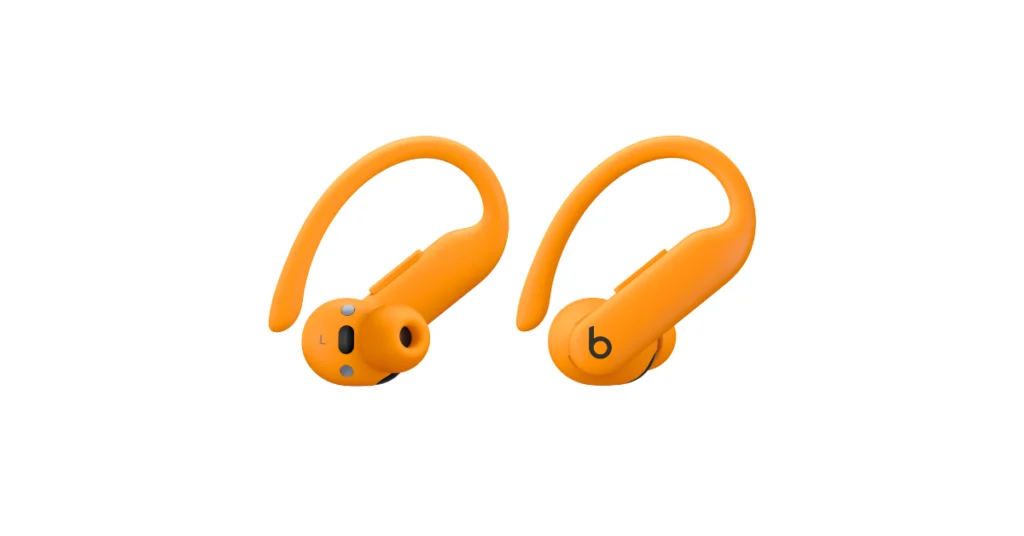 Compared to its predecessor, the device is said to be 20% lighter. In order to maximise the ease of use, the company is also providing a fifth ear tip size. Because Powerbeats Pro 2 has an IPX4 rating and is sweat and water-resistant, you can work out even in the rain, snow, or heat.
Also Read: Instagram expands Teen Accounts to India, will create a more secure and age-appropriate space for teens online
Workouts may continue without interruption thanks to the earbuds’ on-ear buttons or voice control for music management. For extra convenience, each earbud has a tactile volume rocker. The business claims that after more than 1,500 hours of rigorous testing with almost 1,000 athletes, the Powerbeats Pro 2 was found to be the best-fitting headset ever.
With the use of precise heart rate monitoring sensors, Powerbeats Pro 2 is intended to deliver real-time data on how well you workout. These LED optical sensors measure blood flow and send the data to fitness apps in real-time by pulsating light more than 100 times per second. At any time, the monitoring can be stopped.
The training earphones have Transparency mode for greater clarity of the outside world and Active Noise Cancelling (ANC) for concentrated listening. For an immersive music experience, it has an updated acoustic architecture, improved venting, and customised spatial audio with dynamic head tracking.
Also Read: Samsung unveils 2025 Bespoke AI WindFree air conditioners in India
The Adaptive EQ earbuds continuously scan your unique ear shape using advanced inward-facing microphones to maximise your listening experience. With real-time hearing analysis, this technology adjusts acoustic frequencies to produce clear, personalised sound. With three advanced microphones and a voice accelerometer, each earbud offers superior voice targeting, noise reduction, and increased accuracy and signal-to-noise ratio.
The Powerbeats Pro 2 has a 33% smaller charging case for mobility, 15 hours of playback on a 5-minute charge, and up to 45 hours of listening time and 10 hours of continuous bud playback on a single charge.
Compared to its predecessor, the device is said to be 20% lighter. In order to maximise the ease of use, the company is also providing a fifth ear tip size. Because Powerbeats Pro 2 has an IPX4 rating and is sweat and water-resistant, you can work out even in the rain, snow, or heat.
Also Read: Instagram expands Teen Accounts to India, will create a more secure and age-appropriate space for teens online
Workouts may continue without interruption thanks to the earbuds’ on-ear buttons or voice control for music management. For extra convenience, each earbud has a tactile volume rocker. The business claims that after more than 1,500 hours of rigorous testing with almost 1,000 athletes, the Powerbeats Pro 2 was found to be the best-fitting headset ever.
With the use of precise heart rate monitoring sensors, Powerbeats Pro 2 is intended to deliver real-time data on how well you workout. These LED optical sensors measure blood flow and send the data to fitness apps in real-time by pulsating light more than 100 times per second. At any time, the monitoring can be stopped.
The training earphones have Transparency mode for greater clarity of the outside world and Active Noise Cancelling (ANC) for concentrated listening. For an immersive music experience, it has an updated acoustic architecture, improved venting, and customised spatial audio with dynamic head tracking.
Also Read: Samsung unveils 2025 Bespoke AI WindFree air conditioners in India
The Adaptive EQ earbuds continuously scan your unique ear shape using advanced inward-facing microphones to maximise your listening experience. With real-time hearing analysis, this technology adjusts acoustic frequencies to produce clear, personalised sound. With three advanced microphones and a voice accelerometer, each earbud offers superior voice targeting, noise reduction, and increased accuracy and signal-to-noise ratio.
The Powerbeats Pro 2 has a 33% smaller charging case for mobility, 15 hours of playback on a 5-minute charge, and up to 45 hours of listening time and 10 hours of continuous bud playback on a single charge. 
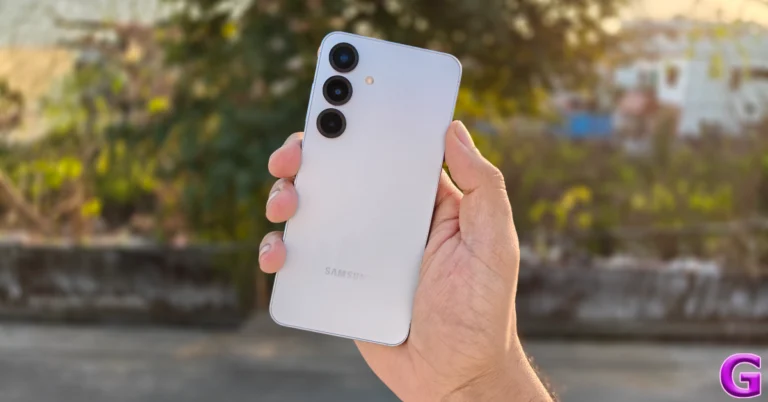
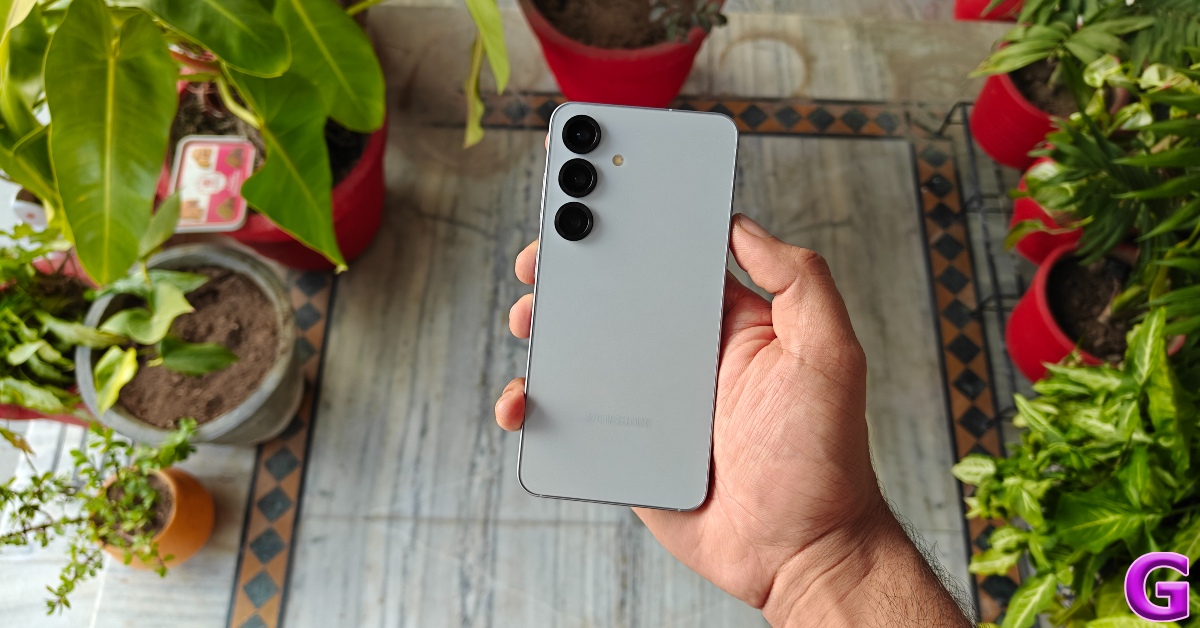 The bottom edge of the device houses the SIM tray, USB Type-C port, primary microphone, and primary speaker output. The top rail houses the secondary microphones. The earpiece also acts as the secondary speaker. The volume rocker and side button are positioned on the right edge. The device is rated IP68 for dust and water resistance. It can survive being submerged up to 1.5m for 30 minutes. With the recent crop of flagships featuring IP69 ratings (making them impervious to high-pressure water jets), the Galaxy S series has some catching up to do. All the more reason for Samsung to start making some fresh moves.
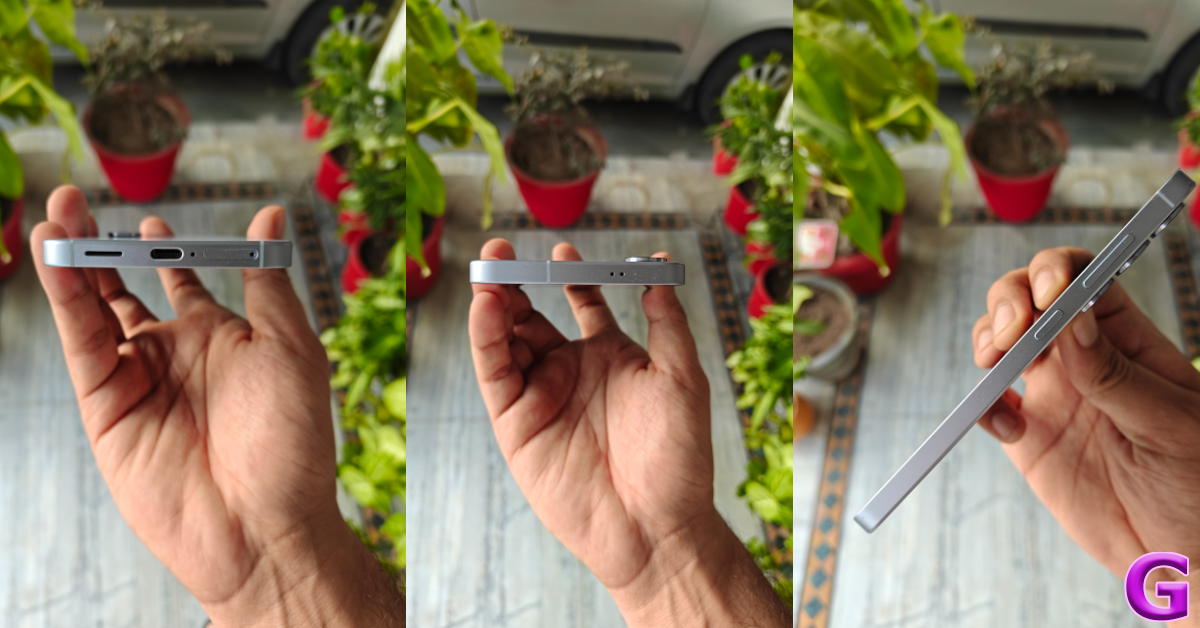 However, when it comes to displays, Samsung still reigns supreme. The 6.2-inch Dynamic LTPO AMOLED display on the Galaxy S25 is identical to its predecessor but has a marginally better screen-to-body ratio (~91.1%). This AMOLED panel works like a charm. It supports a 120Hz refresh rate and can hit a peak brightness of 2,600 nits. You can whip out this phone under direct sunlight and its display will remain unfazed by the bright surroundings. It is one of the smoothest panels we’ve ever used and the fluid experience is only compounded by the snappy ultrasonic fingerprint sensor that lies underneath it.
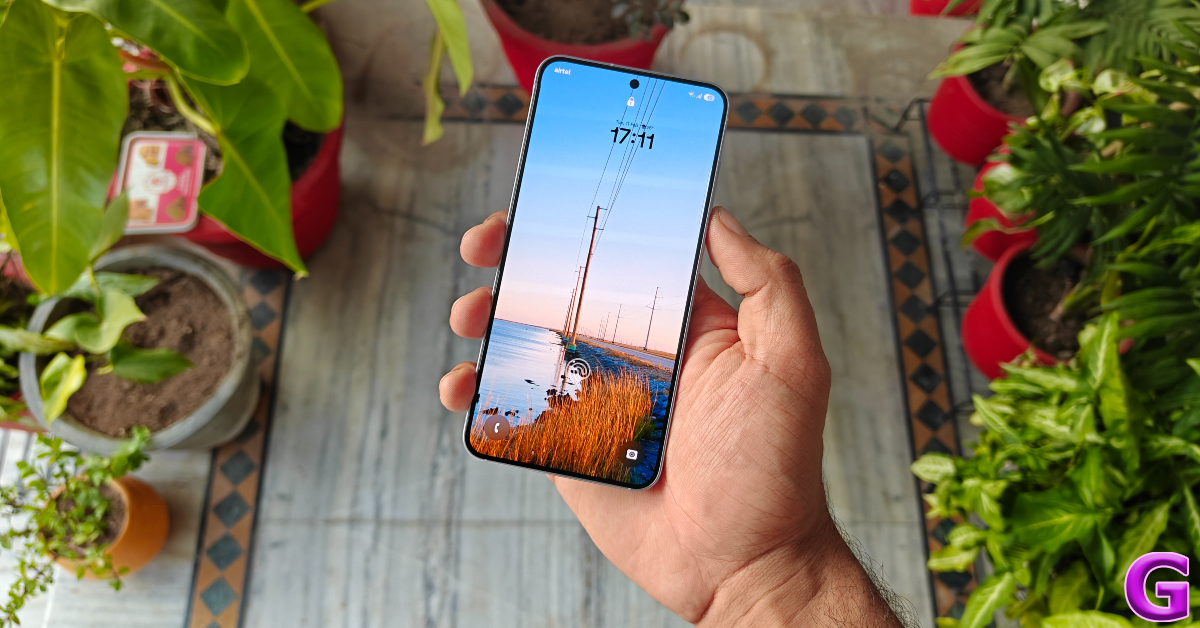 During the review period, we streamed movie titles and live sports across OTT platforms like Netflix, Disney+ Hostar, and Prime Video on the Samsung Galaxy S25. The smartphone produced an excellent viewing experience aided by detailed images that showcased vibrant and punchy colours. The dynamic range and contrast levels were perfect. We were also happy with the audio output produced by the stereo speaker setup.
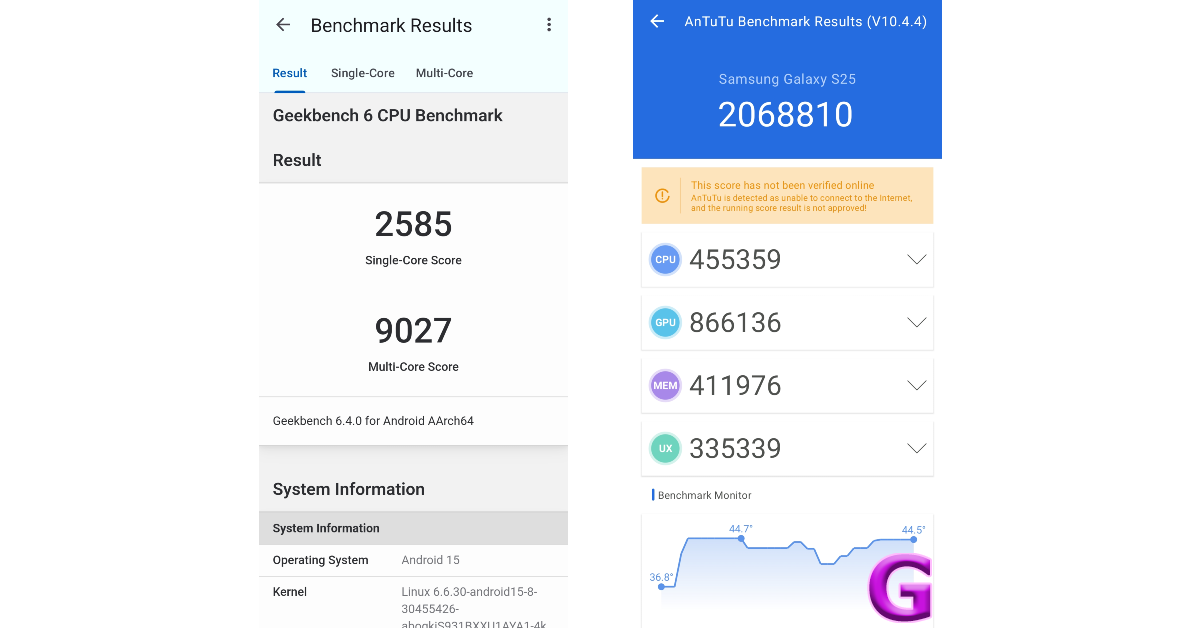 The Samsung Galaxy S25 is available in 2 storage (UFS 4.0) variants. Both variants have a fixed 12GB RAM (LPDDR5X).
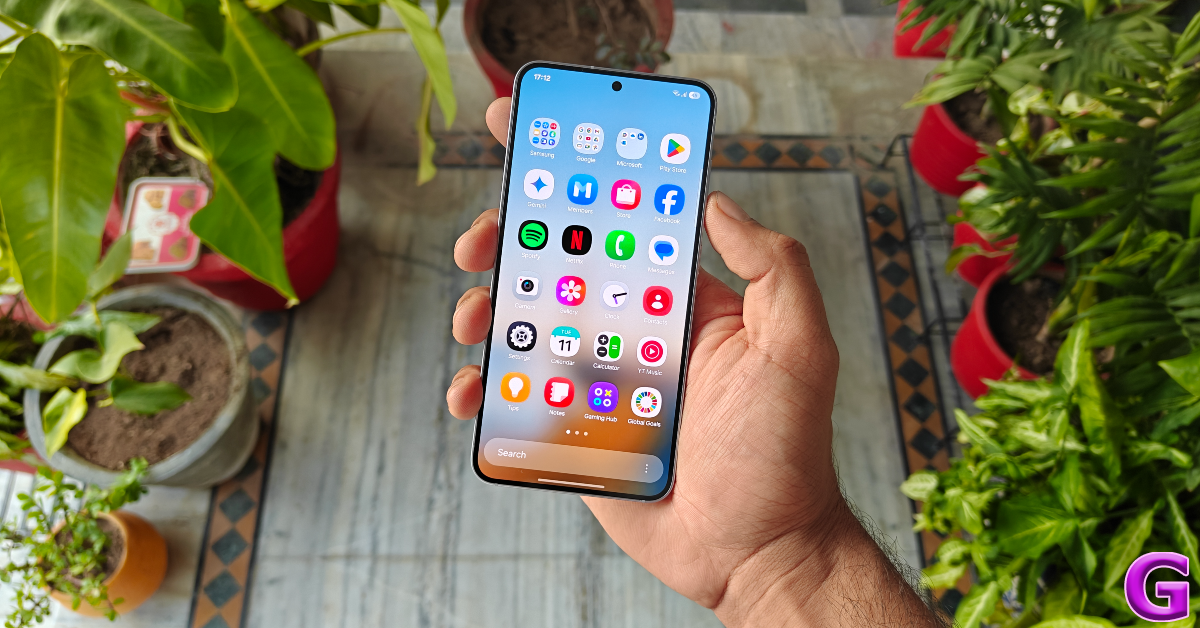 The Galaxy S25 replicated a similar performance while gaming too. We played titles like Call of Duty Mobile and Apex Legends Unite on the smartphone and it produced detailed in-game visuals at 120fps. We did not encounter any frame drops or unnecessary lags while gaming. However, the smartphone could use a better cooling chamber as its back panel started warming up after 25 minutes of gameplay. We would also like to see a more comprehensive gaming toolbar in the next iteration of One UI.
Samsung is one of the last OEMs to come out with its Android 15-based skin but it is worth the wait. One UI 7 is lighter, snappier, and better looking than its previous iteration. Samsung has taken some design inspiration from iOS on its new skin, as the Quick Settings Menu is not separated from the notification shade. The former can be accessed by swiping down from the top-right corner of the screen. Swiping down from anywhere else on the status bar or the home screen pulls down the notification shade. If you’re making the switch from iOS, this change will make the transition easier for you.
The Galaxy S25 replicated a similar performance while gaming too. We played titles like Call of Duty Mobile and Apex Legends Unite on the smartphone and it produced detailed in-game visuals at 120fps. We did not encounter any frame drops or unnecessary lags while gaming. However, the smartphone could use a better cooling chamber as its back panel started warming up after 25 minutes of gameplay. We would also like to see a more comprehensive gaming toolbar in the next iteration of One UI.
Samsung is one of the last OEMs to come out with its Android 15-based skin but it is worth the wait. One UI 7 is lighter, snappier, and better looking than its previous iteration. Samsung has taken some design inspiration from iOS on its new skin, as the Quick Settings Menu is not separated from the notification shade. The former can be accessed by swiping down from the top-right corner of the screen. Swiping down from anywhere else on the status bar or the home screen pulls down the notification shade. If you’re making the switch from iOS, this change will make the transition easier for you.
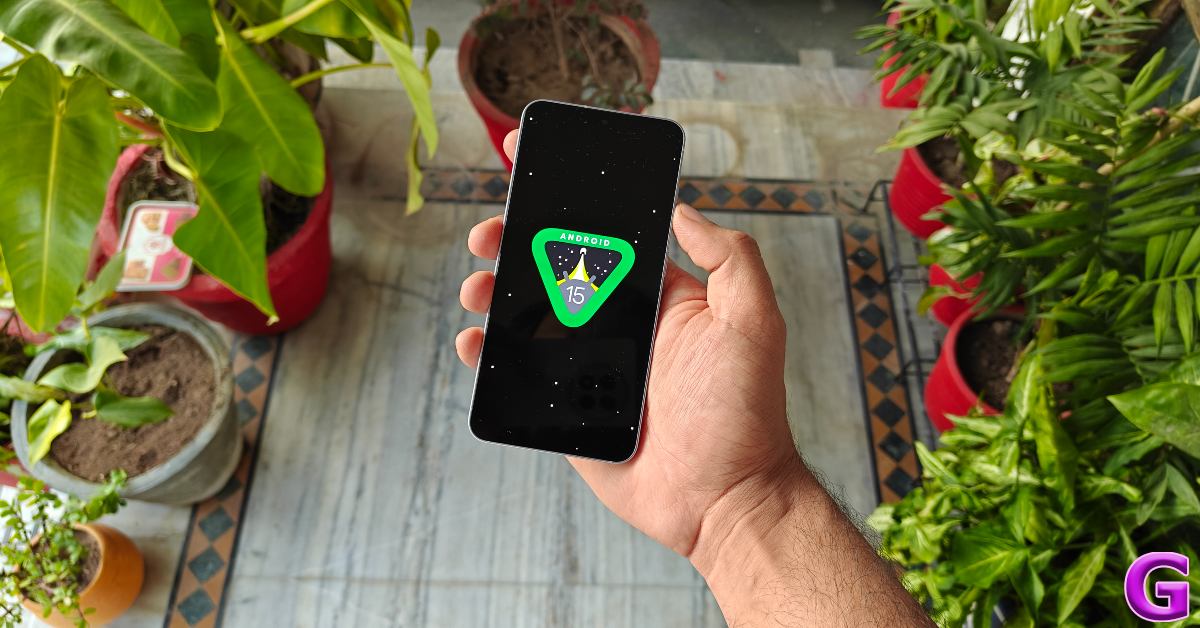 However, for seasoned Android users, this feels like a step back. Since the notification shade now gets a panel of its own, the lone alerts sit at the top of the screen and are a bit harder to reach while operating the phone with one hand. If you already struggle with one-handed usage on big displays, this will add to your problems. Secondly, the Quick Settings Menu cannot be expanded by swiping down on the home screen. It would’ve been more intuitive if a swipe-down gesture on the right side of the home page and the status bar triggered the Quick Settings Menu.
The good news is that you can reverse these changes and bring back the merged notification panel and Quick Settings. You can also change the order of the tiles in quick settings. If you find it hard to reach for the volume/brightness sliders or the WiFi/Bluetooth quick toggles, you can position them at the bottom of the panel.
However, for seasoned Android users, this feels like a step back. Since the notification shade now gets a panel of its own, the lone alerts sit at the top of the screen and are a bit harder to reach while operating the phone with one hand. If you already struggle with one-handed usage on big displays, this will add to your problems. Secondly, the Quick Settings Menu cannot be expanded by swiping down on the home screen. It would’ve been more intuitive if a swipe-down gesture on the right side of the home page and the status bar triggered the Quick Settings Menu.
The good news is that you can reverse these changes and bring back the merged notification panel and Quick Settings. You can also change the order of the tiles in quick settings. If you find it hard to reach for the volume/brightness sliders or the WiFi/Bluetooth quick toggles, you can position them at the bottom of the panel.
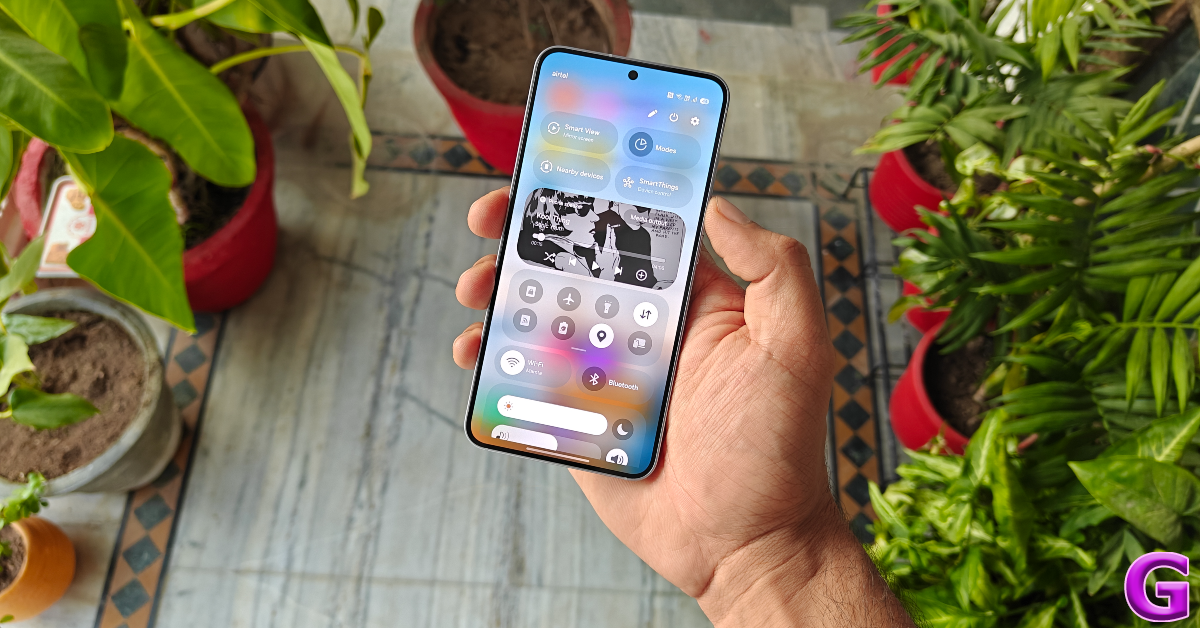
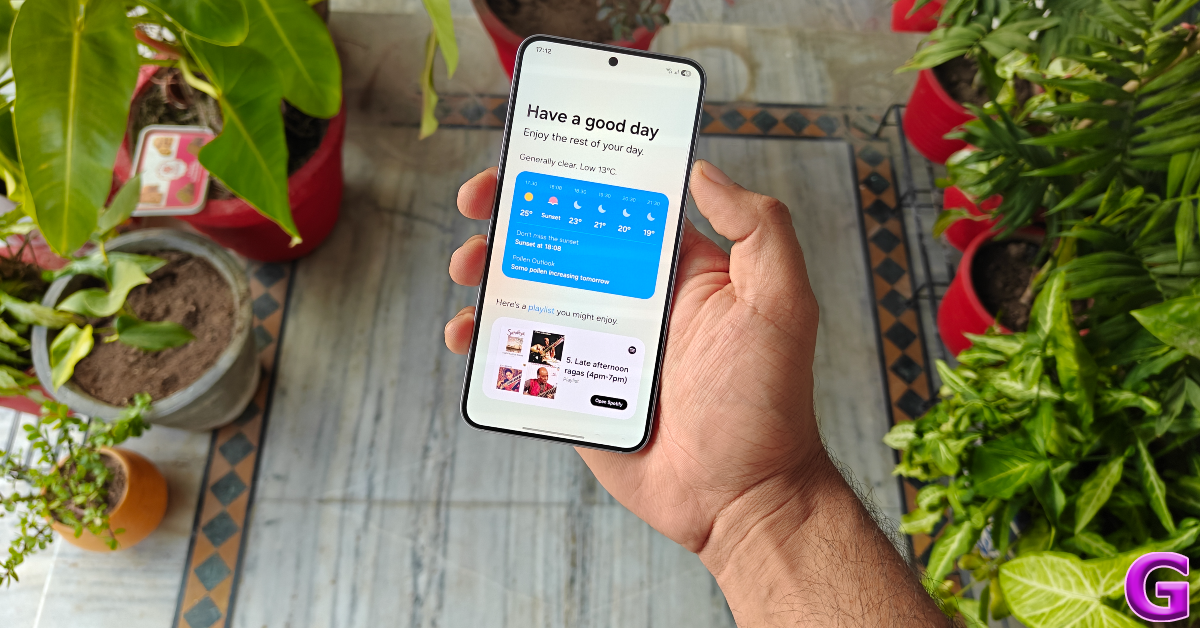
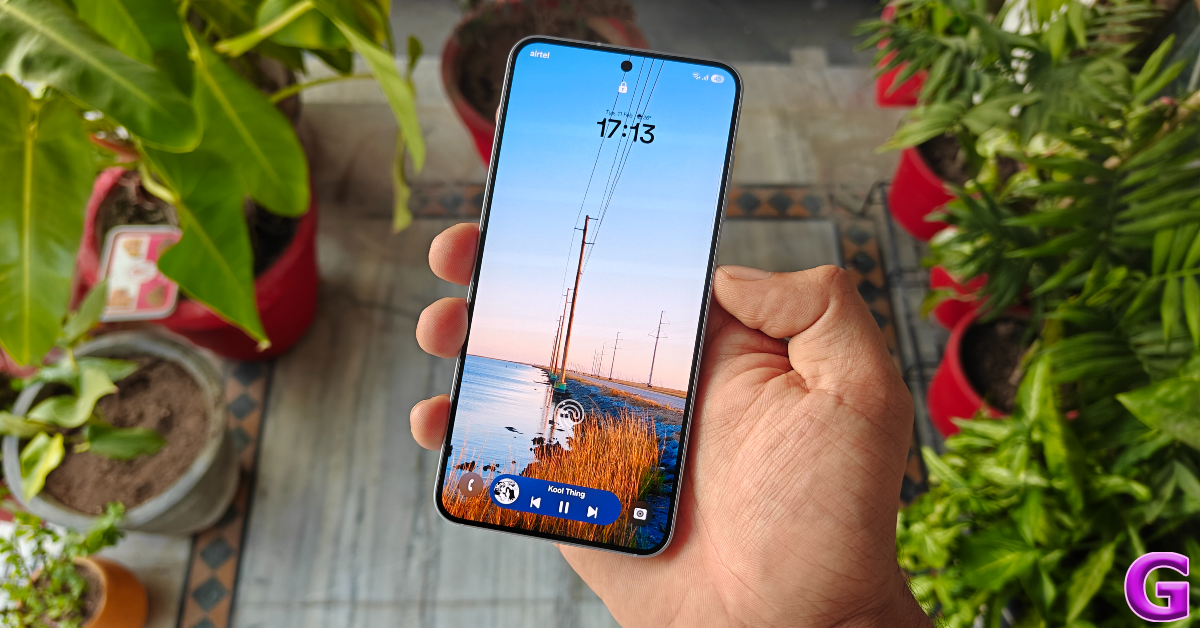
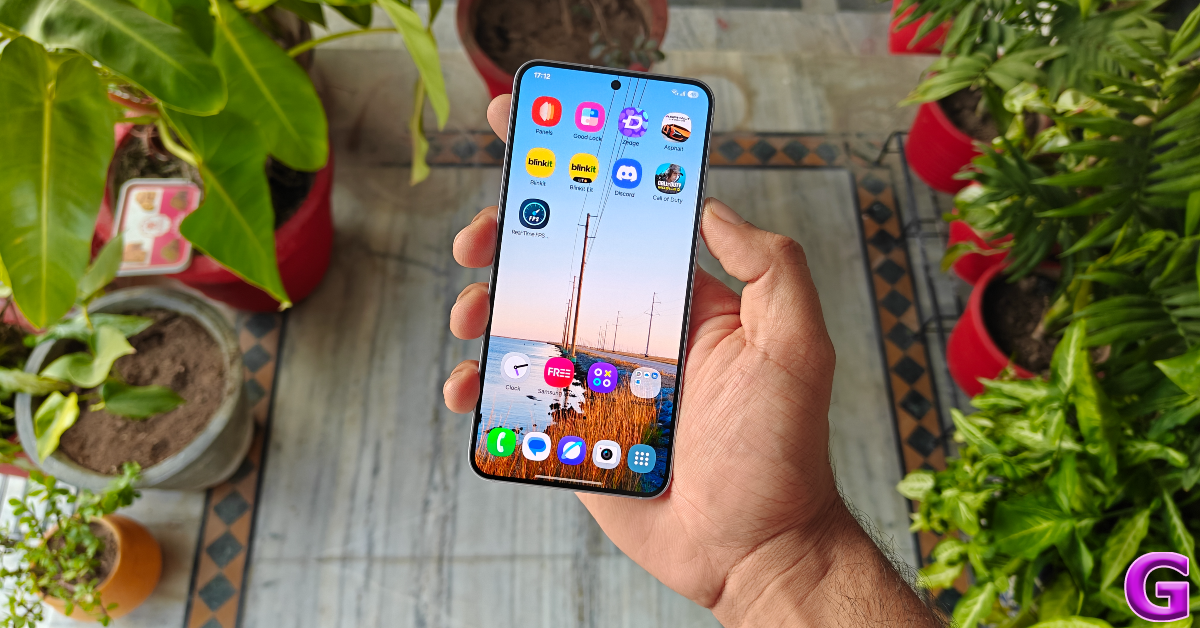 Things remain the same on the battery front as the Galaxy S25 sticks with last year’s 4,000mAh battery pack. We would’ve preferred a Si/C unit on this smartphone, but its battery life leaves very little room for complaints. The power-efficient Snapdragon 8 Elite processor gets more mileage out of this battery pack than the Exynos chipset from last year. During the review period, our daily tasks on the Samsung Galaxy S25 consisted of video calling, IMing, social media browsing, media streaming, and gaming. After racking up 5-6 hours of screen time, we were consistently left with over 20% charge. This is a pretty good performance for a compact smartphone. However, Samsung needs to pull up its socks when it comes to charging speed, as this device takes over an hour to reach a 100% charge.
 There are no changes to the rear camera panel either. The vertical camera array consists of a 50MP Samsung ISOCELL S5KGN3 primary shooter, a 10MP Samsung ISOCELL S5K3K1 telephoto lens with 3x optical zoom, and a 12MP Sony IMX564 ultrawide sensor. The lack of changes doesn’t bother us too much as these cameras are still very impressive.
 The 50MP primary shooter takes incredible pictures in outdoor daylight conditions. The images pack a lot of detail and showcase radiant colours. The shadows cast by objects in the scene retain their sharpness in the final results. The dynamic range produced by the pictures is quite good. In limited lighting, the Night Mode does a good job of getting rid of the grain and restoring the warmth of the images.




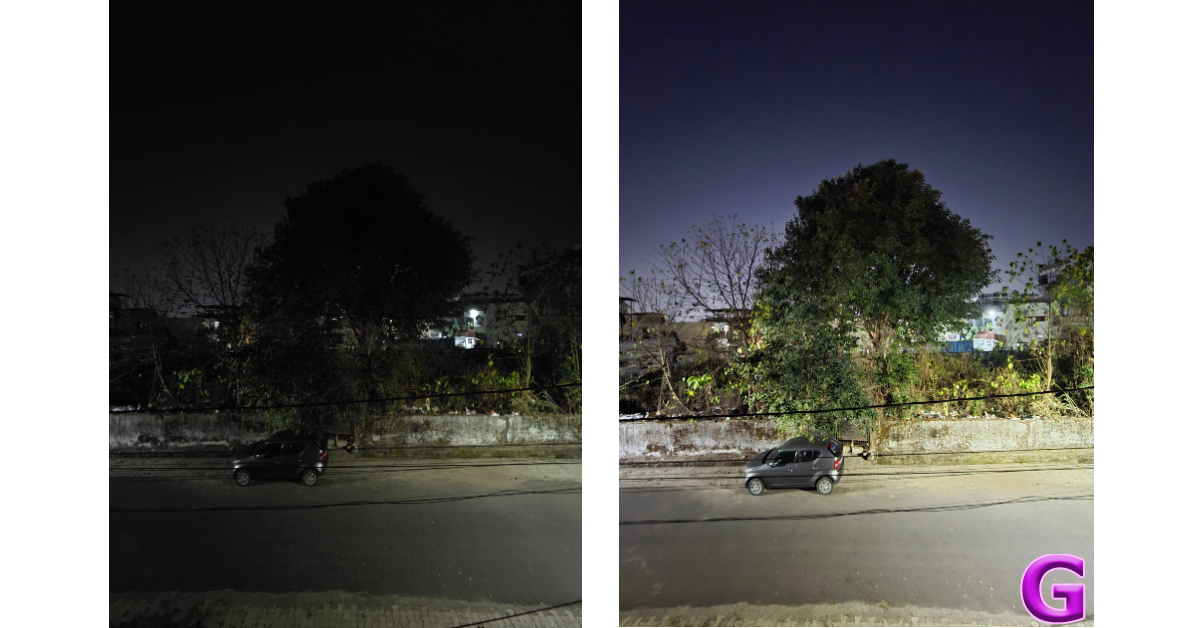

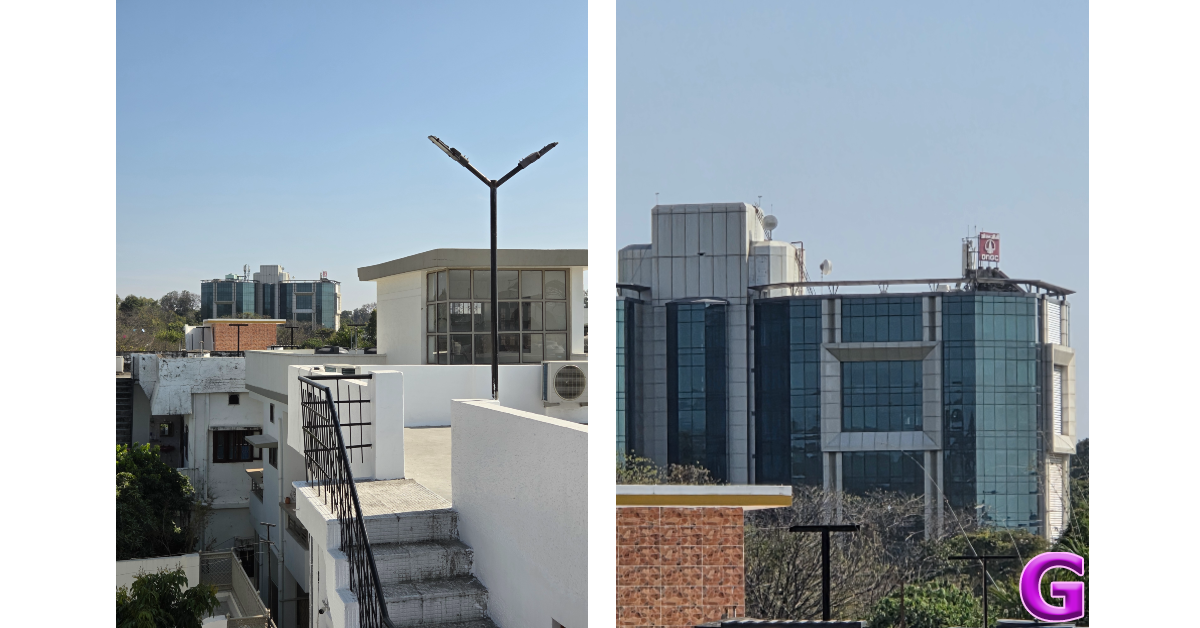





 Step 4: Hit the Edit button under Charging Connected.
Step 5: Choose a charging tone from the list or select a tone from your phone’s gallery.
Step 4: Hit the Edit button under Charging Connected.
Step 5: Choose a charging tone from the list or select a tone from your phone’s gallery.
 Step 6: Hit Voiceover and enter a phrase. This phrase will be played whenever you connect the charger.
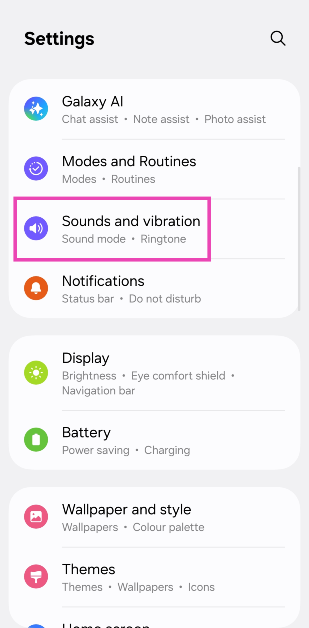 Step 3: Select System sound.
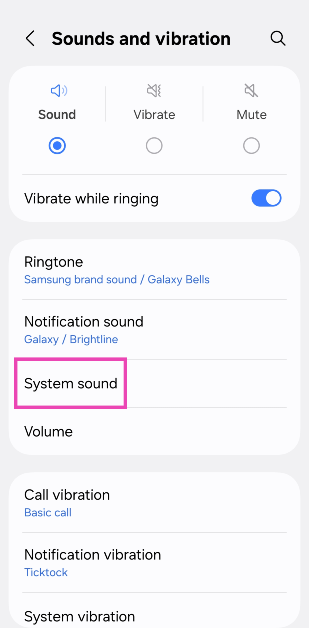 Step 4: Tap on System sound theme.
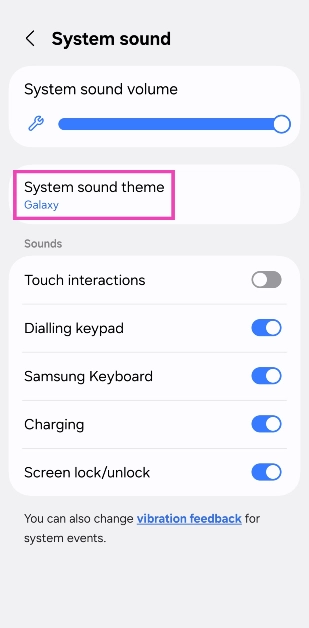 Step 5: Tap a sound to preview and select it.
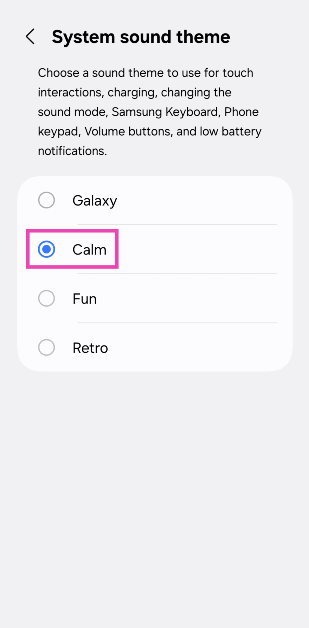 Step 6: Go to the previous page and make sure the toggle switch next to Charging is turned on.
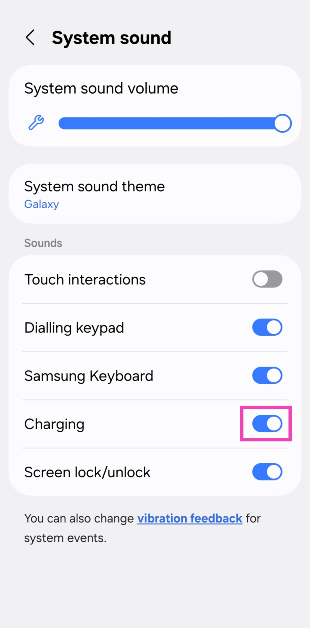 Step 7: Use the slider at the top of the screen to adjust the volume of the charging tone.
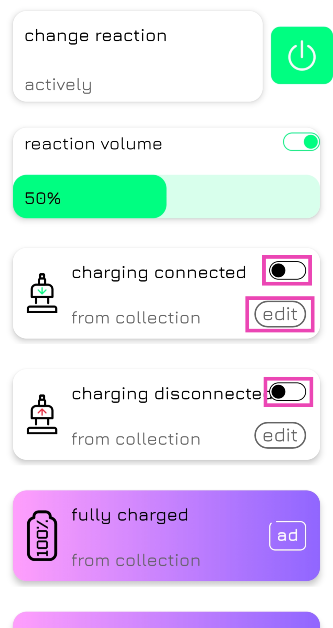 Step 4: Hit the Edit button under Charging Connected.
Step 5: Choose a charging tone from the list or select a tone from your phone’s gallery.
Step 4: Hit the Edit button under Charging Connected.
Step 5: Choose a charging tone from the list or select a tone from your phone’s gallery.
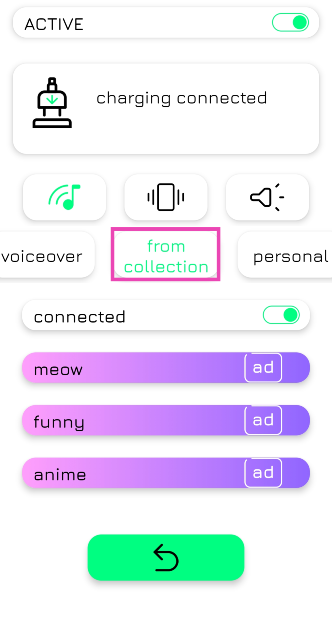 Step 6: Hit Voiceover and enter a phrase. This phrase will be played whenever you connect the charger.
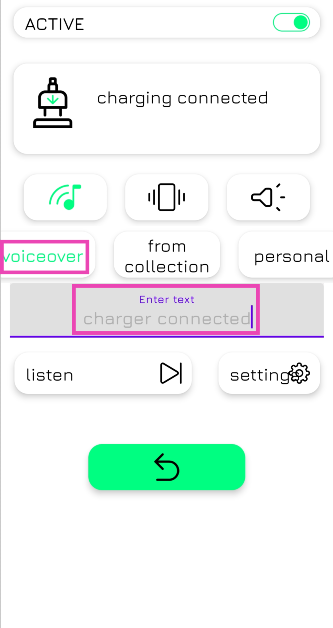 Step 7: Repeat steps 4-6 for Charging Disconnected as well.
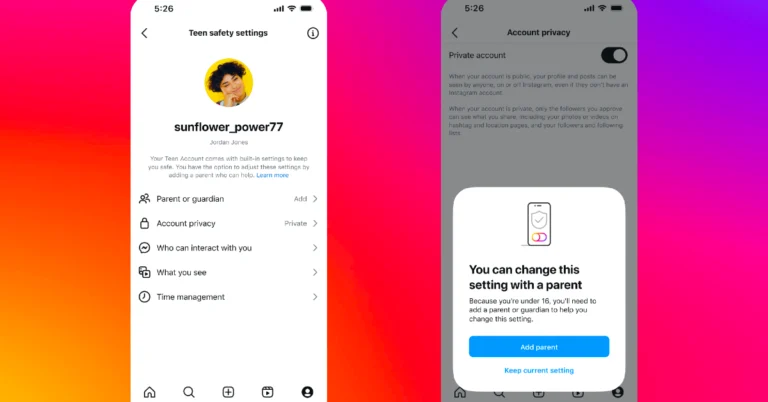
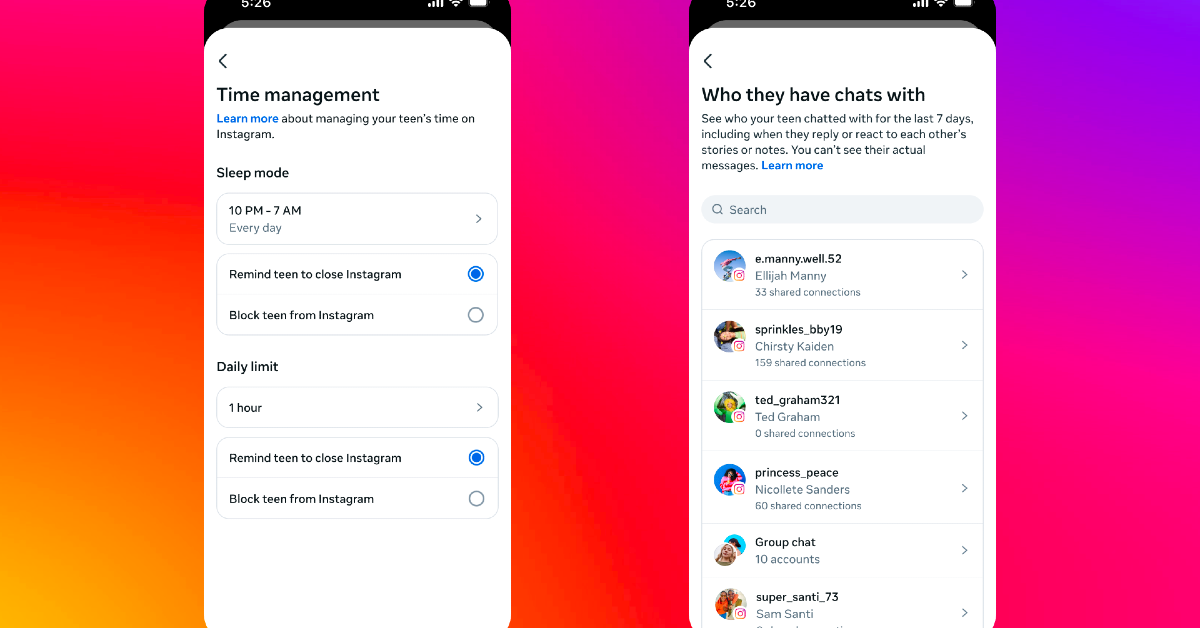 Parental concerns regarding online interactions, content exposure, and time management are addressed by the Teen Account protections, which are activated by default and that require parental consent to modify for users under the age of sixteen. Modifications to less restrictive settings are not allowed.
Also Read: Samsung unveils 2025 Bespoke AI WindFree air conditioners in India
Instagram’s Teen accounts are set to private, requiring approval for new followers and prohibiting non-followers from viewing or interacting with their posts. This applies to all users under the age of 16 or 18. Teens have strict messaging settings, which limit their exposure to sensitive content. They can only be tagged or mentioned by people they follow, and the strictest version of the anti-bullying function, Hidden Words, is turned on by default. Teens will receive notifications to exit the app after 60 minutes of daily use. Sleep mode is active from 10 p.m. to 7 a.m., muting notifications and automatically responding to DMs overnight.
Teens under the age of sixteen can now make less restrictive choices about their safety settings with parental approval. In the near future, older teens will be able to directly modify these settings for enhanced protection, and they can also have supervision at any time.
Parental concerns regarding online interactions, content exposure, and time management are addressed by the Teen Account protections, which are activated by default and that require parental consent to modify for users under the age of sixteen. Modifications to less restrictive settings are not allowed.
Also Read: Samsung unveils 2025 Bespoke AI WindFree air conditioners in India
Instagram’s Teen accounts are set to private, requiring approval for new followers and prohibiting non-followers from viewing or interacting with their posts. This applies to all users under the age of 16 or 18. Teens have strict messaging settings, which limit their exposure to sensitive content. They can only be tagged or mentioned by people they follow, and the strictest version of the anti-bullying function, Hidden Words, is turned on by default. Teens will receive notifications to exit the app after 60 minutes of daily use. Sleep mode is active from 10 p.m. to 7 a.m., muting notifications and automatically responding to DMs overnight.
Teens under the age of sixteen can now make less restrictive choices about their safety settings with parental approval. In the near future, older teens will be able to directly modify these settings for enhanced protection, and they can also have supervision at any time.
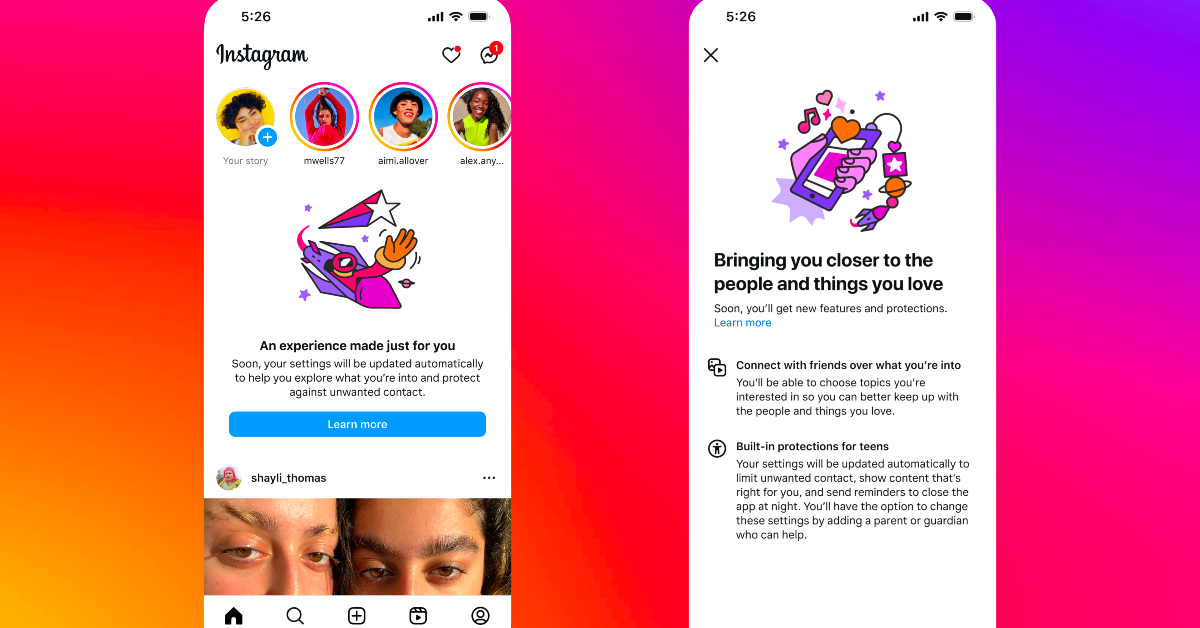 Additional parental control options that Teen Accounts provide involve monitoring recent conversations, setting daily time limits, and restricting access to Instagram during particular hours. Once this is set, the kid will no longer be able to access Instagram, and parents can see a list of the people their teen has messaged in the last seven days. This makes it possible for parents to keep an eye on their teen’s internet activities.
Also Read: Samsung Galaxy S25 Edge’s display brightness and storage details tipped
Instagram is strengthening its age verification protocols to prevent minors from circumventing age limitations. To enhance safety, this involves adding extra verification steps to accounts with adult birthdates. In order to restrict exposure to age-appropriate content, Instagram is also strengthening its content restrictions. Additionally, Sensitive content controls will be set to the highest level by default, and the platform will take action against anything that violates Community Guidelines. This guarantees that teenagers aren’t exposed to too much potentially dangerous stuff, such sexually suggestive content or discussions about self-harm. Sometimes the content is automatically hidden, even if it was shared by someone they follow.
Additional parental control options that Teen Accounts provide involve monitoring recent conversations, setting daily time limits, and restricting access to Instagram during particular hours. Once this is set, the kid will no longer be able to access Instagram, and parents can see a list of the people their teen has messaged in the last seven days. This makes it possible for parents to keep an eye on their teen’s internet activities.
Also Read: Samsung Galaxy S25 Edge’s display brightness and storage details tipped
Instagram is strengthening its age verification protocols to prevent minors from circumventing age limitations. To enhance safety, this involves adding extra verification steps to accounts with adult birthdates. In order to restrict exposure to age-appropriate content, Instagram is also strengthening its content restrictions. Additionally, Sensitive content controls will be set to the highest level by default, and the platform will take action against anything that violates Community Guidelines. This guarantees that teenagers aren’t exposed to too much potentially dangerous stuff, such sexually suggestive content or discussions about self-harm. Sometimes the content is automatically hidden, even if it was shared by someone they follow. 
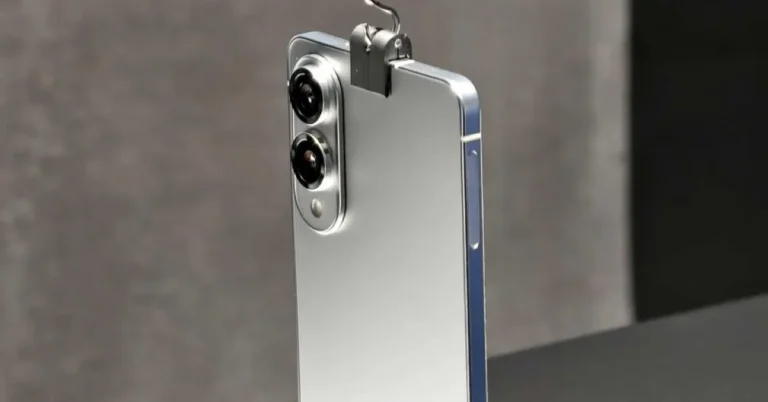

 Step 2: Tap on Your friends.
 Step 4: Hit the ellipses on the popup profile.
 Step 5: Tap on Ignore.
 Step 6: Confirm your selection.
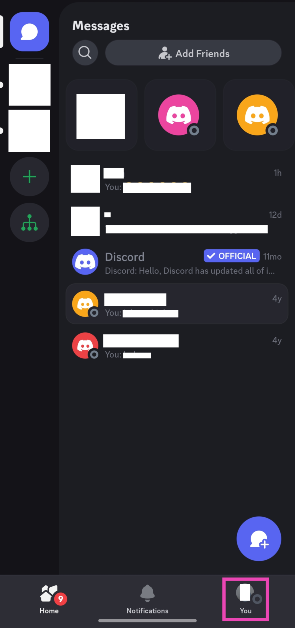 Step 2: Tap on Your friends.
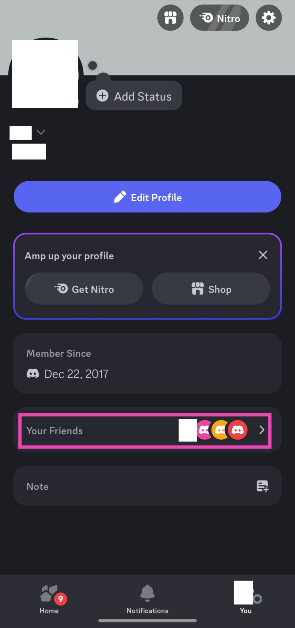 Step 3: Select the friend you wish to block discreetly. Alternatively, you can select the user’s profile from your DMs or a mutual server.
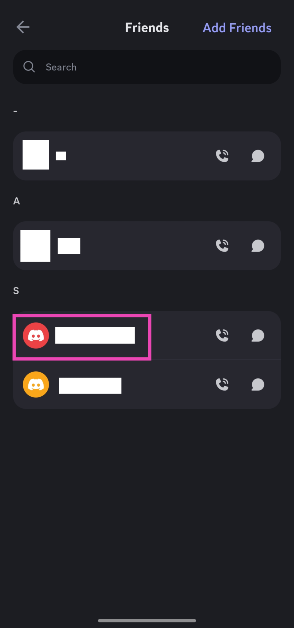 Step 4: Hit the ellipses on the popup profile.
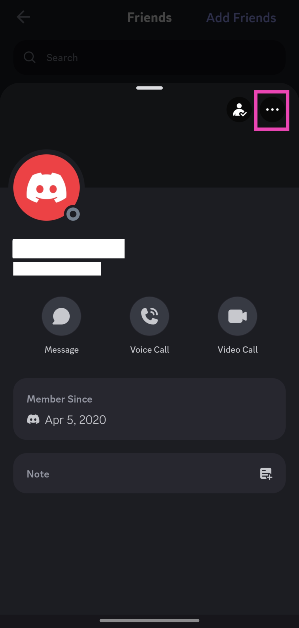 Step 5: Tap on Ignore.
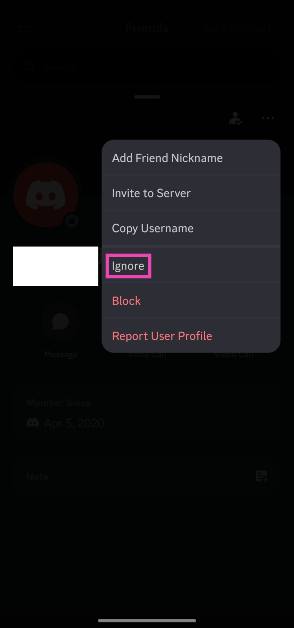 Step 6: Confirm your selection.
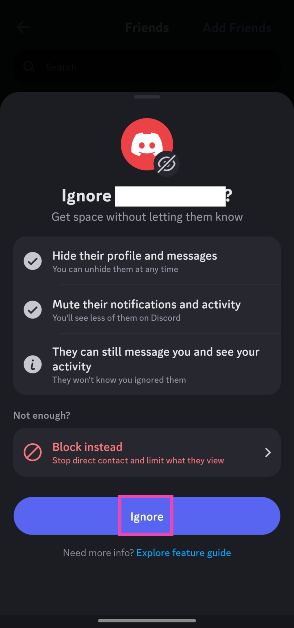
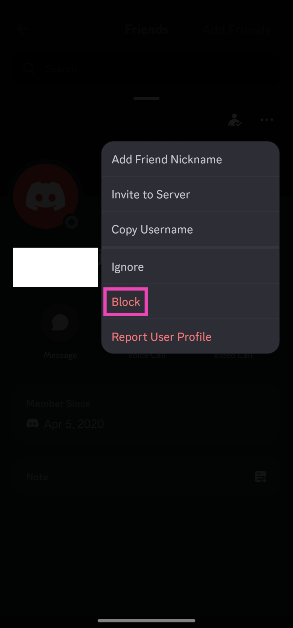 Step 6: Confirm your selection.
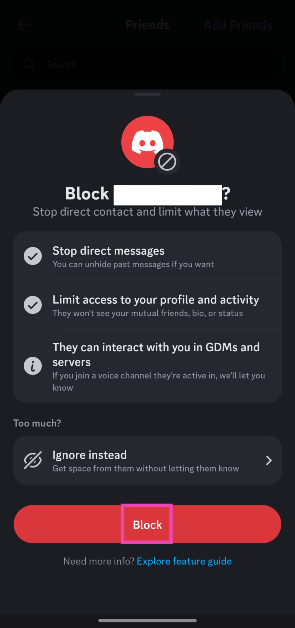




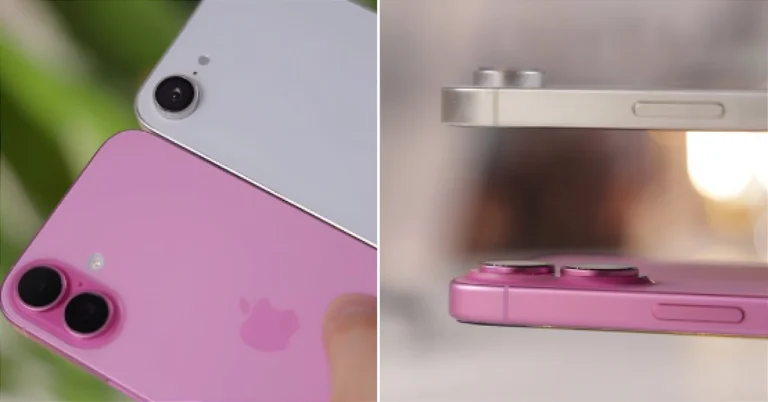
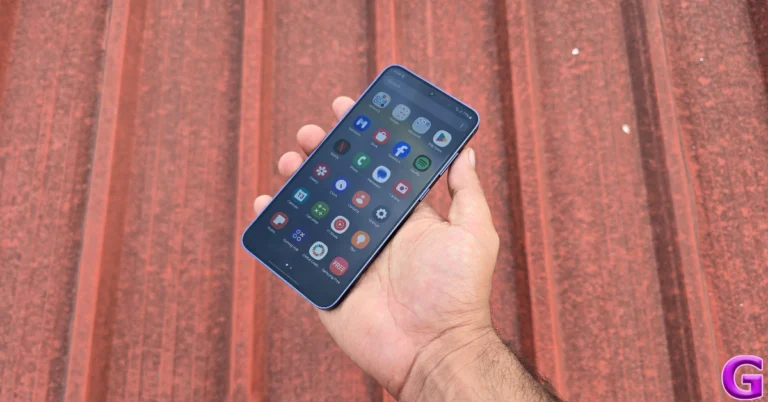
 Step 2: Tap on Change wallpapers.
 Step 5: Tap on Settings in the popup box and turn on the toggle switch next to Agree.
 Step 6: Go back and select an image from your phone’s internal storage. Pictures that are taken outdoors make the best photo ambient wallpapers.
Step 7: Adjust the clock style and size. Add your preferred widgets.
Step 8: Hit the play icon to view the weather effects on the wallpaper. Tap on Gallery to select a new image for the wallpaper.
Step 6: Go back and select an image from your phone’s internal storage. Pictures that are taken outdoors make the best photo ambient wallpapers.
Step 7: Adjust the clock style and size. Add your preferred widgets.
Step 8: Hit the play icon to view the weather effects on the wallpaper. Tap on Gallery to select a new image for the wallpaper.
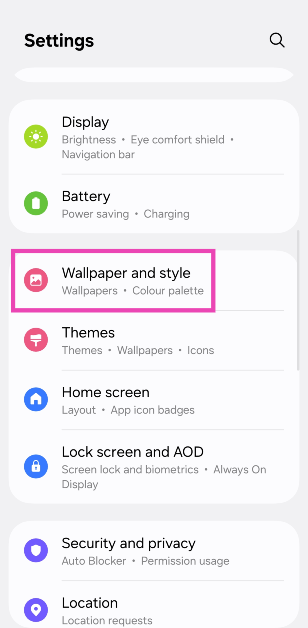 Step 2: Tap on Change wallpapers.
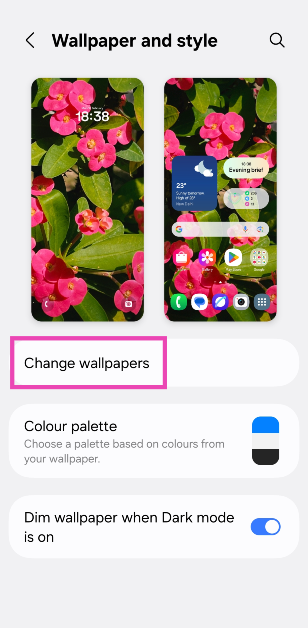 Step 3: Scroll down and select Photo ambient in the Create with AI category.
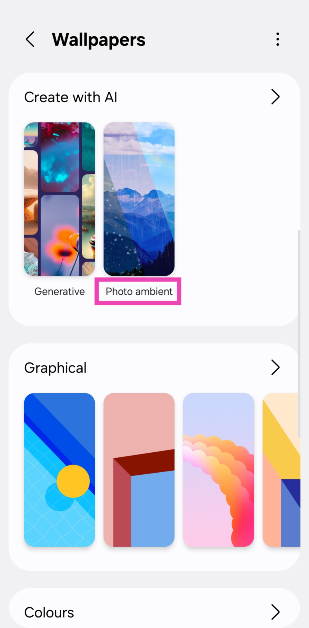 Step 4: Tap on Try now.
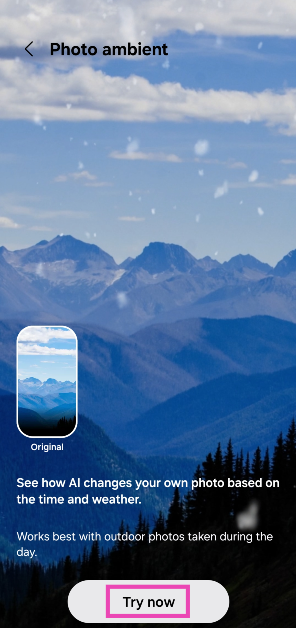 Step 5: Tap on Settings in the popup box and turn on the toggle switch next to Agree.
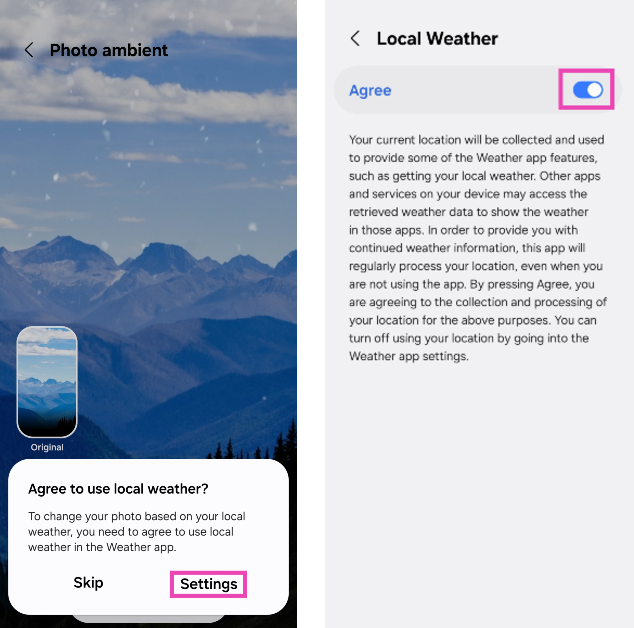 Step 6: Go back and select an image from your phone’s internal storage. Pictures that are taken outdoors make the best photo ambient wallpapers.
Step 7: Adjust the clock style and size. Add your preferred widgets.
Step 8: Hit the play icon to view the weather effects on the wallpaper. Tap on Gallery to select a new image for the wallpaper.
Step 6: Go back and select an image from your phone’s internal storage. Pictures that are taken outdoors make the best photo ambient wallpapers.
Step 7: Adjust the clock style and size. Add your preferred widgets.
Step 8: Hit the play icon to view the weather effects on the wallpaper. Tap on Gallery to select a new image for the wallpaper.
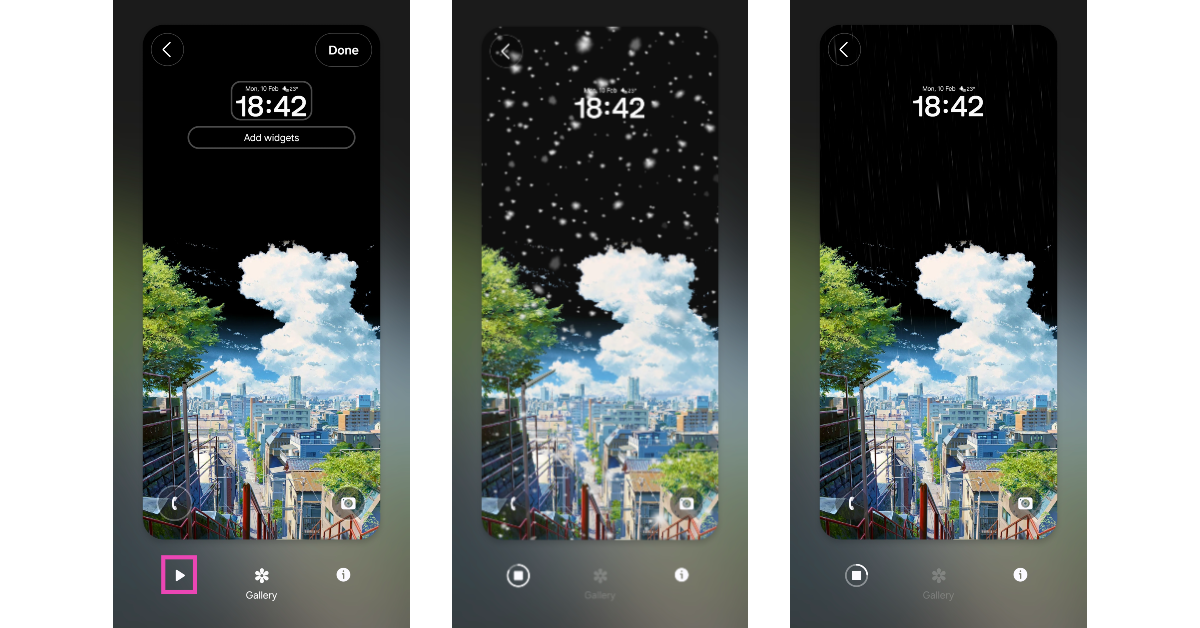 Step 9: Hit Done to set the wallpaper to your lock screen.