How to leave a group text chat on your iPhone? (2024)

0

Group texts are fun to engage with but no one likes to deal with incessant notifications when they’re away from the phone. You can always mute a text thread, but if you are no longer an active participant then leaving it might be the better option. But here’s the catch – you may not find the option to leave in some groups. So, let’s take a close look at how you can leave a group text chat on your iPhone.

Read Also: Top 5 ways to give directions or share your location on Android

Unable to leave a particular group on your iPhone? Here’s why

When you’re in a group chat with other iPhone users, the text bubbles have a blue background. Apple uses its iMessage service to connect all iPhone users in a text group. Leaving this group is pretty easy as it follows the same process as any other instant messaging app.

However, if there is a single Android user in the group, the blue bubbles will turn to green and your messages will be sent as SMSs via the network provider. Since there is no option to leave an SMS group, you won’t find one here. Instead, you can mute the group or delete and block it instead.

Leave a group text chat on your iPhone

Step 1: Launch the Messages app and open the group chat you wish to leave.

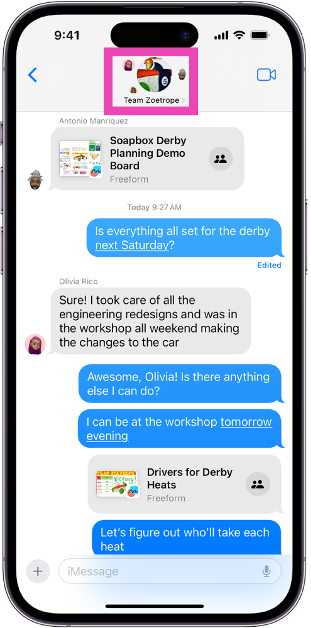
Step 2: Tap the group icon at the top of the screen.

Step 2: Tap the group icon at the top of the screen.

Step 3: If you’re on iOS 14 or earlier, tap the ‘i’ icon.

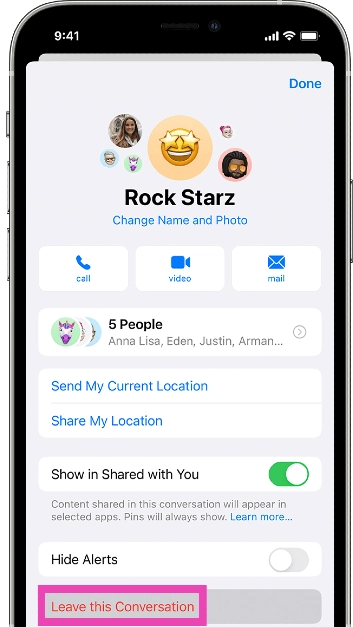
Step 4: Scroll down and select Leave this Conversation.

Step 4: Scroll down and select Leave this Conversation.

How to mute a group text chat on your iPhone

If you’re not able to leave a group chat with Android users in it, the next best thing you can do is mute it. Here’s how.

Step 1: Launch the Messages app and open the group chat you wish to leave.

Step 2: Tap the group icon at the top of the screen.

Step 2: Tap the group icon at the top of the screen. How to leave a group text chat on your iPhone? (2024)

Step 3: If you’re on iOS 14 or earlier, tap the ‘i’ icon.

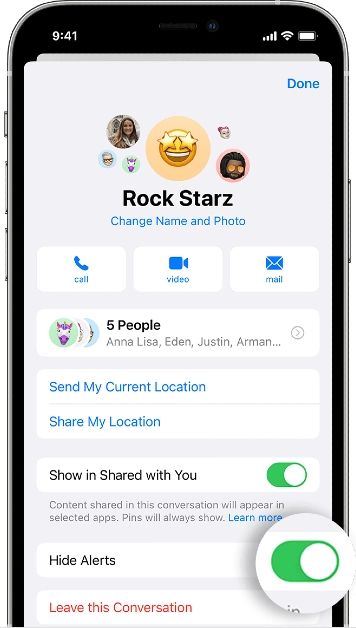
Step 4: Scroll down and turn on the toggle switch for Hide Alerts.

Step 4: Scroll down and turn on the toggle switch for Hide Alerts. How to leave a group text chat on your iPhone? (2024)

You can also mute a group by swiping left on it in the message library and tapping the alerts icon.

Delete and block a group text chat on iPhone

Delete voicemails from the recycle bin How to leave a group text chat on your iPhone? (2024)

Deleting and blocking a group chat is one of the measures you can take to get out of a group if it doesn’t allow you to leave. Here’s how you can do it.

Step 1: Launch the Messages app and open the group chat you wish to leave.

Step 2: Tap the group icon at the top of the screen.

Step 3: If you’re on iOS 14 or earlier, tap the ‘i’ icon.

Step 4: Scroll down and select Delete and Block this Conversation.

Step 5: Confirm your selection in the popup box.

Frequently Asked Questions (FAQs)

How do I leave a group text chat on my iPhone?

Open the Messages app, select the chat, tap on the header, scroll down and select ‘Leave this Conversation’.

Why can’t I leave a group chat on my iPhone?

If you’re unable to leave a group chat on your iPhone, it is likely because there are one or more Android members in the group.

How do I mute a group on iPhone?

Swipe left on the conversation thread and hit the alerts icon to mute the thread.

Read Also: OpenAI could unveil its AI-powered search product, upping the ante in its rivalry with Google

Conclusion

This is how you can leave a group text chat on your iPhone. When you delete and block a text thread, it gets moved to the ‘Recently Deleted’ folder in the Messages app. It gets permanently deleted after 30 days of inactivity. Any incoming messages in the group are automatically deleted and you won’t be notified about them.

Top 7 ways to give directions or share your location on Android

0

If someone doesn’t know the directions to your place, your Android phone makes it easy to share them without any hassle. You don’t need to be on the phone with them and guide them through the landmarks in order to reach you – your smartphone will take care of everything. Today, we bring you the top 7 ways to give directions or share your location on Android.

Read Also: OpenAI could unveil its AI-powered search product, upping the ante in its rivalry with Google

Current location vs Live location

While giving directions to someone using your Android phone, you will come across two options: Current location and Live location. Both options serve different purposes and are meant to be used in different scenarios. While the current location is static, the live location is more dynamic.

Sharing your current location with someone lets them know where you are right now. They can open the location in a navigation app and find their way to you. If you move your position after sharing the location, it will not be reflected on the map. You can use ‘current location’ when you want to share the location of your house or someplace you will be for the foreseeable future.

On the other hand, when you share your live location with someone, they can track your movement on the map. You can choose to decide how long you want to share your live location. This can be used when you’re travelling to someone’s place and you want them to track your ETA.

Share your location on WhatsApp

Step 1: Launch WhatsApp and open the conversation with the receiver.

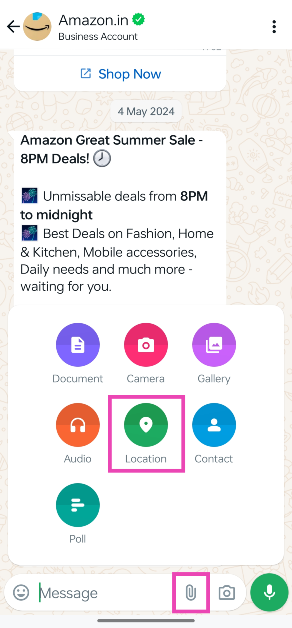
Step 2: Hit the attachment icon in the message box and select Location.

Step 2: Hit the attachment icon in the message box and select Location.

Step 3: Make sure WhatsApp has access to your location.

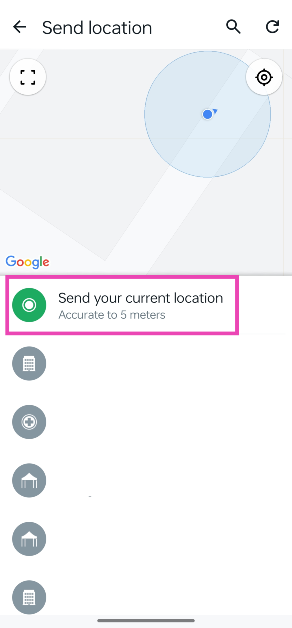
Step 4: Tap on Send your current location. If you’re moving, tap on Share live location.

Step 4: Tap on Send your current location. If you’re moving, tap on Share live location.

Step 5: The recipient will be able to track you using your location.

Share your location using Google Maps

Step 1: Launch the Google Maps app on your Android smartphone.

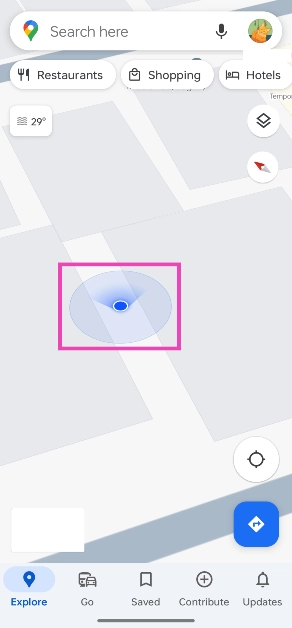
Step 2: Hit the Recenter icon and make sure the blue circle is placed on your location.

Step 3: Tap on the blue circle.

Step 3: Tap on the blue circle.

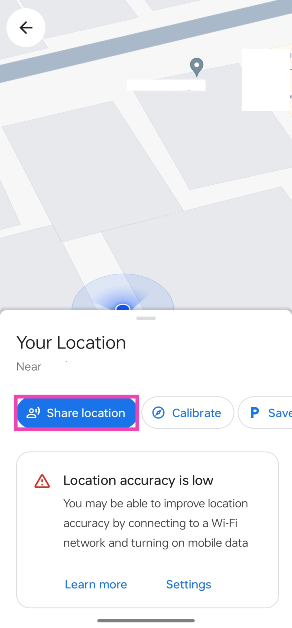
Step 4: Tap on Share location.

Step 4: Tap on Share location.

Step 5: Select a contact or an app on which you want to share your location.

Step 6: If you’re sharing your location on another app, select a recipient and hit Send.

Share your location on Google Messages

Step 1: Launch the Google Messages app on your smartphone and select the person with whom you want to share your location.

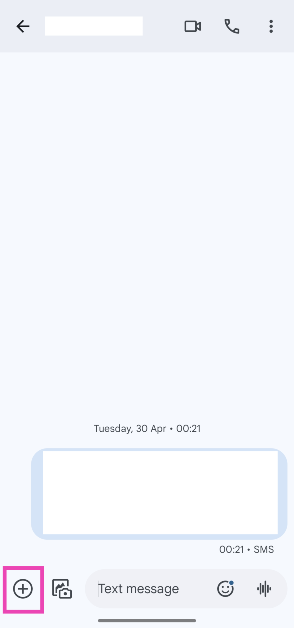
Step 2: Hit the plus icon at the bottom left corner of the screen.

Step 2: Hit the plus icon at the bottom left corner of the screen.

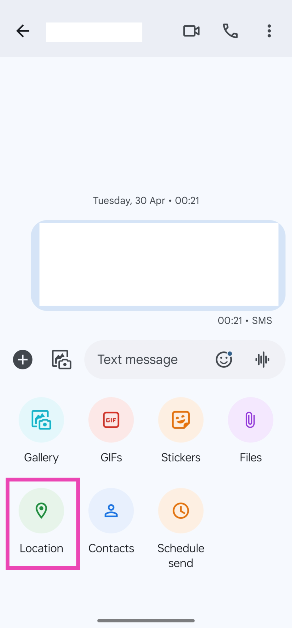
Step 3: Tap on Location.

Step 3: Tap on Location.

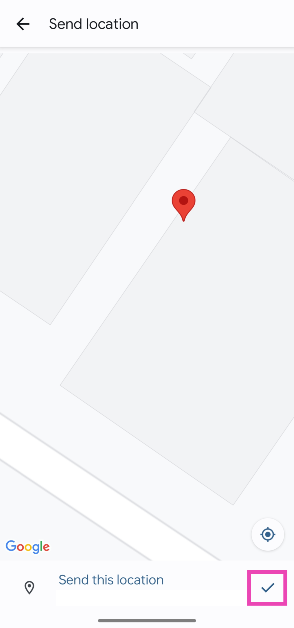
Step 4: Hit the Recenter icon and make sure the pointer is displaying the accurate location.

Step 4: Hit the Recenter icon and make sure the pointer is displaying the accurate location.

Step 5: Hit the tick icon at the bottom right corner of the screen.

Share your location on Instagram

Step 1: Launch the Instagram app on your phone.

Step 2: Swipe left to go to the DMs section and open a conversation.

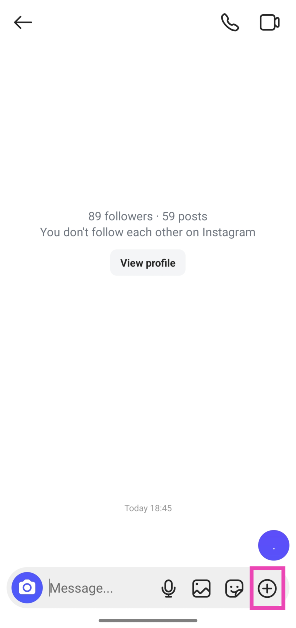
Step 3: Hit the plus icon in the bottom right corner of the screen.

Step 4: Hit the plus icon in the bottom right corner of the screen.

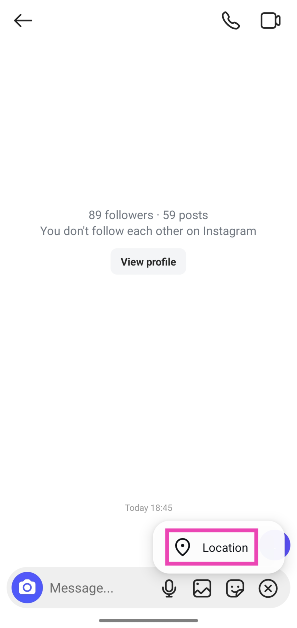
Step 4: Select Location.

Step 5: Select Location. share live location on instagram

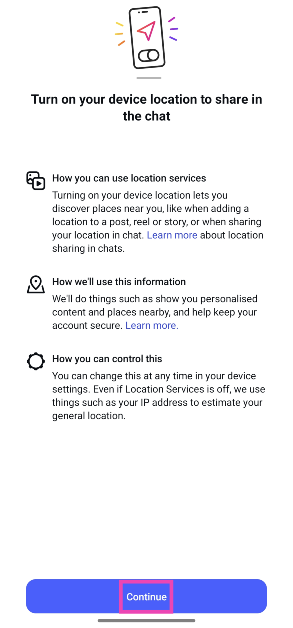
Step 5: Tap on Continue.

Step 6: Tap on Continue. share live location on instagram

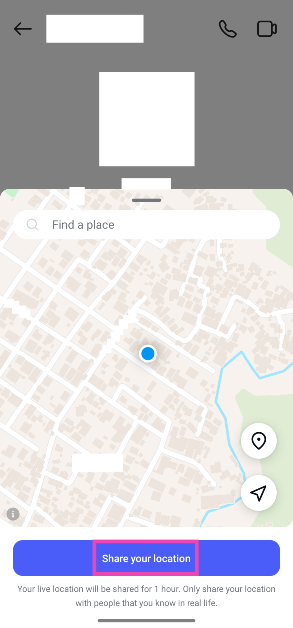
Step 6: Select Share your location.

Step 7: Select Share your location. share live location on instagram

Share your location on Android using Facebook Messenger

find and download facebook messenger history

Step 1: Launch the Messenger app and select the conversation with the person you want to share your location with.

Step 2: Hit the plus icon at the bottom left corner of the screen.

Step 3: Select Location.

Step 4: Tap on Start sharing live location for 60 minutes.

Share your location on Snapchat

Step 1: Launch Snapchat and open the conversation with the person you want to share your location with.

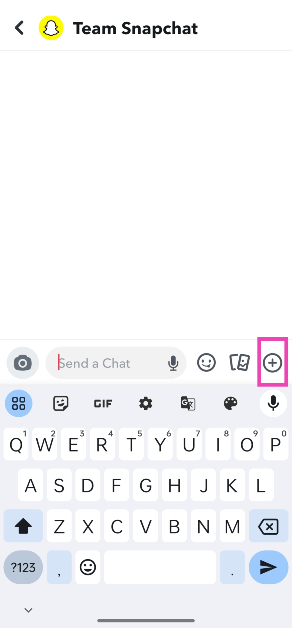
Step 2: Hit the plus icon at the bottom right corner of the screen.

Step 2: Hit the plus icon at the bottom right corner of the screen.

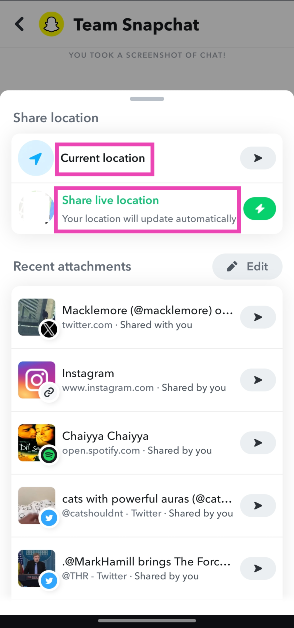
Step 3: Tap on Current location or Share live location.

Step 3: Tap on Current location or Share live location.

Your location will be shared with the recipient.

Share your location on Telegram

Step 1: Launch the Telegram app on your phone and open a conversation.

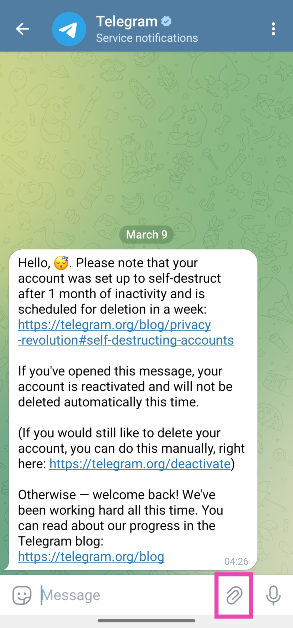
Step 2: Hit the attachment icon.

Step 2: Hit the attachment icon.

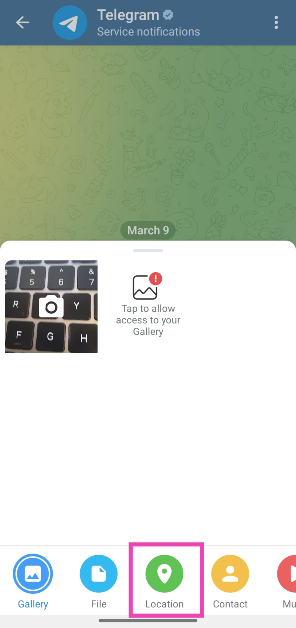
Step 3: Tap on Location.

Step 3: Tap on Location.

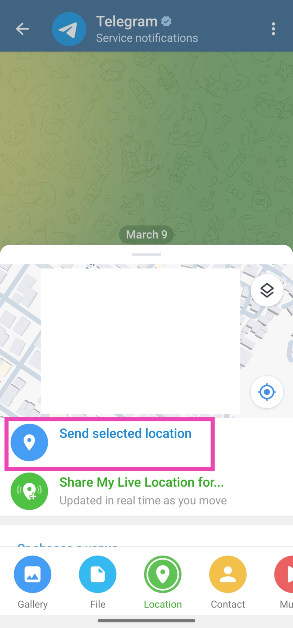
Step 4: Tap on Send selected location.

Step 4: Tap on Send selected location.

Frequently Asked Questions (FAQs)

How do I share my location using my Android phone?

You can use apps like WhatsApp, Snapchat, Facebook Messenger, Google Maps, and Google Messages.

How do I turn on location services on Android?

Swipe down from the Status bar to reveal the Quick Settings Menu and tap on the Location tile. Long-press the tile to view the apps that recently requested your location.

How do I revoke location access from an app on Android?

Go to Settings>Apps, select the app, tap on Permissions>Location and select ‘Don’t Allow’.

Can I share my live location on Instagram?

Instagram now allows you to send your live location via DMs. Open a conversation, hit the plus icon, select location, and tap on ‘Share your location’.

Can I share a fake live location on WhatsApp?

Enable Developer Options on your Android phone and install the Fake GPS Location app. Launch the app and go to Open settings>Select mock location app>Fake GPS. Go back to the app and select a fake location. Open WhatsApp and share your live/current location to send the fake location.

Read Also: What is Google Wallet? How is it different from Google Pay? Here’s how you can use Google Wallet

Conclusion

These are the top 7 ways to give directions or share your location using your Android phone. While you’re here, check out these location-sharing and parental control apps as well. If you have any other apps to add to the list, let us know in the comments!

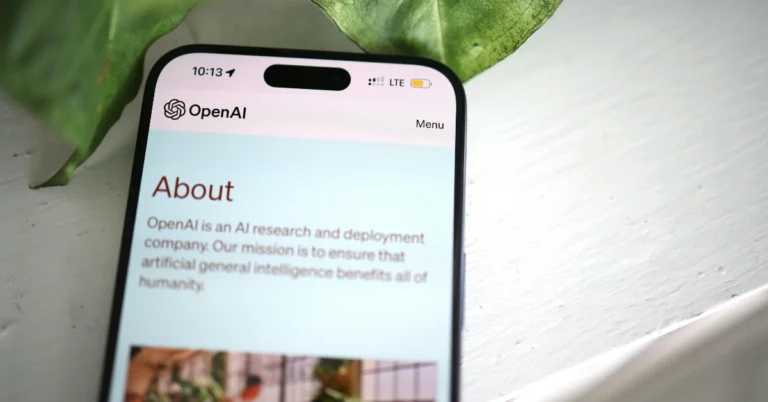
OpenAI could unveil its AI-powered search product, upping the ante in its rivalry with Google

OpenAI, the developer of ChatGPT, is gearing up to launch its AI-powered search product on Monday. Although these are speculations coming from a source, their arrival can pose a potential challenge to Google and Perplexity. There could be a change in the announcement date. 

According to a report by Bloomberg by two people familiar with the situation, OpenAI intends to unveil its AI-powered search tool on Monday, upping the ante in its rivalry with Google, the search engine juggernaut. 

Reportedly, the firm has not yet revealed the date of the announcement but is said to be working on a search engine to take on Alphabet’s Google as well as the budding AI search firm Perplexity.

Reportedly, the announcement might have been timed to coincide with the opening of Google’s annual I/O conference on Tuesday, when the tech giant is anticipated to reveal a number of items connected to artificial intelligence.

Also Read: WhatsApp is undergoing a significant design overhaul: Details inside

However, OpenAI opted not to respond, according to Reuters. 

The new project by OpenAI is expected to improve ChatGPT by allowing for real-time web information retrieval and response citation incorporation.

ChatGPT, an alternative for online information gathering, faces challenges in providing accurate, real-time data. Previously, OpenAI integrated it with Microsoft Bing for subscribers who paid for access. Google, meanwhile, has shown generative AI capabilities for its own engine bearing the same name. 

On the other hand, Perplexity, which was founded by a former OpenAI researcher, offers an AI-native search interface with 10 million monthly active users, generating $1 billion in valuation. As per a blog post the startup published in January, it has 10 million active users per month.

Also Read: WhatsApp testing zoom control feature for the camera

As per the report, OpenAI’s ChatGPT is experiencing a slowdown in global traffic, putting pressure on the AI company to expand its user base. The firm was once the fastest application to reach 100 million monthly active users. 

ChatGPT plugins, OpenAI’s previous attempt to bring updated and real-world information into ChatGPT, were abandoned in April, as per a help centre article on OpenAI’s website.

What is Google Wallet? How is it different from Google Pay? Here’s how you can use Google Wallet

0

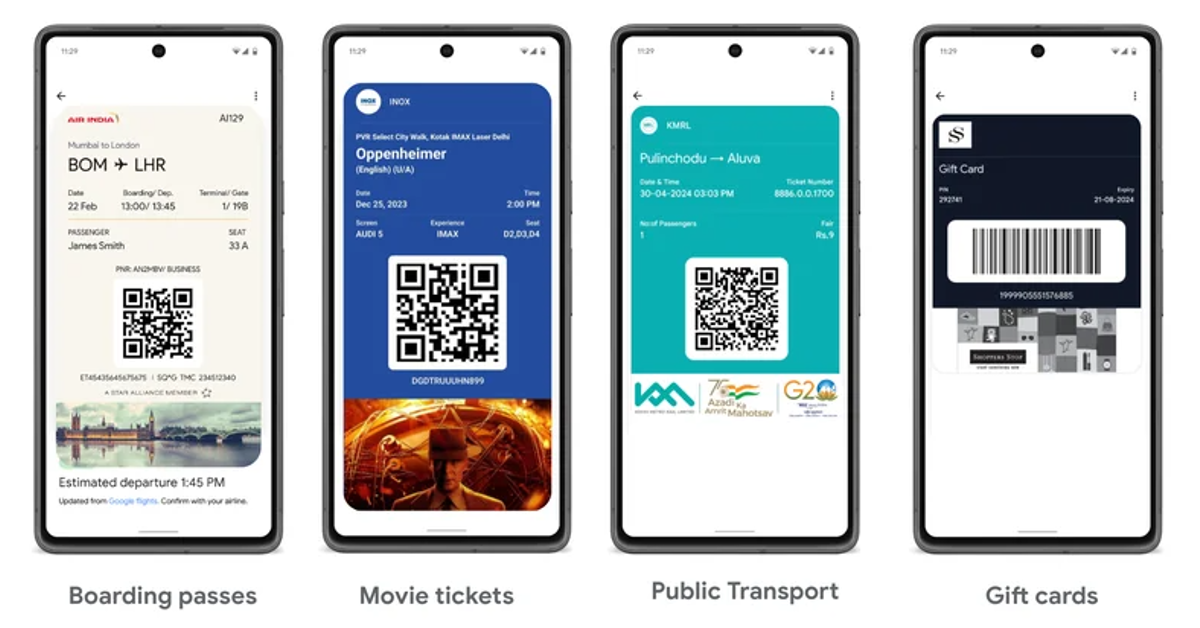
Earlier this week, Google launched its digital wallet app in India. Dubbed ‘Google Wallet’, this application is different from Google’s UPI payment app, Google Pay. While the latter is used to make online payments, Wallet can be used to store and access your boarding passes, movie tickets, and more. Outside of India, Google Wallet is also used to make contactless payments.

Read Also: WhatsApp is undergoing a significant design overhaul: Details inside

Can you make transactions using Google Wallet in India?

Can you make transactions using Google Wallet in India?

Google Wallet and Google Pay work as two discrete apps in India. While Google Pay is primarily used for digital transactions, the Wallet is a secure app for storing your tickets and passes. Here is a quick list of what either app does.

Google Pay

  • Send and receive money via UPI
  • Transfer money through your bank account
  • Mobile recharge
  • Electricity & other utility bills
  • FASTag recharge, and more.

Google Wallet

  • Store and access boarding pass
  • Store and access movie tickets
  • Shop and pay with gift cards
  • Store and access your transport pass

As of now, Google has partnered with Hyderabad and Kochi Metro to store and access their transport tickets within the app. Other travel partners include Air India, MakeMyTrip, Ixigo, Easemytrip, and others. The tech giant is also working with system integrators like Wavelynx and Alert Enterprise to support corporate badges within the Wallet.

How to add a pass or ticket to Google Wallet

If your ticket or pass has a QR code, you can add it to your Wallet. Pixel users can simply take a screenshot of the boarding pass and tap on the ‘Add to Wallet’ option in the screenshot preview toolbar. Other Android users can follow the steps mentioned below.

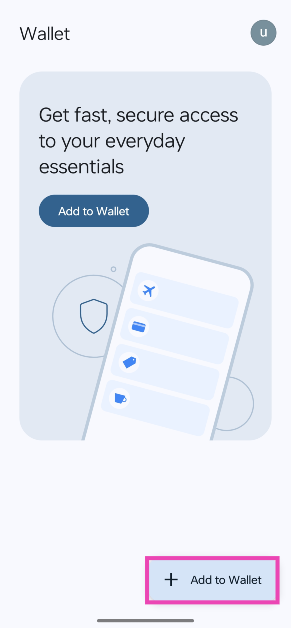
Step 1: Launch the Google Wallet app and tap on Add to Wallet.

Step 1: Launch the Google Wallet app and tap on Add to Wallet.

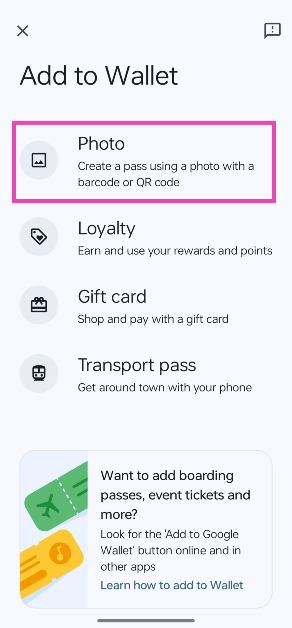
Step 2: Tap on Photo.

Step 2: Tap on Photo.

Step 3: Select the screenshot of your boarding pass.

The boarding pass will be added to your Wallet. This works for movie tickets, luggage tags, and parking receipts too, as long as they have a QR code on them. If you are using the same account on the Gmail and Wallet apps on your phone, your movie tickets and boarding passes from authorised partners will automatically be added to the Wallet. As of now, you cannot access the tickets on the Wallet app for WearOS.

Frequently Asked Questions (FAQs)

Can I use Google Wallet for UPI payments?

No, Wallet cannot be used for UPI payments but you can use it for shopping for gift cards and paying with them.

How is Google Wallet different from Google Pay?

Google Pay is an app for UPI payments, bank transfers, and bills, while the other is an app to store and access your tickets, travel passes, and more.

Is Google Wallet available in India?

Google launched its Google Wallet app in India on May 8, 2024. It can be downloaded using the Google Play Store.

Read Also: Logitech Signature Slim Combo MK950 Review: Good additions to your office desk

Conclusion

Now that you know how Google Pay and Wallet are different from each other, you can use either app for its exclusive set of features. Google is working with local partners to increase support for movie tickets and public transport passes. As of now, only Hyderabad Metro, Kochi Metro, PVR, and INOX tickets can be accessed on the app.

WhatsApp is undergoing a significant design overhaul: Details inside

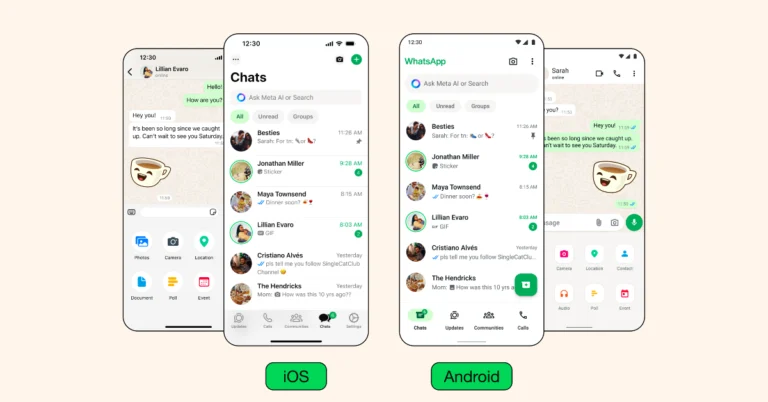
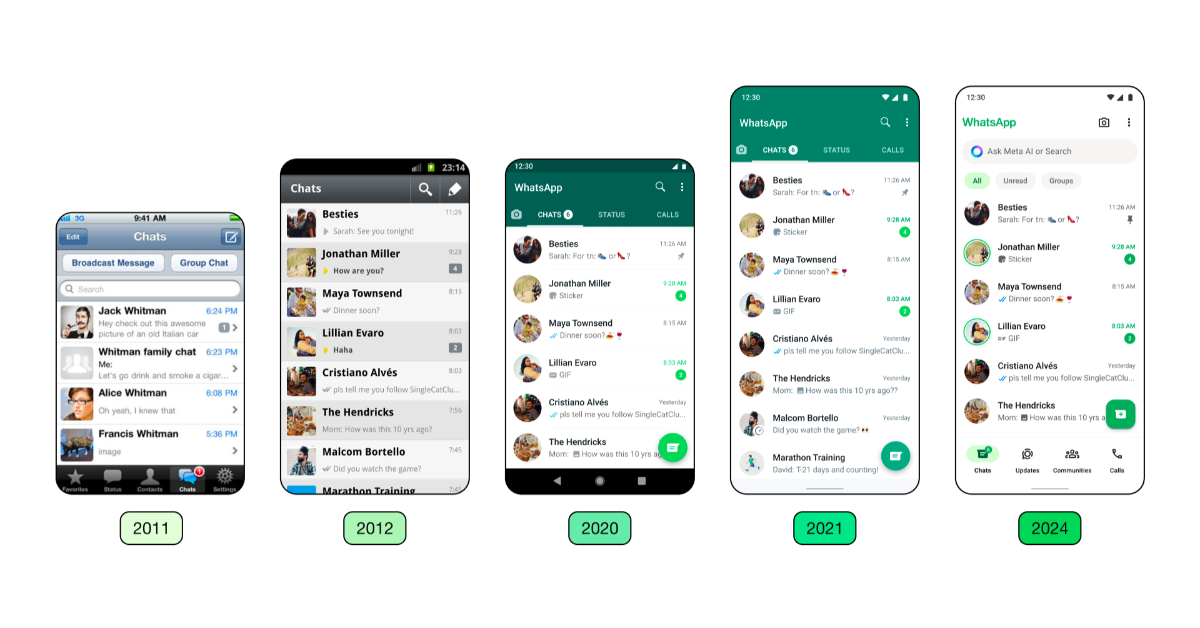
WhatsApp is revamping its user interface for iOS and Android, featuring a new colour palette, updated icons, navigation, layout improvements, chat filters, illustrations, and darker options.

WhatsApp is introducing new design updates to enhance its usability and appearance for iOS and Android users, featuring animations, a redesigned layout, and new icons.

WhatsApp is introducing new design updates to enhance its usability and appearance for iOS and Android users, featuring animations, a redesigned layout, and new icons.

“Over the years, we have primarily focused on adding utility to the app. As the product continued to grow in functionality, the design needed to evolve as well. We wanted the product to feel more fresh and modern without disrupting its core functionality,” the blog post said.

Also Read: WhatsApp testing zoom control feature for the camera

WhatsApp has implemented a new, unified green colour palette to create a more cohesive experience, incorporating over 35 colour iterations and increasing neutral colour usage for harmonious colour pairings. The company has utilised more neutral hues, which allowed it to employ green more sparingly in the right contexts.

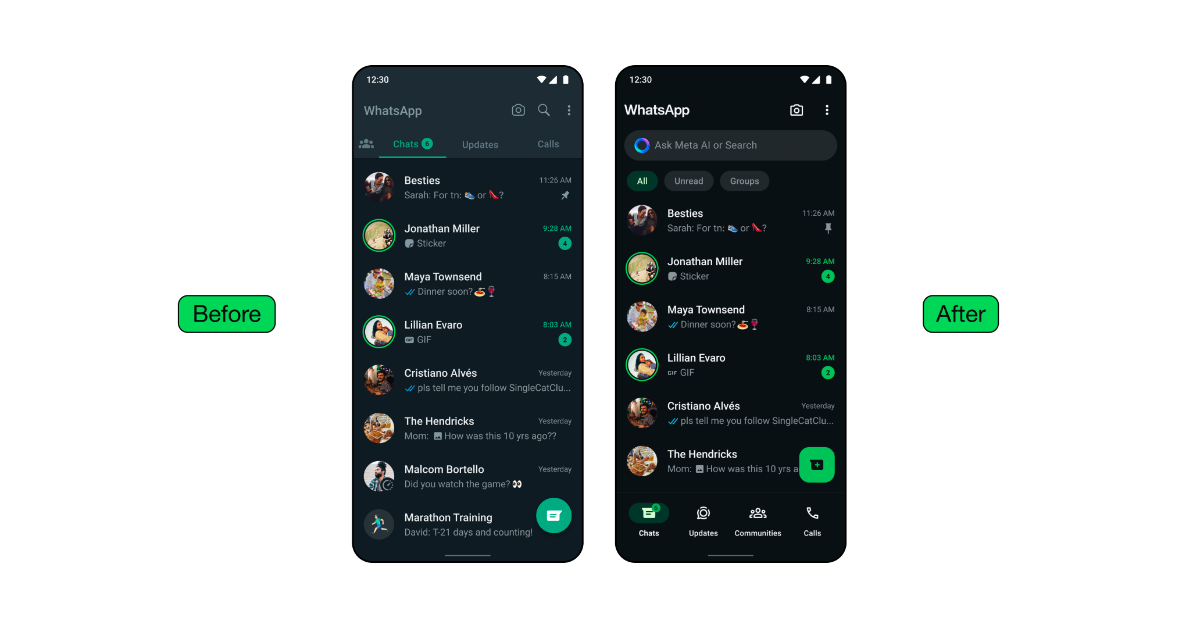
WhatsApp has added a darker dark option to the Android app, emphasising deeper tones and stronger contrast to lessen eye strain in low light conditions for improved visual appeal and legibility.

As a part of its new design updates, WhatsApp has added a darker dark option to the Android app, emphasising deeper tones and stronger contrast to lessen eye strain in low light conditions for improved visual appeal and legibility.

WhatsApp has updated icons to a rounded, outlined style and, to match the new iconography. In addition, for refreshed illustrations, the company has also added animation.

WhatsApp is also refreshing the default chat background, enhancing its uniqueness and relevance to everyday conversations by exploring simple, diverse options.

Also Read: Amazon Fire TV Stick 4K with 4K Ultra HD streaming launched in India

WhatsApp has introduced a modern, native bottom navigation bar on Android, enhancing user experience by placing tabs closer to their thumbs for faster navigation.

With the new update WhatsApp for iOS is now offering an expandable tray for easier attachment of photos, videos, media, polls, and documents, replacing the full-screen menu. Moreover, WhatsApp has introduced chat filters on Android, allowing users to quickly find important conversations by moving the navigation bar to the bottom and allowing users to select between unread and group filters.

Logitech Signature Slim Combo MK950 Review: Good additions to your office desk

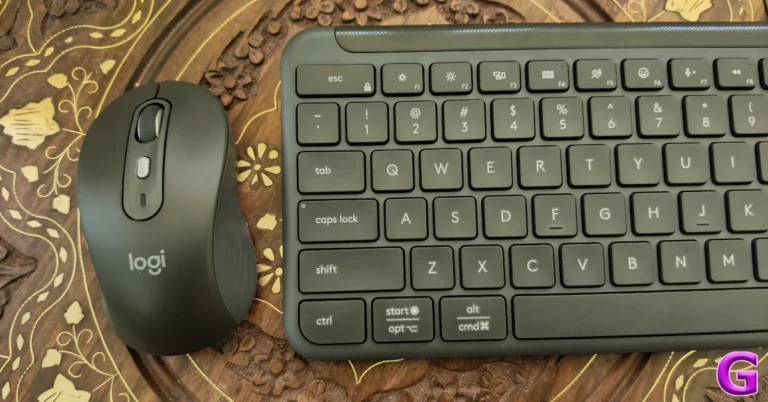
Last month, Logitech launched the ‘Signature Slim’ keyboard and mouse combo in India. Currently, the MK950 combo is available for Rs 12,995 on Amazon, Rs 1,000 lower than its launch price. Designed in the mould of the MX Series, the Signature Slim Combo is a great pairing for office and home users alike. It ditches the bells and whistles, taking a performance-oriented approach. Here is our review of the Logitech Signature Slim Combo MK950 after having used it for a couple of weeks.

Read Also: Amazon Kindle not charging? Here are 9 fixes (2024)

Logitech Signature Slim Combo MK950 Review: Design

Here’s what you get inside the Signature Slim Combo retail box:

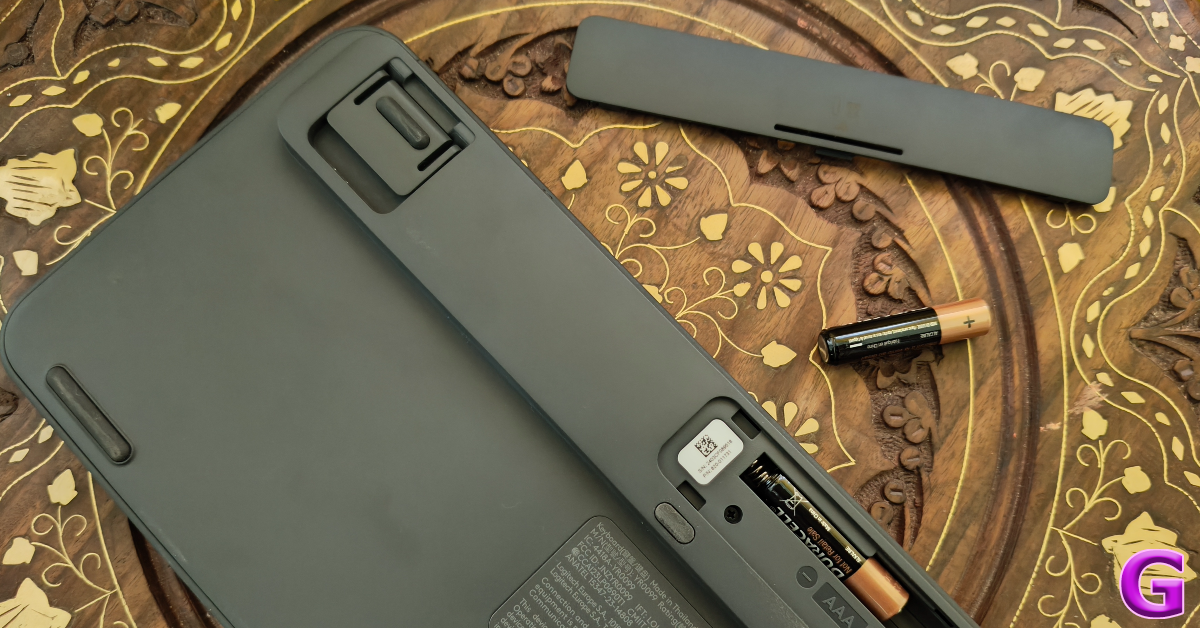
  • Logitech K950 keyboard (2 AAA batteries inside)
  • Logitech M750 mouse (1 AA battery inside)
  • USB Bolt receiver
  • User Documentation

The combo is available in two colour variants – Graphite and Off-white.

Logitech Signature Slim Combo MK950 Review: Design

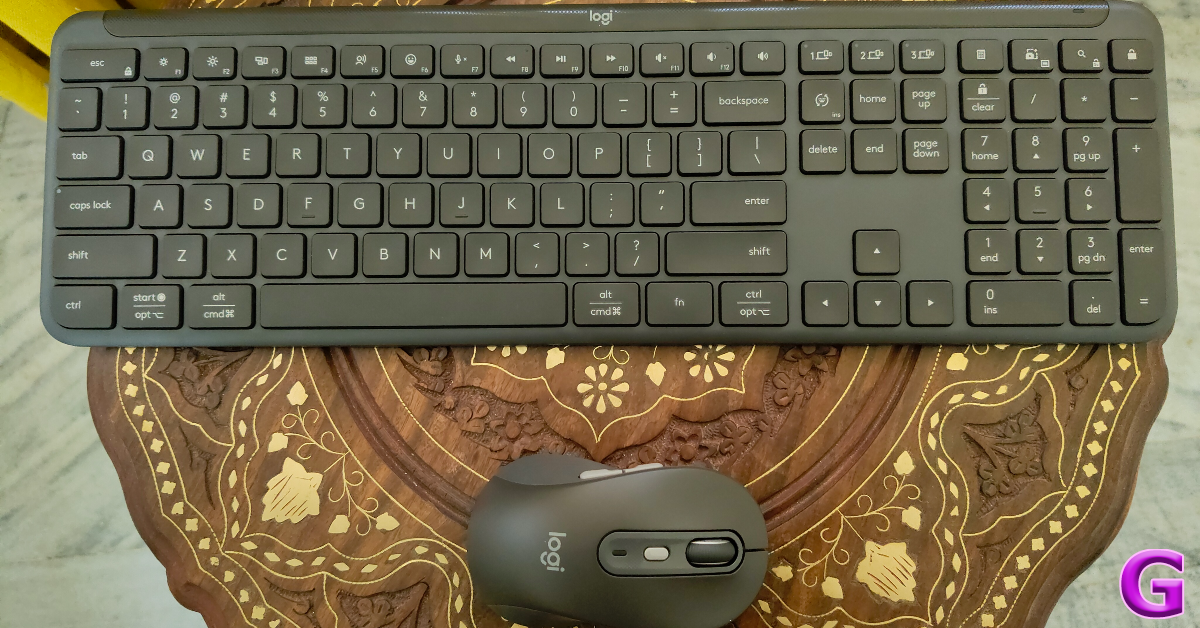
The K950 keyboard has a plastic shell but it is very robust. Weighing 685g, it makes its presence felt. As the name suggests, it rocks a slim form factor, which is something we like in membrane keyboards. The strength of its chassis is undoubtedly its biggest asset.

As mentioned earlier, the Slim Combo takes design inspiration from Logitech’s MX Series. The heavy top bar has a lot of weight to it, which keeps the keyboard firmly in place along with the help of the rubber feet. There are adjustable legs on the bar, which can elevate the keyboard at an 8-degree typing angle. The power switch is positioned at the top edge of the device.

design

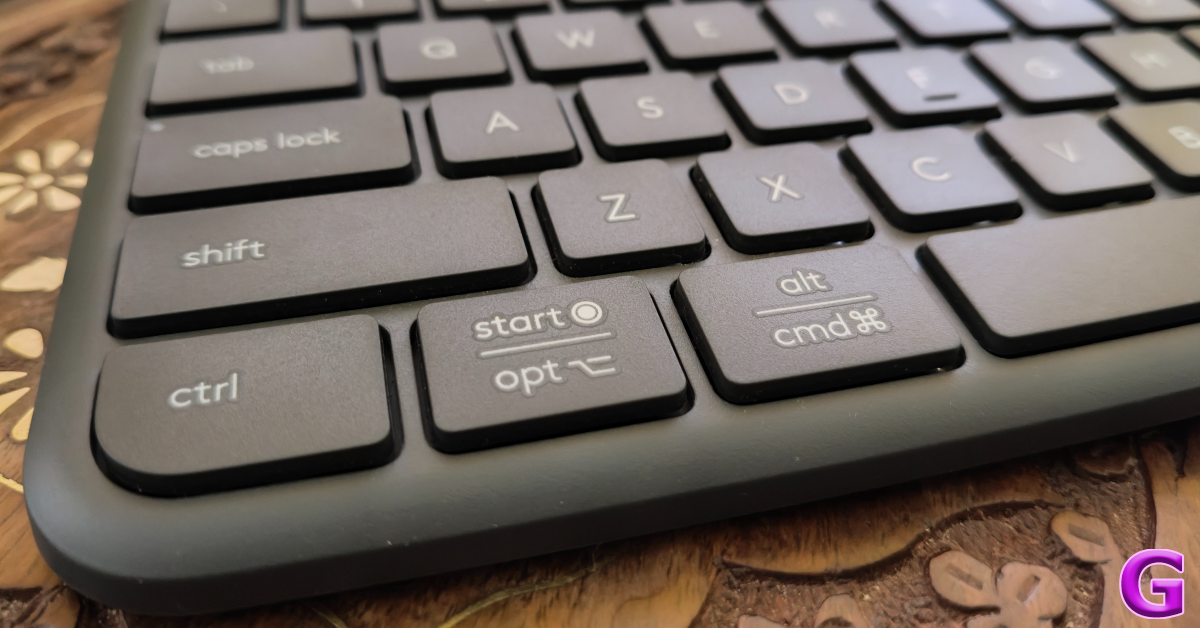
The K950 keyboard has a full set of keys, including dedicated media keys and the vertical numpad. Like the MX Keys S, the K950 has a single-line Enter key and two long Shift keys. The Start and Alt keys serve as the Opt and Cmd keys for Mac users and are labelled accordingly. The keycaps are finished in a matte texture, which feels nice to use. What we like about the keycaps is that they do not have deep indentations like the MX Keys S.

Logitech Signature Slim Combo MK950 Review: Design

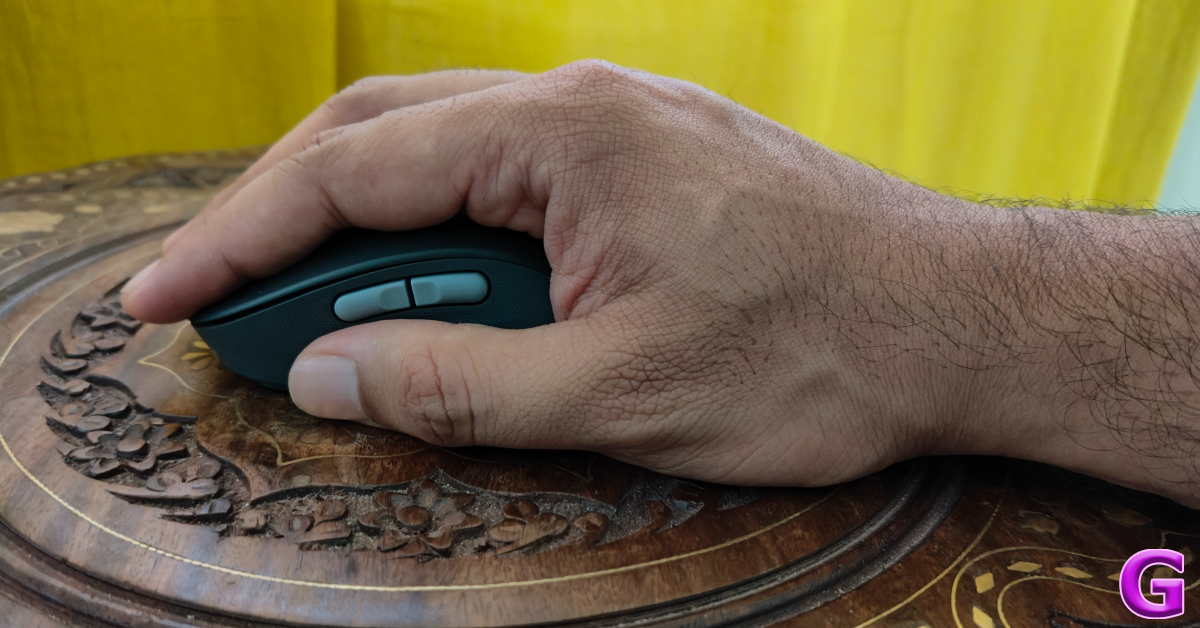
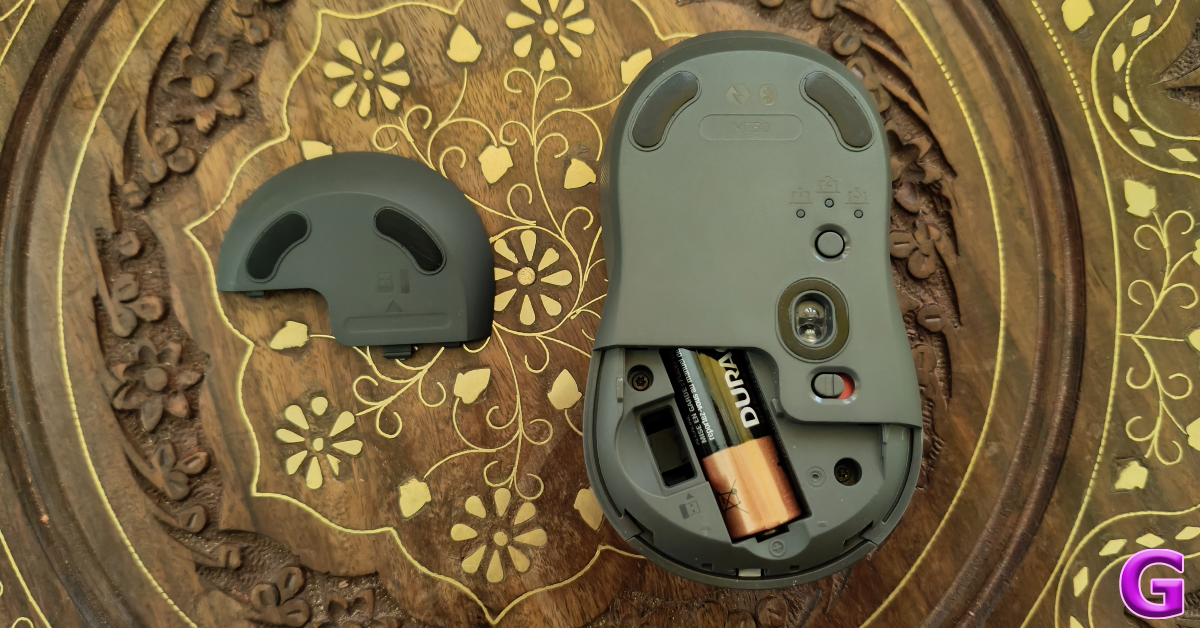
Moving on, the M750 wireless mouse on the Logitech Signature Slim combo weighs 101.3g with the AA battery and receiver inside. Its build quality is sturdy and premium, something you expect from a Logitech product. The bottom panel has four rubber feet, an optical sensor, a device pairing button, and a power switch. The rubber texture along the sides of the mouse offers a nice grip. However, people with large hands may find the M750 a little too compact.

design

The left side of the mouse houses the ‘back’ and ‘forward’ buttons. This makes the mouse more suited for right-handed users. Up top lie the rubber scroll wheel and a customisable button. This button changes the DPI setting by default. The glossy finish on this button offers a nice contrast to the rubber scroll wheel. Unlike the MX Anywhere 3S mouse, there is no ‘Magspeed’ option for the scroll wheel.

Logitech Signature Slim Combo MK950 Review: Performance

Connecting the two devices to your PC is as easy as it gets. Once you turn on the wireless mouse and keyboard, you will see a prompt on your PC to pair them via Bluetooth. You can also use the Logi Bolt receiver provided in the box to connect the two devices to your PC. The K950 and M750 can pair with a maximum of 3 devices at one time. The keyboard has three dedicated keys for switching the connection. Each key has a small LED notification light that lets you know which device you’re connected to. To switch the connection on the mouse, you need to turn it around and press the pairing key.

Logitech Signature Slim Combo MK950 Review: Performance

Designed for office use, the wireless keyboard and mouse in the Logitech Signature Slim Combo have a very muted response. The keys on the membrane keyboard have a little travel and do not create a distraction to other people in a shared working space. The keys are not backlit, so you will need to rely on external lighting while using it at night. What the K950 gets right is the flow of typing. Its design, tilt, and keycaps are carefully crafted to ensure a seamless typing experience.

mouse

The clicks on the M750 wireless mouse are entirely muted. We had to focus very hard to hear the clicks even in pin-drop silence. As mentioned earlier, this mouse is ideal for people with small or medium-sized hands. As someone with large hands, the M750 felt too small for a palm grip. Fingertip and claw grip yielded much better results.

The mouse tracks well on different kinds of surfaces including, wood, glass, and fabric. The lack of Magspeed scrolling is a bit of a letdown, but not a dealbreaker. The M750 uses the Logitech Advanced Optical Sensor with a nominal value of 1,000 DPI. You can set its sensitivity anywhere between 400 – 4,000 DPI at increments of 100 DPI.

mouse

Logitech claims a battery life of 36 months on the K950 and 24 months on the M750. We only had the Signature Slim Combo for a couple of weeks so we cannot verify these claims. Both devices use non-rechargeable batteries. Since AA and AAA batteries are easy to find, power backup is not an issue on either device.

The Logitech Signature Slim Combo can be customised using the Logi+ Options app. This app is the heart and soul of Logitech’s computer peripherals and one of the reasons why we rate the brand so highly. On the K950 keyboard, you can use Logi+ Options to customise the F-keys to carry out tasks like launching the browser, opening a particular app, streaming music, and much more.

Logitech Signature Slim Combo MK950 Review: Performance

The Smart Actions are intelligently designed to carry out a set of tasks for a particular scenario. You can use a pre-set template or create your own. For example, if you’re taking a break at work, you can use Smart Actions to minimise Google Chrome and launch Spotify with an assigned button. You can customise the DPI switcher key on the M750 mouse to carry out a Smart Action as well. If AI is your thing, this button can also trigger ChatGPT whenever you want.

Read Also: WhatsApp testing zoom control feature for the camera

Verdict

The Logitech Signature Slim Combo is a no-nonsense package that cuts through the frills and enhances office productivity. The graphite variant that we used for this review has a rock-solid build despite using 62% post-consumer recycled material for the keyboard and 61% for the mouse. The muted response on the keys and clicks makes the two devices perfect for use in shared working spaces. The Logi+ Options app ensures that the premium hardware is backed by intelligent software. The only downside of the combo is the lack of backlights on the keyboard.

Logitech Signature Slim Combo MK950: Pros

  • Solid hardware
  • Seamless design
  • Perfect for office use
  • Logi+ Options support

Logitech Signature Slim Combo MK950: Cons

  • No backlighting on the keyboard 
  • The mouse is a bit small for large hands

Amazon Kindle not charging? Here are 10 fixes

0

Kindles are known for their versatile battery life. Even with consistent usage, your Kindle demands charging only once a week. If you’re moderate with your usage, you can push its battery life to a couple of weeks with ease. Since Kindles don’t require frequent charging, it can be puzzling when they refuse to charge at all. If you’re looking for a solution to a similar problem, you have landed on the right page. Here are the top 10 ways to fix the ‘Amazon Kindle not charging’ issue.

Read Also: Top 4 Ways to Turn On Your Android Phone’s Flashlight Without Waking Up The Screen

Why is your Amazon Kindle not charging?

If your Kindle refuses to charge, it could be due to one of the following reasons.

  • The power adapter or charging cable is damaged.
  • Your Kindle’s charging port is dysfunctional due to the collection of dust and grime.
  • The Kindle isn’t receiving enough wattage to charge properly.
  • Background software issues are preventing the Kindle from charging.
  • The Kindle’s battery is bricked and needs to be replaced.

Inspect the power adapter and cable

Check the power adapter and USB cable

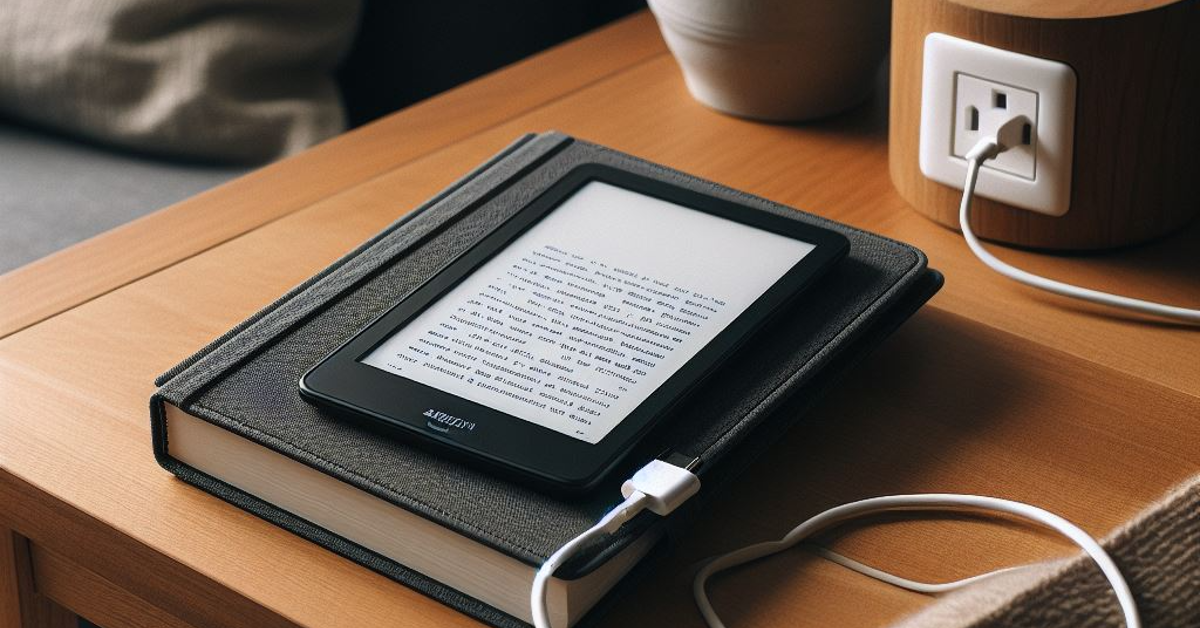
If your Kindle is not charging, the most likely culprit behind it is the charging cable. Make sure you are using the correct cable and inspect it for any damage. Use it to charge your smartphone. If it works on your phone, the fault does not lie with it. Additionally, make sure the power adapter is functional as well.

Use a power outlet instead of a PC

Delete corrupted files from your Kindle

If you’re using your PC or laptop to charge your Kindle, move to a power outlet instead. While PCs don’t cause any issues, the charging speed takes a hit. If your Kindle is drained out of battery, it can appear it is not charging if it is connected to the PC. Use a wall outlet to charge it at a quicker pace.

Check the power outlet

Charge your Kindle

If you don’t find any fault in the charger, check the power outlet. It is possible that the charger isn’t able to draw enough power from the wall outlet. Connect it to another socket and see if your Kindle starts charging. If it doesn’t, move on to other fixes in this list.

Clean the charging port

Dust, grime, and lint can collect inside the charging port of the Kindle over time, causing malfunctions with charging. This can also lead to the connector not fitting into the port. Gently scrape the visible grime from the port using a small brush. Use a pair of tweezers to pull out the larger pieces of lint. Blow some air into the port and gently knock your Kindle against the desk to let out the desk.

Remove the case

Connect the charger to a wall outlet

Counterfeit cases can partially cover the charging port or exert pressure on the charger when it is connected to the device. If you suspect that is the case with your Kindle, remove its case and try charging it again.

Check the temperature

Update your Kindle Coloursoft

If your Kindle has been lying under the sun or next to a window for too long, its internal temperature may rise rapidly. When the internal temperature crosses a certain threshold, certain essential tasks are suspended until the device cools down. To aid the cooling of the device, the charging duties are suspended too. Make sure your Kindle has reached normal temperature before plugging in its charger.

Restart your Kindle

Kindle 2022 review: Design and Display Amazon Kindle not charging? Here are 9 fixes (2024)

If a background software issue is the reason why your Kindle isn’t charging, restart the device. Here’s how.

Step 1: Tap the screen to reveal the toolbar.

Step 2: Tap on the downward arrow at the top of the screen.

Step 3: Tap on All Settings.

Step 4: Select Device Options.

Step 5: Hit Restart and confirm your selection.

Update the OS

Kindle 2022 review: Design and Display Amazon Kindle not charging? Here are 9 fixes (2024)

Step 1: Tap the screen to reveal the toolbar.

Step 2: Tap on the downward arrow at the top of the screen.

Step 3: Tap on All Settings.

Step 4: Select Device Options.

Step 5: Tap on Advanced Options.

Step 6: Select Update your Kindle. If this option is unselectable, it means your Kindle is already updated to the latest software version.

Reset your Kindle

Amazon Kindle not charging? Here are 9 fixes (2024)

If nothing works, it is time to give your Kindle a factory reset. This will erase all the data from the device, so make sure you back up all your books on another device or cloud storage.

Step 1: Tap the screen to reveal the toolbar.

Step 2: Tap on the downward arrow at the top of the screen.

Step 3: Tap on All Settings.

Step 4: Select Device Options.

Step 5: Tap on Reset.

Step 6: Confirm your selection in the popup box.

Visit an authorised service centre

If the charging issue persists even after performing a factory reset on your Kindle, you need to contact Amazon Customer Support or visit an authorised service centre. If your Kindle is still under warranty, you can get it repaired for free as long as the damage is not caused by water or physical impact.

Frequently Asked Questions (FAQs)

How do I fix my Kindle if it isn’t charging?

Make sure the charger and cable are not damaged, and clean the charging port of the device. Use a wall outlet instead of a PC to charge your Kindle.

How do I restart my Kindle?

Touch the screen, hit the downward arrow, go to All Settings>Device Options>Restart and confirm your selection.

How do I perform a factory reset on my Kindle?

Hit the downward arrow in the toolbar, go to All Settings>Device Options>Reset, and hit ‘Confirm’.

How much does a Kindle cost in India?

The entry-level Kindle variant is priced at Rs 10,000 in India.

How do I update my Kindle’s OS?

Go to All Settings>Device Options>Advanced Options, and hit ‘Update your Kindle’.

Read Also: WhatsApp testing zoom control feature for the camera

Conclusion

These are the top 10 ways to fix your Amazon Kindle if it isn’t charging. If your Kindle refuses to turn on, read this article for possible fixes. If you found this article helpful, let us know in the comments!

WhatsApp testing zoom control feature for the camera

WhatsApp has started to roll out an iOS 24.9.10.75 version update. Under the update, a camera zoom control feature is being rolled out by WhatsApp, and select beta testers can test it out now.

It seems like WhatsApp is working to enhance the camera experience by introducing new features aimed at enhancing user convenience and providing users with easier methods to share and record video. WhatsApp is working on the development of zooming in and out when using the iOS in-app camera to take pictures and record videos.

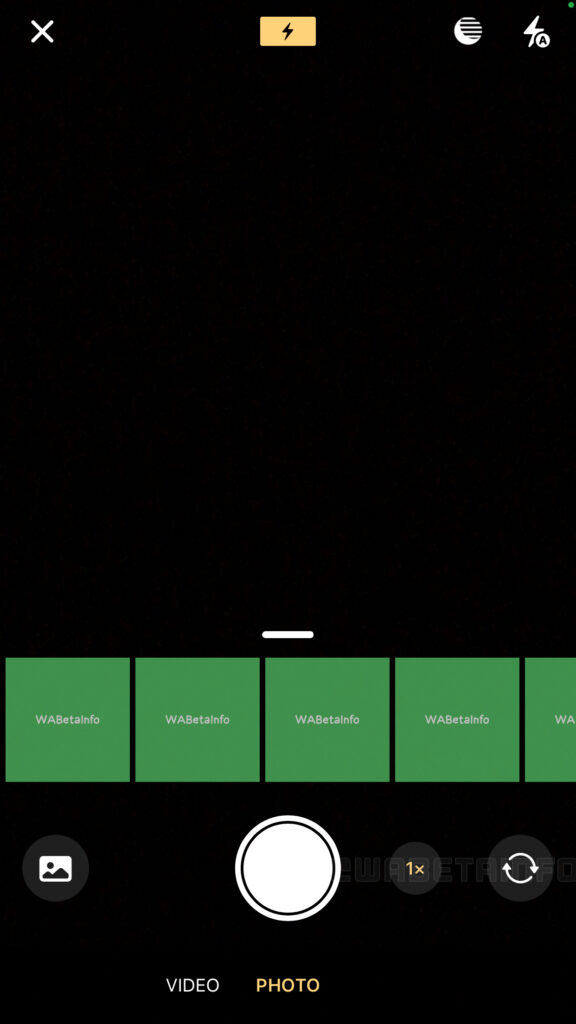
According to a report by WABetaInfo, WhatsApp is currently rolling out a zoom control function for the camera after installing the most recent WhatsApp beta for iOS 24.9.10.75 update, which is accessible on the TestFlight app.

Also Read: Is CMF by Nothing’s debut phone a low-cost model?

As shown in the shared screenshot some of the beta testers are able to play with a new button that allows iPhone users to smoothly adjust the zoom level. Prior to the changes, WhatsApp users for iOS were able to swipe up or down while holding their finger on the camera button in order to adjust the zoom level while recording, which could have produced inaccurate results.

WhatsApp is working on the development of zooming in and out when using the iOS in-app camera to take pictures and record videos.
Image Courtesy: WABetaInfo

With the new iOS camera zoom control feature users now have more control over creating photo and video content, therefore making it simpler to adjust the zoom without stopping the recording. Also, it eliminates the need for users to struggle with the camera button to adjust the zoom—just a simple touch. This will give users more control over the zoom level, improving precision by enabling them to get the exact shot they want.

Also Read: Amazon Fire TV Stick 4K with 4K Ultra HD streaming launched in India

As per the report, the zoom control feature for the camera is only accessible to some beta testers who install the latest update of WhatsApp beta for iOS from the TestFlight app, and it’s rolling out to more people over the coming days.

Garena Free Fire Redeem Codes Today 10 May 2024: Here is how to claim them

Garena Free Fire is a battle royale game with regular awards and tournaments to keep players interested. If you play Garena Free Fire, you should be aware of the redeem codes that are released on a daily basis. However, because the battle royale game is banned in India, players from other countries can use the Free Fire Redeem codes daily. If you’re unfamiliar with the Garena Free Fire redeem codes or don’t know how to get them, we’ve put together a step-by-step guide to help you redeem them. Check out Garena Free Fire Redeem Codes for 10 May 2024.

The Free Fire redeem codes are a great way to get free stuff. These are 12-digit codes that contain alphabets and numbers, as well as an expiration date and time. Because the Garena FF redeem codes cannot be used more than once, you should hurry to the redemption page to claim your free reward before someone else does. To get a free reward, all you have to do is go to reward.ff.garena.com/en, which is the official redemption page. Also, keep an eye on this space for daily updates on Garena Free Fire redemption codes and rewards.

Also Read: Sennheiser Accentum Plus wireless headphones with Hybrid Adaptive Noise Cancellation launched

Garena Free Fire Redeem Codes Today 10 May 2024

HIOO0LKMNBVCX

S45TGHJU7YTFVBYTEVE

DRTT5RE2SQ234R

FVGHY6T5RFVGBH

NJKIUY6ZQ21QSX

CDE3E4RFGVBNH

FGYUI8PL0OIJUH

YQ2WS3EDRCTYG

BHUNHINKI98UY

YT65YHBHJIKOLK

M4LPOIUYHGFCXS

How to Get Free Fire Redeem Codes for Garena on 10 May 2024?

  • Visit the Garena Free Fire game’s official website at reward.ff.garena.com.
  • Use your Facebook, Google, VK, Apple ID, Huawei ID, or Twitter account to log in.
  • You’ll be taken to a valid redemption code (s)
  • Copy and paste the 12-digit redemption code into the text box.
  • On the screen, a dialogue box will appear.
  • ‘Ok’ should be selected.

For the latest gadget and tech news, and gadget reviews, follow us on TwitterFacebook and Instagram. For newest tech & gadget videos subscribe to our YouTube Channel. You can also stay up to date using the Gadget Bridge Android App. You can find the latest car and bike news here.

Amazon Fire TV Stick 4K with 4K Ultra HD streaming launched in India

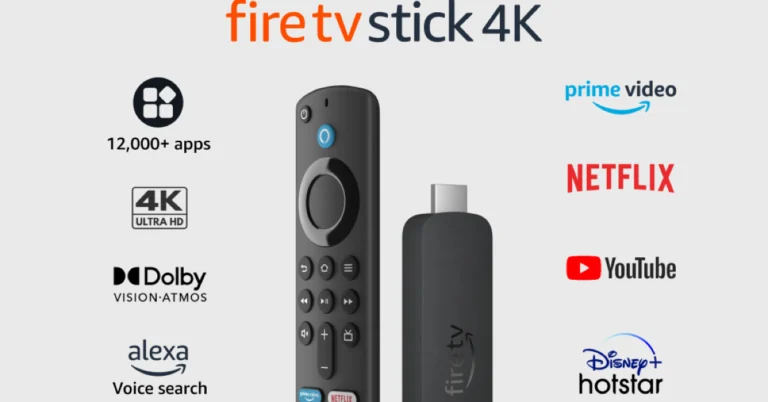
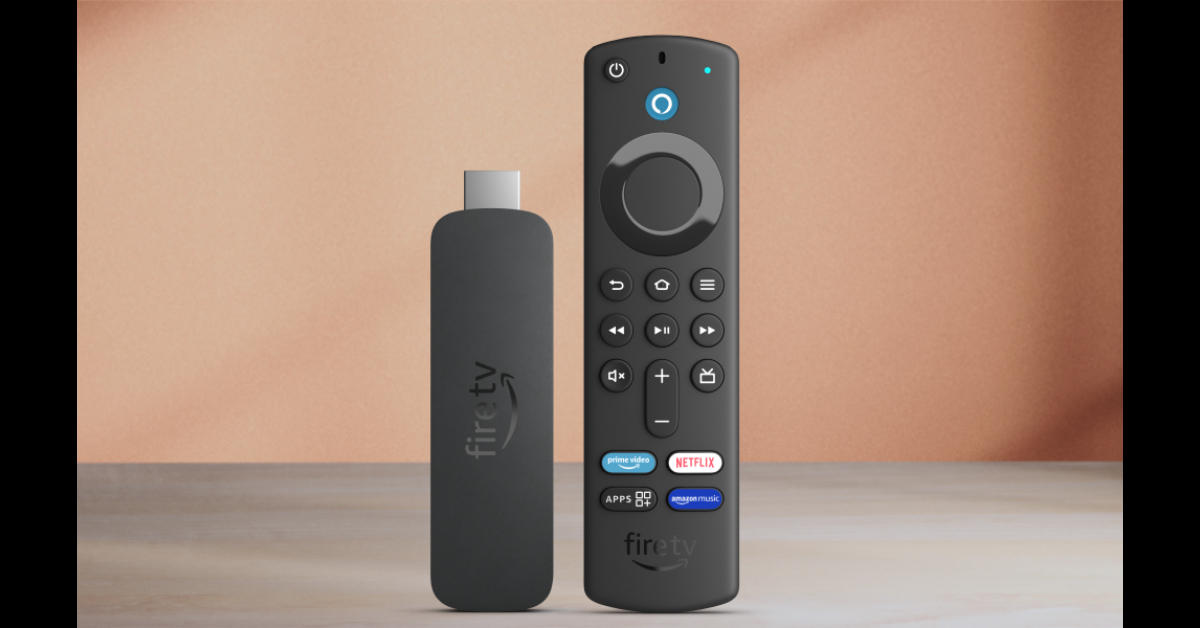
The newest member of the Fire TV family Amazon Fire TV Stick 4K has made its debut in India. The latest streaming device comes with several noteworthy enhancements like Ultra HD picture quality, Dolby Vision, HDR10+, and Dolby Atmos audio for cinematic 4K entertainment. It is said to have nearly 30% more power than its previous generations which allows for speedy app launches, and smooth navigation. 12,000+ entertainment, news, sports, and other apps are available through the Appstore for the Fire TV Stick 4K

Amazon Fire TV Stick 4K price in India, sale details

Amazon Fire TV Stick 4K price in India is set at Rs 5,999. The streaming device is only available in matte black and is currently up for pre-orders on the e-commerce platform. The streaming device will be available for purchase on May 13.

When it goes on sale, the Fire TV Stick 4K will also be available for purchase through Croma, Reliance Digital, and Vijay Sales, in addition to Amazon.

Amazon Fire TV Stick 4K specs, features

The new Amazon Fire TV Stick 4K is powered by its 1.7 GHz quad-core processor and supports Wi-Fi 6 compatible router, 5GHz and 2.4GHz Wi-Fi bands to allow customers to stream content at varying internet frequencies.

Also Read: Comparison: Google Pixel 8a Vs Pixel 8

The content streaming device by Amazon streams 4K Ultra HD content and supports HDR10+. In addition, Dolby Vision and Dolby Atmos audio are included. The all-new Fire TV Stick 4K also includes a low-power mode that saves energy when a device enters standby or sleep mode when it is not in use.

Amazon Fire TV Stick 4K specs, features

A variety of TVs that are compatible with the Fire TV Stick 4K can be operated by using the bundled Alexa Voice Remote to control specific features like volume and power. There are now buttons specifically for apps on the updated Alexa Voice Remote. Consumers may easily locate, access, and control content by voice. Additionally, users may create an “Alexa Home Theatre” by using the Alexa app to wirelessly link their Fire TV Stick 4K to their Echo smart speakers.

Also Read: Is CMF by Nothing’s debut phone a low-cost model?

Access to more than a million films and TV series episodes can be had with the most recent Fire TV 4K Stick thanks to the App Store’s 12,000+ apps, which include well-known titles like Netflix, Prime Video, Disney+ Hotstar, Zee5, and Jio Cinema. Additionally, there is a vast selection of content available for streaming on Disney+ Hotstar and Netflix, as well as Prime Video Amazon Originals including Made in Heaven, Mirzapur, Panchayat, Aspirants, and Family Man.

Users will also be able to access free or paid content on websites like MX Player, YouTube, and MiniTV. Additionally, they can use the DTH set-top box on their home screen to access live channels including Colours, Zed, Sony, Star, Discovery, News18, DD National, and more.

Discover the 5 Most Unique Slot Machine Systems

Slot machines have been a beloved fixture in casinos around the world for decades, captivating players with their flashing lights, enticing themes and the promise of instant riches. However, what many casual gamblers may not realize is that there’s more to spinning those reels than mere chance. In this article we delve into the fascinating world of slot machine betting systems, strategies designed to maximize your chances of winning and enhance your gaming experience.

But before we dive into the specifics of particular betting systems, let’s take a moment to understand the concept. Betting systems are structured approaches to wagering that aim to provide players with a methodical way of betting, ultimately influencing the outcomes of their bets. Discover the secrets of slot machine betting systems in the Twin Win Demo. While slot machines are often seen as games of pure luck, these systems introduce an element of strategy into the mix, offering players a sense of control over their gambling:

Betting System Description
The Martingale System A progressive betting strategy where you double your bet after each loss to recoup previous losses and make a profit
The Fibonacci System Based on the Fibonacci sequence, this system involves adjusting your bets according to a mathematical pattern
The Paroli System A positive progression system where you increase your bets after winning, aiming to ride winning streaks
The Labouchere System A complex strategy involving a predetermined sequence of bets to reach a target profit
The Kelly Criterion A method to determine the optimal size of bets based on perceived edge and bankroll size

As we explore each of these intriguing systems in detail, you’ll gain insights into how they work and their potential advantages and disadvantages. Whether you’re a seasoned slot player or a curious newcomer, understanding them can add a new dimension to your casino experience, making each spin of the reels more exciting and strategic.

The Martingale Betting System

The Martingale betting system, a time-honored strategy originally developed for casino games like roulette, can be adapted for use with slot machines, albeit with some unique considerations. In this system players begin by placing an initial wager, and if they experience a loss, they double their bet on the subsequent spin. This doubling of bets continues after each loss until a win is achieved, at which point the player reverts to their initial bet size and restarts the process.

When applying the Martingale system to slot machines, players are drawn to its simplicity and the structured approach it offers to their betting strategy. The allure lies in the potential to recover previous losses with a single win, which can be exhilarating. However, it’s essential to weigh the pros and cons before embracing this system in slot machine play:

Advantages Disadvantages
Provides a straightforward and easy-to-understand strategy for players Doesn’t alter the fundamental odds of winning on a slot machine, making long-term profitability uncertain
Offers a sense of control and discipline in managing bets Demands a substantial bankroll to endure potential extended losing streaks, posing financial risks
Can result in significant short-term gains if a winning spin occurs Many casinos impose betting limits, impacting system’s effectiveness in the face of reaching those limits

While the Martingale system can provide an adrenaline rush and the allure of quick winnings, it should be embraced cautiously. Players should be aware of the potential for significant losses if luck does not favor them, and they must exercise responsible bankroll management when using this strategy in the world of slot machine gambling.

The Fibonacci Betting System

Bringing a touch of mathematical elegance to the world of slot gaming, the Fibonacci betting system introduces players to a distinctive approach rooted in the renowned Fibonacci sequence. As slot enthusiasts explore this intriguing strategy, it’s crucial to weigh the unique advantages and accompanying disadvantages that come with its application in slot gaming:

Pros Cons
Implements a structured and systematic betting method, promoting discipline and control


Does not alter the inherent odds of winning on a slot machine, making long-term profitability uncertain
Offers a relatively conservative betting strategy, reducing the risk of rapid and significant losses Progress in recovering losses may be slower compared to more aggressive betting systems
Encourages responsible bankroll management, contributing to a sustainable and enjoyable gaming Depends heavily on a sequence of wins to offset losses, which may not always align with expectations

The allure of the Fibonacci system in slot gaming lies in its methodical approach and risk management. By incrementally adjusting bets following losses and decreasing them after wins, guided by the Fibonacci sequence, players can extend their gaming sessions while maintaining a sense of control and strategy. However, it is vital to approach this system with a realistic perspective. The Fibonacci system does not alter the fundamental odds of winning on a slot machine, and its success hinges on a sequence of wins to offset losses, an outcome that remains uncertain. Players should embrace this unique system thoughtfully, always exercising responsible bankroll management to maximize its potential and enhance their gaming experience.

The Paroli Betting System

When embracing the Paroli system in slot machine betting, players embark on a distinct journey. They initiate their gameplay with an initial bet, and the strategy dictates that they only increase their wager after a victorious spin. Unlike some other systems that aggressively chase losses, the Paroli system aims to ride the waves of success by allowing profits to accumulate. When the player decides to take their winnings or faces a setback, they revert to their initial bet size.

The merits of the Paroli system in slot gaming lie in its ability to maximize profits during winning streaks and its inherent discipline in managing bets. This structured approach not only fosters responsible gaming habits but also encourages effective bankroll management. Nevertheless, it’s imperative to acknowledge the system’s limitations, including its inability to alter the underlying odds of winning on a slot machine and the potential for abrupt ends to winning streaks.

The Labouchere Betting System

The Labouchere system is a structured betting strategy that centers around the creation of a numerical sequence, where each number represents a specific bet size. Players craft their unique sequences, guided by their profit objectives. The primary objective of this strategy is to eliminate all numbers in the sequence through winning bets, ultimately reaching the desired profit target. Bets are placed equal to the sum of the first and last numbers in the sequence. When a bet is successful, these numbers are crossed off, and in the event of a loss the sum of the lost bet is appended to the end of the sequence. The process continues until the entire sequence is cleared, culminating in the achievement of the profit goal.

When applied to the world of slot machine gambling, the Labouchere system requires players to adapt their numerical sequence to match the bets placed on each spin. The sequence is meticulously designed based on the player’s bankroll and profit aspirations. In practice, players adhere to the strategy’s rules by wagering sums equivalent to the first and last numbers in their sequence. The Labouchere system not only encourages prudent bankroll management but also steers players toward their profit objectives.

While the Labouchere system offers a structured and methodical approach to slot machine betting, its effectiveness and potential caveats deserve thoughtful consideration. This strategy empowers players to set clear profit targets and manage their bankrolls sensibly. However, it does not alter the fundamental odds of winning on a slot machine, and strict adherence to the sequence can prove challenging amidst the unpredictability of slot gaming.

The Kelly Criterion Betting System

The Kelly Criterion is a mathematical formula designed to optimize the size of a series of bets, ultimately maximizing expected wealth over time. It hinges on two critical components: the player’s advantage or edge and the odds presented by the casino. The outcome is expressed as a percentage, indicating the portion of the player’s bankroll to wager on a specific bet. When applied to the world of slot machines, the Kelly Criterion involves evaluating the player’s perceived edge, which may encompass factors such as payout rates, game volatility and bonus features. Once the edge is assessed, the formula can be effectively employed to calculate the ideal bet size for each spin.

Utilizing the Kelly Criterion in slot machine betting offers a host of advantages. It presents a systematic and mathematically sound approach to betting, enhancing the potential for sustained profitability. By optimizing bet sizes based on the player’s edge, it encourages responsible bankroll management and strategic decision-making. However, it’s crucial to be mindful of potential considerations, including the challenge of accurately gauging one’s edge within the inherently unpredictable landscape of slot gaming. Overestimating the edge can lead to overly aggressive betting, while underestimating it may result in missed opportunities for maximizing returns.

Final Thoughts

While different betting systems can infuse excitement and strategy into your gameplay, it’s paramount to maintain a commitment to responsible gambling. Slot machines are fundamentally games of chance, and no strategy can alter the chance of winning. Understanding the mechanics and odds of the games you engage with is vital for making informed decisions.

We encourage you to explore and experiment with various betting strategies as you enjoy slot machines. Each system brings its own flavor to your gaming sessions, and the choice of which to employ depends on your tastes and targets. Whether you seek a methodical approach, mathematical precision or a flexible strategy, these systems provide intriguing avenues for exploration.

In the grand scheme of things, slot machine gambling should serve as a source of entertainment and enjoyment. While betting systems can enhance your experience, remember to gamble responsibly, set limits and never wager more than you can comfortably afford to lose. Armed with a solid grasp of the odds and a willingness to delve into different strategies, you can maximize your slot machine adventures while savoring the thrill of the game.

Samsung Galaxy F55 5G with triple rear cameras to launch in India on May 17

Samsung is expanding its F-series in India and today it officially announced the launch date of its upcoming smartphone Galaxy F55 5G. Not only this the South Korean firm has also revealed the price range and colour options of the device. Keep on reading to learn more about the smartphone.

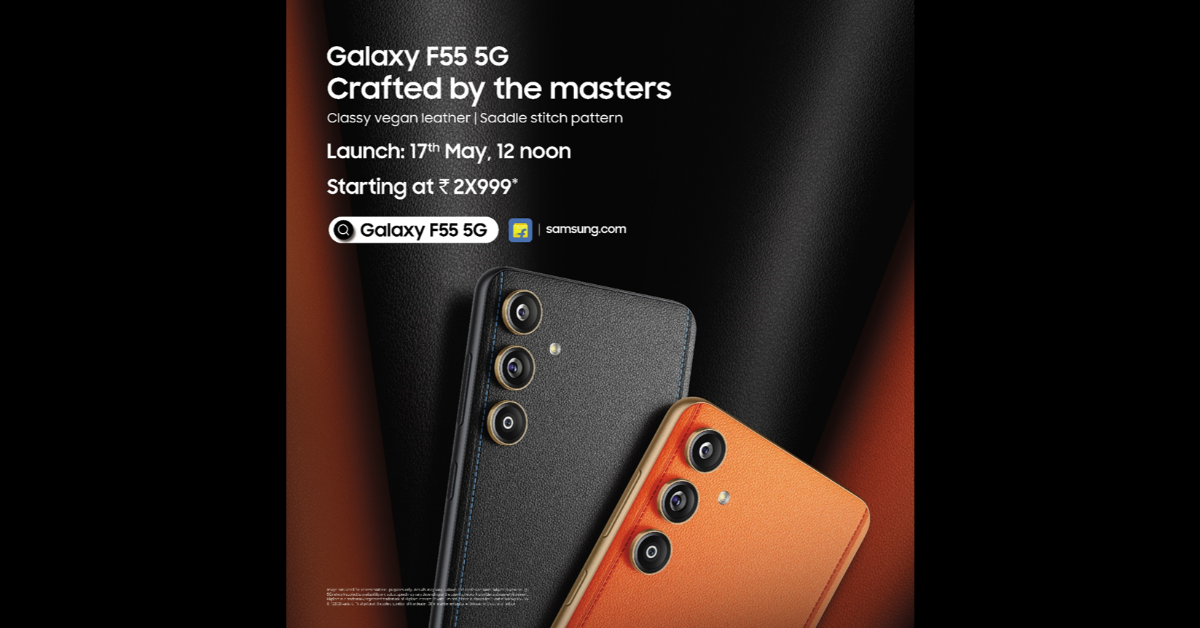
Samsung Galaxy F55 5G India launch is set to take place on May 17. The upcoming phone is rumoured to be a rebranded variant of the Samsung Galaxy C55 5G which launched in China last month. In addition to revealing the launch, the firm has also hinted at the price of the smartphone. As per the poster image, the price of Galaxy F55 5G will start at Rs 30,000 in India. The company has not revealed the exact pricing instead the poster image included “starting at Rs 2X999”

Samsung Galaxy F55 5G with triple rear cameras to launch in India on May 17

The firm has also confirmed the Flipkart availability for F55 5G. In addition, the smartphone will be sold through Flipkart, Samsung.com, and a few other retail locations as soon as it launches in India. There will be two colour variants available: Apricot Crush and Raisin Black.

Also Read: Is CMF by Nothing’s debut phone a low-cost model?

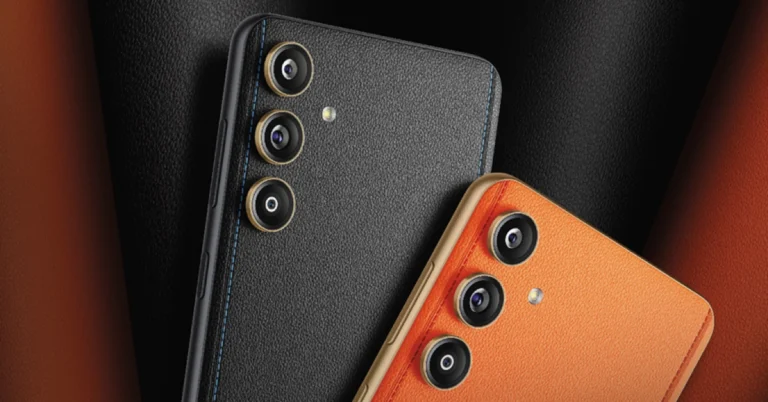
The teaser indicates that the upcoming smartphone will have three vertically arranged cameras on the back panel. The phone will have a stitched design and an orange vegan leather finish.

It is anticipated that the Samsung Galaxy F55 5G, a redesigned Galaxy C55 5G, will debut in India. According to the company’s teaser, the Samsung Galaxy F55 5G and the Galaxy C55 5G have a similar design. The Orange phone model that was released in China is even similar in terms of colour options.

The Samsung Galaxy F55 5G is expected to come with a 6.7-inch full-HD+ sAMOLED Plus screen. The display is speculated to have a refresh rate of 120Hz and a maximum brightness level of 1,000 nits.

Also Read: Comparison: Google Pixel 8a Vs Pixel 8

An anticipated Snapdragon 7 Gen 1 SoC will power the smartphone with 8GB of RAM, and up to 256GB of storage. It may run on One UI 6.0, which is based on Android 14.

Moreover, the Galaxy F55 5G will support 25W wired fast charging and will pack a 5,000mAh battery. Moreover, the triple rear camera setup is said to include a 50-megapixel main camera sensor with optical image stabilisation (OIS) support. The system may also include an 8-megapixel ultra-wide angle lens and a 2-megapixel macro lens. A 50-megapixel sensor on the front for selfies and video calls is also expected.

Is CMF by Nothing’s debut phone a low-cost model?

Key Highlights

  • CMF’s new smartphone is likely to be called CMF Phone 1.
  • Anticipated to be an economical entry-level phone, the CMF Phone 1 may be less expensive than the Nothing Phone 2a.

It may come in three different colour variants and is rumoured to have a plastic body.
Nothing’s sub-brand CMF is planning to expand and is speculated to enter the smartphone market soon. The firm is now preparing to release its first smartphone although there is no official information about the alleged CMF phone. A report has surfaced that discloses the CMF smartphone’s price and a few of its specs. Check out the details below.

Although the name, cost, and specifications of the CMF smartphone are being leaked, no official information about the device has been released as of yet. As per a report, the upcoming phone from CMF by Nothing is apparently going to be named the CMF Phone 1.

The CMF Phone 1 may cost approximately Rs 12,000 in India. That means the rumoured phone would be significantly less expensive than Nothing’s most affordable smartphone Nothing Phone 2a.

Also Read: Comparison: Google Pixel 8a Vs Pixel 8

It is rumoured that the CMF Phone 1 will have a plastic body and Gorilla Glass protection on the display. The device is likely to be offered in three colour options: orange, white, and black.

Also Read: Meta brings AI-powered image and text generation tools for businesses to create ad creatives 

In terms of specifications, the alleged CMF smartphone is anticipated to feature a 6.5-inch display. It may come equipped with a MediaTek Dimensity 5G chipset. The Phone 1 by CMF is likely to be a stripped-down version of Nothing OS and will offer four years of security updates and three years of OS updates. It is probably going to have a single back camera. It is supposed to have a 33W charging-capable 5,000mAh battery.

Comparison: Google Pixel 8a Vs Pixel 8

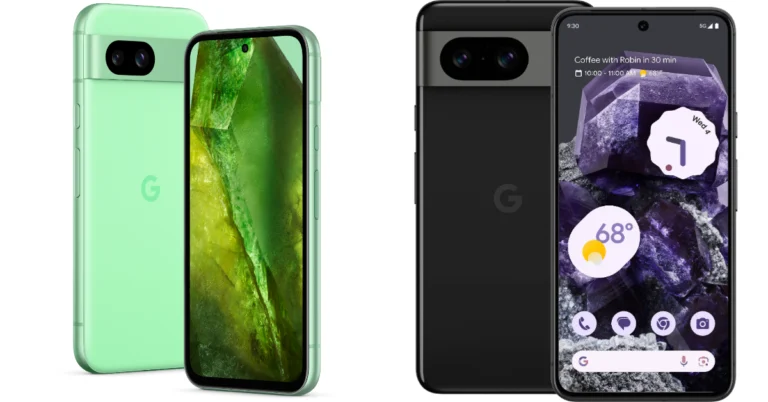
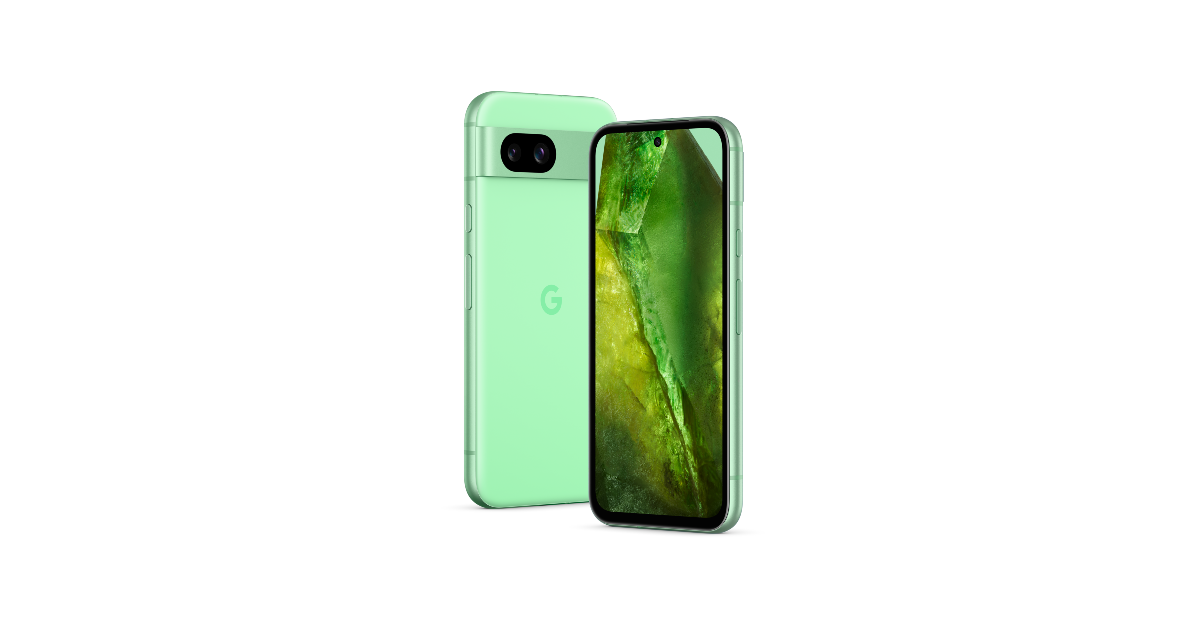
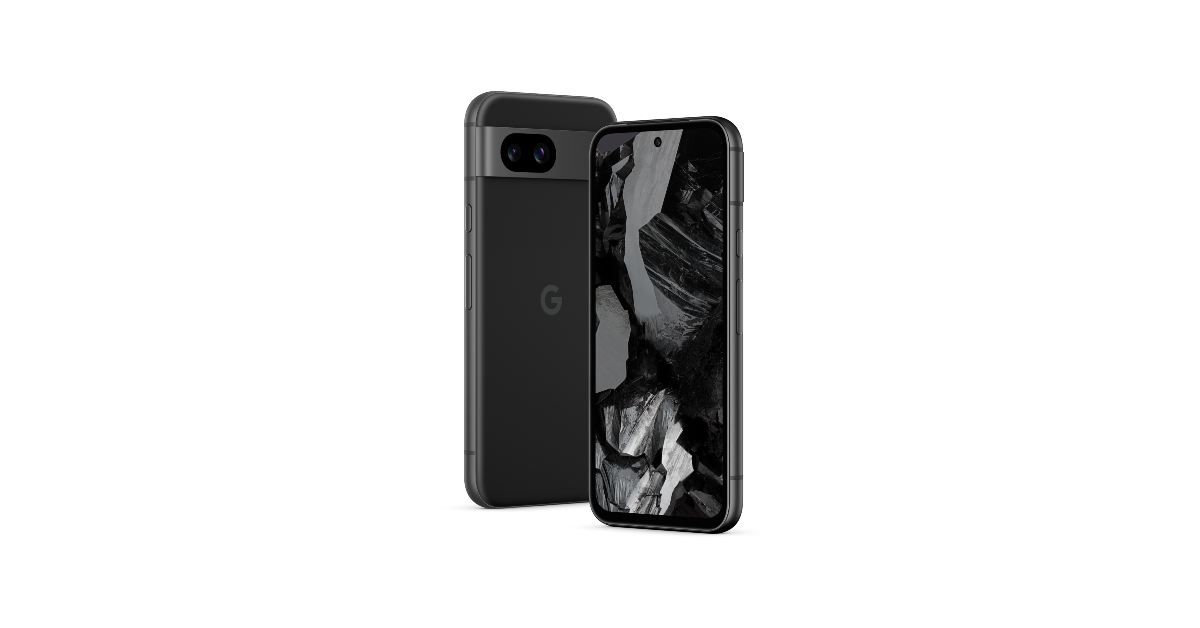
Recently Google introduced its new A-Series phone, Pixel 8a in India. The smartphone and Pixel 8 have a lot in common, which is why they seem so similar. If you are confused, we have done a detailed comparison below between the Pixel 8a and its more expensive sibling Pixel 8 to help you understand which one is the better buy.

Display

Pixel 8a: 6.1-inch Super Actua display (120Hz refresh rate)

Pixel 8: 6.2-inch FHD+ Actua display (Adaptive refresh rate ranging between 60Hz and 120Hz)

Processor

Pixel 8a: Google Tensor G3 chip

Pixel 8: Google Tensor G3 SoC

Rear camera(s)

Pixel 8a: Dual rear camera system with a 64-megapixel main lens and a 13-megapixel ultrawide lens

Pixel 8: 50MP Octa PD sensor with f/1.68 and 12 MP ultrawide camera with an auto-focus

Selfie camera

Pixel 8a: 13-megapixel sensor

Pixel 8: 10.5-megapixel Dual PD sensor

Also Read: Meta brings AI-powered image and text generation tools for businesses to create ad creatives

RAM and storage

Pixel 8a: 8GB RAM with 128GB storage/8GB RAM with 256GB storage

Pixel 8: 8GB RAM with 128GB storage/8GB RAM with 128GB storage

Battery

Pixel 8a: 4,492mAh battery

Pixel 8: 4,485mAh battery

Operating system

Pixel 8a: Android 14

Pixel 8: Android 14

Price

Pixel 8a: Rs 52,999

Pixel 8: Rs 75,999

Our Take

Both the Pixel phones are shipped with Android 14 out of the box and are promised to offer 7 years of software and security support. Though there is a slight size difference, the Super Actua displays on both devices support a 120Hz refresh rate. However, the display on the flagship Pixel 8 has an adaptive refresh rate that switches between 60Hz and 120Hz based on the content being played. 

In addition, the display appears premium with thinner bezels than the 8a. The Pixel 8a boasts a display made of Corning Gorilla Glass 3. In contrast, the Corning Gorilla Glass Victus display of the Pixel 8 is stronger and less prone to scratches.

Also Read: Apple discontinued iPad (9th gen); iPad (10th gen) gets a price cut

Whereas the Pixel 8a is rated IP67, the Pixel 8 boasts IP68 dust and water resistance.
The Google Tensor G3 chip and Titan M2 security co-processor are the same processors found in the Pixel 8 and Pixel 8a. Both Google phones contain Pixel-only AI functions, although the 8a lacks some of the flagship phone’s capabilities. Over that, Magic Eraser, Photo Unblur, Real Tone, Face Unblur, Panorama, Manual White Balancing, Locked Folder, Night Sight, Top Shot, Portrait Mode, Portrait Light, Motion Auto Focus, Frequent Faces, Dual exposure controls, Live HDR+, and Ultra HDR are among the camera AI tools shared by both devices. Macro Focus, Best Take, and Magic Editor are absent on 8a.

In terms of cameras, the Pixel 8a’s front and back cameras have higher resolution sensors than the Pixel 8 PD sensor, but the latter’s larger sensor size allows it to capture more light, producing images that are clearer, crisper, and more detailed.

There isn’t much difference in the batteries, although the Pixel 8 has a slightly larger battery and features the Battery Share feature.

Apart from the cameras, build quality, and the absence of a few Pixel-only features, the Pixel 8a and Pixel 8 are nearly identical. However, the two have a significant price difference. If you’re on a limited budget, we advise you to choose the less costly Pixel 8a.

Garena Free Fire Redeem Codes Today 9 May 2024: Here is how to claim them

Garena Free Fire is a battle royale game with regular awards and tournaments to keep players interested. If you play Garena Free Fire, you should be aware of the redeem codes that are released on a daily basis. However, because the battle royale game is banned in India, players from other countries can use the Free Fire Redeem codes daily. If you’re unfamiliar with the Garena Free Fire redeem codes or don’t know how to get them, we’ve put together a step-by-step guide to help you redeem them. Check out Garena Free Fire Redeem Codes for 9 May 2024.

The Free Fire redeem codes are a great way to get free stuff. These are 12-digit codes that contain alphabets and numbers, as well as an expiration date and time. Because the Garena FF redeem codes cannot be used more than once, you should hurry to the redemption page to claim your free reward before someone else does. To get a free reward, all you have to do is go to reward.ff.garena.com/en, which is the official redemption page. Also, keep an eye on this space for daily updates on Garena Free Fire redemption codes and rewards.

Also Read: Sennheiser Accentum Plus wireless headphones with Hybrid Adaptive Noise Cancellation launched

Garena Free Fire Redeem Codes Today 9 May 2024

S45TGHJU7YTFVBYTEVE

NJKIUY6ZQ21QSX

CDE3E4RFGVBNH

YQ2WS3EDRCTYG

BHUNHINKI98UY

DRTT5RE2SQ234R

FVGHY6T5RFVGBH

HIOO0LKMNBVCX

YT65YHBHJIKOLK

M4LPOIUYHGFCXS

How to Get Free Fire Redeem Codes for Garena on 9 May 2024?

  • Visit the Garena Free Fire game’s official website at reward.ff.garena.com.
  • Use your Facebook, Google, VK, Apple ID, Huawei ID, or Twitter account to log in.
  • You’ll be taken to a valid redemption code (s)
  • Copy and paste the 12-digit redemption code into the text box.
  • On the screen, a dialogue box will appear.
  • ‘Ok’ should be selected.

For the latest gadget and tech news, and gadget reviews, follow us on TwitterFacebook and Instagram. For newest tech & gadget videos subscribe to our YouTube Channel. You can also stay up to date using the Gadget Bridge Android App. You can find the latest car and bike news here.

Meta brings AI-powered image and text generation tools for businesses to create ad creatives

For advertisers looking to assist with comprehensive image and text development, Meta has launched enhanced generative AI tools. Additionally, the company has introduced new tools and services that help businesses improve the efficacy of their ads. These services include developing creative variations, automating certain parts of the ad creation process, or increasing credibility and engagement through Meta Verified.

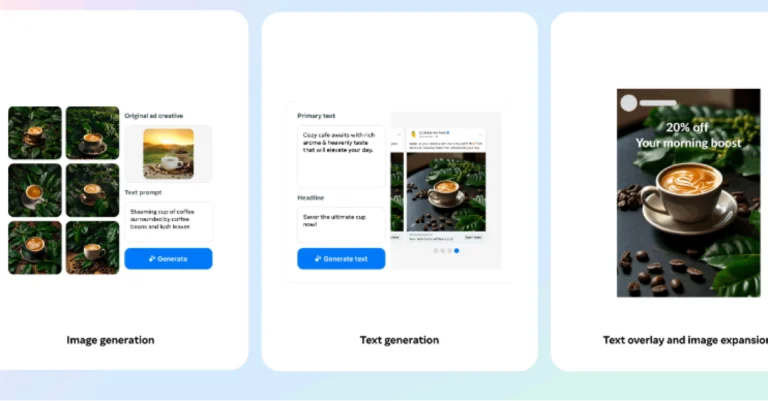
Meta is launching a new suite of artificial intelligence (AI) tools to assist businesses and enhance the ad creation process. The second and third generations of Meta’s Llama (Large Language Model Meta AI) AI models fuel its new AI features. Meta’s AI will let users create images and text for advertisements.

Generative AI: Image Generation

For the first time, you can use text overlay to generate full image variations based on your original ad creative. This expands on the ability to create different backgrounds for product shots and magnify images to fit larger surfaces. This feature has already begun to roll out and in the coming months, users will also be able to provide text prompts to help us better tailor the creative variations we offer to you.

Also Read: Apple discontinued iPad (9th gen); iPad (10th gen) gets a price cut

Furthermore, users will also be able to add text overlay to photos, and advertisers can select from a dozen of the most well-liked font typeface alternatives. There will also be an image expansion feature that will allow you to easily modify creative assets to match various aspect ratios across various surfaces. This will be functional with text overlays on your advertisements and is accessible on Reels and Feed on Facebook and Instagram.

Generative AI: Text Generation

The Text Generation tool allows you to make variations for both the ad headline and the core content. Meta is also testing the ability for the generated text to reflect your brand’s voice and tone, by highlighting key selling points based on your previous campaigns and text input. As per the company, these upgrades are driven by advertiser requests for a more broadened selection of text selection that better reflects their brand and key selling elements.

Also Read: Google Pixel 8a launched in India at this price: Deets inside

This feature will soon be built with Meta Llama 3, the next generation of our large language models, which will enable new capabilities and enhance ad performance. The company has released these updated generative AI features and global availability is expected by the end of the year.

Top 6 Ways to Turn On Your Android Phone’s Flashlight Without Waking Up The Screen

0

Smartphones have completely eliminated the need for torchlights, at least in everyday use. If you’re embarking on a hike, you should think about purchasing a powerful flashlight, but if you need to navigate your way around a dark room, you don’t need a torch on you at all times, as long as you have a phone on you. Android smartphones even let you adjust the intensity of the light by long-pressing its tile. However, what’s more important than intensity is the accessibility of the torch function on your phone. Today, we bring you the top 6 ways to turn on your Android phone’s flashlight without waking up the screen.

Read Also: WatchOut WearPods Review: Best of both worlds?

Before you begin

There are multiple ways you can go about toggling the flashlight on your smartphone. All Android devices have a handy tile for the torch in the Quick Settings Menu. If you want easier access, you can add a flashlight widget to your home screen. In scenarios where you need to use the torch urgently and don’t have the time to unlock the phone, you can use the lock screen icon for the flash.

However, this still requires you to wake the screen of your device. Turning on the flashlight without disturbing the screen is a very niche demand, but your Android smartphone is natively equipped to handle that. The side button on Samsung devices can be customised to turn on the torch. The Quick Tap option on Pixel smartphones lets you turn it on by double or triple-tapping the back of the phone. If you own some other smartphone, you can always use Google Assistant or a third-party app for this task.

Customise the side button on Samsung

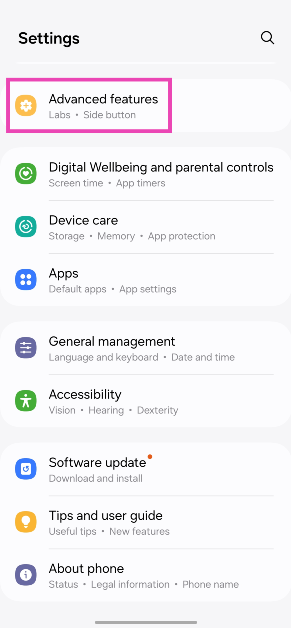
Step 1: Go to Settings and select Advanced features.

Step 1: Go to Settings and select Advanced features.

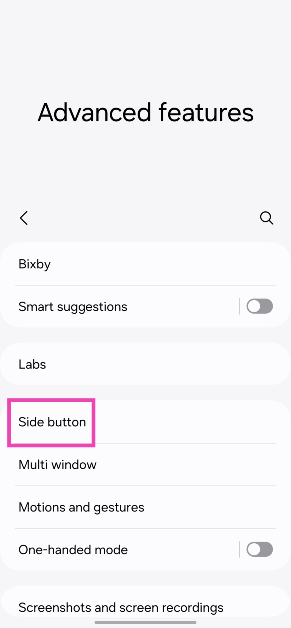
Step 2: Tap on Side button.

Step 2: Tap on Side button.

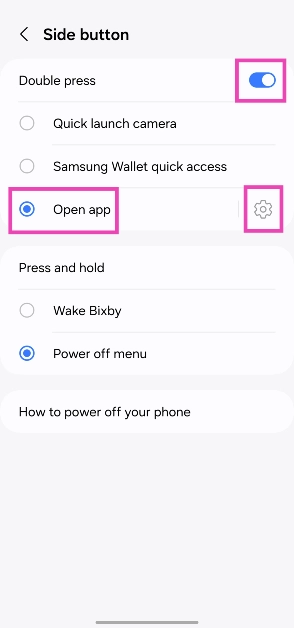
Step 3: Turn on the toggle switch for Double press and select Open app.

Step 3: Turn on the toggle switch for Double press and select Open app.

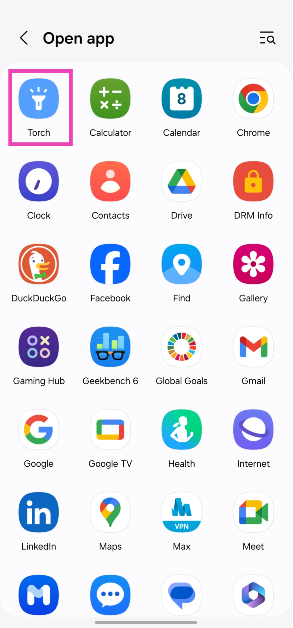
Step 4: Hit the settings icon next to Open app and select Torch.

Step 4: Hit the settings icon next to Open app and select Torch.

Use Quick Tap on Google Pixel smartphones

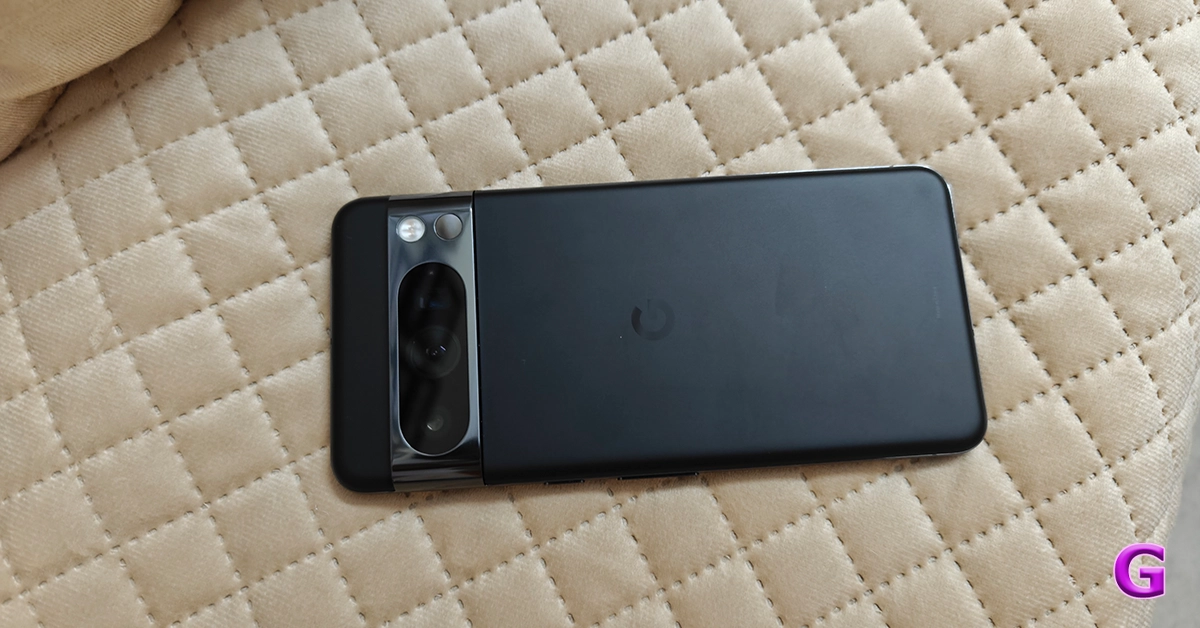
Google Pixel 8 Pro Review: AI Features, Hit or Miss?
Google Pixel 8 Pro

Step 1: Go to Settings and select System.

Step 2: Tap on Gestures and select Quick Tap to start actions.

Step 3: Turn on the toggle switch for Quick Tap.

Step 4: Select Toggle flashlight.

Step 5: Double-tap your phone’s back to check if it works.

Enable the shake gesture

  1. Go to Settings.
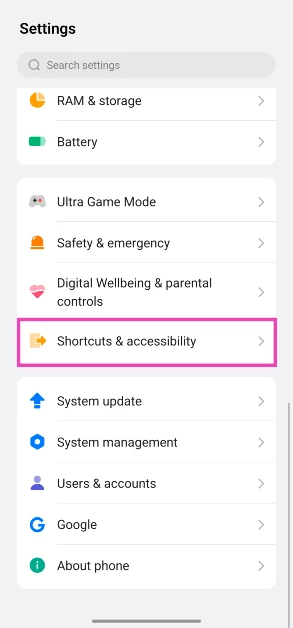
  2. Scroll down and select Shortcuts & accessibility.
    shortcuts and accessibility How to turn on your Android phone’s flashlight by shaking it
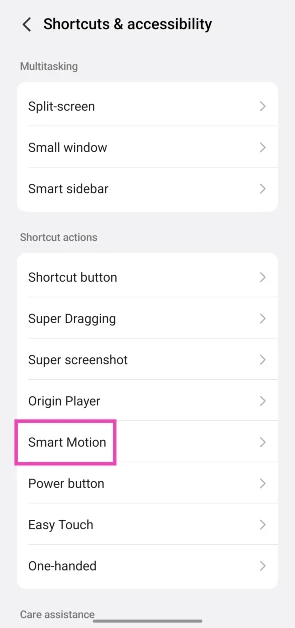
  3. Tap on Smart Motion.
    Tap on Smart Motion. How to turn on your Android phone’s flashlight by shaking it
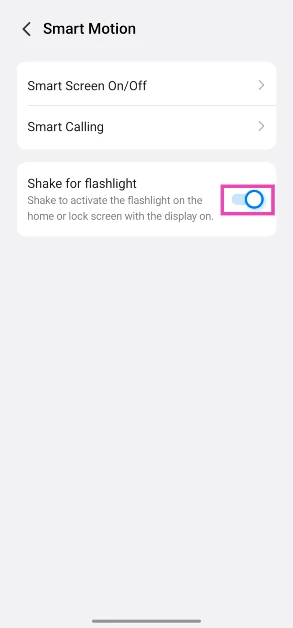
  4. Turn on the toggle switch next to Shake for flashlight.
    Turn on the toggle switch next to Shake for flashlight. How to turn on your Android phone’s flashlight by shaking it

Use Google Assistant

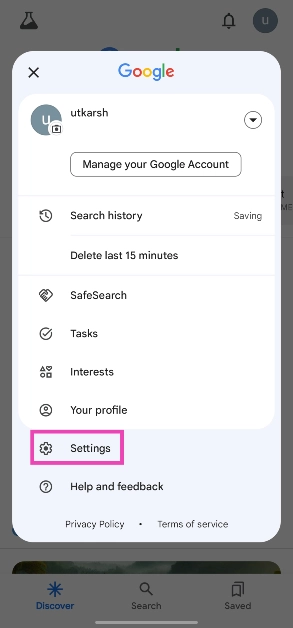
Step 1: Open the Google app, tap your profile picture, and select Settings.

Step 1: Open the Google app, tap your profile picture, and select Settings.

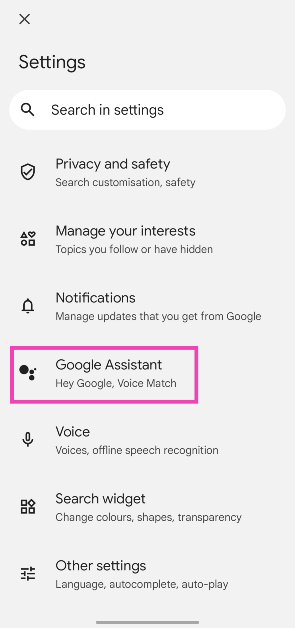
Step 2: Tap on Google Assistant.

Step 2: Tap on Google Assistant. Top 4 Ways to Turn On Your Android Phone's Flashlight Without Waking Up The Screen

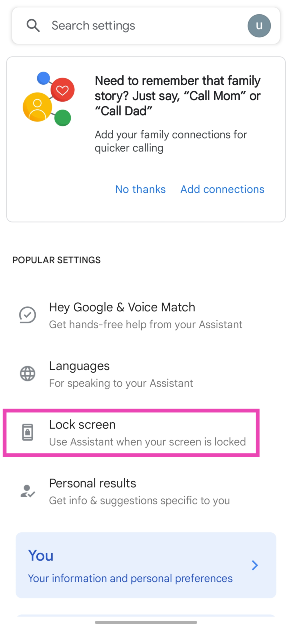
Step 3: Select Lock screen.

Step 3: Select Lock screen. Top 4 Ways to Turn On Your Android Phone's Flashlight Without Waking Up The Screen

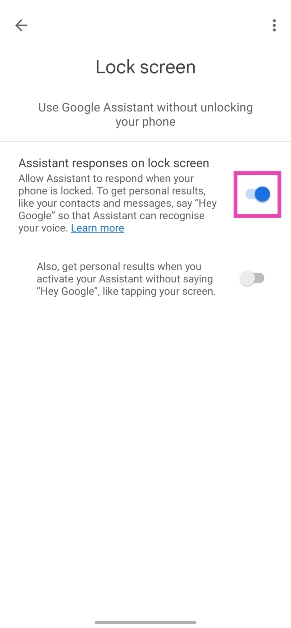
Step 4: Turn on the toggle switch for Assistant responses on lock screen.

Step 4: Turn on the toggle switch for Assistant responses on lock screen. Top 4 Ways to Turn On Your Android Phone's Flashlight Without Waking Up The Screen

Step 5: When your phone is locked, say ‘Hey Google, turn on the flashlight’.

Customise the Shortcut button

Some midrange and premium smartphones come with an additional key to toggle the sound profile, click a picture, and do a whole bunch of other tasks. You can customise to trigger the flashlight as well. Here’s how.

  1. Go to Settings.
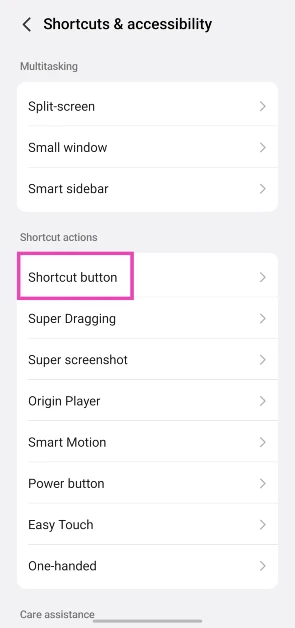
  2. Tap on Shortcuts & accessibility.
    shortcuts and accessibility Top 6 Ways to Turn On Your Android Phone's Flashlight Without Waking Up The Screen
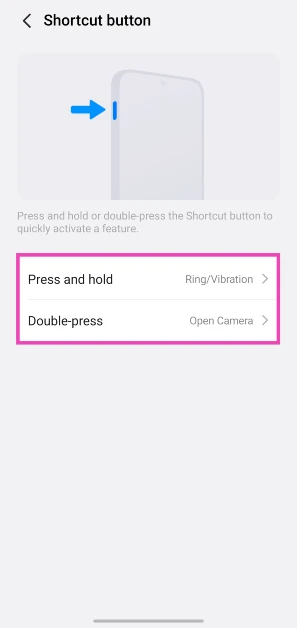
  3. Select Shortcut button.
    Select Shortcut button. Top 6 Ways to Turn On Your Android Phone's Flashlight Without Waking Up The Screen
  4. Choose an action.
    Select Shortcut button. Top 6 Ways to Turn On Your Android Phone's Flashlight Without Waking Up The Screen
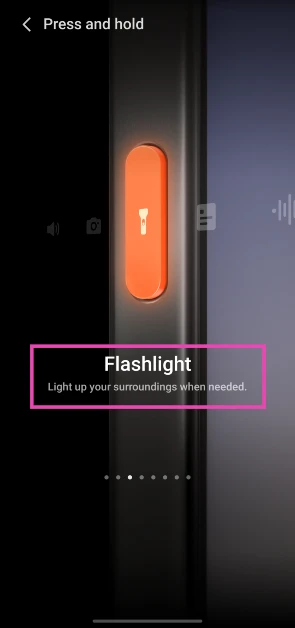
  5. Swipe through the functions on the screen until you land on Flashlight.
    Select Shortcut button. Top 6 Ways to Turn On Your Android Phone's Flashlight Without Waking Up The Screen

Use the Shake Flashlight app

  1. Download the Shake Flashlight app from the Google Play Store.
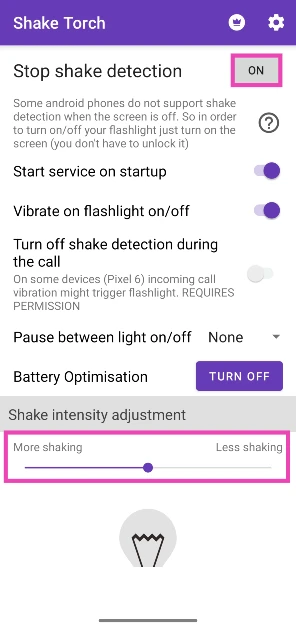
  2. Launch the app and make sure the box next to Stop shake detection says On.
    Launch the app and make sure the box next to Stop shake detection says On.
  3. Use the slider at the bottom of the screen to set your preferred shake intensity.
  4. Shake your phone in a chopping motion to turn on the flashlight. Some phones may not register this motion when they’re locked. Press the side button and carry out the gesture again to bring the flashlight to life.
  5. Shake your phone again to turn off the flashlight.

Frequently Asked Questions (FAQs)

How do I use back tap on my Samsung phone?

Install the Good Lock app on your Samsung smartphone and download the RegiStar module. Now, tap on ‘Back tap’ and turn on its toggle switch. Use the customisation settings to assign your desired actions.

How do I use back tap on a Google Pixel smartphone?

Go to Settings>System>Gestures>Quick Tap, turn on its toggle switch, and select your desired action.

How do I turn on the flashlight on my Android smartphone without waking up its screen?

Samsung users can customise the side button to trigger the flashlight when pressed twice. Pixel users can do the same with the back panel of their phone using ‘Quick Tap’. For other OEMs, you can use a third-party app like Shake Flashlight.

Read Also: Apple discontinued iPad (9th gen); iPad (10th gen) gets a price cut

Conclusion

These are the top 6 ways to turn on the flashlight on your Android smartphone without waking up its screen. The Google Assistant method will work on every Android device, regardless of the OEM. If you’re aware of any other methods that can carry out this task, let us know in the comments!

WatchOut WearPods Review: Best of both worlds?

You may remember WatchOut as the smart wearable brand that made an appearance in Season 2 of Shark Tank India. The brand is known for wearables that cater to different age demographics. Its smartwatch for kids is focused on parental control and two-way communication. The ‘Guardian’ smartwatch for senior citizens offers GPS live tracking as well as round-the-clock health tracking. For Gen Z, WatchOut offers an exciting fusion device called ‘WearPods’ which converges wireless earbuds and a smartwatch into one device. If you remember Huawei’s Watch Buds from last year you will know exactly what we’re talking about. What works for WearPods is its pricing. You can get your hands on this piece of tech for just Rs 5,000. We’ve been using the WatchOut WearPods for the last week and here is our comprehensive review of the device.

Read Also: Apple discontinues iPad (9th gen); iPad (10th gen) gets a price cut

WatchOut WearPods review: Design and Display

Here’s what you get inside the WatchOut WearPods retail box:

  • Smartwatch with earbuds
  • Charging/data transfer cable
  • Screen protector
  • User manual and warranty card booklet

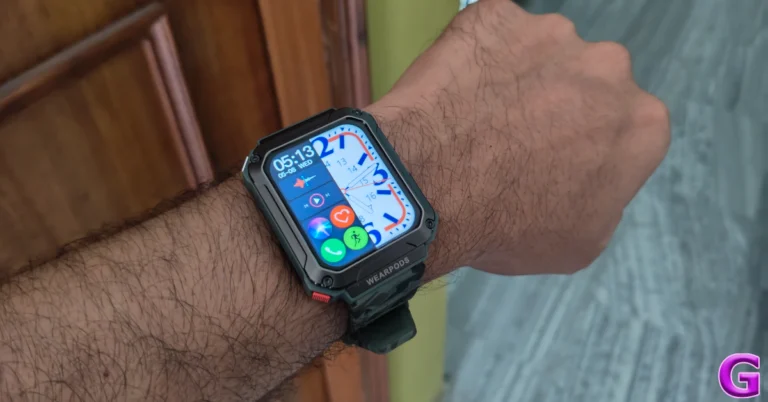
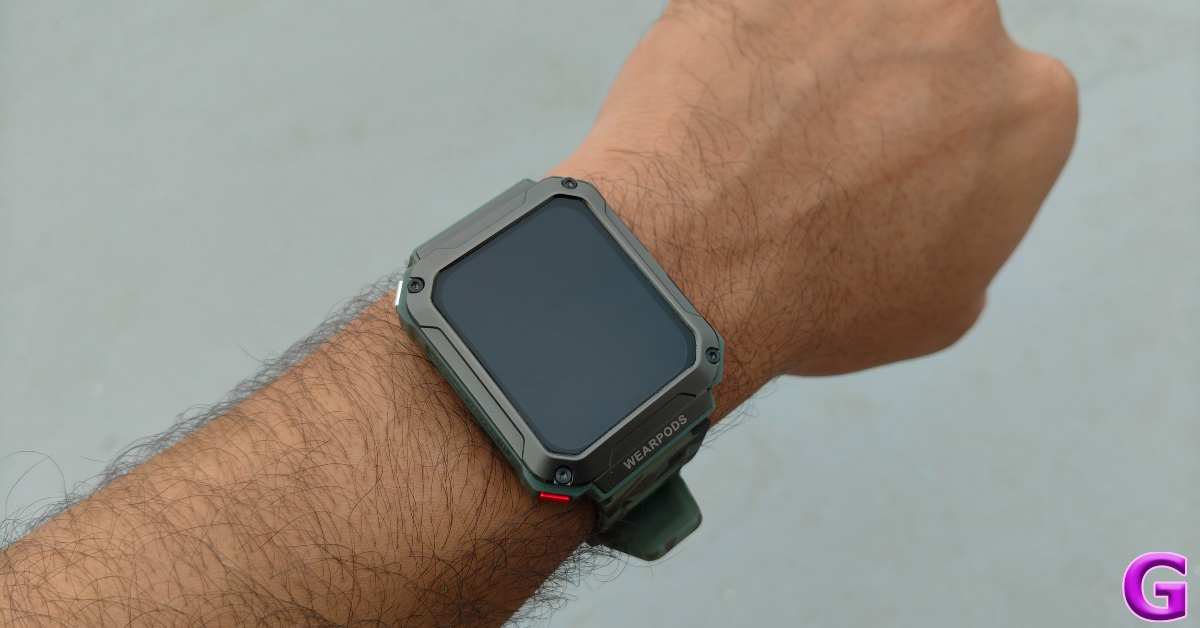
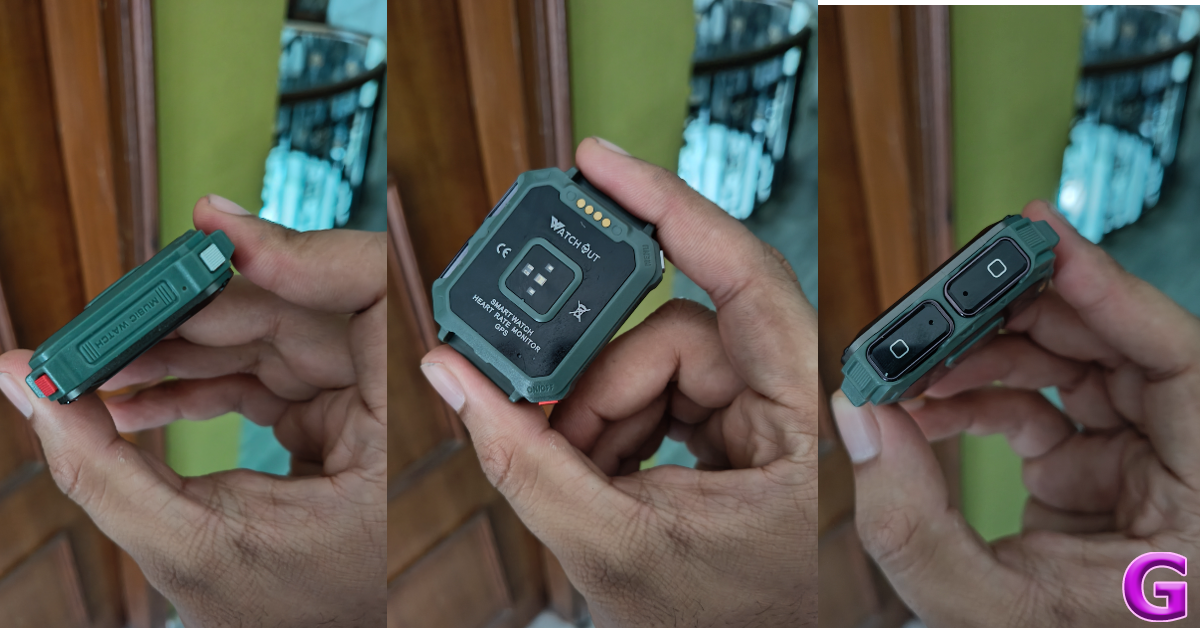
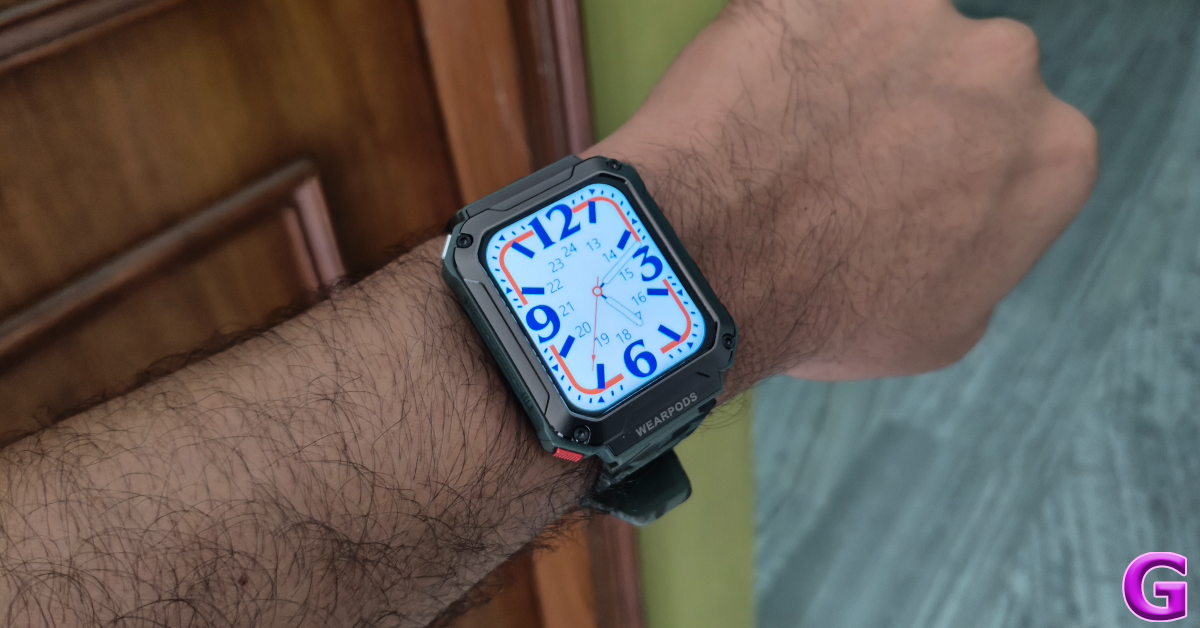
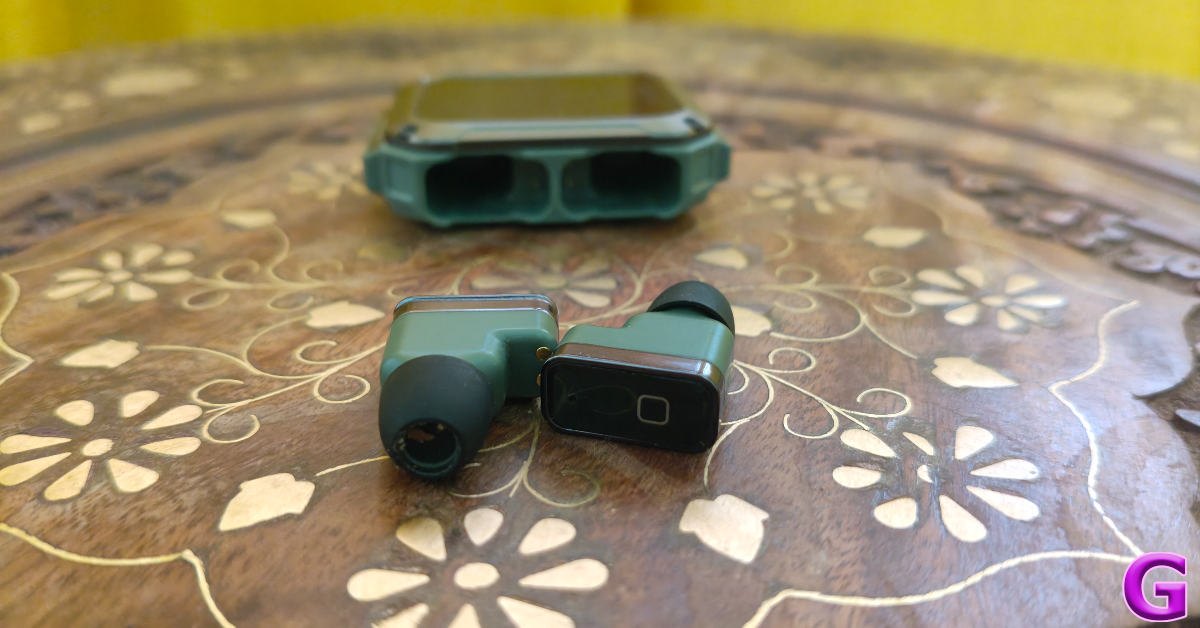
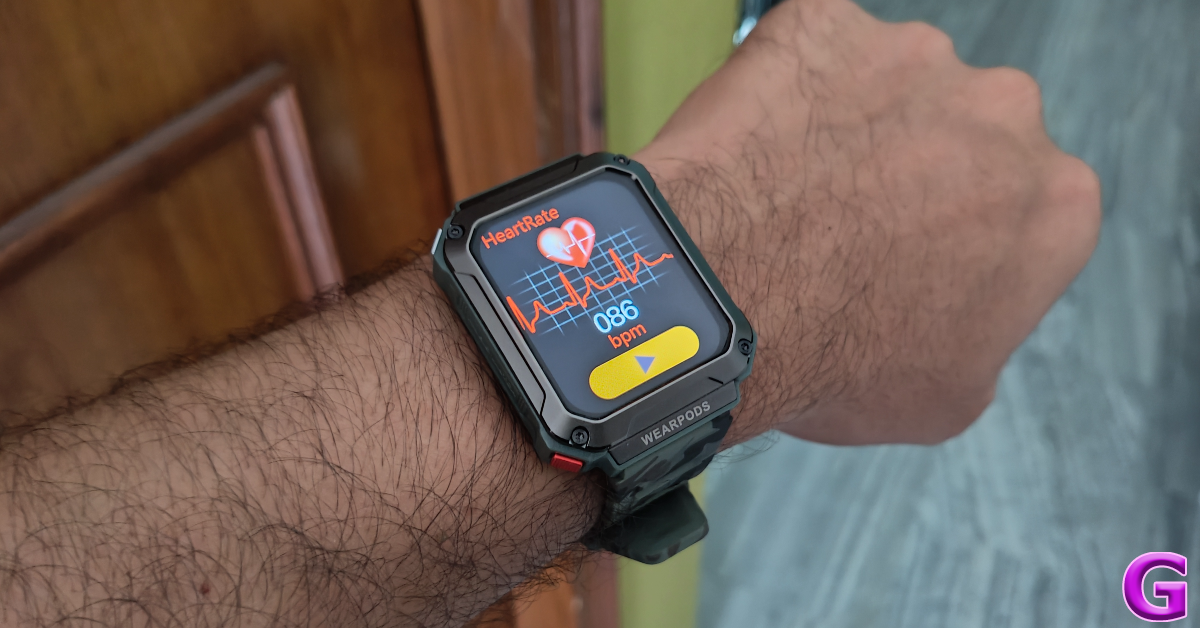
For a tech outfit that’s new to the market and putting out its first fusion product, WatchOut has nailed the design of the WearPods. Given the nature of the product, it wasn’t going to be sleek and compact. WatchOut has used this to its advantage and given the smartwatch a ‘rugged’ look. The squarish dial is undeniably thick, housing the earbuds on the right edge of the frame. Since it is made out of plastic, the smartwatch is not as heavy as it looks. There are two textured buttons on the left corners of the dial. The Military Green colour variant of the WatchOut WearPods we used for this review adds to its ‘rugged’ aesthetic. The wearable is also available in Orange Army and Black Commando shades.
WatchOut WearPods: Design and Display

The earbuds are firmly locked in their cutouts with powerful magnets. Even after shaking and yanking the smartwatch with immense force, the earbuds remained in place. Surprisingly, they are easy to pull out, which speaks to the ingenious design of the device. The ‘bullet’ earbuds are compact and fit nicely in the ear. The earbuds have no ear-specific design, meaning you can insert either earbud on any side.

design

The 1.93-inch HD display has a resolution of 240 x 296p. This display is bright enough for outdoor use. However, when it comes to the touch response, it leaves a little more to be desired. While using the touch gestures, it felt like the watch always needed to catch up. Perhaps an AMOLED panel would have been the better choice. There is also a 0.75W speaker on this smartwatch, located on the bottom frame of the dial. It is optimum for audio calls, but not the best for listening to music.

display

The silicone straps of the smartwatch are comfortable and do not cause any annoying itches. Wearing the smartwatch while working out did not present any issues whatsoever. The strap remained secure and the smartwatch and earbuds were unfazed by excessive sweat.

WatchOut WearPods review: Performance

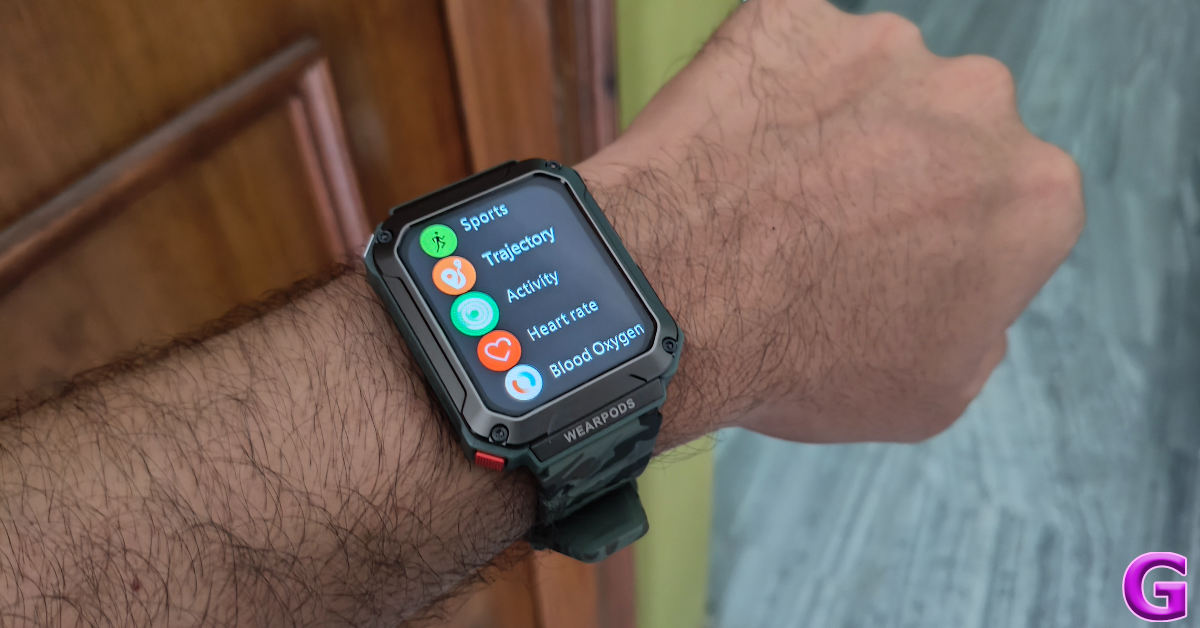
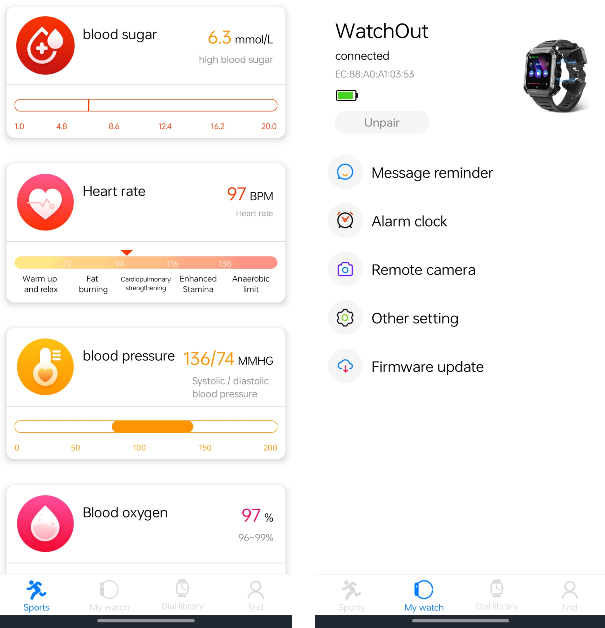
The WatchOut WearPods are equipped with an array of features, some more reliable than others. The smartwatch can track your heart rate, blood oxygen, blood sugar, and blood pressure. While the heart rate and blood oxygen measurements were on point, we wouldn’t recommend relying on anything but medical-grade equipment for blood pressure and sugar readings.

WatchOut WearPods: Performance

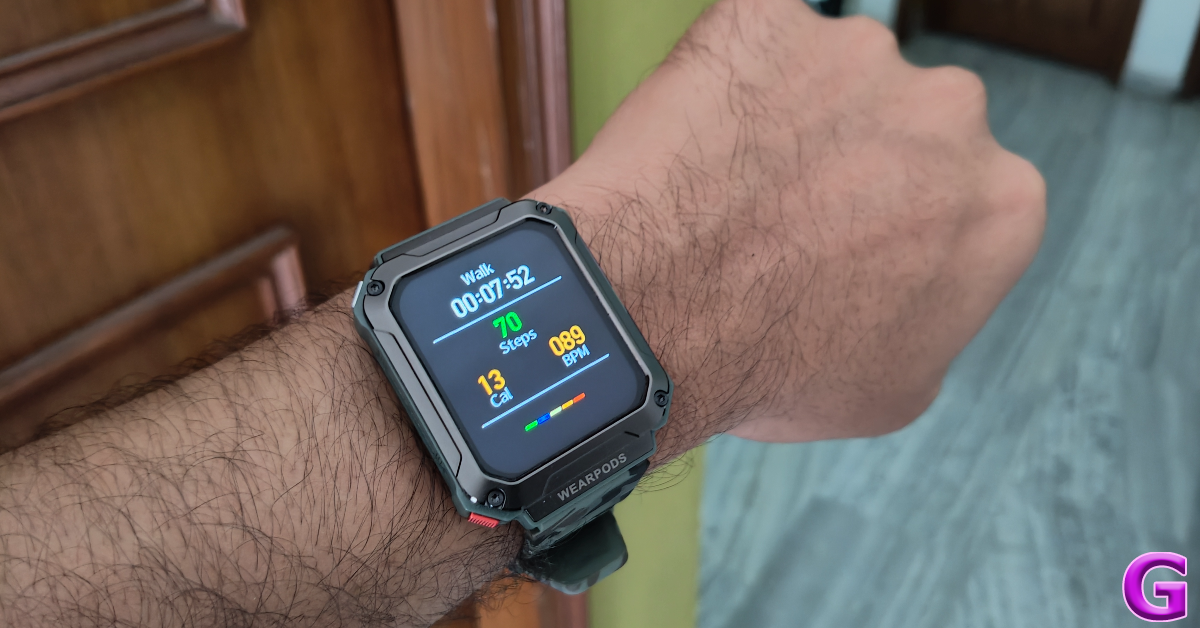
The smartwatch also supports over 100 exercises and workout routines. You can use it to track everything from hikes and runs to bench presses and push-ups. Before starting an exercise you can set a time or calorie target on the watch. As is the case with every smartwatch, the calorie-burning of this device should also be taken with a grain of salt.

performance

Moving on, the wireless earbuds that come along with the device offer a decent listening experience and a passable audio output, but they lack the clarity offered by other TWS devices in this price range. We were expecting this as the WearPods are limited by their compact form factor and the nature of the device. The overall output seems a little tinny and lacks details. This is largely due to the small audio drivers inside the earbuds.

performance

If we take the functionality aspect into account, we’d say the WearPods get the job done in style. If minimalism and tech convergence are your biggest priority, then this is the ideal device for you. The smartwatch has a built-in GPS and an internal memory of 4GB. If you’re going on a run and don’t want to take your smartphone along with you, this smartwatch will take care of all the essential things. Its inbuilt GPS will track your run and you will be able to enjoy your local library of music using the WearPods.

WatchOut WearPods: Performance

The WatchOut WearPods also support Bluetooth calling. You can make and accept calls using the smartwatch and channel the audio output through the earbuds or the built-in speakers. The call quality was fine in an indoor setting, but we switched to our smartphone in noisy surroundings.

app

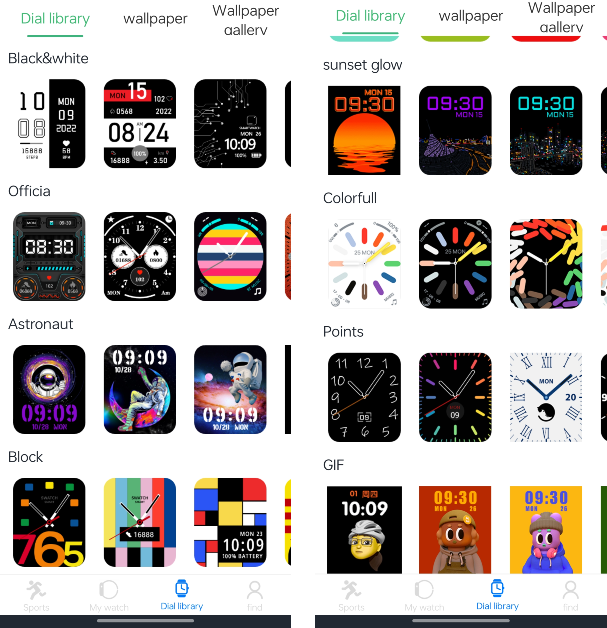
You can access the health and fitness data on your smartwatch using the V Band companion app for WearPods. This app has a good collection of dial faces and wallpapers for the watch. The downside is that you can’t store multiple watch faces on the watch itself. Another underrated feature of this app is the ‘Receipt code’, which binds your UPI QR Code to the watch so you don’t have to open the payment app to access it.

app

While the app handles the basics very well, WatchOut needs to work on its UI. If we hadn’t used the QR code on the watch to download this app, we would be very sceptical of its legitimacy. Upper case and lower case letters are used seemingly at random throughout the app’s interface and the text does not align with the layout in some pages. We also spotted a few typos on the app. We hope the company patches these errors with a swift update.

Ending things on a good note, the battery life of the WatchOut WearPods is very versatile. The smartwatch is equipped with a 400mAh battery pack and the earbuds have additional 35mAh batteries inside them. We were able to get more than 5 hours of playtime out of the earbuds in one go. The smartwatch lasted us an entire week with frequent TWS use, Bluetooth calling, and regular fitness tracking.

Read Also: How to send files using Quick Share? (2024)

Verdict

As a sum of its parts, the WatchOut WearPods is a wonderful product. For Rs 5,000, it is a bargain. Sure, the audio quality of the WearPods may not match up to its standalone TWS rivals, but we highly rate its functionality and ease of access. The option to store music on the smartwatch and listen to it using the WearPods is a nice touch. Paired with the built-in GPS, it reduces your dependence on your smartphone while running or working out.

WatchOut WearPods: Pros

  • Good design
  • Comfortable fit
  • Built-in GPS
  • 4GB internal memory for music
  • Versatile battery

WatchOut WearPods: Cons

  • Average audio output
  • V Band app needs work

Apple discontinued iPad (9th gen); iPad (10th gen) gets a price cut

0

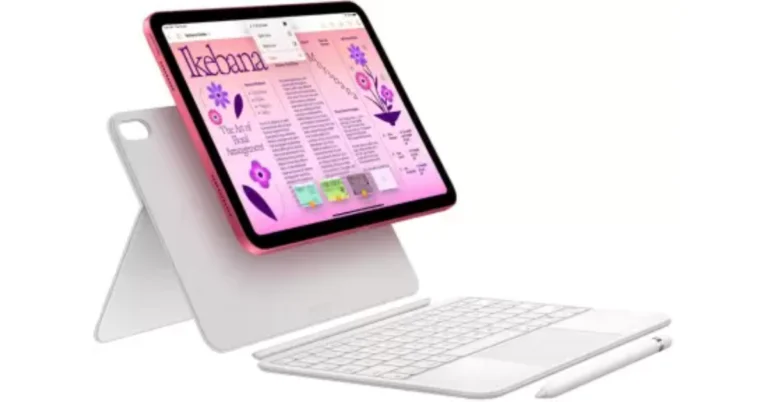
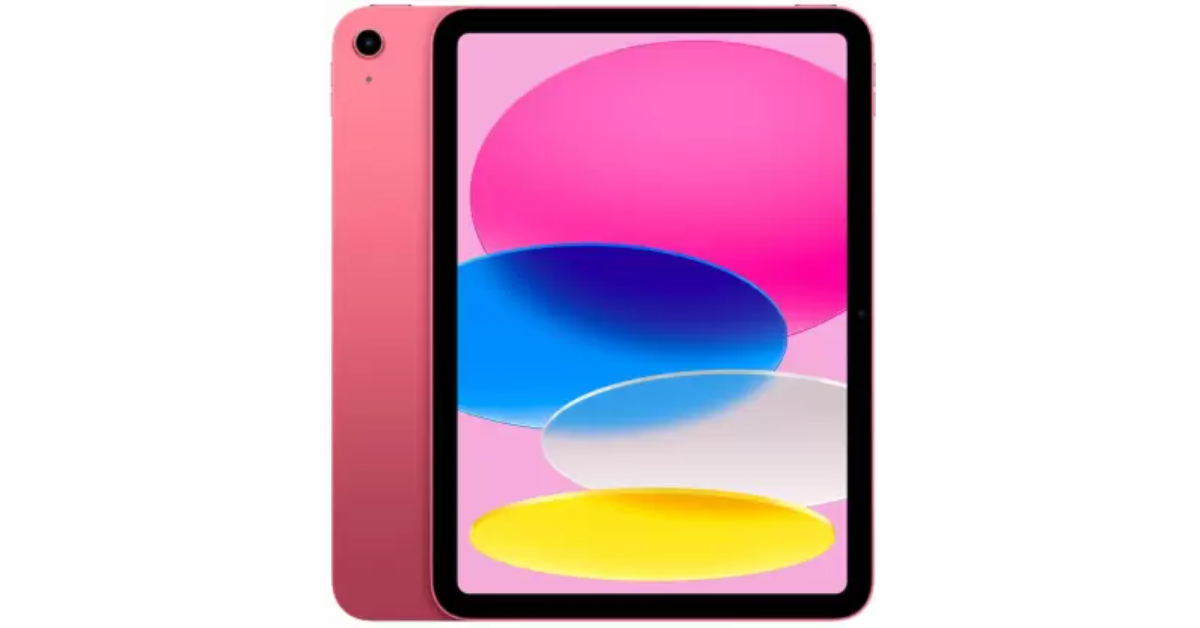
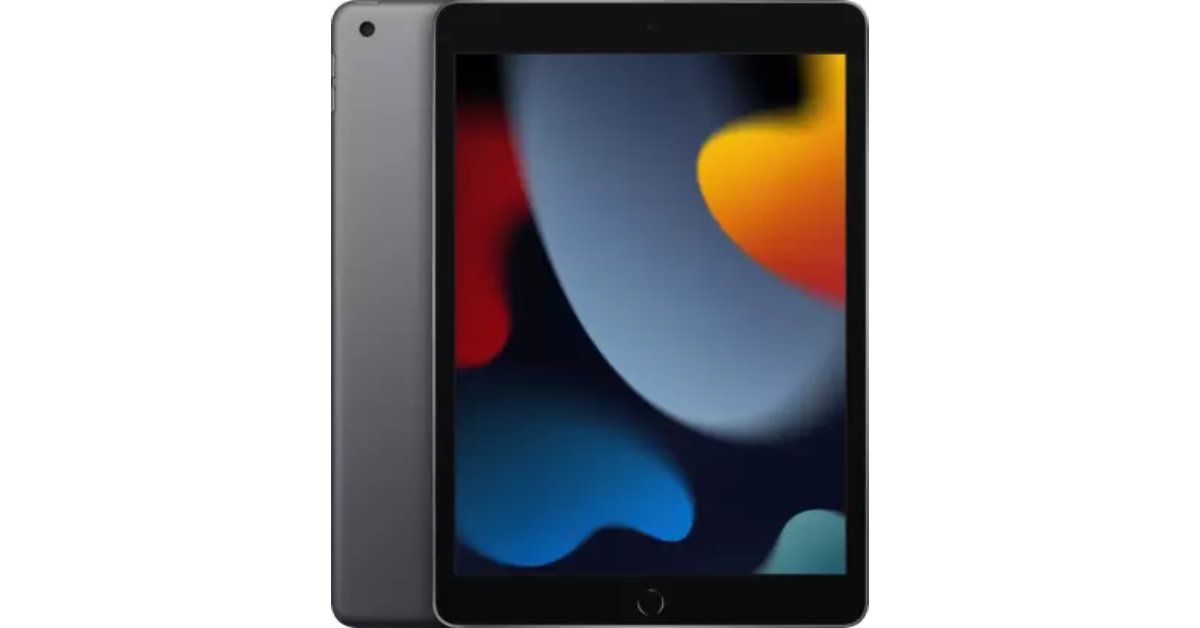
Apple on Tuesday introduced the new iPad Air and iPad Pro in India and other markets. Immediately after the launch, the company drastically reduced the price of the iPad (10th generation). At the same time, Apple has officially made the decision to stop selling the well-liked iPad (9th generation). So in case you’re considering purchasing a new tablet, now is the best time. Here are the pricing details:
iPad (10th generation) price in India

iPad (10th generation) price in India

After the price reduction, the iPad (10th generation) is available at a starting price of Rs 34,900, which is Rs 5,000 down from its original price of Rs 39,900 for the base 64GB model. On Flipkart, the same model will be available for Rs 32,999. The price of the 256GB is currently Rs 47,999.

The tablet features a 0.9-inch multi-touch IPS LED display. The screen has a resolution of 2360×1640, a peak brightness of 500 nits, and a pixel density of 264 ppi. The tablet is powered by a hexa-core A14 Bionic chipset. It runs on iPadOS 17.

The iPad (10th generation) comes with a 12-megapixel rear camera and a 12-megapixel ultra-wide-angle selfie camera. Additionally, it has a USB-C port and a 28.6-watt-hour lithium polymer battery.

Also Read: Toshiba C450ME QLED TV series with Dolby Vision and Dolby Atmos support launched in India

iPad (9th generation) price in India

iPad (9th generation) price in India


Apple has officially discontinued the iPad (9th generation), which arrived in 2021. With the Rs 10,000 discount, Apple has brought down the starting price of the 64GB variant to Rs 34,900. On Flipkart, the same model is presently selling for Rs 25,999, while the 256GB model is available for Rs 38,999 on Amazon and Flipkart. 

Also Read: Google Pixel 8a launched in India at this price: Deets inside

The iPad (9th generation) has a 10.2-inch Retina display with a resolution of 2,160 x 1,620. The Apple tablet is driven by an A13 Bionic chip with 64GB or 256GB of storage options. Using iPadOS, you may edit and share photographs, run multiple apps at once, and use the Apple Pencil to write in any text field using Scribble. 
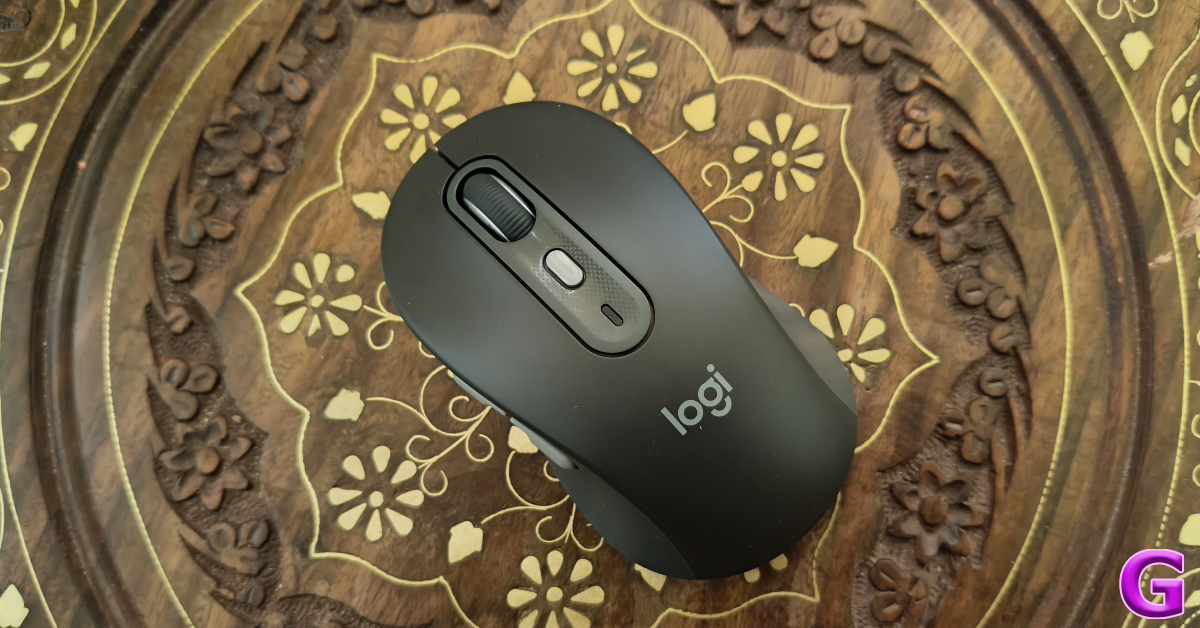
Google Wallet Makes Its Debut in India, Elevating Daily Convenience for Users

0

Key Highlights

  • Google Wallet launches in India, centralizing access to essentials like boarding passes and loyalty cards.
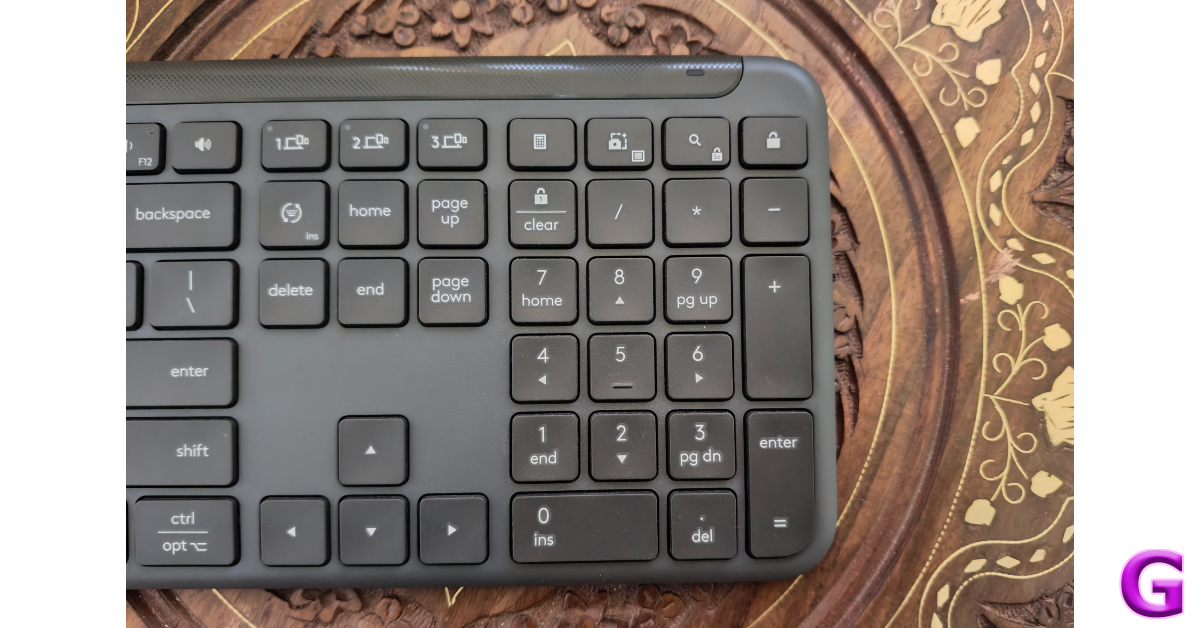
  • Partners with major brands like PVR, INOX, and Air India to enhance functionality.
  • Enables storage of event tickets, travel passes, and use of phones as corporate badges

Google has launched the Google Wallet app in India, introducing a new level of ease and security for managing daily essentials such as boarding passes, loyalty cards, and more. This strategic move aims to refine the Android user experience through increased convenience and seamless integration of services.

Google Wallet serves as a centralized platform where users can safely store and quickly access important digital items like event tickets, public transport passes, and gift cards. In its commitment to enhancing user interactions, Google has collaborated with over 20 leading Indian brands, including PVR & INOX, Air India, Indigo, and Flipkart, to enrich the Wallet’s functionality.

Ram Papatla, GM & India Engineering Lead for Android at Google, emphasized the significance of this development: “Launching Google Wallet in India is a milestone that brings sophisticated, user-friendly experiences to Android users across the country. By partnering with top local brands, we offer a versatile solution for securely managing essential items from boarding passes to loyalty cards, right at your fingertips.”

Read Also: Samsung Home Loyalty Program with Flipkart announced 

Google Wallet integrates various features to streamline daily activities:

  • Event and Movie Tickets: Users can add tickets from cinemas like PVR and INOX directly into their Wallets.
  • Travel Made Easy: Airline passengers can store mobile boarding passes, with added functionalities for Pixel users to include passes by simply capturing a screenshot.
  • Loyalty and Gift Cards: Partnerships with retailers like Flipkart and Dominos allow users to save and redeem loyalty points and gift cards effortlessly.
  • Public Transit: Google Wallet supports ticket storage for services like Kochi Metro and Hyderabad Metro, simplifying public transit usage.
  • Workplace Access: Android users can use their phones as corporate badges, thanks to collaborations with system integrators like Wavelynx.
  • Digital Documentation: The app can digitize any document that contains a barcode or QR code, making it easier to manage various passes and receipts.
  • Automatic Ticket Sync: Event confirmations from Gmail, such as movie or train tickets, will automatically populate in Google Wallet if smart personalization is enabled.

As Google Pay continues to handle payment-related needs, Google Wallet expands its utility by focusing on non-financial daily essentials, setting a new standard for digital wallet functionality in India. This launch not only represents a significant step forward for Google in the Indian market but also demonstrates its ongoing commitment to enhancing the connectivity and functionality of Android devices globally.

How to send files using Quick Share? (2024)

0

Google has renamed Android’s ‘Nearby Share’ feature to ‘Quick Share’ and started rolling it out to selected devices. You may remember Quick Share as Samsung’s file-sharing feature. You can use it to send files among Android, Windows, and ChromeOS devices. If you’re accustomed to Nearby Share, it won’t take you any time to adapt to the new feature. Today, we show you how to send files using Quick Share.

Read Also: Google Pixel 8a launched in India at this price: Deets inside

Before you begin

Here are the requirements your devices need to meet before using Quick Share:

  • The two devices must be within 5 metres (16 feet) of each other.
  • Both devices must have Bluetooth and WiFi enabled.
  • The devices should be running Android 6+, ChromeOS 91+, and 64-bit Windows 10+.
  • ARM devices are not supported by Quick Share.

Here’s how you can send files using Quick Share

Step 1: Open the file you want to share and hit the Share icon at the bottom of the screen.

Step 1: Open the file you want to share and hit the Share icon at the bottom of the screen.

Step 2: Tap on Quick Share.

Step 2: Tap on Quick Share.

Step 3: Hit Continue.

Step 3: Hit Continue.

Step 4: Make sure Bluetooth is turned on.

Step 4: Make sure Bluetooth is turned on.

Step 5: Turn on Quick Share from the Quick Settings Menu on the target device.

Step 5: Turn on Quick Share from the Quick Settings Menu on the target device.

Step 6: In the ‘Who can share with you’ popup, select Everyone.

Step 6: In the ‘Who can share with you’ popup, select Everyone.

Step 7: On the device sharing the file, tap the name of the target device.

Step 7: On the device sharing the file, tap the name of the target device.

Step 8: Hit Accept on the target device.

Step 8: Hit Accept on the target device.

The file will be transferred within seconds.

Frequently Asked Questions (FAQs)

What happened to Nearby Share on Android?

Earlier this year, Android renamed its ‘Nearby Share’ file-sharing feature to ‘Quick Share’.

How do I turn on Quick Share on my Android phone?

Swipe down from the status bar to reveal the Quick Settings Menu, tap on Quick Share, and select ‘Everyone’.

How do I send a file via Quick Share?

Open the file, hit the ‘Share’ icon, tap on ‘Quick Share’, and select the target device.

Read Also: Toshiba C450ME QLED TV series with Dolby Vision and Dolby Atmos support launched in India

Conclusion

This is how you can send files from your Android smartphone using Quick Share. You can use Quick Share to send files to your Chromebook and Windows PC as well. As this feature is still being rolled out in phases, it may not be available on your device or in your country.

Google Pixel 8a launched in India at this price: Deets inside

Key Highlights

  • Pixel 8a is now available for pre-orders in India.
  • The device features a 120 Hz Super Actua display.
  • The Pixel phone comes with a Tensor G3 SoC and AI features.

Google has officially announced the launch of its most affordable smartphone in the Pixel 8 Series, the Pixel 8a. The newly launched device is a successor to the Pixel 7a, powered by a Tensor G3 SoC with Gemini AI out of the box, similar to the Pixel 8 and Pixel 8 Pro phones. The smartphone has an updated design that incorporates Google’s Super Actua display. However, it retains the same camera setup as its predecessor.

Google Pixel 8a price in India, sale details

The Google Pixel 8a price in India is set at:

  • 8GB RAM with 128GB storage: Rs 52,999
  • 8GB RAM with 256GB storage: Rs 59,999

Google’s A-series smartphones will come in four colour options: limited edition Aloe, Bay, and the classic Obsidian and Porcelain options. The device will go on sale on May 14 (the day when Google I/O begins) at 6:30 a.m. via Flipkart in the country. The Pixel 8a is currently available for pre-order in India.

Google Pixel 8a price in India, sale details

The annual developers’ conference, Google I/O, is often when the Google Pixel ‘A’ series devices are introduced. Unexpectedly, this is the very first time Google has released a Pixel product without hosting a launch event. The dates for Google I/O 2024 are set for May 14–16.

Launch and pre-order offers for Google’s Pixel 8a in India include:

• Bank offer of Rs 4,000 and 12-month no-cost EMI, available with select bank cards • Exchange bonus of Rs 9,000 on select smartphone models
• Pre-order offer: Purchase Pixel Buds A-Series at Rs 999 with the purchase of Pixel 8a anytime during the pre-order period. 

Google Pixel 8a specifications

The Google Pixel 8a comes with rounded corners, a matte back, a polished aluminium frame, and a glass-like polycarbonate rear panel. It is highlighted with a 6.1-inch Super Actua display, which is said to be 40 per cent brighter than the Pixel 7a’s. It now supports a faster 120Hz refresh rate and is protected with Corning Gorilla Glass 3 layering.

Also Read: Apple launched 2024 models of iPad Air and iPad Pro, M4 chipset also introduced

Under the hood, there is the Google Tensor G3 chip and the Titan M2 security chip. The chipset offers AI-powered tools like Best Take, Magic Editor, Audio Magic Eraser, and more. Gemini, Google’s built-in AI assistant, allows users to type, talk, and add images for various tasks. Parents and guardians can easily establish digital ground rules, manage privacy settings, set screen time limits, and share locations. 

Google Pixel 8a price in India, sale details

The phone runs on Android 14 out of the box and will receive seven years of software support, including security updates and Android OS upgrades.

The smartphone also features a dual rear camera system with a 64-megapixel main lens and a 13-megapixel ultrawide lens, as well as a 13-megapixel front-facing camera. Pixel 8a also includes Super Res Zoom up to 8x and features like Magic Eraser, Night Sight, and Photo Unblur.

Also Read: Toshiba C450ME QLED TV series with Dolby Vision and Dolby Atmos support launched in India

In terms of connectivity, there is Wi-Fi 6, Bluetooth 5.3, NFC, a USB Type-C port, and GPS. The handset packs a 4,492mAh battery, along with 18W wired charging and 7.5W Qi wireless charging support.

Garena Free Fire Redeem Codes Today 8 May 2024: Here is how to claim them

Garena Free Fire is a battle royale game with regular awards and tournaments to keep players interested. If you play Garena Free Fire, you should be aware of the redeem codes that are released on a daily basis. However, because the battle royale game is banned in India, players from other countries can use the Free Fire Redeem codes daily. If you’re unfamiliar with the Garena Free Fire redeem codes or don’t know how to get them, we’ve put together a step-by-step guide to help you redeem them. Check out Garena Free Fire Redeem Codes for 8 May 2024.

The Free Fire redeem codes are a great way to get free stuff. These are 12-digit codes that contain alphabets and numbers, as well as an expiration date and time. Because the Garena FF redeem codes cannot be used more than once, you should hurry to the redemption page to claim your free reward before someone else does. To get a free reward, all you have to do is go to reward.ff.garena.com/en, which is the official redemption page. Also, keep an eye on this space for daily updates on Garena Free Fire redemption codes and rewards.

Also Read: Sennheiser Accentum Plus wireless headphones with Hybrid Adaptive Noise Cancellation launched

Garena Free Fire Redeem Codes Today 8 May 2024

FJ7L5EV4S8T3R62U

FG9P3M2F6Y1A7B5E

FW8U4IE2X3ZN5Q9D

FH1R9C6G2O8J4E5T

FS3Y6DEEQ1B4LK9M

FC2WE9Q5V1XA3FRH

FM6F8GR7T2B5ES9J

FW3X6EY9Z4A7TB1C

FD8E2F5G1HGT6I3J

FFN7O4P1Q6R9S2T5

FL4Z1ED9N7H3PY8I

FQ5O2X6K9J1C8W4G

FB3C5D8E2S1F7G4H

FI9J2KE6L3MTTN5O

FP4Q7R1S5TTT9E2V

How to Get Free Fire Redeem Codes for Garena on 8 May 2024?

  • Visit the Garena Free Fire game’s official website at reward.ff.garena.com.
  • Use your Facebook, Google, VK, Apple ID, Huawei ID, or Twitter account to log in.
  • You’ll be taken to a valid redemption code (s)
  • Copy and paste the 12-digit redemption code into the text box.
  • On the screen, a dialogue box will appear.
  • ‘Ok’ should be selected.

For the latest gadget and tech news, and gadget reviews, follow us on TwitterFacebook and Instagram. For newest tech & gadget videos subscribe to our YouTube Channel. You can also stay up to date using the Gadget Bridge Android App. You can find the latest car and bike news here.

Toshiba C450ME QLED TV series with Dolby Vision and Dolby Atmos support launched in India

Japanese tech brand Toshiba announced the launch of an all-new C450ME QLED TV series in the Indian market. The latest Toshiba QLED TV lineup comes with Dolby Vision and Dolby Atmos support. It is equipped with REGZA Engine ZR for stunning picture quality and has advanced 4K upscaling technology.

Toshiba C450ME QLED TV price in India, sale details

Toshiba C450ME QLED TV will be available in India at a starting price of Rs 26,999 for the 43-inch 43C450ME. The 55-inch 55C450ME will be offered at Rs 37,999, the 50-inch 50C450ME will be priced at Rs 32,999.

The 43-inch and 50-inch models will be available starting May 7, with the 55-inch model to follow soon after. The Television will be available for purchase via all leading e-commerce platforms in the country.

Toshiba C450ME QLED TV specifications, features

Toshiba C450ME QLED TV features a sleek, ultra-thin bezel design and is available in three different sizes 55-inch, 50-inch and 43-inch. The television is equipped with Toshiba TV’s exclusive REGZA Engine ZR technology, which allows it to fully utilise 4K resolution. The device offers a vivid and lifelike colour spectrum thanks to Quantum Dot Color technology which also improves delicate undertones to vibrant colours, making for an immersive and engrossing watching experience. The AI-driven 4K upscaling engine on Toshiba TV makes sure that even non-4K content appears fantastic by carefully examining and refining each frame.
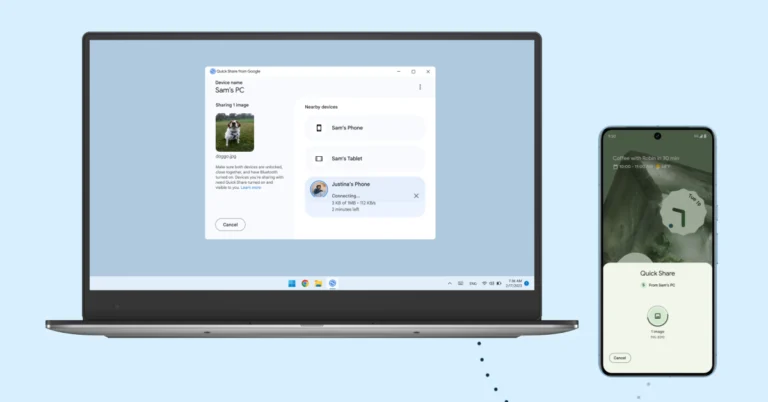
Also Read: Apple presents the 2024 Pride Collection, the new Apple Watch Pride Edition Braided Solo Loop, and more

The QLED TV supports Dolby Vision and HDR 10+ Decoding to provide stunning visuals. Along with REGZA Power Audio the C450ME QLED TV has Dolby Audio, Dolby Atmos, and DTSX technologies to produce crisp, clear, and perfectly balanced sound. The Game Mode on it offers optimised rendering capabilities and minimal input lag. Game Mode includes gaming features like VRR (Variable Refresh Rate), eARC, and ALLM (Auto Low Latency Mode).

Also Read: Apple launched 2024 models of iPad Air and iPad Pro, M4 chipset also introduced

As per the company with built-in voice assistants like Alexa and VIDAA Voice, customers can easily control their TV and stream content while having a seamless and user-friendly experience thanks to the VIDAA operating system. The OS offers a wide array of global and local entertainment options, including Netflix, Prime Video, Apple TV, YouTube, Disney+Hotstar, JIO Cinema, Zee5, and more.

In terms of connectivity, Toshiba C450ME QLED TV includes HDMI, Bluetooth, Dual Band 2.4G+5G, and USB Media Player options

How to use a boarding pass on your smartwatch?

0

If you own a WearOS smartwatch, you should check out what Google has in store for you. If you’re used to scanning the boarding pass from your phone, you can now use your smartwatch for the task. The process is seamless and does not take much of your time. Not only does this work for boarding passes but any ticket with a QR code. So, let’s take a look at how you can access and use a boarding pass on your smartwatch.
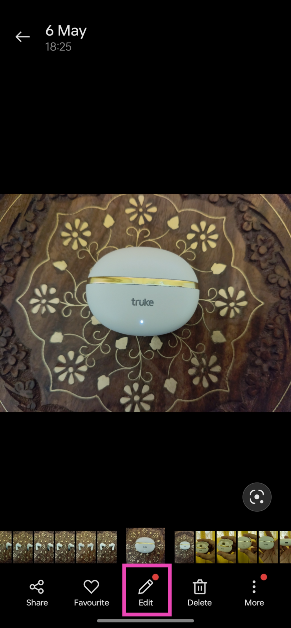
Read Also: Apple launched 2024 models of iPad Air and iPad Pro, M4 chipset also introduced

Before you begin

For this method to work, you need the Google Wallet app. Google Wallet can store your credit/debit cards, boarding passes, movie tickets, and more. If your phone has NFC, you can use the Google Wallet app to make payments with a single tap. Whenever you receive a ticket or a pass in your email, it is automatically added to the Wallet, given you are logged into Gmail and Wallet using the same account.

If the boarding pass or ticket does not show up in your Wallet, you can always add it manually. Once it has been added to the Wallet app, you can access it on your WearOS smartwatch. The entire process is seamless and does not require a lot of effort. The only catch is that Google Wallet is available only in limited countries right now.

Add a boarding pass to your Google Wallet

Add a boarding pass to your Google Wallet

Step 1: Open the boarding pass on your phone and take a screenshot.

Step 2: In the pop-up menu of the screenshot, tap on Add to wallet. This feature only appears if Google Wallet is installed and activated on your phone.

Step 3: If you want to edit any information, do it on the next page. Hit Save when you’re done.

The boarding pass will be saved to your Google Wallet.

Use a boarding pass on your smartwatch

Google Pixel Watch 2 with improved heart rate sensor and Fitbit features launched in India

Step 1: Launch the Wallet app on your smartphone.

Step 2: Tap on the boarding pass. This will display its QR code.

Step 3: Let the QR code reader scan your watch.

Frequently Asked Questions (FAQs)

Can I scan my boarding pass using my smartwatch?

If you have the Google Wallet app on your smartwatch, you can use it to access and scan your boarding pass while boarding a flight.

How do I add a boarding pass to Google Wallet?

To add a boarding pass to Google Wallet, simply take a screenshot of it on your phone and tap the ‘Add the wallet’ option at the bottom right corner of the screen.

Is the Google Wallet app available in India?

Google Wallet is not available in India yet. Some users have spotted the app in Google Play Store but the tech giant has not revealed any plans for its launch yet.

Read Also: How to stack similar photos together in Google Photos?

Conclusion

This is how you can access and use your boarding pass using your smartwatch. This method also works for other QR-code-based passes and tickets. If you can’t get this method to work, make sure your smartphone is NFC-enabled.