Dyson, a popular brand for offering premium hair styling products has added a new product to its product portfolio. Specially designed for ladies the company brings the new Dyson Airwrap multi-styler that is claimed to be the most effective Airwrap to date. The new multi-styler now accommodates additional hair types and styles. As per the company, Dyson engineers pushed their own design to scale down and increase the Coanda effect.
In This Article
Dyson Airwrap multi-styler features
The new Dyson Airwrap multi-styler now supports different hair kinds and styles. Dyson engineers invented a totally customisable styling tool to give a variety of styles for all Indian hair types without using excessive heat that miniaturises and magnifies the Coanda effect.The latest styling barrels with rotating cool tip make curls and waves faster and simpler while causing no heat harm to the hair, preserving its strength. By combining the results previously obtained with two barrels into one attachment, users can now style the entire head, creating both clockwise and counterclockwise curls and waves, without having to switch attachments in the middle of a style. Along with a brand-new Coanda smoothing dryer that serves two distinct purposes, newly designed brush attachments provide precision shaping with improved Coanda performance. The Coanda smoothing dryer, which combines two attachments into one, conceals flyaways in a single pass without using excessive heat and switches from a strong drier to a smoothing dryer at the touch of a button.The current Dyson Airwrap styler owners now have the option to upgrade to these newest attachments while still using their old equipment. Engineers have been able to miniaturise air vents to attain a level of airflow velocity, pressure, and control never before seen through this iterative process of trial and error.
Dyson Airwrap multi-styler price in India and availability
The cost of the new Dyson Airwrap multi-styler is Rs. 45900, and it is currently on sale. Owners can upgrade their complete set of attachments for Rs. 14900, and new attachments are entirely compatible with current machines. Visit the Dyson Demo shops to purchase, find out more about, and test-drive the Dyson Airwrap multi-styler.James Dyson commented, “Most styling tools ignore that hair types are very different – what attachment may work for one, could be detrimental to another. The advancements in the Dyson AirwrapTM multi-styler build on the success of its predecessor, through relentless research, user trials and advancements in computational fluid dynamics. The result: direction change barrels for faster and easier curling, re-engineered brush attachments for more precise shaping, and an entirely new, dual-purpose Coanda smoothing dryer. Our ability to control airflow delivers enhanced Coanda performance to curl, shape and hide flyaways – without extreme heat.”
For the latest gadget and tech news, and gadget reviews, follow us on Twitter, Facebook and Instagram. For newest tech & gadget videos subscribe to our YouTube Channel. You can also stay up to date using the Gadget Bridge Android App. You can find the latest car and bike news here.
Get ready to participate in the 4 August Amazon Quiz, as it is live on its mobile platform. In today’s quiz participants have a chance to win Rs 10,000 Amazon Pay Balance by answering all the questions correctly. The quiz can be played every day from 12 AM to 11:59. Check Out Amazon Quiz Answers Today 4 August 2022.The daily quiz conducted by the company brings an opportunity for the customers to win exciting prizes. Every day Amazon brings a fresh set of questions for its customers that contains five easy questions. The questionnaire consists of five questions related to general knowledge and current affairs.The participants need to answer all the questions correctly and their names will be selected for a lucky draw. The winner will be announced at the end of the month. Amazon quiz brings an opportunity for its customers to win Amazon Pay Balance ranging from Rs 10,000 to Rs 50,000. Only app users are eligible to participate in the Quiz as it is not accessible on the web platform.Amazon Quiz Today Prize – Rs 10,000 Amazon Pay BalanceQuiz Date – 4 August 2022Daily Timing – 12 AM to 11:59 PMWinner Announcement – Today 12 PM
In This Article
Amazon Quiz Answers Today 4 August 2022
Question 1: Who smashed an unbeaten 64, as India sealed the recent ODI series against West Indies with a narrow 2 wicket win?
Answer: Axar PatelQuestion 2: The Gray Man’ is a recently released movie, directed by which director duo famous for superhero movies?Answer: Anthony and Joe RussoQuestion 3: Larsen & Toubro is selling its eight operational road assets to an infrastructure fund managed by which firm?Answer: EdelweissQuestion 4: Name this gemstoneAnswer: Blue TopazQuestion 5: The Emperor who ordered the construction of this site belonged to which dynasty?Answer: Qin
How To Play Amazon Quiz
Only app users are eligible to play the Amazon quiz every morning from 12 AM to 11:59 PM. The quiz is not available on the desktop. For those who are unaware of how to play the Amazon quiz below are the steps, you can follow to take the quiz.
Firstly download the Amazon app from Google Play Store or App Store
Now fill in the required information through the Sign Up option.
You need to log in to the Amazon app and scroll down on the home screen to find the Amazon Quiz banner.
Tap on the Amazon Quiz banner and tap on the Start button to start the Quiz.
Now you will get 5 questions and you need to answer them correctly. One wrong answer will eliminate you from the Quiz.
After answering all the questions correctly you are now eligible for a Lucky Draw.
The winner’s name will be announced today at 12 PM.
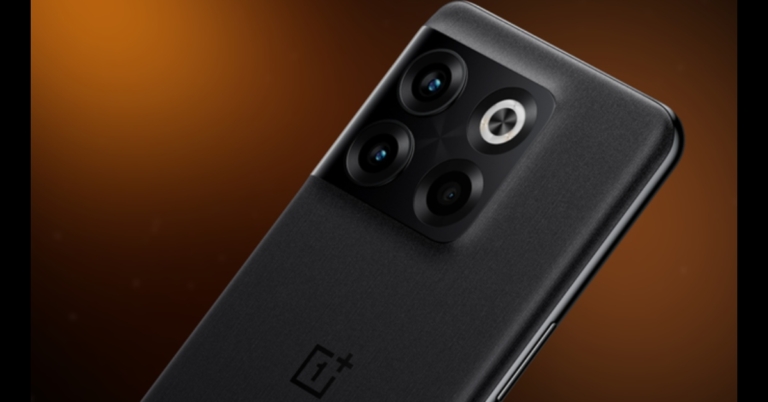
After much anticipation, the OnePlus 10T 5G was officially unveiled today in India and throughout the world. The company has also unveiled OxygenOS 13. The Qualcomm Snapdragon 8+ Gen 1 CPU powers the gadget. The device has a display with a refresh rate of 120Hz. Additionally, the phone has a 150W rapid charging capability. The company also emphasised the HyperBoost and AI System Booster 2.1 features of the phone. To learn more about the features and price of the smartphone, keep reading.
In This Article
OnePlus 10T 5G price in India, availability
The 8GB RAM with 128GB storage edition of the OnePlus 10T costs Rs 49,999. The pricing of the 12GB RAM with 256GB storage model is Rs 54,999, and the price of the 16GB RAM with 256GB storage option is Rs 55,999. The cost of the OnePlus 10T Glacier Mat case is Rs 1,499.Moonstone Black and Jade Green are the two new colours for the OnePlus 10T. Preorders for the OnePlus 10T are now available on the Amazon India website in the country.
OnePlus 10T 5G specifications
A 6.7-inch full-HD+ HDR10+ 10-bit AMOLED screen with a 120Hz refresh rate is included on the OnePlus 10T 5G. With its variable refresh rate, the phone can switch between 60Hz, 90Hz, and 120Hz to make the screen smooth while still preserving battery life. The touchscreen display uses a 720Hz sampling rate. The gadget is powered by the Qualcomm Snapdragon 8+ Gen 1 SoC. Recall that the Snapdragon 8th generation chip powers the OnePlus 10 Pro. The company has also disclosed that the OnePlus 10T 5G boasts 16GB of LPDDR5 RAM and 256GB of UFS 3.1 storage.The triple-camera setup on the back of the smartphone has a 50-megapixel Sony IMX766 primary sensor. The OnePlus 10T 5G camera will also have both optical and electronic picture stabilisation. A third macro camera is included in the setup, along with a 12MP ultrawide camera. With a 119-degree field of vision, the phone also has one of the broadest ultrawide cameras. The OnePlus 10T has a 16-megapixel front-facing camera sensor and an f/2.4 lens for selfies and video calls.It will have a new image clarity engine, according to the company. OnePlus claims that by utilising the TurboRAW and HDR 5.0 technologies, the primary rear camera would provide users with overall spectacular performance.The company has also unveiled a case specifically designed for gamers, the Glacier Matte case, which features a passive water cooling system to effectively reduce heat when playing graphically demanding games and other competitive ones. The phone can operate even cooler whilst under high pressure because the casing contains thermal polymers that absorb moisture from the air when it gets hot. This passive water circulation technology makes sure that the cooling is efficient and long-lasting.When Genshin Impact was played for an hour at 60 Hz in a 25°C environment, the case was able to lower the temperature of the OnePlus 10T by up to 2.3°C in internal testing. As it includes the company’s unique Cryo-velocity VC, an incredibly thin vapour cooling technology, the OnePlus 10T is said to be 30% more power efficient.The phone has an Always Alive function that works with 16GB of RAM, it can keep up to 30 apps running in the background simultaneously.The OnePlus 10T 5G, which we previously noted, is the first device from the manufacturer to provide a HyperBoost Gaming Engine that is meant to make gaming more responsive and fluid. The company debuted a server-level memory management technology, a multi-level intelligent cache with 16 times the IO access performance.The phone’s battery could be 4,800mAh and capable of 150W SuperVOOC quick charging. According to the manufacturer, the 150W fast charging will provide over 30% charging in the first three minutes. Additionally, OnePlus states that a day’s worth of battery life can be obtained in just 10 minutes of charging. The likelihood of any battery-related problems will decrease thanks to the new Battery health engine, which will continuously monitor the battery’s condition. Thanks to the new Extreme Cold Mode, the OnePlus 10T can charge in temperatures as low as -20 degrees Celsius.
Oxygen OS 13 features
Oxygen OS 13, which replaces Oxygen OS 12, is also being introduced by OnePlus which is based on Android 13. The new OS is aimed at improving the stability and fluidity of the user interface. The new colour scheme of OxygenOS 13 features icon designs that resemble water droplets known as Aquamorphic Design. Additionally, the new skin will have circular widgets and icons that conform to the new design language. Additionally, the UI will feature new animations and transitions. Claims OxygenOS 13 provides a 20% boost in-app installation performance and a 10% improvement in app startup speed.Additional features of Oxygen OS 13 include a new Always-On Display screen that collaborates with Spotify to provide music playback controls on the AoD screen.Fast Pair is a new feature from OnePlus. Users will feel more realistic while watching a movie or television show thanks to spatial audio, which will offer supported media material a sense of orientation.In terms of availability, Oxygen OS 13 will first launch on the OnePlus 10 Pro: Other phones will receive the update after the OnePlus 10T.
For the latest gadget and tech news, and gadget reviews, follow us on Twitter, Facebook and Instagram. For newest tech & gadget videos subscribe to our YouTube Channel. You can also stay up to date using the Gadget Bridge Android App. You can find the latest car and bike news here.
Sony today expanded the TWS portfolio in India with the launch of the new Sony LinkBuds WF-L900 true wireless earphones. It comes with an open ring design for crystal-clear sound and call quality. They can also be customised and adjusted using the Sony Headphones Connect app. With IPX4 splash-proof and sweat-proof design, linkBuds are perfect for your everyday usage
In This Article
Sony LinkBuds WF-L900 price in India, availability
Sony LinkBuds WF-L900 has been launched in India with a price tag of Rs 19,990. On August 13, the earbuds will be offered for purchase through both Sony’s online and physical retail channels, including the ShopAtSC website, Sony stores, online shopping websites and other stores.A special pre-booking deal was also revealed by Sony India. Now, customers can pre-book the LinkBuds for a greatly discounted price of Rs. 12,990 (MRP Rs. 19,990) and receive a benefit of Rs. 7,000 (inclusive of Rs. 2,000 cashback on various debit and credit cards). This promotion is available from August 4 until August 12, 2022.
Sony LinkBuds WF-L900 specifications
You can tune into the outside world whenever you want with LinkBuds thanks to their innovative open ring design, which doesn’t interfere with your listening experience. You can clearly hear sounds around you with the newly created ring driver unit, which has the centre of the diaphragm open for audio transparency. This way, you’ll always know when someone shouts your name while on a call or may simply converse with friends while listening to your favourite tunes. In order to accommodate various ear shapes, they also come with 5 sizes of fitting supporters.Thanks to LinkBuds’ innovative, ultra-compact, ergonomic design, you’ll never have to turn off. These earbuds, which weigh only four grammes. The speaker diaphragm’s protective surface is integrated into the housing, conserving space compared to traditional earphones. 360 Reality Audio is also included with LinkBuds. With 360 Reality Audio, listening to music can be as immersive as being in the front row at a live performance or in the studio with your favourite musician.Calls can be placed without background noise for incredibly clear talks. LinkBuds have a precise voice pickup system with cutting-edge voice signal processing. With the use of more than 500 million speech samples and AI machine learning, Sony’s noise reduction algorithm was created to block out background noise and clearly extract your voice.Your own soundtrack will be restored to great quality thanks to DSEE (Digital Sound Enhancement Engine). Your favourite musicians always sound amazing because Sony’s Integrated Processor V1 faithfully reproduces every nuance of your music with the least amount of distortion.With adaptive volume control, your music will acoustically blend into your surroundings by automatically adjusting level based on where you are. This improves the open-air listening experience by enabling you to listen to your favourite songs at a comfortable volume and in different settings.You have complete control with Wide Area Tap. You can customise playback without touching the LinkBuds themselves by double or triple tapping in front of either of your ears. When you chat to someone on Speak-to-Chat, your music will instantly pause. There is no need to touch any buttons because your music begins playing as soon as your discussion is finished. Additionally, LinkBuds offer hands-free assistance so you can use your favourite voice assistant to access information, connect with friends, make reminders, and more. Simply say “Alexa” or “OK Google.”The earbuds in the LinkBuds may be used for 5.5 hours on a single charge, supporting all-day listening. A further 12 hours are stored in the charging case, giving a total of 17.5 hours of listening time. For a 90-minute listening session, a short 10-minute charge is sufficient. When the charging case’s remaining capacity falls below 30%, the Sony| Headphones Connect app will alert you.Splashes and perspiration won’t stop these headphones thanks to their IPX4 water-resistant rating, allowing you to continue dancing to the music. The useful new Fast Pair function from Google is supported by LinkBuds, making it simple to pair with your Android devices. You may also find the location of your last-used pair of headphones. LinkBuds may be quickly and easily connected to a Windows 11 or Windows 10 laptop, desktop computer, or tablet via Swift Pair.
For the latest gadget and tech news, and gadget reviews, follow us on Twitter, Facebook and Instagram. For newest tech & gadget videos subscribe to our YouTube Channel. You can also stay up to date using the Gadget Bridge Android App. You can find the latest car and bike news here.
OnePlus 10T is finally about to be launched today at the company’s New York launch event. The smartphone will go on sale soon after the event and is expected to be priced at Rs 40,000 in India. The Qualcomm Snapdragon 8+ Gen 1 processor and the OxygenOS 13 make it one of the most powerful phones out there. So we thought we’d bring you the 10 best apps to download and use first on your new OnePlus 10T.Read Also: How To Lock Android Apps On Samsung Smartphones?
In This Article
MacroDroid
If you’re looking for an app to automate tasks on your OnePlus 10T, MacroDroid is the perfect choice. With tons of automation, MacroDroid lets you get the most out of your smartphone. For example, if you’re commuting in your car, MacroDroid will read out your notifications via text-to-speech so you don’t have to check your phone. It will even send out auto replies via text and email. You can even set over 70 triggers using MacroDroid. These triggers may be related to the phone sensor, device status, or location. For example, you can set a trigger for MacroDroid to open Spotify or YouTube Music on your phone as soon as you plug in your headphones. MacroDroid’s functionality improves tremendously the more you use it. With time you’ll be able to integrate MacroDroid seamlessly into your daily routine.
Quick Cursor
With a screen of 6.7 inches, the OnePlus 10T can be too big of a phone to use with one hand for some people. If you find yourself struggling to reach the opposite end of the phone screen with your thumb or fingers, Quick Cursor will come to your rescue. Quick Cursor increases one-handed accessibility by introducing a computer-like cursor that can be controlled from one end of the screen. To activate Quick Cursor all you need to do is swipe from the left or right margin at the bottom end of your screen. Once the tracker appears, you can use it to reach the content on the top ends of the screen. The tracker will automatically disappear after a period of inactivity.
Psychedelic Camera
Psychedelic Camera is a fun app that uses AR to turn your photos into mind-bending, trippy art. You can either add the psychedelic filter to the images saved in your gallery or use the camera to watch your surroundings with the tint of psychedelia. Psychedelic Camera offers a host of effects and editing tools to make your images really pop.
Pocket: Save. Read. Grow.
If you find yourself struggling to find the time to read interesting articles you come across on the Internet every day, Pocket will make sure you never miss out on anything. With Pocket, you can save any news, webpage, story, article, or video from any publication and read them later. Pocket saves the content offline and makes it easy to access at any given time. The in-built read gets rid of all the clutter you find on news or magazine websites and provides a superior reading experience. Pocket also offers the option to listen to the saved articles using hands-free mode, making it one of the best apps you can download on your OnePlus 10T.
DuckDuckGo
DuckDuckGo is a web browser that is designed keeping user privacy in mind. Regarded by many as the safest web browser, DuckDuckGo provides protection from any hidden third-party trackers while you browse the web. Your web data is secure and cannot be accumulated and sold by third parties when you use DuckDuckGo. With the fire button, you can clear all your tabs and browsing data with just one tap.
MightyText
While most Instant Messaging apps like WhatsApp and Telegram let you send messages using their desktop and web applications, there is no such alternative for regular texting or phone calls. MightyText syncs with your PC’s browser and allows you to write and respond to texts from your PC. You can even make or receive phone calls using your PC.
Sesame
The idea behind Sesame is really simple, it searches your entire device for a query you put in. While most smartphones have a search bar, they do not look within apps to provide search results. Sesame will look into the apps on your phone and come up with relevant results. This is extremely useful when you use a lot of apps and tend to forget which one holds the information you’re looking for. Since you’ll be running a lot of apps on your OnePlus 10T, Seasme is one app you must be looking to download.
Sky Map
If you ever find yourself struck by the beauty of the night sky and want to know more about all the constellations, Sky Map is the app you’re looking for. All you need to do is open the app and point it to the night sky, and it will use the AR camera to identify stars, planets, and nebulae.
Universal Copy
Like every other Android phone, your OnePlus 10T will have certain apps that restrict your ability to copy text to the clipboard. Instagram is perhaps the most popular app that restricts this feature. Users also complain about not being able to copy text from most OTT platforms. With Universal Copy you can fix this problem with one simple step. All you need to do is grant Universal Copy the necessary permissions, and it will integrate seamlessly with your device, enabling you to copy text from any app on your OnePlus 10T.
Sleep Cycle
Sleep Cycle tracks your sleeping pattern and presents you with a detailed analysis of your sleep cycle and sleeping activity. It monitors when you go into deep sleep and charts out the relevant information that can be deciphered easily. It even has a smart alarm clock that wakes you up slowly over a period of time, so you wake up naturally instead of having your sleep broken abruptly by a loud alarm clock.Read Also: iQoo 9T 5G with Snapdragon 8+ Gen 1 SoC and Vivo V1+ image chip launched in India
These were the 10 best apps to download and use first on your OnePlus 10T. Most apps on this list are free to use, but some may come with an extra premium feature. What apps are you looking forward to using on your new OnePlus 10T? Let us know in the comments!
For the latest gadget and tech news, and gadget reviews, follow us on Twitter, Facebook and Instagram. For newest tech & gadget videos subscribe to our YouTube Channel. You can also stay up to date using the Gadget Bridge Android App. You can find the latest car and bike news here.
Google Play Store is the safest and most secure way to download apps on your Android smartphone. Since mobile applications are based on the APK format, they cannot run in a Windows environment. This is the reason why Google Play Store is not available for your laptop or PC. But there are still a few workarounds to that problem. In this article, we show you how to download and install Google Play Store on your laptop or PC.Read Also:How to use Android apps on Windows 10
In This Article
Download apps on your smartphone using Google Play Store on your PC
While there is no direct way to download Google Play Store on your PC, you can still download apps on your smartphone using the Play Store on your web browser. Simply open play.google.com on your PC’s web browser and search for the app you wish to download. Once you’ve selected the app, click on ‘Install on more devices’ and select the Android device on which you want to download the app. This is a great way to remotely download apps on your smartphone.
Download and Install Google Play Store on PC using an Android emulator
Android emulators are a great way to render a smartphone environment on your laptop or PC. There are a lot of great Android emulators available for your PC. BlueStacks is one of the most popular ones, but emulators like NOX, LDPlayer, and MEmu emulator are just as good. Once you’ve installed an emulator on your PC, all you need to do is sign in to the Google Play Store using your Google Account and you’ll be able to download any app. Emulators are hugely popular amongst gamers who like playing Android games using PC controls.
Install Google Play Games on your PC
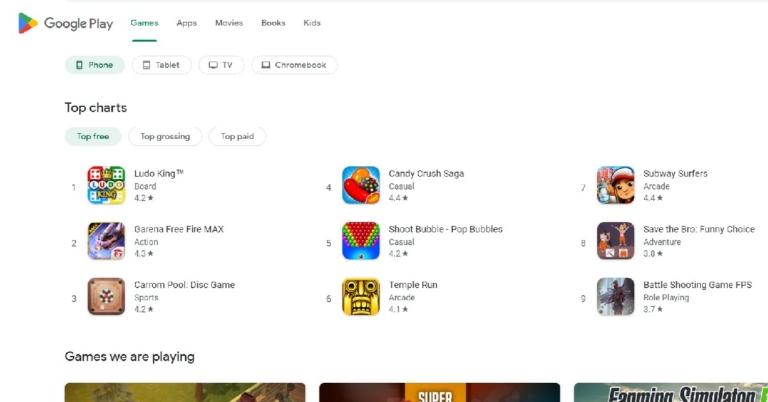
Unlike the Play Store, there is a direct way to download Google Play Games on your PC. With Google Play Games you can play any Android game on your PC. This is good news for gamers who rely on Android emulators to play mobile games using PC controls. Firstly, you’ll need to join the waitlist for the Google Play Games (on PC) beta version. The beta version is currently only available in Australia, Hong Kong, Korea, Taiwan, and Thailand. Once you’ve signed up for the beta version, go to play.google.com/googleplaygames on your PC’s web browser and click on ‘Download’. Follow the instructions to install the file on your PC. Post-installation, you will be able to play mobile games on your PC.Read Also:Top 7 Game Boy Emulators for iPhoneThese were the 3 best ways you can download and install Google Play Store on your laptop and PC. With the release of the beta version for Google Play Games, a full PC application may be launched in the future. This is good news for gamers who had to rely on Android emulators to play mobile games on their PC. For those who only want to use smartphone apps on their PC, an emulator is still the best option.
For the latest gadget and tech news, and gadget reviews, follow us on Twitter, Facebook and Instagram. For newest tech & gadget videos subscribe to our YouTube Channel. You can also stay up to date using the Gadget Bridge Android App. You can find the latest car and bike news here.
Garena Free Fire is a battle royale game with regular awards and tournaments to keep players interested. If you play Garena Free Fire, you should be aware of the redeem codes that are released on a daily basis. However, because the battle royale game is banned in India, players from other countries can use the Free Fire Redeem codes daily. If you’re unfamiliar with the Garena Free Fire redeem codes or don’t know how to get them, we’ve put together a step-by-step guide to help you redeem them. Check out Garena Free Fire Redeem Codes for August 3.The Free Fire redeem codes are a great way to get free stuff. These are 12-digit codes that contain alphabets and numbers, as well as an expiration date and time. Because the Garena FF redeem codes cannot be used more than once, you should hurry to the redemption page to claim your free reward before someone else does. To get a free reward, all you have to do is go to reward.ff.garena.com/en, which is the official redemption page. Also, keep an eye on this space for daily updates on Garena Free Fire redemption codes and rewards.
In This Article
Garena Free Fire Redeem Codes Today 3 August 2022
WLSGJXS5KFYR
FF11NJN5YS3E
FF11HHGCGK3B
FF10GCGXRNHY
B6IYCTNH4PV3
Y6ACLK7KUD1N
MCPTFNXZF4TA
FFBBCVQZ4MWA
FFAC2YXE6RF2
FF1164XNJZ2V
WOJJAFV3TU5E
FF11DAKX4WHV
YXY3EGTLHGJX
How to Get Free Fire Redeem Codes for Garena on August 3?
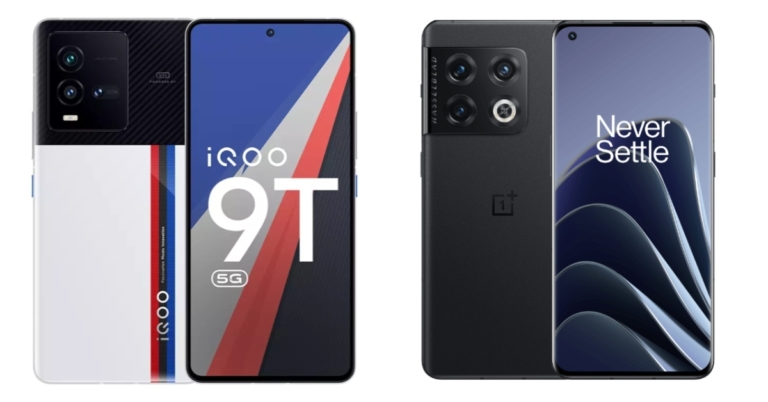
Vivo sub-brand iQOO released its latest flagship smartphone in the form of the iQOO 9T 5G, recently. High-end specifications on the gadget will make any tech lover salivate. In fact, the device’s starting price of Rs 45,999 takes on its rivals, including the OnePlus 10 Pro. Can the device compete with what is probably one of the greatest phones in its class in terms of value for money? The iQOO 9T 5G and OnePlus 10 Pro are being compared in-depth here for you.
iQOO 9T 5G: Snapdragon 8+ Gen 1 SoCOnePlus 10 Pro: Snapdragon 8 Gen 1 SoC
Rear camera(s)
iQOO 9T 5G: A triple rear camera setup includes a 50-megapixel GN5 primary sensor with OIS, a 13-megapixel wide-angle lens, and a 12-megapixel portrait sensorOnePlus 10 Pro: Triple rear camera array for photos and videos, which includes a 48-megapixel Sony IMX789 main sensor with f/1.8 aperture and optical image stabilisation (OIS). The camera configuration also includes a 50-megapixel Samsung ISOCELL JN1 ultra-wide sensor with an f/2.2 aperture and an 8-megapixel telephoto lens with OIS.
Selfie camera
iQOO 9T 5G: 16-megapixel camera for selfiesOnePlus 10 Pro: 32-megapixel Sony IMX615 camera sensor
RAM and storage
iQOO 9T 5G: 8GB of RAM with 128GB of storage and 12GB RAM with 256GB storageOnePlus 10 Pro: 8GB RAM with 128GB storage and 12GB RAM with 256GB storage
Both the devices have attractive design, but as the aesthetic appeal is a matter of personal preference, it is difficult to say which is superior. However, both gadgets have a metal frame and a glass back, and none of the two has any ingress protection. In terms of display, the OnePlus phone boasts an LTPO screen with a 120Hz refresh rate, whilst the iQOO 9T 5G has an E5 AMOLED display. There is an optical fingerprint scanner on both the phones.The OnePlus 10 Pro comes with a Snapdragon 8 Gen 1 CPU, while the iQOO 9T uses the most recent Snapdragon 8+ Gen 1 SoC. A 5,000mAh battery with 80W fast wired powers the OnePlus 10 Pro. While the iQOO 9T has a battery capacity of 4,700mAh, it also supports 120W rapid charging. The front cameras on both phones have features that are relatively similar, with the exception of the OnePlus 10 Pro’s high-resolution 32-megapixel selfie camera and the iQOO phone’s 16-megapixel sensor.The configurations of both phones are identical, but the iQOO 9T 5G is more economical than the OnePlus 10 Pro for the same RAM and storage choice. As a result, the iQOO 9T is unquestionably the champion because it offers the most modern features and chipset at a lesser price.
For the latest gadget and tech news, and gadget reviews, follow us on Twitter, Facebook and Instagram. For newest tech & gadget videos subscribe to our YouTube Channel. You can also stay up to date using the Gadget Bridge Android App. You can find the latest car and bike news here.
If you’re ever running out of internet data and aren’t close to a WiFi network, there are a few ways you can earn free internet data using certain apps. While the data rewards may not be large, they can certainly turn out to be helpful in times of need. In this article, we show you 6 apps you can download to get free internet data on your mobile phone.Read Also: Top 10 new Shows and Movies to watch on Netflix in August 2022
In This Article
Gigato
Gigato is one of the most popular data-earning apps, having been around for quite some years now. Once installed on your device, Gigato will list a number of apps, using which you can earn data. The process is pretty straightforward, you have to use a certain amount of data on a particular app and Gigato will reward for with a slightly larger amount of data. For example: If you use 15MB on Voot, Gigato will award you 20MB. So the net data is always slightly higher. The list of apps on offer is always diverse, so you’re bound to find some apps you use regularly to claim your data reward.
Earn Talktime
Similar to Gigato, Earn Talktime also rewards you for downloading and using certain apps. The key difference is that Earn Talktime rewards you with talk time, while Gigato rewards you with data. You can use the talk time you’ve earned to buy data. Once you’ve installed Earn Talktime you’ll need to periodically check new offers. There’s only a limited number of offers per day so there’s a limit to how much you can earn.
Paytunes
With Paytunes, you do not have to complete certain tasks to earn rewards. All you need to do is allow Paytunes to set your ringtone to an advertisement. You receive points for the calls you get. The payout is not that high, but if you receive a lot of calls during the day, you will be able to use the accumulated points to buy data.
My Ads
With My Ads, you can earn Talktime by watching ads and answering related questions. You don’t need to download or use any other apps or carry out specific tasks to earn rewards. My Ads pays you up to Rs 8 to watch an Ad and answer related questions, so the reward payout is much better compared to other apps.
Airtel Thanks
If you’re an Airtel user, download the Airtel Thanks app to earn free data. Airtel regularly offers free data coupons to its customers on the Airtel Thanks app. Apart from earning data, the Airtel Thanks app can also be used to recharge your phone and check your current balance and validity.
Bonus Tip: Use WiFi Map
Let’s face it – apps that offer free data are hard to come by. But what you can do is download the WiFi Map app on your device and get access to its library of over 150 million WiFi hotspots across the world. You can even add to WiFi Map’s library once you come across a free and open WiFi network in the wild. The app also contains updated WiFi passwords for locked networks. The best part is that you can look for WiFi networks near you and connect to them whenever you like!
Frequently Asked Questions (FAQs)
Is there a way to get free internet data on Android?
Apps like Gigato, Earn Talktime, and Paytunes credit your mobile with free data or talk time. The credited amount may be minuscule but over a period of time, you can squeeze a significant amount of data from them.
How do I find free WiFi near me?
The WiFi Map has the location of over 150 million WiFi networks in its database. You can find a network near you and use the passwords in WiFi Map’s library to connect to it.
How do I get free data on Airtel?
Airtel users can install the Thanks app to get regular offers that include free data packs. Routinely visit the ‘Rewards and Coupons’ category to know more.
Read Also: How To Enable Grayscale Mode On Your Android smartphone?
Conclusion
These are the 6 best apps to get free internet data on your mobile phone. While downloading a rewards app, always be mindful of malicious apps and scammers. Make sure you check the ratings and comments to assess whether an app is legitimate or not. If there are any reward apps that you like to use, let us know in the comments!
Acer is celebrating its annual Acer Day celebration in India. The exclusive sale will allow you to earn exclusive bargains, cashback, and incentives on all the goods you buy. Everything from air purifiers to gaming computers is on sale.Acer Day celebration has begun in India. During the sale period, students can also take advantage of special discounts during this year’s festivities. In addition, buying a laptop gives you the chance to win free air purifiers and 100% cashback. Students can get up to 42 percent off and an additional 10 percent off any laptop during the exciting Acer Day sale at no cost EMI.Here are the top Acer Day discounts and offers for you.
In This Article
Offers on Laptops
Now is your time to purchase a gaming laptop if you enjoy playing video games. Because Acer is offering its consumers the most generous discounts of the year. You can get a gaming bundle at no cost EMI along with up to 3 years of free warranty. To take advantage of these discounts, pick from the Nitro 5, Predator, or Aspire gaming series.Costs beginning at: Rs 54999Go straight for the Acer Swift Series with the special bargains and offers offered during the sale if you prefer your laptop to be small, light, and portable. You may receive up to 32% off these laptops along with a three-year guarantee, free accessories, and interest-free financing.Costs beginning at: Rs 60990People are looking for a laptop that has all the essential features and can be used every day for work or leisure. If you want to purchase a laptop for everyday use, Acer currently has promotions on its Extensa and Aspire series that includes a 23 percent discount, a free 3-year guarantee, and a bag with no-cost EMI.Costs beginning at: Rs 24990
Offers on Acer Monitors
If you’re looking to buy a gaming or regular monitor for your house or place of business, during Acer Day, you may save up to 59 percent and receive three years of warranty-free monitor purchases.Costs start at: Rs 7299
Offers on Air purifiers
Given the poor quality of the air in most of our cities today, an effective air filter is no longer a luxury. Air that is unpolluted should be accessible to everyone. If you’re searching to acquire an air purifier Acer Day has that covered too, it includes a fantastic discount of up to 36% off and a free two-year warranty.Costs beginning at: Rs 14999
For the latest gadget and tech news, and gadget reviews, follow us on Twitter, Facebook and Instagram. For newest tech & gadget videos subscribe to our YouTube Channel. You can also stay up to date using the Gadget Bridge Android App. You can find the latest car and bike news here.



 The latest styling barrels with rotating cool tip make curls and waves faster and simpler while causing no heat harm to the hair, preserving its strength. By combining the results previously obtained with two barrels into one attachment, users can now style the entire head, creating both clockwise and counterclockwise curls and waves, without having to switch attachments in the middle of a style.
Along with a brand-new Coanda smoothing dryer that serves two distinct purposes, newly designed brush attachments provide precision shaping with improved Coanda performance. The Coanda smoothing dryer, which combines two attachments into one, conceals flyaways in a single pass without using excessive heat and switches from a strong drier to a smoothing dryer at the touch of a button.
The current Dyson Airwrap styler owners now have the option to upgrade to these newest attachments while still using their old equipment. Engineers have been able to miniaturise air vents to attain a level of airflow velocity, pressure, and control never before seen through this iterative process of trial and error.
The latest styling barrels with rotating cool tip make curls and waves faster and simpler while causing no heat harm to the hair, preserving its strength. By combining the results previously obtained with two barrels into one attachment, users can now style the entire head, creating both clockwise and counterclockwise curls and waves, without having to switch attachments in the middle of a style.
Along with a brand-new Coanda smoothing dryer that serves two distinct purposes, newly designed brush attachments provide precision shaping with improved Coanda performance. The Coanda smoothing dryer, which combines two attachments into one, conceals flyaways in a single pass without using excessive heat and switches from a strong drier to a smoothing dryer at the touch of a button.
The current Dyson Airwrap styler owners now have the option to upgrade to these newest attachments while still using their old equipment. Engineers have been able to miniaturise air vents to attain a level of airflow velocity, pressure, and control never before seen through this iterative process of trial and error.