5 August 2022 Amazon Quiz has gone live on its platform. The quiz timings are 12 AM to 11:59 PM. The Amazon App users can participate in the quiz daily and all they have to do is submit correct answers to the questions asked on the e-commerce platform. Today’s participants can get a chance to win Rs 1,000 Amazon Pay Balance.Amazon brings a fresh questionnaire that contains 5 questions daily. These questions are based on current affairs and general knowledge. The quiz can be played from 8 AM to 11:59 PM and the contestants need to answer correctly to enter into a lucky draw.Only one person is declared as a winner and the results will be announced at the end of every month. And to make sure that you give correct answers to all the 5 questions Gadget Bridge everyday updates all the answers to the Amazon Quiz. Do check out 5 August 2022 Amazon Quiz Answers to win Rs 1,000 Amazon pay Balance.Amazon Quiz Today Prize – Rs 1,000 Amazon Pay BalanceQuiz Date – 5 August 2022Daily Timing – 12 AM to 11:59 PMWinner Announcement – Today 12 PM
In This Article
Amazon Quiz Answers Today 5 August 2022
Question 1: Sweden’s Armand ‘Mondo’ Duplantis created a world record at the 2022 IAAF World Championships in which event?Answer: Pole VaultQuestion 2: The latest movie in the ‘Despicable Me’ franchise is titled ‘Minions: The Rise of ___’ . Fill in the blanksAnswer: GruQuestion 3: Who is the first Indian President to be born in independent India?Answer: Droupadi MurmuQuestion 4: This bird is associated with which Greek goddess?Answer: AthenaQuestion 5:What is another name of this asana?Answer: Paschim Namaskarasana
How To Play Amazon Quiz
Only app users are eligible to play the Amazon quiz every morning from 12 AM to 11:59 PM. The quiz is not available on the desktop. For those who are unaware of how to play the Amazon quiz below are the steps, you can follow to take the quiz.
Firstly download the Amazon app from Google Play Store or App Store
Now fill in the required information through the Sign Up option.
You need to log in to the Amazon app and scroll down on the home screen to find the Amazon Quiz banner.
Tap on the Amazon Quiz banner and tap on the Start button to start the Quiz.
Now you will get 5 questions and you need to answer them correctly. One wrong answer will eliminate you from the Quiz.
After answering all the questions correctly you are now eligible for a Lucky Draw.
The winner’s name will be announced today at 12 PM.
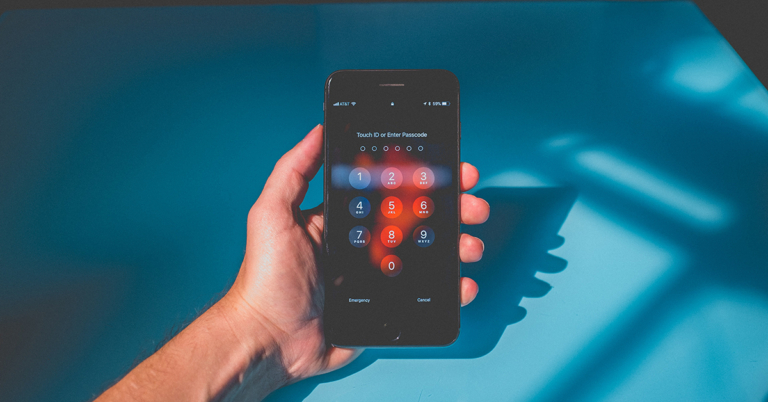
Every smartphone allows you set the screen lock in a number of ways, i.e., Pattern, PIN, Face ID, Touch ID, etc. People who use Face ID or Touch ID, have to set a screen passcode for backup which sometimes they forgot. If you are unable to recognize your screen passcode, pattern or PIN, you have to jailbreak your phone without a passcode.
There are some scenarios where you have to unlock Android phone without password, among which the most common is when you forgot the screen passcode, bought a second-hand Android phone with an unknown screen passcode, your Face ID or Touch ID isn’t working properly, etc. These issues can be resolved by jailbreaking your phone.
If you have encountered any of the above-mentioned issues or you are unable to unlock the screen passcode on your phone, then you can get the best solution here. In this article, we are illustrating the best ways to unlock Android phone without password. Read the article till the end, to get the best solution to unlock your Android phone.
In This Article
2 methods to unlock an Android phone without a password
If you have locked your phone and forgot the passcode, then it is very difficult for you to unlock Android Phone without Password. Although, there are certain ways to do so. If you are unable to unlock Android Phone without Password, follows these 2 methods that will help you to resolve your issue.
Method 1. Using Google’s “Find My Device”
If you have forgotten your Android phone’s passcode or bought a second-hand phone that is locked by passcode or PIN, then you can use Google Find My Device to unlock Android Phone without Password. Google Find My Device help you to track your device, remotely lock or unlock your device, etc.
You can locate, lock, or erase an Android smartphone, tablet, or Wear OS watch that you have misplaced. Find My Device is switched on by default if a Google Account has been added to your device.
Step 1: Go to Google Find My Device from your desktop or from another smartphone, and sign with the same account which you are using on the locked device.
Step 2: Click on the locked device’s name and the tap on Lock. Enter a temporary passcode and press ‘Lock’ button.
Step 3: After it, three will be three options, Ring, Lock and Erase, from which you can choose one and enter the temporary passcode on the search box given below these options.
Step 4: Now, on your locked Android phone, enter the temporary passcode and your phone will be unlocked.
Although Google Find My Device is very helpful and easy to use, but there are a few restrictions while using it. Some of these restrictions are, the device you are tracking or you want to unlock must be connected to internet, the phone that you need to unlock must be logged in to a Google account and the user should know the passcode of that account, and the other crucial point is the device must be enabled with Google Find My Device. If your device lacks with any of these, It might not be possible for you to unlock your device. In such case, you can use a third-party app ‘DroidKit’ as a solution. Read more about
Method2. Using DroidKit
If you are unable to unlock your Android Phone using ‘Google Find My Device’ due its restrictions, another way to Unlock your Android Phone without a Passcode is by using third-party software or app, DroidKit. It does not have any restrictions and even unlocks your phone in a few seconds.
DroidKit is one of the best tools to Unlock an Android Phone without a Passcode. It supports unlocking all types of Android Screen locks, like, PIN, Password, Pattern, Fingerprint, Touch ID or Face ID. If the software is compatible with your Android device, it can unlock the device in just a few clicks.
You can use it to unlock any form of screen lock on your Android phone or tablet without requiring you to provide a password. So, it only takes a few minutes to regain full access to your protected device. It supports 20000+ models of Android Phone and Tablets, where the list includes approximately all the Android devices from various manufacturers, i.e, Samsung, Oppo, Vivo, etc. The DroidKit is currently working to launch the new version for One Plus users as well.
To know how to Unlock Android Phone without Passcode using DroidKit, you can visit the How to use DroidKit Guide or follow the below-mentioned steps.
Step 1: Download and Install DroidKit on your device, and launch the software. From the homepage, select the option ‘Screen Unlocker’ to unlock the screen.
Step 2: Connect your Android phone to your device using a USB cable. From the screen next appeared, read all the instructions and click on ‘Start’ button.
Step 3: After that, remove the screen password by following the steps displayed on the screen.
Step 4: Once the process illustrated is completed, the screen of the Android Phone will be unlocked automatically.
You have to wait while DroidKit is unlocking your Android Phone. Do not disconnect your device until the whole process is completed.
Conclusion
Here, we have suggested to you the best ways to Unlock Android Phone without Passcode. You can unlock your Android phone using ‘Google Find My Device’ but it is a bit difficult and also has many weaknesses. We recommend you to use ‘DroidKit’ to Unlock Android Phone without Passcode, as it is easy to use and unlocks your phone in just a few clicks.
For the latest gadget and tech news, and gadget reviews, follow us on Twitter, Facebook and Instagram. For newest tech & gadget videos subscribe to our YouTube Channel. You can also stay up to date using the Gadget Bridge Android App. You can find the latest car and bike news here.
Over the years, smartphones have evolved at a rapid pace to become powerful little machines. With the convergence of technology, smartphones are equipped to handle a large variety of daily tasks, putting a lot of individual devices out of business. An average smartphone can easily perform the tasks of a music player, camera, watch, maps, GPS, video player, and to some extent, even a computer, at a fraction of the price. One commonly asked question is whether a smartphone can be modified and perform the functions of a thermometer as well. In this article, we explore whether a smartphone can be turned into a thermometer.Read Also:How Will Smartphone Design Evolve Over the Next Decade?
In This Article
Why don’t modern smartphones have thermometers?
People often wonder why smartphones do not come equipped with a digital thermometer despite being so technologically advanced. The answer to this is simple, the internal temperature of a smartphone makes it almost impossible to get an accurate external reading. Some smartphones already have internal thermometers that check the internal temperature of the device. Once the temperature crosses a certain threshold, it alarms the smartphone to reduce its functioning until the normal temperature is restored.For a smartphone to measure body temperature, it would require an external heat sensor that isn’t influenced by the heat emitted from the smartphone in any way. Since an external sensor would be an additional part of the device that would serve only one function, it is not included in the device. The design of the smartphone would also need to be changed to accommodate the sensor. Most companies do not see the payoff to be as big as the effort required to include a thermometer in a smartphone.Samsung did incorporate a thermometer with the Galaxy S4 and Note 3, but the idea did not take off among its buyers. Firstly, the instructions to use the thermometer were far too complicated, requiring to let the phone cool down entirely and making sure the heat from the hands does not affect the temperature reading. Even after following all the instructions, the temperature readings weren’t entirely accurate. Samsung dropped the idea in later iterations of the Note and Galaxy smartphones.Read Also: Can You Use An Apple Watch With An Android Smartphone?
What about thermometer apps?
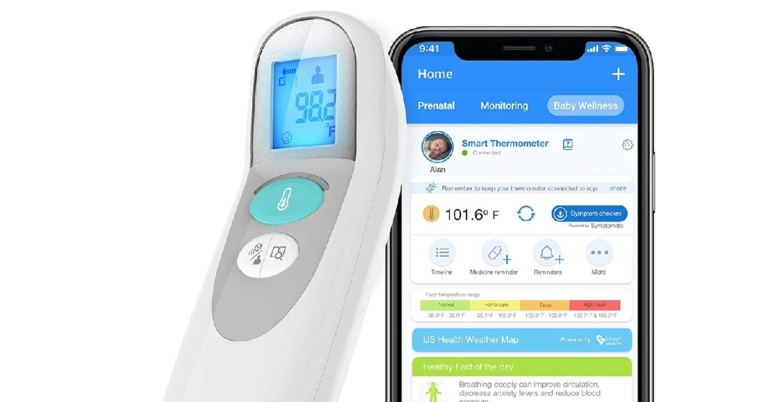
If you explore the Google Play Store, you will find several thermometer apps that claim to give accurate temperature readings. These apps aren’t reliable at all, since a smartphone does not have the hardware these apps could utilise to function as a thermometer. Our advice is to steer clear of such apps, as they may try to push malware under the guise of a thermometer app.There are certain digital thermometers that come with a smartphone app that syncs the reading from the external thermometer to your smartphone. You can record these temperature readings on your phone and monitor them over a period of time. The readings can also be instantly shared with your physician from your smartphone.
For the latest gadget and tech news, and gadget reviews, follow us on Twitter, Facebook and Instagram. For newest tech & gadget videos subscribe to our YouTube Channel. You can also stay up to date using the Gadget Bridge Android App. You can find the latest car and bike news here.
Bharti Airtel, a major telecom provider, and Nokia announced a partnership for the construction of a 5G radio access network (RAN). Following the recently completed 5G spectrum auctions and Bharti Airtel’s distribution of pan-India spectrum, this multi-year agreement supports their goal of ushering India into the 5G era. In the recently finished auction, Bharti Airtel purchased spectrum valued at Rs. 43,084 crore.A modular and scalable baseband, as well as 5G massive MIMO radios with high capacity, will be provided by Nokia from its market-leading AirScale portfolio.In addition to Nokia, Bharti Airtel has agreements in place for the deployment of its 5G network with Ericsson and Samsung.Gopal Vittal, MD & CEO of Bharti Airtel said, “We are pleased to continue our partnership with Nokia and take India into the 5G era. Airtel has always believed that the real leverage of 5G technology will come from the capacity to build an ecosystem across devices, networks, applications and services. As mobile penetration increases across India, mobile telecom services will have a transformative impact across all sectors of the economy. Airtel is investing in the right areas and working with the right partners to serve our customers even better.”The Sunil Mittal-led company has increased its spectrum holding by acquiring 19,867.8 MHZ of spectrum in the 900 MHz, 1800 MHz, 2100 MHz, 3300 MHz, and 26 GHz bands.Pekka Lundmark, President and CEO at Nokia said, “This landmark deal reinforces our long-standing partnership with Bharti Airtel. We are delighted that they have chosen Nokia’s best-in-class AirScale baseband and radio portfolio to deliver superior 5G performance in one of the world’s largest networks. I look forward to our continued successful long-term collaboration in this vital and dynamic market.”In accordance with the telecom provider, Airtel would be able to launch 5G services with ultra-high speeds, low latency, and enormous data processing capabilities if it chose numerous partners.
For the latest gadget and tech news, and gadget reviews, follow us on Twitter, Facebook and Instagram. For newest tech & gadget videos subscribe to our YouTube Channel. You can also stay up to date using the Gadget Bridge Android App. You can find the latest car and bike news here.
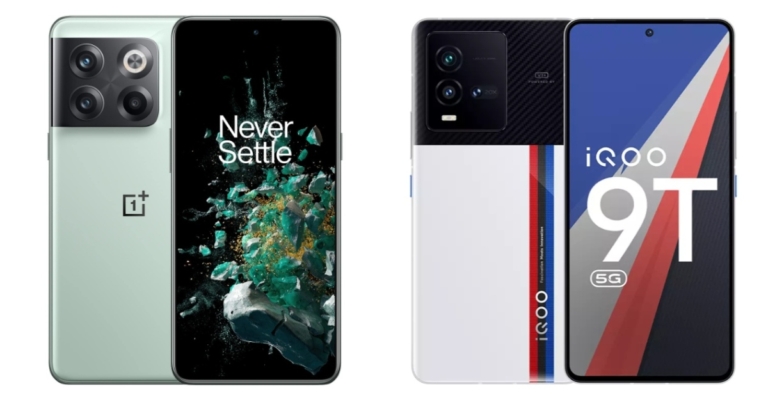
The Chinese smartphone brand OnePlus has announced the launch of the OnePlus 10T 5G smartphone in the Indian market. The device is powered by the Qualcomm Snapdragon 8+ Gen 1 processor. The gadget sports a display with a 120Hz refresh rate. The phone is also capable of 150W quick charging. The OnePlus competes with devices like the iQoo 9T 5G, which was introduced in India the day before the OnePlus. Let’s compare the OnePlus 10T 5G Vs iQOO 9T 5G to see how they compare to one another.
OnePlus 10T 5G: Qualcomm Snapdragon 8+ Gen 1 SoCiQOO 9T 5G: Snapdragon 8+ Gen 1 SoC
Rear camera(s)
OnePlus 10T 5G: The triple-camera setup on the back of the smartphone has a 50-megapixel Sony IMX766 primary sensor. The OnePlus 10T 5G camera also have both optical and electronic picture stabilisation. A third macro camera is included in the setup, along with a 12MP ultrawide camera. With a 119-degree field of vision, the phone also has one of the broadest ultrawide cameras.iQOO 9T 5G: A triple rear camera setup includes a 50-megapixel GN5 primary sensor with OIS, a 13-megapixel wide-angle lens, and a 12-megapixel portrait sensor
Selfie camera
OnePlus 10T 5G: 16-megapixel front-facing cameraiQOO 9T 5G: 16-megapixel camera for selfies
RAM and storage
OnePlus 10T 5G: 8GB RAM with 128GB storage, 12GB RAM with 256GB storage and 16GB RAM with 256GB storageiQOO 9T 5G: 8GB of RAM with 128GB of storage and 12GB RAM with 256GB storage
The starting price for the base model of both devices, which has 8GB of RAM and 128GB of storage, is Rs 49,999. Additionally, OnePlus provides a 16GB RAM model. Be aware that the phone features an Always Alive feature that utilises 16GB of RAM and allows for the simultaneous operation of up to 30 apps in the background.It is difficult to tell the difference in the screens on the two handsets, but the iQOO 9T 5G has a better one thanks to its AMOLED E5 screen, while the OnePlus phone has an AMOLED E4 one. Additionally, there is a Vivo V1+ chip that functions as an intelligent display chip and helps to boost the frame rate during gaming. iQoo thus takes first place in terms of display.Both smartphones are powered by the Qualcomm Snapdragon 8+ Gen 1 SoC, which is similarly fast and smooth on both models and excellent for high-end gaming. Both gadgets use Android 12 OS as their operating system. The OnePlus 10T comes with OxygenOS 12.1 whereas the iQOO 9T has FunTouch OS 12. iQoo 9T 5G has better camera specs than the OnePlus for images and videos. Both smartphones have nearly identical battery sizes, but OnePlus challenges iQoo because it supports 150W fast charging, whereas iQoo 9T 5G falls behind with 120W.Which should you purchase? The iQoo 9T has more advanced features than the OnePlus 10T. In terms of display and camera specifications, the gadget falls short. However, the OnePlus 10T is a good option if you’re seeking a phone with quick charging.
For the latest gadget and tech news, and gadget reviews, follow us on Twitter, Facebook and Instagram. For newest tech & gadget videos subscribe to our YouTube Channel. You can also stay up to date using the Gadget Bridge Android App. You can find the latest car and bike news here.
With over 140 million active monthly users, Minecraft is one of the most popular games in the world. It is enjoyed by kids and adults alike, adding to its popularity. Possibilities are endless in the world-building game, as players use raw materials, craft tools, and other items to build structures, structures, and machines. Minecraft can be played in Survival mode, Hardcore mode, Creative mode, Adventure mode, and Spectator mode. Minecraft also enables multi players to interact and engage in a single world. If you’re interested in playing Minecraft but want to try it out first before paying for it, here’s how you can download it on PC for free.Read Also:How To Download Minecraft 1.18.31 On Android?
In This Article
How to download the Minecraft trial version on PC for free
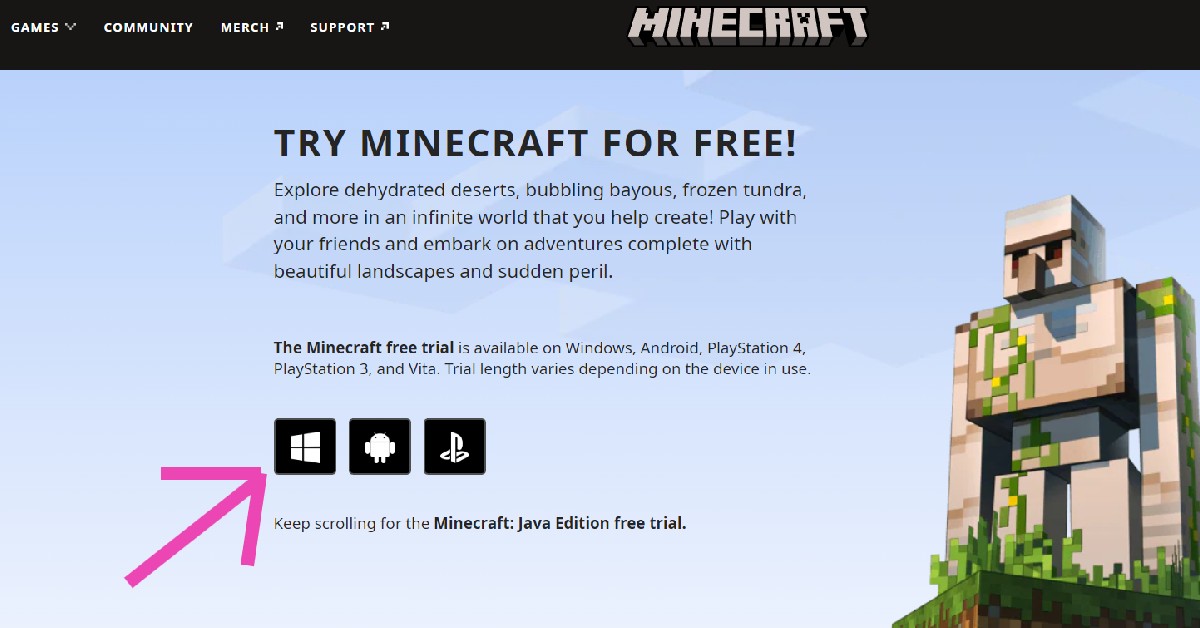
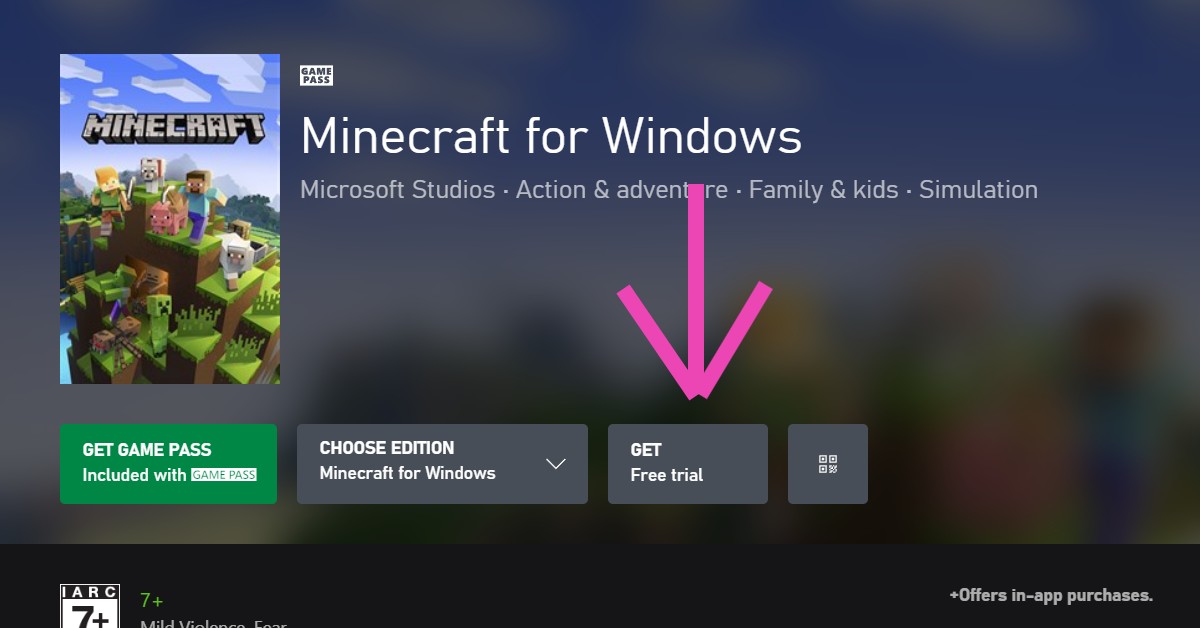
The full version of Minecraft Java Edition costs Rs 2,190. But you can download the trial version for free on the Minecraft website. Just follow these simple steps.Step 1: Go to www.minecraft.net on your web browser.Step 2: Click on ‘Games’ at the top right corner of the website and select Minecraft.Step 3: Click on ‘Try it Free’.Step 4: Select Windows as the desired platform.Step 5: You will be directed to the Xbox website. Click on ‘Get free trial’.Step 6: Sign in with your Microsoft account. The free trial will be downloaded to your PC.
Garena Free Fire is a battle royale game with regular awards and tournaments to keep players interested. If you play Garena Free Fire, you should be aware of the redeem codes that are released on a daily basis. However, because the battle royale game is banned in India, players from other countries can use the Free Fire Redeem codes daily. If you’re unfamiliar with the Garena Free Fire redeem codes or don’t know how to get them, we’ve put together a step-by-step guide to help you redeem them. Check out Garena Free Fire Redeem Codes for August 4.The Free Fire redeem codes are a great way to get free stuff. These are 12-digit codes that contain alphabets and numbers, as well as an expiration date and time. Because the Garena FF redeem codes cannot be used more than once, you should hurry to the redemption page to claim your free reward before someone else does. To get a free reward, all you have to do is go to reward.ff.garena.com/en, which is the official redemption page. Also, keep an eye on this space for daily updates on Garena Free Fire redemption codes and rewards.
In This Article
Garena Free Fire Redeem Codes Today 4 August 2022
FF10617KGUF9
FF10GCGXRNHY
X99TK56XDJ4X
YXY3EGTLHGJX
MCPTFNXZF4TA
FF1164XNJZ2V
WOJJAFV3TU5E
SARG886AV5GR
FF11DAKX4WHV
WLSGJXS5KFYR
FF11HHGCGK3B
FF11NJN5YS3E
ZRJAPH294KV5
Y6ACLK7KUD1N
FF119MB3PFA5
FF11WFNPP956
B61YCTNH4PV3
8F3QZKNTLWBZ
How to Get Free Fire Redeem Codes for Garena on August 4?
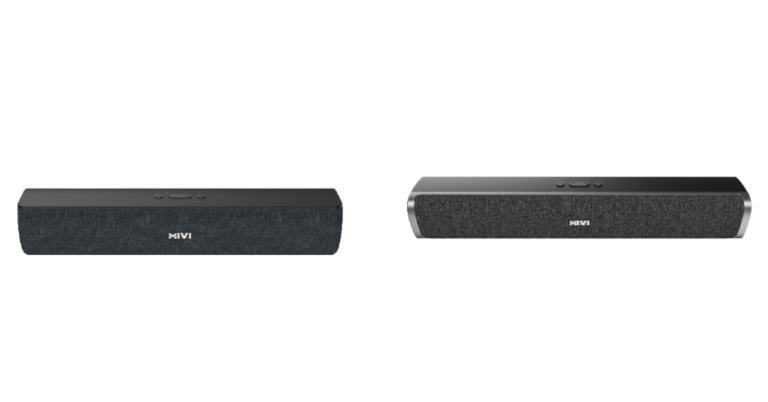
Mivi, a homegrown electronics firm has announced a new range of soundbars in the country. The company has introduced Mivi S16 and S24 soundbars. The portable sound bars offer two passive radiators and both the audio devices come with built-in voice assistants. These sound bars are said to be made with premium quality material for high performance and durability.
In This Article
Mivi S16 and S24 soundbars price and availability
These portable Mivi S16 and S24 sound bars will be offered on Flipkart and the Mivi website at a special launch-day price of Rs 1299 and Rs 1799 for the S16 and S24 sound bars, respectively. Starting on August 4th, both sound bars will be priced at their original INR 1499 (S16) and INR 1999 levels (S24).Mivi S16 soundbars
Mivi S16 and S24 soundbars specifications
The studio-grade bass found in the Mivi S16 and S24 soundbars allows you to enjoy cinematic sound quality in the comfort of your own home. The Mivi sound bars also meet all of your connectivity needs, supporting multi-channel inputs including AUX, Bluetooth 5.1, TF/USB, and Micro SD cards so you can listen to your favourite music whenever and wherever you want. It has two passive radiators that enable you to hear every beat of your favourite songs and deliver bass that is on par with what you would get in a recording studio. For convenience, the gadget comes with both Siri and Google Assistant built-in.Mivi S24 soundbarsThe battery life of the Mivi S16 and S24 soundbars is six hours at 70 percent volume, and they each include 16W and 24W cinematic sound effects, respectively. For great performance and durability, these sound bars are built using materials of the highest calibre.Midhula Devabhaktuni, Co-founder and CMO, Mivi, said, “Equipped with next-generationdesign and technology we are happy to launch our Make-in-India soundbars-S16 and S24, – our newest addition in the field of audio accessories. Both the sound bars are designed to provide a wider soundstage for a more immersive experience at modest pricing to the music lovers. Our value-for-money products are a testimony of our hard work towards our customers, who are of utmost priority to us.”
For the latest gadget and tech news, and gadget reviews, follow us on Twitter, Facebook and Instagram. For newest tech & gadget videos subscribe to our YouTube Channel. You can also stay up to date using the Gadget Bridge Android App. You can find the latest car and bike news here.
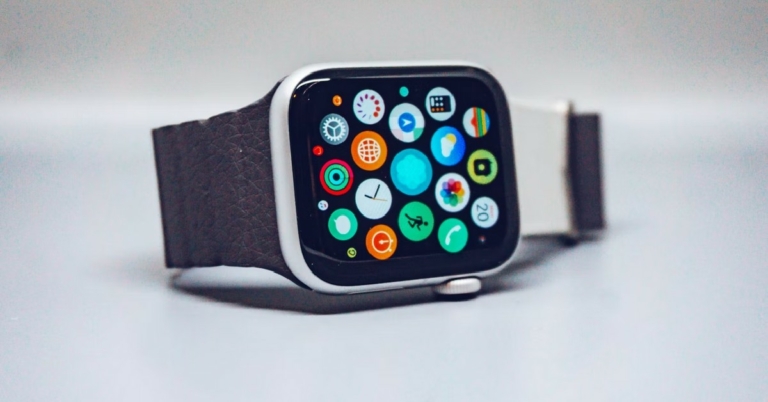
Apple Watch is one of the most appealing wearables to consumers. With its sleek looks and ease of accessibility, it is no wonder why it’s so popular. Its appeal isn’t restricted to just Apple users – one of the most popular queries among Android users is regarding the compatibility of the Apple Watch with an Android smartphone. The answer to that is very simple. Just like every other Apple device, the Apple Watch too is a part of Apple’s “walled garden”. Meaning that the Apple Watch is only compatible with an iPhone. It is virtually impossible to pair an Apple Watch with your Android smartphone and retain all its functionalities. But is there a way to still pair the two together, even if the functionality is extremely limited? In this article, we explore whether you can use an Apple Watch with an Android Smartphone.Read Also: Top 10 Best Free Apple Watch Games Of 2022
In This Article
Is it possible to use an Apple Watch with an Android Smartphone?
Simple answer, no. There is no compatibility between the Apple Watch and Android devices. You cannot pair the two with Bluetooth. The Apple Watch does not work even with an iPad. To activate the Apple Watch, you need an iPhone with the Apple Watch app installed.If you own an LTE Apple Watch, there are some standalone apps you can use on the Apple Watch without needing an iPhone in the vicinity. You will still need an iPhone to set up the Apple Watch, but once that’s done, the Watch will function by itself using the cellular connection.After settings up the LTE Apple Watch, you can switch the SIM card from the iPhone to your Android smartphone. Since the Apple Watch is still paired to the SIM, you will be able to make and receive phone calls and use iMessage. But this is where the compatibility ends. You will also be able to use standalone apps on the Apple Watch that do not require a connection to an iPhone to function, but it is impossible to sync data between the Apple Watch and an Android smartphone. Even if you use the Apple Watch for health tracking functions, you will not be able to sync the data to your Android mobile. At the end of the day, you will need an iPhone. The battery of the Apple Watch will also drain out pretty quickly on an LTE connection. It is quite obvious that this is a very impractical way to use an Apple Watch, especially when you have an iPhone to set it up.Read Also: Sony LinkBuds WF-L900 TWS earphones launched in India
What are the Android alternatives to the Apple Watch?
The Samsung Galaxy Watch 4 is the perfect alternative to the Apple Watch. Equipped with the WearOS platform and OneUI, it is the perfect companion for any Android smartphone. It also comes with state-of-the-art health and fitness features like body composition measurement, optical heart rate sensor, electrical heart rate sensor, and a bioelectrical impedance analysis sensor.Xiaomi and OnePlus also have a range of wearables across various categories that are compatible with all Android smartphones.
For the latest gadget and tech news, and gadget reviews, follow us on Twitter, Facebook and Instagram. For newest tech & gadget videos subscribe to our YouTube Channel. You can also stay up to date using the Gadget Bridge Android App. You can find the latest car and bike news here.
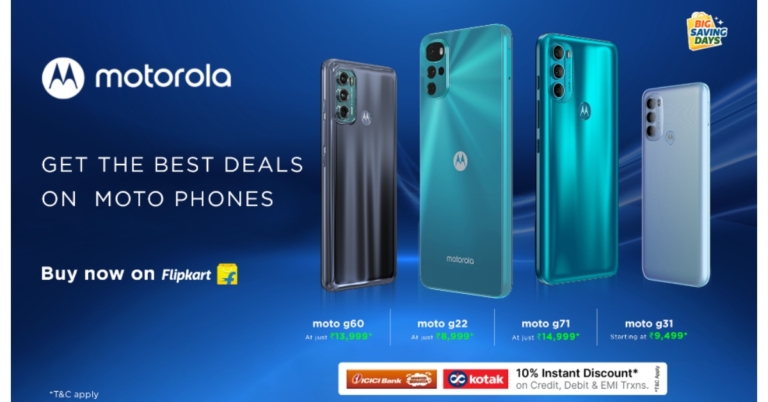
Flipkart’s Big Saving Days sale is set to begin on August 6 and will run through August 10 in the country. It will offer mobile phones at rock-bottom costs. Motorola announced some alluring discounts on its array of smartphones. As part of the event, customers will be able to purchase well-known smartphones at reduced prices and take advantage of further exchange discounts. During Flipkart’s Big Saving Days sale, Motorola smartphones like the Moto G22, G31, G51, G40, G60, G71, Edge 20, Edge 20 Pro, and Edge 30 Pro will be marked down significantly.In advance of Flipkart’s Big Saving Days event, Motorola has announced significant discounts on its Moto E, G and Motorola edge family of smartphones. Customers can get their preferred Motorola devices from August 6 through August 10 during the sale at some of their lowest rates yet.During the Flipkart Big Saving Days Sale, Moto G71 and Moto G51 will be available at a massive discount of Rs 4,000. The Moto g71, which boasts a stunning 6.4-inch AMOLED display and is powered by the lightning-quick Qualcomm Snapdragon 695 processor, will be offered for just Rs. 14,999. With full 5G connectivity and compatibility for 12 5G bands, a 60Hz 6.8-inch display, a 50000mAh battery inside, and the most recent Snapdragon octa-core processor, Motorola’s moto g51 is available for just Rs. 11,249.The Moto G31 has an octa-core MediaTek Helio G85 processor and an AMOLED display for fluid performance. The Moto G31 has a 50MP quad function camera for the greatest camera experience and is available in two storage variants: 4GB RAM + 64 GB Storage for Rs 9,499 and 6GB RAM + 128 GB Storage for Rs 11,499.The 6.8″ HDR10 display on the Motorola g60 features 120 Hz and is driven by the potent Qualcomm Snapdragon 732G CPU for the best viewing experience. With a 108MP camera system at a discounted price of Rs 13,999 during Flipkart Big Saving Days Sale. The Moto G60 is well regarded as India’s most cheap smartphone. The moto g40 fusion with Snapdragon 732G Processor, powered by the same outstanding processor, will cost at Rs. 12,499.More smartphones available at discount are listed below:
Model
Regular Price
Flipkart Big Saving Days Offer
Effective Pricing with Bank Offer
moto g60
Rs 15,999
Rs 14,999
Rs 13,999 (incl. Bank offer)
moto g31 (4+64GB)
Rs 11,999
Rs 10,499
Rs 9,499 (incl. Bank offer)
moto g31 (6+128GB)
Rs 13,999
Rs 12,499
Rs 11,499* (incl. Bank offer)
moto g71 5G
Rs 16,999
Rs 15,999
Rs 14,999 (incl. Bank offer)
moto g22 (4+64GB)
Rs 10,999
Rs 9,999
Rs 8,999 (incl. Bank offer)
moto g51 (4+64)
Rs 14,999
Rs 12,249
Rs 11,249 (incl. Bank offer)
moto g40 fusion (6 +128)
Rs 16,499
Rs 13,499
12,499 (incl. Bank offer)
moto g42
Rs 13,999
Rs 12,999
Rs 11,999 (incl. Bank offer)
moto g82 (6 +128 GB)
Rs 21,499
Rs 19,999
Rs 18,999 (incl. Bank offer)
moto g82 (8 +128 GB)
Rs 22,999
Rs 21,499
Rs 20,499 (incl. Bank offer)
moto g52 (4+64)
Rs 14,499
Rs 13,499
Rs 12,499 (incl. Bank offer)
Motorola edge 20 fusion (6 + 128)
Rs 18,999
Rs 17,999
Rs 16,999 (incl. Bank offer)
Motorola edge 20 fusion (8 + 128GB)
Rs 19,999
18,999 (incl. Bank offer)
Motorola edge 20
Rs 27,999
Rs 24,999
Rs 23,999 (incl. Bank offer)
Motorola edge 20 pro
Rs 34,999
Rs. 30,999 (incl. 4000 off as an upfront discount)



 Step 2: Connect your Android phone to your device using a USB cable. From the screen next appeared, read all the instructions and click on ‘Start’ button.
 Step 3: After that, remove the screen password by following the steps displayed on the screen.
 Step 4: Once the process illustrated is completed, the screen of the Android Phone will be unlocked automatically.
 You have to wait while DroidKit is unlocking your Android Phone. Do not disconnect your device until the whole process is completed.



 Step 3:
 Step 4:
 Step 5:
 Step 6: