

In This Article
Acer Day Sale begins in India: Deals to look out for

Acer is celebrating its annual Acer Day celebration in India. The exclusive sale will allow you to earn exclusive bargains, cashback, and incentives on all the goods you buy. Everything from air purifiers to gaming computers is on sale.
Acer Day celebration has begun in India. During the sale period, students can also take advantage of special discounts during this year’s festivities. In addition, buying a laptop gives you the chance to win free air purifiers and 100% cashback. Students can get up to 42 percent off and an additional 10 percent off any laptop during the exciting Acer Day sale at no cost EMI.
Here are the top Acer Day discounts and offers for you.
OnePlus 10T 5G launching globally today: Here is how to watch Livestream
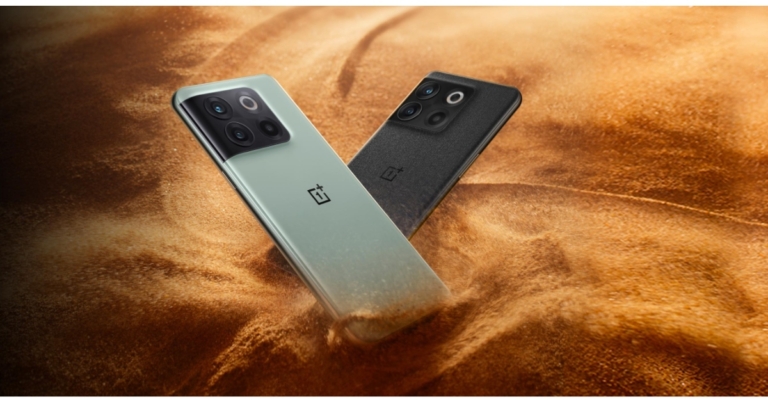
Today will see the official debut of the OnePlus 10T 5G. The device will be presented during OnePlus’ New York City launch event. As the name suggests the launch ceremony will also be held in New York City in addition to India. The upcoming OnePlus flagship would be powered by a Qualcomm Snapdragon 8+ Gen 1 processor. The OnePlus 10T and OxygenOS 13 will both be revealed at the same time, the firm announced. The company has also hinted that the future OnePlus smartphone will feature a 120Hz refresh rate display.
The OnePlus 10 Pro, which made its debut earlier this year, is expected to be replaced by the OnePlus 10T. This will be the third item in the OnePlus 10 series, following the OnePlus 10 Pro and OnePlus 10R.
In This Article
OnePlus 10T 5G launch Livestream details
At its debut event in New York City today, the Chinese smartphone company OnePlus will introduce the 10T 5G. The firm will also offer a Livestream of the event on the OnePlus website and official YouTube channel. The launch event will begin at 10:00 am ET at Gotham Hall in New York City and at 7:30 pm in India. To get tickets for the event, people can go to the business’ website. According to the company, this would be the 10T 5G smartphone’s first live introduction. The company claims that people who purchase tickets to the live launch event in NYC will also receive OnePlus Nord Buds in addition to premium items. On this page, you can buy event tickets, or you can visit the OnePlus website and YouTube channel to witness the live unveiling.OnePlus 10T 5G price expected
Prices for the OnePlus 10T 5G have been leaked ahead of the device’s release. The phone was temporarily advertised on Amazon UK’s website at GBP 799 which converts to Rs 76,500. The e-commerce company allegedly afterwards removed the listing. The cost of the OnePlus 10T 5G has not yet been publicly disclosed by OnePlus. However, the smartphone will be available in India via the Amazon India website as it has already been listed there ahead of the formal launch. Rumour has it that the OnePlus 10T will retail for about Rs 40,000 in India and be available in Jade Green and Moonstone Black.OnePlus 10T 5G specifications expected
The OnePlus 10T 5G is said to include a 6.7-inch full-HD+ AMOLED screen with a 120Hz refresh rate. The Qualcomm Snapdragon 8+ Gen 1 SoC will power the device. The OnePlus 10T 5G will include 256GB of UFS 3.1 storage and 16GB of LPDDR5 RAM, the company has additionally revealed. Moreover, the firm highlighted the phone’s HyperBoost and AI System Booster 2.1 features. A 50-megapixel Sony IMX766 main sensor will be used in the smartphone’s triple-back camera arrangement, according to OnePlus. Optical and electronic image stabilisation will also be a part of the OnePlus 10T 5G camera configuration. The business claims that the phone will come with a new image clarity engine. According to OnePlus, it also employs the TurboRAW and HDR 5.0 algorithms. The phone’s battery could be 4,800mAh and capable of 150W quick charging. For the latest gadget and tech news, and gadget reviews, follow us on Twitter, Facebook and Instagram. For newest tech & gadget videos subscribe to our YouTube Channel. You can also stay up to date using the Gadget Bridge Android App. You can find the latest car and bike news here.How to Fake a GPS Location on Your Phone 2022
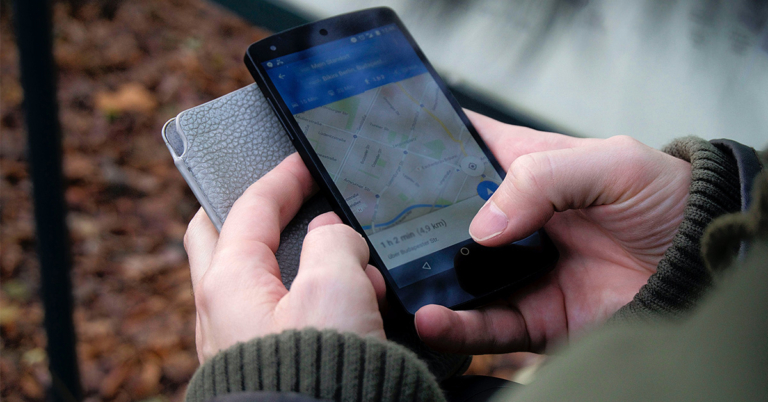
You can fake your phone’s location by informing applications that you are someplace you’re not on an iPhone or Android smartphone. Most of the time, any location-based app on your phone will be duped when you spoof your GPS location. Since most of us use GPS for activities that need our actual location, including getting directions and weather reports, this may seem like a strange thing to do. There are, nevertheless, valid justifications for changing GPS location without jailbreak.
 Step 2: Connect your iPhone to your computer using a USB cable.
Step 3: In the search window, type the address or GPS location you wish to teleport to, such as London City, and then click “Start to Modify” button.
Step 2: Connect your iPhone to your computer using a USB cable.
Step 3: In the search window, type the address or GPS location you wish to teleport to, such as London City, and then click “Start to Modify” button.
In This Article
Why Would You Fake Your Location?
There are many reasons why people want to fake GPS location. Here list three common reasons.1. Protect your online privacy
Nowadays, some individuals are concerned about their privacy since every app knows where they go regularly. It’s always preferable to spoof your GPS location and conceal your present location since you never know how various applications will use your geolocation data.2. Avoid sharing real location on social media apps
Social media applications like Facebook and Instagram also use your GPS location to filter information in your news feed and personalize your user experience. You may also maintain your online anonymity in this situation by altering your current location.3. Play Geo-Blocked games anytime
When using location-based games like Pokemon GO, you will need to fake your GPS location and then you can play geo-blocked games without restrictions. As for Pokemon GO lovers, they need to change their iPhone location and use the GPS joystick to change direction.GPS Spoofing Problems
You should know before getting started that although faking your location can be fun, it isn’t always useful. In addition, GPS spoofing isn’t a built-in feature, so it isn’t as easy to set up, and not all apps support it. In the case of a fake GPS location app being installed on your phone, you may find that other apps, which require your accurate location, will also use the fake location. Your spoofed address might be used to your advantage in the game, for example. The location spoofer must still be turned off, or your starting location must be manually adjusted when you open your navigation app to get directions. Likewise, you can check in at restaurants, update your family GPS locator; check the weather outside, etc. Changing your location system-wide will affect all the location-based applications on your phone.How to Change Your Location on iPhone?
One of the greatest iPhone location spoofers is Tenorshare iAnyGo. Since it lets you change your location on iPhone and simulate GPS movement and has several other helpful features. Here are some essential attributes of Tenorshare iAnyGo.- Simulate GPS movement based on a customized route.
- Without jailbreaking your phone, you can modify your GPS location.
- With a GPS joystick, you can change the direction of travel flexibly.
- Support for iPhone 13/13 Mini/13 Pro Max and iOS 15.5 is available.
- Significant location-based applications are compatible, such as Pokemon Go, WhatsApp, Google Maps, and others.
 Step 2: Connect your iPhone to your computer using a USB cable.
 Step 3: In the search window, type the address or GPS location you wish to teleport to, such as London City, and then click “Start to Modify” button.

How to Change Location on Android?
You may discover many alternatives on Google Play if you search for “fake GPS,” some of which are free while others are not, and some call for rooting your phone. It’s really simple to change location on Android using the Fake GPS Free app, which doesn’t need your phone to be rooted as long as you’re running Android 6.0 or newer.- Install Fake GPS Free.
- Accept the basic setup prompts after opening the program. The first is granting the app access to your device’s location, and the second is accepting the conditions of the advertisement.
- Select While using the app on the first prompt in current versions of Android (previous versions may refer to this as something else), and then tap ACCEPT on the advertisement message.
- After completing the training tour, tap OK. On the notification concerning fake locations that appear at the bottom, choose Enable.
- To get that page, choose Developer Settings, then select Mock Location App > FakeGPS Free.
- To activate the phony GPS option, press the play button in the bottom-left corner of the map.
- Return to the app using the back button, then use your phone to look up the place you want to pretend to be. Tap and hold on to the map while creating a path to drop put markers.If you’d like to test another Android location spoofer, we can confirm that the following free applications, Fake GPS, Fly GPS, and Fake GPS Location, perform similarly to Fake GPS Free.
Final Words
When considering the available methods of faking a GPS location on your phone, it is clear that Tenorshare iAnyGo is effective for spoofing location on an iPhone. The software defines precisely how to fake GPS location and works faultlessly with every location-based app you have installed on your iPhone. If you are using an Android phone, you can download a third-party app from Google Play to change your location on Android. For the latest gadget and tech news, and gadget reviews, follow us on Twitter, Facebook and Instagram. For newest tech & gadget videos subscribe to our YouTube Channel. You can also stay up to date using the Gadget Bridge Android App. You can find the latest car and bike news here.


Amazon Quiz Answers Today 3 August 2022: Participate to win Rs 2,000

3 August 2022 Amazon Quiz has gone live. Customers from different parts of the country are participating in the daily quiz. The quiz begins from 12 AM to 11:59 PM. Those participating in the quiz can win exciting prizes by answering all the questions correctly. Today participants have a chance to win a Rs 2,000 Amazon Pay Balance.
Amazon quiz brings an opportunity for its customers to win Amazon Pay Balance ranging from Rs 1,000 to Rs 50,000. The Quiz can be played from 12 AM to 11:59 PM. The e-commerce platform brings a fresh quiz on a daily basis which consists of five questions related to general knowledge and current affairs. The participants need to answer all the questions correctly and their names will be selected for a lucky draw. The winner will be announced at the end of the month.
One wrong answer could eliminate you from the quiz. If you manage to answer all the questions correctly you can stand a chance to win a Rs 2,000 Amazon Pay Balance today. Only app users are eligible to participate in the Quiz. Check Out 3 August 2022 Amazon Quiz Answers.
Amazon Quiz Today Prize – Rs 2,000 Amazon Pay Balance
Quiz Date – 3 August 2022
Daily Timing – 12 AM to 11:59 PM
Winner Announcement – Today 12 PM
In This Article
Amazon Quiz Answers Today 3 August 2022
Question 1: Annu Rani, recently came 7th in which event at the World Athletics Championship? Answer: Javelin Throw Question 2: An An’ died at the age of 35 in Hong Kong recently. He was the world’s oldest living what? Answer: Giant Panda Question 3: Which country’s president dissolved the parliament after the resignation of Prime Minister Mario Draghi? Answer: Italy Question 4: One day on this planet takes about how many hours? Answer: 10 Question 5: This famous cartoon character made his debut in which decade? Answer: 1920sHow To Play Amazon Quiz
Only app users are eligible to play the Amazon quiz every morning from 12 AM to 11:59 PM. The quiz is not available on the desktop. For those who are unaware of how to play the Amazon quiz below are the steps, you can follow to take the quiz.- Firstly download the Amazon app from Google Play Store or App Store
- Now fill in the required information through the Sign Up option.
- You need to log in to the Amazon app and scroll down on the home screen to find the Amazon Quiz banner.
- Tap on the Amazon Quiz banner and tap on the Start button to start the Quiz.
- Now you will get 5 questions and you need to answer them correctly. One wrong answer will eliminate you from the Quiz.
- After answering all the questions correctly you are now eligible for a Lucky Draw.
- The winner’s name will be announced today at 12 PM.
How To Lock Android Apps On Samsung Smartphones?

Privacy is the topmost priority for a lot of smartphone users. Your smartphone holds your bank account details, social media login credentials, personal data, and other information which you may not want to share with anyone else. While having a screen lock is a decent way to secure your privacy, there is no harm in maintaining extra caution. With an app lock, you can ensure that no one gains access to the content of your phone without your consent. In this article, we show you how to lock Android apps on a Samsung smartphone.
Read Also: How To Enable Grayscale Mode On Your Android smartphone?
Step 2: Select ‘Lock and mask apps’.
Step 3: Once you’ve turned the toggle bar on, you will be made to enter a pattern or a pin password.
Step 4: Once you’ve entered the password, tap on ‘Locked apps’ to add the apps you want to lock.
In This Article
Lock Android apps using Samsungs native App locker
Samsung’s in-house app locker is named ‘S Secure’ and can be downloaded from the Galaxy store on your Samsung smartphone. Once you’ve installed S Secure, follow the steps listed below. Step 1: Go to Settings and select Advanced Features. Step 2: Select ‘Lock and mask apps’.
 Step 3: Once you’ve turned the toggle bar on, you will be made to enter a pattern or a pin password.
Step 4: Once you’ve entered the password, tap on ‘Locked apps’ to add the apps you want to lock.
Step 3: Once you’ve turned the toggle bar on, you will be made to enter a pattern or a pin password.
Step 4: Once you’ve entered the password, tap on ‘Locked apps’ to add the apps you want to lock.

Lock Android apps using a third-party app locker
If you do not own a Samsung device or do not want to use Samsung’s native app locker, there are a multitude of third-party app lockers available on the Google Play Store. App Lock by Sailing Lab and App Locker by BGNmobi are two of the most popular app lockers in the Android marketplace. Once you’ve downloaded them, you’ll be required to create a pin or a pattern lock following which you will be able to add the apps to the locker. Read Also: How to Disable Google Smart Lock on Android and Chrome? These were the two ways to lock Android apps on your Samsung smartphone. Samsung’s S Secure app also provides the option of securing your WiFi connection. S Secure blocks any requests made to your device while you’re browsing the web and encrypts unsecured web requests. If there are any other app lockers or privacy-oriented apps that you like to use, let us know in the comments! For the latest gadget and tech news, and gadget reviews, follow us on Twitter, Facebook and Instagram. For newest tech & gadget videos subscribe to our YouTube Channel. You can also stay up to date using the Gadget Bridge Android App. You can find the latest car and bike news here.YouTube Premium Subscription Plans in India 2022: Details, discounts and more

YouTube’s subscription service has been around for a few years by the name of YouTube Red, but last year it was rebranded as YouTube Premium and reintroduced in the Indian market. With YouTube Premium, you can access three services, YouTube, YouTube Music, and YouTube Kids. You will also be able to access premium video content on YouTube, made by the platform’s own creators. In this article, we explain the benefits of YouTube Premium and the plans and discounts on offer.
Read Also: How to download YouTube videos for free?
With YouTube Premium, you can watch videos on YouTube without encountering any ads. An ad-free experience is the biggest sell of YouTube Premium. This ad-free experience will also apply to YouTube Music and YouTube kids. On top of that, you can even play videos in the background, while the YouTube app is minimised or when your smartphone’s screen is locked. YouTube Premium also allows you to download YouTube videos to your account, so you can watch them offline. Once you’ve saved a video, you can watch it offline for 30 days.
Once you buy YouTube Premium you will also be able to use the YouTube Music app without any ad interruptions. The music will continue to play in the background while the app is minimised or when you’re using other apps. You can even create or save playlists in the YouTube Music app and play them offline.
In This Article
What are the benefits of YouTube Premium?
 With YouTube Premium, you can watch videos on YouTube without encountering any ads. An ad-free experience is the biggest sell of YouTube Premium. This ad-free experience will also apply to YouTube Music and YouTube kids. On top of that, you can even play videos in the background, while the YouTube app is minimised or when your smartphone’s screen is locked. YouTube Premium also allows you to download YouTube videos to your account, so you can watch them offline. Once you’ve saved a video, you can watch it offline for 30 days.
Once you buy YouTube Premium you will also be able to use the YouTube Music app without any ad interruptions. The music will continue to play in the background while the app is minimised or when you’re using other apps. You can even create or save playlists in the YouTube Music app and play them offline.
With YouTube Premium, you can watch videos on YouTube without encountering any ads. An ad-free experience is the biggest sell of YouTube Premium. This ad-free experience will also apply to YouTube Music and YouTube kids. On top of that, you can even play videos in the background, while the YouTube app is minimised or when your smartphone’s screen is locked. YouTube Premium also allows you to download YouTube videos to your account, so you can watch them offline. Once you’ve saved a video, you can watch it offline for 30 days.
Once you buy YouTube Premium you will also be able to use the YouTube Music app without any ad interruptions. The music will continue to play in the background while the app is minimised or when you’re using other apps. You can even create or save playlists in the YouTube Music app and play them offline.
How much does the YouTube Premium subscription cost?
The first three months of YouTube Premium are free, after which you’ll have to pay a monthly cost of Rs 129 per month. If you think that’s a bit expensive, there are a few offers that you may want to know about. Annual Plan (Individual) You can save a portion of the subscription fee if you buy the annual plan upfront. The annual subscription to YouTube Premium costs Rs 1,290, which means you’ll be saving two months of subscription fee if you buy it upfront. Family Plan A monthly family plan costs Rs 189 and allows you to add up to 5 accounts. If you live with your family or roommates, all you need to do is provide your residency address and you can share YouTube Premium with up to 5 people in your household. This is one of the most economic subscription plans on offer. Student Plan YouTube has a special discounted plan for students at Rs 79 per month. All you need to do is provide your student ID and you will be able to access YouTube Premium at a heavily discounted fee. With the student plan, YouTube will ask for verification every year. Read Also: How to Watch YouTube Videos While Browsing Other Tabs in Chrome browser? These are the YouTube Premium plans and discounts on offer right now. The price of these plans keeps changing regularly, and sometimes YouTube even releases special discount offers. YouTube Premium is quite moderately priced when you compare the services being offered. YouTube Premium allows ad-free access to YouTube and YouTube Music at Rs 129 per month, while Spotify Premium alone costs Rs 119/month. For the latest gadget and tech news, and gadget reviews, follow us on Twitter, Facebook and Instagram. For newest tech & gadget videos subscribe to our YouTube Channel. You can also stay up to date using the Gadget Bridge Android App. You can find the latest car and bike news here.Noise Buds Prima 2 TWS earbuds with ENC technology launched in India
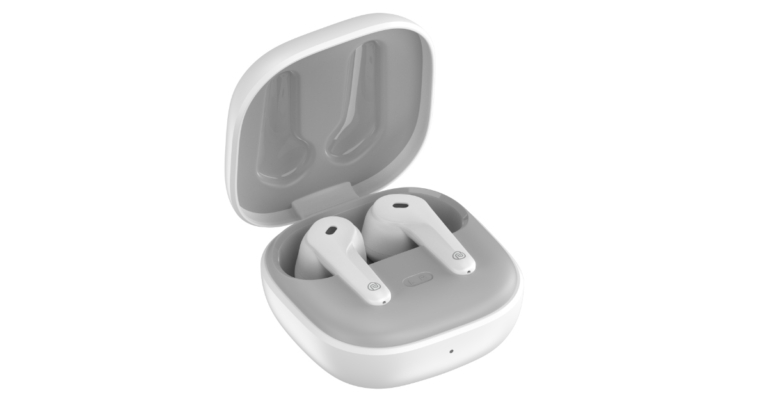
Noise today announced the launch of Noise Buds Prima 2 true wireless stereo (TWS) earbuds in India. The new wireless earphones come with a quad mic configuration and Environmental Noise Cancellation (ENC) technology. The device is IPX5 rated for dust and water resistance. They also provide 50-hour battery life.

In This Article
Noise Buds Prima 2 price in India, sale details
Noise Buds Prima 2 has been launched in India with a price tag of Rs 1,299. The TWS earphones are offered in three colour options of Carbon Black, Deep Wine, and Pearl White. They are now available for purchase via Flipkart and the business’ website in the country.
Noise Buds Prima 2 specifications
The Noise Buds Prima 2 is an entirely new design. It is equipped with Bluetooth 5.3 for lag-free connectivity and IPX5 water resistance. They also have Environmental Noise Cancellation (ENC) technology with a quad microphone for a better caller experience. HyperSync also enables a quick and secure connection, allowing the product to instantly connect with the most recent paired device even before the user takes the earbuds out of the charging case. Users may also enjoy 2 hours of playing in just 10 minutes of charging thanks to the Instacharge technology, ensuring a smooth transition between work and play modes. With a total playback capacity of up to 50 hours, the ergonomically built Noise Buds Prima 2 is an excellent option for persons who frequently take a long phone call. Additionally, the Environmental Noise Cancellation with quad mics removes background noise to guarantee that you are heard clearly while making calls. There are 10mm electro-dynamic drivers, which reproduce a wide frequency range of 20Hz to 20KHZ. Additionally, it has a 10 m Bluetooth range, letting you to hear loud, clear audio even if you are far from your device. The wireless earbuds are a good alternative for fitness enthusiasts who prefer to listen to their favourite music while exercising because they are IPX5 sweat- and water-resistant. The smartphone supports voice assistants like Siri and Google Assistant as an added convenience for customers. By simply pressing their headphones, users can easily adjust the volume and accept or decline calls. For the latest gadget and tech news, and gadget reviews, follow us on Twitter, Facebook and Instagram. For newest tech & gadget videos subscribe to our YouTube Channel. You can also stay up to date using the Gadget Bridge Android App. You can find the latest car and bike news here.Philips announced Sneaker Cleaner GCA1000/60 in India

With a first-of-its-kind Sneaker Cleaner GCA1000/60, Philips Domestic Appliances today announced its entry into a new category. Customers can always keep their sneakers sparkling, pristine, and crease-free with the help of automated cleaning technology. The battery life of the device is 80 minutes on a 6V efficient 4 X AA battery. This tool is a must-have for any sneakerheads because it is made to operate quickly and easily while washing shoes because it makes the procedure simple and quick.
According to the company, there is a growing demand for products that enable consumers to effortlessly manage the life cycle of their shoes, which they view as collectables, given the popularity of sneaker lovers and the sneakerhead community in India. The new Sneaker Cleaner from Philips Domestic Appliances is a portable tool that makes cleaning your sneakers simple, convenient, and cost-effective. Therefore, you no longer need to spend extra money having your shoes dry cleaned or keep your sneakers wrapped up out of concern for dust and creases.
 With the push of a button, the Philips Sneaker Cleaner GCA1000/60 will give your sneakers a spotless new appearance with its efficient bristles and water-resistant head. There is a growing demand for products that enable consumers to effortlessly manage the life cycle of their shoes, which they view as collectibles, given the popularity of sneaker lovers and the sneakerhead community in India. The new Sneaker Cleaner from Philips Domestic Appliances is a portable tool that makes cleaning your sneakers simple, convenient, and cost-effective. Therefore, you no longer need to spend extra money having your shoes dry cleaned or keep your sneakers wrapped up out of concern for dust and creases. With the push of a button, the Philips Sneaker Cleaner GCA1000/60 will give your sneakers a spotless new appearance with its efficient bristles and water-resistant head.
The 500 RPM, IPX5-rated Philips Sneaker Cleaner GCA1000/60 rotates while cleaning footwear. An 80-minute runtime is provided by the device’s 6V efficient 4 X AA battery.
The cordless sneaker cleaner weights 0.35 kg, making it lightweight and portable. Priced at INR 2595, Philips Sneaker Cleaner GCA1000/60 has a 2-year warranty. Only the Philips Domestic Appliances e-store at www.domesticappliances.philips.co.in offers it.
For the latest gadget and tech news, and gadget reviews, follow us on Twitter, Facebook and Instagram. For newest tech & gadget videos subscribe to our YouTube Channel. You can also stay up to date using the Gadget Bridge Android App. You can find the latest car and bike news here.
With the push of a button, the Philips Sneaker Cleaner GCA1000/60 will give your sneakers a spotless new appearance with its efficient bristles and water-resistant head. There is a growing demand for products that enable consumers to effortlessly manage the life cycle of their shoes, which they view as collectibles, given the popularity of sneaker lovers and the sneakerhead community in India. The new Sneaker Cleaner from Philips Domestic Appliances is a portable tool that makes cleaning your sneakers simple, convenient, and cost-effective. Therefore, you no longer need to spend extra money having your shoes dry cleaned or keep your sneakers wrapped up out of concern for dust and creases. With the push of a button, the Philips Sneaker Cleaner GCA1000/60 will give your sneakers a spotless new appearance with its efficient bristles and water-resistant head.
The 500 RPM, IPX5-rated Philips Sneaker Cleaner GCA1000/60 rotates while cleaning footwear. An 80-minute runtime is provided by the device’s 6V efficient 4 X AA battery.
The cordless sneaker cleaner weights 0.35 kg, making it lightweight and portable. Priced at INR 2595, Philips Sneaker Cleaner GCA1000/60 has a 2-year warranty. Only the Philips Domestic Appliances e-store at www.domesticappliances.philips.co.in offers it.
For the latest gadget and tech news, and gadget reviews, follow us on Twitter, Facebook and Instagram. For newest tech & gadget videos subscribe to our YouTube Channel. You can also stay up to date using the Gadget Bridge Android App. You can find the latest car and bike news here.
 With the push of a button, the Philips Sneaker Cleaner GCA1000/60 will give your sneakers a spotless new appearance with its efficient bristles and water-resistant head. There is a growing demand for products that enable consumers to effortlessly manage the life cycle of their shoes, which they view as collectibles, given the popularity of sneaker lovers and the sneakerhead community in India. The new Sneaker Cleaner from Philips Domestic Appliances is a portable tool that makes cleaning your sneakers simple, convenient, and cost-effective. Therefore, you no longer need to spend extra money having your shoes dry cleaned or keep your sneakers wrapped up out of concern for dust and creases. With the push of a button, the Philips Sneaker Cleaner GCA1000/60 will give your sneakers a spotless new appearance with its efficient bristles and water-resistant head.
The 500 RPM, IPX5-rated Philips Sneaker Cleaner GCA1000/60 rotates while cleaning footwear. An 80-minute runtime is provided by the device’s 6V efficient 4 X AA battery.
The cordless sneaker cleaner weights 0.35 kg, making it lightweight and portable. Priced at INR 2595, Philips Sneaker Cleaner GCA1000/60 has a 2-year warranty. Only the Philips Domestic Appliances e-store at www.domesticappliances.philips.co.in offers it.
For the latest gadget and tech news, and gadget reviews, follow us on Twitter, Facebook and Instagram. For newest tech & gadget videos subscribe to our YouTube Channel. You can also stay up to date using the Gadget Bridge Android App. You can find the latest car and bike news here.
With the push of a button, the Philips Sneaker Cleaner GCA1000/60 will give your sneakers a spotless new appearance with its efficient bristles and water-resistant head. There is a growing demand for products that enable consumers to effortlessly manage the life cycle of their shoes, which they view as collectibles, given the popularity of sneaker lovers and the sneakerhead community in India. The new Sneaker Cleaner from Philips Domestic Appliances is a portable tool that makes cleaning your sneakers simple, convenient, and cost-effective. Therefore, you no longer need to spend extra money having your shoes dry cleaned or keep your sneakers wrapped up out of concern for dust and creases. With the push of a button, the Philips Sneaker Cleaner GCA1000/60 will give your sneakers a spotless new appearance with its efficient bristles and water-resistant head.
The 500 RPM, IPX5-rated Philips Sneaker Cleaner GCA1000/60 rotates while cleaning footwear. An 80-minute runtime is provided by the device’s 6V efficient 4 X AA battery.
The cordless sneaker cleaner weights 0.35 kg, making it lightweight and portable. Priced at INR 2595, Philips Sneaker Cleaner GCA1000/60 has a 2-year warranty. Only the Philips Domestic Appliances e-store at www.domesticappliances.philips.co.in offers it.
For the latest gadget and tech news, and gadget reviews, follow us on Twitter, Facebook and Instagram. For newest tech & gadget videos subscribe to our YouTube Channel. You can also stay up to date using the Gadget Bridge Android App. You can find the latest car and bike news here. 7 Easy Ways To Fix ‘Unable To Answer Calls’ On Any Android Smartphone

Sometimes the most basic problems in your phone can be the most laborious ones to resolve. When users come across the issue where they cannot receive any phone calls, they are generally out of ideas because there isn’t much to do. While the phone dialer itself does not provide any helpful solution, there are a few fixes to this problem. In this article, we bring you 7 easy ways to fix the ‘Unable to answer calls’ issue on any Android smartphone.
Read Also: Best 9 ways to fix cannot install or update YouTube on Android
Restarting your phone is the easiest way to fix any minor issues, especially if it’s just arisen. Prolonged issues are a different matter and may require some other methods to resolve. Restarting your phone resets some functions and clears temporary memory, so any temp files that may be the root of the issue will be deleted.
In This Article
Restart your phone
 Restarting your phone is the easiest way to fix any minor issues, especially if it’s just arisen. Prolonged issues are a different matter and may require some other methods to resolve. Restarting your phone resets some functions and clears temporary memory, so any temp files that may be the root of the issue will be deleted.
Check if you’re answering your phone correctly
Different smartphones have different motion gestures to answer the phone. Samsung smartphones usually require to swipe the green icon upwards. Others may require you to swipe it sideways. Some may not require a swiping gesture at all, and you can simply pick up a call by tapping on the green icon once. You can try each of these gestures and see which one works on your phone. If you want to enable the tap-to-answer feature, go to Settings>Accessibility>Interaction and dexterity>Assistant menu and turn on the toggle bar for ‘Replace swipe with single tap’.
Turn Airplane Mode on and off
Turning the Airplane Mode on cuts off any network reception on your phone. When you turn it off the cellular network gets received again by your smartphone device. This is a quick way to refresh the network reception on your phone. If the call issue is related to the network, this method will come in handy. Make sure that you wait at least 30 seconds before turning off the Airplane Mode.Clear the cache for the Phone app
Clearing cache will delete any temporary files stored by the Phone app. Sometimes the temporary files get corrupted and hinder the functioning of your device. Clearing the cache will delete these files and you will be able to receive calls again. Your contacts and other stored data will remain intact. You can clear the Phone app’s cache by going to Settings>Apps>Phone>Storage>Clear Cache.
Reset App Preferences
Resetting the app preferences is a quick way to reset their settings to factory default. The app data will remain intact but all customised settings will be restored to default. If the issue arose because of a change you made on the app, this fix will take care of it and restore the app to normalcy. To reset app settings, go to Settings>Apps and tap on the three dots at the top right corner of the screen. Select ‘Reset app preferences’.Use the Volume Up Key to Answer Calls
You may be aware that pressing the power key twice hangs up any incoming call. You can also mute a call by simply pressing the volume-down key. Similarly, some phones allow you to answer a call by pressing the volume up key. If this function isn’t turned on by default, go to Settings>Accessibility and find the option under the ‘Answer and ending calls’ section. This method is useful when you can’t answer calls because of a malfunction in your phone’s display.Remove the SIM card
Sometimes the SIM card on your device may create some issues due to dust accumulation. Take out the SIM card from your smartphone and wipe it with a clean cloth. Blow air into the SIM slot to make sure any dust particles are cleaned off. Alternatively, you can clean the slot using a small brush and gently tap the dirt out. Insert the SIM card back in and check if the issue is resolved.Bonus tip: Check third-party calling apps
If you use any third-party apps that require the Phone app permission, you may want to check it for any malfunctioning. Sometimes third-party apps can interfere with the functioning of your phone. Uninstall any app that uses your phone’s dialer and check if the issue is resolved. Read Also: Unable to download apps on your iPhone? Top 5 ways to fix the issue These were the 7 easy ways to fix the ‘Unable to answer calls’ issue on any Android smartphone. If the problem still persists despite trying all these solutions, you may want to perform a factory reset on your smartphone. Make sure you create a backup of all the data on your phone because a factory reset will wipe your phone clean and restore it to the condition in which it arrived from the dealer. If you’re still unable to answer any calls, take your phone to the repair centre for a proper diagnosis. For the latest gadget and tech news and gadget reviews, follow us on Twitter, Facebook and Instagram. For newest tech & gadget videos subscribe to our YouTube Channel. You can also stay up to date using the Gadget Bridge Android App. You can find the latest car and bike news here.Canon EOS R10 mirrorless camera for vloggers and content creators launched in India
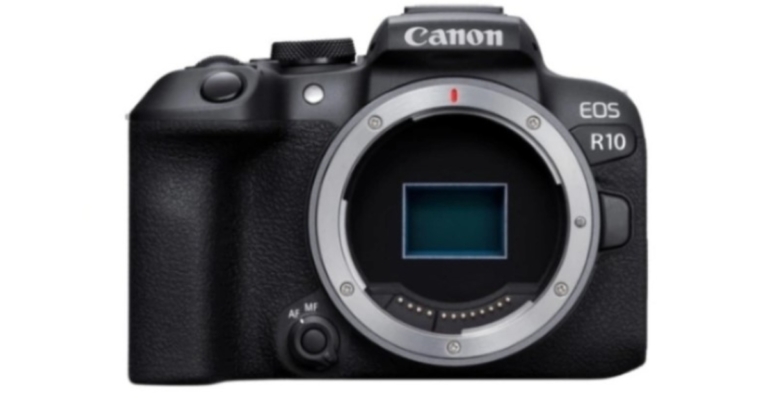
The Canon EOS R10 has been made available for purchase in India. It is the first camera in the EOS R mirrorless system to use an APS-C picture sensor. For more typical day-to-day photography, Canon created the 24.2-megapixel EOS R10, which has a built-in flash and a smaller form factor. The camera is intended for content creators.
The EOS R10 is the ideal choice for vloggers and photo aficionados thanks to its small size, built-in popup-style flash, and microphone. The new 24.2-megapixel APS-C sensor for the EOS R10 is made to deliver more telephoto effect by extending the focal length by roughly 1.6 times while maintaining its 24.2-megapixel resolution, giving post-processing artists even more creative latitude. Even in low-light conditions, the EOS R10 can produce clear, low-noise photographs because of its wide normal ISO speed range of 100 to 32,000.
 The Canon EOS R10 can shoot continuously at high speeds of up to 15 frames per second using a mechanical shutter and AF/AE tracking. For activities like concerts, interviews, and wildlife photography, the silent electronic shutter’s high-speed burst of up to 23 frames per second is helpful. If necessary, an electrical shutter can be made to sound like it is closing.
The EOS R10 can identify people, objects, and animals, including cats, dogs, and birds, and it can track them as they move throughout the frame. The EOS R10 captures full-frame, uncropped 4K UHD movies that have been enhanced with rich 6K RGB data for improved image quality with less moiré, colour distortion, and noise.
The EOS R10 now has the Panorama Shot (SCN mode) capability, which is a first for EOS cameras. In-camera panorama creation allows for stunning images. Up to 200 photos can be taken at once, and the camera will combine them to create a high-resolution, high-quality panorama image.
Users of the EOS R10 can get a deeper depth of field within a scene by setting a range for the Focus Bracketing feature between 2 and 999 shots.
The EOS R10 has a strong aluminium alloy body for its internal structure to maintain the weight of just 429g despite being designed to be small and lightweight.
Canon EOS R10 price in India and availability
The price of the EOS R10 is Rs 80,995 for just the body and Rs 1,17,995 for both the body and the RF-S18-150mm f/3.5-6.3 IS STM kit lens.
For the latest gadget and tech news, and gadget reviews, follow us on Twitter, Facebook and Instagram. For newest tech & gadget videos subscribe to our YouTube Channel. You can also stay up to date using the Gadget Bridge Android App. You can find the latest car and bike news here.
The Canon EOS R10 can shoot continuously at high speeds of up to 15 frames per second using a mechanical shutter and AF/AE tracking. For activities like concerts, interviews, and wildlife photography, the silent electronic shutter’s high-speed burst of up to 23 frames per second is helpful. If necessary, an electrical shutter can be made to sound like it is closing.
The EOS R10 can identify people, objects, and animals, including cats, dogs, and birds, and it can track them as they move throughout the frame. The EOS R10 captures full-frame, uncropped 4K UHD movies that have been enhanced with rich 6K RGB data for improved image quality with less moiré, colour distortion, and noise.
The EOS R10 now has the Panorama Shot (SCN mode) capability, which is a first for EOS cameras. In-camera panorama creation allows for stunning images. Up to 200 photos can be taken at once, and the camera will combine them to create a high-resolution, high-quality panorama image.
Users of the EOS R10 can get a deeper depth of field within a scene by setting a range for the Focus Bracketing feature between 2 and 999 shots.
The EOS R10 has a strong aluminium alloy body for its internal structure to maintain the weight of just 429g despite being designed to be small and lightweight.
Canon EOS R10 price in India and availability
The price of the EOS R10 is Rs 80,995 for just the body and Rs 1,17,995 for both the body and the RF-S18-150mm f/3.5-6.3 IS STM kit lens.
For the latest gadget and tech news, and gadget reviews, follow us on Twitter, Facebook and Instagram. For newest tech & gadget videos subscribe to our YouTube Channel. You can also stay up to date using the Gadget Bridge Android App. You can find the latest car and bike news here.
 The Canon EOS R10 can shoot continuously at high speeds of up to 15 frames per second using a mechanical shutter and AF/AE tracking. For activities like concerts, interviews, and wildlife photography, the silent electronic shutter’s high-speed burst of up to 23 frames per second is helpful. If necessary, an electrical shutter can be made to sound like it is closing.
The EOS R10 can identify people, objects, and animals, including cats, dogs, and birds, and it can track them as they move throughout the frame. The EOS R10 captures full-frame, uncropped 4K UHD movies that have been enhanced with rich 6K RGB data for improved image quality with less moiré, colour distortion, and noise.
The EOS R10 now has the Panorama Shot (SCN mode) capability, which is a first for EOS cameras. In-camera panorama creation allows for stunning images. Up to 200 photos can be taken at once, and the camera will combine them to create a high-resolution, high-quality panorama image.
Users of the EOS R10 can get a deeper depth of field within a scene by setting a range for the Focus Bracketing feature between 2 and 999 shots.
The EOS R10 has a strong aluminium alloy body for its internal structure to maintain the weight of just 429g despite being designed to be small and lightweight.
Canon EOS R10 price in India and availability
The price of the EOS R10 is Rs 80,995 for just the body and Rs 1,17,995 for both the body and the RF-S18-150mm f/3.5-6.3 IS STM kit lens.
For the latest gadget and tech news, and gadget reviews, follow us on Twitter, Facebook and Instagram. For newest tech & gadget videos subscribe to our YouTube Channel. You can also stay up to date using the Gadget Bridge Android App. You can find the latest car and bike news here.
The Canon EOS R10 can shoot continuously at high speeds of up to 15 frames per second using a mechanical shutter and AF/AE tracking. For activities like concerts, interviews, and wildlife photography, the silent electronic shutter’s high-speed burst of up to 23 frames per second is helpful. If necessary, an electrical shutter can be made to sound like it is closing.
The EOS R10 can identify people, objects, and animals, including cats, dogs, and birds, and it can track them as they move throughout the frame. The EOS R10 captures full-frame, uncropped 4K UHD movies that have been enhanced with rich 6K RGB data for improved image quality with less moiré, colour distortion, and noise.
The EOS R10 now has the Panorama Shot (SCN mode) capability, which is a first for EOS cameras. In-camera panorama creation allows for stunning images. Up to 200 photos can be taken at once, and the camera will combine them to create a high-resolution, high-quality panorama image.
Users of the EOS R10 can get a deeper depth of field within a scene by setting a range for the Focus Bracketing feature between 2 and 999 shots.
The EOS R10 has a strong aluminium alloy body for its internal structure to maintain the weight of just 429g despite being designed to be small and lightweight.
Canon EOS R10 price in India and availability
The price of the EOS R10 is Rs 80,995 for just the body and Rs 1,17,995 for both the body and the RF-S18-150mm f/3.5-6.3 IS STM kit lens.
For the latest gadget and tech news, and gadget reviews, follow us on Twitter, Facebook and Instagram. For newest tech & gadget videos subscribe to our YouTube Channel. You can also stay up to date using the Gadget Bridge Android App. You can find the latest car and bike news here.