The Canon EOS R10 can shoot continuously at high speeds of up to 15 frames per second using a mechanical shutter and AF/AE tracking. For activities like concerts, interviews, and wildlife photography, the silent electronic shutter’s high-speed burst of up to 23 frames per second is helpful. If necessary, an electrical shutter can be made to sound like it is closing.
The EOS R10 can identify people, objects, and animals, including cats, dogs, and birds, and it can track them as they move throughout the frame. The EOS R10 captures full-frame, uncropped 4K UHD movies that have been enhanced with rich 6K RGB data for improved image quality with less moiré, colour distortion, and noise.
The EOS R10 now has the Panorama Shot (SCN mode) capability, which is a first for EOS cameras. In-camera panorama creation allows for stunning images. Up to 200 photos can be taken at once, and the camera will combine them to create a high-resolution, high-quality panorama image.
Users of the EOS R10 can get a deeper depth of field within a scene by setting a range for the Focus Bracketing feature between 2 and 999 shots.
The EOS R10 has a strong aluminium alloy body for its internal structure to maintain the weight of just 429g despite being designed to be small and lightweight.
Canon EOS R10 price in India and availability
The price of the EOS R10 is Rs 80,995 for just the body and Rs 1,17,995 for both the body and the RF-S18-150mm f/3.5-6.3 IS STM kit lens.
For the latest gadget and tech news, and gadget reviews, follow us on Twitter, Facebook and Instagram. For newest tech & gadget videos subscribe to our YouTube Channel. You can also stay up to date using the Gadget Bridge Android App. You can find the latest car and bike news here.
The Canon EOS R10 can shoot continuously at high speeds of up to 15 frames per second using a mechanical shutter and AF/AE tracking. For activities like concerts, interviews, and wildlife photography, the silent electronic shutter’s high-speed burst of up to 23 frames per second is helpful. If necessary, an electrical shutter can be made to sound like it is closing.
The EOS R10 can identify people, objects, and animals, including cats, dogs, and birds, and it can track them as they move throughout the frame. The EOS R10 captures full-frame, uncropped 4K UHD movies that have been enhanced with rich 6K RGB data for improved image quality with less moiré, colour distortion, and noise.
The EOS R10 now has the Panorama Shot (SCN mode) capability, which is a first for EOS cameras. In-camera panorama creation allows for stunning images. Up to 200 photos can be taken at once, and the camera will combine them to create a high-resolution, high-quality panorama image.
Users of the EOS R10 can get a deeper depth of field within a scene by setting a range for the Focus Bracketing feature between 2 and 999 shots.
The EOS R10 has a strong aluminium alloy body for its internal structure to maintain the weight of just 429g despite being designed to be small and lightweight.
Canon EOS R10 price in India and availability
The price of the EOS R10 is Rs 80,995 for just the body and Rs 1,17,995 for both the body and the RF-S18-150mm f/3.5-6.3 IS STM kit lens.
For the latest gadget and tech news, and gadget reviews, follow us on Twitter, Facebook and Instagram. For newest tech & gadget videos subscribe to our YouTube Channel. You can also stay up to date using the Gadget Bridge Android App. You can find the latest car and bike news here. Canon EOS R10 mirrorless camera for vloggers and content creators launched in India
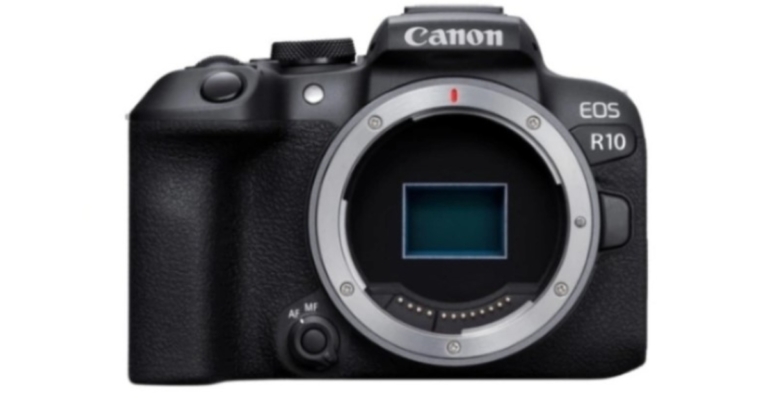
The Canon EOS R10 has been made available for purchase in India. It is the first camera in the EOS R mirrorless system to use an APS-C picture sensor. For more typical day-to-day photography, Canon created the 24.2-megapixel EOS R10, which has a built-in flash and a smaller form factor. The camera is intended for content creators.
The EOS R10 is the ideal choice for vloggers and photo aficionados thanks to its small size, built-in popup-style flash, and microphone. The new 24.2-megapixel APS-C sensor for the EOS R10 is made to deliver more telephoto effect by extending the focal length by roughly 1.6 times while maintaining its 24.2-megapixel resolution, giving post-processing artists even more creative latitude. Even in low-light conditions, the EOS R10 can produce clear, low-noise photographs because of its wide normal ISO speed range of 100 to 32,000.
 The Canon EOS R10 can shoot continuously at high speeds of up to 15 frames per second using a mechanical shutter and AF/AE tracking. For activities like concerts, interviews, and wildlife photography, the silent electronic shutter’s high-speed burst of up to 23 frames per second is helpful. If necessary, an electrical shutter can be made to sound like it is closing.
The EOS R10 can identify people, objects, and animals, including cats, dogs, and birds, and it can track them as they move throughout the frame. The EOS R10 captures full-frame, uncropped 4K UHD movies that have been enhanced with rich 6K RGB data for improved image quality with less moiré, colour distortion, and noise.
The EOS R10 now has the Panorama Shot (SCN mode) capability, which is a first for EOS cameras. In-camera panorama creation allows for stunning images. Up to 200 photos can be taken at once, and the camera will combine them to create a high-resolution, high-quality panorama image.
Users of the EOS R10 can get a deeper depth of field within a scene by setting a range for the Focus Bracketing feature between 2 and 999 shots.
The EOS R10 has a strong aluminium alloy body for its internal structure to maintain the weight of just 429g despite being designed to be small and lightweight.
Canon EOS R10 price in India and availability
The price of the EOS R10 is Rs 80,995 for just the body and Rs 1,17,995 for both the body and the RF-S18-150mm f/3.5-6.3 IS STM kit lens.
For the latest gadget and tech news, and gadget reviews, follow us on Twitter, Facebook and Instagram. For newest tech & gadget videos subscribe to our YouTube Channel. You can also stay up to date using the Gadget Bridge Android App. You can find the latest car and bike news here.
The Canon EOS R10 can shoot continuously at high speeds of up to 15 frames per second using a mechanical shutter and AF/AE tracking. For activities like concerts, interviews, and wildlife photography, the silent electronic shutter’s high-speed burst of up to 23 frames per second is helpful. If necessary, an electrical shutter can be made to sound like it is closing.
The EOS R10 can identify people, objects, and animals, including cats, dogs, and birds, and it can track them as they move throughout the frame. The EOS R10 captures full-frame, uncropped 4K UHD movies that have been enhanced with rich 6K RGB data for improved image quality with less moiré, colour distortion, and noise.
The EOS R10 now has the Panorama Shot (SCN mode) capability, which is a first for EOS cameras. In-camera panorama creation allows for stunning images. Up to 200 photos can be taken at once, and the camera will combine them to create a high-resolution, high-quality panorama image.
Users of the EOS R10 can get a deeper depth of field within a scene by setting a range for the Focus Bracketing feature between 2 and 999 shots.
The EOS R10 has a strong aluminium alloy body for its internal structure to maintain the weight of just 429g despite being designed to be small and lightweight.
Canon EOS R10 price in India and availability
The price of the EOS R10 is Rs 80,995 for just the body and Rs 1,17,995 for both the body and the RF-S18-150mm f/3.5-6.3 IS STM kit lens.
For the latest gadget and tech news, and gadget reviews, follow us on Twitter, Facebook and Instagram. For newest tech & gadget videos subscribe to our YouTube Channel. You can also stay up to date using the Gadget Bridge Android App. You can find the latest car and bike news here.
The Canon EOS R10 can shoot continuously at high speeds of up to 15 frames per second using a mechanical shutter and AF/AE tracking. For activities like concerts, interviews, and wildlife photography, the silent electronic shutter’s high-speed burst of up to 23 frames per second is helpful. If necessary, an electrical shutter can be made to sound like it is closing.
The EOS R10 can identify people, objects, and animals, including cats, dogs, and birds, and it can track them as they move throughout the frame. The EOS R10 captures full-frame, uncropped 4K UHD movies that have been enhanced with rich 6K RGB data for improved image quality with less moiré, colour distortion, and noise.
The EOS R10 now has the Panorama Shot (SCN mode) capability, which is a first for EOS cameras. In-camera panorama creation allows for stunning images. Up to 200 photos can be taken at once, and the camera will combine them to create a high-resolution, high-quality panorama image.
Users of the EOS R10 can get a deeper depth of field within a scene by setting a range for the Focus Bracketing feature between 2 and 999 shots.
The EOS R10 has a strong aluminium alloy body for its internal structure to maintain the weight of just 429g despite being designed to be small and lightweight.
Canon EOS R10 price in India and availability
The price of the EOS R10 is Rs 80,995 for just the body and Rs 1,17,995 for both the body and the RF-S18-150mm f/3.5-6.3 IS STM kit lens.
For the latest gadget and tech news, and gadget reviews, follow us on Twitter, Facebook and Instagram. For newest tech & gadget videos subscribe to our YouTube Channel. You can also stay up to date using the Gadget Bridge Android App. You can find the latest car and bike news here. iQoo 9T 5G with Snapdragon 8+ Gen 1 SoC and Vivo V1+ image chip launched in India
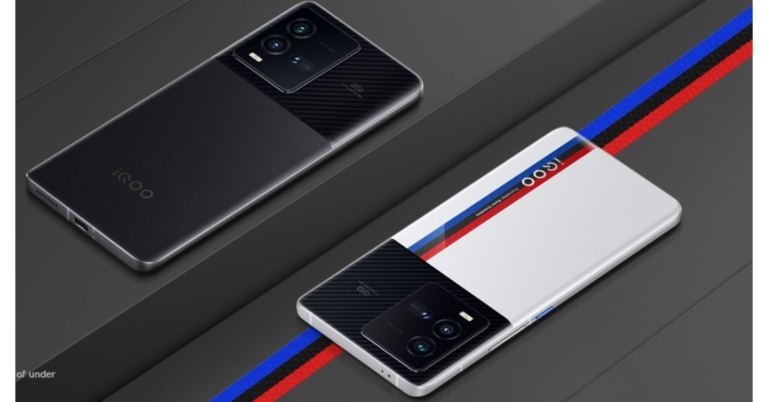
Vivo’s sub-brand iQoo today expanded its iQoo 9 Series in India with the launch of a new smartphone. The company has introduced iQoo 9T 5G which is powered by Qualcomm Snapdragon 8+ Gen 1 SoC. The device features a 120Hz refresh rate display and Vivo V1+ imaging chip with a 50-megapixel ISOCELL GN5 main sensor.

In This Article
iQoo 9T 5G price in India, sale details
The starting price for the iQoo 9T 5G in India is Rs 49,999 for the model with 8GB of RAM with 128GB of storage. A 12GB RAM with 256GB storage edition of the phone is also available for Rs 59,999. It is currently for sale on Amazon and the business website and comes in the Alpha and Legend colour options.
iQoo 9T 5G specifications
The iQoo 9T 5G’s 6.78-inch E5 AMOLED screen has a full-HD+ resolution, a refresh rate of 120 Hz, a maximum brightness of 1,500 nits, and compatibility for HDR10+. Additionally, for smooth gameplay, the screen supports motion estimation motion compensation (MEMC) and complete P3 colour gamut coverage. The smartphone’s operating system, Android 12.1, is covered with the Funtouch OS 12.1 skin. Both the Snapdragon 8+ Gen 1 SoC and the Vivo V1+ imaging chip are present. iQoo has also added a liquid cooling vapour chamber with a 3,930mm square total heat dissipation surface for enhanced thermal control when gaming. It has up to 256GB of inbuilt UFS 3.1 storage and up to 12GB of LPDDR5 RAM. A 50-megapixel GN5 primary sensor with OIS, a 13-megapixel wide-angle lens, and a 12-megapixel portrait sensor with 20x optical zoom are all part of the triple-back camera system on this smartphone. The front of the device has a 16-megapixel camera for selfies and video calls. A 4,700mAh battery that supports 120W fast cable charging is included in the iQoo 9T 5G. The iQoo 9T 5G offers 5G, Wi-Fi, Bluetooth v5.2, OTG, NFC, GPS, FM radio, USB Type-C, and a 3.5mm headphone port as connectivity options. An accelerometer, ambient light sensor, e-compass, gyroscope, and proximity sensor are among the sensors on board. For authentication, a fingerprint sensor is also integrated into the display. For the latest gadget and tech news, and gadget reviews, follow us on Twitter, Facebook and Instagram. For newest tech & gadget videos subscribe to our YouTube Channel. You can also stay up to date using the Gadget Bridge Android App. You can find the latest car and bike news here.How To Enable Grayscale Mode On Your Android smartphone?
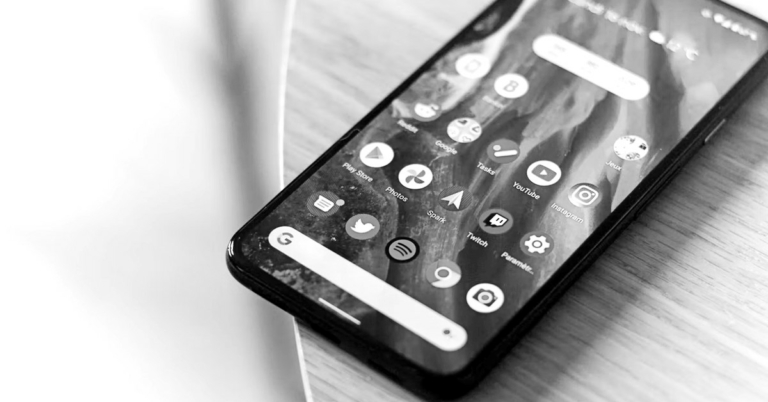
You may not know this but you can turn your smartphone screen black & white in just a few easy steps. Most smartphones with Android Lollipop and above come with a ‘Grayscale mode’ which applies a monochrome filter on your phone’s screen. Using the grayscale mode has its own benefits. Firstly, it cuts down your screen time as you aren’t presented with a bright and colourful screen every time you unlock your phone. A gray screen looks pretty bland and is known to reduce unnecessary smartphone usage. Secondly, with all the colours blocked, grayscale mode increases the battery life of your smartphone. In this article, we show you how to enable the grayscale mode on your Android smartphone.
Read Also: How To Check Screen Time On Android?
 Step 2: Select ‘Software information’ and tap on ‘Build number’ six to seven times. Once you’ve done that you’ll enter Developer Mode.
Step 3: Go back to Settings and scroll to the bottom. You’ll see a new option called ‘Developer options’, open it.
Step 4: Tap on ‘Simulate Colour Space’ and select ‘Monochromacy’.
The grayscale mode will be enabled on your phone.
Your Android smartphone comes with a function called ‘Digital Wellbeing’ that is meant to reduce your screentime and develop a healthier digital usage. One of the features of ‘Digital Wellbeing’ is ‘Bedtime Mode’. Bedtime mode enables the greyscale mode on your phone so your eyes do not get stimulated by bright colours before going to bed. It also mutes all sound alerts excluding the alarm. You can turn Bedtime Mode on by going to Settings>Digital Wellbeing and Parental Controls>Bedtime Mode.
Step 2: Select ‘Software information’ and tap on ‘Build number’ six to seven times. Once you’ve done that you’ll enter Developer Mode.
Step 3: Go back to Settings and scroll to the bottom. You’ll see a new option called ‘Developer options’, open it.
Step 4: Tap on ‘Simulate Colour Space’ and select ‘Monochromacy’.
The grayscale mode will be enabled on your phone.
Your Android smartphone comes with a function called ‘Digital Wellbeing’ that is meant to reduce your screentime and develop a healthier digital usage. One of the features of ‘Digital Wellbeing’ is ‘Bedtime Mode’. Bedtime mode enables the greyscale mode on your phone so your eyes do not get stimulated by bright colours before going to bed. It also mutes all sound alerts excluding the alarm. You can turn Bedtime Mode on by going to Settings>Digital Wellbeing and Parental Controls>Bedtime Mode.
In This Article
How to enable grayscale mode using developer mode
Step 1: Open Settings and select ‘About Phone’.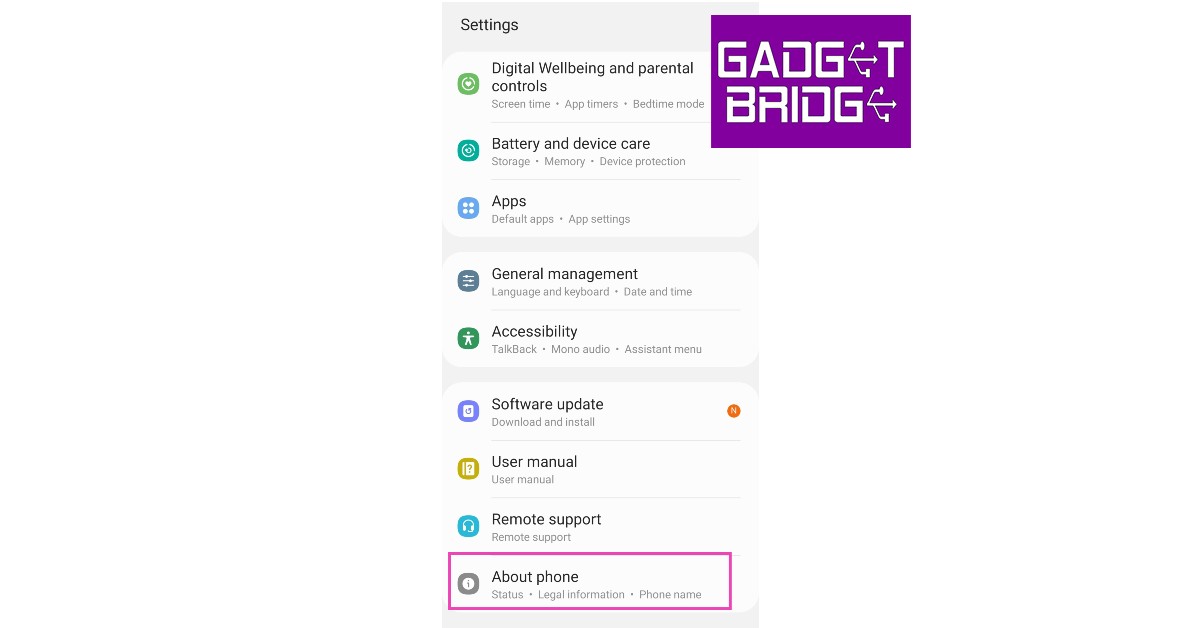 Step 2: Select ‘Software information’ and tap on ‘Build number’ six to seven times. Once you’ve done that you’ll enter Developer Mode.
 Step 3: Go back to Settings and scroll to the bottom. You’ll see a new option called ‘Developer options’, open it.
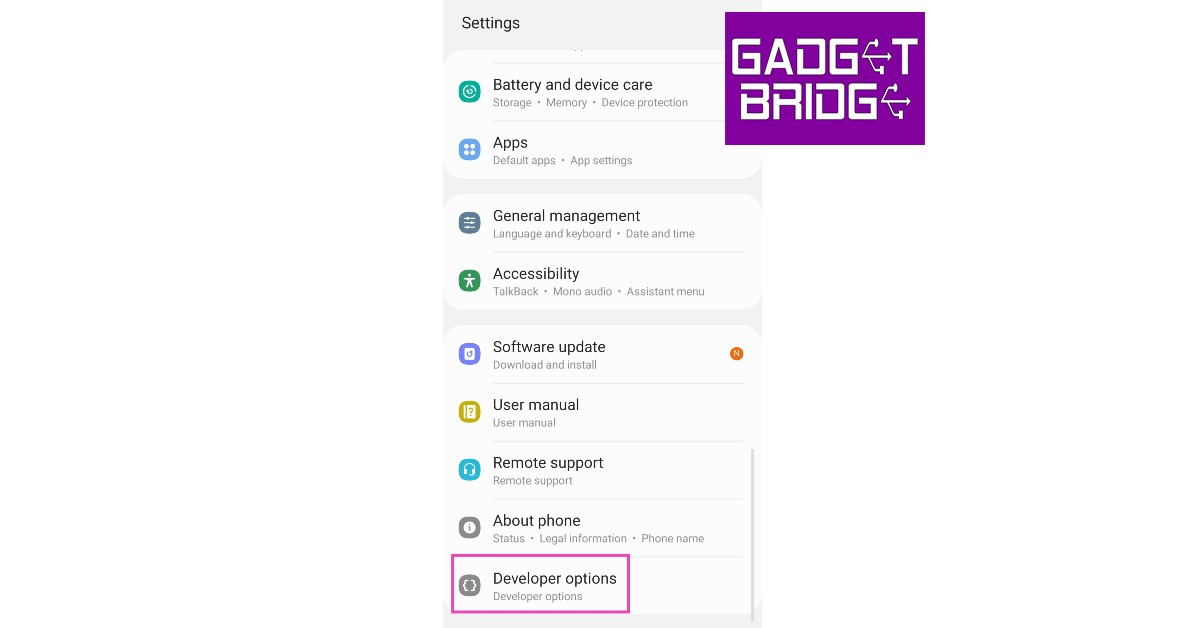 Step 4: Tap on ‘Simulate Colour Space’ and select ‘Monochromacy’.
 The grayscale mode will be enabled on your phone.
How to enable grayscale mode using Digital Wellbeing
 Your Android smartphone comes with a function called ‘Digital Wellbeing’ that is meant to reduce your screentime and develop a healthier digital usage. One of the features of ‘Digital Wellbeing’ is ‘Bedtime Mode’. Bedtime mode enables the greyscale mode on your phone so your eyes do not get stimulated by bright colours before going to bed. It also mutes all sound alerts excluding the alarm. You can turn Bedtime Mode on by going to Settings>Digital Wellbeing and Parental Controls>Bedtime Mode.
How to enable grayscale mode using a third-party app
Grayscale mode is a native feature on smartphones that run on Android Lollipop and above. If the two methods mentioned above aren’t available for your smartphone, your best option is to use a third-party app. Apps like Gray-Switch provide a monochrome gray filter to use on your smartphone. Read Also: Top 7 Free Calling Apps for Making Free Phone Calls anywhere This is how you can enable grayscale mode on your Android smartphone. Apart from saving battery and reducing screen time, the grayscale mode is also pretty helpful when you’re reading an e-book on your smartphone. Prolonged exposure to a bright and colourful screen can cause stress to your eyes, grayscale mode reduces that stress and ensures you can read for a longer period of time. For the latest gadget and tech news, and gadget reviews, follow us on Twitter, Facebook and Instagram. For newest tech & gadget videos subscribe to our YouTube Channel. You can also stay up to date using the Gadget Bridge Android App. You can find the latest car and bike news here.Garena Free Fire Redeem Codes Today 2 August 2022: Here is how to claim them

Garena Free Fire is a battle royale game with regular awards and tournaments to keep players interested. If you play Garena Free Fire, you should be aware of the redeem codes that are released on a daily basis. However, because the battle royale game is banned in India, players from other countries can use the Free Fire Redeem codes daily. If you’re unfamiliar with the Garena Free Fire redeem codes or don’t know how to get them, we’ve put together a step-by-step guide to help you redeem them. Check out Garena Free Fire Redeem Codes for August 2.
The Free Fire redeem codes are a great way to get free stuff. These are 12-digit codes that contain alphabets and numbers, as well as an expiration date and time. Because the Garena FF redeem codes cannot be used more than once, you should hurry to the redemption page to claim your free reward before someone else does. To get a free reward, all you have to do is go to reward.ff.garena.com/en, which is the official redemption page. Also, keep an eye on this space for daily updates on Garena Free Fire redemption codes and rewards.
In This Article
Garena Free Fire Redeem Codes Today 2 August 2022
- X99TK56XDJ4X
- FF11NJN5YS3E
- FF9MJ31CXKRG
- YXY3EGTLHGJX
- FIIF GI8E O49F
- HTY3 RIFG OR3F
- FBJUT6RFT1RT
- FBTU6JKIE8E7
- FLU8HG8RBHT4
- ST5KJCRFVBHT
- S5JTUGVJ Y5Y4
- FBJYRY56 MLOT
- FJO94TASD3FT
- PQR3BKUI7LT7
- FSDRFKUIYVGR
- FBTU6BFYTBT7
How to Get Free Fire Redeem Codes for Garena on August 2?
- Visit the Garena Free Fire game’s official website at reward.ff.garena.com.
- Use your Facebook, Google, VK, Apple ID, Huawei ID, or Twitter account to log in.
- You’ll be taken to a valid redemption code (s)
- Copy and paste the 12-digit redemption code into the text box.
- On the screen, a dialogue box will appear.
- ‘Ok’ should be selected.
iQoo 9T 5G arriving in India today: Here is how to watch the launch event
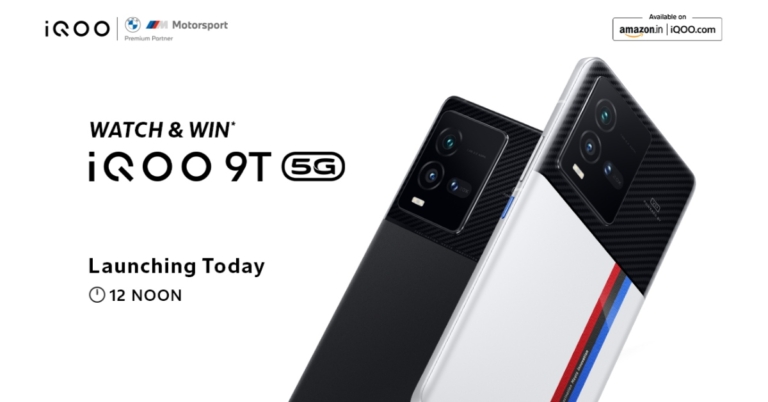
The iQoo 9T 5G will be released in India today, and all there is to know about the smartphone has already been made public online. The device will be powered by the most recent Qualcomm Snapdragon 8+ Gen 1 CPU. The BMW Motorsport M-theme, which has been featured on other recent smartphones released by the firm, will be present on the new iQoo 9T. Here’s everything you need to know.
In This Article
iQoo 9T 5G India launch details and price in India expected
The iQoo 9T 5G will be unveiled by the smartphone manufacturer in India today. The company will be hosting an online launch event that will begin at 12 noon via the company’s official social media channels and YouTube channel. According to a leak, the iQoo 9T 5G will be available on Amazon starting at 12 pm on August 2. The price of the 8GB RAM with 128GB storage model is Rs 49,999, and the 12GB RAM with 256GB storage model is Rs 54,999. Alpha and Legend colour options are available for the iQoo smartphone. Customers of ICICI Bank will also receive a Rs 4,000 rebate. When exchanging an iQoo smartphone, you can save up to Rs 7,000, however, when trading a non-iQoo device, you can save up to Rs. 5,000. A cost-free EMI option for up to 12 months will also be available. The smartphone appears to be a rebranded version of the iQoo 10, which was introduced in China earlier this month, based on its specifications.iQoo 9T 5G specifications
The 6.78-inch E5 AMOLED screen on the iQoo 9T 5G features full-HD+ resolution, 120Hz refresh rate, 1,500 nits of maximum brightness, and HDR10+ support. The Funtouch OS 12.1 skin is placed on top of Android 12.1, which powers the smartphone. Vivo V1+ image chip and Snapdragon 8+ Gen 1 SoC are both included. This smartphone’s triple rear camera system has a 50-megapixel GN5 main sensor with OIS, a 13-megapixel wide-angle lens, and a 12-megapixel portrait sensor with 20x optical zoom. A V1+ imaging chip will also be included in the smartphone. A 4,700mAh battery that supports 120W fast cable charging is included in the iQoo 9T 5G. iQoo India referenced an internal study that described the iQoo 9T 5G in its configuration with 12GB of RAM and 256GB of storage. According to reports, it received the highest AnTuTu score—more than 1.1 million—in the sub-Rs 55,000 categories. AnTuTu Benchmark version 9.4.1, according to the company, was used to assess the smartphone. For the latest gadget and tech news, and gadget reviews, follow us on Twitter, Facebook and Instagram. For newest tech & gadget videos subscribe to our YouTube Channel. You can also stay up to date using the Gadget Bridge Android App. You can find the latest car and bike news here.Amazon Quiz Answers Today 2 August 2022: Participate to win Rs 1,000 Amazon Pay Balance

2 August 2022 Amazon Quiz has gone live on its mobile app platform. Customers from different parts of the country are participating in the daily quiz. The daily quiz is conducted by the company brings an opportunity for the customers to win exciting prizes. The quiz begins from 12 AM to 11:59 PM. In today’s quiz participants have a chance to win Rs 1,000 Amazon Pay Balance by answering all the questions correctly.
Every day Amazon brings a fresh set of questions for its customers that contains five easy questions. Amazon quiz brings an opportunity for its customers to win Amazon Pay Balance ranging from Rs 1,000 to Rs 50,000. which consists of five questions related to general knowledge and current affairs.
The participants need to answer all the questions correctly and their names will be selected for a lucky draw. The winner will be announced at the end of the month. One wrong answer could eliminate you from the quiz. If you manage to answer all the questions correctly you can stand a chance to win Rs 1,000 Amazon Pay Balance today. Only app users are eligible to participate in the Quiz. Check Out 2 August 2022 Amazon Quiz Answers.
Amazon Quiz Today Prize – Rs 1,000 Amazon Pay Balance
Quiz Date – 2 August 2022
Daily Timing – 12 AM to 11:59 PM
Winner Announcement – Today at 12 PM
In This Article
Amazon Quiz Answers Today 2 August 2022
Question 1: Recently a bill was passed to bring Indian research stations in which region under the domestic laws of the country? Answer: Antarctic Question 2: Eldhose Paul recently became the first Indian male to qualify for the final of the World Athletics Championship in which event? Answer: Triple Jump Question 3: In the 2022 movie, Badhaai Do, Rajkummar Rao’s character shares his name with which cricketer? Answer: Shardul Thakur Question 4: This famous scientist spent his last years in the town of Princeton in which US state? Answer: New Jersey Question 5: This monastery, the largest Buddhist monastery found in India, is located in which Indian state? Answer: Arunachal PradeshHow To Play Amazon Quiz
Only app users are eligible to play the Amazon quiz every morning from 12 AM to 11:59 PM. The quiz is not available on the desktop. For those who are unaware of how to play the Amazon quiz below are the steps, you can follow to take the quiz.- Firstly download the Amazon app from Google Play Store or App Store
- Now fill in the required information through the Sign Up option.
- You need to log in to the Amazon app and scroll down on the home screen to find the Amazon Quiz banner.
- Tap on the Amazon Quiz banner and tap on the Start button to start the Quiz.
- Now you will get 5 questions and you need to answer them correctly. One wrong answer will eliminate you from the Quiz.
- After answering all the questions correctly you are now eligible for a Lucky Draw.
- The winner’s name will be announced today at 12 PM.
Top 10 new Shows and Movies to watch on Netflix in August 2022
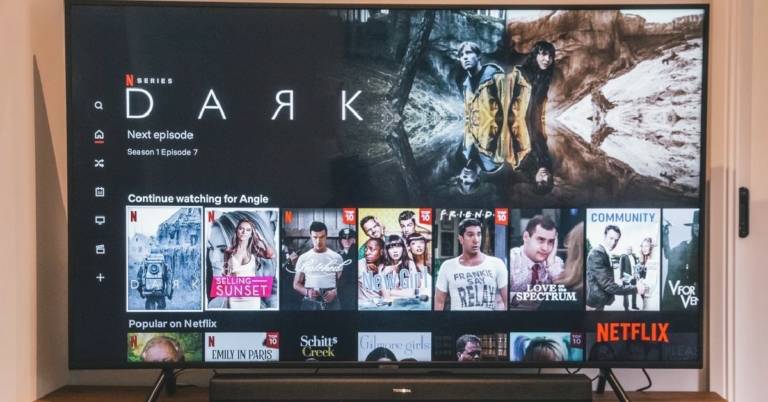
If you don’t know what to watch on Netflix this month, we’ve got you covered. Netflix has a lot of exciting releases planned for August, spanning drama comedies and intense thrillers. While longtime comic book fans have been waiting for the release of author Neil Gaiman’s The Sandman, an equally enthusiastic video game fanbase awaits the release of Tekken: Bloodline. In this article, we bring you the top 10 new shows and movies to watch on Netflix in August 2022.
Read Also: Top Tips and Tricks to Discover the Best Movies and Shows on Netflix
Based on the 1989 comic book by Neil Gaiman, The Sandman is a 10-episode fantasy drama coming to Netflix on August 5. Starring Tom Sturridge as Morpheus/Dream and Gwendoline Christie as Lucifer, The Sandman follows Morpheus – the king of dreams – as he escapes from captivity and embarks on a journey across worlds to find what was stolen from him and restore his power.
After winning the International Emmy for the Best Drama Series, Delhi Crime is back on Netflix for another season. Starring Shefali Shah as DCP Vartika Chaturvedi, Delhi Crimes chronicles the events in the dark underbelly of Delhi. Season 2 of Delhi Crime deals with the police force trying to crack the case of the mystery killers targetting Delhi’s senior citizens. One of the most anticipated shows of the year, Delhi Crime 2 is certainly one of the best releases on Netflix for August 2022.
While Woodstock ‘69 was about ‘peace and love’ vibes with a strong anti-war sentiment prevalent in 1969, Woodstock ‘99 was just the opposite. Trainwreck brings forward the story of how the 30th anniversary of one of the most important events in music history turned into a harrowing ordeal for everyone involved. With archived footage from the festival and exclusive interviews with the attendees, performers, and people working behind the scenes, Trainwreck ‘99 documents the turning of a larger-than-life event into a nightmare.
Coming back for Season 2, Indian Matchmaking follows matchmaker Sima Taparia as she guides clients in the US and India through the process of arranged marriage, and offers insight into the age-old tradition as it stands today. With its snappy editing and colourful characters, Indian Matchmaking is one of the popular reality TV shows on Netflix.
Heading into its final season, new episodes of Better Call Saul are released on Netflix every Tuesday, soon after it’s broadcast on AMC. A spin-off of the highly acclaimed TV show, Breaking Bad, Better Call Saul is a show about the events that lead to the character of Saul Goodman becoming the morally ambiguous ‘criminal’ lawyer he is known to be in Breaking Bad.
Tekken: Bloodline is a TV adaptation of the popular video game, Tekken. The timeline of the series is somewhere between Tekken 2 and Tekken 3 and will feature Jin Kazama as the protagonist on a revenge quest to bring his mother’s killer to justice. A must-watch for fans of the game, Tekken: Bloodline will also appeal to regular anime viewers.
Set in a conservative background in Mumbai, Darlings explores the life of ‘Badru’ and her mother, played by Alia Bhatt and Shefali Shah, as they set forth on a revenge-seeking path against Badru’s rageful husband, played by Vijay Varma. An offbeat dark comedy, Darlings will be released on Netflix on August 5. Darlings is Alia Bhatt’s first venture into movie production and writer Jasmeet K. Reen’s directorial debut.
Created by Mindy Kaling, this coming-of-age comedy/drama series comes back for a third season on Netflix and follows the life of Indian American protagonist Devi Vishwakumar, played by Maitreyi Ramakrishnan, as she makes her way through high school. The series is partly inspired by Mindy Kaling’s own experiences growing up and has already cemented her reputation as a consummate writer and creator.
One of the biggest hits of 2021 is finally making its way into the Netflix library this August. Godzilla vs Kong is the tale of an ancient rivalry between two mythic beasts as they come head to head in an epic clash. Released in 2021, Godzilla vs Kong broke several box office records for post-pandemic releases and has been highly requested by Netflix users ever since its release.
Me Time is an R-rated buddy comedy about a weekend in the life of a stay-at-home dad as he reconnects with his former best friend. Starring Kevin Hart and Mark Wahlberg, Me Time captures a weekend of chaos that may have a lasting impact on both of the characters’ lives. Available to watch from August 26, Me Time is one of Netflix’s biggest releases this year.
Read Also: How Can You Stream Netflix On Discord (2022)?
These were our picks for the top 10 new TV shows and movies to watch on Netflix in August 2022. If you’re looking forward to a release that didn’t make it to our list, let us know in the comments!
For the latest gadget and tech news, and gadget reviews, follow us on Twitter, Facebook and Instagram. For newest tech & gadget videos subscribe to our YouTube Channel. You can also stay up to date using the Gadget Bridge Android App. You can find the latest car and bike news here.
In This Article
The Sandman
Release date: August 05 Based on the 1989 comic book by Neil Gaiman, The Sandman is a 10-episode fantasy drama coming to Netflix on August 5. Starring Tom Sturridge as Morpheus/Dream and Gwendoline Christie as Lucifer, The Sandman follows Morpheus – the king of dreams – as he escapes from captivity and embarks on a journey across worlds to find what was stolen from him and restore his power.
Delhi Crime 2
Release Date: August 26 After winning the International Emmy for the Best Drama Series, Delhi Crime is back on Netflix for another season. Starring Shefali Shah as DCP Vartika Chaturvedi, Delhi Crimes chronicles the events in the dark underbelly of Delhi. Season 2 of Delhi Crime deals with the police force trying to crack the case of the mystery killers targetting Delhi’s senior citizens. One of the most anticipated shows of the year, Delhi Crime 2 is certainly one of the best releases on Netflix for August 2022.
Trainwreck Woodstock ‘99
Release Date: August 03 While Woodstock ‘69 was about ‘peace and love’ vibes with a strong anti-war sentiment prevalent in 1969, Woodstock ‘99 was just the opposite. Trainwreck brings forward the story of how the 30th anniversary of one of the most important events in music history turned into a harrowing ordeal for everyone involved. With archived footage from the festival and exclusive interviews with the attendees, performers, and people working behind the scenes, Trainwreck ‘99 documents the turning of a larger-than-life event into a nightmare.
Indian Matchmaking 2
Release Date: August 10 Coming back for Season 2, Indian Matchmaking follows matchmaker Sima Taparia as she guides clients in the US and India through the process of arranged marriage, and offers insight into the age-old tradition as it stands today. With its snappy editing and colourful characters, Indian Matchmaking is one of the popular reality TV shows on Netflix.
Better Call Saul
Release date: Weekly, every Tuesday Heading into its final season, new episodes of Better Call Saul are released on Netflix every Tuesday, soon after it’s broadcast on AMC. A spin-off of the highly acclaimed TV show, Breaking Bad, Better Call Saul is a show about the events that lead to the character of Saul Goodman becoming the morally ambiguous ‘criminal’ lawyer he is known to be in Breaking Bad.
Tekken: Bloodline
Release Date: August 18 Tekken: Bloodline is a TV adaptation of the popular video game, Tekken. The timeline of the series is somewhere between Tekken 2 and Tekken 3 and will feature Jin Kazama as the protagonist on a revenge quest to bring his mother’s killer to justice. A must-watch for fans of the game, Tekken: Bloodline will also appeal to regular anime viewers.
Darlings
Release Date: August 05 Set in a conservative background in Mumbai, Darlings explores the life of ‘Badru’ and her mother, played by Alia Bhatt and Shefali Shah, as they set forth on a revenge-seeking path against Badru’s rageful husband, played by Vijay Varma. An offbeat dark comedy, Darlings will be released on Netflix on August 5. Darlings is Alia Bhatt’s first venture into movie production and writer Jasmeet K. Reen’s directorial debut.
Never Have I Ever Season 3
Release Date: August 12 Created by Mindy Kaling, this coming-of-age comedy/drama series comes back for a third season on Netflix and follows the life of Indian American protagonist Devi Vishwakumar, played by Maitreyi Ramakrishnan, as she makes her way through high school. The series is partly inspired by Mindy Kaling’s own experiences growing up and has already cemented her reputation as a consummate writer and creator.
Godzilla vs Kong (2021)
Release Date: August 14 One of the biggest hits of 2021 is finally making its way into the Netflix library this August. Godzilla vs Kong is the tale of an ancient rivalry between two mythic beasts as they come head to head in an epic clash. Released in 2021, Godzilla vs Kong broke several box office records for post-pandemic releases and has been highly requested by Netflix users ever since its release.
Me Time
Release Date: August 26 Me Time is an R-rated buddy comedy about a weekend in the life of a stay-at-home dad as he reconnects with his former best friend. Starring Kevin Hart and Mark Wahlberg, Me Time captures a weekend of chaos that may have a lasting impact on both of the characters’ lives. Available to watch from August 26, Me Time is one of Netflix’s biggest releases this year.
Read Also: How Can You Stream Netflix On Discord (2022)?
These were our picks for the top 10 new TV shows and movies to watch on Netflix in August 2022. If you’re looking forward to a release that didn’t make it to our list, let us know in the comments!
For the latest gadget and tech news, and gadget reviews, follow us on Twitter, Facebook and Instagram. For newest tech & gadget videos subscribe to our YouTube Channel. You can also stay up to date using the Gadget Bridge Android App. You can find the latest car and bike news here.
Me Time is an R-rated buddy comedy about a weekend in the life of a stay-at-home dad as he reconnects with his former best friend. Starring Kevin Hart and Mark Wahlberg, Me Time captures a weekend of chaos that may have a lasting impact on both of the characters’ lives. Available to watch from August 26, Me Time is one of Netflix’s biggest releases this year.
Read Also: How Can You Stream Netflix On Discord (2022)?
These were our picks for the top 10 new TV shows and movies to watch on Netflix in August 2022. If you’re looking forward to a release that didn’t make it to our list, let us know in the comments!
For the latest gadget and tech news, and gadget reviews, follow us on Twitter, Facebook and Instagram. For newest tech & gadget videos subscribe to our YouTube Channel. You can also stay up to date using the Gadget Bridge Android App. You can find the latest car and bike news here. What The Orange And Green Dots indicate In iOS 14 or higher?
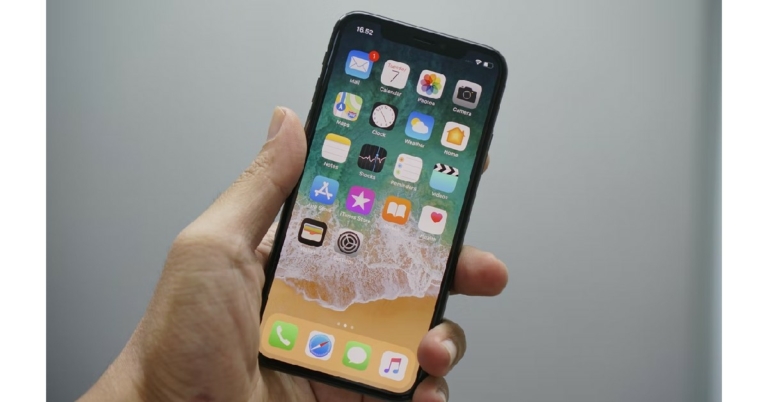
If you’re a new iPhone user, you may have wondered what the orange and green dots at the top of your screen indicate. You may have even tried to guess what they mean based on the functions you’re using on your phone. You may be aware that Apple gives a high priority to user privacy and device security, making it one of the most secure smartphones out there. The three dots at the top of your screen are a part of those privacy features. In this article, we explain what the orange and green dots indicate in iOS 14 or above.
Read Also: 5 Funny and Entertaining Weather Apps for Everyday Use
The orange dot at the top of your screen indicates that your iPhone’s microphone is currently in use. This may be because you’re on a phone call, which naturally uses your microphone. It could also mean that some hidden app which has permission to use your microphone is doing so discreetly in the background. If you’re not actively using any app that uses the microphone, you may want to check which apps have microphone permission and are using it in the background. You can do that by swiping down from the right corner and checking for apps using the microphone in the Control Center. The app that is currently using your microphone will appear in a yellow icon. This is a very helpful way of keeping your privacy intact. It also helps you weed out any malicious apps that may have found their way into your iPhone.
The green dot at the top of your screen indicates that either your iPhone’s camera or the camera and microphone together are in use. You may have noticed the green dot when you use you’re on a video call or when you use the camera to take pictures and videos. If you’re not actively using any camera-related app and you see the green dot, it means that some app is using your camera or microphone, or both in the background. All you need to do is swipe down and see the app using your camera or microphone in the Control Center.
Read Also: When will the full version of Apple iOS 16 come for iPhones?
So, this is what the orange and green dots in iOS 14 indicate. Features like this make the iPhone one of the safest smartphones around. If you want to remove camera or microphone access for certain apps, just go to Settings>Privacy and select Camera or Microphone, depending on the access you want to remove.
For the latest gadget and tech news, and gadget reviews, follow us on Twitter, Facebook and Instagram. For newest tech & gadget videos subscribe to our YouTube Channel. You can also stay up to date using the Gadget Bridge Android App. You can find the latest car and bike news here.
In This Article
What the Orange dot indicates
 The orange dot at the top of your screen indicates that your iPhone’s microphone is currently in use. This may be because you’re on a phone call, which naturally uses your microphone. It could also mean that some hidden app which has permission to use your microphone is doing so discreetly in the background. If you’re not actively using any app that uses the microphone, you may want to check which apps have microphone permission and are using it in the background. You can do that by swiping down from the right corner and checking for apps using the microphone in the Control Center. The app that is currently using your microphone will appear in a yellow icon. This is a very helpful way of keeping your privacy intact. It also helps you weed out any malicious apps that may have found their way into your iPhone.
What the Green dot indicates
 The green dot at the top of your screen indicates that either your iPhone’s camera or the camera and microphone together are in use. You may have noticed the green dot when you use you’re on a video call or when you use the camera to take pictures and videos. If you’re not actively using any camera-related app and you see the green dot, it means that some app is using your camera or microphone, or both in the background. All you need to do is swipe down and see the app using your camera or microphone in the Control Center.
Read Also: When will the full version of Apple iOS 16 come for iPhones?
So, this is what the orange and green dots in iOS 14 indicate. Features like this make the iPhone one of the safest smartphones around. If you want to remove camera or microphone access for certain apps, just go to Settings>Privacy and select Camera or Microphone, depending on the access you want to remove.
For the latest gadget and tech news, and gadget reviews, follow us on Twitter, Facebook and Instagram. For newest tech & gadget videos subscribe to our YouTube Channel. You can also stay up to date using the Gadget Bridge Android App. You can find the latest car and bike news here.
The green dot at the top of your screen indicates that either your iPhone’s camera or the camera and microphone together are in use. You may have noticed the green dot when you use you’re on a video call or when you use the camera to take pictures and videos. If you’re not actively using any camera-related app and you see the green dot, it means that some app is using your camera or microphone, or both in the background. All you need to do is swipe down and see the app using your camera or microphone in the Control Center.
Read Also: When will the full version of Apple iOS 16 come for iPhones?
So, this is what the orange and green dots in iOS 14 indicate. Features like this make the iPhone one of the safest smartphones around. If you want to remove camera or microphone access for certain apps, just go to Settings>Privacy and select Camera or Microphone, depending on the access you want to remove.
For the latest gadget and tech news, and gadget reviews, follow us on Twitter, Facebook and Instagram. For newest tech & gadget videos subscribe to our YouTube Channel. You can also stay up to date using the Gadget Bridge Android App. You can find the latest car and bike news here. Top 3 ways to restore Google Play Store on your mobile if you accidentally deleted it?

If you accidentally deleted Google Play Store from your smartphone and are now freaking out over it, you don’t need to worry. Google Play Store cannot be deleted from Android smartphones. At worst, you probably just disabled it. In that case, the Google Play Store can be easily restored. You can also check hidden apps to see if you accidentally hid the Play Store icon. If you can’t find Google Play Store on your home screen, here are three ways you can restore or download it.
Read Also: How to restore your iPhone to factory settings?
Step 3: Scroll down and select Google Play Store.
Step 4: Tap on Enable at the bottom of the screen.
Google Play Store will be restored and will appear on your smartphone’s home screen.
 Step 2: Tap on Hide apps.
 Step 3: Hit the bar sign on Play Store’s icon to unhide it.
 Step 4: Hit Done.
If your device did not have a Google Play Store app to begin with, you may have had to download it from a third-party app marketplace. If you accidentally deleted the app, you can easily reinstall it again. Make sure you download the APK from trusted marketplaces like APKPure and APKMirror. Once the APK has been downloaded, open the file and allow your phone to install apps from unknown sources. The app will be installed on your phone in no time.
Step 4: Hit Done.
If your device did not have a Google Play Store app to begin with, you may have had to download it from a third-party app marketplace. If you accidentally deleted the app, you can easily reinstall it again. Make sure you download the APK from trusted marketplaces like APKPure and APKMirror. Once the APK has been downloaded, open the file and allow your phone to install apps from unknown sources. The app will be installed on your phone in no time.
In This Article
How to restore Google Play Store on an Android smartphone?
Step 1: Go to Settings. Step 2: Tap on Apps. Step 3: Scroll down and select Google Play Store.
 Step 4: Tap on Enable at the bottom of the screen.
 Google Play Store will be restored and will appear on your smartphone’s home screen.
Unhide the Google Play Store app
If Play Store’s app details show that it’s already enabled and you still can’t find it on your home screen, chances are that you accidentally hid the app icon. Here’s how you can unhide it. Step 1: Go to Settings and select Home screen.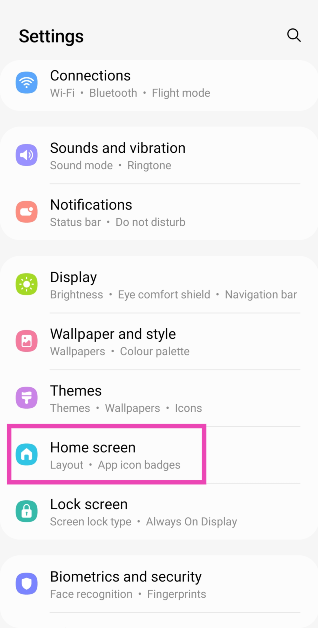 Step 2: Tap on Hide apps.
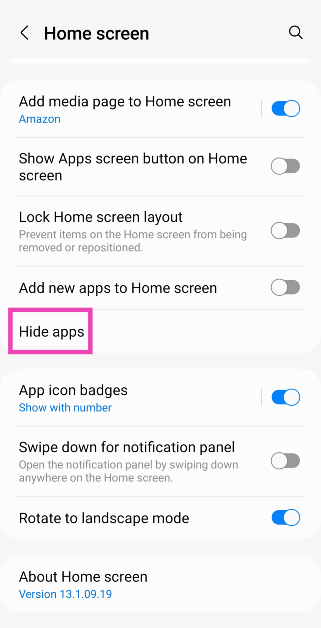 Step 3: Hit the bar sign on Play Store’s icon to unhide it.
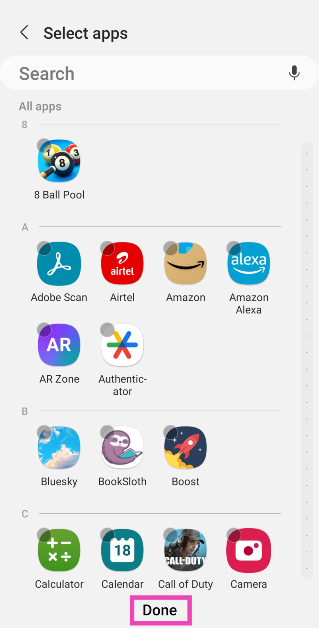
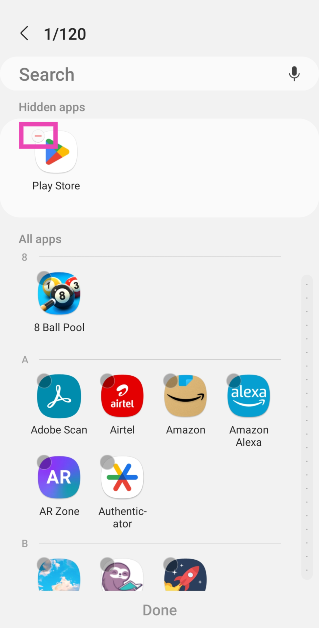 Step 4: Hit Done.
Download the Google Play Store app from a third-party marketplace
 If your device did not have a Google Play Store app to begin with, you may have had to download it from a third-party app marketplace. If you accidentally deleted the app, you can easily reinstall it again. Make sure you download the APK from trusted marketplaces like APKPure and APKMirror. Once the APK has been downloaded, open the file and allow your phone to install apps from unknown sources. The app will be installed on your phone in no time.
Frequently Asked Questions (FAQs)
How do I reinstall Google Play Store on my Android phone?
Google Play Store cannot be deleted from your Android phone. If you can’t find it anywhere in the app drawer, you may have disabled it. Go to Settings>Apps>Google Play Store and hit ‘Enable’.How do I unhide an app on my Android phone?
Go to Settings>Home page>Hide apps and hit the bar sign on the app icons that you want to unhide.What are some good alternatives to Google Play Store?
The best alternative to Google Play Store is your OEM’s app marketplace. Samsung phones have the ‘Galaxy Store’, Vivo devices have ‘V-Appstore’, and Xiaomi has ‘Get Apps’. You can also use trusted third-party app marketplaces like APKPure, APKMirror, Softonic, and more. Read Also: How to restore WhatsApp backup?Conclusion
These are the three best ways to restore Google Play Store on your Android smartphone. If you live in a region where the Google Play Store is blocked from Android devices, you can simply download its APK from third-party marketplaces like APKMirror and APKPure. Google Play Store is the safest marketplace to download apps as it offers airtight security through its ‘Play Protect’ service. Any apps pushing malicious content or malware are immediately removed from the Play Store.OnePlus Nord Buds CE launched in India at Rs 2,299

OnePlus Nord Buds CE has been launched in India today. The Chinese manufacturer used Twitter to announce the availability of the TWS earphones in India at a reasonable price. The device comes with 13.4mm dynamic drivers. It has 94ms of ultra-low latency and is claimed to provide 20 hours of total playback. For calls, the Nord Buds CE also has AI noise cancellation.
 OnePlus Nord Buds CE has Bluetooth version 5.2 with a wireless range of up to 10m. The earbuds can easily connect to OnePlus smartphones thanks to the company’s Fast Pair technology. The users get access to the Sound Master Equaliser and can use the HeyMelody app.
Additionally, they support the AAC and SBC audio formats. As opposed to the charging case, which has a 300mAh battery, both earbuds have 27mAh batteries. When completely charged, it is stated that the OnePlus Nord Buds CE can support up to 3 hours of talk time and 4.5 hours of listening time at 50% volume. They have a 20-hour battery life with the charging case when played at half volume and fully charged with the case. With 10 minutes of charging the Nord Buds CE TWS earbuds may provide playback for up to 81 minutes.
The business claims that the Nord Buds CE do not support the iOS version of the app.
OnePlus Nord Buds CE has Bluetooth version 5.2 with a wireless range of up to 10m. The earbuds can easily connect to OnePlus smartphones thanks to the company’s Fast Pair technology. The users get access to the Sound Master Equaliser and can use the HeyMelody app.
Additionally, they support the AAC and SBC audio formats. As opposed to the charging case, which has a 300mAh battery, both earbuds have 27mAh batteries. When completely charged, it is stated that the OnePlus Nord Buds CE can support up to 3 hours of talk time and 4.5 hours of listening time at 50% volume. They have a 20-hour battery life with the charging case when played at half volume and fully charged with the case. With 10 minutes of charging the Nord Buds CE TWS earbuds may provide playback for up to 81 minutes.
The business claims that the Nord Buds CE do not support the iOS version of the app.

In This Article
OnePlus Nord Buds CE specifications
OnePlus Nord Buds CE includes 94ms of ultra-low latency depending on the smartphone they are linked to. The earphones feature 13.4mm dynamic drivers, with 20Hz to 20,000Hz frequency response. OnePlus TWS earphones feature AI noise cancellation technology for calls and a rating of IPX4 for water resistance. Nord Buds CE gets Bluetooth version 5.2 with a wireless range of up to 10m, according to the Chinese company. They also feature support for AAC and SBC audio formats. The TWS earbuds also get 94ms ultra-low latency, which can vary based on the smartphone they are connected to. The wearables come with noise-cancelling functionality for calls. OnePlus Nord Buds CE has Bluetooth version 5.2 with a wireless range of up to 10m. The earbuds can easily connect to OnePlus smartphones thanks to the company’s Fast Pair technology. The users get access to the Sound Master Equaliser and can use the HeyMelody app.
Additionally, they support the AAC and SBC audio formats. As opposed to the charging case, which has a 300mAh battery, both earbuds have 27mAh batteries. When completely charged, it is stated that the OnePlus Nord Buds CE can support up to 3 hours of talk time and 4.5 hours of listening time at 50% volume. They have a 20-hour battery life with the charging case when played at half volume and fully charged with the case. With 10 minutes of charging the Nord Buds CE TWS earbuds may provide playback for up to 81 minutes.
The business claims that the Nord Buds CE do not support the iOS version of the app.
OnePlus Nord Buds CE has Bluetooth version 5.2 with a wireless range of up to 10m. The earbuds can easily connect to OnePlus smartphones thanks to the company’s Fast Pair technology. The users get access to the Sound Master Equaliser and can use the HeyMelody app.
Additionally, they support the AAC and SBC audio formats. As opposed to the charging case, which has a 300mAh battery, both earbuds have 27mAh batteries. When completely charged, it is stated that the OnePlus Nord Buds CE can support up to 3 hours of talk time and 4.5 hours of listening time at 50% volume. They have a 20-hour battery life with the charging case when played at half volume and fully charged with the case. With 10 minutes of charging the Nord Buds CE TWS earbuds may provide playback for up to 81 minutes.
The business claims that the Nord Buds CE do not support the iOS version of the app.