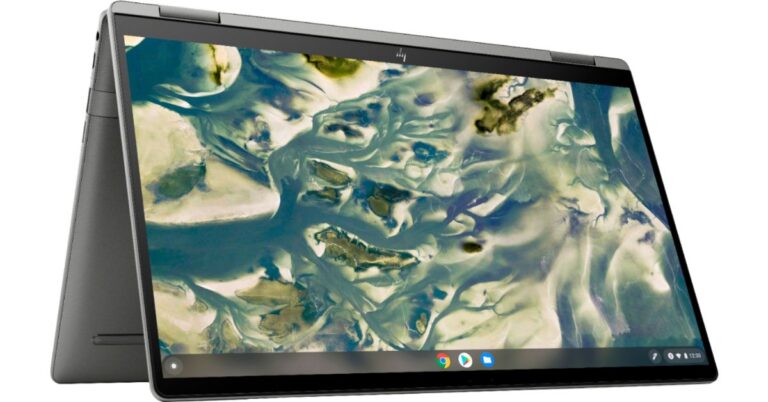
April 13 Flipkart Daily Trivia Quiz Answers: Answer to win exciting prizes

The e-commerce website Flipkart is hosting Daily Trivia Quiz. Every day it brings a bunch of new questions for its users. By answering them correctly you can win exciting prizes. The questionnaire is based on questions related to general knowledge. Also, the users can win free vouchers and super coins, among other offers via the daily quiz. April 13 Flipkart Daily Trivia Quiz Answers has already gone live on its platform. The participant should be at least 18 years old and should have a valid login ID. The Quiz is available on the mobile platform and not the web version. E-commerce conducts the quiz on daily basis and goes live at 12:00 AM IST and runs till 11:59 PM IST.  The winners are announced within 15 days from the date of participation that can be viewed under the Gems/Rewards section in the app.

How to participate in the Flipkart Daily Trivia Quiz

To participate download the Flipkart app on your phone. Then open the Flipkart app then head to Game Zone. Now click on the Daily Trivia Banner or search for Daily Trivia. Enter the game and answer all 5 questions with correct answers.

April 13 Flipkart Daily Trivia Quiz Answers 

Question 1: Which Of These States Has No IPL Team Never Represented? Answer: Bihar Question 2: Which Of These Is The Official Broadcast Partner Of The Indian Premier League 2021? Answer: Star India Question 3: Who Was Adjudged Player Of The Match In The Inaugural Match Of IPL 2021? Answer: Harshal Patel Question 4: After Missing IPL 2020, Which CSK Player Scored A Half-Century In His Comeback Match In IPL 2021? Answer:  Suresh Raina Question 5: In 2013, Chris Gayle Scored IPL’s Fastest Century In 30 Balls Against Which Team? Answer: Pune Warriors India
For the latest gadget and tech news, and gadget reviews, follow us on TwitterFacebook and Instagram. For newest tech & gadget videos subscribe to our YouTube Channel. You can also stay up to date using the Gadget Bridge Android App.

April 13 Amazon Quiz: Participate and win Dyson Air Purifier

Amazon Quiz has gone live now. The quiz can be played daily from 12 AM to 11:59 PM. Amazon gives the opportunity to millions of its customers to play and win free gadgets as well as Amazon Pay Balance. Today e-commerce gives you a chance to win Dyson Air Purifier. Every day the e-commerce platform brings a new set of questionnaires to which the participants have to answer correctly. The quiz contains only five questions that are based on current affairs and general knowledge. Answering all the questions correctly will get your name selected for a lucky draw. Only one person will be selected as the winner and the results are announced at the end of every month. The lucky ones might win something by answering all the questions correctly, and the wrong answers will get you eliminated from the quiz. So to make sure you answer all the questions correctly Gadget Bridge everyday updates all the correct answers to all 5 questions. To win Dyson Air Purifier check out today’s answers for the Amazon Quiz.

April 13 Amazon Quiz Answers

Question 1: In March 2021, the UN General Assembly adopted an India-sponsored resolution declaring 2023 as the International Year of what? The answer is- Millets Question 2: Which country is building the world’s first platypus sanctuary? The answer is- Australia Question 3: Which surveillance satellite, built by PES University students for DRDO, was deployed in space to monitor the Indian Ocean Region? The answer is- SindhuNetra Question 4: In which story is this animal referred to as “Kichi”? The answer is- Mowgli Question 5: What particular phrase is associated with this Google product? The answer is- Hey Google!

Acer Nitro 5 gaming laptop refreshed with 11th Gen Intel Core H-series processor and NVIDIA GeForce GTX 1650 graphics in India

Recently, Acer announced the Nitro 5 gaming laptop with AMD Ryzen 5600H processor. Today in India the Taiwanese company has again launched an upgraded version of the gaming laptop. The all-new Acer Nitro 5 comes with the 11th Gen Intel Core H-series processor paired with NVIDIA GeForce GTX 1650 graphics. In addition to this, it bears thin bezels display, CoolBoost tech along with wired and wireless connectivity  Speaking on the occasion Mr Sudhir Goel, Chief Business Officer, Acer India, stated, “Acer Nitro series gaming comes with a rich legacy of offering powerful gaming performance and latest technology and patented cooling technology at value price points. The latest Nitro 5 comes with the latest 11th generation Intel Core H35 series gaming processors which offer truly outstanding performance for the price and shows our deep collaboration with Intel to deliver the best for Indian gamers.” Acer Nitro 5 comes with the 11th Gen Intel Core H-series processor According to the company, Nitro 5 is available at a starting price from Rs 69,999 on Acer E-store as well as authorized e-commerce and retail outlets. Talking of the specification the all-new Acer Nitro 5 is offered in a single screen size option of 15.6-inch FHD IPS display. The screen panel offers a 144Hz refresh rate and a 3ms response time with a screen-to-body ratio of 80% with narrow 7.02mm bezels. Under the hood, there is an 11th Gen Intel Core i5-11300H processor and NVIDIA GeForce GTX graphics. There are two slots for M.2 PCIe SSDs, up to 2TB HDD, and up to 32GB of DDR4 RAM.  Acer Nitro 5 comes with the 11th Gen Intel Core H-series processor This gaming laptop comes with twin fans, Acer CoolBoost technology, and a quad exhaust port design to keep the device cool. In addition to this, there is a 4-zone RGB keyboard dedicated NitroSense Key. WASD and arrow keys are also highlighted for quick location while the key response is immediate with a 1.6mm travel distance. The computer also features DTS: X Ultra that delivers 3D spatial soundscape, allowing users to hear where their opponents are coming from with pinpoint precision.  The Acer Nitro 5 also has an access to Planet 9, which is an eSports platform unlike any other filled with a community of like-minded gamers, from aspiring eSports athletes to hardcore professionals.  As for the connectivity, there is Killer Wi-Fi 6, Bluetooth v5.1, an HDMI port, two USB 3.2 Gen 1 ports, a USB 3.2 Gen 2 Type-C port, a USB 3.2 Gen 1 port, and an RJ45 port. For the latest gadget and tech news, and gadget reviews, follow us on TwitterFacebook and Instagram. For newest tech & gadget videos subscribe to our YouTube Channel. You can also stay up to date using the Gadget Bridge Android App.
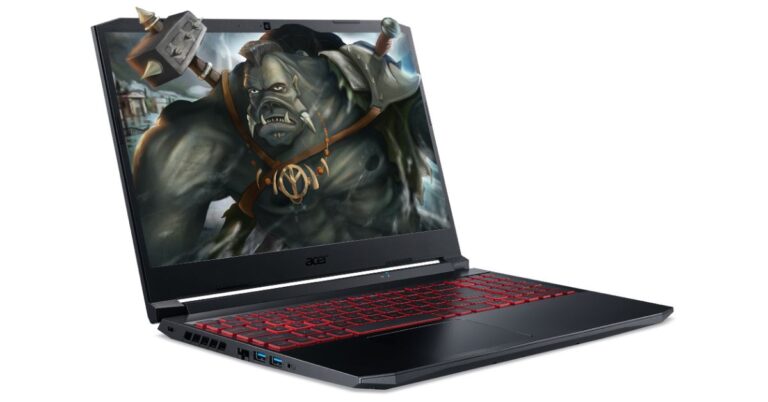
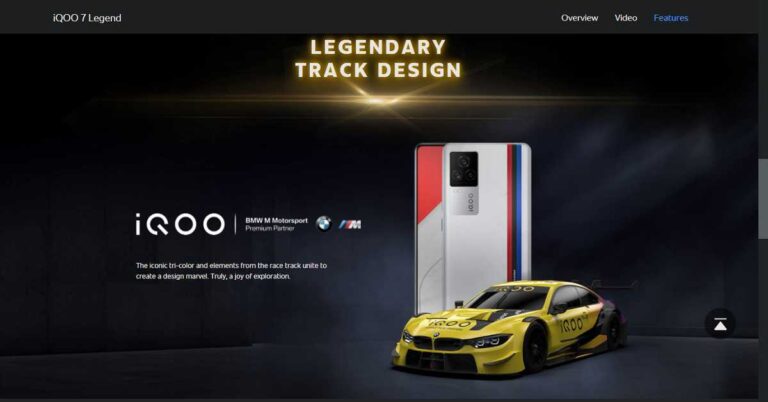
The iQOO 7 Series to launch on Amazon.in soon: Features and expected price

iQOO, the Chinese smartphone brand has partnered with Amazon.in to launch its new iQOO 7 5G smartphone series. The smartphone will be an exemplar of “Make in India” as it will be manufactured within the country. According to Gagan Arora, Marketing Director of iQOO, “Our endeavour at iQOO is to offer products with superior performance and unmatched experience. Our partnership with Amazon is a step further in that direction. iQOO phones are built for those consumers who are naturally sceptical of the status quo and are constantly seeking to improve themselves- Quest on and on!”

What features will the iQOO 7 series offer?

The iQOO 7 Series will come packed with the latest features that you generally find in premium smartphones like 5G connectivity, Wi-Fi 6, a powerful processor, and stunning camera quality. Here is the complete breakdown of its features.

Design & Display

The design of the iQOO 7 series will be inspired by BMW Motorsport as it will carry the unique BMW stripes at the rear. The smartphone features a 6.62-inch 1080×2400 pixels touchscreen display with a refresh rate of 120Hz. The display will consist of a punch hole to accommodate the selfie camera. The smartphone will run the iQOO UI over the Android 11 operating system.

Performance

The teaser of the smartphone depicts a BMW sportscar. This tells a lot about the performance of the iQOO 7 Series. It will run the powerful Qualcomm Snapdragon 888 processor to handle multitasking and efficiently manage resource-intensive tasks like AI-integrated apps and gaming. The device is designed with the Vapour Cooling system to prevent overheating and enhance the overall performance.
What features will the iQOO 7 series offer?

Camera

The iQOO 7 Series will come with a rear triple camera setup consisting of a 48MP primary lens, a 13MP ultrawide lens, and a 13MP telephoto sensor. It also sports a 16MP front camera for video calling and taking selfies.

Battery and Memory

The iQOO 7 Series will house a 4,000mAh battery with the support of 120W fast-charging. The smartphone will offer 12GB of LPDDR5 RAM to ensure lag-free gaming and video streaming. You will get 256GB of UFS 3.1 storage to keep your apps, work and media-related files.

Connectivity

The iQOO 7 will be a 5G smartphone series with loads of connectivity features like Dual-SIM support, NFC, and Type-C port. Moreover, the latest Wi-Fi 6 will ensure seamless data transfer and live streaming. With Bluetooth v5.2 you can easily connect your smart devices and speakers.

Where will the iQOO 7 Series be available and at what price?

The iQOO 7 Series will be available on Amazon.in at an expected starting price of ₹ 40,000. The manufacturing of the smartphone series will be carried out at Vivo’s Greater Noida facility. To ensure that people get smooth customer service, iQOO will handpick Vivo service centres to cater to post-sales queries. According to Nishant Sardana, Director, Mobile Phones & Televisions, Amazon India, “We are humbled to be the partner of choice for iQOO and are excited to bring the iQOO 7 series for our customers on Amazon.in. A powerful processor offering a superior gaming experience clubbed with rich photography and a premium look & feel, iQOO 7 series ticks all the right boxes for customers”.
Where will the iQOO 7 Series be available and at what price?
For the latest gadget and tech news, and gadget reviews, follow us on TwitterFacebook and Instagram. For newest tech & gadget videos subscribe to our YouTube Channel. You can also stay up to date with the Gadget Bridge Android App.

Xiaomi’s Mi 11X Series to debut in India on April 23, launch teased

Xiaomi is all set to launch its Mi 11 series in India on April 23. At the same time, the company has also scheduled to bring another smartphone series to the Indian market. News is rife, the Chinese smartphone company has officially revealed that the Mi 11X is confirmed to make its debut on April 23 in the country. The company has also started sending media invites for the launch event. Xiaomi India head Manu Kumar Jain recently confirmed the launch date of the Mi 11 series in India for March 23. At the same event, the company has also scheduled the launch of the Mi 11X series launch. The company has also confirmed the launch through the press invites, which mentions that the Mi X flagship series will release in the country on April 23.  The press invite only has the mention of the name of the smartphone series as well as its launch date. Further launch event details are expected to be shared soon.  It should be noted that this is not the first time when we have heard of the new line-ups name nor its a fresh new series. Past rumours, reports and leaks collectively suggest that the Mi 11X series will be a rebranded version of the Redmi K40 series. The Redmi series was launched in China a few months back and is believed to make its ways to the Indian market with new branding. The line-up includes Redmi K40 and Redmi K40 Pro+. The former one is said to come as Mi 11X while the latter one to debut as Mi 11X Pro. Mi 11X series specifications expected The Mi 11X is expected to feature a 6.67-inch full-HD+ AMOLED display with 1,080×2,400 pixels of resolution. Its display will support a 120Hz of refresh rate and an in-display fingerprint sensor. Under the hood, there will be an octa-core Qualcomm Snapdragon 870 SoC. The device could offer up to 256GB of UFS 3.1 storage. There will be a triple rear camera set up, which is said to come with a 48-megapixel primary sensor, an 8-megapixel ultra-wide-angle lens, and a 5-megapixel macro lens. On the front, it could feature a 20-megapixel camera sensor. While the Pro variant is expected to feature a similar display. There will be a Qualcomm Snapdragon 888 SoC speculated to be paired with up to 12GB of RAM and up to 256GB of storage. It may include an upgraded camera set up, which could come with a 108-megapixel Samsung HM2 primary sensor. Both the phones might also carry a similar battery with a capacity of 4,520mAh with 33W fast charging support. For the latest gadget and tech news, and gadget reviews, follow us on TwitterFacebook and Instagram. For newest tech & gadget videos subscribe to our YouTube Channel. You can also stay up to date using the Gadget Bridge Android App.

How to check your CIBIL score online?

0
India is the second-most populous country in the world. However, the financial literacy in India is unsatisfactory. According to Atul Kumar Gupta, the Present of ICAI, the financial literacy rate in India is around 24%. The CIBIL score is a financial parameter that helps citizens get aware of their creditworthiness so that they can make wise decisions in their investments and while taking loans from banks.

What is the CIBIL score?

The CIBIL score is a three-digit number ranging from lying between and 900. It reflects the merit of credit of a person. Using the CBIL score, banks can decide whether or not they should lend loans to the individual. The higher the score means the more creditworthy the person is. A low score on the other hand indicates that the loan given to the person may turn into a bad loan and may not be recovered.

What is the benefit of the CIBIL score?

CIBIL stands for Credit Information Bureau (India) Limited. It is an agency that rates your creditworthiness. CIBIL has brought transparency to the Indian financial markets. It has increased financial awareness among the citizens regarding the risks of loans. Moreover, the CIBIL has helped banks to avoid liabilities in their balance sheets by choosing the right customers for their loans.

How can you check your CIBIL score online?

You can check your CIBIL score free of cost in simple steps. If you already have an account on CIBIL, getting the CIBIL score and your credit report is just a matter of few clicks. To check your CIBIL score online, follow these steps.
The first step is to create your account.
  • Once you fill in the asked details, go through them once and click the Accept & Continue button.
  • If you already have an account on CIBIL, you can skip the registration process by clicking the Member Login located at the top-right.
  • Here you will be asked to enter additional details like Address, City, and Gender. Enter the details and click the Accept & Continue button.
Enter the address details
Enter the address details.
  • Here you will be asked some question regarding your credit cards and loans. This information is needed to calculate your CIBIL score and frame your credit report.
Once your profile is created, you can view your CIBIL Score by logging into the CIBIL website. For the latest gadget and tech news, and gadget reviews, follow us on TwitterFacebook and Instagram. For newest tech & gadget videos subscribe to our YouTube Channel. You can also stay up to date with the Gadget Bridge Android App.

How to execute System Restore using the Command Prompt in Windows 10?

0
Windows 10 is a highly robust operating system. However, it may still face issues like a file system corruption that may be caused by several reasons. These include power loss, unsafe removal of a drive, or system crash. System Restore is a process that is opted to restore the file system to a previous snapshot and thus, prevent data loss. When data corruption or an installation failure occurs, the System Restore command takes the file system to a previously saved state so that you do not need to reinstall the Windows again.

When does System Restore become necessary?

The System Restore command is useful when a computer virus damages your system’s file system. When the file system gets corrupted, you face issues in accessing your files and folders. The System Restore feature reinstates a previous image of the file system. Modern malicious programs like Ransomware block the Safe mode. As a result, you cannot restore your file system from the Control Panel. The only way left is to use the Command Prompt.

How to run the System Restore command using the Command Prompt?

The System Restore command works the same across different Windows versions including Windows 10, Windows 8, and Windows 7. To execute the System Restore using the Command Prompt, follow these steps.
  • Go to the Start Menu and search for Command Prompt. Launch the App. Alternatively, press the Windows + R key combination. Type ‘cmd’ and hit Enter.
Launch the Command Prompt
  • Type the command: rstrui.exe
  • Press Enter to open the System Restore wizard. It must be noted that some versions of Windows may not demand you to add the suffix ‘.exe’ in the command.
Type the command: rstrui.exe 
Type the command: rstrui.exe and hit Enter
  • Follow the on-screen instructions to navigate through the System Restore process.

What you must know about rstrui.exe?

The rstrui.exe is located in the folder with path, C:\Windows\System32\rstrui.exe. This tool is present by default in your Windows operating system. However, you must beware of files with a similar name. Since system restoration is a widely opted task, several malicious programs are being created with a similar name. Thus, if your find any file named rstrui.exe, don’t run it as it can be a computer virus. To prevent fake files, ensure that your anti-virus is updated. For the latest gadget and tech news, and gadget reviews, follow us on TwitterFacebook and Instagram. For newest tech & gadget videos subscribe to our YouTube Channel. You can also stay up to date with the Gadget Bridge Android App.

Google is now widely rolling out Google Lens to Google Photos via desktop Web browsers, to allow copy text from images

Last year Google rolled out AI features for its Google Photos app, which includes allowing users to search for text within the photos as well as screenshots. The Google Lens feature permits the user to copy the text that appears in the photos and paste that text onto a document or a note also known as OCR. Now in a new development, the search giant is extending this feature for Google Photos on desktop Web browsers.  According to a report by 9to5Google the tech major is now making Google Lens available for Google Photos on desktop Web browsers. This will allow users to use the feature to copy the text in the images or screenshots and further paste it into a document or a note file. The functionality used in optical character recognition (OCR) is capable of copying text from any image. The option to copy the text from the image will appear on the left along with other options such as share, edit, zoom and others.  Once you find the photo you’re looking for, click the Lens button to easily copy and paste the text. Earlier this feature was available for the mobile-based app version on Android and iOS both, but now the AI-powered Lens camera identifies the context of a picture. The functionality is now widely rolled out to the desktop web inside Google Photos, too.   As per the publisher, the AI feature does not help people explore their images and memories. When you open an image including words will show up a “Copy text from image” suggestion chip that features the Lens logo as well as the remove button. Tapping on it will enable the Google Lens with the same analysis animation of pulsating dots appearing over the picture for a brief second. Moreover, you can also “Deselect text” from the top-right corner in order to just highlight specific passages and copy with a floating button over the image. Whereas for the mobile platform, you need to tap on the search bar and type the text that you are searching for. For instance, you are looking for a photo that you took some time ago of a name card. All you have to do is type the name in the search bar. When doing so Google will show up the text found within the image then tap on it. Then you need to tap on the Google lens button placed at the bottom of the screen. Now whatever you have searched will appear in a text highlighted in the photo or the screenshot. Tap on the text that you searched, copy the text and paste it on the document or a note or either on the web browser.  For the latest gadget and tech news, and gadget reviews, follow us on TwitterFacebook and Instagram. For newest tech & gadget videos subscribe to our YouTube Channel. You can also stay up to date using the Gadget Bridge Android App

Mozilla Firefox will cease to support Amazon’s Fire TV and Echo Show devices on April 30, 2021

Mozilla Corporation, a free software community, recently announced that its free and open-source web browser, Firefox will cease to support the Amazon Echo Fire TV and the Echo Show devices starting from April 30, 2021. According to Mozilla Corporation, “If you have Firefox set as your default browser on Echo Show, you will be redirected to Amazon Silk for web browsing starting April 30, 2021″.

Why does Mozilla want to end its support to the Amazon Fire TV?

Mozilla released its support to the Amazon Fire TV in the backdrop of delisting of YouTuube from all Amazon devices in 2017. Google had stated that the decision was based on the “lack of reciprocity.” At the time, a spokesperson of Google had said, “Amazon doesn’t carry Google products like Chromecast and Google Home, doesn’t make Prime Video available for Google Cast users, and last month stopped selling some of Nest’s latest products.”
Why does Mozilla want to end its support to the Amazon Fire TV?
As soon as YouTube was pulled down from all Amazon devices, the users began to stream YouTube videos through the Mozilla Firefox browser. However, in 2019, YouTube was brought back to the Fire TV. This led to the decline in the usage of Firefox as the users can directly access YouTube.

What changes will be observed by the Amazon Fire TV users?

Several users of the Amazon Fire TV have received notifications regarding the Firefox browser. According to Amazon, after the end of the support, the Firefox app will be deleted from the Amazon Appstore. As a result, users using the Fire TV will not be able to install Firefox. Moreover, the users no longer receive updates regarding the application.
What changes will be observed by the Amazon Fire TV users?
Buy Fire TV Stick on Amazon It must be noted that YouTube is still not available on Echo devices. After the Mozilla Firefox ceases to exist on the Echo devices, the users will have to use the Silk browser to watch content on YouTube. Silk is a web browser designed by Amazon and was released in 2011 on Kindle Fire and Fire Phone. The Fire TV version of the app was launched in 2017. To access the app, users just need to say, “Alexa, open Silk”. For the latest gadget and tech news, and gadget reviews, follow us on TwitterFacebook and Instagram. For newest tech & gadget videos subscribe to our YouTube Channel. You can also stay up to date with the Gadget Bridge Android App.

HP Chromebook x360 14c (2021) refreshed with 11th-generation Intel Core processors

HP Chromebook x360 14c (2021) has been updated with new Intel processors. The latest version comes with a convertible design featuring a full HD screen with Corning’s Gorilla Glass 5 protection. In addition to this, it includes a 720p HD webcam with a cover for privacy and a fingerprint reader. To recall, the convertible laptop is an upgraded version of the model that was launched last year which had the 10th Generation Intel Core i3 processor. HP Chromebook x360 14c (2021) tech specs The HP Chromebook x360 14c is the premium convertible laptop being offered by the company in the market, which offers more powerful features and the latest processors compared to its predecessor. The laptop is aimed at students and remote workers powered by an 11th-generation Intel Core i3-1115G4 processor clocking at 4.1GHz. It comes with 8GB of DDR4 RAM and 128GB of SSD storage. This HP laptop offers convertibility and features a 14-inch full-HD touch-enabled LED display with 1,920×1,080 pixels. The device is protected with Gorilla Glass 5 layering and the hinges allow it to double up as a tablet. HP Chromebook x360 14c (2021) The HP Chromebook x360 14c (2021) runs on Chrome OS. The convertible laptop is USI Pen-enabled for the Pen stylus. There is a 720p HD webcam that comes with a built-in privacy cover. This computer also has a touchpad with multitouch gesture support. In addition to this, it includes a fingerprint sensor and a backlit keyboard. Backed by a  3-cell, 58Wh lithium-ion polymer battery the HP Chromebook x360 14c (2021) supports 45W charging.  The charger is claimed to charge from 0 to 50%  in about 45 minutes. While the battery life has worsened from 13.5 hours, which last year’s model delivered, to 10.5 hours in this model. However, the company has also included it with dual speakers fine-tuned by Bang & Olufsen. For connectivity, it includes  USB 2.0 port and two USB Type-C ports, WiFi and Bluetooth. HP Chromebook x360 14c (2021) price and availability HP Chromebook x360 14c comes with a starting price of $649.99 that translates to Rs 48,600. The HP convertible laptop has been listed on an online retailer’s website while the company is yet to announce sale details of the device.  When it goes on sale in the US it will be available via HP official website or via Best Buy. This premium laptop will come with a configuration of up to a Core i5 processor with 256GB of PCIe SSD storage. For the latest gadget and tech news, and gadget reviews, follow us on TwitterFacebook and Instagram. For newest tech & gadget videos subscribe to our YouTube Channel. You can also stay up to date using the Gadget Bridge Android App