The tech giant Google has rolled out over 50 new features across its learning and education products that include Classroom, Meet, Chromebook and G Suite for Education that has been rebranded to Workplace for Education to support more virtual learning. The pandemic has taught a new way of learning as well as schooling, therefore, forcing students, educators and teachers to opt for video conferencing platforms. Also, the Google classroom evolved with more than 150 million students, educators and school leaders took to Google’s platform for teaching and learning. Soon Google will roll out more than 50 features to Classroom and other Google products that you will see over the coming months. New features will be added to Classroom including advanced analytics to help admins better understand usage and roster sync to save them time setting up classes. Soon, for teachers using Google Workspace for Education Plus or Teaching and Learning Upgrade, Classroom add-ons will let them choose their favorite EdTech tools and content from a marketplace and assign it to students directly inside Classroom — all without extra log-ins. Admins will also be able to install add-ons for teachers in their domains.Later this year admins will be able to use Education Plus to create classes and populate and sync rosters directly to Classroom from their Student Information System (SIS). Grade Export will soon be expanded to Aspen SIS which was earlier available to Skyward and Infinite Campus customers letting teachers track grades and push them from Classroom’s Gradebook to their SIS, eliminating the need to put grades in two places. For the admins with the Classroom audit logs, you can now root out Classroom-related issues such as who removed a student from a class or archived a class on a specific date. Classroom audit information will soon be available directly in the Admin Console. Using Education Standard or Education Plus soon admins can get deeper insights about Classroom adoption and engagement. You will be able to schedule exports of Classroom audit logs to BigQuery, where they can get adoption and engagement insights.Apart from this Google Classroom will also be getting student engagement tracking features allowing educators to see relevant stats about how students interact with Classroom, such as which students submitted an assignment or commented on a post on a particular day. In addition to this, the company is also updating the Classroom Android app to work offline or with intermittent connections. Students will now be able to start their work offline, review assignments, open Drive attachments, and write assignments in Google Docs — all without an internet connection. It will also be easier for the students to attach and submit photos of their paper assignments using the app for teachers to review. They can also combine photos into a single document, crop or rotate images, and adjust the lighting.Soon teachers as well as students on the web, iOS and Android will be able to customize Classroom assignments and posts using bold, italics, underline and bullets. While the original reports for instructors to detect potential plagiarism will soon be available in 15 languages including English, Spanish, Portuguese, Norwegian, Swedish, French, Italian, Indonesian, Japanese, Finnish, German, Korean and Danish, Malay and Hindi.Google G Suite for Education has also been rebranded to Google Workspace for Education to offer more choices and control. This will include Classroom, Meet, Gmail, Calendar, Drive, Docs, Sheets, Slides and many more. And to meet the diverse needs of institutions around the globe, from Pre-K to Ph.D., it will now be available in four distinct editions instead of just two.The free edition of G Suite for Education that has been rebranded to Google Workspace for Education Fundamentals will not receive any changes besides a new name and new features.While the standard edition will provide institutions with enhanced security through the Security Center, greater visibility with tools such as advanced audit logs and more controls like advanced mobile management to make online learning even more secure. The teaching and learning upgrade will provide video communication capabilities in Google Meet, features to enrich class experiences in Classroom and tools that guide critical thinking and academic integrity with originality reports to enhance educators’ instructional impact.Google Workspace for Education Plus that was formerly known as G Suite Enterprise for Education will be delivering comprehensive solutions with advanced security and analytics, teaching and learning capabilities and more. According to the company Education, Fundamentals and Education Plus are already available and institutions will be able to purchase Education Standard and the Teaching and Learning Upgrade starting April 14, 2021. Whereas institutions who have already purchased G Suite for Enterprise for Education will start to see the new edition name, Education Plus, in their admin console and will automatically get all the features of Education Plus.For Google Meet soon educators will get more visibility and control, including the ability to set policies for who can join their school’s video calls. Emoji reactions in Meet are coming this year, giving students lightweight, non-disruptive ways to engage.This year GoogleChrome OS will be getting over 40 new Chromebook models built for education, with information on how to choose the right ones for each schools’ unique needs, and over 500 Admin Console policies that will help manage and optimize Chromebook fleets. New accessibility features, like color cursors on Chromebooks and Switch access, let students learn with tools that suit their needs.
For the latest gadget and tech news, and gadget reviews, follow us on Twitter, Facebook and Instagram. For newest tech & gadget videos subscribe to our YouTube Channel. You can also stay up to date using the Gadget Bridge Android App.
The COVID-19 pandemic has set a new trend of working from home even in Multinational Corporations. The home environment has limitations as compared to the office. Although it’s not practical to build the same setup at home as your office, you can still match the same efficacy level by having utility software at your disposal. The following list presents the must-have Windows software to efficiently work from home.
1) Slack
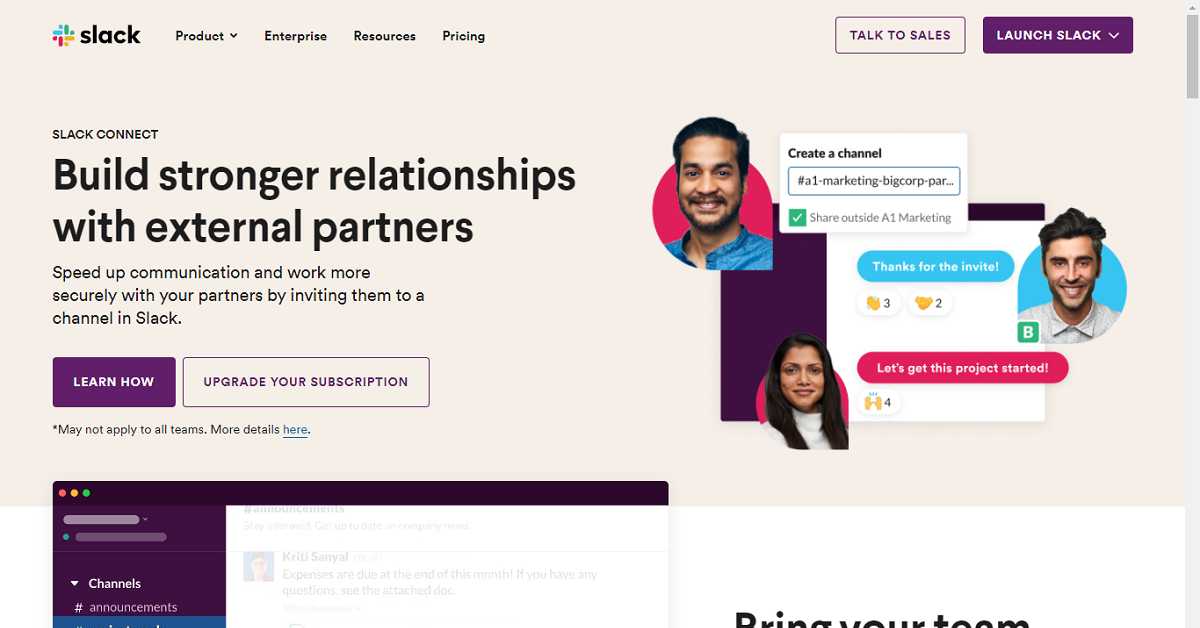
Slack is one of the most preferred team communication software for creating channels to keep the discussions focused. It has voice & video call features and provides deep integration with several online services to simplify your work and save time. The instant messaging is managed into channels that team members can freely join and leave ensuring that nobody receives unnecessary messages or notifications. Slack also allows the team members to chat outside of main topics in separate threads so that your informal messages don’t interfere with the project-centric conversations.
Slack
2) Google Drive
Google Drive enables you and your teammates to work on the same document in real-time. All the participants can observe changes being made and comments can be dropped for specific parts of the document. The free version of Google Drive provides 15GB of storage. However, if you require more cloud storage, you can upgrade your plan without paying to Google Drive for businesses. In Google Drive, you can work on Word documents, spreadsheets, and presentations for free. The best thing about working on Drive is that there is hardly any noticeable lag in real-time collaboration.
Google Drive
3) Zapier
Zapier is easy-to-use automation software that will save you significant amounts of time on monotonous tasks. Instead of continually shifting between different software to perform basic functions such as manually uploading files to Google Drive, you can build Zaps to automate these functions. Zapier transfers data between applications like Gmail and Google Drive so that email attachments are automatically uploaded ensuring remote access. Zappier gives you the flexibility to create custom automation if you are not able to find them in Zapier’s library.
Zapier
4) Microsoft OneNote
OneNote is one of the most versatile Windows applications that mimic real-world notebooks for your personal and work projects. Inside each notebook, you can manage your notes in colorful sections or group notes together in a stack. The Inking tool allows you to create handwritten and add tags, text, tables, and images. OneNote is the first choice for those who use Microsoft OneDrive for storage and Outlook for email. Moreover, you can record audio while taking notes.
Microsoft OneNote
5) Stayfocusd
StayFocusd is a website blocking application that cuts the time you spend on distracting websites to the number of minutes or hours you fix yourself. You just need to add the URLs of websites that you want to avoid during work hours and set the desired time you wish to spend on them. The Nuclear feature of this application helps you block access to all blacklisted websites for a specific period fixed by you. The application is simple to take your self-discipline toward a more productive life.
Stayfocusd
6) TeamViewer
TeamViewer is one of the most preferred remote access Windows software that helps you connect to another device such as a computer or smartphone and control it from anywhere. It allows you to share your desktop with your teammates to walk them through a presentation. You can also connect to your home PC from anywhere else. By using this software, you can run a program on another computer located somewhere else without leaving your desk. TeamViewer links remote access with online meeting and screen-sharing applications.
TeamViewer
7) Microsoft To Do
While working from home, you often are required to jot down the tasks you need to do. Microsoft To Do helps you keep all your tasks organised. For a simplified list view, the software incorporates features like custom lists, subtasks, and sharing. The software also offers intelligent suggestions on how to organise the tasks you accomplish every day. The My Day feature helps you see only the tasks that you need to accomplish on a particular day that automatically gets refreshed.
Microsoft To Do
8) Google Hangouts Meet
Google Hangouts Meet is a software that allows you to have free video conferencing and meetings. The application is quite robust and easy to use. You just need to share the link with the person with whom you want to connect. Google hangout is built on a secure infrastructure to safeguard your privacy. You can easily view all your scheduled meetings and join them with just a tap.
Google Hangouts Meet
9) Time Zone Converter and Clock
Time Zone Converter and Clock is a useful tool for those with teams distributed across different time zones. The software allows you to set up different cities to track time from. It comes with a dial by which you can switch across different time zones. You just need to turn it left or right to go back and forth in time and know exactly what time it is at a particular place. Twisting the dial moves the time across all the cities, so it’s an easy way to convert time across multiple time zones.
Time Zone Converter and Clock
10) Lucidchart
Lucidchart helps you create diagrams for business and educational use. It fully supports collaboration so that more than one person can work on a chart simultaneously. Lucidchart allows users to make an organizational chart from scratch, using templates, or upload employee data to auto-generate a diagram using the data import feature. You just need to select your data file type and verify the dataset to be imported. Lucidchart also offers employees view-only access to ensure they only get the information they need.
Lucidchart
For the latest gadget and tech news, and gadget reviews, follow us on Twitter, Facebook and Instagram. For newest tech & gadget videos subscribe to our YouTube Channel. You can also stay up to date with the Gadget Bridge Android App.
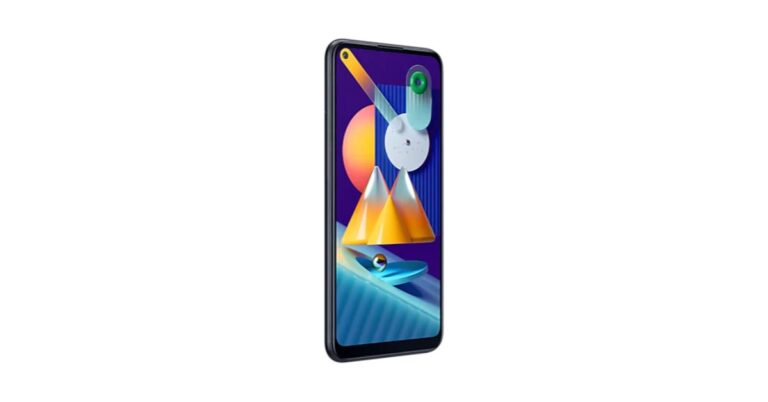
Last year Samsung launched Galaxy M11 in India priced under the affordable budget segment. The company has now cut the price of the device by Rs 1,000. This is the second time that Samsung has revised the price of the mobile phone. To recall it was launched in June last year alongside Galaxy M01. The phone runs One UI based on Android 10 and is supported by Dolby Atmos. In addition to this, there is a 6.4-inch HD+ Infinity-O Display and is powered by Qualcomm Snapdragon 450 SoC.Samsung Galaxy M11: new price and availabilityThe price revision of the Samsung Galaxy M11 came just after four months when it received its first price cut of Rs 1,000 in September last year, therefore, bringing it down to Rs 11,999. The device has received a price cut of Rs 1000 which will now retail at Rs 10,999 for the 4GB RAM with 64GB storage. The updated pricing is now available via both Samsung India online store as well as offline retail shops in the country. To recall Samsung Galaxy M11 was launched at Rs Rs 12,999 for the 4GB RAM with 64GB storage. However, it was also launched in a lower variant of 3GB RAM with a 32GB storage option at Rs 10,999. The device comes in Black, Metallic Blue, and Violet colour options.Samsung Galaxy M11: specificationsSamsung Galaxy M11 runs on One UI 2.0 on top of Android 10 and is powered by an octa-core Qualcomm Snapdragon 450 processor paired with up to 4GB RAM and up to 64GB of storage. The internal storage is expandable via a microSD card up to 512GB. The device comes with a 6.4-inch HD+ Infinity-O Display with 720×1560 pixels of resolution and 19.5:9 aspect ratio. For the photos and videos, the smartphone features a triple rear camera set up that includes a 13-megapixel primary sensor with f/1.8 aperture, a 5-megapixel ultra-wide-angle lens and a 2-megapixel depth sensor with f/2.4 aperture. On the front, it sports an 8-megapixel selfie camera with f/2.0 aperture.Galaxy M11 is backed by a 5,000mAh battery that supports 15W fast charging.
For the latest gadget and tech news, and gadget reviews, follow us on Twitter, Facebook and Instagram. For newest tech & gadget videos subscribe to our YouTube Channel. You can also stay up to date using the Gadget Bridge Android App.
The e-commerce website Flipkart is hosting Daily Trivia Quiz. Every day it brings a bunch of new questions for its users. By answering them correctly you can win exciting prizes. The questionnaire is based on questions related to general knowledge. Also, the users can win free vouchers and super coins, among other offers via the daily quiz. February 18 Flipkart Daily Trivia Quiz Answers has already gone live on its platform.
The participant should be at least 18 years old and should have a valid login ID. The Quiz is available on the mobile platform and not the web version. E-commerce conducts the quiz on daily basis and goes live at 12:00 AM IST and runs till 11:59 PM IST. The winners are announced within 15 days from the date of participation that can be viewed under the Gems/Rewards section in the app.
How to participate in the Flipkart Daily Trivia Quiz
To participate download the Flipkart app on your phone. Then open the Flipkart app then head to Game Zone. Now click on the Daily Trivia Banner or search for Daily Trivia. Enter the game and answer all 5 questions with correct answers.
February 18 Flipkart Daily Trivia Quiz Answers
Question 1: Which actor played the role of both the superheroes Deadpool and Green Lantern?
Answer: Ryan Reynolds
Question 2: The 2019 film Pet Sematary is based on a book written by
Answer: Stephen King
Question 3: Ajay Devgn’s father shared his name with which character in the film Sholay?
Answer: Veeru
Question 4: Before foraying in films, ____ was seen in the TV show ‘Kis Desh Mein Hai Meraa Dil’.
Answer: Sushant Singh Rajput
Question 5: In the 1992 film Shola Aur Shabnam, Govinda did not contribute as a
Answer: Producer
February 18 Amazon Quiz has gone live on its mobile platform. In the Quiz the participants have to answer 5 questions that are based on general knowledge and current affairs. After they have cleared the daily quiz their name will be shortlisted for a lucky draw to select a winner. The company announced the results of the lucky draw at the end of the month and today Quiz winner’s name will be announced at the end of the month.
The Amazon Quiz is hosted by the app users only, it is not available for desktop users. So, before you participate to make sure you have downloaded the Amazon App. The lucky users might win something by answering all the questions correctly. Check out today’s answers for the Amazon quiz to win Armani Valente Analog Black Dial Men’s Watch.
February 18 Amazon Quiz Answers
Question 1: Cornwall, chosen as the venue of the G7 summit 2021, is located in which country?
The answer is- UK
Question 2: Which of these is one of the costliest mushrooms in the world that grows in Jammu and Kashmir’s Doda district?
The answer is- Gucchi
Question 3: James Naismith, recently featured in a Google Doodle, was the inventor of which game?
The answer is- Basketball
Question 4: The mascot of which fast-food restaurant can we see in this picture?
The answer is- McDonald’s
Question 5: Who is being depicted on this US dollar bill?
The answer is- Benjamin Franklin
Gaming headphones are specifically designed for producing and capturing sounds that are critical while playing video games. They capture nuances of the in-game sounds giving you a heightened awareness of the gameplay. Almost all the gaming headphones are designed such that wearing them doesn’t turn stress over long hours of gameplay. Here is the list of the top 10 gaming headphones that offer an immersive experience.
1) JBL Quantum 300
JBL Quantum 300 is one of the most preferred gaming headphones. that comes with the Quantum surround sound powered by the JBL Quantum engine. The headphones are light in weight with soft memory cushioning making them comfortable to wear even for hours. JBL Quantum 300 comes with a flip-up voice focus directional boom mic that offers a crystal voice capture while communicating.
JBL Quantum 300
Price: ₹ 4,699
Buy on Amazon
2) Corsair HS50
Corsair HS50 balances quality as well as performance. It comes with precision-tuned 50mm neodymium speaker drivers that offer a wide range of superior sound quality with accuracy. The headphones are made of metal with a solid build quality that will provide long-term durability. The microphone installed in the device is unidirectional capturing minimum noise. The memory foams feel comfortable even for hours of gameplay.
Corsair HS50
Price: ₹ 4,799
Buy on Amazon
3) Logitech G430
The Logitech G430 comes with Dolby 7.1 surround sound that offers you an immersive 360-degree sound field. The lightweight design and soft sport cloth ear cups provide maximum comfort while playing games. The noise-canceling boom mic cuts the background noise for crystal clear voice pick up. You get on-cable sound controls for quick audio adjustments.
Logitech G430
Price: ₹ 4,999
Buy on Amazon
4) HyperX Cloud Stinger
HyperX Cloud Stinger is a lightweight and comfortable gaming headphone that comes with comfortable padding on the earcups. It offers adjustable sliders to place the headphones over your head and can rotate at an angle of 90 degrees. You get an integrated noise cancellation system having 50mm audio drivers for crystal clear audio. The headphones come with 2 years manufacturer warranty.
HyperX Cloud Stinger
Price: ₹ 4,690
Buy on Amazon
5) Logitech Prodigy G231
The Logitech Prodigy G231 is one of the nest gaming headphones with premium 40mm neodymium speaker drivers for an immersive gaming experience. It comes with removable soft and breathable sports performance cloth ear cups that are resistant to heat and sweat. The lightweight design feels comfortable even during long gaming sessions. The unidirectional microphone captures your voice alone and not the surrounding noise while gaming.
Logitech Prodigy G231
Price: ₹ 4,299
Buy on Amazon
6) Razer Electra V2
The Razer Electra V2 is a gaming headphone that focuses on a balanced, virtual surround sound for your gaming and music requirements. It comes in a slim and comfortable design. The headphones have an advanced virtual 7.1 surround sound software via Razer Synapse giving you a heightened aural awareness while playing games. You get an auto-adjusting headband that perfectly fits over your head and feels comfortable throughout the gaming sessions.
Razer Electra V2
Price: ₹ 4,580
Buy on Amazon
7) SteelSeries Siberia 100
This gaming headphone has a lightweight design with soft-leather padding and low-weight durable plastic. The enclosed earcup design cancels out the background noise and the padded adjustable headband offers comfort even during sustained gaming sessions. The onboard microphone delivers detailed and crystal clear audio. The SteelSeries Mic Auto-Optimization DSP technology automatically adjusts to the levels depending on your speech and background noise.
SteelSeries Siberia 100
Price: ₹4,349
Buy on Amazon
8) Asus Cerebrus
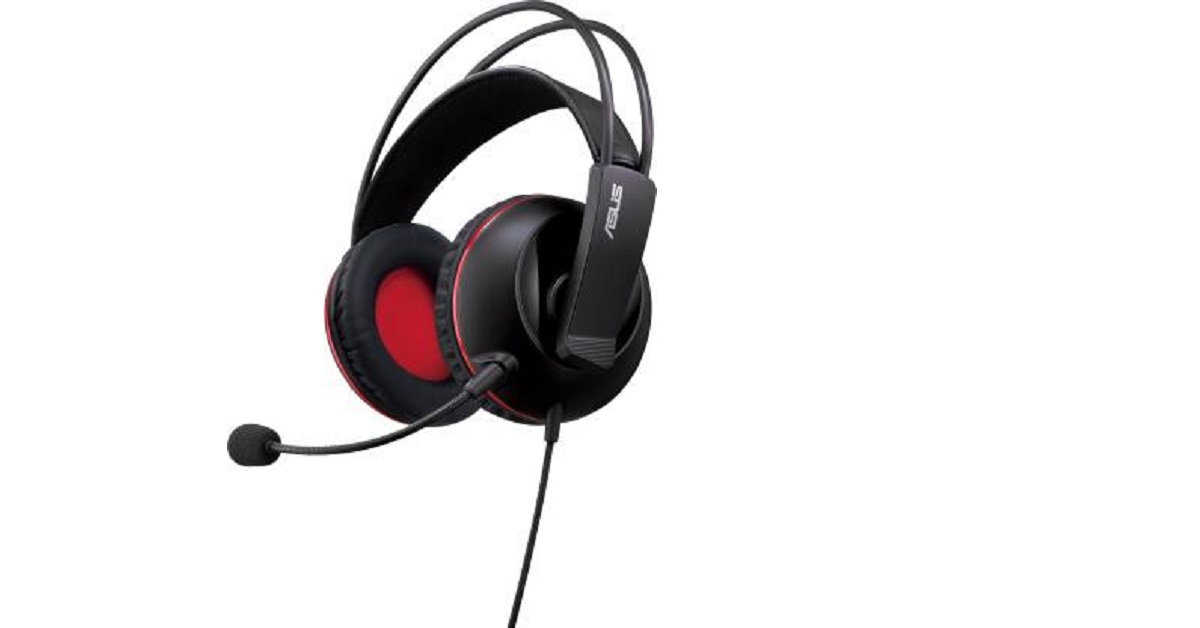
Asus Cerebrus is one of the best-sounding gaming headphones. It comes with has 100mm cushions and adjustable straps that give you a comfortable fit throughout marathon gaming sessions. The 60mm drivers deliver a wide range of crystal clear sounds. the headphone comes with a dual microphone setup. i.e. it has a detachable boom mic for gaming and an in-line microphone for other purposes.
Asus Cerebrus
Price: ₹2,799
Buy on Flipkart
9) SteelSeries Siberia 200
The SteelSeries Siberia 200 is a gaming headphone that combines comfort and quality. The headband uniformly distributes the weight of the headset over the entire band, unlike other headsets that put the stress on a single point. The 50mm drivers identify the sound nuances frequencies that are important for gaming performance. You get a retractable mic so you can simply retract them into the earcup while traveling.
SteelSeries Siberia 200Buy on Amazon
10) Zebronics Iron Head
This gaming headphone comes with a 7.1 USB sound card that is capable of delivering thrilling surround sound with independently adjustable levels. The 7.1 simulated sound channel speakers render a 40mm frequency response It has unique 4-pieces of the padded headband for providing you comfort even during extended gaming sessions. Reinforced headband, which offers nine levels of height adjustment for the perfect fit. The headphone has a retractable mic to keep it safe while traveling.
Zebronics Iron Head
Price: ₹ 2,486
Buy on Amazon
For the latest gadget and tech news, and gadget reviews, follow us on Twitter, Facebook and Instagram. For newest tech & gadget videos subscribe to our YouTube Channel. You can also stay up to date with the Gadget Bridge Android App.
Choosing the right password manager for your Android Smartphone is not an easy task. There are thousands of applications on the internet that claim to provide a highly secure place to keep and manage your passwords. But it is also true that a significant number of such apps have been found to be nothing but phishing apps. Some of them even found to be a source to ransomware, thereby, defeating the very purpose of a password manager. However, after thorough research, we’ve found the most trusted password managing apps to keep your credentials secure. These are as follows.
1) Dashlane
Dashlane is a password manager app for Android that preserves logins with 256-bit AES encryption and offers an accessible user interface. The features provided by Dashlane’s app are as follows:
Secure VPN: Dashlane provides a virtual private network (VPN) administering the internet usage entirely private.
Dark web monitoring: The app observes the dark web for unauthorised logins and informs you to change your password if any unscrupulous activity is found.
Two-factor authentication (2FA): Your identity remains secure with a one-time password, USB key, or a biometric fingerprint scan.
The free version of Dashlane will be sufficient for you if you want to store only 50 passwords. For feeding more passwords, you can upgrade your account to premium with 30-days money-back guarantee. Dashlane comes with a one-click password changer that allows you to replace vulnerable passwords with strong ones.
Dashlane
2) 1Password
1Password provides a friendly user interface and a variety of features to manage your passwords that are as follows.
Dark web monitoring: This feature scans the dark web for any suspected breach of data. It also lets you know about weak passwords.
Two-factor authentication (2FA): The app comes with a built-in authentication that adds another layer of security by syncing with one-time password apps.
Travel mode: The Travel mode allows you to delete some logins to protect sensitive data while you’re venturing out.
1Password is the most suitable password manager for families as it offers an intuitive feature for sharing passwords, notes, and sensitive information among users.
1Password
3) RoboForm
RoboForm comes with templates for securing data from passports, credit cards, etc., and provides an auto-fill capability for a quick submission of forms. The major features of the app are as follows.
RoboForm also comes with good security features like:
Two-factor authentication (2FA): RoboForm provides double security by syncing with two-factor authentication apps like Google Authenticator.
Password security auditing:The app regularly checks for vulnerable and reused passwords and automatically informs you to update them.
Encrypted bookmarks storage: RoboForm can sync and save bookmarks on all your devices for quick access to the desired websites.
The free version of RoboForm provides comes with infinite password storage with the auto-filling feature. However, if you want to add multi-device sync, 2FA, and cloud backup, you may go for the premium version named RoboForm Everywhere Family.
RoboForm
For the latest gadget and tech news, and gadget reviews, follow us on Twitter, Facebook and Instagram. For newest tech & gadget videos subscribe to our YouTube Channel. You can also stay up to date with the Gadget Bridge Android App.
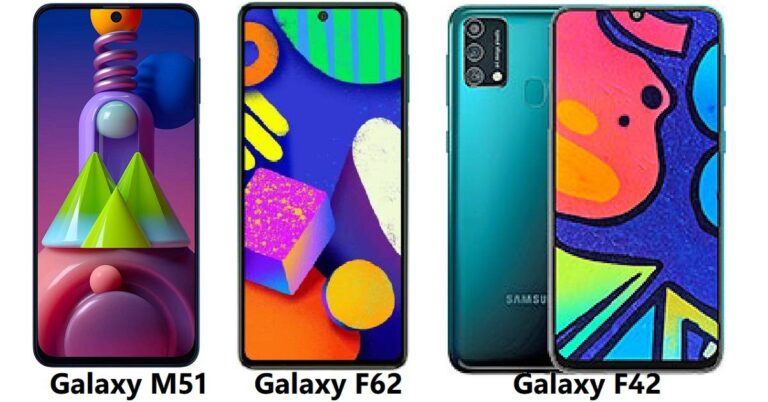
The new Samsung Galaxy F62 has hit the market while the Samsung Galaxy F42 will arrive soon. Both the smartphones are expected to give much competition to the Samsung Galaxy M51 that was released last year. Let’s check how far the three smartphones stand against each other.
Samsung Galaxy F62
Out of the two F62 seems like a good option for the people who want good premium looks, with great performance. The price is mid-segment, but the performance is at par with the top-end smartphones. You can go for it without a doubt. Samsung Galaxy F42 is about to launch in the coming weeks and what we know of it right now, F62 will be better than it. The price will also be lower than the F62, so if your budget does not allow you to pick the F62, then you can wait and think of buying the Samsung Galaxy F42.
For the latest gadget and tech news, and gadget reviews, follow us on Twitter, Facebook and Instagram. For newest tech & gadget videos subscribe to our YouTube Channel. You can also stay up to date with the Gadget Bridge Android App.
OnePlus co-founder Carl Pei is calling out people to invest in its new startup Nothing Technologies. However, until now the company’s head has been tight-lipped on what are its plans to achieve recognition in the tech industry. Earlier it was reported that the company plans at launching TWS earbuds this year but now Carl Pei has invited users to invest in the company.Carl Pei took to Twitter to invite users to own a piece of the company Nothing Technologies by investing and becoming a shareholder. About $1.5 million worth of shares will be available to the community. These shares will be offered on a first-come, first-serve basis.For the unknown Nothing is a tech company which is based in London founded by the OnePlus co-founder Carl Pei and the new company plans to make its mark in the technology market with the launch of true wireless stereo (TWS) earbuds this year. Nothing has also acquired the smartphone brand Essential. How to invest in Nothing and become a part of the company?For early access to the investment opportunity for Nothing, one needs to get themself registered by submitting their email. Then head to Crowdcube and sign up. This is where the investment will take place once it goes live. Those who are unaware Crowdcube is a platform that enables businesses to attract investment from professionals and venture capital firms, as well as from everyday investors. Once it goes live make sure to keep your credit or debit card ready and wait until you receive an email. The interested investor will get a notification a few minutes before go time. You will officially be a Nothing shareholder once the round has closed and the cooling-off period (normally 7 days) is over.The private page for investing will go live on Crowdcube in early March. While exclusive access will be given to those who pre-registered and the company will open up for investment from all other parties publicly later in March. You can own a piece of the future starting with EUR 50, with an upper limit of EUR 20k. However, there is no fees for becoming a member of Crowdcube’s investor community. While making an investment a fee of 1.5% of the amount invested is applied to each investment. The company says, “More than just holding equity, investing in Nothing is investing in a vision for a different technological future. You will be an integral part of our community, helping to bring back artistry, optimism, and trust to consumer technology. As part of our community, you will have access to our private forum and some exclusive benefits, and one of the investors will be elected as our Community Board Member who will ensure the community is always heard and never left behind. We’ll be sharing more details on the rewards available once the funding platform opens. Stay tuned!”Once you have invested in the Nothing technologies you will not only get an opportunity to meet like-minded people but help guide product development by working closely with the Nothing team also you will get the chance to represent the community at board meetings as Community Board Member. In addition to this Nothing will also offer investors a range of exclusive rewards alongside the equity they receive for their investment. The company will share more details of the rewards available once the funding platform opens.
For the latest gadget and tech news, and gadget reviews, follow us on Twitter, Facebook and Instagram. For newest tech & gadget videos subscribe to our YouTube Channel. You can also stay up to date using the Gadget Bridge Android App.
The microblogging website Twitter has rolled out its experimental feature to allow users to record and send voice messages through direct messages. The new voice messaging feature on Twitter is now being tested in India. As per the social media platform this feature will be released to India, Brazil, and Japan starting today in a phased manner. The Voice DMs or audio tweets by Twitter came into light last year in June when the company began testing it for iOS users.The audio tweets will give Twitter a more human touch, therefore, allowing users to record their voice clippings to publish as tweets. This functionality works similar to text tweets and the Voice DMs has a set limit of 140 seconds of audio.During the trial last year the feature was only available for iOS users but in India, this will be rolled out for both Android and iOS users in India, Brazil, and Japan starting Wednesday, February 17. Besides iOS and Android, the web users will only be able to get access to see voice tweets in their feed and be able to listen to them.Manish Maheshwari, Managing Director, Twitter India said, “India is a priority market for Twitter and that is why we’re constantly testing new features and learning from people’s experience on the service here. We’re excited to bring the voice messages in DMs experiment to the country and give people a new way to express themselves and help them connect through the nuances, emotion, and empathy built by hearing someone’s voice,”How to tweet Voice DMs on Twitter?
Once recording begins, tap again to stop recording
Before you send, one can also listen to what message they have recorded.
Also, you can press-and-hold the voice recording icon to start recording again
After you’re done swipe up and release the icon sending it across.
The Voice Tweet will appear on your follower’s timelines alongside other tweets. One can tap the image to listen to the tweet.Alex Ackerman-Greenberg, Product Manager for direct messages, Twitter said, this feature will give people more options to express themselves in conversations on Twitter, both publicly and privately. “We hope letting people record and send voice messages as DMs will enhance their conversational experience by adding convenience and expression.”
For the latest gadget and tech news, and gadget reviews, follow us on Twitter, Facebook and Instagram. For newest tech & gadget videos subscribe to our YouTube Channel. You can also stay up to date using the Gadget Bridge Android App.


 Soon teachers as well as students on the web, iOS and Android will be able to customize Classroom assignments and posts using bold, italics, underline and bullets. While the original reports for instructors to detect potential plagiarism will soon be available in 15 languages including English, Spanish, Portuguese, Norwegian, Swedish, French, Italian, Indonesian, Japanese, Finnish, German, Korean and Danish, Malay and Hindi.
Google G Suite for Education has also been rebranded to Google Workspace for Education to offer more choices and control. This will include Classroom, Meet, Gmail, Calendar, Drive, Docs, Sheets, Slides and many more. And to meet the diverse needs of institutions around the globe, from Pre-K to Ph.D., it will now be available in four distinct editions instead of just two.
The free edition of G Suite for Education that has been rebranded to Google Workspace for Education Fundamentals will not receive any changes besides a new name and new features.
While the standard edition will provide institutions with enhanced security through the Security Center, greater visibility with tools such as advanced audit logs and more controls like advanced mobile management to make online learning even more secure.
The teaching and learning upgrade will provide video communication capabilities in Google Meet, features to enrich class experiences in Classroom and tools that guide critical thinking and academic integrity with originality reports to enhance educators’ instructional impact.
Google Workspace for Education Plus that was formerly known as G Suite Enterprise for Education will be delivering comprehensive solutions with advanced security and analytics, teaching and learning capabilities and more. According to the company Education, Fundamentals and Education Plus are already available and institutions will be able to purchase Education Standard and the Teaching and Learning Upgrade starting April 14, 2021. Whereas institutions who have already purchased G Suite for Enterprise for Education will start to see the new edition name, Education Plus, in their admin console and will automatically get all the features of Education Plus.
For Google Meet soon educators will get more visibility and control, including the ability to set policies for who can join their school’s video calls. Emoji reactions in Meet are coming this year, giving students lightweight, non-disruptive ways to engage.
This year Google Chrome OS will be getting over 40 new Chromebook models built for education, with information on how to choose the right ones for each schools’ unique needs, and over 500 Admin Console policies that will help manage and optimize Chromebook fleets. New accessibility features, like color cursors on Chromebooks and Switch access, let students learn with tools that suit their needs.
For the latest gadget and tech news, and gadget reviews, follow us on Twitter, Facebook and Instagram. For newest tech & gadget videos subscribe to our YouTube Channel. You can also stay up to date using the Gadget Bridge Android App.
Soon teachers as well as students on the web, iOS and Android will be able to customize Classroom assignments and posts using bold, italics, underline and bullets. While the original reports for instructors to detect potential plagiarism will soon be available in 15 languages including English, Spanish, Portuguese, Norwegian, Swedish, French, Italian, Indonesian, Japanese, Finnish, German, Korean and Danish, Malay and Hindi.
Google G Suite for Education has also been rebranded to Google Workspace for Education to offer more choices and control. This will include Classroom, Meet, Gmail, Calendar, Drive, Docs, Sheets, Slides and many more. And to meet the diverse needs of institutions around the globe, from Pre-K to Ph.D., it will now be available in four distinct editions instead of just two.
The free edition of G Suite for Education that has been rebranded to Google Workspace for Education Fundamentals will not receive any changes besides a new name and new features.
While the standard edition will provide institutions with enhanced security through the Security Center, greater visibility with tools such as advanced audit logs and more controls like advanced mobile management to make online learning even more secure.
The teaching and learning upgrade will provide video communication capabilities in Google Meet, features to enrich class experiences in Classroom and tools that guide critical thinking and academic integrity with originality reports to enhance educators’ instructional impact.
Google Workspace for Education Plus that was formerly known as G Suite Enterprise for Education will be delivering comprehensive solutions with advanced security and analytics, teaching and learning capabilities and more. According to the company Education, Fundamentals and Education Plus are already available and institutions will be able to purchase Education Standard and the Teaching and Learning Upgrade starting April 14, 2021. Whereas institutions who have already purchased G Suite for Enterprise for Education will start to see the new edition name, Education Plus, in their admin console and will automatically get all the features of Education Plus.
For Google Meet soon educators will get more visibility and control, including the ability to set policies for who can join their school’s video calls. Emoji reactions in Meet are coming this year, giving students lightweight, non-disruptive ways to engage.
This year Google Chrome OS will be getting over 40 new Chromebook models built for education, with information on how to choose the right ones for each schools’ unique needs, and over 500 Admin Console policies that will help manage and optimize Chromebook fleets. New accessibility features, like color cursors on Chromebooks and Switch access, let students learn with tools that suit their needs.
For the latest gadget and tech news, and gadget reviews, follow us on Twitter, Facebook and Instagram. For newest tech & gadget videos subscribe to our YouTube Channel. You can also stay up to date using the Gadget Bridge Android App. 
 Soon teachers as well as students on the web, iOS and Android will be able to customize Classroom assignments and posts using bold, italics, underline and bullets. While the original reports for instructors to detect potential plagiarism will soon be available in 15 languages including English, Spanish, Portuguese, Norwegian, Swedish, French, Italian, Indonesian, Japanese, Finnish, German, Korean and Danish, Malay and Hindi.
Google G Suite for Education has also been rebranded to Google Workspace for Education to offer more choices and control. This will include Classroom, Meet, Gmail, Calendar, Drive, Docs, Sheets, Slides and many more. And to meet the diverse needs of institutions around the globe, from Pre-K to Ph.D., it will now be available in four distinct editions instead of just two.
The free edition of G Suite for Education that has been rebranded to Google Workspace for Education Fundamentals will not receive any changes besides a new name and new features.
While the standard edition will provide institutions with enhanced security through the Security Center, greater visibility with tools such as advanced audit logs and more controls like advanced mobile management to make online learning even more secure.
The teaching and learning upgrade will provide video communication capabilities in Google Meet, features to enrich class experiences in Classroom and tools that guide critical thinking and academic integrity with originality reports to enhance educators’ instructional impact.
Google Workspace for Education Plus that was formerly known as G Suite Enterprise for Education will be delivering comprehensive solutions with advanced security and analytics, teaching and learning capabilities and more. According to the company Education, Fundamentals and Education Plus are already available and institutions will be able to purchase Education Standard and the Teaching and Learning Upgrade starting April 14, 2021. Whereas institutions who have already purchased G Suite for Enterprise for Education will start to see the new edition name, Education Plus, in their admin console and will automatically get all the features of Education Plus.
For Google Meet soon educators will get more visibility and control, including the ability to set policies for who can join their school’s video calls. Emoji reactions in Meet are coming this year, giving students lightweight, non-disruptive ways to engage.
This year Google Chrome OS will be getting over 40 new Chromebook models built for education, with information on how to choose the right ones for each schools’ unique needs, and over 500 Admin Console policies that will help manage and optimize Chromebook fleets. New accessibility features, like color cursors on Chromebooks and Switch access, let students learn with tools that suit their needs.
For the latest gadget and tech news, and gadget reviews, follow us on Twitter, Facebook and Instagram. For newest tech & gadget videos subscribe to our YouTube Channel. You can also stay up to date using the Gadget Bridge Android App.
Soon teachers as well as students on the web, iOS and Android will be able to customize Classroom assignments and posts using bold, italics, underline and bullets. While the original reports for instructors to detect potential plagiarism will soon be available in 15 languages including English, Spanish, Portuguese, Norwegian, Swedish, French, Italian, Indonesian, Japanese, Finnish, German, Korean and Danish, Malay and Hindi.
Google G Suite for Education has also been rebranded to Google Workspace for Education to offer more choices and control. This will include Classroom, Meet, Gmail, Calendar, Drive, Docs, Sheets, Slides and many more. And to meet the diverse needs of institutions around the globe, from Pre-K to Ph.D., it will now be available in four distinct editions instead of just two.
The free edition of G Suite for Education that has been rebranded to Google Workspace for Education Fundamentals will not receive any changes besides a new name and new features.
While the standard edition will provide institutions with enhanced security through the Security Center, greater visibility with tools such as advanced audit logs and more controls like advanced mobile management to make online learning even more secure.
The teaching and learning upgrade will provide video communication capabilities in Google Meet, features to enrich class experiences in Classroom and tools that guide critical thinking and academic integrity with originality reports to enhance educators’ instructional impact.
Google Workspace for Education Plus that was formerly known as G Suite Enterprise for Education will be delivering comprehensive solutions with advanced security and analytics, teaching and learning capabilities and more. According to the company Education, Fundamentals and Education Plus are already available and institutions will be able to purchase Education Standard and the Teaching and Learning Upgrade starting April 14, 2021. Whereas institutions who have already purchased G Suite for Enterprise for Education will start to see the new edition name, Education Plus, in their admin console and will automatically get all the features of Education Plus.
For Google Meet soon educators will get more visibility and control, including the ability to set policies for who can join their school’s video calls. Emoji reactions in Meet are coming this year, giving students lightweight, non-disruptive ways to engage.
This year Google Chrome OS will be getting over 40 new Chromebook models built for education, with information on how to choose the right ones for each schools’ unique needs, and over 500 Admin Console policies that will help manage and optimize Chromebook fleets. New accessibility features, like color cursors on Chromebooks and Switch access, let students learn with tools that suit their needs.
For the latest gadget and tech news, and gadget reviews, follow us on Twitter, Facebook and Instagram. For newest tech & gadget videos subscribe to our YouTube Channel. You can also stay up to date using the Gadget Bridge Android App.