The microblogging website Twitter has rolled out its experimental feature to allow users to record and send voice messages through direct messages. The new voice messaging feature on Twitter is now being tested in India. As per the social media platform this feature will be released to India, Brazil, and Japan starting today in a phased manner. The Voice DMs or audio tweets by Twitter came into light last year in June when the company began testing it for iOS users.The audio tweets will give Twitter a more human touch, therefore, allowing users to record their voice clippings to publish as tweets. This functionality works similar to text tweets and the Voice DMs has a set limit of 140 seconds of audio.During the trial last year the feature was only available for iOS users but in India, this will be rolled out for both Android and iOS users in India, Brazil, and Japan starting Wednesday, February 17. Besides iOS and Android, the web users will only be able to get access to see voice tweets in their feed and be able to listen to them.Manish Maheshwari, Managing Director, Twitter India said, “India is a priority market for Twitter and that is why we’re constantly testing new features and learning from people’s experience on the service here. We’re excited to bring the voice messages in DMs experiment to the country and give people a new way to express themselves and help them connect through the nuances, emotion, and empathy built by hearing someone’s voice,”How to tweet Voice DMs on Twitter?
Once recording begins, tap again to stop recording
Before you send, one can also listen to what message they have recorded.
Also, you can press-and-hold the voice recording icon to start recording again
After you’re done swipe up and release the icon sending it across.
The Voice Tweet will appear on your follower’s timelines alongside other tweets. One can tap the image to listen to the tweet.Alex Ackerman-Greenberg, Product Manager for direct messages, Twitter said, this feature will give people more options to express themselves in conversations on Twitter, both publicly and privately. “We hope letting people record and send voice messages as DMs will enhance their conversational experience by adding convenience and expression.”
For the latest gadget and tech news, and gadget reviews, follow us on Twitter, Facebook and Instagram. For newest tech & gadget videos subscribe to our YouTube Channel. You can also stay up to date using the Gadget Bridge Android App.
LG is one of the premium audio and video products producer around the world. They have some great devices and recently they brought there new XBOOM portable range to India. We got our hands on the LG XBOOM Go PL7 Bluetooth speaker to know what is so great about it. We spent quite some time with it and understood it in and out. Check out our review of the LG XBOOM Go PL7 Bluetooth speaker, if it is worth the buy?
Design
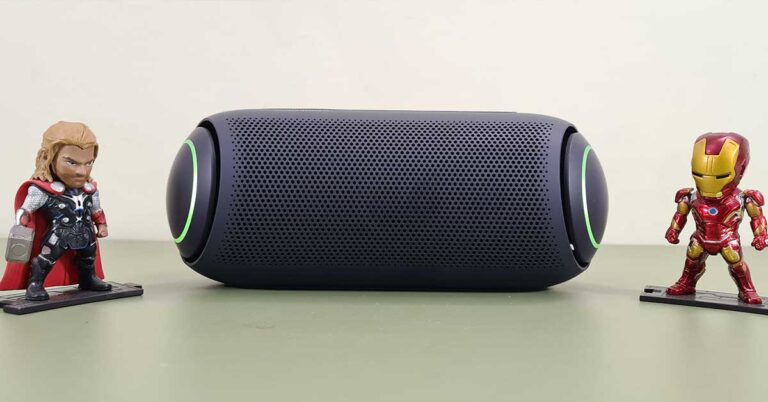
Out of the box, the LG XBOOM Go PL7 Bluetooth speaker screams for attention. Dressed in the darkest shade of blue, the speaker is in the form of a large capsule with curved sides. Which also have the LED covers in the form of a curved disc. Somewhat similar to Captain America’s shield. These vibrate with the sound and add to the show. The speaker is made of rubberised material (that runs all over the exterior) which protects it from dust and water splashes. Yes, this speaker is water-resistant and has an IPX5 rating.
The top of the speaker has Power, play/pause, Bluetooth, sound boost and volume keys. At the back users will find a pop-able enclosure, which has the Type-C charging port, Aux-in, USB playback port and also buttons to dim the LED light and also a multi-connect button to pair it with other LG PL7 devices. The LG XBOOM logo can be seen carved at the back with the Meridian logo on the front under the buttons. A mesh runs across the face of the LG XBOOM Go PL7 Bluetooth speaker which adds to the show. Under the speaker, you will find special rubber feet, which keep the speaker stable on any surface.
The device is heavy compared to the competition, but since it has a much larger battery and larger audio drivers, we did not mind the weight. Nevertheless, the LG XBOOM Go PL7 Bluetooth speaker is still very portable and can be lugged around with ease.
LG XBOOM Go PL7 Bluetooth speaker Performance
Coming to the part which we loved the most about the LG XBOOM Go PL7 Bluetooth speaker, its audio quality. We loved every beat this nifty speaker threw at us. The sound is exceptional thanks to engineering by Meridian, but more importantly because of the 2 audio drivers and with 2 sub-woofers inside by LG. The bass is exceptional and with sound boost on it become remarkable. We were amazed at how good it sounds.
The total sound output is 30W RMS, which is great for large rooms and outdoors. We did multiple tests with it. We used the AUX-in and connected it with our TV, the sound was superb and much better than the 20W RMS speakers out TV has. We never knew the daily TV soaps also have a great sound to showcase. Same was the case when we connected via Bluetooth to our smartphone and then the laptop. The movie and gaming experience was superb. Netflix, Prime Video and Amazon music all sounded much better with these speakers. We were trying to find a hole in the armour, but frankly, the LG XBOOM Go PL7 Bluetooth speaker does not have one.
The battery lasts for very long too, a massive 3,900 mAh battery comes in the LG XBOOM Go PL7 Bluetooth speaker and it lasted over 23 hours for us. The charge time is a bit high at 5 hours plus with a 15W USB Type C charger, we used from a Samsung smartphone (since there is no charger in the box of this speaker). In most cases, we had the charger connected so it was not much of a problem for us. In case you will use it outside or without the charger, a full day battery playback is very good, by far the longest we have come across when it comes to BT speakers. You can also use the speaker as a speakerphone for your smartphone. Remember it does not have a MIC, so you need to keep the smartphone close to you for the voice to be audible.
Also, you can download the LG XBOOM app to unlock additional features of the device like lighting effect and equaliser. We generally did not need it as the default mode is great for any type of listening. The highs are great, so are the mids and lows. The sound did not crack at full volume and at 30W RMS, the LG XBOOM Go PL7 Bluetooth speaker are pretty darn loud. Overall, we loved the sound!
Verdict
At Rs 12,999 the LG XBOOM Go PL7 Bluetooth speaker is going up against JBL and Sony. Can it give the competition a run for its money? Hell yes! These are great party speakers to own. These can double up as a soundbar for your television too. Moreover, they are portable and water-resistant so people can use them on the fly. All in all, Meridian engineering and LG audio driver is a very good combo to own.
Pros:
Exceptional sound
Long battery life
Looks great
Cons
Weight could have been less
For the latest gadget and tech news, and gadget reviews, follow us on Twitter, Facebook and Instagram. For newest tech & gadget videos subscribe to our YouTube Channel. You can also stay up to date using the Gadget Bridge Android App.
The Chinese smartphone company Motorola has introduced two new smartphones in the European markets. Moto G30 and Moto G10 are the company’s latest addition to the company’s budget segment. Rumours and leaks suggesting its specification and features were doing the rounds on the web even before the launch. The key highlights of the smartphones include quad rear cameras and a 5,000mAH battery. Both the devices come with thick bezels and an IP52 rating for water resistance. Read on to know more about their specs and pricing.Moto G30, Moto G10: Price and availabilityMoto G30, Moto G10 are Morotola’s latest budget-friendly offerings in the European market. Both come in a single configuration priced at EUR 179.99 that translates to Rs 15,900 and EUR 149.99 that comes around Rs 13,300 respectively. G30 is offered in two colour options of Pastel Sky and Phantom Black while G10 comes in Aurora Grey and Iridescent Pearl colour options. Moto G30: SpecificationsMoto G30 features a 6.5-inch HD+ IPS display with 720×1,600 pixels of resolution offering a 90Hz refresh rate panel. This device runs Android 11 out of the box. Under the hood, there is Qualcomm Snapdragon 662 SoC paired with 6GB of RAM and 128GB of storage which is expandable via microSD card. Moto G30For optics, there is a quad rear camera setup that includes a 64-megapixel primary sensor with f/1.7 aperture. Furthermore, there is a secondary 8-megapixel ultra-wide-angle sensor, a 2-megapixel macro lens and a 2-megapixel depth sensor. For taking selfies and video calling the phone sports a 13-megapixel front-facing camera.Moto G30 packs a 5,000mAh battery with 20W fast charging support. It comes with a plastic body with a water-resistant design and IP52 rating. In addition to this, there is a fingerprint scanner on the back. For connectivity, there is 4G, Wi-Fi, Bluetooth 5.0, NFC, GPS, 3.5mm headphone jack, and a USB Type-C port. Moto G10: SpecificationsMoto G10 is powered by Snapdragon 460 SoC paired with GB of RAM and up to 128GB of storage that can be expanded using a microSD card. The device runs Android 11 and also features a 6.5-inch HD+ display having a refresh rate of 60Hz.In terms of cameras, there is a quad rear camera setup that includes a 48-megapixel primary sensor with f/1.7 aperture, a secondary 8-megapixel ultra-wide-angle sensor and two 2-megapixel macro and depth sensors. While on the front there is an 8-megapixel sensor for taking selfies.The phone comes with a 5,000mAh battery with 10W charging support. The device has a ripple pattern on its back and is IP52 rated for water-resistant.
For the latest gadget and tech news, and gadget reviews, follow us on Twitter, Facebook and Instagram. For newest tech & gadget videos subscribe to our YouTube Channel. You can also stay up to date using the Gadget Bridge Android App.
Microsoft frequently releases Windows 10 updates to keep it compatible with the new hardware and devices along with the required drivers. When you force the update on your PC, you may run into some errors including Blue Screen of Deaths during or after the installation.
A blue screen of death (BSOD) error indicates that Windows 10 has detected a system error that can damage/currupt the operating system and must shut down immediately. As a result, you are greeted with a blue screen with a sad emoji and a message that reads, “Your PC ran into a problem and needs to restart. We’re just collecting some error info, and then we’ll restart for you.” Here are the probable reasons for the BSOD to occur and their solutions.
1) Insufficient space in system disk
Windows 10 requires 2 to 10 Gb of free space in your system disk for proper functioning. Installing a new driver or software generates several new permanent and temporary files that may cause the memory overflow forcing the Windows to enter into the INVALID_DATA_ACCESS_TRAP. This may also occur when the Windows is starting or shutting down simultaneously.
Insufficient space in system diskSolution: Deleting the temporary files or having software like CCleaner to keep the registry entries cleans and avoid the Error 0x00000004. You can delete the temp files by typing Run in Windows>type Temp in the box>press enter>delete all files from the temp folder.
2) Faulty device drivers
Outdated drivers can also turn out to be the reason behind the error. If the system drivers are not compatible anymore, you need to update them.
Solution: To update the system drivers, follow these steps:
Click on the ‘Windows’ icon
Search for ‘Device Manager’ and hit the enter key
Select the driver that needs to be updated
Right-click and choose the ‘update driver’ option
You should run Windows update every now and then too, so that latest drivers are installed automatically on your Windows 10 machine.
3) BIOS misconfiguration
When an incompatible version of BIOS is installed or the firmware gets currupt, the BIOS gets overclocked or misconfigured leading to random issues including BSODs. Sometimes, an outdated BIOS can also result in a Blue Screen of Death.
Solution: Configure the optimum boot order in the Unified Extensible Firmware Interface (UEFI) or Basic Input/Output System (BIOS) firmware. Reset the clock speed, voltage settings, and BIOS memory options to their default settings. Check for BIOS update on the company website and update it as well.
4) Hard disk corruption
The Error 0x4 can also be caused by a broken hard disk or RAM corruption. The hard drive is an electro-mechanical device consisting of numerous memory indices. When a part of memory gets damaged. This occurs because the memory index the CPU wants to access is damaged, the CPU is not able to access the memory index forcing Windows to enter into the INVALID_DATA_ACCESS_TRAP.
Solution: You can verify the hardware corruption by any interface tool or by using the command chkdsk / f. Cleaning the RAM after removing it from the slot and reinstalling it also sometimes solves the problem.
5) Unidentified bug of Windows 10
Some viruses can also cause a Blue Screen of Death, especially those that spoil the master boot record (MBR). Whenever there is a possible threat to the NTFS file system from malware, the automatic mechanism of NTFS_FILE_SYSTEM (Error Code 0x00000024) shutdowns your computer to prevent further damage.
Unidentified bug of Windows 10Solution: Your anti-virus software should be up to date and should be able to scan the MBR and boot sector. Use trusted anti-virus software like Norton, BitDefender, Kaspersky, and McAfee to remove any infection on your computer.
6) Outdated Windows operating system
The chances of facing the blue screen error increase if you have pending updates in your Windows operating system.
Solution: To update the Windows operating system, follow these steps.
Click on the Windows icon
Go to the Settings
Select the Update & Security section
Click on Windows update>check for updates
7) Incorrect entries in the system’s registry
A Blue Screen with the error message REGISTRY_ERROR means that the registry found an Input-Output error while reading its files. The reasons may be hardware-software incompatibility or file system corruption.
Solution: Keeping the Windows operating system safe from almost all registry errors. You can also choose to troubleshoot the BSOD registry error in the Windows 10 settings. You can try to system restore and go to the last working point, in 9 out of 10 times this method works.
For the latest gadget and tech news, and gadget reviews, follow us on Twitter, Facebook and Instagram. For newest tech & gadget videos subscribe to our YouTube Channel. You can also stay up to date with the Gadget Bridge Android App.
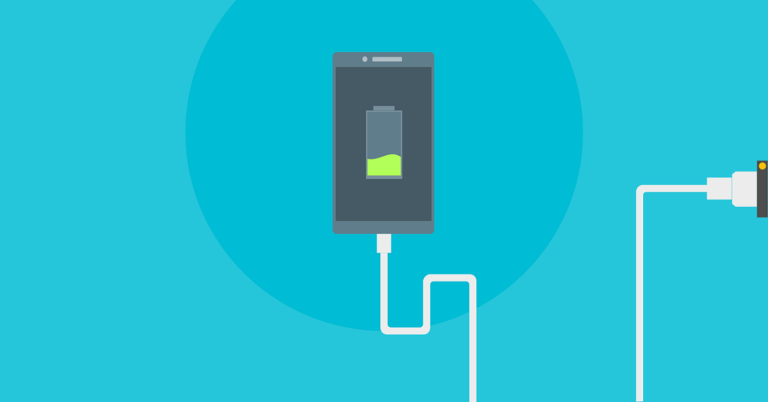
Smartphones are one of the most important gadgets that we use in our daily lives. We conduct several tasks on our smartphones. It is evident that your smartphone functions throughout the day. But, since it’s just a gadget, thus needs to be charged regularly. The speed of charging varies across different devices. However, if you can’t afford to wait for too long, the following tips shall boost the charging rate of your smartphone no matter which Android smartphone you use.
1) Toggle Airplane Mode
Your smartphone constantly uses services in the background like communication, radio, Bluetooth, and Wi-Fi. These features require significant power that could be utilised otherwise in shortening the charge time of the smartphone. You can enable airplane mode by using the quick access Airplane Mode button in the swipe window. Then charge the phone, you will see that the phone charges much faster.
Toggle Airplane Mode
2) Opt for Wall Charging
You should always use the charger and cord that came packed with your smartphone as they are optimised specifically for your smartphone. Moreover, charging via USB through any other device like a laptop would be slower. This is because the USB port of the laptop cannot deliver power equivalent to an adapter. Make sure you use the supplied power adaptor for best fast charge.
Opt for Wall Charging
3) Turn off mobile data while charging
The mobile data consumes significant battery power for different processes like updating apps, fetching social chats and media files, and creating backups. Thus, even if you opt not to use your smartphone while it’s charging, you should turn off the mobile data to allow it to cool and charge faster.
Turn off mobile data while charging
4) Ensure Charge Mode is Enabled
When you plug in your smartphone to an adapter, it lets you know the kind of connection it establishes. You may not always see that in your notification panel. This information exists in the developer options. To access this, you have to go to Settings> Developing Options> Select USB Configuration. In the list of choices that you see, choose the ‘Charging’ option.
Ensure Charge Mode is Enabled
5) Remove the Phone’s Case
A majority of smartphones run on lithium-ion batteries. These kinds of batteries naturally charge optimally when the temperature of the device moderate. If the temperature is extreme, not only the charging gets affected but also the battery life. The optimal charging temperature lies between 41 and 113F. Thus, removing the smartphone case will help lower the temperature-induced by charging.
Remove the Phone’s Case
Here is a bonus tip:
If you want the smartphone to charge as blitzkrieg pace, you can turn off the device and charge it with the wall charger. It will charge the device in no time. Up to 40% boost in charge time can be seen. If you can afford to turn off the device for some time and let it charge, then this will be the fastest way to charge the device.
For the latest gadget and tech news, and gadget reviews, follow us on Twitter, Facebook and Instagram. For newest tech & gadget videos subscribe to our YouTube Channel. You can also stay up to date with the Gadget Bridge Android App.
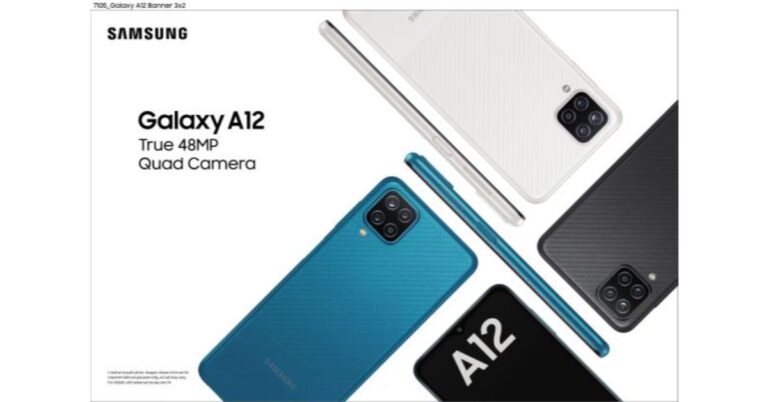
The South Korean company Samsung has officially launched a new budget smartphone in India. The company has introduced Samsung Galaxy A12 in the country that has already made its debut in the European market last year. The device features a 48-megapixel quad-camera setup and a 6.5’’ HD+ Infinity-V display. It also packs a 5,000mAh battery and is priced under the sub Rs 15000 segment.Samsung Galaxy A12: Price and availabilitySamsung Galaxy A12 has been launched in two different configurations of 4GB RAM with 64GB storage option priced at Rs 12,999 while the 4GB RAM with 128GB storage option comes at Rs 13,999. The device will go on sale in the country today that is February 17 across retail stores, Samsung.com and leading online portals.As for the offers, those JIO customers purchasing Galaxy A12 will get benefits of up to Rs 7,000. The benefits include instant cashback of INR 3000 on the prepaid recharge of Rs 349 plan and Rs 4000 worth vouchers from partners. This offer is applicable to new as well as existing Jio subscribers. While the Vi subscribers will get double data benefits on Rs 299 recharge for 3 months or 3 recharges. In addition to this, there will be Zero down-payment EMI offers also.Samsung Galaxy A12: SpecificationsSamsung Galaxy A12 comes with a 6.5-inch HD+ TFT Infinity-V Display with 720×1,600 pixels of resolution The device runs on One UI Core 2.5 on top of Android 10. The new budget smartphone by Smasnugn is powered by octa-core MediaTek Helio P35 SoC paired with up to 4GB of RAM and up to 128GB of storage. The internal storage can be expanded up to 1TB using a microSD card.In terms of cameras, Samsung Galaxy A12 features a quad rear camera setup on the Samsung Galaxy A12 that includes a 48-megapixel primary sensor with f/2.0 aperture. In addition to this, there is a 5-megapixel ultra-wide-angle lens with f/2.2 aperture, a 2-megapixel macro lens with f/2.4 aperture and lastly a 2-megapixel depth sensor with an f/2.4 aperture. Upfront there is an 8-megapixel selfie sensor with an f/2.2 aperture.The Samsung Galaxy A12 boasts a 5,000mAh battery with 15W fast-charging via a USB Type-C port. For connectivity, there is LTE, Wi-Fi, Bluetooth, GPS, and a 3.5mm headphone jack. There is a side-mounted fingerprint scanner that also doubles as the power button in addition to the other sensors that are an accelerometer, ambient light, magnetometer, and proximity sensor.
For the latest gadget and tech news, and gadget reviews, follow us on Twitter, Facebook and Instagram. For newest tech & gadget videos subscribe to our YouTube Channel. You can also stay up to date using the Gadget Bridge Android App.
The e-commerce website Flipkart is hosting Daily Trivia Quiz. Every day it brings a bunch of new questions for its users. By answering them correctly you can win exciting prizes. The questionnaire is based on questions related to general knowledge. Also, the users can win free vouchers and super coins, among other offers via the daily quiz. February 17 Flipkart Daily Trivia Quiz Answers has already gone live on its platform.
The participant should be at least 18 years old and should have a valid login ID. The Quiz is available on the mobile platform and not the web version. E-commerce conducts the quiz on daily basis and goes live at 12:00 AM IST and runs till 11:59 PM IST. The winners are announced within 15 days from the date of participation that can be viewed under the Gems/Rewards section in the app.
How to participate in the Flipkart Daily Trivia Quiz
To participate download the Flipkart app on your phone. Then open the Flipkart app then head to Game Zone. Now click on the Daily Trivia Banner or search for Daily Trivia. Enter the game and answer all 5 questions with correct answers.
February 17 Flipkart Daily Trivia Quiz Answers
Question 1: Who was the first CM to have laid down his papers to assume the role of the PM?
Answer: H.D Deve Gowda
Question 2: What region of India was called Frederiksoerne during the Danish rule?
Answer: Nicobar Islands
Question 3: Parda, Dandi, Gullu and Kunti are some parts of which instrument?
Answer: Sitar
Question 4: What was the small pocket in jeans originally designed to carry?
Answer: Watch
Question 5: Which dessert’s invention is claimed by Nigel Mackenzie and lan Dowding?
Answer: Banoffie Pie
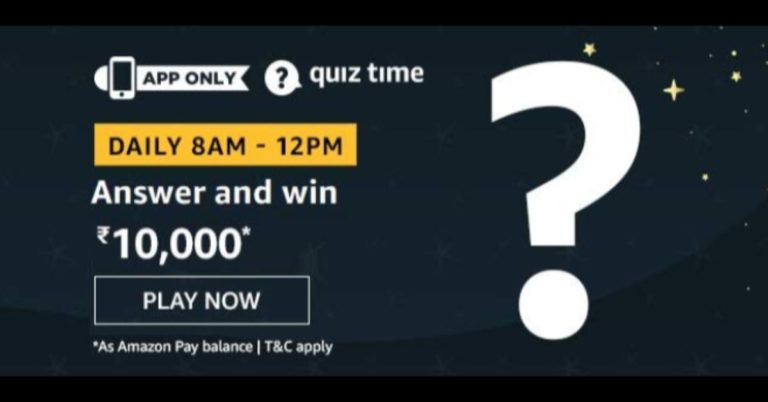
Amazon Quiz has gone live now. The quiz can be played daily from 8 AM to 12 noon. Amazon gives the opportunity to millions of its customers to play and win free gadgets as well as Amazon Pay Balance. Today e-commerce gives you a chance to win Rs 10,000 Amazon Pay Balance.
Every day the e-commerce platform brings a new set of questionnaires to which the participants have to answer correctly. The quiz contains only five questions that are based on current affairs and general knowledge. Answering all the questions correctly will get your name selected for a lucky draw. Only one person will be selected as the winner and the results are announced at the end of every month. The lucky ones might win something by answering all the questions correctly, and the wrong answers will get you eliminated from the quiz. So to make sure you answer all the questions correctly Gadget Bridge everyday updates all the correct answers to all 5 questions. To win Rs 10,000 Amazon Pay Balance check out today’s answers for the Amazon Quiz.
February 17 Amazon Quiz Answers
Question 1: Which of these cricketers has scored a hundred, each of the 3 times in Test cricket that he crossed 50 runs?
The answer is- Fawad Alam
Question 2: Which of this is a recently released book by Ramachandra Guha?
The answer is- The Commonwealth of Cricket
Question 3: Apple, Amazon and Google have recently suspended which social networking app?
The answer is- Parler
Question 4: This tourist attraction is situated on the South Bank of which river in London?
The answer is- Thames
Question 5: This geometric shape is generally used for which Traffic sign?
The answer is- Stop Sign
The e-commerce website Flipkart is hosting Daily Trivia Quiz. Every day it brings a bunch of new questions for its users. By answering them correctly you can win exciting prizes. The questionnaire is based on questions related to general knowledge. Also, the users can win free vouchers and super coins, among other offers via the daily quiz. February 16 Flipkart Daily Trivia Quiz Answers has already gone live on its platform.
The participant should be at least 18 years old and should have a valid login ID. The Quiz is available on the mobile platform and not the web version. E-commerce conducts the quiz on daily basis and goes live at 12:00 AM IST and runs till 11:59 PM IST. The winners are announced within 15 days from the date of participation that can be viewed under the Gems/Rewards section in the app.
How to participate in the Flipkart Daily Trivia Quiz
To participate download the Flipkart app on your phone. Then open the Flipkart app then head to Game Zone. Now click on the Daily Trivia Banner or search for Daily Trivia. Enter the game and answer all 5 questions with correct answers.
February 16 Flipkart Daily Trivia Quiz Answers
Question 1: What is the women’s equivalent of the premier International tennis event Davis Cup?
Answer: Fed Cup
Question 2: Asif Kapadia directed a documentary on which sportsperson was released in 2019?
Answer: Diego Maradona
Question 3: In 2019, who was appointed as the first chancellor of the sports University of Haryana?
Answer: Kapil Dev
Question 4: How many overs were bowled per innings in the matches of the 1983 World Cup?
Answer: Sixty
Question 5: Who led the Indian football team in its first official match in the 1948 Olympic games?
Answer: Talimeren Ao
Get ready to answer a new set of questions as the February 16 Amazon Quiz is live on its platform. The e-commerce platform brings a daily quiz on its mobile platform, which every day gives chance to millions of people across the country to win exciting prizes. The quiz goes live at 8 AM and runs till 12 noon. Today’s Amazon Quiz prize is HP Omen 15.6 inch FHD Gaming Laptop.
By participating in Amazon Quiz every day you can stand a chance to win prizes such as iPhone X, iPhone Xs, Seagate HDD, GoPro Hero 8 Camera, LG Smartphones, Samsung Galaxy S20, Air Purifier, Oppo smartphones, Amazon Pay Balance among others. Every day Amazon brings a fresh new quiz on its app, here we would like to mention that the quiz is not available for desktop users, only app users can participate in the daily quiz.
The company puts 5 questions based on general knowledge and current affairs to which the contestants have to answer all the questions correctly. A wrong answer will eliminate you from the quiz. After giving correct answers to all the questions, your name will get further selected for a lucky draw. The results of the lucky draw will be announced at the end of the month. So today’s quiz winner’s name will be declared at the end of the month. We have updated today’s five questions with their correct answers below so that you can win Amazon Quiz and get HP Omen 15.6 inch FHD Gaming Laptop.
February 16 Amazon Quiz Answers
Question 1: In which state is Thiruvalluvar day celebrated on the 2nd day of the Thai month?
The answer is- Tamil Nadu
Question 2: What transport service was recently launched between Chandigarh and Hisar?
The answer is- Air taxi
Question 3: Prakritik Paint’- a first of its kind has recently been launched by which organisation?
The answer is- Khadi and Village Industries Commission
Question 4: Which of these following things is NOT true about this flower?
The answer is- They only come in one colour
Question 5: This glass is traditionally used to drink and taste which of the following alcoholic beverages?
The answer is- Wine
For the latest gadget and tech news, and gadget reviews, follow us on Twitter, Facebook and Instagram. For newest tech & gadget videos subscribe to our YouTube Channel. You can also stay up to date using the Gadget Bridge Android App.



 The top of the speaker has Power, play/pause, Bluetooth, sound boost and volume keys. At the back users will find a pop-able enclosure, which has the Type-C charging port, Aux-in, USB playback port and also buttons to dim the LED light and also a multi-connect button to pair it with other LG PL7 devices. The LG XBOOM logo can be seen carved at the back with the Meridian logo on the front under the buttons. A mesh runs across the face of the LG XBOOM Go PL7 Bluetooth speaker which adds to the show. Under the speaker, you will find special rubber feet, which keep the speaker stable on any surface.
 The top of the speaker has Power, play/pause, Bluetooth, sound boost and volume keys. At the back users will find a pop-able enclosure, which has the Type-C charging port, Aux-in, USB playback port and also buttons to dim the LED light and also a multi-connect button to pair it with other LG PL7 devices. The LG XBOOM logo can be seen carved at the back with the Meridian logo on the front under the buttons. A mesh runs across the face of the LG XBOOM Go PL7 Bluetooth speaker which adds to the show. Under the speaker, you will find special rubber feet, which keep the speaker stable on any surface.
 The device is heavy compared to the competition, but since it has a much larger battery and larger audio drivers, we did not mind the weight. Nevertheless, the LG XBOOM Go PL7 Bluetooth speaker is still very portable and can be lugged around with ease.
LG XBOOM Go PL7 Bluetooth speaker Performance
Coming to the part which we loved the most about the LG XBOOM Go PL7 Bluetooth speaker, its audio quality. We loved every beat this nifty speaker threw at us. The sound is exceptional thanks to engineering by Meridian, but more importantly because of the 2 audio drivers and with 2 sub-woofers inside by LG. The bass is exceptional and with sound boost on it become remarkable. We were amazed at how good it sounds.
The total sound output is 30W RMS, which is great for large rooms and outdoors. We did multiple tests with it. We used the AUX-in and connected it with our TV, the sound was superb and much better than the 20W RMS speakers out TV has. We never knew the daily TV soaps also have a great sound to showcase. Same was the case when we connected via Bluetooth to our smartphone and then the laptop. The movie and gaming experience was superb. Netflix, Prime Video and Amazon music all sounded much better with these speakers. We were trying to find a hole in the armour, but frankly, the LG XBOOM Go PL7 Bluetooth speaker does not have one.
The battery lasts for very long too, a massive 3,900 mAh battery comes in the LG XBOOM Go PL7 Bluetooth speaker and it lasted over 23 hours for us. The charge time is a bit high at 5 hours plus with a 15W USB Type C charger, we used from a Samsung smartphone (since there is no charger in the box of this speaker). In most cases, we had the charger connected so it was not much of a problem for us. In case you will use it outside or without the charger, a full day battery playback is very good, by far the longest we have come across when it comes to BT speakers. You can also use the speaker as a speakerphone for your smartphone. Remember it does not have a MIC, so you need to keep the smartphone close to you for the voice to be audible.
Also, you can download the LG XBOOM app to unlock additional features of the device like lighting effect and equaliser. We generally did not need it as the default mode is great for any type of listening. The highs are great, so are the mids and lows. The sound did not crack at full volume and at 30W RMS, the LG XBOOM Go PL7 Bluetooth speaker are pretty darn loud. Overall, we loved the sound!
Verdict
At Rs 12,999 the LG XBOOM Go PL7 Bluetooth speaker is going up against JBL and Sony. Can it give the competition a run for its money? Hell yes! These are great party speakers to own. These can double up as a soundbar for your television too. Moreover, they are portable and water-resistant so people can use them on the fly. All in all, Meridian engineering and LG audio driver is a very good combo to own.
Pros:
Exceptional sound
Long battery life
Looks great
Cons
Weight could have been less
For the latest gadget and tech news, and gadget reviews, follow us on Twitter, Facebook and Instagram. For newest tech & gadget videos subscribe to our YouTube Channel. You can also stay up to date using the Gadget Bridge Android App.
The device is heavy compared to the competition, but since it has a much larger battery and larger audio drivers, we did not mind the weight. Nevertheless, the LG XBOOM Go PL7 Bluetooth speaker is still very portable and can be lugged around with ease.
LG XBOOM Go PL7 Bluetooth speaker Performance
Coming to the part which we loved the most about the LG XBOOM Go PL7 Bluetooth speaker, its audio quality. We loved every beat this nifty speaker threw at us. The sound is exceptional thanks to engineering by Meridian, but more importantly because of the 2 audio drivers and with 2 sub-woofers inside by LG. The bass is exceptional and with sound boost on it become remarkable. We were amazed at how good it sounds.
The total sound output is 30W RMS, which is great for large rooms and outdoors. We did multiple tests with it. We used the AUX-in and connected it with our TV, the sound was superb and much better than the 20W RMS speakers out TV has. We never knew the daily TV soaps also have a great sound to showcase. Same was the case when we connected via Bluetooth to our smartphone and then the laptop. The movie and gaming experience was superb. Netflix, Prime Video and Amazon music all sounded much better with these speakers. We were trying to find a hole in the armour, but frankly, the LG XBOOM Go PL7 Bluetooth speaker does not have one.
The battery lasts for very long too, a massive 3,900 mAh battery comes in the LG XBOOM Go PL7 Bluetooth speaker and it lasted over 23 hours for us. The charge time is a bit high at 5 hours plus with a 15W USB Type C charger, we used from a Samsung smartphone (since there is no charger in the box of this speaker). In most cases, we had the charger connected so it was not much of a problem for us. In case you will use it outside or without the charger, a full day battery playback is very good, by far the longest we have come across when it comes to BT speakers. You can also use the speaker as a speakerphone for your smartphone. Remember it does not have a MIC, so you need to keep the smartphone close to you for the voice to be audible.
Also, you can download the LG XBOOM app to unlock additional features of the device like lighting effect and equaliser. We generally did not need it as the default mode is great for any type of listening. The highs are great, so are the mids and lows. The sound did not crack at full volume and at 30W RMS, the LG XBOOM Go PL7 Bluetooth speaker are pretty darn loud. Overall, we loved the sound!
Verdict
At Rs 12,999 the LG XBOOM Go PL7 Bluetooth speaker is going up against JBL and Sony. Can it give the competition a run for its money? Hell yes! These are great party speakers to own. These can double up as a soundbar for your television too. Moreover, they are portable and water-resistant so people can use them on the fly. All in all, Meridian engineering and LG audio driver is a very good combo to own.
Pros:
Exceptional sound
Long battery life
Looks great
Cons
Weight could have been less
For the latest gadget and tech news, and gadget reviews, follow us on Twitter, Facebook and Instagram. For newest tech & gadget videos subscribe to our YouTube Channel. You can also stay up to date using the Gadget Bridge Android App. 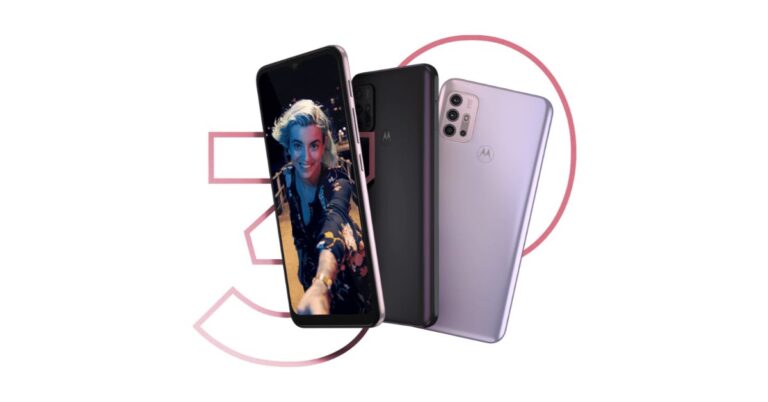

 In terms of cameras, there is a quad rear camera setup that includes a 48-megapixel primary sensor with f/1.7 aperture, a secondary 8-megapixel ultra-wide-angle sensor and two 2-megapixel macro and depth sensors. While on the front there is an 8-megapixel sensor for taking selfies.
The phone comes with a 5,000mAh battery with 10W charging support. The device has a ripple pattern on its back and is IP52 rated for water-resistant.
For the latest gadget and tech news, and gadget reviews, follow us on Twitter, Facebook and Instagram. For newest tech & gadget videos subscribe to our YouTube Channel. You can also stay up to date using the Gadget Bridge Android App.
In terms of cameras, there is a quad rear camera setup that includes a 48-megapixel primary sensor with f/1.7 aperture, a secondary 8-megapixel ultra-wide-angle sensor and two 2-megapixel macro and depth sensors. While on the front there is an 8-megapixel sensor for taking selfies.
The phone comes with a 5,000mAh battery with 10W charging support. The device has a ripple pattern on its back and is IP52 rated for water-resistant.
For the latest gadget and tech news, and gadget reviews, follow us on Twitter, Facebook and Instagram. For newest tech & gadget videos subscribe to our YouTube Channel. You can also stay up to date using the Gadget Bridge Android App. 
 In terms of cameras, there is a quad rear camera setup that includes a 48-megapixel primary sensor with f/1.7 aperture, a secondary 8-megapixel ultra-wide-angle sensor and two 2-megapixel macro and depth sensors. While on the front there is an 8-megapixel sensor for taking selfies.
The phone comes with a 5,000mAh battery with 10W charging support. The device has a ripple pattern on its back and is IP52 rated for water-resistant.
For the latest gadget and tech news, and gadget reviews, follow us on Twitter, Facebook and Instagram. For newest tech & gadget videos subscribe to our YouTube Channel. You can also stay up to date using the Gadget Bridge Android App.
In terms of cameras, there is a quad rear camera setup that includes a 48-megapixel primary sensor with f/1.7 aperture, a secondary 8-megapixel ultra-wide-angle sensor and two 2-megapixel macro and depth sensors. While on the front there is an 8-megapixel sensor for taking selfies.
The phone comes with a 5,000mAh battery with 10W charging support. The device has a ripple pattern on its back and is IP52 rated for water-resistant.
For the latest gadget and tech news, and gadget reviews, follow us on Twitter, Facebook and Instagram. For newest tech & gadget videos subscribe to our YouTube Channel. You can also stay up to date using the Gadget Bridge Android App. 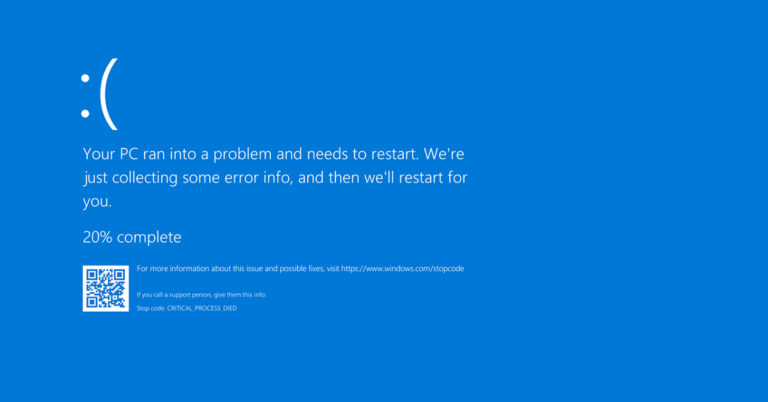




 As for the offers, those JIO customers purchasing Galaxy A12 will get benefits of up to Rs 7,000. The benefits include instant cashback of INR 3000 on the prepaid recharge of Rs 349 plan and Rs 4000 worth vouchers from partners. This offer is applicable to new as well as existing Jio subscribers. While the Vi subscribers will get double data benefits on Rs 299 recharge for 3 months or 3 recharges. In addition to this, there will be Zero down-payment EMI offers also.
 Samsung Galaxy A12: Specifications
Samsung Galaxy A12 comes with a 6.5-inch HD+ TFT Infinity-V Display with 720×1,600 pixels of resolution The device runs on One UI Core 2.5 on top of Android 10. The new budget smartphone by Smasnugn is powered by octa-core MediaTek Helio P35 SoC paired with up to 4GB of RAM and up to 128GB of storage. The internal storage can be expanded up to 1TB using a microSD card.
In terms of cameras, Samsung Galaxy A12 features a quad rear camera setup on the Samsung Galaxy A12 that includes a 48-megapixel primary sensor with f/2.0 aperture. In addition to this, there is a 5-megapixel ultra-wide-angle lens with f/2.2 aperture, a 2-megapixel macro lens with f/2.4 aperture and lastly a 2-megapixel depth sensor with an f/2.4 aperture. Upfront there is an 8-megapixel selfie sensor with an f/2.2 aperture.
The Samsung Galaxy A12 boasts a 5,000mAh battery with 15W fast-charging via a USB Type-C port. For connectivity, there is LTE, Wi-Fi, Bluetooth, GPS, and a 3.5mm headphone jack. There is a side-mounted fingerprint scanner that also doubles as the power button in addition to the other sensors that are an accelerometer, ambient light, magnetometer, and proximity sensor.
For the latest gadget and tech news, and gadget reviews, follow us on Twitter, Facebook and Instagram. For newest tech & gadget videos subscribe to our YouTube Channel. You can also stay up to date using the Gadget Bridge Android App.
Samsung Galaxy A12: Specifications
Samsung Galaxy A12 comes with a 6.5-inch HD+ TFT Infinity-V Display with 720×1,600 pixels of resolution The device runs on One UI Core 2.5 on top of Android 10. The new budget smartphone by Smasnugn is powered by octa-core MediaTek Helio P35 SoC paired with up to 4GB of RAM and up to 128GB of storage. The internal storage can be expanded up to 1TB using a microSD card.
In terms of cameras, Samsung Galaxy A12 features a quad rear camera setup on the Samsung Galaxy A12 that includes a 48-megapixel primary sensor with f/2.0 aperture. In addition to this, there is a 5-megapixel ultra-wide-angle lens with f/2.2 aperture, a 2-megapixel macro lens with f/2.4 aperture and lastly a 2-megapixel depth sensor with an f/2.4 aperture. Upfront there is an 8-megapixel selfie sensor with an f/2.2 aperture.
The Samsung Galaxy A12 boasts a 5,000mAh battery with 15W fast-charging via a USB Type-C port. For connectivity, there is LTE, Wi-Fi, Bluetooth, GPS, and a 3.5mm headphone jack. There is a side-mounted fingerprint scanner that also doubles as the power button in addition to the other sensors that are an accelerometer, ambient light, magnetometer, and proximity sensor.
For the latest gadget and tech news, and gadget reviews, follow us on Twitter, Facebook and Instagram. For newest tech & gadget videos subscribe to our YouTube Channel. You can also stay up to date using the Gadget Bridge Android App.  As for the offers, those JIO customers purchasing Galaxy A12 will get benefits of up to Rs 7,000. The benefits include instant cashback of INR 3000 on the prepaid recharge of Rs 349 plan and Rs 4000 worth vouchers from partners. This offer is applicable to new as well as existing Jio subscribers. While the Vi subscribers will get double data benefits on Rs 299 recharge for 3 months or 3 recharges. In addition to this, there will be Zero down-payment EMI offers also.
 Samsung Galaxy A12: Specifications
Samsung Galaxy A12 comes with a 6.5-inch HD+ TFT Infinity-V Display with 720×1,600 pixels of resolution The device runs on One UI Core 2.5 on top of Android 10. The new budget smartphone by Smasnugn is powered by octa-core MediaTek Helio P35 SoC paired with up to 4GB of RAM and up to 128GB of storage. The internal storage can be expanded up to 1TB using a microSD card.
In terms of cameras, Samsung Galaxy A12 features a quad rear camera setup on the Samsung Galaxy A12 that includes a 48-megapixel primary sensor with f/2.0 aperture. In addition to this, there is a 5-megapixel ultra-wide-angle lens with f/2.2 aperture, a 2-megapixel macro lens with f/2.4 aperture and lastly a 2-megapixel depth sensor with an f/2.4 aperture. Upfront there is an 8-megapixel selfie sensor with an f/2.2 aperture.
The Samsung Galaxy A12 boasts a 5,000mAh battery with 15W fast-charging via a USB Type-C port. For connectivity, there is LTE, Wi-Fi, Bluetooth, GPS, and a 3.5mm headphone jack. There is a side-mounted fingerprint scanner that also doubles as the power button in addition to the other sensors that are an accelerometer, ambient light, magnetometer, and proximity sensor.
For the latest gadget and tech news, and gadget reviews, follow us on Twitter, Facebook and Instagram. For newest tech & gadget videos subscribe to our YouTube Channel. You can also stay up to date using the Gadget Bridge Android App.
Samsung Galaxy A12: Specifications
Samsung Galaxy A12 comes with a 6.5-inch HD+ TFT Infinity-V Display with 720×1,600 pixels of resolution The device runs on One UI Core 2.5 on top of Android 10. The new budget smartphone by Smasnugn is powered by octa-core MediaTek Helio P35 SoC paired with up to 4GB of RAM and up to 128GB of storage. The internal storage can be expanded up to 1TB using a microSD card.
In terms of cameras, Samsung Galaxy A12 features a quad rear camera setup on the Samsung Galaxy A12 that includes a 48-megapixel primary sensor with f/2.0 aperture. In addition to this, there is a 5-megapixel ultra-wide-angle lens with f/2.2 aperture, a 2-megapixel macro lens with f/2.4 aperture and lastly a 2-megapixel depth sensor with an f/2.4 aperture. Upfront there is an 8-megapixel selfie sensor with an f/2.2 aperture.
The Samsung Galaxy A12 boasts a 5,000mAh battery with 15W fast-charging via a USB Type-C port. For connectivity, there is LTE, Wi-Fi, Bluetooth, GPS, and a 3.5mm headphone jack. There is a side-mounted fingerprint scanner that also doubles as the power button in addition to the other sensors that are an accelerometer, ambient light, magnetometer, and proximity sensor.
For the latest gadget and tech news, and gadget reviews, follow us on Twitter, Facebook and Instagram. For newest tech & gadget videos subscribe to our YouTube Channel. You can also stay up to date using the Gadget Bridge Android App.