The e-commerce website Flipkart is hosting Daily Trivia Quiz. Every day it brings a bunch of new questions for its users. By answering them correctly you can win exciting prizes. The questionnaire is based on questions related to general knowledge. Also, the users can win free vouchers and super coins, among other offers via the daily quiz. February 19 Flipkart Daily Trivia Quiz Answers has already gone live on its platform.
The participant should be at least 18 years old and should have a valid login ID. The Quiz is available on the mobile platform and not the web version. E-commerce conducts the quiz on daily basis and goes live at 12:00 AM IST and runs till 11:59 PM IST. The winners are announced within 15 days from the date of participation that can be viewed under the Gems/Rewards section in the app.
How to participate in the Flipkart Daily Trivia Quiz
To participate download the Flipkart app on your phone. Then open the Flipkart app then head to Game Zone. Now click on the Daily Trivia Banner or search for Daily Trivia. Enter the game and answer all 5 questions with correct answers.
February 19 Flipkart Daily Trivia Quiz Answers
Question 1: A ball of what colour is used in a day/ night Test match?
Answer: Pink
Question 2: In which country is the ten-over cricket league T10 League held?
Answer: UAE
Question 3: State-owned companies from which country sponsor the professional cycling team ‘Astana’?
Answer: Kazakhstan
Question 4: Which country hosted the first-ever FIFA World Cup held in the year 1930?
Answer: Uruguay
Question 5: Which is the only country to play in every FIFA World Cup?
Answer: Brazil
Every day Amazon India brings a daily quiz for its customers to win exciting new prizes every day on its platform. The Amazon Quiz can be played daily from 12 AM to 11:59 PM. Today you can win Rs 15,000 Amazon Pay Balance if you managed to answer all the questions correctly. Daily a new set of questions is presented in front of the participants that gives millions of people across the country to win exciting prizes.
The Amazon Quiz has gone live on its mobile platform. The participants have to answer 5 questions that are based on general knowledge and current affairs. After clearing the daily quiz their name will be shortlisted for a lucky draw to select a winner. Amazon announces the results of the lucky draw at the end of the month. So today’s Quiz will let you win AmazonBasics Smart LED TV.
February 19 Amazon Quiz Answers
Question 1: What is the name of the initiative launched by India to gift COVID-19 vaccines to neighbouring countries?
The answer is- Vaccine Maitri
Question 2: Which Indian Air Force jet performed the spectacular Charlie manoeuvre at the 2021 Republic Day Parade?
The answer is- Rafale
Question 3: According to this app’s website, whistleblower and privacy advocate Edward Snowden uses it everyday. Which messaging app?
The answer is- Signal
Question 4: Which French queen is associated with a quote about this food, though it is not proven to be true?
The answer is- Marie-Antoinette
Question 5: What is this flower that is still offered to fallen soldiers because it symbolizes eternal sleep and resurrection?
The answer is- Poppy
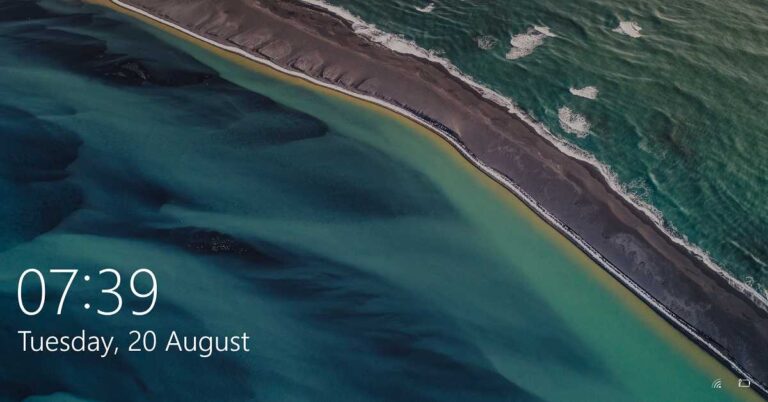
The Microsoft Windows 10 comes with a feature that allows you to personalize the appearance of the Lock Screen. You can choose the background from the stock images or an image of your choice. Here is the simplest way to change the background of your Windows 10 Lock Screen. Step 1: Open ‘Settings’ from the Start menu.Step 2: Select the ‘Personalization option.Step 3: From the side panel, select the ‘Lock Screen’ tab.
Step 4: Go to the drop-down menu below ‘Background’. You’ll see three options: ‘Windows spotlight’, ‘Picture’, and ‘Slideshow’. To set the background of your choice, select ‘Picture’. To create a slideshow of images, select the ‘Slideshow’ option. However, the ‘Windows Spotlight’ randomly sets wallpapers from the server and the Windows default library. Step 5: You’ll find the ‘Browse’ button to locate the desired image or folder (for Slideshow) in the secondary storage.Step 6: When you click the ‘Browse’ button, a window opens asking you to provide the path of the desired image or folder (for Slideshow).Step 7: As soon as you select an image or a folder (for Slideshow), Windows will automatically set it as the Lock Screen background.
For the latest gadget and tech news, and gadget reviews, follow us on Twitter, Facebook and Instagram. For newest tech & gadget videos subscribe to our YouTube Channel. You can also stay up to date with the Gadget Bridge Android App.
In our day-to-day lives, we share files and documents with our friends and colleagues. Sharing small-sized files, say ranging from a few KBs to a few MBs is not at all complex. Almost all the messaging services allow you to do that. But, when the file size turns massive, we need a dedicated storage service to share files. Here are the best free web services that you can use to transfer large files.
1) Google Drive
Google Drive is a cloud storage service by Google where you can save your documents and files. You get an upgradable 15GB of storage that you can easily access from anywhere. Google provides you with robust and handy mobile applications so that you can work from anywhere. You can share the attachments up to 25MB in size with Gmail messages. But when the files above 25MB are shared via the Drive link. Gmail users can share their files and folders up to 10GB in size. Google’s free tier is enough for a majority of users as it gives you a reusable 15GB of storage. You can repeatedly share large files provided you keep deleting the older ones.
Google Drive
2) Microsoft OneDrive
Microsoft’s OneDrive is a cloud-storage service and competitor to Google’s Drive. OneDrive offers an ungradable 5GB of storage to store files and documents and access them from any device anytime you want from anywhere. Microsoft offers a secure method to share and collaborate on data with friends and colleagues, thereby enhancing productivity and performance. To share big files, you just need to upload your files to OneDrive and select the ‘Share’ icon after right-clicking it. You will need to enter the recipient’s name in the field and set the desired permissions to the recipient(s).
Microsoft OneDrive
3) Bit.ai
Bit.ai is a modern cloud-based document collaboration service that helps you and your team to manage everything in one place. Each workspace has a sound content library that allows you to save and share different types of files like PDF, videos, audios, and spreadsheets. To share big files on Bit.ai:
Click the share button for your Box Cloud File weblink.
Copy the Box Cloud File shareable link.
Paste the Box Cloud File shareable link to a blank line in Bit.
With your cursor at the end of the link just hit enter and the Box Cloud File will automatically fetch.
Bit.ai
4) Amazon Drive
Besides providing enterprise-level storage services called AWS, Amazon has a consumer-based cloud storage solution, known as Amazon Drive. Amazon Drive enables users to save their documents and all types of files to Amazon’s cloud and obtain it anytime and anywhere. Amazon Prime members get unlimited cloud photo storage and 5GB of video storage capacity on Amazon Drive. Amazon Drive offers a convenient place for all your files at an affordable price. To share your files on Amazon Drive:
Sign in to your Amazon Drive
Select the files you want to share
Click Share
You can either share a link by clicking ‘Get shareable link’, or share by email.
Amazon Drive
5) Dropbox
Dropbox is another giant in file-sharing solutions. Dropbox offers an upgradable 2GB cloud storage to store different types of files in one place. You also get desktop clients and mobile applications to store all your files and access them anywhere and anytime. Dropbox provides integration with around 100,000 third-party applications, making it one of the most preferred cloud storage services. To share a file or folder on Dropbox:
Sign in to your Dropbox
Select ‘All files’ in the left sidebar.
Click on the file you want to share and click the share icon.
Microsoft had announced 2020 the end of the support for the Microsoft Edge Legacy desktop application on March 9, 2021. This upcoming update shall be the last security update for Microsoft Edge Legacy.
Which version of Windows 10 will be impacted?
The new update will affect Windows 10 versions 1803 (Windows 10 April 2018 Update) and newer. Windows 7 and Windows 8.x devices will remain unaffected.
The following version of Windows 10 will run the update.
Windows 10, version 1803, all editions (April 2018)
Windows 10, version 1809, all editions (October 2018)
Windows 10, version 1903, all editions (May 2019)
Windows 10, version 1909, all editions (October 2019)
Windows 10, version 2004, all editions (May 2020)
Windows 10, version 20H2, all editions (October 2020)
Windows 10 update. Image courtesy: Wikipedia
According to Microsoft, “To replace this out of support application, we are announcing that the new Microsoft Edge will be available as part of the Windows 10 cumulative monthly security update, otherwise referred to as the Update Tuesday (or “B”) release on April 13, 2021. When you apply this update to your device out-of-support Microsoft Edge Legacy desktop application will be removed and the new Microsoft Edge will be installed.”
How will the upcoming update influence Windows?
If you already have the new Microsoft Edge installed in your Windows, the upcoming update will only remove Microsoft Edge Legacy without installing the new Microsoft Edge.
The side-by-side experience will discontinue as Microsoft Edge Legacy on your devices having Edge will come to an end.
Skipping the Windows 10 update is not an option as apart from Microsoft Edge, several other features and applications are updated including the Windows defender that protects your PC against ever-changing threats.
The new update will replace the Microsoft Edge Legacy with a new one without changing the other default and personalised settings.
If you have been using the kiosk mode in Microsoft Edge, you will need to set it up once again in the new Microsft Edge.
As soon as the update is installed, the new Microsoft Edge will scan for updates. If you use devices that are connected to a private WSUS server, you will need to keep these devices updated for the new Microsoft Edge in the WSUS catalog.
Microsoft Edge
Windows 10 users don’t need to wait for the update. They can get it from Microsoft’s website and enjoy features such as support for Chrome extensions. The new Edge is expected not to have all the features from the old Edge as Microsoft regularly updates and adds new features to it.
For the latest gadget and tech news, and gadget reviews, follow us on Twitter, Facebook and Instagram. For newest tech & gadget videos subscribe to our YouTube Channel. You can also stay up to date with the Gadget Bridge Android App.
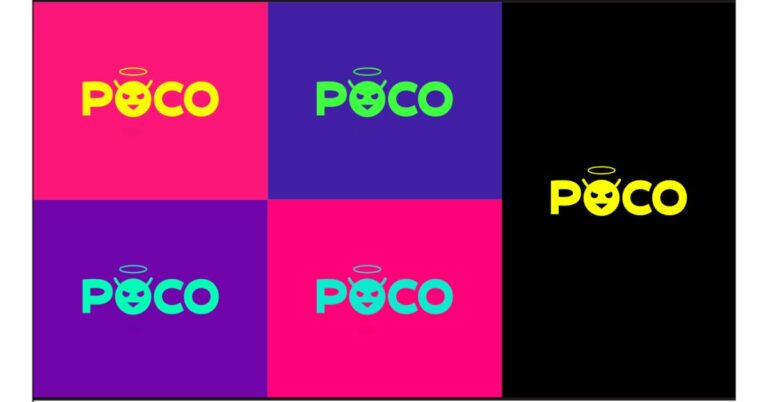
Xiaomi’s spin-off brand, Poco has revealed its new logo as well as a mascot in India. The new logo depicts the re-defining madness, signifies goodness and is a version of Mad. The company’s new logo invokes a confusing emotion and the new mascot is now a part of the company’s identity.Poco India today introduced its new logo Made of Mad as well as a new Mascot. While unveiling the redesign of its brand identity the Chinese smartphone company said, “Poco India unveils a new brand logo and mascot, imbibing with the intent of re-defining madness, the POCO way. With ‘Made of Mad’, the new brand logo invokes a confusing emotion in the minds of the consumer, and is a representation of every individual who is looking for greater alternatives to the mainstream.”While the new mascot which is basically an emoji invokes confusing emotions. The emoji mascot is now a part of the company’s identity and is specifically designed with the intent of redefining madness.According to the company, the halo on the head of Poco’s new mascot signifies a sense of goodness. While the antennas on the head bring out the naughty side of Mad which the Poco says is almost like their mascot can spread the madness telepathically. The Intent in the eyes brings in a unique kind of incongruity when pitted against the halo on top and the distinct triangular mouth subtly connotes the sharp wit of the company.The company has also changed the name of the Official Twitter account which now reads Madder by the Minute. In addition to this, the display picture has also been replaced with the new Poco mascot which earlier has the company’s brand’s logo only.To recall, last year the company separated from its parent brand Xiaomi and recently it also celebrated its first birthday as an independent brand. Also, it launched Poco M3 in India which the company claims to have sold over 150,000 units on its first sale in the country. According to the company, the more than 30 lakhs buyer showed interest in purchasing the smartphone on its first sale. The smartphone comes in a 6GB with 64GB storage variant priced at Rs 10,999 while the 6GB with 128GB storage model comes with a price tag of Rs 11,999. The device will be offered in three colour options of Cool Blue, Poco Yellow, and Power Black. The device is the successor of Poco M2 which arrived in the Indian market last year. The device is powered by Qualcomm Snapdragon 662 SoC and houses a 6,000mAh battery. In addition to this, it has a triple rear camera setup too.
For the latest gadget and tech news, and gadget reviews, follow us on Twitter, Facebook and Instagram. For newest tech & gadget videos subscribe to our YouTube Channel. You can also stay up to date using the Gadget Bridge Android App.
Twitter rolled out the all-new voice DM feature that lets you send a recorded voice message in your direct message section. The company aims to release this new feature to users in a phased manner in select countries, including India.
According to Alex Ackerman Greenberg, Product Manager for direct messages at Twitter, “We are dedicated to giving people more options to express themselves in conversations on Twitter – both publicly and privately”.
Twitter had introduced its voice tweets feature last year. These tweets are different from regular tweets as they have the profile picture inviting to click and hear the tweet. This feature enabled the users to post tweets much faster and easier while at work. The new voice DM feature shall extend the flexibility to users even further.
According to the company, the new feature will provide users with more ways to express themselves and produce a more human experience for storytellers and listeners alike.
How does the Twitter new Audio/Voice DM feature work?
How does the Twitter new Audio/Voice DM feature work?
The new Audio/Voice Dm feature is similar to voice tweets. This functionality will be available in both Android and iOS smartphones. However, for the web platform, this feature is still waiting to come. You can DM voice or audio clip of the length as long as 140 seconds.
To send a voice DM, you need to follow these steps:
Choose an existing conversation from your DM list or initiate a new one by tapping on the desired user.
Tap on the voice recording icon to begin recording the voice message you want to send.
Tap again when you want to finish the voice recording.
Before you send your voice message, you can preview it.
How to send voice messages via Twitter DM?
The voice message feature being rolled out to Twitter is seen as a considerable effort to offer a facility that we already enjoy on instant messaging apps like WhatsApp, Messenger, and Telegram. The new voice DM feature is expected to give Twitter users more freedom in one-to-one conversations.
Regarding this new feature, Mr. Manish Maheshwari, Managing Director, Twitter India said, “We’re excited to bring the voice messages in DMs experiment to the country and give people a new way to express themselves and help them connect through the nuances, emotion, and empathy built by hearing someone’s voice.”
This could be the first step solution to ClubHouse by Twitter, which is becoming hugely popular on Apple iOS format. ClubHouse is using voice rooms to enable people to follow each other and is more like Twitter but on the spoken platform.
For the latest gadget and tech news, and gadget reviews, follow us on Twitter, Facebook and Instagram. For newest tech & gadget videos subscribe to our YouTube Channel. You can also stay up to date with the Gadget Bridge Android App.
An iPhone is a perfect device for gaming. The phone comes with optimum features to allow you to delve into high-end games. The latest A13 Bionic chip outperforms many other smartphones while still being easy on the battery. Whether you are a hardcore gamer, a casual player, or just a beginner there are plenty of video games that you can install on your iPhone. Here is the top 10 list of games to start with.
1) Fortnite
Genre(s): Survival, battle royale, sandbox
Publisher(s): Epic Games, Warner Bros. Interactive Entertainment
Fortnite is a battle royale genre video game that is slightly similar to PUBG. The game consists of 100 players and the last gamer surviving is the winner. The gameplay is immersive and you never know when a bullet is being aimed at you as you set out to destroy others. The ‘Save the World’ and ‘Creative’ versions have been successful for Epic Games. The video game has been among the top-ranking iOS games ever since it has been launched.
Fortnite
2) Call of Duty: Mobile
Genre(s): Shooter
Publisher(s): Activision Garena
Call of Duty: Mobile was released in response to the increasing popularity of PUBG. The marketing move paid off and the game experienced as high as 150 million downloads in the first month of its launch. The graphics are remarkable and the controls are positioned for comfortable reach. The video game can be played in first-person and third-person shooter style as your crew sets out to eliminate other teams to approach the coveted 50-point mark to emerge a winner.
Call of Duty: Mobile
3) Mario Kart
Genre(s): Racing
Publisher(s): Nintendo
It is an amusing game and will challenge your alertness level and reflexes as you navigate through unforeseen situations thrown at you. This fun game is a perfect stress reliever with a simplistic interface and easy-to-move characters. One of the highlights of the video game is the application of different power-up items collected by driving into item boxes laid out on the path. These power-ups involve mushrooms to give players a speed hike, Koopa Shells to be launched at opponents, banana peels, and fake item boxes that can be placed on the course as hazards.
Mario Kart
4) Plague Inc
Genre(s): Real-time strategy, simulation
Publisher(s): Ndemic Creations, Miniclip
It’s a video game that takes out your darker side as you finish the population of the whole world by unleashing a destructive virus you have devised. This is a strategy game as you have to apply all your wits to win everything that menfolk do to guard against your pathogen. The game offers equal possibilities for all as you progress and start on your mission of eradicating humanity, making the whole world your opponent in the process.
Plague Inc
5) Candy Crush
Genre(s): Puzzle
Publisher(s): King
This is among the most popular video games offering a world of candies of all shapes and sizes that you rearrange and match as you proceed through the game. Matches of four or more candies create different candies that act as power-ups with more extensive board-clearing skills. Boards have various aims that must be accomplished within a fixed number of moves or a fixed amount of time.
Candy Crush
6) Into the Dead 2
Genre: Shooter Video Game
Publishers: PikPok, Versus Evil
This is an action video game where you are thrown against an apparently never-ending wave of zombies of all shapes and sizes that come your way. You will have different weapons at your disposal that you can use to evade the zombie threat as you strive to take your family out of the zombie zone and into the shelter. Besides the weapons, you can take help from different quarters, such as animals who are faithful to you and will help you crush the zombies.
Into the Dead 2
7) Starbeard
Genre: Puzzle
Publisher: Jolly Good Games Limited
Starbeard is a puzzle game but in a sci-fi environment. The game will ultimately test your matching skills but one that trades with planets and constellations as you venture out on a mission to protect your garden from insects that can traverse around galaxies. There are unique hurdles at every step and you can use improved powers to deal with rising threats that try to wipe out the plant species in your garden.
Starbeard
8) Real Racing 3
Genre: Racing
Publisher: Electronic Arts
The Real Racing 3 is a racing game that fits well with the wonderful processing capabilities of the iPhone and the Super Retina display makes the gaming experience realistic. The video game highlights over 45 circuits at 20 real-world locations, and over 300 licensed cars including Audi, Porsche, Lamborghini, Bugatti, Ford, Ferrari, McLaren, Chevrolet, and Koenigsegg. Unlike the previous versions of Real Racing games, players are challenged to maintain and service their vehicles.
Real Racing 3
9) Minecraft
Genre: Sandbox, survival
Publishers: Mojang Studios, Xbox Game Studios, Telltale Games, Sony Interactive Entertainment
Pocket Edition Minecraft is a videogame that offers different block types to let you create what you have envisioned. The player is the person that the user controls in the world. When the user begins a game, the player is set in a world, created by a random or specified seed, with an empty record. If the bonus chest option is allowed, a chest filled with basic items appears near the player.
Minecraft
10) Alto’s Odyessy
Genre(s): Endless runner, snowboarding
Publisher(s): Snowman
Alto’s Odyssey is the sequel to Alto’s Adventure (2015) offering a desert theme, with new features including wall-riding mechanics, water mechanics, tornadoes, and falling platforms. The video game has a Zen mode, in which players can play and fall over multiple times. This feature was added to the game with an idea that it could help them relax.
Alto’s Odyessy
For the latest gadget and tech news, and gadget reviews, follow us on Twitter, Facebook and Instagram. For newest tech & gadget videos subscribe to our YouTube Channel. You can also stay up to date with the Gadget Bridge Android App.
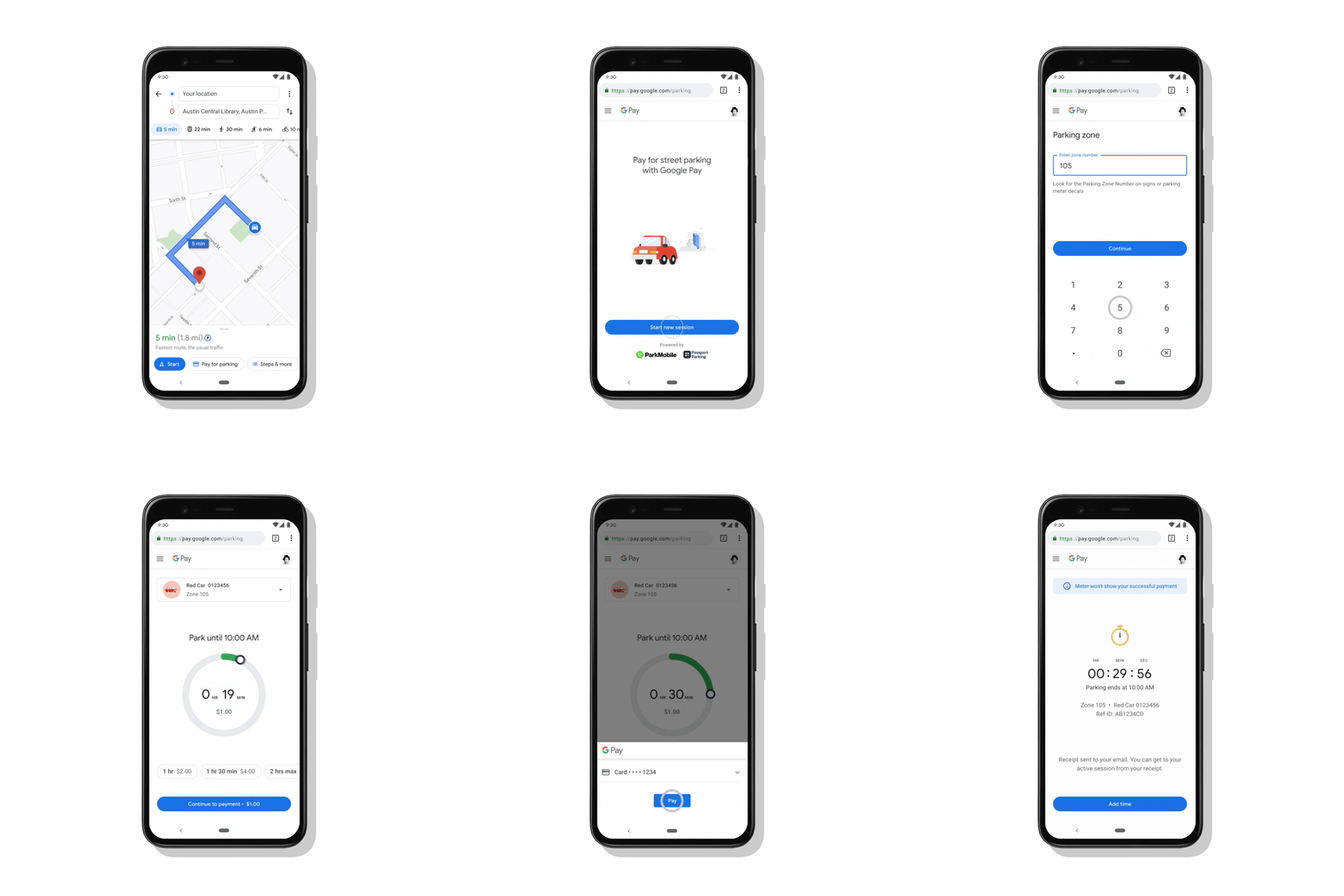
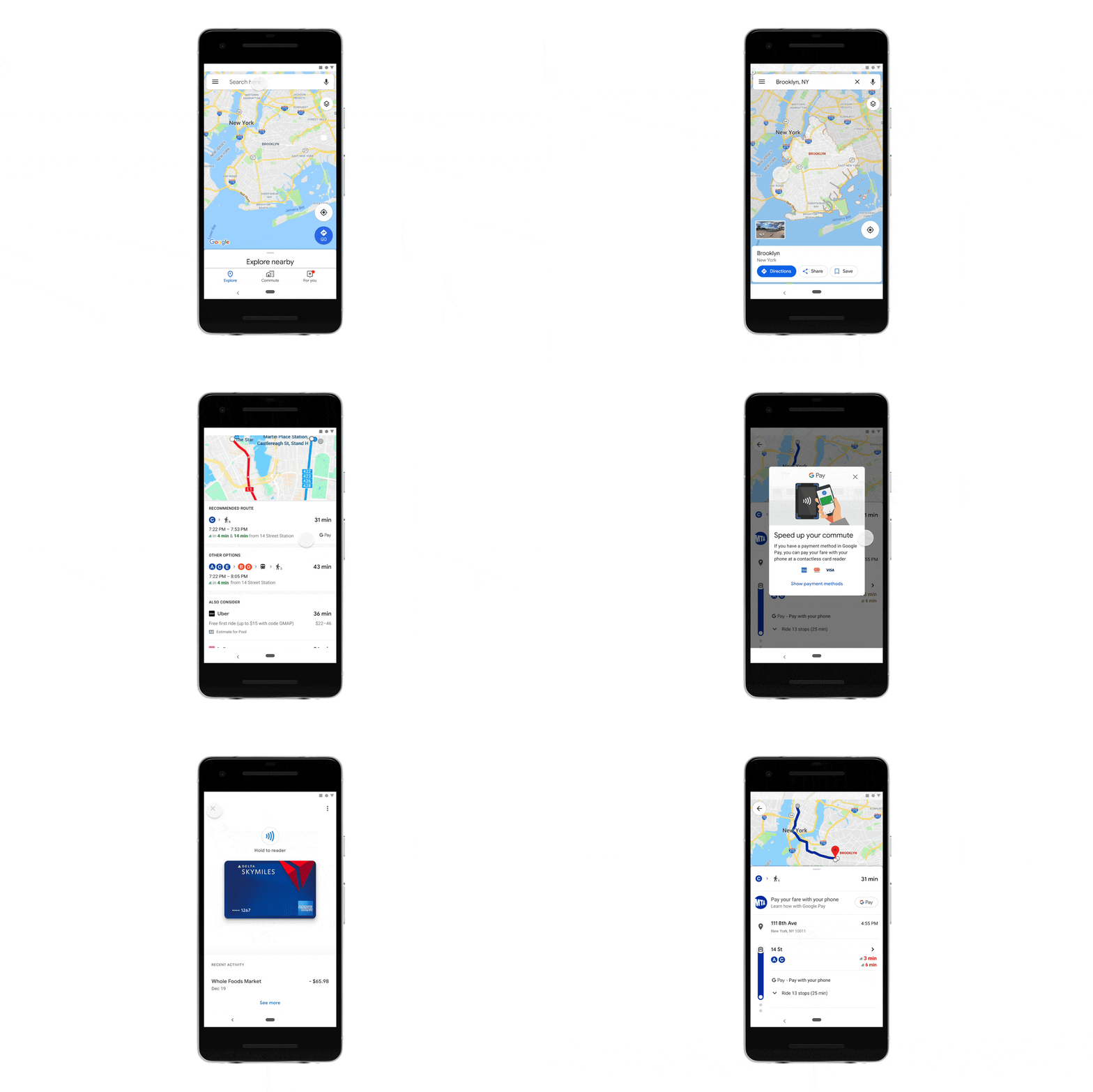
We often turn to Google Maps when we are in a new city or to search for new places and get directions. This also gives us real-time traffic conditions, and route planning for traveling by foot, car, bicycle and public transportation. Google Maps gets these things done so easily and to make it more powerful the company is rolling out new tools in collaboration with Google Pay. The web mapping service will now allow you to pay for street parking and transit fares using the app. Google Maps now get the ability to allow users to pay for street parking right from Google Maps, without ever taking out their wallet. The company has integrated with parking solutions providers Passport and ParkMobile, so you can now easily pay your meter right from driving navigation in Maps, and avoid touching the meter altogether. Google will be expanding the ability to pay for transit fares from Maps for over 80 transit agencies across the globe. The blog post says, Now you’ll be able to plan your trip, buy your fare, and start riding without needing to toggle between multiple apps.” The Pay for parking feature is now rolled out Android in more than 400 cities in the US with iOS coming soon. The ability to pay for transit from Google Maps expands to 80 agencies globally on Android in the coming weeks.How to use Pay for parking in Google Maps?To use Pay for parking all you need to do is simply tap on the “Pay for Parking” button. This dedicated button can be seen right next to your destination. Then enter your meter number, the amount of time you want to park for and tap “Pay.” If you need to add more time to your meter easily your parking session with just a few taps. One can easily understand how to pay in advance and even get your fare ready to go before you arrive at the station. All you need to do is go for the option to pay with your phone with the credit or debit cards already linked to your Google Pay account when you are unsure what payment options a transit agency supports. You will also be able to buy a digital Clipper card directly from Google Maps. Once you’ve purchased your fare, all you need to do is tap your phone on the reader or show your digital ticket.
For the latest gadget and tech news, and gadget reviews, follow us on Twitter, Facebook and Instagram. For newest tech & gadget videos subscribe to our YouTube Channel. You can also stay up to date using the Gadget Bridge Android App.
American premium smartwatch maker Garmin has officially announced the launch of its new smartwatch in the market. The company has expanded its range of solar charging smartwatches with the launch of Garmin Enduro. This wearable lasts up to 65 days and offers customisable power management modes. In addition to this, the Enduro watch also gets GPS support with other fitness and training features. There is VO2 Max for tracking cardiovascular fitness levels on the fitness watch along with heart rate monitor and pulse oximetry sensor.
Garmin Enduro smartwatch: Price and availability
Garmin Enduro smartwatch has been introduced in the US in two variants of steel and titanium. The steel variant comes with a price tag of $799.99 that translates to Rs 58,300. While the titanium model’s price goes up to $899.99 that translates to Rs 65,600. The device can be purchased via the US Garmin website.
Garmin Enduro smartwatch: Features
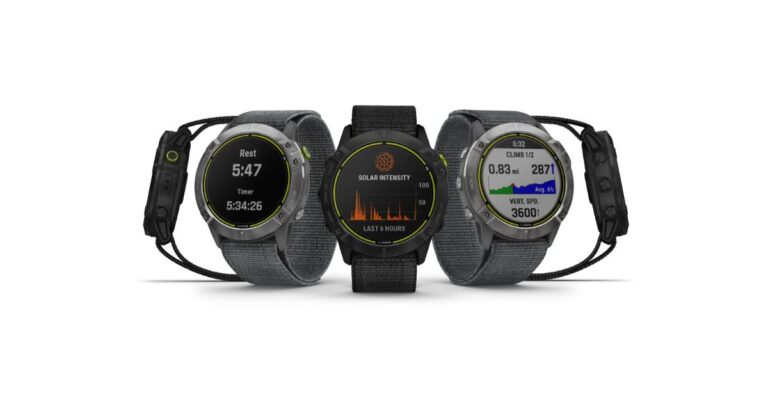
Garmin Enduro smartwatch comes in a stainless steel or Diamond-Like Carbon (DLC) coated titanium variant with fiber-reinforced polymer with metal rear cover. The device features an always-on 1.4” sunlight-optimized display with 280 x 280 pixels of resolution. It has a rugged design that is weather resistant with a super-light sport loop band that’s elastic, adjustable and durable. There is a Power Glass solar charging lens that extends battery life up to 80 hours in GPS mode, up to 300 hours in max battery mode and up to 65 days in smartwatch mode with solar charging. The watch also comes with V02 max that estimates the cardiovascular fitness level of trail runners by adjusting based on the varying trail and terrain conditions that can affect run performance. The ultrarun activity can be used with a rest timer, and log the time you spend at aid stations. Whereas ClimbPro provides real-time information on your current and upcoming climbs, including gradient, distance and elevation gain. ClimbPro trail enhancements also give you information for descents and flats — for additional awareness.Using the MTB dynamics one can track the details of every ride with mountain biking metrics plus specialized grit and flow measurements that rate trail difficulty and how smoothly you descend. Garmin Enduro also comes with heat and altitude acclimation with advanced training metrics that include running dynamics, heat- and altitude-adjusted VO2 max, recovery advisor and more. On the other hand, the recovery advisor on the fitness watch lets you know how long to rest after each workout. The Garmin smartwatch also suggests daily run and ride based on your current training load and training status.Apart from this the smartwatch also includes access to multiple global navigation satellite systems (GPS, GLONASS and Galileo). The device comes preloaded with activity profiles for trail running, swimming, running, biking, hiking, rowing, skiing, golfing and more. The PacePro feature keeps you on pace with grade-adjusted guidance as you run a course while the Backcountry Ski profile can help you distinguish between skiing and climbing. It automatically shows metrics specific to either ascent or descent. When Enduro is paired with the Surfline Sessions app on your compatible smartphone, you can create a video of every wave you ride in front of your Surfline camera. Watch the videos later to see how you did.Besides fitness features, there are few health monitoring sensors on the smartwatch too that is a heart rate monitor that also tracks underwater without a heart rate strap. The Pulse OX sensor monitors during sleep using light beams at your wrist to gauge how well your body is absorbing oxygen. The sleep monitor gives you a breakdown of your light, deep and REM sleep stages as well as Pulse Ox and respiration data. It also receives emails, texts and alerts right on your watch when paired with a compatible device.
For the latest gadget and tech news, and gadget reviews, follow us on Twitter, Facebook and Instagram. For newest tech & gadget videos subscribe to our YouTube Channel. You can also stay up to date using the Gadget Bridge Android App.






 Step 5: You’ll find the ‘Browse’ button to locate the desired image or folder
  Step 6: When you click the ‘Browse’ button, a window opens asking you to provide the path of the desired image or folder