How to remove a friend on Snapchat without them knowing?

0
Primarily known for ephemeral messaging, there are a couple of other things about Snapchat that typically fly under the radar but are quite helpful to regular users. Once you remove someone on Snapchat, it completely cuts their access to you. There’s no such thing as a ‘Requests’ folder where the unwanted messages keep piling up. However, unfriending someone discreetly on Snapchat can be quite the task. In this article, we bring you two ways to remove a friend on Snapchat without them knowing. Read Also: Top 5 ways to download free music on iPhone (2023)

Soft block them

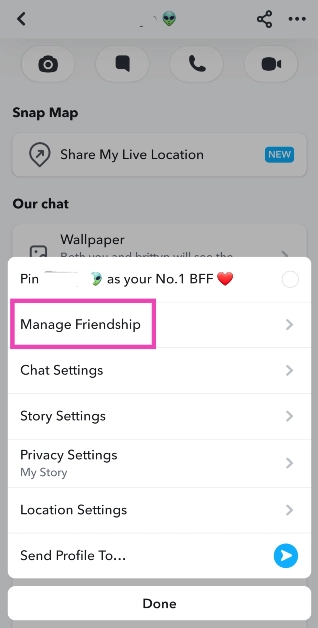
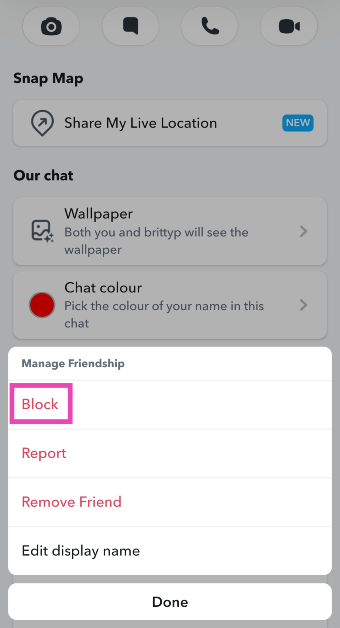
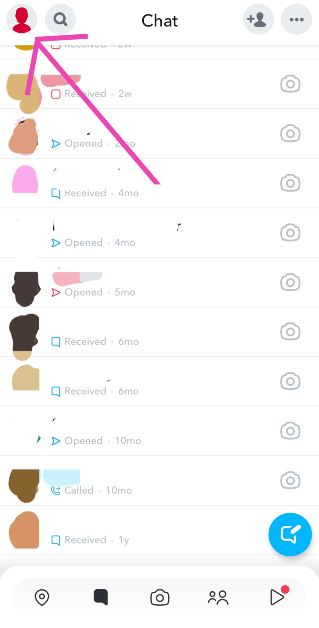
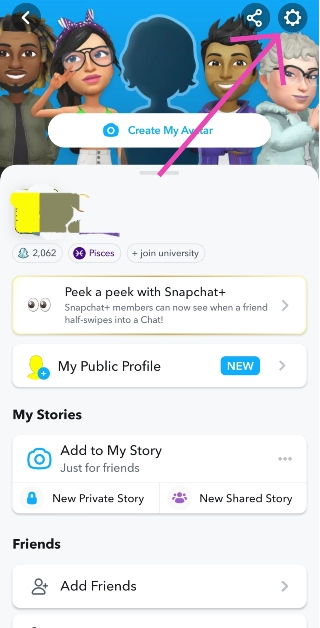
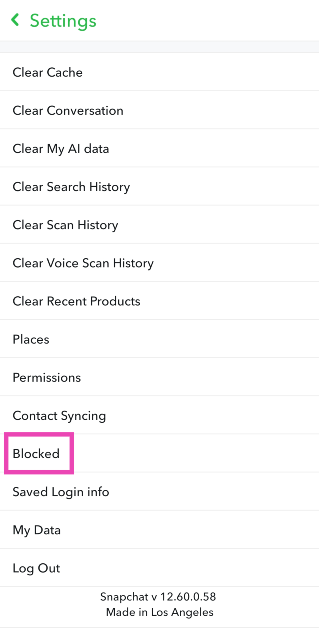
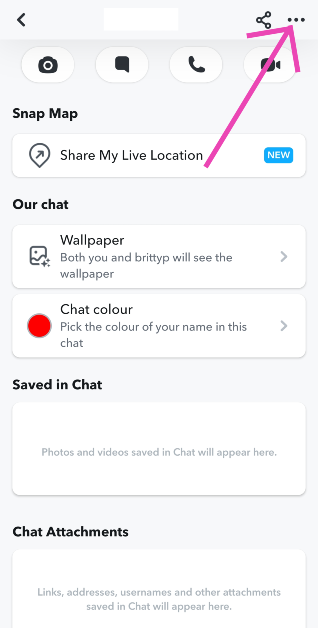
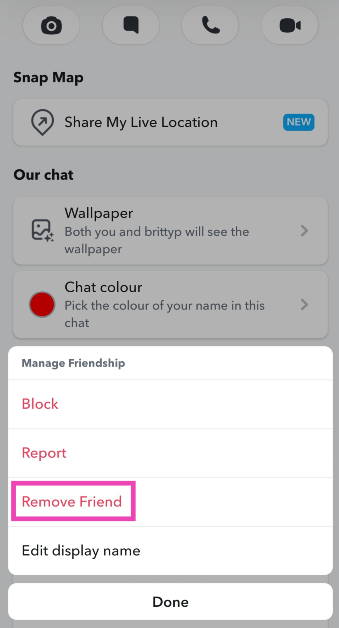
Soft blocking someone quietly removes them from your friend list and does not notify or alert them. If you’re wondering what soft-blocking is, it’s when you block someone and then immediately unblock them, effectively removing them as a friend. Here’s how you can go about it. Step 1: Launch the Snapchat app and switch to the chats tab. Step 2: Tap on the Bitmoji of the friend you want to remove. Step 3: Hit the ellipses at the top right corner of the screen and select Manage Friendship. Step 3: Hit the ellipses at the top right corner of the screen and select Manage Friendship. Step 4: Hit Block. Step 4: Hit Block. Step 5: Go back to the chats tab and tap your Bitmoji at the top left corner of the screen. Step 5: Go back to the chats tab and tap your Bitmoji at the top left corner of the screen. Step 6: Hit the gear icon at the top right corner of the screen. Step 6: Hit the gear icon at the top right corner of the screen. Step 7: Scroll down and select Blocked. Step 7: Scroll down and select Blocked. Step 8: Hit the cross icon to unblock your friend. Step 8: Hit the cross icon to unblock your friend. How to remove a friend on Snapchat without them knowing?

Remove a friend on Snapchat using the default option

If you’re certain that your chats show up further down the page on your friend’s phone, removing them the traditional way can work out for you. If they don’t scroll down to your profile, they will not notice that you have removed them as a friend. Since Snapchat doesn’t send a notification every time someone gets removed from a friend list, you don’t have to worry about them finding out right away. Here’s how you can remove a friend on Snapchat. Step 1: Launch the Snapchat app and switch to the chats tab. Step 2: Tap on the Bitmoji of the friend you want to remove. Step 3: Hit the ellipses at the top right corner of the screen and select Manage Friendship. How to remove a friend on Snapchat without them knowing? Step 3: Hit the ellipses at the top right corner of the screen and select Manage Friendship. Step 2: Tap on the Bitmoji of the friend you want to remove. How to remove a friend on Snapchat without them knowing? Step 4: Hit Remove Friend. Step 4: Hit Remove Friend. How to remove a friend on Snapchat without them knowing?

Frequently Asked Questions (FAQs)

Does Snapchat notify you when someone removes you as a friend?

No, Snapchat does not notify you when you get removed as a friend, but it is easy to tell if you know where to look. Contacts who have deleted you on Snapchat show up in your chats tab with a cross sign on the conversation thread instead of a camera.

How do I remove someone on Snapchat without them knowing?

The best way to do this is by soft-blocking the contact. This way, you will be quietly removed from their list and they won’t be able to contact you.

Does Snapchat have a friend limit?

Yes, you can add a maximum of 5,000 friends on Snapchat. Read Also: Top 4 ways to update Safari on iPhone and Mac

Conclusion 

These are the top 2 ways to unfriend or remove someone on Snapchat without them knowing. Once you remove someone on Snapchat, their messages won’t get delivered to you unless you re-add them. If your profile is set to private, they won’t be able to see your Stories either. You can change this in the privacy settings.

HP Pavilion Plus 14 2023 laptop review: Your go-to laptop

Nowadays, a lot of us count on laptops for work, play, entertainment and creation, as a result, we always prefer sleek, lightweight laptops. It should be compact so that it fits more easily in a small bag while providing all the abilities needed for productivity. In India, HP has unveiled their HP Pavilion Plus 2023 laptop lineup. The HP Pavilion Plus 14, which is available in two versions, was sent to us for review and has now become our main workstation. The latest 13th-generation Intel core processors with Intel Iris X Graphics are included with this HP laptop. Furthermore, the notebook is equipped with an IMAX-enhanced display.  Let’s find out how the HP Pavilion Plus 14 2023 performed in this review. 

HP Pavilion Plus 14 2023 review: Design and display

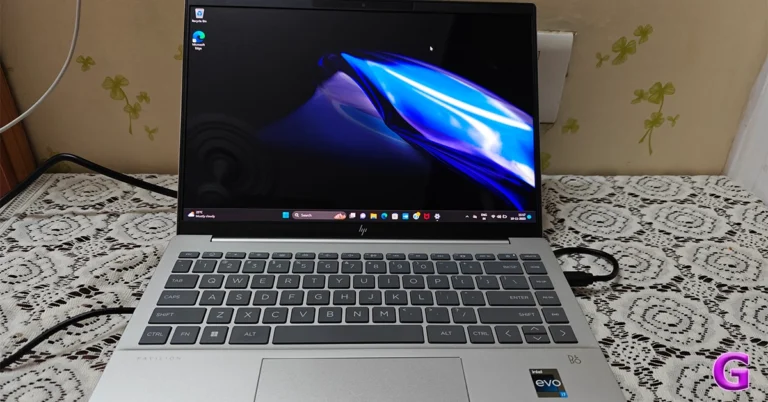
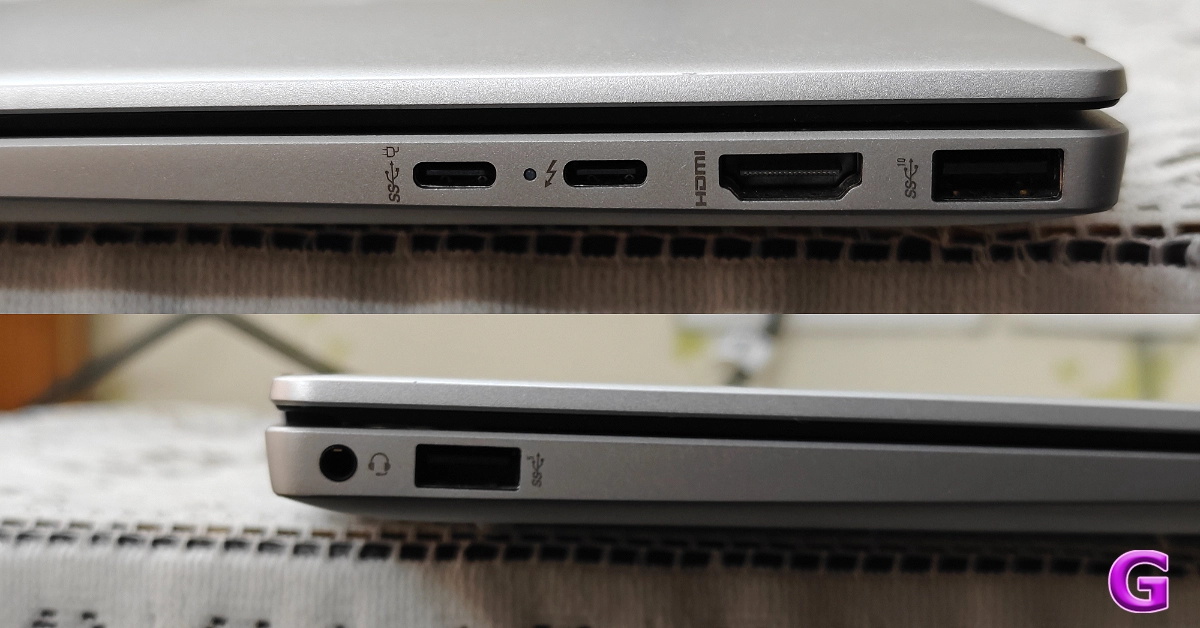
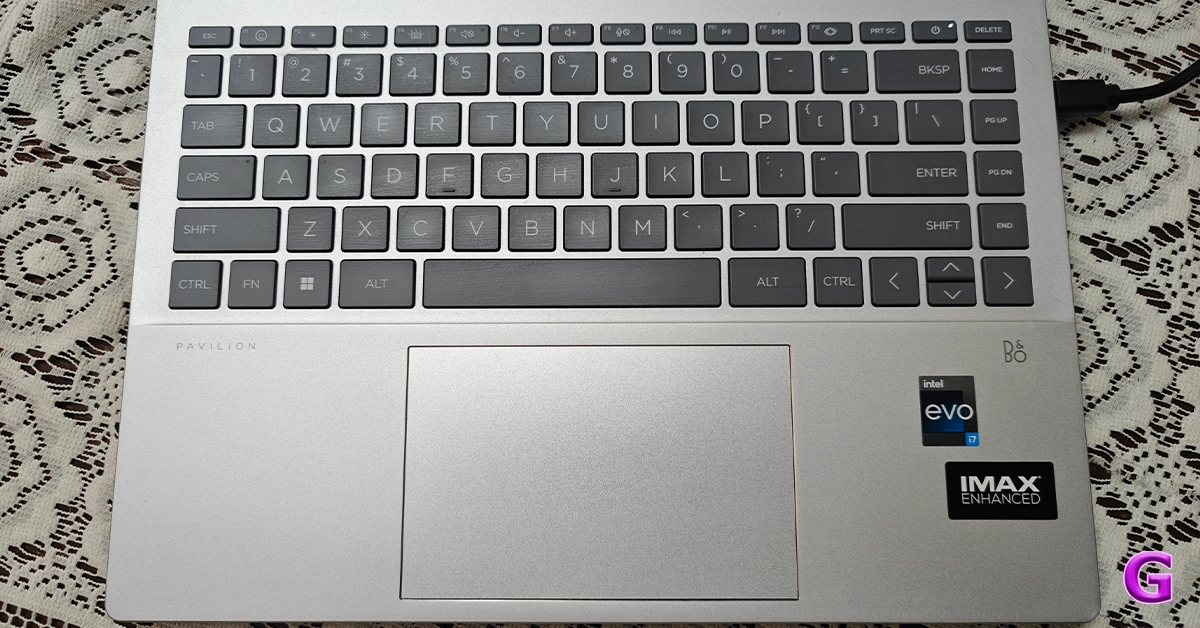
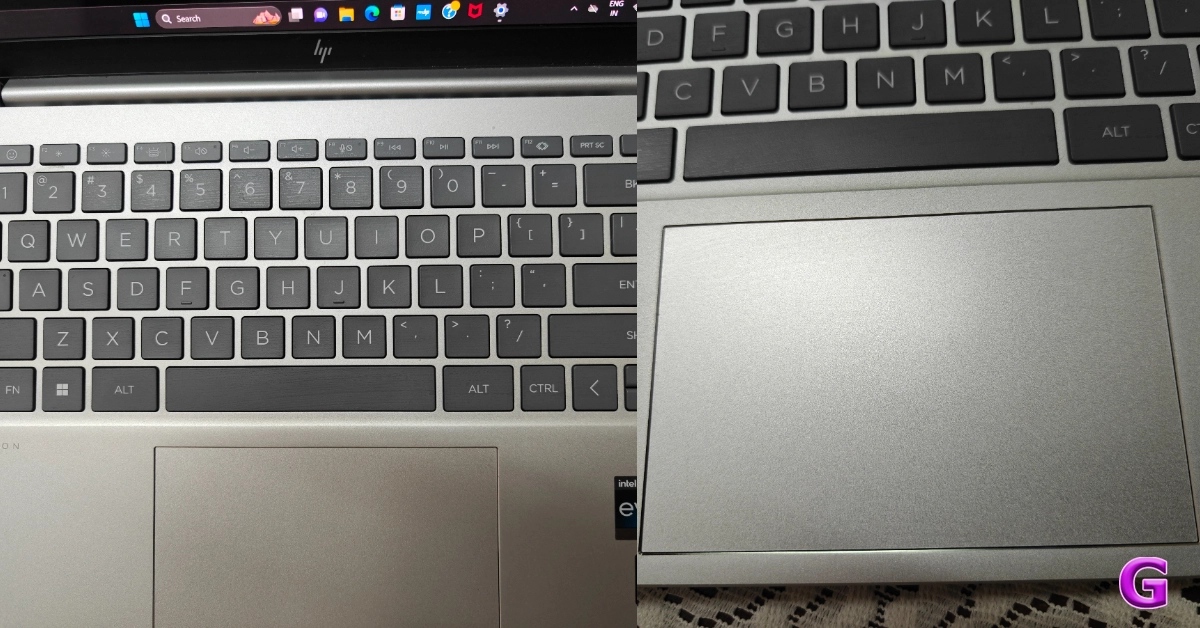
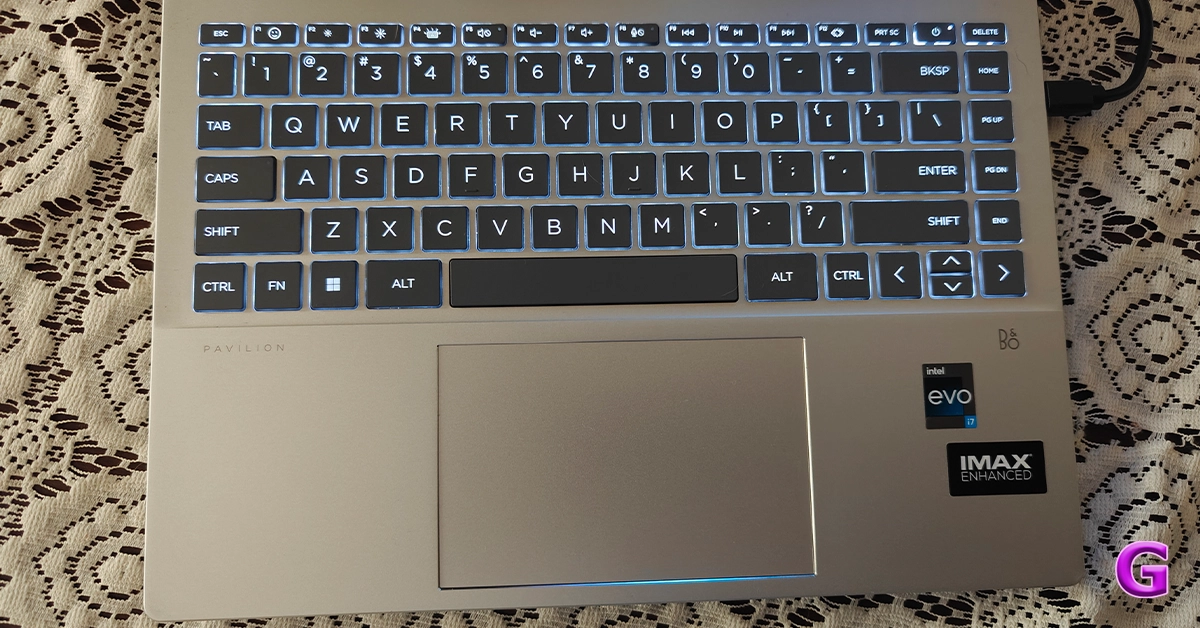
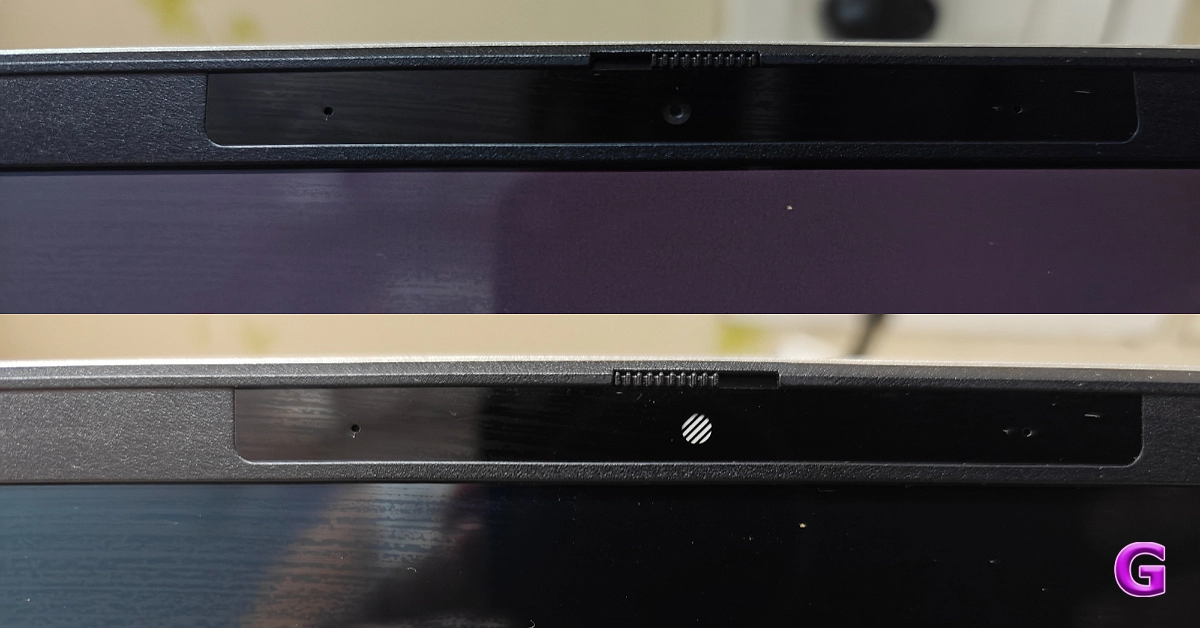
First off, the Pavilion Plus 14’s construction and design make it incredibly small and manageable, making it perfect for carrying to work, home, or on trips. At 17.5 mm thin, the laptop weighs 1.4 kg. For the A/C/D covers, post-industry and post-consumer recycled metal were used in its construction. Since it is lightweight, has a premium appearance, and is built strong, you shouldn’t have any issues at all carrying it for the entire day. HP Pavilion Plus 14 2023 laptop review: Your go-to laptop As we said, this laptop is made entirely of recyclable materials. The company has used Ocean-bound plastic in a speaker enclosure(s) and bezel for keyboard keycaps and scissors containing post-consumer recycled plastic, too. Recycled metal is used in the cover, keyboard frame, base, sideband, hinge cap(s), and keyboard supporting plate. Also, all of the other competitive brands use recyclable and environmentally friendly materials as part of their sustainable approach, so why should HP be behind? Also Read: HP Victus 16 2023 review: Perfect for work and gaming You know almost all HP laptops come with minimalist no-nonsense design. Though the LED lighting and other design characteristics may seem sporty and appealing to gamers, nothing matches to its elegant yet meek style. By the way, all the brands are taking a sustainable approach where they are using recyclable and eco-friendly materials. HP Pavilion Plus 14 2023 laptop review: Your go-to laptop Just like all the other HP laptops the company’s branding is done on the front cover. You get all the necessary ports on this machine. There is Thunderbolt 4 with USB Type-C, another USB Type-C port, two USB Type-A ports, an HDMI-out and a headphone/microphone combo on the sides. To allow more efficient cooling and keep the laptop from overheating, the rubber feet at the bottom elevate the laptop off a level surface higher than usual.     HP Pavilion Plus 14 2023 laptop review: Your go-to laptop Over that, the notebook sports HP Dual Speakers HP Audio Boost, and custom tuning by the experts at B&O, which allows you to enjoy rich and natural audio.   review of new HP Pavilion Plus 14 The new Pavilion Plus 14 comes with a 14-inch IMAX enhanced 2.8K OLED display with 2,880 x 1,800 pixels of resolution. The display has a 16:10 aspect ratio along with 88% screen-to-body ratio. Also, the screen of the laptop supports an adaptive refresh rate ranging from 48-120Hz. Furthermore, the machine comes with 400 nits (SDR) and 500 nits (HDR) brightness. The screen isn’t as bright as we would have liked it to be for this price. Also, it is an OLED screen that has 100 percent DCI-P3 that supports anti-glare tech. The display is Eyesafe certified and it meets TÜV low blue light requirements, which saves the user’s eyes from harmful blue light without sacrificing colour accuracy to lessen eyestrain from prolonged use. The OLED panel displays brighter colours and a deeper black. The display has a contemporary appearance since the side bezels are very slim.   review of new HP Pavilion Plus 14 When you lift the lid or cover of the laptop you get a full-size keyboard which comes with back lighting. The colour of the entire keyboard is light grey. For video chats, there is a 5-megapixel webcam with privacy-enhancing mic mute buttons and a shutter for the camera.

HP Pavilion Plus 14: Performance

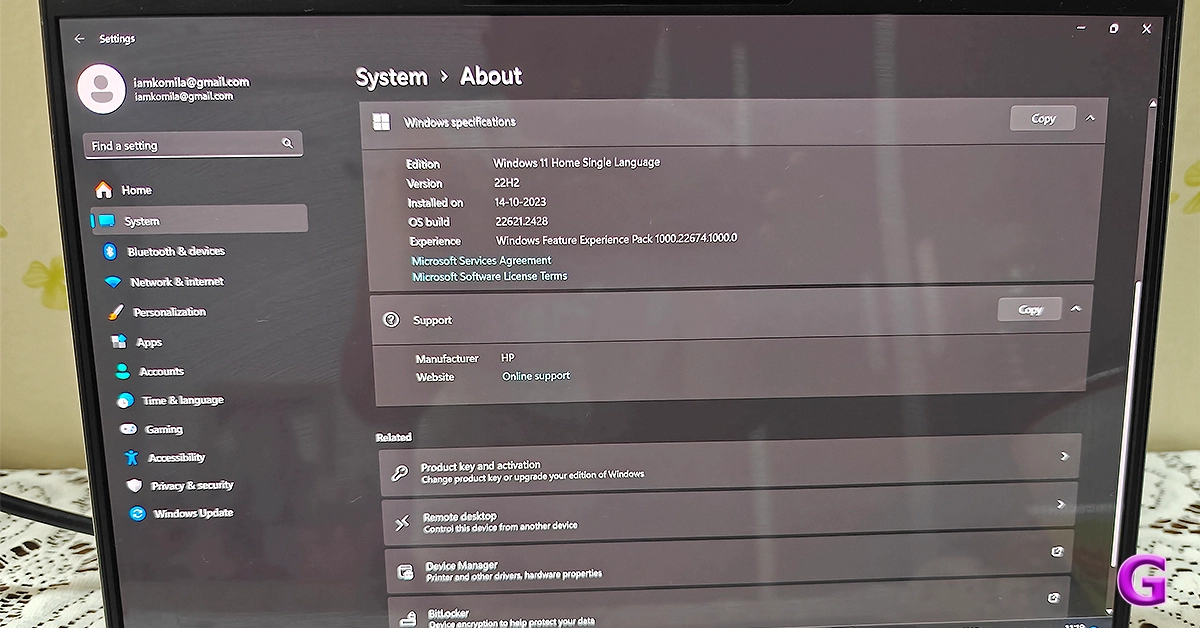
Now coming to the performance, the HP Pavilion Plus 14 laptop is equipped with a 13th Generation Intel Core i7 – 1355U CPU, which has 10 cores and 12 threads and can run at up to 5.0 GHz clock speed thanks to the Intel Turbo Boost Technology. Additionally, the processor has 12 MB of L3 cache. About storage and RAM, you will receive a 1TB SSD hard drive along with 16GB LPDDR5 RAM. In addition to this, the firm is offering 25 GB of Dropbox storage, which is applicable for 1 year from the date of registration. review of new HP Pavilion Plus 14 Together with the Intel Iris Xe Graphics card, the 13th-generation processor makes multitasking a breeze. We worked on several documents without any issues. This configuration will be more than sufficient for your daily usage, which includes opening of over 25 Chrome tabs and performing additional tasks like online meetings. We also did not encounter any unusual fan noises or issues with the heating system.   The display is good for office use as well as for people who view a lot of OTT content. During our testing, the colours appeared vibrant and sharp, which makes them ideal for multimedia consumption. The resolution is decent, too. Also Read: Apple MacBook Air 15-inch Review: We Apple-solutely Love It! The screen brightness is enough for indoor use only. The colour accuracy is also fairly good. As said, the display has TÜV certification, so even if you use it for extended periods of time, your eyes won’t be harmed and you won’t feel any strain in your eyes or headaches. Additionally, the two speakers are among the best that we have ever heard. The loudness and sound quality, both are excellent. review of new HP Pavilion Plus 14 The excellent travel distance between the keys provides pleasant tactile feedback. With it, the size of the trackpad is suitable for comfortable use. Note that the keyboard is smaller because it does not include a number keypad. review of new HP Pavilion Plus 14 Zoom meetings and connecting with friends and family are made possible by the 5MP infrared camera. The webcam comes with an 88-degree field of view. Along with the camera, there is a dual-array microphone. You will not only appear very clear but also be heard well, thanks to the temporal noise reduction. The company has also taken care of user privacy, the top-mounted camera shutter on the system can be manually opened and closed.   review of new HP Pavilion Plus 14 When it comes to connectivity, there is Wi-Fi 6E with a wireless card for speed. The Bluetooth here is the 5.3 version. Users get Windows 11 out of the box. It’s excellent that Microsoft Office comes pre-installed and includes Word, Excel, and other important programs for productivity. The company is providing a 30-day trial of the McAfee Antivirus, too. When it comes to the battery, the HP Pavilion Plus 14 has a 4-cell, 68Wh battery. The 65W USB Type-C power adapter is included in the packaging. The device provides about 7-8 hours of battery life. This means you may use it for nearly the entire workday (in one charge cycle) if you charge it fully in the morning. 

Verdict

The thin and light HP Pavilion Plus 14 laptop comes with a gorgeous all-metal chassis design. With that said its display is of good resolution. It also has an excellent battery life. If you’re looking to purchase a laptop for multimedia consumption, the HP Pavilion Plus 14 is a fantastic option. You should give this laptop some serious thought if you need a laptop that can handle demanding work, writing, taking Zoom calls, and multimedia consumption. Its battery life is also very good. Not just that the notebook is sturdy as well as good-looking. In terms of cost, it begins at about Rs 99,999. However, if you buy the machine via the company’s official website you can save a lot of money since there are numerous deals available. Buy Here

Garena Free Fire Redeem Codes Today 24 November 2023: Here is how to claim them

Garena Free Fire is a battle royale game with regular awards and tournaments to keep players interested. If you play Garena Free Fire, you should be aware of the redeem codes that are released on a daily basis. However, because the battle royale game is banned in India, players from other countries can use the Free Fire Redeem codes daily. If you’re unfamiliar with the Garena Free Fire redeem codes or don’t know how to get them, we’ve put together a step-by-step guide to help you redeem them. Check out Garena Free Fire Redeem Codes for 24 November 2023. The Free Fire redeem codes are a great way to get free stuff. These are 12-digit codes that contain alphabets and numbers, as well as an expiration date and time. Because the Garena FF redeem codes cannot be used more than once, you should hurry to the redemption page to claim your free reward before someone else does. To get a free reward, all you have to do is go to reward.ff.garena.com/en, which is the official redemption page. Also, keep an eye on this space for daily updates on Garena Free Fire redemption codes and rewards.

Garena Free Fire Redeem Codes Today 24 November 2023

FFCMCPSUYUY7E XZJZE25WEFJJ BR43FMAPYEZZ MCPW2D1U3XA3 MCPW3D28VZD6 V427K98RUCHZ FFCMCPSJ99S3 FFCMCPSEN5MX HNC95435FAGJ 6KWMFJVMQQYG MCPW2D2WKWF2 NPYFATT3HGSQ UVX9PYZV54AC EYH2W3XK8UPG FFCMCPSGC9XZ ZZZ76NT3PDSH

How to Get Free Fire Redeem Codes for Garena on 24 November 2023?

  • Visit the Garena Free Fire game’s official website at reward.ff.garena.com.
  • Use your Facebook, Google, VK, Apple ID, Huawei ID, or Twitter account to log in.
  • You’ll be taken to a valid redemption code (s)
  • Copy and paste the 12-digit redemption code into the text box.
  • On the screen, a dialogue box will appear.
  • ‘Ok’ should be selected.
For the latest gadget and tech news, and gadget reviews, follow us on TwitterFacebook and Instagram. For newest tech & gadget videos subscribe to our YouTube Channel. You can also stay up to date using the Gadget Bridge Android App. You can find the latest car and bike news here.

Oppo Reno 11 Series with curved AMOLED displays launched

Key highlights
  • The series includes Oppo Reno 11 Pro and Oppo Reno 11.
  • Both the phones feature a 50-megapixel triple rear cameras
  • The Pro variant is powered by Snapdragon 8+ Gen 1 SoC.
  • The vanilla model is equipped with MediaTek Dimensity 8200 SoC.
Oppo today officially announced the launch of Oppo Reno 11 Series. The company has introduced its new smartphone series in its home market, China. The newly arrived lineup includes two phones- Oppo Reno 11 Pro and Reno 11. Both the phone runs on ColorOS 14 on top of Android 14 out of the box. Also, both phones feature a curved AMOLED display. Check out more details about the smartphone below. Oppo Reno 11 Pro, Oppo Reno 11 price and availability

Oppo Reno 11 Pro, Oppo Reno 11 price and availability

Oppo Reno 11 Pro Price
  • 12GB RAM + 256GB storage- CNY 3,499 (approx Rs 41,000)
  • 12GB RAM + 512GB storage- CNY 3,799 (approx Rs 44,000)
Oppo Reno 11 Price
  • 8GB RAM + 256GB storage- CNY 2,499 (approx Rs 29,000)
  • 12GB RAM + 256GB storage- CNY 2,799 (approx Rs 31,000)
  • 12GB RAM + 512GB storage- CNY 2,999 (approx Rs 35,000)
In terms of availability, the Oppo 11 series is available for purchase in China. International and Indian availability details remain undisclosed.

Oppo Reno 11 Pro specifications

The 6.74-inch 1.5K OLED curved display with 1,240×2,772 pixels of resolution on the Oppo Reno 11 Pro features the following:
  • Up to 120Hz refresh rate
  • Up to 240Hz touch sampling rate
  • 450ppi pixel density
  • 1,600 nits of peak brightness
Oppo Reno 11 Pro, Oppo Reno 11 price and availability The device is powered by an octa-core Snapdragon 8+ Gen 1 SoC with LPDDR5x RAM (can be virtually expanded up to 24GB)and UFS 3.1 storage. It operates on Android 14-based ColorOS 14. The handset includes 5G, 4G LTE, Wi-Fi 6, Bluetooth 5.3, GPS/ A-GPS, NFC, OTG, and a USB Type-C port for connectivity. Also, there is an under-display fingerprint sensor and other sensors including an accelerometer, geomagnetic sensor, light sensor, under-screen proximity sensor, gravity sensor, colour temperature sensor, IR control, and gyroscope. The smartphone sports a 4,700mAh battery with 80W Super Flash Charge support. The Oppo Reno 11 Pro comes with a 32-megapixel RGBW Sony IMX709 front-facing camera for selfies. There is a triple rear camera setup which includes:
  • 50-megapixel primary Sony IMX890 sensor with OIS
  • 32-megapixel telephoto lens
  • 8-megapixel ultra-wide camera
Also Read: Best 5G smartphones to buy under Rs 20,000 (November 2023)

Oppo Reno 11 specifications

The Oppo Reno 11 features a 6.70-inch OLED curved display with 1,080×2,412 pixels of resolution. The screen also comes with the following:
  • Supports an adaptive refresh rate (1Hz to 120Hz)
  • 394ppi pixel density
  • 950nits peak brightness
Under the hood, there is a MediaTek Dimensity 8200 SoC with LPDDR5x RAM (can be virtually expanded up to 12GB) and UFS 4.0 storage. The Reno 11 is highlighted with the same selfie camera. The triple camera setup on the back includes:
  • 50-megapixel Sony LYT600 sensor (26mm focal length and OIS)
  • 32-megapixel telephoto lens
  • 8-megapixel ultra-wide camera
The Oppo Reno 11 packs a 4,800mAh battery that comes with 67W Super Flash Charge support.

Anyone can now download Instagram Reels, the download option will be enabled by default

Key Highlights
  • Users can now download Reels published by public accounts on Instagram thanks to a new functionality that Meta has now enabled for everyone.
  • Instagram CEO Adam Mosseri made the announcement about the latest feature.
  • The downloaded reels can be further shared to other platforms like WhatsApp.
Meta has started rolling out the ability to download Reels on Instagram. Earlier this feature was under testing and only available in the United States and it is now being released globally. Note that one can only download Instagram Reels from public accounts. Meta is adding support for downloading Instagram Reels which are posted publicly. Earlier either one had to use a third-party app or other websites to download reels from public accounts. However, they have the option to download their own reels. The information was shared by Adam Mosseri, through his Instagram broadcast channel. He revealed that now anyone can download Reels to their camera roll. This functionality was first introduced to users in the US in June but has now officially confirmed the availability of the feature to users globally. Also Read: Sunbird temporarily shutting down, removed from Play Store Note that the option for Download Instagram Reels will be turned on by default for the public accounts. But users also have the option to disable the option of downloading reels that they have published. Moreover, the downloaded Reels will now include the Instagram logo/watermark, account name/username, and audio attribution. The option to download an Instagram reel will show up at the bottom menu with Add to Story, Share, Copy Link, and other options. All you have to do is tap on the share icon. Then select the Download option to save the reel in your camera roll. Note that Reels posted by private accounts cannot be downloaded.

Garena Free Fire Redeem Codes Today 23 November 2023: Here is how to claim them

Garena Free Fire is a battle royale game with regular awards and tournaments to keep players interested. If you play Garena Free Fire, you should be aware of the redeem codes that are released on a daily basis. However, because the battle royale game is banned in India, players from other countries can use the Free Fire Redeem codes daily. If you’re unfamiliar with the Garena Free Fire redeem codes or don’t know how to get them, we’ve put together a step-by-step guide to help you redeem them. Check out Garena Free Fire Redeem Codes for 23 November 2023. The Free Fire redeem codes are a great way to get free stuff. These are 12-digit codes that contain alphabets and numbers, as well as an expiration date and time. Because the Garena FF redeem codes cannot be used more than once, you should hurry to the redemption page to claim your free reward before someone else does. To get a free reward, all you have to do is go to reward.ff.garena.com/en, which is the official redemption page. Also, keep an eye on this space for daily updates on Garena Free Fire redemption codes and rewards.

Garena Free Fire Redeem Codes Today 23 November 2023

FLOVI8C7DYETG4B FN6MY7LJPNO9BIU FV7YFHDN4M56LYP FU0HLKBVCPYO987 FSY6TGF3BNRMFCI FU7Y6T5SRFRWVB4 FN5TKYLHROVMKLS FGDEN4M5KVLYHI7 FDYHR6Y7UR674U3 FBVYHDNEK46O5IT FUGYHVBCXMSOUE4 FOE497MURKT6LOBI FV7CYTGDBWNMJEK FL5O9YHD87BYVTC

How to Get Free Fire Redeem Codes for Garena on 23 November 2023?

  • Visit the Garena Free Fire game’s official website at reward.ff.garena.com.
  • Use your Facebook, Google, VK, Apple ID, Huawei ID, or Twitter account to log in.
  • You’ll be taken to a valid redemption code (s)
  • Copy and paste the 12-digit redemption code into the text box.
  • On the screen, a dialogue box will appear.
  • ‘Ok’ should be selected.
For the latest gadget and tech news, and gadget reviews, follow us on TwitterFacebook and Instagram. For newest tech & gadget videos subscribe to our YouTube Channel. You can also stay up to date using the Gadget Bridge Android App. You can find the latest car and bike news here.

Top 5 ways to download free music on iPhone (2023)

0
If you’re not subscribed to any of the music streaming giants, downloading free music on your phone can be quite a challenging task. Certain online libraries offer free downloads, but they may not always have what you are looking for. So how do you go about saving all your favourite tunes on your phone? Today, we bring you the top 5 ways to download free music on your iPhone. Read Also: Top 4 ways to convert a photo to PDF on iPhone

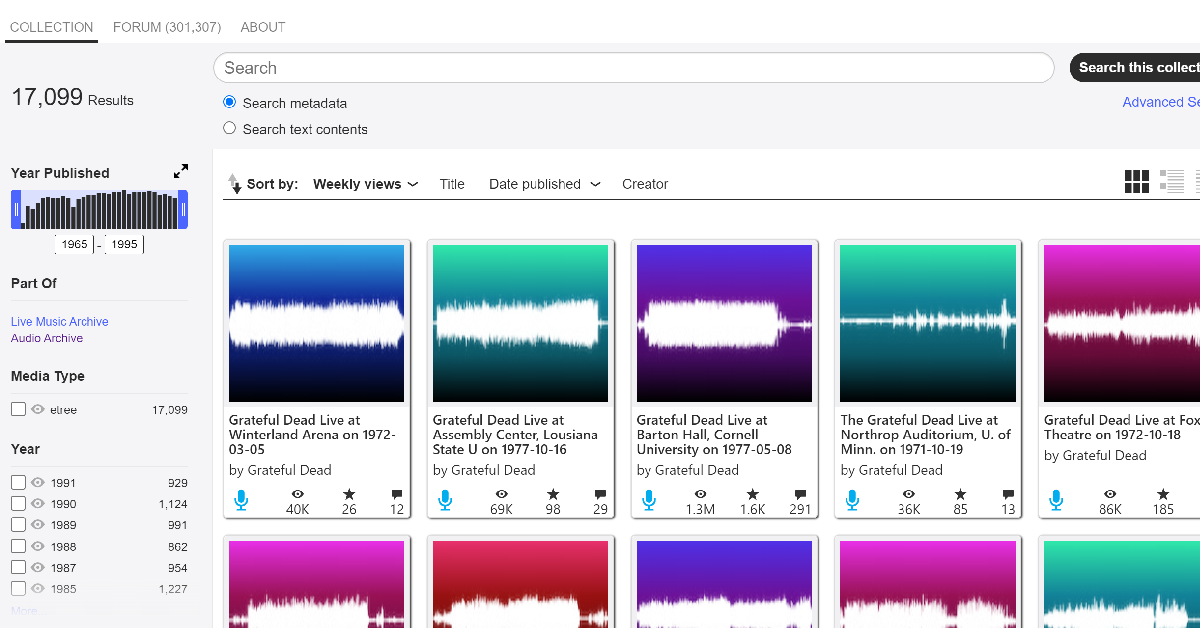
The Internet Archive

The Internet Archive The Internet Archive is an incredible online repository of free books, movies, music, software, and more. There are over 14 million audio recordings that can be downloaded from the website for free. This even includes popular and contemporary artists. If you like listening to live music, you can also find bootleg recordings of concerts on the Internet Archive. The only catch is that music downloaded from this website cannot be used for commercial purposes. However, if your goal is to simply listen to music, TIA is one of the best free resources out there.

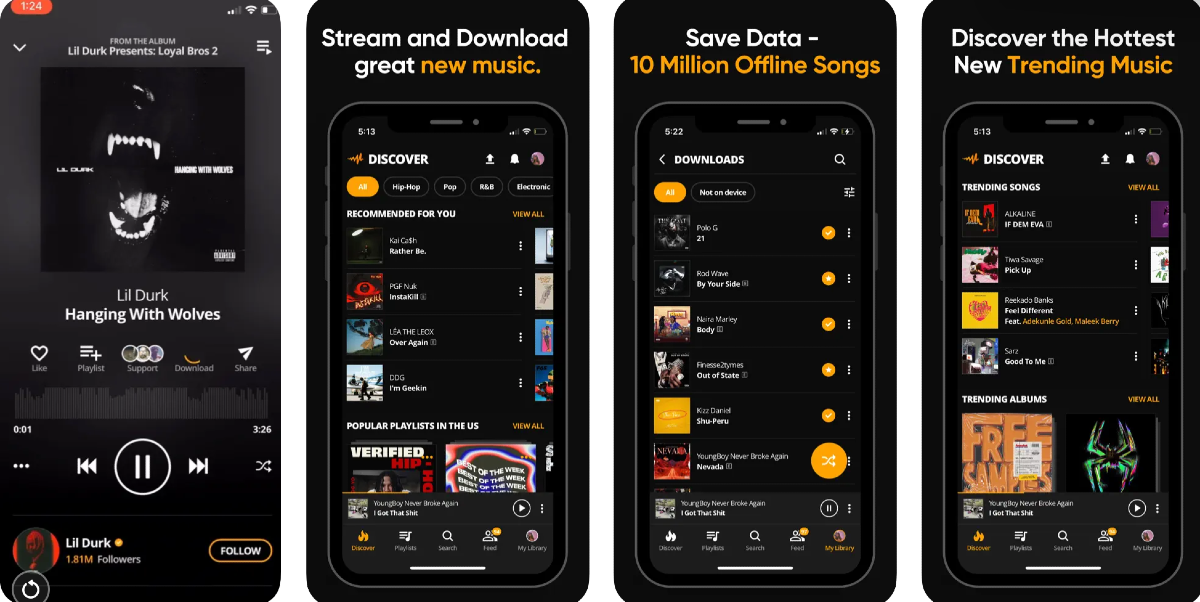
Audiomack

Audiomack Audiomack is one of the best apps to download music for commercial and recreational purposes. If you’re looking for a moody background number for your vlog, Audiomack is where you should go. You can even find popular artists like Bad Bunny, Diplo, NBA Youngboy, and others on Audiomack. Once you play a song on the app, you can easily download it from the player itself.

YouTube

YouTube app keeps crashing on your iPhone? Here are 9 easy fixes You can download music from YouTube without requiring a subscription to YouTube Premium. This usually requires a good amount of hit and trial since most channels restrict the downloads on their uploads. Thankfully, you can find several videos of the same song on YouTube. Once you download the song, you can access it from the Downloads folder on YouTube.

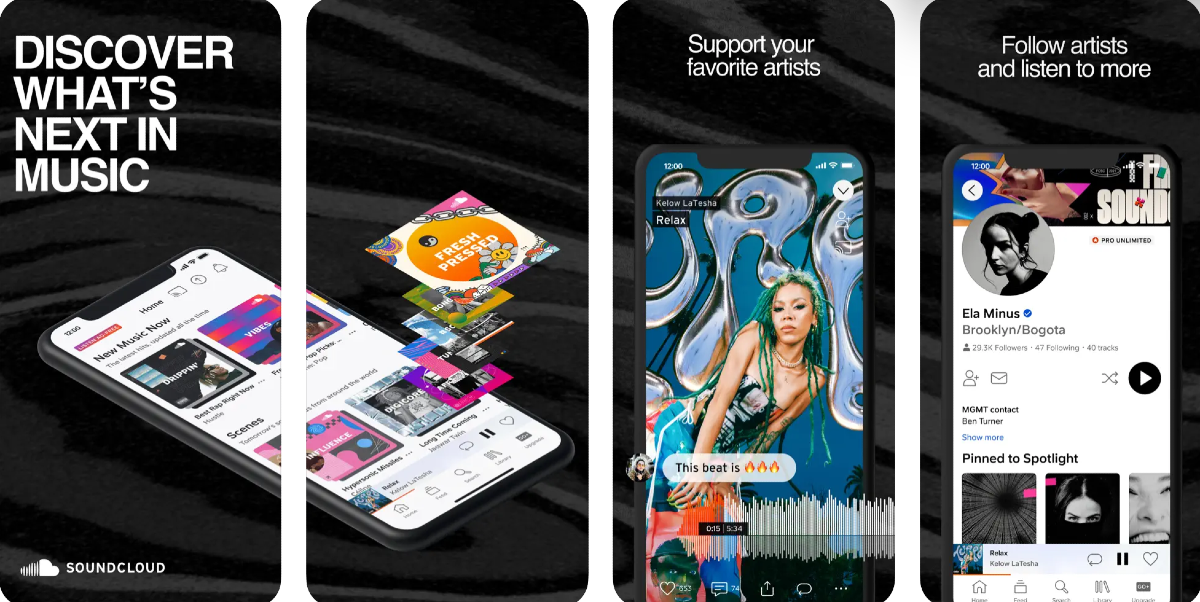
Soundcloud

Soundcloud Top 5 ways to download free music and songs on iPhone (2023) Soundcloud is one of the best online platforms for up-and-coming artists to showcase their work. You can also find a lot of popular artists on Soundcloud. If the artist allows downloads, you can save their music on your iPhone for free. Like YouTube, this also requires a lot of hit and trial. The best part is that you don’t need to register to Soundcloud to download a song.

Musopen

Musopen Top 5 ways to download free music and songs on iPhone (2023) If you’re a classical music enthusiast, head over to Musopen to download free recordings and sheet music on your device. Musopen has a very friendly interface that is easy to follow and navigate. You can browse and download music from composers like Bach, Mozart, Beethoven, Chopin, and more for free. If you’re honing your craft as a musician, you will also like the educational content present on the website.

Frequently Asked Questions (FAQs)

Where can I download free music on my iPhone?

The Internet Archive is an exhaustive online library that consists of millions of audio recordings from popular artists, both classic and contemporary. Other than that you can also use services like Audiomack and Jamendo to download free music.

Does YouTube allow free downloads?

You can download music for free on YouTube with a Premium subscription. However, some channels and creators allow non-premium subscribers to download their videos for free too.

Where can I find royalty-free music for my vlog?

Services like TuneTank, Jamendo, and Soundstripe offer royalty-free music for vlogs, movies, podcasts, and more. Even YouTube has a royalty-free audio library that lets you select music for your videos. Read Also: Top 2 Ways to Add Checkboxes to Word Document

Conclusion

These are the top 5 ways to download free music on your iPhone. You can also use third-party tools to download YouTube videos as MP3s on your device. Know any music services that allow free downloads on their platform? We’d love to know in the comments!

Top 4 ways to update Safari on iPhone and Mac

0
You must already be familiar with the role that an updated OS plays in keeping your device secure. Malware, ransomware, and other kinds of malicious viruses are rampant on the internet, and it is essential that your device is well-equipped to protect you against them. Your web browser plays an important part in this as well. Like your device’s OS, the web browser also receives routine security patches from its developers. In this article, we bring you the top 4 ways to update the Safari browser on your iPhone and Mac. Read Also: OnePlus AI Music Studio, a platform allowing users to compose music launched in India and globally

Update Safari on iPhone using the App Store

Step 1: Long press the App Store icon on your iPhone’s home screen. Step 2: Hit the Updates option. Step 2: Hit the Updates option. Step 3: Make sure your Account page is refreshed. You can do this by pulling down the top of the page and then releasing it. Step 4: Scroll down to Safari and hit the Update button next to it. Step 4: Scroll down to Safari and hit the Update button next to it.

Turn on automatic updates

If you don’t want to manually update the Safari app on your iPhone, simply turn on automatic updates for all apps. Your apps will only update when you are connected to a WiFi network. Step 1: Go to Settings and select App Store. Step 1: Go to Settings and select App Store. Step 2: Turn on the toggle switch for App Updates. In the Cellular Data section, turn off the toggle switch for Automatic Downloads. Step 2: Turn on the toggle switch for App Updates. In the Cellular Data section, turn off the toggle switch for Automatic Downloads.

Update the Safari browser on your Mac

Step 1: Open the App Store on your Mac. Step 2: Hit the Updates option at the top of the screen. Step 3: This is where you’ll find the list of apps on your device with a pending update. Step 4: Scroll down to Safari and hit the Update button next to it.

Update Safari on your Mac by updating the macOS

Once you update macOS to its latest version, it also updates the native apps like Safari on your device. Here’s how you can go about it. Step 1: Hit the Apple logo at the top left corner of the screen and select System Preferences. Step 2: Click on System Updates. Step 3: Your device will check for any new updates. Step 4: Once it shows a new update, click on Upgrade Now.

Frequently Asked Questions (FAQs)

How do I update the Safari browser on my Mac?

To update the Safari browser on your Mac, simply head over to the App Store and switch to the Updates tab. This is where you’ll find the list of apps with pending updates. If Safari is on the list, click the Update button next to it.

How do I turn on automatic updates for the apps on my iPhone?

Go to Settings>App Store and turn on the toggle switch for App Updates. Your smartphone will automatically download the latest versions of the apps installed in it. 

Why should I update the Safari browser on my iPhone?

New versions of web browsers contain important security updates that guard your device against malicious entities. Read Also: Top Ways to Open the Windows Snipping Tool With a Keyboard Shortcut

Conclusion

These are the top 4 ways to update Safari on your iPhone and Mac. If you’re thinking of turning on automatic updates, make sure it is under the precondition that your device is connected to a WiFi network. Updating apps over a cellular connection can eat up a significant portion of your mobile data.

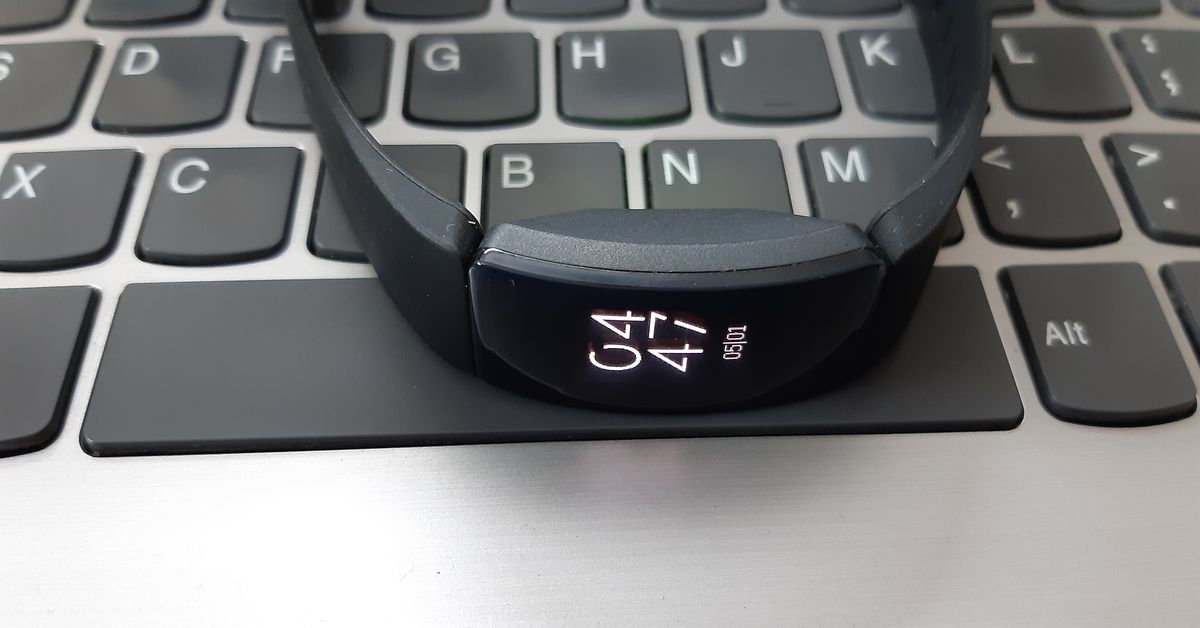
2 Quick Ways to Change or Update the Time on a Fitbit (2023)

0
Once you set up your Fitbit device it relies on your smartphone for the accurate date and time. Sometimes, it may malfunction and display the incorrect time even when there doesn’t seem to be anything wrong with your smartphone. Instead of resetting and re-linking your Fitbit to your phone, you can manually set the correct time. In this article, we bring you 2 quick ways to change or update the time on a Fitbit. Read Also: Tinder brings a slew of new features and a fresh look for Gen Z users: Here is what’s new

Change the time on your Fitbit using the mobile app

  Fitbit Inspire HR fitness tracker 2 Quick Ways to Change or Update the Time on a Fitbit (2023) Step 1: Launch the Fitbit app on your smartphone and switch to the Today tab. Step 2: Tap your profile picture. Step 3: Select Advanced Settings. Step 4: To manually change the time, turn off the toggle switch for Automatic time zone. Step 5: Select your time zone manually. Step 6: Sync your Fitbit device.

Change the time on your Fitbit using the official website

Fitbit Charge 5 Review: Best Fitness Tracking Features In The Fitbit Range 2 Quick Ways to Change or Update the Time on a Fitbit (2023) Step 1: Go to the official Fitbit website and log into your account. Step 2: Hit the gear icon at the top right corner of the screen and select Settings. Step 3: Switch to the Personal Info tab. Step 4: Choose your timezone in the Advanced Settings section. Step 5: Hit Submit.

Frequently Asked Questions (FAQs)

How do I change the time on my Fitbit?

Launch the Fitbit app and go to Today>Profile>Advanced Settings and manually select your time zone after turning off the toggle switch for Automatic time zone.

How much does the cheapest Fitbit cost?

Fitbit Inspire 2 is the cheapest fitness tracker from the brand, priced at Rs 7,999.

Who owns Fitbit?

Fitbit was acquired by Google in 2021. By 2025, all Fitbit users will require a Google Account to use its services. Read Also: How to Burn Apple Music to CD (Easily & Quickly)?

Conclusion

These are the 2 quick ways to change or update the time on your Fitbit device. While you’re here check out our reviews of the Fitbit Sense 2 and Fitbit Versa 4 smartwatches. If you’re looking to buy a smartwatch to track your fitness and health metrics, check out our list of the best smartwatches around!

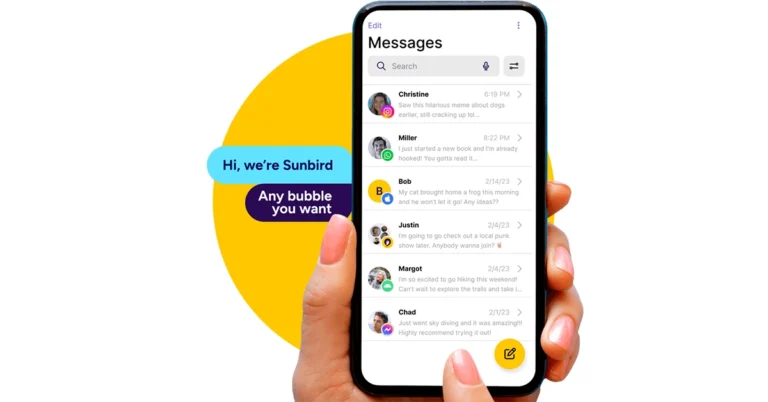
Sunbird temporarily shutting down, removed from Play Store

Key Highlights
  • Sunbird is an iMessage-compatible app for Android.
  • The company is temporarily shutting down due to security issues.
  • Sunbird partnered with Nothing and released the Nothing Chats App, which was also removed from the Play Store for the same reasons.
Only a week after the Nothing Chats app launch, the company had to remove it from the Google Play Store and now its partner company Sunbird is shutting down the messaging platform, too. Users have been notified that it will temporarily shut down due to multiple security vulnerabilities that have been affecting the service. Sunbird is the developer of Nothing’s iMessage-compatible messaging app Nothing Chat. After a lot of criticism due to privacy concerns, the app has already been removed from the Google Play Store. After the formal shutdown, Sunbird has also taken down universal Sunbird: iMessage for Android from the Play Store. For those who are unaware, in 2022, Sunbird was launched aimed to provide Android smartphone consumers with iMessage compatibility. Now the company has come to a decision and notified its users about the app’s hold. The push notification stated, “Dear Sunbird User. We have decided to pause Sunbird usage for now while we investigate security concerns. We will update you when we are ready to proceed.” Therefore, it is temporarily suspending its usage in order to safeguard private information. “Good afternoon everyone. We are investigating the security issues raised in the last 24 hours. In an abundance of caution and to protect your confidential data, we are shutting down Sunbird Media temporarily. We will keep you posted. Thank you & sincere apologies, for the inconvenience,” if further stated. Also Read: Samsung Galaxy S24 Ultra bags BIS certification, India launch imminent Recently it came into the limelight when it collaborated with Nothing and released a new chat software called Nothing Chat. The iMessage-compatible Android App is exclusive to Nothing Phone 2. The users were allowed to text or MMS to iOS users via the RCS protocol and it showed up in blue bubbles. But as soon as it was launched it caught the eye and users started raising concerns over the programme’s privacy and security. It is being criticised for sending Apple ID data through HTTP instead of the safer HTTPS protocol. Note that Nothing Chats App is powered by Sunbird and when the messages, images and videos received through its system are unencrypted. Therefore the SMS or MMS sent or received through Sunbird’s system is public.