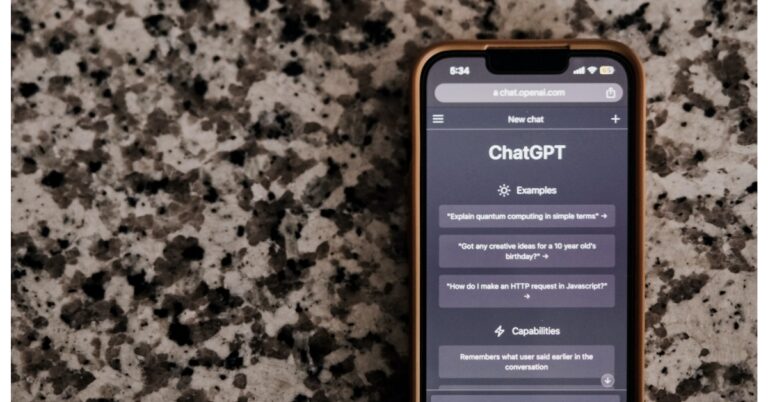
ChatGPT app for iOS was introduced earlier this month. Earlier it was available to access in 11 countries but now it is being expanded to 30 more countries across the globe including India.
The ChatGPT app was launched in the US first earlier this month and was made available to users in 11 more countries — Albania, Croatia, France, Germany, Ireland, Jamaica, Korea, New Zealand, Nicaragua, Nigeria, and the UK a week after. OpenAI has now announced to expand the ChatGPT iOS app to 30+ more countries. it can now be accessed in Algeria, Argentina, Azerbaijan, Bolivia, Brazil, Canada, Chile, Costa Rica, Ecuador, Estonia, Ghana, India, Iraq, Israel, Japan, Jordan, Kazakhstan, Kuwait, Lebanon, Lithuania, Mauritania, Mauritius, Mexico, Morocco, Namibia, Nauru, Oman, Pakistan, Peru, Poland, Qatar, Slovenia, Tunisia and the United Arab Emirates.
The ChatGPT iOS app syncs your history across devices and is available for free to access. In addition to this, it also comes with Whisper, an open-source speech-recognition system, that enables voice input. Subscribers to ChatGPT Plus have unique access to GPT-4’s features, as well as quicker response times and early access to new features.
Also Read:Microsoft Build 2023 highlights: Here are the big announcements from Microsoft
In November 2022, Microsoft-backed OpenAI launched ChatGPT, which took off right away. It is a language model tool that analyses massive text data sets using deep learning techniques in order to accurately create sentences and simulate human-like interactions. As there is no method to filter out the datasets that have been shown to be accurate, the chatbot may occasionally provide false information. In some cases, you might need to change the way you word your prompt to get a meaningful response. ChatGPT has been taught to probe further about your inquiry.
A similar Android app is currently being developed, the firm added. At the time of the announcement the company said, “With the ChatGPT app for iOS, we’re taking another step towards our mission by transforming state-of-the-art research into useful tools that empower people, while continuously making them more accessible. P.S. Android users, you’re next! ChatGPT will be coming to your devices soon.”
For the latest gadget and tech news, and gadget reviews, follow us on Twitter, Facebook and Instagram. For newest tech & gadget videos subscribe to our YouTube Channel. You can also stay up to date using the Gadget Bridge Android App. You can find the latest car and bike news here.
Recently Krafton announced the relaunch of Battlegrounds Mobile India after it was banned in the country last year. Following the announcement the Battle Royale game BGMI was made available for download via Google Play Store in India. The developer has also confirmed that the game will be playable in India from today onwards.
The Battlegrounds Mobile India is live and now available to play. Note that this is a 3-month trial approval after it has complied with issues of server locations data security etc. The Minister of State for Electronics and Information Technology, Rajeev Chandrashekhar via tweet said that “We will keep a close watch on other issues of User harm, Addiction etc in the next 3 months before a final decision is taken ”
From Saturday, May 27, Android Users were allowed to begin preloading the BGMI game from the Google Play Store. However, the game will be playable starting today, May 29, which is already available for pre-loading. Those who are unable to pre-load immediately will get the options. Download is already available for iOS users but they can also start playing the game from today only.
“Few users may have received an automatic update from midnight, this is a part of the same preload process, and you have nothing to worry about. If you are an Android user, you will be able to preload today and play on May 29th, if you are an iOS user, you can enjoy and play the game from May 29th.”
Due to privacy and security concerns, the Krafton-owned mobile game was banned in India in July 2022 as a result of a government order. The Google Play Store and App Store soon removed it. It was banned just like PUBG and disappeared from India. If you didn’t know, PUBG was reintroduced in India under the moniker BGMI, which stands for Battlegrounds Mobile India. In addition to the new branding, the game was created especially for Indian players.
After making its debut in India, BGMI rapidly rose to prominence. The game reached 100 million users in over a year after its debut. BGMI made history by becoming the first Esports event to be broadcast on mainstream television, drawing in 200 million viewers overall and 24 million concurrent viewers.
For the latest gadget and tech news, and gadget reviews, follow us on Twitter, Facebook and Instagram. For newest tech & gadget videos subscribe to our YouTube Channel. You can also stay up to date using the Gadget Bridge Android App. You can find the latest car and bike news here.
Garena Free Fire is a battle royale game with regular awards and tournaments to keep players interested. If you play Garena Free Fire, you should be aware of the redeem codes that are released on a daily basis. However, because the battle royale game is banned in India, players from other countries can use the Free Fire Redeem codes daily. If you’re unfamiliar with the Garena Free Fire redeem codes or don’t know how to get them, we’ve put together a step-by-step guide to help you redeem them. Check out Garena Free Fire Redeem Codes for 29 May 2023.The Free Fire redeem codes are a great way to get free stuff. These are 12-digit codes that contain alphabets and numbers, as well as an expiration date and time. Because the Garena FF redeem codes cannot be used more than once, you should hurry to the redemption page to claim your free reward before someone else does. To get a free reward, all you have to do is go to reward.ff.garena.com/en, which is the official redemption page. Also, keep an eye on this space for daily updates on Garena Free Fire redemption codes and rewards.
Garena Free Fire Redeem Codes Today 29 May 2023
FFCMCPSJ99S3
MCPW3D28VZD6
ZZZ76NT3PDSH
FF7MUY4ME6SC
4ST1ZTBE2RP9
V427K98RUCHZ
B3G7A22TWDR7X
6KWMFJVMQQYG
X99TK56XDJ4X
XZJZE25WEFJJ
How to Get Free Fire Redeem Codes for Garena on 29 May 2023?
Have you participated in the Amazon Quiz today? If not then participate in the 29 May 2023 Amazon Quiz as it has already gone live on the app. The daily quiz can be played from 12 AM to 11:59 every day on the mobile app platform. Today e-commerce is giving the chance to win Rs 500 Amazon Pay Balance.Every day Amazon brings a fresh quiz for its customers. By participating in the quiz the participants can win an Amazon Pay Balance of up to Rs 50,000. The quiz can only be played on the mobile app as it is not available for the desktop platform. The quiz contains five easy questions and you have to answer all the questions correctly. The participants will then be shortlisted for a lucky draw to select a winner. Whereas the results are declared at the end of the month. Check out today’s Amazon quiz answers to win Rs 500.Amazon Quiz Today Prize – Rs 500 Amazon Pay BalanceQuiz Date – 29 May 2023Daily Timing – 12 AM to 11:59 PMWinner Announcement – Today 12 PM
Amazon Quiz Answers Today 29 May 2023
Question 1:Who scored the first century in IPL 2023?Answer: Harry BrookQuestion 2: What is the name of India’s first semi-high-speed regional rail service?
Answer: RapidXQuestion 3: Christina Koch, Jeremy Hansen, Victor Glover & Reid Wiseman will travel around ____ as part of NASA’s dream project ‘Artemis 2’?Answer: The MoonQuestion 4: Which country is the main breeding ground for this crane species?Answer: CanadaQuestion 5: Who was the director of the 1st movie of this character in the marvel studios?Answer: Jon Favreau
How To Play Amazon Quiz
Only app users are eligible to play the Amazon quiz every morning from 12 AM to 11:59 PM. The quiz is not available on the desktop. For those who are unaware of how to play the Amazon quiz below are the steps, you can follow to take the quiz.
Firstly download the Amazon app from Google Play Store or App Store
Now fill in the required information through the Sign Up option.
You need to log in to the Amazon app and scroll down on the home screen to find the Amazon Quiz banner.
Tap on the Amazon Quiz banner and tap on the Start button to start the Quiz.
Now you will get 5 questions and you need to answer them correctly. One wrong answer will eliminate you from the Quiz.
After answering all the questions correctly you are now eligible for a Lucky Draw.
The winner’s name will be announced today at 12 PM.
The counter on your Snapchat profile is called the Snapscore. Every time you send and receive a snap, your Snapscore gets increased. Any other activity like posting a story or viewing someone else’s story can also affect your Snapscore. By looking at your Snapscore, other people can get an idea of how active you are on Snapchat. While there is no direct way to hide your Snapscore, here are two ways you can prevent other people from seeing it on Snapchat. Read Also:OnePlus Pad review: The Android tablet we’ve all been waiting for!
Only let your friends see your Snapscore
Step 1: Launch the Snapchat app on your smartphone.Step 2: Tap on your Bitmoji at the top right corner of the screen.Step 3: Tap the gear icon to open settings.Step 4: Select ‘Contact Me’ under Privacy Control.Step 5: Tap on Friends.Only your Snapchat friends will be able to see your Snapscore.
Hide your Snapscore from someone by blocking them
Blocking a contact on Snapchat ensures that won’t be able to see your Snapscore. Here’s how you can go about it.Step 1: Launch the Snapchat app on your smartphone.Step 2: Tap on your Bitmoji at the top right corner of the screen.Step 3: Select ‘My friends’.Step 4: Select the contact from whom you want to hide your score.Step 5: Tap the ellipses at the top right corner of their profile.Step 6: Select ‘Manage Friendship’.Step 7: Hit Block.Once a contact has been blocked, they won’t be able to send you any snaps or messages on Snapchat. They also won’t be able to see your Snapchat stories. If you don’t want to block someone, you can simply remove them as a friend and set your ‘Contact Me’ status to Friends in order to prevent them from seeing your Snapscore.
Frequently Asked Questions
How is my Snapscore calculated?
Your Snapscore is calculated based on your total activity on Snapchat. This includes sending and receiving snaps, uploading stories, and viewing other people’s stories.
Can I hide my Snapscore on Snapchat?
There is no direct way to hide your Snapscore on Snapchat. To prevent other people from viewing your Snapscore you can set your ‘Contact Me’ preferences to ‘Friends’. You can also block someone on Snapchat if you don’t want them to see your Snapscore.
Instagram tags are useful in identifying the people in a picture. If you don’t want other people to see your profile, you can easily remove your tag in a picture. Every image you are tagged in also shows up in your profile. If you don’t want other people to know your whereabouts, this may cause a problem. Luckily, there is a way you can hide the picture without removing your tag. In this article, we bring you two ways to hide tagged photos on your Instagram profile.Read Also:OnePlus Pad review: The Android tablet we’ve all been waiting for!
Hide a tagged photo on your profile
Step 1: Launch the Instagram app on your phone and tap on your profile icon.Step 2: Switch to the tagged photos tab.Step 3: Select the picture you want to hide.Step 4: Tap on the ellipses (three dots) at the top right corner of the post.Step 5: Tap on ‘Tag options’.Step 6: Select ‘Hide from my profile.
Hide multiple tagged photos from your profile
Step 1: Launch the Instagram app on your phone and go to your profile page.Step 2: Tap the hamburger menu and select ‘Settings and privacy’.Step 3: Scroll down and select ‘Tags and mentions’.Step 4: Select ‘Manually approve tags’.Step 5: Tap on ‘Edit’.Step 6: Select the images you want to hide.Step 7: Select ‘Hide’ from the bottom of the screen.
Frequently Asked Questions
How do I hide my tagged photos from the public?
To hide a tagged picture on Instagram simply go to the post and select ‘Tag options’ after tapping on the ellipses. You can choose whether you want to remove or hide the picture.
How do I hide multiple tagged pictures on Instagram?
To hide multiple tagged images from your Instagram profile, simply go to Profile>Menu>Settings and Privacy>Tags and Mentions>Edit. Select the desired images and hit ‘Hide’.
Smartphone prices are getting ridiculous every passing year. If you want to get your hands on a flagship product, you need to shell out $700 at the very least. This doesn’t mean that there’s a dearth of smartphone options in other price brackets. We’ve seen ‘flagship killers’ over the years that are priced moderately and offer tremendous performance. Let’s take a look at the best 5G smartphones you can buy for under $500 in USA.Read Also:Nothing Phone 2 global launch set for July, more specs revealed
Google Pixel 7a
Price: $499Quick Specs
Display
6.1-inch OLED
Chipset
Tensor G2
RAM
8GB
Storage
128GB
Battery
4,385 mAh
Every year Google puts out a spec-laden midrange Pixel smartphone that offers quite the bang for the buck. This year’s Pixel 7a continues that tradition by replicating the design and main camera performance of its flagship counterpart while also improving upon previous year’s Pixel 6a by adding wireless charging and updating the display to a 90Hz panel. It rocks the same Tensor G2 processor as the Pixel 7 and 7 Pro but ditches the glass back for a plastic one. With the Pixel 7a, you are guaranteed one of the best camera performances across the board along with a stock Android experience. Currently, the Pixel 7a is priced at $499 in the US but if previous trends are anything to go by, the smartphone will see several price drops as the year goes on.
Samsung Galaxy A54
Price: $449Quick Specs
Display
6.4-inch Super AMOLED
Chipset
Exynos 1380
RAM
6GB, 8GB
Storage
128GB, 256GB
Battery
5,000 mAh
Samsung has multiple smartphones under $500 but the one that stands out is the Galaxy A54. This 5G smartphone features a glass back (something you rarely get in this price range), an IP67 rating for dust and water resistance, and a triple camera unit. We reviewed the Galaxy A54 last month and were impressed by what it has to offer. The highlight of the smartphone is the stunning 6.4-inch Super AMOLED display with a refresh rate of 120Hz. The smartphone delivers a good camera performance as well. But what really won us over was Samsung’s promise of four years of OS upgrades along with five years of security patches. The longevity of upgrades leaves even the Pixel behind.
Nothing Phone 1
Price: $429Quick Specs
Display
6.5-inch OLED
Chipset
Snapdragon 778G+
RAM
8GB, 12GB
Storage
128GB, 256GB
Battery
4,500 mAh
Last year’s Nothing Phone 1 generated a lot of hype before its launch. The Glyph interface along with the see-through design of the back panel attracted a lot of eyeballs towards Nothing’s debut smartphone. While many expected it to be a gimmick with little chance of surviving in a cut-throat segment, the Nothing Phone 1 surprised everyone with its serious chops. The Snapdragon 778G+ SoC on this smartphone is a respectable processor that can expertly handle heavy tasks without breaking much of a sweat. The 50MP main and ultrawide cameras also deliver a decent performance. You also get wireless charging with the Nothing Phone 1, a first in this category until the Pixel 7a came along. Read our review here.
Motorola Edge 30 Fusion
Price: $449Quick Specs
Display
6.5-inch P-OLED
Chipset
Snapdragon 888+ 5G
RAM
8GB, 12GB
Storage
128GB, 256GB, 512GB
Battery
4,400 mAh
There is a lot to like about the Motorola Edge 30 Fusion. This mid-ranger from Motorola boasts flagship-grade specs. The smartphone gets a glass back and aluminium frame, massively elevating the in-hand feel. The 6.5-inch OLED display with 144Hz refresh rate and HDR10+ support is a stunner as well. With 68W fast charging support, this smartphone can juice up to 50% in just 10 minutes. Handling processor duties is the Snapdragon 888 SoC, which may not be the flagship chipset but it still matches the other smartphones in this category. The 50MP rear camera lets you record up to 8K videos at 30fps. The 13MP ultrawide lens and a 2MP depth sensor also put up a decent performance.
OnePlus Nord N30 5G
Price: $299.99
Quick Specs
Display
6.72-inch IPS LCD
Chipset
Snapdragon 695 SoC
RAM
8GB
Storage
128GB
Battery
5,000 mAh
At $300, the OnePlus Nord N30 5G is an excellent deal. The smartphone gets a 6.72-inch IPS LCD display with a 120Hz refresh rate. Powering the smartphone is the Snapdragon 695 SoC, while OS duties are handled by Android 13. The two camera cutouts on the back panel hold 3 lenses – the primary 108MP sensor, a 2MP macro lens, and another 2MP depth sensor. Up front, the 16MP selfie camera is housed in a punch-hole cutout. The smartphone gets a 5,000 mAh battery and 50W fast charging support.
iPhone SE 2022
Price: $429Quick Specs
Display
4.7-inch Retina IPS LCD
Chipset
A15 Bionic
RAM
4GB
Storage
64GB, 128GB, 256GB
Battery
2,018 mAh
If you absolutely must have an iPhone under $500 then the iPhone SE (2022) is your only choice outside of refurbished iPhones. If you’re willing to look past the massive bezels surrounding the display, the iPhone SE is a decent smartphone. One of the highlights of this device is the A15 Bionic chip from the flagship iPhone 13 series. There are only two cameras on this phone, a 12MP rear lens and a 7MP selfie camera. We tested the iPhone SE last year and it surprised us with its hardware and performance. You also get up to 5 years of software updates for this device, which is really good. If you’re looking for a compact smartphone and don’t want to compromise on the Apple branding, this should be your pick.
Google Pixel 6a
Price: $349Quick Specs
Display
6.1-inch OLED
Chipset
Tensor
RAM
6GB
Storage
128GB
Battery
4,410 mAh
While it may be last year’s smartphone, we couldn’t help but mention the Pixel 6a in this list, solely because of the sheer value it provides for the price. At $349 you’re getting an amazing 6.1-inch OLED display, stock Android experience, and one of the best camera performances in any smartphone – including the flagships. Google’s computational photography is a class apart. We reviewed the smartphone last year and you can see the results for yourself. We also like that Google has retained the signature Pixel design on the A series as well. If you don’t mind one less year of software updates, the Google Pixel 6a should be a no-brainer purchase.
Samsung Galaxy A34
Price: $260Quick Specs
Display
6.6-inch Super AMOLED
Chipset
MediaTek Dimensity 1080
RAM
6GB, 8GB
Storage
128GB, 256GB
Battery
5,000 mAh
Launched alongside the Galaxy A54, Samsung Galaxy A34 is a low-budget midrange smartphone from Samsung that ditches the more premium features but manages to deliver a solid performance. The smartphone has a plastic frame and a plastic back. There is a notch in the display housing the selfie camera. However, the A34 still offers IP67 protection and the 6.6-inch Super AMOLED display is a delight to use. Being a low-budget mid-ranger, the Galaxy A34 has a hybrid SIM slot for expandable storage but a headphone jack is still nowhere to be found. Read our full review here.Read Also:Google’s Chrome desktop web browser gets new customisation features
Conclusion
These are our picks for the best 5G smartphones you can buy for under $500 in USA. For $500 you should also look into flagship devices from a few years back that are retailing at a lower price now. If you’re willing to wait, you can also get good deals on premium products as the year advances. Which smartphone do you feel offers the best value for money at this price range? Let us know in the comments!For the latest gadget and tech news, and gadget reviews, follow us on Twitter, Facebook and Instagram. For newest tech & gadget videos subscribe to our YouTube Channel. You can also stay up to date using the Gadget Bridge Android App. You can find the latest car and bike news here.
India’s new parliament building is set to be inaugurated on Sunday, May 28. Commissioned in 1927, the current Parliament House building has been operating for almost 100 years. Over the decades, some issues with the current building have become more apparent. These include limited seating capacity during joint sessions, outdated tech for communication, and deteriorating infrastructure. The new Parliament building has been developed under the Central Vista project and comes decked with state-of-the-art features. Let’s take a quick look.Read Also:Nothing Phone 2 global launch set for July, more specs revealed
The new Parliament Building is bigger, better, and integrated with cutting-edge tech
The new seat of Indian democracy will have a built-up area of about 65,000 sq. mt. Its triangular shape will ensure that this area is utilised optimally. The biggest functional upgrade that comes with the new building is the extended seating capacity. The Lok Sabha hall will now be able to seat 888 members while the Rajya Sabha hall has a capacity of 384 members. For joint sessions, the Lok Sabha hall can accommodate up to 1,272 seats. The hall for the lower house has a peacock theme while the upper house is based on a lotus theme.Lok SabhaArchitectural attributes aside, the new Parliament Building will also feature new communication tech for both houses. Large display screens and AV systems will adorn the walls of either house. But what’s more interesting is the touchscreen display on every MP’s desk. These display units will support biometric features, allowing the MPs to vote on bills directly from their seats. The microphones along with real-time translation tech have also received substantial upgrades.What’s more impressive is the digitisation of the entire Parliament archives. These files will help MPs in researching for debates, allowing them to search entries for a particular subject, time period, speaker, and more. These archives will be accessible from the smart displays in the seating of either hall.Rajya SabhaParliamentary proceedings in the new building will be transcribed in real time using AI-based speech-to-text. The algorithm is tuned to detect different languages, dialects, and accents. The transcription will be automatically tagged and indexed with appropriate time stamps. A similar auto-tagging feature could also be employed for audio-visual recordings. This will allow members to easily look up a certain section of a speech or a debate by entering the relevant keyword.Read Also:Best Ways to Connect Your Digital Piano to a PC/iPad/Android Device
Conclusion
A mobile application for the new Parliament is also in the works under the ‘Digital Sansad’ Project. This app will keep the MPs updated about the daily parliamentary schedule and also give them access to confidential files along with the archives. After its inauguration tomorrow, the new Parliament building will host the Winter Session later this year. The current building will also remain functional and will work in conjunction with the new structure.For the latest gadget and tech news, and gadget reviews, follow us on Twitter, Facebook and Instagram. For newest tech & gadget videos subscribe to our YouTube Channel. You can also stay up to date using the Gadget Bridge Android App. You can find the latest car and bike news here.
Garena Free Fire is a battle royale game with regular awards and tournaments to keep players interested. If you play Garena Free Fire, you should be aware of the redeem codes that are released on a daily basis. However, because the battle royale game is banned in India, players from other countries can use the Free Fire Redeem codes daily. If you’re unfamiliar with the Garena Free Fire redeem codes or don’t know how to get them, we’ve put together a step-by-step guide to help you redeem them. Check out Garena Free Fire Redeem Codes for 27 May 2023.The Free Fire redeem codes are a great way to get free stuff. These are 12-digit codes that contain alphabets and numbers, as well as an expiration date and time. Because the Garena FF redeem codes cannot be used more than once, you should hurry to the redemption page to claim your free reward before someone else does. To get a free reward, all you have to do is go to reward.ff.garena.com/en, which is the official redemption page. Also, keep an eye on this space for daily updates on Garena Free Fire redemption codes and rewards.
Garena Free Fire Redeem Codes Today 27 May 2023
XZJZE25WEFJJ
V427K98RUCHZ
FFCMCPSUYUY7E
EYH2W3XK8UPG
J3ZKQ57Z2P2P
HNC95435FAGJ
NPYFATT3HGSQ
ZZZ76NT3PDSH
UVX9PYZV54AC
BR43FMAPYEZZ
GCNVA2PDRGRZ
MCPW3D28VZD6
8F3QZKNTLWBZ
WEYVGQC3CT8Q
How to Get Free Fire Redeem Codes for Garena on 27 May 2023?
Amazon is back with another quiz on its mobile platform. The daily quiz is now live on the Amazon App and today’s Amazon Quiz will give you a chance to win Rs 500 Amazon pay Balance. The participants can play the 27 May 2023 Amazon Quiz from 12 AM to 11:59 PM. For those who are unaware of the quiz, the e-commerce platform brings a fresh quiz on a daily basis which consists of five questions related to general knowledge and current affairs.The participants need to answer all the questions correctly and their names will be selected for a lucky draw. The winner will be announced at the end of the month. One wrong answer could eliminate you from the quiz. Only app users are eligible to participate in the Quiz. In today’s Amazon Quiz the participants will get a chance to win Rs 500 Amazon Pay Balance. Check Out 27 May 2023 Amazon Quiz Answers.Amazon Quiz Today Prize – Rs 5,000 Amazon Pay BalanceQuiz Date – 27 May 2023Daily Timing – 12 AM to 11:59 PMWinner Announcement – Today 12 PM
Amazon Quiz Answers Today 27 May 2023
Question 1: Reliance Retail has recently announced that it has started accepting retail payments via which of these?
Answer: Digital Rupee
Question 2: Which city is connected to Delhi by India’s longest expressway?
Answer: MumbaiQuestion 3: Who along with Chandrabose received the Oscar for Best Original Song in 2023?
Answer: M.M. KeeravaaniQuestion 4: A green-coloured variant of this animal was born in which European country in 1995?Answer: DenmarkQuestion 5: Which breed of this animal has the highest stamina?
Answer: Arabian
How To Play Amazon Quiz
Only app users are eligible to play the Amazon quiz every morning from 12 AM to 11:59 PM. The quiz is not available on the desktop. For those who are unaware of how to play the Amazon quiz below are the steps, you can follow to take the quiz.
Firstly download the Amazon app from Google Play Store or App Store
Now fill in the required information through the Sign Up option.
You need to log in to the Amazon app and scroll down on the home screen to find the Amazon Quiz banner.
Tap on the Amazon Quiz banner and tap on the Start button to start the Quiz.
Now you will get 5 questions and you need to answer them correctly. One wrong answer will eliminate you from the Quiz.
After answering all the questions correctly you are now eligible for a Lucky Draw.
The winner’s name will be announced today at 12 PM.



 From Saturday, May 27, Android Users were allowed to begin preloading the BGMI game from the Google Play Store. However, the game will be playable starting today, May 29, which is already available for pre-loading. Those who are unable to pre-load immediately will get the options. Download is already available for iOS users but they can also start playing the game from today only.
“Few users may have received an automatic update from midnight, this is a part of the same preload process, and you have nothing to worry about. If you are an Android user, you will be able to preload today and play on May 29th, if you are an iOS user, you can enjoy and play the game from May 29th.”
Due to privacy and security concerns, the Krafton-owned mobile game was banned in India in July 2022 as a result of a government order. The Google Play Store and App Store soon removed it. It was banned just like PUBG and disappeared from India. If you didn’t know, PUBG was reintroduced in India under the moniker BGMI, which stands for Battlegrounds Mobile India. In addition to the new branding, the game was created especially for Indian players.
After making its debut in India, BGMI rapidly rose to prominence. The game reached 100 million users in over a year after its debut. BGMI made history by becoming the first Esports event to be broadcast on mainstream television, drawing in 200 million viewers overall and 24 million concurrent viewers.
For the latest gadget and tech news, and gadget reviews, follow us on Twitter, Facebook and Instagram. For newest tech & gadget videos subscribe to our YouTube Channel. You can also stay up to date using the Gadget Bridge Android App. You can find the latest car and bike news here.
From Saturday, May 27, Android Users were allowed to begin preloading the BGMI game from the Google Play Store. However, the game will be playable starting today, May 29, which is already available for pre-loading. Those who are unable to pre-load immediately will get the options. Download is already available for iOS users but they can also start playing the game from today only.
“Few users may have received an automatic update from midnight, this is a part of the same preload process, and you have nothing to worry about. If you are an Android user, you will be able to preload today and play on May 29th, if you are an iOS user, you can enjoy and play the game from May 29th.”
Due to privacy and security concerns, the Krafton-owned mobile game was banned in India in July 2022 as a result of a government order. The Google Play Store and App Store soon removed it. It was banned just like PUBG and disappeared from India. If you didn’t know, PUBG was reintroduced in India under the moniker BGMI, which stands for Battlegrounds Mobile India. In addition to the new branding, the game was created especially for Indian players.
After making its debut in India, BGMI rapidly rose to prominence. The game reached 100 million users in over a year after its debut. BGMI made history by becoming the first Esports event to be broadcast on mainstream television, drawing in 200 million viewers overall and 24 million concurrent viewers.
For the latest gadget and tech news, and gadget reviews, follow us on Twitter, Facebook and Instagram. For newest tech & gadget videos subscribe to our YouTube Channel. You can also stay up to date using the Gadget Bridge Android App. You can find the latest car and bike news here.  From Saturday, May 27, Android Users were allowed to begin preloading the BGMI game from the Google Play Store. However, the game will be playable starting today, May 29, which is already available for pre-loading. Those who are unable to pre-load immediately will get the options. Download is already available for iOS users but they can also start playing the game from today only.
“Few users may have received an automatic update from midnight, this is a part of the same preload process, and you have nothing to worry about. If you are an Android user, you will be able to preload today and play on May 29th, if you are an iOS user, you can enjoy and play the game from May 29th.”
Due to privacy and security concerns, the Krafton-owned mobile game was banned in India in July 2022 as a result of a government order. The Google Play Store and App Store soon removed it. It was banned just like PUBG and disappeared from India. If you didn’t know, PUBG was reintroduced in India under the moniker BGMI, which stands for Battlegrounds Mobile India. In addition to the new branding, the game was created especially for Indian players.
After making its debut in India, BGMI rapidly rose to prominence. The game reached 100 million users in over a year after its debut. BGMI made history by becoming the first Esports event to be broadcast on mainstream television, drawing in 200 million viewers overall and 24 million concurrent viewers.
For the latest gadget and tech news, and gadget reviews, follow us on Twitter, Facebook and Instagram. For newest tech & gadget videos subscribe to our YouTube Channel. You can also stay up to date using the Gadget Bridge Android App. You can find the latest car and bike news here.
From Saturday, May 27, Android Users were allowed to begin preloading the BGMI game from the Google Play Store. However, the game will be playable starting today, May 29, which is already available for pre-loading. Those who are unable to pre-load immediately will get the options. Download is already available for iOS users but they can also start playing the game from today only.
“Few users may have received an automatic update from midnight, this is a part of the same preload process, and you have nothing to worry about. If you are an Android user, you will be able to preload today and play on May 29th, if you are an iOS user, you can enjoy and play the game from May 29th.”
Due to privacy and security concerns, the Krafton-owned mobile game was banned in India in July 2022 as a result of a government order. The Google Play Store and App Store soon removed it. It was banned just like PUBG and disappeared from India. If you didn’t know, PUBG was reintroduced in India under the moniker BGMI, which stands for Battlegrounds Mobile India. In addition to the new branding, the game was created especially for Indian players.
After making its debut in India, BGMI rapidly rose to prominence. The game reached 100 million users in over a year after its debut. BGMI made history by becoming the first Esports event to be broadcast on mainstream television, drawing in 200 million viewers overall and 24 million concurrent viewers.
For the latest gadget and tech news, and gadget reviews, follow us on Twitter, Facebook and Instagram. For newest tech & gadget videos subscribe to our YouTube Channel. You can also stay up to date using the Gadget Bridge Android App. You can find the latest car and bike news here. 


 Step 4:
 Step 5:
 Step 6:
 Step 7:

 Step 3:
 Step 5:
 Step 6:
 Step 2:
 Step 3:
 Step 4:
 Step 5:
 Step 6:
 Step 7: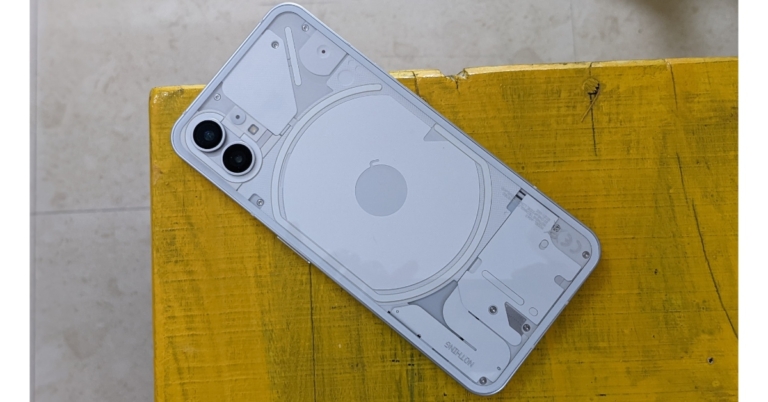
 Quick Specs
 Quick Specs
 Quick Specs
 Quick Specs
 Quick Specs
 Quick Specs
 Quick Specs
 Quick Specs
 Quick Specs
 Quick Specs