Xiaomi 13 Pro review: Performs Leica boss!

Launching its latest flagship at Rs 79,999, Xiaomi has made its ambitions clear. It is here to play with the big boys. But, this isn’t something that came out of the blue. Xiaomi has been putting out good flagship devices for the last few years, which some may even consider the best value-for-money phones out there. With the Xiaomi 13 Pro, the smartphone manufacturer has thrown down the gauntlet to the needle movers in this category – Samsung and Apple. On paper, the Xiaomi 13 Pro has good things going for it. The smartphone gets the latest Snapdragon 8 Gen 2 SoC, a brilliant LTPO AMOLED curved display, 120W fast charging, and the highly popular 1-inch primary sensor for the rear camera. If that isn’t enough, the Leica partnership for the rear camera module would certainly attract a lot of photography enthusiasts. But is this enough for Xiaomi to make a space for itself in a segment where Apple and Samsung have created a legacy over the last decade? Find out in our Xiaomi 13 Pro review. Read Also: Jabra announced Evolve 2 and Speak 2 headphones and speakerphones in India

Xiaomi 13 Pro review: Design and Display

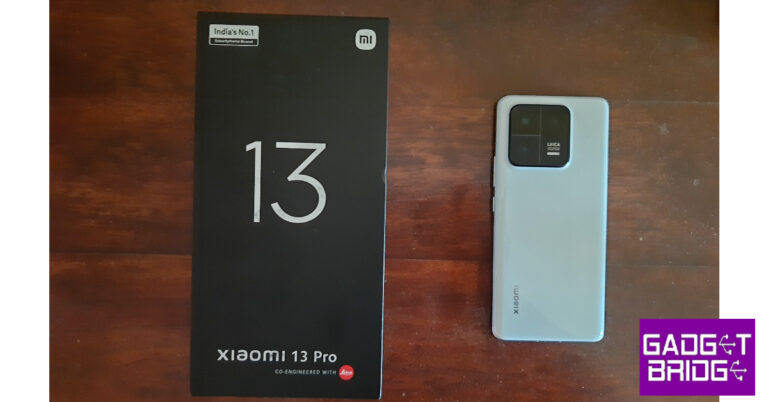
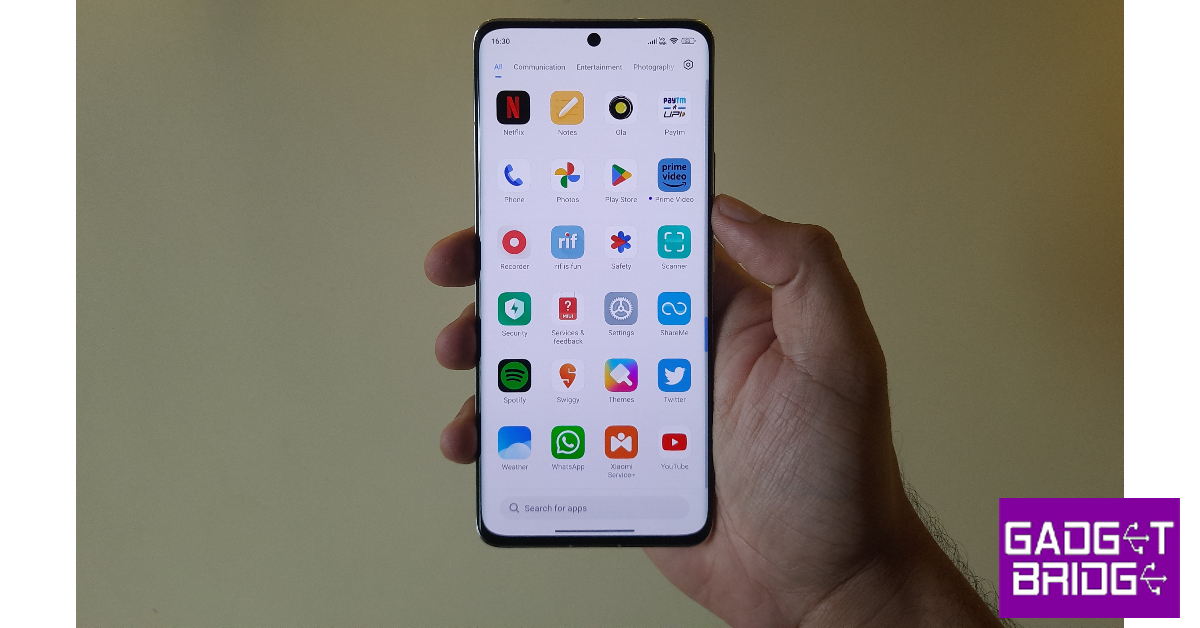
The Xiaomi 13 Pro comes in a bulky rectangular black box with Mi and Leica branding on it. Unboxing the package, you will find the smartphone, a 120W power adapter, a USB Type-A to Type-C charging cable, a clear plastic case, a SIM ejector tool, and some reading material inside. Xiaomi 13 Pro is one of the few smartphones in this price range that still comes with a power adapter in the box. Xiaomi 13 Pro review: Design and Display The key to being a successful flagship is a unique identity in design. A lot of brands have struggled with this in the past and some are finding their feet. The idea is that you want your device to be recognised at the first glance. Apple and Samsung have nailed this down with unique design language for their flagships that make them impossible to confuse with any other smartphone. With the 13 Pro, Xiaomi has crafted a look that has a flair of its own. The ceramic glass back of the Xiaomi 13 Pro has a nice, glossy feel to it. It is actually similar to holding a ceramic tile in your hand. We used the Ceramic White variant and it did not attract a lot of fingerprints during our time of use, despite its glossiness. The Xiaomi branding can be found in the bottom left corner of the phone. The camera panel is positioned on the top left section of the glass back. Xiaomi 13 Pro review: Design and Display This squarish camera panel brings a lot of personality to an otherwise minimal back design. The bump is pretty significant, which we don’t mind all that much. The curved corners of the camera array mimic the ones on the frame. The Leica branding can be found within this array. We also really liked the all-black look of this camera module against the white back. The glass back is curved, of course. The grip of the smartphone is optimum and despite the glossy back, it doesn’t feel particularly slippery. You can slap a protective case, but you’d be missing out on the brilliant in-hand feel of the device. Xiaomi 13 Pro review: Design and Display The aluminium frame is thin and curved along the sides and flattens out as it reaches the vertical extremities. At the top of the frame, you will find two microphones, an IR blaster, and an outlet for the speaker. The left edge houses the volume rocker key and the power button. The SIM tray, primary microphone, USB port, and primary speaker grille have been housed at the bottom edge of the frame. Xiaomi 13 Pro review: Design and Display Xiaomi has retained the 6.73-inch curved LTPO AMOLED display from the 12 Pro. But this time, the peak brightness has been bumped up to 1,900 nits, making the display brighter and clearer under direct sunlight. The bezels around the display are very thin and the smartphone offers a screen-to-body ratio of 89.6%. The under-display optical scanner is positioned in the appropriate spot and works really fast. Xiaomi 13 Pro review: Design and Display The 120Hz refresh rate of the display contributes to a very pleasant scrolling experience. The fluidity and smoothness in scrolling are similar to what you will find in other premium flagships. The touch response offered by the display is exquisite too. Due to its curved nature, the display is prone to registering some accidental touches, but that is something you expect from every smartphone with this form factor. The viewing experience on Xiaomi 13 Pro is exemplary. The LTPO AMOLED screen has Dolby Vision and HDR10+ support. The richness in colours is very distinct, and the AMOLED display brings out the best in those deep blacks. The viewing angles are optimum as well, you can place the phone in just about any position and watch content on it. You can change the resolution from FHD+ (3200 x 1080) to WQHD+ (3200 x 1440) from Settings. There are a bunch of colour schemes to choose from as well. Using Advanced Settings you can customise the colour gamut options. This is a very useful feature if you like having a lot of control over how the display behaves.
Xiaomi 13 Pro review: Performance and Cameras

The Xiaomi 13 Pro is powered by the Snapdragon 8 Gen 2 SoC. In India, the smartphone is available in a single storage and RAM variant of 256GB + 12GB. OS duties are handled by Android 13 skinned with MIUI 14. Xiaomi 13 Pro review: Performance and Cameras The smartphone doesn’t run into any trouble while handling daily routine tasks. There is no drop in performance even with a dozen apps running in the background. Pushing the phone to its limits, we did notice some slight heating along the back panel, but thankfully there was no throttling. The haptics motor on the Xiaomi 13 Pro provides wonderful feedback and makes the smartphone more fun to use. We played graphically demanding COD Mobile, Apex Legends, and Genshin Impact on the Xiaomi 13 Pro and the smartphone was able to manage them quite nicely. The level of gameplay is ideal, something that will suit serious gamers. The phone starts to heat up after 40 minutes of gaming on the highest settings, but you can easily power through without experiencing any frame drops. On the Geekbench 6 test, the Xiaomi 13 Pro attained a single-core score of 1,386 points and a muti-core score of 4,677 points. Talking about software, the MIUI 14 isn’t all that different from its predecessor. There aren’t any radical changes to the looks or the layout. If you enjoy Xiaomi’s OS, then you’re bound to like MIUI as well. There are a few new additions that we liked on the MIUI 14. The magic eraser works well to remove small objects from the images. There is a ‘people’ remover option as well, but it only works effectively if the people are situated in the far background of your image. The privacy and security features offered by the software were something we found ourselves using routinely. The native security scanner is powered by Avast and is effective in weeding out suspicious apps. There is bloatware to be found on this phone, which is never a good look on a flagship. The system apps send pesky notification alerts regularly, which can get annoying. You would have to go through the extra step of removing all bloatware from the device and muting all notifications from the system apps. The Xiaomi 13 Pro is packed with a 4,820 mAh battery unit – an improvement over its predecessor. A 120W fast charger comes inside the box. Using the phone on full brightness and the refresh rate turned up to 120Hz, we got a full day’s worth of battery backup with 6-7 hours of screen on time. Our daily tasks included social media usage, shooting videos and taking pictures, an hour of gaming, watching content on Netflix and YouTube, and sometimes short periods of using navigation services. You can make use of the full 120W by boosting the charging speed from settings. With boosted charging speed, we were able to fully juice the device in just 20 minutes. The smartphone does heat up a bit on fast charging. Xiaomi 13 Pro’s rear cameras have been designed in collaboration with Leica. The star of the show is the 1-inch primary sensor, which makes its way to India for the first time on a Xiaomi phone (the 12S Ultra was not released in India). There is also a 50MP telephoto and 50MP ultrawide lens onboard. Needless to say, we were pretty excited to take the camera on a spin. There are two Leica profiles you can use to shoot pictures on the Xiaomi 13 Pro – Leica Vibrant and Leica Authentic. The Vibrant mode is perfect if you want your pictures to be ‘social media ready’. If you want more control over the post-processing, go for Leica Authentic. We used both profiles interchangeably and eventually settled on Leica Vibrant. The primary 50MP camera produces great results in daylight conditions. The images are very balanced and flaunt vivid colours without any sign of overprocessing. The large size of the camera is able to let a lot of flow through it, resulting in highly detailed images and a very impressive dynamic range. The level of detail in the shadows is also commendable.
Ultrawide shot
The 50MP ultrawide lens performs just as well but is a step behind in replicating the colour profile of the primary camera. The images captured are still of very high quality, and you will be using this camera lens quite often. The telephoto lens offers a 3.2x optical zoom with an option to digitally zoom up to 70x (at that point, all you get is grain and nothing more). The 3.2x optical zoom works really well, and the images come out well-composed. 
Xiaomi 13 Pro review: Performance and Cameras
Lowlight shot
Lowlight shot
Due to its 1-inch primary sensor, the Xiaomi 13 Pro is a lowlight photography champ. In challenging lighting, the primary lens was able to produce brilliant results. The difference that the size of a sensor can make is very noticeable in these images. We were very impressed by the sharpness and lack of noise in these images. You don’t need to turn on the Night Mode unless the situation really demands it.
Regular shot vs Night mode
Xiaomi 13 Pro review: Performance and Cameras
1x zoom vs 3.2x zoom
The 32MP front camera is a bit of a letdown in an otherwise great phone. The selfies are nothing out of the ordinary, something that can be replicated by a smartphone in a segment below the Xiaomi 13 Pro. Another disappointing thing is that the selfie camera can only record in 1080p resolution. The rear camera is capable of recording in 8K at 24fps, 4K at 24/30/60fps, 1080p at 30/60fps, and 720p at 30fps. There is a very useful ‘teleprompter’ feature that displays any script you feed into it while you are recording using your phone. Read Also: Best third-party apps for Reddit (2023)

Verdict

In a way, the Xiaomi 13 Pro truly marks the arrival of Xiaomi in the premium smartphone category. This device looks, feels, and performs as a flagship should. With the massive 1-inch sensor making its way for the first time in India, we could see a lot of photography enthusiasts going for the Xiaomi 13 Pro. Its low-light camera performance speaks for itself. The price tag of Rs 79,999 will certainly be a big factor in this phone’s success, but we like that Xiaomi has put a lot of faith in this device to pit it against the likes of iPhone 13 and Samsung Galaxy S23. If you’re interested in buying the smartphone, Xiaomi is currently offering a discount of Rs 10,000 on the 13 Pro as a part of its Fan Fest.

Xiaomi 13 Pro: Pros

  • Great design and looks
  • Very impressive rear camera setup
  • Fast charging

Xiaomi 13 Pro: Cons

  • Selfie camera produces average results
For the latest gadget and tech news, and gadget reviews, follow us on Twitter, Facebook and Instagram. For newest tech & gadget videos subscribe to our YouTube Channel. You can also stay up to date using the Gadget Bridge Android App. You can find the latest car and bike news here.

Lenovo Back to School (BTS) offers announced, with cashback offers up to Rs 10,000

As the new academic session in Schools begins many students are now looking for new laptops and many want to upgrade to a new one. Addressing the demand the PC and laptop maker Lenovo has announced Back to School offers on its portfolio. The company will be offering up to 10 percent instant discounts and cashback offers up to Rs. 10,000 on selected PCs. The BTS sale is on we have listed some of the discounts and offers below. Lenovo has announced its Back to School  (BTS) offers for students across the country. The company is providing huge discounts on its laptops and accessories. The sale is currently live in India for school-going students and will run through May 15 across all retail and online channels.   In addition to this under the Lenovo PC Exchange Program, customers will be able to sell their old laptop/  PC in exchange for a new device. They can avail of an Exchange Bonus of up to Rs 10,000 over and above the value of the old PC.  Lenovo Back to School (BTS) offers announced, with cashback offers up to Rs 10,000 Besides offering discount offers on its laptops and PCs the company has also brought attractive deals on computer accessories like headphones, mouse, Gaming and non-gaming PCs. According to Lenovo during the BTS sale period, buyers can purchase accessories like H100 Gaming Headset/ M300 RGB Gaming Mouse or Fire  Pods Ninja G311/ 600 BT Silent Mouse at just Rs 499, while buying any gaming PC or non-gaming PC  respectively.  Also Read: Jabra announced Evolve 2 and Speak 2 headphones and speakerphones in India There is a limited-time offer for Warranty/ADP extension as well. Interested customers can get  Comprehensive Services worth Rs 19,990 at only Rs 2,999. Under this plan, clients can take advantage of a three-year extended warranty, three-year premium care and three-year accidental damage protection (ADP).  In addition to this affordable finance, schemes are also available on Lenovo devices. The company offers paper finance and digital finance options with select banks and online finance partners like PineLabs, Paytm and Amazon Pay. There will be 3 to 24 months EMI with paper finance and 0 to 12 months EMI with digital finance partners. Through PineLabs customers can also get a 10% instant discount and cashback up to 10,000 on select series. The firm is also providing a flat 3,000 3,000 instant discount on IdeaPad Slim 3 Ci5 series through HDFC Bank. With Amazon Pay, further discounts can be availed on Bank or UPI transactions till 30 April. For the latest gadget and tech news, and gadget reviews, follow us on TwitterFacebook and Instagram. For newest tech & gadget videos subscribe to our YouTube Channel. You can also stay up to date using the Gadget Bridge Android App. You can find the latest car and bike news here.

How to add subtitles to Instagram Reels and Video Posts?

0
If you have just started creating Instagram Reels, you should learn how to add subtitles to them. You’d be surprised to know that a major portion of your audience browses Reels on mute. If you don’t want them to skip your Reel, make sure it is appropriately subtitled. Adding subtitles to your Reel and videos also helps people with listening disabilities to watch your videos and follow what’s going on. In this article, we show you how to add subtitles to Instagram Reels and video posts. Read Also: Best Android apps to turn your photos into cartoons

Here’s how you can add subtitles to an Instagram Reel

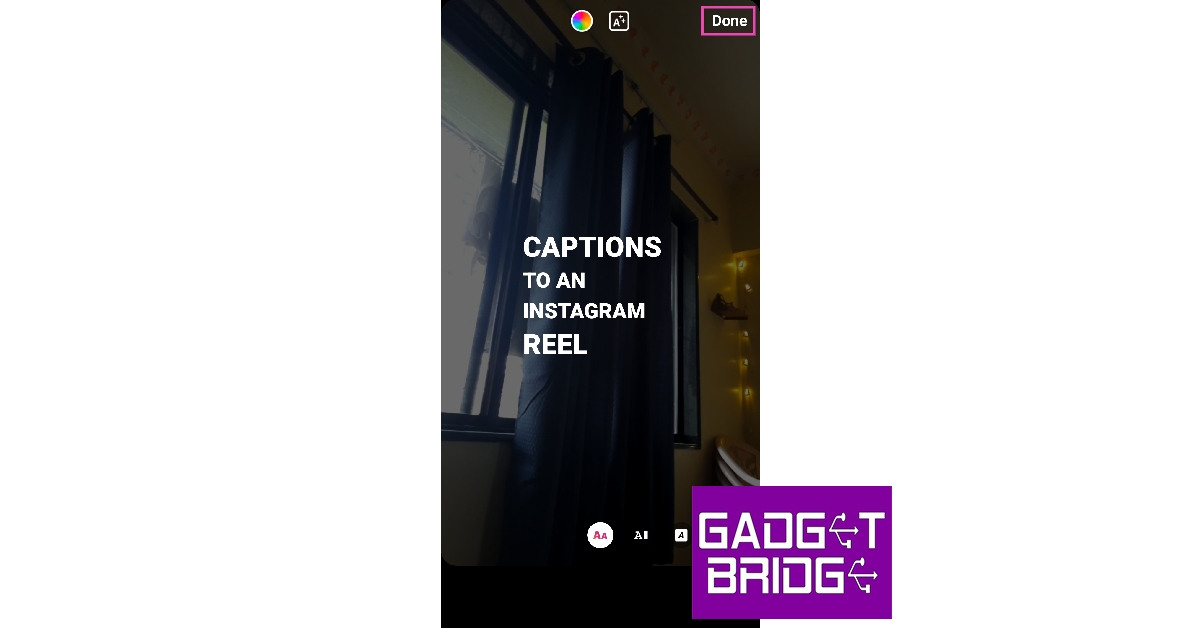
Step 1: Launch the Instagram app and record a Reel. You can also load a saved draft to add subtitles to it. Step 2: On the editing screen, tap on the sticker icon at the top. Step 2: On the editing screen, tap on the sticker icon at the top. Step 3: Select the ‘Captions’ sticker. Step 3: Select the ‘Captions’ sticker. Step 4: In the following screen, tap on ‘Done’. Step 4: In the following screen, tap on ‘Done’. Step 5: Tap on ‘Next’ and select ‘Advanced Settings’ from the following window. Step 5: Tap on ‘Next’ and select ‘Advanced Settings’ from the following window. Step 6: Turn the toggle bar on for ‘Show captions’. Step 6: Turn the toggle bar on for ‘Show captions’. Step 7: Go to the previous window and share your Reel.

Here’s how you can add subtitles to an Instagram Video Post

Step 1: Tap the plus icon on the Instagram homepage and upload a video from your Gallery. You can also record a video using your phone’s camera. Step 2: Tap on the sticker icon at the top. Step 2: Tap on the sticker icon at the top. How to add subtitles to Instagram Reels and Video Posts? Step 3: Select the ‘Captions’ sticker. Step 3: Select the ‘Captions’ sticker. How to add subtitles to Instagram Reels and Video Posts? Step 4: Tap on ‘Next’ and select ‘Advanced Settings’ from the following window. Step 4: Tap on ‘Next’ and select ‘Advanced Settings’ from the following window. How to add subtitles to Instagram Reels and Video Posts? Step 5: Turn the toggle bar on for ‘Show Captions’. Step 6: Turn the toggle bar on for ‘Show captions’. How to add subtitles to Instagram Reels and Video Posts? Step 6: Go to the previous window and share your post.

Frequently Asked Questions

Can you add subtitles to Instagram Videos?

Using the ‘Captions’ sticker you can get Instagram to auto-generate subtitles for your Reel or Video.

Why can’t I add subtitles to my Instagram Reels?

If your Reel’s audio contains a banned hashtag, it won’t be transcribed in the subtitles. Furthermore, there needs to be a basic level of clarity in your audio for Instagram to correctly transcribe it.

Are there any good third-party apps to add subtitles to my videos?

Apps like Cliptomatic, Kapwing, Kaptioned, and Subcap are great apps to add subtitles to your Instagram and TikTok videos. Read Also: Best third-party apps for Reddit (2023)

Conclusion

This is how you can add subtitles to your Instagram Reels and Videos. If you aren’t satisfied with the quality of subtitles, use third-party apps like Subcap, Kaptioned, and Cliptomatic to generate subtitles for your videos. Some of these apps may come with a premium subscription, but they offer a lot more customisation options for your subtitles. For the latest gadget and tech news, and gadget reviews, follow us on Twitter, Facebook and Instagram. For newest tech & gadget videos subscribe to our YouTube Channel. You can also stay up to date using the Gadget Bridge Android App. You can find the latest car and bike news here.

How to use Two-Factor Authentication (2FA) on Twitter without paying for Twitter Blue? (2024)

0
Twitter has seen a lot of changes in its design, functions, and feed ever since Elon Musk took over its ownership. One of the biggest changes has been the introduction of Twitter Blue, which offers a bunch of features for a monthly subscription of Rs 900. Some features that were free to use earlier, have now been locked behind a paywall with Twitter Blue. One of these features is two-factor authentication (or 2FA) for your Twitter account. 2FA is pivotal in securing your account, as it only gives you access after you’ve entered an OTP that’s sent to you by text. While you may have to pay for text-based 2FA, authenticator apps still work on Twitter for free. In this article, we show you how to use two-factor authentication (2FA) on Twitter for free without paying for Twitter Blue. Read Also: Best Android apps to turn your photos into cartoons

Use Microsoft Authenticator

Step 1: Download and install the Microsoft Authenticator app on your smartphone. Step 2: Sign in to the app using your Microsoft Account. Step 3: Launch the Twitter app on your phone and swipe right to access the side menu. Step 4: Tap on Settings & Support and select Settings and privacy. Step 4: Tap on ‘Settings & Support’ and select ‘Settings and privacy’. Step 5: Select Security and account access. Step 5: Select ‘Security and account access’. Step 6: Tap on Security and select Two-factor authentication. Step 6: Tap on ‘Security’ and select ‘Two-factor authentication’. how to use two-factor authentication (2FA) on Twitter for free without paying for Twitter Blue. Step 7: Turn the toggle bar on for Authentication app and enter your password to verify it’s you. Step 7: Turn the toggle bar on for ‘Authentication app’ and enter your password to verify it’s you. how to use two-factor authentication (2FA) on Twitter for free without paying for Twitter Blue. Step 8: Tap on Link app. Step 8: Tap on ‘Link app’. how to use two-factor authentication (2FA) on Twitter for free without paying for Twitter Blue. Step 9: Now, select the Microsoft Authenticator app. The app will display an OTP for your Twitter account. Step 9: Now, select the Microsoft Authenticator app. The app will display an OTP for your Twitter account. how to use two-factor authentication (2FA) on Twitter for free without paying for Twitter Blue. Step 10: Go back to the Twitter app and enter the OTP. This will finish the process of setting up 2FA for your Twitter account. You will also be shown a single-use backup code which you can use in case you lose access to the Authenticator app. Step 11: Now, every time you log into Twitter, you will need to launch the Microsoft Authenticator app for the One Time Password.

Use Google Authenticator

Use Google Authenticator Google’s Authenticator app works the same way as its Microsoft counterpart. To set it up, follow the method listed above and choose Google Authenticator while linking an authenticator app on Twitter. Both apps generate short-term OTPs that expire after 30 seconds. This is the best free alternative you have to text-based 2FA on Twitter.

Use Aegis Authenticator

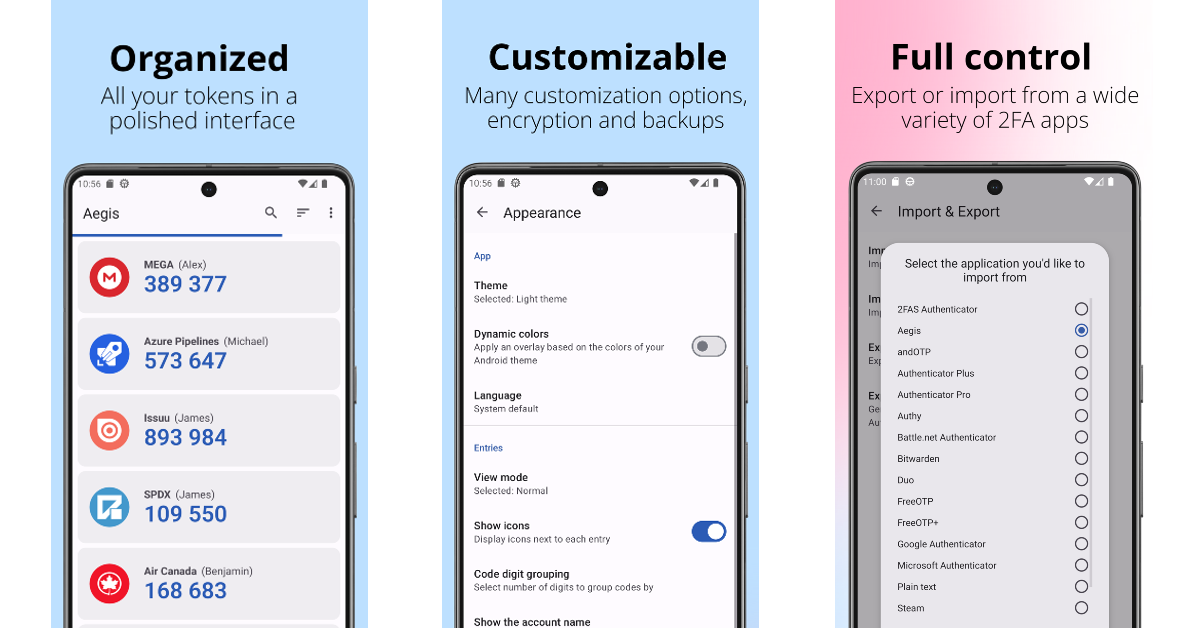
Use Aegis Authenticator Aegis is one of the best open-source authenticator apps you can use to enable 2FA for Twitter without any extra cost. The app supports the two industry-standard algorithms for authentication — HOTP and TOTP. If the app supports Google Authenticator, it will support Aegis as well. You can secure Aegis with a password to make sure no one else accesses the authentication codes. What we really like about Aegic is its colourful and accessible interface which makes it easier to store multiple 2FA codes.

Frequently Asked Questions

What is 2FA on Twitter?

2FA or two-factor authentication adds an extra layer of security to your Twitter account. To enable 2FA on Twitter, you will need to enter an OTP before getting access to your account. This OTP is sent to you as a text message. You can also use an authenticator app for 2FA.

Is 2FA free on Twitter?

Two-factor authentication is not free on Twitter anymore. It is now a part of the Twitter Blue package which costs Rs 900 per month in India.

Can you use 2FA for free on Twitter?

Yes, using Google or Microsoft’s authenticator app, you can get free 2FA for Twitter. Read Also: Asus ExpertBook B1402 and B1502 laptops with 12th Gen Intel processors launched in India

Conclusion

This is how you can get free two-factor authentication for Twitter for free without paying for Twitter Blue. Apart from using an Authenticator app, you can also use a physical security USB key that you can insert into your computer every time you log into Twitter. While this may seem a cumbersome process, there is no denying it is very secure.

Philips TAB8967 Dolby Atmos Soundbar debuts in India

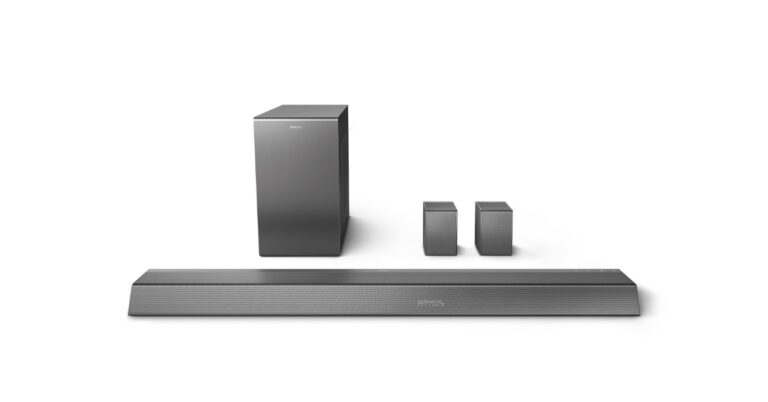
TPV Technology, the brand licensee for Philips India has announced the launch of a new soundbar. The company has introduced Philips TAB8967 Dolby Atmos Soundbar. The speaker system comes with a wireless speaker and is equipped with a 5.1.2 CH channel audio setup with 780W dynamic sound output.

Philips TAB8967 Dolby Atmos Soundbar features

Philips TAB8967 Dolby Atmos Soundbar comes with a unique geometric design and a slim build, making it a convenient option to place under or beside your television. Philips TAB8967 Dolby Atmos Soundbar features 5.1.2 CH Dolby Atmos technology that offers a multidimensional audio experience. It offers a dynamic sound output of 780W. There are three speakers on the front and two on the rear. It also includes two upward-facing speakers and an 8-inch wireless subwoofer. Dolby Vision, HDR10, HDR10+, HLG, and 4K Video Pass-through are all supported. Philips TAB8967 Dolby Atmos Soundbar price and availability In addition to this soundbar uses Dolby Atmos and Dolby Digital Plus to deliver three-dimensional sounds. The soundbar comes integrated with treble and bass settings for sound enhancement. Moreover, there is also a separate volume control for the subwoofer. The Philips soundbar has a built-in equaliser for speech, music, movies, and stadiums as well as a custom one for a more customised experience. The TAB8967 Dolby Atmos Soundbar has an HDMI eARC for playback of Dolby Atmos content from compatible devices. Additionally, it enables audio streaming through Bluetooth, Apple AirPlay, and Google Chromecast.

Philips TAB8967 Dolby Atmos Soundbar price and availability

The Philips TAB8967 Dolby Atmos Soundbar has been launched in India with a price tag of Rs 44,990. The audio device will be available for purchase via all leading online and offline stores across the country. Commenting on the launch of the new premium soundbar, Mr. Piush Sharma, India Business Head, Philips TV and Audio Business, TPV Technology India Pvt. Ltd said, “There has been exponential growth in the soundbar market. Consumers are becoming more discerning about audio quality and seek out products that can enhance their entertainment experience. Keeping this in mind, we have introduced this new premium soundbar, that will offer consumers a true surround sound experience with breathtakingly real sound flows. We will continue to introduce newer and advanced innovations to meet the needs of our evolving consumer base.” For the latest gadget and tech news, and gadget reviews, follow us on TwitterFacebook and Instagram. For newest tech & gadget videos subscribe to our YouTube Channel. You can also stay up to date using the Gadget Bridge Android App. You can find the latest car and bike news here.

Jabra announced Evolve 2 and Speak 2 headphones and speakerphones in India

Jabra has expanded its audio portfolio with the launch of two new Evolve and Speak headset and speakers series in India the Jabra Evolve 2 includes Evolve2 65 Flex and Evolve2, Evolve2 50 and Evolve2 55 headsets. While the Jabra Speak 2 series includes Jabra Speak2 75, Speak2 55 and Speak 2 40 speakerphones for professionals.

Jabra Evolve 2 series

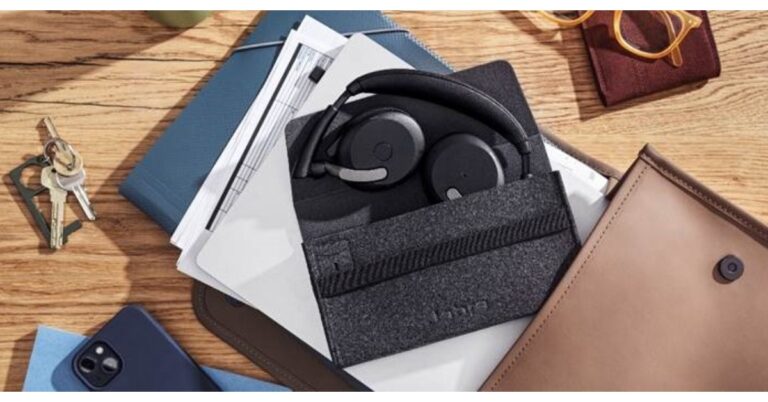
Jabra Evolve 2 series offers three new headphone models: Evolve2 65 Flex and Evolve2, Evolve2 50 and Evolve2 55. The Jabra Evolve2 65 Flex features a foldable design with a collapsible hinged headband. It includes beamforming Jabra ClearVoice microphones and Hybrid Active Noise Cancellation (ANC) and close-fitting memory foam earcups to help seal out even more of the surroundings. The headset comes with the Jabra Air Comfort technology and flexible earcups that rotate to move whenever users do. Jabra Evolve 2 series On the other hand Evolve2 55, and a corded version, Evolve2 50 also include Active Noise Cancellation (ANC). These wireless headsets have a unique acoustic chamber design, and 28mm custom speakers. The chipset supports speech-separating and two premium noise-cancelling microphones. All three headphones are certified for virtual meeting platforms like Google Meet, Microsoft Teams, and Zoom. Evolve2 65 Flex & Evolve2 55 has up to 30m/100ft wireless range and can be customised with Jabra Sound+, Jabra MySound and voice assistants. Moreover, these two can be connected with two devices at the same time while Evolve 2 connects to another device via Bluetooth while plugged in.
Jabra Evolve2 65 Flex
Also Read: iQoo announced exciting deals and discounts on iQoo 11, iQoo 9 and 9 Pro to celebrate 3rd Anniversary in India

Jabra Speak 2 Series

Jabra Speak 2 Series also includes three speakerphones: Speak 2 75, Speak 2 55, and Speak 2 40. The Jabra Speak2 75 boasts a custom-designed Microphone Quality Indicator. There is a 360-degree light ring that shows users how well their voice is being picked up by the microphones. In addition to this, the device has a 65mm speaker for clear audio. Both Speak2 75 and Speak2 55 are wireless speakerphones whereas the Speak 2 40 can directly be connected with a USB cable. Jabra Speak 2 Series

Pricing and availability

The price of the Evolve2 65 Flex is set at Rs 46,819 whereas Evolve2 55 Stereo and Evolve2 55 Mono are priced at Rs 38,280 and Rs 36,857. The Evolve2 50 Stereo and Evolve2 50 Mono costs Rs 28,319 and Rs 26,896 respectively. On the other hand, Jabra Speak 2 75 will be available at Rs 52,511. The Speak2 55 and Speak 2 40 will come with a price tag of Rs 26,896 and Rs 24,050 respectively. All the devices are now available for purchase via Jabra-authorized retailers in the country. For the latest gadget and tech news, and gadget reviews, follow us on TwitterFacebook and Instagram. For newest tech & gadget videos subscribe to our YouTube Channel. You can also stay up to date using the Gadget Bridge Android App. You can find the latest car and bike news here.

Garena Free Fire Redeem Codes Today 19 April 2023: Here is how to claim them

Garena Free Fire is a battle royale game with regular awards and tournaments to keep players interested. If you play Garena Free Fire, you should be aware of the redeem codes that are released on a daily basis. However, because the battle royale game is banned in India, players from other countries can use the Free Fire Redeem codes daily. If you’re unfamiliar with the Garena Free Fire redeem codes or don’t know how to get them, we’ve put together a step-by-step guide to help you redeem them. Check out Garena Free Fire Redeem Codes for 19 April 2023. The Free Fire redeem codes are a great way to get free stuff. These are 12-digit codes that contain alphabets and numbers, as well as an expiration date and time. Because the Garena FF redeem codes cannot be used more than once, you should hurry to the redemption page to claim your free reward before someone else does. To get a free reward, all you have to do is go to reward.ff.garena.com/en, which is the official redemption page. Also, keep an eye on this space for daily updates on Garena Free Fire redemption codes and rewards.

Garena Free Fire Redeem Codes Today 19 April 2023

  • 3IBBMSL7AK8G
  • MHM5D8ZQZP22
  • 8F3QZKNTLWBZ
  • 4ST1ZTBE2RP9
  • FF7MUY4ME6SC
  • B3G7A22TWDR7
  • GCNVA2PDRGRZ
  • J3ZKQ57Z2P2P
  • WEYVGQC3CT8Q
  • X99TK56XDJ4X

How to Get Free Fire Redeem Codes for Garena on 19 April 2023?

  • Visit the Garena Free Fire game’s official website at reward.ff.garena.com.
  • Use your Facebook, Google, VK, Apple ID, Huawei ID, or Twitter account to log in.
  • You’ll be taken to a valid redemption code (s)
  • Copy and paste the 12-digit redemption code into the text box.
  • On the screen, a dialogue box will appear.
  • ‘Ok’ should be selected.
For the latest gadget and tech news, and gadget reviews, follow us on TwitterFacebook and Instagram. For newest tech & gadget videos subscribe to our YouTube Channel. You can also stay up to date using the Gadget Bridge Android App. You can find the latest car and bike news here.

Amazon Quiz Answers Today 19 April 2023: Participate to win Rs 500

19 April 2023 Amazon Quiz has gone live. Customers from different parts of the country are participating in the daily quiz. The quiz begins from 12 AM to 11:59 PM. Those participating in the quiz can win exciting prizes by answering all the questions correctly. Today participants have a chance to win a Rs 500 Amazon Pay Balance. Amazon quiz brings an opportunity for its customers to win Amazon Pay Balance ranging from Rs 1,000 to Rs 50,000. The Quiz can be played from 12 AM to 11:59 PM. The e-commerce platform brings a fresh quiz on a daily basis which consists of five questions related to general knowledge and current affairs. The participants need to answer all the questions correctly and their names will be selected for a lucky draw. The winner will be announced at the end of the month. One wrong answer could eliminate you from the quiz. If you manage to answer all the questions correctly you can stand a chance to win a Rs 500 Amazon Pay Balance today. Only app users are eligible to participate in the Quiz. Check Out 19 April 2023 Amazon Quiz Answers. Amazon Quiz Today Prize – Rs 500 Amazon Pay Balance Quiz Date – 19 April 2023 Daily Timing – 12 AM to 11:59 PM Winner Announcement – Today 12 PM

Amazon Quiz Answers Today 19 April 2023

Question 1: During the Oscars 2023 ceremony, which movie received seven awards? Answer: Everything Everywhere All at Once Question 2: Outside which state’s Assembly would you find a statue of Lord Basaveshwara, a 12th century philosopher? Answer: Karnataka Question 3: An airport from which city topped the list of the world’s best airports released by Skytrax? Answer: Singapore Question 4: What is this animal’s closest genetic relative? Answer: Zebra Question 5: What was this tower used to monitor in the late 1950s? Answer: Nuclear Fallout

How To Play Amazon Quiz

Only app users are eligible to play the Amazon quiz every morning from 12 AM to 11:59 PM. The quiz is not available on the desktop. For those who are unaware of how to play the Amazon quiz below are the steps, you can follow to take the quiz.
  • Firstly download the Amazon app from Google Play Store or App Store
  • Now fill in the required information through the Sign Up option.
  • You need to log in to the Amazon app and scroll down on the home screen to find the Amazon Quiz banner.
  • Tap on the Amazon Quiz banner and tap on the Start button to start the Quiz.
  • Now you will get 5 questions and you need to answer them correctly. One wrong answer will eliminate you from the Quiz.
  • After answering all the questions correctly you are now eligible for a Lucky Draw.
  • The winner’s name will be announced today at 12 PM.
For the latest gadget and tech news, and gadget reviews, follow us on TwitterFacebook and Instagram. For newest tech & gadget videos subscribe to our YouTube Channel. You can also stay up to date using the Gadget Bridge Android App. You can find the latest car and bike news here.

iQoo announced exciting deals and discounts on iQoo 11, iQoo 9 and 9 Pro to celebrate 3rd Anniversary in India

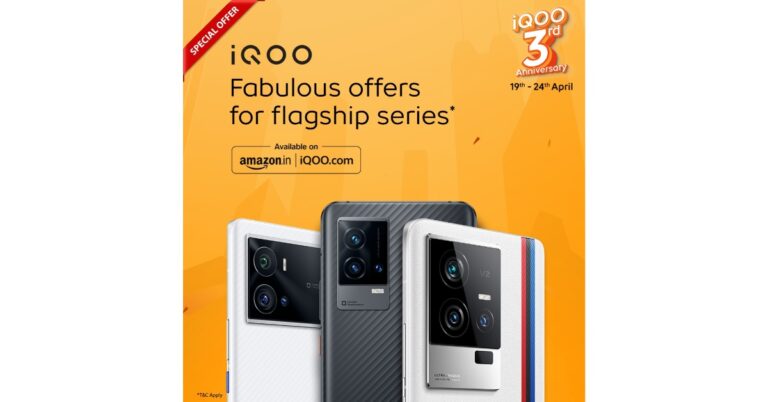
iQoo is offering amazing discounts and deals on its premium smartphones as part of its third-anniversary celebration in India. The sale will begin tomorrow, April 19 and run through April 24. With the best price guarantee, customers may take advantage of discounts and offers on all iQOO Smartphones. iQoo is a sub-brand of Vivo which mainly focuses on gaming smartphones. The company debuted in the Indian market in the year 2020 and is completing three years in the country. Customers will be able to benefit from anniversary discounts and deals on the most popular iQOO smartphones with the promise of the lowest price. The sale offers will be available from April 19 and will be available till April 24. Discounts and offers on best-selling iQOO smartphones: iQoo 11 is the latest smartphone and is priced at Rs 59,999 in India. During the iQoo anniversary sale, the device will be getting a massive discount of Rs 10,000, therefore, bringing the cost down to Rs 49,999. The smartphone is powered by the Snapdragon 8 Gen 2 SoC. It comes with 120W fast charging support and features a 2K E6 AMOLED display. The smartphone’s screen sports a refresh rate of 144Hz. It operates on Android 13 out of the box. Also Read: iQOO 11 Review: A real beast On the other hand, iQoo 9 and iQoo 9 Pro will also be getting up to Rs 25,000 off. The iQoo 9 Pro will be Rs 12,000 cheaper and will be available at Rs 39,990. The original price of the phone is Rs 42,990. Whereas iQoo 9 Pro will be selling at Rs 39,990. The phone is currently available at Rs 64,990 and the company is offering a huge discount of Rs 25,000 during the iQoo Anniversary sale. iQoo announced exciting deals and discounts on iQoo 11, iQoo 9 and 9 Pro to celebrate 3rd Anniversary in India Both the iQoo 9 and iQoo 9 Pro were launched in India last year. The Pro variant includes a Snapdragon 8 Gen 1 SoC whereas the iQoo 9 comes with a Snapdragon 888 processor. Both the devices feature an AMOLED display with 120Hz refresh rate support and a ‘Gimbal’ triple rear camera set-up. The iQoo Anniversary Sale will be accessible through Amazon and iQoo’s official website in the country. For the latest gadget and tech news, and gadget reviews, follow us on TwitterFacebook and Instagram. For newest tech & gadget videos subscribe to our YouTube Channel. You can also stay up to date using the Gadget Bridge Android App. You can find the latest car and bike news here.

Best Android apps to turn your photos into cartoons

Cartoonified images and animated avatars are all the rage these days. These cute animated versions of your photos are very easy to produce and do not take a lot of skill. There are several apps on the Google Play Store that will do most of the work for you. However, some may require a subscription fee, depending on the work they are putting into editing your images. So, without further ado, here are our picks for the best Android apps to turn your photos into cartoons. Read Also: Can apps track your phone even when location services are turned off?

ToonMe

Step 2: Open the app and select a filter from the list of Toon filters. anime effect app ToonMe offers a bunch of filters to cartoonize your images. This app is very simple to use and it won’t take you more than a few taps to turn a photo into a cartoon. The filters are filed into neat categories like ‘top’, ‘trending’, and ‘recent’. If you don’t want to use these filters on your pictures, ToonMe has its own gallery of images that you can use them on. The app is free to use but has some ads overlaid on its interface.

Lensa

How to create an AI-generated image of yourself If you’re not familiar with AI-powered photo editing apps, you are seriously missing out. The results from an AI edit blow any cartoon filter out of the water. Leading the pack of AI photo editing apps is Lensa. You may have seen some images from this app floating around the Internet. The only downside is that you have to pay for a subscription package. Once that is taken care of, you will need to upload a bunch of selfies and Lensa will deliver the results after some time. 

Voila AI Artist Cartoon Avatar

Voila AI Artist Cartoon Avatar Another great app that uses AI to cartoonize your images is Voila. What’s special about Voila is that it gives the user different options for what they want their images to look like. You can choose to turn your photo into a funny cartoon, pencil sketch, renaissance painting, caricature, or a 3D cartoon. The app is easy to use and offers a bunch of premium features as a part of its paid subscription.

Cartoon Photo Editor

Cartoon Photo Editor. convert photo to cartoon Cartoon Photo Editor is completely free to use and brings you a bunch of cartoon filters to play around with. These include cartoons, pencil drawings, sketches, oil paintings, and more. You can either apply one of these filters to an image from your gallery or you can take a picture from the camera interface within the app itself. The camera integration within this app is pretty decent and comes with basic features like zooming and autofocus. You can share the results with your friends from within the app itself.

Comics and Cartoon Maker

Comics and Cartoon Maker. convert photo to cartoon Want more than just cartoons? Turn your images into comics! Comics and Cartoon Maker turns the photos in your gallery into cartoons and allows you to edit them further by adding effects and speech bubbles. Now you can tell a story using the pictures on your phone. This comic photo app is very accessible to use and doesn’t require any photo editing skills to get the desired result. The app does most of the work for you.

Sketch Me!

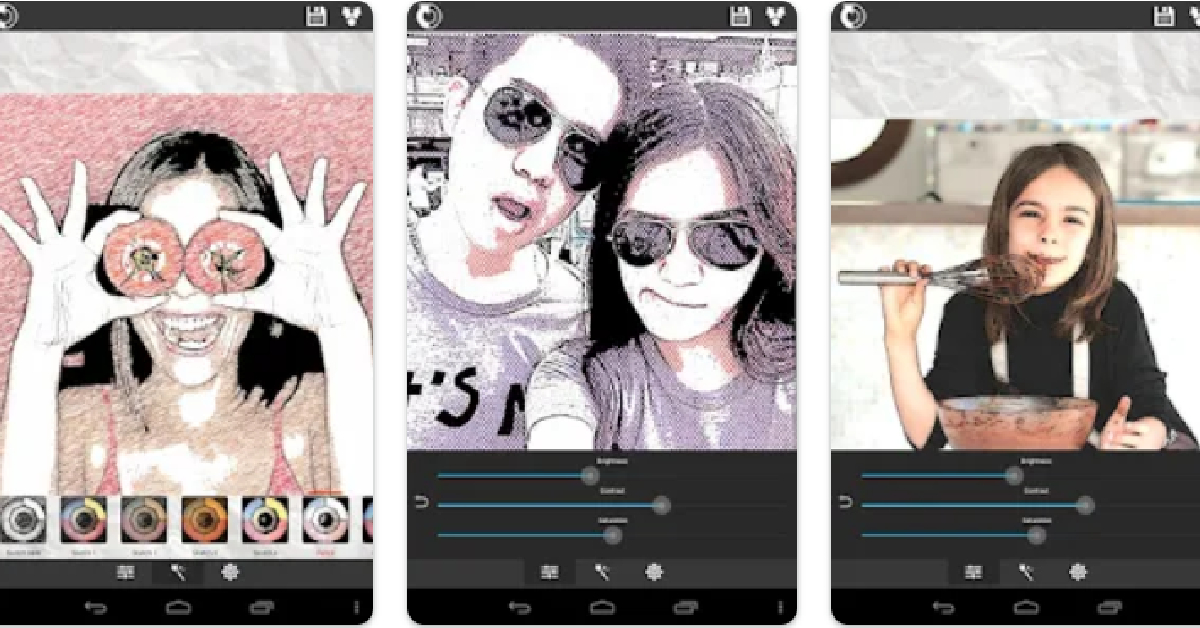
Sketch Me! convert photo to cartoon Sketch Me has a four-star rating on Google Play Store with over 28 thousand votes. With just one click, this app turns your photos into cartoons, drawings, or sketches. The app offers an impressive amount of effects, letting users control the brush strokes, edge strength, opacity, and more. Users can also change the overall look of the image by controlling the contrast, brightness, and saturation. Read Also: Top 5 Easy Methods to Connect iPhone to Windows 11 PC

Conclusion 

These are our pics for the best Android apps that help you turn your photos into cartoons. If you’re looking for a simple-to-use app that offers basic cartoon filters, go for something like ToonMe or Cartoon Photo Editor. However, if you want a stunning image that looks close to a commissioned artwork, go for one of the AI-powered apps like Lensa and Voila. For the latest gadget and tech news, and gadget reviews, follow us on Twitter, Facebook and Instagram. For newest tech & gadget videos subscribe to our YouTube Channel. You can also stay up to date using the Gadget Bridge Android App. You can find the latest car and bike news here.