Designed for podcasters, streamers, and gamers, Sennheiser Profile USB Microphone has been launched in India. The table stand version of the microphone is priced at Rs 10,900 while the Profile Streaming Set with a 3-point self-locking boom arm fetches Rs 15,999. The microphone is exclusively available on Amazon.Read Also:ASUS ProArt Mouse MD300 launched at Rs 8,499
Sennheiser Profile USB Microphone combines professional-grade sound with direct accessibility of functions
The award-winning KE10 condenser capsule remains the driving force behind the Sennheiser Profile USB Microphone. The cardioid pickup pattern of this condenser reduces the noise coming from the rear, giving more focus to the speaker’s voice. The microphone records with optimum clarity and warmth when placed within 15cm (6in) from the mouth (or sound source). Sennheiser Profile USB Microphone offers plug-and-play functionality with Apple, Android, and Windows devices. All you need to do is plug in the mic to the USB-C port of your device and you’re ready to go.The Profile USB Microphone features a clean, minimal design. At the front, you get four controls – a soft-touch no-noise mute button, a gain control for microphone volume, a mix control to set a balance between the input voice and computer/tablet’s audio, and finally a volume control for headphone monitoring. The 3.5mm socket for the headphones is placed at the back of the Profile mic.The LED ring lights around the controls denote the working status of the microphone. A green light around the gain control means that the microphone is functional. When this light turns yellow, it means the microphone is clipping and its volume needs to be reduced. Muting the microphone lights up the red LED around the mute button and the gain control.The Sennheiser Profile USB Microphone comes with ⅜” and ⅝” connectors at the bottom which allow the mic to be used with any third-party table stand. The Profile Streaming Set (available at Rs 15,999) comes with a 3-point self-locking boom arm.Sharing his excitement around the launch of the Profile USB Microphone, Mr Vipin Pungalia, Country Manager and Director- Sales Pro Audio at Sennheiser India said, “At Sennheiser, we understand the evolving needs of content creators in the digital age. Our Profile USB Microphones are a testament to our commitment to providing reliable and high-quality audio equipment to podcasters, gamers, and streamers. We have invested in the latest technology and materials to deliver exceptional sound quality, durability, and design, ensuring that our users stand out with ease.”Read Also:OnePlus 11R Review: Comeback season for OnePlusAs mentioned earlier, the Sennheiser Profile USB Microphone is available exclusively on Amazon. With its simple design and ease of accessibility, the Profile Microphone will appeal to streamers, content creators, podcasters, and gamers.For the latest gadget and tech news, and gadget reviews, follow us on Twitter, Facebook and Instagram. For newest tech & gadget videos subscribe to our YouTube Channel. You can also stay up to date using the Gadget Bridge Android App. You can find the latest car and bike news here.
Sennheiser HD 660S2 offers enhanced sub-bass tuning and more pronounced low-end
The Sennheiser HD 660S2 offers the familiar 660 Series build and design. Plush earpads and cushy headband padding place the revised 300-ohm transducers at an optimal listening distance. For an improved low-end profile, the transducer drops from 110Hz (on the original HD 660S) to 70Hz. The outer mesh grilles are crafted to manage airflow at ideal impedance.The HD 660S2 ships with two 1.8 meter user-detachable cables that offer 6.3mm single-ended stereo and 4.4mm balanced stereo jack plugs at the end. There’s also a 6.3mm to 3.5mm adapter in the box, which is suitable for use with DAC amps, DAPs, and dedicated amplifiers like the Sennheiser HDV 820. Finally, you also get a storage pouch with the Sennheiser HD 660S2.Sennheiser HD 660S2 improves upon the soundstage offered by its predecessor, focussing more on the low-end frequencies and offering enhanced sub-bass tuning. The overall sound profile is more refined due to the improved transducer airflow and a refined voice coil. With reduced voice coil weight, HD 660S2 is able to improve the impulse response and brings hyper-realistic textures to the forefront of the audio output. Overall, the audio experience is smoother and warmer on Sennheiser HD 660S2.“Our new Sennheiser HD 660S2 offers listeners what they requested most from the headphones’ predecessor,” says Mr Kapil Gulati, Sales Director – Consumer Hearing Business, Sonova. “With precision and power like no other and new sensitivity across all frequencies, listeners will hear details they’ve never heard before, especially at the lower end of the spectrum.”Read Also:iQOO Z7 5G launched in India at Rs 18,999, goes live on salePriced at Rs 54,990, audiophiles can get the new Sennheiser HD 660S2 headphones at the company e-store and other online platforms like Amazon, Headphone Zone, and The Audio Store. The HD 660S2 is manufactured at the company’s state-of-the-art production facility in Ireland.For the latest gadget and tech news, and gadget reviews, follow us on Twitter, Facebook and Instagram. For newest tech & gadget videos subscribe to our YouTube Channel. You can also stay up to date using the Gadget Bridge Android App. You can find the latest car and bike news here.
Nothing has launched its next-generation wireless earbuds, Ear (2), at a price of Rs 9,999 in India. The TWS will be available to order from March 28 on Flipkart and Myntra. While the design remains largely the same, Nothing Ear (2) offers new features like Dual Connection, Hi-Res audio with LHDC 5.0 codec support, a personal sound profile, and a slightly higher battery backup.Read Also:OnePlus 11R Review: Comeback season for OnePlus
Nothing Ear (2) builds on the foundation of its predecessor
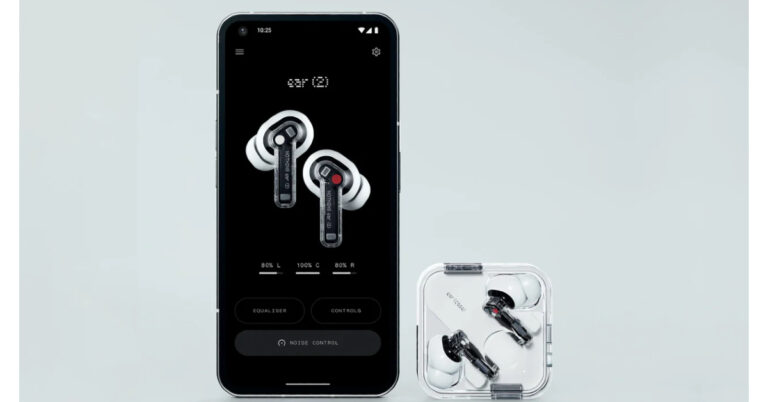
Nothing much has changed on the next-gen Ear (2) in terms of the design. The TWS still sports the signature transparent see-through look. The in-ear earbud design is back as well, after skipping the Ear (stick) (review here). The charging case is still made out of plastic but is more compact and lighter than before.The audio experience has improved on the next-gen Ear (2) with the inclusion of LHDC 5.0 support allowing for Hi-Res audio. While Ear (1) (review here) offered only a handful of equaliser presets, Ear (2) users can create a personal sound profile using the Nothing X app and customise the equaliser settings. The Nothing X app can also perform an ear-tips fit test for the new TWS. Nothing Phone (1) (review here) users can enjoy a low latency mode as well. Users can change the ANC level on Ear (2). Like its predecessor, the Ear (2) can nullify surrounding sounds up to 40 dB. The new improved clear voice technology now offers 3 dB higher noise cancellation during audio calls. The earbuds can provide up to 6 hours of listening time on a full charge with an additional 30 hours inside the case. The earbuds also come with 2.5W Qi-certified wireless charging.The new Nothing TWS can now pair with more than one device at the same time, seamlessly switching between them. With Dual Connection, you can pair up to two devices with Nothing Ear (2). The earbuds come with an improved IP54 rating and the charging case gets an IP55 rating as well.Read Also:How to hide apps, files, and folders on Android devices? Top 7 Ways
Conclusion
Priced at Rs 9,999, the Ear (2) is Nothing’s most expensive TWS offering yet. The wireless earbuds will go on sale from March 28 and can be ordered from Flipkart and Myntra. They will also be made available for purchase in certain offline stores. Nothing is also expected to come out with a successor to the Phone (1) later this year.For the latest gadget and tech news, and gadget reviews, follow us on Twitter, Facebook and Instagram. For newest tech & gadget videos subscribe to our YouTube Channel. You can also stay up to date using the Gadget Bridge Android App. You can find the latest car and bike news here.
Mobile World Congress came to life after a few years in 2023. Once the big event was over, we caught up with Mr Anku Jain, Managing Director, MediaTek India to know what the company has in store for 2023. We threw some curve balls at him and being the kind-hearted person he is, he sportingly answered them all for us.
What are some of the key challenges facing the semiconductor industry, and how is MediaTek working to address these challenges?
We are in the midst of global digital transformations and this has also led to an increase in demand for smart devices. Semiconductor manufacturing is a complex process involving advanced technologies, requisite infrastructure, and a skilled workforce. We are focusing on our range of products and are very upbeat about the market demand and dynamics.
MediaTek is always focused on expanding its reach to more customers and new market segments via increased investments in R&D as well as collaboration with OEMs and technology firms, and we’ve seen significant growth in the Indian market. Our focus is to continuously innovate in order to meet industry demands.
Can you discuss MediaTek’s strategy for entering and expanding into new markets, particularly in emerging regions like India?
India is a highly prospective market for MediaTek. The reason, as you know, we are the second largest in the world in terms of the Internet user population, next to China. India is also ranked second in terms of the number of smartphone users. Also, the rate of digital adoption is soaring across both urban and rural areas. This is an opportunity for not only MediaTek but the entire ecosystem players. We aim to capitalize on this opportunity while also building new capabilities to address the market demands. As 5G adoption grows, we expect the momentum to grow further, pushing the demand for high-end SoCs like the latest flagship MediaTek Dimensity 9000 series and higher, as well as smart home devices like smart speakers, smart TVs, Wi-Fi 7 and higher, and other smart devices that make homes and people connected always.
Read Also:How often should you upgrade your Android smartphone?
Thus, MediaTek’s strategy in India revolves around these opportunities. In line with the government vision of enabling ‘AatmaNirbhar Bharat’, we are also working closely with our partners and OEMs to ensure a sustainable ecosystem in place. MediaTek is focused on 5G technologies and innovative semiconductor use cases, in order to democratize technology and make it available for the end consumers.
MediaTek has been working on developing 5G technology. How does MediaTek plan to differentiate its 5G solutions from other players in the market, and what are the company’s goals for faster 5G adoption in the near future?
MediaTek has an extensive focus on 5G technologies that have been used across the entire product line in smartphones and smart devices. Working aggressively to make 5G experiences accessible to OEMs, customers and MediaTek-powered products are already ruling the market such as MediaTek Dimensity 5G Series, the latest being MediaTek Dimensity 7200, Dimensity 8200 and Dimensity 9200, Dimensity 9000, and Dimensity 8000 among others. Dimensity 5G Open Resource Architecture is another key differentiator, offering device makers the chance to customize the product as per their customer requirements
With this unique proposition, we continue to enhance each portfolio with exclusive technologies such as the latest HyperEngine 6.0, MediaTek APU 690 – Ultimate AI with eXtreme Power Savings, 4CC-CA Sub-6GHz capable 5G R16 modem, AI-Video Engine, Imagiq 890 Camera with RGBW Sensor Native Support, MiraVision display technologies, and more.
5G is all about higher speed, faster connectivity and greater energy savings, so the devices have to be designed to get the best out of these capabilities. However, to spur the adoption of these devices, we have to also focus on mass acceptance. Thus, our 5G portfolio is designed to be the perfect blend of brilliance, performance, and next-gen experiences.
How was MWC 2023 for MediaTek? Anything you want to throw light upon from the event from MediaTek’s point of view?
At MWC 2023, MediaTek showcased ground-breaking technologies & innovations with the launch of the new MediaTek Dimensity 7200 and MediaTek 5G NTN Solution that will enable two-way satellite communications to smartphones and other devices with its 3GPP standards-based 5G Non-Terrestrial Network (NTN) solution. Also, we showcased our MediaTek Dimensity, Filogic, Genio, Kompanio, and Pentonic portfolio.
MediaTek’s satellite communications portfolio will target both IoT-NTN and NR-NTN technology based on the 3GPP 5G specification for Release 17 (R17). With two-way satellite communications on smartphones and other devices, consumers can stay in touch when they are hiking, driving in secluded areas, on a boat, or in other situations where there has traditionally been no connectivity.
Can you discuss MediaTek’s vision for the future of mobile computing, and how the company plans to stay ahead of emerging trends and technologies?
MediaTek enables nearly 2 billion connected devices a year, which means one in every five connected devices is powered by MediaTek. We are on a mission to make technology democratisation a reality, and with that mission, we focus on the portfolio to cover the entire gamut of customers, from flagship to premium and mainstream. We have invested hugely in R&D to bring the best products to the market, to fulfil the demands of gen Z customers and beyond, while also fulfilling the evolving requirements of Gen X and Y customers.
The latest in the Dimensity family of smartphones, the flagship Dimensity 9200, demonstrates some of the industry-best feature sets like >3GHz CPU performance, WiFi 7-ready 5G sub – 6 GHz and mmWave, G715 GPU with hardware ray tracing, and many more. We also continue our leadership in key technology areas, including highly power-efficient technologies, automotive solutions and a broad range of advanced multimedia products such as smartphones, tablets, digital televisions, 5G, Voice Assistant Devices (VADs), streaming devices, and wearables. We will continue delivering on this momentum to build a smarter and broader device ecosystem.
For the latest gadget and tech news, and gadget reviews, follow us on Twitter, Facebook and Instagram. For the newest tech & gadget videos subscribe to our YouTube Channel. You can also stay up to date using the Gadget Bridge Android App. You can find the latest car and bike news here.
Most people use Adobe Acrobat to make changes like adding shapes in PDF files. However, if you don’t have that expensive PDF editor and feel that it is too expensive to afford, you don’t have to worry because you can use Adobe Acrobat alternative – UPDF. Let’s learn from this article how to add shapes to PDF with and without Adobe Acrobat.
Part 1: How to Add Shapes in PDF Without Adobe Acrobat?
UPDF is the most powerful PDF editor that helps you to make changes in PDFs without compromising its quality and formatting. Using this tool, you can edit, annotate and convert documents with a breeze. Moreover, this innovative tool is far better than Adobe Acrobat. Read the following comparative points to learn why you should choose UPDF instead of Adobe Acrobat to add shape to PDF:
User-Friendly Interface: The interface of UPDF is very delightful and intuitive. Even new beginners can use this tool easily without any assistance. Each feature of it is perfectly displayed and given unique icons. However, Adobe Acrobat holds an outdated interface. You have to first watch tutorials on how to use Adobe, and after that, you can perform any task on it.
Affordable Price: Users always prefer software that is affordable. UPDF wins the game here by providing affordable subscription plans. Moreover, it also offers a free-trail version in which you can enjoy all its features. In contrast, Adobe Acrobat is quite expensive, especially for students and low-pay grade professionals.
Feature-Rich Tool: UPDF is loaded with unique features that are enough to solve all the problems related to PDF. With the help of this tool, you can add shapes, stickers, and stamps to PDF in a blink. However, Adobe Acrobat has fewer features compared to UPDF in the comments. Due to this limitation, people prefer UPDF more.
OCR Technology: UPDF offers OCR technology at an affordable price through which it can easily convert scanned documents to editable and searchable PDFs. This advanced technology is beneficial to make the office work efficient and effective. However, the same technology is also offered by Adobe but with a higher price tag.
1. How to Insert a Shape in PDF Via Shape Feature?
In this section of the article, we will teach you how to insert a shape in PDF by using UPDF. Don’t be distressed because UPDF is the easiest software to operate. You just have to follow a few simple steps to add a shape to the document. To learn about these steps, have a look below:
Step 1: Download and Install UPDF
Access the official website of UPDF and download the tool from there. Once downloaded, install it by following the instructions of the installer. Afterwards, launch the UPDF on Windows or Mac.Step 2: Open the PDF File
Click the “Open File” button and select the file in which you want to add shape. After selecting, press the “Open” button to import the file in UPDF. Now, tap the “Comment” icon at the left tool panel.Step 3: Add Shape in the PDF File
Choose the “Shape” icon at the top navigation bar and select the shape you want to add. You can also adjust the shape’s border colour, fill colour, opacity, and border thickness by using the options provided underneath the shapes. Afterwards, insert the shape by clicking on the document. Go to the “File” menu and press the “Save” option to save changes.
2. How to Add Shape to PDF Via Sticker Feature?
Shapes and stickers are both graphical elements that are used to make PDF files more attractive. However, both these elements are distinguishable from each other. Shapes can be filled with text, gradients, colours, and patterns, while in stickers, you cannot sometimes add text or change colour. Moreover, shapes are mainly used to create complex designs and graphics, but stickers are usually used to add visual elements to documents.
UPDF offers a vast collection of shapes in its sticker features. You can easily add these shapes to your PDF file to give it a more aesthetic look. Some of the shapes of this powerful PDF tool are listed below:
Rectangle
Triangle
Circle
Arrow (Up, Down, Right, and Left)
Pointer
Cloud
Text Callout
Line
If you are interested in using the sticker feature for adding shapes, follow the below-provided instructions carefully to learn how to add shapes to PDF via the sticker feature:
Step 1: Access the Sticker Feature
Click the “Sticker” dropdown menu present at the top navigation bar and locate the shape you want to add by scrolling down the cursor.Step 2: Add Shape to the PDF
After choosing the shape, take the cursor to the place where you want to add it and click to paste the shape there. Use the border handles to change the size and position of the shape.
3. How to Draw Shapes in PDF?
Do you want to draw shapes to make the document more personalized instead of adding available shapes in PDF? UPDF gives you a free hand to draw shapes on your PDF file and insert different colours into them. Follow the underneath steps to find out how to draw shapes in PDF by using UPDF:
Step 1: Go to the Pencil Feature
Click the “Pencil” icon available at the top tool panel. Now, select the border colour of the shape from the “Border Color” section. You can also adjust the opacity and thickness of the shape.Step 2: Make Changes in Shape
After drawing the shape, you can use border handles to move its position and double-click on it to change its colour, size, and opacity. If you want to remove any portion of the shape, select the “Eraser” tool and rub the eraser over that part.
Part 2: How to Add Shapes to PDF in Adobe?
Adobe Acrobat also provides a shape feature with the help of which you can add shapes to your document. However, you have to first buy that tool by paying a heavy amount to use the shape feature. If you have already purchased it, read the following instructions to add shape to PDF acrobat:Step 1: Open PDF on Adobe Acrobat Pro DC
Open Adobe Acrobat Pro DC on your device and click the “File” menu present at the top left corner. Select the “Open” button and choose the PDF. After selecting, press the “Open” button to import PDF in Adobe.
Step 2: Add Shape in the PDF
Afterwards, access the “Tools” tab and select the “Comment” option. Click the “Drawing Tools” icon and choose the shape. Place the shape on the document with the help of a cursor.
Step 3: Make Changes in the Shape
You can adjust the thickness of the shape border by using the “Change Shape Thickness” icon. Select the “Settings” icon to access the shape properties for changing the shape, colour, style, opacity, and other properties. Once done, click the “File” menu and select the “Save” option to save changes in a PDF file.
Final Words
In this article, you have learned how to add shapes to PDF using UPDF and Abode Acrobat. It is visible that UPDF is easier to use as it offers simple steps for inserting shapes. And Adobe Acrobat is challenging to operate, as you have to go through many complicated steps to add shapes. That’s why it is recommended to go for UPDF because it is a user-friendly and affordable PDF editor.
FAQS About Adding Shapes to PDF
How to Add Objects in Adobe Acrobat Pro?
Abode Acrobat allows you to add a variety of objects to your documents. However, you have to follow complicated steps to add them. Read the following steps to find out how to add shapes to PDF in Adobe:
Step 1: Launch Adobe Acrobat Pro on your device and open the PDF file. Now, go to the “Tools” tab and select the “Comment” option.
Step 2: Next, choose the “Drawing Tools” option to expand the shapes menu for selection. After selecting the shape, paste it on the document using the cursor.
How to Add Star to PDF?
In UPDF, there are two ways to add a star to a PDF file, and it’s your choice which one to follow. In the following, both these ways are provided:
Way 1: Open the PDF on UPDF and select the “Comment” icon. Click the “Pencil” option and draw the star.
Way 2: Press the “Shape” option and select the line shape. Place the line on the document with the help of a cursor. Now repeat the process to add more lines until you create a star by joining all the lines.
How to Add a Line in PDF on Acrobat?
Adobe Acrobat also offers a line shape along with other basic shapes like rectangles, circles, or triangles. Go through the following instructions carefully to add a line in PDF on Adobe Acrobat:
Step 1: Open the PDF file on Adobe Acrobat and press the “Tools” tab. Select the “Comment” option and click the “Drawing Tools” icon.
Step 2: Following this, choose the line shape from the shapes menu and place it in PDF.
For the latest gadget and tech news, and gadget reviews, follow us on Twitter, Facebook and Instagram. For newest tech & gadget videos subscribe to our YouTube Channel. You can also stay up to date using the Gadget Bridge Android App. You can find the latest car and bike news here.
Nothing is back with another TWS product, this time a successor to the Ear (1). Nothing Ear (2) is set to be revealed globally revealed tomorrow. Nothing Ear (1) (review here) was the company’s first product and was soon followed by the highly anticipated Nothing Phone (1) (review here). The company expanded its TWS lineup with Nothing Ear (Stick) (review here) which came out towards the end of 2022. Now that Nothing Ear (2) is soon to be revealed, here’s how you can watch its premiere online.Read Also:OnePlus 11R Review: Comeback season for OnePlus
How to watch Nothing Ear (2) reveal online?
Nothing will live stream the reveal of Ear (2) on its YouTube channel and website. Click on this link to watch the livestream. You can also head over to nothing.tech to watch the reveal event on Nothing’s official website.
The Nothing Ear (2) will be revealed online on Wednesday, March 22, at 8:30 PM IST. The TWS is expected to be priced under Rs 10,000, much like the Ear (1) and Ear (Stick). Nothing’s first wireless earbuds, Ear (1) were launched at the price of Rs 6,999 back in 2021. Nothing Ear (Stick) can currently be purchased at Rs 8,499 from Flipkart and Myntra. Nothing Ear (1)So far Nothing has kept a tight lid on the specs and features of the Ear (2) TWS. It will come with the signature transparent see-through design and is also expected to support LHDC 5.0 codec. The TWS could feature a low latency mode for gaming. ANC could also make a return on Ear (2) after skipping Ear (Stick). The latter’s open-ear design didn’t allow for Active Noise Cancellation.Nothing Ear (Stick)Nothing may also bring back wireless charging for Ear (2). Like ANC, there was no wireless charging on Ear (Stick), mostly due to the cylindrical design of the case. With ANC and wireless charging, the Nothing Ear (2) TWS could be priced higher than the Ear (Stick).Read Also:Acer Nitro 5 (2023) laptop launched with latest AMD RYZEN 7000 CPUThis is how you can watch the Nothing Ear (2) reveal event online. What do you expect from the Nothing Ear (2) and what would be the ideal pricing for Nothing’s third TWS product? Let us know in the comments!For the latest gadget and tech news, and gadget reviews, follow us on Twitter, Facebook and Instagram. For newest tech & gadget videos subscribe to our YouTube Channel. You can also stay up to date using the Gadget Bridge Android App. You can find the latest car and bike news here.
Expanding its accessories portfolio in India, Asus has announced the launch of ProArt Mouse MD300 along with Asus Vantage Briefcase 15.6 and EOS 2 Shoulder Bag. The ProArt Mouse is priced at Rs 8,499, while the Vantage Briefcase and EOS 2 Shoulder Bag fetch Rs 20,990 and Rs 899 respectively. The EOS 2 Shoulder Bag will be launched on April 1, while the ProArt Mouse MD300 and Vantage Briefcase 15.6 are currently on sale.Read Also:Top 9 ways To Easily Fix ‘Android Phone Keeps Turning Off’
Asus ProArt Mouse MD300
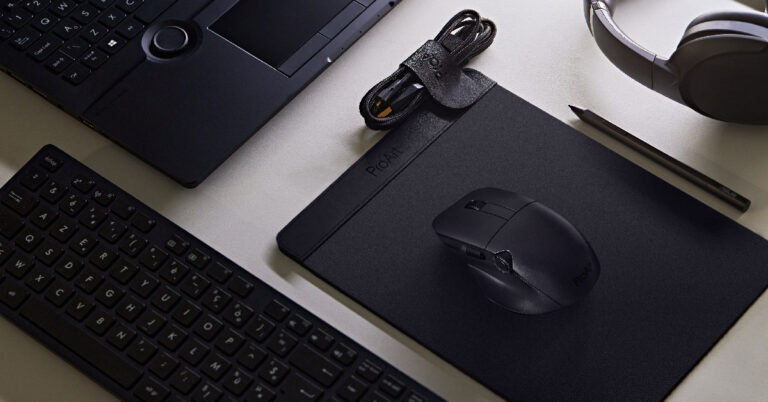
Price: Rs 8,499The new ProArt Mouse MD300 from Asus comes with professional-grade tactile switches for the three buttons. The MD300 can track even on a glass surface with its 4200 DPI sensor. Designed for artists and creators, the ProArt MD300 features Asus dial which helps users make quick and precise settings adjustments within seconds. The mouse also gets a side scroll which works in sync with the programmable dial, bringing an intuitive experience to the user. The independent middle key comes integrated with a gaming-graded switch. The Asus ProArt Mouse MD300 can be connected to a maximum of four devices simultaneously and can smoothly switch between them. On a full charge, the mouse can last for up to 150 days. One minute of fast charging can power the MD300 for up to 8 days.
Asus Vantage Briefcase 15.6
Price: Rs 20,990The new Vantage Briefcase from Asus weighs just 0.48 kg, making it ultra-portable and lightweight. Inside, the Vantage Briefcase gets 1262D ballistic nylon. The exterior features Nappa leather. The fabric meets the ASTM3 standard for reliability and durability, being tear-resistant and water-repellent. The briefcase’s main compartment gets a quick-access zipper for laptops and electronic devices, while the exterior gets multiple pockets for everyday essentials.
EOS 2 Shoulder Bag
Price: Rs 899The EOS 2 Shoulder Bag from Asus is made out of scratch-resistant and water-repellent 600D polyester fabric. The bag is available in two dual-tone colour options – Black/Dark Gray and Oat/Light Gray. EOS 2 Shoulder bag weighs just 0.48 kg and sports precision cut zippers, a soft-touch nylon handle, an adjustable padded strap, and a built-in luggage strap.Read Also:Acer Nitro 5 (2023) laptop launched with latest AMD RYZEN 7000 CPUArnold Su, Business Head, Consumer and Gaming PC, System Business Group, ASUS India said, “ASUS always strives to enhance the customer experience at every step and accessories play a key role in reflecting the users’ lifestyle and aspirations. Given the positive response we have received from our community on this segment in 2022, we are all set to further expand our accessories line-up by introducing productivity-oriented products such as ASUS ProArt Mouse, ASUS Vantage Briefcase 15.6 and EOS 2 Shoulder Bag.”For the latest gadget and tech news, and gadget reviews, follow us on Twitter, Facebook and Instagram. For newest tech & gadget videos subscribe to our YouTube Channel. You can also stay up to date using the Gadget Bridge Android App. You can find the latest car and bike news here.
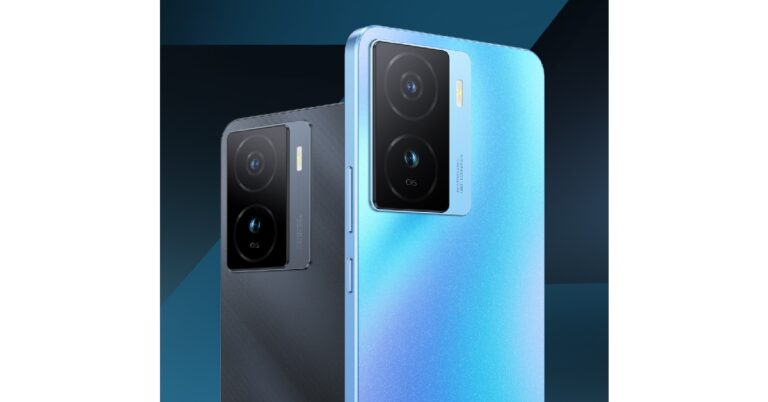
iQOO Z7 5G has launched in India at a starting price of Rs 18,999 for the 6GB + 128GB base variant. The 8GB + 128GB variant fetches Rs 19,999. Sales for the iQOO Z7 are now live, and customers can order the smartphone from Amazon and the iQOO e-store. Customers can also avail bank offers (SBI & HDFC) that will bring the effective price of the two variants down to Rs 17,499 and Rs 18,499. iQOO Z7 is available in two colour options – Norway Blue and Pacific Night.Read Also:iQoo Neo 7 5G Review: Good for almost everything
iQOO Z7 5G: Price, Specs, and more
Here’s what the full price list for iQOO Z7 looks like.
iQOO Z7 Variant
Price
SBI & HDFC Discount (CC/DC/EMI Transactions)
Price after Discount
8GB RAM + 128GB Storage
Rs 18,999
Rs 1,500
Rs 17,499
12GB RAM + 128GB Storage
Rs 19,999
Rs 1,500
Rs 18,499
Powering the iQOO Z7 5G is the MediaTek Dimensity 920 5G SoC which scored more than 485K on the AnTuTu benchmark. The 6.38-inch FHD+ AMOLED display offers a peak brightness of 1300 nits. The refresh rate has been capped at 90Hz and the touch sampling rate at 360Hz. In terms of protection, the iQOO Z7 gets Schott Xensation UP glass protection and an IP54 rating. The smartphone sports a 64MP primary lens (GW3 sensor) with Optical Image Stabilisation – a first for the segment. A 2MP depth sensor has also been made available on the rear camera module. The primary camera is capable of shooting 4K videos at 30fps. The Z7 also offers Super Night Mode for low-light photography. Up front, the smartphone gets a 16MP selfie camera in a waterdrop notch. The camera experience is further enhanced by features like Dual View Video, Double Exposure, and Bokeh Flare Portrait.iQOO Z7 also gets the company’s gaming toolbar which allows users to access features like Motion Control in Ultra Game Mode. With Motion Control, users can perform in-game action with up to four-finger touches. This is made possible by an enhanced 1200Hz touch response rate that helps in achieving a 10x touch recognition rate. The Z7 gets a 4,500mAh battery along with 44W fast charging support. The smartphone can be powered from 1-50% in 25 minutes. Users can also expand Z7’s storage capacity to 1TB. Extended RAM 3.0 boosts RAM capacity to 16GB, allowing for a lag-free experience with up to 27 apps running in the background (as claimed by iQOO).Commenting on the launch, Nipun Marya, Chief Executive Officer – iQOO, said, “The response we have witnessed for the previously launched Z series products was truly overwhelming. Our consumer’s trust in our product helps us bring new path breaking performance-oriented smartphones that not just satisfies the needs of our consumers but are segment leading in multiple aspects.At iQOO, we always strive to provide the best technological innovation to our consumers in India. After launching two powerful devices this year, we are here with yet another power packed device – iQOO Z7. We are confident that this device will prove to be the flag bearer of #FullyLoaded performance in the segment featuring segment’s first and best MediaTek Dimensity 920 processor, 64MP OIS camera and much more”.Read Also:Samsung Galaxy F14 5G confirmed to launch in India on March 24
If your smartphone contains all your personal information like documents of identity, banking details, and medical history, then you should make sure that they’re protected by an added layer of security. Your phone’s lock screen is easy to bypass, so incase your device gets stolen you would want all your personal information to stay hidden from malicious entities. In this article, we bring you the top 7 ways to hide apps, images, files, and folders on any Android device.Read Also:iQoo Neo 7 5G Review: Good for almost everything
How to hide apps on a Samsung device
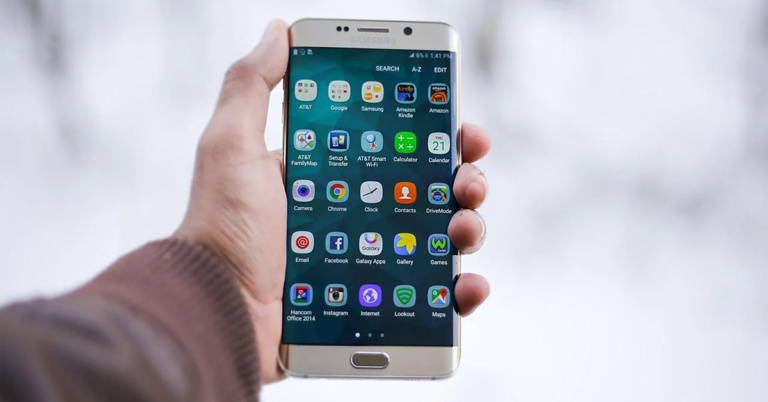
Step 1: Go to Settings and select Home Screen.Step 2: Scroll down and select ‘Hide Apps’.Step 3: Select the apps you want to hide. Tap on ‘Done’ once you’re finished.Step 4: Tap the red minus icon on an app if you want to unhide it.You can also tap the ellipses (three dots) on the app drawer and select ‘Settings’ to access Home Screen settings.
How to hide apps on a OnePlus device
Step 1: Go to Settings and select Privacy. Step 2: Swipe to the Privacy tab and tap on ‘Hide Apps’.Step 3: Enter your privacy password.Step 4: To hide an app, turn on the toggle bar next to it. Step 5: Set up a dial code to access the app.Step 6: Once the app is hidden, launch the Phone app and type the dial code to access it.
Hide apps using the Nova Launcher
Step 1: Download and install Nova Launcher on your device from Google Play Store.Step 2: Launch Nova Launcher and get Nova Launcher Prime.Step 3: Open Nova Launcher settings and select ‘App Drawer’.Step 4: Scroll down to Apps and select ‘Hide apps’.Step 5: Tap the apps you want to hide and save your changes.
Hide an app by disabling it
Certain system and bloatware apps cannot be removed from your Android smartphone. At best you can disable them, so they don’t show up in the app drawer. Here’s how.Step 1: Go to Settings and select Apps.Step 2: Select the app you want to disable.Step 3: Select ‘Disable’ from the bottom menu.The app will be disabled on your device and you won’t see it on the app drawer anymore.
Hide a file in the Safe Folder
Google’s Files app offers a ‘Safe Folder’ within which you can lock your important files and documents. Items inside the Safe Folder are not visible to anyone unless they provide the password. Here’s how you can hide a file in the Safe Folder.Step 1: Launch the Files app by Google on your smartphone. If you do not have this app on your phone, download it from Google Play Store.Step 2: In the ‘Browse’ tab, select ‘Safe folder’.Step 3: Choose a lock for your files. You can either add a pin or a pattern lock.Step 4: Go to the file or document you want to secure and tap the ellipses (three dots) next to it.Step 5: Select ‘Move to safe folder’.Step 6: Enter the pin or pattern you just created.Your file will be moved to the safe folder and can only be accessed when you enter the pin or pattern. You will need to move the file out of the secure folder to open it.
Hide images on a Samsung device
Step 1: Open the Gallery app and tap the ellipses at the top right corner of the screen.Step 2: Select ‘Hide or unhide albums’.Step 3: Turn the toggle bar on next to the folder you want to hide.The image folder will not be visible in the gallery anymore.
Hide an image, file, or document on a OnePlus device
Step 1: Go to Settings and select Privacy. Step 2: Swipe to the Privacy tab and tap on ‘Private Safe’.Step 3: To hide an image, tap on ‘Images and videos’. Similarly, if you want to hide a file, tap on ‘Documents’ or ‘Other Files’.Step 4: Tap the plus icon to add files to the Private Safe.Step 5: Select the file and tap on ‘Set as private’.The images and files will be made private and can’t be viewed until they have been made public from the Private Safe in Settings.Read Also:Is mobile gaming actually worth it?
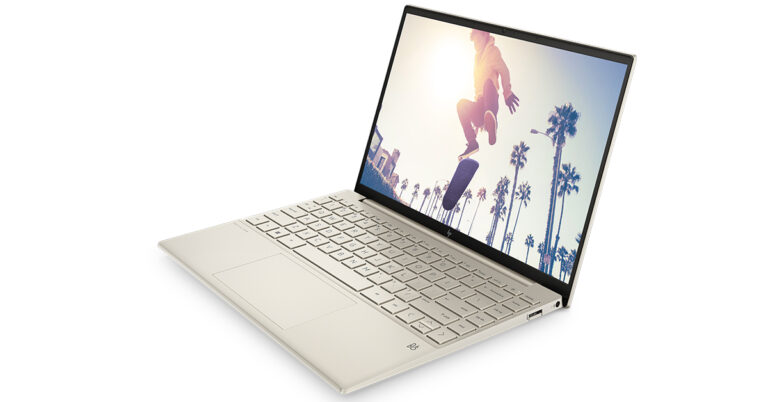
Today, HP announced the arrival of its newest HP Pavilion Aero 13 notebooks in India, which are equipped with Radeon Graphics and an AMD Ryzen 7 processor for a compelling performance. The product is designed for Gen Z and Millennial users, allowing them to work and learn effectively whenever and wherever they choose.
“PCs are increasingly becoming an important aspect of people’s lives in the hybrid environment. We are proud to introduce the new HP Pavilion Aero 13, which is designed to meet the increasing demand for versatile and powerful computing solutions in today’s world. It offers exceptional performance and mobility, allowing users to stay productive and entertained while on-the-go. With the HP Pavilion Aero 13, users are getting a premium and beautifully crafted laptop that empowers them to work and play seamlessly.” said Vickram Bedi, Senior Director – Personal Systems, HP India.
HP Pavilion Aero 13 Key Highlights
Designed with an AMD RyzenTM 7000 Series CPU that allows for seamless multitasking
400 nits of brightness; Flicker-Free Screen; Work all day and play all night
HP’s lightest Pavilion laptop, weighing under 1 kilogramme
Consumers today look for devices that can manage several tasks and move between learning and working quickly and easily. These gadgets must be both lightweight and fashionable in order to accommodate the needs of the younger generation and the hybrid workstyle. With Wi-Fi 6 connectivity and a battery life of up to 10.5 hours on this notebook, the brand-new HP Pavilion Aero 13 is perfect for working, surfing, and streaming from any location.
Read Also: HP introduces two new Pavilion laptops: Specs, Price, and more
It has 16:10 aspect ratio and 400 nits of brightness make for an engaging viewing experience for the users. The Pavilion Aero 13 weighs only 970 grammes, making it HP’s lightest Pavilion laptop and making it portable for Gen Z and Millennials. Pale Rose Gold, Warm Gold, and Natural Silver are the three distinct colours that perfectly match their style and way of life.
HP Pavilion Aero 13 Tech Specs:
Display
HP’s first Pavilion laptop with a 16:10 Aspect Ratio
400 nits of brightness to enable seamless browsing
Built with a Flicker-free screen
4-sided narrow bezel display to prevent blocking of view
2.5k resolution for sharp images and text
400 nits of brightness to enable browsing in the sunlight
Wider colour palette with 100% sRGB
Insides
AMD Ryzen 7000 series Processor with Radeon Graphics for smooth performance
Reliable and fast connectivity with Wi-Fi6
10.5 hours of battery life for uninterrupted learning and work


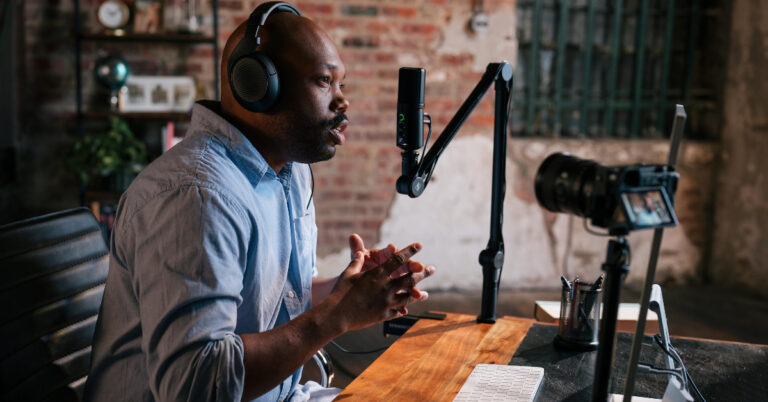
 The Profile USB Microphone features a clean, minimal design. At the front, you get four controls – a soft-touch no-noise mute button, a gain control for microphone volume, a mix control to set a balance between the input voice and computer/tablet’s audio, and finally a volume control for headphone monitoring. The 3.5mm socket for the headphones is placed at the back of the Profile mic.
 The LED ring lights around the controls denote the working status of the microphone. A green light around the gain control means that the microphone is functional. When this light turns yellow, it means the microphone is clipping and its volume needs to be reduced. Muting the microphone lights up the red LED around the mute button and the gain control.
The Sennheiser Profile USB Microphone comes with ⅜” and ⅝” connectors at the bottom which allow the mic to be used with any third-party table stand. The Profile Streaming Set (available at Rs 15,999) comes with a 3-point self-locking boom arm.
The LED ring lights around the controls denote the working status of the microphone. A green light around the gain control means that the microphone is functional. When this light turns yellow, it means the microphone is clipping and its volume needs to be reduced. Muting the microphone lights up the red LED around the mute button and the gain control.
The Sennheiser Profile USB Microphone comes with ⅜” and ⅝” connectors at the bottom which allow the mic to be used with any third-party table stand. The Profile Streaming Set (available at Rs 15,999) comes with a 3-point self-locking boom arm.
 Sharing his excitement around the launch of the Profile USB Microphone, Mr Vipin Pungalia, Country Manager and Director- Sales Pro Audio at Sennheiser India said, “At Sennheiser, we understand the evolving needs of content creators in the digital age. Our Profile USB Microphones are a testament to our commitment to providing reliable and high-quality audio equipment to podcasters, gamers, and streamers. We have invested in the latest technology and materials to deliver exceptional sound quality, durability, and design, ensuring that our users stand out with ease.”
Read Also: OnePlus 11R Review: Comeback season for OnePlus
As mentioned earlier, the Sennheiser Profile USB Microphone is available exclusively on Amazon. With its simple design and ease of accessibility, the Profile Microphone will appeal to streamers, content creators, podcasters, and gamers.
For the latest gadget and tech news, and gadget reviews, follow us on Twitter, Facebook and Instagram. For newest tech & gadget videos subscribe to our YouTube Channel. You can also stay up to date using the Gadget Bridge Android App. You can find the latest car and bike news here.
Sharing his excitement around the launch of the Profile USB Microphone, Mr Vipin Pungalia, Country Manager and Director- Sales Pro Audio at Sennheiser India said, “At Sennheiser, we understand the evolving needs of content creators in the digital age. Our Profile USB Microphones are a testament to our commitment to providing reliable and high-quality audio equipment to podcasters, gamers, and streamers. We have invested in the latest technology and materials to deliver exceptional sound quality, durability, and design, ensuring that our users stand out with ease.”
Read Also: OnePlus 11R Review: Comeback season for OnePlus
As mentioned earlier, the Sennheiser Profile USB Microphone is available exclusively on Amazon. With its simple design and ease of accessibility, the Profile Microphone will appeal to streamers, content creators, podcasters, and gamers.
For the latest gadget and tech news, and gadget reviews, follow us on Twitter, Facebook and Instagram. For newest tech & gadget videos subscribe to our YouTube Channel. You can also stay up to date using the Gadget Bridge Android App. You can find the latest car and bike news here. 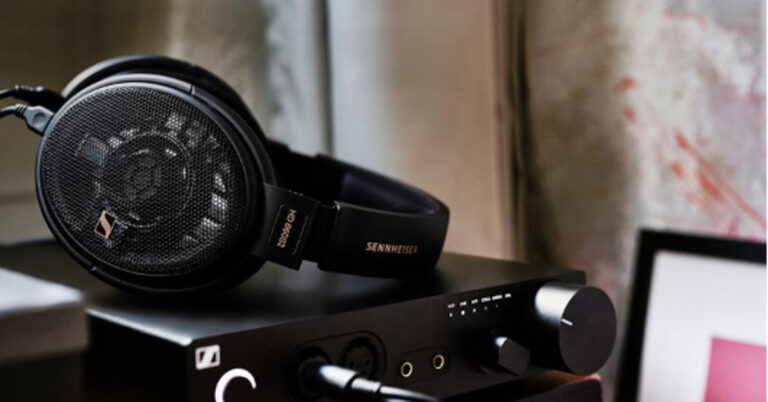





 Step 2: Open the PDF File
Click the “Open File” button and select the file in which you want to add shape. After selecting, press the “Open” button to import the file in UPDF. Now, tap the “Comment” icon at the left tool panel.
Step 2: Open the PDF File
Click the “Open File” button and select the file in which you want to add shape. After selecting, press the “Open” button to import the file in UPDF. Now, tap the “Comment” icon at the left tool panel. Step 3: Add Shape in the PDF File
Choose the “Shape” icon at the top navigation bar and select the shape you want to add. You can also adjust the shape’s border colour, fill colour, opacity, and border thickness by using the options provided underneath the shapes. Afterwards, insert the shape by clicking on the document. Go to the “File” menu and press the “Save” option to save changes.
Step 3: Add Shape in the PDF File
Choose the “Shape” icon at the top navigation bar and select the shape you want to add. You can also adjust the shape’s border colour, fill colour, opacity, and border thickness by using the options provided underneath the shapes. Afterwards, insert the shape by clicking on the document. Go to the “File” menu and press the “Save” option to save changes.
 Step 2: Add Shape to the PDF
After choosing the shape, take the cursor to the place where you want to add it and click to paste the shape there. Use the border handles to change the size and position of the shape.
Step 2: Add Shape to the PDF
After choosing the shape, take the cursor to the place where you want to add it and click to paste the shape there. Use the border handles to change the size and position of the shape.
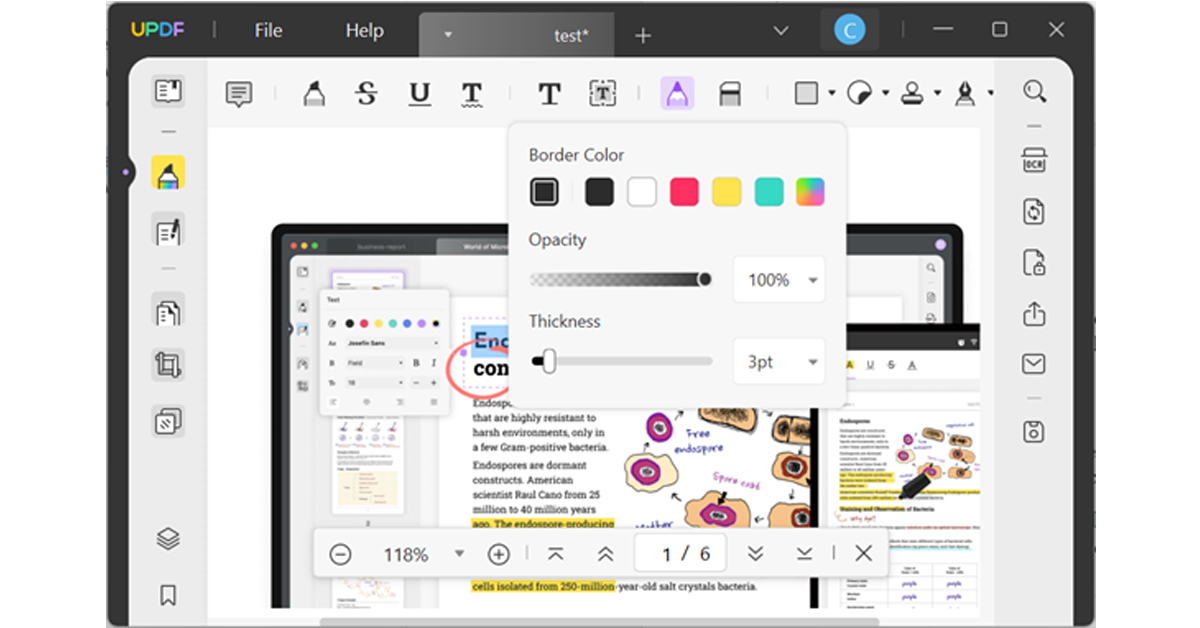 Step 2: Make Changes in Shape
After drawing the shape, you can use border handles to move its position and double-click on it to change its colour, size, and opacity. If you want to remove any portion of the shape, select the “Eraser” tool and rub the eraser over that part.
Step 2: Make Changes in Shape
After drawing the shape, you can use border handles to move its position and double-click on it to change its colour, size, and opacity. If you want to remove any portion of the shape, select the “Eraser” tool and rub the eraser over that part.







 Step 2:
 Step 3:
 Step 4:
 Step 2:
 Step 3:
 Step 5:
 Step 1:
 Step 2:
 Step 3:
 Step 3:
 Step 6:
 Step 2:
 Step 3:
 Step 3: